#🆘│community-support
1 messages · Page 245 of 1
 iron nightBOT
Gave +1 Rep to @restive condor (current: #1 - 2836)
 cunning axle
Can someone help me create a ticket so other people can open it and I can repaint it?
 stark runeBOT
1. Invite Ticket Tool to your server
First you will want to invite the bot to your server. Once the bot is in your server, you can manage your server in the dashboard.

2. Create a Panel
To create a panel we are going to need to head over to the panel configs on the dashboard.
Once at the dashboard we will need to click Create Panel.
Enter a panel name (Fill in any optional settings you want).
Click Create Panel and your ready to get started with configuring your panel.
An example of a creating a panel is shown below.

3. Send the Panel to a Channel
Once you've created a panel on the dashboard you will need to send it to a channel using send on the dashboard.
Select the channel you want your panel to be created in and click send.
For other questions checkout $help faq.
An example of a sending a panel is shown below.
Having a Problem Sending the Panel?
Do $debug in a channel with Ticket Tool and make sure it has all the necessary Discord permissions.

 restive condor
cunning axle
Can someone help me create a ticket so other people can open it and I can repain...
restive condor
cunning axle
Can someone help me create a ticket so other people can open it and I can repain...
Hey there! Here's a setup guide for you ^
cunning axle
Thank you very much
 young spruce
anyone know how i can make it .close instead of /?
 harsh epoch
young spruce
anyone know how i can make it .close instead of /?
harsh epoch
young spruce
anyone know how i can make it .close instead of /?
Hey!
Server configs -> Command Prefix
 drowsy epoch
Oi fui banido permanente sem motivos e foi por isso ai do print o pfv me desbane

 humble sequoiaBOT

Você está no lugar errado
Fornecemos suporte para Ticket Tool Discord bot e não podemos ajudá-lo com qualquer problema que você tenha.
- Não sabemos qual equipe de suporte você deve entrar em contato para resolver esse problema e, infelizmente, não poderemos informar com precisão.
Se você não tiver mais dúvidas sobre nossa ferramenta de ticket de bot, feche este ticket
 foggy sparrow
@drowsy epoch ⬆️
 old mortar
I try to set up the ticket bot, but it keeps saying "The application did not respond." It's been doing that for a few days now.
 lilac junco
old mortar
I try to set up the ticket bot, but it keeps saying "The application did not res...
lilac junco
old mortar
I try to set up the ticket bot, but it keeps saying "The application did not res...
Please run /debug on your server.
old mortar
lilac junco
Please run ``/debug`` on your server.
Says the same thing
humble sequoiaBOT
When first invited to your server, Ticket Tool should have the permissions shown below in order to ensure an appropriate functioning:
When customizing permissions for the different ticket participants, you must make sure Ticket Tool has the permissions you want it to grant to others, you can learn more about this here.
Missing Permissions
This error is a direct outcome of the bot missing permissions as depicted above. When troubleshooting this error we suggest you go through these steps:
- Use the </debug:1029783024264564765> command to check if the bot is lacking core role or channel permissions.
- Compare the category/channel's overrides and contrast them with the bot's roles to identify any permission denial that is breaking the functioning
- If you can't still figure it out, let our <@&540295656720302081> know so they can guide you through
Additional Resources
- If you are a server administrator and would like to understand more how to set up your server's permissions, we suggest checking the Discord Support Knowledge Base
- If you are a bot developer and are interested in the internal permission hierarchy we suggest you this part of the Discord Developer Docs
Important Note
- Giving Administrator permissions is NOT required and we do NOT encourage you to do unless you are trying to troubleshoot your permissions setup.
 lilac junco
Give the bots these permissions.
old mortar
lilac junco
Give the bots these permissions.
Does same thing
lilac junco
old mortar
Does same thing
Bot Permissions ឵ ឵឵ ឵ ឵឵ ឵ ឵឵ ឵ ឵឵
- Read Channels
- Send Messages
- Embed Links
- Attach Files
- Manage Roles
- Manage Channels
- Manage Messages
- Read History
Channel Permissions ឵ ឵឵ ឵ ឵឵ ឵ ឵឵ ឵ ឵឵
- Read Channels
- Send Messages
- Embed Links
- Attach Files
- Manage Roles
- Manage Channels
- Manage Messages
- Read History
Give it all the permissions listed above.
 vague isle
How do i fix this issue? Normal members can't open the ticket but moderator or higher can
 vague isle
a
vague isle
 steady ether
You might have done
Support team only <:Switch_enabled:1041734627330625586>
steady ether
You might have done
Support team only <:Switch_enabled:1041734627330625586>
Oh yeah it work now thanks silly me 💀💔
iron nightBOT
Gave +1 Rep to @steady ether (current: #58 - 33)
 simple canopy
Good morning
lilac junco
simple canopy
Good morning
Please refrain from chatting here unless you're providing support.
steady ether
vague isle
Oh yeah it work now thanks silly me 💀💔
No problem
Have a good day 
Thanks for choosing ticket tool
iron nightBOT
Gave +1 Rep to @vague isle (current: #435 - 1)
vague isle
steady ether
No problem
Have a good day <:PabloTiphat:983791053842837624>
Thanks for choosi...
Also one more thing how do i make it ping staff role once ticket got created
lilac junco
vague isle
Also one more thing how do i make it ping staff role once ticket got created
(sorry for interrupting cool)
How to automatically ping my support team on a ticket?
1. Open your Panel Configs tab in your server's dashboard
2. Select the panel you want to ping your support team on
3. Open the Ticket options menu
4. Click on Edit Ticket Message
5. In the Message Content use one of the role mention syntax ({@Role Name}/{Role ID})
6. Save changes
Note: For this to work properly, Ticket Tool requires the Mention Everyone permission. Or the role must have the Allow anyone to @mention this role setting enabled 
vague isle
lilac junco
(sorry for interrupting cool)
How to automatically ping my support team on a ti...
Thanks
iron nightBOT
Gave +1 Rep to @lilac junco (current: #78 - 21)
lilac junco
vague isle
Thanks
 lilac junco
 sour laurel
Make sure the bot has these permissions
Bot Permissions ឵ ឵឵ ឵ ឵឵ ឵ ឵឵ ឵ ឵឵
- Read Channels
- Send Messages
- Embed Links
- Attach Files
- Manage Roles
- Manage Channels
- Manage Messages
- Read History
Channel Permissions ឵ ឵឵ ឵ ឵឵ ឵ ឵឵ ឵ ឵឵
- Read Channels
- Send Messages
- Embed Links
- Attach Files
- Manage Roles
- Manage Channels
- Manage Messages
- Read History
sour laurel
Thank you @ Mrburgerbut I got another question how do I get 2 of these
 lilac junco
sour laurel
Thank you @ Mrburgerbut I got another question how do I get 2 of these
lilac junco
sour laurel
Thank you @ Mrburgerbut I got another question how do I get 2 of these
Do you want to do this?
 humble sequoiaBOT
For more convenient use of multipanels, you can now combine panels on the dashboard. This will allow you to directly send the multipanel from the dashboard or via the $panel ID command.
Where can I find this?
You can find this setting on the Dashboard -> Panel Configs -> Panel -> Attached Panels
Note: if you're attaching all the panels to a panel called English, don't include English in the attached panel's box (If you do this, it will create a duplicate)
This will put all buttons from all of your panels on one message. The message is the panel message from the panel you're combining these panels in.
 sour laurel
Okay thanks @lilac junco
lilac junco
sour laurel
Okay thanks <@1086519848999329903>
 hasty igloo
hello, is there anyway for when people create a ticket, ticket tool will send a picture, sort of like this:
To prove who you say you are take a screenshot of your user:
Example Below: (Here would be the screenshot)
And the person should follow the example listed above
 silent lintel
 lilac junco
hasty igloo
hello, is there anyway for when people create a ticket, ticket tool will send a ...
lilac junco
hasty igloo
hello, is there anyway for when people create a ticket, ticket tool will send a ...
Hello! I suggest you to #🎫│make-a-ticket since you're getting no response here.
humble sequoiaBOT
@silent lintel
⚠️ You're in the wrong place
We provide support for Ticket Tool Discord bot and cannot help you with whatever issue you have.
- We don't know which Support Team you should contact to get this issue resolved, and unfortunately we won't be able to accurately tell you.
If you don't have any further questions regarding our bot Ticket Tool, please close this ticket
hasty igloo
lilac junco
Hello! I suggest you to <#571706435449257997> since you're getting no response h...
what’s up, you think that’s a good idea? do they also help with stuff like this in tickets?
lilac junco
hasty igloo
what’s up, you think that’s a good idea? do they also help with stuff like this ...
A support team member will answer your question.
I'm not sure of the answer so I prefer not to answer it.
hasty igloo
lilac junco
A support team member will answer your question.
got you, i’ll do that now then, thanks
iron nightBOT
Gave +1 Rep to @lilac junco (current: #76 - 22)
lilac junco
hasty igloo
got you, i’ll do that now then, thanks
hasty igloo
lilac junco
I'm not sure of the answer so I prefer not to answer it.
nah, you’re fine, don’t worry
 tall shoal
 formal laurel
Hii
Yesterday I open 1 ticket now I am trying to open a ticket but not opening
Showing that u reached the limit by creating just 1 ticket
How to open 2 ticket
lilac junco
formal laurel
Showing that u reached the limit by creating just 1 ticket
Did you close your current ticket?
formal laurel
How to close it
lilac junco
formal laurel
How to close it
Close button

 lone token
How to set-up anyone pls tell
humble sequoiaBOT
First you will want to invite the bot to your server. Once the bot is in your server, you can manage your server in the dashboard.
To create a panel we are going to need to head over to the Panel Configs Tab on the Dashboard.
Once at the dashboard we will need to click Create Panel.
Enter a panel name (Fill in any optional settings you want).
Click Create Panel and you are ready to get started with configuring your panel.
An example of a creating a panel is shown below.
Once the panel has been created, use the blue Send button and select the channel you want the panel to be sent to.
The Panel wasn't send
Use the </debug:1029783024264564765> command to diagnose possible permission issues with the bot.
lilac junco
@lone token refer to the embed above.
lilac junco
lone token
?
To setup ticket tool, refer to the embed I sent above.
lilac junco
humble sequoia
This
lone token
lilac junco
This
Thx
iron nightBOT
Gave +1 Rep to @lilac junco (current: #74 - 23)
lilac junco
lone token
Thx
You're welcome!
 crystal flame
how can i make the add command be limited to the users and not roles. like to avoid adding groups of people on their shared roles?
 lone token
lilac junco
You're welcome! <:PabloTiphat:983791053842837624>
lone token
lilac junco
You're welcome! <:PabloTiphat:983791053842837624>
Can you tell me if I want to add multiple ticket option in 1 msg how can I because it's showing different
lilac junco
crystal flame
how can i make the add command be limited to the users and not roles. like to av...
Hello! I am unsure about the answer, please #🎫│make-a-ticket and a support team member will answer you!
lilac junco
lone token
Can you tell me if I want to add multiple ticket option in 1 msg how can I becau...
Like this?
 humble sequoiaBOT
For more convenient use of multipanels, you can now combine panels on the dashboard. This will allow you to directly send the multipanel from the dashboard or via the $panel ID command.
Where can I find this?
You can find this setting on the Dashboard -> Panel Configs -> Panel -> Attached Panels
Note: if you're attaching all the panels to a panel called English, don't include English in the attached panel's box (If you do this, it will create a duplicate)
This will put all buttons from all of your panels on one message. The message is the panel message from the panel you're combining these panels in.
lone token
lilac junco
Like this?
Yes
lilac junco
lone token
Yes
Refer to the embed above.
lone token
lilac junco
Refer to the embed above.
?
lilac junco
lone token
How to get panel it
One second
lilac junco
lone token
?
The numbers before the panel's name is the Panel's ID. For example, the panel ID for Support Tickets is 1
 lone token
lilac junco
The numbers before the panel's name is the Panel's ID. For example, the panel ID...
lone token
lilac junco
The numbers before the panel's name is the Panel's ID. For example, the panel ID...
Thx a lot
iron nightBOT
Gave +1 Rep to @lilac junco (current: #74 - 24)
lilac junco
lone token
Thx a lot
You're welcome!
simple canopy
I need some help here
humble sequoiaBOT
Hello, we would love to help you, but if you don't tell us what you need help with we can't help you :(
 stuck karma
Hi there, having a problem where the server isnt popping up on the dashboard so im struggling to create pannels for my server
lilac junco
stuck karma
Hi there, having a problem where the server isnt popping up on the dashboard so ...
Can you run /permissionlevel in your server and tell me what level if says you are.
 lilac junco
stuck karma
wait i think I fixed it I just had to sync my servers on the dashboard
lilac junco
stuck karma
wait i think I fixed it I just had to sync my servers on the dashboard
Great!
stuck karma
thank you
 mint lynx
I can't configure "edit raw", pls help

 austere forge
mint lynx
I can't configure "edit raw", pls help
austere forge
mint lynx
I can't configure "edit raw", pls help
You need a premium subscription to use this option, you can always add embed and change the text from there
 gilded tinsel
Anyone knows why the escalate command is not working? Trying make the command set it from one support team to the appeals team but the support staff is not able to run the command even after adding the support roles manualy to the allow option and turning off support only option (since even if they were in the support team, they were not able to run it.)
Any one knows something? (Will respond in a few hours.)
Note: I'm talking about the advisor, Chairman and Vice-Chairman role.
steady ether
Hey
Hey I will guide you
Also enable support team so normal people doesn't do /escalate
Can u try resending the panel
gilded tinsel
steady ether
Can u try resending the panel
My 3am brain did not saw that they were not able to run commands.🥲
Rip 5 hours of sleap.
Anyways, thank you for your help!
steady ether
Np
 glass geode
is there anyway someone can help me create a ticket in the roblox Tower Defense Simulator Dc Server?
cuz i dunno if i created a ticket or not
lilac junco
glass geode
is there anyway someone can help me create a ticket in the roblox Tower Defense ...
We cannot help you with that unfortunately.
glass geode
oh alright then
 pastel escarp
where is ticket
foggy sparrow
pastel escarp
where is ticket
What do you need help with?
pastel escarp
foggy sparrow
What do you need help with?
whats the black market sale ting
 oblique ravine
How can't i make a ticket bot invite i mean like click to create a ticket


 restive condor
oblique ravine
How can't i make a ticket bot invite i mean like click to create a ticket
restive condor
oblique ravine
How can't i make a ticket bot invite i mean like click to create a ticket
Hey there! Please try the steps below
humble sequoiaBOT
Don't see your server in the dashboard?
Try using the Sync Servers button on your top center of the Dashboard page
If this doesn't work
You should relog from the dashboard, you can do this by clicking here to log out immediately, and then log back in
Note:
You need one of these 3 things to access the dashboard.
1. Server Owner (Level: 6)
2. Server Administrator (Level: 4)
3. Dashboard Role (Level: 2)
:warning: You can check your level using the </permissionlevel:1029797400174399542> command on your Discord Server
If the bot's response is:
- @User is permission level: 0 (User)
You don't have any of the 3 levels required to access the server's dashboard
 iron nightBOT
Gave +1 Rep to @restive condor (current: #1 - 2838)
 latent dawn
pastel escarp
whats the black market sale ting
latent dawn
pastel escarp
whats the black market sale ting
If you mean the Black Friday. Please, go to #📣│bot-news message for more information.
 torn vault
how can i make the members can't close the ticket?
austere forge
torn vault
how can i make the members can't close the ticket?
Dashboard > Panel Configs > Buttons > Close Ticket Button >  Support Team Only
 eager vapor
How can I do this?
 humble sequoiaBOT
The Drop-down menu or Select Menu replaces the buttons on your panel message and uses a drop-down menu with all of your panels. To set this up, go to your Panel Configs and select your main Panel.
<:Numbericons1:1018864164032225340> Enable Select Style
First you enable Select Style. Then you add an item in the Dropdown Editor. Now you can start editing your dropdown!
<:Numbericons2:1018864168041971712> Dropdown Editor
Each line in the dropdown editor represents a line in the drop down menu on discord. You can add more "Items", by clicking on 

First you select a panel. That's the panel this option will open a ticket for.  DONT select the same panel twice. Each option should have a different Panel
After that, you can put a Display. This is the title of this option and will appear in the drop down menu. The *Description can be set right after that, which will be below the title in grey.
Additionally you can select an emoji, that will be shown in front of each option. You can either manually input the ID of an emoji or select it in the selector.
Common Issues ⚠️
- Panel doesn't send? Make sure you have a valid emoji selected
- Option doesn't show up? Check if two options have the same panel in the DropDown Editor

$dropdown
latent dawn
eager vapor
How can I do this?
Refer to the embded above ^^
 amber cedar
Where is the ticket tool premium bot link?
humble sequoiaBOT
The first thing you will need to do is invite the premium bot, an invite can be found here
Once the bot is in your server we will head to the dashboard and manage your server. When you are managing your server, you want to head into "Server Configs" then click the drop down menu under "Select the bot you would like to use on this server" then click "Ticket Tool#6207" and then save.

 scenic forum
@amber cedar refer to the embed above
amber cedar
Everyday my 35k member server gets rate limited due to 2k channnels per day, how can I fix this?
I have premium aswell
humble sequoiaBOT
If your server has a high daily ticket flow, i.e., more than 2,000 tickets per day, or your server has many channels already, storage mode may be of great help to you. When enabled, storage mode will purge tickets you mark to delete and will place them into a special storage category, waiting to be reused as a new ticket channel!
- Note: Any channels inside the selected category will be counted as a channel to be reused.
To enable this feature you can visit the Server Configs in your Dashboard!
scenic forum
@amber cedar refer to the embed above
 scenic forum
The bot is telling you the problem
 sick bridge
I what should I do
scenic forum
Give it the permission it tells you that its missing
 amber cedar
scenic forum
<@1187949630223294577> refer to the embed above
amber cedar
scenic forum
<@1187949630223294577> refer to the embed above
So when a ticket is closed, instead it deleting the channel it will go to a special category and be used as a new ticket?
I needed this so bad.
scenic forum
amber cedar
So when a ticket is closed, instead it deleting the channel it will go to a spec...
correct
scenic forum
sick bridge
Can you use /debug
sick bridge

If Ticket Tool support requested this debug give them this link:
https://discordapp.com/channels/509192800865353738/662692902245498910/1445543653618745398
scenic forum
sick bridge
what happens if you press the close button at the top
sick bridge
Tottalynothing
amber cedar
But @scenic forum there's a bad issue for me aswell, 45/45 tickets created in a category.
scenic forum
amber cedar
But <@186523978729259009> there's a bad issue for me aswell, 45/45 tickets creat...
Then create another category
amber cedar
scenic forum
Then create another category
And it will auto go there?
sick bridge
No
scenic forum
amber cedar
And it will auto go there?
Once the first one is full it will use the next one and so on
You need to select the categories in the server config -> Storage mode
sick bridge
Hey what about me
scenic forum
Can you please be patient
scenic forum
sick bridge
Hey what about me
Can you use /debug inside the ticket channel
sick bridge
scenic forum
sick bridge
https://discordapp.com/channels/509192800865353738/662692902245498910/1445543653...
That was not used inside the ticket channel
That was used inside General
scenic forum
sick bridge
Use it in the same channel as this screenshot
sick bridge
Says app didn’t respond
scenic forum
sick bridge
Says app didn’t respond
The bot is missing the View Channel permission in both your tickets and ticket-0001 channel
sick bridge
Oh ok
pastel escarp
i need help
how can i make so when i click on one off them they need to type a answer orquestion etc
 harsh epoch
pastel escarp
how can i make so when i click on one off them they need to type a answer orques...
harsh epoch
pastel escarp
how can i make so when i click on one off them they need to type a answer orques...
Hey there! Do you mean something like this?
 pastel escarp
harsh epoch
Hey there! Do you mean something like this?
pastel escarp
harsh epoch
Hey there! Do you mean something like this?
hey i just found out how but thanks for the answer if i need more help ill ask
iron nightBOT
Gave +1 Rep to @harsh epoch (current: #31 - 152)
harsh epoch
pastel escarp
hey i just found out how but thanks for the answer if i need more help ill ask
Ah, alright!
 sharp monolith
How do I make it to where it shows what queue your tickets in
harsh epoch
sharp monolith
How do I make it to where it shows what queue your tickets in
What do you mean by "queue"?
 harsh epoch
sharp monolith
harsh epoch
sharp monolith
That's making use of yagpdp, which is another bot. I wouldn't know how they've made it work like that, sorry
sharp monolith
Oh okay thank you I thought u could do it with tiket tool aswell
harsh epoch
sharp monolith
Oh okay thank you I thought u could do it with tiket tool aswell
not directly through ticket tool unfortunately
sharp monolith
harsh epoch
not directly through ticket tool unfortunately
That sucks thank you for your help
iron nightBOT
Gave +1 Rep to @harsh epoch (current: #31 - 153)
pastel escarp
@harsh epoch can we only have 3?
harsh epoch
pastel escarp
<@1124651666650693774> can we only have 3?
You can have up to 5 questions per form
harsh epoch
pastel escarp
what about dropdown
I believe the limit is 25 if i remember
pastel escarp
harsh epoch
I believe the limit is 25 if i remember
i cant get more then 3
harsh epoch
pastel escarp
i cant get more then 3
Could you show me what your dropdown page looks like?
Dashboard -> Dropdown Style
harsh epoch
No worries!
pastel escarp
thanks @harsh epoch
iron nightBOT
Gave +1 Rep to @harsh epoch (current: #31 - 154)
 warm plinth
Shame we didn't see this as there was no ping with the other code (the 25) or this code.
scenic forum
warm plinth
Shame we didn't see this as there was no ping with the other code (the `25`) or ...
There was an @ everyone ping in #📣│bot-news
warm plinth
And the code was broken then. (See the conversation in premium chat)
Apparently it was 25 not 2025 but noone pinged it or edited the ping in bot news. Then when it got fixed no one pinged either and all the talk was about issues with non-dollar currencies.
scenic forum
warm plinth
And the code was broken then. (See the conversation in premium chat)
Apparently...
The code was broken for the first hour or two until they resolved the issue
warm plinth
And we tried it right when it pinged and everyone complained in premium.... I just happened to look here and saw the non-pinged correction.
scenic forum
warm plinth
And we tried it right when it pinged and everyone complained in premium.... I ju...
Feel free to create a billing ticket at #🎫│make-a-ticket
 scenic forum
pastel escarp
how can i change color on this
scenic forum
pastel escarp
how can i change color on this
That embed cannot be edited
If youd like to edit it youd need to edit your own embed and add the answers variables
Refer to the bottom of the embed below
humble sequoiaBOT
A Discord Form lets the user answer individual questions in a pop-up Form, which then displays the answers in the ticket message. This can save time if you already know what you want to ask the user.
Setup Forms
Forms can be enabled under Panel Settings > Form Options > Edit Forms Options. In the new pop-up window, you can now enable and edit your own Form.
Form Options
You can add up to 5 questions in the Discord form. This is a Discord limitation. Each question can have a placeholder in the input field, a minimum and maximum input, multi-line, and also the option to have the answer required.
Options
Question Title ➞ Your Question goes here
Question Placeholder ➞ The placeholder text in the input field
Required ➞ If enabled, the user has to answer this question, to submit the form
Multi-Line Input ➞ Allows the user to input multiple lines
Minimum and Maximum Input ➞ Set a minimum and maximum input value for the user
Displaying the Answer
To display the answers from the user, you need to enable Auto display form results on the ticket message as an additional embed
If you don't want a second embed, go into your Panel Configs > Ticket Options > Edit Ticket Message. You use the variable {create.form.x} and replace x with the number of your question. For example, the response to Question 5 can be displayed with {create.form.5}.
 pastel escarp
scenic forum
That embed cannot be edited
If youd like to edit it youd need to edit your own e...
pastel escarp
scenic forum
That embed cannot be edited
If youd like to edit it youd need to edit your own e...
ive done it but cant find where to change embed
humble sequoiaBOT
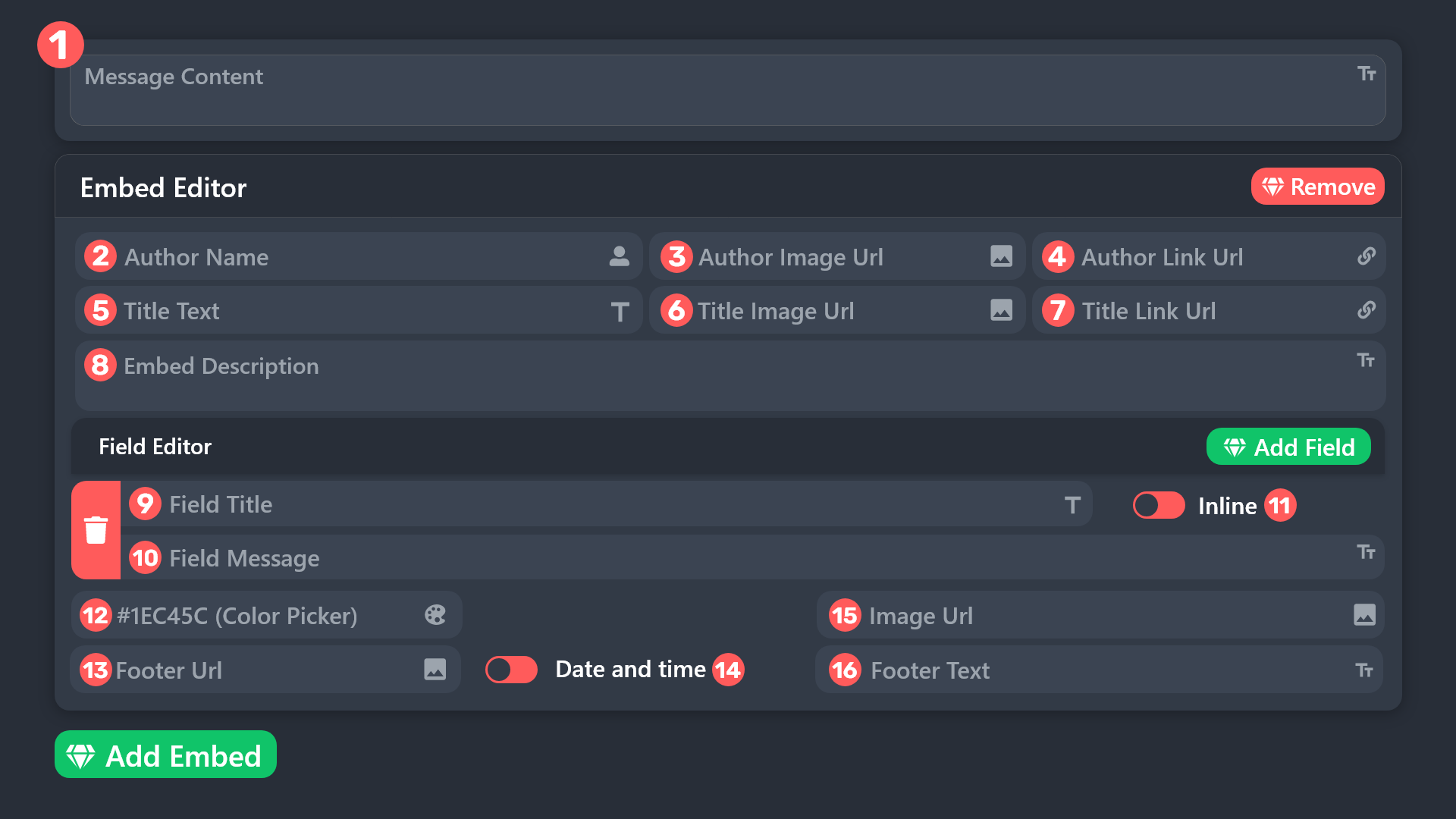 scenic forum
@pastel escarp refer to the embed above
Field 12
pastel escarp
humble sequoia
where do i find this
scenic forum
pastel escarp
where do i find this
Panel config -> Ticket -> Edit ticket message
pastel escarp
scenic forum
Panel config -> Ticket -> Edit ticket message
i did it but the color isent enable where i have the questions/answers in ticket
scenic forum
pastel escarp
i did it but the color isent enable where i have the questions/answers in ticket
Can you show which message you mean?
pastel escarp
 scenic forum
pastel escarp
scenic forum
pastel escarp
As stated previously you cannot edit the direct forms embed
pastel escarp
ok can yall add a opton for it?
scenic forum
pastel escarp
ok can yall add a opton for it?
You need to put the forms content into your ticket message
if you want it colored
scenic forum
humble sequoia
Refer to the very bottom of this embed
pastel escarp
i did it not working im trying to follow what u sendt but dont rly undertsand
wait
ill take time looking into it
thanks @scenic forum
iron nightBOT
Gave +1 Rep to @scenic forum (current: #13 - 537)
pastel escarp
- To display the results from the form you need to add the {create.form.x} variable to your
i need to do this?
scenic forum
pastel escarp
i need to do this?
yes
replace the X with the number corresponding to the form
Form 1 is number 1
form 2 is number 2 and so on
pastel escarp
where do i replace lol sorry i havent done this ne before
scenic forum
pastel escarp
where do i replace lol sorry i havent done this ne before
inside your ticket message where you want the answer to display
pastel escarp
@scenic forum
scenic forum
Please do not ping for support
pastel escarp
after the {create.form.1} can i type a message or do i need to add embed editor and then {create.form.1}
 pastel escarp
scenic forum
Please do not ping for support
pastel escarp
scenic forum
Please do not ping for support
okok my bad...
scenic forum
pastel escarp
after the {create.form.1} can i type a message or do i need to add embed editor ...
I dont understand what you mean im afraid
Whats your main language?
pastel escarp
scenic forum
I dont understand what you mean im afraid
Whats your main language?
norvegian lol
anyways idk how to do this ill try a other time goodnight
 winter goblet
I'm having an issue where tickets is not giving message history perms. How do I fix this?
 shadow berry
is there any way to transfer your ticket system from one server to another that you own?
humble sequoiaBOT
The Backup and Restore feature allows you to transfer your panels, tags, and all settings to a new server, even if the server the settings were created has been deleted! You will want to copy the whole key.
First, go to your server's Dashboard ➞ then Server Configs ➞ under Config Backup & Restore (Server Owner Only) click on Old version can be found here and generate a new backup key by pressing the green button. Now, a key should be generated in the box above. You may need to refresh the page to see this.
Once you have your backup key, navigate to the same page on the new server. Copy the key on the Restore from backup key field.
Now you can choose what you want to copy. Finally, press the green Restore Configs button.
IMPORTANT NOTE
- We suggest you keep this backup key somewhere safe, in case your server is deleted so you are able to recover your panel's settings.
- This feature is only usable by the server's owner
$backup
austere forge
shadow berry
is there any way to transfer your ticket system from one server to another that ...
Refer to the embed above please
 hollow vale
hi my tickets anyone can close them how do i fix it ?
humble sequoiaBOT
━━ User's inquiry has been moved to a ticket ━━
 mental shoal
 austere forge
Since you're a regular member, there's nothing you can do except inform the server staff of the situation
 raw bramble
yo guys how to be middle man
austere forge
You're in the wrong place
 plain citrus
Anyone know how to stop new tickets being created in another ticket
harsh epoch
plain citrus
Anyone know how to stop new tickets being created in another ticket
As in it's clearing all messages from that channel and being re-used?
plain citrus
harsh epoch
As in it's clearing all messages from that channel and being re-used?
We'd resolve a issue in a ticket, leave it closed then someone would make a new ticket but it would go in that old ticket

something like this
harsh epoch
plain citrus
something like this
Could you check that you have storage mode disabled?
Server configs -> Storage Mode 
plain citrus
harsh epoch
Could you check that you have storage mode disabled?
Server configs -> Storage ...
it was on, i just disabled it now
 willow flax
someone help i tried creating new tickets still same thing "the application did not respond"
 humble sequoiaBOT
When first invited to your server, Ticket Tool should have the permissions shown below in order to ensure an appropriate functioning:
When customizing permissions for the different ticket participants, you must make sure Ticket Tool has the permissions you want it to grant to others, you can learn more about this here.
Missing Permissions
This error is a direct outcome of the bot missing permissions as depicted above. When troubleshooting this error we suggest you go through these steps:
- Use the </debug:1029783024264564765> command to check if the bot is lacking core role or channel permissions.
- Compare the category/channel's overrides and contrast them with the bot's roles to identify any permission denial that is breaking the functioning
- If you can't still figure it out, let our <@&540295656720302081> know so they can guide you through
Additional Resources
- If you are a server administrator and would like to understand more how to set up your server's permissions, we suggest checking the Discord Support Knowledge Base
- If you are a bot developer and are interested in the internal permission hierarchy we suggest you this part of the Discord Developer Docs
Important Note
- Giving Administrator permissions is NOT required and we do NOT encourage you to do unless you are trying to troubleshoot your permissions setup.
Refer to the embded above ^^
The bot needs those permissions.
simple canopy
انا هنا لمساعده اي شخص عربي
I am here to help any foreigner
 solid sun
how to open tckets?
latent dawn
solid sun
how to open tckets?
You can directly ask your issue here and wait for someone to answer you or you can directly open a ticket on #🎫│make-a-ticket .
humble sequoiaBOT
━━ User's inquiry has been moved to a ticket ━━
 next epoch
One message removed from a suspended account.
harsh epoch
next epoch
One message removed from a suspended account.
Editing that field for ticket panels is a premium feature unfortunately
next epoch
One message removed from a suspended account.
One message removed from a suspended account.
 prisma patio
i can't open new tickett
scenic forum
prisma patio
i can't open new tickett
Are you staff on the server you need help with?
harsh epoch
 bright silo
why does /closerequest not work and just close it without requesting
bright silo
why does /closerequest not work and just close it without requesting
What do you mean by not working? If you wanted to close a ticket without requesting it you'll have to use /close instead
bright silo
harsh epoch
What do you mean by not working? If you wanted to close a ticket without request...
when i do /closerequest, it doesnt request the opener if we can close it, it just closes it
this has been going on for months now
 buoyant juniper
How to create a ticket like this
 bright silo
buoyant juniper
How to create a ticket like this
bright silo
buoyant juniper
How to create a ticket like this
i can help you if youd like
buoyant juniper
yes pls
lilac junco
buoyant juniper
How to create a ticket like this
$help
humble sequoiaBOT
lilac junco
$help
First you will want to invite the bot to your server. Once the bot is in your server, you can manage your server in the dashboard.
To create a panel we are going to need to head over to the Panel Configs Tab on the Dashboard.
Once at the dashboard we will need to click Create Panel.
Enter a panel name (Fill in any optional settings you want).
Click Create Panel and you are ready to get started with configuring your panel.
An example of a creating a panel is shown below.
Once the panel has been created, use the blue Send button and select the channel you want the panel to be sent to.
The Panel wasn't send
Use the </debug:1029783024264564765> command to diagnose possible permission issues with the bot.
lilac junco
Refer to the embed above!
harsh epoch
bright silo
when i do /closerequest, it doesnt request the opener if we can close it, it jus...
Hm, and nothing else appears at all?
bright silo
harsh epoch
Hm, and nothing else appears at all?
no, i can show u if youd like
harsh epoch
bright silo
no, i can show u if youd like
If you could that would be amazing
harsh epoch
bright silo
no, i can show u if youd like
Do you have a screen recording you could send here rather than an invite link?
bright silo
harsh epoch
Do you have a screen recording you could send here rather than an invite link?
how do i do that lol
wait
one sec
 quaint marsh
$help
humble sequoiaBOT
quaint marsh
$help
First you will want to invite the bot to your server. Once the bot is in your server, you can manage your server in the dashboard.
To create a panel we are going to need to head over to the Panel Configs Tab on the Dashboard.
Once at the dashboard we will need to click Create Panel.
Enter a panel name (Fill in any optional settings you want).
Click Create Panel and you are ready to get started with configuring your panel.
An example of a creating a panel is shown below.
Once the panel has been created, use the blue Send button and select the channel you want the panel to be sent to.
The Panel wasn't send
Use the </debug:1029783024264564765> command to diagnose possible permission issues with the bot.
quaint marsh
How do i do tickets like this
 harsh epoch
quaint marsh
How do i do tickets like this
harsh epoch
quaint marsh
How do i do tickets like this
Hey there!
Refer to the embed below
humble sequoiaBOT
A Discord Form lets the user answer individual questions in a pop-up Form, which then displays the answers in the ticket message. This can save time if you already know what you want to ask the user.
Setup Forms
Forms can be enabled under Panel Settings > Form Options > Edit Forms Options. In the new pop-up window, you can now enable and edit your own Form.
Form Options
You can add up to 5 questions in the Discord form. This is a Discord limitation. Each question can have a placeholder in the input field, a minimum and maximum input, multi-line, and also the option to have the answer required.
Options
Question Title ➞ Your Question goes here
Question Placeholder ➞ The placeholder text in the input field
Required ➞ If enabled, the user has to answer this question, to submit the form
Multi-Line Input ➞ Allows the user to input multiple lines
Minimum and Maximum Input ➞ Set a minimum and maximum input value for the user
Displaying the Answer
To display the answers from the user, you need to enable Auto display form results on the ticket message as an additional embed
If you don't want a second embed, go into your Panel Configs > Ticket Options > Edit Ticket Message. You use the variable {create.form.x} and replace x with the number of your question. For example, the response to Question 5 can be displayed with {create.form.5}.
iron nightBOT
Gave +1 Rep to @harsh epoch (current: #31 - 155)
harsh epoch
No worries!
lone token
lilac junco
$help
1 more help
 edgy quartz
Hello! Please help me because I am so lost about where to turn for help. I bought a key for Honkai Star Rail, I have version 24h2, not 25. I disabled all antivirus programs and other security measures, but when I press F2, my laptop restarts. This happens every time. Please tell me where I can go for help with this problem 🙏
humble sequoiaBOT
⚠️ You're in the wrong place
We provide support for Ticket Tool Discord bot and cannot help you with whatever issue you have.
- We don't know which Support Team you should contact to get this issue resolved, and unfortunately we won't be able to accurately tell you.
If you don't have any further questions regarding our bot Ticket Tool, please close this ticket
torn vault
how can i make the ticket name when some1 open it be the same name as the user who opend the ticket
harsh epoch
torn vault
how can i make the ticket name when some1 open it be the same name as the user w...
Hey there!
You can do that by using the {ticket.user.name} variable
Panel -> Ticket -> Ticket Opened Channel Name -> add "{ticket.user.name}"
Note: Changing the ticket name is a premium feature
quaint marsh
harsh epoch
Hey there!
Refer to the embed below
@harsh epoch so, i tried but im kinda lost could you help me with an video? Send in dms? Ty
iron nightBOT
Gave +1 Rep to @harsh epoch (current: #31 - 156)
harsh epoch
quaint marsh
<@1124651666650693774> so, i tried but im kinda lost could you help me with an v...
Support must remain in this server. What is it you're struggling with exactly?
quaint marsh
harsh epoch
Support must remain in this server. What is it you're struggling with exactly?
I don’t know how to make this even with the message u helped me with
Im too lost idk how to do it

Plis vid
harsh epoch
quaint marsh
I don’t know how to make this even with the message u helped me with
Im too lost...
I can't create a video at the moment, but if you go to the dashboard, select your server and find the "Forms" option I can guide you from there
lone token
harsh epoch
I can't create a video at the moment, but if you go to the dashboard, select you...
Super cool server booster can you tell me i set this bot in 1 of my server I want same in other can I copy it directly any method
harsh epoch
lone token
Super cool server booster can you tell me i set this bot in 1 of my server I wan...
Hey!
you can try using the backup feature, although once copied i'd recommend to go back over and check your settings. Refer to the embed below
humble sequoiaBOT
The Backup and Restore feature allows you to transfer your panels, tags, and all settings to a new server, even if the server the settings were created has been deleted! You will want to copy the whole key.
First, go to your server's Dashboard ➞ then Server Configs ➞ under Config Backup & Restore (Server Owner Only) click on Old version can be found here and generate a new backup key by pressing the green button. Now, a key should be generated in the box above. You may need to refresh the page to see this.
Once you have your backup key, navigate to the same page on the new server. Copy the key on the Restore from backup key field.
Now you can choose what you want to copy. Finally, press the green Restore Configs button.
IMPORTANT NOTE
- We suggest you keep this backup key somewhere safe, in case your server is deleted so you are able to recover your panel's settings.
- This feature is only usable by the server's owner
$backup
lone token
harsh epoch
Hey!
you can try using the backup feature, although once copied i'd recommend t...
If my account doesn't have ownership
 full hill
Peace
harsh epoch
lone token
If my account doesn't have ownership
The feature can only be used by the server owner i'm afraid. You would have to get them to create the key
lone token
harsh epoch
The feature can only be used by the server owner i'm afraid. You would have to g...
Oh why afraid
 fluid wadi
humble sequoiaBOT
fluid wadi
humble sequoiaBOT
━━ User's inquiry has been moved to a ticket ━━
torn vault
how can i make when someone open a ticket make the ticket shows in specific catagory
not in suggested
humble sequoiaBOT
1. Open your Panel Configs tab in the server's dashboard
2. Select the panel you want to grant access to
3. Open the Category options menu
4. Select the categories of your preference
5. Save changes

 worldly helm
torn vault
how can i make when someone open a ticket make the ticket shows in specific cata...
worldly helm
torn vault
how can i make when someone open a ticket make the ticket shows in specific cata...

quaint marsh
harsh epoch
I can't create a video at the moment, but if you go to the dashboard, select you...
I dont see forms
harsh epoch
quaint marsh
I dont see forms
 torn vault
worldly helm
<:this:894279341108772914>
torn vault
worldly helm
<:this:894279341108772914>
it keeps showing in the suggested
humble sequoiaBOT
quaint marsh
$help
First you will want to invite the bot to your server. Once the bot is in your server, you can manage your server in the dashboard.
To create a panel we are going to need to head over to the Panel Configs Tab on the Dashboard.
Once at the dashboard we will need to click Create Panel.
Enter a panel name (Fill in any optional settings you want).
Click Create Panel and you are ready to get started with configuring your panel.
An example of a creating a panel is shown below.
Once the panel has been created, use the blue Send button and select the channel you want the panel to be sent to.
The Panel wasn't send
Use the </debug:1029783024264564765> command to diagnose possible permission issues with the bot.
worldly helm
torn vault
it keeps showing in the suggested
Please #🎫│make-a-ticket.
worldly helm
quaint marsh
$help
Please use commands in #🤖│bot-spam
torn vault
worldly helm
Please <#571706435449257997>.
i did
quaint marsh
harsh epoch
Ok i did everything, but it dosen’t appear
harsh epoch
quaint marsh
Ok i did everything, but it dosen’t appear
Could you show me a screenshot of what your forms page looks like?
harsh epoch
quaint marsh
Nvm i made it
Glad it's working!
iron nightBOT
Gave +1 Rep to @harsh epoch (current: #31 - 157)
quaint marsh
harsh epoch
Glad it's working!
U should be mod
 tribal cedar
Maybe they will take interest and make him proficient
simple canopy
If you need help, just tag me.
 pseudo ravine
We'd prefer if people didn't ping for support
tribal cedar
Can I get the TT server badge???!
pseudo ravine
It's public to everyone

 vale narwhal
.
 warm edge
Is there the possibility of configuring the system so that, at the end of a ticket, the support member is asked to enter the reason for the closure, and that this information is sent privately to the ticket applicant?
harsh epoch
 pulsar kernel
Like 2 of these
pulsar kernel
Like 2 of these
Hey!
If you're talking about just creating another dropdown panel, you can do that by creating a new panel and adding the ones you want to it and send that panel to wherever you want or need it
pulsar kernel
harsh epoch
Hey!
If you're talking about just creating another dropdown panel, you can do t...
Ok so how do I make 2 drop down panels that are not the same and have different options
harsh epoch
pulsar kernel
Ok so how do I make 2 drop down panels that are not the same and have different ...
Create a new panel, select "DropDown Style" and then add items for the panels you want to appear on there
pulsar kernel
harsh epoch
Create a new panel, select "DropDown Style" and then add items for the panels yo...
When I tried to do that it only sent 1 panel
When I put 3 in
harsh epoch
Could you show me a screenshot of what that dropdown page looks like on the dashboard
warm edge
Is there the possibility of configuring the system so that, at the end of a ticket, the support member is asked to enter the reason for the closure, and that this information is sent privately to the ticket applicant?
 harsh epoch
 gritty parcel
Pls help
gritty parcel
Pls help
Hey!
Are you staff in that server?
harsh epoch
Unfortunately there isnt anything we can do in that case. Youre best option is to wait until some channels are cleared
 foggy sparrow
Yo, how many tickets can the ticket bot support?, Like what is the limit before the error happens?
harsh epoch
foggy sparrow
Yo, how many tickets can the ticket bot support?, Like what is the limit before ...
I believe with actual channels it's 500 until it'll reach a limit channel wise.
Which error is it youre talking about?
foggy sparrow
Ah no, just curious LOL
foggy sparrow
harsh epoch
I believe with actual channels it's 500 until it'll reach a limit channel wise. ...
thanks
iron nightBOT
Gave +1 Rep to @harsh epoch (current: #31 - 158)
harsh epoch
foggy sparrow
Ah no, just curious LOL
500 with channels
1000 with threads (i think)
foggy sparrow
Ah perfect!!
 tight bear
i need to report someone
scenic forum
tight bear
i need to report someone
If its a user from this server please open a report ticket at #🎫│make-a-ticket otherwise youre in the wrong server
warm edge
Is there the possibility of configuring the system so that, at the end of a ticket, the support member is asked to enter the reason for the closure, and that this information is sent privately to the ticket applicant?
harsh epoch
warm edge
Is there the possibility of configuring the system so that, at the end of a tick...
Please dont ping me for support.
You would be best to wait for someone who knows to answer or you can create a ticket
pulsar kernel
harsh epoch
Could you show me a screenshot of what that dropdown page looks like on the dash...


@harsh epoch
harsh epoch
pulsar kernel
You'll need to enable select style in order for it to show.
Enable select style
pulsar kernel
harsh epoch
You'll need to enable select style in order for it to show.
<:Switch_enabled:10...
Thank you
iron nightBOT
Gave +1 Rep to @harsh epoch (current: #31 - 159)
harsh epoch
pulsar kernel
Thank you
No worries!
 modest torrent
@iron night
humble sequoiaBOT
@modest torrent, we would love to help you, but if you don't tell us what you need help with we can't help you :(
simple canopy
Good morning, citizens. Anyone in need of assistance should contact us and we will resolve the issue.
 opal dew
I need some help im confused
humble sequoiaBOT
Hello, we would love to help you, but if you don't tell us what you need help with we can't help you :(
pseudo ravine
simple canopy
Good morning, citizens. Anyone in need of assistance should contact us and we wi...
If someone needs support, they will ask it here. While we appreciate you trying to help out, there’s no need to continually say something like this
opal dew
I made an application form for people to fill out and it creates a ticket chat for us to talk to them but doesn’t show the answers to the questions…
pseudo ravine
Hey there! Please refer to the embed below!
humble sequoiaBOT
A Discord Form lets the user answer individual questions in a pop-up Form, which then displays the answers in the ticket message. This can save time if you already know what you want to ask the user.
Setup Forms
Forms can be enabled under Panel Settings > Form Options > Edit Forms Options. In the new pop-up window, you can now enable and edit your own Form.
Form Options
You can add up to 5 questions in the Discord form. This is a Discord limitation. Each question can have a placeholder in the input field, a minimum and maximum input, multi-line, and also the option to have the answer required.
Options
Question Title ➞ Your Question goes here
Question Placeholder ➞ The placeholder text in the input field
Required ➞ If enabled, the user has to answer this question, to submit the form
Multi-Line Input ➞ Allows the user to input multiple lines
Minimum and Maximum Input ➞ Set a minimum and maximum input value for the user
Displaying the Answer
To display the answers from the user, you need to enable Auto display form results on the ticket message as an additional embed
If you don't want a second embed, go into your Panel Configs > Ticket Options > Edit Ticket Message. You use the variable {create.form.x} and replace x with the number of your question. For example, the response to Question 5 can be displayed with {create.form.5}.
humble sequoiaBOT
@gray talon
⚠️ You're in the wrong place
We provide support for Ticket Tool Discord bot and cannot help you with whatever issue you have.
- We don't know which Support Team you should contact to get this issue resolved, and unfortunately we won't be able to accurately tell you.
If you don't have any further questions regarding our bot Ticket Tool, please close this ticket

 calm void
is there a way to add a role to someone after they've made a ticket automatically?
 placid girder
calm void
is there a way to add a role to someone after they've made a ticket automaticall...
placid girder
calm void
is there a way to add a role to someone after they've made a ticket automaticall...
Yeah, allow me a moment to lookup which section of the dashboard this is located within!
Okay, it is Panel Configs > Ticket. That’s what I thought, but I wanted to be sure!
There, you can assign roles to the user when the ticket is created/opened and when it is closed.
placid girder
 soft schooner
getting issues with /new not working
soft schooner
getting issues with /new not working
This command has to be enabled. The panel has to use Command Style. If you have done this, then the issue might just be View Channel and Send Messages.
calm void
placid girder
Okay, it is Panel Configs > Ticket. That’s what I thought, but I wanted to be su...
Thank you so much ryan!
iron nightBOT
Gave +1 Rep to @placid girder (current: #83 - 18)
soft schooner
placid girder
This command has to be enabled. The panel has to use Command Style. If you have ...
Where can I do this?
placid girder
Panel Configs > Command Style
Each panel will have Ticket Tool look in a channel for the command.
soft schooner
Ok, what's the correct way for me wanting to create a new ticket with a specific user from anywhere in the server? Or does it need to be created within a ticket?
With the /new command I mean
placid girder
soft schooner
Ok, what's the correct way for me wanting to create a new ticket with a specific...
If you’re asking how to assign a ticket to a user when using the command, you just configure which channel Ticket Tool will watch. Then, you’ll do as follows:
$new <#User ID> (reason)
/new user:<#User ID> (reason:)
Ticket Tool will create a ticket for one panel per channel, I believe.
quaint marsh
$help
humble sequoiaBOT
quaint marsh
$help
First you will want to invite the bot to your server. Once the bot is in your server, you can manage your server in the dashboard.
To create a panel we are going to need to head over to the Panel Configs Tab on the Dashboard.
Once at the dashboard we will need to click Create Panel.
Enter a panel name (Fill in any optional settings you want).
Click Create Panel and you are ready to get started with configuring your panel.
An example of a creating a panel is shown below.
Once the panel has been created, use the blue Send button and select the channel you want the panel to be sent to.
The Panel wasn't send
Use the </debug:1029783024264564765> command to diagnose possible permission issues with the bot.
 untold wasp
"i am wondering if i buy the primium form discord does it keep the same has i buy it then from the website"
placid girder
untold wasp
"i am wondering if i buy the primium form discord does it keep the same has i bu...
There are some differences. I think I would recommend purchasing through the website!
untold wasp
placid girder
There are some differences. I think I would recommend purchasing through the web...
do you knoa what the diffrents is ?
placid girder
I don’t remember too many at this moment. But the documentation specifies some differences. I’ll read it quickly.
placid girder
untold wasp
do you knoa what the diffrents is ?

 heavy nymph
s!suggest
 austere forge
heavy nymph
s!suggest
austere forge
heavy nymph
s!suggest
To add a suggestion use /suggest in https://ptb.discord.com/channels/509192800865353738/910978476536905738
 west breach
how to fix this?

 dense nova
Hi everyone, I'm having problems with ticket transcript. I setted everything (Google drive, transcript channel, ticket log channel) the bot role is above almost everything other roles but it still say that the channel isn't setted...can someone help pls?
Btw sorry for my English
humble sequoiaBOT
━━ Barney's inquiry has been moved to a ticket ━━
austere forge
dense nova
Hi everyone, I'm having problems with ticket transcript. I setted everything (Go...
Please provide the server ID /name
dense nova
austere forge
Please provide the server ID /name
I'll send it asap thx you. The name is "☠ 𝕭𝖑𝖆𝖈𝖐 𝕮𝖑𝖔𝖛𝖊𝖗 : The Come Back ☠" for the I'd I need to get back home on the pc
iron nightBOT
Gave +1 Rep to @austere forge (current: #4 - 1213)
austere forge
Its fine, one moment please
austere forge
dense nova
I'll send it asap thx you. The name is "☠ 𝕭𝖑𝖆𝖈𝖐 𝕮𝖑𝖔𝖛𝖊𝖗 : The Come Bac...
You have two other panels that do not have a channel transcript set. There may be a reason for this, please ensure that you set a channel for the other two panels
 dense nova
austere forge
You have two other panels that do not have a channel transcript set. There may b...
dense nova
austere forge
You have two other panels that do not have a channel transcript set. There may b...
Damn it, my bad ill check immediately
dense nova
austere forge
You have two other panels that do not have a channel transcript set. There may b...
Now it works, thank you and sorry for the stupid question
iron nightBOT
Gave +1 Rep to @austere forge (current: #4 - 1214)
 opaque rover
how do i set it up?
 stark runeBOT
1. Invite Ticket Tool to your server
First you will want to invite the bot to your server. Once the bot is in your server, you can manage your server in the dashboard.
2. Create a Panel
To create a panel we are going to need to head over to the panel configs on the dashboard.
Once at the dashboard we will need to click Create Panel.
Enter a panel name (Fill in any optional settings you want).
Click Create Panel and your ready to get started with configuring your panel.
An example of a creating a panel is shown below.
3. Send the Panel to a Channel
Once you've created a panel on the dashboard you will need to send it to a channel using send on the dashboard.
Select the channel you want your panel to be created in and click send.
For other questions checkout $help faq.
An example of a sending a panel is shown below.
Having a Problem Sending the Panel?
Do $debug in a channel with Ticket Tool and make sure it has all the necessary Discord permissions.
austere forge
opaque rover
how do i set it up?
Refer to the embed above please
opaque rover
austere forge
Refer to the embed above please
👍
 compact lintel
How ?

 remote raven
I'm getting some issue
humble sequoiaBOT
The Drop-down menu or Select Menu replaces the buttons on your panel message and uses a drop-down menu with all of your panels. To set this up, go to your Panel Configs and select your main Panel.
<:Numbericons1:1018864164032225340> Enable Select Style
First you enable Select Style. Then you add an item in the Dropdown Editor. Now you can start editing your dropdown!
<:Numbericons2:1018864168041971712> Dropdown Editor
Each line in the dropdown editor represents a line in the drop down menu on discord. You can add more "Items", by clicking on
First you select a panel. That's the panel this option will open a ticket for. DONT select the same panel twice. Each option should have a different Panel
After that, you can put a Display. This is the title of this option and will appear in the drop down menu. The *Description can be set right after that, which will be below the title in grey.
Additionally you can select an emoji, that will be shown in front of each option. You can either manually input the ID of an emoji or select it in the selector.
Common Issues ⚠️
- Panel doesn't send? Make sure you have a valid emoji selected
- Option doesn't show up? Check if two options have the same panel in the DropDown Editor
$dropdown
austere forge
compact lintel
How ?
Refer to the embed above please
compact lintel
austere forge
Refer to the embed above please
?
 austere forge
You must to enabled select style above
compact lintel
austere forge
You must to enabled select style above <:Switch_enabled:1041734627330625586>
how to change this ?

@austere forge
lilac junco
compact lintel
<@225349654974431232>
Hey! Please don't ping support staff members for support! 😁
lilac junco
compact lintel
how to change this ?
Panel Configs > Messages > Edit ticket message
 spiral loom
Hi, wollte nur fragen ob meine Bestellung noch läuft, denn ich habe keine Anfrage für einen Authentifizierungscode bekommen. Ich hatte das 12 Stunden-Paket gekauft. Die 12 Stunden sind abgelaufen.
humble sequoiaBOT

Deutsches Support-Team
Wenn du Hilfe vom Deutschen Support-Team erhalten möchtest gehe in #🎫│make-a-ticket und öffne durch einen Klick auf den :flag_de: Button ein Ticket.
lilac junco
@spiral loom
compact lintel
how to rest the numbers of the ticket ?
harsh epoch
compact lintel
how to rest the numbers of the ticket ?
resetting them to 0000 you mean?
Dashboard -> Set Count
 still lavaBOT
spiral loom
Hi, wollte nur fragen ob meine Bestellung noch läuft, denn ich habe keine Anfrag...
still lavaBOT
spiral loom
Hi, wollte nur fragen ob meine Bestellung noch läuft, denn ich habe keine Anfrag...
From German (DE) To Catalan (CA)
Hola, només volia demanar si la meva comanda encara està en marxa, perquè no vaig demanar un codi d' autenticació. Vaig comprar el paquet de 12 hores. Les 12 hores han caducat.
From German (DE) To Spanish (ES)
Hola, sólo quería preguntar si mi orden sigue funcionando, porque no recibí una solicitud de un código de autenticación. Compré el paquete de 12 horas. Las 12 horas han expirado.
 Translation requested by DeafPsycholombian from Flag-Reaction Feature.
untold wasp
Translation requested by DeafPsycholombian from Flag-Reaction Feature.
untold wasp
Can i fully install the premium but wich the trail and resore it later once i buy it back later ?
spiral loom
Meine Bestellnummer ist 131093
humble sequoiaBOT
━━ User's inquiry has been moved to a ticket ━━
still lavaBOT
spiral loom
Meine Bestellnummer ist 131093
From German (DE) To Catalan (CA)
El meu número d'ordre és 131093
From German (DE) To Spanish (ES)
Mi número de pedido es 131093
Translation requested by DeafPsycholombian from Flag-Reaction Feature.
foggy sparrow
spiral loom
Meine Bestellnummer ist 131093
What are you talking about?
spiral loom
Ich habe gestern eine Bestellung aufgegeben die Bestellung sollte in 12 Stunden da sein. Diese 12 Stunden sind jetzt um und in der Website steht dass man eine Nachricht erhält und die hab ich halt nicht bekommen
pseudo ravine
Please stay in patient in your ticket
spiral loom
Ok
 half veldt
How can I remove this message?
 harsh epoch
half veldt
How can I remove this message?
harsh epoch
half veldt
How can I remove this message?
Hey there!
Dashboard -> Logging
You can control what actions are logged from there
 west turtle
How can I setup this
 untold wasp
Can i fully install the premium but wich the trail and resore it later once i buy it back later ?
humble sequoiaBOT
━━ Tigerbeast's inquiry has been moved to a ticket ━━
 crimson pine
With Ticket tool idk why but when im swap to my alt to test it. it says that i cant view The message history in the ticket. please help
scenic forum
crimson pine
With Ticket tool idk why but when im swap to my alt to test it. it says that i c...
Panel config -> permissions -> Ticket owner permissions -> View message history ✅
still lavaBOT
spiral loom
Ich habe gestern eine Bestellung aufgegeben die Bestellung sollte in 12 Stunden ...
From German (DE) To Catalan (CA)
Ahir vaig deixar una ordre, l'ordre hauria de ser allà en 12 hores. Aquestes 12 hores estan per aquí i el lloc web diu que tens un missatge i no l'he rebut
From German (DE) To Spanish (ES)
Abandoné una orden ayer, la orden debería estar allí en 12 horas. Estas 12 horas están ahora alrededor y el sitio web dice que tienes un mensaje y yo no lo conseguí
Translation requested by DeafPsycholombian from Flag-Reaction Feature.
crimson pine
scenic forum
Panel config -> permissions -> Ticket owner permissions -> View message history ...
still wont work
idk whats the issue w it
scenic forum
@crimson pine Do not dm me for support. STay within the server
crimson pine
ok
humble sequoiaBOT
When first invited to your server, Ticket Tool should have the permissions shown below in order to ensure an appropriate functioning:
When customizing permissions for the different ticket participants, you must make sure Ticket Tool has the permissions you want it to grant to others, you can learn more about this here.
Missing Permissions
This error is a direct outcome of the bot missing permissions as depicted above. When troubleshooting this error we suggest you go through these steps:
- Use the </debug:1029783024264564765> command to check if the bot is lacking core role or channel permissions.
- Compare the category/channel's overrides and contrast them with the bot's roles to identify any permission denial that is breaking the functioning
- If you can't still figure it out, let our <@&540295656720302081> know so they can guide you through
Additional Resources
- If you are a server administrator and would like to understand more how to set up your server's permissions, we suggest checking the Discord Support Knowledge Base
- If you are a bot developer and are interested in the internal permission hierarchy we suggest you this part of the Discord Developer Docs
Important Note
- Giving Administrator permissions is NOT required and we do NOT encourage you to do unless you are trying to troubleshoot your permissions setup.
sooooo ?
foggy sparrow
humble sequoia
@west turtle Make sure the bot has these permissions
crimson pine
in discor ?
worldly helm
foggy sparrow
<@1420308554941726790> Make sure the bot has these permissions
They created a ticket.
foggy sparrow
Ah alright, sorry, I didn't know
foggy sparrow
What other channel?
 deft kindle
Hcn channel
humble sequoiaBOT
⚠️ You're in the wrong place
We provide support for Ticket Tool Discord bot and cannot help you with whatever issue you have.
- We don't know which Support Team you should contact to get this issue resolved, and unfortunately we won't be able to accurately tell you.
If you don't have any further questions regarding our bot Ticket Tool, please close this ticket
 regal ocean
hey
foggy sparrow
Alright follow the following steps
humble sequoiaBOT
A Discord Form lets the user answer individual questions in a pop-up Form, which then displays the answers in the ticket message. This can save time if you already know what you want to ask the user.
Setup Forms
Forms can be enabled under Panel Settings > Form Options > Edit Forms Options. In the new pop-up window, you can now enable and edit your own Form.
Form Options
You can add up to 5 questions in the Discord form. This is a Discord limitation. Each question can have a placeholder in the input field, a minimum and maximum input, multi-line, and also the option to have the answer required.
Options
Question Title ➞ Your Question goes here
Question Placeholder ➞ The placeholder text in the input field
Required ➞ If enabled, the user has to answer this question, to submit the form
Multi-Line Input ➞ Allows the user to input multiple lines
Minimum and Maximum Input ➞ Set a minimum and maximum input value for the user
Displaying the Answer
To display the answers from the user, you need to enable Auto display form results on the ticket message as an additional embed
If you don't want a second embed, go into your Panel Configs > Ticket Options > Edit Ticket Message. You use the variable {create.form.x} and replace x with the number of your question. For example, the response to Question 5 can be displayed with {create.form.5}.
 jade topaz
Oiê boa tarde
 rustic kindle
اريد اداري عربي
tribal cedar
rustic kindle
اريد اداري عربي
You can use #🎫│make-a-ticket
jade topaz
Não eu falo português
jade topaz
E porque comprei o passe mais não consigo coletar as coisas
Tá dando como se eu não tivesse comprado
tribal cedar
Este é um servidor de suporte para uma ferramenta de tickets, que é um bot do Discord. Você está no lugar errado, meu amigo.
tribal cedar
Não podemos ajudar nem indicar onde você pode resolver seu problema.
jade topaz
Ok
tribal cedar
Desculpe por isso.
jade topaz
Obrigada mesmo assim
tribal cedar
Tenha um ótimo dia!
 steady shuttle
The bot have a system to auto assign role when u open a ticket ? (in free version)
worldly helm
steady shuttle
The bot have a system to auto assign role when u open a ticket ? (in free versio...
Heya! 👋
No that requires premium.
 edgy ember
what do i need to fix this shit

my ticket allready closed
also i try rejoin server but its still dont work
scenic forum
edgy ember
what do i need to fix this shit
Theres nothing you can do, youd need to reach out to their server staff
edgy ember
scenic forum
Theres nothing you can do, youd need to reach out to their server staff
I already wrote to them, and they said that I don't have an open ticket
scenic forum
edgy ember
I already wrote to them, and they said that I don't have an open ticket
There should still be an open ticket of yours
edgy ember
scenic forum
There should still be an open ticket of yours
I wrote to them and they sent me a screenshot showing that there were no open tickets with me
 trail sinew
Help me
 scenic forum
edgy ember
I wrote to them and they sent me a screenshot showing that there were no open ti...
scenic forum
edgy ember
I wrote to them and they sent me a screenshot showing that there were no open ti...
In any case there is nothing you can do to fix it only their servers staff can
scenic forum
trail sinew
Help me
You need to reach out to their servers staff. THey need to delete some channels
iron nightBOT
Gave +1 Rep to @scenic forum (current: #13 - 538)
 abstract trench
bruh what
edgy ember
scenic forum
In any case there is nothing *you* can do to fix it only their servers staff can
I just write to them and they say they've checked all the tickets and there isn't a single ticket from me
scenic forum
edgy ember
I just write to them and they say they've checked all the tickets and there isn'...
That does not change my prior statement
 delicate cypress
Does anyone know how to make the dashboard? I need it for my server, but it asks me to log in and it won’t let me. I already lost 3 accounts trying to use the dashboard. Can someone explain how to do it? Or if you want, I can add you to my server so you can make it for me, please.
Anyone who knows how to do it?
humble sequoiaBOT

Ticket Tool - Ticketing without clutter - The #1 Discord support bot
delicate cypress
Pls
tribal cedar
delicate cypress
Pls
Use the link above
delicate cypress
tribal cedar
Use the link above
But bro, I lost 3 accounts trying to do that. I don’t understand why it won’t let me. I always enter everything correctly and it keeps saying it’s wrong.
scenic forum
delicate cypress
But bro, I lost 3 accounts trying to do that. I don’t understand why it won’t le...
You cant lose accounts trying to access the dashboard you need to elaborate more on the matter
 sterile flume
Hello, is there anyone who speaks Spanish? I don't know how to get my bot working on my channel.
humble sequoiaBOT

Equipo de Soporte Español
Querido usuario, si está buscando ayuda, por favor abra un ticket para contactar al Equipo de Soporte Español. Diríjase a #🎫│make-a-ticket y presione el botón :flag_es:.
 smoky solar
How do you delete a ticket panel?
tribal cedar
Click delete
smoky solar
tribal cedar
Click delete
Where.
tribal cedar
 delicate cypress
scenic forum
You cant lose accounts trying to access the dashboard you need to elaborate more...
delicate cypress
scenic forum
You cant lose accounts trying to access the dashboard you need to elaborate more...
I’m not exaggerating about losing my accounts, but I really did lose them. I entered everything I was supposed to, and it still wouldn’t let me. And when it finally did let me log in, my account was gone. I’ve been trying to do this for 2 months and I still can’t.
smoky solar
tribal cedar
Click delete
 scenic forum
delicate cypress
I’m not exaggerating about losing my accounts, but I really did lose them. I ent...
scenic forum
delicate cypress
I’m not exaggerating about losing my accounts, but I really did lose them. I ent...
You CANNOT lose accounts trying to login to the ticket tool dashboard.
tribal cedar
smoky solar
Go back and go to panel configs
smoky solar
tribal cedar
Go back and go to panel configs
I am in.
 smoky solar
tribal cedar
See what I mean <@1135997880176480276>?
smoky solar
tribal cedar
See what I mean <@1135997880176480276>?
Ty
iron nightBOT
Gave +1 Rep to @tribal cedar (current: #32 - 151)
delicate cypress
scenic forum
You CANNOT lose accounts trying to login to the ticket tool dashboard.
Then why did I lose accounts? I don’t know how to do this kind of thing, that’s why I’m asking for help. I enter everything I’m supposed to, and I enter it correctly. Even then, it doesn’t accept it. Anyone who wants to help me in my server, I would really appreciate it.
scenic forum
delicate cypress
Then why did I lose accounts? I don’t know how to do this kind of thing, that’s ...
Which website did you try to login?
Unless its https://tickettool.xyz you have logged into a wrong website
Ticket Tool - Ticketing without clutter - The #1 Discord support bot
delicate cypress
scenic forum
Which website did you try to login?
To the exact page where it tells me to make the dashboard. I go to the TICKET TOOL profile, then to the dashboard, and I do everything it asks me to do, and it still doesn’t let me.
scenic forum
delicate cypress
To the exact page where it tells me to make the dashboard. I go to the TICKET TO...
It doesnt let you do what?
delicate cypress
 scenic forum
Thats discords login that has nothing to do with ticket tool
delicate cypress
That’s where Ticket Tool sends me.
scenic forum
delicate cypress
That’s where Ticket Tool sends me.
Ticket tool needs to know the account but nontheless is that login discords login.
I dont know what the the error is telling you but we cannot help you with that
pseudo ravine
Ticket Tool requires you to login with Discord via OAuth2 in order to get the list of servers you're in. You not being able to login via Discord has nothing to do with Ticket Tool, even if the Ticket Tool dashboard sent you to the login page
delicate cypress
It doesn’t let me do anything. Could you at least help me set it up on my server? I can give you Administrator or even give you ownership if it still doesn’t work. I would really appreciate it if you could help me.
scenic forum
delicate cypress
It doesn’t let me do anything. Could you at least help me set it up on my server...
Its not allowed to join servers for support
Youd need to resolve the issue with discord in order to be able to login
delicate cypress
oh
 ornate spade
is there any way to purchase premium using crypto?
scenic forum
ornate spade
is there any way to purchase premium using crypto?
Please make a billing ticket at #🎫│make-a-ticket

 charred wadi
there is any way to blacklist specific members to open tickets with tickettool?
tribal cedar
Well I use a discord workaround
Well its not a workaround its the way its done
So make a role called ticket denied or something and in server configs enter it into blacklist roles
@charred wadi^^
Then just give the blacklist person the role..
charred wadi
tribal cedar
So make a role called ticket denied or something and in server configs enter it ...
ohh makes sense thanks
iron nightBOT
Gave +1 Rep to @tribal cedar (current: #32 - 152)
tribal cedar
Anytime
humble sequoiaBOT
Any role you assign as a blacklisted role won't be able to use commands or buttons.
Selecting a blacklisted role
Go to your Dashboard ➞ Server Configs. There you will find the option to select blacklisted roles.
Note: Don't forget to save.

 tiny cipher
I need a support !!!
tiny cipher
tribal cedar
Hello
Can we talk on the dm or something ?
tiny cipher
tribal cedar
Dont be shy just ask 😉
Is that server can help me to report an other server
tribal cedar
Im sorry?
tiny cipher
Or that support just for tickets tool ?
tribal cedar
This is support just for ticket tool
tiny cipher
tribal cedar
Ah sorry we are not that cool
U know a server can help
It's an emergency
tiny cipher
tribal cedar
I would just google it
Okay
foggy sparrow
tiny cipher
U know a server can help
Maybe discord townhall?
tiny cipher
foggy sparrow
Maybe discord townhall?
where is it please
crystal flame
is it possible to make a ticket be closed after 12 hours
like a command that will show how many hours they have left
tribal cedar
crystal flame
is it possible to make a ticket be closed after 12 hours
From what Ive seen in automation it might be possible but I am unfamilar with that.
I could help if you dont mind me learn with you
tribal cedar
Hmm
crystal flame
i wonder if hammertime played a role in that command
i think u guys use it here
that feature idk 🤷♂️
tribal cedar

 static cliff
I created a main panel then add the multi panel for different categories but when I click on tickets. The new ticket created will move to uncategory. How can I categorize new tickets when clicking new tickets on dropdown style

It moves here.
 humble sequoiaBOT
━━ User's inquiry has been moved to a ticket ━━
 graceful glacier
its says: the application did not respond
lilac junco
graceful glacier
its says: the application did not respond
Hey there! Refer to the embed below please.
humble sequoiaBOT
When first invited to your server, Ticket Tool should have the permissions shown below in order to ensure an appropriate functioning:
When customizing permissions for the different ticket participants, you must make sure Ticket Tool has the permissions you want it to grant to others, you can learn more about this here.
Missing Permissions
This error is a direct outcome of the bot missing permissions as depicted above. When troubleshooting this error we suggest you go through these steps:
- Use the </debug:1029783024264564765> command to check if the bot is lacking core role or channel permissions.
- Compare the category/channel's overrides and contrast them with the bot's roles to identify any permission denial that is breaking the functioning
- If you can't still figure it out, let our <@&540295656720302081> know so they can guide you through
Additional Resources
- If you are a server administrator and would like to understand more how to set up your server's permissions, we suggest checking the Discord Support Knowledge Base
- If you are a bot developer and are interested in the internal permission hierarchy we suggest you this part of the Discord Developer Docs
Important Note
- Giving Administrator permissions is NOT required and we do NOT encourage you to do unless you are trying to troubleshoot your permissions setup.
I can’t
lilac junco
graceful glacier
I can’t
Can you run /debug in your server?
graceful glacier
Sure!
 lyric dune
hello why cant i see the server i need on manage servers?
lilac junco
lyric dune
hello why cant i see the server i need on manage servers?
Hey there! Please go to the dashboard and press sync servers
 lyric dune
i have pressed it but nothing happens
lilac junco
lyric dune
i have pressed it but nothing happens
That's weird, do you have permission to access the server's dashboard?
lyric dune
do i need admin permission in the server? i have the manage server permission
lilac junco
lyric dune
do i need admin permission in the server? i have the manage server permission
You need admin I believe.
lyric dune
ohhhh okay thanks!
lilac junco
lyric dune
ohhhh okay thanks!
 wary swan
My closed tickets have two problems: the channel permissions are not locking, which allows users to reopen them, and the channel name isn't updating to include the "closed-" prefix.
lilac junco
wary swan
My closed tickets have two problems: the channel permissions are not locking, wh...
Hello!
1st issue: Dashboard > Panel Configs > Buttons > Re-open Ticket > Support Team only
For the 2nd issue, do you mean the channel name should be changed to closed when a ticket is closed?
If so, please note that is a premium feature 
wary swan
Am I right?
 lilac junco
wary swan
Am I right?
lilac junco
wary swan
Am I right?
Yes that is right.
wary swan
lilac junco
For the 2nd issue, do you mean the channel name should be changed to ``closed`` ...
The channel name should change from something like #ticket-1234 to something like #closed-ticket-1234, but the name stays the same after closure. This is happening randomly.
lilac junco
wary swan
The channel name should change from something like `#ticket-1234` to something l...
It's a premium feature.
wary swan
lilac junco
It's a premium feature. <:Premium:1192403074157912144>
- I have already purchased the Premium service.
- Even before I purchased Premium, whenever a user or one of our administrators closed a ticket, the ticket would successfully display as "closed."
 wary swan
lilac junco
Hello!
1st issue: ``Dashboard > Panel Configs > Buttons > Re-open Ticket > Sup...
wary swan
lilac junco
Hello!
1st issue: ``Dashboard > Panel Configs > Buttons > Re-open Ticket > Sup...
I have never configured this button, and previously, regular users were not able to open closed tickets at all.
lilac junco
wary swan
1. I have already purchased the **Premium** service.
2. Even before I purchased ...
Panel configs > Ticket You'll find the option there, set it up again and save changes.
lilac junco
wary swan
1. I have already purchased the **Premium** service.
2. Even before I purchased ...
That will normally appear when a ticket is closed, that's not a premium feature apologies.
Please #🎫│make-a-ticket as I'm unable to help you further. @wary swan
wary swan
Another question:
I have four separate channels in one server where users can click to create a ticket. Every channel leads to tickets being opened in a dedicated category. Is there a maximum limit for the number of simultaneously open tickets? If so, what is that limit?
lilac junco
wary swan
Another question:
I have four separate channels in one server where users can c...
Server config -> Global limit -> Increase number
Panel config -> Limits -> Increase number as needed on the top 2 options
You can edit it here.
 vale echo
Guys
How do i make custom commands?
In the dashboard?
I already make a ticket but no one answered.
lilac junco
vale echo
I already make a ticket but no one answered.
Please stay patient in the ticket. Support team will answer soon.
vale echo
Ok, thx
iron nightBOT
Gave +1 Rep to @stray bobcat (current: #33 - 148)
iron nightBOT
Gave +1 Rep to @lilac junco (current: #74 - 25)
lilac junco
vale echo
Thx
 nimble fox
hello guys, i have an issue with tickettool transcripts
so im trying to set up ticket transcripts in one of my servers i mod in, and managed to set the channel that transcripts will be saved to in the dashboard. however when i try to click the transcript button in a ticket thats been closed already, it keeps saying that i didnt set a transcript channel even though i did.
I checked channel permissions, ticket tool permissions, but nothing works. Its even weirder because in another server I mod in it works and the settings in the dashboard there are the same as in the server im having an issue in. I have no idea if I just missed something, but any help would be greatly appreciated!
 valid dome
what do i do when other people try and open the tickets and it says they dont have permission
lilac junco
valid dome
what do i do when other people try and open the tickets and it says they dont ha...
Hey there!
«You don't have permissions to use this»
👉 Server Configs -> Blacklist Roles
Any roles there will be unable to interact with the bot in any way, including creating tickets.👉 Panel Configs -> Buttons -> Create Ticket -> Support team only
If this is enabled👉 Panel Configs -> Buttons -> Create Ticket -> Disabled Roles
Any roles there will be unable to use the button.
lilac junco
nimble fox
hello guys, i have an issue with tickettool transcripts
so im trying to set up t...
Hey! Can you make sure you set a transcript channel for that specific panel?
nimble fox
lilac junco
Hey! Can you make sure you set a transcript channel for that specific panel?
theres only one panel for that server and its the one i set the transcript to, but lemme double check actually :4catuhh:
lilac junco
nimble fox
theres only one panel for that server and its the one i set the transcript to, b...
Yes please double check!
lilac junco
nimble fox
but the transcripts still dont work 🥹
Okay one second
lilac junco
nimble fox
but the transcripts still dont work 🥹
Panel Configs > Buttons > Transcript
Can you make sure that in the Disabled Roles section it doesn't have your role in it? For example if you're a moderator make sure Disabled Roles doesn't have moderator in it.
nimble fox
it doesnt have a role there
is the issue the fact that my role isnt the one thats in the support team section? though this wasnt an issue before, we were able to close/open/delete tickets without issue before, its just transcripts that dont work
 lilac junco
nimble fox
it doesnt have a role there
is the issue the fact that my role isnt the one that...
lilac junco
nimble fox
it doesnt have a role there
is the issue the fact that my role isnt the one that...
Could you try adding your specific role to the Support Teams role?
nimble fox
aye lemme do that
it still doesnt work 😭 i added my role to the support team section and this keeps popping up even though i set the channel in the panel
 valid dome
how do i make it to where only certain people can see the tickets after they are opened
lilac junco
nimble fox
it still doesnt work 😭 i added my role to the support team section and this kee...
I'm unable to help you further. Please #🎫│make-a-ticket and a support staff will help you. I apologize!
nimble fox
lilac junco
I'm unable to help you further. Please <#571706435449257997> and a support staff...
its okay, i appreciate the help regardless 🫶
lilac junco
valid dome
how do i make it to where only certain people can see the tickets after they ar...
Panel Configs > General > Support Team Roles
valid dome
lilac junco
<:PabloTiphat:983791053842837624>
do you think i could invite you to my server and help me out
lilac junco
valid dome
do you think i could invite you to my server and help me out
Unfortunately no. I do not recommend it. For any further assistance I'll be here you can always ask me! (Don't ping me)
valid dome
After someone that does not have the support opens a ticket eveyone can see it but if someone with the support opens one only people with the support role can see it
lilac junco
valid dome
After someone that does not have the support opens a ticket eveyone can see it b...
Uhhh
humble sequoiaBOT
How to edit `@everyone`'s permissions
Head over to your Dashboard➞ Panel Configs ➞ Permission Options ➞ Everyone Role Opened/Closed and customize the base permissions for everyone in your tickets.
Note: This set of permissions may be affected by the overrides of Support Team, Additional Roles, and User permissions.
 lilac junco
Refer to the embed above.
valid dome
stillnot working
lilac junco
valid dome
stillnot working
Are you sure that everyone can see the ticket when someone with no support roles opens a ticket?
lilac junco
valid dome
now even if i open one everyone can see it
I am unsure what the issue here is. Please #🎫│make-a-ticket
lilac junco
valid dome
I got it thanks for helping
No worries!
 untold ermine
Hi, I got banned recently and I can’t see the duration anywhere.
Can someone tell me how to check how many days my ban is for?
austere forge
As stated in your ticket, you're in the wrong place
 mental junco
Do you know why server members wouldn't be able to use a panel? even though they have perms to view the channel it's in?
 lilac junco
mental junco
Do you know why server members wouldn't be able to use a panel? even though they...
lilac junco
mental junco
Do you know why server members wouldn't be able to use a panel? even though they...
Hey there!
«You don't have permissions to use this»
👉 Server Configs -> Blacklist Roles
Any roles there will be unable to interact with the bot in any way, including creating tickets.👉 Panel Configs -> Buttons -> Create Ticket -> Support team only
If this is enabled👉 Panel Configs -> Buttons -> Create Ticket -> Disabled Roles
Any roles there will be unable to use the button.
mental junco
lilac junco
Hey there!
**__«You don't have permissions to use this»__**
> 👉 **Server Conf...
Thanks so much! It was the second one. Appreciate the fast help
iron nightBOT
Gave +1 Rep to @lilac junco (current: #71 - 26)
quaint marsh
$help
humble sequoiaBOT
quaint marsh
$help
First you will want to invite the bot to your server. Once the bot is in your server, you can manage your server in the dashboard.
To create a panel we are going to need to head over to the Panel Configs Tab on the Dashboard.
Once at the dashboard we will need to click Create Panel.
Enter a panel name (Fill in any optional settings you want).
Click Create Panel and you are ready to get started with configuring your panel.
An example of a creating a panel is shown below.
Once the panel has been created, use the blue Send button and select the channel you want the panel to be sent to.
The Panel wasn't send
Use the </debug:1029783024264564765> command to diagnose possible permission issues with the bot.
untold wasp
i soon got premium can i then change the logo and name off the @humble sequoia ?
humble sequoiaBOT
<:NewIcon1:1018858809541804124><:NewIcon2:1018858813266333706> Ticket Tool Custom Avatar <:Premium:1192403074157912144>
You can now change: Ticket Tool's profile picture; nickname; banner; and bio, to make it your own!
To further customize the bot's appearance, please head over to your Dashboard ➞ Customize Bot, from there, you will be able to upload a profile picture and banner, and edit the bot's biography.
You can change the bot's nickname by right-clicking on the bot's profile, in the user list, on your server, and clicking Change Nickname.
 Note: This is not a whitelabel, but rather a personalized instance of Ticket Tool for your server only. It is not an individual bot for your server, and it will behave and appear like Ticket Tool outside of it (i.e. in DMs). Our Development Team continues to explore ways to release white labels, this is your own custom bot!
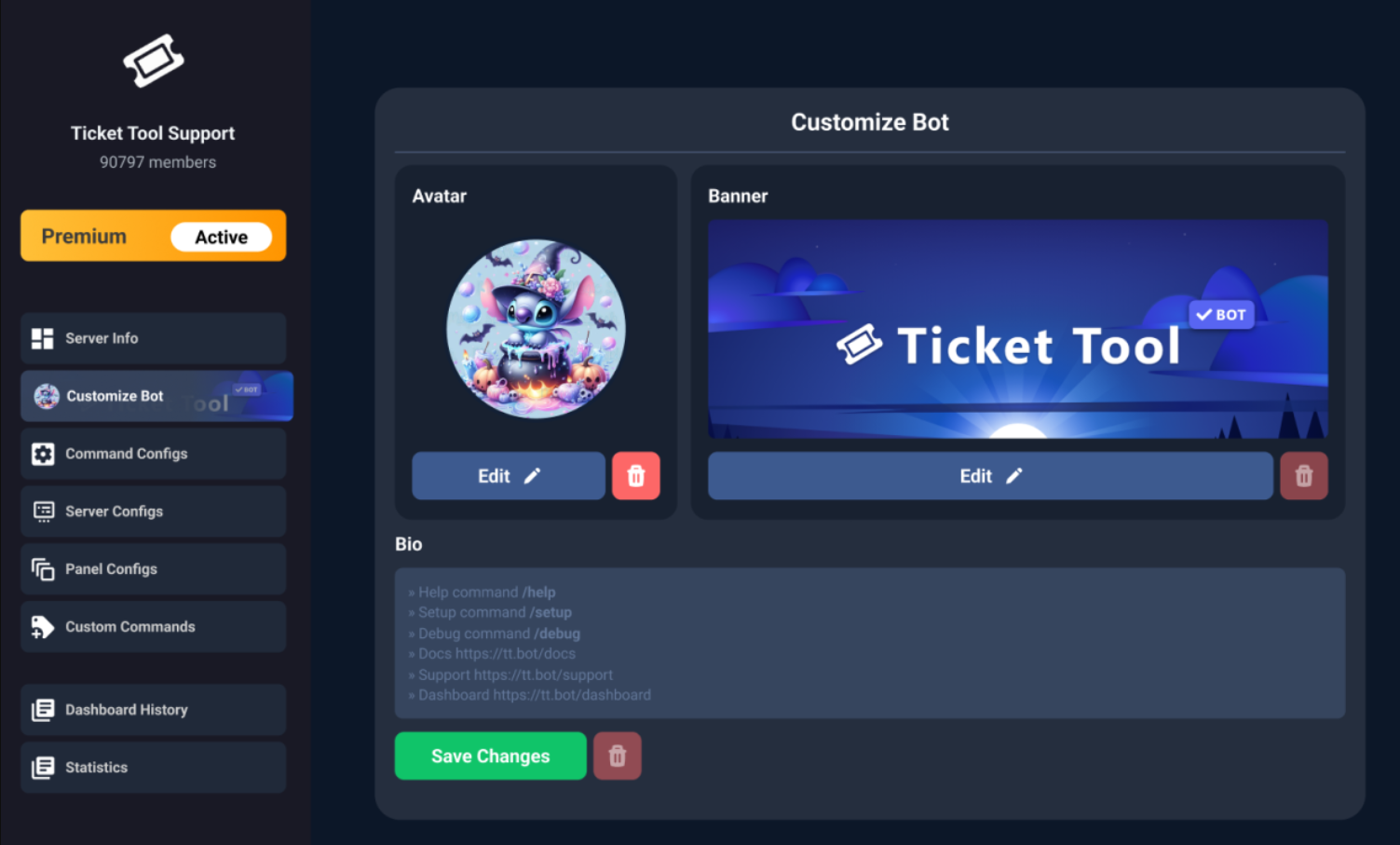
$avatar
worldly helm
untold wasp
i soon got premium can i then change the logo and name off the <@722196398635745...
Hello! 👋
Yes! See above^
You can also change the nickname without premium 😄
untold wasp
worldly helm
Hello! 👋
Yes! See above^
*You can also change the nickname without premium 😄*
but i am wondering if it can be done on that bot
worldly helm
What exactly do you mean?
untold wasp
worldly helm
What exactly do you mean?
you got the @pseudo glen and @humble sequoia i am wondering if i can change that also on the @humble sequoia
worldly helm
That's possible.
worldly helm
I'm not in the billing team if you mean that
untold wasp
worldly helm
I'm not in the billing team if you mean that
okay np
crystal flame
if someone claimed a ticket, how can i automatically have higher mods to be there already without the need of addng them
restive condor
crystal flame
if someone claimed a ticket, how can i automatically have higher mods to be ther...
Hi there, please make a ticket at #premium-tickets
crystal flame
restive condor
Hi there, please make a ticket at <#796568540311715870>
alr
 sage tusk
bot down?
 prime bridgeBOT
<:notallowed:660789872600285184> #🆘│community-support has been locked!
You will gain access again once the lockdown is lifted.
 scenic plinth
Planned Maintenance in Progress! 
Our hosting provider is performing updates to one of our primary servers. This requires us to perform a full system restart and will cause a full system outage.
During this time avoid direct messaging or pinging staff for any reason during the outage. This will result in harsher disciplinary action taken against you.
You can view any necessary status updates here and in #📣│bot-news.
scenic plinth
Premium services should be fully online at this point. White/Primary is still restarting.
stark runeBOT
**Ticket Tool - All Systems are now __Online!__**
All Ticket Tool systems are fully online again! We apologize for any inconvenience this may have caused on your server.
If you are still experiencing any problem with Ticket Tool, please reach out to the <@&540295656720302081> within a ticket here, #🎫│make-a-ticket
 prime bridgeBOT
<:allowed:660789592647008258> #🆘│community-support has been unlocked!
Everyone now has access to this channel.
scenic plinth
Sorry lol
 limber blade
Ello
So how could i add an image to the ticket message instead of the text?
all i can see is this and can't add the image or gif i want to add

 astral sage
limber blade
all i can see is this and can't add the image or gif i want to add
astral sage
limber blade
all i can see is this and can't add the image or gif i want to add
So where you see this, this is the field where you put the link to showcase an image

It is a premium feature
What I personally do as it’s easy, I have a chat with myself on discord and I send the picture, then I do “copy media link” and I put that link in that field
limber blade
astral sage
So where you see this, this is the field where you put the link to showcase an i...
for some reason it was working for me and i had the gif in the ticket message until i edited it
astral sage
limber blade
for some reason it was working for me and i had the gif in the ticket message un...
Try to repaste the link in
limber blade
astral sage
Try to repaste the link in
I can not do for some reason and it's locked
astral sage
limber blade
I can not do for some reason and it's locked
Do you still have premium?
limber blade
astral sage
Do you still have premium?
Prob not but thanks for the help ❤️
iron nightBOT
Gave +1 Rep to @astral sage (current: #435 - 1)
 zealous wind
Halo 
I'd like to know if it's possible to add a "create ticket" button to an existing message. I created a very large embed using the Discord app itself, and I don't want to lose it or have multiple messages
Thank you in advance
restive condor
zealous wind
Halo <a:GhostWave:607656953875005471>
I'd like to know if it's possible to add ...
Hey there! Unfortunately not. Bots can't add buttons to messages actioned by others
zealous wind
restive condor
Hey there! Unfortunately not. Bots can't add buttons to messages actioned by oth...
Tysm! 
simple canopy
.
 rose inlet
Hi. How do you make a claim ticket button?
restive condor
rose inlet
Hi. How do you make a claim ticket button?
Hey there! Claiming is a premium feature
rose inlet
restive condor
Hey there! Claiming is a premium feature <:Premium:1192403074157912144>
Oh. How do you get premium?
Also, How do you make it so the bot pings roles?
latent dawn
rose inlet
Oh. How do you get premium?
Ticket Tool - Ticketing without clutter - The #1 Discord support bot
humble sequoiaBOT
You can purchase Ticket Tool Premium here! Buying it on our website allows you to have full control over your subscription:
 Cancel your subscription at any time
Change your billing interval (yearly/monthly)
Change your payment method
Add or remove server slots to your subscription
 Transfer the subscription between servers
Note: This level of control is only available when purchasing the subscription from our website.
You can manage your current subscriptions here, any billing questions or concerns, feel free to create a Billing Ticket via #🎫│make-a-ticket
 restive condor
rose inlet
Also, How do you make it so the bot pings roles?
restive condor
rose inlet
Also, How do you make it so the bot pings roles?
See below please
rose inlet
?
humble sequoiaBOT
1. Open your Panel Configs tab in your server's dashboard
2. Select the panel you want to ping your support team on
3. Open the Ticket options menu
4. Click on Edit Ticket Message
5. In the Message Content use one of the role mention syntax ({@Role Name}/{Role ID})
6. Save changes
Note: For this to work properly, Ticket Tool requires the Mention Everyone permission. Or the role must have the Allow anyone to @mention this role setting enabled
 jade topaz
Im not sure what happened but my ticket tool is still down and saying interaction error how do I fix it?
 restive condor
jade topaz
Im not sure what happened but my ticket tool is still down and saying interactio...
restive condor
jade topaz
Im not sure what happened but my ticket tool is still down and saying interactio...
Hey there! Wrong bot unfortunately
restive condor
Nope, that's Tickety
jade topaz
OH 
 rich urchin
How do I change the permissions for the bot
 spring bluff
I'm an issue making a panel for the ticket tool, everytime any command is sent, it always spits out that the application did not respond.
restive condor
Mate
restive condor
Please stop mass pinging staff
restive condor
rich urchin
How do I change the permissions for the bot
Hey there! You can edit the bot's permissions from its role settings
 bleak ocean
restive condor
Please stop mass pinging staff
bleak ocean
restive condor
Please stop mass pinging staff
can u help me pls
restive condor
bleak ocean
Hi there, see below please
humble sequoiaBOT
The Drop-down menu or Select Menu replaces the buttons on your panel message and uses a drop-down menu with all of your panels. To set this up, go to your Panel Configs and select your main Panel.
<:Numbericons1:1018864164032225340> Enable Select Style
First you enable Select Style. Then you add an item in the Dropdown Editor. Now you can start editing your dropdown!
<:Numbericons2:1018864168041971712> Dropdown Editor
Each line in the dropdown editor represents a line in the drop down menu on discord. You can add more "Items", by clicking on
First you select a panel. That's the panel this option will open a ticket for. DONT select the same panel twice. Each option should have a different Panel
After that, you can put a Display. This is the title of this option and will appear in the drop down menu. The *Description can be set right after that, which will be below the title in grey.
Additionally you can select an emoji, that will be shown in front of each option. You can either manually input the ID of an emoji or select it in the selector.
Common Issues ⚠️
- Panel doesn't send? Make sure you have a valid emoji selected
- Option doesn't show up? Check if two options have the same panel in the DropDown Editor
$dropdown
restive condor
spring bluff
I'm an issue making a panel for the ticket tool, everytime any command is sent, ...
Hey there! Please try the /debug command in that same channel
spring bluff
okay
bleak ocean
i dont have premium
restive condor
That's ok
bleak ocean
like u got a free one
restive condor
This is a free feature
bleak ocean
restive condor
This is a free feature
oh alright
spring bluff
It gave the response as everyother command, The application did not respond
restive condor
Unfortunately not. Please yry following the guide above
spring bluff
spring bluff
It gave the response as everyother command, The application did not respond
 restive condor
spring bluff
It gave the response as everyother command, The application did not respond
restive condor
spring bluff
It gave the response as everyother command, The application did not respond
Ticket Tool seems to be missing the SEND MESSAGES permission in that channel
spring bluff
yeah that was the issue, thank you for the help
 waxen spear
Oi
Quero supports porque comprei o passe é nao recebir nenhuma recompensa
Oi
Alguém me ajudar eu comprei o passe no flex city é nao recebir recompensas
humble sequoiaBOT
@waxen spear
Você está no lugar errado
Fornecemos suporte para Ticket Tool Discord bot e não podemos ajudá-lo com qualquer problema que você tenha.
- Não sabemos qual equipe de suporte você deve entrar em contato para resolver esse problema e, infelizmente, não poderemos informar com precisão.
Se você não tiver mais dúvidas sobre nossa ferramenta de ticket de bot, feche este ticket
waxen spear
¿Alguien puede ayudarme? Compré el pase en Flex City y no he recibido ninguna recompensa.
foggy sparrow
Que estas en el lugar equivocado
humble sequoiaBOT
⚠️ Está en el lugar equivocado
Brindamos soporte para el bot de Discord Ticket Tool y no le podemos ayudar con el problema que presenta.
- No sabemos a que equipo de soporte debería contactar para solucionar este problema, y desafortunadamente no podremos ayudarle acertadamente.
Si no tiene alguna duda relacionada a nuestro bot, Ticket Tool, por favor cierre este ticket.
 final mulch
@scenic plinth how do i make my tickets look like this one

becuase mines are currently like this
 foggy sparrow
Stop pinging the staff, type the problem you're having and wait for the answer
humble sequoiaBOT
━━ motion's inquiry has been moved to a ticket ━━
 rugged plaza
I have the panel set up so as far as i can tell, everyone should be able to make more than one ticket, and i have all 3 of the roles in the bypass section. It still pops up the error message, and i can't see any other setting related to this
(I've been having a really hard time navigating using this bot, so if im just missing something please just tell me very specifically where to look haha. Also pretty please ping me so i remember to check back)

 pseudo ravine
You’ve been told you’re in the wrong place
waxen spear
But they haven't responded to me on the platform where I requested support!
pseudo ravine
There’s nothing we can do about that
waxen spear
Thank You , But please help me by giving me a contact for support.
pseudo ravine
As previously mentioned, there’s nothing we can do about this
 livid parrot
Bros, can you help me get unbanned from Murder vs Sheriff? I was banned for 7331 days, 9 hours, and 11 minutes.
humble sequoiaBOT
@livid parrot
⚠️ You're in the wrong place
We provide support for Ticket Tool Discord bot and cannot help you with whatever issue you have.
- We don't know which Support Team you should contact to get this issue resolved, and unfortunately we won't be able to accurately tell you.
If you don't have any further questions regarding our bot Ticket Tool, please close this ticket
lilac junco
rugged plaza
I have the panel set up so as far as i can tell, everyone should be able to make...
Server config -> Global limit -> Increase number
Panel config -> Limits -> Increase number as needed on the top 2 options (REFER TO THIS ONE)
rugged plaza
lilac junco
``Server config -> Global limit -> Increase number``
Panel config -> Limits -> ...
Thank you! That worked. Appreciate it a lot
iron nightBOT
Gave +1 Rep to @lilac junco (current: #69 - 27)
lilac junco
 broken falcon
Is this rango support ?
broken falcon
Is this rango support ?
Nope.
broken falcon
Ok
vale echo
Guys
vale echo
iron night
Gave +1 Rep to **<@1086519848999329903>** (current: `#69` - `27`)
How do u add a Rep sistem? Like this one
Is it possible?
 snow notch
Hi! How do you add this feature where you answer questions before making the ticket?

 faint dirge
snow notch
Hi! How do you add this feature where you answer questions before making the tic...
faint dirge
snow notch
Hi! How do you add this feature where you answer questions before making the tic...
its called a form!
vale echo
snow notch
Hi! How do you add this feature where you answer questions before making the tic...
Go to Dashboard and find the option: form
faint dirge
anyone know how to make my ticket tool icon gold?
vale echo
faint dirge
anyone know how to make my ticket tool icon gold?
I think you have to pay
vale echo
faint dirge
where would that be ?
Uhh lemme check
snow notch
oh and how do i purge tickets through the dashboard the commandn wont work
scenic forum
snow notch
oh and how do i purge tickets through the dashboard the commandn wont work
Thats not possible
Can you use /debug on your server?
vale echo
@faint dirge
vale echo
In the 3 dash
faint dirge
yeah
faint dirge
yeah
vale echo
Find a gold ticket pic and add it
scenic forum
snow notch
even nthe debug wont work
The bot is missing the "View Channel" permission inside the channel
faint dirge
alr
vale echo
iron night
Gave +1 Rep to **<@1086519848999329903>** (current: `#69` - `27`)
Like this
scenic forum
vale echo
Like this
We only help with ticket tool, youd need to reach out to that bots support server
vale echo
scenic forum
We only help with ticket tool, youd need to reach out to that bots support serve...
How
Ohh ok
So i have to find a Rep bot?
scenic forum
You click on the bot that does the reps and join their support server.
iron nightBOT
Gave +1 Rep to @scenic forum (current: #13 - 539)
snow notch
am i just stupid im in panel configs and i cant find the id
scenic forum
snow notch
am i just stupid im in panel configs and i cant find the id
At the very top the number infront of the panels name is the ID
snow notch
where
scenic forum
snow notch
where
Show me a screenshot of the full site
Thats panel ID 2 because the number 2 is infront of the panels name at the top.
iron nightBOT
Gave +1 Rep to @scenic forum (current: #13 - 540)
 analog dock
guys how to add blacklisted role?
 heavy perch
how do i use discord emojis in the panel message
scenic forum
analog dock
guys how to add blacklisted role?
Server config -> blacklist roles -> Add role
analog dock
scenic forum
Server config -> blacklist roles -> Add role
it says your blacklisted
I want to tell you that you need a roll to open your ticket.
scenic forum
heavy perch
how do i use discord emojis in the panel message
If its a default emoji you can just copy paste it
If it a custom emoji you can get the copy paste version via $id
Example
$id
Will return a copy pasteable role
scenic forum
analog dock
it says your blacklisted
I want to tell you that you need a roll to open your t...
You cannot customize that error message
analog dock
scenic forum
You cannot customize that error message
So can't I create a special roll to open the ticket?
scenic forum
analog dock
So can't I create a special roll to open the ticket?
You can
I just said that you cannot edit the error message.
analog dock
scenic forum
You can
how
Sorry for the silly questions, I haven't worked with this bot before.
scenic forum
analog dock
how
Panel config -> Buttons -> Create ticket ->
Disabled roles
@ everyone
Allowed roles
All roles that can open a ticket
scenic forum
@analog dock dont dm me for support
Keep the support on this server
analog dock
I'm looking for the bot to write that you need a verified role to open a ticket.
 analog dock
scenic forum
<@770962215485964298> dont dm me for support
Keep the support on this server
analog dock
scenic forum
<@770962215485964298> dont dm me for support
Keep the support on this server
sry
scenic forum
analog dock
I'm looking for the bot to write that you need a verified role to open a ticket...
As previously stated you cannot edit the error message
analog dock
scenic forum
As previously stated you cannot edit the error message
oh okay...
scenic forum
You could write below the ticket creation menu that you need role X to open a ticket
 autumn ermine
How to add ticket in our discord server
stark runeBOT
1. Invite Ticket Tool to your server
First you will want to invite the bot to your server. Once the bot is in your server, you can manage your server in the dashboard.
2. Create a Panel
To create a panel we are going to need to head over to the panel configs on the dashboard.
Once at the dashboard we will need to click Create Panel.
Enter a panel name (Fill in any optional settings you want).
Click Create Panel and your ready to get started with configuring your panel.
An example of a creating a panel is shown below.
3. Send the Panel to a Channel
Once you've created a panel on the dashboard you will need to send it to a channel using send on the dashboard.
Select the channel you want your panel to be created in and click send.
For other questions checkout $help faq.
An example of a sending a panel is shown below.
Having a Problem Sending the Panel?
Do $debug in a channel with Ticket Tool and make sure it has all the necessary Discord permissions.
scenic forum
@autumn ermine refer to the embed above
 wooden needle
can i add a gif for the ticket bot?
humble sequoiaBOT
What are the direct URLs?
A direct access URL is an easy to read URL that users can enter to get to a specific item, document, page, category, or perspective, in which our bot TicketTool can read and get it displayed in your 'Panel Message' or your 'Ticket Message'.
Where can I get them?
The recommended way is to use 'Imgur', you can signup within a few minutes and then upload the image you want, and copy the URL of the uploaded image and paste it into one of the four boxes. There are alternatives to this, such as other image or video storing websites or using 'Open Original' of an image and paste it in (please be aware that if your image is deleted, Discord will automatically delete the link to it in a few days). Please note this requires 'Premium'. Imgur
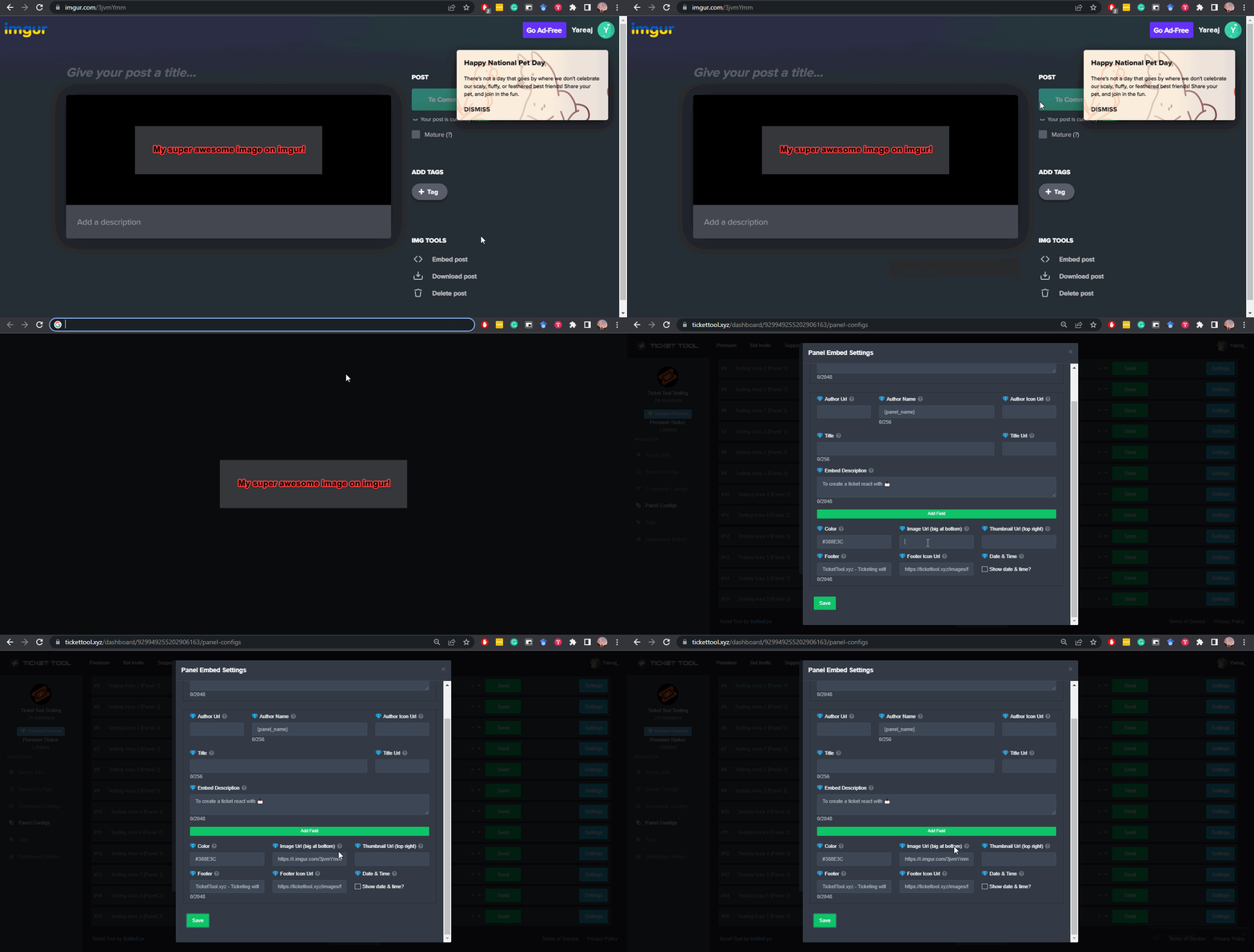 scenic forum
wooden needle
can i add a gif for the ticket bot?
scenic forum
wooden needle
can i add a gif for the ticket bot?
Youd just need to insert the direct image url in any media field in the dashboard
wooden needle
aaah cool thank yooou
wooden needle
so ive tried a few times an i got nothing, maybe im using the wrong bot? its this one right??
 scenic forum
wooden needle
so ive tried a few times an i got nothing, maybe im using the wrong bot? its thi...
scenic forum
wooden needle
so ive tried a few times an i got nothing, maybe im using the wrong bot? its thi...
Where are you trying to add the gif into
The panel or ticket message
 scenic forum
Are you using the correct link?
wooden needle
i would look at the old yt vid to but it was from 3 yrs ago to and yea i am

im using this link
from the reccomended website
 scenic forum
First the link youre using isnt the direct image url but simply site url
Secondly that file isnt a gif its an mp4
scenic forum
wooden needle
weird i made sure to type gif when looking
Its not
use this link
https://i.imgur.com/nJ2Vyte.gif

I converted your mp4 to gif
wooden needle
tysm!
 warm blade
Yo im trying to set up ticket bot on a server and want to create claiming and unclaiming with the tickets but the claiming interface is showing a red diamond. Any idea what that means and how to fix it
lilac junco
warm blade
Yo im trying to set up ticket bot on a server and want to create claiming and un...
Hey!
Please note claiming is a premium feature. 
Anything with a red diamond () next to it is a premium feature.
warm blade
Ah gotcha thx
lilac junco
warm blade
Ah gotcha thx
humble sequoiaBOT
@brazen ruin
⚠️ You're in the wrong place
We provide support for Ticket Tool Discord bot and cannot help you with whatever issue you have.
- We don't know which Support Team you should contact to get this issue resolved, and unfortunately we won't be able to accurately tell you.
If you don't have any further questions regarding our bot Ticket Tool, please close this ticket
 brazen ruin
Can ticket tool be renamed with premium or can we only change the nickname on the server?
scenic forum
brazen ruin
Can ticket tool be renamed with premium or can we only change the nickname on th...
You can only change the bots nickname even with premium
lilac junco
 alpine fjord
is the bot bugged or is it just me
alpine fjord
is the bot bugged or is it just me
Hello! I believe the bot is working perfectly fine, if you're experiencing errors send a screenshot I'll see what I can do.
alpine fjord
lilac junco
Hello! I believe the bot is working perfectly fine, if you're experiencing error...
here, i dont really know if its just my internet cus my internet is fine
 lilac junco
alpine fjord
here, i dont really know if its just my internet cus my internet is fine
lilac junco
alpine fjord
here, i dont really know if its just my internet cus my internet is fine
Refer to the embed below!
humble sequoiaBOT
When first invited to your server, Ticket Tool should have the permissions shown below in order to ensure an appropriate functioning:
When customizing permissions for the different ticket participants, you must make sure Ticket Tool has the permissions you want it to grant to others, you can learn more about this here.
Missing Permissions
This error is a direct outcome of the bot missing permissions as depicted above. When troubleshooting this error we suggest you go through these steps:
- Use the </debug:1029783024264564765> command to check if the bot is lacking core role or channel permissions.
- Compare the category/channel's overrides and contrast them with the bot's roles to identify any permission denial that is breaking the functioning
- If you can't still figure it out, let our <@&540295656720302081> know so they can guide you through
Additional Resources
- If you are a server administrator and would like to understand more how to set up your server's permissions, we suggest checking the Discord Support Knowledge Base
- If you are a bot developer and are interested in the internal permission hierarchy we suggest you this part of the Discord Developer Docs
Important Note
- Giving Administrator permissions is NOT required and we do NOT encourage you to do unless you are trying to troubleshoot your permissions setup.
Broo
Not working
Showing that app is not working
restive condor
autumn ermine
Not working
Hi there, how exactly is it not working?
rose inlet
how do u get the bot to ping staff
lilac junco
rose inlet
how do u get the bot to ping staff
1. Open your Panel Configs tab in your server's dashboard
2. Select the panel you want to ping your support team on
3. Open the Ticket options menu
4. Click on Edit Ticket Message
5. In the Message Content use one of the role mention syntax ({@Role Name}/{Role ID})
6. Save changes
Note: For this to work properly, Ticket Tool requires the Mention Everyone permission. Or the role must have the Allow anyone to @mention this role setting enabled
autumn ermine
restive condor
Hi there, how exactly is it not working?
What
autumn ermine
Dm
autumn ermine
restive condor
Are you getting any errors?
Yeah
restive condor
No, you can post it here
autumn ermine
Wait
restive condor
Please screenshot the error message
autumn ermine
Bro showing the application is not responding
 pulsar juniper
How make a ticket to the forge I got ban and says make a ticket how?
humble sequoiaBOT
⚠️ You're in the wrong place
We provide support for Ticket Tool Discord bot and cannot help you with whatever issue you have.
- We don't know which Support Team you should contact to get this issue resolved, and unfortunately we won't be able to accurately tell you.
If you don't have any further questions regarding our bot Ticket Tool, please close this ticket
restive condor
autumn ermine
Bro showing the application is not responding
Could you use the /debug command in that same channel please
pulsar juniper
Ticket
restive condor
autumn ermine
Problem
Ticket Tool is missing the SEND MESSAGES permission for that channel
autumn ermine
Hiw
restive condor
pulsar juniper
Ticket
You're in the wrong server mate
autumn ermine
Can u hlep
pulsar juniper
Okay where I can find it?
restive condor
We don't know unfortunately
pulsar juniper
Ohh okay thanks
restive condor
autumn ermine
Can u hlep
Simply grant that permission to the bot from the channel's permission
autumn ermine
How
restive condor
Right click on the channel's name (from the channel list) > Edit Channel > Permissions > Add Ticket Tool >  Send Messages
Hold down instead of right clicking, if on mobile
autumn ermine
restive condor
Right click on the channel's name (from the channel list) > Edit Channel > Permi...
Thx man appreciate
iron nightBOT
Gave +1 Rep to @restive condor (current: #1 - 2844)
 pale cloud
#🆘│community-support how to update my profile details

 loud robin
when i create a dropdown panel it shows a button for the panel which is the base of the dropdown even tho i disabled the button
restive condor
 stoic sandal
Hey there! The bot is missing the SEND MESSAGES permission for that channel
restive condor
loud robin
when i create a dropdown panel it shows a button for the panel which is the base...
Hey there! That's correct. You disabled the button not the dropdown option
You would need to simply remove that option from the dropdown
Or just don't allow anybody to use it but keep it there
loud robin
i don't have anything in the dropdown section i have 3 panels in the attached panels section
restive condor
loud robin
i don't have anything in the dropdown section i have 3 panels in the attached pa...
Could you make a ticket please #premium-tickets
loud robin
stoic sandal
restive condor
Hey there! The bot is missing the ``SEND MESSAGES`` permission for that channel
Ok
 crisp quail
How can I add the ability to see or count who has handled the most tickets on my server?
I have ticketool premium
humble sequoiaBOT
Claiming allows you to change the ticket name, category and permissions. To use it you have to enable it first on your Dashboard > Panel Configs > Claiming

 Note: This is a premium feature
scenic forum
Note: This is a premium feature
scenic forum
@crisp quail refer to the embed above
Claiming generates these statistics via which staff claimed how many
crisp quail
scenic forum
<@262904754722570242> refer to the embed above
Claiming generates these statisti...
I have claiming, but where i can find these stats?
scenic forum
crisp quail
I have claiming, but where i can find these stats?
Dashboard -> Statistics
crisp quail
Okay i got it now, thank you for help, have a nice day sir.
 barren otter
Hey ! I can't claim a reward from onboarding in chainers game, the reward with discord, i did it but it still loading (3 days ago)
humble sequoiaBOT
@barren otter
⚠️ You're in the wrong place
We provide support for Ticket Tool Discord bot and cannot help you with whatever issue you have.
- We don't know which Support Team you should contact to get this issue resolved, and unfortunately we won't be able to accurately tell you.
If you don't have any further questions regarding our bot Ticket Tool, please close this ticket
 fallen shore
hi can i dm or open a ticket for help
worldly helm
fallen shore
hi can i dm or open a ticket for help
Hey! 👋
You can #🎫│make-a-ticket if you need support with our bot.
fallen shore
thank you
worldly helm
 pure plank
humble sequoiaBOT
pure plank
humble sequoiaBOT
@pure plank
⚠️ You're in the wrong place
We provide support for Ticket Tool Discord bot and cannot help you with whatever issue you have.
- We don't know which Support Team you should contact to get this issue resolved, and unfortunately we won't be able to accurately tell you.
If you don't have any further questions regarding our bot Ticket Tool, please close this ticket

 lilac junco
 robust bridge
how to the owner of ticket can see closed ticket?
robust bridge
how to the owner of ticket can see closed ticket?
Do you mean to see a deleted ticket?
robust bridge
lilac junco
Do you mean to see a deleted ticket?
no, the closed one
they cant see it
 lilac junco
robust bridge
they cant see it
lilac junco
robust bridge
they cant see it
Who can't see it?
robust bridge
lilac junco
Who can't see it?
who create the ticket
lilac junco
robust bridge
who create the ticket
Unless they're a staff they can't see their own ticket when it's closed.
lilac junco
robust bridge
how to setting?
Please #🎫│make-a-ticket I am unable to help you further.
 formal glacier
I accidentally deleted a ticket channel and now every time I try to use a command, it says this
 scenic forum
formal glacier
I accidentally deleted a ticket channel and now every time I try to use a comman...
scenic forum
formal glacier
I accidentally deleted a ticket channel and now every time I try to use a comman...
Can you use /debug inside the same channel?
formal glacier
No it gives the same message