#🆘│community-support
1 messages · Page 201 of 1
 west parcel
 austere forge
Please create a ticket with our Arabic Support, you will be more comfortable with your native language
 humble sequoiaBOT

فريق الدعم الفني العربي
عميلنا العزيز ان كنت تبحث عن مساعدة يرجى فتح تكت خاص بفريق الدعم الفني العربي
اذهب الى#🎫│make-a-ticket
ثم قم بلضغط على الايموجي الاتي (🇯🇴)
 jade topaz
so new problem happened whenever a member tries to make a ticket this happens

 worldly helm
jade topaz
so new problem happened whenever a member tries to make a ticket this happens
worldly helm
jade topaz
so new problem happened whenever a member tries to make a ticket this happens
__ «You don't have permissions to use this»__
Are your members seeing this message when they try to create a ticket?
You may have accidentally denied them permission to use the Create Ticket button.
Look in the following places in your server's dashboard
👉 Server Configs > Blacklist Roles
Any roles there will be unable to interact with the bot in any way, including creating tickets.👉 Panel Configs > Buttons > Create Ticket > Support team only
If this is enabled, only your staff will be able to use the button.
👉 Panel Configs > Buttons > Create Ticket > Disabled Roles
Any roles there will be unable to use the button.
jade topaz
worldly helm
> __ **«You don't have permissions to use this»**__
>
> Are your members seeing...
thank you @worldly helm
 iron nightBOT
Gave +1 Rep to @worldly helm (current: #7 - 847)
worldly helm

 crude hatch
Hey how do i make the claim button in ticket with a user
austere forge
You need a premium subscription for this ⬇️
humble sequoiaBOT
Claiming allows you to change the ticket name, category and permissions. To use it you have to enable it first on your Dashboard > Panel Configs > Claiming

 Note: This is a premium feature
crude hatch
Note: This is a premium feature
crude hatch
 meh
meh
ty for thelp
austere forge
No problem! Thank you for choosing Ticket tool 
 echo comet
How do I make ticket tool ping support when a ticket is opened
humble sequoiaBOT
1. Open your Panel Configs tab in your server's dashboard
2. Select the panel you want to ping your support team on
3. Open the Ticket options menu
4. Click on Edit Ticket Message
5. In the Message Content use one of the role mention syntax ({@Role Name}/{Role ID})
6. Save changes
Note: For this to work properly, Ticket Tool requires the Mention Everyone permission. Or the role must have the Allow anyone to @mention this role setting enabled
 austere forge
echo comet
How do I make ticket tool ping support when a ticket is opened
austere forge
echo comet
How do I make ticket tool ping support when a ticket is opened
Refer to the embed above please
echo comet
austere forge
Refer to the embed above please
Thx
iron nightBOT
Gave +1 Rep to @austere forge (current: #4 - 1079)
 normal drum
I am looking for someone to help me make several ticket panels and integrate them into my Discord. I will pay for your time
austere forge
you'd like to have the same ticketing system as our channel #🎫│make-a-ticket ? like multiple buttons..
 compact trellis
Hi guys, unsure if its allowed here but can anyone help on setting up automatic deleting of tickets after it was closed off?
 pure stream
compact trellis
Hi guys, unsure if its allowed here but can anyone help on setting up automatic ...
pure stream
compact trellis
Hi guys, unsure if its allowed here but can anyone help on setting up automatic ...
Hey there! You might want to head to dashboard —> Automation and select it.
 warm cipher
Hey I am trying to find out if it's possible to add another button to creating a ticket, or maybe a drop down to select which support I'd like people to receive

For example, would it be possible to make it so it's "Option 1" as one button and "Option 2" next to it, or below etc.

or is this like a premium only feature
humble sequoiaBOT
For more convenient use of multipanels, you can now combine panels on the dashboard. This will allow you to directly send the multipanel from the dashboard or via the $panel ID command.
Where can I find this?
You can find this setting on the Dashboard -> Panel Configs -> Panel -> Attached Panels
Note: if you're attaching all the panels to a panel called English, don't include English in the attached panel's box (If you do this, it will create a duplicate)
This will put all buttons from all of your panels on one message. The message is the panel message from the panel you're combining these panels in.

The Drop-down menu or Select Menu replaces the buttons on your panel message and uses a drop-down menu with all of your panels. To set this up, go to your Panel Configs and select your main Panel.
<:Numbericons1:1018864164032225340> Enable Select Style
First you enable Select Style. Then you add an item in the Dropdown Editor. Now you can start editing your dropdown!
<:Numbericons2:1018864168041971712> Dropdown Editor
Each line in the dropdown editor represents a line in the drop down menu on discord. You can add more "Items", by clicking on 

First you select a panel. That's the panel this option will open a ticket for.  DONT select the same panel twice. Each option should have a different Panel
After that, you can put a Display. This is the title of this option and will appear in the drop down menu. The *Description can be set right after that, which will be below the title in grey.
Additionally you can select an emoji, that will be shown in front of each option. You can either manually input the ID of an emoji or select it in the selector.
Common Issues ⚠️
- Panel doesn't send? Make sure you have a valid emoji selected
- Option doesn't show up? Check if two options have the same panel in the DropDown Editor

$dropdown
 atomic solstice
warm cipher
Hey I am trying to find out if it's possible to add another button to creating a...
atomic solstice
warm cipher
Hey I am trying to find out if it's possible to add another button to creating a...
His this is possible, you can check the embeds above, first one is an additional button and second one are the dropdowns, both are free
warm cipher
atomic solstice
His this is possible, you can check the embeds above, first one is an additional...
sweet! thank you so much
iron nightBOT
Gave +1 Rep to @atomic solstice (current: #21 - 332)
 tacit sphinx
Hello, how to create tickets in the dropdown style and have them created in the category I want after selecting a specific ticket category?
 restive condor
tacit sphinx
Hello, how to create tickets in the dropdown style and have them created in the ...
restive condor
tacit sphinx
Hello, how to create tickets in the dropdown style and have them created in the ...
Hey there! Each dropdown option is connected to a panel so simply select categories for each corresponding panel
humble sequoiaBOT
The Drop-down menu or Select Menu replaces the buttons on your panel message and uses a drop-down menu with all of your panels. To set this up, go to your Panel Configs and select your main Panel.
<:Numbericons1:1018864164032225340> Enable Select Style
First you enable Select Style. Then you add an item in the Dropdown Editor. Now you can start editing your dropdown!
<:Numbericons2:1018864168041971712> Dropdown Editor
Each line in the dropdown editor represents a line in the drop down menu on discord. You can add more "Items", by clicking on
First you select a panel. That's the panel this option will open a ticket for. DONT select the same panel twice. Each option should have a different Panel
After that, you can put a Display. This is the title of this option and will appear in the drop down menu. The *Description can be set right after that, which will be below the title in grey.
Additionally you can select an emoji, that will be shown in front of each option. You can either manually input the ID of an emoji or select it in the selector.
Common Issues ⚠️
- Panel doesn't send? Make sure you have a valid emoji selected
- Option doesn't show up? Check if two options have the same panel in the DropDown Editor
$dropdown
1. Open your Panel Configs tab in the server's dashboard
2. Select the panel you want to grant access to
3. Open the Category options menu
4. Select the categories of your preference
5. Save changes
 tacit sphinx
How to do something like that after selecting one of several options?
 restive condor
tacit sphinx
How to do something like that after selecting one of several options?
restive condor
tacit sphinx
How to do something like that after selecting one of several options?
Each option is its own panel, so simply configure forms for the panel connected to the option
humble sequoiaBOT
A Discord Form lets the user answer individual questions in a pop-up Form, which then displays the answers in the ticket message. This can save time if you already know what you want to ask the user.
Setup Forms
Forms can be enabled under Panel Settings > Form Options > Edit Forms Options. In the new pop-up window, you can now enable and edit your own Form.
Form Options
You can add up to 5 questions in the Discord form. This is a Discord limitation. Each question can have a placeholder in the input field, a minimum and maximum input, multi-line, and also the option to have the answer required.
Options
Question Title ➞ Your Question goes here
Question Placeholder ➞ The placeholder text in the input field
Required ➞ If enabled, the user has to answer this question, to submit the form
Multi-Line Input ➞ Allows the user to input multiple lines
Minimum and Maximum Input ➞ Set a minimum and maximum input value for the user
Displaying the Answer
To display the answers from the user, you need to enable Auto display form results on the ticket message as an additional embed
If you don't want a second embed, go into your Panel Configs > Ticket Options > Edit Ticket Message. You use the variable {create.form.x} and replace x with the number of your question. For example, the response to Question 5 can be displayed with {create.form.5}.
 iron nightBOT
Gave +1 Rep to @restive condor (current: #1 - 2387)
 heavy raven
@humble sequoia
warm cipher
how do I make it so the message mentions the role and they get the tag?
 restive condor
warm cipher
how do I make it so the message mentions the role and they get the tag?
restive condor
warm cipher
how do I make it so the message mentions the role and they get the tag?
Hi there! Please make sure Ticket Tool has the MENTION EVERYONE & ALL ROLES permission in its role settings
warm cipher
restive condor
Hi there! Please make sure Ticket Tool has the ``MENTION EVERYONE & ALL ROLES`` ...
oh the fix was that simple? I remember having issues with my personal bot with mentioning and it wasn't that simple 😭 thank you very much!
iron nightBOT
Gave +1 Rep to @restive condor (current: #1 - 2388)
 raw jacinth
hii
so i dont want members to be able to close tickets. is there a way for me to make it so that only people w the mod role can close?
 lament pike
raw jacinth
hii
so i dont want members to be able to close tickets. is there a way for me t...
lament pike
raw jacinth
hii
so i dont want members to be able to close tickets. is there a way for me t...
Dashboard > Panel configs > Buttons > Delete/Close Ticket > enabled Support Team Only 
raw jacinth
lament pike
Dashboard > Panel configs > Buttons > Delete/Close Ticket > enabled Support Team...
ok thank you so much
iron nightBOT
Gave +1 Rep to @lament pike (current: #229 - 2)
raw jacinth
i knew there was a way im lowkey sick rn and forgot how to do it 😭
 oblique ridge
how do you make it so it pings staff team once opening ticket?
lament pike
oblique ridge
how do you make it so it pings staff team once opening ticket?
If you want it to ping staff automatically once a ticket is opened, here is the way to do so. #🆘│community-support message
 fast inlet
Is the bot down?
I can't even log in to the dashboard
@solid stream bot is down. Can't even access the dashboard
lament pike
fast inlet
Is the bot down?
i don’t think so, let me check real quick.
fast inlet
Something is up beause I can't access the dashboard
lament pike
fast inlet
Something is up beause I can't access the dashboard
Does it say anything when you try to log-in?
fast inlet
When I select my server a window pops up to add the bot then when I add it to the server nothing happens
@lament pike this is what's happening
lament pike
fast inlet
\<@1340807546734379060> this is what's happening
Refresh, then you can manage your server.
fast inlet
lament pike
Refresh, then you can manage your server.
Doesn't work
tried multiple times
lament pike
fast inlet
Doesn't work
Try closing the tab and reopening it.
fast inlet
lament pike
Try closing the tab and reopening it.
even tried different browsers and ntohing still does the same thing
Nothing works
lament pike
fast inlet
even tried different browsers and ntohing still does the same thing
Oh, unfortunately i do not know how to fix this, i suggest making a ticket here https://discord.com/channels/509192800865353738/571706435449257997
fast inlet
⬆️ BULLCRAP
This is pissing me off
@lament pike could it be Discord rate limiting me?
Can't add any bots
lament pike
fast inlet
<@1340807546734379060> could it be Discord rate limiting me?
Could be.
pure stream
It says claiming isn’t enabled and I did.
 open charm
fast inlet
\<@1340807546734379060> this is what's happening
open charm
fast inlet
\<@1340807546734379060> this is what's happening
likely a rate limit, try now
 muted wave
pls help
open charm
muted wave
pls help
i recommend opening a support ticket in #🎫│make-a-ticket regarding this.
muted wave
open charm
i recommend opening a support ticket in <#571706435449257997> regarding this.
Same here.
thanks
open charm
np!
muted wave
thanks @open charm
iron nightBOT
Gave +1 Rep to @open charm (current: #154 - 4)
 desert junco
i need help
muted wave
desert junco
i need help
with?
desert junco
how to make the ticket go to a channel after its created with the pannel
muted wave
desert junco
how to make the ticket go to a channel after its created with the pannel
./setup
without the .
desert junco
the panel is made though
muted wave
go to the dashboard and click send in it and it will send a embeded with buttons to make ticket
desert junco
yes we have that i want to send the ticket to a channle after someone creates it
muted wave
explain more pls
desert junco
can you go to general voice
 gloomy socket
fast inlet
\<@1340807546734379060> this is what's happening
gloomy socket
fast inlet
\<@1340807546734379060> this is what's happening
Im getting this same issue, the server already had ticket tool active on it.
refreshed Browser, Restarted Browser and Discord tried again nothing seems to be working,
muted wave
gloomy socket
Im getting this same issue, the server already had ticket tool active on it.
ref...
Same issue too
open charm
gloomy socket
Im getting this same issue, the server already had ticket tool active on it.
ref...
possible downtime?
gloomy socket
open charm
possible downtime?
Maybe cant see anything recent in the news channels
muted wave
open charm
possible downtime?
No it works in other swevers
humble sequoiaBOT
━━ User's inquiry has been moved to a ticket ━━
 brazen cedar
whenever i try and send the ticket tool to actually open the tickets it said "
Failed: Invalid Form Body components[0].components[0].emoji.name[BUTTON_COMPONENT_INVALID_EMOJI]: Invalid emoji"
 pseudo ravine
Hey there! Please refer to the embed below!
humble sequoiaBOT
The Drop-down menu or Select Menu replaces the buttons on your panel message and uses a drop-down menu with all of your panels. To set this up, go to your Panel Configs and select your main Panel.
<:Numbericons1:1018864164032225340> Enable Select Style
First you enable Select Style. Then you add an item in the Dropdown Editor. Now you can start editing your dropdown!
<:Numbericons2:1018864168041971712> Dropdown Editor
Each line in the dropdown editor represents a line in the drop down menu on discord. You can add more "Items", by clicking on
First you select a panel. That's the panel this option will open a ticket for. DONT select the same panel twice. Each option should have a different Panel
After that, you can put a Display. This is the title of this option and will appear in the drop down menu. The *Description can be set right after that, which will be below the title in grey.
Additionally you can select an emoji, that will be shown in front of each option. You can either manually input the ID of an emoji or select it in the selector.
Common Issues ⚠️
- Panel doesn't send? Make sure you have a valid emoji selected
- Option doesn't show up? Check if two options have the same panel in the DropDown Editor
$dropdown
brazen cedar
@pseudo ravine this hasnt fixed my issue i changed all the dropdown styles and it still says that
i lied
the emoji cooked it
pseudo ravine
Did everything get resolved?
 eternal ridge
Im trying to set up the ticket bot through Sapphire and it does everything till gets to making the ticket I've added the bot code to Ticket tool. Am i missing something?
pseudo ravine
Hey there! Please refer to the embed below!
humble sequoiaBOT
Integrating an External Bot x Ticket Tool <:TicketToolGold:1073948897673748490>
Integrating Ticket Tool with an external bot allows you to customize your server's Ticket System further!
- The external bot must output the
$newor$ticketcommands with the user's ID to start a ticket. Preferably in a private channel.
Eg.
$new 12345678901234567890
-
Your ticket panel must be Command Style enabled
-
You must whitelist that bot's ID in your Dashboard ➞ Server Configs ➞ Bot section.
Otherwise Ticket Tool will not react to the command and a ticket will not be created.
- If you'd like to include a reason in the command usage, feel free to do so after the user ID.
Eg.
$new 12345678901234567890 Your reason goes here
This reason can then be shown anywhere in the Ticket Message with the{create.reason}variable
**  Note:** If you have changed Ticket Tool's default prefix (
$) please ensure to amend the prefix for the $new or $ticket commands.
Eg. If your prefix is
-, then what you're looking for the bot to use is-newor-ticket

$botintegration
brazen cedar
is there a way to make it auto save transcripts and delete a ticket when its closed
?
eternal ridge
humble sequoia
tried all of that it does everything till creating the ticket
$ticket ${userid}
 silk hamlet
i can't see the server in ticket tool manage server but im a mod in it i can access other bots
 green lodge
can someone heelp me setup my ticket tool?
 languid bolt
 cosmic pond
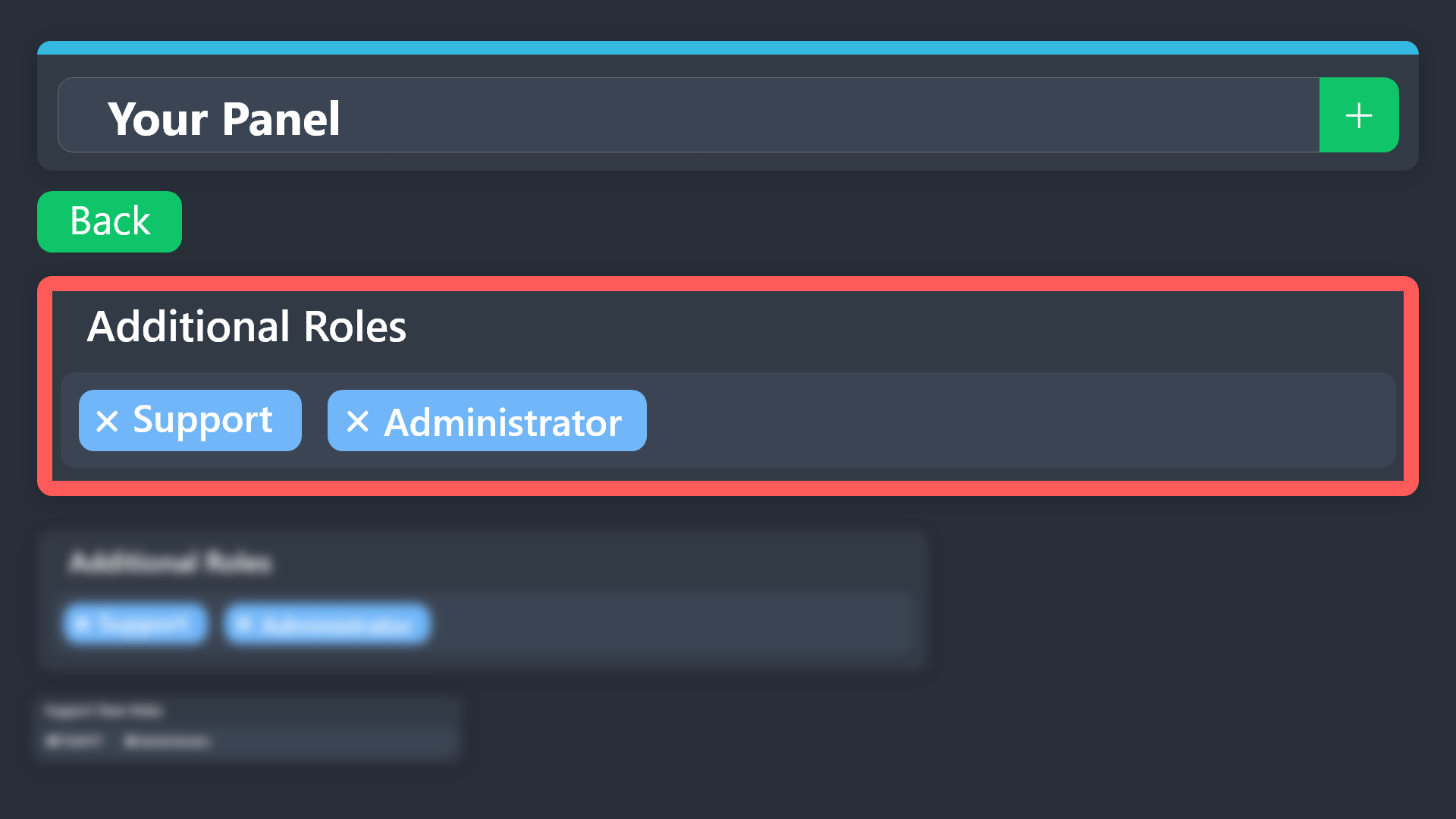
How do additional roles work? i see the perms for them but how do you actually assign a role to count as additional?
humble sequoiaBOT
Additional Roles are roles that are independent of Support Roles. You can assign unique permissions for roles defined as additional roles in tickets.
To choose your additional roles head to your Panel Configs ➞ General Settings ➞ Additional Roles
To assign permissions for additional roles, go to Dashboard ➞ Panel Configs ➞ Permission Options ➞ Additional Opened/Closed Permissions.
Note: Additional Roles do NOT get affected by the Change other support team permissions when claimed feature under Claiming Options, meaning they don't gain/lose any permissions set in that feature once a ticket is claimed.
$addroles
worldly helm
cosmic pond
How do additional roles work? i see the perms for them but how do you actually a...
Please refer to this guide^
cosmic pond
worldly helm
Please refer to this guide^
oh ty
iron nightBOT
Gave +1 Rep to @worldly helm (current: #7 - 848)
 fierce swallow
Hi, Is there a feature that automatically forwards a newly created support ticket as an email message to our support inbox?
pure stream
fierce swallow
Hi, Is there a feature that automatically forwards a newly created support ticke...
Hey there! Unfortunately this feature is not aviable at the moment. Feel free to make a suggestion.#💡│suggestions thanks by supporting ticket tool!
iron nightBOT
Gave +1 Rep to @fierce swallow (current: #391 - 1)
pure stream
worldly helm
Please refer to this guide^
Hello! Umm I’m unable to make the “claim” button show and my /claim command says “Warning: claiming isn’t enabled. I did enable this.
 silk mortar
help me4
 cosmic pond
Is there a way to give command perms (like close, add, etc) to a specific role? i tried using additional role perms but that seems to only affect the actual buttons
lament pike
silk mortar
help me4
Can you go to the
dashboard -> panel configs -> permissions and look if you maybe remove the perms for the roles?
worldly helm
cosmic pond
Is there a way to give command perms (like close, add, etc) to a specific role? ...
Dashboard > Command Configs
cosmic pond
worldly helm
Dashboard > Command Configs
i mean without affecting all other ticket types like lets say you want a role to only have command perms for a general ticket but not for a trade ticket is there a way to do that?
worldly helm
cosmic pond
i mean without affecting all other ticket types like lets say you want a role to...
You chose the additional role in the command configs and only set the role you want to be able to close general tickets in the general tickets additional role settings
 wicked elbow
 edgy vigil
السلام عليكم
 karmic sorrel
edgy vigil
السلام عليكم
karmic sorrel
edgy vigil
السلام عليكم
وعليكم السلام، #🎫│make-a-ticket
jade topaz
Can Anyone Help me set up my ticket bot?
lament pike
jade topaz
Can Anyone Help me set up my ticket bot?
Yes, do /setup command in your server to see how to set up the bot.
jade topaz
Can you join my server and help?
lament pike
jade topaz
Can you join my server and help?
Idk if that’s allowed, but you can dm me..
jade topaz
I did.
 warm quiver
Status: Processing
Order ID: F-1832634054101268941
Credited Amount: 0 INR
Order Amount: 30000 INR
Txid: 20250...80608
Create on: 20/05/2025, 15:43:48
Update my balance 5 days' ho gaya hai
 agile lance
I'm afraid you're in the wrong server
 storm kelp
is ticket tool down]
lament pike
storm kelp
is ticket tool down]
I don’t think so.
storm kelp

 wanton marsh
how to make it wwhere if u made a ticket the ticket goes to a categorey
lament pike
storm kelp
Make sure it has view channel and send messages perms.
lament pike
wanton marsh
rapid how to make a ticket go in a selected categorey
Go to dashboard —> Then panel configs —> Then go to category —> Now you can change the category opened/created
wanton marsh
lament pike
Go to dashboard —> Then panel configs —> Then go to category —> Now you can chan...
no when i open a ticket the ticket goes somewhere random
lament pike
wanton marsh
no when i open a ticket the ticket goes somewhere random
If you go there and choose a category for opened, it will go there.
lament pike
lament pike
Go to dashboard —> Then panel configs —> Then go to category —> Now you can chan...
“Select a category for tickets belonging to this panel to be created on.”
 dreamy onyx
Hello! Does anyone know how to increase the number of open tickets?
lament pike
dreamy onyx
Hello! Does anyone know how to increase the number of open tickets?
You mean number of tickets someone can open?
dreamy onyx
that and in general
lament pike
dreamy onyx
that and in general
You can go to Limits in the dashboard and set how many open tickets each user is allowed to have. You can also set the total number of open tickets allowed across all users.
dreamy onyx
ok thank you!
wanton marsh
lament pike
“Select a category for tickets belonging to this panel to be created on.”
????????????/
lament pike
wanton marsh
????????????/
It was stated in ticket tool website..
wanton marsh
where
lament pike
wanton marsh
where

The categories in which tickets live
 mellow stirrup
I got a ticket, but where should I enter it?
worldly helm
mellow stirrup
I got a ticket, but where should I enter it?
Hey 👋
Sorry for the long wait, could you elaborate please?
 serene musk
Hii! I tried making a ticket for ppl to report things but for some reason ppl cant make a ticket and if they can other ppl who r non admins can talk and see there asw do u mind helping me fix this
 jade topaz
Can I get the button link to put the create a ticket in a message that I create?
serene musk
serene musk
Hii! I tried making a ticket for ppl to report things but for some reason ppl ca...
^
 zenith python
Hey there! Is there components v2 support yet?
restive condor
zenith python
Hey there! Is there components v2 support yet?
Hey there! Not yet unfortunately
humble sequoiaBOT
━━ Pawchasealex's inquiry has been moved to a ticket ━━
restive condor
serene musk
^
restive condor
 frail narwhal
 simple sedge
 humble sequoiaBOT

Você está no lugar errado
Fornecemos suporte para Ticket Tool Discord bot e não podemos ajudá-lo com qualquer problema que você tenha.
- Não sabemos qual equipe de suporte você deve entrar em contato para resolver esse problema e, infelizmente, não poderemos informar com precisão.
Se você não tiver mais dúvidas sobre nossa ferramenta de ticket de bot, feche este ticket
jade topaz
 stark tree
 lament pike
stark tree
lament pike
stark tree
Hello make sure Ticket Tool has the View Channel and Send Messages permissions in the channel.
 visual galleon
hey how do i set up the bot to a server
i already added the bot to the server what do i do to set it up
lament pike
visual galleon
i already added the bot to the server what do i do to set it up
Use the /setup command and follow the instructions.
mellow stirrup
worldly helm
Hey 👋
Sorry for the long wait, could you elaborate please?
I received a ticket on the server, but I do not know where to enter it. This ticket consists of many numbers, but honestly I did not understand where to enter it.
pseudo ravine
Hey there! What makes you think Ticket Tool is offline?
pure stream
That I tried ping and didn’t respond I also tried to make an embed and didn’t respond
pseudo ravine
Please run the /debug command in the same channel
 pseudo ravine
What's the server ID?
pseudo ravine
What's the server name?
pure stream
Pennsylvania State Roleplay
pseudo ravine
It seems like your free trial expired
pure stream
So what’s wrong?
pseudo ravine
You will need to re-invite the white bot and switch to using it, or purchase a premium subscription to continue using the gold bot
pure stream
pseudo ravine
You will need to re-invite the white bot and switch to using it, or purchase a p...
Is not sending the embed correctly
pseudo ravine
Please elaborate
 lyric gyro
 wind basin
Olha eu venho com essa palavras fala que fizeram uma injustiça comigo lá no servidor 3 dois meninos começaram a me xingar e de me chamar de puta velha sendo que ele começou eu tava revidando os xingamento
Me mandaram cala minha boca isso pode ou cade os ADM que não ver isso
Então uma pessoa é xinganda homilhada.
Eles não faz nada

 shut crescent
@jade topaz I gotta question
 fathom plinth
 warm star
.
 rapid patio
I am trying to create a panel but the buttons aren’t being renamed


 timber kernel
rapid patio
I am trying to create a panel but the buttons aren’t being renamed
timber kernel
rapid patio
I am trying to create a panel but the buttons aren’t being renamed
Panel Configs -> Buttons -> Create Ticket Button -> Button text
- you need to resend the main panel after you changed it
timber kernel
shut crescent
<@456226577798135808> I gotta question
what is your question?
rapid patio
timber kernel
Panel Configs -> Buttons -> Create Ticket Button -> Button text
How do I change the order of the buttons?
@timber kernel When a user creates a ticket using the panel, how do the support staff know what button they pressed?
 little wyvern
so it keeps saying ( You don't have permissions to use this.) what do i do
 pulsar rain
i need help with setting up ticket bot for a specific channel and work
@timber kernel can you help me pls

 pure stream
jade topaz
<@1322628657092497468>
pure stream
jade topaz
<@1322628657092497468>
Hey there! How can I help?
pure stream
 turbid wyvern
How do I get my ticket tool like this?
turbid wyvern
How do I get my ticket tool like this?
Hey there! Ensure to separate the embed from the current question. Refer to image below


If this was helpful I’m thankful. If not let me know . Thanks by supporting Ticket tool! @turbid wyvern
iron nightBOT
Gave +1 Rep to @turbid wyvern (current: #391 - 1)
turbid wyvern
pure stream
Can you send me a screen recording of an example, im in that page but I don’t know what to write
pure stream
Sure!
turbid wyvern
 pure stream
Auto display form results on the text message as an additional embed.
@turbid wyvern
turbid wyvern
pure stream
<:Switch_enabled:1041734627330625586> Auto display form results on the `text mes...
What do you mean
pure stream
Enable that.
turbid wyvern
Oh right
pure stream
Mhmm.
turbid wyvern
Done
pure stream
Great!
pulsar rain
pure stream
Great!
CAN YOU HELP ME TOO
pure stream
pulsar rain
CAN YOU HELP ME TOO
Sure!
turbid wyvern
Do I also enable to “Enable Form”?
pure stream
turbid wyvern
Do I also enable to “Enable Form”?
Yes.
turbid wyvern
Okay 1 second
pure stream
If not your form won’t appear.
pulsar rain
pure stream
Sure!
HOW DO I MAKE MY TICKET LIKE THIS
 turbid wyvern
I don’t know what to write in these boxes though
 pure stream
pulsar rain
CAN YOU HELP ME TOO
pure stream
pulsar rain
CAN YOU HELP ME TOO
Alright there how can I assist you!
Form title as shown below
pulsar rain
pure stream
Alright there how can I assist you!
I WANT MY TICKET LIKE THIS

 pure stream
Alright.
To your ticket look like that the placeholder message should be as you wish to be.

That text in, is called place holder, even though the users will type in the box, they will be given a hint depending on what you wish to write.
pulsar rain
pure stream
That text in, is called `place holder`, even though the users will type in the b...
LIKE BRO I WILL BE HONEST WITH YOU CAN YOU TELL ME WHT TO DO FROM START
pure stream
pulsar rain
LIKE BRO I WILL BE HONEST WITH YOU CAN YOU TELL ME WHT TO DO FROM START
Alright. Just chill.
So first.
pure stream
Sure!
pulsar rain
IN WHICH VC SHOULD I COME
pulsar rain
pure stream
Sure!
?
pure stream
Call.
pulsar rain
pure stream
Call.
PVT ??
 coarse vault
How to fix?
 lament pike
coarse vault
How to fix?
lament pike
coarse vault
How to fix?
Go to the category and add ticket tool the roles.
If your logs channel has separate permissions from the category it will show the same error, so make sure ticket tool has permissions.
 rustic olive
How do I make it like this?

 coarse rune
How would i automaticly transcript the ticket?
humble sequoiaBOT
The Drop-down menu or Select Menu replaces the buttons on your panel message and uses a drop-down menu with all of your panels. To set this up, go to your Panel Configs and select your main Panel.
<:Numbericons1:1018864164032225340> Enable Select Style
First you enable Select Style. Then you add an item in the Dropdown Editor. Now you can start editing your dropdown!
<:Numbericons2:1018864168041971712> Dropdown Editor
Each line in the dropdown editor represents a line in the drop down menu on discord. You can add more "Items", by clicking on
First you select a panel. That's the panel this option will open a ticket for. DONT select the same panel twice. Each option should have a different Panel
After that, you can put a Display. This is the title of this option and will appear in the drop down menu. The *Description can be set right after that, which will be below the title in grey.
Additionally you can select an emoji, that will be shown in front of each option. You can either manually input the ID of an emoji or select it in the selector.
Common Issues ⚠️
- Panel doesn't send? Make sure you have a valid emoji selected
- Option doesn't show up? Check if two options have the same panel in the DropDown Editor
$dropdown
worldly helm
@rustic olive ^
worldly helm
coarse rune
How would i automaticly transcript the ticket?
Hii 👋
That's a premium only feature!
coarse rune
worldly helm
Hii 👋
That's a premium only feature!
Ok
rapid patio
I’m so confused, I get warned for pinging staff when the reason says that is it allowed???

 vague ember
rapid patio
I’m so confused, I get warned for pinging staff when the reason says that is it ...
vague ember
rapid patio
I’m so confused, I get warned for pinging staff when the reason says that is it ...
Think it needs to say Not not Now
restive condor
rapid patio
I’m so confused, I get warned for pinging staff when the reason says that is it ...
I'm sure that was a typo, Pinging staff is indeed noy allowed
jade topaz


 vital barn
Holaa, alguno podria ayudarme a como crear los tickets con formato de claimearlos y que solo los pueda ver la persona que lo claimeo?
Hello, could someone help me with how to create the tickets in a format for claiming them so that only the person who claimed them can see them?
turbid wyvern
worldly helm
<@1181692184634859681> ^
hey @worldly helm
humble sequoiaBOT
━━ !'s inquiry has been moved to a ticket ━━
━━ AME's inquiry has been moved to a ticket ━━
 slim harbor
I just realized that ticket tool doesn’t log my tickets. Is It because ticket tool discontinued It?

 green sedge
Hello! Is it possible to make a ticket close itself automatically after inactivity time?
humble sequoiaBOT
━━ User's inquiry has been moved to a ticket ━━
pseudo ravine
slim harbor
I just realized that ticket tool doesn’t log my tickets. Is It because ticket to...
Hey there! Please double check your configuration for the panel
humble sequoiaBOT
With Ticket Tool, you can customize the behavior the bot takes when logging your tickets! For editing these options follow these steps:
Dashboard ➞ Panel Configs ➞ Logging Options
Logging Channel
Here you will define which channel @humble sequoia will save the Logs in (ticket created/deleted/closed, etc.)
Logs you can save:
➞ Ticket Created ➞ Logs when a ticket is created
➞ Ticket Closed ➞ Logs when a ticket is closed
➞ Ticket Opened ➞ Logs when a ticket is opened
➞ Ticket Renamed ➞ Logs when a ticket is renamed
➞ Ticket Deleted ➞ Logs when a ticket is deleted
➞ Transcript Saved ➞ Logs when a ticket is saved
Select with  (disable) or (enabled) which logs you would like
Below you can see an example of what the Logging Options will look like:

 unkempt cliff
what to do if i added a bot and when i try to use the command it says that the application is not working? i gave it all rights and it is listed in the network but it still does not work i even reinstalled it
pseudo ravine
Hey there! Please ensure Ticket Tool has the View Channel and Send Messages permissions in the channel
 quartz wolf
Oi
 half current
Minha conta foi banida
 humble sequoiaBOT
Você está no lugar errado
Fornecemos suporte para Ticket Tool Discord bot e não podemos ajudá-lo com qualquer problema que você tenha.
- Não sabemos qual equipe de suporte você deve entrar em contato para resolver esse problema e, infelizmente, não poderemos informar com precisão.
Se você não tiver mais dúvidas sobre nossa ferramenta de ticket de bot, feche este ticket
 hexed monolith
Hello i have the ticket tool in my server but the people who open a ticket cant see the chat agsin ones they close the discord app the chat just gets deleted but only für regulars admins still see everything
pseudo ravine
Hey there! Please head to the Dashboard > Permissions > Ticket Owner Permissions > Edit opened > Read Message History > 
iron nightBOT
Gave +1 Rep to @pseudo ravine (current: #3 - 1347)
pseudo ravine
You're welcome, glad I could help! Thanks for choosing Ticket Tool!
 dawn abyss
humble sequoiaBOT
dawn abyss
humble sequoiaBOT
━━ User's inquiry has been moved to a ticket ━━
little wyvern
yo
i need help with my ticket bot saying that
the user doesnt have permission to open one
lament pike
little wyvern
the user doesnt have permission to open one
What does it exactly say?
 obtuse cave
how do i make my ticket bot online because it says "no bot are online" so i cant access the dashboard
 lusty sinew
how do i make it so the bot asks the members what they are making a ticket for first?
 odd bison
you mean like @ player welcome to hashtag support ticket?
little wyvern
lament pike
What does it exactly say?
so when someone clicks the create ticket it goes “you do not have permission to use this”
lament pike
little wyvern
so when someone clicks the create ticket it goes “you do not have permission to ...
Server Configs -> Blacklist Roles
Any roles there will be unable to interact with the bot in any way, including creating tickets.
Panel Configs -> Buttons -> Create Ticket -> Support team only
If this is enabled
Panel Configs -> Buttons -> Create Ticket -> Disabled Roles
Any roles there will be unable to use the button. Make sure to do them and tell me if it worked.
lament pike
obtuse cave
how do i make my ticket bot online because it says "no bot are online" so i cant...
Make sure to refresh the page and check if it happens again.
turbid wyvern
Can I have some help?

How do I get my tickets like that, they currently look like this
 lament pike
lusty sinew
how do i make it so the bot asks the members what they are making a ticket for f...
lament pike
lusty sinew
how do i make it so the bot asks the members what they are making a ticket for f...
You mean popup forums?
lament pike
turbid wyvern
How do I get my tickets like that, they currently look like this
Yellow ticket tool?
turbid wyvern
Yeah
lament pike
turbid wyvern
Yeah
It’s called Ticket tool Premium, you have to pay a specific amount to use it.
lament pike
turbid wyvern
Can I still get something similar for free?
Free trial maybe.
turbid wyvern
Hmm okay
lament pike
Hope i helped.
 dark ivy
why cant gifs be sent in my tickets
everytime someone sends a gif it just auto deletes it and i have embed links or wtv on and attach files idk
pseudo ravine
Hey there! Please double check all of your bots, and it seems like one of them is automatically deleting them
dark ivy
thanks ill be back if anything
 grizzled burrow
Withdrawal not received money in my Bank Account
humble sequoiaBOT
⚠️ You're in the wrong place
We provide support for Ticket Tool Discord bot and cannot help you with whatever issue you have.
- We don't know which Support Team you should contact to get this issue resolved, and unfortunately we won't be able to accurately tell you.
If you don't have any further questions regarding our bot Ticket Tool, please close this ticket
 polar bay
can we have an panel before the ticket closing asking user to rate the ticket?
@pseudo ravine
pseudo ravine
Hey there! Unfortunately this isn't possible
pure stream
grizzled burrow
Withdrawal not received money in my Bank Account
Hey there! Wrong place.
 feral timber
What’s the point in this Stukkff
little wyvern
@pseudo ravine
why can everyone see the tickets
how do i make them private to everyone but support
 karmic grove
little wyvern
how do i make them private to everyone but support
karmic grove
little wyvern
how do i make them private to everyone but support
Set the Permissions in the dashboard > Permissions > Everyone permissions!
 tribal bone
what does this look like

 acoustic marten
Hi folks. I go to do /setup and I get this message. Also when I look on the dashboard page, I do not see the server there.

 lofty trout
Guys,my bot says that he doesn't have permission to send messages even though he has them. What should I do?
open charm
lofty trout
Guys,my bot says that he doesn't have permission to send messages even though he...
ensure that the bot has permissions to send messages in the channel you want the panel in
 fallow mural
how can i report a server using the bot for scamming purposes
to get them blacklisted
 wintry venture
whats the variable for including a form in your ticket message
 abstract quest
Hello, how can I make a ticket like this?

 supple pollen
Hello is bot down?
agile lance
supple pollen
Hello is bot down?
No?
 minor valley
how to stop normal members from closing tickets
agile lance
The bot is working perfectly
humble sequoiaBOT
For more convenient use of multipanels, you can now combine panels on the dashboard. This will allow you to directly send the multipanel from the dashboard or via the $panel ID command.
Where can I find this?
You can find this setting on the Dashboard -> Panel Configs -> Panel -> Attached Panels
Note: if you're attaching all the panels to a panel called English, don't include English in the attached panel's box (If you do this, it will create a duplicate)
This will put all buttons from all of your panels on one message. The message is the panel message from the panel you're combining these panels in.
worldly helm
abstract quest
Hello, how can I make a ticket like this?
^^
worldly helm
minor valley
how to stop normal members from closing tickets
Dashboard -> Command Configs
Dashboard -> panel configs -> Button -> close ticket
abstract quest
worldly helm
^^
Thx
iron nightBOT
Gave +1 Rep to @worldly helm (current: #7 - 849)
 tired nebula
 cursive ocean
how do i get a penel ID, it doesnt show anywhere on the dashboard
 rough cedar
Why ticket Tool is not working in my srvr
rough cedar
rough cedar
Why ticket Tool is not working in my srvr
@lament prairie
 stone sandal
lament pike
It’s called Ticket tool Premium, you have to pay a specific amount to use it.
stone sandal
lament pike
It’s called Ticket tool Premium, you have to pay a specific amount to use it.
i think it's called forms
cursive ocean
is there a way to dtop tickettool sending this?

 alpine willow
can someone help me?
i set everything up but whenever someone makes a ticket my staffs cant view the channel

my staffs cant view it but me, i am trying to make my staff view it
turbid wyvern
alpine willow
Why did you make it ping the everyone role?
Just create a role called “Support Staff”

 turbid wyvern
You need to actually create a role
alpine willow
i did
turbid wyvern
 alpine willow
turbid wyvern
alpine willow
turbid wyvern


it wont ping the role
probably needs the role to mention everyone
did allat and still
😭
odd bison
I do need assistance as well. On our server we have an auction house ticket, however it seemed to now not wanna work, with the ticket being unnamed & going above all our channels.
alpine willow
odd bison
I do need assistance as well. On our server we have an auction house ticket, how...
😭
just watch youtube for tuts the staffs here sucks they cant even help folks right
open charm
alpine willow
it wont ping the role
You aren't mentioning it correctly
open charm
alpine willow
it wont ping the role
Common questions and troubleshooting.
open charm
odd bison
I do need assistance as well. On our server we have an auction house ticket, how...
ensure the bot has sufficient permissions, and that you've selected a category for the tickets to be created in
odd bison
It was workimg before and all of a sudden just stopped. Thank you i will try that out now
open charm
odd bison
It was workimg before and all of a sudden just stopped. Thank you i will try tha...
Np!
 minor skiff
quick question. Is ticket tool supposed to appear in the server's member list, on the right-hand panel of discord?
never mind
open charm
minor skiff
quick question. Is ticket tool supposed to appear in the server's member list, ...
When the bot is online, yes.
minor skiff
I answered my own questions, it's on y present in channels it's actively connected to
open charm
minor skiff
I answered my own questions, it's on y present in channels it's actively connect...
If it doesnt appear in a channel, it doesnt have access
minor skiff
👍
minor skiff
open charm
If it doesnt appear in a channel, it doesnt have access
thank you
iron nightBOT
Gave +1 Rep to @open charm (current: #143 - 5)
open charm
minor skiff
thank you
np!
 cosmic fiber
Всем ку
open charm
cosmic fiber
Всем ку
?
cosmic fiber
Что
 gleaming sparrow
hello
i have a proplem
when i update panel the ticket he said massage not found
how do i slove it??
open charm
gleaming sparrow
when i update panel the ticket he said massage not found
Could you send a screenshot?
 open charm
gleaming sparrow
open charm
gleaming sparrow
Is there already a panel in that channel, or are you trying to put one there?
gleaming sparrow
i wana put
open charm
So instead of update you should click send
gleaming sparrow
open charm
Is there already a panel in that channel, or are you trying to put one there?
oh sorry there is a panel in chat
open charm
gleaming sparrow
oh sorry there is a panel in chat
so there is a panel in the channel?
open charm
?
gleaming sparrow
i was privit the channel
open charm
gleaming sparrow
i was privit the channel
Ah, I do that myself alot xD
gleaming sparrow
open charm
Ah, I do that myself alot xD
xD
open charm
gleaming sparrow
xD
Are you all set now?
iron nightBOT
Gave +1 Rep to @open charm (current: #128 - 6)
open charm
gleaming sparrow
thanks <@721028255246843915>
Np! Glad I could help!
 primal raptor
opa
open charm
primal raptor
opa
?
minor skiff
open charm
?

I have "claim button" turned on in my ticket panel, but it's not showing up when it creates the ticket channel, any thoughts?
pseudo ravine
Hey there! Please refer to the embed below!
humble sequoiaBOT
Claiming allows you to change the ticket name, category and permissions. To use it you have to enable it first on your Dashboard > Panel Configs > Claiming
Note: This is a premium feature
minor skiff
pseudo ravine
Hey there! Please refer to the embed below!
oh, that's a premium feature. Didn't even notice. thank you
iron nightBOT
Gave +1 Rep to @pseudo ravine (current: #3 - 1348)
pseudo ravine
You're welcome, glad I could help! Thanks for choosing Ticket Tool!
minor skiff
pseudo ravine
You're welcome, glad I could help! Thanks for choosing Ticket Tool!
Have you guys considered a lifetime sub option?
pseudo ravine
We used to offer it but had to discontinue it, due to not being sustainable in the long term for us
minor skiff
pseudo ravine
We used to offer it but had to discontinue it, due to not being sustainable in t...
I figured as much. Otherwise, great tool, thank you!
iron nightBOT
Gave +1 Rep to @pseudo ravine (current: #3 - 1349)
pseudo ravine

 lilac niche
@humble sequoia
rough cedar
Can someone explain why is this happening
 open charm
rough cedar
Can someone explain why is this happening
open charm
rough cedar
Can someone explain why is this happening
Do you have permission to use the command?
rough cedar
open charm
Do you have permission to use the command?
Yes bro
open charm
rough cedar
Yes bro
I recommend opening a ticket in #🎫│make-a-ticket
 tardy spade
Suddenly, the Ticket Tool bot stopped responding to commands. Unable to create a ticket. What is the problem?
open charm
tardy spade
Suddenly, the Ticket Tool bot stopped responding to commands. Unable to create a...
I recommend opening a ticket in #🎫│make-a-ticket as it seems to be a growing issue.
rough cedar
open charm
I recommend opening a ticket in <#571706435449257997>
Done
rough cedar
open charm
I recommend opening a ticket in <#571706435449257997>
Bro my problem is solved I have just deleted the old channel created a new one and it's solved
Should I close the ticket ??
open charm
rough cedar
Should I close the ticket ??
Yes, if your problem has been resolved.
 mild prairie
bei mir wird angezeigt im ticket tool bei einem server wo ich alle rechte habe das ich darauf keine rechte habe und den nicht verwalten kann
In the ticket tool, it is displayed for a server where I have all rights that I have no rights and cannot manage it
open charm
mild prairie
In the ticket tool, it is displayed for a server where I have all rights that I ...
try saying /permissions in the server
and check to make sure you have dashboard permissions
lilac niche
mild prairie
According to the ticket tool I have the rights, but not in the dashboard
 open charm
mild prairie
According to the ticket tool I have the rights, but not in the dashboard
open charm
mild prairie
According to the ticket tool I have the rights, but not in the dashboard
say /permissions
pseudo ravine
That's not a Ticket Tool command
mild prairie
/permissions doesn't work

 scenic plinth
Use $level or /level
/permissions isn't a Ticket Tool command, and you're getting responses from ServerStats.
mild prairie
scenic plinth
Use `$level` or `/level`
`/permissions` isn't a Ticket Tool command, and you'r...
the bot does not respond when I give the command
lilac niche
/suport
open charm
scenic plinth
Use `$level` or `/level`
`/permissions` isn't a Ticket Tool command, and you'r...
ah good catch, thinking of wrong bot xd
scenic plinth
mild prairie
the bot does not respond when I give the command
Ok, if it is still not responding use /debug or $debug and provide the link it sends, if any.
mild prairie
scenic plinth
Ok, if it is still not responding use `/debug` or `$debug` and provide the link ...
the bot does not respond when I give the command
scenic plinth
mild prairie
the bot does not respond when I give the command
Give the bot the ability to see the channel, and permissions to Manage Roles and Channels via its server permissions.
 pine girder
New to all this. How do I "create a ticket" cheers
mild prairie
scenic plinth
Give the bot the ability to see the channel, and permissions to Manage Roles and...
omg that wasn't in the channel thx
iron nightBOT
Gave +1 Rep to @scenic plinth (current: #14 - 456)
mild prairie
how to give permissions?
 gentle willow
Hello, I want to pay for the premium option but I get an error.
 restive condor
gentle willow
Hello, I want to pay for the premium option but I get an error.
restive condor
gentle willow
Hello, I want to pay for the premium option but I get an error.
Hey there! Which country are you currently located in?
gentle willow
restive condor
Hey there! Which country are you currently located in?
Venezuela
open charm
mild prairie
how to give permissions?
you give perms through the dashboard at https://tickettool.xyz

Ticket Tool - Ticketing without clutter - The #1 Discord support bot
restive condor
gentle willow
Venezuela
Unfortunately our payment provider does not support payments from Venezuela
Could you try using a VPN?
 abstract bane
Oi boa noite sou do Brasil não consigo acessar o ticket tool
 arctic iron
Hello, the transcripts for the tickets aren’t saving to the channel, it says there’s no messages in the ticket to transcribe even if there are
 wintry birch
Is it possible to make a ticket close itself automatically after a specific inactivity time?
wintry birch
nevermind i found it.
open charm
arctic iron
Hello, the transcripts for the tickets aren’t saving to the channel, it says the...
ensure the bot has sufficient permissions
arctic iron
Thank you
 warm furnace
How do i setup a ticket when i keep seeing this?
 lament pike
warm furnace
How do i setup a ticket when i keep seeing this?
lament pike
warm furnace
How do i setup a ticket when i keep seeing this?
Make sure Ticket Tool has all the permission that it needs.
warm furnace
lament pike
Make sure Ticket Tool has all the permission that it needs.
It does
 copper dew
Question: If a moderator closes the ticket (not the requester), can a new role be assigned to the requester?
lament pike
warm furnace
It does
Did you check if it had View channel and Send messages perms.
warm furnace
lament pike
Did you check if it had ` View channel ` and ` Send messages ` perms.
It has every permission there is
Oh
I got it
lament pike
copper dew
Question: If a moderator closes the ticket (not the requester), can a new role b...
I don’t think so, I recommend opening a ticket to get valid information.
lament pike
warm furnace
I got it
Fixed?
warm furnace
lament pike
Fixed?
Thx
iron nightBOT
Gave +1 Rep to @lament pike (current: #181 - 3)
lament pike
warm furnace
Thx
Glad to help!
copper dew
lament pike
I don’t think so, I recommend opening a ticket to get valid information.
Thank you! I just want to assign a role to the requester to grant them access to a new channel.
iron nightBOT
Gave +1 Rep to @lament pike (current: #155 - 4)
lament pike
copper dew
Thank you! I just want to assign a role to the requester to grant them access to...
Glad to help!
If you don’t see the ticket channel, here is it. https://discord.com/channels/509192800865353738/571706435449257997
copper dew
wintry birch
Is it possible to make a ticket close itself automatically after a specific inac...
Can you let me know the solution to make a ticket close automatically after a specific period of inactivity?
wintry birch
copper dew
Can you let me know the solution to make a ticket close automatically after a sp...
With the automation feature for premium users
copper dew
wintry birch
With the automation feature for premium users
Thanks!
iron nightBOT
Gave +1 Rep to @wintry birch (current: #391 - 1)
wintry birch
What’s this 👀
lament pike
wintry birch
What’s this 👀
It’s like a reputation system used here.
wintry birch
Ohhh gotcha
 light flicker
hi... is something going on with automation. my tickets are no longer auto deleting after transcripting
lament pike
light flicker
hi... is something going on with automation. my tickets are no longer auto delet...
Check if the premium expired?
light flicker
lament pike
Check if the premium expired?
i did right before i came here and it says active on the website
my co owner is the one that pays that. and i have the copy of her paying it this month
lament pike
light flicker
i did right before i came here and it says active on the website
Strange, maybe refresh the page and check if it’s working, if it’s not feel free to make a ticket.
light flicker
lament pike
Strange, maybe refresh the page and check if it’s working, if it’s not feel free...
i refreshed and now its not auto deleting when closed. transcripts work now lol
lament pike
light flicker
i refreshed and now its not auto deleting when closed. transcripts work now lol
Working now?
light flicker
lament pike
Working now?
transcripts work but auto delete isnt
lament pike
light flicker
transcripts work but auto delete isnt
Oh, maybe check later if it works or not.
light flicker
lament pike
Oh, maybe check later if it works or not.
just for confirmation the 2 step close button is supposed to be off right.
lament pike
light flicker
just for confirmation the 2 step close button is supposed to be off right.
it’s on for everyone already, you can turn it off if you want to.
light flicker
lament pike
it’s on for everyone already, you can turn it off if you want to.
i meant for the auto delete after transcript
lament pike
I think so..
humble sequoiaBOT
━━ bubbles's inquiry has been moved to a ticket ━━
 fossil kite
How to set up so that the person who creates the ticket can only see his own ticket, but not the tickets created by others. This is my first time creating a ticket so I'm not very familiar with it.
 hazy laurel
What's the problem?
 open charm
hazy laurel
What's the problem?
open charm
hazy laurel
What's the problem?
make sure the bot has permissions in that channel
 open charm
 red fractal
ensure it has sufficient permissions
red fractal
Okay, I got it.
open charm
red fractal
Okay, I got it.
all set now?
red fractal
yes
open charm
red fractal
yes
glad to hear it. have a great day!
red fractal
okay
pulsar rain
can anyone help me
open charm
pulsar rain
hey buddy can you help em
what's up?
open charm
pulsar rain
hey buddy can you help em
What do you need help with?
pulsar rain
open charm
What do you need help with?
yesterday i made a ticket panel it were wokring properly and i was admin for one day only and now today that ticket is not wokring no one is able to use it
is it because i am not admin anymore or ticket issues
 open charm
pulsar rain
open charm
pulsar rain
Is the button set so only specific roles can use it?
pulsar rain
open charm
Is the button set so only specific roles can use it?
Yes
open charm
pulsar rain
Yes
If you don’t have the role then you are unable to open the ticket
pulsar rain
open charm
If you don’t have the role then you are unable to open the ticket
Ohhhh i wanted to make like only selected people can chat in that channel but everyone could use that ticket
How can I do this as a admin
open charm
pulsar rain
Ohhhh i wanted to make like only selected people can chat in that channel but ev...
Editing the permissions for roles and users in tickets
pulsar rain
open charm
https://docs.tickettool.xyz/dashboard/panel-configs/permission-options
ok thanks
iron nightBOT
Gave +1 Rep to @open charm (current: #116 - 7)
open charm
pulsar rain
ok thanks
np! What you wanna do is configure the everyone role permissions in panel
:)
pulsar rain
open charm
np! What you wanna do is configure the everyone role permissions in panel
ok ok can you help me with discord server setting too
just a bit
like for example we have general chat system i want only admin to type there and no one else could type there
open charm
I don’t believe I’m allowed to join servers to assist, so I can help walk you through things from here
odd bison
pulsar rain
like for example we have general chat system i want only admin to type there and...
I dont think thats a bot issue, but a discord channel
You want to hit the tab, hit settings, and channel permissions
You then will have access to who can access that channel. View, type messages, ect, if you want them to view the channel hit the green checkmark and everything else on the red 🚫
@pulsar rain ^^^
open charm
pulsar rain
like for example we have general chat system i want only admin to type there and...
discord has an article on this here: https://support.discord.com/hc/en-us/articles/206029707-Setting-Up-Permissions-FAQ
odd bison
I was looking for that 😭 thank you 😅
 still snow
Please tell me how to make the same request for a ticket? So that when you click create a ticket, a menu pops up with a form to fill out?

 pulsar rain
open charm
discord has an article on this here: https://support.discord.com/hc/en-us/articl...
pulsar rain
open charm
discord has an article on this here: https://support.discord.com/hc/en-us/articl...
Ok buddy thanks
iron nightBOT
Gave +1 Rep to @open charm (current: #113 - 8)
open charm
pulsar rain
Ok buddy thanks
np!
open charm
still snow
Please tell me how to make the same request for a ticket? So that when you click...
you need to use a ticket variable
still snow
open charm
you need to use a ticket variable
Can you tell me how to do this?
open charm
still snow
Can you tell me how to do this?
Questionaries for ticket opening!
and heres how to display the responses in a ticket https://docs.tickettool.xyz/dashboard/panel-configs/form-options#displaying-form-answers
Questionaries for ticket opening!
still snow
Thx
open charm
still snow
Thx
np!
humble sequoiaBOT
⚠️ You're in the wrong place
We provide support for Ticket Tool Discord bot and cannot help you with whatever issue you have.
- We don't know which Support Team you should contact to get this issue resolved, and unfortunately we won't be able to accurately tell you.
If you don't have any further questions regarding our bot Ticket Tool, please close this ticket
open charm
is that tickettool or discord
pseudo ravine
open charm
is that tickettool or discord
They've already been told they're in the wrong place
open charm
pseudo ravine
They've already been told they're in the wrong place
i thought that that message was automated
pseudo ravine
It's a custom command, which has to be sent by a member
 pseudo ravine
Hey there! Please run the /debug command in that channel
 sand tangle
pseudo ravine
Hey there! Please run the `/debug` command in that channel
sand tangle
pseudo ravine
Hey there! Please run the `/debug` command in that channel
Still doing it
pseudo ravine
What's the server ID?
sand tangle
pseudo ravine
What's the server ID?
Uh how do I get sever id
pseudo ravine
What's the server name?
Next time, please do not send an invite in my DMs
That's usually resulted in a ban, for DM advertisements
sand tangle
Oh ok my bad
sand tangle
pseudo ravine
What's the server name?
Astra
pseudo ravine
Is Ticket Tool still in the server?
sand tangle
Yes
pseudo ravine
Please double check
sand tangle
pseudo ravine
Please double check
It’s in
pseudo ravine
Please send a screenshot of its profile in your server
sand tangle
 pseudo ravine
That's not it's profile, that's just a mention
still snow
Tell me how to change the text in the panel itself and on the button, and how to add a photo inside the webhook

 pseudo ravine
Hey there! Please refer to the embed below!
humble sequoiaBOT
The panel message is where people react to make a ticket. To customize it head over to your Dashboard --> Panel Configs -> Panel -> Edit Panel Message
 still snow
open charm
np!
still snow
open charm
np!
How can I make it so that such a form for support is shown later? I made a form for a ticket, but it is not sent to the ticket, how can I make the same?
 sand tangle

 pseudo ravine
still snow
How can I make it so that such a form for support is shown later? I made a form ...
pseudo ravine
still snow
How can I make it so that such a form for support is shown later? I made a form ...
Please refer to the embed below!
humble sequoiaBOT
A Discord Form lets the user answer individual questions in a pop-up Form, which then displays the answers in the ticket message. This can save time if you already know what you want to ask the user.
Setup Forms
Forms can be enabled under Panel Settings > Form Options > Edit Forms Options. In the new pop-up window, you can now enable and edit your own Form.
Form Options
You can add up to 5 questions in the Discord form. This is a Discord limitation. Each question can have a placeholder in the input field, a minimum and maximum input, multi-line, and also the option to have the answer required.
Options
Question Title ➞ Your Question goes here
Question Placeholder ➞ The placeholder text in the input field
Required ➞ If enabled, the user has to answer this question, to submit the form
Multi-Line Input ➞ Allows the user to input multiple lines
Minimum and Maximum Input ➞ Set a minimum and maximum input value for the user
Displaying the Answer
To display the answers from the user, you need to enable Auto display form results on the ticket message as an additional embed
If you don't want a second embed, go into your Panel Configs > Ticket Options > Edit Ticket Message. You use the variable {create.form.x} and replace x with the number of your question. For example, the response to Question 5 can be displayed with {create.form.5}.
pseudo ravine
sand tangle
Could you try making a ticket in your server again?
 mighty ore
Hello everyone, I hope you are doing well today. I have what I assume is probably a simple and well-known fix.
In closing a ticket the Moderator Message comes up with buttons for 'transcript', 'open', and 'delete'. The issue I'm having is that I do not want the ticket owner (or server member opening the ticket) to see this menu and controls. Is there a way to remove their view of it so that the message sent on the ticket channel is only viewable by members with the support team role?
Thank you for your help.
 pseudo ravine
Hey there! By default, the ticket owner loses access to the ticket when closed
 pseudo ravine
humble sequoia
pseudo ravine
humble sequoia
Please refer to the guide I sent. It explains what you need to do
mighty ore
pseudo ravine
Hey there! By default, the ticket owner loses access to the ticket when closed
Hi Jstitch. I am not finding that to be the case on my end. Closing the ticket prompts that ticket tool message to be sent in. (See above image)
pseudo ravine
The ticket owner should still lose access to the channel, even with the Moderator Message being sent
mighty ore
Oh sorry I didn't answer this. I'm using an alt account. the ticket owner stays seeing everything until I delete the ticket
pseudo ravine
Does your alt account have the Administrator permission?
mighty ore
No. Just regular member roles. I just double checked and tried with a new ticket.
pseudo ravine
What's the server ID?
mighty ore
pseudo ravine
What's the server ID?
1174932906544746588
pseudo ravine
It seems like Ticket Tool is missing the View Channel permission on its role
 wintry estuary
I would like to purchase 3 month premium ticket tool with crypto, where can I
pseudo ravine
Hey there! Please make a Billing ticket in #🎫│make-a-ticket
sand tangle
How do I change this
 pseudo ravine
Are you wanting to increase the limit?
sand tangle
pseudo ravine
Are you wanting to increase the limit?
Yes
pseudo ravine
Please head to the Dashboard > Limits > Tickets Open > Open tickets each user
wintry estuary
pseudo ravine
Hey there! Please make a `Billing` ticket in <#571706435449257997>
Why is nobody answering
pseudo ravine
You made the ticket 5 minutes ago, please be patient until someone can claim your ticket
mighty ore
pseudo ravine
It seems like Ticket Tool is missing the `View Channel` permission on its role
Update: I've given Ticket Tool the View Channel permissions and tried a new ticket. The only message now showing is "ticket closed by ______". While my alt (ticket owner) doesn't lose access they no longer see the Moderator Message which was the goal. Thank you for your help.
iron nightBOT
Gave +1 Rep to @pseudo ravine (current: #3 - 1350)
still snow
How can I make her tag the role I want?
 pseudo ravine
mighty ore
Update: I've given Ticket Tool the View Channel permissions and tried a new tick...
pseudo ravine
mighty ore
Update: I've given Ticket Tool the View Channel permissions and tried a new tick...
You're welcome, glad I could help! Thanks for choosing Ticket Tool!
iron nightBOT
Gave +1 Rep to @mighty ore (current: #391 - 1)
pseudo ravine
still snow
How can I make her tag the role I want?
Please refer to the embed below!
humble sequoiaBOT
1. Open your Panel Configs tab in your server's dashboard
2. Select the panel you want to ping your support team on
3. Open the Ticket options menu
4. Click on Edit Ticket Message
5. In the Message Content use one of the role mention syntax ({@Role Name}/{Role ID})
6. Save changes
Note: For this to work properly, Ticket Tool requires the Mention Everyone permission. Or the role must have the Allow anyone to @mention this role setting enabled

 pseudo ravine
Please head to the Dashboard > Rename
open charm
still snow
How to change the name panel?
click rename in dash
 pseudo ravine
That requires a premium subscription
 little arch
Hi I updated my panel message in the dashboard and deleted the old message with the "Open Ticket" button in my server. Now I want Ticket Tool to send the new panel with the updated message — but I'm not sure how to do that.
I tried using /panel, but it's asking for a Panel ID and I'm a bit confused about how to get and use it properly. Can you please guide me?
 pseudo ravine
Hey there! Please refer to the embed below!
humble sequoiaBOT
This error indicates you have selected an invalid emoji, i.e. an emoji the bot isn't capable of using, in a button field
Which Emoji?
This depends upon which action the error is appearing, the most common cases are the Create Ticket button or one of your Dropdown emojis. You can visit your Button's List to find all available buttons and find the conflicting one by yourself.
Why doesn't the bot accept it as valid?
- You selected an emoji that doesn't exist anymore, i.e. that has been deleted
- You wrote text there, instead of an emoji (or in addition to an emoji)
- You entered a code for a custom emoji from a server that the bot is not a member of
- You entered a custom emoji code incorrectly
- You're on iPhone and entered an emoji using the phone's emoji pad (use the emoji selector in the website instead)
 open charm
 stray vault
how to make a ticket
stray vault
how to make a ticket
click the button below any embed
any open ticket embed*
pseudo ravine
stray vault
how to make a ticket
Hey there! Are you trying to setup Ticket Tool in your own Discord server?
stray vault
pseudo ravine
Hey there! Are you trying to setup Ticket Tool in your own Discord server?
yes
pseudo ravine
Please refer to the embeds below!
humble sequoiaBOT
First you will want to invite the bot to your server. Once the bot is in your server, you can manage your server in the dashboard.

To create a panel we are going to need to head over to the Panel Configs Tab on the Dashboard.
Once at the dashboard we will need to click Create Panel.
Enter a panel name (Fill in any optional settings you want).
Click Create Panel and you are ready to get started with configuring your panel.
An example of a creating a panel is shown below.

Once the panel has been created, use the blue Send button and select the channel you want the panel to be sent to.
The Panel wasn't send
Use the </debug:1029783024264564765> command to diagnose possible permission issues with the bot.
 stray vault
I don't know how to open it, I don't understand it.
I'm on the phone and I want to open it.
Could someone help me?
pseudo ravine
It's the same on mobile as on computer
stray vault
I don't know how to do it.
pseudo ravine
I've already sent a guide explaining what you need to do
stray vault
It's fine, thank you.
pseudo ravine
You're welcome, glad I could help! Thanks for choosing Ticket Tool!
little arch
pseudo ravine
It's the same on mobile as on computer
Thanks that panel issue solved. But why its not sending the full message like "at the mome"
 iron nightBOT
Gave +1 Rep to @pseudo ravine (current: #3 - 1351)
pseudo ravine
It seems like you reached the character limit of the free version (250)
little arch
pseudo ravine
It seems like you reached the character limit of the free version (250)
Okay i see
But thanks alot
Thanks @pseudo ravine
pseudo ravine
You're welcome, glad I could help! Thanks for choosing Ticket Tool!
 pseudo ravine
Please ensure Ticket Tool has the View Channel and Send Messages permissions in the channel
little arch
Another issue - I've already invited the ticket tool to this new appeal server. But in the dashboard its not showing this server.

 pseudo ravine
Please refer to the embed below!
humble sequoiaBOT
Don't see your server in the dashboard?
Try using the Sync Servers button on your top center of the Dashboard page
If this doesn't work
You should relog from the dashboard, you can do this by clicking here to log out immediately, and then log back in
Note:
You need one of these 3 things to access the dashboard.
1. Server Owner (Level: 6)
2. Server Administrator (Level: 4)
3. Dashboard Role (Level: 2)
:warning: You can check your level using the </permissionlevel:1029797400174399542> command on your Discord Server
If the bot's response is:
- @User is permission level: 0 (User)
You don't have any of the 3 levels required to access the server's dashboard
 little arch
IT WORKED
little arch
pseudo ravine
Please refer to the embed below!

pseudo ravine
 granite swift
Guys
I have a question
How do I setup a ticket thing that is made only for support
I think it usually has a red button
granite swift
granite swift
How do I setup a ticket thing that is made only for support
From the moderators
 faint garnet
Como mudar a linguagem para português?
 dry iron
I’ve set up ticket tool and members are saying they can’t create a ticket. Members have view channel and read message history perms. What am I missing?

 sweet dragon
I removed my ticket tool bots mistakenly how do I add it back??
pseudo ravine
dry iron
Hey there! Please ensure you didn’t set “Support Team Only” for the “Create Ticket” button
Dashboard > Buttons > Create Ticket
pseudo ravine
sweet dragon
I removed my ticket tool bots mistakenly how do I add it back??
Hey there! You can add the bot from its profile @pseudo glen
sweet dragon
pseudo ravine
Hey there! You can add the bot from its profile <@557628352828014614>
thanks it worked!
iron nightBOT
Gave +1 Rep to @pseudo ravine (current: #3 - 1352)
turbid wyvern
 distant bridge
can some one check out my ticket
 unkempt jetty
Hey guys I have a problem I have the ticket bot for a very long time but somehow it can't be activated on another Discord of mine do you have any idea what the reason is


 open charm
unkempt jetty
Hey guys I have a problem I have the ticket bot for a very long time but somehow...
open charm
unkempt jetty
Hey guys I have a problem I have the ticket bot for a very long time but somehow...
you dont have dashboard access
have the server owner grant your role dashboard access
unkempt jetty
this is my account i even have premium and this is a newly created dc of mine
open charm
unkempt jetty
this is my account i even have premium and this is a newly created dc of mine
ensure your subscription is activated and also ensure you have dashboard access
unkempt jetty
open charm
ensure your subscription is activated and also ensure you have dashboard access
I have done everything but as shown in the photo the bot is not active at all and I get an error message

 pseudo ravine
Hey there! Please refer to the embed below!
humble sequoiaBOT
The first thing you will need to do is invite the premium bot, an invite can be found here
Once the bot is in your server we will head to the dashboard and manage your server. When you are managing your server, you want to head into "Server Configs" then click the drop down menu under "Select the bot you would like to use on this server" then click "Ticket Tool#6207" and then save.

 modest geode
it says "You don't have access to this server." even though i own it?
 zealous chasm
hy bot is not responding in server that i manages
modest geode
what
humble sequoiaBOT
━━ ICE's inquiry has been moved to a ticket ━━
humble sequoiaBOT
Hello, we would love to help you, but if you don't tell us what you need help with we can't help you :(
zealous chasm
🆘 ticket tool bot in my server is not working error is application not responding and i reinstalled the bot but not solved
pseudo ravine
zealous chasm
🆘 ticket tool bot in my server is not working error is application not respond...
Hey there! Please run the “/debug” command in the channel where it’s not responding
pseudo ravine
open charm
<@865714582613524491> <@233775910761922560>
Next time please do not ping, as it’s still against the rules
zealous chasm
pseudo ravine
Hey there! Please run the “/debug” command in the channel where it’s not respond...
it is also giving the same error
pseudo ravine
Ticket Tool is missing all of these permissions in the channel
 zealous chasm
pseudo ravine
Ticket Tool is missing all of these permissions in the channel
zealous chasm
pseudo ravine
Ticket Tool is missing all of these permissions in the channel
can you come to server and check because it has all permission you mentioned
pseudo ravine
I cannot do that
 nimble tide
Bonsoir je cherche de l'aide je n'arrive plus à me connecter
pseudo ravine
Please ensure Ticket Tool has all of those permissions inside the channel itself
zealous chasm
pseudo ravine
Please ensure Ticket Tool has all of those permissions inside the channel itself
yes it has all perms
pseudo ravine
It doesn’t if the “/debug” command is showing it doesn’t
 coral zenith
Plus aucune conection comment faire
zealous chasm
pseudo ravine
It doesn’t if the “/debug” command is showing it doesn’t
ty bro it is solved ✅
iron nightBOT
Gave +1 Rep to @pseudo ravine (current: #3 - 1353)
pseudo ravine
You’re welcome, glad I could help! Thanks for choosing Ticket Tool!
 buoyant cobalt
Ops
 potent niche
can anyone help getting ticket tool premium in the server for me? A friend just bought it but we can’t figure out how to bring it in
humble sequoiaBOT
━━ User's inquiry has been moved to a ticket ━━
 blazing cedar
Question, so if I have premium - and it ends. Does that mean I still keep all the premium features but cannot edit them?
pseudo ravine
Hey there! Nope, the premium features will stop working
blazing cedar
pseudo ravine
Hey there! Nope, the premium features will stop working
So the embeds will reset?
Like the displays etc. and the buttons.
Or will the bot stop working.
pseudo ravine
All fields except the description will be gone, and it'll be limited to 250 characters
blazing cedar
pseudo ravine
All fields except the description will be gone, and it'll be limited to 250 char...
oh...
ok
blazing cedar
pseudo ravine
All fields except the description will be gone, and it'll be limited to 250 char...
Thanks! for the help.
iron nightBOT
Gave +1 Rep to @pseudo ravine (current: #3 - 1355)
pseudo ravine
You're welcome, glad I could help! Thanks for supporting Ticket Tool!
 rancid tangle
hello i need help
lament pike
rancid tangle
hello i need help
You may state what you need help with.
humble sequoiaBOT
━━ Jezdra's inquiry has been moved to a ticket ━━
 static hill
Hello, i was having a issue with Ticket tool, Im trying to make a tickets thingy, but the persons server doesnt show up? May i have help?

 graceful wind
eu tomei banho por 5 dias como faz para desbanir Alguém pode me ajudar
pure stream
static hill
Hello, i was having a issue with Ticket tool, Im trying to make a tickets thingy...
Hey there! Can you elaborate with the sentence “but the persons server doesn’t show up?”
@static hill
$help
humble sequoiaBOT
pure stream
$help
Identifiy the number of your question and select it using the menu at the end of the message
 - How do I create a panel?
 - How do I send a panel?
 - How can I grant my team access to tickets?
 - How do I add/remove users from a ticket?
 - How to automatically ping my support team on a ticket?
 - How do I set what category tickets are created in?
 - How does claiming work?
 - What is the prefix and how do I change it?
 - How do I limit the number of tickets a user can create?
 - How do I set a transcript channel?
 - How do I set permissions for tickets?
pure stream
@static hill Refer to this embed ⬆️
static hill
pure stream
Hey there! Can you elaborate with the sentence “but the persons server doesn’t s...
Hm?
pure stream
So what do you mean with the previous sentence.
lament pike
static hill
Hello, i was having a issue with Ticket tool, Im trying to make a tickets thingy...
They probably didn’t give you access to do it.
static hill
pure stream
So what do you mean with the previous sentence.
I was making sombody a ticket thingy, But then like the persons discord server does not show up
static hill
lament pike
They probably didn’t give you access to do it.
oh? does that mean i have to tell them to do it?
lament pike
static hill
oh? does that mean i have to tell them to do it?
Yeah, im pretty sure.
pure stream
static hill
I was making sombody a ticket thingy, But then like the persons discord server d...
Send panel
$panel
$faq
humble sequoiaBOT
1. Open your Panel Configs tab in your server's dashboard
2. Select the panel you want to send
3. Click the blueSendbutton
4. Indicate to which channel it should be sent to
5. Send the panel
pure stream
@static hill refer to this embed ⬆️
 solid quiver
i need help
solid quiver
when ever someone creates a ticket in my server how do i see the report?
 bright cosmos
When ever my friends try to open the ticket
bright cosmos
bright cosmos
When ever my friends try to open the ticket
erm
karmic grove
bright cosmos
When ever my friends try to open the ticket
What's the error message?
 harsh tartan
someone help me i cant change my gmail because it keeps saying "incorrect information" not "incorrect email"😭
 carmine lodge
im trying to figure out how to keep the tickets that are created in the same category. any help?
karmic grove
carmine lodge
im trying to figure out how to keep the tickets that are created in the same cat...
You can define where tickets are created in the dashboard > category
 simple mulch
@pure stream How to add more than one button in ticket tool bot
humble sequoiaBOT
For more convenient use of multipanels, you can now combine panels on the dashboard. This will allow you to directly send the multipanel from the dashboard or via the $panel ID command.
Where can I find this?
You can find this setting on the Dashboard -> Panel Configs -> Panel -> Attached Panels
Note: if you're attaching all the panels to a panel called English, don't include English in the attached panel's box (If you do this, it will create a duplicate)
This will put all buttons from all of your panels on one message. The message is the panel message from the panel you're combining these panels in.
worldly helm
simple mulch
<@1322628657092497468> How to add more than one button in ticket tool bot
^^ :)
 smoky pelican
how to put when user make ticket and ticket makes and put his user like [ticket-user]
dead
 tepid pivot
Help me

 void radish
@pseudo glen
 spring sigil
Why it doesn't work

 gray summit
HELLO
I NEED HELP
@iron night
I'm new in discord so I really dont know
HELP

How do I solve this???
@humble sequoia
 fathom helm
How to setup the bot in my server
 stark runeBOT
1. Invite Ticket Tool to your server
First you will want to invite the bot to your server. Once the bot is in your server, you can manage your server in the dashboard.
2. Create a Panel
To create a panel we are going to need to head over to the panel configs on the dashboard.
Once at the dashboard we will need to click Create Panel.
Enter a panel name (Fill in any optional settings you want).
Click Create Panel and your ready to get started with configuring your panel.
An example of a creating a panel is shown below.
3. Send the Panel to a Channel
Once you've created a panel on the dashboard you will need to send it to a channel using send on the dashboard.
Select the channel you want your panel to be created in and click send.
For other questions checkout $help faq.
An example of a sending a panel is shown below.
Having a Problem Sending the Panel?
Do $debug in a channel with Ticket Tool and make sure it has all the necessary Discord permissions.
worldly helm
fathom helm
How to setup the bot in my server
^^
worldly helm
 supple quest
is it possible to set custom image for the ticket tool pfp?
supple quest
is it possible to set custom image for the ticket tool pfp?
Hey there 👋
Nope that's not possible.
worldly helm
gray summit
Hey 👋
There is nothing you can do as you're not a staff member of that server.
worldly helm
 nocturne ginkgo
Why did I get derailed
nocturne ginkgo
Why did I get derailed
Heya!!
You're in the wrong server, we cant help you!
humble sequoiaBOT
Don't see your server in the dashboard?
Try using the Sync Servers button on your top center of the Dashboard page
If this doesn't work
You should relog from the dashboard, you can do this by clicking here to log out immediately, and then log back in
Note:
You need one of these 3 things to access the dashboard.
1. Server Owner (Level: 6)
2. Server Administrator (Level: 4)
3. Dashboard Role (Level: 2)
:warning: You can check your level using the </permissionlevel:1029797400174399542> command on your Discord Server
If the bot's response is:
- @User is permission level: 0 (User)
You don't have any of the 3 levels required to access the server's dashboard
worldly helm
tepid pivot
Help me
^^
worldly helm
smoky pelican
how to put when user make ticket and ticket makes and put his user like [ticket-...
Hello 👋
Sorry about the late reply, that's only possible with a premium subscription!
worldly helm
spring sigil
Why it doesn't work
Hey 👋
Sorry about the late reply. Please try doing the /debug command in that channel.
smoky pelican
worldly helm
Hello 👋
Sorry about the late reply, that's only possible with a premium subscri...
i alr did
 cunning cloud
nimble tide
cunning cloud
nimble tide
J'ai déconnecté et essayer de reconnecter avec mes identifiant. Invalidité détails s'affiche impossible de me connecter.
humble sequoiaBOT
⚠️ Vous n'êtes pas au bon endroit
Nous offrons un support pour le bot Ticket Tool et nous ne pouvons pas vous aider avec d'autres problèmes hors du bot.
- Assurez-vous de contacter l'équipe d'assistance appropriée, s'il vous plaît.
S'il n'y a pas d'autres éléments en lien avec Ticket Tool en quoi nous pouvons vous être utiles, veuillez fermer le ticket.
 limber portal
@nimble tide
jade topaz
When I close the ticket it only clears the messages and does not delete the channel, how do i fix please respond

@covert swallow
open charm
jade topaz
When I close the ticket it only clears the messages and does not delete the chan...
ensure the bot has sufficient permissions
jade topaz
open charm
ensure the bot has sufficient permissions
its has all permissions
open charm
another pot. cause is if you have the option to keep tickets & not delete toggled on
give me a moment to get the proper name
jade topaz
open charm
another pot. cause is if you have the option to keep tickets & not delete toggle...
oh
jade topaz
open charm
give me a moment to get the proper name
ok that would help me alot
open charm
jade topaz
ok that would help me alot
its storage mode
 jade topaz
open charm
its storage mode
jade topaz
open charm
its storage mode
should i disable it?
open charm
discord limits amounts of channels created
open charm
jade topaz
should i disable it?
depends, if you expect to have more than 2k tockets daily then keep it on
 clear mist
how to change this
open charm
otherwise up to you
clear mist
 jade topaz
open charm
depends, if you expect to have more than 2k tockets daily then keep it on
jade topaz
open charm
depends, if you expect to have more than 2k tockets daily then keep it on
no no i mean to fix the issue which it doesnt delete the channel should i enable or disable it?
open charm
clear mist
how to change this
change what exactly?
open charm
jade topaz
no no i mean to fix the issue which it doesnt delete the channel should i enable...
if the option is enabled then it won’t delete channels, just the messages, as it will reuse ticket channels
jade topaz
open charm
if the option is enabled then it won’t delete channels, just the messages, as it...
ok thank you so much!!! Have a nice day
iron nightBOT
Gave +1 Rep to @open charm (current: #107 - 9)
open charm
jade topaz
ok thank you so much!!! Have a nice day
np, & you too!
open charm
clear mist
are you trying to change the button text or?
open charm
the embed text?
open charm
clear mist
yeah
panel config. -> messages -> message panel
open charm
clear mist
with emojis
i believe your referring to the footer
if you want to change the part that says “tickettool.xyz - ticketing without clutter” you have to purchase premium then edit the embed footer.
nimble tide
Bonjour besoin d'aide je suis nul en informatique. Je n'arrive pas à me connecter. Je même déconnecté et remises mes identifiant mais impossible de me connecter à l'aide s'il vous plaît
austere forge
nimble tide
Bonjour besoin d'aide je suis nul en informatique. Je n'arrive pas à me conne...
Je vous ai déjà mentionner qu'on ne pouvais pas vous aider, que ça soit sur ce Ticket, ou dans tous les channels existant de ce serveur. Vous êtes sur le mauvai serveur
 west horizon
When interacting with creating a ticket. Members get that they don't have permission. How do i resolve that?
limber portal
west horizon
When interacting with creating a ticket. Members get that they don't have permis...
__ «You don't have permissions to use this»__
Are your members seeing this message when they try to create a ticket?
You may have accidentally denied them permission to use the Create Ticket button.
Look in the following places in your server's dashboard:
👉 Server Configs -> Blacklist Roles
Any roles there will be unable to interact with the bot in any way, including creating tickets.👉 Panel Configs -> Buttons -> Create Ticket -> Support team only
If this is enabled👉 Panel Configs -> Buttons -> Create Ticket -> Disabled Roles
Any roles there will be unable to use the button.
pure stream
solid quiver
i need help
Hey there! How can I help?
solid quiver
pure stream
Hey there! How can I help?
how do i see what people reported in my server>
pure stream
What do you mean with “reported?”
open charm
solid quiver
how do i see what people reported in my server>
could you elaborate?
 old wagon
Is there a way to send a ticket panel into a forum?
 ripe sparrow
Hi how do I add it to my channel?
smoky pelican
how to put when a staff claim ticket and others staff cannot chat in claimed ticket?
 heavy flume
pure stream
open charm
could you elaborate?
heavy flume
pure stream
open charm
could you elaborate?
When there’s assistance unless you are from support team please stay back unless I asked for help. I’m asking nicely.
Thanks!
worldly helm
smoky pelican
how to put when a staff claim ticket and others staff cannot chat in claimed tic...
Hey 👋
Dashboard > Panel Configs > Claiming > You can change the settings upon claiming there!
smoky pelican
worldly helm
Hey 👋
Dashboard > Panel Configs > Claiming > You can change the settings upon c...
what i put after claiming
worldly helm
smoky pelican
what i put after claiming
If you're on the claiming tab, scroll down to Change other support team permissions when claimed and enable it, then click on Edit Support Team Permissions
smoky pelican
worldly helm
If you're on the claiming tab, scroll down to `Change other support team permiss...
^
worldly helm
Save the settings and open another ticket please
 dusk crag
Hello ! When I close a ticket, the owner stay in ! But I have configured everything...
(All of the permissions are good)
 main zinc
Hello Hope you are well. I am just enquiring for support:
Situation is a user B has deleted a ticket that user A had made. And so now user A cannot create a ticket as they are seen as still active with a ticket. As its not been properly closed i.e via command. What can we do in this situation.
(i am unable to recover the deleted ticket in question) Is there a way to refresh so that user A can create support tickets again? (as they cant as they are seen as active with a ticket).
apologies if this a silly question - i can get a user who has admin powers so they can access dashboard if they need to fix it through there.
open charm
main zinc
Hello Hope you are well. I am just enquiring for support:
Situation is a user B...
i recommend opening a ticket
 mild crag
Hey, how do I make it so when a ticket is opened it will ping a specific role?
main zinc
open charm
i recommend opening a ticket
(sorry i am new here i am blind i cant seem to see a channel that i can open a ticket in for this server)
Also thank you
ffound it nvm
 shell lotus
Can I change the text ? (To create a ticket use the create ticket button)

Plz reply the msg else I won't get notification
lament pike
shell lotus
Can I change the text ? (To create a ticket use the create ticket button)
Can be changed by going to, Panel Configs > Panel > Panel Message.
shell lotus
lament pike
Can be changed by going to, Panel Configs > Panel > Panel Message.
Dashboard?
lament pike
shell lotus
Dashboard?
Yes.
 lament pike
shell lotus
<@1340807546734379060>
lament pike
shell lotus
<@1340807546734379060>
Yes.
 pseudo ravine
Editing the Message Content requires a premium subscription
lament pike
shell lotus
I can't touch the "Message Content" thing
⬆️
 near burrow
im wondering how to @ a specific role like my staff team?
<@DISCORDidHERE> doesn't work and i couldnt find any prefixes on the doc
pseudo ravine
Hey there! Please refer to the embed below!
humble sequoiaBOT
Within all the messages the bot sends (both embeds and text) you can mention either channels, roles, or even users, these mentions will only send a notification to the user if they are used within a text field, e.g: a role mentioned in an embed won't ping at all the users who have that role.
For mentioning a role you can use one out of three options:
{@Role Name} ➞ Which is Case Sensitive.
{RoleID} ➞ Replace RoleId with the Id of the role you are trying to ping.
<@&RoleID> ➞ Discord's native syntax to ping roles.
<#ChannelID> ➞ Mention a channel by its ID.
<@UserID> ➞ Mention a user by its ID.
near burrow
BLESS ❤️
lament pike
shell lotus
Where's the option
Click on embed editor, than change.
 wispy hinge
how i can set a panel for only mods?
open charm
wispy hinge
how i can set a panel for only mods?
change panel permissions in dashboard
wispy hinge
open charm
change panel permissions in dashboard
 open charm
wispy hinge
open charm
wispy hinge
everyone
 wispy hinge
open charm
sorry wrong area
wispy hinge
open charm
sorry wrong area
np
wispy hinge
open charm
panel -> buttons -> create ticket
tyy bro
open charm
wispy hinge
tyy bro
np!
main zinc
main zinc
Hello Hope you are well. I am just enquiring for support:
Situation is a user B...
This has been resolved in a ticket. Command debug and clear cache helped fix the issue.
 neon void
Hi everyone, I'm an admin of a server and when I try to add Ticket Tool it tells me I don't have access to any server, it won't let me create the panel, but the bot is already on the server, could someone help me?
 earnest bear
When can i apply for helpwr in ticket tool?
humble sequoiaBOT
How do be I become a Support Member?
You can become a support member in 2 ways:
1. You can be really active in #🆘│community-support gain <@&799500225579712543> role and get chosen by a Manager
2. You can apply VIA our applications that would be sent in #📣│server-news
We currently have Support Teams for the following languages:
:flag_us: English
:flag_jo: Arabic
:flag_fr: French
:flag_de: German
:flag_es: Spanish
:flag_br: Portuguese
restive condor
earnest bear
When can i apply for helpwr in ticket tool?
Hey there! See above please ^
humble sequoiaBOT
━━ G's inquiry has been moved to a ticket ━━
earnest bear
restive condor
Hey there! See above please ^
So help people with there problems right?😁
 fiery crane
so the devs are dumb

or? am i
so we can only have 1 drop down, then why put a "add item" button
 restive condor
fiery crane
so the devs are dumb
restive condor
fiery crane
so the devs are dumb
Hi there, each dropdown option needs its own panel
restive condor
fiery crane
then how would u send it on the same embed?
It will be send on the same embed since you're making the dropdown on a panel and then linking other panels
earnest bear
You have to make panels for the options
restive condor
A dropdown is just a combination of panels
restive condor
earnest bear
You have to make panels for the options
One user per case please - though 🙏
earnest bear
fiery crane
why not hard code that yourself
Mb wanted to help sorry
restive condor
No worries!
fiery crane
restive condor
It will be send on the same embed since you're making the dropdown on a panel an...
alr
earnest bear
restive condor
No worries! <:PabloTiphat:983791053842837624>
Question so i just cant Open a ticket and explain why i could be a good pick for helper in ticket tool right?
restive condor
earnest bear
Question so i just cant Open a ticket and explain why i could be a good pick for...
Nope, applications are only announced through #📣│server-news
-# You can get the @Announcement role in id:customize to be notified
earnest bear
restive condor
Nope, applications are only announced through <#509770538051305493>
-# You can g...
Alright sounds good another Question if App open you think there would be need for an exelent German speaker Because i speak a bit englisch and fluent German
 earnest bear
fiery crane
earnest bear
fiery crane
@restive condor
restive condor
earnest bear
Alright sounds good another Question if App open you think there would be need f...
The application message will specify which team(s) we're looking members for
restive condor
fiery crane
cant edit anything abt the embed?
You can edit the 'Embed Description', the other fields are premium 
fiery crane
restive condor
You can edit the 'Embed Description', the other fields are premium <:Premium:119...
wasnt premium before
restive condor
It was
earnest bear
restive condor
The application message will specify which team(s) we're looking members for
Alr thank you for your time and your answers to my Questions idk what time zone you have but for me its night so good night Lol
iron nightBOT
Gave +1 Rep to @restive condor (current: #1 - 2393)
fiery crane
restive condor
It was
no it wasnt, before we can set titles and everyhing but couldnt remove the watermark
 restive condor
fiery crane
no it wasnt, before we can set titles and everyhing but couldnt remove the water...
restive condor
fiery crane
no it wasnt, before we can set titles and everyhing but couldnt remove the water...
You can edit the title simply by editing the panel name
You can continue to edit the embed's main field
The rest are, and have been, premium features
fiery crane
restive condor
You can edit the title simply by editing the panel name
where do we edit the panel name
wait so why make the title not accessible in one place but accessible in the other, yall really could use a ui team
 polar smelt
How do I put were people can make tickets in my discord server
earnest bear
fiery crane
wait so why make the title not accessible in one place but accessible in the oth...
That sounds a bit disrespectful
fiery crane
earnest bear
That sounds a bit disrespectful
i mean its the truth
its like gate keeping "how to change the title" so that they will pay prem
earnest bear
polar smelt
How do I put were people can make tickets in my discord server
So first you go to Ticket tools side then you make a panel of your choice ,you can edit the panel on the side like you want too ,if your done just click on send and choose your channel,
Remember to give the ticket tool the needet rights to send it in the channel
earnest bear
fiery crane
i mean its the truth
Still it soundet a bit disrespectful
restive condor
fiery crane
where do we edit the panel name
You can use the 'Rename' button in the main panel configs page
 fiery crane
restive condor
You can use the 'Rename' button in the main panel configs page
fiery crane
restive condor
You can use the 'Rename' button in the main panel configs page
it doesnt change it
because u dont have {title}

like i said
restive condor
Ah, that explains why you thought it was free before
You must have changed all of that while you had the free trial enabled
Please remove that embed and add a new one
It will revert to default
fiery crane
already did does not reset it
no it doesnt


YEAH I CANT BE BOTHERED LOL
code my own ty have a nice day
earnest bear
fiery crane
YEAH I CANT BE BOTHERED LOL
Can i ask how? Maybe make a #🎫│make-a-ticket or try restarting page maybe
 golden hare
Hi guys I went to a web site called luna launch and I sent 1.5 solana when I went to submit a ticket to the discord server it said ticket failed and I would like to know why 1.5 solana was taken from me and i was trying to create a meme coin and it said failed and it still took the payment
humble sequoiaBOT
⚠️ You're in the wrong place
We provide support for Ticket Tool Discord bot and cannot help you with whatever issue you have.
- We don't know which Support Team you should contact to get this issue resolved, and unfortunately we won't be able to accurately tell you.
If you don't have any further questions regarding our bot Ticket Tool, please close this ticket
earnest bear
golden hare
Hi guys I went to a web site called luna launch and I sent 1.5 solana when I wen...
Contact Luna launcher for that issue please ticket tool is not the right place for this problem!
pseudo ravine
earnest bear
Contact Luna launcher for that issue please ticket tool is not the right place f...
They've already been told they're in the wrong place
 tired oxide
@earnest bear can i get help
humble sequoiaBOT
Hello, we would love to help you, but if you don't tell us what you need help with we can't help you :(
pseudo ravine
Please don't ping for support as well
earnest bear
tired oxide
<@1009855835167527064> can i get help
Im sorry i wanna apply for helper but im not but can you telle me your issues maybe i can help you
tired oxide
earnest bear
Im sorry i wanna apply for helper but im not but can you telle me your issues ma...
k ty the thing is..
iron nightBOT
Gave +1 Rep to @earnest bear (current: #392 - 1)
earnest bear
How did i get a rep lol
tired oxide
earnest bear
How did i get a rep lol
i wanna do similar type of ticket drop down style like my frend
 pseudo ravine
Please refer to the embed below!
earnest bear
K can help you with that
humble sequoiaBOT
The Drop-down menu or Select Menu replaces the buttons on your panel message and uses a drop-down menu with all of your panels. To set this up, go to your Panel Configs and select your main Panel.
<:Numbericons1:1018864164032225340> Enable Select Style
First you enable Select Style. Then you add an item in the Dropdown Editor. Now you can start editing your dropdown!
<:Numbericons2:1018864168041971712> Dropdown Editor
Each line in the dropdown editor represents a line in the drop down menu on discord. You can add more "Items", by clicking on
First you select a panel. That's the panel this option will open a ticket for. DONT select the same panel twice. Each option should have a different Panel
After that, you can put a Display. This is the title of this option and will appear in the drop down menu. The *Description can be set right after that, which will be below the title in grey.
Additionally you can select an emoji, that will be shown in front of each option. You can either manually input the ID of an emoji or select it in the selector.
Common Issues ⚠️
- Panel doesn't send? Make sure you have a valid emoji selected
- Option doesn't show up? Check if two options have the same panel in the DropDown Editor
$dropdown
tired oxide
earnest bear
K can help you with that
i also tried to do but this is my result
 earnest bear
tired oxide
i wanna do similar type of ticket drop down style like my frend
earnest bear
tired oxide
i wanna do similar type of ticket drop down style like my frend
If you still dont understand the tutorial there feel free to ping me i know how to help you with that:)
pseudo ravine
tired oxide
i also tried to do but this is my result
Please refer to the guide I sent
tired oxide
earnest bear
If you still dont understand the tutorial there feel free to ping me i know how ...
i did similar steps but not working
earnest bear
tired oxide
i did similar steps but not working
Alr so head to tixket tool wesite(do you want a step by step tuto?)
Website mb
tired oxide
earnest bear
Alr so head to tixket tool wesite(do you want a step by step tuto?)
look and compare with other pic
 pseudo ravine
earnest bear
Alr so head to tixket tool wesite(do you want a step by step tuto?)
pseudo ravine
earnest bear
Alr so head to tixket tool wesite(do you want a step by step tuto?)
I'm already assisting them