 feral flicker

#🆘│community-support
1 messages · Page 190 of 1
 pseudo ravine
If you aren’t a staff member, then there’s nothing you can do about this
 humble sequoiaBOT

Equipo de Soporte Español
Querido usuario, si está buscando ayuda, por favor abra un ticket para contactar al Equipo de Soporte Español. Diríjase a #🎫│make-a-ticket y presione el botón :flag_es:.
 fading trail
humble sequoia
fading trail
humble sequoia
Gracias
fading trail
How do I change the ticket limit?
humble sequoiaBOT
━━ User's inquiry has been moved to a ticket ━━
humble sequoiaBOT
Ticket Tool Invite & Support
 fierce pike
is there a seperate invite for the Prem bot, if so what is it pl0x dw wiki helped.
seem to be having some erros trying to send a panel?

 twilit grove
Yeahh
 fair marsh
hey
i am trying to make a form in my ticket but not sure where to input the {create.form.x} to
@worldly helm
 olive jackal
Hello, I need help with editing the button message. Where do I do that?
 worldly helm
fair marsh
i am trying to make a form in my ticket but not sure where to input the {create....
worldly helm
fair marsh
i am trying to make a form in my ticket but not sure where to input the {create....
Into your Ticket Message
humble sequoiaBOT
The Ticket Message is the first message sent by the bot on a new ticket. To customize it head over to your Dashboard ➞ Panel Configs ➞ Ticket ➞ Edit Ticket Message
 olive jackal
humble sequoia
olive jackal
humble sequoia
Thankyou!!
 worldly helm
Replace the x with your form number (1,2,3,4 or 5)
fair marsh
 olive jackal
Why can't I add 2 embed editors? Is it a premium feature?
fair marsh
i know i am doing something wrong here.. apologies on being naive
i have the form set up obviously... this is what i see on my end

is there another location i should be adding the {create.form.1}
 worldly helm
fair marsh
is there another location i should be adding the {create.form.1}
worldly helm
fair marsh
is there another location i should be adding the {create.form.1}
Upon opening did a form pop up?
worldly helm
olive jackal
Why can't I add 2 embed editors? Is it a premium feature?
Hi 👋
Correct
 median crescent
yes, i’m going to move this matter to a ticket
 ornate solstice
fair marsh
ornate solstice
fair marsh
alr my last question and i swear this will be it
in the screenshot, been searching through all the modules to find a way to replace the "To create a ticket use the Create ticket button"

the panel message option is grayed out and does not let me input any text
worldly helm
fair marsh
the panel message option is grayed out and does not let me input any text
Pls send a Screenshot of that
 worldly helm
fair marsh
pressing on message content does nothing
worldly helm
fair marsh
pressing on message content does nothing
thats premium only. click on embed editor
fair marsh
so obvious now. thank you so much and have a great rest of your day!
 jade topaz
Hey the ticket bit lets people create a ticket but then only let some people text in it, is there a problem with it?
worldly helm
jade topaz
Hey the ticket bit lets people create a ticket but then only let some people tex...
Hey 👋
Who isnt able to type excactly?
jade topaz
worldly helm
Hey 👋
Who isnt able to type excactly?
Like 50% sometimes anyone
worldly helm
What roles do they have
jade topaz
worldly helm
What roles do they have
None but it shouldn’t stop them from typing
worldly helm
humble sequoiaBOT
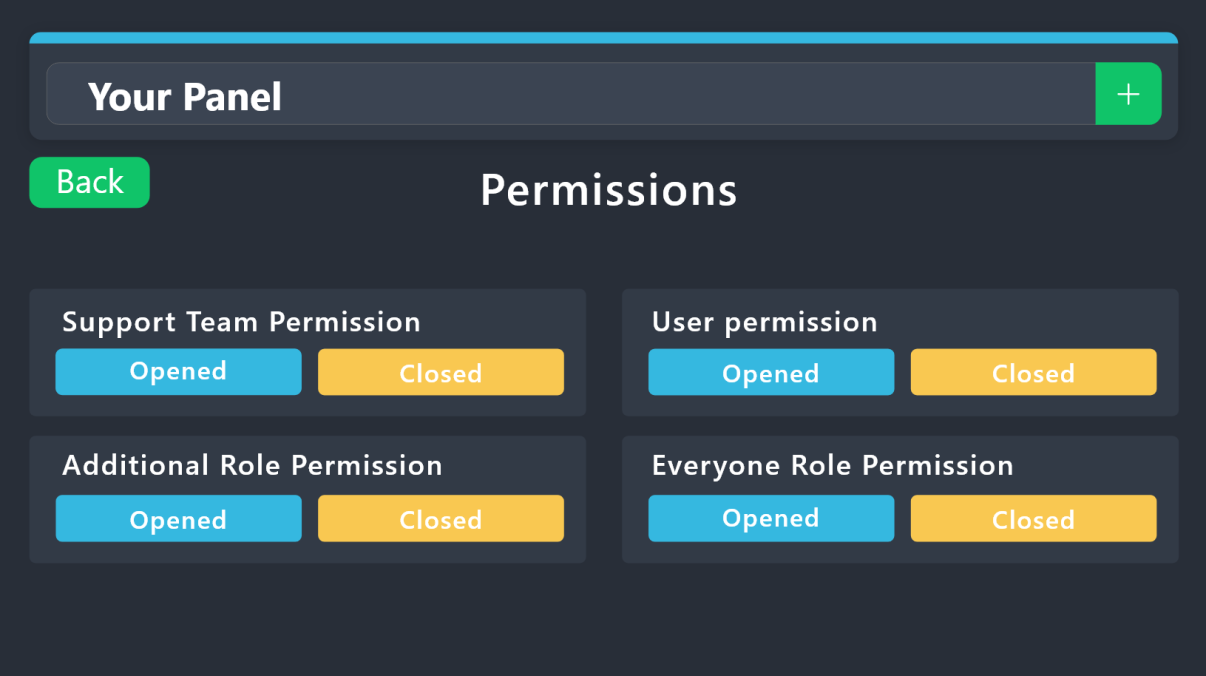
1. Open your Panel Configs tab in your server's dashboard
2. Select the panel you want to grant access to
3. Open the Permissions options menu
4. Find what role you'd like to edit permissions for
5. Choose if you'd like to edit opened or closed permissions for that role
6. Edit the permissions by tickingor unticking
each permission
7. Save changes
 fierce pike
having permission errors, what would be the cause and fix most likely? (switching from normal to prem discord)
Failed to send panel Support Tickets to channel 1069986412243464313
 still edge
how can I fix that?

 cloud forge
still edge
how can I fix that?
cloud forge
still edge
how can I fix that?
Sounds like you need to delete some channels (remember tickets are channels)
worldly helm
fierce pike
having permission errors, what would be the cause and fix most likely? (switchin...
Hey 👋
Please send a Screenshot of that Error
cloud forge
Is there a way to have closed tickets auto delete after a set time frame?
 frozen flume
Can someone tell my why i dont have bot linked to my server on dashboard when i invited and added it on server?
 indigo nacelle
How do I make ticket tool ping a role when a ticket is opened
humble sequoiaBOT
1. Open your Panel Configs tab in your server's dashboard
2. Select the panel you want to ping your support team on
3. Open the Ticket options menu
4. Click on Edit Ticket Message
5. In the Message Content use one of the role mention syntax ({@Role Name}/{Role ID})
6. Save changes
Note: For this to work properly, Ticket Tool requires the Mention Everyone permission. Or the role must have the Allow anyone to @mention this role setting enabled 
 dreamy vigil
frozen flume
Can someone tell my why i dont have bot linked to my server on dashboard when i ...
dreamy vigil
frozen flume
Can someone tell my why i dont have bot linked to my server on dashboard when i ...
Hello. 👋🏻
Do you have the correct permissions to be able to Manage the bot?
dreamy vigil
cloud forge
Is there a way to have closed tickets auto delete after a set time frame?
Hello. 👋🏻
I believe there is, but you would need premium.
dreamy vigil
 cursive kestrel
I want to make a dropdown when someone clicks the submit appeal. How?

like a dropdown with a list of choices
ex: SERVER NAME 1, SERVER NAME 2, SERVER NAME 3
dreamy vigil
cursive kestrel
I want to make a dropdown when someone clicks the submit appeal. How?
Hello!
Panel Configs > Panel Settings > DropDown Style > Enable selct style (Flick the switch to green).
Hello. So I have two different panels, and yesterday they were both on my dashboard, now only one of them is there.
However, the two panels in my server are still there, and the tickets are functioning normally.
 dreamy vigil
cursive kestrel
dreamy vigil
cursive kestrel
Resend it.
cursive kestrel
dreamy vigil
Resend it.
can this work with forms being enabled?
when i disbaled it and resent it, the button got back
dreamy vigil
cursive kestrel
can this work with forms being enabled?
Yes. Forms can be there no matter which type you pick.
dreamy vigil
cursive kestrel
can this work with forms being enabled?
Should look like this.

No other things should be on.

 dreamy vigil
cursive kestrel
dreamy vigil
cursive kestrel
What is the item for?
worldly helm
cursive kestrel
Hey 👋
You need to select a in Panel.
dreamy vigil
Can you tag a channel in the Panel message?
worldly helm
dreamy vigil
Can you tag a channel in the Panel message?
Yep. Use the <#CHANNELID> format
dreamy vigil
worldly helm
Yep. Use the <#CHANNELID> format
Lovely.
Thanks.
 iron nightBOT
Gave +1 Rep to @worldly helm (current: #8 - 766)
cursive kestrel
worldly helm
Hey 👋
You need to select a in Panel.
I noticed that
Thanks for telling me tho
iron nightBOT
Gave +1 Rep to @worldly helm (current: #8 - 767)
worldly helm

cursive kestrel
Also, do I need to create multiple panels to make multiple items on the same select dropdown
Like multiple panels with appeals & injurqies for more than one item
Cuz when I did a second item it didn't show
worldly helm
Yes as one item requires an each panel
cursive kestrel
Thanks again @worldly helm
cursive kestrel
worldly helm
Yes as one item requires an each panel
Thanks
Ah, you didn't get a rep this time
worldly helm
cursive kestrel
Ah, you didn't get a rep this time
You‘re welcome! There is a cooldown 😉
Feel free to do it in #📈│reviews in a few minutes
 unreal belfry
Hello, I'm from Brazil and I need help with a configuration issue.
I'm using Ticket Tool, and I would like to know if there is a way to make all created tickets automatically go to a specific category (e.g., "Open Tickets"). Currently, when a ticket is created, it appears at the top of the server, which is causing organization issues.
Is there a setting for this, or would I need to use an external solution? Thank you in advance for your help!
humble sequoiaBOT
1. Open your Panel Configs tab in the server's dashboard
2. Select the panel you want to grant access to
3. Open the Category options menu
4. Select the categories of your preference
5. Save changes
 worldly helm
unreal belfry
Hello, I'm from Brazil and I need help with a configuration issue.
I'm using Ti...
worldly helm
unreal belfry
Hello, I'm from Brazil and I need help with a configuration issue.
I'm using Ti...
please refer to this ^
unreal belfry
Thank you! It worked perfectly.
I really appreciate the help. Now the tickets are being created in the correct category, and everything is much more organized. Thanks again for the support!
worldly helm
 static viper
heyy, idk why i cant see on the dashboard the server i want the bot to be on
do you guys have any ideas about this ?
Ty
humble sequoiaBOT
Don't see your server in the dashboard?
Try using the Sync Servers button on your top center of the Dashboard page
If this doesn't work
You should relog from the dashboard, you can do this by clicking here to log out immediately, and then log back in
Note:
You need one of these 3 things to access the dashboard.
1. Server Owner (Level: 6)
2. Server Administrator (Level: 4)
3. Dashboard Role (Level: 2)
:warning: You can check your level using the </permissionlevel:1029797400174399542> command on your Discord Server
If the bot's response is:
- @User is permission level: 0 (User)
You don't have any of the 3 levels required to access the server's dashboard
 worldly helm
static viper
heyy, idk why i cant see on the dashboard the server i want the bot to be on
worldly helm
static viper
heyy, idk why i cant see on the dashboard the server i want the bot to be on
Hey 👋
Please refer to this ^
 quartz zinc
Hello, I created a ticket on the server discord, the server host replied and closed it, but no transcription came through

the ticket was created about an hour ago, he closed it, and the transcription didn't come through.
pseudo ravine
Hey there! The server owner/admins may choose not to auto DM the transcript to the ticket owner
quartz zinc
but they said they're shipping, so about 20 days ago they were, and now they're not.
pseudo ravine
That's not something that we can control
static viper
worldly helm
Hey 👋
Please refer to this ^
thanks but i already log out and log in right after
iron nightBOT
Gave +1 Rep to @worldly helm (current: #8 - 768)
static viper
i think thats maybe because i invited the bot before logging into the dashboard for the first time ? it can only be that solution tho
worldly helm
Please check if the bot is in your server then
static viper
yes it is, he has the roles, he is online like everything is supposed to be fine :/
worldly helm
So if you click the  button it does not work aswell?
static viper
worldly helm
So if you click the <:sync:1265738463534387301> button it does not work aswell?
yup nothing changes, i cannot even see my server at all
cursive kestrel
I want to make.multiple items in the same dropdown

I made another panel, what do I do to attach it with the other item which is in another panel?
pseudo ravine
Hey there! Please refer to the embed below!
humble sequoiaBOT
The Drop-down menu or Select Menu replaces the buttons on your panel message and uses a drop-down menu with all of your panels. To set this up, go to your Panel Configs and select your main Panel.
<:Numbericons1:1018864164032225340> Enable Select Style
First you enable Select Style. Then you add an item in the Dropdown Editor. Now you can start editing your dropdown!
<:Numbericons2:1018864168041971712> Dropdown Editor
Each line in the dropdown editor represents a line in the drop down menu on discord. You can add more "Items", by clicking on 

First you select a panel. That's the panel this option will open a ticket for.  DONT select the same panel twice. Each option should have a different Panel
After that, you can put a Display. This is the title of this option and will appear in the drop down menu. The *Description can be set right after that, which will be below the title in grey.
Additionally you can select an emoji, that will be shown in front of each option. You can either manually input the ID of an emoji or select it in the selector.
Common Issues ⚠️
- Panel doesn't send? Make sure you have a valid emoji selected
- Option doesn't show up? Check if two options have the same panel in the DropDown Editor

$dropdown
cursive kestrel
Thanks @pseudo ravine
iron nightBOT
Gave +1 Rep to @pseudo ravine (current: #3 - 1234)
pseudo ravine
You're welcome, glad I could help! Thanks for choosing Ticket Tool!
pseudo ravine
Sure
worldly helm
static viper
yup nothing changes, i cannot even see my server at all
Okay. Have you tried using a different browser?
cursive kestrel
pseudo ravine
Sure
In the second panel, Can I choose the same category as the first?
Without the bot bugging or anything
pseudo ravine
Yep
 lean wolf
is there an automated way to have a ticket auto-assigned to a member of our support team?
pseudo ravine
Hey there! Unfortunately that's not possible
static viper
worldly helm
Okay. Have you tried using a different browser?
still cant see it but i'll try again later...
static viper
worldly helm
Okay. Have you tried using a different browser?
thank you tho !
iron nightBOT
Gave +1 Rep to @worldly helm (current: #8 - 769)
worldly helm
static viper
thank you tho !
You're welcome. Before you go, could you try doing the /level command in that server and tell me the output?
cursive kestrel
I DIS IT
static viper
worldly helm
You're welcome. Before you go, could you try doing the /level command in that se...
Level 4 !
worldly helm
That shouldnt be the issue then.
static viper
worldly helm
That shouldnt be the issue then.
i really appreciate how much you try to help me it means so much !
worldly helm
static viper
i really appreciate how much you try to help me it means so much !
Kindly #🎫│make-a-ticket :)
 tough relic
is it possible to get rid of the closed message
 pseudo ravine
Hey there! Unfortunately not
tough relic
ah okay
 umbral oriole
hey, is there a way to make the replies to a ticket anonymous?
like =areply in modmail
based on lev's question though...... perhaps not
 restive condor
umbral oriole
hey, is there a way to make the replies to a ticket anonymous?
like =areply in m...
restive condor
umbral oriole
hey, is there a way to make the replies to a ticket anonymous?
like =areply in m...
Hey there! Unfortunately, no
 quasi tapir
/purge is not working
restive condor
quasi tapir
/purge is not working
Hey there! Any error message?
quasi tapir
restive condor
Hey there! Any error message?
aplication canot run
restive condor
Could you try the /debug command please
quasi tapir
restive condor
Could you try the ``/debug`` command please
same message: the application couldnt answer
restive condor
quasi tapir
same message: the application couldnt answer
Ticket Tool is missing the VIEW CHANNEL permission for that channel
quasi tapir
restive condor
Ticket Tool is missing the ``VIEW CHANNEL`` permission for that channel
you the best, thanks
iron nightBOT
Gave +1 Rep to @restive condor (current: #1 - 2256)
restive condor
No problem!
 fervent venture
Hii am having a problem with claiming tickets it says that it's not enabled but i checked and it said that it was enabled, or maybe that wasn't the right page i have no idea anymore.
pseudo ravine
Hey there! Does your server have a premium subscription?
pseudo ravine
Claiming is a premium feature
pseudo ravine
You’re welcome, glad I could help! Thanks for choosing Ticket Tool!
 wanton nova
i cant setup my ticket bot i want it to be in a chat room and clickable but when i try to do /setup it doesnt do anything
pseudo ravine
Hey there! Have you tried using our dashboard?
wanton nova
yes but i dont seem to understand everything
i tried panel and some other thing but i cant
pseudo ravine
Please refer to the embeds below!
humble sequoiaBOT
First you will want to invite the bot to your server. Once the bot is in your server, you can manage your server in the dashboard.

To create a panel we are going to need to head over to the Panel Configs Tab on the Dashboard.
Once at the dashboard we will need to click Create Panel.
Enter a panel name (Fill in any optional settings you want).
Click Create Panel and you are ready to get started with configuring your panel.
An example of a creating a panel is shown below.

Once the panel has been created, use the blue Send button and select the channel you want the panel to be sent to.
The Panel wasn't send
Use the </debug:1029783024264564765> command to diagnose possible permission issues with the bot.

 rich shore
 worldly helm
rich shore
worldly helm
rich shore
Hey 👋
There is nothing you can do as you‘re just a normal member.
rich shore
how to solve it
worldly helm
Please inform their staff.
jade topaz
So, i cant figure out how to set a ticket menu in a channel
humble sequoiaBOT
User's issue has been solved in another channel.
 full marsh
can i buy premium through crypto.
restive condor
full marsh
can i buy premium through crypto.
 ionic wolf
heyo guys
i setup the whole panel in a server and i want to copy all wat i do in another server from the first one to the second i dont wana repeat all

 ionic wolf
restive condor
<#571706435449257997>
ionic wolf
restive condor
<#571706435449257997>
.
humble sequoiaBOT
The Backup and Restore feature allows you to transfer your panels, tags, and all settings to a new server, even if the server the settings were created has been deleted! You will want to copy the whole key.
First, go to your server's Dashboard ➞ then Server Configs ➞ under Config Backup & Restore (Server Owner Only) click on Old version can be found here and generate a new backup key by pressing the green button. Now, a key should be generated in the box above. You may need to refresh the page to see this.
Once you have your backup key, navigate to the same page on the new server. Copy the key on the Restore from backup key field.
Now you can choose what you want to copy. Finally, press the green Restore Configs button.
IMPORTANT NOTE
- We suggest you keep this backup key somewhere safe, in case your server is deleted so you are able to recover your panel's settings.
- This feature is only usable by the server's owner
$backup
worldly helm
ionic wolf
.
Hey 👋
Please refer to this guide ^
Also don‘t ping Staff as its against the rules.
 misty burrow
Hey je veux mettre un menu déroulant pour mes tickets mais je sais pas comment le faire
humble sequoiaBOT
━━ Omegajr's inquiry has been moved to a ticket ━━
 abstract hare
how to give other people purge permissions
restive condor
abstract hare
how to give other people purge permissions
Hey there! It's not possible to give other people permission to use the purge command
It's server owner only
abstract hare
Ah nws
 snow hollow
Can somebody help me out with something im trying to figure out.
so ive got forms turned on it it works fine. what i want is after the form is done and the ticket is created i want it to automatically close the ticket
i have the automation set to where the trigger is ticket created and the $close command to run but i think im trying to go abou tit the right way but i might be doing something wrong?
can someone chine in on this?
restive condor
snow hollow
Can somebody help me out with something im trying to figure out.
so ive got for...
Hey there! You can use the Automations feature for that
humble sequoiaBOT
With Ticket Tool's automation, you'll be able to customize your ticket system workflow! Using the Automation Editor you can:
- Chose out of 6 different triggers
- Set a Message Watcher to wait for a message for a given time, or to wait for the absence of them
- Add delays on the execution of actions after the trigger or watcher finds a message!
Automation Command
Automations can be stopped, by running the /automation stop command inside the ticket you want it to stop in. Restart it with /automation start You'll also be able to view the current status of the automations with /automation.
__Important Notes__
- Automation is on ALPHA TESTING PHASE, things might work unexpectedly or not at all.
- Any automation will run for a maximum of 7 days or until the ticket is closed, afterward, it will stop checking
+ You can have 5 automations per panel

$auto
restive condor
Use the ''Ticket Opened'' trigger, no delay, and ''Close Ticket'' as the action
Please let me know if you have any questions 🙏
snow hollow
restive condor
Please let me know if you have any questions 🙏
like this
 restive condor
Nope, the action should be ''Close Ticket''
snow hollow
restive condor
Nope, the action should be ''Close Ticket''
how do i set the action for that?

i think this is where im getting something mixed up
restive condor
You can't use custom commands for this. Ticket Tool can't react to its own commands
restive condor
snow hollow
like this
Here, where you've selected ''Send Custom Commands'', select ''Close Ticket'' instead
snow hollow
restive condor
Here, where you've selected ''Send Custom Commands'', select ''Close Ticket'' in...
like this?
 restive condor
That's right, perfect!
snow hollow
does 2 step matter to be on or off?
restive condor
Two Step Ticket must be on, otherwise the ticket will be automatically deleted once closed
Two Step Close doesn't matter
snow hollow
after its closed i would like it to be automatically be deleted. once closed i have the transcript to be sent to a separate channel. its for staff applictions for my discord
restive condor
So you'd just like for them to fill out the form & then have the ticket immediately close & delete?
snow hollow
yes once its closed, the transcript goes to a channel i have set already and i want the ticket to be deleted
restive condor
Alrighty, then disable two step ticket
 fluid arch
how do i change the ticket name
in the ticket section open a ticket for a specidfic reason
??? anyone help
humble sequoiaBOT
━━ User's inquiry has been moved to a ticket ━━
misty burrow
Hey I want to put a drop-down menu for my tickets but I don't know how to do it
humble sequoiaBOT
The Drop-down menu or Select Menu replaces the buttons on your panel message and uses a drop-down menu with all of your panels. To set this up, go to your Panel Configs and select your main Panel.
<:Numbericons1:1018864164032225340> Enable Select Style
First you enable Select Style. Then you add an item in the Dropdown Editor. Now you can start editing your dropdown!
<:Numbericons2:1018864168041971712> Dropdown Editor
Each line in the dropdown editor represents a line in the drop down menu on discord. You can add more "Items", by clicking on
First you select a panel. That's the panel this option will open a ticket for. DONT select the same panel twice. Each option should have a different Panel
After that, you can put a Display. This is the title of this option and will appear in the drop down menu. The *Description can be set right after that, which will be below the title in grey.
Additionally you can select an emoji, that will be shown in front of each option. You can either manually input the ID of an emoji or select it in the selector.
Common Issues ⚠️
- Panel doesn't send? Make sure you have a valid emoji selected
- Option doesn't show up? Check if two options have the same panel in the DropDown Editor
$dropdown
 median trout
Anyone know how to fix that in the bottom right?
 fluid arch
HOW TO CHANGE THIS CREATE TICKET AND ADD OTHER OPTIONMS
 humble sequoiaBOT
━━ Xaecow's inquiry has been moved to a ticket ━━
━━ !Dioni's inquiry has been moved to a ticket ━━
fierce pike
Is it possible to create custom elements, such as forms, in the format website/create.form.1, where if {create.form.1} is empty, it returns NULL? in a Message Ticket.
pseudo ravine
Hey there! You can use the ?fallback= modifier in the Ticket Message
pseudo ravine
{create.form.1?fallback=NULL}
As an example for returning NULL, like you mentioned
fierce pike
Bless your soul 😍 has that been a feature for a while from memory?
used Ticket Tool years ago but was pre set and forget for configs 🙂
 quaint frost
hello friends, does anyone know if I can add multiple buttons to one panel?
I might be blanking on this option
humble sequoiaBOT
For more convenient use of multipanels, you can now combine panels on the dashboard. This will allow you to directly send the multipanel from the dashboard or via the $panel ID command.
Where can I find this?
You can find this setting on the Dashboard -> Panel Configs -> Panel -> Attached Panels
Note: if you're attaching all the panels to a panel called English, don't include English in the attached panel's box (If you do this, it will create a duplicate)
This will put all buttons from all of your panels on one message. The message is the panel message from the panel you're combining these panels in.
 quaint frost
thank you!
 mighty thistle
There you are!
fierce pike
hello again, is there a way to do a codeblock in the Message Ticket Embed, idealy wanting to have it all as one embed with some stuff then a codeblock on a responce then some stuff outside of the codeblock. maybe not the best way to do it?
pseudo ravine
fierce pike
hello again, is there a way to do a **codeblock** in the Message Ticket Embed, i...
Yep, that's possible. But you can also have Ticket Tool automatically send the responses as an additional embed
fierce pike
pseudo ravine
Yep, that's possible. But you can also have Ticket Tool automatically send the r...
Okay perfect thank you 🙂
iron nightBOT
Gave +1 Rep to @pseudo ravine (current: #3 - 1238)
pseudo ravine
You're welcome, glad I could help! Thanks for supporting Ticket Tool!
jade topaz
وتف
 pliant storm
why is it saying this :(

 winged mesa
hii so im trying to make it so all the tickets automatically go to the transcript on opening and closing, but idk how. any help?
 stray bobcat
pliant storm
why is it saying this :(
stray bobcat
pliant storm
why is it saying this :(
Probably because you don't have access.. You need to be the Guild Owner, have the Administrator Flag, or have a role that has been configured as a Dashboard Role.
pliant storm
stray bobcat
Probably because you don't have access.. You need to be the Guild Owner, have th...
I am the owner of the server and my admin also had the same problem
Thats why I am confused
 frigid shore
Can someone teach me how to pause tickets ?
stray bobcat
Try hitting the Refresh / sync button on top left of your screen to force data refresh
pliant storm
stray bobcat
Try hitting the Refresh / sync button on top left of your screen to force data r...
okay ill try it was working before we switched the bot off premium
 quick scroll
why when i try do do /setup or /help or any command it says "this application did not respond"
stray bobcat
Oh.. That might be it
If you switched to Gold, do you have Gold bot on your server?
(You can use the White bot with premium features no problem)
quick scroll
can you help me sorry for rushing why when i try do do /setup or /help or any command it says "this application did not respond"
stray bobcat
quick scroll
can you help me sorry for rushing why when i try do do /setup or /help or any co...
Your bot probably lacks permissions. Please ensure it can read and write in the channel you try to use it with (and all other channels/categories you wish to use it with)
pliant storm
stray bobcat
(You can use the White bot with premium features no problem)
ohhhh okay do u have the link for the white bot
stray bobcat
pliant storm
ohhhh okay do u have the link for the white bot
$invite
humble sequoiaBOT
stray bobcat
$invite
Ticket Tool Invite & Support
 alpine cradle
when is the ticket tool partnering thing open again?
stray bobcat
alpine cradle
when is the ticket tool partnering thing open again?
We don't know yet. Keep an eye on #📣│server-news
alpine cradle
stray bobcat
We don't know yet. Keep an eye on <#509770538051305493>
ok ty our server would love to partner with Ticket tool that would be great opportunity so hopfully it opens again
iron nightBOT
Gave +1 Rep to @stray bobcat (current: #30 - 131)
pliant storm
stray bobcat
$invite
thank you so much ill try adding it rn!
iron nightBOT
Gave +1 Rep to @stray bobcat (current: #30 - 132)
 fast inlet
I’m having a problem where every time somebody joins the server the bot creates a ticket. How do I stop that?
pseudo ravine
Hey there! You must have another bot running the $new command when a new member joins. So there's a couple of options you can choose from
fast inlet
pseudo ravine
Hey there! You must have another bot running the `$new` command when a new membe...
It’s the ticket tool doing it. Says it is
pseudo ravine
Ticket Tool doesn't automatically create a ticket when a new member joins the server
Like I mentioned, you must have a different bot running the $new command when a new member joins the server
You can find out which bot is doing that, and stop it from sending the command
fast inlet
pseudo ravine
You can find out which bot is doing that, and stop it from sending the command
It’s the ticket tool bot
Already said this
fast inlet
pseudo ravine
Ticket Tool doesn't automatically create a ticket when a new member joins the se...
Well it is
pseudo ravine
Like I've already mentioned, Ticket Tool doesn't automatically create a ticket when someone joins. I'm aware that it says Ticket Tool creates the channel in the Audit Log, but it will always say that, as it's the bot that is actually creating the channel
Could you please provide the server ID so I could double check your dashboard?
fast inlet
It even creates a separate channel that says ticket tool when somebody joins
My server ID 1201656294616862781
pseudo ravine
Please stop
pseudo ravine
fast inlet
My server ID 1201656294616862781
One moment please
pseudo ravine
fast inlet
It even creates a separate channel that says ticket tool when somebody joins
Do you have a screenshot of this?
fast inlet
pseudo ravine
Do you have a screenshot of this?
They’ve been deleted but I have logs
 pseudo ravine
I don't see how that shows that Ticket Tool is creating a ticket automatically when someone joins?
fast inlet
pseudo ravine
I don't see how that shows that Ticket Tool is creating a ticket automatically w...
All the channel says is welcome
That’s it
 fast inlet
Let me check that
 tame kayak
what is the thing so i can make the ticket bot ping a role when someone opens a ticket
humble sequoiaBOT
1. Open your Panel Configs tab in your server's dashboard
2. Select the panel you want to ping your support team on
3. Open the Ticket options menu
4. Click on Edit Ticket Message
5. In the Message Content use one of the role mention syntax ({@Role Name}/{Role ID})
6. Save changes
Note: For this to work properly, Ticket Tool requires the Mention Everyone permission. Or the role must have the Allow anyone to @mention this role setting enabled
 austere forge
tame kayak
what is the thing so i can make the ticket bot ping a role when someone opens a ...
austere forge
tame kayak
what is the thing so i can make the ticket bot ping a role when someone opens a ...
Refer to the embed above please ⬆️
 hollow frost
anyone know what i have to do
 fierce pike
pseudo ravine
Yep, that's possible. But you can also have Ticket Tool automatically send the r...
fierce pike
pseudo ravine
Yep, that's possible. But you can also have Ticket Tool automatically send the r...
Hey mate, where would I change that? for example I only want want form.2 shown in the codeblock thing, is that possible? so like create.form.1 would be in msg and form.2 seperate.
hollow frost
hollow frost
anyone know what i have to do
all my members cant make ticket says this to members
humble sequoiaBOT
scott418's issue has been solved in another channel.
fast inlet
I have removed the bot from my server. You think adding the bot again will fix my problem?
@pseudo ravine
pseudo ravine
That was never the issue, but yes you can re-invite it back
fast inlet
pseudo ravine
That was never the issue, but yes you can re-invite it back
Why was I warned? I pinged you because you were helping me with a problem
fast inlet
pseudo ravine
That was never the issue, but yes you can re-invite it back
If I inviter it back will the problem go away or will it still occur?
pseudo ravine
fast inlet
Why was I warned? I pinged you because you were helping me with a problem
Pinging staff is against our rules, which can be found in #📂│information
fast inlet
pseudo ravine
Pinging staff is against our rules, which can be found in <#509239005481664524>
I didn’t know that. I only pinged you because you were helping me before
pseudo ravine
fast inlet
If I inviter it back will the problem go away or will it still occur?
There was never a problem to begin with, as far as I can tell. What you were initially concerned with is just the default “Ticket Message”
pseudo ravine
fast inlet
I didn’t know that. I only pinged you because you were helping me before
I suggest reading our rules then
fast inlet
pseudo ravine
There was never a problem to begin with, as far as I can tell. What you were ini...
Something was happening where when people joined the server it would auto create a ticket with ticket tool and welcome them. That’s the problem
pseudo ravine
The “Welcome” is just part of the default ticket message
fast inlet
pseudo ravine
The “Welcome” is just part of the default ticket message
Is there a way to stop it from doing this?
Meaning stop it from creating a ticket every time new members join
Sorry if I keep repeating myself I am just very confused with this
pseudo ravine
You can edit the “Ticket Message”, but like I’ve mentioned multiple times before, Ticket Tool doesn’t automatically create a ticket upon a new user joining your server. Especially after reviewing your dashboard, it’s not possible for this to happen
quick scroll
how do i add another ticket to my thing or is there a max
pseudo ravine
Hey there! I’m assuming you’re referring to adding another panel to another “Panel Message”?
quick scroll
like this
 pseudo ravine
Please refer to the embed below!
humble sequoiaBOT
The Drop-down menu or Select Menu replaces the buttons on your panel message and uses a drop-down menu with all of your panels. To set this up, go to your Panel Configs and select your main Panel.
<:Numbericons1:1018864164032225340> Enable Select Style
First you enable Select Style. Then you add an item in the Dropdown Editor. Now you can start editing your dropdown!
<:Numbericons2:1018864168041971712> Dropdown Editor
Each line in the dropdown editor represents a line in the drop down menu on discord. You can add more "Items", by clicking on
First you select a panel. That's the panel this option will open a ticket for. DONT select the same panel twice. Each option should have a different Panel
After that, you can put a Display. This is the title of this option and will appear in the drop down menu. The *Description can be set right after that, which will be below the title in grey.
Additionally you can select an emoji, that will be shown in front of each option. You can either manually input the ID of an emoji or select it in the selector.
Common Issues ⚠️
- Panel doesn't send? Make sure you have a valid emoji selected
- Option doesn't show up? Check if two options have the same panel in the DropDown Editor
$dropdown
quick scroll
what if i didnt create the other tickets and none of the tickets show up if i make another one will it delte one of the tickets
pseudo ravine
Are you referring to the dropdown options themselves?
 pseudo ravine
Your older tickets won’t be affected
quick scroll
aight thank you
i cant
thank you bcuz ur #15 😭 it dont show up
thanks @pseudo ravine
iron nightBOT
Gave +1 Rep to @pseudo ravine (current: #3 - 1239)
quick scroll
#3 congrats dude
pseudo ravine
You’re welcome, glad I could help! Thanks for choosing Ticket Tool!
quick scroll
np
 austere forge
Make sure that the bot has : VIEW CHANNEL SEND MESSAGE and READ MESSAGE HISTORY permission in the channel where you try the command
 misty pawn
okay thanks
austere forge
No problem 
fierce pike
I want to have two custom fields prompted to the user when creating a ticket. One of the answers should be stylized in the ticket message, while the other should appear in the default codeblock thing / responce that TT provides. Is this feasible? If so, how can I accomplish it?
austere forge
fierce pike
I want to have two custom fields prompted to the user when creating a ticket. On...
This is possible, but the default provided by embed will display all the responses, so there's no need to separate them
And no, it is not possible to select which response to display
fierce pike
austere forge
And no, it is not possible to select which response to display
okay tyty
austere forge
No problem
fierce pike
wait so to clarify I cannot have one in embed and only one default?
austere forge
No, because it is not possible to select which response should be displayed, by default, all form responses will be displayed
 iron nightBOT
Gave +1 Rep to @austere forge (current: #6 - 902)
austere forge
You're welcome, Thank you for supporting Ticket tool!
 hollow idol
austere forge
You're welcome, Thank you for supporting Ticket tool! <a:catlove:12646436481301...
hollow idol
austere forge
You're welcome, Thank you for supporting Ticket tool! <a:catlove:12646436481301...
It shows up like this
 austere forge
hollow idol
austere forge
hollow idol
Refer to the embed below please
humble sequoiaBOT
Don't see your server in the dashboard?
Try using the Sync Servers button on your top center of the Dashboard page
If this doesn't work
You should relog from the dashboard, you can do this by clicking here to log out immediately, and then log back in
Note:
You need one of these 3 things to access the dashboard.
1. Server Owner (Level: 6)
2. Server Administrator (Level: 4)
3. Dashboard Role (Level: 2)
:warning: You can check your level using the </permissionlevel:1029797400174399542> command on your Discord Server
If the bot's response is:
- @User is permission level: 0 (User)
You don't have any of the 3 levels required to access the server's dashboard
hollow idol
austere forge
Refer to the embed below please
How you see role leaveel we just started are discord server so we don’t have that bot to leavels us up
austere forge
 oak flint
How long will it take for support to get in contact
oak flint
How long will it take for support to get in contact
We won't be able to tell you, because we're not related to the server where you opened a ticket, sorry
austere forge
hollow idol
How you see role leaveel we just started are discord server so we don’t have tha...
Have you invited the bot to your server for the first time ?
austere forge
The bot Ticket Tool, to create your own ticket system
hollow idol
austere forge
The bot Ticket Tool, to create your own ticket system
Ye but I don’t think I’m high leaveal
Because I don’t have bot to rank us up
@austere forge
Sorry
austere forge
When you run the command /permissionlevel on your server, the bot ticket tool shows what ?
 cerulean swallow
How can I mention the support team in the ticket panel
humble sequoiaBOT
1. Open your Panel Configs tab in your server's dashboard
2. Select the panel you want to ping your support team on
3. Open the Ticket options menu
4. Click on Edit Ticket Message
5. In the Message Content use one of the role mention syntax ({@Role Name}/{Role ID})
6. Save changes
Note: For this to work properly, Ticket Tool requires the Mention Everyone permission. Or the role must have the Allow anyone to @mention this role setting enabled
austere forge
cerulean swallow
How can I mention the support team in the ticket panel
Refer to the embed above please ⬆️
 muted elk
Support called Dr David is a scammer
worldly helm
muted elk
Support called Dr David is a scammer
Hey 👋
How exactly can I help you?
muted elk
This person supporting you is a fraud.
 worldly helm
I don't understand.. how are we related to that person?

 worldly helm
Nope.
If you think that user is using Ticket Tool to scam people please #🎫│make-a-ticket with proof.
muted elk
done
humble sequoiaBOT
━━ Hu's inquiry has been moved to a ticket ━━
 rapid maple
I need help about that how we can ping staff while ticket just open please help me
humble sequoiaBOT
1. Open your Panel Configs tab in your server's dashboard
2. Select the panel you want to ping your support team on
3. Open the Ticket options menu
4. Click on Edit Ticket Message
5. In the Message Content use one of the role mention syntax ({@Role Name}/{Role ID})
6. Save changes
Note: For this to work properly, Ticket Tool requires the Mention Everyone permission. Or the role must have the Allow anyone to @mention this role setting enabled
worldly helm
rapid maple
I need help about that how we can ping staff while ticket just open please help ...
pls refer to 
jade topaz
How do i join a server, im new to discord, and I dont know how to use it, please help
austere forge
We can't help you Chris, we can only help you if you have a problem with our Discord Ticket tool bot, nothing else
 open dew
Can i have ticket tool radeem code...?
worldly helm
open dew
Can i have ticket tool radeem code...?
Hey 👋
Please elaborate.
 verbal niche
Is there a way for Ticket Tool to run slash commands when a ticket is opened?
I'm looking for a way to automate tickets that just need some mod to run a command
pseudo ravine
Hey there! Unfortunately that’s not possible
verbal niche
Got it, thanks for the quick reply
pseudo ravine
You’re welcome, glad I could help! Thanks for choosing Ticket Tool!
jade topaz
Hey how do I add the tool to a chanel
 stark runeBOT
1. Invite Ticket Tool to your server
First you will want to invite the bot to your server. Once the bot is in your server, you can manage your server in the dashboard.
2. Create a Panel
To create a panel we are going to need to head over to the panel configs on the dashboard.
Once at the dashboard we will need to click Create Panel.
Enter a panel name (Fill in any optional settings you want).
Click Create Panel and your ready to get started with configuring your panel.
An example of a creating a panel is shown below.
3. Send the Panel to a Channel
Once you've created a panel on the dashboard you will need to send it to a channel using send on the dashboard.
Select the channel you want your panel to be created in and click send.
For other questions checkout $help faq.
An example of a sending a panel is shown below.
Having a Problem Sending the Panel?
Do $debug in a channel with Ticket Tool and make sure it has all the necessary Discord permissions.
worldly helm
jade topaz
Hey how do I add the tool to a chanel
pls refer to
worldly helm
 primal kestrel
i activated the free trial
primal kestrel
i activated the free trial
Hey. Please click the button on your dashboard
primal kestrel
thanks it works now
 pine quartz
👍
 pale sand
i need help

 agile stream
pale sand
i need help
agile stream
pale sand
i need help
Hi there, try to create another category for tickets or delete some open ones.
 thorny oxide
How I can add ticket premium?
humble sequoiaBOT
The first thing you will need to do is invite the premium bot, an invite can be found here
Once the bot is in your server we will head to the dashboard and manage your server. When you are managing your server, you want to head into "Server Configs" then click the drop down menu under "Select the bot you would like to use on this server" then click "Ticket Tool#6207" and then save.
 worldly helm
thorny oxide
How I can add ticket premium?
worldly helm
thorny oxide
How I can add ticket premium?
Hey 👋
Please refer to this ^
thorny oxide
worldly helm
Hey 👋
Please refer to this ^
Ty
iron nightBOT
Gave +1 Rep to @worldly helm (current: #8 - 770)
thorny oxide
+1 rep @worldly helm
 median mulch
Hi chat, I’m a joint level admin on a discord server where we’re trying to setup ticket tool. I invited the bot to the discord but can’t see it on my dashboard but other admin can. Any idea how to fix this?
humble sequoiaBOT
Don't see your server in the dashboard?
Try using the Sync Servers button on your top center of the Dashboard page
If this doesn't work
You should relog from the dashboard, you can do this by clicking here to log out immediately, and then log back in
Note:
You need one of these 3 things to access the dashboard.
1. Server Owner (Level: 6)
2. Server Administrator (Level: 4)
3. Dashboard Role (Level: 2)
:warning: You can check your level using the </permissionlevel:1029797400174399542> command on your Discord Server
If the bot's response is:
- @User is permission level: 0 (User)
You don't have any of the 3 levels required to access the server's dashboard
worldly helm
median mulch
Hi chat, I’m a joint level admin on a discord server where we’re trying to setup...
Hey 👋
Please refer to this ^
 wide glen
How many referrals do I have
humble sequoiaBOT

⚠️ You're in the wrong place
We provide support for Ticket Tool Discord bot and cannot help you with whatever issue you have.
- We don't know which Support Team you should contact to get this issue resolved, and unfortunately we won't be able to accurately tell you.
If you don't have any further questions regarding our bot Ticket Tool, please close this ticket
median mulch
worldly helm
Hey 👋
Please refer to this ^
Can't check permission level, bot gives error
Ticket Tool
APP
— 19:41
The application did not respond
worldly helm
median mulch
Can't check permission level, bot gives error
Ticket Tool
APP
— 19:41
The appl...
Because the bot is missing permissions. Make sure it can view the channel + can send messages
median mulch
worldly helm
Because the bot is missing permissions. Make sure it can view the channel + can ...
Gave it all available permissions and doing the same thing
does the admin that can see it on dashboard need to do something to add others to dashboard access?
 bleak helm
How to add ticket support ?
worldly helm
median mulch
Gave it all available permissions and doing the same thing
For the channel or in general?
stark runeBOT
1. Invite Ticket Tool to your server
First you will want to invite the bot to your server. Once the bot is in your server, you can manage your server in the dashboard.
2. Create a Panel
To create a panel we are going to need to head over to the panel configs on the dashboard.
Once at the dashboard we will need to click Create Panel.
Enter a panel name (Fill in any optional settings you want).
Click Create Panel and your ready to get started with configuring your panel.
An example of a creating a panel is shown below.
3. Send the Panel to a Channel
Once you've created a panel on the dashboard you will need to send it to a channel using send on the dashboard.
Select the channel you want your panel to be created in and click send.
For other questions checkout $help faq.
An example of a sending a panel is shown below.
Having a Problem Sending the Panel?
Do $debug in a channel with Ticket Tool and make sure it has all the necessary Discord permissions.
 ruby summit
Como fasso para criad ticket de suporte?
worldly helm
bleak helm
How to add ticket support ?
Hey 👋
Please refer to this ^
worldly helm
ruby summit
Como fasso para criad ticket de suporte?
Hey 👋 #🎫│make-a-ticket
median mulch
worldly helm
For the channel or in general?
in general for the whole server
worldly helm
Please check for that channel.
median mulch
I've also been granted admin level for another discord where ticket tool is already working and that server i'snt showing on my dashboard either even after sync and logout etc
worldly helm
median mulch
I've also been granted admin level for another discord where ticket tool is alre...
Please #🎫│make-a-ticket .
median mulch
worldly helm
Please <#571706435449257997> .
thank you 🫡
iron nightBOT
Gave +1 Rep to @worldly helm (current: #8 - 771)
 silver kelp
median mulch
I've also been granted admin level for another discord where ticket tool is alre...
silver kelp
median mulch
I've also been granted admin level for another discord where ticket tool is alre...
Having same issue? How can I fix this
humble sequoiaBOT
━━ User's inquiry has been moved to a ticket ━━
median mulch
silver kelp
Having same issue? How can I fix this
Got to get server owner to add your role to the dashboard panel under server config
silver kelp
How he do that haha he don't know how
worldly helm
silver kelp
How he do that haha he don't know how
Please wait for a reply on your opened ticket
 reef path
how do i give perm to my support staff to use commands like rename/add? they tell me they dont have perms to do that
silver kelp
worldly helm
Please wait for a reply on your opened ticket
The reply are really slow
Sorry just trying to fix this bot asap
worldly helm
silver kelp
The reply are really slow
Depending on what language you opened a ticket for it might take a bit longer.
silver kelp
English
worldly helm
Please be patient regardless.
 plush trail
I submitted a verification ticket and didn’t hear anything back. I closed it accidentally with no reply… do I need to resubmit it and wait for a reply or what?
humble sequoiaBOT
⚠️ You're in the wrong place
We provide support for Ticket Tool Discord bot and cannot help you with whatever issue you have.
- We don't know which Support Team you should contact to get this issue resolved, and unfortunately we won't be able to accurately tell you.
If you don't have any further questions regarding our bot Ticket Tool, please close this ticket
 fringe slate
pseudo ravine
fringe slate
pseudo ravine
Hey there! Please refer to the embeds below!
humble sequoiaBOT
First you will want to invite the bot to your server. Once the bot is in your server, you can manage your server in the dashboard.
To create a panel we are going to need to head over to the Panel Configs Tab on the Dashboard.
Once at the dashboard we will need to click Create Panel.
Enter a panel name (Fill in any optional settings you want).
Click Create Panel and you are ready to get started with configuring your panel.
An example of a creating a panel is shown below.
Once the panel has been created, use the blue Send button and select the channel you want the panel to be sent to.
The Panel wasn't send
Use the </debug:1029783024264564765> command to diagnose possible permission issues with the bot.
 glad turtle
Failed: Invalid Form Body components[0].components[0].emoji.name[BUTTON_COMPONENT_INVALID_EMOJI]: Invalid emoji
***Please help and i gave it the correct perms and the emojis are on discord even if i didn't put the emojis it still gives me this errors!
humble sequoiaBOT
━━ User's inquiry has been moved to a ticket ━━
jade topaz
what to do if it says 'application did not respond'
???
 dull meadow
how do i fix this?

 knotty nest
jade topaz
what to do if it says 'application did not respond'
???
knotty nest
jade topaz
what to do if it says 'application did not respond'
???
Yes what do I do
Help us
snow hollow
@pseudo ravine whow would i set this up to auto close and delete a ticket if an inital message has not been made in the ticket within 15 mins?
 pseudo ravine
jade topaz
what to do if it says 'application did not respond'
???
pseudo ravine
jade topaz
what to do if it says 'application did not respond'
???
Hey there! Please ensure Ticket Tool has the “View Channel” and “Send Messages” permissions in the channel
pseudo ravine
dull meadow
how do i fix this?
Hey there! Are you a staff member of that server?
pseudo ravine
snow hollow
<@865714582613524491> whow would i set this up to auto close and delete a ticke...
Hey there! That configuration is correct, but I would make sure that the duration is actually 15 minutes, as it seems to be blank
dull meadow
Yes
dull meadow
pseudo ravine
Hey there! Are you a staff member of that server?
I am
pseudo ravine
Are you wanting to increase the limit?
dull meadow
Yeah dont want it to be 1
pseudo ravine
You can head to the Dashboard > Limits > Tickets Open > Open tickets each user > Increase the limit
snow hollow
pseudo ravine
Hey there! That configuration is correct, but I would make sure that the duratio...
so lets say a conversation is started then timer just continues? what if a conversation is going on and someone gets busy and happens to not respond in that 15 min period?
dull meadow
pseudo ravine
You can head to the Dashboard > Limits > Tickets Open > Open tickets each user >...
Ty
iron nightBOT
Gave +1 Rep to @pseudo ravine (current: #3 - 1244)
pseudo ravine
snow hollow
so lets say a conversation is started then timer just continues? what if a conve...
If there’s no messages within the 15 minutes since the last check, then the ticket will close
pseudo ravine
dull meadow
Ty
You’re welcome, glad I could help! Thanks for choosing Ticket Tool!
iron nightBOT
Gave +1 Rep to @dull meadow (current: #378 - 1)
 rigid dawn
How do I close a ticket in a Server
dull meadow
rigid dawn
How do I close a ticket in a Server
U need to have permission to do it
rigid dawn
Oh omg tysm
 steel basalt
rigid dawn
How do I close a ticket in a Server
steel basalt
rigid dawn
How do I close a ticket in a Server
run $close or click the Close button. Make sure you have permission to use the command/function though!
rigid dawn
okkkay thank u sm
dull meadow
rigid dawn
Oh omg tysm
👍
 coarse dove
pseudo ravine
coarse dove
pseudo ravine
Hey there! Please ensure Ticket Tool has the “View Channel” and “Send Messages” permissions in the channel
 analog onyx
How do I add custom emojis into the ticket text?
pseudo ravine
Hey there! You can use the “/id” command on the emoji to get the whole emoji to copy and paste
$id
humble sequoiaBOT
pseudo ravine
$id <:PabloTiphat:983791053842837624>
<:PabloTiphat:983791053842837624>
pseudo ravine
Like this ^
iron nightBOT
Gave +1 Rep to @pseudo ravine (current: #3 - 1245)
pseudo ravine
You’re welcome, glad I could help! Thanks for supporting Ticket Tool!
analog onyx
Thanks for brining the best tool out!
I am confused sorry

Have I done this correct?
analog onyx
pseudo ravine
Like this ^
When I do this is just how it looks in the image obove
pseudo ravine
humble sequoia
> \<:PabloTiphat:983791053842837624>
You need to run the command in your server and copy the text that it outputs
 pseudo ravine
Is Ticket Tool in the server where the emoji is from?
pseudo ravine
Did the server lose a boost level recently?
pseudo ravine
Did you make sure that you correctly added the emoji in the command?
pseudo ravine

 tribal pewter
What's this?
 pseudo ravine
Hey there! Are you a staff member of that server?
pseudo ravine
Did you get that message when you tried to create a ticket?
tribal pewter
Yes
pseudo ravine
Please head to the Dashboard > Buttons > Close Ticket > Button Text > Add some text, as it's required
analog onyx
Mines still not working
pseudo ravine
What's the server ID?
 neat hull
How do i customize the ticket tool to look like my ticket same logo and banner
tribal pewter
pseudo ravine
Please head to the Dashboard > Buttons > Close Ticket > Button Text > Add some t...
Thanks
iron nightBOT
Gave +1 Rep to @pseudo ravine (current: #3 - 1246)
pseudo ravine
neat hull
How do i customize the ticket tool to look like my ticket same logo and banner
Hey there! Are you referring to editing the bots icon and banner?
analog onyx
Fixed
pseudo ravine
neat hull
Yeah
Please refer to the embed below!
humble sequoiaBOT
Ticket Tool Custom Avatar
As of now, you are not able to change Ticket Tool's profile picture, nonetheless, our Development Team is working on the release of white labels, this is your own custom bot!
For the time being, you can change the bot's nickname by right-clicking the bot in the user list on your server and clicking Change Nickname

$avatar
neat hull
so I can't rn ?
pseudo ravine
Unfortunately not
neat hull
because I see a lot of servers that have the Customize thing (:
pseudo ravine
You can't change the icon and the banner of the bot
neat hull
so how I see it in a lot of servers changed
pseudo ravine
They could be using a different bot
tribal pewter
pseudo ravine
Please head to the Dashboard > Buttons > Close Ticket > Button Text > Add some t...
Would be nice if the system didn't allow to save when there was nothing
Can you pass this to the team?
tribal pewter
tribal pewter
Would be nice if the system didn't allow to save when there was nothing
Anything that will result with an error
pseudo ravine
It's not required if there's also an emoji attached to the button, but it seems like you disabled the Button Emoji for the button, which is why the text is required
tribal pewter
pseudo ravine
It's not required if there's also an emoji attached to the button, but it seems ...
Yeah but the system shouldn't let it save if the emoji is closed also
There is nothing to display so there is an error
pseudo ravine
You can make a suggestion
humble sequoiaBOT

Suggestions for Ticket Tool
To make a suggestion use the s!suggest suggestion command in #🤖│bot-spam. Note that you'll suggestion will be first reviewed by our Support Team before it's posted into #💡│suggestions, channel in which you'll be able to vote for other suggestions!
pseudo ravine
You're welcome, glad I could help! Thanks for choosing Ticket Tool!
tribal pewter
Have a nice day
pseudo ravine
You too!
analog onyx
Could anyone help me find this orange line as an emoji?
 pseudo ravine
It's more than likely not an emoji, or if it is, it's multiple emojis combined without spaces
analog onyx
Could you possibly find it? I cannot find it anywhere
 mint gazelle
every time i try to do set up it says this
 pseudo ravine
analog onyx
Could you possibly find it? I cannot find it anywhere
pseudo ravine
analog onyx
Could you possibly find it? I cannot find it anywhere
That's not something I can do unfortunately
analog onyx
Oh ok, thanks.
pseudo ravine
mint gazelle
every time i try to do set up it says this
Hey there! Please ensure Ticket Tool has the View Channel and Send Messages permissions in the channel
pseudo ravine
Please run the /debug command in that channel
mint gazelle
ok it works thank you so much
pseudo ravine
You're welcome, glad I could help! Thanks for choosing Ticket Tool!
quick scroll
how do i make it where only certain roles can see certain tickets
pseudo ravine
Hey there! Please refer to the embed below!
humble sequoiaBOT
1. Open your Panel Configs tab in your server's dashboard
2. Select the panel you want to grant access to
3. Open the General options menu
4. Select your Support Team Roles
5. Save changes
 quick scroll
thanks @pseudo ravine
iron nightBOT
Gave +1 Rep to @pseudo ravine (current: #3 - 1247)
pseudo ravine
You're welcome, glad I could help! Thanks for choosing Ticket Tool!
 boreal cape
how do I make members disallowed from closing tickets
hey @pseudo ravine are you still online?
pseudo ravine
Hey there! You can head to the Dashboard > Buttons > Close Ticket > Support Team Only >
boreal cape
where is the dashboard?
pseudo ravine
You should also head to the Dashboard > Command Configs > Close > Support Team Only >
pseudo ravine
boreal cape
where is the dashboard?
Please refer to the link below!
humble sequoiaBOT

Ticket Tool - Ticketing without clutter - The #1 Discord support bot
 frozen herald
Howdy, new to this tool. Each time someone initiates a ticket, it creates a new channel with the ticket name (we are ok with this), but how do we get it disappear once it's closed or how to do we get it to go into one collective channel? I thought we set it to a channel to collect the claimed tickets, but it's not showing up there.
pseudo ravine
Hey there! Assuming that you have Two Step Ticket enabled, you can click on the Transcript button when the ticket is closed. Once the transcript is saved, you may delete the ticket
frozen herald
pseudo ravine
Hey there! Assuming that you have `Two Step Ticket` enabled, you can click on th...
Ahhh so there's no way to have it just filter to a channel as a record? And do we delete and the ticket creator also has to delete it then? TYSM for your help.
pseudo ravine
By default the ticket owner won't have access to the ticket when it's closed, so the support team will have to save the transcript and then delete it
twilit grove
Hey see where country 😭 #📣│server-news
worldly helm
twilit grove
Hey see where country 😭 <#509770538051305493>
Hey 👋
What do you mean?
worldly helm
twilit grove
Vietnam where
This server does not have a Vietnam Support team.
fierce pike
is there a way to combine the Direct Message Embed / Customisation and Transcripts into one message?
 worldly helm
fierce pike
is there a way to combine the Direct Message Embed / Customisation and Transcrip...
worldly helm
fierce pike
is there a way to combine the Direct Message Embed / Customisation and Transcrip...
Hey 👋
Are you Talking about the HTML file?
humble sequoiaBOT
Don't see your server in the dashboard?
Try using the Sync Servers button on your top center of the Dashboard page
If this doesn't work
You should relog from the dashboard, you can do this by clicking here to log out immediately, and then log back in
Note:
You need one of these 3 things to access the dashboard.
1. Server Owner (Level: 6)
2. Server Administrator (Level: 4)
3. Dashboard Role (Level: 2)
:warning: You can check your level using the </permissionlevel:1029797400174399542> command on your Discord Server
If the bot's response is:
- @User is permission level: 0 (User)
You don't have any of the 3 levels required to access the server's dashboard
worldly helm
 native forge
Mine doesn’t show up in my dashboard
native forge
Mine doesn’t show up in my dashboard
Hey 👋
Please refer to this ^

 fierce pike
worldly helm
Hey 👋
Are you Talking about the HTML file?
fierce pike
worldly helm
Hey 👋
Are you Talking about the HTML file?
Yeah the HTML File 🙂
worldly helm
fierce pike
Yeah the HTML File 🙂
Nope. You can only remove it if you Save transcripts on google drive
fierce pike
Hmm kk
worldly helm
native forge
Mm okay I see now I have zero how can I get it up
You either need the Administrator permission or a Dashboard role
humble sequoiaBOT
Any role you put there will have full access to the ticket tool dashboard. The server owner and users with admin permissions already have access to the dashboard.
Be careful of which roles to put here
 fierce pike
worldly helm
Nope. You can only remove it if you Save transcripts on google drive
fierce pike
worldly helm
Nope. You can only remove it if you Save transcripts on google drive
cheers mate
thank you @worldly helm +1
iron nightBOT
Gave +1 Rep to @worldly helm (current: #7 - 773)
worldly helm
 modern pawn
Hi
 karmic turret
HI
How do I see the tags through the official website? I want the tags to be saved on the website. They are only saved inside the ROM. In Discord, I want them to be saved on the website. What is the method?
austere forge
Dashboard > Custom command tab on left
 small coral
الو
modern pawn
هلا
 cyan holly
how to disable commands from role
humble sequoiaBOT
━━ User's inquiry has been moved to a ticket ━━
 sage hawk
I want to know how to examine the ticket details as a admin because I only can see this in the ticket channel
 austere forge
What do you mean by "details" ?
 worn bridge
@timber kernel Im unable to find the ticket channel
worldly helm
worn bridge
<@153489496317493248> Im unable to find the ticket channel
Hey 👋
Don‘t ping Staff. How can I help you?
You can report them at #🎫│make-a-ticket
humble sequoiaBOT
━━ GuilhermeX5's inquiry has been moved to a ticket ━━
sage hawk
austere forge
What do you mean by "details" ?
These details, when users submit a ticket,they need to fill in these details.
 worldly helm
sage hawk
These details, when users submit a ticket,they need to fill in these details.
worldly helm
sage hawk
These details, when users submit a ticket,they need to fill in these details.
Hey 👋
Dashboard > Panel Configs > Forms > Display form results on the Ticket message as an additional embed
sage hawk
worldly helm
Hey 👋
Dashboard > Panel Configs > Forms > <:Switch_enabled:1041734627330625586...
wow thanks love you!
iron nightBOT
Gave +1 Rep to @worldly helm (current: #7 - 774)
sage hawk
I have another question actually ,As every person submits a ticket, a new channel is created. This results in too many channels for the administrators to manage. Is it possible to gather everyone's tickets into just one channel?
austere forge
Unfortunately, this is not possible. As long as the user clicks on the button to create a ticket, Ticket Tool will create a new channel
 astral crag
Hi
@iron night
I have deposited an amount through crypto (binance) in my vebson wallet in morning.
Transaction is completed from binance , but i didn't receive it yet in my vebson account.
It still shows paying
I contacted live but no one responded
austere forge
You’re in the wrong place
We only provide support if you have a problem with the Discord Ticket tool bot, nothing else.
 hard kayak
hi
how can i buy a premium with crypto?
unfortunetly in my country paypal and visa isn't available
austere forge
hard kayak
unfortunetly in my country paypal and visa isn't available
You can move to #🎫│make-a-ticket > Billing
hard kayak
thank uuuu<3
austere forge
No problem!
 blazing cedar
Hiya! Just wondering when the moderator results would come out or have they already come out?
austere forge
The list of moderators has been already selected - #📣│server-news message
austere forge
 ionic path
Can someone remove my nick please, thanks :3
ionic path
Can someone remove my nick please, thanks :3
There you go !
ionic path
Thanks 3 volts :)
ionic path
austere forge
There you go !<:thumbsup:1109900336912662538>
Thanks
iron nightBOT
Gave +1 Rep to @austere forge (current: #6 - 906)
austere forge
No problem!
 slim blaze
 worldly helm
slim blaze
worldly helm
slim blaze
Hey 👋
What seems to be the issue?
Hey 👋
Sure. Dashboard > Panel Configs > Ticket. There is a setting which grants the ticket owner roles
Correct
worldly helm
worldly helm
Hey 👋
Sure. Dashboard > Panel Configs > Ticket. There is a setting which grant...
.
As I said that if from a setting on the Dashboard
What do you mean?
Same thing as I said before. It‘s on the Dashboard
May I ask what language you speak?
Like where are you from
Please #🎫│make-a-ticket
humble sequoiaBOT
━━ ! YAMRAJ</>'s inquiry has been moved to a ticket ━━
blazing cedar
Hiya! Just wondering when/if mod announcements will be posted?
austere forge
austere forge
The list of moderators has been already selected - https://ptb.discord.com/chann...
⬆️
 bright tiger
if i will buy premium then i can edit bot logo on my own server?
worldly helm
bright tiger
if i will buy premium then i can edit bot logo on my own server?
Hey 👋
That is not possible yet.
bright tiger
worldly helm
Hey 👋
That is not possible yet.
okay thanks
iron nightBOT
Gave +1 Rep to @worldly helm (current: #7 - 775)
worldly helm
 wooden turret
Hello! I have a question: Is it possible to restore deleted tickets? If so, how?
austere forge
If you talk about "reopening" a deleted ticket, this is not possible, but you can view the contents of the deleted ticket via the transcript option, when the transcript button is pressed ⬇️
humble sequoiaBOT
1. Open your Panel Configs tab in your server's dashboard
2. Select the panel you want to grant access to
3. Open the Transcript options menu
4. Using the Transcript Channel selector, pick the channel you want your transcripts to be sent to
5. Save changes

 leaden thicket
is there a way where after the ticket owner closes his/her ticket, they will be redirected to a certain channel?
austere forge
It's not possible to force them to be redirected to a channel, without them clicking on the channel themselves
leaden thicket
okay!
 raven apex
HOW TO BUT THE CLAIM BUTTTON??
 austere forge
raven apex
HOW TO BUT THE CLAIM BUTTTON??
austere forge
raven apex
HOW TO BUT THE CLAIM BUTTTON??
Refer to the embed below please ⬇️
humble sequoiaBOT
Claiming allows you to change the ticket name, category and permissions. To use it you have to enable it first on your Dashboard > Panel Configs > Claiming

 Note: This is a premium feature
 austere forge
You can add emoji via the emoji field in the option
karmic turret
austere forge
You can add emoji via the `emoji` field in the option
HOW
austere forge
Dashboard > Panel configs > Dropdown Style - EMOJI
 karmic turret
austere forge
Dashboard > Panel configs > Dropdown Style - `EMOJI`
karmic turret
austere forge
Dashboard > Panel configs > Dropdown Style - `EMOJI`
I need to add an emoji to the server next to the name.
austere forge
Using the steps I've told you, you can add an emoji before the name, otherwise you can put it in the DISPLAY field.
karmic turret
austere forge
Using the steps I've told you, you can add an emoji before the name, otherwise y...


 austere forge
please make sure you're using the <:emojiname:emojiID> format for custom emojis.
You can use the $id command on your server to get this format
$id 
humble sequoiaBOT
austere forge
$id <:3v_smile:1187282191630204958>
<:3v_smile:1187282191630204958>
austere forge
For example ^
iron nightBOT
Gave +1 Rep to @austere forge (current: #6 - 907)
austere forge
You’re welcome
karmic turret
I need to add a picture and words, how?

 tight willow
austere forge
karmic turret
I need to add a picture and words, how?
tight willow
austere forge
karmic turret
I need to add a picture and words, how?
Refer to the embed below please ⬇️
humble sequoiaBOT
The panel message is where people react to make a ticket. To customize it head over to your Dashboard --> Panel Configs -> Panel -> Edit Panel Message
 leaden thicket
is it possible, when you get a blacklist role, you can only press 1 specific button
and you cannot press the rest?
austere forge
leaden thicket
is it possible, when you get a blacklist role, you can only press 1 specific but...
This is not possible, you can suggest it if you want ⬇️
humble sequoiaBOT
Suggestions for Ticket Tool
To make a suggestion use the s!suggest suggestion command in #🤖│bot-spam. Note that you'll suggestion will be first reviewed by our Support Team before it's posted into #💡│suggestions, channel in which you'll be able to vote for other suggestions!
karmic turret
How do I add the logo here?
 karmic turret
austere forge
In the Field Editor
karmic turret
austere forge
In the Field Editor
how
austere forge
With a link to your image
 obtuse patrol
can somone help me when i try to play it's say to log into our epic games
worldly helm
obtuse patrol
can somone help me when i try to play it's say to log into our epic games
This is not something regarding Ticket Tool.
So we can‘t help you
obtuse patrol
sorry
 worldly helm
 steep moon
Hey 👋
The bot is missing permissions.
Please try doing the /debug command
steep moon
worldly helm
Please try doing the /debug command
It does the same to me
worldly helm
steep moon
It does the same to me
Are you the Server owner?
steep moon
worldly helm
Are you the Server owner?
yes
worldly helm
Are you able to access the Dashboard?
steep moon
Can you tell me where it is?
humble sequoiaBOT
Ticket Tool - Ticketing without clutter - The #1 Discord support bot
worldly helm
steep moon
Can you tell me where it is?
You can use this link^
steep moon
Thanks you
steep moon
worldly helm
You can use this link^
and now what should I do?
worldly helm
steep moon
and now what should I do?
Never mind. Sorry! Could you do the /debug command again please?
steep moon
worldly helm
Never mind. Sorry! Could you do the /debug command again please?
ah that's good you were right they just didn't have permissions
thanks anyway
 ripe bridge
Hey, i just recently buy on the page “Thehustlelab” and it sends me a key and wants me to put idk where, I thought that I was buying the product, i am following the steps that are on the PDF but there’s no “Claim you ticket here” option where I put the key, is the page of “The hustle lab” an scam? Or why? I thought that I was buying the product directly
humble sequoiaBOT
⚠️ You're in the wrong place
We provide support for Ticket Tool Discord bot and cannot help you with whatever issue you have.
- We don't know which Support Team you should contact to get this issue resolved, and unfortunately we won't be able to accurately tell you.
If you don't have any further questions regarding our bot Ticket Tool, please close this ticket
 balmy pumice
when I have setup the ticket panel using the sapphire bot I am sure I have followed the tutorial well, but why when I click on the need help category it does not appear, and other categories can appear, is there a limitation?
what should i do?
austere forge
balmy pumice
when I have setup the ticket panel using the sapphire bot I am sure I have follo...
Can you move to #🎫│make-a-ticket we will help you
 raw coyote
Hi!
The ticket bot no longer moves closed tickets to me in the right channel, but leaves them with the name “closed” but in the channel where they open.
How can I fix this?
restive condor
raw coyote
Hi!
The ticket bot no longer moves closed tickets to me in the right channel, b...
Hey there! How many channels are currently in your category for closed tickets?
raw coyote
1 Channel named “closed tickets” and below about 60 closed tickets
restive condor
raw coyote
1 Channel named “closed tickets” and below about 60 closed tickets
Discord has a limit of 50 channels per category, if you have reached such limit, closed tickets will not be moved
You will either need to transcript & delete them or set up additional closed categories
humble sequoiaBOT
Discord only allows to stack up to 50 channels per category, meaning that if you have already 50 tickets in one category, the bot won't be able to place a ticket in that category, for such reason Ticket Tool counts with overflow categories, meaning that if your main category is filled, the bot will go ahead and place the ticket on the next one available, simply choose a second category in the category pickers:
raw coyote
Ok thank yuo so much
 narrow ledge
Hi, im trying to add the tickets bot to two of our channels but it only works on one. This is my first time using the bot so i might be using it wrong, but i say /setup in the second channel but it just says the bot didnt respond. Anything Im doing wrong?
pseudo ravine
Hey there! Please ensure Ticket Tool has the View Channel and Send Messages permissions in the channels
narrow ledge
Thanks alot! Working fine now.
pseudo ravine
You're welcome, glad I could help! Thanks for choosing Ticket Tool!
 fossil zephyr
Why when im hide the button and try to update the button dosen't hide

 hard kayak
How can i customize my tickettool username and profile picture?
Btw i bought premium and didn't get any role -
humble sequoiaBOT
Ticket Tool Custom Avatar
As of now, you are not able to change Ticket Tool's profile picture, nonetheless, our Development Team is working on the release of white labels, this is your own custom bot!
For the time being, you can change the bot's nickname by right-clicking the bot in the user list on your server and clicking Change Nickname
$avatar
worldly helm
hard kayak
How can i customize my tickettool username and profile picture?
Hey 👋
Please refer to the guide above ^
Also I gave you your premium role
 north locust
For some reason i am not able to type in the most of the normal areas. For example, going to Message Panel I can only type in the box that says To create a ticket use the Create a ticket button. No other area lets me type in it. I cant add any links or change the color or change the name of the panel or the title text. This is the same for all the other messaging areas.
worldly helm
north locust
For some reason i am not able to type in the most of the normal areas. For examp...
Hey 👋
That is all premium only.
worldly helm
fossil zephyr
Why when im hide the button and try to update the button dosen't hide
Hey 👋
You have to update or resend your panel.
fossil zephyr
worldly helm
Hey 👋
You have to update or resend your panel.
i did update already
worldly helm
fossil zephyr
i did update already
What if you send it again and delete the first one. Does that work?
fossil zephyr
worldly helm
Hey 👋
You have to update or resend your panel.
it should work if i update i don't have to resend it every time
north locust
worldly helm
Hey 👋
That is all premium only.
Oh, I had it before without premium. Ok thanks anyway...😥
iron nightBOT
Gave +1 Rep to @worldly helm (current: #7 - 777)
worldly helm
fossil zephyr
it should work if i update i don't have to resend it every time
You have to manually update the Message.
fossil zephyr
worldly helm
You have to manually update the Message.
how?
worldly helm
fossil zephyr
how?
Dashboard -> Panel Configs -> The UPDATE button
fossil zephyr
worldly helm
Dashboard -> Panel Configs -> The UPDATE button
yh i did it but that dosen't work
tho it's bug?
worldly helm
Did you use the right Message Link?
worldly helm
fossil zephyr
tho it's bug?
Give me a second to do some testing.
fossil zephyr
worldly helm
Did you use the right Message Link?
yes
worldly helm
fossil zephyr
yes
Works for me. Are there any error messages you get when you try to update it?
fossil zephyr
worldly helm
Works for me. Are there any error messages you get when you try to update it?
Hmm
let me try to do another ticket and try
fossil zephyr
worldly helm
Works for me. Are there any error messages you get when you try to update it?
same proplem
can u come to the voice tho i can do a stream?
worldly helm
fossil zephyr
can u come to the voice tho i can do a stream?
Not right now, sorry. What's the error message?
fossil zephyr
worldly helm
Not right now, sorry. What's the error message?
No error message but if i do a normal ticket and if i try to hide the button ticket and update nothing happend
gimme a sec to do a record
 balmy nova
Can I have it so staff can talk privately in a ticket so the customer only sees certain messages?
worldly helm
balmy nova
Can I have it so staff can talk privately in a ticket so the customer only sees ...
Hey 👋
That‘s not possible.
worldly helm
What if you simply resend it?
fossil zephyr
worldly helm
What if you simply resend it?
im a mod in a big server with a many tickets and channels tho i can't remove the ticket every time
tho that a bug or what
worldly helm
balmy nova
Seems like it would be feature
There is a setting that adds a thread to that ticket for staff that‘s premium though
balmy nova
Where do I read about that feature?
worldly helm
fossil zephyr
im a mod in a big server with a many tickets and channels tho i can't remove th...
What do you mean you can‘t "remove" them.
worldly helm
balmy nova
Where do I read about that feature?
Dashboard > Panel Configs > Ticket > Attach private thread
fossil zephyr
worldly helm
What do you mean you can‘t "remove" them.
i can't resend it every time when im need to close the ticket...
worldly helm
What is the error message??
fossil zephyr
nvm
 languid onyx
Can someone help me when a user opens a ticket they are not added to it?
 keen anvil
Can someone help me, when I add the tickettool bot to my server, it dosn't appear on the dashboard
 tawdry panther
keen anvil
Can someone help me, when I add the tickettool bot to my server, it dosn't appea...
tawdry panther
keen anvil
Can someone help me, when I add the tickettool bot to my server, it dosn't appea...
same happens to me im trying to help a friend cant find hes server in the dashboard
@keen anvil
u fixed it?
keen anvil
I made a ticket, so im curently asking
tawdry panther
ok lmk man
humble sequoiaBOT
━━ Bladeari's inquiry has been moved to a ticket ━━
pseudo ravine
languid onyx
Can someone help me when a user opens a ticket they are not added to it?
Hey there! What makes you think that they aren't added to it?
pseudo ravine
tawdry panther
same happens to me im trying to help a friend cant find hes server in the dashbo...
Hey there! Please refer to the embed below!
humble sequoiaBOT
Don't see your server in the dashboard?
Try using the Sync Servers button on your top center of the Dashboard page
If this doesn't work
You should relog from the dashboard, you can do this by clicking here to log out immediately, and then log back in
Note:
You need one of these 3 things to access the dashboard.
1. Server Owner (Level: 6)
2. Server Administrator (Level: 4)
3. Dashboard Role (Level: 2)
:warning: You can check your level using the </permissionlevel:1029797400174399542> command on your Discord Server
If the bot's response is:
- @User is permission level: 0 (User)
You don't have any of the 3 levels required to access the server's dashboard
keen anvil
How do you level up your permission
pseudo ravine
You have an open ticket, please stay in there
iron nightBOT
Gave +1 Rep to @pseudo ravine (current: #3 - 1248)
languid onyx
pseudo ravine
Hey there! What makes you think that they aren't added to it?
They can’t see the ticket and aren’t in the channel. The tickets created but they aren’t shown in who’s in the channel
pseudo ravine
tawdry panther
thanks <@865714582613524491>
You're welcome, glad I could help! Thanks for supporting Ticket Tool!
iron nightBOT
Gave +1 Rep to @tawdry panther (current: #378 - 1)
pseudo ravine
languid onyx
They can’t see the ticket and aren’t in the channel. The tickets created but the...
What's the server ID?
languid onyx
pseudo ravine
What's the server ID?
1338208364139909251
pseudo ravine
You're 100% sure that they didn't get added to the ticket? Have you checked the permissions inside the ticket itself?
languid onyx
pseudo ravine
You're 100% sure that they didn't get added to the ticket? Have you checked the ...
Yes
 royal saffron
Hi guys, I am have trouble setting up the ticket tool. It's telling me that the ticket tool doesn't have permissions needed, but I have everything enabled for the channel that it's in
languid onyx
languid onyx
Yes
I’ve checked it all
pseudo ravine
royal saffron
Hi guys, I am have trouble setting up the ticket tool. It's telling me that the ...
Hey there! Please ensure Ticket Tool has the View Channel and Send Messages permissions in the channel
pseudo ravine
languid onyx
Yes
Please send a screenshot of the permissions of the ticket owner in the ticket
royal saffron
Like this?
 languid onyx
pseudo ravine
Please send a screenshot of the permissions of the ticket owner in the ticket
languid onyx
pseudo ravine
Please send a screenshot of the permissions of the ticket owner in the ticket
Wdym?
They haven’t been added to the ticket
pseudo ravine
You're 100% sure that's the permissions of the ticket itself?
royal saffron
pseudo ravine
You're 100% sure that's the permissions of the ticket itself?
no, wdym the permissions of the ticket?
pseudo ravine
royal saffron
Like this?
Is Ticket Tool sending any messages in the channel?
pseudo ravine
languid onyx
They haven’t been added to the ticket
Please send a screenshot of the permissions in the ticket
royal saffron
 languid onyx
pseudo ravine
Please send a screenshot of the permissions in the ticket
languid onyx
pseudo ravine
Please send a screenshot of the permissions in the ticket
Oh wait I’m sorry I set up wrong sorry for wasting your time
pseudo ravine
No worries, glad I could help! Thanks for choosing Ticket Tool!
tawdry panther
how do i fix this
 pseudo ravine
royal saffron
pseudo ravine
royal saffron
That's from 5 days ago, is there something recently?
 pseudo ravine
tawdry panther
how do i fix this
pseudo ravine
tawdry panther
how do i fix this
Like the embed mentions, please give Ticket Tool the View Channel permission in the #[ tickets ] category
pseudo ravine
royal saffron
What are you doing for Ticket Tool to send that message?
royal saffron
From the online ticket dashboard I'm using the send button to that channel
tawdry panther
fixerd
royal saffron
 tawdry panther
thanks @pseudo ravine
iron nightBOT
Gave +1 Rep to @pseudo ravine (current: #3 - 1249)
pseudo ravine
royal saffron
From the online ticket dashboard I'm using the send button to that channel
Please ensure Ticket Tool has the Embed Links permission in the channel
royal saffron
That worked, thank you so much @pseudo ravine !!!
iron nightBOT
Gave +1 Rep to @pseudo ravine (current: #3 - 1250)
pseudo ravine
You're welcome, glad I could help! Thanks for choosing Ticket Tool!
 austere forge
 earnest basin
Can someone help me make my ticket bot work?
earnest basin
Can someone help me make my ticket bot work?
Please refer to the embed below this is a quick easy guide to setup Ticket tool on your server ⬇️
humble sequoiaBOT
First you will want to invite the bot to your server. Once the bot is in your server, you can manage your server in the dashboard.
To create a panel we are going to need to head over to the Panel Configs Tab on the Dashboard.
Once at the dashboard we will need to click Create Panel.
Enter a panel name (Fill in any optional settings you want).
Click Create Panel and you are ready to get started with configuring your panel.
An example of a creating a panel is shown below.
Once the panel has been created, use the blue Send button and select the channel you want the panel to be sent to.
The Panel wasn't send
Use the </debug:1029783024264564765> command to diagnose possible permission issues with the bot.
earnest basin
I got it to work but thanks!
austere forge
Glad to hear! sorry for the delayed response
rich shore
guys i have problem
humble sequoiaBOT
@rich shore, we would love to help you, but if you don't tell us what you need help with we can't help you :(
rich shore
how to ping someone in ticket pls
 candid lodge

anyone know what was going on? it happened right after my friend (server owner) paid the subscription
from dashboard, said ticket tool bot inactive, but failed to activate it Q_Q
 knotty nest
Says this for every command?
 humble sequoiaBOT
━━ Yurinaaa's inquiry has been moved to a ticket ━━
restive condor
knotty nest
Says this for every command?
Hey there! Ticket Tool seems to be missing the SEND MESSAGES permission for that channel
restive condor
rich shore
how to ping someone in ticket pls
Hey there! See below please
humble sequoiaBOT
1. Open your Panel Configs tab in your server's dashboard
2. Select the panel you want to ping your support team on
3. Open the Ticket options menu
4. Click on Edit Ticket Message
5. In the Message Content use one of the role mention syntax ({@Role Name}/{Role ID})
6. Save changes
Note: For this to work properly, Ticket Tool requires the Mention Everyone permission. Or the role must have the Allow anyone to @mention this role setting enabled
blazing cedar
austere forge
⬆️
I am just wondering where I went wrong in my application?
 naive lava
blazing cedar
I am just wondering where I went wrong in my application?
naive lava
blazing cedar
I am just wondering where I went wrong in my application?
I can help if you don't mind,you can kindly inbox me I can be of help
naive lava
candid lodge
from dashboard, said ticket tool bot inactive, but failed to activate it Q_Q
You can dm me if you don't mind
 covert swallow
Just a quick frienldly reminder to take a peek at our channel description to keep you and your server safe. We do advise all community support is kept in this channel and to never give someone permissions in your server to fix Ticket Tool unless you really truely trust them.
 meager granite
I'm trying to add a Support Team role to my ticket system but when I add the role to the "Support Team" tab in TicketTool and then view the server as that role, they aren't able to see any tickets. Do I need to click "Send" or "Update" for the perms to work?
pseudo ravine
Hey there! Please refer to the embed below!
humble sequoiaBOT
View As Role feature
Discord's integrated View As Role feature will allow you to see how different groups of roles will have access to your server's channels. Even though, this feature isn't reliable for thoroughly testing Ticket Tool considering that the tickets are created based on User roles, and that Roles permissions are only used for Support Team Roles, and Additional Roles.
For testing Ticket Tool as a user we suggest you ask a friend to open a ticket for you as a regular member would do, or use an alternative account to simulate the same process to make sure everything is set properly.
meager granite
Ah okay gotcha. Thank you!
pseudo ravine
If you added the Support Team Role after the tickets were created, that's also the reason why. It'll only apply to newly created tickets
meager granite
Oh okay I was missing that part too then. Much appreciated
pseudo ravine
You're welcome, glad I could help! Thanks for choosing Ticket Tool!
fierce pike
Is it possible to have a tier system / RBAC basically I want it so "JNR Support" can't delete tickets.
pseudo ravine
Hey there! You can head to the Dashboard > Buttons > Delete Ticket > Disabled Roles
fierce pike
thank you @pseudo ravine
iron nightBOT
Gave +1 Rep to @pseudo ravine (current: #3 - 1251)
pseudo ravine
You're welcome, glad I could help! Thanks for supporting Ticket Tool!
fierce pike
I believe I've been using it since "21, best ticket bot out 💁♂️
 glass tide
 humble sequoiaBOT
━━ User's inquiry has been moved to a ticket ━━
sage hawk
Hi,I have another question,is it possible for users to embed screenshot into the ticket?
 acoustic condor
Hi i need help
 urban rampart
hey guys i have a question ...
I have a ticket system set up and i would like to have the bot automatically send a few messages into the private threads upon creation of the ticket.
how do i do that ?
 rocky arch
Report cheating where due
 proud cypress
Hi, I've been trying to edit the panel title, but it won't let me. Do I need the premium version to do so or something?
candid lodge
urban rampart
hey guys i have a question ...
I have a ticket system set up and i would like t...
panel configs > messages > edit ticket message
 red torrent
hey, first time user here.
i want to know how to add cooldown to a ticket creation
 unkempt depot
hey. the ticket panel message stacked up because some admins messaged on the chanel
how do i make it resent it?
@covert swallow
urban rampart
candid lodge
panel configs > messages > edit ticket message
thank you ^^
iron nightBOT
Gave +1 Rep to @candid lodge (current: #378 - 1)
 worldly helm
proud cypress
Hi, I've been trying to edit the panel title, but it won't let me. Do I need the...
worldly helm
proud cypress
Hi, I've been trying to edit the panel title, but it won't let me. Do I need the...
Hey 👋
Yes, click on EMBED EDITOR - 1 so you can edit embed description
worldly helm
red torrent
hey, first time user here.
i want to know how to add cooldown to a ticket creati...
Hey 👋
That's not possible.
humble sequoiaBOT
1. Open your Panel Configs tab in your server's dashboard
2. Select the panel you want to send
3. Click the blueSendbutton
4. Indicate to which channel it should be sent to
5. Send the panel
worldly helm
unkempt depot
hey. the ticket panel message stacked up because some admins messaged on the cha...
Hey 👋
Please refer to this guide ^
worldly helm
 robust sphinx
application did not respond?
robust sphinx
application did not respond?
Hey 👋
That's because the bot is missing permissions. Make sure it has every permission needed
 nimble canopy
Hiya!!, how to make multiple ticket selection?
worldly helm
nimble canopy
Hiya!!, how to make multiple ticket selection?
Hey 👋
With a DropDown Menu or Multiple buttons?
nimble canopy
worldly helm
Hey 👋
With a DropDown Menu or Multiple buttons?
Like thiss!
 humble sequoiaBOT
The Drop-down menu or Select Menu replaces the buttons on your panel message and uses a drop-down menu with all of your panels. To set this up, go to your Panel Configs and select your main Panel.
<:Numbericons1:1018864164032225340> Enable Select Style
First you enable Select Style. Then you add an item in the Dropdown Editor. Now you can start editing your dropdown!
<:Numbericons2:1018864168041971712> Dropdown Editor
Each line in the dropdown editor represents a line in the drop down menu on discord. You can add more "Items", by clicking on
First you select a panel. That's the panel this option will open a ticket for. DONT select the same panel twice. Each option should have a different Panel
After that, you can put a Display. This is the title of this option and will appear in the drop down menu. The *Description can be set right after that, which will be below the title in grey.
Additionally you can select an emoji, that will be shown in front of each option. You can either manually input the ID of an emoji or select it in the selector.
Common Issues ⚠️
- Panel doesn't send? Make sure you have a valid emoji selected
- Option doesn't show up? Check if two options have the same panel in the DropDown Editor
$dropdown
worldly helm
nimble canopy
Like thiss!
Please refer to this then^
nimble canopy
worldly helm
Please refer to this then^
Okay tysm!
worldly helm
 plush carbon
I need some help
@timber kernel
I have created this but when selected ticket not being made


@covert swallow
plush carbon
worldly helm
Hey 👋
That's not possible.
hey

its enabled
Somone
Please
help my server is in need of help
 timber kernel
Stop pinging Staff please. We help you as fast as possible.
worldly helm
plush carbon
OHK CHCEK DM
DMing staff is against the rules aswell.
humble sequoiaBOT
⚠️ You're in the wrong place
We provide support for Ticket Tool Discord bot and cannot help you with whatever issue you have.
- We don't know which Support Team you should contact to get this issue resolved, and unfortunately we won't be able to accurately tell you.
If you don't have any further questions regarding our bot Ticket Tool, please close this ticket
worldly helm
Stop advertising.
proud cypress
how do I add roles to tickets?
namely want to add ticket channel access to a moderator role
humble sequoiaBOT
1. Open your Panel Configs tab in your server's dashboard
2. Select the panel you want to grant access to
3. Open the General options menu
4. Select your Support Team Roles
5. Save changes
proud cypress
thanks @worldly helm
iron nightBOT
Gave +1 Rep to @worldly helm (current: #7 - 779)
 tired pulsar
thorny oxide
tired pulsar
thorny oxide
How I can premium ticket tool?
 blissful tendon
how do i tag a role in my message when they create tickets it’s not working with the ID
humble sequoiaBOT
1. Open your Panel Configs tab in your server's dashboard
2. Select the panel you want to ping your support team on
3. Open the Ticket options menu
4. Click on Edit Ticket Message
5. In the Message Content use one of the role mention syntax ({@Role Name}/{Role ID})
6. Save changes
Note: For this to work properly, Ticket Tool requires the Mention Everyone permission. Or the role must have the Allow anyone to @mention this role setting enabled
worldly helm
blissful tendon
how do i tag a role in my message when they create tickets it’s not working with...
^
worldly helm
thorny oxide
How I can premium ticket tool?
Hey 👋
Directly of the website
thorny oxide
Me too
austere forge
 thorny gazelle
Can someone help me
thorny gazelle
Can someone help me
This is a premium feature, refer to the embed below please ⬇️
humble sequoiaBOT
Claiming allows you to change the ticket name, category and permissions. To use it you have to enable it first on your Dashboard > Panel Configs > Claiming
Note: This is a premium feature
ionic wolf
guys
if i give to backup code to another person to use it in his server it will work ?
worldly helm
ionic wolf
if i give to backup code to another person to use it in his server it will work ...
Hey 👋
That should work, yes.
 drowsy coral
how do yall add this
 worldly helm
drowsy coral
how do yall add this
worldly helm
drowsy coral
how do yall add this
Hey 👋
Do you mean that it displays the Roblox Username, etc? Or changing the Ticket Message?
drowsy coral
worldly helm
Hey 👋
Do you mean that it displays the Roblox Username, etc? Or changing the Ti...
changing message
humble sequoiaBOT
The Ticket Message is the first message sent by the bot on a new ticket. To customize it head over to your Dashboard ➞ Panel Configs ➞ Ticket ➞ Edit Ticket Message
worldly helm
drowsy coral
changing message
Please refer to guide.
 mystic osprey
Hi👋 I’m looking to confirm if TT supports role-based filtering? Specifically, the ability to restrict access to certain support request categories (or ticket panels) based on user roles.
For example, only users with Role A would be able to open or view tickets under a specific category or panel.
mighty thistle
mystic osprey
Hi👋 I’m looking to confirm if TT supports role-based filtering? Specifically, t...
You can blacklist a role in Server Configs, and then set allowed/ignored roles per panel/button, and then determine the channel permissions for different roles!
fierce pike
Hey, where is the pin ticket options? *
worldly helm
fierce pike
Hey, where is the pin ticket options? *
Hey 👋
Dashboard > Panel Configs > General > Auto pin ticket
fierce pike
worldly helm
Hey 👋
Dashboard > Panel Configs > General > Auto pin ticket <:Switch_enabled:10...
legend ty
iron nightBOT
Gave +1 Rep to @worldly helm (current: #7 - 780)
worldly helm
fierce pike
legend ty
You're welcome, glad I could help
 small apex
Hi, the bot is no longer working?
 worldly helm
small apex
Hi, the bot is no longer working?
worldly helm
small apex
Hi, the bot is no longer working?
Hey 👋
Please try doing the /debug command
small apex
I will try this, thank you
worldly helm
The bot is missing the Send Messages permission for that channel.
small apex
worldly helm
The bot is missing the `Send Messages` permission for that channel.
it works thank you
iron nightBOT
Gave +1 Rep to @worldly helm (current: #7 - 781)
worldly helm
 narrow viper
Comment je peux faire pour que le bot ping le staff à chaque ouverture de ticket svp
humble sequoiaBOT
1. Open your Panel Configs tab in your server's dashboard
2. Select the panel you want to ping your support team on
3. Open the Ticket options menu
4. Click on Edit Ticket Message
5. In the Message Content use one of the role mention syntax ({@Role Name}/{Role ID})
6. Save changes
Note: For this to work properly, Ticket Tool requires the Mention Everyone permission. Or the role must have the Allow anyone to @mention this role setting enabled
worldly helm
narrow viper
Comment je peux faire pour que le bot ping le staff à chaque ouverture de ticket...
^^
narrow viper
worldly helm
^^
Merciii
narrow viper
worldly helm
^^
Ça marche pas ….
 cinder abyss
narrow viper
Ça marche pas ….
cinder abyss
narrow viper
Ça marche pas ….
hello
i have a qestion @worldly helm
the bot not working if i wanna edit my roles for my ticket one role doesnt shows up
 tulip vessel
@worldly helm
tulip vessel
I came from the altoo shop and I haven’t gotten support idek if u guys are apart of it
tulip vessel
Nws
worldly helm
cinder abyss
the bot not working if i wanna edit my roles for my ticket one role doesnt shows...
Please #🎫│make-a-ticket
 untold silo
The bot is not working, I try to make a new ticket, but doesn't created
 violet hazel

 worldly helm
jade topaz
worldly helm
jade topaz
👋
You cant do anything about that as youre just a normal member
@violet hazel @untold silo please #🎫│make-a-ticket
jade topaz
worldly helm
👋
Damn
tawdry panther
i am trying to help setup dropdown style ticket for a friend and the button is not showing why?

anyone knows how to fix this?
humble sequoiaBOT
━━ Markus's inquiry has been moved to a ticket ━━
 sharp narwhal
I'm an admin in a server, how do I fix this?

This is what it shows members when they try to create a ticket.
 main zodiac
How to change the channel name when it's created example: #ticket-0001 but I want it like this #example-0001
 toxic fox
How do I make the support bot send the button to make a support ticket in a channel?
worldly helm
sharp narwhal
I'm an admin in a server, how do I fix this?
__ «You don't have permissions to use this»__
Are your members seeing this message when they try to create a ticket?
You may have accidentally denied them permission to use the Create Ticket button.
Look in the following places in your server's dashboard
👉 Server Configs > Blacklist Roles
Any roles there will be unable to interact with the bot in any way, including creating tickets.👉 Panel Configs > Buttons > Create Ticket > Support team only
If this is enabled👉 Panel Configs > Buttons > Create Ticket > Disabled Roles
Any roles there will be unable to use the button.
stark runeBOT
1. Invite Ticket Tool to your server
First you will want to invite the bot to your server. Once the bot is in your server, you can manage your server in the dashboard.
2. Create a Panel
To create a panel we are going to need to head over to the panel configs on the dashboard.
Once at the dashboard we will need to click Create Panel.
Enter a panel name (Fill in any optional settings you want).
Click Create Panel and your ready to get started with configuring your panel.
An example of a creating a panel is shown below.
3. Send the Panel to a Channel
Once you've created a panel on the dashboard you will need to send it to a channel using send on the dashboard.
Select the channel you want your panel to be created in and click send.
For other questions checkout $help faq.
An example of a sending a panel is shown below.
Having a Problem Sending the Panel?
Do $debug in a channel with Ticket Tool and make sure it has all the necessary Discord permissions.
worldly helm
toxic fox
How do I make the support bot send the button to make a support ticket in a chan...
Please refer to this Guide ^
toxic fox
Ohh okay thanks!
sharp narwhal
worldly helm
> __ **«You don't have permissions to use this»**__
>
> Are your members seeing...
Thank you.
iron nightBOT
Gave +1 Rep to @worldly helm (current: #7 - 784)
humble sequoiaBOT
━━ Priorar's inquiry has been moved to a ticket ━━
 steel breach
.
 tender heath
Hi Guys!
I've set up a new Ticket-Panel, and only specific roles can see that ticket.
Now I want to send a message to these roles, like a ping, that a new ticket is created (in another channel like "ticket notifications" or something like that. Can anyone help?=)
 tawny imp
Hey
So in my server for some reason only certain roles can open a ticket. It only happens for 1 ticket but not the other 2. I don’t know how to make it so everyone can open a ticket and not just certain roles.
cerulean swallow
Hey
How can I mention the support role in the panel
humble sequoiaBOT
1. Open your Panel Configs tab in your server's dashboard
2. Select the panel you want to ping your support team on
3. Open the Ticket options menu
4. Click on Edit Ticket Message
5. In the Message Content use one of the role mention syntax ({@Role Name}/{Role ID})
6. Save changes
Note: For this to work properly, Ticket Tool requires the Mention Everyone permission. Or the role must have the Allow anyone to @mention this role setting enabled