
#🆘│community-support
1 messages · Page 160 of 1
 ornate viper
 worldly helm
ornate viper
Hello I am having a problem where the server can not see ticket tool only admins...
worldly helm
ornate viper
Hello I am having a problem where the server can not see ticket tool only admins...
Hey! That is due to you not having permission to see the message history of that channel.
 heady smelt
does anyone know how long attachments stay in transcripts? it used to be there for awhile but these days i seem to not be able to see attachments after a day or so
example of an image attachment from a ticket from yesterday

 pseudo ravine
Hey there. I believe it's around a day or so. Unfortunately there's nothing Ticket Tool can do about this, unless you have a premium subscription then Ticket Tool will save upto 8MB worth of attachments
 humble sequoiaBOT
Hello, we would love to help you, but if you don't tell us what you need help with we can't help you :(
pseudo ravine
Hey there. Do you have a premium subscription?
 unreal rock
@worldly helm help?
pseudo ravine
Adding an image requires premium
 scenic plinth
Holiday Support Closures
Friendly reminder from now until December 26th, our support system will be closed for the holidays. Voluntary support by support members and community members are welcomed.
Pinging and/or direct messaging staff during this time will result in a 7 day ban from the support server. Please respect our teams need to spend time with family.
Happy Holidays from Ticket Tool! 

 brittle tartan
Hi
When I put the bot in my server I created the panel and it didn’t appear when I did /setup and did all the steps. Can anyone help?
pseudo ravine
Hey there. Please refer to the embeds below!
humble sequoiaBOT
First you will want to invite the bot to your server. Once the bot is in your server, you can manage your server in the dashboard.

To create a panel we are going to need to head over to the Panel Configs Tab on the Dashboard.
Once at the dashboard we will need to click Create Panel.
Enter a panel name (Fill in any optional settings you want).
Click Create Panel and you are ready to get started with configuring your panel.
An example of a creating a panel is shown below.

Once the panel has been created, use the blue Send button and select the channel you want the panel to be sent to.
The Panel wasn't send
Use the </debug:1029783024264564765> command to diagnose possible permission issues with the bot.
 brittle tartan
Thank you. This helped me
pseudo ravine
You're welcome, glad I could help! Thanks for choosing Ticket Tool!
 desert kindle
Hi, can someone explain to me how to contact bloxluck support? I wanted to withdraw my soul gun and it was donated 😦
humble sequoiaBOT

⚠️ You're in the wrong place
We provide support for Ticket Tool Discord bot and cannot help you with whatever issue you have.
- We don't know which Support Team you should contact to get this issue resolved, and unfortunately we won't be able to accurately tell you.
If you don't have any further questions regarding our bot Ticket Tool, please close this ticket
 main crest
Claiming My Giveaway Prize
: Hello, I recently won a giveaway, and I would like to claim my prize. Please guide me on how to proceed. Let me know if you need additional information.
humble sequoiaBOT
⚠️ You're in the wrong place
We provide support for Ticket Tool Discord bot and cannot help you with whatever issue you have.
- We don't know which Support Team you should contact to get this issue resolved, and unfortunately we won't be able to accurately tell you.
If you don't have any further questions regarding our bot Ticket Tool, please close this ticket
pseudo ravine
Hey there. Please refer to the embed below!
humble sequoiaBOT
The first thing you will need to do is invite the premium bot, an invite can be found here
Once the bot is in your server we will head to the dashboard and manage your server. When you are managing your server, you want to head into "Server Configs" then click the drop down menu under "Select the bot you would like to use on this server" then click "Ticket Tool#6207" and then save.

 dim yoke
Would it be easier to set the bot up on a pc or mobile?
pseudo ravine
Hey there. Some people may prefer a PC but it’s possible on both
dim yoke
I’m trying to sort it out on mobile but it seems to not want to sync my server?
I have it in my server I can do the commands etc just can’t do /setup it comes up with a message saying “the application did not respond”
main crest
I want you to guide me on how to create a ticket because I won in your giveaway.
scenic plinth
main crest
I want you to guide me on how to create a ticket because I won in your giveaway.
You have been told we cannot help you as you are in the wrong server.
pseudo ravine
dim yoke
I have it in my server I can do the commands etc just can’t do /setup it comes u...
Please make sure Ticket Tool has the “View Channel” and “Send Messages” permission in the channel
dim yoke
Don’t matter about my issue anymore did a rookie mistake and didn’t give the bot the perms it needed
Can you add more then one option to the list for the reason of the ticket without having 4 different icons to pick from
 finite sky
Hi is there a way to save our ticket history?
 slender ivy
Yo
pseudo ravine
dim yoke
**Can you add more then one option to the list for the reason of the ticket with...
The only way to add another panel is to add another button
pseudo ravine
finite sky
Hi is there a way to save our ticket history?
Hey there. Yes, that’s what our transcripts feature is for. Please refer to the embed below!
humble sequoiaBOT
1. Go into your Dashboard
2. Open your Panel Configs tab
3. Select the panel you want to grant access to
4. Open the Transcript options menu
5. Using the Transcript Channel selector, pick the channel you want your transcripts to be sent to
6. Save changes
 pseudo ravine
slender ivy
Yo
pseudo ravine
slender ivy
Yo
Hey there. Do you need any support for Ticket Tool?
dim yoke
pseudo ravine
The only way to add another panel is to add another button
I’ve just done 4 separate ticket bots for each part of my server is there a way on how to make the text bigger on the panel it self? Like # bigger or bigger dose that format work ?
pseudo ravine
Yep
dim yoke
Ok thank you
pseudo ravine
You’re welcome, glad I could help! Thanks for choosing Ticket Tool!
finite sky
humble sequoia
thanks now how can I configure from this?

 iron nightBOT
Gave +1 Rep to @humble sequoia (current: #19 - 356)
pseudo ravine
Please make sure Ticket Tool has the “View Channel” and “Send Messages” permissions in that channel
finite sky
pseudo ravine
Please make sure Ticket Tool has the “View Channel” and “Send Messages” permissi...
thank you!
iron nightBOT
Gave +1 Rep to @pseudo ravine (current: #5 - 926)
pseudo ravine
You’re welcome, glad I could help! Thanks for choosing Ticket Tool!
 polar tulip
Does anyone know whether using private thead still requires discord server reaching level 2 or no?
pseudo ravine
Hey there. I believe you do not need level 2 boost anymore
polar tulip
pseudo ravine
Hey there. I believe you do not need level 2 boost anymore
great, so no more boost required at all, or still need level 1 boost
pseudo ravine
I believe no more boosts are required
 rain knoll
Servers are down
humble sequoiaBOT
⚠️ You're in the wrong place
We provide support for Ticket Tool Discord bot and cannot help you with whatever issue you have.
- We don't know which Support Team you should contact to get this issue resolved, and unfortunately we won't be able to accurately tell you.
If you don't have any further questions regarding our bot Ticket Tool, please close this ticket
 fossil crane
Eu perdi minha conta alguém me ajuda por favor
 hallow hill
trying to open ticket to be whitelisted for server
humble sequoiaBOT
⚠️ You're in the wrong place
We provide support for Ticket Tool Discord bot and cannot help you with whatever issue you have.
- We don't know which Support Team you should contact to get this issue resolved, and unfortunately we won't be able to accurately tell you.
If you don't have any further questions regarding our bot Ticket Tool, please close this ticket
 snow relic
Hi, I played earlier today and I had almost 30 huges that a friend had given me, and when I logged in again today, not more than 15 minutes ago, I was shown very few huges of those I had.
humble sequoiaBOT
⚠️ You're in the wrong place
We provide support for Ticket Tool Discord bot and cannot help you with whatever issue you have.
- We don't know which Support Team you should contact to get this issue resolved, and unfortunately we won't be able to accurately tell you.
If you don't have any further questions regarding our bot Ticket Tool, please close this ticket

 fallen vessel
@Jp primeira tenente acabou esquecendo de dar a patente
 slender mountain
How to make multi panels
humble sequoiaBOT
For more convenient use of multipanels, you can now combine panels on the dashboard. This will allow you to directly send the multipanel from the dashboard or via the $panel ID command.
Where can I find this?
You can find this setting on the Dashboard -> Panel Configs -> Panel -> Attached Panels
Note: if you're attaching all the panels to a panel called English, don't include English in the attached panel's box (If you do this, it will create a duplicate)
This will put all buttons from all of your panels on one message. The message is the panel message from the panel you're combining these panels in.
 worldly helm
slender mountain
How to make multi panels
worldly helm
slender mountain
How to make multi panels
Hiii! 
humble sequoiaBOT
This error indicates you have selected an invalid emoji, i.e. an emoji the bot isn't capable of using, in a button field
Which Emoji?
This depends upon which action the error is appearing, the most common cases are the Create Ticket button or one of your Dropdown emojis. You can visit your Button's List to find all available buttons and find the conflicting one by yourself.
Why doesn't the bot accept it as valid?
- You selected an emoji that doesn't exist anymore, i.e. that has been deleted
- You wrote text there, instead of an emoji (or in addition to an emoji)
- You entered a code for a custom emoji from a server that the bot is not a member of
- You entered a custom emoji code incorrectly
- You're on iPhone and entered an emoji using the phone's emoji pad (use the emoji selector in the website instead)
 worldly helm
 stark dune
Hello there! Please refer to this ^^
 icy pumice
Bump
 frigid cypress
Hallo
worldly helm
frigid cypress
Hallo
Moin, brauchste hilfen wegen Ticket tool?
frigid cypress
Ja für nodepay
worldly helm
frigid cypress
Ja für nodepay
Wir bieten nur hilfe für Ticket Tool, sorry.
frigid cypress
Ja aber wenn ich dort mochte tiket auf machen dann kommt hier ich verstehe das nicht
worldly helm
Wie gesagt, wir können dir nicht helfen.
frigid cypress
Ok danke
 worldly helm
 pulsar merlin
How do i fix this? https://cdn.discordapp.com/attachments/1320800780030185584/13...
pulsar merlin
How do i fix this? https://cdn.discordapp.com/attachments/1320800780030185584/13...
Hey there 🙂
__ «You don't have permissions to use this»__
Are your members seeing this message when they try to create a ticket?
You may have accidentally denied them permission to use the Create Ticket button.
Look in the following places in your server's dashboard ⬇️ ⬇️
Server Configs > Blacklist Roles
Any roles there will be unable to interact with the bot in any way, including creating tickets.
Panel Configs > Buttons > Create Ticket > Support team only
If this is enabled, only your staff will be able to use the button.
Panel Configs > Buttons > Create Ticket > Disabled Roles
Any roles there will be unable to use the button.
pulsar merlin
Ok ty it worked
 tacit niche
Akki00888
worldly helm
tacit niche
Akki00888
Hello. Do you need help regarding Ticket Tool?
tacit niche
Yes
worldly helm
 wispy cypress
Pls help me
wispy cypress
Pls help me
Hiii! 👋
Please send the error message.
wispy cypress
1 sec
tacit niche
My ticket Akki00888
worldly helm
Please tell me what you need help with.
wispy cypress
 worldly helm
wispy cypress
worldly helm
wispy cypress
That server has been rate limited by Discord for an excessive amount of tickets created within 24h.
Please reach out to server staff so they switch to threads instead of channels, or try again tomorrow.
wispy cypress
Ok thx
worldly helm
As i said, please tell me your issue. Otherwise i can't help you.
tacit niche
Ticket kese le bhai
worldly helm
Please wait for a staff member to help you.
 flat elm
hey, how to change the profile of the ticket tool bot
worldly helm
flat elm
hey, how to change the profile of the ticket tool bot
Hey. You can't.
flat elm
worldly helm
Hey. You can't.
why?
worldly helm
It is not possible yet. The developer is working on a way to do it with premium though.
flat elm
okey thx
worldly helm
You're welcome, glad i could help 
 stoic steeple
how to fix failed to create?
worldly helm
stoic steeple
how to fix failed to create?
Hiii. Please send the error message.
stoic steeple
failed to create ticket
worldly helm
Please send a screenshot.
stoic steeple
 worldly helm
stoic steeple
worldly helm
stoic steeple
That server has been rate limited by Discord for an excessive amount of tickets created within 24h.
Please reach out to server staff so they switch to threads instead of channels, or try again tomorrow.
stoic steeple
thx
 somber umbra
How do I fix this? It's been like this several times 

 solemn stone
worldly helm
Please send a screenshot.
solemn stone
worldly helm
Please send a screenshot.
my support team cant close a ticket, even tho the required role is given
icy pumice
Hey, is there any way for links to be properly embedded after they were submitted via forms within a ticket?
Please tag me once you answer.
desert kindle
Hello, I have received the response to my ticket in which I reported that my weapon had been raffled off. Instead of giving me a solution they said I was lying. Here's a question if I had donated it why would I be claiming it. Well I think as advice they should add a button to block it The giveway button, as it is annoying for some users who often get confused. That's all, thank you very much
 muted bloom
Could someone help me, this error appeared here but I can't get in touch with support (developer)
 worldly helm
desert kindle
Hello, I have received the response to my ticket in which I reported that my wea...
worldly helm
desert kindle
Hello, I have received the response to my ticket in which I reported that my wea...
We can't help you. Sorry!
worldly helm
muted bloom
Could someone help me, this error appeared here but I can't get in touch with su...
Hii. Please refer to the guide below.
humble sequoiaBOT
Don't see your server in the dashboard?
Try using the Sync Servers button on your top center of the Dashboard page
If this doesn't work
You should relog from the dashboard, you can do this by clicking here to log out immediately, and then log back in
Note:
You need one of these 3 things to access the dashboard.
1. Server Owner (Level: 6)
2. Server Administrator (Level: 4)
3. Dashboard Role (Level: 2)
:warning: You can check your level using the </permissionlevel:1029797400174399542> command on your Discord Server
If the bot's response is:
- @User is permission level: 0 (User)
You don't have any of the 3 levels required to access the server's dashboard
 muted bloom
worldly helm
Hii. Please refer to the guide below.
muted bloom
worldly helm
Hii. Please refer to the guide below.
I couldn't do it again, it must be because I don't have those levels. But how can I contact support? I was banned for no reason and I'm in complete despair.
worldly helm
We can't help you then.
muted bloom
Ok
 jagged spindle
Is there a way to change what this message says?
 worldly helm
jagged spindle
Is there a way to change what this message says?
worldly helm
jagged spindle
Is there a way to change what this message says?
Heyy! 👋
Nope, you can't change that.
jagged spindle
worldly helm
Heyy! 👋
Nope, you can't change that.
alright thank you
iron nightBOT
Gave +1 Rep to @worldly helm (current: #12 - 444)
 fair burrow
#🆘│community-support I've been using the herond browser for over a month now, but for some reason the medal hasn't been unlocked. Why?
humble sequoiaBOT
⚠️ You're in the wrong place
We provide support for Ticket Tool Discord bot and cannot help you with whatever issue you have.
- We don't know which Support Team you should contact to get this issue resolved, and unfortunately we won't be able to accurately tell you.
If you don't have any further questions regarding our bot Ticket Tool, please close this ticket
 silent basin
oof just saw this i will do when it reopens
 merry trench
@humble sequoia
worldly helm
 boreal belfry
Can one of you help me set up the ticket app in my server
boreal belfry
Can one of you help me set up the ticket app in my server
Nope, we can help but won‘t do it for u
boreal belfry
Yea ik I just have like no idea what to do
 stark runeBOT
1. Invite Ticket Tool to your server
First you will want to invite the bot to your server. Once the bot is in your server, you can manage your server in the dashboard.
2. Create a Panel
To create a panel we are going to need to head over to the panel configs on the dashboard.
Once at the dashboard we will need to click Create Panel.
Enter a panel name (Fill in any optional settings you want).
Click Create Panel and your ready to get started with configuring your panel.
An example of a creating a panel is shown below.
3. Send the Panel to a Channel
Once you've created a panel on the dashboard you will need to send it to a channel using send on the dashboard.
Select the channel you want your panel to be created in and click send.
For other questions checkout $help faq.
An example of a sending a panel is shown below.
Having a Problem Sending the Panel?
Do $debug in a channel with Ticket Tool and make sure it has all the necessary Discord permissions.
pseudo ravine
That is from a different bot
 jade topaz
a
pseudo ravine
If yours is giving you a The interaction did not respond error, please make sure Ticket Tool has the View Channel and Send Messages permissions in the channel
pseudo ravine
It requires a premium subscription
jade topaz
😔
jade topaz
i cant make a ticket in the tsb dc server because it says discord rate limit
@pseudo ravine
.
 proud osprey
Guys the low role can close and delete ticket and ppl apart from the owner of the ticket can also enter the opened ticket
pseudo ravine
Hey there. Could you elaborate on the “low role”?

 stray bobcat
If it's not deleting after you click delete, it's probably because the bot lacks permissions to delete channels, or you have storage mode enabled.
pseudo ravine
proud osprey
I don’t want to be able ti close tickets or see them
You can go to the Dashboard > Permissions > Ticket Owner Permissions > Edit closed > View Channel > 
proud osprey
pseudo ravine
You can go to the Dashboard > Permissions > Ticket Owner Permissions > Edit clos...
Like the ticket owner I don’t want them to be able to close a ticket js the support roles should
pseudo ravine
Well, by default the ticket owner gets their access removed when a ticket closes
You should go to the Dashboard > Buttons > Close Ticket > Support Team Only > 
You should also go to the Dashboard > Command Configs > Close > Support Team Only >
 pseudo ravine
Hey there. Ticket Tool needs the “View Channel” permission in your support category
jade topaz
stray bobcat
If it's not deleting after you click delete, it's probably because the bot lacks...
ahh
 wild current
Hey, merry christmas all! Is there a simple way i can limit a role to a dropdown doing such a thing? Like i wanna limit a dropdown option to a certain role, while others works.
I can't figure it out via the docs :(
pseudo ravine
Hey there. You can go to the Dashboard > Buttons > Create Ticket > Allowed Roles
It works for dropdowns as wells
wild current
pseudo ravine
It works for dropdowns as wells
Nice thanks. Would you know if it priorities allowed roles over disabled roles?
iron nightBOT
Gave +1 Rep to @pseudo ravine (current: #5 - 928)
pseudo ravine
Allowed Roles override Disabled Roles
 opal jewel
Is the premium tickets bot down? Interactions keep timing out in my server.
wild current
pseudo ravine
Allowed Roles override Disabled Roles
thought so. Thanks!
pseudo ravine
opal jewel
Is the premium tickets bot down? Interactions keep timing out in my server.
Hey there. We only provide support for Ticket Tool, not for Tickets
opal jewel
Yes sorry I am talking about that
There’s so many that I mix it up
pseudo ravine
wild current
thought so. Thanks!
You're welcome, glad I could help! Thanks for supporting Ticket Tool!
iron nightBOT
Gave +1 Rep to @wild current (current: #355 - 1)
wild current
Appreciate you helping me on Christmas Eve :)
pseudo ravine
opal jewel
Yes sorry I am talking about that
There’s so many that I mix it up
No, the premium bot is not down. Please make sure Ticket Tool has the View Channel and Send Messages permissions in the channel
opal jewel
I’m sure it does since the interactions aren’t instantly timing out. It’s after a few seconds.
Is it possible for interactions to be timing out if the payment hasn’t been renewed? If so I need to go to the person who bought the sub
pseudo ravine
What's the server ID? I'll double check to see if the subscription is active
opal jewel
987798554972143728
pseudo ravine
Alright. It does seem like the subscription expired
pseudo ravine
You're welcome, glad I could help! Thanks for supporting Ticket Tool!
 vale spire
Hello all, and happy holidays 🙂 I have Ticket Bot putting tickets into 1 category and closed into another, unfortunately my staff members of a "lower" rank can not see the category or tickets.
All perms are set as needed I want say but unsure. Do they need Admin access to see them?
TY for any help provided and hope everyone have a wonderful end of the year!!
pseudo ravine
Hey there. Are you referring to when the category is empty? Or when it has some closed tickets and they can't see the tickets?
vale spire
it has an open ticket atm and they cant see the area. I viewed the discord as well with there role and unable to see category. I have used this in the past but its been some time. ty 🙂
pseudo ravine
Is the role a Support Team role or an Additional Role?
vale spire
support
pseudo ravine
Make sure that they have the View Channel permission marked as  under Dashboard > Permissions > Support Team Permissions > Edit closed
vale spire
that is all set yes
pseudo ravine
What's the server ID? I would like to double check something
vale spire
where does one find that sorry...
pseudo ravine
You can run the /id command in your server
vale spire
1068200830286704770
vale spire
overseer, noble and knight should see the open, overseer and noble should see closed
i think i fixed it...
i resent the ticket button and removed old one
pseudo ravine
Well, at least it managed to get fixed
vale spire
yes, i have been at this an hr or so now lol .... "facepalm" lol... ty very much. Happy Holidays all!!
pseudo ravine
You're welcome, glad I could help! Thanks for choosing Ticket Tool!
 earnest comet
why bot just sends this > Failed: Invalid Form Body components[0].components[0].emoji.name[BUTTON_COMPONENT_INVALID_EMOJI]: Invalid emoji
pseudo ravine
Hey there. Please refer to the embed below!
humble sequoiaBOT
This error indicates you have selected an invalid emoji, i.e. an emoji the bot isn't capable of using, in a button field
Which Emoji?
This depends upon which action the error is appearing, the most common cases are the Create Ticket button or one of your Dropdown emojis. You can visit your Button's List to find all available buttons and find the conflicting one by yourself.
Why doesn't the bot accept it as valid?
- You selected an emoji that doesn't exist anymore, i.e. that has been deleted
- You wrote text there, instead of an emoji (or in addition to an emoji)
- You entered a code for a custom emoji from a server that the bot is not a member of
- You entered a custom emoji code incorrectly
- You're on iPhone and entered an emoji using the phone's emoji pad (use the emoji selector in the website instead)
earnest comet
its just the emoji?
pseudo ravine
Yep, that error is only about the invalid emoji
earnest comet
oh thanks i strugled for 30 mintues to find out
pseudo ravine
You're welcome, glad I could help! Thanks for choosing Ticket Tool!
 sleek meteor
how do i make it so tmods have access to the tickets i tired everything
pseudo ravine
Hey there. Please refer to the embed below!
humble sequoiaBOT
1. Go into your Dashboard
2. Open your Panel Configs tab
3. Select the panel you want to grant access to
4. Open the General options menu
5. Select your Support Team Roles
6. Save changes

 tacit bone
I forgot my password. How do I reset password please
humble sequoiaBOT
⚠️ You're in the wrong place
We provide support for Ticket Tool Discord bot and cannot help you with whatever issue you have.
- We don't know which Support Team you should contact to get this issue resolved, and unfortunately we won't be able to accurately tell you.
If you don't have any further questions regarding our bot Ticket Tool, please close this ticket
 smoky sundial
I need help
humble sequoiaBOT
Hello, we would love to help you, but if you don't tell us what you need help with we can't help you :(
 pseudo ravine
Hey there. Ticket Tool needs the “View Channel” permission in your support categ...
pseudo ravine
pseudo ravine
Hey there. Ticket Tool needs the “View Channel” permission in your support categ...
smoky sundial
How to do it
pseudo ravine
Go to the category in your channel list > Tap and hold on it > Edit Channel > Permissions > Ticket Tool > View Channel >
 naive sigil
How to solve

 nimble plinth
Socorrooooooooo
naive sigil
nimble plinth
Socorrooooooooo
?
pseudo ravine
naive sigil
How to solve
Hey there. You will have to wait until the staff of that server delete some tickets
naive sigil
Ok
smoky sundial
Still doesnt work
pseudo ravine
Did you get the same error?
 crisp pebble
Can someone please help
I made a ticket in my channel but I don’t know how to properly set it up.
pseudo ravine
Hey there. How exactly were you wanting to "properly" set it up? As I'm assuming you've sent the panel to your channel already
crisp pebble
This what I’ve done so far
But idk how to set up like the questions

I’m on mobile btw.
worldly helm
crisp pebble
But idk how to set up like the questions
Heyy!
Inside the panel or if u click the button a pop up opens?
crisp pebble
Like if I click create ticket?
humble sequoiaBOT
A Discord Form lets the user answer individual questions in a pop-up Form, which then displays the answers in the ticket message. This can save time if you already know what you want to ask the user.
Setup Forms
Forms can be enabled under Panel Settings > Form Options > Edit Forms Options. In the new pop-up window, you can now enable and edit your own Form.
Form Options
You can add up to 5 questions in the Discord form. This is a Discord limitation. Each question can have a placeholder in the input field, a minimum and maximum input, multi-line, and also the option to have the answer required.
Options
Question Title ➞ Your Question goes here
Question Placeholder ➞ The placeholder text in the input field
Required ➞ If enabled, the user has to answer this question, to submit the form
Multi-Line Input ➞ Allows the user to input multiple lines
Minimum and Maximum Input ➞ Set a minimum and maximum input value for the user
Displaying the Answer
To display the answers from the user, you need to enable Auto display form results on the ticket message as an additional embed
If you don't want a second embed, go into your Panel Configs > Ticket Options > Edit Ticket Message. You use the variable {create.form.x} and replace x with the number of your question. For example, the response to Question 5 can be displayed with {create.form.5}.
 worldly helm
crisp pebble
Like if I click create ticket?
worldly helm
crisp pebble
Like if I click create ticket?
Please refer to
crisp pebble
Okay sorry I’m like rlly new to discord 😭 but how do I get to panel settings?
worldly helm
Via the Dashboard (link is in the bio of the bot)
crisp pebble
idk maybe I’m just slow. But when I click forms it’s doesn’t show where I can edit and make the ticket itself.
It just shows question editor

 crude sable
Come si riscattano i vbuck
crisp pebble
@worldly helm
worldly helm
crisp pebble
Yep. You have to edit the settings there. The Question title, placeholder etc.
crisp pebble
I’m truly sorry if you’re getting annoyed but could you walk me through the steps that would be a LOT more helpful.
worldly helm
Sure, no worries! And nope, i am not annoyed by you!
1 = The Question Title
2 = The Question placeholder
This are my dashboard settings for that.


 versed basalt
🎄Merry Christmas🎄
pseudo ravine
versed basalt
🎄Merry Christmas🎄
While we appreciate the holiday spirit, please keep this channel strictly to only support regarding Ticket Tool
worldly helm
Dashboard --> Panel Configs --> Forms --> Click on Question Editor
 worldly helm
Sure, no worries! And nope, i am not annoyed by you!
1 = The Question Title
2 =...
worldly helm
worldly helm
Sure, no worries! And nope, i am not annoyed by you!
1 = The Question Title
2 =...
It's unimportant. Just click one of them. If you only want 1 question modal like me, you can remove the 2nd Question Editor by clicking on Remove.
worldly helm
You set the question placeholder etc however you like.
crisp pebble
Okay like this??

 worldly helm
Correct.
crisp pebble
Is that all?
worldly helm
Yep.
crisp pebble
but I clicked save, yet no changes on my ticket creater.
worldly helm
You have to enable
Enable Form
crisp pebble
Okay sorry 1 more thing.
How do I see what they’ve said.
worldly helm
Simple, just enable this feature ;)

 charred sedge
how do i make the panel appear on the channel i want
crisp pebble
You have to send the hot your server
Also @worldly helm how do I allow someone to remake a ticket?
???
 fallow oar
Eu não consigo criar um carrinho para comprar robux
 torpid briar
guys how do i start
jade topaz
Y'all how do we invite the ticket bot to a server
 rough sparrow
How can I make it where only the support team roles can close tickets?
 wheat torrent
Hello
If I buy a premium Bot can I change his name and his avatar?
humble sequoiaBOT
Ticket Tool Custom Avatar
As of now, you are not able to change Ticket Tool's profile picture, nonetheless, our Development Team is working on the release of white labels, this is your own custom bot!
For the time being, you can change the bot's nickname by right-clicking the bot in the user list on your server and clicking Change Nickname

$avatar
 idle flint
wheat torrent
Hello
If I buy a premium Bot can I change his name and his avatar?
idle flint
wheat torrent
Hello
If I buy a premium Bot can I change his name and his avatar?
See above, the name, yes, not the avatar
wheat torrent
idle flint
See above, the name, yes, not the avatar
Thx 🤍
iron nightBOT
Gave +1 Rep to @idle flint (current: #20 - 335)
humble sequoiaBOT
Button Options
 Enable Button
 Hide or show the button
 Emoji
Emoji
 Select an emoji to show on the button
You can either select one or use a valid Emoji ID
 Button Text
Edit the text that's shown on the button
 Button Color
Select one of four colors for the button. Grey, Green, Red, Blue.
 Support Team Only
Enable this to only let your support team click that button
 Allowed and disabled roles
Edit what roles can use or not use this button
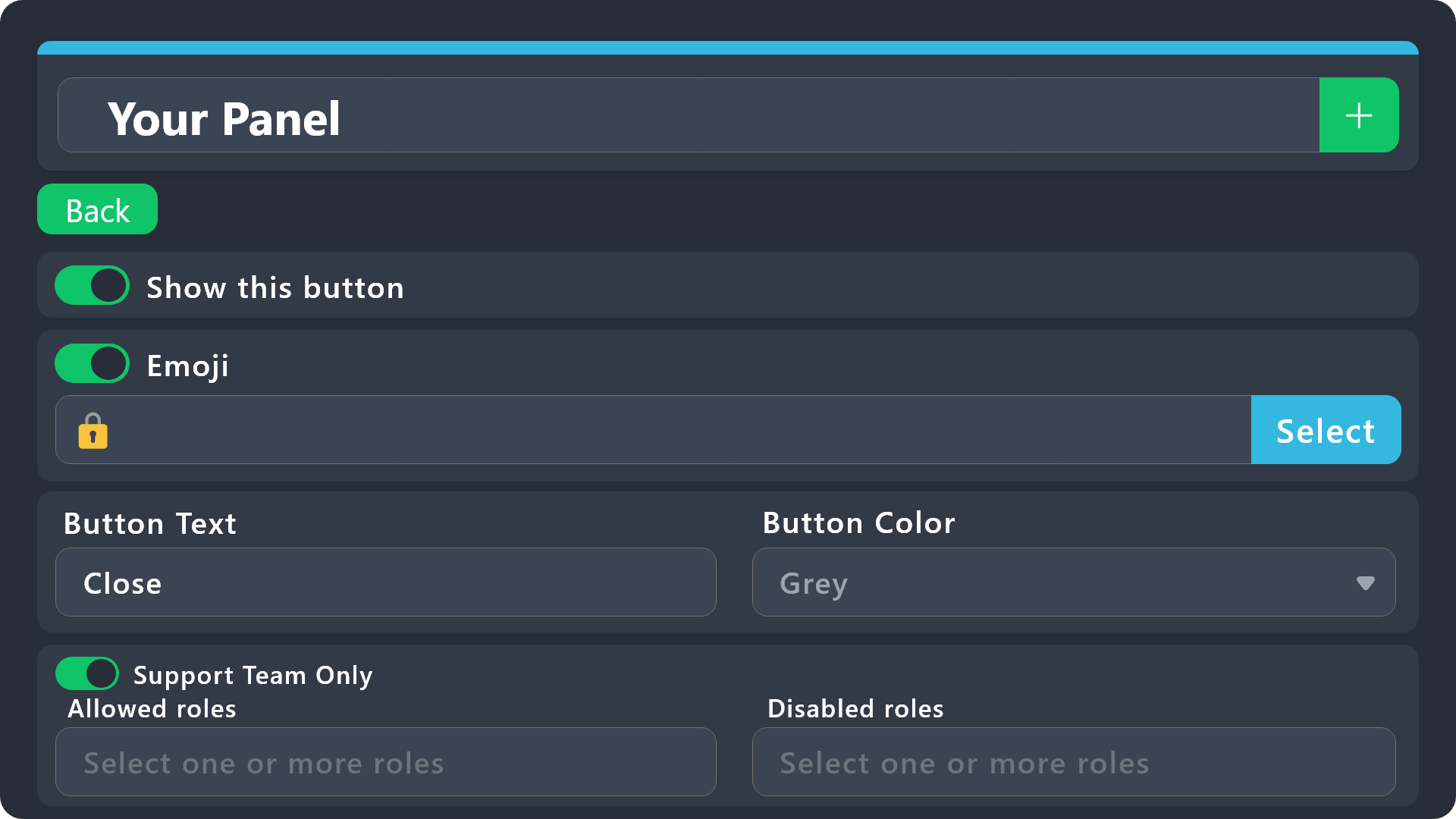
$buttonoptions
idle flint
rough sparrow
How can I make it where only the support team roles can close tickets?
See above - one the Close button, either enable "Support Team Only" or define allowed/disabled roles
humble sequoiaBOT
First you will want to invite the bot to your server. Once the bot is in your server, you can manage your server in the dashboard.
To create a panel we are going to need to head over to the Panel Configs Tab on the Dashboard.
Once at the dashboard we will need to click Create Panel.
Enter a panel name (Fill in any optional settings you want).
Click Create Panel and you are ready to get started with configuring your panel.
An example of a creating a panel is shown below.
Once the panel has been created, use the blue Send button and select the channel you want the panel to be sent to.
The Panel wasn't send
Use the </debug:1029783024264564765> command to diagnose possible permission issues with the bot.
idle flint
jade topaz
Y'all how do we invite the ticket bot to a server
See above for basic setup details, including inviting the bot.
 grand hazel
hey, i’m new to using this bot, why can’t i edit my embed??
pseudo ravine
Hey there. You can only edit the embeds description with the free version
jade topaz
I can not see any of the ticket that are made by people what do I do
I’m very stuck in my server
 spark remnant
I referred 4 friends in kage chirp before your refral system
 main valve
Hello, is it possible to save screenshot or images on transcript?, when my server get termed, the screenshots too
 inner agate
guys uh the bot isnt working or something idk but it doesnt work ??
 idle flint
inner agate
guys uh the bot isnt working or something idk but it doesnt work ??
idle flint
inner agate
guys uh the bot isnt working or something idk but it doesnt work ??
Do a /debug
inner agate
kk ty
idle flint
main valve
Hello, is it possible to save screenshot or images on transcript?, when my serve...
Screenshots are saved for premium users in the transcripts
main valve
idle flint
Screenshots are saved for premium users in the transcripts
oh really? so that will save all the screenshot or image of my transcripts?, So if the server get termed that wont deleted
 idle flint
inner agate
uh?
idle flint
inner agate
uh?
The bot is missing the Send Messages permission in that channel. Check you channel perms (especially if you have the @everyone role set to ❌ Send Messages)
 inner agate
idle flint
The bot is missing the Send Messages permission in that channel. Check you chann...
inner agate
idle flint
The bot is missing the Send Messages permission in that channel. Check you chann...
ohhh
it works now
idle flint
main valve
oh really? so that will save all the screenshot or image of my transcripts?, So ...
Transcripts are saved at the time that they are generated. If your server is terminated, as long as you have the transcript link, yes, the image is still saved too. BUT, also note that the recent discord updates (a few months ago) means that new transcript links are needed to be generated every now and again, so if you dont have the ability to re-generate the link, then probably not
idle flint
inner agate
it works now
perfect
main valve
"as long as you have the transcript link", what i said, i got termed and i have my transcripts but that say "This content is no longer available". due the server got termed
idle flint
main valve
"as long as you have the transcript link", what i said, i got termed and i have ...
No transcript link, no transcript, simple as. "Can I access the website if I dont have the website address" ? - no
main valve
idle flint
No transcript link, no transcript, simple as. "Can I access the website if I don...
So rn i just need to save with premium transcript link and not the html stuff, right?
like this
 idle flint
Have access to a message like this, where you can click "Direct Link" to generate a new link, then you can access that transcript infinitely (or until discord deletes it).
 idle flint
main valve
like this
idle flint
main valve
like this
All transcripts are is HTML files, so you can still open that downloaded HTML file
main valve
idle flint
Have access to a message like this, where you can click "Direct Link" to generat...
"or until discord delete it", so what you are saying, if the server get termed or deleted i cant get back or i couldnt see the images
example
 idle flint
Depends where discord stores that information - it is not stored by tickettool .

Settings for saving your transcripts
idle flint
idle flint
https://docs.tickettool.xyz/dashboard/panel-configs/transcript-options
specifically
 main valve
idle flint
Depends where discord stores that information - it is not stored by tickettool .
main valve
idle flint
Depends where discord stores that information - it is not stored by tickettool .
"Additionally it allows you to embed up to 8mb worth of attachments on your transcripts". This mean inside ticket tool server with premium , right?
idle flint
main valve
"Additionally it allows you to embed up to 8mb worth of attachments on your tran...
Yes
main valve
idle flint
Yes
thank you for your help, btw what happen if like i pay for premium for a server and that got termed after 3 days , could i get premium on another server?
iron nightBOT
Gave +1 Rep to @idle flint (current: #20 - 336)
main valve
Atm there was a term wave, i think maybe you hear about that
idle flint
you shouldnt be doing things that are against discords TOS then. The usage of Ticket Tool is in line with the Discord TOS. Break the Discord TOS enough to have your server terminated, then we are not going to assist you in transfering your premium etc.
But purchasing premium via our website is fully user managed, so you can transfer your premium yourself between servers
But also, no, I have not heard about a "term wave" - all of the discord servers that I run/help have never been terminated.....
Again, I guess it comes down to breaking the Discord TOS
main valve
idle flint
But also, no, I have not heard about a "term wave" - all of the discord servers ...
At this moment stores about digital article got termed, Or idk if there are a group who are doing massive report to do that
main valve
idle flint
Again, I guess it comes down to breaking the Discord TOS
Thank you for your help ❤️
iron nightBOT
Gave +1 Rep to @idle flint (current: #20 - 337)
 quaint trout
Is there a way to get Ticket Tool to show on my dashboard for a server if someone else added it to that server originally?
I'm trying to edit the settings of Ticket Tool because the other admin is busy right now and the functionality isn't working quite as planned and I can't seem to get it show up.
 weak vine
Is there a possibility that the ticket name stays the same or keeps the claimed ticket owner? for example xyz-name-0001 - when its closed to keep it closed-name-0001? i tried some variables but it shows for example the ticket tool as name when its automatically closing instead of the claimed owner
jade topaz
worldly helm
weak vine
Is there a possibility that the ticket name stays the same or keeps the claimed ...
Hey there! Yep, you just have to use the same variable you use for the opened ticket name.
worldly helm
jade topaz
<#571706435449257997>
Hiiii! 👋
do you need help regarding ticket tool?
weak vine
worldly helm
Hey there! Yep, you just have to use the same variable you use for the opened ti...
i did that but when the ticket tool closes the ticket itself (via automation) it shows the ticket tool instead the ticket claimer
worldly helm
what variable are you using for the creation of the ticket
weak vine
worldly helm
what variable are you using for the creation of the ticket
for the creation of the ticket its just "ticket-{count}" - when its claimed "Opened-{author.nickname?maxLength=4}-{count}" - when closed "Closed-{author.nickname?maxLength=4}-{count}" - when the ticket tool closes it automatically then its shown "closed-tick-0001" instead the claimed user
also tried {user] instead author but its showing me random 2 digit numbers
worldly helm
The {author} varibale displays the user/bot doing the action.
If you want to use the ticket owner, please use:
{ticket.user.name}
weak vine
ticket.user.name for both claimed and closed or doesnt really matter? for example if opened is author and closed ticket.user.name?
worldly helm
Yep, you could do that aswell
iron nightBOT
Gave +1 Rep to @worldly helm (current: #12 - 445)
worldly helm
You‘re welcome, thanks for supporting ticket tool!
jade topaz
كيف اسوي تكت زي كذا

 junior moss
Please help me how to make the bot mention a certain role when creating a ticket? Otherwise, I have it like this
 worldly helm
junior moss
Please help me how to make the bot mention a certain role when creating a ticket...
worldly helm
junior moss
Please help me how to make the bot mention a certain role when creating a ticket...
Heyyy! 👋
Please refer to the guide below.
humble sequoiaBOT
1. Go into your Dashboard
2. Open your Panel Configs tab
3. Select the panel you want to ping your support on
4. Open the Ticket options menu
5. Click on Edit Ticket Message
6. In the Message Content use one of the role mention syntax (**{@Role Name}**/**{Role ID}**)
7. Save changes
Note: For this to work properly, Ticket Tool requires the Mention Everyone permission. Or the role must have the Allow anyone to @mention this role setting enabled

 neon topaz
How to add support ticket into your discord server
stark runeBOT
1. Invite Ticket Tool to your server
First you will want to invite the bot to your server. Once the bot is in your server, you can manage your server in the dashboard.
2. Create a Panel
To create a panel we are going to need to head over to the panel configs on the dashboard.
Once at the dashboard we will need to click Create Panel.
Enter a panel name (Fill in any optional settings you want).
Click Create Panel and your ready to get started with configuring your panel.
An example of a creating a panel is shown below.
3. Send the Panel to a Channel
Once you've created a panel on the dashboard you will need to send it to a channel using send on the dashboard.
Select the channel you want your panel to be created in and click send.
For other questions checkout $help faq.
An example of a sending a panel is shown below.
Having a Problem Sending the Panel?
Do $debug in a channel with Ticket Tool and make sure it has all the necessary Discord permissions.
worldly helm
neon topaz
How to add support ticket into your discord server
Hey. Please refer to the guide above
neon topaz
How to add permissions and make a ticket channel
junior moss
Hello, please tell me how to make a list of questions here?
 humble sequoiaBOT
The Ticket Message is the first message sent by the bot on a new ticket. To customize it head over to your Dashboard ➞ Panel Configs ➞ Ticket ➞ Edit Ticket Message
worldly helm
junior moss
Hello, please tell me how to make a list of questions here?
Hiii! 👋
Please refer to the embed above.
worldly helm
neon topaz
How to add permissions and make a ticket channel
Dashboard --> Panel Configs --> Buttons --> Create Ticket --> Allowed roles
junior moss
worldly helm
Hiii! 👋
Please refer to the embed above.
Thank you
iron nightBOT
Gave +1 Rep to @worldly helm (current: #12 - 446)
junior moss
worldly helm
Hiii! 👋
Please refer to the embed above.
Excuse me, how can I delete this?
 worldly helm
junior moss
Excuse me, how can I delete this?
worldly helm
junior moss
Excuse me, how can I delete this?
Dashboard --> Panel Configs --> Forms -->  Enable this form
 dense plume
.
 wise bolt

 pseudo ravine
Hey there. Please don't ping for support, especially during the holiday season
There's nothing we can do about that unfortunately, you'll have to contact Discord Support
 fresh plinth
pseudo ravine
Hey there. Please don't ping for support, especially during the holiday season
fresh plinth
pseudo ravine
Hey there. Please don't ping for support, especially during the holiday season
im sorry i didnt know that
 oblique rose
Order Details:
Deposit Amount: 5000 INR
Order ID: F-1819342748256615138
Status: Processing
Created Time: 24/12/2024, 22:44:11
humble sequoiaBOT
⚠️ You're in the wrong place
We provide support for Ticket Tool Discord bot and cannot help you with whatever issue you have.
- We don't know which Support Team you should contact to get this issue resolved, and unfortunately we won't be able to accurately tell you.
If you don't have any further questions regarding our bot Ticket Tool, please close this ticket
pseudo ravine
fresh plinth
im sorry i didnt know that
No worries
fresh plinth
i just dont know what to do
fresh plinth
pseudo ravine
No worries
im not experienced
pseudo ravine
There's nothing we can do unfortunately
 sage adder
Hi there. I'm getting this error about buttons. I've tried adding text, removing it, changing emojis and nothing seems to fix
 pseudo ravine
Hey there. What's the server ID? I'll take a quick look
sage adder
1295162505500299284
pseudo ravine
Please add something to the Button Text for your Delete and Transcript buttons
sage adder
Hmm doesn't seem to work neither
pseudo ravine
Did you create a new ticket after saving the changes?
sage adder
yes
pseudo ravine
Just to confirm, which panel is this happening on?
sage adder
⭒˚。𝑫𝒖𝒅𝒂𝒔 𝒚 𝑹𝒆𝒄𝒍𝒂𝒎𝒐𝒔。˚⭒
pseudo ravine
Ah I see the issue now
You disabled the emoji and have no text for the Cancel Close and Confirm Close buttons
sage adder
Oops. There it goes, fixed! Thank you so much
pseudo ravine
You're welcome, glad I could help! Thanks for choosing Ticket Tool!
 brittle vault
Yo
 hallow hill
Can anyone help me? I try to run a command and all I get was “the application did not respond”
pseudo ravine
Hey there. Please make sure Ticket Tool has the “View Channel” and “Send Messages” permissions in the channel
hallow hill
pseudo ravine
Hey there. Please make sure Ticket Tool has the “View Channel” and “Send Message...
Alright!
 torpid ginkgo
Could anyone help me with this been unable to do anything
 pseudo ravine
Hey there. You will have to wait until the staff of that server delete some channels
torpid ginkgo
Ahhh perfect thank you
pseudo ravine
You’re welcome, glad I could help!
torpid ginkgo
Of course
hallow hill
pseudo ravine
Hey there. Please make sure Ticket Tool has the “View Channel” and “Send Message...
Thank you so much!
iron nightBOT
Gave +1 Rep to @pseudo ravine (current: #5 - 929)
 uneven swift
Não consigo enviar um ticket em um servidor, o que devo fazer?
worldly helm
 remote turtle
^
remote turtle
^
Hey there!
Please try using the /debug command in that channel.
 sly crypt
remote turtle
^
sly crypt
remote turtle
^
having the same problem
sly crypt
same here
worldly helm
remote turtle
It said same thing
The bot is missing this permission for that channel.
 worldly helm
sly crypt
same here
worldly helm
sly crypt
same here
Hey. Did you do the debug command?
remote turtle
It worked every other day just not this
sly crypt
worldly helm
The bot is missing this permission for that channel.
does it not have admin? should be able to send messages anyway?
sly crypt
worldly helm
Hey. Did you do the debug command?
yah
worldly helm
sly crypt
does it not have admin? should be able to send messages anyway?
The bot is missing the same permission for that channel.
 remote turtle
It worked yesterday so yes it does have those permissions
worldly helm
remote turtle
It worked yesterday so yes it does have those permissions
Please do:
Right click on the channel name (hold down instead, if on mobile) > Edit Channel > Permissions > Ticket Tool > SEND MESSAGES
sly crypt
yah it did fix that for me
worldly helm
sly crypt
yah it did fix that for me
Great. So no issues anymore?
remote turtle
Ty
 cobalt laurel
How can i create a multiple ticket panel
 grim wave
How to make the robot a member of my server?
 gentle vale
Why is general chat disabled
I can’t fucking talk in it
Imagine locking it for no reason 💀
worldly helm
gentle vale
Imagine locking it for no reason 💀
This channel is for Support only, please keep it that way
humble sequoiaBOT
For more convenient use of multipanels, you can now combine panels on the dashboard. This will allow you to directly send the multipanel from the dashboard or via the $panel ID command.
Where can I find this?
You can find this setting on the Dashboard -> Panel Configs -> Panel -> Attached Panels
Note: if you're attaching all the panels to a panel called English, don't include English in the attached panel's box (If you do this, it will create a duplicate)
This will put all buttons from all of your panels on one message. The message is the panel message from the panel you're combining these panels in.
worldly helm
cobalt laurel
How can i create a multiple ticket panel
Hiii!
Pls refer to the Guide above ^^
gentle vale
worldly helm
https://discord.com/channels/509192800865353738/509770538051305493/1319121122674...
Ok, guy who’s not a mod 👍
 tender sinew
if i own a server how can i let members send a file through the ticket because its not letting my members send a file
worldly helm
tender sinew
if i own a server how can i let members send a file through the ticket because i...
Hey!
Dashboard --> Panel Configs --> Permissions --> Ticket Owner/open ticket --> Attach files
tender sinew
worldly helm
Hey!
Dashboard --> Panel Configs --> Permissions --> Ticket Owner/open ticket -...
thank you my man
iron nightBOT
Gave +1 Rep to @worldly helm (current: #12 - 447)
 hazy ermine
I would like to know why I did not get access to the airdrop, if I met two conditions (connecting the wallet and also received the Proof of Humanity medal)
humble sequoiaBOT
⚠️ You're in the wrong place
We provide support for Ticket Tool Discord bot and cannot help you with whatever issue you have.
- We don't know which Support Team you should contact to get this issue resolved, and unfortunately we won't be able to accurately tell you.
If you don't have any further questions regarding our bot Ticket Tool, please close this ticket
 frosty orbit
actually i have entered wrong alphabets while regustering nodepay account, i wrote gamil instead of gmail. now when i was trying to verify my gmail accout it says that we have sent verification link but that link is sent to gamil accout but not gmail account. i want to share a screenshot to nodepay team if there is any solution, do guide me please!!
worldly helm
Please look at that picture. Please #🎫│make-a-ticket once they are open again.
 worldly helm
frosty orbit
actually i have entered wrong alphabets while regustering nodepay account, i wro...
worldly helm
frosty orbit
actually i have entered wrong alphabets while regustering nodepay account, i wro...
You're in the wrong server.
Please make one once they are open again.
I don't think so.
 worldly helm
 stone swift
If you try again it works but the support tickets are closed. Please wait until they are open again
stone swift
Alright ,ty will try later today
frosty orbit
worldly helm
frosty orbit
You're in the wrong server.
frosty orbit
worldly helm
You're in the wrong server.
i tried to submit a ticket but i dont understand where to send all screenshots ?
there is nothing like support over there
frosty orbit
worldly helm
You're in the wrong server.
are you the moderator ?
worldly helm
frosty orbit
are you the moderator ?
Nope i am not.
frosty orbit
worldly helm
Nope i am not.
when will moderator will be live here ?
worldly helm
We can't help you.
 faint flicker
Hey so when I go to claim a ticket the button isn’t there even though it’s enabled in settings and the claim command says it’s disabled and doesn’t work
worldly helm
faint flicker
Hey so when I go to claim a ticket the button isn’t there even though it’s enabl...
Hey. Claiming is a premium only feature.
faint flicker
worldly helm
Hey. Claiming is a premium only feature.
since when?
worldly helm
For as long as i know 😅
faint flicker
I’ve always been able to claim
 trim prairie
Yo anyone on playstation 4 who wants to do the Cayo preco black panther X3 gold and you get %30? money is money I'm on about GTA5 btw. If so dm me
humble sequoiaBOT
⚠️ You're in the wrong place
We provide support for Ticket Tool Discord bot and cannot help you with whatever issue you have.
- We don't know which Support Team you should contact to get this issue resolved, and unfortunately we won't be able to accurately tell you.
If you don't have any further questions regarding our bot Ticket Tool, please close this ticket
 fading shadow
comment on fais pr se faire deban de serveur ou je ne peut meeme pas rentré ou quitter ??
je ne peut même pas regarde le serveur car cela me mais que le lieu est indisponible alors que il est ?
 uneven dragon
I need help
humble sequoiaBOT
Hello, we would love to help you, but if you don't tell us what you need help with we can't help you :(
 open stirrup
hi, i need help how come i cant change the color for the tix?
worldly helm
open stirrup
hi, i need help how come i cant change the color for the tix?
Hiii 👋
Please elaborate and send a screenshot of what you mean.
uneven dragon
humble sequoia
My phantom wallet will delete and I want to change my nodepay wallet connection
Reason. My phone will reset and I loss my pin and seed phess save in notes so can I change my wallet connection
worldly helm
uneven dragon
My phantom wallet will delete and I want to change my nodepay wallet connection ...
We can't help you nor do we know where you should go to get this issue resolved.
open stirrup
worldly helm
Hiii 👋
Please elaborate and send a screenshot of what you mean.
i cant change or type anything for the hex color code
 worldly helm
Seems like that server does not have an active premium subscription, which is needed.
open stirrup
worldly helm
Seems like that server does not have an active premium subscription, which is ne...
its just a trial like a free one to see how it looks before buying it
worldly helm
Please click the  button on top of your dashboard then try again
open stirrup
 open stirrup
worldly helm
Please click the <:sync:1265738463534387301> button on top of your dashboard the...
open stirrup
worldly helm
Please click the <:sync:1265738463534387301> button on top of your dashboard the...
oki it worked!!!
tysm! @worldly helm
 open stirrup
hi how do i fix this?


 rose oyster
I have lost my verified wallet please tell me how to change verified wallet address
humble sequoiaBOT
⚠️ You're in the wrong place
We provide support for Ticket Tool Discord bot and cannot help you with whatever issue you have.
- We don't know which Support Team you should contact to get this issue resolved, and unfortunately we won't be able to accurately tell you.
If you don't have any further questions regarding our bot Ticket Tool, please close this ticket
scenic plinth
open stirrup
hi how do i fix this?
You need to have an emoji if you have the option enabled. If you don't want an emoji, disable the option to show button emoji.
 clear gate
.
scenic plinth
wispy cypress
The server is Discord rate-limited because there are too many attempts of people trying to create tickets at one time, presumably when the tickets are full. There is nothing you can do as the user.
humble sequoiaBOT
@fading shadow
⚠️ Vous n'êtes pas au bon endroit
Nous offrons un support pour le bot Ticket Tool et nous ne pouvons pas vous aider avec d'autres problèmes hors du bot.
- Assurez-vous de contacter l'équipe d'assistance appropriée, s'il vous plaît.
S'il n'y a pas d'autres éléments en lien avec Ticket Tool en quoi nous pouvons vous être utiles, veuillez fermer le ticket.
 honest sonnet
how to solve this issue? all of us facing this error while generating ticket
 scenic plinth
honest sonnet
how to solve this issue? all of us facing this error while generating ticket
scenic plinth
honest sonnet
how to solve this issue? all of us facing this error while generating ticket
The bot needs permissions to view the category "Support". It cannot see the category and therefore cannot place tickets there.
honest sonnet
scenic plinth
The bot needs permissions to view the category "Support". It cannot see the cate...
i already gave all the permissions..
scenic plinth
It has a role or permission that is blocking that category from being seen, even if you have given it permissions server-wide.
honest sonnet
scenic plinth
It has a role or permission that is blocking that category from being seen, even...
let me check it again..
humble sequoiaBOT
- Note: Remove the ! from all of the variables for proper work
{!server.name} ➞ Name of the server
{!server.id} ➞ ID of the Server
{!server.icon} ➞ Direct URL to the Server's Icon
{!server.banner} ➞ Direct URL to the Server's banner, if available

{!channel} = <#channel> ➞ Channel link of the current channel
{!channel.name} ➞ Name of the current channel
{!channel.id} ➞ ID of the current channel

{!author} = <@user> ➞ Mention of the user triggering this message
{!author.name} ➞ Name of the user triggering this message
{!author.id} ➞ ID of the user triggering this message
{!author.nickname} ➞ Nickname of the user triggering this message
{!author.icon} ➞ Direct Url of the profile picture of the user triggering this message
{!author.tag} ➞ 4 digit tag (discriminator) of the user triggering this message
{!author.full} ➞ username + 4 digit discriminator of the user triggering this message```
```diff
- Note: The variables below are meant to be used within ticket messages, or tags triggered within tickets
{!panel.count} ➞ The current count number of the panel
{!panel.name} ➞ The name of the panel
{!panel.ticketLimit} ➞ The current limit of the panel

{!ticket} = <#channel> ➞ Channel mention of the ticket
{!ticket.id} ➞ Channel ID of the ticket

{!ticket.user} = <@user> ➞ User mention of the ticket user
{!ticket.user.name} ➞ Name of the ticket user
{!ticket.user.id} ➞ User ID of the ticket user
{!ticket.user.nickname} ➞ Nickname of the ticket user
{!ticket.user.icon} ➞ Direct Url of the profile picture of the ticket user
{!ticket.user.tag} ➞ Tag / Discriminator of the ticket user
{!ticket.user.full} ➞ Username + Discirimator of the ticket user```
_ _
_ _
Additional variables
Roles can be either
{@role name} or {role ID}
{create.reason}
{claim.reason}
{close.reason}
{delete.reason}
» Reasons for a given action
Transcript Variables
{!ticket_name}➞ Name of the ticket
{!panel_name}➞ Name of the panel
{!transcript_url}➞ File link of the transcript
Hide Link under blue text:
[Click me](https://tickettool.xyz)➞ Click me
Time Variable
Sends the current unix time in seconds. Optionally add or remove seconds
<t:{!time?m=+43200}:R>➞ <t:1735279892:R>
<t:{!time?m=-43200}:R>➞ <t:1735193492:R>
<t:{!time}:R>➞ <t:1735236692:R>
_ _
<t:1641006000>➞ <t:1641006000>
<t:1641006000:f>➞ <t:1641006000:f>
<t:1641006000:F>➞ <t:1641006000:F>
<t:1641006000:D>➞ <t:1641006000:D>
<t:1641006000:d>➞ <t:1641006000:d>
<t:1641006000:t>➞ <t:1641006000:t>
<t:1641006000:T>➞ <t:1641006000:T>
<t:1641006000:R>➞ <t:1641006000:R>
» You can use https://hammertime.djdavid98.art/ to create custom dates/times
 rapid atlas
4f112fae-f4d3-11ed-a05b-0242ac
humble sequoiaBOT
1. Convidando o Ticket Tool
A primeira coisa que você precisa fazer é convidar o bot, o convite pode ser encontrado aqui.
Quando o bot estiver no seu servidor, iremos para o painel e criaremos o painel
Um painel é usado para definir as configurações de cada ticket e as pessoas reagem para criar um ticket.
2. Criando um painel
Para criar um painel, precisaremos ir até as configurações do painel no painel
- Uma vez no painel, precisaremos clicar em Criar painel
- Digite o nome do painel (preencha as configurações opcionais que você deseja)
- Clique em Criar painel e você estará pronto para começar a configurar seu painel.
3. Enviando um painel
Depois de criar um painel no painel, você precisará enviá-lo para um canal usando enviar no painel
Selecione o canal em que você deseja criar seu painel e clique em enviar.
Para outras perguntas, consulte $help faq
Você está tendo problemas para enviar seu painel?
Use o comando $debug em um canal com o bot e certifique-se de que Ticket Tool tenha todas as permissões necessárias do Discord
 upbeat berry
wenn jemand aus dem deutschsprachigen raum mal kurz zeit hat würde ich kurz seine Hilfe in anspruch nehmen
 willow sleet
One question, what is the most active discord server Ticket tool is in, like the server with the most daily opened tickets
pseudo ravine
Hey there. That information isn’t public
 gleaming schooner
I need help
I have a shop to sell account and i use the ticket tool to create a ticket to my clients say what type off account he like
But the normal people in the server can close the tickets, how i remove the permission to make this???
jade topaz
I don't know why it's not working?


 gusty gale
humble sequoiaBOT
gusty gale
humble sequoiaBOT
@gusty gale
⚠️ You're in the wrong place
We provide support for Ticket Tool Discord bot and cannot help you with whatever issue you have.
- We don't know which Support Team you should contact to get this issue resolved, and unfortunately we won't be able to accurately tell you.
If you don't have any further questions regarding our bot Ticket Tool, please close this ticket
jade topaz
worldly helm
jade topaz
I don't know why it's not working?
Heyyy. Please check if your premium subcription is still active.
jade topaz
worldly helm
Heyyy. Please check if your premium subcription is still active.
Thank you
jade topaz
Can i change the looks of the bot?
pseudo ravine
Hey there. Please refer to the embed below!
humble sequoiaBOT
Ticket Tool Custom Avatar
As of now, you are not able to change Ticket Tool's profile picture, nonetheless, our Development Team is working on the release of white labels, this is your own custom bot!
For the time being, you can change the bot's nickname by right-clicking the bot in the user list on your server and clicking Change Nickname
$avatar
iron nightBOT
Gave +1 Rep to @pseudo ravine (current: #5 - 931)
 pseudo ravine
jade topaz
thanks <@865714582613524491>
pseudo ravine
jade topaz
thanks <@865714582613524491>
You're welcome, glad I could help! Thanks for choosing Ticket Tool!
iron nightBOT
Gave +1 Rep to @junior bronze (current: #355 - 1)
pseudo ravine
 knotty bramble
Why wont it let me edit the message
knotty bramble
Why wont it let me edit the message
Hey there. You need a premium subscription in order to edit the Message Content of the Panel Message
knotty bramble
What about the main panel with the buttons need Premium to change that too?
humble sequoiaBOT
1. Go into your Dashboard
2. Open your Panel Configs tab
3. Select the panel you want to ping your support on
4. Open the Ticket options menu
5. Click on Edit Ticket Message
6. In the Message Content use one of the role mention syntax (**{@Role Name}**/**{Role ID}**)
7. Save changes
Note: For this to work properly, Ticket Tool requires the Mention Everyone permission. Or the role must have the Allow anyone to @mention this role setting enabled
worldly helm
 crystal sedge
How do I @ my Support team?
crystal sedge
How do I @ my Support team?
Hey. Please refer to the guide above ^^
open stirrup
scenic plinth
You need to have an emoji if you have the option enabled. If you don't want an e...
I did that and it still showed system error

 celest ridge
Hello nodepay team change my wallet address plz help
 humble sequoiaBOT
⚠️ You're in the wrong place
We provide support for Ticket Tool Discord bot and cannot help you with whatever issue you have.
- We don't know which Support Team you should contact to get this issue resolved, and unfortunately we won't be able to accurately tell you.
If you don't have any further questions regarding our bot Ticket Tool, please close this ticket
 zenith ginkgo
Help me, my server member is unable to close the ticket, what do I have?

@iron night
 coral drum
I was scammed in a ticket but then i never got a transcript
zenith ginkgo
coral drum
I was scammed in a ticket but then i never got a transcript
This is really annoying, but do you know how to solve my problem?
 glass ice
coral drum
I was scammed in a ticket but then i never got a transcript
glass ice
coral drum
I was scammed in a ticket but then i never got a transcript
They most likely deleted the channel whatsoever, and never clicked the close ticket button. I am sorry for your loss.
glass ice
zenith ginkgo
This is really annoying, but do you know how to solve my problem?
Most likely the same issue ^
coral drum
glass ice
They most likely deleted the channel whatsoever, and never clicked the close tic...
Is there a way yall can see the chats even when it wws opendend
glass ice
coral drum
Is there a way yall can see the chats even when it wws opendend
No, due to security reasons, the ticket tool saves a transcript once the ticket is over and closed.
zenith ginkgo
glass ice
Most likely the same issue ^
How to solve it? I don't think it's the same problem
glass ice
zenith ginkgo
How to solve it? I don't think it's the same problem
Do you click the close ticket button?
glass ice
zenith ginkgo
How to solve it? I don't think it's the same problem
I just got intel, the bot does not DM you if a ticket was closed unless programmed.
coral drum
bru
zenith ginkgo
glass ice
Do you click the close ticket button?
Yes, I click the close button but it doesn't close but the cancel button appears
coral drum
fuck
 frail comet
Guys I'm banned from ishowspeed server how can I unban ?
humble sequoiaBOT
@frail comet
⚠️ You're in the wrong place
We provide support for Ticket Tool Discord bot and cannot help you with whatever issue you have.
- We don't know which Support Team you should contact to get this issue resolved, and unfortunately we won't be able to accurately tell you.
If you don't have any further questions regarding our bot Ticket Tool, please close this ticket
zenith ginkgo
glass ice
I just got intel, the bot does not DM you if a ticket was closed unless programm...
But I'm the owner of the server
frail comet
humble sequoia
<@1220580897401606177>
What can I do I don't understand
 lunar solar
zenith ginkgo
Help me, my server member is unable to close the ticket, what do I have?
lunar solar
zenith ginkgo
Help me, my server member is unable to close the ticket, what do I have?
Looks like you’ve hidden the close button
glass ice
zenith ginkgo
But I'm the owner of the server
Please use /help and learn how to use /transcript.
glass ice
coral drum
bru
Sorry for your loss.
glass ice
humble sequoia
<@1220580897401606177>
How does it know?
zenith ginkgo
lunar solar
Looks like you’ve hidden the close button
But how do you want to solve it?
lunar solar
Just taking a look, FARME server?
zenith ginkgo
glass ice
Please use /help and learn how to use /transcript.
I don't want to use the transcript, I want members I can click on close ticket but the bot does something else as it appears in the photo
lunar solar
lunar solar
Just taking a look, FARME server?
@zenith ginkgo
glass ice
Let me check.
pseudo ravine
glass ice
Let me check.
Please let the support team handle this now
glass ice
pseudo ravine
Please let the support team handle this now
Ok 👍
zenith ginkgo
lunar solar
Looks like you’ve hidden the close button
How do you want to find the button?
lunar solar
zenith ginkgo
How do you want to find the button?
I’m asking you if this issue is on the FARME server?
zenith ginkgo
lunar solar
I’m asking you if this issue is on the FARME server?
I think I configured the bot wrong
zenith ginkgo
lunar solar
I’m asking you if this issue is on the FARME server?
You can take a look at my server
lunar solar
I’ve found the issue and I know how to fix it I’m just asking are you editing the bot settings on this server:
 zenith ginkgo
lunar solar
I’ve found the issue and I know how to fix it I’m just asking are you editing th...
zenith ginkgo
lunar solar
I’ve found the issue and I know how to fix it I’m just asking are you editing th...
oh yes I am
zenith ginkgo
lunar solar
Yesss
lunar solar
Alright go to:
Panel Configs —> Messages —> Edit Closed Question —> Confirm Close (edit button) —> Show this button
Please note these changes will only effect newly opened tickets once saved
zenith ginkgo
lunar solar
Alright go to:
Panel Configs —> Messages —> Edit Closed Question —> Confirm Clos...
There is also a problem when a member clicks on create ticket, channel example 0001 goes to the top of the server, I would like to place it below the service channel
 drifting adder
Help
 humble sequoiaBOT
⚠️ You're in the wrong place
We provide support for Ticket Tool Discord bot and cannot help you with whatever issue you have.
- We don't know which Support Team you should contact to get this issue resolved, and unfortunately we won't be able to accurately tell you.
If you don't have any further questions regarding our bot Ticket Tool, please close this ticket
drifting adder
Id: louish1297
zenith ginkgo
zenith ginkgo
There is also a problem when a member clicks on create ticket, channel example 0...
@lunar solar
lunar solar
zenith ginkgo
There is also a problem when a member clicks on create ticket, channel example 0...
You will need to assign it a category:
Panel Configs —> Category —> Category created/opened
zenith ginkgo
lunar solar
You will need to assign it a category:
Panel Configs —> Category —> Category cre...
❤️
zenith ginkgo
lunar solar
You will need to assign it a category:
Panel Configs —> Category —> Category cre...
I changed the message on the panel and saved it, but when a member opens the ticket the message stays the same. Is there a way to resolve it?
lunar solar
zenith ginkgo
I changed the message on the panel and saved it, but when a member opens the tic...
You changed panel 2
You need to change panel 1
Change it in the drop down at the top
zenith ginkgo
lunar solar
Change it in the drop down at the top
make a more detailed tutorial please
lunar solar
zenith ginkgo
make a more detailed tutorial please
 zenith ginkgo
lunar solar
zenith ginkgo
lunar solar
my panel is on 2 I did everything on it
lunar solar
zenith ginkgo
Help me, my server member is unable to close the ticket, what do I have?
This picture you provided is panel 1
So if that’s where people are making tickets then that’s panel 1
The other issue might be that ticket tool doesn’t have permissions to the category
humble sequoiaBOT
When first invited to your server, Ticket Tool should have the permissions shown below in order to ensure an appropriate functioning:
When customizing permissions for the different ticket participants, you must make sure Ticket Tool has the permissions you want it to grant to others, you can learn more about this here.
Missing Permissions
This error is a direct outcome of the bot missing permissions as depicted above. When troubleshooting this error we suggest you go through these steps:
- Use the </debug:1029783024264564765> command to check if the bot is lacking core role or channel permissions.
- Compare the category/channel's overrides and contrast them with the bot's roles to identify any permission denial that is breaking the functioning
- If you can't still figure it out, let our <@&540295656720302081> know so they can guide you through
Additional Resources
- If you are a server administrator and would like to understand more how to set up your server's permissions, we suggest checking the Discord Support Knowledge Base
- If you are a bot developer and are interested in the internal permission hierarchy we suggest you this part of the Discord Developer Docs
Important Note
- Giving Administrator permissions is NOT required and we do NOT encourage you to do unless you are trying to troubleshoot your permissions setup.

Specific permissions overwrite other permissions in your Discord.
@everyone is your basic permission level. Newly created roles will take the permissions from the everyone role unless you change these permissions for each role. Each role has a unique permission level in your server. The users top most role defines that user's global permissions to the server.
Channel role permissions overwrite your server role permissions. This will also apply if you change permissions for @everyone in the channel.
Any permissions given to a user's account within a channel overwrite the role permissions for the set channel and the server role permissions.
The user's highest role will define those users permissions if (checked) or (neutral)
- Grants a User or Role certain permission. Overwrites lower role permissions.
- Permission remains unchanged. If chosen to be granted a different role or permissions level, it will assume the denial or approval of that permission.
 - Denies the permission. Overwrites lower role permissions.
Permissions level chain: Server Level @everyone ➞ Server Level Roles ➞ Channel Level @everyone ➞Channel Level Roles ➞ Channel Level Member-specific settings
Note: Users and roles granted administrator permissions are not affected by channel overwrites.
zenith ginkgo
lunar solar
The other issue might be that ticket tool doesn’t have permissions to the catego...
which image?
zenith ginkgo
lunar solar
This picture you provided is panel 1
1 was a test where I had everything from 2 so I hosted everything for 2
lunar solar
No so in Discord the category: 💖 SUPORTE right click on it and edit the permissions and give ticket tool the permissions to the category
zenith ginkgo
lunar solar
No so in Discord the category: 💖 SUPORTE right click on it and edit the permiss...
Where are you going? I don't understand, speak Portuguese?
lunar solar
zenith ginkgo
Where are you going? I don't understand, speak Portuguese?
We have a Portuguese support team, open a #premium-tickets and they can assist you
zenith ginkgo
lunar solar
We have a Portuguese support team, open a <#796568540311715870> and they can ass...
I already remembered what I want, I don't need to go to this channel! Go into more detail, I don't understand. And the panel is in ticket 2
lunar solar
zenith ginkgo
I already remembered what I want, I don't need to go to this channel! Go into mo...
Are you on mobile or pc?
zenith ginkgo
lunar solar
Are you on mobile or pc?
Mobile
lunar solar
Alright I will do a mock tutorial on my phone
zenith ginkgo
lunar solar
Alright I will do a mock tutorial on my phone
thanks
iron nightBOT
Gave +1 Rep to @lunar solar (current: #15 - 402)
lunar solar
lunar solar
Well do that and make a new ticket and see if it’s fixed and then we will go from there
zenith ginkgo
lunar solar
Well do that and make a new ticket and see if it’s fixed and then we will go fro...
It can't be done when I had my battery at 19%
lunar solar
Why?
zenith ginkgo
I'm too lazy to do it and my battery is at 18%, I also used Sapphire to make the panel
lunar solar
That shouldn’t matter cause sapphire would just be using custom commands to open the tickets so as long as the settings are done correctly ticket tool should still open the tickets into the set categories
But ticket tool needs those permissions like I said
@zenith ginkgo do you mind if I join the server and take a look?
zenith ginkgo
lunar solar
<@1185931485795069999> do you mind if I join the server and take a look?
Can you enter? What permission will you need?
lunar solar
No permission I just want to open a ticket and see where it goes etc
zenith ginkgo
lunar solar
Which sapphire option is the issue on? All of them?
I think it's not Sapphire but my wrong configuration
No, it's the reporting panel, yes, it's the service panel.
lunar solar
Well first things first the channel: #1321142214604099828 is using panel 3
zenith ginkgo
lunar solar
Well first things first the channel: <#1321142214604099828> is using panel 3
Yes
lunar solar
And there is no category set for that panel
So tickets will open at the top like this one has
The channel #1321142214604099829 is set correctly creating a ticket here works fine the ticket is in the support category
zenith ginkgo
lunar solar
So tickets will open at the top like this one has
the problem with single tickets was resolved, the only problem and the message on panel 2 is in the customer service channel
lunar solar
What’s the problem with it?
And which channel is that, please say the name of the channel that has the issue
zenith ginkgo
lunar solar
What’s the problem with it?
I'm going to do some business, wait
lunar solar
Ping me when you require assistance again
zenith ginkgo
lunar solar
What’s the problem with it?
 zenith ginkgo
zenith ginkgo
zenith ginkgo
"error" and this message does not appear when a person clicks on create ticket
zenith ginkgo
lunar solar
Near the logo
I didn't find the button, can I say the name of the button or circle it in the image if I sent it?
lunar solar
 zenith ginkgo
lunar solar
zenith ginkgo
lunar solar
Okay, I've already done what I really wanted to be, if you want to change the message on the ticket, there's going to be more work than I want, so I'm going to leave it like that
jade topaz
How do I do use
Like @jade topaz opened a ticket
How do I make it into a embed like this

 minor cosmos
Does anyone know how to set the ticket to only open after 2 people interact?
 cosmic hornet
How do I activate close request?
 ocean spoke
سلام
 supple vale
 humble sequoiaBOT
⚠️ You're in the wrong place
We provide support for Ticket Tool Discord bot and cannot help you with whatever issue you have.
- We don't know which Support Team you should contact to get this issue resolved, and unfortunately we won't be able to accurately tell you.
If you don't have any further questions regarding our bot Ticket Tool, please close this ticket
 potent condor
Where can i get the ticket for hoobuy?
 polar bear
Bonjour, comment procéder pour être deban ? Merci
gleaming schooner
How i remove the permission to normal member close the tickets?
pseudo ravine
Hey there. You can go to the Dashboard > Buttons > Close Ticket > Support Team Only >
You should also go to the Dashboard > Command Configs > Close > Support Team Only >
gleaming schooner
thanks
I'm going to try now
thank you so mutch
I'm going to test today
❤️
pseudo ravine
You're welcome, glad I could help! Thanks for choosing Ticket Tool!
 gilded peak
how to give the bot manage roles perms
 brazen pebble
do yall have a patreon i can donate to?
 oblique thistle
Hi, does anyone know how to change my password?
humble sequoiaBOT
⚠️ You're in the wrong place
We provide support for Ticket Tool Discord bot and cannot help you with whatever issue you have.
- We don't know which Support Team you should contact to get this issue resolved, and unfortunately we won't be able to accurately tell you.
If you don't have any further questions regarding our bot Ticket Tool, please close this ticket
pseudo ravine
gilded peak
how to give the bot manage roles perms
Hey there. You can go to your server > Server Settings > Roles > Ticket Tool > Manage Roles >
pseudo ravine
brazen pebble
do yall have a patreon i can donate to?
Hey there. You can donate to our Ko-Fi: https://ko-fi.com/discorddev
 charred crow
how to make tickets like this idk how to
 worldly helm
charred crow
how to make tickets like this idk how to
worldly helm
charred crow
how to make tickets like this idk how to
Hey! Are you refering to the dropdown style or the pop up form?
charred crow
worldly helm
Hey! Are you refering to the dropdown style or the pop up form?
wait lemme ask him rq
the popup
humble sequoiaBOT
A Discord Form lets the user answer individual questions in a pop-up Form, which then displays the answers in the ticket message. This can save time if you already know what you want to ask the user.
Setup Forms
Forms can be enabled under Panel Settings > Form Options > Edit Forms Options. In the new pop-up window, you can now enable and edit your own Form.
Form Options
You can add up to 5 questions in the Discord form. This is a Discord limitation. Each question can have a placeholder in the input field, a minimum and maximum input, multi-line, and also the option to have the answer required.
Options
Question Title ➞ Your Question goes here
Question Placeholder ➞ The placeholder text in the input field
Required ➞ If enabled, the user has to answer this question, to submit the form
Multi-Line Input ➞ Allows the user to input multiple lines
Minimum and Maximum Input ➞ Set a minimum and maximum input value for the user
Displaying the Answer
To display the answers from the user, you need to enable Auto display form results on the ticket message as an additional embed
If you don't want a second embed, go into your Panel Configs > Ticket Options > Edit Ticket Message. You use the variable {create.form.x} and replace x with the number of your question. For example, the response to Question 5 can be displayed with {create.form.5}.
worldly helm
charred crow
the popup
Please refer to this guide above
charred crow
@worldly helm thanks for helping
iron nightBOT
Gave +1 Rep to @worldly helm (current: #12 - 449)
worldly helm
You're welcome, glad i could help you
minor cosmos
Does anyone know how to click the ticket to open only after 2 people interact? Like a bet made on fr
pseudo ravine
Hey there. Unfortunately that's not possible
brazen pebble
pseudo ravine
Hey there. You can donate to our Ko-Fi: https://ko-fi.com/discorddev
👍
 cursive sparrow
How do I claim a ticket?
pseudo ravine
Hey there. Please refer to the embed below!
humble sequoiaBOT
Claiming allows you to change the ticket name, category and permissions. To use it you have to enable it first on your Dashboard > Panel Configs > Claiming

 Note: This is a premium feature
pseudo ravine
Note: This is a premium feature
pseudo ravine
Do you have a premium subscription?
 prime topaz
Hello I've been trying to change a ticket tool for my server, it was previously done by a staff member but this was back in 2022
when I go onto the Ticket Tool website, I've tried deleting a panel that was created. But I get a message saying, Major config Mismatch.
I've also tried updating the panel but it asked for, Discord format, i'm not sure what this is, but i'm guessing it overrides something.
If anyone is able to help me that would be great
pseudo ravine
Hey there. What exactly are you trying to change?
prime topaz
Basically how do i make a ticket tool from scratch because the current one has messed up.
Iv'e watched YouTube videos and followed them step by step but the problem just got worse
pseudo ravine
Please refer to the embeds below!
humble sequoiaBOT
First you will want to invite the bot to your server. Once the bot is in your server, you can manage your server in the dashboard.
To create a panel we are going to need to head over to the Panel Configs Tab on the Dashboard.
Once at the dashboard we will need to click Create Panel.
Enter a panel name (Fill in any optional settings you want).
Click Create Panel and you are ready to get started with configuring your panel.
An example of a creating a panel is shown below.
Once the panel has been created, use the blue Send button and select the channel you want the panel to be sent to.
The Panel wasn't send
Use the </debug:1029783024264564765> command to diagnose possible permission issues with the bot.
prime topaz
thank you I'll follow that
 signal sinew
When is the next event?
 full fable
@humble sequoia
 fleet plover
Hello, I have had a problem for almost an hour with the ticket bot. When I want to make another category "Another Matter" because I get an error. Here in the pictures you can see this error


This afternoon it worked normally when I did this category. But when I wanted to do it a moment ago an error popped up and I can't do anything about it. I even changed emoticons and the error popped up too
And that's why I would like someone to help
 next current
.
 civic knoll
Hello friends how to getmember roll please help me
How to get member rolls please guide me
humble sequoiaBOT
⚠️ You're in the wrong place
We provide support for Ticket Tool Discord bot and cannot help you with whatever issue you have.
- We don't know which Support Team you should contact to get this issue resolved, and unfortunately we won't be able to accurately tell you.
If you don't have any further questions regarding our bot Ticket Tool, please close this ticket
 true mulch
How to make menu
pseudo ravine
Hey there. Please refer to the embed below!
humble sequoiaBOT
The Drop-down menu or Select Menu replaces the buttons on your panel message and uses a drop-down menu with all of your panels. To set this up, go to your Panel Configs and select your main Panel.
<:Numbericons1:1018864164032225340> Enable Select Style
First you enable Select Style. Then you add an item in the Dropdown Editor. Now you can start editing your dropdown!
<:Numbericons2:1018864168041971712> Dropdown Editor
Each line in the dropdown editor represents a line in the drop down menu on discord. You can add more "Items", by clicking on 

First you select a panel. That's the panel this option will open a ticket for.  DONT select the same panel twice. Each option should have a different Panel
After that, you can put a Display. This is the title of this option and will appear in the drop down menu. The *Description can be set right after that, which will be below the title in grey.
Additionally you can select an emoji, that will be shown in front of each option. You can either manually input the ID of an emoji or select it in the selector.
Common Issues ⚠️
- Panel doesn't send? Make sure you have a valid emoji selected
- Option doesn't show up? Check if two options have the same panel in the DropDown Editor

$dropdown
 little trail
hello i wanna open ticket a server it show the error...when i get help from the website below that message my problem didnt solve...and the ponit is i just heve20 server in my discord
 gilded carbon
Status
 primal gorge
how to change prefix
 brazen talon
i need help
humble sequoiaBOT
Hello, we would love to help you, but if you don't tell us what you need help with we can't help you :(
worldly helm
primal gorge
how to change prefix
Heyy.
Dashboard —> Server Configs —> Prefix
worldly helm
little trail
hello i wanna open ticket a server it show the error...when i get help from the ...
Heyy! What‘s the error message?
worldly helm
gilded carbon
Status
Hiii!
Do u need help regading ticket tool?
 rich token
 honest blade
Is it possible to put a cooldown when creating tickets?
 austere forge
not possible, for the moment
austere forge
rich token
Make sure that the bot has : VIEW CHANNEL SEND MESSAGE and READ MESSAGE HISTORY perms in the channel
austere forge
You should do it on your phone or computer, unless you know how to do it with VR ⬇️
Right click on the channel name (hold down instead, if on mobile) > Edit Channel > Permissions > Add Ticket Tool > VIEW CHANNEL SEND MESSAGE and READ MESSAGE HISTORY
 low marten
how can i add logs to the tickets? (like to see former tickets that been closed)
 viscid finch
Just a quick question, what perms are needed to create a panel?
 mystic dragon
I want to disconnect wallet which is connected to nodepay
 midnight eagle
when people create a ticket people can see it like unverified and all the other members
civic knoll
How to get member roll please guide me
brazen pebble
austere forge
You should do it on your phone or computer, unless you know how to do it with VR...
should be the same way in vr as pc since its using the website.
 quick tangle
how do i close ticket with a reason, so user gets a DM showing reason
 minor herald

 cunning summit
pls help

 carmine crest
hi I need some assistance. I have using herond browser for more than 14 full days. but still my badge is not activated
humble sequoiaBOT
⚠️ You're in the wrong place
We provide support for Ticket Tool Discord bot and cannot help you with whatever issue you have.
- We don't know which Support Team you should contact to get this issue resolved, and unfortunately we won't be able to accurately tell you.
If you don't have any further questions regarding our bot Ticket Tool, please close this ticket
 sly schooner
when i do the command for setup it says the application did not respond
 hushed tree
How do I move the locations of my tickets? They are at the top of my server but would prefer to put them at the bottom. Thanks!
 jade topaz
how do i get it when they press close ticket it closes and saves auto matically
 civic oasis
why i can create the ticket
 sonic galleon
Hi everyone! I need help: I staked USDT "flex savings" on Bybit a month ago, but I don't see the option to withdraw the total amount (I assume that if it's "flex savings", then I should be able to do that). Please help me🙏🙏🙏
humble sequoiaBOT
⚠️ You're in the wrong place
We provide support for Ticket Tool Discord bot and cannot help you with whatever issue you have.
- We don't know which Support Team you should contact to get this issue resolved, and unfortunately we won't be able to accurately tell you.
If you don't have any further questions regarding our bot Ticket Tool, please close this ticket
rich token
austere forge
Right click on the channel name (hold down instead, if on mobile) > Edit Channel...
@austere forge
 mild walrus
I am unable to edit my panel message or create a new panel msg
 waxen oxide
So I'm trying to make a drop down thing for the ticket but it only let's me make one per panel? What's the point of there being a dropdown then?
I think I'm missing something someone please help me out xd
pseudo ravine
Hey there. Each dropdown option is a different panel
waxen oxide
So why is there a dropdown option if it will only dropdown one thing then the dropdown is just a fancy button at the point that takes two clicks instead of one to work no? 😅
pseudo ravine
It's just a way to hold multiple panels in one message
waxen oxide
Weird thing is I think I remember it working before with multiple options for the dropdown
waxen oxide
pseudo ravine
It's just a way to hold multiple panels in one message
?
Maybe I'm getting confused what a panel is then
Isn't the panel the whole ticket message like this
 pseudo ravine
Your panel is your ticket system
 waxen oxide
Isn't that the panel? I'm not sure
 tawny tiger
hello guys, i have a problem with my pack the Code isnt comming and i an waiting now 1 hour, last time it take 40 min and first time 5 min have u a idee
waxen oxide
If I make two different panels wouldn't it make two different separate ticket messages?
pseudo ravine
Nope, it'll only use the Ticket Message of the panel you're sending that holds the dropdown
humble sequoiaBOT
@tawny tiger
⚠️ You're in the wrong place
We provide support for Ticket Tool Discord bot and cannot help you with whatever issue you have.
- We don't know which Support Team you should contact to get this issue resolved, and unfortunately we won't be able to accurately tell you.
If you don't have any further questions regarding our bot Ticket Tool, please close this ticket
waxen oxide
What's the panel then? 😅
pseudo ravine
Your ticket system
waxen oxide
Hold on let me make another panel and see how it works
 visual jay
Sorry, you are not eligible.
Don't worry, keep engaging with us to be eligible for next season's airdrop.
How do I open a ticket?
waxen oxide
Oh it worked how I wanted it to work! I'm still confused on what the panel is though because the first panel I named "Ticket" and when I send it, it sends the ticket message and at the top it says "Ticket" since I named it that so I thought that the panel was that little message that says "Ticket" at the top with other text under it and with the button at the bottom but I can make another panel with a different name and connect a button under the first panel to the 2nd panel with a different name and the button that is connected to the 2nd panel with a different name is still under the first panel's message and the name of the 2nd panel won't appear anywhere. So that was confusing for me. 😅
humble sequoiaBOT
@visual jay
⚠️ You're in the wrong place
We provide support for Ticket Tool Discord bot and cannot help you with whatever issue you have.
- We don't know which Support Team you should contact to get this issue resolved, and unfortunately we won't be able to accurately tell you.
If you don't have any further questions regarding our bot Ticket Tool, please close this ticket
pseudo ravine
waxen oxide
Oh it worked how I wanted it to work! I'm still confused on what the panel is th...
The message you sent is the Panel Message
waxen oxide
It's weird to me because I thought panels were the same but one (the first one) can be the message with the buttons and the other one (the second one) can just be a "space" to place the 2nd button under the firstt panel message while the 2nd panel just doesn't appear anywhere or it's name at least
So it's like panels can be different things lol
Idk if that makes sense
pseudo ravine
You can customize your panels for various needs, yes
iron nightBOT
Gave +1 Rep to @pseudo ravine (current: #4 - 935)
waxen oxide
Lol
pseudo ravine
You're welcome, glad I could help! Thanks for choosing Ticket Tool!
waxen oxide
No problem! Thank you too!
tawny tiger
my key of our product dont come im still waiting about 1 hour last time this was better
humble sequoiaBOT
⚠️ You're in the wrong place
We provide support for Ticket Tool Discord bot and cannot help you with whatever issue you have.
- We don't know which Support Team you should contact to get this issue resolved, and unfortunately we won't be able to accurately tell you.
If you don't have any further questions regarding our bot Ticket Tool, please close this ticket
pseudo ravine
Hey there. Is this relating to the Ticket Tool Discord bot?
 dire crest
pseudo ravine
Hey there. Is this relating to the Ticket Tool Discord bot?
dire crest
pseudo ravine
Hey there. Is this relating to the Ticket Tool Discord bot?
Is submission to the administration open??
pseudo ravine
Please refer to the enbed below!
humble sequoiaBOT
How do be I become a Support Member?
You can become a support member in 2 ways:
1. You can be really active in #🆘│community-support gain <@&799500225579712543> role and get chosen by a Manager
2. You can apply VIA our applications that would be sent in #📣│server-news
We currently have Support Teams for the following languages:
:flag_us: English
:flag_jo: Arabic
:flag_fr: French
:flag_de: German
:flag_es: Spanish
:flag_br: Portuguese
dire crest
pseudo ravine
Please refer to the enbed below!
unde ?
pseudo ravine
What’s “unde”?
dire crest
pseudo ravine
What’s “unde”?
I want to know whether the administration is open or closed?
pseudo ravine
You can’t apply to be a manager, you can only apply for the support team, which are currently closed
 hybrid orbit
how do i setup the bot like this?
 worldly helm
hybrid orbit
how do i setup the bot like this?
worldly helm
hybrid orbit
how do i setup the bot like this?
Hey. Please refer to the guide below.
humble sequoiaBOT
The Drop-down menu or Select Menu replaces the buttons on your panel message and uses a drop-down menu with all of your panels. To set this up, go to your Panel Configs and select your main Panel.
<:Numbericons1:1018864164032225340> Enable Select Style
First you enable Select Style. Then you add an item in the Dropdown Editor. Now you can start editing your dropdown!
<:Numbericons2:1018864168041971712> Dropdown Editor
Each line in the dropdown editor represents a line in the drop down menu on discord. You can add more "Items", by clicking on
First you select a panel. That's the panel this option will open a ticket for. DONT select the same panel twice. Each option should have a different Panel
After that, you can put a Display. This is the title of this option and will appear in the drop down menu. The *Description can be set right after that, which will be below the title in grey.
Additionally you can select an emoji, that will be shown in front of each option. You can either manually input the ID of an emoji or select it in the selector.
Common Issues ⚠️
- Panel doesn't send? Make sure you have a valid emoji selected
- Option doesn't show up? Check if two options have the same panel in the DropDown Editor
$dropdown
hybrid orbit
how do i access the panel?
worldly helm
What do you mean?
worldly helm
You have to head to your dashboard
humble sequoiaBOT

Ticket Tool - Ticketing without clutter - The #1 Discord support bot
hybrid orbit
why is it saying this?
 worldly helm
Please try using the /debug command in that channel.
hybrid orbit
 worldly helm
The bot is missing a lot of permissions for that channel. (every permission marked with ❌)
Here is a guide how to add the permissions.

 worldly helm
humble sequoia
worldly helm
humble sequoia
By following this guide
 obtuse comet
I want to pay for premium. But I don't have a bank card or PP. Can I pay with crypto?
 rocky scarab
that doesnt seem to be an option at checkout
so id presume no
they offer paypal, google pay and direct card payment
obtuse comet
rocky scarab
they offer paypal, google pay and direct card payment
I saw that
worldly helm
obtuse comet
I saw that
Please #🎫│make-a-ticket to pay with crypto
 tawny trout
can you get a ticket if it was deleted before it was trans scripted?
worldly helm
grand hazel
whenever i invite it to my server
Hello. Please check your audit logs, there may be another bot kicking it.
grand hazel
worldly helm
Hello. Please check your audit logs, there may be another bot kicking it.
Bleed keeps kicking it 😐
does anyone know why??
worldly helm
grand hazel
does anyone know why??
It maybe is a security measure by the bot. Try kicking "Bleed" then invite ticket tool and then reinvite bleed 🤷
pseudo ravine
grand hazel
does anyone know why??
Reach out to bleeds support server to see if you can whitelist Ticket Tool. If not, I’m sure you can disable the antinuke temporarily
grand hazel
at first i thought it was because i had the other tickets bot in & i thought ticket tool was being kicked from that bot cus like whats the point in having two ticket bots? but it was bleed
but i want ticket tool because it’s easier to use and idk how to work the other one
pseudo ravine
pseudo ravine
Reach out to bleeds support server to see if you can whitelist Ticket Tool. If n...
I suggest reaching out to the staff at bleed
 neat peak
Comprei uma conta sua ela chegou no gmail, só que veio com a senha trocada teria como fazer um reembolso ou mandar a senha certa?
humble sequoiaBOT
Você está no lugar errado
Fornecemos suporte para Ticket Tool Discord bot e não podemos ajudá-lo com qualquer problema que você tenha.
- Não sabemos qual equipe de suporte você deve entrar em contato para resolver esse problema e, infelizmente, não poderemos informar com precisão.
Se você não tiver mais dúvidas sobre nossa ferramenta de ticket de bot, feche este ticket
neat peak
Ué mas oque eu faço? Comprei a conta mas veio com a senha alterada a 3 meses?
scenic plinth
Não é algo em que possamos ajudá-lo. Não fomos nós que vendemos nada para você.
scenic plinth
Não, não foi. Não vendemos contas.
scenic plinth
Não é algo em que possamos ajudá-lo. Só porque você pesquisou ingressos do Discord não significa necessariamente que este seja o local certo para obter suporte em relação à sua compra. Não temos nada a ver com o produto adquirido e não temos ideia de onde direcioná-lo para receber seu produto ou suporte para seu produto.
 iron wigeon
what do i do to fix this?

 uncut idol
is there anything i can do about a server member abusing this tool? I am getting the same greedy admin.
 junior bone
 scenic plinth
iron wigeon
what do i do to fix this?
scenic plinth
iron wigeon
what do i do to fix this?
If you are a server member, there is nothing you can do. If you are staff, check your create ticket button permissions. Also ensure that you are not blacklisting any roles via your server configs.
scenic plinth
uncut idol
is there anything i can do about a server member abusing this tool? I am getting...
I am unsure of what you mean, as you haven't contacted us previously about server abuse. if it is a specific member abusing your ticketing system, you should tryout our blacklisting role system (see below).
humble sequoiaBOT
Any role you assign as a blacklisted role won't be able to use commands or buttons.
Selecting a blacklisted role
Go to your Dashboard ➞ Server Configs. There you will find the option to select blacklisted roles.
Note: Don't forget to save.
 iron wigeon
scenic plinth
If you are a server member, there is nothing you can do. If you are staff, check...
iron wigeon
scenic plinth
If you are a server member, there is nothing you can do. If you are staff, check...
 scenic plinth
junior bone
scenic plinth
junior bone
This server has the maximum amount of channels allowed by Discord. If you are the server member, you will need to wait for the moderators of that server to delete tickets.
iron wigeon
is there anything wrong about this?
scenic plinth
There could be, if the person creating the ticket doesn't have one of those roles you have specified in the allowed roles.
Can I get your server's ID so I can look at your configuration better?
iron wigeon
scenic plinth
There could be, if the person creating the ticket doesn't have one of those role...
how do i get server ID
nvm - 1067055985681760297
scenic plinth
You have @everyone blacklisted in your server configs. Remove it and try again.
iron wigeon
scenic plinth
You have `@everyone` blacklisted in your [server configs](https://tickettool.xyz...
ah, thanks! worked perfectly 🤩
iron nightBOT
Gave +1 Rep to @scenic plinth (current: #13 - 440)
scenic plinth
No problem, glad to hear 
 gilded flower
I need help my account on murder mystery got banned for no reason if someone can please help me out ? To get it under review I don’t know where or who to reach out too ?
humble sequoiaBOT
⚠️ You're in the wrong place
We provide support for Ticket Tool Discord bot and cannot help you with whatever issue you have.
- We don't know which Support Team you should contact to get this issue resolved, and unfortunately we won't be able to accurately tell you.
If you don't have any further questions regarding our bot Ticket Tool, please close this ticket
gilded flower
 woeful gate
How do I go into past tickets that have been closed if im not a moderator for said server
 blissful cedar
hey i need help setting up following stuff
when someone open ticket and selects one of the DropDown items and after pressing that another dropdown showes to pick how much and eveything else lets say
i selcet exchnage on dropdown i want the tool to give them another dropdown and they have to selce one of the 3 opection like
paypal to crypto
crypto to paypal
other
gilded peak
pseudo ravine
Hey there. You can go to your server > Server Settings > Roles > Ticket Tool > M...
Tysm
 dusk drift
Hello I try to use ticket tool on my discord try to set it up on my android phone and the app doesn't respond
 dusky wharf
i no longer have access to the dashboard after i used the /botswitcher a few times. ( * I own the server )

- i just switched back to the normal one (white) but how do i use the gold one? it blocks me access to the dashboard.
 atomic solstice
dusky wharf
* i just switched back to the normal one (white) but how do i use the gold one? ...
atomic solstice
dusky wharf
* i just switched back to the normal one (white) but how do i use the gold one? ...
Do you have a premium subscription in that server? If yes, did you invite the premium bot to that server?
dusky wharf
atomic solstice
Do you have a premium subscription in that server? If yes, did you invite the pr...
Where to invite the premium one?
atomic solstice
dusky wharf
Where to invite the premium one?
if you switch to the free bot and visit the dashboard, you can click on Server Configs. On the right side of the screen you have the Premium Bot section where you can invite it from
dusky wharf
Appreciate you, thanks! i thought i broke the bot for a second lol. @atomic solstice
atomic solstice
dusky wharf
Appreciate you, thanks! i thought i broke the bot for a second lol. <@6017833943...
no problem
 simple basin
Hola como le puedo hacer si no me deja seguir para reclamar mi compra
 sharp dawn
Bonjour j'aimerai savoir s'il ai possible de ping son staff quand un ticket est créé
Hello I would like to know if it is possible to ping their staff when a ticket is created
 barren wave
hello! How to allow the bot commands when using "debug"
worldly helm
barren wave
hello! How to allow the bot commands when using "debug"
Heyy. Please elaborate.
barren wave
how can the bot resolve this:
 worldly helm
Here is a guide made by me on how to give permissions to the bot.
 supple sonnet
help i cant verify so i cant get support
sharp dawn
Hello I would like to know if it is possible to ping their staff when a ticket is created
supple sonnet
sharp dawn
Hello I would like to know if it is possible to ping their staff when a ticket i...
 worldly helm
sharp dawn
Hello I would like to know if it is possible to ping their staff when a ticket i...
worldly helm
sharp dawn
Hello I would like to know if it is possible to ping their staff when a ticket i...
Hey. Yep there is please refer to the guide below.
humble sequoiaBOT
1. Go into your Dashboard
2. Open your Panel Configs tab
3. Select the panel you want to ping your support on
4. Open the Ticket options menu
5. Click on Edit Ticket Message
6. In the Message Content use one of the role mention syntax (**{@Role Name}**/**{Role ID}**)
7. Save changes
Note: For this to work properly, Ticket Tool requires the Mention Everyone permission. Or the role must have the Allow anyone to @mention this role setting enabled
 simple wolf
How can I make the name of the person who made the ticket be written on the ticket?
EX : -> No : ticket->001
-> Yes : ticket-> username
worldly helm
simple wolf
How can I make the name of the person who made the ticket be written on the tick...
Hey!!
Dashboard --> Panel Configs --> Ticket --> Open ticket channel name --> Use the {ticket.owner.name} variable there.
simple wolf
worldly helm
Hey!!
Dashboard --> Panel Configs --> Ticket --> Open ticket channel name --> U...
thank you
iron nightBOT
Gave +1 Rep to @worldly helm (current: #12 - 451)
sharp dawn
worldly helm
Hey. Yep there is please refer to the guide below.
oh thanks
iron nightBOT
Gave +1 Rep to @worldly helm (current: #12 - 452)
worldly helm
sharp dawn
oh thanks
You're welcome, glad i could help you
pseudo ravine
gilded peak
Tysm
You're welcome, glad I could help! Thanks for choosing Ticket Tool!
iron nightBOT
Gave +1 Rep to @gilded peak (current: #355 - 1)
 grim kite
Evening, does anyone know how to have the tickets pop up in a certain section?
pseudo ravine
Hey there. Please refer to the embed below!
humble sequoiaBOT
1. Go into your Dashboard
2. Open your Panel Configs tab
3. Select the panel you want to grant access to
4. Open the Category options menu
5. Select the categories of your preference
6. Save changes

 pseudo ravine
Hey there. Do you have a premium subscription?
 cobalt dawn
pseudo ravine
Hey there. Do you have a premium subscription?
cobalt dawn
pseudo ravine
Hey there. Do you have a premium subscription?
No, I don't. Is this feature only for subscription holders?
@pseudo ravine
pseudo ravine
Yep
cobalt dawn
pseudo ravine
Yep
How do I see the subscription features and how much does it cost?
pseudo ravine
Please refer to the embed below!
humble sequoiaBOT
You can purchase Ticket Tool Premium here! Buying it on our website allows you to have full control over your subscription:
Cancel your subscription at any time
Change your billing interval (yearly/monthly)
Change your payment method
Add or remove server slots to your subscription
Transfer the subscription between servers
Note: This level of control is only available when purchasing the subscription from our website.
You can manage your current subscriptions here, any billing questions or concerns, feel free to create a Billing Ticket via #🎫│make-a-ticket
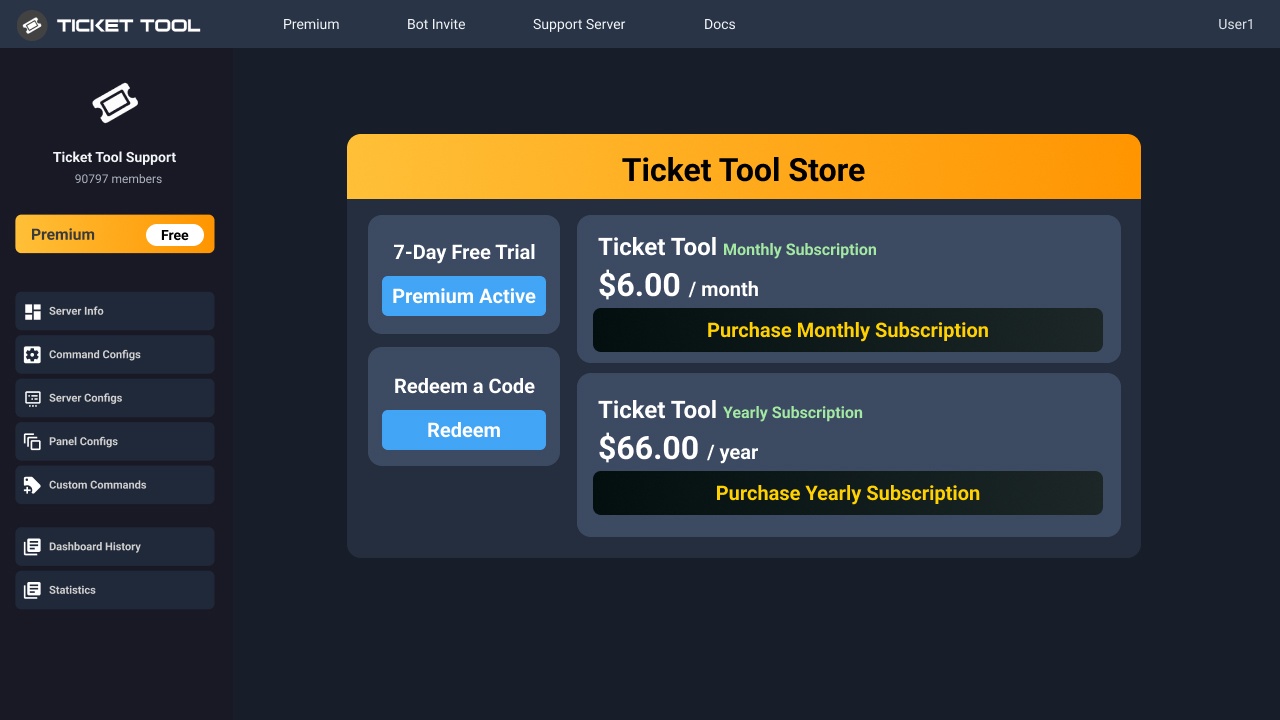 pseudo ravine
Please note that the price is now $7.99/month
rich token
worldly helm
The bot is missing a lot of permissions for that channel. (every permission mark...
tks
 harsh shell
how do i make tickets disabled to view for regular members and only for me
 rough star
how do i add a 'claim ticket' button
worldly helm
rough star
how do i add a 'claim ticket' button
Heyy. Claiming is a premium only feature.
rough star
worldly helm
Heyy. Claiming is a premium only feature.
oh
 ripe blade
hey aplication doesnt respond when i do any command
 unreal bay
When I open a ticket on my server, I can't see the ticket (as a member) and I can't see it as an admin either.
 bleak flame
is there a way to help set this up for a friend without logging into they account?
unreal bay
bleak flame
is there a way to help set this up for a friend without logging into they accoun...
admin permission
bleak flame
i have lead admin but im not able to go into the configs on the website
like i did my own
worldly helm
unreal bay
When I open a ticket on my server, I can't see the ticket (as a member) and I ca...
Hey. Do you have Show all channels enabled for that server?
unreal bay
bleak flame
i have lead admin but im not able to go into the configs on the website
he need to add the admin role in the panel of the ticket tool bot
unreal bay
worldly helm
Hey. Do you have `Show all channels` enabled for that server?
Where in permission?
worldly helm
 bleak flame
okay let me try adding that
unreal bay
worldly helm
now yes but i still dont see them
worldly helm
Have you tried with administrator(the permission)?
unreal bay
yes also with member permission
the channel + category appear for a member and disappear 5s after
bleak flame
i have every role but just a regular admin
unreal bay
bleak flame
i have every role but just a regular admin
but the admin role should be in the ticket tool panel in this section https://i.imgur.com/sb4g8pO.png to manage ticket *
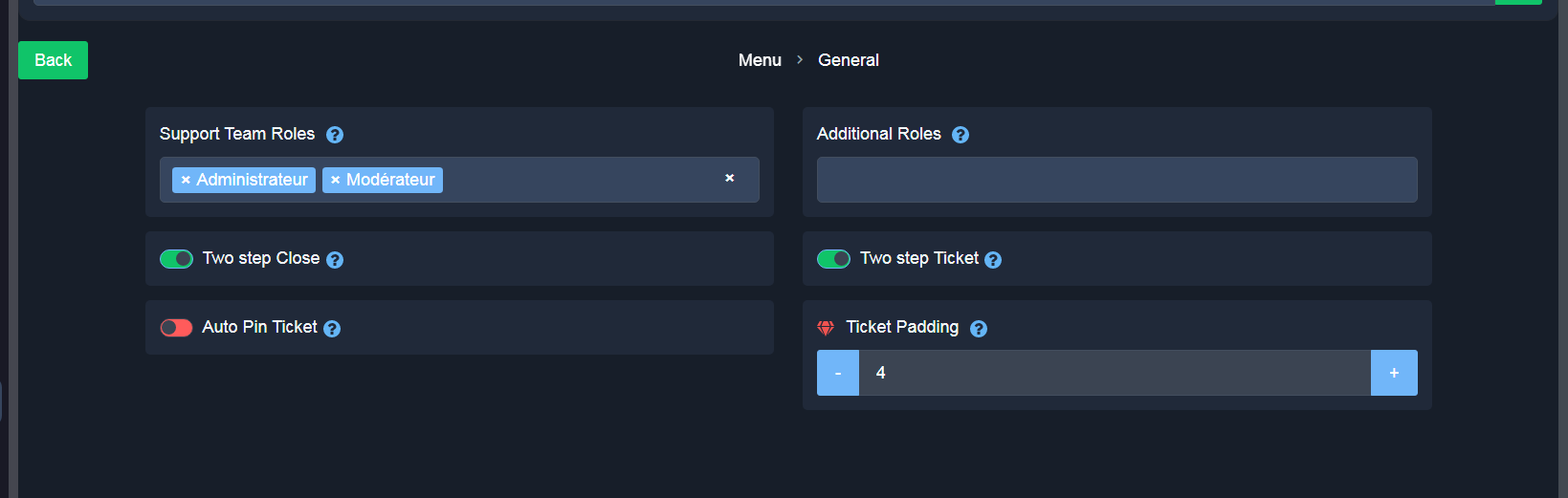
And to access dashboard in this section https://i.imgur.com/CFAm1tD.png "Dashboard roles"
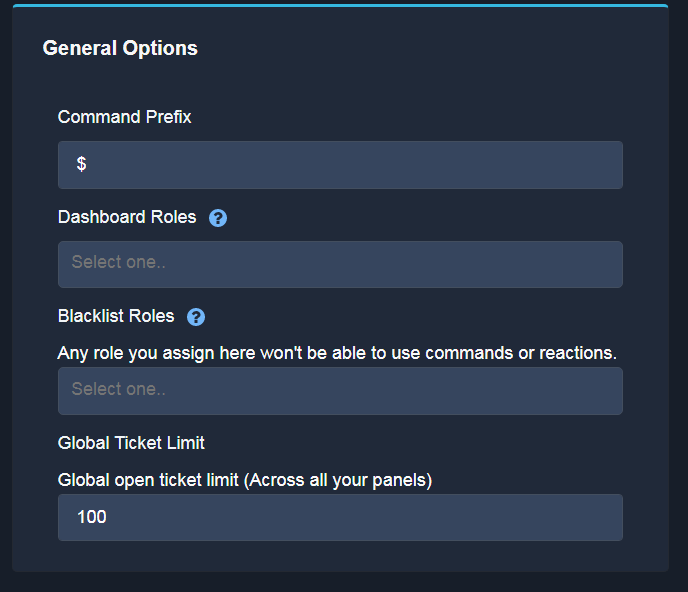 worldly helm
unreal bay
the channel + category appear for a member and disappear 5s after
worldly helm
unreal bay
the channel + category appear for a member and disappear 5s after
Upon opening a hidden message gets sent into the channel. Please click on that message where the ticket channel is linked to
unreal bay
worldly helm
Upon opening a hidden message gets sent into the channel. Please click on that m...
I can't because the channel is becoming “#unknown” can you come for 5s and try yourself if you dont understand??
worldly helm
unreal bay
I can't because the channel is becoming “#unknown” can you come for 5s and try ...
Nope, i only provide support via this channel.
That means you do not have access to the ticket.
Dashboard --> Panel Configs --> Permissions --> Ticket Owner/opened ticket --> View Channel
bleak flame
when i go to that website the dashboard its only showing my discord not the one im trying to help with
unreal bay
worldly helm
Nope, i only provide support via this channel.
That means you do not have acce...
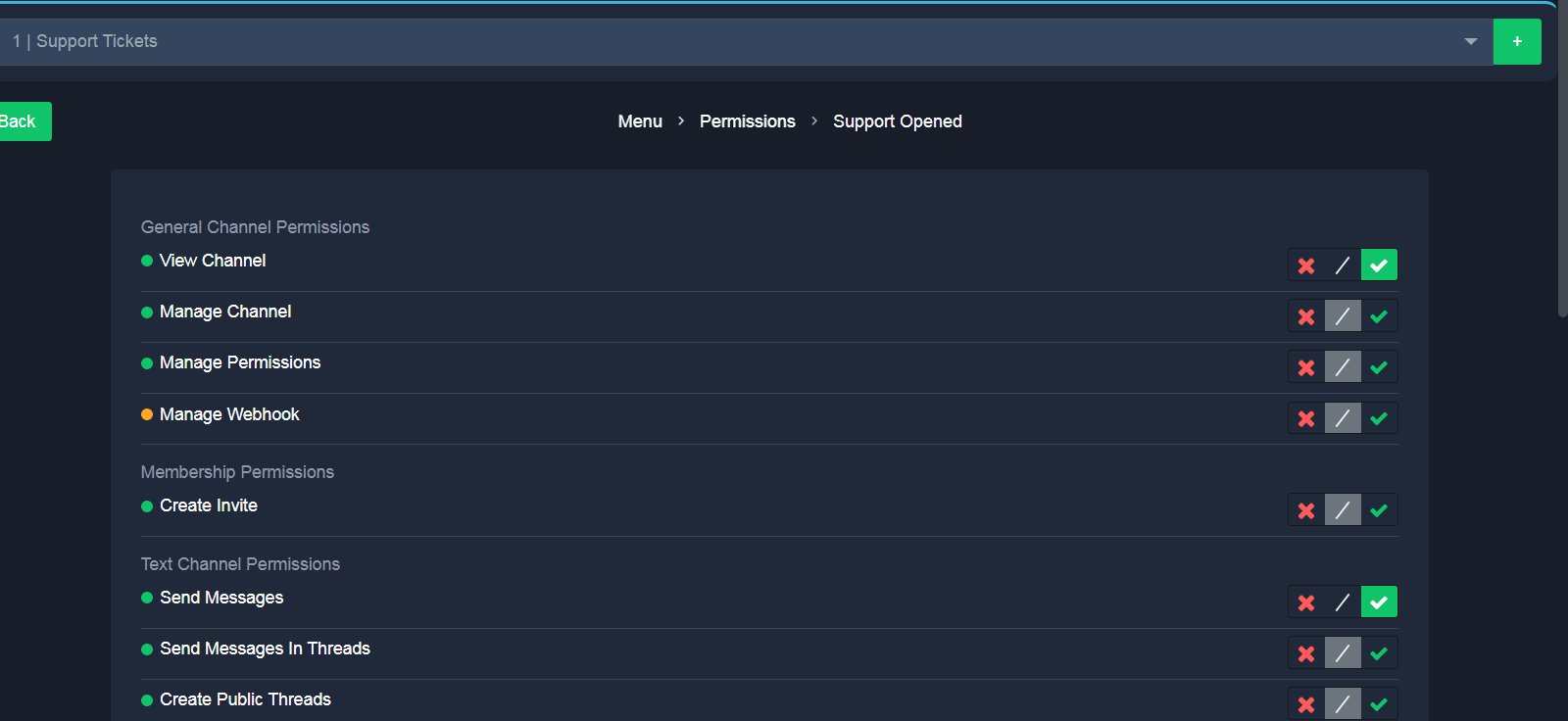 worldly helm
unreal bay
https://i.imgur.com/vxHJWWa.png
worldly helm
unreal bay
https://i.imgur.com/vxHJWWa.png
That's the wrong tab. Go to ticket owner opened
unreal bay
bleak flame
when i go to that website the dashboard its only showing my discord not the one ...
because the admin from the server are not adding the "admin role" in the dashboard like i was showing you
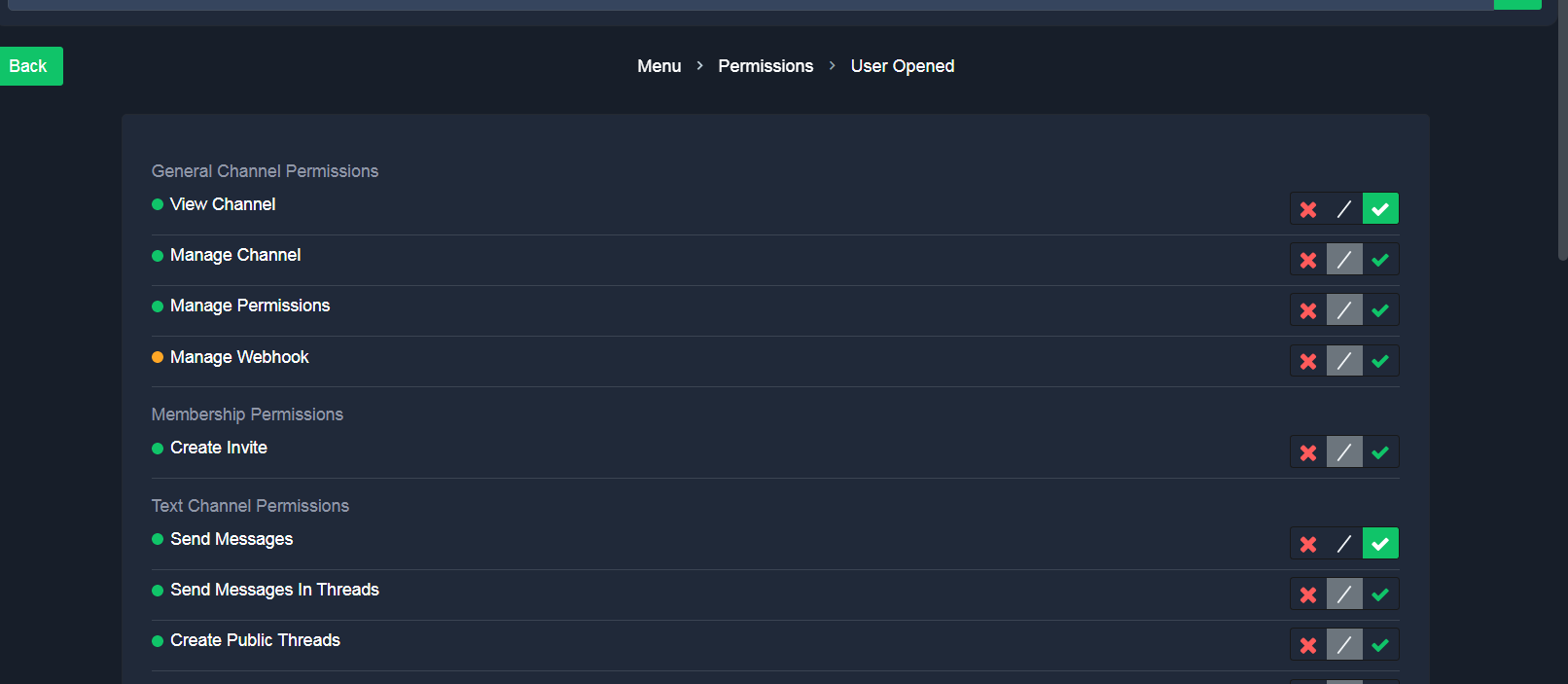 bleak flame
which means the owner has to go in actually add that correct, i cant help him set this up
add it from the website not the actuall discord server settings
worldly helm
unreal bay
https://i.imgur.com/uOqIlHq.png
What ticket form are you using? Thread style or normal ones
unreal bay
Where can i see ?
worldly helm
bleak flame
which means the owner has to go in actually add that correct, i cant help him se...
You either need a Dashboard role or the Administrator permission to access the Dashboard
worldly helm
unreal bay
Where can i see ?
If u open a ticket it either opens a thread or a channel.
unreal bay
Oh ok its a channel then
worldly helm
unreal bay
Oh ok its a channel then
Please try using the /debug command
unreal bay
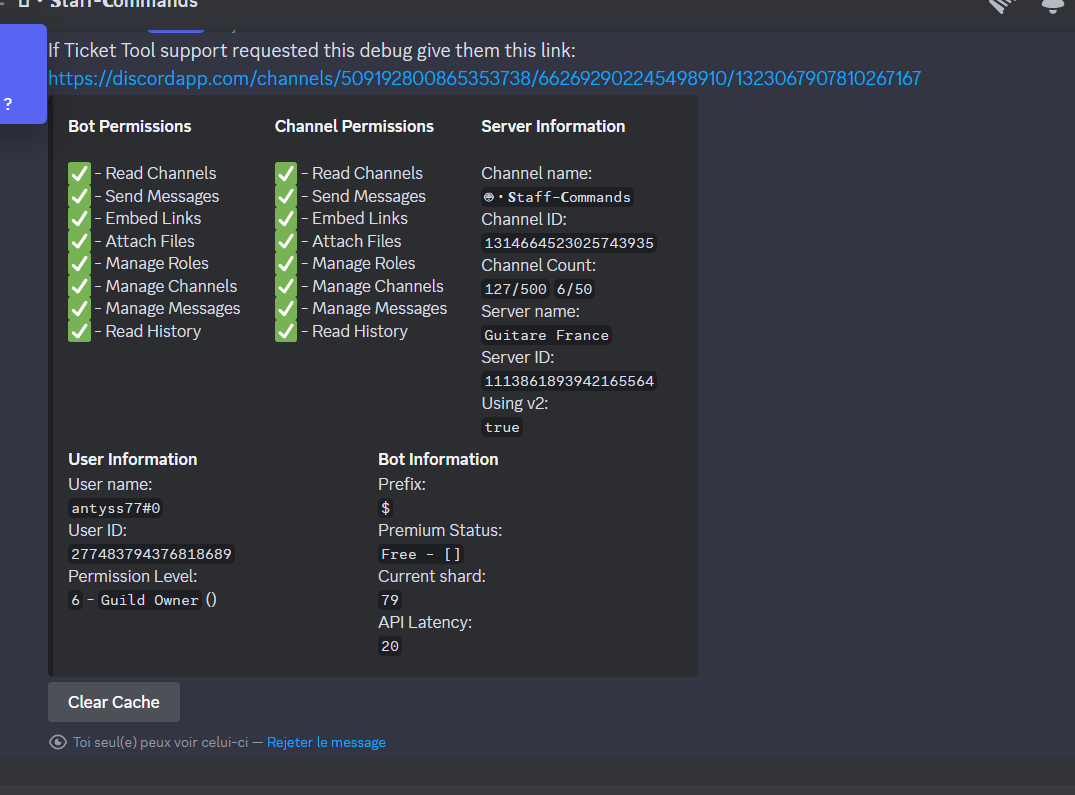
https://discordapp.com/channels/509192800865353738/662692902245498910/1323067907810267167
worldly helm
Is that the channel where you open tickets in?
unreal bay
nop
worldly helm
pls try in that Channel
unreal bay
https://discordapp.com/channels/509192800865353738/662692902245498910/1323068152619466792
worldly helm
Thanks. Pls kick the bot and reinvite it. (Setting will be saved)
unreal bay
Okay
 twilit oxide
How do I create a ticket panel for people to make tickets? Everything’s changed and it’s all complicated and hurting my head lol
stark runeBOT
1. Invite Ticket Tool to your server
First you will want to invite the bot to your server. Once the bot is in your server, you can manage your server in the dashboard.
2. Create a Panel
To create a panel we are going to need to head over to the panel configs on the dashboard.
Once at the dashboard we will need to click Create Panel.
Enter a panel name (Fill in any optional settings you want).
Click Create Panel and your ready to get started with configuring your panel.
An example of a creating a panel is shown below.
3. Send the Panel to a Channel
Once you've created a panel on the dashboard you will need to send it to a channel using send on the dashboard.
Select the channel you want your panel to be created in and click send.
For other questions checkout $help faq.
An example of a sending a panel is shown below.
Having a Problem Sending the Panel?
Do $debug in a channel with Ticket Tool and make sure it has all the necessary Discord permissions.
worldly helm
twilit oxide
How do I create a ticket panel for people to make tickets? Everything’s changed ...
Hey. Pls refer to the guide above ^^
twilit oxide
worldly helm
Hey. Pls refer to the guide above ^^
Thank you
iron nightBOT
Gave +1 Rep to @worldly helm (current: #12 - 453)
bleak flame
worldly helm
You either need a Dashboard role or the Administrator permission to access the D...
is this a setting on discord or on the dashboard for the owner to do or am i able to set this role up through discord
unreal bay
worldly helm
Thanks. Pls kick the bot and reinvite it. (Setting will be saved)
Ok Done what should I do now?
worldly helm
Did you reinvite it?
unreal bay
Yes and I still have the problem so
worldly helm
bleak flame
is this a setting on discord or on the dashboard for the owner to do or am i ab...
Nope the Dashboard can only be set by people with discord
worldly helm
unreal bay
Yes and I still have the problem so
Please #🎫│make-a-ticket then. Sorry
unreal bay
How can I reset him maybe it will work with a new config?
worldly helm
I don‘t think that‘s the issue. But you‘d have to just delete all the Panels
pseudo ravine
What’s the issue here?
 sly isle
worldly helm
pseudo ravine
What’s the issue here?
sly isle
worldly helm
pseudo ravine
What’s the issue here?
The user is the guild owner. If he creates a tickets the hidden message shows #unknown. He kicked the bot and reinvited it. /debug showed all permissions.
Still not working
unreal bay
Thanks for explaining I was on the ticket tool dashboard and trying to find the setting to display in a specific channel the display for opening ticket
thanks @worldly helm
iron nightBOT
Gave +1 Rep to @worldly helm (current: #12 - 454)
pseudo ravine
Could you send a screenshot of where Ticket Tool is saying the channel is unknown
worldly helm
unreal bay
Thanks for explaining I was on the ticket tool dashboard and trying to find the ...
So the issue is fixed??
unreal bay
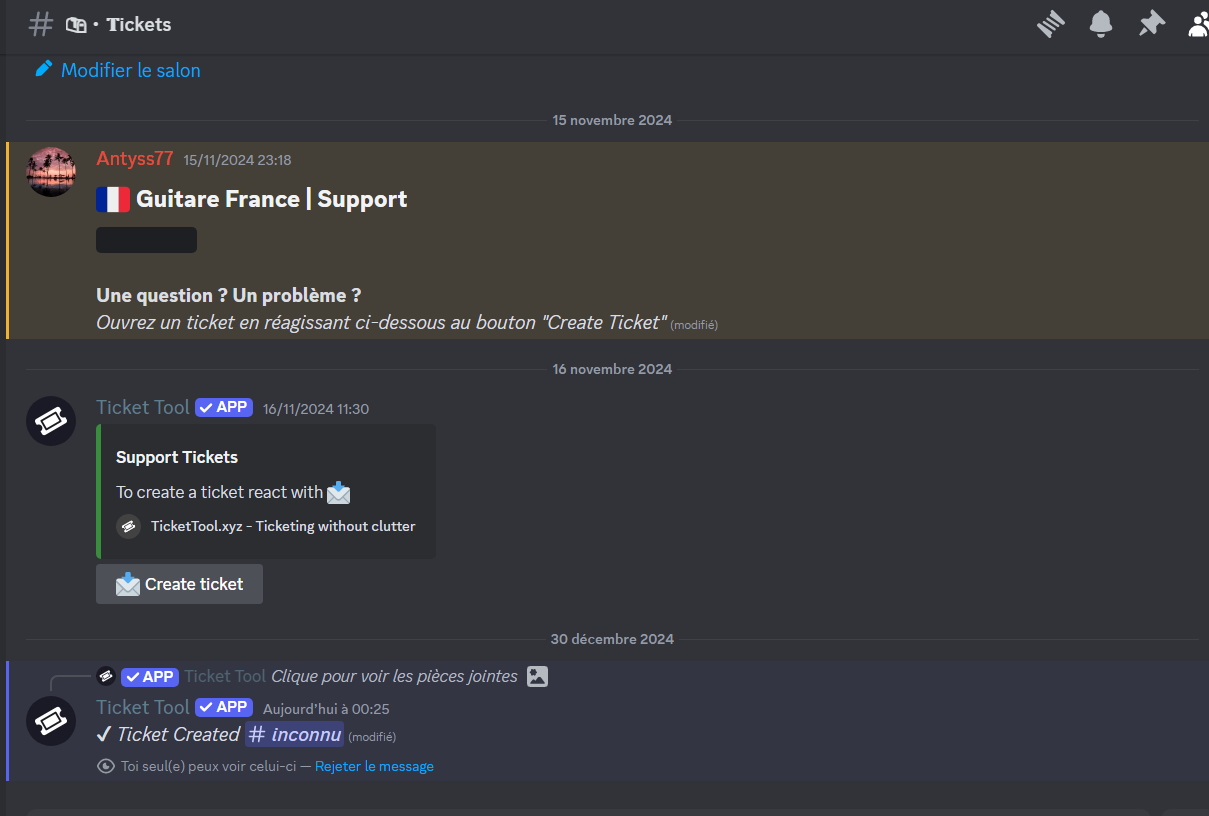 unreal bay
worldly helm
So the issue is fixed??
unreal bay
worldly helm
So the issue is fixed??
No
still the same problem I cant see as a member and serv owner the ticket
worldly helm
Stitch ^^
pseudo ravine
unreal bay
https://i.imgur.com/memCtX2.png
Is this screenshot from the account who’s the server owner?
unreal bay
yup
 formal pasture
when i go to dashboard the server doesnt show up can anyone help?
pseudo ravine
unreal bay
yup
Could you run the “/debug” command again and click on the “Clear Cache” button
worldly helm
formal pasture
when i go to dashboard the server doesnt show up can anyone help?
Hello 🙂
** «You don't see your Server on the Dashboard?»**
There are mulitple options to fix this issue.
1: Make sure you have access to the Dashboard. ( Do the /permissionlevel command in your server and send a screenshot in here)
2: Click the
3: Log out and log-in again
unreal bay
pseudo ravine
Could you run the “/debug” command again and click on the “Clear Cache” button
In the channel where ppl are supposed to open ticket?
pseudo ravine
Yep, but for this particular case it doesn’t matter
formal pasture
worldly helm
Hello 🙂
> ** «You don't see your Server on the Dashboard?»**
>
> There are m...
it is saying application didnt respond
worldly helm
formal pasture
it is saying application didnt respond
Then please use the /debug Command in that Channel.
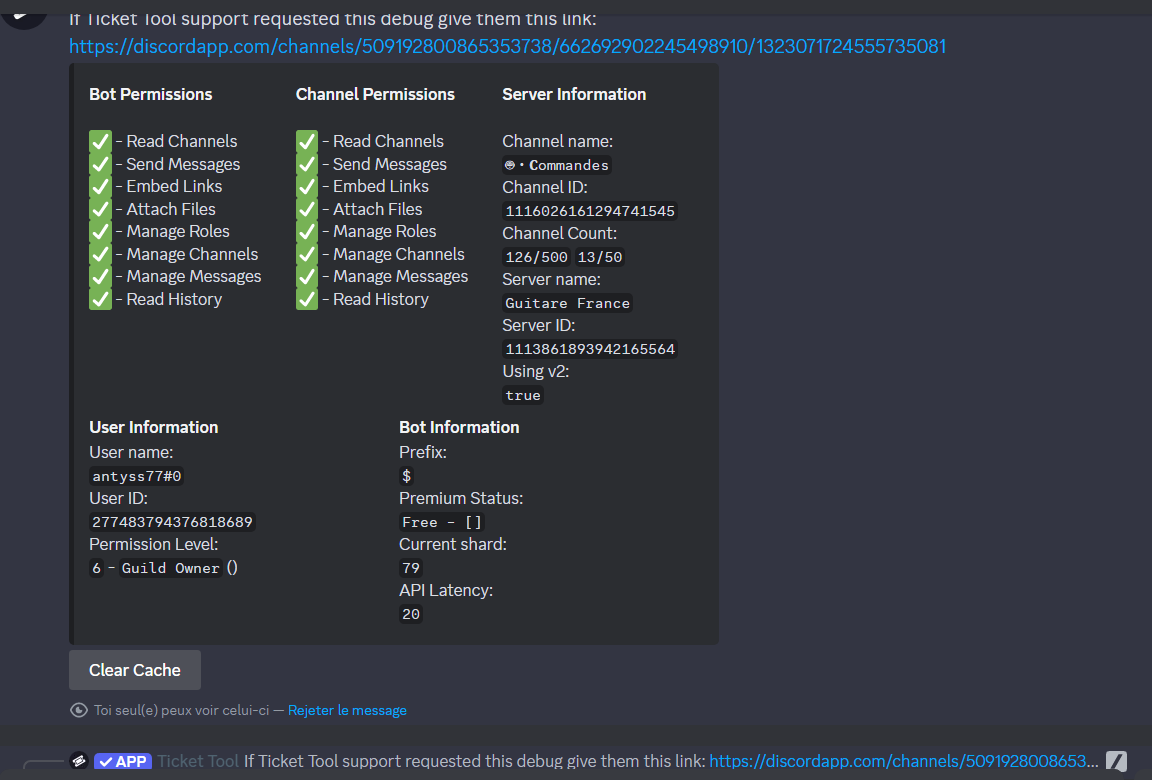
 pseudo ravine
Could you try creating a ticket again
worldly helm
formal pasture
it is saying application didnt respond
The bot is missing the READ CHANNEL permission for that Channel
unreal bay
pseudo ravine
Could you try creating a ticket again
I deleted the display that allows me to open a ticket when I wanted to recreate it, so how do I put it back please?
formal pasture
worldly helm
The bot is missing the `READ CHANNEL` permission for that Channel
oh
i tried in another chanel and it worked
its said permissionlevel 0
channel*
pseudo ravine
unreal bay
I deleted the display that allows me to open a ticket when I wanted to recreate ...
Please refer to embeds below! Specifically the last embed
humble sequoiaBOT
First you will want to invite the bot to your server. Once the bot is in your server, you can manage your server in the dashboard.
To create a panel we are going to need to head over to the Panel Configs Tab on the Dashboard.
Once at the dashboard we will need to click Create Panel.
Enter a panel name (Fill in any optional settings you want).
Click Create Panel and you are ready to get started with configuring your panel.
An example of a creating a panel is shown below.
Once the panel has been created, use the blue Send button and select the channel you want the panel to be sent to.
The Panel wasn't send
Use the </debug:1029783024264564765> command to diagnose possible permission issues with the bot.
worldly helm
That means you don‘t have access to the Dashboard. You either need a Dashboard role or a role with the administrator permission.
formal pasture
oh
pseudo ravine
Could you check your servers Audit Log to see if the channel is getting deleted, or if the channel is being created
pseudo ravine
You’re welcome, glad I could help! Thanks for choosing Ticket Tool!
unreal bay
it's a good thing you told me to check, we'd have been looking for a long time
jade topaz
How do I enter the bot to subscribe?
bleak flame
so if i now have that role how do i connect to it cause im seeing my own server still
do i use the /setup
 narrow island
how do i make it so that if someone presses on one of the dropdown options it names the channel that way
 spark wraith


