#🆘│community-support
1 messages · Page 154 of 1
 worldly helm
 worldly helm
The bot is missing the Read channel permission for that channel.
 frosty shell
Alr, Thank you
 arctic crypt
good day ser , i not sure what is happen , i have already add to server , but the dashboard not showing up for that ticket server that i have added.
worldly helm
arctic crypt
good day ser , i not sure what is happen , i have already add to server , but th...
Hello 🙂
** «You don't see your Server on the Dashboard?»**
There are mulitple options to fix this issue.
1: Make sure you have access to the Dashboard. ( Do the /permissionlevel command in your server and send a screenshot in here)
2: Click theButton on the Dashboard
3: Log out and log-in again
arctic crypt
worldly helm
Hello 🙂
> ** «You don't see your Server on the Dashboard?»**
>
> There are m...
permision on the server for that ticket tool?
worldly helm
No, for you. Just do /permissionlevel
arctic crypt
do the permissionlevel on the server?
worldly helm
Yes.
 worldly helm
Yep, that exact command.
arctic crypt
just press enter?
worldly helm
Correct 
arctic crypt
 worldly helm
Could you try using the /debug command
 worldly helm
Please give the bot every permission marked with ❌
(Only Read channels)
 arctic crypt
worldly helm
Please give the bot every permission marked with ❌
(Only Read channels)
arctic crypt
worldly helm
Please give the bot every permission marked with ❌
(Only Read channels)
one moment
arctic crypt
worldly helm
Please give the bot every permission marked with ❌
(Only Read channels)
ser , how to set for the permission again?
 brave pond
worldly helm
Please give the bot every permission marked with ❌
(Only Read channels)
brave pond
worldly helm
Please give the bot every permission marked with ❌
(Only Read channels)
How to create a panel
worldly helm
Channel settings --> Permissions --> Select the ticket tool role --> View channel 
frosty shell
brave pond
How to create a panel
/setup
brave pond
Okay
worldly helm
brave pond
How to create a panel
Hey. You can click the  on your dashboard.
brave pond
Ok
arctic crypt
worldly helm
Channel settings --> Permissions --> Select the ticket tool role --> View channe...
type in the channel that has the permission on it become lik tthis

but my dashboard not poping this server
worldly helm
arctic crypt
type in the channel that has the permission on it become lik tthis
That means you don‘t have access to the Dashboard.
arctic crypt
worldly helm
That means you don‘t have access to the Dashboard.
only the owner able to access it? or the owner already assign me as admin
worldly helm
you either Need Administrator or a Dashboard role
 humble sequoiaBOT
Any role you put there will have full access to the ticket tool dashboard. The server owner and users with admin permissions already have access to the dashboard.
Be careful of which roles to put here
 arctic crypt

 mild shuttle
How to fix this?
 arctic crypt
humble sequoia
arctic crypt
humble sequoia
would like to ask how to put the dashboard role for me ?
worldly helm
Hello. Please elaborate
 faint lagoon
Ticket Tool is not working on mobile for some of my users. When they go to submit a form, there is an error message. Has anyone experienced this before?
worldly helm
arctic crypt
would like to ask how to put the dashboard role for me ?
The owner has to do it.
worldly helm
faint lagoon
Ticket Tool is not working on mobile for some of my users. When they go to submi...
Hey. What is the error message?
Please let me help that user to prevent confusion
faint lagoon
worldly helm
Hey. What is the error message?
One moment, please, she is re-creating the error.
worldly helm
This channel is for support only, lets keep it that way.
faint lagoon
I guess it didn't like being told on. It worked this time. But I told her to get a screenshot if it happens again. Thank you for the help @worldly helm I appreciate you. 🙂
 iron nightBOT
Gave +1 Rep to @worldly helm (current: #17 - 369)
worldly helm
Sure, no worries! Glad i could help 
arctic crypt
worldly helm
The owner has to do it.
the owner do it ...but it appear like this.
 worldly helm
The owner does not have to send a panel to give you a dashboard role.
arctic crypt
worldly helm
The owner does not have to send a panel to give you a dashboard role.
he have to check it on ticket dashboard there set the role for me ?
worldly helm
Please #🎫│make-a-ticket .
Hey. That is not a feature ticket tool provides.
You can google, but im pretty sure the bot "Dyno" has such a feature.
 slender geyser
Why?

 sinful orchid
hey, hope someone can help me - i would like to tag a person in the ticket message when it is created. i found the variable to tag a role but not a specific user. 😊 anyone know the variable for that?
 proud crypt
can someone help me? ive been put in charge of a discord server and theyd like the ticket tool remove is some one able to help me with this
 jade topaz
How do I set members to have pic perm when they open a ticket?
worldly helm
jade topaz
How do I set members to have pic perm when they open a ticket?
Hey.
Dashboard --> Panel Configs --> Permissions --> Ticket owner, open ticket --> Attach files
worldly helm
proud crypt
can someone help me? ive been put in charge of a discord server and theyd like t...
Hey there! Please elaborate
proud crypt
worldly helm
Hey there! Please elaborate
they would like the ticket tool totally removed from their discord server. as the members dont fell they need it
so i need to like kick the bot but it doesnt work
jade topaz
worldly helm
Hey.
Dashboard --> Panel Configs --> Permissions --> Ticket owner, open ticket ...
Tyyy
worldly helm
proud crypt
they would like the ticket tool totally removed from their discord server. as t...
Do you have dyno, wick, etc?
worldly helm
Please check your audit logs.
 dense venture
how to make it so that when closed ticket automatically deletes
as well as auto delete after 1 day of nobody talking
worldly helm
dense venture
how to make it so that when closed ticket automatically deletes
Hey! Dashboard --> Panel Configs --> General -->  Two step ticket
And you can use the automations system to make a ticket be deleted after 1d of nobody talking.
humble sequoiaBOT
With Ticket Tool's automation, you'll be able to customize your ticket system workflow! Using the Automation Editor you can:
- Chose out of 6 different triggers
- Set a Message Watcher to wait for a message for a given time, or to wait for the absence of them
- Add delays on the execution of actions after the trigger or watcher finds a message!
Automation Command
Automations can be stopped, by running the /automation stop command inside the ticket you want it to stop in. Restart it with /automation start You'll also be able to view the current status of the automations with /automation.
__Important Notes__
- Automation is on ALPHA TESTING PHASE, things might work unexpectedly or not at all.
- Any automation will run for a maximum of 7 days or until the ticket is closed, afterward, it will stop checking
+ You can have 5 automations per panel

$auto
proud crypt
i cant see any name of the bot it is just ticket tool
It doesn’t show anything on the audit log from that long ago
 dense venture
humble sequoia
dense venture
humble sequoia
i dont understand, where can i do this?
worldly helm
dense venture
i dont understand, where can i do this?
Dashboard --> Panel Configs --> Scroll down --> Automation
worldly helm
proud crypt
It doesn’t show anything on the audit log from that long ago
are you the owner?
dense venture
worldly helm
Dashboard --> Panel Configs --> Scroll down --> Automation

which should i add?
 pulsar horizon
What is the solution now?

 hushed mortar
How did i use the invites
 acoustic cloak
Quick question, I dl the ticket tool and it says dl successful, how do I get it to show on my kf
jade topaz
Yo can anyone help me
 charred granite
Hey i got quesiton i see my old discord ticket, there was file to dlowand on it, when i press to get that i get This content is no longer available.
 restive condor
charred granite
Hey i got quesiton i see my old discord ticket, there was file to dlowand on it,...
restive condor
charred granite
Hey i got quesiton i see my old discord ticket, there was file to dlowand on it,...
Hey there! Is that when downloading the file or opening the link?
restive condor
jade topaz
Yo can anyone help me
Hey there! How can I help?
jade topaz
restive condor
Hey there! How can I help?
Hey Danbulane
restive condor
acoustic cloak
Quick question, I dl the ticket tool and it says dl successful, how do I get it ...
Hey there! What exactly do you mean?
restive condor
pulsar horizon
What is the solution now?
Hey there! Please create a new panel on the Dashboard
restive condor
dense venture
Check for message
jade topaz
restive condor
Check for message
How to create this type of transcript
 restive condor
jade topaz
How to create this type of transcript
restive condor
jade topaz
How to create this type of transcript
That's not a transcript, that's a Ticket Created DM message
Dashboard > Panel Configs > Automations
Please note that's a premium feature
 humble sequoiaBOT

⚠️ You're in the wrong place
We provide support for Ticket Tool Discord bot and cannot help you with whatever issue you have.
- We don't know which Support Team you should contact to get this issue resolved, and unfortunately we won't be able to accurately tell you.
If you don't have any further questions regarding our bot Ticket Tool, please close this ticket
humble sequoiaBOT

فريق الدعم الفني العربي
عميلنا العزيز ان كنت تبحث عن مساعدة يرجى فتح تكت خاص بفريق الدعم الفني العربي
اذهب الى#🎫│make-a-ticket
ثم قم بلضغط على الايموجي الاتي (🇯🇴)
 long fractal
 brittle scarab
can you speak arabic
brittle scarab
can you speak arabic
I can
 stoic fern
HOW CAN I FIX THIS
 humble sequoiaBOT
━━ User's inquiry has been moved to a ticket ━━
 dreamy ibex
Is it possible to set the free version so that each person can create a ticket once every 24 hours?
charred granite
?
humble sequoiaBOT
⚠️ You're in the wrong place
We provide support for Ticket Tool Discord bot and cannot help you with whatever issue you have.
- We don't know which Support Team you should contact to get this issue resolved, and unfortunately we won't be able to accurately tell you.
If you don't have any further questions regarding our bot Ticket Tool, please close this ticket
restive condor
dreamy ibex
Is it possible to set the free version so that each person can create a ticket o...
Hey there! It's currently not possible to do time limits/cooldowns.
You can only limit how many tickets can be opened at once per user
You're in the wrong server mate
humble sequoiaBOT
⚠️ Please read the messages previously sent by our team ⚠️
dreamy ibex
restive condor
Hey there! It's currently not possible to do time limits/cooldowns.
You can only...
can you add to the list for the next update? 😁
charred granite
i tried open link adding it again to discord but i got
https://cdn.discordapp.com/attachments/776680605517742090/1310300526482817226/image.png?ex=6744b7f5&is=67436675&hm=f75546c828a34798c6521dd669c980b3074b89344cf444b3b73aa3b4a169c3cd&
 humble sequoiaBOT
⚠️ You're in the wrong place
We provide support for Ticket Tool Discord bot and cannot help you with whatever issue you have.
- We don't know which Support Team you should contact to get this issue resolved, and unfortunately we won't be able to accurately tell you.
If you don't have any further questions regarding our bot Ticket Tool, please close this ticket
restive condor
dreamy ibex
can you add to the list for the next update? 😁
You can make suggestion 😄
humble sequoiaBOT

Suggestions for Ticket Tool
To make a suggestion use the s!suggest suggestion command in #🤖│bot-spam. Note that you'll suggestion will be first reviewed by our Support Team before it's posted into #💡│suggestions, channel in which you'll be able to vote for other suggestions!
charred granite
?
dreamy ibex
restive condor
You can make suggestion 😄
is there a channel for suggestions somewhere?
I can't write on the #💡│suggestions channel
 pseudo ravine
charred granite
?
pseudo ravine
charred granite
?
We are not Discord Support. We only provide support for the Ticket Tool Discord bot
restive condor
dreamy ibex
is there a channel for suggestions somewhere?
Please read the embed with instructions
 hard bane
where so i open up a ticket
restive condor
hard bane
where so i open up a ticket
 dawn orchid
@humble sequoia
dreamy ibex
Is it possible to copy ticket settings to another server?
restive condor
dreamy ibex
Is it possible to copy ticket settings to another server?
Hey there! Yes, see below please
humble sequoiaBOT
The Backup and Restore feature allows you to transfer your panels, tags, and all settings to a new server, even if the server the settings were created has been deleted! You will want to copy the whole key.
First, go to your server's Dashboard ➞ then Server Configs ➞ under Config Backup & Restore (Server Owner Only) click on Old version can be found here and generate a new backup key by pressing the green button. Now, a key should be generated in the box above. You may need to refresh the page to see this.
Once you have your backup key, navigate to the same page on the new server. Copy the key on the Restore from backup key field.
Now you can choose what you want to copy. Finally, press the green Restore Configs button.
IMPORTANT NOTE
- We suggest you keep this backup key somewhere safe, in case your server is deleted so you are able to recover your panel's settings.
- This feature is only usable by the server's owner
$backup
dreamy ibex
Thanks
 heavy urchin
How can I make it so it will @ a role when the user opens the ticket
jade topaz
heavy urchin
How can I make it so it will @ a role when the user opens the ticket
Panel config -> General -> Support Team Roles
heavy urchin
jade topaz
Panel config -> General -> Support Team Roles
no I want the open message to be like this: Thank you for opening up a ticket, a member of our @support team will be with you shortly
iron nightBOT
Gave +1 Rep to @brittle matrix (current: #347 - 1)
 hoary forge
heavy urchin
no I want the open message to be like this: Thank you for opening up a ticket, a...
hoary forge
heavy urchin
no I want the open message to be like this: Thank you for opening up a ticket, a...
Like panels config --> Messages --> Edit ticket message.
heavy urchin
hoary forge
Like panels config --> Messages --> Edit ticket message.
no i got it, all i had to do was format it like {role id}
 wet otter
Heyyy soooo I tried to ping a role in a ticket and it's consistently just saying undefined (I've tried to ping it all the different ways) it only works with the native discord syntax for whatever reason but it says undefined
jade topaz
wet otter
Heyyy soooo I tried to ping a role in a ticket and it's consistently just saying...
Show ss
wet otter


Proof it exists and proof it's not working 😭
One possible issue I've noticed, two of the people that have that role can't be pinged either. So idk if that might be related
worldly helm
wet otter
Proof it exists and proof it's not working 😭
One possible issue I've noticed, ...
Use <@&RoleId>
wet otter
I tried that too. It only works the one way to even get a ping
worldly helm
wet otter
I tried that too. It only works the one way to even get a ping
then please make sure the bot has Ping everyone and all roles
wet otter
Wait. It's working now 😭 why did it not work before??? 😭 Nevermind. Lol thank you 🥹
worldly helm
wet otter
Wait. It's working now 😭 why did it not work before??? 😭 Nevermind. Lol thank ...
You‘re welcome, glad i could help
 drifting sky
Sorry can Somebody Help me Out. I ve registred me in astroearning. And send Money to IT but the Money didnt arrived
humble sequoiaBOT
⚠️ Du bist hier falsch
Wir bieten hier ausschließlich Support für den Ticket Tool Discord Bot an und können dir leider nicht mit irgendetwas anderem weiterhelfen.
- Bitte melde dich bei einem, für dein Problem geeigneten, Support Team.
Wenn du keine weiteren Fragen hast, die das Ticket Tool betreffen, schließe bitte dieses Ticket.
worldly helm
Hello. He‘s in the wrong server, we only provide support for ticket tool.
 polar knot
Hi
i have a question
what command is it that the bot mark for example my mods?
when ticket gets opened
humble sequoiaBOT
1. Go into your Dashboard
2. Open your Panel Configs tab
3. Select the panel you want to ping your support on
4. Open the Ticket options menu
5. Click on Edit Ticket Message
6. In the Message Content use one of the role mention syntax (**{@Role Name}**/**{Role ID}**)
7. Save changes
Note: For this to work properly, Ticket Tool requires the Mention Everyone permission. Or the role must have the Allow anyone to @mention this role setting enabled 

 austere forge
polar knot
when ticket gets opened
austere forge
polar knot
when ticket gets opened
follow instructions above
polar knot
cant click at message conent
 austere forge
you're not in the right place
Dashboard > Panel configs > Ticket
iron nightBOT
Gave +1 Rep to @austere forge (current: #8 - 685)
polar knot
could u explain me ho to change pannel message
austere forge
polar knot
cant click at message conent
Dashboard > Panel configs > Panel - Edit panel message and open embed editor
austere forge
do you mean that every time a ticket is created, it goes into a specific category?
humble sequoiaBOT
1. Go into your Dashboard
2. Open your Panel Configs tab
3. Select the panel you want to grant access to
4. Open the Category options menu
5. Select the categories of your preference
6. Save changes
 austere forge
see details above
polar knot
is* for example someone want to do a complaint about a member
ty brodie. thats it
@austere forge ty brodie
iron nightBOT
Gave +1 Rep to @austere forge (current: #8 - 686)
 woven tapir
Is there a feature here that if someone opens a ticket, they should answer questions first
humble sequoiaBOT
A Discord Form lets the user answer individual questions in a pop-up Form, which then displays the answers in the ticket message. This can save time if you already know what you want to ask the user.
Setup Forms
Forms can be enabled under Panel Settings > Form Options > Edit Forms Options. In the new pop-up window, you can now enable and edit your own Form.
Form Options
You can add up to 5 questions in the Discord form. This is a Discord limitation. Each question can have a placeholder in the input field, a minimum and maximum input, multi-line, and also the option to have the answer required.
Options
Question Title ➞ Your Question goes here
Question Placeholder ➞ The placeholder text in the input field
Required ➞ If enabled, the user has to answer this question, to submit the form
Multi-Line Input ➞ Allows the user to input multiple lines
Minimum and Maximum Input ➞ Set a minimum and maximum input value for the user
Displaying the Answer
To display the answers from the user, you need to enable Auto display form results on the ticket message as an additional embed
If you don't want a second embed, go into your Panel Configs > Ticket Options > Edit Ticket Message. You use the variable {create.form.x} and replace x with the number of your question. For example, the response to Question 5 can be displayed with {create.form.5}.
 austere forge
woven tapir
Is there a feature here that if someone opens a ticket, they should answer quest...
austere forge
woven tapir
Is there a feature here that if someone opens a ticket, they should answer quest...
see details above
woven tapir
austere forge
see details above
What about mention a specific user in the ticket without adding them?
I mean automatically
austere forge
To see all the variables mention, refer embed below pls
humble sequoiaBOT
Within all the messages the bot sends (both embeds and text) you can mention either channels, roles, or even users, these mentions will only send a notification to the user if they are used within a text field, e.g: a role mentioned in an embed won't ping at all the users who have that role.
For mentioning a role you can use one out of three options:
{@Role Name} ➞ Which is Case Sensitive.
{RoleID} ➞ Replace RoleId with the Id of the role you are trying to ping.
<@&RoleID> ➞ Discord's native syntax to ping roles.
<#ChannelID> ➞ Mention a channel by its ID.
<@UserID> ➞ Mention a user by its ID.
woven tapir
austere forge
To see all the variables mention, refer embed below pls
Where should I put the variable so that then get the notifications if someone opens a ticket?
Thank you so much
Thanks @austere forge
iron nightBOT
Gave +1 Rep to @austere forge (current: #8 - 687)
austere forge
refer embed below
humble sequoiaBOT
The Ticket Message is the first message sent by the bot on a new ticket. To customize it head over to your Dashboard ➞ Panel Configs ➞ Ticket ➞ Edit Ticket Message
woven tapir
Thank youu
jade topaz
austere forge
refer embed below
Hey
 dense iron
@jade topaz Yo
jade topaz
Can anyone help me on something
dense iron
What you need help with
jade topaz
How to get premium subscriber role
dense iron
Just make a role
jade topaz
dense iron
Just make a role
In this server
jade topaz
?
dense iron
@jade topaz You know how to set up ticket tool thing for your discord server
jade topaz
Ye
dense iron
@jade topaz Can you help me with it
jade topaz
dense iron
<@456226577798135808> Can you help me with it
Ok
Stop pinging every moment
dense iron
I'm send you my discord server on Dm
worldly helm
@jade topaz and @dense iron please keep all of the support in this channel.
worldly helm
jade topaz
How to get premium subscriber role
Hey. It does not seem like you have an active subscribtion.
jade topaz
worldly helm
Hey. It does not seem like you have an active subscribtion.
Hey how to
make it @ my team
humble sequoiaBOT
1. Go into your Dashboard
2. Open your Panel Configs tab
3. Select the panel you want to ping your support on
4. Open the Ticket options menu
5. Click on Edit Ticket Message
6. In the Message Content use one of the role mention syntax (**{@Role Name}**/**{Role ID}**)
7. Save changes
Note: For this to work properly, Ticket Tool requires the Mention Everyone permission. Or the role must have the Allow anyone to @mention this role setting enabled
worldly helm
jade topaz
Hey how to
Hello. Look above
 wild tusk
hi, i used the bot for months but now when i use a command it says "the application did not respond". Can anyone help me?
The tickets I have already created works fine
austere forge
wild tusk
The tickets I have already created works fine
make sure that the bot has : VIEW CHANNEL SEND MESSAGE and READ MESSAGE HISTORY perms in the channel where your run the commands
wild tusk
it worked, thank you, I thought I did it
jade topaz
Thanks @worldly helm
iron nightBOT
Gave +1 Rep to @worldly helm (current: #17 - 370)
worldly helm
dense iron
Somebody in here know how to do the ticket tool thing
Hello. Stop pining for support! You can use the /rename Command. Auto-rename is a premium only feature
 autumn yoke
!help
humble sequoiaBOT
Hello, we would love to help you, but if you don't tell us what you need help with we can't help you :(
jade topaz
𝕐𝕠
 clear citrus
hello
humble sequoiaBOT
Hello, we would love to help you, but if you don't tell us what you need help with we can't help you :(
jade topaz
Hey lias uhh how much did the server have to be boosted for
IMA set it up automatically with ticket tool like this server
worldly helm
jade topaz
Hey lias uhh how much did the server have to be boosted for <:PabloTiphat:983791...
Please elaborate
jade topaz
Like how much did nitro have to be boosted for the hat because on my server says nitro
but on here its free ??
worldly helm
The emojis from this server are only on this server, you can use them on other servers with nitro, but not without nitro.
worldly helm
None, as soon as you have nitro you can use it on other servers. no need to boost for that.
jade topaz
oh OK thanks
 rotund acorn
I would like to know how to make the ticket tool mark a position on discord, as I need it to mark it in the message
restive condor
rotund acorn
I would like to know how to make the ticket tool mark a position on discord, as ...
Hi there, what exactly do you mean?
rotund acorn
restive condor
Hi there, what exactly do you mean?
Like this: I need you to mark a position in the message that appears at the top of the panel when someone opens the ticket
restive condor
rotund acorn
Like this: I need you to mark a position in the message that appears at the top ...
Like ping a role in the message?
rotund acorn
restive condor
Like ping a role in the message?
YEA!!
humble sequoiaBOT
1. Go into your Dashboard
2. Open your Panel Configs tab
3. Select the panel you want to ping your support on
4. Open the Ticket options menu
5. Click on Edit Ticket Message
6. In the Message Content use one of the role mention syntax (**{@Role Name}**/**{Role ID}**)
7. Save changes
Note: For this to work properly, Ticket Tool requires the Mention Everyone permission. Or the role must have the Allow anyone to @mention this role setting enabled
restive condor
See above please ^
 vocal thicket
i just created a backup server that uses ticket tool, is there a way to copy over the same ticket bot settings from one server to the other?
 wintry cape
why does this keep happening?

 median wigeon
wintry cape
why does this keep happening?
median wigeon
wintry cape
why does this keep happening?
Did it have al the permissions
restive condor
vocal thicket
i just created a backup server that uses ticket tool, is there a way to copy ove...
Hey there! Yes, see below please
humble sequoiaBOT
The Backup and Restore feature allows you to transfer your panels, tags, and all settings to a new server, even if the server the settings were created has been deleted! You will want to copy the whole key.
First, go to your server's Dashboard ➞ then Server Configs ➞ under Config Backup & Restore (Server Owner Only) click on Old version can be found here and generate a new backup key by pressing the green button. Now, a key should be generated in the box above. You may need to refresh the page to see this.
Once you have your backup key, navigate to the same page on the new server. Copy the key on the Restore from backup key field.
Now you can choose what you want to copy. Finally, press the green Restore Configs button.
IMPORTANT NOTE
- We suggest you keep this backup key somewhere safe, in case your server is deleted so you are able to recover your panel's settings.
- This feature is only usable by the server's owner
$backup
wintry cape
restive condor
Hey there! Yes, see below please
could you help me with my issue
why does this keep happening
 restive condor
wintry cape
why does this keep happening?
restive condor
wintry cape
why does this keep happening?
Hi there, Ticket Tool is missing the SEND MESSAGES permission for that channel
wintry cape
okay thanks
 coarse flame
Can anybody help please, i opened a ticket to subscribe on Sunday and ive had no response! Im new to this so have no idea what to do!
median wigeon
coarse flame
Can anybody help please, i opened a ticket to subscribe on Sunday and ive had no...
Your here at the wrong place, this is voor Tickettool support
 sleek tartan
Hello! Just wondering if there is a way where I can make it so that when a Ticket is claimed, the ticket will be renamed to have their name in it.
EX.) I claimed a Ticket. The tickets name should now be Rocket-1234
restive condor
sleek tartan
Hello! Just wondering if there is a way where I can make it so that when a Ticke...
Hey there! 👋
Yes, you can use the {author.name} variable in your claimed ticket name.
The full thing would look like:
{author.name}-{count}
(Dashboard > Panel Configs > Claiming)
 vestal egret
Can anyone help me? I don't know how to add the ticket bot to my server
 sour tartan
 polar knot
how can i do that, that when someone joined my serv that he have to open a ticket?
to get a role
 strong basin
How do I set the ticket log?
worldly helm
strong basin
How do I set the ticket log?
Hey. Please refer to the embed below!
humble sequoiaBOT
With Ticket Tool, you can customize the behavior the bot takes when logging your tickets! For editing these options follow these steps:
Dashboard ➞ Panel Configs ➞ Logging Options
Logging Channel
Here you will define which channel @humble sequoia will save the Logs in (ticket created/deleted/closed, etc.)
Logs you can save:
➞ Ticket Created ➞ Logs when a ticket is created
➞ Ticket Closed ➞ Logs when a ticket is closed
➞ Ticket Opened ➞ Logs when a ticket is opened
➞ Ticket Renamed ➞ Logs when a ticket is renamed
➞ Ticket Deleted ➞ Logs when a ticket is deleted
➞ Transcript Saved ➞ Logs when a ticket is saved
Select with  (disable) or (enabled) which logs you would like
Below you can see an example of what the Logging Options will look like:

 vagrant condor
Why can members close tickets even tho i put that only a certian role can and toggled support team only? This is only for one certian ticket
worldly helm
vagrant condor
Why can members close tickets even tho i put that only a certian role can and to...
Hey. Make sure you disabled the command for them, aswell as the button.
Dashboard --> Command Configs --> Close ticket --> Allowed roles
Dashboard --> Panel Configs --> Buttons --> Close Ticket --> Support team only
vagrant condor
worldly helm
Hey. Make sure you disabled the command for them, aswell as the button.
Dashboar...
Thank you i forgot i could disable the button
iron nightBOT
Gave +1 Rep to @worldly helm (current: #17 - 372)
 amber glacier
My ticket transcript isn’t working even tho I’ve done everything as in gave permissions have a made channel for it and it just says ticket transcript failed missing permissions
worldly helm
amber glacier
My ticket transcript isn’t working even tho I’ve done everything as in gave perm...
Hello.
While doing what, clicking the button or using the command?
amber glacier
Clicking the button close then transcript but it doesn’t save in transcripts
 inner vale
how do i use custom emojis/emotes on the dropdown-style
 spare basalt
Can someone help me, Im trying to link up ticket tool to a embed is it possible?
 fervent marsh
I created a ticket, how or where can I see the status of the ticket?
 primal quest
Hi. How do I put in the panel the ticket options, and each option has a personalised catalogue and a custom grade (explanation in Arabic please)

 torn herald
My account ABIDULLA has been locked. Can someone help me in Activating my account
humble sequoiaBOT
⚠️ You're in the wrong place
We provide support for Ticket Tool Discord bot and cannot help you with whatever issue you have.
- We don't know which Support Team you should contact to get this issue resolved, and unfortunately we won't be able to accurately tell you.
If you don't have any further questions regarding our bot Ticket Tool, please close this ticket
worldly helm
 hushed cradle
Hello. Please refer to the embed below!
humble sequoiaBOT
The panel message is where people react to make a ticket. To customize it head over to your Dashboard --> Panel Configs -> Panel -> Edit Panel Message
 worldly helm
spare basalt
Can someone help me, Im trying to link up ticket tool to a embed is it possible?
worldly helm
spare basalt
Can someone help me, Im trying to link up ticket tool to a embed is it possible?
Hey, its not.
worldly helm
inner vale
how do i use custom emojis/emotes on the `dropdown-style`
Hey, you can use $id :PabloTiphat: for example to get the id of the emoji, copy paste the full answer into the Dashboard
torn herald
my desitorrents account is locked. how to activate?
worldly helm
torn herald
my desitorrents account is locked. how to activate?
You‘re in the wrong server.
primal quest
Hi. How do I put in the panel the ticket options, and each option has a personalised catalogue and a custom grade (explanation in Arabic please)
jade topaz
primal quest
Hi. How do I put in the panel the ticket options, and each option has a personal...
Uh what do you mean?
humble sequoiaBOT
فريق الدعم الفني العربي
عميلنا العزيز ان كنت تبحث عن مساعدة يرجى فتح تكت خاص بفريق الدعم الفني العربي
اذهب الى#🎫│make-a-ticket
ثم قم بلضغط على الايموجي الاتي (🇯🇴)
jade topaz
@worldly helm how did you do that?
worldly helm
Do what 
jade topaz
worldly helm
Do what <:kermitthink:1270850186121576519>
Oh i figured it
hushed cradle
worldly helm
Hello. Please refer to the embed below!
TQ
spare basalt
How do I make a button that opens up a select menu?
worldly helm
spare basalt
How do I make a button that opens up a select menu?
Hey. Please elaborate.
spare basalt
So, Like when you click a button you will be send a text that you can only see, and pick what type of help you need in the select menu
worldly helm
That is not possible with ticket tool.
spare basalt
Do you know which one it would be possilbe with by any chance?
worldly helm
Nope, i don't. Sorry!
 ember jolt
worldly helm
Nope, i don't. Sorry!
ember jolt
worldly helm
Nope, i don't. Sorry!
Help please
humble sequoiaBOT
@ember jolt, we would love to help you, but if you don't tell us what you need help with we can't help you :(
ember jolt
 worldly helm
ember jolt
worldly helm
ember jolt
Give me a second to check the debug logs.
ember jolt
worldly helm
Give me a second to check the debug logs.
Thank you
iron nightBOT
Gave +1 Rep to @worldly helm (current: #17 - 373)
worldly helm
ember jolt
Thank you
The bot needs the View channel permission for that channel.
ember jolt
worldly helm
The bot needs the `View channel` permission for that channel.
Okay let me try
ember jolt
worldly helm
The bot needs the `View channel` permission for that channel.
After granting access to the channels its still not working
worldly helm
Could you try using the /debug command again?
ember jolt
Yes
worldly helm
It's still lacking the permission.
 ember jolt
worldly helm
It's still lacking the permission.
ember jolt
worldly helm
It's still lacking the permission.
 worldly helm
That's for the category, please try doing it for the channel itself.
ember jolt
worldly helm
That's for the category, please try doing it for the channel itself.
Ok that worked, is there a way i can make it to where its automatically added to the channel to avoid having to do this for every channel that wont delete
 ionic panther
Yo, anyone help me set up a tickettool?
worldly helm
ionic panther
Yo, anyone help me set up a tickettool?
Hey. do you have a specific question or do you just want to know how to set it up in general?
ionic panther
Know how to set it up
 stark runeBOT
1. Invite Ticket Tool to your server
First you will want to invite the bot to your server. Once the bot is in your server, you can manage your server in the dashboard.

2. Create a Panel
To create a panel we are going to need to head over to the panel configs on the dashboard.
Once at the dashboard we will need to click Create Panel.
Enter a panel name (Fill in any optional settings you want).
Click Create Panel and your ready to get started with configuring your panel.
An example of a creating a panel is shown below.

3. Send the Panel to a Channel
Once you've created a panel on the dashboard you will need to send it to a channel using send on the dashboard.
Select the channel you want your panel to be created in and click send.
For other questions checkout $help faq.
An example of a sending a panel is shown below.
Having a Problem Sending the Panel?
Do $debug in a channel with Ticket Tool and make sure it has all the necessary Discord permissions.
 worldly helm
Please refer to the embed above 
humble sequoiaBOT
1. Go into your Dashboard
2. Open your Panel Configs tab
3. Select the panel you want to ping your support on
4. Open the Ticket options menu
5. Click on Edit Ticket Message
6. In the Message Content use one of the role mention syntax (**{@Role Name}**/**{Role ID}**)
7. Save changes
Note: For this to work properly, Ticket Tool requires the Mention Everyone permission. Or the role must have the Allow anyone to @mention this role setting enabled
worldly helm
jade topaz
if does
Do you mean when a ticket is opened( The asigning roles feature)
worldly helm
Dashboard > Panel Configs > Ticket > Ticket Opened Roles
Its a premium only feature though.

 fickle fern
 frozen raven
help please
frozen raven
help please
Under permissions, clarify if the bot has : VIEW CHANNEL SEND MESSAGE and READ MESSAGE HISTORY perms in the channel where your run the commands
 tulip anvil
How can i use ticket tool gold ?
fickle fern
frozen raven
help please
It would also be helpful for you if you just had ADMINISTRATOR PERMS on.
fickle fern
tulip anvil
How can i use ticket tool gold ?
You have to get premium.
tulip anvil
fickle fern
You have to get premium.
What the price of that?
Everyone use that in a free
humble sequoiaBOT
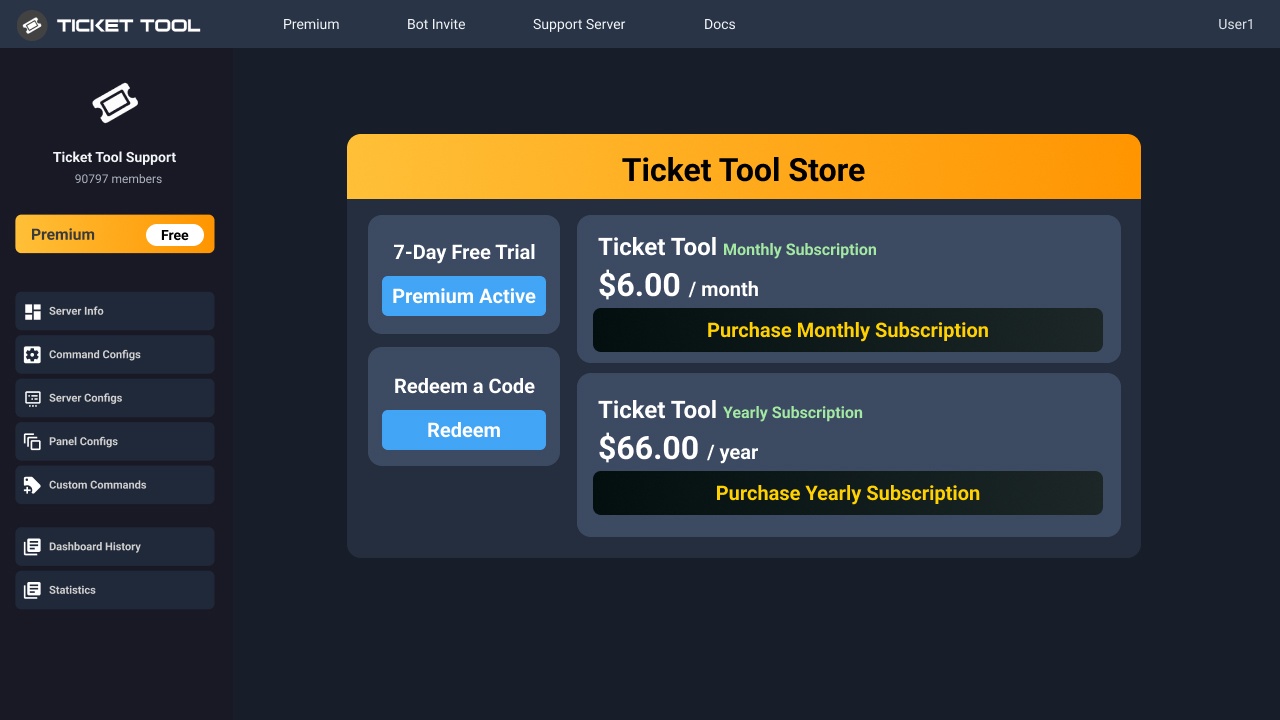
You can purchase Ticket Tool Premium here! Buying it on our website allows you to have full control over your subscription:
 Cancel your subscription at any time
Change your billing interval (yearly/monthly)
Change your payment method
Add or remove server slots to your subscription
 Transfer the subscription between servers
Note: This level of control is only available when purchasing the subscription from our website.
You can manage your current subscriptions here, any billing questions or concerns, feel free to create a Billing Ticket via #🎫│make-a-ticket
 fickle fern
tulip anvil
What the price of that?
fickle fern
tulip anvil
What the price of that?
It is 8 dollars a month. However, you can get it for 66 dollars per year.
 oak swan
How long dose ot take to get into a bot server after purchase
fickle fern
oak swan
How long dose ot take to get into a bot server after purchase
What do you mean? Like how long does it take for @pseudo glen to get in the server?
 swift rapids
I don't understand any of this. I'm 68 and only just know how to use a phone. Can anyone help pls. Login failed. What do I do pls
oak swan
Yeah
humble sequoiaBOT
⚠️ You're in the wrong place
We provide support for Ticket Tool Discord bot and cannot help you with whatever issue you have.
- We don't know which Support Team you should contact to get this issue resolved, and unfortunately we won't be able to accurately tell you.
If you don't have any further questions regarding our bot Ticket Tool, please close this ticket
worldly helm
oak swan
Yeah
Hello. You have to invite and enable it, look below for a guide.
humble sequoiaBOT
The first thing you will need to do is invite the premium bot, an invite can be found here
Once the bot is in your server we will head to the dashboard and manage your server. When you are managing your server, you want to head into "Server Configs" then click the drop down menu under "Select the bot you would like to use on this server" then click "Ticket Tool#6207" and then save.
 oak swan
Do you have to pay for this
worldly helm
Yes, its the premium version of the bot.
 topaz furnace
 vagrant birch
am I able to open to separate channels with two separate ticket reasonings
dense iron
Can somebody help me with my discord server
humble sequoiaBOT
@dense iron, we would love to help you, but if you don't tell us what you need help with we can't help you :(
@nocturne roost
⚠️ You're in the wrong place
We provide support for Ticket Tool Discord bot and cannot help you with whatever issue you have.
- We don't know which Support Team you should contact to get this issue resolved, and unfortunately we won't be able to accurately tell you.
If you don't have any further questions regarding our bot Ticket Tool, please close this ticket
━━ seth's inquiry has been moved to a ticket ━━
 cunning spruce
how to make the bot ping a role when opening a ticket
humble sequoiaBOT
1. Go into your Dashboard
2. Open your Panel Configs tab
3. Select the panel you want to ping your support on
4. Open the Ticket options menu
5. Click on Edit Ticket Message
6. In the Message Content use one of the role mention syntax (**{@Role Name}**/**{Role ID}**)
7. Save changes
Note: For this to work properly, Ticket Tool requires the Mention Everyone permission. Or the role must have the Allow anyone to @mention this role setting enabled
restive condor
cunning spruce
how to make the bot ping a role when opening a ticket
Hey there! See above please ^
cunning spruce
thanks
fickle fern
restive condor
Hey there! See above please ^
Hey! Is there an automated support option?
restive condor
fickle fern
Hey! Is there an automated support option?
Hi there, no, we currently don't offer automated/live support.
The closest thing would be custom command in which you can preset answers and have different triggers for it
humble sequoiaBOT
Custom Commands
Custom Commands are used to send a predefined response to your channels. Commands will only respond if the command itself is used, it will not function if you put the tag into a sentence.
To create commands, go to: Dashboard > Custom Commands > New. After creating and naming one, you can edit the command trigger and behaviors. Tap on the edit message button to edit the response of the command.
 fickle fern
restive condor
Hi there, no, we currently don't offer automated/live support.
The closest thin...
fickle fern
restive condor
Hi there, no, we currently don't offer automated/live support.
The closest thin...
Okay, thank you.
iron nightBOT
Gave +1 Rep to @restive condor (current: #1 - 1723)
 radiant nexus
does anyone know how to set up the ticket tool in a discord server
 wooden bone
Yo
 halcyon bear
How do I make the ticket bot send this message in my server?
 pseudo ravine
Hey there. Please refer to the last embed below!
humble sequoiaBOT
First you will want to invite the bot to your server. Once the bot is in your server, you can manage your server in the dashboard.
To create a panel we are going to need to head over to the Panel Configs Tab on the Dashboard.
Once at the dashboard we will need to click Create Panel.
Enter a panel name (Fill in any optional settings you want).
Click Create Panel and you are ready to get started with configuring your panel.
An example of a creating a panel is shown below.
Once the panel has been created, use the blue Send button and select the channel you want the panel to be sent to.
The Panel wasn't send
Use the </debug:1029783024264564765> command to diagnose possible permission issues with the bot.
 wise canopy
Hi i would like to report a scam server that is using ticket tool bot and also seems to have stole the bot avatar.
They are spamming invites in development servers and top.gg and the server should be blacklisted.
 austere forge
wise canopy
Hi i would like to report a scam server that is using ticket tool bot and also s...
austere forge
wise canopy
Hi i would like to report a scam server that is using ticket tool bot and also s...
Can you move to #🎫│make-a-ticket pls
 olive stag
Hey can someone explain why i dont get the mesages from the tiket tool when my tiket is cloased
worldly helm
olive stag
Hey can someone explain why i dont get the mesages from the tiket tool when my t...
Hey.
Dashboard—> Panel Configs —> Messages —> Closed DM
(Its premium only )
olive stag
worldly helm
Hey.
Dashboard—> Panel Configs —> Messages —> Closed DM
(Its premium only <:Pre...
i used to get the tikets its from another server but it just stoped once
worldly helm
In that case, you can‘t do anything.
 empty tendon
When I go on the panel it doesn't show my server even though I have invited the bot
worldly helm
empty tendon
When I go on the panel it doesn't show my server even though I have invited the ...
Hey. Please refer to the embed below!
jade topaz
How can i setup ticket?
humble sequoiaBOT
Don't see your server in the dashboard?
Try using the Sync Servers button on your top center of the Dashboard page
If this doesn't work
You should relog from the dashboard, you can do this by clicking here to log out immediately, and then log back in
Note:
You need one of these 3 things to access the dashboard.
1. Server Owner (Level: 6)
2. Server Administrator (Level: 4)
3. Dashboard Role (Level: 2)
:warning: You can check your level using the </permissionlevel:1029797400174399542> command on your Discord Server
If the bot's response is:
- @User is permission level: 0 (User)
You don't have any of the 3 levels required to access the server's dashboard
 worldly helm
jade topaz
How can i setup ticket?
worldly helm
jade topaz
How can i setup ticket?
Hey, look below for a guide!
stark runeBOT
1. Invite Ticket Tool to your server
First you will want to invite the bot to your server. Once the bot is in your server, you can manage your server in the dashboard.
2. Create a Panel
To create a panel we are going to need to head over to the panel configs on the dashboard.
Once at the dashboard we will need to click Create Panel.
Enter a panel name (Fill in any optional settings you want).
Click Create Panel and your ready to get started with configuring your panel.
An example of a creating a panel is shown below.
3. Send the Panel to a Channel
Once you've created a panel on the dashboard you will need to send it to a channel using send on the dashboard.
Select the channel you want your panel to be created in and click send.
For other questions checkout $help faq.
An example of a sending a panel is shown below.
Having a Problem Sending the Panel?
Do $debug in a channel with Ticket Tool and make sure it has all the necessary Discord permissions.
empty tendon
worldly helm
Hey. Please refer to the embed below!
Still don't see my server
worldly helm
Did you try using the /permissionlevel command?
 hollow shuttle
How do I make a role able to see all tickets whether they are claimed or not. right now claimed tickets are disappearing for my admin
worldly helm
hollow shuttle
How do I make a role able to see all tickets whether they are claimed or not. ri...
Hey there.
Dashboard --> Panel Configs --> Claiming --> Change other support team permissions when claimed
hollow shuttle
worldly helm
Hey there.
Dashboard --> Panel Configs --> Claiming --> <:Switch_disabled_neutra...
so just turn on view channel in here and should be set?
worldly helm
hollow shuttle
so just turn on view channel in here and should be set?
That works aswell.
hollow shuttle
oh so your saying turn the change other support to "off"
 weak dove
worldly helm
hollow shuttle
oh so your saying turn the change other support to "off"
weak dove
worldly helm
hollow shuttle
oh so your saying turn the change other support to "off"
You can do both.
hollow shuttle
ok thank you!
weak dove
No
worldly helm
weak dove
No
This channel is only for support regarding ticket tool. Please keep other conversations in #💬│general-chat
 crude bear
Is there no way to have one subscription that can cover two servers with ticket tool?
 slender minnow
nope
 tranquil bane
come creo un normalissimo ticket?
 acoustic pier
Why

 fleet canopy
i need help
humble sequoiaBOT
Hello, we would love to help you, but if you don't tell us what you need help with we can't help you :(
worldly helm
acoustic pier
Why
Hey. Please try using the /debug command in the channel you're trying to send the panel in.
fleet canopy
i bought an account and idk how to claim it
humble sequoiaBOT
⚠️ You're in the wrong place
We provide support for Ticket Tool Discord bot and cannot help you with whatever issue you have.
- We don't know which Support Team you should contact to get this issue resolved, and unfortunately we won't be able to accurately tell you.
If you don't have any further questions regarding our bot Ticket Tool, please close this ticket
acoustic pier
worldly helm
Hey. Please try using the /debug command in the channel you're trying to send th...

 blissful crag
nah gang my ticketool premium expired and they took ma ticket embeds i have one question if i buy premium again will it restore the embeds when someone opens a ticket!!?!?!?!?!
acoustic pier
 blissful crag
nah gang my ticketool premium expired and they took ma ticket embeds i have one ...
blissful crag
blissful crag
nah gang my ticketool premium expired and they took ma ticket embeds i have one ...
@frozen crypt
worldly helm
acoustic pier
Please #🎫│make-a-ticket
 warm jetty
 humble sequoiaBOT
فريق الدعم الفني العربي
عميلنا العزيز ان كنت تبحث عن مساعدة يرجى فتح تكت خاص بفريق الدعم الفني العربي
اذهب الى#🎫│make-a-ticket
ثم قم بلضغط على الايموجي الاتي (🇯🇴)
 velvet verge
@stray bobcat @timber kernel How can I set up ticket tool bot on my own discord?
worldly helm
velvet verge
<@105793386300088320> <@153489496317493248> How can I set up ticket tool bot on ...
Hey. Please refer to the embed below.
stark runeBOT
1. Invite Ticket Tool to your server
First you will want to invite the bot to your server. Once the bot is in your server, you can manage your server in the dashboard.
2. Create a Panel
To create a panel we are going to need to head over to the panel configs on the dashboard.
Once at the dashboard we will need to click Create Panel.
Enter a panel name (Fill in any optional settings you want).
Click Create Panel and your ready to get started with configuring your panel.
An example of a creating a panel is shown below.
3. Send the Panel to a Channel
Once you've created a panel on the dashboard you will need to send it to a channel using send on the dashboard.
Select the channel you want your panel to be created in and click send.
For other questions checkout $help faq.
An example of a sending a panel is shown below.
Having a Problem Sending the Panel?
Do $debug in a channel with Ticket Tool and make sure it has all the necessary Discord permissions.
worldly helm
 cosmic burrow
I NEED HELP PLEASE
cosmic burrow
I NEED HELP PLEASE
Hey. What do you need help with?
worldly helm
Please stop with the large amount of caps.
Please check your audit logs, there might be another bot preventing ticket tool to enter.
cosmic burrow
NOOOOOOOOOOOOOOOOOOOOOOOOOOOOOOOOOOOOOOOOOOOOOOOOOOOOOOOOOOOOOOOOOOOOOOOOOOOOOOOOOOOOOO
pls bro.
every. single. time.
i add
worldly helm
Stop with the caps.
cosmic burrow
am i blacklisted
worldly helm
And i already told you, check the audit logs.
worldly helm
Please try to invite the bot again and check the audit logs again.
worldly helm
Please check you audit logs
restive condor
blissful crag
nah gang my ticketool premium expired and they took ma ticket embeds i have one ...
Hi there, yes. They should still be saved on the Dashboard
 bleak lava
when will support reach out after i’ve bought my ticket
humble sequoiaBOT
⚠️ You're in the wrong place
We provide support for Ticket Tool Discord bot and cannot help you with whatever issue you have.
- We don't know which Support Team you should contact to get this issue resolved, and unfortunately we won't be able to accurately tell you.
If you don't have any further questions regarding our bot Ticket Tool, please close this ticket
restive condor
cosmic burrow
ticket tool wont stop leavin
Hi there, please go to your server settings and into the "Audit Log" tab.
A security bot is most likely kicking the bot when you add it
 carmine whale
Is there a way I can make ticket auto transcript when closed?
 crystal silo
hey guys, i just can't remove that extra button and on the dashboard it seems like it's only 1 create ticket button, i've already deleted and sent the panel message again, can someone help me out?
 restive condor
carmine whale
Is there a way I can make ticket auto transcript when closed?
restive condor
carmine whale
Is there a way I can make ticket auto transcript when closed?
Hey there! Automatic transcripts are a premium feature
restive condor
crystal silo
hey guys, i just can't remove that extra button and on the dashboard it seems li...
Hey there!
Dashboard > Panel Configs > Panel
You do not need to attach the panel "Comprar" to its own panel.
Please remove any attached panels there
carmine whale
restive condor
Hey there! Automatic transcripts are a premium feature <:Premium:119240307415791...
ok, ty
iron nightBOT
Gave +1 Rep to @restive condor (current: #1 - 1724)
crystal silo
restive condor
Hey there!
``Dashboard`` > ``Panel Configs`` > ``Panel``
You do not need to atta...
ty, it worked
 restive condor
 obsidian nova
Hey there! Could I get your server name or ID please
 restive condor
It seems like you have enabled the premium bot but haven't invited it yet
humble sequoiaBOT
The first thing you will need to do is invite the premium bot, an invite can be found here
Once the bot is in your server we will head to the dashboard and manage your server. When you are managing your server, you want to head into "Server Configs" then click the drop down menu under "Select the bot you would like to use on this server" then click "Ticket Tool#6207" and then save.
restive condor
There's an invite ^
obsidian nova
Thanks
restive condor
ember jolt
restive condor
Hey there!
``Dashboard`` > ``Panel Configs`` > ``Panel``
You do not need to atta...
Hello, how can i make the premium bot send ticket transcripts to the person who opened the ticket when its closed
obsidian nova
Por acaso você e brasileiro?
restive condor
Não, mas eu falo um pouco de Português
obsidian nova
Ok
restive condor
ember jolt
Hello, how can i make the premium bot send ticket transcripts to the person who ...
Hi there, Dashboard > Panel Configs > Transcripts > Direct Message Transcript - Closed
ember jolt
restive condor
Hi there, ``Dashboard`` > ``Panel Configs`` > ``Transcripts`` > <:Switch_enabled...

Is there a way i can make it have a link to the ticket transcript itself instead of this?
 wispy sierra
How long does it take for my verification to be accepted?
humble sequoiaBOT
⚠️ You're in the wrong place
We provide support for Ticket Tool Discord bot and cannot help you with whatever issue you have.
- We don't know which Support Team you should contact to get this issue resolved, and unfortunately we won't be able to accurately tell you.
If you don't have any further questions regarding our bot Ticket Tool, please close this ticket
restive condor
ember jolt
Is there a way i can make it have a link to the ticket transcript itself instead...
That's not a transcript
Please go into the trascript section on the Dashboard
That's in the logging section
 frigid mango
so when im sending the ticket tool message it says that it doesnt have permissions to send messages in those channels (says that on the website) but on the server its giving me some error talking about some invalid emoji
 naive flume
With the new windows 10 ban, what should I do to my hp elitedesk 800 g1. It is I7 4790. And I have a Rx 550 in it
humble sequoiaBOT
⚠️ You're in the wrong place
We provide support for Ticket Tool Discord bot and cannot help you with whatever issue you have.
- We don't know which Support Team you should contact to get this issue resolved, and unfortunately we won't be able to accurately tell you.
If you don't have any further questions regarding our bot Ticket Tool, please close this ticket
 bold wing
Yo is there a way to do multiple drop downs and also when I click on the drop down it prompts another drop down. How do i do that

 cosmic burrow
restive condor
Hi there, please go to your server settings and into the "Audit Log" tab.
A sec...
cosmic burrow
restive condor
Hi there, please go to your server settings and into the "Audit Log" tab.
A sec...
PLS HELOOOOOOOOOOOOOPPPPPPP
 covert smelt
Im trying to edit messages on a ticket but the box is grayed out and wont let me type.
I want to edit the panel message on the ticket. The main screen of the ticket that people will see first which I can put the format/rules for people to include in their ticket
 steady mango
Do you have to be the server owner to purchase and use premium?
bleak lava
i’ve been waiting for about 2 hours and haven’t heard from anyone i pinged, is the list hefty today?
humble sequoiaBOT
⚠️ You're in the wrong place
We provide support for Ticket Tool Discord bot and cannot help you with whatever issue you have.
- We don't know which Support Team you should contact to get this issue resolved, and unfortunately we won't be able to accurately tell you.
If you don't have any further questions regarding our bot Ticket Tool, please close this ticket
━━ Batman's inquiry has been moved to a ticket ━━
━━ CFreeze's inquiry has been moved to a ticket ━━
pseudo ravine
steady mango
Do you have to be the server owner to purchase and use premium?
Hey there. No, you don't have to be the server owner
steady mango
pseudo ravine
Hey there. No, you don't have to be the server owner
Thank you!
iron nightBOT
Gave +1 Rep to @pseudo ravine (current: #5 - 885)
pseudo ravine
You're welcome, glad I could help! Thanks for supporting Ticket Tool!
 faint brook
does getting mee6 premium give ticket tool premium?
pseudo ravine
Hey there. No, they're separate bots
 static patrol
Hello! if i'm an admin in a server am i able to add myself as an admin on the bot or do i need to wait for another admin to do it?
pseudo ravine
Hey there. If you have the Administrator permission then you can access the dashboard
faint brook
is there any way to do a lifetime code instead of yearly/monthly?
pseudo ravine
We do not offer a lifetime subscription unfortunately
 fervent crown
 simple notch
Is there an option to view the ticket after it is closed?
simple notch
Is there an option to view the ticket after it is closed?
Yes you can
 inland lynx
Hi guys, I just saw the image of this user
I would like to have a report like this

Where can I find the list of strings?
simple notch
fervent crown
Yes you can
How?
fervent crown
simple notch
How?
What issue are you having ?
worldly helm
inland lynx
Hey, that is another bot. We only provide support for ticket tool.
worldly helm
simple notch
Is there an option to view the ticket after it is closed?
Hey, Dashboard—> Panel Configs—> Permissions—> Select the teams/user —> Closed ticket—> View channel
inland lynx
worldly helm
Hey, that is another bot. We only provide support for ticket tool.
So si it possible?
worldly helm
Probably, but idk.
 lethal cedar
i was wondering if it was possible for someone to create some tickets in this server i’m making? it’s just normally i end up messing up and get stressed out but i also have templates filled out that i need the ticket to say
it’s okay if not tho!
worldly helm
lethal cedar
i was wondering if it was possible for someone to create some tickets in this se...
Hey, we don't have a template. We have a guide though, look below.
stark runeBOT
1. Invite Ticket Tool to your server
First you will want to invite the bot to your server. Once the bot is in your server, you can manage your server in the dashboard.
2. Create a Panel
To create a panel we are going to need to head over to the panel configs on the dashboard.
Once at the dashboard we will need to click Create Panel.
Enter a panel name (Fill in any optional settings you want).
Click Create Panel and your ready to get started with configuring your panel.
An example of a creating a panel is shown below.
3. Send the Panel to a Channel
Once you've created a panel on the dashboard you will need to send it to a channel using send on the dashboard.
Select the channel you want your panel to be created in and click send.
For other questions checkout $help faq.
An example of a sending a panel is shown below.
Having a Problem Sending the Panel?
Do $debug in a channel with Ticket Tool and make sure it has all the necessary Discord permissions.
lethal cedar
worldly helm
Hey, we don't have a template. We have a guide though, look below.
okay thank you
iron nightBOT
Gave +1 Rep to @worldly helm (current: #17 - 374)
 signal ingot
is it possible to people see the close tickets that they were into?
worldly helm
signal ingot
is it possible to people see the close tickets that they were into?
Hey. Yes!
Dashboard --> Panel Configs --> Permissions --> Ticket owner/closed ticket --> View channel
 runic cedar
All permissions set on bot invite. New role created followed documentation to the letter, but when clicking on manage server I get this error. Lost 2 hours trying to set it up.
 worldly helm
runic cedar
All permissions set on bot invite. New role created followed documentation to th...
worldly helm
runic cedar
All permissions set on bot invite. New role created followed documentation to th...
Hello.
Please try using the /permissionlevel command?
inland lynx
cosmic burrow
thats dyno bot
I don't think it is Dyno Bot
worldly helm
inland lynx
I don't think it is Dyno Bot
Its another ticket bot named "Tickets", lets only use this channel for support
inland lynx
worldly helm
Its another ticket bot named "Tickets", lets only use this channel for support
My question was this #🆘│community-support message
worldly helm
worldly helm
Probably, but idk.
As its another bot, probably but idk.
runic cedar
worldly helm
Hello.
Please try using the /permissionlevel command?
It said application did not respond.
worldly helm
Please try using the /debug command.
runic cedar
worldly helm
Please try using the /debug command.
Still: The application did not respond
 bold wyvern
How can i change the Company Name and Adresse on the Invoice?
worldly helm
bold wyvern
How can i change the Company Name and Adresse on the Invoice?
Hey, is this regarding ticket tool?
bold wyvern
yes
worldly helm
bold wyvern
yes
Hey Marcel, habe gerade gerade gesehen, dass du deutsch bist. Könntest du bitte noch einmal erklären was du meinst?
bold wyvern
ja klar, kein ding.
Ich möchte auf der Rechnung von Ticket Tool von einer auf eine andere Rechnungsadresse switchen, wo kann ich das machen?
restive condor
runic cedar
Still: The application did not respond
Hi there, could I please get your server name or ID
runic cedar
restive condor
Hi there, could I please get your server name or ID
Miners of Mars - 929698776296341505
 lost iron
hi, could someone help me enable pics perms in tickets cz they wont work
worldly helm
lost iron
hi, could someone help me enable pics perms in tickets cz they wont work
Hey there. It's a premium only feature.
lost iron
worldly helm
Hey there. It's a premium only feature.
oh okay ty
iron nightBOT
Gave +1 Rep to @worldly helm (current: #17 - 375)
worldly helm
bold wyvern
Ich möchte auf der Rechnung von Ticket Tool von einer auf eine andere Rechnungsa...
Sorry für die späte antwort, was meinst du genau? Könnest du vllt ein screenshot zeigen?
worldly helm
runic cedar
Miners of Mars - 929698776296341505
Hey, i'm so sorry for the late reply! What bot are you using to do the command?
 next ivy
- When i make a ticket it says:
And when i go to the ticket channel the embed wasnt sent

 humble sequoiaBOT
━━ User's inquiry has been moved to a ticket ━━
 delicate skiff
i need help how i can fix that ?
 runic cedar
worldly helm
Hey, i'm so sorry for the late reply! What bot are you using to do the command?
runic cedar
worldly helm
Hey, i'm so sorry for the late reply! What bot are you using to do the command?
Ticket tool.
worldly helm
Normal one or premium?
 thorny ivy
when i try and use commands, it just keeps saying the application didnt respond, and when i change the message, it doesnt apply
worldly helm
thorny ivy
when i try and use commands, it just keeps saying the application didnt respond,...
Hey. Please try using the /debug command.
thorny ivy
worldly helm
Hey. Please try using the /debug command.
did that, also said application didnt respond
worldly helm
Okay, give me a second to review the debug logs.
yep, found the issue. The bot needs access to view the channel.
thorny ivy
worldly helm
yep, found the issue. The bot needs access to view the channel.
changed it and tried, still same thing
worldly helm
Please try using the /debug command again.
thorny ivy
worldly helm
Please try using the /debug command again.
i did, it says The application did not respond
worldly helm
Yeah, it is still missing the permission.
thorny ivy
worldly helm
Yeah, it is still missing the permission.
forgot to sync perms, my bad
but how do i apply the new ticket message? i changed it on the website/dashboard and it doesnt do it when a ticket is opened
worldly helm
Did you save the settings?
Did you edit the right panel?
thorny ivy
yes
worldly helm
did you open a ticket in the right panel?
thorny ivy
worldly helm
did you open a ticket in the right panel?
yes, i only have one panel
worldly helm
Please #🎫│make-a-ticket
runic cedar
worldly helm
Normal one or premium?
Normal.
 brave breach
I can't sync servers in the ticket tool website, can anyone help?
humble sequoiaBOT
━━ User's inquiry has been moved to a ticket ━━
 zinc nova
hey so i want to make it so when someone opens a ticket, the message which is like "Welcome, someone will be with you shortly", i want that message to include a ping to my support team
how could i do that
nevermind i figured it out
 zinc igloo
Bonsoir je recontre un problème avec le bot qui pourrait m'aider
En gros je peux modifier aucun texte du bot sa ne me laisse pas écrire ducoup j'ai le message de base une idée de comment régler svp
humble sequoiaBOT

L'équipe du support Français
Cher client,
Si vous avez besoin d'aide, ouvriez un ticket pour le support Français s'il vous plaît.
Allez au #🎫│make-a-ticket et tapez sur le bouton contenant l'emoji 🇫🇷
 oak sluice
how do i make it so everyone can open a ticket

i have @ everyone enabled for button create ticket
 humble sequoiaBOT
━━ User's inquiry has been moved to a ticket ━━
 jolly temple
I need help setting up my sever tool
 river pendant
How do I make it to where people could click on create ticket?
 icy stirrup
anyone know why custom commands might not be working for me
 slow meteor
Hi, i want to delete the ticket after its closed, how i can delete them?
 unique osprey
Can someone explain to me how I can remove some bots' permission to view a ticket? Like, I just want to make most of them not appear in the member list; it's a bit annoyin
icy stirrup
@unique osprey change channel/category permissions?
 vast grotto

 unique osprey
icy stirrup
<@1180993357846171740> change channel/category permissions?
unique osprey
icy stirrup
<@1180993357846171740> change channel/category permissions?
Didnt work
 delicate saddle
Hi! I just have a quick question, does this bot have ticket claims I can set up for a server?
worldly helm
delicate saddle
Hi! I just have a quick question, does this bot have ticket claims I can set up ...
Hey! Yes it does.
humble sequoiaBOT
Claiming allows you to change the ticket name, category and permissions. To use it you have to enable it first on your Dashboard > Panel Configs > Claiming

 Note: This is a premium feature
worldly helm
slow meteor
Hi, i want to delete the ticket after its closed, how i can delete them?
Note: This is a premium feature
worldly helm
slow meteor
Hi, i want to delete the ticket after its closed, how i can delete them?
Hello. Either the delete Button or use /delete
worldly helm
icy stirrup
anyone know why custom commands might not be working for me
Hey. Please elaborate
stark runeBOT
1. Invite Ticket Tool to your server
First you will want to invite the bot to your server. Once the bot is in your server, you can manage your server in the dashboard.
2. Create a Panel
To create a panel we are going to need to head over to the panel configs on the dashboard.
Once at the dashboard we will need to click Create Panel.
Enter a panel name (Fill in any optional settings you want).
Click Create Panel and your ready to get started with configuring your panel.
An example of a creating a panel is shown below.
3. Send the Panel to a Channel
Once you've created a panel on the dashboard you will need to send it to a channel using send on the dashboard.
Select the channel you want your panel to be created in and click send.
For other questions checkout $help faq.
An example of a sending a panel is shown below.
Having a Problem Sending the Panel?
Do $debug in a channel with Ticket Tool and make sure it has all the necessary Discord permissions.
worldly helm
@jolly temple and @river pendant, look above ^^
 atomic solstice
 nimble isle
How can i edit the tickets bot
nimble isle
How can i edit the tickets bot
What would you want to edit?
nimble isle
The bot
atomic solstice
nimble isle
The bot
If you mean the avatar of the bot or the name then currently the only thing you can do is add a nickname for the bot, custom avatars are not yet available
if you meant edit the settings then it would be through the bot dashboard
nimble isle
Thank
atomic solstice
no problem
runic cedar
Is ticket tool working only with premium plan?
worldly helm
runic cedar
Is ticket tool working only with premium plan?
Hey, no. You can use the normal bot aswell.
If u get the error message ‘The application did not repsond', please try doing the /debug command.
runic cedar
worldly helm
If u get the error message ‘The application did not repsond', please try doing t...
I did please check messages above. App did not respond to debug command.
bold wyvern
worldly helm
Sorry für die späte antwort, was meinst du genau? Könnest du vllt ein screenshot...
Hey @worldly helm , kann ich ein Ticket Öffnen. Die Infos will ich ungern im Chat haben.
runic cedar
Ahh ok got it to work. Thanks.
worldly helm
bold wyvern
Hey <@972202754212782080> , kann ich ein Ticket Öffnen. Die Infos will ich unger...
Na klar, kein problem.
runic cedar
For all of those that have issues and probably docs should be updated. You have invite bot to the channel than switch bot to the white one and after that you will be able to use dashboard at ticket tool website.
 dire spruce
I need help setting up my ticket tool
stark runeBOT
1. Invite Ticket Tool to your server
First you will want to invite the bot to your server. Once the bot is in your server, you can manage your server in the dashboard.
2. Create a Panel
To create a panel we are going to need to head over to the panel configs on the dashboard.
Once at the dashboard we will need to click Create Panel.
Enter a panel name (Fill in any optional settings you want).
Click Create Panel and your ready to get started with configuring your panel.
An example of a creating a panel is shown below.
3. Send the Panel to a Channel
Once you've created a panel on the dashboard you will need to send it to a channel using send on the dashboard.
Select the channel you want your panel to be created in and click send.
For other questions checkout $help faq.
An example of a sending a panel is shown below.
Having a Problem Sending the Panel?
Do $debug in a channel with Ticket Tool and make sure it has all the necessary Discord permissions.
austere forge
dire spruce
I need help setting up my ticket tool
follow instructions above
bold wyvern
worldly helm
Na klar, kein problem.
kannst du mir Zugriff auf den Ticket Channel geben?
worldly helm
bold wyvern
kannst du mir Zugriff auf den Ticket Channel geben?
Nope, ich bin leider nicht in dem support team, also habe ich auch kein zugriff.
worldly helm
Ich helfe leuten, die probleme haben 😅
 calm jasper
 mossy breach
huh
lethal cedar
good morning, in the ticket settings it will not allow me to include the 2 @ i need to add to it in the ticket message, i was able too for the ticket before.
mossy breach
lethal cedar
good morning, in the ticket settings it will not allow me to include the 2 @ i n...
Are you trying to tag someone in the ticket message but it wouldn’t?
lethal cedar
mossy breach
Are you trying to tag someone in the ticket message but it wouldn’t?
yes its a role in my server, it worked in a different ticket but wouldnt let me include the second role
mossy breach
lethal cedar
yes its a role in my server, it worked in a different ticket but wouldnt let me ...
try pinging the role using this format:
<@&{role id here}>
lethal cedar
mossy breach
try pinging the role using this format:
<@&{role id here}>
okay i’ll try thank you!
iron nightBOT
Gave +1 Rep to @mossy breach (current: #210 - 2)
austere forge
There's a character limit 250 with the free version, you seem to have reached this limit
 sullen tree
How do I add someone to ticket tool to make it so they get automatically pinged when a ticket is made?
worldly helm
sullen tree
How do I add someone to ticket tool to make it so they get automatically pinged ...
Hey, a role of a user?
lethal cedar
austere forge
There's a character limit 250 with the free version, you seem to have reached th...
but that’s weird bc for the other ticket it allowed me
but thank u smm
jade topaz
hlo bot my ticket is not openning
worldly helm
jade topaz
hlo bot my ticket is not openning
Hey, are there any errors?
worldly helm
Please send them, or i cannot help you.
jade topaz
see
 worldly helm
Discord has a limit of 500 tickets, please tell their staff to delete some tickets.
 worldly helm
 sharp adder
How do I add text to it?
sharp adder
How do I add text to it?
Hello. Please refer to the embed below.
humble sequoiaBOT
The panel message is where people react to make a ticket. To customize it head over to your Dashboard --> Panel Configs -> Panel -> Edit Panel Message
sharp adder
worldly helm
Hello. Please refer to the embed below.
I’m mobile, I don’t understand, I think I’m dumb but please help me
jade topaz

and for thiss
some one help
@worldly helm help
@humble sequoia helpp
@stark rune hlo
helpp
austere forge
stop spamming, we can't help you, we're not related to this server.
jade topaz
why
austere forge
Because we are not this server, we only provide support if you have a problem with our bot, not anything else.
sharp adder
austere forge
Because we are not this server, we only provide support if you have a problem wi...
Well can you help me?
austere forge
there’s no need to reply to messages that aren’t for you for support.
Simply follow the steps in the embed
 night oriole
I want make a DropDown style but there is no button...what I need to do?
 worldly helm
night oriole
I want make a DropDown style but there is no button...what I need to do?
worldly helm
night oriole
I want make a DropDown style but there is no button...what I need to do?
Hey. Make sure you have enable Enable select style
Dashboard --> Panel Configs --> DropDown
sharp adder
austere forge
there’s no need to reply to messages that aren’t for you for support.
Ok
night oriole
worldly helm
Hey. Make sure you have enable `Enable select style`
Dashboard --> Panel Configs...
this? If yes, its already
 worldly helm
You forgot to add the displays.
night oriole
worldly helm
You forgot to add the displays.
where can I add it?
 spare sorrel
I'm not aware how I set up tickets and I need help because I'm trying to start a server
stark runeBOT
1. Invite Ticket Tool to your server
First you will want to invite the bot to your server. Once the bot is in your server, you can manage your server in the dashboard.
2. Create a Panel
To create a panel we are going to need to head over to the panel configs on the dashboard.
Once at the dashboard we will need to click Create Panel.
Enter a panel name (Fill in any optional settings you want).
Click Create Panel and your ready to get started with configuring your panel.
An example of a creating a panel is shown below.
3. Send the Panel to a Channel
Once you've created a panel on the dashboard you will need to send it to a channel using send on the dashboard.
Select the channel you want your panel to be created in and click send.
For other questions checkout $help faq.
An example of a sending a panel is shown below.
Having a Problem Sending the Panel?
Do $debug in a channel with Ticket Tool and make sure it has all the necessary Discord permissions.
worldly helm
spare sorrel
I'm not aware how I set up tickets and I need help because I'm trying to start a...
Hello. Please refer to the embed above.
night oriole
night oriole
where can I add it?
Please tell to me 😭
worldly helm
night oriole
Please tell to me 😭
Sorry, the option below Dropdown Item(s)
night oriole
worldly helm
Sorry, the option below `Dropdown Item(s)`
Ah thanks
iron nightBOT
Gave +1 Rep to @worldly helm (current: #17 - 376)
spare sorrel
It doesn't let me because I need to verify my account which I've already done
worldly helm
are there any error messages?
spare sorrel
It says when I open the website it says you need to verify your account before doing this with a big X I can't press
 hybrid pollen
Where do I go to buy the 1 year package for 60 dollars?
restive condor
spare sorrel
It says when I open the website it says you need to verify your account before d...
Hi there, you will need to reach out to Discord support then
hybrid pollen
 gilded verge
<https://tickettool.xyz/dashboard/YOUR_SERVER_ID/premium>
gilded verge
<https://tickettool.xyz/dashboard/YOUR_SERVER_ID/premium>
I have two subscriptions
Is it possible to transfer the one-month subscription to another server?

I have two servers
gilded verge
if you bought premium via Discord then no,
if website then you can open billing ticket on #🎫│make-a-ticket and ask Staff for it
please refer to the message below ⬇️
restive condor
Subscriptions do not require staff to be transferred between servers, it can't be transferred from their subscriptions tab on the Dashboard (excl. Discord)
gilded verge
oh my... then im sorry but i forgot about that change 😕
restive condor
No worries, it's only keys that need to be done by us
gilded verge
restive condor
No worries, it's only keys that need to be done by us <:PabloTiphat:983791053842...
thank you for clarification ❤️
iron nightBOT
Gave +1 Rep to @restive condor (current: #1 - 1728)
restive condor
hybrid pollen
It was through discord
I suppose you could move the paddle one to your other server, and once the discord one expires, transfer the paddle one to the original server
hybrid pollen
restive condor
I suppose you could move the paddle one to your other server, and once the disco...
True, very good
Thanksss 
restive condor
No problem!
 iron gull
hi

idk what moji its talking about
looks like this but when i click send it doesnt work
 restive condor
iron gull
hi
restive condor
iron gull
hi
Hey there! Are you using a dropdown menu?
iron gull
yeah
restive condor
Please check the emoji for your 5th dropdown option
restive condor
iron gull
The error messages are different for each case. This one is for dropdown options and it tells it's the 5th option
iron gull
restive condor
The error messages are different for each case. This one is for dropdown options...
okay let me try another emoji, may god bless you thank you for helping
iron nightBOT
Gave +1 Rep to @restive condor (current: #1 - 1729)
restive condor
No problem!
 drifting turtle
What does ticket premium do
humble sequoiaBOT
 Faster Premium Bot
Automatic Transcripts
Full Customization
Direct Messages
Ticket Automation
Thread Style Ticketing
Premium Support
Scheduled Panel Availability
Integrations
Claiming
Advanced Ticket Statistics
You can purchase premium here:
Price
$6 - Monthly
$66 - Yearly (Open a billing ticket in #🎫│make-a-ticket to receive additional information on this matter)
restive condor
drifting turtle
What does ticket premium do
Hey there, you can find the premium features above ^
sullen tree
worldly helm
Hey, a role of a user?
Yes
drifting turtle
restive condor
Hey there, you can find the premium features above ^
Thanks
iron nightBOT
Gave +1 Rep to @restive condor (current: #1 - 1730)
restive condor
No problem!
sullen tree
Ticket tool says I only have user authorization. How do I change this? Pls and ty!
 barren bolt
How do I configure the ticket tool on a server that I don't own?
stark runeBOT
1. Invite Ticket Tool to your server
First you will want to invite the bot to your server. Once the bot is in your server, you can manage your server in the dashboard.
2. Create a Panel
To create a panel we are going to need to head over to the panel configs on the dashboard.
Once at the dashboard we will need to click Create Panel.
Enter a panel name (Fill in any optional settings you want).
Click Create Panel and your ready to get started with configuring your panel.
An example of a creating a panel is shown below.
3. Send the Panel to a Channel
Once you've created a panel on the dashboard you will need to send it to a channel using send on the dashboard.
Select the channel you want your panel to be created in and click send.
For other questions checkout $help faq.
An example of a sending a panel is shown below.
Having a Problem Sending the Panel?
Do $debug in a channel with Ticket Tool and make sure it has all the necessary Discord permissions.
restive condor
barren bolt
How do I configure the ticket tool on a server that I don't own?
Hey there! See above please ^
sharp adder
restive condor
No problem! <:PabloTiphat:983791053842837624>
Can you help me? With the panel message? It’s not letting me write
restive condor
sullen tree
Ticket tool says I only have user authorization. How do I change this? Pls and t...
Hey there! The only user with authorization for what exactly?
restive condor
sharp adder
Can you help me? With the panel message? It’s not letting me write
Of course, could you screenshot please

 sharp adder
restive condor
Of course, could you screenshot please
sharp adder
restive condor
Of course, could you screenshot please
Here
barren bolt
I'm not the server administrator, how can I configure the ticket tool with this condition?
restive condor
sharp adder
Adding additional embeds or editing anything other than the embed's message main field is a premium feature
restive condor
barren bolt
I'm not the server administrator, how can I configure the ticket tool with this ...
You can't
 sour heart
Hi, when I close the ticket in my discord server the ticket doesn't move to the deleted category. Till a week ago it worked. I try using debug tool but it has all the permissions. Even the setting of the category is right.
sullen tree
restive condor
Hey there! The only user with authorization for what exactly?
When a ticket is created I don't get notified and don't see it in discord until my other owner pings me
sharp adder
restive condor
Adding additional embeds or editing anything other than the embed's message main...
But can I edit the panel message so it become like this
restive condor
sour heart
Hi, when I close the ticket in my discord server the ticket doesn't move to the ...
Hey there! How many channels are currently in the deleted category?
sharp adder
 sharp adder
restive condor
Hey there! How many channels are currently in the deleted category?
sharp adder
restive condor
Hey there! How many channels are currently in the deleted category?
Now
sour heart
restive condor
Hey there! How many channels are currently in the deleted category?
40 or 50
restive condor
sharp adder
Now
Please be patient and stop randomly pinging me. There's other users here
sharp adder
Ok mb
restive condor
sullen tree
When a ticket is created I don't get notified and don't see it in discord until ...
Please make sure you're following the category tickets are being created in, you can do so by going into the id:browse of your server, and ticking the 'Follow Category' box
restive condor
sharp adder
You can, click on 'Embed Editor - 1' on the Dashboard, to open up the embed editor. You will be able to edit the embed message main field from there - up to 250 characters
restive condor
sour heart
40 or 50
Discord has a limit of 50 channels per category, we limit it to 45.
If a category has reached such limits, it is full, and tickets cannot be moved.
I recommend you either set up a transcript channel so you can completely delete closed tickets, or set up additional categories for closed tickets
humble sequoiaBOT
Discord only allows to stack up to 50 channels per category, meaning that if you have already 50 tickets in one category, the bot won't be able to place a ticket in that category, for such reason Ticket Tool counts with overflow categories, meaning that if your main category is filled, the bot will go ahead and place the ticket on the next one available, simply choose a second category in the category pickers:
sour heart
restive condor
Discord has a limit of 50 channels per category, we limit it to 45.
If a categor...
thanks
restive condor
No problem, have a nice day!
jade topaz
I have threads system for my server but when users create a threat they can not type in it
restive condor
jade topaz
I have threads system for my server but when users create a threat they can not ...
Hey there! 👋
Please give the @everyone role permission to SEND MESSAGES IN THREAD for the channel tickets are created from
jade topaz
restive condor
Hey there! 👋
Please give the ``@everyone`` role permission to ``SEND MESSAGES ...
I don't understand lmao, can you please rephrase
or i might actually jst be slow 😭
OHH
i see now, mb
restive condor
No worries, is it working now?
restive condor
jade topaz
Still doesnt work
Just to confirm, you gave the permission for the channel specifically, correct?
Not for role permissions
jade topaz
restive condor
Just to confirm, you gave the permission for the channel specifically, correct?
So I have to do that for each ticket or can i not just edit category where ticket is ?
restive condor
jade topaz
So I have to do that for each ticket or can i not just edit category where ticke...
No, you only have to do it for the channel threads are being created from
iron nightBOT
Gave +1 Rep to @restive condor (current: #1 - 1732)
restive condor
Glad to hear!
 sullen agate
Guys how do I verify using selfie?
humble sequoiaBOT
⚠️ You're in the wrong place
We provide support for Ticket Tool Discord bot and cannot help you with whatever issue you have.
- We don't know which Support Team you should contact to get this issue resolved, and unfortunately we won't be able to accurately tell you.
If you don't have any further questions regarding our bot Ticket Tool, please close this ticket
sullen agate
Oh! So basically I’m screwed bcs idk what to do😭
 elder widget
sullen agate
Oh! So basically I’m screwed bcs idk what to do😭
elder widget
sullen agate
Oh! So basically I’m screwed bcs idk what to do😭
Then go to the support for whatever it is your trying to do
 spring condor
Hi is there a issue with the ticketing thing? It says interaction failed when I press the buttons
sullen agate
I need support for how to verify using selfie but I got a notif saying you guys can’t help me but idk where to go for help
elder widget
sullen agate
I need support for how to verify using selfie but I got a notif saying you guys ...
verify on what
sullen agate
I said I needed help and they sent me here
 gentle river
spring condor
Hi is there a issue with the ticketing thing? It says interaction failed when I ...
gentle river
spring condor
Hi is there a issue with the ticketing thing? It says interaction failed when I ...
Hello, same for me
sullen agate
Oh well
elder widget
sullen agate
I said I needed help and they sent me here
You need to click the button that says create ticket
then talk to them
gentle river
gentle river
Hello, same for me
Now the problem is fixed, it's working again
 static zealot
hello! once a ticker is closed is there a way to automaticaly make sure it deletes it self so the server dosent get clogged with chats for the mods?
 idle flint
static zealot
hello! once a ticker is closed is there a way to automaticaly make sure it delet...
idle flint
static zealot
hello! once a ticker is closed is there a way to automaticaly make sure it delet...
If you just want every ticket to delete immediatley after being closed, you can disable Two Step Ticket on the Dashbaord > Panel Configs > General.
That will skip the "closed" state for a ticket, and instead delete the ticket when "closed"
static zealot
alrighty
i did it seems it dosent
still makes me need to delete it

wait i think i got it
nope
when i press close the ticket controls are still their
idle flint
So, it will only take effect for new tickets after the setting change, any tickets that were already open would still have the controls show. Also, ensure that if you have multiple panels, you have made the setting change on the correct panel (or all of your panels)
humble sequoiaBOT
━━ Tarakh Arro's inquiry has been moved to a ticket ━━
 sacred rapids
I bought premium last week. Can I cancel and get the Black Friday price?
restive condor
sacred rapids
I bought premium last week. Can I cancel and get the Black Friday price?
Hey there!
The subscription for your server is way past the refund window unfortunately.
You can use the discount code on an additional yearly subscription, or try to add it from your billing tab, so it applies to the next charge. (I'm not sure if that will work though)
sacred rapids
restive condor
Hey there!
The subscription for your server is way past the refund window unfort...
How would I add it to my billing tab? Is that though the dashboard?
restive condor
sacred rapids
How would I add it to my billing tab? Is that though the dashboard?
Yep, go into your Dashboard profile on the top-right corner, and go into 'Subscriptions'
Alternatively, go into https://tickettool.xyz/billing directly
 gentle moth
Hey Im getting this error and I dont know how to fix it?
 restive condor
gentle moth
Hey Im getting this error and I dont know how to fix it?
restive condor
gentle moth
Hey Im getting this error and I dont know how to fix it?
Hey there! Ticket Tool seems to be missing the MANAGE CHANNELS permissions for the 'Support Channel' category
gentle moth
restive condor
Hey there! Ticket Tool seems to be missing the ``MANAGE CHANNELS`` permissions f...
Now its giving me this

I have its permissions set so it can manage messages
restive condor
gentle moth
I have its permissions set so it can manage messages
It doesn't seem like it
Please make sure you give Ticket Tool all required permissions for your 'Support Channel' category specifically
gentle moth
restive condor
It doesn't seem like it
Its working now I wasnt paying attention thx alot!
iron nightBOT
Gave +1 Rep to @restive condor (current: #1 - 1735)
restive condor
No problem!
 analog sun
Boa noite senhores adm alguém pra mim ajudar sobre um ocorrido
humble sequoiaBOT
Olá, adoraríamos ajudá-lo, mas se você não nos disser no que precisa de ajuda, não poderemos ajudá-lo :(
analog sun
humble sequoiaBOT
Você está no lugar errado
Fornecemos suporte para Ticket Tool Discord bot e não podemos ajudá-lo com qualquer problema que você tenha.
- Não sabemos qual equipe de suporte você deve entrar em contato para resolver esse problema e, infelizmente, não poderemos informar com precisão.
Se você não tiver mais dúvidas sobre nossa ferramenta de ticket de bot, feche este ticket
restive condor
slow meteor
Hi, i want to delete the ticket after its closed, how i can delete the
Hey there! Delete all tickets automatically after they're closed? Or just one specific ticket?
slow meteor
All tickets
restive condor
slow meteor
All tickets
Dashboard > Panel Configs > General > Please disable Two Step Ticket
iron nightBOT
Gave +1 Rep to @restive condor (current: #1 - 1736)
 gleaming storm
I have a tab «Ticket Tool by BattleEye» covering most parts of my pc screen, can i remove it ?
@restive condor
humble sequoiaBOT
━━ Nexus's inquiry has been moved to a ticket ━━
 humble sequoiaBOT
━━ User's inquiry has been moved to a ticket ━━
jade topaz
Yaya
 onyx whale
how can i create a ticket into my server?
 native urchin
Hello I am stuck on 2-3 I have the sand ore and it when I go back to trade it does nothing
onyx whale
carl boot
jade topaz
Thanks @pseudo ravine w support
iron nightBOT
Gave +1 Rep to @pseudo ravine (current: #5 - 887)
jade topaz
ticket tool helper I was just thanking them 😭
native urchin
Can someone help me out? Mission 2-3 I go to trade the Sand ore back to the Sandy Cons. and it does nothing now.
jade topaz
native urchin
Can someone help me out? Mission 2-3 I go to trade the Sand ore back to the Sand...
Erm I recomend u make a ticket faster support @native urchin
here @native urchin
native urchin
jade topaz
Erm I recomend u make a ticket faster support <@993150107849596978>
I did that and it says it doesn't know where to go with that request 😦
native urchin
jade topaz
Hmm I'll make u a ticket and have them get u help
Thank you 🙂
 near viper
help
iron nightBOT
Gave +1 Rep to @mental crag (current: #210 - 2)
near viper
i want to put text in here how do i do it this isnt mine this is a example?
 onyx whale
how to create a ticket space on my server
slender minnow
near viper
i want to put text in here how do i do it this isnt mine this is a example?
Go to panel configs > panel > edit panel message
humble sequoiaBOT

You can check our documentation here;
You can also check #📂│information for the basic setup, or run the </setup:1025379472167403530> command within #🤖│bot-spam to find information on how to setup Ticket Tool.
Alternatively, you can use the /setup command with Ticket Tool in your own server to setup the basics of Ticket Tool!
Our documentation contains all the info you need about the bot to be able to setup and configure the bot however you like.
slender minnow
@onyx whale see above ^
 proud quiver
humble sequoiaBOT
proud quiver
humble sequoiaBOT
فريق الدعم الفني العربي
عميلنا العزيز ان كنت تبحث عن مساعدة يرجى فتح تكت خاص بفريق الدعم الفني العربي
اذهب الى#🎫│make-a-ticket
ثم قم بلضغط على الايموجي الاتي (🇯🇴)
 halcyon sonnet
Any ideas?
 worldly helm
halcyon sonnet
Any ideas?
worldly helm
halcyon sonnet
Any ideas?
Please try doing the /debug command.
 halcyon sonnet
worldly helm
Please try doing the /debug command.
halcyon sonnet
worldly helm
Please try doing the /debug command.
Didn't work ^
worldly helm
The bot is missing permissions for that channel.
(All the one marked with ❌)
 halcyon sonnet
Alright, one second
halcyon sonnet
worldly helm
The bot is missing permissions for that channel.
(All the one marked with ❌)
Worked, thanks so much.
iron nightBOT
Gave +1 Rep to @worldly helm (current: #17 - 377)
 charred latch
I need help.
humble sequoiaBOT
Hello, we would love to help you, but if you don't tell us what you need help with we can't help you :(
 austere forge
charred latch
austere forge
charred latch
Can i get the server ID / name, not a invite pls
charred latch
austere forge
Can i get the server ID / name, not a invite pls
1278074242230911018
austere forge
charred latch
1278074242230911018
It seems you don't have permissions to access this Dashboard, you need to ask the server owner to set a role as Dashboard role or Admin
humble sequoiaBOT
Any role you put there will have full access to the ticket tool dashboard. The server owner and users with admin permissions already have access to the dashboard.
Be careful of which roles to put here
 round bear
I need help with something, I'm trying to get a ticket in a server but it keeps saying that I have more than 500 tickets and I have to remove them from my server (I have no server) may I ask any other way to remove tickets?
restive condor
 signal sinew
Hey is there like staff needed
signal sinew
Hey is there like staff needed
Hey there! Currently no
humble sequoiaBOT
How do be I become a Support Member?
You can become a support member in 2 ways:
1. You can be really active in #🆘│community-support gain <@&799500225579712543> role and get chosen by a Manager
2. You can apply VIA our applications that would be sent in #📣│server-news
We currently have Support Teams for the following languages:
:flag_us: English
:flag_jo: Arabic
:flag_fr: French
:flag_de: German
:flag_es: Spanish
:flag_br: Portuguese
restive condor
round bear
I need help with something, I'm trying to get a ticket in a server but it keeps ...
Hey there! Only server staff can delete channels, please reach out to them
round bear
restive condor
Hey there! Only server staff can delete channels, please reach out to them
I also have another question, where am I getting my tickets since I haven't heard of it until now
restive condor
I'm not sure what you mean but we are not associated with any server you're trying to open a ticket in
Please contact server staff
 strange wolf
Just started using tickettool
is there a ticket limit on the free version? Just got this message:
"Warning: Ticket limit reached, You already have 1 tickets open of the 1 allowed for this panel"
slender minnow
strange wolf
Just started using tickettool
is there a ticket limit on the free version? Just...
Panel config > Limits
you can edit the limit from there
strange wolf
Got it
thanks
signal sinew
restive condor
Hey there! Currently no
Thank you!
iron nightBOT
Gave +1 Rep to @restive condor (current: #1 - 1738)
jade topaz
hi
I added a form in my ticket panel and enabled it
When I send the panel form is working
but when i connect ticket tool with sapphire
form is not working
can anyone help me with that ?
 tacit bobcat
السلام عليكم
austere forge
jade topaz
hi
It doesn't work when you do it with a different bot, because Ticket tool creates the ticket directly without going through the forms, you have to use the ticket button itself with its panel, not anything else.
jade topaz
How report someone
austere forge
jade topaz
How report someone
tacit bobcat
WHERE CAN I FOUND ARABIC SPPURT
humble sequoiaBOT
فريق الدعم الفني العربي
عميلنا العزيز ان كنت تبحث عن مساعدة يرجى فتح تكت خاص بفريق الدعم الفني العربي
اذهب الى#🎫│make-a-ticket
ثم قم بلضغط على الايموجي الاتي (🇯🇴)
tacit bobcat
SUPPORT*
hollow shuttle
Is there a way to move claimed tickets to a category of the person claiming it. so like if admin1 claims the ticket it moves to the admin claimed category, and admin2 moves to the admin2 category?
 buoyant forum
Why would I be getting this error?
 austere forge
hollow shuttle
Is there a way to move claimed tickets to a category of the person claiming it. ...
austere forge
hollow shuttle
Is there a way to move claimed tickets to a category of the person claiming it. ...
Unfortunately this is not possible, Ticket tool only moves the ticket if it is claimed
Feel free to suggest it in #1019685143046279208 👍
austere forge
buoyant forum
Why would I be getting this error?
Dashboard > Panel configs > Limits - Open tickets each user
buoyant forum
Thank you @austere forge
iron nightBOT
Gave +1 Rep to @austere forge (current: #8 - 695)
 viral dew
Hello guys help me ?
 worldly helm
viral dew
Hello guys help me ?
worldly helm
viral dew
Hello guys help me ?
Hello. Please refer to the embed below.
humble sequoiaBOT
This error indicates you have selected an invalid emoji, i.e. an emoji the bot isn't capable of using, in a button field
Which Emoji?
This depends upon which action the error is appearing, the most common cases are the Create Ticket button or one of your Dropdown emojis. You can visit your Button's List to find all available buttons and find the conflicting one by yourself.
Why doesn't the bot accept it as valid?
- You selected an emoji that doesn't exist anymore, i.e. that has been deleted
- You wrote text there, instead of an emoji (or in addition to an emoji)
- You entered a code for a custom emoji from a server that the bot is not a member of
- You entered a custom emoji code incorrectly
- You're on iPhone and entered an emoji using the phone's emoji pad (use the emoji selector in the website instead)

 frail hatch
hi, why i have this message ?
 restive condor
frail hatch
hi, why i have this message ?
restive condor
frail hatch
hi, why i have this message ?
Hey there! Could I get your server name or ID please
 humble sequoiaBOT
The Drop-down menu or Select Menu replaces the buttons on your panel message and uses a drop-down menu with all of your panels. To set this up, go to your Panel Configs and select your main Panel.
<:Numbericons1:1018864164032225340> Enable Select Style
First you enable Select Style. Then you add an item in the Dropdown Editor. Now you can start editing your dropdown!
<:Numbericons2:1018864168041971712> Dropdown Editor
Each line in the dropdown editor represents a line in the drop down menu on discord. You can add more "Items", by clicking on 

First you select a panel. That's the panel this option will open a ticket for.  DONT select the same panel twice. Each option should have a different Panel
After that, you can put a Display. This is the title of this option and will appear in the drop down menu. The *Description can be set right after that, which will be below the title in grey.
Additionally you can select an emoji, that will be shown in front of each option. You can either manually input the ID of an emoji or select it in the selector.
Common Issues ⚠️
- Panel doesn't send? Make sure you have a valid emoji selected
- Option doesn't show up? Check if two options have the same panel in the DropDown Editor

$dropdown
 frosty vine
nvm
frail hatch
restive condor
Hey there! Could I get your server name or ID please
Le club banger
worldly helm
 jovial escarp
Hi, I haven't received the 7-day premium yet, but I can't receive it
jovial escarp
Hi, I haven't received the 7-day premium yet, but I can't receive it
Hey, please dont ping for support. Any error messages?
jovial escarp
worldly helm
Hey, please dont ping for support. Any error messages?
He says I got it before but I didn't get it
worldly helm
jovial escarp
He says I got it before but I didn't get it
Does anyone else has access to the Dashboard?
jovial escarp
worldly helm
Does anyone else has access to the Dashboard?
no
worldly helm
So no one else has administrator on your server?
jovial escarp
There is no other way to get it for free
restive condor
frail hatch
Le club banger
You have enabled the premium bot but haven't invited it yet
humble sequoiaBOT
The first thing you will need to do is invite the premium bot, an invite can be found here
Once the bot is in your server we will head to the dashboard and manage your server. When you are managing your server, you want to head into "Server Configs" then click the drop down menu under "Select the bot you would like to use on this server" then click "Ticket Tool#6207" and then save.
jovial escarp
worldly helm
So no one else has administrator on your server?
no
restive condor
There's an invite ^
jovial escarp
jovial escarp
There is no other way to get it for free
?
worldly helm
jovial escarp
no
Please #🎫│make-a-ticket .
worldly helm
jovial escarp
?
no there is not.
frail hatch
restive condor
You have enabled the premium bot but haven't invited it yet
Yes but I can’t log in to my server
restive condor
frail hatch
Yes but I can’t log in to my server
Use the invite above to invite the premium bot please
frail hatch
Ok
mossy breach
why do my tickets keep opening without a category even though I set them into one
sometimes it works sometimes it doesn't...
worldly helm
mossy breach
why do my tickets keep opening without a category even though I set them into o...
hey! Does the category have 45 tickets in it already?
worldly helm
mossy breach
ty!
No worries, do you need to know how to fix it or do you already know how?
mossy breach
just close the tickets? or is there an option to increase the capacity?
worldly helm
No there isn't an option for that, but you can either delete some tickets (or close some if you have another selected category for closed tickets) OR you can add more categorys for opened tickets at the Dashboard, for more please refer to the embed below.
humble sequoiaBOT
Discord only allows to stack up to 50 channels per category, meaning that if you have already 50 tickets in one category, the bot won't be able to place a ticket in that category, for such reason Ticket Tool counts with overflow categories, meaning that if your main category is filled, the bot will go ahead and place the ticket on the next one available, simply choose a second category in the category pickers:
 uneven chasm
what is free prem code pls
mossy breach
ah yeah, totally forgot about that
worldly helm
uneven chasm
what is free prem code pls
Hey, they dont give out free premium codes.
uneven chasm
??
worldly helm
There is no code for free premium.
uneven chasm
soo what this
 worldly helm
They give out codes for people that won giveaways/events. But no for free
restive condor
Let's not
buoyant forum
If I close the ticket like this will they still be able to see my answer?

 worthy onyx
Has anyone else got same problem? Cannot log in !!
worldly helm
buoyant forum
If I close the ticket like this will they still be able to see my answer?
Hey, i don't understand your question. The ticket is already closed....
 short turret
how can i do that?

 buoyant forum
Will Hixers be able to see the response?
worldly helm
worthy onyx
Has anyone else got same problem? Cannot log in !!
Hey there! Is this regarding ticket tool?
worldly helm
short turret
how can i do that?
Hello. Please refer to the embed below.
humble sequoiaBOT
For more convenient use of multipanels, you can now combine panels on the dashboard. This will allow you to directly send the multipanel from the dashboard or via the $panel ID command.
Where can I find this?
You can find this setting on the Dashboard -> Panel Configs -> Panel -> Attached Panels
Note: if you're attaching all the panels to a panel called English, don't include English in the attached panel's box (If you do this, it will create a duplicate)
This will put all buttons from all of your panels on one message. The message is the panel message from the panel you're combining these panels in.
 buoyant forum
Also I am a premium subscriber how do I get a premium subscriber badge?
worldly helm
buoyant forum
Also I am a premium subscriber how do I get a premium subscriber badge?
Give me a second.
There you go, now. Is Hixers the ticket owner?
buoyant forum
Yes he is
worthy onyx
Can someone please help me i cannot log in
restive condor
@worthy onyx You've already been told you're in the wrong server. We cannot help you unfortunately
worldly helm
Then it depends on your Permission settings.
Dashboard --> Panel Configs --> Permissions --> Ticket Owner/Closed ticket --> Depends if VIEW CHANNEL is enabled or disabled
worthy onyx
Forgive me if I am stupid but what do you mean I am in the wrong server?
restive condor
This is not the server for the issue you're having
We only provide support for @pseudo glen
worthy onyx
So please point me in the right direction
restive condor
We do not know where you should go unfortunately
 granite badger
Just added the bot to my server, why cant i see the server in the dashbord?
humble sequoiaBOT
Don't see your server in the dashboard?
Try using the Sync Servers button on your top center of the Dashboard page
If this doesn't work
You should relog from the dashboard, you can do this by clicking here to log out immediately, and then log back in
Note:
You need one of these 3 things to access the dashboard.
1. Server Owner (Level: 6)
2. Server Administrator (Level: 4)
3. Dashboard Role (Level: 2)
:warning: You can check your level using the </permissionlevel:1029797400174399542> command on your Discord Server
If the bot's response is:
- @User is permission level: 0 (User)
You don't have any of the 3 levels required to access the server's dashboard
restive condor
granite badger
Just added the bot to my server, why cant i see the server in the dashbord?
Hey there! See above please ^

 restive condor
granite badger
says no respond
restive condor
granite badger
says no respond
Could you use the /debug command instead
granite badger
 granite badger
restive condor
Could you use the ``/debug`` command instead
granite badger
restive condor
Could you use the ``/debug`` command instead
same
restive condor
granite badger
same
Ticket Tool is missing the VIEW CHANNEL permission for that channel
granite badger
ahhhhhh
restive condor
You are Level: 0 though - You don't have the necessary permissions to access the Dashboard
granite badger
 restive condor
You are Level: 0 though - You don't have the necessary permissions to access the...
restive condor
restive condor
You are Level: 0 though - You don't have the necessary permissions to access the...
^
You will either need administrator permissions enabled in your role settings or a Dashboard role
granite badger
i have that
restive condor
Which?
restive condor
Did you create the server?
granite badger
yes
granite badger
 restive condor
You are not the server owner mate
restive condor
granite badger
even if i have admin permissions
Screenshot please
restive condor
granite badger
do i need to be the creator of it?
You don't
granite badger
i see the problem
is there a command to give all permissions of the bot?
to a person or rank
restive condor
No, there's not a command. Please ask the server owner to give you permissions to access the Dashboard
Either administrator or a Dashboard role
humble sequoiaBOT
Any role you put there will have full access to the ticket tool dashboard. The server owner and users with admin permissions already have access to the dashboard.
Be careful of which roles to put here
granite badger
do i need to give the bot also permissions in server configs
 restive condor
granite badger
do i need to give the bot also permissions in server configs
restive condor
granite badger
do i need to give the bot also permissions in server configs
Please make sure Ticket Tool has the SEND MESSAGES, VIEW CHANNEL, READ MESSAGE HISTORY & EMBED LINKS permission for that channel
granite badger
restive condor
Please make sure Ticket Tool has the ``SEND MESSAGES``, ``VIEW CHANNEL``, ``READ...
channel or kategory
restive condor
Channel
 near ginkgo
why its infinity rate limit?
restive condor
near ginkgo
why its infinity rate limit?
Hi there, what exactly do you mean?
granite badger
hi where do i fix the permissions so my staff can handle the tickets
now they cant see them
humble sequoiaBOT
1. Go into your Dashboard
2. Open your Panel Configs tab
3. Select the panel you want to grant access to
4. Open the General options menu
5. Select your Support Team Roles
6. Save changes
