#🆘│community-support
1 messages · Page 136 of 1

 lament prairie
 indigo bough
بتوصلك رسالة على الإيميل حقك وثق حسابك وبعدين ارجع بتقدر تضيفه إن شاء الله
indigo bough
lament prairie
بتوصلك رسالة على الإيميل حقك وثق حسابك وبعدين ارجع بتقدر تضيفه إن شاء الله
تمام
 soft comet
Does anyone know how to make form questions longer than 45 characters?
lament prairie
soft comet
Does anyone know how to make form questions longer than 45 characters?
Hey there! it is not possible to write more than 45 characters
soft comet
Alrighty, thank you
lament prairie
you're welcome, glad to help
 feral schooner
Is there a way to have multipule buttons for creating a support ticket? Ideally I'd like to have the option like the dropdown offers but button style.
 worldly helm
Hey there! Yes it is, look below
 humble sequoiaBOT
For more convenient use of multipanels, you can now combine panels on the dashboard. This will allow you to directly send the multipanel from the dashboard or via the $panel ID command.
Where can I find this?
You can find this setting on the Dashboard -> Panel Configs -> Panel -> Attached Panels
Note: if you're attaching all the panels to a panel called English, don't include English in the attached panel's box (If you do this, it will create a duplicate)
This will put all buttons from all of your panels on one message. The message is the panel message from the panel you're combining these panels in.
 humble sequoiaBOT
**١- دعوة البوت إلى سيرفرك**
يجب عليك اولاً دعوة البوت إلى سيرفرك من خلال رابط دعوة البوت، بعد ذلك يُمكنك تعديل خصائص البوت عبر لوحة التحكم.

**٢- إنشاء لوحة**
لإنشاء لوحة يجب عليك التوجه إلى لوحة التحكم ، ثم قم بإختيار سيرفرك ، بعد ذلك توجه إلى قسم "Panel Config".
بمُجرد وصولك إلى القسم المذكور أعلاه، يجب عليك الضغط على زر "Create Panel" لإنشاء اللوحة ، ومن ثمها قُم بإدخال اسم اللوحة (يمكنك ملء اي اعدادات اختياريه تريدها).
بعد إدخال اسم اللوحة و ملء الإعدادات ، قُم بالضغط على "Create Panel" لإتمام عملية انشاء اللوحة الخاصة بك بنجاح!
سيتم إرفاق صورة توضيحية لعملية إنشاء اللوحة بالطريقة الصحيحة؛

**٣- إرسال اللوحة إلى روم**
بعد الإنتهاء من عملية إنشاء اللوحة بنجاح ، يجب عليك الآن إرسالها إلى روم بإستخدام زر "Send" على لوحة التحكم بقسم الـ "Panel Config".
بعد الضغط على الزر ، قم بإختيار الروم المفضل لإرسال اللوحة.
بعد إختيار الروم قُم بالضغط على زر "Send" لإتمام عملية إرسال اللوحة!
سيتم إرفاق صورة توضيحية لعملية إرسال اللوحة بالطريقة الصحيحة؛
**هل تواجهك مشكلة أثناء محاولة إرسال اللوحة؟**
قُم بإرسال الامر `/debug" في اي روم يستطيع البوت رؤيته ، ثم تأكد أن البوت لدية جميع الصلاحيات اللازمة لإرسال اللوحة.
 lament prairie
 opal swan
كيف اسوي تكت؟
opal swan
كيف اسوي تكت؟
وعليكم السلام ، شيك الرسالة الي فوق ^
 terse crystal
how does one make the ticket button thing
humble sequoiaBOT
First you will want to invite the bot to your server. Once the bot is in your server, you can manage your server in the dashboard.
To create a panel we are going to need to head over to the Panel Configs Tab on the Dashboard.
Once at the dashboard we will need to click Create Panel.
Enter a panel name (Fill in any optional settings you want).
Click Create Panel and you are ready to get started with configuring your panel.
An example of a creating a panel is shown below.
Once the panel has been created, use the blue Send button and select the channel you want the panel to be sent to.
The Panel wasn't send
Use the </debug:1029783024264564765> command to diagnose possible permission issues with the bot.
 austere forge
terse crystal
how does one make the ticket button thing
austere forge
terse crystal
how does one make the ticket button thing
hey there 🙂
follow instructions above ⬆️
terse crystal
austere forge
hey there 🙂
follow instructions above ⬆️
thanks ur the best
 iron nightBOT
Gave +1 Rep to @austere forge (current: #11 - 535)
feral schooner
worldly helm
Hey there! Yes it is, look below
thank you
iron nightBOT
Gave +1 Rep to @worldly helm (current: #28 - 134)
worldly helm
feral schooner
thank you
You‘re Welcome 
 austere forge
 worn quail
What do I do
worn quail
What do I do
Hi there 🙂
Make sure that the bot has: VIEW CHANNEL SEND MESSAGE and READ MESSAGE HISTORY perms in the channel
worn quail
How do I do that
austere forge
worn quail
How do I do that
hold down on the channel name > Edit Channel > Permissions > Add Ticket Tool - and set perms
 oblique notch
hello people of my community server telling me they cant open a ticket we mods can but the verifyed role cant and its setted up in the dashboard
austere forge
oblique notch
hello people of my community server telling me they cant open a ticket we mods ...
hi there, can i get your server ID / name pls, not a invite
 lunar frost
does anyone know how to be able to edit field editor i gave the bot all the perms & still no good
 austere forge
lunar frost
does anyone know how to be able to edit field editor i gave the bot all the perm...
austere forge
lunar frost
does anyone know how to be able to edit field editor i gave the bot all the perm...
Hi there 🙂
this is a premium feature 
lunar frost
austere forge
Hi there 🙂
this is a premium feature <:Premium:1192403074157912144>
i ended up getting premium wit the 7 day trail
austere forge
lunar frost
i ended up getting premium wit the 7 day trail
you can use  button on top on your dashboard
it should work
lunar frost
bruh lol i try refeshing my page & all thanks man i was stressed lol
@austere forge thank you
iron nightBOT
Gave +1 Rep to @austere forge (current: #10 - 536)
worn quail
@austere forge thank you to
iron nightBOT
Gave +1 Rep to @austere forge (current: #10 - 537)
 undone nimbus
51699b5e-f50c-11ed-a05b-0242ac120003
 restive condor
undone nimbus
51699b5e-f50c-11ed-a05b-0242ac120003
restive condor
undone nimbus
51699b5e-f50c-11ed-a05b-0242ac120003
Hey there! Are you getting that error message in a server you're staff in?
 zenith orchid
Hi in the process of setting up premium, I ended up with two create ticket buttone, @solid stream
austere forge
zenith orchid
Hi in the process of setting up premium, I ended up with two create ticket butt...
Hi there 🙂
Please do not ping the staff.
On your Dashboard > Panel configs > Panel - check if you haven't attached a panel
zenith orchid
austere forge
Hi there 🙂
Please do not ping the staff.
On your Dashboard > Panel configs > P...


 amber thistle
yo chat if i have ticket permissions set to allow multiple people to view a ticket, how do i make it so only the owner of the ticket can close or delete ticket?
austere forge
zenith orchid
remove the panel Ticket tool premium if you don't want the second button on your panel
and you haven't set a channel for the ticket thread ⬇️
Panel configs > Thread style > and set channel
 austere forge
amber thistle
yo chat if i have ticket permissions set to allow multiple people to view a tick...
austere forge
amber thistle
yo chat if i have ticket permissions set to allow multiple people to view a tick...
Hi there 🙂
You can restrict who can you use the button though, from your Dashboard > Panel Configs > Buttons > Close Ticket Button > Enable Support Team Only or set allowed/disabled roles
amber thistle
thanks @austere forge !
iron nightBOT
Gave +1 Rep to @austere forge (current: #9 - 539)
amber thistle
Btw how do I get rid of the rename too fast auto punishment?
austere forge
amber thistle
Btw how do I get rid of the rename too fast auto punishment?
This is not possible, because it is limited by Discord - 2 requests per 10 minutes
 rigid eagle
austere forge
This is not possible, because it is limited by Discord - 2 requests per 10 minut...
rigid eagle
austere forge
This is not possible, because it is limited by Discord - 2 requests per 10 minut...
Question i edit a panel but it isnt worked
austere forge
rigid eagle
Question i edit a panel but it isnt worked
hi there 🙂
can you elaborate
amber thistle
austere forge
This is not possible, because it is limited by Discord - 2 requests per 10 minut...
Alright, I made the enable support team only role (applies to ticket owners) but ppl who create tickets cant close their own tickets
rigid eagle
austere forge
hi there 🙂
can you elaborate
Alr
amber thistle
I just want to make it so only the owner can close the ticket, no support team only or everyone who can view the ticket, just the owner
austere forge
amber thistle
I just want to make it so only the owner can close the ticket, no support team o...
set the staff role as disabled for the close button.
amber thistle
austere forge
set the staff role as disabled for the close button.
But it also makes it so everyone who can see the ticket can close it, not just the owner
Is it possible to make it so the support team only applies to the ticket owner?
austere forge
amber thistle
But it also makes it so everyone who can see the ticket can close it, not just t...
the only way is to set the role that sees the ticket to disabled for this button.
zenith orchid
austere forge
remove the panel `Ticket tool premium` if you don't want the second button on yo...
Thx
iron nightBOT
Gave +1 Rep to @austere forge (current: #9 - 540)
amber thistle
how do you edit the support team anyway
austere forge
amber thistle
how do you edit the support team anyway
Panel configs > General - Support Team Roles
amber thistle
Alright, btw how do I reset the ticket count? like im at ticket #13 and I'd like to put it back down to 1
austere forge
amber thistle
Alright, btw how do I reset the ticket count? like im at ticket #13 and I'd like...
Panel configs > and use button set count
 feral schooner
Anyway for a user to leave a raiting for the support they recieved? Ideally I'd like to track how my staff are handling issues.
 warm summit
feral schooner
Anyway for a user to leave a raiting for the support they recieved? Ideally I'd ...
warm summit
feral schooner
Anyway for a user to leave a raiting for the support they recieved? Ideally I'd ...
You can customize your closed message to something like this asking the user to leave feedback.
Mine asks for them to be @pinged only because I have a custom bot that has a staff reputation system in it.
This server has a similar one as well with staff reputations(truly where I got the idea).
Check #📈│reviews and you'll see it in action.

 tough rover
 knotty sphinx
Ohh thi support
I can't finde clame in ticker
I want claimI to appear to me
Like that
 warm summit
Claiming


 pseudo ravine
You are in the wrong server
 waxen dust
Hey, Trying to add a role to be able to see the ticket channels with non administrator role. I have added that role under ticket dashboard, integrations under discord but still can’t see the tickets . Any ideas?

 timber kernel
waxen dust
timber kernel
waxen dust
Hello. Have you tested with a new created ticket after you changed this?
waxen dust
timber kernel
Hello. Have you tested with a new created ticket after you changed this?
No I haven't should that be necessarily?
I'll try
waxen dust
timber kernel
Hello. Have you tested with a new created ticket after you changed this?
No that didnt work.
Can they only access new tickets?
Okey, it seems like that, have to manually add the role to excisting tickets.
timber kernel
waxen dust
Okey, it seems like that, have to manually add the role to excisting tickets.
Yes, it will not change for already opened tickets. There you would have to manually change the permisions.
waxen dust
timber kernel
Yes, it will not change for already opened tickets. There you would have to manu...
Okey perfect then I atleast j ow how it works and what to do. Thank you.
iron nightBOT
Gave +1 Rep to @timber kernel (current: #25 - 214)
 hardy egret
Hi, I have a problem with the bot dashboard, once I delete a ticket option and save the changes it gives me an error and doesn't let me save anything


 worldly helm
hardy egret
worldly helm
hardy egret
Hey there!
That‘s not a big deal, it‘s a Security measure that makes sure, you won‘t delete all of your Panels. Please create another panel before deleting that one!
 jade topaz
how to do it when the command ,closed then the ticket is closed immediately
like command ",closed" then ticket closed
worldly helm
jade topaz
how to do it when the command ,closed then the ticket is closed immediately
like...
Hey there! Do you mean the "are you sure you want to close this ticket" message?
jade topaz
worldly helm
Hey there! Do you mean the "are you sure you want to close this ticket" message?
like custom command
worldly helm
You can just disable 2 step closing for that.
Dashboard —> Panel Configs —> General —> 2 Step Closing 
jade topaz
worldly helm
Dashboard —> Panel Configs —> General —> 2 Step Closing <:Switch_disabled:104173...
like this
 jade topaz
like custom command
jade topaz
jade topaz
like custom command
i mean this
jade topaz
worldly helm
I‘m not sure though, sorry!
jika saya memerintahkan “,closed” tiket langsung ditutup tanpa konfirmasi
u know what i mean sir?
worldly helm
Yes i do, but i am pretty sure it is not possible
 gilded verge
@jade topaz, as Lias mentioned above, you can't create your own commands.
Also, the /close command already exists so i don't quite understand what you trying to do 😕
jade topaz
gilded verge
<@456226577798135808>, as Lias mentioned above, you can't create your own comman...
ah okay
/close
ty sir
iron nightBOT
Gave +1 Rep to @gilded verge (current: #11 - 537)
worldly helm
gilded verge
<@456226577798135808>, as Lias mentioned above, you can't create your own comman...
Thanks, really appreciate it! 
iron nightBOT
Gave +1 Rep to @gilded verge (current: #10 - 538)
 toxic badge
hello, I setup ticket tool on my server, but when a member tries to open a ticket, it gives the error “You don't have permissions to use this.”, I want everyone to be able to open tickets.
lament prairie
toxic badge
hello, I setup ticket tool on my server, but when a member tries to open a ticke...
Hey there! Dashboard -> Panel Configs -> Buttons -> Create Ticket -> Allowed Roles
and add everyone role
indigo bough
lament prairie
Hey there! Dashboard -> Panel Configs -> Buttons -> Create Ticket -> Allowed Ro...
اسمع تقدر تعطيني رابط يدخلني على ذا البوت على طول لان ما عندي إيميل مفعل
فيه عرب
lament prairie
indigo bough
اسمع تقدر تعطيني رابط يدخلني على ذا البوت على طول لان ما عندي إيميل مفعل
تقصد بدك رابط الداشبورد؟
indigo bough
lament prairie
تقصد بدك رابط الداشبورد؟
يب
humble sequoiaBOT

Ticket Tool - Ticketing without clutter - The #1 Discord support bot
lament prairie
indigo bough
يب
تفضل ^
indigo bough
lament prairie
تفضل ^
شكرااااااااااااااااااااااااااااا
lament prairie
indigo bough
شكرااااااااااااااااااااااااااااا
حياك الله
toxic badge
lament prairie
Hey there! Dashboard -> Panel Configs -> Buttons -> Create Ticket -> Allowed Ro...
thaaanks
lament prairie
toxic badge
thaaanks
You're welcome, glad to help
 white sentinel
Is there a way I can make a custom command to close a ticket?
humble sequoiaBOT
━━ GLXRY_YT's inquiry has been moved to a ticket ━━
indigo bough
@lament prairie ممكن مساعده
lament prairie
indigo bough
<@967813001220599838> ممكن مساعده
تفضل
indigo bough
lament prairie
تفضل
كيف اضبط البوت
humble sequoiaBOT
**١- دعوة البوت إلى سيرفرك**
يجب عليك اولاً دعوة البوت إلى سيرفرك من خلال رابط دعوة البوت، بعد ذلك يُمكنك تعديل خصائص البوت عبر لوحة التحكم.
**٢- إنشاء لوحة**
لإنشاء لوحة يجب عليك التوجه إلى لوحة التحكم ، ثم قم بإختيار سيرفرك ، بعد ذلك توجه إلى قسم "Panel Config".
بمُجرد وصولك إلى القسم المذكور أعلاه، يجب عليك الضغط على زر "Create Panel" لإنشاء اللوحة ، ومن ثمها قُم بإدخال اسم اللوحة (يمكنك ملء اي اعدادات اختياريه تريدها).
بعد إدخال اسم اللوحة و ملء الإعدادات ، قُم بالضغط على "Create Panel" لإتمام عملية انشاء اللوحة الخاصة بك بنجاح!
سيتم إرفاق صورة توضيحية لعملية إنشاء اللوحة بالطريقة الصحيحة؛
**٣- إرسال اللوحة إلى روم**
بعد الإنتهاء من عملية إنشاء اللوحة بنجاح ، يجب عليك الآن إرسالها إلى روم بإستخدام زر "Send" على لوحة التحكم بقسم الـ "Panel Config".
بعد الضغط على الزر ، قم بإختيار الروم المفضل لإرسال اللوحة.
بعد إختيار الروم قُم بالضغط على زر "Send" لإتمام عملية إرسال اللوحة!
سيتم إرفاق صورة توضيحية لعملية إرسال اللوحة بالطريقة الصحيحة؛
**هل تواجهك مشكلة أثناء محاولة إرسال اللوحة؟**
قُم بإرسال الامر `/debug" في اي روم يستطيع البوت رؤيته ، ثم تأكد أن البوت لدية جميع الصلاحيات اللازمة لإرسال اللوحة.
lament prairie
indigo bough
كيف اضبط البوت
تفضل فوق ^
indigo bough
lament prairie
تفضل فوق ^
شكرا
lament prairie
حياك الله
 silk dagger
{panel.ticketLimit} - this variable doesn't seem to work in an embed? what am i doing wrong?
austere forge
silk dagger
{panel.ticketLimit} - this variable doesn't seem to work in an embed? what am i ...
Hi there 🙂
It seems that this variable is obsolete, I'm reporting this problem to our Dev team.
lament prairie
 ashen seal
موجود
ashen seal
موجود
نعم
humble sequoiaBOT
Ticket Tool - Ticketing without clutter - The #1 Discord support bot
lament prairie
ashen seal
كيف يشتغل الموقع
ادخل عليه وصور لي مشكلتك
lament prairie
ashen seal
طيب وش ذا؟؟؟
رابط الموقع يقلبي
lament prairie
ashen seal
كيف اصور؟
انت جوال ولا بيسي؟
ashen seal
بيسي
lament prairie
اضغط win+shift+s
lament prairie
ashen seal
سويت وسويت قص
تمام ارسل الصورة هنا
ashen seal
الصور عندي فاضية
lament prairie
ashen seal
الصور عندي فاضية
صور مرة ثانية
lament prairie
ashen seal
اي زر؟
اضغط على "+" بعدين upload a file وحط الصورة
 ashen seal
احم وش ذا؟
اهاااااااااااااااااااااااا
هههههههههههههههههههههههههههههههههههههههه
ماقدر
lament prairie
ashen seal
هههههههههههههههههههههههههههههههههههههههه
ماقدر
كيف ما تقدر؟
lament prairie
ashen seal
وش ذا؟!
ياحبيبي مالك دخل بالباقين ، ارسل لي صورة لمشكلتك او اكتب لي الي يطلع لك
ashen seal
ياخي ماعرف
worldly helm
يرجى عدم إرسال رسائل غير مرغوب فيها إلى الأحرف.*
 rustic iris
If my premium expires and I have premium only selected can I just pay for the subscription again or will that get rid of my current panels etc?
ashen seal
وين القى الصورة @lament prairie
lament prairie
ashen seal
وين القى الصورة <@967813001220599838>
صديقي لما تصور بيجيك زي الإشعار حق التطبيق ادخل على الصورة واحفظها!
worldly helm
rustic iris
If my premium expires and I have premium only selected can I just pay for the su...
Hey there!
No, your panels won‘t get deleted or anything, if you want to switch to the normal bot again you can do the command /botswitcher to switch to the normal bot. If you rebuy premium you can still use the premium bot :)
ashen seal
قولي طيب
rustic iris
worldly helm
Hey there!
No, your panels won‘t get deleted or anything, if you want to switch ...
Perfect thank you!
iron nightBOT
Gave +1 Rep to @worldly helm (current: #28 - 135)
worldly helm
You‘re welcome
Feel free to reach out again, if you have any more questions 🙏
 worldly helm
Please don‘t ping for support.
ashen seal
worldly helm
Please don‘t ping for support.
me?
worldly helm
Yes, you :)
ashen seal
come praivite chat
lament prairie
ashen seal
هي شوفها
روح لخيار Panel Configs او "تكوينات اللوحة"
worldly helm
ashen seal
come praivite chat
I‘m good!
rustic iris
worldly helm
You‘re welcome <:3v_smile:1187282191630204958>
Feel free to reach out again, if...
Renewed and all sorted! Thanks for all your support
iron nightBOT
Gave +1 Rep to @worldly helm (current: #28 - 136)
lament prairie
ashen seal
ضغطت على كل شي
طيب طفي خيار الترجمة من المتصفح حقك
worldly helm
Great to hear
Glad i could help 
ashen seal
ياليل
ashen seal
lament prairie
طيب طفي خيار الترجمة من المتصفح حقك
نفس الشي
lament prairie
ashen seal
نفس الشي
رست لو ما ضبط اعمل تسجيل خروج من الموقع وارجع ادخل
ashen seal
lament prairie
رست لو ما ضبط اعمل تسجيل خروج من الموقع وارجع ادخل
اطفي الموقع وارجع افتحه؟
lament prairie
ashen seal
اطفي الموقع وارجع افتحه؟
اي لو ماضبط اعمل تسجيل خروج وارجع ادخل
ashen seal
lament prairie
اي لو ماضبط اعمل تسجيل خروج وارجع ادخل
جاوب بصراحة
تعرف ولا لا
lament prairie
ashen seal
جاوب بصراحة
تعرف ولا لا
بحاول اساعدك
ashen seal
انت ادمن؟
lament prairie
لا الدعم العربي متوقف حاليًا
worldly helm
يرجى عدم إرسال رسائل غير مرغوب فيها إلى الأحرف.
lament prairie
ashen seal
داري ورب الكعبه
الحق عليي اساعدك ، تقدر تنتظر دعم اجنبي او تفتح تكت #🎫│make-a-ticket
ashen seal
lament prairie
الحق عليي اساعدك ، تقدر تنتظر دعم اجنبي او تفتح تكت <#571706435449257997>
مافهمت الحق علي بساعدك؟
silk dagger
austere forge
Hi there 🙂
It seems that this variable is obsolete, I'm reporting this problem ...
thank you!
iron nightBOT
Gave +1 Rep to @austere forge (current: #9 - 543)
 surreal osprey
hey
i am pretty sure there was somewhere a thing to set a cd on ticket open?
but i can't find it
 olive shoal
Hi! Can you tell me what this error means?
 austere forge
olive shoal
Hi! Can you tell me what this error means?
austere forge
olive shoal
Hi! Can you tell me what this error means?
Hi there 🙂
Make sure that the bot has: VIEW CHANNEL SEND MESSAGE and READ MESSAGE HISTORY perms in the channel where you try to send the panel
austere forge
surreal osprey
i am pretty sure there was somewhere a thing to set a cd on ticket open?
Hi there 🙂
what do you mean?
surreal osprey
austere forge
Hi there 🙂
what do you mean?
a cd, like a member can open a ticket every 3 hours for example and not every minute
austere forge
surreal osprey
a cd, like a member can open a ticket every 3 hours for example and not every mi...
It is currently not possible to make a cooldown before another ticket can be open
 scarlet ruin
Hi i have a question
How to make the bot mention the admins when a ticket opened?
humble sequoiaBOT
1. Go into your Dashboard
2. Open your Panel Configs tab
3. Select the panel you want to ping your support on
4. Open the Ticket options menu
5. Click on Edit Ticket Message
6. In the Message Content use one of the role mention syntax (**{@Role Name}**/**{Role ID}**)
7. Save changes
Note: For this to work properly, Ticket Tool requires the Mention Everyone permission. Or the role must have the Allow anyone to @mention this role setting enabled 
 austere forge
scarlet ruin
Hi i have a question
How to make the bot mention the admins when a ticket opene...
austere forge
scarlet ruin
Hi i have a question
How to make the bot mention the admins when a ticket opene...
hi there, follow instructions above ⬆️
surreal osprey
austere forge
It is currently not possible to make a cooldown before another ticket can be ope...
oh sad
scarlet ruin
austere forge
hi there, follow instructions above ⬆️
Thx
iron nightBOT
Gave +1 Rep to @austere forge (current: #9 - 546)
surreal osprey
austere forge
It is currently not possible to make a cooldown before another ticket can be ope...
do i suggest it? or
austere forge
surreal osprey
do i suggest it? or
You can suggest it yes, but I think it's been suggested before 👍
humble sequoiaBOT

Suggestions for Ticket Tool
To make a suggestion use the s!suggest suggestion command in #🤖│bot-spam. Note that you'll suggestion will be first reviewed by our Support Team before it's posted into #💡│suggestions, channel in which you'll be able to vote for other suggestions!
surreal osprey
austere forge
You can suggest it yes, but I think it's been suggested before 👍
hm okay
#💡│suggestions message i found it
 tight latch
when members make a ticket it doesnt show any text but it is set so it should and we allow members to see history messages but they cant
why the bot so confusing and messy
worldly helm
tight latch
when members make a ticket it doesnt show any text but it is set so it should an...
Hey there! Can you please provide a Screenshot?
tight latch
worldly helm
Hey there! Can you please provide a Screenshot?
a ss of ?
worldly helm
the open ticket please
worldly helm
Yes, of the whole screen would be good
tight latch
ill send 2
worldly helm
great!
tight latch
one what i see one what they see


ive changed it before but idk how to
also when they open a ticket and leave it the messages goes
tight latch
tight latch
also when they open a ticket and leave it the messages goes
fixed this
tight latch
worldly helm
great!
here
worldly helm
Please #🎫│make-a-ticket . I don‘t know what the issue could be.
tight latch
worldly helm
Please <#571706435449257997> . I don‘t know what the issue could be.
i need to change a setting
but im not sure on what setting it is
worldly helm
same, please #🎫│make-a-ticket
tight latch
worldly helm
same, please <#571706435449257997>
ill look for the last time i asked someone
 tacit shoal
in every server people can choose more catagorys but i dont i got that

 humble sequoiaBOT
For more convenient use of multipanels, you can now combine panels on the dashboard. This will allow you to directly send the multipanel from the dashboard or via the $panel ID command.
Where can I find this?
You can find this setting on the Dashboard -> Panel Configs -> Panel -> Attached Panels
Note: if you're attaching all the panels to a panel called English, don't include English in the attached panel's box (If you do this, it will create a duplicate)
This will put all buttons from all of your panels on one message. The message is the panel message from the panel you're combining these panels in.
lament prairie
tacit shoal
in every server people can choose more catagorys but i dont i got that
Hey there! see above ^
 long coral
One of my members in a server I run gets this message when trying to open a ticket. The bot itself has all permissions enabled, any idea what I could do to fix it?
 lament prairie
long coral
One of my members in a server I run gets this message when trying to open a tick...
lament prairie
long coral
One of my members in a server I run gets this message when trying to open a tick...
Dashboard -> Panel Configs -> Buttons -> Create Ticket -> Disable Roles/Allowed Roles
long coral
lament prairie
Dashboard -> Panel Configs -> Buttons -> Create Ticket -> `Disable Roles/Allowed...
Thank you so much for the help man!
iron nightBOT
Gave +1 Rep to @lament prairie (current: #72 - 19)
lament prairie
long coral
Thank you so much for the help man!
You're welcome, glad to help 
tacit shoal
i get this
 lament prairie
tacit shoal
i get this
lament prairie
tacit shoal
i get this
you want to change the button name?
 humble sequoiaBOT
The Drop-down menu or Select Menu replaces the buttons on your panel message and uses a drop-down menu with all of your panels. To set this up, go to your Panel Configs and select your main Panel.
<:Numbericons1:1018864164032225340> Enable Select Style
First you enable Select Style. Then you add an item in the Dropdown Editor. Now you can start editing your dropdown!
<:Numbericons2:1018864168041971712> Dropdown Editor
Each line in the dropdown editor represents a line in the drop down menu on discord. You can add more "Items", by clicking on 

First you select a panel. That's the panel this option will open a ticket for.  DONT select the same panel twice. Each option should have a different Panel
After that, you can put a Display. This is the title of this option and will appear in the drop down menu. The *Description can be set right after that, which will be below the title in grey.
Additionally you can select an emoji, that will be shown in front of each option. You can either manually input the ID of an emoji or select it in the selector.
Common Issues ⚠️
- Panel doesn't send? Make sure you have a valid emoji selected
- Option doesn't show up? Check if two options have the same panel in the DropDown Editor

$dropdown
lament prairie
tacit shoal
no like this
see this ^
 blazing aurora
hey guys  - i've change no settings but my bot isn't currently moving closed community tickets. any ideas? it's still set to the right categories and the mod ticket bot is working..

 graceful raven
Heya! Need some support! 🙏
Is there a way to automate closing of tickets if there's no messages sent in a ticket by the ticket owner within a certain amount of time?
restive condor
blazing aurora
hey guys <a:GhostWave:607656953875005471> - i've change no settings but my bot ...
Hey there! Discord has a limit of 50 channels per category, TicketTool limits it to 45.
If you have reached such limits, closed tickets won't be moved to the closed category.
I recommend you set up overflow categories, which are additional categories, to prevent this in the future
humble sequoiaBOT
Discord only allows to stack up to 50 channels per category, meaning that if you have already 50 tickets in one category, the bot won't be able to place a ticket in that category, for such reason Ticket Tool counts with overflow categories, meaning that if your main category is filled, the bot will go ahead and place the ticket on the next one available, simply choose a second category in the category pickers:
 restive condor
graceful raven
Heya! Need some support! 🙏
Is there a way to automate closing of tickets if t...
restive condor
graceful raven
Heya! Need some support! 🙏
Is there a way to automate closing of tickets if t...
Hey there! Yes, this is possible with our Automations feature
humble sequoiaBOT
With Ticket Tool's automation, you'll be able to customize your ticket system workflow! Using the Automation Editor you can:
- Chose out of 6 different triggers
- Set a Message Watcher to wait for a message for a given time, or to wait for the absence of them
- Add delays on the execution of actions after the trigger or watcher finds a message!
Automation Command
Automations can be stopped, by running the /automation stop command inside the ticket you want it to stop in. Restart it with /automation start You'll also be able to view the current status of the automations with /automation.
__Important Notes__
- Automation is on ALPHA TESTING PHASE, things might work unexpectedly or not at all.
- Any automation will run for a maximum of 7 days or until the ticket is closed, afterward, it will stop checking
+ You can have 5 automations per panel

$auto
graceful raven
restive condor
Hey there! Yes, this is possible with our Automations feature <:Premium:11924030...
Nice! Thanks @restive condor! 😄
iron nightBOT
Gave +1 Rep to @restive condor (current: #2 - 1331)
blazing aurora
restive condor
Hey there! Discord has a limit of 50 channels per category, TicketTool limits it...
thank you 🙂 appreciate the help 🙂
iron nightBOT
Gave +1 Rep to @restive condor (current: #2 - 1332)
restive condor
No problem!
 cedar terrace
Good evening
Excuse me, I wanted to know how I can make a person take a maximum of only three ranks from the reaction roll.
worldly helm
cedar terrace
Good evening
Excuse me, I wanted to know how I can make a person take a maximum...
Hey there!
We do not have an option for reaction roles. We help with @humble sequoia and @pseudo glen
That means u are in the wrong place to ask.
cedar terrace
worldly helm
Hey there!
We do not have an option for reaction roles. We help with <@72219639...
I mean like this
 worldly helm
I don‘t quite understand what you mean. Can you please explain a bit more or send the screenshot without the pixels?
cedar terrace
worldly helm
I don‘t quite understand what you mean. Can you please explain a bit more or sen...
This is an Arabic server, so you won't understand what is written at all. / Sorry, I didn't mean rolls, I meant how to make ROMs like this.

 worldly helm
cedar terrace
This is an Arabic server, so you won't understand what is written at all. / Sorr...
worldly helm
cedar terrace
This is an Arabic server, so you won't understand what is written at all. / Sorr...
hey there! Look below please
humble sequoiaBOT
The Drop-down menu or Select Menu replaces the buttons on your panel message and uses a drop-down menu with all of your panels. To set this up, go to your Panel Configs and select your main Panel.
<:Numbericons1:1018864164032225340> Enable Select Style
First you enable Select Style. Then you add an item in the Dropdown Editor. Now you can start editing your dropdown!
<:Numbericons2:1018864168041971712> Dropdown Editor
Each line in the dropdown editor represents a line in the drop down menu on discord. You can add more "Items", by clicking on
First you select a panel. That's the panel this option will open a ticket for. DONT select the same panel twice. Each option should have a different Panel
After that, you can put a Display. This is the title of this option and will appear in the drop down menu. The *Description can be set right after that, which will be below the title in grey.
Additionally you can select an emoji, that will be shown in front of each option. You can either manually input the ID of an emoji or select it in the selector.
Common Issues ⚠️
- Panel doesn't send? Make sure you have a valid emoji selected
- Option doesn't show up? Check if two options have the same panel in the DropDown Editor
$dropdown
 mystic flame
guys can somebody help me i got a little problem i think its easy but idk how to use the tool
My problem is i cant do the ticket tool with more buttons than one but i already have this but i cant edit them or something idk what happen
btw im sorry for my englisch im german
worldly helm
mystic flame
btw im sorry for my englisch im german
Hallo! Ich bin auch deutsch, könntest du bitte nochmal erklären?
mystic flame
Servus
Ich habe schon das Ticket Tool und konnte es damals einstellen etc ich habe so mehrere also wo du so auswehlen kannst aber ich kann es nicht mehr bearbeiten warum auch immer
zumindestens weiß ich nicht wie es geht
worldly helm
Also wenn ich richtig verstehe, kannst du nicht auf das dashboard?
mystic flame
doch bin drauf
aber ich check des nicht
wo ich des jz einstell mit mehreren ticket auswahl möglichkeiten
worldly helm
Achsooo, willst du die tickets wie bei #🎫│make-a-ticket oder so

 mystic flame
Jaa so habe ich die auch schon aber kann sie nichtmehr äbndern oder bearbeiten oder weiß halt nicht wie des geht
mystic flame
ja
worldly helm
ich glaube du hast meine frage falsch gelesen
worldly helm
Wie sollen deine tickets aussehen?
mystic flame
des zweite mit mehreren
worldly helm
Okay, guck unter mir!
humble sequoiaBOT
The Drop-down menu or Select Menu replaces the buttons on your panel message and uses a drop-down menu with all of your panels. To set this up, go to your Panel Configs and select your main Panel.
<:Numbericons1:1018864164032225340> Enable Select Style
First you enable Select Style. Then you add an item in the Dropdown Editor. Now you can start editing your dropdown!
<:Numbericons2:1018864168041971712> Dropdown Editor
Each line in the dropdown editor represents a line in the drop down menu on discord. You can add more "Items", by clicking on
First you select a panel. That's the panel this option will open a ticket for. DONT select the same panel twice. Each option should have a different Panel
After that, you can put a Display. This is the title of this option and will appear in the drop down menu. The *Description can be set right after that, which will be below the title in grey.
Additionally you can select an emoji, that will be shown in front of each option. You can either manually input the ID of an emoji or select it in the selector.
Common Issues ⚠️
- Panel doesn't send? Make sure you have a valid emoji selected
- Option doesn't show up? Check if two options have the same panel in the DropDown Editor
$dropdown
 humble sequoiaBOT
This error indicates you have selected an invalid emoji, i.e. an emoji the bot isn't capable of using, in a button field
Which Emoji?
This depends upon which action the error is appearing, the most common cases are the Create Ticket button or one of your Dropdown emojis. You can visit your Button's List to find all available buttons and find the conflicting one by yourself.
Why doesn't the bot accept it as valid?
- You selected an emoji that doesn't exist anymore, i.e. that has been deleted
- You wrote text there, instead of an emoji (or in addition to an emoji)
- You entered a code for a custom emoji from a server that the bot is not a member of
- You entered a custom emoji code incorrectly
- You're on iPhone and entered an emoji using the phone's emoji pad (use the emoji selector in the website instead)
 worldly helm
Guck über mir ^^
mystic flame
dankee
cedar terrace
worldly helm
hey there! Look below please
thx very much
iron nightBOT
Gave +1 Rep to @worldly helm (current: #28 - 137)
worldly helm
You‘re Welcome
mystic flame
Wo sehe ich die buttons liste
worldly helm
Welche buttons liste
mystic flame
visit your Button's List to find all
mystic flame
humble sequoia
.
worldly helm
Dashboard —> Panel Configs—> DropDown —> zu den emojis
mystic flame
ist des die
 worldly helm
Yep!
mystic flame
wenn ich da welche auswähle kommt ja der fehler
worldly helm
Bitte update dein panel
mystic flame
danke geht
worldly helm
Super!
worldly helm
 grim ridge
<@611192230962659328>
grim ridge
<@611192230962659328>
Please don‘t ping for support!
humble sequoiaBOT

فريق الدعم الفني العربي
عميلنا العزيز ان كنت تبحث عن مساعدة يرجى فتح تكت خاص بفريق الدعم الفني العربي
اذهب الى#🎫│make-a-ticket
ثم قم بلضغط على الايموجي الاتي (🇯🇴)
hardy egret
worldly helm
Hey there!
That‘s not a big deal, it‘s a Security measure that makes sure, you w...
thanks boss
iron nightBOT
Gave +1 Rep to @worldly helm (current: #28 - 138)
worldly helm
You‘re welcome
Glad i could help 🙏
 patent sail
id
lament prairie
grim ridge
السلام عليكم
وعليكم السلام ، تفضل
lament prairie
patent sail
id
ايدي ايش؟ وضح
patent sail
lament prairie
ايدي ايش؟ وضح
التكتات
lament prairie
patent sail
التكتات
ايش فيه يقلبي وضح قول مشكلتك
patent sail
lament prairie
ايش فيه يقلبي وضح قول مشكلتك
مايمدي اسوي تكتات يقول ان الايدي فشل
ثواني اصور لك
 lament prairie
patent sail
lament prairie
patent sail
كم بانل عامل؟
patent sail
lament prairie
كم بانل عامل؟
هو اول واحد
lament prairie
patent sail
هو اول واحد
جرب ارسل
$panel 1
patent sail
lament prairie
جرب ارسل
`$panel 1`
مازبط
lament prairie
patent sail
مازبط
روح للداشبورد واعمل بانل جديد وشوف لو نفس المشكلة
jade topaz
Hey! I just invited ticket tool to my server and then i cant manage it
Can you help me?
humble sequoiaBOT
Don't see your server in the dashboard?
Try using the Sync Servers button on your top center of the Dashboard page
You will possibly need to relog. Look below to see the steps on how to relog.
If this doesn't work
You should relog from the dashboard, you can do this by clicking here to log out immediately, and then log back in
Note:
You need one of these 3 things to access the dashboard.
1. Server Owner (Level: 6)
2. Server Administrator (Level: 4)
3. Dashboard Role (Level: 2)
:warning: You can check your level using the </permissionlevel:1029797400174399542> command on your Discord Server
If the bot's response is:
- @User is permission level: 0 (User)
You don't have any of the 3 levels required to access the server's dashboard

 scenic sparrow
holis alguien sabe como abrir un ticket a una persona sin la necesidad de que esta persona haya abrierto uno?
 steel dune
How can I mention a role or my username when someone opens a ticket on my server? so I can be notified
surreal osprey
steel dune
How can I mention a role or my username when someone opens a ticket on my server...
{Role ID} / {Role Name} & {author}
steel dune
ty
humble sequoiaBOT
Hello, we would love to help you, but if you don't tell us what you need help with we can't help you :(
 fluid forge
humble sequoiaBOT
fluid forge
humble sequoiaBOT

⚠️ You're in the wrong place
We provide support for Ticket Tool Discord bot and cannot help you with whatever issue you have.
- We don't know which Support Team you should contact to get this issue resolved, and unfortunately we won't be able to accurately tell you.
If you don't have any further questions regarding our bot Ticket Tool, please close this ticket
 chilly lily
plsss help me
 jade topaz

 wicked willow
has been showing this for about 2 days now, no tickets can be opened or closed. can't even run a /help command.


 ocean sail
in iother people server it say it max cant make more
timber kernel
chilly lily
plsss help me
please run /debug
timber kernel
jade topaz
Bot is missing a permission:

It can not send messages in that channel, please have a look at your channel permissions.
timber kernel
wicked willow
has been showing this for about 2 days now, no tickets can be opened or closed. ...
Is the bot online showing in your server?
timber kernel
grim ridge
Your roles not allow to open tickets. If you have access to the dashboard you can check:
Panel Configs -> Buttons -> Create Ticket Button
 timber kernel
wicked willow
yup
timber kernel
wicked willow
yup
Can you run /debugand we start from there.
wicked willow
timber kernel
Can you run `/debug`and we start from there.
 timber kernel
Weird.
Can you share your server id / name?
If you do not want to do this public here, please open a ticket -> #🎫│make-a-ticket
 timber kernel
wicked willow
I'm not too sure how to get the server ID, it's not my server.
timber kernel
wicked willow
I'm not too sure how to get the server ID, it's not my server.
ah I see
wicked willow
server id is 977043128789893131
timber kernel
your premium run out and you still use the gold bot
wicked willow
ah.
timber kernel
Either you renew your subscription or you need to switch back to white
wicked willow
gotcha
timber kernel

wicked willow
thanks !
 lament prairie
 hollow oyster
How do I put an URL?
hollow oyster
How do I put an URL?
Hey there! this is a premium feature
 small gazelle
How do I enable the bot setting so that as soon as I close the ticket it deletes the channel?
hollow oyster
lament prairie
Hey there! this is a premium feature <:Premium:1192403074157912144>
Hi !! thanks bud.
iron nightBOT
Gave +1 Rep to @lament prairie (current: #71 - 20)
small gazelle
small gazelle
How do I enable the bot setting so that as soon as I close the ticket it deletes...
And how do I set the bot so that it shows me the username of the person who opened the ticket instead of the number?
pseudo ravine
Hey there. You can go to the Dashboard > General > Two Step Ticket > Disable it
And read below for ticket name
humble sequoiaBOT
The ticket name is the default channel name of all tickets. To edit it, go to your Dashboard > Panel Configs > Ticket. There you can edit the channel name of opened and closed tickets. You can also use variables in there.

 Note: This is a premium feature
lament prairie
hollow oyster
Hi !! thanks bud.
Note: This is a premium feature
lament prairie
hollow oyster
Hi !! thanks bud.
You're welcome
small gazelle
pseudo ravine
Hey there. You can go to the Dashboard > General > Two Step Ticket > Disable it ...
I already tried to do this but it still doesn't work
pseudo ravine
Did you edit the correct panel?
small gazelle
 pseudo ravine
Did you create a new ticket after saving the changes on the dashboard?
pseudo ravine
Did you create a ticket on the ASSISTENZA panel?
pseudo ravine
So what exactly happens then?
pseudo ravine
small gazelle
Do you want to join my server for a moment?
No, please don't send an invite in here nor in DMs


 pseudo ravine
What's the server ID? Not an invite, just the server ID
small gazelle
How do I find it?
 pseudo ravine
You're welcome, glad I could help!
small gazelle
small gazelle
And how do I set the bot so that it shows me the username of the person who open...
For this?
pseudo ravine
humble sequoia

small gazelle
So it's only premium?
pseudo ravine
Yep
small gazelle
😓 Tickets put it in the free version. Thanks anyway
pseudo ravine

hollow oyster
Also, how much does the premium cost please?
humble sequoiaBOT
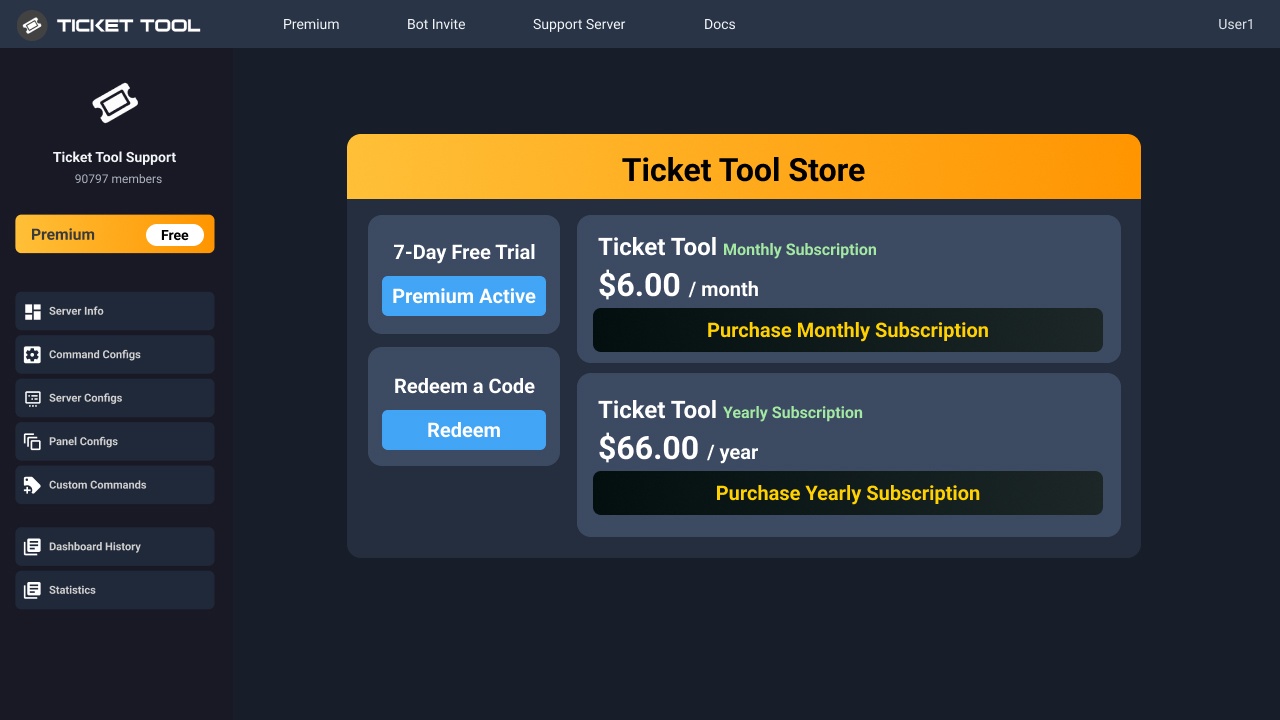
You can purchase Ticket Tool Premium here! Buying it on our website allows you to have full control over your subscription:
 Cancel your subscription at any time
Change your billing interval (yearly/monthly)
Change your payment method
Add or remove server slots to your subscription
 Transfer the subscription between servers
Note: This level of control is only available when purchasing the subscription from our website.
You can manage your current subscriptions here, any billing questions or concerns, feel free to create a Billing Ticket via #🎫│make-a-ticket
<:TTWarning:1034178155872784494> Important Notice <:TTWarning:1034178155872784494>
Starting 
 (October 7th, 2024) Ticket Tool Premium pricing will increase to comply with Discord's new Monetization Policy. You can learn more about the upcoming changes [here](#📣│bot-news message)
 hollow oyster
Ty.
mystic flame
Moin jungs
 vagrant elbow
ابي ديشبورت
mystic flame
habe des panel eingestellt etc aber ich habe nh frage undzwar kann jeder spieler in die tickets reingucken bei meinem drop down style wie änder ich die berechtigung
humble sequoiaBOT
Ticket Tool - Ticketing without clutter - The #1 Discord support bot
lament prairie
vagrant elbow
ابي ديشبورت
تفضل ^
 scenic plinth
mystic flame
habe des panel eingestellt etc aber ich habe nh frage undzwar kann jeder spieler...
scenic plinth
mystic flame
habe des panel eingestellt etc aber ich habe nh frage undzwar kann jeder spieler...
Sie müssen die Rollen des Supportteams für jedes Panel ändern, bei dem das Problem auftritt. Sie finden die Option unter „Allgemein“ in Ihren Panel-Einstellungen.
lament prairie
vagrant elbow
<@967813001220599838>
ياقلبي فوق
lament prairie
humble sequoia
https://tickettool.xyz/manage-servers
هذا الرابط
lament prairie
$help
humble sequoiaBOT
lament prairie
$help
1. Go into your Dashboard
2. Open your Panel Configs tab
3. Select the panel you want to ping your support on
4. Open the Ticket options menu
5. Click on Edit Ticket Message
6. In the Message Content use one of the role mention syntax (**{@Role Name}**/**{Role ID}**)
7. Save changes
Note: For this to work properly, Ticket Tool requires the Mention Everyone permission. Or the role must have the Allow anyone to @mention this role setting enabled
lament prairie
vagrant elbow
ابي وقت الشخص يفتح تكت يمنشن الادارة كيف وش اعمل بالدشبورد
شوف الشرح الي فوق ولو في شي ما فهمته خبرني اوضحه لك
humble sequoiaBOT
 fair tusk
$help
fair tusk
$help
</add:1029783024306507887> - Gives an additional user or role access to the current ticket channel. They are given the same permissions as the User Opened Permissions.
</remove:1029783024306507888> - Removes a user's or role's access to the ticket channel if they had access to the ticket when it was created, or if they had been added with the </add:1029783024306507887> command.
</open:1029783024306507893> - Re-opens a ticket channel that is in the Closed state.
</close:1029783024306507892> - Closes a ticket channel that is in the Opened state.
</rename:1029783024264564757> - Changes the ticket name, or resets its name if no new name given.
</claim:1029783024306507889> 💎 - If Ticket Claiming is enabled, this command allows a support team member to claim or unclaim the ticket.
</closerequest:1029783024306507891> - Sends the Close Ask Message to the ticket channel.
</transcript:1029783024264564758> - Generates a transcript of the ticket, or channel if 💎 Premium, with the given settings.
</new:1029783024264564762> - Create a new Command Style Ticket
</premium:1029783024306507894> - Checks the Premium status of the server you ran the command on.
</debug:1029783024264564765> - Provides you troubleshooting information about your server and the channel you ran the command.
</permissionlevel:1029783024264564760> - Your level permissions within the server, allows you to know if you are able to access a dashboard.
</ping:1029783024306507895> - Provides the current latency between your server, the bot, and the Discord API. This might be used while troubleshooting.
</help:1029783024264564756> - The command you used to get here!
</id:1029783024264564764> - Returns the ID of the given channel/role/emoji, providing no input will return the server's ID.
</invite:1029783024264564763> - Invite for the bot and the Support Server.
mystic flame
wie stelle ich ein das ich beim dropdown style verschiedene rollen verschiedene tickets reingucken können
humble sequoiaBOT
For more convenient use of multipanels, you can now combine panels on the dashboard. This will allow you to directly send the multipanel from the dashboard or via the $panel ID command.
Where can I find this?
You can find this setting on the Dashboard -> Panel Configs -> Panel -> Attached Panels
Note: if you're attaching all the panels to a panel called English, don't include English in the attached panel's box (If you do this, it will create a duplicate)
This will put all buttons from all of your panels on one message. The message is the panel message from the panel you're combining these panels in.
lament prairie
fair tusk
Howdy, how to make a panel that has multiple buttons?
Hey there! see above ^
fair tusk
Thanobyou
lament prairie
You're welcome
vagrant elbow
lament prairie
شوف الشرح الي فوق ولو في شي ما فهمته خبرني اوضحه لك
ايوا messege content ما اجدها
 wild pebble
vagrant elbow
humble sequoia
wild pebble
vagrant elbow
humble sequoia
بس وقت ابي احط الرول احط بس كذا ??
{ @اداري👑MYSTERY ~TOWN👑 }
@lament prairie
mystic flame
Wie kann ich die nachrichten löschen die Reingeschickt werden in dem chat wo der bot ist
also automatisch
humble sequoiaBOT

Deutsches Support-Team
Wenn du Hilfe vom Deutschen Support-Team erhalten möchtest gehe in #🎫│make-a-ticket und öffne durch einen Klick auf den :flag_de: Button ein Ticket.
worldly helm
mystic flame
Wie kann ich die nachrichten löschen die Reingeschickt werden in dem chat wo der...
Hallo! Welche Nachichten? Könntest du bitte ein foto zeigen?
mystic flame
habs hinbekommen danke
 north escarp
السلام عليكم أبي طريقه أني اسوي اول ما اضغظ زر فتح التكت تظهرلي اسئله مثل كذا
 humble sequoiaBOT
تتيح نماذج الدسكورد للمستخدم الإجابة على الأسئلة الفردية في النموذج المنبثق، والذي يعرض بعد ذلك الإجابات في رسالة التذكرة. يمكن أن يوفر هذا الوقت إذا كنت تعرف بالضبط ماذا تريد أن تطلبه من المستخدم.
إعداد النماذج
يمكنك تفعيل النماذج ضمن Panel Configs > Form Option > Edit Forms Option. في النافذه التي ظهرت، يمكنك الآن تفعيل وتعديل النموذج الخاص بك.
خيارات النموذج
يمكنك إضافة 5 أسئلة كحد أقصى في النماذج، وهو حد من قبل الدسكورد. ولكل سؤال يمكن أن يملك وصف يظهر في خانة الإجابة، حد أقصى وحد أدنى لعدد الحروف، متعدد الأسطر، وأيضًا الخيار لجعل السؤال مطلوب.
الخيارات
Question Title ➞ سؤالك هنا
Question Placeholder ➞ الوصف الذي سيظهر على خانة الإجابة
Required ➞ في حالة التفعيل، سيتوجّب على المستخدم الإجابة على هذا السؤال لإرسال النموذج
Multi-Line Input ➞ للسماح للمستخدم بإدخال نص متعدد الأسطر
Minimum and Maximum Input ➞ تعيين حد أدنى وحد أقصى للنص المُدخل بواسطة المستخدم
عرض الجواب
لعرض الإجابات من المستخدم، تحتاج إلى تفعيل
Auto display form results on the ticket message as an additional embed
إذا كنت لا تريد Embed آخر في رسالة التذكرة، فإنتقل إلى Panel Configs > Ticket Options > Edit Ticket Message. هناك ستستخدم المتغيّر (variable) {create.form.x} وإستبدل x برقم سؤالك. على سبيل المثال، يمكن عرض إجابة سؤال 1 بإستخدام المتغير {create.form.1}. إذا لم تستخدم هذا المتغير، فستفقد إجابة المستخدم على النموذج.

 still lavaBOT
 Dan
Dan
يا أخي السلام عليك! انظر أعلاه من فضلك. اسمحوا لي أن أعرف إذا كان لديك أي أسئلة
From English (EN) To Arabic (AR)
restive condor
north escarp
السلام عليكم أبي طريقه أني اسوي اول ما اضغظ زر فتح التكت تظهرلي اسئله مثل كذا
^
north escarp
restive condor
^
شكرا
north escarp
still lava
لا شكرا لك
restive condor
 still lavaBOT
Dan
still lavaBOT
Dan
لا. وهنا التعليمات
From English (EN) To Arabic (AR)
humble sequoiaBOT
تحل قائمة الخيارات محل الأزرار الموجودة في رسالة لوحة التذاكر الخاصة بك وتستخدم القائمة مع جميع اللوحات الخاصة بك. لإعداد هذا، توجّه الى إعدادات اللوحة، وحدد لوحة التذاكر الرئيسية.
<:Numbericons1:1018864164032225340> تمكين نمط الخيارات
أولًا، عليك تفعيل نمط الخيارات. وبعدها يجب عليك إضافة عناصر في محرّر الخيارات. الآن يمكنك البدء بتعديل الخيارات الخاصة بك!
<:Numbericons2:1018864168041971712> محرر الخيارات
كل سطر في محرر الخيارات يمثّل سطر من قائمة الخيارات على الدسكورد. يمكنك إضافة المزيد من الخيارات، بواسطة الضغط على
أولًا، عليك إختيار لوحة تذاكر. هذه هي اللوحة التي سيفتح لها هذا الخيار تذكرة.
لا تقم بتحديد نفس اللوحة مرتين. يجب أن يكون لكل خيار لوحة مختلفة
وبعد ذلك يمكنك وضع عرض. هذا هو عنوان هذا الخيار وسيظهر في قائمة الخيارات. يمكن تعيين الوصف مباشرة بعد ذلك، والذي سيكون أسفل العنوان باللون الرمادي.
بالإضافة إلى ذلك، يمكنك تحديد رمز تعبيري (إيموجي) سيتم عرضه أمام كل خيار. يمكنك إما إدخال معرف الرمز التعبيري يدويًا أو تحديده في أداة التحديد.
المشاكل الشائعة ⚠️
- اللوحة لا تعمل؟ تأكد أنك قمت بإدخال رمز تعبيري صحيح.
- الخيار لا يظهر؟ تحقق مما إذا كان هناك خياران لهما نفس اللوحة في محرر الخيارات.
$ardropdown
north escarp
شكرا جدا لك
still lavaBOT
Dan
مرحبًا بك
From English (EN) To Arabic (AR)
lament prairie
vagrant elbow
ايوا messege content ما اجدها
الـ message content هي رسالة التكت يقلبي
lament prairie
vagrant elbow
بس وقت ابي احط الرول احط بس كذا ??
{ @اداري👑MYSTERY ~TOWN👑 }
كذا {@اداري👑MYSTERY ~TOWN👑 } او {ايدي الرتبة}
 late cliff
I have two servers showing up on my dashboard and it wont let me add configure moe
humble sequoiaBOT
Don't see your server in the dashboard?
Try using the Sync Servers button on your top center of the Dashboard page
You will possibly need to relog. Look below to see the steps on how to relog.
If this doesn't work
You should relog from the dashboard, you can do this by clicking here to log out immediately, and then log back in
Note:
You need one of these 3 things to access the dashboard.
1. Server Owner (Level: 6)
2. Server Administrator (Level: 4)
3. Dashboard Role (Level: 2)
:warning: You can check your level using the </permissionlevel:1029797400174399542> command on your Discord Server
If the bot's response is:
- @User is permission level: 0 (User)
You don't have any of the 3 levels required to access the server's dashboard
 restive condor
 thorny steeple
Hey there! Could I get your server name or ID please
thorny steeple
1088994354145792010
restive condor
thorny steeple
1088994354145792010
You have a bot error on the Dashboard. Your premium subscription seems to have expired.
You can simply re-subscribe on our website
https://tickettool.xyz/premium-purchase
Ticket Tool - Ticketing without clutter - The #1 Discord support bot
Or you will need to switch back to the standard bot
thorny steeple
i just bought it yesteday
thorny steeple
yes
restive condor
Perfect then. If you go to your Dashboard > Profile > Subscriptions or https://tickettool.xyz/billing directly, you will be able to manage and transfer your subscription from there
Example
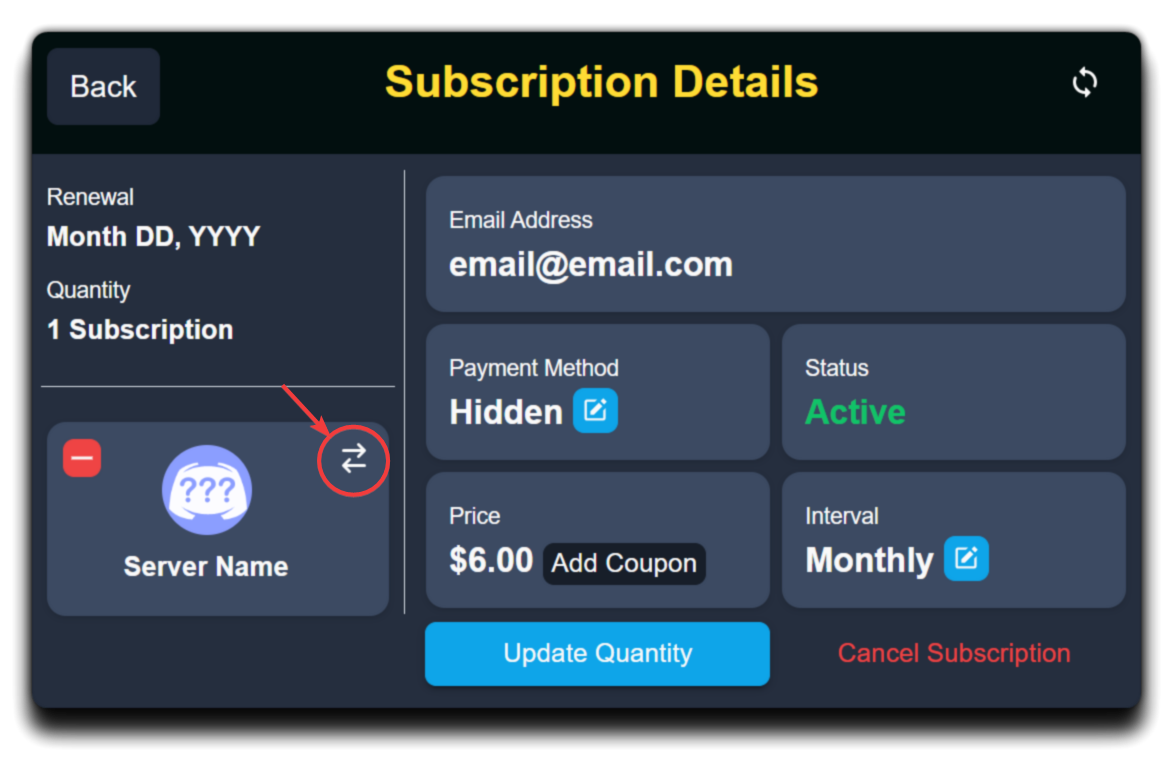
You can also see a transfer history there. You may have accidentally moved the subscription
 gentle idol
hwo do i make it so that a specific role cannot see a specific ticket panel
restive condor
gentle idol
hwo do i make it so that a specific role cannot see a specific ticket panel
Hey there! Each panel can have its own support team roles.
Simply select the corresponding ones for that panel specifically from your Dashboard > Panel Configs > General
gentle idol
i have a multi ticket panel on right now, i need different roles on different panels
yfm?
restive condor
Yes, each button is its own panel
gentle idol
yeah but when i open a panel, the role thats not supposed to see the ticket still sees it
as from what im seeing in "view server as role"
restive condor
Does that role have administrator permissions?
 stray pelican
Can anyone help?
restive condor
gentle idol
as from what im seeing in "view server as role"
That's not great for Ticket Tool testing. Please try it with another user or an alt account
humble sequoiaBOT
View As Role feature
Discord's integrated View As Role feature will allow you to see how different groups of roles will have access to your server's channels. Even though, this feature isn't reliable for thoroughly testing Ticket Tool considering that the tickets are created based on User roles, and that Roles permissions are only used for Support Team Roles, and Additional Roles.
For testing Ticket Tool as a user we suggest you ask a friend to open a ticket for you as a regular member would do, or use an alternative account to simulate the same process to make sure everything is set properly.
restive condor
stray pelican
Can anyone help?
Hey there! How can I help?
gentle idol
restive condor
Does that role have administrator permissions?
nope
so youre saying a good way to test this is by an alt account
restive condor
Correct
gentle idol
aiiight ill let you know
stray pelican
restive condor
Hey there! How can I help?
My old account was disabled and i saved 2-3 transcripts in link form. After a few months the link was invalid by any chance I can get it back ?
restive condor
stray pelican
My old account was disabled and i saved 2-3 transcripts in link form. After a fe...
Unfortunately, no. We do not store transcripts for privacy reasons.
Please ensure you save the HTML file instead of the link in the future 😄
stray pelican
restive condor
Unfortunately, no. We do not store transcripts for privacy reasons.
Please ensu...
I can provide those expired links tho.. from that u can help me ?
restive condor
We don't have access to transcripts in any way. The only way to access it would be to generate a new link from the embed message or access the HTML file
gentle idol
restive condor
Correct
roles still dont have perms yet can see tickets
even the everyone role can see it
and im not new to discord, or new to making discord servers
ive done all i need to remove the everyone role, but its still seeing the tickets
humble sequoiaBOT
How to edit `@everyone`'s permissions
Head over to your Dashboard ➞ Panel Configs ➞ Permission Options ➞ Everyone Role Opened/Closed and customize the base permissions for everyone in your tickets.
Note: This set of permissions may be affected by the overrides of Support Team, Additional Roles, and User permissions.
 gentle idol
done that already
worldly helm
gentle idol
even the everyone role can see it
Look above please ^^
restive condor
Please remove it from the blacklist roles or they won't be able to open tickets
Can I get your server name or ID please
gentle idol
its not that i want them to open the tickets, cause they cant even see the channel to open the ticket
but they can see the tickets that are open
gentle idol
restive condor
Can I get your server name or ID please
the discord server?
restive condor
Yes
restive condor
gentle idol
1250737654417592330
Looks good, other than the fact the entire server is blacklisted. Which panel is the one you're having issues with?
gentle idol
you can see the panels, right?
restive condor
Yes
gentle idol
so if you look at the first panel, theres a few roles inside there that can see the tickets
normal, correct. but then in the second panel, i dont want them to see it, but they can still see it
they dont have admin perms either
my main goal here is to basically have each panel for a specific role
restive condor
So for the example the assistant district attorney role can see panel 2 tickets?
gentle idol
they can
but not supposed to
distrinct attorney too
by the way, we can call to make it easier if youre comfortable with that
restive condor
I see and is this after fixing everyone being able to see your tickets?
gentle idol
well i havent managed everyone’s roles
but from what i see, it does work for the first panel
the roles that arent support in the first panel cant see the tickets made from there
restive condor
Alright. I'll bring you into a ticket as I'll need a server invite
humble sequoiaBOT
━━ User's inquiry has been moved to a ticket ━━
 manic stratus
@sage jewel
 sage jewel
هلا؟

 humble sequoiaBOT
For more convenient use of multipanels, you can now combine panels on the dashboard. This will allow you to directly send the multipanel from the dashboard or via the $panel ID command.
Where can I find this?
You can find this setting on the Dashboard -> Panel Configs -> Panel -> Attached Panels
Note: if you're attaching all the panels to a panel called English, don't include English in the attached panel's box (If you do this, it will create a duplicate)
This will put all buttons from all of your panels on one message. The message is the panel message from the panel you're combining these panels in.
lament prairie
manic stratus
تفضل شوف الشرح الي فوق ولو في شي مو فاهمه خبرني ^
 blazing sandal
Hi People - Im trying to create a server where i can verify people before they can see whats on the server - I am able to hide all channels apart from the ticket channel? can i get some help please
humble sequoiaBOT
Creating a verification system with Ticket Tool <:TicketToolWhite:1073948900056105060>
Using Discord's permission system you can create a setup that allows your team to manually verify new server members while keeping the rest of the server hidden!
Please configure the permissions of your server's channel as depicted below:
Category Permissions
- Go to your category permissions, or channel permissions in case they are not synced with the category.
- Set the View Channels permission to
 for the @everyone role.
 - Set the View Channels permission to
 for your
 @Memberor@Verifiedrole. - Repeat this process for all of your server's categories.
Ticket Panel Channel
- Set the View Channel permission to for the @everyone role.
- (Optional) If you'd like for verified members to not be able to see that ticket channel anymore, set the View Channel permission to for your
@Memberor@Verifiedrole.
-# Note: Your staff team will still need to grant a verification role. If you have premium, you can check our Ticket Closed Roles feature
$manualverification
restive condor
blazing sandal
Hi People - Im trying to create a server where i can verify people before they c...
Hey there! Yes, see above please ^
iron nightBOT
Gave +1 Rep to @restive condor (current: #2 - 1334)
manic stratus
lament prairie
تفضل شوف الشرح الي فوق ولو في شي مو فاهمه خبرني ^
ماني فاهم
lament prairie
manic stratus
ماني فاهم
شو الي مو فاهمه بالضبط؟

 lament prairie
ياقلبي رسلت لك فوق
manic stratus
ما اعرف انجليزي انا
lament prairie
humble sequoia
.
lament prairie
manic stratus
ما اعرف انجليزي انا
روح للـ Dashboard اختار سيرفرك واعمل بانل جديد بعدين ارجع للبانل الأساسي وروح لخيار Panel بعدين اول خيار الي اسمه Attached Panels (Multi Panels) وضيف البانل الي عملته قبل شوي وكرر الطريقة لكل زر تبغاه
 lament prairie
manic stratus
وين ال dashboard
lament prairie
manic stratus
وين ال dashboard
هو الموقع حق البوت ، خلاص الحين كمل باقي التعليمات
manic stratus
الحين اخترت
blazing sandal
restive condor
Hey there! Yes, see above please ^
Hi dan i have tried the above and its not working
 restive condor
blazing sandal
Hi dan i have tried the above and its not working
restive condor
blazing sandal
Hi dan i have tried the above and its not working
How are you testing this?
lament prairie
manic stratus
الحين اعمل Update او Send
 lament prairie
manic stratus
كيف اكرره
lament prairie
manic stratus
كيف اكرره
قصدي لو بدك تضيف ازرار كمان
blazing sandal
restive condor
How are you testing this?
by sending an invite to another phone and joining the server
lament prairie
manic stratus
ابغي اضيف ازرار
اي يقلبي نفس الشي اعمل بانل جديد وضيفه مثل الطريقة الي فوق
restive condor
blazing sandal
by sending an invite to another phone and joining the server
And are they still able to view all channels or just some?
manic stratus
ظهرلي الثلاثه ذولا كيف اعدلهم
 blazing sandal
They can only view a channel i have called verification so they can submit their email - But they can also see the help section to create a ticket which i want to hide
restive condor
blazing sandal
They can only view a channel i have called verification so they can submit their...
That category should only appear with the one channel they can see
The only way to hide it would be to move the channel outside a category
lament prairie
manic stratus
ظهرلي الثلاثه ذولا كيف اعدلهم
تقصد تغير الأسم؟
manic stratus
lament prairie
تقصد تغير الأسم؟
يب
lament prairie
manic stratus
يب
روح للبانل الي بدك تغير اسمه بعدين
Buttons -> Create Ticket -> Button Text -> غيره
blazing sandal
restive condor
The only way to hide it would be to move the channel outside a category
I have a category called ticket centre which is the one i cant hide
the verification one is visible as it should be
i have managed to hide everything apart from that one category lol
restive condor
blazing sandal
I have a category called ticket centre which is the one i cant hide
And there are no channels they can view in that category?
blazing sandal
catergory called ticket centre and then create a ticket for help etc
manic stratus
lament prairie
روح للبانل الي بدك تغير اسمه بعدين
> Buttons -> Create Ticket -> Button Text ->...
وين Buttons؟
 lament prairie
manic stratus
وين Buttons؟
lament prairie
manic stratus
وين Buttons؟
مو من هنا يقلبي اخرج من الخيار هذا
manic stratus
lament prairie
مو من هنا يقلبي اخرج من الخيار هذا
 lament prairie
manic stratus
lament prairie
manic stratus
 manic stratus
اسمع
manic stratus
lament prairie
تقدر تيجي فويس ؟ وافتحلك شير ؟ بدون ما تتكلم
lament prairie
manic stratus
تقدر تيجي فويس ؟ وافتحلك شير ؟ بدون ما تتكلم
ما اقدر للأسف
 lament prairie
manic stratus
وين اروح
lament prairie
manic stratus
وين اروح
اول زر Create Ticket
manic stratus
تمام كتبته
blazing sandal
thats the only problem
manic stratus
بعديها
lament prairie
manic stratus
بعديها
سوي نفس الشي لباقي الأزرار بعدها اعمل Update للرسالة الي في الديسكورد او ارسلها مرة ثانية من خيار Send
 manic stratus
وشو اكتب ب ال Update
lament prairie
manic stratus
وشو اكتب ب ال Update
حط رابط الرسالة حقت البوت الي هي بالصورة

 lament prairie
manic stratus
مافي شي تغير
lament prairie
manic stratus
مافي شي تغير
يقلبي لازم كل زر تغيره من البانل حقه ، اضغط على المستطيل الي فوق (نفس الي بالصورة) واختر بانل بعدين سوي له نفس الطريقة الي سويتها مع الأول وغير الأسم
 lament prairie
manic stratus
معليش تعبتك معي
lament prairie
manic stratus
معليش تعبتك معي
مافي مشكلة
blazing sandal
Anyone able to help?
restive condor
blazing sandal
catergory called ticket centre and then create a ticket for help etc
And you have denied view channel for the everyone role for that category specifically?
blazing sandal
yes only ticket tool is able to view
restive condor
Then they shouldn't be able to see it if it's set to
Do members get any join roles?
thorny steeple
Hey @restive condor
The problem keep ocurring https://cdn.discordapp.com/attachments/1069041142441713686/1281323729112268910/image.png?ex=66db4d36&is=66d9fbb6&hm=e2f06cbedab1e5947b6ac052d6b4a233479d4c6762412e5bbbe38079e994f538&
 restive condor
thorny steeple
The problem keep ocurring https://cdn.discordapp.com/attachments/106904114244171...
restive condor
thorny steeple
The problem keep ocurring https://cdn.discordapp.com/attachments/106904114244171...
You're good now. The only thing is you have the premium bot enabled and haven't invited yet
humble sequoiaBOT
The first thing you will need to do is invite the premium bot, an invite can be found here
Once the bot is in your server we will head to the dashboard and manage your server. When you are managing your server, you want to head into "Server Configs" then click the drop down menu under "Select the bot you would like to use on this server" then click "Ticket Tool#6207" and then save.
 restive condor
There's an invite ^
 lethal solar
how do i change this

like the button thing
like one of them is els but it says livery
 austere forge
lethal solar
like one of them is els but it says livery
austere forge
lethal solar
like one of them is els but it says livery
Hi there 🙂
Dashboard > Panel configs > Buttons - create ticket and edit Button Text
austere forge
Im not arabic, sorry.
ashen seal
ok ok
ashen seal
austere forge
Im not arabic, sorry.
u know arabic person
austere forge
no sorry
ashen seal
ok
lethal solar
austere forge
Hi there 🙂
Dashboard > Panel configs > Buttons - create ticket and edit `Button...
i dont have buttons
nvm it was hidng behind my discord tab
 opal gorge
hey guys how can you get the ticket channel deleted when you close the ticket?
warm summit
 crude valley
Hello, I don't know how to open a ticket. Can you show me?
crude valley
Hello, I don't know how to open a ticket. Can you show me?
In this server? #🎫│make-a-ticket
warm summit
opal gorge
hey guys how can you get the ticket channel deleted when you close the ticket?
Automatically? I believe that's a premium only feature under the Automations section.

 frail jacinth
Morning, I recently added the Ticket Bot to my server, how can I make the panel look like this, so multiple buttons used for different purposes?

Do I create multiple panels?
humble sequoiaBOT
For more convenient use of multipanels, you can now combine panels on the dashboard. This will allow you to directly send the multipanel from the dashboard or via the $panel ID command.
Where can I find this?
You can find this setting on the Dashboard -> Panel Configs -> Panel -> Attached Panels
Note: if you're attaching all the panels to a panel called English, don't include English in the attached panel's box (If you do this, it will create a duplicate)
This will put all buttons from all of your panels on one message. The message is the panel message from the panel you're combining these panels in.
gilded verge
humble sequoia
Hi @frail jacinth, check 
frail jacinth
alr, ty!
 lethal sequoia
Hello,
I'm seeing the message like this, and I’m unable to create a ticket. What should I do to fix this?
 hollow oyster
lethal sequoia
Hello,
I'm seeing the message like this, and I’m unable to create a ticket. What...
hollow oyster
lethal sequoia
Hello,
I'm seeing the message like this, and I’m unable to create a ticket. What...
It means you didn’t have the correct permission if I’m right
Tho I won’t be able to help you today until 5PM
lethal sequoia
hollow oyster
It means you didn’t have the correct permission if I’m right
After connecting the ticket tool with the website, the permissions were approved, and it seems like the issue is resolved. I’ll let you know if any other problems arise. Thank you 🙂
iron nightBOT
Gave +1 Rep to @hollow oyster (current: #334 - 1)
hollow oyster
lethal sequoia
After connecting the ticket tool with the website, the permissions were approved...
👍
ashen seal
 wet stratus
<@1235693844658389093>
wet stratus
<@1235693844658389093>
بدري قدني قيلت
 carmine grove
hey guys how can i change the name of the bot?
worldly helm
carmine grove
hey guys how can i change the name of the bot?
Hey there! Yes! Look below
humble sequoiaBOT
Ticket Tool Custom Avatar
As of now, you are not able to change Ticket Tool's profile picture, nonetheless, our Development Team is working on the release of white labels, this is your own custom bot!
For the time being, you can change the bot's nickname by right-clicking the bot in the user list on your server and clicking Change Nickname

$avatar
 atomic kestrel
does anyone know if ticket tool can assign a role or do my mods need to be given that permision
worldly helm
atomic kestrel
does anyone know if ticket tool can assign a role or do my mods need to be given...
Hey there! No, ticket tool cannot do such a thing!
atomic kestrel
What does this mean then
Ticket Closed Roles (Triggered on Ticket Close/Delete)
Roles to add to ticket owner
atomic kestrel
worldly helm
Hey there! No, ticket tool cannot do such a thing!
Lisa
I set it to apply my role to the user when I closed it.
worldly helm
Ohh! I thought you mean auto roles or reaction roles. Sorry, but yes you can do that
atomic kestrel
well I have that set but it doesnt apply the role
when I click close.
Sorry might have figured it out myself
worldly helm
Wierd, maybe the apply role is above the Ticket tool role
 fair crescent
i have a role in my ticket tool called admin how do i remove the role so admins cant see tickets anymore?
austere forge
fair crescent
i have a role in my ticket tool called admin how do i remove the role so admins ...
Hi there 🙂
Dashboard > Panel configs > General - Support team role and remove it
fair crescent
i have done that does the old ticket with those roles still see them or we have to clear the old ones
and how do we refresh or update the discord with the new updates from the panel?
austere forge
fair crescent
and how do we refresh or update the discord with the new updates from the panel?
changes are applied to new tickets, they will still have access to the old tickets before the change.
and you can use update or send to update your panel on your server
 iron nightBOT
Gave +1 Rep to @austere forge (current: #9 - 548)
fair crescent
thats a cool bot! how do we get that
austere forge
fair crescent
thats a cool bot! how do we get that
that reputation system with bot YAGPDB.xyz 😃
Unfortunately we won't be able to help you with the setup.
timber kernel
vagrant elbow
/setup
Can we help you?
humble sequoiaBOT
**١- دعوة البوت إلى سيرفرك**
يجب عليك اولاً دعوة البوت إلى سيرفرك من خلال رابط دعوة البوت، بعد ذلك يُمكنك تعديل خصائص البوت عبر لوحة التحكم.
**٢- إنشاء لوحة**
لإنشاء لوحة يجب عليك التوجه إلى لوحة التحكم ، ثم قم بإختيار سيرفرك ، بعد ذلك توجه إلى قسم "Panel Config".
بمُجرد وصولك إلى القسم المذكور أعلاه، يجب عليك الضغط على زر "Create Panel" لإنشاء اللوحة ، ومن ثمها قُم بإدخال اسم اللوحة (يمكنك ملء اي اعدادات اختياريه تريدها).
بعد إدخال اسم اللوحة و ملء الإعدادات ، قُم بالضغط على "Create Panel" لإتمام عملية انشاء اللوحة الخاصة بك بنجاح!
سيتم إرفاق صورة توضيحية لعملية إنشاء اللوحة بالطريقة الصحيحة؛
**٣- إرسال اللوحة إلى روم**
بعد الإنتهاء من عملية إنشاء اللوحة بنجاح ، يجب عليك الآن إرسالها إلى روم بإستخدام زر "Send" على لوحة التحكم بقسم الـ "Panel Config".
بعد الضغط على الزر ، قم بإختيار الروم المفضل لإرسال اللوحة.
بعد إختيار الروم قُم بالضغط على زر "Send" لإتمام عملية إرسال اللوحة!
سيتم إرفاق صورة توضيحية لعملية إرسال اللوحة بالطريقة الصحيحة؛
**هل تواجهك مشكلة أثناء محاولة إرسال اللوحة؟**
قُم بإرسال الامر `/debug" في اي روم يستطيع البوت رؤيته ، ثم تأكد أن البوت لدية جميع الصلاحيات اللازمة لإرسال اللوحة.
lament prairie
wet stratus
كيف أحط تكت ب السيرفر حقي ؟
تفضل شوف الشرح الي فوق^
 crisp jacinth
Wondering if we still get premium for boosting this server
austere forge
crisp jacinth
Wondering if we still get premium for boosting this server
Hi there 🙂
Not any more, here are the perks for server boosters > https://discord.com/channels/509192800865353738/927789598208311366
 sweet river
How do i make it available for members to open tickets
cuz it shows like no permission
lament prairie
sweet river
How do i make it available for members to open tickets
Dashboard -> Panel Configs -> Buttons -> Create Ticket -> Disable Roles/Allowed Roles
sweet river
yeah i put allowed roles as everyone and members
sweet river
lament prairie
Dashboard -> Panel Configs -> Buttons -> Create Ticket -> `Disable Roles/Allowed...
but it still seems to not be working
 sweet river
 idle flint
Do you have "support team only" selected?
idle flint
Do you have "support team only" selected?
nope i dont
 idle flint
Might be best to head to #🎫│make-a-ticket and open a ticket so one of of support team can help you one-on-one 🙂
sweet river
Alright ill do that in a min
Ill try fix it one last time and if i cant ill open a ticket
worldly helm
sweet river
Ill try fix it one last time and if i cant ill open a ticket
One last thing, please check your Blacklisted roles!
sweet river
worldly helm
One last thing, please check your Blacklisted roles!
uhh where would that be
worldly helm
Dashboard —> Server configs
sweet river
worldly helm
Dashboard —> Server configs
I dont think i see it
 worldly helm
sweet river
I dont think i see it
worldly helm
sweet river
I dont think i see it
Server info
Command configs
Server configs
Panel configs
Custom Commands
sweet river
worldly helm
Server info
Command configs
**Server configs** <:check_green:836268328640184380>...
ohh
Yeah ive had blacklisted members for some reason
worldly helm
Great!!
Glad to help
sweet river

jade topaz
Hey
Why don't guys see my messages in the ticket, they're just empty?
Help pls
@idle flint @covert swallow
lament prairie
jade topaz
Why don't guys see my messages in the ticket, they're just empty?
Dashboard -> Panel Configs -> Permissions -> Everyone Role Permissions -> Edit opend -> Read Message History 
 livid juniper
hello, hafe yure a german support? i hafe a probleme
humble sequoiaBOT
Deutsches Support-Team
Wenn du Hilfe vom Deutschen Support-Team erhalten möchtest gehe in #🎫│make-a-ticket und öffne durch einen Klick auf den :flag_de: Button ein Ticket.
lament prairie
@livid juniper ^
livid juniper
thanks
lament prairie
You're welcome
worldly helm
livid juniper
hello, hafe yure a german support? i hafe a probleme
Hallo! Hash du schon ein ticket geöffnet?
 ancient rose
Hi there, I have the ticket bot set up in my server. But the problem I have is that when new people join they come into the mane page. I went to the website and i can't find any of the tickets that i set up. Help please.
worldly helm
Hey there!
Do you mean that your Panel won't show up on discord?
ancient rose
All the tickets work. I just can't figure out how to set it so when people join they go to there own page and start a ticket. When I go to the website all the tabs I set up are not there or i'm not looking in the right place.
livid juniper
worldly helm
Hallo! Hash du schon ein ticket geöffnet?
ja habe ein englisches gemacht
humble sequoiaBOT
━━ Pit_limiter's inquiry has been moved to a ticket ━━
worldly helm
ancient rose
All the tickets work. I just can't figure out how to set it so when people join ...
hmm that is pretty wierd, can you please provide a screenshot?
humble sequoiaBOT
━━ User's inquiry has been moved to a ticket ━━
 crisp scroll
how to setup like this and the bot will change the name of the ticket

 thick jetty
yooo
so im trying to add ticket to a server, and i set up channels and gave role perms for tickettool but my server will not show up on the tt dashboard
like to go manage and edit ticket texts, etc
humble sequoiaBOT
A Discord Form lets the user answer individual questions in a pop-up Form, which then displays the answers in the ticket message. This can save time if you already know what you want to ask the user.
Setup Forms
Forms can be enabled under Panel Settings > Form Options > Edit Forms Options. In the new pop-up window, you can now enable and edit your own Form.
Form Options
You can add up to 5 questions in the Discord form. This is a Discord limitation. Each question can have a placeholder in the input field, a minimum and maximum input, multi-line, and also the option to have the answer required.
Options
Question Title ➞ Your Question goes here
Question Placeholder ➞ The placeholder text in the input field
Required ➞ If enabled, the user has to answer this question, to submit the form
Multi-Line Input ➞ Allows the user to input multiple lines
Minimum and Maximum Input ➞ Set a minimum and maximum input value for the user
Displaying the Answer
To display the answers from the user, you need to enable Auto display form results on the ticket message as an additional embed
If you don't want a second embed, go into your Panel Configs > Ticket Options > Edit Ticket Message. You use the variable {create.form.x} and replace x with the number of your question. For example, the response to Question 5 can be displayed with {create.form.5}.
restive condor
crisp scroll
how to setup like this and the bot will change the name of the ticket
Hey there! See above please ^^
Custom ticket names are a premium feature unfortunately
restive condor
thick jetty
so im trying to add ticket to a server, and i set up channels and gave role perm...
Hey there! Try the steps below please
humble sequoiaBOT
Don't see your server in the dashboard?
Try using the Sync Servers button on your top center of the Dashboard page
You will possibly need to relog. Look below to see the steps on how to relog.
If this doesn't work
You should relog from the dashboard, you can do this by clicking here to log out immediately, and then log back in
Note:
You need one of these 3 things to access the dashboard.
1. Server Owner (Level: 6)
2. Server Administrator (Level: 4)
3. Dashboard Role (Level: 2)
:warning: You can check your level using the </permissionlevel:1029797400174399542> command on your Discord Server
If the bot's response is:
- @User is permission level: 0 (User)
You don't have any of the 3 levels required to access the server's dashboard
crisp scroll
ok
thick jetty
yes, i think our server will do premo just have to talk w who pays who for how long etc lol
thank you
restive condor
crisp scroll
what is this variable for ?
 steel dune
I wanted to report a bug
Until yesterday it was normal, but today in the morning the tickets started to be opened outside the select category
I already went to the website, took it down and put it back in again and it keeps opening outside the category
 pseudo ravine
crisp scroll
what is this variable for ?
pseudo ravine
crisp scroll
what is this variable for ?
Hey there. It displays their answer to the first question
crisp scroll
ok
pseudo ravine
steel dune
I already went to the website, took it down and put it back in again and it keep...
Hey there. Make sure that the category has less than 50 channels, as Discord has a limit of 50 channels in a category
steel dune
pseudo ravine
Hey there. Make sure that the category has less than 50 channels, as Discord has...
wow
that's right
thanks for the answer
pseudo ravine
You're welcome, glad I could help!
 mossy breach
hi can you halp me
humble sequoiaBOT
⚠️ You're in the wrong place
We provide support for Ticket Tool Discord bot and cannot help you with whatever issue you have.
- We don't know which Support Team you should contact to get this issue resolved, and unfortunately we won't be able to accurately tell you.
If you don't have any further questions regarding our bot Ticket Tool, please close this ticket
mossy breach
may zan whan i what to go to i scrip it shows off but i cant turn it on
humble sequoiaBOT
⚠️ Please read the messages previously sent by our team ⚠️
 vast copper
can anyone help me plz why is it showing one only

 worldly helm
vast copper
can anyone help me plz why is it showing one only
worldly helm
vast copper
can anyone help me plz why is it showing one only
Hey there! You need one panel for each dropdown Option
vast copper
how i do it
vast copper
thank u
humble sequoiaBOT
فريق الدعم الفني العربي
عميلنا العزيز ان كنت تبحث عن مساعدة يرجى فتح تكت خاص بفريق الدعم الفني العربي
اذهب الى#🎫│make-a-ticket
ثم قم بلضغط على الايموجي الاتي (🇯🇴)
worldly helm
vagrant elbow
شباب
^^
 full bone
hey, when i try to click send it says undefined?
 lament prairie
full bone
hey, when i try to click send it says undefined?
lament prairie
full bone
hey, when i try to click send it says undefined?
try to use $panel ID in the channel
lament prairie
vagrant elbow
اذا ابي اعمل مشن ليلي فتح التكت كيف
Dashboard -> Messages -> Edit Ticket Message
واكتب {user} بالرسالة
 latent hound
Hello How do we tag moderators when a ticket is created?
lament prairie
$help
humble sequoiaBOT
lament prairie
$help
1. Go into your Dashboard
2. Open your Panel Configs tab
3. Select the panel you want to ping your support on
4. Open the Ticket options menu
5. Click on Edit Ticket Message
6. In the Message Content use one of the role mention syntax (**{@Role Name}**/**{Role ID}**)
7. Save changes
Note: For this to work properly, Ticket Tool requires the Mention Everyone permission. Or the role must have the Allow anyone to @mention this role setting enabled
lament prairie
latent hound
Hello How do we tag moderators when a ticket is created?
Hey there! see above ^
surreal osprey
latent hound
I wrote and created it to try but no moderator was tagged
{RoleName} / {RoleID}
latent hound
Can you give an example?
surreal osprey
{Moderaters} / {RoleID} (replace role id with the id of the mod role)
it can look like this with role id

when the ticket is opened, it looks like this:
 latent hound
Are you the one who opened the ticket?
 surreal osprey
you have {uer}, it must be {user}
latent hound
Since I opened the ticket, if it says user, I will be tagged anyway.
surreal osprey
it says {uer}, thats invalid
surreal osprey
latent hound
I am moderator but there is no tag

maybe tickettool doesn't have perms to mention the role
latent hound
 latent hound
surreal osprey
maybe tickettool doesn't have perms to mention the role
latent hound
surreal osprey
maybe tickettool doesn't have perms to mention the role
How do we open it?
surreal osprey
tickettool needs
 surreal osprey
latent hound
How do we open it?
surreal osprey
latent hound
How do we open it?
enable this and try again
latent hound
Do we give this permission to the bot within the server or via the dashboard?
I gave the permission on the server but it didn't work
surreal osprey
@echo yacht can you help this person please. i don't know how to assist further.
worldly helm
surreal osprey
<@611192230962659328> can you help this person please. i don't know how to assis...
Hello! Please don‘t ping for support.
worldly helm
latent hound
I gave the permission on the server but it didn't work
Hey there!
Can you make sure the bot‘s role is above the "moderator" role?
latent hound
Nothing has changed
worldly helm
Please show me your Ticket Message (on the dashboard) and check if you do have the Role.


 worldly helm
 keen locust
How do I fix this before it was working then it started to say this
keen locust
How do I fix this before it was working then it started to say this
Dashboard —> Panel configs —> Buttons —> Create ticket Enable it for your wanted role
keen locust
worldly helm
Dashboard —> Panel configs —> Buttons —> Create ticket `Enable it for your wante...
this?
 worldly helm
No sir
keen locust
or
 worldly helm
you just send the same image again
 worldly helm
No, please look at my message. It says "Buttons" not general
 worldly helm
keen locust
worldly helm
keen locust
Click on buttons
keen locust
okay
restive condor
latent hound
There is no tag i am moderator
Hey there, please ensure Ticket Tool has permission to MENTION EVERYONE AND ALL ROLES in its role settings
worldly helm
surreal osprey
tickettool needs
.
restive condor
You must assign the permission from your Server Settings > Roles > Ticket Tool > Permissions > Mention everyone and all roles
restive condor
No problem
 neat cedar
yo i am looking for help please guys, i am trying to know if with ticket tool it's possible to create a ticket and when a specific name of the ticket is like 001 it give the ticket automaticaly to the the user1, if the id is 2 it give automatically to the user 2 etc
worldly helm
Hey there! Look below
Note: This is a premium only featrue
humble sequoiaBOT
The ticket name is the default channel name of all tickets. To edit it, go to your Dashboard > Panel Configs > Ticket. There you can edit the channel name of opened and closed tickets. You can also use variables in there.
Note: This is a premium feature
neat cedar
neat cedar
yo i am looking for help please guys, i am trying to know if with ticket tool it...
ps: the user 1 cannot the the ticket of user 2 and the user 2 cannot see the ticket to user , is it possible ?
like i just want to know if it's possible
it's not just rename the ticket
 livid scaffold
worldly helm
neat cedar
ps: the user 1 cannot the the ticket of user 2 and the user 2 cannot see the tic...
livid scaffold
worldly helm
neat cedar
ps: the user 1 cannot the the ticket of user 2 and the user 2 cannot see the tic...
I‘m sorry, do you mean everyone can see the tickets?
neat cedar
worldly helm
I‘m sorry, do you mean everyone can see the tickets?
i mean like i want to user1 to autoclaim a ticket if the name of the ticket is 001-020 and the other user cannot see it, and like user 2 autoclaim 021-040 and other cannot see it, like i want to separate people from staff depend of the ticket name by autoclaiming
worldly helm
You can choose your Support Team for every of your panels depending on the option
neat cedar
worldly helm
You can choose your Support Team for every of your panels depending on the optio...
an option could be a ticket name ?
worldly helm
… If a user for example opens an "appeal" ticket, you can set the permission that only the owner and managers see the ticket. For a "General support" ticket all of your staff can view and message in them.
neat cedar
worldly helm
You can choose your Support Team for every of your panels depending on the optio...
oh ye but my idea is via the same pannel named "appeal" there is a form that the client/member can type something and it will be an ID, i want the ticket name to be the id typed and then via the name of the id it autoclaim to the good person, it's maybe easyer for u to understand ? it's rly rly rly specific
worldly helm
As i said, ticket names are premium only.
neat cedar
worldly helm
As i said, ticket names are premium only.
that is not a problem, i just want to know if it's possible, i would buy if it is. But it's not just rename, it's rename and autoclaim to the good person that's why i want to be sure it's possible before purshasing
worldly helm
i am sorry, but i don‘t understand what you‘re asking for. Could you please #🎫│make-a-ticket .
neat cedar
sure
 tawdry osprey
wheres the server
by that i mean the server i invited the bot to isnt on the dashboard
nvm i solved it myself
 soft cloud
Anyone else getting this?
 worldly helm
soft cloud
Anyone else getting this?
worldly helm
soft cloud
Anyone else getting this?
Hey there! Please check if your Premium is still active!
full bone
lament prairie
try to use `$panel ID` in the channel
like send a message in the channel saying $panel id?
nevermind, just fixed it myself
turns out i missed the colon in the server's emote for the panel button lol
 long glacier
and in this bot, can you make the logs visible (everything that was done on the server, like an audit log)?
and do you need to install the bot through the site or already on the server itself through the bot?
jade topaz
If I upgrade to premium plan, will I be able to attach a panel to an existing message by anyone other than the bot?
worldly helm
long glacier
and in this bot, can you make the logs visible (everything that was done on the ...
Hey there!
No, @humble sequoia or @pseudo glen does not provide a log option like other bots.
worldly helm
jade topaz
If I upgrade to premium plan, will I be able to attach a panel to an existing me...
Hello there!
Nope, sadly not.
long glacier
worldly helm
Hey there!
No, <@722196398635745312> or <@557628352828014614> does not provide...
so this bot won't show logs?
worldly helm
No, it only provides a ticket system.
 slow beacon
So i've been trying to edit the panel message but it won't let me type in the box. How can I add the panel message?
 worldly helm
slow beacon
worldly helm
slow beacon
Hey there!
Please click on " Add Embed" -->
 > Embed Editor - 1
slow beacon
worldly helm
Hey there!
Please click on "<:PremiumServerAccess:1192403069997158480> Add Embed...
Ahh thank you, I thought that bit was premium lol
iron nightBOT
Gave +1 Rep to @worldly helm (current: #28 - 140)
worldly helm
No worries!
Glad to help
restive condor
 merry jetty
Hi support my server members can't open a ticket
merry jetty
Hi support my server members can't open a ticket
Hey there! Any error message?
merry jetty
Says they don't have permission
 spiral gate
hey there, is there a way to stop deleting closed tickets - they should moved to: "ticket archiv" and users should see her own old tickets?^^ sry for my bad english
merry jetty
no
restive condor
merry jetty
Says they don't have permission
Could I get your server name or ID please
merry jetty
give me 1 second
spiral gate
merry jetty
Says they don't have permission
did your members have access to use reactions?
on this channel?
restive condor
spiral gate
hey there, is there a way to stop deleting closed tickets - they should moved to...
Hey there! Yes, enable TWO STEP TICKET from your Dashboard > Panel Configs > General to stop the ticket from being automatically deleted
Dashboard > Panel Configs > Category to select categories
And then go to your Dashboard > Panel Configs > Permissions > Ticket Owner Permissions - Edit Closed > View Channel
Alternatively, you could simply manually DM them a transcript and delete the ticket
spiral gate
 restive condor
That's not our bot though. That's another ticket bot
spiral gate
o.o
but i joined over this bot page xD
thats weird
ok, i used your ticket tool from here -> "add app" so i guess i have the right one know xD
restive condor
spiral gate
ok, i used your ticket tool from here -> "add app" so i guess i have the right ...
Lovely, try using the instructions above now and let me know if you have any questions 🙏
restive condor
merry jetty
1125440610376093809
That seems to be your user ID, not the server's. Can you confirm the server name please
merry jetty
Servidor Flopy
restive condor
merry jetty
Servidor Flopy
Dashboard > Server Configs > Blacklist Roles
You have the everyone role blacklisted
 spiral gate
F xD
spiral gate
so, dan i have a new problem xD
@merry jetty tested my ticket system but after closeing they can delete it and wrote after delete on a "normal channel" but people schould not delete closed tickets, and on permissions they dont can do anything ._.
restive condor
spiral gate
<@1125440610376093809> tested my ticket system but after closeing they can delet...
Did they have a support team role?
 restive condor
That's channel permissions, you don't have to deny them all if they don't have them in the first place
Go back to the main page and into the BUTTONS tab and ensure the delete button is set to support team only
spiral gate
ahhhhhh ok - "support team only" i have this activate by all i guess?
restive condor
That one should be set to , yes
spiral gate
ok i have now, thanks :D
restive condor
No problem!
spiral gate
one last thing^^" is there a way to remove ticket counter? to set back to 0001?
worldly helm
Hey there!
Yes, Dashboard --> Set Count
 iron nightBOT
Gave +1 Rep to @worldly helm (current: #28 - 141)
spiral gate
ah xD
worldly helm
You're welcome
Glad i could help
spiral gate
damn, one more thing xD
after a people is re-open it, it dont go back to open tickets
 sullen nacelle
hey guys, how does one change the channel that the transcript go?
 sudden lodge
How do I buy your bot's premium subscription to my server?
restive condor
spiral gate
after a people is re-open it, it dont go back to open tickets
Hey there! How many channels are currently in your opened tickets category?
restive condor
sullen nacelle
hey guys, how does one change the channel that the transcript go?
Hey there! Dashboard > Panel Configs > Transcripts
restive condor
sudden lodge
How do I buy your bot's premium subscription to my server?
Hey there! You can buy it from your server Dashboard in the 'Premium' tab. See below
humble sequoiaBOT
You can purchase Ticket Tool Premium here! Buying it on our website allows you to have full control over your subscription:
Cancel your subscription at any time
Change your billing interval (yearly/monthly)
Change your payment method
Add or remove server slots to your subscription
Transfer the subscription between servers
Note: This level of control is only available when purchasing the subscription from our website.
You can manage your current subscriptions here, any billing questions or concerns, feel free to create a Billing Ticket via #🎫│make-a-ticket
<:TTWarning:1034178155872784494> Important Notice <:TTWarning:1034178155872784494>
Starting (October 7th, 2024) Ticket Tool Premium pricing will increase to comply with Discord's new Monetization Policy. You can learn more about the upcoming changes [here](#📣│bot-news message)
spiral gate
restive condor
Hey there! How many channels are currently in your opened tickets category?
0^^
restive condor
spiral gate
0^^
Alright, can you ensure Ticket Tool has all these permissions for that category:
✅ - Read/View Channels
✅ - Send Messages
✅ - Embed Links
✅ - Attach Files
✅ - Manage Roles
✅ - Manage Channels
✅ - Manage Messages
✅ - Read Message History
sudden lodge
restive condor
Hey there! You can buy it from your server Dashboard in the 'Premium' tab. See b...
 spiral gate
oh, never mind, it needet just time, i see actuelly now it is on open tickets - maybe just lagged
 restive condor
Glad to hear it works now
restive condor
sudden lodge
Are you currently located in Russia?
sudden lodge
restive condor
Are you currently located in Russia?
Yes
restive condor
sudden lodge
Yes
Unfortunately, our payment provider (paddle.net) does not accept transactions from Russia due to economic sanctions
A VPN should do the trick
sudden lodge
restive condor
Unfortunately, our payment provider (paddle.net) does not accept transactions fr...
Thanks, I'll try
iron nightBOT
Gave +1 Rep to @restive condor (current: #2 - 1338)
spiral gate
thanks @restive condor
iron nightBOT
Gave +1 Rep to @restive condor (current: #2 - 1339)
restive condor
No problem!
sudden lodge
restive condor
No problem! <:PabloTiphat:983791053842837624>
I still can't pay
restive condor
Same error?
sudden lodge
restive condor
Same error?
I turn on the VPN and the site does not load at all
Or it is loaded and gives the same error
restive condor
sudden lodge
I turn on the VPN and the site does not load at all
Have you tried subscribing via Discord? From the bot's profile on your server?
 sudden lodge
Without a bonus, I can't edit the ticket message
restive condor
restive condor
Have you tried subscribing via Discord? From the bot's profile **__on your serve...
Try subscribing via Discord please ^
Click on the bot's from your server
sudden lodge
Just a second
sudden lodge
restive condor
Try subscribing via Discord please ^

Billing has been suspended in your country
restive condor
sudden lodge
Alright. Would you like to pay directly via PayPal or Crypto?
sudden lodge
restive condor
Alright. Would you like to pay directly via PayPal or Crypto?
PayPal or Crypto does not work in our country either)
 restive condor
sudden lodge
PayPal or Crypto does not work in our country either)
restive condor
sudden lodge
PayPal or Crypto does not work in our country either)
Not even through a VPN?
restive condor
Unfortunately, there's not much we can do sadly. Have you tried using a different VPN?
Users from Russia are usually able to subscribe using a vpn
sudden lodge
I can't find a good VPN
austere forge
north escarp
I need it so much
Hi there 🙂
There is no premium free here, but you can claim 7 day free trial directly on your dashboard.
Premium > 7-Day Free Trial - Redeem


 humble sequoiaBOT
A Discord Form lets the user answer individual questions in a pop-up Form, which then displays the answers in the ticket message. This can save time if you already know what you want to ask the user.
Setup Forms
Forms can be enabled under Panel Settings > Form Options > Edit Forms Options. In the new pop-up window, you can now enable and edit your own Form.
Form Options
You can add up to 5 questions in the Discord form. This is a Discord limitation. Each question can have a placeholder in the input field, a minimum and maximum input, multi-line, and also the option to have the answer required.
Options
Question Title ➞ Your Question goes here
Question Placeholder ➞ The placeholder text in the input field
Required ➞ If enabled, the user has to answer this question, to submit the form
Multi-Line Input ➞ Allows the user to input multiple lines
Minimum and Maximum Input ➞ Set a minimum and maximum input value for the user
Displaying the Answer
To display the answers from the user, you need to enable Auto display form results on the ticket message as an additional embed
If you don't want a second embed, go into your Panel Configs > Ticket Options > Edit Ticket Message. You use the variable {create.form.x} and replace x with the number of your question. For example, the response to Question 5 can be displayed with {create.form.5}.
jade topaz
cant we access the files by any chance on transcripts
 austere forge
jade topaz
cant we access the files by any chance on transcripts
austere forge
jade topaz
cant we access the files by any chance on transcripts
Hi there 🙂
can i get a full screenshot pls ?
jade topaz
austere forge
Hi there 🙂
can i get a full screenshot pls ?

the channel's delete
and i wanna access the file that i lost
cuz of deletion of the channel
austere forge
jade topaz
Unfortunately this will not be possible, as transcript cannot store txt files etc.. :/
try to contact the staff of this server and ask them, they surely have access to the file
jade topaz
;-;
 supple blaze
hey. i wanted to ask if its possible to have 1 ticket pannel with 2 buttons?
humble sequoiaBOT
For more convenient use of multipanels, you can now combine panels on the dashboard. This will allow you to directly send the multipanel from the dashboard or via the $panel ID command.
Where can I find this?
You can find this setting on the Dashboard -> Panel Configs -> Panel -> Attached Panels
Note: if you're attaching all the panels to a panel called English, don't include English in the attached panel's box (If you do this, it will create a duplicate)
This will put all buttons from all of your panels on one message. The message is the panel message from the panel you're combining these panels in.
lament prairie
supple blaze
hey. i wanted to ask if its possible to have 1 ticket pannel with 2 buttons?
Hey there! see above ^
supple blaze
thanks ill try it!
lament prairie
You're welcome
supple blaze
lament prairie
Hey there! see above ^
btw is it possible to have like “ support “ button that gets the ticket in a specific qategory and “ reports “ in a specific category?
lament prairie
supple blaze
btw is it possible to have like “ support “ button that gets the ticket in a spe...
Dashboard -> Category -> choose your category
and do the same for the other panels
supple blaze
lament prairie
> Dashboard -> Category -> choose your category
and do the same for the other pa...
how do i change the names for the buttons? it says create ticket at every button and also it says 4 buttons while i did 3 pannels
supple blaze
lament prairie
> Dashboard -> Category -> choose your category
and do the same for the other pa...
 lament prairie
supple blaze
lament prairie
supple blaze
go to Panel and remove Staff Application from Attached Panels (Multi Panels) option
lament prairie
تفضل ، كيف اقدر اساعدك؟