#🆘│community-support
1 messages · Page 126 of 1
 wanton cipher
 iron nightBOT
Gave +1 Rep to @humble sequoia (current: #17 - 326)
 west fractal
$help
 humble sequoiaBOT
west fractal
$help
humble sequoiaBOT
west fractal
$help
First you will want to invite the bot to your server. Once the bot is in your server, you can manage your server in the dashboard.

To create a panel we are going to need to head over to the Panel Configs Tab on the Dashboard.
Once at the dashboard we will need to click Create Panel.
Enter a panel name (Fill in any optional settings you want).
Click Create Panel and you are ready to get started with configuring your panel.
An example of a creating a panel is shown below.

Once the panel has been created, use the blue Send button and select the channel you want the panel to be sent to.
The Panel wasn't send
Use the </debug:1029783024264564765> command to diagnose possible permission issues with the bot.

 gilded verge
west fractal
$help
gilded verge
west fractal
$help
you're not helping anyone, so use #🤖│bot-spam for commands
west fractal
gilded verge
you're not helping anyone, so use <#910978476536905738> for commands
are you able to help me?
how do i make a Ticket have embed?
humble sequoiaBOT
The Ticket Message is the first message sent by the bot on a new ticket. To customize it head over to your Dashboard ➞ Panel Configs ➞ Ticket ➞ Edit Ticket Message
 gilded verge
the embed is added by a default 😳 check 
west fractal
gilded verge
the embed is added by a default 😳 check <:this:894279341108772914>
it does not let me click any of those
 gilded verge
your screenshot shows that you're trying to edit the 2nd embed but in free version, you can use only one embed
west fractal
gilded verge
your screenshot shows that you're trying to edit the 2nd embed but in free vers...
it still does not work
 gilded verge
it works as it should but you can edit only the Embed Description
west fractal
gilded verge
it works as it should but you can edit only the Embed Description
ahhh
i thought u could add a image
gilded verge
only the shaded fields are not able to change ^^
west fractal
Show how do i get to add a image?
gilded verge
hm...
west fractal
Cause im using the dropdown and would like it to be a Embed
wanton cipher
Hi, I'm having trouble on the claim button, it won't show
gilded verge
west fractal
Cause im using the dropdown and would like it to be a Embed
generally we could add the link to the image in Message Content field but uh... i don't think that's how you want to do it so im afraid i won't help much ://
wanton cipher
even tho it's activated in the site panel
humble sequoiaBOT
Our claiming feature allows your support team to assign tickets to a support member. With this feature you will be able to change the ticket's name, it's category and permissions! We highly encourage you to explore this feature by checking our Claiming Options Documentation
Note: This is a 💎 Premium exclusive feature.
 west fractal
gilded verge
generally we could add the link to the image in Message Content field but uh... ...
west fractal
gilded verge
generally we could add the link to the image in Message Content field but uh... ...
ill try that and see
gilded verge
humble sequoia
Hey @wanton cipher, check
wanton cipher
gilded verge
Hey <@725753791470895114>, check <:this:894279341108772914>
alr tysm
iron nightBOT
Gave +1 Rep to @gilded verge (current: #9 - 531)
west fractal
gilded verge
generally we could add the link to the image in Message Content field but uh... ...
How do i get there?
gilded verge
you can put your image into imgur then use the link from there ooooor send into some discord channel, then copy the link and paste it into message content field ^^
west fractal
Where is content field?
gilded verge
here exactly
 west fractal
ahhhhhhhhh
 vivid pelican
gilded verge
here exactly
vivid pelican
gilded verge
here exactly
hey, is there a way to restart the ticket count?
gilded verge
vivid pelican
hey, is there a way to restart the ticket count?
Hi, please do not use reply discord's feature when the message wasn't for you, especially when you turned on the ping.
As for your answer, in Panel Configs you can click on the Set Count button ^^
vivid pelican
gilded verge
Hi, please do not use reply discord's feature when the message wasn't for you, e...
Thank you for answering my question. I'm sorry that I replied to your message when it wasn't for me. It won't happen again
 ruby lintel
$help
humble sequoiaBOT
ruby lintel
$help
Identifiy the number of your question and select it using the menu at the end of the message
 - How do I create a panel?
 - How do I send a panel?
 - How can I grant my team access to tickets?
 - How do I add/remove users from a ticket?
 - How to automatically ping my support team on a ticket?
 - How do I set what category tickets are created in?
 - How does claiming work?
 - What is the prefix and how do I change it?
 - How do I limit the number of tickets a user can create?
 - How do I set a transcript channel?
 - How do I set permissions for tickets?
ruby lintel
How do I make the bot premium?
gilded verge
ruby lintel
$help
you're not helping anyone, so use #🤖│bot-spam for commands
humble sequoiaBOT
The first thing you will need to do is invite the premium bot, an invite can be found here
Once the bot is in your server we will head to the dashboard and manage your server. When you are managing your server, you want to head into "Server Configs" then click the drop down menu under "Select the bot you would like to use on this server" then click "Ticket Tool#6207" and then save.
 gilded verge
oh wait, i misunderstood XD
 brittle brook
how can i make a custom command that changes the name of the ticket? im using this bot to make an application to join a clan and i want to have a /accept and /deny command that change the name of the ticket to accepted-#### or denied-#### and then closes it.
 lilac junco
brittle brook
how can i make a custom command that changes the name of the ticket? im using th...
lilac junco
brittle brook
how can i make a custom command that changes the name of the ticket? im using th...
I think you'll need premium for that.
brittle brook
alright could i make it give roles to the creator of the ticket instead?
 restive condor
That is the copy what you use in the command.
If you have a custom command called $say and the reply to the command is {argument.1}, Ticket Tool will copy and re-post everything after the command (unless you have more than one argument and you separate by a comma)
 hasty chasm
why cant i use premium and cant use claiming
 restive condor
hasty chasm
why cant i use premium and cant use claiming
restive condor
hasty chasm
why cant i use premium and cant use claiming
Hey there! Have you enabled claiming?
humble sequoiaBOT
Claiming allows you to change the ticket name, category and permissions. To use it you have to enable it first on your Dashboard > Panel Configs > Claiming
 Note: This is a premium feature

 iron nightBOT
Gave +1 Rep to @restive condor (current: #2 - 1058)
hasty chasm
how do i add the unclaim command
 sour solar
yo im trying to make a pop up for when someone openes a ticket. is that a priumum feture?
humble sequoiaBOT
━━ salabros's inquiry has been moved to a ticket ━━
 idle flint
hasty chasm
how do i add the unclaim command
idle flint
hasty chasm
how do i add the unclaim command
What do you mean "add" the command?
hasty chasm
i thought there was a unclaim commands
idle flint
using the $claim command (or button) a second time will unclaim
so once to claim, click again to unclaim
lilac junco
sour solar
yo im trying to make a pop up for when someone openes a ticket. is that a priumu...
What do you mean by pop up?
Like you get a notification or something?
restive condor
humble sequoia
━━ *salabros's inquiry has been moved to a ticket* ━━
They were already helped ^
lilac junco
Oh alright!
 pale vortex
Hi
sour solar
hi
sour solar
maybe i can help
restive condor
pale vortex
I want help
$articket
humble sequoiaBOT

فريق الدعم الفني العربي
عميلنا العزيز ان كنت تبحث عن مساعدة يرجى فتح تكت خاص بفريق الدعم الفني العربي
اذهب الى#🎫│make-a-ticket
ثم قم بلضغط على الايموجي الاتي (🇯🇴)
pale vortex
I can't open ticket I don't know why
lilac junco
pale vortex
I can't open ticket I don't know why
Try again?
pale vortex
I can't
lilac junco
Does it say interaction failed or something?
pale vortex
He say that the ticket is rushed but I don't way
lilac junco
Must be a bug or something
 stray crater
Hi
 jade topaz
hi
restive condor
jade topaz
when i tried to make ticket it says channel limit
Hey there! Discord has a limit of 500 channels per server.
It appears that server has reached such limit.
Please contact server staff for them to clear tickets, in order for new tickets be created
stray crater
how can i put tiket tool in my server
jade topaz
restive condor
Hey there! Discord has a limit of 500 channels per server.
It appears that serve...
okay so that means i need to talk to them and say like yo can you clear tickets to make a new ticket?
restive condor
Correct
restive condor
stray crater
how can i put tiket tool in my server
Hey there! See below please
 stark runeBOT
1. Invite Ticket Tool to your server
First you will want to invite the bot to your server. Once the bot is in your server, you can manage your server in the dashboard.
2. Create a Panel
To create a panel we are going to need to head over to the panel configs on the dashboard.
Once at the dashboard we will need to click Create Panel.
Enter a panel name (Fill in any optional settings you want).
Click Create Panel and your ready to get started with configuring your panel.
An example of a creating a panel is shown below.
3. Send the Panel to a Channel
Once you've created a panel on the dashboard you will need to send it to a channel using send on the dashboard.
Select the channel you want your panel to be created in and click send.
For other questions checkout $help faq.
An example of a sending a panel is shown below.
Having a Problem Sending the Panel?
Do $debug in a channel with Ticket Tool and make sure it has all the necessary Discord permissions.
stray crater
Ok bat it doesn't look like that when I try to do it
lilac junco
stray crater
Ok bat it doesn't look like that when I try to do it
You want to add it into your server?
stray crater
lilac junco
You want to add it into your server?
No I want to make it work
lilac junco
You'll need to set it up
lilac junco
stark rune
Follow these steps.
lilac junco
stray crater
Tha tiket is in my servar
You will need to set it up through the dashboard and manage its permission.
Thats the way to make it up.
stray crater
Ohhh ok
lilac junco
Follow these steps
stray crater
@lilac junco ty👍
lilac junco
stray crater
<@1086519848999329903> ty👍
Thanks to Dan not me.
iron nightBOT
Gave +1 Rep to @stray crater (current: #328 - 1)
stray crater
@restive condor ty☺️
 weak mist
is there a way to send all custom commands like the help command?
lilac junco
weak mist
is there a way to send all custom commands like the help command?
What do you mean by that?
Like a list of all custom commands?
weak mist
yes!
lilac junco
I mean then you'd have to create a custom command and name it whatever you want, then type what you want to be sent when a user uses the command.
weak mist
I'm tried to avoid that since i have a lot of custom commands
lilac junco
Then I don't think there's any other way.
 worldly helm
weak mist
thanks anyways!
worldly helm
weak mist
thanks anyways!
The /help command works in your Server aswell.
lilac junco
Np!
weak mist
worldly helm
The `/help` command works in your Server aswell.
I tried that too but I didn't see anything about custom commands
lilac junco
You want all of the custom commands to be sent in 1 message right?
weak mist
yeah
lilac junco
Like the help command?
weak mist
something like that
worldly helm
So you want to know how to set up custom commands?
weak mist
I was just looking for a "native" solution before doing it manually myself
worldly helm
Soo you want a command that shows all of the commands?!
weak mist
yes all the custom commands
worldly helm
Your custom commands?
weak mist
yes
lilac junco
Like this
Custom commands:
/whatever
The command's description
/whatever
The command's description
weak mist
lilac junco
Like this
Custom commands:
/whatever
The command's description
/whatever
The...
exactly
lilac junco
Ohh
worldly helm
This is not a thing you can do. You have to set up and extra custom command for that.
weak mist
I was just wondering if there already is something for that
worldly helm
There isnt, no.
lilac junco
weak mist
I was just wondering if there already is something for that
There's not, you'll need to make a custom command for it.
worldly helm
lilac junco
There's not, you'll need to make a custom command for it.
I just said that… no need to copy me
lilac junco
worldly helm
I just said that… no need to copy me
My bad, apologies.
worldly helm
;)
iron nightBOT
Gave +1 Rep to @worldly helm (current: #39 - 81)
weak mist
thanks @lilac junco
lilac junco
Np!
worldly helm
Yes, if you have any other questions. Let me know. :)
weak mist
gladly!
weak mist
lilac junco
Np!
tried to rep you but i guess you have norep on :p
lilac junco
It's okay! I'm looking forward to help others, not for reps :)
worldly helm
He doesnt have norep on. You cannot give 2 reps in one message or in a short amount of time.
weak mist
hm thats stupid but oh well 😅
worldly helm
Its blocked due to abusing. (With 2nd accounts)
 honest blade
is it possible to NOT allow certain roles to create tickets?
humble sequoiaBOT
Any role you assign as a blacklisted role won't be able to use commands or buttons.
Selecting a blacklisted role
Go to your Dashboard ➞ Server Configs. There you will find the option to select blacklisted roles.
Note: Don't forget to save.
 idle flint
honest blade
is it possible to NOT allow certain roles to create tickets?
idle flint
honest blade
is it possible to NOT allow certain roles to create tickets?
see above
humble sequoiaBOT
Button Options
Enable Button
 Hide or show the button
Emoji
 Select an emoji to show on the button
You can either select one or use a valid Emoji ID
Button Text
Edit the text that's shown on the button
Button Color
Select one of four colors for the button. Grey, Green, Red, Blue.
Support Team Only
Enable this to only let your support team click that button
Allowed and disabled roles
Edit what roles can use or not use this button
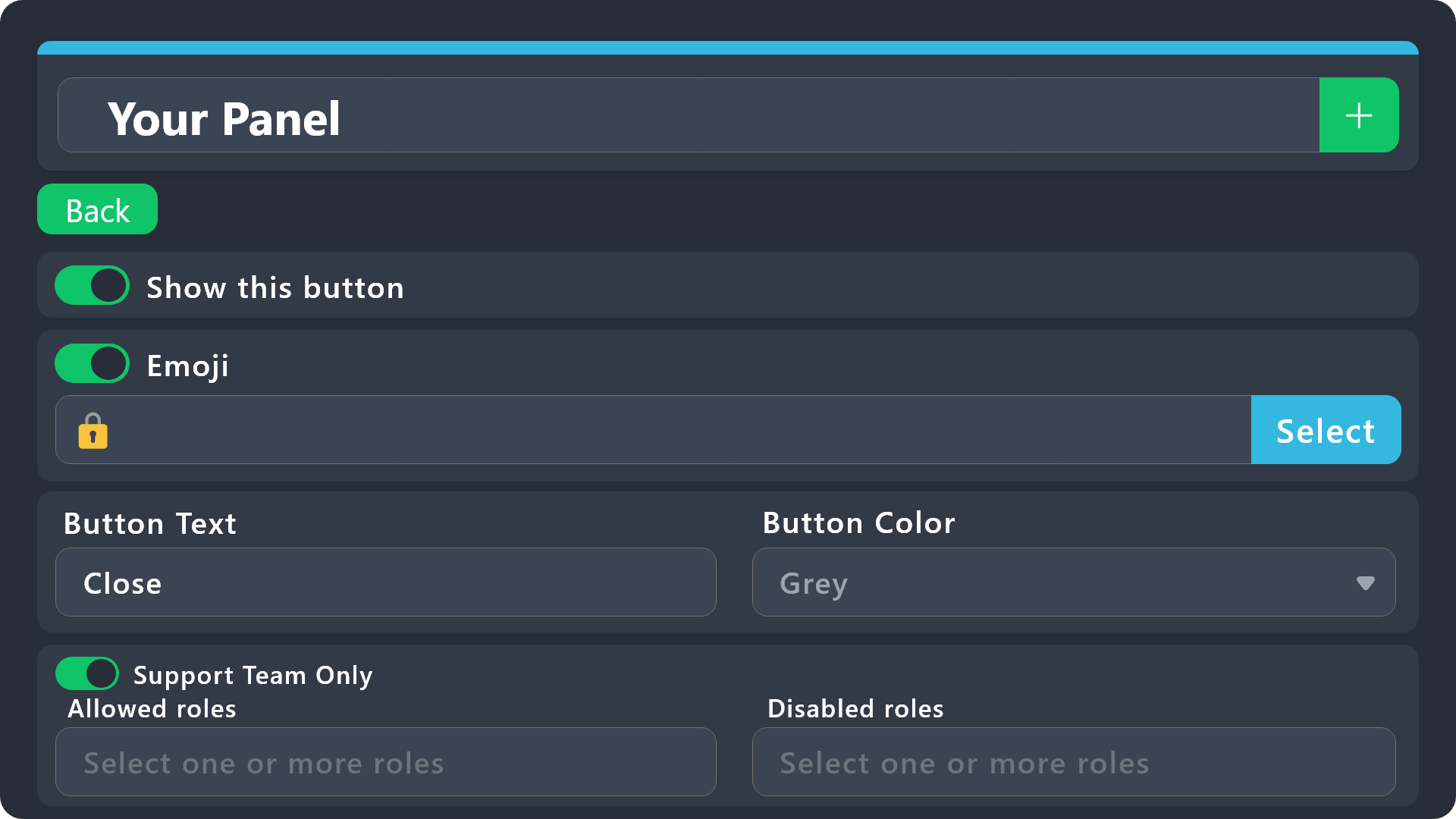
$buttonoptions
idle flint
For the specific ticket (panel) you want to block, you could disable the role from using the Create Ticket button
humble sequoiaBOT
1. Go into your Dashboard
2. Open your Panel Configs tab
3. Select the panel you want to ping your support on
4. Open the Ticket options menu
5. Click on Edit Ticket Message
6. In the Message Content use one of the role mention syntax (**{@Role Name}**/**{Role ID}**)
7. Save changes
Note: For this to work properly, Ticket Tool requires the Mention Everyone permission. Or the role must have the Allow anyone to @mention this role setting enabled 
worldly helm
Yes, you need to change the ID for every panel. (If you want to ping another role in every panel)
1: are you sure you set up the right panel?
2: May i please see your Ticket Message.
Okay, what is wrong with it?
lilac junco
You sure you wrote the ID correctly?
worldly helm
lilac junco
You sure you wrote the ID correctly?
Let me help him please. We dont need 2 ppl to help one person.
lilac junco
worldly helm
Let me help him please. We dont need 2 ppl to help one person.
Ok sure, just tryna help, my bad.
worldly helm
You're all good, just remember. One person is enough
lilac junco
Alright 🫡
worldly helm
Yes, you have to the change the ID for every panel.
For example: General Support Panel pings general Support ping. Appeal Panel pings appeal support
worldly helm
Can you show me the ticket message of another panel
Sorry what?
We only provide Support for this bot.
 quasi ivy
Is there a way to make it so that when a ticket is made, a thread is automatically made under it
worldly helm
Wierd issue, please wait for staff to assist you or create a ticket at #🎫│make-a-ticket .
sorry :(
 strong aspen
Moin Habe eine frage wie bekomme ich das hin wie auf dem bild , also das jz nach 1 stunde keine antwort so eine nachricht beispielweise kommt?
Hello, I have a question, how do I get it like in the picture, i.e. after 1 hour there is no answer, for example a message like this?
 worldly helm
Hallo!
Wie geht es dir. Ich kann dir dabei helfen.
lilac junco
strong aspen
Moin Habe eine frage wie bekomme ich das hin wie auf dem bild , also das jz nach...
Make a German support ticket.
worldly helm
lilac junco
Make a German support ticket.
I am german...
lilac junco
strong aspen
Moin Habe eine frage wie bekomme ich das hin wie auf dem bild , also das jz nach...
If you understand German then she can help!
Lisa can help you.
worldly helm
He* 😭
worldly helm
Lias not lisa
worldly helm
strong aspen
Moin Habe eine frage wie bekomme ich das hin wie auf dem bild , also das jz nach...
Dies wird "Ticket Message" genannt.
Willst du dass dein Support team automatisch gepingt wird?
strong aspen
worldly helm
Dies wird "Ticket Message" genannt.
Willst du dass dein Support team automatisch...
ja und das diese nachricht automatisch nach bestimte zeit wo keiner vom support antwortet das kommt
da wo ich es gesehen habe wird es immer 1 stunde später gesendet wenn keiner vom support antwortet
worldly helm
Dass geht leider nicht. Nur mit Premium. Wenn du willst kann ich dir eine anleitung schicken wie dass support team automatsich gepingt wird. Ist das okay?
strong aspen
worldly helm
Dass geht leider nicht. Nur mit Premium. Wenn du willst kann ich dir eine anleit...
gerne
humble sequoiaBOT
1. Go into your Dashboard
2. Open your Panel Configs tab
3. Select the panel you want to ping your support on
4. Open the Ticket options menu
5. Click on Edit Ticket Message
6. In the Message Content use one of the role mention syntax (**{@Role Name}**/**{Role ID}**)
7. Save changes
Note: For this to work properly, Ticket Tool requires the Mention Everyone permission. Or the role must have the Allow anyone to @mention this role setting enabled
strong aspen
worldly helm
Dass geht leider nicht. Nur mit Premium. Wenn du willst kann ich dir eine anleit...
habe 7 tage freies premium aktiv
lilac junco
quasi ivy
Is there a way to make it so that when a ticket is made, a thread is automatical...
Like what thread, can I get an example?
strong aspen
ahh
worldly helm
humble sequoia
Folge der anleitung über mir ^^^
strong aspen
ok
quasi ivy
lilac junco
Like what thread, can I get an example?
it would look this this, but the thread is automatic and not needed to run a command like /thread or /notes
 lilac junco
I don't think there's an option for that.
humble sequoiaBOT
Thread Style Tickets allow for the grouping of tickets into threads under a parent channel, as opposed to channels that are grouped under categories.
You can enable this feature by heading to your server's Dashboard➞ Panel Configs ➞ Thread Style Tickets and selecting a channel under which Ticket Tool will create threads.
For this feature to work properly, Ticket Tool will need these additional permissions,
Create Private Threads,Send Messages in Threads, andManage Threads.
Support Team roles will not be able to see newly created tickets by default, to make this the standard behavior, enable the
Auto add team to threadoption in the dashboard. This will ping your support team roles so the ticket shows up in their channel list.
:warning: Note: Claiming, granular permission settings and the ability to use the
/addand/removecommands are incompatible with Thread Style Tickets.
-# Please note that this is a premium  feature.
worldly helm
no, that is not what he is asking. He is asking if the bot can auto open a Thread ON the ticket. not Tickets with a thread style.
lilac junco
Ohhh.
Can the bot auto open or you'll have to run a command?
Ahh.
Nice, thanks for letting me know.
strong aspen
worldly helm
Dass geht leider nicht. Nur mit Premium. Wenn du willst kann ich dir eine anleit...
Habe ja 7 tage trail premium, wo mus ich denn das einstellen?
das andere hab ich eingestellt
worldly helm
strong aspen
das andere hab ich eingestellt
Dies ist bei automation.
humble sequoiaBOT
With Ticket Tool's automation, you'll be able to customize your ticket system workflow! Using the Automation Editor you can:
- Chose out of 6 different triggers
- Set a Message Watcher to wait for a message for a given time, or to wait for the absence of them
- Add delays on the execution of actions after the trigger or watcher finds a message!
Automation Command
Automations can be stopped, by running the /automation stop command inside the ticket you want it to stop in. Restart it with /automation start You'll also be able to view the current status of the automations with /automation.
__Important Notes__
- Automation is on ALPHA TESTING PHASE, things might work unexpectedly or not at all.
- Any automation will run for a maximum of 7 days or until the ticket is closed, afterward, it will stop checking
+ You can have 5 automations per panel

$auto
strong aspen
ahhh
worldly helm
strong aspen
das andere hab ich eingestellt
^^^
strong aspen
danke
worldly helm
Kein problem :D
restive condor
quasi ivy
it would look this this, but the thread is automatic and not needed to run a com...
Hey there! Yes, you can create automatic threads along your ticket channels from your Dashboard > Panel configs > Ticket > Private Thread
Please note this is a premium feature 
iron nightBOT
Gave +1 Rep to @restive condor (current: #2 - 1061)
quasi ivy
thanks @lilac junco
 hoary pier
lilac junco
hoary pier
lilac junco
Partnership apps are currently closed.
When partnership applications are opened, they'll be announced in #📣│server-news
 peak temple
السلام عليكم
humble sequoiaBOT
فريق الدعم الفني العربي
عميلنا العزيز ان كنت تبحث عن مساعدة يرجى فتح تكت خاص بفريق الدعم الفني العربي
اذهب الى#🎫│make-a-ticket
ثم قم بلضغط على الايموجي الاتي (🇯🇴)
lilac junco
peak temple
السلام عليكم
والسلام عليك أيضاً! هل تحتاج إلى مساعدة مع البوت؟
peak temple
lilac junco
والسلام عليك أيضاً! هل تحتاج إلى مساعدة مع البوت؟
هل تستعمل مترجم 😂😂
lilac junco
Use this channel for bot support purposes, do not chat here.
peak temple
Hi can I apply to management
humble sequoiaBOT
How do be I become a Support Member?
You can become a support member in 2 ways:
1. You can be really active in #🆘│community-support gain <@&799500225579712543> role and get chosen by a Manager
2. You can apply VIA our applications that would be sent in #📣│server-news
We currently have Support Teams for the following languages:
:flag_us: English
:flag_jo: Arabic
:flag_fr: French
:flag_de: German
:flag_es: Spanish
:flag_br: Portuguese
worldly helm
Hehe, i set up that you can't say "Sigma" "Skibidi" or "Ohio" In my Server :P
It gets deleted and you'd get a dm from Ticket Tool :D
but how can i add that if you say ohio it triggers the same Message as Ohio
Do i have to make another custom command for that?
 pseudo ravine
Make sure Case Sensitive is turned off
worldly helm
Thanks @pseudo ravine :P
iron nightBOT
Gave +1 Rep to @pseudo ravine (current: #7 - 595)
 rose remnant
Who do I contact to report someone using this ticket system to scam people with fake support links to scam / obtain info from people ?
Seems that there are some people that are using this wonderful tool to commit fraud / crimes against others. I would like to report a username with respect to this issue.
 austere forge
rose remnant
Who do I contact to report someone using this ticket system to scam people with ...
austere forge
rose remnant
Who do I contact to report someone using this ticket system to scam people with ...
Hey there 🙂
you can move to #🎫│make-a-ticket
humble sequoiaBOT
━━ User's inquiry has been moved to a ticket ━━
 static sable
 gentle cloak
how do i find the panel id because the bots help confused me?
 fossil orchid
How do I get the ticket tool premium bot?
restive condor
fossil orchid
How do I get the ticket tool premium bot?
Hey there! You must purchase premium to access the premium bot
https://tickettool.xyz/premium

Ticket Tool - Ticketing without clutter - The #1 Discord support bot
 gloomy oracle
I have i question i have bot on my discord server And i don't have its on website
restive condor
gentle cloak
how do i find the panel id because the bots help confused me?
Hey there! The ID is the number in front of the panel name.
For example, this panel's ID would be 1
 gloomy oracle
What should i do
restive condor
gloomy oracle
I have i question i have bot on my discord server And i don't have its on websit...
Hey there! See below please
humble sequoiaBOT
Don't see your server in the dashboard?
Try using the Sync Servers button on your top center of the Dashboard page
You will possibly need to relog. Look below to see the steps on how to relog.
If this doesn't work
You should relog from the dashboard, you can do this by clicking here to log out immediately, and then log back in
Note:
You need one of these 3 things to access the dashboard.
1. Server Owner (Level: 6)
2. Server Administrator (Level: 4)
3. Dashboard Role (Level: 2)
:warning: You can check your level using the </permissionlevel:1029797400174399542> command on your Discord Server
If the bot's response is:
- @User is permission level: 0 (User)
You don't have any of the 3 levels required to access the server's dashboard
 gloomy oracle
restive condor
Hey there! See below please
gloomy oracle
restive condor
Hey there! See below please
Thank you ♥️
iron nightBOT
Gave +1 Rep to @restive condor (current: #2 - 1063)
gentle cloak
restive condor
Hey there! The ID is the number in front of the panel name.
For example, this pa...
ohhh so i was right! in that case, whats the format i need to use to combine it with another?
restive condor
gentle cloak
ohhh so i was right! in that case, whats the format i need to use to combine it ...
If you're using commands to combine them, just put them one after the other
$panel ID ID ID ID ID ID ID ID
gentle cloak
restive condor
If you're using commands to combine them, just put them one after the other
``$p...
okay thank you!
iron nightBOT
Gave +1 Rep to @restive condor (current: #2 - 1064)
 lament wasp
 restive condor
lament wasp
restive condor
lament wasp
Hey there! Is this on a server you're staff in?
lament wasp
restive condor
Hey there! Is this on a server you're staff in?
Yes
restive condor
lament wasp
Yes
Could I get your server name or ID so I can take a look please
lament wasp
restive condor
Could I get your server name or ID so I can take a look please
935497508170379314
gentle cloak
Dan, How do I make the Ticket option look like this?
 restive condor
lament wasp
935497508170379314
restive condor
lament wasp
935497508170379314
You have the @everyone role blacklisted, please remove it from your Dashboard > Server Configs > Blacklist Roles
 restive condor
gentle cloak
Dan, How do I make the Ticket option look like this?
restive condor
gentle cloak
Dan, How do I make the Ticket option look like this?
See below please
humble sequoiaBOT
The Drop-down menu or Select Menu replaces the buttons on your panel message and uses a drop-down menu with all of your panels. To set this up, go to your Panel Configs and select your main Panel.
<:Numbericons1:1018864164032225340> Enable Select Style
First you enable Select Style. Then you add an item in the Dropdown Editor. Now you can start editing your dropdown!
<:Numbericons2:1018864168041971712> Dropdown Editor
Each line in the dropdown editor represents a line in the drop down menu on discord. You can add more "Items", by clicking on 

First you select a panel. That's the panel this option will open a ticket for.  DONT select the same panel twice. Each option should have a different Panel
After that, you can put a Display. This is the title of this option and will appear in the drop down menu. The *Description can be set right after that, which will be below the title in grey.
Additionally you can select an emoji, that will be shown in front of each option. You can either manually input the ID of an emoji or select it in the selector.
Common Issues ⚠️
- Panel doesn't send? Make sure you have a valid emoji selected
- Option doesn't show up? Check if two options have the same panel in the DropDown Editor

$dropdown
restive condor
Let me know if you have any questions 🙏
gentle cloak
restive condor
Let me know if you have any questions 🙏
Do I need Ticket Tool Premium to do this?
gentle cloak
restive condor
It's free
Okay, Thank You
iron nightBOT
Gave +1 Rep to @restive condor (current: #2 - 1065)
gentle cloak
how many reps does #1 have 😂
restive condor
just under 1400
gentle cloak
damn
gentle cloak
restive condor
You have the ``@everyone`` role blacklisted, please remove it from your ``Dashbo...
also, unrelated question. how do you make the words look like this
lament wasp
restive condor
You have the ``@everyone`` role blacklisted, please remove it from your ``Dashbo...
Thank you Dan your the best
iron nightBOT
Gave +1 Rep to @restive condor (current: #2 - 1066)
restive condor
gentle cloak
also, unrelated question. how do you make the words look like this
You can put `` at the start and end of a word/sentence
humble sequoiaBOT
Discord Markdown Text
Below cites basic Discord Text Markdown/Formatting. Replace the text below with your own!
See this Discord Help Article for other markdown questions and combining markdowns.
<:Numbericons1:1018864164032225340> Italics (Cntrl + I)
 *Copy me for italicized text!* -> Italicized text!
 _Copy me for italicized text!_ -> Italicized text!
<:Numbericons2:1018864168041971712> Bold (Cntrl + B)
**Copy me for bold text!** -> Bolded text!
<:Numbericons3:1018864171783303208> Underline (Cntrl + U)
You must add 2 underscores on both sides of your text to get the underline text
__Copy me for underlined text!__ -> Underlined Text!
<:Numbericons4:1018864175155519538> Strikethrough (Cntrl + S)
~~Copy me for strikethrough text!~~ -> Strikethrough text!
<:Numbericons5:1018864178632605786> Spoilers & Hidden Text
||Copy me for hidden text!|| -> ||Hidden text|| (Click to reveal)
<:Numbericons6:1018864182558466058> One Lined Codeblock
You can add 3 backticks instead to get multi lined codeblock.
`Copy me for codeblock text!` -> Codeblock Text!
<:Numbericons7:1018864186727604354> Hyperlinking and Hidden Links
[Copy me with your link](yourlinkforhidelinks.com) -> Ticket Tool!
<:Numbericons8:1018864190296961159> <:NewIcon1:1018858809541804124><:NewIcon2:1018858813266333706> <:beta1:1022173658610946182><:beta2:1022173656492810340> Headers!
Header markdowns may not work with ticket tool features.
# Largest header!
## Small header!
### Even smaller header!
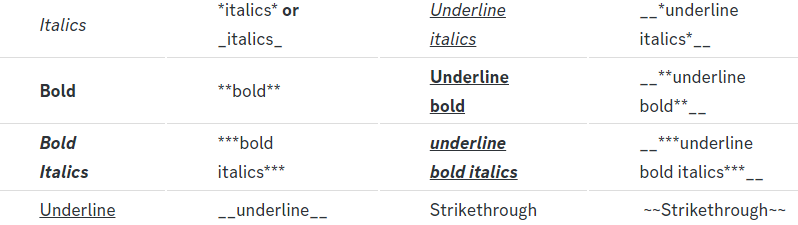 gentle cloak
humble sequoia
gentle cloak
humble sequoia
thank you
iron nightBOT
Gave +1 Rep to @humble sequoia (current: #17 - 327)
gentle cloak
Dan, How do I put the Dropdown Menu into my server?
restive condor
gentle cloak
Dan, How do I put the Dropdown Menu into my server?
Simply resend your panel
 modern sparrow
I got premium yet I can't access the features
 restive condor
modern sparrow
I got premium yet I can't access the features
restive condor
modern sparrow
I got premium yet I can't access the features
Hey there! Could you try using the sync  button above your server name please
modern sparrow
restive condor
Hey there! Could you try using the sync <:sync:1265738463534387301> button above...
It worked, thank you:)
iron nightBOT
Gave +1 Rep to @restive condor (current: #2 - 1067)
restive condor
Glad to hear! 
gentle cloak
restive condor
Simply resend your panel
Thank You!
iron nightBOT
Gave +1 Rep to @restive condor (current: #2 - 1068)
restive condor
No problem!
gentle cloak
restive condor
No problem! <:PabloTiphat:983791053842837624>
my tickets look so much better now, i cant thank you enough
iron nightBOT
Gave +1 Rep to @restive condor (current: #2 - 1069)
restive condor
Happy to help 
 thorn thistle
how can i change the bots icon?
gentle cloak
restive condor
Happy to help <:yee:786174999253745696>
For members in my server it says this;

How do i fix this?
restive condor
gentle cloak
For members in my server it says this;
Could I get your server name or ID so I can double check for you?
humble sequoiaBOT
Ticket Tool Custom Avatar
As of now, you are not able to change Ticket Tool's profile picture, nonetheless, our Development Team is working on the release of white labels, this is your own custom bot!
For the time being, you can change the bot's nickname by right-clicking the bot in the user list on your server and clicking Change Nickname

$avatar
worldly helm
thorn thistle
how can i change the bots icon?
Hey, you can only change the "Nickname", not the icon. Here is the guide ^^^
thorn thistle
worldly helm
Hey, you can only change the "Nickname", not the icon. Here is the guide ^^^
ty
iron nightBOT
Gave +1 Rep to @worldly helm (current: #39 - 83)
gentle cloak
restive condor
Could I get your server name or ID so I can double check for you?
1268705416725135430
im pretty sure
thorn thistle
worldly helm
Hey, you can only change the "Nickname", not the icon. Here is the guide ^^^
so how do people do this ?
 worldly helm
That is another bot.
restive condor
gentle cloak
1268705416725135430
Dashboard > Server Configs > Blacklist Roles - You have these 2 roles blacklisted
 gentle cloak
oh damn
thorn thistle
worldly helm
That is another bot.
what bot would it be?
worldly helm
I am not sure, we dont give support for other bots. Sorry!
Could be their own aswell.
gentle cloak
I don’t suppose you guys know how to add commands to your own bot
restive condor
Nope, sorry! We only provide support for TicketTool
gentle cloak
awhh
gentle cloak
restive condor
Nope, sorry! We only provide support for TicketTool
Do you know a bot that adds auto reactions by any chance?
restive condor
I do not unfortunately
gentle cloak
oh okay
gentle cloak
restive condor
I do not unfortunately
thanks anyway 👍
iron nightBOT
Gave +1 Rep to @restive condor (current: #2 - 1070)
humble sequoiaBOT
فريق الدعم الفني العربي
عميلنا العزيز ان كنت تبحث عن مساعدة يرجى فتح تكت خاص بفريق الدعم الفني العربي
اذهب الى#🎫│make-a-ticket
ثم قم بلضغط على الايموجي الاتي (🇯🇴)
 frosty otter
lament wasp
frosty otter
lament wasp
how do i get the setup
humble sequoiaBOT
First you will want to invite the bot to your server. Once the bot is in your server, you can manage your server in the dashboard.
To create a panel we are going to need to head over to the Panel Configs Tab on the Dashboard.
Once at the dashboard we will need to click Create Panel.
Enter a panel name (Fill in any optional settings you want).
Click Create Panel and you are ready to get started with configuring your panel.
An example of a creating a panel is shown below.
Once the panel has been created, use the blue Send button and select the channel you want the panel to be sent to.
The Panel wasn't send
Use the </debug:1029783024264564765> command to diagnose possible permission issues with the bot.
worldly helm
frosty otter
how do i get the setup
Hey! See above ^^
frosty otter
ty
 dense wren
Help
System Failure: Invalid Form Body
components[0].components[1].emoji.name[BUTTON_COMPONENT_INVALID_EMOJI]: Invalid emoji
 unique lantern
Hey guys! Is there a way for me to include an image with the message ticket bot sends once a user creates a ticket?
frosty otter
how do i get the everyone out of the ticket
ice is in the ticket but it isnt his

how do i fix that
humble sequoiaBOT
How to edit `@everyone`'s permissions
Head over to your Dashboard ➞ Panel Configs ➞ Permission Options ➞ Everyone Role Opened/Closed and customize the base permissions for everyone in your tickets.
Note: This set of permissions may be affected by the overrides of Support Team, Additional Roles, and User permissions.
 worldly helm
frosty otter
ice is in the ticket but it isnt his
worldly helm
frosty otter
ice is in the ticket but it isnt his
Hey! See above ^^^
humble sequoiaBOT
This error indicates you have selected an invalid emoji, i.e. an emoji the bot isn't capable of using, in a button field
Which Emoji?
This depends upon which action the error is appearing, the most common cases are the Create Ticket button or one of your Dropdown emojis. You can visit your Button's List to find all available buttons and find the conflicting one by yourself.
Why doesn't the bot accept it as valid?
- You selected an emoji that doesn't exist anymore, i.e. that has been deleted
- You wrote text there, instead of an emoji (or in addition to an emoji)
- You entered a code for a custom emoji from a server that the bot is not a member of
- You entered a custom emoji code incorrectly
- You're on iPhone and entered an emoji using the phone's emoji pad (use the emoji selector in the website instead)
 worldly helm
dense wren
System Failure: Invalid Form Body
components[0].components[1].emoji.name[BUTTON_...
worldly helm
dense wren
System Failure: Invalid Form Body
components[0].components[1].emoji.name[BUTTON_...
Hey there! See above ^^^
 violet arch
Is there a way to check an individual's ticket amount ?
restive condor
unique lantern
Hey guys! Is there a way for me to include an image with the message ticket bot ...
Hey there! Adding images to your embed messages is a premium feature
restive condor
violet arch
Is there a way to check an individual's ticket amount ?
Hey there! As in how many tickets a person has made?
violet arch
restive condor
Hey there! As in how many tickets a person has made?
As in how many tickets a moderator has solved/closed/deleted
restive condor
violet arch
As in how many tickets a moderator has solved/closed/deleted
You would need to manually check that unfortunately.
With premium you get advanced statistics on the Dashboard, with different graphs and information along with a leaderboard
frosty otter
worldly helm
Hey! See above ^^^
thats alr on but it he is still in it
oh i alr see the prob
worldly helm
frosty otter
thats alr on but it he is still in it
Yes, because when the ticket got created he still had access to it. If you open another one now. He cant see it
frosty otter
my friend gave him server owner role
worldly helm
Bruh
frosty otter
XD
violet arch
restive condor
You would need to manually check that unfortunately.
With premium you get advan...
oh, I see. Where can I check that manually exactly
restive condor
violet arch
oh, I see. Where can I check that manually exactly
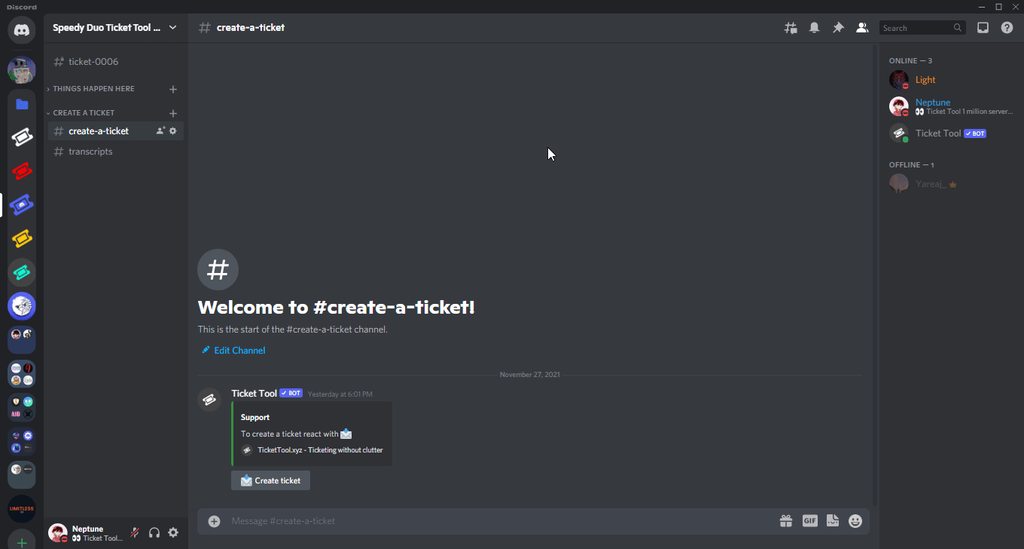
You would need to use Discord's search feature in your transcript channel. Search for each staffs ID and filter by time.
You will see how many tickets a staff member has participated in the given period of time
https://i.imgur.com/zHkDsMf.gif
 violet arch
restive condor
You would need to use Discord's search feature in your transcript channel. Sear...
violet arch
restive condor
You would need to use Discord's search feature in your transcript channel. Sear...
Alright, thanks a lot
iron nightBOT
Gave +1 Rep to @restive condor (current: #2 - 1071)
 gilded minnow
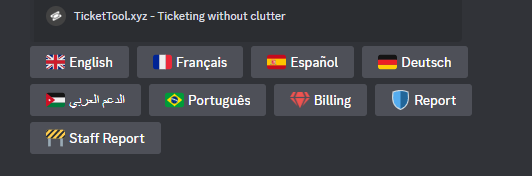
how can i make it that there is mutiply options for a panel,
like giveaway claim general help bug report for example
 waxen pike
 humble sequoiaBOT
━━ Seido's inquiry has been moved to a ticket ━━
 valid elbow
Hello, it won't let me write more why? I don't understand
 restive condor
valid elbow
Hello, it won't let me write more why? I don't understand
restive condor
valid elbow
Hello, it won't let me write more why? I don't understand
Hey there! There's a character limit of 250 with the free version
valid elbow
restive condor
Hey there! There's a character limit of 250 with the free version <:Premium:1192...
AA okay, thank you very much for your help Dan
iron nightBOT
Gave +1 Rep to @restive condor (current: #2 - 1072)
restive condor
gentle cloak
Dan, How was it that you did that text thing again?
Hi, do 2 ` at the start and end of a message/sentence
gentle cloak
restive condor
Hi, do 2 ` at the start and end of a message/sentence
Thank You man
iron nightBOT
Gave +1 Rep to @restive condor (current: #2 - 1073)
 upper lance
Can you move a ticket to another category? For example having a multipanel sometimes people open a ticket in the wrong category. Can I do a command to move the ticket to the correct category or do I just tell them to close it and re-open in the right category?
 lament hawk
Hey!!!
humble sequoiaBOT
━━ brat's inquiry has been moved to a ticket ━━
lament hawk
Soo uhm, how to do this?
 humble sequoiaBOT
A Discord Form lets the user answer individual questions in a pop-up Form, which then displays the answers in the ticket message. This can save time if you already know what you want to ask the user.
Setup Forms
Forms can be enabled under Panel Settings > Form Options > Edit Forms Options. In the new pop-up window, you can now enable and edit your own Form.
Form Options
You can add up to 5 questions in the Discord form. This is a Discord limitation. Each question can have a placeholder in the input field, a minimum and maximum input, multi-line, and also the option to have the answer required.
Options
Question Title ➞ Your Question goes here
Question Placeholder ➞ The placeholder text in the input field
Required ➞ If enabled, the user has to answer this question, to submit the form
Multi-Line Input ➞ Allows the user to input multiple lines
Minimum and Maximum Input ➞ Set a minimum and maximum input value for the user
Displaying the Answer
To display the answers from the user, you need to enable Auto display form results on the ticket message as an additional embed
If you don't want a second embed, go into your Panel Configs > Ticket Options > Edit Ticket Message. You use the variable {create.form.x} and replace x with the number of your question. For example, the response to Question 5 can be displayed with {create.form.5}.
 worldly helm
lament hawk
Soo uhm, how to do this?
worldly helm
lament hawk
Soo uhm, how to do this?
Hello there!!!
Look above ^^^
lament hawk
worldly helm
Hello there!!!
Look above ^^^
Thank you so much, i have been looking for that everywhere!
iron nightBOT
Gave +1 Rep to @worldly helm (current: #39 - 84)
 tranquil bison
is there a way that the bot can even transcript the pictures sent inside the ticket
like this bot 
 austere forge
tranquil bison
like this bot <:cutetrent:940389495247896647>
austere forge
tranquil bison
like this bot <:cutetrent:940389495247896647>
Hey there 🙂
This is a possible via Premium
tranquil bison
austere forge
Hey there 🙂
This is a possible via Premium
okie 
 south swan
#1269488606507040918 Billing team pls respond I bought premium with LTC
been half an hour
austere forge
south swan
<#1269488606507040918> Billing team pls respond I bought premium with LTC
Hey there 🙂
Sorry for the delay, your ticket will be taken when a Billing team is available 🙏
south swan
austere forge
Hey there 🙂
Sorry for the delay, your ticket will be taken when a Billing team ...
np will I be pinged or dmd by the bot once it's done
austere forge
south swan
np will I be pinged or dmd by the bot once it's done
you will have a ping in the ticket, yes
lilac junco
upper lance
Can you move a ticket to another category? For example having a multipanel somet...
@worldly helm (sorry for ping) do you mind answering this?
Oh nevermind I'm sorry
They have been moved to ticket, apologies for the ping.
 proper coral
how to add the GOLD ticket after buying premium ?
humble sequoiaBOT
━━ User's inquiry has been moved to a ticket ━━
 floral raven
How can we setup ticket log channel?
humble sequoiaBOT
With Ticket Tool, you can customize the behavior the bot takes when logging your tickets! For editing these options follow these steps:
Dashboard ➞ Panel Configs ➞ Logging Options
Logging Channel
Here you will define which channel @humble sequoia will save the Logs in (ticket created/deleted/closed, etc.)
Logs you can save:
➞ Ticket Created ➞ Logs when a ticket is created
➞ Ticket Closed ➞ Logs when a ticket is closed
➞ Ticket Opened ➞ Logs when a ticket is opened
➞ Ticket Renamed ➞ Logs when a ticket is renamed
➞ Ticket Deleted ➞ Logs when a ticket is deleted
➞ Transcript Saved ➞ Logs when a ticket is saved
Select with  (disable) or (enabled) which logs you would like
Below you can see an example of what the Logging Options will look like:
 worldly helm
floral raven
How can we setup ticket log channel?
worldly helm
floral raven
How can we setup ticket log channel?
Hey! See above ^^^
 thorny python
.
worldly helm
thorny python
.
Hey there, do you need assistance with the bot?
 dusky hinge
Hey so, generally in my server tickets are created on number sequence
thorny python
/verify
dusky hinge
Today we hit 10057 ticket lol
 lusty shale
dusky hinge
Today we hit 10057 ticket lol
lusty shale
dusky hinge
Today we hit 10057 ticket lol
Where do I go to open a ticket for support?
dusky hinge
I was thinking if tickets can be made on the name of the person who's opening the ticket
Instead of being named in number sequence
I mean the channels of ticket channels
thorny python
...
lusty shale
If I purchase premium. can I use it on multiple servers? Or is that only good for one server
worldly helm
lusty shale
If I purchase premium. can I use it on multiple servers? Or is that only good fo...
If you buy the premium bot, you can only use it for one server.
lusty shale
worldly helm
If you buy the premium bot, you can only use it for one server.
....... ok ty
iron nightBOT
Gave +1 Rep to @worldly helm (current: #39 - 85)
dusky hinge
@worldly helm hello
restive condor
dusky hinge
I mean the channels of ticket channels
Hey there! Yes, but custom ticket names are a premium feature
humble sequoiaBOT
The ticket name is the default channel name of all tickets. To edit it, go to your Dashboard > Panel Configs > Ticket. There you can edit the channel name of opened and closed tickets. You can also use variables in there.

 Note: This is a premium feature
floral raven
worldly helm
Hey! See above ^^^
Note: This is a premium feature
floral raven
worldly helm
Hey! See above ^^^
this is a premium feature?
jade topaz
Hello, I noticed that there is little Arab technical support, can I apply and help with it?
humble sequoiaBOT
How do be I become a Support Member?
You can become a support member in 2 ways:
1. You can be really active in #🆘│community-support gain <@&799500225579712543> role and get chosen by a Manager
2. You can apply VIA our applications that would be sent in #📣│server-news
We currently have Support Teams for the following languages:
:flag_us: English
:flag_jo: Arabic
:flag_fr: French
:flag_de: German
:flag_es: Spanish
:flag_br: Portuguese
worldly helm
floral raven
this is a premium feature?
No, it is not.
floral raven
ok tu
worldly helm
humble sequoia
@jade topaz ^^^
floral raven
ty*
jade topaz
Can I help here in Arabic language
worldly helm
If you have the knowledge and know arabic, sure.
jade topaz
Applications have been closed!
I have Arabic language well and I am from Iraq but I do not have replies
Ready to help and I can't apply for technical support
lilac junco
You can still help as a member.
lilac junco
humble sequoia
You mean these replies?
lilac junco
I don't think so.
If a user is speaking Arabic, you'll have to explain them in Arabic language.
jade topaz
The Arabs will open the ticket now and there is no quick answer
lilac junco
What do you mean by that?
jade topaz
There is no support in the tickets Arabic
lilac junco
We have arabic support team members, they help arabic speakers if they need help with the bot.
jade topaz
Is premium bot for servers or for users
restive condor
jade topaz
Is premium bot for servers or for users
Hey there! Premium subscriptions are per server
jade topaz
Nice, thanks.
humble sequoiaBOT
Hello, we would love to help you, but if you don't tell us what you need help with we can't help you :(
 prime bridgeBOT
 Successful bans:
 1
 Unsuccessful bans:
 0
 Reason: Troll
 Moderator: @scenic plinth
 scenic plinth
Nope
restive condor
Damn
worldly helm
Bye bye!
restive condor
That was quick
 sly thunder
how do i enable the roblox integration where the bot says the person's roblox username in the ticket?
restive condor
sly thunder
how do i enable the roblox integration where the bot says the person's roblox us...
Hey there! Dashboard > Panel Configs > Integrations
Please note this is a premium feature
sly thunder
restive condor
Hey there! ``Dashboard`` > ``Panel Configs`` > ``Integrations``
Please note thi...
ite, which api does it use? that'll help me decide if i want to pay for premium
EDIT: nvm it uses bloxlink
sly thunder
i use rowifi :<
restive condor
Bloxlink is more wildly used which is increases the chances of users already having their roblox and Discord account connected
You don't actually need the bot in the server anyway
 severe moss
Help, I was banned because of the toolbox, although I just had a bug in the textures, I can’t log in from another account, what should I do?
humble sequoiaBOT

⚠️ You're in the wrong place
We provide support for Ticket Tool Discord bot and cannot help you with whatever issue you have.
- We don't know which Support Team you should contact to get this issue resolved, and unfortunately we won't be able to accurately tell you.
If you don't have any further questions regarding our bot Ticket Tool, please close this ticket
severe moss
Help, I was banned because of the toolbox, although I just had a bug in the textures, I can’t log in from another account, what should I do?
worldly helm
humble sequoia
Please read the message above ^^ @severe moss
severe moss
Im Russia
worldly helm
severe moss
Im Russia
Привет. Мы предоставляем поддержку только для инструмента обработки заявок BOT. Мы не рассматриваем ваши обращения, баны
 frozen crypt
severe moss
Im Russia
frozen crypt
severe moss
Im Russia
Это не то место, куда можно просить такую помощь.
severe moss
It's the server's fault, not mine.
lilac junco
..
severe moss
Where should I write what you spoiled?
worldly helm
^^^
severe moss

 limber portal
severe moss
limber portal
severe moss
We can’t help you - you are in the wrong server.
 river olive
Je n’arrive pas à envoyer le panel de ticket dans mon serveur, sachant qu’il a le rôle le plus haut du serveur
 worldly helm
Salut !
L'outil de ticket n'a pas les autorisations pour envoyer un message dans le canal.
Le bot a besoin de ces autorisations : envoyer des messages, afficher le canal ou lire l'historique des messages
river olive
worldly helm
Salut !
L'outil de ticket n'a pas les autorisations pour envoyer un message dans...
Mais pourtant il a les perms admins ?
worldly helm
Etes-vous sûr ? Veuillez vérifier à nouveau
river olive
worldly helm
Etes-vous sûr ? Veuillez vérifier à nouveau
Je viens de vérifié il a les perms admins
worldly helm
Donc le rôle, appelé Ticket Tool, a un rôle d'administrateur ?
humble sequoiaBOT

L'équipe du support Français
Cher client,
Si vous avez besoin d'aide, ouvriez un ticket pour le support Français s'il vous plaît.
Allez au #🎫│make-a-ticket et tapez sur le bouton contenant l'emoji 🇫🇷
restive condor
Accidentally deleted your message @river olive - See above ^
restive condor
Hehe, sorry. Some don't automatically delete the command and this one did 😅
worldly helm
lmfao
river olive
Okay
restive condor
 ruby plank
What's the rate of premium ticket tool for 1 month
ruby plank
What's the rate of premium ticket tool for 1 month
Hey there! It's $6 per month or $66 yearly https://tickettool.xyz/premium
 jade topaz
Hello, I added the bot to my own server, but I cannot see my own server on the site.
humble sequoiaBOT
Don't see your server in the dashboard?
Try using the Sync Servers button on your top center of the Dashboard page
You will possibly need to relog. Look below to see the steps on how to relog.
If this doesn't work
You should relog from the dashboard, you can do this by clicking here to log out immediately, and then log back in
Note:
You need one of these 3 things to access the dashboard.
1. Server Owner (Level: 6)
2. Server Administrator (Level: 4)
3. Dashboard Role (Level: 2)
:warning: You can check your level using the </permissionlevel:1029797400174399542> command on your Discord Server
If the bot's response is:
- @User is permission level: 0 (User)
You don't have any of the 3 levels required to access the server's dashboard
restive condor
jade topaz
Hello, I added the bot to my own server, but I cannot see my own server on the s...
Hey there! See above please ^^
jade topaz
restive condor
Hey there! See above please ^^
its worked thanks
iron nightBOT
Gave +1 Rep to @restive condor (current: #2 - 1075)
restive condor
Glad to hear!
severe moss
@restive condor
restive condor
severe moss
<@795710289425334303>
You're in the wrong server unfortunately
We cannot help you

 dry pollen
Hey, anyone know if its possible to make my ticket tool only available for certain roles
restive condor
 tender stream
How to fix it?
tender stream
How to fix it?
Hey there! Please give Ticket Tool permission to MANAGE CHANNELS for that category
restive condor
dry pollen
Hey, anyone know if its possible to make my ticket tool only available for certa...
Hey there! As in, only allow certain roles to open tickets?
dry pollen
restive condor
Hey there! As in, only allow certain roles to open tickets?
Yes, any other role that tries to open the ticket gets a message which will say this ticket is not available for your role or something like that 👍
restive condor
dry pollen
Yes, any other role that tries to open the ticket gets a message which will say ...
Dashboard > Panel Configs > Buttons > Create Ticket Button > Allowed/Disabled Roles

 hoary forge
How to fix it says bot error
jade topaz
Pls anyone help
hoary forge
jade topaz
When opening the ticket or what
jade topaz
 hoary forge
jade topaz
Yes when opening ticket
hoary forge
jade topaz
Yes when opening ticket
Dashboard > Panel Configs > Moderator message > then choose the moderate message again write write what you want
iron nightBOT
Gave +1 Rep to @hoary forge (current: #329 - 1)
worldly helm
hoary forge
``Dashboard`` > ``Panel Configs`` > ``Moderator message ``> then choose the mode...
Sorry to interupt. but didnt he mean the ticket message?
worldly helm
jade topaz
Yes when opening ticket
Do you have a full screenshot of the message?
 worldly helm
jade topaz
worldly helm
jade topaz
This and the message you just send are different
worldly helm
jade topaz
That is the embed (Panel Message)
jade topaz
worldly helm
That is the embed (Panel Message)
Can you tell how to setup that one
worldly helm
Dashboard-->Messages-->Edit Panel Message-->Embed Editor - 1-->Type your Message
Save settings and update/ resend the panel
hoary forge
worldly helm
Sorry to interupt. but didnt he mean the ticket message?
Embed message ig
worldly helm
Well embed or ticket message is not moderator message.
worldly helm
Can you provide a screenshot please
 young shard
Hi @pale pilot, are you accepting new partnership applications for Ticket Tool Premium?
worldly helm
Partnerships are closed at the moment.
young shard
Sorry for the ping.
hoary forge
 young shard
worldly helm
Partnerships are closed at the moment.
young shard
worldly helm
Partnerships are closed at the moment.
When is it expected to reopen?
worldly helm
hoary forge
....Follow what it says... (Check your premium bot settings under Server Configs )
worldly helm
young shard
When is it expected to reopen?
I don't know, feel free to wait for Lukas/other staff to answer you or create a ticket at #🎫│make-a-ticket
young shard
worldly helm
I don't know, feel free to wait for Lukas/other staff to answer you or create a ...
Thank you!
iron nightBOT
Gave +1 Rep to @worldly helm (current: #38 - 87)
 pale pilot
young shard
When is it expected to reopen?
pale pilot
young shard
When is it expected to reopen?
sometime next year maybe
worldly helm
OOOF!
dry pollen
restive condor
``Dashboard`` > ``Panel Configs`` > ``Buttons`` > ``Create Ticket Button`` > All...
Hey ive added one role to the “allowed roles“ section but if i try to create a ticket on an alt account not having the allowed role i can still create an ticket
young shard
pale pilot
sometime next year maybe
That made me sad...
 restive condor
dry pollen
Hey ive added one role to the “allowed roles“ section but if i try to create a t...
restive condor
dry pollen
Hey ive added one role to the “allowed roles“ section but if i try to create a t...
Please disable the @everyone role as well. By default, everyone can open tickets so only setting allowed roles won't have any impact
restive condor
jade topaz
Hey there! See below please
humble sequoiaBOT
A Discord Form lets the user answer individual questions in a pop-up Form, which then displays the answers in the ticket message. This can save time if you already know what you want to ask the user.
Setup Forms
Forms can be enabled under Panel Settings > Form Options > Edit Forms Options. In the new pop-up window, you can now enable and edit your own Form.
Form Options
You can add up to 5 questions in the Discord form. This is a Discord limitation. Each question can have a placeholder in the input field, a minimum and maximum input, multi-line, and also the option to have the answer required.
Options
Question Title ➞ Your Question goes here
Question Placeholder ➞ The placeholder text in the input field
Required ➞ If enabled, the user has to answer this question, to submit the form
Multi-Line Input ➞ Allows the user to input multiple lines
Minimum and Maximum Input ➞ Set a minimum and maximum input value for the user
Displaying the Answer
To display the answers from the user, you need to enable Auto display form results on the ticket message as an additional embed
If you don't want a second embed, go into your Panel Configs > Ticket Options > Edit Ticket Message. You use the variable {create.form.x} and replace x with the number of your question. For example, the response to Question 5 can be displayed with {create.form.5}.
restive condor
Let me know if you have any questions🙏
 pseudo tinsel
Can I use your bot in my server I'm doing this thing it's like top.gg but it's just a discord server I'll put it in support category
worldly helm
What exacly do you mean by that?
pseudo tinsel
worldly helm
What exacly do you mean by that?
Do you know the top.gg website
Thr one for discord bots
worldly helm
Yes
pseudo tinsel
I'm making something like that
worldly helm
Okay, and?
pseudo tinsel
I'm just asking if I can use the bot there
worldly helm
Its not up to me if you can use it. Please wait for staff/team lead to tell you.
pseudo tinsel
Okay
worldly helm
other than that, it is already in the list.
 restive condor
jade topaz
restive condor
jade topaz
Hey there! Dashboard > Panel Configs > Forms
Either disable the form or add questions to it
It currently is enabled and has no questions
 worldly helm
Hey there!
Claiming is a premium only feature
worldly helm
Sorry what?
 little spoke
Can in free got this
worldly helm
I dont have access to premium giveouts.
worldly helm
Please stop pining me.
little spoke
Ok sorry
restive condor
You cannot have free premium.
worldly helm
You won't get premium for free.
worldly helm
No, you wont get premium for free.
little spoke
aaa ok ty
 compact aspen
Can you set it up so a transcript of the ticket is dm’d to the person who opened the ticket?
austere forge
compact aspen
Can you set it up so a transcript of the ticket is dm’d to the person who opened...
Hey there 🙂
This is possible, but it's a premium feature
compact aspen
Thank you!
 nocturne ridge
How do I close the ticket without asking me: Do you want to delete the ticket?
restive condor
nocturne ridge
How do I close the ticket without asking me: Do you want to delete the ticket?
Hey there! You mean ''Do you want to close the ticket''?
nocturne ridge
restive condor
Hey there! You mean ''Do you want to close the ticket''?
yep
restive condor
nocturne ridge
yep
Dashboard > Panel Configs > General > 
TWO STEP CLOSE
nocturne ridge
restive condor
``Dashboard`` > ``Panel Configs`` > ``General`` > <:disabled:932565809530806282>...
Didn't work, tried it several times
restive condor
nocturne ridge
Didn't work, tried it several times
Make sure you disabled two step close and not two step ticket
nocturne ridge
restive condor
Make sure you disabled two step close and not two step ticket
Well I will try
nocturne ridge
restive condor
Make sure you disabled two step close and not two step ticket
Didn't work
restive condor
nocturne ridge
Didn't work
Are you testing this with a brand new ticket?
nocturne ridge
restive condor
Are you testing this with a brand new ticket?
no
restive condor
Please test it with a new ticket
nocturne ridge
restive condor
Please test it with a new ticket
ok
restive condor
Can I get your server name or ID please
nocturne ridge
restive condor
Can I get your server name or ID please
1239570229894578226
id of server
restive condor
nocturne ridge
1239570229894578226
Looks correct. Can you take a few screenshots of you closing the ticket please?
nocturne ridge
restive condor
Looks correct. Can you take a few screenshots of you closing the ticket please?
ok
1s
nocturne ridge
restive condor
Looks correct. Can you take a few screenshots of you closing the ticket please?
 restive condor
That's not the message that asks you if you want to close the ticket
restive condor
nocturne ridge
Disable TWO STEP TICKET for that one

 restive condor
Perfect 😄
nocturne ridge
😄
 cloud umbra
i cant make a ticket on yeilding arts exp ticket it says 500 channels smth what do i do
worldly helm
Discord has a Limit of 500 open Channels. Are you the owner?
cloud umbra
no im not
i have 2 hackers in my lobby i used to be able to create a ticket now im unable
worldly helm
Okay, please tell the servers staff about the issue and that they have to close/delete some tickets.
cloud umbra
okay
 restive condor
frosty otter
restive condor
frosty otter
Hey there! Could I get your server name or ID please?
 distant flax
How do I get unbanned bc I got the error code 600?
humble sequoiaBOT
⚠️ You're in the wrong place
We provide support for Ticket Tool Discord bot and cannot help you with whatever issue you have.
- We don't know which Support Team you should contact to get this issue resolved, and unfortunately we won't be able to accurately tell you.
If you don't have any further questions regarding our bot Ticket Tool, please close this ticket
 robust pine
Hi, I got ticket tool on my server but now is giving me the "this interaction failed" when im creating a ticket
restive condor
robust pine
Hi, I got ticket tool on my server but now is giving me the "this interaction fa...
Hey there! Could you run the /debug command please?
robust pine
 restive condor
robust pine
restive condor
robust pine
Could I get your server name or ID?
robust pine
restive condor
Could I get your server name or ID?
id= 1177966274190528543 name=Vent Middlemen Service's | #1 MM
 tight hazel
restive condor
Could I get your server name or ID?
tight hazel
restive condor
Could I get your server name or ID?
Where can I make a ticket?
restive condor
robust pine
id= 1177966274190528543 name=Vent Middlemen Service's | #1 MM
Try again now please
restive condor
tight hazel
Where can I make a ticket?
robust pine
restive condor
Try again now please
ty
iron nightBOT
Gave +1 Rep to @restive condor (current: #2 - 1077)
 strange gull
Hello, does any1 can tell me how to fix this thing?
everytime someone closes and delete a ticket it makes a new canal
 restive condor
strange gull
Hello, does any1 can tell me how to fix this thing?
everytime someone closes and...
restive condor
strange gull
Hello, does any1 can tell me how to fix this thing?
everytime someone closes and...
Hey there! Dashboard > Server Configs > Storage Mode
strange gull
@restive condor Thank you brother! ❤️
iron nightBOT
Gave +1 Rep to @restive condor (current: #2 - 1078)
strange gull
sorry for ping you 🙂
restive condor
No problem, glad I could help!
frosty otter
restive condor
Hey there! Could I get your server name or ID please?
i fixed it alr
strange gull
got one more question if i may ask you, i need to add people to the server, which means using $add [@fhkdh] as example
but it tells me Missing required option: [User/Role] (optional channel) is this also in the Server Configs or Panel Configs?
restive condor
frosty otter
i fixed it alr
Glad to hear and apologies for the wait 🙏
frosty otter
no prob
 bronze compass
hi help me!
frosty otter
happy that i found it my self proud of myself
restive condor
strange gull
got one more question if i may ask you, i need to add people to the server, whic...
Hey there! What exactly do you mean by add people to the server?
You mean add someone to a ticket?
bronze compass
bronze compass
hi help me!
how do I create a ticket with your bot?
restive condor
strange gull
yea sorry
You must either ping them or use their ID
bronze compass
@restive condor how do I create a ticket with your bot?
restive condor
If they don't have access to the channel you won't be able to ping them. Either use the ID or use the slash version /add where you can put their name and it will look for them
restive condor
bronze compass
<@795710289425334303> how do I create a ticket with your bot?
Hey there! See below how to configure Ticket Tool
stark runeBOT
1. Invite Ticket Tool to your server
First you will want to invite the bot to your server. Once the bot is in your server, you can manage your server in the dashboard.
2. Create a Panel
To create a panel we are going to need to head over to the panel configs on the dashboard.
Once at the dashboard we will need to click Create Panel.
Enter a panel name (Fill in any optional settings you want).
Click Create Panel and your ready to get started with configuring your panel.
An example of a creating a panel is shown below.
3. Send the Panel to a Channel
Once you've created a panel on the dashboard you will need to send it to a channel using send on the dashboard.
Select the channel you want your panel to be created in and click send.
For other questions checkout $help faq.
An example of a sending a panel is shown below.
Having a Problem Sending the Panel?
Do $debug in a channel with Ticket Tool and make sure it has all the necessary Discord permissions.
bronze compass
ok. Thanks you
strange gull
It says me Missing required option: [User/Role] (optional channel) then i try to add them
bronze compass
@restive condor thanks
iron nightBOT
Gave +1 Rep to @restive condor (current: #2 - 1079)
restive condor
strange gull
It says me *Missing required option: [User/Role] (optional channel)* then i try ...
Can you screenshot what you're using please
 restive condor
strange gull
https://gyazo.com/3f5afb274ff12e548e6367c2fa8f41ad
restive condor
strange gull
https://gyazo.com/3f5afb274ff12e548e6367c2fa8f41ad
Do not include the [] and you must either ping them or use their ID
That's not pinging them (or it would show up in blue)
You cannot ping someone who doesn't have access the channel
Either use the ID or use the slash version /add where you can put their name and it will look for them
iron nightBOT
Gave +1 Rep to @restive condor (current: #2 - 1080)
restive condor
No problem!
frosty otter
how do i get it to tag the owner over here
 pseudo ravine
Do you need any support regarding the bot?
pseudo tinsel
Yea imma just delete that
restive condor
frosty otter
how do i get it to tag the owner over here
Hey there! The owner of the server?
frosty otter
restive condor
Hey there! The owner of the server?
yes
and some other ppl
just to tag them
humble sequoiaBOT
1. Go into your Dashboard
2. Open your Panel Configs tab
3. Select the panel you want to ping your support on
4. Open the Ticket options menu
5. Click on Edit Ticket Message
6. In the Message Content use one of the role mention syntax (**{@Role Name}**/**{Role ID}**)
7. Save changes
Note: For this to work properly, Ticket Tool requires the Mention Everyone permission. Or the role must have the Allow anyone to @mention this role setting enabled
restive condor
frosty otter
just to tag them
See above please ^
 little jacinth
how to ues animated emoji @solid stream
pseudo tinsel
little jacinth
how to ues animated emoji <@279639060996292609>
You need to have nitro
restive condor
little jacinth
how to ues animated emoji <@279639060996292609>
Hey there! You can use the <a:emojiname:emojiID> format
The easiest way to get this is by using the $id command on your server
$id 
humble sequoiaBOT
restive condor
$id <a:ElmoFireLord:983791056413921301>
<a:ElmoFireLord:983791056413921301>
 worthy relic
when someone opened a ticket everyone can see it how can i fix that??
restive condor
worthy relic
when someone opened a ticket everyone can see it how can i fix that??
Hey there! Please double your Dashboard > Panel Configs > Permissions > Everyone Roles Permissions - Edit Opened > 
VIEW CHANEL
 severe parcel
what to do if I cant choose ticket tool gold (i paid for premium)
 restive condor
severe parcel
what to do if I cant choose ticket tool gold (i paid for premium)
restive condor
severe parcel
what to do if I cant choose ticket tool gold (i paid for premium)
Hey there! You can only botswitch that way if the premium bot is already in the server.
See below how to invite and enable the premium bot please
humble sequoiaBOT
The first thing you will need to do is invite the premium bot, an invite can be found here
Once the bot is in your server we will head to the dashboard and manage your server. When you are managing your server, you want to head into "Server Configs" then click the drop down menu under "Select the bot you would like to use on this server" then click "Ticket Tool#6207" and then save.
 halcyon panther
Is this a request for Arab support?
humble sequoiaBOT
فريق الدعم الفني العربي
عميلنا العزيز ان كنت تبحث عن مساعدة يرجى فتح تكت خاص بفريق الدعم الفني العربي
اذهب الى#🎫│make-a-ticket
ثم قم بلضغط على الايموجي الاتي (🇯🇴)
jade topaz
Won’t let me save
 restive condor
jade topaz
Won’t let me save
restive condor
jade topaz
Won’t let me save
Hey there! That's just a security measure to prevent you from accidentally deleting all your commands.
Please create a new custom command before deleting your only/last custom command
jade topaz
Kk
jade topaz
restive condor
Hey there! That's just a security measure to prevent you from accidentally delet...
Ty it worked!
iron nightBOT
Gave +1 Rep to @restive condor (current: #2 - 1084)
restive condor
Glad to hear!
pseudo tinsel
Can I use your bot in my server I'm doing this thing it's like top.gg but it's just a discord server I'll put it in support category
restive condor
pseudo tinsel
Can I use your bot in my server I'm doing this thing it's like top.gg but it's j...
Sure
 cursive trellis
what do I need to turn on so the originator of the ticket cannot close it by themselves and an Admin/owner would be the only ones to close it?
 restive condor
cursive trellis
what do I need to turn on so the originator of the ticket cannot close it by the...
restive condor
cursive trellis
what do I need to turn on so the originator of the ticket cannot close it by the...
Hey there! Dashboard > Panel Configs > Buttons > Close Ticket Button > 
SUPPORT TEAM ONLY
cursive trellis
restive condor
Hey there! ``Dashboard`` > ``Panel Configs`` > ``Buttons`` > ``Close Ticket Butt...
Thank you so much Dan =]
iron nightBOT
Gave +1 Rep to @restive condor (current: #2 - 1085)
restive condor
No problem!
 austere robin
When I close the tickets they don't automatically move from one section to another and if they did move before, does anyone know how to fix it?
 worldly helm
Hey there!
Do you mind showing me your Category settings?
austere robin
 austere robin
worldly helm
Hey there!
Do you mind showing me your Category settings?
austere robin
worldly helm
Hey there!
Do you mind showing me your Category settings?
This is how it is configured
worldly helm
okay, make sure you set it up for every of your Panels!
frosty otter
restive condor
See above please ^
but how does that work bc idc what the preset is for the tag
restive condor
frosty otter
but how does that work bc idc what the preset is for the tag
You just follow the format provided to ping a role
austere robin
worldly helm
okay, make sure you set it up for every of your Panels!
according to me everything is fine
worldly helm
Discord has a limit, there cant be more than 50 channels in one category. you have to close some
austere robin
thx
 worldly helm
frosty otter
worldly helm
frosty otter
Where it says {user} Welcome
halcyon panther
I want this image in embed format
 worldly helm
ما هي الصورة التي تقصدها؟
halcyon panther
 worldly helm
هذا نص وليس صورة
halcyon panther
worldly helm
ما هي الصورة التي تقصدها؟
I want to make the message in AMP format
worldly helm
I dont clearly understand what you want. @halcyon panther
worldly helm
$articket
humble sequoiaBOT
فريق الدعم الفني العربي
عميلنا العزيز ان كنت تبحث عن مساعدة يرجى فتح تكت خاص بفريق الدعم الفني العربي
اذهب الى#🎫│make-a-ticket
ثم قم بلضغط على الايموجي الاتي (🇯🇴)
worldly helm
Please open a ticket ^^
halcyon panther
worldly helm
Please open a ticket ^^
Okay
austere robin
worldly helm
Discord has a limit, there cant be more than 50 channels in one category. you ha...
Even though I made another category with the same configuration, it still does the same thing of not moving but only changing the name.
 stoic heart
I invited to a new server. Several minutes later still isn't showing on dadhboard
worldly helm
austere robin
Even though I made another category with the same configuration, it still does t...
Wierd, please wait for staff to assist you due to me not having access to your Dashboard.
 slow rover
stoic heart
I invited to a new server. Several minutes later still isn't showing on dadhboar...
slow rover
stoic heart
I invited to a new server. Several minutes later still isn't showing on dadhboar...
hello, did you try refreshing the dashboard page?
stoic heart
slow rover
hello, did you try refreshing the dashboard page?
Yes. Just trying now on desktop. Not showing up.
I was on mobile
worldly helm
stoic heart
I was on mobile
Sorry to interrupt, but please hit the Button on your Dashboard.
frosty otter
worldly helm
Where it says `{user} Welcome`
but it doesnt work if i type @ and then the user
worldly helm
What do you mean?
If your Ticket message is {user} Welcome it pings the ticket owner if he opens a ticket. If you want to ping your Staff aswell, do {id} or {Role Name}
 novel kraken
I’m getting a message that says missing permissions when I try to add a role how do I fix that?
slow rover
novel kraken
I’m getting a message that says missing permissions when I try to add a role how...
hello, if you give the bot the administrator permission, it should work 🙂
novel kraken
slow rover
hello, if you give the bot the administrator permission, it should work 🙂
I’m not gonna give the bot administrator permissions they can see every channel at that point
restive condor
novel kraken
I’m not gonna give the bot administrator permissions they can see every channel ...
Hey there, go ahead and #🎫│make-a-ticket / #premium-tickets and we'll take a look
 sullen peak
How can I create something like this?

 tiny perch
$articket
humble sequoiaBOT
فريق الدعم الفني العربي
عميلنا العزيز ان كنت تبحث عن مساعدة يرجى فتح تكت خاص بفريق الدعم الفني العربي
اذهب الى#🎫│make-a-ticket
ثم قم بلضغط على الايموجي الاتي (🇯🇴)
sullen peak
ive tried posting everywhere but i think their own ticketing system doesn't worki....
can someone pls reach out to me, ive tried emailing you guys, it says i already have a support ticket and globally it is limited to one ticket? i dont even know where i have a ticket already open or how to delete it...
 fluid bone
@restive condor dan i tried to contact ender but i cant get ahold of him
i yhink its the only way
scenic plinth
...no?
fluid bone
bruh im pissed rn
sullen peak
scenic plinth
...no?
any ideas on how to change the bot name if you have paid for premium? nothing in docs, ive emailed them, sent support ticket nothing
humble sequoiaBOT
Ticket Tool Custom Avatar
As of now, you are not able to change Ticket Tool's profile picture, nonetheless, our Development Team is working on the release of white labels, this is your own custom bot!
For the time being, you can change the bot's nickname by right-clicking the bot in the user list on your server and clicking Change Nickname
$avatar
 rustic siren
hi, my id main id got suspended..plz help me
humble sequoiaBOT
⚠️ You're in the wrong place
We provide support for Ticket Tool Discord bot and cannot help you with whatever issue you have.
- We don't know which Support Team you should contact to get this issue resolved, and unfortunately we won't be able to accurately tell you.
If you don't have any further questions regarding our bot Ticket Tool, please close this ticket
 humble path
Hello, our gold ticket bot has been unresponsive for a while
lilac junco
humble path
Hello, our gold ticket bot has been unresponsive for a while
@humble sequoia this bot?
humble path
6207, yes
lilac junco
Did you set it up?
humble path
It has been set and working for a good while until today
stopped responding a few hours ago
lilac junco
I see.
humble path
The normal one is still responsive and gives out the "this bot is not active" message when called
lilac junco
#🎫│make-a-ticket Make a support ticket for the issue.
 iron nightBOT
Gave +1 Rep to @lilac junco (current: #163 - 3)
 sour venture
Hi how do i get premium role in the server? ive bought premium. Also how do u suggest a feature ?
humble sequoiaBOT

Thank you
Thank you for purchasing Ticket Tool Premium @sour venture. You have now been given the <@&535595160189403136> role!
Found 14 servers in total and 2 with premium and permission
restive condor
sour venture
Hi how do i get premium role in the server? ive bought premium. Also how do u su...
Hey there! You can use #1019685143046279208
iron nightBOT
Gave +1 Rep to @restive condor (current: #2 - 1086)
 radiant drum
My account says insufficient accounts since last week
rustic siren
My account suspended. Please help me
humble sequoiaBOT
@rustic siren @radiant drum
⚠️ You're in the wrong place
We provide support for Ticket Tool Discord bot and cannot help you with whatever issue you have.
- We don't know which Support Team you should contact to get this issue resolved, and unfortunately we won't be able to accurately tell you.
If you don't have any further questions regarding our bot Ticket Tool, please close this ticket
 verbal needle
how to set the people doesnt see my ticket, because i click the react to create ticket and everyone see my ticket. I want only me and the administration to see it
humble sequoiaBOT
How to edit `@everyone`'s permissions
Head over to your Dashboard ➞ Panel Configs ➞ Permission Options ➞ Everyone Role Opened/Closed and customize the base permissions for everyone in your tickets.
Note: This set of permissions may be affected by the overrides of Support Team, Additional Roles, and User permissions.
worldly helm
verbal needle
how to set the people doesnt see my ticket, because i click the react to create ...
Hey there!
See above ^^
verbal needle
everyone still sees
worldly helm
No, open a new ticket. It works than
verbal needle
I open a new ticket and it still not work
😦
i have two account and in my second account I see what the first account writing
restive condor
verbal needle
i have two account and in my second account I see what the first account writing
Hi there. Could I get your server name or ID please?
restive condor
verbal needle
i have two account and in my second account I see what the first account writing
Hi there. Could I get your server name or ID please?
jade topaz
who can help me to setup
stark runeBOT
1. Invite Ticket Tool to your server
First you will want to invite the bot to your server. Once the bot is in your server, you can manage your server in the dashboard.
2. Create a Panel
To create a panel we are going to need to head over to the panel configs on the dashboard.
Once at the dashboard we will need to click Create Panel.
Enter a panel name (Fill in any optional settings you want).
Click Create Panel and your ready to get started with configuring your panel.
An example of a creating a panel is shown below.
3. Send the Panel to a Channel
Once you've created a panel on the dashboard you will need to send it to a channel using send on the dashboard.
Select the channel you want your panel to be created in and click send.
For other questions checkout $help faq.
An example of a sending a panel is shown below.
Having a Problem Sending the Panel?
Do $debug in a channel with Ticket Tool and make sure it has all the necessary Discord permissions.
restive condor
jade topaz
who can help me to setup
Hey there! See above please ^
worldly helm
Can't belive i would ever had this issue...
I invited the bot into another server but it doesn't show up on the Dashboard.
I tried hitting the button, refreshing the page.
I have admin on the server
Server ID: 1269775620850843648
restive condor
worldly helm
Can't belive i would ever had this issue...
I invited the bot into another serve...
Hey there! Could you run the /permissionlevel command on your server please
Let me know which level you are
worldly helm
restive condor
Let me know which level you are
 restive condor
worldly helm
restive condor
worldly helm
Alright and could you try logging out and back in of the Dashboard please
worldly helm
Yup, works!
Thanks @restive condor
iron nightBOT
Gave +1 Rep to @restive condor (current: #2 - 1088)
restive condor
No problem, glad to hear !
 tidal lynx
Bonjour j'ai ouvert un ticket mais personne repond
lilac junco
tidal lynx
Bonjour j'ai ouvert un ticket mais personne repond
Ne t'inquiète pas! Ils répondront bientôt.
:D
tidal lynx
@lilac junco sa fait 1h
lilac junco
tidal lynx
<@1086519848999329903> sa fait 1h
Le temps de réponse estimé par l'équipe support française est de 1h
 dusk prawn
NO PUEDO CREAR MI BILLTERA , ME PODRAN AYUDAR POR FAVOR, GRACIAS
NO PUEDO CREAR MI BILLTERA , ME PODRAN AYUDAR POR FAVOR, GRACIAS
restive condor
dusk prawn
NO PUEDO CREAR MI BILLTERA , ME PODRAN AYUDAR POR FAVOR, GRACIAS
Cuál es el problema?
Que billitera?
dusk prawn
conectar billeteran para verificar mi email
 true lava
Hey guys, is there a specific variable that I can use so the bot pings all the roles that should be able to respond to a ticket?
restive condor
dusk prawn
conectar billeteran para verificar mi email
Estás en el servidor equivocado
dusk prawn
cual seria por favor
restive condor
Este és el servidor de soporte para Ticket Tool
restive condor
dusk prawn
cual seria por favor
No sabemos
restive condor
true lava
Hey guys, is there a specific variable that I can use so the bot pings all the r...
Hey there! See below please
humble sequoiaBOT
1. Go into your Dashboard
2. Open your Panel Configs tab
3. Select the panel you want to ping your support on
4. Open the Ticket options menu
5. Click on Edit Ticket Message
6. In the Message Content use one of the role mention syntax (**{@Role Name}**/**{Role ID}**)
7. Save changes
Note: For this to work properly, Ticket Tool requires the Mention Everyone permission. Or the role must have the Allow anyone to @mention this role setting enabled
iron nightBOT
Gave +1 Rep to @restive condor (current: #2 - 1089)
 graceful raven
Heya! I'm having issues with ticket overflows going on top of my channel list. I already set up a secondary "Ticket Created/Opened" Category but tickets overflowing my initial ticket category still goes on top of my channel list.


 obsidian hamlet
i will like to report a fake server using your ticket tool bot to scam users
restive condor
graceful raven
Heya! I'm having issues with ticket overflows going on top of my channel list. I...
Hey there! Could you create a brand new channel under your 2nd category and run /debug there please
restive condor
obsidian hamlet
i will like to report a fake server using your ticket tool bot to scam users
Hey there! Go ahead and #🎫│make-a-ticket please
graceful raven
restive condor
Hey there! Could you create a brand new channel under your 2nd category and run ...
Lemme try this out real quick 😄
restive condor
graceful raven
Lemme try this out real quick 😄
Permissions look good. It does seem like you have only selected the additional category for Panel 6 | User transfer
The remaining panels only have the original one selected
graceful raven
OH
My bad. xD I got it now! Thank you so much! I'll get back to you if it's still like that. 😄 Thanks @restive condor! 😄
iron nightBOT
Gave +1 Rep to @restive condor (current: #2 - 1090)
restive condor
Alrighty, no worries!
 restive condor
 onyx blade
Having an issue where ticket tool won't even respond
onyx blade
Having an issue where ticket tool won't even respond
Hey there! Could you run the /debug command on that same channel please
restive condor
onyx blade
Same response
Ticket Tool is missing the VIEW CHANNEL permission for that channel
onyx blade
Ok one min
Still won't I'll try making a fresh channel and try it out
Yeah it's definitely the permissions, it worked right after I did
I'll fix them, thx
restive condor
No problem!
 tawdry pumice
Hello, whenever a ticket is closed, the transcript message does not come my dm. what can i do
restive condor
tawdry pumice
Hello, whenever a ticket is closed, the transcript message does not come my dm. ...
Hey there! DM transcripts are a premium feature
tawdry pumice
restive condor
Hey there! DM transcripts are a premium feature <:Premium:1192403074157912144>
soo how can i see my closed ticket
with no money
restive condor
tawdry pumice
soo how can i see my closed ticket
You can save transcripts on your Discord server or manually transcript them with the $transcript (user) command
humble sequoiaBOT
1. Go into your Dashboard
2. Open your Panel Configs tab
3. Select the panel you want to grant access to
4. Open the Transcript options menu
5. Using the Transcript Channel selector, pick the channel you want your transcripts to be sent to
6. Save changes
 tawdry pumice
restive condor
You can save transcripts on your Discord server or manually transcript them with...
tawdry pumice
restive condor
You can save transcripts on your Discord server or manually transcript them with...
The server is not mine, the server is a big community.
I understand need premium
restive condor
tawdry pumice
The server is not mine, the server is a big community.
Ah, then you cannot get the transcript yourself. Please request it from server staff
restive condor
tawdry pumice
I understand need premium
You don't, the server does need premium. Though they must likely don't have it enabled
tawdry pumice
restive condor
You don't, the server does need premium. Though they must likely don't have it e...
Thanks for your help.
iron nightBOT
Gave +1 Rep to @restive condor (current: #2 - 1091)
 restive condor
jade topaz
How to rename ticket automatic when we create ticket
restive condor
jade topaz
How to rename ticket automatic when we create ticket
Hey there! Rename with what exactly?
What they have answered in the form's first question?
jade topaz
restive condor
What they have answered in the form's first question?
Yes product is the question in that what they give the answer the ticket should rename
Instant aromatic
 quasi ravine
guys how do i fix when it say Unable to close ticket, missing permissions ManageRoles
restive condor
jade topaz
Yes product is the question in that what they give the answer the ticket should ...
You can use the {create.form.1} variable as your ticket name
humble sequoiaBOT
The ticket name is the default channel name of all tickets. To edit it, go to your Dashboard > Panel Configs > Ticket. There you can edit the channel name of opened and closed tickets. You can also use variables in there.
Note: This is a premium feature
lilac junco
quasi ravine
guys how do i fix when it say Unable to close ticket, missing permissions Manage...
Make sure the user who's closing the ticket has managing permissions.
quasi ravine
lilac junco
Make sure the user who's closing the ticket has managing permissions.
still wont work
austere forge
quasi ravine
guys how do i fix when it say Unable to close ticket, missing permissions Manage...
Hey there 🙂
The bot is missing the MANAGE ROLES perm, make sure that it has it both server side and in the channel you are trying.
jade topaz
restive condor
You can use the ``{create.form.1}`` variable as your ticket name
Hey I want that which question was asked first and what he answered that should rename automatically
restive condor
jade topaz
Hey I want that which question was asked first and what he answered that should ...
That's how you do it
jade topaz
restive condor
That's how you do it
What we should write in that

 humble sequoiaBOT
A Discord Form lets the user answer individual questions in a pop-up Form, which then displays the answers in the ticket message. This can save time if you already know what you want to ask the user.
Setup Forms
Forms can be enabled under Panel Settings > Form Options > Edit Forms Options. In the new pop-up window, you can now enable and edit your own Form.
Form Options
You can add up to 5 questions in the Discord form. This is a Discord limitation. Each question can have a placeholder in the input field, a minimum and maximum input, multi-line, and also the option to have the answer required.
Options
Question Title ➞ Your Question goes here
Question Placeholder ➞ The placeholder text in the input field
Required ➞ If enabled, the user has to answer this question, to submit the form
Multi-Line Input ➞ Allows the user to input multiple lines
Minimum and Maximum Input ➞ Set a minimum and maximum input value for the user
Displaying the Answer
To display the answers from the user, you need to enable Auto display form results on the ticket message as an additional embed
If you don't want a second embed, go into your Panel Configs > Ticket Options > Edit Ticket Message. You use the variable {create.form.x} and replace x with the number of your question. For example, the response to Question 5 can be displayed with {create.form.5}.
austere forge
 bright bronze
Hey there 🙂
see above
bright bronze
austere forge
Hey there 🙂
see above
Thank you
iron nightBOT
Gave +1 Rep to @austere forge (current: #11 - 455)
restive condor
jade topaz
What we should write in that
In your Dashboard > Panel Configs > Ticket > Ticket Opened Name
 little lion
Hey team, what's the best way to track the response time by my Cms in my server?
Is there any way to track how many tickets are opened/claimed by my Cms individually?
restive condor
little lion
Hey team, what's the best way to track the response time by my Cms in my server?
Hey there! You can check the claiming statistics, a few graphs and a leaderboard from your Dashboard > Statistics sections
Regarding the average response times, there's no 'automatic' way to do it unfortunately.
You can include the stats in the transcript messages and then manually calculate it during a certain period of time
 humble sequoiaBOT
Additional Variables (4/5)
Time Variable
Sends the current unix time in seconds. Optionally add or remove seconds
<t:1722873508:R> ➞ <t:1722916708:R>
<t:1722873508:R> ➞ <t:1722830308:R>
<t:{time}:R> ➞ <t:1722873508:R>
_ _
<t:1641006000>➞ <t:1641006000>
<t:1641006000:f>➞ <t:1641006000:f>
<t:1641006000:F>➞ <t:1641006000:F>
<t:1641006000:D>➞ <t:1641006000:D>
<t:1641006000:d>➞ <t:1641006000:d>
<t:1641006000:t>➞ <t:1641006000:t>
<t:1641006000:T>➞ <t:1641006000:T>
<t:1641006000:R>➞ <t:1641006000:R>
» You can use https://hammertime.djdavid98.art/ to create custom dates/times
Smart Time variables (only for tickets)
{time.deleted.age}- time difference between ticket created and deleted
{time.closed.age}- time difference between ticket created and closed
{time.opened.age}- time difference between ticket opened and closed
{time.claimed.age}- time difference between ticket created and claimed
Static Time Variables
{time.created} ➞ Time of ticket creation
{time.deleted} ➞ Time of ticket deletion
{time.claimed} ➞ Time of ticket claiming
{time.closed} ➞ Time of ticket closing
{time.opened} ➞ Time of ticket opening
These variables only input the time as a number in seconds. Put this variable inside the unix time format for this to show you the date and time
Example: <t:{time.created}:R}
$variable4
little lion
restive condor
Hey there! You can check the claiming statistics, a few graphs and a leaderboard...
Hey, but afaik, it doesn't show who has claimed the max tickets.
Or claimed ticket stat individually
restive condor
little lion
Hey, but afaik, it doesn't show who has claimed the max tickets.
Or claimed ti...
What exactly do you mean by ''the max tickets'' ?
claimed ticket stat individually
Regarding this, it shows a leaderboard and a graph of who has claimed the most tickets server-wide. Is that not what you're looking for?
little lion
restive condor
What exactly do you mean by ''the max tickets'' ?
> claimed ticket stat individ...
Could you help me with a sample screenshot? For some reason, it's showing empty for me on my server
restive condor
little lion
Could you help me with a sample screenshot? For some reason, it's showing empty ...
There's per panel, per user, and an overview - you can filter through time for all 3; and then opened tickets stats


& sorry for the low quality screenshots, had to make it a bit smaller 😅
honest blade
is there a way to put a cooldown on how often a user can open tickets? i want it to be 2 weeks
jade topaz
Why cant i see images in transcripts
frozen crypt
jade topaz
Why cant i see images in transcripts
Only premium bot has the perk to add files up to 8mb to the transcripts.
restive condor
honest blade
is there a way to put a cooldown on how often a user can open tickets? i want it...
Hey there! No, it's currently not possible to do time limits
humble sequoiaBOT

Suggestions for Ticket Tool
To make a suggestion use the s!suggest suggestion command in #🤖│bot-spam. Note that you'll suggestion will be first reviewed by our Support Team before it's posted into #💡│suggestions, channel in which you'll be able to vote for other suggestions!
 broken cobalt
My server does not appear on the dashboard
humble sequoiaBOT
Don't see your server in the dashboard?
Try using the Sync Servers button on your top center of the Dashboard page
You will possibly need to relog. Look below to see the steps on how to relog.
If this doesn't work
You should relog from the dashboard, you can do this by clicking here to log out immediately, and then log back in
Note:
You need one of these 3 things to access the dashboard.
1. Server Owner (Level: 6)
2. Server Administrator (Level: 4)
3. Dashboard Role (Level: 2)
:warning: You can check your level using the </permissionlevel:1029797400174399542> command on your Discord Server
If the bot's response is:
- @User is permission level: 0 (User)
You don't have any of the 3 levels required to access the server's dashboard
broken cobalt
Repeat in Portugueses Please
humble sequoiaBOT
Equipa de Apoio Portuguesa
Se você está procurando ajuda, abra um ticket para entrar em contato com a equipe de suporte em português. Vá para #🎫│make-a-ticket e pressione o botão :flag_br:.
 gritty hatch
I've got ticket tool setup for 4 different drop down options. Each drop down is set to specific job titles seeing them. Is there a way to make the opened ticket go under that job channel and not in random spots?

 grand knoll
Can someone help it say I have a ticket open but I don't
austere forge
broken cobalt
How to find my server id
Hey there 🙂
you can use $id command on your server
humble sequoiaBOT
1. Go into your Dashboard
2. Open your Panel Configs tab
3. Select the panel you want to grant access to
4. Open the Category options menu
5. Select the categories of your preference
6. Save changes
 austere forge
gritty hatch
I've got ticket tool setup for 4 different drop down options. Each drop down is ...
austere forge
gritty hatch
I've got ticket tool setup for 4 different drop down options. Each drop down is ...
Hey there, see above
austere forge
 fresh shore
Can someoen help with this
fresh shore
Can someoen help with this
Hey there, make sure you create other panels, otherwise you can't select it
austere forge
grand knoll
Can someone help it say I have a ticket open but I don't
Hey there, can you elaborate your issue with screenshot or something?
fresh shore
austere forge
Hey there, make sure you create other panels, otherwise you can't select it
wdym
if i need that in one panel
grand knoll
austere forge
Hey there, can you elaborate your issue with screenshot or something?
It says I have 1 open but I don't
 fresh shore
austere forge
Hey there, make sure you create other panels, otherwise you can't select it
fresh shore
austere forge
Hey there, make sure you create other panels, otherwise you can't select it
Okay i understand now
austere forge
fresh shore
if i need that in one panel
Yes, but the dropdown option needs several panels to be able to select - that's how this option works with other panels, because each option corresponds to a panel.
austere forge
grand knoll
It says I have 1 open but I don't
On the server you already have a ticket open, you should see it with the name: #ticket-1234, if not - ask the server owner
novel kraken
I would like to say something to the developer of this bot he helped me yesterday discover something and I wanted to thank him. Can somebody let me know when he’s online
 muted totem
How do you do so when you close ticket it auto delites?
austere forge
muted totem
How do you do so when you close ticket it auto delites?
Hey there 🙂
you can disabled Two step Ticket 
Panel configs > General
muted totem
thank u
jade topaz
frozen crypt
Only premium bot has the perk to add files up to 8mb to the transcripts.
Skem
frozen crypt
jade topaz
Skem
Sorry?

 humble sequoiaBOT
The Drop-down menu or Select Menu replaces the buttons on your panel message and uses a drop-down menu with all of your panels. To set this up, go to your Panel Configs and select your main Panel.
<:Numbericons1:1018864164032225340> Enable Select Style
First you enable Select Style. Then you add an item in the Dropdown Editor. Now you can start editing your dropdown!
<:Numbericons2:1018864168041971712> Dropdown Editor
Each line in the dropdown editor represents a line in the drop down menu on discord. You can add more "Items", by clicking on
First you select a panel. That's the panel this option will open a ticket for. DONT select the same panel twice. Each option should have a different Panel
After that, you can put a Display. This is the title of this option and will appear in the drop down menu. The *Description can be set right after that, which will be below the title in grey.
Additionally you can select an emoji, that will be shown in front of each option. You can either manually input the ID of an emoji or select it in the selector.
Common Issues ⚠️
- Panel doesn't send? Make sure you have a valid emoji selected
- Option doesn't show up? Check if two options have the same panel in the DropDown Editor
$dropdown
austere forge
muted totem
its in my language btw
follow instructions above
muted totem
ok
 odd star
Hello Beautiful People of Discord 
I have a simple Question!
Can we have the Ticket Creation Button be put on a message?
austere forge
odd star
Hello Beautiful People of Discord <:sacrifice_yee:1181945743733444648>
I have ...
Hey there 🙂
It is not possible to attach the create ticket button to another Ticket tool message sent from the Dashboard
odd star
austere forge
Hey there 🙂
It is not possible to attach the create ticket button to another Ti...
Aww. Thank you tho 
iron nightBOT
Gave +1 Rep to @austere forge (current: #11 - 457)
muted totem
humble sequoia
what does select panel do/mean?
honest blade
is there a way to make people only able to create 1 ticket? they must close it before creating another one
austere forge
muted totem
what does select panel do/mean?
This is a panel to which the option is attached - if a user creates a ticket for Support you must select the Support panel
honest blade
does the bot send dms when we close tickets?
austere forge
honest blade
is there a way to make people only able to create 1 ticket? they must close it b...
Hey there 🙂
sure, go to Dashboard > Server configs > Global Ticket Limit set 1
austere forge
honest blade
does the bot send dms when we close tickets?
Only for transcripts, but this is a premium feature
honest blade
austere forge
Hey there 🙂
sure, go to Dashboard > Server configs > Global Ticket Limit set 1
i have 2 tickets, one for application and one for reports, i want them to be able to create 1 for each, how do i do it?
austere forge
Go to Dashboard > Panel configs > Limits - Open tickets each user set 1
 austere forge
You must create other panels otherwise you cannot select them
honest blade
austere forge
Go to Dashboard > Panel configs > Limits - `Open tickets each user` set 1
so i just set it to 1 right
 austere forge
honest blade
so i just set it to 1 right
austere forge
honest blade
so i just set it to 1 right
good, tickets are limited to 1 - so each user can only open 1 ticket for this panel 👍
muted totem
last question how do u create panel?
iron nightBOT
Gave +1 Rep to @austere forge (current: #11 - 458)
austere forge
muted totem
last question how do u create panel?
On your Dashboard > Panel configs > use the green cross at top right
 austere forge
with pleasure aha 🙌
muted totem
ok now last quest whats placeholder
austere forge
muted totem
ok now last quest whats placeholder
This is the text you want to appear before selecting the ticket options - like Select a category to open ticket Or Open dropdown
 bronze carbon
i made a server and went to ticket tool dashboard
i can’t see the server there
so i can’t manage it
helppppp
humble sequoiaBOT
Don't see your server in the dashboard?
Try using the Sync Servers button on your top center of the Dashboard page
You will possibly need to relog. Look below to see the steps on how to relog.
If this doesn't work
You should relog from the dashboard, you can do this by clicking here to log out immediately, and then log back in
Note:
You need one of these 3 things to access the dashboard.
1. Server Owner (Level: 6)
2. Server Administrator (Level: 4)
3. Dashboard Role (Level: 2)
:warning: You can check your level using the </permissionlevel:1029797400174399542> command on your Discord Server
If the bot's response is:
- @User is permission level: 0 (User)
You don't have any of the 3 levels required to access the server's dashboard
austere forge
bronze carbon
helppppp
hey there 🙂
see above
austere forge
bronze carbon
i’m not lvl 6
so you need to ask the server owner to add your role as a dashboard role
humble sequoiaBOT
Any role you put there will have full access to the ticket tool dashboard. The server owner and users with admin permissions already have access to the dashboard.
Be careful of which roles to put here

 winter jolt
Hello, when someone opened a ticket it doesn't open a new channel can someone help??
 austere forge
winter jolt
Hello, when someone opened a ticket it doesn't open a new channel can someone he...
austere forge
winter jolt
Hello, when someone opened a ticket it doesn't open a new channel can someone he...
Hey there 🙂
Is there an error message or something?
humble sequoiaBOT
The panel message is where people react to make a ticket. To customize it head over to your Dashboard --> Panel Configs -> Panel -> Edit Panel Message
 austere forge
muted totem
austere forge
muted totem
see above

