#🆘│community-support
1 messages · Page 122 of 1
 austere forge
 tropic vigil
 austere forge
tropic vigil
austere forge
tropic vigil
Discord has a limit of 500 channels per server.
It appears that server has reached such limit.
Please contact server staff for them to clear tickets, in order for new tickets be created
tropic vigil
how?
austere forge
I don't know unfortunately. Ping them, DM them or use an alternative (assuming these allowed)
 pale igloo
Please could someone talk to me like I’m 5 and explain how to set up the tickets correctly? 😂
We have a support ticket category, open tickets went into this category and we have also tried them opening in a separate category.
The tickets themselves work as intended but the Admin team can’t close them or send to transcript, only the owner. It’s driving us insane trying to figure it out 😂 I’ve given every permission (I think)
What am I missing?
 humble sequoiaBOT
 worldly helm
$help
worldly helm
$help
First you will want to invite the bot to your server. Once the bot is in your server, you can manage your server in the dashboard.

To create a panel we are going to need to head over to the Panel Configs Tab on the Dashboard.
Once at the dashboard we will need to click Create Panel.
Enter a panel name (Fill in any optional settings you want).
Click Create Panel and you are ready to get started with configuring your panel.
An example of a creating a panel is shown below.

Once the panel has been created, use the blue Send button and select the channel you want the panel to be sent to.
The Panel wasn't send
Use the </debug:ID> command to diagnose possible permission issues with the bot.
 worldly helm
pale igloo
Please could someone talk to me like I’m 5 and explain how to set up the tickets...
worldly helm
pale igloo
Please could someone talk to me like I’m 5 and explain how to set up the tickets...
Hey there! See above
pale igloo
I’ll work through it and see if it solves it, thankyou 💜
humble sequoiaBOT
worldly helm
$help
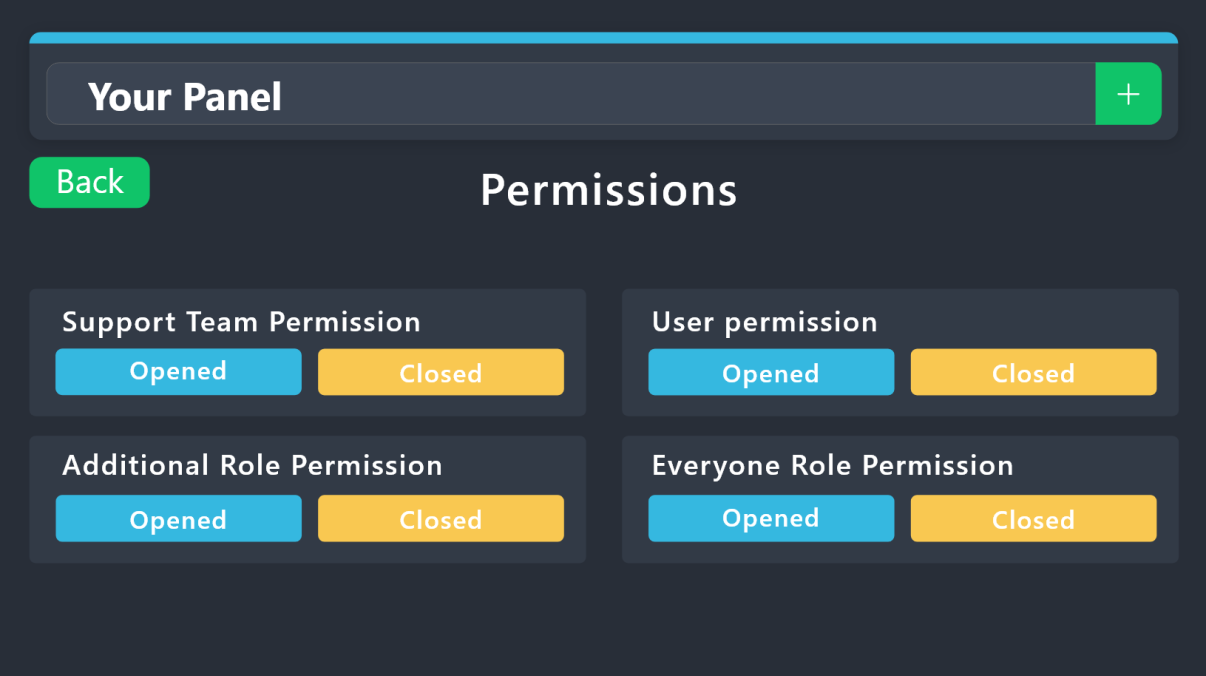
1. Go into your Dashboard
2. Open your Panel Configs tab
3. Select the panel you want to grant access to
4. Open the Permissions options menu
5. Find what role you'd like to edit permissions for
6. Choose if you'd like to edit opened or closed permissions for that role
7. Edit the permissions by tickingor unticking
each permission
8. Save changes
 worldly helm
pale igloo
I’ll work through it and see if it solves it, thankyou 💜
worldly helm
pale igloo
I’ll work through it and see if it solves it, thankyou 💜
For permissions, use this Guide ^
pale igloo
worldly helm
For permissions, use this Guide ^
is this correct? Admin still cannot close them

 worldly helm
Sorry, my bad
Go to General Ticket Options-->Buttons--> Close Ticket-->Edit Button--> Allowed Roles--> Select your wanted roles.
If you want everyone (Who have access to the ticket), to have access to close it. Select this
pale igloo
where do i find Menu?😬
worldly helm
 worldly helm
pale igloo
where do i find Menu?😬
worldly helm
pale igloo
where do i find Menu?😬
Sorry, i am a bit tired rn 😭
I meant to say "General Ticket Options"
pale igloo
 worldly helm
Should look something like this
 pale igloo
i found it!!! yikes that was complex 😂 Thankyou!
worldly helm
You're welcome! Sorry again 🥱
pale igloo
worldly helm
You're welcome! Sorry again 🥱
it's still not working haha
worldly helm
Update the panel
pale igloo
how would i update the panel? they've now lost the option to create tickets
 onyx sentinel
Hallo, habe mal eine Frage.
humble sequoiaBOT

Deutsches Support-Team
Wenn du Hilfe vom Deutschen Support-Team erhalten möchtest gehe in #🎫│make-a-ticket und öffne durch einen Klick auf den :flag_de: Button ein Ticket.
onyx sentinel
Hat sich nun erledigt hab es selber herausgefunden
humble sequoiaBOT
━━ EmVondy's inquiry has been moved to a ticket ━━
 worthy relic
Why cant i see the dropdown?

 hybrid mural
Ayuda
It already took 1 hour to load and my ticket still does not load
Please help
 limber glen
Does anyone know where in the settings I can find if someone selects the options, the ticket tool automatically changes the ticket name?
hybrid mural
Help help help help help help
humble sequoiaBOT
The Drop-down menu or Select Menu replaces the buttons on your panel message and uses a drop-down menu with all of your panels. To set this up, go to your Panel Configs and select your main Panel.
<:Numbericons1:1018864164032225340> Enable Select Style
First you enable Select Style. Then you add an item in the Dropdown Editor. Now you can start editing your dropdown!
<:Numbericons2:1018864168041971712> Dropdown Editor
Each line in the dropdown editor represents a line in the drop down menu on discord. You can add more "Items", by clicking on 

First you select a panel. That's the panel this option will open a ticket for.  DONT select the same panel twice. Each option should have a different Panel
After that, you can put a Display. This is the title of this option and will appear in the drop down menu. The *Description can be set right after that, which will be below the title in grey.
Additionally you can select an emoji, that will be shown in front of each option. You can either manually input the ID of an emoji or select it in the selector.
Common Issues ⚠️
- Panel doesn't send? Make sure you have a valid emoji selected
- Option doesn't show up? Check if two options have the same panel in the DropDown Editor

$dropdown
worldly helm
worthy relic
Why cant i see the dropdown?
See above
humble sequoiaBOT
The ticket name is the default channel name of all tickets. To edit it, go to your Dashboard > Panel Configs > Ticket. There you can edit the channel name of opened and closed tickets. You can also use variables in there.

 Note: This is a premium feature
worldly helm
Note: This is a premium feature
worldly helm
@limber glen Hey there! See above
limber glen
worldly helm
<@594667902792368144> Hey there! See above
Its for premium user ?
worldly helm
Yes, its for premium only 
limber glen

 jade topaz
How can I enable multiple selections when opening a ticket?
humble sequoiaBOT
The Drop-down menu or Select Menu replaces the buttons on your panel message and uses a drop-down menu with all of your panels. To set this up, go to your Panel Configs and select your main Panel.
<:Numbericons1:1018864164032225340> Enable Select Style
First you enable Select Style. Then you add an item in the Dropdown Editor. Now you can start editing your dropdown!
<:Numbericons2:1018864168041971712> Dropdown Editor
Each line in the dropdown editor represents a line in the drop down menu on discord. You can add more "Items", by clicking on
First you select a panel. That's the panel this option will open a ticket for. DONT select the same panel twice. Each option should have a different Panel
After that, you can put a Display. This is the title of this option and will appear in the drop down menu. The *Description can be set right after that, which will be below the title in grey.
Additionally you can select an emoji, that will be shown in front of each option. You can either manually input the ID of an emoji or select it in the selector.
Common Issues ⚠️
- Panel doesn't send? Make sure you have a valid emoji selected
- Option doesn't show up? Check if two options have the same panel in the DropDown Editor
$dropdown
 kindred hollow
@jade topaz Hi there! See above.
 rugged hawk
does anyone know why the bot is replying interaction failed?
kindred hollow
jade topaz
Where is the main panel?
The panel where you want to configure the multiple selections.
kindred hollow
rugged hawk
does anyone know why the bot is replying interaction failed?
Hey there. Can you run the /debug command in the same channel?
 near ore
help
humble sequoiaBOT
Hello, we would love to help you, but if you don't tell us what you need help with we can't help you :(
 austere forge
near ore
help to how create buttons like this attachment
austere forge
near ore
help to how create buttons like this attachment
Hey there 🙂
see below
humble sequoiaBOT
For more convenient use of multipanels, you can now combine panels on the dashboard. This will allow you to directly send the multipanel from the dashboard or via the $panel ID command.
Where can I find this?
You can find this setting on the Dashboard -> Panel Configs -> Panel -> Attached Panels
Note: if you're attaching all the panels to a panel called English, don't include English in the attached panel's box (If you do this, it will create a duplicate)
This will put all buttons from all of your panels on one message. The message is the panel message from the panel you're combining these panels in.

 inner finch
How can I install the ticket bot on a channel?
humble sequoiaBOT
First you will want to invite the bot to your server. Once the bot is in your server, you can manage your server in the dashboard.
To create a panel we are going to need to head over to the Panel Configs Tab on the Dashboard.
Once at the dashboard we will need to click Create Panel.
Enter a panel name (Fill in any optional settings you want).
Click Create Panel and you are ready to get started with configuring your panel.
An example of a creating a panel is shown below.
Once the panel has been created, use the blue Send button and select the channel you want the panel to be sent to.
The Panel wasn't send
Use the </debug:ID> command to diagnose possible permission issues with the bot.
austere forge
inner finch
How can I install the ticket bot on a channel?
hey there 🙂
follow instructions above
 elfin quarry

how would i make my ticket bot look like this
like iwth the image and all the text and the dropdown
austere forge
elfin quarry
like iwth the image and all the text and the dropdown
Hey there 🙂
see below
humble sequoiaBOT
The Drop-down menu or Select Menu replaces the buttons on your panel message and uses a drop-down menu with all of your panels. To set this up, go to your Panel Configs and select your main Panel.
<:Numbericons1:1018864164032225340> Enable Select Style
First you enable Select Style. Then you add an item in the Dropdown Editor. Now you can start editing your dropdown!
<:Numbericons2:1018864168041971712> Dropdown Editor
Each line in the dropdown editor represents a line in the drop down menu on discord. You can add more "Items", by clicking on
First you select a panel. That's the panel this option will open a ticket for. DONT select the same panel twice. Each option should have a different Panel
After that, you can put a Display. This is the title of this option and will appear in the drop down menu. The *Description can be set right after that, which will be below the title in grey.
Additionally you can select an emoji, that will be shown in front of each option. You can either manually input the ID of an emoji or select it in the selector.
Common Issues ⚠️
- Panel doesn't send? Make sure you have a valid emoji selected
- Option doesn't show up? Check if two options have the same panel in the DropDown Editor
$dropdown
austere forge
For image, text you can edit panel message
humble sequoiaBOT
The panel message is where people react to make a ticket. To customize it head over to your Dashboard --> Panel Configs -> Panel -> Edit Panel Message
 austere forge
near ore
I did it but still not show
austere forge
near ore
I did it but still not show
Do not ping staff pls.
Do you have update / send panel?
austere forge
near ore
I didn't update it
Go to Panel configs > and press send button
 near ore
Then
rugged hawk
kindred hollow
Hey there. Can you run the `/debug` command in the same channel?
copy that.
found the issue and solved it.
thank you for replying~
 iron nightBOT
Gave +1 Rep to @kindred hollow (current: #324 - 1)
near ore
I put it to ticket channel
hybrid mural
Help pls
kindred hollow
rugged hawk
copy that.
found the issue and solved it.
thank you for replying~
No problem, glad to hear it's working now!
kindred hollow
hybrid mural
Help pls
Please state your issue or ask your question, otherwise we won't be able to help you.
hybrid mural
I can't generate the ticket and it tells me Channel limit
kindred hollow
You will have to contact the staff of the server where you are trying to open the ticket.
worldly helm
Yes, you need to tell staff to delete/close some tickets
austere forge
Please let only 1 person help someone, having multiple people help one person isn't needed
kindred hollow
Unfortunately they will have to delete some channels because Discord does not allow more than 500 channels on a server.
We can't help you, sorry.
near ore
austere forge
Please let only 1 person help someone, having multiple people help one person is...
Pls complete
hybrid mural
And how do I contact the staff?
austere forge
near ore
Pls complete
Use #🎫│make-a-ticket for fast response 🙂
near ore
Man the staff is a person not robot
kindred hollow
hybrid mural
And how do I contact the staff?
I don't know unfortunately. Ping them, DM them or use an alternative (assuming these allowed)
kindred hollow
austere forge
Please let only 1 person help someone, having multiple people help one person is...
Sorry, but I was already helping the user from the beginning.
worldly helm
we have had this issue this morning...
kindred hollow
There's no reason to come back here then, although again, I was already helping the user. If you already knew they had asked the same question before, you could have said so instead of trying to help them again.
kindred hollow
Alright, I don't think this is a channel to discuss this 😄
worldly helm
I don't think either.
 nocturne ridge
How do I close the ticket without asking me: Do you want to delete the ticket?
austere forge
nocturne ridge
How do I close the ticket without asking me: Do you want to delete the ticket?
Hey there 🙂
Disable Two step Close
On panel configs > General
nocturne ridge
austere forge
Hey there 🙂
Disable `Two step Close` <:Switch_disabled:1041734620770750474>
On...
ok
thanx
austere forge
You're welcome, glad I could help ! 
near ore
austere forge
You're welcome, glad I could help ! <:3v_smile:1187282191630204958>
Can u just tell me how to make update to the panel
Like the link where do I find the link of the update
austere forge
near ore
Can u just tell me how to make update to the panel
Go to Panel configs > and press update button
 austere forge
near ore
I know this but the link
austere forge
near ore
I know this but the link
the link of the message to the panel
near ore
How

 near ore
worldly helm
near ore
worldly helm
Thanks man
iron nightBOT
Gave +1 Rep to @worldly helm (current: #69 - 20)
 austere forge
elfin quarry
how to change this?
austere forge
elfin quarry
how to change this?
Hey there 🙂
This is not possible sadly
elfin quarry
austere forge
Hey there 🙂
This is not possible sadly
Bro what
austere forge
elfin quarry
Bro what
Ah, I thought you wanted to change the text
Go to Dashboard > Panel configs > Limits - Open tickets each user
elfin quarry
austere forge
Ah, I thought you wanted to change the text
Go to Dashboard > Panel configs > L...
Ok good thanks man
iron nightBOT
Gave +1 Rep to @austere forge (current: #13 - 398)
elfin quarry
How to i make it to where if there hasnt been activity in the ticket in a certian amount of time it will close ??
humble sequoiaBOT
With Ticket Tool's automation, you'll be able to customize your ticket system workflow! Using the Automation Editor you can:
- Chose out of 6 different triggers
- Set a Message Watcher to wait for a message for a given time, or to wait for the absence of them
- Add delays on the execution of actions after the trigger or watcher finds a message!
Automation Command
Automations can be stopped, by running the /automation stop command inside the ticket you want it to stop in. Restart it with /automation start You'll also be able to view the current status of the automations with /automation.
__Important Notes__
- Automation is on ALPHA TESTING PHASE, things might work unexpectedly or not at all.
- Any automation will run for a maximum of 7 days or until the ticket is closed, afterward, it will stop checking
+ You can have 5 automations per panel

$auto
elfin quarry
Wait @austere forge if i bought premium should i add the premium bot to my server or what?
Oh srry
austere forge
elfin quarry
Wait <@225349654974431232> if i bought premium should i add the premium bot to m...
you can do it yes
see below
humble sequoiaBOT
The first thing you will need to do is invite the premium bot, an invite can be found here
Once the bot is in your server we will head to the dashboard and manage your server. When you are managing your server, you want to head into "Server Configs" then click the drop down menu under "Select the bot you would like to use on this server" then click "Ticket Tool#6207" and then save.
 hybrid mural
I can't create the ticket, I already tried for 10 hours
austere forge
hybrid mural
I can't create the ticket, I already tried for 10 hours
As this is another server, we cannot help you.
You must contact the staff of this server
near ore
@austere forge thanks for support man
iron nightBOT
Gave +1 Rep to @austere forge (current: #13 - 399)
near ore
It's good right now
 rustic escarp
Good afternoon, I ran into a problem that the game started to glitch very badly, I’m playing from a mobile device Xiaomi Redmi Note 9 Pro
humble sequoiaBOT

⚠️ You're in the wrong place
We provide support for Ticket Tool Discord bot and cannot help you with whatever issue you have.
- We don't know which Support Team you should contact to get this issue resolved, and unfortunately we won't be able to accurately tell you.
If you don't have any further questions regarding our bot Ticket Tool, please close this ticket
 cerulean fog
I keep inviting the bot to join but it doesnt show up and says that it did
austere forge
Hey there 🙂
Check your servers audit log, a security bot may be kicking it
 sonic crystal
I invited the bot to the ds server, but the Manage Server does not show that I invited him
austere forge
sonic crystal
I invited the bot to the ds server, but the Manage Server does not show that I i...
Hey there 🙂
can you press sync servers button on Dashboard
sonic crystal
I pressed it, but still no
humble sequoiaBOT
Don't see your server in the dashboard?
Try using the Sync Servers button on your top center of the Dashboard page
You will possibly need to relog. Look below to see the steps on how to relog.
If this doesn't work
You should relog from the dashboard, you can do this by clicking here to log out immediately, and then log back in
Note:
You need one of these 3 things to access the dashboard.
1. Server Owner (Level: 6)
2. Server Administrator (Level: 4)
3. Dashboard Role (Level: 2)
:warning: You can check your level using the </permissionlevel:1029797400174399542> command on your Discord Server
If the bot's response is:
- @User is permission level: 0 (User)
You don't have any of the 3 levels required to access the server's dashboard
 iron nightBOT
Gave +1 Rep to @austere forge (current: #12 - 402)
austere forge
You're welcome, glad I could help !
 meager tendon
is it possible to make the name of the ticket when it opens the name of the person who opened it (automatically without having to manually rename it)
humble sequoiaBOT
━━ dmforquestions's inquiry has been moved to a ticket ━━
humble sequoiaBOT
The ticket name is the default channel name of all tickets. To edit it, go to your Dashboard > Panel Configs > Ticket. There you can edit the channel name of opened and closed tickets. You can also use variables in there.
Note: This is a premium feature
worldly helm
meager tendon
is it possible to make the name of the ticket when it opens the name of the pers...
Hey there! See above
austere forge
Thanks for your help, but he's made a ticket 🙂
worldly helm
Ohh, sorry. I didnt see it 😭
 crude forge
How can I do that if someone opens a ticket he cannot close it?
kindred hollow
crude forge
How can I do that if someone opens a ticket he cannot close it?
Dashboard > panel configs > buttons > close ticket > support team only.
 jovial turret
The app has not responded.
 frozen crypt
@jovial turret please do /debug on your server and then @ me when you do it
If you need more help just open a ticket on #🎫│make-a-ticket
jovial turret
@frozen crypt The app has not responded.
frozen crypt
jovial turret
<@833752068300210236> The app has not responded.
The bot need send messages permission
jovial turret
frozen crypt
The bot need send messages permission
Yes it haves
kindred hollow
crude forge
very thx bro ❤️
Np.
frozen crypt
jovial turret
Yes it haves
 jovial turret
Now
frozen crypt
Try using that command again
frozen crypt
jovial turret
Now
Now should be fixed.
 heavy saddle
worldly helm
heavy saddle
heavy saddle
worldly helm
heavy saddle
Hey, do you have any questions about the ticket tool bot?


 quartz heron
worldly helm
Its not a Weekday though
quartz heron
worldly helm
Its not a Weekday though
I thought it was Monday summer gfot my days messed up.
worldly helm
quartz heron
I thought it was Monday summer gfot my days messed up.
Don't worry lmao. Have a great Summer :)
quartz heron
worldly helm
Don't worry lmao. Have a great Summer :)
Will do so
humble sequoiaBOT
worldly helm
$help
1. Go into your Dashboard
2. Open your Panel Configs tab
3. Select the panel you want to grant access to
4. Open the Permissions options menu
5. Find what role you'd like to edit permissions for
6. Choose if you'd like to edit opened or closed permissions for that role
7. Edit the permissions by ticking
8. Save changes
humble sequoiaBOT
worldly helm
$help
1. Go into your Dashboard
2. Open your Panel Configs tab
3. Select the panel you want to grant access to
4. Open the General options menu
5. Select your Support Team Roles
6. Save changes
 worldly helm
See above again
This should be on

General Ticket Options-->Permissions-->Support Team Permissions (Edit opened)
No
Not for Ticket Owner
Click on "Support Team Permissions (Edit opened) "
Save Settings, should work than
 scenic plinth
 prime bridgeBOT
 Successful Removals:
 1
 Unsuccessful Removals:
 0
 Reason: No reason.
 Moderator: @scenic plinth
austere forge
Hey there 🙂
Make sure you give the Support staff role permission to view tickets on all your ticket panels, not only your main panel
Go to Panel configs > General and add Support staff role on your all panels.
jade topaz
yo how can i send the transcript to someone's dm (the person wo opened the ticket)
worldly helm
That is a premium only feature
jade topaz
oh
 copper estuary
austere forge
Go to Panel configs > General and add Support staff role on your all panels.
copper estuary
austere forge
Go to Panel configs > General and add Support staff role on your all panels.
Thank you so much 🔥❗️❗️❗️ @austere forge i thought it was corrupted now they can see ❤️
iron nightBOT
Gave +1 Rep to @austere forge (current: #12 - 403)
austere forge
You're welcome, glad I could help !
 austere oxide
I can't click on the message content, how can I fix this?
 austere forge
austere oxide
I can't click on the message content, how can I fix this?
austere forge
austere oxide
I can't click on the message content, how can I fix this?
Hey there 🙂
This is a premium features
austere oxide
austere forge
Hey there 🙂
oh, thanks for the help c:
iron nightBOT
Gave +1 Rep to @austere forge (current: #12 - 404)
austere forge
You're welcome, glad I could help !
austere oxide
Is there a way to move the dropdown items up and down?
austere forge
austere oxide
Is there a way to move the dropdown items up and down?
you can move the dropdown panels manually
 austere oxide
austere forge
you can move the dropdown panels manually
austere oxide
austere forge
you can move the dropdown panels manually
huh
I don't get it
how can I move them?
austere forge
For my example image, you can set New panel 2 on top and put panel New panel 3 in place of panel 2
austere oxide
austere forge
For my example image, you can set `New panel 2` on top and put panel `New panel ...
i get it now, thanks :)
iron nightBOT
Gave +1 Rep to @austere forge (current: #12 - 405)
 slow fractal
can any help me
humble sequoiaBOT
Hello, we would love to help you, but if you don't tell us what you need help with we can't help you :(
slow fractal
from a server the bot is simply inactive
I'm supposed to click on it and then it should activate itself but then I get an error
austere forge
slow fractal
I'm supposed to click on it and then it should activate itself but then I get an...
Hey there 🙂
What seems to be the error, can I get a screenshot?
slow fractal
here
 austere forge
slow fractal
here
austere forge
slow fractal
here
can you use sync servers button pls
austere forge
slow fractal
it's exactly the same error
can you try to logout / login and double-check if you are connected to the right account
slow fractal
It didn't work, I think it's a general problem
austere forge
slow fractal
It didn't work, I think it's a general problem
can i get the server id you are trying to access?
slow fractal
How can I give you the ID
austere forge
slow fractal
How can I give you the ID
you can use $id command on your server
slow fractal
the get command doesn't work either
austere forge
slow fractal
the get command doesn't work either
alr, can i get server name pls
slow fractal
OCEAN
 austere forge
slow fractal
Yes the bot is white but there is a gray bar
austere forge
slow fractal
Yes the bot is white but there is a gray bar
alr, I'm going to take you to a ticket to fix this problem
slow fractal
Yes OK
humble sequoiaBOT
━━ User's inquiry has been moved to a ticket ━━
 wet prism
can someone pls help me?
humble sequoiaBOT
Hello, we would love to help you, but if you don't tell us what you need help with we can't help you :(
wet prism
i did all but it says error and this code 4f11290a-f4d3-11ed-a05b-0242ac120003
austere forge
wet prism
i did all but it says error and this code 4f11290a-f4d3-11ed-a05b-0242ac120003
Hey there 🙂
Are you the owner of this server or not?
austere forge
wet prism
No
Please contact server staff for them to clear tickets, in order for new tickets be created
 lapis ruin
Hello, I forgot my Avoro account password, can I ask for help?
humble sequoiaBOT
⚠️ You're in the wrong place
We provide support for Ticket Tool Discord bot and cannot help you with whatever issue you have.
- We don't know which Support Team you should contact to get this issue resolved, and unfortunately we won't be able to accurately tell you.
If you don't have any further questions regarding our bot Ticket Tool, please close this ticket
austere forge
wet prism
on my server it says chanel at limit but idk how to do it
I already answered you how to fix this problem :)
wet prism
ok
 dreamy vortex
humble sequoiaBOT
dreamy vortex
humble sequoiaBOT

فريق الدعم الفني العربي
عميلنا العزيز ان كنت تبحث عن مساعدة يرجى فتح تكت خاص بفريق الدعم الفني العربي
اذهب الى#🎫│make-a-ticket
ثم قم بلضغط على الايموجي الاتي (🇯🇴)
 boreal knot
Help me enter the community reward so I can get Havester Zyleak and Sickle Zyleak.
I'm mobile and I can't
 jade harbor

Is there a way to get emojis to work in the section where the panel name appears??
I've done this method and by the standard :sparkle02:
kindred hollow
jade harbor
If that is the title/author of the embed, no, it is a Discord limitation.
jade harbor
Darn!
kindred hollow
From what I know, it will soon be possible, although not for now.
kindred hollow
boreal knot
Help me enter the community reward so I can get Havester Zyleak and Sickle Zylea...
What do you mean?
humble sequoiaBOT
@boreal knot
⚠️ You're in the wrong place
We provide support for Ticket Tool Discord bot and cannot help you with whatever issue you have.
- We don't know which Support Team you should contact to get this issue resolved, and unfortunately we won't be able to accurately tell you.
If you don't have any further questions regarding our bot Ticket Tool, please close this ticket
 gilded stream
I just paid my bill and my firestick have not reset. help
humble sequoiaBOT
@gilded stream
⚠️ You're in the wrong place
We provide support for Ticket Tool Discord bot and cannot help you with whatever issue you have.
- We don't know which Support Team you should contact to get this issue resolved, and unfortunately we won't be able to accurately tell you.
If you don't have any further questions regarding our bot Ticket Tool, please close this ticket
 tepid blaze
how can i have my staff team see tickets aswell
tepid blaze
tepid blaze
how can i have my staff team see tickets aswell
never mind i fixed it
 past summit
How to ticket
kindred hollow
past summit
How to ticket
Can you elaborate please?
 bright fulcrum
Hello! I'm trying to figure out if it's possible for me to use one panel with multiple dropdown options? Example: Panel is 'I have a question about...' and options would be 'Making an account', 'Setting up my game', etc
Then once they choose an option, they'd be directed to a ticket the title of 'Question about accounts' or smth 😅
humble sequoiaBOT
The Drop-down menu or Select Menu replaces the buttons on your panel message and uses a drop-down menu with all of your panels. To set this up, go to your Panel Configs and select your main Panel.
<:Numbericons1:1018864164032225340> Enable Select Style
First you enable Select Style. Then you add an item in the Dropdown Editor. Now you can start editing your dropdown!
<:Numbericons2:1018864168041971712> Dropdown Editor
Each line in the dropdown editor represents a line in the drop down menu on discord. You can add more "Items", by clicking on
First you select a panel. That's the panel this option will open a ticket for. DONT select the same panel twice. Each option should have a different Panel
After that, you can put a Display. This is the title of this option and will appear in the drop down menu. The *Description can be set right after that, which will be below the title in grey.
Additionally you can select an emoji, that will be shown in front of each option. You can either manually input the ID of an emoji or select it in the selector.
Common Issues ⚠️
- Panel doesn't send? Make sure you have a valid emoji selected
- Option doesn't show up? Check if two options have the same panel in the DropDown Editor
$dropdown
kindred hollow
 @bright fulcrum hope this answers your question!
bright fulcrum
kindred hollow
<:this:894279341108772914> <@783808737743732766> hope this answers your question...
Thank you!
iron nightBOT
Gave +1 Rep to @kindred hollow (current: #199 - 2)
 simple spruce
can anyone tell me how to make your ticket open in the selected category rather than showing at the top of your server
 lunar knoll
Are there steps to setup Ticket Tool?
 fallen forum
Where can I select what roles get pinged when a new ticket is opened?
 muted mural
how do i edit the message of the ticket bot like not when u created a ticket
 elder yew
good morning , i have added ticket cateory , but whenever someone opens ticket it shows on top of server not inside category , how can i fix this 
@covert swallow
got a warn by pinging staff
but not answer lmao what a shit show
 swift reef
How do I reset the ticket tool? I deleted panels but it's not updating.
 sweet inlet
How do I delete a panel? When I click delete, then save. It says, "Major Configs Mismatch."?
kindred hollow
sweet inlet
How do I delete a panel? When I click delete, then save. It says, "Major Configs...
Use the ''DELETE'' button.
That message it's just a security measure to prevent you from accidentally deleting all your panels.
If you'd like to delete your last/only panel, please create another panel first before deleting the previous one
 humble sequoiaBOT
First you will want to invite the bot to your server. Once the bot is in your server, you can manage your server in the dashboard.
To create a panel we are going to need to head over to the Panel Configs Tab on the Dashboard.
Once at the dashboard we will need to click Create Panel.
Enter a panel name (Fill in any optional settings you want).
Click Create Panel and you are ready to get started with configuring your panel.
An example of a creating a panel is shown below.
Once the panel has been created, use the blue Send button and select the channel you want the panel to be sent to.
The Panel wasn't send
Use the </debug:1029783024264564765> command to diagnose possible permission issues with the bot.
kindred hollow
@lunar knoll
sweet inlet
kindred hollow
Use the ''DELETE'' button.
That message it's just a security measure to prevent...
Much appreciated bro.
Finally works.
kindred hollow
Np.
humble sequoiaBOT
1. Go into your Dashboard
2. Open your Panel Configs tab
3. Select the panel you want to ping your support on
4. Open the Ticket options menu
5. Click on Edit Ticket Message
6. In the Message Content use one of the role mention syntax (**{@Role Name}**/**{Role ID}**)
7. Save changes
Note: For this to work properly, Ticket Tool requires the Mention Everyone permission. Or the role must have the Allow anyone to @mention this role setting enabled 
 kindred hollow
@fallen forum see above.
kindred hollow
swift reef
How do I reset the ticket tool? I deleted panels but it's not updating.
Hi there, do you still need help? If so, can you elaborate on what you're trying to do please? 🙏
kindred hollow
muted mural
how do i edit the message of the ticket bot like not when u created a ticket
What message are you referring to?
kindred hollow
elder yew
good morning , i have added ticket cateory , but whenever someone opens ticket i...
Hi there, do you still need help?
humble sequoiaBOT
1. Go into your Dashboard
2. Open your Panel Configs tab
3. Select the panel you want to grant access to
4. Open the Category options menu
5. Select the categories of your preference
6. Save changes

 daring matrix
Hey! I purchased the ticket tool yearly premium and I'm yet to add the premium bot in the server (free one is already working). Do we have a guide or any docs that can help me with the steps for migration?
kindred hollow
humble sequoia
@simple spruce See above.
elder yew
Yes
 coral flax
I don't see the channel I want to add a ticket to even though I've selected the correct channel. Is there any way to fix it?
kindred hollow
humble sequoia
@elder yew have you followed these steps?
kindred hollow
coral flax
I don't see the channel I want to add a ticket to even though I've selected the ...
Hi there, what do you mean?
humble sequoiaBOT
The first thing you will need to do is invite the premium bot, an invite can be found here
Once the bot is in your server we will head to the dashboard and manage your server. When you are managing your server, you want to head into "Server Configs" then click the drop down menu under "Select the bot you would like to use on this server" then click "Ticket Tool#6207" and then save.
 restive condor
daring matrix
Hey! I purchased the ticket tool yearly premium and I'm yet to add the premium b...
restive condor
daring matrix
Hey! I purchased the ticket tool yearly premium and I'm yet to add the premium b...
Hey there! See above please
To handle already opened tickets (with the white bot), you will need to either give the premium bot admin perms until you handle all tickets opened through the white bot, or manually add the premium bot to each ticket.
You will then be able to manage them via commands /delete /close...etc
elder yew
kindred hollow
<@892076546829992007> have you followed these steps?
Yes , I have already given category
 polar field
how to i blacklist a role from opening a certain ticket panel? Not globally I want it to just stop a role interacting with one panel.
 gilded verge
polar field
how to i blacklist a role from opening a certain ticket panel? Not globally I wa...
gilded verge
polar field
how to i blacklist a role from opening a certain ticket panel? Not globally I wa...
Panel Configs->Buttons->choose something->Disabled Roles
Note that it won't work on the roles with Administrator permission
swift reef
kindred hollow
Hi there, do you still need help? If so, can you elaborate on what you're trying...
I think I fixed it. Thank you for checking in.
iron nightBOT
Gave +1 Rep to @kindred hollow (current: #160 - 3)
lunar knoll
What are ticket tool premium perks?
humble sequoiaBOT
 Faster Premium Bot
Automatic Transcripts
Full Customization
Direct Messages
Ticket Automation
Thread Style Ticketing
Premium Support
Scheduled Panel Availability
Integrations
Claiming
Advanced Ticket Statistics
You can purchase premium here:
Price
$6 - Monthly
$66 - Yearly (Open a billing ticket in #🎫│make-a-ticket to receive additional information on this matter)
frozen crypt
@lunar knoll
jade topaz
Main Server got termed + Main Account, i bought Ticket Tool Premium 3m. What can i do?
 astral aspen
I need help when I was tryna create a ticket it didn't got created
daring matrix
restive condor
To handle already opened tickets (with the white bot), you will need to either g...
okay, got the point


 atomic solstice
lunar knoll
Why does it show like this
atomic solstice
lunar knoll
Why does it show like this
you should use a mutlipanel instead of a dropdown
humble sequoiaBOT
For more convenient use of multipanels, you can now combine panels on the dashboard. This will allow you to directly send the multipanel from the dashboard or via the $panel ID command.
Where can I find this?
You can find this setting on the Dashboard -> Panel Configs -> Panel -> Attached Panels
Note: if you're attaching all the panels to a panel called English, don't include English in the attached panel's box (If you do this, it will create a duplicate)
This will put all buttons from all of your panels on one message. The message is the panel message from the panel you're combining these panels in.
humble sequoiaBOT
The Drop-down menu or Select Menu replaces the buttons on your panel message and uses a drop-down menu with all of your panels. To set this up, go to your Panel Configs and select your main Panel.
<:Numbericons1:1018864164032225340> Enable Select Style
First you enable Select Style. Then you add an item in the Dropdown Editor. Now you can start editing your dropdown!
<:Numbericons2:1018864168041971712> Dropdown Editor
Each line in the dropdown editor represents a line in the drop down menu on discord. You can add more "Items", by clicking on
First you select a panel. That's the panel this option will open a ticket for. DONT select the same panel twice. Each option should have a different Panel
After that, you can put a Display. This is the title of this option and will appear in the drop down menu. The *Description can be set right after that, which will be below the title in grey.
Additionally you can select an emoji, that will be shown in front of each option. You can either manually input the ID of an emoji or select it in the selector.
Common Issues ⚠️
- Panel doesn't send? Make sure you have a valid emoji selected
- Option doesn't show up? Check if two options have the same panel in the DropDown Editor
$dropdown
jade topaz
Main Server got termed + Main Account, i bought Ticket Tool Premium 3m. What can i do?
swift reef
Can I create a ticket for someone within a specific panel? EX: I have a support channel and a violation channel as another. So I want to assign Person A to S channel and Person B to V channel using commands.
 lapis moth

 white torrent
Ticket bot not working?? Why
 humble sequoiaBOT
The Drop-down menu or Select Menu replaces the buttons on your panel message and uses a drop-down menu with all of your panels. To set this up, go to your Panel Configs and select your main Panel.
<:Numbericons1:1018864164032225340> Enable Select Style
First you enable Select Style. Then you add an item in the Dropdown Editor. Now you can start editing your dropdown!
<:Numbericons2:1018864168041971712> Dropdown Editor
Each line in the dropdown editor represents a line in the drop down menu on discord. You can add more "Items", by clicking on
First you select a panel. That's the panel this option will open a ticket for. DONT select the same panel twice. Each option should have a different Panel
After that, you can put a Display. This is the title of this option and will appear in the drop down menu. The *Description can be set right after that, which will be below the title in grey.
Additionally you can select an emoji, that will be shown in front of each option. You can either manually input the ID of an emoji or select it in the selector.
Common Issues ⚠️
- Panel doesn't send? Make sure you have a valid emoji selected
- Option doesn't show up? Check if two options have the same panel in the DropDown Editor
$dropdown
 timber kernel
white torrent
Ticket bot not working?? Why
timber kernel
white torrent
Ticket bot not working?? Why
Can you please be more specific?
lapis moth
humble sequoia
Arab
white torrent
timber kernel
Can you please be more specific?
 humble sequoiaBOT
تحل قائمة الخيارات محل الأزرار الموجودة في رسالة لوحة التذاكر الخاصة بك وتستخدم القائمة مع جميع اللوحات الخاصة بك. لإعداد هذا، توجّه الى إعدادات اللوحة، وحدد لوحة التذاكر الرئيسية.
<:Numbericons1:1018864164032225340> تمكين نمط الخيارات
أولًا، عليك تفعيل نمط الخيارات. وبعدها يجب عليك إضافة عناصر في محرّر الخيارات. الآن يمكنك البدء بتعديل الخيارات الخاصة بك!
<:Numbericons2:1018864168041971712> محرر الخيارات
كل سطر في محرر الخيارات يمثّل سطر من قائمة الخيارات على الدسكورد. يمكنك إضافة المزيد من الخيارات، بواسطة الضغط على
أولًا، عليك إختيار لوحة تذاكر. هذه هي اللوحة التي سيفتح لها هذا الخيار تذكرة.
لا تقم بتحديد نفس اللوحة مرتين. يجب أن يكون لكل خيار لوحة مختلفة
وبعد ذلك يمكنك وضع عرض. هذا هو عنوان هذا الخيار وسيظهر في قائمة الخيارات. يمكن تعيين الوصف مباشرة بعد ذلك، والذي سيكون أسفل العنوان باللون الرمادي.
بالإضافة إلى ذلك، يمكنك تحديد رمز تعبيري (إيموجي) سيتم عرضه أمام كل خيار. يمكنك إما إدخال معرف الرمز التعبيري يدويًا أو تحديده في أداة التحديد.
المشاكل الشائعة ⚠️
- اللوحة لا تعمل؟ تأكد أنك قمت بإدخال رمز تعبيري صحيح.
- الخيار لا يظهر؟ تحقق مما إذا كان هناك خياران لهما نفس اللوحة في محرر الخيارات.
$ardropdown
timber kernel
lapis moth
Arab
^
timber kernel
white torrent
Please run /debug
timber kernel
lapis moth
I won’t Video
Please do not ping staff, that is rude.
Back to topic:
We do not have a video I can just send you. The above description covers everything you need.
lunar knoll
atomic solstice
you should use a mutlipanel instead of a dropdown
And how can I remove the panel
lunar knoll
lunar knoll
I want it to be like this only
Just buttons like this
atomic solstice
lunar knoll
And how can I remove the panel
In the embeds I sent one shows you how to enable multipanel which is just the buttons and the second shows the dropdown which you have now enabled, so you need to disable the dropdown in the panel you have setup and change it to a multiplanel
atomic solstice
humble sequoia
so this one is how you can enable the multipanel with buttons
atomic solstice
humble sequoia
and this one is the one you have now enabled so just find the panel you have posted in the server and then like the step 1 in the embed says to enable Select style you need to disable it
 neon flume
hello
kindred hollow
neon flume
hello
Hi there, do you need help?
neon flume
yes
humble sequoiaBOT
Hello, we would love to help you, but if you don't tell us what you need help with we can't help you :(
neon flume
panel buy
 unborn wolf
Can someone help me.
humble sequoiaBOT
Hello, we would love to help you, but if you don't tell us what you need help with we can't help you :(
 prisma wasp
Hey, I could also use some help. I bought the gift card for my order, made a screenshot, got the key ready. But where do I send these things so I get the funds on my account?
humble sequoiaBOT
⚠️ You're in the wrong place
We provide support for Ticket Tool Discord bot and cannot help you with whatever issue you have.
- We don't know which Support Team you should contact to get this issue resolved, and unfortunately we won't be able to accurately tell you.
If you don't have any further questions regarding our bot Ticket Tool, please close this ticket
 austere forge
unborn wolf
austere forge
unborn wolf
Hey there 🙂
Go to Dashboard > Panel configs > Limits - Open tickets each user
unborn wolf
austere forge
Hey there 🙂
Go to Dashboard > Panel configs > `Limits` - Open tickets each use...
tried that still getting the same error.
austere forge
unborn wolf
tried that still getting the same error.
did you increase the number of this option and set on all your panels
unborn wolf
austere forge
did you increase the number of this option and set on all your panels
yes
fixed it i think
daring matrix
restive condor
To handle already opened tickets (with the white bot), you will need to either g...
will I have to make all the panels again? or will it automatically shift the panels and all setting to the new gold bot?
jade topaz
How to change that
"To create ticket click" message
humble sequoiaBOT
The Ticket Message is the first message sent by the bot on a new ticket. To customize it head over to your Dashboard ➞ Panel Configs ➞ Ticket ➞ Edit Ticket Message
jade topaz
humble sequoia
Not that
 desert bough
Where can i open aticket for support?
humble sequoiaBOT
The panel message is where people react to make a ticket. To customize it head over to your Dashboard --> Panel Configs -> Panel -> Edit Panel Message
worldly helm
Look here!^^
jade topaz
 desert bough
Thx!
 hearty forum
hello!
im here active for being support team!
eed any help?
mjhmt, ┬─┬ノ( º _ ºノ)
jade topaz
How can change this
 worldly helm
Same, just wait for the people to ask questions
worldly helm
jade topaz
How can change this
Ive already told you
humble sequoiaBOT
The panel message is where people react to make a ticket. To customize it head over to your Dashboard --> Panel Configs -> Panel -> Edit Panel Message
hearty forum
/help
jade topaz
I don't understand
hearty forum
/help how to be staff member
jade topaz
@worldly helm i don't understand can you just slide a tutorial
humble sequoiaBOT
How do be I become a Support Member?
You can become a support member in 2 ways:
1. You can be really active in #🆘│community-support gain <@&799500225579712543> role and get chosen by a Manager
2. You can apply VIA our applications that would be sent in #📣│server-news
We currently have Support Teams for the following languages:
:flag_us: English
:flag_jo: Arabic
:flag_fr: French
:flag_de: German
:flag_es: Spanish
:flag_br: Portuguese
jade topaz
hearty forum
/help how to be staff member
To be a staff member
• Must be active on this channel and get choose by an manager
2:
Just apply from application
worldly helm
See above 333^^
hearty forum
example how to be active means?
worldly helm
jade topaz
Can you give tutorial
Lemme do a tut rq
jade topaz
hearty forum
example how to be active means?
Help people on this channel
 jade topaz
worldly helm
Thank you 🤣
jade topaz
worldly helm
Thank you 🤣
You got tutorial?
worldly helm
 jade topaz
Done
worldly helm
Click on embed editor
 austere forge
Hey there 🙂
stop spam pls. @hearty forum
jade topaz
Yeah
 hearty forum
/help
jade topaz
Done
worldly helm
Bro is NOT getting staff....
hearty forum
help me
worldly helm
jade topaz
Done
Nice, update or resend the panel
hearty forum
/please
worldly helm
What is your issue...
humble sequoiaBOT
Hello, we would love to help you, but if you don't tell us what you need help with we can't help you :(
 open beacon
 humble sequoiaBOT
The Drop-down menu or Select Menu replaces the buttons on your panel message and uses a drop-down menu with all of your panels. To set this up, go to your Panel Configs and select your main Panel.
<:Numbericons1:1018864164032225340> Enable Select Style
First you enable Select Style. Then you add an item in the Dropdown Editor. Now you can start editing your dropdown!
<:Numbericons2:1018864168041971712> Dropdown Editor
Each line in the dropdown editor represents a line in the drop down menu on discord. You can add more "Items", by clicking on
First you select a panel. That's the panel this option will open a ticket for. DONT select the same panel twice. Each option should have a different Panel
After that, you can put a Display. This is the title of this option and will appear in the drop down menu. The *Description can be set right after that, which will be below the title in grey.
Additionally you can select an emoji, that will be shown in front of each option. You can either manually input the ID of an emoji or select it in the selector.
Common Issues ⚠️
- Panel doesn't send? Make sure you have a valid emoji selected
- Option doesn't show up? Check if two options have the same panel in the DropDown Editor
$dropdown
worldly helm
See above^^
hearty forum
/help how to become staffmember faster and how much it take time
austere forge
worldly helm
3v, do you know why u just got timeouted?
Probably because of the video you sent, idk 🤷♂️
or multi image
worldly helm
Damn, i sent like 5 or 6 Screenshots of how it works
austere forge
for the bot it is considered spam, maybe because of that
worldly helm
Yeah, probably that. Now lets dont talk about that in here 
austere forge
correct 
 vivid ginkgo
Hello everyone, may I extend the deletion time for the ticket?
austere forge
vivid ginkgo
Hello everyone, may I extend the deletion time for the ticket?
Hey there 🙂
Sadly no
Feel free to suggest it
humble sequoiaBOT

Suggestions for Ticket Tool
To make a suggestion use the s!suggest suggestion command in #🤖│bot-spam. Note that you'll suggestion will be first reviewed by our Support Team before it's posted into #💡│suggestions, channel in which you'll be able to vote for other suggestions!
vivid ginkgo
Thx @austere forge
austere forge
austere oxide
What does the $automation command do?
This is a command to enable the automation of your ticket panel
austere oxide
austere forge
This is a command to enable the automation of your ticket panel
Thanks!
iron nightBOT
Gave +1 Rep to @austere forge (current: #11 - 409)
 pliant island
Dropdown menu:
- Report
- Support
- Obtain role
How can I switch Obtain role with Report?
lunar knoll
How can I add more buttons
 humble sequoiaBOT
For more convenient use of multipanels, you can now combine panels on the dashboard. This will allow you to directly send the multipanel from the dashboard or via the $panel ID command.
Where can I find this?
You can find this setting on the Dashboard -> Panel Configs -> Panel -> Attached Panels
Note: if you're attaching all the panels to a panel called English, don't include English in the attached panel's box (If you do this, it will create a duplicate)
This will put all buttons from all of your panels on one message. The message is the panel message from the panel you're combining these panels in.
worldly helm
@lunar knoll Look above ^
lunar knoll
There is only 4 showing

But I created 5 panels
The last one is Desk
I can't attach the 5th one idk why
austere forge
lunar knoll
I can't attach the 5th one idk why
Hey there 🙂
Try using the sync button at the top of your server page
 lunar knoll
Thank youuu it worked
 opal wasp
How do I fix it
 worldly helm
@opal wasp
The Ticket Tool bot is missing permissions. I would suggest you give it admin
opal wasp
worldly helm
The Ticket Tool bot is missing permissions. I would suggest you give it admin
Alright thanks
iron nightBOT
Gave +1 Rep to @worldly helm (current: #66 - 21)
worldly helm
opal wasp
Alright thanks
yw
 hushed smelt
yo
is it possible to change the channel name of a generated ticket
like for example "appeal-0003" except for "ticket-0003"
humble sequoiaBOT
The ticket name is the default channel name of all tickets. To edit it, go to your Dashboard > Panel Configs > Ticket. There you can edit the channel name of opened and closed tickets. You can also use variables in there.
Note: This is a premium feature
austere forge
hushed smelt
like for example "appeal-0003" except for "ticket-0003"
Hey there 🙂
see above
hushed smelt
thanks
 atomic mortar
On my Discord it shows that I pay for Premium monthly under billing, but doesn't show under subscriptions. Also when I log onto the Ticket tool website, Premium isn't available and I need to subscribe. Any suggestions?
 median summit
Well I am doing a dropdown menu and basically look. In the Clothing and livery we can see them in the drop down but the others no


Wdym by panel how do I make panel?
austere forge
atomic mortar
On my Discord it shows that I pay for Premium monthly under billing, but doesn't...
Hey there 🙂
In your case, it may be that the server to which you were subscribed has been deleted or is no longer available.
You will therefore need to contact Discord Support > Billing to request the cancellation of this subscription.
https://support.discord.com/hc/en-us/requests/new?ticket_form_id=360000029731
That should be the link to get started
austere forge
median summit
Well I am doing a dropdown menu and basically look. In the Clothing and livery w...
Hey there 🙂
Go to Dashboard > Panel configs > and click on the green cross at the top right to create other ticket panels
 median summit
Oh, yes thank you!
atomic mortar
austere forge
Hey there 🙂
In your case, it may be that the server to which you were subscribe...
Thank you 🙂
iron nightBOT
Gave +1 Rep to @austere forge (current: #11 - 413)
median summit
Sorry 3v Umm, I wanted to say like how do I put the role for the ticket support team
And how do I edit the message in the ticket
humble sequoiaBOT
1. Go into your Dashboard
2. Open your Panel Configs tab
3. Select the panel you want to grant access to
4. Open the General options menu
5. Select your Support Team Roles
6. Save changes
The Ticket Message is the first message sent by the bot on a new ticket. To customize it head over to your Dashboard ➞ Panel Configs ➞ Ticket ➞ Edit Ticket Message
austere forge
median summit
Sorry 3v Umm, I wanted to say like how do I put the role for the ticket support ...
see above : )
atomic mortar
Can I clone all of my server settings / panel etc from the basic ticket tool to premium? Or do I have to start from scratch again?
median summit
Thanks @austere forge
iron nightBOT
Gave +1 Rep to @austere forge (current: #11 - 414)
austere forge
atomic mortar
Can I clone all of my server settings / panel etc from the basic ticket tool to ...
If you purchased premium nothing will change on your Dashboard / panels
atomic mortar
I had the basic enabled and set up all my tickets etc, however if I switch to premium then all of the basic ticket setup doesn't work as it's not enabled anymore.
 austere forge
atomic mortar
I had the basic enabled and set up all my tickets etc, however if I switch to pr...
austere forge
atomic mortar
I had the basic enabled and set up all my tickets etc, however if I switch to pr...
Yep, you must send your panels with the gold bot for it to work correctly
humble sequoiaBOT
The first thing you will need to do is invite the premium bot, an invite can be found here
Once the bot is in your server we will head to the dashboard and manage your server. When you are managing your server, you want to head into "Server Configs" then click the drop down menu under "Select the bot you would like to use on this server" then click "Ticket Tool#6207" and then save.
austere forge
or if you do not want to use the gold bot, do the command /botswitcher and select Ticket tool white
atomic mortar
I want to use Gold BOT but everything was set up using White BOT. So I want to be able to have the Gold BOT enabled and use the White BOT tickets that were set up, if that makes sense?
austere forge
atomic mortar
I want to use Gold BOT but everything was set up using White BOT. So I want to ...
sure, in this case use the command /botswitcher to enable Ticket tool gold and on your Dashboard of your server, you need to re-send your ticket panels to your respective channels
nothing will change, the same panels will be the same with the gold bot
median summit
3v I still don't understand how to edit the message for in the ticket
But I want to change it
Support will be with you shortly.
To close this ticket react with 🔒 That's what is says but want to change it
 atomic mortar
austere forge
sure, in this case use the command `/botswitcher` to enable Ticket tool gold and...
atomic mortar
austere forge
sure, in this case use the command `/botswitcher` to enable Ticket tool gold and...
Amazing, thank you, all sorted now 🙂
iron nightBOT
Gave +1 Rep to @austere forge (current: #11 - 415)
median summit
Thank @austere forge
iron nightBOT
Gave +1 Rep to @austere forge (current: #11 - 416)
 shut pier
/help
humble sequoiaBOT
Hello, we would love to help you, but if you don't tell us what you need help with we can't help you :(
worldly helm
shut pier
/help
Hey there! What's the issue?
shut pier
worldly helm
Hey there! What's the issue?
I’m too stupid to figure out how to setup this bot
humble sequoiaBOT
Ticket Tool Invite & Support
First you will want to invite the bot to your server. Once the bot is in your server, you can manage your server in the dashboard.
To create a panel we are going to need to head over to the Panel Configs Tab on the Dashboard.
Once at the dashboard we will need to click Create Panel.
Enter a panel name (Fill in any optional settings you want).
Click Create Panel and you are ready to get started with configuring your panel.
An example of a creating a panel is shown below.
Once the panel has been created, use the blue Send button and select the channel you want the panel to be sent to.
The Panel wasn't send
Use the </debug:1029783024264564765> command to diagnose possible permission issues with the bot.
worldly helm
shut pier
I’m too stupid to figure out how to setup this bot
hey there :)
See above!
shut pier
Thanks.
worldly helm
youre welcome! If you have any questions, feel free to ask me
 stiff flax
/help
worldly helm
stiff flax
/help
Hey there :)
What do you need help with?
 flint zephyr
Hi all
We are using TicketTool. I've originally set it up but I'd like to have a new person take over the support request and ownership. Is there a way to transfer Admin authority / rights?
stiff flax
worldly helm
Hey there :)
What do you need help with?
Nothing more, i asked support, tyy too
shut pier
worldly helm
youre welcome! If you have any questions, feel free to ask me
I’ve been doing it for too long, and can’t do it, can you do it for me?
worldly helm
stiff flax
Nothing more, i asked support, tyy too
Great to hear
worldly helm
shut pier
I’ve been doing it for too long, and can’t do it, can you do it for me?
Sadly i don't have access to ur Dashboard / Server...
What is the issue you are facing?
stiff flax
worldly helm
Great to hear <:pepe_confetti:984105711367770132>
Yeahhh
stiff flax
shut pier
I’ve been doing it for too long, and can’t do it, can you do it for me?
Maybe go to dashboard, left and maybe you can see that option?
shut pier
worldly helm
Sadly i don't have access to ur Dashboard / Server...
What is the issue you are ...
I can’t set it up.
Like I am unable to figure it out
worldly helm
What exacly cant you set up?
shut pier
I want to make a drop down thing for my design server so they can select there desired order.
worldly helm
Ohh yeah, no problem! Just ask me :P
humble sequoiaBOT
The Drop-down menu or Select Menu replaces the buttons on your panel message and uses a drop-down menu with all of your panels. To set this up, go to your Panel Configs and select your main Panel.
<:Numbericons1:1018864164032225340> Enable Select Style
First you enable Select Style. Then you add an item in the Dropdown Editor. Now you can start editing your dropdown!
<:Numbericons2:1018864168041971712> Dropdown Editor
Each line in the dropdown editor represents a line in the drop down menu on discord. You can add more "Items", by clicking on
First you select a panel. That's the panel this option will open a ticket for. DONT select the same panel twice. Each option should have a different Panel
After that, you can put a Display. This is the title of this option and will appear in the drop down menu. The *Description can be set right after that, which will be below the title in grey.
Additionally you can select an emoji, that will be shown in front of each option. You can either manually input the ID of an emoji or select it in the selector.
Common Issues ⚠️
- Panel doesn't send? Make sure you have a valid emoji selected
- Option doesn't show up? Check if two options have the same panel in the DropDown Editor
$dropdown
worldly helm
shut pier
I want to make a drop down thing for my design server so they can select there d...
See above^^
shut pier
I’ll set it up later.
 candid kestrel
french support here please ?
worldly helm
Nice! if you have any Questions, feel free to ask me
humble sequoiaBOT

L'équipe du support Français
Cher client,
Si vous avez besoin d'aide, ouvriez un ticket pour le support Français s'il vous plaît.
Allez au #🎫│make-a-ticket et tapez sur le bouton contenant l'emoji 🇫🇷
worldly helm
candid kestrel
french support here please ?
see above^^
candid kestrel
yes thx
stiff flax
Is there like a word key to make the bot send messages?
humble sequoiaBOT
Custom Commands
Custom Commands are used to send a predefined response to your channels. Commands will only respond if the command itself is used, it will not function if you put the tag into a sentence.
To create commands, go to: Dashboard > Custom Commands > New. After creating and naming one, you can edit the command trigger and behaviors. Tap on the edit message button to edit the response of the command.
 worldly helm
stiff flax
Is there like a word key to make the bot send messages?
worldly helm
stiff flax
Is there like a word key to make the bot send messages?
Hey there!
See above^^
stiff flax
worldly helm
Hey there!
See above^^
Ohh yeah there is haha, tyy
worldly helm
stiff flax
Ohh yeah there is haha, tyy
Great! if you have a question, feel free to ask me
stiff flax
worldly helm
Great! if you have a question, feel free to ask me
Okayy, you should be support ngl
worldly helm
I am still waiting for a manager to pick me ;)
But thanks for the lovely reply
stiff flax
worldly helm
I am still waiting for a manager to pick me ;)
But thanks for the lovely reply <...
Ohh do they need to pick?? Woow, i hope you get picked asap 😁 and nppp haha, its true too
humble sequoiaBOT
How do be I become a Support Member?
You can become a support member in 2 ways:
1. You can be really active in #🆘│community-support gain <@&799500225579712543> role and get chosen by a Manager
2. You can apply VIA our applications that would be sent in #📣│server-news
We currently have Support Teams for the following languages:
:flag_us: English
:flag_jo: Arabic
:flag_fr: French
:flag_de: German
:flag_es: Spanish
:flag_br: Portuguese
worldly helm
That is how you can get Support here :D
stiff flax
Woahh
Wait how does this bot actually work, i think i didnt say any word key related to becoming support
worldly helm
stiff flax
Wait how does this bot actually work, i think i didnt say any word key related t...
Yes you didnt, there are some custom commands for the bot, i did the custom command "$staffapps" that triggered the message
stiff flax
So that means there are word keys and custom commands so the bot can send messages?
worldly helm
stiff flax
So that means there are word keys and custom commands so the bot can send messag...
Yes
humble sequoiaBOT

Ticket Tool is the only ticketing bot you'll ever need! Explore its features and set the best ticket system for your server!
<:CommandIcon:1018980659064221746> Commands
Browse through Ticket Tool's commands list and find new utilities!
<:TextIcon:1018980662881030144> FAQ
Solutions for the most frequent questions our users have when implementing the bot on their server.
<:Setup:1034174646788030664> Setup
The steps to follow when setting the bot for the first time on any server
stiff flax
worldly helm
Yes
Woahh
When i can, i will use the +rep on you, i need to wait 6h sadly
worldly helm
Don't worry!
stiff flax
Tomorrow i will do it haha
worldly helm
Great to here! Now lets dont talk about me getting on the Support Team🤣
This channel is for helping 
stiff flax
worldly helm
Great to here! Now lets dont talk about me getting on the Support Team🤣
This ch...
Oh right haha, well i got no more questions 😅, i think im going to think what to do tomorrow since im going to sleep now, byee (hope u get in the support team too)
worldly helm
stiff flax
Oh right haha, well i got no more questions 😅, i think im going to think what t...
Thanks, great to hear
iron nightBOT
Gave +1 Rep to @stiff flax (current: #326 - 1)
stiff flax
Yww and tyyy
austere forge
jade topaz
Is that new??
no, custom commands have been around for a long time
 quartz prism
I was just configuring the bot when the security bot kicked it out and now I can't even configure it again, it's inside the server with all the necessary permissions (up to administrator), and I keep getting that error

if someone could help me it would be great
austere forge
quartz prism
I was just configuring the bot when the security bot kicked it out and now I can...
Hey there 🙂
can you use sync servers button above pls
quartz prism
yes
quartz prism
austere forge
Hey there 🙂
can you use `sync servers` button above pls
I did it already but it keeps giving the same error
austere forge
make sure that the gold bot is on your server, and that it is not kicked again by your security bot each time
humble sequoiaBOT
The first thing you will need to do is invite the premium bot, an invite can be found here
Once the bot is in your server we will head to the dashboard and manage your server. When you are managing your server, you want to head into "Server Configs" then click the drop down menu under "Select the bot you would like to use on this server" then click "Ticket Tool#6207" and then save.
quartz prism
austere forge
make sure that the gold bot is on your server, and that it is not kicked again b...
yes worked! thank you👌🏻
iron nightBOT
Gave +1 Rep to @austere forge (current: #11 - 417)
 wide fulcrum
Why can't i put some image when i write a message?
 scenic sun
hi, well.. i was able to get another premium trial after the first one expired ? :))
wide fulcrum
someone know why i can't edit the embed of a message?
 shut bolt
wide fulcrum
someone know why i can't edit the embed of a message?
shut bolt
wide fulcrum
someone know why i can't edit the embed of a message?
While having the free version of Ticket Tool you may face some edition limits such as blocked fields or character limits, to unlock the full potential of Ticket Tool you can consider purchasing premium!
shut bolt
scenic sun
hi, well.. i was able to get another premium trial after the first one expired ?...
Hey there, no, trials are limited one per each server
wide fulcrum
shut bolt
While having the free version of Ticket Tool you may face some edition limits su...
ok thanks
iron nightBOT
Gave +1 Rep to @shut bolt (current: #1 - 1385)
 quiet geyser
 blazing mountain
How do you make one ticket with three buttons on the same message
 flint void
Just bought premium, should I remove the non premium bot?
 hallow wraith
How do I get ticket tool to dm all involved users once the ticket is closed with the transcript?
hallow wraith
flint void
Just bought premium, should I remove the non premium bot?
Not until you know for sure that you won't need it, like you know the new does everything the old one did
hallow wraith
blazing mountain
How do you make one ticket with three buttons on the same message
Dm me I will help you, recently figured that out myself
 fallen girder
is the ticket tool down for anyone too it wont let me setup in my server keep saying unable
hallow wraith
fallen girder
is the ticket tool down for anyone too it wont let me setup in my server keep sa...
Not sure, I set it up and past this I don't care to bother with anything lol
hallow wraith
fallen girder
is the ticket tool down for anyone too it wont let me setup in my server keep sa...
Yeah def down ain't responding to me either
 clear shale
hallow wraith
Yeah def down ain't responding to me either
clear shale
hallow wraith
Yeah def down ain't responding to me either
Same
 muted magnet
How do I fix images?
kindred hollow
muted magnet
How do I fix images?
What images?
kindred hollow
hallow wraith
Dm me I will help you, recently figured that out myself
Please do not offer to join servers nor join servers for support. Keep support to this channel
Rules: #📂│information
kindred hollow
fallen girder
is the ticket tool down for anyone too it wont let me setup in my server keep sa...
Are you still experiencing this issue?
Cc @clear shale
hearty forum
Need any help?
sweet inlet
Why is the bot skipping attachments?
They don't show up in the transcript, and the image link ends up being invalid.
 hot coral
Subir suporte alguém sabe?
jade topaz
@rough swan check ur dms 😔
 rough swan
jade topaz
<@981957465908346940> check ur dms 😔
rough swan
jade topaz
<@981957465908346940> check ur dms 😔
no
jade topaz
Y
rough swan
im not a mod
jade topaz
ik but
could u ask smb to talk to me abt it
like the honoured one or sum
its cool if not though
worldly helm
jade topaz
<@981957465908346940> check ur dms 😔
What‘s the issue?
jade topaz
i got banned in a server and i need help cus i think they mistook what i said for sum else idk 😭
jade topaz
worldly helm
What‘s the issue?
are u support??
worldly helm
I am Not in the Support Team, I can help You aswell though. So what is your issue
jade topaz
i got banned in a server called demonfall idk if you’ve heard of it
link is /demonfall
humble sequoiaBOT
⚠️ You're in the wrong place
We provide support for Ticket Tool Discord bot and cannot help you with whatever issue you have.
- We don't know which Support Team you should contact to get this issue resolved, and unfortunately we won't be able to accurately tell you.
If you don't have any further questions regarding our bot Ticket Tool, please close this ticket
worldly helm
^^
jade topaz
oh alr
 hexed sundial
Who is owner of the bot?
kindred hollow
hexed sundial
Who is owner of the bot?
#📂│information > Staff info > Management
hexed sundial
kindred hollow
<#509239005481664524> > Staff info > Management
Is it d_dev ?
kindred hollow
You can check it yourself from the channel I mentioned, and if you don’t need help with TicketTool, please head to #💬│general-chat
hexed sundial
kindred hollow
You can check it yourself from the channel I mentioned, and if you don’t need he...
Probot?
Are you tired?
kindred hollow
Sorry 🙏
 thorn ice
when i try to use the ticket tool it keeps saying it didn't respond, what do i do
 kindred hollow
thorn ice
when i try to use the ticket tool it keeps saying it didn't respond, what do i d...
kindred hollow
thorn ice
when i try to use the ticket tool it keeps saying it didn't respond, what do i d...
Hi there. Can you run /debug on that channel please? 🙏
thorn ice
kindred hollow
Hi there. Can you run `/debug` on that channel please? 🙏
i think it hates me😭
 kindred hollow
thorn ice
i think it hates me😭
kindred hollow
thorn ice
i think it hates me😭
Looks like Ticket Tool doesn't have the necessary permissions. Can you check that?
thorn ice
kindred hollow
Looks like Ticket Tool doesn't have the necessary permissions. Can you check tha...
i gave it admin and it works now ty
iron nightBOT
Gave +1 Rep to @kindred hollow (current: #136 - 4)
kindred hollow
No problem!
 patent whale
How do i make the bot automatically rename the ticket to the topic the user chose such as "Other", "Report" etc
worldly helm
patent whale
How do i make the bot automatically rename the ticket to the topic the user chos...
Hey there :)
That is a premium only Feature
humble sequoiaBOT
The ticket name is the default channel name of all tickets. To edit it, go to your Dashboard > Panel Configs > Ticket. There you can edit the channel name of opened and closed tickets. You can also use variables in there.
Note: This is a premium feature
swift reef
Can I create a ticket for someone within a specific panel? EX: I have a support channel and a violation channel as another. So I want to assign Person A to S channel and Person B to V channel using commands.
worldly helm
swift reef
Can I create a ticket for someone within a specific panel? **EX:** *I have a sup...
Hello there :D
I don't exacly understand what ur question is 
swift reef
worldly helm
Hello there :D
I don't exacly understand what ur question is <:AaronThink:993233...
I want to manually assign a person to a specific panel’s ticket.
worldly helm
swift reef
I want to manually assign a person to a specific panel’s ticket.
you can use /add or $add and /remove or $remove
jade topaz
Howdy there,
Is it possible to add another discord user to the Ticket Tool dashboard at this time as a admin?
worldly helm
jade topaz
Howdy there,
Is it possible to add another discord user to the Ticket Tool dashb...
Hey there :)
Yes, there is!
Go to your Dashboard-->Server Configs-->Dashboard Roles--> Select your wanted roles!
jade topaz
worldly helm
Hey there :)
Yes, there is!
Go to your `Dashboard`-->`Server Configs`-->`Dashboa...
Thank you so much
iron nightBOT
Gave +1 Rep to @worldly helm (current: #62 - 24)
scenic sun
shut bolt
Hey there, no, trials are limited one per each server
that was not a question, i said i was able to do so, not that if i can do that..
worldly helm
jade topaz
Thank you so much
yw
humble sequoiaBOT
━━ NandoCNA's inquiry has been moved to a ticket ━━
median summit
how do i put a specified role for the role only to see the channel?
humble sequoiaBOT
1. Go into your Dashboard
2. Open your Panel Configs tab
3. Select the panel you want to grant access to
4. Open the General options menu
5. Select your Support Team Roles
6. Save changes
austere forge
median summit
how do i put a specified role for the role only to see the channel?
Hey there, see above
median summit
No like for each ticket for example for each ticket I have 6 I am design server like I want uniform ticket have only uniform designer that can respond
like that can see the ticket
should i refresh after i do it?
worldly helm
You mean about the normal discord channel or is it something about the ticket tool bot?
 pastel citrus
Hi guys do you know how to remove the ticket because I click on the wrong product
median summit
Hello @austere forge mb for the ping but who made the role icons?
austere forge
pastel citrus
Hi guys do you know how to remove the ticket because I click on the wrong produc...
Hey there 🙂
what do you mean
austere forge
median summit
Hello <@225349654974431232> mb for the ping but who made the role icons?
Hey 🙂
One of the managers
austere forge
Lukas
 odd ice
How do you see the ticket the person selected
worldly helm
odd ice
How do you see the ticket the person selected
Hey there!
At the ticket logs (If you set those up)
odd ice
Ok thank you
worldly helm
odd ice
Ok thank you
You're welcome!
humble sequoiaBOT
For more convenient use of multipanels, you can now combine panels on the dashboard. This will allow you to directly send the multipanel from the dashboard or via the $panel ID command.
Where can I find this?
You can find this setting on the Dashboard -> Panel Configs -> Panel -> Attached Panels
Note: if you're attaching all the panels to a panel called English, don't include English in the attached panel's box (If you do this, it will create a duplicate)
This will put all buttons from all of your panels on one message. The message is the panel message from the panel you're combining these panels in.
worldly helm
See above ^^^
iron nightBOT
Gave +1 Rep to @worldly helm (current: #62 - 25)
 arctic echo
how do you add the claim button option so i dont have like 8 moderators doing 1 ticket? i enabled this, but i dont see it on ticket
 austere forge
arctic echo
how do you add the claim button option so i dont have like 8 moderators doing 1 ...
austere forge
arctic echo
how do you add the claim button option so i dont have like 8 moderators doing 1 ...
Hey there 🙂
this is a premium features
humble sequoiaBOT
Claiming allows you to change the ticket name, category and permissions. To use it you have to enable it first on your Dashboard > Panel Configs > Claiming

 Note: This is a premium feature
arctic echo
austere forge
Hey there 🙂
this is a premium features
Note: This is a premium feature
arctic echo
austere forge
Hey there 🙂
this is a premium features
oh bru, cant it just say that? 😭
thanks
 late holly
Hi
Guys i want help i wnna do in the ticket if som1 opened ticket i want to do claim the ticket
How can play help ?
austere forge
late holly
Guys i want help i wnna do in the ticket if som1 opened ticket i want to do clai...
Hey there 🙂
this is a premium features
humble sequoiaBOT
Claiming allows you to change the ticket name, category and permissions. To use it you have to enable it first on your Dashboard > Panel Configs > Claiming
Note: This is a premium feature
austere forge
late holly
Yes i have premium
alr, follow instructions above
You're welcome, glad I could help ! 

 bleak summit
Anyone else's down this morning?
It will not allow myself or members to create tickets
I'm receiving the "interaction failed" error for each panel
 astral wren
humble sequoiaBOT
astral wren
humble sequoiaBOT

Equipo de Soporte Español
Querido usuario, si está buscando ayuda, por favor abra un ticket para contactar al Equipo de Soporte Español. Diríjase a #🎫│make-a-ticket y presione el botón :flag_es:.
austere forge
bleak summit
Anyone else's down this morning?
It will not allow myself or members to create ...
Hey there 🙂
could you use /debug in same channel on your server pls
bleak summit
austere forge
Hey there 🙂
could you use ``/debug`` in same channel on your server pls
hey there
 austere forge
bleak summit
austere forge
bleak summit
It seems that your premium subscription has expired, which explains why the gold bot is not responding to you.
You need to buy a new premium subscription via our website: https://tickettool.xyz/premium
Or if you do not wish to continue to have premium, use the command /botswitcher to select the bot white and re-send all your panels with the bot white on your Dashboard so that it continues to work

Ticket Tool - Ticketing without clutter - The #1 Discord support bot
bleak summit
austere forge
It seems that your premium subscription has expired, which explains why the gold...
that makes sense! thank you so much. I appreciate it!
iron nightBOT
Gave +1 Rep to @austere forge (current: #11 - 419)
bleak summit
austere forge
It seems that your premium subscription has expired, which explains why the gold...
Just for clarification- To avoid that in the future, I just need to pay for the year upfront? Does the Monthly auto renew?
Or did it not renew because I forgot to add money to my card? 😂
austere forge
bleak summit
Just for clarification- To avoid that in the future, I just need to pay for the ...
From now on, the premium subscription will be automatically renewed from 23 August - you can check this on your Dashboard > Premium
There must have been a problem with your payment method for this to fail
 strong sun
how do i make it say "discordname-ticketnumber" instead of "ticket-ticketnumber"
austere forge
Hey there 🙂
see below
humble sequoiaBOT
The ticket name is the default channel name of all tickets. To edit it, go to your Dashboard > Panel Configs > Ticket. There you can edit the channel name of opened and closed tickets. You can also use variables in there.
Note: This is a premium feature
strong sun
lifesaver, thanks
austere forge
You're welcome, glad I could help !
elder yew
Added ticket category but tickets are opening on top of server , how do I fix this
humble sequoiaBOT
1. Go into your Dashboard
2. Open your Panel Configs tab
3. Select the panel you want to grant access to
4. Open the Category options menu
5. Select the categories of your preference
6. Save changes
worldly helm
elder yew
Added ticket category but tickets are opening on top of server , how do I fix th...
Hey there :)
Look above ^^
 hushed yew
Hey, how can I make a form when someone open a ticket?
 rocky lintel
worldly helm
Hey there :)
Look above ^^
rocky lintel
worldly helm
Hey there :)
Look above ^^
How to make word keys with the bot
humble sequoiaBOT
Custom Commands
Custom Commands are used to send a predefined response to your channels. Commands will only respond if the command itself is used, it will not function if you put the tag into a sentence.
To create commands, go to: Dashboard > Custom Commands > New. After creating and naming one, you can edit the command trigger and behaviors. Tap on the edit message button to edit the response of the command.
worldly helm
rocky lintel
How to make word keys with the bot
See above^^
humble sequoiaBOT
A Discord Form lets the user answer individual questions in a pop-up Form, which then displays the answers in the ticket message. This can save time if you already know what you want to ask the user.
Setup Forms
Forms can be enabled under Panel Settings > Form Options > Edit Forms Options. In the new pop-up window, you can now enable and edit your own Form.
Form Options
You can add up to 5 questions in the Discord form. This is a Discord limitation. Each question can have a placeholder in the input field, a minimum and maximum input, multi-line, and also the option to have the answer required.
Options
Question Title ➞ Your Question goes here
Question Placeholder ➞ The placeholder text in the input field
Required ➞ If enabled, the user has to answer this question, to submit the form
Multi-Line Input ➞ Allows the user to input multiple lines
Minimum and Maximum Input ➞ Set a minimum and maximum input value for the user
Displaying the Answer
To display the answers from the user, you need to enable Auto display form results on the ticket message as an additional embed
If you don't want a second embed, go into your Panel Configs > Ticket Options > Edit Ticket Message. You use the variable {create.form.x} and replace x with the number of your question. For example, the response to Question 5 can be displayed with {create.form.5}.
 rocky lintel
worldly helm
See above^^
rocky lintel
worldly helm
See above^^
Tyy ^^
worldly helm
hushed yew
Hey, how can I make a form when someone open a ticket?
Hey there!
see above ^^
rocky lintel
thanks @worldly helm
iron nightBOT
Gave +1 Rep to @worldly helm (current: #60 - 26)
hushed yew
worldly helm
Hey there!
see above ^^
uh where exactly?
worldly helm
humble sequoia
.
hushed yew
worldly helm
.
okay what about select menu? does that exist in ticket tool ?
worldly helm
Do you mean like in this Server or do you mean the dropdown menu?
hushed yew
dropdown menu like when someone click it he have to choose what kind of ticket he want for example a support ticket to get help or another ticket
humble sequoiaBOT
The Drop-down menu or Select Menu replaces the buttons on your panel message and uses a drop-down menu with all of your panels. To set this up, go to your Panel Configs and select your main Panel.
<:Numbericons1:1018864164032225340> Enable Select Style
First you enable Select Style. Then you add an item in the Dropdown Editor. Now you can start editing your dropdown!
<:Numbericons2:1018864168041971712> Dropdown Editor
Each line in the dropdown editor represents a line in the drop down menu on discord. You can add more "Items", by clicking on
First you select a panel. That's the panel this option will open a ticket for. DONT select the same panel twice. Each option should have a different Panel
After that, you can put a Display. This is the title of this option and will appear in the drop down menu. The *Description can be set right after that, which will be below the title in grey.
Additionally you can select an emoji, that will be shown in front of each option. You can either manually input the ID of an emoji or select it in the selector.
Common Issues ⚠️
- Panel doesn't send? Make sure you have a valid emoji selected
- Option doesn't show up? Check if two options have the same panel in the DropDown Editor
$dropdown
worldly helm
See above^^
hushed yew
Okay are Select menu and forms can be done in the regular bot or I need premium?
worldly helm
The dropdown menu and forms are not premium only.
hushed yew
Okay thanks for your help
worldly helm
you're welcome :D
 eternal burrow
guys
worldly helm
What's up?
humble sequoiaBOT
⚠️ You're in the wrong place
We provide support for Ticket Tool Discord bot and cannot help you with whatever issue you have.
- We don't know which Support Team you should contact to get this issue resolved, and unfortunately we won't be able to accurately tell you.
If you don't have any further questions regarding our bot Ticket Tool, please close this ticket
austere forge
yes 🙂
eternal burrow
👍
 lime thunder
bonjour
worldly helm
Hello, do you have any questions releated to the Ticket Tool bot??
lime thunder
pour etre samu
humble sequoiaBOT
⚠️ Vous n'êtes pas au bon endroit
Nous offrons un support pour le bot Ticket Tool et nous ne pouvons pas vous aider avec d'autres problèmes hors du bot.
- Assurez-vous de contacter l'équipe d'assistance appropriée, s'il vous plaît.
S'il n'y a pas d'autres éléments en lien avec Ticket Tool en quoi nous pouvons vous être utiles, veuillez fermer le ticket.
lime thunder
comment je fait
austere forge
lime thunder
comment je fait
Nous ne pouvons pas vous aider pour devenir "samu" ici.
Vous vous êtes trompé de serveur
hushed yew
Hi in drop down style how can I choose where every ticket is opened like if someone press ticket called Support I want it to open in the Support category only and if someone press another ticket it would be Opened in another category?
muted magnet
austere forge
yes 🙂
How do I add images url?
It always shows the “?”
and it doesn’t load
austere forge
hushed yew
Hi in drop down style how can I choose where every ticket is opened like if some...
Hey there 🙂
On each of the panels you own access the Dashboard > Panel configs > Category and set a category for opening tickets
austere forge
muted magnet
How do I add images url?
Hello
You can use : https://postimages.org/ and host your image / copy direct link

Provides free image upload and hosting integration for forums. Free picture hosting and photo sharing for websites and blogs.
hushed yew
austere forge
Hey there 🙂
On each of the panels you own access the Dashboard > Panel configs...
Do I need to make more than 1 panel so I can put it in drop down style to work?
austere forge
hushed yew
Do I need to make more than 1 panel so I can put it in drop down style to work?
correct, if you want 3 tickets in the drop down menu, you need to do more than your main panel
hushed yew
Okay how do I prevent members from close the tickets?
austere forge
hushed yew
Okay how do I prevent members from close the tickets?
Go to Dashboard > Panel configs > Buttons - Close ticket - Support Team Only
hushed yew
Okay how about Auto transcript?
austere forge
hushed yew
Okay how about Auto transcript?
This is a premium features sir
hushed yew
austere forge
This is a premium features sir
okay thanks a lot , sorry for bothering you
iron nightBOT
Gave +1 Rep to @austere forge (current: #11 - 420)
stiff flax
worldly helm
Hello, do you have any questions releated to the Ticket Tool bot??
Thanks hehe
iron nightBOT
Gave +1 Rep to @worldly helm (current: #58 - 27)
hushed yew
How can I edit this message?
 humble sequoiaBOT
The panel message is where people react to make a ticket. To customize it head over to your Dashboard --> Panel Configs -> Panel -> Edit Panel Message
austere forge
hushed yew
How can I edit this message?
see above ^^
hushed yew
Uh is this Premium feature only?
austere forge
hushed yew
Uh is this Premium feature only?
nop
hushed yew
This one right?
 austere forge
hushed yew
This one right?
austere forge
hushed yew
This one right?
correct, open embed editor
hushed yew
Ohhhh yeah I found it what about Message content what exactly this do?
austere forge
hushed yew
Ohhhh yeah I found it what about Message content what exactly this do?
it is used to display a specific message above the embed
hushed yew
Thanks for your help
do I need to make a form to every panel so when someone click a ticket in drop down style show him a form?
austere forge
hushed yew
do I need to make a form to every panel so when someone click a ticket in drop d...
correct
hushed yew
Thanks
 sudden sonnet
If someone opens a ticket, can I add more message included in the channel (like details of applying of something)
austere forge
sudden sonnet
If someone opens a ticket, can I add more message included in the channel (like ...
Hey there 🙂
sure, you can add your message in the "Ticket message" but without premium, you are limited to 250 characters maximum
humble sequoiaBOT
The Ticket Message is the first message sent by the bot on a new ticket. To customize it head over to your Dashboard ➞ Panel Configs ➞ Ticket ➞ Edit Ticket Message
sudden sonnet
austere forge
Hey there 🙂
sure, you can add your message in the "Ticket message" but without ...
Yes that's the problem because of the limitation, I need more than 250 characters
austere forge
sudden sonnet
Yes that's the problem because of the limitation, I need more than 250 character...
you will therefore have to purchase a premium subscription to avoid this limit
sudden sonnet
austere forge
you will therefore have to purchase a premium subscription to avoid this limit
OK, Thank you
iron nightBOT
Gave +1 Rep to @austere forge (current: #11 - 421)
 crisp haven
Hello there
my ticket tool in my discord is not working for now
the interaction buttons such as close, close without reason, and claim is not responding.
even opening a new ticket is having error.
@upper flower @solid stream
 humble sequoiaBOT
⚠️ You're in the wrong place
We provide support for Ticket Tool Discord bot and cannot help you with whatever issue you have.
- We don't know which Support Team you should contact to get this issue resolved, and unfortunately we won't be able to accurately tell you.
If you don't have any further questions regarding our bot Ticket Tool, please close this ticket
 pseudo ravine
The message with the button is from a different bot
 astral tapir
pseudo ravine
The message with the button is from a different bot
astral tapir
pseudo ravine
The message with the button is from a different bot
yo could you come to a vc for a really 30 seconds?
I need some support
pseudo ravine
Please reply to a random message for support. Just state your issue/question and someone will assist you
I don't join VC for support
astral tapir
It's not support it's kinda question
The question is I can make dropstyle + forms with ticket tool? Like if I choose one of the drops it will change the form for every drop? @pseudo ravine
pseudo ravine
Yes, since each dropdown option is a different panel
crisp haven
crisp haven
can somebody check this
humble sequoiaBOT
⚠️ Please read the messages previously sent by our team ⚠️
crisp haven
pseudo ravine
Yes, since each dropdown option is a different panel
why can i close ticket fam?

any command i give the bot is not working
@pseudo ravine
pseudo ravine
Make sure Ticket Tool has the View Channel and Send Messages permission in that channel
crisp haven
pseudo ravine
Make sure Ticket Tool has the `View Channel` and `Send Messages` permission in t...
there is fam
any interaction with the bot is failing
pseudo ravine
No one else is reporting issues, it must be a permission issue in the channel
 compact hull
Can someone help me set up the whole ticket thing? Idk how to do it
humble sequoiaBOT
First you will want to invite the bot to your server. Once the bot is in your server, you can manage your server in the dashboard.
To create a panel we are going to need to head over to the Panel Configs Tab on the Dashboard.
Once at the dashboard we will need to click Create Panel.
Enter a panel name (Fill in any optional settings you want).
Click Create Panel and you are ready to get started with configuring your panel.
An example of a creating a panel is shown below.
Once the panel has been created, use the blue Send button and select the channel you want the panel to be sent to.
The Panel wasn't send
Use the </debug:1029783024264564765> command to diagnose possible permission issues with the bot.
astral tapir
pseudo ravine
Yes, since each dropdown option is a different panel
There is option to like press a button to open ticket and then it will sens the dropdown options? Do you get what I am meaning?
If not I can try to send example
pseudo ravine
No, you can send the panel that has dropdown options
That's the closest you can get
astral tapir
pseudo ravine
That's the closest you can get
Like this

 flint zephyr
Hello team, where can I assign which roles are able to close tickets? Currently in our ticket tool on our discord no one seems to have permission to close tickets
pseudo ravine
astral tapir
Like this
Instead of the button, Ticket Tool will have the dropdown options there
pseudo ravine
flint zephyr
Hello team, where can I assign which roles are able to close tickets? Currently ...
Hey there. You can go to the Dashboard > Buttons > Close Ticket > Allowed Roles
pseudo ravine
 fleet wigeon
does anyone here have expirience with the premium bot?
fleet wigeon
does anyone here have expirience with the premium bot?
Hey there. Are you having some sort of issue?
fleet wigeon
I’m just getting stuck on how you switch to the premium bot
humble sequoiaBOT
The first thing you will need to do is invite the premium bot, an invite can be found here
Once the bot is in your server we will head to the dashboard and manage your server. When you are managing your server, you want to head into "Server Configs" then click the drop down menu under "Select the bot you would like to use on this server" then click "Ticket Tool#6207" and then save.
fleet wigeon
Okay I have done all of this… I think
I have changed it on the dashboard
And in the discord
I actually just got in bed haha so I am sort of unable to mess with it now. Maybe I was just tired and messing something dumb up
pseudo ravine
Have you re-sent all of your panels with the premium bot?
pseudo ravine
Same as you did with the regular bot
fleet wigeon
Okay I’ll try that tomorrow thanks a ton for your help haha sorry if it was just because I didn’t read stuff right
pseudo ravine
You're welcome, glad I could help!
 vital widget
Hello! I just want to ask if this is possible:
I did the sapphire x ticket tool via a button (picture 1)
How it works: when the user lick the button "Create a ticket", picture 2 works


Question is can i apply the form feature in the picture 1? I wanted to know if its possible for the user to have this form first when they click the "Create a Ticket" in picture 1 before it create a specific ticket channel room

 worn adder
How do i add a role for the bot to ping when someone opens a ticket?
 untold fox
Please help here because it doesn't work with /setup or /commands

 sage sinew
How do this?
 humble sequoiaBOT
1. Go into your Dashboard
2. Open your Panel Configs tab
3. Select the panel you want to ping your support on
4. Open the Ticket options menu
5. Click on Edit Ticket Message
6. In the Message Content use one of the role mention syntax (**{@Role Name}**/**{Role ID}**)
7. Save changes
Note: For this to work properly, Ticket Tool requires the Mention Everyone permission. Or the role must have the Allow anyone to @mention this role setting enabled
kindred hollow
@worn adder see above.
kindred hollow
untold fox
Please help here because it doesn't work with /setup or /commands
Ticket Tool does not have the necessary permissions then.
kindred hollow
sage sinew
How do this?
Discord has a limit of 500 channels per server.
It appears that server has reached such limit.
Please contact server staff for them to clear tickets, in order for new tickets be created
humble sequoiaBOT
How do be I become a Support Member?
You can become a support member in 2 ways:
1. You can be really active in #🆘│community-support gain <@&799500225579712543> role and get chosen by a Manager
2. You can apply VIA our applications that would be sent in #📣│server-news
We currently have Support Teams for the following languages:
:flag_us: English
:flag_jo: Arabic
:flag_fr: French
:flag_de: German
:flag_es: Spanish
:flag_br: Portuguese
worldly helm
@spring aspen ^^
worldly helm
 spring aspen
Yes?
spring aspen
Yes?
Look above^^
spring aspen
Ok I saw I'm going to apply
worldly helm
Nice
sage sinew
When i press close the it mean i cancel the request?
 worldly helm
Hey there!
If you press Close, it closes the Ticket ( Channel).
humble sequoiaBOT
A Discord Form lets the user answer individual questions in a pop-up Form, which then displays the answers in the ticket message. This can save time if you already know what you want to ask the user.
Setup Forms
Forms can be enabled under Panel Settings > Form Options > Edit Forms Options. In the new pop-up window, you can now enable and edit your own Form.
Form Options
You can add up to 5 questions in the Discord form. This is a Discord limitation. Each question can have a placeholder in the input field, a minimum and maximum input, multi-line, and also the option to have the answer required.
Options
Question Title ➞ Your Question goes here
Question Placeholder ➞ The placeholder text in the input field
Required ➞ If enabled, the user has to answer this question, to submit the form
Multi-Line Input ➞ Allows the user to input multiple lines
Minimum and Maximum Input ➞ Set a minimum and maximum input value for the user
Displaying the Answer
To display the answers from the user, you need to enable Auto display form results on the ticket message as an additional embed
If you don't want a second embed, go into your Panel Configs > Ticket Options > Edit Ticket Message. You use the variable {create.form.x} and replace x with the number of your question. For example, the response to Question 5 can be displayed with {create.form.5}.
sage sinew
worldly helm
Hey there!
If you press Close, it closes the Ticket ( Channel).
Ah okay thanks for the info
iron nightBOT
Gave +1 Rep to @worldly helm (current: #55 - 30)
worldly helm
You‘re Welcome 😊
 rough cape
Why I Can't use SETUP Command
worldly helm
rough cape
Why I Can't use SETUP Command
Could you Maybe Provide a Screenshot?
 worldly helm
Can you do the Command /debug please
 worldly helm
There you have it. You Need Access to the Dashboard
Ask the owner to give you access to the Dashboard
humble sequoiaBOT
Any role you put there will have full access to the ticket tool dashboard. The server owner and users with admin permissions already have access to the dashboard.
Be careful of which roles to put here
 rough cape
What should I Click here Please teach me
 worldly helm
humble sequoia
worldly helm
humble sequoia
Follow this guide
rough cape
But how
jade topaz
I did what you said in the past, I gave a role, I gave authority, I gave permission to see the channel, but it didn't work.

I did all the permissions in full debug and it didn't work.
worldly helm
jade topaz
I did what you said in the past, I gave a role, I gave authority, I gave permiss...
Hello there!!
The TicketTool bot needs the Send messages permission aswell
I would Suggest that you give the bot Admin
jade topaz
Didnt work/:
worldly helm
jade topaz
Didnt work/:
Do you mind Doing the /debug Command and Show me what it says?
jade topaz
says the same thing
 empty rock
jade topaz
I did what you said in the past, I gave a role, I gave authority, I gave permiss...
empty rock
jade topaz
I did what you said in the past, I gave a role, I gave authority, I gave permiss...
I think bot maybe having issues. / outage.
im having the same issue and been using the bots for years
 restive condor
empty rock
restive condor
empty rock
Hey there! Could you run /debug please
restive condor
jade topaz
says the same thing
Ticket Tool is still missing the SEND MESSAGES permission for that channel specifically
rough cape
This one Suck bug
 restive condor
empty rock
restive condor
empty rock
Alrighty, could I get your server name or ID?
rough cape
 humble sequoiaBOT
Any role you put there will have full access to the ticket tool dashboard. The server owner and users with admin permissions already have access to the dashboard.
Be careful of which roles to put here
worldly helm
rough cape
Tell the Owner to follow this Guide ^^
empty rock
restive condor
Alrighty, could I get your server name or ID?
I fixed it, Not sure why but just swapped from premium to basic and then back to premium and it fixed its self
rough cape
humble sequoia
How!!!
restive condor
empty rock
I fixed it, Not sure why but just swapped from premium to basic and then back to...
Glad to hear. You most luckily had some bot error or your premium status wasn't synced.
Have a nice day 
worldly helm
rough cape
How!!!
Tell
The
OWNER
To
Follow
The
Guide…
rough cape
How to fix that issue
worldly helm
All You have to Tell the Owner, is to give you Access to the Dashboard
rough cape
What do you mean owner owner of the Ticket Tool or the Owner of the Server
worldly helm
The Owner of the Server. Either You get the Admin permission or You Need Access to the Dashboard
rough cape
Oh okie Sorry for that
worldly helm
Don't worry about it.
 molten bronze
Heloo.
worldly helm
Hello. Do you have any question releated to TicketTool?
humble sequoiaBOT
Hello, we would love to help you, but if you don't tell us what you need help with we can't help you :(
 old oriole
humble sequoia
old oriole
humble sequoia
ok
austere forge
old oriole
can anyone help me make a new panel
Hey there 🙂
Go to Dashboard > Panel configs > and using the green cross at the top right - create a new panel
 old oriole
ok then
old oriole
austere forge
Hey there 🙂
Go to Dashboard > Panel configs > and using the green cross at the...
done
austere forge
cool, you now have your new panel
iron nightBOT
Gave +1 Rep to @austere forge (current: #11 - 423)
 open dune
 worldly helm
Hey there!
humble sequoiaBOT
Equipa de Apoio Portuguesa
Se você está procurando ajuda, abra um ticket para entrar em contato com a equipe de suporte em português. Vá para #🎫│make-a-ticket e pressione o botão :flag_br:.
old oriole
worldly helm
Hey there!
hello can you help me by joining my server and testing the panel
and then leave
worldly helm
Hello there :)
I don't think i am allowed to do that, and if i would be allowed i couldn't do it. I have important things to do right now. You can ask your friends/family members to test it though.
old oriole
worldly helm
Hello there :)
I don't think i am allowed to do that, and if i would be allowed ...
ok but thanks
iron nightBOT
Gave +1 Rep to @worldly helm (current: #55 - 31)
worldly helm
You're welcome :3
 rustic siren
restive condor
rustic siren
restive condor
@covert swallow
 covert swallow
@restive condor
worldly helm
Prizafal & Dan!
jade topaz
Yo help me
I opened a ticket with a premium ticket tool it expired now the premium ticket ain't deleting
 teal ridge
Will the Ticket Tool premium subscription automatically charge a new card I added to Billing?
worldly helm
jade topaz
I opened a ticket with a premium ticket tool it expired now the premium ticket a...
You can delete the Channel itself, if it has been closed
restive condor
If it has been closed*
restive condor
teal ridge
Will the Ticket Tool premium subscription automatically charge a new card I adde...
Hey there! Yes, it should
iron nightBOT
Gave +1 Rep to @restive condor (current: #3 - 983)
 graceful iris
Hello,
Does anyone know how to move my ticket bot from my old server to my new one?
Ahh no worries, thanks
humble sequoiaBOT
The Backup and Restore feature allows you to transfer your panels, tags, and all settings to a new server, even if the server the settings were created has been deleted! You will want to copy the whole key.
First, go to your server's Dashboard ➞ then Server Configs ➞ under Config Backup & Restore (Server Owner Only) click on Old version can be found here and generate a new backup key by pressing the green button. Now, a key should be generated in the box above. You may need to refresh the page to see this.
Once you have your backup key, navigate to the same page on the new server. Copy the key on the Restore from backup key field.
Now you can choose what you want to copy. Finally, press the green Restore Configs button.
IMPORTANT NOTE
- We suggest you keep this backup key somewhere safe, in case your server is deleted so you are able to recover your panel's settings.
- This feature is only usable by the server's owner
$backup
austere forge
graceful iris
Hello,
Does anyone know how to move my ticket bot from my old server to my new o...
Hey there 🙂
see above
graceful iris
Ahh thanks a lot 3v 🙂
worldly helm
austere forge
Hey there 🙂
see above
Whooopsies :sillygoose:
austere forge
all good 👍
 honest blade
is it possible to see who closed the ticket?
frozen crypt
Yes
honest blade
is it possible to remove access of the delete button?
 frozen crypt
You can activate logging on you're server
honest blade
to certain roles
humble sequoiaBOT
With Ticket Tool, you can customize the behavior the bot takes when logging your tickets! For editing these options follow these steps:
Dashboard ➞ Panel Configs ➞ Logging Options
Logging Channel
Here you will define which channel @humble sequoia will save the Logs in (ticket created/deleted/closed, etc.)
Logs you can save:
➞ Ticket Created ➞ Logs when a ticket is created
➞ Ticket Closed ➞ Logs when a ticket is closed
➞ Ticket Opened ➞ Logs when a ticket is opened
➞ Ticket Renamed ➞ Logs when a ticket is renamed
➞ Ticket Deleted ➞ Logs when a ticket is deleted
➞ Transcript Saved ➞ Logs when a ticket is saved
Select with  (disable) or (enabled) which logs you would like
Below you can see an example of what the Logging Options will look like:
 honest blade
to certain roles
honest blade
honest blade
to certain roles
thanks! could u help me with this too? @frozen crypt
iron nightBOT
Gave +1 Rep to @frozen crypt (current: #71 - 18)
frozen crypt
What to certain role sorry
It Is possible, but unfortunately I cannot help you with that rn
@timber kernel could u
timber kernel
honest blade
thanks! could u help me with this too? <@833752068300210236>
If you go to Panel Config -> Buttons -> select the button you want to edit ->

There you can Disable some roles for that button
timber kernel
frozen crypt
<@153489496317493248> could u
sure
honest blade
timber kernel
If you go to Panel Config -> Buttons -> select the button you want to edit ->
tysm!
timber kernel
 oak ingot
Is there way to reset ticket number?
 vestal zenith
Existing support arabic?
 limber portal
oak ingot
Is there way to reset ticket number?
limber portal
oak ingot
Is there way to reset ticket number?
You can use the set count button ^^
 limber portal
vestal zenith
Existing support arabic?
limber portal
vestal zenith
Existing support arabic?
$articket
humble sequoiaBOT
فريق الدعم الفني العربي
عميلنا العزيز ان كنت تبحث عن مساعدة يرجى فتح تكت خاص بفريق الدعم الفني العربي
اذهب الى#🎫│make-a-ticket
ثم قم بلضغط على الايموجي الاتي (🇯🇴)
oak ingot
thank you
hushed yew
can I put custom emojis in drop down style?
 hollow brook
idk what i’m doing wrong
 austere forge
hushed yew
can I put custom emojis in drop down style?
austere forge
hushed yew
can I put custom emojis in drop down style?
Hey there 🙂
Dashboard > Panel Configs> Dropdown Style
In the emoji fields, use your custom emoji using the <:emojiname:emojiID> format. The easiest way to get this is using the id command
$id
humble sequoiaBOT
austere forge
$id <:3v_smile:1187282191630204958>
<:3v_smile:1187282191630204958>
austere forge
hollow brook
idk what i’m doing wrong
Hey there 🙂
__ «You don't have permissions to use this»__
Are your members seeing this message when they try to create a ticket?
You may have accidentally denied them permission to use the Create Ticket button.
Look in the following places in your server's dashboard:
👉 Server Configs -> Blacklist Roles
Any roles there will be unable to interact with the bot in any way, including creating tickets.👉 Panel Configs -> Buttons -> Create Ticket -> Support team only
If this is enabled👉 Panel Configs -> Buttons -> Create Ticket -> Disabled Roles
Any roles there will be unable to use the button.
hushed yew
austere forge
Hey there 🙂
``Dashboard`` > ``Panel Configs``> ``Dropdown Style``
In the emoj...
Does the emoji need to be in the server?
austere forge
Yes - if you want to take the emoji from another server, Ticket tool must be on this server
elder yew
It is mandatory to make a ticket close category?
austere forge
elder yew
It is mandatory to make a ticket close category?
Hey there 🙂
No, this is only if you want closed tickets to move to another category
median summit
Hi!
 cinder bough
Got charged for yearly subscription after moving premium to free, need this refunded as the server in question no longer is utilized and the tool has seen no traffic for quite some time
restive condor
cinder bough
Got charged for yearly subscription after moving premium to free, need this refu...
Hey there! How did you purchase this subscription?
cinder bough
restive condor
Hey there! How did you purchase this subscription?
Tickettool online dashboard
I have since removed ticket tool from that server as it's being transitioned to a template server and archived soon
restive condor
cinder bough
I have since removed ticket tool from that server as it's being transitioned to ...
Could you go to your profile > subscription tab or https://tickettool.xyz/billing directly
And let me know through which payment provider that was through?
Ticket Tool - Ticketing without clutter - The #1 Discord support bot
cinder bough
restive condor
Could you go to your profile > subscription tab or https://tickettool.xyz/billin...
Doesn't say directly on there but it was through chargebee
restive condor
cinder bough
Doesn't say directly on there but it was through chargebee
Perfect. I'll bring you into a ticket. One moment
cinder bough
Looks like I can also cancel it through charge bee seperately?
humble sequoiaBOT
━━ Tingora_Ultrax's inquiry has been moved to a ticket ━━
vital widget
vital widget
Hello! I just want to ask if this is possible:
I did the sapphire x ticket too...
Up
 steel dagger
(╯°□°)╯︵ ┻━┻