#🆘│community-support
1 messages · Page 119 of 1
 harsh dune
Tickets won't close
 pure perch
Yea mine won't either
harsh dune
is there problem from bot or this from my server
pure perch
application just won't respond
harsh dune
yea
 glass narwhal
harsh dune
is there problem from bot or this from my server
glass narwhal
harsh dune
is there problem from bot or this from my server
from bot
 split lynx
البوت معلق ولا كيف ؟
 hardy maple
split lynx
البوت معلق ولا كيف ؟
hardy maple
split lynx
البوت معلق ولا كيف ؟
yip
 tender hollow
Anyone else having this too?

 jade topaz
is ticket tool down
glass narwhal
jade topaz
is ticket tool down
yeah
 pseudo ravine
It's not
 coarse shale
its down here!
 deft nova
down for me
pseudo ravine
The bot or the dashboard?
 ruby merlin
oh
 inland crater
The bot is down
ruby merlin
The bot hasn't been working for days on my server, can you help me?
split lynx
hardy maple
yip
طيب وين الدعم عن هاض الخلل ؟
hardy maple
split lynx
طيب وين الدعم عن هاض الخلل ؟
mich 3arif wallahi yimkin naymin
pseudo ravine
Alright. I've alerted the development team about this
split lynx
hardy maple
mich 3arif wallahi yimkin naymin
maybe
hardy maple
pseudo ravine
Alright. I've alerted the development team about this
ok ty
 iron nightBOT
Gave +1 Rep to @pseudo ravine (current: #8 - 554)
 compact lark
why wont it let me close tickets
hardy maple
compact lark
why wont it let me close tickets
bot is offline
 snow pulsar
bot off
compact lark
oh ok
jade topaz
Yeap bot is offline.
snow pulsar
some announce?
 prime bridgeBOT
<:notallowed:660789872600285184> #🆘│community-support has been locked!
You will gain access again once the lockdown is lifted.
 scenic plinth
Yes, the bot is offline. Stitch has forwarded this to the development team, and they are having a look. There will be updates provided as they become available.
In the meantime, here's a Pikachu 
 prime bridgeBOT
<:allowed:660789592647008258> #🆘│community-support has been unlocked!
Everyone now has access to this channel.
scenic plinth
Now behave... or else
 warped spear
scenic plinth
Now behave... or else
warped spear
scenic plinth
Now behave... or else
or else...
 real umbra
Is there a server plan that provides a custom bot from Ticket Tool?
 humble sequoiaBOT
User's issue has been solved in another channel.
 dire sun
how does one make a ticket tool message like this where it has various options which lead to different channel names
 humble sequoiaBOT
The Drop-down menu or Select Menu replaces the buttons on your panel message and uses a drop-down menu with all of your panels. To set this up, go to your Panel Configs and select your main Panel.
<:Numbericons1:1018864164032225340> Enable Select Style
First you enable Select Style. Then you add an item in the Dropdown Editor. Now you can start editing your dropdown!
<:Numbericons2:1018864168041971712> Dropdown Editor
Each line in the dropdown editor represents a line in the drop down menu on discord. You can add more "Items", by clicking on 

First you select a panel. That's the panel this option will open a ticket for.  DONT select the same panel twice. Each option should have a different Panel
After that, you can put a Display. This is the title of this option and will appear in the drop down menu. The *Description can be set right after that, which will be below the title in grey.
Additionally you can select an emoji, that will be shown in front of each option. You can either manually input the ID of an emoji or select it in the selector.
Common Issues ⚠️
- Panel doesn't send? Make sure you have a valid emoji selected
- Option doesn't show up? Check if two options have the same panel in the DropDown Editor

$dropdown
 steel basalt
No worries. Have a good one! 
steel basalt
Awesome! Let me know if you need any other assistance. I’m happy to help! :)
dire sun
steel basalt
Awesome! Let me know if you need any other assistance. I’m happy to help! :)
now that I've done these

where do I add this bit

 grand spear
is the bot down?
every command i try in my server results in "application did not respond"
steel basalt
dire sun
where do I add this bit
That’s just the panel message
steel basalt
grand spear
is the bot down?
every command i try in my server results in "application did no...
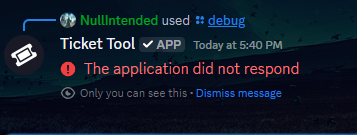
Hi! Could you run /debug in a channel in your server?
grand spear
steel basalt
Hi! Could you run /debug in a channel in your server?
no cause it results in "application did not respond"
steel basalt
Once you do that, let me know here.
steel basalt
grand spear
no cause it results in "application did not respond"
Could you do it once more for me?
grand spear
steel basalt
Could you do it once more for me?
here ya go
 steel basalt
I believe you forgot to give Ticket Tool the “View Channels” permission.
 steel basalt
grand spear
no it has that
steel basalt
grand spear
no it has that
Alright. Make sure it has permission to:
VIEW_CHANNELS
SEND_MESSAGES
READ_MESSAGES
READ_MESSAGE_HISTORY
Please ensure all of those are enabled, and then re-attempt the /debug command.
grand spear
what is "READ_MESSAGES"
steel basalt
Being able to read messages sent in a server channel.\
Typically it’s an option to select upon adding the bot to your server.
steel basalt
grand spear
i didn't uncheck any permissions when i added it to the server
Does Ticket Tool have the READ_MESSAGE_HISTORY permission?
grand spear
yes
steel basalt
That may have been the permission you’re missing.
Alright. Could you send me pictures of the Ticket Tool role, of the permissions?
 steel basalt
Hmm, okay.
And Ticket Tool has the permission to embed messages, read message history, send messages, etc?
If so, try running /debug again.
grand spear
k
did not respond
i checked for the embed links perm is that the same this as embed messages
 vernal panther
Is ticket tooldown?
 restive condor
Nope
steel basalt
grand spear
did not respond
i checked for the embed links perm is that the same this as embe...
Alright. Ticket Tool has permission to view channels?
vernal panther
I do the /setup command and it says it fails
grand spear
steel basalt
Alright. Ticket Tool has permission to view channels?
yes
steel basalt
More specifically, the channel you’re attempting to use the command in
restive condor
vernal panther
I do the /setup command and it says it fails
Could you run /debug please
grand spear
steel basalt
More specifically, the channel you’re attempting to use the command in
ah let me check
vernal panther
 steel basalt
You may need to add the role manually. :)
vernal panther
Seems down
grand spear
steel basalt
More specifically, the channel you’re attempting to use the command in
that was the error
restive condor
vernal panther
https://i.imgur.com/fOWvr0Q.png
Ticket Tool is missing the VIEW CHANNEL permission for the channel you're running the command in
steel basalt
grand spear
that was the error
Awesome. You can thank @restive condor for helping me troubleshoot that for you. :)
iron nightBOT
Gave +1 Rep to @grand spear (current: #323 - 1)
iron nightBOT
Gave +1 Rep to @restive condor (current: #3 - 925)
vernal panther
Fixed, ty @restive condor
iron nightBOT
Gave +1 Rep to @restive condor (current: #3 - 926)
vernal panther
Is panels premium? Or can I make a panel for when someone creates a ticket it gives them a prompt
restive condor
vernal panther
Is panels premium? Or can I make a panel for when someone creates a ticket it gi...
As in a form?
vernal panther
https://i.imgur.com/Ldgy6Pq.png
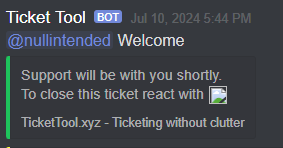
Like instead of this text I specify
 restive condor
vernal panther
https://i.imgur.com/Ldgy6Pq.png
Like instead of this text I specify
restive condor
vernal panther
https://i.imgur.com/Ldgy6Pq.png
Like instead of this text I specify
Dashboard > Panel Configs > Messages > Edit Ticket Message
humble sequoiaBOT
The Ticket Message is the first message sent by the bot on a new ticket. To customize it head over to your Dashboard ➞ Panel Configs ➞ Ticket ➞ Edit Ticket Message
 vernal panther
And thats non premiums?
restive condor
Yes, up to 250 characters
iron nightBOT
Gave +1 Rep to @restive condor (current: #3 - 927)
 candid mountain
How do I do this
 humble sequoiaBOT
The Drop-down menu or Select Menu replaces the buttons on your panel message and uses a drop-down menu with all of your panels. To set this up, go to your Panel Configs and select your main Panel.
<:Numbericons1:1018864164032225340> Enable Select Style
First you enable Select Style. Then you add an item in the Dropdown Editor. Now you can start editing your dropdown!
<:Numbericons2:1018864168041971712> Dropdown Editor
Each line in the dropdown editor represents a line in the drop down menu on discord. You can add more "Items", by clicking on
First you select a panel. That's the panel this option will open a ticket for. DONT select the same panel twice. Each option should have a different Panel
After that, you can put a Display. This is the title of this option and will appear in the drop down menu. The *Description can be set right after that, which will be below the title in grey.
Additionally you can select an emoji, that will be shown in front of each option. You can either manually input the ID of an emoji or select it in the selector.
Common Issues ⚠️
- Panel doesn't send? Make sure you have a valid emoji selected
- Option doesn't show up? Check if two options have the same panel in the DropDown Editor
$dropdown
restive condor
candid mountain
How do I do this
Hey there! See above ^^
Let me know if you have any questions 🙏
candid mountain
Thanks
 steel basalt
 edgy moon
It says application did not respond when I try to setup.
edgy moon
It says application did not respond when I try to setup.
Hi! Could you run /debug?
edgy moon
steel basalt
Hi! Could you run /debug?
Sure I will try.
steel basalt
Thanks! Let me know when you have.
edgy moon
steel basalt
Thanks! Let me know when you have.
Said "Application did not respond"
steel basalt
edgy moon
Said "Application did not respond"
Okay! Do me a favour. First, verify that the bot has permission to view channels, read message history, and send messages.
Then, verify that the bot can do that in the channel you ran the command.
edgy moon
steel basalt
Okay! Do me a favour. First, verify that the bot has permission to view channels...
I gave it admin and it worked, thank you for all you help!
iron nightBOT
Gave +1 Rep to @steel basalt (current: #38 - 85)
steel basalt
edgy moon
I gave it admin and it worked, thank you for all you help!
Okay, I suppose that fixes your issue, however, Ticket Tool Staff do not recommend that you give admin to the bot as it does not require it to function.
edgy moon
steel basalt
Okay, I suppose that fixes your issue, however, **Ticket Tool Staff do not recom...
One more question can we do it in DMS so I can show you a picture?
steel basalt
edgy moon
One more question can we do it in DMS so I can show you a picture?
I’d rather not. If it’s something that’s confidential, I recommend you reach out to official Ticket Tool staff by using their #🎫│make-a-ticket channel.
edgy moon
steel basalt
I’d rather not. If it’s something that’s confidential, I recommend you reach out...
Oh ok.
jade topaz
How do you set up the bot?
humble sequoiaBOT
First you will want to invite the bot to your server. Once the bot is in your server, you can manage your server in the dashboard.

To create a panel we are going to need to head over to the Panel Configs Tab on the Dashboard.
Once at the dashboard we will need to click Create Panel.
Enter a panel name (Fill in any optional settings you want).
Click Create Panel and you are ready to get started with configuring your panel.
An example of a creating a panel is shown below.

Once the panel has been created, use the blue Send button and select the channel you want the panel to be sent to.
The Panel wasn't send
Use the </debug:ID> command to diagnose possible permission issues with the bot.

 austere forge
jade topaz
How do you set up the bot?
austere forge
jade topaz
How do you set up the bot?
hey there : )
see above
jade topaz
Well I'm very confused about a lot of things
austere forge
jade topaz
Well I'm very confused about a lot of things
Just follow the step-by-step instructions 😀
 mellow dock
como coloco o boot de ticket no meu servidor?
humble sequoiaBOT
Equipa de Apoio Portuguesa
Se você está procurando ajuda, abra um ticket para entrar em contato com a equipe de suporte em português. Vá para #🎫│make-a-ticket e pressione o botão :flag_br:.
 flint void
humble sequoiaBOT
flint void
humble sequoiaBOT
━━ User's inquiry has been moved to a ticket ━━
 foggy ember
como faço para ver o botão claim
humble sequoiaBOT
Equipa de Apoio Portuguesa
Se você está procurando ajuda, abra um ticket para entrar em contato com a equipe de suporte em português. Vá para #🎫│make-a-ticket e pressione o botão :flag_br:.
 warm plinth
Is there any documentation / process for migrating a live server from whe White to the Gold bot?
austere forge
warm plinth
Is there any documentation / process for migrating a live server from whe White ...
Hey there : )
see below
humble sequoiaBOT
The first thing you will need to do is invite the premium bot, an invite can be found here
Once the bot is in your server we will head to the dashboard and manage your server. When you are managing your server, you want to head into "Server Configs" then click the drop down menu under "Select the bot you would like to use on this server" then click "Ticket Tool#6207" and then save.
 austere forge
you'll just have to send the ticket panels with the gold bot
warm plinth
Does it take over the existing tickets?
steel basalt
No, it does not
Once you invite the premium bot, you can just resolve your existing tickets with the white bot
Or you can use commands on the premium bot, i believe that would still work
 fiery mantle
Hi

 austere forge
 haughty star
<@153489496317493248>
haughty star
<@153489496317493248>
Hey there : )
don't ping staff pls
put these variables in the text box footer url / footer text
austere forge
 haughty star
footer url / footer text
 fast lily
how to view closed tickets
austere forge
fast lily
how to view closed tickets
Hey there : )
Go to Dashboard > Panel configs > Permissons > Ticket Owner Permissions - EDIT CLOSED view channel 
 native isle

haughty star
austere forge
Hey there : )
Go to Dashboard > Panel configs > Permissons > Ticket Owner Permis...
hey there, is there anyway I can add buttons that will show a diffrent message in a embed?
when the ticket is created
native isle
@haughty star
haughty star
?
austere forge
haughty star
hey there, is there anyway I can add buttons that will show a diffrent message i...
like #🎫│make-a-ticket ?
haughty star
yes but when they creat a ticket, I want them to have a button under them, would that be possible?
inside the ticket
austere forge
haughty star
yes but when they creat a ticket, I want them to have a button under them, would...
Unfortunately no
only the close / claim buttons are added
haughty star
okay
one more thing, hold on.
I have it set to that as the channel name but it does that instead.


 native cove
is it just me or can i not access my dashboard?
fast lily
yes how can i access it?
austere forge
haughty star
I have it set to that as the channel name but it does that instead.
use variable {ticket.user.name}
humble sequoiaBOT
Don't see your server in the dashboard?
Try using the Sync Servers button on your top center of the Dashboard page
You will possibly need to relog. Look below to see the steps on how to relog.
If this doesn't work
You should relog from the dashboard, you can do this by clicking here to log out immediately, and then log back in
Note:
You need one of these 3 things to access the dashboard.
1. Server Owner (Level: 6)
2. Server Administrator (Level: 4)
3. Dashboard Role (Level: 2)
:warning: You can check your level using the </permissionlevel:1029797400174399542> command on your Discord Server
If the bot's response is:
- @User is permission level: 0 (User)
You don't have any of the 3 levels required to access the server's dashboard
 austere forge
native cove
is it just me or can i not access my dashboard?
austere forge
native cove
is it just me or can i not access my dashboard?
Hey there : )
see above
native cove
austere forge
Hey there : )
see above
i got it thank you, I have a question im not sure if ticket tool has a option like this but is there a way to label certain tickets? like for examples we have 4 different types of tickets you can make and when you make a ticket for the specific problem it creates the channel with the associated ticket number is there a way to make it so it says the specific issue or whatever our ticket option is called?
iron nightBOT
Gave +1 Rep to @austere forge (current: #16 - 354)
native cove
if it doesnt make sense i can try to provide a example
humble sequoiaBOT
The ticket name is the default channel name of all tickets. To edit it, go to your Dashboard > Panel Configs > Ticket. There you can edit the channel name of opened and closed tickets. You can also use variables in there.

 Note: This is a premium feature
austere forge
native cove
i got it thank you, I have a question im not sure if ticket tool has a option li...
Note: This is a premium feature
austere forge
native cove
i got it thank you, I have a question im not sure if ticket tool has a option li...
see above : )
austere forge
native cove
does blue m,ean free or paid?
need premium
Panel configs > Ticket - Ticket Opened channel name
native cove
if i get premium but then cancel it like say after a month will it continue to name the tickets or stop?
austere forge
native cove
if i get premium but then cancel it like say after a month will it continue to n...
premium features will cease to function, and Ticket tool will revert to its default value
native cove
alright ty very much
austere forge
You're welcome, glad I could help ! 
 hexed portal
Hey I have a problem, I redeem the 7 day trial of free premium but when I tried using the premium option it won’t let me
austere forge
hexed portal
Hey I have a problem, I redeem the 7 day trial of free premium but when I tried ...
Hey there : )
Can i get your server id or name pls
austere forge
you can use $id command on your server
hexed portal
1083042856656179240
austere forge
hexed portal
1083042856656179240
can you try now :D
hexed portal
ty sm it works
austere forge
You're welcome, glad I could help !
 unborn ridge
Hello, how do I allow my friend to be able to use the ticket tool dashboard?
the dashboard for my server?
restive condor
unborn ridge
Hello, how do I allow my friend to be able to use the ticket tool dashboard?
Hey there! Dashboard > Server Configs > Dashboard Roles
humble sequoiaBOT
Any role you put there will have full access to the ticket tool dashboard. The server owner and users with admin permissions already have access to the dashboard.
Be careful of which roles to put here
 iron nightBOT
Gave +1 Rep to @restive condor (current: #3 - 928)
 restive condor
unborn ridge
the bot has failed to respond
restive condor
unborn ridge
the bot has failed to respond
Could you run the /debug command please?
 austere forge
unborn ridge
failed to respond to that too... 😦
austere forge
unborn ridge
failed to respond to that too... 😦
Hey there : )
Make sure that the bot has: VIEW CHANNEL SEND MESSAGE and READ MESSAGE HISTORY perms in the channel
humble sequoiaBOT
First you will want to invite the bot to your server. Once the bot is in your server, you can manage your server in the dashboard.
To create a panel we are going to need to head over to the Panel Configs Tab on the Dashboard.
Once at the dashboard we will need to click Create Panel.
Enter a panel name (Fill in any optional settings you want).
Click Create Panel and you are ready to get started with configuring your panel.
An example of a creating a panel is shown below.
Once the panel has been created, use the blue Send button and select the channel you want the panel to be sent to.
The Panel wasn't send
Use the </debug:ID> command to diagnose possible permission issues with the bot.
unborn ridge
ahh i will have a llook
austere forge
 fiery badge
how do i setup a ticket for my server?
fiery badge
how do i setup a ticket for my server?
Hey there : )
see above
fiery badge
ok thanks
unborn ridge
austere forge
Hey there : )
Make sure that the bot has: `VIEW CHANNEL` `SEND MESSAGE` and `R...
it used to work?
i will double check perms
haughty star
what do i enable for it too save to transcripts and also say "saving to ticket logs"
humble sequoiaBOT
First you will want to invite the bot to your server. Once the bot is in your server, you can manage your server in the dashboard.
To create a panel we are going to need to head over to the Panel Configs Tab on the Dashboard.
Once at the dashboard we will need to click Create Panel.
Enter a panel name (Fill in any optional settings you want).
Click Create Panel and you are ready to get started with configuring your panel.
An example of a creating a panel is shown below.
Once the panel has been created, use the blue Send button and select the channel you want the panel to be sent to.
The Panel wasn't send
Use the </debug:ID> command to diagnose possible permission issues with the bot.
 idle flint
See the basic setup guide above 🙂
haughty star
idle flint
See the basic setup guide above 🙂
what do i enable for it too save to transcripts

i have transcripts in every panel set to the channel, but it doesnt send them
to the logged channel
idle flint
haughty star
what do i enable for it too save to transcripts
On the Dashboard > Panel Configs > Transcripts - ensure that you have a transcript channel selected, and premium users can enable "Auto Save Transcript"
 haughty star
idle flint
On the Dashboard > Panel Configs > Transcripts - ensure that you have a transcri...
haughty star
idle flint
On the Dashboard > Panel Configs > Transcripts - ensure that you have a transcri...
so when i hit the close button it does, and when i do $delete it doesnt.
 idle flint
On the Dashboard > Panel Configs > Transcripts - ensure that you have a transcri...
idle flint
idle flint
On the Dashboard > Panel Configs > Transcripts - ensure that you have a transcri...
There are two options - save on close or save on delete.... you probably have it set to "closed" not "delete"
haughty star
ah i see.
haughty star
can i make a custom command that will mute a person I mention from talking when running the cmd $mute @user
idle flint
Not with just Ticket Tool, no.
 sweet cape
found another phishing server; I must be blind but I don't see where the create ticket channel is
1251256872246448340
 jade topaz
Is there a way to check and see what tickets I have open using just the bot? I left a server and came back and cannot see my ticket anymore and it will not let me open another one
idle flint
sweet cape
Jump into #🎫│make-a-ticket and we can grab some more details.
idle flint
jade topaz
Is there a way to check and see what tickets I have open using just the bot? I l...
Unfortunately not, you will need to speak to the server owner/admins to determine what ticket you have open in their server.
jade topaz
@idle flint ok thanks 🙂
iron nightBOT
Gave +1 Rep to @idle flint (current: #20 - 295)
idle flint
You can set up a blacklist role and assign the user that - you cant prevent a specific user from using ticket tool, but you can prevent a role from using it within your server
humble sequoiaBOT
Any role you assign as a blacklisted role won't be able to use commands or buttons.
Selecting a blacklisted role
Go to your Dashboard ➞ Server Configs. There you will find the option to select blacklisted roles.
Note: Don't forget to save.
 jade topaz
How should I mention a role when I open a ticket?
 west ice
Bonjour, comment je dois faire pour ajouter un role ? je voudrais que le nouveau role soit intégré a la création de chaque ticket. Quand j'essaye la commande ajouté un role sur le ticket tool il me dit que sa répond pas
humble sequoiaBOT
1. Go into your Dashboard
2. Open your Panel Configs tab
3. Select the panel you want to ping your support on
4. Open the Ticket options menu
5. Click on Edit Ticket Message
6. In the Message Content use one of the role mention syntax (**{@Role Name}**/**{Role ID}**)
7. Save changes
Note: For this to work properly, Ticket Tool requires the Mention Everyone permission. Or the role must have the Allow anyone to @mention this role setting enabled 
austere forge
jade topaz
How should I mention a role when I open a ticket?
Hey there : )
see above
austere forge
west ice
Bonjour, comment je dois faire pour ajouter un role ? je voudrais que le nouveau...
Bonjour, voici un guide sur comment le faire :
humble sequoiaBOT
Tout rôle que vous mettez là aura un accès complet au tableau de bord.
Le propriétaire du serveur et les utilisateurs ayant des droits d'administrateur ont déjà accès au tableau de bord.
Faites attention aux rôles que vous placez ici
west ice
humble sequoia
je souhaite pas donné acces au tableau de bord mais que lorsqu'un joueur crée un ticket, que mes modérateurs les voients et puisse gerer ?
austere forge
west ice
je souhaite pas donné acces au tableau de bord mais que lorsqu'un joueur crée un...
Ah, très bien j’ai mal compris 😅
Allez sur le tableau de bord > Panneaux de configuration > General - et insérez le role que vous voulez dans Role de l’équipe de soutien
west ice
austere forge
Ah, très bien j’ai mal compris 😅
Allez sur le tableau de bord > Panneaux de con...
d'accord merci, derniere question: y a t'il une vidéo en francais d'explication du bot et paramétrage ?
austere forge
west ice
d'accord merci, derniere question: y a t'il une vidéo en francais d'explication ...
De la chaine Youtube Officiel Ticket tool non, mais il y a sûrement des videos de personne français qui ont sûrement fait des tuto oui
west ice
austere forge
De la chaine Youtube Officiel Ticket tool non, mais il y a sûrement des videos d...
d'accord je chercherais ce soir tranquillement merci
austere forge
Avec plaisir, bonne journée
 austere forge
 fossil socket
Hey there ! : )
Make sure that the bot has: VIEW CHANNEL SEND MESSAGE and READ MESSAGE HISTORY perms in the channel
fossil socket
Thanks @austere forge
 neat ermine
How do I do multi panels?
 glass lark
How To Create This ?

 fair condor
I just restarted my phone, but I can't log in or create a new account. I need support
humble sequoiaBOT

⚠️ You're in the wrong place
We provide support for Ticket Tool Discord bot and cannot help you with whatever issue you have.
- We don't know which Support Team you should contact to get this issue resolved, and unfortunately we won't be able to accurately tell you.
If you don't have any further questions regarding our bot Ticket Tool, please close this ticket
jade topaz
how do i make the bot present a form when a ticket has been created
humble sequoiaBOT
A Discord Form lets the user answer individual questions in a pop-up Form, which then displays the answers in the ticket message. This can save time if you already know what you want to ask the user.
Setup Forms
Forms can be enabled under Panel Settings > Form Options > Edit Forms Options. In the new pop-up window, you can now enable and edit your own Form.
Form Options
You can add up to 5 questions in the Discord form. This is a Discord limitation. Each question can have a placeholder in the input field, a minimum and maximum input, multi-line, and also the option to have the answer required.
Options
Question Title ➞ Your Question goes here
Question Placeholder ➞ The placeholder text in the input field
Required ➞ If enabled, the user has to answer this question, to submit the form
Multi-Line Input ➞ Allows the user to input multiple lines
Minimum and Maximum Input ➞ Set a minimum and maximum input value for the user
Displaying the Answer
To display the answers from the user, you need to enable Auto display form results on the ticket message as an additional embed
If you don't want a second embed, go into your Panel Configs > Ticket Options > Edit Ticket Message. You use the variable {create.form.x} and replace x with the number of your question. For example, the response to Question 5 can be displayed with {create.form.5}.
 jade topaz
@humble sequoia Please read my message to you: tix
scenic plinth
DMing the bot doesn't work like that
 ionic path
He took tickets too seriously
 errant lava
Algem pode me ajudar eu não consigo verificar minha conta
scenic plinth
Provavelmente não poderemos ajudá-lo com isso
 simple panther
Hello, I have a question: is it possible to ping a given role when someone opens a ticket?
 crisp isle
Is there a way for me to add several buttons that dont create a ticket but rather an information section on ticket tool?
 humble sequoiaBOT
━━ Frog's inquiry has been moved to a ticket ━━
restive condor
crisp isle
Is there a way for me to add several buttons that dont create a ticket but rathe...
Hey there! No that's currently not possible.
Unless you used the panel notifications but they disappear within 5 seconds
Feel free to suggest it
humble sequoiaBOT

Suggestions for Ticket Tool
To make a suggestion use the s!suggest suggestion command in #🤖│bot-spam. Note that you'll suggestion will be first reviewed by our Support Team before it's posted into #💡│suggestions, channel in which you'll be able to vote for other suggestions!
 void bolt
hey there i got an issue where my dashboard for available server doesnt update at all
does anyone know how to fix it?
@austere forge 👀
sorry-
got it working
 harsh spoke
Hye, is there a way I can export my Dashboard for my Server and Import it into another Server?
humble sequoiaBOT
The Backup and Restore feature allows you to transfer your panels, tags, and all settings to a new server, even if the server the settings were created has been deleted! You will want to copy the whole key.
First, go to your server's Dashboard ➞ then Server Configs ➞ under Config Backup & Restore (Server Owner Only) click on Old version can be found here and generate a new backup key by pressing the green button. Now, a key should be generated in the box above. You may need to refresh the page to see this.
Once you have your backup key, navigate to the same page on the new server. Copy the key on the Restore from backup key field.
Now you can choose what you want to copy. Finally, press the green Restore Configs button.
IMPORTANT NOTE
- We suggest you keep this backup key somewhere safe, in case your server is deleted so you are able to recover your panel's settings.
- This feature is only usable by the server's owner
$backup
idle flint
harsh spoke
Hye, is there a way I can export my Dashboard for my Server and Import it into a...
see above ^
harsh spoke
idle flint
see above ^
What if I'm not Server Owner?
idle flint
Then unfortunatley not. Only the server owner can generate the backup key or restore using a backup key (you could get a backup key from another server owner and restore it onto your own server technically)
 hearty dew
Hey how can I enable a feature so that bot sends transcripts of every tickets without Clicking on transcript button
I think that will be a premium feature
austere forge
hearty dew
I think that will be a premium feature
Hey there : )
exact, this is a premium feature
 hexed sundial
 coarse shale
my new tickets are not going into the category created/opened, they are just creating above everything, outside any category! Can someone help me?
austere forge
coarse shale
my new tickets are not going into the category created/opened, they are just cre...
Hey there : )
Discord limit per server 500 channels
also a limit of 50 channels per category. Ticket Tool limits it to 45.
- These limits cannot be changed at all.
If you have reached such limits, tickets won't be created inside that category.
I recommend you setup overflow categories so once your main one is full, new tickets are created there until the main one is available again
humble sequoiaBOT
Discord only allows to stack up to 50 channels per category, meaning that if you have already 50 tickets in one category, the bot won't be able to place a ticket in that category, for such reason Ticket Tool counts with overflow categories, meaning that if your main category is filled, the bot will go ahead and place the ticket on the next one available, simply choose a second category in the category pickers:
 austere forge
hexed sundial
austere forge
hexed sundial
Hey there : )
can you move to ticket to fix this
hexed sundial
austere forge
Hey there : )
can you move to ticket to fix this
Its been 3 days
 crimson stag
hello, i tried to switch from standard ticket tool to premium but i think ive confused it. its not connecting to my server
hexed sundial
crimson stag
hello, i tried to switch from standard ticket tool to premium but i think ive co...
Screenshot please
austere forge
crimson stag
hello, i tried to switch from standard ticket tool to premium but i think ive co...
Hey there : )
see below
humble sequoiaBOT
The first thing you will need to do is invite the premium bot, an invite can be found here
Once the bot is in your server we will head to the dashboard and manage your server. When you are managing your server, you want to head into "Server Configs" then click the drop down menu under "Select the bot you would like to use on this server" then click "Ticket Tool#6207" and then save.
coarse shale
austere forge
Hey there : )
Discord limit per server 500 channels
also a limit of 50 channel...
Thaaanks
crimson stag
austere forge
Hey there : )
Please excuse discords shit quality
I’ve tried removing the app and re installing
austere forge
crimson stag
I’ve tried removing the app and re installing
can you try press sync server on top page
and re-try
crimson stag
Yep, ive done that also
austere forge
crimson stag
Yep, ive done that also
can you assure me that Ticket tool white is on your server?
 austere forge
crimson stag
austere forge
crimson stag
alright, can i get your server id pls
 granite root
Can someone help me? I'm creating a sales server and I don't know how to configure it very well
humble sequoiaBOT
First you will want to invite the bot to your server. Once the bot is in your server, you can manage your server in the dashboard.
To create a panel we are going to need to head over to the Panel Configs Tab on the Dashboard.
Once at the dashboard we will need to click Create Panel.
Enter a panel name (Fill in any optional settings you want).
Click Create Panel and you are ready to get started with configuring your panel.
An example of a creating a panel is shown below.
Once the panel has been created, use the blue Send button and select the channel you want the panel to be sent to.
The Panel wasn't send
Use the </debug:ID> command to diagnose possible permission issues with the bot.
austere forge
granite root
Can someone help me? I'm creating a sales server and I don't know how to configu...
hey there : )
see above
crimson stag
austere forge
alright, can i get your server id pls
1240019227898023946
austere forge
crimson stag
1240019227898023946
I'm going to move us to a ticket to fix this
crimson stag
austere forge
I'm going to move us to a ticket to fix this
Thank you
iron nightBOT
Gave +1 Rep to @austere forge (current: #16 - 356)
granite root
austere forge
hey there : )
see above
where is the settings guide
humble sequoiaBOT
━━ MadTommH's inquiry has been moved to a ticket ━━
austere forge
humble sequoia
here @granite root ^^
jade topaz
 jade topaz
austere forge
here <@1076890170361651221> ^^
jade topaz
austere forge
here <@1076890170361651221> ^^
yo are you available?
jade topaz
jade topaz
bot got fully perms
austere forge
jade topaz
In your Dashboard > Panel configs > Dropdown - you have defined custom emoji
make sure these emoji are valid, as some emoji are missing a : at the beginning for this emoji to be valid
the right format is : <:emojiname:emojiID>
jade topaz
thanks
 jade harbor
is there a way to allow a user to type a message before opening a ticket??
jade topaz
austere forge
In your Dashboard > Panel configs > Dropdown - you have defined custom emoji
ma...
thanks
iron nightBOT
Gave +1 Rep to @austere forge (current: #16 - 357)
austere forge
jade harbor
is there a way to allow a user to type a message before opening a ticket??
Hey there : )
You can use Forms option
see below
humble sequoiaBOT
A Discord Form lets the user answer individual questions in a pop-up Form, which then displays the answers in the ticket message. This can save time if you already know what you want to ask the user.
Setup Forms
Forms can be enabled under Panel Settings > Form Options > Edit Forms Options. In the new pop-up window, you can now enable and edit your own Form.
Form Options
You can add up to 5 questions in the Discord form. This is a Discord limitation. Each question can have a placeholder in the input field, a minimum and maximum input, multi-line, and also the option to have the answer required.
Options
Question Title ➞ Your Question goes here
Question Placeholder ➞ The placeholder text in the input field
Required ➞ If enabled, the user has to answer this question, to submit the form
Multi-Line Input ➞ Allows the user to input multiple lines
Minimum and Maximum Input ➞ Set a minimum and maximum input value for the user
Displaying the Answer
To display the answers from the user, you need to enable Auto display form results on the ticket message as an additional embed
If you don't want a second embed, go into your Panel Configs > Ticket Options > Edit Ticket Message. You use the variable {create.form.x} and replace x with the number of your question. For example, the response to Question 5 can be displayed with {create.form.5}.
jade harbor
@austere forge you are amazing
austere forge
You're welcome, glad I could help !
 humble sequoiaBOT
The ticket name is the default channel name of all tickets. To edit it, go to your Dashboard > Panel Configs > Ticket. There you can edit the channel name of opened and closed tickets. You can also use variables in there.
Note: This is a premium feature
 steady atlas
how do i make multi panels?
humble sequoiaBOT
For more convenient use of multipanels, you can now combine panels on the dashboard. This will allow you to directly send the multipanel from the dashboard or via the $panel ID command.
Where can I find this?
You can find this setting on the Dashboard -> Panel Configs -> Panel -> Attached Panels
Note: if you're attaching all the panels to a panel called English, don't include English in the attached panel's box (If you do this, it will create a duplicate)
This will put all buttons from all of your panels on one message. The message is the panel message from the panel you're combining these panels in.
 austere forge
steady atlas
how do i make multi panels?
austere forge
steady atlas
how do i make multi panels?
hey there : )
see above
humble sequoiaBOT
The Drop-down menu or Select Menu replaces the buttons on your panel message and uses a drop-down menu with all of your panels. To set this up, go to your Panel Configs and select your main Panel.
<:Numbericons1:1018864164032225340> Enable Select Style
First you enable Select Style. Then you add an item in the Dropdown Editor. Now you can start editing your dropdown!
<:Numbericons2:1018864168041971712> Dropdown Editor
Each line in the dropdown editor represents a line in the drop down menu on discord. You can add more "Items", by clicking on
First you select a panel. That's the panel this option will open a ticket for. DONT select the same panel twice. Each option should have a different Panel
After that, you can put a Display. This is the title of this option and will appear in the drop down menu. The *Description can be set right after that, which will be below the title in grey.
Additionally you can select an emoji, that will be shown in front of each option. You can either manually input the ID of an emoji or select it in the selector.
Common Issues ⚠️
- Panel doesn't send? Make sure you have a valid emoji selected
- Option doesn't show up? Check if two options have the same panel in the DropDown Editor
$dropdown
steady atlas
austere forge
it is totally different : )
in select style i just keep making them as much as i have panels? And after that i add panel i want into each of them?
i need to make this as dropdown

@austere forge
Im sorry
Its kinda late and i need to hurry up with this
Hope you understand
austere forge
steady atlas
in select style i just keep making them as much as i have panels? And after that...
yes, that's exactly right
austere forge
steady atlas
i need to make this as dropdown
remove all your panels from the Multipanel option
 hollow frigate
How to invite the premium bot cause I have active the trial
 humble sequoiaBOT
The first thing you will need to do is invite the premium bot, an invite can be found here
Once the bot is in your server we will head to the dashboard and manage your server. When you are managing your server, you want to head into "Server Configs" then click the drop down menu under "Select the bot you would like to use on this server" then click "Ticket Tool#6207" and then save.
restive condor
hollow frigate
How to invite the premium bot cause I have active the trial
Hey there! See above please ^^
hollow frigate
Ok thanks


 lone sparrow
i enabled the premium version and it kicked me off the screen now i cant get back to the server
 hollow frigate
I can’t bring back the free version
 austere forge
jade topaz
austere forge
jade topaz
You forgot to add a : at the beginning of the emoji format as I told you : )
austere forge
lone sparrow
i enabled the premium version and it kicked me off the screen now i cant get bac...
Hey there : )
Try inviting the gold bot with the link : https://discord.com/oauth2/authorize?client_id=722196398635745312&scope=applications.commands+bot&permissions=2416045072
jade topaz
austere forge
You forgot to add a `:` at the beginning of the emoji format as I told you : )
 austere forge
hollow frigate
I can’t bring back the free version
austere forge
hollow frigate
I can’t bring back the free version
Hey there : )
make a sure bot white is on your server
jade topaz
nah imdumb af
hollow frigate
austere forge
Hey there : )
make a sure bot white is on your server
He is on
austere forge
jade topaz
like this : :staff:
jade topaz
sorry mb
lone sparrow
austere forge
Hey there : )
make a sure bot white is on your server
hey i see other servers adding custom emojis to their dropdown panels is there a way i can do that
such as this
 austere forge
lone sparrow
hey i see other servers adding custom emojis to their dropdown panels is there a...
austere forge
lone sparrow
hey i see other servers adding custom emojis to their dropdown panels is there a...
sure, use your custom emoji using the <:emojiname:emojiID> format. The easiest way to get this is using the id command
example :
$id 
humble sequoiaBOT
austere forge
$id <:3v_love:1220472610773663815>
<:3v_love:1220472610773663815>
steady atlas
austere forge
yes, that's exactly right
How do i add picture from my phone gallery to request middleman panel and ticket message?
lone sparrow
oh tyhank u
hollow frigate
austere forge
Hey there : )
make a sure bot white is on your server
He is
austere forge
steady atlas
How do i add picture from my phone gallery to request middleman panel and ticket...
you need to get a link to this image and insert it on Image URL in ticket message, but this is a premium feature
austere forge
hollow frigate
He is
can you move to ticket to fix this
steady atlas
austere forge
you need to get a link to this image and insert it on `Image URL` in ticket mess...
Oh alright. If i buy premium bot then i will have to go through the same process to setup everything or not?
hollow frigate
austere forge
can you move to ticket to fix this
Where are tickets?
austere forge
steady atlas
Oh alright. If i buy premium bot then i will have to go through the same process...
No, you don't need to reconfigure anything, except if you sent the panel with the white bot, you'll have to do it with the gold bot.
austere forge
hollow frigate
Where are tickets?
steady atlas
austere forge
No, you don't need to reconfigure anything, except if you sent the panel with th...
just to send a panel or do the whole setup?
because i sent a panel with the white bot
austere forge
steady atlas
just to send a panel or do the whole setup?
You should therefore send the panel with the gold bot, so that it works correctly
just panel
humble sequoiaBOT
1. Go into your Dashboard
2. Open your Panel Configs tab
3. Select the panel you want to ping your support on
4. Open the Ticket options menu
5. Click on Edit Ticket Message
6. In the Message Content use one of the role mention syntax (**{@Role Name}**/**{Role ID}**)
7. Save changes
Note: For this to work properly, Ticket Tool requires the Mention Everyone permission. Or the role must have the Allow anyone to @mention this role setting enabled
austere forge
lone sparrow
its not <@id> right
see above : )
austere forge
lone sparrow
its not <@id> right
this works too
steady atlas
austere forge
this works too
can i now use my bot to send it? Like it will still be the ticket tool but it will show my bot?
austere forge
steady atlas
can i now use my bot to send it? Like it will still be the ticket tool but it wi...
Unfortunately not, the panel is only sent with our bot
steady atlas
austere forge
Unfortunately not, the panel is only sent with our bot
okay
steady atlas
austere forge
you need to get a link to this image and insert it on `Image URL` in ticket mess...
i can get it from gallery?
austere forge
steady atlas
i can get it from gallery?
I don't think so, you can go to this site and put your image on this site is copied the Direct link

Provides free image upload and hosting integration for forums. Free picture hosting and photo sharing for websites and blogs.
lone sparrow
austere forge
I don't think so, you can go to this site and put your image on this site is cop...
this doesnt work
 austere forge
put & after @
iron nightBOT
Gave +1 Rep to @austere forge (current: #16 - 358)
 austere forge
steady atlas
i need to make this
austere forge
steady atlas
i need to make this
what do you mean?
jade topaz
Lol
jade topaz
the bot was working fine until yesterday and,,, now the users can't use the ticket

how do I fix this
(admins can open tickets normally but the normal users can't.. is it a bug?)
 stone roost
how do i make so specific roles can see and type in tickets ia: a mod
austere forge
jade topaz
the bot was working fine until yesterday and,,, now the users can't use the tick...
Hey there : )
__ «You don't have permissions to use this»__
Are your members seeing this message when they try to create a ticket?
You may have accidentally denied them permission to use the Create Ticket button.
Look in the following places in your server's dashboard:
👉 Server Configs -> Blacklist Roles
Any roles there will be unable to interact with the bot in any way, including creating tickets.👉 Panel Configs -> Buttons -> Create Ticket -> Support team only
If this is enabled👉 Panel Configs -> Buttons -> Create Ticket -> Disabled Roles
Any roles there will be unable to use the button.
humble sequoiaBOT
1. Go into your Dashboard
2. Open your Panel Configs tab
3. Select the panel you want to grant access to
4. Open the General options menu
5. Select your Support Team Roles
6. Save changes
 austere forge
stone roost
how do i make so specific roles can see and type in tickets ia: a mod
austere forge
stone roost
how do i make so specific roles can see and type in tickets ia: a mod
Hey there : )
see above
stone roost
humble sequoia
ty
iron nightBOT
Gave +1 Rep to @humble sequoia (current: #17 - 320)
stone roost
how do igive you rep
austere forge
stone roost
how do igive you rep
you can do it in the channel https://discord.com/channels/509192800865353738/509775046848282677
stone roost
ok ty
austere forge
you ty !
jade topaz
thx so much~
austere forge
You're welcome, glad I could help !
jade topaz
Can someone help me figure out why I can't seem to block access from non support roles closing tickets? I enabled the support team only option in the button settings but non support roles are still able to close the tickets
 stiff jackal
HI
 glad sigil
Hi, does anyone know how I can direct my tickets to stay in a certain category?
 viscid minnow
Hello, what do I do if my ticket tool says that the application does not respond when trying to create it to obtain tickets?
austere forge
viscid minnow
Hello, what do I do if my ticket tool says that the application does not respond...
Hey there : )
can i get your server id
austere forge
viscid minnow
Do I send it to you privately?
here pls
austere forge
viscid minnow
LATINOS GUERREROS OP
Which panel does this concern?
and do you get an error message when you try to create a ticket?
viscid minnow
austere forge
and do you get an error message when you try to create a ticket?
Yes
A friend created the panel so I don't know which one it is but when I try to create one to make tickets it says it doesn't respond
austere forge
can i get a screenshot pls
 austere forge
Make sure that the bot has: VIEW CHANNEL SEND MESSAGE and READ MESSAGE HISTORY perms in the channel
jade topaz
 jade topaz
jade topaz
jade topaz
Helpme 😫
humble sequoiaBOT
⚠️ You're in the wrong place
We provide support for Ticket Tool Discord bot and cannot help you with whatever issue you have.
- We don't know which Support Team you should contact to get this issue resolved, and unfortunately we won't be able to accurately tell you.
If you don't have any further questions regarding our bot Ticket Tool, please close this ticket
 round moss
Why can't I verify my phone, was finð
 haughty quarry
austere forge
Make sure that the bot has: `VIEW CHANNEL` `SEND MESSAGE` and `READ MESSAGE HIST...
haughty quarry
austere forge
Make sure that the bot has: `VIEW CHANNEL` `SEND MESSAGE` and `READ MESSAGE HIST...
i need need help
humble sequoiaBOT
Hello, we would love to help you, but if you don't tell us what you need help with we can't help you :(
haughty quarry
update on my ticket-0045
austere forge
haughty quarry
update on my ticket-0045
Hey there : )
If this ticket is on another server unfortunately we are not related to this server so we cannot help you
haughty quarry
so do i need to file ticket here?
its because email changing request form
which is i already did
austere forge
No because we are not related to this server.
jade topaz
Can someone help me figure out why I can't seem to block access from non support roles closing tickets? I enabled the support team only option in the button settings but non support roles are still able to close the tickets
 hearty forum
humble sequoiaBOT
hearty forum
humble sequoiaBOT
Hello, we would love to help you, but if you don't tell us what you need help with we can't help you :(
 snow bronze
Yo
 wraith reef
!help
humble sequoiaBOT
Hello, we would love to help you, but if you don't tell us what you need help with we can't help you :(
wraith reef
!help how to add tickets in my server
humble sequoiaBOT
First you will want to invite the bot to your server. Once the bot is in your server, you can manage your server in the dashboard.
To create a panel we are going to need to head over to the Panel Configs Tab on the Dashboard.
Once at the dashboard we will need to click Create Panel.
Enter a panel name (Fill in any optional settings you want).
Click Create Panel and you are ready to get started with configuring your panel.
An example of a creating a panel is shown below.
Once the panel has been created, use the blue Send button and select the channel you want the panel to be sent to.
The Panel wasn't send
Use the </debug:ID> command to diagnose possible permission issues with the bot.
idle flint
wraith reef
!help how to add tickets in my server
Here is the basic setup guide
wraith reef
!help how to make tickets in my server
 twin ledge
How do I create a ticket so its there always?
 stark runeBOT
1. Invite Ticket Tool to your server
First you will want to invite the bot to your server. Once the bot is in your server, you can manage your server in the dashboard.
2. Create a Panel
To create a panel we are going to need to head over to the panel configs on the dashboard.
Once at the dashboard we will need to click Create Panel.
Enter a panel name (Fill in any optional settings you want).
Click Create Panel and your ready to get started with configuring your panel.
An example of a creating a panel is shown below.
3. Send the Panel to a Channel
Once you've created a panel on the dashboard you will need to send it to a channel using send on the dashboard.
Select the channel you want your panel to be created in and click send.
For other questions checkout $help faq.
An example of a sending a panel is shown below.
Having a Problem Sending the Panel?
Do $debug in a channel with Ticket Tool and make sure it has all the necessary Discord permissions.
 hazy abyss
Are forms limited to only 5 questions?
 timber kernel
hazy abyss
Are forms limited to only 5 questions?
timber kernel
hazy abyss
Are forms limited to only 5 questions?
Yes, they are.
This is due to a limit from Discord. It is not limited by the Ticket Tool bot.
hazy abyss
timber kernel
Yes, they are.
This is due to a limit from Discord. It is not limited by the Tic...
Gotcha, appreciate the quick response
timber kernel
hazy abyss
Gotcha, appreciate the quick response
Sure thing
 wooden slate
ticket tool not work
 red yoke
I've used the ticket tool in the past but now when i attempt to use it in my server it keeps telling me it doesnt have perms to send the panel into the channel when it does
 restive condor
jade topaz
how to backup ticket tool through a key?
restive condor
jade topaz
how to backup ticket tool through a key?
Hey there! See below please
humble sequoiaBOT
The Backup and Restore feature allows you to transfer your panels, tags, and all settings to a new server, even if the server the settings were created has been deleted! You will want to copy the whole key.
First, go to your server's Dashboard ➞ then Server Configs ➞ under Config Backup & Restore (Server Owner Only) click on Old version can be found here and generate a new backup key by pressing the green button. Now, a key should be generated in the box above. You may need to refresh the page to see this.
Once you have your backup key, navigate to the same page on the new server. Copy the key on the Restore from backup key field.
Now you can choose what you want to copy. Finally, press the green Restore Configs button.
IMPORTANT NOTE
- We suggest you keep this backup key somewhere safe, in case your server is deleted so you are able to recover your panel's settings.
- This feature is only usable by the server's owner
$backup
restive condor
wooden slate
ticket tool not work
Hey there! What seems to be the problem?
restive condor
red yoke
I've used the ticket tool in the past but now when i attempt to use it in my ser...
Hey there! Could you run the /debug command in the channel where you're trying to send this in?
restive condor
 limpid sapphire
why is this happening?
limpid sapphire
why is this happening?
Hey there! Could I get your server name or ID please?
jade topaz
Can someone help me figure out why I can't seem to block access from non support roles closing tickets? I enabled the support team only option in the button settings but non support roles are still able to close the tickets
restive condor
jade topaz
Can someone help me figure out why I can't seem to block access from non support...
Hey there! Make sure you have applied these changes to the correct panel(s), saved the changes and tested this with a brand new ticket please
limpid sapphire
restive condor
Hey there! Could I get your server name or ID please?
ID: 1105253483256483871
Name: 💸 | Zennify
a lot commands

but the bot itself is not offline, people can open a ticket
(the bot is now on free because i had to close an old ticket, when I didn't have the premium)
but it usually stays in premium, and when I tried to use the /botswitcher to go back, it gave this error
restive condor
limpid sapphire
but it usually stays in premium, and when I tried to use the /botswitcher to go ...
Make sure you run the /botswitcher command through the white bot, as that's the bot that's currently active on your server
jade topaz
restive condor
Hey there! Make sure you have applied these changes to the correct panel(s), sav...
I've already tried that a few times now 😔
limpid sapphire
restive condor
Make sure you run the ``/botswitcher`` command through the white bot, as that's ...
i can update on dashboard
limpid sapphire
limpid sapphire
why is this happening?
but, what about this? 🤔
this usually happens in isolated commands (premium is usually always active)
restive condor
limpid sapphire
but, what about this? 🤔
Try again once the gold bot is selected.
You can't add users through the bot that's not active
restive condor
jade topaz
I've already tried that a few times now 😔
Just to confirm, they are still able to use the close button, correct?
As the /close command has to be disabled separately (disabled by default though)
jade topaz
restive condor
Just to confirm, they are still able to use the close button, correct?
As the `...
Yeah they can still use the close button
restive condor
jade topaz
Yeah they can still use the close button
Alrighty, can I get your server name or ID please
jade topaz
restive condor
Alrighty, can I get your server name or ID please
864803936393494539
restive condor
jade topaz
864803936393494539
Is this for a specific panel? Or all of your panels?
jade topaz
I'm pretty sure it's all of them
restive condor
Would panel 1 | English, be certainly one?
jade topaz
Yes
restive condor
jade topaz
Yes
Alrighty, please double check that the person testing this doesn't have any of these roles or Discord's administrator permissions
 jade topaz
Yeah those are just our staff roles. Not general member roles
restive condor
jade topaz
Yeah those are just our staff roles. Not general member roles
With your current setup, they should unable to use the first ''CLOSE'' message on your ticket message, the one that triggers the closing confirmation message, but they are still able to use the ''CLOSE'' button on your close confirmation.
Would all of that be correct?
jade topaz
They can do both. We've had multiple instances of people joining, creating a ticket and immediately closing it before a staff memes get a chance to check it. Or when a staff member is in the niddle of typing the member will close the ticket
restive condor
jade topaz
They can do both. We've had multiple instances of people joining, creating a ti...
That's odd. I'll bring you into a ticket as I'll need a server invite
 woeful ibex
Hello, is it possible to reset the ticket count (ticket name) and start from 0001?
Please
restive condor
woeful ibex
Hello, is it possible to reset the ticket count (ticket name) and start from 000...
Hey there! Yes, you can use the ''SET COUNT'' button
 woeful ibex
restive condor
Hey there! Yes, you can use the ''SET COUNT'' button
woeful ibex
restive condor
Hey there! Yes, you can use the ''SET COUNT'' button
Perfect ! Many thanks for the very quick response 🫶
 snow musk
!
 edgy current
hi, how can i reset the application to factory settings?
or can i do something like this?
 feral hearth
Members when trying to open ticket are not allowed, and I didn't put any setting that doesn't allow opening, what could it be?
 worldly helm
wait
Click on buttons

Then on "Create Ticket"

Then allow "everyone" or any other role to open a ticket
@feral hearth
 feral hearth
worldly helm
Then allow "everyone" or any other role to open a ticket
<@1222918817034797158>
feral hearth
worldly helm
Then allow "everyone" or any other role to open a ticket
<@1222918817034797158>
Isn't that the option for the service team position?
worldly helm
No, it sets the permission to open a ticket
feral hearth
worldly helm
No, it sets the permission to open a ticket
omg, ok thank you very much
worldly helm
Don't worry!
Feel free to ping me if you need help. Make sure to not ping Support Team, i dont think you are allowed to. Correct me if i am wrong.
restive condor
edgy current
hi, how can i reset the application to factory settings?
Hey there! Simply delete all your panels using the ''DELETE'' button

 viral pagoda
is there a way you could ban someone from making tickets? we're about to publicize them and let our community report things that are against the rules, but i'm expecting some of them (at least in the beginning) to abuse the tickets and open them for false reasons.
is there a role or something i could set that removes ticket permissions?
make sure to ping me if you have an answer, i probably won't see it otherwise
worldly helm
Yes there is, you can make a role and Ban it from Tickets
worldly helm
Don’t worry, I’ll Show You
I am on my phone Right now so its Not that good
Click on Buttons

Then create Ticket

And insert your banned from Tickets Role. Mini is BFT( banned from Tickets)
 viral pagoda
ahh i see. thanks a lot for your help
worldly helm
Don’t worry about it!
 hoary forge
Hello my claim button is not working
worldly helm
Make Sure you Set up the permissions for it.
hoary forge
When I tried to enable it Claim button is not Enabling
hoary forge
worldly helm
Make Sure you Set up the permissions for it.
Can you send tutorial
restive condor
hoary forge
Hello my claim button is not working
Hey there! Claiming is a premium feature 
humble sequoiaBOT
Claiming allows you to change the ticket name, category and permissions. To use it you have to enable it first on your Dashboard > Panel Configs > Claiming

 Note: This is a premium feature
hoary forge
restive condor
Hey there! Claiming is a premium feature <:Premium:1192403074157912144>
Note: This is a premium feature
hoary forge
restive condor
Hey there! Claiming is a premium feature <:Premium:1192403074157912144>
We can't enable claim in a standard ticket?
restive condor
Claiming is a premium feature, but you can enable it through both bots if that's what you mean
hoary forge
restive condor
Claiming is a premium feature, but you can enable it through both bots if that's...
I meant Claiming the ticket
restive condor
Yes, claiming tickets is a premium feature
hoary forge
Yoo
hoary forge
restive condor
Yes, claiming tickets is a premium feature
I enabled free trials So can I able to create claim ticket?
restive condor
That's right, Dashboard > Panel Configs > Claiming
humble sequoiaBOT
Claiming allows you to change the ticket name, category and permissions. To use it you have to enable it first on your Dashboard > Panel Configs > Claiming
Note: This is a premium feature
hoary forge
Can I invite gold bot also?
hoary forge
restive condor
That's right, ``Dashboard`` > ``Panel Configs`` > ``Claiming``
Hm so I can also invite gold ticket tool?
humble sequoiaBOT
The first thing you will need to do is invite the premium bot, an invite can be found here
Once the bot is in your server we will head to the dashboard and manage your server. When you are managing your server, you want to head into "Server Configs" then click the drop down menu under "Select the bot you would like to use on this server" then click "Ticket Tool#6207" and then save.
restive condor
hoary forge
Hm so I can also invite gold ticket tool?
There you go ^^
hoary forge
restive condor
There you go ^^
You can assist me with any ticket tool information?
restive condor
Of course
hoary forge
How to make our ticket like this
 humble sequoiaBOT
The Drop-down menu or Select Menu replaces the buttons on your panel message and uses a drop-down menu with all of your panels. To set this up, go to your Panel Configs and select your main Panel.
<:Numbericons1:1018864164032225340> Enable Select Style
First you enable Select Style. Then you add an item in the Dropdown Editor. Now you can start editing your dropdown!
<:Numbericons2:1018864168041971712> Dropdown Editor
Each line in the dropdown editor represents a line in the drop down menu on discord. You can add more "Items", by clicking on
First you select a panel. That's the panel this option will open a ticket for. DONT select the same panel twice. Each option should have a different Panel
After that, you can put a Display. This is the title of this option and will appear in the drop down menu. The *Description can be set right after that, which will be below the title in grey.
Additionally you can select an emoji, that will be shown in front of each option. You can either manually input the ID of an emoji or select it in the selector.
Common Issues ⚠️
- Panel doesn't send? Make sure you have a valid emoji selected
- Option doesn't show up? Check if two options have the same panel in the DropDown Editor
$dropdown
restive condor
hoary forge
How to make our ticket like this
See above ^^
Let me know if you have any questions 🙏
hoary forge
restive condor
Let me know if you have any questions 🙏
2 questions
1- how to Only enable claim + Close button for support team (ticket tool) only
2- how to make the claim ticket: Claimed-222 (number increases every tickets)
restive condor
hoary forge
2 questions
1- how to Only enable claim + Close button for support team (ticket...
-
Dashboard>Panel Configs>Buttons> Close Ticket Button & Claim Ticket Ticket > Make sure Support Team Only is enabled -
Dashboard>Panel Configs>Claiming> Claimed Ticket Name > Set it toclaimed-{count}
hoary forge
restive condor
1. ``Dashboard`` > ``Panel Configs`` > ``Buttons`` > Close Ticket Button & Claim...
Omg thanks for your assistance! That's it for now!
restive condor
No problem!
hoary forge
restive condor
See above ^^
How to make two dropstyle in one ticket?
hoary forge
hoary forge
How to make our ticket like this
Like this ^^
restive condor
hoary forge
How to make two dropstyle in one ticket?
You will need to create one different panel per dropdown option, and then simply use the button to add more dropdown items
hoary forge
restive condor
You will need to create one different panel per dropdown option, and then simply...
Create another panel and it can be add in a same ticket?
restive condor
hoary forge
Create another panel and it can be add in a same ticket?
In a same dropdown menu, correct
hoary forge
restive condor
In a same dropdown menu, correct
And my other panel will be saved?
restive condor
Yes
hoary forge
restive condor
Yes
Didn't work
restive condor
Did you add it to the dropdown menu?
hoary forge
 restive condor
hoary forge
restive condor
hoary forge
You must add it to the dropdown menu on the Dashboard
hoary forge
 restive condor
hoary forge
restive condor
hoary forge
Perfect, now you can just resend or update your panel using the "SEND" or "UPDATE" buttons

 gleaming swan
why can’t I @ a role in the ticket message
worldly helm
gleaming swan
why can’t I @ a role in the ticket message
You Need to add the Role id to the Ticket Message

 worldly helm
update the panel
iron nightBOT
Gave +1 Rep to @worldly helm (current: #197 - 2)
worldly helm
only got 2 rep point even tho i helped many ppl LMAO
 strange hull
how do i set up the ticket bot
stark runeBOT
1. Invite Ticket Tool to your server
First you will want to invite the bot to your server. Once the bot is in your server, you can manage your server in the dashboard.
2. Create a Panel
To create a panel we are going to need to head over to the panel configs on the dashboard.
Once at the dashboard we will need to click Create Panel.
Enter a panel name (Fill in any optional settings you want).
Click Create Panel and your ready to get started with configuring your panel.
An example of a creating a panel is shown below.
3. Send the Panel to a Channel
Once you've created a panel on the dashboard you will need to send it to a channel using send on the dashboard.
Select the channel you want your panel to be created in and click send.
For other questions checkout $help faq.
An example of a sending a panel is shown below.
Having a Problem Sending the Panel?
Do $debug in a channel with Ticket Tool and make sure it has all the necessary Discord permissions.
restive condor
strange hull
how do i set up the ticket bot
Hey there! See above ^^
strange hull
restive condor
Hey there! See above ^^
im in here but there arent really any instructions
restive condor
strange hull
im in here but there arent really any instructions
There's already a default setup.
You can navigate through the different sections to edit messages, buttons, forms...etc
If there's something in particular you'd like to add or edit, let me know 🙏
 austere forge
 eager vapor
Hey there : )
On your Dashboard > Panel configs > Buttons - create ticket
It seems that the emoji is not valid by Discord, use instead our emoji selector on the right "Select" to make it work
 eager vapor
austere forge
Hey there : )
On your Dashboard > Panel configs > Buttons - create ticket
It s...
eager vapor
austere forge
Hey there : )
On your Dashboard > Panel configs > Buttons - create ticket
It s...
I did that,but it still wouldn’t work
austere forge
you need to replace this emoji in this case
 tidal grotto
how can i change the ticket to ticket-username?
humble sequoiaBOT
The ticket name is the default channel name of all tickets. To edit it, go to your Dashboard > Panel Configs > Ticket. There you can edit the channel name of opened and closed tickets. You can also use variables in there.
Note: This is a premium feature
austere forge
tidal grotto
how can i change the ticket to ticket-username?
Hey there : )
see above
tidal grotto
austere forge
Hey there : )
see above
premium feature?
austere forge
tidal grotto
premium feature?
yes
 austere forge
jade topaz
austere forge
jade topaz
Hey there : )
remove @ at the end
jade topaz
austere forge
Hey there : )
remove @ at the end
thanks
iron nightBOT
Gave +1 Rep to @austere forge (current: #16 - 361)
 autumn beacon
i made mod work but when i try closing a ticket it says i need a perm called manegeroles but i have all perms in the server
how do i fix this
restive condor
autumn beacon
i made mod work but when i try closing a ticket it says i need a perm called ma...
Hey there! The bot is missing the MANAGE ROLES permission in its role settings
iron nightBOT
Gave +1 Rep to @restive condor (current: #3 - 932)
eager vapor
austere forge
you need to replace this emoji in this case
I replaced them,but still this came

 stray bobcat
eager vapor
I replaced them,but still this came
stray bobcat
eager vapor
I replaced them,but still this came
Either your bot is lacking permissions to write in the channel you chose, or that you have invalid emojis still. Did you use the Emoji-Picker on your screen?
eager vapor
stray bobcat
Either your bot is lacking permissions to write in the channel you chose, or tha...
No I used this one
 stray bobcat
Thats the emoji picker. There should be no issues with these. Please doublecheck all your panels and buttons where you put emojis to make sure they were all from that picker.
Usually the error is caused when custom emojis are used, and then they are removed from the server, or the bot can't access them.
If you confirm your emojis are all good, please ensure that your bot has all the required permissions in all channels and categories where you want to use tickets with.
If you can't figure it out, I would suggest you #🎫│make-a-ticket so that we are able to help you better.
eager vapor
stray bobcat
Thats the emoji picker. There should be no issues with these. Please doublecheck...
Ok,where do I get server ID from its asking to provide server ID
stray bobcat
you can do $id in your server
 orchid cedar
how do I fix this?

 humble sequoiaBOT
Don't see your server in the dashboard?
Try using the Sync Servers button on your top center of the Dashboard page
You will possibly need to relog. Look below to see the steps on how to relog.
If this doesn't work
You should relog from the dashboard, you can do this by clicking here to log out immediately, and then log back in
Note:
You need one of these 3 things to access the dashboard.
1. Server Owner (Level: 6)
2. Server Administrator (Level: 4)
3. Dashboard Role (Level: 2)
:warning: You can check your level using the </permissionlevel:1029797400174399542> command on your Discord Server
If the bot's response is:
- @User is permission level: 0 (User)
You don't have any of the 3 levels required to access the server's dashboard
worldly helm
orchid cedar
how do I fix this?
bro is german
orchid cedar
woher weisst du das?
worldly helm
 orchid cedar
aha oke
worldly helm
lmao
limpid sapphire
restive condor
Try again once the gold bot is selected.
You can't add users through the bot th...
and happened again...

the current bot is correctly configured
restive condor
limpid sapphire
and happened again...
Screenshot the entire message please
limpid sapphire
its ticket message

i clicked again and it worked
always some momentary glitches, but they really disrupt the flow of service, having to wait a few minutes before returning
i suspected it was my internet, but other bots don't do this, and other team members also reported the same
restive condor
limpid sapphire
i suspected it was my internet, but other bots don't do this, and other team mem...
If you switch between bots regularly, many interactions will fail. As if you're using the gold bot and the button you're trying to click was sent via the white bot, it will not work. (and viceversa)
If that's not the case, it's most likely your internet causing the interaction to fail, due to timeouts
restive condor
orchid cedar
how do I fix this?
Hey there! See below
humble sequoiaBOT
Don't see your server in the dashboard?
Try using the Sync Servers button on your top center of the Dashboard page
You will possibly need to relog. Look below to see the steps on how to relog.
If this doesn't work
You should relog from the dashboard, you can do this by clicking here to log out immediately, and then log back in
Note:
You need one of these 3 things to access the dashboard.
1. Server Owner (Level: 6)
2. Server Administrator (Level: 4)
3. Dashboard Role (Level: 2)
:warning: You can check your level using the </permissionlevel:1029797400174399542> command on your Discord Server
If the bot's response is:
- @User is permission level: 0 (User)
You don't have any of the 3 levels required to access the server's dashboard
restive condor
Just saw you were already answered. Apologies 🙏
orchid cedar
all good fam
limpid sapphire
restive condor
If you switch between bots regularly, many interactions will fail. As if you're ...
so, the last bot change was a few hours ago, and this happened even in the free version, it was one of the reasons I went to the premium, trying to see if these problems went away...
regarding the internet, other team members also reported the same - and they use other internet providers, they use other internet routes, as they live far from me (Brazil is a continental-sized country, the distance between me and my oldest moderator is 2800km in a straight line)
 coral dock
 restive condor
limpid sapphire
so, the last bot change was a few hours ago, and this happened even in the free ...
restive condor
limpid sapphire
so, the last bot change was a few hours ago, and this happened even in the free ...
It's possible if you're internet is a little slow or due to Discord sided issues, the button may time out too quickly. Simply click it again and it will go through
restive condor
coral dock
Hey there! Could you run the /debug command please
coral dock
restive condor
Hey there! Could you run the ``/debug`` command please

hello it's the same again
restive condor
coral dock
Ticket Tool is missing the SEND MESSAGES permission for that channel
worldly helm
xD
coral dock
restive condor
Ticket Tool is missing the ``SEND MESSAGES`` permission for that channel
Thanks
iron nightBOT
Gave +1 Rep to @restive condor (current: #3 - 934)
 worn echo
I need some help
humble sequoiaBOT
Hello, we would love to help you, but if you don't tell us what you need help with we can't help you :(
worn echo
I need to put some tickets on my server Channel
stark runeBOT
1. Invite Ticket Tool to your server
First you will want to invite the bot to your server. Once the bot is in your server, you can manage your server in the dashboard.
2. Create a Panel
To create a panel we are going to need to head over to the panel configs on the dashboard.
Once at the dashboard we will need to click Create Panel.
Enter a panel name (Fill in any optional settings you want).
Click Create Panel and your ready to get started with configuring your panel.
An example of a creating a panel is shown below.
3. Send the Panel to a Channel
Once you've created a panel on the dashboard you will need to send it to a channel using send on the dashboard.
Select the channel you want your panel to be created in and click send.
For other questions checkout $help faq.
An example of a sending a panel is shown below.
Having a Problem Sending the Panel?
Do $debug in a channel with Ticket Tool and make sure it has all the necessary Discord permissions.
restive condor
worn echo
I need to put some tickets on my server Channel
There's a setup guide ^^
Let me know if you have any questions 🙏
 tacit forge
yo
humble sequoiaBOT
Hello, we would love to help you, but if you don't tell us what you need help with we can't help you :(
 fallow flax
hello is there a way to have the ticket name change to the users name automatically when they create and open a ticket ( example: verts ticket)
it renames to that if i was to open a ticket
humble sequoiaBOT
The ticket name is the default channel name of all tickets. To edit it, go to your Dashboard > Panel Configs > Ticket. There you can edit the channel name of opened and closed tickets. You can also use variables in there.
Note: This is a premium feature
austere forge
fallow flax
hello is there a way to have the ticket name change to the users name automatica...
Hey there : )
see above
eager vapor
stray bobcat
you can do `$id` in your server
Nothing happened
 eager vapor
worldly helm
eager vapor
worldly helm
Yeah I did that nothing came up
worldly helm
eager vapor
Yeah I did that nothing came up
does the bot has permission to send msg's in the channel?
worldly helm
Does it have admin?
eager vapor
worldly helm
try /id not $id
What I put here?
 eager vapor
worldly helm
nothing, remove the "option"
eager vapor
worldly helm
nothing, remove the "option"
Ok
worldly helm
did it work?
eager vapor
worldly helm
did it work?
No
worldly helm
What does it say?
austere forge
eager vapor
Nothing happened
you can create the ticket without even specifying your server id.
worldly helm
try /debug and try again
eager vapor
worldly helm
What does it say?
^^
worldly helm
Maybe then it works
eager vapor
austere forge
you can create the ticket without even specifying your server id.
How can I do that?
stray bobcat
If it doesn't respond to your commands, then 99% odds that it's a permission issue. Try granting Administrator to the bot to see if then it works. If it does, then it confirms that the permissions are not set up properly on the channel to allow the bot to view and write in the channel.
worldly helm
the bot has adminstartor already
stray bobcat
Hmmmm Then yeah, please make a ticket - You can omit the server ID at this time and we'll guide you how to provide it via your ticket.
eager vapor
stray bobcat
If it doesn't respond to your commands, then 99% odds that it's a permission iss...
I just gave it all permissions… is that good or bad…?
stray bobcat
Its not recommended to keep it that way, but to test, it's fine
humble sequoiaBOT
When first invited to your server, Ticket Tool should have the permissions shown below in order to ensure an appropriate functioning:
When customizing permissions for the different ticket participants, you must make sure Ticket Tool has the permissions you want it to grant to others, you can learn more about this here.
Missing Permissions
This error is a direct outcome of the bot missing permissions as depicted above. When troubleshooting this error we suggest you go through these steps:
- Use the </debug:1029783024264564765> command to check if the bot is lacking core role or channel permissions.
- Compare the category/channel's overrides and contrast them with the bot's roles to identify any permission denial that is breaking the functioning
- If you can't still figure it out, let our <@&540295656720302081> know so they can guide you through
Additional Resources
- If you are a server administrator and would like to understand more how to set up your server's permissions, we suggest checking the Discord Support Knowledge Base
- If you are a bot developer and are interested in the internal permission hierarchy we suggest you this part of the Discord Developer Docs
Important Note
- Giving Administrator permissions is NOT required and we do NOT encourage you to do unless you are trying to troubleshoot your permissions setup.
 eager vapor
stray bobcat
Its not recommended to keep it that way, but to test, it's fine
eager vapor
stray bobcat
Its not recommended to keep it that way, but to test, it's fine
Now what do I do to copy it?just hold the message and click”copy text”?
 stray bobcat
Yup that or select it with your mouse, right click, copy.
eager vapor
stray bobcat
Yup that or select it with your mouse, right click, copy.
There is no option for me to copy it,I’m on iPad so I don’t have a mouse
stray bobcat
1254391727817490556
worldly helm
xD
eager vapor
stray bobcat
1254391727817490556
Thank you😅
iron nightBOT
Gave +1 Rep to @stray bobcat (current: #35 - 103)
stray bobcat
😉
worldly helm
☠️
stray bobcat
worldly helm
@eager vapor You wanted to open a ticket
stray bobcat
Your bot is saying Access Denied when you tried to post your panel.
eager vapor
stray bobcat
Your bot is saying Access Denied when you tried to post your panel.
Oh,yes sorry 😅😅😅
stray bobcat
If you granted it administrator and it persists, then it means it's an emoji
eager vapor
stray bobcat
If you granted it administrator and it persists, then it means it's an emoji
 stray bobcat
There you go, so it means it's not an emoji, it means it's lacking permissions to write in that channel
eager vapor
stray bobcat
There you go, so it means it's not an emoji, it means it's lacking permissions t...
Yeah it was ig,thank you so much for all the help!😊
stray bobcat
Please ensure it has all the required permissions outlined below, in all channels and categories that you want to use your bot with. You could also leave it with Administrator, but for security reasons we do not advise you to do so.
humble sequoiaBOT
When first invited to your server, Ticket Tool should have the permissions shown below in order to ensure an appropriate functioning:
When customizing permissions for the different ticket participants, you must make sure Ticket Tool has the permissions you want it to grant to others, you can learn more about this here.
Missing Permissions
This error is a direct outcome of the bot missing permissions as depicted above. When troubleshooting this error we suggest you go through these steps:
- Use the </debug:1029783024264564765> command to check if the bot is lacking core role or channel permissions.
- Compare the category/channel's overrides and contrast them with the bot's roles to identify any permission denial that is breaking the functioning
- If you can't still figure it out, let our <@&540295656720302081> know so they can guide you through
Additional Resources
- If you are a server administrator and would like to understand more how to set up your server's permissions, we suggest checking the Discord Support Knowledge Base
- If you are a bot developer and are interested in the internal permission hierarchy we suggest you this part of the Discord Developer Docs
Important Note
- Giving Administrator permissions is NOT required and we do NOT encourage you to do unless you are trying to troubleshoot your permissions setup.
Will do👍
eager vapor
stray bobcat
Please ensure it has all the required permissions outlined below, in **all chann...
For”read channels”perm it’s basically “manage channels”perm right?


Also,thank you @worldly helm and @austere forge as well
austere forge
all good yw : )
stray bobcat
View Channels, and Manage Channels
The first 3 🙂

Also there may be more at the bottom that you need to add.
eager vapor
stray bobcat
Also there may be more at the bottom that you need to add.
But doesn’t bot perms info just have that?
stray bobcat
eager vapor
But doesn’t bot perms info just have that?
All the perms identified must be granted. https://i.imgur.com/KiqAhBH.jpg
Otherwise you'll run into issues... Also please do keep in mind, if you have overrides set for your categories, you will also need to grant them in the categories that you wish your bot to put your tickets under.
stray bobcat
I'm not sure what your question is.
stark runeBOT
1. Invite Ticket Tool to your server
First you will want to invite the bot to your server. Once the bot is in your server, you can manage your server in the dashboard.
2. Create a Panel
To create a panel we are going to need to head over to the panel configs on the dashboard.
Once at the dashboard we will need to click Create Panel.
Enter a panel name (Fill in any optional settings you want).
Click Create Panel and your ready to get started with configuring your panel.
An example of a creating a panel is shown below.
3. Send the Panel to a Channel
Once you've created a panel on the dashboard you will need to send it to a channel using send on the dashboard.
Select the channel you want your panel to be created in and click send.
For other questions checkout $help faq.
An example of a sending a panel is shown below.
Having a Problem Sending the Panel?
Do $debug in a channel with Ticket Tool and make sure it has all the necessary Discord permissions.
stray bobcat
Please follow these instructions
 vapid raptor
how can i select the support team members/roles
iron nightBOT
Gave +1 Rep to @vapid raptor (current: #324 - 1)
vapid raptor
 near ore
That's my question
near ore
That's my question
💀
humble sequoiaBOT
1. Go into your Dashboard
2. Open your Panel Configs tab
3. Select the panel you want to grant access to
4. Open the General options menu
5. Select your Support Team Roles
6. Save changes
near ore
I don't speak english good bad English I have 💀🥺
restive condor
vapid raptor
how can i select the support team members/roles
Hey there! See above ^^
vapid raptor
restive condor
Hey there! See above ^^
so how can i make some commands unuseable for them, like the "delete" command
restive condor
vapid raptor
so how can i make some commands unuseable for them, like the "delete" command
Dashboard > Command Configs > DELETE > Allowed/Disabled roles
vapid raptor
restive condor
``Dashboard`` > ``Command Configs`` > ``DELETE`` > Allowed/Disabled roles
yeah i did it, but still don't work
near ore
Gg admins of this group
restive condor
vapid raptor
yeah i did it, but still don't work
They are still able to use the commands?
vapid raptor
restive condor
They are still able to use the commands?
yeah

should i turn off the " support team only "?
restive condor
vapid raptor
should i turn off the " support team only "?
You shouldn't have to, no
Is the person testing this an admin, or have a dashboard role?
vapid raptor
restive condor
Is the person testing this an admin, or have a dashboard role?
nope
im testing it with my another acc
restive condor
vapid raptor
nope
Which has one of those roles, correct?
vapid raptor
there is no roles in it only the staff one
vapid raptor
restive condor
Which has one of those roles, correct?
yup
restive condor
I see.
Just to confirm, they are still able to use the delete command...not the button. Correct?
vapid raptor
restive condor
Just to confirm, they are still able to use the delete command...not the button....
yeah
they can delete the ticket
restive condor
Alrighty, can I get your server name or ID please
vapid raptor
restive condor
Alrighty, can I get your server name or ID please
ofc, give me 1 sec
vapid raptor
restive condor
Alrighty, can I get your server name or ID please
830832303491252244
near ore
Thx admins @restive condor @stray bobcat
iron nightBOT
Gave +1 Rep to @restive condor (current: #3 - 935)
near ore
For help
restive condor
vapid raptor
830832303491252244
Looks good. I'll bring you into a ticket as I'll need a server invite
humble sequoiaBOT
━━ User's inquiry has been moved to a ticket ━━
 stoic terrace
Hey, i dont know if this is where im supposed to be for this type of question but i set up a panel but looking to know how to set up smt like this? Lmk if i need to delete screenshot.
 humble sequoiaBOT
First you will want to invite the bot to your server. Once the bot is in your server, you can manage your server in the dashboard.
To create a panel we are going to need to head over to the Panel Configs Tab on the Dashboard.
Once at the dashboard we will need to click Create Panel.
Enter a panel name (Fill in any optional settings you want).
Click Create Panel and you are ready to get started with configuring your panel.
An example of a creating a panel is shown below.
Once the panel has been created, use the blue Send button and select the channel you want the panel to be sent to.
The Panel wasn't send
Use the </debug:ID> command to diagnose possible permission issues with the bot.
stoic terrace
very confused on what im supposed to do? is there any way someone can personally come into my server and help or help me out some other way?

 fluid yew
How to capitalize message panel to be exactly like this?

 humble sequoiaBOT
━━ Kitten's inquiry has been moved to a ticket ━━
austere forge
stoic terrace
very confused on what im supposed to do? is there any way someone can personally...
Hey there : )
Use $panel 1
1 is the number of the first panel
stoic terrace
austere forge
Hey there : )
Use `$panel 1`
1 is the number of the first panel
TYSM 😭
austere forge
You're welcome, glad I could help !
humble sequoiaBOT
A Discord Form lets the user answer individual questions in a pop-up Form, which then displays the answers in the ticket message. This can save time if you already know what you want to ask the user.
Setup Forms
Forms can be enabled under Panel Settings > Form Options > Edit Forms Options. In the new pop-up window, you can now enable and edit your own Form.
Form Options
You can add up to 5 questions in the Discord form. This is a Discord limitation. Each question can have a placeholder in the input field, a minimum and maximum input, multi-line, and also the option to have the answer required.
Options
Question Title ➞ Your Question goes here
Question Placeholder ➞ The placeholder text in the input field
Required ➞ If enabled, the user has to answer this question, to submit the form
Multi-Line Input ➞ Allows the user to input multiple lines
Minimum and Maximum Input ➞ Set a minimum and maximum input value for the user
Displaying the Answer
To display the answers from the user, you need to enable Auto display form results on the ticket message as an additional embed
If you don't want a second embed, go into your Panel Configs > Ticket Options > Edit Ticket Message. You use the variable {create.form.x} and replace x with the number of your question. For example, the response to Question 5 can be displayed with {create.form.5}.
hoary forge
humble sequoia
there are two dropstyle Options how to add forms in both options
How-to add forms in Dropstyle ticket (option) can anyone explain me
 hoary forge
Hello support team?
humble sequoiaBOT
Hello, we would love to help you, but if you don't tell us what you need help with we can't help you :(
 high bolt
Is there a way when a ticket is opened that a message is sent automatically? For example a user opens a ticket and once they open it a message is sent that explains insturctions etc
 limpid topaz
How does ticket tool work?
hoary forge
humble sequoia
How-to add forms in Dropstyle ticket (option) can anyone explain me
 hoary forge
How-to add forms in Dropstyle ticket (option) can anyone explain me
hoary forge
hoary forge
How-to add forms in Dropstyle ticket (option) can anyone explain me
Support team can you help me with this?
humble sequoiaBOT
A Discord Form lets the user answer individual questions in a pop-up Form, which then displays the answers in the ticket message. This can save time if you already know what you want to ask the user.
Setup Forms
Forms can be enabled under Panel Settings > Form Options > Edit Forms Options. In the new pop-up window, you can now enable and edit your own Form.
Form Options
You can add up to 5 questions in the Discord form. This is a Discord limitation. Each question can have a placeholder in the input field, a minimum and maximum input, multi-line, and also the option to have the answer required.
Options
Question Title ➞ Your Question goes here
Question Placeholder ➞ The placeholder text in the input field
Required ➞ If enabled, the user has to answer this question, to submit the form
Multi-Line Input ➞ Allows the user to input multiple lines
Minimum and Maximum Input ➞ Set a minimum and maximum input value for the user
Displaying the Answer
To display the answers from the user, you need to enable Auto display form results on the ticket message as an additional embed
If you don't want a second embed, go into your Panel Configs > Ticket Options > Edit Ticket Message. You use the variable {create.form.x} and replace x with the number of your question. For example, the response to Question 5 can be displayed with {create.form.5}.
The Drop-down menu or Select Menu replaces the buttons on your panel message and uses a drop-down menu with all of your panels. To set this up, go to your Panel Configs and select your main Panel.
<:Numbericons1:1018864164032225340> Enable Select Style
First you enable Select Style. Then you add an item in the Dropdown Editor. Now you can start editing your dropdown!
<:Numbericons2:1018864168041971712> Dropdown Editor
Each line in the dropdown editor represents a line in the drop down menu on discord. You can add more "Items", by clicking on
First you select a panel. That's the panel this option will open a ticket for. DONT select the same panel twice. Each option should have a different Panel
After that, you can put a Display. This is the title of this option and will appear in the drop down menu. The *Description can be set right after that, which will be below the title in grey.
Additionally you can select an emoji, that will be shown in front of each option. You can either manually input the ID of an emoji or select it in the selector.
Common Issues ⚠️
- Panel doesn't send? Make sure you have a valid emoji selected
- Option doesn't show up? Check if two options have the same panel in the DropDown Editor
$dropdown
idle flint
hoary forge
Support team can you help me with this?
Not sure what part you are struggling with, so see above the info for both forms and drop down style
hoary forge
idle flint
Not sure what part you are struggling with, so see above the info for both forms...
Forms in both drop-down style

Like add forms in them before creating ticket
 gilded verge
Forms (or modals if you prefer) can be opened only after using another interaction like via button or select menu, they won't appear there, that's literally impossible.
just to clarify, follow the instruction that has been sent and it will work as you want
 plucky escarp
how to give a role when someone created a ticket in my server
gilded verge
plucky escarp
how to give a role when someone created a ticket in my server
Panel Configs -> Ticket -> Ticket Opened Roles
 lone holly
Can you have more than one ticket system in a server? I made a support channel and now im making another channel that requires tickets
 cedar dome
plucky escarp
how to give a role when someone created a ticket in my server
cedar dome
plucky escarp
how to give a role when someone created a ticket in my server
Dear Grass Support Team,
I need urgent help with my Grass Airdrop account. I used a Hotmail email linked to my Facebook, but I c bean't access it now. Hotmail support says the account doesn't exist.
Without access to this email, I can't confirm my email address on Grass, risking my points. Please help me update my email on Grass or find another way to recover my account and secure my points. I can provide any necessary verification.
gilded verge
lone holly
Can you have more than one ticket system in a server? I made a support channel a...
you can have even 60 panels in the dashboard so that's not a problem
gilded verge
cedar dome
Dear Grass Support Team,
I need urgent help with my Grass Airdrop account. I us...
@cedar dome,
- Stop pinging random users
- This server is for @pseudo glen, not some game. You should read where you joined
cedar dome
Ok
 blazing junco
need help
humble sequoiaBOT
Hello, we would love to help you, but if you don't tell us what you need help with we can't help you :(
worldly helm
blazing junco
need help
With what?
blazing junco
worldly helm
With what?
can a single staff controll the ticket?
worldly helm
What do you mean?
blazing junco
worldly helm
What do you mean?
if someone create a ticket. i want that 1 of my staffs who claim the case can only see the chat. not the others staff.
worldly helm
So you only want ONE Staff member to have Access to all Tickets?
blazing junco
worldly helm
So you only want ONE Staff member to have Access to all Tickets?
no. the one who claim it first.
iron nightBOT
Gave +1 Rep to @worldly helm (current: #158 - 3)
blazing junco
thanks @blazing junco
worldly helm
💀💀
blazing junco
lol
hoary forge
gilded verge
Forms (or modals if you prefer) can be opened only after using another interacti...
I did add
 formal bramble
 humble sequoiaBOT
⚠️ You're in the wrong place
We provide support for Ticket Tool Discord bot and cannot help you with whatever issue you have.
- We don't know which Support Team you should contact to get this issue resolved, and unfortunately we won't be able to accurately tell you.
If you don't have any further questions regarding our bot Ticket Tool, please close this ticket
 rustic kayak
what
idle flint
rustic kayak
what
We can't help you with "kevin bot"
ionic path
humble sequoia
Read this message @rustic kayak ^^
ionic path
No worries
humble sequoiaBOT
━━ User's inquiry has been moved to a ticket ━━
humble sequoiaBOT
Hello, we would love to help you, but if you don't tell us what you need help with we can't help you :(
 mellow siren
!help
!help how to remove a certain person from seeing tickets in moderator role?
humble sequoiaBOT
━━ AnsH's inquiry has been moved to a ticket ━━
 rapid kernel
How do I create sections in Ticket ?
worldly helm
What do you mean sections?
rapid kernel
worldly helm
What do you mean sections?
 worldly helm
That is the "dropdown" style
worldly helm
humble sequoia
.
rapid kernel
worldly helm
That is the "dropdown" style
ok
humble sequoiaBOT
تحل قائمة الخيارات محل الأزرار الموجودة في رسالة لوحة التذاكر الخاصة بك وتستخدم القائمة مع جميع اللوحات الخاصة بك. لإعداد هذا، توجّه الى إعدادات اللوحة، وحدد لوحة التذاكر الرئيسية.
<:Numbericons1:1018864164032225340> تمكين نمط الخيارات
أولًا، عليك تفعيل نمط الخيارات. وبعدها يجب عليك إضافة عناصر في محرّر الخيارات. الآن يمكنك البدء بتعديل الخيارات الخاصة بك!
<:Numbericons2:1018864168041971712> محرر الخيارات
كل سطر في محرر الخيارات يمثّل سطر من قائمة الخيارات على الدسكورد. يمكنك إضافة المزيد من الخيارات، بواسطة الضغط على
أولًا، عليك إختيار لوحة تذاكر. هذه هي اللوحة التي سيفتح لها هذا الخيار تذكرة.
لا تقم بتحديد نفس اللوحة مرتين. يجب أن يكون لكل خيار لوحة مختلفة
وبعد ذلك يمكنك وضع عرض. هذا هو عنوان هذا الخيار وسيظهر في قائمة الخيارات. يمكن تعيين الوصف مباشرة بعد ذلك، والذي سيكون أسفل العنوان باللون الرمادي.
بالإضافة إلى ذلك، يمكنك تحديد رمز تعبيري (إيموجي) سيتم عرضه أمام كل خيار. يمكنك إما إدخال معرف الرمز التعبيري يدويًا أو تحديده في أداة التحديد.
المشاكل الشائعة ⚠️
- اللوحة لا تعمل؟ تأكد أنك قمت بإدخال رمز تعبيري صحيح.
- الخيار لا يظهر؟ تحقق مما إذا كان هناك خياران لهما نفس اللوحة في محرر الخيارات.
$ardropdown
worldly helm
Here you can find help
rapid kernel
Thank you
worldly helm
yw
rapid kernel
worldly helm
yw
Only the first menu is visible. Why are the middle and last menus not visible?

 rapid kernel
Is there anyone ?
 pseudo ravine
Hey there. Can you send the server ID here? Not an invite, just the server ID
jade topaz
pseudo ravine
Hey there. Can you send the server ID here? Not an invite, just the server ID
1261192925371432990
pseudo ravine
Is Ticket Tool in the server?
jade topaz
yes
pseudo ravine
On my side it doesn't seem like it
jade topaz
its there
pseudo ravine
Is the gold bot in the server?
jade topaz
 jade topaz
pseudo ravine
Is the gold bot in the server?
jade topaz
pseudo ravine
Is the gold bot in the server?
you mean premium bot?
pseudo ravine
Yep
jade topaz
nope
humble sequoiaBOT
The first thing you will need to do is invite the premium bot, an invite can be found here
Once the bot is in your server we will head to the dashboard and manage your server. When you are managing your server, you want to head into "Server Configs" then click the drop down menu under "Select the bot you would like to use on this server" then click "Ticket Tool#6207" and then save.
pseudo ravine
Can you see if inviting it will fix the issue?
pseudo ravine
Well the free trial was started, and you currently have the gold bot selected as the active bot
jade topaz
pseudo ravine
Well the free trial was started, and you currently have the gold bot selected as...
how can I disable it?
pseudo ravine
Disable what?
 pseudo ravine
Alright
 pseudo ravine
Are you the physical server owner?
jade topaz
yes
jade topaz
pseudo ravine
Are you the physical server owner?
all my backup is lost
is there any way to fix it?
pseudo ravine
Can I bring you into a ticket?
jade topaz
pseudo ravine
Can I bring you into a ticket?
sure sir
rapid kernel
rapid kernel
Only the first menu is visible. Why are the middle and last menus not visible?
@pseudo ravine
pseudo ravine
You need to select panel for all 3 options
rapid kernel
pseudo ravine
You need to select panel for all 3 options
where ?
pseudo ravine
Where it says Select a panel (required)
scenic plinth
I take that as a no and you found that out yourself.
 normal hollow
Hello, i have ticket tool premium, and i have a question about how to set a time in custom embed. (Custom commands section)
I need to display the time in embed when i execute my custom command. Can someone help me?
jade topaz
hi
how do i disable members to be able to delete tickets
they should be able to close the ticket but not delete it
 jade topaz
Give it admin send it then remove admin
humble sequoiaBOT
━━ 𝚁𝚊𝚏𝚊𝚎𝚕𝚊 𝙷𝚊𝚗𝚖𝚊's inquiry has been moved to a ticket ━━
 rocky hearth
jade topaz
Give it admin send it then remove admin
rocky hearth
jade topaz
Give it admin send it then remove admin
it was not
I gave administrator permission, and the same thing appeared
 drifting pasture
Bot dosnt respond on / commands
humble sequoiaBOT
━━ User's inquiry has been moved to a ticket ━━
 covert mango
 severe wedge
says application not responding when trying to setup


 drifting pasture
severe wedge
says application not responding when trying to setup
drifting pasture
severe wedge
says application not responding when trying to setup
Needs perms to type in there. I just gave ticket tool administration
near ore
@pseudo ravine
humble sequoiaBOT
For more convenient use of multipanels, you can now combine panels on the dashboard. This will allow you to directly send the multipanel from the dashboard or via the $panel ID command.
Where can I find this?
You can find this setting on the Dashboard -> Panel Configs -> Panel -> Attached Panels
Note: if you're attaching all the panels to a panel called English, don't include English in the attached panel's box (If you do this, it will create a duplicate)
This will put all buttons from all of your panels on one message. The message is the panel message from the panel you're combining these panels in.
 trim sand
How to make a ticket
 jolly agate
How to make a ticket?
restive condor
jolly agate
How to make a ticket?
Hey there! Are you trying to setup the bot?
jolly agate
restive condor
Hey there! Are you trying to setup the bot?
Jus Tryna make a ticket real quick
restive condor
jolly agate
Jus Tryna make a ticket real quick
You can just open a ticket in that server then
 drowsy orchid
so. quick question. setting up ticket tool for first time, but everytime i test it, it opens at the top of server instead of the "Communtiy help" section, how do i fix this?
austere forge
drowsy orchid
so. quick question. setting up ticket tool for first time, but everytime i test ...
Hey there : )
Is there an error message when you create a ticket?
 umbral cairn
hi
drowsy orchid
austere forge
Hey there : )
Is there an error message when you create a ticket?
no, ticket creates just fine. just when i create the ticket it moves to the very top of channels
umbral cairn
How to do it on my private server like this
 umbral cairn
How to do it on my private server like this
umbral cairn
umbral cairn
How to do it on my private server like this
@drowsy orchid
austere forge
drowsy orchid
no, ticket creates just fine. just when i create the ticket it moves to the very...
alright,
Discord has a limit of 50 channels per category. Ticket Tool limits it to 45.
If you have reached such limits, tickets won't be created inside that category.
I recommend you setup overflow categories so once your main one is full, new tickets are created there until the main one is available again
humble sequoiaBOT
Discord only allows to stack up to 50 channels per category, meaning that if you have already 50 tickets in one category, the bot won't be able to place a ticket in that category, for such reason Ticket Tool counts with overflow categories, meaning that if your main category is filled, the bot will go ahead and place the ticket on the next one available, simply choose a second category in the category pickers:
A Discord Form lets the user answer individual questions in a pop-up Form, which then displays the answers in the ticket message. This can save time if you already know what you want to ask the user.
Setup Forms
Forms can be enabled under Panel Settings > Form Options > Edit Forms Options. In the new pop-up window, you can now enable and edit your own Form.
Form Options
You can add up to 5 questions in the Discord form. This is a Discord limitation. Each question can have a placeholder in the input field, a minimum and maximum input, multi-line, and also the option to have the answer required.
Options
Question Title ➞ Your Question goes here
Question Placeholder ➞ The placeholder text in the input field
Required ➞ If enabled, the user has to answer this question, to submit the form
Multi-Line Input ➞ Allows the user to input multiple lines
Minimum and Maximum Input ➞ Set a minimum and maximum input value for the user
Displaying the Answer
To display the answers from the user, you need to enable Auto display form results on the ticket message as an additional embed
If you don't want a second embed, go into your Panel Configs > Ticket Options > Edit Ticket Message. You use the variable {create.form.x} and replace x with the number of your question. For example, the response to Question 5 can be displayed with {create.form.5}.
umbral cairn
umbral cairn
How to do it on my private server like this
@austere forge
umbral cairn
austere forge
Hey there : )
don't ping staff.
Okay, what do I do now? I mean, how do I do it on my private server?
drowsy orchid
this is all i have in the catagory 3v
 austere forge
umbral cairn
Okay, what do I do now? I mean, how do I do it on my private server?
austere forge
umbral cairn
Okay, what do I do now? I mean, how do I do it on my private server?
Follow instructions on embed Pop-up Forms
umbral cairn
drowsy orchid
this is all i have in the catagory 3v
where is that ?
umbral cairn
austere forge
Follow instructions on embed `Pop-up Forms`
where?
austere forge
drowsy orchid
this is all i have in the catagory 3v
can you create a ticket to fix this -> #🎫│make-a-ticket
austere forge
humble sequoia
@umbral cairn
drowsy orchid
yes
austere forge
umbral cairn
I can't find it on the site
Dashboard > Panel configs - Forms
 humble sequoiaBOT
تتيح نماذج الدسكورد للمستخدم الإجابة على الأسئلة الفردية في النموذج المنبثق، والذي يعرض بعد ذلك الإجابات في رسالة التذكرة. يمكن أن يوفر هذا الوقت إذا كنت تعرف بالضبط ماذا تريد أن تطلبه من المستخدم.
إعداد النماذج
يمكنك تفعيل النماذج ضمن Panel Configs > Form Option > Edit Forms Option. في النافذه التي ظهرت، يمكنك الآن تفعيل وتعديل النموذج الخاص بك.
خيارات النموذج
يمكنك إضافة 5 أسئلة كحد أقصى في النماذج، وهو حد من قبل الدسكورد. ولكل سؤال يمكن أن يملك وصف يظهر في خانة الإجابة، حد أقصى وحد أدنى لعدد الحروف، متعدد الأسطر، وأيضًا الخيار لجعل السؤال مطلوب.
الخيارات
Question Title ➞ سؤالك هنا
Question Placeholder ➞ الوصف الذي سيظهر على خانة الإجابة
Required ➞ في حالة التفعيل، سيتوجّب على المستخدم الإجابة على هذا السؤال لإرسال النموذج
Multi-Line Input ➞ للسماح للمستخدم بإدخال نص متعدد الأسطر
Minimum and Maximum Input ➞ تعيين حد أدنى وحد أقصى للنص المُدخل بواسطة المستخدم
عرض الجواب
لعرض الإجابات من المستخدم، تحتاج إلى تفعيل
Auto display form results on the ticket message as an additional embed
إذا كنت لا تريد Embed آخر في رسالة التذكرة، فإنتقل إلى Panel Configs > Ticket Options > Edit Ticket Message. هناك ستستخدم المتغيّر (variable) {create.form.x} وإستبدل x برقم سؤالك. على سبيل المثال، يمكن عرض إجابة سؤال 1 بإستخدام المتغير {create.form.1}. إذا لم تستخدم هذا المتغير، فستفقد إجابة المستخدم على النموذج.
 white flint
police raise my star level and kill me for no reason
humble sequoiaBOT
⚠️ You're in the wrong place
We provide support for Ticket Tool Discord bot and cannot help you with whatever issue you have.
- We don't know which Support Team you should contact to get this issue resolved, and unfortunately we won't be able to accurately tell you.
If you don't have any further questions regarding our bot Ticket Tool, please close this ticket
white flint
police raise my star level and kill me for no reason
 umbral cairn
How do I do it? When you open a ticket, mention a specific rank?
 austere forge
white flint
police raise my star level and kill me for no reason
austere forge
white flint
police raise my star level and kill me for no reason
Hey there : )
We've already told you that we can't help you with your problem
We only support the Ticket tool bot.
Have a nice day
umbral cairn
umbral cairn
How do I do it? When you open a ticket, mention a specific rank?
How do I do it? When you open a ticket, mention a specific rank?
umbral cairn
umbral cairn
How do I do it? When you open a ticket, mention a specific rank?
@austere forge
humble sequoiaBOT
1. Go into your Dashboard
2. Open your Panel Configs tab
3. Select the panel you want to ping your support on
4. Open the Ticket options menu
5. Click on Edit Ticket Message
6. In the Message Content use one of the role mention syntax (**{@Role Name}**/**{Role ID}**)
7. Save changes
Note: For this to work properly, Ticket Tool requires the Mention Everyone permission. Or the role must have the Allow anyone to @mention this role setting enabled
white flint
austere forge
Hey there : )
We've already told you that we can't help you with your problem
W...
Where can I make the report?
austere forge
white flint
Where can I make the report?
 umbral cairn
How do I do it? He writes the quantity and the product
 austere forge
humble sequoia
austere forge
humble sequoia
@umbral cairn : )
umbral cairn
austere forge
<@1206669808309899297> : )
where this
umbral cairn
My brother, how do I add this to where she writes the product and quantity?
 austere forge
umbral cairn
My brother, how do I add this to where she writes the product and quantity?
austere forge
umbral cairn
My brother, how do I add this to where she writes the product and quantity?
For the 5th time, will you stop pinging the staff, we can see the ghostping : )
Go to DASHBOARD > PANEL CONFIGS > FORMS
 abstract dove
when a staff member claims a ticket then goes on to close it, how can I make it so they're still able to see the ticket after its closed in order to re-opened if needed?
austere forge
abstract dove
when a staff member claims a ticket then goes on to close it, how can I make it ...
Hey there : )
Go to Dashboard > Panel configs > Permisions > Ticket Owner Permissions - EDIT CLOSED view channel