#🆘│community-support
1 messages · Page 107 of 1
 restive condor
 smoky tendon
I put the "Ticket Tool" on a server, but when I click on "Manage server" it does...
smoky tendon
I put the "Ticket Tool" on a server, but when I click on "Manage server" it does...
Do you own the server?
restive condor
While mod may be enough to add the bot, you need administrator permissions to access the Dashboard.
If you don't have administrator permissions, someone with Dashboard access can add your role as a ''Dashboard role''
As per the instructions above
 edgy wren
okay, but is my vision like this possible to create? especially things inside brackets, because I don't think so that Ticket Tool supports Temporary (time expiring) roles, so I think that then the Ticket Tool bot would must be somehow automated to use for example maybe Dyno or Carlbot
my vision:
I would like to have a 2 extra buttons (to do: 1st would add specific role to person who opened that ticket and closed that ticket after, 2nd button would add other specific now TEMPORARY role, plus would write into that opened ticket custom written message and would let that ticket opened) in opened ticket under 2 regular buttons
 pseudo ravine
Ticket Tool does not have temporary roles. You cannot add extra buttons to the ticket message
edgy wren
pseudo ravine
Ticket Tool does not have temporary roles. You cannot add extra buttons to the t...
like I can't make automation in every ticket for staff to use?
pseudo ravine
Automation is premium
edgy wren
wdym?
pseudo ravine
Auto adding roles is premium
edgy wren
pseudo ravine
Auto adding roles is premium
can we hop in for short voice call?
i would like to show you
what i mean
edgy wren
pseudo ravine
Auto adding roles is premium
because still they wouldnt be temporary right? aka can I make automation completely custom?
pseudo ravine
From what I'm understanding, you want to Ticket Tool to automatically add roles once a ticket is created
That is a premium feature
edgy wren
ehm no
 jade topaz
One message removed from a suspended account.
One message removed from a suspended account.
pseudo ravine
jade topaz
One message removed from a suspended account.
Hey there. Can you run the /debug command in that channel?
jade topaz
One message removed from a suspended account.
pseudo ravine
It's missing a lot of permissions in that channel
 jade topaz
One message removed from a suspended account.
edgy wren
I want to have another 2 options(buttons) except locking the ticket when I see it as a staff, 1st additional would just give you specific role and deleted the ticket, 2nd aditional button would give you temporary role (probably done somehow through like command automation) and that would let ticket opened
pseudo ravine
jade topaz
One message removed from a suspended account.
Tap and hold on the channel in the channel list > Edit Channel > Permissions > Ticket Tool > Enable all of those permissions
jade topaz
One message removed from a suspended account.
pseudo ravine
edgy wren
I want to have another 2 options(buttons) except locking the ticket when I see i...
Again, you can't add extra buttons to the ticket message
edgy wren
pseudo ravine
Again, you can't add extra buttons to the ticket message
i thought i seen it somewhere
jade topaz
One message removed from a suspended account.
edgy wren
okay lets say i cant, how else can I do what I need without extra buttons?
pseudo ravine
You're gonna need to use an external bot
pseudo ravine
jade topaz
One message removed from a suspended account.
Can you re-run the /debug command
jade topaz
One message removed from a suspended account.
edgy wren
pseudo ravine
You're gonna need to use an external bot
But then it wont be automatically in just new tickets right?
pseudo ravine
No
pseudo ravine
jade topaz
One message removed from a suspended account.
It's still missing the same permissions
jade topaz
One message removed from a suspended account.
One message removed from a suspended account.
pseudo ravine
That's not Ticket Tool
It's also recommended to only give the permissions it needs
jade topaz
One message removed from a suspended account.
One message removed from a suspended account.
One message removed from a suspended account.
One message removed from a suspended account.
 humble sequoiaBOT
First you will want to invite the bot to your server. Once the bot is in your server, you can manage your server in the dashboard.

To create a panel we are going to need to head over to the Panel Configs Tab on the Dashboard.
Once at the dashboard we will need to click Create Panel.
Enter a panel name (Fill in any optional settings you want).
Click Create Panel and you are ready to get started with configuring your panel.
An example of a creating a panel is shown below.

Once the panel has been created, use the blue Send button and select the channel you want the panel to be sent to.
The Panel wasn't send
Use the </debug:ID> command to diagnose possible permission issues with the bot.
 edgy wren
pseudo ravine
No
edgy wren
pseudo ravine
No
but i need it there
cant ticket tool somehow call another bot inside of ticket every single time?
pseudo ravine
I understand that, but Ticket Tool does not offer extra buttons
pseudo ravine
edgy wren
cant ticket tool somehow call another bot inside of ticket every single time?
Unfortunately not
edgy wren
pseudo ravine
Unfortunately not
But I think that you can add profiles which can have access to tickets as a staff so cant I just add there another bot?
pseudo ravine
Yes other bots can be in the ticket, but that doesn't mean Ticket Tool can tell them to give a role
edgy wren
pseudo ravine
Yes other bots can be in the ticket, but that doesn't mean Ticket Tool can tell ...
well, can they automatically make something, when new ticket is created?
pseudo ravine
I mean it may be possible, but I can't guarantee anything
edgy wren
pseudo ravine
I mean it *may* be possible, but I can't guarantee anything
could you please help me with it?
pseudo ravine
I don't know any bots that may do it
edgy wren
pseudo ravine
I don't know any bots that *may* do it
IF IT'S OKAY TO SPEAK ABOUT IT HERE (lets say for exaple some moderation bots like dyno,mee6, etc?)
pseudo ravine
Again, I don't know any bots that could do it
I'm sorry, but Ticket Tool can't currently do what you're trying to do
edgy wren
pseudo ravine
I'm sorry, but Ticket Tool can't currently do what you're trying to do
like if I could somehow control whole ticket tool, what to write it would be possible
cant I control what ticket tool will write?
edgy wren
not entire, just what it will write inside of channels like we are currently writing
just on server where I am mod
edgy wren
umm
 civic wagon
edgy wren
not entire, just what it will write inside of channels like we are currently wri...
civic wagon
edgy wren
not entire, just what it will write inside of channels like we are currently wri...
Could you explain exactly what do you want to do with this use case
edgy wren
pseudo ravine
It's not possible to do what you're trying to do
well how would you do something similiar like what I need to have?
edgy wren
civic wagon
Could you explain exactly what do you want to do with this use case
can we hop into a call it would be fastest?
civic wagon
edgy wren
can we hop into a call it would be fastest?
Unfortunately that would not be possible at this moment.
edgy wren
civic wagon
Unfortunately that would not be possible at this moment.
okay so I will send it to you
civic wagon
Just don't DM
pseudo ravine
edgy wren
well how would you do something similiar like what I need to have?
Find a bot that can give roles based on a custom command, or purchase Ticket Tool Premium
edgy wren
pseudo ravine
Find a bot that can give roles based on a custom command, or purchase Ticket Too...
so premium bot could do all that what I want to?
edgy wren
civic wagon
Just don't DM
something like this, if some things like buttons or so are not possible, replace it with something similiar:
I want to have another 2 options(buttons) except locking the ticket when I see it as a staff, 1st additional would just give you specific role and deleted the ticket, 2nd aditional button would give you temporary role (probably done somehow through like command automation) and that would let ticket opened
edgy wren
pseudo ravine
It can give a role once a ticket is created
well that is the easiest part which really doesnt need that much this system, but when system would be made it would be a nice to have thing
pseudo ravine
I believe that temporary roles and extra buttons have been suggested before, so it's possible it may be implemented in the future
edgy wren
well extra buttons would be like click here to do this and that automation
edgy wren
pseudo ravine
I believe that temporary roles and extra buttons have been suggested before, so ...
if I got somehow premium bot, could i have it there?
pseudo ravine
No, because premium also does not have temporary roles or extra buttons
civic wagon
edgy wren
something like this, if some things like buttons or so are not possible, replace...
Buttons aren't possible, as Jdog already mentioned, quite a lot of times. I'd recommend you to use carlbot in this case (or any bot which is flexible with custom commands and provide various features) and make a command which would give a role to the user and also send $delete as output. Since TT can listen to other bots (if whitelisted), it will delete the ticket.
Now, this is something I cannot give you a walkthrough of in this server. Better visit carl's support server and see how to make such a command.
This would help you with both the cases, permanent role & delete channel, as well as temp role too.
This is something that doesn't come under the functionality of ticket tool.
Emphasising on "We cannot help you any further than this since it's not much related to Ticket Tool"
edgy wren
pseudo ravine
No, because premium also does not have temporary roles or extra buttons
yeah if you got this, that would be super perfect because it would be all under one roof, so pretty and simple
edgy wren
civic wagon
Buttons aren't possible, as Jdog already mentioned, quite a lot of times. I'd re...
could you please help me with this on my server or so?
civic wagon
No, we're not allowed to do so.
jade topaz
Bonjour, comment mettre Ticket tool sur mon serveur ? je veux créer un ticket mais comment je vois aucun salon pour en faire un
humble sequoiaBOT

L'équipe du support Français
Cher client,
Si vous avez besoin d'aide, ouvriez un ticket pour le support Français s'il vous plaît.
Allez au #🎫│make-a-ticket et tapez sur le bouton contenant l'emoji 🇫🇷
jade topaz
👍
 slim geode
/help
 hexed kindle
¯_(ツ)_/¯
 trim sluice
Arabic Support ?

 dark kraken
trim sluice
Arabic Support ?
dark kraken
trim sluice
Arabic Support ?
مرحبا ، كيف يمكنني مساعدتك ؟
dark kraken
 tall gorge
System Failure: Unknown Channel
tall gorge
System Failure: Unknown Channel
The bot has run into an issue, please try again as these are cases that tend to fail only once, if the problem is persistent, contact the support team #🎫│make-a-ticket
jade topaz
Hi i need help
So basically im trying to make it so this role can view all tickets made but its not working i added it as a ticket support role and even gave it category perms
trim sluice
dark kraken
مرحبا ، كيف يمكنني مساعدتك ؟
في خاصية استلام التذكرة ؟ من دون بريميوم
dark kraken
trim sluice
في خاصية استلام التذكرة ؟ من دون بريميوم
الخاصية موجودة فقط للبريميوم
trim sluice
dark kraken
الخاصية موجودة فقط للبريميوم
اها تمام شكراً
dark kraken
trim sluice
اها تمام شكراً
حياك الله . 
dark kraken
jade topaz
So basically im trying to make it so this role can view all tickets made but its...
Hey there, To make sure I understood , You have a role that you want to give it permission to view all the tickets, but It doesn't work . Right ?
humble sequoiaBOT
━━ jules's inquiry has been moved to a ticket ━━
 toxic flame
humble sequoia
━━ *jules's inquiry has been moved to a ticket* ━━
toxic flame
humble sequoia
━━ *jules's inquiry has been moved to a ticket* ━━
How do I do this?
dark kraken
toxic flame
How do I do this?
Hey There! ,
It is a custom command , Which you can create in the dashboard by going to Custom Commands --> +New
 wild notch
jade topaz
So basically im trying to make it so this role can view all tickets made but its...
wild notch
jade topaz
So basically im trying to make it so this role can view all tickets made but its...
think I kinda have the same problem, am trying to make it so only certain roles can see the new ticket being opened but am not sure how to do that
restive condor
wild notch
think I kinda have the same problem, am trying to make it so only certain roles ...
Hey there! Dashboard > Panel Configs > General > Support Team Roles
 magic summit
How to I take a rep away?
toxic flame
Ok
toxic flame
dark kraken
Hey There! ,
It is a custom command , Which you can create in the dashboard by ...
Thabks
wild notch
restive condor
Hey there! ``Dashboard`` > ``Panel Configs`` > ``General`` > ``Support Team Role...
Okay thank you, but it didn't seem to work, as the members can still see the tickets which I don't want

 iron nightBOT
Gave +1 Rep to @restive condor (current: #5 - 671)
wild notch
every time a channel is made with the ticket it opens it for everyone
restive condor
magic summit
How to I take a rep away?
Hi there, in this server?
magic summit
restive condor
Hi there, in this server?
Just in general
restive condor
wild notch
Okay thank you, but it didn't seem to work, as the members can still see the tic...
That shouldn'be the case.
Could I get your server name or ID, so I can take a look?
wild notch
DACE CLAN
restive condor
magic summit
Just in general
What exactly do you mean by take a rep away?
wild notch
unless I did something wrong, but these are the roles I want to be able to see the ticket
 restive condor
wild notch
unless I did something wrong, but these are the roles I want to be able to see t...
restive condor
wild notch
unless I did something wrong, but these are the roles I want to be able to see t...
Your support team roles are good.
Just go back to the main Panel Configs page > Permissions > Everyone Role Permissions - Edit Opened > 
VIEW CHANNEL
iron nightBOT
Gave +1 Rep to @restive condor (current: #5 - 672)
restive condor
No problem
 final girder
Hello! help me please Is it possible to personalize the bot on the server so that it has the name and appearance I need?
humble sequoiaBOT
Ticket Tool Custom Avatar
As of now, you are not able to change Ticket Tool's profile picture, nonetheless, our Development Team is working on the release of white labels, this is your own custom bot!
For the time being, you can change the bot's nickname by right-clicking the bot in the user list on your server and clicking Change Nickname

$avatar
 austere forge
final girder
Hello! help me please Is it possible to personalize the bot on the server so tha...
austere forge
final girder
Hello! help me please Is it possible to personalize the bot on the server so tha...
hey there : )
see above
final girder
Thx!!!!
 crisp skiff
Xq no me funciona el modo coliseo
 formal sequoia
How can I make it so that tickets can only be closed by a person of a particular role
austere forge
formal sequoia
How can I make it so that tickets can only be closed by a person of a particular...
Hey there : )
Go to Dashboard > Panel configs > Buttons > Close Ticket - Support Team only  and add allowed roles
formal sequoia
thanks!
 tulip tusk
This may be a silly question, but if I want to have multiple tickets with multiple users do I have to set up a channel for each individual user or does the bot do that automatically, and if so is the channel only visible to the requestee?
austere forge
tulip tusk
This may be a silly question, but if I want to have multiple tickets with multip...
Hey there : )
The Ticket tool bot creates tickets by itself between the user who created the ticket and yourself
humble sequoiaBOT
First you will want to invite the bot to your server. Once the bot is in your server, you can manage your server in the dashboard.
To create a panel we are going to need to head over to the Panel Configs Tab on the Dashboard.
Once at the dashboard we will need to click Create Panel.
Enter a panel name (Fill in any optional settings you want).
Click Create Panel and you are ready to get started with configuring your panel.
An example of a creating a panel is shown below.
Once the panel has been created, use the blue Send button and select the channel you want the panel to be sent to.
The Panel wasn't send
Use the </debug:ID> command to diagnose possible permission issues with the bot.
austere forge
tulip tusk
This may be a silly question, but if I want to have multiple tickets with multip...
see above to set bot Ticket tool on your server
iron nightBOT
Gave +1 Rep to @austere forge (current: #27 - 177)
austere forge
you're welcome 
 glass ermine
does anyone know how to make it so that members who opened the ticket can't close it?
austere forge
Hey there : )
Go to Dashboard > Panel configs > Buttons > Close Ticket - Support Team only
glass ermine
austere forge
Hey there : )
Go to Dashboard > Panel configs > Buttons > Close Ticket - Support...
thank you so much!!
iron nightBOT
Gave +1 Rep to @austere forge (current: #27 - 178)
 devout drum
hey guys when i do the /add command to add people to a ticket it asks me to type the user name, type a role and type a ticket. I dont want to type a role so when i try to skip that i get
Failed to add Missing Permissions
how do I remove the role setting so I dont have to add a role?
 shut bolt
devout drum
hey guys when i do the /add command to add people to a ticket it asks me to type...
shut bolt
devout drum
hey guys when i do the /add command to add people to a ticket it asks me to type...
Hey there, you just need to indicate either the user or the role, make sure to run the command in the ticket itself, that way you won't need the ticket parameter. However the Missing Permissions error means the bot is missing a permission that has been told to asign with the add command, the permissions the bot is missing are those that have a  in the dashboard in the support options
 lone fractal
when i try to upload a url pic
it doesnt work
for some reason
its loading but never shows
devout drum
shut bolt
Hey there, you just need to indicate either the user or the role, make sure to r...
when i indicate the user it forces me to type a role and ticket
shut bolt
devout drum
when i indicate the user it forces me to type a role and ticket
All parameters are optional.
 shut bolt
lone fractal
when i try to upload a url pic
it doesnt work
for some reason
its loading but ne...
shut bolt
lone fractal
when i try to upload a url pic
it doesnt work
for some reason
its loading but ne...
What's the URL you are using?
humble sequoiaBOT
What are the direct URLs?
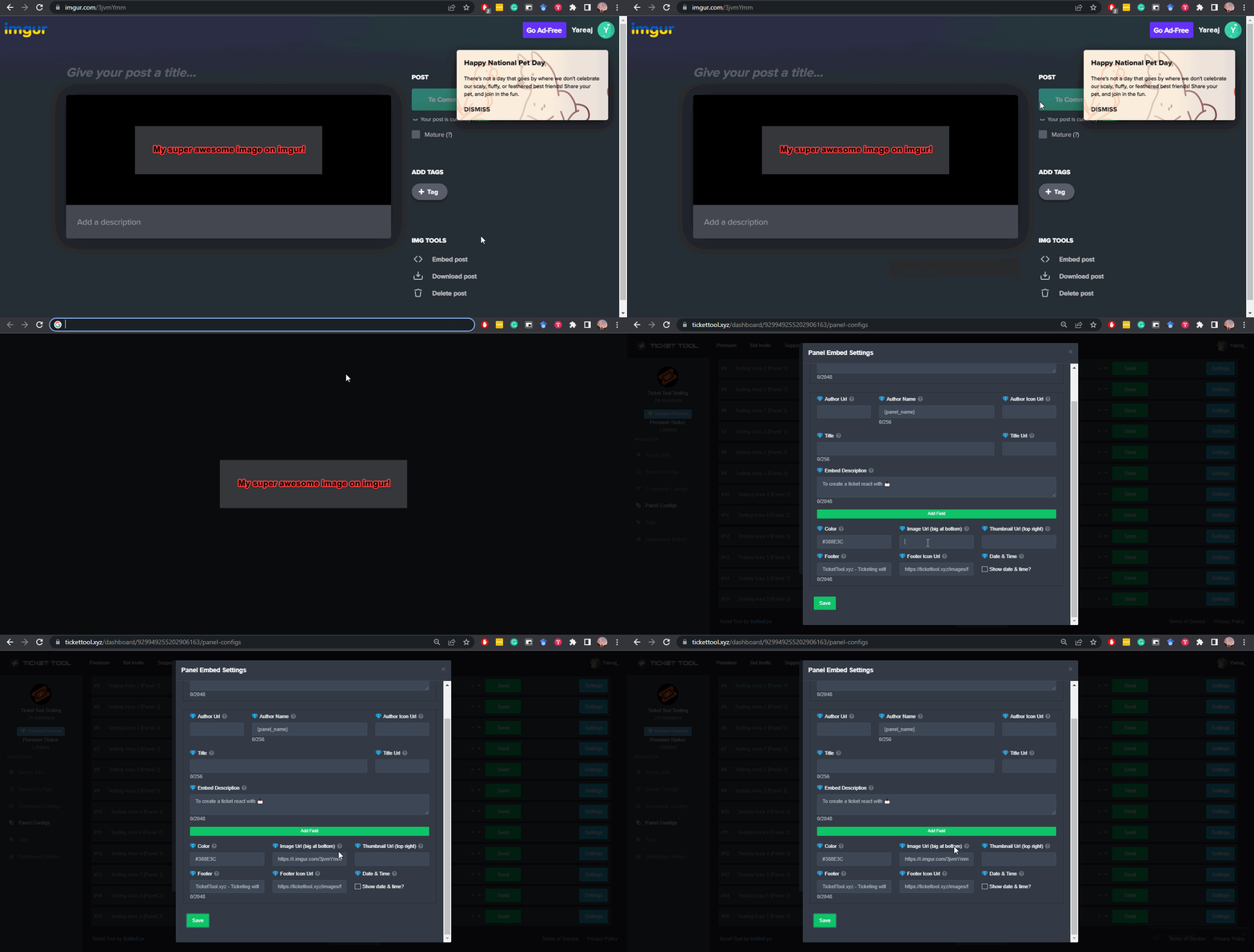
A direct access URL is an easy to read URL that users can enter to get to a specific item, document, page, category, or perspective, in which our bot TicketTool can read and get it displayed in your 'Panel Message' or your 'Ticket Message'.
Where can I get them?
The recommended way is to use 'Imgur', you can signup within a few minutes and then upload the image you want, and copy the URL of the uploaded image and paste it into one of the four boxes. There are alternatives to this, such as other image or video storing websites or using 'Open Original' of an image and paste it in (please be aware that if your image is deleted, Discord will automatically delete the link to it in a few days). Please note this requires 'Premium'. Imgur
 lone fractal
ok thanks that would work right
because im thinking about paying for it
it still doesnt work for some reasom

 shut bolt
lone fractal
shut bolt
lone fractal
If you are uploading the file to a discord chat you should review your file isn't corrupted, if you are using an URL that means the URL is likely broken, I'll ask again, what's the URL you are using?
 shut bolt
humble sequoia
shut bolt
humble sequoia
Read the instructions please
lone fractal
its in a diffrent laugnge
 shut bolt
Seems to be the one
shut bolt
What do you mean?
 shut bolt
Modify other fields of the embed
shut bolt
You can leave them empty if you'd like
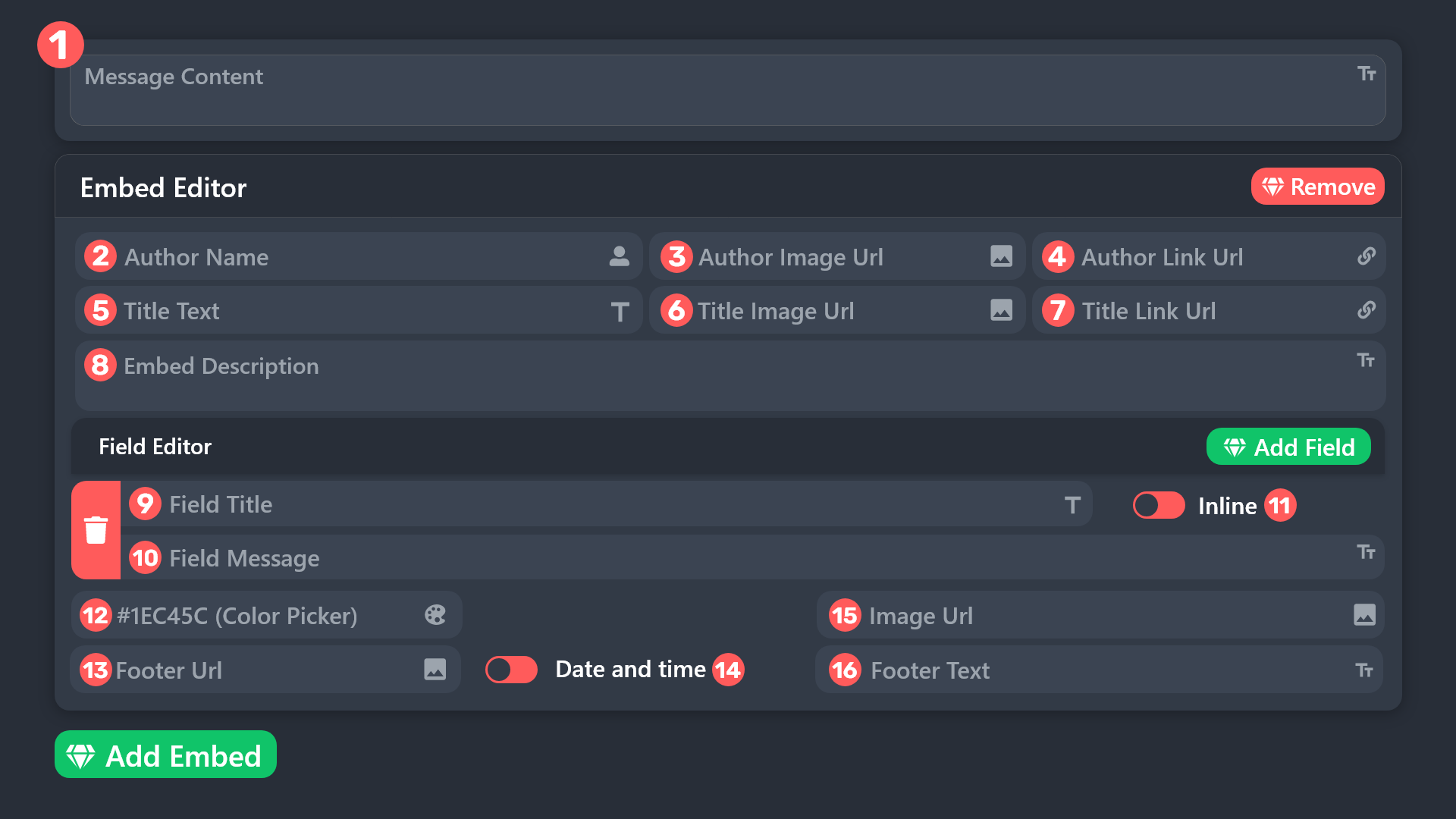
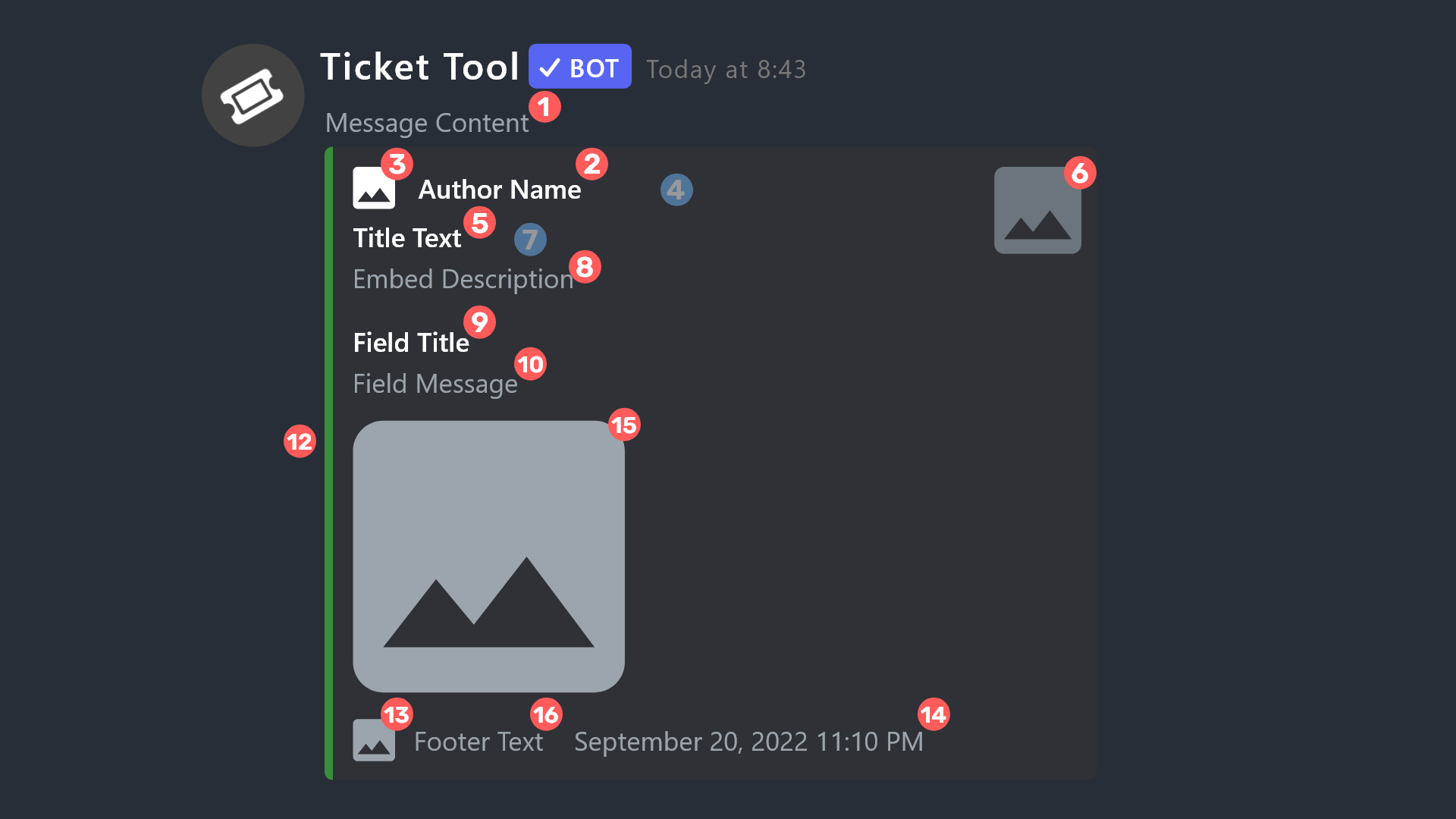 shut bolt
That's what each field corresponds to
 devout drum
shut bolt
All parameters are optional.
devout drum
shut bolt
All parameters are optional.
bot is missing are those that have a in the dashboard in the support options i fixed this and gave the ticket tool all permissions still getting Failed to add Missing Permissions
lone fractal
so it doesnt show the ticket tool
shut bolt
lone fractal
can i change the name?
Change it as you would change any other user's nickname
shut bolt
devout drum
bot is missing are those that have a <:OrangeDot43:1061646644812206151> in the d...
Server ID?
lone fractal
Can i change the pic?
humble sequoiaBOT
Ticket Tool Custom Avatar
As of now, you are not able to change Ticket Tool's profile picture, nonetheless, our Development Team is working on the release of white labels, this is your own custom bot!
For the time being, you can change the bot's nickname by right-clicking the bot in the user list on your server and clicking Change Nickname
$avatar
lone fractal
ok
devout drum
shut bolt
Server ID?
how do i get that?4
jade topaz
One message removed from a suspended account.
shut bolt
devout drum
how do i get that?4
You can run $id on your server that will give you the ID or give me the URL of your dashboard that works too
shut bolt
jade topaz
One message removed from a suspended account.
Check the message below
humble sequoiaBOT
The Drop-down menu or Select Menu replaces the buttons on your panel message and uses a drop-down menu with all of your panels. To set this up, go to your Panel Configs and select your main Panel.
<:Numbericons1:1018864164032225340> Enable Select Style
First you enable Select Style. Then you add an item in the Dropdown Editor. Now you can start editing your dropdown!
<:Numbericons2:1018864168041971712> Dropdown Editor
Each line in the dropdown editor represents a line in the drop down menu on discord. You can add more "Items", by clicking on 

First you select a panel. That's the panel this option will open a ticket for.  DONT select the same panel twice. Each option should have a different Panel
After that, you can put a Display. This is the title of this option and will appear in the drop down menu. The *Description can be set right after that, which will be below the title in grey.
Additionally you can select an emoji, that will be shown in front of each option. You can either manually input the ID of an emoji or select it in the selector.
Common Issues ⚠️
- Panel doesn't send? Make sure you have a valid emoji selected
- Option doesn't show up? Check if two options have the same panel in the DropDown Editor

$dropdown
jade topaz
One message removed from a suspended account.
One message removed from a suspended account.
One message removed from a suspended account.
shut bolt
Your bot is trying to alter the Manage Permissions for the added people, as stated in the footnote:
"Administator" is required for bots to grant "Manage Permissions" set that permission to  if you don't really need to deny that permission
devout drum
shut bolt
Your bot is trying to alter the Manage Permissions for the added people, as stat...
meaning
shut bolt
jade topaz
One message removed from a suspended account.
What do you mean by that?
shut bolt
devout drum
meaning
set that permission to
lone fractal
is there anway to make it go into a section in a channel so it doesnt show like that?
 humble sequoiaBOT
1. Go into your Dashboard
2. Open your Panel Configs tab
3. Select the panel you want to grant access to
4. Open the Category options menu
5. Select the categories of your preference
6. Save changes
 shut bolt
@lone fractal 
lone fractal
so it goes into the channel like were typing inn right now
bc if they build up there will be loads
so it looks like this
in a channel
Ticket 2924
devout drum
shut bolt
> set that permission to <:Null:950104559991267389> if you don't really need to ...
where am I doing that
lone fractal
Ticket 2732#
shut bolt
devout drum
where am I doing that
In the same place where you saw the orange dots before, aka the User Opened Permissions and probably Support Team Permissions if you are addinga role
devout drum
shut bolt
In the same place where you saw the orange dots before, aka the User Opened Perm...
I did for the opened tickets but its still not workin
shut bolt
lone fractal
do you know what i mea?
I don't
lone fractal
LIK
there all building up as you can see i want it to go into a channel like this I;G
shut bolt
devout drum
I did for the opened tickets but its still not workin
Remove it from the Ticket Owner opened permissions too
shut bolt
Like threads?
 shut bolt
I can see that, I still don't understand what you are trying to achieve
lone fractal
like there all building up at the side
how do i set it so they close in a channel not on the side of the discord
shut bolt
You mean how to make the tickets delete?
shut bolt
lone fractal
so they log into a channel
Do you mean logs or transcripts?
lone fractal
so every time i close a ticket it say closed on the side of the discord i want it to say closed in a channel A:E like were typing in now so i would want it to close in this channel
shut bolt
If you want action logs check the message below
humble sequoiaBOT
With Ticket Tool, you can customize the behavior the bot takes when logging your tickets! For editing these options follow these steps:
Dashboard ➞ Panel Configs ➞ Logging Options
Logging Channel
Here you will define which channel @humble sequoia will save the Logs in (ticket created/deleted/closed, etc.)
Logs you can save:
➞ Ticket Created ➞ Logs when a ticket is created
➞ Ticket Closed ➞ Logs when a ticket is closed
➞ Ticket Opened ➞ Logs when a ticket is opened
➞ Ticket Renamed ➞ Logs when a ticket is renamed
➞ Ticket Deleted ➞ Logs when a ticket is deleted
➞ Transcript Saved ➞ Logs when a ticket is saved
Select with  (disable) or
  (enabled) which logs you would like
Below you can see an example of what the Logging Options will look like:
 devout drum
shut bolt
If you want action logs check the message below
devout drum
shut bolt
If you want action logs check the message below
hey it worked thank you so much for you patience and support
iron nightBOT
Gave +1 Rep to @shut bolt (current: #1 - 1335)
shut bolt
devout drum
hey it worked thank you so much for you patience and support
Sure thing, here to help 
lone fractal
yeah thats what i mean thanks boss
 tight crescent
hi, im stack in between textures, how to contact to administration?
 median wigeon
tight crescent
hi, im stack in between textures, how to contact to administration?
median wigeon
tight crescent
hi, im stack in between textures, how to contact to administration?
You can make a ticket in #🎫│make-a-ticket
Or whats exactly the problem maybe in can help you?
tight crescent
im stack in between textures
toxic flame
hi! is there any way to stop a using creating a ticket if they have made one in the last 14 days?
dark kraken
toxic flame
hi! is there any way to stop a using creating a ticket if they have made one in ...
Hey there, Unfortunately there is no way to do it automatically.
You can do something like making the ticket limit = 1, and to setup the automation to delete the ticket after 7 days maximum, which is not that effective..
glass ermine
this might be a dumb question, but how do I control which category that the tickets open in to?
 limber portal
glass ermine
this might be a dumb question, but how do I control which category that the tick...
limber portal
glass ermine
this might be a dumb question, but how do I control which category that the tick...
Dashboard > panel configs > category
glass ermine
limber portal
Dashboard > panel configs > category
ah ok! thank you soo much 👍
iron nightBOT
Gave +1 Rep to @limber portal (current: #10 - 446)
glass ermine
I try to put an image in the embed, but it shows broken. any fixes/image host sites that work?
 restive condor
glass ermine
I try to put an image in the embed, but it shows broken. any fixes/image host si...
restive condor
glass ermine
I try to put an image in the embed, but it shows broken. any fixes/image host si...
Hey there! I recommend you try uploading the image on imgur
As Discord attachment links are too long
glass ermine
restive condor
Hey there! I recommend you try uploading the image on imgur
I just tried using imgur, it still looks like this; is it a problem on my end?
 restive condor
glass ermine
I just tried using imgur, it still looks like this; is it a problem on my end?
restive condor
glass ermine
I just tried using imgur, it still looks like this; is it a problem on my end?
Send the imgur link here, please
glass ermine
restive condor

The embed is the problem, for the future > Open the image on imgur > Right click > Open on another tab > Copy that link
restive condor
glass ermine
<https://imgur.com/a/FU0IQMS>
Use https://i.imgur.com/QGLKFsA.png
glass ermine
restive condor
Use ``https://i.imgur.com/QGLKFsA.png``
IT WORKED! Thank you!
iron nightBOT
Gave +1 Rep to @restive condor (current: #5 - 678)
restive condor
No problem
 worn plaza
hello how come members in my server have acces to the ticket tool dashboard
restive condor
worn plaza
hello how come members in my server have acces to the ticket tool dashboard
Hey there! Please make sure you have selected the correct roles under Dashboard > Server Configs > Dashboard Roles
worn plaza
restive condor
Hey there! Please make sure you have selected the correct roles under ``Dashboar...
but now they cant create tickets
restive condor
worn plaza
but now they cant create tickets
Dashboard > Panel Configs > Buttons > Create Ticket Button
Make sure ''Support Team Only'' is disabled, and the allowed/disabled roles are correct
 restive condor
 safe sable
guys i need help, i can't see my sv here
safe sable
guys i need help, i can't see my sv here
Hey there! Do you own the server?
safe sable
restive condor
Hey there! Do you own the server?
yes
restive condor
safe sable
yes
Please make sure you are logged onto the correct account in the dashboard
safe sable
restive condor
Please make sure you are logged onto the correct account in the dashboard
ohh ty, i didn't see :(
restive condor
No worries, have a nice day!
safe sable
u too :)
worn plaza
restive condor
``Dashboard`` > ``Panel Configs`` > ``Buttons`` > ``Create Ticket Button``
Make...
still not working
restive condor
worn plaza
still not working
What does the bot reply with when they try to use the button?
humble sequoiaBOT
━━ User's inquiry has been moved to a ticket ━━
worn plaza
restive condor
What does the bot reply with when they try to use the button?
no permission
but i was solved
worn plaza
how do i make the tickets private so no other members see them
 nimble sable
How do I put options in the ticket tool, such as do you want to request something else or technical support?
@pseudo ravine
@civic wagon
 sinful turret
is it possible i can be unbanned? i did break the rules and i am sorry, i got mad because somebody kept ramming me so i swore at them in the chat. i am sorry, please can you help me ill never do it again. ive been subscribed for over 6 months now and all i play is no hesi. I am truly sorry.
humble sequoiaBOT

⚠️ You're in the wrong place
We provide support for Ticket Tool Discord bot and cannot help you with whatever issue you have.
- We don't know which Support Team you should contact to get this issue resolved, and unfortunately we won't be able to accurately tell you.
If you don't have any further questions regarding our bot Ticket Tool, please close this ticket
nimble sable
How do I put options in the ticket tool, such as do you want to request something else or technical support?
@pseudo ravine
@civic wagon
restive condor
Stop pinging staff
restive condor
worn plaza
how do i make the tickets private so no other members see them
Hey there! Dashboard > Panel Configs > Permissions > Everyone role Permissions - Edit Opened > VIEW CHANNEL
Hey there! Unfortunately, this is an issue caused by a recent Discord update.
It may be a bug, but we don't know.
There's nothing we can do sadly 🙏
restive condor
nimble sable
How do I put options in the ticket tool, such as do you want to request somethin...
Hi there, you will need to create one different panel per ticket option.
You can then combine them using the instructions below
humble sequoiaBOT
For more convenient use of multipanels, you can now combine panels on the dashboard. This will allow you to directly send the multipanel from the dashboard or via the $panel ID command.
Where can I find this?
You can find this setting on the Dashboard -> Panel Configs -> Panel -> Attached Panels
Note: if you're attaching all the panels to a panel called English, don't include English in the attached panel's box (If you do this, it will create a duplicate)
This will put all buttons from all of your panels on one message. The message is the panel message from the panel you're combining these panels in.
 sinful turret
how can i check how long ive been banned for Dan?
restive condor
sinful turret
how can i check how long ive been banned for Dan?
Banned where, sorry?
sinful turret
i got banned on all no hesi servers
restive condor
sinful turret
i got banned on all no hesi servers
Wrong server sorry
This is Ticket Tool Support
@pseudo glen
sinful turret
restive condor
Wrong server sorry
so you guyshave nothing to do with no hesi?
restive condor
We don't
jade topaz
when someone makes a ticket in my server why cant they see the message history?
dark kraken
jade topaz
when someone makes a ticket in my server why cant they see the message history?
Hey there! , Check if "Read message history" permission is enabled in:
Panel config --> Permissions --> Ticket Owner Permissions --> Edit Opened --> Read Message History = ON
jade topaz
dark kraken
Hey there! , Check if "Read message history" permission is enabled in:
Panel con...
thanks so much
iron nightBOT
Gave +1 Rep to @dark kraken (current: #309 - 1)
 wanton wadi
How do you make it where you and the person that opened the ticket can only see it (ping me when u answer pls)
I got it nvm
 dense scroll
Good evening everyone! I would like to know how to reopen a ticket that I closed by mistake with important messages inside. Thank you for your help
edgy wren
Hello 👋 I need help
so so let’s start my friend has discord server about car flipping ,whenever it gets like new customer so someone bought his course and he’s getting me to Discord. My friend has it through like tickets . to so customer opens it. My friend open his ticket, check email and if it’s alright, my friend gives customer a role. But there are two options first option customer bought course so he gives him like full role, full role means that my friend must then close the ticket. If there is like second option where he bought like half of the course Then my friend would do him like half role (this one is temporary for 30 days) and let that ticket opened
—-
I would need to automate what my friend needs to do
 jade ibex
edgy wren
jade ibex
<#571706435449257997>
jade ibex
edgy wren
jade ibex
<#571706435449257997>
Okay
restive condor
dense scroll
Good evening everyone! I would like to know how to reopen a ticket that I closed...
Hi there! Sadly, only server staff may re-open tickets. You will have to reach out to them
restive condor
 vivid hinge
i want add permission level how ?
vivid hinge
i want add permission level how ?
Hey there! You will either need to get administrator permissions (Level 4)
Or a dashboard role (Level 2)
humble sequoiaBOT
Any role you put there will have full access to the ticket tool dashboard. The server owner and users with admin permissions already have access to the dashboard.
Be careful of which roles to put here
 restive condor
That's right
vivid hinge
okay good tyy
 shy sundial
Is the bot Arab?
restive condor
shy sundial
Is the bot Arab?
It is not
dense scroll
restive condor
Hi there! Sadly, only server staff may re-open tickets. You will have to reach o...
I'm staff on the serv I'm talking about, I just don't know how to reopen
restive condor
dense scroll
I'm staff on the serv I'm talking about, I just don't know how to reopen
Ah, no worries. My apologies
By ''closed by mistake'' you mean you accidentally deleted it?
dense scroll
restive condor
Ah, no worries. My apologies
By ''closed by mistake'' you mean you accidentally...
I simply pressed the "cancel" button for the bot to close the ticket. I'm trying to reopen it
restive condor
dense scroll
I simply pressed the "cancel" button for the bot to close the ticket. I'm trying...
If you cancelled the close then the ticket should be open
If it's not, use the /open command in the ticket
dense scroll
restive condor
If you cancelled the close then the ticket should be open
I am cancelling. It is therefore closed completely
dense scroll
restive condor
If it's not, use the ``/open`` command in the ticket
How to use the order if the ticket is closed?
restive condor
dense scroll
How to use the order if the ticket is closed?
If the ticket is deleted you cannot re-open it
If a transcript was not saved before deleting, it's gone forever unfortunately
dense scroll
Ah
dense scroll
restive condor
If a transcript was not saved before deleting, it's gone forever unfortunately
A transcript has been made!
restive condor
Perfect! Then you should be able to access that
I suppose you could make a new ticket with the user and send the transcript there too?
dense scroll
Where can you find the transcript?
restive condor
dense scroll
Where can you find the transcript?
In your transcript channel
dense scroll
Thanks !
 toxic dragon
Hey i went through support tools but when i try to remove people from a ticket it dont
 echo yacht
toxic dragon
Hey i went through support tools but when i try to remove people from a ticket i...
echo yacht
toxic dragon
Hey i went through support tools but when i try to remove people from a ticket i...
What does it shows you?
toxic dragon
it run the command.. but it do not remove them from the ticket
echo yacht
If the person has manage channels permissions in the category the person won’t be removed from the ticket
humble sequoiaBOT
The Drop-down menu or Select Menu replaces the buttons on your panel message and uses a drop-down menu with all of your panels. To set this up, go to your Panel Configs and select your main Panel.
<:Numbericons1:1018864164032225340> Enable Select Style
First you enable Select Style. Then you add an item in the Dropdown Editor. Now you can start editing your dropdown!
<:Numbericons2:1018864168041971712> Dropdown Editor
Each line in the dropdown editor represents a line in the drop down menu on discord. You can add more "Items", by clicking on
First you select a panel. That's the panel this option will open a ticket for. DONT select the same panel twice. Each option should have a different Panel
After that, you can put a Display. This is the title of this option and will appear in the drop down menu. The *Description can be set right after that, which will be below the title in grey.
Additionally you can select an emoji, that will be shown in front of each option. You can either manually input the ID of an emoji or select it in the selector.
Common Issues ⚠️
- Panel doesn't send? Make sure you have a valid emoji selected
- Option doesn't show up? Check if two options have the same panel in the DropDown Editor
$dropdown
pseudo ravine
Please don't ping staff, especially the Team Leads
jade topaz
Idk how to
pseudo ravine
humble sequoia
Read through this embed
jade topaz
Omg
 wintry coral
Hey there, I've looked through the variable lists for pinging and I don't think any will do what I'm looking for.
When a ticket is created I want it to ping a specific user rather than a specific role (as the support provider). Can this be done?
 tribal canyon
Hey im trying to set the bot up but it looks like its not going as I wish. I just changed the ticket message on the dashboard but its still using another message
humble sequoiaBOT
1. Go into your Dashboard
2. Open your Panel Configs tab
3. Select the panel you want to ping your support on
4. Open the Ticket options menu
5. Click on Edit Ticket Message
6. In the Message Content use one of the role mention syntax (**{@Role Name}**/**{Role ID}**)
7. Save changes
Note: For this to work properly, Ticket Tool requires the Mention Everyone permission. Or the role must have the Allow anyone to @mention this role setting enabled
 echo yacht
humble sequoia
echo yacht
humble sequoia
@wintry coral I think this will help you
echo yacht
tribal canyon
Hey im trying to set the bot up but it looks like its not going as I wish. I jus...
Did you save changes or sent the panel again?
tribal canyon
echo yacht
Did you save changes or sent the panel again?
yes i did
wintry coral
echo yacht
<@83129936683991040> I think this will help you
Yeah I used that info but because I was targeting a user not a role, the ping wasn't going off. It's ok, I gave up and just made a new role for that one person to have since I already had role pinging working in a different ticket
 fervent grove
i’m trying to set up the ticket bot, but it will not let me make multiple options in one, and i’m trying to add a claim button, which it will also not do. please help
austere forge
fervent grove
i’m trying to set up the ticket bot, but it will not let me make multiple option...
Hey there : )
Do you want to have several ticket options?
regarding the claim button, this is a premium feature
fervent grove
oh@ok
fervent grove
austere forge
Do you want to have several ticket options?
yes
humble sequoiaBOT
For more convenient use of multipanels, you can now combine panels on the dashboard. This will allow you to directly send the multipanel from the dashboard or via the $panel ID command.
Where can I find this?
You can find this setting on the Dashboard -> Panel Configs -> Panel -> Attached Panels
Note: if you're attaching all the panels to a panel called English, don't include English in the attached panel's box (If you do this, it will create a duplicate)
This will put all buttons from all of your panels on one message. The message is the panel message from the panel you're combining these panels in.
austere forge
fervent grove
yes
see above :)
fervent grove
thank you
 hoary yew
i bought on website i have not received email
hoary yew
??
 novel kraken
hoary yew
??
novel kraken
hoary yew
??
Staff are probably busy
hoary yew
when do they normally get on
novel kraken
hoary yew
when do they normally get on
Not sure but all you can do is wait
hoary yew
ok thanks
pseudo ravine
hoary yew
i bought on website i have not received email
Hey there. Can you confirm this is related to Ticket Tool?
hoary yew
@pseudo ravine what do u mean?
pseudo ravine
What exactly did you purchase?
humble sequoiaBOT
⚠️ You're in the wrong place
We provide support for Ticket Tool Discord bot and cannot help you with whatever issue you have.
- We don't know which Support Team you should contact to get this issue resolved, and unfortunately we won't be able to accurately tell you.
If you don't have any further questions regarding our bot Ticket Tool, please close this ticket
fervent grove
hey everytime i make a change on the dashboard and i click save, it doesn’t save to my server
austere forge
fervent grove
hey everytime i make a change on the dashboard and i click save, it doesn’t save...
Hey there, can you use a $debug command on your server pls
 grim wedge
austere forge
Hey there, can you use a `$debug` command on your server pls
grim wedge
austere forge
Hey there, can you use a `$debug` command on your server pls
hi i put certain roles for the support team of a ticket panel BUT a role i didnt add can still view it, i checked the Everyone perms and the role's perms and it still can see the ticket, please help
austere forge
grim wedge
hi i put certain roles for the support team of a ticket panel BUT a role i didnt...
Hi there : )
Make sure you have not added this role in the Additional Roles option which can give access to open tickets
 austere forge
grim wedge
yep theres none on additional
austere forge
grim wedge
yep theres none on additional
can i get your server id and tell me which role we access the ticket?
grim wedge
austere forge
can i get your server id and tell me which role we access the ticket?
1156152865908346912
role: 1199280104988221510
austere forge
grim wedge
1156152865908346912
role: 1199280104988221510
name role pls
grim wedge
austere forge
name role pls
/moderators
austere forge
Which panel does this concern?
grim wedge
austere forge
Which panel does this concern?
"IGC Tickets" and "Support Tickets"
humble sequoiaBOT
━━ User's inquiry has been moved to a ticket ━━
 silk bobcat
How do I do something like this in ticket tool

 warm mantle
yo how do i put my own thing for ticket like that
 humble sequoiaBOT
First you will want to invite the bot to your server. Once the bot is in your server, you can manage your server in the dashboard.
To create a panel we are going to need to head over to the Panel Configs Tab on the Dashboard.
Once at the dashboard we will need to click Create Panel.
Enter a panel name (Fill in any optional settings you want).
Click Create Panel and you are ready to get started with configuring your panel.
An example of a creating a panel is shown below.
Once the panel has been created, use the blue Send button and select the channel you want the panel to be sent to.
The Panel wasn't send
Use the </debug:ID> command to diagnose possible permission issues with the bot.
austere forge
warm mantle
yo how do i put my own thing for ticket like that
hey there : )
see above
silk bobcat
silk bobcat
How do I do something like this in ticket tool
@austere forge
austere forge
silk bobcat
How do I do something like this in ticket tool
Hey there. what exactly do you want to do?
silk bobcat
Instead of opening a ticket, I want it to show me a message like this
 warm mantle
austere forge
hey there : )
warm mantle
austere forge
hey there : )
can i dm u ?
austere forge
silk bobcat
Instead of opening a ticket, I want it to show me a message like this
not possible : )
austere forge
warm mantle
can i dm u ?
Unfortunately, no, this violates the rules of this server :)
warm mantle
what do i have to do now?
 silk bobcat
austere forge
Unfortunately, no, this violates the rules of this server :)
silk bobcat
austere forge
Unfortunately, no, this violates the rules of this server :)
Do you understand me?
 harsh cape
How do you make a role see the tickets but not let them chat in it?
austere forge
warm mantle
what do i have to do now?
Go to Menu and press button send to send the ticket panel to a channel
austere forge
silk bobcat
Do you understand me?
I told you that this was not possible :)
silk bobcat
silk bobcat
Instead of opening a ticket, I want it to show me a message like this
how to do in it?
warm mantle
it failed
 harsh cape
warm mantle
it failed
harsh cape
warm mantle
it failed
give admin perms
warm mantle
harsh cape
give admin perms
dm me
austere forge
harsh cape
How do you make a role see the tickets but not let them chat in it?
Hey there,
Go to Dashboard > Panel configs > General - add support team roles
and so that they only see the tickets but cannot speak, go to Panel configs > Permissions > Support Team Permissions edit opened - View channel / Send messages 
warm mantle
austere forge
Hey there,
Go to Dashboard > Panel configs > General - add support team roles
...
it failed
 austere forge
warm mantle
it failed
austere forge
warm mantle
it failed
As the message indicates, you must make sure that the bot has permissions to view the channel and send messages :)
warm mantle
austere forge
As the message indicates, you must make sure that the bot has permissions to vie...
where do i change his permissions
in my serv?
austere forge
yup, go to edit channel > permissions > Ticket tool - View channels / Send messages
harsh cape
austere forge
Hey there,
Go to Dashboard > Panel configs > General - add support team roles
...
Thankss
austere forge
You're welcome, glad I could help !
warm mantle
austere forge
yup, go to edit channel > permissions > Ticket tool - View channels / Send messa...
thank you 
iron nightBOT
Gave +1 Rep to @austere forge (current: #27 - 179)
austere forge
you're welcome
jade topaz
silk bobcat
Instead of opening a ticket, I want it to show me a message like this
You want to send an embed to a channel?
Ticket tool doesn’t do that (i dont think) you need a different bot for it 
It can send an embed in a ticket it creates though
 lime vapor
hey
I need help
I added ticket tool to a server and I have all the perms and everything but it aint showing up in the dashboard
jade topaz
lime vapor
I added ticket tool to a server and I have all the perms and everything but it a...
Silly question probably but did you refresh the page?
lime vapor
jade topaz
Silly question probably but did you refresh the page?
yes, a lot
@austere forge Can you help?
Mb
jade topaz
I’d try maybe re auth the bot while you wait for a response
lime vapor
re auth?
jade topaz
Like invite the bot in your server without kicking it out. Just re authenticate your disc account to the panel yk?
Press login on the panel it should show you what i mean by that
lime vapor
jade topaz
Like invite the bot in your server without kicking it out. Just re authenticate ...
I already did that
lime vapor
jade topaz
Press login on the panel it should show you what i mean by that
On the dashboard?
jade topaz
Yeah thats it
lime vapor
It just shows the servers that I have access to?
jade topaz
lime vapor
It just shows the servers that I have access to?
It shouldn’t show any servers you don’t have administrator in.
lime vapor
jade topaz
It shouldn’t show any servers you **don’t** have administrator in.
In the server I have a role with administrator
jade topaz
So what did you mean it shows the servers you have access to but then earlier you say the server you added ticket xyz to doesn’t show up. Are you able to elaborate?
@lime vapor what does it say when u run $level in ur server that wont show up on the dash
lime vapor
So I added ticket tool to a server that I have administrator in and it wont show up on the dashboard that ticket tool is in the server and I cant manage it
jade topaz
I’d try using the ‘$level’ command that will help just see if you actually have the permission to even view the servers dashboard
lime vapor
jade topaz
<@1131916146673733743> what does it say when u run $level in ur server that wont...
 lime vapor
jade topaz
I’d try using the ‘$level’ command that will help just see if you actually have ...
lime vapor
jade topaz
I’d try using the ‘$level’ command that will help just see if you actually have ...
But Im the one who invited ticket tool in the server in the first place
jade topaz
lime vapor
Oh okay fair you got it setup right it’s some visibility issue that im not sure sorry. I can only recommend to unlink your server and relink it from here you’d have to wait for actual support 🙏
lime vapor
jade topaz
Oh okay fair you got it setup right it’s some visibility issue that im not sure ...
Unlink?
jade topaz
lime vapor
But Im the one who invited ticket tool in the server in the first place
Hm does the ticket tool have administrator role?
lime vapor
jade topaz
Hm does the ticket tool have administrator role?
Ill check
jade topaz
I think add administrator and if that works maybe figure which roles it really needs like read,edit messages and manage channels etc.
lime vapor
jade topaz
Hm does the ticket tool have administrator role?
Yes, it has a role that has administrator
lime vapor
jade topaz
I think add administrator and if that works maybe figure which roles it really n...
alright
jade topaz
lime vapor
Yes, it has a role that has administrator
Oh interesting i’d deffo try unlink it and link it
lime vapor
jade topaz
Oh interesting i’d deffo try unlink it and link it
how?
jade topaz
lime vapor
how?
It would involve of kicking the bot if that isn’t an issue
And inviting it back and making sure all the scopes are ticked
lime vapor
Because Ive used ticket tool several times and never came across this issue
lime vapor
jade topaz
And inviting it back and making sure all the scopes are ticked
alright
jade topaz
lime vapor
Because Ive used ticket tool several times and never came across this issue
I’ll say i’ve never had issues with it appearing thats why i assume it could be just some visibility issue
And if that really doesn’t work I highly suggest using #🎫│make-a-ticket and explaining what your experiencing
lime vapor
 jade topaz
Looks right
lime vapor
Ill inv it now
jade topaz
Is ticket tool in your Discords ‘authorised applications’ under settings?
lime vapor
alright invited
lime vapor
jade topaz
Is ticket tool in your Discords ‘authorised applications’ under settings?
Lemme check
jade topaz
lime vapor
alright invited
Hopefully it works yeppee
lime vapor
jade topaz
Is ticket tool in your Discords ‘authorised applications’ under settings?
Yess
jade topaz
lime vapor
Yess
Ok great it seems to be setup correctly
jade topaz
Oh noo
If you use a discord app, make sure you using the correct discord account on the web browser
lime vapor
jade topaz
If you use a discord app, make sure you using the correct discord account on the...
Its the correct acc
And the bot isnt down either
jade topaz
lime vapor
Its the correct acc
Mayne refer to this docs
lime vapor
Should I create a ticket?
jade topaz

Common questions and troubleshooting.
Scroll down a bit and you’ll see ‘I can't see my server in the Dashboard’
It looks like i covered most of it by accident but yeah you may need a ticket
lime vapor
jade topaz
Scroll down a bit and you’ll see ‘I can't see my server in the Dashboard’
Im clicking the link but its not taking me anywhere
Oh nvm I had to scroll down
jade topaz

lime vapor
Im just going to open a ticket
jade topaz
lime vapor
Im just going to open a ticket
If you do, maybe link them this message link and they’ll see what you have tried in order to fix it 🙂 #🆘│community-support message
lime vapor
jade topaz
If you do, maybe link them this message link and they’ll see what you have tried...
alr thx for your help
iron nightBOT
Gave +1 Rep to @warm herald (current: #309 - 1)
jade topaz
lime vapor
alr thx for your help
Gl hope you figure what it is
lime vapor
🙏
jade topaz
lime vapor
<@456226577798135808> I had to click sync servers thx for your help
Ohh. Where is that is that a command?
lime vapor
At the top
jade topaz
Thanks for letting me know too glad it was so easy
jade topaz
lime vapor
At the top
Oh yeah i see that
lime vapor
👍
jade topaz
 tawdry bison
can someone help me with something?
tawdry bison
can someone help me with something?
What is it?
 jade topaz
tawdry bison
jade topaz
tawdry bison
Thats a thing in the dashboard one sec
tawdry bison
jade topaz
Thats a thing in the dashboard one sec
where can I edit that?
 humble sequoiaBOT
The Drop-down menu or Select Menu replaces the buttons on your panel message and uses a drop-down menu with all of your panels. To set this up, go to your Panel Configs and select your main Panel.
<:Numbericons1:1018864164032225340> Enable Select Style
First you enable Select Style. Then you add an item in the Dropdown Editor. Now you can start editing your dropdown!
<:Numbericons2:1018864168041971712> Dropdown Editor
Each line in the dropdown editor represents a line in the drop down menu on discord. You can add more "Items", by clicking on
First you select a panel. That's the panel this option will open a ticket for. DONT select the same panel twice. Each option should have a different Panel
After that, you can put a Display. This is the title of this option and will appear in the drop down menu. The *Description can be set right after that, which will be below the title in grey.
Additionally you can select an emoji, that will be shown in front of each option. You can either manually input the ID of an emoji or select it in the selector.
Common Issues ⚠️
- Panel doesn't send? Make sure you have a valid emoji selected
- Option doesn't show up? Check if two options have the same panel in the DropDown Editor
$dropdown
jade topaz
humble sequoia
Did i do that? Lol
tawdry bison
ok let me try
 clear grove
I would like to verify theMII Public Register information sent to
jade topaz
The bot just detected my screenshot damn
humble sequoiaBOT
⚠️ You're in the wrong place
We provide support for Ticket Tool Discord bot and cannot help you with whatever issue you have.
- We don't know which Support Team you should contact to get this issue resolved, and unfortunately we won't be able to accurately tell you.
If you don't have any further questions regarding our bot Ticket Tool, please close this ticket
austere forge
clear grove
I would like to verify theMII Public Register information sent to
Hey there, see above : )
jade topaz
tawdry bison
I think it is not that
So when someone pressed on create ticket, would you like them to choose from a selection of categories? What is it you’d like to do? As what you screenshotted is the dropdown im pretty sure
tawdry bison
jade topaz
So when someone pressed on create ticket, would you like them to choose from a s...
yes
but look

I can only put 1
and it's not even working
jade topaz
Add item top right is it?
tawdry bison
jade topaz
Add item top right is it?
I have alredy pressed it
it just creates another one and I can't select the ticket that I want to edit
jade topaz
Hold on read these docs it might give you an better idea on the whole dropdown setting
Using Dropdowns for ticket creation!
tawdry bison
ok thanks!
jade topaz
tawdry bison
I have alredy pressed it
You can click it multiple
Though and it adds more categories ^_^
tawdry bison
ok

 robust prawn
.
tawdry bison
@jade topaz I have another problem
jade topaz
tawdry bison
<@456226577798135808> I have another problem
What is up?
tawdry bison
as you can see it's everything done but for some reason the pannel is not changing

 tawdry bison
ok
jade topaz
You can delete the old create ticket msg too and resend it anytime you update something or need to
tawdry bison
I did it and it's alredy working
jade topaz
Great
jade topaz
Okay sure
tawdry bison
I can't select the panel 2 times


as you can see in the first one I was able to select it but in the second one I was not able to select it
how can I solve that?
@jade topaz
jade topaz
It might be a premium thing I can’t seem to figure that out either
Maybe ask support if you need premium to have multiple dropdown categories
jade topaz
Okay lemme see
austere forge
tawdry bison
as you can see in the first one I was able to select it but in the second one I ...
Hey there : )
this ticket option requires the creation of several panels, it is not possible to use the same ticket panel
jade topaz
That explains why i couldn’t figure it out xd
tawdry bison
austere forge
Hey there : )
this ticket option requires the creation of several panels, it is ...
and how did they make this
 austere forge
with several panels, you must create others with the green cross and you can then select from the drop-down list
tawdry bison
austere forge
with several panels, you must create others with the green cross and you can the...
and it might look like that, right?
austere forge
exactly ^^
tawdry bison
ok thanks
jade topaz
tawdry bison
and how did they make this
I get it so each category is a ticket panel. Name the ticket panel what you want the category to make the ticket under
Soz for late resp kinda had to do smth
jade topaz
jade topaz
I get it so each category is a ticket panel. Name the ticket panel what you want...
Sorry i phrased it wrong
No need to name the ticket panel ignore that
Select the ticket panel you want the category to be made in*
tawdry bison
ok alredy did thanks
 untold saffron
when I try & send a pannel it sends this to the channel
Failed:
Invalid Form Body components[0].components[0].options[5].emoji.name[BUTTON_COMPONENT_INVALID_EMOJI]: Invalid emoji
restive condor
untold saffron
when I try & send a pannel it sends this to the channel
> Failed: `Invalid For...
Hey there! You seems to have an invalid emoji
Could I get your server name or ID, so I can take a look?
untold saffron
Sure, 1222496046459129876
restive condor
untold saffron
Sure, 1222496046459129876
Dashboard > Panel Configs > Dropdown Style
There's an extra space after the camera emoji, please remove it
 untold saffron
Thanks so much!
restive condor
 dusk cliff
how i create a ticket on my server?
dusk cliff
how i create a ticket on my server?
Hey there! You can setup Ticket Tool via the dashboard, following the instructions below.
Alternatively, you can set it up using the /setup command
 stark runeBOT
1. Invite Ticket Tool to your server
First you will want to invite the bot to your server. Once the bot is in your server, you can manage your server in the dashboard.
2. Create a Panel
To create a panel we are going to need to head over to the panel configs on the dashboard.
Once at the dashboard we will need to click Create Panel.
Enter a panel name (Fill in any optional settings you want).
Click Create Panel and your ready to get started with configuring your panel.
An example of a creating a panel is shown below.
3. Send the Panel to a Channel
Once you've created a panel on the dashboard you will need to send it to a channel using send on the dashboard.
Select the channel you want your panel to be created in and click send.
For other questions checkout $help faq.
An example of a sending a panel is shown below.
Having a Problem Sending the Panel?
Do $debug in a channel with Ticket Tool and make sure it has all the necessary Discord permissions.
dusk cliff
oh oke thx
untold saffron
can someone help?
 austere forge
untold saffron
can someone help?
austere forge
untold saffron
can someone help?
hey there, can you try to refresh page or disable extensiosn block ads
untold saffron
austere forge
hey there, can you try to refresh page or disable extensiosn block ads
i tried refreshing, ill disable all my extensions now
untold saffron
austere forge
hey there, can you try to refresh page or disable extensiosn block ads
thanks, somehow disabling better roblox fixed it.
iron nightBOT
Gave +1 Rep to @austere forge (current: #27 - 180)
austere forge
untold saffron
thanks, somehow disabling better roblox fixed it.
perfect
you're welcome
untold saffron
lol, ive tried refreshing the page, didnt work. tried clicking on diff butons but didnt work. idk whats happening.

😭
jade topaz
Does ticket tool have a prefix instead of using slash commands
humble sequoiaBOT
━━ Isy's inquiry has been moved to a ticket ━━
untold saffron
untold saffron
lol, ive tried refreshing the page, didnt work. tried clicking on diff butons bu...
anyone know?
humble sequoiaBOT
━━ naten's inquiry has been moved to a ticket ━━
 dusk citrus
As a owner is it possible to check a transcript if I haven’t saved it or anything ?
austere forge
hey there, if the transcript has not been saved this is not possible
dusk citrus
austere forge
hey there, if the transcript has not been saved this is not possible
Can I not go to the ticket tool page and is there no like logs to check them?
austere forge
dusk citrus
Can I not go to the ticket tool page and is there no like logs to check them?
unfortunately no, if it has not been saved it is impossible to consult the ticket transcript
 eager vapor
How can make one like this?I’ve explored the whole set up guide but I still don’t know how to do it
 restive condor
eager vapor
How can make one like this?I’ve explored the whole set up guide but I still don’...
restive condor
eager vapor
How can make one like this?I’ve explored the whole set up guide but I still don’...
Hey there! You will need to create one different panel per button option.
You can them combine all panels into one as in the screenshot above, by following these instructions:
humble sequoiaBOT
For more convenient use of multipanels, you can now combine panels on the dashboard. This will allow you to directly send the multipanel from the dashboard or via the $panel ID command.
Where can I find this?
You can find this setting on the Dashboard -> Panel Configs -> Panel -> Attached Panels
Note: if you're attaching all the panels to a panel called English, don't include English in the attached panel's box (If you do this, it will create a duplicate)
This will put all buttons from all of your panels on one message. The message is the panel message from the panel you're combining these panels in.
eager vapor
restive condor
Hey there! You will need to create one different panel per button option.
You c...
So like,I have one panel named”support”then I have another named”staff”then I can do it?
restive condor
eager vapor
So like,I have one panel named”support”then I have another named”staff”then I ca...
That's right
eager vapor
humble sequoia
Here I just click”multi panels”in blue?
restive condor
That's for the Documentation instructions
You can find this setting on the Dashboard -> Panel Configs -> Panel -> Attached Panels
 stoic moss
help me how to make such a panel in a bot

 restive condor
stoic moss
help me how to make such a panel in a bot
restive condor
stoic moss
help me how to make such a panel in a bot
Hey there! See below
humble sequoiaBOT
The Drop-down menu or Select Menu replaces the buttons on your panel message and uses a drop-down menu with all of your panels. To set this up, go to your Panel Configs and select your main Panel.
<:Numbericons1:1018864164032225340> Enable Select Style
First you enable Select Style. Then you add an item in the Dropdown Editor. Now you can start editing your dropdown!
<:Numbericons2:1018864168041971712> Dropdown Editor
Each line in the dropdown editor represents a line in the drop down menu on discord. You can add more "Items", by clicking on
First you select a panel. That's the panel this option will open a ticket for. DONT select the same panel twice. Each option should have a different Panel
After that, you can put a Display. This is the title of this option and will appear in the drop down menu. The *Description can be set right after that, which will be below the title in grey.
Additionally you can select an emoji, that will be shown in front of each option. You can either manually input the ID of an emoji or select it in the selector.
Common Issues ⚠️
- Panel doesn't send? Make sure you have a valid emoji selected
- Option doesn't show up? Check if two options have the same panel in the DropDown Editor
$dropdown
 bright cargo
where can open titck
restive condor
bright cargo
where can open titck
stoic moss
@restive condor , how to change field color
restive condor
stoic moss
<@795710289425334303> , how to change field color
Which field?
stoic moss
restive condor
Which field?
 restive condor
stoic moss
restive condor
stoic moss
That's a premium feature unfortunately 
 pine breach
how can I buy with crypto
austere forge
pine breach
how can I buy with crypto
Hey there : )
to do this, you must open a ticket and select Billing
pine breach
austere forge
Hey there : )
to do this, you must open a ticket and select `Billing`
wheres the tickets channel
austere forge
pine breach
wheres the tickets channel
 vapid cloud
jo basichly i had celex on discord and i know my login but my discord got hacked and now im on a new discord account trying to get celex back
i got paypal if u need to see that i bought it
humble sequoiaBOT
━━ dodo573's inquiry has been moved to a ticket ━━
 undone mist
الو
dark kraken
undone mist
الو
تفضل، كيف أقدر اساعدك ؟
 tall crow
How do I add this type of message when I create a ticket?
 humble sequoiaBOT
A Discord Form lets the user answer individual questions in a pop-up Form, which then displays the answers in the ticket message. This can save time if you already know what you want to ask the user.
Setup Forms
Forms can be enabled under Panel Settings > Form Options > Edit Forms Options. In the new pop-up window, you can now enable and edit your own Form.
Form Options
You can add up to 5 questions in the Discord form. This is a Discord limitation. Each question can have a placeholder in the input field, a minimum and maximum input, multi-line, and also the option to have the answer required.
Options
Question Title ➞ Your Question goes here
Question Placeholder ➞ The placeholder text in the input field
Required ➞ If enabled, the user has to answer this question, to submit the form
Multi-Line Input ➞Allows the user to input multiple lines
Minimum and Maximum Input ➞ Set a minimum and maximum input value for the user
Displaying the Answer
To display the answers from the user, you need to enable Auto display form results on the ticket message as an additional embed
If you don't want a second embed, go into your Panel Configs > Ticket Options > Edit Ticket Message. You use the variable {create.form.x} and replace x with the number of your question. For example, the response to Question 5 can be displayed with {create.form.5}.
 restive condor
tall crow
How do I add this type of message when I create a ticket?
restive condor
tall crow
How do I add this type of message when I create a ticket?
Hey there! See above ^^
Let me know if you have any questions 🙏
iron nightBOT
Gave +1 Rep to @restive condor (current: #5 - 688)
 wide grove
anyone knows why i cant type on panel config}
jade topaz
can anybody help me, I don’t know how to invite the premium bot, I’m linked, can’t do bot switcher as it lags my dashboard, please help?
 humble sequoiaBOT
The first thing you will need to do is invite the premium bot, an invite can be found here
Once the bot is in your server we will head to the dashboard and manage your server. When you are managing your server, you want to head into "Server Configs" then click the drop down menu under "Select the bot you would like to use on this server" then click "Ticket Tool#6207" and then save.
 restive condor
jade topaz
can anybody help me, I don’t know how to invite the premium bot, I’m linked, can...
restive condor
jade topaz
can anybody help me, I don’t know how to invite the premium bot, I’m linked, can...
Hey there! You can use the invite above ^^
Then use /botswitcher in your server to switch bots
restive condor
wide grove
anyone knows why i cant type on panel config}
Hey there! What seems to be the problem?
wide grove
im in panelconfig
and im trying to edit the message
and i cant, it doesnt let me type
restive condor
wide grove
and im trying to edit the message
You can only edit the content inside the embed with the free version
It won't let you type in the ''Message Content'' field without an active premium subscription
iron nightBOT
Gave +1 Rep to @restive condor (current: #5 - 689)
 topaz pendant
Yo can some one help me
 dark kraken
topaz pendant
Yo can some one help me
dark kraken
topaz pendant
Yo can some one help me
Can you write $debug in the room and send a screen shot ?
 dark kraken
topaz pendant
dark kraken
topaz pendant
Checkout #📌│automated-support , Troubleshooting --> Missing permission
median wigeon
Did you send the panel to the chanel?
topaz pendant
Yes
median wigeon
And is the button working on your panel?
topaz pendant
I’ve send u it on ur DMs
topaz pendant
send what
median wigeon
The panel from your dashboard and not within discord
median wigeon
Do you have a lot of channels in your server?
topaz pendant
30 channels and 7 categories
median wigeon
And send the panel to there
median wigeon
And otherwise kick the bot and invite him again
topaz pendant
Same thing
topaz pendant
median wigeon
And otherwise kick the bot and invite him again
Ok
median wigeon
If thats not working please make a ticket at #🎫│make-a-ticket
Than the support team can help you
iron nightBOT
Gave +1 Rep to @median wigeon (current: #48 - 38)
topaz pendant
I lv u
jade ibex
dark kraken
 shut epoch
Is there an Arab person?
shut epoch
Is there an Arab person?
مرحبا، كيف يمكنني مساعدتك؟
shut epoch
dark kraken
مرحبا، كيف يمكنني مساعدتك؟
كيف استطيع عمل تكت احترافي في السيرفر الخاص بي
dark kraken
shut epoch
كيف استطيع عمل تكت احترافي في السيرفر الخاص بي
ايمكنك اعطائي مثالا لما تسميه بال"تكت الاحترافي"؟
shut epoch
dark kraken
ايمكنك اعطائي مثالا لما تسميه بال"تكت الاحترافي"؟
اأهل انت تبيع نيتروهات؟
dark kraken
shut epoch
اأهل انت تبيع نيتروهات؟
خدمة البيع والشراء ممنوعة ، كذلك هذه الغرفة مخصصة للدعم الفني فقط.
 willow hamlet
how to fix dis
 restive condor
willow hamlet
how to fix dis
restive condor
willow hamlet
how to fix dis
Hey there! Could you run the /debug command?
willow hamlet
 restive condor
willow hamlet
restive condor
willow hamlet
Ticket Tool is missing all these permissions for that channel


 idle flint
willow hamlet
im sorry to interrupt again but uhm
idle flint
willow hamlet
im sorry to interrupt again but uhm
That is the role permissions, you need to fix the permissions in the channel - right click on the channel > edit channel > permissions
 sonic crystal
Where can I get a premium code in TiketTool, please tell me
austere forge
sonic crystal
Where can I get a premium code in TiketTool, please tell me
Hey there : )
To obtain a premium code, you obviously have to buy premium
sonic crystal
austere forge
Hey there : )
To obtain a premium code, you obviously have to buy premium
And you can get it for free somehow, for 1-2 weeks
austere forge
sonic crystal
And you can get it for free somehow, for 1-2 weeks
we indeed have a free trial of 7 days maximum
sonic crystal
austere forge
we indeed have a free trial of 7 days maximum
And if 7 days have passed quickly, and i want to extend them, but also for free)
austere forge
sonic crystal
And if 7 days have passed quickly, and i want to extend them, but also for free)
unfortunately this is not possible.
you will have to buy premium for a while, to extend it :)
sonic crystal
austere forge
unfortunately this is not possible.
It's a pity(
sonic crystal
austere forge
you will have to buy premium for a while, to extend it :)
Is the premium worth 5 dollars?
austere forge
sonic crystal
Is the premium worth 5 dollars?
it depends how you want to buy premium, we offer different service like Paypal, crypto or through Discord
sonic crystal
austere forge
it depends how you want to buy premium, we offer different service like Paypal, ...
Through a discord?
humble sequoiaBOT

Premium can now be purchased directly through discord! Either in the app directory (server settings) or directly from the bots profile.
<:TTWarning:1034178155872784494> Important Information <:TTWarning:1034178155872784494>
ONLY purchase premium through ONE of the two Ticket Tool Bots. If you purchased premium on the primary bot (White logo) and plan to use the premium bot, don't kick the primary bot!
What's different?
 The Monthly price changed from
 $6.00 to $5.99

 Yearly subscriptions are not yet available
Don't kick the bot, otherwise, the subscription will be canceled automatically
You'll need to buy the subscription from a computer or on the Application Directory
You might need to run the /premium command on your server to sync the premium status with your dashboard
 A subscription can not be transferred between Servers
 austere forge
sonic crystal
Through a discord?
austere forge
sonic crystal
Through a discord?
see above : )
sonic crystal
Is it possible to buy only one function in TiketTool?
austere forge
sonic crystal
Is it possible to buy only one function in TiketTool?
no
iron nightBOT
Gave +1 Rep to @austere forge (current: #27 - 183)
austere forge
You're welcome, glad I could help !
 royal laurel
ازاي اعرف اخلي رتبه معينه تشوف التكتات ؟
 prime basin
Hello,
Is there a way where when a custom command is used, it automatically renames the ticket to what I want?
dark kraken
royal laurel
ازاي اعرف اخلي رتبه معينه تشوف التكتات ؟
اهلا وسهلا ، لتحديد رتبة معينة لرؤية التذاكر والتحكم بها ، إتبع الخطوات التالية:
Go to the website--> Panel Config --> General --> Support team roles -> Choose the roles you want.
ملاحظة ـ بإمكانك تغيير صلاحيات الرتبة عن طريق التوجه إلى قسم Permissions في الموقع ، واختيار Support team permissions
limber portal
prime basin
Hello,
Is there a way where when a custom command is used, it automatically rena...
Hi, that’s currently not possible
jade topaz
limber portal
Hi, that’s currently not possible
Is it possible to prefix a ticket upon a category but still have the number of the ticket for example i have 4 categories like report, support, appeal and donations
What if ticket were named like report-#0001
(Not talking is this possible i know it isn’t but maybe it could be a new update in the future? Basically to find transcripts easier)
Atm i just manually rename the tickets but that’d be cool update fr
humble sequoiaBOT
The ticket name is the default channel name of all tickets. To edit it, go to your Dashboard > Panel Configs > Ticket. There you can edit the channel name of opened and closed tickets. You can also use variables in there.

 Note: This is a premium feature
 restive condor
 obtuse gorge
Hey there! Please #🎫│make-a-ticket
 tawny tundra
is it possible to copy a ticketbot setting to another server?
also why is my premium role gone
dark kraken
tawny tundra
also why is my premium role gone
Check out if your subscription expired
shut bolt
Actually you can
humble sequoiaBOT
The Backup and Restore feature allows you to transfer your panels, tags, and all settings to a new server, even if the server the settings were created has been deleted! You will want to copy the whole key.
First, go to your server's Dashboard ➞ then Server Configs ➞ under Config Backup & Restore (Server Owner Only) click on Old version can be found here and generate a new backup key by pressing the green button. Now, a key should be generated in the box above. You may need to refresh the page to see this.
Once you have your backup key, navigate to the same page on the new server. Copy the key on the Restore from backup key field.
Now you can choose what you want to copy. Finally, press the green Restore Configs button.
IMPORTANT NOTE
- We suggest you keep this backup key somewhere safe, in case your server is deleted so you are able to recover your panel's settings.
- This feature is only usable by the server's owner
$backup
tawny tundra
dark kraken
Check out if your subscription expired
its not, i still have it if u guys need it i can send a ss
tawny tundra
shut bolt
Actually you can
thx man
iron nightBOT
Gave +1 Rep to @shut bolt (current: #1 - 1338)
shut bolt
$pc 668052466385944577
humble sequoiaBOT
shut bolt
$pc 668052466385944577

Thank you
Thank you for purchasing Ticket Tool Premium @tawny tundra. You have now been given the <@&535595160189403136> role!
Found 2 servers in total and 1 with premium and permission
tawny tundra
shut bolt
$pc 668052466385944577
it say a new system is working , will the old key still work when the new system is up?
shut bolt
tawny tundra
it say a new system is working , will the old key still work when the new system...
You can click the blue hyperlink text, you'll be able to access to it there
jade topaz
can someone please help me ? is there chance to remove the footer "ticket tool" i dont got premium im broke
tawny tundra
shut bolt
You can click the blue hyperlink text, you'll be able to access to it there
Ok thx , is the key for 1 time use only or i can use it multiple time
iron nightBOT
Gave +1 Rep to @shut bolt (current: #1 - 1339)
shut bolt
tawny tundra
Ok thx , is the key for 1 time use only or i can use it multiple time
The backup key can be used several times, it is valid as long as a new one is not generated
jade topaz
who can make me panel with custom footer dm me
tawny tundra
shut bolt
The backup key can be used several times, it is valid as long as a new one is no...
okay thx
iron nightBOT
Gave +1 Rep to @shut bolt (current: #1 - 1340)
 shell barn
Is it possible for my ticket, when opened, to mark a certain label?
humble sequoiaBOT
The ticket name is the default channel name of all tickets. To edit it, go to your Dashboard > Panel Configs > Ticket. There you can edit the channel name of opened and closed tickets. You can also use variables in there.
Note: This is a premium feature
 wicked copper
daisy jones & six S01E08 not working for me
humble sequoiaBOT
⚠️ You're in the wrong place
We provide support for Ticket Tool Discord bot and cannot help you with whatever issue you have.
- We don't know which Support Team you should contact to get this issue resolved, and unfortunately we won't be able to accurately tell you.
If you don't have any further questions regarding our bot Ticket Tool, please close this ticket
 austere oxide
Can you make a multiple choice question in the ticket form?
median wigeon
yeah thats a combination of a multipanel and the ticket form option
humble sequoiaBOT
For more convenient use of multipanels, you can now combine panels on the dashboard. This will allow you to directly send the multipanel from the dashboard or via the $panel ID command.
Where can I find this?
You can find this setting on the Dashboard -> Panel Configs -> Panel -> Attached Panels
Note: if you're attaching all the panels to a panel called English, don't include English in the attached panel's box (If you do this, it will create a duplicate)
This will put all buttons from all of your panels on one message. The message is the panel message from the panel you're combining these panels in.
median wigeon
 austere oxide
median wigeon
yeah thats a combination of a multipanel and the ticket form option
austere oxide
median wigeon
yeah thats a combination of a multipanel and the ticket form option
How to make options
median wigeon
austere oxide
How to make options
I missed the form thing, i dont think thats possible with the form option
 austere oxide
median wigeon
I missed the form thing, i dont think thats possible with the form option
austere oxide
median wigeon
I missed the form thing, i dont think thats possible with the form option
Can i do bot suggestions anywhere?
median wigeon
austere oxide
median wigeon
in <#921732979586375690>
how does that work?
median wigeon
austere oxide
how does that work?
look at the pin in the channel
austere oxide
median wigeon
look at the pin in the channel
so just s!suggest <suggestion>
median wigeon
Yes and that in #🤖│bot-spam
austere oxide
alr
austere oxide
median wigeon
Yes and that in <#910978476536905738>
I did it and I can't see it in #💡│suggestions. Do I just need to wait?

 stone portal
Hi does the $new command work for discord bots?

or does it have to be an actual user sending the command for it to work
nvm I figured it out, had to add bot ID in dashboard
jade topaz
is there chance to get free premium?
median wigeon
jade topaz
is there chance to get free premium?
yep you can spare and buy it in #🤖│bot-spam
jade topaz
what do i do in that channel
median wigeon
You can see everything in bot spam
 fallen night
why does this happen when i go to a transcript?
 jade topaz
i really need premium xd...
austere forge
fallen night
why does this happen when i go to a transcript?
Hey there,
For older transcripts (that dont have the button), click the Download button (the downwards arrow) - it will download a HTM< file that you can open in a browser
fallen night
austere forge
Hey there,
For older transcripts (that dont have the button), click the Downloa...
what if i only have the link?
austere forge
jade topaz
is there chance to get free premium?
Hey there, we are offering a 7 day free trial
jade topaz
austere forge
Hey there, we are offering a 7 day free trial
i never used trial and when i saw people have it i wanteed to try but its not offering on my server :((
austere forge
fallen night
what if i only have the link?
not possible, there is necessarily the html file that you can download
austere forge
jade topaz
i never used trial and when i saw people have it i wanteed to try but its not of...
in this case, it means that you have already used it
fallen night
austere forge
not possible, there is necessarily the html file that you can download
no like i only have access to the transcript link, not the embed
jade topaz
austere forge
in this case, it means that you have already used it
i never used it
austere forge
fallen night
no like i only have access to the transcript link, not the embed
can I get a full screenshot of your transcript?
 jade topaz
what do i do with my balance #🤖│bot-spam
austere forge
jade topaz
i never used it
in this case, it is not possible to consult it, it is too old
In ticket tool DMs, you probably received a message like this:

just DL the html file with the arrow on the right
humble sequoiaBOT
First you will want to invite the bot to your server. Once the bot is in your server, you can manage your server in the dashboard.
To create a panel we are going to need to head over to the Panel Configs Tab on the Dashboard.
Once at the dashboard we will need to click Create Panel.
Enter a panel name (Fill in any optional settings you want).
Click Create Panel and you are ready to get started with configuring your panel.
An example of a creating a panel is shown below.
Once the panel has been created, use the blue Send button and select the channel you want the panel to be sent to.
The Panel wasn't send
Use the </debug:ID> command to diagnose possible permission issues with the bot.
humble sequoiaBOT
Don't see your server in the dashboard?
Try using the Sync Servers button on your top center of the Dashboard page
You will possibly need to relog. Look below to see the steps on how to relog.
If this doesn't work
You should relog from the dashboard, you can do this by clicking here to log out immediately, and then log back in
Note:
You need one of these 3 things to access the dashboard.
1. Server Owner (Level: 6)
2. Server Administrator (Level: 4)
3. Dashboard Role (Level: 2)
:warning: You can check your level using the </permissionlevel:1029797400174399542> command on your Discord Server
If the bot's response is:
- @User is permission level: 0 (User)
You don't have any of the 3 levels required to access the server's dashboard
 austere forge
see above
 stuck tiger
any way to get transcripts from other servers where u are not owner and banned?
austere forge
Make sure that the bot has: VIEW CHANNEL SEND MESSAGE and READ MESSAGE HISTORY perms in the channel
austere forge
stuck tiger
any way to get transcripts from other servers where u are not owner and banned?
Hey there, no
austere forge
the server owner must add your role to you in the role dashboard, so that you have access
humble sequoiaBOT
Any role you put there will have full access to the ticket tool dashboard. The server owner and users with admin permissions already have access to the dashboard.
Be careful of which roles to put here
austere forge

 cursive roost
is there a way to auto close a ticket if no one says anything after 30 mins
austere forge
cursive roost
is there a way to auto close a ticket if no one says anything after 30 mins
Hey there, this is possible with the automation option, but this feature is premium
iron nightBOT
Gave +1 Rep to @austere forge (current: #27 - 185)
austere forge
You're welcome, glad I could help !
cursive roost
austere forge
Hey there, this is possible with the automation option, but this feature is prem...
good thing i ball like that (im on free trial)
austere forge
cursive roost
good thing i ball like that (im on free trial)
nice, welcome premium role 
see below for this
humble sequoiaBOT
With Ticket Tool's automation, you'll be able to customize your ticket system workflow! Using the Automation Editor you can:
- Chose out of 6 different triggers
- Set a Message Watcher to wait for a message for a given time, or to wait for the absence of them
- Add delays on the execution of actions after the trigger or watcher finds a message!
Automation Command
Automations can be stopped, by running the /automation stop command inside the ticket you want it to stop in. Restart it with /automation start You'll also be able to view the current status of the automations with /automation.
__Important Notes__
- Automation is on ALPHA TESTING PHASE, things might work unexpectedly or not at all.
- Any automation will run for a maximum of 7 days or until the ticket is closed, afterward, it will stop checking
+ You can have 5 automations per panel

$auto
austere forge
Let me know if you have any questions
cursive roost
will this automation close the ticket if someone response, but then it goes unanswered for 3 hours?
 primal harness
Hii
dark kraken
primal harness
Hii
Hello, how can I help you?
dark kraken
No problem
primal harness
When im use the comand /add
She says
The application is not working
I tried taking the bot off and on but it didn't work
cursive roost
humble sequoia
will this automation close the ticket if someone response, but then it goes unanswered for 3 hours?
dark kraken
@primal harness can you please take a screenshot?
 dark kraken
primal harness
dark kraken
primal harness
The command /add is used to add a member to a ticket.
What are you trying to do exactly?
primal harness
I'm trying to put that ticket command so people can click and create a ticket
dark kraken
cursive roost
will this automation close the ticket if someone response, but then it goes unan...
Can you explain your question please?
dark kraken
primal harness
I'm trying to put that ticket command so people can click and create a ticket
You can do it by following this steps:
Dashboard --> Panel configs --> choose your ticket panel or create one --> Press send --> Choose the channel
dark kraken
primal harness
Im will try
Alrighty, if you want anything, feel free to mention me.
primal harness
The dashboard is in the Google?
dark kraken
Yes
median wigeon
Tickettool.xyz
 formal iris
can any1 help me?
primal harness
Thanks
dark kraken
formal iris
can any1 help me?
Of course! , what is the issue you are facing?
 primal harness
I want one like that now too
formal iris
lol
humble sequoiaBOT
For more convenient use of multipanels, you can now combine panels on the dashboard. This will allow you to directly send the multipanel from the dashboard or via the $panel ID command.
Where can I find this?
You can find this setting on the Dashboard -> Panel Configs -> Panel -> Attached Panels
Note: if you're attaching all the panels to a panel called English, don't include English in the attached panel's box (If you do this, it will create a duplicate)
This will put all buttons from all of your panels on one message. The message is the panel message from the panel you're combining these panels in.
humble sequoiaBOT

You can check our documentation here;
You can also check #📂│information for the basic setup, or run the </setup:1025379472167403530> command within #🤖│bot-spam to find information on how to setup Ticket Tool.
Alternatively, you can use the /setup command with Ticket Tool in your own server to setup the basics of Ticket Tool!
Our documentation contains all the info you need about the bot to be able to setup and configure the bot however you like.
primal harness
I created my panel through the dashboard but I don't know how to add it to my server
median wigeon
You can in your dashboard click on send
In the #📂│information channel.you can click on setup guido for the photos
humble sequoiaBOT
How do I get the ID of Roles/Channels/Emojis?
Ticket Tool has a useful command that helps you get the ID of various things like channels, roles, emojis, and your server.
Just use the command </id:1029797400174399546> <#channel/@role/:emoji:>. Now copy everything, including the brackets <...>, to your dashboard (or wherever you want it)
If you want the server ID, just use the command without any option.
Examples:
Server ID: $id ➝
509192800865353738
Roles: $id @Role ➝<@&722196398635745312>
Channel: $id #channel ➝#🤖│bot-spam
User: $id @user ➝@copper owl
Emoji: $id➝

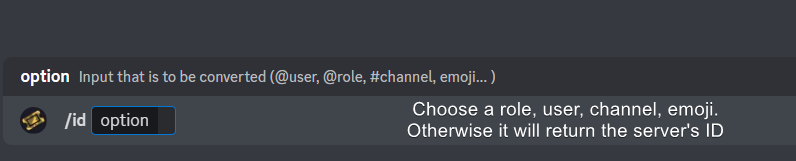 primal harness
Bro
Im will cry☠️
In dashboard
I create the panels
I need help to put then in my server
humble sequoiaBOT
etup
⚠️ You're in the wrong place
We provide support for Ticket Tool Discord bot and cannot help you with whatever issue you have.
- We don't know which Support Team you should contact to get this issue resolved, and unfortunately we won't be able to accurately tell you.
If you don't have any further questions regarding our bot Ticket Tool, please close this ticket
median wigeon
primal harness
I need help to put then in my server
You can send it from your dashboard
primal harness
As?
 primal harness
Its dont appear
median wigeon
What dont appear?
The panel?
Than try the command $debug everything marked with the ❌ needs to be enabled.
median wigeon
Yes?
primal harness
Does not work
median wigeon
Is the bot in the server?
primal harness
Yes
median wigeon
And had is al the needed roles?
primal harness
I dont know
 median wigeon
Yes i was
median wigeon
Did it have all the permission
primal harness
How do I put permission
median wigeon
In your discord settings
How you normally set tha channel permissions
And role permissions
median wigeon
Yes you can change that in the pannelmessage
humble sequoiaBOT
The panel message is where people react to make a ticket. To customize it head over to your Dashboard --> Panel Configs -> Panel -> Edit Panel Message
 median wigeon
@primal harness
primal harness
I got it, thank you
 silent wasp
hey there, tryna set up automations here
does this setup mean that if the creator of the ticket doesn't send a message within 30 seconds, the ticket gets autoclosed?

doesnt seem to be working for me 😢
median wigeon
silent wasp
doesnt seem to be working for me 😢
Yes i think because its a premium feature
silent wasp
median wigeon
Yes i think because its a premium feature
I have premium

I'd like to set up exactly this

Oh, it just auto-closed..
is 5 minutes the minimum? makes it hard to test lol
silent wasp
median wigeon
And you invite the premium bot?
The premium features work on the default bot if selected afaik
median wigeon
I see the option select a time to check still open
silent wasp
I guess the issue is that the custom time field in seconds requires 300 seconds at a minimum
silent wasp
median wigeon
I see the option select a time to check still open
Yeah I was trying to use 30 seconds

and it defaults to 5 minutes

Would be nice if it said minimum 300 seconds 🙂
 silent wasp
median wigeon
Yes i think because its a premium feature
silent wasp
median wigeon
Yes i think because its a premium feature
Thanks for the help!
iron nightBOT
Gave +1 Rep to @median wigeon (current: #47 - 40)
 scenic plinth
silent wasp
Would be nice if it said minimum 300 seconds 🙂
scenic plinth
silent wasp
Would be nice if it said minimum 300 seconds 🙂
It's 5 minutes likely due to rate limits, if that notice is not already there, I'll make sure to forward that 🙂
silent wasp
scenic plinth
It's 5 minutes likely due to rate limits, if that notice is not already there, I...
Thanks for that! 🙂
Sure made me think I was stupid for a good 4 minutes 😂
shut bolt
silent wasp
Would be nice if it said minimum 300 seconds 🙂
added a note
devout drum
I need a bit of help. right now a user can only open 1 ticket at a time how do i allow a user to open more than one ticket at a time?
pseudo ravine
Hey there. I’m assuming this is for the same panel?
devout drum
yes and I just figured it out thank you so much for such a quick response
pseudo ravine
You’re welcome, glad I could help!
devout drum
thanks @pseudo ravine
iron nightBOT
Gave +1 Rep to @pseudo ravine (current: #9 - 477)
 terse flint
Is there anyway to see the transcript of a ticket without being the moderator for the server. I recently made a report and it got closed and I wanan see if it was even responded too. Is that possible?
 opal spade
 median wigeon
terse flint
Is there anyway to see the transcript of a ticket without being the moderator fo...
median wigeon
terse flint
Is there anyway to see the transcript of a ticket without being the moderator fo...
Is the server where you member of premium?
terse flint
median wigeon
Is the server where you member of premium?
i hvae no idea
i would guess so because it has over 100k members
median wigeon
Is the premium bot in the server
terse flint
nah
median wigeon
Orherwise they cant have a transcriptb
stoic moss
How can I make it send a welcome message after opening a ticket?
humble sequoiaBOT
The Ticket Message is the first message sent by the bot on a new ticket. To customize it head over to your Dashboard ➞ Panel Configs ➞ Ticket ➞ Edit Ticket Message
austere forge
stoic moss
How can I make it send a welcome message after opening a ticket?
Hey there : )
see above
stoic moss
austere forge
see above
Thanks buddy
 sharp vector
This interaction failed
HowMay i fix it ?
austere forge
sharp vector
This interaction failed
HowMay i fix it ?
Hey there : )
sharp vector
hey
austere forge
can you use $debug command in your server
sharp vector
wait
sharp vector
How to claim a ticket like i am taking the matter of that topic of the topic 🙂
austere forge
sharp vector
How to claim a ticket like i am taking the matter of that topic of the topic 🙂
this is a premium feature
sharp vector
austere forge
this is a premium feature
Ow
 hollow peak
How can i get back my sun spec back because its suddenly take all my iventory accept ramen and katana
 gentle socket
How do I make the bot send random responses in a tag (responses would be set by me but every time a different response)
humble sequoiaBOT
⚠️ You're in the wrong place
We provide support for Ticket Tool Discord bot and cannot help you with whatever issue you have.
- We don't know which Support Team you should contact to get this issue resolved, and unfortunately we won't be able to accurately tell you.
If you don't have any further questions regarding our bot Ticket Tool, please close this ticket
austere forge
hollow peak
How can i get back my sun spec back because its suddenly take all my iventory ac...
austere forge
gentle socket
How do I make the bot send random responses in a tag (responses would be set by ...
Hey there : )
you can use custom commands
humble sequoiaBOT
Custom Commands
Custom Commands are used to send a predefined response to your channels. Commands will only respond if the command itself is used, it will not function if you put the tag into a sentence.
To create commands, go to: Dashboard > Custom Commands > New. After creating and naming one, you can edit the command trigger and behaviors. Tap on the edit message button to edit the response of the command.
 gentle socket
austere forge
Hey there : )
you can use custom commands
gentle socket
austere forge
Hey there : )
you can use custom commands
It is sending all responses together, how do I make it send 1 random
hollow peak
@austere forge what?
hollow peak
austere forge
<:this:894279341108772914>
I dont get it
austere forge
gentle socket
It is sending all responses together, how do I make it send 1 random
It is not really possible to send a random custom commands, you can use the trigger command option, if I do for example $test it will send the custom commands
austere forge
humble sequoia
@hollow peak
hollow peak
austere forge
<@873016503023321128>
What?
austere forge
you are not on the right server for your issue.
hollow peak
Where should i go?
austere forge
I don’t know 🙂
hollow peak
Should i make a ticket?
austere forge
not here in any case, as explained, you are the wrong server
We are only the support of @pseudo glen
hollow peak
Kk
 spark blade
My Support team (has matching Role) cannot see new tickets