#🆘│community-support
1 messages · Page 99 of 1

 humble sequoiaBOT
The ticket name is the default channel name of all tickets. To edit it, go to your Dashboard > Panel Configs > Ticket. There you can edit the channel name of opened and closed tickets. You can also use variables in there.

 Note: This is a premium feature
 glad shuttle
 restive condor
Hey there! Yes, but that's a premium feature <:Premium:1192403074157912144>
restive condor
Hey there! Yes, but that's a premium feature <:Premium:1192403074157912144>
Ahhh, thank you!! I completely spaced on where that was. I was pretty sure it was premium, but I couldn't remember because it's been so long since I've needed to use something like that 🤦♀️
 iron nightBOT
Gave +1 Rep to @restive condor (current: #8 - 465)
 pine tinsel
I completely forget where to change how many tickets a person can have open in a certain panel at one time anyone have an idea
restive condor
pine tinsel
I completely forget where to change how many tickets a person can have open in a...
Hey there! Dashboard > Panel Configs > Limits
pine tinsel
restive condor
Hey there! ``Dashboard`` > ``Panel Configs`` > ``Limits``
thank you
iron nightBOT
Gave +1 Rep to @restive condor (current: #8 - 467)
 digital path
is there a way to give perms to access the /add [person] to ticket, but perms to prevent the use of other commands?
restive condor
digital path
is there a way to give perms to access the /add [person] to ticket, but perms to...
Hey there! Yes, Dashboard > Command Configs > ADD
digital path
restive condor
Hey there! Yes, ``Dashboard`` > ``Command Configs`` > ``ADD``
🙏 Thank you!
iron nightBOT
Gave +1 Rep to @restive condor (current: #8 - 469)
 slow maple
Is the website down?
restive condor
slow maple
Is the website down?
Hey there! No, what seems to be the problem?
Actually, it was down momentarily while a change was being made. Should be fully back now
 olive zephyr
Where can i manage the tickets so it makes the tickets in a certain category ?
restive condor
olive zephyr
Where can i manage the tickets so it makes the tickets in a certain category ?
Hey there! Dashboard > Panel Configs > Category
olive zephyr
I feel like i am either blind or blind
I see it now thank you😭
Thanks @restive condor
iron nightBOT
Gave +1 Rep to @restive condor (current: #8 - 470)
 covert minnow
Hey guys, I have an issues with the server I'm managing. I was configuring the ticket tool for some more fancier look and throughout the process Ticket Tool stopped tagging people that create ticket. In the place of tag I only get their ID without a link. I've been using {user} for this. Did anyone hese have this issue?
restive condor
covert minnow
Hey guys, I have an issues with the server I'm managing. I was configuring the t...
Hey there! Please use {ticket.user}
Ah, my apologies. I see what you mean now. They both do the same thing.
What you're referring to is a Discord cache issue.
Users that aren't cached into your Discord client, will appear as @chilly flame instead of a mention, please rest assured they are being pinged if the mention is blue and outside an embed messsage
covert minnow
restive condor
Ah, my apologies. I see what you mean now. They both do the same thing.
What you...
I was doing the embed part wrong. I used {user} in the field title. Thanks on help @restive condor , much appreciated.
iron nightBOT
Gave +1 Rep to @restive condor (current: #8 - 475)
 eager jasper
 reef lion
Então, eu comecei o free trial do bot premium e não consigo convidar ele pro meu server
So, I started the free trial of premium bot, and I cant invite he to my server
humble sequoiaBOT
The first thing you will need to do is invite the premium bot, an invite can be found here
Once the bot is in your server we will head to the dashboard and manage your server. When you are managing your server, you want to head into "Server Configs" then click the drop down menu under "Select the bot you would like to use on this server" then click "Ticket Tool#6207" and then save.
 restive condor
reef lion
Então, eu comecei o free trial do bot premium e não consigo convidar ele pro meu...
restive condor
reef lion
Então, eu comecei o free trial do bot premium e não consigo convidar ele pro meu...
Olá! ^^
restive condor
Perfeito 
reef lion
Está pedindo uma key para eu dar redeem...

 scenic plinth
Você comprou premium?
scenic plinth
Vá para as configurações do seu servidor e encontre o menu suspenso para selecionar o bot que deseja usar, neste caso, o bot premium.
Você não precisa resgatar uma chave para ver isso.
reef lion
menu suspenso?
reef lion
Tudo bem, agradeço
scenic plinth
Que bom que pude ajudar
glad shuttle
Hello! No one in my discord can open a ticket all of the sudden. It tells them they don't have permission.
restive condor
glad shuttle
Hello! No one in my discord can open a ticket all of the sudden. It tells them t...
Hey there! Could I get your server name or iD?
restive condor
glad shuttle
1202992039126376458
You have the ''Guild Wars'' role blacklisted
Dashboard > Server Configs > Blacklist Roles
 reef lion
É um pouco besta isso, porém, quando eu começo o free trial, como eu posso convidar o bot para meu servidor? Não consigo de jeito algum...
Tenho quase certeza que perguntei isso um pouco mais para cima...
scenic plinth
Na mesma guia em que você selecionou o bot anteriormente, clique no botão azul “convidar bot premium” logo acima dele.
reef lion
scenic plinth
Na mesma guia em que você selecionou o bot anteriormente, clique no botão azul “...
e depois basta eu usar o /botswitcher?
...
 scenic plinth
Se você já selecionou o bot premium, não, não precisa.
Posso obter o ID do seu servidor, por favor
scenic plinth
Um segundo
scenic plinth
reef lion
1134657604694577162
Desculpe, o Chrome não está cooperando.
Na aba de configuração do servidor que você estava anteriormente, vá em “bot premium” e vá em “Selecione o bot que você gostaria de usar neste servidor”. Selecione o Premium Bot no menu suspenso e salve.
 reef lion
scenic plinth
Desculpe, o Chrome não está cooperando.
Na aba de configuração do servidor que ...
reef lion
scenic plinth
Desculpe, o Chrome não está cooperando.
Na aba de configuração do servidor que ...
Perdão pela demora, vou tentar
Ok
agora eu posso tirar o antigo bot?
@scenic plinth
ah, perdão
?
 nova fulcrum
how do i reopen a ticket after its been deleted?
 deep merlin
how do i get rid of this

 idle flint
deep merlin
how do i get rid of this
idle flint
deep merlin
how do i get rid of this
delete channels
deep merlin
how
idle flint
nova fulcrum
how do i reopen a ticket after its been deleted?
there is no way to re-open a deleted ticket
idle flint
deep merlin
how
are you getting the error in a server you own/are the admin in?
idle flint
unfortunately there isnt anything you specifically (or us as the support team) can do then other than let the server owner/admins know you are getting the error. They are the ones who need to fix it by deleting channels within their server.
deep merlin
oh ok
scenic plinth
reef lion
agora eu posso tirar o antigo bot?
Sim, se ainda não o fez.
 slow light
hello, does anyone know which option gives permission to see the claimed ticket category?
we have a specific role that is unable to see the ticket after it's claimed.
humble sequoiaBOT
User's issue has been solved in another channel.
 short kettle
i am trying to integrate discord in to slack i and need the ticket tool to notify support staff in a privite channel not in the ticket it self
 short stump
short kettle
i am trying to integrate discord in to slack i and need the ticket tool to notif...
short stump
short kettle
i am trying to integrate discord in to slack i and need the ticket tool to notif...
Hello! By “slack” I assume that the server is called “slack”
And what you’re saying is you want ticket tool to ping your staff role in a different channel when tickets are created and not in the ticket itself?
short kettle
no slack is a different application i need to have a permeant channel that only staff can see which @s my support role every time there is a ticket so my script can see that @ and notify my Help desk Team on slack that there is a ticket on discord
sorry if it confusing
short stump
short kettle
no slack is a different application i need to have a permeant channel that only ...
I don’t believe what you’re looking for is possible. The closest thing would be a private thread attached to each ticket but even then, ticket tool wouldn’t ping there sadly
short kettle
so there cant be a seperate channel that says "@support you have a new ticket"?
 wild spire
maybe with a workaround.
If you enable logging in dashboard > logging.
Enable ticket tool to send logs when a ticket is created and have another bot ping your team when it sees a message from Ticket Tool.
I suggest making a suggestion with @lone condor
Ask for an automation upon ticket created and let the custom command send in specified channels
short stump
short kettle
so there cant be a seperate channel that says "@support you have a new ticket"?
I’m about 99% sure that you can do that. Most times people just don’t mind having the ping in the channel
short kettle
as a IT help desk company we are trying to use someing that is more base arround the younger generation
short kettle
short stump
I’m about 99% sure that you can do that. Most times people just don’t mind havin...
reason i am asking is i need a ping in a certain chat so my script via zapier send me a notification on slack
short stump
short kettle
reason i am asking is i need a ping in a certain chat so my script via zapier se...
Gotcha brother, it seems maud has a possible workaround for you so i recommend trying that out ((:
Feel free to type here again if there’s any issues with that at all!
 desert tangle
please help me, i am not getting captcha pictures or images or digits

 real cobalt
.
I meant like making it into one
Like on panel with several tickets
Already tried it
humble sequoiaBOT

⚠️ You're in the wrong place
We provide support for Ticket Tool Discord bot and cannot help you with whatever issue you have.
- We don't know which Support Team you should contact to get this issue resolved, and unfortunately we won't be able to accurately tell you.
If you don't have any further questions regarding our bot Ticket Tool, please close this ticket
idle flint
desert tangle
please help me, i am not getting captcha pictures or images or digits
^^ wrong server, we cant help, sorry
humble sequoiaBOT
For more convenient use of multipanels, you can now combine panels on the dashboard. This will allow you to directly send the multipanel from the dashboard or via the $panel ID command.
Where can I find this?
You can find this setting on the Dashboard -> Panel Configs -> Panel -> Attached Panels
Note: if you're attaching all the panels to a panel called English, don't include English in the attached panel's box (If you do this, it will create a duplicate)
This will put all buttons from all of your panels on one message. The message is the panel message from the panel you're combining these panels in.

 austere forge
real cobalt
.
austere forge
real cobalt
.
Hi there, see above
iron nightBOT
Gave +1 Rep to @austere forge (current: #34 - 98)
austere forge
You're welcome, glad I could help ! 
real cobalt
Ok
np
how do I ad custom emojis from my server into the embed editor
and to ping custom roles
@austere forge
humble sequoiaBOT
1. Go into your Dashboard
2. Open your Panel Configs tab
3. Select the panel you want to ping your support on
4. Open the Ticket options menu
5. Click on Edit Ticket Message
6. In the Message Content use one of the role mention syntax (**{@Role Name}**/**{Role ID}**)
7. Save changes
Note: For this to work properly, Ticket Tool requires the Mention Everyone permission. Or the role must have the Allow anyone to @mention this role setting enabled 

 limber portal
real cobalt
and to ping custom roles
limber portal
real cobalt
and to ping custom roles
^^
iron nightBOT
Gave +1 Rep to @austere forge (current: #34 - 99)
limber portal
real cobalt
how do I ad custom emojis from my server into the embed editor
you need to put it in the emoji format: <:name:id>. You can find the id by doing $ID emoji in your server.
real cobalt
Ok ty
austere forge
real cobalt
thanks <@225349654974431232>
not me to help you
real cobalt
thanks @limber portal
iron nightBOT
Gave +1 Rep to @limber portal (current: #10 - 404)
real cobalt
@limber portal

 humble sequoiaBOT
The Drop-down menu or Select Menu replaces the buttons on your panel message and uses a drop-down menu with all of your panels. To set this up, go to your Panel Configs and select your main Panel.
<:Numbericons1:1018864164032225340> Enable Select Style
First you enable Select Style. Then you add an item in the Dropdown Editor. Now you can start editing your dropdown!
<:Numbericons2:1018864168041971712> Dropdown Editor
Each line in the dropdown editor represents a line in the drop down menu on discord. You can add more "Items", by clicking on 

First you select a panel. That's the panel this option will open a ticket for.  DONT select the same panel twice. Each option should have a different Panel
After that, you can put a Display. This is the title of this option and will appear in the drop down menu. The *Description can be set right after that, which will be below the title in grey.
Additionally you can select an emoji, that will be shown in front of each option. You can either manually input the ID of an emoji or select it in the selector.
Common Issues ⚠️
- Panel doesn't send? Make sure you have a valid emoji selected
- Option doesn't show up? Check if two options have the same panel in the DropDown Editor

$dropdown
austere forge
real cobalt
I need it in ONE panel with MULTIPLE tickets
follow this guide.
iron nightBOT
Gave +1 Rep to @austere forge (current: #34 - 100)
real cobalt
Great staff
austere forge
no problem
iron nightBOT
Gave +1 Rep to @austere forge (current: #34 - 101)
real cobalt
thanks @humble sequoia
 queen finch
Hi, is it possible to use ticket tool to print all server logs in a channel (like user quitting, messages modification or delete, etc.) ?
austere forge
queen finch
Hi, is it possible to use ticket tool to print all server logs in a channel (lik...
Hi there, not possible
only for ticket details (create, delete ect)
queen finch
austere forge
Hi there, not possible
only for ticket details (create, delete ect)
Ok thank you
iron nightBOT
Gave +1 Rep to @austere forge (current: #34 - 102)
austere forge
you’re welcome
queen finch
austere forge
you’re welcome <:3v_smile:1187282191630204958>
Do you know a good bot that is easily usable to manage these other types of logs?
austere forge
queen finch
Do you know a good bot that is easily usable to manage these other types of logs...
Unfortunately I couldn't tell you :/
idle flint
can you be more specific, what isnt working
idle flint
getting errors?
 spare slate
no
i cant find how to make the place where people can make tickets
i got a channel for it
like select roles but for the ticket
humble sequoiaBOT
First you will want to invite the bot to your server. Once the bot is in your server, you can manage your server in the dashboard.

To create a panel we are going to need to head over to the Panel Configs Tab on the Dashboard.
Once at the dashboard we will need to click Create Panel.
Enter a panel name (Fill in any optional settings you want).
Click Create Panel and you are ready to get started with configuring your panel.
An example of a creating a panel is shown below.

Once the panel has been created, use the blue Send button and select the channel you want the panel to be sent to.
The Panel wasn't send
Use the </debug:ID> command to diagnose possible permission issues with the bot.

 serene pumice
Someone explain what's happening here

 leaden oyster
i can't use vote tickets to reedem ticket tool gold?
restive condor
serene pumice
Someone explain what's happening here
Hey there! Ticket Tool is missing SEND MESSAGES permission for the tickets category
 slender minnow
leaden oyster
i can't use vote tickets to reedem ticket tool gold?
slender minnow
leaden oyster
i can't use vote tickets to reedem ticket tool gold?
Please refer to this -> #📣│bot-news message
serene pumice
restive condor
Hey there! Ticket Tool is missing ``SEND MESSAGES`` permission for the tickets c...
Thank you ik what I did wrong FS 😂😂
iron nightBOT
Gave +1 Rep to @restive condor (current: #8 - 476)
leaden oyster
slender minnow
Please refer to this -> https://discord.com/channels/509192800865353738/57110449...
ty
iron nightBOT
Gave +1 Rep to @slender minnow (current: #13 - 378)
 spice cloak
hey can sm1 help me, how do i switch my bot to gold when i js bought it
humble sequoiaBOT
The first thing you will need to do is invite the premium bot, an invite can be found here
Once the bot is in your server we will head to the dashboard and manage your server. When you are managing your server, you want to head into "Server Configs" then click the drop down menu under "Select the bot you would like to use on this server" then click "Ticket Tool#6207" and then save.
restive condor
spice cloak
hey can sm1 help me, how do i switch my bot to gold when i js bought it
Hey there! See above ^^
iron nightBOT
Gave +1 Rep to @restive condor (current: #8 - 477)
restive condor
spice cloak
hey <@795710289425334303> i couldnt do it
Did the premium bot join the server?
spice cloak
restive condor
Did the premium bot join the server?
no i have the white one
restive condor
humble sequoia
Use the invite to the premium bot. Press on ''here'' to obtain it
restive condor
spice cloak
will i have to redo all my tickets and stuff, like the configs and msgs
Everything is saved on the Dashboard, you will just have to resend it with the premium bot
iron nightBOT
Gave +1 Rep to @restive condor (current: #8 - 478)
 hybrid basin
If someone opens the ticket, Auto Admin/@everyone will be mentioned. There is no such system
 round ruin
hybrid basin
If someone opens the ticket, Auto Admin/@everyone will be mentioned. There is no...
round ruin
hybrid basin
If someone opens the ticket, Auto Admin/@everyone will be mentioned. There is no...
No
 pulsar tiger
+rep @timber kernel
iron nightBOT
Gave +1 Rep to @timber kernel (current: #26 - 186)
pulsar tiger
Very helpful
restive condor
hybrid basin
If someone opens the ticket, Auto Admin/@everyone will be mentioned. There is no...
Hey there! You can edit the ticket message to include such pings
humble sequoiaBOT
1. Go into your Dashboard
2. Open your Panel Configs tab
3. Select the panel you want to ping your support on
4. Open the Ticket options menu
5. Click on Edit Ticket Message
6. In the Message Content use one of the role mention syntax (**{@Role Name}**/**{Role ID}**)
7. Save changes
Note: For this to work properly, Ticket Tool requires the Mention Everyone permission. Or the role must have the Allow anyone to @mention this role setting enabled
hybrid basin
restive condor
Hey there! You can edit the ticket message to include such pings
tnq Solve
 stray surge
is there a way to make it so tickets only get transcribed if, for example, the name matches certain parameters?
 pseudo ravine
Hey there. Unfortunately that's not possible
stray surge
suggestion posted
 jade topaz
İm text /setup say "The application did not respond"
restive condor
jade topaz
İm text /setup say "The application did not respond"
Hi, could you use /debug please
jade topaz
said the same thing(I use translate)
 covert swallow
Make sure the bot can send messages in the channel via the channel permissions
jade topaz
Thanks, I did but now it happened
 thorny island
Hello! does Ticket Tool have a feature to send a message (as staff to a member) through a ticket anonymously? I was in a server once where staff could communicate through the ticket bot without displaying their own username, and I could have sworn it was ticket tool, but so far I have not found the feature. Thank you in advance!
pseudo ravine
Hey there. Unfortunately Ticket Tool does not have this feature
thorny island
thank you! I appreciate your help
pseudo ravine
You're welcome, glad I could help!
jade topaz
how do u @ someone in a ticket message
and how do u @ the guy that made the ticket in the message
@r. Welcome @Mhjost & @! monkey ( TAG = WARN ) Will take care of this Ticket shortly!
like this
humble sequoiaBOT
1. Go into your Dashboard
2. Open your Panel Configs tab
3. Select the panel you want to ping your support on
4. Open the Ticket options menu
5. Click on Edit Ticket Message
6. In the Message Content use one of the role mention syntax (**{@Role Name}**/**{Role ID}**)
7. Save changes
Note: For this to work properly, Ticket Tool requires the Mention Everyone permission. Or the role must have the Allow anyone to @mention this role setting enabled
pseudo ravine
Instead of adding roles, you can add a user mention ^
jade topaz
humble sequoia
how do i change my ticket name
 atomic solstice
jade topaz
?
atomic solstice
jade topaz
?
also if you want to tag the user who opened the ticket by default it does so when you make a panel, so you can use the same variable {user} which will ping the person who opened the ticket.
The message from Jstich shows you you can follow the embed above to know where to apply this
jade topaz
atomic solstice
also if you want to tag the user who opened the ticket by default it does so whe...
i know that and how do i change my ticket name
 atomic solstice
jade topaz
i know that and how do i change my ticket name
atomic solstice
jade topaz
i know that and how do i change my ticket name
You mean the name in the screenshot or the channel name when a ticket opens in your server?
jade topaz
atomic solstice
You mean the name in the screenshot or the channel name when a ticket opens in y...
no i mean
atomic solstice
if the name in the screenshot then just simply click Menu from the screenshot and then click on Rename
 jade topaz
 atomic solstice
jade topaz
atomic solstice
jade topaz
if you want to change the Rrss then yes follow the message I just sent above
iron nightBOT
Gave +1 Rep to @atomic solstice (current: #20 - 262)
atomic solstice
no problem
 untold timber
What integration do you use for your #1020426768450080899 channel? I use ticket tool premium on my discord and love it, but I noticed how nice your bug reports channel is and I would love to set mine up that way, too
pseudo ravine
Hey there. There is no integration. It's just a forum channel, where each channel is a different "bug"
untold timber
pseudo ravine
Hey there. There is no integration. It's just a forum channel, where each channe...
Oh I see... do you use anything special to show the status updates on the top? That is really cool
pseudo ravine
They're just tags
untold timber
Ohhhhh, thank you so much!
pseudo ravine
You're welcome, glad I could help!
 wanton gate
Hello, sorry to bother you, I can't figure out how to make sure my moderators can't delete the tickets but the administrators can, thank you
restive condor
wanton gate
Hello, sorry to bother you, I can't figure out how to make sure my moderators ca...
Hey there! Dashboard > Panel Configs > Buttons > Delete Ticket Button > Allowed/Disabled Roles
&
Dashboard > Command Configs > DELETE > Allowed/Disabled roles
 woeful stratus
?
 restive condor
pulsar tiger
ITS IMPORTANT FAST
restive condor
pulsar tiger
ITS IMPORTANT FAST
Hi, how can I help?
pulsar tiger
HELP. I MADE A TICKET PANEL RECENTLY AND NOW IN THE NEW CHANNEL IT DOESNT WORK! IS THERE A WAY TO MAKE BOTH IN ONE CHANNEL?
restive condor
woeful stratus
?
Hi there, that channel isn't a ticket.
If it was originally a ticket and now it isn't recognised at once, the panel was most likely deleted or the ticket was created through the premium bot (or vice versa)
restive condor
pulsar tiger
HELP. I MADE A TICKET PANEL RECENTLY AND NOW IN THE NEW CHANNEL IT DOESNT WORK! ...
The panel doesn't work?
Any error message when you attempt to open a ticket?
restive condor
pulsar tiger
its just empty channel
Did you finish the setup process?
pulsar tiger
all 5 steps and i configurated the message in the dashboard too
restive condor
pulsar tiger
all 5 steps and i configurated the message in the dashboard too
Did you send the message via the Dashboard?
pulsar tiger
how?
restive condor
You can use the "SEND" button
 iron nightBOT
Gave +1 Rep to @restive condor (current: #8 - 479)
restive condor
There's a cooldown 😅
 robust hinge
Hello! I am trying to add the "claim" button for my tickets, I have the option enabled however whenever someone opens a ticket the claim button doesn't show. Only the close button is showing. Did I do something wrong? 😅
humble sequoiaBOT
Claiming allows you to change the ticket name, category and permissions. To use it you have to enable it first on your Dashboard > Panel Configs > Claiming

 Note: This is a premium feature
jade topaz
Note: This is a premium feature
jade topaz
كيف يمكنني ان اعرف نقاطي
restive condor
jade topaz
كيف يمكنني ان اعرف نقاطي
$articket
humble sequoiaBOT

فريق الدعم الفني العربي
عميلنا العزيز ان كنت تبحث عن مساعدة يرجى فتح تكت خاص بفريق الدعم الفني العربي
اذهب الى#🎫│make-a-ticket
ثم قم بلضغط على الايموجي الاتي (🇯🇴)
 vocal salmon
where can i get help
restive condor
vocal salmon
where can i get help
Hi, how can I help?
vocal salmon
restive condor
Hi, how can I help?
.
if that is alr
@restive condor
ups
didnt know
restive condor
vocal salmon
<@795710289425334303>
Sorry, no. DM staff is against the server rules.
Is there something I can help you with from here?
vocal salmon
oh oke bc its says dm open
its not ticket tool related but u seemed very chill and experienced with discord last time, so i thought i would dm u
i hope i do not distub u with work
but i got a major problem in my server. the problem involes 2 channels that are weirly not visible for some members. i have no clue what causes it. i checked the roles for the categorys, for the channels and roles. but i can#t find the mistake that was made. i even deleted the channels and made em new with the same content but they are still not visible, only if u click on the #channel it will lead u there but will disappear over time again. i would really appreciate ur help bc i wanna launch a giveaway tomorrow, and everything should be set and done. if u could help me with that, it would be amazing i
if u cant answer it bc of guidlines all good, i understand
dan?
restive condor
vocal salmon
dan?
Could be part of a Discord bug & the server guides. It happens here too with #🎫│make-a-ticket
vocal salmon
is there any way to fix it
restive condor
vocal salmon
is there any way to fix it
If it does let them access when using the channel mention, then permissions should be good.
If they go to the server overview, they should be able to select "show all channels" that should solve it
vocal salmon
okay i will try it
they are both not even in the channels and roles list
how is that even possible
 mild plank
Im trying to set up the ticket bot so it gives people the option to open the tickets like this how do you do it I don’t remember
 humble sequoiaBOT
First you will want to invite the bot to your server. Once the bot is in your server, you can manage your server in the dashboard.
To create a panel we are going to need to head over to the Panel Configs Tab on the Dashboard.
Once at the dashboard we will need to click Create Panel.
Enter a panel name (Fill in any optional settings you want).
Click Create Panel and you are ready to get started with configuring your panel.
An example of a creating a panel is shown below.
Once the panel has been created, use the blue Send button and select the channel you want the panel to be sent to.
The Panel wasn't send
Use the </debug:ID> command to diagnose possible permission issues with the bot.
austere forge
mild plank
Im trying to set up the ticket bot so it gives people the option to open the tic...
Hi there, see above ^^
mild plank
austere forge
Hi there, see above ^^
Thanks you!!
iron nightBOT
Gave +1 Rep to @austere forge (current: #33 - 103)
austere forge
You're welcome, glad I could help !
mild plank
@austere forge i have one more thing how do you make it ask question when you open a ticket?
humble sequoiaBOT
━━ Eddie123's inquiry has been moved to a ticket ━━
 idle flint
 coral nacelle
most likely the bot is missing permissions. Can you try a /debug command
coral nacelle
idle flint
most likely the bot is missing permissions. Can you try a /debug command

vro isnt happy with m
e
idle flint

These are the perms the bot is missing in the channel
go into your channel settings and give Ticket Tool the perms listed with a ❌ and try agian
jade topaz
Can someone teach me how to make button interactions using ticket bot?
humble sequoiaBOT
━━ User's inquiry has been moved to a ticket ━━
 abstract bison

Happens when someone without admin perms tries to open a ticket
how can I fix this?
idle flint
abstract bison
Check your Create ticket buttons, you have likley restricted who can use the buttons
humble sequoiaBOT
Button Options
 Enable Button
 Hide or show the button
 Emoji
Emoji
 Select an emoji to show on the button
You can either select one or use a valid Emoji ID
 Button Text
Edit the text that's shown on the button
 Button Color
Select one of four colors for the button. Grey, Green, Red, Blue.
 Support Team Only
Enable this to only let your support team click that button
 Allowed and disabled roles
Edit what roles can use or not use this button
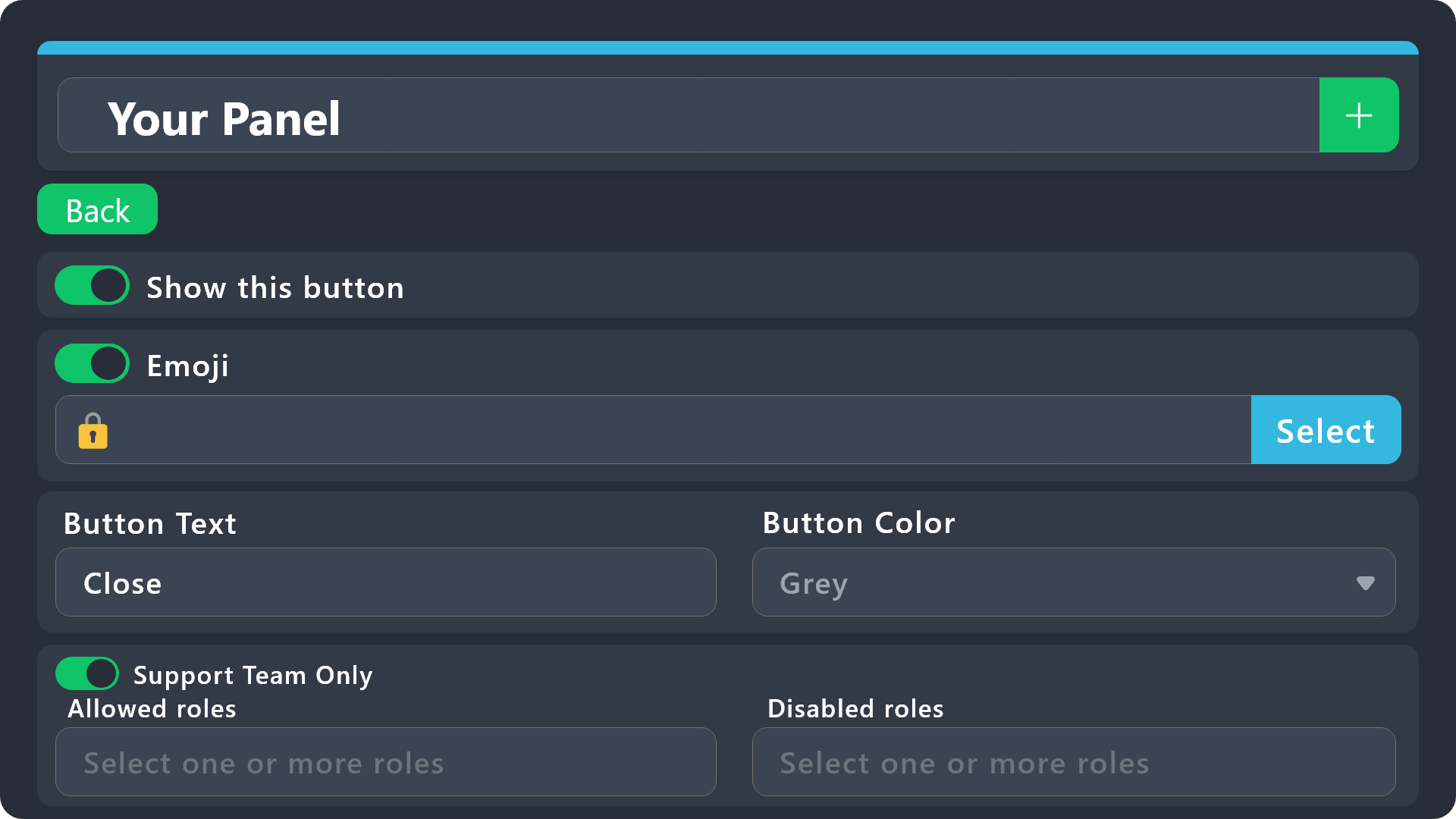
$buttonoptions
 hot tiger
I have a few panels set up, but when I use the command style ticket creation, it always opens the same one.
How can I make it open a different panel?
 olive zephyr
How can i make it so when a new ticket has been opened, it tags a certain role(s)
humble sequoiaBOT
1. Go into your Dashboard
2. Open your Panel Configs tab
3. Select the panel you want to ping your support on
4. Open the Ticket options menu
5. Click on Edit Ticket Message
6. In the Message Content use one of the role mention syntax (**{@Role Name}**/**{Role ID}**)
7. Save changes
Note: For this to work properly, Ticket Tool requires the Mention Everyone permission. Or the role must have the Allow anyone to @mention this role setting enabled
austere forge
olive zephyr
How can i make it so when a new ticket has been opened, it tags a certain role(s...
hi there, see above : )
iron nightBOT
Gave +1 Rep to @austere forge (current: #33 - 104)
austere forge
You're welcome, glad I could help !
 restive condor
 sturdy brook
Hey there! Ticket Tool is missing the SEND MESSAGES permission for that channel
 sturdy brook
restive condor
Hey there! Ticket Tool is missing the ``SEND MESSAGES`` permission for that chan...
sturdy brook
restive condor
Hey there! Ticket Tool is missing the ``SEND MESSAGES`` permission for that chan...
mb
restive condor
sturdy brook
That's not the channel permissions
Right click on the channel's name > Edit Channel > Permissions
iron nightBOT
Gave +1 Rep to @restive condor (current: #8 - 482)
 covert swallow
Looks like you put text in the button emoji
 round viper
Is this how I would subscribe to ticket tool premium in my discord server that I own?
 austere forge
round viper
Is this how I would subscribe to ticket tool premium in my discord server that I...
austere forge
round viper
Is this how I would subscribe to ticket tool premium in my discord server that I...
yup,
make a sure select your server
round viper
Ok how can I select my server?
austere forge
round viper
Ok how can I select my server?
how did you get to this page? by selecting the Ticket tool profile on your server ?
round viper
Yes
round viper
Ok good and Discord support got back to me and refunded my subscription for ticket tool when I accidentally bought it for another server
round viper
So I just hit subscribe now right
austere forge
exact
austere forge
round viper
How do I know if it worked for my server?
run command /premium
on your server
round viper
Ok no worries
humble sequoiaBOT
The first thing you will need to do is invite the premium bot, an invite can be found here
Once the bot is in your server we will head to the dashboard and manage your server. When you are managing your server, you want to head into "Server Configs" then click the drop down menu under "Select the bot you would like to use on this server" then click "Ticket Tool#6207" and then save.
 round viper
It worked thank you so much for all of your help I really apprecite it
thanks @austere forge
iron nightBOT
Gave +1 Rep to @austere forge (current: #33 - 106)
austere forge
You’re welcome dude
 solemn panther
im in need of some help. upgraded to premium but cannot switch bots since neither of them are active. not sure what to do
 restive condor
solemn panther
im in need of some help. upgraded to premium but cannot switch bots since neithe...
restive condor
solemn panther
im in need of some help. upgraded to premium but cannot switch bots since neithe...
Hey there! Please use the /botswitcher command in your server
solemn panther
restive condor
Hey there! Please use the ``/botswitcher`` command in your server
i have. i get this for both the white and gold bots
 restive condor
solemn panther
i have. i get this for both the white and gold bots
restive condor
solemn panther
i have. i get this for both the white and gold bots
Can you run /debug please on both bots
solemn panther
same thing
 restive condor
solemn panther
same thing
restive condor
solemn panther
same thing
May I get your Server ID please?
You can use the $id command to obtain it
solemn panther
1229221677880180817
restive condor
solemn panther
1229221677880180817
You should be good to go. We've selected the Premium bot
Feel free to change it via the /botswitcher command
solemn panther
Thank you dan.
 astral jacinth
how do yuo change the permissions in the ticket channel it creates?
restive condor
astral jacinth
how do yuo change the permissions in the ticket channel it creates?
Hey there! Dashboard > Panel Configs > Permissions
jade topaz
Im having trouble sending a ticket
restive condor
jade topaz
Im having trouble sending a ticket
Hey there! What seems to be the problem?
jade topaz
I cant invite a bot
I was trying to get help working a script in another discord server called Wave Hub
restive condor
jade topaz
I was trying to get help working a script in another discord server called Wave ...
Is this related to @pseudo glen ?
jade topaz
its related to https://tickettool.xyz/manage-servers

Ticket Tool - Ticketing without clutter - The #1 discord Ticketing bot
restive condor
jade topaz
its related to https://tickettool.xyz/manage-servers
Ah, perfect
 stark runeBOT
1. Invite Ticket Tool to your server
First you will want to invite the bot to your server. Once the bot is in your server, you can manage your server in the dashboard.
2. Create a Panel
To create a panel we are going to need to head over to the panel configs on the dashboard.
Once at the dashboard we will need to click Create Panel.
Enter a panel name (Fill in any optional settings you want).
Click Create Panel and your ready to get started with configuring your panel.
An example of a creating a panel is shown below.
3. Send the Panel to a Channel
Once you've created a panel on the dashboard you will need to send it to a channel using send on the dashboard.
Select the channel you want your panel to be created in and click send.
For other questions checkout $help faq.
An example of a sending a panel is shown below.
Having a Problem Sending the Panel?
Do $debug in a channel with Ticket Tool and make sure it has all the necessary Discord permissions.
restive condor
See there how to invite & setup the bot

 rain estuary
How can i create this in my channel ? 🙏
 pseudo ravine
jade topaz
dan?
pseudo ravine
jade topaz
dan?
Hey there. I'll be taking over for dan. Do you have the Manage Server or Administrator permission in any server?
humble sequoiaBOT
First you will want to invite the bot to your server. Once the bot is in your server, you can manage your server in the dashboard.
To create a panel we are going to need to head over to the Panel Configs Tab on the Dashboard.
Once at the dashboard we will need to click Create Panel.
Enter a panel name (Fill in any optional settings you want).
Click Create Panel and you are ready to get started with configuring your panel.
An example of a creating a panel is shown below.
Once the panel has been created, use the blue Send button and select the channel you want the panel to be sent to.
The Panel wasn't send
Use the </debug:ID> command to diagnose possible permission issues with the bot.
pseudo ravine
@rain estuary Read this ^
jade topaz
I havign trouble opening server
pseudo ravine
What do you mean by "opening server"?
 pseudo ravine
Do you own a server?
jade topaz
wdym
no
I was trying to get a ticket for another server
because something wasn't working
pseudo ravine
They have a channel with a place to click a button to create a ticket in that server
jade topaz
i did that but error came
pseudo ravine
But for other servers, we cannot help with issues
pseudo ravine
That's not something we can fix unfortunately

 pseudo ravine
You will have to wait until one of their staff members respond then
jade topaz
it said it will take short time so why it take a while?
pseudo ravine
That's not something we can control
jade topaz
oh ok thx
pseudo ravine
You're welcome, glad I could help!
jade topaz
hope the people respond soon
 silk crown
Hi! I was wondering if there was a way to make it so only support staff can close tickets? I am not sure where I turn it on, or off in this case for community members not to close their own ticket
humble sequoiaBOT
Button Options
Enable Button
Hide or show the button
Emoji
Select an emoji to show on the button
You can either select one or use a valid Emoji ID
Button Text
Edit the text that's shown on the button
Button Color
Select one of four colors for the button. Grey, Green, Red, Blue.
Support Team Only
Enable this to only let your support team click that button
Allowed and disabled roles
Edit what roles can use or not use this button
$buttonoptions
idle flint
silk crown
Hi! I was wondering if there was a way to make it so only support staff can clos...
Just adjust the permissions of the Close Ticket button
 chilly creek
.
short stump
chilly creek
.
Are you needing assistance with ticket tool?
 hazy stream
hi I have a question regarding ticket-transcript, can you adjust the HTML you get directed to and change the timezone/time? is it automatically set to your timezone or can you change it?
idle flint
hazy stream
hi I have a question regarding ticket-transcript, can you adjust the HTML you ge...
The times in the transcript should display in whatever timezone your computer/device is set to (ie. two people looking at the same transcript will see different times if they are in different timezones)
 iron sierra
Hello, could I ask you for support in an issue?
idle flint
iron sierra
Hello, could I ask you for support in an issue?
sure thing
 idle flint
iron sierra
idle flint
iron sierra
this isnt related to the Ticket Tool Discord bot
iron sierra
Where should I advert than?
humble sequoiaBOT
⚠️ You're in the wrong place
We provide support for Ticket Tool Discord bot and cannot help you with whatever issue you have.
- We don't know which Support Team you should contact to get this issue resolved, and unfortunately we won't be able to accurately tell you.
If you don't have any further questions regarding our bot Ticket Tool, please close this ticket
 golden pulsar
Hey all, I've got a question. I just notiuced the "Update" button and what it does, or is supposed to do.... I was hoping to be able to edit my button for a ticket but it seems you can only update the "panel message." I have fooled around with the text in the panel message but no matter what I change about the panel, every time I click update it comes back to me and says "Message not found to update."
Can anyone help with this?
idle flint
golden pulsar
Hey all, I've got a question. I just notiuced the "Update" button and what it do...
The Send button sends the panel as a new message to the specified discord channel.
The update button requires you to input the message link of the panel message you have previously sent to your discord, it will then just edit that panel.
If you have sent your panel to your discord, then made further changes, you can either use the update button, ensuring you copy the message link from your discord, or just use the send button again and delete the old panel messasge from your discord
 polar grotto
hihi, so i accidentally deleted my tickets panel in a channel, how do i resend the panel or do i have to create a new one?
idle flint
polar grotto
hihi, so i accidentally deleted my tickets panel in a channel, how do i resend t...
perfect timing, read the message directly above yours. Head to the dashboard and hit Send on the panel you deleted
humble sequoiaBOT
Ticket Tool - Ticketing without clutter - The #1 discord Ticketing bot
polar grotto
idle flint
perfect timing, read the message directly above yours. Head to the dashboard and...
thank you!
iron nightBOT
Gave +1 Rep to @idle flint (current: #22 - 256)
 long comet
Hola disculpen tengo un problema, quería configurar el bot en un server, pero cuando busco para configurar no me aparece el server. No se si tenga que ver con lo de la propiedad del server o algo así. Porque todos los servers que me aparecen son míos, pero el que intento editar no lo cree yo. Pero igual tengo los mismos permisos que el owner del server. ¿Alguien me puede ayudar?
idle flint
long comet
Hola disculpen tengo un problema, quería configurar el bot en un server, pero cu...
do you mean you cant see the server on the dashboard?
idle flint
you need either:
- server owner (only one person per server)
- Administrator permission (the actual permission, not just a role called "admin"
- a role listed as a Dashboard Role
humble sequoiaBOT
Any role you put there will have full access to the ticket tool dashboard. The server owner and users with admin permissions already have access to the dashboard.
Be careful of which roles to put here
 idle flint
you can use the /permissionlevel command to check your ticket tool permission level in that server too
humble sequoiaBOT
Don't see your server in the dashboard?
Try using the Sync Servers button on your top center of the Dashboard page
You will possibly need to relog. Look below to see the steps on how to relog.
If this doesn't work
You should relog from the dashboard, you can do this by clicking here to log out immediately, and then log back in
Note:
You need one of these 3 things to access the dashboard.
1. Server Owner (Level: 6)
2. Server Administrator (Level: 4)
3. Dashboard Role (Level: 2)
:warning: You can check your level using the </permissionlevel:1029797400174399542> command on your Discord Server
If the bot's response is:
- @User is permission level: 0 (User)
You don't have any of the 3 levels required to access the server's dashboard
 long comet
THANK YOUUU
idle flint
all good 🙂
golden pulsar
idle flint
The Send button sends the panel as a new message to the specified discord channe...
Right, I know all that. I’m asking because it’s failing to send my updates to the panel. And yes, I can send the panel again, but I have them in a specific order and if I resent it I’d have to delete them all and resend them all over again, which I guess isn’t really an issue. I just don’t understand why it’s failing to update.
idle flint
golden pulsar
Right, I know all that. I’m asking because it’s failing to send my updates to th...
and to confirm, you have copied the message link for the correct panel and pasted it into the update box when prompted.
Also, was the panel message sent by the bot you are currently using (ie. you sent the panel with the white bot, but you now are using the gold bot and trying to update the panel)
golden pulsar
I copied the channel link… I didn’t see a way to copy a link to the panel itself
golden pulsar
Oh okay. I will try tomorrow. I’m actually in bed haha.
I’ll let you know. Thank you!
idle flint
all good 🙂
 opal silo
Questuon is there away to make it so a certain role may open a ticket on the panel? I like Premium to open a premium ticket will only general may open an only general ticket
short stump
opal silo
Questuon is there away to make it so a certain role may open a ticket on the pan...
Hello! You can always hide channels from certain roles via discord channel permissions! Are you specifically wanting to do it via ticket tool itself?
opal silo
short stump
Hello! You can always hide channels from certain roles via discord channel permi...
Yes within the panel when the use clicks the button it will maybe give a error or what not
short stump
opal silo
Yes within the panel when the use clicks the button it will maybe give a error o...
I believe this should work
dashboard
buttons
create ticket
put the disabled role as the everyone role
put the allowed role as the role you’re wanting users to have in order to create a ticket
 green sedge
Hello!!
Is it possible to restrict a button to be clickable only for a certain role?
For example:
General Inquires (everyone can open)
Game support ( everyone can open)
Game rewards (only a certain role can open)
humble sequoiaBOT
Button Options
Enable Button
Hide or show the button
Emoji
Select an emoji to show on the button
You can either select one or use a valid Emoji ID
Button Text
Edit the text that's shown on the button
Button Color
Select one of four colors for the button. Grey, Green, Red, Blue.
Support Team Only
Enable this to only let your support team click that button
Allowed and disabled roles
Edit what roles can use or not use this button
$buttonoptions
idle flint
green sedge
Hello!!
Is it possible to restrict a button to be clickable only for a certain r...
see above ^^
green sedge
idle flint
see above ^^
Thank you so much 💌
iron nightBOT
Gave +1 Rep to @idle flint (current: #22 - 257)
 humble sequoiaBOT
This error indicates you have selected an invalid emoji, i.e. an emoji the bot isn't capable of using, in a button field
Which Emoji?
This depends upon which action the error is appearing, the most common cases are the Create Ticket button or one of your Dropdown emojis. You can visit your Button's List to find all available buttons and find the conflicting one by yourself.
Why doesn't the bot accept it as valid?
- You selected an emoji that doesn't exist anymore, i.e. that has been deleted
- You wrote text there, instead of an emoji (or in addition to an emoji)
- You entered a code for a custom emoji from a server that the bot is not a member of
- You entered a custom emoji code incorrectly
- You're on iPhone and entered an emoji using the phone's emoji pad (use the emoji selector in the website instead)
 limber portal
jade topaz
limber portal
jade topaz
^^
humble sequoiaBOT
1. Go into your Dashboard
2. Open your Panel Configs tab
3. Select the panel you want to ping your support on
4. Open the Ticket options menu
5. Click on Edit Ticket Message
6. In the Message Content use one of the role mention syntax (**{@Role Name}**/**{Role ID}**)
7. Save changes
Note: For this to work properly, Ticket Tool requires the Mention Everyone permission. Or the role must have the Allow anyone to @mention this role setting enabled
austere forge
Hi there, see above 🙂
 shut stratus
I want to know if I have been accepted into the Creative Nursery or not
humble sequoiaBOT
⚠️ You're in the wrong place
We provide support for Ticket Tool Discord bot and cannot help you with whatever issue you have.
- We don't know which Support Team you should contact to get this issue resolved, and unfortunately we won't be able to accurately tell you.
If you don't have any further questions regarding our bot Ticket Tool, please close this ticket
 frail heron
s!changelog
limber portal
frail heron
s!changelog
Please use commands in #🤖│bot-spam
 vivid ginkgo
Hi
I've got a problem with ticket tool bot, All member can get notification in ticket, but for me its not work
And i checked all notifications settings and all good
 fathom topaz
where is the area to ping a role on creation?
humble sequoiaBOT
1. Go into your Dashboard
2. Open your Panel Configs tab
3. Select the panel you want to ping your support on
4. Open the Ticket options menu
5. Click on Edit Ticket Message
6. In the Message Content use one of the role mention syntax (**{@Role Name}**/**{Role ID}**)
7. Save changes
Note: For this to work properly, Ticket Tool requires the Mention Everyone permission. Or the role must have the Allow anyone to @mention this role setting enabled
limber portal
fathom topaz
where is the area to ping a role on creation?
^^
limber portal
vivid ginkgo
I've got a problem with ticket tool bot, All member can get notification in tick...
Hi, this seems like a problem with your notification settings
vivid ginkgo
limber portal
Hi, this seems like a problem with your notification settings
I have checked it already nothing there
limber portal
vivid ginkgo
I have checked it already nothing there
There are no notification settings within ticket tool, so thats the only possibility
 onyx nymph
How can I solve this issue if I had done all the 3?
4f11290a-f4d3-11ed-a05b-0242ac120003
limber portal
onyx nymph
How can I solve this issue if I had done all the 3?
4f11290a-f4d3-11ed-a05b-024...
Can you send a screenshot of the error?
vivid ginkgo
that's weird man
 pseudo ravine
Unfortunately we cannot help for external servers, you'll have to contact a staff member of that server
pseudo ravine
You’re welcome, glad we could help!
 digital frost
I need help
humble sequoiaBOT
Hello, we would love to help you, but if you don't tell us what you need help with we can't help you :(
 mellow heron
When can I put a TICKRT Support?
I was talking now with Anibus and he asked me the favor to put a Ticket but I don't know where?
limber portal
mellow heron
I was talking now with Anibus and he asked me the favor to put a Ticket but I do...
Sounds like you need to make a ticket in a different support server
mellow heron
Where?
I was talking with Anubis and he asked the favor to create a Ticket but I don't know where?
limber portal
mellow heron
I was talking with Anubis and he asked the favor to create a Ticket but I don't ...
Try asking him
mellow heron
I did and he send me this pic
 austere forge
It’s up to you to find this category to create a ticket,
we won't be able to help.
 austere forge
 midnight vapor
how do i fix this
midnight vapor
how do i fix this
Hi, could you use /debug please
midnight vapor
austere forge
Hi, could you use ``/debug`` please
 austere forge
midnight vapor
austere forge
midnight vapor
Make sure that the bot has: VIEW CHANNEL SEND MESSAGE and READ MESSAGE HISTORY perms in the channel
midnight vapor
austere forge
Make sure that the bot has: `VIEW CHANNEL` `SEND MESSAGE` and `READ MESSAGE HIST...
ok ty
iron nightBOT
Gave +1 Rep to @austere forge (current: #31 - 109)
austere forge
no worries
hybrid basin
If the ticket is closed and deleted, will the ticket's chat log go to the customer?
 gloomy plume
How do you add more buttons to the ticket panel at once?
limber portal
hybrid basin
If the ticket is closed and deleted, will the ticket's chat log go to the custom...
Hi, this is something possible with premium
humble sequoiaBOT
For more convenient use of multipanels, you can now combine panels on the dashboard. This will allow you to directly send the multipanel from the dashboard or via the $panel ID command.
Where can I find this?
You can find this setting on the Dashboard -> Panel Configs -> Panel -> Attached Panels
Note: if you're attaching all the panels to a panel called English, don't include English in the attached panel's box (If you do this, it will create a duplicate)
This will put all buttons from all of your panels on one message. The message is the panel message from the panel you're combining these panels in.
limber portal
gloomy plume
How do you add more buttons to the ticket panel at once?
^^
gloomy plume
limber portal
^^
ah alr
jade topaz
Hi, nobody is responding to my ticket in a server called "Wave Hub🌊". I've been trying to contact them for hours but no one seems to answer. Can you help me out?
scenic plinth
No, we aren't responsible for their response time. They likely consist of volunteers, so it will take them time to respond to you.
jade topaz
oh ok thx
 raw pecan
I don't get my last transcripts from my last closed tickets.
idle flint
raw pecan
I don't get my last transcripts from my last closed tickets.
Is this in your own server, or did you not recieve a transcript from a ticket you had in someone elses server?
humble sequoiaBOT
━━ Daan R.'s inquiry has been moved to a ticket ━━
 wary swan
Can the bot close Tickets automatically within 24 hours?
idle flint
wary swan
Can the bot close Tickets automatically within 24 hours?
Yes, using Automations that can be configured on the dashboard - this required premium to set up 🙂
 tacit birch
I keep getting this error message 😭 but the bot has permissions
 humble sequoiaBOT
This error indicates you have selected an invalid emoji, i.e. an emoji the bot isn't capable of using, in a button field
Which Emoji?
This depends upon which action the error is appearing, the most common cases are the Create Ticket button or one of your Dropdown emojis. You can visit your Button's List to find all available buttons and find the conflicting one by yourself.
Why doesn't the bot accept it as valid?
- You selected an emoji that doesn't exist anymore, i.e. that has been deleted
- You wrote text there, instead of an emoji (or in addition to an emoji)
- You entered a code for a custom emoji from a server that the bot is not a member of
- You entered a custom emoji code incorrectly
- You're on iPhone and entered an emoji using the phone's emoji pad (use the emoji selector in the website instead)
tacit birch
limber portal
^^
JFADKLSFJAF;A THANK YOU
iron nightBOT
Gave +1 Rep to @limber portal (current: #10 - 408)
limber portal
tacit birch
JFADKLSFJAF;A THANK YOU
No worries 
 formal cedar
how do u add a ticket channel
stark runeBOT
1. Invite Ticket Tool to your server
First you will want to invite the bot to your server. Once the bot is in your server, you can manage your server in the dashboard.
2. Create a Panel
To create a panel we are going to need to head over to the panel configs on the dashboard.
Once at the dashboard we will need to click Create Panel.
Enter a panel name (Fill in any optional settings you want).
Click Create Panel and your ready to get started with configuring your panel.
An example of a creating a panel is shown below.
3. Send the Panel to a Channel
Once you've created a panel on the dashboard you will need to send it to a channel using send on the dashboard.
Select the channel you want your panel to be created in and click send.
For other questions checkout $help faq.
An example of a sending a panel is shown below.
Having a Problem Sending the Panel?
Do $debug in a channel with Ticket Tool and make sure it has all the necessary Discord permissions.
limber portal
formal cedar
how do u add a ticket channel
^^
 void burrow
im having problem setting up ticket tool with the primisions I gave it the premision needed but it says
 humble sequoiaBOT
This error indicates you have selected an invalid emoji, i.e. an emoji the bot isn't capable of using, in a button field
Which Emoji?
This depends upon which action the error is appearing, the most common cases are the Create Ticket button or one of your Dropdown emojis. You can visit your Button's List to find all available buttons and find the conflicting one by yourself.
Why doesn't the bot accept it as valid?
- You selected an emoji that doesn't exist anymore, i.e. that has been deleted
- You wrote text there, instead of an emoji (or in addition to an emoji)
- You entered a code for a custom emoji from a server that the bot is not a member of
- You entered a custom emoji code incorrectly
- You're on iPhone and entered an emoji using the phone's emoji pad (use the emoji selector in the website instead)
restive condor
void burrow
im having problem setting up ticket tool with the primisions I gave it the premi...
Hey there! See above ^
void burrow
it works thanks
 ornate halo
i have a question with getting ticket tool premium im i able to bypass the character limit and embed color
restive condor
ornate halo
i have a question with getting ticket tool premium im i able to bypass the chara...
Hey there! Yes
humble sequoiaBOT
 Faster Premium Bot
Automatic Transcripts
Full Customization
Direct Messages
Ticket Automation
Thread Style Ticketing
Premium Support
Scheduled Panel Availability
Integrations
Claiming
Advanced Ticket Statistics
You can purchase premium here:
Price
$6 - Monthly
$66 - Yearly (Open a billing ticket in #🎫│make-a-ticket to receive additional information on this matter)
ornate halo
restive condor
Hey there! Yes
Thanks!
iron nightBOT
Gave +1 Rep to @restive condor (current: #8 - 488)
 muted magnet
what are demo threads?
austere forge
muted magnet
what are demo threads?
Hi there, It’s a demo ticket, from the thread style option
muted magnet
austere forge
Hi there, It’s a demo ticket, from the thread style option
oh okay, thank you
iron nightBOT
Gave +1 Rep to @austere forge (current: #31 - 110)
austere forge
You're welcome
 verbal plume
How do I make the bot ping me?
short stump
verbal plume
How do I make the bot ping me?
Hello! What do you mean ping you? Ping you for what?
verbal plume
short stump
Hello! What do you mean ping you? Ping you for what?
To call me when someone opens a ticket
Like
@verbal plume
short stump
verbal plume
To call me when someone opens a ticket
So you’re wanting ticket tool to ping you when any ticket is opened?
verbal plume
Ye
 weary thorn
that's the answer I'm looking for as well
short stump
verbal plume
Ye
You’re going to want to go to the dashboard and do the following
ticket
ticket message
type in the text <@(your user ID here)>
So it would look like this @short stump
verbal plume
Thanks
short stump
verbal plume
Thanks
Of course! Let me know if you need any additional assistance ((:
 split dove
verbal plume
Thank you very much:)
split dove
verbal plume
Thank you very much:)
AIUTAMI STEGOSAURO
short stump
split dove
the fu do i pur a claim button every time I try it doesn't show up
Hello! You want to enable claim buttons?
split dove
short stump
Hello! You want to enable claim buttons?
yes I've tried everything on the panel thinf
nothing it's enabled but doesn't show I tried disabling and enabling again and saving
doesn't work
short stump
split dove
yes I've tried everything on the panel thinf
Do the following on the dash please:
buttons
claim ticket
show me a screenshot
short stump
split dove
that's what I did
I’m asking for you to show me a screenshot of the settings
split dove
short stump
Do the following on the dash please:
> buttons
> claim ticket
> show me a sc...
 split dove
short stump
I’m asking for you to show me a screenshot of the settings
split dove
short stump
I’m asking for you to show me a screenshot of the settings
ik ik
short stump
split dove
I have a few other ideas to what it could be but it would likely be easier if you made a ticket as they can just look at your settings (with your permission of course) so they could more easily identify the issue
humble sequoiaBOT
Faith's issue has been solved in another channel.
 violet jacinth
Hey so i’ve had this issue for a while but like tickets just dont delete correctly at all when i get a high amount of tickets in my server. Is this due to things like being backed up or how could i fix this?
limber portal
violet jacinth
Hey so i’ve had this issue for a while but like tickets just dont delete correct...
Hi, can you elaborate on ‘don’t delete correctly?’
violet jacinth
limber portal
Hi, can you elaborate on ‘don’t delete correctly?’
Yeah i probably should have sorry 😅 basically when a support member presses close or delete it will send the embeds and everything like it worked but then its stuck in the category still even though i have it set to go to a different category then to ticket storage
limber portal
violet jacinth
Yeah i probably should have sorry 😅 basically when a support member presses clo...
Perhaps have you hit the max amount of tickets allowed in the storage category? The discord limit is 50 and we limit to 45
violet jacinth
limber portal
Perhaps have you hit the max amount of tickets allowed in the storage category? ...
Ohhhh that would make alot of sense yeah
So if i wanted to fix this would i need to like split the categories that each panel is going to up?
limber portal
violet jacinth
So if i wanted to fix this would i need to like split the categories that each p...
You can simply create new categories, and add them in the storage options box in server configs
violet jacinth
limber portal
You can simply create new categories, and add them in the storage options box in...
Gotcha thanks
iron nightBOT
Gave +1 Rep to @limber portal (current: #10 - 409)
 analog sun
Bom dia algum adm poderia mim ajudar
scenic plinth
Se estiver relacionado ao Ticket Tool, sim.
jade topaz
I need help, I'm trying to set up ticket tool on mobile but tis obviously not working for me :/
stark runeBOT
1. Invite Ticket Tool to your server
First you will want to invite the bot to your server. Once the bot is in your server, you can manage your server in the dashboard.
2. Create a Panel
To create a panel we are going to need to head over to the panel configs on the dashboard.
Once at the dashboard we will need to click Create Panel.
Enter a panel name (Fill in any optional settings you want).
Click Create Panel and your ready to get started with configuring your panel.
An example of a creating a panel is shown below.
3. Send the Panel to a Channel
Once you've created a panel on the dashboard you will need to send it to a channel using send on the dashboard.
Select the channel you want your panel to be created in and click send.
For other questions checkout $help faq.
An example of a sending a panel is shown below.
Having a Problem Sending the Panel?
Do $debug in a channel with Ticket Tool and make sure it has all the necessary Discord permissions.
limber portal
jade topaz
I need help, I'm trying to set up ticket tool on mobile but tis obviously not wo...
check above ^^
jade topaz
limber portal
check above ^^
I'm unable to do this as I am on mobile, I've been trying to find any female mods to help me do this on my girls only server
limber portal
jade topaz
I'm unable to do this as I am on mobile, I've been trying to find any female mod...
You should be completely able to do it all on mobile - what specifically are you having trouble with?
jade topaz
limber portal
You should be completely able to do it all on mobile - what specifically are you...
So my whole plan, is to get a selfie verification system running as we are a female only server.
I've noticed other servers using tickets to do this.
So I allowed Ticket Tool, and now I'm just completely stuck, like how do I create the entire thing so members are able to use and verify themselves?
I'm currently reading the manual and trying different things, as in my ticket channel it's completely blank.
 limber portal
stark rune
limber portal
stark rune
That’s alright, we are here to help ^^
You need a panel set up in the dashboard. Once you have set a panel up as shown in the guide I replied to - you need to send it to your channel with the send button. That’s step 3 of the guide.
humble sequoiaBOT
Ticket Tool - Ticketing without clutter - The #1 discord Ticketing bot
limber portal
Use that link to access the dashboard
jade topaz
Okay I will give this a try
jade topaz
Hello @limber portal is there a way to tag the one who creates the ticket inside the welcome message ?
@austere forge @steel basalt
Sorry Mr bot
austere forge
jade topaz
Hello <@1065295463089180763> is there a way to tag the one who creates the tick...
Hi there, don’t need ping all staff
you can use the {ticket.user} variable in the welcome message, this pings the ticket creator 🙂
jade topaz
austere forge
Hi there, don’t need ping all staff
you can use the {ticket.user} variable in ...
Thanks you are the best
iron nightBOT
Gave +1 Rep to @austere forge (current: #31 - 111)
jade topaz
And sorry
austere forge
no worries
jade topaz
I tried that but it won't ping them. It's {ticket.user} @austere forge
I want it to ping the ticket creator on the welcome message
austere forge
jade topaz
I tried that but it won't ping them. It's {ticket.user} <@225349654974431232>
can you get a screenshot?
jade topaz
Sure
humble sequoiaBOT
⚠️ You're in the wrong place
We provide support for Ticket Tool Discord bot and cannot help you with whatever issue you have.
- We don't know which Support Team you should contact to get this issue resolved, and unfortunately we won't be able to accurately tell you.
If you don't have any further questions regarding our bot Ticket Tool, please close this ticket
austere forge
we provide support only for Ticket tool bot 🙂
jade topaz
austere forge
we provide support only for Ticket tool bot 🙂
Oh god
I Guess I'll use your bot then
jade topaz
limber portal
Use that link to access the dashboard
You helped me! Thank you
iron nightBOT
Gave +1 Rep to @limber portal (current: #10 - 410)
jade topaz
Can I ask a question on other things ticket tool does?
I want all other channels unaccessible until the members verify themselves, I want new members to only see the welcome, rules and verification when they join.
limber portal
jade topaz
You helped me! Thank you
Amazing, glad we could help
limber portal
jade topaz
I want all other channels unaccessible until the members verify themselves, I wa...
That's something you'll need to edit in your discord channel permissions.
jade topaz
limber portal
That's something you'll need to edit in your discord channel permissions.
Oh so I have to just sort out the roles who can see what?
limber portal
Correct ^^
jade topaz
Okay so if the automatic role is babies, I've put their role into the 3 I only want them to see.
So does that mean they will only see them? Or do I need to add the verified role to the channels I want them to access after as well?
limber portal
jade topaz
Okay so if the automatic role is babies, I've put their role into the 3 I only w...
you'd need to add the role for all channels you want them to see.
jade topaz
Hi @limber portal
limber portal
jade topaz
Hi <@1065295463089180763>
Hey, did you need help?
Please don't ping staff. it's against server rules.
jade topaz
limber portal
Hey, did you need help?
Please don't ping staff. it's against server rules.
Sorry bro, how can i make this
 limber portal
jade topaz
Sorry bro, how can i make this
limber portal
jade topaz
Sorry bro, how can i make this
That's automatic transcription, which is a premium feature. it can be enabled in dashboard > panel configs > transcripts.
jade topaz
But this is the white one not premium
limber portal
jade topaz
But this is the white one not premium
Premium features are not exclusively tied to the premium bot. You can use premium on the white bot.
 mellow wind
claiming doesnt work even though iv e enabled it
 austere forge
mellow wind
claiming doesnt work even though iv e enabled it
austere forge
mellow wind
claiming doesnt work even though iv e enabled it
Hi there, this option is a feature premium 🙂
mellow wind
Oh.
humble sequoiaBOT
1. Go into your Dashboard
2. Open your Panel Configs tab
3. Select the panel you want to ping your support on
4. Open the Ticket options menu
5. Click on Edit Ticket Message
6. In the Message Content use one of the role mention syntax (**{@Role Name}**/**{Role ID}**)
7. Save changes
Note: For this to work properly, Ticket Tool requires the Mention Everyone permission. Or the role must have the Allow anyone to @mention this role setting enabled
austere forge
jade topaz
hello how do i ping someone in my ticket
hi there, see above
iron nightBOT
Gave +1 Rep to @austere forge (current: #31 - 112)
austere forge
You're welcome, glad I could help !
 modern swift
hey guys, creating tickets and for some reason no 'claim' button appearing for any of the assigned support roles or any roles in general for that matter. just a close button. any suggestions? apologies in advance if i've missed something obvious
 austere forge
modern swift
hey guys, creating tickets and for some reason no 'claim' button appearing for a...
austere forge
modern swift
hey guys, creating tickets and for some reason no 'claim' button appearing for a...
Hi there, boutton claim, this option is a feature premium 🙂
modern swift
oh
 deep jasper
yo i need to make a ticket because i have the infinite void glitch
but that dam server wont let me
humble sequoiaBOT
━━ User's inquiry has been moved to a ticket ━━
humble sequoiaBOT
━━ User's inquiry has been moved to a ticket ━━
 coral knot
How i can Supporter?
limber portal
coral knot
How i can Supporter?
Can you clarify the question please?
coral knot
limber portal
Can you clarify the question please?
I would like to become a supporter
humble sequoiaBOT
How do be I become a Support Member?
You can become a support member in 2 ways:
1. You can be really active in #🆘│community-support gain <@&799500225579712543> role and get chosen by a Manager
2. You can apply VIA our applications that would be sent in #📣│server-news
We currently have Support Teams for the following languages:
:flag_us: English
:flag_jo: Arabic
:flag_fr: French
:flag_de: German
:flag_es: Spanish
limber portal
coral knot
I would like to become a supporter
^^
limber portal
coral knot
I want to make an application
We are currently looking for applicants for a potential turkish and Portuguese team
coral knot
limber portal
We are currently looking for applicants for a potential turkish and Portuguese t...
not german?
limber portal
coral knot
not german?
Please read the embed in #📣│server-news
coral knot
-___-
 scenic zealot
Yo why it keep saying Invalid Form Body but I gave the bot permission to literally everything
restive condor
scenic zealot
Yo why it keep saying Invalid Form Body but I gave the bot permission to literal...
Hey there! You most likely have an Invalid Emoji. Could I get your server ID?
scenic zealot
restive condor
Hey there! You most likely have an Invalid Emoji. Could I get your server ID?
How do I get the server ID
humble sequoiaBOT
restive condor
$id
Server id - 509192800865353738
Server id - 509192800865353738
scenic zealot
1232043270591479830
restive condor
scenic zealot
1232043270591479830
You can only have an emoji in the Button Emoji field.
Text goes on the field below

Dashboard > Panel Configs > Buttons > Create Ticket Button
scenic zealot
restive condor
You can only have an emoji in the Button Emoji field.
Text goes on the field bel...
Ahhh ok thank you I will check now
iron nightBOT
Gave +1 Rep to @restive condor (current: #8 - 490)
 balmy badge
Is there a way to connect a google form response to a tickettool ticket? So when someone submits a response on a google form a ticket channel opens?
austere forge
balmy badge
Is there a way to connect a google form response to a tickettool ticket? So when...
Hi there, its impossible 🙂
 late sequoia
can i do like that with primary bot ??
 humble sequoiaBOT
A Discord Form lets the user answer individual questions in a pop-up Form, which then displays the answers in the ticket message. This can save time if you already know what you want to ask the user.
Setup Forms
Forms can be enabled under Panel Settings > Form Options > Edit Forms Options. In the new pop-up window, you can now enable and edit your own Form.
Form Options
You can add up to 5 questions in the Discord form. This is a Discord limitation. Each question can have a placeholder in the input field, a minimum and maximum input, multi-line, and also the option to have the answer required.
Options
Question Title ➞ Your Question goes here
Question Placeholder ➞ The placeholder text in the input field
Required ➞ If enabled, the user has to answer this question, to submit the form
Multi-Line Input ➞Allows the user to input multiple lines
Minimum and Maximum Input ➞ Set a minimum and maximum input value for the user
Displaying the Answer
To display the answers from the user, you need to enable Auto display form results on the ticket message as an additional embed
If you don't want a second embed, go into your Panel Configs > Ticket Options > Edit Ticket Message. You use the variable {create.form.x} and replace x with the number of your question. For example, the response to Question 5 can be displayed with {create.form.5}.

 brazen citrus
How do you create a ticket with commands
humble sequoiaBOT
Command Style Tickets allow you to open tickets VIA the $new or $ticket commands. This feature also allows you to open tickets for people, by using the aforementioned commands with the user's ping or ID.
You can enable this feature by heading over to your server's dashboard. Then head over to Panel Configs ➞ Settings ➞ Command Style Tickets. (GIF below shows you how to get to it as well).
This section of the panel settings also contains the following features
- Bypass channel list and watch all of them → when you enable this option, Ticket Tool will create a ticket whenever someone uses the $new or the $ticket command in a channel it has access to .
- Channel to monitor for command $new and $ticket → This is the opposite of the previous option, you can actually select in which channels Ticket Tool should look for the $new command instead of looking in the whole server.
- Delete command after creating ticket → If enabled, Ticket Tool will delete the command (whether it's
$newor$ticket) a few seconds after you run it.
 austere forge
brazen citrus
How do you create a ticket with commands
austere forge
brazen citrus
How do you create a ticket with commands
hi there, see above
brazen citrus
Do any of this allows setting up in a channel so others in a discord can press a tab to automatically access one
austere forge
brazen citrus
Do any of this allows setting up in a channel so others in a discord can press a...
I didn't really understand?
 proper flame
i need help viewing tickets created by members in my server
 fervent charm
Help me: If i want to send a transcript to the user after a ticket is done, is that a premium feature?
proper flame
i don't think so Mabey it is
austere forge
proper flame
i need help viewing tickets created by members in my server
Hi there, do you want to have access to the ticket created by user?
proper flame
austere forge
Hi there, do you want to have access to the ticket created by user?
i am the owner
austere forge
fervent charm
Help me: If i want to send a transcript to the user after a ticket is done, is t...
Hi there, indeed is a premium feature 🙂
all good
humble sequoiaBOT
1. Go into your Dashboard
2. Open your Panel Configs tab
3. Select the panel you want to grant access to
4. Open the Transcript options menu
5. Using the Transcript Channel selector, pick the channel you want your transcripts to be sent to
6. Save changes
 austere forge
proper flame
i am the owner
austere forge
proper flame
i am the owner
see above 🙂
austere forge
sure
there's a 7 day trial that you can enable from the Dashboard
the premium features will stop working after the 7 days
so if something has been customized additionally it will stop working and will be set to default 🙂
proper flame
it said something about taking a survey to get it for free...
austere forge
this is no longer possible 🙂
proper flame
oh...
austere forge
sorry :/
proper flame
It's good
 signal bane
What do I have to do for the new service and how much will it be
humble sequoiaBOT
━━ User's inquiry has been moved to a ticket ━━
 wanton lance
help
humble sequoiaBOT
Hello, we would love to help you, but if you don't tell us what you need help with we can't help you :(
humble sequoiaBOT
First you will want to invite the bot to your server. Once the bot is in your server, you can manage your server in the dashboard.
To create a panel we are going to need to head over to the Panel Configs Tab on the Dashboard.
Once at the dashboard we will need to click Create Panel.
Enter a panel name (Fill in any optional settings you want).
Click Create Panel and you are ready to get started with configuring your panel.
An example of a creating a panel is shown below.
Once the panel has been created, use the blue Send button and select the channel you want the panel to be sent to.
The Panel wasn't send
Use the </debug:ID> command to diagnose possible permission issues with the bot.
austere forge
wanton lance
idk how to create a ticket channel
hi there, see above 🙂
austere forge
wanton lance
i can't find the panel configs tab😭
here on the Dashboard

Ticket Tool - Ticketing without clutter - The #1 Discord support bot
austere forge
wanton lance
im on the website
can I get a screenshot of your view on website
wanton lance
ight
jade topaz
i was trying to test this, i want 1 ticket to have multiple options (idk if thats possible) but it only comes up with 2
 wanton lance
 austere forge
wanton lance
austere forge
wanton lance
select your server
austere forge
yup
austere forge
jade topaz
i was trying to test this, i want 1 ticket to have multiple options (idk if that...
make sure to create several ticket panels before selecting them from the drop-down list
jade topaz
austere forge
make sure to create several ticket panels before selecting them from the drop-do...
i'm kind of confused
humble sequoiaBOT
The Drop-down menu or Select Menu replaces the buttons on your panel message and uses a drop-down menu with all of your panels. To set this up, go to your Panel Configs and select your main Panel.
<:Numbericons1:1018864164032225340> Enable Select Style
First you enable Select Style. Then you add an item in the Dropdown Editor. Now you can start editing your dropdown!
<:Numbericons2:1018864168041971712> Dropdown Editor
Each line in the dropdown editor represents a line in the drop down menu on discord. You can add more "Items", by clicking on
First you select a panel. That's the panel this option will open a ticket for. DONT select the same panel twice. Each option should have a different Panel
After that, you can put a Display. This is the title of this option and will appear in the drop down menu. The *Description can be set right after that, which will be below the title in grey.
Additionally you can select an emoji, that will be shown in front of each option. You can either manually input the ID of an emoji or select it in the selector.
Common Issues ⚠️
- Panel doesn't send? Make sure you have a valid emoji selected
- Option doesn't show up? Check if two options have the same panel in the DropDown Editor
$dropdown
austere forge
jade topaz
i'm kind of confused
no worries, here is an easy guide for you 
iron nightBOT
Gave +1 Rep to @austere forge (current: #31 - 114)
austere forge
wanton lance
thanks <@225349654974431232>
You're welcome, glad I could help !
jade topaz
austere forge
no worries, here is an easy guide for you <:this:894279341108772914>
thank you
iron nightBOT
Gave +1 Rep to @austere forge (current: #30 - 115)
austere forge
jade topaz
thank you
You're welcome, glad I could help 
 balmy comet
hey all! I'm trying to set up a ticket verification system for a server that keeps getting raided and it's frustrating im using the ticket tool bot but I'm unsure of how to set it up to where I only want people who arent verified to see the "lobby" area and not the rest
if you have any advice or knowledge on this i could use all the help i can get !! thanks for your time (:
 sleek mortar
hi
do you know why we cannot close and create tickets now
it's acailable minutes ago
@real palm
Could you please do me a favor
 final minnow
why is my ticket tool not updating ?
limber portal
balmy comet
hey all! I'm trying to set up a ticket verification system for a server that kee...
Hey there!
This is something you’ll have to setup within your discord role permissions - specifically channel permissions for your verified and unverified / no role
limber portal
sleek mortar
do you know why we cannot close and create tickets now
Hi, what’s preventing you from closing?
limber portal
final minnow
why is my ticket tool not updating ?
Hi, can you elaborate?
limber portal
 buoyant falcon
I'm not able to setup my ticket
buoyant falcon
I'm not able to setup my ticket
Hey, what’s the issue?
buoyant falcon
I am not able to set the ticket panel
limber portal
Do you receive an error? What’s stopping you?
buoyant falcon
I want to setup a category for closed tickets it's not working
 dry prawn
how i setup ticket tool
stark runeBOT
1. Invite Ticket Tool to your server
First you will want to invite the bot to your server. Once the bot is in your server, you can manage your server in the dashboard.
2. Create a Panel
To create a panel we are going to need to head over to the panel configs on the dashboard.
Once at the dashboard we will need to click Create Panel.
Enter a panel name (Fill in any optional settings you want).
Click Create Panel and your ready to get started with configuring your panel.
An example of a creating a panel is shown below.
3. Send the Panel to a Channel
Once you've created a panel on the dashboard you will need to send it to a channel using send on the dashboard.
Select the channel you want your panel to be created in and click send.
For other questions checkout $help faq.
An example of a sending a panel is shown below.
Having a Problem Sending the Panel?
Do $debug in a channel with Ticket Tool and make sure it has all the necessary Discord permissions.
restive condor
dry prawn
how i setup ticket tool
^
 slate hull
How do I buy ticket tool premium using crypto and what are the prices
dry prawn
restive condor
^
Got it!!!
limber portal
slate hull
How do I buy ticket tool premium using crypto and what are the prices
Hi, you can purchase through #🎫│make-a-ticket. See prices below.
humble sequoiaBOT
PayPal - paypal@tickettool.xyz
BitCoin - 3HhKKAdb9eEvCe2tvzB8bAa8nebHY6qcPA
LiteCoin - MEQX3knLAuotrKnvk3HDNBK5gdRn6PZhHy

Prepay/Direct Payment
To prepay send the payment using your desired method - Available options listed bellow.
⚠️ $18 per 3 months. ⚠️
$66 per year.
(If using the direct payment option, you need to be paying for at-least 3+ months.)
Regular Prices when paying within Discord:
$5.99/per month
Once your payment is sent let us know so we can confirm and get you your key.
- Purchases done with this method are non-refundable.
<:paypal:924596360840372234> Paypal ("Goods and Services" or "Family and Friends")
paypal@tickettool.xyz
<:bitcoin:924638849135689749> BTC - Bitcoin
3HhKKAdb9eEvCe2tvzB8bAa8nebHY6qcPA
<:Litecoin:972176945972383815> LTC - LiteCoin
MEQX3knLAuotrKnvk3HDNBK5gdRn6PZhHy
I sent the payment now what?
After you send the payment, please send a screenshot with proof of payment, our <@&615146349700186112> will verify your payment and will get you setup. For crypto payments, we are waiting for at least ONE verification.

All prices in USD - 3 months min for direct payment
After a successful payment
Provide us with your server ID, where you want your premium key to be redeemed. This has to do be done by us
 earnest night
hello, do you guys know how to edit ephemeral messages?

and this as well

its not on the dashboard's list of messages
limber portal
earnest night
Hi, those currently cannot be edited
earnest night
oh I see, how about the ephemeral message I sent?
earnest night
earnest night
this
limber portal
Also not editable
earnest night
oh, where can I see that though?
limber portal
earnest night
oh, where can I see that though?
Can you clarify what you mean?
Where can you see the message?
earnest night
are there no any settings or modification for that?
limber portal
earnest night
are there no any settings or modification for that?
Not for the ephemeral message, no
earnest night
alrighty, thank you so much
limber portal
No worries
 slate oak
What it means?
 humble sequoiaBOT
This error indicates you have selected an invalid emoji, i.e. an emoji the bot isn't capable of using, in a button field
Which Emoji?
This depends upon which action the error is appearing, the most common cases are the Create Ticket button or one of your Dropdown emojis. You can visit your Button's List to find all available buttons and find the conflicting one by yourself.
Why doesn't the bot accept it as valid?
- You selected an emoji that doesn't exist anymore, i.e. that has been deleted
- You wrote text there, instead of an emoji (or in addition to an emoji)
- You entered a code for a custom emoji from a server that the bot is not a member of
- You entered a custom emoji code incorrectly
- You're on iPhone and entered an emoji using the phone's emoji pad (use the emoji selector in the website instead)
limber portal
slate oak
What it means?
^^
final minnow
limber portal
Hi, can you elaborate?
How would I do this can u help me later tdy in vc maybe?
 limber portal
final minnow
How would I do this can u help me later tdy in vc maybe?
limber portal
final minnow
How would I do this can u help me later tdy in vc maybe?
Hi there, I can’t help in vc but I will attach a guide below.
humble sequoiaBOT
For more convenient use of multipanels, you can now combine panels on the dashboard. This will allow you to directly send the multipanel from the dashboard or via the $panel ID command.
Where can I find this?
You can find this setting on the Dashboard -> Panel Configs -> Panel -> Attached Panels
Note: if you're attaching all the panels to a panel called English, don't include English in the attached panel's box (If you do this, it will create a duplicate)
This will put all buttons from all of your panels on one message. The message is the panel message from the panel you're combining these panels in.
 unborn gale
Hello! I may be really really dumb but I have a question with setup. I know there is a menu of how to setup, but I am needing something specfic. I was wanting to add a ticket system that doesn’t automatically add the person opening the ticket to the ticket channel. Meaning like staff in our server are seeing the report and have to add the member to the ticket manually. I would like it to be more of a report drop down form and not a ‘support ticket’.
limber portal
unborn gale
Hello! I may be really really dumb but I have a question with setup. I know ther...
Hi there
This should be possible by heading to dashboard > panel configs > permissions and setting ticket owner (edit opened) view channel’s permision to 
You can then use the add command to add the user
unborn gale
limber portal
Hi there
This should be possible by heading to dashboard > panel configs > perm...
Alright thank you!
iron nightBOT
Gave +1 Rep to @limber portal (current: #10 - 411)
limber portal
unborn gale
Alright thank you!
No worries
 lime jacinth
كيف احط ايموجي في الرساله حق التكت
limber portal
lime jacinth
كيف احط ايموجي في الرساله حق التكت
$articket
humble sequoiaBOT
فريق الدعم الفني العربي
عميلنا العزيز ان كنت تبحث عن مساعدة يرجى فتح تكت خاص بفريق الدعم الفني العربي
اذهب الى#🎫│make-a-ticket
ثم قم بلضغط على الايموجي الاتي (🇯🇴)
 quick hemlock
Hello , where can i open a ticket for some help?
pine tinsel
is there a way that when someone opens a ticket they have to answer some basic questions as to why they are opening a ticket?
humble sequoiaBOT
A Discord Form lets the user answer individual questions in a pop-up Form, which then displays the answers in the ticket message. This can save time if you already know what you want to ask the user.
Setup Forms
Forms can be enabled under Panel Settings > Form Options > Edit Forms Options. In the new pop-up window, you can now enable and edit your own Form.
Form Options
You can add up to 5 questions in the Discord form. This is a Discord limitation. Each question can have a placeholder in the input field, a minimum and maximum input, multi-line, and also the option to have the answer required.
Options
Question Title ➞ Your Question goes here
Question Placeholder ➞ The placeholder text in the input field
Required ➞ If enabled, the user has to answer this question, to submit the form
Multi-Line Input ➞Allows the user to input multiple lines
Minimum and Maximum Input ➞ Set a minimum and maximum input value for the user
Displaying the Answer
To display the answers from the user, you need to enable Auto display form results on the ticket message as an additional embed
If you don't want a second embed, go into your Panel Configs > Ticket Options > Edit Ticket Message. You use the variable {create.form.x} and replace x with the number of your question. For example, the response to Question 5 can be displayed with {create.form.5}.
 glass root
If I buy premium Can I change the bot's name and picture to my picture?
restive condor
pine tinsel
is there a way that when someone opens a ticket they have to answer some basic q...
Hey there! Of course, see above ^^ (embed)
restive condor
glass root
If I buy premium Can I change the bot's name and picture to my picture?
Hey there! Not at this time unfortunately.
But it's something our development team is working on releasing.
There's just a generic premium bot at the moment @humble sequoia
humble sequoiaBOT
Ticket Tool Custom Avatar
As of now, you are not able to change Ticket Tool's profile picture, nonetheless, our Development Team is working on the release of white labels, this is your own custom bot!
For the time being, you can change the bot's nickname by right-clicking the bot in the user list on your server and clicking Change Nickname

$avatar
 half sage
Aid. When Shibaswap came out I made the SHIB-ETH pair and it generated 250 bone. Now I don't see them anymore.
humble sequoiaBOT
⚠️ You're in the wrong place
We provide support for Ticket Tool Discord bot and cannot help you with whatever issue you have.
- We don't know which Support Team you should contact to get this issue resolved, and unfortunately we won't be able to accurately tell you.
If you don't have any further questions regarding our bot Ticket Tool, please close this ticket
half sage
/help
abstract bison
Got a Ticket System with 3 Panels attached. When a non-admin tries to open a Ticket, it says that he is missing permissions. Anyone got an idea how I can fix this?

 limber portal
abstract bison
Got a Ticket System with 3 Panels attached. When a non-admin tries to open a Tic...
limber portal
abstract bison
Got a Ticket System with 3 Panels attached. When a non-admin tries to open a Tic...
__ «You don't have permissions to use this»__
Are your members seeing this message when they try to create a ticket?
You may have accidentally denied them permission to use the Create Ticket button.
Look in the following places in your server's dashboard:
👉 Server Configs -> Blacklist Roles
Any roles there will be unable to interact with the bot in any way, including creating tickets.👉 Panel Configs -> Buttons -> Create Ticket -> Support team only
If this is enabled👉 Panel Configs -> Buttons -> Create Ticket -> Disabled Roles
Any roles there will be unable to use the button.
 left oxide
hello guys when i use set up command it gives me this
 austere forge
left oxide
hello guys when i use set up command it gives me this
austere forge
left oxide
hello guys when i use set up command it gives me this
Hi, could you use /debug in same channel pls
 austere forge
left oxide
austere forge
left oxide
Make sure that the bot has: SEND MESSAGE perms in the channel 🙂
 iron nightBOT
Gave +1 Rep to @austere forge (current: #29 - 117)
austere forge
You're welcome
 fast ocean
Is it true that I can only create one ticket per panel? Or a button?
 gilded jungle
Anyone know why botswitcher command isn't working?
austere forge
fast ocean
Is it true that I can only create one ticket per panel? Or a button?
Hi there,
false, you can create the number of tickets and buttons you want on a panel
austere forge
gilded jungle
Anyone know why botswitcher command isn't working?
Hi, could you use /debug in same channel pls
 wooden kernel
@austere forge 🥲help me bro
humble sequoiaBOT
Hello, we would love to help you, but if you don't tell us what you need help with we can't help you :(
 humble sequoiaBOT
⚠️ You're in the wrong place
We provide support for Ticket Tool Discord bot and cannot help you with whatever issue you have.
- We don't know which Support Team you should contact to get this issue resolved, and unfortunately we won't be able to accurately tell you.
If you don't have any further questions regarding our bot Ticket Tool, please close this ticket
 acoustic hinge
Hi, I'm having an issue with permissions when I use 2 x separate panels on 2 x separate ticket tool channels. The support team of the first channel tickets are seeing the open tickets from the new channel, even though they shouldn't have access to the new tickets. They do not see the closed tickets. Both new and closed are going to the same category. I've even added the 'old' support team role as an additional role and applied X next to view and they still see it. The channel category also has a X for those roles just in case and no better. Can somebody help with this please?
restive condor
acoustic hinge
Hi, I'm having an issue with permissions when I use 2 x separate panels on 2 x s...
Hey there! These two different ticket tool channels, are they 2 separate panels?
acoustic hinge
restive condor
Hey there! These two different ticket tool channels, are they 2 separate panels?
Yes they are separate panels.
I've also re-sent the panel to the channel after a restart of both TT website and Discord just in case it's out of sync.
restive condor
acoustic hinge
Yes they are separate panels.
May I get your server Id please?
acoustic hinge
restive condor
May I get your server Id please?
In a ticket please?
restive condor
acoustic hinge
In a ticket please?
Sure, I'll bring you into one
wooden kernel
Hello everyone please give me a ticket 🥲
restive condor
wooden kernel
Hello everyone please give me a ticket 🥲
You're in the wrong server unfortunately
restive condor
No worries
wooden kernel
Where i go ..?
restive condor
Unfortunately, we do not know where to go
wooden kernel
Ok
jade topaz
hi i have a problem with your bot.. i would like create a ticket but he don't create a ticket and he report me a bug 5169a0fe-f50c-11ed-a05b-0242ac120003. I checked the page that could fix but it still doesn't work
austere forge
jade topaz
hi i have a problem with your bot.. i would like create a ticket but he don't cr...
Hi, could you use /debug in same channel pls
jade topaz
already done and it tells me "interaction failed please try again"
What should i do ?
austere forge
jade topaz
What should i do ?
Make sure that the bot has: VIEW CHANNEL SEND MESSAGE and READ MESSAGE HISTORY perms in the channel
jade topaz
yes he have he is a administrator
humble sequoiaBOT
━━ inconito13's inquiry has been moved to a ticket ━━

 pseudo ravine
Hey there. Make sure a security bot didn’t quarantine Ticket Tool
 pseudo ravine
More than likely Wick quarantined it for creating/deleting too many channels
 near trail
hmmm ok let me check wick. Seems ive some how lost access to that, so will raise that with the team
 copper owl
my multipanels arent working.
I have 3 panels. One for server inquiries, one for reporting a user, and a 3rd one that's supposed to be a panel that holds the other 2 panels.
When i edit the Main Panel, i dont see the Report a User panel, i only see the server inquiries panel.
I dont have premium, is this a free limitation or is there something else going on?
feel free to ping when answering
restive condor
copper owl
my multipanels arent working.
I have 3 panels. One for server inquiries, one fo...
Hey there! May you try using the ''SYNC'' button to refresh your Dashboard
 gritty parrot
This happens when i type a command every time.
 copper owl
restive condor
Hey there! May you try using the ''SYNC'' button to refresh your Dashboard
copper owl
restive condor
Hey there! May you try using the ''SYNC'' button to refresh your Dashboard
wow, what a stupid mistaken
thanks Dan, appreciate the quick answer haha
iron nightBOT
Gave +1 Rep to @restive condor (current: #8 - 491)
restive condor
gritty parrot
This happens when i type a command every time.
Hey there! The bot is missing the READ CHANNELS & SEND MESSAGES permissions
gritty parrot
Thanks!
 tawny zodiac
How do you mention role when you open a ticket?
restive condor
tawny zodiac
How do you mention role when you open a ticket?
Hey there! What exactly do you mean?
As in, give your staff access to the tickets?
tawny zodiac
restive condor
Hey there! What exactly do you mean?
Edit
humble sequoiaBOT
1. Go into your Dashboard
2. Open your Panel Configs tab
3. Select the panel you want to ping your support on
4. Open the Ticket options menu
5. Click on Edit Ticket Message
6. In the Message Content use one of the role mention syntax (**{@Role Name}**/**{Role ID}**)
7. Save changes
Note: For this to work properly, Ticket Tool requires the Mention Everyone permission. Or the role must have the Allow anyone to @mention this role setting enabled
tawny zodiac
How do you mention role when you open a ticket?
restive condor
tawny zodiac
How do you mention role when you open a ticket?
There you go ^^
abstract bison
limber portal
__ **«You don't have permissions to use this»**__
> Are your members seeing thi...
All these are ok, but it still doesnt work
near trail
pseudo ravine
More than likely Wick quarantined it for creating/deleting too many channels
Fixed thank you!
iron nightBOT
Gave +1 Rep to @pseudo ravine (current: #9 - 428)
restive condor
abstract bison
All these are ok, but it still doesnt work
Hey there, could I get your server name or ID please?
pseudo ravine
near trail
Fixed thank you!
You're welcome, glad I could help!
 hidden gazelle
I recently created a server and added ticket tool to the server, I have a role called new members and new members are allowed to see the support ticket tab but every time they go to use it they get "You do not have permssion to use this". How can i fix this. @pseudo ravine
limber portal
hidden gazelle
I recently created a server and added ticket tool to the server, I have a role c...
__ «You don't have permissions to use this»__
Are your members seeing this message when they try to create a ticket?
You may have accidentally denied them permission to use the Create Ticket button.
Look in the following places in your server's dashboard:
👉 Server Configs -> Blacklist Roles
Any roles there will be unable to interact with the bot in any way, including creating tickets.👉 Panel Configs -> Buttons -> Create Ticket -> Support team only
If this is enabled👉 Panel Configs -> Buttons -> Create Ticket -> Disabled Roles
Any roles there will be unable to use the button.
 quartz cedar
yo can someone help me
im tryna add a ticket bot to a server but it says i have no server but i do
humble sequoiaBOT
━━ User's inquiry has been moved to a ticket ━━
 boreal holly
Help please
humble sequoiaBOT
Hello, we would love to help you, but if you don't tell us what you need help with we can't help you :(
boreal holly
I need help I don't have access to my 2fA code and I have to withdraw the money please help me
I need them to deactivate the 2fA of my account since I do not have access to the account
@humble sequoia
I need them to deactivate the 2fA of my account since I do not have access to the account
Please
humble sequoiaBOT
⚠️ You're in the wrong place
We provide support for Ticket Tool Discord bot and cannot help you with whatever issue you have.
- We don't know which Support Team you should contact to get this issue resolved, and unfortunately we won't be able to accurately tell you.
If you don't have any further questions regarding our bot Ticket Tool, please close this ticket
 hard cedar
can somone help me with this
humble sequoiaBOT
Hello, we would love to help you, but if you don't tell us what you need help with we can't help you :(
 boreal holly
Where should I go to solve my problem????
I need to deactivate the 2FA of my account to reactivate it, help me
@humble sequoia
pseudo ravine
We don't know which Support Team you should contact to get this issue resolved, and unfortunately we won't be able to accurately tell you.
boreal holly
Help
 boreal hornet
@pseudo ravine I made a ticket and it was mentioned by one of the bots what should I do from there?
pseudo ravine
You don't have any tickets in this server
 torpid vector
Might be something completely different, but Ticket Tool sends an error code into the channel I'm trying to send the panel into, yet claims on the dashboard that it doesn't have permissions to send any messages in the specific channel the error code goes to (it has Administrator permissions, so that isn't an issue regardless). Judging based off the error code it's likely based off emojis, but I don't recall adding any emojis that didn't work in the past.

 humble sequoiaBOT
This error indicates you have selected an invalid emoji, i.e. an emoji the bot isn't capable of using, in a button field
Which Emoji?
This depends upon which action the error is appearing, the most common cases are the Create Ticket button or one of your Dropdown emojis. You can visit your Button's List to find all available buttons and find the conflicting one by yourself.
Why doesn't the bot accept it as valid?
- You selected an emoji that doesn't exist anymore, i.e. that has been deleted
- You wrote text there, instead of an emoji (or in addition to an emoji)
- You entered a code for a custom emoji from a server that the bot is not a member of
- You entered a custom emoji code incorrectly
- You're on iPhone and entered an emoji using the phone's emoji pad (use the emoji selector in the website instead)
 shut bolt
Check the message above
boreal hornet
Does this help with creating a ticket?
 vapid nymph
 midnight sparrow
Where is my CRO from the faulty presale of $DIP?
humble sequoiaBOT
⚠️ You're in the wrong place
We provide support for Ticket Tool Discord bot and cannot help you with whatever issue you have.
- We don't know which Support Team you should contact to get this issue resolved, and unfortunately we won't be able to accurately tell you.
If you don't have any further questions regarding our bot Ticket Tool, please close this ticket
midnight sparrow
Presale of $Dip?
final minnow
limber portal
Hi there, I can’t help in vc but I will attach a guide below.
is there like a video
 half nacelle
how do i create a ticket in my discord?
 zinc raptor
Hello . How i can fix the category problem
 short stump
 spark shell
is it possible to somehow edit this messages?
spark shell
is it possible to somehow edit this messages?
Hello! Yes it is but I believe it is locked to premium only. Do you have ticket tool premium?
It is sadly not a feature to edit that message.
final minnow
limber portal
Hi there, I can’t help in vc but I will attach a guide below.
Im still not understanding or it js not working
earnest night
Hello again, where can I set up the 'delete reason' feature for the tickets?
hidden gazelle
limber portal
__ **«You don't have permissions to use this»**__
> Are your members seeing thi...
This worked thank u!
iron nightBOT
Gave +1 Rep to @limber portal (current: #10 - 412)
earnest night
Hello again, where can I set up the 'delete reason' feature for the tickets?
Also, can I give an access to other admins for ticket tool dashboard? If yes, how?
limber portal
earnest night
Hello again, where can I set up the 'delete reason' feature for the tickets?
Als...
Hi, you can attach a reason when using the $delete command or it’s slash command variant - not currently with buttons.
You can give admins the ability to access the dashboard through giving them the administrator permissions or giving them a dashboard role.
humble sequoiaBOT
Any role you put there will have full access to the ticket tool dashboard. The server owner and users with admin permissions already have access to the dashboard.
Be careful of which roles to put here
earnest night
limber portal
Hi, you can attach a reason when using the `$delete` command or it’s slash comma...
Oh alright, this helps! Thank you so much
iron nightBOT
Gave +1 Rep to @limber portal (current: #10 - 413)
earnest night
If there's no feature for that yet, can you suggest how we can modify spam prevention or address users who repeatedly create tickets?
earnest night
earnest night
If there's no feature for that yet, can you suggest how we can modify spam preve...
or ticket trolls
limber portal
earnest night
If there's no feature for that yet, can you suggest how we can modify spam preve...
Perhaps set the limit per user to 1
Dashboard > panel configs > limits
humble sequoiaBOT
⚠️ You're in the wrong place
We provide support for Ticket Tool Discord bot and cannot help you with whatever issue you have.
- We don't know which Support Team you should contact to get this issue resolved, and unfortunately we won't be able to accurately tell you.
If you don't have any further questions regarding our bot Ticket Tool, please close this ticket
limber portal
^
earnest night
limber portal
Perhaps set the limit per user to 1
but what if they have another concern, how should they send a ticket again if they're not ticket trolls?
limber portal
earnest night
but what if they have another concern, how should they send a ticket again if th...
It’s not a limit to 1 only - they can only have one open at a time. It just means they can’t open 2-4 or more at the same time
earnest night
hmm, okay. any more suggestion on how to deal with them?
limber portal
earnest night
hmm, okay. any more suggestion on how to deal with them?
No, that’s generally the system people use
earnest night
limber portal
No, that’s generally the system people use
okay, thanks
iron nightBOT
Gave +1 Rep to @limber portal (current: #10 - 414)
 exotic portal
Hello everyone, on our server yesterday the field to create a ticket disappeared in the corresponding channel. I've already looked at the homepage, but I can't find a solution. Can someone help me?
restive condor
exotic portal
Hello everyone, on our server yesterday the field to create a ticket disappeared...
Hey there! You can resend the panel on the Dashboard
humble sequoiaBOT
Ticket Tool - Ticketing without clutter - The #1 discord Ticketing bot
exotic portal
I've set everything up there, but the control panel to open the ticket doesn't come up in this channel. The bot also has the permissions
restive condor
exotic portal
I've set everything up there, but the control panel to open the ticket doesn't c...
Any error message when you attempt to send your panel?
exotic portal
I forgot to send the panel🤦♂️ everything works now
limber portal
This isn't the place to ask, you need to go to their server.
humble sequoiaBOT
⚠️ You're in the wrong place
We provide support for Ticket Tool Discord bot and cannot help you with whatever issue you have.
- We don't know which Support Team you should contact to get this issue resolved, and unfortunately we won't be able to accurately tell you.
If you don't have any further questions regarding our bot Ticket Tool, please close this ticket
 somber siren
where is it?
limber portal
somber siren
where is it?
We don't know
limber portal
Hey 👋
Can you elaborate on what you mean?
 gritty thunder
Currently, I'm using Automod system to block links, and it's also affecting tickets, created categories for my tickets, but still doesn't work
limber portal
gritty thunder
Currently, I'm using Automod system to block links, and it's also affecting tick...
You'll need to reach out to the support server of whatever automod bot you are using
 drowsy ridge
How do i cancel a ticket tool premium subscription if the server i was using it for no longer exists?
 sacred garden
how do i implement claim and close reasons? i cant find where they are
 naive inlet
lol cheater
 lunar solar
lol wrong server
lunar solar
drowsy ridge
How do i cancel a ticket tool premium subscription if the server i was using it ...
You’ll need to contact Discords billing team and have them cancel it for you
drowsy ridge
Thank you
humble sequoiaBOT
Additional Variables (3/5)
Roles can be either
{@role name} or {role ID}
Reason Variables
{create.reason}
{claim.reason}
{close.reason}
{delete.reason}
» Reasons for a given action
Transcript Variables
{ticket_name} ➞ Name of the ticket
{panel_name} ➞ Name of the panel
{transcript_url} ➞ File link of the transcript
Special Variables
{random} ➞ Will provide you with a random number (by default lower than 0), use variable modifiers for more options ($variables5)
{regex.X} ➞ Named group support variables for Regex, only works for Custom Commands
$variable3
lunar solar
@sacred garden ^
 floral garden
Hello! I noticed that the website of the Ticket Tool bot doesn't have it's protected state anymore (HTTPS), but the unprotected (HTTP). That way, a lot of users can't access the website, and thus the dashboard. Can this be fixed?
slender minnow
floral garden
Hello! I noticed that the website of the Ticket Tool bot doesn't have it's prote...

if thats what you are referring to
floral garden
slender minnow
 slender minnow
well i am not sure why you are getting it as http, did you tried using any other browser or in incognito mode?
floral garden
slender minnow
well i am not sure why you are getting it as http, did you tried using any other...
I did, but this issue shows up on all the options I tried
slender minnow
try forcing it through https
floral garden
A couple of days ago, this wasn't a problem...
floral garden
slender minnow
try forcing it through https
I did, but that doesn't work
slender minnow

How-To Geek
With the constant security threats we face while browsing the Internet each day, it pays to lock things down as much as possible.
make sure you refer to this ^
i am not sure how this would affect the dashboard performance (not really into it actually) but if you are still facing issues then feel free to open a ticket so that our support team can assist you
floral garden
slender minnow
https://www.howtogeek.com/217017/how-do-you-force-google-chrome-to-use-https-ins...
I didn't work for me, so I will open a ticket.
Where can I find support tickets?
slender minnow
 toxic aurora
yoo
how to make a drop down ticket messeges
like drop down and there are many options
humble sequoiaBOT
The Drop-down menu or Select Menu replaces the buttons on your panel message and uses a drop-down menu with all of your panels. To set this up, go to your Panel Configs and select your main Panel.
<:Numbericons1:1018864164032225340> Enable Select Style
First you enable Select Style. Then you add an item in the Dropdown Editor. Now you can start editing your dropdown!
<:Numbericons2:1018864168041971712> Dropdown Editor
Each line in the dropdown editor represents a line in the drop down menu on discord. You can add more "Items", by clicking on
First you select a panel. That's the panel this option will open a ticket for. DONT select the same panel twice. Each option should have a different Panel
After that, you can put a Display. This is the title of this option and will appear in the drop down menu. The *Description can be set right after that, which will be below the title in grey.
Additionally you can select an emoji, that will be shown in front of each option. You can either manually input the ID of an emoji or select it in the selector.
Common Issues ⚠️
- Panel doesn't send? Make sure you have a valid emoji selected
- Option doesn't show up? Check if two options have the same panel in the DropDown Editor
$dropdown
austere forge
toxic aurora
like drop down and there are many options
hi there, see above
toxic aurora
austere forge
hi there, see above
ty
iron nightBOT
Gave +1 Rep to @austere forge (current: #29 - 119)
toxic aurora
How can I send this to aspecific channel