#🆘│community-support
1 messages · Page 94 of 1
 haughty finch
 humble sequoiaBOT
For more convenient use of multipanels, you can now combine panels on the dashboard. This will allow you to directly send the multipanel from the dashboard or via the $panel ID command.
Where can I find this?
You can find this setting on the Dashboard -> Panel Configs -> Panel -> Attached Panels
Note: if you're attaching all the panels to a panel called English, don't include English in the attached panel's box (If you do this, it will create a duplicate)
This will put all buttons from all of your panels on one message. The message is the panel message from the panel you're combining these panels in.
 haughty finch
I've seen that but I'm not getting the intended result.
The problem that I am having is that when I activate the form style when you click create ticket the pop-up with the questions comes up every time and I would like to have where that comes up for Suggetions with one set of questions, another set for complaints, and an a third for technical support (or maybe just open the thread and let them explain?)
 pseudo ravine
You can edit the form for each panel
haughty finch
I think maybe I edited them all under the same one and this is why, then.. let me double-check.
 inner glade
it wonjt let me create a ticket because of the over 500 thing but how do i fix
 restive condor
inner glade
it wonjt let me create a ticket because of the over 500 thing but how do i fix
restive condor
inner glade
it wonjt let me create a ticket because of the over 500 thing but how do i fix
Hey there! As the message says, you will need to delete channels in order for new tickets to be created
If you don't have permission to delete channels, you will have to reach out to server staff
inner glade
ok thanks
 frank void
how do i add ticket bot into my channel? its on my server already
 stark runeBOT
1. Invite Ticket Tool to your server
First you will want to invite the bot to your server. Once the bot is in your server, you can manage your server in the dashboard.

2. Create a Panel
To create a panel we are going to need to head over to the panel configs on the dashboard.
Once at the dashboard we will need to click Create Panel.
Enter a panel name (Fill in any optional settings you want).
Click Create Panel and your ready to get started with configuring your panel.
An example of a creating a panel is shown below.

3. Send the Panel to a Channel
Once you've created a panel on the dashboard you will need to send it to a channel using send on the dashboard.
Select the channel you want your panel to be created in and click send.
For other questions checkout $help faq.
An example of a sending a panel is shown below.
Having a Problem Sending the Panel?
Do $debug in a channel with Ticket Tool and make sure it has all the necessary Discord permissions.
 restive condor
frank void
how do i add ticket bot into my channel? its on my server already
restive condor
frank void
how do i add ticket bot into my channel? its on my server already
Hey there! See above ^^
frank void
restive condor
Hey there! See above ^^
do you need to pay for that? because nothing comes up when i click panel configs and no option for 'create panel'
restive condor
frank void
do you need to pay for that? because nothing comes up when i click panel configs...
No, you don't have to pay for it
To create a panel just use the plus + button

 restive condor
frank void
restive condor
frank void
Go into panel configs
frank void
its blank. same as above
restive condor
frank void
its blank. same as above
Hm. May you try refreshing the page?
Clearing cookies/cache
frank void
man this is so hard, it says permision missing. isnt there. a way to just do a quick auto process
pseudo ravine
Hey there. Does it say it's missing permissions when you try to send the panel?
 ocean otter
Hi! My panel is setup and functional for admins. Members however can’t create tickets. Any ideas?

 austere forge
ocean otter
austere forge
ocean otter
__ «You don't have permissions to use this»__
Are your members seeing this message when they try to create a ticket?
You may have accidentally denied them permission to use the Create Ticket button.
Look in the following places in your server's dashboard:
👉 Server Configs -> Blacklist Roles
Any roles there will be unable to interact with the bot in any way, including creating tickets.👉 Panel Configs -> Buttons -> Create Ticket -> Support team only
If this is enabled, only your staff will be able to use the button.
👉 Panel Configs -> Buttons -> Create Ticket -> Disabled Roles
Any roles there will be unable to use the button.
 pulsar gust
hi
when i select the server : Please select a server you have access to manage to be redirected
What is the solution?
 austere forge
pulsar gust
when i select the server : Please select a server you have access to manage to b...
austere forge
pulsar gust
when i select the server : Please select a server you have access to manage to b...
Hi, can you try press boutton sync servers
If you still don't have permissions or we don't see your server see below ⬇️
humble sequoiaBOT
Don't see your server in the dashboard?
Try using the Sync Servers button on your top center of the Dashboard page
You will possibly need to relog. Look below to see the steps on how to relog.
If this doesn't work
You should relog from the dashboard, you can do this by clicking here to log out immediately, and then log back in
Note:
You need one of these 3 things to access the dashboard.
1. Server Owner (Level: 6)
2. Server Administrator (Level: 4)
3. Dashboard Role (Level: 2)
:warning: You can check your level using the </permissionlevel:1029797400174399542> command on your Discord Server
If the bot's response is:
- @User is permission level: 0 (User)
You don't have any of the 3 levels required to access the server's dashboard
 humble sequoiaBOT

⚠️ Está en el lugar equivocado
Brindamos soporte para el bot de Discord Ticket Tool y no le podemos ayudar con el problema que presenta.
- No sabemos a que equipo de soporte debería contactar para solucionar este problema, y desafortunadamente no podremos ayudarle acertadamente.
Si no tiene alguna duda relacionada a nuestro bot, Ticket Tool, por favor cierre este ticket.
 sonic mason
I am now having troubles again with this. Please help 😭

 slender lodge
qual o lugar certo ?
 scenic plinth
slender lodge
qual o lugar certo ?
scenic plinth
slender lodge
qual o lugar certo ?
Não podemos ajudá-lo a encontrar o lugar certo
Eu recomendaria o Google
haughty finch
Is there a list of ticket commands somewhere that I am missing?
humble sequoiaBOT
━━ Trigonal215's inquiry has been moved to a ticket ━━
 night tinsel
.
 potent swift
how to enable claiming??
nevermind figured it out
nevermind i cant do it
could someone help?
oh its premium only
 fluid heron
Is anyone else ticket tool not wanting to post media to the tickets? I’ve linked it correctly and it’s still showing this
 restive condor
fluid heron
Is anyone else ticket tool not wanting to post media to the tickets? I’ve linked...
restive condor
fluid heron
Is anyone else ticket tool not wanting to post media to the tickets? I’ve linked...
Hey there! It will display correctly once sent to a Discord channel
restive condor
haughty finch
Is there a list of ticket commands somewhere that I am missing?
Hey there! You can use the /help command > Commands for a list of commands
$help
humble sequoiaBOT
restive condor
$help
</add:1029783024306507887> - Gives an additional user or role access to the current ticket channel. They are given the same permissions as the User Opened Permissions.
</remove:1029783024306507888> - Removes a user's or role's access to the ticket channel if they had access to the ticket when it was created, or if they had been added with the </add:ID> command.
</open:1029783024306507893> - Re-opens a ticket channel that is in the Closed state.
</close:1029783024306507892> - Closes a ticket channel that is in the Opened state.
</rename:1029783024264564757> - Changes the ticket name, or resets its name if no new name given.
</claim:1029783024306507889> 💎 - If Ticket Claiming is enabled, this command allows a support team member to claim or unclaim the ticket.
</closerequest:1029783024306507891> - Sends the Close Ask Message to the ticket channel.
</transcript:1029783024264564758> - Generates a transcript of the ticket, or channel if 💎 Premium, with the given settings.
</new:1029783024264564762> - Create a new Command Style Ticket
</premium:1029783024306507894> - Checks the Premium status of the server you ran the command on.
</debug:1029783024264564765> - Provides you troubleshooting information about your server and the channel you ran the command.
</permissionlevel:1029783024264564760> - Your level permissions within the server, allows you to know if you are able to access a dashboard.
</ping:1029783024306507895> - Provides the current latency between your server, the bot, and the Discord API. This might be used while troubleshooting.
</help:1029783024264564756> - The command you used to get here!
</id:1029783024264564764> - Returns the ID of the given channel/role/emoji, providing no input will return the server's ID.
</vote:1029783024264564761> - Vote for Ticket Tool and gain free Premium!
</invite:1029783024264564763> - Invite for the bot and the Support Server.
fluid heron
restive condor
Hey there! It will display correctly once sent to a Discord channel
Thank you!
 iron nightBOT
Gave +1 Rep to @restive condor (current: #12 - 379)
 elder hinge
bei mir können keine leute kein ticket machen / on my server ppl cant create a ticket
elder hinge
elder hinge
bei mir können keine leute kein ticket machen / on my server ppl cant create a t...

 idle flint
elder hinge
idle flint
elder hinge
Can you please run a $debug command
elder hinge
idle flint
Can you please run a $debug command
 elder hinge
idle flint
Can you please run a $debug command
idle flint
elder hinge
idle flint
Can you please run a $debug command
idle flint
First thing I notice, you have 2 panels named "Tickets", which can become confusing when you are updating etc.
 elder hinge
3
das 4te war weil es nicht ging und ich dachte es lieg am panel
ich kann es löschen
das 4te
idle flint
So, usually the error comes down to a few things:
- Ticket Tool not being in the server anymore (your $debug working rules this out)
- A bot outage (it doesn't seem like this is occuring)
- Outdated Discord client (try updating your Discord application)
elder hinge
es ist alles auf den neuesten version und der bot ist drauf
slender lodge
noa consigo entrar no Meredian
humble sequoiaBOT
⚠️ You're in the wrong place
We provide support for Ticket Tool Discord bot and cannot help you with whatever issue you have.
- We don't know which Support Team you should contact to get this issue resolved, and unfortunately we won't be able to accurately tell you.
If you don't have any further questions regarding our bot Ticket Tool, please close this ticket
━━ vleeq's inquiry has been moved to a ticket ━━
 velvet python
How do i make it when you Open a Ticket it Shows your Discord ID and Discord Username?
or like this
 austere forge
velvet python
or like this
austere forge
velvet python
or like this
Hey, use variable {ticket.user}
austere forge
velvet python
Ive never used Tickettool
In the configuration of your panel, when a person creates a ticket
Dashboard > Panel configs > Ticket - Edit Ticket Message
velvet python
austere forge
In the configuration of your panel, when a person creates a ticket
How about Pinging Support
humble sequoiaBOT
1. Go into your Dashboard
2. Open your Panel Configs tab
3. Select the panel you want to ping your support on
4. Open the Ticket options menu
5. Click on Edit Ticket Message
6. In the Message Content use one of the role mention syntax (**{@Role Name}**/**{Role ID}**)
7. Save changes
Note: For this to work properly, Ticket Tool requires the Mention Everyone permission. Or the role must have the Allow anyone to @mention this role setting enabled
 austere forge
velvet python
How about Pinging Support
austere forge
velvet python
How about Pinging Support
see above, to ping your support team
velvet python
this?
 austere forge
velvet python
this?
austere forge
velvet python
this?
read all above pls
velvet python
i fixed it
austere forge
👍
velvet python
im just blind
 polar terrace
how do I get it to stop doing this
 austere forge
polar terrace
how do I get it to stop doing this
austere forge
polar terrace
how do I get it to stop doing this
hi there, pls run $debug command in same channel
polar terrace
ok
austere forge
polar terrace
ok
the bot lacks permission to send messages 🙂
 polar terrace
dam
velvet python
need help again how do i make it so my support team can see the tickets
humble sequoiaBOT
1. Go into your Dashboard
2. Open your Panel Configs tab
3. Select the panel you want to grant access to
4. Open the General options menu
5. Select your Support Team Roles
6. Save changes
 austere forge
velvet python
need help again how do i make it so my support team can see the tickets
austere forge
velvet python
need help again how do i make it so my support team can see the tickets
hi there, see above


 unkempt berry
haughty finch
unkempt berry
haughty finch
Is it possible to create an 'anonymous' ticket for people?
austere forge
velvet python
Hi, make sure they have permission to view the channel
Dashboard > Panel configs > Permissions - Support Team Permissions View Channel 
austere forge
haughty finch
Is it possible to create an 'anonymous' ticket for people?
can you say more about the anonymous ticket type?
humble sequoiaBOT
First you will want to invite the bot to your server. Once the bot is in your server, you can manage your server in the dashboard.
To create a panel we are going to need to head over to the Panel Configs Tab on the Dashboard.
Once at the dashboard we will need to click Create Panel.
Enter a panel name (Fill in any optional settings you want).
Click Create Panel and you are ready to get started with configuring your panel.
An example of a creating a panel is shown below.
Once the panel has been created, use the blue Send button and select the channel you want the panel to be sent to.
The Panel wasn't send
Use the </debug:ID> command to diagnose possible permission issues with the bot.
austere forge
 rapid parcel
I want to add a ticket to my server, but I don't know how to make it work
rapid parcel
I want to add a ticket to my server, but I don't know how to make it work
hi dude, see above
iron nightBOT
Gave +1 Rep to @austere forge (current: #41 - 63)
austere forge
rapid parcel
<@225349654974431232> thanks
You're welcome, glad I could help ! 
 vernal thunder
/help
austere forge
@eager tiger @vernal thunder
Hi, do you need help with Ticket tool ?
vernal thunder
austere forge
> <@1213988717966921769> <@1174386290049945754>
Hi, do you need help with Tick...
Hi yes
humble sequoiaBOT
@vernal thunder, we would love to help you, but if you don't tell us what you need help with we can't help you :(
vernal thunder
humble sequoia
I want to make the number of sets to be one, can I do that?
Why do I have two badges?

How to remove?
on the website
austere forge
vernal thunder
on the website
make sure you don't have multiple panels configured
Dashboard > Panel configs > Panel - Attached Panels (Multi Panels)
vernal thunder
austere forge
make sure you don't have multiple panels configured
Dashboard > Panel configs >...
And where is it on the website?
austere forge
read the second part of my message, I directed you
vernal thunder
austere forge
read the second part of my message, I directed you
I didn't understand, but I still didn't understand where these settings are! Directly on the tickettool website or through the bot commands?
humble sequoiaBOT

Ticket Tool - Ticketing without clutter - The #1 discord Ticketing bot
austere forge
vernal thunder
I didn't understand, but I still didn't understand where these settings are! Dir...
here 
 austere forge
vernal thunder
1? 2? 3?
austere forge
vernal thunder
1? 2? 3?
Panel configs > Panel - Attached Panels (Multi Panels)
vernal thunder
Oh thanks!
austere forge
no worries 
vernal thunder
And this one... Is it possible to set up so that when a person finishes a ticket and wants to create another one, there will be 1 number and not two later
That is, I created a ticket, then deleted it! and decided to create a ticket again, only the number continues?
Or so it should be?
I created a second ticket, and deleted it, created another one thinking that everything would be new, that is, 1 ... but no, the 3rd ticket

Or you need to manually delete it through the site?
austere forge
vernal thunder
Or you need to manually delete it through the site?
Indeed, the ticket number continues, if you want to modify, you can press the Set Count button at the top of the Panel Configs tab.

 austere forge
vernal thunder
It's here? Need to find it?
austere forge
vernal thunder
It's here? Need to find it?

 austere forge
vernal thunder
Is it always necessary?
austere forge
vernal thunder
Is it always necessary?
the ticket number will now be 0, but it is not possible to always keep the same ticket number
it will systematically increase
vernal thunder
austere forge
it will systematically increase
And it will be necessary to constantly reset through the site
?
vernal thunder
thx @austere forge
iron nightBOT
Gave +1 Rep to @austere forge (current: #41 - 64)
austere forge
You're welcome


 icy forge
Preciso de ajuda minha conta tá bloqueada
 placid stag
icy forge
Preciso de ajuda minha conta tá bloqueada
placid stag
icy forge
Preciso de ajuda minha conta tá bloqueada
What?
 queen crypt
Please how to use the ticket?
stark runeBOT
1. Invite Ticket Tool to your server
First you will want to invite the bot to your server. Once the bot is in your server, you can manage your server in the dashboard.
2. Create a Panel
To create a panel we are going to need to head over to the panel configs on the dashboard.
Once at the dashboard we will need to click Create Panel.
Enter a panel name (Fill in any optional settings you want).
Click Create Panel and your ready to get started with configuring your panel.
An example of a creating a panel is shown below.
3. Send the Panel to a Channel
Once you've created a panel on the dashboard you will need to send it to a channel using send on the dashboard.
Select the channel you want your panel to be created in and click send.
For other questions checkout $help faq.
An example of a sending a panel is shown below.
Having a Problem Sending the Panel?
Do $debug in a channel with Ticket Tool and make sure it has all the necessary Discord permissions.
restive condor
queen crypt
Please how to use the ticket?
Hey there! See above ^^
restive condor
icy forge
Preciso de ajuda minha conta tá bloqueada
Olá, voce está no servidor errado
humble sequoiaBOT
⚠️ You're in the wrong place
We provide support for Ticket Tool Discord bot and cannot help you with whatever issue you have.
- We don't know which Support Team you should contact to get this issue resolved, and unfortunately we won't be able to accurately tell you.
If you don't have any further questions regarding our bot Ticket Tool, please close this ticket
restive condor
placid stag
Hi there, editing that is a premium feature.
You are able to rename the panel by using the ''Rename'' button and it will be reflected there
 placid stag
restive condor
Hi there, editing that is a premium feature.
You are able to rename the panel b...
placid stag
restive condor
Hi there, editing that is a premium feature.
You are able to rename the panel b...
I understand, thanks, I just don’t know English well (
iron nightBOT
Gave +1 Rep to @restive condor (current: #10 - 385)
placid stag
restive condor
We have a German Support Team, for next time <#571706435449257997>
😐
I'll know well
icy forge
I need an admin to resolve a problem with access to my account
restive condor
icy forge
I need an admin to resolve a problem with access to my account
Hi, what seems to be the problem?
restive condor
 mental nexus
Yoo
mental nexus
Yoo
Hi, how can I help?
mental nexus
How do I buy .cf 100
restive condor
mental nexus
How do I buy .cf 100
You must buy the item chicken first
mental nexus
How do I buy
restive condor
mental nexus
How do I buy
.buy
mental nexus
Ok
icy forge
The problem is with renbolso, my son was playing on an account on another server linked to mine, I asked for renbolso and I can't access my main account
humble sequoiaBOT
⚠️ You're in the wrong place
We provide support for Ticket Tool Discord bot and cannot help you with whatever issue you have.
- We don't know which Support Team you should contact to get this issue resolved, and unfortunately we won't be able to accurately tell you.
If you don't have any further questions regarding our bot Ticket Tool, please close this ticket
restive condor
icy forge
The problem is with renbolso, my son was playing on an account on another server...
^^
icy forge
can help
restive condor
Unfortunately, you are in the wrong server
 violet jacinth
Hey is it possible to make it to where if a person has a ticket open from one panel they cant open one from another panel?
austere forge
violet jacinth
Hey is it possible to make it to where if a person has a ticket open from one pa...
hi there, unless I am mistaken, it is not possible to prohibit the creation of tickets for a user from each panel
- but you can limit the creation of tickets on the same panel, to avoid opening several a user
austere forge
mental nexus
How do I get a rank
hi there, there is no rank here
violet jacinth
austere forge
hi there, unless I am mistaken, it is not possible to prohibit the creation of t...
Gotcha
 ember bramble
How do I remove embed
 austere forge
ember bramble
How do I remove embed
austere forge
ember bramble
How do I remove embed
Dashboard > Panel configs > Panel - EDIT PANEL MESSAGE and press boutton remove 
As a reminder, this is a premium feature
 cinder thorn
Uhh, how do I make it to not send these two messages at the bottom?
 ember bramble
Can't do it without premium?
austere forge
ember bramble
Can't do it without premium?
unfortunately no 🙂
austere forge
cinder thorn
Uhh, how do I make it to not send these two messages at the bottom?
Hi there,
Dashboard > Panel configs > Transcript - Transcript Channel make sure you configure another channel than this one
cinder thorn
austere forge
Hi there,
Dashboard > Panel configs > Transcript - `Transcript Channel` make su...
I don't get the last one. Maybe you can give me an example.
austere forge
cinder thorn
I don't get the last one. Maybe you can give me an example.
see below

 cinder thorn
austere forge
see below
cinder thorn
austere forge
see below
I think I did it but it still showed
austere forge
cinder thorn
I think I did it but it still showed
ah, mb
Go to Dashboard > Panel configs and Logging
Selec other channel than this one
cinder thorn
Ah, thanks @austere forge
austere forge
You're welcome, glad I could help !
austere forge
violet jacinth
Gotcha
hey correction ! see below 😛
humble sequoiaBOT
Unlike the regular Ticket Limit, the global limit will limit the amount of tickets a user can create at the same time for ALL Panels. When a ticket is closed again, the limit resets for that user.
To customize it head over to your Dashboard ➞ Server Configs ➞ Global Ticket Limit
Note: This is not a limit for how many tickets a user can open at all times or how many tickets you can have open on the server in total. This is just a limit per user for open tickets.
 violet jacinth
humble sequoia
violet jacinth
humble sequoia
Oh sick thanks
iron nightBOT
Gave +1 Rep to @humble sequoia (current: #17 - 308)
 orchid radish
@stark rune
stark runeBOT
orchid radish
<@818750612204290089>
<:emote:1117544400113901638> Available commands
Use
s.help <command>to get more information
s.help
s.info
s.list
s.ping
s.guildmembercount
s.report
s.warns
s.setup
s.frsetup
s.desetup
s.essetup
orchid radish
S.help
austere forge
orchid radish
S.help
hi, do you need help with Ticket tool?
humble sequoiaBOT
⚠️ You're in the wrong place
We provide support for Ticket Tool Discord bot and cannot help you with whatever issue you have.
- We don't know which Support Team you should contact to get this issue resolved, and unfortunately we won't be able to accurately tell you.
If you don't have any further questions regarding our bot Ticket Tool, please close this ticket
orchid radish
Oh thx
austere forge
 radiant salmon
i have one problem /botSwitcher wont work. timed out
radiant salmon
i have one problem /botSwitcher wont work. timed out
Hi there, can I get a screenshot when you place the command
 austere forge
radiant salmon
of course
austere forge
radiant salmon
of course
try run $debug command in same channel pls
austere forge
radiant salmon
now it works
good ?
placid stag
how can I do the same?

 radiant salmon
all fine donu why
humble sequoiaBOT
A Discord Form lets the user answer individual questions in a pop-up Form, which then displays the answers in the ticket message. This can save time if you already know what you want to ask the user.
Setup Forms
Forms can be enabled under Panel Settings > Form Options > Edit Forms Options. In the new pop-up window, you can now enable and edit your own Form.
Form Options
You can add up to 5 questions in the Discord form. This is a Discord limitation. Each question can have a placeholder in the input field, a minimum and maximum input, multi-line, and also the option to have the answer required.
Options
Question Title ➞ Your Question goes here
Question Placeholder ➞ The placeholder text in the input field
Required ➞ If enabled, the user has to answer this question, to submit the form
Multi-Line Input ➞Allows the user to input multiple lines
Minimum and Maximum Input ➞ Set a minimum and maximum input value for the user
Displaying the Answer
To display the answers from the user, you need to enable Auto display form results on the ticket message as an additional embed
If you don't want a second embed, go into your Panel Configs > Ticket Options > Edit Ticket Message. You use the variable {create.form.x} and replace x with the number of your question. For example, the response to Question 5 can be displayed with {create.form.5}.
 austere forge
placid stag
how can I do the same?
austere forge
placid stag
how can I do the same?
Hi there, see above
austere forge
placid stag
It is in German
In English only, but you can get German support by opening a ticket here > #🎫│make-a-ticket
humble sequoiaBOT
━━ ENI's inquiry has been moved to a ticket ━━
humble sequoiaBOT
@signal spindle, we would love to help you, but if you don't tell us what you need help with we can't help you :(
 signal spindle
the bot seems to stopped working suddenly in my server
humble sequoiaBOT
━━ Adrix's inquiry has been moved to a ticket ━━
 atomic musk
hi id like some help with changing the text shown in the ticket panel
humble sequoiaBOT
━━ jay's inquiry has been moved to a ticket ━━
 rough star
Is there any way I can find out the history of a closed ticket?
 sick bluff
Good afternoon, one of the leaders of a strong clan from another game greets you, players are gradually coming to your game, but the server is full. On the one hand, we always want to be together, but on the other hand, we don’t want to switch to a new server every time, since everyone won’t go at the same time. Is there a solution? And one more thing, I was scratching my head and couldn’t understand how defense works and how much benefit it brings in a given situation), is it possible that there are formulas for battle mechanics somewhere)
humble sequoiaBOT
⚠️ You're in the wrong place
We provide support for Ticket Tool Discord bot and cannot help you with whatever issue you have.
- We don't know which Support Team you should contact to get this issue resolved, and unfortunately we won't be able to accurately tell you.
If you don't have any further questions regarding our bot Ticket Tool, please close this ticket
restive condor
rough star
Is there any way I can find out the history of a closed ticket?
Hey there! What exactly do you mean?
rough star
restive condor
Hey there! What exactly do you mean?
I have opened a ticket on the server. After that, the moderator closed it and I didn't see that he answered me. I want to read what he replied, how can I do that?
restive condor
If the moderator closes the ticket and a transcript is not DMed to you (it's possible they don't have it enabled) then you cannot see the contents of the ticket
 mossy storm
Hiya! I am very new to this bot, I am wanting to create a ticket system where when they go to the "Make a Ticket" channel, they can either select to make a ticket for the option of "Verify your age" or "other", and if they select "Verifying your age" it will pop up the instructions for how to do that
humble sequoiaBOT
The Drop-down menu or Select Menu replaces the buttons on your panel message and uses a drop-down menu with all of your panels. To set this up, go to your Panel Configs and select your main Panel.
<:Numbericons1:1018864164032225340> Enable Select Style
First you enable Select Style. Then you add an item in the Dropdown Editor. Now you can start editing your dropdown!
<:Numbericons2:1018864168041971712> Dropdown Editor
Each line in the dropdown editor represents a line in the drop down menu on discord. You can add more "Items", by clicking on 

First you select a panel. That's the panel this option will open a ticket for.  DONT select the same panel twice. Each option should have a different Panel
After that, you can put a Display. This is the title of this option and will appear in the drop down menu. The *Description can be set right after that, which will be below the title in grey.
Additionally you can select an emoji, that will be shown in front of each option. You can either manually input the ID of an emoji or select it in the selector.
Common Issues ⚠️
- Panel doesn't send? Make sure you have a valid emoji selected
- Option doesn't show up? Check if two options have the same panel in the DropDown Editor

$dropdown
 strong anvil
How do i make it so when a user doesn't respond for 24 hours or more, it will tag him and ask to close?
I'm on the 7 day trial
Also How do I actually use the 7 day trial. I redeemed it but do i need to add a new bot?
mossy storm
humble sequoia
Amazing, so I set up a drop down panel. I am just not sure how to send it to the chat I need to send it too, and I am not really seeing that on the lil cheat sheet
I am using the website just as a note
humble sequoiaBOT
First you will want to invite the bot to your server. Once the bot is in your server, you can manage your server in the dashboard.
To create a panel we are going to need to head over to the Panel Configs Tab on the Dashboard.
Once at the dashboard we will need to click Create Panel.
Enter a panel name (Fill in any optional settings you want).
Click Create Panel and you are ready to get started with configuring your panel.
An example of a creating a panel is shown below.
Once the panel has been created, use the blue Send button and select the channel you want the panel to be sent to.
The Panel wasn't send
Use the </debug:ID> command to diagnose possible permission issues with the bot.
pseudo ravine
Refer to the 3rd step
mossy storm
pseudo ravine
Refer to the 3rd step
Oh thank you! You're amazing!
iron nightBOT
Gave +1 Rep to @pseudo ravine (current: #11 - 384)
pseudo ravine
You’re welcome, glad I could help!
mossy storm
Everything is all set up for me now, just wanted to shoot an extra thank you towards you guys!
 rich oriole
How do i stop non staff from closing tickets?
pseudo ravine
Hey there. You can go to the Dashboard > Buttons > Close Ticket > Support Team Only >
 eager tiger
@austere forge I do need help
rich oriole
pseudo ravine
Hey there. You can go to the Dashboard > Buttons > Close Ticket > Support Team O...
Thank you
iron nightBOT
Gave +1 Rep to @pseudo ravine (current: #11 - 385)
pseudo ravine
rich oriole
Thank you
You're welcome, glad I could help!
humble sequoiaBOT
@eager tiger, we would love to help you, but if you don't tell us what you need help with we can't help you :(
eager tiger
so
I need help with adding a drop down menu
@humble sequoia I need help with a drop down menu deature
 white relic
 shadow stone
Hello, is it possible to add role permissions when using a panel and opening ticket? I want to allow only one user role specifically to open a panel from the multi panel (not support roles).
Example:
Role Required For Creating Ticket In This Panel: VIP-ROLE
 celest pewter
I am having issues with the ticket message since it says "{User} Welcome" when I open it (it was like that before but I changed the message) and I changed it to "Welcome {User}, a {@ Ticket Helper} will be here shortly to help you" but it does not work and it shows the message that I had before changing it, if you know what I mean.
 blazing junco
need help
 hollow moat
how can i add claim buttons for special roles
i added the roles in dashboard but there's no option of claim
humble sequoiaBOT
━━ Professor RJ's inquiry has been moved to a ticket ━━
 coarse tide
Preciso de ajuda
restive condor
blazing junco
need help
Hi, how can I help?
restive condor
coarse tide
Preciso de ajuda
Hi, how can I help?
restive condor
celest pewter
I am having issues with the ticket message since it says "{User} Welcome" when I...
Hey there! Are you testing this with a brand new ticket?
coarse tide
Depositei 75$ e minha conta e até agora não caiu
humble sequoiaBOT
⚠️ You're in the wrong place
We provide support for Ticket Tool Discord bot and cannot help you with whatever issue you have.
- We don't know which Support Team you should contact to get this issue resolved, and unfortunately we won't be able to accurately tell you.
If you don't have any further questions regarding our bot Ticket Tool, please close this ticket
restive condor
shadow stone
Hello, is it possible to add role permissions when using a panel and opening tic...
Hey there! Yes, go into the Dashboard > Panel Configs > VIP Panel > Buttons > Create Ticket Button > Allowed/Disabled roles
restive condor
eager tiger
<@722196398635745312> I need help with a drop down menu deature
Hey there! See below
humble sequoiaBOT
The Drop-down menu or Select Menu replaces the buttons on your panel message and uses a drop-down menu with all of your panels. To set this up, go to your Panel Configs and select your main Panel.
<:Numbericons1:1018864164032225340> Enable Select Style
First you enable Select Style. Then you add an item in the Dropdown Editor. Now you can start editing your dropdown!
<:Numbericons2:1018864168041971712> Dropdown Editor
Each line in the dropdown editor represents a line in the drop down menu on discord. You can add more "Items", by clicking on
First you select a panel. That's the panel this option will open a ticket for. DONT select the same panel twice. Each option should have a different Panel
After that, you can put a Display. This is the title of this option and will appear in the drop down menu. The *Description can be set right after that, which will be below the title in grey.
Additionally you can select an emoji, that will be shown in front of each option. You can either manually input the ID of an emoji or select it in the selector.
Common Issues ⚠️
- Panel doesn't send? Make sure you have a valid emoji selected
- Option doesn't show up? Check if two options have the same panel in the DropDown Editor
$dropdown
shadow stone
restive condor
Hey there! Yes, go into the ``Dashboard`` > ``Panel Configs`` > VIP Panel > ``Bu...
Ahh perfect thank you Dan!
iron nightBOT
Gave +1 Rep to @restive condor (current: #9 - 390)
blazing junco
restive condor
Hi, how can I help?
can i set a role ping here?
 humble sequoiaBOT
1. Go into your Dashboard
2. Open your Panel Configs tab
3. Select the panel you want to ping your support on
4. Open the Ticket options menu
5. Click on Edit Ticket Message
6. In the Message Content use one of the role mention syntax (**{@Role Name}**/**{Role ID}**)
7. Save changes
Note: For this to work properly, Ticket Tool requires the Mention Everyone permission. Or the role must have the Allow anyone to @mention this role setting enabled
restive condor
blazing junco
can i set a role ping here?
^^
blazing junco
@restive condor it works thank you
iron nightBOT
Gave +1 Rep to @restive condor (current: #9 - 392)
 slow comet
humble sequoia
slow comet
humble sequoia
 shadow stone
restive condor
Hey there! Yes, go into the ``Dashboard`` > ``Panel Configs`` > VIP Panel > ``Bu...
shadow stone
restive condor
Hey there! Yes, go into the ``Dashboard`` > ``Panel Configs`` > VIP Panel > ``Bu...
Hey Dan another question, is the premium subscription just for one server or can it be used across two servers that the account owns?
restive condor
shadow stone
Hey Dan another question, is the premium subscription just for one server or can...
Premium subscriptions are per server, if you'd like premium on 2 servers you would need two subscriptions
 jade topaz
hi, i moved and i bought another computer as well could you help me please do hwid reset ?
humble sequoiaBOT
⚠️ You're in the wrong place
We provide support for Ticket Tool Discord bot and cannot help you with whatever issue you have.
- We don't know which Support Team you should contact to get this issue resolved, and unfortunately we won't be able to accurately tell you.
If you don't have any further questions regarding our bot Ticket Tool, please close this ticket
shadow stone
restive condor
Premium subscriptions are per server, if you'd like premium on 2 servers you wou...
Ok got it, and are these transferable to other servers in the event say a server is raided and a new one is made?
jade topaz
HWID RESET premium cheats pls help me
restive condor
shadow stone
Ok got it, and are these transferable to other servers in the event say a server...
If you subscribe via Discord, no.
These subscriptions are non-transferable (even if the server still exists)
If you buy premium directly from us, you would receive premium in the form of a key which can be transferred by us
restive condor
jade topaz
HWID RESET premium cheats pls help me
You're in the wrong place unfortunately
jade topaz
And where do I go?
restive condor
Unfortunately, we don't know as we only provide support for @pseudo glen
shadow stone
restive condor
If you subscribe via Discord, no.
These subscriptions are non-transferable (even...
Ok got it, and do you happen to have a link to purchase directly from here rather than via discord?
humble sequoiaBOT
PayPal - paypal@tickettool.xyz
BitCoin - 3HhKKAdb9eEvCe2tvzB8bAa8nebHY6qcPA
LiteCoin - MEQX3knLAuotrKnvk3HDNBK5gdRn6PZhHy

Prepay/Direct Payment
To prepay send the payment using your desired method - Available options listed bellow.
⚠️ $18 per 3 months. ⚠️
$66 per year.
(If using the direct payment option, you need to be paying for at-least 3+ months.)
Regular Prices when paying within Discord:
$5.99/per month
Once your payment is sent let us know so we can confirm and get you your key.
- Purchases done with this method are non-refundable.
<:paypal:924596360840372234> Paypal ("Goods and Services" or "Family and Friends")
paypal@tickettool.xyz
<:bitcoin:924638849135689749> BTC - Bitcoin
3HhKKAdb9eEvCe2tvzB8bAa8nebHY6qcPA
<:Litecoin:972176945972383815> LTC - LiteCoin
MEQX3knLAuotrKnvk3HDNBK5gdRn6PZhHy
I sent the payment now what?
After you send the payment, please send a screenshot with proof of payment, our <@&615146349700186112> will verify your payment and will get you setup. For crypto payments, we are waiting for at least ONE verification.

All prices in USD - 3 months min for direct payment
After a successful payment
Provide us with your server ID, where you want your premium key to be redeemed. This has to do be done by us
shadow stone
Cheers
restive condor
shadow stone
Ok got it, and do you happen to have a link to purchase directly from here rathe...
There's the information ^^
Whenever you're planning on purchasing you will need to #🎫│make-a-ticket
shadow stone
restive condor
Whenever you're planning on purchasing you will need to <#571706435449257997>
Yep sounds good 👍
humble sequoiaBOT
First you will want to invite the bot to your server. Once the bot is in your server, you can manage your server in the dashboard.
To create a panel we are going to need to head over to the Panel Configs Tab on the Dashboard.
Once at the dashboard we will need to click Create Panel.
Enter a panel name (Fill in any optional settings you want).
Click Create Panel and you are ready to get started with configuring your panel.
An example of a creating a panel is shown below.
Once the panel has been created, use the blue Send button and select the channel you want the panel to be sent to.
The Panel wasn't send
Use the </debug:ID> command to diagnose possible permission issues with the bot.
idle flint
See above for a basic setup guide
stark runeBOT
1. Invite Ticket Tool to your server
First you will want to invite the bot to your server. Once the bot is in your server, you can manage your server in the dashboard.
2. Create a Panel
To create a panel we are going to need to head over to the panel configs on the dashboard.
Once at the dashboard we will need to click Create Panel.
Enter a panel name (Fill in any optional settings you want).
Click Create Panel and your ready to get started with configuring your panel.
An example of a creating a panel is shown below.
3. Send the Panel to a Channel
Once you've created a panel on the dashboard you will need to send it to a channel using send on the dashboard.
Select the channel you want your panel to be created in and click send.
For other questions checkout $help faq.
An example of a sending a panel is shown below.
Having a Problem Sending the Panel?
Do $debug in a channel with Ticket Tool and make sure it has all the necessary Discord permissions.
restive condor
Hi, see above ^^
 uncut glen
Hey uh, I added the ticket tool to my server but when I entered dashboard it doesn’t show me I got the ticket tool in any server, I tried to sync servers a couple of times but it doesn’t show the server.
Nvm I just hadn’t had access
 scarlet scaffold
Hey , I need some help 🙏
humble sequoiaBOT
━━ Blue Messi's inquiry has been moved to a ticket ━━
 limber karma
Hey there, where can I find the configuration to automatically close a ticket after n time of inactivity? I tried to search the documentation but it's just stuck in an infinite loading screen.
 burnt herald
Hello.
I have a problem, when I generate the protocol and later DELETE the closed ticket, instead of just deleting it, it is generating a new channel in the open tickets.
As you can see, when I delete ticket 0242, in this case the channel "closed-0242", it goes to open tickets.
How fix it?
austere forge
limber karma
Hey there, where can I find the configuration to automatically close a ticket af...
Hi there, Dashboard > Panel configs > Automation below
limber karma
austere forge
Hi there, Dashboard > Panel configs > `Automation` below
Brilliant thanks - thought it was a default option to configure 😅
iron nightBOT
Gave +1 Rep to @austere forge (current: #39 - 65)
austere forge
burnt herald
Hello.
I have a problem, when I generate the protocol and later DELETE the close...
Hi, make sure you have not config Server Storage Options
Go to Dashboard > Server configs - Server Storage Options
austere forge
limber karma
Brilliant thanks - thought it was a default option to configure 😅
You're welcome
burnt herald
austere forge
Hi, make sure you have not config `Server Storage Options`
Go to Dashboard > Se...
I will check, and if I have configured the storage, it may not be active?
austere forge
if the option is enabled , storage configuration will be active
limber karma
austere forge
You're welcome <:3v_smile:1187282191630204958>
I'm going to assume Watcher is what I'm looking for, under the for variable, there is a secondary input, at the moment I've got it at 4 although it doesn't look to have any documentation on what this extra value is?
 burnt herald
austere forge
if the option is enabled <:onswitch:836268404309753876> , storage configuration ...
burnt herald
austere forge
if the option is enabled <:onswitch:836268404309753876> , storage configuration ...
that's right, but I want it to be stored as a backup... but when deleted I don't want it to generate an empty room.
Would taking just the week away from the closed ones solve the problem?
Or does it have to be enabled?
I tested just removing the category, and it didn't work, I had to disable the storage
austere forge
limber karma
I'm going to assume Watcher is what I'm looking for, under the `for` variable, t...
it is true, interesting, I will find out more and I will come back to you
limber karma
austere forge
it is true, interesting, I will find out more and I will come back to you
Brilliant thank you
iron nightBOT
Gave +1 Rep to @austere forge (current: #39 - 66)
austere forge
burnt herald
that's right, but I want it to be stored as a backup... but when deleted I don't...
you can use the transcript to save the ticket and view the contents of all deleted tickets
humble sequoiaBOT
1. Go into your Dashboard
2. Open your Panel Configs tab
3. Select the panel you want to grant access to
4. Open the Transcript options menu
5. Using the Transcript Channel selector, pick the channel you want your transcripts to be sent to
6. Save changes
 austere forge
burnt herald
that's right, but I want it to be stored as a backup... but when deleted I don't...
austere forge
burnt herald
that's right, but I want it to be stored as a backup... but when deleted I don't...
see above
burnt herald
austere forge
see above
All right.
Thanks!
iron nightBOT
Gave +1 Rep to @austere forge (current: #39 - 67)
austere forge
burnt herald
All right.
Thanks!
You're welcome, glad I could help !
austere forge
limber karma
Brilliant thank you
This allows you to enter a duration in seconds in order to define a time that you want, instead of using the predefined duration in the drop-down list on the left
limber karma
austere forge
This allows you to enter a duration in seconds in order to define a time that yo...
Gotcha thanks, I take it 2 days is the highest it can go then?
iron nightBOT
Gave +1 Rep to @austere forge (current: #39 - 68)
austere forge
limber karma
Gotcha thanks, I take it 2 days is the highest it can go then?
yeah, that's the maximum days you can configure
 visual elm
guys i made a panel but if i say /setup it says “application doesnt respond” is there any reason for this?
austere forge
visual elm
guys i made a panel but if i say /setup it says “application doesnt respond” is ...
hi there, pls run $debug command in same channel
visual elm
okay
visual elm
austere forge
hi there, pls run `$debug` command in same channel
so like /debug?
austere forge
visual elm
okay
🙂
 visual elm
what
austere forge
visual elm
what
the bot lacks permissions
visual elm
lemme see
should i like invite him again and put all this on?
or put bot role with full permission?
humble sequoiaBOT
When first invited to your server, Ticket Tool should have the permissions shown below in order to ensure an appropriate functioning:
When customizing permissions for the different ticket participants, you must make sure Ticket Tool has the permissions you want it to grant to others, you can learn more about this here.
Missing Permissions
This error is a direct outcome of the bot missing permissions as depicted above. When troubleshooting this error we suggest you go through these steps:
- Use the </debug:1029783024264564765> command to check if the bot is lacking core role or channel permissions.
- Compare the category/channel's overrides and contrast them with the bot's roles to identify any permission denial that is breaking the functioning
- If you can't still figure it out, let our <@&540295656720302081> know so they can guide you through
Additional Resources
- If you are a server administrator and would like to understand more how to set up your server's permissions, we suggest checking the Discord Support Knowledge Base
- If you are a bot developer and are interested in the internal permission hierarchy we suggest you this part of the Discord Developer Docs
Important Note
- Giving Administrator permissions is NOT required and we do NOT encourage you to do unless you are trying to troubleshoot your permissions setup.
 austere forge
visual elm
lemme see
austere forge
visual elm
lemme see
see above to set the right permissions
visual elm
ye it works now
thanks
guys
i just made a panel and now?
how to do the setup for it
humble sequoiaBOT
First you will want to invite the bot to your server. Once the bot is in your server, you can manage your server in the dashboard.
To create a panel we are going to need to head over to the Panel Configs Tab on the Dashboard.
Once at the dashboard we will need to click Create Panel.
Enter a panel name (Fill in any optional settings you want).
Click Create Panel and you are ready to get started with configuring your panel.
An example of a creating a panel is shown below.
Once the panel has been created, use the blue Send button and select the channel you want the panel to be sent to.
The Panel wasn't send
Use the </debug:ID> command to diagnose possible permission issues with the bot.
austere forge
visual elm
guys
help yourself with this guide, it can help you ⬆️
 toxic apex
humble sequoiaBOT
toxic apex
humble sequoiaBOT
User's issue has been solved in another channel.
humble sequoiaBOT
Hello, we would love to help you, but if you don't tell us what you need help with we can't help you :(
 twilit moon
I can pay premium with crypto?
pseudo ravine
Yes, just make a Billing ticket in #🎫│make-a-ticket
 fair ruin
Can someone help me?
humble sequoiaBOT
Hello, we would love to help you, but if you don't tell us what you need help with we can't help you :(
 digital badge
I bought premium how do I invite the premium bot to my server?
humble sequoiaBOT
The first thing you will need to do is invite the premium bot, an invite can be found here
Once the bot is in your server we will head to the dashboard and manage your server. When you are managing your server, you want to head into "Server Configs" then click the drop down menu under "Select the bot you would like to use on this server" then click "Ticket Tool#6207" and then save.

 grizzled linden
How to get panel id
grizzled linden
And?
 nocturne chasm
did you try the command? sorry I am new and trying help by searching for the panel ID
you can serach for it too by using the search bar at the top right of this page
jade topaz
I need help
 shut bolt
jade topaz
I need help
shut bolt
jade topaz
I need help
What do you need help with?
humble sequoiaBOT
Hello, we would love to help you, but if you don't tell us what you need help with we can't help you :(
jade topaz
shut bolt
What do you need help with?
Like how to give ticket opener permission to post link
Whenever they post the link get deleted
shut bolt
jade topaz
Whenever they post the link get deleted
Check your Audit Logs, there must be an additional bot deleting them as Ticket Tool does not have this natively
jade topaz
shut bolt
Check your Audit Logs, there must be an additional bot deleting them as Ticket T...
Doesnt show
shut bolt
jade topaz
Doesnt show
That's one of the downsides of Discord's logs, sometimes this specific case isn't logged. However if you have a bot such as Dyno, mee6 or anything of that style you'll need to review your settings as ticket tool will not delete a user's message unless it's a command such as $delete
 hollow folio
Hiya, is there a way for tickettool to send a custom message in a specified channel (not a ticket, nor the ticket itself) when a ticket is created? Something like a notification channel, for a group of people by including @roles in the custom message. Cheers!
austere forge
hollow folio
Hiya, is there a way for tickettool to send a custom message in a specified chan...
hi there, you can use the logging option which allows messages to be displayed when tickets are created, closed, deleted, etc.
Unfortunately, for the mention which includes your support this is not possible since there is no editing message
Go to Dashboard > Panel configs > Logging set up a channel
 kind edge
hi, is there a way for ticket tool to remove user's permission settings completely when the ticket closes rather than removing the view channel and send messages permissions
 daring zealot
Yo
iron nightBOT
Gave +1 Rep to @austere forge (current: #39 - 69)
shut bolt
kind edge
hi, is there a way for ticket tool to remove user's permission settings complete...
Hey there, head to your server's Dashboard > Panel Configs > Permissions > User Closed Permissions and adjust them to your preference, note that the bot needs the permissions it's trying to remove
humble sequoiaBOT
Within all the messages the bot sends (both embeds and text) you can mention either channels, roles, or even users, these mentions will only send a notification to the user if they are used within a text field, e.g: a role mentioned in an embed won't ping at all the users who have that role.
For mentioning a role you can use one out of three options:
{@Role Name} ➞ Which is Case Sensitive.
{RoleID} ➞ Replace RoleId with the Id of the role you are trying to ping.
<@&RoleID> ➞ Discord's native syntax to ping roles.
<#ChannelID> ➞ Mention a channel by its ID.
<@UserID> ➞ Mention a user by its ID.
shut bolt
@jade topaz be patient, you aren't the only that's requesting help.
iron nightBOT
Gave +1 Rep to @shut bolt (current: #1 - 1269)
kind edge
shut bolt
Hey there, head to your server's Dashboard > Panel Configs > Permissions > User ...
i was asking if i can remove them from the advanced permission list when closing the ticket
shut bolt
kind edge
i was asking if i can remove them from the advanced permission list when closing...
Ah, you can not remove them completely from the permissions override list, the bot can assign the permissions of your preference tho
You pinged me and 3v requesting support.
The role name requires the use of @ while the ID doesn't
iron nightBOT
Gave +1 Rep to @shut bolt (current: #1 - 1270)
shut bolt
First time you pinged 3v for help. Then you answered to me on unrelated messages to request support, then you answered once again after already asking for further support, which does count towards pinging

A qué te refieres con ello exactamente?
{user}
 tight knot
i cant make it so the bot shows me the buttons and the members can click which one they want it opens automatically
tight knot
tight knot
i cant make it so the bot shows me the buttons and the members can click which o...
i really need help on this
humble sequoiaBOT
━━ User's inquiry has been moved to a ticket ━━
 finite geyser
We can i Open a ticket with The Bot ???
pseudo ravine
finite geyser
No we can i Place a ticket for my Server ??
humble sequoiaBOT
First you will want to invite the bot to your server. Once the bot is in your server, you can manage your server in the dashboard.
To create a panel we are going to need to head over to the Panel Configs Tab on the Dashboard.
Once at the dashboard we will need to click Create Panel.
Enter a panel name (Fill in any optional settings you want).
Click Create Panel and you are ready to get started with configuring your panel.
An example of a creating a panel is shown below.
Once the panel has been created, use the blue Send button and select the channel you want the panel to be sent to.
The Panel wasn't send
Use the </debug:ID> command to diagnose possible permission issues with the bot.
finite geyser
With command ??
daring zealot
humble sequoia
Yo hello!
 thick shell
good afternoon, im having trouble finding a server on the website. my test server shows but the server i am helping build isnt there. i dont see any major permissions im missing. is there a specific one that would be blocking me?
 fair valley
Yo guys
 wraith coyote
Hi, I have an issue with images in transcript that aren’t available anymore. Is this because of the recent Discord update?
jade topaz
shut bolt
That's one of the downsides of Discord's logs, sometimes this specific case isn'...
Ohh
 limber portal
wraith coyote
Hi, I have an issue with images in transcript that aren’t available anymore. Is ...
limber portal
wraith coyote
Hi, I have an issue with images in transcript that aren’t available anymore. Is ...
Hi!
Images have always only been available with premium. Now, you have to click on the image to load it.
wraith coyote
limber portal
Hi!
Images have always only been available with premium. Now, you have to click...
Ah okay, I get an error when loading the images so that confused me a little bit
But that means I need to get premium?
limber portal
wraith coyote
Ah okay, I get an error when loading the images so that confused me a little bit
 wraith coyote
limber portal
wraith coyote
limber portal
Ahh okay, that explains a lot, thank you!
iron nightBOT
Gave +1 Rep to @limber portal (current: #10 - 388)
humble sequoiaBOT
Don't see your server in the dashboard?
Try using the Sync Servers button on your top center of the Dashboard page
You will possibly need to relog. Look below to see the steps on how to relog.
If this doesn't work
You should relog from the dashboard, you can do this by clicking here to log out immediately, and then log back in
Note:
You need one of these 3 things to access the dashboard.
1. Server Owner (Level: 6)
2. Server Administrator (Level: 4)
3. Dashboard Role (Level: 2)
:warning: You can check your level using the </permissionlevel:1029797400174399542> command on your Discord Server
If the bot's response is:
- @User is permission level: 0 (User)
You don't have any of the 3 levels required to access the server's dashboard
austere forge
thick shell
good afternoon, im having trouble finding a server on the website. my test serve...
Hi there, see above ^
austere forge
fair valley
Yo guys
Hi, do you need help ?
thick shell
Tyvm!
 lilac prairie
Hi there, I have a server with this bot. Recently, the ticket tool just stopped making tickets, for anyone
This happened when the ticket number reached 180
Can someone help me reset/restart the creation of tickets? I unknowingly announced staff applications and people have been screaming at me that they can't open tickets
jade topaz
Hello
austere forge
thick shell
Tyvm!
You're welcome
austere forge
lilac prairie
Can someone help me reset/restart the creation of tickets? I unknowingly announc...
Do people get an error when trying to create a ticket?
austere forge
jade topaz
Hello
Hi, do you need help ?
jade topaz
austere forge
Hi, do you need help ?
How to move ticket fro.one category to another
lilac prairie
@austere forge it just says this interaction failed
austere forge
jade topaz
How to move ticket fro.one category to another
when tickets are created, closed?
austere forge
lilac prairie
<@225349654974431232> it just says this interaction failed
pls run $debug command in same channel
austere forge
lilac prairie
<@225349654974431232> I did that, no response
make sure you have given permission to the bot to send messages, read channels
 wary escarp
Good day fam
lilac prairie
It seems as though ticket tool left our server itself, nobody removed it or anything @austere forge
wary escarp
Please how do I check my point/level
austere forge
lilac prairie
It seems as though ticket tool left our server itself, nobody removed it or anyt...
so the reason why, he is not responding, you need the invite in your server 😛
humble sequoiaBOT
Ticket Tool Invite & Support
iron nightBOT
Gave +1 Rep to @austere forge (current: #39 - 70)
austere forge
lilac prairie
Thanks <@225349654974431232>
You're welcome, glad I could help !
humble sequoiaBOT
⚠️ You're in the wrong place
We provide support for Ticket Tool Discord bot and cannot help you with whatever issue you have.
- We don't know which Support Team you should contact to get this issue resolved, and unfortunately we won't be able to accurately tell you.
If you don't have any further questions regarding our bot Ticket Tool, please close this ticket
austere forge
wary escarp
Please how do I check my point/level
^
 sick pilot
Heyy, i cant pick the correct panel for our server in the dashboard. Can anyone help me pls? xD
 austere forge
sick pilot
Heyy, i cant pick the correct panel for our server in the dashboard. Can anyone ...
austere forge
sick pilot
Heyy, i cant pick the correct panel for our server in the dashboard. Can anyone ...
Hi, do you have several panels? it is necessary to create them in advance to select them here
sick pilot
No, i have only one panel.
sick pilot
austere forge
Hi, do you have several panels? it is necessary to create them in advance to sel...
 austere forge
sick pilot
austere forge
sick pilot
In this case, it will be necessary to create several panels so that the drop-down menu can function correctly.
see below ⬇️
 sick pilot
ah, thank you ^^
austere forge
You're welcome!
 west pewter
Hello! Where do I ask for help?
austere forge
west pewter
Hello! Where do I ask for help?
Hi there, here or #🎫│make-a-ticket 🙂
west pewter
ty!
humble sequoiaBOT
━━ User's inquiry has been moved to a ticket ━━
lilac prairie
ticket tool keeps leaving my server, how do i fix this issue
can you help? @austere forge
pseudo ravine
There's no need to continuously pinging support
humble sequoiaBOT
━━ LightFury's inquiry has been moved to a ticket ━━
lilac prairie
pseudo ravine
There's no need to continuously pinging support
im sorry
jade topaz
austere forge
when tickets are created, closed?
Yes
humble sequoiaBOT
1. Go into your Dashboard
2. Open your Panel Configs tab
3. Select the panel you want to grant access to
4. Open the Category options menu
5. Select the categories of your preference
6. Save changes
 austere forge
jade topaz
Yes
austere forge
jade topaz
Yes
see above ^
jade topaz
austere forge
see above ^
No like
My move ticket like its on top i know how to do it but i forgit
austere forge
jade topaz
My move ticket like its on top i know how to do it but i forgit
I don't understand your problem, sry
if you can phrase it differently
jade topaz
austere forge
I don't understand your problem, sry
Lemme open ticket and take ss and send
austere forge
of course
jade topaz
Can i open premium ticket in here?
And i show your and mine
Like when someone opens ticket it channel goes to top
austere forge
jade topaz
Can i open premium ticket in here?
If you are not subscribed to premium, not possible
jade topaz
austere forge
If you are not subscribed to premium, not possible
Ohh like all my ticket goes up
 austere forge
do you want this ticket to be opened in a specific category?
jade topaz
Yes
austere forge
I showed you this just before...
austere forge
humble sequoia
here ⬆️
 bright canopy
Hello, I can't see the features where I can set the close ticket category.
humble sequoiaBOT
1. Go into your Dashboard
2. Open your Panel Configs tab
3. Select the panel you want to grant access to
4. Open the Category options menu
5. Select the categories of your preference
6. Save changes
austere forge
bright canopy
Hello, I can't see the features where I can set the close ticket category.
Hi there, see above ^
scenic plinth
@smoky girder Em que você precisa de ajuda?
 steel wolf
how do i add a claim button for a certain role only

 smoky girder
scenic plinth
<@1204057120866172953> Em que você precisa de ajuda?
smoky girder
scenic plinth
<@1204057120866172953> Em que você precisa de ajuda?
Tomei block do nada
Sem motivo
 slow light
Hello, where can I go to have the ticket person's name added when they open a ticket? currently says ticket-0009.
Thank you
scenic plinth
smoky girder
Tomei block do nada
Isso está relacionado à ferramenta Ticket? Caso contrário, não podemos ajudá-lo.
smoky girder
scenic plinth
Isso está relacionado à ferramenta Ticket? Caso contrário, não podemos ajudá-lo.
Como assim?
scenic plinth
smoky girder
Como assim?
Ticket Tool, é um bot no Discord. Não posso ajudá-lo se você estiver falando sobre um jogo.
smoky girder
scenic plinth
Ticket Tool, é um bot no Discord. Não posso ajudá-lo se você estiver falando sob...
Tomei block no underground
scenic plinth
smoky girder
Tomei block no underground
Infelizmente não posso ajudá-lo, este não é o lugar para obter ajuda para o jogo que você procura.
smoky girder
Oq eu faço ent?
scenic plinth
Eu recomendaria pesquisar no Google o jogo para o qual você precisa de ajuda e partir daí. Não posso dizer aonde ir, pois este não é o servidor para obter ajuda para esse jogo.
austere forge
steel wolf
how do i add a claim button for a certain role only
hi there, this option is only a premium feature
humble sequoiaBOT
━━ Sin's inquiry has been moved to a ticket ━━
 dire swan
any way to look at previous tickets made that have been closed in another server? server was using this bot of course
austere forge
dire swan
any way to look at previous tickets made that have been closed in another server...
It is not possible to view closed or deleted tickets from another server if you are not authorized 🙂
dire swan
ah ok
 shut dust
السلام عليكم كيف اسوي هاذي
 humble sequoiaBOT
تتيح نماذج الدسكورد للمستخدم الإجابة على الأسئلة الفردية في النموذج المنبثق، والذي يعرض بعد ذلك الإجابات في رسالة التذكرة. يمكن أن يوفر هذا الوقت إذا كنت تعرف بالضبط ماذا تريد أن تطلبه من المستخدم.
إعداد النماذج
يمكنك تفعيل النماذج ضمن Panel Configs > Form Option > Edit Forms Option. في النافذه التي ظهرت، يمكنك الآن تفعيل وتعديل النموذج الخاص بك.
خيارات النموذج
يمكنك إضافة 5 أسئلة كحد أقصى في النماذج، وهو حد من قبل الدسكورد. ولكل سؤال يمكن أن يملك وصف يظهر في خانة الإجابة، حد أقصى وحد أدنى لعدد الحروف، متعدد الأسطر، وأيضًا الخيار لجعل السؤال مطلوب.
الخيارات
Question Title ➞ سؤالك هنا
Question Placeholder ➞ الوصف الذي سيظهر على خانة الإجابة
Required ➞ في حالة التفعيل، سيتوجّب على المستخدم الإجابة على هذا السؤال لإرسال النموذج
Multi-Line Input ➞ للسماح للمستخدم بإدخال نص متعدد الأسطر
Minimum and Maximum Input ➞ تعيين حد أدنى وحد أقصى للنص المُدخل بواسطة المستخدم
عرض الجواب
لعرض الإجابات من المستخدم، تحتاج إلى تفعيل
Auto display form results on the ticket message as an additional embed
إذا كنت لا تريد Embed آخر في رسالة التذكرة، فإنتقل إلى Panel Configs > Ticket Options > Edit Ticket Message. هناك ستستخدم المتغيّر (variable) {create.form.x} وإستبدل x برقم سؤالك. على سبيل المثال، يمكن عرض إجابة سؤال 1 بإستخدام المتغير {create.form.1}. إذا لم تستخدم هذا المتغير، فستفقد إجابة المستخدم على النموذج.
restive condor
shut dust
السلام عليكم كيف اسوي هاذي
Merhaba 👋 ^^
For further questions you can open an Arabic Support Ticket
 robust sandalBOT
restive condor
For further questions you can open an Arabic Support Ticket
robust sandalBOT
restive condor
For further questions you can open an Arabic Support Ticket
لمزيد من الأسئلة يمكنك فتح تذكرة دعم باللغة العربية
 English (en) → Arabic (ar)
humble sequoiaBOT
English (en) → Arabic (ar)
humble sequoiaBOT

فريق الدعم الفني العربي
عميلنا العزيز ان كنت تبحث عن مساعدة يرجى فتح تكت خاص بفريق الدعم الفني العربي
اذهب الى#🎫│make-a-ticket
ثم قم بلضغط على الايموجي الاتي (🇯🇴)
steel wolf
austere forge
hi there, this option is only a premium feature
just a question it wasnt in premium feature before so why did you add it as premium?
austere forge
steel wolf
just a question it wasnt in premium feature before so why did you add it as prem...
Unfortunately, I won't be able to tell you. It's a decision of the developers 🙂
steel wolf
ok
 polar halo
If I accidentally deleted a ticket, is there a way to recover it?
austere forge
polar halo
If I accidentally deleted a ticket, is there a way to recover it?
Hi there, if you have not set up the transcript option, it will be impossible to recover the ticket
polar halo
austere forge
Hi there, if you have not set up the `transcript` option, it will be impossible ...
One more question, once the transcript button is set up will I be able to delete tickets
and still have access to photos shared in them
austere forge
polar halo
One more question, once the transcript button is set up will I be able to delete...
Indeed, when the transcript option is active you will be able to consult the entire ticket even if it is deleted 🙂
 latent wing
How to fix channel limit error?
 dense willow
i want the support role on our ticket to have access to delete tickets how?
humble sequoiaBOT
Button Options
 Enable Button
 Hide or show the button
 Emoji
Emoji
 Select an emoji to show on the button
You can either select one or use a valid Emoji ID
 Button Text
Edit the text that's shown on the button
 Button Color
Select one of four colors for the button. Grey, Green, Red, Blue.
 Support Team Only
Enable this to only let your support team click that button
 Allowed and disabled roles
Edit what roles can use or not use this button
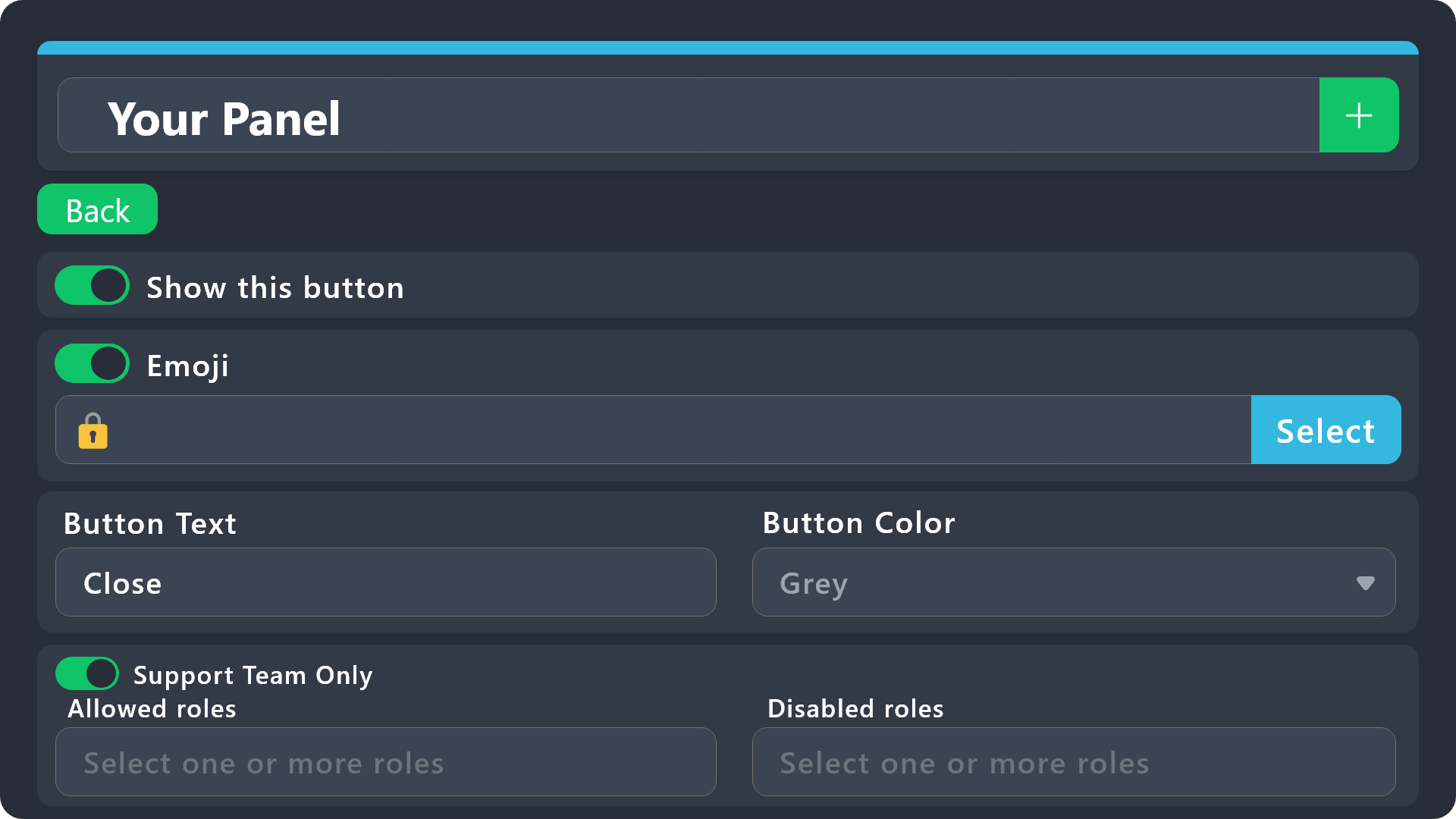
$buttonoptions
idle flint
dense willow
i want the support role on our ticket to have access to delete tickets how?
You can use the "Support Team Only" or "Allowed"/"Disabled" roles on the Delete button to do this
dense willow
idle flint
You can use the "Support Team Only" or "Allowed"/"Disabled" roles on the Delete ...
thats will do
dense willow
idle flint
You can use the "Support Team Only" or "Allowed"/"Disabled" roles on the Delete ...
not working
humble sequoiaBOT
━━ kuya's inquiry has been moved to a ticket ━━
 restive smelt
Is there somewhere I can view the Variable Reference for Ticket Tool
humble sequoiaBOT
- Note: Remove the ! from all of the variables for proper work
{!server.name} ➞ Name of the server
{!server.id} ➞ ID of the Server
{!server.icon} ➞ Direct URL to the Server's Icon
{!server.banner} ➞ Direct URL to the Server's banner, if available

{!channel} = <#channel> ➞ Channel link of the current channel
{!channel.name} ➞ Name of the current channel
{!channel.id} ➞ ID of the current channel

{!author} = <@user> ➞ Mention of the user triggering this message
{!author.name} ➞ Name of the user triggering this message
{!author.id} ➞ ID of the user triggering this message
{!author.nickname} ➞ Nickname of the user triggering this message
{!author.icon} ➞ Direct Url of the profile picture of the user triggering this message
{!author.tag} ➞ 4 digit tag (discriminator) of the user triggering this message
{!author.full} ➞ username + 4 digit discriminator of the user triggering this message```
```diff
- Note: The variables below are meant to be used within ticket messages, or tags triggered within tickets
{!panel.count} ➞ The current count number of the panel
{!panel.name} ➞ The name of the panel
{!panel.ticketLimit} ➞ The current limit of the panel

{!ticket} = <#channel> ➞ Channel mention of the ticket
{!ticket.id} ➞ Channel ID of the ticket

{!ticket.user} = <@user> ➞ User mention of the ticket user
{!ticket.user.name} ➞ Name of the ticket user
{!ticket.user.id} ➞ User ID of the ticket user
{!ticket.user.nickname} ➞ Nickname of the ticket user
{!ticket.user.icon} ➞ Direct Url of the profile picture of the ticket user
{!ticket.user.tag} ➞ Tag / Discriminator of the ticket user
{!ticket.user.full} ➞ Username + Discirimator of the ticket user```
_ _
_ _
Additional variables
Roles can be either
{@role name} or {role ID}
{create.reason}
{claim.reason}
{close.reason}
{delete.reason}
» Reasons for a given action
Transcript Variables
{!ticket_name}➞ Name of the ticket
{!panel_name}➞ Name of the panel
{!transcript_url}➞ File link of the transcript
Hide Link under blue text:
[Click me](https://tickettool.xyz)➞ Click me
Time Variable
Sends the current unix time in seconds. Optionally add or remove seconds
<t:{!time?m=+43200}:R>➞ <t:1711571380:R>
<t:{!time?m=-43200}:R>➞ <t:1711484980:R>
<t:{!time}:R>➞ <t:1711528180:R>
_ _
<t:1641006000>➞ <t:1641006000>
<t:1641006000:f>➞ <t:1641006000:f>
<t:1641006000:F>➞ <t:1641006000:F>
<t:1641006000:D>➞ <t:1641006000:D>
<t:1641006000:d>➞ <t:1641006000:d>
<t:1641006000:t>➞ <t:1641006000:t>
<t:1641006000:T>➞ <t:1641006000:T>
<t:1641006000:R>➞ <t:1641006000:R>
» You can use https://hammertime.djdavid98.art/ to create custom dates/times
idle flint
restive smelt
Is there somewhere I can view the Variable Reference for Ticket Tool
Is this what you mean? ^^
restive smelt
idle flint
Is this what you mean? ^^
Perfect, thank you.
iron nightBOT
Gave +1 Rep to @idle flint (current: #22 - 235)
 flat sky
good afternoon, why does my bot create tickets without a category, although there is a selected category on the site, before that everything worked
 stuck skiff
Anyone know why when I /remove someone from a ticket, it doesn’t remove them when they have a support team role?
Shouldn’t it still deny them perms in the ticket
restive condor
stuck skiff
Anyone know why when I /remove someone from a ticket, it doesn’t remove them whe...
Hey there! The /remove command only resets permissions/marks them to ( ). Which is enough to remove users since it's a private channel, and due to the fact that it is meant to be used alongside the
 /add command.
To remove someone with a support role and actually deny ( ) permissions, use the
 revoke option set to true when using the slash command
restive condor
flat sky
good afternoon, why does my bot create tickets without a category, although ther...
Hey there! Discord has a limit of 50 channels per category; Ticket Tool limits it to 45.
If you have reached such limit, tickets will be created outside the category.
I recommend you set up overflow categories
humble sequoiaBOT
Discord only allows to stack up to 50 channels per category, meaning that if you have already 50 tickets in one category, the bot won't be able to place a ticket in that category, for such reason Ticket Tool counts with overflow categories, meaning that if your main category is filled, the bot will go ahead and place the ticket on the next one available, simply choose a second category in the category pickers:
stuck skiff
Thank you @restive condor !
iron nightBOT
Gave +1 Rep to @restive condor (current: #9 - 393)
flat sky
restive condor
Hey there! Discord has a limit of 50 channels per category; Ticket Tool limits i...
but there are only 6 tickets in the category
restive condor
flat sky
but there are only 6 tickets in the category
Could you create a brand new channel under the desired category and run /debug there please
 eager escarp
Is there anyway to give the user who opened the ticket a reason for closure in dms? I see theres a reason option when deleting but it does nothing
austere forge
 onyx geyser
I opened the ticket no one responded yet
onyx geyser
I opened the ticket no one responded yet
We have already answered you, the fact that you have the wrong server and that we cannot help you.
 jagged hornet
What’s the reason for blocked permission?
 eager escarp
austere forge
We have already answered you, the fact that you have the wrong server and that w...
eager escarp
austere forge
We have already answered you, the fact that you have the wrong server and that w...
Is there anyway to give the user who opened the ticket a reason for closure in dms? I see theres a reason option when deleting but it does nothing
humble sequoiaBOT
━━ Pandora's inquiry has been moved to a ticket ━━
austere forge
jagged hornet
What’s the reason for blocked permission?
hi there, pls run $debug command in same channel
 twin rivet
how to make it so a ticket auto deletes ticket tool
austere forge
twin rivet
how to make it so a ticket auto deletes ticket tool
hi there, go to Dashboard > Panel configs > General > Two step Ticket 
twin rivet
austere forge
hi there, go to Dashboard > Panel configs > General > Two step Ticket <:Switch_...
Where?
 twin rivet
austere forge
hi there, go to Dashboard > Panel configs > General > Two step Ticket <:Switch_...
twin rivet
austere forge
hi there, go to Dashboard > Panel configs > General > Two step Ticket <:Switch_...
Found it thanks
austere forge
you're welcome
 tardy stag
austere forge
you're welcome <:3v_smile:1187282191630204958>
tardy stag
austere forge
you're welcome <:3v_smile:1187282191630204958>
what does the thing in red mean how do i fix it bc i cant puth the ticket in my server

 atomic solstice
tardy stag
what does the thing in red mean how do i fix it bc i cant puth the ticket in my ...
atomic solstice
tardy stag
what does the thing in red mean how do i fix it bc i cant puth the ticket in my ...
exactly what It says make sure the bot has permission to view the channel and send messages in the channel you are sending this panel into
tardy stag
and how do i do that?
atomic solstice
you need to check the channel settings in your discord server and see if the bot role has those two permissions enabled in that channel
if not, add them
tardy stag
alr thank you
atomic solstice
no problem
 swift topaz
What do I do

 ionic path
swift topaz
What do I do
ionic path
swift topaz
What do I do
Hello there! The bot is missing either of these two permissions in the server/channel settings:
Send Messages
Or View Channel.
 atomic solstice
swift topaz
atomic solstice
swift topaz
yes the role has it, but not in the channel
in the channel some role has send messages on
add the ticket tool role to that channel and set send messages for it on 
 strange belfry
how can i add that message 'create ticket'
ionic path
strange belfry
how can i add that message 'create ticket'
Hello there! You will need to go to the dashboard, server configs, buttons, Create Ticket.
strange belfry
i alr did it but thx
 dusty flare
atomic solstice
add the ticket tool role to that channel and set send messages for it on <:check...
dusty flare
atomic solstice
add the ticket tool role to that channel and set send messages for it on <:check...
Or just bots
atomic solstice
dusty flare
Or just bots
if you have one role for all bots then sure, but that i only if you really want all bots to send messages to that channel
dusty flare
atomic solstice
if you have one role for all bots then sure, but that i only if you really want ...
I give bots all permissions almost
atomic solstice
dusty flare
I give bots all permissions almost
some people do, some don't
You can go to the dashboard > manage servers > select your server > panel configs ( on the left ) > select your panel > Permissions > User Opened Permissions and there enable the permissions you want
humble sequoiaBOT
1. Go into your Dashboard
2. Open your Panel Configs tab
3. Select the panel you want to grant access to
4. Open the Permissions options menu
5. Find what role you'd like to edit permissions for
6. Choose if you'd like to edit opened or closed permissions for that role
7. Edit the permissions by tickingeach permission
8. Save changes
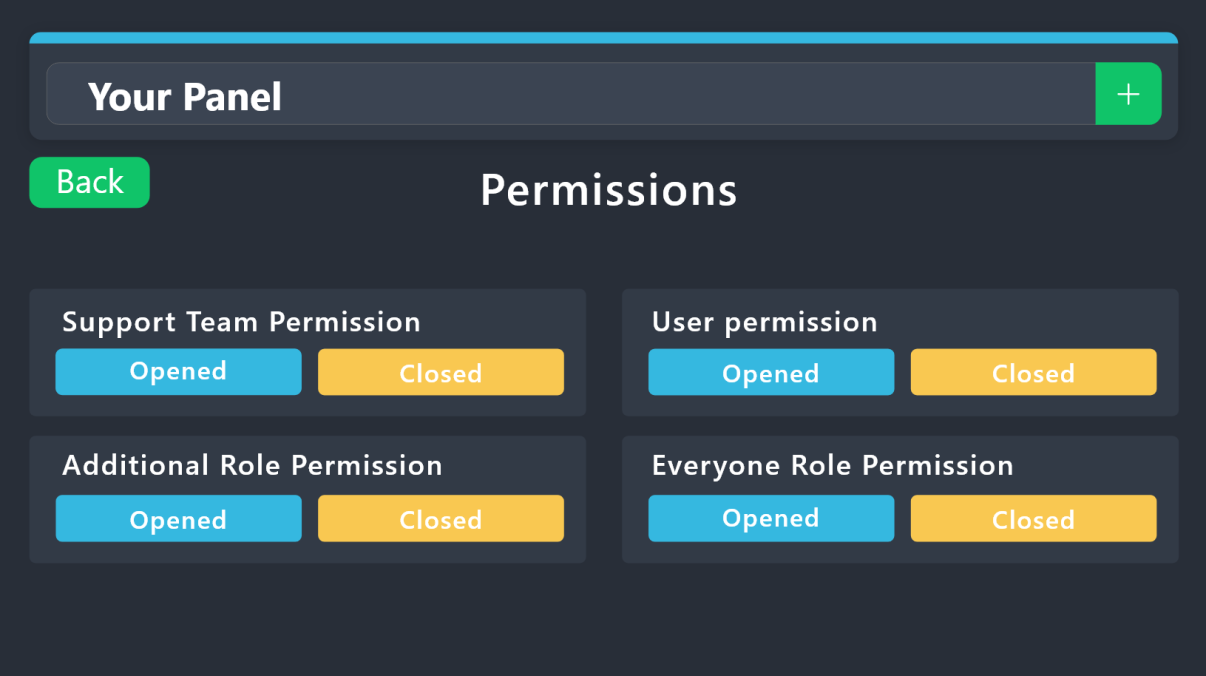 atomic solstice
it's the Ticket Owner if you want to add it to the user who opened the ticket, Everyone Role is basically everyone, so if you add attach perms to the everyone role permissions then everyone in the ticket should be able to use them
just be careful you don't enable View Channel or Ream messages for the Everyone Role permissions, unless you want everyone in your server to see inside the tickets at all times
no problem
 azure dagger
Oi
jade topaz
how do i add ticket tool to a channal
 cursive phoenix
Hey, quick question, is there a way to reset the ticket {count} in the name for a ticket type so the next ticket that is opened is name-1 ?
stark runeBOT
1. Invite Ticket Tool to your server
First you will want to invite the bot to your server. Once the bot is in your server, you can manage your server in the dashboard.
2. Create a Panel
To create a panel we are going to need to head over to the panel configs on the dashboard.
Once at the dashboard we will need to click Create Panel.
Enter a panel name (Fill in any optional settings you want).
Click Create Panel and your ready to get started with configuring your panel.
An example of a creating a panel is shown below.
3. Send the Panel to a Channel
Once you've created a panel on the dashboard you will need to send it to a channel using send on the dashboard.
Select the channel you want your panel to be created in and click send.
For other questions checkout $help faq.
An example of a sending a panel is shown below.
Having a Problem Sending the Panel?
Do $debug in a channel with Ticket Tool and make sure it has all the necessary Discord permissions.
shut bolt
@jade topaz 
jade topaz
nvm i fixed it thanks tho.
shut bolt
cursive phoenix
Hey, quick question, is there a way to reset the ticket {count} in the name for ...
Head to the Panel Configs, use the Set Count button that's below the panel selector, and there you can set the value to whatever number you'd like the {count} variable to be
cursive phoenix
shut bolt
Head to the Panel Configs, use the Set Count button that's below the panel selec...
Thanks totally missed that button lol
 balmy summit
Hey, is there any feature that ping/whisp moderator role when someone open a ticket ?
humble sequoiaBOT
1. Go into your Dashboard
2. Open your Panel Configs tab
3. Select the panel you want to ping your support on
4. Open the Ticket options menu
5. Click on Edit Ticket Message
6. In the Message Content use one of the role mention syntax (**{@Role Name}**/**{Role ID}**)
7. Save changes
Note: For this to work properly, Ticket Tool requires the Mention Everyone permission. Or the role must have the Allow anyone to @mention this role setting enabled
shut bolt
balmy summit
Hey, is there any feature that ping/whisp moderator role when someone open a tic...
Check the message above
 light igloo
unsure if this is even possible, but i am looking to potentially switch from a ticket system like modmail to this service. the one feature of modmail that i do like is that we, as moderators, can anonymously reply to tickets. i know with ticket tool it creates a private channel between ourselves and the individual who submitted a ticket. however, is there any feature on the bot that could potentially .. make our replies at all anonymous? by some removal of our text and responding back directly as the bot. sorry if that sounds confusing.
pseudo ravine
Hey there. Unfortunately not
jade topaz
I am BEGGING on my knees. please tell me there's a way to delete all closed tickets at one time.
atomic solstice
jade topaz
I am BEGGING on my knees. please tell me there's a way to delete all closed tick...
you need to delete them one by one
jade topaz
atomic solstice
you need to delete them one by one
aggressive sighing noises
thanks anyway 👍
atomic solstice
np
atomic solstice
jade topaz
*aggressive sighing noises*
you can use /purge but that deletes ALL tickets, not just closed ones
jade topaz
atomic solstice
you can use `/purge` but that deletes ALL tickets, not just closed ones
may god provide this in the next update 🙏
atomic solstice
jade topaz
may god provide this in the next update 🙏
you can look through #💡│suggestions, if it's not there you can suggest it
flat sky
tickets continue to be created without a category, but the site has it installed, the debug command does not help
atomic solstice
flat sky
tickets continue to be created without a category, but the site has it installed...
make sure the bot has:
View/Read Channels
Send Messages
Manage Channels
Manage Permissions
all on in the category you want the tickets to be open in
flat sky
atomic solstice
make sure the bot has:
View/Read Channels
Send Messages
Manage Channels
Manage ...
the bot has all permissions on the server
yesterday everything was fine
atomic solstice
flat sky
the bot has all permissions on the server
could you send me the id of your server?
flat sky
atomic solstice
could you send me the id of your server?
how to get it?
atomic solstice
flat sky
how to get it?
go to your user settings in discord and make sure that in the Advanced settings you have developer mode activated
then you can simply right click on your server and click Copy id
if on mobile you can click the 3 dots next to your server name and at the bottom click copy server Id
flat sky
atomic solstice
if on mobile you can click the 3 dots next to your server name and at the bottom...
there are no 3 dots
atomic solstice
its either the 3 dots or click on the server name itself
flat sky
maybe I'll invite you to my server and give you permissions?
atomic solstice
you can also try and just type $id in your server and copy the result
flat sky
atomic solstice
you can also try and just type `$id` in your server and copy the result
Server id - 1115540222936105030
atomic solstice
flat sky
the bot has all permissions on the server
as long as the bot doesn't have administrator permission you need to make sure that in the category there isn't a role which would remove one of the permissions needed from the bot, if you want to be sure there isn't then just add the Ticket Tool role into the category permissions and give it the permissions I listed above #🆘│community-support message
yeah the bot doesn't have administrator so you need to go check the categories and make sure there isn't anything removing one of the permissions from the bot in that category
Do you have any tickets already in that category?
or did it never go in them?
as what also could be a problem is if your category is full
if you have 50 channels in a category discord won't let you add a new channel to that category so new tickets get created at the top of the server
 viral thunder
I have the problem, that i bought the premium bot but hes not working. Even on the website its saying, that i need premium bot. What do i do wrong?
humble sequoiaBOT
The first thing you will need to do is invite the premium bot, an invite can be found here
Once the bot is in your server we will head to the dashboard and manage your server. When you are managing your server, you want to head into "Server Configs" then click the drop down menu under "Select the bot you would like to use on this server" then click "Ticket Tool#6207" and then save.
flat sky
atomic solstice
yeah the bot doesn't have administrator so you need to go check the categories a...
thanks, I don't know why, but the permissions for the bot just disappeared
iron nightBOT
Gave +1 Rep to @atomic solstice (current: #23 - 231)
atomic solstice
no problem
viral thunder
humble sequoia
i can't find anything here, sorry
viral thunder
atomic solstice
no problem
could you help me?
 tranquil geyser
why I can't send image url
 vivid blade
I need help a hacker hacked my account, I don't have acces to my password.
humble sequoiaBOT
⚠️ You're in the wrong place
We provide support for Ticket Tool Discord bot and cannot help you with whatever issue you have.
- We don't know which Support Team you should contact to get this issue resolved, and unfortunately we won't be able to accurately tell you.
If you don't have any further questions regarding our bot Ticket Tool, please close this ticket
 vernal raptor
I need help! How do I make a multi select panel.

Like this!
@stray bobcat
Oop. Sorry!
SOMEONE! PLEASE!
humble sequoiaBOT
The Drop-down menu or Select Menu replaces the buttons on your panel message and uses a drop-down menu with all of your panels. To set this up, go to your Panel Configs and select your main Panel.
<:Numbericons1:1018864164032225340> Enable Select Style
First you enable Select Style. Then you add an item in the Dropdown Editor. Now you can start editing your dropdown!
<:Numbericons2:1018864168041971712> Dropdown Editor
Each line in the dropdown editor represents a line in the drop down menu on discord. You can add more "Items", by clicking on
First you select a panel. That's the panel this option will open a ticket for. DONT select the same panel twice. Each option should have a different Panel
After that, you can put a Display. This is the title of this option and will appear in the drop down menu. The *Description can be set right after that, which will be below the title in grey.
Additionally you can select an emoji, that will be shown in front of each option. You can either manually input the ID of an emoji or select it in the selector.
Common Issues ⚠️
- Panel doesn't send? Make sure you have a valid emoji selected
- Option doesn't show up? Check if two options have the same panel in the DropDown Editor
$dropdown
 stray bobcat
Like that
jade topaz
Are old transcripts made before the Direct Link button was added lost? Is there no way to manually remake an embed so that it contains the button and retrieve an old transcript?
restive condor
jade topaz
Are old transcripts made before the Direct Link button was added lost? Is there ...
Hi there, unfortunately those transcript links can't be recovered/regenerated.
You will always be able to access transcripts by downloading the HTML file
jade topaz
restive condor
Hi there, unfortunately those transcript links can't be recovered/regenerated.
...
By "downloading the HTML file" you mean only on new transcripts? Because the CDN links of old transcripts only lead me to a page saying "this content is no longer available".
EDIT: Nevermind, I found the "download" button on old transcripts. I didn't realize the first embed was of the html file itself lol, sorry
restive condor
No worries and sorry I had to step away
Have a nice day! 
vernal raptor
Where is the area to make like an embed or description for the ticket panel?
vernal raptor
@austere forge
vernal raptor
restive condor
No worries and sorry I had to step away
Have a nice day! <:PabloTiphat:983791053...
Can you help me?
restive condor
vernal raptor
Where is the area to make like an embed or description for the ticket panel?
Hey there! Dashboard > Panel Configs > Messages > Edit Panel Message
vernal raptor
Alright.
vernal raptor
restive condor
Hey there! ``Dashboard `` > ``Panel Configs`` > ``Messages`` > ``Edit Panel Mess...
Oooh.
humble sequoiaBOT
Ticket Tool - Ticketing without clutter - The #1 discord Ticketing bot
vernal raptor
Sorry! Thanks man!
vernal raptor
restive condor
Hey there! ``Dashboard `` > ``Panel Configs`` > ``Messages`` > ``Edit Panel Mess...
Why is there a max limit of words that I an put in the embed description
restive condor
vernal raptor
Why is there a max limit of words that I an put in the embed description
There's a character limit 250 with the free version
vernal raptor
😦
How do I get paid version?
I'm broke 😭
Also
How do you do the string thing?
like /string?
restive condor
You can subscribe via Discord or buy premium directly from us via PayPal or Crypto ($6/mo or $66/y)
restive condor
vernal raptor
like /string?
What exactly does that do?
vernal raptor
restive condor
Hey there! ``Dashboard `` > ``Panel Configs`` > ``Messages`` > ``Edit Panel Mess...
Like this.
restive condor
Nope, we currently only offer recurring subscriptions
vernal raptor
😭
restive condor
vernal raptor
Like this.
As in, the markdown?
vernal raptor
I think.
humble sequoiaBOT
Discord Markdown Text
Below cites basic Discord Text Markdown/Formatting. Replace the text below with your own!
See this Discord Help Article for other markdown questions and combining markdowns.
<:Numbericons1:1018864164032225340> Italics (Cntrl + I)
 *Copy me for italicized text!* -> Italicized text!
 _Copy me for italicized text!_ -> Italicized text!
<:Numbericons2:1018864168041971712> Bold (Cntrl + B)
**Copy me for bold text!** -> Bolded text!
<:Numbericons3:1018864171783303208> Underline (Cntrl + U)
You must add 2 underscores on both sides of your text to get the underline text
__Copy me for underlined text!__ -> Underlined Text!
<:Numbericons4:1018864175155519538> Strikethrough (Cntrl + S)
~~Copy me for strikethrough text!~~ -> Strikethrough text!
<:Numbericons5:1018864178632605786> Spoilers & Hidden Text
||Copy me for hidden text!|| -> ||Hidden text|| (Click to reveal)
<:Numbericons6:1018864182558466058> One Lined Codeblock
You can add 3 backticks instead to get multi lined codeblock.
`Copy me for codeblock text!` -> Codeblock Text!
<:Numbericons7:1018864186727604354> Hyperlinking and Hidden Links
[Copy me with your link](yourlinkforhidelinks.com) -> Ticket Tool!
<:Numbericons8:1018864190296961159> <:NewIcon1:1018858809541804124><:NewIcon2:1018858813266333706> <:beta1:1022173658610946182><:beta2:1022173656492810340> Headers!
Header markdowns may not work with ticket tool features.
# Largest header!
## Small header!
### Even smaller header!
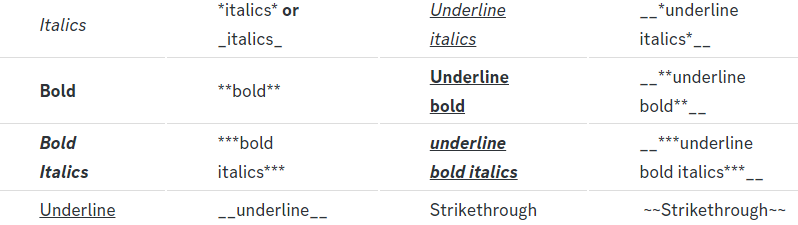 restive condor
It's really fun to play with indeed 😄
restive condor
vernal raptor
'Hi'
Must be the diagonal ones `
vernal raptor
'Hi!'
Oh. Dang
How do you do those?
Hi
Woah Cool!
||@vernal raptor||
Nice.
I wish I wasn't broke. 😭
restive condor
It's no worries, the free version has tons of features 😄
iron nightBOT
Gave +1 Rep to @restive condor (current: #9 - 394)
restive condor
Any time!
vernal raptor
Mhm!
 topaz meadow
Goodnight! I put eth in renzo, through the arbitrum network, I took the ezETH and put it in Pendle, in the YT option, because it was giving 10x more points, but this is almost 2 weeks old and so far the points are zero... does anyone know what can happen? Be done??
humble sequoiaBOT
⚠️ You're in the wrong place
We provide support for Ticket Tool Discord bot and cannot help you with whatever issue you have.
- We don't know which Support Team you should contact to get this issue resolved, and unfortunately we won't be able to accurately tell you.
If you don't have any further questions regarding our bot Ticket Tool, please close this ticket
 lean solstice
السلام عليكم
violet jacinth
would it be possible to like have the bot automatically post the csv or whatev from the statistics ina channel as like a leaderboard?
restive condor
violet jacinth
would it be possible to like have the bot automatically post the csv or whatev f...
Hey there! No, that's currently not possible
Feel free to suggest it in #1019685143046279208
 thin crow
lean solstice
السلام عليكم
thin crow
lean solstice
السلام عليكم
وعليكم السلام تفضل
lean solstice
thin crow
وعليكم السلام تفضل
اخوي البوت تبع التصميم هذا ما يشتغل
thin crow
lean solstice
اخوي البوت تبع التصميم هذا ما يشتغل
تصميم اش
lean solstice
thin crow
تصميم اش
Medya gafer
thin crow
lean solstice
Medya gafer
ده بوت ولا حاجة في تكت تول؟
lean solstice
thin crow
ده بوت ولا حاجة في تكت تول؟
بوت لقيت السبورت تبعو هنا
thin crow
lean solstice
بوت لقيت السبورت تبعو هنا
لا هنا مالهم دخل بالبوتات التانية
دعم فني فقط لـ تكت تول
 chilly bay
@humble sequoia
violet jacinth
hey so the bot thing where ticket tool can respond to other bots or whatever how does that work?
ionic path
violet jacinth
hey so the bot thing where ticket tool can respond to other bots or whatever how...
Hey there! Go to the dashboard, Server Configs, and the "Bot" category is what you need.
 civic obsidian
Alguém brasileiro
ionic path
$articket
humble sequoiaBOT
فريق الدعم الفني العربي
عميلنا العزيز ان كنت تبحث عن مساعدة يرجى فتح تكت خاص بفريق الدعم الفني العربي
اذهب الى#🎫│make-a-ticket
ثم قم بلضغط على الايموجي الاتي (🇯🇴)
ionic path
@jade topaz ↑
ionic path
civic obsidian
Alguém brasileiro
Olá! Infelizmente não há uma equipe de suporte brasileira no momento e não podemos ajudá-lo nesse idioma.
civic obsidian
Ok
 calm frost
heey guys, how can i make tickettool bot to where it can be made to where the customer doesnt have the option to close the ticket after opened?
humble sequoiaBOT
━━ User's inquiry has been moved to a ticket ━━
scenic plinth
civic obsidian
Ok
Com o que posso ajudar?
civic obsidian
Como eu crio um ticket?
stark runeBOT
1. Invita a Ticket Tool a tu servidor
Primero querrás invitar al bot a tu servidor. Una vez el bot esté en tu servidor, puedes configurarlo en el dashboard.
2. Crear un panel
Para crear un panel deberás ir a la pestaña Panel Configs en el Dashboard.
Una vez en el dashboard, deberás dar click en Crear Panel
Ingresa el nombre del panel (Completa los demás ajustes de tu preferencia)
Haz click en Create Panel y ya estás listo para configurar el panel
Un ejemplo de como crear un panel es mostrado abajo
3. Envía el panel a un Canal
Una vez que hayas creado el panel, utiliza el botón azul Send y selecciona el canal al que quieres enviar dicho panel.
El panel no fue enviado
Utiliza el comando /debug para diagnosticar posibles problema de permisos con el bot.
scenic plinth
civic obsidian
Como eu crio um ticket?
Acima há informações em espanhol sobre como começar a configurar a ferramenta de tickets. Infelizmente não temos nenhum comando em português disponível, mas se você tiver alguma dúvida sobre isso fique à vontade para perguntar.
civic obsidian
Eu entendi e consegui colocar
 thorny ridge
Good afternoon. Do I understand correctly that the DropDown Style tab allows you to configure the selection as in the screenshot?
 austere forge
thorny ridge
Good afternoon. Do I understand correctly that the DropDown Style tab allows you...
austere forge
thorny ridge
Good afternoon. Do I understand correctly that the DropDown Style tab allows you...
Hi there, exactly
thorny ridge
I've encountered a problem. I configured it, created the selection options, but for some reason the selection does not appear. Is there anything I need to configure?


 slender minnow
thorny ridge
I've encountered a problem. I configured it, created the selection options, but ...
slender minnow
thorny ridge
I've encountered a problem. I configured it, created the selection options, but ...
you have not selected a panel for the options
each option needs a seperate panel
 thorny ridge
Thank you very much, it worked!)
 flint salmon
Hello, where can i see the Transscripts on the website when i already closed and deleted the ticket?
ionic path
flint salmon
Hello, where can i see the Transscripts on the website when i already closed and...
Hey there! You are unable to view ticket transcripts from the website, but if you have set up a transcripts channel and have already transcripted the ticket before it was deleted, you can see it from the logging channel.
 torn python
hey is there an option to use the direct transcript hyperlink instead of the 'use button'? really miss that feature. the button is so inconvenient
slender minnow
torn python
hey is there an option to use the direct transcript hyperlink instead of the 'us...
that's not possible due recent changes from discord
the urls expire after a certain period of time
the button updates and make sure that the link does not expire
torn python
i hate my life 😭😭 tysm for ur help 🫶
 tropic phoenix
Argh Everytime I try to do any sort of command it says the application did not respond?? Yet the bot seems to be online?
 pseudo ravine
Hey there. Can you please run the /debug command in that channel
 pseudo ravine
Ticket Tool needs the “View Channel” permission inside that channel
tropic phoenix
Currently am unable too
There is no ticket tool role, and I am on phone rn
Nvm, got it
Still says "application did not respond"
Nevvverr mind my phone is just slow 😭
pseudo ravine
No worries
 surreal delta
hello
how do i change the "to create a ticket react with"

please help
support plsssssss
ionic path
surreal delta
how do i change the "to create a ticket react with"
Hello there! You mean to change the "create ticket" button with a Dropdown menu like shown in the screenshot?
surreal delta
i want to change the description
like on this guys tutorial

his is changed it says something different
please help @ionic path
?
ionic path
I am here, no need for that much impatience.
Here's where you need to go: Dashboard → Panel Configs → Messages → Message Panel → Embed Editor — 1
vernal raptor
ionic path
I am here, no need for that much impatience.
Here's where you need to go: `Das...
I need some help
humble sequoiaBOT
Hello, we would love to help you, but if you don't tell us what you need help with we can't help you :(
vernal raptor
Any ideas on what to do when people open a ticket other members can't view it?
surreal delta
i cannot type in anything?
 ionic path
vernal raptor
Any ideas on what to do when people open a ticket other members can't view it?
ionic path
vernal raptor
Any ideas on what to do when people open a ticket other members can't view it?
Hello! If someone opens a ticket, only the selected roles can see it. Normal members can't see them, unless you've added their role in the dashboard (Dashboard → Panel Configs → General)
If you want to add a specific member to a specific ticket, you can always use /add.
ionic path
surreal delta
i cannot type in anything?
You should be able to change the "To create a ticket react with 📩" line.
vernal raptor
Alright A little problem.
The community member role is not a role able to view the ticket..
ionic path
vernal raptor
The community member role is not a role able to view the ticket..
If you want the role to be able to view every ticket, you can add the role in Panel Configs → General (dashboard). If you add it, it won't update the already existing tickets but will add the role to every newly added ticket after the change was made.
 shut bolt
vernal raptor
shut bolt
vernal raptor
Have you considered clicking the blue hyperlink to check the documentation for that error?
vernal raptor
shut bolt
Have you considered clicking the blue hyperlink to check the documentation for t...
😭
Erm
That was an easy answer. Sorry for wasting your time.
@shut bolt Thanks!
shut bolt
No worries
iron nightBOT
Gave +1 Rep to @shut bolt (current: #1 - 1271)
shut bolt
 noble rock
Hello, I'm just wondering how to make a ticket that has a dropdown with various options e.g:
Support ticket
Option 1 - Apply for this
option 2- apply for that
option 3- apply for blah blah
I'm really struggling on how to do this, can anyone please give me some guidence, thank you in advance 
humble sequoiaBOT
The Drop-down menu or Select Menu replaces the buttons on your panel message and uses a drop-down menu with all of your panels. To set this up, go to your Panel Configs and select your main Panel.
<:Numbericons1:1018864164032225340> Enable Select Style
First you enable Select Style. Then you add an item in the Dropdown Editor. Now you can start editing your dropdown!
<:Numbericons2:1018864168041971712> Dropdown Editor
Each line in the dropdown editor represents a line in the drop down menu on discord. You can add more "Items", by clicking on
First you select a panel. That's the panel this option will open a ticket for. DONT select the same panel twice. Each option should have a different Panel
After that, you can put a Display. This is the title of this option and will appear in the drop down menu. The *Description can be set right after that, which will be below the title in grey.
Additionally you can select an emoji, that will be shown in front of each option. You can either manually input the ID of an emoji or select it in the selector.
Common Issues ⚠️
- Panel doesn't send? Make sure you have a valid emoji selected
- Option doesn't show up? Check if two options have the same panel in the DropDown Editor
$dropdown
 supple tree
Hi
I want to report someone who swears and the language he speaks is Turkish.
who can help me
ionic path
supple tree
I want to report someone who swears and the language he speaks is Turkish.
Hello! Did this happen in this server?


 humble sequoiaBOT
⚠️ You're in the wrong place
We provide support for Ticket Tool Discord bot and cannot help you with whatever issue you have.
- We don't know which Support Team you should contact to get this issue resolved, and unfortunately we won't be able to accurately tell you.
If you don't have any further questions regarding our bot Ticket Tool, please close this ticket
ionic path
humble sequoia
Read this please ^^
supple tree
I can't submit a ticket, it gives an error
We say there are more than 500
Do you have an official who speaks Turkish?
ionic path
supple tree
Do you have an official who speaks Turkish?
As the bot said above, you are in the wrong place.
supple tree
Can you please share the link of the correct place?
humble sequoiaBOT
⚠️ You're in the wrong place
We provide support for Ticket Tool Discord bot and cannot help you with whatever issue you have.
- We don't know which Support Team you should contact to get this issue resolved, and unfortunately we won't be able to accurately tell you.
If you don't have any further questions regarding our bot Ticket Tool, please close this ticket
ionic path
We provide support for Ticket Tool Discord bot and cannot help you with whatever issue you have.
- We don't know which Support Team you should contact to get this issue resolved, and unfortunately we won't be able to accurately tell you.
Okay I've set the ticket up. How do I post a ticket pannel in a channel to test it?
ionic path
noble rock
Okay I've set the ticket up. How do I post a ticket pannel in a channel to test ...
Hello! You can use the "Send" button on the dashboard, panel Configs. (It's at the top)
noble rock
ionic path
Hello! You can use the "Send" button on the dashboard, panel Configs. (It's at t...
Thank you! I recently asked above how to do a drop down menu here: #🆘│community-support message
However after doing so it's not seeming to work! Are you able to assist with this as I'm confused

 iron nightBOT
Gave +1 Rep to @ionic path (current: #46 - 37)
ionic path
noble rock
Thank you! I recently asked above how to do a drop down menu here: https://disco...
Your question was answered with an automated answer with the bot, #🆘│community-support message. If you are confused with that, let me know.
Discord
Discord is the easiest way to communicate over voice, video, and text. Chat, hang out, and stay close with your friends and communities.
noble rock
ionic path
Your question was answered with an automated answer with the bot, https://discor...
Yes I'm confused with that
ionic path
You will have to go to the dashboard, panel Configs, and there will be an option called "DropDown Style". Enable that, and add any panels you want to be attached to it.
noble rock
ionic path
You will have to go to the dashboard, panel Configs, and there will be an option...
That's what I did here
 ionic path
You haven't added a Display in the other panels. You'll have to add one for all of them, they will appear as the name to the member.
 floral kernel
good evening I have a problem I do not receive any notification when a member opens a ticket please help
noble rock
ionic path
You haven't added a Display in the other panels. You'll have to add one for all ...
This is really confusing to me and I'm not understanding at all how to do that
ionic path
floral kernel
good evening I have a problem I do not receive any notification when a member op...
Hello! A new channel should be created when someone opens a ticket. You will not automatically be notified. However, if you want to be pinged when a ticket is created, let me know.
ionic path
noble rock
This is really confusing to me and I'm not understanding at all how to do that
There is a box called "Display (Required)". That Display will appear as the name in the DropDown when someone tries to open a ticket. For example, you can add a name like "Report a server member" on. The "Dispute with server member" so that it will appear like that when someone tries to open a ticket.
Did that answer your question?
floral kernel
ionic path
Hello! A new channel should be created when someone opens a ticket. You will not...
yes I want to be notified for each open ticket
humble sequoiaBOT
━━ Murat_66tr's inquiry has been moved to a ticket ━━
 real grail
I don´t how to put the ticket tool on my server
humble sequoiaBOT
First you will want to invite the bot to your server. Once the bot is in your server, you can manage your server in the dashboard.
To create a panel we are going to need to head over to the Panel Configs Tab on the Dashboard.
Once at the dashboard we will need to click Create Panel.
Enter a panel name (Fill in any optional settings you want).
Click Create Panel and you are ready to get started with configuring your panel.
An example of a creating a panel is shown below.
Once the panel has been created, use the blue Send button and select the channel you want the panel to be sent to.
The Panel wasn't send
Use the </debug:ID> command to diagnose possible permission issues with the bot.
austere forge
real grail
I don´t how to put the ticket tool on my server
hi there, see above ^
 forest lantern
Bonjour je voudrais savoir comment faire un message de ticket avec plusieurs options de ticket par exemple en 1 ticket il puisse choisir soi recrutement, remboursement, plainte
?
humble sequoiaBOT
Pour une utilisation plus pratique des multipanels, vous pouvez maintenant combiner des panneaux sur le Dashboard. Vous pouvez envoyer le multipanel par le Dashboard ou par la commande /panel ID
Où puis-je trouver ça?
Vous pouvez trouver ce paramètre sur le Dashboard -> Panel configs -> Settings -> Panel
Remarque: si vous attachez tous les panneaux à un panneau appelé Support, n'ajoutez pas le panneau Support dans la cas du "Attached Panels" (si vous faites cela, vous créerez un doublon)
Le message envoyé est le message du panneau auquel vous avez attaché les autres panneaux. Tous les boutons de vos panneaux vont être ajoutés à ce message.
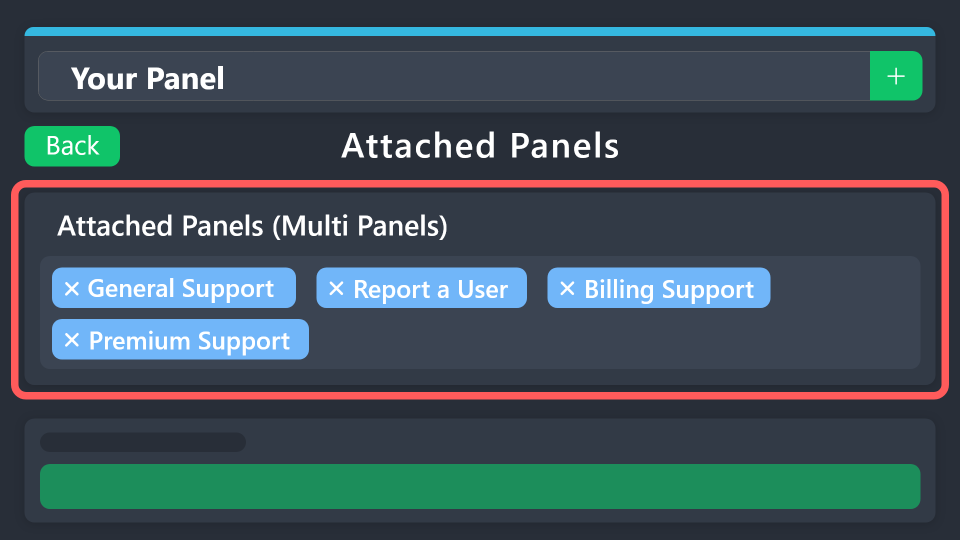 restive condor
forest lantern
Bonjour je voudrais savoir comment faire un message de ticket avec plusieurs opt...
restive condor
forest lantern
Bonjour je voudrais savoir comment faire un message de ticket avec plusieurs opt...
Bonjour ^^
humble sequoiaBOT

L'équipe du support Français
Cher client,
Si vous avez besoin d'aide, ouvriez un ticket pour le support Français s'il vous plaît.
Allez au #🎫│make-a-ticket et tapez sur le bouton contenant l'emoji 🇫🇷
 ionic path
surreal delta
ive done this and my staff says they still cannot see the tickets.
ionic path
surreal delta
ive done this and my staff says they still cannot see the tickets.
Hello! This will only update in tickets created after this change was made, and not in already created tickets.
 ebon ermine
is there any way to view images in transcripts? this transcript has been sitting since january 20th and i cannot access any of the images. When I click it to load it it states that the content is no longer available.

 austere forge
ebon ermine
is there any way to view images in transcripts? this transcript has been sitting...
austere forge
ebon ermine
is there any way to view images in transcripts? this transcript has been sitting...
Hi there, without premium you currently can’t see images in transcripts. With premium up to 8MB can be embedded
ebon ermine
austere forge
Hi there, without premium you currently can’t see images in transcripts. With pr...
that only would apply to tickets after premium is added, correct?
austere forge
ebon ermine
that only would apply to tickets after premium is added, correct?
exactly
 plucky verge
is there a way to have the date opened (MM/DD or DD/MM) added to the name of a ticket? Looked in the variables and I see theres one for how long ago it was opened but didnt see one for just a static day + month
 still needle
How to make the ticket tool bot picture like this
shut bolt
plucky verge
is there a way to have the date opened (MM/DD or DD/MM) added to the name of a t...
Currently we do not have one of that style but please make sure to post it into #1019685143046279208 and/or #💡│suggestions so our developer can review it :D
shut bolt
still needle
How to make the ticket tool bot picture like this
Check the message below please
humble sequoiaBOT
The Drop-down menu or Select Menu replaces the buttons on your panel message and uses a drop-down menu with all of your panels. To set this up, go to your Panel Configs and select your main Panel.
<:Numbericons1:1018864164032225340> Enable Select Style
First you enable Select Style. Then you add an item in the Dropdown Editor. Now you can start editing your dropdown!
<:Numbericons2:1018864168041971712> Dropdown Editor
Each line in the dropdown editor represents a line in the drop down menu on discord. You can add more "Items", by clicking on
First you select a panel. That's the panel this option will open a ticket for. DONT select the same panel twice. Each option should have a different Panel
After that, you can put a Display. This is the title of this option and will appear in the drop down menu. The *Description can be set right after that, which will be below the title in grey.
Additionally you can select an emoji, that will be shown in front of each option. You can either manually input the ID of an emoji or select it in the selector.
Common Issues ⚠️
- Panel doesn't send? Make sure you have a valid emoji selected
- Option doesn't show up? Check if two options have the same panel in the DropDown Editor
$dropdown
jade topaz
How do i disable opening ticket for certain roles
austere forge
jade topaz
How do i disable opening ticket for certain roles
hey there, Go to Dashboard > Server configs > Blacklist Roles
jade topaz
Thanks
 foggy marlin
I'm gonna be honest I've reread the information 20 times and still don't understand how to create a ticket 😭
 hard jolt
How do I setup a ticket on mobile?
austere forge
jade topaz
Thanks
You're welcome, glad I could help !
humble sequoiaBOT
First you will want to invite the bot to your server. Once the bot is in your server, you can manage your server in the dashboard.
To create a panel we are going to need to head over to the Panel Configs Tab on the Dashboard.
Once at the dashboard we will need to click Create Panel.
Enter a panel name (Fill in any optional settings you want).
Click Create Panel and you are ready to get started with configuring your panel.
An example of a creating a panel is shown below.
Once the panel has been created, use the blue Send button and select the channel you want the panel to be sent to.
The Panel wasn't send
Use the </debug:ID> command to diagnose possible permission issues with the bot.
austere forge
@foggy marlin@hard jolt
Hi there, see above ^
hard jolt
austere forge
> <@671201323835719702><@846459046315687998>
Hi there, see above ^
I still couldn’t figure it out.. I remember doing a command a while back and it set up the bot so people could open tickets or Mabey it was in a panel?
austere forge
hard jolt
I still couldn’t figure it out.. I remember doing a command a while back and it ...
you need to go to your server's Dashboard, create a panel and send it to a specific channel
just follow the step by step guide above
 limpid ravine
austere forge
just follow the step by step guide above
limpid ravine
austere forge
just follow the step by step guide above
to make a message when. aticket is created do you need premium
nvm nvm
jade topaz
Hey I need help, why can't I click on the manage button on my first server (mogwarts), it'd only load but nothings happen but I'm able to do it on the second server? Thanks

 cosmic halo
Is there any way that when I create the ticket it comes with the name of the person who created it?
 pliant cargo
How can I make multi panels?
 wild glacier
how to make panels like that?

 cloud snow
how can i manage the ticket bot if im the admin of the server and not the owner
 vale plinth
Hi , I can't find my trinium cs and libra sey after logging in to the game. Check 2 of my accounts and it's nowhere to be found
humble sequoiaBOT
⚠️ You're in the wrong place
We provide support for Ticket Tool Discord bot and cannot help you with whatever issue you have.
- We don't know which Support Team you should contact to get this issue resolved, and unfortunately we won't be able to accurately tell you.
If you don't have any further questions regarding our bot Ticket Tool, please close this ticket
 sonic mountain
@humble sequoia how can i verify
austere forge
jade topaz
Hey I need help, why can't I click on the manage button on my first server (mogw...
Hi there, can you try press Sync Servers and tell me if you still see the desired server
austere forge
cosmic halo
Is there any way that when I create the ticket it comes with the name of the per...
Hi, that’s possible yes but its a premium feature
humble sequoiaBOT
For more convenient use of multipanels, you can now combine panels on the dashboard. This will allow you to directly send the multipanel from the dashboard or via the $panel ID command.
Where can I find this?
You can find this setting on the Dashboard -> Panel Configs -> Panel -> Attached Panels
Note: if you're attaching all the panels to a panel called English, don't include English in the attached panel's box (If you do this, it will create a duplicate)
This will put all buttons from all of your panels on one message. The message is the panel message from the panel you're combining these panels in.
austere forge
@pliant cargo @wild glacier
Hi, se above ^
 graceful iris
How do I change the 'To create a ticket react with 📩'?
 austere forge
cloud snow
how can i manage the ticket bot if im the admin of the server and not the owner
austere forge
cloud snow
how can i manage the ticket bot if im the admin of the server and not the owner
Hi there, the server owner must configure the Admin role on the Dashboard so that this role can configure the bot
Se below ⬇️
humble sequoiaBOT
Any role you put there will have full access to the ticket tool dashboard. The server owner and users with admin permissions already have access to the dashboard.
Be careful of which roles to put here
 graceful iris
Thank You!!
austere forge
graceful iris
How do I change the 'To create a ticket react with 📩'?
Hi there, Go go Dashboard > Panel configs > Panel EDIT PANEL MESSAGE on Embed Editor
graceful iris
Will do and Thank You very much 3v!
austere forge
sonic mountain
<@722196398635745312> how can i verify
Hi, do you need help with Ticket Tool ?
 white holly
 austere forge
white holly
austere forge
white holly
Hi there, you have opened a ticket, please wait for someone to respond to you pls
white holly
Ok
austere forge
white holly
Ok
our apologies for waiting 🙏
wild glacier
austere forge
> <@1190004748871536732> <@1126559987271999498>
Hi, se above ^
Can you tell me, if this navigation can be done thru ticket tool or it is done thru other bot? havent found yet how to do it
still needle
How to change icon of ticket tool
restive condor
wild glacier
Can you tell me, if this navigation can be done thru ticket tool or it is done t...
Nope, not possible unfortunately.
Unless those buttons upon tickets instead of redirecting
humble sequoiaBOT
For more convenient use of multipanels, you can now combine panels on the dashboard. This will allow you to directly send the multipanel from the dashboard or via the $panel ID command.
Where can I find this?
You can find this setting on the Dashboard -> Panel Configs -> Panel -> Attached Panels
Note: if you're attaching all the panels to a panel called English, don't include English in the attached panel's box (If you do this, it will create a duplicate)
This will put all buttons from all of your panels on one message. The message is the panel message from the panel you're combining these panels in.
Ticket Tool Custom Avatar
As of now, you are not able to change Ticket Tool's profile picture, nonetheless, our Development Team is working on the release of white labels, this is your own custom bot!
For the time being, you can change the bot's nickname by right-clicking the bot in the user list on your server and clicking Change Nickname

$avatar
restive condor
still needle
How to change icon of ticket tool
^
jade topaz
austere forge
Hi there, can you try press `Sync Servers` and tell me if you still see the desi...
Yes I didn't but nothing happened
jade topaz
how to change the panel name

its there but i cannot click on it
im using a dropdown so this is not usefull
The ticket channels from the bot keep hiding from me
nvm i decided to do smth else
 covert swallow
jade topaz
The ticket channels from the bot keep hiding from me
covert swallow
jade topaz
The ticket channels from the bot keep hiding from me
Make sure you have "view all channels" enabled in the server
covert swallow
jade topaz
nvm i decided to do smth else
Incase you need to do it again, its at the top of the screen in the main panel configs screen
jade topaz
yeah i found it at the last minute but i decided to create a different pannel to bannge them all
jade topaz
covert swallow
Make sure you have "view all channels" enabled in the server
How do I do that because I'm the server owner
covert swallow
jade topaz
How do I do that because I'm the server owner
Mobile or pc?
jade topaz
pc
covert swallow
Right click the server name, there should be a check box labled "show all channels"
jade topaz
Ahh ty
covert swallow
Np
 pastel stump
I made a ticket while i was sleeping and it was closed how do i check the ticket to see the persons response
slender minnow
pastel stump
I made a ticket while i was sleeping and it was closed how do i check the ticket...
Hello 👋
Did you open a ticket with us?
pastel stump
slender minnow
we cannot answer that sorry
k
bright canopy
Hi guys, how do I disabled users from closing their own ticket?
austere forge
bright canopy
Hi guys, how do I disabled users from closing their own ticket?
hi there, go to Dashboard > Panel configs > Bouttons > Close Ticket > enabled Support team only
bright canopy
austere forge
hi there, go to Dashboard > Panel configs > Bouttons > `Close Ticket` > enabled ...
Awesome!! Thanks @austere forge
iron nightBOT
Gave +1 Rep to @austere forge (current: #38 - 74)
austere forge
bright canopy
Awesome!! Thanks <@225349654974431232> <:sacrifice_yee:1181945743733444648>
You're welcome, glad I could help !
 mystic wadi
Hello, is it possible to make a command with ticket tool that when you type e.g. set admin the channels get moved to a admin category and it get locked or do i need to do this manual?
 torpid zealot
hi all, how to i make it so other members cant look at the tickets?
they arn't currently private
austere forge
mystic wadi
Hello, is it possible to make a command with ticket tool that when you type e.g....
Hi there, Unfortunately this is not possible
You must do this manually
austere forge
torpid zealot
they arn't currently private
Hi there, go to Dashboard > Panel configs > Permissions - Everyone Role Permissions > Edit opened > View channel 
torpid zealot
austere forge
Hi there, go to Dashboard > Panel configs > `Permissions` - Everyone Role Permis...
thanks bro, it works woohoo
iron nightBOT
Gave +1 Rep to @austere forge (current: #37 - 75)
 desert portal
i have problem that needs a ticket can you show me where to put it
desert portal
torpid zealot
thanks bro, it works woohoo
i made a ticket am i allowed to talk to you about it?
desert portal
pseudo ravine
They also aren’t a support member
my apologies
its says demo ticket-1711
pseudo ravine
You’re welcome
desert portal
ok all set. i hope this works
jade topaz
how do i @ someone in here
 humble sequoiaBOT
1. Go into your Dashboard
2. Open your Panel Configs tab
3. Select the panel you want to ping your support on
4. Open the Ticket options menu
5. Click on Edit Ticket Message
6. In the Message Content use one of the role mention syntax (**{@Role Name}**/**{Role ID}**)
7. Save changes
Note: For this to work properly, Ticket Tool requires the Mention Everyone permission. Or the role must have the Allow anyone to @mention this role setting enabled
restive condor
jade topaz
how do i @ someone in here
Hi, see above please ^^
restive condor
jade topaz
i dont know what that means
Would you like to ping a role or a person in that message?
jade topaz
restive condor
Would you like to ping a role or a person in that message?
person
restive condor
jade topaz
person
Ah apologies, use the <@userID> format
See below how to get IDs easily
$id @restive condor
humble sequoiaBOT
restive condor
$id <@795710289425334303>
<@795710289425334303>
@restive condor
iron nightBOT
Gave +1 Rep to @restive condor (current: #9 - 395)
 restive condor
jade topaz
restive condor
jade topaz
Just the ID, remove the "user" bit
jade topaz
ok
restive condor
@thorn olive
iron nightBOT
Gave +1 Rep to @restive condor (current: #9 - 396)
 restive condor
jade topaz
it comes like this
restive condor
jade topaz
it comes like this
You must include the brackets
iron nightBOT
Gave +1 Rep to @restive condor (current: #9 - 397)
 humble sequoiaBOT
A Discord Form lets the user answer individual questions in a pop-up Form, which then displays the answers in the ticket message. This can save time if you already know what you want to ask the user.
Setup Forms
Forms can be enabled under Panel Settings > Form Options > Edit Forms Options. In the new pop-up window, you can now enable and edit your own Form.
Form Options
You can add up to 5 questions in the Discord form. This is a Discord limitation. Each question can have a placeholder in the input field, a minimum and maximum input, multi-line, and also the option to have the answer required.
Options
Question Title ➞ Your Question goes here
Question Placeholder ➞ The placeholder text in the input field
Required ➞ If enabled, the user has to answer this question, to submit the form
Multi-Line Input ➞Allows the user to input multiple lines
Minimum and Maximum Input ➞ Set a minimum and maximum input value for the user
Displaying the Answer
To display the answers from the user, you need to enable Auto display form results on the ticket message as an additional embed
If you don't want a second embed, go into your Panel Configs > Ticket Options > Edit Ticket Message. You use the variable {create.form.x} and replace x with the number of your question. For example, the response to Question 5 can be displayed with {create.form.5}.
restive condor
jade topaz
How do I get this?
Hey there! See above ^^
jade topaz
Thanks @restive condor
iron nightBOT
Gave +1 Rep to @restive condor (current: #9 - 398)
jade topaz
How would I change the embed colour on the additional embed?

 smoky tusk
Hello
restive condor
jade topaz
How would I change the embed colour on the additional embed?
Hey there! If you're using the automatic embed for form answers, it can't be edited it.
If you'd like to personalise your embed message, you will have to edit the Ticket Message and use form variables
Ticket message: Dashboard > Panel Configs > Messages > Edit Ticket Message
Variables: {create.form.x}, replacing x with your question number
Eg. Q1 -> {create.form.1}
jade topaz
restive condor
Hey there! If you're using the automatic embed for form answers, it can't be edi...
So the embed colour can be changed with the form variables?
restive condor
That's right, as you're just creating an additional embed and adding in the variables.
The automatic one cant be changed, it's standard for everyone
restive condor
smoky tusk
Hello
Hello, how can I help?
jade topaz
Thanks @restive condor
iron nightBOT
Gave +1 Rep to @restive condor (current: #9 - 399)
humble sequoiaBOT
For more convenient use of multipanels, you can now combine panels on the dashboard. This will allow you to directly send the multipanel from the dashboard or via the $panel ID command.
Where can I find this?
You can find this setting on the Dashboard -> Panel Configs -> Panel -> Attached Panels
Note: if you're attaching all the panels to a panel called English, don't include English in the attached panel's box (If you do this, it will create a duplicate)
This will put all buttons from all of your panels on one message. The message is the panel message from the panel you're combining these panels in.
restive condor
 verbal plume
How do I make options to choose on the ticket
verbal plume
How do I make options to choose on the ticket
^
Or as a dropdown option?
verbal plume
restive condor
Or as a dropdown option?
Dropdown
humble sequoiaBOT
The Drop-down menu or Select Menu replaces the buttons on your panel message and uses a drop-down menu with all of your panels. To set this up, go to your Panel Configs and select your main Panel.
<:Numbericons1:1018864164032225340> Enable Select Style
First you enable Select Style. Then you add an item in the Dropdown Editor. Now you can start editing your dropdown!
<:Numbericons2:1018864168041971712> Dropdown Editor
Each line in the dropdown editor represents a line in the drop down menu on discord. You can add more "Items", by clicking on
First you select a panel. That's the panel this option will open a ticket for. DONT select the same panel twice. Each option should have a different Panel
After that, you can put a Display. This is the title of this option and will appear in the drop down menu. The *Description can be set right after that, which will be below the title in grey.
Additionally you can select an emoji, that will be shown in front of each option. You can either manually input the ID of an emoji or select it in the selector.
Common Issues ⚠️
- Panel doesn't send? Make sure you have a valid emoji selected
- Option doesn't show up? Check if two options have the same panel in the DropDown Editor
$dropdown
restive condor
verbal plume
Dropdown
There you go, let me know if you have any questions ^
verbal plume
That's all I had to ask
 balmy wren
i paid for premium, evrything was fine. today suddenly its saying i dont have access to the premium bot
how do i create a ticket? i seem to have lost my premium role here too
restive condor
 zinc linden
Hello, I need help I cant make a ticket
jade topaz
Any idea what this is?
 austere forge
jade topaz
Any idea what this is?
austere forge
jade topaz
Any idea what this is?
hi there, pls run $debug command in same channel