#🆘│community-support
1 messages · Page 81 of 1
 idle flint
You are in the wrong server. This is the support server for the Ticket Tool discord bot only.
Check your permissions on the Dashboard (Panel Configs > Permissions). Specifically, look at the permissions you have set for "Everyone Open".
If you need more help, let me know or head to #🎫│make-a-ticket
 cosmic pond
idle flint
See the embed above. Clicking the button should give an ephemeral message to the...
cosmic pond
idle flint
See the embed above. Clicking the button should give an ephemeral message to the...
Ohhh I didn't see the ephemeral message because it disappears when I scroll down for whatever reason. But I know it's there since discord shows the "1 new message" thing at the top. So not really sure what to do about it vanishing before I can see it.
cosmic pond
idle flint
See the embed above. Clicking the button should give an ephemeral message to the...
oh ty btw
 iron nightBOT
Gave +1 Rep to @idle flint
idle flint
cosmic pond
Ohhh I didn't see the ephemeral message because it disappears when I scroll down...
I have found that I have more luck manually scrolling to the bottom of the channel to see the message rather than using Discords "jump to message" feature too
 warped ridge
who the hell figured out that button instead of direct link will be better should be held responsible, transcripts are literally unusable and not working, unless I am opening some new few hours old transcript, PLEASE REVERT IT PLEASE!
scrolling is absolutely not an option on hundreds of ticket transcripts for big servers, and even then it doesnt work when we put work to try it
 scenic plinth
We're aware of the issue regarding the transcript button feature. Ephemeral messages disappearing are an issue regarding Discord, and we plan on making changes to it soon. The change was made regarding Discords change with links now refreshing/deleting after 14 days.
When this change comes is entirely unknown. For now, you can either direct message a transcript using the command, or simply download the HTML file attached to the ticket embed.
warped ridge
The problem is we operate our support 90% from mobile phones, which can prove opening html files rather difficult, especially to non tech savy people in staff. I hate that discord is breaking even more things than just it’s mobile UI. Sorry to hear that you needed to make transcripts worse because of them. Hopefully fix comes soon.
 reef plinth
Hey I just installed the bot and I have a few questions :
-
Is there any way to allow the users to reply with one or more image in a form question ?
-
I saw that I can setup times where tickets are unabled/disabled but is it possible to switch from one to the other manually (directly on the server I mean)
-
Is it possible to make the bot dm someone every time a ticket is opened ? Someone not from the server
 slender minnow
reef plinth
Hey I just installed the bot and I have a few questions :
1. Is there any way t...
slender minnow
reef plinth
Hey I just installed the bot and I have a few questions :
1. Is there any way t...
-
Not possible due to Discord's limitation
-
Please elaborate what you are looking for
-
The users will get a DM if the bot can DM them. This means that if they have their DMs open and the bot can DM them, then they will receive a DM.
 jade topaz
how do i send msg with ticket tool
less say i run a command and it says the thing i want it to say
 ionic path
jade topaz
less say i run a command and it says the thing i want it to say
ionic path
jade topaz
less say i run a command and it says the thing i want it to say
You aren't able to do that with Ticket Tool, but you can make custom commands from the website so whenever you use the command you created, it will say what you entered in the text.
jade topaz
ionic path
You aren't able to do that with Ticket Tool, but you can make custom commands fr...
how
ionic path
Dashboard → Custom Commands (on phone you have to press on the three lines) → +New
jade topaz
thank you
ionic path
No problem!
reef plinth
slender minnow
1. Not possible due to Discord's limitation
2. Please elaborate what you are lo...
-
Thanx
-
My english is bad sorry. I want to have a button somewhere that I can just press so that I can disable the ticket tool like it does in "Scheduling" section.
-
I'm glad It's possible. How can I setup this ?
 restive condor
reef plinth
1. Thanx
2. My english is bad sorry. I want to have a button somewhere that I ...
restive condor
reef plinth
1. Thanx
2. My english is bad sorry. I want to have a button somewhere that I ...
Hey there!
2. You can either enable the Scheduling section and select during which hours/days you'd like your members to be able to open tickets Dashboard > Panel Configs > Limits - You can customise the message.
Or, you restrict the CREATE TICKET button to the support team only, or add the 'members' role as a disabled role. The bot will reply with You don't have permission to use this - You can't customise the message.
(Dashboard > Panel Configs > Buttons > Create Ticket - Edit button)
3. Dashboard > Panel Configs > Automation > Enable  ''Send Direct Message when ticket created'' - You can edit the message from there too
 snow patio
Hey y'all, quick question. I got asked to configure the Ticket Tool bot in a discord server (the bot has allready been invited), the thing is, I am not the server owner. Is there some sort of a way that the server owner can give me access in Ticket Tool Bot online portal so I can make changes?
 humble sequoiaBOT
Don't see your server in the dashboard?
Try using the Sync Servers button on your top center of the Dashboard page
You will possibly need to relog. Look below to see the steps on how to relog.
If this doesn't work
You should relog from the dashboard, you can do this by clicking here to log out immediately, and then log back in
Note:
You need one of these 3 things to access the dashboard.
1. Server Owner (Level: 6)
2. Server Administrator (Level: 4)
3. Dashboard Role (Level: 2)
:warning: You can check your level using the </permissionlevel:1029797400174399542> command on your Discord Server
If the bot's response is:
- @User is permission level: 0 (User)
You don't have any of the 3 levels required to access the server's dashboard

 limber portal
snow patio
Hey y'all, quick question. I got asked to configure the Ticket Tool bot in a dis...
limber portal
snow patio
Hey y'all, quick question. I got asked to configure the Ticket Tool bot in a dis...
You can access the dashboard with any of the permissions above^^
snow patio
limber portal
You can access the dashboard with any of the permissions above^^
hmm, I already have a different role that has discord owner permissions
limber portal
snow patio
hmm, I already have a different role that has discord owner permissions
Can you please run $debug in your server
snow patio
I can click on manage but then I get redirected to the same Manage Server page
 snow patio
limber portal
Can you please run $debug in your server
snow patio
limber portal
Can you please run $debug in your server
I will try
It shows that I have permission level 0
 reef plinth
restive condor
Hey there!
``2.`` You can either enable the Scheduling section and select durin...
reef plinth
restive condor
Hey there!
``2.`` You can either enable the Scheduling section and select durin...
-
It's not really what I want, I was hoping for a button that allows me to toggle the possibility to open a ticket but I guess It might not be possible.
-
I think you misunderstood me, I don't want to send a dm to the creator of the ticket. I want it to send a dm to the same person everytime someone creates a ticket
limber portal
snow patio
It shows that I have permission level 0
Yep, you are lacking the permissions. Ask the server owner for the administrator perm and then you can configure the bots dashboard
snow patio
limber portal
Yep, you are lacking the permissions. Ask the server owner for the administrator...
Do you mean discord administrator permissions or in the Ticket Tool web portal?
limber portal
snow patio
Do you mean discord administrator permissions or in the Ticket Tool web portal?
discord administrator permissions
snow patio
limber portal
discord administrator permissions
Alright I will try
snow patio
limber portal
discord administrator permissions
I have the correct permissions but it still does not work
limber portal
snow patio
I have the correct permissions but it still does not work
try syncing your server with the sync button
snow patio
limber portal
try syncing your server with the sync button
Does not work either
limber portal
snow patio
Does not work either
can you rerun $debug
snow patio
limber portal
can you rerun $debug
 limber portal
snow patio
limber portal
snow patio
You still don't have the right perms ^^

 restive condor
reef plinth
2. It's not really what I want, I was hoping for a button that allows me to togg...
restive condor
reef plinth
2. It's not really what I want, I was hoping for a button that allows me to togg...
- Well, restricting to the
support teamonly is just a toggle. Only the support team would be able to create tickets but not regular members.
You can also blacklist the entire server, no one would be able to create tickets, staff wouldn't be able to manage tickets and custom commands would not work. (Dashboard > Server Configs > Server Blacklist)
- That's not possible. You can ping that person in each ticket automatically, or transcript tickets to that person's DMs manually. But not DM every time a ticket is opened (exception: ticket owner)
 dreamy pecan
What's the problem
 limber portal
snow patio
I have the manage server role and the administrator role
limber portal
snow patio
I have the manage server role and the administrator role
Well, ticket tool can't detect it on you. Are you sure its applied to a role you have?
humble sequoiaBOT
This error indicates you have selected an invalid emoji, i.e. an emoji the bot isn't capable of using, in a button field
Which Emoji?
This depends upon which action the error is appearing, the most common cases are the Create Ticket button or one of your Dropdown emojis. You can visit your Button's List to find all available buttons and find the conflicting one by yourself.
Why doesn't the bot accept it as valid?
- You selected an emoji that doesn't exist anymore, i.e. that has been deleted
- You wrote text there, instead of an emoji (or in addition to an emoji)
- You entered a code for a custom emoji from a server that the bot is not a member of
- You entered a custom emoji code incorrectly
- You're on iPhone and entered an emoji using the phone's emoji pad (use the emoji selector in the website instead)
 limber portal
dreamy pecan
What's the problem
limber portal
dreamy pecan
What's the problem
^
dreamy pecan
Okay ty
snow patio
limber portal
Well, ticket tool can't detect it on you. Are you sure its applied to a role you...
Yes I'm sure, I double checked it
limber portal
snow patio
Yes I'm sure, I double checked it
Please go back and ask the server owner to check agaain
Judging by the screenshots you sent, the administrator and manage server permissions were greyed out meaning you didn't have those permissions as if you did you would be able to give remove them
snow patio
limber portal
Please go back and ask the server owner to check agaain
Judging by the screensh...
I do have the correct role and permissions, the reason its greyed out is because there are some other roles above mine
 limber portal
snow patio
I do have the correct role and permissions, the reason its greyed out is because...
limber portal
snow patio
I do have the correct role and permissions, the reason its greyed out is because...
You'll have to make a ticket in #🎫│make-a-ticket, they should be able to tell exactly why administrator is not showing as i am not allowed to join your server
snow patio
limber portal
You'll have to make a ticket in <#571706435449257997>, they should be able to te...
Alright, thanks a lot for your help!
iron nightBOT
Gave +1 Rep to @limber portal
limber portal
no worries
reef plinth
restive condor
2. Well, restricting to the ``support team`` only is just a toggle. Only the sup...
-
Yes my bad I didn't think of that It's actually great!
-
Thanx I thought @slender minnow was telling me it's possible but I guess maybe he didnt quite understand what I needed
Thanx again guys
restive condor
reef plinth
2. Yes my bad I didn't think of that It's actually great!
3. Thanx I thought <...
He must have been referring to DM the user who created the ticket, as that's what most users mean when they ask something in between those lines.
 deft isle
How can I move my premium bot or cancel it
 twin plinth
Hey there, quick question, I have setup a custom command and I have the "DM response instead" slider, and I have just realised this sends me a DM instead of the user that opened the ticket, is there anyway to have the command DM the ticket owner?
restive condor
deft isle
How can I move my premium bot or cancel it
Hey there! To move your premium subscription you must cancel and resubscribe. See below information on how to cancel
humble sequoiaBOT
<:TicketToolOffline:1018980643092312155> Cancel your subscription
We're sorry to see you go!
To cancel your Ticket Tool Premium Subscription, just head over to your User Settings in Discord, then Subscriptions. Look for Premium Apps and click on Manage Subscriptions. There you can cancel your subscription at the end of your billing cycle.

User Settings > Subscriptions > Premium Apps > Manage Subscriptions > Cancel
restive condor
twin plinth
Hey there, quick question, I have setup a custom command and I have the "DM resp...
Hello there! Unfortunately, that settings only DMs the person who ran the command and not others
 loud sphinx
Hello, how do i make the ticket once created respond with something
 plush jetty
how to see transcripts?
limber portal
plush jetty
how to see transcripts?
In your transcript channel
limber portal
loud sphinx
Hello, how do i make the ticket once created respond with something
Hey, do you mean the ticket message?
loud sphinx
@limber portal Yes, once you react to open a ticket is there a way to make the ticket tool auto respond with a response?
limber portal
loud sphinx
<@1065295463089180763> Yes, once you react to open a ticket is there a way to ma...
Ticket tool will always send a message in a ticket channel once it is created. This can be customised in dashboard > panel configs > messages > ticket message
loud sphinx
Perfect thanks! Is there a way to have different types of tickets? Sorry kinda new to this.
limber portal
loud sphinx
Perfect thanks! Is there a way to have different types of tickets? Sorry kinda n...
Yep, you can make extra panels then attach them with multipanels
humble sequoiaBOT
For more convenient use of multipanels, you can now combine panels on the dashboard. This will allow you to directly send the multipanel from the dashboard or via the $panel ID command.
Where can I find this?
You can find this setting on the Dashboard -> Panel Configs -> Panel -> Attached Panels
Note: if you're attaching all the panels to a panel called English, don't include English in the attached panel's box (If you do this, it will create a duplicate)
This will put all buttons from all of your panels on one message. The message is the panel message from the panel you're combining these panels in.
 loud sphinx
You dah best. Thank you. @limber portal
iron nightBOT
Gave +1 Rep to @limber portal
 lusty flax
Hello there,
I wanted to know if it's possible to use our own embeds for the ticket system ?
Thanks in advance
 vestal pawn
Hello
is the ticket tool premium only per server or do i get premium and i can use it on diffirent servers?
 cursive phoenix
vestal pawn
is the ticket tool premium only per server or do i get premium and i can use it ...
cursive phoenix
vestal pawn
is the ticket tool premium only per server or do i get premium and i can use it ...
its for the server you sub for
vestal pawn
oh ok
cursive phoenix
if you want it on multiple servers you have to sub for each one you want it on
 simple yew
Guys when I want add tickets to my server I alr inv it and have ticket tool and I go to the manage server and what next I don't see my server what that mean
humble sequoiaBOT
Don't see your server in the dashboard?
Try using the Sync Servers button on your top center of the Dashboard page
You will possibly need to relog. Look below to see the steps on how to relog.
If this doesn't work
You should relog from the dashboard, you can do this by clicking here to log out immediately, and then log back in
Note:
You need one of these 3 things to access the dashboard.
1. Server Owner (Level: 6)
2. Server Administrator (Level: 4)
3. Dashboard Role (Level: 2)
:warning: You can check your level using the </permissionlevel:1029797400174399542> command on your Discord Server
If the bot's response is:
- @User is permission level: 0 (User)
You don't have any of the 3 levels required to access the server's dashboard
limber portal
simple yew
Guys when I want add tickets to my server I alr inv it and have ticket tool and ...
^^
 wary condor
Hi, is there any way to make the bot create a button for ticket on a message?
 desert kernel
I can't edit my panel message content pls help

 civic wagon
wary condor
Hi, is there any way to make the bot create a button for ticket on a message?
civic wagon
wary condor
Hi, is there any way to make the bot create a button for ticket on a message?
No. You'll have to send a panel through ticket tool
civic wagon
lusty flax
Hello there,
I wanted to know if it's possible to use our own embeds for the t...
Nope.
There are workaround(s) however
civic wagon
 wide lagoon
I have a question
wide lagoon
I have a question
Please just ask and dont ping the staff members
someone will respond eventually
 humble sequoiaBOT
A Discord Form lets the user answer individual questions in a pop-up Form, which then displays the answers in the ticket message. This can save time if you already know what you want to ask the user.
Setup Forms
Forms can be enabled under Panel Settings > Form Options > Edit Forms Options. In the new pop-up window, you can now enable and edit your own Form.
Form Options
You can add up to 5 questions in the Discord form. This is a Discord limitation. Each question can have a placeholder in the input field, a minimum and maximum input, multi-line, and also the option to have the answer required.
Options
Question Title ➞ Your Question goes here
Question Placeholder ➞ The placeholder text in the input field
Required ➞ If enabled, the user has to answer this question, to submit the form
Multi-Line Input ➞Allows the user to input multiple lines
Minimum and Maximum Input ➞ Set a minimum and maximum input value for the user
Displaying the Answer
To display the answers from the user, you need to enable Auto display form results on the ticket message as an additional embed
If you don't want a second embed, go into your Panel Configs > Ticket Options > Edit Ticket Message. You use the variable {create.form.x} and replace x with the number of your question. For example, the response to Question 5 can be displayed with {create.form.5}.
 ionic path
@wide lagoon
wide lagoon
ionic path
<@803226784715505704>
I didn't understand anything
ionic path
Are you Arabic?
wide lagoon
How can I do I didn't understand these pictures
wide lagoon
ionic path
Are you Arabic?
Yes
ionic path
wide lagoon
Yes
Can you please try to translate the text? Unfortunately this tag isn't available in arabic.
wide lagoon
ionic path
Can you please try to translate the text? Unfortunately this tag isn't available...
Where is the cucumber I can't find it on the site
ionic path
the wot
 ionic path

 wide lagoon
Thank
 cosmic lava
the claim button doesn't working why ?
limber portal
cosmic lava
the claim button doesn't working why ?
Have you enabled claiming?
humble sequoiaBOT
Claiming allows you to change the ticket name, category and permissions. To use it you have to enable it first on your Dashboard > Panel Configs > Claiming

 Note: This is a premium feature
cosmic lava
Note: This is a premium feature
cosmic lava
yes
limber portal
cosmic lava
yes
What about it isnt working?
cosmic lava
limber portal
What about it isnt working?
It worked with one ticket but when i added it to another ticket it didn't work
limber portal
cosmic lava
It worked with one ticket but when i added it to another ticket it didn't work
Are you getting an error message?
cosmic lava
limber portal
Are you getting an error message?
No
limber portal
cosmic lava
No
So what specifically isn’t working?
cosmic lava
 cosmic lava
limber portal
So what specifically isn’t working?
cosmic lava
limber portal
So what specifically isn’t working?
the button doesn't appear when I open a ticket
limber portal
cosmic lava
the button doesn't appear when I open a ticket
Can you send a screenshot of dashboard > panel configs > claiming while you have the correct panel selected please
cosmic lava
limber portal
Can you send a screenshot of dashboard > panel configs > claiming while you have...

ohhh
limber portal
cosmic lava
Send a screenshot of the claiming section please
cosmic lava
limber portal
Send a screenshot of the claiming section please
ohh i didn't activate it and i've done it now tysm
limber portal
Np
cosmic lava
it works now
limber portal
Good to hear
 terse solar
how do i turn on that only support can close tickets
limber portal
terse solar
how do i turn on that only support can close tickets
Dashboard > panel configs > buttons > close ticket > enable support team only
terse solar
ty
limber portal
Np
 gusty blade
hello there's an error on my set up ordinary people can't use it but admins can please halp
 limber portal
gusty blade
hello there's an error on my set up ordinary people can't use it but admins can ...
limber portal
gusty blade
hello there's an error on my set up ordinary people can't use it but admins can ...
__ «You don't have permissions to use this»__
Are your members seeing this message when they try to create a ticket?
You may have accidentally denied them permission to use the Create Ticket button.
Look in the following places in your server's dashboard:
👉 Server Configs -> Blacklist Roles
Any roles there will be unable to interact with the bot in any way, including creating tickets.👉 Panel Configs -> Buttons -> Create Ticket -> Support team only
If this is enabled, only your staff will be able to use the button.
👉 Panel Configs -> Buttons -> Create Ticket -> Disabled Roles
Any roles there will be unable to use the button.
gusty blade
limber portal
__ **«You don't have permissions to use this»**__
> Are your members seeing thi...
will try this thank you
iron nightBOT
Gave +1 Rep to @limber portal
gusty blade
THANK YOU! @limber portal
iron nightBOT
Gave +1 Rep to @limber portal
limber portal
Np
terse solar
????
 humble sequoiaBOT
This error indicates you have selected an invalid emoji, i.e. an emoji the bot isn't capable of using, in a button field
Which Emoji?
This depends upon which action the error is appearing, the most common cases are the Create Ticket button or one of your Dropdown emojis. You can visit your Button's List to find all available buttons and find the conflicting one by yourself.
Why doesn't the bot accept it as valid?
- You selected an emoji that doesn't exist anymore, i.e. that has been deleted
- You wrote text there, instead of an emoji (or in addition to an emoji)
- You entered a code for a custom emoji from a server that the bot is not a member of
- You entered a custom emoji code incorrectly
- You're on iPhone and entered an emoji using the phone's emoji pad (use the emoji selector in the website instead)
limber portal
terse solar
????
^
iron nightBOT
Gave +1 Rep to @limber portal
limber portal
Np
 humble sequoiaBOT
1. Go into your Dashboard
2. Open your Panel Configs tab
3. Select the panel you want to grant access to
4. Open the Category options menu
5. Select the categories of your preference
6. Save changes

 serene pumice
Thank you
 pseudo ravine
You’re welcome, glad I could help!
jade topaz
Hello!, I'm trying to use the bot but when I'm going to touch "manage servers" the servers do not appear, I already clicked on "Sync servers" but it didn't solve anything
 humble sequoiaBOT
Don't see your server in the dashboard?
Try using the Sync Servers button on your top center of the Dashboard page
You will possibly need to relog. Look below to see the steps on how to relog.
If this doesn't work
You should relog from the dashboard, you can do this by clicking here to log out immediately, and then log back in
Note:
You need one of these 3 things to access the dashboard.
1. Server Owner (Level: 6)
2. Server Administrator (Level: 4)
3. Dashboard Role (Level: 2)
:warning: You can check your level using the </permissionlevel:1029797400174399542> command on your Discord Server
If the bot's response is:
- @User is permission level: 0 (User)
You don't have any of the 3 levels required to access the server's dashboard
limber portal
jade topaz
^^
iron nightBOT
Gave +1 Rep to @limber portal
limber portal
jade topaz
Thanks <@1065295463089180763>
Np
 polar flax
I just purchased the premium bot and it did not show up in my server....
limber portal
polar flax
I just purchased the premium bot and it did not show up in my server....
You need to activate and invite the premium bot. Premium features also work on the free bot.
humble sequoiaBOT
The first thing you will need to do is invite the premium bot, an invite can be found here
Once the bot is in your server we will head to the dashboard and manage your server. When you are managing your server, you want to head into "Server Configs" then click the drop down menu under "Select the bot you would like to use on this server" then click "Ticket Tool#6207" and then save.
 polar flax
@limber portal
 limber portal
polar flax
<@1065295463089180763>
limber portal
polar flax
<@1065295463089180763>
It looks like there’s no premium subscription for any server you are in
polar flax
i just got a bill for 5.99
limber portal
Did you kick the free bot?
polar flax
yeah
limber portal
That cancels it as the subscription is tied to that bot
Reinvite it
limber portal
humble sequoia
^
polar flax
do i need to rebuy the bot?
 slow thorn
hello, i registered and make an account after i download everything its says i got banned from fortnite, what can i do? want to open a ticket but doesnt let me
humble sequoiaBOT

⚠️ You're in the wrong place
We provide support for Ticket Tool Discord bot and cannot help you with whatever issue you have.
- We don't know which Support Team you should contact to get this issue resolved, and unfortunately we won't be able to accurately tell you.
If you don't have any further questions regarding our bot Ticket Tool, please close this ticket
limber portal
polar flax
do i need to rebuy the bot?
What does it say in user settings > subscriptions?
polar flax
what do i click?
 humble sequoiaBOT
⚠️ Please read the messages previously sent by our team ⚠️
polar flax
Thanks @limber portal
iron nightBOT
Gave +1 Rep to @limber portal
limber portal
Np
 humble sequoiaBOT
This error indicates you have selected an invalid emoji, i.e. an emoji the bot isn't capable of using, in a button field
Which Emoji?
This depends upon which action the error is appearing, the most common cases are the Create Ticket button or one of your Dropdown emojis. You can visit your Button's List to find all available buttons and find the conflicting one by yourself.
Why doesn't the bot accept it as valid?
- You selected an emoji that doesn't exist anymore, i.e. that has been deleted
- You wrote text there, instead of an emoji (or in addition to an emoji)
- You entered a code for a custom emoji from a server that the bot is not a member of
- You entered a custom emoji code incorrectly
- You're on iPhone and entered an emoji using the phone's emoji pad (use the emoji selector in the website instead)
limber portal
 sweet merlin
guys, what is happening?
sweet merlin
guys, what is happening?
^
polar flax
@limber portal im back... why is it sending my messages with the ticket tool white bot
 limber portal
polar flax
<@1065295463089180763> im back... why is it sending my messages with the ticket ...
limber portal
polar flax
<@1065295463089180763> im back... why is it sending my messages with the ticket ...
The panel is sent by the white bot, so interacting with it will lead to a response from the white bot
You need to resend the panel with the gold bot selected in botswitcher
polar flax
Thanks @limber portal
iron nightBOT
Gave +1 Rep to @limber portal
limber portal
Nw
iron nightBOT
Gave +1 Rep to @limber portal
limber portal
sweet merlin
Thanks <@1065295463089180763>
No worries, appreciated 
 simple cave
guys i bought the the pack on ticktok and i dont know how to get the actual download or whatever
humble sequoiaBOT
⚠️ You're in the wrong place
We provide support for Ticket Tool Discord bot and cannot help you with whatever issue you have.
- We don't know which Support Team you should contact to get this issue resolved, and unfortunately we won't be able to accurately tell you.
If you don't have any further questions regarding our bot Ticket Tool, please close this ticket
 jovial plaza
Hi, i am looking for a ticket bot that fits my needs. I need a bot to create a new ticket for each new person who joins the discord server, can this bot do this?
pseudo ravine
Hey there. You can have Ticket Tool make the tickets, but you need another bot to send a command as soon as the member joins the server
humble sequoiaBOT
Command Style Tickets allow you to open tickets VIA the $new or $ticket commands. This feature also allows you to open tickets for people, by using the aforementioned commands with the user's ping or ID.
You can enable this feature by heading over to your server's dashboard. Then head over to Panel Configs ➞ Settings ➞ Command Style Tickets. (GIF below shows you how to get to it as well).
This section of the panel settings also contains the following features
- Bypass channel list and watch all of them → when you enable this option, Ticket Tool will create a ticket whenever someone uses the $new or the $ticket command in a channel it has access to .
- Channel to monitor for command $new and $ticket → This is the opposite of the previous option, you can actually select in which channels Ticket Tool should look for the $new command instead of looking in the whole server.
- Delete command after creating ticket → If enabled, Ticket Tool will delete the command (whether it's
$newor$ticket) a few seconds after you run it.

 hasty bough
Hello, I don't understand very well how this works but I need help to request a refund or to give me the items I paid for and I didn't receive
humble sequoiaBOT
⚠️ You're in the wrong place
We provide support for Ticket Tool Discord bot and cannot help you with whatever issue you have.
- We don't know which Support Team you should contact to get this issue resolved, and unfortunately we won't be able to accurately tell you.
If you don't have any further questions regarding our bot Ticket Tool, please close this ticket
 limber veldt
I have bridged 0.366 ETF on 28th of December and I still haven't received any boxes yet.
humble sequoiaBOT
⚠️ You're in the wrong place
We provide support for Ticket Tool Discord bot and cannot help you with whatever issue you have.
- We don't know which Support Team you should contact to get this issue resolved, and unfortunately we won't be able to accurately tell you.
If you don't have any further questions regarding our bot Ticket Tool, please close this ticket
 thorn coyote
Hey I have a problem with the ticket bot when I open the ticket and then I close it and delete it the bot goes away but the channel is still open how could I do it where I delete the ticket the channel will also delete
humble sequoiaBOT
━━ User's inquiry has been moved to a ticket ━━
jade topaz
Hello, how can i see a users ticket count, how many tickets they made prior ETC
humble sequoiaBOT
User's issue has been solved in another channel.
 idle flint
jovial plaza
I have created a form. however i cant type anything in it
idle flint
jovial plaza
I have created a form. however i cant type anything in it
Check your limits that you have set in the form settings
jovial plaza
 limber veldt
Hello I have bridged 0.366 ETH on 28th and I am still waiting for my boxes.
idle flint
limber veldt
Hello I have bridged 0.366 ETH on 28th and I am still waiting for my boxes.
You are in the wrong discord server
humble sequoiaBOT
⚠️ You're in the wrong place
We provide support for Ticket Tool Discord bot and cannot help you with whatever issue you have.
- We don't know which Support Team you should contact to get this issue resolved, and unfortunately we won't be able to accurately tell you.
If you don't have any further questions regarding our bot Ticket Tool, please close this ticket
idle flint
jovial plaza
What happens when you click “create ticket” - the form should display where you can type the response
idle flint
limber veldt
Where to contact
Read the embed above. We don’t know, we are the Ticket Tool support server only.
jovial plaza
idle flint
What happens when you click “create ticket” - the form should display where you ...
Oh, i am creating tickets via $new command for all new joiners, and I want a form ("how u found server" )to be visible in the ticket page for person
idle flint
It might come down to when you are triggering the ticket to be created. Additionally, if you are creating it for them, I don’t think it will show the form to them
 slow dragon
is anyone able to help me with my ticket setup? I have something "complicated" in mind, (complicated from my pov, I have NO idea what I'm doing lol). Is there someone I can describe the setup too, and they could direct me on the best course of action to achieve it?
humble sequoiaBOT
Hello, we would love to help you, but if you don't tell us what you need help with we can't help you :(
slow dragon
I would like to have 2 seperate channels for opening support tickets. One for general assistance, that can open different types of tickets based on what the user would like, (asking a question, making a suggestion, reporting another user etc.), and one for user's to open a ticket so that they can fill out a form to appeal a ban. I would like for the ban appeals tickets to be kept seperate from the others, as they will be in different categories.
it's much easier to describe in vc if I can show you, so if there's anyone available I'll be in #1070106933115240448
limber portal
slow dragon
I would like to have 2 seperate channels for opening support tickets. One for ge...
This is possible, just create 2 different panels, send them to 2 different channels, and edit the category in dashboard > panel configs > category
slow dragon
I've only recently started using ticket tool, so the UI is all very new to me and I'm not sure how best to set it up lmao
because there are 5 kinds of tickets I would like to be openable in the General Support category, and only 1 that will be openable in the ban appeals category. Do I need to create panels for all of them?
jade topaz
How to solve this error: Failed to send: Access Denied (Ticket Tool doesn't have permission to view or send into this channel)
help T_T
humble sequoiaBOT
━━ User's inquiry has been moved to a ticket ━━
restive condor
jade topaz
How to solve this error: Failed to send: Access Denied (Ticket Tool doesn't have...
Hey there! TicketTool is missing one (or both) of those permissions in the channel where you're trying to send tbe panel in
jade topaz
restive condor
Hey there! TicketTool is missing one (or both) of those permissions in the chann...
Can you tell me what permissions?
and whether it's on the website or permission on the channel
I'm in doubt
restive condor
jade topaz
Can you tell me what permissions?
If you run $debug in the channel you are trying to send the panel too, I'll tell you which permissions are missing exactly
jade topaz
restive condor
If you run ``$debug`` in the **channel** you are trying to send the panel too, I...
How do you run this debug?
restive condor
jade topaz
How do you run this debug?
Just send $debug or /debug in the channel (it's a command)
 sour pasture
Are images in tickets a premium option?
Looking at a ticket where an image ben sent and i get this.

but when i click on attachement i cant see the image
 south lake
why is there a button for transcript when it posts ephemeral message with a link to transcript? "direct transcript" as a hyperlink was so much better and more convenient
restive condor
jade topaz
How do you run this debug?
Ticket Tool is missing these permissions for that channel
 restive condor
sour pasture
Are images in tickets a premium option?
Looking at a ticket where an image ben ...
restive condor
sour pasture
Are images in tickets a premium option?
Looking at a ticket where an image ben ...
Hey there! See here:
 restive condor
south lake
why is there a button for transcript when it posts ephemeral message with a link...
restive condor
south lake
why is there a button for transcript when it posts ephemeral message with a link...
Hey there! See below
humble sequoiaBOT
Due to an update Discord enforced on their API on December 15, the attachment URLs are valid only for a certain time. In order to ensure you can visualize your transcripts on our website Ticket Tool provides you a Direct Link button that will provide you with the last valid URL for you to see your tickets!
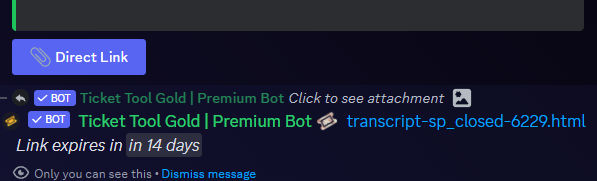
$transcripts
south lake
restive condor
Hey there! See below
thanks, so how does this change affect old transcripts without buttons?
iron nightBOT
Gave +1 Rep to @restive condor
restive condor
south lake
thanks, so how does this change affect old transcripts without buttons?
They should still work but may eventually stop working.
You will always be able to access them using the HTML file
south lake
I see, thank you so much 🥰
restive condor
No problem, have a nice day! 
Hello there! Use {user.name}
My apologies, use {author.name} instead
iron nightBOT
Gave +1 Rep to @restive condor
restive condor
Happy to help, have a nice day!
restive condor
 feral mortar
can someone brief me on the new prem system
feral mortar
can someone brief me on the new prem system
Hey there! What do you mean by that?
The Premium subscription system through discord?
 raven garnet
Why does whenever I press on dashboard my server doesn’t come up?
humble sequoiaBOT
Don't see your server in the dashboard?
Try using the Sync Servers button on your top center of the Dashboard page
You will possibly need to relog. Look below to see the steps on how to relog.
If this doesn't work
You should relog from the dashboard, you can do this by clicking here to log out immediately, and then log back in
Note:
You need one of these 3 things to access the dashboard.
1. Server Owner (Level: 6)
2. Server Administrator (Level: 4)
3. Dashboard Role (Level: 2)
:warning: You can check your level using the </permissionlevel:1029797400174399542> command on your Discord Server
If the bot's response is:
- @User is permission level: 0 (User)
You don't have any of the 3 levels required to access the server's dashboard
idle flint
raven garnet
Why does whenever I press on dashboard my server doesn’t come up?
Check this ^^
idle flint
raven garnet
Yeah I tried the sync thing
Have you tried running a $permissionlevel command?
raven garnet
But I made the server
idle flint
Are you the server owner?
raven garnet
I don’t think so
idle flint
As in your discord account owns the discord server?
raven garnet
No
idle flint
raven garnet
I don’t think so
That’s your issue then
raven garnet
Alright
idle flint
Take a read of the embed. It tells you the three instances that you will be able to access the dashboards
raven garnet
So if he gives me permission to the server do I get lvl 6
idle flint
No, level 6 is server owner
raven garnet
Oh
idle flint
You will get either level 4 or 2
raven garnet
Ok
idle flint
There is only ever one level 6 per server
 waxen stratus
Hello I was wondering if anyone could help me with successfully creating a ticket. What I mean is I can't locate how and where I put the main message. My ticket is about auditioning for being a moderator in my server, and I will need to have a main message. If you can't understand I can send a picture of what the 'main message' looks like
humble sequoiaBOT
━━ User's inquiry has been moved to a ticket ━━
 open aspen
Quick question, how can I make it so that I can allow people who create a ticket to send files and embed links?
restive condor
open aspen
Quick question, how can I make it so that I can allow people who create a ticket...
Hey there! Dashboard > Panel Configs > Permissions >Ticket Owner Permissions - Edit Opened > Attach files  & Send Embed Links
open aspen
tysm!!
 granite pier
waxen stratus
Hello I was wondering if anyone could help me with successfully creating a ticke...
granite pier
waxen stratus
Hello I was wondering if anyone could help me with successfully creating a ticke...
Are you talking about the category?
waxen stratus
granite pier
Are you talking about the category?
Oh no need to worry, I've already got it sorted out. Thanks for replying though!
iron nightBOT
Gave +1 Rep to @granite pier
granite pier
waxen stratus
Oh no need to worry, I've already got it sorted out. Thanks for replying though!
Okay, sorry for the late response.
 pseudo ravine
Could you please run the /debug command in that channel
 final halo
Hi how to make Dropdown menu for like 5 sections?
humble sequoiaBOT
The Drop-down menu or Select Menu replaces the buttons on your panel message and uses a drop-down menu with all of your panels. To set this up, go to your Panel Configs and select your main Panel.
<:Numbericons1:1018864164032225340> Enable Select Style
First you enable Select Style. Then you add an item in the Dropdown Editor. Now you can start editing your dropdown!
<:Numbericons2:1018864168041971712> Dropdown Editor
Each line in the dropdown editor represents a line in the drop down menu on discord. You can add more "Items", by clicking on 

First you select a panel. That's the panel this option will open a ticket for.  DONT select the same panel twice. Each option should have a different Panel
After that, you can put a Display. This is the title of this option and will appear in the drop down menu. The *Description can be set right after that, which will be below the title in grey.
Additionally you can select an emoji, that will be shown in front of each option. You can either manually input the ID of an emoji or select it in the selector.
Common Issues ⚠️
- Panel doesn't send? Make sure you have a valid emoji selected
- Option doesn't show up? Check if two options have the same panel in the DropDown Editor

$dropdown
 echo yacht
@final halo 
ionic path
Is there a way I can setup a confirm message upon deleting, like there is in closing?
restive condor
ionic path
Is there a way I can setup a confirm message upon deleting, like there is in clo...
Hey there! Unfortunately, no.
Feel free to suggest it in #💡│suggestions
If you'd like to avoid accidental uses of the button, disable/remove it so support members have to delete tickets via the $delete command
ionic path
Alright, thank you!
ionic path
restive condor
Hey there! Unfortunately, no.
Feel free to suggest it in <#921732979586375690>
...
Thankss
bruh
ionic path
restive condor
Hey there! Unfortunately, no.
Feel free to suggest it in <#921732979586375690>
...
Thanks
iron nightBOT
Gave +1 Rep to @restive condor
restive condor
😅
 hoary island
So i've noticed that both ways of purchasing premium are made trought discord and now i'm unsure what the support team meant by
"If you subscribe through Discord and want to transfer your subscription, the only way would be by cancelling it and re-subscribing on the new server.
If you purchase through PayPal or Crypto staff may move it for you" could someone explain which one allowed the staff team to transfer premium the one in app directory or the one where you purchase directly from the bot?
(before you ask i'm on the 7-day trial)
limber portal
hoary island
So i've noticed that both ways of purchasing premium are made trought discord an...
Discord subscriptions through the app directory cannot be transferred, must be cancelled and restarted
Purchasing directly through #🎫│make-a-ticket means staff may be able to move it
hoary island
limber portal
Discord subscriptions through the app directory cannot be transferred, must be c...
so if i want to purchase with paypal i need to make a ticket?
limber portal
hoary island
so if i want to purchase with paypal i need to make a ticket?
Yup, you have to pay 3 months at least in advance
humble sequoiaBOT
PayPal - paypal@tickettool.xyz
BitCoin - 3HhKKAdb9eEvCe2tvzB8bAa8nebHY6qcPA
LiteCoin - MEQX3knLAuotrKnvk3HDNBK5gdRn6PZhHy

Prepay/Direct Payment
To prepay send the payment using your desired method - Available options listed bellow.
⚠️ $18 per 3 months. ⚠️
$66 per year.
(If using the direct payment option, you need to be paying for at-least 3+ months.)
Regular Prices when paying within Discord:
$5.99/per month
Once your payment is sent let us know so we can confirm and get you your key.
- Purchases done with this method are non-refundable.
<:paypal:924596360840372234> Paypal ("Goods and Services" or "Family and Friends")
paypal@tickettool.xyz
<:bitcoin:924638849135689749> BTC - Bitcoin
3HhKKAdb9eEvCe2tvzB8bAa8nebHY6qcPA
<:Litecoin:972176945972383815> LTC - LiteCoin
MEQX3knLAuotrKnvk3HDNBK5gdRn6PZhHy
I sent the payment now what?
After you send the payment, please send a screenshot with proof of payment, our <@&615146349700186112> will verify your payment and will get you setup. For crypto payments, we are waiting for at least ONE verification.

All prices in USD - 3 months min for direct payment
limber portal
Not really sure what you mean by an automatic paypal payment
limber portal
No
hoary island
bet
 cosmic shore
Can someone help me? So how do I ghet the ticket to send under the catagory I want?
humble sequoiaBOT
1. Go into your Dashboard
2. Open your Panel Configs tab
3. Select the panel you want to grant access to
4. Open the Category options menu
5. Select the categories of your preference
6. Save changes
limber portal
cosmic shore
Can someone help me? So how do I ghet the ticket to send under the catagory I wa...
^^
cosmic shore
where is that
oh
@limber portal is the panel the catagory
I DID IT
I DID IT!!!
tysm!!
thanks @limber portal
iron nightBOT
Gave +1 Rep to @limber portal
limber portal
cosmic shore
thanks <@1065295463089180763>
Np
 midnight gazelle
Is there any way to add alternate button options to a ticket beyond just the close button?
My goal is to give moderators options like Accept/Decline rather than just "Close" for an open ticket
restive condor
midnight gazelle
Is there any way to add alternate button options to a ticket beyond just the clo...
Hey there! What do you mean by that? Would button would you like to add?
midnight gazelle
just edited to elaborate
Basically I'm trying to use it more for an application system than as a support ticket system
restive condor
midnight gazelle
Basically I'm trying to use it more for an application system than as a support ...
Got it, no that's not possible
You can use tickets and forms for the applications but not as a suggestion/application method.
Feel free to suggest it in #💡│suggestions
midnight gazelle
ok thanks for the quick response 👍
 limber portal
jade topaz
help https://prnt.sc/v-MQvKaUFGYY
limber portal
jade topaz
help https://prnt.sc/v-MQvKaUFGYY
__ «You don't have permissions to use this»__
Are your members seeing this message when they try to create a ticket?
You may have accidentally denied them permission to use the Create Ticket button.
Look in the following places in your server's dashboard:
👉 Server Configs -> Blacklist Roles
Any roles there will be unable to interact with the bot in any way, including creating tickets.👉 Panel Configs -> Buttons -> Create Ticket -> Support team only
If this is enabled👉 Panel Configs -> Buttons -> Create Ticket -> Disabled Roles
Any roles there will be unable to use the button.
 normal berry
When a ticket is claimed only the user that made the ticket, the person who claimed it and admins can see the channel, how do i allow moderators to se the channel aswell without changing the role permission of moderator?
jade topaz
I try to send a message to a channel and its says Denied it and I allowed it to view and its still doesnt send the message.
restive condor
normal berry
When a ticket is claimed only the user that made the ticket, the person who clai...
Hey there! Make sure:
-
"Only the user who claimed and ticket owner can use ticket actions" is disabled

-
"Change Other Support team members permissions when claimed" is also disabled
```Dashboard>Panel Configs>Claiming`` for both
normal berry
ok thanks!
restive condor
jade topaz
I try to send a message to a channel and its says Denied it and I allowed it to ...
Hey there! May you run $debug in the channel you're trying to send the panel?
normal berry
thanks @restive condor
iron nightBOT
Gave +1 Rep to @restive condor
jade topaz
restive condor
Hey there! May you run ``$debug`` in the channel you're trying to send the panel...
I did that and it didn't worked.
restive condor
jade topaz
I did that and it didn't worked.
TicketTool is missing Send Messages permission for that channel
 jade topaz
restive condor
TicketTool is missing ``Send Messages`` permission for that channel
jade topaz
restive condor
TicketTool is missing ``Send Messages`` permission for that channel
Like the role or the Bot?
restive condor
jade topaz
Like the role or the Bot?
Doesn't really matter
Whichever you've been using
jade topaz
restive condor
TicketTool is missing ``Send Messages`` permission for that channel
It's shows up green for the role and the bot.
restive condor
jade topaz
It's shows up green for the role and the bot.
For that channel's permission?
jade topaz
restive condor
For that channel's permission?
I went to the role and its shows green and the Bot Ticket Tool has the Role.
restive condor
jade topaz
I went to the role and its shows green and the Bot Ticket Tool has the Role.
But did you check for the channel permissions or the role permissions?
jade topaz
restive condor
But did you check for the channel permissions or the role permissions?
Yes, The role permission and No for the Channel Permission.
normal berry
restive condor
Hey there! Make sure:
- "Only the user who claimed and ticket owner can use tick...
That kind of worked but it also gave everyone else access to the claimed ticket, i only want the mods to have access not the entire server
restive condor
jade topaz
Yes, The role permission and No for the Channel Permission.
You must check for the channel permissions as channel Permissions override role permissions.
To go to the channels permissions: Right click on the channel > Edit Channel > Permissions
restive condor
normal berry
That kind of worked but it also gave everyone else access to the claimed ticket,...
Dashboard > Panel Configs > Permissions > Everyone Role permissions - Edit Opened > View channels 
normal berry
Thats already turned off, the ticket in question people have access to is a certain role aswell as mod and when i do the other thing mods get access but so do the other roles
restive condor
normal berry
Thats already turned off, the ticket in question people have access to is a cert...
So it's not everyone who can see the ticket, just a specific role (besides mods, admins..etc) ?
normal berry
restive condor
So it's not everyone who can see the ticket, just a specific role (besides mods,...
yes and i cant figure out how to give mod perm to see claimed but not the other role
restive condor
normal berry
yes and i cant figure out how to give mod perm to see claimed but not the other ...
Is that role listed as an additional role (or support role) under Dashboard > Panel Configs > General ?
normal berry
Yes
jade topaz
restive condor
You must check for the channel permissions as channel Permissions override role ...
I just allowed the Bot and the Role to the channel.
restive condor
jade topaz
I just allowed the Bot and the Role to the channel.
Perfect, check if it lets you post now
jade topaz
restive condor
Perfect, check if it lets you post now
I just press send and its not sending into the channel.
restive condor
normal berry
Yes
I see, I'll have to double check if you can select different permissions for support & additional roles when claimed.
But I'm pretty sure you cannot
normal berry
ok thanks
restive condor
normal berry
ok thanks
Unfortunately, you cannot have different permissions when claiming for support & additional roles.
They are both treated as support roles
normal berry
Ok thanks for the help
restive condor
jade topaz
I just press send and its not sending into the channel.
Same error message?
jade topaz
restive condor
Same error message?
 restive condor
jade topaz
restive condor
jade topaz
Run $debug again please in that same channel 🙏
TicketTool is still missing SEND MESSAGES permission for that channel
 jade topaz
restive condor
Run ``$debug`` again please in that same channel 🙏
jade topaz
restive condor
Run ``$debug`` again please in that same channel 🙏
Did that and it the same error message and does nothing.
restive condor
jade topaz
Did that and it the same error message and does nothing.
How exactly did you add the permissions?
jade topaz
restive condor
How exactly did you add the permissions?
I went to server settings and press permissions and allowed view and Send Messages was already green.
restive condor
jade topaz
I went to server settings and press permissions and allowed view and Send Messag...
Please give the permissions for the channel, it already has it enabled for it's role.
As I told you earlier, channel settings override role settings and TicketTool currently doesn't have SEND MESSAGES permission for that channel.
Go to the channel's permission (not role) and set SEND MESSAGES to
If you hover over the channel's name (in the channel list) a little settings icon will appear, click it to go the channel settings, from there go into the PERMISSIONS tab
Or, right click on the channel > Edit channel > Permissions
granite pier
jade topaz
I went to server settings and press permissions and allowed view and Send Messag...
Yes, you may have only enabled the permission for the actual bot. However, please review your support channel settings And make sure that ticket tool has permission to send messages.
Send Messages: ✅
If the issue persists don’t hesitate to return back here.
pseudo ravine
Please don’t interrupt if someone is already helping them
Especially if they’re a support member
granite pier
I was only offering additional support in case they found that more confusing. As, mine seems less complex and only 1 sentence. So politely, please don’t interrupt me trying to help.
pseudo ravine
If they did require additional support, they can ask the person who was helping them
jade topaz
Thanks @restive condor
iron nightBOT
Gave +1 Rep to @restive condor
granite pier
It said to ignore it if you are thanking the support team.
jade topaz
granite pier
It said to ignore it if you are thanking the support team.
I just giving a rep to the person.
granite pier
I know, you just replied to the message with ‘.’ So I was just saying to ignore it because you were indeed thanking the support team
feral mortar
restive condor
Hey there! What do you mean by that?
Hi, like we could get Prem via votes right but since that's down now do we just directly purchase or is there another way
humble sequoiaBOT
PayPal - paypal@tickettool.xyz
BitCoin - 3HhKKAdb9eEvCe2tvzB8bAa8nebHY6qcPA
LiteCoin - MEQX3knLAuotrKnvk3HDNBK5gdRn6PZhHy
Prepay/Direct Payment
To prepay send the payment using your desired method - Available options listed bellow.
⚠️ $18 per 3 months. ⚠️
$66 per year.
(If using the direct payment option, you need to be paying for at-least 3+ months.)
Regular Prices when paying within Discord:
$5.99/per month
Once your payment is sent let us know so we can confirm and get you your key.
- Purchases done with this method are non-refundable.
<:paypal:924596360840372234> Paypal ("Goods and Services" or "Family and Friends")
paypal@tickettool.xyz
<:bitcoin:924638849135689749> BTC - Bitcoin
3HhKKAdb9eEvCe2tvzB8bAa8nebHY6qcPA
<:Litecoin:972176945972383815> LTC - LiteCoin
MEQX3knLAuotrKnvk3HDNBK5gdRn6PZhHy
I sent the payment now what?
After you send the payment, please send a screenshot with proof of payment, our <@&615146349700186112> will verify your payment and will get you setup. For crypto payments, we are waiting for at least ONE verification.
All prices in USD - 3 months min for direct payment
pseudo ravine
If you’re going to purchase, please make a billing ticket in #🎫│make-a-ticket
 novel musk
Give me all the ways to get premium for free
jade topaz
if i delete panel by wrong can i back it ?
 cinder gull
PLEASE come my ticket support arabic
civic wagon
jade topaz
if i delete panel by wrong can i back it ?
No
restive condor
novel musk
Give me all the ways to get premium for free
Just #🎉│giveaways at the moment and buying from the economy shop #🤖│bot-spam
restive condor
cinder gull
Is there a log menu on the dashboard?
Hey there! Yes, Dashboard > Dashboard History
 flint wren
Hi, how do I ping @ here for ticket embeds? So when someone opens a ticket, in the first message of the ticket embed it send @ here
restive condor
flint wren
Hi, how do I ping @ here for ticket embeds? So when someone opens a ticket, in t...
Hey there! See below
humble sequoiaBOT
1. Go into your Dashboard
2. Open your Panel Configs tab
3. Select the panel you want to ping your support on
4. Open the Ticket options menu
5. Click on Edit Ticket Message
6. In the Message Content use one of the role mention syntax (**{@Role Name}**/**{Role ID}**)
7. Save changes
Note: For this to work properly, Ticket Tool requires the Mention Everyone permission. Or the role must have the Allow anyone to @mention this role setting enabled

 dense plume
I got a problem with my tickets it doesn't ping the role but you can see the ping in the ticket I tried with the name and role ID
 spring vigil
Hi, when the premium for votes will be enable?
limber portal
dense plume
I got a problem with my tickets it doesn't ping the role but you can see the pin...
Does ticket tool have the mention @everyone / @here permission?
limber portal
spring vigil
Hi, when the premium for votes will be enable?
Hey, it’s not coming back but the dev is looking to replace it with an alternative system #📣│bot-news message
iron nightBOT
Gave +1 Rep to @limber portal
limber portal
Np
jade topaz
how can we transfer ticketool prem from one server to another?
 fallow ingot
Is your subscription through Discord?
sweet merlin
my ticket tool its bugged, when someone open a ticket its ok, but when someone else create a ticket the other goes to the ticket of the first person
ooooh
my tickets arent privated
someone help?
someone pleasse i need
how to make it private?
 humble sequoiaBOT
How to edit `@everyone`'s permissions
Head over to your Dashboard ➞ Panel Configs ➞ Permission Options ➞ Everyone Role Opened/Closed and customize the base permissions for everyone in your tickets.
Note: This set of permissions may be affected by the overrides of Support Team, Additional Roles, and User permissions.
 sweet merlin
oh
fallow ingot
If your tickets are viewable by everyone, then take the steps above to fix it.
iron nightBOT
Gave +1 Rep to @fallow ingot
fallow ingot
No worries, happy new year 🥳
 wintry valve
Is there a way to add a cooldown for tickets per day per user ? I have some opening multiple tickets a day .
restive condor
wintry valve
Is there a way to add a cooldown for tickets per day per user ? I have some open...
Hey there! No.
You can only limit how many tickets a user can open at the same time. With that in mind, if you don't close their ticket they won't be able to create new ones.
You could also blacklist their role and they won't be able to open any tickets.
You can also play around with the Ticket Schedule (Dashboard > Panel Configs > Limit) so tickets can only be opened between/at certain hours for a role. (Premium feature  )
)
You can suggest it in #💡│suggestions
 runic salmon
accidently deleted one of the tickettol messages in discord (not thru tickettool). i have the text i need how do i re-publish the message from tickettool
idle flint
runic salmon
accidently deleted one of the tickettol messages in discord (not thru tickettool...
Depends on what the "message" was in the first place? Was it your panel message?
(where people click to open a ticket)
runic salmon
yes
idle flint
Head to the Dashboard and hit Send on your panel (or use /panel command in your Discord)
humble sequoiaBOT
First you will want to invite the bot to your server. Once the bot is in your server, you can manage your server in the dashboard.

To create a panel we are going to need to head over to the Panel Configs Tab on the Dashboard.
Once at the dashboard we will need to click Create Panel.
Enter a panel name (Fill in any optional settings you want).
Click Create Panel and you are ready to get started with configuring your panel.
An example of a creating a panel is shown below.

Once the panel has been created, use the blue Send button and select the channel you want the panel to be sent to.
The Panel wasn't send
Use the </debug:ID> command to diagnose possible permission issues with the bot.
 idle flint
runic salmon
yes
idle flint
runic salmon
yes
The third step listed above
runic salmon
idle flint
The third step listed above
christ. ok my heart attack is over. thanks lol
iron nightBOT
Gave +1 Rep to @idle flint
runic salmon
i was trying to clean stuff up between tickettol and mee6 and did the wrong thing
jade topaz
fallow ingot
Is your subscription through Discord?
Yes
theres no way?, i lost os of my old server and now i want it to be in my new server
limber portal
jade topaz
theres no way?, i lost os of my old server and now i want it to be in my new ser...
Unfortunately discord subscriptions cannot be transferred, it will have to be cancelled and restarted in the new one
jade topaz
why make through dc make throguh tt fr
limber portal
jade topaz
why make through dc make throguh tt fr
You can also purchase directly through the bot
humble sequoiaBOT
PayPal - paypal@tickettool.xyz
BitCoin - 3HhKKAdb9eEvCe2tvzB8bAa8nebHY6qcPA
LiteCoin - MEQX3knLAuotrKnvk3HDNBK5gdRn6PZhHy
Prepay/Direct Payment
To prepay send the payment using your desired method - Available options listed bellow.
⚠️ $18 per 3 months. ⚠️
$66 per year.
(If using the direct payment option, you need to be paying for at-least 3+ months.)
Regular Prices when paying within Discord:
$5.99/per month
Once your payment is sent let us know so we can confirm and get you your key.
- Purchases done with this method are non-refundable.
<:paypal:924596360840372234> Paypal ("Goods and Services" or "Family and Friends")
paypal@tickettool.xyz
<:bitcoin:924638849135689749> BTC - Bitcoin
3HhKKAdb9eEvCe2tvzB8bAa8nebHY6qcPA
<:Litecoin:972176945972383815> LTC - LiteCoin
MEQX3knLAuotrKnvk3HDNBK5gdRn6PZhHy
I sent the payment now what?
After you send the payment, please send a screenshot with proof of payment, our <@&615146349700186112> will verify your payment and will get you setup. For crypto payments, we are waiting for at least ONE verification.
All prices in USD - 3 months min for direct payment
 wicked dune
If I delete a ticket, can I recover what was written on it?
fallow ingot
Does your panel have transcripts enabled?
if you had transcripts enabled during the time that the ticket was closed and the channel you specified is still available, you might be able to look it up there.
 dark bough
سلام عليكم هنا تقديم
 robust sandalBOT
dark bough
سلام عليكم هنا تقديم
robust sandalBOT
dark bough
سلام عليكم هنا تقديم
Peace be upon you, here is an introduction
 Arabic (ar) → English (en)
 wise garnet
Hey Why was I banned when I didn't have a hack or bug? I really want to play blox fruit Please help me check pls
Name: leudbnswo Thank you
 humble sequoiaBOT
⚠️ You're in the wrong place
We provide support for Ticket Tool Discord bot and cannot help you with whatever issue you have.
- We don't know which Support Team you should contact to get this issue resolved, and unfortunately we won't be able to accurately tell you.
If you don't have any further questions regarding our bot Ticket Tool, please close this ticket
granite pier
wise garnet
Hey Why was I banned when I didn't have a hack or bug? I really want to play blo...
Blox fruit has nothing to do with ticket tool.
 orchid stag
Hey, does anyone know how to make the ticket visible only to the server admins and the person that has opened the ticket?
granite pier
orchid stag
Hey, does anyone know how to make the ticket visible only to the server admins a...
Dashboard —> General —> support team roles
jade topaz
Greetings, I had a few doubts regarding the ticket tool premium subscription, which I didn't find in the FAQ documentation.
- Is the purchase through discord only?
- Supposing that I will have to transfer accounts frequently, how long does it take for the transfer to occur? (as i see there isn'tan automafic recovery system)
- If I purchase the subscription on an alt account, and setup ticket tool on a server and then remove admin permissions from it, would the bot still function normally or would I need to have admin permissions?
granite pier
jade topaz
Greetings, I had a few doubts regarding the ticket tool premium subscription, wh...
Please ask your question in the premium section.
jade topaz
Alr, my bad
granite pier
No worries.
limber portal
jade topaz
Greetings, I had a few doubts regarding the ticket tool premium subscription, wh...
Hey,
-
You can pay through discord or direct through this server
-
Transferring accounts isn’t really something done
-
The bot would function normally
jade topaz
limber portal
Hey,
1. You can pay through discord or direct through this server
2. Transferr...
 limber portal
jade topaz
limber portal
jade topaz
This means its linked to the email, not the account
Now you can buy through the bots profile, I believe it is under the email associated with the account. Regardless, if you loose access to that account you will not be able to manage it as you manage discord subscriptions in user settings > subscriptions
jade topaz
I see, thanks a bunch
limber portal
Buying directly through this server and not through discord may lead transfers to be possible at the discretion of the billing team
jade topaz
thanks @limber portal
iron nightBOT
Gave +1 Rep to @limber portal
limber portal
No problem
humble sequoiaBOT
How to edit `@everyone`'s permissions
Head over to your Dashboard ➞ Panel Configs ➞ Permission Options ➞ Everyone Role Opened/Closed and customize the base permissions for everyone in your tickets.
Note: This set of permissions may be affected by the overrides of Support Team, Additional Roles, and User permissions.
limber portal
orchid stag
Hey, does anyone know how to make the ticket visible only to the server admins a...
Hey, check
Make sure @everyone is denied for view channel
pseudo ravine
granite pier
Please ask your question in the premium section.
They can ask their question in here if they wish, they don’t have to ask in #premium-support
orchid stag
limber portal
Make sure @everyone is denied for view channel
that worked, thank you very much👍
iron nightBOT
Gave +1 Rep to @limber portal
limber portal
Np
 cunning forge
how do i use this bot in my server lol
ive added it an didk what to do now
idk how to set it up as a ticket thingy
humble sequoiaBOT

You can check our documentation here;
You can also check #📂│information for the basic setup, or run the </setup:1025379472167403530> command within #🤖│bot-spam to find information on how to setup Ticket Tool.
Alternatively, you can use the /setup command with Ticket Tool in your own server to setup the basics of Ticket Tool!
Our documentation contains all the info you need about the bot to be able to setup and configure the bot however you like.
slender minnow
@cunning forge
cunning forge
tyyyy
 nocturne idol
Any chance I can get some help please
restive condor
nocturne idol
Any chance I can get some help please
Hello, how can we help?
nocturne idol
Hi Dan, I just need help setting up my 3rd fire stick please, I am having trouble getting the correct app downloaded.
humble sequoiaBOT
⚠️ You're in the wrong place
We provide support for Ticket Tool Discord bot and cannot help you with whatever issue you have.
- We don't know which Support Team you should contact to get this issue resolved, and unfortunately we won't be able to accurately tell you.
If you don't have any further questions regarding our bot Ticket Tool, please close this ticket
 compact forge
Hi everyone ! I need help with an invalid body form error.
I want to use a custom animated emoji on the button to create a ticket but it returns me this error:
Failed: Invalid Form Body components[0].components[0].emoji.name[BUTTON_COMPONENT_INVALID_EMOJI]: Invalid emoji
Did i missed something? Thanks !
 humble sequoiaBOT
This error indicates you have selected an invalid emoji, i.e. an emoji the bot isn't capable of using, in a button field
Which Emoji?
This depends upon which action the error is appearing, the most common cases are the Create Ticket button or one of your Dropdown emojis. You can visit your Button's List to find all available buttons and find the conflicting one by yourself.
Why doesn't the bot accept it as valid?
- You selected an emoji that doesn't exist anymore, i.e. that has been deleted
- You wrote text there, instead of an emoji (or in addition to an emoji)
- You entered a code for a custom emoji from a server that the bot is not a member of
- You entered a custom emoji code incorrectly
- You're on iPhone and entered an emoji using the phone's emoji pad (use the emoji selector in the website instead)
limber portal
^^
compact forge
oh so bot cannot use custom emoji's for a button it's right?
limber portal
You can, you just need to insert the emojis id
you can find that with the id command
$id
limber portal
oh well lol, you can use that in your own server
compact forge
aight i'll try it
limber portal
Copy and paste the entire top section
 compact forge
thanks u so much !
limber portal
Np
compact forge
thanks @limber portal i guess?
iron nightBOT
Gave +1 Rep to @limber portal
compact forge
yup ^^
 sweet delta
Is there a way to see what tickets a user have answered? Or look up transcripts by username?
limber portal
sweet delta
Is there a way to see what tickets a user have answered? Or look up transcripts ...
You can see statistics in dashboard > statistics
sweet delta
limber portal
You can see statistics in dashboard > statistics
Alright thank you!
iron nightBOT
Gave +1 Rep to @limber portal
limber portal
Np
 worn helm
hello! quick question, I want a warning message to pop up when someone clicks on a button to open a support ticket. For example, I want another message to pop up asking them to confirm that they want to open a ticket. How could I do that?
humble sequoiaBOT
A Discord Form lets the user answer individual questions in a pop-up Form, which then displays the answers in the ticket message. This can save time if you already know what you want to ask the user.
Setup Forms
Forms can be enabled under Panel Settings > Form Options > Edit Forms Options. In the new pop-up window, you can now enable and edit your own Form.
Form Options
You can add up to 5 questions in the Discord form. This is a Discord limitation. Each question can have a placeholder in the input field, a minimum and maximum input, multi-line, and also the option to have the answer required.
Options
Question Title ➞ Your Question goes here
Question Placeholder ➞ The placeholder text in the input field
Required ➞ If enabled, the user has to answer this question, to submit the form
Multi-Line Input ➞Allows the user to input multiple lines
Minimum and Maximum Input ➞ Set a minimum and maximum input value for the user
Displaying the Answer
To display the answers from the user, you need to enable Auto display form results on the ticket message as an additional embed
If you don't want a second embed, go into your Panel Configs > Ticket Options > Edit Ticket Message. You use the variable {create.form.x} and replace x with the number of your question. For example, the response to Question 5 can be displayed with {create.form.5}.
limber portal
worn helm
hello! quick question, I want a warning message to pop up when someone clicks on...
^^
worn helm
limber portal
^^
thank you! I'll check that out :)
iron nightBOT
Gave +1 Rep to @limber portal
limber portal
Np
worn helm
limber portal
Np
Is there another way to do it where it just asks another question and people have the option to click a confirm or deny button?
limber portal
worn helm
Is there another way to do it where it just asks another question and people hav...
Not currently, but has been suggested
 broken prawn
I had opened ticket, i lefr from the server but now I can't open New one because bot write "you have ticket" admin tried to close this ticket
limber portal
broken prawn
I had opened ticket, i lefr from the server but now I can't open New one because...
You’ll have to wait for staff from that server to remove your currently open ticket
cursive phoenix
Please do not ping staff as its against our rules ( #📂│information )
Someone will assist you as soon as they can, please be patient
 vestal haven
how to bot auto delete ticket after user closed it
 sweet fern
am i able to change the colour of the embed? and the text that says “To create a ticket react with 📩"?
restive condor
vestal haven
how to bot auto delete ticket after user closed it
Hey there! Disable TWO STEP TICKET under Dashboard > Panel Configs > General
restive condor
sweet fern
am i able to change the colour of the embed? and the text that says “To create a...
Hey there! Yes, but they are both premium features
To change the colour of the embed and the text: Dashboard > Panel Configs > Messages > Edit Panel Message
vestal haven
vestal haven
.
@restive condor
restive condor
vestal haven
<@795710289425334303>
You restrict the CREATE TICKET button to the support team only, or add the 'members' role as a disabled role. The bot will reply with You don't have permission to use this - You can't customise the message.
(Dashboard > Panel Configs > Buttons > Create Ticket - Edit button) - You can't customise the message.
You can also blacklist the entire server, that way no one will be able to create new tickets or use custom commands. (Dashboard > Server Configs > Server Blacklist)
Or, you can enable the Scheduling section and select during which hours/days you'd like your members to be able to open tickets You can select nothing to block all time slots Dashboard > Panel Configs > Limits - You can customise the message.
1st option is probably the easiest
 flint bone
Good evening, when a player opens a ticket he is not allowed to see the messages I send, someone help me
 hallow nymph
hello all! Was wondering why my ticket tool started placing tickets in the wrong channel, it seemed like we got too many in my server on NY eve, we adjusted the limit to 500 and they still would open at the top
nevermind i got it 🙂
 versed panther
How can I make a panel with several buttons?
open aspen
How can I make it so that members can't close their own ticket
echo yacht
open aspen
How can I make it so that members can't close their own ticket
Dashboard > Panel Configs > Buttons > Close Ticket > Support Team Only change it to
 sweet crater
The closed tickets arent moving to the "Closed ticket category". What to do ?
 honest kestrel
Is there any way I can make the panel send by using a command?
Eg $sendsupport sends the panel and posts it in the channel specified on the Dashboard.
idle flint
honest kestrel
Is there any way I can make the panel send by using a command?
Eg $sendsupport ...
use /panel
you can then specify what panel you want to send etc.
honest kestrel
idle flint
you can then specify what panel you want to send etc.
How would I get the panel id?
idle flint
honest kestrel
How would I get the panel id?
On the dashboard, you will see your panels have a number next to them (1 | ... 2 | ... 3 | ... etc.) That number is the panel ID.

 languid apex
Is there like a /move command or something similar that moves a ticket to a different category?
limber portal
languid apex
Is there like a /move command or something similar that moves a ticket to a diff...
not currently
languid apex
Thanks
limber portal
np
 limber portal
 spare moth
__ «You don't have permissions to use this»__
Are your members seeing this message when they try to create a ticket?
You may have accidentally denied them permission to use the Create Ticket button.
Look in the following places in your server's dashboard:
👉 Server Configs -> Blacklist Roles
Any roles there will be unable to interact with the bot in any way, including creating tickets.👉 Panel Configs -> Buttons -> Create Ticket -> Support team only
If this is enabled👉 Panel Configs -> Buttons -> Create Ticket -> Disabled Roles
Any roles there will be unable to use the button.
 uncut birch
 limber portal
uncut birch
limber portal
uncut birch
Do you need ticket tool help?
uncut birch
limber portal
Do you need ticket tool help?
yes
uncut birch
limber portal
Do you need ticket tool help?
I don't know English and I don't know how to create tickets in a server.
limber portal
uncut birch
I don't know English and I don't know how to create tickets in a server.
You can create a ticket in a server with that servers create a ticket button
$articket
humble sequoiaBOT

فريق الدعم الفني العربي
عميلنا العزيز ان كنت تبحث عن مساعدة يرجى فتح تكت خاص بفريق الدعم الفني العربي
اذهب الى#🎫│make-a-ticket
ثم قم بلضغط على الايموجي الاتي (🇯🇴)
uncut birch
Can you create tickets for me in the server because I can't create them
limber portal
أنصح بعمل تذكرة دعم باللغة العربية
uncut birch
limber portal
أنصح بعمل تذكرة دعم باللغة العربية
I made a ticket, but no one answered me.
 hollow stirrup
after you edit the ticket message etc do you have to delete the ticket message or will it automatically update
limber portal
hollow stirrup
after you edit the ticket message etc do you have to delete the ticket message o...
If you want a panel message to be shown, you have to resend the panel. Otherwise the new message will take effect as soon as it is triggered next
hollow stirrup
limber portal
If you want a panel message to be shown, you have to resend the panel. Otherwise...
like the message that says
“click here to create ticket”
limber portal
Yep, that would have to be resent if you updated it
hollow stirrup
limber portal
Yep, that would have to be resent if you updated it
how do you resend?
limber portal
hollow stirrup
how do you resend?
The ‘send’ button under the panel name at the top of the dashboard
hollow stirrup
limber portal
The ‘send’ button under the panel name at the top of the dashboard
thank you!
iron nightBOT
Gave +1 Rep to @limber portal
limber portal
Np
 limber portal
hollow stirrup
limber portal
hollow stirrup
Dashboard > panel configs > messages > edit panel message
humble sequoiaBOT
PayPal - paypal@tickettool.xyz
BitCoin - 3HhKKAdb9eEvCe2tvzB8bAa8nebHY6qcPA
LiteCoin - MEQX3knLAuotrKnvk3HDNBK5gdRn6PZhHy
Prepay/Direct Payment
To prepay send the payment using your desired method - Available options listed bellow.
⚠️ $18 per 3 months. ⚠️
$66 per year.
(If using the direct payment option, you need to be paying for at-least 3+ months.)
Regular Prices when paying within Discord:
$5.99/per month
Once your payment is sent let us know so we can confirm and get you your key.
- Purchases done with this method are non-refundable.
<:paypal:924596360840372234> Paypal ("Goods and Services" or "Family and Friends")
paypal@tickettool.xyz
<:bitcoin:924638849135689749> BTC - Bitcoin
3HhKKAdb9eEvCe2tvzB8bAa8nebHY6qcPA
<:Litecoin:972176945972383815> LTC - LiteCoin
MEQX3knLAuotrKnvk3HDNBK5gdRn6PZhHy
I sent the payment now what?
After you send the payment, please send a screenshot with proof of payment, our <@&615146349700186112> will verify your payment and will get you setup. For crypto payments, we are waiting for at least ONE verification.
All prices in USD - 3 months min for direct payment
limber portal
@jade topaz ^^
hollow stirrup
limber portal
Dashboard > panel configs > messages > edit panel message

it won’t let me
limber portal
hollow stirrup
Click on the arrow next to embed editor
However a lot of customisation idiots are premium
*options

 lunar solar
Panel configs --> Panel --> Edit Panel Message (Green button) --> Embed Editor --> Colour --> Either enter hex code or use our friendly colour selector
vestal haven
thank u
lunar solar
no worries
humble sequoiaBOT
Within all the messages the bot sends (both embeds and text) you can mention either channels, roles, or even users, these mentions will only send a notification to the user if they are used within a text field, e.g: a role mentioned in an embed won't ping at all the users who have that role.
For mentioning a role you can use one out of three options:
{@Role Name} ➞ Which is Case Sensitive.
{RoleID} ➞ Replace RoleId with the Id of the role you are trying to ping.
<@&RoleID> ➞ Discord's native syntax to ping roles.
<#ChannelID> ➞ Mention a channel by its ID.
<@UserID> ➞ Mention a user by its ID.
lunar solar
^
 unborn hornet
Thanks
vestal haven
hey so
i have two servers
one with all the tickets, and i want to copy it to my secondary server
how i can do that, is possible?
@lunar solar
humble sequoiaBOT
The Backup and Restore feature allows you to transfer your panels, tags, and all settings to a new server, even if the server the settings were created has been deleted! You will want to copy the whole key.
First, go to your server's Dashboard ➞ then Server Configs ➞ under Config Backup & Restore (Server Owner Only) click on Old version can be found here and generate a new backup key by pressing the green button. Now, a key should be generated in the box above. You may need to refresh the page to see this.
Once you have your backup key, navigate to the same page on the new server. Copy the key on the Restore from backup key field.
Now you can choose what you want to copy. Finally, press the green Restore Configs button.
IMPORTANT NOTE
- We suggest you keep this backup key somewhere safe, in case your server is deleted so you are able to recover your panel's settings.
- This feature is only usable by the server's owner
$backup
limber portal
vestal haven
one with all the tickets, and i want to copy it to my secondary server
^^
humble sequoiaBOT
PayPal - paypal@tickettool.xyz
BitCoin - 3HhKKAdb9eEvCe2tvzB8bAa8nebHY6qcPA
LiteCoin - MEQX3knLAuotrKnvk3HDNBK5gdRn6PZhHy
Prepay/Direct Payment
To prepay send the payment using your desired method - Available options listed bellow.
⚠️ $18 per 3 months. ⚠️
$66 per year.
(If using the direct payment option, you need to be paying for at-least 3+ months.)
Regular Prices when paying within Discord:
$5.99/per month
Once your payment is sent let us know so we can confirm and get you your key.
- Purchases done with this method are non-refundable.
<:paypal:924596360840372234> Paypal ("Goods and Services" or "Family and Friends")
paypal@tickettool.xyz
<:bitcoin:924638849135689749> BTC - Bitcoin
3HhKKAdb9eEvCe2tvzB8bAa8nebHY6qcPA
<:Litecoin:972176945972383815> LTC - LiteCoin
MEQX3knLAuotrKnvk3HDNBK5gdRn6PZhHy
I sent the payment now what?
After you send the payment, please send a screenshot with proof of payment, our <@&615146349700186112> will verify your payment and will get you setup. For crypto payments, we are waiting for at least ONE verification.
All prices in USD - 3 months min for direct payment
limber portal
$66 as it says there
jade topaz
Wow

 pseudo ravine
Hey there. You can only change the Ticket closed by {user} message if you have premium
 warm loom
Can someone teach me how to put custom emoji on the ticket button
limber portal
warm loom
Can someone teach me how to put custom emoji on the ticket button
Hey, you would add the emojis id
You can find the id with tt’s $id command
Copy and paste the top part
 warm loom
limber portal
Hey, you would add the emojis id
You can find the id with tt’s $id command
Cop...
warm loom
limber portal
Hey, you would add the emojis id
You can find the id with tt’s $id command
Cop...
thx
iron nightBOT
Gave +1 Rep to @limber portal
limber portal
warm loom
thx
Np
uncut birch
 uncut birch
uncut birch
uncut birch
What should I do to solve this problem?
lunar solar
Send /debug in the channel you are trying to send to
uncut birch
lunar solar
Send /debug in the channel you are trying to send to
I didn't understand what you mean? And what is the channel + everything is corrected
lunar solar
In the Discord channel you have selected run the /debug command
 lunar solar

Ticket tool doesn't have send message priviliges to that channel
you need to grant it that permission in the channel settings

 uncut birch
ok
uncut birch
lunar solar
Try this again
Good, it's working
lunar solar
No worries
 next karma
I can only find my old user name can you provide me with the correct one please
limber portal
next karma
I can only find my old user name can you provide me with the correct one please
Is this related to ticket tool?
 viscid marsh
Why is the bot creating new tickets at the top of my server (under no category)? In the settings it's still set to open new tickets in the category, and it still does sometimes, but recently it's started randomly not putting the tickets in the category.
restive condor
viscid marsh
Why is the bot creating new tickets at the top of my server (under no category)?...
Hey there! Discord has a limit of 50 channels per category, TicketTool limits it to 45.
Once you hit 45 channels, tickets will be created oustide categories. Unless, you set up Overlflow Categories. See below
humble sequoiaBOT
Discord only allows to stack up to 50 channels per category, meaning that if you have already 50 tickets in one category, the bot won't be able to place a ticket in that category, for such reason Ticket Tool counts with overflow categories, meaning that if your main category is filled, the bot will go ahead and place the ticket on the next one available, simply choose a second category in the category pickers:
viscid marsh
restive condor
Hey there! Discord has a limit of 50 channels per category, TicketTool limits it...
Ohhhh that makes a lot of sense. I'll have to be more vigilant with deleting tickets and setting up overflow categories then! Thank you very much.
iron nightBOT
Gave +1 Rep to @restive condor
restive condor
No problem, happy to help
 latent ice
Hello i want a message automatic when someone open a ticket is it possible ?
limber portal
latent ice
Hello i want a message automatic when someone open a ticket is it possible ?
Hey there, ticket tool will already send a message in newly created tickets
It can be customised in dashboard > panel configs > messages > edit ticket message
vestal haven
hey
is there any way
to put the ticket creator id
on the channel description?
@lunar solar
limber portal
Ticket tool currently doesn’t have an option to edit the channel topic
And please don’t ping staff, it’s against the rules
vestal haven
ok
 limber portal
Hey, is that from the free trial
 shut otter
 shut otter
limber portal
Hey, is that from the free trial
shut otter
limber portal
Hey, is that from the free trial
yes that was the free trail
shall i waitt it finsh ?
limber portal
Yep, if it still doesn’t show then come back here
shut otter
that guy who buy me ticket tool
he dont have admin
shall he have admin
@limber portal sorry for ping
limber portal
He doesn’t need permissions to purchase for the server, but will if you want him to have access to the dashboard
limber portal
For him not to have admin yes
limber portal
Yes, he doesn’t need admin to buy
shut otter
thank u
limber portal
Np
limber portal
Its +rep 😉
shut otter
+rep @limber portal
iron nightBOT
Gave +1 Rep to @limber portal
shut otter

 hallow hawk
idk how to redeem my ticket tool premium when i bought it 2 times and both times it didnt work
limber portal
hallow hawk
idk how to redeem my ticket tool premium when i bought it 2 times and both times...
Hey, did you purchase through discord?
hallow hawk
limber portal
Hey, did you purchase through discord?
yes
limber portal
That means it’s automatically activated on the server you purchased it on
hallow hawk
like i cant go to the premium dash board
limber portal
There’s no seperate dashboard for premium, once it’s purchased the features will just unlock
hallow hawk
whenever i go to the dashboard it says i dont have premium
limber portal
Did you kick the free bot after buying?
limber portal
Yep, can you run $debug in that server
 limber portal
Seems like your server is registered as premium, try pressing the sync button in the top left of the dashboard
 limber portal
No worries
hallow hawk
thanks @limber portal
iron nightBOT
Gave +1 Rep to @limber portal
 vocal knot
Is there any way to set up Weekly Reminders in open tickets for the owner?
restive condor
vocal knot
Is there any way to set up Weekly Reminders in open tickets for the owner?
Hey there! You can use the AUTOMATIONS section to setup reminders, but the current maximum is 48h
Alternatively, you could setup a custom command that would ping the owners which your staff would have to manually run after a week (Or use another bot that will trigger this custom command)
vocal knot
restive condor
Hey there! You can use the ``AUTOMATIONS`` section to setup reminders, but the c...
Even if I used the custom input here, it will only run for 2 days still?

Ah yeah, got it, it corrects itself
restive condor
vocal knot
Even if I used the custom input here, it will only run for 2 days still?
My apologies, you could use that too but the maximum would be 6 days, still short
vocal knot
restive condor
My apologies, you could use that too but the maximum would be 6 days, still shor...
It will work for now! Thank you, is that because Automations can only run for 7 days? If that is the case, after this automation runs, which sends the message to the ticket owner, should I find a way to set up another automation that closes and reopens the ticket automatically?
iron nightBOT
Gave +1 Rep to @restive condor
restive condor
vocal knot
It will work for now! Thank you, is that because Automations can only run for 7 ...
Correct.
Yes, use the ADD AUTOMATION button to create new automations
vocal knot
restive condor
Correct.
Yes, use the ``ADD AUTOMATION`` button to create new automations
Perfect! I don't see an Automation or a method to reopen the ticket though once the automation has closed it, I suppose we would need to do this part manually?
restive condor
vocal knot
Perfect! I don't see an Automation or a method to reopen the ticket though once ...
Unfortunately, yes
hollow stirrup
pseudo ravine
Hey there. You can only change the `Ticket closed by {user}` message if you have...
what about ticket opened
pseudo ravine
Requires premium
hollow stirrup
oh ok
 modest crane
Hey, so premium was purchased by the owner of a server im modding bnut still getting bot issue and the premium bot isnt working 😦 Any idea how to fix it?
restive condor
modest crane
Hey, so premium was purchased by the owner of a server im modding bnut still get...
Hey there! Did you switch to the premium bot by using the bot /botswitcher command?
Or from the Dashboard
modest crane
restive condor
Hey there! Did you switch to the premium bot by using the bot ``/botswitcher`` c...
We used the bot before and now it didnt work from dashboard
Getting this error
 restive condor
modest crane
We used the bot before and now it didnt work from dashboard
restive condor
modest crane
We used the bot before and now it didnt work from dashboard
Are both bots in the server?
modest crane
restive condor
Are both bots in the server?
Nope
YUes.,.
They were appearantly
Should I run botswitcher again?
restive condor
modest crane
Should I run botswitcher again?
Correct
modest crane
restive condor
Correct
Thanks a bunch! Worked like a charm! Didnt think of it since we got the error on the web
iron nightBOT
Gave +1 Rep to @restive condor
restive condor
modest crane
Thanks a bunch! Worked like a charm! Didnt think of it since we got the error on...
No worries, have a nice day!
modest crane
restive condor
No worries, have a nice day! <:PabloTiphat:983791053842837624>
You too!
 coarse bone
can someone help me
basically when I invite the ticket bot to my server
and then I open a ticket with it
the bot automatically leaves the server
it still opens the private ticket channel but without fail leaves
limber portal
It could be getting kicked from another bots channel creation antinuke, check your audit logs
limber portal
Can you send a screenshot
 limber portal
Thats not your audit logs, I mean your discord audit logs
Server settings > audit log
If a bot is kicking tt it will show there
 limber portal
No worries , glad its resolved
 finite belfry
how do i fix this if anyone knows ?
 humble sequoiaBOT
This error indicates you have selected an invalid emoji, i.e. an emoji the bot isn't capable of using, in a button field
Which Emoji?
This depends upon which action the error is appearing, the most common cases are the Create Ticket button or one of your Dropdown emojis. You can visit your Button's List to find all available buttons and find the conflicting one by yourself.
Why doesn't the bot accept it as valid?
- You selected an emoji that doesn't exist anymore, i.e. that has been deleted
- You wrote text there, instead of an emoji (or in addition to an emoji)
- You entered a code for a custom emoji from a server that the bot is not a member of
- You entered a custom emoji code incorrectly
- You're on iPhone and entered an emoji using the phone's emoji pad (use the emoji selector in the website instead)
finite belfry
still doesn't work
 idle badger
I've got a sort of funky request if anyone knows if this bot can handle it. I moderate a server where we would like to let members make (ideally temporary) private channels with just them, one other user, and an admin. This is something that would probably be happening about 50+ times a month, so we don't want to do it manually if we can avoid it.
Does some feature like that exist in here?
restive condor
idle badger
I've got a sort of funky request if anyone knows if this bot can handle it. I mo...
Hey there! Is that "other user" always the same?
idle badger
restive condor
Hey there! Is that "other user" always the same?
Unfortunately no. Basically I need something where any user can make a private channel with any other user, that is also viewable by an admin.
Trying to discourage adult/minor DMs
restive condor
No, that's currently not possible.
Unless you allow everyone to be able to add users to tickets via the /add command.
Feel free to suggest it in #💡│suggestions
Meant to reply @idle badger
restive condor
finite belfry
still doesn't work
Hey there! May you provide your server ID? Open a ticket as I'm done for the day -> #🎫│make-a-ticket
idle badger
restive condor
No, that's currently not possible.
Unless you allow everyone to be able to add u...
I mean.. that would work, right? Anyone can make a ticket and then add anyone? Which would CC the admins via the ticket itself
 frank portal
Does anyone know how to allow pinging when making tickets, like to ping mods?
idle badger
Just so long as they don't go crazy adding a bunch of people (and the server is small enough that outliers and bad actors can be dealt with)
restive condor
idle badger
Just so long as they don't go crazy adding a bunch of people (and the server is ...
Correct, but they'd be able to add users in any ticket type, not just for that one
restive condor
frank portal
Does anyone know how to allow pinging when making tickets, like to ping mods?
Hey there! As in allow your users to ping roles? Or automatically ping a role when a ticket is created?
frank portal
restive condor
Hey there! As in allow your users to ping roles? Or automatically ping a role wh...
Automatically ping a role
humble sequoiaBOT
1. Go into your Dashboard
2. Open your Panel Configs tab
3. Select the panel you want to ping your support on
4. Open the Ticket options menu
5. Click on Edit Ticket Message
6. In the Message Content use one of the role mention syntax (**{@Role Name}**/**{Role ID}**)
7. Save changes
Note: For this to work properly, Ticket Tool requires the Mention Everyone permission. Or the role must have the Allow anyone to @mention this role setting enabled
restive condor
frank portal
Automatically ping a role
See above
frank portal
restive condor
See above
thank u
iron nightBOT
Gave +1 Rep to @restive condor
 humble sequoiaBOT
User's issue has been solved in another channel.
 tropic bough
someone know how to let the bot do a silent ping? @silent is not working
limber portal
tropic bough
someone know how to let the bot do a silent ping? @silent is not working
whatever you want the bot to say goes here
@silent whatever you want the bot to say goes here
tropic bough
But for the bot it is not working, i added it on start of the Ticket message
limber portal
tropic bough
But for the bot it is not working, i added it on start of the Ticket message
Can you send a screenshot please
tropic bough
limber portal
Can you send a screenshot please
 limber portal
tropic bough
limber portal
tropic bough
Can you send a screenshot of what it looks like from the dashboard?
tropic bough
limber portal
Can you send a screenshot of what it looks like from the dashboard?
you mean this?
 limber portal
tropic bough
you mean this?
limber portal
tropic bough
you mean this?
hm, honestly not sure as I believe that should work
Try making a ticket in #premium-tickets and see what staff say about it
tropic bough
already did, they cannot help, they want me to do a suggestion... but i tried to search here first
limber portal
Ah well if staff have said it’s impossible then it will be
idle flint
This is a different bot, but which part of this are you trying to achieve?
humble sequoiaBOT
First you will want to invite the bot to your server. Once the bot is in your server, you can manage your server in the dashboard.
To create a panel we are going to need to head over to the Panel Configs Tab on the Dashboard.
Once at the dashboard we will need to click Create Panel.
Enter a panel name (Fill in any optional settings you want).
Click Create Panel and you are ready to get started with configuring your panel.
An example of a creating a panel is shown below.
Once the panel has been created, use the blue Send button and select the channel you want the panel to be sent to.
The Panel wasn't send
Use the </debug:ID> command to diagnose possible permission issues with the bot.
idle flint
Here is the basic setup guide for Ticket Tool ^^
Pretty much
I am not sure what you mean? Follow the guide above, all the links are clickable too
iron nightBOT
Gave +1 Rep to @idle flint (current: #24 - 167)
humble sequoiaBOT
The panel message is where people react to make a ticket. To customize it head over to your Dashboard --> Panel Configs -> Panel -> Edit Panel Message
 idle flint
You will want to edit the Panel Message ^^
iron nightBOT
Gave +1 Rep to @idle flint (current: #24 - 168)
 gritty obsidian
is there a way for ticket tool to save all the attachments in a transcript, only very few images are getting saved and im wondering if there is a way to fix this
 tropic onyx
Hi
slender minnow
gritty obsidian
is there a way for ticket tool to save all the attachments in a transcript, only...
- You need a premium subscription to save media in transcripts atm
- Transcript can only save upto 8mb of media. Our dev is currently working on updates to ensure that this can be used by every TT server. There is no eta for the update release.
humble sequoiaBOT
Hello, we would love to help you, but if you don't tell us what you need help with we can't help you :(
jade topaz
How to add this type of menu interface
 limber portal
jade topaz
How to add this type of menu interface
limber portal
jade topaz
How to add this type of menu interface
That would require premium.
You can edit the panel message in dashboard > panel configs > messages > panel message
gritty obsidian
slender minnow
1. You need a premium subscription to save media in transcripts atm
2. Transcrip...
okay thank you!
iron nightBOT
Gave +1 Rep to @slender minnow (current: #11 - 347)
jade topaz
Hi everyone! I'm having this problem when I try to transcript a ticket that it automatically does this - even though I have moderator and have set the channel as the transcript channel in the dashboard.
 limber portal
jade topaz
Hi everyone! I'm having this problem when I try to transcript a ticket that it a...
limber portal
jade topaz
Hi everyone! I'm having this problem when I try to transcript a ticket that it a...
Hey, it seems like the bot is more than likely missing the required permissions in that channel
Make sure it has at least read message and send messages in the channel perms
jade topaz
I just gave the bot all permissions, but it still is sending the same message.
limber portal
jade topaz
I just gave the bot all permissions, but it still is sending the same message.
can you run /debug in the ticket archive channel and send me the link?
 limber portal
jade topaz
😭
limber portal
jade topaz
😭
ive checked logs and its missing the read messages permission
limber portal
jade topaz
Thank you so much
no worries
 native sphinx
How do I make ticket tool ping a role?
Like ping my support role when a ticket is opened?
humble sequoiaBOT
1. Go into your Dashboard
2. Open your Panel Configs tab
3. Select the panel you want to ping your support on
4. Open the Ticket options menu
5. Click on Edit Ticket Message
6. In the Message Content use one of the role mention syntax (**{@Role Name}**/**{Role ID}**)
7. Save changes
Note: For this to work properly, Ticket Tool requires the Mention Everyone permission. Or the role must have the Allow anyone to @mention this role setting enabled
restive condor
native sphinx
Like ping my support role when a ticket is opened?
Hey there! See above

 restive condor
native sphinx
restive condor
native sphinx
Remove the **
 restive condor
native sphinx
restive condor
native sphinx
It should be displayed properly on your server
restive condor
native sphinx
It works
Glad to hear, have a nice day
native sphinx

@restive condor Hey
Ive got another question
How do I make multiple types of ticket options like in the image above
 humble sequoiaBOT
For more convenient use of multipanels, you can now combine panels on the dashboard. This will allow you to directly send the multipanel from the dashboard or via the $panel ID command.
Where can I find this?
You can find this setting on the Dashboard -> Panel Configs -> Panel -> Attached Panels
Note: if you're attaching all the panels to a panel called English, don't include English in the attached panel's box (If you do this, it will create a duplicate)
This will put all buttons from all of your panels on one message. The message is the panel message from the panel you're combining these panels in.
limber portal
native sphinx
How do I make multiple types of ticket options like in the image above
^^
native sphinx
lemme try
 restive condor
native sphinx
what do i do here?
restive condor
native sphinx
what do i do here?
You've attached that panel for both, please remove them.
Just go into ''Nexgen Invovation Support'' and attach the other panel
 restive condor
native sphinx
it on;y
restive condor
native sphinx
it on;y
Refresh your dashboard
 limber portal
vestal haven
can i put the answer of this form as a user nickname?
limber portal
vestal haven
can i put the answer of this form as a user nickname?
the form answer will be whatever the user inputs into the answer box
 wintry brook
Hey everyone
I am hearing there is a hack going around where servers are being compromised through ticket tool
Can anybody confirm this?
limber portal
wintry brook
I am hearing there is a hack going around where servers are being compromised th...
That’s not true, tt has not been compromised
pseudo ravine
Could I ask how the servers are being "compromised"?
wintry brook
limber portal
That’s not true, tt has not been compromised
Okay thank you!
iron nightBOT
Gave +1 Rep to @limber portal (current: #21 - 201)
wintry brook
pseudo ravine
Could I ask how the servers are being "compromised"?
Not sure, just got this DM and wanted to see if there was anything to be worried about
 pseudo ravine
There's nothing to be worried about
 limber portal
jade topaz
why is this happening
limber portal
jade topaz
why is this happening
__ «You don't have permissions to use this»__
Are your members seeing this message when they try to create a ticket?
You may have accidentally denied them permission to use the Create Ticket button.
Look in the following places in your server's dashboard:
👉 Server Configs -> Blacklist Roles
Any roles there will be unable to interact with the bot in any way, including creating tickets.👉 Panel Configs -> Buttons -> Create Ticket -> Support team only
If this is enabled👉 Panel Configs -> Buttons -> Create Ticket -> Disabled Roles
Any roles there will be unable to use the button.
jade topaz
thanks
limber portal
Np
 fair agate
Hey there, i copied one of my Panels, Renamed it, saved it but it does not show up if i want to add it to my Main Panel (Multi Panel)
Does someone know what the problem may be?
limber portal
fair agate
Hey there, i copied one of my Panels, Renamed it, saved it but it does not show ...
Try pressing the sync button in the top left of the dash
fair agate
Big 🤦♂️ to me, thank you 😅
limber portal
No worries
limber portal
 cosmic osprey
I turned the claim button on and its not working why ?
cosmic osprey
I turned the claim button on and its not working why ?
Hey, is your server premium? Claiming is premium only
limber portal
That will be why then
 hot vigil
When one of my support staff sees the ticket channel it keeps asking them to add the channel to their lists or something. It does this everytime. What do I do?
 shut bolt
hot vigil
When one of my support staff sees the ticket channel it keeps asking them to add...
shut bolt
hot vigil
When one of my support staff sees the ticket channel it keeps asking them to add...
That's a user-side setting. They need to follow the category the ticket is created under in the Channels & Roles section of your server
hot vigil
Ah okay thank you @shut bolt
 mighty compass
Hi, having a bit of an issue with things I try to update on the website dashboard not actually making changes to the way the ticket panels are working in my server.
Specifically trying to increase the number of active tickets a user can have in a panel.
I've made the changes, saved them, and hit the sync button on the dashboard.
But it still claims to have a 1 ticket limit in that panel.
limber portal
Hey, can you send a screenshot of what you are changing in the dash?
mighty compass
Absolutely.

I even tried putting a general tag into that bypass field to see if that would do it
limber portal
Can you send that uncropped so I can see the whole page?
 limber portal
mighty compass
limber portal
mighty compass
Are you sure you've applied the changes to the correct panel? check the panel name by scrolling up and ensure you have the correct one selected
mighty compass
I did it to all of the panels that are active.
Dropped down and changed the settings to be identical to what's in that screenshot across all the panels.
limber portal
Alright, maybe you have a global limit enabled - check out the server configs section and ensure your global limit is high enough
mighty compass
Alright. I'll have a look.
Okay, I got it figured out. The global limit was fine, but apparently the one panel that didn't save was the one I needed.
Love the feeling of getting tech support for something that wasn't broken xD
limber portal
mighty compass
Love the feeling of getting tech support for something that wasn't broken xD
aha glad you got it solved
wintry brook
pseudo ravine
There's nothing to be worried about
Appreciate that thank you!
iron nightBOT
Gave +1 Rep to @pseudo ravine (current: #14 - 292)
pseudo ravine
You're welcome, glad I could help!
 plucky jacinth
Hello! I was wondering if there's a way to make 2 transcript categories. I would like to have a private ticket category where only admins can create tickets and pull in members privately and save those transcripts where the rest of the mod team can't see them. For now i made the panel and a separate Staff Team with only admins and senior moderators, but is pointless as when we close the ticket the transcript saves in the same place with all others and the rest of the mods can see it.
restive condor
plucky jacinth
Hello! I was wondering if there's a way to make 2 transcript categories. I would...
Hey there! Yes, create two different panels
That way you can have two different transcript channels
plucky jacinth
hm, i might have missed something because i do have 6 panels but can't seem to figure out where to select a different transcript category
restive condor
plucky jacinth
hm, i might have missed something because i do have 6 panels but can't seem to f...
Dashboard > Panel Configs > Transcripts
plucky jacinth
restive condor
``Dashboard`` > ``Panel Configs`` > ``Transcripts``
would it be ok if i DM you? i am fairly lost 💀
restive condor
plucky jacinth
would it be ok if i DM you? i am fairly lost 💀
I'll create a support ticket for you
iron nightBOT
Gave +1 Rep to @restive condor (current: #37 - 73)
humble sequoiaBOT
━━ User's inquiry has been moved to a ticket ━━
gritty obsidian
how exactly does premium work? do you purchase just for one server or when you buy it does it work across any server you have a specific permission in?
restive condor
gritty obsidian
how exactly does premium work? do you purchase just for one server or when you b...
Hey there! You can apply premium to whichever server(s) you'd like, but you need one subscription per server
 gritty obsidian
restive condor
Hey there! You can apply premium to whichever server(s) you'd like, but __you ne...
gritty obsidian
restive condor
Hey there! You can apply premium to whichever server(s) you'd like, but __you ne...
okay! thank you
iron nightBOT
Gave +1 Rep to @restive condor (current: #37 - 74)
restive condor
native sphinx
How do I change the names of these buttons
Hey there! Dashboard > Panel Configs > Buttons > Create Ticket Button - Edit button
Repeat these steps for the other panel as well
native sphinx
restive condor
Hey there! ``Dashboard`` > ``Panel Configs`` > ``Buttons`` > ``Create Ticket But...
How do I change what the main ticket says
Like where it says

"React below
restive condor
native sphinx
How do I change what the main ticket says
Dashboard > Panel Configs > Messages > Edit Panel Message
native sphinx
Ty
jade topaz
Hey, does anyone know how to make a ticket that only people with a certain role can open?
restive condor
jade topaz
Hey, does anyone know how to make a ticket that only people with a certain role ...
Hey there! Dashboard > Panel Configs > Buttons > Create Ticket - Edit button
You can add allowed/disabled roles from there
jade topaz
restive condor
Hey there! ``Dashboard`` > ``Panel Configs`` > ``Buttons`` > ``Create Ticket`` -...
What if it's a dropdown?
restive condor
jade topaz
What if it's a dropdown?
Same thing, you will just have to go into the specific panel (dropdown item) to apply this
If it applies to all the dropdown options, you must edit it for each panel individually
jade topaz
restive condor
Same thing, you will just have to go into the specific panel (dropdown item) to ...
I only see this in the drop down configuration menu, I'm a bit confused 😅
 restive condor
jade topaz
I only see this in the drop down configuration menu, I'm a bit confused 😅
restive condor
jade topaz
I only see this in the drop down configuration menu, I'm a bit confused 😅
Right, so which one is the one you'd like to restrict? Or both?
jade topaz
restive condor
Right, so which one is the one you'd like to restrict? Or both?
Both; for boosters only!
restive condor
jade topaz
Both; for boosters only!
You can exit the dropdown editor, that won't be required for this
You should see a dropdown menu at the top of your Dashboard, from there select the different panels (Booster Rewards & Booster Rewards 2)
jade topaz
restive condor
You can exit the dropdown editor, that won't be required for this
You should se...
I selected "Booster Rewards ", what now?
restive condor
jade topaz
I selected "Booster Rewards ", what now?
Go into the section that says Buttons
jade topaz
Done
restive condor
jade topaz
Done
Create ticket - edit button
There you can add disabled/allowed roles

 restive condor
jade topaz
Even though it doesn't show the drop down?
restive condor
jade topaz
Even though it doesn't show the drop down?
A dropdown is just a combination of panels
Actual setup must be done individually per panel.
Once you've selected the right permissions for this one, select the other one from the panel dropdown and repeat the process 🙏
jade topaz
restive condor
A dropdown is just a combination of panels
Actual setup must be done individuall...
Oh, alright.
Thank you so much 🙏
thanks @restive condor
iron nightBOT
Gave +1 Rep to @restive condor (current: #36 - 75)
restive condor
No problem
gritty obsidian
gritty obsidian
how exactly does premium work? do you purchase just for one server or when you b...
for this what permissions do you have to have to upgrade it?
restive condor
gritty obsidian
for this what permissions do you have to have to upgrade it?
None really
gritty obsidian
restive condor
None really
so just a general mod could upgrade the bot for the server?
restive condor
gritty obsidian
so just a general mod could upgrade the bot for the server?
Correct
gritty obsidian
restive condor
Correct
okay thank you so much for the help
iron nightBOT
Gave +1 Rep to @restive condor (current: #36 - 76)
restive condor
They can either purchase via Discord (bot's profile), PayPal or Crypto, whichever suits best
gritty obsidian
okay!
jade topaz
do i have to do anything else to make tickets auto move into new category when 1 is full? it doesnt seem to do it
 restive condor
jade topaz
do i have to do anything else to make tickets auto move into new category when 1...
restive condor
jade topaz
do i have to do anything else to make tickets auto move into new category when 1...
Hey there! No, that should work
Are tickets not being created under Coffee 2 when there's 45 channels in the category?
jade topaz
hm it's not for some reason, when Coffee is full the tickets just go to the top of my server
jade topaz
restive condor
Are tickets not being created under Coffee 2 when there's 45 channels in the cat...
Yea
restive condor
jade topaz
hm it's not for some reason, when `Coffee` is full the tickets just go to the to...
Create a channel in Coffee 2 and run $debug there
jade topaz
restive condor
Create a channel in Coffee 2 and run ``$debug`` there
No response

would it be the perms maybe?
restive condor
jade topaz
No response
Does tickettool have access to that category?
jade topaz
It should do, what perms do i have to grant it?
restive condor
jade topaz
It should do, what perms do i have to grant it?
✅ - Read Channels
✅ - Send Messages
✅ - Embed Links
✅ - Attach Files
✅ - Manage Roles
✅ - Manage Channels
✅ - Manage Messages
✅ - Read History
jade topaz
restive condor
✅ - Read Channels
✅ - Send Messages
✅ - Embed Links
✅ - Attach Files
✅ - Manage ...
Works thank you brother
iron nightBOT
Gave +1 Rep to @restive condor (current: #36 - 77)
restive condor
Glad to hear!
jade topaz
hi
i wanna create a verification ticket on my server, sending a picture of themselves with their discord on a piece of paper on it
idk how to do that
idle flint
jade topaz
i wanna create a verification ticket on my server, sending a picture of themselv...
Here is the basic setup guide for Ticket Tool
humble sequoiaBOT
First you will want to invite the bot to your server. Once the bot is in your server, you can manage your server in the dashboard.
To create a panel we are going to need to head over to the Panel Configs Tab on the Dashboard.
Once at the dashboard we will need to click Create Panel.
Enter a panel name (Fill in any optional settings you want).
Click Create Panel and you are ready to get started with configuring your panel.
An example of a creating a panel is shown below.
Once the panel has been created, use the blue Send button and select the channel you want the panel to be sent to.
The Panel wasn't send
Use the </debug:ID> command to diagnose possible permission issues with the bot.
 royal seal
Do you need to have Premium to create multiple options for the dropdowns?
 steel basalt
royal seal
Do you need to have Premium to create multiple options for the dropdowns?
steel basalt
royal seal
Do you need to have Premium to create multiple options for the dropdowns?
Nope! It should function without premium.
royal seal
I have 2 options currently but it only shows one. It says to select a panel on the second option but it won't let me select the panel it needs to be assigned to.
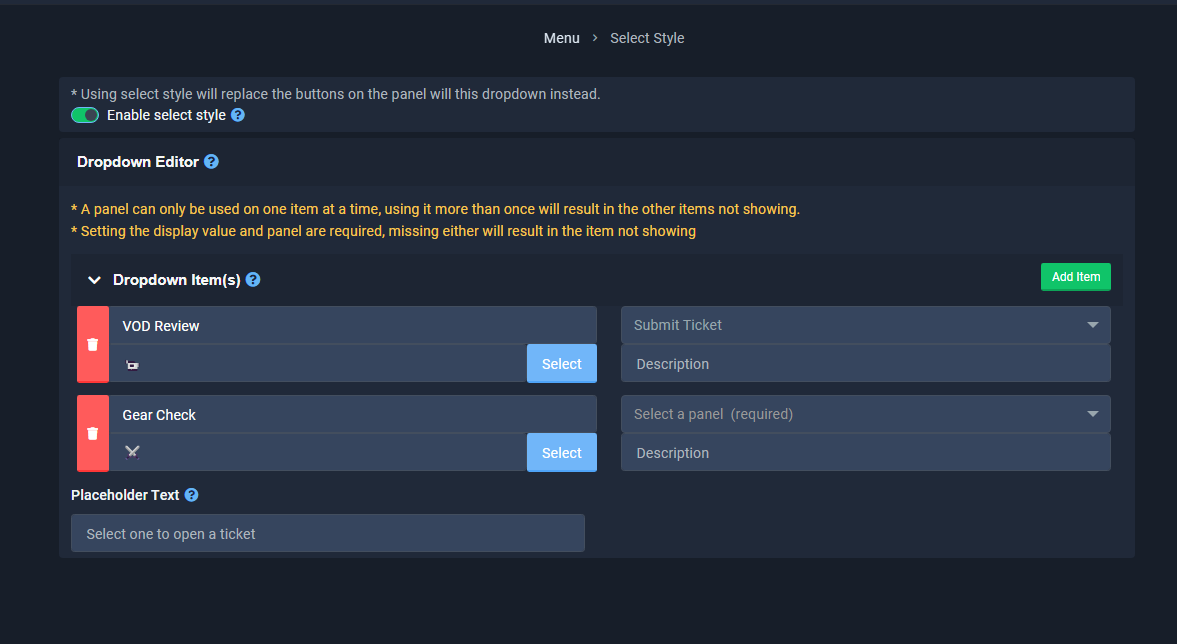
 steel basalt
royal seal
https://i.gyazo.com/582dc5307db3983c49504263a3207f5a.png
steel basalt
royal seal
https://i.gyazo.com/582dc5307db3983c49504263a3207f5a.png
Would you like to transfer this to a ticket so we're able to assist you further?
royal seal
yes
steel basalt
Okie dokie.
humble sequoiaBOT
━━ User's inquiry has been moved to a ticket ━━
 sacred ibex
How did i create ticket setup in my server?
 stark runeBOT
1. Invite Ticket Tool to your server
First you will want to invite the bot to your server. Once the bot is in your server, you can manage your server in the dashboard.
2. Create a Panel
To create a panel we are going to need to head over to the panel configs on the dashboard.
Once at the dashboard we will need to click Create Panel.
Enter a panel name (Fill in any optional settings you want).
Click Create Panel and your ready to get started with configuring your panel.
An example of a creating a panel is shown below.
3. Send the Panel to a Channel
Once you've created a panel on the dashboard you will need to send it to a channel using send on the dashboard.
Select the channel you want your panel to be created in and click send.
For other questions checkout $help faq.
An example of a sending a panel is shown below.
Having a Problem Sending the Panel?
Do $debug in a channel with Ticket Tool and make sure it has all the necessary Discord permissions.
shut bolt
stark rune
@sacred ibex check this message and feel free to ask questions if unsure at any step
 plain belfry
hi i have buy the premium ticket tool not working always says upgrade to premium
limber portal
plain belfry
hi i have buy the premium ticket tool not working always says upgrade to premium
Hey, does ticket tool say that your server is premium on the dashboard?
Did you purchase through discord?
vestal haven
is there any way
to delete ticket after saying a exact text
exemple, i say x021 and it automatically delete and save to transcripts
limber portal
vestal haven
to delete ticket after saying a exact text
You can make this work with the $delete command
vestal haven
wdym
limber portal
vestal haven
wdym
The $delete command, when run, will automatically delete the ticket. You can set it up so that on deletion, a transcipt is automatically generated as long as the server is premium (dashboard > panel configs > transcripts)
vestal haven
but
is there any way to
say the delete command
it closes the ticket and delete it
limber portal
The delete command skips the closing, and just deletes it. To close first you need to use the $close command
fallow ingot
I don’t think that’s what they mean Sacrifice.
@vestal haven it’s possible but requires you to use another bot.
fallow ingot
You could use Dyno custom commands. Set the trigger and have dyno execute $delete
vestal haven
thank you
fallow ingot
You have to add the bots ID in Server Configs tho
fallow ingot
vestal haven
thank you
Ahh no worries
limber portal
fallow ingot
I don’t think that’s what they mean Sacrifice.
Ah yeah I misunderstood
Thanks
fallow ingot
It’s cool.
 frigid finch
Who can help to unreal