#🆘│community-support
1 messages · Page 58 of 1
 pseudo ravine
 amber rose
pseudo ravine
amber rose
pseudo ravine
You can also do it on mobile
 jade topaz
I am trying to create a one-way ticket for staff to send out private notices to specific members within my server. I don't want the members to be able to reply to the tickets. Essentially, staff would open up a ticket through a panel only staff has access too and they would then manually add any specific member in the server to the ticket. After adding the member to the ticket the member would be notified as needed but would not able to respond to the notice through the ticket.
I've tried several approaches using additional roles and different permissions. I have almost 20 ticket systems I have created, so I'm not new to using the bot. I just haven't successfully been able to create a one-way ticket system as of yet and am reaching out for insight.
 humble sequoiaBOT
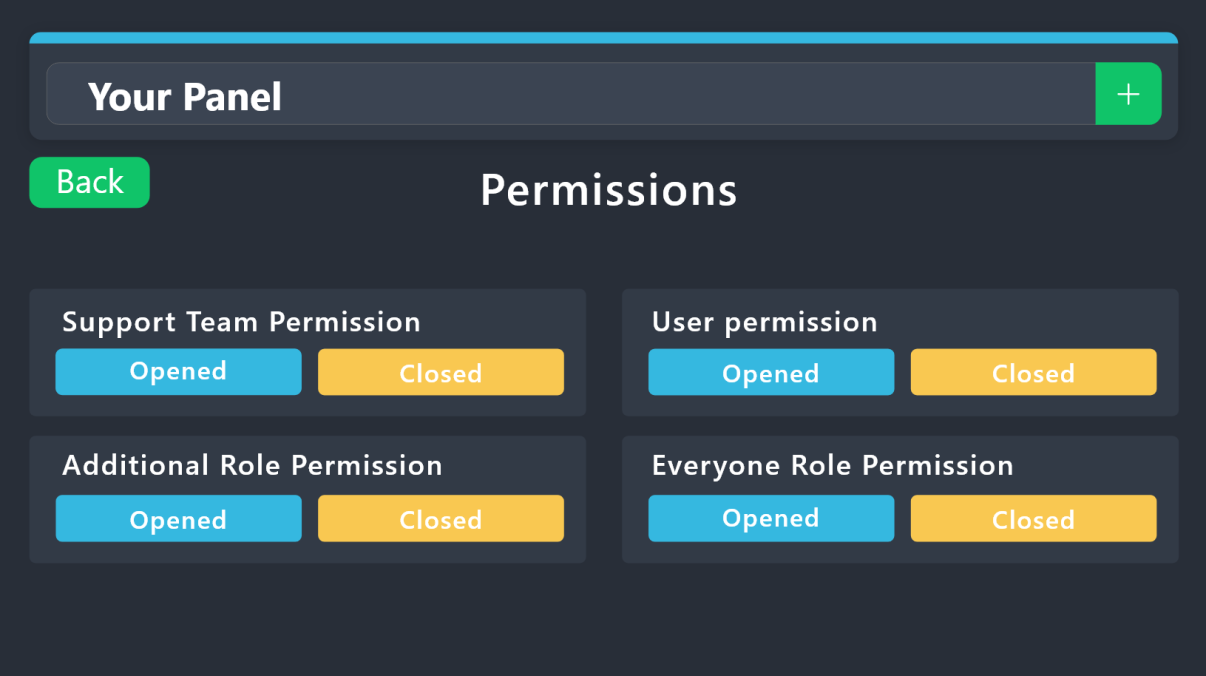
1. Go into your Dashboard
2. Open your Panel Configs tab
3. Select the panel you want to grant access to
4. Open the Permissions options menu
5. Find what role you'd like to edit permissions for
6. Choose if you'd like to edit opened or closed permissions for that role
7. Edit the permissions by tickingor unticking
each permission
8. Save changes
 jade topaz
I am well aware of the permissions tab.
 vague cosmos
You can use that and make the send permission a X?
jade topaz
Tried it. Didn't work.
vague cosmos
What if you do it for the everyone?
jade topaz
I'll check again. I've tried basically every combination I can think of including experimenting with additional roles.
I was hoping someone would have experience with this.
vague cosmos
Not really and can’t test some stuff as I’m on mobile
jade topaz
All good.
I know it's gotta be possible, I'm just missing something. I don't want to open a support ticket for something like this, it's more of a technical question than anything.
vague cosmos
You can always do it, because it’s a support question.
 iron nightBOT
Gave +1 Rep to @vague cosmos
 tribal skiff
 rustic gale
Panel Configs -> Claiming -> Enable ticket claiming
 humble sequoiaBOT
The Drop-down menu or Select Menu replaces the buttons on your panel message and uses a drop-down menu with all of your panels. To set this up, go to your Panel Configs and select your main Panel.
<:Numbericons1:1018864164032225340> Enable Select Style
First you enable Select Style. Then you add an item in the Dropdown Editor. Now you can start editing your dropdown!
<:Numbericons2:1018864168041971712> Dropdown Editor
Each line in the dropdown editor represents a line in the drop down menu on discord. You can add more "Items", by clicking on 

First you select a panel. That's the panel this option will open a ticket for.  DONT select the same panel twice. Each option should have a different Panel
After that, you can put a Display. This is the title of this option and will appear in the drop down menu. The *Description can be set right after that, which will be below the title in grey.
Additionally you can select an emoji, that will be shown in front of each option. You can either manually input the ID of an emoji or select it in the selector.
Common Issues ⚠️
- Panel doesn't send? Make sure you have a valid emoji selected
- Option doesn't show up? Check if two options have the same panel in the DropDown Editor

$dropdown
vague cosmos
@jade topaz
jade topaz
I have a question how to make it so that if someone creates a ticket, I as an administrator will get a notification?
humble sequoiaBOT
1. Go into your Dashboard
2. Open your Panel Configs tab
3. Select the panel you want to ping your support on
4. Open the Ticket options menu
5. Click on Edit Ticket Message
6. In the Message Content use one of the role mention syntax (**{@Role Name}**/**{Role ID}**)
7. Save changes
Note: For this to work properly, Ticket Tool requires the Mention Everyone permission. Or the role must have the Allow anyone to @mention this role setting enabled 
 vague cosmos
@jade topaz see above.
jade topaz
thanks
vague cosmos
No worries! Did you have any other questions?
jade topaz
No
however, I will have another question how to do that when the ticket is closed, it closes immediately so that this message "Ticket will be deleted in a few seconds" does not pop up
vague cosmos
That is not possible, you'll always have that message.
jade topaz
and why if on another server I open a ticket and close it, I don't have such a message
vague cosmos
Because your access get removed from the ticket when it's getting closed?
It's not possible to remove the message, it is how it is.
jade topaz
Okay
vague cosmos
I believe it's because of Discord limitations, deleting a channel directly would be API abuse or something.
rustic gale
jade topaz
and why if on another server I open a ticket and close it, I don't have such a m...
Because you lose access to the channel before that message is sent
jade topaz
okay
vague cosmos
rustic gale
Because you lose access to the channel before that message is sent
Thanks for the confirmation! ❤️
iron nightBOT
Gave +1 Rep to @rustic gale
jade topaz
vague cosmos
<@456226577798135808>
Thanks
iron nightBOT
Gave +1 Rep to @vague cosmos
 civic cairn
I accidentaly made a ticket what should i do?
pseudo ravine
Hey there. Do you mean in this server?
Usually you could just say that you accidentally made a ticket and you can close it yourself in most servers
civic cairn
um no i made it in another server
to claim something i had to make a ticket but i accidentally made one and the max was 1 and i cant make another one
and in the server its like a reward so you cant message in it
rustic gale
Get in touch with the server's staff some other way and explain this to them.
Or make another ticket with another account and explain this to them
Either way the only ones that can help you are that server's staff.
@civic cairn
COYS
 languid cloud
Hey everyone, im trying to do a server for the company i work for. does anyone know if its possible to put different panels on different channels but different people get the tikets according to the role? Because even tho i create everything different all get the same tickets
pseudo ravine
Hey there. Could you elaborate just a bit more? Just so I can understand the situation
languid cloud
I want to use the ticket bot not only for support issues, also if they have just regular questions
so in that case would be like an HR employee answering to those tickets
so i set up other panel in another channel that says payroll issues
but when i request a ticket also IT can see that ticket
even tho its a different panel and a different role
pseudo ravine
I'm assuming IT is a role?
pseudo ravine
Did you add the IT role as a Support Team Role?
pseudo ravine
Support Team roles will always have access to the tickets
(Unless you denied their permission for any reason)
languid cloud
but can i set 2 different types of tickets and 2 different types of support team ?
pseudo ravine
You can set Support Team Roles for each panel
For example,
Panel 1 has HR as a Support Team Role
Panel 2 has IT as a Support Team Role
languid cloud
i have tried that but both of the roles are showed on the same one box even if its a different panel
pseudo ravine
Are you sure you're changing the panels?
pseudo ravine
No worries, we all make mistakes sometimes, happens to the best of us
languid cloud
thanks @pseudo ravine
iron nightBOT
Gave +1 Rep to @pseudo ravine
pseudo ravine
You're welcome, glad I could help. If you have any other questions/issues, don't hesitate to reach out again 
 copper sapphire
Can someone help me with a purchase that failed
pseudo ravine
Hey there. You can make a ticket in #🎫│make-a-ticket and choose the Billing option to get assistance from the Billing Team
 tender totem
is there a way to set up claim ticket without premium?
 civic wagon
tender totem
is there a way to set up claim ticket without premium?
civic wagon
tender totem
is there a way to set up claim ticket without premium?
Nope
tender totem
civic wagon
Nope
and claiming a ticket on thread option tickets is not possible? even if I have prem?
civic wagon
tender totem
and claiming a ticket on thread option tickets is not possible? even if I have p...
Mhm, you cannot claim a thread even with premium
 stable sinew
how do I add the golden ticket bot to my server
jade topaz
How do we restore premium in Config Backup & Restore (Server Owner Only)
humble sequoiaBOT
Dr.'s issue has been solved in another channel.
The Backup and Restore feature allows you to transfer your panels, tags, and all settings to a new server, even if the server the settings were created has been deleted! You will want to copy the whole key.
First, go to your server's Dashboard ➞ then Server Configs ➞ under Config Backup & Restore (Server Owner Only) click on Old version can be found here and generate a new backup key by pressing the green button. Now, a key should be generated in the box above. You may need to refresh the page to see this.
Once you have your backup key, navigate to the same page on the new server. Copy the key on the Restore from backup key field.
Now you can choose what you want to copy. Finally, press the green Restore Configs button.
IMPORTANT NOTE
- We suggest you keep this backup key somewhere safe, in case your server is deleted so you are able to recover your panel's settings.
- This feature is only usable by the server's owner
@jade topaz refer to the embed above ^
 elder yew
what i should do if i want a role to be tagged when new ticket is made ?
humble sequoiaBOT
1. Go into your Dashboard
2. Open your Panel Configs tab
3. Select the panel you want to ping your support on
4. Open the Ticket options menu
5. Click on Edit Ticket Message
6. In the Message Content use one of the role mention syntax (**{@Role Name}**/**{Role ID}**)
7. Save changes
Note: For this to work properly, Ticket Tool requires the Mention Everyone permission. Or the role must have the Allow anyone to @mention this role setting enabled
vague cosmos
@elder yew see above.
vague cosmos
@sudden roost كيف يمكنني مساعدك؟
vague cosmos
ليس لدي وصول إلى التذاكر ، ولكن إذا طرحت سؤالك هنا فقد أساعدك بدلاً من ذلك.
vague cosmos
If you prefer to communicate in Arabic it's fine and you can post the video here, no need to ping me. Just ask your question, okay?
vague cosmos
هل تحصل على أي خطأ عند محاولة الدخول إلى لوحة القيادة؟ لا تتردد أيضًا في التواصل بلغتك الأم.
vague cosmos
رأيت ، هل يمكنك تشغيل الأمر التالي (انظر الرسالة أدناه) ولست بحاجة إلى الاتصال بي في كل مرة:
/permissionlevel
vague cosmos
هل نفذت الأمر وماذا قال؟ أيضا لا حاجة إلى ping لي في كل مرة.
vague cosmos
vague cosmos
`/permissionlevel`
أدخل الأمر التالي في الخادم الخاص بك (الذي تريد إدارته) وأرسل لقطة شاشة للنتيجة
ليست هناك حاجة لإجراء اختبار ping لي ، فأنا أريد التحقق مما إذا كان لديك الأذونات الصحيحة وإلا سأساعدك في حل هذا الأمر.
 sudden roost
@vague cosmos
 humble sequoiaBOT
رولات لوحة التحكم
أي رول تضعه هناك سيكون له حق الوصول الكامل إلى لوحة تحكم أداة التذاكر.
يمتلك مالك السيرفر والمستخدمون الذين لديهم أذونات المسؤول حق الوصول إلى لوحة التحكم.
احذر من الرولات التي يجب وضعها هنا
 vague cosmos
اطلب من مالك الخادم القيام بما ورد أعلاه ، ويرجى التوقف عن إرسال رسائل ping لي في كل مرة.
 onyx drum
I want to have more options shown, how do I do that?
I want each option to show the user a different response when a ticket is opened
 humble sequoiaBOT
For more convenient use of multipanels, you can now combine panels on the dashboard. This will allow you to directly send the multipanel from the dashboard or via the $panel ID command.
Where can I find this?
You can find this setting on the Dashboard -> Panel Configs -> Panel -> Attached Panels
Note: if you're attaching all the panels to a panel called English, don't include English in the attached panel's box (If you do this, it will create a duplicate)
This will put all buttons from all of your panels on one message. The message is the panel message from the panel you're combining these panels in.
 onyx drum
whoever sent this
thanks
pseudo ravine
You’re welcome, glad I could help. If you have any other questions/issues, don’t hesitate to reach out again 
onyx drum
Will do.
vague cosmos
onyx drum
I want to have more options shown, how do I do that?
I want each option to show...
Sawaf, you can eventually do it in a dropdown, which you have in this screenshot.
onyx drum
vague cosmos
Sawaf, you can eventually do it in a dropdown, which you have in this screenshot...
Yeah that's what I'm about to do.
vague cosmos
You know how?
onyx drum
Lol I hope I do, I attached the panels and now will see.
humble sequoiaBOT
The Drop-down menu or Select Menu replaces the buttons on your panel message and uses a drop-down menu with all of your panels. To set this up, go to your Panel Configs and select your main Panel.
<:Numbericons1:1018864164032225340> Enable Select Style
First you enable Select Style. Then you add an item in the Dropdown Editor. Now you can start editing your dropdown!
<:Numbericons2:1018864168041971712> Dropdown Editor
Each line in the dropdown editor represents a line in the drop down menu on discord. You can add more "Items", by clicking on
First you select a panel. That's the panel this option will open a ticket for. DONT select the same panel twice. Each option should have a different Panel
After that, you can put a Display. This is the title of this option and will appear in the drop down menu. The *Description can be set right after that, which will be below the title in grey.
Additionally you can select an emoji, that will be shown in front of each option. You can either manually input the ID of an emoji or select it in the selector.
Common Issues ⚠️
- Panel doesn't send? Make sure you have a valid emoji selected
- Option doesn't show up? Check if two options have the same panel in the DropDown Editor
$dropdown
onyx drum
👌
vague cosmos
Let me know if you need any help with it?
onyx drum
Will do, I'm setting it up right now and if I get into any issue I will definitely let you know.
vague cosmos
Awesome, good luck!
Hey @muted canopy can you try to invite the bot using the link below?
 muted canopy
Alr
humble sequoiaBOT
Ticket Tool Invite & Support
muted canopy
No I cannot invite it since I lost acces to this google account
vague cosmos
What has a Google account to do with inviting a Discord bot? 🤔
vague cosmos
We can't help with that, you can try to get in touch with Google somehow or try a password reset.
vague cosmos
muted canopy
No I cannot invite it since I lost acces to this google account
But is your Discord account linked to Google?
muted canopy
It is to an unaccesible account
vague cosmos
Ah I see; if you tried to recover the Google account and it failed there is nothing you can do.
muted canopy
vague cosmos
Ah I see; if you tried to recover the Google account and it failed there is noth...
They requested me to access the lost account so that I can get it back💀
vague cosmos
Google moment, but then there is nothing you can do.
muted canopy
Yup
vague cosmos
Making a new Discord account to invite the bot would be the solution.
muted canopy
But I Will lose this one
vague cosmos
Ye, I didn't know you can link a Discord account using Google; but maybe support can assist you.
muted canopy
Can u like join my server and invite it for me
vague cosmos
No sorry, users are not allowed to join servers. You should ask a friend in your server to do it.
muted canopy
Oh yeah
vague cosmos
Make sure the person has manage server permission.
muted canopy
Ty
vague cosmos
No worries, let me know if you need any help with the setup.
 boreal star
Getting "Failed to add, missing permissions" when using the add command. Command is enabled and debug command highlights no issues
vague cosmos
Adding someone in a ticket?
boreal star
yes
vague cosmos
Can you double check if the bot can manage channels / permissions?
boreal star
cant see any issues in the role perms
vague cosmos
Does it happen in all tickets?
boreal star
yes
vague cosmos
Are you using the slash command or the $add?
vague cosmos
Hmm, can you open a ticket in #🎫│make-a-ticket so the support team can look at this with you?
vague cosmos
No worries, hopefully the support team can solve it. Have a fantastic day!
humble sequoiaBOT
━━ tomolom's inquiry has been moved to a ticket ━━
 stable ruin
hi guys i need help with ticket tool, my problem is when i open ticket on some discord server and we are having a conversation then when they close my ticket i didn't got a transcription. Maybe someone can help me :/
vague cosmos
Did you set the transcript channel?
Also, saving and DMing transcripts automatic is a premium feature @stable ruin, but you can get them also with the free bot but not automatic.
humble sequoiaBOT
With Ticket Tool, you can customize the behavior the bot takes when logging your tickets! For editing these options follow these steps:
Dashboard ➞ Panel Configs ➞ Logging Options
Logging Channel
Here you will define which channel @humble sequoia will save the Logs in (ticket created/deleted/closed, etc.)
Logs you can save:
➞ Ticket Created ➞ Logs when a ticket is created
➞ Ticket Closed ➞ Logs when a ticket is closed
➞ Ticket Opened ➞ Logs when a ticket is opened
➞ Ticket Renamed ➞ Logs when a ticket is renamed
➞ Ticket Deleted ➞ Logs when a ticket is deleted
➞ Transcript Saved ➞ Logs when a ticket is saved
Select with  (disable) or (enabled) which logs you would like
Below you can see an example of what the Logging Options will look like:
 vague cosmos
Transcrip saving is what you need in that case.
stable ruin
That's right
It's not my discord server
It's like when i'm offline and i want to see what kind of decision did they make
pseudo ravine
Unfortunately there's nothing we can do. You'll have to ask the Server Staff for the transcript
stable ruin
Okey
I just wanted to ask because all of my friends got a transcription
Nevermind, thank you for responding guys
pseudo ravine
Do you know if the server has Premium?
vague cosmos
stable ruin
Nevermind, thank you for responding guys
No worries, happy to help. ❤️
stable ruin
pseudo ravine
Do you know if the server has Premium?
I think so
 fleet sorrel
Does anyone know why it shows this for me??been waitin 3 weeks but no change,long time customer,I quit ss and left discord,ever since I joined back I have no access to nothing
 pseudo ravine
stable ruin
I think so
pseudo ravine
stable ruin
I think so
Depending on the settings the server owner/admins set, Ticket Tool can DM you the transcript when the ticket is either closed or deleted. So it's possible that the ticket was closed and hasn't been deleted yet
vague cosmos
fleet sorrel
Does anyone know why it shows this for me??been waitin 3 weeks but no change,lon...
What is the exact problem?
Because I don't see the issue.
fleet sorrel
vague cosmos
What is the exact problem?
I simply can’t open a ticket,just tells me I have no access
stable ruin
pseudo ravine
Depending on the settings the server owner/admins set, Ticket Tool can DM you th...
Problem is i had to got transcription before but like from april not morr
And other guys got always
pseudo ravine
stable ruin
Problem is i had to got transcription before but like from april not morr
Again, there's nothing we can do it about it unfortunately. You'll just have to ask the Server Staff of that server
vague cosmos
fleet sorrel
I simply can’t open a ticket,just tells me I have no access
You should contact the staff in the server there, since they'll need to give you access to the channels.
We can't help you with that here.
fleet sorrel
I’ve been waiting 3 weeks but still like this, an I know they been open because I see other users on PlayStation getting they accounts done
fleet sorrel
vague cosmos
You should contact the staff in the server there, since they'll need to give you...
But it says don’t DM Anbu Drip
vague cosmos
As I said, we can't help you here with it.
We can't manage the permissions of the channels in another server, you'll need to contact the staff there.
@fleet sorrel pretty sure there are other staff members you can contact. 😉
 dusk saddle
i started the 7 day trial, when it ends is it going to bill me or just take it off
vague cosmos
It will just stop, since you didn't give any billing details you can't get charged.
dusk saddle
vague cosmos
It will just stop, since you didn't give any billing details you can't get charg...
how do i invite the bot
i cant find the premium bot
humble sequoiaBOT
The first thing you will need to do is invite the premium bot, an invite can be found here
Once the bot is in your server we will head to the dashboard and manage your server. When you are managing your server, you want to head into "Server Configs" then click the drop down menu under "Select the bot you would like to use on this server" then click "Ticket Tool#6207" and then save.
 vague cosmos
There you go. But you can use @pseudo glen too, with premium.
Which I'd suggest if you don't continue to use premium after the trial.
dusk saddle
vague cosmos
Which I'd suggest if you don't continue to use premium after the trial.
so say i make the embed and have the tickets all set up with the premium, when the trial runs out will i keep it all
or will like the bot go offline
vague cosmos
It will switch back to @pseudo glen and you''ll need to re-make all panels with the free bot since premium wont work.
dusk saddle
vague cosmos
It will switch back to <@557628352828014614> and you''ll need to re-make all pan...
where do i put my credit card stuff for it to bill me on the dashboard
i just want to make sure it does not bill me
vague cosmos
It won't charge you, since you did not enter any payment details.
dusk saddle
vague cosmos
It won't charge you, since you did not enter any payment details.
say i want to end my 7 day premium because someone in my server bought it for us, how would i do that?
vague cosmos
You can't end it, but how it exactly works then I am not sure about. I assume you'll get those extra days after someone stops paying.
dusk saddle
vague cosmos
You can't end it, but how it exactly works then I am not sure about. I assume yo...
where do you buy the premium
humble sequoiaBOT
PayPal - paypal@tickettool.xyz
BitCoin - 3HhKKAdb9eEvCe2tvzB8bAa8nebHY6qcPA
LiteCoin - MEQX3knLAuotrKnvk3HDNBK5gdRn6PZhHy

Prepay/Direct Payment
To prepay send the payment using your desired method - Available options listed bellow.
⚠️ $18 per 3 months. ⚠️
$66 per year.
(If using the direct payment option, you need to be paying for at-least 3+ months.)
Regular Prices when paying within Discord:
$5.99/per month
Once your payment is sent let us know so we can confirm and get you your key.
- Purchases done with this method are non-refundable.
<:paypal:924596360840372234> Paypal ("Goods and Services" or "Family and Friends")
paypal@tickettool.xyz
<:bitcoin:924638849135689749> BTC - Bitcoin
3HhKKAdb9eEvCe2tvzB8bAa8nebHY6qcPA
<:Litecoin:972176945972383815> LTC - LiteCoin
MEQX3knLAuotrKnvk3HDNBK5gdRn6PZhHy
I sent the payment now what?
After you send the payment, please send a screenshot with proof of payment, our <@&615146349700186112> will verify your payment and will get you setup. For crypto payments, we are waiting for at least ONE verification.

All prices in USD - 3 months min for direct payment
vague cosmos
That is a way to pay, but you can also do it directly in Discord.
dusk saddle
ok
vague cosmos
You should have a buy premium option in your server on @pseudo glen or @humble sequoia.
If you pay via Discord (and via @pseudo glen) do NOT kick it.
@dusk saddle to answer this question: #premium-chat message
No you won't be charged since you didn't share any payment details.
 rich sable
¿Cómo hago para que el bot de tickets no permita que los que no son miembros del personal vean el ticket?
pseudo ravine
Hola. Puede ir al Tablero > Configuraciones del panel > Permisos > Permisos de roles para todos > Ver canal 
jade topaz
How do I get an author image url when using the Embled Editer, Whenever I add a URL of the image, it just pops up as invalid image.
rustic gale
What's the URL?
jade topaz
im trying to get this image https://static.vecteezy.com/system/resources/previews/009/117/375/non_2x/dhs-logo-dhs-letter-dhs-letter-logo-design-initials-dhs-logo-linked-with-circle-and-uppercase-monogram-logo-dhs-typography-for-technology-business-and-real-estate-brand-vector.jpg

 jade topaz
How do I get an author image url when using the Embled Editer, Whenever I add a ...
jade topaz
jade topaz
How do I get an author image url when using the Embled Editer, Whenever I add a ...
Download the image and paste it into your discord server or a bots DMs, then click the image and tap “Open In Browser” then copy and paste that link.
jade topaz
jade topaz
Download the image and paste it into your discord server or a bots DMs, then cli...
Whenever I do that it shows up as this, is this what its supposed to do?

Did you delete the image from discord?
jade topaz
jade topaz
Did you delete the image from discord?
No, I havent
Paste the link here again, the one from the image
That isn’t the correct link, make sure you copied it correctly

There you go
Now paste that link into your ticket tool embed
Ok, done. Is it supposed to look like this


No it isn’t, try sending the panel and see if it corrects the image upon sending.

 old steeple
how/where do i edit this where it starts with "if"
 humble sequoiaBOT
The Ticket Message is the first message sent by the bot on a new ticket. To customize it head over to your Dashboard ➞ Panel Configs ➞ Ticket ➞ Edit Ticket Message
vague cosmos
@old steeple ^
@jade topaz are you using a direct Discord link (cdn.discordapp.com)? If so, try to upload it to Imgur and use the direct URL.
old steeple
which one do i click
 vague cosmos
Click on Embed Editor - 1.
old steeple
oh i see it lol tyy!!
vague cosmos
No worries, did you have any other questions?
old steeple
no thats it!
jade topaz
vague cosmos
<@456226577798135808> are you using a direct Discord link (cdn.discordapp.com)? ...
 vague cosmos
That's not the direct URL.
jade topaz
Oh there we go I got it
Thank you so much
vague cosmos
https://i.imgur.com/ju8JKfP.png should work.
vague cosmos
jade topaz
Oh there we go I got it
Thank you so much
Awesome! Did you have any other questions?
jade topaz
vague cosmos
Awesome! Did you have any other questions?
No, that'll be all, thank you!
iron nightBOT
Gave +1 Rep to @vague cosmos
vague cosmos
Alright, if you've any questions in the future feel free to reach out. Have a fantastic day!
 vague cosmos
Do you have access to a computer to try it on?
Also is there a payment method set in the settings?
@jagged mesa you can check that under user settings > billing.
 jagged mesa
vague cosmos
<@938899833866059788> you can check that under **user settings** > **billing**.
jagged mesa
vague cosmos
<@938899833866059788> you can check that under **user settings** > **billing**.
I got it now ty
iron nightBOT
Gave +1 Rep to @vague cosmos
vague cosmos
Awesome! Did you have any other questions?
jagged mesa
vague cosmos
Awesome! Did you have any other questions?
No
jade topaz
hey there
but for somereason


when i open ticket it says roleccess from another panel
@vague cosmos ?
vague cosmos
Please don’t ping for support.
It gets the ticket name from the panel users create a ticket from. Check your other panels
jade topaz
vague cosmos
It gets the ticket name from the panel users create a ticket from. Check your ot...
wdym
vague cosmos
The ticket channel names are from another panel right?
Because otherwise I don’t understand the exact issue. @jade topaz
 unkempt wagon
@jade topaz did you get the thing with the picture?
iron nightBOT
Gave +1 Rep to @unkempt wagon
unkempt wagon
alr
 livid sedge

 stone seal
So is anyone else having the issue where the bot is asking to be upgraded again yet the one that is asking is the premium bot? rather not have to pay again for no reason haha
 mint mesa
Hello, I'm getting this error when I attempt to close a ticket.

Is there a fix or a workaround for this issue?
 thin sorrel
Same here and for a friend of mine in their own server, probably an issue with the bot
 uneven talon
I'm having the same issue lol I was about to ask
if it helps the ticket tool website also doesn't recognize my server as having the bot?
When i go to "manage servers" it can't find any servers I admin that have it in it.
 left inlet
We are having the same issue, server owner is trying to close a ticket and it wont let her (pic incoming)
 compact harness
I have the same issue too
left inlet

 winter kayak
mint mesa
Hello, I'm getting this error when I attempt to close a ticket.
winter kayak
mint mesa
Hello, I'm getting this error when I attempt to close a ticket.
I got same problem
 past turtle
 pseudo ravine
Hey there. It seems like Ticket Tool is currently having some issues, unfortunately there's nothing we can do until it gets fixed
compact harness
You can use the normal command (/close) to close the ticket until the problem is fixed ig
 tall ridge
System Failure: Unknown Message
Whats is that?
pseudo ravine
Hey there. It seems like Ticket Tool is currently having some issues, unfortunately there's nothing we can do until it gets fixed
 frozen pendant
Came with the same question, thanks everyone!
 polar wolf
Same lol
 sinful pebble
lmao we have just had the same issue
 cursive phoenix
_ _
We are currently looking into reports of issues with our bot. Please hang tight while we look into this, and any updates will be posted in #📣│bot-news asap.
 wary urchin
im getting the same issue
 lusty matrix
have some problem
 cursive phoenix
Being looked into please be patient
 acoustic fjord
👍
wary urchin
samess, so ill close my server for now till i work on it again tmrw 👍 ♥️
 lusty matrix
cursive phoenix
Being looked into please be patient
lusty matrix
cursive phoenix
Being looked into please be patient
Is there a problem inside the bot?
cursive phoenix
its being looked into
 cosmic dew
You can still do it manually with slash commands
cursive phoenix
we are getting multiple reports of things, and currently looking into these
cosmic dew
/close and /transcript
 quick creek
wary urchin
samess, so ill close my server for now till i work on it again tmrw 👍 ♥️
quick creek
wary urchin
samess, so ill close my server for now till i work on it again tmrw 👍 ♥️
joined for the same reason; Global issue?
cursive phoenix
_ _
We are currently looking into reports of issues with our bot. Please hang tight while we look into this, and any updates will be posted in #📣│bot-news asap. We apologize for any inconvrniences and appreciate your patience.
Note: There have been reports, that using slash commands such as /close to close a ticket still work, so in the meantime you can try using the slash commands.
lusty matrix
cursive phoenix
we are getting multiple reports of things, and currently looking into these
We thank you for your understanding 
iron nightBOT
Gave +1 Rep to @cursive phoenix
cursive phoenix
cursive phoenix
_ _
**We are currently looking into reports of issues with our bot. Please han...
wary urchin
oh and, just a small extra bc idk if its a bug or me..when a ticket is created, it doesnt show me the "Save transcript issue"
maybeits me bc im still used to the old panel design
 grim pumice
السلام عليكم
wary urchin
quick creek
joined for the same reason; Global issue?
yeah think so
grim pumice
شسبب المشكله ؟
 wary urchin
grim pumice
شسبب المشكله ؟
wary urchin
grim pumice
شسبب المشكله ؟
they are looking into it, we gotta be patientt
lusty matrix
cosmic dew
/close and /transcript
exactily
pseudo ravine
Hey there. It seems like Ticket Tool is currently having some issues, unfortunately there's nothing we can do until it gets fixed
 slim tinsel
If you use the /close command the tickets still work!!!
 unreal rose
also problems creating tickets if u wanna look into that part
 stray bobcat
We are sorry for the inconvenience
unreal rose
no no all good just making sure
cursive phoenix
just takes time to contact the right people, etc
And yes as meow said we apologize for the inconvenience and appreciate your patience ❤️
 past fox
Is there a way to only allow high roles to only allowed to close the tickets?
pseudo ravine
Hey there. You can go to the Dashboard > Panel Configs > Buttons > Close Ticket > Allowed Roles > Put your high roles there
 junior thistle
Whenever I try to confirm close a ticket it says this.
 past fox
Thank you.
pseudo ravine
junior thistle
Whenever I try to confirm close a ticket it says this.
Hey there. It seems like Ticket Tool is currently having some issues, unfortunately there's nothing we can do until it gets fixed. More information will be posted in #📣│bot-news soon
junior thistle
pseudo ravine
Hey there. It seems like Ticket Tool is currently having some issues, unfortunat...
Thanks.
iron nightBOT
Gave +1 Rep to @pseudo ravine
 terse brook
Was just going to post the same thing lol
pseudo ravine
past fox
Thank you.
You're welcome, glad I could help. If you have any other questions/issues, don't hesitate to reach out again
pseudo ravine
junior thistle
Thanks.
You're welcome, glad I could help. If you have any other questions/issues, don't hesitate to reach out again
cursive phoenix
_ _
We are currently looking into reports of issues with our bot. Please hang tight while we look into this, and any updates will be posted in #📣│bot-news asap.
There have been reports, that using slash commands such as /close still work, so in the meantime you can try using the slash commands.
jade topaz
vague cosmos
The ticket channel names are from another panel right?
yes @vague cosmos
 pseudo ravine
Hey there. It seems like Ticket Tool is currently having some issues, unfortunately there's nothing we can do until it gets fixed. More information will be posted in #📣│bot-news soon
jade topaz
hmm ok
 lunar solar
jade topaz
hmm ok
lunar solar
jade topaz
hmm ok
Use /close in the meantime
stray bobcat
You cannot change the prefix of an application command, But you can change the default $ prefix in your dashboard, under Server Configs. > Command Prefix.

 versed herald
It gives this error.

 wild spire
versed herald
It gives this error.
wild spire
versed herald
It gives this error.
_ _
We are currently looking into reports of issues with our bot. Please hang tight while we look into this, and any updates will be posted in #📣│bot-news asap.
There have been reports, that using slash commands such as /close still work, so in the meantime you can try using the slash commands.
versed herald
wild spire
_ _
**We are currently looking into reports of issues with our bot. Please han...
Yes, thank you. I'm waiting for the #📣│bot-news.
 iron nightBOT
Gave +1 Rep to @wild spire
cursive phoenix
@crude blaze
 cursive phoenix
no i linked this message
We are currently looking into reports of issues with our bot. Please hang tight while we look into this, and any updates will be posted in #📣│bot-news asap.
There have been reports, that using slash commands such as /close still work, so in the meantime you can try using the slash commands.
 crude blaze
Alr ty
cursive phoenix
No prob sorry for the troubles we are trying to get things back to normal as quickly as possible
but you should be able to use /close in the meantime
_ _
We are currently looking into reports of issues with our bot. Please hang tight while we look into this, and any updates will be posted in #📣│bot-news asap. We apologize for any inconvrniences and appreciate your patience.
Note: There have been reports, that using slash commands such as /close to close a ticket still work, so in the meantime you can try using the slash commands.
 alpine arrow
crude blaze
alpine arrow
crude blaze
yea im having the same in my discord
stray bobcat
It's affecting many users. We are truly sorry for the inconvenience.
cursive phoenix

alpine arrow
thanks for the work around guys with the /close
cursive phoenix
no problem
 normal bison
cursive phoenix
no problem
normal bison
cursive phoenix
no problem
hey u have a approximate day to fix the bot?
cursive phoenix
its being looked into i do not have any eta or anything im afraid
the dev is working as fast as he can to pinpoint the issue
wild spire
normal bison
hey u have a approximate day to fix the bot?
soon™️
normal bison
Ohh okay thanks for the work💗
 carmine ledge
Is it only on my server that the bot is having problems?
cursive phoenix
nope
normal bison
carmine ledge
Is it only on my server that the bot is having problems?
Me too
carmine ledge
Wow, I was scared here thinking it was a hacker invasion kkkkkkkk
stray bobcat
The issue should now be resolved - Can someone please try closing ticket again?
carmine ledge
yes now it was thank you very much best discord support
 sudden nebula
ty devs - seems to work
carmine ledge
it's working normally now
cursive phoenix
ITS BEEN FIXED!!!
The issue should be resolved now! 😄
if you run into anything else / need assistance feel free to let us know!
jade topaz
i fill it out but why it no work

 versed herald
Everything is back to normal. ✅
 humble sequoiaBOT
A Discord Form lets the user answer individual questions in a pop-up Form, which then displays the answers in the ticket message. This can save time if you already know what you want to ask the user.
Setup Forms
Forms can be enabled under Panel Settings > Form Options > Edit Forms Options. In the new pop-up window, you can now enable and edit your own Form.
Form Options
You can add up to 5 questions in the Discord form. This is a Discord limitation. Each question can have a placeholder in the input field, a minimum and maximum input, multi-line, and also the option to have the answer required.
Options
Question Title ➞ Your Question goes here
Question Placeholder ➞ The placeholder text in the input field
Required ➞ If enabled, the user has to answer this question, to submit the form
Multi-Line Input ➞Allows the user to input multiple lines
Minimum and Maximum Input ➞ Set a minimum and maximum input value for the user
Displaying the Answer
To display the answers from the user, you need to enable Auto display form results on the ticket message as an additional embed
In case you don't want a second embed, go into your Panel Configs > Ticket Options > Edit Ticket Message. In there you use the variable {create.form.x} and just replace x with the number of your question. For example, the response to Question 1 can be displayed with {create.form.1}. If you don't use this variable, the response from the user is lost.
 cursive phoenix
jade topaz
i fill it out but why it no work
cursive phoenix
jade topaz
i fill it out but why it no work
see
In case you don't want a second embed, go into your Panel Configs > Ticket Options > Edit Ticket Message. In there you use the variable {create.form.x} and just replace x with the number of your question. For example, the response to Question 1 can be displayed with {create.form.1}. If you don't use this variable, the response from the user is lost.
rich sable
pseudo ravine
Hola. Puede ir al Tablero > Configuraciones del panel > Permisos > Permisos de r...
Ok, Gracias
 stark runeBOT
**Ticket Tool - All Systems are now __Online!__**
All Ticket Tool systems are fully online again! We apologize for any inconvenience this may have caused on your server.
If you are still experiencing any problem with Ticket Tool, please reach out to the <@&540295656720302081> within a ticket here, #🎫│make-a-ticket
 jade topaz
I want to learn how to setup like this
 civic wagon
jade topaz
I want to learn how to setup like this
civic wagon
jade topaz
I want to learn how to setup like this
Hey! What exactly do you want to learn from the screenshot?
humble sequoiaBOT
━━ RAAZ_xD's inquiry has been moved to a ticket ━━
 slender minnow
 half flicker
Help
half flicker
Help
how can I help you?
half flicker
How to add the bot to my server
slender minnow
$invite
humble sequoiaBOT
slender minnow
$invite
Ticket Tool Invite & Support
humble sequoiaBOT

You can check our documentation here;
You can also check #📂│information for the basic setup, or run the </setup:1025379472167403530> command within #🤖│bot-spam to find information on how to setup Ticket Tool.
Alternatively, you can use the /setup command with Ticket Tool in your own server to setup the basics of Ticket Tool!
Our documentation contains all the info you need about the bot to be able to setup and configure the bot however you like.
 prisma spindle
Heyy, a recent bug has occured, i'm not able to move the tickets in our server anymore even tho nothing has changed, triple checked the permissions, removed 2fa and added it back, removed roles and added it back, nothing seems to work, everytime i try to drag a ticket other channels just blink for a bit but nothing else happens, wanna see if anyone has ran into a similar issue maybe?

and bots on the sidebar dissapear for some reason after i try to drag
 vague cosmos
How many channels are under the other category?
@prisma spindle because you might have hitted a limit
prisma spindle
But it works with other users, seems to be the problem only for me
even tried making a new account added roles and it worked
we also have premium ticket tool
vague cosmos
Seems a Discord issue, which operation system are you using?
prisma spindle
windows 64
vague cosmos
prisma spindle
windows 64
That’s not a thing, but Windows is. Try this: https://www.thewindowsclub.com/how-to-clear-discord-cache-on-windows-iphone-android-mac

The Windows Club
Step-by-step guide to clear Discord cache on Windows, iPhone, Android, Mac. If you are facing an issue with Discord on your phone, read this.
Seems like a cache issue.
prisma spindle
trying now
vague cosmos
Let me know how it goes
prisma spindle
issue remains the same - nothing changed
tried to log on an alt, dosen't work on it aswell
but it does work for my friends which is confusing
vague cosmos
How many channels are under the category?
prisma spindle
let me check
 opal dirge
Hi.how i can sell my cpb nft and receive airdrop?
vague cosmos
@opal dirge see below
humble sequoiaBOT

⚠️ You're in the wrong place
We provide support for Ticket Tool Discord bot and cannot help you with whatever issue you have.
- We don't know which Support Team you should contact to get this issue resolved, and unfortunately we won't be able to accurately tell you.
If you don't have any further questions regarding our bot Ticket Tool, please close this ticket
prisma spindle
alot


we made a new category for the new tickets if we hit the cap
so they automatically get put into "new boosting tickets"
vague cosmos
I think you’re hitting the limit of 50 for the category where you want to move it.
prisma spindle
but dosen't make sense if it works for other admins
vague cosmos
Hmm true too. I don’t think it’s something that has to do with TT.
prisma spindle
😦
vague cosmos
Seems like a problem with Discord. Could you try to install Discord PTB or Canary to see if the issue appears?
prisma spindle
Could you show me how to do that? just google ptb discord and download right?
vague cosmos
Yep
If that’s not working either I would get in touch with Discord support: https://dis.gd/support
prisma spindle
Tried both, ptb and canary
prisma spindle
vague cosmos
If that’s not working either I would get in touch with Discord support: https://...
would mean the world to me, cause i'm really a lost puppy in these kind of things
vague cosmos
Understandable. But support is amazing.
prisma spindle
gonna try it out, thank you for your time, might come back for more anoying questions
thanks @vague cosmos
iron nightBOT
Gave +1 Rep to @vague cosmos
vague cosmos
No worries and annoying questions aren’t a thing.
civic wagon
@prisma spindle go to the server and click on "Show All Channels"
 prisma spindle
 wild spire
prisma spindle
wild spire
prisma spindle
can you execute $level in any channel real quick and let me know what it says?
 wild spire
prisma spindle
i'm not the owner or might not have a perm for that
wild spire
prisma spindle
i'm not the owner or might not have a perm for that
does /debug show up?
prisma spindle
 wild spire
okido. So in the bottom left u see permission level: 0 - user
that’s your issue, you have zero perms at all for some reason.
Can you screenshot your profile roles in there real quick so I can check something
prisma spindle
 wild spire
okido one second
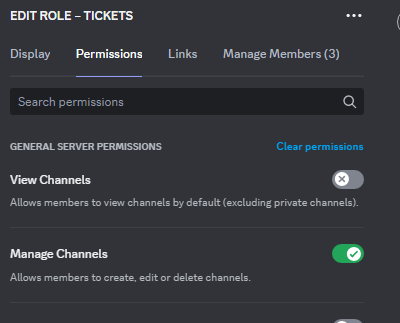
- So you’re support team for 5/6 panels
- none of your roles is added in the dashboard access
- you have no admin perms
That makes me believe you also don’t have any manage channel or manage category perms to even move the tickets. Its a permission on your account

 wild spire
Can you ask the server owner or an admin to give your role admin permissions for a few minutes.
If that fixes it, it’s a permission issue
 pine laurel
why is the variable not working?
 prisma spindle
wild spire
Can you ask the server owner or an admin to give your role admin permissions for...
prisma spindle
wild spire
Can you ask the server owner or an admin to give your role admin permissions for...
will give u the results in a bit, gonna do something thank you
iron nightBOT
Gave +1 Rep to @wild spire
vague cosmos
pine laurel
why is the variable not working?
What variable are you using?
pine laurel
vague cosmos
What variable are you using?
{panel.ticketLimit}
vague cosmos
Does it work if you put it in the embed?
@pine laurel I've tested it myself both embed and normal and looks like the variable is no longer working.
pine laurel
not sure but i dont want it in the embed
pine laurel
vague cosmos
<@555346103973707777> I've tested it myself both embed and normal and looks like...
so its a bug?
vague cosmos
Or just a removed variable.
pine laurel
is there a similar variable?
vague cosmos
Not that I am aware of.
pine laurel
:(
vague cosmos
You can always make a s!suggest or #1019685143046279208 for it.
 craggy geyser
pine laurel
so its a bug?
craggy geyser
pine laurel
so its a bug?
I have asked the dev. I don't remember any variables being removed recently
vague cosmos
craggy geyser
I have asked the dev. I don't remember any variables being removed recently
It's not in $variables and it doesn't seem to work. Tested it myself too.
craggy geyser
The custom command is possibly out of date. It is still listed on the docs (which equally could be out of date)
humble sequoiaBOT
Ticket Tool Custom Avatar
As of now, you are not able to change Ticket Tool's profile picture, nonetheless, our Development Team is working on the release of white labels, this is your own custom bot!
For the time being, you can change the bot's nickname by right-clicking the bot in the user list on your server and clicking Change Nickname
 vague cosmos
There is no eta and I think it will cost a bit more. See #1085028598643175485 for more information.
#1085028598643175485 message
What are you trying to do?
Also does the bot have all required permissions?
@jade topaz also can you try it again?
Nvm. I got it. ;D
You can't create tickets inside a forum.
If you next time say directly what you're doing, with a image of the error included it's easier to help. 😄
Ticket Tool doesn't have a review system.
I don't think so, with Ticket Tool.
You can find the answer in my profile.
@jade topaz my about me says No (support in) Direct Messages, why do you still send one?
You can just talk to me here, that is where a support channel is for.
iron nightBOT
Gave +1 Rep to @vague cosmos
vague cosmos
Awesome! Glad you got it! Did you have any other questions?
pine laurel
how do i do this?
 vague cosmos
This is not done with Ticket Tool.
pine laurel
is there a bot i ca
vague cosmos
I don't know which bot it is, but it's not Ticket Tool so we can't help you with it here.
pine laurel
is there someone who knows?
vague cosmos
I don't think so, but as I said it's not done with Ticket Tool so we can't help you with it here.
It's been answerd in #premium-support (which bot).
 vague cosmos
Double check the channel permissions.
humble sequoiaBOT
When first invited to your server, Ticket Tool should have the permissions shown below in order to ensure an appropriate functioning:
When customizing permissions for the different ticket participants, you must make sure Ticket Tool has the permissions you want it to grant to others, you can learn more about this here.
Missing Permissions
This error is a direct outcome of the bot missing permissions as depicted above. When troubleshooting this error we suggest you go through these steps:
- Use the </debug:1029783024264564765> command to check if the bot is lacking core role or channel permissions.
- Compare the category/channel's overrides and contrast them with the bot's roles to identify any permission denial that is breaking the functioning
- If you can't still figure it out, let our <@&540295656720302081> know so they can guide you through
Additional Resources
- If you are a server administrator and would like to understand more how to set up your server's permissions, we suggest checking the Discord Support Knowledge Base
- If you are a bot developer and are interested in the internal permission hierarchy we suggest you this part of the Discord Developer Docs
Important Note
- Giving Administrator permissions is NOT required and we do NOT encourage you to do unless you are trying to troubleshoot your permissions setup.
 vague cosmos
The following perms are needed.
 spring void
i have done this before with no problem. the only thing i changed since before was the name of the discord when i did that i synced the website
it even has admin perms
vague cosmos
Changing a Discord name has nothing to do with admin perms. Does the Ticket Tool role has admin perms?
Can you run /debug in the channel where you want to send a message from the dashboard and send a screenshot of the response?
spring void
ok i will now
vague cosmos
Alright, if you can send a screenshot of the response it would be great.
spring void
its still the same
vague cosmos
Can you send a screenshot of the debug response as I asked?
spring void
oh one sec i think its an emoji i didnt understand it before
vague cosmos
If it has to do with an emoji, you most likely get another error.
spring void
i changed the emoji name i didnt realize that was for it i'm a bit tired lol thank you for your help btw it works now
Thanks @vague cosmos
iron nightBOT
Gave +1 Rep to @vague cosmos
vague cosmos
Awesome! Glad it's solved. Did you have any other questions?
spring void
nope not today love the tool its awesom
vague cosmos
🙂 yep. If you have any other questions in the future feel free to ask them. We're happy to help.
 inner cave
Hi guys
I have a question
Is there the possibility to send a private message to ticket owner after closing tickets?
pseudo ravine
Hey there. What kind of private message? Of the transcript? If yes, that’s a Premium feature
 carmine loom
inner cave
Hi guys
I have a question
Is there the possibility to send a private message to ...
carmine loom
inner cave
Hi guys
I have a question
Is there the possibility to send a private message to ...
they can lock the ticket and NOT CLOSE IT and u just gotta ask the ticket owner to unlock it if u wanna re-open the ticket
rustic gale
inner cave
Hi guys
I have a question
Is there the possibility to send a private message to ...
Yes. It's a premium exclusive feature
inner cave
carmine loom
they can lock the ticket and NOT CLOSE IT and u just gotta ask the ticket owner ...
that's not my intention
I want to send automatically in dm a feedback request
inner cave
rustic gale
Yes. It's a premium exclusive feature
oh, perfect, thanks a lot!
iron nightBOT
Gave +1 Rep to @rustic gale
rustic gale
A feedback request?
You can't send interactive messages that way.
Messages yes, but not interactive ones
 solar imp
hey guys
is there a setting on ticket tool where instead of having ticket-392 as channel name, can i have ticket-UsernameOfDiscordUser?
pseudo ravine
Hey there. Yes you can, however it's a premium feature
solar imp
pseudo ravine
Hey there. Yes you can, however it's a premium feature
ok thanks@
iron nightBOT
Gave +1 Rep to @pseudo ravine
pseudo ravine
You're welcome, glad I could help. If you have any other questions/issues, don't hesitate to reach out again
dusk saddle
pseudo ravine
You're welcome, glad I could help. If you have any other questions/issues, don't...
hey i need some help
how do i attach the buttons, that lets you open the ticket? i already edited the button showed in the screenshot but when i send it its not there
 dusk saddle
vague cosmos
<@964297406059515935> or what button(s) do you mean?
dusk saddle
vague cosmos
<@964297406059515935> or what button(s) do you mean?
yes
humble sequoiaBOT
For more convenient use of multipanels, you can now combine panels on the dashboard. This will allow you to directly send the multipanel from the dashboard or via the $panel ID command.
Where can I find this?
You can find this setting on the Dashboard -> Panel Configs -> Panel -> Attached Panels
Note: if you're attaching all the panels to a panel called English, don't include English in the attached panel's box (If you do this, it will create a duplicate)
This will put all buttons from all of your panels on one message. The message is the panel message from the panel you're combining these panels in.
dusk saddle
yes
vague cosmos
See here, that is how you can make the multiple buttons.
Once you did set it up, make sure to save and then send the panel.


 vague cosmos
humble sequoia
vague cosmos
humble sequoia
Can you send a screenshot of the settings, here?
 crystal hornet
There is no (claim) button @dusk saddle why ?
 dusk saddle
 dusk saddle
crystal hornet
There is no (claim) button <@964297406059515935> why ?
dusk saddle
crystal hornet
There is no (claim) button <@964297406059515935> why ?
idk 🤷♂️
vague cosmos
@crystal hornet claiming is premium.
dusk saddle
oh you need premium
dusk saddle
dusk saddle
is it cause i have no panels attached
vague cosmos
dusk saddle
You didn't set the multi panel, so the buttons wont appear.
dusk saddle
vague cosmos
You didn't set the multi panel, so the buttons wont appear.
how do i get the button id to the multi panel
crystal hornet
vague cosmos
<@627386119184449536> claiming is premium.
When did it become?
vague cosmos
Always have been @crystal hornet.
vague cosmos
dusk saddle
how do i get the button id to the multi panel
If you click on Attached Panels you can add the panels.
dusk saddle
 crystal hornet
vague cosmos
Always have been <@627386119184449536>.
crystal hornet
vague cosmos
Always have been <@627386119184449536>.
We used it without premium
vague cosmos
Not possible.
dusk saddle
vague cosmos
If you click on **Attached Panels** you can add the panels.
i cant find the panel to attach it, it says no results found
vague cosmos
Do you have multiple panels?
dusk saddle
vague cosmos
Do you have multiple panels?
i only have my general support one
vague cosmos
@jade topaz interupting is not allowed.
vague cosmos
dusk saddle
i only have my general support one
You need more panels in order to create the multiple panels.
dusk saddle
vague cosmos
You need more panels in order to create the multiple panels.
I made another panel
now how do i connect both
vague cosmos
Where you can attach them, you attach them. Send the panel and both appear. 🙂
dusk saddle
Ok let me try it rq
dusk saddle
vague cosmos
Where you can attach them, you attach them. Send the panel and both appear. 🙂
Should I reload the page? I made a button on my Internal Affairs one and its not popping up
 vague cosmos
Yea, reloading should work

 vague cosmos
dusk saddle
the buttons are still not there
vague cosmos
dusk saddle
the buttons are still not there
Which panel is this message from?
dusk saddle
the general one
vague cosmos
Send your general panel.
 vague cosmos
Correct.
dusk saddle
vague cosmos
Correct.
 vague cosmos
Still nothing? Can you send a screenshot of the multiplepanels, from the general panel?
dusk saddle
vague cosmos
Still nothing? Can you send a screenshot of the multiplepanels, from the general...
 vague cosmos
Okay. That is fine; can you try to create a new panel and just send it? Does the button appear then?
dusk saddle
vague cosmos
Okay. That is fine; can you try to create a new panel and just send it? Does the...
So I send it again?
vague cosmos
Create a new panel and send that. Don't change anything.
dusk saddle
vague cosmos
Create a new panel and send that. Don't change anything.
so i hit the green plus mark
vague cosmos
Yes. So it creates a panel, if that one sends normally we can look deeper.
dusk saddle
vague cosmos
Yes. So it creates a panel, if that one sends normally we can look deeper.
 vague cosmos
Can you show me the create button settings of both panels (1 and 2).
dusk saddle
vague cosmos
Can you show me the create button settings of both panels (1 and 2).
so the one that has like the show button and all of that?
 dusk saddle

 vague cosmos
That looks fine, I am not sure what is causing this. I'd suggest you to open a #premium-tickets so the support staff can assist you with this.
dusk saddle
Ok
dusk saddle
vague cosmos
That looks fine, I am not sure what is causing this. I'd suggest you to open a <...
you should be support staff ngl
humble sequoiaBOT
━━ in aiden we trust's inquiry has been moved to a ticket ━━
vague cosmos
dusk saddle
you should be support staff ngl
Haha, working on getting proficient first. 🙂
jade topaz
vague cosmos
Haha, working on getting proficient first. 🙂
I helped him, he just had a couple of permissions mixed up and a double panel.
grim pumice
السلام عليكم ، متي بيتم قبول تقديمات الدعم الفني باللغه العربيه ؟
vague cosmos
تقصد التطبيقات؟ إنهم يتصلون بك إذا قمت بذلك.
prisma spindle
prisma spindle
will give u the results in a bit, gonna do something thank you
ok so it works on my laptop, and not my pc
needed a restart
works now
 pastel ridge
How can I get the item the user selected in the Panel dropdown sent in the ticket?
pseudo ravine
pastel ridge
How can I get the item the user selected in the Panel dropdown sent in the ticke...
Hey there. Are you referring to a form?
 coarse shale
My tickets are not going to closed tickets, can someone help me?
jade topaz
coarse shale
My tickets are not going to closed tickets, can someone help me?
How do you mean? They are going to the wrong category after they are closed?
coarse shale
yes
I have the ticket section and closed ticket section, when I close one ticket it goes automatic
to the other section
jade topaz
Dashboard > Panel Configs > Category
Make sure you have the correct categories that you want open & closed tickets to go to.
 coarse shale
where can I find Dashboard (I'm new here lol)?
humble sequoiaBOT

Ticket Tool - Ticketing without clutter - The #1 discord Ticketing bot
iron nightBOT
Gave +1 Rep to @lunar solar
coarse shale
It's correct at the dashboard
jade topaz
What exactly is the issue? When someone creates a ticket they get a 'Close' button, and when they press that the ticket gets closed and sent to the closed category if thats how you have set it up.
coarse shale
yes, normally when they press 'close button' it goes to the category closed (its right at the configs), but now i have closed tickets at my opened category
even with it closed
jade topaz
Do you have multiple panels? (More than one Open Ticket button/s)
coarse shale
no, just one
jade topaz
And how many channels do you have in the closed category? As a limit from Discord, you are only allowed to have 50 channels per category.
 jade topaz
Does TicketTool have the correct permissions to move channels? Check by doing the /debug command.
 native prism
help
coarse shale
Where can I run this \debug?
vague cosmos
native prism
help
How can I help you?
vague cosmos
coarse shale
Where can I run this \debug?
/debug can be runned in your own server in any channel.
jade topaz
coarse shale
Where can I run this \debug?
Any channel TicketTool has access to, just type /debug and it should pop up
native prism
vague cosmos
How can I help you?
how i can create smth like this?

sorry if you dont understand but i speak Spanish
humble sequoiaBOT
El menú desplegable (dropdown) reemplaza los botones de tu mensaje de panel por un menú desplegable que contiene tus paneles. Para configurarlo, accede al menú Panel Configs y selecciona tu panel principal.
<:Numbericons1:1018864164032225340> Enable Select Style
Primero activas la opción Enable select style. Luego presionas Add Item en el Dropdown Editor para agregar un ítem al menú. ¡Ahora puedes empezar a editar el menú desplegable!
<:Numbericons2:1018864168041971712> Dropdown Editor
Cada ítem en el Dropdown Editor representa una opción en el menú desplegable en Discord. Puedes agregar más ítems presionando
Primero eliges un panel en select a panel. Ése es el panel que va a corresponder a la opción del menú. No elijas el mismo panel para dos opciones distintas. Cada ítem debe tener un panel diferente
Luego de eso, asigna un Display. Éste es el título de la opción y será visible en el menú desplegable. Luego puedes asignar una descripción en el campo *Description, que se verá en gris debajo del título.
Adicionalmente puedes escoger un emoji, que se mostrará junto a la opción en el menú. Puedes insertar el ID del emoji manualmente o bien escogerlo con el menú Select.
Problemas comunes ⚠️
- ¿El panel no se envía? Confirma que los emojis seleccionados sean válidos.
- ¿Una opción no aparece? Verifica que no hayas escogido paneles repetidos para ítems distintos en el Dropdown Editor.
$esdropdown
vague cosmos
Véase más arriba. 🙂 @native prism
native prism
humble sequoia
but i dont have a principal panel
native prism
vague cosmos
Véase más arriba. 🙂 <@872850434623152168>
No tengo paneles creados
coarse shale
jade topaz
Does TicketTool have the correct permissions to move channels? Check by doing th...
yes, it have all the permissions
vague cosmos
native prism
No tengo paneles creados
¿Sabes cómo hacer un panel?
native prism
vague cosmos
¿Sabes cómo hacer un panel?
No
vague cosmos
Tablero > Configuración del panel > haga clic en el + verde a la derecha.
jade topaz
coarse shale
yes, it have all the permissions
Okay, and i see the Discord category is collapsed. Discord only allows 50 channels per category, so could you uncollapse the category and check for more than 50 channels please.
vague cosmos
@native prism El español no es mi idioma nativo, siempre puede abrir un ticket en español para obtener soporte de un hablante nativo del equipo de soporte.
$esticket
humble sequoiaBOT

Equipo de Soporte Español
Querido usuario, si está buscando ayuda, por favor abra un ticket para contactar al Equipo de Soporte Español. Diríjase a #🎫│make-a-ticket y presione el botón :flag_es:.
native prism
vague cosmos
<@872850434623152168> El español no es mi idioma nativo, siempre puede abrir un ...
Ok
but there no one reply me
lunar solar
native prism
but there no one reply me
 native prism
lunar solar
native prism
lunar solar
Ok
coarse shale
jade topaz
Okay, and i see the Discord category is collapsed. Discord only allows 50 channe...
IT WORKSSS THANKS A LOT!
iron nightBOT
Gave +1 Rep to @keen saddle
vague cosmos
Sup?
jade topaz
I'm create ticket?
vague cosmos
You want to setup the bot?
jade topaz
Yeah
stark runeBOT
1. Invite Ticket Tool to your server
First you will want to invite the bot to your server. Once the bot is in your server, you can manage your server in the dashboard.

2. Create a Panel
To create a panel we are going to need to head over to the panel configs on the dashboard.
Once at the dashboard we will need to click Create Panel.
Enter a panel name (Fill in any optional settings you want).
Click Create Panel and your ready to get started with configuring your panel.
An example of a creating a panel is shown below.

3. Send the Panel to a Channel
Once you've created a panel on the dashboard you will need to send it to a channel using send on the dashboard.
Select the channel you want your panel to be created in and click send.
For other questions checkout $help faq.
An example of a sending a panel is shown below.
Having a Problem Sending the Panel?
Do $debug in a channel with Ticket Tool and make sure it has all the necessary Discord permissions.
 vague cosmos
This should help you.
stone seal
Is the issue with closing ticket still occurring for anyone?
vague cosmos
No? What issue exactly?
stone seal
Basically the ticket bot has a error and wont close the ticket
stone seal
vague cosmos
Should be fixed, if I believe <#571104498483986466>.
For some reason we had a case where it occurred again when a user tried to close it
vague cosmos
is that still happening now?
stone seal
Let me see... if i can close it now maybe it was just by chance that it didnt
lunar solar
stone seal
For some reason we had a case where it occurred again when a user tried to close...
Was the ticket opened during the outage?
stone seal
lunar solar
Was the ticket opened during the outage?
Thats what im thinking
lunar solar
Any tickets opened during the outage would still be effected
Any tickets opened after #📣│bot-news will no longer be effected
stone seal
Yep i just went in and closed it so that was why haha my mistake!
vague cosmos
Awesome! Did you have any other questions?
stone seal
That was it!
vague cosmos
Alright if you have any other questions in the future feel free to reach out.
 blazing sedge
When someone makes a ticket, the ticket automatically adds the support teams. When trying to use the /remove command on one of the members in that team, it doesn't actually remove them. How do I fix this?
jade topaz
blazing sedge
When someone makes a ticket, the ticket automatically adds the support teams. Wh...
To remove a support team member from the ticket, you can use the Revoke argument, as shown below.
 blazing sedge
jade topaz
To remove a support team member from the ticket, you can use the **Revoke** argu...
blazing sedge
jade topaz
To remove a support team member from the ticket, you can use the **Revoke** argu...
thank you so much :))
iron nightBOT
Gave +1 Rep to @keen saddle
jade topaz
blazing sedge
thank you so much :))
Happy to help ❤️
blazing sedge
jade topaz
Happy to help ❤️
:)
 static skiff
Hi, is there a way to make it so only specific roles can open a ticket without making the channel only available to that role
 gilded verge
static skiff
Hi, is there a way to make it so only specific roles can open a ticket without m...
gilded verge
static skiff
Hi, is there a way to make it so only specific roles can open a ticket without m...
Hiey, please go to Panel Configs->Buttons->Edit Create Ticket Button->to Allowed Roles add this role you want so they can open a ticket but to Disabled Roles add everyone
gilded verge
gilded verge
Hiey, please go to `Panel Configs`->`Buttons`->`Edit Create Ticket Button`->to `...
example of what i meant:
 static skiff
gilded verge
Hiey, please go to `Panel Configs`->`Buttons`->`Edit Create Ticket Button`->to `...
static skiff
gilded verge
Hiey, please go to `Panel Configs`->`Buttons`->`Edit Create Ticket Button`->to `...
thank you so much! I knew it was somewhere but was drawing a blank.
iron nightBOT
Gave +1 Rep to @gilded verge
 pseudo ravine
Hey there. I would recommend to make a ticket in #🎫│make-a-ticket and have a Support Member assist you
 silk crown
how can a moderator (not a administrator) add someone to a private ticket thread ? what permissions do i need
rustic gale
silk crown
how can a moderator (not a administrator) add someone to a private ticket thread...
By default the add command is for the support team only
If you haven't made support team roles, you should make support team roles
humble sequoiaBOT
1. Go into your Dashboard
2. Open your Panel Configs tab
3. Select the panel you want to grant access to
4. Open the General options menu
5. Select your Support Team Roles
6. Save changes
 rustic gale
If you want non-support users to be able to add users, you should make the add command not support team only.
In the dashboard, Command Configs -> Add -> Support team only
jade topaz
Bonjour
humble sequoiaBOT
Hello, we would love to help you, but if you don't tell us what you need help with we can't help you :(
 tough moth
How to I add multiple buttons to one panel? (I mean for a variety of different types of tickets)
humble sequoiaBOT
For more convenient use of multipanels, you can now combine panels on the dashboard. This will allow you to directly send the multipanel from the dashboard or via the $panel ID command.
Where can I find this?
You can find this setting on the Dashboard -> Panel Configs -> Panel -> Attached Panels
Note: if you're attaching all the panels to a panel called English, don't include English in the attached panel's box (If you do this, it will create a duplicate)
This will put all buttons from all of your panels on one message. The message is the panel message from the panel you're combining these panels in.
tough moth
Thank you
 deft tide
ok so how do i like
make a lil panel where someone can make a ticket from
like how do i creatye the button someone can press to make a ticket from
jade topaz
deft tide
like how do i creatye the button someone can press to make a ticket from
You can run /setup in your server to get started with TicketTool 🙂
deft tide
i did that i think i did it wrong tho
humble sequoiaBOT
Ticket Tool - Ticketing without clutter - The #1 discord Ticketing bot
deft tide
OK I FIGURED IT OUT YAYYY TY
jade topaz
Happy to help ❤️
 tight goblet
Hey I deleted my create a ticket message on my channel by accident how can I add it back
jade topaz
If you run /setup in the channel you will be able to manage/send your panel again.
For further configuration please use the dashboard at: https://tickettool.xyz/manage-servers
tight goblet
jade topaz
If you run **/setup** in the channel you will be able to manage/send your panel ...
What action do I select
jade topaz
Upon sending the /setup command, you then need to click:
Edit & Manage Panels --> Then select your panel --> Then select Send Panel to a Channel
tight goblet
I got it now but it’s showing me the message of when you create a ticket instead of what I used to say create a ticket to start sourcing
jade topaz
Try using the dashboard at: https://tickettool.xyz/manage-servers
Dashboard --> Panel Configs | Make sure you have the correct panel selected at the top, then click the blue 'Send' button.
tight goblet
This is what it shows now and what it used to show the long message is what shows me now and the short is what it use d to show me

 jade topaz
Looks like you mixed them up.
Dashboard --> Panel Configs --> Messages --> Edit Panel Message
Make sure to edit this to how you want it, then update or send the panel again.

I dont think this is possible, but i could be wrong 🤷♂️
 analog plaza
Hi, do you have any idea how to make it so that when I press close the ticket it is not automatically deleted? I would like the channel to be saved in a separate category
jade topaz
analog plaza
Hi, do you have any idea how to make it so that when I press close the ticket it...
You can set a category for closed tickets by following below:
Dashboard --> Panel Configs --> Category
Then select a category for your closed tickets and save it 🙂
analog plaza
jade topaz
You can set a category for closed tickets by following below:
Dashboard --> Pan...
Yes, I know that. That works, once the ticket is closed the channel is sent there but a message appears automatically that the ticket is closed that the ticket will be deleted and it is deleted in the category that I select as ticket closed, it does not stay there. (It's like it has an automatic elimination of tickets)
rustic gale
analog plaza
Yes, I know that. That works, once the ticket is closed the channel is sent ther...
You must have disabled Two Step Ticket.
Enable it again.
It's in Panel Configs -> General
analog plaza
analog plaza
rustic gale
You must have disabled **Two Step Ticket**.
ok i will try it now
Nice! Fixed brother @rustic gale @jade topaz thanks for the support very goods staff's
iron nightBOT
Gave +1 Rep to @rustic gale
analog plaza
Well, I solved that but I have a problem and that is that it sends them to a category of closed tickets but all the staff of my server can see them when they shouldn't, only the directive, is there a way to configure that?
I mean, the ticket channel is closed and it is sent to another category of closed tickets but that ticket can be seen by all the staff, is there a way to choose who can see that ticket that has already been closed?
rustic gale
By default, the support team can see closed tickets.
If you want the support team to be unable to view closed tickets, you can head to Panel Configs -> Permissions and remove the View Channel permission for the support team for closed tickets.
If you want some support team roles to view closed tickets but not others, you can make those other roles additional roles instead of support team roles.
Additional roles don't have the ability to view closed tickets by default
The downside is your regular support without access to closed tickets will be unable to use support-team-only features such as claiming or the /add command
One way around that is to
- leave the support roles the same i.e. keep all staff roles in the support team roles
- add the higher roles to Additional Roles (as well as Support Team Roles)
- deny the support team's View Channel permission for closed tickets
- give the additional roles the View Channel permission for closed tickets
analog plaza
rustic gale
Additional roles don't have the ability to view closed tickets by default
What option?

The category is configured so that they cannot be seen but the same channel is created like this and is derived to the closed tickets section and the same configuration of the category where the ticket was created remains, it does not adapt to the configuration of the category of tickets closed
rustic gale
analog plaza
What option?
Permissions
Second row from the top, middle column
rustic gale
analog plaza
The category is configured so that they cannot be seen but the same channel is c...
Ticket's permissions do not care in absolutely any way about the category's permissions. They're completely separate.
analog plaza
You are a good support bro wtf
Everything is totally solved thanks to you, really thanks!
thanks @rustic gale !
iron nightBOT
Gave +1 Rep to @rustic gale
 cyan bison
Helpppp
Helpp me pls
How to make ticket make embed
@799500225579712543
@hazy rover
Helpp
Ahhhhh helppp me plsss
Helpppp meee plssss
humble sequoiaBOT
First you will want to invite the bot to your server. Once the bot is in your server, you can manage your server in the dashboard.
To create a panel we are going to need to head over to the Panel Configs Tab on the Dashboard.
Once at the dashboard we will need to click Create Panel.
Enter a panel name (Fill in any optional settings you want).
Click Create Panel and you are ready to get started with configuring your panel.
An example of a creating a panel is shown below.
Once the panel has been created, use the blue Send button and select the channel you want the panel to be sent to.
The Panel wasn't send
Use the </debug:ID> command to diagnose possible permission issues with the bot.
pseudo ravine
And please be patient, there’s no need for the spam
 autumn ginkgo
Hiya, how do I make multi-panels, instead of having separate messages for multiple tickets (e.g. #🎫│make-a-ticket message).
humble sequoiaBOT
For more convenient use of multipanels, you can now combine panels on the dashboard. This will allow you to directly send the multipanel from the dashboard or via the $panel ID command.
Where can I find this?
You can find this setting on the Dashboard -> Panel Configs -> Panel -> Attached Panels
Note: if you're attaching all the panels to a panel called English, don't include English in the attached panel's box (If you do this, it will create a duplicate)
This will put all buttons from all of your panels on one message. The message is the panel message from the panel you're combining these panels in.
jade topaz
@autumn ginkgo follow the guide above 🙂
jade topaz
autumn ginkgo
Am I able to images to my embeds without premium?
Sadly not, but you do get a 7 day free trial for your server. If you haven’t claimed it already 🙂
vague cosmos
@tall raptor كيف يمكنني أن أقدم المساعدة؟
 tall raptor
vague cosmos
<@873190976355700797> كيف يمكنني أن أقدم المساعدة؟
tall raptor
vague cosmos
<@873190976355700797> كيف يمكنني أن أقدم المساعدة؟
بدي اظهر رومات تكت لرول عندي كيف
vague cosmos
ماذا تقصد ب ROM؟ هل حصلت على مثال؟
tall raptor
ويت
vague cosmos
هل يمكنك إرسال لقطة شاشة لما تعنيه؟
 humble sequoiaBOT
1. Go into your Dashboard
2. Open your Panel Configs tab
3. Select the panel you want to grant access to
4. Open the General options menu
5. Select your Support Team Roles
6. Save changes
vague cosmos
ليس لدي قيادة عربية لهذا.
tall raptor
هل يمكنك ان تأتي تفعلها وتخرج 😭💔
vague cosmos
ربما يساعدك هذا:
 shrewd grove
كيف اسوي البوت
vague cosmos
$articket
humble sequoiaBOT

فريق الدعم الفني العربي
عميلنا العزيز ان كنت تبحث عن مساعدة يرجى فتح تكت خاص بفريق الدعم الفني العربي
اذهب الى#🎫│make-a-ticket
ثم قم بلضغط على الايموجي الاتي (🇯🇴)
**١- دعوة البوت إلى سيرفرك**
يجب عليك اولاً دعوة البوت إلى سيرفرك من خلال رابط دعوة البوت، بعد ذلك يُمكنك تعديل خصائص البوت عبر لوحة التحكم.
**٢- إنشاء لوحة**
لإنشاء لوحة يجب عليك التوجه إلى لوحة التحكم ، ثم قم بإختيار سيرفرك ، بعد ذلك توجه إلى قسم "Panel Config".
بمُجرد وصولك إلى القسم المذكور أعلاه، يجب عليك الضغط على زر "Create Panel" لإنشاء اللوحة ، ومن ثمها قُم بإدخال اسم اللوحة (يمكنك ملء اي اعدادات اختياريه تريدها).
بعد إدخال اسم اللوحة و ملء الإعدادات ، قُم بالضغط على "Create Panel" لإتمام عملية انشاء اللوحة الخاصة بك بنجاح!
سيتم إرفاق صورة توضيحية لعملية إنشاء اللوحة بالطريقة الصحيحة؛
**٣- إرسال اللوحة إلى روم**
بعد الإنتهاء من عملية إنشاء اللوحة بنجاح ، يجب عليك الآن إرسالها إلى روم بإستخدام زر "Send" على لوحة التحكم بقسم الـ "Panel Config".
بعد الضغط على الزر ، قم بإختيار الروم المفضل لإرسال اللوحة.
بعد إختيار الروم قُم بالضغط على زر "Send" لإتمام عملية إرسال اللوحة!
سيتم إرفاق صورة توضيحية لعملية إرسال اللوحة بالطريقة الصحيحة؛
**هل تواجهك مشكلة أثناء محاولة إرسال اللوحة؟**
قُم بإرسال الامر `/debug" في اي روم يستطيع البوت رؤيته ، ثم تأكد أن البوت لدية جميع الصلاحيات اللازمة لإرسال اللوحة.
vague cosmos
shrewd grove
كيف اسوي البوت
^
jade topaz
how can i do this "select a option" on my server
 humble sequoiaBOT
The Drop-down menu or Select Menu replaces the buttons on your panel message and uses a drop-down menu with all of your panels. To set this up, go to your Panel Configs and select your main Panel.
<:Numbericons1:1018864164032225340> Enable Select Style
First you enable Select Style. Then you add an item in the Dropdown Editor. Now you can start editing your dropdown!
<:Numbericons2:1018864168041971712> Dropdown Editor
Each line in the dropdown editor represents a line in the drop down menu on discord. You can add more "Items", by clicking on
First you select a panel. That's the panel this option will open a ticket for. DONT select the same panel twice. Each option should have a different Panel
After that, you can put a Display. This is the title of this option and will appear in the drop down menu. The *Description can be set right after that, which will be below the title in grey.
Additionally you can select an emoji, that will be shown in front of each option. You can either manually input the ID of an emoji or select it in the selector.
Common Issues ⚠️
- Panel doesn't send? Make sure you have a valid emoji selected
- Option doesn't show up? Check if two options have the same panel in the DropDown Editor
$dropdown
vague cosmos
See above @jade topaz. 🙂
tall raptor
vague cosmos
ربما يساعدك هذا:
هل يمكنك ان تأتي
vague cosmos
أنا لست عضوا في فريق الدعم. ستحتاج إلى التحلي بالصبر.
tall raptor
Ok
jade topaz
vague cosmos
See above <@456226577798135808>. 🙂
in my dc there is only support but on website i have 3 options

 jade topaz
vague cosmos
Also did you re-send the panel?
jade topaz
vague cosmos
Also did you re-send the panel?
yes but look only in the first dropdown item is my panel
 vague cosmos
How many panels do you have?
jade topaz
i have 1, can i copy the panel and make 3-4
vague cosmos
Looking at the above screenshot, one. You'll need to make more in order to get the dropdown to work.
Because your users choose a panel from the dropdown.
But yes you can copy panels or make new ones. Both will work, @jade topaz. 🙂
jade topaz
vague cosmos
But yes you can copy panels or make new ones. Both will work, <@4562265777981358...
alr i got it now and how can i make the chanels name to ,,support" ,,purchase" and ,,Other" when i choosing it
 vague cosmos
Channel naming is a premium only feature, but you can set them in a different category.
jade topaz
oh okay
humble sequoiaBOT
1. Go into your Dashboard
2. Open your Panel Configs tab
3. Select the panel you want to grant access to
4. Open the Category options menu
5. Select the categories of your preference
6. Save changes
 vague cosmos
You'll need to do this per panel.
jade topaz
when i close tickets then they get deleted automaticly how can i deactivate it
vague cosmos
Dash > Panel Config > General > Two step close
jade topaz
its already off
vague cosmos
Ah, my bad. It has to be .
jade topaz
but then i cant close the ticket?
vague cosmos
What error do you get?
jade topaz
no error but i only have to click twice to close the ticket but it still gets deleted
vague cosmos
Is two step ticket ?
jade topaz
no
jade topaz
vague cosmos
Tickets won't get automatic deleted then.
yeess tyy
vague cosmos
No worries, did you have any other questions?
 gray vector
please can you help me with this?
vague cosmos
With?
gray vector
oh, i can't send images here
vague cosmos
You should be able to attach images here, @gray vector. But otherwise upload it to imgur and link it here.
 humble sequoiaBOT
The Drop-down menu or Select Menu replaces the buttons on your panel message and uses a drop-down menu with all of your panels. To set this up, go to your Panel Configs and select your main Panel.
<:Numbericons1:1018864164032225340> Enable Select Style
First you enable Select Style. Then you add an item in the Dropdown Editor. Now you can start editing your dropdown!
<:Numbericons2:1018864168041971712> Dropdown Editor
Each line in the dropdown editor represents a line in the drop down menu on discord. You can add more "Items", by clicking on
First you select a panel. That's the panel this option will open a ticket for. DONT select the same panel twice. Each option should have a different Panel
After that, you can put a Display. This is the title of this option and will appear in the drop down menu. The *Description can be set right after that, which will be below the title in grey.
Additionally you can select an emoji, that will be shown in front of each option. You can either manually input the ID of an emoji or select it in the selector.
Common Issues ⚠️
- Panel doesn't send? Make sure you have a valid emoji selected
- Option doesn't show up? Check if two options have the same panel in the DropDown Editor
$dropdown
gray vector
where should i go for selection categories?
vague cosmos
You can set it up there, make sure you have multiple panels in order to get it to work. 🙂
gray vector

I did that, but it still doesn't change the categories below. did I do something wrong?
 gray vector
saved yes. how do i re-send the panel?
vague cosmos
Dashboard > Panel Config > There is a send button at the top.
 drowsy crescent
how do i create a ticket
gray vector
ohhh. thank you
stark runeBOT
1. Invite Ticket Tool to your server
First you will want to invite the bot to your server. Once the bot is in your server, you can manage your server in the dashboard.
2. Create a Panel
To create a panel we are going to need to head over to the panel configs on the dashboard.
Once at the dashboard we will need to click Create Panel.
Enter a panel name (Fill in any optional settings you want).
Click Create Panel and your ready to get started with configuring your panel.
An example of a creating a panel is shown below.
3. Send the Panel to a Channel
Once you've created a panel on the dashboard you will need to send it to a channel using send on the dashboard.
Select the channel you want your panel to be created in and click send.
For other questions checkout $help faq.
An example of a sending a panel is shown below.
Having a Problem Sending the Panel?
Do $debug in a channel with Ticket Tool and make sure it has all the necessary Discord permissions.
vague cosmos
@drowsy crescent see above. 🙂
@gray vector no worries,did you have any other questions?
 sweet stag
Hello! I have a few questions about the ‘full customization’ feature of the premium package
Who can help, please?
vague cosmos
Hey! What are your questions?
sweet stag
vague cosmos
Hey! What are your questions?
Does the full customization includes I can change the bot name and avatar/pfp?
vague cosmos
No you can't change the avatar.
humble sequoiaBOT
Ticket Tool Custom Avatar
As of now, you are not able to change Ticket Tool's profile picture, nonetheless, our Development Team is working on the release of white labels, this is your own custom bot!
For the time being, you can change the bot's nickname by right-clicking the bot in the user list on your server and clicking Change Nickname
vague cosmos
You can (even with the free version) change the nickname of the bot, @sweet stag.
sweet stag
vague cosmos
You can (even with the free version) change the nickname of the bot, <@859437585...
I guess I'll not be able to scrap the ‘about me’ section of the bot then, even with the premium feature. No?
vague cosmos
No, that is either not possible.
sweet stag
vague cosmos
No, that is either not possible.
Got it, thank you
iron nightBOT
Gave +1 Rep to @vague cosmos
vague cosmos
No worries, did you have more questions? 🙂
sweet stag
vague cosmos
No worries, did you have more questions? 🙂
Nah, that's all
Appreciate the response 🤝
vague cosmos
No problem, happy to help! Feel free to reach out again if you have any other questions.
jade topaz
isn’t there a way to use your own embed and only have the ticket tool button or was i thinking of something else?
vague cosmos
That is not possible.
jade topaz
thank u!
vague cosmos
No worries, did you have any other questions?
 fathom night
Hey! Is there a limit to the number of tickets that a server can have open? Or a particular user?
vague cosmos
You can set a limit per user / global.
fathom night
Can I have an unlimited amount?
humble sequoiaBOT
There are mainly two ways to limit how many tickets an individual user can create:
Global Limit
You can restrict the amount a user can open across all your panels by following these steps:
> 1. Go into your Dashboard
> 2. Open the Server Configs tab
> 3. Update the Global Ticket Limit field
> 4. Save changes
Panel Limit
Secondarily you can also set a limit per panel, meaning that a single user can open a certain amount of tickets on the given panel. Note that the Global Limit takes precedence upon Panel Limit, to set the latter follow this procedure:
> 1. Go into the Dashboard
> 2. Open the Panel Configs
> 3. Open the Limits options menu
> 4. Update the Open tickets each user counter
> 5. Save changes
When the Open tickets all users limit is hit, users won't be able to create more tickets.
 vague cosmos
fathom night
Can I have an unlimited amount?
vague cosmos
fathom night
Can I have an unlimited amount?
There is a limit of 500 channels per server, so no.
fathom night
Thank you!
vague cosmos
No problem, did you have any other questions?
Hey! Could you run a /permissionlevel in the server you want to manage and send me a screenshot of the response?
No, in the server you want to manage.
Are you sure the bot named @pseudo glen? Since I can not see that on your screenshot.
Also does it have the required permissions?
humble sequoiaBOT
When first invited to your server, Ticket Tool should have the permissions shown below in order to ensure an appropriate functioning:
When customizing permissions for the different ticket participants, you must make sure Ticket Tool has the permissions you want it to grant to others, you can learn more about this here.
Missing Permissions
This error is a direct outcome of the bot missing permissions as depicted above. When troubleshooting this error we suggest you go through these steps:
- Use the </debug:1029783024264564765> command to check if the bot is lacking core role or channel permissions.
- Compare the category/channel's overrides and contrast them with the bot's roles to identify any permission denial that is breaking the functioning
- If you can't still figure it out, let our <@&540295656720302081> know so they can guide you through
Additional Resources
- If you are a server administrator and would like to understand more how to set up your server's permissions, we suggest checking the Discord Support Knowledge Base
- If you are a bot developer and are interested in the internal permission hierarchy we suggest you this part of the Discord Developer Docs
Important Note
- Giving Administrator permissions is NOT required and we do NOT encourage you to do unless you are trying to troubleshoot your permissions setup.
Normally means the Ticket Bot does not have access to that channel. Try and run the command on a channel where the bot has access.
vague cosmos
@blazing sedge please do not interrupt. It's not allowed.
blazing sedge
vague cosmos
<@1099434182578552842> please do not interrupt. It's not allowed.
just helping out
vague cosmos
Again, do not interrupt. It's not allowed.
@jade topaz is the bot working in any other channel?
Since you're permission level 0 you cant manage the server.
iron nightBOT
Gave +1 Rep to @blazing sedge
humble sequoiaBOT
Any role you put there will have full access to the ticket tool dashboard. The server owner and users with admin permissions already have access to the dashboard.
Be careful of which roles to put here
 glad onyx
Hello can i make a refund
vague cosmos
glad onyx
Hello can i make a refund
Open a billing ticket in #🎫│make-a-ticket so the billing team can assist you with that.
vague cosmos
humble sequoia
@jade topaz no problem and ask the server owner to put a role you have as dashboard role so you can manage the bot.
iron nightBOT
Gave +1 Rep to @vague cosmos
vague cosmos
No problem, did you have any other questions?
Alright, feel free to reach out if you have any other questions in the future.
 compact sedge

I'm prompted with this error every time I try to use the bot. Is this something common?
pseudo ravine
Hey there. Could you please run the /debug command and send the link if you receive one?
rustic gale
@compact sedge
«The application did not respond»
Are you seeing this message when you use a Ticket Tool command in a channel? It may be because the bot is missing permissions in that channel.
Try the following:
- Right-click the channel, select Edit Channel, then Permissions
- Scroll down to Advanced Permissions and add Ticket Tool there
- Make sure that View Channel and Send Messages are
for Ticket Tool
- Save the changes
- In the channel, use the /debug command to check for any other missing permissions
- If needed, go back to the Permissions menu and grant Ticket Tool any missing permissions
- Retry using the command you wanted to use and confirm that it works properly now.
vague cosmos
rustic gale
<@846056291184279562>
> **«The application did not respond»**
>
> Are you seein...
Please, make that a tag!
rustic gale
I don't get paid enough to do tag management sadly
vague cosmos
Please poke Swift to make it a tag.
rustic gale
I don't think Swift gets paid enough to do tag management sadly
compact sedge
rustic gale
<@846056291184279562>
> **«The application did not respond»**
>
> Are you seein...
Thank you! Works perfect.
iron nightBOT
Gave +1 Rep to @rustic gale
vague cosmos
smh
 jagged hornet
Is it possible to make such a ticket with ticket-Tool?
 humble sequoiaBOT
A Discord Form lets the user answer individual questions in a pop-up Form, which then displays the answers in the ticket message. This can save time if you already know what you want to ask the user.
Setup Forms
Forms can be enabled under Panel Settings > Form Options > Edit Forms Options. In the new pop-up window, you can now enable and edit your own Form.
Form Options
You can add up to 5 questions in the Discord form. This is a Discord limitation. Each question can have a placeholder in the input field, a minimum and maximum input, multi-line, and also the option to have the answer required.
Options
Question Title ➞ Your Question goes here
Question Placeholder ➞ The placeholder text in the input field
Required ➞ If enabled, the user has to answer this question, to submit the form
Multi-Line Input ➞Allows the user to input multiple lines
Minimum and Maximum Input ➞ Set a minimum and maximum input value for the user
Displaying the Answer
To display the answers from the user, you need to enable Auto display form results on the ticket message as an additional embed
In case you don't want a second embed, go into your Panel Configs > Ticket Options > Edit Ticket Message. In there you use the variable {create.form.x} and just replace x with the number of your question. For example, the response to Question 1 can be displayed with {create.form.1}. If you don't use this variable, the response from the user is lost.
vague cosmos
@jagged hornet see above. 🙂
jagged hornet
vague cosmos
<@518538394373062656> see above. 🙂
Damn, ticket tool is a game changer
Thank you
vague cosmos
No problem, did you have any other questions?
jagged hornet
Nah I‘m good now. Have a nice weekend
vague cosmos
Thanks and feel free to reach out if you have more questions.
jade topaz
i cant see the claim button
 vague cosmos
It’s premium only
humble sequoiaBOT
Claiming allows you to change the ticket name, category and permissions. To use it you have to enable it first on your Dashboard > Panel Configs > Claiming

 Note: This is a premium feature
vague cosmos
Note: This is a premium feature
vague cosmos
@jade topaz
 tacit jacinth
How to get multiple buttons in one ticket tool message like this:
 jade topaz
vague cosmos
<@456226577798135808>
jade topaz
vague cosmos
<@456226577798135808>
oh
humble sequoiaBOT
For more convenient use of multipanels, you can now combine panels on the dashboard. This will allow you to directly send the multipanel from the dashboard or via the $panel ID command.
Where can I find this?
You can find this setting on the Dashboard -> Panel Configs -> Panel -> Attached Panels
Note: if you're attaching all the panels to a panel called English, don't include English in the attached panel's box (If you do this, it will create a duplicate)
This will put all buttons from all of your panels on one message. The message is the panel message from the panel you're combining these panels in.
vague cosmos
humble sequoia
@tacit jacinth
tacit jacinth
vague cosmos
<@878420783804850266>
Ty
iron nightBOT
Gave +1 Rep to @vague cosmos
 gleaming swan
U guys know how to make transcripts for the tickets when they’re closed deleted etc. Claimed by a staff member?
 frozen matrix
How do I get @humble sequoia on my server?
frozen matrix
gleaming swan
U guys know how to make transcripts for the tickets when they’re closed deleted ...
I haven't got this to work inside of the transcripts but you can make a 2nd channel or the same one and just add logs in them
In Logging
 gleaming swan
I have a staff logs channel but my staff just asked if I could add a transcript channel so Ik when they handled a ticket
Preciate it ty
Thanks @frozen matrix
iron nightBOT
Gave +1 Rep to @frozen matrix
 jade topaz
gleaming swan
U guys know how to make transcripts for the tickets when they’re closed deleted ...
jade topaz
gleaming swan
U guys know how to make transcripts for the tickets when they’re closed deleted ...
How exactly do you mean? You want a staff member access to the ticket transcripts?
jade topaz
frozen matrix
How do I get <@722196398635745312> on my server?
Dashboard --> Server Configs --> Invite Premium Bot
Make sure to use /Bot Switcher to change to the premium one 🙂
frozen matrix

jade topaz
frozen matrix
<:doggopray:929543803621212252>
Let me know if you have any more questions, sorry for the late response 😉
gleaming swan
jade topaz
How exactly do you mean? You want a staff member access to the ticket transcript...
Just to see them, yes.
For me as-well to know if they claimed one.
jade topaz
gleaming swan
Just to see them, yes.
The only way i know as of now, is making a separate channel for Transcript Logs, and giving your support team access to see the channel.
To see your ticket statistics including Claimed Ticket Statistics, you can visit your dashboard and click on the Statistics tab.
gleaming swan
jade topaz
The only way i know as of now, is making a separate channel for Transcript Logs,...
How do I make a claim button for when someone opens a ticket?
Ex: I make a ticket I get it handled I want my staff to press claim and it says they claimed it in transcripts
jade topaz
gleaming swan
How do I make a claim button for when someone opens a ticket?
Claiming is premium only sadly 😦
gleaming swan
Damn
jade topaz
Im sure you do get a 7 day free trial though 🙂
gleaming swan
I just made a ticket and closed it, it didn’t say anything in my transcripts channel
I put it as my transcript channel in the dashboard btw
jade topaz
gleaming swan
I just made a ticket and closed it, it didn’t say anything in my transcripts cha...
Did you set up Transcript Logs?
Dashboard --> Panel Configs --> Transcript | Set a Transcript Channel
 jade topaz
gleaming swan
Yea I did
jade topaz
gleaming swan
Yea I did
Try opening another ticket and try saving the transcript again.
 hallow hill
Hello! I’m not sure if this is an easy to fix issue but whenever I try open a ticket to test them it says “missing permissions”. I ran the debug command that I was told to do in automated support and it showed it had all the permissions. Can someone help please?
gleaming swan
Wdym save it? Sorry, I’m a little slow today got like 5 hours of sleep 😭
pseudo ravine
hallow hill
Hello! I’m not sure if this is an easy to fix issue but whenever I try open a ti...
Hey there. Did it say what missing permissions?
jade topaz
gleaming swan
Wdym save it? Sorry, I’m a little slow today got like 5 hours of sleep 😭
Open another ticket and do the command $transcript, and see if it saves to the channel.
pseudo ravine
Could you send a screenshot of the error please?
hallow hill
Sure!


 gleaming swan
jade topaz
Open another ticket and do the command **$transcript**, and see if it saves to t...
gleaming swan
jade topaz
Open another ticket and do the command **$transcript**, and see if it saves to t...
It did
jade topaz
Yep, it just needed to update 🙂
gleaming swan
Thanks @jade topaz
iron nightBOT
Gave +1 Rep to @keen saddle
jade topaz
gleaming swan
Thanks <@456226577798135808>
No worries, happy to help ❤️
pseudo ravine
hallow hill
It seems like it has the all the permissions it needs. You were just trying to open a ticket right?
hallow hill
pseudo ravine
It seems like it has the all the permissions it needs. You were just trying to o...
Yes, it was to make sure they are working, Which it shows it’s no longer working.
pseudo ravine
Could you run the debug command again and send the link?
hallow hill
Sure!
pseudo ravine
It definitely has the correct permissions
hallow hill
Yeah I made sure it did.
pseudo ravine
I would recommend to make a ticket in #🎫│make-a-ticket so a Support Member can assist you. Sorry I couldn't be more of a help
hallow hill
Ok, it’s fine no need to worry you done your bit! Thank you @pseudo ravine
iron nightBOT
Gave +1 Rep to @pseudo ravine
pseudo ravine
You're welcome, glad I could help (In a way). If you have any other questions/issues, don't hesitate to reach out again
hallow hill
I will, thank you!
 fierce bough
yooo who can help with darkware
humble sequoiaBOT
⚠️ You're in the wrong place
We provide support for Ticket Tool Discord bot and cannot help you with whatever issue you have.
- We don't know which Support Team you should contact to get this issue resolved, and unfortunately we won't be able to accurately tell you.
If you don't have any further questions regarding our bot Ticket Tool, please close this ticket
jade topaz
@fierce bough You are probably in the wrong place, please read above. ^
 trim fog
anyone no why I'm suddenly getting this message - ( Pay-out is currently not enabled, please contact support for further help. ) its been working fine for weeks then had 2 tips, first one goes through as normal the 2nd one is saying available for pay-out but just has an update button instead of the normal withdraw option. ( i have also tried updated my info with the update button but nothing has worked ) any help would be apricated
jade topaz
trim fog
anyone no why I'm suddenly getting this message - ( Pay-out is currently not e...
Pay-out? Is this for TicketTool?
gilded verge
jade topaz
Pay-out? Is this for TicketTool?
nope, not for TT
jade topaz
gilded verge
nope, not for TT
Didn’t think so 😅
 cold wave
@humble sequoia
lunar solar
Not at this time no
jade topaz
damn alr
lunar solar
jade topaz
damn alr
jade topaz
lunar solar
<#1019685143046279208>
found someone with it already 😂 apparently you can enable it which is dope
lunar solar
Yeah give it the +1
jade topaz
jade topaz
https://discord.com/channels/509192800865353738/1094788762355126355
@shut bolt are you able to enable this for me? or should i open a ticket for that
 shut bolt
jade topaz
<@518666147441278998> are you able to enable this for me? or should i open a tic...
shut bolt
jade topaz
<@518666147441278998> are you able to enable this for me? or should i open a tic...
Open a ticket and ping me there
jade topaz
bet thank you
cold wave
@humble sequoia
jade topaz
How can I make creating ticket via command also notify user in channel?
vague cosmos
Hey! Do you want to mention a specfic user or a role?
jade topaz
not recent ticket created channel but the ticket channel like after we pressed 'create ticket' button
jade topaz
vague cosmos
Hey! Do you want to mention a specfic user or a role?
Specific user 🙂
humble sequoiaBOT
1. Go into your Dashboard
2. Open your Panel Configs tab
3. Select the panel you want to ping your support on
4. Open the Ticket options menu
5. Click on Edit Ticket Message
6. In the Message Content use one of the role mention syntax (**{@Role Name}**/**{Role ID}**)
7. Save changes
Note: For this to work properly, Ticket Tool requires the Mention Everyone permission. Or the role must have the Allow anyone to @mention this role setting enabled
vague cosmos
You can follow that and use <@UID> to mention a specfic user.
@jade topaz does that help you? 🙂
 true zinc
@vague cosmos wij hebben ticket tool op onze server. Nu wil ik graag een afbeelding in de ticket message verwerken. Of eventueel in de embed section... Is dit mogelijk of moet je daarvoor de betalende versie hebben?
vague cosmos
Hey! De embed aanpassen (en dus de images) is een premium feature, je zou het kunnen proberen in de message zelf door hem op bijvoorbeeld imgur te uploaden, maar dan krijg je eventueel wel een link in je bericht, wat minder mooi is.
jade topaz
vague cosmos
<@456226577798135808> does that help you? 🙂
I really appreciated your help. But it's different form what I want. Basically I will mainly create ticket through command. And i want the user to also get notify in the channel that i run command that there's a ticket been created for you with the tags # of the channel
If you create ticket with command, user won't get notify after you ran the command.
true zinc
vague cosmos
Hey! De embed aanpassen (en dus de images) is een premium feature, je zou het ku...
Oke, bedankt dan weet ik eventjes genoeg! Ik ga er verder mee aan de slag 👍🏻
wild spire
jade topaz
I really appreciated your help. But it's different form what I want. Basically I...
enable DM ticket opened (its premium)