
#🆘│community-support
1 messages · Page 54 of 1
 still spear
 vague cosmos
still spear
~~The loading times of the website became slower and slower until this message c...
vague cosmos
still spear
~~The loading times of the website became slower and slower until this message c...
They should stop using Cloudflare as host, so many downtimes last time.
still spear
And i get the error again now o:
 rancid sapphire
Yep
vague cosmos
They really need a better host
 wild spire
it's being worked on atm. Please try again in 15mins
 gilded verge
502 means Dashboard api is having issues, so not exactly related to cloudflare (from what i know ofc)
 humble basin
doesn't work
normal people can close the ticket
I mean the ticket owner


yes
 pseudo ravine
How many panels do you have?
 pseudo ravine
I’m assuming the ticket owner does not have one of the Support Team roles?
humble basin
pseudo ravine
I’m assuming the ticket owner does not have one of the Support Team roles?
wait what do you mean?
pseudo ravine
The ticket owner, do they have any of the roles that are listed in Support Team Roles?
humble basin
pseudo ravine
The ticket owner, do they have any of the roles that are listed in Support Team ...
no
oops nevermind it was somehow fixed
pseudo ravine
Hmm, you may need to make a ticket in #🎫│make-a-ticket and have a Support Member help you out. Sorry I couldn’t be more helpful
Oh, nevermind then
 digital glade
How do I give an order to a specific rank to do an order $close
 scenic plinth
Or delete the question thats fine
 jade topaz
it worked, thats why i deleted it
scenic plinth
digital glade
How do I give an order to a specific rank to do an order $close
Are you talking about roles? For the command, you need to visit the Command Configs tab on your dashboard and visit the close command configurator, here you can set roles that are allowed to use the command. By default, anyone defined in your Support Team Roles per panel can use this command.
 somber mountain
Hello I am having problems saving transcripts regarding to the ticket tool.
pseudo ravine
Hey there. What exactly isn't working?
somber mountain
I will press the transcript button and this will show, I press the link and I am having trouble from there and can’t get to transcript the ticket.

 rustic gale
That's because there is no transcript channel set
If there's no transcript channel set, there's nowhere to save the transcripts to.
somber mountain
Hmm - I am new to this lol sorry- but there should be a transcript channel already set in the discord server.
 rustic gale
Yes, but it's not selected as the transcript channel for that ticket.
Are you staff in that server?
somber mountain
rustic gale
Are you staff in that server?
Yeah I am ☺️
rustic gale
somber mountain
I will press the transcript button and this will show, I press the link and I am...
Did you try pressing the button shown in that image?
somber mountain
rustic gale
Did you try pressing the button shown in that image?
Yeah I did ☺️
rustic gale
What did you see?
somber mountain
rustic gale
What did you see?
I saw this but couldn’t press or anything lol, I might just be a little confused since I never done these things in the past.
 rustic gale
What happens when you press the Manage button?
somber mountain
rustic gale
What happens when you press the **Manage** button?
I press it and it just sends me back into the page
rustic gale
somber mountain
I press it and it just sends me back into the page
This here. This is a button
 somber mountain
rustic gale
This here. This is a button
somber mountain
rustic gale
This here. This is a button
Yeah I am pressing that ☺️ It does the same as before, sending me back to the start.
rustic gale
Figures
Can you get in touch with the server's owner and tell them the transcript channels are not set?
In the meantime, you can use the /transcript command to send the transcript to a specific channel of your choice
instead of using the Transcript button
somber mountain
rustic gale
Can you get in touch with the server's owner and tell them the transcript channe...
Thank you for the help, I will do that 🌸
 iron nightBOT
Gave +1 Rep to @rustic gale
jade topaz
Hi! So I created a panel & everything (I'm not new to discord I've been here for 5-6 years). However, due to the new "update" I haven't used ticket tools in a WHILE, and when I try to make a ticket on my at, it says "You don't have permissions to use this." I'm not sure where the setting is in the dashboard, can anyone show me how to fix this?
rustic gale
jade topaz
Hi! So I created a panel & everything (I'm not new to discord I've been here for...
«You don't have permissions to use this»
Are your members seeing this message when they try to create a ticket?You may have accidentally denied them permission to use the Create Ticket button.
Look in the following places in your server's dashboard:
👉 Server Configs -> Blacklist Roles
Any roles there will be unable to interact with the bot in any way, including creating tickets.👉 Panel Configs -> Buttons -> Create Ticket -> Support team only
If this is enabled, only your staff will be able to use the button.
👉 Panel Configs -> Buttons -> Create Ticket -> Disabled Roles
Any roles there will be unable to use the button.
 humble sequoiaBOT
━━ miami's inquiry has been moved to a ticket ━━
 burnt root
how do i make it, so where you have to complete this before you make a ticket?

 idle flint
burnt root
how do i make it, so where you have to complete this before you make a ticket?
idle flint
burnt root
how do i make it, so where you have to complete this before you make a ticket?
Enable and configure the forms option:
humble sequoiaBOT
A Discord Form lets the user answer individual questions in a pop-up Form, which then displays the answers in the ticket message. This can save time if you already know what you want to ask the user.
Setup Forms
Forms can be enabled under Panel Settings > Form Options > Edit Forms Options. In the new pop-up window, you can now enable and edit your own Form.
Form Options
You can add up to 5 questions in the Discord form. This is a Discord limitation. Each question can have a placeholder in the input field, a minimum and maximum input, multi-line, and also the option to have the answer required.
Options
Question Title ➞ Your Question goes here
Question Placeholder ➞ The placeholder text in the input field
Required ➞ If enabled, the user has to answer this question, to submit the form
Multi-Line Input ➞Allows the user to input multiple lines
Minimum and Maximum Input ➞ Set a minimum and maximum input value for the user
Displaying the Answer
To display the answers from the user, you need to enable Auto display form results on the ticket message as an additional embed
In case you don't want a second embed, go into your Panel Configs > Ticket Options > Edit Ticket Message. In there you use the variable {create.form.x} and just replace x with the number of your question. For example, the response to Question 1 can be displayed with {create.form.1}. If you don't use this variable, the response from the user is lost.
 iron nightBOT
Gave +1 Rep to @idle flint
 fickle hearth
I have a problem. I activate the option to receive the claim ticket, but it does not appear in the ticket when I open a ticket, and it is not possible to write the $calim command

 idle flint
Hi there, To enable claiming, head to the Dashboard > Panel Configs > Claiming. Please note, this is a premium  feature
fickle hearth
idle flint
Hi there, To enable claiming, head to the Dashboard > Panel Configs > Claiming. ...
Oh it's premium so it doesn't show up for me right?
انا لا اجيد اللغة الانجليزية ؛ استخدم المترجم لكن شكراً لك
 lofty dew
I'm so confused on how to add the bot to my server
 stark runeBOT
1. Invite Ticket Tool to your server
First you will want to invite the bot to your server. Once the bot is in your server, you can manage your server in the dashboard.

2. Create a Panel
To create a panel we are going to need to head over to the panel configs on the dashboard.
Once at the dashboard we will need to click Create Panel.
Enter a panel name (Fill in any optional settings you want).
Click Create Panel and your ready to get started with configuring your panel.
An example of a creating a panel is shown below.

3. Send the Panel to a Channel
Once you've created a panel on the dashboard you will need to send it to a channel using send on the dashboard.
Select the channel you want your panel to be created in and click send.
For other questions checkout $help faq.
An example of a sending a panel is shown below.
Having a Problem Sending the Panel?
Do $debug in a channel with Ticket Tool and make sure it has all the necessary Discord permissions.
 vague cosmos
stark rune
vague cosmos
stark rune
@lofty dew
lofty dew
Thankyou
 vague cosmos
You should be patient and someone will help if they have time. You should eventually open a ticket.
 teal grail
 mild cobalt
Animation bugged help me plz
mild cobalt
Animation bugged help me plz
Huli
Hi*
Did you put an "a" in the emoji?
Type this: <a:Name:ID>
humble sequoiaBOT
━━ ♕ ᴅᴇᴠɪɴ MAPPER & DEV SAMP's inquiry has been moved to a ticket ━━
 restive charm
Website is down?
 lyric fjord
restive charm
Website is down?
lyric fjord
restive charm
Website is down?
Back online!
scenic plinth
The wesbite is not currently down no. If you had temporary issues when attempting to access the sight earlier you likely happened to be trying to access a server dashboard that was part of a few select automatic restarts. If issues still persist please let us know though!
jade topaz
Where do I navigate to in order to delete or edit existing ticket systems that I've set up in the past?
vague cosmos
Hey, you can delete the message in Discord or delete the panel at the dashboard under panel configs.
iron nightBOT
Gave +1 Rep to @vague cosmos
vague cosmos
No problem, can I help you with anything else?
jade topaz
No, I found the ticket systems after you told me that they're in the panel config section
vague cosmos
Yep and if you've any more questions feel free to ask them.
Also @jade topaz if you delete a panel on the dashboard and not the message, it will give an error.

 stuck grove
Hi, is there a way to send an email to a recipient once a new ticket has been created?
vague cosmos
No that is not possible.
iron nightBOT
Gave +1 Rep to @vague cosmos
vague cosmos
No worries, can I help you with anything else?
stuck grove
No, thank you!
 civic wagon
@candid oasis Hey 👋
It seems like your premium ran out and hence you're experiencing limits
 candid oasis
civic wagon
<@662684533287813120> Hey 👋
It seems like your premium ran out and hence you'r...
candid oasis
civic wagon
<@662684533287813120> Hey 👋
It seems like your premium ran out and hence you'r...
since when
civic wagon
I don't know.
civic wagon
candid oasis
since when
You may open a billing ticket however for details #🎫│make-a-ticket
candid oasis
No, that's really not nice. Before that, the free version was fine.
I'm really disappointed.
 shut bolt
candid oasis
since when
shut bolt
candid oasis
since when
If you are able of providing me the server's ID in which you have active premium, I'll issue you the premium subscriber role. As to what happened with the character limit for free users, it's been there since I've been supporting Ticket Tool almost 2 years ago. The character limit counter was broken in the previous version of the dashboard and it was removed since the implementation of the new message editor along the new dashboard.
Your message is cut off due to your server not having anymore the premium version, the best way you can go around this is enabling the auto display feature that adds an embed to the ticket message with the form options.
candid oasis
I used the premium test week a week ago. Before that everything worked great. And since that expired, I now have the salad
With the normal message without embed, there is also a limit or what?
 vague cosmos
2000 charators I believe (Discord default).
candid oasis
That's not 2000
civic wagon
candid oasis
With the normal message without embed, there is also a limit or what?
There is, 250 characters. But as yareaj mentioned above,
- the best way you can go around this is enabling the auto display feature that adds an embed to the ticket message with the form options.
vague cosmos
Default message limit is 2000, 4000 for Nitro. 😛
shut bolt
candid oasis
I used the premium test week a week ago. Before that everything worked great. An...
That's what happens when your responses exceed the limit, what you can do as depicted before is enabling the free feature that enables the responses on an embed for you without major issues.
 candid oasis
That doesn't look really nice
vague cosmos
It's that or getting premium.
 oblique zodiac
I have had a weird problem from when I added the bot to my server which was Aug 16 2022 till now even while the bot has administrator permission, but still 'deleting ticket' button doesn't actually delete the channel it just delete the msgs inside the channel, is that bc of some permissions in my server or smth?
shut bolt
oblique zodiac
I have had a weird problem from when I added the bot to my server which was ``Au...
That's the storage mode being enabled head to your Dashboard > Server Configs > Storage Mode and disable it
iron nightBOT
Gave +1 Rep to @shut bolt
shut bolt

 grave pulsar
idk if this goes here since im new here but when i used the /setup commman it didnt work, just this happened, and yes i do have admin commands in that server

also this happens too
 vague cosmos
Can you run /permissionlevel and send a screenshot of the response?
 vague cosmos
You're permission level 0 what means you don't have access to the dashboard, ask the server owner to give a role you have access:
humble sequoiaBOT
Any role you put there will have full access to the ticket tool dashboard. The server owner and users with admin permissions already have access to the dashboard.
Be careful of which roles to put here
 grave pulsar
okay thanks
vague cosmos
No problem, did you have any other questions?
grave pulsar
nah
jade topaz
@zenith garnet
pseudo ravine
Is there a reason why you’re pinging them?
jade topaz
pseudo ravine
Is there a reason why you’re pinging them?
He need an assistance,
vague cosmos
@jade topaz you can help him in French here.
wild spire
or
humble sequoiaBOT

L'équipe du support Français
Cher client,
Si vous avez besoin d'aide, ouvriez un ticket pour le support Français s'il vous plaît.
Allez au #🎫│make-a-ticket et tapez sur le button contenant l'emoji 🇫🇷
wild spire

jade topaz
wild spire
<:theshrug:339606249207496725>
Check DM
wild spire
jade topaz
Check DM
Don’t DM staff members 👀
jade topaz
wild spire
Don’t DM staff members 👀
Uhm, Seriously ?
jade topaz
Okay
 cursive girder
How do I do this?
 humble sequoiaBOT
For more convenient use of multipanels, you can now combine panels on the dashboard. This will allow you to directly send the multipanel from the dashboard or via the $panel ID command.
Where can I find this?
You can find this setting on the Dashboard -> Panel Configs -> Panel -> Attached Panels
Note: if you're attaching all the panels to a panel called English, don't include English in the attached panel's box (If you do this, it will create a duplicate)
This will put all buttons from all of your panels on one message. The message is the panel message from the panel you're combining these panels in.

 keen mesa
Having some issues with the variables in the ticket opened channel name. the only variable that works is the default one for {count} and no other variable I put in (ex. {ticket}-{ticket.id}) works. it just shows the text I type in after the count variable.
anyone know what I may be doing wrong?
pseudo ravine
Hey there. Could you please send a screenshot of the Ticket Opened Channel Name you have set?
keen mesa
 pseudo ravine
You seem to have inputted them correctly. Could you send a screenshot of the channel name when a ticket is opened?
(Also, in case you didn't know. {ticket} is the channel mention, and {ticket.id} is the channel ID)
keen mesa

I have 9 ticket channels setup. I'm trying to get it to tell me which type of ticket was opened based on that ticket type (ex. bug report, developer ticket).
pseudo ravine
You can use {panel.name} for that
keen mesa
I tried that too, but seemed to be the same result


it only names the ticket channel it's in which is named Ticket Request
do I have to setup a multi panel?
pseudo ravine
If you go to the DropDown Style in the Dashboard, and then open up the Dropdown Editor, could you please send a screenshot?

 pseudo ravine
When you created a ticket, did you open a General Support ticket?
keen mesa
everything right now is under the ticket request panel
yes
So I'm guessing I need to create all the panels again, and change all of the panels in this drop down menu, and edit each panel/ticket variable?
pseudo ravine
Yes
keen mesa
ok thank you.. @pseudo ravine gonna take some time to get this setup correctly
pseudo ravine
You're welcome, glad I could help. If you have any other questions/issues, don't hesitate to reach out again 
keen mesa
now my next question is would there be a way to get these tickets to post under their respective channels, or just have the one ticket channel?
 pseudo ravine
You should be able to have it all be in the Dropdown menu and be in 1 channel
keen mesa
ok I'll get that setup, @pseudo ravine thanks again.
iron nightBOT
Gave +1 Rep to @pseudo ravine
pseudo ravine
You're welcome
jade topaz
I DO ONLY D OG CAN SE THEE OPENED TICKETS BUT EVRYBODY CAN
 pseudo ravine
Hey there. Can you go the Permissions area and click on Edit opened on the Everyone Role Permissions and send a screenshot please?
 formal karma
anyone know how to do something like this using ticket tool ?
 robust pivot
formal karma
anyone know how to do something like this using ticket tool ?
robust pivot
formal karma
anyone know how to do something like this using ticket tool ?
$multi
humble sequoiaBOT
For more convenient use of multipanels, you can now combine panels on the dashboard. This will allow you to directly send the multipanel from the dashboard or via the $panel ID command.
Where can I find this?
You can find this setting on the Dashboard -> Panel Configs -> Panel -> Attached Panels
Note: if you're attaching all the panels to a panel called English, don't include English in the attached panel's box (If you do this, it will create a duplicate)
This will put all buttons from all of your panels on one message. The message is the panel message from the panel you're combining these panels in.
robust pivot
@formal karma Read what the bot said
formal karma
robust pivot
$multi
they made it like faq not tickets
pseudo ravine
Ticket Tool doesn't do FAQs like that
robust pivot
formal karma
they made it like faq not tickets
Well unfortunately that's impossible 
formal karma

pseudo ravine
If you need FAQs, you could always use custom commands
formal karma
how to use it 
humble sequoiaBOT
Custom Commands
Custom Commands are used to send a predefined response to your channels. Commands will only respond if the command itself is used, it will not function if you put the tag into a sentence.
To create commands, go to: Dashboard > Custom Commands > New. After creating and naming one, you can edit the command trigger and behaviors. Tap on the edit message button to edit the response of the command.
 keen mesa
So I was able to get it all setup with the clone command for each channel/panel so that each one says what type of ticket it is, and each will record in the ticket logs, and record a transcript of each ticket as well. Each channel has their own roles that will get pinged for each ticket as well. Once I figured out the panel situation, it became very easy to setup everything.
pseudo ravine
Glad you managed to get it figured out 
 marble jewel
Anyone here able to help me with ticket tool (privately) not staff member
pseudo ravine
You can ask here for questions
marble jewel
As I said I want to talk about the matter privately
pseudo ravine
I doubt anyone will willingly do it privately. If you need help, you can ask your questions here or #🎫│make-a-ticket and get help from the Support Team
humble sequoiaBOT
━━ Trusted's inquiry has been moved to a ticket ━━
keen mesa
Is there any difference between the server interface (bot management) for the bot and having either or both the standard bot and the premium bot on your discord?
And if I removed the standard bot, would it mess anything up, I've already setup on the discord? Would there be a reason not to remove the standard bot, if I have the premium bot as well?
civic wagon
keen mesa
And if I removed the standard bot, would it mess anything up, I've already setup...
You need the standard bot in your server if you bought premium on the standard bot itself.
Doesn't matter whether or not you're using it, but as long as your premium is on standard bot, you need it in the server.
If it's not, you may remove it, yes.
keen mesa
OK Thank you. Sorry, I ask a lot of questions, until I get stuff figured out.
civic wagon
keen mesa
OK Thank you. Sorry, I ask a lot of questions, until I get stuff figured out.
Happy to help! And it's no worries with asking questions, we're here to help afterall 😄
 muted escarp
Anyone know how to fix “This Reaction has failed” bug
wild spire
Depends where it showed up
 hollow salmon
when I purchase the ticket tool premium, does the new bot join automatically?
humble sequoiaBOT
The first thing you will need to do is invite the premium bot, an invite can be found here
Once the bot is in your server we will head to the dashboard and manage your server. When you are managing your server, you want to head into "Server Configs" then click the drop down menu under "Select the bot you would like to use on this server" then click "Ticket Tool#6207" and then save.
 muted escarp
wild spire
Depends where it showed up
muted escarp
wild spire
Depends where it showed up
 wild spire
muted escarp
wild spire
muted escarp
Can you show me the online members list in that channel? Is TT still there?
muted escarp
 wild spire
I see you dont have the rights to type in there. Are u an admin in that server?
hollow salmon
humble sequoia
will the original 'create a ticket' message still be functional or would it be best if I send it with the premium bot and remove the normal one from the server?
muted escarp
wild spire
I see you dont have the rights to type in there. Are u an admin in that server?
no
muted escarp
wild spire
I see you dont have the rights to type in there. Are u an admin in that server?
Oh sorry i just had to agree to their rules
Sorry for disturbing
wild spire
hollow salmon
will the original 'create a ticket' message still be functional or would it be b...
you need to resend all your panels after swapping bots
wild spire
muted escarp
Oh sorry i just had to agree to their rules
ah onboarding 😂
 uneven ledge
hello, I made a payment in the amount of 99 dollars in your game, the money was debited from my account, but I did not receive the resources, and in the game it showed that the transaction was unsuccessful, but the funds were debited, please send me the resources or return the funds to my account, thanks
humble sequoiaBOT

⚠️ You're in the wrong place
We provide support for Ticket Tool Discord bot and cannot help you with whatever issue you have.
- We don't know which Support Team you should contact to get this issue resolved, and unfortunately we won't be able to accurately tell you.
If you don't have any further questions regarding our bot Ticket Tool, please close this ticket
humble sequoiaBOT

Ticket Tool - Ticketing without clutter - The #1 discord Ticketing bot
vague cosmos
 edgy stump
with what command (on my server)
edgy stump
with what command (on my server)
It's a custom command the above one
edgy stump
How to create new buttons and apply them to ticket
stark runeBOT
1. Invite Ticket Tool to your server
First you will want to invite the bot to your server. Once the bot is in your server, you can manage your server in the dashboard.
2. Create a Panel
To create a panel we are going to need to head over to the panel configs on the dashboard.
Once at the dashboard we will need to click Create Panel.
Enter a panel name (Fill in any optional settings you want).
Click Create Panel and your ready to get started with configuring your panel.
An example of a creating a panel is shown below.
3. Send the Panel to a Channel
Once you've created a panel on the dashboard you will need to send it to a channel using send on the dashboard.
Select the channel you want your panel to be created in and click send.
For other questions checkout $help faq.
An example of a sending a panel is shown below.
Having a Problem Sending the Panel?
Do $debug in a channel with Ticket Tool and make sure it has all the necessary Discord permissions.
vague cosmos
Start at embed 2 @edgy stump
edgy stump
vague cosmos
Start at embed 2 <@1072964253306322954>
what is that? im new to this
vague cosmos
I'm currently not able to help you any more cause at work. Can always open a ticket in #🎫│make-a-ticket.
vague cosmos
No. Everyone can open a support ticket.
pseudo ravine
Hey there. You can open an Arabic ticket in #🎫│make-a-ticket
teal grail
jade topaz
Is there Arabic technical support?
i can speak arabic
jade topaz
تمام اقدر اخلي البوت يمنع انو يضيف ايدي معيآ ؟@teal grail
لان في اشخاص بتطلب اضافه ايدي ويطلع انو ايدي ايفري وان ويتسبب فـ ازعاج جميع اعضاء الخادم
عايز امنع اضافه ايدي الرول
vague cosmos
@jade topaz هل حصلت على مساعدة بالفعل؟ خلاف ذلك انظر أدناه:
humble sequoiaBOT

فريق الدعم الفني العربي
عميلنا العزيز ان كنت تبحث عن مساعدة يرجى فتح تكت خاص بفريق الدعم الفني العربي
اذهب الى#🎫│make-a-ticket
ثم قم بلضغط على الايموجي الاتي (🇯🇴)
 tall fiber
is there a way to have ticket tool attach a button to a pre-existing embed so once they click it, it opens a ticket?
vague cosmos
I don't think you can add the buttons to messages from another user/bot.
@tall fiber ^
iron nightBOT
Gave +1 Rep to @vague cosmos
vague cosmos
No worries, can I help you with anything else?
tall fiber
nope
vague cosmos

Description of the variables you can use across your ticket system
 restive basin
Thanks!
vague cosmos
No worries, happy to help! Did you have any other questions?
hollow salmon
humble sequoia
can I do this as th eadmin of the server and not the one who bought the prmium?
also, what perms on the server do I need to manage the bot? would 'Manage Server' be enough?
vague cosmos
Anyone with the manage server permission can invite the premium bot.
and to manage the bot, you'll need dashboard access
humble sequoiaBOT
Any role you put there will have full access to the ticket tool dashboard. The server owner and users with admin permissions already have access to the dashboard.
Be careful of which roles to put here
iron nightBOT
Gave +1 Rep to @vague cosmos
vague cosmos
No worries, can I help you with anything else? 🙂
 pearl egret
I've noticed that since yesterday all transcripts from ticket tool have been saving the images as well, is it a tool change or is it on discord side? Also is there a way to disable the option for pictures to save in transcripts?
shut bolt
pearl egret
I've noticed that since yesterday all transcripts from ticket tool have been sav...
Images have always been on our transcripts tho
I'm not aware of any change we or Discord may have done on that
The last change of that was this one
$transattach
I forgot the trigger one sec lol
pearl egret
thats so strange, they never saved in either of the servers I admin, there was a note of the image but the image itself wasnt there
humble sequoiaBOT
Attachments not being accessible
At the beginning of May 2022, Discord changed the way they store their deleted files, before this update, files could be accessible for up to 30 days after which they would get erased entirely from the Cloudflare cache. Now the files, including images, aren't accessible since they are deleted, which is why premium users [embed up to 8mb](#📣│bot-news message) worth of pictures within transcripts.
In the major update that's being worked on the developer is looking forward to implementing a better solution to this inconvenience in order for images to be saved, at least for a temporal way.
 shut bolt
pearl egret
thats so strange, they never saved in either of the servers I admin, there was a...
shut bolt
pearl egret
thats so strange, they never saved in either of the servers I admin, there was a...
That's really weird, we usually embed all images (when possible) to the transcript
pearl egret
shut bolt
That's really weird, we usually embed all images (when possible) to the transcr...
this is what has been showing up instead of images untill yesterday (when you click it it just takes you to unreachable)
 shut bolt
pearl egret
this is what has been showing up instead of images untill yesterday (when you cl...
shut bolt
pearl egret
this is what has been showing up instead of images untill yesterday (when you cl...
I'd call it on the size of the images, when an image is too heavy it will omit embedding it
Now another option is that something failed on the transcripting when getting the images but I don't have any reports on the matter
pearl egret
thats so curious that its never been saving those before tho
either way thank you for clarifying!
shut bolt
pearl egret
thats so curious that its never been saving those before tho
Would you care if I give you a indication on how to check if this was a cause?
It's pretty simple to check
pearl egret
absolutely
shut bolt
You can go to your transcript message, then check the HTML file preview, one of the first lines says Saved Images, and another says Skipped Images
See if any of those that have broken attachments have that skipped images
Give me a second to illustrate what I mean
Also the preview will show for PC only
pearl egret
so it does say that they attachments were skipped but when I open the transcript I can see the images
 shut bolt
pearl egret
so it does say that they attachments were skipped but when I open the transcript...
shut bolt
pearl egret
so it does say that they attachments were skipped but when I open the transcript...
Sometimes it's a matter of cache, some images are available for specific users due to cache. But that attachments skipped notice is when the file is too heavy and the bot can't add it to the transcript since we've got a limit on how much a file can weigh per message
The images that do show up properly for everyone, although you can't click them. Are the ones the bot is able to embed
pearl egret
okay I understand that part, what I'm confused about tho is that the images show up the same way for all team members, so no images at all before yesterday, and all images after that
could it be related to discord allowing bigger file sizes as well?
shut bolt
That's pretty weird  Although Discord did increase the limit on attachments before I believe we didn't update our file limit so there's that too, for now it should keep embedding images properly on your transcripts hopefully
pearl egret
the thing is we would rather it not save then haha but all good, thank you for the help!!
shut bolt
Oh shoot I forgot that's what you came here for in the first place 😅
I don't believe we offer a way to go around this right now, the one way to do it would be manually deleting them but I completely understand how tedious this can be, feel free to submit a #💡│suggestions and maybe our developer is able to take a look at an implementation!
Also did your server get premium recently?
pearl egret
theres been no changes to the server no, but its all good, deleting the images manually is not that big of a deal
shut bolt
Interesting, probably had to do with file sizes. Glad to hear that, if you have any other doubts let us know
pearl egret
Absolutely :3 thanks again
 fair idol
how do i do verify
vague cosmos
fair idol
how do i do verify
What do you mean exactly?
fair idol
vague cosmos
What do you mean exactly?
do a verification
vague cosmos
@pseudo glen is not a verification bot.
So I'm not sure what you exactly mean, @fair idol.
stark runeBOT
1. Invite Ticket Tool to your server
First you will want to invite the bot to your server. Once the bot is in your server, you can manage your server in the dashboard.
2. Create a Panel
To create a panel we are going to need to head over to the panel configs on the dashboard.
Once at the dashboard we will need to click Create Panel.
Enter a panel name (Fill in any optional settings you want).
Click Create Panel and your ready to get started with configuring your panel.
An example of a creating a panel is shown below.
3. Send the Panel to a Channel
Once you've created a panel on the dashboard you will need to send it to a channel using send on the dashboard.
Select the channel you want your panel to be created in and click send.
For other questions checkout $help faq.
An example of a sending a panel is shown below.
Having a Problem Sending the Panel?
Do $debug in a channel with Ticket Tool and make sure it has all the necessary Discord permissions.
vague cosmos
Follow this, starting at step 2.
fair idol
verify
vague cosmos
Only sending "verify" isn't going to help... Give more details, screenshots with examples.
@fair idol ^
 vague cosmos
I still don't understand what you mean. @pseudo glen isn't a verification bot, the only way you should do it is making a ticket system to verify (see above) but otherwisen there is no way and just saying "verify" without any details isn't going to bring you anywhere @fair idol.
I love it to help you, but you need to bring in some more input so it is easier to help.
 vague cosmos
Hey Harry, how can I help you?
Can you do a /permissionlevel in the Discord server you want to manage and send a screenshot of the response?
jade topaz
I see the problem now. How would I go about setting myself as an admin?
 humble sequoiaBOT
Any role you put there will have full access to the ticket tool dashboard. The server owner and users with admin permissions already have access to the dashboard.
Be careful of which roles to put here
vague cosmos
Ask the server owner to add a role you have as dashboard role, after that you'll be able to manage the bot using the dashboard.
jade topaz
Great, thank you
vague cosmos
No worries, did you have any more questions?
fair idol
no
vague cosmos
fair idol
no
Was for Harry, see this message for you: #🆘│community-support message
fair idol
plez call meh aahmed
vague cosmos
stark rune
I'm bad at names, but was you able to resolve the issue following this?
 olive moon
now how do i set ticket tool to run command only in certain channel and how to set menu and diffferent button on those announcement, and where i can use it
vague cosmos
Hey @olive moon to allow permissions only be used in specfic channels, the best way is to limit where the bot can send messages.
For your second questions, do you mean multiple buttons under the message? If so, see below.
humble sequoiaBOT
For more convenient use of multipanels, you can now combine panels on the dashboard. This will allow you to directly send the multipanel from the dashboard or via the $panel ID command.
Where can I find this?
You can find this setting on the Dashboard -> Panel Configs -> Panel -> Attached Panels
Note: if you're attaching all the panels to a panel called English, don't include English in the attached panel's box (If you do this, it will create a duplicate)
This will put all buttons from all of your panels on one message. The message is the panel message from the panel you're combining these panels in.
olive moon
vague cosmos
Hey <@454688976050192385> to allow permissions only be used in specfic channels,...
oh, checking
 coral lodge
Are you doing partner?
vague cosmos
Are there also any specfic commands you want to limit @olive moon?
vague cosmos
coral lodge
Are you doing partner?
Hey there, they are currently not accepting new partnerships.
olive moon
sorry but i not sure, i dont know where amd to what extent this tool i can use up, i am checking dashboard now
also aint a tech guy, so little difficult
robust pivot
olive moon
sorry but i not sure, i dont know where amd to what extent this tool i can use ...
What are you trying to do?
vague cosmos
Don't worry about that, I'm happy to help.
@robust pivot can you not interact? It's not allowed.
robust pivot
oh
vague cosmos
(From the pins)
 olive moon
different channel to have different message, like one with faq and then ticket for general faq help, than in another channel a menu with different stuff and so on, so few channel with added support ticket and few channel with menu
vague cosmos
See the embeds below (starting at the second one, assuming you have the bot dded already):
stark runeBOT
1. Invite Ticket Tool to your server
First you will want to invite the bot to your server. Once the bot is in your server, you can manage your server in the dashboard.
2. Create a Panel
To create a panel we are going to need to head over to the panel configs on the dashboard.
Once at the dashboard we will need to click Create Panel.
Enter a panel name (Fill in any optional settings you want).
Click Create Panel and your ready to get started with configuring your panel.
An example of a creating a panel is shown below.
3. Send the Panel to a Channel
Once you've created a panel on the dashboard you will need to send it to a channel using send on the dashboard.
Select the channel you want your panel to be created in and click send.
For other questions checkout $help faq.
An example of a sending a panel is shown below.
Having a Problem Sending the Panel?
Do $debug in a channel with Ticket Tool and make sure it has all the necessary Discord permissions.
olive moon
yea i have the bot
vague cosmos
If you're at the dashboard, you can create a panel (see the second embed).
Let me know if you need more specfic steps and I'll be happy to help.
iron nightBOT
Gave +1 Rep to @vague cosmos
vague cosmos
Alright, let me know how it goes, okay?
olive moon
sure
vague cosmos
olive moon
different channel to have different message, like one with faq and then ticket f...
Also you can do this eventually all in one message, with different buttons like they do here in #🎫│make-a-ticket.
olive moon
ohk
vague cosmos
So if you want that, I can help with it too.
olive moon
currently one by one, i check and understand what panel does and what i need to feed in
need roles so i need to make few
vague cosmos
Take your time. Let me know when I can continue to assist you (feel free to ping me then).
olive moon
@vague cosmos where do i add message for tool? i try to add it shows premium membership
vague cosmos
Do you mean in the message where you can create the ticket?
humble sequoiaBOT
The panel message is where people react to make a ticket. To customize it head over to your Dashboard --> Panel Configs -> Panel -> Edit Panel Message

 weary fern
Hey Someone Helo Me Whenever I Am Choosing The transcript Category It's Not Creating In it And ShowingTicket created #1119941772139843685
Category #1119214564458893352 is missing or blocking permissions ViewChannel for @pseudo glen - Skipping
vague cosmos
@weary fern hey there, the bot does not have permission to view the channel(s).
humble sequoiaBOT
When first invited to your server, Ticket Tool should have the permissions shown below in order to ensure an appropriate functioning:
When customizing permissions for the different ticket participants, you must make sure Ticket Tool has the permissions you want it to grant to others, you can learn more about this here.
Missing Permissions
This error is a direct outcome of the bot missing permissions as depicted above. When troubleshooting this error we suggest you go through these steps:
- Use the </debug:1029783024264564765> command to check if the bot is lacking core role or channel permissions.
- Compare the category/channel's overrides and contrast them with the bot's roles to identify any permission denial that is breaking the functioning
- If you can't still figure it out, let our <@&540295656720302081> know so they can guide you through
Additional Resources
- If you are a server administrator and would like to understand more how to set up your server's permissions, we suggest checking the Discord Support Knowledge Base
- If you are a bot developer and are interested in the internal permission hierarchy we suggest you this part of the Discord Developer Docs
Important Note
- Giving Administrator permissions is NOT required and we do NOT encourage you to do unless you are trying to troubleshoot your permissions setup.
 weary fern
vague cosmos
<@1081459633526427710> hey there, the bot does not have permission to view the c...
weary fern
vague cosmos
<@1081459633526427710> hey there, the bot does not have permission to view the c...
I Give Him The Permission still it's Not Creating
olive moon
i try to click message content but nothing happens it wont let me write
 vague cosmos
@weary fern how did you give the permission? Via the roles or via the channel/category?
@olive moon scroll a bit down until you see **embed editior - 1 ** and open it, you can edit that, 'message content' is premium only.
weary fern
vague cosmos
<@1081459633526427710> how did you give the permission? Via the roles or via the...
I give him the Perms From Role
vague cosmos
Can you check if the permissions are being right at the channel too?
weary fern
should I remove ticket tool and those channel and re add all ?
It work's in my other server but not in my other one
vague cosmos
No that is not needed. Can you run /debug and send a screenshot of the response? As I don't have permissions to view the debug link (yet).

 vague cosmos
That looks fine, can you show me a sceenshot of the permissions of the channel that is giving issues?
weary fern
vague cosmos
That looks fine, can you show me a sceenshot of the permissions of the channel t...
No Worries I Will Add The Channels Once Again If That Problem Occurs Then I Will Contact You Again ❤
vague cosmos
vague cosmos
That looks fine, can you show me a sceenshot of the permissions of the channel t...
That is not needed, @weary fern. Can you do this?
weary fern
ok
vague cosmos
You can eventually run /debug in the channel that is giving issues. It should tell you which permissions are missing, I believe.
weary fern


 vague cosmos
Can you run /debug in the specfic channel you use for the transcripts and see if you get an response?
@olive moon just checking with you, how is it going?
weary fern
vague cosmos
Can you run `/debug` in the specfic channel you use for the transcripts and see ...
How I Can Do That It's Category Not A Channel
vague cosmos
weary fern
How I Can Do That It's Category Not A Channel
What do you mean exactly? The permissions? Right click on a category and choose edit category then you can set permissions.
weary fern
vague cosmos
What do you mean exactly? The permissions? Right click on a category and choose ...
Thanks For Help I Got The Perms Where Not Right That's Why Ticket was creating In Wrong category
iron nightBOT
Gave +1 Rep to @vague cosmos
weary fern
vague cosmos
What do you mean exactly? The permissions? Right click on a category and choose ...
thanks
vague cosmos
Ah, but I assume you solved it? 🙂
weary fern
Yes
vague cosmos
Awesome! Did you have any other questions?
vague cosmos
iron night
Gave +1 Rep to **<@143705466734641152>**
There's a limit of I believe 3 minutes between reputations and you gave one here already. ❤️
weary fern
oh I Guess I Will Give You Again in 3 mins haha
vague cosmos
No need to, you may post a #📈│reviews instead. 🙂
olive moon
vague cosmos
<@454688976050192385> just checking with you, how is it going?
i was using on mobile, once i go free i try in computer, its diffuclt to use on mobile
vague cosmos
olive moon
i was using on mobile, once i go free i try in computer, its diffuclt to use on ...
Yeah it is indeed. Feel free to give me a ping when you're on PC so I can assist you.
olive moon
Sure thing
jade topaz
Why can't I type in the top box?
 vague cosmos
That is a premium only feature.
jade topaz
I can't edit the panel message without premium? Hmmmm, okay.
Thanks for the support @vague cosmos
iron nightBOT
Gave +1 Rep to @vague cosmos
vague cosmos
If you scroll a bit down, you'll see embed editior - 1, you can edit that.
 violet quiver
How do I make one panel have 5 different ticket types that lead to 5 different categories
Like this but 5 options and 5 categories
 humble sequoiaBOT
For more convenient use of multipanels, you can now combine panels on the dashboard. This will allow you to directly send the multipanel from the dashboard or via the $panel ID command.
Where can I find this?
You can find this setting on the Dashboard -> Panel Configs -> Panel -> Attached Panels
Note: if you're attaching all the panels to a panel called English, don't include English in the attached panel's box (If you do this, it will create a duplicate)
This will put all buttons from all of your panels on one message. The message is the panel message from the panel you're combining these panels in.
vague cosmos
humble sequoia
@violet quiver
violet quiver
@vague cosmos So I make all the panels then attach them all to 1
vague cosmos
Yes.
 past tiger
my mod role has the permission for managing channels but i cant move tickets to another category, how do i change that?
violet quiver
How to enable this
 humble sequoiaBOT
A Discord Form lets the user answer individual questions in a pop-up Form, which then displays the answers in the ticket message. This can save time if you already know what you want to ask the user.
Setup Forms
Forms can be enabled under Panel Settings > Form Options > Edit Forms Options. In the new pop-up window, you can now enable and edit your own Form.
Form Options
You can add up to 5 questions in the Discord form. This is a Discord limitation. Each question can have a placeholder in the input field, a minimum and maximum input, multi-line, and also the option to have the answer required.
Options
Question Title ➞ Your Question goes here
Question Placeholder ➞ The placeholder text in the input field
Required ➞ If enabled, the user has to answer this question, to submit the form
Multi-Line Input ➞Allows the user to input multiple lines
Minimum and Maximum Input ➞ Set a minimum and maximum input value for the user
Displaying the Answer
To display the answers from the user, you need to enable Auto display form results on the ticket message as an additional embed
In case you don't want a second embed, go into your Panel Configs > Ticket Options > Edit Ticket Message. In there you use the variable {create.form.x} and just replace x with the number of your question. For example, the response to Question 1 can be displayed with {create.form.1}. If you don't use this variable, the response from the user is lost.
vague cosmos
past tiger
my mod role has the permission for managing channels but i cant move tickets to ...
Do they have permissions in both categories?
past tiger
vague cosmos
Do they have permissions in both categories?
yea
i can create tickets, and if i drag the ticket it shows this green line when i try do move it under another category, but it wont let me drop it
vague cosmos
How many channels are under the other category?
Because you can only have 50 per category.
@past tiger ^
 tacit birch
Hi! is there a way to retrieve a closed and deleted ticket...? someone i think deleted it on accident but we really needed that transscript.....
i tried to look in dashboard history but that didnt give me the ticket info transcript i needed....
anyone any ideas?
civic wagon
tacit birch
Hi! is there a way to retrieve a closed and deleted ticket...? someone i think d...
Nope you cannot.
tacit birch
aaah
civic wagon
Unless the transcript is saved, there's really no way to retrieve the chats
tacit birch
okay thank you so much for the quick reply!!!!

 vague cosmos
Dashboard > Panel Configs > General > Remove them as support team role.
 frozen meteor
 vague cosmos
They're being added to a thread right?
vague cosmos
You can't create private threads without ticket tool premium and you don't have premium... did you have premium before?
Also I'd suggest you not to use BetterDiscord as it is against the Discord ToS.
 dreamy halo
I’m struggling to get the ticket tool to work on my discord server
vague cosmos
dreamy halo
I’m struggling to get the ticket tool to work on my discord server
Hey; where are you stuck at?
frozen meteor
hmmm, i don't have :v
dreamy halo
vague cosmos
Hey; where are you stuck at?
I have added the ticket tool bot to my server but I’m having issues on the panel to activate it properly.
vague cosmos
@frozen meteor you're using any client modifcation, which is not allowed. Also could you anwer my other questions? Did you have premium before?
vague cosmos
dreamy halo
I have added the ticket tool bot to my server but I’m having issues on the panel...
I see, did you create a panel from the dashboard and did you send it?
dreamy halo
Yes I’m sure I did
vague cosmos
dreamy halo
Yes I’m sure I did
Do you see a message in your server, which is send by @pseudo glen?
dreamy halo
I think I have managed 😀😀
frozen meteor
vague cosmos
<@829791789867073566> you're using any client modifcation, which is not allowed....
discord is theme, and i don't have premium ...
vague cosmos
dreamy halo
I think I have managed 😀😀
Awesome, did you need any other assistance?
dreamy halo
Not at the moment 😀
vague cosmos
frozen meteor
discord is theme, and i don't have premium ...
Discord themes are Nitro only and did you have premium before? Also the theme you're using is not default by Discord.
frozen meteor
vague cosmos
Discord themes are Nitro only and did you have premium before? Also the theme yo...
it mod ._.
vague cosmos
Because you can't enable the option to add a private thread to a ticket, without premium.
vague cosmos
frozen meteor
Client modifications are against the Discord Terms of Service and your server doesn't have premium, as you can see on this screenshot.
So again: did you have premium before?
civic wagon
Let's drop the ToS part and maybe help them to solve their issue
vague cosmos
civic wagon
Let's drop the ToS part and maybe help them to solve their issue
If they answer my question, it would be easier. Also, don't premium features like that not get automatic disabled?
civic wagon
I have no clue about that.
frozen meteor
My account doesn't have premium, maybe my dashboard server modifier has ._.
vague cosmos
If the server has premium, you'll see it no matter if you're paying for it, as long as you have dashboard access.
frozen meteor
I don't speak English very well, so it's hard to communicate
vague cosmos
What is your native language?
frozen meteor
vietnamese ..
vague cosmos
Sau đó, tôi sử dụng một trình dịch, nhưng bạn có trả phí cho Công cụ bán vé cho việc này không? Có thể với phiên bản dùng thử miễn phí?
frozen meteor
Không biết nữa, người điều chỉnh ban đầu không phải tôi
tôi nghe phàn nàn về việc tạo ticket bị ping nhiều nên muốn thử chỉnh lại
translate dịch có thể khó hiểu ý tôi nói
vague cosmos
Tôi nghĩ vậy, bởi vì khả năng có phiên bản dùng thử đã không còn nữa.
Bạn có thể gửi ảnh chụp màn hình sau đây không? Dashboard > Panel Config > Ticket
frozen meteor
Mong bạn hiểu
vague cosmos
Vâng tôi hiểu nó. Google Dịch hoạt động rất tốt và tôi cũng biết khá nhiều về bot.
frozen meteor
 vague cosmos
Bạn có cách nào để tắt công tắc cho các chủ đề riêng tư không?
vague cosmos
Được rồi, điều này thật kỳ lạ. Bạn có phiền khi mở một yêu cầu trong #🎫│make-a-ticket để nhóm hỗ trợ xem xét không?
Bạn có ý nghĩa gì khi "tùy chỉnh bảng điều khiển"?
frozen meteor
Tôi nên nói gì khi mở một yêu cầu
vague cosmos
Mô tả vấn đề của bạn, "chủ đề" đó được tạo bằng một vé nhưng bạn không thể tắt nó vì bạn không có phí bảo hiểm. Bạn cũng có thể thêm rằng tiếng Việt là ngôn ngữ mẹ đẻ của bạn chứ không phải tiếng Anh, vì vậy họ có thể tính đến điều đó.
frozen meteor
ok..
vague cosmos
Bởi vì tôi nghi ngờ rằng nhóm hỗ trợ có thể tắt nó cho bạn.
fair idol
verify
 rich sable
how can i make the bot ping a support team role?
humble sequoiaBOT
1. Go into your Dashboard
2. Open your Panel Configs tab
3. Select the panel you want to ping your support on
4. Open the Ticket options menu
5. Click on Edit Ticket Message
6. In the Message Content use one of the role mention syntax (**{@Role Name}**/**{Role ID}**)
7. Save changes
Note: For this to work properly, Ticket Tool requires the Mention Everyone permission. Or the role must have the Allow anyone to @mention this role setting enabled
 rich sable
I Tried but it doesnt ping.
vague cosmos
@rich sable see above. 🙂
@fair idol again what do you mean? Because only sending "verify" isn't going to give you any answer.
vague cosmos
rich sable
I Tried but it doesnt ping.
See the note, does the bot have the required permission or is the role pingable?
Can you eventually send a screenshot of the ticket message?
rich sable
1 sec.
fair idol
vague cosmos
<@898694487835029514> see above. 🙂
<@949414421220974602> again _what_ do you m...
i’m wanting verification
for meh serva
obles no ingles
vague cosmos
As I told you before, @pseudo glen isn't a verifcation bot.
@fair idol what is your native language?
humble sequoiaBOT
When first invited to your server, Ticket Tool should have the permissions shown below in order to ensure an appropriate functioning:
When customizing permissions for the different ticket participants, you must make sure Ticket Tool has the permissions you want it to grant to others, you can learn more about this here.
Missing Permissions
This error is a direct outcome of the bot missing permissions as depicted above. When troubleshooting this error we suggest you go through these steps:
- Use the </debug:1029783024264564765> command to check if the bot is lacking core role or channel permissions.
- Compare the category/channel's overrides and contrast them with the bot's roles to identify any permission denial that is breaking the functioning
- If you can't still figure it out, let our <@&540295656720302081> know so they can guide you through
Additional Resources
- If you are a server administrator and would like to understand more how to set up your server's permissions, we suggest checking the Discord Support Knowledge Base
- If you are a bot developer and are interested in the internal permission hierarchy we suggest you this part of the Discord Developer Docs
Important Note
- Giving Administrator permissions is NOT required and we do NOT encourage you to do unless you are trying to troubleshoot your permissions setup.
Ticket Tool - Ticketing without clutter - The #1 discord Ticketing bot
vague cosmos
Those permissions are required, including the following if the role can't be mentioned by everyone.
 rich sable
vague cosmos
Those permissions are required, including the following if the role can't be men...
rich sable
vague cosmos
Those permissions are required, including the following if the role can't be men...


enable metion @ everyone @ here and all roles?
vague cosmos
rich sable
Enable the Mention @everyone, @here, and All Roles here. Then it should be able to ping.
rich sable
OMG TYSM
vague cosmos
No problem. Can I help you with anything else?
rich sable
vague cosmos
No problem. Can I help you with anything else?
no.
vague cosmos
Alright if you've any other questions in the future we're here to help you. Have a nice day!
humble sequoiaBOT
━━ Seebee's inquiry has been moved to a ticket ━━
rich sable
humble sequoia
━━ *Seebee's inquiry has been moved to a ticket* ━━
huh
what does that mean
vague cosmos
Looks like someone is using commands without a reason. Pretty sure your issue was solved.
fair idol
vague cosmos
<@949414421220974602> what is your native language?
congo
vague cosmos
fair idol
congo
Hè questa a lingua chì parlate ?
 winged ivy
hello
- how to make few buttons under one massage in ticket tool
- how to no ticket someone
- how to make someone to moderate tickt(delete , rename , close and ...) and only access the ticket and talk
vague cosmos
Hi @winged ivy, for the few buttons see below:
humble sequoiaBOT
For more convenient use of multipanels, you can now combine panels on the dashboard. This will allow you to directly send the multipanel from the dashboard or via the $panel ID command.
Where can I find this?
You can find this setting on the Dashboard -> Panel Configs -> Panel -> Attached Panels
Note: if you're attaching all the panels to a panel called English, don't include English in the attached panel's box (If you do this, it will create a duplicate)
This will put all buttons from all of your panels on one message. The message is the panel message from the panel you're combining these panels in.
vague cosmos
To allow someone to moderate tickets, make sure they're part of the support team, which you can set at the dashboard > panel config > general.
What do you mean by your second question?
fair idol
vague cosmos
Hè questa a lingua chì parlate ?
ok
 reef briar
Heyo, question for everyone - What would be the easiest way to set-up notifications on a new ticket being created for moderators?
winged ivy
vague cosmos
To allow someone to moderate tickets, make sure they're part of the **support te...
no ticket -> so they cant make tickets
humble sequoiaBOT
1. Go into your Dashboard
2. Open your Panel Configs tab
3. Select the panel you want to ping your support on
4. Open the Ticket options menu
5. Click on Edit Ticket Message
6. In the Message Content use one of the role mention syntax (**{@Role Name}**/**{Role ID}**)
7. Save changes
Note: For this to work properly, Ticket Tool requires the Mention Everyone permission. Or the role must have the Allow anyone to @mention this role setting enabled
vague cosmos
humble sequoia
@reef briar see here.
reef briar
Thank you!
vague cosmos
winged ivy
no ticket -> so they cant make tickets
Dashboard > Buttons > Create Ticket > Edit button >  Support Team Only and add disallowed roles.
winged ivy
vague cosmos
To allow someone to moderate tickets, make sure they're part of the **support te...
we cant have a ticket moderate role and a ticket access role?
vague cosmos
fair idol
ok
Cosa intendi esattamente per "verificà"?
vague cosmos
winged ivy
we cant have a ticket moderate role and a ticket access role?
You can use the additonal role feature to let them see a ticket but not interact
winged ivy
thanks @vague cosmos
vague cosmos
No problem, can I assist you with anything else?
winged ivy
vague cosmos
No problem, can I assist you with anything else?
no thanks
iron nightBOT
Gave +1 Rep to @vague cosmos
rich sable
humble sequoia
oh
humble sequoiaBOT
Ticket Tool - Ticketing without clutter - The #1 discord Ticketing bot
rich sable
@vague cosmos do me need to re send the panels for that to work?
vague cosmos
For what, exactly?
rich sable
vague cosmos
For what, exactly?
The Muti Panels.
vague cosmos
Multipanel? Only the one where you're attaching the panels to.
rich sable
/help
reef briar
humble sequoia
So I tried this, but the role never gets mentioned on ticket open.
Tried both with the role name and the role ID, ensured all of the "mention" permissions are set correctly.
In all cases the variable gets replaced with this: <@&1080152610289492020 even when using role name with @ as the variable
Where 1080152610289492020 is the role ID
rich sable
$Mutipanels
vague cosmos
reef briar
So I tried this, but the role never gets mentioned on ticket open.
Tried both w...
Hey, can you send a screenshot of the message you get in Discord?
vague cosmos
rich sable
/help
You can run commands in #🤖│bot-spam. 🙂
humble sequoiaBOT
For more convenient use of multipanels, you can now combine panels on the dashboard. This will allow you to directly send the multipanel from the dashboard or via the $panel ID command.
Where can I find this?
You can find this setting on the Dashboard -> Panel Configs -> Panel -> Attached Panels
Note: if you're attaching all the panels to a panel called English, don't include English in the attached panel's box (If you do this, it will create a duplicate)
This will put all buttons from all of your panels on one message. The message is the panel message from the panel you're combining these panels in.
reef briar
Yep, I'll send both the editable field and the result
vague cosmos
@reef briar please don't send DMs for support, but you're missing a > at the end.
<@&RoleID>
reef briar
Oh sorry about, missed the word screenshot there lol
vague cosmos
But can you try the above?
reef briar
Yep, trying now
vague cosmos
Alright, keep me updated.
reef briar
Looks good! Thanks for your help!
I will mention that you should probably update the docs since the variables there are slightly different and are what caused my confusion.
All of the variables there start with { instead of < and specifically the role ID variable doens't include the & symbol like in your comment above (which worked)
 vague cosmos
Not sure if the docs are still updated. 😛
But I'm happy it's working now, did you have any other questions?
reef briar
Probably should be 😂 , they are pretty accessibe from most places on the dashboard
No other questions :🙂
Thanks for your help
thanks @vague cosmos
iron nightBOT
Gave +1 Rep to @vague cosmos
vague cosmos
Alright have a amazing day and feel reach out if you've any other questions. 💚
pseudo ravine
(Sorry for interrupting, but they both work the same. <@&roleID> is just the DIscord syntax for mentioning roles)
vague cosmos
Discord syntax is the easiest way.
jade topaz
hi
i today accidently deleted my ticket channel (not using ticket tool to delete). so how to recover or what
rich sable
/setup
civic wagon
jade topaz
i today accidently deleted my ticket channel (not using ticket tool to delete). ...
You can't recover that
You can view the chat transcript only if it was saved. Else, no
jade topaz
.
jade topaz
😭
vague cosmos
?
teal grail
jade topaz
.
?
fair idol
how to make a ticket
vague cosmos
In here or your server?
fair idol
my server
stark runeBOT
1. Invite Ticket Tool to your server
First you will want to invite the bot to your server. Once the bot is in your server, you can manage your server in the dashboard.
2. Create a Panel
To create a panel we are going to need to head over to the panel configs on the dashboard.
Once at the dashboard we will need to click Create Panel.
Enter a panel name (Fill in any optional settings you want).
Click Create Panel and your ready to get started with configuring your panel.
An example of a creating a panel is shown below.
3. Send the Panel to a Channel
Once you've created a panel on the dashboard you will need to send it to a channel using send on the dashboard.
Select the channel you want your panel to be created in and click send.
For other questions checkout $help faq.
An example of a sending a panel is shown below.
Having a Problem Sending the Panel?
Do $debug in a channel with Ticket Tool and make sure it has all the necessary Discord permissions.
vague cosmos
Start at the second embed, Create a Panel.
jade topaz
DOES anyone know how to setup so it asks questions like this?
humble sequoiaBOT
A Discord Form lets the user answer individual questions in a pop-up Form, which then displays the answers in the ticket message. This can save time if you already know what you want to ask the user.
Setup Forms
Forms can be enabled under Panel Settings > Form Options > Edit Forms Options. In the new pop-up window, you can now enable and edit your own Form.
Form Options
You can add up to 5 questions in the Discord form. This is a Discord limitation. Each question can have a placeholder in the input field, a minimum and maximum input, multi-line, and also the option to have the answer required.
Options
Question Title ➞ Your Question goes here
Question Placeholder ➞ The placeholder text in the input field
Required ➞ If enabled, the user has to answer this question, to submit the form
Multi-Line Input ➞Allows the user to input multiple lines
Minimum and Maximum Input ➞ Set a minimum and maximum input value for the user
Displaying the Answer
To display the answers from the user, you need to enable Auto display form results on the ticket message as an additional embed
In case you don't want a second embed, go into your Panel Configs > Ticket Options > Edit Ticket Message. In there you use the variable {create.form.x} and just replace x with the number of your question. For example, the response to Question 1 can be displayed with {create.form.1}. If you don't use this variable, the response from the user is lost.
vague cosmos
@jade topaz see above. 🙂
past tiger
vague cosmos
How many channels are under the other category?
sorry, i was not on discord that time.
for your question, there is only 1 or 2 channel per category
vague cosmos
past tiger
sorry, i was not on discord that time.
for your question, there is only 1 or 2 c...
Hmm, that shouldn't be an problem. What exactly happens when you try to drag and drop?
past tiger
vague cosmos
Hmm, that shouldn't be an problem. What exactly happens when you try to drag and...
you know this green line when you move it to another category right?
that comes and if i try to let it down, it doesnt let me
vague cosmos
Do you have show all channels checked?
past tiger
for my mod role? yea it has show all channels on
vague cosmos
No for you: if you click on your server name, you should see the option. @past tiger

@jade topaz I saw your message, did you save it and select it for the right panel?
vague cosmos
I was going to make a reply but you deleted the message. But I'm happy you solved it, do you have any other questions?
past tiger
vague cosmos
No for you: if you click on your server name, you should see the option. <@85324...
yes, its on
vague cosmos
Hmm, you should be able to move channels then.
past tiger
vague cosmos
Hmm, you should be able to move channels then.
i can send you a lil video where i show you the problem
vague cosmos
Sure, as long you send it here.
vague cosmos
vague cosmos
No for you: if you click on your server name, you should see the option. <@85324...
Can you send me a screenshot like this one? Just to double check.
 rustic gale
That doesn't look like a Ticket Tool issue. That looks like a Discord issue.
vague cosmos
rustic gale
That doesn't look like a Ticket Tool issue. That looks like a Discord issue.
Indeed. I'd suggest you to contact Discord about this. https://dis.gd/support
past tiger
rustic gale
That doesn't look like a Ticket Tool issue. That looks like a Discord issue.
no, its a ticket tool issue, because if i create a channel on my own in those categorys, i can move them
channels created by ticket tool are not movable
vague cosmos
But Ticket Tool only makes channels, so it's a permission issue in that case. Am I right Outsider?
rustic gale
My guess is you don't have the Manage Channels permission from your role
But instead other channels and/or categories grant you Manage Channel on a channel basis
Ticket Tool channels don't, and that's why you can't move them
vague cosmos
But why does it work for other channels, they create by hand in the same cat?
Doesn't a category automatic bring permissions over to a channel?
rustic gale
No
past tiger
rustic gale
My guess is you don't have the **Manage Channels** permission from your role
the thing is, i only want my moderator role to have acces for managing channels only on some categorys and not on every categorie
rustic gale
You can just give them the Manage Channel permission on tickets

 past tiger
rustic gale
past tiger
rustic gale
ahh ty, i have another question, how can i see which roles are assigned to additional roles
vague cosmos
That can be found under General.
past tiger
ty
 uncut haven
why does my ticket make like 5 transcripts of the same one
vague cosmos
When you run the $transcript command?
 vague cosmos
Hmm that's not normal. Can you check the transcript settings on the dashboard?
uncut haven
 vague cosmos
Both are turned off, are you sure it's @pseudo glen?
uncut haven
yes
vague cosmos
Because, you. don't have premium so transcripts can't save automatic.
vague cosmos
So, you clicked the button multiple times?
vague cosmos
Because I don't think TT will by itself create multipe transcripts.
Because clicking the transcript button multiple times is the only way to get multiple transcripts.
past tiger
with the role guide or some roles else i can still delete the channels, why?
 vague cosmos
This only works for (newly) created tickets but are you the server owner / having administrator permission in Discord?
past tiger
well i got two accounts, one of them has a specific role to test things and this acc has administrator permission
and on my sec account i have lets say guide and i can still delete the ticket
vague cosmos
Admin perm overrides settings iirc.
Does the other account, have an allowed and disabled role?
past tiger
wdym ?
vague cosmos
What roles does your second account have?
past tiger
team and guide
vague cosmos
Hmm and no admin perms in Discord?
past tiger
correct
vague cosmos
What happens if you remove the allowed roles?
past tiger
vague cosmos
What happens if you remove the **allowed roles**?
still the same
vague cosmos
Hmm, I'm not sure what is causing this. I'd suggest you to open a support ticket in #🎫│make-a-ticket so support can assist you.
Sorry I don't have a solution for you, @past tiger.
past tiger
vague cosmos
Sorry I don't have a solution for you, <@853248946511413276>.
its okay mate, ty for the help
iron nightBOT
Gave +1 Rep to @vague cosmos
humble sequoiaBOT
━━ ryqv's inquiry has been moved to a ticket ━━
 civic moth
how i can do to mentioj some roles when a ticket is created?
humble sequoiaBOT
1. Go into your Dashboard
2. Open your Panel Configs tab
3. Select the panel you want to ping your support on
4. Open the Ticket options menu
5. Click on Edit Ticket Message
6. In the Message Content use one of the role mention syntax (**{@Role Name}**/**{Role ID}**)
7. Save changes
Note: For this to work properly, Ticket Tool requires the Mention Everyone permission. Or the role must have the Allow anyone to @mention this role setting enabled
vague cosmos
@civic moth ^ 🙂
civic moth
ok thanks
vague cosmos
Did you have any other questions?
vague cosmos
You can use {roleID} or <@&RoleID>. The ** will make the text bold.
jade topaz
vague cosmos
Did you have any other questions?
Yes... when are you becoming support? 😉
vague cosmos
I'm hoping to become proficient soon. 👍🏻
 surreal ice
Feedback for Ticket Solvers
I once saw a Discord TicketTool which gave the option to give feedback to ticket solvers
Kind of a recommendation option.
Is there anything similiar to it or any other bot I can attach to tickettool 🙂
rustic gale
surreal ice
**Feedback for Ticket Solvers**
I once saw a Discord TicketTool which gave the o...
Sadly no
surreal ice
rustic gale
Sadly no
Okay very sad - this bot is so awesome and its a simple feature which would help insanely.
Like after Ticket is closed a feedback embeed pops up with 5 star buttons or so 🙂
I will try to build something with mee6 or yagpd which is similiar 🙂
 near coral
 near coral
Can someone tell me why I can't add anymore text in the embed editor for ticket message?
I can't add anymore.
 pseudo ravine
Hey there. Are you using Standard Ticket Tool?
near coral
yes
If this is a limitation for non-premium users I'm certainly not using ticket tool. I won't pay extra money just to be able to add more text specially on a non premium feature.
pseudo ravine
There's a limit of 250 characters if you're using Standard Ticket Tool
near coral
That's messed up..
pseudo ravine
You could always make a suggestion to increase the limit.
Run s!suggest suggestion here in #🤖│bot-spam
pseudo ravine
No worries
jade topaz
Hi, What permission do I have to give?
 pseudo ravine
Hey there. Did you add any Blacklist Roles?
jade topaz
pseudo ravine
Hey there. Did you add any `Blacklist Roles`?
no, but the tester member has no role.
pseudo ravine
What button is the member trying to use?
jade topaz
pseudo ravine
What button is the member trying to use?
that
 near coral
How do I make those two show as buttons on one panel?

 clear jewel
near coral
How do I make those two show as buttons on one panel?
clear jewel
near coral
How do I make those two show as buttons on one panel?
it should be in the button category
near coral
I'm not sure where it is to be honest and if I looked at it then I don't know how to do it. I only know how to do the dropdown.
 lunar solar
near coral
How do I make those two show as buttons on one panel?
lunar solar
near coral
How do I make those two show as buttons on one panel?
First you will need to turn off dropdown style
Panel Configs --> Dropdown Style -->  Enable Dropdowns
Panel Configs --> Pick a panel to be the first button --> Panel --> Attached Panels (multi panel) --> Add your other panels here (their buttons will appear in the order you add them) --> Send to Discord
near coral
It's coming out like this lol.
 near coral
I want it to look like this kinda
 lunar solar
yeah 2 secs
Panel Configs --> Buttons --> Create Ticket (Edit Button) --> Pick your button emoji, button text, button colour --> At the top of this page use the dropdown to switch between panels, do this to all 3 panels
near coral
Would I do that for the other 2 panels or do that in the verification panel? (which holds id and cross)
lunar solar
 near coral
figured
Also is there a way to reorder my panel list so it shows as
- Verification
- ID Verification
- Cross Verification
lunar solar
Reorder or rename?
near coral
reorder
lunar solar
Reorder 
Rename ✅
near coral
right now its
- ID
- Cross
- Verification
lunar solar
No real need to reorder
 full hare
how do i use ticket tool do i have 2 pay ???
lunar solar
Makes no difference in the grand scheme of things
stark runeBOT
1. Invite Ticket Tool to your server
First you will want to invite the bot to your server. Once the bot is in your server, you can manage your server in the dashboard.
2. Create a Panel
To create a panel we are going to need to head over to the panel configs on the dashboard.
Once at the dashboard we will need to click Create Panel.
Enter a panel name (Fill in any optional settings you want).
Click Create Panel and your ready to get started with configuring your panel.
An example of a creating a panel is shown below.
3. Send the Panel to a Channel
Once you've created a panel on the dashboard you will need to send it to a channel using send on the dashboard.
Select the channel you want your panel to be created in and click send.
For other questions checkout $help faq.
An example of a sending a panel is shown below.
Having a Problem Sending the Panel?
Do $debug in a channel with Ticket Tool and make sure it has all the necessary Discord permissions.
near coral
One more thing, how do I disable the 3rd button? I only need cross and id lol.
lunar solar
Go back to the panel you attached all of them
Remove the one you don't want
Send to Discord
near coral
I only have 3 panels.
lunar solar
yeah?
near coral
verification is the holder for id and cross so I can do a multi panel
 lunar solar
Well to disable the button would just be to remove it from the multi panel
near coral
I think i fixed it by disabling show this button in verification panel.
lunar solar
Wait so the one you want to disable is the one with the panel message?
If so just  Show this button
near coral
yeah that's what idid
near coral
yep
lunar solar
Nice
near coral
I was in the right place when I went to panel but I just didn't know what I was doing really when it came to changing the button names.
lunar solar

humble sequoiaBOT
@fading thicket
⚠️ You're in the wrong place
We provide support for Ticket Tool Discord bot and cannot help you with whatever issue you have.
- We don't know which Support Team you should contact to get this issue resolved, and unfortunately we won't be able to accurately tell you.
If you don't have any further questions regarding our bot Ticket Tool, please close this ticket
near coral
How do I make it so closing a ticket automatically deletes it again?
rustic gale
Panel Configs -> General -> disable Two Step Ticket
lunar solar
near coral
How do I make it so closing a ticket automatically deletes it again?
Panel Configs --> General --> Two Step ticket
Dammit
My fingers are out of touch
near coral
still showing this
 lunar solar
near coral
still showing this
lunar solar
near coral
still showing this
You made a new ticket after changing it?
Changes on the dashboard will not apply to already open tickets
clear jewel
Who made ticket tool?
shut bolt
BattleEye
clear jewel
shut bolt
BattleEye <a:ElmoFireLord:983791056413921301>
Ohh I was thinking it was like 1 person haha
shut bolt
clear jewel
Ohh I was thinking it was like 1 person haha
Yup, that's him
That's his username
shut bolt
Oh my bad for that, should've mention that
clear jewel
No worries lol
 strange jolt
Trying to make my own emoji reaction can I get some insight as to what I'm doing wrong?
 pseudo ravine
Hey there, what exactly isn’t working?
strange jolt
I keep getting this
 pseudo ravine
Are you sure the emote is still in the server?
 pseudo ravine
Could you send a screenshot of the whole page on the dashboard?
strange jolt
This or?
 pseudo ravine
Yes, thank you. What were you trying to do when you received the error?
strange jolt
I was trying to create a custom reaction emoji for ticket tool
pseudo ravine
You didn’t create a ticket or send a panel or anything?
strange jolt
I'm currently trying to do that.
But I'm trying to create a custom reaction role for the panel
 pseudo ravine
strange jolt
Trying to make my own emoji reaction can I get some insight as to what I'm doing...
pseudo ravine
strange jolt
Trying to make my own emoji reaction can I get some insight as to what I'm doing...
Where were you on the dashboard for this?
strange jolt
Got it, just had to reload the page (for the 19th time) and find my custom ones...
 pseudo ravine
Well, glad you managed to get it working
strange jolt
Same 
rustic gale
near coral
still showing this
Make sure you did it for the correct panel if you have multiple panels
 hollow harbor
I need help, so there is this community called police roleplay community that has a system where a bot has its own button with a drop down role menu and when you select something it opens a ticket. How can I do that
 split laurel
Heyo!  I have a question. Am I able to attach a ticket type to an existing message? And use that message as the panel thing?
I have the message I want already in the channel sent by a webhook, so that it has the pfp and username I want to be displayed
Please ping me when you're able to answer 🙂
hollow harbor
https://screenrec.com/share/tMCTqaA6DK So I already had a ticket active, but I click on it, it gives me a drop down select menu, I choose one and it opens a ticket.
Recorded with ScreenRec
civic wagon
hollow harbor
https://screenrec.com/share/tMCTqaA6DK So I already had a ticket active, but I c...
This is a different bot.
But you can have a drop-down in ticket tool as well! You'll need to set-up multipanel first and then the dropdown. Look below for the instructions
humble sequoiaBOT
For more convenient use of multipanels, you can now combine panels on the dashboard. This will allow you to directly send the multipanel from the dashboard or via the $panel ID command.
Where can I find this?
You can find this setting on the Dashboard -> Panel Configs -> Panel -> Attached Panels
Note: if you're attaching all the panels to a panel called English, don't include English in the attached panel's box (If you do this, it will create a duplicate)
This will put all buttons from all of your panels on one message. The message is the panel message from the panel you're combining these panels in.
The Drop-down menu or Select Menu replaces the buttons on your panel message and uses a drop-down menu with all of your panels. To set this up, go to your Panel Configs and select your main Panel.
<:Numbericons1:1018864164032225340> Enable Select Style
First you enable Select Style. Then you add an item in the Dropdown Editor. Now you can start editing your dropdown!
<:Numbericons2:1018864168041971712> Dropdown Editor
Each line in the dropdown editor represents a line in the drop down menu on discord. You can add more "Items", by clicking on 

First you select a panel. That's the panel this option will open a ticket for.  DONT select the same panel twice. Each option should have a different Panel
After that, you can put a Display. This is the title of this option and will appear in the drop down menu. The *Description can be set right after that, which will be below the title in grey.
Additionally you can select an emoji, that will be shown in front of each option. You can either manually input the ID of an emoji or select it in the selector.
Common Issues ⚠️
- Panel doesn't send? Make sure you have a valid emoji selected
- Option doesn't show up? Check if two options have the same panel in the DropDown Editor

$dropdown
civic wagon
@hollow harbor the 2 embeds above ^^
civic wagon
split laurel
Heyo! <a:GhostWave:607656953875005471> I have a question. Am I able to attach a ...
Nope you cannot do that sadly
split laurel
Ah, okay. Thank you for lettin me know :)
hollow harbor
ok
hollow harbor
civic wagon
This is a different bot.
is still uses ticket tool for tickets
split laurel
Thank you @civic wagon :0
gotta get that rep lol
iron nightBOT
Gave +1 Rep to @civic wagon
hollow harbor
so is there no way that a bot can open a ticket?
civic wagon
hollow harbor
so is there no way that a bot can open a ticket?
I'm unsure about this. You may create a ticket in #🎫│make-a-ticket so that someone from support team can help you out
 inner stone
Hello, how do I remove the automatic renewal ?
humble sequoiaBOT
<:TicketToolOffline:1018980643092312155> Cancel your subscription
We're sorry to see you go!
To cancel your Ticket Tool Premium Subscription, just head over to your User Settings in Discord, then Subscriptions. Look for Premium Apps and click on Manage Subscriptions. There you can cancel your subscription at the end of your billing cycle.

User Settings > Subscriptions > Premium Apps > Manage Subscriptions > Cancel
vague cosmos
@inner stone
 vague cosmos
I'm at work, can't help anymore. Best to open a ticket.
humble sequoiaBOT
1. Go into your Dashboard
2. Open your Panel Configs tab
3. Select the panel you want to grant access to
4. Open the Permissions options menu
5. Find what role you'd like to edit permissions for
6. Choose if you'd like to edit opened or closed permissions for that role
7. Edit the permissions by ticking
8. Save changes
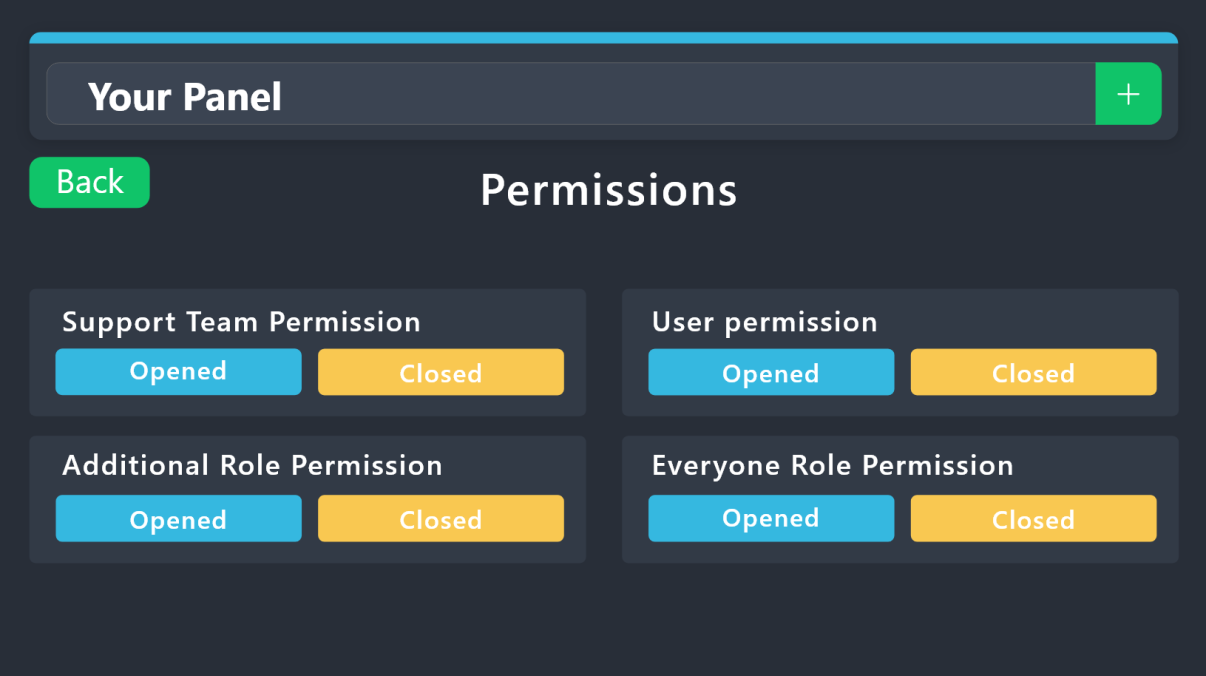 vague cosmos
You mean that, @tardy herald?
 tardy herald
vague cosmos
You mean that, <@1011124919448383518>?
tardy herald
vague cosmos
You mean that, <@1011124919448383518>?
I need to add mods in ticket they can delete send msg there
humble sequoiaBOT
1. Go into your Dashboard
2. Open your Panel Configs tab
3. Select the panel you want to grant access to
4. Open the General options menu
5. Select your Support Team Roles
6. Save changes
 tardy herald
Ok but last time it not worked
vague cosmos
Did you save it and use the right panel?
vague cosmos
Hmm can you open a ticket and see if everything is working now?
tardy herald
Ok i am checking in a new server
vague cosmos
Why not in your server where you are using the bot?
tardy herald
Yes
vague cosmos
But let me know if it works.
 shrewd forge
How does the Thread Style like mention in the Panel Setting work?
vague cosmos
Hey @shrewd forge if you use Thread Style it will create a private thread instead of a channel.
See #demo-threads for an example, it is a premium only feature.
shrewd forge
Oh. But do I really need 2 Boosts for it? I belive you don´t need to Server Boosts for it or is that like a Bot requierement?
vague cosmos
There is no boost requirement no, but you need Ticket Tool Premium.
shrewd forge
I know. But why is still mentioned on the page then?
vague cosmos
It's known and should be updated in the future.
shrewd forge
Thanks for helping me out on the Confusion.
vague cosmos
No worries, can I help you with anything else?
shrewd forge
No thanks.
tardy herald
Worked thanks @vague cosmos
iron nightBOT
Gave +1 Rep to @vague cosmos
vague cosmos
Awesome! Can I help you with anything else?
tardy herald
If i have problem i ask now all good
 tired goblet
Hi, I've seen in the FAQ what to do if tickets are not going to the open/closed ticket categories. I've enabled and double checked the permissions. Anything else I can do to get it working?
vague cosmos
Did you set the open and closed category?
jade topaz
Is there a way to get old ticketbot panel to new server?
Old server got termed (also my dc account)
humble sequoiaBOT
The Backup and Restore feature allows you to transfer your panels, tags, and all settings to a new server, even if the server the settings were created has been deleted! You will want to copy the whole key.
First, go to your server's Dashboard ➞ then Server Configs ➞ under Config Backup & Restore (Server Owner Only) click on Old version can be found here and generate a new backup key by pressing the green button. Now, a key should be generated in the box above. You may need to refresh the page to see this.
Once you have your backup key, navigate to the same page on the new server. Copy the key on the Restore from backup key field.
Now you can choose what you want to copy. Finally, press the green Restore Configs button.
IMPORTANT NOTE
- We suggest you keep this backup key somewhere safe, in case your server is deleted so you are able to recover your panel's settings.
- This feature is only usable by the server's owner
That is your only way, @jade topaz.
jade topaz
vague cosmos
That is your only way, <@456226577798135808>.
Not possible if old server is gone already?
vague cosmos
I don't think so.
vague cosmos
You might ask the support team by creating a ticket (#🎫│make-a-ticket) but since the server is gone, I assume you get a no too.
tired goblet
vague cosmos
Did you set the open and closed category?
yes we have the categories here. is there somewhere they need to be specifically assigned?
 humble sequoiaBOT
1. Go into your Dashboard
2. Open your Panel Configs tab
3. Select the panel you want to grant access to
4. Open the Category options menu
5. Select the categories of your preference
6. Save changes
 vague cosmos
@tired goblet ^
olive moon
@vague cosmos how to make my ticket tag support server roles and make multiple tickets? its limiting only 1 ticket
vague cosmos
@olive moon please don't ping for support.
For the limit: Dashboard > Panel Configs > Limits
Tagging, see below:
humble sequoiaBOT
1. Go into your Dashboard
2. Open your Panel Configs tab
3. Select the panel you want to ping your support on
4. Open the Ticket options menu
5. Click on Edit Ticket Message
6. In the Message Content use one of the role mention syntax (**{@Role Name}**/**{Role ID}**)
7. Save changes
Note: For this to work properly, Ticket Tool requires the Mention Everyone permission. Or the role must have the Allow anyone to @mention this role setting enabled
olive moon
sorry for tag, yesterday you asked to ping so i thougght its ok to ping you
vague cosmos
No worries, maybe it was because I was helping you yesterday. Can't remember everything, having the memory of a rock.
vague cosmos
olive moon
my ticket is only opening 1 ticket, says limit reached
Dashboard > Panel Configs > Limits + it's ok, don't worry about the ping.
humble sequoiaBOT
There are mainly two ways to limit how many tickets an individual user can create:
Global Limit
You can restrict the amount a user can open across all your panels by following these steps:
> 1. Go into your Dashboard
> 2. Open the Server Configs tab
> 3. Update the Global Ticket Limit field
> 4. Save changes
Panel Limit
Secondarily you can also set a limit per panel, meaning that a single user can open a certain amount of tickets on the given panel. Note that the Global Limit takes precedence upon Panel Limit, to set the latter follow this procedure:
> 1. Go into the Dashboard
> 2. Open the Panel Configs
> 3. Open the Limits options menu
> 4. Update the Open tickets each user counter
> 5. Save changes
When the Open tickets all users limit is hit, users won't be able to create more tickets.
 vague cosmos
This might eventually be easier for you. 😺
olive moon
ok i try
vague cosmos
Keep me updated. 🙂
tired goblet
vague cosmos
<@662117180158246926> ^
thanks for your replies, i dont think this is the problem tho
 iron nightBOT
Gave +1 Rep to @vague cosmos
vague cosmos
Does the bot have the required permissions?
humble sequoiaBOT
When first invited to your server, Ticket Tool should have the permissions shown below in order to ensure an appropriate functioning:
When customizing permissions for the different ticket participants, you must make sure Ticket Tool has the permissions you want it to grant to others, you can learn more about this here.
Missing Permissions
This error is a direct outcome of the bot missing permissions as depicted above. When troubleshooting this error we suggest you go through these steps:
- Use the </debug:1029783024264564765> command to check if the bot is lacking core role or channel permissions.
- Compare the category/channel's overrides and contrast them with the bot's roles to identify any permission denial that is breaking the functioning
- If you can't still figure it out, let our <@&540295656720302081> know so they can guide you through
Additional Resources
- If you are a server administrator and would like to understand more how to set up your server's permissions, we suggest checking the Discord Support Knowledge Base
- If you are a bot developer and are interested in the internal permission hierarchy we suggest you this part of the Discord Developer Docs
Important Note
- Giving Administrator permissions is NOT required and we do NOT encourage you to do unless you are trying to troubleshoot your permissions setup.
 pliant yarrow
if i change the panel message , is it possible to edit the embed of previous panel message to current one?
vague cosmos
You can use the update button at the dashboard, instead of the send one.
pliant yarrow
thx
tired goblet
humble sequoia
yep
vague cosmos
Hmm can you check the category perms in Discord?
 deft stag
how do i use restore ticket
vague cosmos
What do you mean exactly by "restore ticket"?
humble sequoiaBOT
@deft stag
⚠️ You're in the wrong place
We provide support for Ticket Tool Discord bot and cannot help you with whatever issue you have.
- We don't know which Support Team you should contact to get this issue resolved, and unfortunately we won't be able to accurately tell you.
If you don't have any further questions regarding our bot Ticket Tool, please close this ticket
deft stag
;-;

 vague cosmos
Categories are different, but mostly get copied from the channel.
Does Ticket Tool have access to the category?
tired goblet
vague cosmos
Categories are different, but mostly get copied from the channel.
Does Ticket T...
ill add and see if that helps thanks
iron nightBOT
Gave +1 Rep to @vague cosmos
vague cosmos
Let me know how it goes.
tired goblet
vague cosmos
Let me know how it goes.
fixed it thank you!
iron nightBOT
Gave +1 Rep to @vague cosmos
vague cosmos
No worries, can I help you with anything else?
tired goblet
does anyone use ticket support so that only admins can open a ticket and then add users for support?
vague cosmos
You should make the create button for the support team only and mark the admins as allowed role. After that they can use $add to add people.
@tired goblet do you know how? 🙂
tired goblet
vague cosmos
<@662117180158246926> do you know how? 🙂
we have create button and admin as only allowed role. when i try to $add someone they dont show because they dont have perms to see the ticket perhaps?
vague cosmos
Try use their user ID behind the add command.
I'm going to sleep now, so if you need more help: #🎫│make-a-ticket
tired goblet
vague cosmos
Try use their user ID behind the add command.
I'm going to sleep now, so if yo...
i tried /add Failed to add Missing Permissions
ok thanks for your help
 hybrid harbor
Is there a way to read tickets on the website?
 heavy ether
Hello! Just curious because at one point I was able to change the embed color for ticket panels a while back and it seems I no longer can? When I changed the color back when I could I changed it to a green color and now I cant change it off of the green color. Ive never had premium so just curious if that feature was recently made into a paid/premium only feature? On the dashboard it doesnt have a red diamond next to it (only the field editor does) so can anyone help 😭 maybe its just a glitch?
idle flint
heavy ether
Hello! Just curious because at one point I was able to change the embed color fo...
Hi thre, it has been a premium only feature for quite a while. TicketTool allows for a large amount of customisation at its base level and increases the customisation (colours etc) with premium.
You may have used the Free 7 day trial that is offered for Premium on your server?
 glass quail
Please help, what is the command to make a ticket button in a certain channel?
heavy ether
idle flint
You may have used the Free 7 day trial that is offered for Premium on your serve...
possibly? I dont remember doing a trial tho (but this was also a while ago and my memory is terrible)
I must be mistaken then, my bad!
Ill probably just end up looking into premium in the future since I use ticket tool in about 4 or 5 servers 💀 Thank you again for the help!
iron nightBOT
Gave +1 Rep to @idle flint
 gilded verge
 neat aurora
if i understand correctly, you can't manage your dashboard because of this problem, right?
 royal cedar
I want someone to bring me people to my server and be my personal assistant
tell me private if you want
gilded verge
that's not how support team works, if you have questions, just ask
or open a ticket with only support team on #🎫│make-a-ticket 🤔
 marsh yoke
How to do this by form
 humble sequoiaBOT
━━ User's inquiry has been moved to a ticket ━━
 blissful sparrow
how do i mass delete closed tickets
rustic gale
blissful sparrow
how do i mass delete closed tickets
Use the /purge command (server owner only)
blissful sparrow
ok
 candid spire
How can i cancel my premium subscription?
 covert swallow
Depends how you purchased it, but assuming you purchased through Discord you can folloe the guide below
humble sequoiaBOT
<:TicketToolOffline:1018980643092312155> Cancel your subscription
We're sorry to see you go!
To cancel your Ticket Tool Premium Subscription, just head over to your User Settings in Discord, then Subscriptions. Look for Premium Apps and click on Manage Subscriptions. There you can cancel your subscription at the end of your billing cycle.
User Settings > Subscriptions > Premium Apps > Manage Subscriptions > Cancel
 surreal trench
Is there a way to create a ticket automatically when a user joins our server? I know if you setup a Panel with a Create button, clicking the button will create the ticket but I'm wondering if it's possible to avoid this manual step.
rustic gale
surreal trench
Is there a way to create a ticket automatically when a user joins our server? I ...
You need another bot that can send a custom message when a user joins the server.
- Set up the other bot to send the command
$newfollowed by the user's ID when the user joins - Set up Ticket Tool to accept the other bot's command to create a ticket
 edgy epoch
i keep getting this
 rustic gale
That's because you're trying to create tickets too quickly
edgy epoch
i dont understand i type $new slowly
scenic plinth
Its the amount of time between the times you send the messages. Not you typing out each letter.
 rustic gale
Are tickets actually being created?
rustic gale
It's likely because you have multiple command-style tickets assigned to the same tracking channel
You typ $new and it tries to create tickets of all those types
Of course it fails because the bot can't create that many channels at once
edgy epoch
okay what is that under? category?
rustic gale
Command Style
 rustic gale
edgy epoch
any other suggestions ?
rustic gale
edgy epoch
any other suggestions ?
It says Bypass channel list and watch all of them
I recommend for you to go panel by panel
disable that setting
and select a specific different channel for each panel
 tender totem
Is there a way to make ticket tool ping the staff team when a ticket is made 🤔
rustic gale
edgy epoch
didnt work
Wanna use the $debug command in your server please
humble sequoiaBOT
1. Go into your Dashboard
2. Open your Panel Configs tab
3. Select the panel you want to ping your support on
4. Open the Ticket options menu
5. Click on Edit Ticket Message
6. In the Message Content use one of the role mention syntax (**{@Role Name}**/**{Role ID}**)
7. Save changes
Note: For this to work properly, Ticket Tool requires the Mention Everyone permission. Or the role must have the Allow anyone to @mention this role setting enabled
tender totem
im a little confused on how to set up the select an option like why theyre opening a ticket 😭 the dropdown menu for it
is there like step by step instructions somewhere for that
tender totem
humble sequoia
Thank you for this btw :)
iron nightBOT
Gave +1 Rep to @humble sequoia
humble sequoiaBOT
The Drop-down menu or Select Menu replaces the buttons on your panel message and uses a drop-down menu with all of your panels. To set this up, go to your Panel Configs and select your main Panel.
<:Numbericons1:1018864164032225340> Enable Select Style
First you enable Select Style. Then you add an item in the Dropdown Editor. Now you can start editing your dropdown!
<:Numbericons2:1018864168041971712> Dropdown Editor
Each line in the dropdown editor represents a line in the drop down menu on discord. You can add more "Items", by clicking on
First you select a panel. That's the panel this option will open a ticket for. DONT select the same panel twice. Each option should have a different Panel
After that, you can put a Display. This is the title of this option and will appear in the drop down menu. The *Description can be set right after that, which will be below the title in grey.
Additionally you can select an emoji, that will be shown in front of each option. You can either manually input the ID of an emoji or select it in the selector.
Common Issues ⚠️
- Panel doesn't send? Make sure you have a valid emoji selected
- Option doesn't show up? Check if two options have the same panel in the DropDown Editor
$dropdown
tender totem
is the button style easier? 👀
humble sequoiaBOT
For more convenient use of multipanels, you can now combine panels on the dashboard. This will allow you to directly send the multipanel from the dashboard or via the $panel ID command.
Where can I find this?
You can find this setting on the Dashboard -> Panel Configs -> Panel -> Attached Panels
Note: if you're attaching all the panels to a panel called English, don't include English in the attached panel's box (If you do this, it will create a duplicate)
This will put all buttons from all of your panels on one message. The message is the panel message from the panel you're combining these panels in.
rustic gale
edgy epoch
didnt work
You selected the same channel for two different panels
You ever use the $new command in that channel, it will try to create both types of ticket at the same time and get that timeout
tender totem
Okay yes I wanna do the button option I keep digging myself a deeper hole 😭 how do I set up button options?
rustic gale
tender totem
Okay yes I wanna do the button option I keep digging myself a deeper hole 😭 how...
First use this button here to create a bunch more panels

One panel for each different type of ticket i.e. for each button in your menu
tender totem
rustic gale
https://cdn.discordapp.com/attachments/1065154397358796800/1068354957687926894/i...
okay I did that
rustic gale
Now pick one of them to act as your “main panel” and select it on the selector at the top
Then scroll down and head to the Panel menu and attach the others into Attached Panels
tender totem
I-
I dont see where it says panel menu 😭 or attached panels im sorry

nevermind found that
but one is missing
rustic gale
tender totem
but one is missing
Probably the one you selected
The one that's currently selected
That one's automatically included, as the first button in the menu. Which is why it doesn't appear there
tender totem
no thats the ID verify one the missiong one is general questions
rustic gale
Then save and refresh the page and look again.

 rustic gale
If you send it now, you'll get a menu with a row of identical
📩 Create Ticket
buttons, which will be confusing
So instead customize the buttons panel by panel.
That's in the Buttons -> Edit Create Ticket Button menu
Then after that you select the main panel again and send it
 zealous zephyr
He
tender totem
rustic gale
Then after that you select the main panel again and send it
can I use emojis that are in my server?
rustic gale
Yes
Use the emoji selector, or use the /id command in your server to find the emoji's ID and copy that into the emoji field
tender totem
rustic gale
Use the emoji selector, or use the /id command in your server to find the emoji'...
how do I send it when im done?
rustic gale
tender totem
how do I send it when im done?
Go back to the main Panel Configs menu and use the Send button
tender totem
rustic gale
Go back to the main Panel Configs menu and use the **Send** button
it made duplicates

does this mean theres 2?
 rustic gale
tender totem
does this mean theres 2?
rustic gale
tender totem
does this mean theres 2?
You included the same panel into the attached panels
In other words, you attached the panel to itself
that's why the button is repeated
Remove itself from its attached panels and send it again
tender totem
how do i fix that
rustic gale
Like i just said
tender totem
oh the ok
tender totem
rustic gale
Like i just said
Thank you so much gosh that was a lot haha. Bless your brain for carrying so much information. 🙏
iron nightBOT
Gave +1 Rep to @rustic gale
rustic gale
👍
tender totem
Im sorry im back 😭 is there a way for the message to be different in the ticket once its made based on the button theyve selected?
surreal trench
rustic gale
You need another bot that can send a custom message when a user joins the server...
Thank you for your prompt response! What do I need to configure for the second step? I'm using the MEE6 bot to send a $new message when a new user joins but tickettool doesn't seem to be responding to it. But when I type that same $new message manually it's working fine.
iron nightBOT
Gave +1 Rep to @rustic gale
rustic gale
surreal trench
Thank you for your prompt response! What do I need to configure for the second s...
What you're missing is adding the ID of MEE6 to the Bot ID field in Server Configs in the dashboard.
surreal trench
rustic gale
What you're missing is adding the ID of MEE6 to the **Bot ID** field in Server C...
Got it, I’ll try that. Thank you so much!
iron nightBOT
Gave +1 Rep to @rustic gale
 sand briar
@vague cosmos Hoe kan ik dingen verschilllende ticket categorien verwijderen?
haha je bent er weer om te helpen 😄
vague cosmos
sand briar
<@143705466734641152> Hoe kan ik dingen verschilllende ticket categorien verwijd...
Ik ben nu aan het werk, kan ik daar thuis op reageren?
sand briar
vague cosmos
Ik ben nu aan het werk, kan ik daar thuis op reageren?
uhm kan maar ik wil nu proberen 😄
thanks
vague cosmos
sand briar
<@143705466734641152> Hoe kan ik dingen verschilllende ticket categorien verwijd...
Bedoel je voor waar ze gemaakt worden?
sand briar
vague cosmos
Bedoel je voor waar ze gemaakt worden?
ik heb nu zeg maar verschillende categorien in 1 message, en wil er daar 1 categorie weg halen,... hoe kan dat?
humble sequoiaBOT
1. Go into your Dashboard
2. Open your Panel Configs tab
3. Select the panel you want to grant access to
4. Open the Category options menu
5. Select the categories of your preference
6. Save changes
vague cosmos
Gaat dat lukken?
iron nightBOT
Gave +1 Rep to @vague cosmos
vague cosmos
Geen probleem.
sand briar
vague cosmos
Gaat dat lukken?
nee die niet is het eigenlijk.... ik wil uit mn multi panel 1tje weg halen
vague cosmos
Ah, volg de stappen hier maar dan een verwijderen:
humble sequoiaBOT
For more convenient use of multipanels, you can now combine panels on the dashboard. This will allow you to directly send the multipanel from the dashboard or via the $panel ID command.
Where can I find this?
You can find this setting on the Dashboard -> Panel Configs -> Panel -> Attached Panels
Note: if you're attaching all the panels to a panel called English, don't include English in the attached panel's box (If you do this, it will create a duplicate)
This will put all buttons from all of your panels on one message. The message is the panel message from the panel you're combining these panels in.
vague cosmos
Daarna de panel updaten of opnieuw versturen
sand briar
wil hier 1tje weg halen maar ik heb gwn alles goed gedaan...
