#🆘│community-support
1 messages · Page 50 of 1
 vague cosmos
So, the message when a ticket is created?
I'm a little bit confused now, what do you all want to change?
- The button message?
- The content in the embed on the above screenshot?
- Something else?
Dashboard > Panel Config > Messages > Edit Panel Message
 iron nightBOT
Gave +1 Rep to @vague cosmos
vague cosmos
Once you updated the text, you'll need to re-send the panel.
That's premium only.
Be right back.
It is because it is.
iron nightBOT
Gave +1 Rep to @vague cosmos
vague cosmos
Your welcome!
 versed quest
can someone help me please i got blacklisted for no reason for playing the game as a sheriff not fair i need help
 humble sequoiaBOT
@versed quest

⚠️ You're in the wrong place
We provide support for Ticket Tool Discord bot and cannot help you with whatever issue you have.
- We don't know which Support Team you should contact to get this issue resolved, and unfortunately we won't be able to accurately tell you.
If you don't have any further questions regarding our bot Ticket Tool, please close this ticket
 jade topaz
Hey i need some help with thread type tickets, ticket tool deletes ticket owner from thread just after the thread is closed (not deleted) and i dont want that to happen, can anyone help?
vague cosmos
@jade topaz based on my above reply - I'm on PC now - you can't change the permission(s) from it.
If a ticket gets closed, it's normal that the user isn't able to stay in it. If you want that, you'll need to use the channels for tickets.
 jade topaz
I wonder why there is no blacklist in the bot or if there is, where is it?
 pseudo ravine
Hey there. You are wanting to blacklist users from opening tickets, correct?
jade topaz
pseudo ravine
Hey there. You are wanting to blacklist users from opening tickets, correct?
yes
humble sequoiaBOT
Any role you assign as a blacklisted role won't be able to use commands or reactions.
Selecting a blacklisted role
Go to your Dashboard ➞ Server Configs. There you will find the option to select blacklisted roles.
Note: Don't forget to save.

 serene silo
hey i tried to add claim but it dosnt seem to want to show up after making a ticket any fix?
pseudo ravine
Hey there. Claiming is a premium feature
serene silo
really?
pseudo ravine
Yes
serene silo
they should add somethinglike it so my people know if someone is helping them
or make it free
pseudo ravine
I doubt they’ll make it free, but I guess it’s possible. Just unlikely
 lunar solar
serene silo
or make it free
lunar solar
serene silo
or make it free
It's not a required feature for functionality of the tool so the chances of it becoming free are slim to none
serene silo
ik but its really useful that would make me wanna buy premium the basic pack dosnt
 coarse spruce
Does Ticket Tool have analytics? Such as how many tickets have been opened, how many have been claimed and by who, etc.
 gilded verge
yup, please check Statistics in your dashboard
 sonic elk
I keep getting this error when trying to make a ticket in TicketTool support...
Ticket Tool Gold | Premium Bot
BOT
— Today at 10:55 PM
System Failure: Channel create rate limit reached:50 - resets in
I need to transfer my subscription from the server I no longer manage/own to my new server. Thank you, please ping me.
 timber kernel
sonic elk
I keep getting this error when trying to make a ticket in TicketTool support...
...
timber kernel
sonic elk
I keep getting this error when trying to make a ticket in TicketTool support...
...
It seems like you hit the Discord rate limit on your server and need to wait a bit.
Have you opened a lot of tickets the last minutes / hours ?
 spark marten
Looks like the bot is down
timber kernel
spark marten
Looks like the bot is down
You use the gold bot? And it is not working?
spark marten
timber kernel
You use the gold bot? And it is not working?
yup and I even could not create a ticket here
 timber kernel
spark marten
timber kernel
spark marten
We will have a look at this.
spark marten
Thank you
spark marten
timber kernel
We will have a look at this.
Thank you
iron nightBOT
Gave +1 Rep to @timber kernel
timber kernel
spark marten
Thank you
What is your server ID that is affected by this problem?
spark marten
timber kernel
What is your server ID that is affected by this problem?
can I dm you ?
timber kernel
spark marten
can I dm you ?
Yes (because I think open a ticket is not working for you 😄 )
 fossil current
i had saved my transcirpt but now it's showing invalid request , why?
sonic elk
timber kernel
It seems like you hit the Discord rate limit on your server and need to wait a b...
Maybe one in the last week? I tried opening a ticket here on ticket tool to open a ticket here for support and got that error.
fossil current
timber kernel
Yes (because I think open a ticket is not working for you 😄 )
same
vague cosmos
sonic elk
Maybe one in the last week? I tried opening a ticket here on ticket tool to open...
They're looking into the limit error.
timber kernel
A note to everyone here:
We are aware of the rate limit issues some of you experiencing atm. We are already looking into it.
Please be patient.
timber kernel
sonic elk
Maybe one in the last week? I tried opening a ticket here on ticket tool to open...
It is a more global error it seems, we are already checking it. See my message above please.
 tepid islandBOT
 TheCrazyKid#9733
 You cannot work for 23 seconds.
 dusty pier
Wrong chat
jade topaz
anyone here?
humble sequoiaBOT
@gentle tundra, we would love to help you, but if you don't tell us what you need help with we can't help you :(
vague cosmos
@jade topaz did you still need help? 🤔
jade topaz
vague cosmos
<@456226577798135808> did you still need help? 🤔
Ye, there is still issue with ticket tool?
 wild haven
cant create a ticket can someone help
vague cosmos
See #📣│bot-news, but what issues are you expecting?
vague cosmos
wild haven
cant create a ticket can someone help
See #📣│bot-news but what is your issue?
wild haven
vague cosmos
See <#571104498483986466> but what is your issue?
how can i modify the ticket channels , what i mean is when they open i want them to be under create ticket category section but they went thru under boost section
vague cosmos
vague cosmos
See <#571104498483986466>, but what issues are you expecting?
@jade topaz ping didn't get added on phone so doing it here. Is there anything you need help with now tickets can't be created?
wild haven
vague cosmos
Did you have any other questions, <@383482714487128075>?
no thank you
iron nightBOT
Gave +1 Rep to @vague cosmos
 vast token
timber kernel
A note to everyone here:
**We are aware of the rate limit issues some of you exp...
vast token
timber kernel
A note to everyone here:
**We are aware of the rate limit issues some of you exp...
Thank you
iron nightBOT
Gave +1 Rep to @timber kernel
spark marten
Has the issue been located?
vague cosmos
See #📣│bot-news for the last information.
spark marten
cool
 empty plume
is there a way to rename a ticket based on a form response?
 austere bobcat
Howdy folks!
I've also encountered the rate limit issue in my server, but only when creating new channels. Do you know if the issue extends to threads? If not, I may switch over to using those, rather than channels.
vague cosmos
I think it does, @austere bobcat. A thread is technically a channel too.
 somber vigil
Hi
I need help
I need ticket system like this but I don't know how to make it can anyone tell me please or suggest a tutorial @timber kernel @slender minnow

 supple panther
Bot is still not working, we just wait or is there any steps to do?
https://imgur.com/a/gVtHxUx

 slender minnow
supple panther
Bot is still not working, we just wait or is there any steps to do?
https://imgu...
slender minnow
supple panther
Bot is still not working, we just wait or is there any steps to do?
https://imgu...
just wait
slender minnow
somber vigil
I need ticket system like this but I don't know how to make it can anyone tell m...
Hi please do not ping staff when you are asking for help
re. to this response for a guide on dropdown: #🤖│bot-spam message
supple panther
slender minnow
just wait
Thanks
iron nightBOT
Gave +1 Rep to @slender minnow
somber vigil
Ok
austere bobcat
vague cosmos
I think it does, <@165864789707325440>. A thread is technically a channel too.
Ah, foils that plan 😄
Thanks for letting me know.
thanks @vague cosmos
iron nightBOT
Gave +1 Rep to @vague cosmos
 strange steppe
how do i get to this tab with two of the panels to change the limit?

imtrying to follow the tutorial on the website but its confusing
 ocean violet
Ticket tool made three identical tickets and then abandoned them - it said that the channels were not tickets and therefore commands didn't work.

 charred basin
 pseudo ravine
 low mural
why is it like this
 gilded verge
low mural
why is it like this
gilded verge
low mural
why is it like this
these three are role id or user id?
 low mural
user
gilded verge
hm, let's see... sec pls
yep, as i thought, id not exist
soooo please make sure you used correct user id
low mural
Ohh okay thanks
strange steppe
strange steppe
how do i get to this tab with two of the panels to change the limit?
this seems like its old UI, the new one doesnt have options like that for me
anybody know where to change the limit of tickets a user can make? rn my server is stuck on 1 but id need 3
gilded verge
uh, i forgot cc..
just go to Panel Configs and choose Limits ^^
 sly obsidian
I keep getting the ticket limit message but I have the premium version
 signal pollen
"system failure: channel create rate limit reached:50 - resets in X seconds"
Getting this message in this Discord Server and same in my Discord Server.
 wide marsh
System Failure: Channel create rate limit reached:50 - resets in x
extra info: https://discordapp.com/channels/509192800865353738/662692902245498910/1113455560927477900
 scenic plinth
We are aware of that ongoing issue. We are experiencing rate limits in some premium servers, where our development team has been notified. Thank you for you patience while we work to resolve this issue.
sly obsidian
okay thanks
wide marsh
Thanks @scenic plinth !
iron nightBOT
Gave +1 Rep to @scenic plinth
scenic plinth
scenic plinth
We are aware of that ongoing issue. We are experiencing rate limits in some prem...
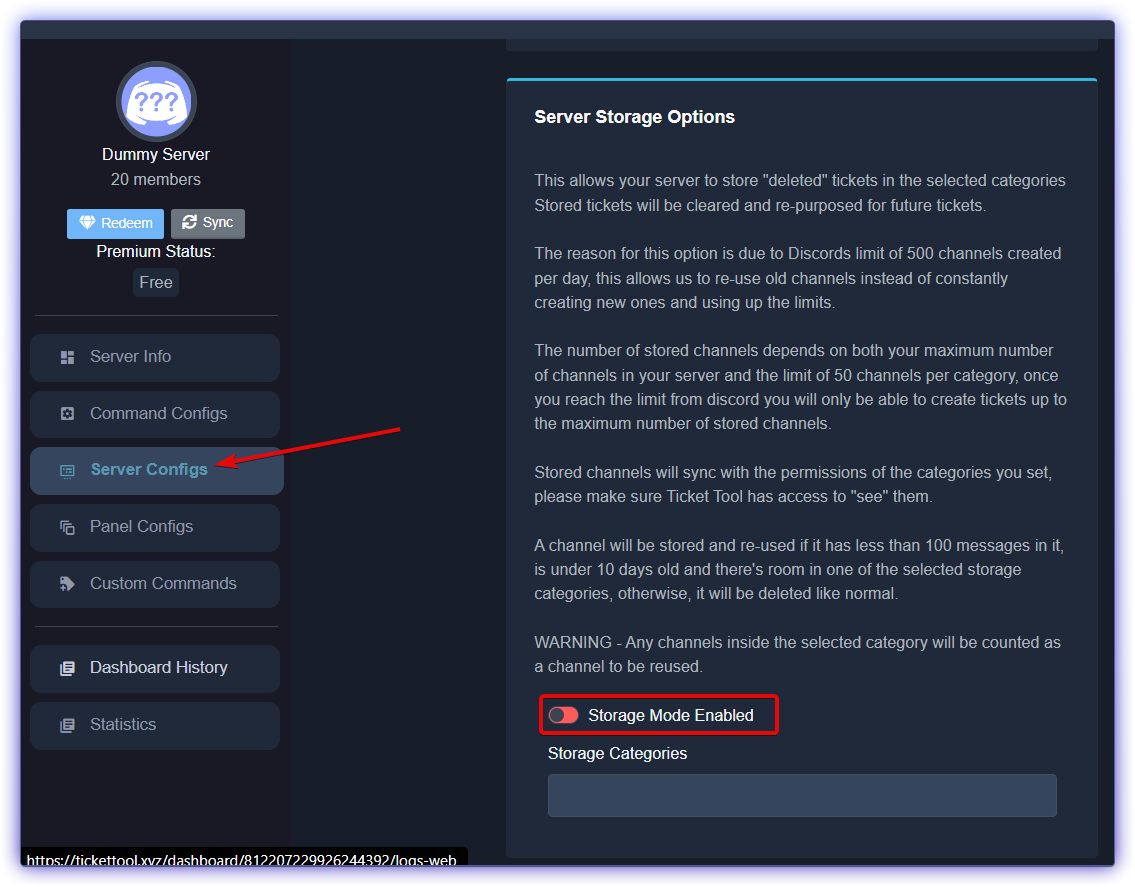
For those affected by the ratelimit, we strongly recommend enabling Storage Mode in Server Configs until we resolve this issue.
slender minnow
You can find the storage mode in the Server Configs of your server dashboard. Toggle the Storage Mode Enabled ON and specify the category where the tickets will be stored.
https://i.imgur.com/hrEVzGo.png
 signal pollen
so when the same customer goes to create a ticket, itll open their previously closed and transcript saved ticket?
scenic plinth
No (atleast how I understood that question), they are completely repurposed.
Any messages sent in a ticket is deleted, and the ticket is moved to your storage category. When creating a new one, it will take one from this category and "create" a new ticket. All other functions are normal such as transcripting and naming.
signal pollen
scenic plinth
No (atleast how I understood that question), they are completely repurposed.
A...
Okay so is this ideal for a sever that has more than 50 tickets being opened and closed and deleted daily? and sometime tickets being open for 3 days to weeks at a time until closed?
ill give it a shot, i just dont want to create a bigger issue
sly obsidian
scenic plinth
No (atleast how I understood that question), they are completely repurposed.
A...
I’ve tried it, but once you close the ticket the channel becomes public, like everyone can see it
signal pollen
sly obsidian
I’ve tried it, but once you close the ticket the channel becomes public, like ev...
oh lord yeah no cant do that option...
sly obsidian
signal pollen
oh lord yeah no cant do that option...
the channel is empty tho, each message its deleted
oh maybe the solution is just making a category for storage and make it private so the ticket channel will use that perms (?)
scenic plinth
Yes, any tickets (channels) placed in your storage category will use the permissions of the category.
 bronze pasture
Which role permission would you need to work on the ticket tool panel (on the site)?
scenic plinth
signal pollen
Okay so is this ideal for a sever that has more than 50 tickets being opened and...
Theoretically should not be an issue if it is per day. Discord limits it 50 per 16 minutes, so this is really only affecting higher demand servers.
signal pollen
scenic plinth
Theoretically should not be an issue if it is per day. Discord limits it 50 per ...
wonder why i got the message about it if we didnt open 50 tickets in 16 minutes
scenic plinth
Were there any channels created manually around the same time you first got the error?
signal pollen
no
scenic plinth
To my understanding, as this happened when I was offline, it affects servers on a specific shard(s), which probably lead to your error. Then again, the new rate limit isn't exactly clear elsewise.
 reef briar
Hey everyone, hope this is the right place to ask. Does ticket tool support tags? I'm looking for the ability to differentiate tickets before/after they've been closed and was wondering if a simple text tagging option exists.
slender minnow
reef briar
Hey everyone, hope this is the right place to ask. Does ticket tool support tags...
you can have tickets created and closed under different categories, or you can have their names changed (but its a premium feature)
reef briar
Renaming could do the trick here! Thanks!
 chilly torrent
Is there a way to have a ticket be automatically opened when a certain role is added to a user?
gilded verge
nope, the user has to do it himself if he wants to open a ticket, i mean use button to create a ticket or use command to open ticket
//it wouldn't make much sense because the bot wouldn't work properly, for example, there are a lot of users on the server and you want to assign them a certain role, but the problem starts when it could be abused for mass adding roles (like when you've raid on server but for guild.join event you've set this role when someone join), which would cause a rate limit for Ticket Tool, and we know that Discord doesn't like abuse, it could end up in problems 😦
chilly torrent
gilded verge
nope, the user has to do it himself if he wants to open a ticket, i mean use but...
Fair enough! Thanks for the information
iron nightBOT
Gave +1 Rep to @gilded verge
jade topaz
how do i change this ????
 timber kernel
Please run
/debug
timber kernel
jade topaz
how do i change this ????
What exactly you want to change? Panel message? Button text? etc. 🙂
jade topaz
timber kernel
What exactly you want to change? Panel message? Button text? etc. 🙂
all of it rly
jade topaz
timber kernel
What exactly you want to change? Panel message? Button text? etc. 🙂
mostly them
 timber kernel
jade topaz
all of it rly
timber kernel
jade topaz
all of it rly
To edit the Panel message you go to:
Panel Configs -> Messages -> Message Panel
On the bottom you then also have a button to jump to the button config:


jade topaz
timber kernel
To edit the Panel message you go to:
Panel Configs -> Messages -> Message Panel
this ?
 timber kernel
jade topaz
this ?
timber kernel
jade topaz
this ?
Yes
jade topaz
timber kernel
Yes
i did that but it did not like go on the discord

this is what it looks like now
 timber kernel
jade topaz
i did that but it did not like go on the discord
timber kernel
jade topaz
i did that but it did not like go on the discord
Send the panel again to the channel.
Then it will be the updated one.
jade topaz
how do i give it what it needs
 timber kernel
jade topaz
how do i give it what it needs
timber kernel
jade topaz
how do i give it what it needs
Bot is missing Send message permission.
Please check the channel config / permissions.
Additonally maybe also not allowed to View the channel at all.
And you also need to give it this perm


 timber kernel
jade topaz
how do i like fill it out ?
timber kernel
jade topaz
how do i like fill it out ?
There you can configure in which channel and which roles are allowed to use that command.
timber kernel
jade topaz
this just came up <:AaronThink:993233991081668648>
You have an issue with the custom emojis you have configured.
jade topaz
timber kernel
You have an issue with the custom emojis you have configured.
a i get it
jade topaz
i dont got any emojis
 timber kernel
jade topaz
i dont got any emojis
timber kernel
jade topaz
i dont got any emojis
You wrote your text to the emoji config.
Button text is below
jade topaz
.... my bad
 jade topaz
yes it works
timber kernel
 celest cloak
How to give the ticket role to a member?
vague cosmos
What do you mean by "ticket role"?
celest cloak
Other member of staff need to see open ticket
humble sequoiaBOT
1. Go into your Dashboard
2. Open your Panel Configs tab
3. Select the panel you want to grant access to
4. Open the General options menu
5. Select your Support Team Roles
6. Save changes
 vague cosmos
See above, @celest cloak.
celest cloak
Thank you, now i try
iron nightBOT
Gave +1 Rep to @vague cosmos
vague cosmos
Happy to hear that, did you have any other questions?
jade topaz
I need to remove this when open ticket
Ticket created

But when i closed it, it shows Ticket Created #Unknown
so any fix about it ?
pseudo ravine
Hey there. Due to how Discord shows it, it'll show as #Unknown if the channel has been deleted
jade topaz
But i see in some servers it shows No Access
pseudo ravine
Because that channel hasn't been deleted then
jade topaz
so how they did it no access?
maybe they not deleted channels, just moved to another category?
pseudo ravine
No Access - You don't have access to view the channel
Unknown - The channel is most likely deleted
jade topaz
So how i can make it no access?
So i can make if someone closed ticket, it moved to another category?
pseudo ravine
For who?
jade topaz
But if admin closed it its removed?
gilded verge
jade topaz
I need to remove this when open ticket
you can't manage ephemeral messages so that's not possible
pseudo ravine
jade topaz
So i can make if someone closed ticket, it moved to another category?
Yes.
Dashboard > Panel Configs > Category > Category Closed
pseudo ravine
Was the channel deleted?
 signal marsh
كيف اشتري البوت يصير خاص فيني
 robust sandalBOT
signal marsh
كيف اشتري البوت يصير خاص فيني
robust sandalBOT
signal marsh
كيف اشتري البوت يصير خاص فيني
How do I buy the boots to become my own
 Arabic (ar) → English (en)
jade topaz
pseudo ravine
Was the channel deleted?
Arabic (ar) → English (en)
jade topaz
pseudo ravine
Was the channel deleted?
yeah channel deleted
signal marsh
How do I buy a bot that will be special to me?
pseudo ravine
jade topaz
yeah channel deleted
That's why it's showing as Unknown
jade topaz
because i did it only shows when open ticket
pseudo ravine
It's a Discord thing
signal marsh
signal marsh
How do I buy a bot that will be special to me?
??
pseudo ravine
Hey there. Ticket Tool doesn't have custom bots
vague cosmos
Not yet ^
signal marsh
pseudo ravine
Hey there. Ticket Tool doesn't have custom bots
Ok
dusty pier
how do you make it where other people cant see your tickets?
humble sequoiaBOT
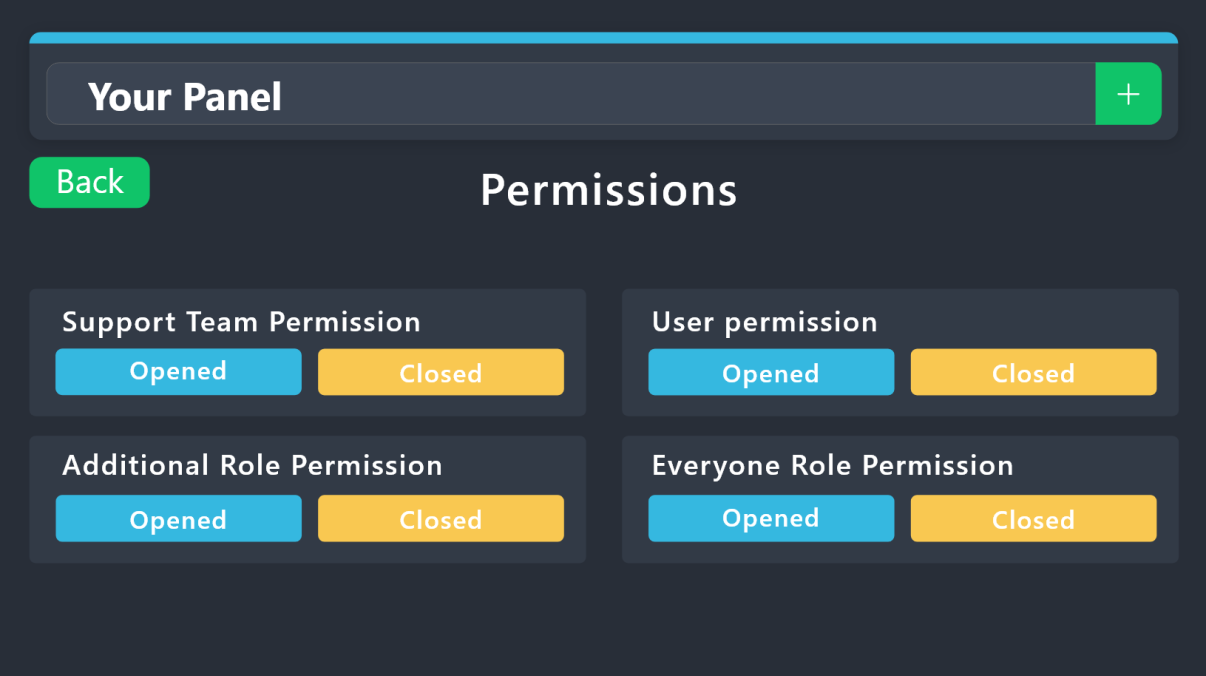
1. Go into your Dashboard
2. Open your Panel Configs tab
3. Select the panel you want to grant access to
4. Open the Permissions options menu
5. Find what role you'd like to edit permissions for
6. Choose if you'd like to edit opened or closed permissions for that role
7. Edit the permissions by tickingor unticking
each permission
8. Save changes
 vague cosmos
@dusty pier see above.
dusty pier
is it where that only one person can see it not everyone else?
vague cosmos
If you edit the everyone role permission and don't have a support team role yes.
dusty pier
how do i do that i am confused
vague cosmos
humble sequoia
Read this. Just follow the steps provided.
dusty pier
what should i turn off?
vague cosmos
Depends on what you want, but view channel for example.
dusty pier
i went it where only that person who makes the ticket to see it not all the other memebers
vague cosmos
That is by default.
Tickets are hidden by default for everyone, expect the owner and support team.
humble sequoiaBOT
1. Go into your Dashboard
2. Open your Panel Configs tab
3. Select the panel you want to grant access to
4. Open the Category options menu
5. Select the categories of your preference
6. Save changes
 dusty pier
i did that tho
vague cosmos
Did you save it? Does TT have the required permissions?
humble sequoiaBOT
ᅠ
@pseudo glen requires the following permissions:
Add Reactions
Read Channels
Send Messages
Manage Messages
Embed Links
Attach Files
Read History
Manage Roles
Manage Channels
To change the role permissions, you can go to your Discord Server ➞ Server Settings ➞ Roles ➞ @Ticket Tool
To change the category permissions, you can got to your Channel List ➞ Select Category ➞ Options ➞ Permissions ➞ @Ticket Tool
To change the channel permissions, you can go to your Channel Settings ➞ Permissions ➞ Ticket Tool
ᅠ
Note:
You can give Ticket Tool Administrative Permissions instead of all the permissions listed above, but it's entirely optional and NOT necessary.
 dusty pier
where dont get it
vague cosmos
What don't you get? Permissions? Edit the permissions for the role in Discord.
dusty pier
i dot know how to change the bot permisions?
vague cosmos
You know how to edit a role in Discord?
Discord
One of the great things about creating communities on Discord is our permission system! In this Help Center article, you'll learn more about permissions, how to create and customize permissions bas...
dusty pier
yes
 stray bobcat
dusty pier
stray bobcat
dusty pier
so i need to do all of it not the admin one
vague cosmos
humble sequoia
All listed here.
vague cosmos
Are you sure you editted the role by Ticket Tool and can the role/bot see the categories?
Can you run /debug and send me screenshot of the response you get @dusty pier? So I can see if permissions are fine.
dusty pier
its all checked
vague cosmos
 ? If so, can you check if your categories are having the right permissions (for TT).
dusty pier
where tt where?
vague cosmos
TT = Ticket Tool
But check the permissions for the category where you want the tickets to be created in, is there any permission for Ticket Tool?
dusty pier
dusty pier
where tt where?
i dont know HOW
i am so frustrated i went to be done with this so i can get my server open
vague cosmos
Right click channel category > Edit Category > Permissions
vague cosmos
Make sure Ticket Tool can view the category; if everything is on  it should work.
This should be fine for the role, but note that a  will override a , anything that is on is fine.

@dusty pier ^
dusty pier
so everything have to stay on defalt for that channel to make it work no private exc
how do i make the ticket limit?
vague cosmos
If you have everything on expect the view channels it should work.
humble sequoiaBOT
There are mainly two ways to limit how many tickets an individual user can create:
Global Limit
You can restrict the amount a user can open across all your panels by following these steps:
> 1. Go into your Dashboard
> 2. Open the Server Configs tab
> 3. Update the Global Ticket Limit field
> 4. Save changes
Panel Limit
Secondarily you can also set a limit per panel, meaning that a single user can open a certain amount of tickets on the given panel. Note that the Global Limit takes precedence upon Panel Limit, to set the latter follow this procedure:
> 1. Go into the Dashboard
> 2. Open the Panel Configs
> 3. Open the Limits options menu
> 4. Update the Open tickets each user counter
> 5. Save changes
When the Open tickets all users limit is hit, users won't be able to create more tickets.
 vague cosmos
See above. 🙂
dusty pier
well for that one ticket i mean person i mean
vague cosmos
Mind if you explain?
dusty pier
i only can open one of them not two
vague cosmos
Did you set a global ticket limit? (See above)
@dusty pier as I am going to bed - and won't be able to assist you from there - I'd suggest you to contact the lovely <@&540295656720302081> by opening a ticket in #🎫│make-a-ticket.
dusty pier
i think i got it
vague cosmos
Oh thats awesome!
But if you've more questions I'd suggest you to open a ticket. Best of luck!
jade topaz
im trying to make the bot ping when a ticket is opened, in the ticket message, its not working the message is the same
gilded verge
jade topaz
im trying to make the bot ping when a ticket is opened, in the ticket message, i...
but you trying to ping user, role or something else? also please show screenshot of this
jade topaz
gilded verge
but you trying to ping user, role or something else? also please show screenshot...
a role
in the format <@& id >
gilded verge
oke, so now please show screenshot ^^
jade topaz
 gilded verge
ou, nono, after opening a ticket please
jade topaz
gilded verge
ou, nono, after opening a ticket please
wym
gilded verge
open a ticket on your server and then send screenshot :3
 gilded verge
😳
how many panels do you have?
because the only possible reason is that you using wrong panel 🤔
my example of panels:
 jade topaz
gilded verge
because the only possible reason is that you using wrong panel 🤔
my example of...
jade topaz
gilded verge
because the only possible reason is that you using wrong panel 🤔
my example of...
one i believe
gilded verge
just to be sure please check ^^
jade topaz
how do i check

 hushed zinc
Am I able to make a role get instant tagged when a ticket is opened? If so where?
gilded verge
also, Panel Configs->Ticket->Edit Ticket Message->add mentions to Message Content
iron nightBOT
Gave +1 Rep to @gilded verge
 rustic gale
thanks @jade topaz
iron nightBOT
Gave +1 Rep to @vestal ferry
rustic gale
'cause of the cooldown
 rustic gale
spark marten
how to change the cool down time for ticket creation
rustic gale
spark marten
how to change the cool down time for ticket creation
Not possible. It's a Discord limit, all that Ticket Tool does is respect it
 ancient vale
Hi 👋 Is it possible to export all ticket by data range? I can't find how to download it all to csv?
vague cosmos
I don't think you can export them, transcript seems to be the only option.
ancient vale
vague cosmos
I don't think you can export them, transcript seems to be the only option.
thanks
iron nightBOT
Gave +1 Rep to @vague cosmos
vague cosmos
Did you have any other questions?
ancient vale
vague cosmos
Did you have any other questions?
Yes, is it possible somewhere to check all closed tickets?
I also can't find them anywhere
vague cosmos
Did you have logging enabled?
vague cosmos
Because, I don't think there's a way otherwise.
ancient vale
vague cosmos
Because, I don't think there's a way otherwise.
nope( logging unenabled(
 humble sequoiaBOT
With Ticket Tool, you can customize the behavior the bot takes when logging your tickets! For editing these options follow these steps:
Dashboard ➞ Panel Configs ➞ Logging Options
Logging Channel
Here you will define which channel @humble sequoia will save the Logs in (ticket created/deleted/closed, etc.)
Logs you can save:
➞ Ticket Created ➞ Logs when a ticket is created
➞ Ticket Closed ➞ Logs when a ticket is closed
➞ Ticket Opened ➞ Logs when a ticket is opened
➞ Ticket Renamed ➞ Logs when a ticket is renamed
➞ Ticket Deleted ➞ Logs when a ticket is deleted
➞ Transcript Saved ➞ Logs when a ticket is saved
Select with  (disable) or
  (enabled) which logs you would like
Below you can see an example of what the Logging Options will look like:
 ancient vale
So there i'm able to check messages?
vague cosmos
If you enable that you can see when a ticket gets closed, created etc.
ancient vale
I mean, i wanted to give access for me and my friends to check closed tickets and messages inside
is it possible?
vague cosmos
Oh, that's something else and yes.
Dashboard > Panel Config > Permissions > Edit Closed for support team
humble sequoiaBOT
1. Go into your Dashboard
2. Open your Panel Configs tab
3. Select the panel you want to grant access to
4. Open the General options menu
5. Select your Support Team Roles
6. Save changes
vague cosmos
See also ^
ancient vale
Ok, thanks, how i can change period before tickets are gone?
Because i can't find tickets older than 2 weeks
i have more than 2k tickets, but see only 14
vague cosmos
Mind if you send a screenshot of what you exactly mean on this one?
ancient vale
Ok. I'm channel administrator. And i have a few managers. On my channel users create tickets and close them when it solved. Me and my team can see the closed tickets, but they dissapear after 2 weeks +- and i can't find them anymore. That's the problem.
vague cosmos
Are those channels not deleted using the $delete command? Do you have storage mode enabled?
vague cosmos
Dash > Server Configs and check the audit in Discord, you should be able to see if a ticket is deleted.


 hollow rapids
ancient vale
hollow rapids
ancient vale
Right?
 vague cosmos
If you use that @ancient vale, channels will be re-used. But check the audit logs too to see if channels are deleted.
@hollow rapids what do you mean by multiple tickets? Just multipe tickets?
If so: Dashboard > Server Configs > Global Ticket Limit
 prime rampart
everyone can mange server ? how can i fix it
everyone join my server can mange server by bot tool ticket
humble sequoiaBOT
━━ User's inquiry has been moved to a ticket ━━
vague cosmos
humble sequoia
━━ *User's inquiry has been moved to a ticket* ━━
Who's? RB or Unaccept?
 jagged anchor
how to make ticket like this man?

 waxen nimbus
how can i move tickets from a server to another?
pseudo ravine
Hey there. I don’t believe that’s possible
jade topaz
Hey where can I ask update for ticket#0179?
pseudo ravine
Hey there. Is that ticket in this server?
jade topaz
Yes
pseudo ravine
Then you’ll have to wait until the support member who claimed your ticket is available
jade topaz
Oh no. I only have until today. Or i'll be remove 😔
Need access to adspower and ticket doctor
Can someone help and check if ticket#0179 is still available?
It's no longer on my message thread
 lapis jungle
.
pseudo ravine
jade topaz
Can someone help and check if ticket#0179 is still available?
It's no longer on...
Only the Support Team have access to tickets, anyone else can't. If you can't find the channel in your channel list. Check the Channels & Roles to see if it's there. If it's not, the ticket was probably closed
pseudo ravine
lapis jungle
.
Do you need any Ticket Tool help?
lapis jungle
pseudo ravine
Do you need any Ticket Tool help?
Eu sou Br.
pseudo ravine
Você precisa de ajuda com a Ticket Tool?
scenic plinth
lapis jungle
Eu sou Br.
Se precisar de ajuda, informe-nos aqui ou entre em contato com a equipe usando #🎫│make-a-ticket (inglês).
Se você não precisar de ajuda, consulte #💬│gen-chat-multilingual para falar com outras pessoas!
(Lembre-se de que só podemos ajudá-lo com o Discord Bot da ferramenta Ticket)
 grim pilot
Is global limit the amount of tickets across all panels that are open, or just the limit of tickets across all panels that someone can make in total?
rustic gale
grim pilot
Is global limit the amount of tickets across all panels that are **open**, or ju...
It's for open tickets across all panels, per person
grim pilot
Would owner/admin be whitelisted for that?
rustic gale
No
lapis jungle
pseudo ravine
Você precisa de ajuda com a Ticket Tool?
Desculpa, eu tinha saído, mas eu preciso sim.
pseudo ravine
Com o que você precisa de ajuda?
pseudo ravine
Você deseja alterar a descrição da mensagem do painel ou da mensagem do ticket quando um ticket é criado?
 pseudo ravine
Você pode ir ao Painel para alterá-lo.
Painel > Configurações do painel > Mensagens > Editar mensagem do painel > Editor incorporado
lapis jungle
Okay, obrigado.
pseudo ravine
De nada, fico feliz em poder ajudar. Se você tiver outras dúvidas/problemas, não hesite em entrar em contato novamente ou criar um ticket em #🎫│make-a-ticket
 lapis jungle
pseudo ravine
De nada, fico feliz em poder ajudar. Se você tiver outras dúvidas/problemas, não...
lapis jungle
pseudo ravine
De nada, fico feliz em poder ajudar. Se você tiver outras dúvidas/problemas, não...
Pode me ajudar novamente?
pseudo ravine
Você poderia executar /debug no seu servidor?
 pseudo ravine
A Ticket Tool tem a permissão View Channel dentro desse canal?
grim pilot
rustic gale
No
Even if it bypasses it per panel? In the panel limit settings?
pseudo ravine
Se você for para Configurações do servidor > Funções > Ferramenta de tíquete > Existe um ícone verde indicando que ele tem a permissão?
 pseudo ravine
Você mudou a descrição? Se sim, você pode reenviar o painel
grim pilot
grim pilot
Even if it bypasses it per panel? In the panel limit settings?
@rustic gale
Oop - meant to reply ping
pseudo ravine
Infelizmente, eu tenho que ir. Você pode esperar até que alguém possa ajudá-lo.
lapis jungle
pseudo ravine
Infelizmente, eu tenho que ir. Você pode esperar até que alguém possa ajudá-lo.
Já resolvi o problema, parece que o canal estava com defeito, eu apaguei o canal e fiz um novo. Bem, resolvi o problema, e brigado.
rustic gale
grim pilot
Even if it bypasses it per panel? In the panel limit settings?
Even so
grim pilot
Okay so let me get this straight.
Per panel open ticket limit is how many open tickets of that panel a person can have.
Global ticket limit is how many open tickets of all panels combined someone can have.
Only per panel limits have bypass, but combined open panel limit is not bypassable
So if I had a limit of 4 tickets for each panel,
and there’s 3 panels in total. I limit globally to 2, I could only open 2 different panel tickets, but still have 4 tickets per those 2 panels?
Some guy just opened a ticket in all of my panels, and I wanted to try and limit that, while still letting me, open as many tickets in 1 specific panel, as I wanted.
rustic gale
If the global limit is set to 2, you can only have two open tickets regardless of anything else.
jade topaz
Buenas tardes, he intentado recuperar mi cuenta del guabina pero parece que se me ha borrado o algo por el estilo, me podríais ayudar?
grim pilot
Alright then
rustic gale
jade topaz
Buenas tardes, he intentado recuperar mi cuenta del guabina pero parece que se m...
Estás en el lugar equivocado, lo siento
pseudo ravine
lapis jungle
Já resolvi o problema, parece que o canal estava com defeito, eu apaguei o canal...
Que bom que o problema foi corrigido
 sharp cedar
What is the solution?
 rustic gale
sharp cedar
What is the solution?
rustic gale
sharp cedar
What is the solution?
«You don't have permissions to use this»
Are your members seeing this message when they try to create a ticket?You may have accidentally denied them permission to use the Create Ticket button.
Look in the following places in your server's dashboard:
👉 Server Configs -> Blacklist Roles
Any roles there will be unable to interact with the bot in any way, including creating tickets.👉 Panel Configs -> Buttons -> Create Ticket -> Support team only
If this is enabled👉 Panel Configs -> Buttons -> Create Ticket -> Disabled Roles
Any roles there will be unable to use the button.
 rustic gale
 warped gate
«The application did not respond»
Are you seeing this message when you use a Ticket Tool command in a channel? It may be because the bot is missing permissions in that channel.
Try the following:
- Right-click the channel, select Edit Channel, then Permissions
- Scroll down to Advanced Permissions and add Ticket Tool there
- Make sure that View Channel and Send Messages are
- Save the changes
- In the channel, use the /debug command to check for any other missing permissions
- If needed, go back to the Permissions menu and grant Ticket Tool any missing permissions
- Retry using the command you wanted to use and confirm that it works properly now.
gilded verge
vague cosmos
Also, that should be a tag. ^
there is $sf
vague cosmos
gilded verge
there is `$sf`
Oh, thank you!
iron nightBOT
Gave +1 Rep to @gilded verge
 sour lynx
How do i make a ticket...
pseudo ravine
Hey there. Are you asking how to make a ticket in this server?
sour lynx
Nah mine
pseudo ravine
Have you sent the panel yet?
sour lynx
Idk
pseudo ravine
Have you setup Ticket Tool yet?
sour lynx
I think so?
 stark runeBOT
1. Invite Ticket Tool to your server
First you will want to invite the bot to your server. Once the bot is in your server, you can manage your server in the dashboard.

2. Create a Panel
To create a panel we are going to need to head over to the panel configs on the dashboard.
Once at the dashboard we will need to click Create Panel.
Enter a panel name (Fill in any optional settings you want).
Click Create Panel and your ready to get started with configuring your panel.
An example of a creating a panel is shown below.

3. Send the Panel to a Channel
Once you've created a panel on the dashboard you will need to send it to a channel using send on the dashboard.
Select the channel you want your panel to be created in and click send.
For other questions checkout $help faq.
An example of a sending a panel is shown below.
Having a Problem Sending the Panel?
Do $debug in a channel with Ticket Tool and make sure it has all the necessary Discord permissions.
 pseudo ravine
Make sure you set it up!
 lime dune
Hello, how can I change the message in this place shown in the picture?
 humble sequoiaBOT
The panel message is where people react to make a ticket. To customize it head over to your Dashboard --> Panel Configs -> Panel -> Edit Panel Message
 gilded verge
humble sequoia
gilded verge
humble sequoia
Hi @lime dune, here you can
 warm wadi
hi
humble sequoiaBOT

please don't say just hello in chat

 buoyant monolith
May someone help me with this? I did this in my old server but forgot how to do it.
 humble sequoiaBOT
The Drop-down menu or Select Menu replaces the buttons on your panel message and uses a drop-down menu with all of your panels. To set this up, go to your Panel Configs and select your main Panel.
<:Numbericons1:1018864164032225340> Enable Select Style
First you enable Select Style. Then you add an item in the Dropdown Editor. Now you can start editing your dropdown!
<:Numbericons2:1018864168041971712> Dropdown Editor
Each line in the dropdown editor represents a line in the drop down menu on discord. You can add more "Items", by clicking on 

First you select a panel. That's the panel this option will open a ticket for.  DONT select the same panel twice. Each option should have a different Panel
After that, you can put a Display. This is the title of this option and will appear in the drop down menu. The *Description can be set right after that, which will be below the title in grey.
Additionally you can select an emoji, that will be shown in front of each option. You can either manually input the ID of an emoji or select it in the selector.
Common Issues ⚠️
- Panel doesn't send? Make sure you have a valid emoji selected
- Option doesn't show up? Check if two options have the same panel in the DropDown Editor

$dropdown
gilded verge
humble sequoia
@buoyant monolith,  should help you
 twin mural
how do i add claim button
gilded verge
claiming is a premium feature
twin mural
How do i enable it
twin mural
gilded verge
claiming is a premium feature
How do i enable i got premium
humble sequoiaBOT
Claiming allows you to change the ticket name, category and permissions. To use it you have to enable it first on your Dashboard > Panel Configs > Claiming

 Note: This is a premium feature
twin mural
Note: This is a premium feature
twin mural
@gilded verge is there a video cuz this is not even helping me
gilded verge
ou? but video isn't required for that, you just need go to your dashboard, then Panel Configs and choose Claiming, there you can enable 🤔
and please stop pinging
twin mural
gilded verge
ou? but video isn't required for that, you just need go to your dashboard, then ...
i did and its not there
 gilded verge
are you sure?
 twin mural
Ohhh
buoyant monolith
gilded verge
<@371110754780184586>, <:this:894279341108772914> should help you
Thank you!
iron nightBOT
Gave +1 Rep to @gilded verge
 gilded verge
please stop pinging...
twin mural
My bad last ping
gilded verge
hm, looks like you used invalid emoji...
gilded verge
twin mural
o, there is problem, because to Button Emoji you added text, you can't add text to this field
twin mural
i fixed it
gilded verge
if you still have this error, please check all buttons 🤔

 humble sequoiaBOT
The panel message is where people react to make a ticket. To customize it head over to your Dashboard --> Panel Configs -> Panel -> Edit Panel Message
 oblique bane
@here how do I stop my panel from auto deleting
 cursive phoenix
Lets not attempt to ping here/everyone they dont do anything anyways
Someone will be along asap to help you
oblique bane
ok
gilded verge
oblique bane
@here how do I stop my panel from auto deleting
how? try to explain exactly what's happening...
 silk notch
good afternoon, what to do if a person writes something in the form and the message is not displayed on the ticket, what should I do?


 covert swallow
You need to tell the ticket to display it
Yours would most likely be through {create.form.1}
silk notch
how and what to do
vague cosmos
covert swallow
Yours would most likely be through {create.form.1}
This in the embed or message when the ticket is opened.
covert swallow
silk notch
how and what to do
Put the {create.form.x} somewhere in the ticket message, whereever you wnat it to appear
 frigid bear
yo is there a way i can like make the ticket channel names preset
for example if i have two panels, red and blue. can i make it so that the tickets made from those panels are not names as ticket-0002 but rather as blue-0001 and red-0001
@covert swallow
sorry ig?
rustic gale
frigid bear
sorry ig?
Pinging staff is considered very rude, not to mention it's against the server's rules
You can set up ticket names, but it's a premium-exclusive feature
frigid bear
im sorry i just join
rustic gale
Without ticket names, you can set up a different category for each different panel
frigid bear
k but can i make like a multipanel instead
humble sequoiaBOT
1. Go into your Dashboard
2. Open your Panel Configs tab
3. Select the panel you want to grant access to
4. Open the Category options menu
5. Select the categories of your preference
6. Save changes
frigid bear
humble sequoia
ik how u do this
can i make it so that one panel can create diff types of tickets
rustic gale
No
A panel is a ticket type, that's what a panel is
You can bundle multiple panels into a single message, though
frigid bear
yea exactly, how do u do that
humble sequoiaBOT
For more convenient use of multipanels, you can now combine panels on the dashboard. This will allow you to directly send the multipanel from the dashboard or via the $panel ID command.
Where can I find this?
You can find this setting on the Dashboard -> Panel Configs -> Panel -> Attached Panels
Note: if you're attaching all the panels to a panel called English, don't include English in the attached panel's box (If you do this, it will create a duplicate)
This will put all buttons from all of your panels on one message. The message is the panel message from the panel you're combining these panels in.
 iron nightBOT
Gave +1 Rep to @rustic gale
 jade topaz
 opal vale
How can I change this ?
opal vale
How can I change this ?
Go on dashboard > message > edit pannel message
 twilit tiger
Please help
Is it possible to auto delete the ticket after its closed? I don't want to have to manually click "delete" everytime
hello?
@safe prairie can I have help please
oh
twilit tiger
twilit tiger
Is it possible to auto delete the ticket after its closed? I don't want to have ...
^^^^^^^^^^^^^^^^^^^^^^^^^^^^^^^^^
 deep crystal
What do I need to do after passing the 2nd challenge?
humble sequoiaBOT
⚠️ You're in the wrong place
We provide support for Ticket Tool Discord bot and cannot help you with whatever issue you have.
- We don't know which Support Team you should contact to get this issue resolved, and unfortunately we won't be able to accurately tell you.
If you don't have any further questions regarding our bot Ticket Tool, please close this ticket
pseudo ravine
twilit tiger
Is it possible to auto delete the ticket after its closed? I don't want to have ...
Hey there. You can disable that by going to the dashboard.
Dashboard > Panel Configs > General > Disable “Two step Ticket”
twilit tiger
Thank you @pseudo ravine I will try that
iron nightBOT
Gave +1 Rep to @pseudo ravine
twilit tiger
??
pseudo ravine
twilit tiger
Thank you <@865714582613524491> I will try that
You’re welcome, glad I could help. If you have any other questions/issues, don’t hesitate to reach out again. And for next time, don’t ping the support team or send messages about help in #💬│general-chat
pseudo ravine
There’s no need to ping me
twilit tiger
oh
pseudo ravine
What were you exactly looking for?
twilit tiger
***After the ticket is closed, it deletes itself?
Is that possible?
Otherwise I will just use the "Tickets" bot
I also don't mean two step close. I mean that when you click close it deletes it.***
pseudo ravine
Isn’t that what I suggested?
twilit tiger
Ok let me see
Do you need to resend the ticket panel?????????
pseudo ravine
Shouldn’t need to

 gilded verge
please make sure you used correct panel
twilit tiger
Huh
That was the "General Support"
"It did not auto delete"
Is this bot capable of auto deleting its own tickets?
gilded verge
please do something for me...
create text channel but only for you, then on this channel give access for ticket tool, then use /panel 2 command and then create a ticket and check again
twilit tiger
ok
thanks but theres one issue
Bruh this annoying bot
What about the dropdown tickets>
How do you make it so it closes it?
nvm
I just figured it out
pseudo ravine
Everything is fixed?
pseudo ravine
gilded verge
twilit tiger
~~Bruh this annoying bot~~
What about the dropdown tickets>
//just little note: if by 'bot' you meant Ticket Tool... he isn't annoying, you just need to give some time to find everything you need ^^
twilit tiger
gilded verge
//just little note: if by 'bot' you meant Ticket Tool... he isn't annoying, you ...
the bot I was talking about was the one that says "please say thank you, you ungrateful human"
iron nightBOT
Gave +1 Rep to @gilded verge
twilit tiger
With the ticket tool bot instead of a dropdown selection how do I do the normal one but with all the options ?????????????
humble sequoiaBOT
For more convenient use of multipanels, you can now combine panels on the dashboard. This will allow you to directly send the multipanel from the dashboard or via the $panel ID command.
Where can I find this?
You can find this setting on the Dashboard -> Panel Configs -> Panel -> Attached Panels
Note: if you're attaching all the panels to a panel called English, don't include English in the attached panel's box (If you do this, it will create a duplicate)
This will put all buttons from all of your panels on one message. The message is the panel message from the panel you're combining these panels in.
gilded verge
if you want buttons, then should help you
twilit tiger
ok
 undone junco
Guys how do you set up a ticket panel? Like when you press open ticket or something.
jade topaz
how can I change these two ?
 humble sequoiaBOT
First you will want to invite the bot to your server. Once the bot is in your server, you can manage your server in the dashboard.
To create a panel we are going to need to head over to the Panel Configs Tab on the Dashboard.
Once at the dashboard we will need to click Create Panel.
Enter a panel name (Fill in any optional settings you want).
Click Create Panel and you are ready to get started with configuring your panel.
An example of a creating a panel is shown below.
Once the panel has been created, use the blue Send button and select the channel you want the panel to be sent to.
The Panel wasn't send
Use the </debug:ID> command to diagnose possible permission issues with the bot.
gilded verge
humble sequoia
@undone junco, please check
humble sequoiaBOT
The panel message is where people react to make a ticket. To customize it head over to your Dashboard --> Panel Configs -> Panel -> Edit Panel Message
gilded verge
humble sequoia
and @jade topaz, one for you :3
undone junco
gilded verge
<@1071696729646301194>, please check <:this:894279341108772914>
Thanks!
iron nightBOT
Gave +1 Rep to @gilded verge
jade topaz
gilded verge
and <@456226577798135808>, <:this:894279341108772914> one for you :3
Thank you sir !
iron nightBOT
Gave +1 Rep to @gilded verge
jade topaz
iron night
Gave +1 Rep to **<@334671104704774154>**
how ?
gilded verge
it's a reputation point which you can give by replying to message or mention someone with words like "thank you", "ty", etc...
jade topaz
gilded verge
it's a reputation point which you can give by replying to message or mention som...
got it
ty @gilded verge
iron nightBOT
Gave +1 Rep to @gilded verge
gilded verge
no need second time but ❤️
jade topaz
Hey! How do I make a ticket ping my support team?
humble sequoiaBOT
Within all the messages the bot sends (both embeds and text) you can mention either channels, roles, or even users, these mentions will only send a notification to the user if they are used within a text field, e.g: a role mentioned in an embed won't ping at all the users who have that role.
For mentioning a role you can use one out of three options:
{@Role Name} ➞ Which is Case Sensitive.
{RoleID} ➞ Replace RoleId with the Id of the role you are trying to ping.
<@&RoleID> ➞ Discord's native syntax to ping roles.
<#ChannelID> ➞ Mention a channel by its ID.
<@UserID> ➞ Mention a user by its ID.
gilded verge
humble sequoia
Hey, please check and you need go to: Panel Configs->Ticket->Edit Ticket Message->add ping to Message Content
jade topaz
gilded verge
Hey, please check <:this:894279341108772914> and you need go to: Panel Configs->...
Thanks so much! <33
iron nightBOT
Gave +1 Rep to @gilded verge
jade topaz
gilded verge
Hey, please check <:this:894279341108772914> and you need go to: Panel Configs->...
When I do this, it doesn't ping the role.
It says it does but doesn't actually go through.
gilded verge
please show screenshot 🤔
jade topaz
gilded verge
please show screenshot 🤔

 gilded verge
ah, it's because bot don't have permission to mention roles ^^
jade topaz
gilded verge
ah, it's because bot don't have permission to mention roles ^^
OHHH, thanks so much!
iron nightBOT
Gave +1 Rep to @gilded verge
 fervent saddle
how do i add more buttons other than just the default one?
and i dont mean the dropdown either
undone junco
fervent saddle
how do i add more buttons other than just the default one?
What do you mean?
fervent saddle
undone junco
What do you mean?
how do i add more options for people to choose
for example "questions, report user, suggest"
undone junco
Oh!! Like this?
 fervent saddle
yeah. like that
undone junco
Em let me have a look! 😄
humble sequoiaBOT
For more convenient use of multipanels, you can now combine panels on the dashboard. This will allow you to directly send the multipanel from the dashboard or via the $panel ID command.
Where can I find this?
You can find this setting on the Dashboard -> Panel Configs -> Panel -> Attached Panels
Note: if you're attaching all the panels to a panel called English, don't include English in the attached panel's box (If you do this, it will create a duplicate)
This will put all buttons from all of your panels on one message. The message is the panel message from the panel you're combining these panels in.
pseudo ravine
You can follow this guide
undone junco
Oop. That’s it!
fervent saddle
oh it litteraly was just that
undone junco
Anyway…
fervent saddle
i feel silly now thank you both
undone junco
fervent saddle
i feel silly now thank you both
Don’t feel silly!
pseudo ravine
No worries, glad you got the help you needed. If you have any other questions/issues, don't hesitate to reach out again
fervent saddle
will do
buoyant monolith
When I edit my panel message, not all of my message fits on there, anyone know why?
vague cosmos
There is a character limit.
buoyant monolith
Oh, is there a way to bypass it?
vague cosmos
I believe you can with premium, but not 100% sure.
buoyant monolith
vague cosmos
I believe you can with premium, but not 100% sure.
Ok, ty.
jade topaz
is there a way to close all tickets which has been inactive for 7 days
vague cosmos
jade topaz
is there a way to close all tickets which has been inactive for 7 days
Automations.
buoyant monolith
How do I change the side colour of the embed?
vague cosmos
Dash > Messages > Panel Message > Embed > Field Editior
buoyant monolith
vague cosmos
Dash > Messages > Panel Message > Embed > Field Editior
Thank you.
iron nightBOT
Gave +1 Rep to @vague cosmos
vague cosmos
Your welcome.
 stark needle
i got premium and was wondering how i can edit the bot to remove the ticket tool branding
gilded verge
stark needle
i got premium and was wondering how i can edit the bot to remove the ticket tool...
please explain what you mean by 'remove the ticket tool branding'
stark needle
edit the about me section of the bot and change the pfp. "remove the ticket tool branding" was listed as one of the premium perks so i assumed it was referring to that unless I'm wrong
gilded verge
you can't change ticket tool bot since if it's of avatar or about me, you need to be owner of this bot,
whitelabels are planned so when this will be available, then you can connect your own bot,
for now to remove ticket tool branding, with premium you can remove footer, etc
 stark needle
ohh ok thank you!
jade topaz
how can I make my gold ticket look like this?
 gilded verge
you need to buy premium via Discord Upgrade button on premium bot
 gilded verge
are you sure you clicked Upgrade on premium bot? i think you did this but on free bot, please check 🤔
jade topaz
gilded verge
are you sure you clicked `Upgrade` on premium bot? i think you did this but on f...
where do i click upgrade
gilded verge
you need to click on bot, there will be button
 jade topaz
it did but its asking for a payment method
i already paid for 3 months like 1 month ago
gilded verge
jade topaz
how can I make my gold ticket look like this?
but if you need this thingy, then you need to pay for premium via Upgrade button 🤔
wait, how you paid 1 month ago?
i mean which method?
gilded verge
ah, then premium key does not count for the bot to have this badge
so when your premium is over use the Upgrade button ^^
iron nightBOT
Gave +1 Rep to @native chasm
gilded verge
im not sure who is mike but im glad i could help 😂
jade topaz
thanks @gilded verge
iron nightBOT
Gave +1 Rep to @gilded verge
jade topaz
x)
 sharp egret
i left a server without closing my ticket and when i rejoined it i cant open another ticket because the max is 1 ticket. how do i fix this/open another ticket?
gilded verge
you need to ask admins of that server you mean to add you again to your ticket or ask them to close your ticket so you can open new ticket there
sharp egret
oh okay preciate it @gilded verge
twilit tiger
Hello I need help help pls
 radiant moss
twilit tiger
Hello I need help help pls
radiant moss
twilit tiger
Hello I need help help pls
Hey! Would you like me to reopen your ticket and I can help you there?
twilit tiger
Now I need you to tell me which is better in your opinion
There are 5 different ticket panels that I have on my server. Should it be a dropdown selection or just 5 different channels
 shut bolt
Single multipanel
humble sequoiaBOT
For more convenient use of multipanels, you can now combine panels on the dashboard. This will allow you to directly send the multipanel from the dashboard or via the $panel ID command.
Where can I find this?
You can find this setting on the Dashboard -> Panel Configs -> Panel -> Attached Panels
Note: if you're attaching all the panels to a panel called English, don't include English in the attached panel's box (If you do this, it will create a duplicate)
This will put all buttons from all of your panels on one message. The message is the panel message from the panel you're combining these panels in.
twilit tiger
If its 5 different channels it will allow there to be much more information for each channel, and it might not be so confusing.
But if we do 5 different channels then it means that there will lots of channels
shut bolt
I'm old school and prefer buttons instead of dropdown when being on computer but for mobile dropdown is better imo
twilit tiger
hmm
ok
that is something I am stuck on
Because I would like there to be lots of info
But at the same time I really don't like it if there is way too many channels and messy
 pseudo ravine
Hey there. Please don't mention the Support Team. Have you updated your Discord app?
 full cedar
Yes
pseudo ravine
Could you go to the Dashboard > Panel Configs > Buttons > Create Ticket > Send a screenshot?
rustic gale
full cedar
Chances are you enabled dropdown style but didn't actually make a dropdown menu
Disable dropdown style and send the panel again
frigid bear
can some1 tell me how u make this form
 humble sequoiaBOT
A Discord Form lets the user answer individual questions in a pop-up Form, which then displays the answers in the ticket message. This can save time if you already know what you want to ask the user.
Setup Forms
Forms can be enabled under Panel Settings > Form Options > Edit Forms Options. In the new pop-up window, you can now enable and edit your own Form.
Form Options
You can add up to 5 questions in the Discord form. This is a Discord limitation. Each question can have a placeholder in the input field, a minimum and maximum input, multi-line, and also the option to have the answer required.
Options
Question Title ➞ Your Question goes here
Question Placeholder ➞ The placeholder text in the input field
Required ➞ If enabled, the user has to answer this question, to submit the form
Multi-Line Input ➞Allows the user to input multiple lines
Minimum and Maximum Input ➞ Set a minimum and maximum input value for the user
Displaying the Answer
To display the answers from the user, you need to enable Auto display form results on the ticket message as an additional embed
In case you don't want a second embed, go into your Panel Configs > Ticket Options > Edit Ticket Message. In there you use the variable {create.form.x} and just replace x with the number of your question. For example, the response to Question 1 can be displayed with {create.form.1}. If you don't use this variable, the response from the user is lost.

 civic wagon
@frigid bear refer to the embed above ^
iron nightBOT
Gave +1 Rep to @dry valley
rustic gale
Did you check out the Setup Guide in #📂│information yet?
full cedar
How to apply for support?
vague cosmos
See below @full cedar
humble sequoiaBOT
How do be I become a Support Member?
You can become a support member in 2 ways:
1. You can be really active in #🆘│community-support gain <@&799500225579712543> role and get chosen by a Manager
2. You can apply VIA our applications that would be sent in #📣│server-news
We currently have Support Teams for the following languages:
:flag_us: English
:flag_jo: Arabic
:flag_fr: French
:flag_de: German
:flag_es: Spanish
full cedar
vague cosmos
See below <@995249691879014401>
I want to answer with Arabic
Not English
vague cosmos
Check #📣│server-news
jade topaz
Hey guys, when a ticket is lodged in my Discord, It comes through, but there is no 'claim' button, and I also can't see the message that they enter when lodging the ticket. Hoping someone can help 🙂 thanks
rustic gale
Claiming is a premium feature, and it needs to be enabled manually.
Without premium, you can't enable it
Without enabling it, there's no claim button.
As for
the message that they enter when lodging the ticket
i'm not sure what that means. Do you mean the responses to the creation form?
If that's the case, head to Panel Configs -> Forms and enable the switch there, that says something like
Display form results as an automatic embed in the ticket message
jade topaz
You're a lifesaver, thank you @rustic gale
iron nightBOT
Gave +1 Rep to @rustic gale
 shy tundra
how to redirect the ticket ones we close it ?
 wild spire
shy tundra
how to redirect the ticket ones we close it ?
wild spire
shy tundra
how to redirect the ticket ones we close it ?
panel configs > category > category closed
shy tundra
wild spire
panel configs > category > category closed
i want the other person to receive a message with the result.
same this one
 wild spire
shy tundra
same this one
wild spire
shy tundra
same this one
that screenshot is not TT.
However if u have premium you can enable to send transcripts by DM to the user
 eternal holly
how to change "To create a ticket react with 📩" messages?
humble sequoiaBOT

You can check our documentation here;
You can also check #📂│information for the basic setup, or run the </setup:1025379472167403530> command within #🤖│bot-spam to find information on how to setup Ticket Tool.
Alternatively, you can use the /setup command with Ticket Tool in your own server to setup the basics of Ticket Tool!
Our documentation contains all the info you need about the bot to be able to setup and configure the bot however you like.
slender minnow
humble sequoia
@eternal holly ^
 white marsh
Hey - I keep having this issue with 1 specific ticket, it doesn't close nor delete no matter what I do

Can't even delete it manually either
 rigid heart
/i'm using the setup command, I've done everything, but there hasn't been any message, there's no ticket message at all
gilded verge
white marsh
Can't even delete it manually either
hey hey, this is problem with discord client, you can try to check on browser if you can see it there
gilded verge
rigid heart
/i'm using the setup command, I've done everything, but there hasn't been any me...
you need also send panel to the channel, so if you created, you can use /panel command on your server
rigid heart
gilded verge
you need also send panel to the channel, so if you created, you can use `/panel`...
thx
iron nightBOT
Gave +1 Rep to @gilded verge
white marsh
gilded verge
hey hey, this is problem with discord client, you can try to check on browser if...
Same issue on browser and phone
pseudo ravine
white marsh
Same issue on browser and phone
Does/Did anyone else have access to the channel?
 languid edge
hello, when i put the reason and i open the ticket the reason his not write on the ticket why?
 vague cosmos
You need to add {create.form.x} in the ticket message / embed. Where x is a number.
languid edge
vague cosmos
You need to add `{create.form.x}` in the ticket message / embed. Where `x` is a ...
i need premium right?
civic wagon
languid edge
i need premium right?
Nope
humble sequoiaBOT
A Discord Form lets the user answer individual questions in a pop-up Form, which then displays the answers in the ticket message. This can save time if you already know what you want to ask the user.
Setup Forms
Forms can be enabled under Panel Settings > Form Options > Edit Forms Options. In the new pop-up window, you can now enable and edit your own Form.
Form Options
You can add up to 5 questions in the Discord form. This is a Discord limitation. Each question can have a placeholder in the input field, a minimum and maximum input, multi-line, and also the option to have the answer required.
Options
Question Title ➞ Your Question goes here
Question Placeholder ➞ The placeholder text in the input field
Required ➞ If enabled, the user has to answer this question, to submit the form
Multi-Line Input ➞Allows the user to input multiple lines
Minimum and Maximum Input ➞ Set a minimum and maximum input value for the user
Displaying the Answer
To display the answers from the user, you need to enable Auto display form results on the ticket message as an additional embed
In case you don't want a second embed, go into your Panel Configs > Ticket Options > Edit Ticket Message. In there you use the variable {create.form.x} and just replace x with the number of your question. For example, the response to Question 1 can be displayed with {create.form.1}. If you don't use this variable, the response from the user is lost.
civic wagon
Read under "Displaying the answer"
languid edge
civic wagon
Read under "Displaying the answer"
how can i change the question?
i know how it does, thank you.
languid edge
civic wagon
Read under "Displaying the answer"
i can add an picture in the embed of the panel? without premium
 fallen tendon
hello! to be able to transcript pictures, do we need to have premium? thanks!
 torn birch
how do i create a ticket button for people to use?
stark runeBOT
1. Invite Ticket Tool to your server
First you will want to invite the bot to your server. Once the bot is in your server, you can manage your server in the dashboard.
2. Create a Panel
To create a panel we are going to need to head over to the panel configs on the dashboard.
Once at the dashboard we will need to click Create Panel.
Enter a panel name (Fill in any optional settings you want).
Click Create Panel and your ready to get started with configuring your panel.
An example of a creating a panel is shown below.
3. Send the Panel to a Channel
Once you've created a panel on the dashboard you will need to send it to a channel using send on the dashboard.
Select the channel you want your panel to be created in and click send.
For other questions checkout $help faq.
An example of a sending a panel is shown below.
Having a Problem Sending the Panel?
Do $debug in a channel with Ticket Tool and make sure it has all the necessary Discord permissions.
jade topaz
hello , how can I make an auto transcript?
pseudo ravine
Hey there. Auto Transcripts is a Premium feature
Dashboard > Panel Configs > Transcript > Auto Save Transcript
 stuck stream
Hello, how can i create something like this? Will i need premium?
humble sequoiaBOT
The Drop-down menu or Select Menu replaces the buttons on your panel message and uses a drop-down menu with all of your panels. To set this up, go to your Panel Configs and select your main Panel.
<:Numbericons1:1018864164032225340> Enable Select Style
First you enable Select Style. Then you add an item in the Dropdown Editor. Now you can start editing your dropdown!
<:Numbericons2:1018864168041971712> Dropdown Editor
Each line in the dropdown editor represents a line in the drop down menu on discord. You can add more "Items", by clicking on
First you select a panel. That's the panel this option will open a ticket for. DONT select the same panel twice. Each option should have a different Panel
After that, you can put a Display. This is the title of this option and will appear in the drop down menu. The *Description can be set right after that, which will be below the title in grey.
Additionally you can select an emoji, that will be shown in front of each option. You can either manually input the ID of an emoji or select it in the selector.
Common Issues ⚠️
- Panel doesn't send? Make sure you have a valid emoji selected
- Option doesn't show up? Check if two options have the same panel in the DropDown Editor
$dropdown
gilded verge
humble sequoia
Hey @stuck stream, if you can't see emoji  , then it's free :3 please check
 vapid salmon
hi may i ask how to settle "this interaction failed" when click on the open ticket button?
 gilded verge
vapid salmon
hi may i ask how to settle "this interaction failed" when click on the open tick...
gilded verge
vapid salmon
hi may i ask how to settle "this interaction failed" when click on the open tick...
Hey, please run /debug on your server on this channel where you have problem and send link here from bot message 🤔
humble sequoiaBOT
━━ Peixin's inquiry has been moved to a ticket ━━
stuck stream
gilded verge
Hey <@1048377272752668782>, if you **can't** see emoji <:premium_red:66203271790...
The bot isnt updated, the ticket tool panel has been updated and its way different then the old one so i cant follow
stuck stream
stuck stream
Hello, how can i create something like this? Will i need premium?
I want to know how i can do something like in the video, if anyone knows please lmk, ty
vague cosmos
stuck stream
The bot isnt updated, the ticket tool panel has been updated and its way differe...
What isn't clear?
I'm at work so will maybe disappear.
vague cosmos
stuck stream
The bot isnt updated, the ticket tool panel has been updated and its way differe...
Did you resend the Panel?
stuck stream
humble sequoia
Yes, i tried following these instructions but it seems that the ticket tool panel has been updated, and those steps were for the old ticket tool panel
vague cosmos
If you enable this and set it up you need to resend the Panel.
vague cosmos
stuck stream
Yes, i tried following these instructions but it seems that the ticket tool pane...
So I'm not sure what your exact problem is, as the steps are working fine.
stuck stream
does your ticket tool panel look like this??
 vague cosmos
Yes.
stuck stream
alr, let me retry rq
vague cosmos
I can't reproduce it on phone to help with screenshots now but I'm pretty sure you got this.
stuck stream
vague cosmos
I can't reproduce it on phone to help with screenshots now but I'm pretty sure y...
it did indeed work but
now theres 2 of the "help & support" button

and i only created 1 panel of it
vague cosmos
humble sequoia
You did select the first panel twice. See here.
stuck stream
oh, mb, im not rlly good at these types of things
stuck stream
vague cosmos
You did select the first panel twice. See here.
thank you
iron nightBOT
Gave +1 Rep to @vague cosmos
vague cosmos
No problem. Going to drive now.
 glad gazelle
how do i see deleted or closed tickets
humble sequoiaBOT
With Ticket Tool, you can customize the behavior the bot takes when logging your tickets! For editing these options follow these steps:
Dashboard ➞ Panel Configs ➞ Logging Options
Logging Channel
Here you will define which channel @humble sequoia will save the Logs in (ticket created/deleted/closed, etc.)
Logs you can save:
➞ Ticket Created ➞ Logs when a ticket is created
➞ Ticket Closed ➞ Logs when a ticket is closed
➞ Ticket Opened ➞ Logs when a ticket is opened
➞ Ticket Renamed ➞ Logs when a ticket is renamed
➞ Ticket Deleted ➞ Logs when a ticket is deleted
➞ Transcript Saved ➞ Logs when a ticket is saved
Select with (disable) or (enabled) which logs you would like
Below you can see an example of what the Logging Options will look like:
vague cosmos
@glad gazelle
glad gazelle
when i go to dashboard and then manage it wont let me
it loads and then kicks me out
humble sequoiaBOT
Any role you put there will have full access to the ticket tool dashboard. The server owner and users with admin permissions already have access to the dashboard.
Be careful of which roles to put here
 vague cosmos
Ask the server owner to give you dashboard access, see above.
vague cosmos
 keen sail
How can I control the closing of tickets?
keen sail
How can I control the closing of tickets?
What do you mean exactly?
keen sail
I mean, how do I control that whoever opened the ticket cannot close it
Only the assistant or ticket controller can
@vague cosmos
keen sail
 vague cosmos
Yes
keen sail
Is there anything else I do?
vague cosmos
Make it support team only should be fine if you did set. Those
vague cosmos
Should be fine then, @keen sail.
 twin goblet
Can i access the bot panel normally as i would, if one of my fellow admins buys the Ticket Tool Gold sub?
Or it should be me strictly?
vague cosmos
twin goblet
Can i access the bot panel normally as i would, if one of my fellow admins buys ...
Everyone with dashboard access can access the panel (and premium features) for the server.
twin goblet
vague cosmos
Everyone with dashboard access can access the panel (and premium features) for t...
 Noted! Thank you
iron nightBOT
Gave +1 Rep to @vague cosmos
 steep veldt
Do I have to create a ticket to report spam by md? I mean, he sent me a random server
vague cosmos
@steep veldt if the user is in this server open a Report ticket in #🎫│make-a-ticket.
steep veldt
ok
vague cosmos
The mods will take care of it then.
 mellow sentinel
The bot appears to be making multiple channels per ticket, any idea why?
vague cosmos
Discord is having API issues, that might be causing it.
 vague cosmos

 prime sage
How to setup Ticket tool logs ?
humble sequoiaBOT
With Ticket Tool, you can customize the behavior the bot takes when logging your tickets! For editing these options follow these steps:
Dashboard ➞ Panel Configs ➞ Logging Options
Logging Channel
Here you will define which channel @humble sequoia will save the Logs in (ticket created/deleted/closed, etc.)
Logs you can save:
➞ Ticket Created ➞ Logs when a ticket is created
➞ Ticket Closed ➞ Logs when a ticket is closed
➞ Ticket Opened ➞ Logs when a ticket is opened
➞ Ticket Renamed ➞ Logs when a ticket is renamed
➞ Ticket Deleted ➞ Logs when a ticket is deleted
➞ Transcript Saved ➞ Logs when a ticket is saved
Select with (disable) or (enabled) which logs you would like
Below you can see an example of what the Logging Options will look like:
vague cosmos
@prime sage did the above work for you?
prime sage
vague cosmos
<@1085203331632341113> did the above work for you?
Yes
vague cosmos
Awesome! Happy to hear that.
 mortal violet
anyone know why some of my staff cant see tickets i have perms set up idk why they cant
humble sequoiaBOT
1. Go into your Dashboard
2. Open your Panel Configs tab
3. Select the panel you want to grant access to
4. Open the General options menu
5. Select your Support Team Roles
6. Save changes
vague cosmos
@mortal violet see above. 😄
mortal violet
yes i have that set up wth trial mod mod admin supervisor and warden but none of them can see them
only owners and managers for some odd reason ive set perms within discord as well
vague cosmos
How are the permissions in Discord exactly?
If yu go to: Dashboard > Panel Configs > Permissions > Support Team > Edit Opened how is everything set there?
mortal violet
lemme check

All them are in there but only 3 that can see tickets are owner co owner and manager
vague cosmos
vague cosmos
If yu go to: Dashboard > Panel Configs > Permissions > Support Team > Edit Opene...
Can you send a screenshot of this?
mortal violet
On edit opened?
vague cosmos
Yes.
 vague cosmos
Hitting the printscreen button and then ctrl+v allows you to drop a screenshot directly in Discord. 😛
Okay and how are the permissions in Discord for the ticket category?


 vague cosmos
I assume the @everyone role has on view channel?
vague cosmos
Okay normally it should work. If you open a ticket, can you check the permissions for a role that gives issues?
Category, it will copy them to a channel. 🙂
vague cosmos
That is good and yea, one of the roles that should see it but can't should be fine.
mortal violet

I can add them to that specific ticket but then they can’t see new ones
Only the one I add them too
vague cosmos
Okay, they don't get added directly.
Can you remove every role permission (from roles that are support team) from the category of where tickets appear?
mortal violet
On discord or ticket tool website
vague cosmos
Discord.
mortal violet
 vague cosmos
So it should look like this, for the category.
 mortal violet
Did I do it right I removed it all from the catagory
vague cosmos
Yes. If you now open a ticket, do the roles get added for permission?
mortal violet
They don’t in the category but do in the ticket itself

 vague cosmos
That is fine, but can the support team see the ticket now?
mortal violet
I tagged them they said no
 vague cosmos
Okay, can you run /debug and send a screenshot of the response please?
mortal violet
Yes
mortal violet
vague cosmos
Okay, can you run `/debug` and **send a screenshot** of the response please?
Here’s the link to the de bug
vague cosmos
Can you send a screenshot of the response instead? I'm still waiting to become a <@&799500225579712543> so I can view those links. 😛

 vague cosmos
That all seems fine, I'm not sure what is causing it. I'd suggest you to open a ticket in #🎫│make-a-ticket so the support team can assist with this.
mortal violet
Okay sweet got one made
vague cosmos
Awesome, they can help you for sure. Good luck!
humble sequoiaBOT
━━ Ethan_fire_unit221's inquiry has been moved to a ticket ━━
jade topaz
Hello
humble sequoiaBOT
@primal beacon, we would love to help you, but if you don't tell us what you need help with we can't help you :(
vague cosmos
@jade topaz I'm happy to help, but I need to know what the issue is.
 hasty ginkgo
hi
pseudo ravine
Hey there. Do you need any help?
vague cosmos
Hey, do you need any help?
vague cosmos
vague cosmos
Hey, do you need any help?
@hasty ginkgo 😄
jade topaz
vague cosmos
<@456226577798135808> I'm happy to help, but I need to know what the issue is.
Okay
jade topaz
vague cosmos
<@1090850633092972595> 😄
MY english is bad
Ihave a prblem
In bot
Iwant the bot manicth the adminstor when some one open ticket
do this ............@.....
vague cosmos
@jade topaz what is your native language? You can ask the questions in it and I can use a translator.
(Don't ghostping), but you want to mention a user on ticket opening?
Or a role?
jade topaz
vague cosmos
<@456226577798135808> what is your native language? You can ask the questions in...
arabic
jade topaz
vague cosmos
<@456226577798135808> what is your native language? You can ask the questions in...
ok thank you
iron nightBOT
Gave +1 Rep to @vague cosmos
jade topaz
اريد ان يمنشن ادارة عندما يفتح احد تيكت
jade topaz
vague cosmos
<@456226577798135808> what is your native language? You can ask the questions in...
Roles
vague cosmos
مسكتك! اسمحوا لي أن أجيب باستخدام الترجمة من Google.
vague cosmos
jade topaz
Roles
انتقل إلى ** Dashboard ** واختر ** Panel Configs ** ثم Messages ثم ** Edit Opened Message ** هناك يمكنك إضافة معرف الدور باستخدام التنسيق التالي: <@ & ID>
jade topaz
vague cosmos
انتقل إلى ** Dashboard ** واختر ** Panel Configs ** ثم Messages ثم ** Edit Opene...
can you give me exmple about id @vague cosmos
humble sequoiaBOT
How do I get the ID of Roles/Channels/Emojis?
Ticket Tool has a useful command that helps you get the ID of various things like channels, roles, emojis, and your server.
Just use the command </id:1029797400174399546> <#channel/@role/:emoji:>. Now copy everything, including the brackets <...>, to your dashboard (or wherever you want it)
If you want the server ID, just use the command without any option.
Examples:
Server ID: $id ➝
509192800865353738
Roles: $id @Role ➝@humble sequoia
Channel: $id #channel ➝#🤖│bot-spam
User: $id @user ➝@copper owl
Emoji: $id➝

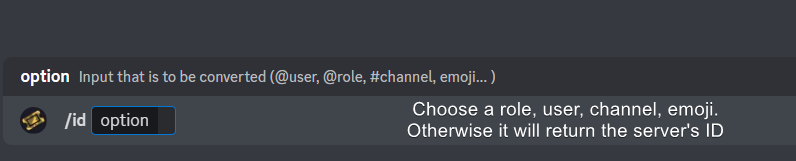 jade topaz
Ok
vague cosmos
إذا قمت بإجراء "$ id @ role" فستحصل على معرف الدور.
jade topaz
vague cosmos
انتقل إلى ** Dashboard ** واختر ** Panel Configs ** ثم Messages ثم ** Edit Opene...
thank you
iron nightBOT
Gave +1 Rep to @vague cosmos
 limpid fjord
is there a possibility to make the tool open chanels in different numbers if tickets are opened in different panels? cause now when people open tickets from different panels thjey might get the same channel name by numbers
vague cosmos
Hey @limpid fjord, changing the name of a ticket is a premium only feature.
limpid fjord
so its not possible to get the numbers of the channels which are opened to be the next number when they are from different panels?
only by getting premium
vague cosmos
Correct.
limpid fjord
okay, thanks, i'll get them to go in different categorys then
vague cosmos
Wacht, je bent Nederlands? (Zag je about me) maar dan is categorieën inderdaad de beste optie.
limpid fjord
jup
vague cosmos
Je zou eventueel met votes free premium kunnen krijgen.
limpid fjord
ja, vind t beetje onzin om voor 8 bots ofz premium te gaan halen in 1 server 🤣
limpid fjord
vague cosmos
Je zou eventueel met votes free premium kunnen krijgen.
ja maar dat zal wel voor bepaalde tijd zijn dan?
vague cosmos
Als je $vote doet in #🤖│bot-spam krijg je er meer informatie over. Hoe het precies zit weet ik niet, ik heb lifetime.
iron nightBOT
Gave +1 Rep to @vague cosmos
vague cosmos
Geen probleem! Maar premium is het wel waard, met alles wat je krijgt.
limpid fjord
die bvot blijft me vragen om je te taggen 🤣
limpid fjord
vague cosmos
Geen probleem! Maar premium is het wel waard, met alles wat je krijgt.
gebruik de bot nu zelf voor t eerst, kijk altijd eerst even aan hoe t gaat met gratis versie en dan kijk ik later wel weer of k premium neem of niet
humble sequoiaBOT
Faster Premium Bot
Automatic Transcripts
Full Customization
Direct Messages
Ticket Automation
Thread Style Ticketing
Premium Support
Scheduled Panel Availability
Integrations
You can purchase premium here:
Price
$6 - Monthly
$66 - Yearly
 Premium
 mild cobalt
Bro anyone can you help me how to setup auto renaming in tickets for eg when anyone created ticket ticket name should be the nickname of that created person @limpid fjord
@mystic hound
limpid fjord
vague cosmos
<@374244877321633803>
zag em, thanks. zal er ff naar kijken
iron nightBOT
Gave +1 Rep to @vague cosmos
mild cobalt
Bro anyone can you help me how to setup auto renaming in tickets for eg when anyone created ticket ticket name should be the nickname of that created person
mild cobalt
vague cosmos
<@886702419474513920> don't ping for support.
Ok
limpid fjord
why even would you tagg me 🤣 i don't know shit about the bot
vague cosmos
Sending the question twice isn't going to help you either, now you need to wait even longer for a response I already typed but removed.
Renaming a ticket (up on creation) is a premium only feature. You can rename it using /rename.
@mild cobalt
mild cobalt
vague cosmos
Renaming a ticket (up on creation) is a **premium only** feature. You can rename...
Sorry' for repeating that message auto renaming is available in premium package bro please reply
vague cosmos
You can automatic name a ticket up on creation with premium yes.
mild cobalt
vague cosmos
You can automatic name a ticket up on creation with premium yes.
I ask automatic rename means for eg: if i created a ticket in this server its channel name is ticket number like 001 etc but i need when I created ticket or anyone it's channel name want to automatically change to his nickname it's work in premium package of ticket tool bro
vague cosmos
You can change the ticket name to something you want with premium up on creation, I just answerd that.
My answer doesn't change.
mild cobalt
vague cosmos
You can change the ticket name to something you want with premium up on creation...
Ok bro thanks one more thing how to setup that when premium package is taken. Can you tell me please.
iron nightBOT
Gave +1 Rep to @vague cosmos
vague cosmos
Dashboard > Panel Config > Ticket > Ticket Opened Name > {ticket.user.name} should do the trick.
mild cobalt
vague cosmos
Dashboard > Panel Config > Ticket > Ticket Opened Name > `{ticket.user.name}` sh...
Ok bro thanks 👍
iron nightBOT
Gave +1 Rep to @vague cosmos
vague cosmos
Just tested it, and {ticket.user.name} will name the ticket based on the Discord name (in my case it would be #meg).
vague cosmos
mild cobalt
Ok bro thanks 👍
No worries, did you have any other questions?
jade topaz
pseudo ravine
Hey there. Auto Transcripts is a Premium feature
Dashboard > Panel Configs > Tr...
Only for premium ?
pseudo ravine
Yes
vague cosmos
@upbeat zephyr هل تحتاج أي مساعدة؟
 upbeat zephyr
When do you need Arabs? I'm there if you need Arab support.
 vague cosmos
Check #📣│server-news there are apps right now.
upbeat zephyr
Oh ty
upbeat zephyr
vague cosmos
Check <#509770538051305493> there are apps right now.
What is the reason for the closure? Is it because there is no management?
upbeat zephyr
vague cosmos
If you mean support apps, they work fine?
not apps , but support
upbeat zephyr
شكرًا لك ، لكن انصحك باستخدام العربية الفصحى ، لا ترجمة جوجل لن يفهمك احد عند استخدامها ..
upbeat zephyr
vague cosmos
I don't think they'll share a reason.
ok ty
iron nightBOT
Gave +1 Rep to @vague cosmos
vague cosmos
upbeat zephyr
شكرًا لك ، لكن انصحك باستخدام العربية الفصحى ، لا ترجمة جوجل لن يفهمك احد عند اس...
إنه يعمل في الغالب ولا أتحدث العربية بخلاف ذلك.
upbeat zephyr
vague cosmos
إنه يعمل في الغالب ولا أتحدث العربية بخلاف ذلك.
انا اتحدثها ، لكن مجرد نصيحة بالتوفيق
Is there a specific time to respond to apps ?
vague cosmos
To submit? Seven days after the message is send. 🙂
 vague cosmos
And I believe you only get a response if you're accepted.
gilded verge
vague cosmos
And I believe you only get a response if you're accepted.
exactly, so if no response from Staff = not accepted
vague cosmos
gilded verge
exactly, so if no response from Staff = not accepted
Thanks for the confirmation!
iron nightBOT
Gave +1 Rep to @gilded verge
gilded verge
jade topaz
ping me with a response plz
Panel Configs->Buttons->Edit Close Ticket Button->enable Support Team Only
jade topaz
gilded verge
Panel Configs->Buttons->Edit Close Ticket Button->enable Support Team Only
❤️
 chilly lintel
 humble sequoiaBOT
A Discord Form lets the user answer individual questions in a pop-up Form, which then displays the answers in the ticket message. This can save time if you already know what you want to ask the user.
Setup Forms
Forms can be enabled under Panel Settings > Form Options > Edit Forms Options. In the new pop-up window, you can now enable and edit your own Form.
Form Options
You can add up to 5 questions in the Discord form. This is a Discord limitation. Each question can have a placeholder in the input field, a minimum and maximum input, multi-line, and also the option to have the answer required.
Options
Question Title ➞ Your Question goes here
Question Placeholder ➞ The placeholder text in the input field
Required ➞ If enabled, the user has to answer this question, to submit the form
Multi-Line Input ➞Allows the user to input multiple lines
Minimum and Maximum Input ➞ Set a minimum and maximum input value for the user
Displaying the Answer
To display the answers from the user, you need to enable Auto display form results on the ticket message as an additional embed
In case you don't want a second embed, go into your Panel Configs > Ticket Options > Edit Ticket Message. In there you use the variable {create.form.x} and just replace x with the number of your question. For example, the response to Question 1 can be displayed with {create.form.1}. If you don't use this variable, the response from the user is lost.
 proper sage
how to do i do this?
 humble sequoiaBOT
A Discord Form lets the user answer individual questions in a pop-up Form, which then displays the answers in the ticket message. This can save time if you already know what you want to ask the user.
Setup Forms
Forms can be enabled under Panel Settings > Form Options > Edit Forms Options. In the new pop-up window, you can now enable and edit your own Form.
Form Options
You can add up to 5 questions in the Discord form. This is a Discord limitation. Each question can have a placeholder in the input field, a minimum and maximum input, multi-line, and also the option to have the answer required.
Options
Question Title ➞ Your Question goes here
Question Placeholder ➞ The placeholder text in the input field
Required ➞ If enabled, the user has to answer this question, to submit the form
Multi-Line Input ➞Allows the user to input multiple lines
Minimum and Maximum Input ➞ Set a minimum and maximum input value for the user
Displaying the Answer
To display the answers from the user, you need to enable Auto display form results on the ticket message as an additional embed
In case you don't want a second embed, go into your Panel Configs > Ticket Options > Edit Ticket Message. In there you use the variable {create.form.x} and just replace x with the number of your question. For example, the response to Question 1 can be displayed with {create.form.1}. If you don't use this variable, the response from the user is lost.
rustic gale
This is how
 humble sequoiaBOT
⚠️ Please read the messages previously sent by our team ⚠️
jade topaz
I have a ticket that opened, and was blank, i try to delete the channel, it says this is not a ticket. how can i remove it
 pseudo ravine
Hey there. There was an API issue with Discord earlier today, which caused Ticket Tool to create random tickets with nothing inside the ticket. You should just be able to delete the channel normally
humble sequoiaBOT
The Drop-down menu or Select Menu replaces the buttons on your panel message and uses a drop-down menu with all of your panels. To set this up, go to your Panel Configs and select your main Panel.
<:Numbericons1:1018864164032225340> Enable Select Style
First you enable Select Style. Then you add an item in the Dropdown Editor. Now you can start editing your dropdown!
<:Numbericons2:1018864168041971712> Dropdown Editor
Each line in the dropdown editor represents a line in the drop down menu on discord. You can add more "Items", by clicking on
First you select a panel. That's the panel this option will open a ticket for. DONT select the same panel twice. Each option should have a different Panel
After that, you can put a Display. This is the title of this option and will appear in the drop down menu. The *Description can be set right after that, which will be below the title in grey.
Additionally you can select an emoji, that will be shown in front of each option. You can either manually input the ID of an emoji or select it in the selector.
Common Issues ⚠️
- Panel doesn't send? Make sure you have a valid emoji selected
- Option doesn't show up? Check if two options have the same panel in the DropDown Editor
$dropdown
pseudo ravine
@proper sage Read this ^
jade topaz
pseudo ravine
Hey there. There was an API issue with Discord earlier today, which caused Ticke...
i get the response, "this is not a ticket" so i cant delete it with ticket tool
pseudo ravine
You can delete it yourself though
jade topaz
ok, got it
pseudo ravine
Or ask an Admin/Owner if you don't have the permission
 radiant ledge
How do I add options fpr what type of support they need?
gilded verge
radiant ledge
How do I add options fpr what type of support they need?
im not sure how you want to do this, but you can do something like on #🎫│make-a-ticket or like here: #🆘│community-support message
it depends of what you need 🤔
radiant ledge
Nvm, I figured it out ^^
 weary mason
hey
how do i make it so that the tickets are the person who opend the ticket's user name
i think i know where it goes
but no clue what i put in
 brittle osprey
in my server it says i don’t have permission on my alt to open a ticket how do i fix that
rustic gale
brittle osprey
in my server it says i don’t have permission on my alt to open a ticket how do i...
«You don't have permissions to use this»
Are your members seeing this message when they try to create a ticket?You may have accidentally denied them permission to use the Create Ticket button.
Look in the following places in your server's dashboard:
👉 Server Configs -> Blacklist Roles
Any roles there will be unable to interact with the bot in any way, including creating tickets.👉 Panel Configs -> Buttons -> Create Ticket -> Support team only
If this is enabled👉 Panel Configs -> Buttons -> Create Ticket -> Disabled Roles
Any roles there will be unable to use the button.
 normal axle
I have a problem if I open a ticket I can't open a ticket

 idle flint
normal axle
I have a problem if I open a ticket I can't open a ticket
idle flint
normal axle
I have a problem if I open a ticket I can't open a ticket
If you can only open one ticket at a time, you most likely have a limit set, check two places on your dashboard:
-
Panel Configs > Limits > open tickets each/all user
-
Server Config > Global Ticket Limit
Both of these can be adjusted as necessary to allow however many tickets you wish.
brittle osprey
there’s no claim button what do i do 😭 and i want it to delete automatically
 upbeat zephyr
هل هناك اصلا عرب يعملون لديكم؟
vague cosmos
brittle osprey
there’s no claim button what do i do 😭 and i want it to delete automatically
Claiming is a premium feature, automations too.
 finite axle
Gm, I was wondering if anyone knows a way to have tickets automatically close and delete themselves after 14 days, for example? 🙂
pseudo ravine
Hey there. Automation is a premium feature, and the maximum duration is 7 days
finite axle
pseudo ravine
Hey there. Automation is a premium feature, and the maximum duration is 7 days
I see, thanks Jdog appreciate u
iron nightBOT
Gave +1 Rep to @pseudo ravine
pseudo ravine
You’re welcome, glad I could help. If you have any other questions/issues, don’t hesitate to reach out again 
keen sail
How do I adjust what is written in the buttons?
keen sail
vague cosmos
Dashboard > Panel Config > Buttons
what choice?
vague cosmos
Depends what button you want to edit. 😛
keen sail
@vague cosmos
 vague cosmos
What button do you want to edit? You click on "edit button" and can edit it.
@keen sail since your question was "How do I adjust what is written in the buttons?", what I've answerd above. 😄
keen sail
vague cosmos
What button do you want to edit? You click on "edit button" and can edit it.
All options entered there is no text that you put before 
vague cosmos
What do you mean exactly by that? You can change the text, not add something before.
vague cosmos
keen sail
All options entered there is no text that you put before <:mike:9141790289975051...
So I don't understand what you exactly mean, as I told you exactly what the answer is to your question.
 steel hedge

 quasi oasis
is bot down???
rustic gale
quasi oasis
is bot down???
It shouldn't be? Are you having problems using the bot?
rustic gale
There's no error message that says “the application's down”
Please give more details about the issue so we can figure out the cause

 rustic gale
Please try using the /debug command
quasi oasis
 rustic gale
Hmm
Are you able to grant Ticket Tool the Administrator permission?
Not permanently, just for testing
quasi oasis
sure