#🆘│community-support
1 messages · Page 49 of 1
 odd star
 restive condor
Thanks @iron night
 iron nightBOT
Gave +1 Rep to @iron night
 vague cosmos
Hey @restive condor do you need any help?
vague cosmos
Awesome, you can always re-aska question and we'll answer it. 🙂
 dusk lodge
i need help to get ticket tool to work
 pseudo ravine
Hey there. How is Ticket Tool "not working", please be specific
dusk lodge
pseudo ravine
Hey there. How is Ticket Tool "not working", please be specific
i need help to use ticket tool to do 1 ticket message?
pseudo ravine
Are you asking how to send the Panel Message so members can create tickets?
dusk lodge
yes
 humble sequoiaBOT
The panel message is where people react to make a ticket. To customize it head over to your Dashboard --> Panel Configs -> Panel -> Edit Panel Message
 pseudo ravine
After that, you can send the embed by clicking on the "Send" button in the Panel Configs
dusk lodge
i dont have a Panel Massage in there for me
vague cosmos
Did you create a panel?
dusk lodge
so now have i create a panel ty for helped me i understand now
thanks @vague cosmos @pseudo ravine for the help
iron nightBOT
Gave +1 Rep to @vague cosmos
vague cosmos
thanks @pseudo ravine so you get a rep too ❤️
iron nightBOT
Gave +1 Rep to @pseudo ravine
pseudo ravine
dusk lodge
thanks <@143705466734641152> <@865714582613524491> for the help
You're welcome. If you have any other questions/issues, don't hesitate to reach out again
dusk lodge
pseudo ravine
You're welcome. If you have any other questions/issues, don't hesitate to reach ...
i have it 2 times already XD
i have a Questions again
pseudo ravine
Sure, just state your question/issue and someone will assist you
humble sequoiaBOT
Hello, we would love to help you, but if you don't tell us what you need help with we can't help you :(
dusk lodge
pseudo ravine
Sure, just state your question/issue and someone will assist you
most i get premium to get one embed message
?
vague cosmos
What do you mean by that? Also what is your native language?
dusk lodge
swidish/svenska
vague cosmos
If you want, you can ask your questions in that language, but you want more embeds in a ticket message? That is a premium feature.
dusk lodge
i cant do one embed messgae hmm?
vague cosmos
What do you mean exactly? Where? In a ticket or in a panel?
@dusk lodge do you want something like this?

 jade topaz
Do you want it like this? @dusk lodge
 dusk lodge
jade topaz
Do you want it like this? <@1053719702146400386>
dusk lodge
jade topaz
Do you want it like this? <@1053719702146400386>
exaly
jade topaz
Dms.
 spiral plaza
ty!
humble sequoiaBOT
For more convenient use of multipanels, you can now combine panels on the dashboard. This will allow you to directly send the multipanel from the dashboard or via the $panel ID command.
Where can I find this?
You can find this setting on the Dashboard -> Panel Configs -> Panel -> Attached Panels
Note: if you're attaching all the panels to a panel called English, don't include English in the attached panel's box (If you do this, it will create a duplicate)
This will put all buttons from all of your panels on one message. The message is the panel message from the panel you're combining these panels in.
 humble sequoiaBOT

Premium can now be purchased directly through discord! Either in the app directory (server settings) or directly from the bots profile.
<:TTWarning:1034178155872784494> Important Information <:TTWarning:1034178155872784494>
ONLY purchase premium through ONE of the two Ticket Tool Bots. If you purchased premium on the primary bot (White logo) and plan to use the premium bot, don't kick the primary bot!
What's different?
 The Monthly price changed from
 $6.00 to $5.99

 Yearly subscriptions are not yet available
Don't kick the bot, otherwise, the subscription will be canceled automatically
You'll need to buy the subscription from a computer or on the Application Directory
You might need to run the /premium command on your server to sync the premium status with your dashboard
 A subscription can not be transferred between Servers
 vague cosmos
If you mean something else, what exactly?
 steady ivy
I'll just buy a brand new 12 months sub with new username and password it's going to be easier I really haven't a clue about this Bot and server stuff
 lunar solar
steady ivy
I'll just buy a brand new 12 months sub with new username and password it's goin...
lunar solar
steady ivy
I'll just buy a brand new 12 months sub with new username and password it's goin...
Hi Billy,
Did you subscribe via chargebee in the past?
(Over the website)
steady ivy
No yellow beetle
humble sequoiaBOT

⚠️ You're in the wrong place
We provide support for Ticket Tool Discord bot and cannot help you with whatever issue you have.
- We don't know which Support Team you should contact to get this issue resolved, and unfortunately we won't be able to accurately tell you.
If you don't have any further questions regarding our bot Ticket Tool, please close this ticket
steady ivy
Doge I think
lunar solar
Renew premium for ticket tool?
 hybrid arrow
Hello, is there a way to buy premium permanently?
vague cosmos
Not anymore.
hybrid arrow
That puts me off buying it if I'm honest
vague cosmos
Buying it via a direct payment for a longer period is cheaper, eventually @hybrid arrow.
humble sequoiaBOT
PayPal - paypal@tickettool.xyz
BitCoin - 3HhKKAdb9eEvCe2tvzB8bAa8nebHY6qcPA
LiteCoin - MEQX3knLAuotrKnvk3HDNBK5gdRn6PZhHy

Prepay/Direct Payment
To prepay send the payment using your desired method - Available options listed bellow.
⚠️ $18 per 3 months. ⚠️
$66 per year.
(If using the direct payment option, you need to be paying for at-least 3+ months.)
Regular Prices when paying within Discord:
$5.99/per month
Once your payment is sent let us know so we can confirm and get you your key.
- Purchases done with this method are non-refundable.
<:paypal:924596360840372234> Paypal ("Goods and Services" or "Family and Friends")
paypal@tickettool.xyz
<:bitcoin:924638849135689749> BTC - Bitcoin
3HhKKAdb9eEvCe2tvzB8bAa8nebHY6qcPA
<:Litecoin:972176945972383815> LTC - LiteCoin
MEQX3knLAuotrKnvk3HDNBK5gdRn6PZhHy
I sent the payment now what?
After you send the payment, please send a screenshot with proof of payment, our <@&615146349700186112> will verify your payment and will get you setup. For crypto payments, we are waiting for at least ONE verification.

All prices in USD - 3 months min for direct payment
hybrid arrow
vague cosmos
Buying it via a direct payment for a longer period is cheaper, eventually <@4114...
no ethereum payment though
 main flower
Hello so in one the server I help own in, when people make a ticket it doesn't show the embed part in there is also shows this thing at the bottom when we make one and I've checked to even see if their was a embed made in the panel and there is it just doesn't show up in the ticket itself


 vague cosmos
@hybrid arrow nope.
hybrid arrow
ok
vague cosmos
Hey @main flower when does the error exactly appear? When you send the panel?
main flower
vague cosmos
Hey <@1011032351087804427> when does the error exactly appear? When you send the...
After I make the ticket
jade topaz
how do I get rid of this?
 vague cosmos
hybrid arrow
ok
vague cosmos
hybrid arrow
ok
Can always open a billing ticket in #🎫│make-a-ticket to see if something is possible.
humble sequoiaBOT
For more convenient use of multipanels, you can now combine panels on the dashboard. This will allow you to directly send the multipanel from the dashboard or via the $panel ID command.
Where can I find this?
You can find this setting on the Dashboard -> Panel Configs -> Panel -> Attached Panels
Note: if you're attaching all the panels to a panel called English, don't include English in the attached panel's box (If you do this, it will create a duplicate)
This will put all buttons from all of your panels on one message. The message is the panel message from the panel you're combining these panels in.
vague cosmos
humble sequoia
@jade topaz - You're using it in a multipanel, making it appear like that.
vague cosmos
main flower
After I make the ticket
Did you change anything for the buttons of a created ticket?
main flower
Yea Ive changed it to different ones and resent the panel a while ago when it started to happen but it still does this and the embed thing 🥹
Now my owner is kinda fed up with it
vague cosmos
Can you send me a screenshot of a button you editted?
Because I think I know what you did wrong, but want to double check it. @main flower
main flower
It's this panel we just redid the server and fixed our panels
 vague cosmos
Yes - But you get the error when you create the ticket right?
vague cosmos
Did you change any button, expect the "create ticket"?
main flower
Nope all the buttons besides that one would be default for that panel
vague cosmos
Can you try to re-send the panel?
main flower
Yea I'll do that
vague cosmos
If it still gives an error, double check the other buttons.
Button emoji can only have an emoji and not text, you can use button text for that.


 vague cosmos
Dashboard > Panel Configs > Buttons
This is how it should be.

And this how it not should be.

@main flower I can confirm that is your issue, as I tested in my test server real quick, so one of the buttons is having text at the button emoji.
Got the same error. 😛
 main flower
I fixed my owners mistakes she didn't update the close button and it worked tysm 🥹
vague cosmos
No worries, happy to help! Did you have any other questions?
main flower
No that's all 😀
vague cosmos
Alright, have an amazing day!
 subtle cobalt
What do I do when you open a ticket, for example it will be called support-(name)
I tried this: Support-{user}
But it just opening a ticket with Support-(discord id)
subtle cobalt
Thanks!
subtle cobalt
Ye, i can see that!
Thanks @lunar solar
iron nightBOT
Gave +1 Rep to @lunar solar
lunar solar
No worries, not everyone knows 😛
 cursive girder
How do I use custom emojis?
lunar solar
As long as they are uploaded to your server you can either select them using the emoji select tool (furthest option to the right for server emojis)
or
Use the ID command
$id 
humble sequoiaBOT
lunar solar
$id <a:ElmoFireLord:983791056413921301>
<a:ElmoFireLord:983791056413921301>
cursive girder
Thx

 dusty pier
Is there a embedded message with the bot
jade topaz
yes
 acoustic basalt
Oh I had no idea about the id command lol
 gilded verge
jade topaz
gilded verge
jade topaz
//note: solved in another channel
acoustic basalt
How does it work if you're not a nitro user if you need to see the id of an animated emoji so you could use it maybe with a webhook or a different bot?
 jade topaz
acoustic basalt
How does it work if you're not a nitro user if you need to see the id of an ani...
jade topaz
acoustic basalt
How does it work if you're not a nitro user if you need to see the id of an ani...
I will help
acoustic basalt
How?
acoustic basalt
That doesn't help I wanna know how 😅
gilded verge
jade topaz
<@334671104704774154>
don't ping anyone, just wait for help
also, to avoid confusion, ask for help only on one channel
jade topaz
ok

 pearl needle
hack off
 rustic gale
What are log tickets?
 keen sail
rustic gale
What are log tickets?
keen sail
rustic gale
What are log tickets?
I mean, how do I save tickets for a specific room?
rustic gale
<@&832847423801262090>
keen sail
rustic gale
<@&832847423801262090>
I mean, how do I save tickets for a specific room???
How
rustic gale
It's a troll, don't pay attention to them
keen sail
@rustic gale
rustic gale
Please stop pinging me, for the love of god
I've informed moderators already. They'll be dealt with
rustic gale
yes i can, but you repeatedly pinging me despite the bot's warning makes me less likely to want to
It's against the rules to ping staff, in fact
rustic gale
keen sail
I mean, how do I save tickets for a specific room???
What do you mean by saving tickets
keen sail
I want to store for tickets
rustic gale
Go on
keen sail
rustic gale
Do you mean preserving the content of tickets?
yes
rustic gale
that's what the transcript function is for
keen sail
i think
I am translating into English because I am an Arab and I do not understand some words
rustic gale
When you close a ticket, you usually see a menu like this

the Transcript button is used to create a ticket transcript
a transcript has the contents of the ticket
(it actually contains just the most recent 500 messages)
keen sail
rustic gale
(it actually contains just the most recent 500 messages)
This is what I mean, but where is the copied ticket saved?
rustic gale
In the channel you select as the transcript channel
Selecting a transcript channel is done in the dashboard, in the Panel Configs -> Transcript menu
keen sail
rustic gale
Selecting a transcript channel is done in the dashboard, in the Panel Configs ->...
this?
 rustic gale
Yes

 bitter plaza
Where can i report malicious use of the bot, eg scams? 🤔
 wild spire
bitter plaza
Where can i report malicious use of the bot, eg scams? 🤔
wild spire
bitter plaza
Where can i report malicious use of the bot, eg scams? 🤔
report those servers to Discord itself
bitter plaza
doing that for months now, nothing happens, reporting the scam accounts too, which get deleted
can you guys look into it?
wild spire
unfortunately we don’t control what the bot is used for by other people
its a matter that Discord needs to handle
bitter plaza
you could handle at least your side, the bot could leave their server or is disabled for their server...
that's at least how other bot provider do it
but now i understand why scammers start to prefer your bot when it was dyno or mee6 before
 scenic plinth
Its not exactly difficult to alter the bot of choice or create a new server for scam related things, or whatever a person decides to use Ticket Tool for. We have zero control over how someone uses or operates their server as we don't moderate Discord or Discord servers. Like Maud stated previously, your best option is to report it to Discord Trust and Safety. Beyond that there is nothing helpful we could do in such cases.
bitter plaza
if i dm you both an invite to the server so you can "report it to discord" too, would you at least help me that way?
scenic plinth
No, as that is/can lead to Discord Community Guidelines Violations, let alone does not exactly encourage the Trust and Safety Team to help you any faster.
https://i.imgur.com/U9wyHrX.png
 bitter plaza
that refers to misleading of discords support team...
i see i'm talking to a wall 🫠
vague cosmos
Discord TnS does look at reports, but it's not the best system.
scenic plinth
bitter plaza
that refers to misleading of discords support team...
i see i'm talking to a wal...
I am giving you provided information and do not appreciate disrespectful behavior. Your question has been answered, regardless if you wish to use common sense to interpret it or not as we apparently are speaking through a wall as common sense does not seem to exist. However. have an amazing day/night and let us know if you need anything else not in relation to your previous inquiry that has already been answered, thanks.
bitter plaza
vague cosmos
Discord TnS does look at reports, but it's not the best system.
yes, it's a hard world if you try to do the right thing
vague cosmos
Reporting is the only thing you can do, sadly.
scenic plinth
They'll get to it eventually, maybe.
vague cosmos
Yes, maybe.\

 mellow steppe
How to setup Ticket tool like this?
mellow steppe
mellow steppe
How to setup Ticket tool like this?
@scenic plinth @vague cosmos yk like this?
 slender minnow
mellow steppe
<@615207454443044904> <@143705466734641152> yk like this?
slender minnow
mellow steppe
<@615207454443044904> <@143705466734641152> yk like this?
avoid pinging please
humble sequoiaBOT
For more convenient use of multipanels, you can now combine panels on the dashboard. This will allow you to directly send the multipanel from the dashboard or via the $panel ID command.
Where can I find this?
You can find this setting on the Dashboard -> Panel Configs -> Panel -> Attached Panels
Note: if you're attaching all the panels to a panel called English, don't include English in the attached panel's box (If you do this, it will create a duplicate)
This will put all buttons from all of your panels on one message. The message is the panel message from the panel you're combining these panels in.
slender minnow
refer to the response above ^
mellow steppe
slender minnow
refer to the response above ^
Tysm
mellow steppe
slender minnow
refer to the response above ^
yk how to make infinite tickets
 civic wagon
You were told to avoid pinging the staff.
mellow steppe
how to get transcripts?
slender minnow
mellow steppe
yk how to make infinite tickets
what do you mean by infinite tickets?
mellow steppe
slender minnow
what do you mean by infinite tickets?
np
vague cosmos
mellow steppe
how to get transcripts?
When a ticket is closed, you have a option to make those.
mellow steppe
vague cosmos
When a ticket is closed, you have a option to make those.
okm
vague cosmos
slender minnow
what do you mean by infinite tickets?
Also got this solved?
 hidden crystal
How do i get the ticket tool to ping my staff when a ticket is opened? Ive edited the message in ticket tool but its still not @ing my staff
humble sequoiaBOT
1. Go into your Dashboard
2. Open your Panel Configs tab
3. Select the panel you want to ping your support on
4. Open the Ticket options menu
5. Click on Edit Ticket Message
6. In the Message Content use one of the role mention syntax (**{@Role Name}**/**{Role ID}**)
7. Save changes
Note: For this to work properly, Ticket Tool requires the Mention Everyone permission. Or the role must have the Allow anyone to @mention this role setting enabled 
 vague cosmos
@hidden crystal see above. 🙂
hidden crystal
vague cosmos
<@751446061205160117> see above. 🙂
Ty! I will try that
vague cosmos
Alright, let me know how it goes.
hidden crystal
vague cosmos
Alright, let me know how it goes.
Still didnt work ☹️
vague cosmos
hidden crystal
Still didnt work ☹️
Can you send a screenshot of what you got when a ticket got opened?
hidden crystal
vague cosmos
Can you send a screenshot of what you got when a ticket got opened?
The unhighlighted roles are my staff roles
 vague cosmos
Does the bot have permission to mention those roles?
hidden crystal
vague cosmos
Does the bot have permission to mention those roles?
Yup
vague cosmos
Can you try the role IDs?
@hidden crystal also can you double check if the bot can ping the roles?
hidden crystal
vague cosmos
<@751446061205160117> also can you double check if the bot can ping the roles?
I will try both, ty!
vague cosmos
I would first double check the permission.
hidden crystal
vague cosmos
I would first double check the permission.
Permissions were on. The role id worked. Ty!!
vague cosmos
Awesome! Happy that it's solved! Can I help you with anything else?
 orchid tundra
Hello, does anyone know what variable is used to generate tickets that instead of saying Ticket 001 says 05-25-23 11:11 {user}

 vague cosmos
I don't think you can use the time variable in a channel.
orchid tundra
vague cosmos
I don't think you can use the time variable in a channel.
Isn't there a way to add the opening date in the channel name?
vague cosmos
I don't think so
 vague cosmos
Not sure how it all works sorry
scenic plinth
That variable displays as unix as is intended mainly for ticket messages/custom commands, like below.

 teal delta
How can I make different tickets?
vague cosmos
Do you mean, different panels?
teal delta
Such as Report Staff, Report Exploiter etc.
humble sequoiaBOT
For more convenient use of multipanels, you can now combine panels on the dashboard. This will allow you to directly send the multipanel from the dashboard or via the $panel ID command.
Where can I find this?
You can find this setting on the Dashboard -> Panel Configs -> Panel -> Attached Panels
Note: if you're attaching all the panels to a panel called English, don't include English in the attached panel's box (If you do this, it will create a duplicate)
This will put all buttons from all of your panels on one message. The message is the panel message from the panel you're combining these panels in.
teal delta
I'm not sure, what it's called.
vague cosmos
You mean, that? ^
teal delta
Yep
vague cosmos
🙂 your welcome.
teal delta
Also, under the panel name how can I write something-?
vague cosmos
Where do you mean exactly? Under the embed title?
Dashboard > Panel Configs > Messages > Edit Panel Message
vague cosmos
That is where you can edit the panel message. 🙂
You can find Panel Configs on the left and Messages is a tab at the top. 🙂
teal delta
thank you!
vague cosmos
No worries, did you have any more questions? 🙂
 mystic prawn
what can I do if it do this?
 teal delta
No, thanks.
vague cosmos
$relog @mystic prawn
humble sequoiaBOT
Don't see your server in the dashboard?
You will possibly need to relog. Look below to see the steps on how to relog.
How to relog in the Dashboard.
Note:
You need one of these 3 things to access the dashboard.
1. Server Owner (Level: 6)
2. Server Administrator (Level: 4)
3. Dashboard Role (Level: 2)
:warning: You can check your level using the </permissionlevel:1029797400174399542> command on your Discord Server
User permission level with Ticket Tool
@User is permission level: 0 (User)
```» *If it shows that your permission is **0**, you don't have any of the above **3 things** to manage the dashboard.*
**See the Image below on how to relog:** teal delta
How can I have multiple button text?
vague cosmos
teal delta
How can I have multiple button text?
How do you mean this exactly?
teal delta
Multi Panels won't appear for me.
It shows one, and the others are titled " create ticket".
vague cosmos
humble sequoia
Did you follow this steps?
 uneven tapir
Hey I have a question and hope that you can help me.
When I want to open the Direct Transcript the link is wrong there isn't the Ticket URL. It looks like this: https://tickettool.xyz/direct?url=%7Btranscript_url%7D I use auto transcripts.
vague cosmos
Also @teal delta if you added them as multipanel, did you re-send the panel?
teal delta
I did, It will only show one panel name the rest are " Create Ticket", not the ones I've typed in.
vague cosmos
uneven tapir
Hey I have a question and hope that you can help me.
When I want to open the Di...
Thats how it should be?
uneven tapir
vague cosmos
Thats how it should be?
No instead of the Transcript URL is there the word "transcript_url"
vague cosmos
teal delta
I did, It will only show one panel name the rest are " Create Ticket", not the o...
Can you send me a screenshot of the following:
Dashboard > Panel Config > Panel
 vague cosmos
uneven tapir
Hey I have a question and hope that you can help me.
When I want to open the Di...
vague cosmos
uneven tapir
Hey I have a question and hope that you can help me.
When I want to open the Di...
Does this happen if you make a transcript by hand too?
uneven tapir
Yes sometimes. It is also only sometimes but often with auto transcript
vague cosmos
Hmm, not exactly sure what is causing this. I'd suggest you to open a ticket, so the support team can assist you with this.
uneven tapir
Okay thank you for help
mystic prawn
Please select a server you have access to manage to be redirected what can I do?
vague cosmos
@mystic prawn what are you in the server? A normal user?
 vague cosmos
Is IT.1 the server you want to manage?
mystic prawn
yes
vague cosmos
Click the green "Manage" button?
vague cosmos
Can you do a /permissionlevel and send a screenshot of the result?
 ivory pawn
problem... button cloned
 humble sequoiaBOT
For more convenient use of multipanels, you can now combine panels on the dashboard. This will allow you to directly send the multipanel from the dashboard or via the $panel ID command.
Where can I find this?
You can find this setting on the Dashboard -> Panel Configs -> Panel -> Attached Panels
Note: if you're attaching all the panels to a panel called English, don't include English in the attached panel's box (If you do this, it will create a duplicate)
This will put all buttons from all of your panels on one message. The message is the panel message from the panel you're combining these panels in.
mystic prawn
 ivory pawn
mystic prawn
ivory pawn
mystic prawn
hu ?
vague cosmos
mystic prawn
That is why you can't manage it. 🙂
mystic prawn
How I can repair
vague cosmos
ivory pawn
hu ?
You're using multipanels, try to follow those steps but undo it.
mystic prawn
I am the highest role in the server
vague cosmos
@mystic prawn ask the server owner to add your role as dashboard role at Server Configs.
mystic prawn
hmm
vague cosmos
Or have administrator at Discord.
ivory pawn
vague cosmos
You're using multipanels, try to follow those steps but undo it.
is ok, thank you
iron nightBOT
Gave +1 Rep to @vague cosmos
vague cosmos
No problem, did you have any other questions?
humble sequoiaBOT
Premium can now be purchased directly through discord! Either in the app directory (server settings) or directly from the bots profile.
<:TTWarning:1034178155872784494> Important Information <:TTWarning:1034178155872784494>
ONLY purchase premium through ONE of the two Ticket Tool Bots. If you purchased premium on the primary bot (White logo) and plan to use the premium bot, don't kick the primary bot!
What's different?
The Monthly price changed from $6.00 to $5.99
Yearly subscriptions are not yet available
Don't kick the bot, otherwise, the subscription will be canceled automatically
You'll need to buy the subscription from a computer or on the Application Directory
You might need to run the /premium command on your server to sync the premium status with your dashboard
A subscription can not be transferred between Servers
 faint tulip
How to make one ticket for 2 or more people?
gilded verge
faint tulip
How to make one ticket for 2 or more people?
please example of what you mean
faint tulip
gilded verge
please example of what you mean
for example you create ticket were you and your friend can write
without admin permission
gilded verge
if your friend isn't added as Support Team Roles or Additional Roles, then you can use /add @user command to add him to your ticket
faint tulip
you can use /add user command without admin permissions?
gilded verge
or if you want to add more than 1 person, then use prefix command, $add userid1 userid2
you can set permissions for add command in Command Configs in your dashboard, but yes, admin isn't required to use this command
faint tulip
gilded verge
or if you want to add more than 1 person, then use prefix command, `$add userid1...
what is prefix command?
gilded verge
prefix command: $ -unless you changed prefix in dashboard in Server Configs
slash command: /
 rocky marsh
how i can change the bot's language
rocky marsh
there's no command?
gilded verge
jade topaz
i need activate NSFW on ticket
currently there is no way to automatically enable nsfw in tickets so you have to change it manually in channel settings
but you can vote for suggestion: <#💡│suggestions message> if you also want this feature
jade topaz
gilded verge
currently there is no way to automatically enable nsfw in tickets so you have to...
Even if I pay for the VIP version?
 viral basalt
Hello! I apologize if this is addressed elsewhere... I have purchased the premium version of the bot. Is there a way that I can create log ins for other administrators to make changes if needed?
gilded verge
jade topaz
Even if I pay for the VIP version?
as i mentioned, currently there is no way to enable that so please vote for this suggestion if you want this feature ^^
jade topaz
OK 😰😔😭
gilded verge
viral basalt
Hello! I apologize if this is addressed elsewhere... I have purchased the premiu...
Hey hey, could you please explain what you mean by create log ins for other administrators? 🤔
viral basalt
gilded verge
Hey hey, could you please explain what you mean by `create log ins for other adm...
Of course, I am the server manage for a DayZ RP server. I would like the server owner and my assistant manager to be able to also access the dashboard in the event that something needs to be changed when I am unavailable.
gilded verge
ah, so generally they need to be server owner, have administrator permission, or you need to add their role to Dashboard Roles (in Server Configs) so then they can manage your dashboard ^^
viral basalt
Ah, thank you! I will go looki for these settings on the dashboard
viral basalt
So, I found where I can add the others to the dashboard. While there I noticed that I could invite the premium bot. I did that, but it wasn't working so I removed the original white ticket tool bot... still no luck and now I can't manage my server... It says "Bot Issue.... use /botswitcher" when I do this it says it failed to work
It also shows my premium subscription as canceled when I look at the bot via the server's integration menu
gilded verge
viral basalt
So, I found where I can add the others to the dashboard. While there I noticed t...
> you can invite premium bot but looks like before kicking free bot you forgot to change from free to premium bot and that's why premium can't work now and you have bot issue so please invite free bot again and then you can switch to premium so premium bot can work
> about canceled subscription... since you bought premium with free bot but then you kicked him, your subscription was canceled, but not deleted so you have active premium until the day you can see in your discord user settings -> subscriptions, just next time please remember to buy premium with gold bot ^^
also, now you can't undo a canceled subscription so instead of re-purchasing, please wait until your current premium ends
 tiny moth
how do i set up command style? i cant find ticket creation.
"Under Ticket Creation, click on Command Style Options"
rustic gale
tiny moth
how do i set up command style? i cant find ticket creation.
> "Under Ticket Cre...
What page is that? That needs to be updated.
It's in Panel Configs, below the header “Panel Settings”
tiny moth
rustic gale
What page is that? That needs to be updated.
Tickets created via commands!
i already set it up but im getting this error
New command not monitoring this channel
To see what channel is monitored visit the Dashboard -> Panel Configs -> Settings -> Command Style Tickets -> Channel to monitor for command $new
i monitored the channel i think

 tiny moth
oh wait ITS OFF?
i thought they were all on
i thought thats what the swithc looked like when it was on oops
pseudo ravine
No worries
ivory pawn
big problem
 jade topaz
how can I remove a role from seeing closed tickets channel?
gilded verge
ivory pawn
big problem
if you still have this problem, please go to Panel Configs->Buttons->Edit Close Ticket Button->and show what you have there 🤔
gilded verge
jade topaz
how can I remove a role from seeing closed tickets channel?
Panel Configs->Permissions->choose Edit closed and change to ❌ on View Channel and Read Message History
jade topaz
gilded verge
Panel Configs->Permissions->choose Edit closed and change to ❌ on View Channel a...
god, tysm
dusty pier
How to do open and close a ticket into the channel you want
humble sequoiaBOT
1. Go into your Dashboard
2. Open your Panel Configs tab
3. Select the panel you want to grant access to
4. Open the Category options menu
5. Select the categories of your preference
6. Save changes
 vague cosmos
dusty pier
How to do open and close a ticket into the channel you want
vague cosmos
dusty pier
How to do open and close a ticket into the channel you want
See above.
vague cosmos
Enable two step close, I'm at work and can't access dashboard yet.
dusty pier
Ok
teal delta
How can I write something beneath Panel Name?
faint tulip
gilded verge
you can set permissions for `add` command in `Command Configs` in your dashboard...
Why when i try to use this command without admin permission it says that i dont have permission to use this command ,how can i fix this
 sharp burrow
gilded verge
teal delta
How can I write something beneath Panel Name?
sharp burrow
gilded verge
teal delta
How can I write something beneath Panel Name?
where exactly? please show 🤔
gilded verge
faint tulip
Why when i try to use this command without admin permission it says that i dont ...
as i mentioned before, you can set permissions for this command in your dashboard in Command Configs ^^
teal delta
how can I write something like this?


I also want to name the rest of these "create ticket" however it won't let me.
humble sequoiaBOT
The panel message is where people react to make a ticket. To customize it head over to your Dashboard --> Panel Configs -> Panel -> Edit Panel Message
gilded verge
teal delta
I also want to name the rest of these "create ticket" however it won't let me.
and about this... then you can change it in Panel Configs->Buttons->Edit Create Ticket Button->Button Text
 grave junco
someone help me pls
 gilded verge
grave junco
someone help me pls
gilded verge
grave junco
someone help me pls
please make sure this user's role is not blacklisted (Server Configs->Blacklist Roles)
or in Disabled Roles (Panel Configs->Buttons->Edit Create Ticket Button->Disabled Roles)
grave junco
Thanks
 modest badger
hey whats the problem with storage ticket ?
vague cosmos
What do you mean, what problem?
 inland verge

 timber kernel
inland verge
timber kernel
inland verge
The error already tells you the cause of the problem.
Ticket Tool Bot is missing permissions / channel permissions. 🙂
rustic gale
inland verge
Try sending the panel with the /panel command in the server itself
instead of sending it from the dashboard
(it asks for “an ID”, that's just what the panel is numbered in the dashboard. 1, 2, 3 and so on)
 clever ridge
Hello, is it not possible to open different types of tickets (panel) with the $new command?
lunar solar
clever ridge
Hello, is it not possible to open different types of tickets (panel) with the `$...
You would need to have a different channel for each
 reef torrent
I have purchased the premium ticket tool and when I follow the steps to get it, I get that I have no active subscriptions. What can I do?
lunar solar
reef torrent
I have purchased the premium ticket tool and when I follow the steps to get it, ...
Have you clicked the sync button on your dashboard?
reef torrent
lunar solar
Have you clicked the sync button on your dashboard?
I will try it
reef torrent
lunar solar
Have you clicked the sync button on your dashboard?
I have made the upgrade from the discord from the bot button, what happens is that the purchase has been 40 minutes ago. And I still don't get anything, what can I do?
lunar solar
reef torrent
I have made the upgrade from the discord from the bot button, what happens is th...
#🎫│make-a-ticket and I can take a look
Billing ticket*
reef torrent
lunar solar
<#571706435449257997> and I can take a look
Okey thnc
 mossy gate
Panel not working? I click manage and it just refreshes
vague cosmos
What panel are you speaking about? What are you trying to do? Manage a server on the dashboard?
 vague cosmos
Can you do /permissionlevel in the server you want to manage and send a screenshot of the response?
 vague cosmos
That is required to invite bots to a server, can you ask the server owner to add a role you have as dashboard role?
Dashboard > Server Configs > Dashboard Roles
Once you have that, you should be able to manage the server via the dashboard.
mossy gate
Thanks it worked, appreciate it
vague cosmos
No problem, did you have any other questions?
mossy gate
Just that
vague cosmos
Alright, have a nice day!
 mental hearth
Im trying to add a custom emoji to m panel. I put the :NAME: but it says this when i send the panel to my channel
Failed: `Invalid Form Body components[0].components[0].emoji.name[BUTTON_COMPONENT_INVALID_EMOJI]: Invalid emoji`
Anyone know the proper way to use a custom emoji in my panel?
 gaunt tinsel
mental hearth
Im trying to add a custom emoji to m panel. I put the :NAME: but it says this wh...
gaunt tinsel
mental hearth
Im trying to add a custom emoji to m panel. I put the :NAME: but it says this wh...
make sure ticket tool is in the server the custom emoji is from
mental hearth
it is
gaunt tinsel
mental hearth
it is
oh?
gaunt tinsel
mental hearth
its a custom emoji on my server
hmmm.
gaunt tinsel
mental hearth
The format is simply :EMOJI_NAME: correct?
i think it’s {emoji_name}
mental hearth
still didnt work
vague cosmos
I believe you need to use the emoji id.
I'm not exactly sure how, and can't look it up either. @mental hearth
humble sequoiaBOT
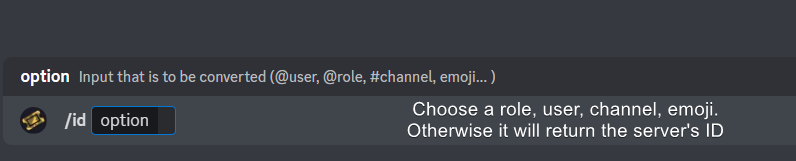
How do I get the ID of Roles/Channels/Emojis?
Ticket Tool has a useful command that helps you get the ID of various things like channels, roles, emojis, and your server.
Just use the command </id:1029797400174399546> <#channel/@role/:emoji:>. Now copy everything, including the brackets <...>, to your dashboard (or wherever you want it)
If you want the server ID, just use the command without any option.
Examples:
Server ID: $id ➝
509192800865353738
Roles: $id @Role ➝@humble sequoia
Channel: $id #channel ➝#🤖│bot-spam
User: $id @user ➝@copper owl
Emoji: $id➝

 modest hinge
Failed: Invalid Form Body components[0].components[1].emoji.id[BUTTON_COMPONENT_INVALID_EMOJI]: Invalid emoji components[0].components[2].emoji.id[BUTTON_COMPONENT_INVALID_EMOJI]: Invalid emoji
@scenic plinth Thanks for warn.
iron nightBOT
Gave +1 Rep to @scenic plinth
scenic plinth
humble sequoia
Use this and copy/paste it to utilize an emoji.
scenic plinth
modest hinge
<@615207454443044904> Thanks for warn.
I have 0 idea what you are on about, but please avoid mentioning staff. The above answer was intended for "Scryptolog1st" and Meg, but will be the same answer for you.
mental hearth
gotta do it like this
<:EmojiName:EmojiID>
scenic plinth
For custom emoji inputs, yes. Other than that if the emoji inputted like that and it does not work, please try to use another emoji in place of it.
mental hearth
To get your emoji ID, go to https://discord.com/app
Press F12 on your keyboard while inside of your server.
Youll see something like this at the top left

Discord
Discord is the easiest way to communicate over voice, video, and text. Chat, hang out, and stay close with your friends and communities.
Click that then click on your emoji
Youll then see a link in your F12 page that looks like this

You can see data-id
thats your emoji ID. There may be an easier way to get you emoji id. But thats the way I found.
scenic plinth
or just use the command that I showed instead of needing to go into inspect element and searching for the file....
mental hearth
scenic plinth
or just use the command that I showed instead of needing to go into inspect elem...
ahh i didnt see that. sorry and thank you
iron nightBOT
Gave +1 Rep to @scenic plinth
mental hearth
Is changing bot branding allowed with premium?
Also, it is possible to change the name a ticket is given? I want to make the new ticket channel the name of the person who created the ticket
So insteadf of ticket0001
it would be like JohnDoe0001
tiny moth
can this bot take a command from another bot like if another bot sends $new @xxxx
tiny moth
mental hearth
So insteadf of ```ticket0001```
it would be like ```JohnDoe0001```
i think youd be better off making ur own ticket bot then
theres this bot called custom command and theres public links to code u copy and paste to make ur own ticket system
and u can modify the channel name but if u know a little coding and are willing to put in some work
gilded verge
mental hearth
Is changing bot branding allowed with premium?
whitelabels are planned so we need to wait, no eta 🤔
humble sequoiaBOT
The ticket name is the default channel name of all tickets. To edit it, go to your Dashboard > Panel Configs > Ticket. There you can edit the channel name of opened and closed tickets. You can also use variables in there.

 Note: This is a premium feature
gilded verge
humble sequoia
Note: This is a premium feature
gilded verge
humble sequoia
@mental hearth, please check  both
both
//in last message i removed reply-ping
gilded verge
tiny moth
can this bot take a command from another bot like if another bot sends $new @xxx...
yes, in Server Configs find Bot and add your bot id so then Ticket Tool can respond to him
 gilded verge
tiny moth
theres this bot called custom command and theres public links to code u copy and...
gilded verge
tiny moth
theres this bot called custom command and theres public links to code u copy and...
this option is already in the ticket tool so why? 🤨
tiny moth
oh ty
 sullen ocean
Hello I am having issues with setting up the dropdown menu option for the bot in my server. I read the instructions on this website https://gyazo.com/793526aabc2c549c342f364c480a1e5c and followed them through. However, when I go try to set up the bot, it doesn't happen. May I have some assistance?
 gilded verge
sullen ocean
Hello I am having issues with setting up the dropdown menu option for the bot in...
gilded verge
sullen ocean
Hello I am having issues with setting up the dropdown menu option for the bot in...
Hey, so you mean you can't see your server, right?
sullen ocean
gilded verge
Hey, so you mean you can't see your server, right?
No I can't see a dropdown menu like this one
 gilded verge

 jade topaz
how do I add another person in the server to also be apart of tickets?
gilded verge
sullen ocean
Still doesn't work for some reason
but you have some errors? im still trying to understand your problem..
sullen ocean
So you know that there is an instruction how to create a dropdown menu
I am requesting assistance because I followed all the steps on that instruction manual correctly and it is still in button mode and I don't want that
humble sequoiaBOT
The Drop-down menu or Select Menu replaces the buttons on your panel message and uses a drop-down menu with all of your panels. To set this up, go to your Panel Configs and select your main Panel.
<:Numbericons1:1018864164032225340> Enable Select Style
First you enable Select Style. Then you add an item in the Dropdown Editor. Now you can start editing your dropdown!
<:Numbericons2:1018864168041971712> Dropdown Editor
Each line in the dropdown editor represents a line in the drop down menu on discord. You can add more "Items", by clicking on 

First you select a panel. That's the panel this option will open a ticket for.  DONT select the same panel twice. Each option should have a different Panel
After that, you can put a Display. This is the title of this option and will appear in the drop down menu. The *Description can be set right after that, which will be below the title in grey.
Additionally you can select an emoji, that will be shown in front of each option. You can either manually input the ID of an emoji or select it in the selector.
Common Issues ⚠️
- Panel doesn't send? Make sure you have a valid emoji selected
- Option doesn't show up? Check if two options have the same panel in the DropDown Editor

$dropdown
 inner ridge
i am on the cian discord and wish to ask questions but do not know how to create ticket?
rustic gale
inner ridge
i am on the cian discord and wish to ask questions but do not know how to create...
Ask their staff. We can't help you with that here
inner ridge
ok tried no anser will try again'
dusty pier
Is a way I can see the command for the mineing???
vague cosmos
What do you mean by mineing? @dusty pier
dusty pier
Yes
vague cosmos
dusty pier
Yes
This doesn't answer my question, are you sure it's a thing in Ticket Tool? Do you have a screenshot example?
dusty pier
Like the mineing thing on here what are the commands
vague cosmos
What do you mean by 'mineing'? Got an screenshot with an example?
dusty pier
Like .work on this server
dusty pier
No like what are the commands for it
The general commands for the work so I can get premium
humble sequoiaBOT
⚠️ You're in the wrong place
We provide support for Ticket Tool Discord bot and cannot help you with whatever issue you have.
- We don't know which Support Team you should contact to get this issue resolved, and unfortunately we won't be able to accurately tell you.
If you don't have any further questions regarding our bot Ticket Tool, please close this ticket
vague cosmos
Join their support server, and ask about it there.
 unkempt sleet
Hi
 trim crane
Hi
 obtuse basin
what's the command to open a ticket on behalf of someone else?
 muted junco
I've made a drop-down menu with a couple of different options, i've sent it into the channel and it comes up with a button at the bottom now a menu, i then found a part of the dashboard that lets you change the words of that embed to create a ticket but i cannot see how to add the delft menu, i can see this:

i just explained it
it comes up with this

and no the menu 
ur not funny
vague cosmos
@muted junco you want a multipanel?
muted junco
well i want a select menu where they can pick which ticket they want and it opens, i managed to do it here but i've forgotten
 humble sequoiaBOT
The Drop-down menu or Select Menu replaces the buttons on your panel message and uses a drop-down menu with all of your panels. To set this up, go to your Panel Configs and select your main Panel.
<:Numbericons1:1018864164032225340> Enable Select Style
First you enable Select Style. Then you add an item in the Dropdown Editor. Now you can start editing your dropdown!
<:Numbericons2:1018864168041971712> Dropdown Editor
Each line in the dropdown editor represents a line in the drop down menu on discord. You can add more "Items", by clicking on
First you select a panel. That's the panel this option will open a ticket for. DONT select the same panel twice. Each option should have a different Panel
After that, you can put a Display. This is the title of this option and will appear in the drop down menu. The *Description can be set right after that, which will be below the title in grey.
Additionally you can select an emoji, that will be shown in front of each option. You can either manually input the ID of an emoji or select it in the selector.
Common Issues ⚠️
- Panel doesn't send? Make sure you have a valid emoji selected
- Option doesn't show up? Check if two options have the same panel in the DropDown Editor
$dropdown
vague cosmos
@muted junco see above. 👍🏻
muted junco
tysm i forgot i had to enable it at the top with the little green select 
thanks @vague cosmos
iron nightBOT
Gave +1 Rep to @vague cosmos
vague cosmos
No problem. Back to work now.
 harsh pagoda
how do i get a transcript link that allows anyone with the link to view the transcript?
vague cosmos
harsh pagoda
how do i get a transcript link that allows anyone with the link to view the tran...
$transcript
harsh pagoda
vague cosmos
`$transcript`
yeah but how do i get the link that shows the ticket history? bc whenever i press into the link and copy paste nothing happens for me 😅
vague cosmos
I'm currently not able to help with that, best to open a ticket. Currently at work.
vague cosmos
@harsh pagoda not sure if you did open a ticket and got it solved, otherwise I have time now. 🙂
 safe prairie
Nope, he hasn't a ticket^^
vague cosmos
Thanks for the confirmation @safe prairie. ❤️
iron nightBOT
Gave +1 Rep to @safe prairie
vague cosmos
obtuse basin
what's the command to open a ticket on behalf of someone else?
Hey, was your issue solved?
obtuse basin
vague cosmos
Hey, was your issue solved?
yes.
 chrome hornet
hey, how can I blacklist people from opening tickets?
vague cosmos
Hey @chrome hornet, you can only blacklist a role so users would need to have that role in order to stop them opening tickets.
Dashboard > Server Configs > Blacklist roles
chrome hornet
ok tank you @vague cosmos
vague cosmos
No problem, users who have that role can not interact with the bot at all.
 frank drum
Hi, how can i put 2 button in one ticket and one button for one category and the other for another category?
humble sequoiaBOT
For more convenient use of multipanels, you can now combine panels on the dashboard. This will allow you to directly send the multipanel from the dashboard or via the $panel ID command.
Where can I find this?
You can find this setting on the Dashboard -> Panel Configs -> Panel -> Attached Panels
Note: if you're attaching all the panels to a panel called English, don't include English in the attached panel's box (If you do this, it will create a duplicate)
This will put all buttons from all of your panels on one message. The message is the panel message from the panel you're combining these panels in.
scenic plinth
If you have no reason or do not want to help users in a respectful manner, keep out of this chat. You have zero reason to be in this chat, let alone speak to users how you were for asking simple questions.
 spring forum
vague cosmos
spring forum
spring forum
vague cosmos
spring forum
Hey! Can you run /permissionlevel in the server you want to manage and send a screenshot of the response you get?
 vague cosmos
You're permission level 0 what means you don't access to manage the bot from the dashboard.
Ask the server owner to add a role you have as dashboard role, which you can do here:
Dashboad > Server Configs > Dashboard roles
spring forum
im admin
vague cosmos
As a role only, that doesn't matter. Follow the steps I provided above and you should be able to manage the bot.
Because having a role just named "admin" or something does not give anything special for a bot, if it would work that way bots wouldn't be safe, @spring forum.
 humble sequoiaBOT
⚠️ Please read the messages previously sent by our team ⚠️
vague cosmos
@spring forum ^
Manage server only allows you to add bots and stuff, not to manage them.
rustic gale
Ticket Tool does not automatically grant dashboard permissions to users with Manage Server.
Other bots do, but Ticket Tool does not.
spring forum
How to manage ticket tool
vague cosmos
I just told you what to do...
@spring forum re-read this message: #🆘│community-support message
spring forum
?
vague cosmos
The server owner needs to add any role you have - I would say the admin role - as dashboard role, then you can manage the bot.
spring forum
Ok thx 🥸
vague cosmos
No problem, if you need any more help feel free to ask. 🙂
spring forum
Ok
 feral gale
vague cosmos
No problem, if you need any more help feel free to ask. 🙂
feral gale
vague cosmos
No problem, if you need any more help feel free to ask. 🙂
Do you need ticket tool premium to edit panel messages. I spent 30M trying to edit a panel message
vague cosmos
@feral gale no need to ping me when you ask a question, but no?
spring forum
@vague cosmos now my permission level is 6
vague cosmos
Dashboard > Panel Configs > Messages > Edit Panel Message @feral gale
@spring forum you can access the dashboard now and manage the server.
feral gale
I tried to find how to edit the panel messages to me avail.
spring forum
Ok
rustic gale
feral gale
Do you need ticket tool premium to edit panel messages. I spent 30M trying to ed...
After you've edited the panel message, you have to send it again using the Send button
feral gale
vague cosmos
Dashboard > Panel Configs > Messages > Edit Panel Message <@858291559635746819> ...
Right thanks, if you wanted all the ticket options in 1 message and like 3 different ticket options how would you do that?
iron nightBOT
Gave +1 Rep to @vague cosmos
humble sequoiaBOT
For more convenient use of multipanels, you can now combine panels on the dashboard. This will allow you to directly send the multipanel from the dashboard or via the $panel ID command.
Where can I find this?
You can find this setting on the Dashboard -> Panel Configs -> Panel -> Attached Panels
Note: if you're attaching all the panels to a panel called English, don't include English in the attached panel's box (If you do this, it will create a duplicate)
This will put all buttons from all of your panels on one message. The message is the panel message from the panel you're combining these panels in.
feral gale
if that makes sense
vague cosmos
Yes it does, see above. 😛
feral gale
Thanks. Spent way to long on this!
vague cosmos
No problem! We're here to help.
feral gale
to change the colour of the panel do you need to have premium?
vague cosmos
Of the embed you mean?
feral gale
ye
vague cosmos
Correct.
feral gale
sigh.
vague cosmos
Premium is worth it to get.
humble sequoiaBOT
Faster Premium Bot
Automatic Transcripts
Full Customization
Direct Messages
Ticket Automation
Thread Style Ticketing
Premium Support
Scheduled Panel Availability
Integrations
You can purchase premium here:
Price
$6 - Monthly
$66 - Yearly
 Premium
feral gale
Premium
feral gale
i'm quite confused
vague cosmos
That is all it offers ^~^
feral gale
on how to mention emoji
Manual Input Formats:
- Custom:<:name:id>or<a:name:id>
- Normal:must be the raw unicode like😄or🍓NOT the name.. eg.. 😄
Thats what it says, but how would you find the ID of a emoji?
vague cosmos
Custom emojis?
feral gale
just normal ones of discord
vague cosmos
Normal ones, are 😄 or 🍓.
feral gale
vague cosmos
Normal ones, are 😄 or 🍓.
ye
i just need things such as 🆘 📝
to be mentioned in the panel message
vague cosmos
If you type :sos: it will show as 🆘.
feral gale
in the panel message?
vague cosmos
Yes, as it's a default Discord emoji Discord will see :apple: as 🍎.
feral gale
ailed: Invalid Form Body components[0].components[0].emoji.name[BUTTON_COMPONENT_INVALID_EMOJI]: Invalid emoji
vague cosmos
You're changing the button emoji, not the panel message. Can you send a screenshot of the dashboard?
feral gale
vague cosmos
You're changing the button emoji, not the panel message. Can you send a screensh...
 gilded verge
\🆘
feral gale
civic wagon
You need to literally paste the emoji there.
it's not the same thing.
feral gale
gilded verge
\🆘
That works for some reason
vague cosmos
Yea, you were talking abou the panel message so I explained it for the panel message, not for the emoji button.
Hitting the Select button lets you choose the emoji.
gilded verge
because you pasted emoji, that's why it works
just before emoji, put \ sign and then you'll get what you need
iron nightBOT
Gave +1 Rep to @gilded verge
feral gale
thanks @vague cosmos
gilded verge
cooldown, wait 3 mins
feral gale
oh, ah right.
vague cosmos
feral gale
thanks <@143705466734641152>
Feel free to ping me in #💬│general-chat in 3 minutes instead. 😉
feral gale
cool
 magic cloak
I read on your Twitter that you are giving away Ticket Toll Premium.
Some things I don't understand. I'm with Polish
How would I write something wrong in this message when filling out the form, I'm sorry
vague cosmos
You mean this Tweet? https://twitter.com/Ticket_Tool/status/1645157095170359302

Giving out some Ticket Tool Premium on our Support Server, what are you waiting to join?
https://t.co/lTTpxZQW4z
 Twitter
·
magic cloak
vague cosmos
You mean this Tweet? https://twitter.com/Ticket_Tool/status/1645157095170359302
Twitter
·
magic cloak
vague cosmos
You mean this Tweet? https://twitter.com/Ticket_Tool/status/1645157095170359302
yes
vague cosmos
That giveaway was from 9 April, I'm pretty sure that is over.
gilded verge
powinieneś patrzeć na daty tweetów 🤔
magic cloak
It was not written from when to when
vague cosmos
Is that needed, no.
magic cloak
gilded verge
powinieneś patrzeć na daty tweetów 🤔
Polska?
gilded verge
najwyraźniej tak jak w poprzedniej odpowiedzi
feral gale
thanks @vague cosmos
iron nightBOT
Gave +1 Rep to @vague cosmos
rustic gale
Do what exactly?
feral gale
rustic gale
Do what exactly?
Like have 4 transcript "channels" for different tickets
vague cosmos
You can set those up per panel, but saving transcripts automatic is premium.
rustic gale
feral gale
Like have 4 transcript "channels" for different tickets
4 transcript channels for different tickets requires 4 panels
4 panels can be created without premium, yes.
rustic gale
You can look up discord's support docs.
feral gale
ye fair enough
rustic gale
Discord
Looking to utilize forum channels in your server? You can learn more about forum channels below!
What does this article cover?
What are Forum Channels?
How do I create a Forum Channel?
Getting S...
feral gale
Any way for the bot to just send a message
rustic gale
feral gale
Any way for the bot to just send a message
Custom commands
feral gale
gotchua
rustic gale
Adding predifined messages to your server
vague cosmos
Using a ID doesn't work for giving a reputation.
rustic gale
If anyone wants to help give me rep, i won't complain 
dusty pier
Can someone help me do the .roulette please I can’t figure it out
humble sequoiaBOT
⚠️ You're in the wrong place
We provide support for Ticket Tool Discord bot and cannot help you with whatever issue you have.
- We don't know which Support Team you should contact to get this issue resolved, and unfortunately we won't be able to accurately tell you.
If you don't have any further questions regarding our bot Ticket Tool, please close this ticket
vague cosmos
@dusty pier ^
dusty pier
It’s definitely in all server I don’t know what command it is
vague cosmos
humble sequoia
Yes and we can't help you with it here as mentioned.
vague cosmos
$invite @merry blaze
humble sequoiaBOT
vague cosmos
$invite <@704434470593233057>
Ticket Tool Invite & Support
 merry blaze
Hello I want to add ticket bot in my server
vague cosmos
See above :3
merry blaze
Thank you
vague cosmos
In case you want a tutorial on how to setup the bot too:
 stark runeBOT
1. Invite Ticket Tool to your server
First you will want to invite the bot to your server. Once the bot is in your server, you can manage your server in the dashboard.

2. Create a Panel
To create a panel we are going to need to head over to the panel configs on the dashboard.
Once at the dashboard we will need to click Create Panel.
Enter a panel name (Fill in any optional settings you want).
Click Create Panel and your ready to get started with configuring your panel.
An example of a creating a panel is shown below.

3. Send the Panel to a Channel
Once you've created a panel on the dashboard you will need to send it to a channel using send on the dashboard.
Select the channel you want your panel to be created in and click send.
For other questions checkout $help faq.
An example of a sending a panel is shown below.
Having a Problem Sending the Panel?
Do $debug in a channel with Ticket Tool and make sure it has all the necessary Discord permissions.

 sand totem
/setup
 static skiff
When you purchase premium do you get premium features on all of your connected servers or do you pay for premium per server?
sorry if this is a stupid question as I'm sure the answer could have been found easily somewhere on the website... and I probably overlooked it
gilded verge
premium per server
vague cosmos
Do you need any help?
Because the channel is not a ticket. Can you check the first message of the channel?
@jade topaz and send a screenshot of it eventually?
humble sequoiaBOT
User's issue has been solved in another channel.
vague cosmos
It's another bot, which created the ticket.
vague cosmos
No. The channel (and ticket) are not created by Ticket Tool but Ticketbot
rustic gale
Of course we recommend you remove the other one and use only Ticket Tool 
vague cosmos
rustic gale
Of course we recommend you remove the other one and use only Ticket Tool <:laugh...
I do agree with this, I would even suggest to pay a little bit for premium.
No worries! If you need more help in the future you are free to ask us here!
feral gale
is there any way to when ticket tool creates a ticket channel it's named something different?
vague cosmos
feral gale
is there any way to when ticket tool creates a ticket channel it's named somethi...
Yes, but that is a premium feature.
iron nightBOT
Gave +1 Rep to @vague cosmos
vague cosmos
No problem, can I help you with anything else?
feral gale
no it's fine thanks
 analog mango
can i make a time, when who create the ticket if he didn`t answer should the ticket close?
vague cosmos
Hey @analog mango, you can do this with automations, but this is a premium only feature.
analog mango
vague cosmos
Hey <@749174676739063848>, you can do this with **automations**, but this is a *...
aight, ty
iron nightBOT
Gave +1 Rep to @vague cosmos
vague cosmos
No problem, did you have any more questions? 🙂
analog mango
vague cosmos
No problem, did you have any more questions? 🙂
At the moment nah ty
 clever flume
guys I have invited my friend In a server but the invite tracker isn't counting it
humble sequoiaBOT
⚠️ You're in the wrong place
We provide support for Ticket Tool Discord bot and cannot help you with whatever issue you have.
- We don't know which Support Team you should contact to get this issue resolved, and unfortunately we won't be able to accurately tell you.
If you don't have any further questions regarding our bot Ticket Tool, please close this ticket
vague cosmos
Ticket Tool doesn't track invites. 😉
vague cosmos
clever flume
guys I have invited my friend In a server but the invite tracker isn't counting ...
If you mean the Discord built-in tracker, works only with permanent invites. 🙂
 red knot
Подскажите, как сделать . Чтоб при создании заявки , пинговались все модераторы ?
humble sequoiaBOT
Within all the messages the bot sends (both embeds and text) you can mention either channels, roles, or even users, these mentions will only send a notification to the user if they are used within a text field, e.g: a role mentioned in an embed won't ping at all the users who have that role.
For mentioning a role you can use one out of three options:
{@Role Name} ➞ Which is Case Sensitive.
{RoleID} ➞ Replace RoleId with the Id of the role you are trying to ping.
<@&RoleID> ➞ Discord's native syntax to ping roles.
<#ChannelID> ➞ Mention a channel by its ID.
<@UserID> ➞ Mention a user by its ID.
wild spire
red knot
Подскажите, как сделать . Чтоб при создании заявки , пинговались все модераторы ...
{roleID} 👆🏻
red knot
спс
wild spire
red knot
спс
ne problema 👍🏻
 wet radish
/setup
vague cosmos
@wet radish hey, do you need any help?
You can run the /setup command in your own server to setup @pseudo glen.
 keen crag
how can i add a role that can respond to the tickets?
humble sequoiaBOT
1. Go into your Dashboard
2. Open your Panel Configs tab
3. Select the panel you want to grant access to
4. Open the General options menu
5. Select your Support Team Roles
6. Save changes
 vague cosmos
@keen crag see above. 🙂
vague cosmos
Hey @eternal pilot saw your message in #💬│general-chat.
Can you do a /permissionlevel in the Discord server you want to manage and send a screenshot of the response? 🙂
vague cosmos
/add <user>. @viscid needle
 viscid needle
lemme try
vague cosmos
It allows you to add a user to a ticket, adding them to every new ticket can only with roles.
vague cosmos
No worries, can I help you with anything else?
viscid needle
it s okey brother ty
 ornate hound
hello
vague cosmos
Hey @ornate hound, do you need any help?
ornate hound
i hope so not sure this is right place to go to
humble sequoiaBOT
@ornate hound, we would love to help you, but if you don't tell us what you need help with we can't help you :(
ornate hound
ok i am trying to get some in in pahas shop i cant get find any one on the server to help me out
humble sequoiaBOT
⚠️ You're in the wrong place
We provide support for Ticket Tool Discord bot and cannot help you with whatever issue you have.
- We don't know which Support Team you should contact to get this issue resolved, and unfortunately we won't be able to accurately tell you.
If you don't have any further questions regarding our bot Ticket Tool, please close this ticket
vague cosmos
ornate hound
ok i am trying to get some in in pahas shop i cant get find any one on the serve...
Not something we can help with, as you can see above.
vague cosmos
Neither do we.
 inland meteor
Hello
vague cosmos
Hey @inland meteor, how can I help you?
inland meteor
The bot can’t remove permission from ticket owner when I close ticket ( because I didn’t give him administration) how to fix that without give him that permission
humble sequoiaBOT
ᅠ
@pseudo glen requires the following permissions:
Add Reactions
Read Channels
Send Messages
Manage Messages
Embed Links
Attach Files
Read History
Manage Roles
Manage Channels
To change the role permissions, you can go to your Discord Server ➞ Server Settings ➞ Roles ➞ @Ticket Tool
To change the category permissions, you can got to your Channel List ➞ Select Category ➞ Options ➞ Permissions ➞ @Ticket Tool
To change the channel permissions, you can go to your Channel Settings ➞ Permissions ➞ Ticket Tool
ᅠ
Note:
You can give Ticket Tool Administrative Permissions instead of all the permissions listed above, but it's entirely optional and NOT necessary.
 vague cosmos
The bot requires the above permissions, @inland meteor.
inland meteor
vague cosmos
The bot requires the above permissions, <@399865424206102530>.
To the ticket categories or only his role?
vague cosmos
Role should work.
inland meteor
Alright I will give and check to tell you
vague cosmos
Awesome!
inland meteor
vague cosmos
Awesome!
What is read channels ? You mean view channels ?
vague cosmos
Yes, so the bot has access to view them.
vague cosmos
No problem, can I help you with anything else?
tiny moth
can i make a new ticket with 2 people
vague cosmos
Hey, you can use the /add command to add someone to a ticket.
vague cosmos
If you create at ticket, $new @Meg#1337, you can add someone by doing /add @cre#2507.
tiny moth
alright thank you
vague cosmos
No worries, can I help you with anything else?
 honest dome
can someone help me, i want my description to say something else instead of "welcome to #emma" how can i fix that?
 humble sequoiaBOT
The panel message is where people react to make a ticket. To customize it head over to your Dashboard --> Panel Configs -> Panel -> Edit Panel Message
vague cosmos
Woops, not that one but it's over there and then ticket created message.
 plain surge
The ticket messages is now under Ticket or Messages
So they won't find it in the same place now after the dashboard update
humble sequoiaBOT
The Ticket Message is the first message sent by the bot on a new ticket. To customize it head over to your Dashboard ➞ Panel Configs ➞ Ticket ➞ Edit Ticket Message
plain surge
Go here @honest dome
honest dome
Okayy ty!
vague cosmos
plain surge
The ticket messages is now under Ticket or Messages
Oh thanks.
iron nightBOT
Gave +1 Rep to @plain surge
honest dome
 honest dome
Ah gotcha tysm !
 autumn acorn
Dom
vague cosmos
@autumn acorn hey, do you need any help?
humble sequoiaBOT
Hello, we would love to help you, but if you don't tell us what you need help with we can't help you :(
autumn acorn
vague cosmos
<@675061087607062564> hey, do you need any help?
no thanks
I want to ask him because he is fluent in Arabic 🙂
iron nightBOT
Gave +1 Rep to @vague cosmos
vague cosmos
I can use a translator to help you, I'm pretty sure we can do it that way. 🙂
autumn acorn
vague cosmos
I can use a translator to help you, I'm pretty sure we can do it that way. 🙂
Not a question about the bot
vague cosmos
Still, feel free to ask it. 😉
plain surge
autumn acorn
no thanks
I want to ask him because he is fluent in Arabic 🙂
Feel free to send the question here
autumn acorn
plain surge
Feel free to send the question here
اسمع فيه سؤال عن التقديم اضن في اخطاء , او انا ما فهمته تقدر توضحه لي بدون اعطاء الجواب طبعا توضيح بس
plain surge
للاسف الأسئلة فى التقديم غرضها انك تجاوب على اللي فهمته. هذا يساعدنا فى تقييم الشخص
autumn acorn
plain surge
للاسف الأسئلة فى التقديم غرضها انك تجاوب على اللي فهمته. هذا يساعدنا فى تقييم ال...
تمام مشكور
plain surge
العفو
jade topaz
my friend dont have permision to create ticket, where i can click and add his permission?
 vague cosmos
Hey! Do you have any blacklisted roles on the dashboard?
jade topaz
nope
vague cosmos
Can you check: Dashboard > Panel Config > Buttons > Create Ticket > Is anything disallowed/support team only there?
Make sure that both are empty, @jade topaz.
 jade topaz
i fix it
vague cosmos
Amazing!
jade topaz
thanks for help
vague cosmos
No worries, can I help you with anything else?
jade topaz
nope
 gilded remnant
how to i stop member for closing a Ticket??
vague cosmos
Hey @gilded remnant, dashboard > panel config > buttons > close ticket > Make the close button support team only.
gilded remnant
vague cosmos
Hey <@741111297818492958>, dashboard > panel config > buttons > close ticket > M...
oh thank you 😄
iron nightBOT
Gave +1 Rep to @vague cosmos
vague cosmos
No worries, can I help you with anything else?
gilded remnant
vague cosmos
No worries, can I help you with anything else?
Yea do you know can go in sequence for example it will start off by asking you for your discord username
vague cosmos
before you open the ticket, like this?

Or did you mean something else, @gilded remnant.
gilded remnant
yea
humble sequoiaBOT
A Discord Form lets the user answer individual questions in a pop-up Form, which then displays the answers in the ticket message. This can save time if you already know what you want to ask the user.
Setup Forms
Forms can be enabled under Panel Settings > Form Options > Edit Forms Options. In the new pop-up window, you can now enable and edit your own Form.
Form Options
You can add up to 5 questions in the Discord form. This is a Discord limitation. Each question can have a placeholder in the input field, a minimum and maximum input, multi-line, and also the option to have the answer required.
Options
Question Title ➞ Your Question goes here
Question Placeholder ➞ The placeholder text in the input field
Required ➞ If enabled, the user has to answer this question, to submit the form
Multi-Line Input ➞Allows the user to input multiple lines
Minimum and Maximum Input ➞ Set a minimum and maximum input value for the user
Displaying the Answer
To display the answers from the user, you need to enable Auto display form results on the ticket message as an additional embed
In case you don't want a second embed, go into your Panel Configs > Ticket Options > Edit Ticket Message. In there you use the variable {create.form.x} and just replace x with the number of your question. For example, the response to Question 1 can be displayed with {create.form.1}. If you don't use this variable, the response from the user is lost.
 vague cosmos
🙂 that should do it.
gilded remnant
vague cosmos
Or did you mean something else, <@741111297818492958>.
will it work with the ticket??
vague cosmos
The questions are being asked before you can create the ticket.
And this is how it would look like.

 gilded remnant
yea like that
vague cosmos
humble sequoia
Yea, see this on how to set it up.
gilded remnant
vague cosmos
Yea, see this on how to set it up.
kk thank you again
iron nightBOT
Gave +1 Rep to @vague cosmos
 ebon flame
How do I do this?
 humble sequoiaBOT
The Drop-down menu or Select Menu replaces the buttons on your panel message and uses a drop-down menu with all of your panels. To set this up, go to your Panel Configs and select your main Panel.
<:Numbericons1:1018864164032225340> Enable Select Style
First you enable Select Style. Then you add an item in the Dropdown Editor. Now you can start editing your dropdown!
<:Numbericons2:1018864168041971712> Dropdown Editor
Each line in the dropdown editor represents a line in the drop down menu on discord. You can add more "Items", by clicking on
First you select a panel. That's the panel this option will open a ticket for. DONT select the same panel twice. Each option should have a different Panel
After that, you can put a Display. This is the title of this option and will appear in the drop down menu. The *Description can be set right after that, which will be below the title in grey.
Additionally you can select an emoji, that will be shown in front of each option. You can either manually input the ID of an emoji or select it in the selector.
Common Issues ⚠️
- Panel doesn't send? Make sure you have a valid emoji selected
- Option doesn't show up? Check if two options have the same panel in the DropDown Editor
$dropdown
vague cosmos
gilded remnant
kk thank you again
No worries, happy to help.
@ebon flame is the above clear for you? 🙂
ebon flame
vague cosmos
<@828752848048357427> is the above clear for you? 🙂
I’m trying to understand 😂
But its ok thanks
vague cosmos
If something isn't clear feel free to ask.
 frosty monolith
I hit "Manage" on a discord I'm Administrator for. I originally set up the bot on the discord but now I can set-up anything
lunar solar
Can you do:
frosty monolith
It just refreshes when I hit manage
frosty monolith
Will do
vague cosmos
lunar solar
`/permissionlevel`
Can we get a tag for this, including small information about the permission level + how to fix it? It's something I see often the last days.
lunar solar
You’ll need to give ticket tool permissions to that channel for it to talk
frosty monolith
It does
lunar solar
In the channel settings
humble sequoiaBOT
ᅠ
@pseudo glen requires the following permissions:
Add Reactions
Read Channels
Send Messages
Manage Messages
Embed Links
Attach Files
Read History
Manage Roles
Manage Channels
To change the role permissions, you can go to your Discord Server ➞ Server Settings ➞ Roles ➞ @Ticket Tool
To change the category permissions, you can got to your Channel List ➞ Select Category ➞ Options ➞ Permissions ➞ @Ticket Tool
To change the channel permissions, you can go to your Channel Settings ➞ Permissions ➞ Ticket Tool
ᅠ
Note:
You can give Ticket Tool Administrative Permissions instead of all the permissions listed above, but it's entirely optional and NOT necessary.
frosty monolith
I made a new channel and added it again as it's own role, it has me at 0 now for some reason
lunar solar
Yeah so you are not a true Discord admin
Get your owner to setup some dashboard roles for you
humble sequoiaBOT
Any role you put there will have full access to the ticket tool dashboard. The server owner and users with admin permissions already have access to the dashboard.
Be careful of which roles to put here
 frosty monolith
Wonder how it got messed up, I'm the one that set-up the bot and added it originally they must have changed a role
lunar solar
Ye sounds like it
gilded remnant
where can I find the thing like {uses} <--
humble sequoiaBOT
- Note: Remove the ! from all of the variables for proper work
{!server.name} ➞ Name of the server
{!server.id} ➞ ID of the Server
{!server.icon} ➞ Direct URL to the Server's Icon
{!server.banner} ➞ Direct URL to the Server's banner, if available

{!channel} = <#channel> ➞ Channel link of the current channel
{!channel.name} ➞ Name of the current channel
{!channel.id} ➞ ID of the current channel

{!author} = <@user> ➞ Mention of the user triggering this message
{!author.name} ➞ Name of the user triggering this message
{!author.id} ➞ ID of the user triggering this message
{!author.nickname} ➞ Nickname of the user triggering this message
{!author.icon} ➞ Direct Url of the profile picture of the user triggering this message
{!author.tag} ➞ 4 digit tag (discriminator) of the user triggering this message
{!author.full} ➞ username + 4 digit discriminator of the user triggering this message```
```diff
- Note: The variables below are meant to be used within ticket messages, or tags triggered within tickets
{!panel.count} ➞ The current count number of the panel
{!panel.name} ➞ The name of the panel
{!panel.ticketLimit} ➞ The current limit of the panel

{!ticket} = <#channel> ➞ Channel mention of the ticket
{!ticket.id} ➞ Channel ID of the ticket

{!ticket.user} = <@user> ➞ User mention of the ticket user
{!ticket.user.name} ➞ Name of the ticket user
{!ticket.user.id} ➞ User ID of the ticket user
{!ticket.user.nickname} ➞ Nickname of the ticket user
{!ticket.user.icon} ➞ Direct Url of the profile picture of the ticket user
{!ticket.user.tag} ➞ Tag / Discriminator of the ticket user
{!ticket.user.full} ➞ Username + Discirimator of the ticket user```
_ _
_ _
Additional variables
Roles can be either
{@role name} or {role ID}
{create.reason}
{claim.reason}
{close.reason}
{delete.reason}
» Reasons for a given action
Transcript Variables
{!ticket_name}➞ Name of the ticket
{!panel_name}➞ Name of the panel
{!transcript_url}➞ File link of the transcript
Hide Link under blue text:
[Click me](https://tickettool.xyz)➞ Click me
Time Variable
Sends the current unix time in seconds. Optionally add or remove seconds
<t:{!time?m=+43200}:R>➞ <t:1685351417:R>
<t:{!time?m=-43200}:R>➞ <t:1685265017:R>
<t:{!time}:R>➞ <t:1685308217:R>
_ _
<t:1641006000>➞ <t:1641006000>
<t:1641006000:f>➞ <t:1641006000:f>
<t:1641006000:F>➞ <t:1641006000:F>
<t:1641006000:D>➞ <t:1641006000:D>
<t:1641006000:d>➞ <t:1641006000:d>
<t:1641006000:t>➞ <t:1641006000:t>
<t:1641006000:T>➞ <t:1641006000:T>
<t:1641006000:R>➞ <t:1641006000:R>
» You can use https://hammertime.djdavid98.art/ to create custom dates/times
lunar solar
gilded remnant
where can I find the thing like {uses} <--
Description of the variables you can use across your ticket system
gilded remnant
lunar solar
https://docs.tickettool.xyz/dashboard/panel-configs/supported-variables
thanks
iron nightBOT
Gave +1 Rep to @lunar solar
frosty monolith
So the owner added my role to the Dashboard
But it still has me at 0, I'm not sure what else they need to do is there a video for them to use to know what steps to take? @lunar solar
oh whoops
 meager belfry
Hello Ladies, where to find on dashboard to edit the private thread opening message?

 halcyon pilot
hello, need help plz
how can i end it and add it to the current channel

please need help as fast as possible.
rustic gale
halcyon pilot
how can i end it and add it to the current channel
Try the /panel command
Try /panel 1
halcyon pilot
ohhhh ok it works. thx 😄 @rustic gale
meager belfry
rustic gale
Try the /panel command
thoughts on mine? #🆘│community-support message
looked at all options and dont see a way to edit the threads initial message, if confirmed not present then ill report it as a bug
lunar solar
meager belfry
thoughts on mine? https://discord.com/channels/509192800865353738/77668060551774...
It's just the panel message or ticket message depending on what you need
meager belfry
lunar solar
It's just the panel message or ticket message depending on what you need
unfortunately doesnt seem that way

 lunar solar
meager belfry
unfortunately doesnt seem that way
lunar solar
meager belfry
unfortunately doesnt seem that way
Do me a favour and raise a ticket so we can see why it's not working for you
lunar solar
It's back
and it's gone
sadge
we will wait 10mins and then if still broken I will msg the correct people
what for
scenic plinth
No idea who in the right mind would rightfully try to admit or fake DDOSing the site but here we are
meager belfry
lol what a guy
 solid stream
Yeah.. some people got nothing better to do lol
and yes.. my hosting website host is shit and can't handle like any amount of traffic.. but cloudflare stops ddos attacks after 10 minutes and the amount people actually need to use the website isn't enough to warrant doing too much more.
dusty pier
How do people come up with custom commands???
pseudo ravine
Hey there. Are you asking how to make a custom command?
humble sequoiaBOT
Custom Commands
Custom Commands are used to send a predefined response to your channels. Commands will only respond if the command itself is used, it will not function if you put the tag into a sentence.
To create commands, go to: Dashboard > Custom Commands > New. After creating and naming one, you can edit the command trigger and behaviors. Tap on the edit message button to edit the response of the command.

 high marten
اهلاً بك في فوري ستور ، تفضل حدد طلبك وسوف اساعدك في الوصول الي طلبك بأني استدعي لك رتبة السلعة المطلوب ، ان لم نجد ردٍ منك خلال ثلاثون دقيقه سوف يتم اغلاق التذكرة تلقائيا
اهلاً بك في فوري ستور ، تفضل حدد طلبك وسوف اساعدك في الوصول الي طلبك بأني استدعي لك رتبة السلعة المطلوب ، ان لم نجد ردٍ منك خلال ثلاثون دقيقه سوف يتم اغلاق التذكرة تلقائيا
dusty pier
high marten
__**اهلاً بك في فوري ستور ، تفضل حدد طلبك وسوف اساعدك في الوصول الي طلبك بأني اس...
What’s this
high marten
مرحبًا!
dusty pier
???
pseudo ravine
هل تحتاج أي مساعدة؟
dusty pier
?????????
pseudo ravine
Arabic
dusty pier
Ok
vague cosmos
@high marten هل تحتاج أي مساعدة؟
نظرًا لأنك لم تعط ردًا على Jdog.
ebon flame
Can you speak Arabic?
vague cosmos
With a translator, yes @ebon flame. So if you need help, just ask me and I'll do my best.
humble sequoiaBOT
The Drop-down menu or Select Menu replaces the buttons on your panel message and uses a drop-down menu with all of your panels. To set this up, go to your Panel Configs and select your main Panel.
<:Numbericons1:1018864164032225340> Enable Select Style
First you enable Select Style. Then you add an item in the Dropdown Editor. Now you can start editing your dropdown!
<:Numbericons2:1018864168041971712> Dropdown Editor
Each line in the dropdown editor represents a line in the drop down menu on discord. You can add more "Items", by clicking on
First you select a panel. That's the panel this option will open a ticket for. DONT select the same panel twice. Each option should have a different Panel
After that, you can put a Display. This is the title of this option and will appear in the drop down menu. The *Description can be set right after that, which will be below the title in grey.
Additionally you can select an emoji, that will be shown in front of each option. You can either manually input the ID of an emoji or select it in the selector.
Common Issues ⚠️
- Panel doesn't send? Make sure you have a valid emoji selected
- Option doesn't show up? Check if two options have the same panel in the DropDown Editor
$dropdown
vague cosmos
إذا كنت في Dashboard ، فانتقل إلى Panel Configs. هناك تنقر على Dropdown Style ، وتأكد من تمكين اختيار النمط ثم يمكنك إعداد القائمة المنسدلة.
ضمن عناصر القائمة المنسدلة ، يمكنك وضع العناصر التي تريدها في القائمة المنسدلة. لا يجب إضافة اللوحة التي تستخدمها لأنك تحصل عليها مزدوجة.
@ebon flame
ebon flame
vague cosmos
ضمن عناصر القائمة المنسدلة ، يمكنك وضع العناصر التي تريدها في القائمة المنسدلة. ...
How much can I add an item to the ticket? Without the premium
vague cosmos
I believe the default Discord limit is 20.
ebon flame
Thank you so much , I understand now 🤍
vague cosmos
No problem! If you need any more help let us know. 🙂
 lofty obsidian
One message removed from a suspended account.
humble sequoiaBOT
The Drop-down menu or Select Menu replaces the buttons on your panel message and uses a drop-down menu with all of your panels. To set this up, go to your Panel Configs and select your main Panel.
<:Numbericons1:1018864164032225340> Enable Select Style
First you enable Select Style. Then you add an item in the Dropdown Editor. Now you can start editing your dropdown!
<:Numbericons2:1018864168041971712> Dropdown Editor
Each line in the dropdown editor represents a line in the drop down menu on discord. You can add more "Items", by clicking on
First you select a panel. That's the panel this option will open a ticket for. DONT select the same panel twice. Each option should have a different Panel
After that, you can put a Display. This is the title of this option and will appear in the drop down menu. The *Description can be set right after that, which will be below the title in grey.
Additionally you can select an emoji, that will be shown in front of each option. You can either manually input the ID of an emoji or select it in the selector.
Common Issues ⚠️
- Panel doesn't send? Make sure you have a valid emoji selected
- Option doesn't show up? Check if two options have the same panel in the DropDown Editor
$dropdown
vague cosmos
@lofty obsidian see above. 🙂
lofty obsidian
One message removed from a suspended account.
vague cosmos
Normal works it too for.
ebon flame
Can I activate the cailm ticket without Premium?
vague cosmos
ebon flame
Can I activate the cailm ticket without Premium?
No, claiming is a premium only feature.
humble sequoiaBOT
Claiming allows you to change the ticket name, category and permissions. To use it you have to enable it first on your Dashboard > Panel Configs > Claiming

 Note: This is a premium feature
vague cosmos
Note: This is a premium feature
vague cosmos
I miss-readed that @ebon flame but claiming is premium only... Was doing some other stuff too. Sorry.
 wind sandal
Is there a way to allow the ticket creator to add people to the ticket without giving them a specific role?
I guess I could allow channels but the ticket tool creates a new channel for each ticket so I'd have to go to the dashboard and edit it for every new ticket
 jade topaz
 vague cosmos
Hey @wind sandal this is not possible for a user, but only for a role.
You can always make a suggestion for it in #🤖│bot-spam, using s!suggest.
humble sequoiaBOT
Ash Tp's issue has been solved in another channel.
 gilded verge
1 or 2 ?

 true iron
gilded verge
1 or 2 ?
true iron
gilded verge
1 or 2 ?
How do I write inside the embed ticket?
gilded verge
but you mean panel message or message in ticket?
true iron
Above the open ticket button
humble sequoiaBOT
The panel message is where people react to make a ticket. To customize it head over to your Dashboard --> Panel Configs -> Panel -> Edit Panel Message
true iron
 gilded verge
humble sequoia
gilded verge
humble sequoia
this should help you
honest dome
how do i change who can be in the tickets automatically?
like certain roles, can someone help please!
pseudo ravine
Hey there. You can add a Support Team role on the Dashboard. Dashboard > Panel Configs > General
honest dome
Got it thank u!
pseudo ravine
You’re welcome, glad I could help. If you have any other questions/issues, don’t hesitate to reach out again
 pure ore
pseudo ravine
Are you talking about the buttons?
pure ore
pseudo ravine
Are you talking about the buttons?
How do I edit the delete and close
abbreviations
humble sequoiaBOT
Buttons within Discord can have multiple functions and are used to control your tickets. With Ticket Tool, you can edit all the buttons however you like! Buttons can show emojis, text and can have 4 different colors.
Where can I edit them?
With the 
 Panel Config V2 Editor, buttons don't have their own place anymore. Now buttons can be found under the message settings for each message that has a button!
Example: The Close and Claim Buttons are on the Ticket Message. Therefore, you can edit the buttons under Ticket > Edit Ticket Message. The buttons are below the message editor.
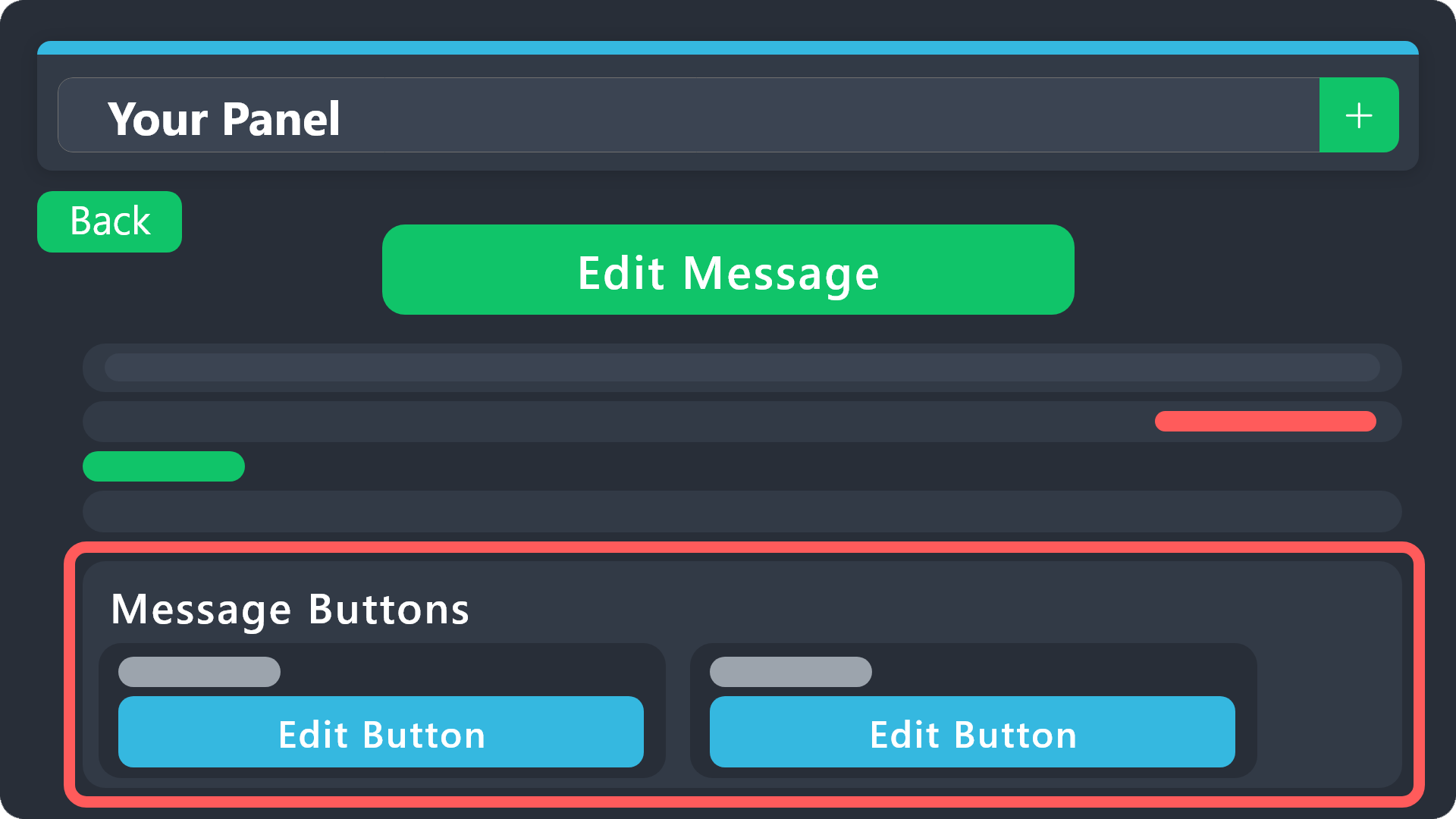 pure ore
humble sequoia
pure ore
humble sequoia
abbreviations
pseudo ravine
Command aliases?
pure ore
pseudo ravine
Command aliases?
yes
pseudo ravine
I don't think you can edit them, but I could be wrong
vague cosmos
@jade topaz > Dashboard > Panel Configs > Buttons > Close Button (Edit) > Make sure it's Support Team only and add allowed roles.
#💬│general-chat is not a support chat. 😉
 iron nightBOT
Gave +1 Rep to @vague cosmos
jade topaz
@vague cosmoshow do i get subscriber role on server
vague cosmos
No worries, you can also disable the $close / /close command (make it support team only).
Dashboard > Command Configs > Close
vague cosmos
jade topaz
<@143705466734641152>how do i get subscriber role on server
Fixed that, thanks for becoming a Premium Subscriber!
iron nightBOT
Gave +1 Rep to @split garnet
jade topaz
@vague cosmosI want her to send a dm after closing the ticket, I set it, but she does not send a message
vague cosmos
No need to ping me on every message, I'll see it.
Dashboard > Panel Config > Transcript
Make sure that Direct Message Transcript is  .
.
 vague cosmos
It's something you can't remove.
jade topaz
i wanted something like this
 jade topaz
i wanted something like this
jade topaz
jade topaz
i wanted something like this
He should send an embed message from dm like this
vague cosmos
Oh, I'm not sure if that is possible to DM.
 vague cosmos
Panel Config > Messages > Edit Closed DM
Make sure that the user has DMs turned on, to send the DM.
jade topaz
vague cosmos
Make sure that the user has DMs turned on, to send the DM.
yes dm is open but it doesn't
vague cosmos
vague cosmos
Panel Config > Messages > Edit Closed DM
Did you save it? Can you open a new ticket and try it again?
Also are you sure DMs are turned on?
 jade topaz
yes
vague cosmos
DMs still don't send?
I can confirm it doesn't work, not sure if this is a bug.
I'd suggest you to contact the support team for this making a ticket in #🎫│make-a-ticket or #premium-tickets, @jade topaz.
Did you have any other questions, I can help with?
dusty pier
Only if I can help I would but I don’t even know the bot myself
vague cosmos
@jade topaz hey how can I help you? 😄
Heya!
Can you check the settings for the Add command under Command Configs on the Dashboard and are they getting an error?
You can leave that empty, since a ticket will always create a new ticket.
I would suggest to add your staff under allowed roles and it should work. 🙂
Yes, that is correct.
vague cosmos
@halcyon gale what do you need help with? Maybe I can help you here. (Saw your message in #📈│reviews)
iron nightBOT
Gave +1 Rep to @vague cosmos
vague cosmos
No problem, it's okay for a thank you. 😉 Did you have any other questions?
vague cosmos
Can you try to disable support team only?
You see the at the top, saying Support Team Only? Turn that off  and see if it works then.
I don't think so, since you set allowed roles.
iron nightBOT
Gave +1 Rep to @vague cosmos
vague cosmos
No problem! I'm heading to bed soon™️ so I wont respond then.
stark runeBOT
1. Invite Ticket Tool to your server
First you will want to invite the bot to your server. Once the bot is in your server, you can manage your server in the dashboard.
2. Create a Panel
To create a panel we are going to need to head over to the panel configs on the dashboard.
Once at the dashboard we will need to click Create Panel.
Enter a panel name (Fill in any optional settings you want).
Click Create Panel and your ready to get started with configuring your panel.
An example of a creating a panel is shown below.
3. Send the Panel to a Channel
Once you've created a panel on the dashboard you will need to send it to a channel using send on the dashboard.
Select the channel you want your panel to be created in and click send.
For other questions checkout $help faq.
An example of a sending a panel is shown below.
Having a Problem Sending the Panel?
Do $debug in a channel with Ticket Tool and make sure it has all the necessary Discord permissions.
vague cosmos
stark rune
@halcyon gale this is a basic guide on how to use the bot, including a invite.
Going to bed now.
 flint socket
Is there a way to make the ticket tool assign a role when the user opens a ticket?
pseudo ravine
Hey there. You can make Ticket Tool assign a role when the ticket is claimed, but not when the ticket is first opened. Note: Claiming is a premium feature
 stray canopy
Any idea why one server works but another doesnt?

 gilded verge
stray canopy
Any idea why one server works but another doesnt?
gilded verge
stray canopy
Any idea why one server works but another doesnt?
yep, because bot don't have these permissions in your channel settings:

but since he has global perms for roles and channels, just give him permission send messages on your channel
iron nightBOT
Gave +1 Rep to @gilded verge
 merry river
hi, i try to add more button, but it's always back to 5, is there anything i can do with this?
 pseudo ravine
Hey there. 5 is the maximum amount
merry river
pseudo ravine
Hey there. 5 is the maximum amount
me premium :'))
i just bought
i saw in other server have 7
pseudo ravine
Did you redeem the premium?
pseudo ravine
Also, was there 7 buttons in one row?


 pseudo ravine
You bought it through Discord, I don't believe there is a key
merry river
pseudo ravine
You bought it through Discord, I don't believe there is a key
so what should i do
sync?
pseudo ravine
merry river
They aren't all in 1 row, they're in 3 separate rows
merry river
pseudo ravine
They aren't all in 1 row, they're in 3 separate rows
ok leave it for now, but what should i do with the redeem thingy
pseudo ravine
It seems like you've already bought and redeem Premium through Discord
You clicked on Upgrade through here right? Or through the App Directory?
 merry river
pseudo ravine
You clicked on `Upgrade` through here right? Or through the App Directory?
merry river
pseudo ravine
You clicked on `Upgrade` through here right? Or through the App Directory?
yuuh
merry river
pseudo ravine
Then you should be good to go
ok now next issue, how to add more button
pseudo ravine
You need to add the panels to the Attached Panels (Multi Panels)
merry river
pseudo ravine
You need to add the panels to the `Attached Panels (Multi Panels)`
i did, but can't add more button :'))
pseudo ravine
You can only have 5 buttons in a row max
So it'll show 5 buttons in a row, and then the other 2 buttons in a separate row
merry river
i completely lost, ok lemme try again and back here if i lost again
pseudo ravine
Sure, no worries
 pale belfry
May someone pls set up my ticket tool for me in my sever pls
rustic gale
merry river
i completely lost, ok lemme try again and back here if i lost again
If you can't add more buttons, that's likely because you don't have more panels
Create more panels and then you can add them too.
 crimson mirage
Hello
Often ticket give The highest three ranks in the server and I do not know the reason
merry river
rustic gale
If you can't add more buttons, that's likely because you don't have more panels
issued resolved. tyvm
rustic gale
crimson mirage
Hello
Often ticket give The highest three ranks in the server and I do not know ...
That's likely because you added those roles to the Ticket Opened Roles
(in Panel Configs -> Ticket)
Check that they're there, and remove them if so
rustic gale
crimson mirage
No there is no roles in tickets open roles <@832864595726172162>
What's your server's ID
crimson mirage
rustic gale
What's your server's ID
1011958674765393981
rustic gale
crimson mirage
1011958674765393981
It's in Ticket Claimed Roles
(in Panel Configs -> Claiming)
that's why the bot is granting those roles
remove those roles from there
iron nightBOT
Gave +1 Rep to @rustic gale
humble sequoiaBOT
⚠️ You're in the wrong place
We provide support for Ticket Tool Discord bot and cannot help you with whatever issue you have.
- We don't know which Support Team you should contact to get this issue resolved, and unfortunately we won't be able to accurately tell you.
If you don't have any further questions regarding our bot Ticket Tool, please close this ticket
vague cosmos
humble sequoia
Read this
Best you can do is contact Discord support.
But I'm wondering how your server got hacked.
 sonic sphinx
Hello, please tell me how to ping the role?
 humble sequoiaBOT
Within all the messages the bot sends (both embeds and text) you can mention either channels, roles, or even users, these mentions will only send a notification to the user if they are used within a text field, e.g: a role mentioned in an embed won't ping at all the users who have that role.
For mentioning a role you can use one out of three options:
{@Role Name} ➞ Which is Case Sensitive.
{RoleID} ➞ Replace RoleId with the Id of the role you are trying to ping.
<@&RoleID> ➞ Discord's native syntax to ping roles.
<#ChannelID> ➞ Mention a channel by its ID.
<@UserID> ➞ Mention a user by its ID.
vague cosmos
@sonic sphinx ^
iron nightBOT
Gave +1 Rep to @vague cosmos
vague cosmos
No worries. 🙂