#🆘│community-support
1 messages · Page 16 of 1
 pale pilot
 pulsar coyote
@pale pilot you are amazing that worked thank you
 iron nightBOT
Gave +1 Rep to @pale pilot
pale pilot

 thorny sun

 fallow ingot
Run /debug in the channel
 jovial dust
Stuck on thinking
fallow ingot
fallow ingot
Run `/debug` in the channel
.

 patent osprey
 humble sequoiaBOT

You can check our documentation here;
You can also check #📂│information for the basic setup;
or run the </setup:1025379472167403530> command within #🤖│bot-spam
Our documentation contains all the info you need about the bot to be able to setup and configure the bot however you like.
fallow ingot
Check out our docs ^^
Updated very frequently and contains all the information needed to help you setup Ticket Tool.
If you are having issues, come back and we'll help you further! 
jovial dust
fallow ingot
Ticket Tool is missing the permission(s) `Read Channel` and `Send Messages`
thanks chief, no idea how that changed itself
iron nightBOT
Gave +1 Rep to @fallow ingot
fallow ingot
np :)
 scenic plinth
Ticket Tool thinking?
Ensure the bot has both read messages and send messages permission by using the /debug command, in addition to resending your panel.
(Not too sure why it is a sudden spike, but there is nothing abnormal appearing and can seemingly be fixed by doing this.)
 uneven zenith
Hello
 slender kraken
Really impressed with this bot! Thanks guys!
fallow ingot
That’s good to hear.
 valid shore
So I have a question regarding closing a ticket. I have the permissions for "user permissions" as "view channel turned off" for "user closed". In the past it worked just fine, when I close the ticket, the user cannot see the ticket anymore.
However, just now when I went to close the ticket the user can still see, chat, and stuff in the ticket. Unsure if there is other permission I might've missed
 dull ember
heloo, what permission that i need to show ticket tools bot in my dashboard?
 rustic gale
dull ember
heloo, what permission that i need to show ticket tools bot in my dashboard?
rustic gale
dull ember
heloo, what permission that i need to show ticket tools bot in my dashboard?
Administrator, or server owner
dull ember
rustic gale
Administrator, or server owner
i have administrator permission but still now showing
rustic gale
valid shore
So I have a question regarding closing a ticket. I have the permissions for "use...
There's probably a permission issue somewhere, ir ecommend you #🎫│make-a-ticket so we can take a closer look
rustic gale
dull ember
i have administrator permission but still now showing
Log out of the dashboard and log in again
dull ember
any other bot is working, only ticket tools not work thats why im curious. im doing re logging and still the same
rustic gale
dull ember
any other bot is working, only ticket tools not work thats why im curious. im do...
Use the /permissionlevel command in your server
dull ember
rustic gale
Use the /permissionlevel command in your server
like this?

 dull ember
rustic gale
dull ember
rustic gale
ahh its solved rn. thanks for your help
iron nightBOT
Gave +1 Rep to @rustic gale
 hasty mist
Hey folks anyone know if there’s a way I can make it so when someone makes a ticket it will come up in a specific channel category so I can keep my server more organized?
 visual wind
Hey! I am a premium customer.
How do I change the ticket tool branding on my server? I would like it to be my company's branding
rustic gale
Not possible currently
rustic gale
hasty mist
Hey folks anyone know if there’s a way I can make it so when someone makes a tic...
Panel Configs -> Category
visual wind
Then why does it say that's possible with premium?
rustic gale
Where does it say so?
 dull ember
rustic gale
Where does it say so?
dull ember
rustic gale
Where does it say so?
i have a problem again haha.. successfully inviting the bot and manage but its not showing on the channel that i want to add.. how?
fallow ingot
Click manage servers again and go back to the dashboard
If you’ve just created the channel then it won’t automatically update.
visual wind
any insight into my question above?
dull ember
fallow ingot
If you’ve just created the channel then it won’t automatically update.
still the same, the ticket is not showing on support ticket Chanel.. please give me step by step
 covert swallow
visual wind
any insight into my question above?
covert swallow
visual wind
any insight into my question above?
Its a partial removal, you can change a lot about the bot, but without creating a new bot it is physically impossible to change the bot PFP
You can change the nickname and everything in embeded meesages, as well as text messages, but you can't change the profile picture. You can add a nickname to the bot which will change the name in messages
visual wind
okay. good to know. Thanks
covert swallow
The ability to purchase a bot, hosted by us with your information, is being worked on
 dense shell
Hey guys! How do I go about adding certain buttons to my ticket tool such as this:
 humble sequoiaBOT
For a more convenient use of multipanels, you can now combine panels on the dashboard. This will allow you to directly send the multipanel from the dashboard or via the $panel ID command.
Where can I find this?
You can find this setting on the Dashboard -> Panel Configs -> Settings -> Panel
Note: if you're attaching all the panels to a panel called English, don't include English in the attached panel's box (If you do this, it will create a duplicate)
This will put all buttons from all of your panels on one message. The message is the panel message from the panel you're combining these panels in.

 ember tree
Hey guys, can I add a voice channel to a ticket to offer voice support between myself and the ticket creator?
dense shell
Switched to legacy version and it only shows one of the two options I had listed

I see this, but don't understand how to configure the values

 jade topaz
want only mods to be able to close ticket
rustic gale
jade topaz
want only mods to be able to close ticket
Make the Close Ticket and Confirm Close buttons support team only
rustic gale
dense shell
I see this, but don't understand how to configure the values
Expand the Dropdown Editor
each option has four fields: name, description, emoji and panel
(not in that order)
all must be filled except emoji, which is optional
rustic gale
ember tree
Hey guys, can I add a voice channel to a ticket to offer voice support between m...
Not possible. You can mae the suggestion in #🤖│bot-spam using the s!suggest command
humble sequoiaBOT
Nos encantaría ayudarte, pero si no nos dices en que requieres ayuda no podemos ayudarte :(
jade topaz
no puedo entrar en el servidor de 3dxmeridian porque a traves del servidor solo me deja entar al juego
humble sequoiaBOT

⚠️ Está en el lugar equivocado
Brindamos soporte para el bot de Discord Ticket Tool y no le podemos ayudar con el problema que presenta.
- No sabemos a que equipo de soporte debería contactar para solucionar este problema, y desafortunadamente no podremos ayudarle acertadamente.
Si no tiene alguna duda relacionada a nuestro bot, Ticket Tool, por favor cierre este ticket.
jade topaz
gracias
rustic gale
jade topaz
Where
The Close Ticket button is in Panel Configs -> Ticket -> Edit Ticket Message
The Confirm Close button is in Panel Configs -> Ticket -> Edit Close Question
dense shell
@rustic gale Sorry I'm a little confused.

This is what I currently have for the drop down, all the information is filled but it still only shows one button
dense shell
So I have to create a new panel to have multiple options in the select?
rustic gale
Correct
 stoic crane
How can I change what is inside messages?
 dense shell
So I have two panels here
 rustic gale
stoic crane
How can I change what is inside messages?
rustic gale
stoic crane
How can I change what is inside messages?
That message is edited in Panel Configs -> Panel -> Edit Panel message
rustic gale
dense shell
So I have two panels here
Maybe name them something different so that it's less confusing?
stoic crane
Look I can't@rustic gale
 dense shell
I'm still a bit confused I'm sorry...
I have the two panels, I named them differently. I'm wanting the ticket tool to display multiple options. 1. Request Member Access 2. Request Guest Access.
As you prior stated I need to have two panels in order to accomplish this...
What happens next is what confuses me haha
rustic gale
Expand the “Embed Editor”
rustic gale
dense shell
I'm still a bit confused I'm sorry...
I have the two panels, I named them diffe...
Now go back to the dropdown editor and set them to the corresponding options
stoic crane
rustic gale
That message is edited in Panel Configs -> Panel -> Edit Panel message
Look i can`t
 dense shell
This is how it turns out when I send both panels, is there no way to have it under just one?

Sorry for the confusion, I'm really just not sure what's going on
rustic gale
stoic crane
Look i can`t
Expand the “Embed Editor”
rustic gale
dense shell
This is how it turns out when I send both panels, is there no way to have it und...
There is no need to send both panels, only one
Only the one where both options are set
dense shell
So if I have Pending Ticket 1, I do this:
 rustic gale
No
dense shell
But instead make it Pending 1
rustic gale
There should be two options there
i.e. two items
One item for Pending Ticket 1
One item for Pending Ticket 2
dense shell
Bro I'm so slow I'm so sorry haha
 gilded verge
@rustic gale, can I interfere for a moment? i have example in video 😅
rustic gale
Of course
gilded verge
dense shell
I just got it, thank you for holding my hand all this way
rustic gale
That's what we're here for
dense shell
Sorry last thing, how'd I go about editing the content inside?
 gilded verge
dense shell
Sorry last thing, how'd I go about editing the content inside?
gilded verge
dense shell
Sorry last thing, how'd I go about editing the content inside?
Panel Configs -> Panel -> Edit Panel message -> Expand Embed Editor
dense shell
Can I do this with the drop down version?
rustic gale
Of course
dense shell
I assume this is the section, when I try typing where it says message it does nothing but blink?


 dense shell
💀 I'm sorry haha, thank you!
 sudden stirrup
what does this mean?

 dreamy abyss
@sudden stirrup Read this #🆘│community-support message
sudden stirrup
ty
 undone python
Is there a way to sync opened ticket perms with the category it's in?
humble sequoiaBOT

Partnership Program
Our partnership program is currently closed.
We appreciate you being interested in partnering with Ticket Tool! Unfortunately, the program for partnering is closed as of now. Nonetheless, make sure to keep an eye at #📣│server-news where we announce partner applications opening!
 TicketTool.xyz - Ticketing without clutter
gilded verge
TicketTool.xyz - Ticketing without clutter
gilded verge
@quaint pivot please use commands in #🤖│bot-spam
 quaint pivot
gilded verge
<@339129842908004354> please use commands in <#910978476536905738>
quaint pivot
gilded verge
<@339129842908004354> please use commands in <#910978476536905738>
ouh sorry
humble sequoiaBOT
Discord only allows to stack up to 50 channels per category, meaning that if you have already 50 tickets in one category, the bot won't be able to place a ticket in that category, for such reason Ticket Tool counts with overflow categories, meaning that if your main category is filled, the bot will go ahead and place the ticket on the next one available, simply choose a second category in the category pickers:
 gilded verge
humble sequoia
gilded verge
humble sequoia
@undone python, please check 
oooo wait, nvm, I misunderstood the question 😐
undone python
yeaa
cause whenever a ticket gets opened everyone has access to it, not just the user that opened the ticket & support team that can see/type in them
gilded verge
so no, you can't sync perms, all perms you can set in Panel Configs -> Permissions -> and there
 humble sequoiaBOT
How to edit `@everyone`'s permissions
Head over to your Dashboard ➞ Panel Configs ➞ Permissions ➞ Open / Closed and customize the base permissions for everyone in your tickets.
Note: This set of permissions may be affected by the overrides of Support Team, Additional Roles, and User permissions.
 undone python
gilded verge
so no, you can't sync perms, all perms you can set in Panel Configs -> Permissio...
undone python
gilded verge
so no, you can't sync perms, all perms you can set in Panel Configs -> Permissio...
so how can i fix the issue i mentioned above?
gilded verge
humble sequoia
so check
undone python
ouuu ty
 still atlas
can someone help? #1032790356900716594
 brittle current
i Need help
rustic gale
still atlas
can someone help? <#1032790356900716594>
Technically i should be able to help, but as staff i get yelled at if i take over on someone else's ticket
rustic gale
still atlas
can someone help? <#1032790356900716594>
Try creating a new ticket (in your server, not here) and seeing if the correct emoji shows
 potent cape
I’m lost
How do I allow member to type what their ticket is for. I’m trying to make a complaints and suggestions channel for my server. TIA
rustic gale
potent cape
I’m lost
How do I allow member to type what their ticket is for. I’m trying to m...
Panel Configs -> Forms
You'll want to enable the form
And you'll want to enable the automatic embed to show the form answers
Those are the two switches at the top of the menu
potent cape
You are a life saver! Thank you!
jade topaz
Why is he not sending the message?


 rustic gale
🤔
You enabled the premium bot in Server Configs, but the premium bot isn't in the server

I recommend you switch back to the basic bot instead
unless you plan on getting a permanent subscription after the trial
jade topaz
rustic gale
unless you plan on getting a permanent subscription after the trial
do you mean this


 humble sequoiaBOT
━━ moved to ticket ━━
jade topaz
The Ticket Tool Not Work He Say The ApliCattion Did Not Respond
rustic gale
What's your server's ID or name
rustic gale
jade topaz
This
Can you open a ticket #🎫│make-a-ticket real quick?
humble sequoiaBOT
━━ moved to ticket ━━
jade topaz
jade topaz
is there anybody?
humble sequoiaBOT
We would love to help you, but if you don't tell us what you need help with we can't help you :(
jade topaz
When will my apply submission be answered?
 sacred maple
jade topaz
When will my apply submission be answered?
sacred maple
jade topaz
When will my apply submission be answered?
What've you applied for?
jade topaz
Support
jade topaz
I can be staff
 white hound
Hey @plain surge @wanton fern @covert swallow @weak oasis Can Anyone Help Me please!!
humble sequoiaBOT
We would love to help you, but if you don't tell us what you need help with we can't help you :(
 craggy geyser
jade topaz
When will my apply submission be answered?
craggy geyser
jade topaz
When will my apply submission be answered?
You haven't read the instructions properly. Read the end of the embed
 limpid nimbus
my server is still not showing up on the dashboard (i joined for this reason only)
humble sequoiaBOT
Don't see your server in the dashboard?
You will possibly need to relog. Look below to see steps on how to relog.
How to relog in the Dashboard.
Note:
You need one of these 3 things to access the dashboard.
1. Server Owner (Level: 6)
2. Server Administrator (Level: 4)
3. Dashboard Role (Level: 2)
:warning: You can check your level using $level on your Discord Server
User permission level with Ticket Tool
@User is permission level: 0 (User)
```» *If it shows that your permission is **0**, you don't have any of the above **3 things** to manage the dashboard.*
**See the Image below on how to relog:** gilded verge
Please check
jade topaz
craggy geyser
You haven't read the instructions properly. Read the end of the embed
I didn't understand you but do you mean I'm rejected?
limpid nimbus
gilded verge
Please check <:this:894279341108772914>
okay thanks 👍
iron nightBOT
Gave +1 Rep to @gilded verge
sacred maple
jade topaz
I didn't understand you but do you mean I'm rejected?
No, he is saying, you didn't quite provide a problem which you need help with, you can't ask when your application will be checked, there is a lot of other applicants they need to check too, so just be patient, otherwise they might not even accept you for not being patient
I'm Arabic too by the way
limpid nimbus
how do i close a ticket,,, (using a command)
gilded verge
limpid nimbus
how do i close a ticket,,, (using a command)
what's your prefix?
limpid nimbus
gilded verge
what's your prefix?
$
gilded verge
oh, so this is $close ^^
jade topaz
sacred maple
No, he is saying, you didn't quite provide a problem which you need help with, y...
Okay
gilded verge
but if some command fails, use the command with a slash 
sacred maple
gilded verge
but if some command fails, use the command with a slash <a:peepoShy:936532698124...
because slash pog
I swear I have no idea why I'm chatting here or even helping people lmao
 willow salmon
How would i make it where only the claim user can send messages. Having the issue of other support team members are able to reply to tickets i claimed already
craggy geyser
jade topaz
I didn't understand you but do you mean I'm rejected?
The application says close it when you have filled it in. Your one is still open which means it won't be checked. If you have closed it and don't here anything it means you aren't successful
Though the panel you opened it from was old, and we aren't actively recruiting anyone right now so you might not hear back immediately. We sometimes store good applications until we need them
 buoyant timber
I cannot send a panel to my server
 cerulean badge
rustic gale
buoyant timber
I cannot send a panel to my server
cerulean badge
rustic gale
buoyant timber
I cannot send a panel to my server
Take a look at the basic setup
 stark runeBOT
1. Invite Ticket Tool to your server
First you will want to invite the bot to your server. Once the bot is in your server, you can manage your server in the dashboard.

2. Create a Panel
To create a panel we are going to need to head over to the panel configs on the dashboard.
Once at the dashboard we will need to click Create Panel.
Enter a panel name (Fill in any optional settings you want).
Click Create Panel and your ready to get started with configuring your panel.
An example of a creating a panel is shown below.

3. Send the Panel to a Channel
Once you've created a panel on the dashboard you will need to send it to a channel using send on the dashboard.
Select the channel you want your panel to be created in and click send.
For other questions checkout $help faq.
An example of a sending a panel is shown below.
Having a Problem Sending the Panel?
Do $debug in a channel with Ticket Tool and make sure it has all the necessary Discord permissions.
 buoyant timber
rustic gale
Take a look at the basic setup
buoyant timber
rustic gale
Take a look at the basic setup
I selected the premiumBot without noticing 💀 thanks
iron nightBOT
Gave +1 Rep to @rustic gale
 void osprey
I added a Moderator role to my ticket and when ticket is created the mod can't view or see the ticket that was made.
humble sequoiaBOT
━━ moved to ticket ━━
 waxen solstice
السلام عليكم انا عايز اعمل setup للبوت بيجيبلي كده خرجت البوت من السيرفر ودخلتوا وبردو لسا نفس المشكله هل حد عندو حل؟
 humble sequoiaBOT
لا تستطيع رؤية سيرفرك في لوحة التحكم؟
غالبا ستحتاج إلى إعادة التسجيل. انظر أدناه لمعرفة الخطوات الخاصة بكيفية إعادة تسجيل الدخول
كيفية إعادة التسجيل في لوحة التحكم.
اولا، يجب ان تذهب الى لوحة التحكم. اضغط على صورتك الشخصية في الجهة اليمنى اعلى الصفحة. بعد الضغط عليها، ستجد زر بمسمى Logout يجب ان تضغط على هذا الزر. ثم سجل دخولك مرة اخرى.
ملاحظة:
تحتاج ٣ اشياء لتستطيع الدخول الى لوحة التحكم
اونر السيرفر (المستوى: 6) .1
صلاحية الادمن (المستوى: 4) .2
رتبة لوحة التحكم (المستوى: 2) .3
تحذير: تستطيع معرفة مستواك بأمر $level في سيرفرك
مستوى صلاحيات المستخدم مع تكت تول
مستوى صلاحية المستخدم: 0 (User)
```» اذا ظهر ان مستوى صلاحيتك  **0**, ليس لديك اي من ال**3** مستويات المذكورة اعلاه للوصول الى لوحة التحكم

**انظر الى الصورة ادناه لشرح كيفية اعادة تسجيل الدخول**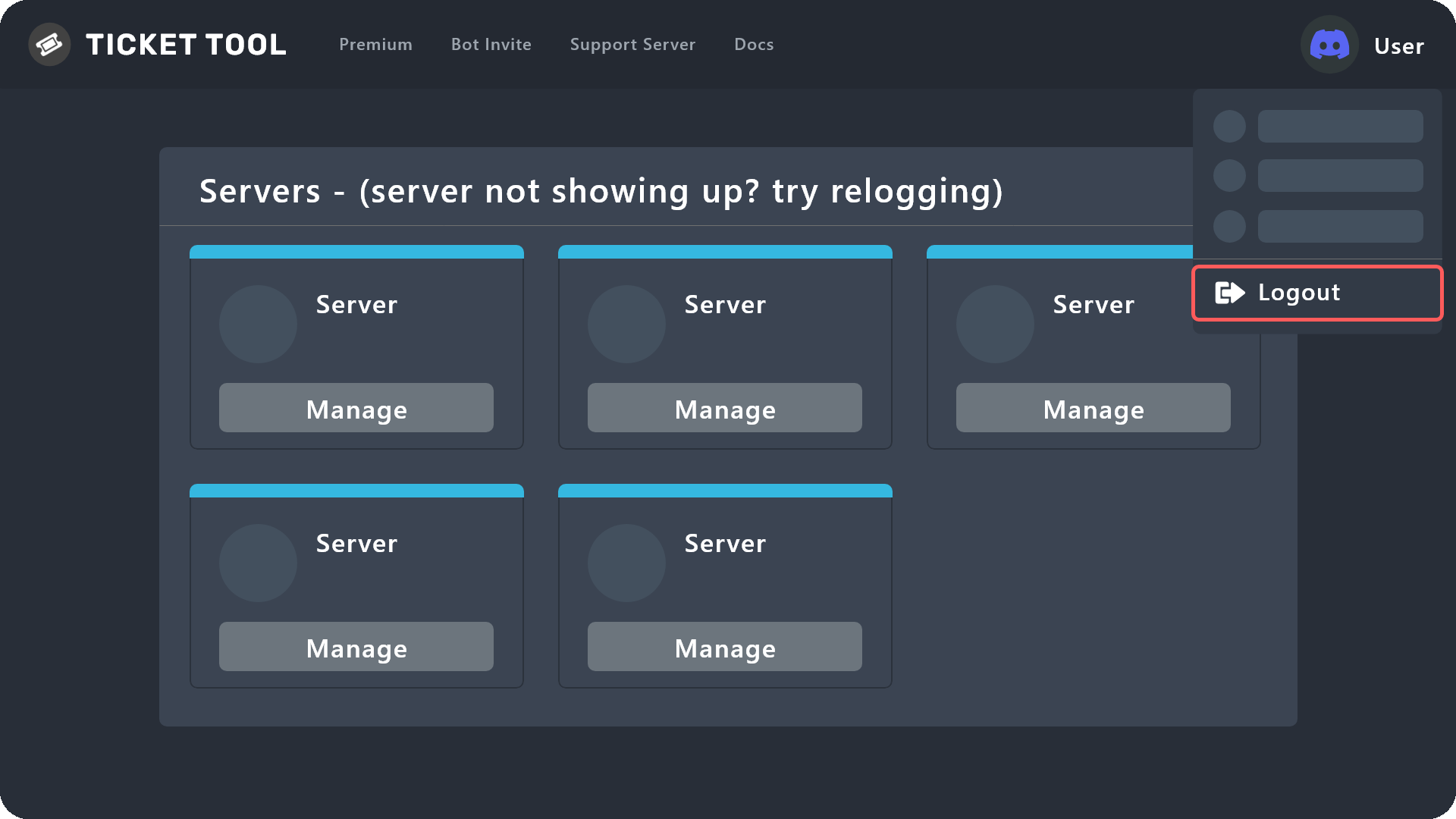
 weary sinew
why have I been warned?only for asking a question
jade topaz
weary sinew
why have I been warned?only for asking a question
I probably broke one of the server rules.
weary sinew
I asked a thing in #💬│general-chat
sorry,but normally in all the server where you ask a thing is in general
because I saw other peoples asking questions and nothing happened
 torpid chasm
what is the thing like this to ping a role
 rustic gale
You use a role mention
A role mention looks something like this
<@&642118166243311646>
You can use the /id command in your server to find the exact ID
 jade topaz
any one knows why i get: The application did not respond
when typing the /help command?
pale pilot
Is the bot still on the server? @jade topaz
pale pilot
Then run the debug command
 next patrol
why this image at the bottom doesnt work

 jade topaz
now I get
The help command is being rebuilt.
For now please checkout the documentation page: https://docs.tickettool.xyz/

Ticketing without Clutter
pale pilot
Yeah that's normal
jade topaz
ok all good thanks
next patrol
next patrol
why this image at the bottom doesnt work
can some1 help me? do i need to enable smth?
pale pilot
next patrol
can some1 help me? do i need to enable smth?
You're using one of the icon variables right? Can you put the variable in one of the text fields and see what kind of link it outputs?
next patrol
pale pilot
You're using one of the icon variables right? Can you put the variable in one of...
i have set this
 pale pilot
How does this link end?
next patrol
https://cdn.discordapp.com/attachments/927523775631753246/1033088772851634236/valleyhub_blue.png
pale pilot
Not sure why it not works, but I've also noticed that sometimes the links don't work. I generally suggest using an external image service for this. Otherwise, send the image again and use that link instead
next patrol
okay ty
 muted bough
next patrol
okay ty
muted bough
next patrol
okay ty
Bilder hochladen ohne Limits! Kostenlos & schnell. Sofort verfügbar! Wir speichern Ihre Fotos dauerhaft und mit hoher Verfügbarkeit.
Top
rustic gale
Apparently Discord is having issues with “some API endpoints”. No clue if that might make images not load correctly
 sudden sigil
hey guys. I can't see any channel selecting option when I'm creating a panel so I can't assign a channel as a Ticket-submitting channel! what should I have to do?
fallow ingot
Hmm, that’s odd.
fallow ingot
sudden sigil
hey guys. I can't see any channel selecting option when I'm creating a panel so ...
Have you tried to log out back in and go the dashboard you’re managing again?
sudden sigil
fallow ingot
Have you tried to log out back in and go the dashboard you’re managing again?
it's the only thing I see while creating a new panel

 obtuse cedar
How to make it so that when a server user clicks on the etiquette ticket . It was not a new channel that was created, but the ticket was transferred to a specific channel with a name and description
and is it possible to do it at all
humble sequoiaBOT
━━ moved to ticket ━━
 eternal ginkgo
How do i add someone to a ticket?
dreamy abyss
eternal ginkgo
How do i add someone to a ticket?
To add someone to a ticket, all you have to do is $add [User ID]
jade topaz
My server doesn't show up on app discovery
scenic plinth
It doesn't go on app discovery
 lone cave
احد عربي؟
jade topaz
lone cave
احد عربي؟
تفضل
lone cave
jade topaz
تفضل
انا ابي اسوي تكت حقت الأوامر وكذا مايظهر الخادم حقي يضهر خادم غير
يعني ماقدر اسوي تكت
jade topaz
humble sequoia
شيك دي @lone cave
 warm fractal
@lone cave
 heavy jolt
Hello, tickets are not working correctly on my server
Members' messages are disappearing
Everything worked correctly before
 viral dagger
When we transcript a ticket, does pictures are saved ?
 waxen niche
how can add premium bot?? link?
humble sequoiaBOT
The first thing you will need to do is invite the premium bot, an invite can be found here
Once the bot is in your server we will head to the dashboard and manage your server. When you are managing your server, you want to head into "Server Configs" then click the drop down menu under "Select the bot you would like to use on this server" then click "Ticket Tool#6207" and then save.

 spring thistle
humble sequoiaBOT
spring thistle
humble sequoiaBOT
For a more convenient use of multipanels, you can now combine panels on the dashboard. This will allow you to directly send the multipanel from the dashboard or via the $panel ID command.
Where can I find this?
You can find this setting on the Dashboard -> Panel Configs -> Settings -> Panel
Note: if you're attaching all the panels to a panel called English, don't include English in the attached panel's box (If you do this, it will create a duplicate)
This will put all buttons from all of your panels on one message. The message is the panel message from the panel you're combining these panels in.
lone cave
warm fractal
<@992120700070539407>
هلا
gilded verge
humble sequoia
@spring thistle please check
 deft nest
I don't have a problem but i want to ask.should i make a ticket
How can i make two tickets in two different chats
My eng so bad🤦😂😂
 grizzled fable
I need help
My tickets aren’t like deleting, when we type /delete or $delete they only purge text msgs, they don’t delete the channel. They only way to delete the channel/ticket is to manually do it
grizzled fable
Ty
jade topaz
Warning: Server at discords channel limit of 500
???
rustic gale
You can't have more than 500 channels in your server
You have a few options
Close some tickets
Switch to threads
Or start using Server Storage
 digital nebula
H
 restive smelt
Hey guys can I embed an image into the front message for a ticket?
 rustic gale
With premium, yes, you can
restive smelt
Gotcha. It appears as though I can embed one into the ticket itself once it's opened as is.
Thank you!
Thanks!
 vital crypt
restive smelt
Hey guys can I embed an image into the front message for a ticket?
vital crypt
restive smelt
Hey guys can I embed an image into the front message for a ticket?
how do u do this?
 rough cove
I am getting a permissions error when @/everyone tries to create a ticket. Is there a setting I messed up?

There are no blacklisted users. I'm confusedddd 😭
humble sequoiaBOT
━━ moved to ticket ━━
 night copper
I have 2 server but only one server show to manage
humble sequoiaBOT
Don't see your server in the dashboard?
You will possibly need to relog. Look below to see steps on how to relog.
How to relog in the Dashboard.
Note:
You need one of these 3 things to access the dashboard.
1. Server Owner (Level: 6)
2. Server Administrator (Level: 4)
3. Dashboard Role (Level: 2)
:warning: You can check your level using $level on your Discord Server
User permission level with Ticket Tool
@User is permission level: 0 (User)
```» *If it shows that your permission is **0**, you don't have any of the above **3 things** to manage the dashboard.*


**See the Image below on how to relog:**I do this
 eternal mantle
How do i make it so where tickets that are closed dont delete?
 clear ore
Is there a way to prevent everyone with a role being added to a threaded ticket when you @ the roll
 slender minnow
clear ore
Is there a way to prevent everyone with a role being added to a threaded ticket ...
slender minnow
clear ore
Is there a way to prevent everyone with a role being added to a threaded ticket ...
you can just @ them instead
slender minnow
eternal mantle
How do i make it so where tickets that are closed dont delete?
tickets dont get deleted when closed (unless your two step is closed)
but if your tickets are being deleted, you can either choose to restrict its usage to specific roles
and/or just transcript them before deleting (you can also choose to automate this which is a premium feature)
eternal mantle
like the person closes them. but i want them to stay there to go back to it
clear ore
slender minnow
you can just @ them instead
What do you mean @ them instead? In a ticket I @ a role to show them a new role I gave them and everyone with that role was added to the ticket
slender minnow
clear ore
What do you mean @ them instead? In a ticket I @ a role to show them a new role ...
did you tried using their user id or ping?
clear ore
Ping
slender minnow
eternal mantle
like the person closes them. but i want them to stay there to go back to it
are you the server owner or with admin perm? if you are, then you already have access
slender minnow
clear ore
Ping
try using their user id
clear ore
The group id?
humble sequoiaBOT
How to turn on developer mode
To enable developer mode do the following:
[:desktop: PC] go to Settings ➞ Advanced ➞ Developer mode
[:mobile_phone: Mobile] go to Settings ➞ Appearance ➞ Developer mode
Developer Mode allows you to get the ID of any channel, user, role, or server.
VIA the ID, you can use them with <> alongside their corresponding format to mention a channel/role/user...
They're mostly used in Embeds
Formats
Channels: <#ID> ➝ #🤖│bot-spam
Users: <@ID> ➝ @humble sequoia
Roles: <@&ID> ➝ <@&642118166243311646>
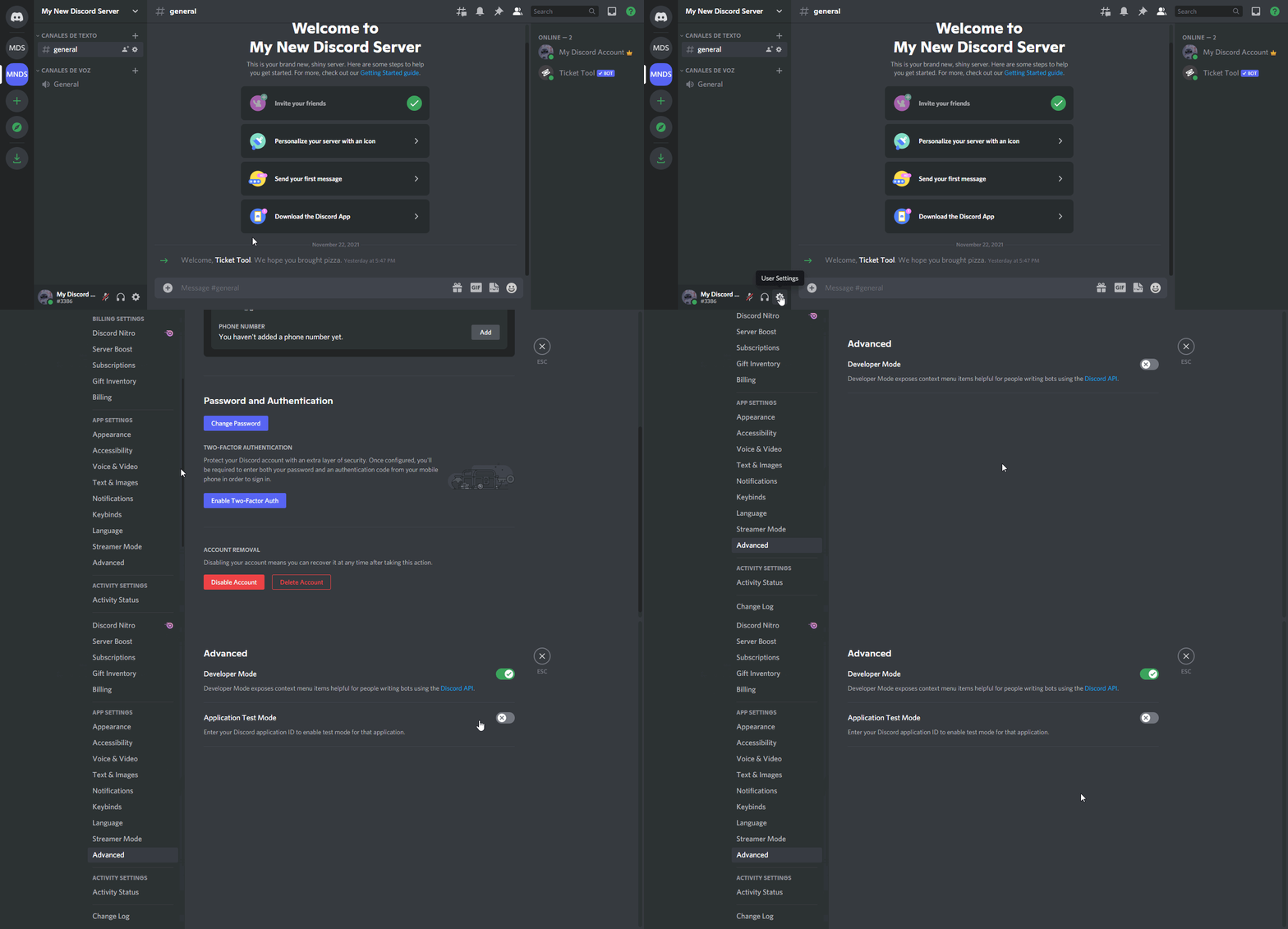 slender minnow
you'll need the dev mode on to grab id's
clear ore
My issue is not ID. When I say hey you've been given the @test role then everyone with that role gets added to the ticket
slender minnow
are you using the threaded ticket? let me confirm that first ^^;
clear ore
Yes I am. This did not happen when we used the channel tickets
slender minnow
so thats because how discord's threads operates, anyone who is pinged in the thread is added to that thread
so if you ping the role, all users with that role are added
clear ore
So there is no way to disable that then since it's a discord limitation
slender minnow
yep, you can use their user id instead and mention them in the ticket thread
clear ore
Ok I understand now. Thank you so much for the help!
jade topaz
How can I make them delete tickets by themselves every x time if there is no interaction?
humble sequoiaBOT
━━ moved to ticket ━━
 short rain
Why does the ticket tool not show up on the sidebar, but it shows it joining and I can give it roles via server settings?
rustic gale
short rain
Why does the ticket tool not show up on the sidebar, but it shows it joining and...
Because it doesn't have permission to view the channel you're viewing
 pale pilot
 pearl meteor
Does anyone know the solution?
pearl meteor
Does anyone know the solution?
Yes. Just FYI, that's not our bot
pearl meteor
pale pilot
Yes. Just FYI, that's not our bot
Do you know a fix for it at least?
Wait, 1 sec
pale pilot
Could be a lot of things. And I don't know any special issues that this bot has
 full cliff
hi I would like to know if the meridian is working for free because mine closed
 lunar solar
 upbeat knoll
how do i get automatic custom names when someone opens a ticket
upbeat knoll
how do i get automatic custom names when someone opens a ticket
Hi,
Please look under:
Panel Configs —> Ticket —> Ticket opened channel name and/or Ticket closed channel name
Have a look at supported variables for help with creating ticket names:
https://docs.tickettool.xyz/dashboard/panel-configs/variables
Description of the variables you can use across your ticket system
 modest spire
How tf do I set this up
stark runeBOT
1. Invite Ticket Tool to your server
First you will want to invite the bot to your server. Once the bot is in your server, you can manage your server in the dashboard.
2. Create a Panel
To create a panel we are going to need to head over to the panel configs on the dashboard.
Once at the dashboard we will need to click Create Panel.
Enter a panel name (Fill in any optional settings you want).
Click Create Panel and your ready to get started with configuring your panel.
An example of a creating a panel is shown below.
3. Send the Panel to a Channel
Once you've created a panel on the dashboard you will need to send it to a channel using send on the dashboard.
Select the channel you want your panel to be created in and click send.
For other questions checkout $help faq.
An example of a sending a panel is shown below.
Having a Problem Sending the Panel?
Do $debug in a channel with Ticket Tool and make sure it has all the necessary Discord permissions.
humble sequoiaBOT
You can check our documentation here;
You can also check #📂│information for the basic setup;
or run the </setup:1025379472167403530> command within #🤖│bot-spam
Our documentation contains all the info you need about the bot to be able to setup and configure the bot however you like.
lunar solar
Have a look through the above @modest spire
modest spire
Alr thank you I've been fiddling with this crap for hours
lunar solar
If you have any questions while setting up just let me know
upbeat knoll
lunar solar
Hi,
Please look under:
Panel Configs —> Ticket —> Ticket opened channel name an...
i cant find ticket
lunar solar
upbeat knoll
i cant find ticket
Can you show me what you are looking at
upbeat knoll
 lunar solar
There it is top right
 lunar solar
upbeat knoll
like this right?? if i want automatic names
lunar solar
upbeat knoll
like this right?? if i want automatic names
Yes, I recommend adding -{count} to the end of the one on the left but it’s personal preference:)
upbeat knoll
what happens then?
lunar solar
Provided you hit save on ticket create the tickets will be automatically named accordingly
upbeat knoll
yes but what is the advantage of adding coun
lunar solar
upbeat knoll
yes but what is the advantage of adding coun
Ohh so you can keep track of the number of tickets you’re up to, plus when referencing a ticket it’s easier to do:
4673
Than it is to do:
username
As some users use special characters that can’t be typed on a normal keyboard etc
upbeat knoll
ok so i place that behind the end of the left one
lunar solar
Yes
 lunar solar
upbeat knoll
like this?
lunar solar
upbeat knoll
like this?
Yep
upbeat knoll
perfect
 umbral python
keep getting 502 error when trying to update panels
scenic plinth
Related to a minor DDOS issue apparently, should be fixed accoridng to the developer however.
 cerulean linden
ok im lost, i haven't been on the control panel in a while but im trying to set it where ONLY support and higher can close tickets. not the person that opened the ticket anybody got a fast navigation for me?
rustic gale
cerulean linden
ok im lost, i haven't been on the control panel in a while but im trying to set ...
Make the Close Ticket and Confirm Close buttons Support Team Only
Close Ticket is in Panel Configs -> Ticket -> Edit Ticket Message
Confirm Close is in Panel Configs -> Ticket -> Edit Close Question
cerulean linden
rustic gale
Make the Close Ticket and Confirm Close buttons Support Team Only
you my friend are amazing!! I should've came and asked a long time ago. new controls got me a little lost atm
rustic gale
cerulean linden
you my friend are amazing!! I should've came and asked a long time ago. new con...
That's what we're here for
cerulean linden
had me fixed up in 2 seconds 🙂
 olive talon
How do yall add a ticket bot to a text chat
stark runeBOT
1. Invite Ticket Tool to your server
First you will want to invite the bot to your server. Once the bot is in your server, you can manage your server in the dashboard.
2. Create a Panel
To create a panel we are going to need to head over to the panel configs on the dashboard.
Once at the dashboard we will need to click Create Panel.
Enter a panel name (Fill in any optional settings you want).
Click Create Panel and your ready to get started with configuring your panel.
An example of a creating a panel is shown below.
3. Send the Panel to a Channel
Once you've created a panel on the dashboard you will need to send it to a channel using send on the dashboard.
Select the channel you want your panel to be created in and click send.
For other questions checkout $help faq.
An example of a sending a panel is shown below.
Having a Problem Sending the Panel?
Do $debug in a channel with Ticket Tool and make sure it has all the necessary Discord permissions.
gilded verge
olive talon
tysm
jade topaz
is there a way to boost my server to level 2 on discord without paying?
lunar solar
jade topaz
is there a way to boost my server to level 2 on discord without paying?
No unless members of your discord wish to donate boosts
But they would still have to pay for them
jade topaz
the server im making is gonna be a family thing where kids can create tickets in our whole family to get homework help etc. what is the fastest way to get it to level 2 how much u suppose that would cost me
i mean cousins aunts uncles etc type family thing
humble sequoiaBOT
⚠️ You're in the wrong place
We provide support for Ticket Tool Discord bot and cannot help you with whatever issue you have.
- We don't know which Support Team you should contact to get this issue resolved, and unfortunately we won't be able to accurately tell you.
If you don't have any further questions regarding our bot Ticket Tool, please close this ticket
jade topaz
if i buy 7 boosts will that immediatly open level 2 or would i have to wait on the months to pass to get it?
lunar solar
Buying 7 boosts immediately unlocks level 2 as long as the 7 boosts are regularly paid for each month
jade topaz
it says i can pay for all 7 at once if i understand it right which is like $35 ish
jade topaz
lunar solar
Buying 7 boosts immediately unlocks level 2 as long as the 7 boosts are regularl...
but ty for your help i realize that was a discord question but i wasn't sure where to ask it and i need the level 2 for the private threads with tickets
iron nightBOT
Gave +1 Rep to @lunar solar
 heavy saddle
how do the panels work please explain it like your talking to a baby i have no idea what the description if the command was saying

 amber panther
need help
lunar solar
heavy saddle
how do the panels work please explain it like your talking to a baby i have no i...
What exactly do you want the panels to do?
lunar solar
 unreal crescent
How do I remove the 2nd one?
unreal crescent
How do I remove the 2nd one?
You’ve attached the panel to itself,
Panel configs —> Panel —> Attached Panels (multi panels) make sure this box is empty
lunar solar
amber panther
need help
Elaborate
amber panther
can you help me
lunar solar
What do you need help with?
amber panther
i have allmyfiles formyserver i just forgot where toputthem
lunar solar
What do you mean all your files?
amber panther
my fivem server files
humble sequoiaBOT
⚠️ You're in the wrong place
We provide support for Ticket Tool Discord bot and cannot help you with whatever issue you have.
- We don't know which Support Team you should contact to get this issue resolved, and unfortunately we won't be able to accurately tell you.
If you don't have any further questions regarding our bot Ticket Tool, please close this ticket
 still sparrow
I want to add a suggestion I used the s!uggest command but it is not working
humble sequoiaBOT

Suggestions for Ticket Tool
To make a suggestion use the s!suggest suggestion command in #🤖│bot-spam. Note that you'll suggestion will be first reviewed by our Support Team before it's posted into #💡│suggestions, channel in which you'll be able to vote for other suggestions!
jade topaz
Hello guys ! I wanted to know if there is a way to close an "invisible" open ticket. To clarify : I opened a ticket on a server, and then the ticket disapeared (archived or something to look at it later I suppose). But now, I want to add some infos to the ticket, but I can't, and I can't open a new one either since the max limit of 1 is reached. Any solution ?
humble sequoiaBOT
━━ moved to ticket ━━
heavy saddle
lunar solar
What exactly do you want the panels to do?
to allow people to create a ticket and make it into a chanel only mods can see
upbeat knoll
How do i add more buttons
 humble sequoiaBOT
━━ moved to ticket ━━
jade topaz
does anyone know how to do this now? cause i believe it changed
 humble sequoiaBOT
How to edit `@everyone`'s permissions
Head over to your Dashboard ➞ Panel Configs ➞ Permissions ➞ Open / Closed and customize the base permissions for everyone in your tickets.
Note: This set of permissions may be affected by the overrides of Support Team, Additional Roles, and User permissions.
 wanton cloak
hi there.. i dont know if was discussed already but i need some help... i added the bot to my server and it's not listed on dashboard... and yes.. and the owner..
 karmic jasper
my close button not working
 bleak umbra
Is it possible to get a notification everytime a new ticket has been made?
slender minnow
$mentions
humble sequoiaBOT
Within all the messages the bot's sends (both embeds and text) you can mention either channels, roles, or even users, these mentions will only send a notification to the user if they are used within a text field, e.g: a role mentioned in an embed won't ping at all the users who have that role.
For mentioning a role you can use one out of three options:
{@Role Name} ➞ Which is Case Sensitive.
{RoleID} ➞ Replace RoleId with the Id of the role you are trying to ping.
<@&RoleID> ➞ Discord's native syntax to ping roles.
<#ChannelID> ➞ Mention a channel by its ID.
<@UserID> ➞ Mention a user by its ID.
slender minnow
@bleak umbra you can try using mentions
humble sequoiaBOT
Don't see your server in the dashboard?
You will possibly need to relog. Look below to see steps on how to relog.
How to relog in the Dashboard.
Note:
You need one of these 3 things to access the dashboard.
1. Server Owner (Level: 6)
2. Server Administrator (Level: 4)
3. Dashboard Role (Level: 2)
:warning: You can check your level using $level on your Discord Server
User permission level with Ticket Tool
@User is permission level: 0 (User)
```» *If it shows that your permission is **0**, you don't have any of the above **3 things** to manage the dashboard.*


**See the Image below on how to relog:**@wanton cloak refer this
karmic jasper
I'm trying to close a ticket. But keeps failing
What can I do ?
wanton cloak
slender minnow
<@334433251445702656> refer this <:this:894279341108772914>
Solved!!! Thank you...
iron nightBOT
Gave +1 Rep to @slender minnow
rustic gale
karmic jasper
I'm trying to close a ticket. But keeps failing
What can I do ?
What's the error you see?
umbral python
New staff member can't see tickets but has the proper role
 hushed oak
i am in need of some help
im trying to configure the set up of this and havin some trouble
im trying to change the "to create a ticket" message. i thought i did. i entered my message into ticket message

id also like to add a message when a ticket is created after the person answers the questionnaire. above the transcript id like to add a message. im not sure how to do that
slender minnow
umbral python
New staff member can't see tickets but has the proper role
Make sure that their role perms are set correctly from dashboard to view tickets
slender minnow
hushed oak
im trying to change the "to create a ticket" message. i thought i did. i entered...
You can edit that from the panel option in panel config
slender minnow
hushed oak
id also like to add a message when a ticket is created after the person answers ...
There is a close ask message that you can edit. You can use it to ask your questionaire before closing
 umbral python
slender minnow
You can edit that from the panel option in panel config
umbral python
slender minnow
You can edit that from the panel option in panel config
yeah its there have added removed and updated panel
still neither can see
 river sinew
i have drop-down enabled and have two inputs but when i send the ticket only one displays
slender minnow
 rustic moon
<@776084862728667156>
rustic moon
<@776084862728667156>
Please do not ping for support, if you urgently need help open a ticket through #🎫│make-a-ticket or wait for someone to respond.
slender minnow
umbral python
yeah its there have added removed and updated panel
can you open a ticket so we can further assist you?
 merry jetty
When I send my panel in order to be able to create tickets, I have this which is displayed and it does not work yet the bot has all the permissions


 tidal light

Hey guys i am using ticket bot for our server , the tickets created by our members are visible to everyone, how to disable it ? Need help
rustic gale
merry jetty
When I send my panel in order to be able to create tickets, I have this which is...
Invalid emoji
It means you inserted an emoji incorrectly, likely in a button
rustic gale
tidal light
Hey guys i am using ticket bot for our server , the tickets created by our membe...
Panel Configs -> Permissions -> Edit everyone's opened permissions
Make sure View Channel is 
Then test on a new ticket
Then, after you've confirmed it works, go back and close all existing tickets and reopen them
tidal light
rustic gale
Make sure View Channel is <:deny_red:836268265821962341>
View channel on discord or on your portal?
rustic gale
tidal light
View channel on discord or on your portal?
On the dashboard
rustic gale
rustic gale
Panel Configs -> Permissions -> Edit everyone's opened permissions
This was all on the dashboard
“Panel Configs” means the Panel Configs menu on the dashboard
 keen carbon
Como coloca suporte ticket em um servidor de discord
 covert abyss
Sorry for another stupid question: where is the settings ?
 heavy bridge
Hey guys! My verification bot (Wick) quarantined ticket tool and removed all permissions. Is there a way to grant them back? on tickettool dashboard everything looks good, but still showing "missing perms"
 jade marlin
scenic plinth
heavy bridge
Hey guys! My verification bot (Wick) quarantined ticket tool and removed all per...
jade marlin
scenic plinth
heavy bridge
Hey guys! My verification bot (Wick) quarantined ticket tool and removed all per...
Assuming you have unquarantined the bot (Ticket Tool), you will have to manually add them back via its role.
humble sequoiaBOT
The first thing you will need to do is invite the premium bot, an invite can be found here
Once the bot is in your server we will head to the dashboard and manage your server. When you are managing your server, you want to head into "Server Configs" then click the drop down menu under "Select the bot you would like to use on this server" then click "Ticket Tool#6207" and then save.
 wide junco
What is the significance of roles while using thread tickets? I don't really understand why it would need to temporarily give a role to someone and in what circumstances it'd be useful
humble sequoiaBOT
━━ moved to ticket ━━
jade topaz
how can i manage bot dashboard
i can't fine my server
the bot have admin permission
and his role above owner 😂
lunar solar
jade topaz
i can't fine my server
the bot have admin permission
and his role above owner �...
Do:
/permissionlevel
Just to confirm access level. Screenshot bot response and post here please
 cerulean forum
I can't see the server I want to manage using the bot on the Servers screen, it says try relogging but I don't actually know what that means
Could someone help me?
humble sequoiaBOT
Don't see your server in the dashboard?
You will possibly need to relog. Look below to see steps on how to relog.
How to relog in the Dashboard.
Note:
You need one of these 3 things to access the dashboard.
1. Server Owner (Level: 6)
2. Server Administrator (Level: 4)
3. Dashboard Role (Level: 2)
:warning: You can check your level using $level on your Discord Server
User permission level with Ticket Tool
@User is permission level: 0 (User)
```» *If it shows that your permission is **0**, you don't have any of the above **3 things** to manage the dashboard.*


**See the Image below on how to relog:**Oop, I tried but it didn't work 😂
Lemme try and get administrator that's probably why
lunar solar
You can do:
/permissionlevel
In your server to see whether or not you have access.
cerulean forum
oo okie lemme try
cerulean forum
lunar solar
You can do:
/permissionlevel
In your server to see whether or not you have acce...
Ah, I'm at 0 that's why
lunar solar
Yeah needs them permissions
cerulean forum
Yep x]
lunar solar
Once you have do the relog and should be good to go
cerulean forum
Gotta wait for owner to get online first, then I can
cerulean forum
lunar solar
Once you have do the relog and should be good to go
Tyyy
lunar solar
If you run into any further issues just ask for help here and one of our team will gladly assist 🙂
cerulean forum
Will do, thanks again :D
lunar solar
No worries, have a good day / evening
cerulean forum
Fine
Thanks @wanton heron 😂
iron nightBOT
Gave +1 Rep to @wanton heron
cerulean forum
WAIT THATS A REAL PERSON oops...
lunar solar
Ohh well no stress haha
cerulean forum
lunar solar
No worries, have a good day / evening
Thanks you too!
covert swallow
cerulean forum
WAIT THATS A REAL PERSON oops...
...now i wanna see how much rep they have
 timber jacinth
How will i set this ticket creating system in my server?
jade topaz
Yo can the admin of this server pls let me typ in everything
stark runeBOT
1. Invite Ticket Tool to your server
First you will want to invite the bot to your server. Once the bot is in your server, you can manage your server in the dashboard.
2. Create a Panel
To create a panel we are going to need to head over to the panel configs on the dashboard.
Once at the dashboard we will need to click Create Panel.
Enter a panel name (Fill in any optional settings you want).
Click Create Panel and your ready to get started with configuring your panel.
An example of a creating a panel is shown below.
3. Send the Panel to a Channel
Once you've created a panel on the dashboard you will need to send it to a channel using send on the dashboard.
Select the channel you want your panel to be created in and click send.
For other questions checkout $help faq.
An example of a sending a panel is shown below.
Having a Problem Sending the Panel?
Do $debug in a channel with Ticket Tool and make sure it has all the necessary Discord permissions.
covert swallow
Its 1 button per panel, if you want to have more than one panel in a message follow the guide below
humble sequoiaBOT
For a more convenient use of multipanels, you can now combine panels on the dashboard. This will allow you to directly send the multipanel from the dashboard or via the $panel ID command.
Where can I find this?
You can find this setting on the Dashboard -> Panel Configs -> Settings -> Panel
Note: if you're attaching all the panels to a panel called English, don't include English in the attached panel's box (If you do this, it will create a duplicate)
This will put all buttons from all of your panels on one message. The message is the panel message from the panel you're combining these panels in.
cerulean forum
I have another question, how do you get the ticket to ping a specific role once you've opened the channel. Also, how do you have it highlight a chat. I've done this, however it won't ping the role nor will it highlight the channel name

 keen canopy
سس
 robust sandalBOT
keen canopy
سس
robust sandalBOT
keen canopy
سس
Sauce
 Persian (fa) → English (en)
 sudden silo
I need help figuring out how to fix this
 rustic gale
sudden silo
I need help figuring out how to fix this
rustic gale
sudden silo
I need help figuring out how to fix this
Please #🎫│make-a-ticket so we can take a closer look


 mystic ruin
What does $claim do? Please @ me when someone responds.
 rough summit
سلام عليكم
عندي سوال
@jade topaz
 primal crow
Hey, is anyone having a problem where there are two support ticket buttons?
I don't see a reason why there are two, as I only have one button in the panel. Hiding that hides both, and showing the one button in the panel shows two on Discord.
Is it a known bug?
covert swallow
Did you attach the panel to itself?
humble sequoiaBOT
For a more convenient use of multipanels, you can now combine panels on the dashboard. This will allow you to directly send the multipanel from the dashboard or via the $panel ID command.
Where can I find this?
You can find this setting on the Dashboard -> Panel Configs -> Settings -> Panel
Note: if you're attaching all the panels to a panel called English, don't include English in the attached panel's box (If you do this, it will create a duplicate)
This will put all buttons from all of your panels on one message. The message is the panel message from the panel you're combining these panels in.
covert swallow
By using this method ^
 granite tide
can you somehow change the way it opens the tickets? like instead of Ticket#0061 it says the name of the user?
covert swallow
With premium, yes
granite tide
okay, thank you
primal crow
^ thanks guys will check it
 fluid prawn
i cant create a multipanel with this new menu 💀
it tells me to go to this settings thing but its not even there


 glad hedge
Hey when can we use the premium (last week, admin said you rollback)
slender minnow
glad hedge
Hey when can we use the premium (last week, admin said you rollback)
hey there, i am not sure what you mean by rollback ^^;
humble sequoiaBOT
For a more convenient use of multipanels, you can now combine panels on the dashboard. This will allow you to directly send the multipanel from the dashboard or via the $panel ID command.
Where can I find this?
You can find this setting on the Dashboard -> Panel Configs -> Settings -> Panel
Note: if you're attaching all the panels to a panel called English, don't include English in the attached panel's box (If you do this, it will create a duplicate)
This will put all buttons from all of your panels on one message. The message is the panel message from the panel you're combining these panels in.

 elfin brook
is there a way for me to send a ticket reaction to my own embed instead of ticket tool sending its own panel? (i hope this makes sensee 😭)
slender minnow
nope, thats not possible iirc
glad hedge
slender minnow
hey there, i am not sure what you mean by *rollback* ^^;
I heard from the admin who is one of your community, the premium feature was rollback last week. So, 10% server cannot use the premium feature
elfin brook
slender minnow
nope, thats not possible iirc
o alrighty thank u very much
iron nightBOT
Gave +1 Rep to @slender minnow
slender minnow
thats discord rolling out the app directory so our payment platform will be moved to discord, so it wasnt available for about 10% of the servers and was slowly rolling out for all servers
glad hedge
slender minnow
thats discord rolling out the app directory so our payment platform will be move...
Okay. when can I use the premium feature?
slender minnow
glad hedge
Okay. when can I use the premium feature?
you can complete the purchase once you see the upgrade option in the bot profile in your server or you can choose an alternate payment method
glad hedge
slender minnow
you can complete the purchase once you see the upgrade option in the bot profile...
I cannot see the upgrade option now
slender minnow
then it means its not available to your server yet ^^;
you can also choose to pay through other payment methods like btc, etc.
glad hedge
slender minnow
you can also choose to pay through other payment methods like btc, etc.
Okay, where can I choose to pay through other payment?
slender minnow
you'll have to open a ticket so that our team can further assist you
 plain rover
Hello i have a question, i set up the bot and it shows 2 create a ticket buttons. I can't find anywhere to make it just one
Is there a way to do it or is it always 2 automated?
 slender palm
How can I create a panel where I can create tickets and how can I set up a form for the tickets?
@slender minnow @plain rover
@slender palm
slender minnow
slender palm
How can I create a panel where I can create tickets and how can I set up a form ...
Maybe you should start by reading our rules
humble sequoiaBOT
You can check our documentation here;
You can also check #📂│information for the basic setup;
or run the </setup:1025379472167403530> command within #🤖│bot-spam
Our documentation contains all the info you need about the bot to be able to setup and configure the bot however you like.
slender minnow
and then refer to the setup guide ^
 pure sundial
is there a way to keep my support team without send message perm them it gets activated only when someone of the team claim the ticket?
keen canopy
سس
 spiral lichen
i need some help with the bot, it says that it has sendt the message in the browser but it dosent show in the server
anyone have a fix?
 slender pagoda
spiral lichen
i need some help with the bot, it says that it has sendt the message in the brow...
slender pagoda
spiral lichen
i need some help with the bot, it says that it has sendt the message in the brow...
i had the same thing, updated the rights to the channel and that solved it for me.
spiral lichen
@slender pagoda ive tried that but it dosent work
slender pagoda
then, no clue
spiral lichen
could you come in vc and help me while i screenshare
slender pagoda
sorry, at work
spiral lichen
ahh np
 bold roost
bonjour pouriez vous me dire comment retirer le sélecteur et mètre des boutons svp
hello could you tell me how to remove the selector and meter from the buttons please
 somber oxide
hi
may i get some help please?
im trying to set up a server with a ticket bot and im struggling to be honest
 weary elk
Hello, does Ticket Tool have an option to automatically close a ticket if the person opening the ticket hasn't typed anything in it since opening the ticket, after an "x" amount of time?
 smoky shoal
How to edit this embed?

 worldly coral
I was ban from a server but did nothing wrong how do I fix or contest
humble sequoiaBOT
⚠️ You're in the wrong place
We provide support for Ticket Tool Discord bot and cannot help you with whatever issue you have.
- We don't know which Support Team you should contact to get this issue resolved, and unfortunately we won't be able to accurately tell you.
If you don't have any further questions regarding our bot Ticket Tool, please close this ticket
gilded verge
smoky shoal
How to edit this embed?
As far as I know you cannot edit this message but you can disable this option and add a separate message instead, just remember to add the variable in message. You can check more info in docs: https://docs.tickettool.xyz/dashboard/panel-configs/form-options
gilded verge
weary elk
Hello, does Ticket Tool have an option to automatically close a ticket if the pe...
Hey, auto-close after certain time it is planned ^^
 echo sandal
Hi how I do ticket
stark runeBOT
1. Invite Ticket Tool to your server
First you will want to invite the bot to your server. Once the bot is in your server, you can manage your server in the dashboard.
2. Create a Panel
To create a panel we are going to need to head over to the panel configs on the dashboard.
Once at the dashboard we will need to click Create Panel.
Enter a panel name (Fill in any optional settings you want).
Click Create Panel and your ready to get started with configuring your panel.
An example of a creating a panel is shown below.
3. Send the Panel to a Channel
Once you've created a panel on the dashboard you will need to send it to a channel using send on the dashboard.
Select the channel you want your panel to be created in and click send.
For other questions checkout $help faq.
An example of a sending a panel is shown below.
Having a Problem Sending the Panel?
Do $debug in a channel with Ticket Tool and make sure it has all the necessary Discord permissions.
gilded verge
stark rune
Hey @echo sandal, please check
echo sandal
Yes I do it they say it’s failed
gilded verge
Why failed? Do you have error or something?
echo sandal
I don’t no
gilded verge
Please send a screenshot when you see the error so we can help you ^^
echo sandal
 humble sequoiaBOT
ᅠ
@pseudo glen requires the following permissions:
Add Reactions
Read Channels
Send Messages
Manage Messages
Embed Links
Attach Files
Read History
Manage Roles
Manage Channels
To change the role permissions, you can go to your Discord Server ➞ Server Settings ➞ Roles ➞ @Ticket Tool
To change the channel permissions, you can go to your Channel Settings ➞ Permissions ➞ Ticket Tool
ᅠ
Note:
You can give Ticket Tool Administrative Permissions instead of all the permissions listed above, but it's entirely optional and NOT necessary.
 gilded verge
So please make sure the bot has required permissions and permissions in the channel: View Channel, Send Messages, Read Message History
@echo sandal, let us know if it worked ^^
echo sandal
Yes
jade topaz
Is there a way to change server premium once it got activated
gilded verge
jade topaz
Is there a way to change server premium once it got activated
It depends.
How did you get Premium?
- I purchased a subscription via https://tickettool.xyz/premium
- I purchased a subscription via Discord (Upgrade button)
- I activated my subscription using a key (meaning this key from
/vote redeemcommand)
jade topaz
gilded verge
It depends.
How did you get Premium?
1) I purchased a subscription via <https://...
2x boost rewards
gilded verge
jade topaz
2x boost rewards
Unfortunately, it is no longer possible to get premium for server boosts.
wait, i think i missed something 🤔
you got the premium key when you used boosts in server before, right?
 elder breach
How do I add buttons to the embed?
humble sequoiaBOT
Backup and Restore allows you to transfer your premium status, panels, tags, and all settings to a new server.
You can also use it to keep a backup of your settings incase you need to suddenly move servers. We suggest you keep this backup key somewhere safe, incase your server is deleted. You will want to copy the whole key.
First, go to your dashboard, then Server Configs and generate a new backup key by pressing the green button. Now, a key should be generated in the box above. You may need to refresh the page to see this.
Once you have your backup key, navigate to the same page on the new server. Copy the key on the second field.
Now you can choose what you want to copy. Finally, press the green “Restore Configs” button.
gilded verge
@jade topaz, Because if so, you need to use backup key to move premium
 gilded verge
elder breach
How do I add buttons to the embed?
gilded verge
elder breach
How do I add buttons to the embed?
Which buttons you mean?
stark runeBOT
1. Invite Ticket Tool to your server
First you will want to invite the bot to your server. Once the bot is in your server, you can manage your server in the dashboard.
2. Create a Panel
To create a panel we are going to need to head over to the panel configs on the dashboard.
Once at the dashboard we will need to click Create Panel.
Enter a panel name (Fill in any optional settings you want).
Click Create Panel and your ready to get started with configuring your panel.
An example of a creating a panel is shown below.
3. Send the Panel to a Channel
Once you've created a panel on the dashboard you will need to send it to a channel using send on the dashboard.
Select the channel you want your panel to be created in and click send.
For other questions checkout $help faq.
An example of a sending a panel is shown below.
Having a Problem Sending the Panel?
Do $debug in a channel with Ticket Tool and make sure it has all the necessary Discord permissions.
gilded verge
Buttons are added automatically, please check
elder breach
No no, I mean like how to add buttons yourself to that message and when you press it it comes up with the same ticket tool
I already have the open ticket button and stuff but I’m wondering how to add other buttons because it looks cool
gilded verge
ah so you want more buttons in panel?
elder breach
yes
gilded verge
whew 😅
humble sequoiaBOT
For a more convenient use of multipanels, you can now combine panels on the dashboard. This will allow you to directly send the multipanel from the dashboard or via the $panel ID command.
Where can I find this?
You can find this setting on the Dashboard -> Panel Configs -> Settings -> Panel
Note: if you're attaching all the panels to a panel called English, don't include English in the attached panel's box (If you do this, it will create a duplicate)
This will put all buttons from all of your panels on one message. The message is the panel message from the panel you're combining these panels in.
gilded verge
required premium to change that

but if your server have premium, you can change that in:
Panel->Edit Panel Message->Expand Embed Editor and add to Image Url
or Ticket->Edit Ticket Message->Expand Embed Editor and add to Image Url
elder breach
oh ok
jade topaz
hello
when i try to delete my ticket
it doesn't delete the channel but the content within the channel
is there a fix?
gilded verge
Hey i think i know what's going on 😳
Please go to Server Configs and there turn off Server Storage Options ^^
iron nightBOT
Gave +1 Rep to @gilded verge
jade topaz
how do i make the transcript command go into a certain channel all the time instead of manually typing it each time
rustic gale
jade topaz
how do i make the transcript command go into a certain channel all the time inst...
In your dashboard, Panel Configs -> Transcript
jade topaz
legend thanks
rustic gale
jade topaz
legend thanks
You can select the channel for transcripts there
jade topaz
rustic gale
You can select the channel for transcripts there
yea i see it all i set it up now, thanks 
iron nightBOT
Gave +1 Rep to @rustic gale
 analog wind
I'm a bit confused with the new UI. Is there any way so people with a certain role can't open a ticket?
 near veldt
https://i.imgur.com/aRiEWft.png any reason why i have a duplicate ticket button?
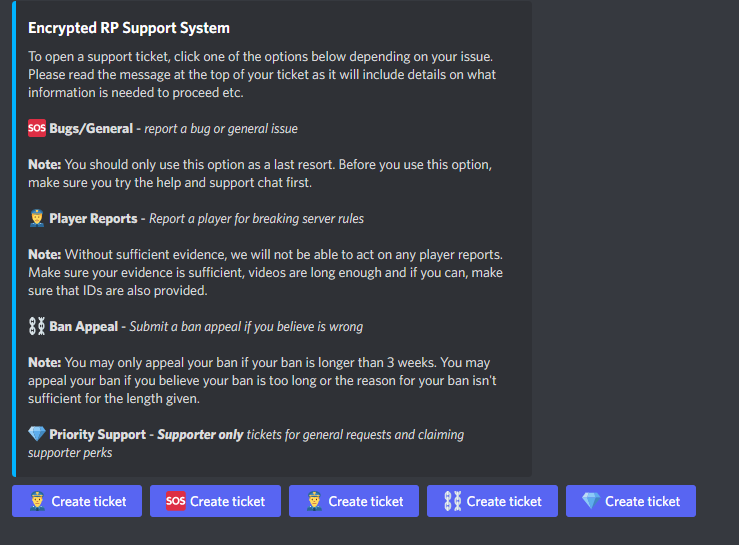 gilded verge
analog wind
I'm a bit confused with the new UI. Is there any way so people with a certain ro...
gilded verge
analog wind
I'm a bit confused with the new UI. Is there any way so people with a certain ro...
Please go to Panel Configs->Panel->Edit Panel Message->Create Ticket Button->there use Allowed Roles or Disabled Roles
gilded verge
near veldt
https://i.imgur.com/aRiEWft.png any reason why i have a duplicate ticket button...
It looks like you have added the same panel and therefore you have 2 the same buttons 😳
You can change that in Panel Configs->Panel->Attached Panels (Multi Panels)
near veldt
gilded verge
It looks like you have added the same panel and therefore you have 2 the same bu...
Thats what I thought too but this is what I got https://i.imgur.com/BbcrzRd.png
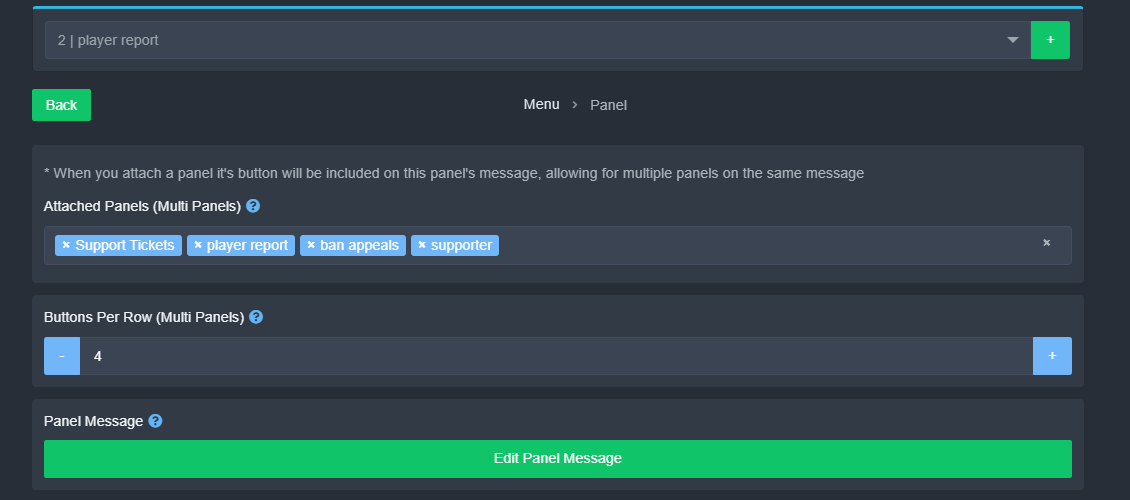 gilded verge
ooo look, you have the same panel 😳

so you need to \❌ player report from Attached Panels (Multi Panels) ^^
gilded verge

near veldt
gilded verge
<:peepoBlush:843212225208123412>
I got it working thank you very much. It took sometime to realize the drop down menu was different panels, not ticket options lol
iron nightBOT
Gave +1 Rep to @gilded verge
 vapid bay
hello
our pinging variable isn't working and seemed to of disappear and not trigger when a ticket is opened.


server id: 726225355937153197
just randomly stopped working. nothing was edited.
 eager cargo
^handled


 void pelican
/help
 snow sky
I need my 2 surfshark vons resetting please
lunar solar
jade topaz
Why didn't the color change to pink?
You are looking at two different bots
The first message is sent with the free bot
The picture of the roles is the premium bot
Resend the message and delete the old message
If the free bot sends the message again you need to activate premium
Yeah I just tried to update your roles and the bot couldn’t find you with premium access. You need to activate the premium bot.
Additionally you can kick the free bot
humble sequoiaBOT
The first thing you will need to do is invite the premium bot, an invite can be found here
Once the bot is in your server we will head to the dashboard and manage your server. When you are managing your server, you want to head into "Server Configs" then click the drop down menu under "Select the bot you would like to use on this server" then click "Ticket Tool#6207" and then save.
 lunar solar
jade topaz
lunar solar
jade topaz
Yes you need to change that to the premium bot and hit save
 languid edge
hello
please give me the steps to make a panel with 5 tickets in the same panel and tell me how to add photo
like this
 languid edge
@lunar solar
 cold sparrow
Hello
im trying to set up the bot but i cant choose a channel when i am create the panel?
my panel creation page looks like this - thats not what i can see in the videos 🤔


 lost lintel
cold sparrow
im trying to set up the bot but i cant choose a channel when i am create the pan...
lost lintel
cold sparrow
im trying to set up the bot but i cant choose a channel when i am create the pan...
You will get this option later when you try to send the ticket.
stark runeBOT
1. Invite Ticket Tool to your server
First you will want to invite the bot to your server. Once the bot is in your server, you can manage your server in the dashboard.
2. Create a Panel
To create a panel we are going to need to head over to the panel configs on the dashboard.
Once at the dashboard we will need to click Create Panel.
Enter a panel name (Fill in any optional settings you want).
Click Create Panel and your ready to get started with configuring your panel.
An example of a creating a panel is shown below.
3. Send the Panel to a Channel
Once you've created a panel on the dashboard you will need to send it to a channel using send on the dashboard.
Select the channel you want your panel to be created in and click send.
For other questions checkout $help faq.
An example of a sending a panel is shown below.
Having a Problem Sending the Panel?
Do $debug in a channel with Ticket Tool and make sure it has all the necessary Discord permissions.
gilded verge
check
 civic dagger
how can I create a DropDown menu?
for me, only one of 4 possible options is displayed.
humble sequoiaBOT
The Drop-down menu or Select Menu replaces the buttons on your panel message and uses a drop-down menu with all of your panels. To set this up, go to your Panel Configs and select your main Panel.
<:Numbericons1:1018864164032225340> Enable Select Style
First you enable Select Style. Then you add an item in the Dropdown Editor. Now you can start editing your dropdown!
<:Numbericons2:1018864168041971712> Dropdown Editor
Each line in the dropdown editor represents a line in the drop down menu on discord. You can add more "Items", by clicking on 

First you select a panel. That's the panel this option will open a ticket for.  DONT select the same panel twice. Each option should have a different Panel
After that, you can put a Display. This is the title of this option and will appear in the drop down menu. The *Description can be set right after that, which will be below the title in grey.
Additionally you can select an emoji, that will be shown in front of each option. You can either manually input the ID of an emoji or select it in the selector.
Common Issues ⚠️
- Panel doesn't send? Make sure you have a valid emoji selected
- Option doesn't show up? Check if two options have the same panel in the DropDown Editor

$dropdown
 random copper
I just signed up for the Mesh Monitors and was trying to figure things out. I thought I was following directions and it said create a ticket -so I did. I had no idea what this did-so I didn’t say anything. Well I did that twice and now they kicked me out. Is there someone I can contact about this? Or am I just done forever?
humble sequoiaBOT
⚠️ You're in the wrong place
We provide support for Ticket Tool Discord bot and cannot help you with whatever issue you have.
- We don't know which Support Team you should contact to get this issue resolved, and unfortunately we won't be able to accurately tell you.
If you don't have any further questions regarding our bot Ticket Tool, please close this ticket
random copper
Can you tell me how to close it?
covert swallow
Were they using @pseudo glen ?
 fair blade
Hey guys, is it possible to set a global ticket limit per user? For example, I have more ticket categories, however players can open a ticket per each panel.


I can open 1 ticket on both player report and bug report, however I want to limit it to 1 ticket globally
fair blade
Nevermind, found the option, thought it was a limit for all users
umbral python
closed tickets are no longer going to the proper categories
covert swallow
umbral python
closed tickets are no longer going to the proper categories
Is the category theyre supposed to go in full? (50 channels)
umbral python
yes
covert swallow
Thats the reason
 sharp elbow
is there a way the bot can automatically give people roles after creating a ticket
rustic gale
sharp elbow
is there a way the bot can automatically give people roles after creating a tick...
You can set auto roles in Panel Configs -> Ticket
 glad venture
Hi folks, the tickets in my Discord keep slipping up to the top of the channel categories instead of staying where they should in the ticket support section
Can someone tell me the solution?
covert swallow
Is the category full (50 tickets)?
glad venture
covert swallow
Is the category full (50 tickets)?
We currently have 77 cases open. But there was only one left in the right space.
covert swallow
Are there 50 channels of any type in that category?
glad venture
I moved a few manually to the right spot. I am not quite sure what you mean by 50 channels of any type
I currently have 9 tickets within the ticket channel
All the rest are still up top of all channels
covert swallow
Any channel, doesnt matter if its a ticket or not
Discord has a limit of 50 channels per category
glad venture
Ah ok. Now I understand. Now the ticket category has 11 channels (9 of which are open cases)
covert swallow
Have permissions changed in any way?
glad venture
no
covert swallow
Whats the server ID
glad venture
covert swallow
Whats the server ID
965218422055141456
covert swallow
Half Life?
glad venture
covert swallow
Half Life?
Correct
covert swallow
Which panel is having the issue?
glad venture
covert swallow
Which panel is having the issue?
Ticket Creation
rustic gale
Can we see a screenshot of the category having only 11 channels?
glad venture
It's a few more now, but still less than 50. Other team member has OCD like me 😄
 covert swallow
Yeah I was gonna say, I'm not a math major for a reason but that looks like a lot more than 11
covert swallow
languid edge
like this
this is a multipanel
humble sequoiaBOT
For a more convenient use of multipanels, you can now combine panels on the dashboard. This will allow you to directly send the multipanel from the dashboard or via the $panel ID command.
Where can I find this?
You can find this setting on the Dashboard -> Panel Configs -> Settings -> Panel
Note: if you're attaching all the panels to a panel called English, don't include English in the attached panel's box (If you do this, it will create a duplicate)
This will put all buttons from all of your panels on one message. The message is the panel message from the panel you're combining these panels in.
 cosmic merlin
Guys. I cant find my server, on the manage server list
humble sequoiaBOT
Don't see your server in the dashboard?
You will possibly need to relog. Look below to see steps on how to relog.
How to relog in the Dashboard.
Note:
You need one of these 3 things to access the dashboard.
1. Server Owner (Level: 6)
2. Server Administrator (Level: 4)
3. Dashboard Role (Level: 2)
:warning: You can check your level using $level on your Discord Server
User permission level with Ticket Tool
@User is permission level: 0 (User)
```» *If it shows that your permission is **0**, you don't have any of the above **3 things** to manage the dashboard.*


**See the Image below on how to relog:**@covert swallow You folks just ping me, when you have news, yeah? Sorry, not been here before yet.
Ok boss
covert swallow
Will do
jade topaz
hi
how to add perms on my staff to edit the ticket's name?
without give admin all perm discord
 fervent heath
Can't find it with a quick search, but I used to use $transcript (user id) to send a transcript to another user. Now this function just sends it to our vault. Any ideas?
jade topaz
Nah
covert swallow
@glad venture open a ticket please
glad venture
covert swallow
<@933417374147821640> open a ticket please
Thx, I shall. I'll have to catch up with you guys tomorrow though. 😴😴
jade topaz
covert swallow
this is a multipanel
Can it be translated into Arabic?
 slow nymph
Hello, I have already made a ticket but I would see if anyone else would be able to help for now
scenic plinth
jade topaz
Can it be translated into Arabic?
لاستخدام أكثر ملاءمة للوحات المتعددة ، يمكنك الآن دمج اللوحات على لوحة القيادة. سيسمح لك هذا بإرسال اللوحة المتعددة مباشرة من لوحة القيادة أو عبر الأمر $ panel ID.
أين يمكنني العثور على هذا؟
يمكنك العثور على هذا الإعداد في لوحة القيادة -> لوحة المعلومات -> الإعدادات -> اللوحة
ملاحظة: إذا كنت تقوم بإرفاق جميع اللوحات بلوحة تسمى اللغة الإنجليزية ، فلا تقم بتضمين اللغة الإنجليزية في مربع اللوحة المرفقة (إذا قمت بذلك ، فسيتم إنشاء نسخة مكررة)
سيؤدي هذا إلى وضع جميع الأزرار من جميع اللوحات الخاصة بك في رسالة واحدة. الرسالة
هي رسالة اللوحة من اللوحة التي تدمج فيها هذه اللوحات.
 oak fjord
The ticket tool is currently creating 2 tickets from one click and not prompting with the delete or are you sure you want to close option ❤️
jade topaz
It's not working well for me
scenic plinth
oak fjord
The ticket tool is currently creating 2 tickets from one click and not prompting...
Are they being created at the same time? Is the bot responding to commands such as /debug?
oak fjord
scenic plinth
Are they being created at the same time? Is the bot responding to commands such ...
It is responding.
They are being created at the same time.
scenic plinth
Well there seemed to be a brief issue, resolved itself. Is it still creating two tickets? Do you have both premium and non premium in the server?
oak fjord
scenic plinth
Well there seemed to be a brief issue, resolved itself. Is it still creating two...
No, I do not have premium.
scenic plinth
Ok, what is your server ID, and can you provide a screenshot?
oak fjord
I will just wait, don't feel comfortable sending that stuff.
 eager oxide
Discord currently having very high latency, could that effect it?
scenic plinth
Possibly, I haven't seen that yet.
eager oxide
Current
 scenic plinth
It's very possible.
And would also explain the duplicated tickets being created.
/ Not prompting the correct responses when using buttons
 hasty hill
Were having the same problem
 solid stream
Discord api is a little sus at the moment..
I'm seeing alot of errors that are due to timeouts from discord..
Nothing I can do on my side.
 thin junco
Okay, looks like it's a known issue and being worked on 🙂
We are having the same trouble as above
Can't delete tickets, duplicate tickets being created, etc - all started a few hours ago
 royal horizon
Hey, how to set up an invite?
 rustic schooner
Need help I got charged twice but I only received one email
humble sequoiaBOT
⚠️ You're in the wrong place
We provide support for Ticket Tool Discord bot and cannot help you with whatever issue you have.
- We don't know which Support Team you should contact to get this issue resolved, and unfortunately we won't be able to accurately tell you.
If you don't have any further questions regarding our bot Ticket Tool, please close this ticket
covert swallow
There is not, tickets are just stored sequentially, the only time they reference any other ticket is upon creation, and its a database reference to see where a little counter is at
covert swallow
royal horizon
Hey, how to set up an invite?
Invite to where?
 chilly jacinth


 mystic ruin
What is #demo-threads pls @ me when someone replies
rustic gale
mystic ruin
What is <#1031264402969735198> pls @ me when someone replies
It's for testing the thread tickets feature
 dry citrus
How do u set it up to take tickets like the screen shot above
rustic gale
dry citrus
How do u set it up to take tickets like the screen shot above
Here's the basic setup
stark runeBOT
1. Invite Ticket Tool to your server
First you will want to invite the bot to your server. Once the bot is in your server, you can manage your server in the dashboard.
2. Create a Panel
To create a panel we are going to need to head over to the panel configs on the dashboard.
Once at the dashboard we will need to click Create Panel.
Enter a panel name (Fill in any optional settings you want).
Click Create Panel and your ready to get started with configuring your panel.
An example of a creating a panel is shown below.
3. Send the Panel to a Channel
Once you've created a panel on the dashboard you will need to send it to a channel using send on the dashboard.
Select the channel you want your panel to be created in and click send.
For other questions checkout $help faq.
An example of a sending a panel is shown below.
Having a Problem Sending the Panel?
Do $debug in a channel with Ticket Tool and make sure it has all the necessary Discord permissions.
 limber salmon
How can you retrieve ticket logs ?
covert swallow
They would be in your transcript channel if you have one enabled
limber salmon
How would you find it ?
 silver glacier
How can i make custom categories for tickets?
 late granite
covert swallow
Transcript button in your panel settings
late granite
covert swallow
Transcript button in your panel settings
how do i make it so only certain roles can close tickets and click the transcript thing?
 left drum
late granite
how do i make it so only certain roles can close tickets and click the transcrip...
left drum
late granite
how do i make it so only certain roles can close tickets and click the transcrip...
i need to do that but for close tickets im pretty sure u try and find edit close ticket button and make sure it is support roles only which u can setup in general the only problem for me is that i cant find the transcript button to only be for the support roles meaning i cant find transcript button edit
left drum
idk how to do ticket tool noww
slender minnow
left drum
idk how to do ticket tool noww
Discord
Discord is the easiest way to communicate over voice, video, and text. Chat, hang out, and stay close with your friends and communities.
slender minnow
late granite
how do i make it so only certain roles can close tickets and click the transcrip...
please do not ping for support queries, if you need help you can simply ask here and wait for someone to help you out otherwise open a ticket so that a team member can assist you
and to answer your question, you can either restrict those buttons to your support team (roles added as support team) or restrict it as per your convenience from the button settings
 queen veldt
what is this ?
 slender minnow
queen veldt
what is this ?
slender minnow
queen veldt
what is this ?
that's a new feature (premium feature) that allows you to specify which hours your support team is available
queen veldt
slender minnow
that's a new feature (premium feature) that allows you to specify which hours yo...
i need to off this specify how ?
slender minnow
like a support desk telling you whether the support team is available or not
queen veldt
queen veldt
i need to off this specify how ?
@slender minnow
slender minnow
queen veldt
i need to off this specify how ?
you can disable that from the limits option of your panel config
queen veldt
slender minnow
you can disable that from the limits option of your panel config
this option ?
 queen veldt
ok i wiil do it thx
rustic gale
late granite
how do i make it so only certain roles can close tickets and click the transcrip...
Each button is attached to a message. Look for the menu where you edit that message, and you can find the menu where you edit the button.
Close Ticket is in Ticket -> Edit Ticket Message.
Confirm Close is in Ticket -> Edit Close Question.
Transcript is in Moderator -> Edit Moderator Message.
If you want to restrict access to only a few specific roles you have to make sure everyone is a denied role.
rustic gale
left drum
i need to do that but for close tickets im pretty sure u try and find edit close...
Moderator -> Edit Moderator Message
 sweet sparrow
Hello, I am saving transcript files with my premium bot but I a have problem
slender minnow
sweet sparrow
Hello, I am saving transcript files with my premium bot but I a have problem
Hey Fyska, may I know what problem you are facing?
sweet sparrow
I can't print the person interested in the ticket to the transcript message

Although I write the code, the interested person does not appear
@slender minnow
slender minnow
is that a preview of the embed?
sweet sparrow
yes
slender minnow
did you actually tried it out?
 slender minnow
sweet sparrow
slender minnow
sweet sparrow
isnt that how it was suppose to be?
i don't see a problem in the response
i'm not proficient in the language the response is in so i might not have understood your problem properly, please highlight what is wrong here if i havent got it right
sweet sparrow
No I want show the helper's name
slender minnow
like mention this name?
https://i.imgur.com/zrHXyhe.png
 sweet sparrow
yes
slender minnow
then you are using the wrong variable
{author.name} adds the name of the author as in WhiteWolf
while, {author} mentions the user in embed as in @WhiteWolf
sweet sparrow
Write the name of the support team who pressed the claimed button**
sweet sparrow
For example, you are helping me, it should be written that you helped me
slender minnow
ah
iirc standard transcript message already has that and only adds the users who have at least one message in ticket
sweet sparrow
so I can't write who helped?
slender minnow
you can add the users in the ticket using
{transcript_users}
that would mention the users who were active in the ticket
sweet sparrow
Thanks for your help
Can you help with the premium payment process? We want to make a fairly long-term purchase
 stray ore
I'm having issues with Ticket Tool allowing everyone to see and chat in the private channels/ticket channels. If I disable view and chatting, no one except for moderators can view the tickets.
 slender minnow
sweet sparrow
Can you help with the premium payment process? We want to make a fairly long-ter...
slender minnow
sweet sparrow
Can you help with the premium payment process? We want to make a fairly long-ter...
wdym by long term? ^^;
$kv
humble sequoiaBOT
How to edit `@everyone`'s permissions
Head over to your Dashboard ➞ Panel Configs ➞ Permissions ➞ Open / Closed and customize the base permissions for everyone in your tickets.
Note: This set of permissions may be affected by the overrides of Support Team, Additional Roles, and User permissions.
slender minnow
@stray ore 
stray ore
slender minnow
<@460114630174441482> <:This:729503857662492782>
I have it set like that already, and it's still allowing others to comment and view it.
 sweet sparrow
slender minnow
wdym by long term? ^^;
sweet sparrow
slender minnow
wdym by long term? ^^;
Are there any discounts on annual purchases?
slender minnow
sweet sparrow
Are there any discounts on annual purchases?
There isnt any discount coupons but you can get a discount if you are planning to purchase premium in bulk.
slender minnow
stray ore
I have it set like that already, and it's still allowing others to comment and v...
the new permissions wont be applied to old tickets
you can close and then open them again to sync the permissions
stray ore
slender minnow
you can close and then open them again to sync the permissions
I've made multiple tickets and switched back and forth between my alt and my server owner account to view them, but I'm still having the same issue with every new ticket I make after changing the settings. I've also changed the settings in the channel/category to attempt to fix it as well.
sweet sparrow
slender minnow
There isnt any discount coupons but you can get a discount if you are planning t...
What do you mean by bulk?
slender minnow
stray ore
I've made multiple tickets and switched back and forth between my alt and my ser...
did you made them after the new permissions were set?
slender minnow
sweet sparrow
What do you mean by bulk?
in a large quantity
stray ore
slender minnow
did you made them after the new permissions were set?
I have yes, but I believe I may have figured it out. I didn't update the panel. I will check back once I've made sure will all three of my ticket panels. I appreciate your help 🙂
sweet sparrow
How can I upgrade before the free trial ends?
slender minnow
stray ore
I have yes, but I believe I may have figured it out. I didn't update the panel. ...
I don't think thats related to updating panel
slender minnow
sweet sparrow
How can I upgrade before the free trial ends?
you should see an upgrade button in the bots profile in your server
stray ore
slender minnow
I don't think thats related to updating panel
I'm not completely sure, but it seemed to work when I updated the panel. It hasn't worked previously with just changing the settings.
sweet sparrow
slender minnow
in a large quantity
and We want to get permanent membership to two servers, but now we will take 1 month? Do you offer discounts?
slender minnow
stray ore
I'm not completely sure, but it seemed to work when I updated the panel. It hasn...
Ah that's great :D
sweet sparrow
slender minnow
you should see an upgrade button in the bots profile in your server
No, I can't see
slender minnow
sweet sparrow
and We want to get permanent membership to two servers, but now we will take 1 m...
you'll have to purchase again on the second server and there is no permanent subscription plan
slender minnow
sweet sparrow
No, I can't see
don't you see this button in your server?
https://i.imgur.com/MPWTpsn.png
 sweet sparrow
slender minnow
don't you see this button in your server?
https://i.imgur.com/MPWTpsn.png
sweet sparrow
slender minnow
don't you see this button in your server?
https://i.imgur.com/MPWTpsn.png
I can't see the upgrade button, the trial version is currently active
 slender minnow
I am not proficient with billing matters but I know you can purchase through the upgrade button in your server or by visiting the app directory -> Premium page of Ticket Tool's app directory
if you still can't find it, please open a ticket so that our team can further assist you
I'll have to head off unfortunately :<
sweet sparrow
It's available on premium server so I can't see it?
slender minnow
no, its a discord feature
you should be able to see it if your server has access to it
do you see app directory in the dropdown?
sweet sparrow
Yes I see
slender minnow
click on it and search ticket tool, then under premium tab click upgrade
sweet sparrow
My server doesn't show up there. I can't buy because premium bot is active
slender minnow
you can also choose to pay through alternate payment methods
glad venture
Hi guys, I opened a ticket last night in here and it has vanished.
slender minnow
also maybe you can open a ticket if you need further help
slender minnow
glad venture
Hi guys, I opened a ticket last night in here and it has vanished.
let me check
glad venture
I got a ping it was being dealt with, maybe that was it
I only got back from work now
sweet sparrow
Okay thanks for your helping
slender minnow
your ticket was closed for inactivity
glad venture
slender minnow
your ticket was closed for inactivity
Ok. That was less than 24h
slender minnow
would you like a copy of your transcript? @glad venture
glad venture
slender minnow
would you like a copy of your transcript? <@933417374147821640>
Yeah why not. I didn't get a chane to read the solution
slender minnow
glad venture
Ok. That was less than 24h
actually it was more than 24 hours
glad venture
slender minnow
actually it was more than 24 hours
Really?! I sware I was in touch with the team last night.
But maybe I am wrong
sweet sparrow
Well can I export the panel settings and I import to the another server?
slender minnow
sweet sparrow
Well can I export the panel settings and I import to the another server?
yup
humble sequoiaBOT
Backup and Restore allows you to transfer your premium status, panels, tags, and all settings to a new server.
You can also use it to keep a backup of your settings incase you need to suddenly move servers. We suggest you keep this backup key somewhere safe, incase your server is deleted. You will want to copy the whole key.
First, go to your dashboard, then Server Configs and generate a new backup key by pressing the green button. Now, a key should be generated in the box above. You may need to refresh the page to see this.
Once you have your backup key, navigate to the same page on the new server. Copy the key on the second field.
Now you can choose what you want to copy. Finally, press the green “Restore Configs” button.
sweet sparrow
slender minnow
yup
How?
slender minnow
humble sequoia
sweet sparrow
Okay thanks
 ocean spear
How can I add the claimed staff members name to the ticket name? What would I put in the claimed section on the panel?
stray ore
slender minnow
Ah that's great \:D
I was wrong and am still having issue 😦 My tickets disappear from visibility when "viewing server as role."

 ocean spear
stray ore
I was wrong and am still having issue 😦 My tickets disappear from visibility wh...
ocean spear
stray ore
I was wrong and am still having issue 😦 My tickets disappear from visibility wh...
I would make sure the role(s) that you want to be able to see the ticket is set in the configuration panel
I mean, if it disappears when you do "View Server as Role" then the panel isn't configured correctly as you intend.
ocean spear
ocean spear
How can I add the claimed staff members name to the ticket name? What would I pu...
But I need help with this lol
 rigid surge
What the problem?

 vernal walrus
How do I change the names of countries?
 sweet sparrow
Hello I had two different trial versions, but the trial version on my other bot was cancelled
scenic plinth
You are not high enough power to change the names of countries, but you can change the name of the buttons!
humble sequoiaBOT
Buttons within Discord can have multiple functions and are used to control your tickets. With Ticket Tool, you can edit all the buttons however you like! Buttons can show emojis, text and can have 4 different colors.
Where can I edit them?
With the 
 Panel Config V2 Editor, buttons don't have their own place anymore. Now buttons can be found under the message settings for each message that has a button!
Example: The Close and Claim Buttons are on the Ticket Message. Therefore, you can edit the buttons under Ticket > Edit Ticket Message. The buttons are below the message editor.
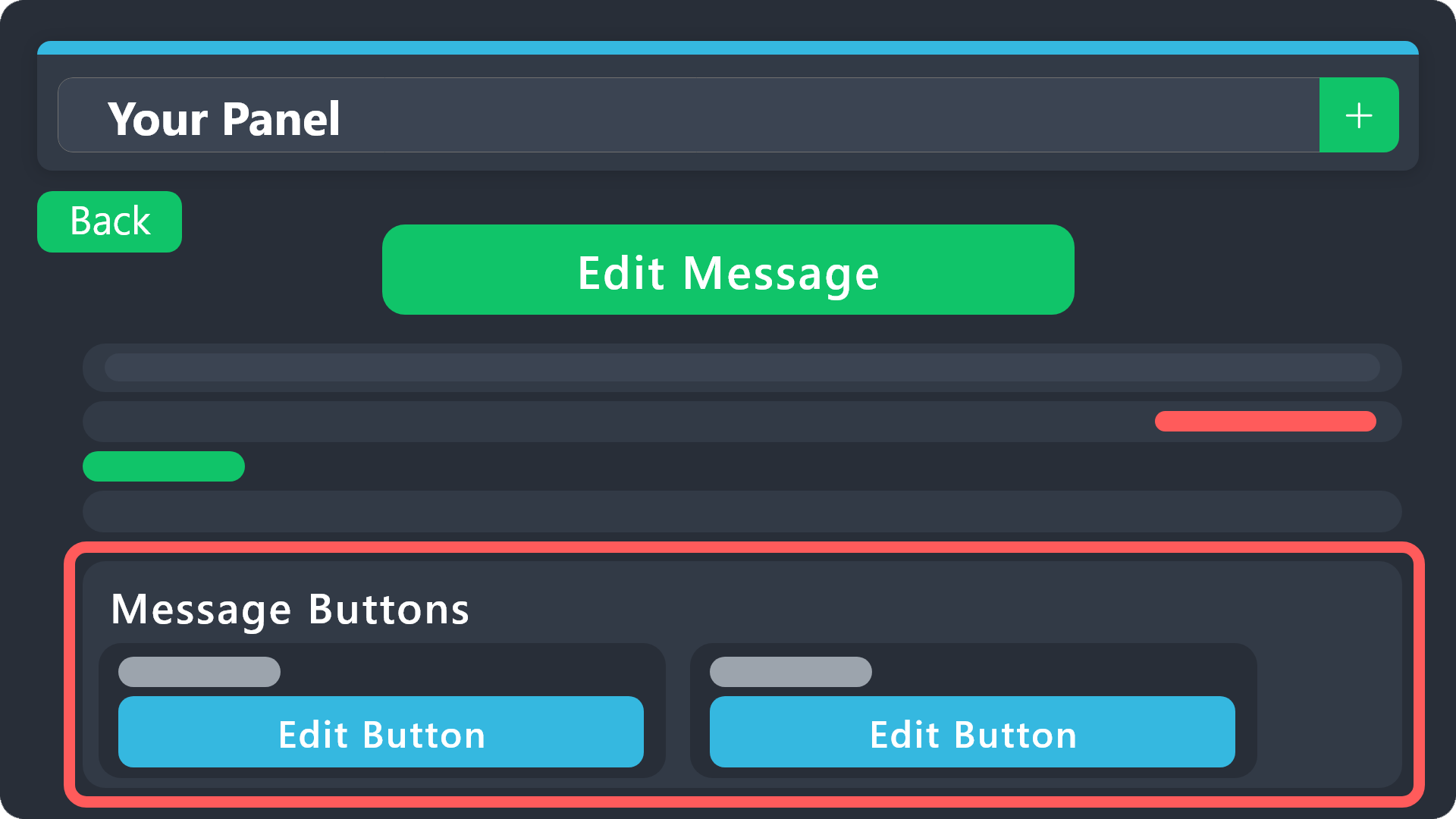 sweet sparrow
scenic plinth
You are not high enough power to change the names of countries, but you can chan...
sweet sparrow
scenic plinth
You are not high enough power to change the names of countries, but you can chan...
Can u help me?
@scenic plinth
scenic plinth
ocean spear
How can I add the claimed staff members name to the ticket name? What would I pu...
Any of these variables work:
{author.name} - Username of claimer (excludes 4 digit discriminator)
{author.nickname} - Claimers server nickname
{author.full} - Full username and discriminator of the claimer
sweet sparrow
I want to buy premium but I can't open it, it keeps giving an error. Can you give me the redeem code?
 hybrid sundial
Is there a way to keep deleted tickets in one channel as a ticket transcript log
scenic plinth
You can´t merge a channel with a channel... but yes you can do transcripts and logging.
https://docs.tickettool.xyz/dashboard/panel-configs/transcript-options
https://docs.tickettool.xyz/dashboard/panel-configs/logging-options
 undone barn
Is there an option to automatically close tickets that have been left open and unanswered for 48 hours? I use tickets to do in-server verification of people's ages so that all their private info can be auto destroyed by the bot and no logs are left.... But a lot of people open tickets and then never proceed with them. So after 2 days I manually close them... but now that I've upgraded to premium, I am hoping to change that to an automatic process by the bot. One less thing for me to do.
full cliff
Can someone help me I was unfairly blocked by the baroness all because I didn't want to talk to her because many already know her genius as the sheriff of the meridian I don't chingo anyone
por favor me ajudar eu fuii bloqueado a mando da barone porque nao quiz responder a ela e pode aproveitar eu ignore ela e por isso que ficou com raiva e me mandou bloquear
 charred notch
I'm trying to set up a panel and it's won't let me
full cliff
auto_awesome
Mostrando tradução para por favor me ajudar eu fui bloqueado a mando da barone porque nao quiz responder a ela e pode aproveitar eu ignore ela e por isso que ficou com raiva e me mandou bloquear
Em vez disso, traduzir por favor me ajudar eu fuii bloqueado a mando da barone porque nao quiz responder a ela e pode aproveitar eu ignore ela e por isso que ficou com raiva e me mandou bloquear
171 / 5.000
Resultados de tradução
please help me I was blocked at the behest of the barone because I didn't want to answer her and you can take advantage of it I ignore her that's why she got angry and told me to block
 muted prairie
anyone else getting 502 bad gateway?
 solar yew
muted prairie
anyone else getting 502 bad gateway?
solar yew
muted prairie
anyone else getting 502 bad gateway?
Yes
Sometimes it seems to work but often it doesn't
gilded verge
muted prairie
anyone else getting 502 bad gateway?
if I remember correctly it means ddos 😐
@full cliff wrong server, we can't help you 😕
 clear patrol
how to make line under text
 daring moon
I don't know how to make the bot send this message

 wary cairn
Is there an outage at present? Get this message when trying to open or close tickets
 covert swallow
Do you still have this issue?
wary cairn
Yes
covert swallow
Try to make sure your client is updated
wary cairn
covert swallow
Try to make sure your client is updated
Sorry, can you point to a knowledge article for this?
covert swallow
Idk if there is one, just make sure your Discord is updated
wary cairn
covert swallow
Idk if there is one, just make sure your Discord is updated
I'm unsure how they will fix it, as it is occurring all users in the server. But will try that

 covert swallow
Whats the ServerID
 covert swallow
Are you server staff?
 balmy jewel
Yes, owner.
covert swallow
Up the ticket limit for the panel
balmy jewel
Where do I do that?
wary cairn
covert swallow
Whats the ServerID
with command {server.id}?
covert swallow
You can do it manually too
balmy jewel
This?
 covert swallow
balmy jewel
Where do I do that?
covert swallow
balmy jewel
Where do I do that?
Yes
balmy jewel
Alright, thanks.
wary cairn
covert swallow
You can do it manually too
895383236509855816
covert swallow
Catalina Whale Mixer?
wary cairn
covert swallow
Catalina Whale Mixer?
correct
covert swallow
wary cairn
Is there an outage at present? Get this message when trying to open or close tic...
Which bot is being used in this screenshot?
wary cairn
We have premium, but it was just the standard bot. But we have both on the server. And both have the same error, if we select to use Premium etc
covert swallow
Did this start around when you sent that message?
wary cairn
I think it started earlier, the project manager informed me around about 60mins ago. I have since tried some troubleshooting with re-adding the integration and bot etc. But still the same results. So I assume it broke around 90mins or more ago
covert swallow
Shards are all okay, so is the discord API
Try giving it the Administrator perm temporarily so we can see if its a permission issue somehow
wary cairn
covert swallow
Try giving it the Administrator perm temporarily so we can see if its a permissi...
That works with admin. So is definitely permissions related, not sure how it originally broke as nothing in the logs. I have probably;y made it worse! Is there a way to remove the integration and re-add to have a clean start?
covert swallow
Im not quite sure what would have broken it though as you have all the permissions it needs
wary cairn
covert swallow
Im not quite sure what would have broken it though as you have all the permissio...
I have gotten it working. Odd, I will keep checking the logs and see if some one did something. Thanks for your help
iron nightBOT
Gave +1 Rep to @covert swallow
covert swallow
Did you remove admin?
wary cairn
covert swallow
Did you remove admin?
Absolutely!
covert swallow
Weird, let me know if you figure out what changed
wary cairn
covert swallow
Weird, let me know if you figure out what changed
Will do, I am intrigued myself. Thanks again for your help. Greatly appreciated
iron nightBOT
Gave +1 Rep to @covert swallow
covert swallow
No problem! Feel free to ping me if you figure it out
Yag will get pissy but it okay, nothing happens without human intervention
rustic gale
daring moon
I don't know how to make the bot send this message
With the Send button in Panel Configs in the dashboard
 midnight badge
How do you make it where it auto saves transcripts?
rustic gale
midnight badge
How do you make it where it auto saves transcripts?
It's a premium feature. It's in Panel Configs -> Transcript but you need active premium for it to work
 hard wind
How
slender minnow
stray ore
I was wrong and am still having issue 😦 My tickets disappear from visibility wh...
If this issue is not resolved, can you please try using an alt instead of using view server as role?
Sorry for the delay in response, it was night time for me
 gray siren
Hey do you need ticket tool premium for multi panels
craggy geyser
Not anymore
humble sequoiaBOT
For a more convenient use of multipanels, you can now combine panels on the dashboard. This will allow you to directly send the multipanel from the dashboard or via the $panel ID command.
Where can I find this?
You can find this setting on the Dashboard -> Panel Configs -> Settings -> Panel
Note: if you're attaching all the panels to a panel called English, don't include English in the attached panel's box (If you do this, it will create a duplicate)
This will put all buttons from all of your panels on one message. The message is the panel message from the panel you're combining these panels in.
gray siren
Thank you 🙏
languid edge
hello
I want to change what is written on the panel (to create ticket react with) how can i do this?
humble sequoiaBOT
The panel message is where people react to make a ticket. To customize it head over to your Dashboard --> Panel Configs -> Panel -> Edit Panel Message
 slender minnow
@languid edge
languid edge
slender minnow
<@951475564047396864> <:this:894279341108772914>
i found it
but i cant write a big message the message is:
** عند فتحك للتكت نرجو فتح تكت المناسب لسعر السلعة فالوسطاء لديهم حدود لأسعار السلع وهذه معلومات عن حدود الوسطاء :
:RoyaltyMediators: | وسيط تجريبي ← {0 ←200ك }
:RoyaltyMediators: | وسيط ¹ ←{200ك ←400ك }
:RoyaltyMediators: | وسيط ² ← {400ك ← 600ك }
:RoyaltyMediators: | وسيط ³ ← {600ك ← 800ك }
:RoyaltyMediators: | وسيط ⁴ ← {800ك ← 1.5م }
:RoyaltyMediators: | وسيط معتمد
←{1.5م ←20م }
جميع التعامل داخل التكت اي شي يحدث خارج التكت نحن غير مسؤوليين عنه ! **
i cant write it why?
languid edge
languid edge
but i cant write a big message the message is:
** عند فتحك للتكت نرجو فتح تكت ا...
when i send it he just write for the second line
and i try to add a photo but When I click on it, nothing happens
slender minnow
there is a restriction for servers that are on a free plan
but you can bypass this restriction with a premium plan
slender minnow
ah i see
then you should be able to bypass the restriction as long as your server has a premium plan
so you can fit that message
 stray ore
slender minnow
If this issue is not resolved, can you please try using an alt instead of using ...
stray ore
slender minnow
If this issue is not resolved, can you please try using an alt instead of using ...
You're all good! 🙂 I've used my alt and the members are also unable to see tickets they've created now.
 echo folio
It doesn't let me edit this
 humble sequoiaBOT
━━ moved to ticket ━━
 sullen rapids
Is the dashboard not working or am i doing something wrong?
slender minnow
it is working fine
 abstract pond
when a member creates a ticket how do I make the bot ping the staff role.
abstract pond
@covert swallow
rustic gale
 ornate pendant
My server It does not appear in the list of servers
ornate pendant
My server It does not appear in the list of servers
Look at this
humble sequoiaBOT
Don't see your server in the dashboard?
You will possibly need to relog. Look below to see steps on how to relog.
How to relog in the Dashboard.
Note:
You need one of these 3 things to access the dashboard.
1. Server Owner (Level: 6)
2. Server Administrator (Level: 4)
3. Dashboard Role (Level: 2)
:warning: You can check your level using $level on your Discord Server
User permission level with Ticket Tool
@User is permission level: 0 (User)
```» *If it shows that your permission is **0**, you don't have any of the above **3 things** to manage the dashboard.*


**See the Image below on how to relog:**Include a role mention in the ticket message
humble sequoiaBOT
The Ticket Message is the first message sent by the bot on a new ticket. To customize it head over to your Dashboard ➞ Panel Configs ➞ Ticket ➞ Edit Ticket Message
 rustic gale
$mentions
humble sequoiaBOT
Within all the messages the bot's sends (both embeds and text) you can mention either channels, roles, or even users, these mentions will only send a notification to the user if they are used within a text field, e.g: a role mentioned in an embed won't ping at all the users who have that role.
For mentioning a role you can use one out of three options:
{@Role Name} ➞ Which is Case Sensitive.
{RoleID} ➞ Replace RoleId with the Id of the role you are trying to ping.
<@&RoleID> ➞ Discord's native syntax to ping roles.
<#ChannelID> ➞ Mention a channel by its ID.
<@UserID> ➞ Mention a user by its ID.
abstract pond
@rustic gale tysm


 severe torrent
Is there a way to mass delete old tickets?
 bitter fog
i dont know
rustic gale
severe torrent
Is there a way to mass delete old tickets?
No
 lone willow
when i try to send a panel i keep getting this message
 bitter fog
how to reset settings in bot?
 jagged stirrup


 pale pilot
lone willow
when i try to send a panel i keep getting this message
pale pilot
lone willow
when i try to send a panel i keep getting this message
If you have dropdown enabled, you have an invalid emoji selected in there.
If not, then you have an invalid emoji selected in your create a ticket button. Panel > Panel Message > Create Ticket Message
lone willow
pale pilot
If you have dropdown enabled, you have an invalid emoji selected in there.
If ...
i need to change the emoji?