#🆘│community-support
1 messages · Page 14 of 1
 amber pelican
 gilded verge
If you mean this bot @prime bridge, it is safe.
We can't help you if you don't write about your problem with Ticket Tool.
amber pelican
I was given a ticket to messaging people that I hadn’t msged. I’m so confused about it all.
 pseudo flicker
Why I can't write message here?
 gilded verge
pseudo flicker
Why I can't write message here?
gilded verge
pseudo flicker
Why I can't write message here?
If I remember correctly, this is premium feature
pseudo flicker
Panel message?
gilded verge
You asked about Message Content, so yes, this is premium feature in Panel message.

Use Embed Editor - this is free ^^

 gilded verge
oooh... please go to Panel->and there remove attached panel
my example:

sorry, my mistake, message corrected 😅
 scenic plinth
amber pelican
I was given a ticket to messaging people that I hadn’t msged. I’m so confused ...
scenic plinth
amber pelican
I was given a ticket to messaging people that I hadn’t msged. I’m so confused ...
@prime bridge is just a custom version of Wick bot, all I can mention really.
amber pelican
scenic plinth
<@817492815322808380> is just a custom version of Wick bot, all I can mention re...
Super helpful thanks
 iron nightBOT
Gave +1 Rep to @scenic plinth

 humble sequoiaBOT

Update your Discord App
Devices running old versions of Discord may interfere with the proper display of interactions such as buttons or context menus. Please verify that you have the latest version of Discord, by going to the App Store, or Play Store.
Discord for the  App Store
Discord for the  Play Store
 jade topaz
ah aight thx


 peak spoke
Hello! Tickets, when closed, are giving the name of the person who closed them rather than the ticket author. Can anyone tell me why?

I manage someone else's bot hence me not having the premium role.
 lunar solar
peak spoke
Hello! Tickets, when closed, are giving the name of the person who closed them r...
lunar solar
peak spoke
Hello! Tickets, when closed, are giving the name of the person who closed them r...
Change it from {author.name} to {ticket.user.nickname}
iron nightBOT
Gave +1 Rep to @lunar solar
jade topaz
Hello, why can i see only 1 item in the dropdown menu?
 wheat summit
Hello
 opaque abyss
We couldn't install a bot, can you help?
scenic plinth
jade topaz
Hello, why can i see only 1 item in the dropdown menu?
All your dropdowns need to have each field have something in it or it will not appear, you likely have a field for a dropdown blank.
scenic plinth
Don´t ping me or another support.
wheat summit
Sorry
 analog spindle
hello recently I was cheated on a discord, I contacted the cheat via a ticket I was cheated on a paysoftcard so I want to access the messages I wrote with the cheat to have confirmation that I was cheated and get my money back
humble sequoiaBOT

⚠️ You're in the wrong place
We provide support for Ticket Tool Discord bot and cannot help you with whatever issue you have.
- We don't know which Support Team you should contact to get this issue resolved, and unfortunately we won't be able to accurately tell you.
If you don't have any further questions regarding our bot Ticket Tool, please close this ticket
opaque abyss
analog spindle
hello recently I was cheated on a discord, I contacted the cheat via a ticket I ...
Türk müsün
analog spindle
opaque abyss
Türk müsün
No
 drifting path
When someone trys to Open a ticket wont let them
opaque abyss
I opened a ticket and no one is looking.
drifting path
Time 🔑
opaque abyss
It needs to be installed urgently because it is a Youtuber Server
 covert swallow
Outside of premium all tickets are answered chronologically
opaque abyss
All I want is an official to come and install the bot
covert swallow
We do not set up the bot for you
opaque abyss
We couldn't and it would be better if it was as fast as possible.
covert swallow
We are a support team not an installation team
opaque abyss
I understand, but can we send an installation team or is there a Turk from the support team, I'm talking to you about the translation right now.
 fierce sluice
Hey how do I get into my sever it isn’t showing
Yes I relogged
I asked my bf
And I asked my mom
Dad
Cousin
Brother
My ex
They said come here so answer pls
humble sequoiaBOT
Don't see your server in the dashboard?
You will possibly need to relog. Look below to see steps on how to relog.
How to relog in the Dashboard.
Note:
You need one of these 3 things to access the dashboard.
1. Server Owner (Level: 6)
2. Server Administrator (Level: 4)
3. Dashboard Role (Level: 2)
:warning: You can check your level using $level on your Discord Server
User permission level with Ticket Tool
@User is permission level: 0 (User)
```» *If it shows that your permission is **0**, you don't have any of the above **3 things** to manage the dashboard.*
**See the Image below on how to relog:** gilded verge
Please check all of  message
fierce sluice
humble sequoia
I did all of this tho
gilded verge
what's your $level in your server?
fierce sluice
22
I’m main owner of it I talked for 2 days on it
Oh and if u mean by administration I’m main owner
gilded verge
on your server please run command $level and in screenshot please send response from bot
gilded verge
Okay, please log out from dashboard and log back in
fierce sluice
I did thoooooo
gilded verge
What browser are you using?
 trim solar
hello! i'm not sure if this has been answered somewhere but I didn't see anything. I use transcripts a lot for my server but recently pictures haven't been saving correctly or something? when i check the transcript it just says "Attachment" with a link to the image but it always says this site can't be reached. does anyone know how to fix this?
humble sequoiaBOT
Attachments not being accessible
At the beginning of May 2022, Discord changed the way they store their deleted files, before this update, files could be accessible for up to 30 days after which they would get erased entirely from the Cloudflare cache. Now the files, including images, aren't accessible since they are deleted, which is why premium users [embed up to 8mb](#📣│bot-news message) worth of pictures within transcripts.
In the major update that's being worked on the developer is looking forward to implementing a better solution to this inconvenience in order for images to be saved, at least for a temporal way.
 trim solar
tysm!!

 scenic plinth
You either have two of the same panels in both of the settings to the right side of that, or one of the panel options is missing.
 modest shore
scenic plinth
You either have two of the same panels in both of the settings to the right side...
modest shore
scenic plinth
You either have two of the same panels in both of the settings to the right side...

it is same 
scenic plinth
Ok, so change one of those options.
modest shore
scenic plinth
Ok, so change one of those options.
😖 i dint understand
scenic plinth
Where it says support, you have two of the same panels, change "support" to something else (another panel)
iron nightBOT
Gave +1 Rep to @scenic plinth
 dreamy abyss
Are English Support applications open?
 median wigeon
dreamy abyss
Are English Support applications open?
median wigeon
dreamy abyss
Are English Support applications open?
English is a very common language, apllications for that language are very often open (see #📣│server-news ).
If not than you have to wait, in the mean time you can help other users here. 😄
 gilded walrus
How do I make the message that says click on the whatever to make a ticket.
 quartz garnet
how to i set up a trascript chanel
jade topaz
Hello, on the discord site it says that "A: You can change the discord user who manages your subscriptions to :
- Open the "Manage subscriptions" window.
- Logging in with a one-time password sent to your email address or your account password (if it has been set).
- Under "Account Information", edit the discord ID field.
Once modified, your new discord account will be able to define the servers on which to use the premium "but I can't edit this discord ID, am I the only one? Thanks
 pale pilot
jade topaz
Hello, on the discord site it says that "A: You can change the discord user who ...
pale pilot
jade topaz
Hello, on the discord site it says that "A: You can change the discord user who ...
That has been disabled. If you want to change the user ID, you need to create a ticket here
jade topaz
pale pilot
That has been disabled. If you want to change the user ID, you need to create a ...
Okay, it's done. A French ticket
 winter harness
I don't want two buttons, what do I do please 😭

 rustic gale
You probably attached the panel to itself
Make sure Attached Panels is empty
Attached Panels is in Panel Configs -> Panel
winter harness
rustic gale
Attached Panels is in Panel Configs -> Panel
Got it 😄 thanks!
iron nightBOT
Gave +1 Rep to @rustic gale
 dull shore
Anyone know if it's possible to remove the close button so the ticket opener cannot see it?
 rustic gale
You can't hide it from specific users only
But you can prevent them from using it
They will get a “you don't have permission to use this” message when they press it.
dull shore
Alright, how do I enable that
rustic gale
Oh, and you can hide it from everyone if you want to.
rustic gale
dull shore
Alright, how do I enable that
Panel Configs -> Ticket -> Edit Ticket Message -> Close Ticket: Edit Button
there, enable Support Team Only
iron nightBOT
Gave +1 Rep to @rustic gale
 lunar solar
 runic frost
You've attached the panel to itself
Remove the panel from attached panels here:
Panel Configs --> Panel --> Attached Panels (Multi Panels)
This box should be empty:
 runic frost
@lunar solar ohh yh worked, thanks
iron nightBOT
Gave +1 Rep to @lunar solar
humble sequoiaBOT
Within all the messages the bot's sends (both embeds and text) you can mention either channels, roles, or even users, these mentions will only send a notification to the user if they are used within a text field, e.g: a role mentioned in an embed won't ping at all the users who have that role.
For mentioning a role you can use one out of three options:
{@Role Name} ➞ Which is Case Sensitive.
{RoleID} ➞ Replace RoleId with the Id of the role you are trying to ping.
<@&RoleID> ➞ Discord's native syntax to ping roles.
<#ChannelID> ➞ Mention a channel by its ID.
<@UserID> ➞ Mention a user by its ID.
 mystic ruin
Oh alr tysm
lunar solar
mystic ruin
How do I make it @ me when the ticket opens?
Panel configs —> Ticket —> Edit Ticket Message —> add the @ to the message content section
humble sequoiaBOT
We would love to help you, but if you don't tell us what you need help with we can't help you :(
 surreal wraith
And one more doubt, I wanted to know how I put it so that after it is closed, only I have permission to see it
lunar solar
surreal wraith
And one more doubt, I wanted to know how I put it so that after it is closed, on...
You’ll need to adjust your Support Team Permissions and possibly your user permissions depending on whether you’ve changed them before.
Head to:
Panel Configs —> Permissions
Then:
Support Team Permission —> Edit closed —> Change view channel to ❌
Do the same for User permissions.
It should be default ❌ for them but just to be sure check it.
Ohh and Additional Roles if you have any with the Panel. Just check all of the different groups following the same method listed at the top.
surreal wraith
Thank @lunar solar you very much, how can I rate you?
lunar solar
surreal wraith
Thank <@892854649172946985> you very much, how can I rate you?
Just do thanks @lunar solar
Only if you want. Thanks 🙂
iron nightBOT
Gave +1 Rep to @surreal wraith
jade topaz
hey guys quick question
How can i ping a specific role when a ticket is created
I remember doing it with the id but forgot how to do so
nevermind i got it
humble sequoiaBOT
Setting up Ticket Tool
Visit the docs for setup info
General Setup
lunar solar
jade topaz
How do I add roles to see the tickets
Panel Configs --> General --> add the role/s to Support Team Roles or Additional Roles depending on what you want. For the difference click the little question mark next to each heading.
lunar solar
 full ice
What's the dashboard for tickets
full ice
What's the dashboard for tickets

Ticket Tool - Ticketing without clutter - The #1 discord Ticketing bot
 lofty tide
Why can my members see the ticket even after I close it and they can choose to reopen/delete it as well
 abstract ether
hi!
I have 2 questions.. why ? and, What is "Premium Chargeback" ?
 rustic gale
lofty tide
Why can my members see the ticket even after I close it and they can choose to r...
rustic gale
lofty tide
Why can my members see the ticket even after I close it and they can choose to r...
Probably a permission issue
Panel Configs -> Permissions
Take a look at all the closed ticket permissions and make sure there's no View Channel allowed somewhere it shouldn't be
In particular, everyone closed permissions should have View Channel denied 
rustic gale
abstract ether
hi!
I have 2 questions.. why ? and, What is "Premium Chargeback" ?
Try making a billing ticket in #🎫│make-a-ticket
abstract ether
one word.. BRUH

I haven't done anything in particular except to be inactive on my discord server..
lunar solar
abstract ether
I haven't done anything in particular except to be inactive on my discord server...
You aren't going to get a response about this in #🆘│community-support, best #🎫│make-a-ticket
abstract ether
ok thx
lofty tide
rustic gale
In particular, everyone closed permissions should have View Channel denied <:den...
I have it closed
It’s under user permissions yeah
 fathom basin
Hey. it's possible to add role to member who opened ticket? I just sometimes ping all member who have tickets.Thanks.
rustic gale
fathom basin
Hey. it's possible to add role to member who opened ticket? I just sometimes pin...
Automatically? Not possible. It's being considered for a possible future update
fathom basin
ty @rustic gale
iron nightBOT
Gave +1 Rep to @rustic gale
rustic gale
lofty tide
It’s under user permissions yeah
Were you able to solve the issue?
lofty tide
rustic gale
Were you able to solve the issue?
Nope
rustic gale
Else you should #🎫│make-a-ticket so we can take a closer look
lofty tide
Ty @rustic gale
iron nightBOT
Gave +1 Rep to @rustic gale
humble sequoiaBOT

You can check our documentation here;
You can also check #📂│information for the basic setup;
or run the </setup:1025379472167403530> command within #🤖│bot-spam
Our documentation contains all the info you need about the bot to be able to setup and configure the bot however you like.
jade topaz
thanks @humble sequoia
iron nightBOT
Gave +1 Rep to @humble sequoia
 mental quest
how do i make it so a ticket tags specific roles when the ticket is created ive tried doing it with @role and @roleid neither work within the ticket message
 south topaz
mental quest
how do i make it so a ticket tags specific roles when the ticket is created ive ...
south topaz
mental quest
how do i make it so a ticket tags specific roles when the ticket is created ive ...
use: {@ role name }
 hybrid scaffold
Hi I purchase the premium bot, not sure where I receive the premium code/if it’s time based
gilded verge
hybrid scaffold
Hi I purchase the premium bot, not sure where I receive the premium code/if it’s...
Hey, if you bought a subscription you don't get a key but remember to select the server where premium will be active. https://tickettool.xyz/subscriptions 
Ticket Tool - Ticketing without clutter - The #1 discord Ticketing bot
hybrid scaffold
gilded verge
Hey, if you bought a subscription you don't get a key but remember to select the...
I forgot about your guys' doc my bad for the dumb question! Thankyou anyways!
hybrid scaffold
Am I able to make certain roles see/not see certain buttons? So if I have a button that correlates to a specific role, say a premium user vs a free user, I can only allow the premium user to see the button.
 hard veldt
Good morning new friends!
I'm trying to open a ticket to talk to a jailed member, so it looks like I have to manually add them, because $add doesn't work for the Jailed role (but it does for muted and every other role). Any suggestions on how to make this easier?
gilded verge
hybrid scaffold
Am I able to make certain roles see/not see certain buttons? So if I have a butt...
You cannot change the visibility of the buttons, but you can set the roles that can use the button
hybrid scaffold
gilded verge
You cannot change the visibility of the buttons, but you can set the roles that ...
Oooh, ok, if I can make a suggestion visibility of buttons (if thats even possible) is definitely something to add to the pipeline
gilded verge
I don't think there is any way to change the visibility of buttons on Discord at all 😳
gilded verge
hard veldt
Good morning new friends!
I'm trying to open a ticket to talk to a jailed member...
Hey, but when you create this ticket do you want to add a specific user or everyone in that role?
hard veldt
gilded verge
Hey, but when you create this ticket do you want to add a specific user or every...
Just a specific user! But I could add the role of jailed manually if that's easier? Cuz no one is ever jailed... hmm
 pure verge
Hiii
can you reply to #1029726918800593008
hard veldt
hard veldt
Just a specific user! But I *could* add the role of jailed manually if that's ea...
I just have a bad feeling that me having to force him into the ticket, means he might not be able to see it since he is jailed, even though I also edited his permissions for that channel. I've learned forcing things usually doesn't work 100% properly
 pulsar peak
WHAT HAPPENS WHEN MY SERVER HITS 10K TICKETS??!?!
gilded verge
hard veldt
I just have a bad feeling that me having to force him into the ticket, means he ...
oh if you want to add specific user, use for example: $add 334671104704774154 (its me) or role $add RoleID
and if you would like everyone in this role, it's best to create a new panel, there in General to Additional Roles add this role, then use Command Style there and if u use $new command, a ticket will be created with everyone in that role ^^
do you want example in video? 😳
 gilded verge
pure verge
Hiii
can you reply to <#1029726918800593008>
gilded verge
pure verge
Hiii
can you reply to <#1029726918800593008>
Hey, please wait, Staff will reply when available ^^
pure verge
How to activate the ticket receipt feature
gilded verge
pure verge
How to activate the ticket receipt feature
If you ask for help, use one channel to avoid confusion
hybrid scaffold
gilded verge
I don't think there is any way to change the visibility of buttons on Discord at...
figured as such, minor inconvenience anyways this is still an amazing bot, if you could could you quickly link me to where on the doc it shows how to setup automated respones like in #📌│automated-support, I can't figure it out on the dashboard. Much appreciated!
gilded verge
Ticket Tool Helper (in #📌│automated-support) is custom instance of Sapphire
automated responses... hmmm.. you can use Tags
hard veldt
gilded verge
oh if you want to add specific user, use for example: `$add 334671104704774154` ...
I would love that please! 💕
gilded verge
Okay, in 30 minutes it should be ready ^^
hybrid scaffold
gilded verge
Ticket Tool Helper (in <#977951125674291271>) is custom instance of Sapphire
Sapphire? Is that another bot?
gilded verge
yep
hybrid scaffold
gilded verge
yep
do you recommend it over using tags?
oh
wait im dumb its a custom bot lmao
gilded verge
i like Tags, I use them myself ^^but remember: some fields in Tags require premium
hybrid scaffold
gilded verge
i like Tags, I use them myself ^^but remember: some fields in Tags require premi...
I have premium now...Ill try to figure them out, was planning on making a custom bot before looking into premium might use a custom bot for the automessaging but ill look into tags thankyou!
pure verge
Is there any Arab support here?
There is no reply in the ticket
gilded verge
pure verge
Is there any Arab support here?
There is no reply in the ticket
please wait, Staff will reply when available ^^
gilded verge
hard veldt
I would love that please! 💕
Hello again :> I hope it helps you
part 1:
aaah! i forgot about $add... there you go :>
part 2:
pure verge
gilded verge
please wait, Staff will reply when available ^^
When did you open the ticket an hour ago and there is no reply until now
gilded verge
pure verge
When did you open the ticket an hour ago and there is no reply until now
The ticket says that the Staff will write back to you within 24-48 hours, so please be patient
 pure verge
🙄🙄🙄🙄
 quick iris
rustic gale
quick iris
rustic gale
Probably a permission issue. You should #🎫│make-a-ticket and get that checked
 green sedge
guys, anybody know how to enable auto close ticket?
gilded verge
green sedge
guys, anybody know how to enable auto close ticket?
example please 
green sedge
gilded verge
example please <a:peepoShy:936532698124652555>
user created ticket, support answered to this ticket, but nobody didn`t close the ticket, and ticket after the time (for example 2-3 hours) closed himself
gilded verge
oh, so It is not currently possible, but if I remember correctly, auto-close after certain time it is planned
green sedge
thank u
 stark runeBOT
**Ticket Tool - Restart Notice**
Shards within the Ticket Tool bot(s) are going through a restart at the moment of this notice, the Development Team is fully aware of the possible inconveniences this may cause, thanks for your patience!
To keep track of this restart keep an eye on #📣│bot-news, you can also visit our status page here.
Please do not spam tickets within the support server & do not keep asking in public channels.

 wise parrot
bot offline
 slender minnow
wise parrot
bot offline
slender minnow
wise parrot
bot offline
refer the message above you
jade topaz
i applaud the diligent and consistent patience of the support team here
scenic plinth
jade topaz
i applaud the diligent and consistent patience of the support team here
For the few of us that still have it...
pale pilot
scenic plinth
Believe me when I say you're not the first
 tame goblet
tiket tool offline, what should I do?
scenic plinth
Maybe read.
 nimble turtle
just wait patience is a virtue
 gusty creek
Is the bot working atm?
 distant wyvern
Ticket tool off
scenic plinth
You're eyes aren't.
distant wyvern
😢😢
tame goblet
thx
 tawdry dome
How long does it take to restart the bot?
scenic plinth
As long as it does.
gusty creek
What does the bot woork or not
scenic plinth
You said that the last 2 times.
nimble turtle
scenic plinth
As long as it does.
do you guys have suggestion channel?
tawdry dome
I already noticed, I'm just asking just in case
gusty creek
tawdry dome
I already noticed, I'm just asking just in case
No the bot doesn't work for me rn
tawdry dome
wait until the bot is fully launched
nimble turtle
thanks @scenic plinth
iron nightBOT
Gave +1 Rep to @scenic plinth
dreamy abyss
nimble turtle
what is the suggestion command?
The suggestion command is s!suggest I believe.
nimble turtle
ok
 raven scroll
when will the bot be online again
jade topaz
seems like ticket tool is actually offline
 delicate pebble
yea
 jovial grove
Is it possible to make an 18+ verification prompt using ticket tool?
 brisk whale
I'm getting This error. (not a ticket channel) how do I make a ticket channel 🤔
dreamy abyss
 quaint kelp
all servers are not showing to me
quaint kelp
all servers are not showing to me
Try signing out and signing back into the dashboard.
Oh well he left the server
covert swallow
brisk whale
I'm getting This error. (not a ticket channel) how do I make a ticket channel ...
Ticket channels are created by the bot, theyre the tickets that are created when you open a ticket, you cant manually set them
jade topaz
How do i start ticket setup
 obtuse krakenBOT
1. Invite Ticket Tool to your server
First you will want to invite the bot to your server. Once the bot is in your server, you can manage your server in the dashboard.

2. Create a Panel
To create a panel we are going to need to head over to the panel configs on the dashboard.
Once at the dashboard we will need to click Create Panel.
Enter a panel name (Fill in any optional settings you want).
Click Create Panel and your ready to get started with configuring your panel.
An example of a creating a panel is shown below.

3. Send the Panel to a Channel
Once you've created a panel on the dashboard you will need to send it to a channel using send on the dashboard.
Select the channel you want your panel to be created in and click send.
For other questions checkout $help faq.
An example of a sending a panel is shown below.
Having a Problem Sending the Panel?
Do $debug in a channel with Ticket Tool and make sure it has all the necessary Discord permissions.
 covert swallow
It is possible to do that
 lapis gorge
@covert swallow @jade topaz @jade topaz
covert swallow
...why?
covert swallow
In the transcript settings you can set the channel
jade topaz
When Report team role $add someone in ticket user didn’t got view perms

 zealous grove
Same, checked the bot ping and it was at 250ms. Can add to regular channels not tickets probably already getting looked into as we speak
iron nightBOT
Gave +1 Rep to @covert swallow
 bold verge
jade topaz
When Report team role $add someone in ticket user didn’t got view perms
bold verge
jade topaz
When Report team role $add someone in ticket user didn’t got view perms
Happening with my server as well, just started after the most recent bot update
jade topaz
How do I change the color of the embed message?
rustic gale
jade topaz
How do I change the color of the embed message?
Depends which embed you mean
jade topaz
I mean this is green and I want pink
 rustic gale
Setting the color is premium only
jade topaz
rustic gale
Setting the color is premium only
what
rustic gale
In case you have premium, it's in Panel Configs -> Panel -> Edit Panel Message -> Embed Editor
jade topaz
Which unit to change the color?
@rustic gale

 versed badger
Is there a way to disable automatic deleting ticket after the owner left the server?
rustic gale
jade topaz
Which unit to change the color?
<@832864595726172162>
Scroll down. There's a “Panel” button
rustic gale
versed badger
Is there a way to disable automatic deleting ticket after the owner left the ser...
Panel Configs -> Automation
You can disable the missing user check, or you can change it to closing the ticket instead of deleting it
lunar solar
versed badger
Is there a way to disable automatic deleting ticket after the owner left the ser...
Updated your roles, you should now see the premium section at the top of the Discord. 🙂
 gentle cobalt
humble sequoiaBOT
gentle cobalt
humble sequoiaBOT
⚠️ Você está no lugar errado
Nós oferecemos suporte para o bot de Discord Ticket Tool, então não podemos ajudá-lo com qualquer outro problema que você tenha.
- Certifique-se de entrar em contato com a equipe de suporte apropriada para solucionar seu problema.
Se você não possui nenhuma dúvida sobre o nosso bot de tickets, por favor feche este ticket.
jade topaz
rustic gale
Scroll down. There's a “Panel” button
I don't know English, I use Google Translate to translate and write English
 odd hornet
i’m trying t!add for adding a member to a help ticket, it’s not working.
 wheat willow
Why does ticket tool now say "Running Close Action" and "Running Delete Action" and is there a way I can disable it?
wheat willow
odd hornet
i’m trying t!add for adding a member to a help ticket, it’s not working.
$add {username} | $ is ticket tool's prefix.
odd hornet
ah. thank you.
 bright swallow
Hey new here,
is it possible to send a message from one channel (message will be editet sometimes) in the ticket as command?
scenic plinth
wheat willow
Why does ticket tool now say "Running Close Action" and "Running Delete Action" ...
It came with the slash commands update. As for all messages that appear for one user, there is no way to "disable" it, although you can simply hide the message if it is bothering.
 jade topaz
 fiery scroll
My server name king
Not visible
fiery scroll
My server name king
Not visible
it’s doing the same for me too
it’s weird asf
scenic plinth
I have the best guess neither of you have tried to do what is has told you.
jade topaz
scenic plinth
I have the best guess neither of you have tried to do what is has told you.
what is it
fiery scroll
@scenic plinth
what is it
jade topaz
:I
scenic plinth
 jade topaz
wow we can’t even post memes
scenic plinth
No, you can't.
jade topaz
boring ngl but anyways Imma fix my shit show of a bot
scenic plinth
You do that.
fiery scroll
scenic plinth
I tried her a lot
scenic plinth
I really hope you didn't, I have no relevance to your personal life.
scenic plinth
Congratulations.
fiery scroll
jade topaz
YES I GOT A WARN HELLA FAST
me to
scenic plinth
You're both in it together. Now if you would please move general conversations to #💬│general-chat, thanks 🙂
jade topaz
scenic plinth
You're both in it together. Now if you would please move general conversations t...
k
actually on topic question, is there like a certain time I gotta wait before my server pops up on the manage thing
fiery scroll
Why is the administration not visible?
Please 😭
jade topaz
fiery scroll
Why is the administration not visible?
Please 😭
I assume something is wrong with the bot
scenic plinth
No, if you have tried logging out and back in like I should have made explicitly clear by now, you need dashboard permissions.
I have no idea what you mean by "administration" not being visible.
fiery scroll
Sorry i mean manger server
jade topaz
scenic plinth
No, if you have tried logging out and back in like I should have made explicitly...
I do have perm, I’m the owner of my server so I’ll just try to log in and out
oh shit I logged in and out and it worked
success
scenic plinth
Not like I said that already, but good job. Let us know if there is anythign else.
scenic plinth
fiery scroll
Sorry i mean manger server
Do the same thing, log out and back in to the dashboard.
 sullen harbor
How do I fix the ticket limit
lunar solar
sullen harbor
How do I fix the ticket limit
Which limit are you having an issue with there are a couple?
You can setup each panel to monitor specific a channel for ticket creations on that panel under:
Panel configs --> Command Style --> Enable and select a channel
Each panel would require a different channel to monitor for ticket creation
 pure sundial
guys is there a way to use $ticket or $new command to open a specific panel even I'm having multi panel with these command style activated?
gilded verge
lunar solar
You can setup each panel to monitor specific a channel for ticket creations on t...
@pure sundial 😕
iron nightBOT
Gave +1 Rep to @lunar solar
pure sundial
gilded verge
<@277916326800916480> <:this:894279341108772914> 😕
is there any chance it works through panel number instead like $panel command? That way we don't need to make many channels just to monitor command style mode.
 lunar solar
sullen harbor
lunar solar
sullen harbor
Panel Configs --> Limits --> Tickets Open --> Edit Open tickets each user to your desired amount or if you only want certain role/s to go higher than this limit add the role/s to Roles that bypass open limits
 deep fox
How do I make it so if I type a command it will open a ticket?
lunar solar
pure sundial
is there any chance it works through panel number instead like `$panel` command?...
Unfortunately no
lunar solar
deep fox
How do I make it so if I type a command it will open a ticket?
Panel Configs --> Command Style --> Enable command style ticket creation (also look at some of the other options and configure it how you like)
deep fox
Thx
gilded verge
pure sundial
is there any chance it works through panel number instead like `$panel` command?...
I'm not sure if I understood correctly, but if you meant creating a ticket from a specific panel when you have command style enabled in several panels, i.e. $ticket 62 334671104704774154 then you can't do that
pure sundial
gilded verge
I'm not sure if I understood correctly, but if you meant creating a ticket from ...
thats exactly I meant.
gilded verge
oh, so unfortunately as I mentioned it is currently not possible
pure sundial
ya. I was thinking to make multi language panel where I set several topics to each lang panel
gilded verge
pure sundial
ya. I was thinking to make multi language panel where I set several topics to ea...
with buttons like in #🎫│make-a-ticket channel, right?
pure sundial
gilded verge
with buttons like in <#571706435449257997> channel, right?
yes. I wanted to use another bot to show these buttons, once the user choose an option it must drop an ephemeral message with others buttons which contains the topic the user must use. So the bot open this ticket with lang and topic defined already.
gilded verge
hmmm... so you mean like in #📌│automated-support 🤔
pure sundial
yes but using it to open a ticket
gilded verge
I am not sure, but it probably cannot be done because Ticket Tool cannot create ordinary embeds like in #📌│automated-support, TT just opens the ticket immediately after clicking in button.
this in #📌│automated-support is custom instance of Sapphire
Generally you will be able to do it but as far as I understand you would have to use another bot as well and then added ID of this (Server Configs->Bot) bot to have Ticket Tool respond to it
 pure sundial
I'd like to use Sapphire to show language buttons like english, after the topic but as ephemeral message, then send the command to ticket tool opens the ticket (en_report_count) where the ticket message includes a form where the user will type previous infors regarding the topic. that's it.
So I can create panel with a dedicated form to each lang or whatever
gilded verge
Unfortunately, I don't know how to help you any further - I have helped as much as I knew, i'm sorry 
I hope someone else will know the answer and be able to help you.
pure sundial
np. I noticed it isn't possible due the ticket tool can't run a specifc panel through $ticket command from panel number.
anyway thanks @gilded verge for ur time
iron nightBOT
Gave +1 Rep to @gilded verge
sullen harbor
lunar solar
Panel Configs --> Limits --> Tickets Open --> Edit `Open tickets each user` to y...
Is this all on the dashboard
lunar solar
sullen harbor
Is this all on the dashboard
Yes
sullen harbor
lunar solar
Yes
Tysm for the help
lunar solar
pure sundial
I'd like to use Sapphire to show language buttons like english, after the topic...
This would be possible with ticket tool & sapphire bot currently with a few draw backs:
-
You wouldn’t be able to have form functionality, it would just force open a ticket with the user. You could specify your questions in the ticket message embed as a work around.
-
You would need to have hidden channels for
$newcommand prompt for ticket tool to open different panels. It would look something like:
User presses Report Server button —> ephemeral message responds with language options in button form —> user selects language —> Sapphire utilisesSend Channel Messageoption to send the$new idcommand to the specified channel that ticket tool is monitoring for ticket create —> ticket tool force opens a ticket with the user.
In summary doable but no forms and lots of hidden channels
pure sundial
lunar solar
This would be possible with ticket tool & sapphire bot currently with a few draw...
Yes I thought that way. I just will make a huge category with these channels, unfortunately.
lunar solar
pure sundial
Yes I thought that way. I just will make a huge category with these channels, un...
Feel free to make a suggestion so that the functionality may be added in the future:
Head to #🤖│bot-spam & do s!suggest <type suggestion here>.
- Once you send your suggestion, it will be posted in #💡│suggestions for everyone to vote on.
lunar solar
pure sundial
Yes I thought that way. I just will make a huge category with these channels, un...
Apologies for yet another ping but I have been informed you can utilise threads for your $new commands, this offers a cleaner alternative so 1 channel and many threads.
pure sundial
how may I open threads through $new?
lunar solar
No sorry what I mean is you create a channel called lets say:
#command-prompts
then make a thread for each panel you have so the panels can monitor their own individual thread
would look something like:
#command-prompts
⤷panel-1-cmds
⤷panel-2-cmds
⤷panel-3-cmds
⤷panel-4-cmds etc
Therefore your $new commands go in there
and you can unfollow the threads so it just appears as one channel
 rancid bridge
is there a way to make the bot tag certain roles when a ticket is opened? id like my staff team to be tagged when a ticket it open
lunar solar
$mentions
humble sequoiaBOT
Within all the messages the bot's sends (both embeds and text) you can mention either channels, roles, or even users, these mentions will only send a notification to the user if they are used within a text field, e.g: a role mentioned in an embed won't ping at all the users who have that role.
For mentioning a role you can use one out of three options:
{@Role Name} ➞ Which is Case Sensitive.
{RoleID} ➞ Replace RoleId with the Id of the role you are trying to ping.
<@&RoleID> ➞ Discord's native syntax to ping roles.
<#ChannelID> ➞ Mention a channel by its ID.
<@UserID> ➞ Mention a user by its ID.
lunar solar
See above for mention structures
Add the @ mention to Message Content section of the ticket message @rancid bridge
If you are unsure where this is:
Panel configs --> Ticket --> Edit ticket message (green button) --> Message Content (at the top)
pure sundial
lunar solar
No sorry what I mean is you create a channel called lets say:
#command-prompts
t...
I'll try to do it. thanks
iron nightBOT
Gave +1 Rep to @lunar solar
lunar solar
pure sundial
I'll try to do it. thanks
If you get stuck feel free to come back and #🎫│make-a-ticket and I am happy to go through the set up with you.
Have a good day / evening.
rancid bridge
lunar solar
If you are unsure where this is:
Panel configs --> Ticket --> Edit ticket messag...
sadly it isnt pinging the role ;/
rustic gale
Wanna share a screenshot of what you see?
 lunar solar
Can you send a screenshot of how you added it on the dashboard?
rustic gale
Looks like you just typed the name of the role next to an @
It has to look something like this: <@0123456789>
Except with the role's actual ID instead of 0123456789
rancid bridge
ohh! okay one moment
rustic gale
Wait
I make a mistake
It's missing an &
It should be <@&_____>
Fill in the blank with the ID number
jade topaz
Hey so my server isnt coming up in the Ticket Tool Dashboard
rancid bridge
how do i find the id number-
lunar solar
rancid bridge
how do i find the id number-
/id @role
In a channel where your bot can respond
Should look like this for you:
 rancid bridge
omg tysm it finally worked
pure sundial
lunar solar
If you get stuck feel free to come back and <#571706435449257997> and I am happy...
i'm facing some issue cause sapphire can't send messages into the thread directly :/
lunar solar
pure sundial
i'm facing some issue cause sapphire can't send messages into the thread directl...
give me 5 to run a test and I will get back to you but yes that may be a limitation of sapphire
lunar solar
pure sundial
i'm facing some issue cause sapphire can't send messages into the thread directl...
Unfortunately it looks like sapphire haven't updated to include messages to threads yet, sorry :/
pure sundial
through !send it works. l'll test a bit more
 heavy dagger
Hey just wondering how to setup the auto questions when they first make a ticket saw it in a server with tickettool
lunar solar
heavy dagger
Hey just wondering how to setup the auto questions when they first make a ticket...
Sorry do you mean forms?
Press the button, form pops up with questions?
heavy dagger
Yea sorry
humble sequoiaBOT
A Discord Form lets the user answer individual questions in a pop-up Form, which then displays the answers in the ticket message. This can save time if you already know what you want to ask the user.
Setup Forms
Forms can be enabled under Panel Settings > Form Options > Edit Forms Options. In the new pop-up window, you can now enable and edit your own Form.
Form Options
You can add up to 5 questions in the Discord form. This is a Discord limitation. Each question can have a placeholder in the input field, a minimum and maximum input, multi-line, and also the option to have the answer required.
Options
Question Title ➞ Your Question goes here
Question Placeholder ➞ The placeholder text in the input field
Required ➞ If enabled, the user has to answer this question, to submit the form
Multi-Line Input ➞Allows the user to input multiple lines
Minimum and Maximum Input ➞ Set a minimum and maximum input value for the user
Displaying the Answer
To display the answers from the user, you need to go into your Panel Settings > Ticket Options > Edit Ticket Message. In there you use the variable {create.form.x} and just replace x with the number of your question. For example, the response to Question 1 can be displayed with {create.form.1}. If you don't use this variable, the response from the user is lost.
 iron nightBOT
Gave +1 Rep to @lunar solar
lunar solar
Ignore the bot
heavy dagger
Bro sugma you just told me to lol 🤣
lunar solar
thanks 🙂
heavy dagger
Haha yea Allg
 hexed fjord
can someone help me with mutli pannel not working?
 unborn sable
Hello there
Is there a way to be automatically redirected to the ticket channel when you click on the button to create one ?
gilded verge
unborn sable
Is there a way to be automatically redirected to the ticket channel when you cli...
Hey, no, the user has to click on the channel manually

 unborn sable
Okay, Thanks !
I've got antoher question, but I don't know if it really concerns Ticket Tool.
When I try to create à ticket, the staff members are mentionned, but they don't get a ping

 white bear
unborn sable
Okay, Thanks !
I've got antoher question, but I don't know if it really concerns...
white bear
unborn sable
Okay, Thanks !
I've got antoher question, but I don't know if it really concerns...
Ping in an embed will not ping the staff
Use the ping outside the embed
gilded verge
yup, put in Message Content
 humble sequoiaBOT
For a more convenient use of multipanels, you can now combine panels on the dashboard. This will allow you to directly send the multipanel from the dashboard or via the $panel ID command.
Where can I find this?
You can find this setting on the Dashboard -> Panel Configs -> Settings -> Panel
Note: if you're attaching all the panels to a panel called English, don't include English in the attached panel's box (If you do this, it will create a duplicate)
This will put all buttons from all of your panels on one message. The message is the panel message from the panel you're combining these panels in.
 unborn sable
white bear
Ping in an embed will not ping the staff
unborn sable
white bear
Ping in an embed will not ping the staff
My bad ! Thanks !
iron nightBOT
Gave +1 Rep to @white bear
iron nightBOT
Gave +1 Rep to @white bear
 inland grove
I dont see my server (on the dashboard), Even though the bot is in it
humble sequoiaBOT
Don't see your server in the dashboard?
You will possibly need to relog. Look below to see steps on how to relog.
How to relog in the Dashboard.
Note:
You need one of these 3 things to access the dashboard.
1. Server Owner (Level: 6)
2. Server Administrator (Level: 4)
3. Dashboard Role (Level: 2)
:warning: You can check your level using $level on your Discord Server
User permission level with Ticket Tool
@User is permission level: 0 (User)
```» *If it shows that your permission is **0**, you don't have any of the above **3 things** to manage the dashboard.*
**See the Image below on how to relog:** arctic nimbus
How to makein my server just like this #📂│information
 spare gale
When I keep the Claim button enabled, and my support team clicks on it, it will claim the ticket even when I don't have premium? Or is that not how it works?
 tepid edge
Once you've created a panel on the dashboard you will need to send it to a channel using send on the dashboard.
Select the channel you want your panel to be created in and click send.
For other questions checkout $help faq.
An example of a sending a panel is shown below.
Having a Problem Sending the Panel?
Do $debug in a channel with Ticket Tool and make sure it has all the necessary Discord permissions.
 serene bear
Hi may I ask what does the setup req as perms . ? To setup a ticket
humble sequoiaBOT
ᅠ
@pseudo glen requires the following permissions:
Add Reactions
Read Channels
Send Messages
Manage Messages
Embed Links
Attach Files
Read History
Manage Roles
Manage Channels
To change the role permissions, you can go to your Discord Server ➞ Server Settings ➞ Roles ➞ @Ticket Tool
To change the channel permissions, you can go to your Channel Settings ➞ Permissions ➞ Ticket Tool
ᅠ
Note:
You can give Ticket Tool Administrative Permissions instead of all the permissions listed above, but it's entirely optional and NOT necessary.

 reef arrow
Hello! I am unable to use my own server emojis and other servers for the ticket embed. Can someone help me out pls?
serene bear
serene bear
Hi may I ask what does the setup req as perms . ? To setup a ticket
As in for the member what perms he need to setup a new ticket channel!
rustic gale
serene bear
As in for the member what perms he need to setup a new ticket channel!
?
Is one of your users getting an error message?
serene bear
No like can I setup a new ticket in this channel ? Now
rustic gale
No
serene bear
So what perms do I need ?
rustic gale
reef arrow
Hello! I am unable to use my own server emojis and other servers for the ticket ...
What are you trying and what error are you getting? Or what unexpected/undesired behavior are you getting
rustic gale
serene bear
So what perms do I need ?
To send a panel message into this channel? A dashboard role at least
I'm not sure what you're trying to figure out
serene bear
No u got me wrong I am trying to find out what perms do a user need to setup (manage channls or administration or manage messages ?
reef arrow
rustic gale
What are you trying and what error are you getting? Or what unexpected/undesired...
Trying to put in emojis with their codes. I tried the short form, long form. Copy paste. Nothing works.
 rustic gale
Are they emojis from your own server?
When you copy the id, make sure you're copying the id of the emoji from your own server
The same emoji from different servers are different emojis.
reef arrow
rustic gale
Are they emojis from your own server?
Yes. I tried from my own. And from others. None work.
 rustic gale
Please #🎫│make-a-ticket so we can take a closer look
rustic gale
serene bear
No u got me wrong I am trying to find out what perms do a user need to setup (ma...
No, you give them a dashboard role
humble sequoiaBOT
Any role you put there will have full access to the ticket tool dashboard. The server owner and users with admin permissions already have access to the dashboard.
Be careful of which roles to put here
 rustic gale
Without a dashboard role, they need Administrator
reef arrow
rustic gale
Please <#571706435449257997> so we can take a closer look
Opened.
rustic gale
Here's the setup guide
obtuse krakenBOT
1. Invite Ticket Tool to your server
First you will want to invite the bot to your server. Once the bot is in your server, you can manage your server in the dashboard.
2. Create a Panel
To create a panel we are going to need to head over to the panel configs on the dashboard.
Once at the dashboard we will need to click Create Panel.
Enter a panel name (Fill in any optional settings you want).
Click Create Panel and your ready to get started with configuring your panel.
An example of a creating a panel is shown below.
3. Send the Panel to a Channel
Once you've created a panel on the dashboard you will need to send it to a channel using send on the dashboard.
Select the channel you want your panel to be created in and click send.
For other questions checkout $help faq.
An example of a sending a panel is shown below.
Having a Problem Sending the Panel?
Do $debug in a channel with Ticket Tool and make sure it has all the necessary Discord permissions.
 faint monolith
 rugged tangle
Please
rugged tangle
Please
DM maybe I could help
rustic gale
Don't accept DM help from random users in this server though
rustic gale
rugged tangle
I already did that
Did you use the Send button to send the panel and nothing happened?
Nothing personal @faint monolith We don't know if you're out to harm their server, so we have to recommend against it
faint monolith
I think his problem might be it not having access to the channel, like if he made that channel private and he didn’t give that specific role to the bot that’s what I had trouble with
No worries it’s completely understandable guys are doing good by that 🙌
rustic gale
faint monolith
I think his problem might be it not having access to the channel, like if he ma...
Yes, that would throw an error message though
faint monolith
Man he said he has it working he just wants open tickets in his server 😂
 echo laurel
How do I create a message so when a ticket is opened the people read what it says? Thank you in advance
rustic gale
echo laurel
How do I create a message so when a ticket is opened the people read what it say...
That's the ticket message
Panel Configs -> Ticket -> Edit Ticket Message
spare gale
When I keep the Claim button enabled, and my support team clicks on it, it will claim the ticket even when I don't have premium? Or is that not how it works?
echo laurel
rustic gale
That's the ticket message
Perfect thanks!
iron nightBOT
Gave +1 Rep to @rustic gale
rugged tangle
Can someone respond me
rustic gale
rugged tangle
Is it on a cellphone that i can do it?
Both phone and computer work
rugged tangle
Show me plz
rustic gale
It's a website, the website shows on your phone's browser just fine
humble sequoiaBOT
Ticket Tool - Ticketing without clutter - The #1 discord Ticketing bot
rugged tangle
In dm if u can
 drowsy sphinx

 patent talon
hello i made a ticket but thought i would ask does anyone key crash their computer?
rustic gale
patent talon
hello i made a ticket but thought i would ask does anyone key crash their comput...
You're in the wrong server for this
 balmy mauve
Hi there got a new firestick I need my vpn name and password please
rustic gale
You're in the wrong server.
humble sequoiaBOT
⚠️ You're in the wrong place
We provide support for Ticket Tool Discord bot and cannot help you with whatever issue you have.
- We don't know which Support Team you should contact to get this issue resolved, and unfortunately we won't be able to accurately tell you.
If you don't have any further questions regarding our bot Ticket Tool, please close this ticket
 weak crest
How do I fix this?
rustic gale
weak crest
How do I fix this?
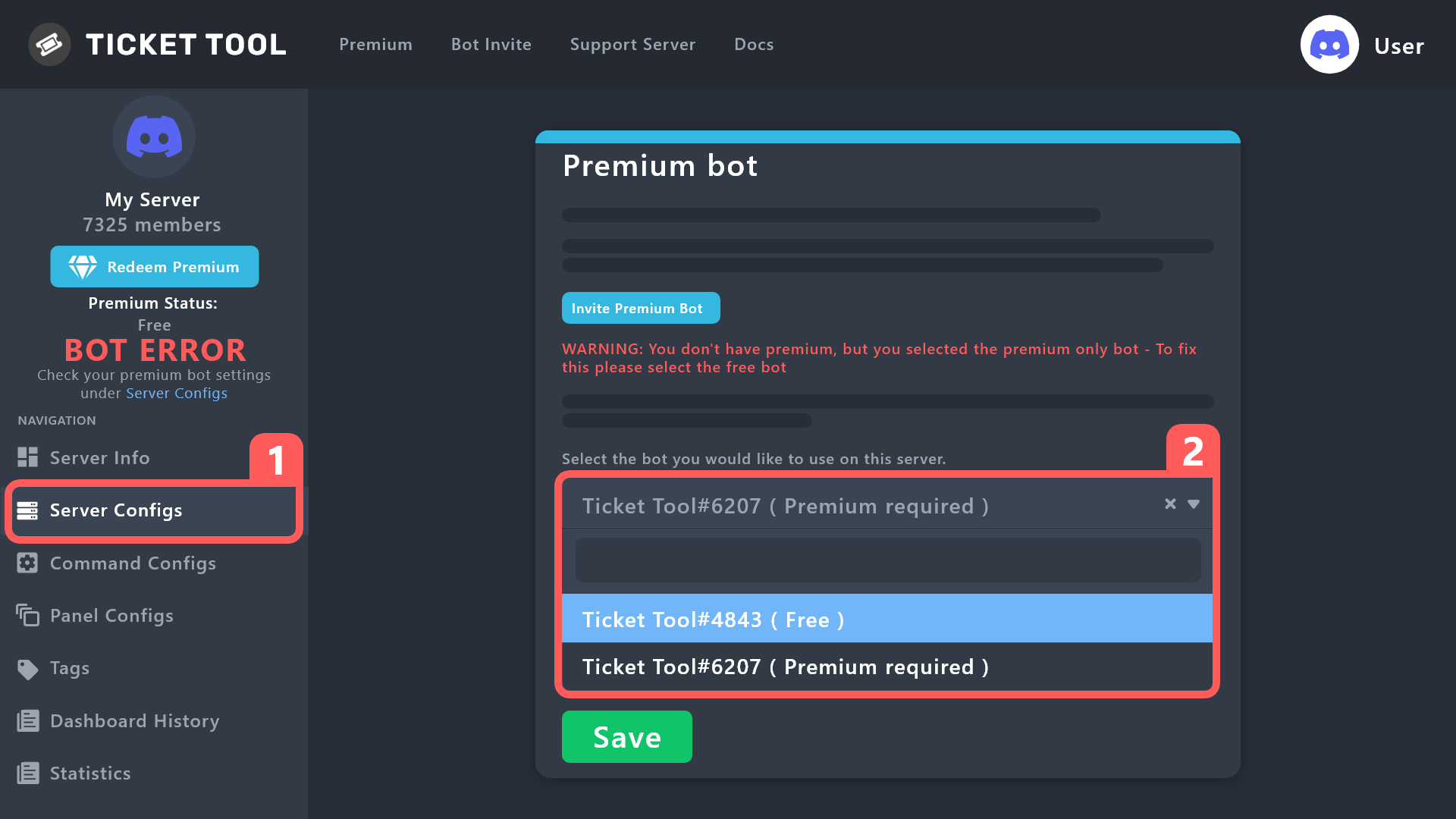
Well, you have a huge warning that says BOT ERROR on the left
That may be the first thing to fix before you try updating your panel
weak crest
rustic gale
Well, you have a huge warning that says BOT ERROR on the left
I tried to click it. I’ll look further
rustic gale
weak crest
I tried to click it. I’ll look further
BOT ERROR is caused by a different bot being enabled in the dashboard than is active in the server
You may have enabled the premium bot in Server Configs while the free bot is in the server
Or you may have invited the premium bot but left the free bot enabled
Either way, since your server doesn't have active premium, you should invite the free bot and enable the free bot in Server Configs
weak crest
I see what I did it was on premium thanks for the help lol
 mighty thunder
i need help bc bann
humble sequoiaBOT
⚠️ You're in the wrong place
We provide support for Ticket Tool Discord bot and cannot help you with whatever issue you have.
- We don't know which Support Team you should contact to get this issue resolved, and unfortunately we won't be able to accurately tell you.
If you don't have any further questions regarding our bot Ticket Tool, please close this ticket
echo laurel
I had the free version of Ticket Tool and now I have the Premium version. They are both there now, should I delete the free version?
gilded verge
You don't need to kick the free bot, you can have both. It is important that you choose which one should be active. (Server Configs)
 echo laurel
Ah ok thanks. How do I make the free version inactive?
gilded verge
Just choose premium bot there and Save settings ^^ then only premium bot will answer in server
 echo laurel
gilded verge
Just choose premium bot there and Save settings ^^ then only premium bot will an...
echo laurel
gilded verge
Just choose premium bot there and Save settings ^^ then only premium bot will an...
Perfect, thank you!
iron nightBOT
Gave +1 Rep to @gilded verge
jade topaz
Im hoping i could get someone to walk me threw using this app
 severe axle
How do you create a ticket
jade topaz
severe axle
How do you create a ticket
This is what i want
obtuse krakenBOT
1. Invite Ticket Tool to your server
First you will want to invite the bot to your server. Once the bot is in your server, you can manage your server in the dashboard.
2. Create a Panel
To create a panel we are going to need to head over to the panel configs on the dashboard.
Once at the dashboard we will need to click Create Panel.
Enter a panel name (Fill in any optional settings you want).
Click Create Panel and your ready to get started with configuring your panel.
An example of a creating a panel is shown below.
3. Send the Panel to a Channel
Once you've created a panel on the dashboard you will need to send it to a channel using send on the dashboard.
Select the channel you want your panel to be created in and click send.
For other questions checkout $help faq.
An example of a sending a panel is shown below.
Having a Problem Sending the Panel?
Do $debug in a channel with Ticket Tool and make sure it has all the necessary Discord permissions.
gilded verge
obtuse kraken
here
jade topaz
Ty
 proven void
Hello. Has anyone started seeing messages when executing close or delete functions with buttons? I'm seeing one, seen by me only, for each action I perform.
I'm not entirely sure where to disable this
scenic plinth
That's the neat part, you can't do anything other than dismiss the message after it is sent.
lunar solar
Forms definitely work with multiple panels and drop down style select menus, if you #🎫│make-a-ticket I am happy to work through this issue with you 🙂
 hushed gale
Hello my server is not showing in dashboard
lunar solar
hushed gale
Hello my server is not showing in dashboard
Are you the owner of the server?
hushed gale
lunar solar
Are you the owner of the server?
yes
lunar solar
The bot is definitely in your server?
hushed gale
yes
lunar solar
Please try relogging
humble sequoiaBOT
Don't see your server in the dashboard?
You will possibly need to relog. Look below to see steps on how to relog.
How to relog in the Dashboard.
Note:
You need one of these 3 things to access the dashboard.
1. Server Owner (Level: 6)
2. Server Administrator (Level: 4)
3. Dashboard Role (Level: 2)
:warning: You can check your level using $level on your Discord Server
User permission level with Ticket Tool
@User is permission level: 0 (User)
```» *If it shows that your permission is **0**, you don't have any of the above **3 things** to manage the dashboard.*


**See the Image below on how to relog:**no worries
 upper warren
SOS
humble sequoiaBOT
We would love to help you, but if you don't tell us what you need help with we can't help you :(
upper warren
How do I create a channel for users to ask for tickets and how do I create a place where I live them
lunar solar
Do you mean somewhere where users can create a ticket?
upper warren
Yes
stark runeBOT
1. Invite Ticket Tool to your server
First you will want to invite the bot to your server. Once the bot is in your server, you can manage your server in the dashboard.
2. Create a Panel
To create a panel we are going to need to head over to the panel configs on the dashboard.
Once at the dashboard we will need to click Create Panel.
Enter a panel name (Fill in any optional settings you want).
Click Create Panel and your ready to get started with configuring your panel.
An example of a creating a panel is shown below.
3. Send the Panel to a Channel
Once you've created a panel on the dashboard you will need to send it to a channel using send on the dashboard.
Select the channel you want your panel to be created in and click send.
For other questions checkout $help faq.
An example of a sending a panel is shown below.
Having a Problem Sending the Panel?
Do $debug in a channel with Ticket Tool and make sure it has all the necessary Discord permissions.
lunar solar
This guide will show you how to do that
upper warren
Ok
lunar solar
If you run into any issues let me know and I can help
upper warren
It's because I speak Spanish and it won't let me paste it into the translator
I hope you don't mind
lunar solar
upper warren
It's because I speak Spanish and it won't let me paste it into the translator
I ...
Ahh okay this might be a bit easier for you then:
humble sequoiaBOT

Equipo de Soporte Español
Querido usuario, si está buscando ayuda, por favor abra un ticket para contactar al Equipo de Soporte Español. Diríjase a #🎫│make-a-ticket y presione el botón :flag_es:.
 elder marsh

 eternal pine
lunar solar
This guide will show you how to do that
eternal pine
lunar solar
This guide will show you how to do that
when i click send is not sending the panel
to the selected channel

 lunar solar
eternal pine
when i click send is not sending the panel
lunar solar
eternal pine
when i click send is not sending the panel
Likely a permissions issue can you do:
/debug
In that channel and show me what ticket tool responds with?
eternal pine
lunar solar
Likely a permissions issue can you do:
`/debug`
In that channel and show me what...
 eternal pine
ok
lunar solar
eternal pine
ok
Did you get premium?
eternal pine
i dont think so
lunar solar
hmm
Looks like you've invited the premium bot, to disable it and use the free bot follow:
humble sequoiaBOT
How to disable the premium bot
To disable the premium bot you will have to go to the Dashboard ➞ Server Configs ➞ Premium bot ➞ And on the right-hand side select the primary free bot in the drop down menu.
Premium features will still work on the normal bot.
 lunar solar
Nice
jade topaz
Can I use another bots token which works as ticketool
I had seen someone use it that way
tag me on your reply
gilded verge
jade topaz
tag me on your reply
Oh so you mean custom bot with Ticket Tool? if so, whitelabels are planned
jade topaz
gilded verge
Oh so you mean custom bot with Ticket Tool? if so, whitelabels are planned
Yeah

The transcript was for ticketool, but sent by another bot
gilded verge
hmmm, I will ask about it 
spare gale
When I keep the Claim button enabled, and my support team clicks on it, it will claim the ticket even when I don't have premium? Or is that not how it works?
gilded verge
nope, premium required
spare gale
Alright
 distant pulsar


 spare gale
gilded verge
nope, premium required
spare gale
gilded verge
nope, premium required
But why you can enable the button even when you don't have Premium then?
gilded verge
hmm 🤔 For example, so that you can prepare a panel before purchasing a premium one
spare gale
So if you don't have premium, the button won't be shown when turned on?
gilded verge
nope ^^
spare gale
Is that a nope as in, 'That is correct', or a nope as in 'It will still show'
gilded verge
ah sorry 😅 yes, the button does not appear

 spare gale
Alright.
proven void
scenic plinth
That's the neat part, you can't do anything other than dismiss the message after...
lol... but the slash command does not return this message. Discord, you funny.
gilded verge
jade topaz
Hello again, from what I found out, as long as the bot is not used commercially, everything is fine ^^
but i want to ask, what you mean "The transcript was for ticketool" ?
 bitter sand
How would I setup transcripts for a ticket separately from the log?


These in separate channels.
gilded verge
use command /transcript #channel
Example:
 iron nightBOT
Gave +1 Rep to @gilded verge
bitter sand
Automatically though after deleting the ticket?
Let’s say I close a ticket, wrap it up delete it. I’d like that transcript sent to one channel, the log sent to a separate ( automatically ).
How would I do so? My apologies for not clarifying the first time.
gilded verge
when you say log you mean this?
 bitter sand
gilded verge
when you say `log` you mean this?
bitter sand
gilded verge
when you say `log` you mean this?
Correct, so that sent to one channel. Then, this sent to a separate channel at the same time.
 gilded verge
oooh, so please go to Panel Configs->Transcript->set transcript channel->Auto Save Transcript
Example:

and for log: Panel Configs->Logging->set logging channel
 bitter sand
Got it! Thank you much, got it sorted. 👍
jade topaz
gilded verge
Hello again, from what I found out, as long as the bot is not used commercially,...
When I opened his bots transcript, it redirected me to a tickettool page. Maybe he's using a clone or something
rustic gale
jade topaz
When I opened his bots transcript, it redirected me to a tickettool page. Maybe ...
There's a script in the Ticket Tool website that grabs the transcript's HTML and basically renders the transcript
jade topaz
Oh alr
 nova cliff
 humble sequoiaBOT
A Discord Form lets the user answer individual questions in a pop-up Form, which then displays the answers in the ticket message. This can save time if you already know what you want to ask the user.
Setup Forms
Forms can be enabled under Panel Settings > Form Options > Edit Forms Options. In the new pop-up window, you can now enable and edit your own Form.
Form Options
You can add up to 5 questions in the Discord form. This is a Discord limitation. Each question can have a placeholder in the input field, a minimum and maximum input, multi-line, and also the option to have the answer required.
Options
Question Title ➞ Your Question goes here
Question Placeholder ➞ The placeholder text in the input field
Required ➞ If enabled, the user has to answer this question, to submit the form
Multi-Line Input ➞Allows the user to input multiple lines
Minimum and Maximum Input ➞ Set a minimum and maximum input value for the user
Displaying the Answer
To display the answers from the user, you need to go into your Panel Settings > Ticket Options > Edit Ticket Message. In there you use the variable {create.form.x} and just replace x with the number of your question. For example, the response to Question 1 can be displayed with {create.form.1}. If you don't use this variable, the response from the user is lost.
lunar solar
Have a read through the above @nova cliff, this covers everything to do with forms
 fast topaz
yo can someone help me
i keep getting this insane number each time i open ticket

and the serv has only opened like 30 tickets since it was first made
 primal loom
@fast topaz yeah ?
fast topaz
its in ticket
humble sequoiaBOT
━━ moved to ticket ━━
 junior dagger
How do I make it to ping a role in a ticket?
rustic gale
junior dagger
How do I make it to ping a role in a ticket?
Panel Configs -> Ticket -> Edit Ticket Message
In the text box, include a role mention
A role mention looks like this <@&_______>
Where you fill in the blank with the role's ID number
 hearty wasp
 minor haven
Anyway to see old ticket logs from a specific server or anything else?
rustic gale
minor haven
Anyway to see old ticket logs from a specific server or anything else?
If they got deleted from the server? No
 rustic gale
 sharp cedar
how do I do this?
sharp cedar
how do I do this?
It's called a multipanel
humble sequoiaBOT
For a more convenient use of multipanels, you can now combine panels on the dashboard. This will allow you to directly send the multipanel from the dashboard or via the $panel ID command.
Where can I find this?
You can find this setting on the Dashboard -> Panel Configs -> Settings -> Panel
Note: if you're attaching all the panels to a panel called English, don't include English in the attached panel's box (If you do this, it will create a duplicate)
This will put all buttons from all of your panels on one message. The message is the panel message from the panel you're combining these panels in.
 pseudo edge
Is there a possibility to see who closed the ticket if you add this bot? (Like in storage options)
 rustic gale
pseudo edge
Is there a possibility to see who closed the ticket if you add this bot? (Like i...
rustic gale
pseudo edge
Is there a possibility to see who closed the ticket if you add this bot? (Like i...
Panel Configs -> Logging
You can set up a logging channel to get action logs, which can include who closes which ticket
 potent pilot
Hello
How can I make sure that only the ticket creator and the administration can see the ticket?
 uneven locust
Is the bot offline or only for my server? I don't see any issues in the status page
humble sequoiaBOT
How to edit `@everyone`'s permissions
Head over to your Dashboard ➞ Panel Configs ➞ Permissions ➞ Open / Closed and customize the base permissions for everyone in your tickets.
Note: This set of permissions may be affected by the overrides of Support Team, Additional Roles, and User permissions.
 gilded verge
humble sequoia
gilded verge
humble sequoia
Hey @potent pilot, check
gilded verge
uneven locust
Is the bot offline or only for my server? I don't see any issues in the status p...
What's your server ID or name?
 cinder spoke
helllo so if i boost 1 time would i get ticket tool premium?
potent pilot
gilded verge
Hey <@646276124397273108>, check <:this:894279341108772914>
thanks
iron nightBOT
Gave +1 Rep to @gilded verge
gilded verge
cinder spoke
helllo so if i boost 1 time would i get ticket tool premium?
2 boosts required, check #📌│booster-perks
jade topaz
Hello, I am wondering how do you make it so only certain roles can make a ticket and how to make it so only a certain number of ticket are allowed to be made before they cant make anymore
cinder spoke
gilded verge
2 boosts required, check <#927789598208311366>
so rn i have 2 accs with nitro if i boost from diffrent acc would i get ticket tool premium?
gilded verge
jade topaz
Hello, I am wondering how do you make it so only certain roles can make a ticket...
Hey, you opened the ticket. If you ask for help here, close the ticket or wait in ticket. The point is to avoid confusion on the channels.
jade topaz
oh
jade topaz
gilded verge
Hey, you opened the ticket. If you ask for help here, close the ticket or wait i...
Can you help here please
gilded verge
jade topaz
Can you help here please
no, i don't know answer 😕
gilded verge
cinder spoke
so rn i have 2 accs with nitro if i boost from diffrent acc would i get ticket t...
you can have many accounts and boost the server, but the most important thing is that the minimum is 2 boosts in one account
cinder spoke
gilded verge
you can have many accounts and boost the server, but the most important thing is...
so its not allowed?
gilded verge
im not sure what you mean 🤔
jade topaz
he means if he boosts from two different acc
gilded verge
okay, let's try again 😅
1 account = 2 boosts, but if you want use 2 accounts, then you need use 4 boosts
uneven locust
gilded verge
What's your server ID or name?
Server ID: 718972780116312087
gilded verge
uneven locust
Server ID: 718972780116312087
oh... I will report this situation, it should be fixed soon
uneven locust
Thanks, For now i must wait?
gilded verge
yup ^^ Please be patient
uneven locust
Sure, i will wait, hopefully it will be fixed soon 👍
 pure orbit
Hi in my server all of the sudden we are getting interaction failed when tickets are trying to open. It was working fine like 4 hours ago though.
gilded verge
pure orbit
Hi in my server all of the sudden we are getting interaction failed when tickets...
Hey, what's your server ID or name?
pure orbit
Server ID: 771940267301273610
Server Name: Mindless Abyss
 fringe zenith
Why is the entire channel not showing?
 jade topaz
fringe zenith
Why is the entire channel not showing?
jade topaz
fringe zenith
Why is the entire channel not showing?
you may have not allowed the bot to see the channel
Check the perm on the channel and make sure ticket tool can see everything
gilded verge
pure orbit
Server ID: 771940267301273610
Server Name: Mindless Abyss
Could you please send screenshot of this error? 🤔
 humble sequoiaBOT
Update your Discord App
Devices running old versions of Discord may interfere with the proper display of interactions such as buttons or context menus. Please verify that you have the latest version of Discord, by going to the App Store, or Play Store.
Discord for the App Store
Discord for the Play Store
 near perch
Hi all, having interaction failed messages. I see ticket Tool still on server but appears to be offline
gilded verge
@pure orbit, Please update your Discord and try again ^^
jade topaz
pure orbit
this same thing is happening to me but my discord is the most recent version
fringe zenith
jade topaz
you may have not allowed the bot to see the channel
Check the perm on the channe...
I have given it all permission
jade topaz
fringe zenith
I have given it all permission
reload the page now and see if its there
pure orbit
gilded verge
<@940787023906742292>, Please update your Discord and try again ^^
Just updated and tried again... same issue
fringe zenith
jade topaz
reload the page now and see if its there
I've done it many times 😅
gilded verge
Okay, reported. Please be patient
jade topaz
fringe zenith
I've done it many times 😅
make sure your ticket tool has access to category as well
pure orbit
Thank you
jade topaz
Yeah I’m having the same issue as you
fringe zenith
jade topaz
make sure your ticket tool has access to category as well
I made him admin too 😂
jade topaz
fringe zenith
I made him admin too 😂
hmm im not sure then
fringe zenith
fringe zenith
Why is the entire channel not showing?
@gilded verge
gilded verge
fringe zenith
<@334671104704774154>
Try to follow rule 4 in #📂│information
enter the name of the channel in this field (from screenshot), it will be easier for you
pure orbit
@gilded verge we switched to the normal bot back when the premium was offline a lot... switched back to premium and everything works on my server
gilded verge
o
jade topaz
someone know this problem ?
"It looks like Ticket Tool isn't online or in any servers you have permission to access,Invite Ticket Toolor check it'sstatus"
even if I invite ticket tool
rustic gale
@jade topaz
humble sequoiaBOT
Don't see your server in the dashboard?
You will possibly need to relog. Look below to see steps on how to relog.
How to relog in the Dashboard.
Note:
You need one of these 3 things to access the dashboard.
1. Server Owner (Level: 6)
2. Server Administrator (Level: 4)
3. Dashboard Role (Level: 2)
:warning: You can check your level using $level on your Discord Server
User permission level with Ticket Tool
@User is permission level: 0 (User)
```» *If it shows that your permission is **0**, you don't have any of the above **3 things** to manage the dashboard.*


**See the Image below on how to relog:**i can just write $level for see this ?
jade topaz
rustic gale
<@456226577798135808>
?
rustic gale
jade topaz
i can just write $level for see this ?
If you type $level you can see your level
jade topaz
i can't
rustic gale
Can you see the bot in the user list?
jade topaz
yes ofc
but can't do any options
can you see my ticket ?
it's french but i can open an other if you want
rustic gale
jade topaz
it's french but i can open an other if you want
Try /permissionlevel instead
 rustic gale
 young lichen
how do i fix?
young lichen
how do i fix?
You probably attached the panel to itself
Panel Configs -> Panel, make sure Attached Panels is empty
 languid forum
Why is the bot offline
 fresh stratus
languid forum
Why is the bot offline
fresh stratus
languid forum
Why is the bot offline
 slim vapor
Why
 lunar solar
languid forum
Why is the bot offline
lunar solar
languid forum
Why is the bot offline
#📣│bot-news some odd rate limit issues have appeared, the developer is already investigating the issues.
languid forum
Ah ok ty
slim vapor
Do you know how long? @lunar solar
lunar solar
We can not provide a timeframe at this stage.
 frosty mason
Hi is there anyway i can pay with paypal to a developer?
also #🎫│make-a-ticket not working
 untold iris
offline bot?
lunar solar
untold iris
offline bot?
#📣│bot-news some odd rate limit issues have appeared, the developer is already investigating the issues.
#📣│bot-news some odd rate limit issues have appeared, the developer is already investigating the issues.
untold iris
نويص ما نعرف انجلش
untold iris
lunar solar
<#571104498483986466> some odd rate limit issues have appeared, the developer is...
how much time?
lunar solar
untold iris
how much time?
We can not provide an ETA at this time
untold iris
بيقول الوقت غير محدد حاليا
 split jackal
Rip
untold iris
بيضيفو حجات
lunar solar
jade topaz
$setup
The bot is currently down so these commands will not work, #📣│bot-news
jade topaz
Ok
 dusty raven
?
 bronze storm
slim vapor
Why
bronze storm
slim vapor
Why
I’m got this too
 river knoll
hey, all my servers are gone from my dashboard, i reloged me but it dont works
 slim vapor
river knoll
hey, all my servers are gone from my dashboard, i reloged me but it dont works
river knoll
slim vapor
river knoll
hey, all my servers are gone from my dashboard, i reloged me but it dont works
river knoll
oh, thx
slim vapor
Hey bro can you @ me when the bot online is?@lunar solar
lunar solar
slim vapor
Hey bro can you @ me when the bot online is?<@892854649172946985>
There will most likely be an @ in #📣│bot-news
 polar zenith
the bot is offline
slim vapor
polar zenith
the bot is offline
Fr? 😨
lunar solar
polar zenith
the bot is offline
#📣│bot-news some odd rate limit issues have appeared, the developer is already investigating the issues.
 raw zealot
My bot isn't showed in my Server / Offline
lunar solar
lunar solar
<#571104498483986466> some odd rate limit issues have appeared, the developer is...
@raw zealot .
 boreal harness
ticket isn't closing ? said interaction failed :/
raw zealot
lunar solar
<@366651326232526848> .
👍🏽
frosty mason
cringe
jade topaz
why is the bot offline in my server
 still yarrow
@jade topaz #📣│bot-news
 novel bloom
In my server is the bot offline too
boreal harness
im confused with what i'm supposed to look at
dreamy abyss
boreal harness
im confused with what i'm supposed to look at
Read.
jade topaz
any idea when it will be ready? and is there any other ticket bot I could use?
dreamy abyss
jade topaz
any idea when it will be ready? and is there any other ticket bot I could use?
They will let you know when all system are operational in #📣│bot-news i believe.
 hoary galleon
I guess the bot it down
scenic plinth
For those with premium, it should start appearing online soon if it has not already.
hoary galleon
scenic plinth
For those with premium, it should start appearing online soon if it has not alre...
And for those without it?
scenic plinth
You'll be a little longer. Premium typically comes online first as it has less servers to connect to as less people use it compared to the primary version.
hoary galleon
Makes sense
 queen pagoda
Question, i own premium but how do I invite it?
 remote wren
I take it everyone is having issues with their bot showing online?
 main canyon
 hard ivy
Yes
remote wren
Okie dokie 🙂 I'm sure they'll fix it soon.
hard ivy
But it won't work
jade topaz
Definitely wont work. I came here to see if anyone else is having the same. It seems like everyone is having issues with it.
queen pagoda
I own premium but how do I invite premium ticket tool?
 uncut crescent
.
echo laurel
It appears it’s back up
 wheat compass
Still doesnt work
jade topaz
The bot is offline in servers and it doesn't respond to commands
scenic plinth
Good job for noticing! Now notice #📣│bot-news!
remote wren
 wary fog
I hate that its not working
queen pagoda
scenic plinth
Good job for noticing! Now notice <#571104498483986466>!
Can u help me. So i own premium but am unsure how to inv the premtbot
echo laurel
wheat compass
Still doesnt work
Premium seems to be working though
remote wren
They are working on it. Give them some time.
echo laurel
Online for me
 jade topaz
They're doing what they can whiny babies. Blame Discord for screwing bot creators in the ass with a pinecone
humble sequoiaBOT
The first thing you will need to do is invite the premium bot, an invite can be found here
Once the bot is in your server we will head to the dashboard and manage your server. When you are managing your server, you want to head into "Server Configs" then click the drop down menu under "Select the bot you would like to use on this server" then click "Ticket Tool#6207" and then save.

 pseudo coral
My bot is offline
 leaden eagle
pseudo coral
My bot is offline
remote wren
leaden eagle
pseudo coral
My bot is offline
remote wren
Premium bots shouldn't be impacted due to the fact that it's a rate limit thing. If you want back up RIGHT NOW then go pay for it.
queen pagoda
humble sequoia
Thanks
scenic plinth
humble sequoia
@queen pagoda
iron nightBOT
Gave +1 Rep to @humble sequoia
 lusty sand
my bot is offlien
leaden eagle
lusty sand
my bot is offlien
jade topaz
Why the bot is disconnected
 jade topaz
Man, so many stupid asses that don't read before commenting.
echo laurel
Lol
scenic plinth
Not exactly, just more guaranteed as less people use it.
remote wren
If you're running a custom but it runs on a different rate limit, IE: Non-premium all have a joint pool they are using, premium however have their own pool and thus aren't impacted by the number of requests from public/other users to the bot. At least that's how I understand how the Discord REST API works.
 tidal meteor
Okay so not asking to pry, but I do have the premium bot right now but it's still showing issues. Don't know if it's because it never switched over or what
covert swallow
Both bots are offline at this time
tidal meteor
covert swallow
Both bots are offline at this time
okay just wanted to check
jade topaz
covert swallow
Both bots are offline at this time
when will it be online again ?
covert swallow
Soon, the issue is being worked on
 hard jackal
Estimated time?
remote wren
Dev said he hopes within the hour but currently unknown.
hard jackal
Ok thank man
covert swallow
What zulu said
scenic plinth
Rate limit go brrt
jade topaz
What's a rate limit
 lilac prism
🚗
scenic plinth
According to the dev, Discord staff or whomever say it will be "an hour-ish" before the bot reappears to push a fix due to the rate limits.
"Bugged API limit update released from Discord"
 stuck summit
That's not a very long expected down time, thank you for the update
covert swallow
jade topaz
What's a rate limit
The number of times we can do x thing in y time
 surreal matrix
scenic plinth
According to the dev, Discord staff or whomever say it will be "an hour-ish" bef...
surreal matrix
scenic plinth
According to the dev, Discord staff or whomever say it will be "an hour-ish" bef...
ah awesome, just joined to check if it was having issues
covert swallow
Short answer yes issues
jade topaz
Thank you for your answer.
covert swallow
Tim, cool it
leaden eagle
Im cool bro wdym :(
remote wren
#🆘│community-support is for support chat. Please take non-support chat to #💬│general-chat ❤️
 sudden fossil
por que esta off el bot?
jade topaz
bot down?
remote wren
Please see pinned messages.
 viral basin
sudden fossil
por que esta off el bot?
viral basin
sudden fossil
por que esta off el bot?
cambios de discord que afectaron al bot
remote wren
Sí, mira el mensaje anclado
sudden fossil
a ya gracias
viral basin
ya estan trabajando en ello
scenic plinth
Viniste aquí más rápido que yo 🤣
viral basin
espero que este listo cuanto antes o me van a colgar mis 2k de miembros xd
 scenic plinth
jaja
 fervent quest
is ticket tool down ?
scenic plinth
 steep basin
Hola saben cuando activaran el bot?
remote wren
por supuesto.
scenic plinth
Discord dice alrededor de una hora, aunque no es exacto y el desarrollador tiene que reiniciar el bot además de actualizarlo debido al problema.
(English because why not: Discord says about an hour, although it's not exact and the developer has to restart the bot in addition to it being updated because of the issue.)
For those wondering as well, premium has come online and gone back offline occasionally, that does not necessarily mean the bot will function properly in the meantime.
 native zodiac
How do I get the outage ping role so it will show in red notif on left side of discord even if the whole server is muted
covert swallow
slim vapor
My bot is still off?
covert swallow
Yes
covert swallow
 silent anchor
everyone’s is
remote wren
Please check pinned messages & #📣│bot-news
slim vapor
THE BOT IS ON
covert swallow
Mostly
jade topaz
covert swallow
Mostly
not really I can't access the dashboard
won't show the server list
humble sequoiaBOT
Don't see your server in the dashboard?
You will possibly need to relog. Look below to see steps on how to relog.
How to relog in the Dashboard.
Note:
You need one of these 3 things to access the dashboard.
1. Server Owner (Level: 6)
2. Server Administrator (Level: 4)
3. Dashboard Role (Level: 2)
:warning: You can check your level using $level on your Discord Server
User permission level with Ticket Tool
@User is permission level: 0 (User)
```» *If it shows that your permission is **0**, you don't have any of the above **3 things** to manage the dashboard.*


**See the Image below on how to relog:**did that already my guy
covert swallow
Do you have admin or owner?
silent anchor
it is auto based on message keywords
jade topaz
covert swallow
Do you have admin or owner?
yeap
covert swallow
Which one
silent anchor
could be a bot to panel issue?
with the api update, it may need time to completely resync everything
jade topaz
covert swallow
Which one
admin
covert swallow
Do yoy have the admin permission
jade topaz
yes
covert swallow
Id say do a level check but slash commands kinda borked rn
silent anchor
P.S. both bots are still reporting major outage so it won’t sync up without them online
jade topaz
outage might be the reason
silent anchor
if the bots aren’t online, it cannot register your ranks online
covert swallow
Funny story, status page is manually updated
silent anchor
they are still showing outage priz
 ripe raptor
У персонажа teramisu нету книги смены спеков, и прочих плюшек от сервера хотел бы получить все
silent anchor
bots can’t see your ranks if they aren’t publicly online and it’s not online in any of my servers yet
 robust sandalBOT
ripe raptor
У персонажа teramisu нету книги смены спеков, и прочих плюшек от сервера хотел ...
robust sandalBOT
ripe raptor
У персонажа teramisu нету книги смены спеков, и прочих плюшек от сервера хотел ...
The teramisu character doesn't have a spec change book, and other buns from the server would like to get everything.
 Russian (ru) → English (en)
jade topaz
silent anchor
bots can’t see your ranks if they aren’t publicly online and it’s not online in ...
Russian (ru) → English (en)
jade topaz
silent anchor
bots can’t see your ranks if they aren’t publicly online and it’s not online in ...
I guess we have to wait for couple more hours
silent anchor
^
silent anchor
hopefully yea
jade topaz
yeah
fervent quest
is it up yet ?
 wheat blade
Is the ticket thing broken?
jade topaz
covert swallow
But again its up to discord
why is it up to discord?
covert swallow
They broke ratelimits somehow
jade topaz
oh damn
covert swallow
 wheat blade
How long will it take to be up again?
jade topaz
 😭
😭
silent anchor
it’s up to discord due to discord miscoding their api
jade topaz
no one knows
wheat blade
Pain
jade topaz
L discord
covert swallow
Should be soon
wheat blade
The Supportteam is greate, gotta say that
covert swallow
Thanks
silent anchor
not support team but thank you ❤️
jade topaz
❤️
wheat blade
Can some1 tag me when it’s back up?
silent anchor
yea
wheat blade
Tysm
wheat blade
Uii Ty
silent anchor
Will do 😄
 tough nebula
jade topaz
covert swallow
Rate limits are a bit strict rn
tough nebula
jade topaz
covert swallow
Rate limits are a bit strict rn
what does rate limit mean?
covert swallow
Number of times you can do x thing in y time
jade topaz
😭 gotchu, thanks
 young prism
Cant add anyone to ticket
jade topaz
 amber quartz
Is there anywhere I can go to learn about how other bots can control ticket creation?
scenic plinth
The only way that Ticket Tool can communicate create or interact with other bots is through messages you whitelist. As for anything else you would have to learn the bot you are trying to use to get something to be setup and triggered.
amber quartz
Gotcha. So would putting the other bot's ID's in the Server Configs be enough to whitelist them?
scenic plinth
In the correct option, yes.
 valid shore
What is Linked subscription (FastSpring)?
queen pagoda
valid shore
What is Linked subscription (FastSpring)?
Means premium is being paid for
valid shore
queen pagoda
Means premium is being paid for
Would I be able to invite the premium bot then?
queen pagoda
U should be able to yes
valid shore
And would you be so kind to link me the uh how to set the bot to the premium one instead of the free one?
rustic gale
valid shore
And would you be so kind to link me the uh how to set the bot to the premium one...
It's in Server Configs
Should be easy to find
Once the premium bot is enabled, resend all your panels with the premium bot
valid shore
Ohh I see it, okay. So resend all panels with premium okay got it, thank you!
 haughty girder
how do i make a custom description like “react with 🌟 to create a ticket” idk where to go on the dashboard to make a custom one
lunar solar
haughty girder
how do i make a custom description like “react with 🌟 to create a ticket” idk w...
Panel Configs --> Panel --> Edit Panel Message --> Embed Editor
 weak wing
can i modify this message?

 wraith yacht
How do I set the text channel to have the ticket tool? The HUD changed from videos on Youtube?
humble sequoiaBOT
━━ moved to ticket ━━
 fervent loom
Hey in my server im having issues with people making tickets then closing them and making more and it's causing a lot of spam in my server. Is there a way to make it so that only mods can close tickets?
dreamy abyss
fervent loom
Hey in my server im having issues with people making tickets then closing them a...
Go to Dashboard > Panel Configs > Permission Options > Additional Opened/Closed Permissions.
fervent loom
dreamy abyss
Go to Dashboard > Panel Configs > Permission Options > Additional Opened/Closed ...
what would you select after that
rustic gale
That's incorrect
You should set the Close Ticket and Confirm Close buttons to be Support Team Only
the Close Ticket button is in Panel Configs -> Ticket -> Edit Ticket Message -> Close Ticket: Edit Button
the Confirm Close button is in Panel Configs -> Ticket -> Edit Close Question -> Confirm Close: Edit Button
@fervent loom
dreamy abyss
rustic gale
That's incorrect
Oh mybad I thought that’s how you get to it
fervent loom
rustic gale
the Confirm Close button is in Panel Configs -> Ticket -> Edit Close Question ->...
oh okay thank you !!
iron nightBOT
Gave +1 Rep to @rustic gale
lunar solar
dreamy abyss
Oh mybad I thought that’s how you get to it
The permissions edit you are referring to is the ability to see, talk and other Discord based channel permissions
Integration interaction is per button
dreamy abyss
lunar solar
The permissions edit you are referring to is the ability to see, talk and other ...
Yeah, I see now that was my bad
lunar solar
Na that’s all good, cheers for trying to help 🙂
 compact notch
I have a question for the free version when it says 10 tickets in a minute does it mean a person can do 10 tickets in a minute or there can be 10 tickets active in a minute
 median pecan
Hey, did there used to be an option to restrict ticket creation to a selected amount of groups. I can't seem to find it any more on the panel configs, might be missing it completely. I.e. I used to have a panel restricted so that only X server group could create/open the ticket.
lunar solar
median pecan
Hey, did there used to be an option to restrict ticket creation to a selected am...
Hi @median pecan,
This is still possible:
Panel Configs --> Panel --> Edit Panel Message --> Create Ticked (Edit Button) --> Add roles to Allowed Roles & add @ everyone to Disabled Roles
median pecan
Legend, thank you!
lunar solar
No worries
rustic gale
compact notch
I have a question for the free version when it says 10 tickets in a minute does ...
Where does it say 10 tickets in a minute?
 lunar solar
compact notch
lunar solar
compact notch
It's the restriction of how many tickets can be globally created within your server per minute.
This is to avoid the bot hitting the rate limits set by Discord.
compact notch
Can u still make the globally ticket limit higher or is it just 10
So it’s 10 tickets per minute collectively
lunar solar
No so you can have more than 10 tickets open, just can't create more than 10 in under a minute
rustic gale
Exactly
compact notch
Okay Thxs
humble sequoiaBOT
You can check our documentation here;
You can also check #📂│information for the basic setup;
or run the </setup:1025379472167403530> command within #🤖│bot-spam
Our documentation contains all the info you need about the bot to be able to setup and configure the bot however you like.
stark runeBOT
1. Invite Ticket Tool to your server
First you will want to invite the bot to your server. Once the bot is in your server, you can manage your server in the dashboard.
2. Create a Panel
To create a panel we are going to need to head over to the panel configs on the dashboard.
Once at the dashboard we will need to click Create Panel.
Enter a panel name (Fill in any optional settings you want).
Click Create Panel and your ready to get started with configuring your panel.
An example of a creating a panel is shown below.
3. Send the Panel to a Channel
Once you've created a panel on the dashboard you will need to send it to a channel using send on the dashboard.
Select the channel you want your panel to be created in and click send.
For other questions checkout $help faq.
An example of a sending a panel is shown below.
Having a Problem Sending the Panel?
Do $debug in a channel with Ticket Tool and make sure it has all the necessary Discord permissions.
lunar solar
@jade topaz have a look through that
jade topaz
no]
lunar solar
okay then
 daring blade
Why I am unable to see the envelope icon to make a ticket in every server?
gilded verge
daring blade
Why I am unable to see the envelope icon to make a ticket in every server?
Could you please send a screenshot?
daring blade
gilded verge
Could you please send a screenshot?
 gilded verge
What's your server ID or name?
daring blade
Where do I find it?
gilded verge
run command /id
Example:
 daring blade
gilded verge
What's your server ID or name?
daring blade
gilded verge
What's your server ID or name?
1026136607281123410
rustic gale
You should update your app
The most common reason why people can't see the button is an outdated app
daring blade
That was it, thank you so much lol
jade topaz
Why the bot do not respond?
 lunar solar
jade topaz
Why the bot do not respond?
lunar solar
jade topaz
Why the bot do not respond?
Is the prefix for that server different?
e.g.
jade topaz
Let me check
lunar solar
- ! ? etc
jade topaz
The prefix is $ but the is an error
 lunar solar
jade topaz
The prefix is $ but the is an error
lunar solar
jade topaz
The prefix is $ but the is an error
Looks like the premium bot is enabled but you don't have premium
jade topaz
I was have premium but now no
humble sequoiaBOT
The first thing you will need to do is invite the premium bot, an invite can be found here
Once the bot is in your server we will head to the dashboard and manage your server. When you are managing your server, you want to head into "Server Configs" then click the drop down menu under "Select the bot you would like to use on this server" then click "Ticket Tool#6207" and then save.