#🆘│community-support
1 messages · Page 11 of 1
 slender hazel
 plain surge
Can you explain what you mean by laggy?
plain surge
slender hazel
Hello, I added Ticket Tool to my server but when I want to manage it, it doesn't...
Please try the following step
 humble sequoiaBOT
Don't see your server in the dashboard?
You will possibly need to relog. Look below to see steps on how to relog.
How to relog in the Dashboard.
Note:
You need one of these 3 things to access the dashboard.
1. Server Owner (Level: 6)
2. Server Administrator (Level: 4)
3. Dashboard Role (Level: 2)
:warning: You can check your level using $level on your Discord Server
User permission level with Ticket Tool
@User is permission level: 0 (User)
```» *If it shows that your permission is **0**, you don't have any of the above **3 things** to manage the dashboard.*
**See the Image below on how to relog:** slender hazel
Thank you very much !
plain surge
No problem 👍
 dapper marten
is there a way to view all transcripts on the dashboard?
plain surge
There isn't unfortunately, to view transcripts you need to either press on the direct link sent in he transcript message or have downloaded the HTML file from the transcript message
 worldly dune
I'm trying to enable Auto Display Results for form ticket submissions, but I can't find where I can enable this feature?
humble sequoiaBOT
Pop-up Form
A discord Form allows you to let the user answer individual questions in a pop up Form, which then displays the answers in the ticket message. This can save time if you already know what you want to ask the user.
Setup Forms
Forms can be enabled under Panel Settings > Form Options > Edit Forms Options.
In the new pop up window, you can now enable and edit your own Form.
Form Options
You can add up to 5 questions in the discord form. This is a discord limitation. Each question can have a placeholder in the input field, a minimum and maximum input, multi-line and also the option to have the answer required.
Options:
Question Title: Your Question goes here
Question Placeholder: The placeholder text in the input field
Required: If enabled, the user has to answer this question, to submit the form
Multi-Line Input: Allows the user to input multiple lines
Minimum and Maximum Input: Set a minimum and maximum input value for the user
❗Display the answer ❗
To display the answers from the user, you need to go into your Panel Settings > Ticket Options > Edit Ticket Message. In there you use the variable {create.form.x} and just replace x with the number of your question. For example, the response to Question 1 can be displayed with {create.form.1}. If you don't use this variable, the response from the user is lost.
 plain surge
worldly dune
I'm trying to enable Auto Display Results for form ticket submissions, but I can...
plain surge
worldly dune
I'm trying to enable Auto Display Results for form ticket submissions, but I can...
Please read the last part
humble sequoiaBOT
The Ticket Message is the first message sent by the bot in a new ticket. To customise it head over to your Dashboard ➞ Panel Configs ➞ Settings ➞ Ticket Options ➞ Edit Ticket Message
 plain surge
And this is where you paste the question variable
worldly dune
Okay I will try this real quick
plain surge
Take your time 👍
worldly dune
I got the answers to show up with this info, but is there a way to also show the questions with the answers for the support roles to see?
Wait, I think I've actually got it
plain surge
worldly dune
Wait, I think I've actually got it
Did it work?
 jade topaz
How do I find out who deleted all my tickets with ticket tool
humble sequoiaBOT
━━ moved to ticket ━━
worldly dune
plain surge
Did it work?
It did, thank you!
 iron nightBOT
Gave +1 Rep to @plain surge
 uncut vault
Heya o/ I'd just like to query the support team option in the panel config section. I've just added a new role to the support team section (helper) and I'm wondering does this update the perms for the current open tickets so the "helper" role can have access, or will this change only apply to tickets opened after this point?

 shut bolt
uncut vault
Heya o/ I'd just like to query the support team option in the panel config secti...
shut bolt
uncut vault
Heya o/ I'd just like to query the support team option in the panel config secti...
The latter, the change will be applied to new tickets
uncut vault
right, that's unfortunate. Thanks for letting me know!
shut bolt
No problem
 ember escarp
plain surge
Can you explain what you mean by laggy?
ember escarp
plain surge
Can you explain what you mean by laggy?
Takes a good 3 to 4 seconds to perform any action
Also how can I edit the output message that is sent to the ticket?
Can't seem to find the option on the dashboard

 rustic gale
ember escarp
Also how can I edit the output message that is sent to the ticket?
Can't seem t...
rustic gale
ember escarp
Also how can I edit the output message that is sent to the ticket?
Can't seem t...
You can't because that's the automatic embed. You can just disable the automatic embed and write a manual embed of your own
It's premium though if i'm not mistaken
WIthout premium you can still add the fields to the ticket message
The variables are {create.form.1} for the first answer, 2 for the second and so on
ember escarp
rustic gale
You can't because that's the automatic embed. You can just disable the automatic...
How would I disable the automatic message
rustic gale
ember escarp
How would I disable the automatic message
Open the “Form” menu and disable the switch labeled “Auto display form results on the Ticket Message as an additional embed”
ember escarp
rustic gale
Open the “Form” menu and disable the switch labeled “Auto display form results o...

where?
rustic gale
ember escarp
where?
Panel Configs v2
 native zodiac
Is there a way to automatically count the tally of closed tickets with filter per specific time frame?
rustic gale
Do you mean the statistics in the dashboard?
native zodiac
rustic gale
Do you mean the statistics in the dashboard?
Is there a sample screenshot for that? I don’t have access to the dashboard, I tally the tickets manually every week 😭
rustic gale
Ah
Well you can try using Discord's search function together with the before: and after: filters
native zodiac
rustic gale
Well you can try using Discord's search function together with the `before:` and...
Yeah I can easily sort it out.
So no automatic tally for closed tickets filtered by ticket type feature?
rustic gale
native zodiac
Yeah I can easily sort it out.
So no automatic tally for closed tickets filter...
I think the dashboard's statistics may be just what you need
You should tell the owner to get you a dashboard role.
native zodiac
rustic gale
I think the dashboard's statistics may be just what you need
Thank you very much! Will take a look on that. My last resort would be asking to set ticket tool to only log Closed Tickets. This way I when I search the Panel Name, the number on the search result will be the total tally. Thanks for helping 🙏
iron nightBOT
Gave +1 Rep to @rustic gale
rustic gale
native zodiac
Thank you very much! Will take a look on that. My last resort would be asking to...
You can choose which events get logged in the dashboard.

All of those can be toggled
You're managing bot matters without having dashboard access. It's a bit like driving without looking at the street
native zodiac
rustic gale
All of those can be toggled
Can the different actions be logged on separate channels or just one channel for everything?
 solid stream
native zodiac
Can the different actions be logged on separate channels or just one channel for...
solid stream
native zodiac
Can the different actions be logged on separate channels or just one channel for...
That will be implemented, have a few things in line before it though.
native zodiac
solid stream
That will be implemented, have a few things in line before it though.
Great! Thank you very much for the responses 🤝
iron nightBOT
Gave +1 Rep to @solid stream
solid stream
native zodiac
Thank you very much! Will take a look on that. My last resort would be asking to...
Actually I can add this statistic tomorrow
 void blade
في امر يخلي التكت في كاتاجوري معينه؟
void blade
void blade
في امر يخلي التكت في كاتاجوري معينه؟
Are there a command to move ticket to another catagory?
humble sequoiaBOT
Don't see your server in the dashboard?
You will possibly need to relog. Look below to see steps on how to relog.
How to relog in the Dashboard.
Note:
You need one of these 3 things to access the dashboard.
1. Server Owner (Level: 6)
2. Server Administrator (Level: 4)
3. Dashboard Role (Level: 2)
:warning: You can check your level using $level on your Discord Server
User permission level with Ticket Tool
@User is permission level: 0 (User)
```» *If it shows that your permission is **0**, you don't have any of the above **3 things** to manage the dashboard.*
**See the Image below on how to relog:** lunar solar
void blade
Are there a command to move ticket to another catagory?
lunar solar
void blade
Are there a command to move ticket to another catagory?
A command no, this can only be done when a ticket is closed
Panel Configs --> Category --> Category Closed
void blade
Hmmmmmm
Ok
lunar solar
Panel configs --> Panel --> Message Panel --> Embed Editor (Most customisation is a premium feature however)
lunar solar
 exotic mica
wait yes
exotic mica
wait yes
Did you still need help?
lunar solar
exotic mica
how do i make more then 1 buttons in a panel
the other buttons opening different types of tickets?
exotic mica
yep
lunar solar
e.g. 1 button opens a support ticket but another opens say a donation ticket?
exotic mica
yeah
lunar solar
yeah thats easy, so you configure to separate panels and then add the secondary panel to the primary
exotic mica
umm how im new to this bot
 strong trail
lol same
lunar solar
Dashboards been updated so give me 2 secs
exotic mica
ok
lunar solar
Panel Settings --> Panel (Bottom left) --> Attached Panels (Multi Panels) --> Add another panel
You can choose how many buttons per row (up to 5 per row)
exotic mica
ohhh ok
lunar solar
You will need two different panels under:
Panel Settings --> Top drop down
 lunar solar
exotic mica
hmmm ok
lunar solar
exotic mica
hmmm ok
So for example multiple panels (I recommend labelling them)

 bright cypress
ok
lunar solar
exotic mica
hmmm ok
Then on the primary panel:
 exotic mica
lunar solar
So for example multiple panels (I recommend labelling them)
exotic mica
lunar solar
So for example multiple panels (I recommend labelling them)
alright
thanks
thanks @lunar solar
iron nightBOT
Gave +1 Rep to @lunar solar
bright cypress
bright cypress
how do solve this problem
@lunar solar
lunar solar
bright cypress
<@892854649172946985>
2 secs trying to workout what you need
Do:
$debug
In a channel the bot can see and send messages in
bright cypress
ok
lunar solar
bright cypress
What were you trying to do when you got this message?
Close or open a ticket?
exotic mica
@lunar solar im just trying to make 3 buttons but one of them appeared as create ticket even though i named it customer service
 lunar solar
exotic mica
<@892854649172946985> im just trying to make 3 buttons but one of them appeared ...
lunar solar
exotic mica
<@892854649172946985> im just trying to make 3 buttons but one of them appeared ...
Do you edit the Create Ticket button settings and click save?
bright cypress
lunar solar
What were you trying to do when you got this message?
Close or open a ticket?
open
lunar solar
Hahaha just needed a second to catch up, no stress
exotic mica
so sorry
lunar solar
bright cypress
open
Panel Configs --> Panel --> Message Panel --> Edit Panel Message --> Edit button --> Untick Support Team Only
exotic mica
all fine now
 bright cypress
lunar solar
Panel Configs --> Panel --> Message Panel --> Edit Panel Message --> Edit button...
bright cypress
lunar solar
Panel Configs --> Panel --> Message Panel --> Edit Panel Message --> Edit button...
ok
lunar solar
bright cypress
open
Or if you want only the support team to open that type of ticket then:
Panel Settings --> General --> Add the role you want to Support Team Roles
lunar solar
exotic mica
all fine now
Awesome 🙂
exotic mica
now my members will be able to open tickets nicely
lunar solar
Yeah so much cleaner than having multiple embeds in one channel with one button or multiple channels
exotic mica
Yep thanks to you
lunar solar
Np
exotic mica
bro i already thanked him shut
bright cypress
lunar solar
Or if you want only the support team to open that type of ticket then:
Panel Set...
alright
@lunar solar

here
lunar solar
Yes
 lunar solar
It worked then? 🙂
bright cypress
ok how can we fix this number?
lunar solar
2secs
 bright cypress
ok
exotic mica
what does set count do
lunar solar
exotic mica
what does set count do
Changes the number at the end so each time a ticket is created it will go up by 1 from whatever was set
exotic mica
Thank you man
lunar solar
Np
exotic mica
shut.
 empty plume
bright cypress
empty plume
bright cypress
thanks @lunar solar
iron nightBOT
Gave +1 Rep to @lunar solar
jade topaz
how do i make tickettool tag roles in tickets?
 scenic plinth
$help ping
humble sequoiaBOT
How to make Ticket Tool ping a role
To make ticket tool ping a role when a ticket is opened, go to the Dashboard -> Panel Configs -> Settings -> Ticket Options -> Ticket Message -> Message Text and do this:
{@Role name} This is case sensitive and the role must have @mentions enabled

 urban robin
hello, i just have one question : how many servers ticket cool are in ?
scenic plinth
1.8+ million
urban robin
wow ! ok thanks
jade topaz
scenic plinth
1.8+ million
Thats a lot lmao
 wraith kindle
i cannot understand the ticket tool thing now its really hard.
when i click create panel its some whole other thing

its just really confusing
im trying to create ticket for my server.
jade topaz
Can you search a closed ticket? Or will this be a question for the staff members?
scenic plinth
You can use a transcript if it was saved before the ticket was deleted, but otherwise there is no way to view closed tickets if it was deleted already.
 pale pilot
wraith kindle
when i click create panel its some whole other thing
pale pilot
wraith kindle
when i click create panel its some whole other thing
Well, in the screenshot it now only has the panel name, instead of the two other options. Otherwise it's mostly the same, just with boxes instead of a list
jade topaz
Does anyone know how to do the support ticket thing pls for my setver
wraith kindle
pale pilot
Well, in the screenshot it now only has the panel name, instead of the two other...
i really cannot understand them though is there a video tutorial that has this panel?
wraith kindle
wraith kindle
i really cannot understand them though is there a video tutorial that has this p...
or could you explain how i could add ticket tool to my server
 lapis mortar
hello, i was wondering how i get my server's emojis able to load into the embed msg
 stark runeBOT
1. Invite Ticket Tool to your server
First you will want to invite the bot to your server. Once the bot is in your server, you can manage your server in the dashboard.

2. Create a Panel
To create a panel we are going to need to head over to the panel configs on the dashboard.
Once at the dashboard we will need to click Create Panel.
Enter a panel name (Fill in any optional settings you want).
Click Create Panel and your ready to get started with configuring your panel.
An example of a creating a panel is shown below.

3. Send the Panel to a Channel
Once you've created a panel on the dashboard you will need to send it to a channel using send on the dashboard.
Select the channel you want your panel to be created in and click send.
For other questions checkout $help faq.
An example of a sending a panel is shown below.
Having a Problem Sending the Panel?
Do $debug in a channel with Ticket Tool and make sure it has all the necessary Discord permissions.
 pale pilot
@wraith kindle this should help for creating a panel
wraith kindle
thank you so much it worked
 light sleet
Hello, I have added the bot to my server and I can see it there but I can't seem to get my server to show up in the dashboard.
lapis mortar
so im confused on getting more than 1 item to display in the dropdown style, I've got 1 but i want to add multiple
rustic gale
light sleet
Hello, I have added the bot to my server and I can see it there but I can't seem...
Do you own the server?
rustic gale
lapis mortar
so im confused on getting more than 1 item to display in the dropdown style, I'...
You can add several options in the dropdown editor
lapis mortar
yeah only 1 is sshowing, i've got 3
https://gyazo.com/5f4daef9d9dafc0825a115fd345b6999
here is gyazo

i've also tried with selecting the panel but it says not to
light sleet
rustic gale
Do you own the server?
I don't own it but i am an administrator. do i have to be the owner?
lapis mortar
figured my issue out 🙂
jade topaz
hi, there is any way to ask a reason to a mod to close the ticket ? and the user who have opened, will receivne in dm the reason from the mod?
rustic gale
lapis mortar
https://gyazo.com/5f4daef9d9dafc0825a115fd345b6999
here is gyazo
“Select a panel (required)”
Yeah
rustic gale
jade topaz
hi, there is any way to ask a reason to a mod to close the ticket ? and the user...
You can have your mod use the $close command instead of using buttons to close the ticket
Set up auto transcript DM
And include {reason} in the DM transcript message
 soft delta
Hi, can someone help me with setupping ticket bot? And creating tickets i want to study that
humble sequoiaBOT

You can check our documentation here;
You can also check #📂│information for the basic setup;
You can also watch this video tutorial.
Our documentation contains all the info you need about the bot to be able to setup and configure the bot however you like.
soft delta
Can u just help me on server
 wooden swan
Why is this the hardest bot to use on discord then support takes hours to respond
somebody needs to do better with a updated tutorial can not even understand how to set up pings
 wintry bane
$help ping
humble sequoiaBOT
How to make Ticket Tool ping a role
To make ticket tool ping a role when a ticket is opened, go to the Dashboard -> Panel Configs -> Settings -> Ticket Options -> Ticket Message -> Message Text and do this:
{@Role name} This is case sensitive and the role must have @mentions enabled
wintry bane
@wooden swan Like ping when ticket is created? ^
wooden swan
that video is out of date how do you emget to panel settings
When you go to panel config it does not even look like that and there is no setting button
 verbal wasp
hi, so im trying to send my panel and its giving me this message. i've allowed it every permission in both the channel and category and its still giving me this error
 wooden swan
When you go to panel config it does not even look like that and there is no sett...
wooden swan
wooden swan
When you go to panel config it does not even look like that and there is no sett...
and yes i created a panel already
wooden swan
humble sequoia
this video is out of date those steps in the video do not take you to panel settings


 still hornet
How do you setup ticket bot to a specific channel
wooden swan
thanks most simple best help i got 😂👌🏼 @wintry bane
iron nightBOT
Gave +1 Rep to @wintry bane
still hornet
Like I trying to set up the ticket bot to a Channel for tickets but I can’t figure out how to do it
wintry bane
@still hornetLike where channel where will be message "create ticket"?
still hornet
wintry bane
<@843519512200347709>Like where channel where will be message "create ticket"?
📩︱open-a-ticket channel in my sever
wintry bane
 still hornet
Didn’t work
wintry bane
You need to select channel and click to "Send" in next step
 still hornet
wintry bane
You need to select channel and click to "Send" in next step
still hornet
wintry bane
You need to select channel and click to "Send" in next step
How do I select a channel?
wintry bane
click to area where is "other" on my screenshot (you will have something else) and find open-a-ticket channel
scenic plinth
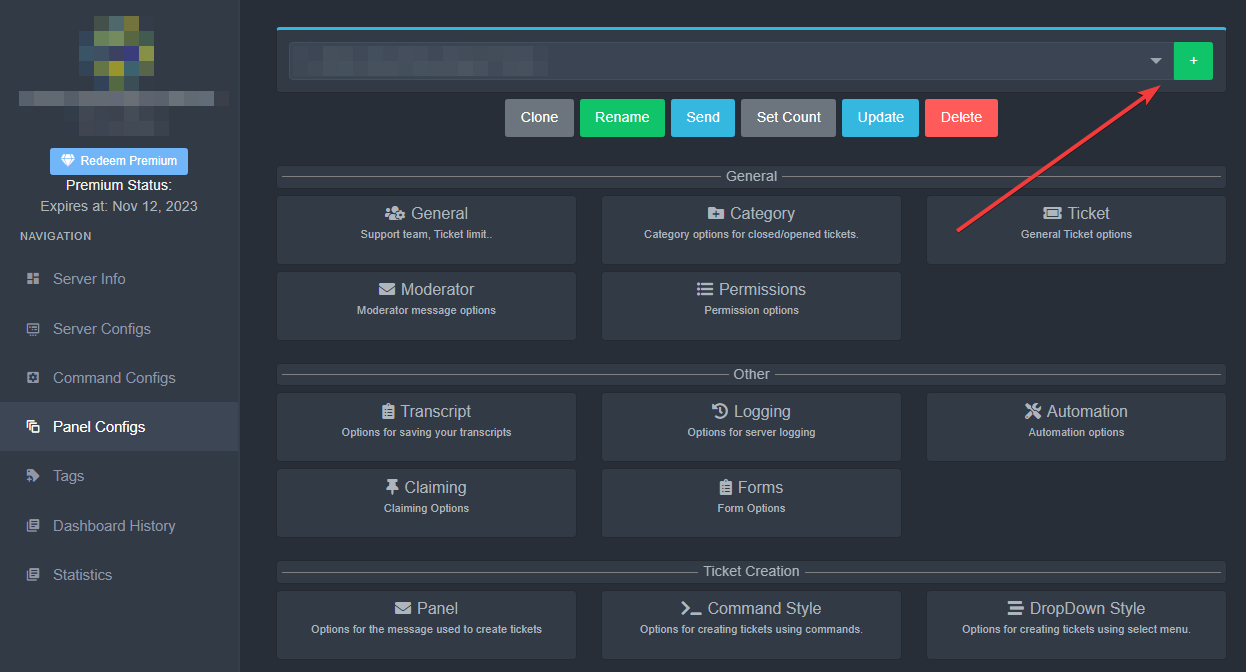
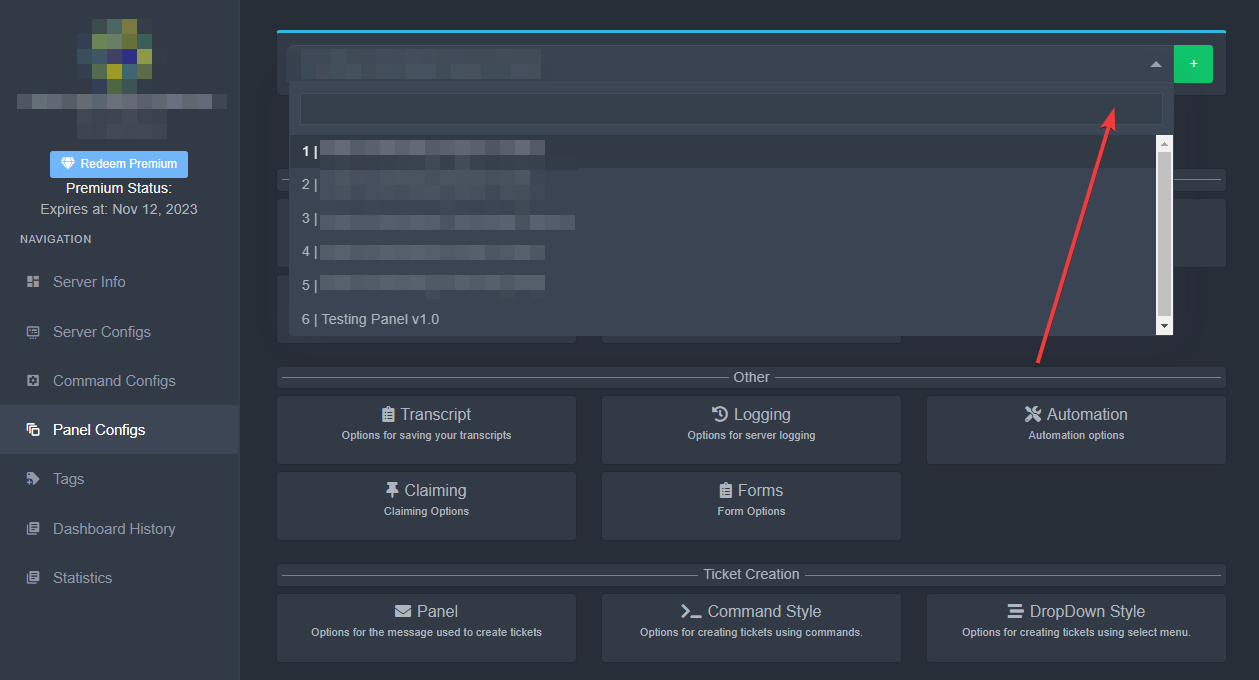
Panel Configurations v2 Update - Finding panel settings
As the panel configurations page has been recently updated, some instructions here may be out of date, such as finding "settings" in your panel configurations.
Instead of going to panel configurations, you will now select a panel from the dropdown at the top of the screen, and then your settings will appear as normal.
https://i.imgur.com/wtFiGZh.png
https://i.imgur.com/2zHmokz.png
 still hornet
wintry bane
click to area where is "other" on my screenshot (you will have something else) a...
still hornet
wintry bane
click to area where is "other" on my screenshot (you will have something else) a...
I’m still lost
I’m doing this on my phone
Never mind I fixed it
wooden swan
it says failed to send access denied now idk what’s wrong with this thing
and i checked my discord it has permission to post in the channel
Anybody know how to fix that
wintry bane
@wooden swan Can you try run $debug command and share screenshot of output here?
wooden swan
ok i will
i did not change anything and it was working only thing i tried was to send it to a different channel

i noticed the channel it was working on doesn’t have the ❌‘s how do i change it ?
@wintry bane
wintry bane
And what is text of that error?
wooden swan
man this to difficult all this just to say up a bot
wintry bane
Screenshot?
wooden swan
i’m on my laptop all im trying to do is give ticket tool full permission for whatever reason it’s showing as denied now
wintry bane
Hmm, can you please #🎫│make-a-ticket? Support team will help you
wooden swan
it’s let’s me send ticket tool to my channel with no category but when i try to send it to a channel under a category it does not work
and support replies once every 3 hours so it’s no point of sending another ticket
scenic plinth
Hasn't been more than 2, but I guess we don't have lives either...
wintry bane
wooden swan
it’s let’s me send ticket tool to my channel with no category but when i try to ...
Did you set permissions of that category?
wooden swan
scenic plinth
*Hasn't been more than 2, but I guess we don't have lives either...*
nothing wrong with that i’m simply stating why i’m not creating another ticket
wooden swan
wintry bane
Did you set permissions of that category?
yes i did all that it’s ok thanks for trying i just won’t use this
iron nightBOT
Gave +1 Rep to @wintry bane
verbal wasp
verbal wasp
hi, so im trying to send my panel and its giving me this message. i've allowed i...
^^^???
scenic plinth
Something you set in the panel configuration such and most likely being the buttons, has a emoji Ticket Tool does not share a server with or is an animated emoji that cannot be used.
 autumn field
How do I add ticks to the room?
 hallow bloom
How to use animated emojis or custom emojis from server as buttons? The bot is only showing me default emojis
rustic gale
hallow bloom
How to use animated emojis or custom emojis from server as buttons? The bot is ...
Type the name of the emoji in the search box. They take a while to load, but they load eventually.
Alternately, get the emoji's id using Ticket Tool's $id command, and paste the id into the “Button Emoji” field
$id 
humble sequoiaBOT
<:PabloTiphat:983791053842837624>
rustic gale
Currently impossible
Feel free to post the suggestion in the #🤖│bot-spam channel using the s!suggest command
 cunning latch
How can I make a ticket claim a ticket or undo a ticket someone pls help
humble sequoiaBOT
Claiming allows you to change the ticket name, category and permissions. To use it you have to enable it first on your Dashboard > Panel Configs > Claiming

 Note: This is a premium feature
lunar solar
cunning latch
How can I make a ticket claim a ticket or undo a ticket someone pls help
Note: This is a premium feature
lunar solar
cunning latch
How can I make a ticket claim a ticket or undo a ticket someone pls help
See above ^
iron nightBOT
Gave +1 Rep to @lunar solar
 sturdy geyser
How can I block a role from creating certain tickets on a panel
humble sequoiaBOT
Any role you assign as a blacklisted role won't be able to use commands or reactions.
Selecting a blacklisted role
Go to your Dashboard ➞ Server Configs. There you will find the option to select blacklisted roles.
Note: Don't forget to save.
 pale pilot
@sturdy geyser
 short birch
Hi I have a problem
sturdy geyser
okay
sturdy geyser
pale pilot
<@551756090518405144>
but i want it just for a panel
not for every panels
pale pilot
Then go into the panel message of one panel and edit the button. In there you can set a blacklisted role @sturdy geyser
sturdy geyser
pale pilot
Then go into the panel message of one panel and edit the button. In there you ca...
oh nice
 pale pilot
Go into each panel and click the blue count button on top @sturdy geyser
hallow bloom
so i am using a custom emoji and multi pannel, however when i sent the panel, the multi panels show the same button as the main panel regardless of what i added on the multi pannels
sturdy geyser
hallow bloom
so i am using a custom emoji and multi pannel, however when i sent the panel, th...
same
 gilded verge
If you see emoji  , it means your server need premium to use "that" option
hallow bloom
gilded verge
If you see emoji <:premium_red:662032717906444329>, it means your server need pr...
im able to use them now but its not showing more than 2 options, i have added 3
sturdy geyser
Where can I edit this message?
 plain surge
sturdy geyser
Where can I edit this message?
plain surge
sturdy geyser
Where can I edit this message?
When did you last edit the drop-down menus?
Was it in the old panel configs?
Now you go to Panel configs and select the panel you had drop-down menu set up in.
Then scroll down and press on Drop-down style

Then send me a screenshot of what you see please
 deep inlet
additional role mean the roles that can see the ticket ?
lunar solar
deep inlet
additional role mean the roles that can see the ticket ?
yes, no perms like support team
deep inlet
ok
just see the ticket and text
lunar solar
yeah should be, you can setup permissions for them
Panel Configs --> Permissions --> Additional Roles Permissions
@deep inlet
hallow bloom
deep inlet
ok
just see the ticket and text
I dont think they can text unless you set perms for them
lunar solar
hallow bloom
I dont think they can text unless you set perms for them
View and send messages are setup for additional roles by default
hallow bloom
lunar solar
View and send messages are setup for additional roles by default
The documentation is outdated
"One of the most common uses given to this feature is having an observer role, i.e. someone who can see the ticket but doesn't have the permission to talk on it."
Doesnt talk mean send messages?
lunar solar
hallow bloom
"One of the most common uses given to this feature is having an observer role, i...
If you create a fresh panel and look at additional roles permissions they have View Channel & Send Messages permissions pre-green ticked
Not sure about the documentation just referencing what the panel/s is actually doing
rustic gale
That's the type of thing you can use Additional Roles for, but it's not set up like that by default
The default permissions are the same as the default user permissions (open and closed)
lunar solar
rustic gale
That's the type of thing you can use Additional Roles for, but it's not set up l...
Is that directed at me or Prab?
rustic gale
Just the general public
lunar solar
Ahh right but open and close they have view and send messages by default yes?
plain surge
In close no
lunar solar
ahh sorry yeah
plain surge
All good 👍
sturdy geyser
plain surge
When did you last edit the drop-down menus?
Long time ago
sturdy geyser
plain surge
Then send me a screenshot of what you see please
Nothing basically
That's the issue i have
sturdy geyser
plain surge
Was it in the old panel configs?
Yes
Now how do i make them?
Each panel a dropdown? Or i do all 4 dropdown options on the main panel, since i have multipanels connected to one
 upbeat prawn
hi
how can i change the count of the ticket in the new website ?
lunar solar
upbeat prawn
hi
how can i change the count of the ticket in the new website ?
Very top there is a Set Count button
iron nightBOT
Gave +1 Rep to @lunar solar
lunar solar
Np
sturdy geyser
Is it possible modifying this text that appears to users that can't use a certain panel?
 scenic plinth
No
 tribal light
how to edit support permission to accesss opened ticket?
for some reason its not working for me
jade topaz
hi, why can i only create 1 ticket at a time?
 torn bone
jade topaz
hi, why can i only create 1 ticket at a time?
torn bone
jade topaz
hi, why can i only create 1 ticket at a time?
You can edit this at Panel Configs > general
jade topaz
torn bone
You can edit this at Panel Configs > general
oh! thankyou so much
torn bone
tribal light
how to edit support permission to accesss opened ticket?
At Panel configs>general and then add the roles you want
 mental cape
I opened a ban appeal ticket but no one answered me, I've tried 3 times and no one answers me
rustic gale
Did you see a “Ticket created: #ticket-0123” type of message when you created the ticket?
mental cape
rustic gale
Did you see a “Ticket created: #ticket-0123” type of message when you created th...
yes
rustic gale
You're supposed to click that to be taken to your ticket
mental cape
rustic gale
You're supposed to click that to be taken to your ticket
I already did that, understand? but no one answers me
😦
rustic gale
We can't do anything about that sadly
That's all up to the staff of whatever server you're in
mental cape
hm..ok,tysm
jade topaz
I have no idea how to get this to work
torn bone
jade topaz
I have no idea how to get this to work
What do you have trouble with?
 vernal helm
how do i set up a ticket in a channel
jade topaz
@torn bone Just trying to set it up in my server
torn bone
You can start by following the setting up tutorial in #📂│information
jade topaz
I did
rustic gale
Where did you get stuck?
jade topaz
The Panel part
torn bone
At the panel you can choose how you want the ticket bot to work in your server
rustic gale
Are you on a computer or a phone?
 at the top left
jade topaz
at the top left
jade topaz
Okay, I figured out the panel stuff
Does anyone know how to make a channel read-only?
@rustic gale @torn bone
Oop srry
rustic gale
jade topaz
Does anyone know how to make a channel read-only?
By denying the Send Messages permission
jade topaz
Ah ok
If I was given the same permissions on a server as the owner would I be able to send the panel to that server?
Or would the owner have to?
Please @jade topaz when you respond
rustic gale
jade topaz
If I was given the same permissions on a server as the owner would I be able to ...
If you have dashboard access you can send panels.
Dashboard access requires either being the owner of the server, having the Administrator permission, or having a dashboard role
humble sequoiaBOT
Any role you put there will have full access to the ticket tool dashboard. The server owner and users with admin permissions already have access to the dashboard.
Be careful of which roles to put here

 steady flame
hello, when I'm creating a multi-panel I notice that the emoji for each button defaults back to the envelope
but in the settings, I have a different emoji selected for each button

 tacit burrow
hello i need a small help i have wick as anti raid bot and when i invite the tickettool bot i can see in members but not as online bot someone can help ?
torn bone
tacit burrow
hello i need a small help i have wick as anti raid bot and when i invite the tic...
Have you giving it permission to be in the specific channel?
tacit burrow
torn bone
Have you giving it permission to be in the specific channel?
i give him admin perms
torn bone
tacit burrow
i give him admin perms
Hmmm okay, i dont think i can help you
I would recommend opening a ticket #🎫│make-a-ticket
tacit burrow
torn bone
Hmmm okay, i dont think i can help you
np ty
iron nightBOT
Gave +1 Rep to @torn bone
 weak lake
how to set a blacklist role with the new panel?
torn bone
weak lake
how to set a blacklist role with the new panel?
When you go to Panel configs > general and then blacklist roles
I believe (hahah doing it from memory)
weak lake
That ain't there tho sadly.
 weak lake
Thanks
humble sequoiaBOT
Any role you assign as a blacklisted role won't be able to use commands or reactions.
Selecting a blacklisted role
Go to your Dashboard ➞ Server Configs. There you will find the option to select blacklisted roles.
Note: Don't forget to save.
 rugged kite
Help pleases
 weak lake
humble sequoia
weak lake
humble sequoia
Ohh, it's a general feature, so can't do it per ticket type?
torn bone
Ohh my bad it is at server configs @weak lake
weak lake
Yes, I saw that now haha
torn bone
Hahaba oeps
rugged kite
rugged kite
Help pleases

torn bone
rugged kite
<:AaronThink:993233991081668648> <:AaronThink:993233991081668648> <:AaronThink:9...
Maybe you should #🎫│make-a-ticket ?
 chrome canopy
When I sent my ticket in this happened. How should I fix this?

 muted bough
You could have also left the old panel in -.-
chrome canopy
What do you mean?
gilded verge
so you don't want there to be a second button?
chrome canopy
Yes
gilded verge
Panel Configs->Choose your panel->Ticket Creation->Panel->Attached Panels (Multi Panels) -there delete panel which you have *added and Save
My example:

oh, and send panel again or Update him :>
 chrome canopy
Oh thank you so much
 maiden tide
I was looking around and couldn't find anything in the docs to say otherwise. Are panel button emoji's a premium feature? I believe I have added them appropriately but, when I update my panel, the standard Ticket emoji shows still.
 hazy ice
hello, can anyone help me how to reset 2FA Authentication
 twilit orbit
why is the bot offline
 tidal elm
Hi why the bot offline
and how much it take to back?
shut bolt
twilit orbit
why is the bot offline
Welcome to Ticket Tool's home for real-time and historical data on system performance.
It's a scheduled maintenance
 solid oyster
how can I get Outage Ping (Primary Bot) role?
 upper flower
solid oyster
upper flower
solid oyster
ooh, thx 👍
humble sequoiaBOT
We would love to help you, but if you don't tell us what you need help with we can't help you :(
scenic plinth
🙂
rustic gale
Ah.
native zodiac
Please ping once Ticket Tool is back up. Thank you!
rustic gale
native zodiac
Please ping once Ticket Tool is back up. Thank you!
It should be back up now.
native zodiac
rustic gale
It should be back up now.
Legend, thank you, great job +10 rep
iron nightBOT
Gave +1 Rep to @rustic gale
rustic gale
 sharp cedar
Is there any support here?
sharp cedar
Is there any support here?
Are you in need of help?
rustic gale
You mean change the claimer?
 rustic gale
Ah. You mean change the ticket name
sharp cedar
yes
rustic gale
Use {author.name}
sharp cedar
thx
 next valley
I think I accidentally broke he bot in my server - I was trying to fix the ticket names and I was checking by opening tickets
rustic gale
Yeah?
next valley
now it won't let me open any tickets, no matter the panel. it just says "creating ticket"
rustic gale
Not just you.
rustic gale
Uh huh. It's been reported. We're figuring it out
rustic gale
next valley
I was about to be so embarrassed
Are you using the basic or the premium bot?
next valley
rustic gale
Are you using the basic or the premium bot?
Premium
rustic gale
Can you try kicking and reinviting the bot using the invite here
humble sequoiaBOT
The first thing you will need to do is invite the premium bot, an invite can be found here
Once the bot is in your server we will head to the dashboard and manage your server. When you are managing your server, you want to head into "Server Configs" then click the drop down menu under "Select the bot you would like to use on this server" then click "Ticket Tool#6207" and then save.
 next valley
Will I have to re do all of my panels?
rustic gale
No
 gaunt dock
bot down? Not able to make tickets on any of my discords
scenic plinth
Does the bot appear online for you?
native zodiac
rustic gale
It should be back up now.
Not working again :pepehands
jade topaz
yeah bot is down
scenic plinth
Are you guys using premium or non premium?
jade topaz
im using premium
 unborn mist
non
scenic plinth
Alright, a moment.
gaunt dock
non
scenic plinth
Are you getting prompts of creating ticket or "interaction failed"?
jade topaz
It works but it stays at Creating Ticket and nothing happerning
I have 3 guilds and it works on none of them
rustic gale
Yup, it's “Creating ticket...”
 main elbow
[I also see the same, using the premium bot]
scenic plinth
If I may ask, if the bot is appearing online, can you see it's status and tell me what shard it displays in it's status?
jade topaz
11
gaunt dock
shows online yes
jade topaz

 remote ermine
is ticket down when ever i try open ticket it dosent work
gaunt dock
 scenic plinth
remote ermine
is ticket down when ever i try open ticket it dosent work
scenic plinth
remote ermine
is ticket down when ever i try open ticket it dosent work
If you bothered to read... yes we're aware of the issues with the bot right now...
next valley
I got zero shards :(
 remote ermine
scenic plinth
*If you bothered to read... yes we're aware of the issues with the bot right now...
remote ermine
scenic plinth
*If you bothered to read... yes we're aware of the issues with the bot right now...
ok
scenic plinth
Shard 0 does exist.
rustic gale
The mythical Shard Zero
jade topaz
I may say, just restart the whole system at this point lOL
next valley
jade topaz
I may say, just restart the whole system at this point lOL
They would love your input on how to run their bot once you join the staff :)
 pearl tapir
anybody else having problems with the bot not opening a ticket
unborn mist
how to use an custom emoji from my server in
 next valley
unborn mist
how to use an custom emoji from my server in
next valley
unborn mist
how to use an custom emoji from my server in
cannot
unborn mist
ah alr
jade topaz
next valley
They would love your input on how to run their bot once you join the staff :)
bruh its a joke chill lmao
rustic gale
Yes you can
next valley
Oh oops
lunar solar
unborn mist
how to use an custom emoji from my server in
You need premium
next valley
I didn’t get the job
rustic gale
unborn mist
how to use an custom emoji from my server in
Copy the ID and paste it into that field
unborn mist
what id
main elbow
 rustic gale
You can get the ID with the $id command
unborn mist
ah thank you
rustic gale
$id
humble sequoiaBOT
<:PabloTiphat:983791053842837624>
pearl tapir
the bot wont open a ticket for me
 muted haven
Not sure if this is the corrective chat, is ticket tool down for anyone else’s server?
scenic plinth
Maybe read up...
pearl tapir
my bad
scenic plinth
We are aware of the bot being stuck in a loop when creating tickets. We have notified the proper party to overlook the issue. There is no current ETA or known fix at the moment, so please avoid asking consistently. Thanks!
Resolved.
unborn mist
why my message content i put not getting sent with the panel?
 spice plover
uhmmmm...?

 fluid surge
spice plover
uhmmmm...?
spice plover
fluid surge
https://discord.com/channels/509192800865353738/776680605517742090/1024524781225...
fluid surge
spice plover
uhmmmm...?
spice plover
fluid surge
https://discord.com/channels/509192800865353738/776680605517742090/1024524781225...
im stupid, thank you
iron nightBOT
Gave +1 Rep to @fluid surge
 hearty kayak
with my bot everything is set correctly and everything has worked and the next day it says ticket is created please wait it happens nothing
lunar solar
hearty kayak
with my bot everything is set correctly and everything has worked and the next d...
unborn mist
why my message content i put not getting sent with the panel?
scenic plinth
Maybe because it needs to be saved, or placed in the wrong place.
Messages sent "with the panel" is the panel message.
unborn mist
it shows that it should be sent like this but the "siuu" doesnt get sent with it
 scenic plinth
You are editing the ticket message, not the panel message.
jade topaz
its posting for me, but when i click the ticket, no ticket pops up ?
jade topaz
ok, thx. thought i was going crazy 😂
remote ermine
when will this be up
scenic plinth
Never! Nobody reads!
jade topaz
scenic plinth
Never! Nobody reads!
Facts
spice plover
well now im gonna starve
rustic gale
We have decided to take down the bot because we're disappointed that no one reads messages from staff
 digital dagger
rustic gale
We have decided to take down the bot because we're disappointed that no one read...
digital dagger
rustic gale
We have decided to take down the bot because we're disappointed that no one read...
can i get a refund
rustic gale
scenic plinth
~~**We are aware of the bot being stuck in a loop when creating tickets. We have...
This is the message we mean, by the way
digital dagger
i want to speak to the manager
jade topaz
What are words except a bunch of jiberish sfh;sa
spice plover
rustic gale
We have decided to take down the bot because we're disappointed that no one read...
you should see the iPogo server. as soon as something goes wrong they post it in Status but theres still literally hundreds of users who come into general like 'WhY IsNT It WoRkInG'
rustic gale
What's an ipogo
digital dagger
spice plover
you should see the iPogo server. as soon as something goes wrong they post it in...
just delete general at that point lol
spice plover
doesnt matter. server filled with 300k illiterate monkeys
spice plover
digital dagger
just delete general at that point lol
that'll show them
 timber plover
am stuck here on my server can someone help
 digital dagger
shut bolt
<:sunglassesderp:901913550698717304>
digital dagger
shut bolt
<:sunglassesderp:901913550698717304>
id like to talk to you about Your Car's Extended Warranty
 autumn mortar
Idk why ppl gotta bug yall 💀 i joined checked announcements checked here got my answers without asking and im good 😅
shut bolt
digital dagger
id like to talk to you about Your Car's Extended Warranty
Sure, can I call you back when I'm available?
jade topaz
id be happy to be flooded with msgs for my bot
shut bolt
timber plover
am stuck here on my server can someone help
Read the pinned message
autumn mortar
Literally all u gotta do is check general and announcements 😭
humble sequoiaBOT

autumn mortar
But rip good luck 💜 i know these situations are pain
digital dagger
 digital dagger
shut bolt
Sure, can I call you back when I'm available?
digital dagger
shut bolt
Sure, can I call you back when I'm available?
i suppose but we'll call u twice a day until then
spice plover
support workers are saints among men monkeys
scenic plinth
Should just ping everyone, maybe that will be better. (Don't try or security kills you)
digital dagger
new number
digital dagger
spam issues
shut bolt
cries
timber plover
shut bolt
Read the pinned message
from which channel
shut bolt
timber plover
from which channel
This same one
autumn mortar
timber plover
am stuck here on my server can someone help
For now id suggest mentioning it in general of the server so staff gets a heads up dont ping (as some dont want pings or know already in their servers)
But more just so they realize we didnt notice til members said something
As for bot itself u just gotta wait til they handle it (that is if u dont see others mentioning it already lol)
digital dagger
indian scammer laugh
shut bolt
installs an anti-spam app
digital dagger
installs an anti anti-spam app
shut bolt
damn
spice plover
check mate
scenic plinth
anti spams your anti spam
digital dagger
car warranty 1, manager 0
spice plover
most unhinged support server i have ever been in
shut bolt
spice plover
most unhinged support server i have *ever* been in
We are serious when we need to be serious, and we are chill the rest of the time
It's a fun server
digital dagger
shut bolt
car warranty 1, manager 1
ring ring
shut bolt
shoot please not
spice plover
shut bolt
We are serious when we need to be serious, and we are chill the rest of the time
seriousness is overrated. came for support, stayed for the brutal chess match unfolding
digital dagger
shut bolt
_shoot please not_
ring ring
shut bolt
spice plover
seriousness is overrated. came for support, stayed for the brutal chess match un...
Glad to hear you are enjoying it
shut bolt
digital dagger
*ring ring*
removes the sim card from the phone
rustic gale
Well, hopefully in a few minutes the fun will be over
digital dagger
shut bolt
_removes the sim card from the phone_
knock knock
rustic gale
And then everyone goes back to work
shut bolt

 spice plover
rustic gale
And then everyone goes back to work
spice plover
rustic gale
And then everyone goes back to work
i would believe you but as everyone knows, if you have a higher rank role, you are objectively better
digital dagger
shut bolt
https://giphy.com/gifs/impastortv-tv-land-tvland-impastor-l3V0slU7u7quJuZ3O
walks up to you from your fall


 spice plover
you're forfeiting your chess match you realize
shut bolt
NEVER!
shut bolt
digital dagger
https://media4.giphy.com/media/8VSaCyIdcnbuE/giphy.gif
I have no money sorry
scenic plinth
Explains the poor hygiene
shut bolt

digital dagger
shut bolt
I have no money sorry
want a call centre job?
shut bolt
digital dagger
want a call centre job?
Yooo fun fact
I once considered applying to one JAJAJAA
digital dagger
crikey
shut bolt
Discarded the idea, I would love to keep my mental health
digital dagger
probably for the best ngl
shut bolt
Facts
 wind solstice
I’m getting a “Access denied. Ticket tool does not have permission to view or send into this channel” in the dashboard
Please help 
digital dagger
 scenic plinth
wind solstice
I’m getting a “Access denied. Ticket tool does not have permission to view or se...
scenic plinth
wind solstice
I’m getting a “Access denied. Ticket tool does not have permission to view or se...
Have you tried allowing it to view or send messages in the channel... like it is saying it needs... in this error you are providing me... in black and white....
spice plover
im far too tired to exist at the moment but this is the funniest shit i have ever seen. this is where i'd put my ticket, IF I HAD ONE.

 digital dagger
spice plover
im far too tired to exist at the moment but this is the funniest shit i have **e...
digital dagger
spice plover
im far too tired to exist at the moment but this is the funniest shit i have **e...
 spice plover
absolute ape.
shut bolt
Guess who's Pablo btw 
digital dagger
shut bolt
Guess who's Pablo btw <:sunglassesderp:901913550698717304>
a drug dealer
spice plover
shut bolt
Guess who's Pablo btw <:sunglassesderp:901913550698717304>
your step sister
digital dagger
an indian called pablo
shut bolt
JASJSAJSAJ
spice plover
unhinged
digital dagger
 digital dagger
yes
 digital dagger
or are you
please reduce the slow down
shut bolt
I'm pretty sure I'm not indian
And I'm also sure I don't work on a call center
That makes us conclude
Let's move to #💬│general-chat lmao
digital dagger
shut bolt
And I'm also sure I don't work on a call center
 spice plover
you have a big bright M next to your name, must stand for MOM
spice plover
Mommy Milkers?
lunar solar
spice plover
Mommy Milkers?
aye yo
wind solstice
scenic plinth
Have you tried allowing it to view or send messages in the channel... like it is...
Thank you!
iron nightBOT
Gave +1 Rep to @scenic plinth
lunar solar
This some 👉🏻👈🏻 type vibes
pearl tapir
tickets are back up
spice plover
lunar solar
This some 👉🏻👈🏻 type vibes
YEAH AND?
spice plover
pearl tapir
tickets are back up
thats my queue 👋
shut bolt

spice plover
ill be like a college student who just moved out, ill be back, but only to do laundry and ask for money
 torpid trench
when i press send for a panel it says it's sent but it doesn't send
pearl tapir
can anybody help me.
I somehow got two create ticket buttons instead of just one
how do I get rid of the second one
rustic gale
pearl tapir
how do I get rid of the second one
By making sure there's nothing in the Attached Panels field
rustic gale
torpid trench
when i press send for a panel it says it's sent but it doesn't send
Please type $debug in the channel you want to send your panel into
pearl tapir
oh bet, thanks
torpid trench
rustic gale
Please type $debug in the channel you want to send your panel into
it still doesnt work
rustic gale
You sent it and nothing happened?
It's likely a permission issue. What's your server's ID?
 nimble kraken
السلام عليكم
 granite crypt
Hiya I’m a little confused on what I’m supposed to do panel won’t work
torn bone
granite crypt
Hiya I’m a little confused on what I’m supposed to do panel won’t work
Where are you stuck?
granite crypt
torn bone
Where are you stuck?
Panel
lunar solar
granite crypt
Panel
Can you elaborate a bit more?
tribal light
torn bone
At Panel configs>general and then add the roles you want
still doesnt work
 torn bone
tribal light
still doesnt work
torn bone
tribal light
still doesnt work
When i do it there is a place for blacklist. So i would #🎫│make-a-ticket
tribal light
torn bone
When i do it there is a place for blacklist. So i would <#571706435449257997>
already did
torn bone
Hmmm i dont think i can help you any further ( i online installed ticket bot yesterday)
jade topaz
I need so much help right now (sorry for interrupting)
But I can't make a ticket or do anything with ticket tool, and I'm frustrated
torn bone
jade topaz
I need so much help right now (sorry for interrupting)
But I can't make a ticke...
Have you followed de setup guide in #📂│information ?
jade topaz
Yes I believe so
The site is just frozen, I can't do anything when I try to go to the panel section
torn bone
Ohh i'm sorry, i cant help with that
jade topaz
Ok, I got it up. I just don't know how to transfigure it to the server channel
 blazing cape
I need help with de bot
It tells me that bot do not have permissions to go to the channel where I want to send it, also I don't know why it don't have administrator permission
jade topaz
Ok I got it, but how do I make the ticket delete after
 gaunt roost
I can't react with the emotes on your ticket tool on here or the other discord channel I use... I can't figure out what I'm doing wrong can someone help.
jade topaz

What can i do?
The set up guide isn’t working, is there another guide I can use ?
When I press the set up guide it says interaction failed
 obtuse krakenBOT
1. Invite Ticket Tool to your server
First you will want to invite the bot to your server. Once the bot is in your server, you can manage your server in the dashboard.
2. Create a Panel
To create a panel we are going to need to head over to the panel configs on the dashboard.
Once at the dashboard we will need to click Create Panel.
Enter a panel name (Fill in any optional settings you want).
Click Create Panel and your ready to get started with configuring your panel.
An example of a creating a panel is shown below.
3. Send the Panel to a Channel
Once you've created a panel on the dashboard you will need to send it to a channel using send on the dashboard.
Select the channel you want your panel to be created in and click send.
For other questions checkout $help faq.
An example of a sending a panel is shown below.
Having a Problem Sending the Panel?
Do $debug in a channel with Ticket Tool and make sure it has all the necessary Discord permissions.
rustic gale
That's the setup guide
jade topaz
Cheers for the help
jade topaz
That’s really helped cheers again
 fervent zenith
Hi! Im trying to make a drop down menu for 2 things but the first panel shows however the seconds one does not, I dont know how to fix it! Is it just one drop down menu option and I have to make another one?
 trail portal
How do i go on settings im the panel configs?
rustic gale
trail portal
How do i go on settings im the panel configs?
You're probably looking at an outdated tutorial.
rustic gale
fervent zenith
Hi! Im trying to make a drop down menu for 2 things but the first panel shows ho...
It should be two options
All the details need to be filled out
Panel, Name, Description, Emoji
Well, you can leave the Emoji field empty
fervent zenith
rustic gale
All the details need to be filled out
Its all filled out
rustic gale
fervent zenith
Its all filled out
The panels need to be different
fervent zenith
rustic gale
The panels need to be different
I didnt try it that way yet! Thanks!!!
trail portal
rustic gale
You're probably looking at an outdated tutorial.
Can u send a pic of where it is?
rustic gale
trail portal
Can u send a pic of where it is?
What exactly are you trying to do?
trail portal
Get more buttons on the message and name them
rustic gale
Panel Configs -> select the panel at the top -> press the “Panel” button near the bottom
Add all the other panels to Attached Panels
then for each panel, do the following
Select it at the top -> “Panel” -> Edit Panel Message -> Create Ticket Edit Button
When you're done editing all the buttons, go back to the main panel and send it, or update it
 scarlet pecan
Hello, my English it’s not very good 🙂
Can you explain where to find for chance this " To create a ticket react with". With the new panel I don't find
Thank🙂
 scarlet pecan
Ok thanks , need a premium for change this now. before a update we don’t need premium …
maiden tide
maiden tide
I was looking around and couldn't find anything in the docs to say otherwise. Ar...
Bump
I was looking around and couldn't find anything in the docs to say otherwise. Are panel button emoji's a premium feature? I believe I have added them appropriately but, when I update my panel, the standard Ticket emoji shows still.
next valley
I tweaked my tickets last night and now the names are generating super super long. How can I fix this?
 next valley
Oh that makes a lot of sense
 autumn plaza
كيف تغلق تكت بامر
 narrow surge
hey i got premium for a server but it wont actually change the ticket names out of no where (didnt change anything
scenic plinth
We're aware and it's being looked at.
narrow surge
understood thanks
 bitter terrace
narrow surge
hey i got premium for a server but it wont actually change the ticket names out ...
bitter terrace
narrow surge
hey i got premium for a server but it wont actually change the ticket names out ...
Me2 🦔 luckily they are on it
 pale tree
I have a problem in the game. How can I report it? I dont know how to work with Discord, it is so disorganized...
scenic plinth
We're not your games support team
 plain kite
issues with tickets rn or not?
lunar solar
plain kite
issues with tickets rn or not?
Issue has been found and a fixed is being sorted as we speak
plain kite
lunar solar
Issue has been found and a fixed is being sorted as we speak
thx bro
iron nightBOT
Gave +1 Rep to @lunar solar
lunar solar
jade topaz
I can’t change my discord id to transfer my subscription
In Discord User Settings --> Advanced --> Turn on Developer Mode --> Right click on your server settings drop down bar, Copy ID
Should look like this:
 humble sequoiaBOT
━━ moved to ticket ━━
humble sequoiaBOT
━━ moved to ticket ━━
jade topaz
any reason why I cant send panel to a channel
yeah cant send any panels not sure if its down atm
or just me
rustic gale
jade topaz
any reason why I cant send panel to a channel
What error are you getting?
jade topaz
it just doesnt send to channel
on ticketool site there is no error but nothing appears on my server
rustic gale
Do you get a “panel sent!” message in the website?
 jade topaz
@rustic gale
 woven eagle
hi
anyone here
i have a prob
@fierce steppe
@wanton fern
bro
hellow
so i cant creat a multipanel
 fierce steppe
Why me?
woven eagle
fierce steppe
Why me?
wrong tag
rustic gale
Where are you stuck?
woven eagle
rustic gale
Where are you stuck?
im tryna create a multipanel
i think the site is updated
humble sequoiaBOT
For a more convenient use of multipanels, you can now combine panels on the dashboard. This will allow you to directly send the multipanel from the dashboard or via the $panel ID command.
Where can I find this?
You can find this setting on the Dashboard -> Panel Configs -> Settings -> Panel
Note: if you're attaching all the panels to a panel called English, don't include English in the attached panel's box (If you do this, it will create a duplicate)
This will put all buttons from all of your panels on one message. The message is the panel message from the panel you're combining these panels in.

 elfin lodge
hello, im trying so hard to set-up ticket tool on my server but i dont understand a sh.. . Is there anyone can vc with me and explain to me what to do
rustic gale
Sadly no, we don't provide that kind of help
elfin lodge
alright
woven eagle
elfin lodge
hello, im trying so hard to set-up ticket tool on my server but i dont understan...
How to set up Ticket Tool | Ticket Tool Tutorials ============youtube
jade topaz

Anyone know how to fix this I have no idea what I did I just got a new key nd it stopped creating tickets
rustic gale
jade topaz
Anyone know how to fix this I have no idea what I did I just got a new key nd it...
Has the issue persisted?
jade topaz
It’s working perfectly now
rustic gale
Must have been a network issue
 mossy imp
Hi, does anybody know why the Panel Message is not appearing in the channel?
I have it set up properly in the dashboard but the panel message will not appear, right now I am testing


I have saved and re-sent the panel 5 times so far but the panel message will not appear
rustic gale
What bot did you enable in Server Configs and what bot is in the server?
mossy imp
It's the Ticket Tool bot
gilded verge
*I have it too, i mean this bug
mossy imp
Everything else works except for the panel message, no clue why
It seems some-how the panel message is not transmitting when sending or updating
Is this a new bug or something?
gilded verge
i think so 🤔 please report that in #1020426768450080899 ^^
 fast pewter
hey ! its possible to change the ticket tool bot name ? i have premium status 🙂 thanks
fast pewter
 wraith moss
the bot is not working
wraith moss
the bot is not working
He worked before? I mean you can't get it to work, or it stopped working?
wraith moss
fast pewter
He worked before? I mean you can't get it to work, or it stopped working?
no when i type $help its not working and i changed it to - and then ! and both didn't work
i even tried /
lunar solar
fast pewter
hey ! its possible to change the ticket tool bot name ? i have premium status 🙂...
$pc 384511957060943886
humble sequoiaBOT

Thank you
Thank you for purchasing Ticket Tool Premium @fast pewter. You have now been given the <@&535595160189403136> role!
Found 29 servers in total and 1 with premium and permission
wraith moss
humble sequoia
noice
lunar solar
Fixed your roles up @fast pewter, customising the bot will happen but it’s a lower priority at the moment expect to see it in the future.
wraith moss
.
lunar solar
@wraith moss can you run $debug in your server?
wraith moss
lunar solar
<@979028076761612348> can you run $debug in your server?
lemme try
wraith moss
lunar solar
<@979028076761612348> can you run $debug in your server?
yeah
lunar solar
@wraith moss your bot doesn’t have send messages permissions that is the issue
wraith moss
lunar solar
<@979028076761612348> your bot doesn’t have send messages permissions that is th...
he only have 2 roles first one is ticket tool and the second is bots role
lunar solar
The channel that you send $debug in the bot doesn’t have send message permissions to that channel
wraith moss
oh yeah
lunar solar
Hence why you aren’t getting a response when you try and use the prompts
wraith moss
k lemme try something
wraith moss
lunar solar
Hence why you aren’t getting a response when you try and use the prompts
now its saying "warning this channel isn't a ticket"
lunar solar
wraith moss
now its saying "warning this channel isn't a ticket"
What command are you trying to run?
wraith moss
lunar solar
What command are you trying to run?
.$open
lunar solar
$open is the command to open a already closed ticket to create a ticket you need to use:
$ticket
Or
$ticket <userid>
The second force opens a ticket on someone’s behalf
humble sequoiaBOT
Warning: This channel isn't a ticket
wraith moss
ohh
lunar solar
That’s assuming you have that feature enabled
wraith moss
lunar solar
That’s assuming you have that feature enabled
disabled
lunar solar
Let me find where it exists
wraith moss
k
lunar solar
Panel Settings --> Command Style --> Enable Command Style ticket creation
Additionally you can choose a channel to monitor and a few other options
Should look like this:

If you just want people to create a ticket of a Discord embed message via a button then you need to configure the panel message and send it to the respective channel you want tickets created from
wraith moss
okay
fast pewter
lunar solar
Fixed your roles up <@384511957060943886>, customising the bot will happen but i...
thanks Lupus 🙂
iron nightBOT
Gave +1 Rep to @lunar solar
 zenith sigil
Hello there
Since few days closed ticket won t goes to right catégorie, without any change ont the server or bot configuration, is there any reason of this behalf 🤔
Ty in advance for your answer
lunar solar
zenith sigil
Hello there
Since few days closed ticket won t goes to right catégorie, without ...
It may have been potentially effected in the down time period the other day, as a result any tickets already open may not function correctly.
Is this still the case with new tickets opened?
lunar solar
 ocean ledge
It says that it's offline
ocean ledge
It says that it's offline
Best to #🎫│make-a-ticket and provide your server id so the support team can look into it for you
lunar solar
ooft
ocean ledge
lunar solar
ooft
Does that mean that I'll have to set it up again from scratch?!
I hope not O_O
lunar solar
ocean ledge
Does that mean that I'll have to set it up again from scratch?!
Shouldn't do just re-invite the bot
Make sure the other bot doesn't ban it again
zenith sigil
lunar solar
Best to <#571706435449257997> and provide your server id so the support team can...
T’y for your quick answer, I will do so
And yes it happends for tickets open and closed yesterday
lunar solar
zenith sigil
T’y for your quick answer, I will do so
And yes it happends for tickets open an...
Have you tried today?
zenith sigil
lunar solar
Have you tried today?
No I will do so right now
zenith sigil
lunar solar
Have you tried today?
Test ticket done (opened ans closed) same problem
lunar solar
zenith sigil
Test ticket done (opened ans closed) same problem
Are the categories still correct under:
Panel Configs --> Category
zenith sigil
lunar solar
Are the categories still correct under:
Panel Configs --> Category
Yes I have already verify that (that was my first verification)
lunar solar
Ahh okay, best to make a ticket then #🎫│make-a-ticket and go through the potential issues with the support team
zenith sigil
lunar solar
Ahh okay, best to make a ticket then <#571706435449257997> and go through the po...
Ok Ty 👍
iron nightBOT
Gave +1 Rep to @lunar solar
rustic gale
Tickets suddenly not moving to the right category when they used to is almost always because of full categories.
$overflow
humble sequoiaBOT
Discord only allows to stack up to 50 channels per category, meaning that if you have already 50 tickets in one category, the bot won't be able to place a ticket in that category, for such reason Ticket Tool counts with overflow categories, meaning that if your main category is filled, the bot will go ahead and place the ticket on the next one available, simply choose a second category in the category pickers:

 bold shale
- Getting 15 days of Ticket Tool premium! (every 2 boosts)
hey there just wondering if these perks are still applicable? + after i boost how do i claim the 2 weeks premium?
 slender minnow
bold shale
- Getting 15 days of Ticket Tool premium! (every 2 boosts)
hey there just wonder...
slender minnow
bold shale
- Getting 15 days of Ticket Tool premium! (every 2 boosts)
hey there just wonder...
open a ticket to claim your perks
bold shale
slender minnow
open a ticket to claim your perks
ok
 pale smelt
how to make delete button shows for some roles only ??'
slender minnow
pale smelt
how to make delete button shows for some roles only ??'
you can't restrict who can see the button
but instead you can restrict who can use it
 gray hare
Um the suggestions ain't popping up in #💡│suggestions for some reason.
scenic plinth
Because it is being reviewed.
gray hare
Oh I see, is there any eta on it ?
scenic plinth
No
iron nightBOT
Gave +1 Rep to @scenic plinth
gray hare
Uh 😭
 faint rain
hey i have no small problem i cant create a panel on the ticket tool web page for my server
 covert swallow
Do you get an error?
faint rain
no, according to a friend, create panel should be in the top left corner, but it isn't there

that's how it should look, my friend thinks

but that's how it looks to me
 covert swallow
Panels were recently updated, it looks like your friend is looking at the old version
faint rain
how can i create a pann in the new version
 knotty stump
How to set maximun ticket able to create
humble sequoiaBOT
You can check our documentation here;
You can also check #📂│information for the basic setup;
You can also watch this video tutorial.
Our documentation contains all the info you need about the bot to be able to setup and configure the bot however you like.
covert swallow
knotty stump
How to set maximun ticket able to create
Per panel or globally?
knotty stump
Is globally for the whole server?
covert swallow
Yes
knotty stump
Yes globally
faint rain
no, that's not a kastechn for
covert swallow
What?
faint rain

 knotty stump
I already made it 10 just now but not work

 steep whale
How do I invite the premium bot? (I have premium)
humble sequoiaBOT
The first thing you will need to do is invite the premium bot, an invite can be found here
Once the bot is in your server we will head to the dashboard and manage your server. When you are managing your server, you want to head into "Server Configs" then click the drop down menu under "Select the bot you would like to use on this server" then click "Ticket Tool#6207" and then save.
gilded verge

steep whale
Thank you!
faint rain
knotty stump
I already made it 10 just now but not work
for me it looks very different
covert swallow
knotty stump
I already made it 10 just now but not work
Hit save, make sure a panel limit isnt interferring (ie being 5 when you want 10)
knotty stump
So set it to 5?
faint rain
it looks like this to me
 faint rain
lunar solar
Green button top right
faint rain
lunar solar
Green button top right
and where can i tell the great where to create the ticket for me in which chanel on my server
humble sequoiaBOT
You can check our documentation here;
You can also check #📂│information for the basic setup;
You can also watch this video tutorial.
Our documentation contains all the info you need about the bot to be able to setup and configure the bot however you like.
lunar solar
Follow through this ^
 lunar solar
Hit create one, name it and go from there following the guide
Once you create one it will unlock the rest of the options to configure the bot
knotty stump
Limit ticket not worked
faint rain
ok i did it but i don't get a message in chanel where he should give me the ticket great
 chrome night
Can anyone help - I'm having an issue where ticket's are creating but no one except staff and support can see them.
rustic gale
chrome night
Can anyone help - I'm having an issue where ticket's are creating but no one exc...
By default, the ticket creator should be able to see the ticket.
If that's not the case, someone must have moved the user open permissions.
 daring harbor
Idk how to make a ticket🙃
rustic gale
There's a setup guide in #📂│information
 rustic gale
You attached a panel in Attached Panels, right?
daring harbor
I think so
rustic gale
Why?
daring harbor
I fixed it
 rustic gale
There you go.
 rugged cliff
After changing text of the ticket it added second Create ticket button. Any ideas of how to fix?
 rustic gale
rugged cliff
After changing text of the ticket it added second Create ticket button. Any idea...
rustic gale
rugged cliff
After changing text of the ticket it added second Create ticket button. Any idea...
Did you add a panel to Attached Panels?
rugged cliff
rustic gale
Did you add a panel to Attached Panels?
Yea, I don't need?
Yea, I don't...
Thanks for help!
thank @rustic gale
iron nightBOT
Gave +1 Rep to @rustic gale
 sour loom
hey i have issues with perms
so I have a problem with the Perms and setting with Ticket Tool! I set the Perms for the 4 panels I have that anyone can send messages, tickets Perns can not change etc... but after a while the permissions I have set in the ticket tool reset again or is it different again! I don't know why but I ALWAYS save it! I even wait until this save button is gone before closing the page.
 strange hamlet
How can I make Ticket bot Make a ticket?
lunar solar
strange hamlet
How can I make Ticket bot Make a ticket?
Read through and follow #📂│information
strange hamlet
How can I make the bot say Recat To make ticket?
rustic gale
sour loom
so I have a problem with the Perms and setting with Ticket Tool! I set the Perms...
Whah
strange hamlet
strange hamlet
How can I make the bot say Recat To make ticket?
?
deep inlet
how can i do mention role when ticket opened
lunar solar
deep inlet
how can i do mention role when ticket opened
{roleid}
lunar solar
strange hamlet
How can I make the bot say Recat To make ticket?
Sorry can you restructure the question?
deep inlet
lunar solar
{roleid}
what ?
strange hamlet
daring harbor
I fixed it
How can I make the bot do this?
lunar solar
deep inlet
what ?
The role you want to mention, put the ID of the role inside {}
Do get the role ID do:
$id @role
In any channel the ticket bot has access to, screenshot below for example

Should look like this:
{958721032443789322}
lunar solar
strange hamlet
How can I make the bot do this?
Follow the steps in #📂│information
strange hamlet
strange hamlet
How can I make the bot do this?
Can someone help me..
rustic gale
Do what, exactly?
strange hamlet
lunar solar
Follow the steps in <#509239005481664524>
I can't understand anything in it tbh.
😦
lunar solar
deep inlet
how can i do mention role when ticket opened
It's also worth mentioning that the mention can't be inside the ticket embed as it won't mention the role.
Needs to be in the actual Message Content section above the embed
strange hamlet
Why is it so hard..
lunar solar
strange hamlet
Why is it so hard..
Would it be easier if I explain it in voice?
deep inlet
lunar solar
It's also worth mentioning that the mention can't be inside the ticket embed as ...
auto mention to role when ticket open
that's what i need
lunar solar
deep inlet
auto mention to role when ticket open
Yes thats what I just showed you how to do
deep inlet
lunar solar
It's also worth mentioning that the mention can't be inside the ticket embed as ...
here ?
strange hamlet
lunar solar
Would it be easier if I explain it in voice?
Look How Can I Let the bot say react 📰 [exapmle] To open ticket..
lunar solar
deep inlet
here ?
Should look like this:
 lunar solar
strange hamlet
Look How Can I Let the bot say react 📰 [exapmle] To open ticket..
lunar solar
strange hamlet
Look How Can I Let the bot say react 📰 [exapmle] To open ticket..
Panel Configs --> Edit Panel Message (green button bottom left) --> Add whatever you would like to the Message Content e.g. react :newspaper: [exapmle] To open ticket..
Edit the button if you so wish at the bottom of that page
strange hamlet
Where is the panel configs?
lunar solar
After that return to the Panel Configs menu and click Send (middle button up the top), pick your channel and done
strange hamlet
I'm on Mobile btw...
lunar solar
The menus should still be labelled the same
strange hamlet
I can't understand anything sorry I'm Dumb 🥲 I'll ask my friend to do it for me..
 fallow ingot
I’m not too sure what part you seem to be struggling to understand. The above information that @lunar solar has given you is correct and they have explained in detail what to do.
What can we do to help you understand better?
lunar solar
strange hamlet
I can't understand anything sorry I'm Dumb 🥲 I'll ask my friend to do it for me...


Ticket Tool - Ticketing without clutter - The #1 Discord support bot
strange hamlet
 lunar solar
wait that might be my bad
Ticket Tool - Ticketing without clutter - The #1 Discord support bot
Manager servers --> Manage your server
strange hamlet
Ok
lunar solar
lunar solar
Login to:
https://tickettool.xyz/
Click manage on your server and go to Panel ...
once your here
Find this option:

Then here

Add your message here:

Save it and then return to menu:

Then hit send and select the channel in your Discord
 lunar solar
deep inlet
here ?
lunar solar
deep inlet
here ?
How'd you go? all working?
deep inlet
lunar solar
How'd you go? all working?
yes
lunar solar
awesome 🙂
iron nightBOT
Gave +1 Rep to @lunar solar
strange hamlet
THANK YOU SO SO SO MUCH @lunar solar
iron nightBOT
Gave +1 Rep to @lunar solar
strange hamlet
iron night
Gave +1 Rep to **<@892854649172946985>**
He deserves it 🙂
lunar solar
strange hamlet
THANK YOU SO SO SO MUCH <@892854649172946985>
No worries 🙂
 vestal leaf
I made a ticket system in my server, but when i people create the ticket, it says they don't have permission
rustic gale
vestal leaf
I made a ticket system in my server, but when i people create the ticket, it say...
Odds are you blacklisted @"everyone" or a similar role
vestal leaf
rustic gale
Odds are you blacklisted @"everyone" or a similar role
There's no blacklisted role
checked the troubleshooting doc and it's alright

Create all the panels you need and go to one of them > Menu > panel and add all of them here

 ionic remnant
how do i make it so my staff can do tickets?? @gilded verge @wanton fern @short stump
rustic gale
ionic remnant
how do i make it so my staff can do tickets?? <@334671104704774154> <@129322331...
Give them a support team role
$help support
humble sequoiaBOT
How to let support team see into a ticket
About support roles
A support role lets your support team see into tickets with out having to add them manually to each and every ticket.
You can add as many support roles as you like per panel.
NOTE that the way discord works all admins can see into tickets regardless of this.
How to set a support role
To set a Support role go to the Dashboard -> Panel Configs -> Settings -> General Options -> Support Team Roles.

NOTE that the support role will not be able to see into tickets that are already created..
rustic gale
Ah. That's outdated
Just go to Panel Configs, select your panel, then scroll to the bottom and add the support team roles there
ionic remnant
ok tyy
 clear agate
Hi. In my tickets, I want to create a link to another channel (eg. #channel). When I do this, it's not a link, it just shows up as text. Solved.
scenic plinth
Great job reading the variables, most people can't do that Thanks for opening a ticket.
humble sequoiaBOT
Don't see your server in the dashboard?
You will possibly need to relog. Look below to see steps on how to relog.
How to relog in the Dashboard.
Note:
You need one of these 3 things to access the dashboard.
1. Server Owner (Level: 6)
2. Server Administrator (Level: 4)
3. Dashboard Role (Level: 2)
:warning: You can check your level using $level on your Discord Server
User permission level with Ticket Tool
@User is permission level: 0 (User)
```» *If it shows that your permission is **0**, you don't have any of the above **3 things** to manage the dashboard.*


**See the Image below on how to relog:**Did you type $level in your server
clear agate
scenic plinth
~~Great job reading the variables, most people can't do that~~ Thanks for openin...
actually, as you might know, someone told me <>. I read the docs but it didn't specify that.
I read the variables section but it only says
{channel.id}
The ID of that channel
I did {channel.id} but, as it says, it shows the channel ID of the channel its being used in
rustic gale
Did you type $level? What did you get?
clear agate
instead its <#channelID>
rustic gale
You need to get in touch with the server owner or an administrator and tell them to give you a dashboard role
humble sequoiaBOT
Any role you put there will have full access to the ticket tool dashboard. The server owner and users with admin permissions already have access to the dashboard.
Be careful of which roles to put here
clear agate
why do the docs say to use {} when it's actually <>
rustic gale
clear agate
why do the docs say to use {} when it's actually <>
It depends
It's never just <>
<> alone doesn't work for any type of mention
clear agate
right, why doesn't the docs say <> is used for channel mentions?
rustic gale
It's <#>
rustic gale
$mentions
humble sequoiaBOT
Within all the messages the bot's sends (both embeds and text) you can mention either channels, roles, or even users, these mentions will only send a notification to the user if they are used within a text field, e.g: a role mentioned in an embed won't ping at all the users who have that role.
For mentioning a role you can use one out of three options:
{@Role Name} ➞ Which is Case Sensitive.
{RoleID} ➞ Replace RoleId with the Id of the role you are trying to ping.
<@&RoleID> ➞ Discord's native syntax to ping roles.
<#ChannelID> ➞ Mention a channel by its ID.
<@UserID> ➞ Mention a user by its ID.
 viral sierra
$mentions
humble sequoiaBOT
Within all the messages the bot's sends (both embeds and text) you can mention either channels, roles, or even users, these mentions will only send a notification to the user if they are used within a text field, e.g: a role mentioned in an embed won't ping at all the users who have that role.
For mentioning a role you can use one out of three options:
{@Role Name} ➞ Which is Case Sensitive.
{RoleID} ➞ Replace RoleId with the Id of the role you are trying to ping.
<@&RoleID> ➞ Discord's native syntax to ping roles.
<#ChannelID> ➞ Mention a channel by its ID.
<@UserID> ➞ Mention a user by its ID.
 foggy depot
In panel configs I can't choose what channel the bot goes into
lunar solar
foggy depot
In panel configs I can't choose what channel the bot goes into
On the main menu of panel configs click send
Blue button top centre of screen
foggy depot
thank you
 rustic gale
 tawny dune
Why is error
tawny dune
Why is error
Because you either enabled the premium bot but don't have it in the server, or have the premium bot in the server but didn't enable it
Like it says right there
Check your premium bot settings in Server Configs
tawny dune
اوك
fallow ingot
$help support
humble sequoiaBOT
How to let support team see into a ticket
About support roles
A support role lets your support team see into tickets with out having to add them manually to each and every ticket.
You can add as many support roles as you like per panel.
NOTE that the way discord works all admins can see into tickets regardless of this.
How to set a support role
To set a Support role go to the Dashboard -> Panel Configs -> Settings -> General Options -> Support Team Roles.
NOTE that the support role will not be able to see into tickets that are already created..
lunar solar
 young mauve
it show me no settings next to it
young mauve
it show me no settings next to it
Hey @young mauve,
The gif about is the older version of the dashboard what you are looking for now is General as seen below:

Once you open that you can add roles into Support Team Roles or Additional Roles

 dusty kelp