#🆘│community-support
1 messages · Page 9 of 1
 void ruin
 fallow ingot
Sorry about that.
fallow ingot
Sorry about that.
Ta bro can you configure for your bot there? sorry too i think i spelled it wrong
fallow ingot
What part are you struggling with?
void ruin
fallow ingot
We cannot setup ticket tool for you but I can guide you through it.
the hand i need please
void ruin
fallow ingot
What part are you struggling with?
None
Sorry 😢
Since you can't, can one of you moderators?
fallow ingot
If you're asking can a moderator setup the bot for you the answer is also no.
void ruin
fallow ingot
If you're asking can a moderator setup the bot for you the answer is also no.
Why can't you and neither can the moderator
fallow ingot
Like I said, I can guide you but can't set it up for you.
 quiet cape
Bonjour comment on fait pour créer le système de ticket
fallow ingot
bonjour
 humble sequoiaBOT

Vous pouvez consulter notre documentation ici.
Vous pouvez également vérifier #📂│information pour les étapes générales.
Voici un YouTube tutoriel
Notre documentation contient toutes les informations dont vous avez besoin sur le bot pour pouvoir l'installer et le configurer comme vous le souhaitez.
quiet cape
Bonjour tu sais parler français
fallow ingot
humble sequoia
Regarde ça ^^
quiet cape
Ouais mais il faut que je clique sur quoi
fallow ingot
?
quiet cape
Sur lequel de ses boutons j’appuie
 void ruin
It's very difficult to configure your bot because I'm from Brazil and I don't understand almost any English
quiet cape
Pour le système de ticket
 fallow ingot
void ruin
It's very difficult to configure your bot because I'm from Brazil and I don't un...
fallow ingot
void ruin
It's very difficult to configure your bot because I'm from Brazil and I don't un...
I see
quiet cape
J’arrive pas tu peux pas me donner la commande directement
 robust sandalBOT
Com que parte você está lutando?
 English (en) → Portuguese (pt)
fallow ingot
English (en) → Portuguese (pt)
fallow ingot
@void ruin ^
quiet cape
C’est ça la commande
Pour créer un ticket parce que moi j’aime pas cliquer sur le lien
fallow ingot
$frticket
humble sequoiaBOT

L'équipe du support Français
Cher client,
Si vous avez besoin d'aide, ouvriez un ticket pour le support Français s'il vous plaît.
Allez au #🎫│make-a-ticket et tapez sur le button contenant l'emoji 🇫🇷
fallow ingot
Bien sûr vous pouvez créer un ticket ci-dessus
robust sandalBOT
void ruin
Hay*
There are*
Spanish (es) → English (en)
quiet cape
Quelqu’un peut me donner la commande en/
humble sequoiaBOT

Equipe de Suporte │ Português
Caro usuário,
Se você está procurando por ajuda, abra um ticket para entrar em contato com a Equipe de Suporte em Português. Vá para o canal: #🎫│make-a-ticket e pressione o botão: :flag_br:
fallow ingot
@void ruin ^^
void ruin
fallow ingot
<@1008823381858193468> ^^
Oi
fallow ingot
humble sequoia
Read this
 sonic mauve
how do i chage this part please?
 humble sequoiaBOT
The Ticket Message is the first message sent by the bot in a new ticket. To customise it head over to your Dashboard ➞ Panel Configs ➞ Settings ➞ Ticket Options ➞ Edit Ticket Message
 fallow ingot

sonic mauve
fallow ingot
<:this:894279341108772914>
thanks
 iron nightBOT
Gave +1 Rep to @fallow ingot
fallow ingot
np
sonic mauve
fallow ingot
np
actually this is not what i meant......i want to change the message that is on the ticket panel ?
this is the default right ?
 fallow ingot
Oh my bad
humble sequoiaBOT
The panel message is where people react to make a ticket. To customize it head over to your Dashboard --> Panel Configs -> Settings -> Panel Options -> Edit Panel Message
 fallow ingot
I sent the wrong one.
sonic mauve
fallow ingot
I sent the wrong one.
Thanks again sir
iron nightBOT
Gave +1 Rep to @fallow ingot
 lime plaza
I'm sorry to bother anyone today but I'm having little trouble trying to set up my tickets tool in my discord can I get someone's advice
 eternal edge
is there a way to automate payment process and create a ticket for a user to buy something in a game?
 junior needle
is tickettool have API to tracing msg on ticket?
 rustic gale
lime plaza
I'm sorry to bother anyone today but I'm having little trouble trying to set up ...
rustic gale
lime plaza
I'm sorry to bother anyone today but I'm having little trouble trying to set up ...
Sure, where are you stuck?
rustic gale
eternal edge
is there a way to automate payment process and create a ticket for a user to buy...
Tickets are sort of not automated, what exactly are you trying to automate?
rustic gale
junior needle
is tickettool have API to tracing msg on ticket?
What do you mean by tracing here?
eternal edge
rustic gale
What do you mean by _tracing_ here?
we have a fivem server and we might add a car to purchase and we use paypal to collect the funds but we wanted to create a ticket off that so my admins will see it and add it to the users
rustic gale
How would that be different from setting up the ticket bot the usual way?
eternal edge
rustic gale
How would that be different from setting up the ticket bot the usual way?
is there a way to forward the conformation over to discord or ticket tool and it create a ticket for use
rustic gale
If the platform has a Discord bot, then maybe
eternal edge
ok
junior needle
rustic gale
What do you mean by _tracing_ here?
trigger the message in channel ticket
rustic gale
Sounds difficult
 night mantle
helllo
i need help setting up my bot, members who create a ticket cant acces the ticket
fallow ingot
night mantle
i need help setting up my bot, members who create a ticket cant acces the ticket
Hi, can you go to user opened permissions (Dashboard > Panel Configs > Settings > Permissions Options > user opened permissions) and take a screenshot of the permissions please?
night mantle
fallow ingot
Hi, can you go to user opened permissions (Dashboard > Panel Configs > Settings ...
 fallow ingot
Ok
fallow ingot
night mantle
Can you confirm your servers name please?
night mantle
Het Zandkasteel
fallow ingot
One moment please
fallow ingot
night mantle
Het Zandkasteel
Can you send me an invite via dms?
Just tested out myself and seems to be functioning just fine..
night mantle
wait
fallow ingot
None of your settings in the dashboard would cause an issue like you described and when I’ve went to test it’s working.
night mantle
can you see ticket 0013?
fallow ingot
I can only see my ticket (0012)
fallow ingot
If you want to enable other users to see other tickets, I can guide you through the process.
fallow ingot
night mantle
Then it should be alright
Awesome, have a good day! :)
night mantle
you mean support team
 nova coral
Hey! So, is ticket tool making alliances with groups?
fallow ingot
night mantle
can you see ticket 0013?
I mean just regular users, I got the impression you were wanting to allow other members to see other users ticket from this message.
night mantle
oh no, only support team and the member.
fallow ingot
nova coral
Hey! So, is ticket tool making alliances with groups?
If you are referring to partnerships, yes.
nova coral
fallow ingot
If you are referring to partnerships, yes.
Good! Where may I find more information?
fallow ingot
nova coral
Good! Where may I find more information?
Sadly we’re not looking to partner with any other servers at the moment, although it’s super exciting to hear your interest in the program.
night mantle
When i watch server as member i cant acces it but i can test it on an alt account
 fallow ingot
Are you using view as discord role feature?
nova coral
fallow ingot
Sadly we’re not looking to partner with any other servers at the moment, althoug...
Your welcome and no worries!
night mantle
fallow ingot
Are you using view as discord role feature?
yes
fallow ingot
night mantle
yes
It won’t work using that feature, you need to use a real discord account.
night mantle
fallow ingot
It won’t work using that feature, you need to use a real discord account.
Oh, i saw it when i tested it with an alt account. It works fine now. Sorry for interrupting.
fallow ingot
No worries, happy to help anytime :)
iron nightBOT
Gave +1 Rep to @fallow ingot
 humble sequoiaBOT
For a more convenient use of multipanels, you can now combine panels on the dashboard. This will allow you to directly send the multipanel from the dashboard or via the $panel ID command.
Where can I find this?
You can find this setting on the Dashboard -> Panel Configs -> Settings -> General Options
Note: if you're attaching all the panels to a panel called English, don't include English in the attached panels box (If you do this, it will create duplicate)
This will put all buttons from all of your panels on one message. The message is the panel message from the panel you're combining these panels in.
You can also watch this video tutorial.

 languid edge
ok ty
fallow ingot
np
languid edge
@fallow ingot one more thing
fallow ingot
mhm?
fallow ingot
You need premium
 fallow ingot
i can tell you anyway it won’t make much difference
sure
is it for the ticket message or panel message?
Panel message is the one in the screenshot you showed me
Ticket message is the one you get greeted with
It’s the same steps tho lol
languid edge
just tell me how to add photo:)
fallow ingot
Go to the settings (panel, or ticket) and look for one the of two options in the screenshot

Add the image link
and that’s you all set
languid edge
okay ty amigo @fallow ingot
 broken thistle
How to fix this problem????

 iron palm
my forms arent working? i double check perms and watched 4 tutorials, i look in help section, and i phoned a friend. can someone please help me ? 😞
 sweet fossil
Is there a way to auto close the ticket? I can't find it
 gilded verge
broken thistle
How to fix this problem????
gilded verge
broken thistle
How to fix this problem????
Probably missing permissions, please use $debug on your server and send the link you receive from the bot.
Example:
 sweet fossil
And anyone know how to make ticket tool bot ping a role? I tried to do it by @ing the role or @ role id but none of them works
gilded verge
sweet fossil
Is there a way to auto close the ticket? I can't find it
Do you see any error? Please describe the problem
sweet fossil
gilded verge
~~Do you see any error? Please describe the problem~~
I just can't find it
gilded verge
wait, i replied to wrong user... my fault 😅
sweet fossil
Could I get help on which option tab should I locate it from?

Or if it's there at all
gilded verge
auto close, you mean close after a certain time of inactivity?
sweet fossil
yeah
gilded verge
so currently not possible, but if I remember correctly, this is a planned 🤔
about ping...
humble sequoiaBOT
Within all the messages the bot's sends (both embeds and text) you can mention either channels, roles, or even users, these mentions will only send a notification to the user if they are used within a text field, e.g: a role mentioned in an embed won't ping at all the users who have that role.
For mentioning a role you can use one out of three options:
{@Role Name} ➞ Which is Case Sensitive.
{RoleID} ➞ Replace RoleId with the Id of the role you are trying to ping.
<@&RoleID> ➞ Discord's native syntax to ping roles.
<#ChannelID> ➞ Mention a channel by its ID.
<@UserID> ➞ Mention a user by its ID.
The Ticket Message is the first message sent by the bot in a new ticket. To customise it head over to your Dashboard ➞ Panel Configs ➞ Settings ➞ Ticket Options ➞ Edit Ticket Message
gilded verge
and put your mention to Message Text
sweet fossil
gilded verge
so currently not possible, but if I remember correctly, this is a planned 🤔
Awh I swear I remember something like this exist, maybe it's another bot 😅
gilded verge
iron palm
my forms arent working? i double check perms and watched 4 tutorials, i look in ...
Do you see any error? Please describe the problem
sweet fossil
humble sequoia
Ohhh ty!
iron palm
gilded verge
Do you see any error? Please describe the problem
i finally got it. i not know to put {create.form.x} in ticket message. tysm tho
gilded verge
oh, okay ^^
 opal moon
Anyone else having issues with the dashboard not showing up?
 brazen gulch
Is there a way to retrospectively change the name of a panel?
 brazen gulch
opal moon
Anyone else having issues with the dashboard not showing up?
brazen gulch
opal moon
Anyone else having issues with the dashboard not showing up?
had this issue 20 mins ago or so been fine
opal moon
I'm still not seeing it, been this way for 2+ weeks
Ok...So figured out the issue. Turns out the manage server permission doesn't actually work with the bot
brazen gulch
I just smash out all permissions to the bot haha
opal moon
Like you need administrative perms
opal moon
brazen gulch
I just smash out all permissions to the bot haha
No the person who manages the bots needs the admin role
rustic gale
@opal moon Take a look at this
humble sequoiaBOT
Any role you put there will have full access to the ticket tool dashboard. The server owner and users with admin permissions already have access to the dashboard.
Be careful of which roles to put here
 opal moon
Ohhhhh
 pulsar barn
need help
 verbal swan
Is there a way to send the tickets to a set category instead of the top of the server? I set category for open and close but the tickets go to the top of the server 😅
gilded verge
verbal swan
Is there a way to send the tickets to a set category instead of the top of the s...
but did you add bot permissions to the category? 😳 [View Channel, Send Messages, Read Message History]
verbal swan
Let me double check! Thank you!!
verbal swan
gilded verge
but did you add bot permissions to the category? 😳 [View Channel, Send Messages...
That worked!! Thank you so much, I always forget about category permissions 🫣 sorry 😅
iron nightBOT
Gave +1 Rep to @gilded verge
pulsar barn
hi need help
humble sequoiaBOT
We would love to help you, but if you don't tell us what you need help with we can't help you :(
 hard rapids
pulsar barn
hi need help
hard rapids
pulsar barn
hi need help
as a general rule, for most servers, it's better to ask a question than to tell that you want to ask a question
gilded verge
pulsar barn
hi need help
i noticed you have an open ticket why don't you ask for help there? 🤔
 timid remnant
I am trying to make a custom ticket where it automatically asks questions but I can only add up to 5 questions and I need to add more is there anyway I can do that?
 scenic plinth
No, Discord limits 5.
 tepid islandBOT
 Shard#3937
 Role income successfully collected!
1 - <@&535595160189403136> |  1,200 (cash)
Shard#3937
You get fired for sleeping on the job, but found 437 on the way back home!
Reply #636521
Shard#3937
Deposited 1,772 to your bank!
 tribal cedar
Please use those commands in #🤖│bot-spam
timid remnant
scenic plinth
No, Discord limits 5.
damn
 tepid crane
@tepid island
tepid islandBOT
Hi! My command prefix is .
To get started type .help
tepid crane
 worn harness
I cant access ticket daskboard
worn harness
I cant access ticket daskboard
Same here
worn harness
do they know about it?
tepid crane
No
hard rapids
worn harness
I cant access ticket daskboard
I'm not having any issue with it. not the premium version btw
hard rapids
worn harness
it says - "cant find your server? Try refeshing page"
i get that too, but it has both of my servers under that message
rustic gale
worn harness
it says - "cant find your server? Try refeshing page"
It doesn't say refreshing
 digital osprey
Hey does anyone know how to replace a normal ticket bot with a premium one
I just bought premium and I can’t get my premium bot to work
 dim compass
digital osprey
Hey does anyone know how to replace a normal ticket bot with a premium one
dim compass
digital osprey
Hey does anyone know how to replace a normal ticket bot with a premium one
manage server --> server configs --> Premium bot --> and select the premium one

then click save 0-0
 compact tusk
what are we looking at
compact tusk
is there a way to auto create a transcript for a ticket/form response when it is first created?
fallow ingot
I mean you could do that manually using $transcript command. Sadly, you cannot do it automatically unless the ticket is closed.
iron nightBOT
Gave +1 Rep to @fallow ingot
fallow ingot
no problem
 gilded walrus
how do i few tickets as a staff member in a server
 languid sigil
Apologies if posted before but I'm trying to add my servers emoji's to the embed description of a panel, also added imgur url for the bottom and footer icon that don't seem to be working.
Any help appreciated!
https://i.imgur.com/pqPIdHt.png
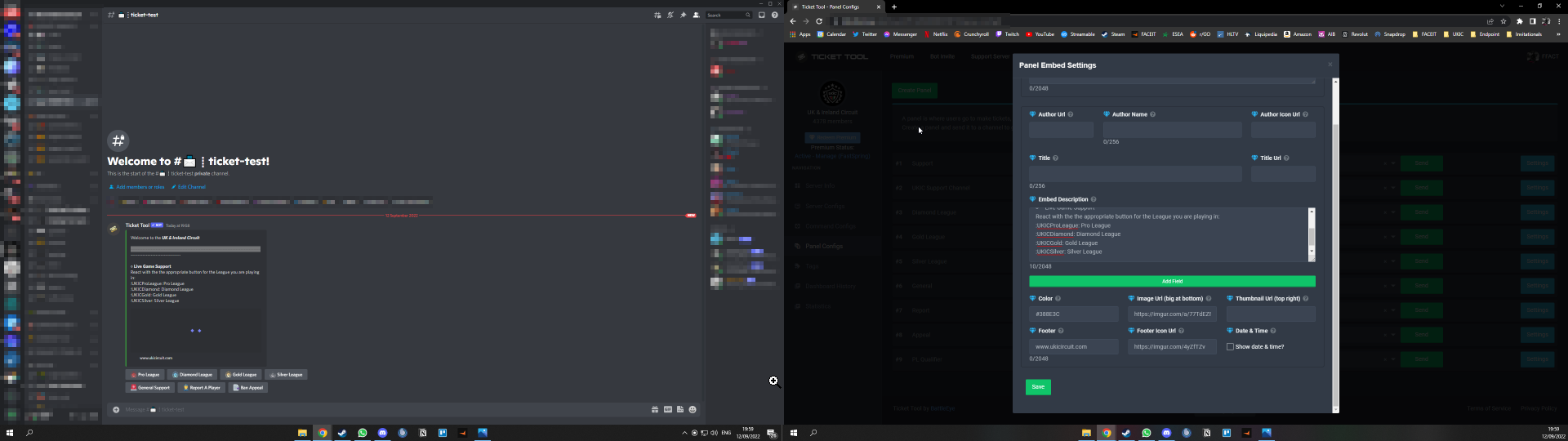
and cheers @gilded walrus did look through FAQ quickly but didn't see anything related to this 😅
 lunar solar
languid sigil
Apologies if posted before but I'm trying to add my servers emoji's to the embed...
lunar solar
languid sigil
Apologies if posted before but I'm trying to add my servers emoji's to the embed...
Custom Emojis you need the emoji ID
For example:

Is:
!MovedToTicket
This can be achieved by putting a \ infront of an emoji
The emoji also needs to be uploaded to your Discord
rustic gale
gilded walrus
how do i few tickets as a staff member in a server
Please clarify your question
gilded walrus
rustic gale
Please clarify your question
wdym
lunar solar
As far as GIFs to embed go, after you have uploaded something to Imgur you need to right click open image in new tab.
The difference is:
https://imgur.com/a/ZkSWWpw
vs
https://i.imgur.com/UdaHLHT.png
You need the i.imgur link for GIFs to work
rustic gale
The URL has to end in a file extension such as .jpg .png .gif
If the URL doesn't end in a file extension, you've got the wrong URL.
lunar solar
Yeah that ^ also achieved by what I said above
languid sigil
Perfect, thanks for quick response
rustic gale
gilded walrus
wdym
I have no idea what you mean by “how do i few tickets”
gilded walrus
rustic gale
I have no idea what you mean by “how do i few tickets”
how do i few tickets created by other members as staff
rustic gale
Do you mean
view tickets
To let staff view tickets, you need to set up a support team role
$help support
humble sequoiaBOT
How to let support team see into a ticket
About support roles
A support role lets your support team see into tickets with out having to add them manually to each and every ticket.
You can add as many support roles as you like per panel.
NOTE that the way discord works all admins can see into tickets regardless of this.
How to set a support role
To set a Support role go to the Dashboard -> Panel Configs -> Settings -> General Options -> Support Team Roles.

NOTE that the support role will not be able to see into tickets that are already created..
rustic gale
Note that changes to permissions will not be applied to already existing tickets, only to new tickets created after the change
To apply the changes to old tickets, you will have to close them and reopen them (this will not work if your tickets are set up to delete automatically when closed)
 bright willow
my server isnt showing in manage servers, i tried kicking it out and letting it in again but still, it already have admin
@rustic gale can u help me
oh mb
 safe oyster
I have a quick question, please ping when replying so I see. Looking at premium "Automatic Transcripts" what does this mean? Is there something that explains it?
rustic gale
bright willow
my server isnt showing in manage servers, i tried kicking it out and letting it ...
You don't have to kick the bot
Relogging means logging out of the dashboard and logging in again
bright willow
i did. but still
rustic gale
safe oyster
I have a quick question, please ping when replying so I see. Looking at premium ...
Automatic transcripts means automatically making a transcript of the ticket when it's closed and/or deleted
Instead of having to manually press the Transcript button or send the $transcript command
lunar solar
safe oyster
I have a quick question, please ping when replying so I see. Looking at premium ...
Automatic Transcripts creates a HTML screenshot of a ticket that is viewable via link. This auto logs to a channel of your choosing
bright willow
bright willow
i did. but still
it still doesnt work ;(
rustic gale
bright willow
it still doesnt work ;(
Send $level in your server, in a channel the bot can see
lunar solar
Outsider too fast 😆
rustic gale
That's $level
bright willow
rustic gale
Send $level in your server, in a channel the bot can see
nothing got sent by the bot
rustic gale
lunar solar
Outsider too fast 😆
Can't beat me
safe oyster
Thank you. Is there a way to have transcripts auto sent to those who were in the ticket or those who opened it?
rustic gale
Send the following:
@pseudo glen debug
in other words, mention the bot, followed by the word debug
lunar solar
safe oyster
Thank you. Is there a way to have transcripts auto sent to those who were in the...
There is a premium feature to send a transcript to the opener
rustic gale
safe oyster
Thank you. Is there a way to have transcripts auto sent to those who were in the...
DMing transcripts is a premium option. It's in Logging Options
bright willow
rustic gale
Send the following:
<@557628352828014614> debug
in other words, mention the bot,...
is that for me? if so it still didnt work 😭
rustic gale
bright willow
is that for me? if so it still didnt work 😭
What's your server's ID?
bright willow
rustic gale
What's your server's ID?
1005221608027344936
safe oyster
lol Thank you!
bright willow
bright willow
1005221608027344936
its my friend's server he told me to do a ticket system because he doesnt know 💀
safe oyster
Can it only be sent to the one who opened it? Sometimes we open a ticket and pull others into the ticket and would like to have a way to send them the transcript as well. Can the bot do that or would that need to be done manually
rustic gale
bright willow
its my friend's server he told me to do a ticket system because he doesnt know �...
Can we get a screenshot of the bot in the user list on the right-hand side of the screen?
bright willow
 rustic gale
safe oyster
Can it only be sent to the one who opened it? Sometimes we open a ticket and pul...
rustic gale
safe oyster
Can it only be sent to the one who opened it? Sometimes we open a ticket and pul...
Ticket Tool can only send the transcript to the ticket creator, yeah.
rustic gale
bright willow
That's the wrong bot, pal
lunar solar
Sounds like you need a role that is setup as a Dashboard Role
bright willow
rustic gale
That's the wrong bot, pal
no? i got both of them
rustic gale
Ah, you got Ticket Tool and the other one
bright willow
yeah
bright willow
I am, the bot also already have admin and it's the 2nd highest role
rustic gale
Then you should be able to access the dashboard this way https://tickettool.xyz/dashboard/1005221608027344936/

Ticket Tool - Ticketing without clutter - The #1 discord Ticketing bot
bright willow
oo works now.. ty
rustic gale
Step 2 and very important
Go in Server configs and disable the premium bot
Because the premium bot is not in your server
bright willow
rustic gale
Because the premium bot is not in your server
done i changed it to the normal bot
safe oyster
rustic gale
Ticket Tool can only send the transcript to the ticket creator, yeah.
thank you
iron nightBOT
Gave +1 Rep to @rustic gale
safe oyster
lunar solar
There is a premium feature to send a transcript to the opener
thank you
bright willow
rustic gale
Let us know if you have any more issues
ty
iron nightBOT
Gave +1 Rep to @rustic gale
 dense garden
can a person automatically see the ticket if they're the one who opened it or do they need a role?
gilded verge
dense garden
can a person automatically see the ticket if they're the one who opened it or do...
the user who opens the ticket sees it after creation, doesn't need a role 😳
 dense garden
gilded verge
the user who opens the ticket sees it after creation, doesn't need a role 😳
dense garden
gilded verge
the user who opens the ticket sees it after creation, doesn't need a role 😳
ok thanks
iron nightBOT
Gave +1 Rep to @gilded verge
 keen lion
Are you able to have ticket tool post to a forum style channel?
 glad token
if i have native discord administrator permission, shouldnt i be able to manage ticket tool completely? or did i miss something here
rustic gale
glad token
if i have native discord administrator permission, shouldnt i be able to manage ...
Yes you should. Where are you stuck?
glad token
rustic gale
Yes you should. Where are you stuck?
well, i technically have 2 problems:
- i have said permission for this server, and it hasnt showed on the dashboard in the last hour roughly that its been in the server.
i have refreshed the dash + logged out and back in + cleared cache, none have worked
- i have this other server i am in/own, and the server name is all messed up
i changed the server name about 4-5 days ago
original name wasShit-eh
new name isInformation Station
but for whatever odd reason, they decided to merge together both names
 rustic gale
glad token
well, i technically have 2 problems:
1. i have said permission for this server,...
rustic gale
glad token
well, i technically have 2 problems:
1. i have said permission for this server,...
Logging out and logging in again means in the dashboard
Not from Discord or anywhere else
(Just in case that's what you did)
Yeah, the name thing is a known error, which should get fixed after you log out and log in again
glad token
rustic gale
Logging out and logging in again means in the dashboard
yeah, i did dashboard log out and in
i know discord wouldnt affect external bot dashboard lol. or at least it was highly doubtful
alright, well i refreshed again. both problems are now fixed 🤔
rustic gale
So... you logged out, and logged back in, and both problems remained (at first)?
glad token
correct. plus the cache stuff
rustic gale
That's weird. But then you pressed F5 and now your server appears and your other server's name is fixed?
glad token
that is indeed correct
(the server on the right side is the 1 that originally wasnt showing at all, and as u can see the name is fixed on the other server now as well)
 rustic gale
Very strange
rustic gale
keen lion
Are you able to have ticket tool post to a forum style channel?
Unfortunately this is not supported yet
glad token
rustic gale
Very strange
yeah, i also found that odd, but hey its fixed now so all good i guess lol
humble sequoiaBOT
Pop-up Form
A discord Form allows you to let the user answer individual questions in a pop up Form, which then displays the answers in the ticket message. This can save time if you already know what you want to ask the user.
Setup Forms
Forms can be enabled under Panel Settings > Form Options > Edit Forms Options.
In the new pop up window, you can now enable and edit your own Form.
Form Options
You can add up to 5 questions in the discord form. This is a discord limitation. Each question can have a placeholder in the input field, a minimum and maximum input, multi-line and also the option to have the answer required.
Options:
Question Title: Your Question goes here
Question Placeholder: The placeholder text in the input field
Required: If enabled, the user has to answer this question, to submit the form
Multi-Line Input: Allows the user to input multiple lines
Minimum and Maximum Input: Set a minimum and maximum input value for the user
❗Display the answer ❗
To display the answers from the user, you need to go into your Panel Settings > Ticket Options > Edit Ticket Message. In there you use the variable {create.form.x} and just replace x with the number of your question. For example, the response to Question 1 can be displayed with {create.form.1}. If you don't use this variable, the response from the user is lost.
 keen lion
rustic gale
Unfortunately this is not supported yet
keen lion
rustic gale
Unfortunately this is not supported yet
So it is supported? ☝️
lunar solar
keen lion
So it is supported? ☝️
Na forms is supported
Not forums though
Unless you meant forms
keen lion
No I meant Discord Forums
I don't see any in this discord for an example, but would be a great feature to add.
A Forum channel integration or for it to generate a thread in a specific channel would be great. New here to just learning what it can do
 jade topaz
Hey, how do I add a ticket premium to my server?
And I subscribe to the seven free days.
 humble sequoiaBOT
The first thing you will need to do is invite the premium bot, an invite can be found here
Once the bot is in your server we will head to the dashboard and manage your server. When you are managing your server, you want to head into "Server Configs" then click the drop down menu under "Select the bot you would like to use on this server" then click "Ticket Tool#6207" and then save.
 gilded verge
humble sequoia
gilded verge
humble sequoia
Hey @jade topaz, check
jade topaz
K thanks
gilded verge
psst... The best thing about the Ticket Tool is that you can use the premium features without inviting a premium bot 
 uncut hedge
$staffapps
humble sequoiaBOT
How do be I become a Support Member?
You can become a support member in 2 ways:
1. You can be really active in #🆘│community-support gain <@&799500225579712543> role and get chosen by a Manager
2. You can apply VIA our applications that would be sent in #📣│server-news
We currently have Support Teams for the following languages:
:flag_us: English
:flag_jo: Arabic
:flag_fr: French
:flag_de: German
:flag_br: Portuguese
:flag_es: Spanish.
 rustic gale
jade topaz
How do I settle this?
rustic gale
jade topaz
How do I settle this?
That is called a multipanel
humble sequoiaBOT
For a more convenient use of multipanels, you can now combine panels on the dashboard. This will allow you to directly send the multipanel from the dashboard or via the $panel ID command.
Where can I find this?
You can find this setting on the Dashboard -> Panel Configs -> Settings -> General Options
Note: if you're attaching all the panels to a panel called English, don't include English in the attached panels box (If you do this, it will create duplicate)
This will put all buttons from all of your panels on one message. The message is the panel message from the panel you're combining these panels in.
You can also watch this video tutorial.
 loud hare
hi guys
when a ticket is made in mys erver right
it goes ontop of the server instead of within the channel
humble sequoiaBOT
How to set the open category
To set a open category go to the Dashboard -> Panel Configs -> Settings -> Category Options -> Category Open
 loud hare
 pale pilot
<@196206998331588608>
pale pilot
<@196206998331588608>
o=thank u
 halcyon mulch
Bonjour comment mettre le panneau du ticket en français svp ?
lunar solar
halcyon mulch
Bonjour comment mettre le panneau du ticket en français svp ?
By manually translating the messages. Sad, but it's the only option currently
En traduisant manuellement les messages. Triste, mais c'est la seule option actuellement
For the dashboard itself see below
Pour le tableau de bord lui-même voir ci-dessous

 distant vortex
Hi guys, how do i archive the transcripts into multiple folders?
For example, i have 2 tickets that I would like to close and Save the transcript.
How could I set that:
Ticket 1 goes into Transcript Channel 1
Ticket 2 goes into Transcript Channel 2
Thanks a lot!
humble sequoiaBOT
How do I save transcript to a channel?
To save transcripts to a channel go to the Dashboard -> Panel Configs -> Settings -> Logging Options -> Transcript Channel
 gilded verge
Hey @distant vortex, that's simple, just choose another channel for your panels
Wait.... When you say ticket 1 and ticket 2 , do you mean channels or panels?
*I just want to make sure you get the right answer ^^
distant vortex
gilded verge
Hey <@223109432496750593>, that's simple, just choose another channel for your p...
hmmm...i have 1 panel to Create the ticket 😉
Then my team will sort and choose where the tickets will be transcripted. Currently we would like to have 2 channels, Channel A and Channel B for saving transcripts.
Currently we are only able to set `#ticket-transcript' channel as the only channel. Would there be a workaround that once i press Save transcript, it will allow me to select either Channel A or B to save the transcript?
 gilded verge
hmmm, unfortunately you can't do that but I think I have a different solution 🤔
you can choose not to set the transcription channel but when you want to save the transcription you use the command $transcript #mention-channel 😳
ooo wait, you may have set your default transcription channel but remember to use command $transcript #mention-channel ^^
so for example, by default, all transcripts will be sent to the set channel A, and when you want a given transcription to be sent to another channel, you use the command as shown above 😮
 trail swift
Please I can’t see my server on the tickettool.xyz I have re login it’s still the same thing
What should I do??
humble sequoiaBOT
Don't see your server in the dashboard?
You will possibly need to relog. Look below to see steps on how to relog.
How to relog in the Dashboard.
First, you will need to go to the dashboard. Once your there, click on your avatar on the top right. after you clicked it, you will see button that says Logout. You must click that. Once you have logged out, you can log back in.
Note:
You need one of these 3 things to access the dashboard.
1. Server Owner (Level: 6)
2. Server Administrator (Level: 4)
3. Dashboard Role (Level: 2)
:warning: You can check your level using $level on your Discord Server
User permission level with Ticket Tool
@User is permission level: 0 (User)
```» *If it shows that your permission is **0**, you don't have any of the above **3 things** to manage the dashboard.*
**See the GIF below on how to relog:** fallow ingot
@trail swift check this out ^^
jade topaz
$help
humble sequoiaBOT
Help Options
$help commands - Information on commands
$help setup - Information on bot setup
$help faq - Frequently asked questions
jade topaz
$help setup
humble sequoiaBOT
Setting up Ticket Tool
Visit the docs for setup info
General Setup
lunar solar
Elaborate on close the ticket automatically?
 tender lily
lunar solar
Elaborate on close the ticket automatically?
tender lily
lunar solar
Elaborate on close the ticket automatically?
Hi, where can we buy premium tt bot? I mean the redeem code
lunar solar
tender lily
Hi, where can we buy premium tt bot? I mean the redeem code
Redeeming premium on your server is really simple. Just head over to your Subscriptions Page. There you can select a server of your choice, which will get premium. You can change the server at any point.
Ticket Tool - Ticketing without clutter - The #1 discord Ticketing bot
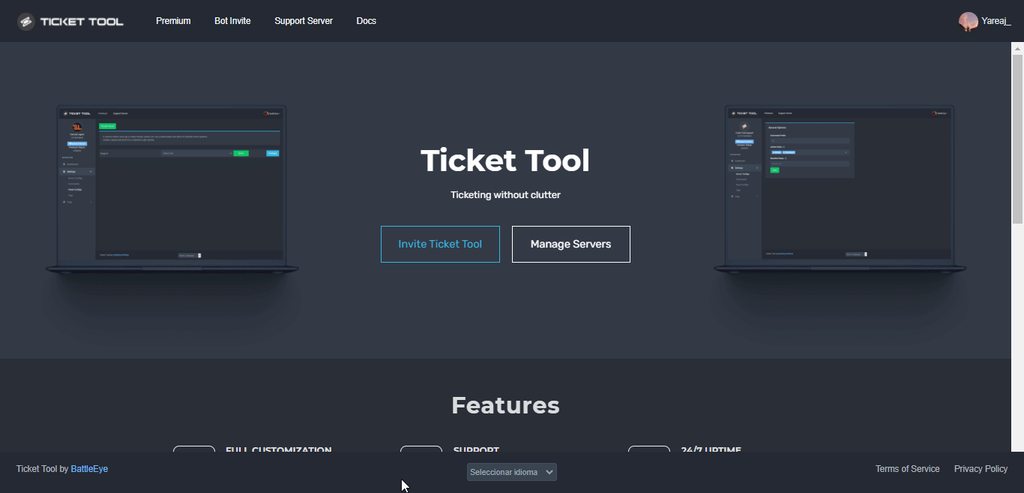
I'm sorry I still don't follow
lunar solar
tender lily
Hi, where can we buy premium tt bot? I mean the redeem code
If you are talking about the redeem system read here:
#🆘│community-support message
rustic gale
Do you mean how to make sure a ticket is deleted automatically when it's closed?
broken thistle
What is that
 rustic gale
broken thistle
What is that
rustic gale
broken thistle
What is that
Update your app
broken thistle
Okay
rustic gale
In General Options you can disable Two Step Ticket
That will cause tickets to be deleted automatically when closed
lunar solar
 oblique tapir
how to save transcripts in another channel?
oblique tapir
how to save transcripts in another channel?
Panel Configs --> Settings --> Logging Options - Transcript Channel
Note: To auto save transcripts on ticket close or delete is a premium feature, it's togglable at the end of the same section

$help transcript
humble sequoiaBOT
How do I save transcript to a channel?
To save transcripts to a channel go to the Dashboard -> Panel Configs -> Settings -> Logging Options -> Transcript Channel
oblique tapir
lunar solar
Panel Configs --> Settings --> Logging Options - Transcript Channel
`Note:` To ...
i made it and it's dont transcript tickets in the channel

the bot has premissions to send messages
lunar solar
oblique tapir
i made it and it's dont transcript tickets in the channel
The diamond feature means you require premium, see how it's red
oblique tapir
oh
distant vortex
gilded verge
ooo wait, you may have set your default transcription channel but remember to us...
you know, this is very helpful! thanks a lot!!!!
Just would like to ask a few questions that i missed out on the FAQ:
- If i press the Close button on the ticket, the channel is renamed back to its original number, #ticket-0224 for example. Is there a way to prevent this?
- If i transcript the channel, the file is stored on Ticket Tool server right? Will it be stored indefinitely aka forever?
- Is there a maximum number of transcripts that I could transcript?
iron nightBOT
Gave +1 Rep to @gilded verge
lunar solar
distant vortex
you know, this is very helpful! thanks a lot!!!!
Just would like to ask a few q...
-
Panel Configs --> Settings --> Ticket Options --> Ticket Closed channel name enter: {ticket.name}
Note:This is a premium feature -
No, recommend logging it to Discord so you save all the HTML links. Ticket tool doesn't store them due to privacy:
Panel Configs --> Settings --> Logging Options --> Transcript Channel
Note:Auto saving transcripts on close or delete is a premium feature -
No, the only restriction is up to 1000 messages within a channel is as far back as the transcripting can capture. There is no restriction on how many transcripts you create. (That I am aware of)
distant vortex
lunar solar
1. Panel Configs --> Settings --> Ticket Options --> Ticket Closed channel name ...
thanks for the very helpful explaination.
For number 2, i still don't understand. From the FAQ, it says the transcript is made and sent to the transcript channel, its sent as an attachment right? Hence its stored on discord server?
Like, if 3 months down the road, if i would like to download that transcript, will it still be there?
iron nightBOT
Gave +1 Rep to @lunar solar
lunar solar
distant vortex
thanks for the very helpful explaination.
For number 2, i still don't understan...
It's a Discord Embed as seen below, the clickable HTML (highlighted yellow) is forever yes so as long as you have these messages saving to a channel you can review at any time
 distant vortex
lunar solar
It's a Discord Embed as seen below, the clickable HTML (highlighted yellow) is f...
distant vortex
lunar solar
It's a Discord Embed as seen below, the clickable HTML (highlighted yellow) is f...
thanks a lot man for the explaination! appreciate it!
iron nightBOT
Gave +1 Rep to @lunar solar
 zinc tusk
Is there a way to find out who deleted a ticket?
 tropic topaz
what library does the Ticket tool use?
 sacred tide
Any way to know who closed / transcripts a ticket?

 shrewd monolith
adm I'm in need of help, because there was a break in the account of a help , where = deleted all her items, however, she did not give the account to anyone, waiting for help from this good administration
I'm asking for help because I believe that other people have passed or will go through the same problem
 knotty sky
Is it possible to create multiple buttons only with the premium version, like here as an example?
 lunar solar
knotty sky
Is it possible to create multiple buttons only with the premium version, like he...
lunar solar
knotty sky
Is it possible to create multiple buttons only with the premium version, like he...
Na so this is apart of the free version
$help panels
humble sequoiaBOT
Help Options
$help commands - Information on commands
$help setup - Information on bot setup
$help faq - Frequently asked questions
lunar solar
$help panel
humble sequoiaBOT
Creating a panel
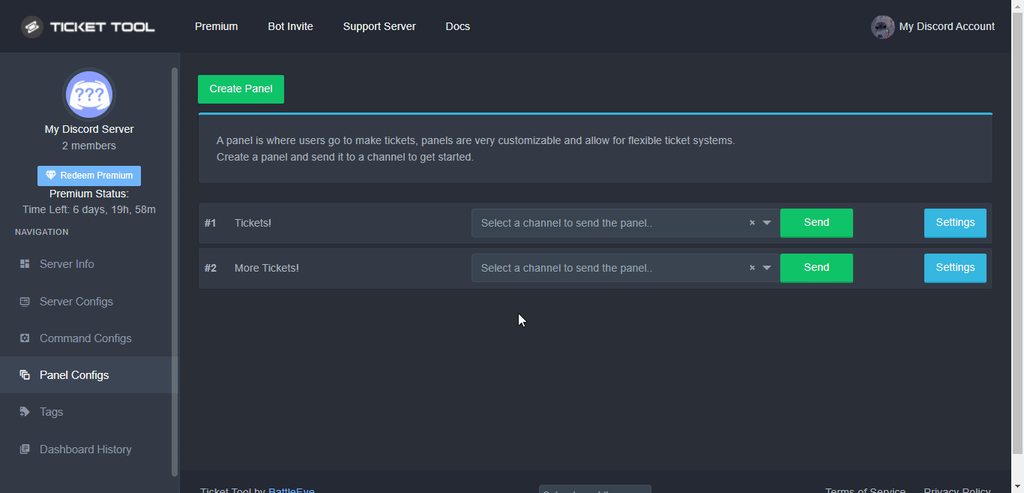
To create a panel we are going to need to head over to the panel configs on the dashboard
Once at the dashboard we will need to click Create Panel
Enter a panel name (Fill in any optional settings you want)
Click Create Panel and your ready to get started with configuring your panel
An example of a creating a panel is shown below.
 lunar solar
REE ignore those
lunar solar
knotty sky
Is it possible to create multiple buttons only with the premium version, like he...
Panel Configs --> Settings --> General Options --> Attach Panels (Mutli Panels)
like this:

 lunar solar
ahh let me look I don't think so tho
Click on the HTML and open the direct transcript, you are looking for this:

From there do this:
@lunar solar```It shows who closed which then gives only mods an option to actually delete and transcript

Wanna know who deleted and transcript it. The one who closed that we know already
lunar solar
Ahh right umm
scenic plinth
Unless you had an action log set for that action before it was closed, there is no way to view it after deletion except the closing.
sacred tide
Hm how do I set that up then to know who deletes and transcripts?
lunar solar
Logging options --> Logging Channel
If you have multiple panels attached to one you will need to setup logging for each individual one
Should look like this:
 sacred tide
Uhu basically what's the cmds...
lunar solar
sacred tide
Uhu basically what's the cmds...
Commands sorry?
sacred tide
We got this.
 scenic plinth
 sacred tide
lunar solar
Commands sorry?
sacred tide
lunar solar
Commands sorry?
What's the command to do that, lol.. oof through dashboard ok
jade topaz
can someone tell me how to get channels in a tag response, such as #💬│general-chat
languid sigil
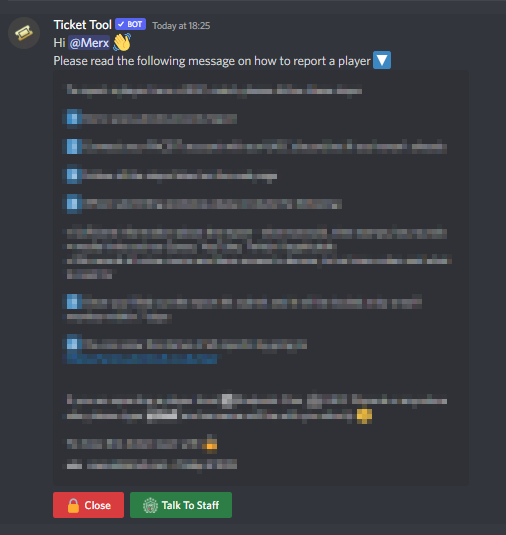
Hey, I'm trying to have it when a user opens a ticket they will be met with information about a topic but cannot type in the channel, I then want to give the option to click a button to speak with a support member in that same ticket. I was trying to do this via ticket claiming but cannot seem to get by the Warning: You can't claim your own ticket. issue. Any help or ideas appreciated!
https://i.imgur.com/rep4ONY.png
 cunning cloud
Is there a way to have the ticket button assign a role to people before/while opening a ticket panel? Sort of like role provisioning + ticket in one?
 brittle locust
How do you set the bot in a channel ?
rustic gale
cunning cloud
Is there a way to have the ticket button assign a role to people before/while op...
Not currently. It's being considered for an update
cunning cloud
rustic gale
Not currently. It's being considered for an update
thanks
iron nightBOT
Gave +1 Rep to @rustic gale
rustic gale
cunning cloud
thanks
With some work you can set up Sapphire (@obtuse kraken) to both grant the role and create the ticket
You will have to remove the role manually though
rustic gale
languid sigil
Hey, I'm trying to have it when a user opens a ticket they will be met with info...
There's no such functionality available, no. You can suggest it in #🤖│bot-spam using the s!suggest command.
cunning cloud
hmm. I wouldn't need to remove it. Basically looking to have it be a 'Rules Acceptance' and 'Open Ticket'.
rustic gale
jade topaz
can someone tell me how to get channels in a tag response, such as <#50923883154...
You type <#ID>, where ID is the channel's ID. For example, #🆘│community-support is <#776680605517742090>
rustic gale
lunar solar
REE ignore those
That's $mp2. You can show $mp as well but that's outdated
lunar solar
rustic gale
That's $mp2. You can show $mp as well but that's outdated
Ahh cheers
 tribal pewter
It should have moved the ticket to closed category but it didn't. Do you guys know why?

 rustic gale
tribal pewter
It should have moved the ticket to closed category but it didn't. Do you guys kn...
rustic gale
tribal pewter
It should have moved the ticket to closed category but it didn't. Do you guys kn...
Likely because your closed category is full
$overflow
humble sequoiaBOT
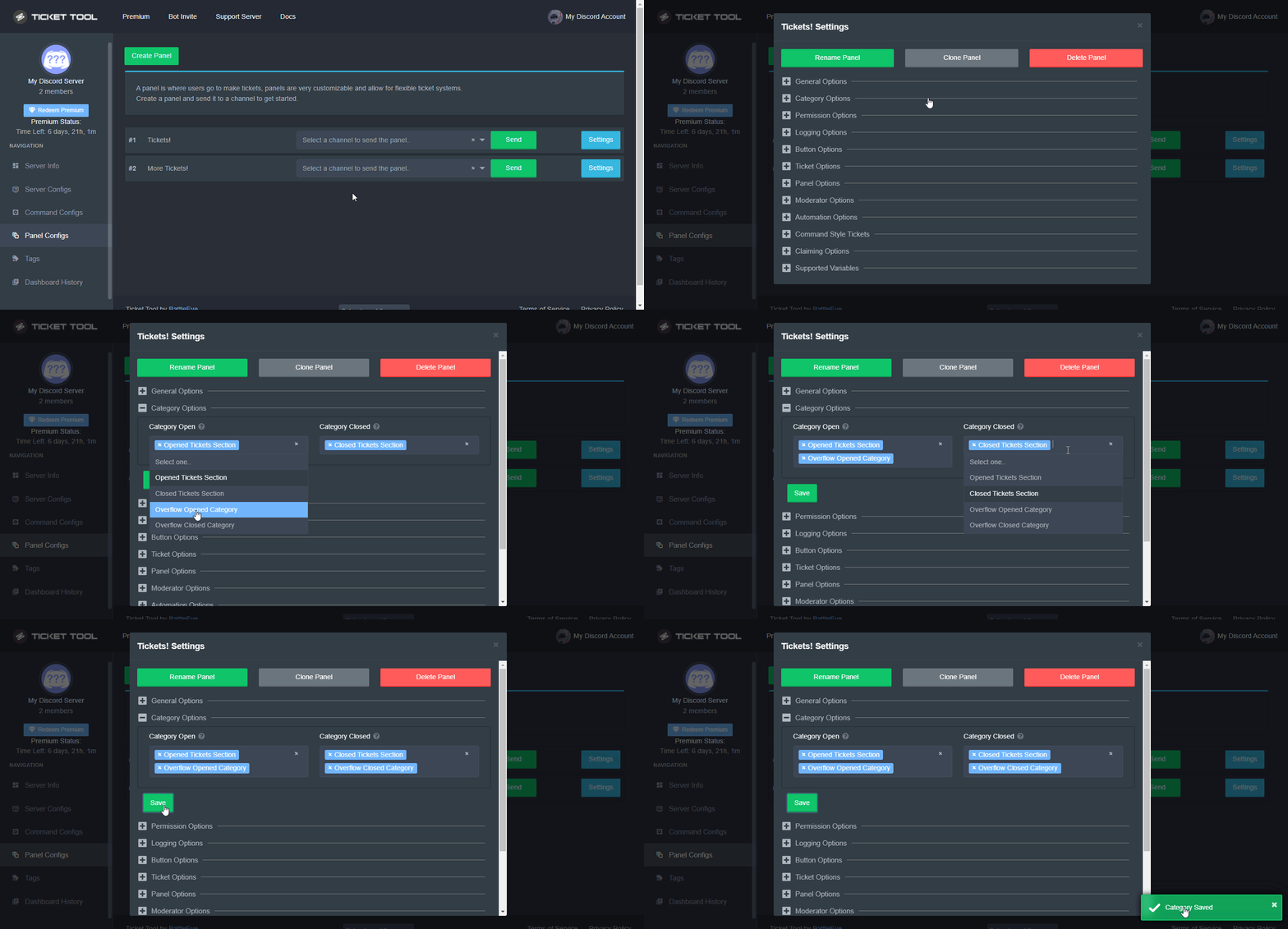
Discord only allows to stack up to 50 channels per category, meaning that if you have already 50 tickets in one category, the bot won't be able to place a ticket in that category, for such reason Ticket Tool counts with overflow categories, meaning that if your main category is filled, the bot will go ahead and place the ticket on the next one available, simply choose a second category in the category pickers:
 gritty nymph
my purchase confirmation is taking too long
rustic gale
What did you purchase?
humble sequoiaBOT

⚠️ You're in the wrong place
We provide support for Ticket Tool Discord bot and cannot help you with whatever issue you have.
- We don't know which Support Team you should contact to get this issue resolved, and unfortunately we won't be able to accurately tell you.
If you don't have any further questions regarding our bot Ticket Tool, please close this ticket
fallow ingot
@gritty nymph this ^^
fallow ingot
I'm not sure.
jade topaz
humble sequoia
Can you guys explain me on how i can post clips like this on a webhook
lunar solar
jade topaz
Can you guys explain me on how i can post clips like this on a webhook
Have a read through this:
Unfortunately this Discord is specifically reserved for support relating to ticket tool.
You would need to look into other avenues elsewhere to mitigate your problem.
 stuck aspen
Yeah I know and I am really sorry about it… but I can’t find a server that help me with those things
 silent vine
بروح اتنايج
jade topaz
lunar solar
Have a read through this:
https://discord.com/channels/509192800865353738/77668...
can it only be done with gifs? i got a clip for 2minutes
lunar solar
jade topaz
can it only be done with gifs? i got a clip for 2minutes
You can only embed 1 gif at the bottom so no
jade topaz
i only have 1 clip
 oak shuttle
jade topaz
can it only be done with gifs? i got a clip for 2minutes
oak shuttle
jade topaz
can it only be done with gifs? i got a clip for 2minutes
Best bet would be editing and making it shorter so it fits into a gif
jade topaz
i see
oak shuttle
or just linking a youtube video on the tag
tribal pewter
rustic gale
Likely because your closed category is full
Thank you.
iron nightBOT
Gave +1 Rep to @rustic gale
jade topaz
Is there a way to separate channels without premium
I want my members to know to open the correct ticket category
keen lion
So I have a mult question Form in my ticket, but I do not see the answers/questions when someone creates a ticket. What am I missing? I am guessing it is in the Embed Description but I cant figure out what it needs to be to display the info the user typed out.
humble sequoiaBOT
Pop-up Form
A discord Form allows you to let the user answer individual questions in a pop up Form, which then displays the answers in the ticket message. This can save time if you already know what you want to ask the user.
Setup Forms
Forms can be enabled under Panel Settings > Form Options > Edit Forms Options.
In the new pop up window, you can now enable and edit your own Form.
Form Options
You can add up to 5 questions in the discord form. This is a discord limitation. Each question can have a placeholder in the input field, a minimum and maximum input, multi-line and also the option to have the answer required.
Options:
Question Title: Your Question goes here
Question Placeholder: The placeholder text in the input field
Required: If enabled, the user has to answer this question, to submit the form
Multi-Line Input: Allows the user to input multiple lines
Minimum and Maximum Input: Set a minimum and maximum input value for the user
❗Display the answer ❗
To display the answers from the user, you need to go into your Panel Settings > Ticket Options > Edit Ticket Message. In there you use the variable {create.form.x} and just replace x with the number of your question. For example, the response to Question 1 can be displayed with {create.form.1}. If you don't use this variable, the response from the user is lost.
rustic gale
jade topaz
I want my members to know to open the correct ticket category
You can set a different category for each of your panels.
$help category
humble sequoiaBOT
How to set the open category
To set a open category go to the Dashboard -> Panel Configs -> Settings -> Category Options -> Category Open
 sharp rapids
 humble sequoiaBOT
━━ moved to ticket ━━
jade topaz
hello brother
How to name a ticket with the nickname of the person who created it, not numbers
humble sequoiaBOT
━━ moved to ticket ━━
 rustic gale
compact tusk
rustic gale
compact tusk
You should include {create.form.1} in the ticket message, not the ticket name
humble sequoiaBOT
The Ticket Message is the first message sent by the bot in a new ticket. To customise it head over to your Dashboard ➞ Panel Configs ➞ Settings ➞ Ticket Options ➞ Edit Ticket Message
compact tusk
it's in the ticket message also
but either way that naming convention was working before
 rustic gale
compact tusk
but either way that naming convention was working before
rustic gale
compact tusk
but either way that naming convention was working before
Can you please #🎫│make-a-ticket so we can get this checked out
compact tusk
Sure
 scarlet dagger
 blissful token
hii, i have a question and when i delete a ticket it deletes it but the channel goes to the moderators section, how can i do to delete it at all?
rustic gale
@scarlet dagger:
humble sequoiaBOT
⚠️ Você está no lugar errado
Nós oferecemos suporte para o bot de Discord Ticket Tool, então não podemos ajudá-lo com qualquer outro problema que você tenha.
- Certifique-se de entrar em contato com a equipe de suporte apropriada para solucionar seu problema.
Se você não possui nenhuma dúvida sobre o nosso bot de tickets, por favor feche este ticket.
rustic gale
blissful token
hii, i have a question and when i delete a ticket it deletes it but the channel ...
If you delete it and it moves, you're not deleting it, you're closing it
You should see a Ticket Closed message with a few buttons, including one to actually delete the ticket
blissful token
ohh yeah when i close it and then as mod i delete it with the buttons but it still moving
blissful token
rustic gale
<#571706435449257997> so we can get a closer look
ohh okok thanks
iron nightBOT
Gave +1 Rep to @rustic gale
jade topaz
do you guys know why im getting the Failed: Invalid panel ID "-1" error when trying to send my panel
humble sequoiaBOT
━━ moved to ticket ━━
jade topaz
thanks @rustic gale
iron nightBOT
Gave +1 Rep to @rustic gale
jade topaz
oh it works lmao
trail swift
fallow ingot
<@1001808091408506961> check this out ^^
Still now showing @fallow ingot
rustic gale
trail swift
Still now showing <@768144576946110475>
Type $level in your server in a channel the bot can see
trail swift
Permission level is 0
But I have the server administrator of level 4🤷
rustic gale
If the bot says your permission level is 0, your permission level is 0 regardless of what you believe about your Administrator permission
Get in touch with the server owner or an actual administrator, and show them this @trail swift
humble sequoiaBOT
Any role you put there will have full access to the ticket tool dashboard. The server owner and users with admin permissions already have access to the dashboard.
Be careful of which roles to put here
 keen stump
rustic gale
If the bot says your permission level is 0, your permission level is 0 regardles...
keen stump
rustic gale
If the bot says your permission level is 0, your permission level is 0 regardles...

Any ideas? 😄
keen stump
lunar solar
The emoji isn't in the server
what emoji ☠️
we didnt delete any emojis and i didnt put any on the form
lunar solar
What were you working on when this happened?
keen stump
lunar solar
What were you working on when this happened?
forms
lunar solar
keen stump
forms
Are you sure the emoji is typed correctly?
humble sequoiaBOT
━━ moved to ticket ━━
keen stump
lunar solar
Are you sure the emoji is typed correctly?
i dont know which emoji it is :/
 valid drum
 opal cradle
$help ping
humble sequoiaBOT
How to make Ticket Tool ping a role
To make ticket tool ping a role when a ticket is opened, go to the Dashboard -> Panel Configs -> Settings -> Ticket Options -> Ticket Message -> Message Text and do this:
{@Role name} This is case sensitive and the role must have @mentions enabled
 opal cradle
@valid drum ⤴️
opal cradle
Both can be used i belive
humble sequoiaBOT
Within all the messages the bot's sends (both embeds and text) you can mention either channels, roles, or even users, these mentions will only send a notification to the user if they are used within a text field, e.g: a role mentioned in an embed won't ping at all the users who have that role.
For mentioning a role you can use one out of three options:
{@Role Name} ➞ Which is Case Sensitive.
{RoleID} ➞ Replace RoleId with the Id of the role you are trying to ping.
<@&RoleID> ➞ Discord's native syntax to ping roles.
<#ChannelID> ➞ Mention a channel by its ID.
<@UserID> ➞ Mention a user by its ID.
 dark bison
Is there a way we can remove a role automatically after the ticket is closed and moved into a different category ?
 modern summit
$help
gilded verge
modern summit
$help
#🤖│bot-spam
jade topaz
thanks @solid stream
iron nightBOT
Gave +1 Rep to @solid stream
rustic gale
dark bison
Is there a way we can remove a role automatically after the ticket is closed and...
Not currently
dark bison
ok thanks
jade topaz
$help
humble sequoiaBOT
Help Options
$help commands - Information on commands
$help setup - Information on bot setup
$help faq - Frequently asked questions
sacred tide
How do I make a ticket transcript be sent to the one who made.it when we do press "delete" and "transcript"?
lunar solar
sacred tide
How do I make a ticket transcript be sent to the one who made.it when we do pres...
$help transcript
humble sequoiaBOT
How do I save transcript to a channel?
To save transcripts to a channel go to the Dashboard -> Panel Configs -> Settings -> Logging Options -> Transcript Channel
lunar solar
Second last option in logging options
sacred tide
We got it saved to a channel, just want it to dm too, thx
lunar solar
Note it is a premium feature
sacred tide
....😭
So like, to make it dm the person who open the ticket the transcript automatically we gotta get the premium?
lunar solar
sacred tide
So like, to make it dm the person who open the ticket the transcript automatical...
Ye
sacred tide
Damn.
 dusty tinsel
how do i check my made tickets?
rustic gale
dusty tinsel
how do i check my made tickets?
Can you explain your question in more detail please?
dusty tinsel
so i made a ticket in a different server yesterday, and when i asked for someone to check it earlier today, and they asked me for my ticket number. i hadn't wrote it down because i didn't know that they required the number, but rather assumed they would be able to find it by username. I asked if i should just make another and they didn't reply, so I went to support and it led me here, which brings me to where we are now. In summary, need help finding my ticket numbers or made tickets.🙏
rustic gale
Unfortunately, we can't
dusty tinsel
Okay, thank you.
rustic gale
dusty tinsel
Okay, thank you.
There's also no reason why they should need the ticket number to check the ticket
Tell them to search your ID: 712775093700395069
If they made a transcript, that search will turn up the transcript
If the ticket hasn't been deleted, that search should turn up your mentions, including those in the ticket
If the ticket was deleted without transcript, then it's simply lost, and having the ticket number wouldn't help anyway
dusty tinsel
Okay great, thanks for all the help
 clear dew
Before i used to have tickets open up around a certain category and now it wont work, im trying to figure out how i set that up again?
rustic gale
clear dew
Before i used to have tickets open up around a certain category and now it wont ...
It stopped working without any change on your part?
clear dew
it did yeah but i just fixed it some how, i clicked many buttons
rustic gale
Do you have an idea of what buttons you pressed or what settings you changed?
clear dew
If i said yes I would be lying
rustic gale
Darn
 gentle scroll
Hey. It's ya boi, Andy. I have a bit of a problem. I've set a role to be pinged in the tickets, but Staff isn't getting pinged nor are they getting the mentioned notification for it
 prime fern
my second servver is not appearing on the website?
humble sequoiaBOT
Don't see your server in the dashboard?
You will possibly need to relog. Look below to see steps on how to relog.
How to relog in the Dashboard.
First, you will need to go to the dashboard. Once your there, click on your avatar on the top right. after you clicked it, you will see button that says Logout. You must click that. Once you have logged out, you can log back in.
Note:
You need one of these 3 things to access the dashboard.
1. Server Owner (Level: 6)
2. Server Administrator (Level: 4)
3. Dashboard Role (Level: 2)
:warning: You can check your level using $level on your Discord Server
User permission level with Ticket Tool
@User is permission level: 0 (User)
```» *If it shows that your permission is **0**, you don't have any of the above **3 things** to manage the dashboard.*


**See the GIF below on how to relog:**You actually have to manually write the mention into the ticket message
 deep inlet
 gentle scroll
lunar solar
You actually have to manually write the mention into the ticket message
gentle scroll
lunar solar
You actually have to manually write the mention into the ticket message
I did just that actually {@role name}. They should be getting the mentioned notification when a ticket is open but I'm finding out when it's open the notification settings are default.
lunar solar
gentle scroll
I did just that actually {@role name}. They should be getting the mentioned noti...
Is the mention outside of the embed?
Also is it constructing the mention or just appearing as {@rolename}
 scarlet snow
I was just wondering if there was a way to check how many tickets each of your staff members have claimed
lunar solar
scarlet snow
I was just wondering if there was a way to check how many tickets each of your s...
I believe this is a planned feature which will be visible on the dashboard but hasn’t been implemented yet
rustic gale
jade topaz
i kiinda forgot my prefix
You can always mention @pseudo glen (or whichever version works in your server) followed by the command. For example:
@pseudo glen delete
in a ticket channel, to delete the ticket
Thus you can do:
@pseudo glen debug
to show debug information. That will also show you the bot's prefix
rustic gale
gentle scroll
I did just that actually {@role name}. They should be getting the mentioned noti...
Can we have a screenshot of the ticket message?
scarlet snow
lunar solar
I believe this is a planned feature which will be visible on the dashboard but h...
Oh perfect thank you :)
iron nightBOT
Gave +1 Rep to @lunar solar
gentle scroll
No, it's inside the embedded
gentle scroll
rustic gale
Can we have a screenshot of the ticket message?
 lunar solar
gentle scroll
No, it's inside the embedded
lunar solar
gentle scroll
No, it's inside the embedded
You need to put the mention outside the embed
Mentions within the embeds do not mention the roles or users etc
For example that top line you could have:
Welcome {user} to the verify ticket!
{staff role}
Ticket embed
rustic gale
In the Edit Ticket Message menu there's a lot of fields
The topmost one is called Message Text
that's where it has to go if you want a mention to be issued
gentle scroll
Okay, gotcha thank you guys for the assist!
 ornate prairie
Hey, I was just wondering if there was any way to have the transcripts for tickets saved outside of discord or if there was any way to export that info to a separate site like zendesk for instance
 leaden agate
Is anyone else not able to change their Discord user details in the manage my subscription menu?
rustic gale
leaden agate
Is anyone else not able to change their Discord user details in the manage my su...
To change the user, you should create a ticket in #🎫│make-a-ticket to request the change
rustic gale
ornate prairie
Hey, I was just wondering if there was any way to have the transcripts for ticke...
Unfortunately no such feature exists. You could suggest it in #1019685143046279208
 arctic cedar
Hello, when i tried to do "setup guide" it says "This interaction failed"
Can you help me with that?
humble sequoiaBOT
━━ moved to ticket ━━
 formal abyss
Hi everyone. Can someone explain what the purpose is of
"
BOT
Bots ID's Ticket Tool can respond to (Comma separated)
"
It is under Server Configs.
I can't find anything about this in the docs.
pale pilot
formal abyss
Hi everyone. Can someone explain what the purpose is of
"
BOT
Bots ID's Ticket...
If you enter the ID of another bot, let's say Dyno, ticket tool will be able to respond to commands, sent with the Dyno bot
formal abyss
pale pilot
If you enter the ID of another bot, let's say Dyno, ticket tool will be able to ...
Is there any documentation how to configure this?
pale pilot
I don't think so. But there isn't much to it, other than adding the ID of any bot you like
formal abyss
pale pilot
I don't think so. But there isn't much to it, other than adding the ID of any bo...
Thanks will try and check how it works..
iron nightBOT
Gave +1 Rep to @pale pilot
jade topaz
I can recommend changing the #🆘│community-support-channel to Discords new "Forum"-chatmode.
opal cradle
jade topaz
I can recommend changing the <#776680605517742090>-channel to Discords new "Foru...
 sick lichen
Hey everyone, is it possible via the bot when someone creates a ticket to give him a specific role.
so that he or she can be activated for a voice channel
 dawn sundial
Hello, I want to know if when an user creates a ticket and fill the form, the answers can be put in an embed in a specific channel after the tickets is closed, between too many options I dont see how to do it. Thanks
dawn sundial
lunar solar
1. Panel Configs --> Settings --> Ticket Options --> Ticket Closed channel name ...
if autosave is premium, why it asks the channel transcription. There's no way to save it without premium?
It doesnt work for me when I put the channel, also is not possible to edit the message logs?
Basically I want the bot to put the information from the form on an embed in a channel, not necessary transcription
rustic gale
dawn sundial
Hello, I want to know if when an user creates a ticket and fill the form, the an...
Not possible currently, but you can leave the suggestion in #🤖│bot-spam using the s!suggest command
rustic gale
dawn sundial
if autosave is premium, why it asks the channel transcription. There's no way to...
When you close the ticket, a few buttons appear by default, including a Transcript button.
If your tickets are set up to autodelete when closed (i.e. if Two Step Ticket is disabled), then that button won't appear.
You can also use the $transcript command anytime, whether the ticket is open or closed.
dawn sundial
rustic gale
If your tickets are set up to autodelete when closed (i.e. if Two Step Ticket is...
perfect, that was the problem, thank you very much
iron nightBOT
Gave +1 Rep to @rustic gale
 fringe kestrel
sorry, i have this problem: Failed: Invalid Form Body components[0].components[0].options[1]: The specified option value is already used
how i can fix it?
rustic gale
fringe kestrel
sorry, i have this problem: Failed: `Invalid Form Body
components[0].components[...
Please open a ticket #🎫│make-a-ticket so we can take a closer look
 chilly pecan
IDK how to make tickets i mean setup ticket bot
 chilly pecan
I made server first time, please help
rustic gale
chilly pecan
IDK how to make tickets i mean setup ticket bot
You can take a look at the Setup Guide in #📂│information
There's also this
humble sequoiaBOT
You can check our documentation here;
You can also check #📂│information for the basic setup;
You can also watch this video tutorial.
Our documentation contains all the info you need about the bot to be able to setup and configure the bot however you like.
 ornate creek
ornate creek
ornate creek
..
rustic gale
ornate creek
Type $debug in that channel
ornate creek
rustic gale
Type $debug in that channel
 rustic gale
ornate creek
rustic gale
ornate creek
Well. You need to give it the permissions it's missing
ornate creek
ok
 rustic gale
Something is removing the permissions at the same time you set them?
ornate creek
no
rustic gale
ornate creek
no
Look in your server's Audit Log
To see what's changing Ticket Tool's permissions
robust sandalBOT
 honest gale
botu ekleyemiyorum
honest gale
botu ekleyemiyorum
I can't add the bot
Turkish (tr) → English (en)
rustic gale
Discord
Discord is the easiest way to communicate over voice, video, and text. Chat, hang out, and stay close with your friends and communities.
 hidden briar
Hello, i need some help
i invited ticket tool to a server i'm working on, but for some reason the server isn't showing up in my 'manage servers' page
it just says 'server not showing up? try relogging' idk what that is tho
rustic gale
<@&832847423801262090> Guess who's back
rustic gale
hidden briar
i invited ticket tool to a server i'm working on, but for some reason the server...
There may be various causes for this
 autumn prawn
A bot premium Not enbaled
rustic gale
You can start by typing $level in the server to find out your permission level
If you permission level is 0, that's why
If it's higher, you need to relog
Which means logging out of the dashboard and logging back in
 prime bridgeBOT
 Successful bans:
 1
 Unsuccessful bans:
 0
 Reason: you can make as many alts as you want, we'll ban them all
 Moderator: @mystic hound
rustic gale
autumn prawn
A bot premium Not enbaled
Please explain
 covert swallow
rustic gale
<@&832847423801262090> Guess who's back
covert swallow
rustic gale
<@&832847423801262090> Guess who's back
Your mom
 shut bolt
JAJAJAJAJAJ
 muted marsh
is there a way to give a role access to manage channels only for tickets (change the name and move them around) without giving them manage channel permission at a server level?
honest gale
@rustic gale yaptım ama olmadı
robust sandalBOT
honest gale
<@832864595726172162> yaptım ama olmadı
@rustic gale I did but it didn't work
Turkish (tr) → English (en)
rustic gale
muted marsh
is there a way to give a role access to manage channels only for tickets (change...
I don't think that's possible given the way Discord permissions work
You can give the role Manage Channels in a specific category though
It will be able to create channels there, and it will be able to move channels (including non-ticket channels) across any categories where it has the permission
You could try also denying it the Manage Channel permission in any channels that you don't want it to be able to move
But i don't know if that will work
Either way, that's not related to Ticket Tool itself
rustic gale
honest gale
<@832864595726172162> yaptım ama olmadı
What happens when you click the invite link?
robust sandalBOT
rustic gale
What happens when you click the invite link?
Davet bağlantısını tıkladığınızda ne olur?
English (en) → Turkish (tr)
rustic gale
Discord
Discord is the easiest way to communicate over voice, video, and text. Chat, hang out, and stay close with your friends and communities.
 alpine bluff
humble sequoiaBOT
alpine bluff
humble sequoiaBOT
You can check our documentation here;
You can also check #📂│information for the basic setup;
You can also watch this video tutorial.
Our documentation contains all the info you need about the bot to be able to setup and configure the bot however you like.
jade topaz
Hey guys, I'm new to ticket tool
I've set up the ticket in a channel but when someone creates a ticket they don't have the permission to view channel, do I just change this in ticket tool permissions?
muted marsh
rustic gale
Either way, that's not related to Ticket Tool itself
yeah i tried that, giving manage channel in ticket category but it doesnt matter because the ticket tool creates its own permissions when ticket are open
rustic gale
jade topaz
Hey guys, I'm new to ticket tool
I've set up the ticket in a channel but when ...
By default they should have the View Channel permission. Unless you've specifically changed this permission in Ticket Tool's dashboard, they should have it. Can you see the ticket creator in the right-hand user list?
rustic gale
muted marsh
yeah i tried that, giving manage channel in ticket category but it doesnt matter...
With the beta Panel Configs you should be able to grant Manage Channel to the support team roles.
 placid scaffold
i need help
humble sequoiaBOT
We would love to help you, but if you don't tell us what you need help with we can't help you :(
 rain fiber
hi! is there a way to pin the ticket message when a ticket is created? I want easy access to that msg
please ping if you reply as I dont check servers otherwise
fallow ingot
Hi there.
You can find this option under "General Options"
Let me grab you a screenshot, just logging in lol.
Here is what the option looks like for you it would be set to 

@rain fiber
rain fiber
thanks 😄
 charred lion
rustic gale
With some work you can set up Sapphire (<@678344927997853742>) to both grant the...
charred lion
rustic gale
With some work you can set up Sapphire (<@678344927997853742>) to both grant the...
Hi mate!
This is an interesting idea, but just curious, how would I get sapphire to open a ticket?
I believe bots can't read messages from other bots so I assume getting sapphire to simply type out $new <@user> wouldnt work 🤔
fallow ingot
We released a feature allowing you to insert the bots ID (in this instance sapphire) which ticket tool will monitor messages from that bot.
does that make sense lol I’m tired :/
charred lion
ooo, that helps, saw what you mentioned in server configs.
Thanks a ton!
rustic gale
Yep, that's exactly it! Add Sapphire's ID to the Bot field in Server Configs, and set up a command that makes it write $new @wanton heron and grant the role.
There's a user actually called username... 😅
rustic gale
owo
 wheat tide
scenic plinth
Well, I tried.
wheat tide
scenic plinth
Well, I tried.
reeeeeeeeeeeeeeeeeeeeeeeeeee
scenic plinth
Not my fault 
 novel kraken
fallow ingot
novel kraken
fallow ingot
Do you need premium for this?

 rustic gale
What's your server's ID?
 feral nest
rustic gale
What's your server's ID?
feral nest
rustic gale
What's your server's ID?
1007603948615634956
rustic gale
Check again now. If it's still not there give it a minute and check one more time
feral nest
rustic gale
Check again now. If it's still not there give it a minute and check one more tim...
YES its alive now
Thanks, so what just happen to that sire?
rustic gale
I don't really know.
There was a drop a few minutes ago that solved itself, so i guessed this one would solve itself too.
 thin tide
with premium will i be able to make a drop down for tickets?
rustic gale
You can make a dropdown without the need for premium
 marble pine
Is there a way for me to see who deleted tickets?
thin tide
rustic gale
You can make a dropdown without the need for premium
ok ty
iron nightBOT
Gave +1 Rep to @rustic gale
lunar solar
marble pine
Is there a way for me to see who deleted tickets?
If you have logging setup yes
 muted oriole
I can't open a ticket
 humble sequoiaBOT
Update your discord App
Buttons are a relatively new addition to discord and don't work with some older versions of the app.
Please verify that you have the latest version of discord, by going to the app or play store.
Discord for the  App Store
Discord for the  Play Store
gilded verge
if not work, send panel again
muted oriole
Ok tysm
robust sandalBOT
gilded verge
if not work, send panel again
se não funcionar, envie painel novamente
English (en) → Portuguese (Portugal) (pt-PT)
 river spear
Opa queria trocar a senha da minha conta
robust sandalBOT
muted oriole
I can't open a ticket
Não posso abrir um bilhete.
English (en) → Portuguese (Portugal) (pt-PT)
river spear
Support Server Invite - https://discord.gg/FMKRh8AMja
Vote for Ticket Tool at:
Discords.com & Top.gg

Bots For Discord

Top.gg
Spice up your Discord experience with our diverse range of Discord Bots and Servers as well as other spaces to discover DAOs.
 heavy eagle
hello
 frozen stag
heavy eagle
hello
frozen stag
heavy eagle
hello
hello if the bot was deleted from the server by a dishonest person, can I recover the data?
heavy eagle
im not a staff
frozen stag
heavy eagle
im not a staff
Shit…
hello if the bot was deleted from the server by a dishonest person, can I recover the data?
rustic gale
frozen stag
hello if the bot was deleted from the server by a dishonest person, can I recove...
Just invite it again and it will continue to work as normal
No further actions required
(Unless they actually went in the dashboard and deleted the settings before removing the bot)
(In which case, you will have to set it up again from scratch sadly)
humble sequoiaBOT
━━ moved to ticket ━━
frozen stag
rustic gale
Just invite it again and it will continue to work as normal
Ok thanks you !
iron nightBOT
Gave +1 Rep to @rustic gale
humble sequoiaBOT
We would love to help you, but if you don't tell us what you need help with we can't help you :(
 fast pewter
hey !
i chang the message text and clique on save


but no modification ? someone hava an idea ? thanks ! 🙂 🇫🇷
rustic gale
fast pewter
but no modification ? someone hava an idea ? thanks ! 🙂 🇫🇷
Saving doesn't automatically update the panel message
You should either re-send it (with the green Send button in Panel Configs)
or update it (with the yellow Update Panel button in Panel Options)

 fast pewter
:pog:

one last thing plese @rustic gale , where is the exact place for change this embed ? because i am french its difficul for me to find this

sorry for ping
 unborn wedge
Hi , today the ticket toll suddenly can't close ticket
 rustic gale
fast pewter
one last thing plese <@832864595726172162> , where is the exact place for change...
rustic gale
fast pewter
one last thing plese <@832864595726172162> , where is the exact place for change...
It's here:
humble sequoiaBOT
The panel message is where people react to make a ticket. To customize it head over to your Dashboard --> Panel Configs -> Settings -> Panel Options -> Edit Panel Message
 honest umbra
my bot isn't listening when I try to run commands, any help would be appreciated
fallow ingot
What prefix are you using?
honest umbra
I was using $ and that wasn't working, then I changed it to + and that isn't working either
rustic gale
honest umbra
I was using $ and that wasn't working, then I changed it to + and that isn't wor...
You need to do either this
humble sequoiaBOT
The first thing you will need to do is invite the premium bot, an invite can be found here
Once the bot is in your server we will head to the dashboard and manage your server. When you are managing your server, you want to head into "Server Configs" then click the drop down menu under "Select the bot you would like to use on this server" then click "Ticket Tool#6207" and then save.
rustic gale
Or this
humble sequoiaBOT
How to disable the premium bot
To disable the premium bot you will have to go to the Dashboard ➞ Server Configs ➞ Premium bot ➞ And on the right-hand side select the primary free bot in the drop down menu.
Premium features will still work on the normal bot.
 honest umbra
Thank you!!
jade topaz
I bought premium and I can’t get the premium bot to join how can I?
humble sequoiaBOT
━━ moved to ticket ━━
 ember hound
6$ это 363₽?
jade topaz
can i get my premium role back
fallow ingot
$pc 317063255480729600
humble sequoiaBOT

Thank you
Thank you for purchasing Ticket Tool Premium @neat void. You have now been given the <@&535595160189403136> role!
Found 20 servers in total and 1 with premium and permission
fallow ingot
@jade topaz There you go.
jade topaz
tyty
jade topaz
fallow ingot
<@456226577798135808> There you go.
Where can I review?
fallow ingot
thin tide
it still wont send ..

 radiant geyser
I send my solona address
covert swallow
thin tide
it still wont send ..
Looks like you forgot a field
thin tide
covert swallow
Looks like you forgot a field
How do I do that
On the site it said missing perms
covert swallow
.....by not filling it out? I'm not really sure how to explain how you forgot to do something
thin tide
covert swallow
.....by not filling it out? I'm not really sure how to explain how you forgot to...
Where
I filled them all out
covert swallow
Whats the server ID
thin tide
covert swallow
Whats the server ID
1020120324483862618
covert swallow
Make sure you add a support team role
thin tide
covert swallow
Make sure you add a support team role
I don't got one
covert swallow
You need one, otherwise the ticket wont have a staff team to attend to it
You can just use a generic staff role
thin tide
covert swallow
You need one, otherwise the ticket wont have a staff team to attend to it
I don't and won't have any
covert swallow
Do you have an owner role?
thin tide
Yes
covert swallow
Use that
covert swallow
I'm looking at your panel right now, you do not have a support team role defined
thin tide
covert swallow
I'm looking at your panel right now, you do not have a support team role defined
ok done
same error
covert swallow
Did you hit save?
thin tide
yes
covert swallow
Try removing the muti panel
thin tide
can we talk in dms bc this cooldown is trash
covert swallow
As policy we do not allow suport, or any TicketTool related content, in DMs
thin tide
covert swallow
As policy we do not allow suport, or any TicketTool related content, in DMs
can u lower cooldown? its at like 10 rn
covert swallow
I cannnot edit permissions
thin tide
covert swallow
Try removing the muti panel
wdym
covert swallow
 thin tide
where
 covert swallow
Make sure you don't have any forms enabled without content in them
thin tide
covert swallow
Make sure you don't have any forms enabled without content in them
they all do
 thin tide
can u show full screen shot or what tab they are under
covert swallow
Form editor
thin tide
yeah that helps! is it under category or smt?
covert swallow
Form options
thin tide
 covert swallow
Let me poke around a bit, looks like my end just didnt update right
It very well might be due to you using the beta editor
thin tide
i have it its set under defualty
covert swallow
Try sending it though the normal Panel Configs
thin tide
same error
covert swallow
Could you send the error again please?
thin tide
in the site it says missing perms
 covert swallow
Youre definitely missing a field somewhere, we just need to find it
 iron slate
hi guys i just want to know how can i invite people in a ticket made by someone
thin tide
iron slate
hi guys i just want to know how can i invite people in a ticket made by someone
$add user
iron slate
thanks
covert swallow
Yeah what ghost said, i forgot the command autodeleted
thin tide
i remember when this bot was so easy to setup and use
covert swallow
The non beta panel configs havent changed
thin tide
i had alot more problems with this bot recently
and all decent feature have a pay wall on it
and 6$ a month?!? ot 66 a year lol
 wanton fern
Hello
covert swallow
I have to head out, Drec will be able to help you
thin tide
wanton fern
lemme read up
i get this error when i send the panel
 covert swallow
Form body, missing field
thin tide
the site says missing permissions
wanton fern
 lemme look at it
thin tide
wanton fern
<:PES_Think:639363477458255874> lemme look at it
u need id?
wanton fern
I got it from priz
thin tide
1020120324483862618
wanton fern
thank u!
thin tide
yall hire?
wanton fern
I think not rn
 quartz brook
#leoeodk
wanton fern
i can only see, don't have perms to publish
wanton fern
Yes ofc
Can you try to replicate your settings on this new panel but only using the panel configs v1, not the beta v2
thin tide
does v1 have drop down?
rustic gale
I think it may be because your dropdown menu settings are not set up correctly
 fallow hedge
How do I set up the tool ticket bot
rustic gale
You have only one panel, but two dropdown choices
thin tide
how is it not lol?
wanton fern
Yeah, under panel options
thin tide
rustic gale
You have only one panel, but two dropdown choices
i see peopel with 1 panel with 12 drop downs lol
rustic gale
Yes, 12 dropdown choices need 12 panels
thin tide
well i tried on new panel
rustic gale
Basically this is what i think is the problem
Same panel for both choices

Remove one of the choices and try again
thin tide
wanton fern
Can you try to replicate your settings on this new panel but only using the pane...
done same error
 jade topaz
How can i have my admins view tickets automatically
thin tide
jade topaz
How can i have my admins view tickets automatically
add support role
jade topaz
thin tide
add support role
how
rustic gale
jade topaz
How can i have my admins view tickets automatically
Admins should be able to view tickets automatically because admins are able to view all channels no matter what.
If your admins can't see tickets, you don't have admins
thin tide
jade topaz
How can i have my admins view tickets automatically
panel config > wanted ticket> settings > general
jade topaz
thin tide
panel config > wanted ticket> settings > general
thank you
iron nightBOT
Gave +1 Rep to @thin tide
thin tide
wanton fern
try what outsider said
same erorr
thin tide
rustic gale
If your admins can't see tickets, you don't have admins
his "admin role" may not have admin perms
 thin tide
jade topaz
thank you
thin tide
jade topaz
thank you
panel congi v1 btw
 fallow hedge
How do I set up and have my ticket tools in my channel
thin tide
fallow hedge
How do I set up and have my ticket tools in my channel
Panel Configs > creat panel > fill out
 fallow hedge
thin tide
Panel Configs > creat panel > fill out
fallow hedge
thin tide
Panel Configs > creat panel > fill out
I did
thin tide
fallow hedge
I did
so whats the problem?
thin tide
fallow hedge
How do I get into the channel I need it in

click the drop down and click the channel u would like it it then press send
fallow hedge
I did
thin tide
should work if it has needed perms
fallow hedge
It does
thin tide
then select channel then press send
rustic gale
@thin tide Want to make a ticket so we can take a closer look?
thin tide
rustic gale
<@1020032078483570698> Want to make a ticket so we can take a closer look?
sure
done
fallow hedge
Ty
thin tide
fallow hedge
Ty
you got it to work?
thin tide
dont get help from @rustic gale or be prepared when he cuss u out for no response 😉

 past finch
 humble sequoiaBOT
Don't see your server in the dashboard?
You will possibly need to relog. Look below to see steps on how to relog.
How to relog in the Dashboard.
First, you will need to go to the dashboard. Once your there, click on your avatar on the top right. after you clicked it, you will see button that says Logout. You must click that. Once you have logged out, you can log back in.
Note:
You need one of these 3 things to access the dashboard.
1. Server Owner (Level: 6)
2. Server Administrator (Level: 4)
3. Dashboard Role (Level: 2)
:warning: You can check your level using $level on your Discord Server
User permission level with Ticket Tool
@User is permission level: 0 (User)
```» *If it shows that your permission is **0**, you don't have any of the above **3 things** to manage the dashboard.*


**See the GIF below on how to relog:**@past finch Please read the above information carefully
jade topaz
what perms do the bot needs for close the ticket? I didn't change anything but I cannot close the ticket due this.
 humble sequoiaBOT
ᅠ
@pseudo glen requires the following permissions:
Add Reactions
Read Channels
Send Messages
Manage Messages
Embed Links
Attach Files
Read History
Manage Roles
Manage Channels
To change the role permissions, you can go to your Discord Server ➞ Server Settings ➞ Roles ➞ @Ticket Tool
To change the channel permissions, you can go to your Channel Settings ➞ Permissions ➞ Ticket Tool
ᅠ
Note:
You can give Ticket Tool Administrative Permissions instead of all the permissions listed above, but it's entirely optional and NOT necessary.

 grim bolt
It does not show my servers
 oblique oxide
grim bolt
It does not show my servers
oblique oxide
grim bolt
It does not show my servers
try relogging in
grim bolt
oblique oxide
try relogging in
still
oblique oxide
grim bolt
still
do you have the bot in your server?
grim bolt
oblique oxide
do you have the bot in your server?
yes
in 1 am owner and in other in admin
 wanton stone
How do I add Ticket Support to my sever?
humble sequoiaBOT
Ticket Tool Invite & Support
gilded verge
humble sequoia
you mean bot invite? check
 tepid oyster
how to i set ticket to auto delete again pls?
cant find which part again, 2 of my panels are already dont but 3rd one is not kek
gilded verge
I don't understand what you mean
no
so then there is one explanation... someone use Tags
as I mentioned, someone used Tags to post this content
the bot itself does not send any such messages
the bot itself does not send such messages, someone has configured tags, so such messages are sent
could you please provide the id of the server this comes from?
if you are on the tv and you can't do it, please don't waste our time 
rustic gale
<@&832847423801262090> Guess who's back
jade topaz
Hello! Weird question but can I ping myself in every open ticket using a command or if there is a function in dashboard? Can't find anything on website and it's very specific! 😂
pale pilot
jade topaz
Hello! Weird question but can I ping myself in every open ticket using a command...
You can ping yourself in the ticket message. The format is <@ID>, where you just replace the ID with your User ID
$help ping
humble sequoiaBOT
How to make Ticket Tool ping a role
To make ticket tool ping a role when a ticket is opened, go to the Dashboard -> Panel Configs -> Settings -> Ticket Options -> Ticket Message -> Message Text and do this:
{@Role name} This is case sensitive and the role must have @mentions enabled
pale pilot
Or you can ping a role
jade topaz
Ok, how about all currently open tickets I mean? Can do that for future tickets but only wanting to ping for ones that are already open
 tranquil crater
هه
tepid oyster
hello guys, as previous question, where is the setting to make the transcripted ticket to auto delete? thanks
rustic gale
Please clarify what you need?
tepid oyster
ok, so i close the ticket, i made it auto transcript, (tho i forgot where i clicked that button), but i want it to auto delete as well. I made it in my other panels, this one im missing, wait ill try to record

ok this one it auto deletes the ticket
https://www.loom.com/share/065327b4e6f442af954197afa2614bfb but this one needs manual delete. forgot how i need to


 rustic gale
tepid oyster
https://www.loom.com/share/065327b4e6f442af954197afa2614bfb but this one nee...
rustic gale
tepid oyster
https://www.loom.com/share/065327b4e6f442af954197afa2614bfb but this one nee...
General Options -> Two Step Ticket
If it's disabled, the ticket autodeletes when closed
If it's enabled, the Delete button appears
tepid oyster
ow oke thanks ❤️
 sage granite
hello?
humble sequoiaBOT
We would love to help you, but if you don't tell us what you need help with we can't help you :(
sage granite
i need help because yesterday my car on the chienmsee server was smashed in a river by serverlag and i didn´t get is out yet is there maybe a way to get it back please
humble sequoiaBOT
⚠️ You're in the wrong place
We provide support for Ticket Tool Discord bot and cannot help you with whatever issue you have.
- We don't know which Support Team you should contact to get this issue resolved, and unfortunately we won't be able to accurately tell you.
If you don't have any further questions regarding our bot Ticket Tool, please close this ticket
fast pewter
hey ! I would like to do exactly this same type of role attribution presentation on my discord (with age, country, relationship status..) do you have a link or a video tutorial explaining this
 rustic gale
fast pewter
hey ! I would like to do exactly this same type of role attribution presentation...
rustic gale
fast pewter
hey ! I would like to do exactly this same type of role attribution presentation...
That's a custom instance of Sapphire
It's a different bot. @obtuse kraken
You can check out their website and their support server
fast pewter
thanks Outsider ! 🙂
rustic gale
<@&832847423801262090> Guess who's back
covert swallow
Someone
 glad cloak
Tv guy?
rustic gale
Yep
glad cloak
Yikes! Sorry everyone I haven’t been much help! A lot of stuff is going down on my other server I work for. Taking most of my attention atm.
 potent pilot
So I am trying to send my first ticket over to create a panel and I am getting an error that says:
"Failed to send, Run $debug in the channel to check for errors."
humble sequoiaBOT
━━ moved to ticket ━━
 remote canyon
hi, is it possible to make the tickets spawn in a specific category?
pale pilot
@jade topaz you can create a second server, invite ticket tool and then use the backup and restore feature to transfer tags and panels. You can then replace it. There is no other way currently
pale pilot
remote canyon
hi, is it possible to make the tickets spawn in a specific category?
$help category
humble sequoiaBOT
How to set the open category
To set a open category go to the Dashboard -> Panel Configs -> Settings -> Category Options -> Category Open
We would love to help you, but if you don't tell us what you need help with we can't help you :(
pale pilot
$idcommand
humble sequoiaBOT
How do I get the ID of Roles/Channels/Emojis?
Ticket Tool has a useful command that helps you get the ID of various things like channels, roles, emojis and your server.
Just use the command $id <#channel/@role/:emoji:>. Now copy everything, including the brackets <...>, to your dashboard (or wherever you want it)
If you want the server ID, just use $id.
Examples:
Server ID: $id ➝
509192800865353738
Roles: $id @Role ➝@humble sequoia
Channel: $id #channel ➝#🤖│bot-spam
User: $id @user ➝@copper owl
Emoji: $id
 pale pilot
Oh...
Please just stay away from this server... Make something better out of your life
remote canyon
can i have multiple buttons for different kinds of tickets?
humble sequoiaBOT
For a more convenient use of multipanels, you can now combine panels on the dashboard. This will allow you to directly send the multipanel from the dashboard or via the $panel ID command.
Where can I find this?
You can find this setting on the Dashboard -> Panel Configs -> Settings -> General Options
Note: if you're attaching all the panels to a panel called English, don't include English in the attached panels box (If you do this, it will create duplicate)
This will put all buttons from all of your panels on one message. The message is the panel message from the panel you're combining these panels in.
You can also watch this video tutorial.
gilded verge
yup, check
iron nightBOT
Gave +1 Rep to @gilded verge