#🆘│community-support
1 messages · Page 5 of 1
 gray lantern
 buoyant monolith
Alright, thanks.
 iron nightBOT
Gave +1 Rep to @gilded verge
 rustic gale
The next time the count is calculated it will fix itself.
buoyant monolith
When someone opens a ticket, it goes to the top category. How do I keep it in what category I want it to be sent in?
buoyant monolith
gray lantern
so when a ticket is made it goes into the category
Asking how to do this.
 humble sequoiaBOT
How to set the open category
To set a open category go to the Dashboard -> Panel Configs -> Settings -> Category Options -> Category Open

 gilded verge
Check 
buoyant monolith
gilded verge
Check <:this:894279341108772914>
Thank you!
iron nightBOT
Gave +1 Rep to @gilded verge
 swift hill
How do i ping a role in a ticket when it is opened
humble sequoiaBOT
Within all the messages the bot's sends (both embeds and text) you can mention either channels, roles, or even users, these mentions will only send a notification to the user if they are used within a text field, e.g: a role mentioned in an embed won't ping at all the users who have that role.
For mentioning a role you can use one out of three options:
{@Role Name} ➞ Which is Case Sensitive.
{RoleID} ➞ Replace RoleId with the Id of the role you are trying to ping.
<@&RoleID> ➞ Discord's native syntax to ping roles.
<#ChannelID> ➞ Mention a channel by its ID.
<@UserID> ➞ Mention a user by its ID.
gilded verge
and put mention to Message Text
humble sequoiaBOT
The Ticket Message is the first message sent by the bot in a new ticket. To customise it head over to your Dashboard ➞ Panel Configs ➞ Settings ➞ Ticket Options ➞ Edit Ticket Message
 buoyant monolith
gilded verge
and put mention to `Message Text`
buoyant monolith
gilded verge
and put mention to `Message Text`
How did you do that? How did you do the box around message text?
gilded verge
buoyant monolith
How did you do that? How did you do the box around message text?
example of text
example of text
Check screenshot:

`
buoyant monolith
gilded verge
`example of text`
```example of text```
Check screenshot:
Oh okay, thanks.
iron nightBOT
Gave +1 Rep to @gilded verge
 upbeat marlin
hi is there a way to add a staff role that can view tickets but not type in them?
gilded verge
upbeat marlin
hi is there a way to add a staff role that can view tickets but not type in them...
Hey, sure! Dashboard->Panel Configs->Panel Settings->Expand General Options->to Support Team Roles add your staff role->Save->then Expand Permission Options->Support Team Opened Permissions->screenshot->Save
 iron nightBOT
Gave +1 Rep to @gilded verge
 molten pond
Is there a way only to let staff close or delete the ticket
gilded verge
Sure, but do you mean when your staff use the $close / $delete command or the button after opening a ticket?
molten pond
gilded verge
Sure, but do you mean when your staff use the `$close` / `$delete` command or th...
Yes
gilded verge
so both?
molten pond
Yes
gilded verge
Dashboard->Command Configs->choose command->clickSettings->markSupport team only->Save
Example:

Dashboard->Panel Configs->Panel Settings->ExpandButton Options->choose button->clickSettings->screenshot

oh wait! but you must add your support role in General Options 😳
gilded verge
you can only do this if someone helps you with something related to the TT bot, so just use:
Example:
thanks @user-mention
tysm @user-mention
thanks (with reply and ping instead of mention)
or
go to #🤖│bot-spam and use /giverep user
 lost spruce
Hello I keep getting invalid form body when clicking the envelope to submit a ticket
gilded verge
Hey, could you show screenshot please?
lost spruce
What do you need a screenshot of
gilded verge
of this error
lost spruce
 humble sequoiaBOT
Update your discord App
Buttons are a relatively new addition to discord and don't work with some older versions of the app.
Please verify that you have the latest version of discord, by going to the app or play store.
Discord for the  App Store
Discord for the  Play Store
lost spruce
Yup I see I needed an update lol
Thank you, it said it failed but then created the ticket. So I sincerely appreciate your help.
gilded verge
You're welcome 😊
 kindred coyote
Hi, I just updated to premium and was wondering i there's a good way to migrate existing (free based) tickets to the new premium bot?
buoyant monolith
How do you get a channel ID?
humble sequoiaBOT
Solved in another channel.
gilded verge
buoyant monolith
How do you get a channel ID?
with TT, use command $id #channel-mention
Example:
ou... wait 🤔
buoyant monolith
Something wrong?
gilded verge
i think so... okay, nvm, please enable developer mode
humble sequoiaBOT
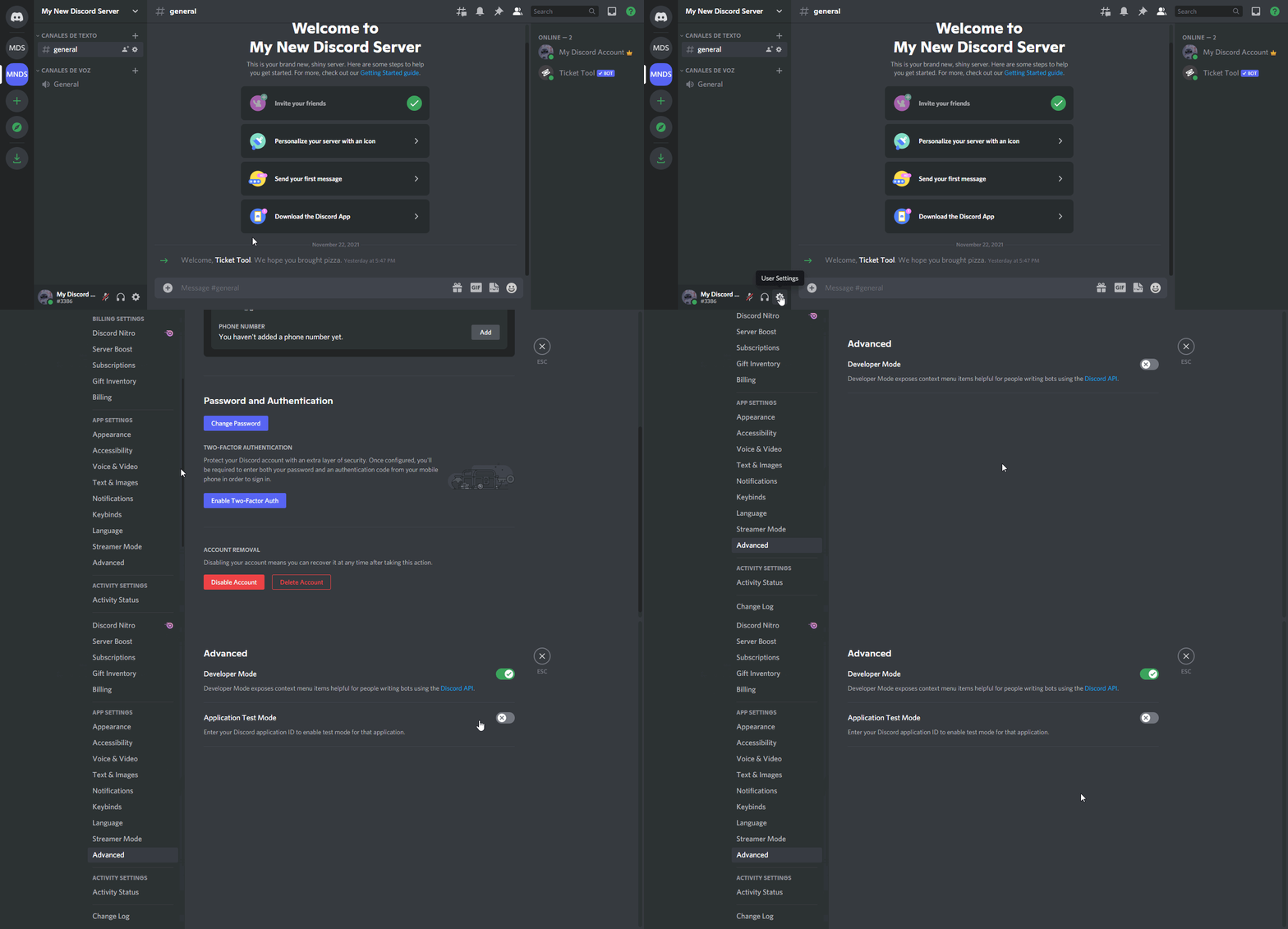
How to turn on developer mode
To enable developer mode do the following:
[:desktop: PC] go to Settings ➞ Advanced ➞ Developer mode
[:mobile_phone: Mobile] go to Settings ➞ Appearance ➞ Developer mode
Developer Mode allows you to get the ID of any channel, user, role, or server.
VIA the ID, you can use them with <> alongside their corresponding format to mention a channel/role/user...
They're mostly used to mention channels, users, or roles in Embeds
Formats
Channels: <#ID> ➝ #🤖│bot-spam
Users: <@ID> ➝ @humble sequoia
Roles: <@&ID> ➝ <@&642118166243311646>
 buoyant monolith
gilded verge
i think so... okay, nvm, please enable developer mode
buoyant monolith
gilded verge
i think so... okay, nvm, please enable developer mode
Alright.
humble sequoiaBOT
How do I get the ID of Roles/Channels/Emojis?
Ticket Tool has a useful command that helps you get the ID of various things like channels, roles, emojis and your server.
Just use the command $id <#channel/@role/:emoji:>. Now copy everything, including the brackets <...>, to your dashboard (or wherever you want it)
If you want the server ID, just use $id.
Examples:
Server ID: $id ➝
509192800865353738
Roles: $id @Role ➝@humble sequoia
Channel: $id #channel ➝#🤖│bot-spam
User: $id @user ➝@copper owl
Emoji: $id➝

 gilded verge
humble sequoia
gilded verge
humble sequoia
there you are 😂 ... please check @buoyant monolith 😅
buoyant monolith
gilded verge
there you are 😂 ... please check <:this:894279341108772914> <@37111075478018458...
Okay, thank you lol.
iron nightBOT
Gave +1 Rep to @gilded verge
 glossy pivot
didnt understand
gilded verge
Please ~~explain ~~ describe your problem with Ticket Tool bot
 obtuse krakenBOT
1. Invite Ticket Tool to your server
First you will want to invite the bot to your server. Once the bot is in your server, you can manage your server in the dashboard.

2. Create a Panel
To create a panel we are going to need to head over to the panel configs on the dashboard.
Once at the dashboard we will need to click Create Panel.
Enter a panel name (Fill in any optional settings you want).
Click Create Panel and your ready to get started with configuring your panel.
An example of a creating a panel is shown below.

3. Send the Panel to a Channel
Once you've created a panel on the dashboard you will need to send it to a channel using send on the dashboard.
Select the channel you want your panel to be created in and click send.
For other questions checkout $help faq.
An example of a sending a panel is shown below.
Having a Problem Sending the Panel?
Do $debug in a channel with Ticket Tool and make sure it has all the necessary Discord permissions.
 humble sequoiaBOT

You can check our documentation here;
You can also check #📂│information for the basic setup;
You can also watch this video tutorial.
Our documentation contains all the info you need about the bot to be able to setup and configure the bot however you like.
gilded verge
humble sequoia
or check video tutorial
 north vine
How do I make two buttons for the create a ticket thing
humble sequoiaBOT
Multipanels are panels with multiple buttons attached to them.
How to create a Multipanel
All users can combine multiple panels into one multipanel!
First, find the IDs of each panel you wish to combine. You can find them in your Panel Configs in the Dashboard
Next, send the multipanel to a channel using $panel [id1] [id2] {id3} ....
e.g. $panel 1 2 4 17 35 to combine panels 1, 2, 4, 17 and 35.
Up to 25 panels may be combined.
You can also watch this video tutorial.

For a more convenient use of multipanels, you can now combine panels on the dashboard. This will allow you to directly send the multipanel from the dashboard or via the $panel ID command.
Where can I find this?
You can find this setting on the Dashboard -> Panel Configs -> Settings -> General Options
Note: if you're attaching all the panels to a panel called English, don't include English in the attached panels box (If you do this, it will create duplicate)
This will put all buttons from all of your panels on one message. The message is the panel message from the panel you're combining these panels in.
You can also watch this video tutorial.
 gilded verge
humble sequoia
gilded verge
humble sequoia
@north vine, check
 fierce furnace
hi I get this interaction failed message. I just installed ticket tool.
I don't know what to do...

 subtle fulcrum
fierce furnace
hi I get this interaction failed message. I just installed ticket tool.
I don't...
subtle fulcrum
fierce furnace
hi I get this interaction failed message. I just installed ticket tool.
I don't...
give the bot perms
fierce furnace
subtle fulcrum
give the bot perms
I give permission.
is there any permission list I need to give?
gilded verge
$perms
humble sequoiaBOT
ᅠ
@pseudo glen requires the following permissions:
Add Reactions
Read Channels
Send Messages
Manage Messages
Embed Links
Attach Files
Read History
Manage Roles
Manage Channels
To change the role permissions, you can go to your Discord Server ➞ Server Settings ➞ Roles ➞ @Ticket Tool
To change the channel permissions, you can go to your Channel Settings ➞ Permissions ➞ Ticket Tool
ᅠ
Note:
You can give Ticket Tool Administrative Permissions instead of all the permissions listed above, but it's entirely optional and NOT necessary.
 subtle fulcrum
Give it admin, will be best bet
fierce furnace
gilded verge
$perms
thanks!
iron nightBOT
Gave +1 Rep to @gilded verge
gilded verge
fierce furnace
hi I get this interaction failed message. I just installed ticket tool.
I don't...
since this is not a screenshot from the phone, there is probably something wrong with the panel. Try to create a new panel and send it to the channel
fierce furnace
gilded verge
since this is not a screenshot from the phone, there is probably something wrong...
I have give all permission listed above and delete panel and recreated new panel but still not working...
is there any other things I can try?
 thorny sentinel
Please attach the tester roll.
 rich cradle
good afternoon, I added a bot to the server and I want to configure it, but the window with all the servers of that server is not there.
humble sequoiaBOT
━━ moved to ticket ━━
 half wyvern
Yes I need help ticket tool is not working on one of the severs I work in do we know why?
 floral cedar
 half wyvern
floral cedar
half wyvern
floral cedar
Ye but everything is up and running

 main pendant
Guys I relogged in many times but I still can't find the option to manage ticket tool in one of the servers in which I am mod. Any solutions?
fierce furnace
fierce furnace
I have give all permission listed above and delete panel and recreated new panel...
now my bot is working well! I don't know why....
anyway, good it is working now!
 real marlin
main pendant
Guys I relogged in many times but I still can't find the option to manage ticket...
real marlin
main pendant
Guys I relogged in many times but I still can't find the option to manage ticket...
Maybe because on the dashboard your role is not authorized to access dashboard.
Ask the administrator to check if the role is on the dashboard, if not ask him to add it.
main pendant
real marlin
Ask the administrator to check if the role is on the dashboard, if not ask him t...
I'm the one who added it tho
real marlin
main pendant
I'm the one who added it tho
Can you please do $level on your discord?
You need at least one of this to access the dashboard
- Server Owner (Level: 6)
- Server Administrator (Level: 4)
- Dashboard access (Level: 2)
 jade topaz
is it possible to make it when you click transcript button it sends the transcript to a specific channel?
 humble crow
Hello can i delete all the tickets at one time?
rustic gale
jade topaz
is it possible to make it when you click transcript button it sends the transcri...
Take a look at this
$help transcript
humble sequoiaBOT
How do I save transcript to a channel?
To save transcripts to a channel go to the Dashboard -> Panel Configs -> Settings -> Logging Options -> Transcript Channel
 rustic gale
You can (and should!!!!!) choose a transcript channel there.
It's in Logging Options
rustic gale
humble crow
Hello can i delete all the tickets at one time?
This hasn't been done because such a feature would hit Discord rate limits very easily.
Go ticket by ticket and use the $delete command in each of them instead.
main pendant
real marlin
Can you please do $level on your discord?
I'm sorry how do I do that
 abstract ermine
Yo
 polar lagoon
why I can't see my server in the dashboard?
abstract ermine
/msg user:@fallow quarry message: nique ta mere
rustic gale
@polar lagoon
humble sequoiaBOT
Don't see your server in the dashboard?
You will possibly need to relog. Look below to see steps on how to relog.
How to relog in the Dashboard.
First, you will need to go to the dashboard. Once your there, click on your avatar on the top right. after you clicked it, you will see button that says Logout. You must click that. Once you have logged out, you can log back in.
Note:
You need one of these 3 things to access the dashboard.
1. Server Owner (Level: 6)
2. Server Administrator (Level: 4)
3. Dashboard Role (Level: 2)
:warning: You can check your level using $level on your Discord Server
User permission level with Ticket Tool
@User is permission level: 0 (User)
```» *If it shows that your permission is **0**, you don't have any of the above **3 things** to manage the dashboard.*
**See the GIF below on how to relog:** polar lagoon
thx
 willow remnant
real marlin
main pendant
I'm sorry how do I do that
willow remnant
real marlin
main pendant
I'm sorry how do I do that
You can write that on a channel that you and the bot have permission.
main pendant
real marlin
You can write that on a channel that you and the bot have permission.
It worked thanksss
What permission is needed to get lvl 2?
real marlin
main pendant
What permission is needed to get lvl 2?
Yes, level 2 is the minimum to access the dashboard
main pendant
Do I need manage server permission or something on my role to get lvl 2?
real marlin
No, the people that have access to the dashboard can add your role in Server Configs - Dashboard Roles (this on the dashboard of the ticket tool)
 real marlin
No problem, if you need more help do not hesitate to ask or open a ticket here #🎫│make-a-ticket
 onyx zephyr
Hey with premium can I remove the tickettool branding?
 quasi cliff
onyx zephyr
Hey with premium can I remove the tickettool branding?
quasi cliff
onyx zephyr
Hey with premium can I remove the tickettool branding?
Which one? The footer?
onyx zephyr
yeah all of it
quasi cliff
onyx zephyr
yeah all of it
You can customise the complete embed / normal message
Bot's pfp/status will remain same. Nickname can be changed
onyx zephyr
Ok but can't customize the name here on the bot?
 quasi cliff
You can change the nickname
onyx zephyr
ok cool thanks
humble sequoiaBOT
Faster Premium Bot
Automatic Transcripts
Full Customization
Custom Buttons
Direct Messages
Ticket Automation
Premium Support
You can purchase premium here:
Price
$6 - Monthly
$66 - Yearly
 Premium
quasi cliff
Premium
quasi cliff
More perks^
 pastel sequoia
.
jade topaz
 jade topaz
https://prnt.sc/nZ8ANoGx9wDj
jade topaz
jade topaz
https://prnt.sc/nZ8ANoGx9wDj
@clever charm
 magic cosmos
Can I get aimbot#
humble sequoiaBOT

⚠️ You're in the wrong place
We provide support for Ticket Tool Discord bot and cannot help you with whatever issue you have.
- We don't know which Support Team you should contact to get this issue resolved, and unfortunately we won't be able to accurately tell you.
If you don't have any further questions regarding our bot Ticket Tool, please close this ticket
 night olive
How do I set up ticket tool in my server for like reports
obtuse krakenBOT
1. Invite Ticket Tool to your server
First you will want to invite the bot to your server. Once the bot is in your server, you can manage your server in the dashboard.
2. Create a Panel
To create a panel we are going to need to head over to the panel configs on the dashboard.
Once at the dashboard we will need to click Create Panel.
Enter a panel name (Fill in any optional settings you want).
Click Create Panel and your ready to get started with configuring your panel.
An example of a creating a panel is shown below.
3. Send the Panel to a Channel
Once you've created a panel on the dashboard you will need to send it to a channel using send on the dashboard.
Select the channel you want your panel to be created in and click send.
For other questions checkout $help faq.
An example of a sending a panel is shown below.
Having a Problem Sending the Panel?
Do $debug in a channel with Ticket Tool and make sure it has all the necessary Discord permissions.
humble sequoiaBOT
You can check our documentation here;
You can also check #📂│information for the basic setup;
You can also watch this video tutorial.
Our documentation contains all the info you need about the bot to be able to setup and configure the bot however you like.
gilded verge
humble sequoia
or check video tutorial
night olive
Do I have to pay to use ticket tool in my server
gilded verge
nope
night olive
Sweet thanks
gilded verge
i mean ofc you can for premium features but not required 😊
 fallow quarry
do would i set up the bi lingual buttons like what u lads have?
 covert swallow
That would be done through multipanels, check the guide below
humble sequoiaBOT
For a more convenient use of multipanels, you can now combine panels on the dashboard. This will allow you to directly send the multipanel from the dashboard or via the $panel ID command.
Where can I find this?
You can find this setting on the Dashboard -> Panel Configs -> Settings -> General Options
Note: if you're attaching all the panels to a panel called English, don't include English in the attached panels box (If you do this, it will create duplicate)
This will put all buttons from all of your panels on one message. The message is the panel message from the panel you're combining these panels in.
You can also watch this video tutorial.
jade topaz
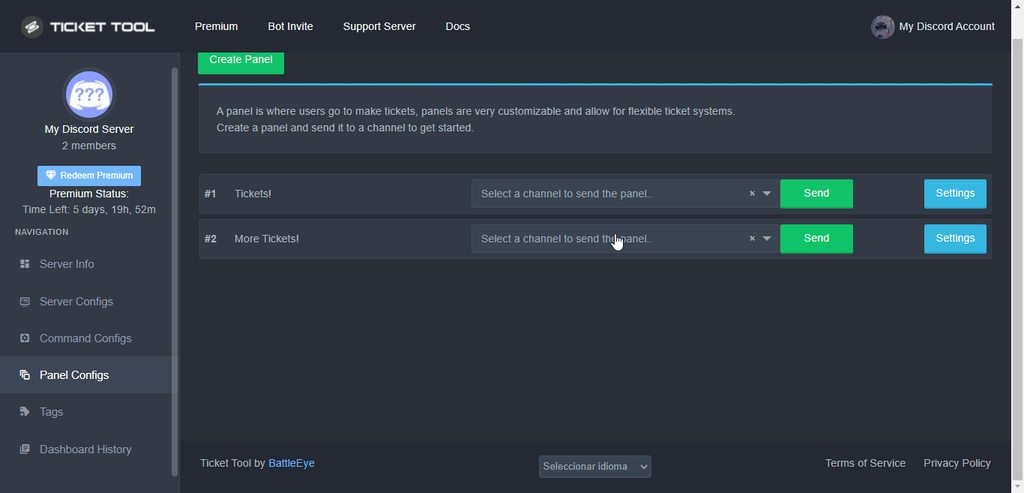
How do I make the bot change the name of the ticket automatically?
quasi cliff
jade topaz
How do I make the bot change the name of the ticket automatically?
That's a premium feature
quasi cliff
 jade topaz
ok thx pro
i have another question how to rename it to the name of the user who open the ticket automatic?
@quasi cliff sorry for mention
real marlin
You can use {author.name} in the ticket name, you can also check all the variables:
{server.name} -The server name
{server.id} -The server id
{channel} -The #channel for channel
{channel.name} -The channel name this message is used in/from
{channel.id}-The channel id
{author} -The users @.-.User
{author.name} -The users username
{author.id} -The id of the user
{author.nickname} -The users nickname (if set)
{author.icon} -The url for the users icon
{author.tag} -The users tag
{author.full} -The users username and usertag combined
{panel.count} -The current count for tickets
{panel.name} -The panels name
{panel.ticketLimit} -The current ticket limit
{ticket} -The #channel for the ticket you created
{ticket.id} -The channel id for the ticket you created
{ticket.name} -The tickets name
{ticket.user} -The @.-.User who is assigned to the Ticket
{ticket.user.name} -The username of the user who is assigned to the Ticket
{ticket.user.id}
{ticket.user.nickname} -The nickname of the user who is assigned to the Ticket (if set)
{ticket.user.icon} -The url for the users icon
{ticket.user.tag} -The tag of the user who is assigned to the Ticket
{ticket.user.full} -The users username and usertag combined
{time} -Sends the current unix time in seconds. Optinally add or remove seconds {time+43200} / {time-43200}.
{@role name} or {role ID} -The role name you want to mention (role names are case sensitive.)
real marlin
jade topaz
<@924356699161231410> sorry for mention
To check the variables anytime you can check on Dashboard - Panel configs - Settings of a panel that you have - Supported Variables
jade topaz
ok
jade topaz
Guys how can i get tickets like this

Because mine looks like that…

I think, in the Dashboard you can adjust the Buttons, but I am not shure if you can add more buttons
fallow quarry
curious
how do i add someone to a ticket when it wont let me ping them in the ticket to add them?
real marlin
jade topaz
Guys how can i get tickets like this
You need to use Multipanel
jade topaz
real marlin
You need to use Multipanel
How?
fallow quarry
he already sent links fam
fallow quarry
humble sequoia
this 1
fallow quarry
fallow quarry
how do i add someone to a ticket when it wont let me ping them in the ticket to ...
please help someone xD
real marlin
jade topaz
How?
This may help you https://www.youtube.com/watch?v=iybEh346Bz4

Ticket Tool is the best Discord bot for tickets you'll find! Learn more about multipanels and how to improve your users' experience while asking for support.
Invite: https://tickettool.xyz/invite
Website: https://tickettool.xyz
Support Server: https://discord.gg/tickettool
00:00 Intro
00:11 What is a multipanel
00:32 How to do a multipanel
Ta...
jade topaz
real marlin
This may help you https://www.youtube.com/watch?v=iybEh346Bz4
Thank you, have a good day
iron nightBOT
Gave +1 Rep to @real marlin
fallow quarry
real marlin
This may help you https://www.youtube.com/watch?v=iybEh346Bz4
how do i add someone to a ticket via text commands when it wont let me ping them in the ticket to add them?
is there a permission or setting im missing somewhere?
real marlin
fallow quarry
is there a permission or setting im missing somewhere?
You can so it $add [Username]
fallow quarry
i just realised that as long as i write the name correct its fine as it wont let me @mention them if they arent even in the channel
fallow quarry
real marlin
You can so it $add [Username]
thank you
iron nightBOT
Gave +1 Rep to @real marlin
real marlin
fallow quarry
i just realised that as long as i write the name correct its fine as it wont let...
Yap discord only allows to ping people that can see the channel, so you need to add them to the ticket.
real marlin
No problem, yeah I saw.
If something happens for pinging me I know that the bot told you to ping you.
So no issues 😄
fallow quarry
real marlin
No problem, yeah I saw.
Missing required option: [User/Role] (optional channel)
quasi cliff
fallow quarry
Missing required option: [User/Role] (optional channel)
Try using user id
real marlin
Ahahahah it can happen
An example is $add @real marlin (using the DoctorSneaky#5904)
 glad coral
what do i do
 gilded verge
glad coral
what do i do
gilded verge
glad coral
what do i do
you've opened a ticket so please wait there 😐
glad coral
ok
 radiant monolith
Hi hmm does anyone know how to check ticket log?
real marlin
radiant monolith
Hi hmm does anyone know how to check ticket log?
Dashboard history on your dashboard of the bot.
radiant monolith
Is it possible to check the histories message even the ticket closed?
real marlin
radiant monolith
Is it possible to check the histories message even the ticket closed?
If not deleted you can still check the ticket channel, or you can use the transcript but they are premium features.
radiant monolith
Ohh I see, thanks for answering! 🥰
 white lodge
Hoe do i ck my character an start over?
 small radish
Hi
real marlin
white lodge
Hoe do i ck my character an start over?
I have already explain you over a ticket that this is not the correct support, please contact the correct server/game support staff.
 verbal eagle
Is it possible to disable HTML file attachment in a Transcript message?
gilded verge
verbal eagle
Is it possible to disable HTML file attachment in a Transcript message?
yup, go to Dashboard->Panel Configs->Panel Settings->Expand Logging Options->Edit Transcript Message->scroll down and select the red button above the link text
 real marlin
jade topaz
<@294530389425258497>
real marlin
jade topaz
<@294530389425258497>
Please do $level on your discord server
humble sequoiaBOT
Don't see your server in the dashboard?
You will possibly need to relog. Look below to see steps on how to relog.
How to relog in the Dashboard.
First, you will need to go to the dashboard. Once your there, click on your avatar on the top right. after you clicked it, you will see button that says Logout. You must click that. Once you have logged out, you can log back in.
Note:
You need one of these 3 things to access the dashboard.
1. Server Owner (Level: 6)
2. Server Administrator (Level: 4)
3. Dashboard Role (Level: 2)
:warning: You can check your level using $level on your Discord Server
User permission level with Ticket Tool
@User is permission level: 0 (User)
```» *If it shows that your permission is **0**, you don't have any of the above **3 things** to manage the dashboard.*


**See the GIF below on how to relog:**Please check the message from above.
verbal eagle
gilded verge
yup, go to `Dashboard`->`Panel Configs`->`Panel Settings`->Expand `Logging Optio...
This link must remain. I wrote about the file, not about the link
 gilded verge
okay, so i misunderstood... but as far as i know you can't remove it but i could be wrong
rustic gale
You can't remove that. That file is the transcript
You can't remove that any more than you can play football without a ball
jade topaz
Fixed thanks!
 sick sage
hi guys
why when i invite the ticket tool bot it joins the normal one
and i already activated the premium for 15 days
sick sage
jade topaz
Hey My Server wont show in my Dashboard 😄
its a temp bug it will be fixed in a few minutes
quasi cliff
Relogging
quasi cliff
sick sage
and i already activated the premium for 15 days
15d with key?
humble sequoiaBOT
The first thing you will need to do is invite the premium bot, an invite can be found here
Once the bot is in your server we will head to the dashboard and manage your server. When you are managing your server, you want to head into "Server Configs" then click the drop down menu under "Select the bot you would like to use on this server" then click "Ticket Tool#6207" and then save.
 sick sage
quasi cliff
15d with key?
sick sage
quasi cliff
15d with key?
yes sir
quasi cliff
humble sequoia
 coral latch
hello! is @stark rune available to add into servers? i was hoping to utilise a similar set up to #📌│automated-support. thank you!
iron nightBOT
Gave +1 Rep to @stark rune
 craggy geyser
It's a.... (doctor you were typing first)
real marlin
Go ahead
craggy geyser
It's a custom version of @obtuse kraken which is a free bot itself. You can't add the TT branded one to servers
However what we have in #📌│automated-support will be possible using Ticket Tool following the major update in the works
coral latch
thanks so much, i appreciate the feedback. is there a timeline with the TT update?
craggy geyser
It's in alpha testing right now. No eta for release
coral latch
no problem. i appreciate the help. thanks @craggy geyser and @real marlin.
iron nightBOT
Gave +1 Rep to @craggy geyser
real marlin
coral latch
no problem. i appreciate the help. thanks <@132147174212501504> and <@2945303894...
I love when I don't do anything and people still say thanks 😄
iron nightBOT
Gave +1 Rep to @coral latch
 proper coral
I won a place on the WL but the bot prevents me from joining the server. I have tried using a different account and that seems to work. Does anyone know what I can do please?
This is the server I am trying to join
 humble sequoiaBOT
⚠️ You're in the wrong place
We provide support for Ticket Tool Discord bot and cannot help you with whatever issue you have.
- We don't know which Support Team you should contact to get this issue resolved, and unfortunately we won't be able to accurately tell you.
If you don't have any further questions regarding our bot Ticket Tool, please close this ticket
real marlin
proper coral
I won a place on the WL but the bot prevents me from joining the server. I have ...
Please check the message above.
 pale pilot
maybe because you pinged support..
 grizzled badge
has there been an update to the bot and/or discord, allowing transcripts to now save images?
i just want to check before telling my staff its ok to not save the images manually 😅
humble sequoiaBOT
Attachments not being accessible
At the beginning of May 2022, Discord changed the way they store their deleted files, before this update, files could be accessible for up to 30 days after which they would get erased entirely from the Cloudflare cache. Now the files, including images, aren't accessible since they are deleted, which is why premium users [embed up to 8mb](#📣│bot-news message) worth of pictures within transcripts.
In the major update that's being worked on the developer is looking forward to implementing a better solution to this inconvenience in order for images to be saved, at least for a temporal way.
 grizzled badge
 slender minnow
An experimental fix has been implemented for premium servers.
slender minnow
An experimental fix has been implemented for premium servers.
if you go from premium to not premium, do you lose images saved in transcripts from when you were premium?
 stuck flax
I keep getting access issue when I click on the ticket
is there something I'm missing?
also tickets channels keep appearing at top of discord
could I make them appear below the ticket channel?
gilded verge
stuck flax
I keep getting access issue when I click on the ticket
Hey, could you please show the screenshot?
humble sequoiaBOT
How to set the open category
To set a open category go to the Dashboard -> Panel Configs -> Settings -> Category Options -> Category Open
gilded verge
gilded verge
Hey, could you please show the screenshot?
i mean if you have an error or something 😳
stuck flax
gilded verge
Hey, could you please show the screenshot?
yes give me a second I need to delete my pannel because my ticket limit has been reached
gilded verge
you don't need to delete the panel ^-^ unless you meant opened ticket 😄
floral cedar
،
 gilded verge
oh....
humble sequoiaBOT
ᅠ
@pseudo glen requires the following permissions:
Add Reactions
Read Channels
Send Messages
Manage Messages
Embed Links
Attach Files
Read History
Manage Roles
Manage Channels
To change the role permissions, you can go to your Discord Server ➞ Server Settings ➞ Roles ➞ @Ticket Tool
To change the channel permissions, you can go to your Channel Settings ➞ Permissions ➞ Ticket Tool
ᅠ
Note:
You can give Ticket Tool Administrative Permissions instead of all the permissions listed above, but it's entirely optional and NOT necessary.
stuck flax
gilded verge
oh....
won't let me delete tickets either for some reason
gilded verge
could you show it too?
stuck flax
gilded verge
could you show it too?
well it creates the channel but it doesn't give me the option to close the ticket
but I am admin
maybe that's messing it up
gilded verge
but you get some error, is there no button or something else?
stuck flax
gilded verge
but you get some error, is there no button or something else?
yeah I don't see the button to delete the ticket
or close it
gilded verge
oh, that is, someone had to turn off 😅 please wait...
Dashboard->Panel Configs->Panel Settings->Expand Button Options->now for example: Close Ticket Settings->Enable Button to 
Like this:

remember that you can also use the command $close ^-^ (Command Configs)
stuck flax
gilded verge
remember that you can also use the command `$close` ^-^ (Command Configs)
I tried to use that command but I wouldn't close the ticket
it didn't do anything
let me do his option
gilded verge
the new settings apply to new tickets
gilded verge
it looks like the bot does not have either permission or no channel access, uhm... please go to your server and use $debug, then send link from bot, Example:
 stuck flax
 gilded verge
oh... do you see the ❌ mark somewhere?
stuck flax
Read channel
gilded verge
yup
stuck flax
you need the link
gilded verge
a link would be fine but a screenshot might be too 😄
stuck flax
hahaah ok cool
gilded verge
so... please go to your server settings -> roles -> Ticket Tool -> add View Channels
stuck flax
gilded verge
so... please go to your server settings -> roles -> Ticket Tool -> add `View Cha...
ok thanks. last question...do all ticket channels go to the top of the discord?
iron nightBOT
Gave +1 Rep to @gilded verge
stuck flax
by the way thanks for all your help
gilded verge
if you don't configure the category, then yes 😳
humble sequoiaBOT
How to set the open category
To set a open category go to the Dashboard -> Panel Configs -> Settings -> Category Options -> Category Open
stuck flax
humble sequoia
thanks man
gilded verge
Anything else I can help? If no, have a good day 😊
iron nightBOT
Gave +1 Rep to @gilded verge
humble sequoiaBOT
Multipanels are panels with multiple buttons attached to them.
How to create a Multipanel
All users can combine multiple panels into one multipanel!
First, find the IDs of each panel you wish to combine. You can find them in your Panel Configs in the Dashboard
Next, send the multipanel to a channel using $panel [id1] [id2] {id3} ....
e.g. $panel 1 2 4 17 35 to combine panels 1, 2, 4, 17 and 35.
Up to 25 panels may be combined.
You can also watch this video tutorial.
For a more convenient use of multipanels, you can now combine panels on the dashboard. This will allow you to directly send the multipanel from the dashboard or via the $panel ID command.
Where can I find this?
You can find this setting on the Dashboard -> Panel Configs -> Settings -> General Options
Note: if you're attaching all the panels to a panel called English, don't include English in the attached panels box (If you do this, it will create duplicate)
This will put all buttons from all of your panels on one message. The message is the panel message from the panel you're combining these panels in.
You can also watch this video tutorial.
real marlin
Or if you don't like to read: https://www.youtube.com/watch?v=iybEh346Bz4
Ticket Tool is the best Discord bot for tickets you'll find! Learn more about multipanels and how to improve your users' experience while asking for support.
Invite: https://tickettool.xyz/invite
Website: https://tickettool.xyz
Support Server: https://discord.gg/tickettool
00:00 Intro
00:11 What is a multipanel
00:32 How to do a multipanel
Ta...
 plain egret
ok
gilded verge
whitelabels are planned so currently you can't
proper coral
humble sequoia
What message should I check? Thanks 😀
iron nightBOT
Gave +1 Rep to @humble sequoia
proper coral
real marlin
Please check the message above.
What message?
 scenic plinth
humble sequoia
scenic plinth
humble sequoia
This one.
humble sequoiaBOT
⚠️ You're in the wrong place
We provide support for Ticket Tool Discord bot and cannot help you with whatever issue you have.
- We don't know which Support Team you should contact to get this issue resolved, and unfortunately we won't be able to accurately tell you.
If you don't have any further questions regarding our bot Ticket Tool, please close this ticket
real marlin
proper coral
What message?
This one above
proper coral
real marlin
This one above
That was my message? Attaching an image of the verification process and how it wasn't working?
real marlin
proper coral
That was my message? Attaching an image of the verification process and how it ...
You are in the wrong discord, we only provide help for @humble sequoia and @pseudo glen. Everything else is out of our scope.
 honest rune
Hi
I will use the ticket tool on my own server, but I only want the role I specified to open a ticket, how can I do that?
@scenic plinth @weak oasis @safe prairie
real marlin
honest rune
I will use the ticket tool on my own server, but I only want the role I specifie...
Hey, first I would like to refer you to #📂│information so you can read our rules, second you can do it on the dashboard - panel configs - settings of the panel you wish to make that option - Button options - Settings of Create a button - Allowed or Disabled roles.
honest rune
real marlin
Hey, first I would like to refer you to <#509239005481664524> so you can read ou...
thanks
iron nightBOT
Gave +1 Rep to @real marlin
proper coral
real marlin
You are in the wrong discord, we only provide help for <@722196398635745312> and...
Aha, okay . Thank you for letting me know! 😀
iron nightBOT
Gave +1 Rep to @real marlin
jade topaz
how to setup
obtuse krakenBOT
1. Invite Ticket Tool to your server
First you will want to invite the bot to your server. Once the bot is in your server, you can manage your server in the dashboard.
2. Create a Panel
To create a panel we are going to need to head over to the panel configs on the dashboard.
Once at the dashboard we will need to click Create Panel.
Enter a panel name (Fill in any optional settings you want).
Click Create Panel and your ready to get started with configuring your panel.
An example of a creating a panel is shown below.
3. Send the Panel to a Channel
Once you've created a panel on the dashboard you will need to send it to a channel using send on the dashboard.
Select the channel you want your panel to be created in and click send.
For other questions checkout $help faq.
An example of a sending a panel is shown below.
Having a Problem Sending the Panel?
Do $debug in a channel with Ticket Tool and make sure it has all the necessary Discord permissions.
humble sequoiaBOT
You can check our documentation here;
You can also check #📂│information for the basic setup;
You can also watch this video tutorial.
Our documentation contains all the info you need about the bot to be able to setup and configure the bot however you like.
gilded verge
humble sequoia
@jade topaz, or check
 stone sand
Hello guys, whenever an user closed a ticket he/she still able to see message history. But I also uncheck that option in the settings. How can it be possible?
gilded verge
stone sand
Hello guys, whenever an user closed a ticket he/she still able to see message hi...
Hey, I don't think there are too strong permissions in his roles, but I'm going to ask you a few things to be sure.
- Please go to
Panel Configs->Panel Settings->ExpandGeneral Options->send screenshot from this section (i need to seeSupport Team RolesandAdditional Roles) - Expand
Permission Options->Edit User Closed Permissions->send screenshot from this section->Edit Additional Roles Closed Permissions->send screenshot from this section - Does the user have a role that was added to the
Support Team Rolesor theAdditional Roles? - After saving the settings, was a new ticket created to check that it works?
stone sand
gilded verge
Hey, I don't think there are too strong permissions in his roles, but I'm going ...
Answer of the 3rd question is: No, they don't have any support team roles.


 gilded verge
- After saving the settings, was a new ticket created to check that it works? 😳
stone sand
Didn't get that question but still able to create ticket/problem is continues
For example: The ticket has closed, he can still see the channel and messages. Just can't send any message after closed.

I want to make them not to see the channel history, but cannot do that
gilded verge
I also have another question ... Have you used the View As Role? 🤔
stone sand
No, I didn't but we're making live test with them in the voice channel. They say "I can still see the thread", also I see them right sidebar on the discord
gilded verge
How many panels do you have?
stone sand
Only one
If you don't mind you can come and see by yourself in our server? Would you come?
gilded verge
If you agree to send me a invite
link to your server in a private message, I can create a ticket on your server and maybe then we can see what is going on there. What do you think about it?
oh 😂
stone sand
😄
humble sequoiaBOT
For a more convenient use of multipanels, you can now combine panels on the dashboard. This will allow you to directly send the multipanel from the dashboard or via the $panel ID command.
Where can I find this?
You can find this setting on the Dashboard -> Panel Configs -> Settings -> General Options
Note: if you're attaching all the panels to a panel called English, don't include English in the attached panels box (If you do this, it will create duplicate)
This will put all buttons from all of your panels on one message. The message is the panel message from the panel you're combining these panels in.
You can also watch this video tutorial.
gilded verge
stone sand
😄
Problem: Error/bug with the first panel. Solved after creating a new panel. The first panel was not working as it should, deleted.
 quasi cliff
$help limit
humble sequoiaBOT
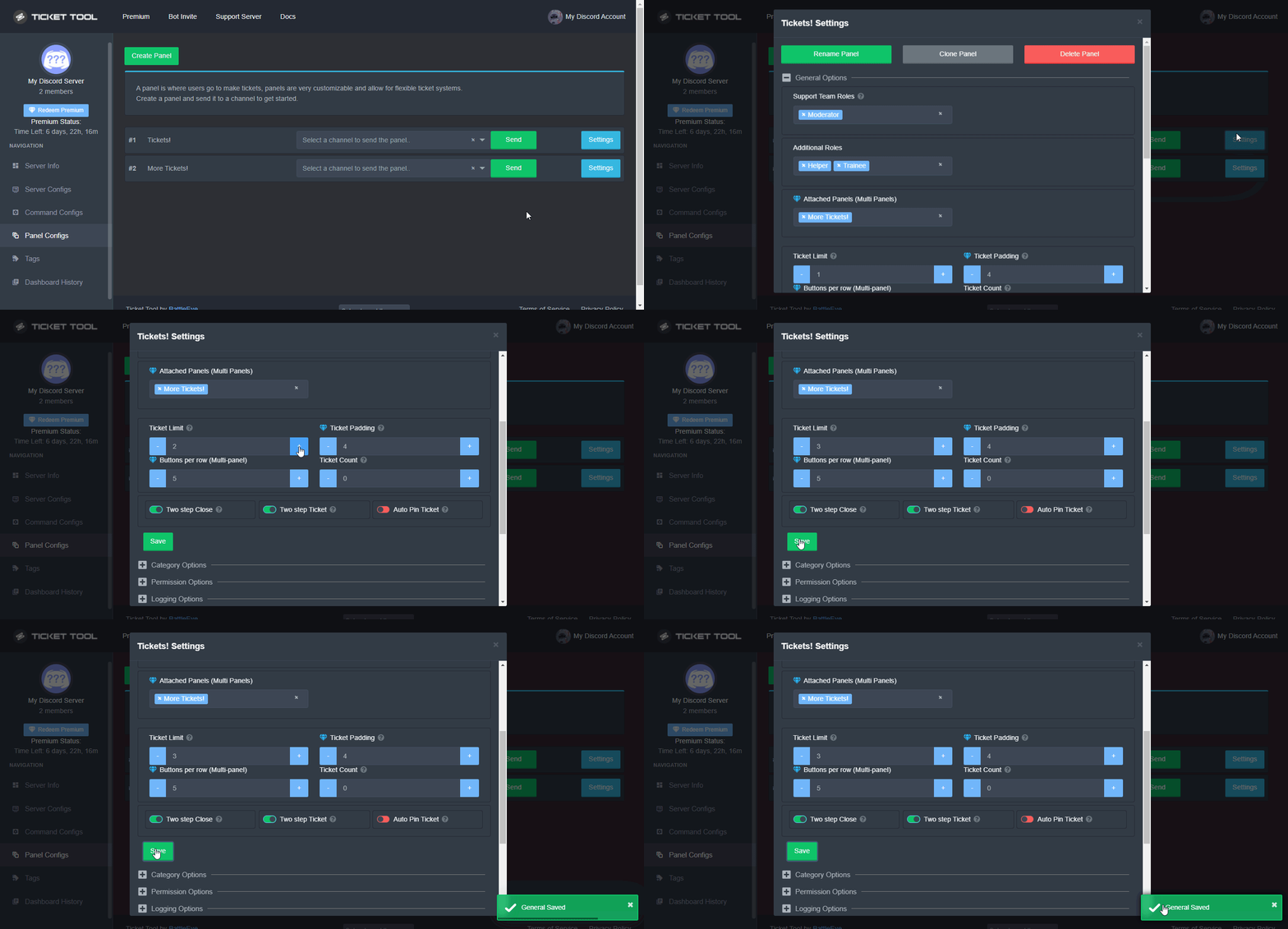
How to set a ticket limit
A ticket limit may be set per panel to prevent users from spamming tickets. By default this limit is set to 3. Once a user hits this limit the bot will notify the users that they reached the limit.
To set a ticket limit go to the Dashboard -> Panel Configs -> Settings -> General Options -> Ticket Limit
 quasi cliff
 nocturne pier
nocturne pier
quasi cliff
<:this:894279341108772914>
Thanks! I increased the limit but I’m still receiving the same error message
iron nightBOT
Gave +1 Rep to @quasi cliff
quasi cliff
nocturne pier
Thanks! I increased the limit but I’m still receiving the same error message
Is it a different error message?
humble sequoiaBOT
Unlike the regular Ticket Limit, the global limit will limit the amount of tickets a user can create at the same time for ALL Panels. When a ticket is closed again, the limit resets for that user.
To customize it head over to your Dashboard ➞ Server Configs ➞ Global Ticket Limit
Note:
This is not a limit for how many tickets a user can open at all times or how many tickets you can have open on the server in total. This is just a limit per user for open tickets.
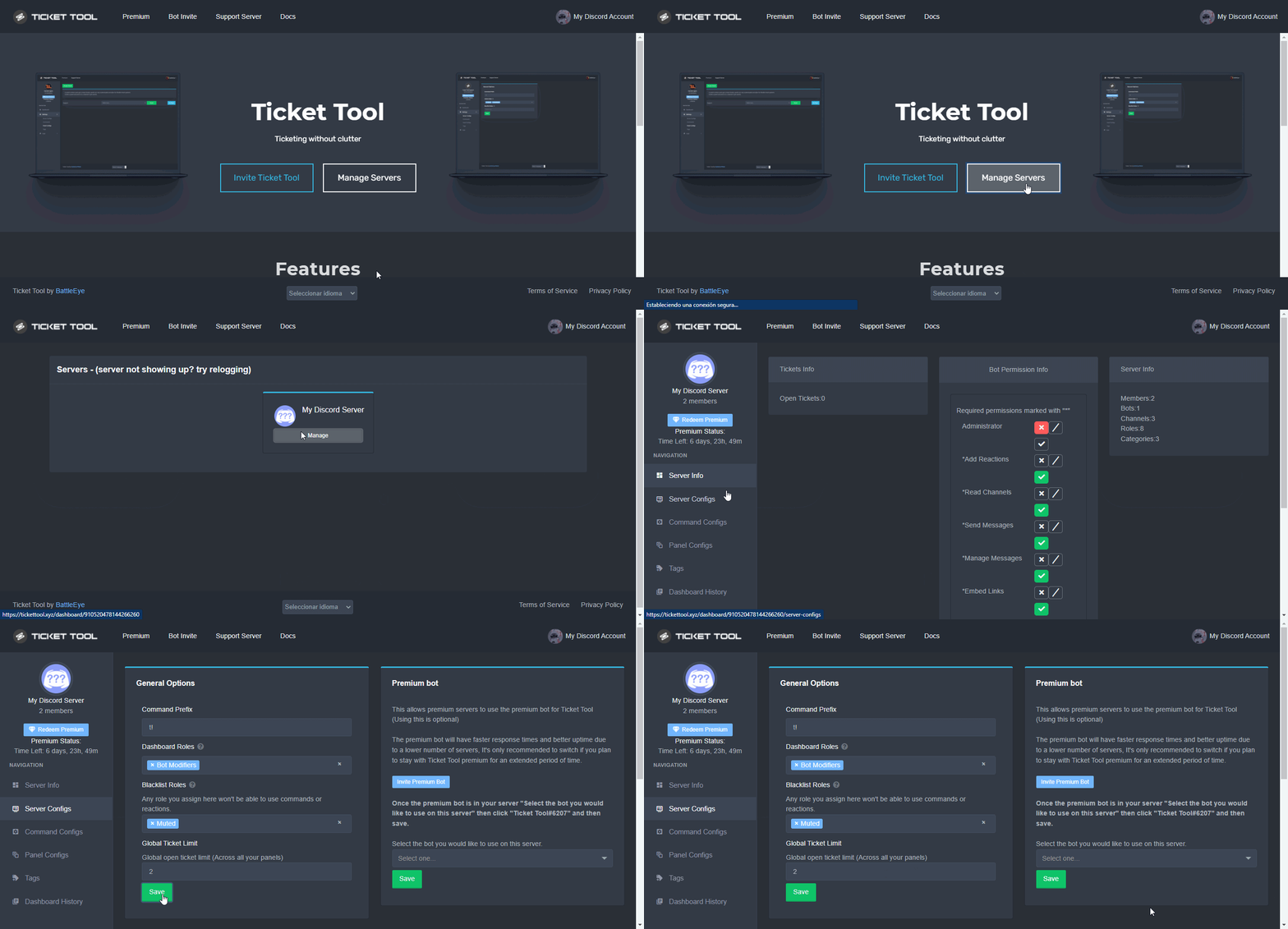 nocturne pier
quasi cliff
Is it a different error message?
nocturne pier
quasi cliff
Is it a different error message?
No it’s the same one
quasi cliff
Check if you changed the limit for same panel
quasi cliff
humble sequoia
Or if you added Global limit
nocturne pier
quasi cliff
Check if you changed the limit for same panel
The only way I was able to open another ticket was by closing a previous one
quasi cliff
That shouldn't happen if you increased the limit
jade topaz
Hi
getting the premium ticket tool bot, would that allow me to customise the bot itself to make it stand-out less and be more 'my server design' orientated?
i.e profile picture change, name change and or imbedded message change.
real marlin
jade topaz
i.e profile picture change, name change and or imbedded message change.
Not at the moment, but we are working on that.
jade topaz
real marlin
Not at the moment, but we are working on that.
👀 awesome
real marlin
The name change you can do it on the server.
But the picture currently is not available that option.
However the premium you can do more customization and automation with your tickets.
jade topaz
real marlin
However the premium you can do more customization and automation with your ticke...
Sound's good, thanks for the quick and efficient reply :).
iron nightBOT
Gave +1 Rep to @real marlin
real marlin
No problem, if you have any question just ask or feel free to open a ticket here: #🎫│make-a-ticket
jade topaz
🙌 will do, thanks once again.
 thorn root
Gm guys
What do I change to make a ticket open in a channel and not at the top of our discord?
real marlin
thorn root
What do I change to make a ticket open in a channel and not at the top of our di...
You have open a ticket one support staff will be with you in a moment.
iron nightBOT
Gave +1 Rep to @real marlin
jade topaz
how do i make it so that the ticket is created on a certain category on my server?
humble sequoiaBOT
━━ moved to ticket ━━
 velvet blade
How can I get ticket tool premium??
covert swallow
You can purchase it, boost this server twice, or win it an event
 kind fjord
once a ticket is delted is it gone forever
jade topaz
I need help by my server i cant create a ticket
gilded verge
jade topaz
I need help by my server i cant create a ticket
you opened the ticket, wait there for help 😕
jade topaz
Uhm im german
scenic plinth
Wait for someone to respond to you, some people are either asleep or cannot respond to you, especially with limited available German Support.
real marlin
So yeah, if you go to german it will take more time.
Not so many people speak german.
jade topaz
I do englisch
real marlin
jade topaz
I do englisch
I am taking breakfast if nobody takes it I will be with you in 15m
jade topaz
Okay thanks 🙂
 edgy aspen
Anyone can help me
I cant find the other server

Im trying to relogging
But it didn't work
humble sequoiaBOT
Don't see your server in the dashboard?
You will possibly need to relog. Look below to see steps on how to relog.
How to relog in the Dashboard.
First, you will need to go to the dashboard. Once your there, click on your avatar on the top right. after you clicked it, you will see button that says Logout. You must click that. Once you have logged out, you can log back in.
Note:
You need one of these 3 things to access the dashboard.
1. Server Owner (Level: 6)
2. Server Administrator (Level: 4)
3. Dashboard Role (Level: 2)
:warning: You can check your level using $level on your Discord Server
User permission level with Ticket Tool
@User is permission level: 0 (User)
```» *If it shows that your permission is **0**, you don't have any of the above **3 things** to manage the dashboard.*


**See the GIF below on how to relog:**Thankyouu!!
gilded verge
😊
 past heart
@gilded verge i have a question
gilded verge
why me?
past heart
Can anyone tell me how to add user name of the user who claimed the ticket for example i created the ticket and my friend claimed it i need like this in my claim message embed

aoiyah#1111 is the ocm staff
it should come the ticket claimer name
gilded verge
Okay, then first: rule 4 on #📂│information
but about your question: just use variable {user} in Claimed Message
past heart
gilded verge
Okay, then first: **rule 4** on <#509239005481664524>
but about your question:...
i've read them
but i need ticket claimer tag for example aoiyah#1111 in footer
past heart
 gilded verge
{author.tag}
past heart
its the only tag coming
real marlin
Btw the claimed embed settings are premium.
past heart
not name
 gilded verge
okay so try {author.nickname}{author.tag} -like i wrote here
real marlin
{author.nickname} should make it if I am not wrong

 scenic sierra
°-°
past heart
claimer avatar
 gilded verge
okay, please check Supported Variables
real marlin
{author.icon}
As @gilded verge said also Supported Variables have all answers, its just a matter of try and if fails try again.
past heart
Thank you!
 light phoenix
The dashboard doesnt show any exsisting server?s when i use it for 1 and am trying to set it up for one any reason why its doing that
like its showing nothing 😦
humble sequoiaBOT
Don't see your server in the dashboard?
You will possibly need to relog. Look below to see steps on how to relog.
How to relog in the Dashboard.
First, you will need to go to the dashboard. Once your there, click on your avatar on the top right. after you clicked it, you will see button that says Logout. You must click that. Once you have logged out, you can log back in.
Note:
You need one of these 3 things to access the dashboard.
1. Server Owner (Level: 6)
2. Server Administrator (Level: 4)
3. Dashboard Role (Level: 2)
:warning: You can check your level using $level on your Discord Server
User permission level with Ticket Tool
@User is permission level: 0 (User)
```» *If it shows that your permission is **0**, you don't have any of the above **3 things** to manage the dashboard.*


**See the GIF below on how to relog:**check
light phoenix
got it now thanks!
 versed isle
Hi, im trying to make my ticket tool custom with an embedd message that includes a logo on the top right and a banner below. I have bought the premium and not sure how to do it
real marlin
versed isle
Hi, im trying to make my ticket tool custom with an embedd message that includes...
You have opened a ticket already, someone will be with you in a moment.
versed isle
Thanks boss
 clever summit
why are the perms not working anymore
what did you guys do
1,5 years no problems
real marlin
Care to say what permissions?
clever summit
in the ticket
before I closed the ticket staff and members were not able anymore to see the ticket
now, without changing anything, they still can see it
versed isle
can somebody tell me which section in the ticket website i can create something that looks like this?
 gilded verge
clever summit
what did you guys do
gilded verge
clever summit
what did you guys do
Your message wasn't right, so please be nice. I mean, don't blame others if you haven't checked yourself what caused the change or who did it 🤨
I have a recommendation: Try to create a completely new panel and make the same settings as in the previous panel, send panel to the channel and check if it is the same problem. Let me know 😉
clever summit
gilded verge
Your message wasn't right, so please be nice. I mean, don't blame others if you ...
I did nothing so I asked you
gilded verge
Staff doesn't change anything in other servers so make sure someone else on your server hasn't changed it
clever summit
gilded verge
Staff doesn't change anything in other servers so make sure someone else on your...
nobody has perms and I already checked the perms
something is wrong with the bot
gilded verge
I'm sure everything works as it should. As I wrote.:
Try to create a completely new panel and make the same settings as in the previous panel, send panel to the channel and check if it is the same problem.
clever summit
...
gilded verge
I don't know if you did it so I repeated what I wrote about
quasi cliff
clever summit
now, without changing anything, they still can see it
Hey, please send Server ID
 rich crag
Hi everyone!!! I'm having a trouble about my client sending me an attachment (he's not able to), can someone help me? ehehhe
 snow fable
How though
 wanton fern

slender minnow
rich crag
Hi everyone!!! I'm having a trouble about my client sending me an attachment (he...
Hello htaelee, can you please ensure that under User Open Ticket Permissions (Found under permission option of your respective panel config) the perm to send attachements is marked with a 
clever summit
gilded verge
I'm sure everything works as it should. As I wrote.:
> Try to create a completel...

nope
they are still there after I closed it

and so on

 woeful mortar
 real marlin
woeful mortar
real marlin
woeful mortar
Dashboard - Panel Configs - Settings of the Panel - Button Option - Create a ticket settings - Enable Button
woeful mortar
real marlin
Dashboard - Panel Configs - Settings of the Panel - Button Option - Create a tic...
I did
real marlin
woeful mortar
I did
send the panel again to the server.
woeful mortar
real marlin
send the panel again to the server.
Wdym
real marlin
$help send
humble sequoiaBOT
Sending a panel
Once you've created a panel on the dashboard you will need to send it to a channel using send on the dashboard
Select the channel you want your panel to be created in and click send.
For other questions checkout $help faq
An example of a sending a panel is shown below.
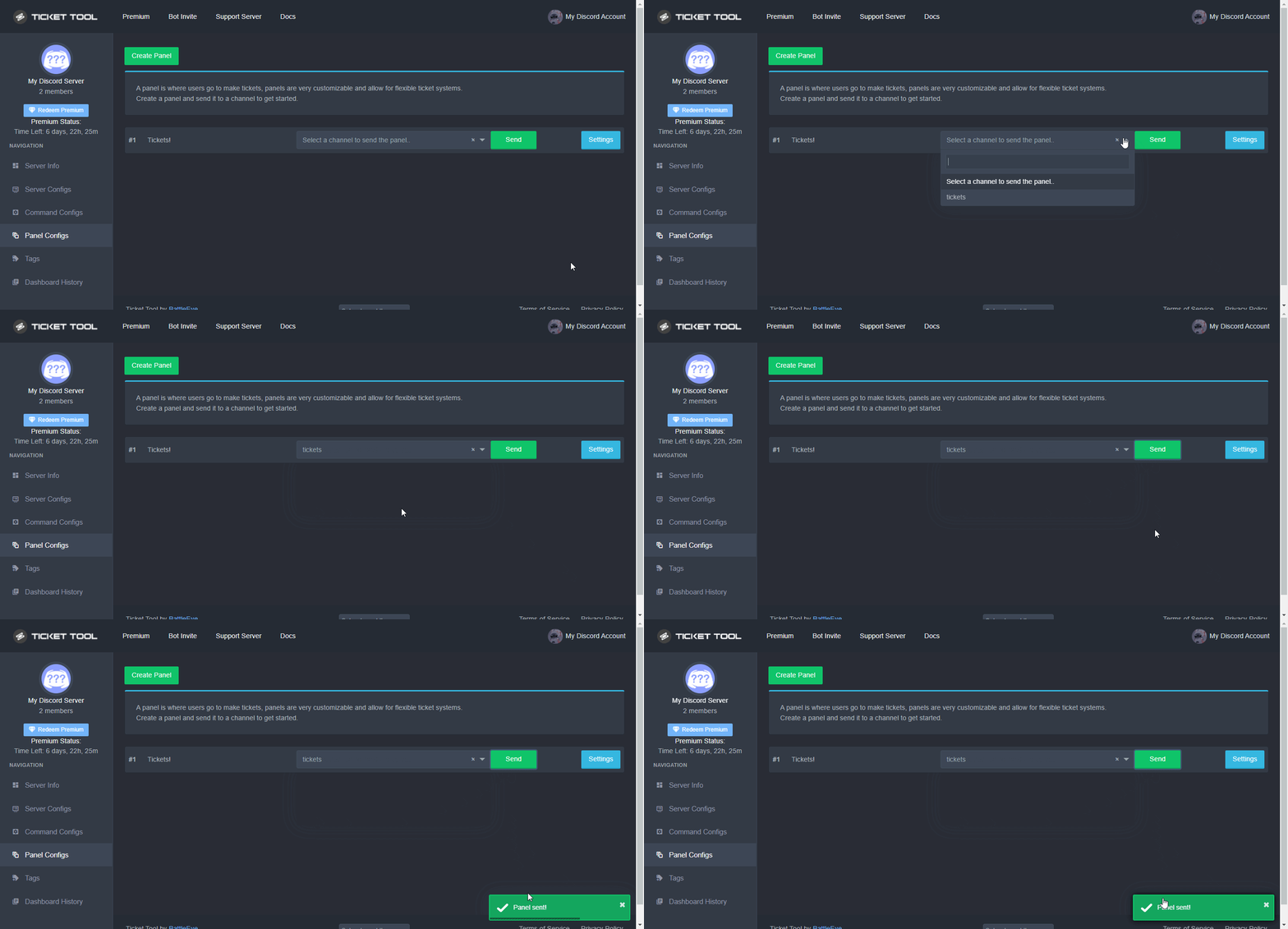 real marlin
@woeful mortar this above
gilded verge
clever summit
let's see 🤔
Okay, so if I understand correctly, you wouldn't want your support team to have access to the ticket after closing, right?
gilded verge
Let's check something... please go to your server settings, then to the role that you added to the panel as support team roles, then in the role permissions go to the bottom and make sure that the role does not have administrator permission, because if this role has an administrator, it explains a lot, but if he doesn't have this permission, let me know 🤔
 last sleet
hey, how do i put a user or tag in the ticket?
(i tried putting but it didnt pinged the person)
im confuse since im new in using this
humble sequoiaBOT
Within all the messages the bot's sends (both embeds and text) you can mention either channels, roles, or even users, these mentions will only send a notification to the user if they are used within a text field, e.g: a role mentioned in an embed won't ping at all the users who have that role.
For mentioning a role you can use one out of three options:
{@Role Name} ➞ Which is Case Sensitive.
{RoleID} ➞ Replace RoleId with the Id of the role you are trying to ping.
<@&RoleID> ➞ Discord's native syntax to ping roles.
<#ChannelID> ➞ Mention a channel by its ID.
<@UserID> ➞ Mention a user by its ID.
last sleet
Okay thank you :D
gilded verge
you can also check Supported Variables in panel settings 😊

@clever summit, We can try something else 😮
Create a completely new panel, add your support roles to the panel as in the previous panel and save the settings. Then expand "Permission Options" but change the permissions to those shown in the video below and then test.
 split mortar
Hi. I feel like this would be a frequently asked question, but a search isn't finding it mentioned anywhere.
Does Ticket Tool support application commands (i.e. the built-in Discord mechanism where commands start with /) rather than comments-as-commands yet?
If so, is some action required to enable them on existing servers?
If not, does the bot have special permission from Discord to continue working after the end of this month, when it presumably loses access to the "message content intent"?
gilded verge
split mortar
Hi. I feel like this would be a frequently asked question, but a search isn't fi...
Ticket Tool will soon be moving to Slash Commands
#💡│suggestions message
Hey,
I don't know the answer to your next questions, so I'm sorry 🥺
split mortar
gilded verge
> Ticket Tool will soon be moving to Slash Commands
https://discord.com/channels...
"Soon" 4 days ago, with 13 days to go. Gonna be tight! Not much overlap between the two systems for re-training staff. 😬
(And why is everyone here calling them "slash commands" not "application commands"? That explains why I didn't find the existing conversation. Whoops.)
 fallow ingot
I’ve only ever heard slash commands, never heard anyone call them application commands. I guess you make a good point tho.
gilded verge
they probably use from Scopes 😁
 fallow ingot
Hmm
split mortar
fallow ingot
I’ve only ever heard slash commands, never heard anyone call them application co...
"Application Commands" is the official term. For example: https://discord.com/developers/docs/tutorials/upgrading-to-application-commands and:

(And, actually, it would be really nice if Ticket Tool did use application commands to the fullest. It would be lovely if I could pull a user into a ticket by right-clicking their name and picking the appropriate menu option.)
rustic gale
split mortar
(And, actually, it would be really nice if Ticket Tool did use application comma...
This is worth leaving a suggestion about.
split mortar
rustic gale
This is worth leaving a suggestion about.
Done.
 waxen crest
How to you close a ticket with a reason
 opaque dirge
.
quasi cliff
waxen crest
How to you close a ticket with a reason
Simple use $close reason
opaque dirge
quasi cliff
Simple use `$close reason`
Lol
pale pilot
@opaque dirge how should we understand your review in #📈│reviews ? You didn't even ask a question
jade topaz
I need help i have added the bot to my server but the server dose not show up

these are old not the new one?
bonjour
 prime crescent
 jade topaz
french pls
 strong mirage
jade topaz
french pls
strong mirage
jade topaz
french pls
It is a english server
Si tu as besoin d'aide créé un ticket en français
jade topaz
ses fait
waxen crest
quasi cliff
Simple use `$close reason`
Thanks man but is it close reason [reason] or close [reason]
iron nightBOT
Gave +1 Rep to @quasi cliff
rustic gale
waxen crest
Thanks man but is it close reason [reason] or close [reason]
If the reason is “Solved”, type $close Solved
waxen crest
oh okay thanks guys
waxen crest
rustic gale
If the reason is “Solved”, type $close Solved
and do peaplo get a message with reason or
 formal radish
hello
i try to manage the ticket bot but only admin can create ticket not everyone 😦
 formal radish
role of the bot or everyone ?
waxen crest
everyone
rustic gale
That message is usually because of an outdated Discord app
Uninstall and reinstall and try again
formal radish
I use the web discord version
waxen crest
download the app
rustic gale
Close and reopen the client and try again
formal radish
Okay i reload the web and now it's work thanks
rustic gale
waxen crest
and do peaplo get a message with reason or
The reason is for including in responses
waxen crest
i dont understand sorry im not english so
waxen crest
rustic gale
The reason is for including in responses
so if i do close solved yk how does the ticket opener know i closed the ticket with reason solved
 astral musk
hello
 restive ice
how to put tickettoll in a certain channel
quasi cliff
waxen crest
so if i do close solved yk how does the ticket opener know i closed the ticket w...
Premium users can add Auto DM on ticket close and in the message they can include the variable "{reason}".
Normal users can include the same variable in Moderator Message (the one which includes Delete/Re-Open/Transcript buttons)
quasi cliff
restive ice
how to put tickettoll in a certain channel
Are you trying to Setup?
restive ice
quasi cliff
Are you trying to Setup?
yep
astral musk
why member cannot see ticket
humble sequoiaBOT
You can check our documentation here;
You can also check #📂│information for the basic setup;
You can also watch this video tutorial.
Our documentation contains all the info you need about the bot to be able to setup and configure the bot however you like.
restive ice
ty
quasi cliff
astral musk
why member cannot see ticket
Who cannot see? The one who created ticket?
astral musk
yp
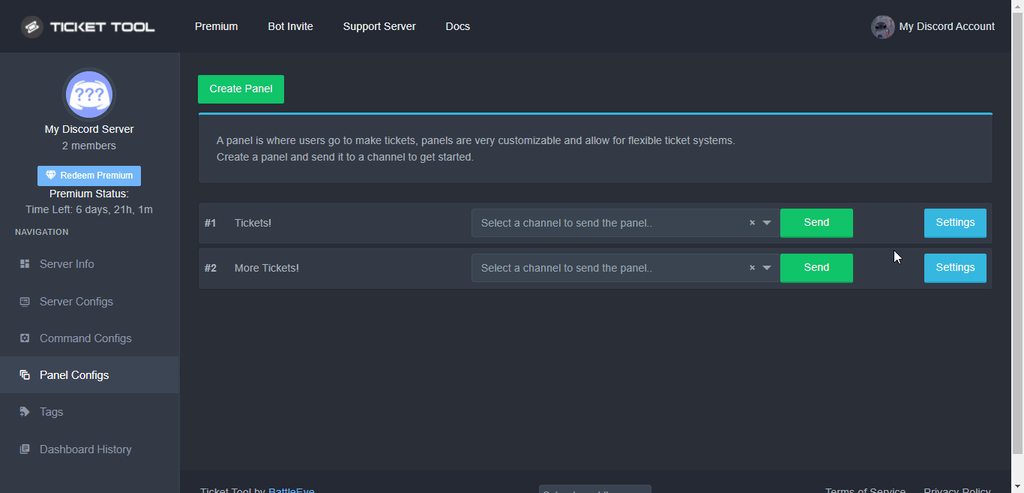 astral musk
ok
waxen crest
quasi cliff
Premium users can add Auto DM on ticket close and in the message they can includ...
oh thank you very much man ill try something
iron nightBOT
Gave +1 Rep to @quasi cliff
waxen crest
wrong roles
waxen crest
quasi cliff
Premium users can add Auto DM on ticket close and in the message they can includ...
can you teach me how idk how man i tried alot of things
 wicked steeple
From which link do I enter the panel?
humble sequoiaBOT
quasi cliff
waxen crest
can you teach me how idk how man i tried alot of things
Are you trying the free one or premium
oh wait my bad... Moderator message is premium too
quasi cliff
waxen crest
can you teach me how idk how man i tried alot of things
Moderator Message

 waxen crest
quasi cliff
Moderator Message
waxen crest
quasi cliff
Moderator Message
just that nothing more
quasi cliff
User wont be able to see that unless they have perms after closed ticket
Only ur team can read it
waxen crest
oh
so you cant autmaticly sorry for english send a dm to your users with a reason yk what i mean
automatically*
quasi cliff
Can send it with premium
quasi cliff
nope
quasi cliff
Thats in the ticket itself saying "Ticket closed by user"
clever summit
gilded verge
Let's check something... please go to your server settings, then to the role tha...
nope they dont have admin perm
waxen crest
quasi cliff
Thats in the ticket itself saying "Ticket closed by user"
oh k thank you so much for your help man
iron nightBOT
Gave +1 Rep to @quasi cliff
waxen crest
really helped me out
quasi cliff

clever summit
gilded verge
<@951215025064902717>, We can try something else 😮
Create a completely new pane...
works
can I change some perms?
yep ty
waxen crest
so is there no way you can send your users a pm free yk
 mellow parrot
howdy

i'm getting this issue when i try to save a transcript and i can't see what the issue would be?
ticket tool has administrator permissions and all previous tickets have saved right to that channel
quasi cliff
try once again
mellow parrot
that was my third time aha, i will try again
it's working now
don't know what happened there
thank you for the quick response anyways!
quasi cliff
It looked like a Discord issue
 crisp abyss
Trying to watch a movie ,,and there's chinese subtitles on ,,is there a way to get em off
humble sequoiaBOT
⚠️ You're in the wrong place
We provide support for Ticket Tool Discord bot and cannot help you with whatever issue you have.
- We don't know which Support Team you should contact to get this issue resolved, and unfortunately we won't be able to accurately tell you.
If you don't have any further questions regarding our bot Ticket Tool, please close this ticket
crisp abyss
Don't know how to close ticket
real marlin
crisp abyss
Don't know how to close ticket
Ignore the ticket part. The message is that this is not the correct support. 😎
 ebon nest
why is it doing two buttons?
 real marlin
ebon nest
why is it doing two buttons?
real marlin
ebon nest
why is it doing two buttons?
Because you are using Multipanel.
real marlin
 spare gale
Why Ticket Tool doesn't has Slash Commands anymore?
spare gale
Why Ticket Tool doesn't has Slash Commands anymore?
try $ as its the standard prefix.
spare gale
real marlin
try $ as its the standard prefix.
It does replies... But I thought it had slash commands aswel?
scenic plinth
In short terms, Ticket Tool does not have Slash commands... yet.
jade topaz
Ich wurde ohne Grund Permanent Gebannt
 robust sandalBOT
jade topaz
Ich wurde ohne Grund Permanent Gebannt
robust sandalBOT
jade topaz
Ich wurde ohne Grund Permanent Gebannt
I was permanently banned for no reason
 German (de) → English (en)
humble sequoiaBOT
German (de) → English (en)
humble sequoiaBOT
⚠️ Du bist hier falsch
Wir bieten hier ausschließlich Support für den Ticket Tool Discord Bot an und können dir leider nicht mit irgendetwas anderem weiterhelfen.
- Bitte melde dich bei einem, für dein Problem geeigneten, Support Team.
Wenn du keine weiteren Fragen hast, die das Ticket Tool betreffen, schließe bitte dieses Ticket.
jade topaz
when a ticket is closed by the user is there a way to make it so it automatically deletes
quasi cliff
jade topaz
when a ticket is closed by the user is there a way to make it so it automaticall...
You can disable two step ticket, witch means when you run $close it deletes.
Dashboard > Panel Configs > Settings > General Options and disable
"Two step ticket"
opaque dirge
pale pilot
<@1009827035226570842> how should we understand your review in <#509775046848282...
What
pale pilot
You complained about our support, when in fact you didn't even ask for any support
 narrow patio
is there a way for mods/ admin to open multiple tickets?
opaque dirge
pale pilot
You complained about our support, when in fact you didn't even ask for any suppo...
Staff even deleted my messages
pale pilot
I don't see any deleted messages if yours...
 gloomy warren
narrow patio
is there a way for mods/ admin to open multiple tickets?
gloomy warren
narrow patio
is there a way for mods/ admin to open multiple tickets?
Do you mean claim? Or just have multiple open?
 molten perch
How can you rename what tickets are called? I made a name for them ie /name of organization/ support but the name of the organization changed. can you change that?
rustic gale
Enter the panel's Settings and press the Rename Panel button at the top
 keen cradle
how to restore deleted tickets?
real marlin
keen cradle
how to restore deleted tickets?
Not possible, once deleted its lost in the void forever.
keen cradle
ty!
 white karma
Is Multi-Panel Available for anyone or just Premium?
 plain surge
Multipanel was a premium feature, but is now a free feature
humble sequoiaBOT
For a more convenient use of multipanels, you can now combine panels on the dashboard. This will allow you to directly send the multipanel from the dashboard or via the $panel ID command.
Where can I find this?
You can find this setting on the Dashboard -> Panel Configs -> Settings -> General Options
Note: if you're attaching all the panels to a panel called English, don't include English in the attached panels box (If you do this, it will create duplicate)
This will put all buttons from all of your panels on one message. The message is the panel message from the panel you're combining these panels in.
You can also watch this video tutorial.
white karma
plain surge
Multipanel was a premium feature, but is now a free feature
Ahh thanks I was trying to figure out how to enable it but couldn’t
plain surge
white karma
Ahh thanks I was trying to figure out how to enable it but couldn’t
No problem 👍
real marlin
white karma
Ahh thanks I was trying to figure out how to enable it but couldn’t
If you are lazy to read you can always check https://www.youtube.com/watch?v=iybEh346Bz4
Ticket Tool is the best Discord bot for tickets you'll find! Learn more about multipanels and how to improve your users' experience while asking for support.
Invite: https://tickettool.xyz/invite
Website: https://tickettool.xyz
Support Server: https://discord.gg/tickettool
00:00 Intro
00:11 What is a multipanel
00:32 How to do a multipanel
Ta...
white karma
real marlin
If you are lazy to read you can always check https://www.youtube.com/watch?v=iyb...
No need to talk to me like that.
real marlin
white karma
No need to talk to me like that.
Sorry if I upset you, this was just an expression.
white karma
real marlin
Sorry if I upset you, this was just an expression.
Either way its no reason to talk to someone like that, I'm dyslectic so reading is quite anightmare for me.
 arctic hound
Hello, can I create such panels like the one in the channel #📂│information or the one in #📌│automated-support especially in the FAQ section? I tried to setup such but I only manage to create a multipanel to open categorized tickets.
 manic plover
Does anyone know an easy way to reset the ticket numbers so it starts at 1 again ?
 proper coral
manic plover
Does anyone know an easy way to reset the ticket numbers so it starts at 1 again...
proper coral
manic plover
Does anyone know an easy way to reset the ticket numbers so it starts at 1 again...
if you go into the panel settings in general options is a feature called "ticket count" put that on 0 and the next ticket will be 1
manic plover
Thanks !
proper coral
no problem 😄
slender minnow
it still exist under panel config
 mortal dove
Where do I go to read all the transcripts I saved?
slender minnow
in the channel you specified the transcripts to be saved in, or the ticket itself
gilded verge
mortal dove
It’s gone then?
it is not possible to get transcript after deleting the ticket
iron nightBOT
Gave +1 Rep to @gilded verge
mortal dove
This bot told me to @ you then I got in trouble for pinging the support team 😂
arctic hound
rustic gale
You can make those with Sapphire
Thank you very much! ❤️
iron nightBOT
Gave +1 Rep to @rustic gale
white karma
white karma
Ahh thanks I was trying to figure out how to enable it but couldn’t
Thanks @plain surge
iron nightBOT
Gave +1 Rep to @plain surge
white karma
I just wanted to give you the rep
 worldly hedge
my server is not showing up on the dashboard, how do i relog?
humble sequoiaBOT
Don't see your server in the dashboard?
You will possibly need to relog. Look below to see steps on how to relog.
How to relog in the Dashboard.
First, you will need to go to the dashboard. Once your there, click on your avatar on the top right. after you clicked it, you will see button that says Logout. You must click that. Once you have logged out, you can log back in.
Note:
You need one of these 3 things to access the dashboard.
1. Server Owner (Level: 6)
2. Server Administrator (Level: 4)
3. Dashboard Role (Level: 2)
:warning: You can check your level using $level on your Discord Server
User permission level with Ticket Tool
@User is permission level: 0 (User)
```» *If it shows that your permission is **0**, you don't have any of the above **3 things** to manage the dashboard.*
**See the GIF below on how to relog:** tardy mauve
How do I cancel an active subscription?
rustic gale
tardy mauve
How do I cancel an active subscription?
Head to your Subscriptions page
humble sequoiaBOT
Redeeming premium on your server is really simple. Just head over to your Subscriptions Page. There you can select a server of your choice, which will get premium. You can change the server at any point.
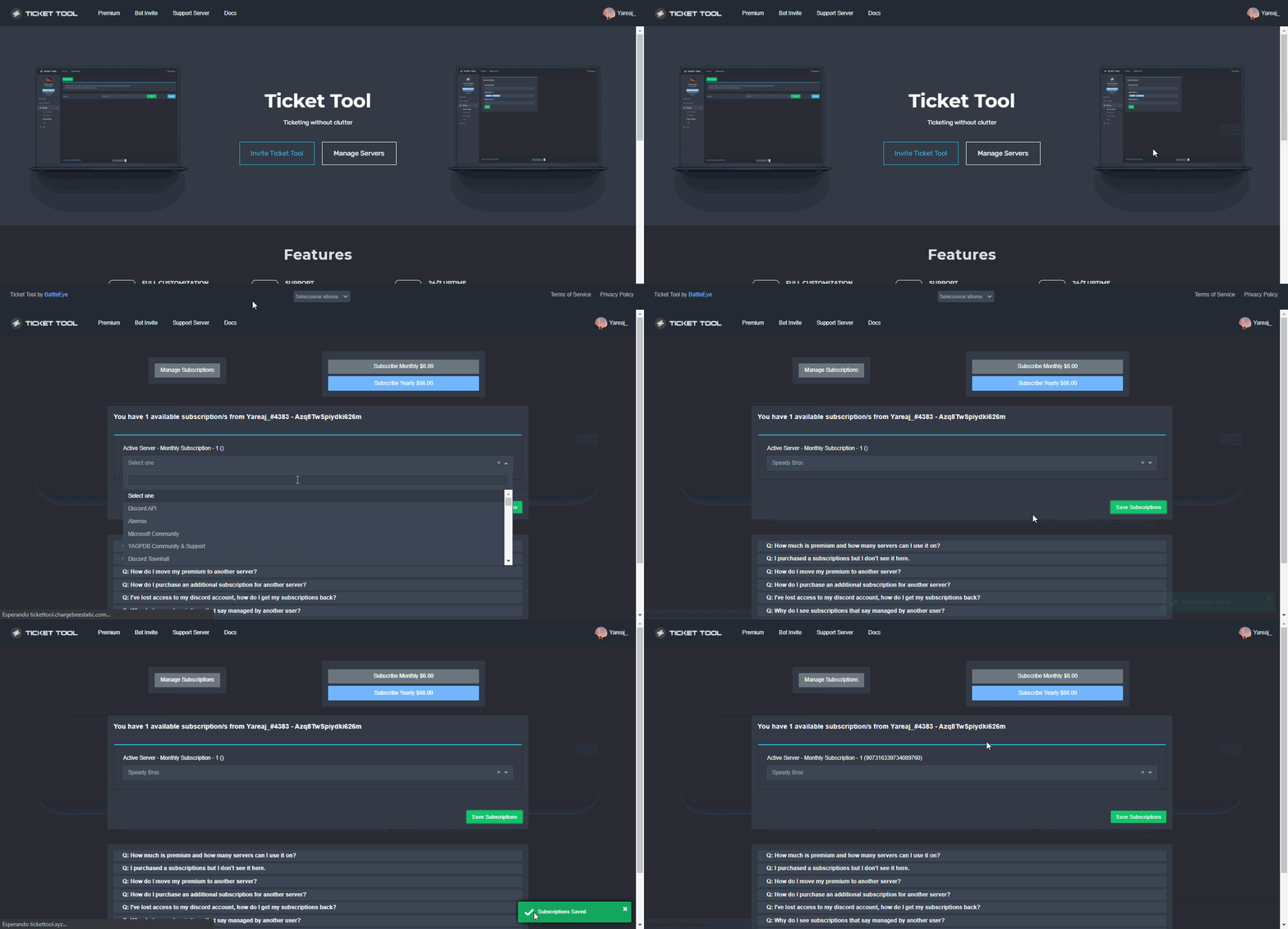 humble sequoiaBOT
User permission level with Ticket Tool
@heady ingot is permission level: 0 (User)

 shut bolt
 ember pine
Hey, will there be support for category options for tickets?
ember pine
Hey, will there be support for category options for tickets?
Yup, is part of the plans :)
ember pine
shut bolt
Yup, is part of the plans :)
Wuhuu, thank you!
Is there an date for that update? 😄
iron nightBOT
Gave +1 Rep to @shut bolt
shut bolt
ember pine
Wuhuu, thank you!
Is there an date for that update? 😄
No problem. There isn't one as of now sorry
 rough jackal
shut bolt
No problem. There isn't one as of now sorry
rough jackal
shut bolt
No problem. There isn't one as of now sorry
Can you manager server on mobile
 woeful crag
how do i make it so when someone opens a ticket, it gives them a role. i dont want everyone to be able to see tickets, so i created a specific role that can, but i cant find a way to give them the role when a ticket is opened
tardy mauve
The bot can auto delete the ticket when closed?
gilded verge
tardy mauve
The bot can auto delete the ticket when closed?
yup, disable the Two step Ticket option in panel settings->general options
 tardy mauve
gilded verge
yup, disable the `Two step Ticket` option <:offswitch:836268364238290954> in pan...
tardy mauve
gilded verge
yup, disable the `Two step Ticket` option <:offswitch:836268364238290954> in pan...
TY! <33
 chrome sedge
Hey guys, is there a way to have one of my staff team members claim a ticket so nobody else can interfere?
quasi cliff
chrome sedge
Hey guys, is there a way to have one of my staff team members claim a ticket so ...
Yes, that's a premium feature
chrome sedge
quasi cliff
Yes, that's a premium feature
Okay, thank you.
iron nightBOT
Gave +1 Rep to @quasi cliff
 abstract jay
real marlin
abstract jay
real marlin
 unreal bramble
how do you make a ticket in any discord server?
unreal bramble
how do you make a ticket in any discord server?
$help setup
humble sequoiaBOT
Setting up Ticket Tool
Visit the docs for setup info
General Setup
real marlin
unreal bramble
how do you make a ticket in any discord server?
Check our guides it will tell you how to setup the ticket tool in any discord server.
unreal bramble
thanks
 steel latch
guys my server isnt showing up in manage servers and i cant add it to my server
humble sequoiaBOT
Don't see your server in the dashboard?
You will possibly need to relog. Look below to see steps on how to relog.
How to relog in the Dashboard.
First, you will need to go to the dashboard. Once your there, click on your avatar on the top right. after you clicked it, you will see button that says Logout. You must click that. Once you have logged out, you can log back in.
Note:
You need one of these 3 things to access the dashboard.
1. Server Owner (Level: 6)
2. Server Administrator (Level: 4)
3. Dashboard Role (Level: 2)
:warning: You can check your level using $level on your Discord Server
User permission level with Ticket Tool
@User is permission level: 0 (User)
```» *If it shows that your permission is **0**, you don't have any of the above **3 things** to manage the dashboard.*


**See the GIF below on how to relog:**
 iron plaza
yo
i need help
idk if its the bots problem or discord
but if member creates ticket everyone can see it
and if i sync the perms with the category no one expect the support roles cant see it
gilded verge
whitelabels are planned so currently you can't
iron plaza
gilded verge
whitelabels are planned so currently you can't
can u help me
gilded verge
I'm thinking about it, give me a minute 🤔
iron plaza
aight mb
iron plaza
iron plaza
and if i sync the perms with the category no one expect the support roles cant s...
no one expect support roles and bots
iron plaza
gilded verge
I'm thinking about it, give me a minute 🤔
should i make a ticket
gilded verge
Okay, so first: do not synchronize tickets with the category, each ticket channel has the permissions you have granted in the Panel Settings->Permission Options
humble sequoiaBOT
How to hide tickets from everyone
Head over to your Dashboard ➞ Panel Configs ➞ Settings ➞ Permission Options ➞ Edit Everyone Roles Opened Permissions

NOTE that @everyone can type aswell if it has permissions to send messages
gilded verge
I am absolutely sure that the permissions I use will be useful to you: https://cdn.discordapp.com/attachments/979861967936290816/979874986946875412/Panel_Permissions.mp4
gilded verge
gilded verge
I am absolutely sure that the permissions I use will be useful to you: https://c...
Create a completely new panel and test them
sure, what do you want to ask? 😊
iron plaza
iron plaza
what are additional roles
..
gilded verge
ah.... sorry, my bad 😄
iron plaza
np
gilded verge
is a role that is similar to the Support Team Roles but with the exception that it has access even if the claim button
humble sequoiaBOT
Additional Roles are roles that are independent from Support Roles. You can assign unique permissions for roles defined as additional roles in tickets.
To assign permissions for additional roles, go to Dashboard ➞ Panel Configs ➞ Settings ➞ Permission Options ➞ Additional Opened/Closed Permissions.
Note: Additional Roles do NOT get affected by the Change other support team permissions when claimed feature under Claiming Options, meaning they don't gain/lose any permissions set in that feature once a ticket is claimed.
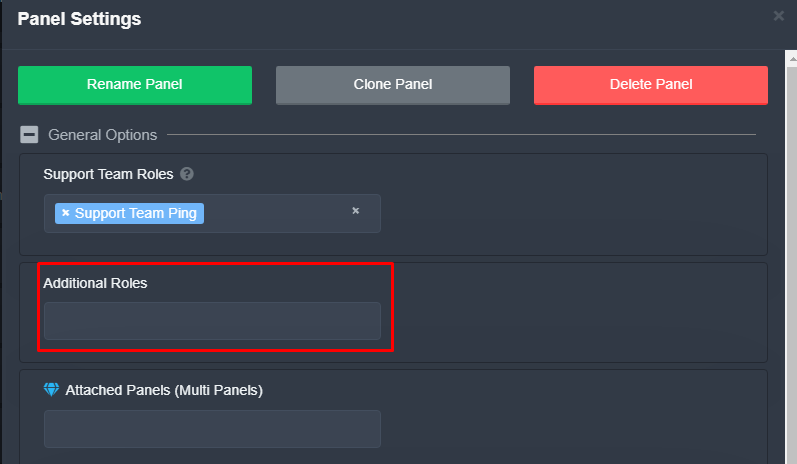 gilded verge
exactly like
iron plaza
gilded verge
is a role that is similar to the Support Team Roles but with the exception that ...
ic so i dont need it if i already have the support role
gilded verge
yup
iron nightBOT
Gave +1 Rep to @gilded verge
gilded verge
iron plaza
we have member role
if that role is not support team roles or additional roles, it is treated as everyone 😊
iron plaza
gilded verge
if that role is not support team roles or additional roles, it is treated as `ev...
ohhh okay
thanks again
gilded verge
You're welcome ^-^
iron plaza
thanks @gilded verge
iron nightBOT
Gave +1 Rep to @gilded verge
 slender minnow
 balmy frigate
like this blue diamond
balmy frigate
like this blue diamond
that's not possible with ticket tool as of now
oh wait
mb
you can use emoji id
 upbeat crown
I Cant Invite Ticket Tool
balmy frigate
slender minnow
you can use emoji id
how ? hahaha😅
unreal bramble
how u make ticket
humble sequoiaBOT
<:PabloTiphat:983791053842837624>

slender minnow
like that ^
balmy frigate
oh thnx man, love u
real marlin
unreal bramble
how u make ticket
Check our guides: https://docs.tickettool.xyz/general/setup

Instructions on setting up Ticket Tool in your server.
humble sequoiaBOT
We would love to help you, but if you don't tell us what you need help with we can't help you :(
 simple dove
how does my friend make me level 4 in my server for ticket support permission levels
humble sequoiaBOT
━━ moved to ticket ━━
Don't see your server in the dashboard?
You will possibly need to relog. Look below to see steps on how to relog.
How to relog in the Dashboard.
First, you will need to go to the dashboard. Once your there, click on your avatar on the top right. after you clicked it, you will see button that says Logout. You must click that. Once you have logged out, you can log back in.
Note:
You need one of these 3 things to access the dashboard.
1. Server Owner (Level: 6)
2. Server Administrator (Level: 4)
3. Dashboard Role (Level: 2)
:warning: You can check your level using $level on your Discord Server
User permission level with Ticket Tool
@User is permission level: 0 (User)
```» *If it shows that your permission is **0**, you don't have any of the above **3 things** to manage the dashboard.*


**See the GIF below on how to relog:**Its explained above.
real marlin
Thank you helped one person and got the promotion 😄
 mystic hound
Totally how we pick our staff
jade topaz
balmy frigate
like this blue diamond
Gotta be a prem subscriber
real marlin
jade topaz
Gotta be a prem subscriber
Not correct
real marlin
He wants to choose the icon on the button.
real marlin
Well its actually correct but the answer was not that
slender minnow
real marlin
He wants to choose the icon on the button.
not the icon but to include a custom emoji in the embed
which is not a premium feature
real marlin
Yap but the button is.
And still some people that are regular actually have premium on their discord but with another account or someone is the owner of the bot.
balmy frigate
jade topaz
Gotta be a prem subscriber
I have 🙂
I managed to do this already, but now I have another doubt 😅
How do I change the font color? I've tried several ways and nothing works.
Do I have to use code as well as emojis?
rustic gale
Font color?
That's not usually something that can be customized. There's gimmicks with code tags that let you color some text, but it's gimmicks
 grave fiber
How to tag a role in ticket message?
quasi cliff
$help ping
humble sequoiaBOT
How to make Ticket Tool ping a role
To make ticket tool ping a role when a ticket is opened, go to the Dashboard -> Panel Configs -> Settings -> Ticket Options -> Ticket Message -> Message Text and do this:
{@Role name} This is case sensitive and the role must have @mentions enabled
 iron nightBOT
Gave +1 Rep to @quasi cliff
grave fiber
🙏
 brisk thistle
Hi
How do I add a button to receive the ticket?
 hazy adder
u need to go on the website and create a panel
brisk thistle
example :
 gilded verge
brisk thistle
Hi
How do I add a button to receive the ticket?
gilded verge
brisk thistle
Hi
How do I add a button to receive the ticket?
You have an open ticket, wait for help on that channel or close it and wait for help here
brisk thistle
gilded verge
You have an open ticket, wait for help on that channel or close it and wait for ...
You don't know the solution?
gilded verge
I know the answer, but the problem is that you have to choose the channel on which you want help. 😕
brisk thistle
gilded verge
I know the answer, but the problem is that you have to choose the channel on whi...
Well then help me :(
gilded verge
I can't, you still have an open ticket.
brisk thistle
gilded verge
I can't, you still have an open ticket.
If I close the ticket will you help me?
gilded verge
i don't know arabic so yes, here i can help if you close the ticket
brisk thistle
gilded verge
i don't know arabic so yes, here i can help if you close the ticket
ok wait
done
so help me here
gilded verge
Okay, so this what you mean it's "claim". To use claim button/command, your server need premium. Do you have premium?
because claim is a premium feature
brisk thistle
Oh, do I have to subscribe to the premium to be able to activate this administration?
gilded verge
I had it somewhere ... please give me a minute 😅
humble sequoiaBOT
Faster Premium Bot
Automatic Transcripts
Full Customization
Custom Buttons
Direct Messages
Ticket Automation
Premium Support
You can purchase premium here:
Price
$6 - Monthly
$66 - Yearly
Premium
Claiming allows you to change the ticket name, category and permissions. To use it you have to enable it first on your Dashboard > Panel Configs > Claiming Options.
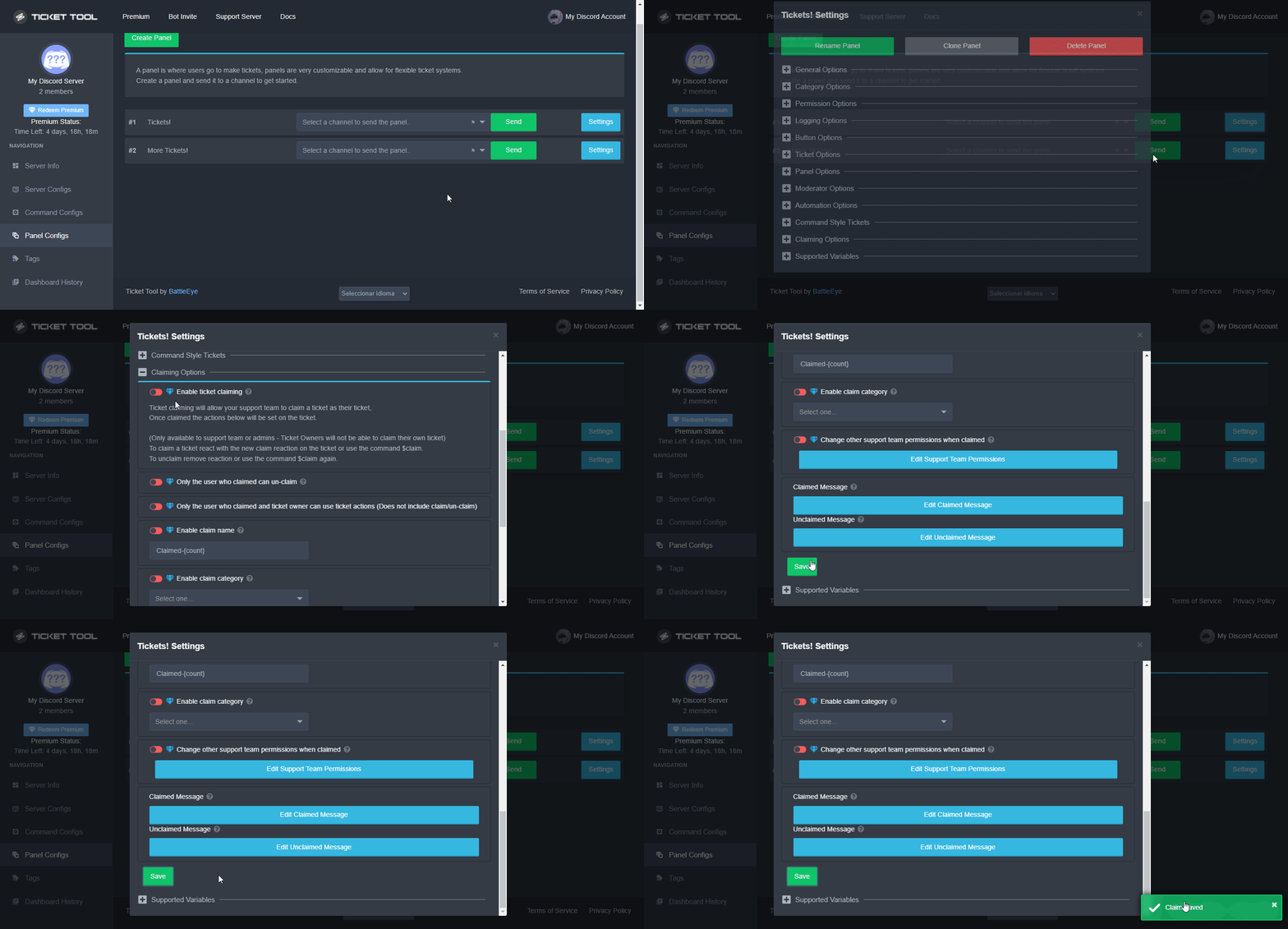
 Note: This is a premium feature
gilded verge
Note: This is a premium feature
gilded verge
okay, so both can help you
brisk thistle
gilded verge
okay, so <:this:894279341108772914> both can help you
ok thx
iron nightBOT
Gave +1 Rep to @gilded verge
jade topaz
Hello. My gaming nickname is Motorhead. ID: 1dc1e9b6. I got blocked in game chat. I did not write anything offensive for anyone. I did not use profanity. Why am I blocked in chat??? Please unblock the game chat. thank you very much
Hello. My gaming nickname is Motorhead. ID: 1dc1e9b6. I got blocked in game chat. I did not write anything offensive for anyone. I did not use profanity. Why am I blocked in chat??? Please unblock the game chat. thank you very much
craggy geyser
jade topaz
Hello. My gaming nickname is Motorhead. ID: 1dc1e9b6. I got blocked in game chat...
No need to write it twice. But we can't help. This is the ticket tool bot support server. Not a game support
humble sequoiaBOT
⚠️ You're in the wrong place
We provide support for Ticket Tool Discord bot and cannot help you with whatever issue you have.
- We don't know which Support Team you should contact to get this issue resolved, and unfortunately we won't be able to accurately tell you.
If you don't have any further questions regarding our bot Ticket Tool, please close this ticket
iron nightBOT
Gave +1 Rep to @gilded verge
gilded verge
command for...?
Sorry but you did not specify the question 😕 (now i'm offline - don't ping me pls)
 mint raven
@ everyone in my server is not able to open tickets, they get the error System Failure: Missing Permissions
humble sequoiaBOT
ᅠ
@pseudo glen requires the following permissions:
Add Reactions
Read Channels
Send Messages
Manage Messages
Embed Links
Attach Files
Read History
Manage Roles
Manage Channels
To change the role permissions, you can go to your Discord Server ➞ Server Settings ➞ Roles ➞ @Ticket Tool
To change the channel permissions, you can go to your Channel Settings ➞ Permissions ➞ Ticket Tool
ᅠ
Note:
You can give Ticket Tool Administrative Permissions instead of all the permissions listed above, but it's entirely optional and NOT necessary.
gilded verge
check
iron nightBOT
Gave +1 Rep to @gilded verge
jade topaz
How come ticket bot won’t come up into my server
 hot smelt
Whyy can't regular members from discord make a ticket? it says "YOU DONT HAVE PERMISSION TO USE THIS"?
 marble citrus
Hi, how can I make it so
after closed not to delete ticket
and so u can save transcript + u have a button to delete
quasi cliff
marble citrus
and so u can save transcript + u have a button to delete
Did you disable Two Step Tickets?
quasi cliff
hot smelt
Whyy can't regular members from discord make a ticket? it says "YOU DONT HAVE PE...
Did you blacklist everyone/member role on dashboard?
marble citrus
quasi cliff
Did you disable Two Step Tickets?
yes
 low dawn
Hi my channels do not work
quasi cliff
Please describe the issue
low dawn
I have no channels viewable they are all listed but do not play
quasi cliff
Is it Ticket Tool related issue?
low dawn
Had a problem logging in. Waited 5 mins and able to login
quasi cliff
Logging on discord or Ticket Tool website?
low dawn
Logged the issue on ticket tool but when I was able to login I said it was fine.
quasi cliff
I'm unable to understand the issue
Are you facing issue with the Bot? (@pseudo glen)
low dawn
I have no idea what to do if this is not support
 onyx kite
I need help I ordered 3weeks so and can't get support to get my order which I didn't receive how do I get help???
 real marlin
onyx kite
I need help I ordered 3weeks so and can't get support to get my order which I di...
real marlin
onyx kite
I need help I ordered 3weeks so and can't get support to get my order which I di...
Can you please clarify what order are you talking about?
real marlin
 hasty dagger
As it says its missing permissions, can be the user or the bot permissions, can you please tell what were you trying to do when you got this error?
 hasty garnet
I have a problem that you can solve ?
 whole musk
Hi
 soft ravine
Question, is there a way to make a ticket ping a role when its created?
rustic gale
$mentions
humble sequoiaBOT
Within all the messages the bot's sends (both embeds and text) you can mention either channels, roles, or even users, these mentions will only send a notification to the user if they are used within a text field, e.g: a role mentioned in an embed won't ping at all the users who have that role.
For mentioning a role you can use one out of three options:
{@Role Name} ➞ Which is Case Sensitive.
{RoleID} ➞ Replace RoleId with the Id of the role you are trying to ping.
<@&RoleID> ➞ Discord's native syntax to ping roles.
<#ChannelID> ➞ Mention a channel by its ID.
<@UserID> ➞ Mention a user by its ID.
soft ravine
Hmm... I have tried that but its not pinging the role, guess its something else then. Thanks.
rustic gale
soft ravine
Hmm... I have tried that but its not pinging the role, guess its something else ...
Where are you including the mention and what does the result look like?
it 100% should work, so we can 100% troubleshoot it
soft ravine
This is the verbage: Please list the issue you are having include the following:
Map:
Coordinates:
Teleport (if applicable):
Gamertag:
In-game name:
Please provide the best info you can as it will help speed up a resolution to your issue. Thanks.
{@Rag 9 Admin}
This is the result: Please list the issue you are having include the following:
Map:
Coordinates:
Teleport (if applicable):
Gamertag:
In-game name:
Please provide the best info you can as it will help speed up a resolution to your issue. Thanks.
@Rag 9 Admin (this does show the link active it is just not pinging the member of that role.
and the case is correct
rustic gale
Is that included in the message text or the embed description?
soft ravine
message text
rustic gale
Can we have a screenshot of it?
soft ravine
yes hold on


So its in embedded description sorry
I know im doing something wrong lol i just cant figure it out
rustic gale
soft ravine
So its in embedded description sorry
Place the mention in the ticket message instead.
rustic gale
Good luck, let us know if we can help with anything else
jade topaz
For tags is it possible to ping the person that owns the ticket even tho im the one thats activating the tag??
jade topaz
??
hot smelt
quasi cliff
Did you blacklist everyone/member role on dashboard?
Hi i figured it out now, I was confused with the Support Role thingy.
Thanks..
jade topaz
hi
 north dagger
Hi i have a little Problem i cant add a second server to the manage server
Could someone help me with that
humble sequoiaBOT
Don't see your server in the dashboard?
You will possibly need to relog. Look below to see steps on how to relog.
How to relog in the Dashboard.
First, you will need to go to the dashboard. Once your there, click on your avatar on the top right. after you clicked it, you will see button that says Logout. You must click that. Once you have logged out, you can log back in.
Note:
You need one of these 3 things to access the dashboard.
1. Server Owner (Level: 6)
2. Server Administrator (Level: 4)
3. Dashboard Role (Level: 2)
:warning: You can check your level using $level on your Discord Server
User permission level with Ticket Tool
@User is permission level: 0 (User)
```» *If it shows that your permission is **0**, you don't have any of the above **3 things** to manage the dashboard.*


**See the GIF below on how to relog:**@north dagger refer
 ornate crane
Why did my Ticket Tool bot stop sending closed tickets to my ticket archive category they now leave the ticket in the open ticket section but changes the channel name to closed. I want them to go back to going in my archive
 trim citrus
soft ravine
trim citrus
soft ravine
for the information the user needs to provide you can use Ticket Tool's new forms feature
trim citrus
ornate crane
Why did my Ticket Tool bot stop sending closed tickets to my ticket archive cate...
if the archive category has 50 channels in it, then it cannot add more channels to that category
ornate crane
trim citrus
if the archive category has 50 channels in it, then it **cannot** add more chann...
shoot how do i bypass this
trim citrus
ornate crane
shoot how do i bypass this
you don't
proper coral
Little question if people react to my multipanel and they clicked the wrong button is there a way to move the ticket to the right panel/category?
plain surge
ornate crane
shoot how do i bypass this
You can set overflow categories for closed category
$overflow
humble sequoiaBOT
Discord only allows to stack up to 50 channels per category, meaning that if you have already 50 tickets in one category, the bot won't be able to place a ticket in that category, for such reason Ticket Tool counts with overflow categories, meaning that if your main category is filled, the bot will go ahead and place the ticket on the next one available, simply choose a second category in the category pickers:
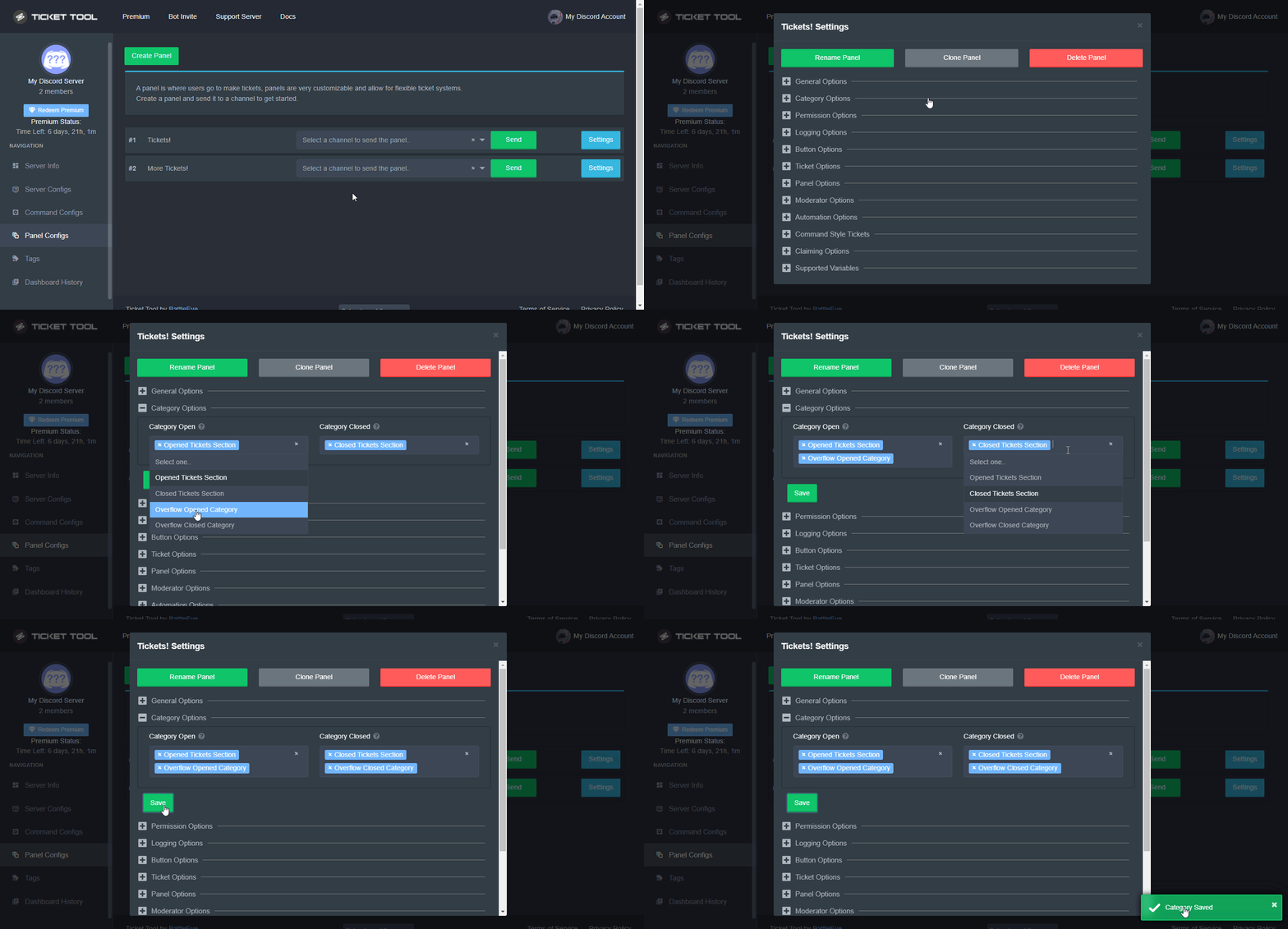 plain surge
proper coral
Little question if people react to my multipanel and they clicked the wrong butt...
plain surge
proper coral
Little question if people react to my multipanel and they clicked the wrong butt...
Currently, there's no way to move open tickets between categories automatically. You'll need to move it manually and make sure that its permissions don't sync with the other category.
However, this feature is planned to be implemented
proper coral
okay thnx for quick response
ill have to move it manually then
trim citrus
plain surge
Currently, there's no way to move open tickets between categories automatically....
i have a question in response to that, if i manually move a ticket, does that ticket then become part of the panel that is associated with the category that it is moved to, or is it still associated with the panel that the ticket was created from ?
like, internally i mean
plain surge
It is still attached to the panel it was created in
hot smelt
Quick question.
Once i close the ticket, will the member still see my last msg or no more (unread msg)
trim citrus
hot smelt
Quick question.
Once i close the ticket, will the member still see my last msg ...
depends, if you deny read messages once a ticket is closed, they can't see it unless you send an automatic transcript to the user's DMs
unreal bramble
ok guys all i need to know is how do i make a ticket in any server like fill out or whatever?
unreal bramble
Ive been trying to figure out how to make a ticket, i click make a ticket (not in this server) and it says i made the ticket but then nothing happens.
trim citrus
do you own the server you're trying to make a ticket in
unreal bramble
im trying to make a ticket in the server
trim citrus
do you own the server you're trying to make a ticket in
unreal bramble
im trying to make a ticket in
trim citrus
ok but do you own the server you're trying to make a ticket in
unreal bramble
i don't ow n it
trim citrus
ok, are you staff in that server
unreal bramble
nope
hot smelt
trim citrus
depends, if you deny read messages once a ticket is closed, they can't see it un...
If i click this transcript button - they will receive the copy of this ticket (right or wrong)
 trim citrus
then it's the owner's issue and not yours, they most likely set up permissions incorrectly
trim citrus
hot smelt
If i click this transcript button - they will receive the copy of this ticket (r...
wrong, transcript button only creates a copy for your personal view and will be saved into either the ticket itself or into a designated channel, if you want the user to receive a transcript you'll need to get Premium and turn this on:
 hot smelt
Oh shoot🥹 anyway, i closed their tickets already.. with a short msg about closing it. I will next time give enough hrs for them to see it before closing it eventually haha
hot smelt
😅 sry I’m new
trim citrus
lol
plain surge
trim citrus
i dont wanna spend money on this bot cuz im poor
You can always vote to get premium
Try out $vote in #🤖│bot-spam
proper coral
so i just tried to make a multi panel
but when i send it it doesnt work
i got premium
humble sequoiaBOT
ᅠ
@pseudo glen requires the following permissions:
Add Reactions
Read Channels
Send Messages
Manage Messages
Embed Links
Attach Files
Read History
Manage Roles
Manage Channels
To change the role permissions, you can go to your Discord Server ➞ Server Settings ➞ Roles ➞ @Ticket Tool
To change the channel permissions, you can go to your Channel Settings ➞ Permissions ➞ Ticket Tool
ᅠ
Note:
You can give Ticket Tool Administrative Permissions instead of all the permissions listed above, but it's entirely optional and NOT necessary.
gilded verge
@proper coral, Multipanels do not require premium.
Please make sure that the bot has the required permissions and permissions (View Channel, Send Messages, Read Message History) for the channel to which you want to send the multipanel.
proper coral
i gave it administrator
gilded verge
Could you please show me your dashboard? Exactly that part:

Hi, you mean your moderators, right?
oooh wait.. you've opened ticket, so i can't help you in this channel
no no
humble sequoiaBOT
━━ moved to ticket ━━
trim citrus
plain surge
You can always vote to get premium
voting on my own is not enough to get premium reliably
plain surge
That's true, yes
jade topaz
hello is there anyone that is avaible to help me?
i want to make the command works but i just dont get it why it wont work
@plain surge
sorry for the pinging but are you avaible to help me?
the problem is
i want when people join,they to see the welcome message and then click on the emoji to set up their own interview channel
but when i do it,it doesnt work
plain surge
Pinging support is against the rules. If you want immediate support you can open a ticket in #🎫│make-a-ticket
This is #🆘│community-support meaning that the community will help you, if someone is available

 humble sequoiaBOT
How to disable the premium bot
To disable the premium bot you will have to go to the Dashboard ➞ Server Configs ➞ Premium bot ➞ And on the right-hand side select the primary free bot in the drop down menu.
Premium features will still work on the normal bot.
 rustic gale
or
humble sequoiaBOT
The first thing you will need to do is invite the premium bot, an invite can be found here
Once the bot is in your server we will head to the dashboard and manage your server. When you are managing your server, you want to head into "Server Configs" then click the drop down menu under "Select the bot you would like to use on this server" then click "Ticket Tool#6207" and then save.
 vivid harbor
@rustic gale thanks 😍
iron nightBOT
Gave +1 Rep to @rustic gale
proper coral
gilded verge
Could you please show me your dashboard? Exactly that part:
Will do when I get home
jade topaz
How do I make A Place where people Can create a ticket?
humble sequoiaBOT
You can check our documentation here;
You can also check #📂│information for the basic setup;
You can also watch this video tutorial.
Our documentation contains all the info you need about the bot to be able to setup and configure the bot however you like.
shut bolt
Follow this guide :)
jade topaz
Ty
shut bolt
 shrewd surge
Is there a way to make a channel for ticket logs ?
Like the person who created and closed mentioned
rustic gale
$logs
humble sequoiaBOT
With Ticket Tool, you can customize the behavior the bot takes when logging your tickets! For editing these options follow these steps:
Dashboard ➞ Panel Configs ➞ Settings ➞ Logging Options
Transcript Channel
Here you will choose the channel where @humble sequoia would send a copy of the transcript to
Logging Channel
Here you will define which channel @humble sequoia will save the Logs in (ticket created/deleted/closed, etc.)
Logs you can save:
➞ Ticket Created ➞ Logs when a ticket is created
➞ Ticket Closed ➞ Log when a ticket is closed
➞ Ticket Opened ➞ Log when a ticket is opened
➞ Ticket Renamed ➞ Log when a ticket is renamed
➞ Ticket Deleted ➞ Log when a ticket is deleted
➞ Transcript Saved ➞ Log when a ticket is saved
Select with (disable) or (enabled) which logs you would like
ᅠ
 Premium Features
Direct Message Transcript ➞ Sends the ticket transcript to the ticket user whenever the ticket is either closed, deleted, or both.
Auto Save Transcript ➞ Saves the ticket transcript into to the transcript channel whenever the ticket is either closed, deleted, or both.
Below you can see an example of what the Logging Channel will look like as well as the Transcript Channel:
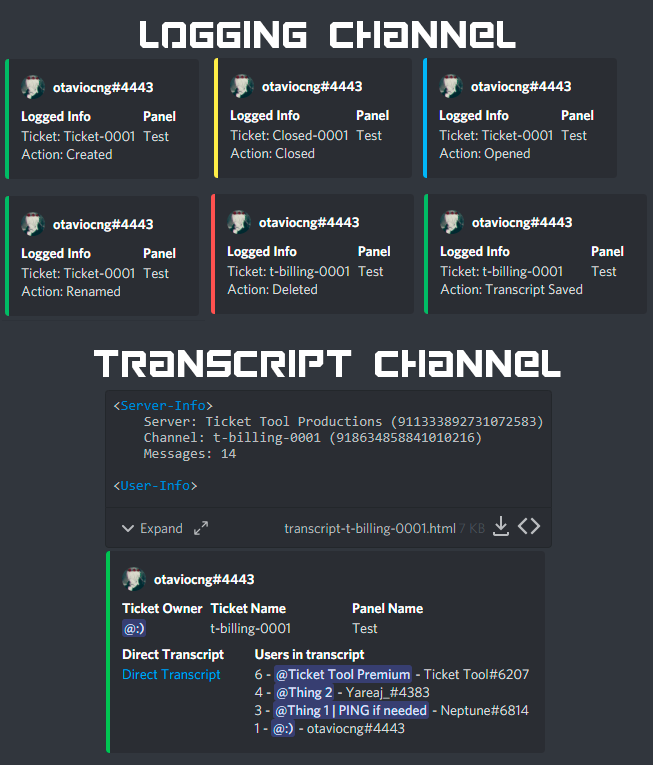
 hoary galleon
Is there a way to set a max amount of tickets that can be open at a time? Say a single panel can only have 10 tickets open
shrewd surge
rustic gale
$logs
Tysm
proper coral
proper coral
Will do when I get home
 gilded verge
proper coral
gilded verge
proper coral
could you show a bot that is on your server?
proper coral
 gilded verge
hmm... could you try again to send panel to the channel ?
btw is there any error when trying to send the panel?


 gilded verge
btw is there any error when trying to send the panel?
gilded verge
gilded verge
btw is there any error when trying to send the panel?
@proper coral, if you checked as I wrote above, go to Server Configs and make sure that you have selected the premium bot and saved the settings
 gilded verge
 radiant helm
how do i close this ticket
radiant helm
how do i close this ticket
Could you please provide the server id or name?
radiant helm
The Bonfire
gilded verge
it looks like you are using the wrong prefix, please go to Server Configs and check Command Prefix
radiant helm
kk thanks
gilded verge
but that's not end
radiant helm
where is server configs at
humble sequoiaBOT
 gilded verge
in your dashboard server
radiant helm
found it
gilded verge
then please go to Panel Configs->Panel Settings->Expand Button Options->choose Close Ticket Settings and make sure you have the Enable Button enabled->then Save

so if your prefix is anything other than $, remember to use the one in the Command Prefix or just change it to whatever you want 😊
proper coral
gilded verge
<@134711921298505728>, if you checked as I wrote above, go to `Server Configs` a...
thnx it sends now
 turbid stone
Is there a way to see which category a ticket belongs to?
rustic gale
Not really, no.
You'll want to sort them into different channel categories.
$help category
humble sequoiaBOT
How to set the open category
To set a open category go to the Dashboard -> Panel Configs -> Settings -> Category Options -> Category Open
rustic gale
You could also write custom ticket messages for them to tell them apart.
humble sequoiaBOT
The Ticket Message is the first message sent by the bot in a new ticket. To customise it head over to your Dashboard ➞ Panel Configs ➞ Settings ➞ Ticket Options ➞ Edit Ticket Message
 pulsar cave
is there a way to limit a ticket from being opened with roles?
like if someone has a certain role they can open the ticket etc
rustic gale
 shell oyster
I want help with ticket forms
shell oyster
I want help with ticket forms
What trouble are you having?
covert swallow
pulsar cave
like if someone has a certain role they can open the ticket etc
You can set a blacklisted role under Server Configs
rustic gale
pulsar cave
is there a way to limit a ticket from being opened with roles?
Button Options -> Create Ticket Settings
covert swallow
Ignore what I said, I misread it
rustic gale
You can disable roles there. When they press the Create Ticket button, they'll get a message saying they don't have the permissions to do it
pulsar cave
rustic gale
You can disable roles there. When they press the Create Ticket button, they'll g...
ty
iron nightBOT
Gave +1 Rep to @rustic gale