#overclocking
1 messages · Page 97 of 1
 modern walrus
 south sky
I've never had my 5700xt crash while oc'ing, since they artifact so damn early
Raising VCCPLL?
Oh VCCVTT
That one helps ring
modern walrus
yes everything else on auto haha
south sky
Raised VCCPLL is likely counter intuitive
modern walrus
oh well I'll remember that when I actually dial in CPU OC after these memory shenanigans end haha
south sky
Since VCCPLL heavily related to PCIe instability
modern walrus
did you mess with these VCC18 PCH or VCC1V8P settings... they say "this can be useful in certain overclocking configurations."
I was like "oh wow that might be useful... now what?" haha
south sky
Doubt it
modern walrus
I was able to get rid of the PCIe instability by messing with DRAM termination (previously mentioned) but occasionally it'll come back
south sky
Maybe if you are overclocking PCIe
south sky
modern walrus
I was able to get rid of the PCIe instability by messing with DRAM termination (...
Yeah it helps
modern walrus
hmm so you're saying the way to get POST on 1T (which will in turn allow higher frequencies) is to play with RttNom, Wr, & Park?
south sky
Can help
If you are having PCIe instability though, VCCPLL at 0.95~1 is a good idea
I got it with Rev.E above 4600
modern walrus
I think I've been looking for like "fix-all" type things that I need to accept just arent't out there
south sky
Oh but there is. It's called running single rank 
modern walrus
for the longest time I was taking shots in the dark with IO/SA combinations trying to POST 4400 but I just said to hell with it & went with 4000
that's on spreadsheet two of that thing I showed you
 south sky
I haven't done a summer oc so... this says it all
 modern walrus
nightmare
south sky
Wow
modern walrus
south sky
I haven't done a summer oc so... this says it all
lookin a little loose there haha
south sky
xmp
modern walrus
hmm
south sky
Problem is in summer it's over 10C hotter so I really do have to adapt to it
modern walrus
maybe I'll put everything on auto except command rate/SA/IO/DRAM & set frequency at 5000
& keep dropping one level to see where 1T POSTs
south sky
😅 5000
modern walrus
lol don't laugh at my dreams damn
modern walrus
okay let me back up & ask I stupid question I should know the answer to already
two 16gb sticks... that's dual rank?
chips on both sides is dual rank right?
lol
south sky
Not necessarily but in most cases yes
south sky
If it's a udimm and as more then 9 chips it's at least dual rank
south sky
modern walrus
oh so you said it's almost impossible with single rank
Yes
I did it with a single patriot 4133 a2 stick
modern walrus
so it's not impossible for me, just highly improbable
south sky
And patriots pcb is just op
south sky
modern walrus
so it's not impossible for me, just highly improbable
Pretty much impossible
modern walrus
and "op" means...? lol
south sky
over powered!
south sky
I did 4533 with the patriots on the z390 aorus pro
I don't have to say more
It's a t-top 4 layer
modern walrus
I think Discord is for people after my generation haha
south sky
What do you mean?
modern walrus
I'm too old to be down with lingo
nevermind
so 5000 ftw
(learned what ftw was on Discord btw)
when I got my EVGA GPU I'm like FTW3 that's cool
didn't click until later
south sky
modern walrus
so 5000 ftw
good luck
modern walrus
no for real tho you think 4600 is a decent place to start coming down from?
5k is nonsense I know
south sky
4600 is high too for dr, though people have done it on other boards
modern walrus
4500?
modern walrus
I do like this board because my Z490 couldn't do 51x all core but this one could
still no idea why
my bin is pretty bad tho. I need 1.415 vCore to hit 51x, which is like 1.305v VRVOUT
Boot failure detected. No surprise there
do you set training voltage btw?
south sky
whew that's high voltage
south sky
modern walrus
do you set training voltage btw?
I don't need to
modern walrus
ya... they say don't bother delid 10900K but I think mine could be exception
looking back on this sheet of crazy I was able to POST 4400 a few times
might have to retry those settings now that I know more about getting PCIe errors to go away
thanks again btw
south sky
No problem!
south sky
modern walrus
ya... they say don't bother delid 10900K but I think mine could be exception
I think it'd help mine too
modern walrus
would be pretty crappy to destroy it by accident tho
modern walrus
wow
ya that makes mine look like straight trash haha
my 5900x is decent bin tho I think

hopefully that'll make Master Forks slightly happy haha
do SA/IO help with POSTing 1T?
is 1T a timing that scales with voltage...?
south sky
modern walrus
ya that makes mine look like straight trash haha
It's a 10850K too which is nuts
south sky
modern walrus
do SA/IO help with POSTing 1T?
It can
modern walrus
I keep hearing how good that CPU is
 flat pawn

this is what my cpu is reading at right now
with nothing going on
The clock speed for VRAM seems weird to me
 potent fiber
Times it by 4 or 8 & then it's not so weird, unless you meant it's weirdly high.
 proven canopy
Ian dailies this fwiw https://cdn.discordapp.com/attachments/816767275843452948/927306606184656936/20220102_154032.jpg

 zenith palm

 woeful nest
So I have a motherboard that supports 4800mhz ram but I have 2 sticks of 6000mhz can I overclock my motherboard so it supports 6000mhz or do I have to underclock the ram
zenith palm
You cannot overclock your motherboard, you should be able to enable xmp, might need to adust some voltages to get it to work tho
proven canopy
Not great, not terrible, had 8L to burn off https://hwbot.org/submission/4894993_forks_geekbench3___multi_core_core_i9_9900k_52909_points

HWBOT
The Core i9 9900K @ 6600MHzscores getScoreFormatted in the Geekbench3 - Multi Core benchmark. Forksranks #96 worldwide and #38 in the hardware class. Find out more at HWBOT.
 humble jay
Ya beat buildzoid at least
 clever epoch
Somebody teach me how to get DDR4-4800 stable on this 12700k before I blow away my last brain cell

1R S8B, 1.3V VCCSA, 1.6 vDIMM, 0.775 VTT
This errors after a couple minutes

 sudden torrent
1.6v on vdimm? You must have good airflow to keep that stable
clever epoch
sudden torrent
1.6v on vdimm? You must have good airflow to keep that stable
open bench, Arctic P12 directly on the DIMMs
never go above 40C on the sensor
clever epoch
clever epoch
This errors after a couple minutes
I loosed up all the secondaries and terts from this, bumped tCL to 18, and it will still error at least once within 5-10 minutes
I've tried 1.65V, doesn't make a difference
I tried RTTs a little bit. Previously, reducing them helped improve stability, but I had to increase RTTs with this BIOS for previously stable OCs. I didn't mess with the RTTs much yet because I don't really know what I'm doing with those
And if I loosen tCL to 19 or more, it just fails to POST
proven canopy
clever epoch
Somebody teach me how to get DDR4-4800 stable on this 12700k before I blow away ...
What kit is it? Very few retail kits can do 4800 reliably without binning, lol.
I know it's alder lake, but I'd think the ram still has to be up to the task.
south sky
proven canopy
What kit is it? Very few retail kits can do 4800 reliably without binning, lol.
Crucial disagrees :)
modern walrus
is 7-Zip not a benchmark anyone cares about on HWbot?
was all proud I got 5th & doesn't even show up on Wegg submissions. heck
clever epoch
proven canopy
What kit is it? Very few retail kits can do 4800 reliably without binning, lol.
FlareX 3200 14-14-14 bin
I know you need binning, but this kit was doing so well right up to 4600, it's heartbreaking to stop right there lol
 tall pelican
Between bdie and the imc, probably not going to be able to be daily stable tbh
And z690 bioses being generally garbage across the board
proven canopy
south sky
Crucial disagrees :)
Lol, true, I meant b-die
 simple schooner

OLOy DDR4 RAM 16GB (2x8GB) 3000 MHz CL16 1.35V 288-Pin Desktop Gaming UDIMM (MD4U083016BJDA)
what can i overclock these to
zenith palm
3200cl16 maybe 3600cl18
zenith palm
cl=cas
simple schooner
ik
zenith palm
it says 3000mhz cl16
zenith palm
no
simple schooner
and can i do 3000mhz 14cl?
zenith palm
3200cl16 should work tho
zenith palm
simple schooner
and can i do 3000mhz 14cl?
lol noooooooooooooooo
simple schooner
oh
zenith palm
maybe tighter than xmp timings tho
simple schooner
16-18-18-36 is this one
zenith palm
you might be able to get 3200 16 17 17 36 stable but i doubt it
simple schooner
okay
zenith palm
then try 1 timing down 1 test again
zenith palm
simple schooner
what is 5 extreme anta
testmem 5 is a ram stress test, extreme anta is the profile
zenith palm
simple schooner
idk how to do all that
you just download testmem 5, choose extreme anta profile and let it run
simple schooner
ok
clever epoch
zenith palm
lol noooooooooooooooo
I did 3466 14-14-14 on my 1700X + X370
you should be able to do 3000 14-14-14, if your memory is capable of it
south sky
clever epoch
you should be able to do 3000 14-14-14, if your memory is capable of it
Their memory likely won't be, it's a 3000 c16 oloy kit...
clever epoch
oof
sudden torrent
Could probably do 3200c16 at least
potent fiber
Yep, 200MHz a lot easier than 16 to 14 cL lol
clever epoch
Any insight on how to tweak RTTs and ODTs (or other obscure settings) on Intel for high frequency (4500+)?
S8B 1R, Z690 Edge, 12700k
I know that on AM4, reducing ProcODT makes it a bit harder to train, but allows more aggressive timings. Curious if there are similar settings on Z690 and how to tweak those
At this point I'll settle for ycruncher stable (without maxmem)
Also running super low (<36) procODT with high vDIMM can degrade IMC apparently
zenith palm
Easiest quickest fix was actually just running Windows troubleshooter, actually worked
proven canopy
Took the wr gold from dual epyc. Can do wtrs 3, wtrl 6, cwl 12, and 4.3 core, but maybe with the rad out the window. https://hwbot.org/submission/4896644_forks_hwbot_x265_benchmark___4k_ryzen_threadripper_3990x_106.396_fps

HWBOT
The Ryzen Threadripper 3990X @ 3999MHzscores getScoreFormatted in the HWBOT x265 Benchmark - 4k benchmark. Forksranks #1 worldwide and #1 in the hardware class. Find out more at HWBOT.
 latent wave
Is this artifacting or just bad shadows
 zenith palm
I'd guess artifacting although sometimes hard to tell
 dull ginkgo
latent wave
Is this artifacting or just bad shadows
dull ginkgo
latent wave
Is this artifacting or just bad shadows
try changing shadow settings and/or AA settings
and texture settings
proven canopy
Never seen "normal" artifacting due to unstable OC look like that. Try time spy gt2
dull ginkgo
It kind of reminds me of effects on further away objects when the object LOD setting is turned down
zenith palm
What should i expect with rev e C9BJZ btw?
 zinc monolith
 potent fiber
It's often brainless like that.
south sky
zenith palm
What should i expect with rev e C9BJZ btw?
How do you know it's C9BJZ?
If you are using thaiphoon it's likely lying
Claims my 2x16 3200 rev.e kit is C9BJZ, which isn't correct
 sterile flame
what die is 1 die?
thats all it says for me in thaiphoon
manufacturer is samsung
or is it just 1 die
zenith palm
south sky
If you are using thaiphoon it's likely lying
Ahh okay i was using taiphoon, I'll try check the sticker
zenith palm
sterile flame
thats all it says for me in thaiphoon
In my experience taiphoon is terrible at guessing Samsung dies especially, what kit do you have?
sterile flame
corsair vengeance lpx 3200
zenith palm
sterile flame
corsair vengeance lpx 3200
I can almost guarantee samsung c die but if you send me a picture of the label on the stick of ram i can tell you for sure
south sky
zenith palm
Ahh okay i was using taiphoon, I'll try check the sticker
Sticker won't tell you either
sterile flame
 dull ginkgo
Ver 4.32 supposed to be Samsung c die it seems
zenith palm
south sky
Sticker won't tell you either
Ohh dam how am i supposed to know then?
south sky
zenith palm
Ohh dam how am i supposed to know then?
You don't
zenith palm
Ahh well then
potent fiber
sterile flame

 timber hound
I got a potato cpu it can't OC past 1866mhz fclk
😔 I thought I got 1900mhz stable but it started getting wheas after 30mins of stress test
Any recommendations? I'm unsure what voltages work best, undervolting VDDP seemed to help it last longer without errors though
tall pelican
timber hound
I got a potato cpu it can't OC past 1866mhz fclk
depends on a lot of factors other than just cpu tbh
my 5800x can do ~2000 with sr mem, 1900 with dr and 1866 with qr
timber hound
I can boot with up to 2000 but it gets wheas like crazy
 south sky
timber hound
are my voltages too low? I'm using SR mem
south sky
timber hound
are my voltages too low? I'm using SR mem
not from what I can see
zenith palm
timber hound
Lower procodt to 40 ohms, then i can't tell exactly what youf soc vddp voltages are but try
Vsoc 1.125v
Cldo vddp 1.05
Vddg ccd 1.065
Vddg iod 1.065
timber hound
zenith palm
Lower procodt to 40 ohms, then i can't tell exactly what youf soc vddp voltages ...
Rn they are 1.2v, 1.1v, 0.94v, 1.1v
That's what I set in ryzen master at least xD
zenith palm
timber hound
Rn they are 1.2v, 1.1v, 0.94v, 1.1v
Change them to what i said, soc above 1.15 and 1.25v can have negative effects
timber hound
Getting whea errors still :/
zenith palm
timber hound
Getting whea errors still :/
Ohh yeah, don't use ryzen master, delete it and use bios
timber hound
I'm used to OCing an FX9370 relearning all this is oof
Thanks for the help
I thought in the last 9 years they Advanced enough that ryzen master could be used instead of bios xD
zenith palm
The software is useable but i don't see software ever becoming as good as bios
timber hound
Fair enough
 cold jolt
whats wrong with ryzen master? seems easy to use and fine for testing, right?
couldnt imaging having to restart your whole pc just to change a single thing in bios to test it
timber hound
cold jolt
couldnt imaging having to restart your whole pc just to change a single thing in...
Ryzen master requires a reboot to adjust settings BUT if it was unstable or failed to boot you could easily disable the OC instead of resetting cmos every failed attempt
Which is why I did it
cold jolt
for every setting adjustment?
even so, me trying to help a friend through some absolutely dogs*** msi gui is pain.
i wish gui bioses would vanish from existence
 short blade
so I want to oc my intel 11th gen laptop igpu but the only sensor I have is VID

stock is 1450mhz with VID 1.0v and I can run -20mV undervolt tested stable
so if I run this 1700mhz it shows VID 1.31v
timber hound
cold jolt
i wish gui bioses would vanish from existence
You can change them to text only right?
short blade
is that +300mV offset applied after VID or to VID?
I briefly tested it before restarting and reverting because I was afraid it could be 1.61V
is it better to just stay safe and not oc if the only sensor available is VID?
zenith palm
cold jolt
i wish gui bioses would vanish from existence
Gui bios? Wdym by that
zenith palm
cold jolt
whats wrong with ryzen master? seems easy to use and fine for testing, right?
I mean you gotta restart every time and you can use a command to reboot to bios instead and put it in a bat file ¯_(ツ)_/¯
short blade
1650MHz with +75mV offset had 1.088 VID
game crashed
1700mV with +150mV offset 1.16 VID
so yeah I think the VID includes the offset
cold jolt
zenith palm
Gui bios? Wdym by that
anything that doesnt look like a bios from 2006

anything that doesnt look like this
is bad imo
zenith palm
cold jolt
anything that doesnt look like a bios from 2006
Can you not use tab and arrow keys on most modern bios's too tho?
cold jolt
zenith palm
Can you not use tab and arrow keys on most modern bios's too tho?
doesnt change the fact that the layouts are confusing as hell
i shouldn't have to use the tab key tf
zenith palm
Fair lol
sudden torrent
cold jolt
whats wrong with ryzen master? seems easy to use and fine for testing, right?
Voltage adjustment in RM is cringe. You can't really adjust LLC and other things outside bios too.
cold jolt
i see
clever epoch
no memory either
and no presets that you can apply on startup
and their stress test is a joke
MSI bios is confusing at first, I do prefer Asus layout. But after you get through the confusing layout, I like it
short blade
LEGENDARY LOL
 timber hound
Wow
sudden torrent
Well with only a few data points from that model of Intel graphics...
proven canopy
what happened there?
timber hound
Sadly getting wheas at those voltage settings @sudden torrent 😕
Woops
Meant someone else, sorry
How is procodt adjusted in bios? I can't find it
sudden torrent
Usually it's under some advanced memory overclock menu. If MSI, then you need to enable the advanced options first on the main overclock menu.
zenith palm
short blade
LEGENDARY LOL
Wow that's like 1/3 of an r9 380 lol
timber hound
As integrated xD
sudden torrent
Also mobile for that matter
short blade
proven canopy
what happened there?
ran it on integrated graphics
timber hound
For some reason my vSOC runs 0.03v lower than what I set it to
sudden torrent
That's called droop, it's normal
You can reduce the droop by increasing your load line calibration setting
short blade
sudden torrent
Well with only a few data points from that model of Intel graphics...
yeah, it's not even UHD 750, it's unnamed
not sure why
they could have named it UHD 755 or something lol
sudden torrent
Possibly. It could also indicate a voltage is too high, making it unstable later in the test
More voltage = more heat
sudden torrent
Not cpu temp so much as memory temp
timber hound
I have fans on the ram, but true I will check the temps
zenith palm
timber hound
How is procodt adjusted in bios? I can't find it
Bottom of mem settings
timber hound
zenith palm
Bottom of mem settings
Yee I figured it out 🙂
zenith palm
Nice
timber hound
Should vSOC go below 1 volt if I'm trying to overclock fclk?
sudden torrent
My soc is at 1.025v with fclk at 1900. Ymmv, but more isn't always better
sudden torrent
I was just as surprised tbh. But it actually got less stable above 1.1v
zenith palm
Interesting
sudden torrent
It was the same with vddg. 1.05v was fine but any higher wouldn't pass. Currently at 0.95v
zenith palm
sudden torrent
It was the same with vddg. 1.05v was fine but any higher wouldn't pass. Currentl...
Ahh, according to memtesthelper on github, vddg should be at least 40mv over vsoc so i guess that makes sense
timber hound
Yea I will try a bit higher then
I can only set vsoc in 0.01v increments
Is that normal?
sudden torrent
Yes
timber hound
Okay someone recommended starting at 1.125v lol
sudden torrent
That's still technically a safe voltage
potent fiber
short blade
LEGENDARY LOL
That gpu to CPU score ratio is hilarious.
short blade
potent fiber
That gpu to CPU score ratio is hilarious.
yeah i'm not sure why the cpu score is lower than usual though i wonder if the igpu affects it somehow
exact same laptop
 potent fiber
I've found that cpu/gpu effects eachother somewhat, and/or 3dmark isn't perfect for giving a score also. That cpu drop is nuts though. I've been doing a bunch of 3dmark for the big 3gen to 11gen change 
zenith palm
short blade
yeah i'm not sure why the cpu score is lower than usual though i wonder if the i...
Could make sense, more heat from igpu
short blade
and peak cpu temp was 79C so no heat soak problems
maintained 4.6ghz all core for the whole run
zenith palm
Ahh gotcha
short blade
my power limit is set insanely high
so shouldn't be any issues with igpu stealing power budget
and that's evident by the cpu clock graph being completely flat
proven canopy
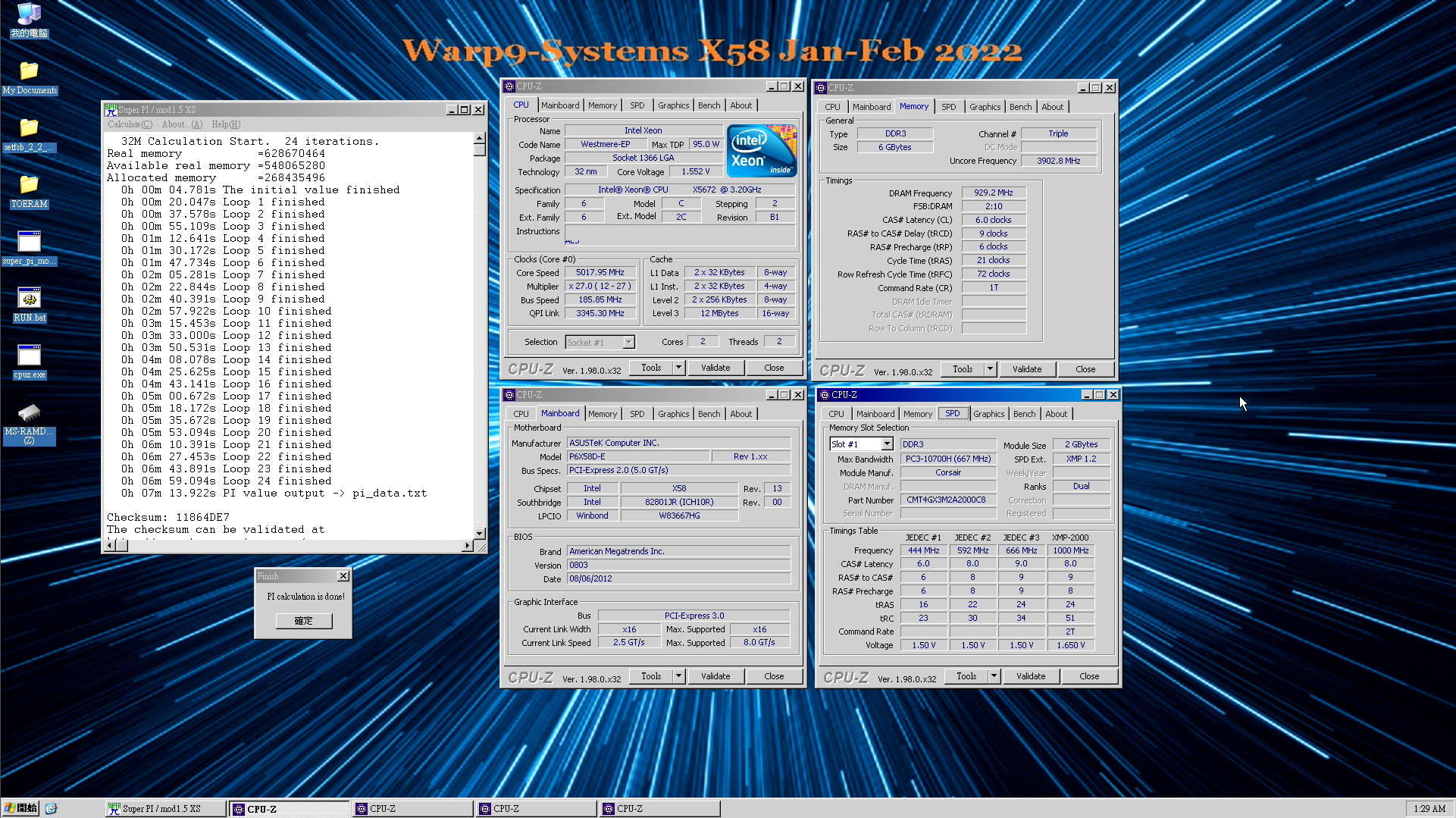
Any of you guys running x58? There's an ambient cooling comp. https://warp9-systems.proboards.com/thread/1693/official-x58-competition-warp9-systems
[Official] X58 60 day Competition | Warp9-systems January 1st through February 28th Prizes: Sub-Zero winner gets | triple channel Kings
 steel zephyr
short blade
LEGENDARY LOL
steel zephyr
short blade
LEGENDARY LOL
I got legendary for this one. LOL https://www.3dmark.com/spy/25373329

3DMark.com
AMD Ryzen Threadripper 3970X, NVIDIA GeForce GT 1030 x 1, 65536 MB, 64-bit Windows 10}
short blade
lmao
proven canopy
3dmark vantage gpu score just got added as a bench https://hwbot.org/benchmark/3dmark_vantage_-_performance_(gpu)/rankings?cores=1#start=0#interval=20
Pick up some hardware points 🙂
proven canopy
Knocked a bit of time off the ycruncher score, subbed for those season points, can't let seby keep the lead https://hwbot.org/submission/4901436_forks_y_cruncher___pi_1b_ryzen_threadripper_3990x_10sec_848ms

HWBOT
The Ryzen Threadripper 3990X @ 4399.9MHzscores getScoreFormatted in the y-cruncher - Pi-1b benchmark. Forksranks #1 worldwide and #1 in the hardware class. Find out more at HWBOT.
timber hound
What gpu?
zenith palm
 idle sierra
need help oc gpu
idle sierra
need help oc gpu
Download 3d mark on steam
And msi afterburner
Push gpu power all the way too the right, +core in 50's til ya crash, dial back 15 til stable
Then once you get core do mem or vice versa
Start with +500 on mem, +100 until unstable, dial back til stable,
Run timespy every time you make change (except the power)
run 3x timespy or like 10 mins in furmark/occt gpu mode to make sure final one is stable before switching for core to mem or mem to core
idle sierra
zenith palm
Download 3d mark on steam
And msi afterburner
Push gpu power all the way too the...
Thank
zenith palm
Welc
 faint tangle
zenith palm
Download 3d mark on steam
And msi afterburner
Push gpu power all the way too the...
faint tangle
zenith palm
Download 3d mark on steam
And msi afterburner
Push gpu power all the way too the...
If this isn't pinned it should be
zenith palm
I mean the start values and + values aren't universal they were just rough ones ik would work on 3080 cuz that's what they got
faint tangle
Ah
proven canopy
Use a binary search approach for testing clocks - test an optimistic value, if that fails, test halfway between that and your low estimate, repeat.
Time spy graphics test 2 works well for core + mem, remember that you can see performance regression before instability, especially with memory.
 zealous shadow
can someone dig through my HWiNFO log and tell me what im missing. My pc keeps getting wonky when i run something Fullscreen for a while. I reset the clock ratios to default and nothing changed, i even set it to auto and nothing, so im not sure if its OC related but something fishy is going on.
zenith palm
zealous shadow
can someone dig through my HWiNFO log and tell me what im missing. My pc keeps g...
Sure send a screenshot
zenith palm
For thermal pad replacement should i try find/buy a caliper to find thickness or do you think a ruler would be accurate enough?
 elder crane
zenith palm
For thermal pad replacement should i try find/buy a caliper to find thickness or...
elder crane
zenith palm
For thermal pad replacement should i try find/buy a caliper to find thickness or...
You need a certain thickness for a specific purpose? I expect they are made in certain. Thicknesses and you can get a pretty good idea based on a scale ruler. But if you don't have a thickness gauge, it's useful to have from time to time.
zenith palm
elder crane
You need a certain thickness for a specific purpose? I expect they are made in c...
Yes, if you replace thermal pads and thickness not right you'll either bend the pcb/metal if they're too big, or not make contact at all if too small
elder crane
Harbor freight thickness scale I bought years ago for less than $20. It came with a nice wooden case and all. Not a bad investment.
and if it saves you just 1 PCB it pays for itself many times over
zenith palm
Well i don't neeed to do it so if it's not safe i just wont tbh
 zenith palm
I'll have a look into one, not particularly looking forward to spending much money on something I'll probs use once maybe twice
elder crane
You'll be surprised. I've found a use for it about once a year. But I bought it when I needed it for work regularly
zealous shadow
zenith palm
Sure send a screenshot
thats the log file i started logging, ran furmark and it crashed as expected
zenith palm
I cannot check that , on phone
zealous shadow
kk
proven canopy
zenith palm
For thermal pad replacement should i try find/buy a caliper to find thickness or...
Different brands of pads will compress differently, can't go 100% by manufacturer spec, just have to press the card to the cooler and test fit.
zenith palm
That's fair, ive found couple measurements online with varying degree but i might just leave for the moment and see how the repaste will help
steel zephyr
A 3770K is a bit of a bottleneck.... https://www.3dmark.com/pr/1391420
3DMark.com
Intel Core i7-3770K Processor, NVIDIA GeForce RTX 3090 x 2, 16384 MB, 64-bit Windows 10}
I guess I should skip the I3-3240
 wintry chasm
anyone else getting free upgrades to their internet? Oo
 potent fiber
Nice upload. No, just the usual 360Mbps DL on service labeled as 300. Although in the past there was a "free" upgrade from 75 to 100+.
wintry chasm
ctc has set me no info on higher speeds. after my internet was down last week for a few hours, it came back up to the new higher speeds. I am supposed to be getting 250d/250u
potent fiber
Try speedtest or some other place. That's a huge difference, lol.
dull ginkgo
speeds are also just wacky from day to day
I sometimes get 400/100, sometimes 500/500, sometimes 500/100, sometimes 100/100, who knows
wintry chasm
 potent fiber
wintry chasm
ok chillin https://www.speedtest.net/result/12597760596.png
potent fiber
wintry chasm
ok chillin https://www.speedtest.net/result/12597760596.png
Looks like you basically have gigabit now almost for some reason, lol. Which router & modem are you using though?
wintry chasm
modem/router combo comes from my isp, no numbers listed on the outside of the device at all. I had to find that info by logging in. but here it is since you asked. it looks like ps2 lol
 potent fiber
I have the infamous arris sb6190 & still on my old r6400v2 netgear. Soon I'll have a modern wifi 6 router. Nice speed & ping you have though. Almost 3 times mine, plus typical sub-50mbit UL.
wintry chasm
never dreamed i would ever be able to afford these speeds, never mind seeing them in the realworld for residential. eh
if it matters, its costing me around 95$us a month
potent fiber
Not bad. Promo ended so last I saw I pay $60ish, but might go back to 100mbit. Not much competition around here. DLing games faster isn't a big deal lately
wintry chasm
also I had to get some upgraded ethernet cord that my friend just had laying around if you can believe it, my old ethernet cord was only letting me get 100mbps
potent fiber
Yikes, but possible. A short enough cat5e can do gigabit, so who knows
wintry chasm
why do you say the arris is infamous
potent fiber
The 6190 has Intel puma 6 chipset, supposedly had latency issues or something. Been fine though. I've had it since 2018ish
 potent fiber
Wow, quite a model. I've just done separate units for convenience.
If I did get another, probably the Motorola MB8611 I think it is, runs cooler at least but also more expensive than a certain comparable Arris model
wintry chasm
according to the "internet" its called Calix 844G-1
I have cat 6 ethernet
something about certified to ansi/tia-568-c.2, tested to 600 mhz at 502 ft. Oo
talk about technical speak lol
potent fiber
wintry chasm
talk about technical speak lol
That's common c.2 is like the connector ends and 600Mhz if true means it's quality. Example, my cat5e cord says 568-A & 350Mhz. My monoprice cat6 cables are c.2 ends & labeled 550Mhz. Basically cat5e is good for 10gig but not very far, cat6 is a lot better on average (for 10gig networking).
wintry chasm
ok, ty for the quick info. I did not know that
modern walrus
I have the 3600c14 set on 5900x; a 2x16gb Bdie 4000c17-18-18-38@1.4 on 10900K; & 2x16gb DJR 4400c19-26-26-46@ 1.45 on 10700KF. I have tried OC on all three... I have to have some winning stuff somewhere if I can get it right
neither the 10700KF nor the 10900K seems willing to run anything north of 4000mhz tho & it's frustrating as hell
proven canopy
I want to see you take the #1 7zip on the 5900x
modern walrus
as soon as I finish getting Sharex I'll head over to BIOS
or that can wait will head to BIOS now
gonna start dropping sds now
proven canopy
nvm, thought you said scl
modern walrus
ah I was going in order of your earlier suggestions
do I need all three anta777 cycles or is one enough?
proven canopy
Depends if you're testing for daily stable or 7zip, if you just want to take #1, as long as you get the score, that's all that matters
modern walrus
I'll focus on getting number 1 then retune for daily later
damn sds at 5 won't POST
Do all timings scale with voltage on bdie?
modern walrus
ah okay thought you said 6/6 then keep dropping them
my mistake
are they better 1:1? I think I had them at 5/6
my bad for all the questions, I'm sure you don't like babysitting the noobs
last question (for real): where should the outer limits of fixed voltage be on 5900x for all-core?
proven canopy
modern walrus
ah okay thought you said 6/6 then keep dropping them
I did - but no guarantees on what you'll find stable
No, 4/6 or 6/4 is common
proven canopy
I have not. Really only meta for max valid freq
You can tune it such that's it's decent for intel daily gaming oc, but kinda pointless other than the cool factor or 5000mhz daily
modern walrus
I dunno why but I can't get either intel CPU to POST over 4000. I might get 4200 to work for a little while but it'll go nuts with errors
I've tried so many SA/IO combinations it's nuts
 proven canopy
Just start at 1.35/1.45 for benching
modern walrus
& now that I got a fairly decent mem OC, I can't get my 51 all-core CPU OC to hold anymore.

I tried copying Fritz's numbers since he had same CPU & motherboard but got nowhere
proven canopy
Those look like 11th gen daily oc numbers, hard to say
modern walrus
gotta be honest, not sure if that's a good or bad thing
on overclock.net, 11900K was putting up some pretty high frequencies but
still 11900K
modern walrus
I think I'm gonna have to take the FCLK/MCLK desync plunge
 short blade
anyone know why my friend's i5-11600K is stuck at 3.8ghz? tried disabling everything related to turbo, setting manual core multiplier and fixed vcore, setting manual 4095W PL, tried all power plans, cpu temp is at 75C (prime95), vrm temp is at 57C
gigabyte z590 ud ac
short blade
yeah thanks I forwarded them but didn't fix
modern walrus
was about to get you not sideways pictures haha
short blade
suspecting the windows install he moved over from his 4770k
modern walrus
hmm I dunno if I missed anything... let me check again
cuz mine will run at 50x like I tell it to
is he setting a multiplier?
cuz if you leave it on auto it goes to 3.7ghz for me too
short blade
modern walrus
is he setting a multiplier?
stuck at 3.8 regardless of set multiplier
and base clock is 3.9
he gets correct boost behavior in linux but not windows
so it's something about windows
modern walrus
short blade
stuck at 3.8 regardless of set multiplier
it could be nothing or it could be the issue: disable memory integrity in Windows Security. My computer was acting all sorts of strange before I did
Windows Security>Security at a glance>Device security>Core isloation>Core isolation details>Memory integrity off
latent wave
Why is it that when I raise the mem past a certain point, I get a lower time spy score despite it being stable?
modern walrus
define stable
modern walrus
latent wave
Why is it that when I raise the mem past a certain point, I get a lower time spy...
I get similar effect when I bump voltage to 1.6+ & run flat 14s. My guess is even tho it runs, it's not very stable. Either that or the really high voltage is no good
latent wave
modern walrus
I get similar effect when I bump voltage to 1.6+ & run flat 14s. My guess is eve...
I mean gpu mem
1hr kombuster stable
short blade
error correcting
latent wave
Okay so there’s an optimal value so just okay with it
short blade
the gpu tries to prevent itself from crashing but spends more time error correcting
so you lose perf
yes
short blade
np
modern walrus
short blade
np
I dunno why that memory integrity thing matters, but I wasn't even able to run 51x all-core with it on
modern walrus
if that doesn't work I'm out of ideas
lol
somehow I kinda got my mojo back with 51x... now I'm gonna play the LLC v. vCore game to find the sweet spot

party time, excellent
short blade
his cooler isn't good enough to realistically do an OC better than stock
latent wave
short blade
np
Is it the save thing with core or just go as high as I can go
short blade
but since it wasn't boosting correctly i had him try setting an all core ratio to see if he could override it that way
it didn't work
short blade
latent wave
Is it the save thing with core or just go as high as I can go
just downclock when you see lower performance
use 3dmark or something
latent wave
Yeahs thanks what I use
short blade
just keep adjusting it until you have the optimal score
if +1000 and +1100 score the same try +1050
for example
modern walrus
short blade
his cooler isn't good enough to realistically do an OC better than stock
wait so you just want stock again? load optimized, write down settings or something, & load whatever (I assume memory OC?) from profile & fill settings in?
short blade
modern walrus
wait so you just want stock again? load optimized, write down settings or someth...
even at stock his pc is stuck at 3.8 on windows
works properly on linux
modern walrus
very strange.
proven canopy
How's 7 zip coming along?
zenith palm
So i was trying to do y cruncher as a quick mem stress test to do before bothering with tm5, and it said coefficient too large after like 45 seconds, what's up with that?
Was running pi -2.5b btw with c malloc() and auto for framework -taken from buildzoid vid
Worked fine the 2nd time ¯_(ツ)_/¯
proven canopy
Instability often gives that error message.
zenith palm
Ahh that would make sense it crashed tm5
proven canopy
But yeah, might as well run ycruncher , IME 10b is extremely picky with finding instability, I had to run much, much lower memory OCs, though you might not have enough mem to run it.
I think we should have a newegg community 7zip ambient oc contest by core count.
5ghz limit for intel, unsure on clock limit for amd
<@&896784369820250114> thoughts?
 ruby summit
sounds fun
proven canopy
Newegg community 7zip competition
Rules: Include a cpuz cpu, memory, and spd tab as well as an astc/zentimings window.
Rig pic optional, but plz include for the flex.
Must be a valid hwbot submission.
Scores:
https://docs.google.com/spreadsheets/d/1zCTURYZXw8eJweKLQeUjSbnLhnNCKAHCGFpphhSCe8M/edit?usp=sharing
Thoughts: maybe 7zip isn't the best candidate for this as it scales so much with raw core speed, maybe aida latency instead? or have everyone drop down to 6 cores at 4.2 ghz?
sterile flame
that'd give me a good reason to start messing with hardware again, ive pretty much been doing nothing the past few weeks lol
proven canopy
Do you have any x58? there's a warp9 comp for that going on now as well
sterile flame
Yea but I dont have any unlocked CPUs for that platform
I could do BCLK though? im not familiar with the rules for that competition
proven canopy
I'm pretty new to that platform as well, but sounds like 32nm xeons or i7 extremes are meta.
Yeah, bclk is very much a part of oc'ing those chips, most boards do up to ~200 bclk apparently
There's both an ambient and sub0 category
sterile flame
proven canopy
Yeah, bclk is very much a part of oc'ing those chips, most boards do up to ~200 ...
jeez really? i'll have to try it out then. I have a w3520 and a i7 940 i could try
proven canopy
My current best, still need to work on os effi/ wazza technique https://i.imgur.com/BpfOEGd.png
Top score is just under 7 mins with hypers
modern walrus
proven canopy
How's 7 zip coming along?
I got up to 4th place but I'm having trouble getting any higher
Sharex has same HDR problem

I'll give it another go tomorrow. I don't know if I can get much better on memory & I can't get 47.5x all-core stable long enough without more voltage so I might be stuck unless I go crazy & desync FCLK (tho I obviously don't know how high I can get memory frequency yet)
proven canopy
Spreadsheet is set up
proven canopy
proven canopy
Newegg community 7zip competition
Rules: Include a cpuz cpu, memory, and spd ta...
modern walrus
will submit now
ah I gotta reload my OC profile from BIOS so ZenTimings make sense
wait no I don't that's already on HWbot
haven't slept much bear with me
wait no don't have zentimings... I'll just redo it
proven canopy
If someone wants to make a fancy looking competition background, that'd be great
modern walrus
I'll see what I can come up with. Not the most artistic haha
proven canopy
e.g. gskill made this for their last comp https://i.imgur.com/H0hQWD0.jpeg

as well as https://i.imgur.com/rrdlA9M.jpeg
 modern walrus
damn that's bad ass
proven canopy
Yeah, most of the comp backgrounds are beautifully done
modern walrus
ya those are real hard to beat
modern walrus
speaking of hard to beat, this dude is gonna be hard to beat since he's willing to run his processor at 48.25 all-core at 1.45v. I was worried about running 1.3125v
 proven canopy
Yeah, not worth degrading, lol at that max temp, pretty sure that's not pbo
I'm thinking of making a max all core clock for amd for the comp
Or just PBO only, idk
modern walrus
ya that would make it all about the memory OC instead of who's willing to throw their CPU in a furnace
proven canopy
That's the intention, not sure on the numbers yet.
modern walrus
ah okay then I won't put anything on the sheet yet
cuz I was using all-core not PBO
proven canopy
example screenshot done https://i.imgur.com/mrikf4X.png
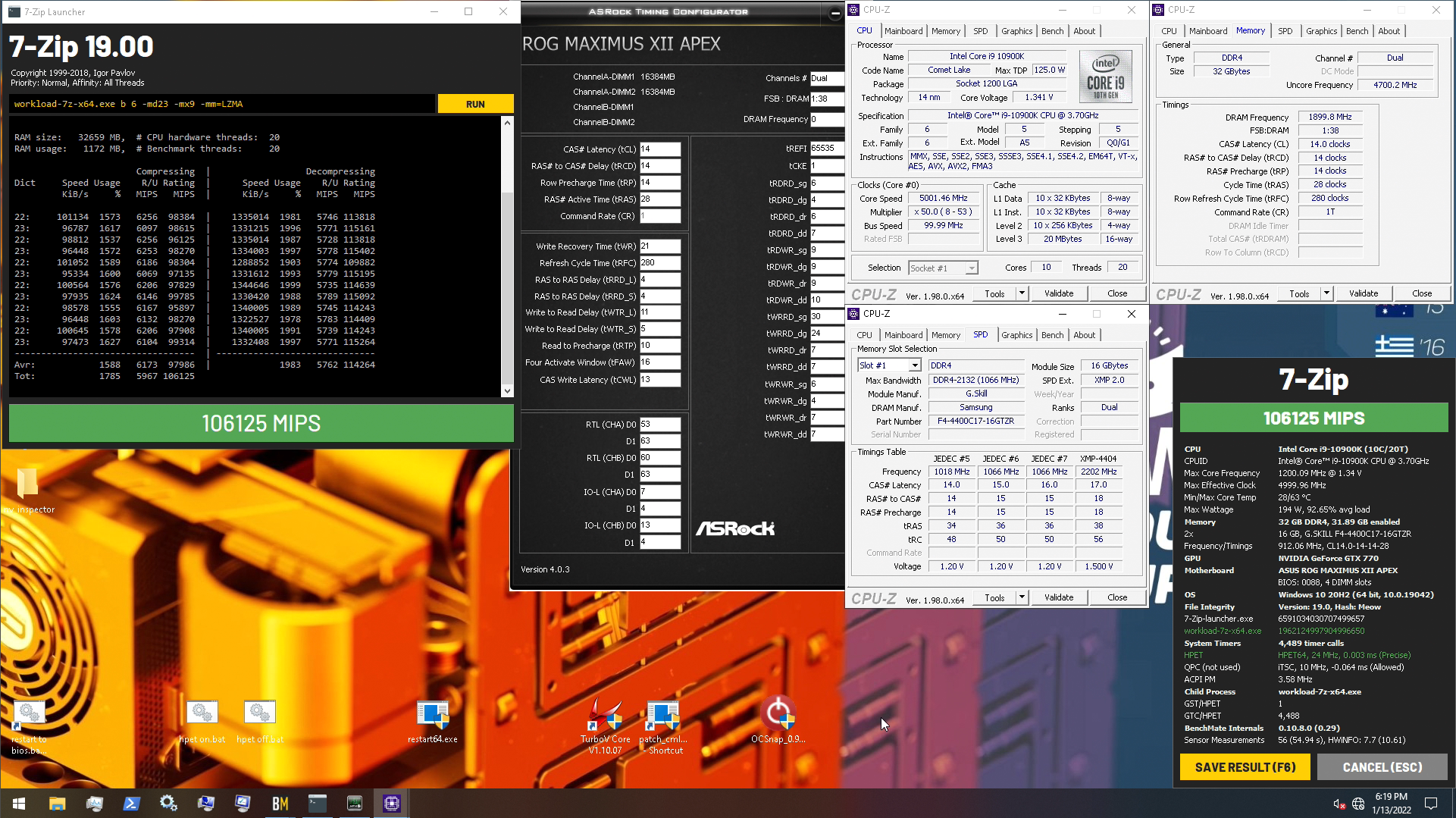 modern walrus
my dumbass cut off part of a CPU-Z
 proven canopy
You can use benchmate 10.8 unless you're on 12th gen
proven canopy
Another idea, everyone just drops their chip down to 6 cores or something and we leave out the valid hwbot link rule so we don't need core count categories
proven canopy
Interesting, 1t-2T only dropped <1k score
 worldly wasp

lol
just a quick test run
with discorn open and live plex transcode

watching anime when bench = based
proven canopy
Odd, 4400c14 with somewhat similar secondary/terts gets 72k compression scores vs 98k at 38c14
I'm finally getting around to binning my dr b-die, trying to decide a methodology
proven canopy
shoutout to seby for demolishing the fse single card record https://hwbot.org/submission/4904155_

HWBOT
The Radeon RX 6900 XT @ 3110/2330MHzscores getScoreFormatted in the 3DMark - Fire Strike Extreme benchmark. Seby9123ranks #1 worldwide and #1 in the hardware class. Find out more at HWBOT.
zenith palm
proven canopy
But yeah, might as well run ycruncher , IME 10b is extremely picky with finding ...
I'll try 10b but 2.5b was good anyway
 vestal glacier
I’m using a 2400g while waiting for a gpu. I was playing around with overclocking the graphics core. I got an additional 8-10 fps out of it, but my texts would drop significantly. Is this to be expected?
worldly wasp
texts?
vestal glacier
Textures sorry
vestal glacier
So finally won a shuffle today have a gpu coming. I’ll be able to switch out that 2400g for my 5600x. Still new to all this tho. Does anybody have any good links to overclocking basics? Or should I just let software auto overclock?
dull ginkgo
Its in the pins
https://www.reddit.com/r/overclocking/wiki/index
reddit
r/overclocking: All things overclocking go here. Learn to overclock, ask experienced users your questions, boast your rock-stable, sky-high OC and …
vestal glacier
Lmao I was just going through the pins. I’m a refer tech and seeing all the pics of the pcs with the refer systems on them is great! I actually felt like I knew something here!
dull ginkgo
There are some fun cooling systems on showcase in the pins
zealous shadow
zenith palm
I cannot check that , on phone
💀
zenith palm
zealous shadow
💀
Bro that was ages ago could you just send a screenshot instead?
I forgot and am basically always on mobile when talking lol
proven canopy
GT740 GDDR5 Hardmodding #2: 2Mods2Furious
https://www.twitch.tv/mickulty
 proven canopy
3dmark score calculator
https://elmor.se/3dmark
zenith palm
Anyone got a non k cpu and z690 to test this out?
https://youtu.be/8diXDeTDCbo

Support me on Patreon:
https://www.patreon.com/der8auer
Save 10% on your iFixit purchase: DER8AUER10
https://eustore.ifixit.com/der8auer
Pro Tech Toolkit: http://bit.ly/2JOFD8f
Find my products at Caseking:
Delid Die Mate 2: htt...
If it's confirmed on more boards? 12700f at 330$ is looking really good
humble jay
I’m buying 12100
zenith palm
What board you gonna have it on?
humble jay
z690 apex
for competitive overclocking purposes, then maybe later i'll put it in a daily system with b660 asus if that still supports bclk oc
zenith palm
humble jay
for competitive overclocking purposes, then maybe later i'll put it in a daily s...
The b660 tuf didn't unfortunately
humble jay

worldly wasp
zenith palm
Anyone got a non k cpu and z690 to test this out?
https://youtu.be/8diXDeTDCbo
only works on hero and up

yeah bro "CHANGES EVERYTHING"
imma head out buy a 12400 and a Z690 hero

game chaning
amd ded
zenith palm
worldly wasp
only works on hero and up
sadge
tall pelican
look at this non-k overclocking, where you can save $30 on a cpu
limited to $500+ mobos
sudden torrent
Still useful info for overclockers trying to set bench records. Odds are if you're the target audience you have a board with the requisite external clock generator already. The overclock wouldn't be worth it for daily use, you could just get a cheaper Z690 and K sku cpu for the same price.
potent fiber
tall pelican
>look at this non-k overclocking, where you can save $30 on a cpu
>limited to $5...
12700K for me seems at least $380, so the one at $330 is looking mighty good, step way down to the 12400(F).
modern walrus
what does typical SA/IO look like to run 4500+ on memory for 10th gen intel?
proven canopy
modern walrus
what does typical SA/IO look like to run 4500+ on memory for 10th gen intel?
I bench up to 1.45/1.55 ambient, haven't seen any degradation whatsoever in maybe 30 hours+ of combined ambient and ln2 benching hard, but you might not need that much. Try 1.35/1.5 to start, 1.4/1.5 should be totally safe for bench sessions.
modern walrus
thank you. I'm at 1.34/1.46 rn & I still can't get anything over 4200 to get into windows
proven canopy
What vdimm?
Also what board?
Also dual rank is tough, I couldn't get even 4000c12 2x16 to be useable
proven canopy
You're going to need fans on the dimms for dual rank over 1.45 volts or so, also try lowering vtt slightly. e.g. 1.6 vdimm .75-.8 vtt. Auto is 1/2
modern walrus
thank you sir
timber hound
proven canopy
Also dual rank is tough, I couldn't get even 4000c12 2x16 to be useable
That's crazy xD
Congrats
modern walrus
I have a 80mm Noctua blowing down on the DIMMs but with anta777 or PCBDestroyer, I'm seeing 50c on DIMM temp sensors... not enough
proven canopy
Yeah, aim for < 40c lol
modern walrus
ya I think I might throw another 2 80mm fans or accept my fate & waterblock. I really don't wanna have some random 120mm hanging with zip ties, put one of those Corsair coolers on, or get some loud 70-80mm server fans
I'm gonna see if I can stay at 4200c15 with lower DRAM voltage
proven canopy
That's aggressive, aim for 42 c16 first maybe
Guessing you'll need 1.6 or so, depends on bin.
modern walrus
I got 4200c15 to POST at 1.57
but ya probably not happening much if at all lower than 1.57
proven canopy
I would try for 1.35 io, up to 1.5 sa daily.
timber hound
Finally got my cpu to hit 5.0GHz! Took me a while to find what it likes
zenith palm
modern walrus
I have a 80mm Noctua blowing down on the DIMMs but with anta777 or PCBDestroyer,...
Laughs in rev e not worrying about temps 
timber hound
proven canopy
For bench? or daily
daily yea
proven canopy
zenith palm
Laughs in rev e not worrying about temps <:KermitEmperor:659807936985432077>
laughs in 14 rcdrd and rp 🙂
timber hound
only curve optimizer and +maximum frequency
 zenith palm
proven canopy
laughs in 14 rcdrd and rp 🙂
zenith palm
proven canopy
laughs in 14 rcdrd and rp 🙂
 proven canopy
Ah nice, was hoping you weren't going to reply with "yeah, 5.0 all core, just needed to run 1.45v llc6"
timber hound
proven canopy
Ah nice, was hoping you weren't going to reply with "yeah, 5.0 all core, just ne...
lolol
its 4.98GHz for 2 core
although it bounces quite a bit (4.9-4.98)
proven canopy
I've been looking to organize some kind of newegg overclocking competition, trying to decide what bench/set of rules make things both fair and interesting. The "beta" is in the pins, 7zip
Give it a try through benchmate
zenith palm
Sorry for bad pic but my 3200c16 rev e kit
 zenith palm
I'm not at pc arm
timber hound
ah
zenith palm
timber hound
use print screen and paste here
Slightly older one
 zenith palm
Except tras 27 and gdm off
Tcwl put it self to 14 for some reason too ¯_(ツ)_/¯
Also pushed trfc back up to 590, 580 was causing stutteryness
 zenith palm
timber hound
my next goal is to sync fclk and mclk
zenith palm
timber hound
my next goal is to sync fclk and mclk
 proven canopy
12 can be pretty tight for cwl, I usually start at 14
zenith palm
I had 12 stable tho, then it jumped to 14 ¯_(ツ)_/¯
proven canopy
timber hound
my next goal is to sync fclk and mclk
What IC are those?
check the 042 code
timber hound
proven canopy
What IC are those?
Hynix MJR 16gb dies
zenith palm
timber hound
my next goal is to sync fclk and mclk
Try 3800mhz instead your uclk is an ouch
timber hound
i set A-XMP and forgot
proven canopy
I think dallas runs the same sticks and cpu so you should definitely flex on him with your overclocks 
timber hound
zenith palm
Try 3800mhz instead your uclk is an ouch
it can boot 2k all, but gets whea
at stock voltages
i just need to spend time to find what voltages make it work
proven canopy
Those are some odd voltages. Nothing too worryingly high, but how'd you get to 1.1 vddp?
timber hound
its auto idk ¯_(ツ)_/¯
proven canopy
Usually soc-vddg's you start with 1.2 .9 1.05 1.1 or something
timber hound
should i change them to that then?
proven canopy
Not sure if zentimings is reading correctly, never heard of vddp being auto'd that high
@short blade
zenith palm
timber hound
my next goal is to sync fclk and mclk
1.1625vsoc? I'd try lower, it rolls over somewhere between 1.15 and 1.2vsoc btw
proven canopy
@tall pelican thoughts?
zenith palm
Hmm i mean 1.1v vddp is still safe
short blade
hello
timber hound
i mean its auto so i hope it would be safe
i will try lowering it
& see if i go poof
what are teh recommended voltages?
proven canopy
What do you use to test mem? tm5 anta?
timber hound
i havent yet, I set A-XMP and left everything on auto xP any recommendations
zenith palm
timber hound
what are teh recommended voltages?
Id start with something like this

Vddg iod and ccd same
timber hound
ive been using Cini R23 and Prime95 so far for cpu
proven canopy
Use something like 7zip or ycruncher 1B to test performance as you tune, will be fun to see the numbers improve
Cinebench doesn't scale with memory
short blade
I've seen 1.1 auto vddp before I think
tall pelican
proven canopy
<@!193597009360453633> thoughts?
on?
short blade
not really a concern
timber hound
proven canopy
Cinebench doesn't scale with memory
yea ik thats why i havent touch it yet hehe
proven canopy
tall pelican
on?
These auto'd soc-vddg's #overclocking message
Why'd the mobo auto 1.1 vddp lol
zenith palm
timber hound
ive been using Cini R23 and Prime95 so far for cpu
Use testmem5 extreme anta profile
tall pelican
vddg iod seems high
zenith palm
For ram*
timber hound
idk fam its an Asrock B550i Phantom Gaming
i got alot of airflow on the mobo though
tall pelican
also why are they in 2:1?
timber hound
tall pelican
also why are they in 2:1?
because it got whea at 1:1 so i just left it since i was testing Cinibench R23
i was using stock/auto voltages though so thats probably why it got whea
tall pelican
well yeah 2000if is going to whea, but then why neuter it to 1000if?
or not if, but uclk
timber hound
automatically set to that when uncoupled
tall pelican
yeah, but just downclock mem
timber hound
zenith palm
Id start with something like this
Thanks
I'll try it
Maybe I can get 1:1 then
modern walrus
figures I go shower when things get poppin in here
tall pelican
until mem is over ~4200-4400, then its better to stay low clocks with tighter timings that fast mem and 2:1
timber hound
so i should try for 4200?
 tall pelican
drivers and/or chipset
timber hound
has to be drivers because its the same chipset as that one (both b550)
modern walrus
tall pelican
no, try 1900if with 3800 mem
Sir Fitz... any chance you have a picture of your BIOS settings for this? long shot I know

my bad to ping you
tall pelican
no, I never take bios pics because they're a PITA
timber hound
PITA?
timber hound
But phone
modern walrus
I looked at your asrock timings but those don't have any of Gigabyte's random settings lol
I've gotten as low as 40.7ns on AIDA but nowhere close to your 35
modern walrus
I need to install AIDA on my benchmark SSD with Forks win10 build
might get that 5ns there
modern walrus
timber hound
only curve optimizer and +maximum frequency
could try all-core 47.25 lol
 timber hound
Trying 1:1 @ 1933MHz fclk
modern walrus
sorry that's misleading
timber hound
modern walrus
sorry that's misleading
I'm on air though
 timber hound
Yea
modern walrus
dunno how that would do tbh
timber hound
No idea
timber hound
modern walrus
that's 12x CPU. 1. is my best r23 multi lol
Ranked 38, nice 👍
modern walrus
I mean if you turn off minimum test duration it only lasts a minute or so
timber hound
timber hound
Trying 1:1 @ 1933MHz fclk
unstable rip
 timber hound
modern walrus
I mean if you turn off minimum test duration it only lasts a minute or so
timber hound
modern walrus
I mean if you turn off minimum test duration it only lasts a minute or so
yea i did that too 🙂
 modern walrus
if you run Prime95 Large FFTs & OCCT VRAM together, you can see if you can stabilize your FCLK
I can't get it to stop throwing WHEAs over 1900
timber hound
its getting wheas at desktop
tall pelican
or ya know, if they ran at 1900/3800, it wouldnt get wheas
timber hound
i get wheas at 1900
tall pelican
then tune your voltages until you dont
timber hound
how low can i go before i need to reset cmos?
modern walrus
until it won't POST
timber hound
do i just lower all voltages?
 modern walrus
it's CPU specific... silicon lottery
modern walrus
here maybe mine can help

can also check pinned messages to see others' settings. They might help you
 modern walrus
I think trial & error was how I got there unfortunately
might even be auto. I'd have to check BIOS
proven canopy
Use tm5 + anta777
modern walrus
what kind of fan(s) are y'all using to get enough airflow to keep memory cool?
I'd kinda rather avoid these but it's looking like they're my best bet

I was looking at the pipes running to CPU trying to figure out how I can rig something up to connect a fan to them with a pipe clamp or something
dull ginkgo
ziptie + normal fan = good memory cooling
tall pelican
modern walrus
can also check pinned messages to see others' settings. They might help you
they dont have bdie, 16gbit AJR from what I can tell
modern walrus
in your bdie performance predictions? oh damn I should've looked.
https://docs.google.com/spreadsheets/d/1NN3-m-mvqxoebSUO_22efkMrnGog2y1atWUgiZSZTOc/edit#gid=696788942 this has some people's zen timings

Google Docs
ADL-DDR4
Username,Manufacturer IC,DIMMS,Part Number,MT/s,Timings,PPD,Latency,Read,Write,Copy,Score,Score/VDIMM,VDIMM (V),VCCIO (V),VCCSA (V),Stability,CPU,Core Frequency,Ring Frequency
That's pinned in another Discord tho so dunno if it's against the rules or something to post here
modern walrus
dull ginkgo
ziptie + normal fan = good memory cooling
lol kinda trying to avoid that tbh
if I do that, maybe I'll zip tie the fan to the PETG pipes so it's hiding behind GPU at least
40 seconds of TM5, DIMMs at 39C already
I have some 92x38mm Deltas... that would probably work & sound like an airplane
2:30 45C
 faint sage
Is there a way to increase the boost lock on evga x1?
sudden torrent
The boost clock for the gpu, through precision X1?
The v/f curve is good for that, but it's very temperature dependent
Less voltage can mean less heat and more headroom for boosting
modern walrus
or waterblock
potent fiber
I've found that my modest +105ish OC pretty much doesn't effect the Vcore 👍 (msi ab of course). This is why for a while in-game, I just locked to 1v or w/e & certain speed
sudden torrent
OC scanner gives a half decent starting point for further tuning, but shouldn't be used as a final result
proven canopy
You're losing out on a lot of performance and burning a lot of power for no reason locking to 1v 24/7
potent fiber
Was ingame only  . Lately run a straight +105 oc & it's often 1.06 peak & avg 1.03-1.04. Viewing the v/f curve is pretty neat. Anyone say if the full 120PL is required for a certain oc? I like when peak is below 220w vs 250w.
sudden torrent
proven canopy
You're losing out on a lot of performance and burning a lot of power for no reas...
Unless I'm mistaken, v/f only applies to the highest performance profile, which is only loaded when needed and it down clocks to 300/600 otherwise?
proven canopy
yeah, it might, but was there no scaling over 1v?
Depends how you force voltage/clocks I think
As for whether or not a higher pl is helping - you can check hwinfo or gpuz for the PL flag
potent fiber
Yeah forks meant when i said locked to 1v, and you're right it sometimes didn't downclock/downvolt at idle correctly. I used to just switch profiles for a second
potent fiber
proven canopy
As for whether or not a higher pl is helping - you can check hwinfo or gpuz for ...
Gotcha. Heck, I'll try 115 or 110 PL w/o oc change & see if the boost is simply adjusted a bit or what. 👍
 zenith palm

Support me on Patreon:
https://www.patreon.com/der8auer
Save 10% on your iFixit purchase: DER8AUER10
https://eustore.ifixit.com/der8auer
Pro Tech Toolkit: http://bit.ly/2JOFD8f
Find my products at Caseking:
Delid Die Mate 2: htt...
zenith palm
modern walrus
Uhh you're gonna want to run extreme anta profile btw
modern walrus
zenith palm
Uhh you're gonna want to run extreme anta profile btw
from my experience--albeit novice at best--PCBDestroyer config finds errors quicker & I dunno if it runs harder than anta777, but I believe it runs hotter. As long as mem OC takes, it's nice to find errors sooner... I do still use anta777 here & there as sort of a second opinion. It would be great if you tried it & gave me feedback. I could be entirely wrong. The reason I switched is I would have these strange instances where anta777 was not finding errors & TM5 was still counting time, but none of the little boxes under "Tests" would be changing color, like the program had stalled. I think it's obvious at that point that the OC was unstable, but sometimes I wouldn't notice for an hour or more since it appeared at a glace to still be running.
The first time I ran this was right after anta777 had stalled & it found errors within like 5-6 minutes... been using it ever since
@sudden torrent hope you're doing well. If you could try it out too, I'd appreciate it. I know you both way more knowledgeable than I am when it comes to these things lol
zenith palm
modern walrus
from my experience--albeit novice at best--PCBDestroyer config finds errors quic...
The box issue is sometimes tm5 not ran as admin just freezes, i recommend if you have spare ssd to use bench ssd for ram testing, i recommend using the forks iso as it is impossible not to run something as admin using it meaning tm5 basically never freezes
I'll give it a go on something ik is unstable sure
modern walrus
okay cool, I appreciate it
zenith palm
Np
modern walrus

checking that box runs it like as full admin?
that's probably a dumb question
but just making sure cuz it does the little pop up where I have to give it permission
zenith palm
That should do it to
The reason i like bench os is because you don't have to worry about corruption when mem testing
modern walrus
no that's definitely smart
I killed win11 about a month ago trying to OC DJR
I think I'm in the process of killing it again lol
I'm gonna swap C:\ for a new NVMe later today tho so I'm not all that worried about it
but I'm definitely gonna make a partition for Forks's build cuz benching on daily windows gets worse results
can it be on a partition or does it have to be an entirely different device?
zenith palm
modern walrus
I think I'm in the process of killing it again lol
Make sure to run the batfile in pins of #windows-ios often
modern walrus
just did dism & sfc lol
thank you tho
btw if you want, this runs both with right click & run as admin:
sudden torrent
modern walrus
<@!396513761550270464> hope you're doing well. If you could try it out too, I'd ...
TM5 is broken for me. Fails to load with an error message.
modern walrus
did you try extracting the .rar again?
 lavish tundra
sudden torrent
TM5 is broken for me. Fails to load with an error message.
lavish tundra
sudden torrent
TM5 is broken for me. Fails to load with an error message.
run it as not admin
lavish tundra
modern walrus
btw if you want, this runs both with right click & run as admin:
you can run my file thats pinned in windows btw and you dont need to right click and run as admin
lavish tundra
nah nah thats not the point
sudden torrent
lavish tundra
run it as not admin
It won't even launch if I do that
sudden torrent
modern walrus
did you try extracting the .rar again?
Yes
zenith palm
lavish tundra
this be whack
 clever epoch
modern walrus
if anyone is hungry, I'm cooking up some bdie. Should be ready soon
clever epoch
modern walrus
if anyone is hungry, I'm cooking up some bdie. Should be ready soon
Medium rare please
zenith palm
modern walrus
medium well or well at this point
ill take medium well
lavish tundra
modern walrus
medium well or well at this point
medium well sounds lovely
modern walrus
might make bdie soup with a waterblock the way these DIMMs have been cooking on tm5
 short blade
zenith palm
The box issue is sometimes tm5 not ran as admin just freezes, i recommend if you...
short blade
zenith palm
The box issue is sometimes tm5 not ran as admin just freezes, i recommend if you...
i always run it as admin but i've had that freeze show up on stable ocs
always just chalked it up to a tm5 bug
 ivory lichen
humble jay
ivory lichen
humble jay
cold
zenith palm
Yeah
zenith palm
 obtuse adder
Is overclocking just bragging rights now instead of useful for CPUs?
obtuse adder
Is overclocking just bragging rights now instead of useful for CPUs?
Free performance is free performance
 finite frigate
yes
worldly wasp
obtuse adder
Is overclocking just bragging rights now instead of useful for CPUs?
its useful
depends on what game
and res
obtuse adder
Minecraft 8k gaming 
proven canopy
Tried for  , but no luck. Guess I'll have to pick up an ocf and take it cold 😁
https://hwbot.org/submission/4908751_forks_3dmark___time_spy_extreme_radeon_rx_6900_xt_12423_marks

HWBOT
The Radeon RX 6900 XTscores getScoreFormatted in the 3DMark - Time Spy Extreme benchmark. Forksranks #9 worldwide and #2 in the hardware class. Find out more at HWBOT.
sudden torrent
It's not exactly good for the gpu itself, but it is safe if done right.
Your temps are already pretty high so you wouldn't have much headroom for overclocking the core without undervolting as well to keep the temps down.
And that's going to affect how much you can safely overclock
You should still be able to do some, especially if you use msi afterburner to lower the core voltage a little bit so it's not so hot
Right, that's +0 which is the default. You can adjust the voltage/frequency curve to reduce the voltage.
Probably not a good idea to increase the power limit yet then
humble jay
@modern walrus also if you have custom loop already, this is an actually reasonable way to cool your ram without making aesthetics bad

My old build
modern walrus
expensive tho...
looks really nice btw
I mean the Corsair look alright... waterblock is way better tho of course
modern walrus
humble jay
<@808772530017665024> also if you have custom loop already, this is an actually ...
what's the new build look like?
damn how come needs like 1/10th the amount of pipe I end up needing? lol
 modern walrus
same case?
modern walrus
why'd you take it apart?
humble jay
I needed the DDR4 alder lake board for fire strike #1 HOF lol
modern walrus
btw props on your HWbot scores
humble jay
The DDR5 one is slightly slower
And ty :D

Same board lol
Also removed ram waterblock
modern walrus
jeez
don't think I'll ever get on LN2 level tbh
I'd need a garage or something
I might go EK on RAM waterblock like you did
it's just expensive
I think like $80 for block & $45 for spreaders
honestly the reason I haven't just gone ahead & done it is de-lidding DIMMs
potent fiber
humble jay
<@808772530017665024> also if you have custom loop already, this is an actually ...
Whoa there sir flex a lot. Lmao, semi kidding. That's awesome
wth is in the lower pcie slot?
 potent fiber
That's interesting, very neat.
potent fiber
humble jay
My old build
cablemod cables or... ?
humble jay
potent fiber
cablemod cables or... ?
I made all of my cables, custom length too

I also sleeved a lot of the stock usb cables and stuff
sudden torrent
humble jay
<@808772530017665024> also if you have custom loop already, this is an actually ...
Hmm. I should consider water cooled memory too; the fractal torrent case isn't exactly good for memory airflow.
potent fiber
humble jay
I made all of my cables, custom length too

 sacred trench
this look good for a 3060Ti?
 potent fiber
sudden torrent
Is that the auto overclock? +200 on memory is weak
potent fiber
decent gpu oc, but +200 on memory might as well be 0. Could probably do +400 or +500
sudden torrent
Poor man's overclock, just do +115 core and +1000 memory with maxed power limit. 95% chance it works great.
sacred trench
hm ok
potent fiber
sudden torrent
Poor man's overclock, just do +115 core and +1000 memory with maxed power limit....
Kind of funny AB only allows +1K on mem, then also allows a nutty +1K on gpu, even though the latter* is probably an insta-crash if it actually was set.
 sudden torrent
Really? AB lets me do +1500 mem. Must be your vbios.
potent fiber
Probably, I might have the "quiet" bios anyways. Also, Vmem already started out at 11Gbps intead of 10  - not too worried about the overall mem speed.
 sacred trench
so the scanner OC gave me an extra 216 points in Time Spy so at least it works lol
sudden torrent
Yeah that'll be mostly from the core bump
sacred trench
how do I manually input those values you gave me?
sudden torrent
Did you max out power too?
sacred trench
they go here?
 sudden torrent
Yep. And then the power limit slider all the way right.
sacred trench
?
 sacred trench
alrighty
sudden torrent
Power alone should give a huge bump in score
sacred trench
 potent fiber
sacred trench
so the scanner OC gave me an extra 216 points in Time Spy so at least it works l...
potent fiber
sacred trench
so the scanner OC gave me an extra 216 points in Time Spy so at least it works l...
What program is that? From when I had +105 core/+200 mem. Disregarding my cpu being a bottleneck, this pic shows how the stock boosting is so good because w/ no actual oc setup I get 2050ish in 3dmark or games. 
 sudden torrent
potent fiber
What program is that? From when I had +105 core/+200 mem. Disregarding my cpu be...
sudden torrent
potent fiber
What program is that? From when I had +105 core/+200 mem. Disregarding my cpu be...
Precision X1
sacred trench
^
sudden torrent
I use that one too, it's the only way to control rgb on the FE 30 series
sacred trench
would a card sitting at 90 constantly be bad?
sudden torrent
90 degrees C on the core? Yes
On the memory? No
potent fiber
generally don't worry about the temp limit setting also.
 sudden torrent
It's highly unlikely that it actually hits the temp limit
sacred trench
hopefully
got the FTW3 just so I could OC it :<
I knew my XC would just die lmao
sudden torrent
Yeah you'll be fine then
sacred trench
my idle idle temp sucks rn
potent fiber
high temp limit to me is just so it doesnt throttle for no reason at a lower temp
sacred trench
from the OC or just recovering from benchmark?
sudden torrent
Don't worry about idle, the fans stop if it's under 40C on most new cards
potent fiber
Can you show your voltage/frequency curve? (disregard 10 series to 20/30 series difference of course.)
 sacred trench
im idle at 54 
sudden torrent
It's load temp that matters
sudden torrent
Set the fan curve then
sacred trench
ye I have it at aggressive
 sacred trench
potent fiber
Can you show your voltage/frequency curve? (disregard 10 series to 20/30 series ...
sacred trench
potent fiber
Can you show your voltage/frequency curve? (disregard 10 series to 20/30 series ...
 potent fiber
Funny, at least it's more of a literal curve. 👍
potent fiber
my fan curve is a joke because basically I've never seen over 40% fan speed even w/ furmark running at 4k.  (also sometimes I adjust it for no reason). Itching to see how much that gpu oc helps ya on TS.
sacred trench
+295 compared to scanner OC, +511 compared to stock
woooh buddy
GPU never broke its previous max temp either
i'm impressed tbh
sacred trench
@sudden torrent any way I can keep going?
sudden torrent
You can try +130 core next. Go up in steps of 15 and run a time spy bench each step to see if it's stable.
sacred trench
Wdyt is the upper limit for my card in question?
humble jay
potent fiber
my fan curve is a joke because basically I've never seen over 40% fan speed even...
Want to see my GTX 1080 OC 
potent fiber
heck yea
humble jay
3DMark.com
sudden torrent
sacred trench
Wdyt is the upper limit for my card in question?
It varies. Could be +180 or you could be at the limit already.
humble jay
+480 core +1000 (but I could run +1200) mem
sacred trench
sudden torrent
It varies. Could be +180 or you could be at the limit already.
so it's just silicon lottery at this point?
aight running 130+
potent fiber
humble jay
+480 core +1000 (but I could run +1200) mem
The cpu difference is hilarious. Basically 7x as fast as mine. 2101 MhZ gave me a gpu score of 8370 btw. Total said 6593 on that one. Neat it's basically a 15% higher oc for 13.3% higher score, not a bad ratio. 2400 MHz is beast mode for sure. That was under water? Any chance have a pic of the V/F curve still?
 humble jay
potent fiber
The cpu difference is hilarious. Basically 7x as fast as mine. 2101 MhZ gave me ...
humble jay
potent fiber
The cpu difference is hilarious. Basically 7x as fast as mine. 2101 MhZ gave me ...
I didn’t use the curve since my temperature was always negative
But yeah this card doesn’t OC as much as I wished lol
sacred trench
humble jay
Cryo cooling?
humble jay
Yeah, GPU ran at -192c fine
sacred trench
What the
humble jay
 sacred trench
Do you run this long term?
humble jay
No lol, i have 3090 on water for my daily
sacred trench
Lol I was gonna say
sacred trench
sacred trench
aight running 130+
Negligible. Got +5 lmao

 sacred trench
alright +145 breaks it lmao
sudden torrent
Guess you know your limit now at least
sacred trench
ye so guess its 130
sudden torrent
You might be able to do more on memory if you wanted to try that. Some can max out the slider to +1500. My 3080 ti tops out at +1280.
potent fiber
sacred trench
ye so guess its 130
Yeah most modern gpu's basically go in steps of 15MHz, and remember it's more like a 400+ OC when you factor in that base clock is, or at least that's how I think of it sometimes.
sudden torrent
You can do steps of 100 on memory. One thing to keep in mind is you might lose performance before you get to where it crashes.
Once you get to where you lose score or crash drop back 50 and try again
sacred trench
+7 from 1100 to 1200 lol
potent fiber
aka diminishing returns.
 potent fiber
oh, curious of peak wattage and temp
sacred trench
peak temp was 77 for a microsecond lol
wattage idrk
ill have to do again with OCCT on the side
potent fiber
Usually I like 3dmark for gpu, it does 100% gpu & the varying peak wattage at various PL/clock settings is neat to see sometimes. For reference, at 120PL +105 core I saw 250ish watts (2101MHz average), +60 core 112PL means peak 225ish watts (2050MHz aveage).
sacred trench
ye I been using Time Spy to check these
potent fiber
Same. Partly thnx to being so far from temp limit, with no oc I'd see 2000ish MHz boost, and super steady anyways. Pic is current settings. OCing is fun, but the stock boosting is so good (except OC actually gives overall lower volts).
 potent fiber
I didn't realize that 20 series was clocked lower, then 30 series is even lower. 2100? Those things boost a lot*


 potent fiber
No I meant w/ the stock base clock of 3060 Ti, they seem to go up like 600 MHz. Pretty cool they boost up as high as 10 series even w/ the lower base clock. That's how good 30 series is.
 potent fiber
it's pretty good. 10 series onward is quite a change from 900 series. Every gen varies a bit in some way though, it's interesting.
 sacred trench
I see
alrighty now im gonna enter VR
i wanna see if I gained anything from this lol
sacred trench
alright so