#overclocking
1 messages · Page 2 of 1
 proven canopy
 kind walrus
Did an UV curve and pushed it further. I'm at the limit now. Thermal headroom but silicon limited

2nd in graphics/overall and 1st in CPU for this hardware but a ways off on the best GPU score for this chip sadly
CPU looks like it still has some headroom left tho
Also not sure about number 1 unless there's a way to get the cpu freq. and gpu mem freq. higher that I'm not aware of
proven canopy
Not bad for air, ln2 soon https://hwbot.org/submission/5087416_forks_3dmark___time_spy_(gpu)_radeon_rx_6950_xt_25530_marks

HWBOT
The Radeon RX 6950 XT @ 2693/2272MHzscores getScoreFormatted in the 3DMark - Time Spy (GPU) benchmark. Forksranks #7 worldwide and #3 in the hardware class. Find out more at HWBOT.

 modern walrus
proven canopy
Not bad for air, ln2 soon https://hwbot.org/submission/5087416_forks_3dmark___ti...
modern walrus
proven canopy
Not bad for air, ln2 soon https://hwbot.org/submission/5087416_forks_3dmark___ti...
choppin me up https://hwbot.org/submission/5087181_ggood003_3dmark___time_spy_geforce_rtx_3080_ti_21367_marks

HWBOT
The GeForce RTX 3080 Tiscores getScoreFormatted in the 3DMark - Time Spy benchmark. ggood003ranks #128 worldwide and #18 in the hardware class. Find out more at HWBOT.
proven canopy
lol, I mean, mine is gpu score, yours is total score
modern walrus
22984 is bad for 12900K?
modern walrus
proven canopy
I don't think so - but I was running 8c8t
you might do better at 52x. 12th gen is strange like that sometimes lol
ah heck I forgot to update to new one
let me check my ventoy cuz I think I already have the macrium image installed
er copied on there
proven canopy
lemme upload an image, the iso is posted in the wegg discord
proven canopy
Some 6950xt benching, was hoping for 28k graphics score, but had a lot of issues with cold slow/drivers/mpt and ended with a 27.2k, will give it another run tomorrow.
I absolutely love the hot300 for this, 4 hour session, 0 ice/water on the card. I'll be using some longer rods next session so I can use the metal backplate and really tighten down.
https://i.imgur.com/ew3ejfa.jpeg
https://i.imgur.com/zsCVrtZ.jpeg
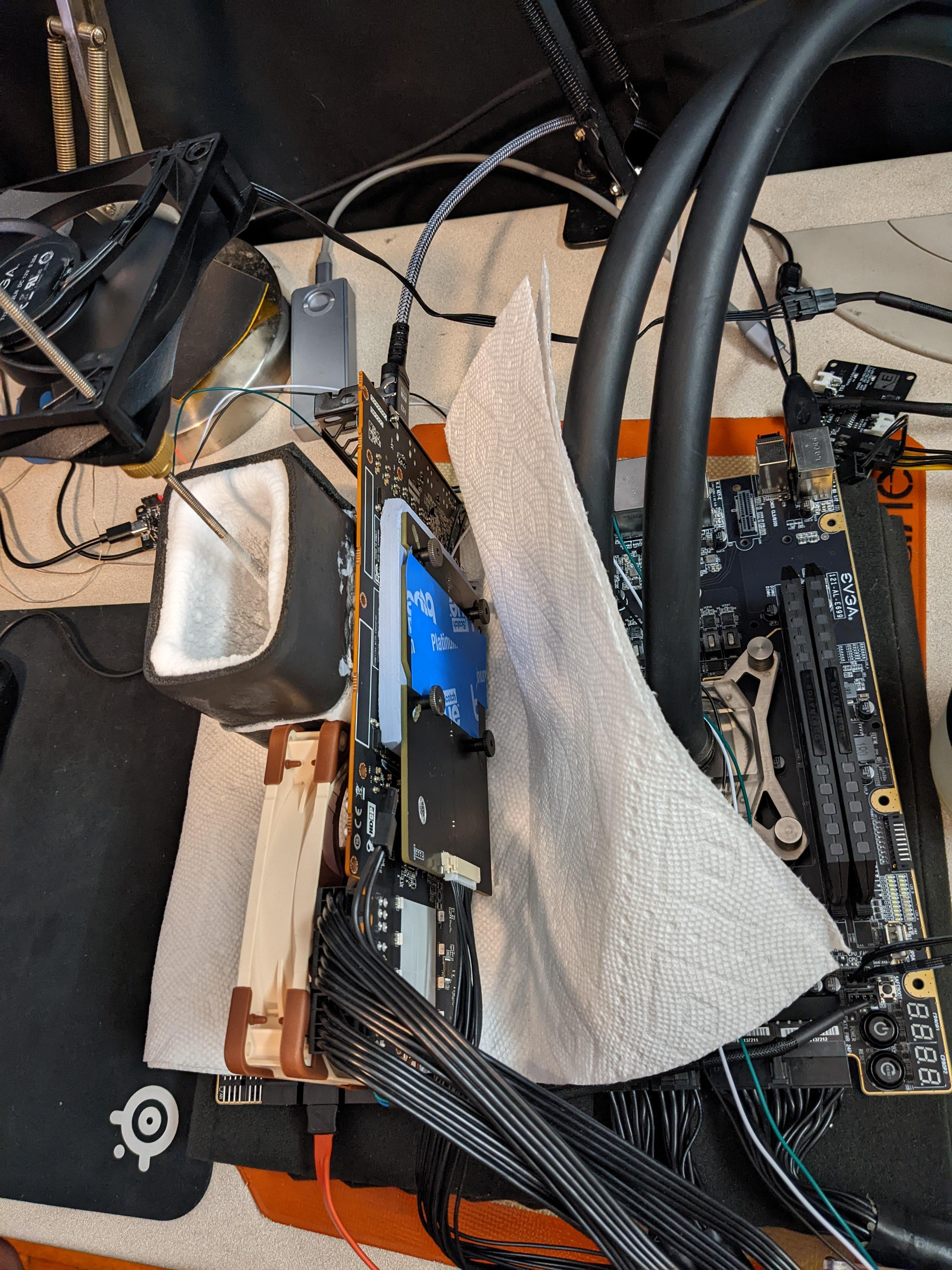
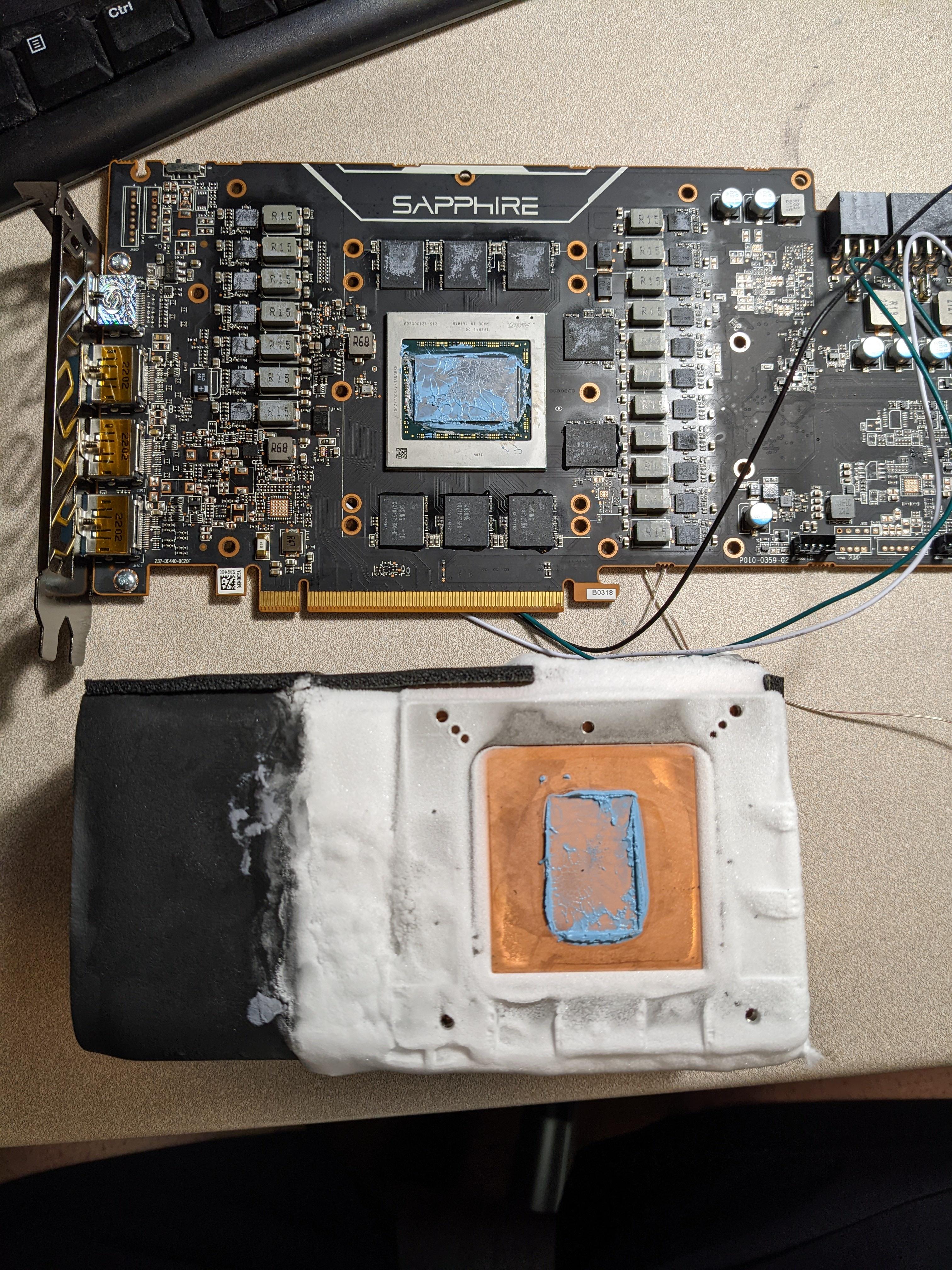 proven canopy
@kind walrus Hey, what do you daily btw? Got an astc screenshot?
Try run some ycruncher 1B
kind walrus
@proven canopy sorry for late reply but I've been dailying a 5900X while I slowly get the 12900KF system up and running to speed
Only just started ram tuning it but the CPU is happy with the OC I did
I stabilised this to 5.5 1p, 5.4 4p, 5.3 6p, 5.2 8p, 4.1e 4.2 ring @ 1.35V 100 bclk (changing bclk just worked for cinememes)
kind walrus
I think it can do 2 cores 5.5 but not really bothered with it cos TVB or whatever it's called does only 1 core
Cinemeem


I have 32x2 H16M in it rn tho, posted 6800 but I think I can get it 6400 stable or close
kind walrus
kind walrus
I stabilised this to 5.5 1p, 5.4 4p, 5.3 6p, 5.2 8p, 4.1e 4.2 ring @ 1.35V 100 b...
☝️It was meant to have a reply link to this message my bad
 zenith palm
kind walrus
☝️It was meant to have a reply link to this message my bad
zenith palm
kind walrus
☝️It was meant to have a reply link to this message my bad
Banned for not having reply link in message smh
kind walrus
zenith palm
Banned for not having reply link in message smh
MEE6 3fast5u
zenith palm
kind walrus
MEE6 3fast5u

 mental turret
we got da juice
 kind walrus
zenith palm
https://tenor.com/view/no-nooo-noooo-omg-omg-no-gif-12379687
kind walrus
zenith palm
https://tenor.com/view/no-nooo-noooo-omg-omg-no-gif-12379687
Nooorrrrrr
zenith palm
kind walrus
Nooorrrrrr
Norrrrreeee
 cold patrol
Since my question sorta has to do with OCing, what are the risks of buying OC edition cards
proven canopy
None
The ones you probably don't want to buy will be covered in vaseline, plastidip, trim pots soldered to them poorly etc
mental turret
 zenith palm
cold patrol
Since my question sorta has to do with OCing, what are the risks of buying OC ed...
zenith palm
cold patrol
Since my question sorta has to do with OCing, what are the risks of buying OC ed...
Oc edition of a card is just a slightly higher boost clock by default although not worth any extra money since you could just do it with 2 minutes and msi afterburner
 night grail
zenith palm
Oc edition of a card is just a slightly higher boost clock by default although n...
night grail
zenith palm
Oc edition of a card is just a slightly higher boost clock by default although n...
That depends
Some versions of cards absolutely make a major OC difference
kind walrus
some skus have different die labels depending on binning iirc? (A1 vs B1 or something? A1 vs A2??)
that's like non-OC vs OC
Or maybe it's even 'KD' I can't remember at this point
 barren ridge
yeah
 sudden torrent
night grail
Some versions of cards absolutely make a major OC difference
sudden torrent
night grail
Some versions of cards absolutely make a major OC difference
You have to buy very specific models for that real difference, though. Like HoF or Kingpin.
zenith palm
And they're not oc editions of other cards
mental turret
Last bench session with this 1680v2 finished


This chip is a borderline dud, I need a new one lol
sudden torrent
You could always give it to me. You know, for educational purposes.
mental turret
I'll give it to you for cheap tbh
It's still a fine overclocker on ambient and probably dry ice
proven canopy
Coaster?
 zealous agate
Why is there dry ice on your pc 😂
proven canopy
That's regular ice
zealous agate
I’m stupid
mental turret
proven canopy
Coaster?
It's not that bad lol
It could've been a bad ln2 chip to begin with, I would have no way of knowing
sudden torrent
zealous agate
Why is there dry ice on your pc 😂
Because it's cold and computers like cold
 latent wave
 ancient bridge
During winter
ancient bridge
During winter
as long as it doesnt get wet i don't see a problem
ancient bridge
Lol
latent wave
even if it does i doubt it would do any damage
proven canopy
Done that, works well, watch for condensation.
mental turret
ancient bridge
What if i just stick my rad outside
Do it 
sudden torrent
Do a custom loop with a really long tube and stick the rad in a snow bank for subzero cooling
Gotta run antifreeze ofc
ancient bridge
Genuinely think of rigging something up lol
 pallid nest
Anyone think they can help me OC my gpu so I get 60FPS in games
 scenic vine
GitHub
Nvidia GPU Overclocking Guide. Contribute to LunarPSD/NvidiaOverclocking development by creating an account on GitHub.
Read this
sudden torrent
Kenzie you've been here long enough to know we have pins for these things
 cold jolt
Falcie you've been here long enough to know the difference between what Kenzie is asking and what he actually wants
scenic vine
sudden torrent
Kenzie you've been here long enough to know we have pins for these things
There isnt anything for gpu oc in this channels pins
sudden torrent
The reddit link goes to a tree of more links
sudden torrent
cold jolt
Falcie you've been here long enough to know the difference between what Kenzie i...
fair 'nuff
scenic vine
sudden torrent
The reddit link goes to a tree of more links
Those are rather old
 restive sequoia
pallid nest
Anyone think they can help me OC my gpu so I get 60FPS in games
restive sequoia
pallid nest
Anyone think they can help me OC my gpu so I get 60FPS in games
that might help if you are already at around 55fps
pallid nest
sudden torrent
Kenzie you've been here long enough to know we have pins for these things
Who reads pins
sudden torrent
Unless you're doing ram overclock you don't need to worry about data loss at all
pallid nest
sudden torrent
Unless you're doing ram overclock you don't need to worry about data loss at all
well ggood was walking me though it but i had to go bed so i went to bed and woke up then blue screen 3 times went back into bios reset everything until ggood was online again but system is malfutioning and i did CMD command but i got nothing back
we were tightening timing
sudden torrent
Yep ram overclock like I said
If you're still blue screening at default settings you might need to reinstall windows
pallid nest
sudden torrent
If you're still blue screening at default settings you might need to reinstall w...
no im not getting blue screen anmore
sadly its gpu i think the drivers got corrupted

👀
 sudden torrent
Yep that's a nvidia driver
pallid nest
is there anyway to protect gpu drivers
sudden torrent
Make sure you've defaulted any gpu overclock just in case
sudden torrent
pallid nest
is there anyway to protect gpu drivers
Use a separate OS
pallid nest
i didnt touch gpu at all just ram
sudden torrent
Like most amateur enthusiasts I keep at least 3 operating systems installed at all times
One for benching and testing, one for gaming, and one for playing around with
pallid nest
oh how do you do that
sudden torrent
You set up a partition and install windows to it
Nothing special
A bench OS doesn't need a license
pallid nest
oh
sudden torrent
You can even use an old HDD to install to
Loading speed isn't a priority
You can use the Forks OS, a stripped down Windows 10, so it doesn't take as much space and loads faster.
sudden torrent
So? I've only got 256
pallid nest
i download games into ssd bc i dont have any other stoage
sudden torrent
Ah
pallid nest
I wanna get new ssd but I don't have funds for that sadly
sudden torrent
You can find old 250gb HDDs for $5
sudden torrent
Right but this is just for testing purposes
pallid nest
yea
 short otter
been tuning it a bit more, finally above 19000

hitting only 70C too
5.1 and the ecores are at 4.2, pc still almost silent
I gotta tune my 3080 too I haven't even touched the clocks on it since I got it like 4 months ago
ancient bridge
Btw im using an ls720 as my cooler
proven canopy
You can see what people are getting on aio/water here. https://hwbot.org/benchmark/cinebench_-_r20/rankings?hardwareTypeId=processor_6349&cores=8#start=20#interval=20
Though, many of those are at unsafe daily volts, but probably fine for a run or two to get a score
ancient bridge
Mk thanks
sudden torrent
ancient bridge
If so how high were u able to get it without ln2
Using PBO I get 4.95GHz boost, if I manually overclock I get 4.75GHz all core with 1.3v
sudden torrent
That's with my memory overclock too. When you've got tight timings it can affect your max stable core clocks a bit.
 rustic vigil
short otter
been tuning it a bit more, finally above 19000
rustic vigil
short otter
been tuning it a bit more, finally above 19000
same cpu 😉
i got an 6700 tho
 tall pelican
wasnt there a way to lock boost clocks on nvidia? I thought you could in inspector and that just seems to break, and cant find the button in msi AB for it
v/f curve doesnt reach high enough to lock it in either
proven canopy
You can use thermspy, or k-boost/boost lock with precision x1
tall pelican
oohhhh I thought AB had something similar at some point?
appears to not be a thing for ada
jk Im blind
tall pelican
did a thing
 restive sequoia
yeah pressing L in afterburner in the boost bin yo uwant locks it down
tall pelican
you can only do that if you can click on the frequency point that you want, and AB currently only gets to 3000mhz
proven canopy
Tried abx? Or cheat engine
tall pelican
X1 does what I need. Just doing offset and lock pstate

 somber bolt
restive sequoia
on the core
somber bolt
restive sequoia
on the core
idk it runs fine even at 1.5k overclocked
restive sequoia
i dont think you are actually reaching that 190+ offset
at 190+ you should be at like more then 2200mhz
 mental turret
somber bolt
does this look safe
mental turret
somber bolt
does this look safe
Worst case scenario you'll just crash and know to reduce
restive sequoia
restive sequoia
this is probably one of the best bin 2070super out there
somber bolt
restive sequoia
im using kombuster
lol
i was able to hit 1.5k mem clock
and 250 core but sometimes it works forever no issue
restive sequoia
what about core
somber bolt
other times it just crashes instant
restive sequoia
what aib?
somber bolt
?
restive sequoia
like strix or evga ftw3
restive sequoia
yes
restive sequoia
restive sequoia
just show me this screen
somber bolt
 restive sequoia
what is your actual core clocks under load

 restive sequoia
power limited to all hell soo not reaching the core clocks and crashing out lol
somber bolt
yea the limiter thing at the top right kept showing
idk what it really means
i didnt mess with mV because i wanna safely oc it not just get it to barley surviving levels and kill its lifespan yk
restive sequoia
dont think it really matters lol
but your wish ofc
used all my gpus overclocked to all hell and they still work fine
somber bolt
what do you think i should run then
restive sequoia
well its a zotac card heavily power limited and probably not that good cooler on it as well
somber bolt
i can hit 65 full load
most i seen is 73ish
28c rn somewhat idle
just depends on the game honestly
restive sequoia
Well it's a much bigger card no point comparing ig

I had a zotac card once and it was a bad overclocker as well
somber bolt
might just get a 4000 series at this point
maybe a 4070 since 4080 got canceled
im running a 32:9 144hz recently got it
i use to run a 21:9 75hz
restive sequoia
Use some dlss and you will get playable fps
 left bladeBOT
 Gurki#1802 has been warned
Reason: Bad word usage
restive sequoia
I am only on a 1080p 75hz monitor
somber bolt
cant say poop lmao the more violent word i suppose
somber bolt
restive sequoia
I am only on a 1080p 75hz monitor
damn thats tough
75 still better than 60
i might try msi afterburner auto oc
restive sequoia
That's terrible
somber bolt
how so?
restive sequoia
It just is
restive sequoia
Manual always better
somber bolt
what levels can i even hit without Core Voltage OC
with a zotac atleast
i didnt know hdr tanks fps even lmao
what a L
 potent fiber
200ish is about the most to expect on core. Also don't use that Kombustor junk. Do Unigine Superposition and/or TimeSpy is fine

 restive sequoia
potent fiber
200ish is about the most to expect on core. Also don't use that Kombustor junk. ...
restive sequoia
potent fiber
200ish is about the most to expect on core. Also don't use that Kombustor junk. ...
Not on a 2070super
Even the best binned 70super cards top at like 2145mhz
That's still lower then 190+ in offset
potent fiber
Yea I know, tell them that. 
 finite frigate
@potent fiber actual 500w
 potent fiber
 Indeed bit more exiciting than just 120ish PL like this
 zenith palm
potent fiber
200ish is about the most to expect on core. Also don't use that Kombustor junk. ...
zenith palm
potent fiber
200ish is about the most to expect on core. Also don't use that Kombustor junk. ...
It's not junk it's good for testing temps
Just not perf or stability
finite frigate
its okay for testing temps
depending on if you want realworld or not
kombustor is furmark, both are power virus scenarios, if you want absolute max temp scenario use them, if not, play a game for 30 min or osmehting
sudden torrent
Or war thunder for 10 minutes lol
If it survives that game you're good
zenith palm
Overwatch best stability test
sudden torrent
True that
zenith palm
Surprisingly had a like 5x TS stable but 3 mins into overwatch it crashed lol
restive sequoia
i daily drive 1 boost bin below max benchmark stable
kind walrus
I prefer OCCT power testing tbh
You can choose how much load you want with it as well using the 3D tests
ancient bridge
finite frigate
450w peak out of a GTX 1080
Im so confused
finite frigate
ancient bridge
Im so confused
y
ancient bridge
500w
ancient bridge
How does it get 😭
 finite frigate
ancient bridge
How does it get 😭
finite frigate
ancient bridge
How does it get 😭
heheh ha
potent fiber
Need more of that full graph window, for laughs.
finite frigate
if i was still on that vbios i'd do it again but that was last night lol
funny thing is
it was only ay 76c or so
76c at 500.2w
ancient bridge
Strix for the win lol
potent fiber
Bingo. Those cards are well built. That's pretty good. Funny how voltage exponentially changes wattage sometimes (w/ certain products). It's just the 4090, but this really reminds me of 10 vs 9 series. 
 finite frigate
not worth it
ancient bridge
After repasteing and cleaning ofc
finite frigate
1080tis in general are a gray area of worth it
they’re as much as like a 2080 at times
ancient bridge
At times
finite frigate
but lack half the features
ancient bridge
True
finite frigate
at this point i’d get a 3060 or 2070/super over one
DLSS and proper RT is amazing
potent fiber
Both somewhat irrelevant to me. 3060 Ti is probably the lowest I'll end up with. 30 series, but 20% on the non Ti definitely not good enough upgrade huh. 
 restive sequoia
finite frigate
DLSS and proper RT is amazing
restive sequoia
finite frigate
DLSS and proper RT is amazing
can agree
 crimson tartan
mental turret
crimson tartan
mental turret

 sick island
yall think it makes sense for me to overclock a 3800x or just wait for me to upgrade?
mental turret
there is always a reason to overclock :)
proven canopy
Just enable pbo
sudden torrent
Not like you can't overclock now and still upgrade later. It doesn't cost anything but a little time.
sudden torrent
Whoaaaa Elmor broke the core frequency world record with a 13900k
It only took 8 years to dethrone the FX 8370
sudden torrent
Yeah I can't imagine how much power it would use when maxed out on all cores
kind walrus
Less than you'd expect on LN2
sudden torrent
Frequency records are usually done with only a single core active, though, so it won't be as hot overall but that core was probably melting even under LN2
 proven canopy
Nah, very light load, just super unstable. High voltage sure
Usually 2 to 4 cores active
Benching x265 or ycruncher is how you kill the cpu
sudden torrent
Well hwbot is still down so I can't see the details of the sub...
mental turret
potato servers
 cunning roost
anyone try overclocking ecc ram? samsung Chips I heard could be overclocked. Standard overclocking profile just makes the system crash. Theres no os installed new 1 hmm maybe it needs an os first
proven canopy
There's no difference in the chips themselves, ecc sticks just have one extra ic for parity per rank
That said, ecc/rdimms often use x4 chips or others not commonly found on desktop kits
proven canopy

Sponsor: Buy the be quiet! Silent Wings 4 Pro fans on Amazon https://geni.us/pFkP
WE WILL ONLY READ OCCASIONAL/RANDOM SUPERCHATS THIS STREAM.
We're using liquid nitrogen to overclock the RTX 4090 into the Top 10, and hopefully towards the world record, for performance in 3DMark Port Royal. This stream features an NVIDIA GeForce RTX 4090 Founders...
mental turret
Oh boy
potent fiber
Keyword is attempts. Your move Der Bauer.
sudden torrent
Well they can't claim before the stream even starts that they'll be setting records. Something could go horribly wrong and epic fails happen live.
cunning roost
Overclocking ram is when you buy ram beyond your Rams motherboard default standard... 3200mhz architects engineers industry we are the people behind the tech and for our financial wellbeing infomercial break. oh the rams ecc's sticks if they have a samsung chips regardless of what manufacturer er maybe its just a forum read. can overclock but some others cant I read from someone else who claims they tried it on a form
and up to the videocards rtx's


 undone scarab
cunning roost
Overclocking ram is when you buy ram beyond your Rams motherboard default standa...
undone scarab
cunning roost
Overclocking ram is when you buy ram beyond your Rams motherboard default standa...
this is the most sentence ever
cunning roost
Library reading where is the ecc ram section? Maybe there isnt one.
 dull ginkgo
are you using a translator?
sudden torrent
A translator wouldn't use contractions and if it did it would use an apostrophe
cunning roost
Minimal software in linux is probably missing or ubuntu distro's program wear or programs could be creation of interference to get steam to work Since it froze running TF2 which runs on linux. the windows games need dx10 feature and is forced to use wine translation to let proton do its job. Alternative? Wine like may be the only way. Certain developers anti cheat codes ban it though have to be careful. I haven't really figured out that. internet connection. Besides When the message comes up dx something you need dx10 to run this feature and the game wont play. It means there is no dx in linux even with proton.
mental turret
?????
cunning roost
Anti-Cheat engines Eg Battle Eye is an evil one who drinks wine. Wine is vulnerable to evil and Im afraid to use it
sudden torrent
And yet wine is meant to be symbolic of the blood of Christ
What does any of this have to do with overclocking though
cunning roost
it had to do with the erlier translator comment. well that link didnt do much for someone elses comment "translator wouldn't use contractions and if it did it would use an apostrophe" end comment. #overclocking message I was on to overclocking ecc. Maybe youtube has an ecc vid
dull ginkgo
grammar
mental turret

 restive sequoia
 short blade
a last sendoff for my temporary cpu
short blade
a last sendoff for my temporary cpu
tbh 12100 is not too bad should have done fine if you used the 3090 at 4k
 faint tangle
I guarantee you sips knows the capabilities of his cpu
restive sequoia
The ts score is really close to my 10400f
short blade
restive sequoia
tbh 12100 is not too bad should have done fine if you used the 3090 at 4k
you'd be surprised
I have manually tuned b-die, the 12100 barely bottlenecks the 3090 at 900p
restive sequoia
What board?
short blade
msi pro z690-a ddr4
10% bottleneck in cold war at 1440p + dlss quality (965p actual) when the 3090 is at full tilt oc

bottleneck becomes almost nonexistent with the 3090 undervolt profile (1800mhz @ 825mV, ~240W)
faint tangle
10100 with 4090 when
short blade
feel free to send me the hardware to do so
restive sequoia
short blade
10% bottleneck in cold war at 1440p + dlss quality (965p actual) when the 3090 i...
Soo it seems like my 10400f can do 1 more gpu upgrade to the 4070 or 3090ti for second hand
short blade
nah, i3-12100 is better than 10400f in most games
single core is much stronger
you could do 3090ti but it would be a larger bottleneck especially if you don't have manually tuned 3600c14 or better
4070 nobody knows yet
restive sequoia
yeah i just wanna do 1 more gpu upgrade before upgrading the cpu
faint tangle
I'm going from 3600 and 3060 ti to 13600kf and 3060 ti
3060 ti def the limiting factor in my system atm, but I've reasons for going new cpu and mobo first
zenith palm
faint tangle
I'm going from 3600 and 3060 ti to 13600kf and 3060 ti
Esports ftw 😎
restive sequoia
faint tangle
3060 ti def the limiting factor in my system atm, but I've reasons for going new...
atleast you will have ton of cpu headroom to upgrade that 3060ti in the future
sudden torrent
Kinda funny that the overclocked e-cores alone can pull more power than a 5950X. Weren't these supposed to be "efficiency" cores? https://youtu.be/tZqBTxoAmJg

My Patreon: https://www.patreon.com/buildzoid
Teespring: https://teespring.com/stores/actually-hardcore-overclocking
Bandcamp: https://machineforscreams.bandcamp.com/music
Twitch: https://www.twitch.tv/buildzoid
Twitter: https://twitter.com/Buildzoid1
Facebook: https://www.facebook.com/actuallyhardcoreoverclocking
#intel #Z790 #13900k
zenith palm
When you oc you loose efficiency tho
sudden torrent
Shhhhh
zenith palm
sudden torrent
Shhhhh
Oh yeah sorry; intel so bad smh amd gud
mental turret
most people dont actually care much about power draw let's be real
modern walrus
I don't
 harsh mist
@kind walrus it usually rests at 1v or less
max is hitting 1.45
max single core is 4.85ghz
harsh mist
min and max
 kind walrus
Yes
But your max will be at rest
And your min during full load
That's how it works
What goes up is your current
Voltage drops but current goes wayyy up
 kind walrus
That seems... Mostly right
harsh mist
 modern walrus
fake
tall pelican
harsh mist
min max current
Is that at idle? 27A at 1.45v is only 40w
short blade
sudden torrent
Kinda funny that the overclocked e-cores alone can pull more power than a 5950X....
they are efficiency cores
but everyone thinks that means power efficiency
it’s die space efficiency

intel gotta make up for the node disadvantage somehow
proven canopy
Both, really, don't they still win on compute /joule when run within spec?
zenith palm
idk zen3 might have that
 remote zenith
Should i overclock on 5700x 6900xt 850w?
zenith palm
Yes but you keep ignoring the fact that you shouldn't buy a 5700x new
remote zenith
zenith palm
Yes but you keep ignoring the fact that you shouldn't buy a 5700x new
Just read article i change it to 5600.
remote zenith
zenith palm
In your case I'd go 12600k or 13600k tbh
I rather stick with amd. Im not familiar with intel
zenith palm
remote zenith
I rather stick with amd. Im not familiar with intel
You cant tell the difference in the pc
remote zenith
zenith palm
You cant tell the difference in the pc
Those are outside my budget
5600 is cheaper
I saving around 1300 usd but thats it. Rest money is 4 holiday 2022 for fam
zenith palm
Ah i thought you said up to 1.5k
remote zenith
Plans changed.
zenith palm
With ryzen cpus you should just turn on pbo and yes you should almost always gpu oc nice extra perf
remote zenith
Someone just announced he is getting married so i need to spend more for an engagement and christmas present
I do. He is my favorite cousin
Yep
But 5600 still good which from my bro hand me down of a 4 core 4 thread pc
 sterile flame
does undervolting count for this channel?
mental turret
sterile flame
does undervolting count for this channel?
If you had a question about that you can ask it
sterile flame
was gonna see ab undervolting my 3000g and 570
sudden torrent
Not a lot of point for the 3000g since it uses so little power to begin with but the 570 would love it
sterile flame
sudden torrent
Not a lot of point for the 3000g since it uses so little power to begin with but...
I asked about the 6600 in #graphics-cards but if I undervolt/slight oc [since I think oc's are achievable while undervolting? 🤔] would it be pointless?
sudden torrent
Yes you can usually undervolt with an overclock but that'll vary by luck
You can use the radeon Wattman built into the drivers to do overclocking, or MSI afterburner
sterile flame
sudden torrent
You can use the radeon Wattman built into the drivers to do overclocking, or MSI...
on linux
sudden torrent
GitHub
A Wattman-like GTK3+ GUI. Contribute to BoukeHaarsma23/WattmanGTK development by creating an account on GitHub.
sterile flame
thanks
sudden torrent
This should work for the 570 but it's been a while since it was updated so might not work on the 6600
sterile flame
sudden torrent
This should work for the 570 but it's been a while since it was updated so might...
theres a file I can manually edit and
gentoos not playing nice with WattmanGTK, corectrl, or tuxclocker
so I'm just going to do that 😭
sudden torrent
Ah gentoo, yeah that's got a bit less software supported and can be problematic
 lavish tundra
Simply edit vbios and flash the new one
mental turret
manual overclocking is the best
mental turret
[H]ard|Forum
Please help: What does the super pi error message "NOT EXACT IN ROUND" mean? It happes after the 3rd or 4th loop. in overclockers terms, does it need more Vcore? Ram Voltage? Or what? I am 48 hours prime stable. What gives?
heresy
 mental turret
 digital dirge
https://tenor.com/view/duck-dancing-dolan-dark-dolan-poop-gif-25770807
proven canopy
digital dirge
https://tenor.com/view/duck-dancing-dolan-dark-dolan-poop-gif-25770807
proven canopy
Country cup starts today - time to bench! https://community.hwbot.org/uploads/monthly_2022_10/HWBOT-CountryCup2.jpg.9402c5a8c150ff7ace6aa87427c798ba.jpg
 mental turret
short blade
mental turret
short blade
what are people using to test stability on intel chips now? I just thermal throttle in prime95
my poor aio trying its best but 360 watts is too much
short blade
I'm getting thermal throttling in p95/occt small avx2 which makes the testing kind of useless
I can cool the SSE versions without any issues
worth testing that instead?
mental turret
it's normal for chips to run hotter with AVX/2/512 than any SSE instruction set
short blade
I'm aware
mental turret
so what did you wanna test?
short blade
oc stability
however
in avx2 tests I just thermal throttle so it doesn't really matter
mental turret
you could also buy a 420mm lf2 🤓
short blade
I'm doing 5.5ghz in SSE without issues
but it drops down to like 5.25 in AVX2
so at that point I'm testing the cooler more than I'm testing the stability of the oc, right?
mental turret
basically lol
short blade
thoughts on running SSE tests and then leaving a demanding game like cyberpunk open overnight?
for "avx testing"? lmao
that sounds so cope
mental turret
if you wanted to "avx test", just run ycruncher or something. or even p95 was fine
i think ycruncher is a little better? but its probably negligible
I dont code benchmarks though so who knows
short blade
y-cruncher is probably going to thermal throttle too
mental turret
definitely
short blade
p95 throttles with avx2 but not with sse
mental turret
If its thermal throttling instead of crashing in those tests, then you're stable
short blade
I think demanding games would be the only way to actually hit 5.5 with an avx load? or cinebench
is it time to become the cinebench stable memes???
mental turret
if you can run AVX in a game without TT, but then TT in a test, it's because the game isnt utilizing the CPU as effectively
thats why with the synthetic loads its hotter
short blade
yeah I know
I just don't know how much value there is in running those tests when I'm 250mhz below what I'm actually trying to test
cause in real usage it's not gonna throttle
sudden torrent
short blade
cause in real usage it's not gonna throttle
You know what you need to do.
Overwatch + War Thunder.
I've passed every test in the book and still crashed out of one or the other.
 steel zephyr
A RTX 4090 with liquid nitrogen finally beat my water cooled 3090 SLI Port Royal score. They scored 31,069 points: https://hwbot.org/submission/5112013_ogs_3dmark___port_royal_geforce_rtx_4090_31096_marks

HWBOT
The GeForce RTX 4090 @ 3570/1469MHzscores getScoreFormatted in the 3DMark - Port Royal benchmark. OGSranks #1 worldwide and #1 in the hardware class. Find out more at HWBOT.
I scored 31,027 with SLI 3090s for comparison.
ancient bridge
sudden torrent
You know what you need to do.
Overwatch + War Thunder.
I've passed every test i...
War thunders not even stable on console lmao
short blade
sudden torrent
You know what you need to do.
Overwatch + War Thunder.
I've passed every test i...
is war thunder free?
short blade
I think I've got 5.6p/4.4e/5.0 ring stable
proven canopy
Do you have a die frame?
 short blade
aio just isn't enough to handle 360 watts
short blade
short blade
I think I've got 5.6p/4.4e/5.0 ring stable
right after saying this I get my first whea lmao
finite frigate
lo
short blade
damn.. it was fine all night
finite frigate
im gonna daily my 7700k at 1.5v if i have to
short blade
I've discovered that I can just about run small ffts avx2 if I set it to only run on physical cores
finite frigate
lol
short blade
only uses 300 watts so I don't throttle
finite frigate
my cooler is definitelyt not the problem here, but theres some form of cooling bottleneck somewhere
likely surface area
rockit coolihs time?
im at 83c 150w
definitely not normal
short blade
at 150w load I'm at like 55c
finite frigate
exactly lo
the air coming off my aio isnt even mildly warm
iwish i had per core settings
my core 0 is awful but the rest are fine
4.9 all core 1.45v now
do i give up on 5.0 all core 😒
25$ for copper ihs
short blade
the air coming off my aio is also not very warm
IHS limit I guess
time to run direct die
finite frigate
short blade
IHS limit I guess
likely
surface area just isnt big enough
direct die would be great 😭
i'd direct die unironically
if it was possible on 7th gen without a bunch of tomfoolery
finite frigate
finite frigate
4.9 all core 1.45v now
4.9 1.375 now
proven canopy
finite frigate
the air coming off my aio isnt even mildly warm
You can feel the temp of the rad easily, or use an IR thermometer
short blade
my rad is barely warm at 300w sustained load
short blade
it could be a pump bottleneck? idk
finite frigate
yaaaay

no errors 20 min in
4.9, 1.380
never thought id be doing silicon lottery stability tests
okay calling that good
45 minutes 4.9 small ffts
bumped votlaged to 1.385 to be safe though
mental turret

 short blade
@sudden torrent cpu basically idle at 600 fps

not sure how much value this has as a test
sudden torrent
You have to do 1080p or 720p for it to load the cpu more
Of course I haven't tried OW2 yet so they may have changed more than they let on
mental turret
games arent gonna load a CPU more than synthetic tests lol
sudden torrent
Well yeah but the idea is the varied load combined with multiple different instructions
For some reason OW is very sensitive to OC
mental turret
thats probably more of a game issue than a stability issue on the CPU's side of things
sudden torrent
Indeed, but the fact remains that the crashes correlate directly with OC levels
mental turret
yea, and i doubt it has to do with whether or not the actual CPU overclock is stable or not. games arent coded perfectly lol
short blade
sudden torrent
You have to do 1080p or 720p for it to load the cpu more
but 600 fps is already engine limit, no?
also, i'm at my wit's end with this IMC... i can pass p95 large ffts avx2, occt large ffts avx2, y-cruncher, and all mem tests at 4133 gear 1, but will bsod within 2 seconds trying to run prime95 small ffts avx2/sse or occt small ffts avx2/sse, and occasionally even crash in cinebench. this is tested with both stock cpu settings and a cpu oc that's p95/occt small ffts avx2 stable (tested with ram at 3200 xmp to not bsod). any clues? i can't seem to get even 3900 to not bsod in those tests. i've tried up to 3600 stable.
restive sequoia
short blade
but 600 fps is already engine limit, no?
600fps is the limit
try gotham knights and see the behavior
proven canopy

Join CPC's intrepid reporter James Morris as he visits the overclockers from Benchtec at their annual Liquid Nitrogen Overclocking Party. Minus 192 degrees celsius? Bring it on...
short blade
so apparently my IMC is just temp sensitive
anyone know if I can make it less so? any voltages to try?
dull ginkgo
Feed CPU less power, lower core voltage
zenith palm
short blade
<@396513761550270464> cpu basically idle at 600 fps
Try an actual game instead, i get like 450fps in practice range but 280ish in real gameplay
short blade
but then I have to actually play overwatch
mental turret
heheheheheh
 sudden torrent
Is that just the container or does it come with LN2? Seems expensive but I don't have a lot of experience there
I have been proven wrong, that's a great price
proven canopy
$300 is a good price shipped for 30L
mental turret
proven canopy
$300 is a good price shipped for 30L
I paid 250 shipped plus tax for it
proven canopy
Yes
mental turret
proven canopy
Yes
proven canopy
Your gif variety is brutus level
mental turret
proven canopy
Your gif variety is brutus level
 sterile flame
how its going
 restive sequoia

3DMark.com
Intel Core i5-10400F Processor, NVIDIA GeForce RTX 2070 SUPER x 1, 16384 MB, 64-bit Windows 11}
achieved my all time high gpu score
sterile flame
sterile flame
how its going
at what point would one say deminishing returns is reached with core clock
So far Im at 1350Mhz@947mV
scenic vine
Performance scales with frequency, efficiency suffers when you run higher voltage/clocks
Personally, I run the highest settings my cooling allows
scenic vine
short blade
also, i'm at my wit's end with this IMC... i can pass p95 large ffts avx2, occt ...
Faster ram will make your cpu oc less stable
Instability with small ffts shouldn't be caused by the memory system
 fierce spear
i overclocked my baLKLS
zenith palm
Your ballistix?
mental turret
balls?
short blade
scenic vine
Faster ram will make your cpu oc less stable
I set 75C throttle point and it's stable with 4133
I'm pretty sure it's IMC temperature sensitivity
the IMC is right next to the cores and it's a monolithic die
 scenic vine
short blade
I set 75C throttle point and it's stable with 4133
scenic vine
short blade
I set 75C throttle point and it's stable with 4133
Is the cpu throttling?
short blade
very much so
however
4133 ram will bsod in small ffts even with stock cpu settings
and with overvolted stock
so I'm pretty sure it's IMC temp sensitivity and not a problem with my CPU oc
short blade
2T, 4/4/16, 279/65535
however the same behavior occurs with fully auto subtimings (2T, 6/10/39?, 729/12480)
and I can say for sure that 4133 gear 1 is stable at lower temps
passed at least 50,000% of HCI, at least 1000 cycles of pcbdestroyer, 3 hours of occt large ffts avx2, 9 hours of p95 large ffts avx2, and 1 hour of occt memory
plus 5 hours of small ffts avx2 with 75c throttle point
if that isn't enough to say stable I'm giving up on ram oc and going back to xmp for life
mental turret
How long have you spent tuning the ram in your daily lol
Seems like you're always tweaking/testing
short blade
mental turret
Seems like you're always tweaking/testing
I upgrade very often
and I occasionally do ram oc on flips as well
short blade
I can finish an uneventful ram oc in 2-3 days
but this one has not been uneventful
it took quite some time to come to the conclusion that my IMC is temp sensitive because... who the heck has heard of a temp sensitive IMC
short blade
mental turret
Wanna bin some ddr3 for me <:PepeRealizes:1024543017949986856>
if you mail me a test bench lol
my ddr3 test bench is currently 350 miles away
mental turret
short blade
my ddr3 test bench is currently 350 miles away
🤨
short blade
I didn't take it with me when I moved for school
mental turret
What was your ddr3 bench
short blade
it wasn't actually designed to be a ddr3 bench
but it ends up being a pretty good one
mental turret
Z97?
short blade
delidded i7-4770K, z87 maximus hero with memok/power buttons
mental turret
Yea that's definitely good
short blade
paired with 2x8gb kinda potato q-die though
mental turret
I Bin my ddr3 on x79 lol
short blade
does 2400 10-12-12-13
mental turret
Neat
short blade
any higher doesn't post
mental turret
You should get gdie or psc
short blade
picked up the cpu+mobo+ram combo for 100 shipped
short blade
used it as a mining rig for like a year lol
mental turret
Dang
short blade
it's a nice board for riser-less mining cause it's got 2 x16 slots with 5 spaces apart
mental turret
I never bothered with mining tbh
short blade
the gpu shortage made it pretty hard for me to do my build commissions, so I figured I'd put whatever cards I could get my hands on to work
sudden torrent
Hmm I should double check my old 970 board still works, I haven't tried it since I had to flex it pretty hard due to cheapo case getting standoffs stuck and screws stripped.
Now that I'm more experienced I'd like to try overclocking on it again
mental turret
@short blade got some of my ddr3 running at 2800 8-12-13-16 1T 
short blade
damn, nice
 short blade
~~update on my temp sensitive IMC: max stable cpu temp goes up from 75C to 80C by raising VDDQ from 1.375 to 1.45
unfortunately it doesn't seem to scale any higher than that up to 1.5v and I don't particularly want to go above 1.5v
SA 1.3 up to 1.35 had no observable effect on temp sensitivity~~ never mind, spoke too soon, it doesn't bsod anymore after 2 second but it soft errors after 10 minutes
really hoping a sweet spot for vddq exists somewhere between 1.375v and 1.45v for my imc
trying 1.4v right now
scenic vine
short blade
if that isn't enough to say stable I'm giving up on ram oc and going back to xmp...
Or you can just drop down mem frequency a tick
proven canopy
Some subs for country cup https://hwbot.org/submission/5115790_forks_cinebench___r20_ryzen_9_5950x_15380_cb
https://hwbot.org/submission/5115791_forks_7_zip_ryzen_9_5950x_235812_mips

HWBOT
The Ryzen 9 5950X @ 5900MHzscores getScoreFormatted in the Cinebench - R20 benchmark. Forksranks #36 worldwide and #6 in the hardware class. Find out more at HWBOT.

HWBOT
The Ryzen 9 5950X @ 5900.1MHzscores getScoreFormatted in the 7-Zip benchmark. Forksranks #11 worldwide and #1 in the hardware class. Find out more at HWBOT.
zenith palm
scenic vine
Or you can just drop down mem frequency a tick
Don't be redicolous smh
 copper relic
proven canopy
Some subs for country cup https://hwbot.org/submission/5115790_forks_cinebench__...
copper relic
proven canopy
Some subs for country cup https://hwbot.org/submission/5115790_forks_cinebench__...
is it worth it to run uncore and mem in synchro?
maybe u can gain more by pushing mems harder
dont remember how I used to bench amd on ln2 but i think running uncore and mem 1:1 was hard because CB
short blade
scenic vine
Or you can just drop down mem frequency a tick
given how much testing 4133 has passed... why?
dropping freq won't solve the temp sensitivity
tried it already
unless I drop all the way to 3600
and that's not worth it
75c throttle point is bad for benchmarks but doesn't change anything for actual use, so being able to run 4133 at 75c is better than only being able to run 3600 so I can run prime95
I tested VDDQ in all 0.005V intervals between 1.4-1.45, none of them stabilize 80C
1.4 makes it stable for 20 minutes but not fully stable
1.3-1.35V SA appears to have no impact on the temp sensitivity
time to test 1.395 VDDQ while I shower
1.4 was stable for a decent amount of time so I have hope for 1.395
scenic vine
If dropping the memory to 3600 is the only fix then it's not the imc
Unless it's defective
short blade
well by definition it's not defective unless it can't do ddr4-3200 G2 under maximum load
80C has been stable for 34 minutes at 1.395V VDDQ so looks like VDDQ can somewhat mitigate the temp sensitivity?
i am wondering if a remount/repaste is in order or if those deltas are fine

rip
 scenic vine
Deltas increase with power/core
Yours look on the better side of things
For example on my 9900k with direct die, 25w/core had deltas less than 5c, at 30w+ it would be around 20c
But then again cfl has terrible thermal transfer so that would exaggerate the results
short blade
okay, I'm asking because my mounting was kinda sus
3 of my standoffs got stuck to the thumbscrews and I don't have my pliers with me at school so I couldn't separate them
I can't see exact power per core but it says 242.75W on IA cores
no clue how much is on p-cores and how much is on e-cores
but this is probably a bit less than 25w per p-core
scenic vine
How does 4133 g2 run
short blade
I'd rather run 3600g1 than 4133g2
scenic vine
Is it stable?
scenic vine
It would be the best way to isolate imc
short blade
I'm trying different combinations of voltages to increase the temp ceiling on 4133g1 right now
scenic vine
Without reducing bw a ton
short blade
at least 80c is probably possible
scenic vine
Do the same stress tests that pass fail above a certain temp?
short blade
well, yes, I've been testing small ffts with custom throttle points
80c was just stable for 50 minutes, still bsods in 1 second at 100c
scenic vine
Why don't you lower the cooling and use the same tests
Memory/imc stress tests, instead of small ffts
short blade
how do I lower the cooling? set the pump really slow?
short blade
my fans basically don't matter at the kinds of wattages that large ffts push
scenic vine
You can't run sub 500rpm?
Or even remove some
I'm assuming you're running custom
Which fans are you using
scenic vine
That doesn't sound right
scenic vine
Is it a 13600k or something?
short blade
13700K
short blade
let me try it right now, I don't remember
scenic vine
Large ffts was 150 on my 9600k 😂
scenic vine
Which program?
scenic vine
What about occt large?
scenic vine
short blade
all 16 cores active
24t?
short blade
ok I think occt large was the one that only hit 140 watts
I can pass p95 large overnight at 75C though
I've only tried y-cruncher once on this cpu
scenic vine
OCCT had a bug where a high thread count would have threads competing for resources which lead to lower load
It was solved
short blade
interesting, I'm on latest version
scenic vine
Was this 230w large ffts with min fan rpm?
short blade
no
but fan rpms don't make much difference
50% vs 100% is like a 10 watt difference
scenic vine
Slow fans
short blade
bottleneck seems entirely at the ihs/pump area
scenic vine
RPLs thermal transfer should be rather good
short blade
probably just aio limit then
scenic vine
It's better than ADL which was already good
My ryujin 360 was bottlenecked by cooling capacity on 12900k
short blade
changed some voltages, got a soft error in large but no bsod
idk, all I can tell you is that I can touch my rad and neither it nor the air coming off of it is significantly warm
even at full blast 330 watts
short blade
nope
no idea when saturation occurs I just know thermal throttling gets worse and worse over the first 30 mins or so
so maybe 30 mins?
no liquid temp sensor is pretty annoying
but I got this aio for a price I can't complain about
what do you know about CPU PLL SFR, RING PLL SFR, SA PLL SFR, E-Core L2 PLL SFR, and MC PLL SFR voltages?
I've raised them a bit through experimentation but I don't know what they actually do and can't find much info on them besides "try this number"
also can't find info on what's safe and what's unsafe so hesitant to raise them too much
don't know if they even do anything honestly
short blade
I don't see a setting like that on this board
interesting... at 1.385 VDDQ I noticed hwinfo logged a cpu internal error shortly before bsod
at 1.375 no errors logged in hwinfo before bsod but the stated bsod reason was video driver failure
I think I've tried every voltage combination possible to get 80C stable, guess 75C will still be the limit
scenic vine
Oh yeah my arc gpu will always cause a bsod
When unstable
Completely different from NV/amd
short blade
this is nvidia
I'm running latest chipset driver and IME if that matters, I saw some people talking about that making a difference in stability
I am gonna try 4133g2 now like you recommended
and 100c throttle point
... interesting
4133g2 is not allowed
multiplier must be even
guess I will try 4000g2 then
...interesting, 4000g2 is not even posting at same timings/voltages
maybe the current IMC voltages are too high for G2? dunno lol
restive sequoia
scenic vine
Oh yeah my arc gpu will always cause a bsod
Soo you are actually daily driving a arc card?
short blade
well, I gotta get to work, no more time for this today
I think I'll just daily 75c limit for now and wait for a bios update to see if that changes anything
since 13th gen is still so new
scenic vine
restive sequoia
Soo you are actually daily driving a arc card?
No I am not
This is a review sample
Acer sent over a prebuilt with a 12400f and one of their a380s
Not a bad looking card
 proven canopy
copper relic
is it worth it to run uncore and mem in synchro?
proven canopy
copper relic
is it worth it to run uncore and mem in synchro?
Yeah, could maybe get more out of it with a maxmem as well, easy on dual rank
copper relic
proven canopy
Yeah, could maybe get more out of it with a maxmem as well, easy on dual rank
maxmem is must have
proven canopy
I was benching at 1.7v both of those
proven canopy
I think we need to retest chip 4

I think I only tried to full pot at 1500 fclk
Also should probably stay at/under 1.7 for most benching in the future...
copper relic
@proven canopy 12 11 11 should be fine on bdie
proven canopy
Seemed rough on the imc last we tested, but I should throw on a d15 and do more ambient testing for mem
Also wprime effi is.. weird
Kinda fun that 5950x ends up being a meta cpu for half of the amd stages
copper relic
I have to get one somehow
i have dark hero and impact
but newest cpu i have is 3900x 😄
proven canopy
I'm going to try zen2 ln2 for the first time on a 3950x some time, it's a 2020 date code so shouldn't be too awful
proven canopy
Doesn't 7zip generally prefer 1:1? Even on something memory starved like a 5950x?
It did on the 3990x ime
copper relic
proven canopy
Doesn't 7zip generally prefer 1:1? Even on something memory starved like a 5950...
im talking about CB 20
about 7zip
no idea
never benched that
dunno hows EFI there
proven canopy
oh, maybe a bit of effi to be had there, but shouldn't ram not matter for r20?
Same for wprime
The top dice 7zip subs is at 5.2 doing this
 copper relic
proven canopy
oh, maybe a bit of effi to be had there, but shouldn't ram not matter for r20?
copper relic
proven canopy
oh, maybe a bit of effi to be had there, but shouldn't ram not matter for r20?
with good mem setup u can get some points from CB
and CB is not that hard on mems so u can tighter
copper relic
proven canopy
The top dice 7zip subs is at 5.2 doing this
interesting
rly tight TRC and TRAS
proven canopy
eh, looks like a lot of auto to me, but also they ran gdm off?
rcdwr should be 8, rrdl 4 or 6, wtrl 8, scl's at 2, rdwr is tight, but rrd can do 2, wrwr's can easily do 4
copper relic
proven canopy
eh, looks like a lot of auto to me, but also they ran gdm off?
if its correct he probably had kit that didnt need it
proven canopy
At least that's my experience on gdm on - maybe off drastically changes things and I'm wrong
we were running ras 21, 42 rc I think
copper relic
would like to see voltages used
proven canopy
I forgot to put a zentimings in the 7zip screenshot, I'll most certainly re-run so should beat it
I have the c8dh profile if you want it
copper relic
proven canopy
I have the c8dh profile if you want it
send it to me I can load it into mine
 halcyon pollen
guys, I have a b550 n7 from nzxt, a ryzen 5 5600x and g.skill 3600mhz cl18 (ram didn't show up in qvl)
I've been experiencing instability when I run xmp, I'm currently running 2666mhz and everything is stable, is there a way so that I could run 3600mhz?
zenith palm
halcyon pollen
I've been experiencing instability when I run xmp, I'm currently running 2666mhz...
4 sticks or 2 sticks of ram? (Qvl means nothing)
scenic vine
Do you know what memory ics are in the kit? You can send a picture of the sticker on the dimm and we can use that to identify what it is
copper relic
halcyon pollen
I've been experiencing instability when I run xmp, I'm currently running 2666mhz...
what dram voltage are u running ?
halcyon pollen
scenic vine
Do you know what memory ics are in the kit? You can send a picture of the sticke...
ic's?
f4-3600c18-16gtzn
cl18-22-22-42 1.35v
scenic vine
There's a code on the sticker that starts with 042
scenic vine
halcyon pollen
ic's?
The chips used
zenith palm
halcyon pollen
2 sticks
Just to make sure they are in slots 2 and 4 from left to right?
sterile flame
Is 4.6ghz all core stable decent for an i5-6600k? Or can I push it further? Looking at about 65 degrees maximum temp on a tower air cooler
zenith palm
only you can answer if you can push further , increase clocks and stress test, I would recommend prime95 small ffts and then OCCT. small extreme variable (just be careful what voltage you are setting)
proven canopy
sterile flame
Is 4.6ghz all core stable decent for an i5-6600k? Or can I push it further? Look...
Check the cpu bin statistics link in the pins
sterile flame
Your first response didn't answer my question at all...
Your second response did. So I can roughly try for maybe 100mhz more and see how that goes.
short blade
mine did 4.8 daily stable on a $20 air cooler
delidded, but using paste under the IHS
I didn't think it deserved LM
4.95 was the highest meme oc I could push on it

cinebench wasn't happy about it
mental turret
My x79 black edition won't do anything better than 2500C8 in quad channel for god knows why
I'm just gonna need to vent about it at this point lmao
short blade
i lowkey want an x79 board
i've never used hedt before
never experienced more than 2 memory channels
mental turret
X79 is baller
and fun to overclock
ivybridge-e can fullpot
@short blade if you get x79 you have to try beating my hwbot subs
my ambient ones i mean
short blade
😳
mental turret
short blade
😳

 mental turret
short blade
that 6600K R23 run is WR <:kappa:827289086581669932>
mental turret
short blade
that 6600K R23 run is WR <:kappa:827289086581669932>
which one? link it
short blade
short blade
https://media.discordapp.net/attachments/662370272296566804/889569115960918066/l...
this LOL
mental turret
no hwbot sub?
proven canopy
So close to  https://hwbot.org/submission/5117953_

HWBOT
The Ryzen 7 5800X @ 6050MHzscores getScoreFormatted in the wPrime - 1024m benchmark. Forksranks #null worldwide and #2 in the hardware class. Find out more at HWBOT.
Need forks edition 4.0
kind walrus

sterile flame
so, I oc'd my gpu, or tried
literally just a couple days ago
and even on default settings
sometimes it randomly artifacts, no matter what im doing
😨
sudden torrent
sterile flame
sometimes it randomly artifacts, no matter what im doing
!ddu
left bladeBOT
DDU (Display Driver Uninstaller) Guide by Pato
https://github.com/NeweggTechie/Graphics-cards/wiki/How-to-use-DDU

GitHub
Contribute to NeweggTechie/Graphics-cards development by creating an account on GitHub.
sudden torrent
If that doesn't help you may have damaged it but that's unlikely
 lost laurel
Quick question, does overclocking produce good amounts of heat? My Heater broke and its cold
sudden torrent
Ideally no but it can
lost laurel
how about a laptop
sudden torrent
Laptops don't use enough power to heat up that much
mental turret
 sudden torrent
It'll produce more heat if you increase the voltage but make sure your cooler can handle it, and increasing voltages can be dangerous
lost laurel
ok then, im not gonna do that then
mental turret
what chip are you using
lost laurel
9600kf I believe
mental turret
what cooler
lost laurel
that I'm not sure
mental turret
post a picture
sterile flame
sudden torrent
If that doesn't help you may have damaged it but that's unlikely
Seems to have fixed the issue, tyvm. How would the oc have like, broken the driver like that though?
🤔
sudden torrent
Awesome!
The graphics drivers are rather fragile compared to others, they'll just break for no reason lol. Overclocking adds stress and potential errors in calculations.
sterile flame
Ah I see, that makes sense, thanks for the explanation 👍
 ocean kelp
Have had my EVGA RTX 3070 XC3 now for a few months...want a base OC on the card but nothing crazy...recommendations for settings within either EVGA Precision X1 and/or MSI Afterburner?
restive sequoia
3DMark.com
Intel Core i5-10400F Processor, NVIDIA GeForce RTX 2070 SUPER x 1, 16384 MB, 64-bit Windows 11}
thoughts ? this is my highest yet
short blade
seems normal
short blade
lost laurel
Quick question, does overclocking produce good amounts of heat? My Heater broke ...
i've definitely run benchmarks just to heat up my room before
shouldn't be a long term solution though
scenic vine
ocean kelp
Have had my EVGA RTX 3070 XC3 now for a few months...want a base OC on the card ...

GitHub
Nvidia GPU Overclocking Guide. Contribute to LunarPSD/NvidiaOverclocking development by creating an account on GitHub.
Read this
 stark heron
gonna try overclocking my 3050
dont exactly know what im doing lol
After a hour of both gpu and cpu stress test plus couple games of mw2 no artifacts or crashing. Idk if this is good
 zenith palm
I'd recommend using msi afterburner instead of asus's software personally as imo it's easier to deal with the offsets
restive sequoia
gpu tweak is trash
steel zephyr
stark heron
After a hour of both gpu and cpu stress test plus couple games of mw2 no artifac...
Did you run benchmarks before and after to tell what improvement you got form overclocking?
stark heron
steel zephyr
Did you run benchmarks before and after to tell what improvement you got form ov...
I don’t have 3D mark or anything just furmark to stress test my gpu but playing games I am seeing quite a bit of a improvement with fps and smoothness
proven canopy
Furmark is a poor stress test. Use 3dmark time spy, it's free
Then again, the games you play are always the best test
zenith palm
stark heron
I don’t have 3D mark or anything just furmark to stress test my gpu but playing ...
3d mark has a free demo on steam
overwatch best stress test
sterile flame
zenith palm
I'd recommend using msi afterburner instead of asus's software personally as imo...
Idk if it works for both brands but I used smn called OverdriveNTool for all of the p states (since AF just does P7) but is there smn I'm missing on after burner that adds those?
zenith palm
sterile flame
Idk if it works for both brands but I used smn called OverdriveNTool for all of ...
thats only for amd cards
sterile flame
Ah okay
Found it a little jank tho that's why I was wondering if you can get full p state control on after burner
sudden torrent
sterile flame
Found it a little jank tho that's why I was wondering if you can get full p stat...
Afterburner uses a voltage/frequency curve that would yield similar results
sterile flame
sudden torrent
Afterburner uses a voltage/frequency curve that would yield similar results
Ah alright thanks
Yeah I don't like overdrive. The only part that I like is it auto undos the oc but I feel like afterburner probably does the same
sudden torrent
There's a toggle in AB to apply settings on boot or not, so if you do get a crash when you're testing you can just reboot and try again
Then once you find the stable settings you can set it to apply on boot
restive sequoia

seems like userbenchmark changed some stuff with their test thing
only did it for the giggles
 short blade
so it seems my gpu is slower since switching from ryzen to intel?
according to SOTTR bench my 13700K is beating my 5800X by 47% in average fps and 57% in lows
but the same 3090 at same settings is losing to its former self by 8.3% in average fps and 3.6% in lows
similar story on the 12100
cyberpunk result

pcie bandwidth is fine so that's not it

the gpu also scores about the same in 3dmark

actually it scored better on the intel platforms
so what is making it slower in games
scenic vine
New os after cpu swap?
short blade
yes
each CPU swap came with fresh windows
except the 5800x, didn't reinstall after switching from 3600x
as far as I can tell CPU works perfectly
only gpu is the issue
I'm on latest bios
I think I have latest chipset driver and management engine
same problem on the 12100 so I don't think it's an issue with raptor lake on z690
restive sequoia
short blade
cyberpunk result
If you are doing comparisons and not actually playing the game it's better to do with dlss of




 short blade
restive sequoia
If you are doing comparisons and not actually playing the game it's better to d...
short blade
restive sequoia
If you are doing comparisons and not actually playing the game it's better to d...
why? I bench settings that I would play with
restive sequoia
Could be a E core bug then
mental turret
@restive sequoia fight me
mental turret
@restive sequoia my ddr3 faster than your ddr4 
short blade
went for oc settings instead of uv settings

oc settings now are barely beating uv settings back then
hmm
I dunno what's going on
ok i think geforce experience in game overlay might have been the issue LOL

i started using that recently
UV settings

getting much closer lol
mental turret
what are you OCing now
short blade
was just trying to see why my 3090 was slower on intel compared to my old ryzen
it's still a little bit slower for some reason
but not as bad as before
restive sequoia
did you do fresh windows install on the 13700k?
halcyon pollen
zenith palm
Just to make sure they are in slots 2 and 4 from left to right?
yes yesss
halcyon pollen
scenic vine
The chips used
is it like the hynix thingies
halcyon pollen
was wondering if it's an issue with outdated bios
short blade
restive sequoia
did you do fresh windows install on the 13700k?
yes
I broke my existing windows install with ram oc shortly after the upgrade
restive sequoia
