#building-and-recc-chat
1 messages · Page 1239 of 1
 clever nova
 potent portal
NB/SoC and DRAM voltages you'll change
clever nova
just wondering if i buy it and it takes months or something lol
potent portal
clever nova
does B&H list things they dont have inventory for? they are the only ones that h...
They do a lot of preorders, might say "estimated shipping time 2 months" or something
 potent portal
Yes
 jagged ember
okay
clever nova
potent portal
They do a lot of preorders, might say "estimated shipping time 2 months" or some...
ok it says it will arrive in a week so i should be good then
jagged ember
nothing else to change?
potent portal
For now, no
 fossil cedar
Uhh did you change speed and timings?
fossil cedar
Speed without loosing timings =clear cmos time
jagged ember
oops
potent portal
He did timings but I didn't see a speed change
fossil cedar
potent portal
He did timings but I didn't see a speed change
I saw speed but no timing change lol
 fossil cedar
18 19 19 19 40
 fossil cedar
Yep
jagged ember
nb/soc voltage at 1.1, dram voltage 1.35
fossil cedar
Try that ye
fossil cedar
Nice, now download testmem5 and run the extreme anta profile
potent portal
And OCCT memory test just as a sanity check
jagged ember
ok
fossil cedar
Testmem5 extreme anta is gonna take a while fyi
potent portal
A few hours yeah
jagged ember
how about occt?
 fossil cedar
Yeah all the way
potent portal
85-90% is fine, any more might cause crashes in other apps
jagged ember
I do 90 then
potent portal
But yeah you can try 100% and see if the os lives
fossil cedar
95% is the max afaik
jagged ember
should I quit all other applications?
potent portal
Ideally yes
jagged ember
got wallpaper engine and some other stuff running
fossil cedar
Yeah get rid of that
fossil cedar
Yeah noone pays for it lol
fossil cedar
jagged ember
now I sit and wait
Yeah, if you get 1 error you can stop it btw because 1 error = fail
fossil cedar
jagged ember
now I sit and wait
I'd recommend doing something else while you wait lol
fossil cedar
clever nova
anyone wanna help me with pc aesthetics?
Sure
clever nova
https://pcpartpicker.com/list/xzkvz7 Trying to balance out the black and white in this build. Originally I was goign for all white gave up on that. So im now im going with black parts with white rgb and white accents.
how do you think i should balance the white and black? should the aio be black or whtie?
im using galahd so the part itself that goes on the bracket is like more white/platinum whether i go with black or white.
fossil cedar
Hmm lemme have a look
fossil cedar
clever nova
how do you think i should balance the white and black? should the aio be black o...
Looks pretty balanced
clever nova
fossil cedar
Looks pretty balanced
i bought white extension cables for the psu as well
thanks
fossil cedar
Np
clever nova
so you think the aio should be white?
fossil cedar
Imo ye
clever nova
is adding a customized gpu backplate like this dangerous?
 fossil cedar
Uuh it can definitely hurt thermals, depends what it was made out of, I'm assuming acrylic tho
 stoic island
I know some company makes custom metal backplates
clever nova
i cant find what its made ot of
stoic island
If none of the marketing mentions thermals, its probably not something it helps with
 stoic island
Yea sounds like it's prob acrylic
Forgot the company but a company makes metal backplates
clever nova
ok thanks
 odd crypt
@stoic island hey ik what i did wring yesterday
I didnt oush the ram hard enougu
But the ethernet wont work nie
stoic island
So it boots?
odd crypt
stoic island
So it boots?
Ye
stoic island
Just grab drivers and then you'll be good
 little osprey
fossil cedar
Yeah get rid of that
little osprey
fossil cedar
Yeah get rid of that
whats wrong with wallpaper engine lol
fossil cedar
little osprey
whats wrong with wallpaper engine lol
i just meant temporarily while doing ram test lol
little osprey
oh
the only bad thing about wallpaper engine is the obscene amount of anime wallpapers

potent portal
That and the obscene amount of cpu resources it uses for animated wallpapers
 serene hedge
So how do you make your account eligible for a specific coupon code?
potent portal
On what website? Newegg?
serene hedge
potent portal
On what website? Newegg?
yea
 sharp tangle
any of you guys know why netflix looks like crap on my pc? its 1440p, my netflix plan goes upto 4k and looks great on my tv but my monitor is blurry with netflix, anyone know a fix??
 earnest olive
potent portal
That and the obscene amount of cpu resources it uses for animated wallpapers
earnest olive
potent portal
That and the obscene amount of cpu resources it uses for animated wallpapers
gotta go for a scene instead of a video
videos are heavy
my animated scene is very lightweight
potent portal
serene hedge
yea
Some codes are regional, they simply won't work outside the target region. If you know the region it's meant for you can try using a vpn to an eligible area.
serene hedge
so turns out Newegg deleted a code that was going to help me
serene hedge
potent portal
Some codes are regional, they simply won't work outside the target region. If yo...
not using VPN
it was like 2021eggisups or something
and it didn't expire until 12/31/21
potent portal
There's usually a "while supplies last" disclaimer, so they can expire early
jagged ember
i think it is preliminarily stable
 serene hedge
i am so mad rn i think i'm going to scream
so turns out the promo code i was using for my build is a UPS employee discount
how Honey detected it, idk
fossil cedar
jagged ember
i think it is preliminarily stable
Nice, now try tras at 38 and then use test mem 5 extreme anta config https://www.overclock.net/threads/memory-testing-with-testmem5-tm5-with-custom-configs.1751608/

Overclock.net
Hello everybody
I am just making a very light tutorial with a collection of custom config files and a DOWNLOAD LINK for TM5 v0.12
anta777 absolut config Official Intel DDR4 24/7 Memory Stability Thread
None of the work is mine but it seems like a pretty good and fast testing app
jagged ember
fossil cedar
Nice, now try tras at 38 and then use test mem 5 extreme anta config https://www...
I will test current settings tonight when I sleep lol
then set tras to 38
and try tomorrow night
fossil cedar
jagged ember
I will test current settings tonight when I sleep lol
Good idea, should be fine tho
 frank stirrup
jagged ember
i think it is preliminarily stable
frank stirrup
jagged ember
i think it is preliminarily stable
What die
fossil cedar
frank stirrup
What die
C
fossil cedar
frank stirrup
What die
Go bed
frank stirrup
fossil cedar
C
3600c18?
frank stirrup
fossil cedar
Go bed
Ok bye

 thorny hazel
Is someone able to help me? I need to upgrade my laptop's RAM and am trying to make sure the brand is trustworthy and all the components are compatible.
 fringe trail
I need help with my rgb lights, they just stopped working.
clever nova
Need some help
so i just ordered the lian li galahad off of b&h. They said that it will include the brackets for intel i12, after December 2021. It is sold out everyhwere but B&H. Should i just cancel the order, and wait for it to restock on amazon. in decemeber?
because if i request for the lga 1700 seperatly through their website it would take a month to ship
 lofty tundra
Going to build in a bit
real quick question
Will having windows oem on my prebuilt cause any issues on my new system if I don't wipe and clear out of my oem if one is home and new build is windows pro retail?
Or since they are separate versions one being home and another being pro will it not matter?
@fossil cedar @stoic island
 trail elbow
Need a good WiFI card anyone got any recomendations
lofty tundra
@strong raft
Also sht was I supposed to get a micro switch to test the motherboard? Or just build it and hope it works?
potent portal
Micro switch?
Most of the time you just build it, and if you're paranoid you can build outside the case. Preferably on cardboard like the motherboard box.
lofty tundra
potent portal
Most of the time you just build it, and if you're paranoid you can build outside...
Aight. I have a nightmare of a prebuilt I'm trying to pull the 1080 out of. I gave up on that for now. I'm going to build my new pc and then try and pull it out another day but definitely going to need instruction for that.
 strong raft
@lofty tundra I'm not sure on the o.s. stuff. What about pulling the 1080 out?
lofty tundra
@strong raft

This is my prebuilt
Am i good to flip on the mobo like this to test it?
 strong raft
Hmm, I've never tried w/ no cpu/ram installed. Maybe it could still boot to bios?
lofty tundra
Hmm aight well everyone seems to be saying just toss it in so ill just toss it in ig and then hope it works.
strong raft
Or put in ram & CPU w/ hsf just sitting on it like that & check the bios for a few min. Shouldn't heat up too quick at idle
I've just had luck putting a rig together w/ few issues. 1st rig was caseless sitting on mobo box for a while actually.
potent portal
The minimum requirement for it to post to bios is cpu, ram, and some sort of video device
lofty tundra
My cpu has integrated graphics. Im not pulling out that gpu rn haha.
potent portal
Integrated works
lofty tundra
The cpu has the directional arrow i don’t see one on board tho
potent portal
It's probably a small indent in the plastic

 potent portal
I believe the bottom left is your triangle marker
strong raft
That's weird it's not obvious. Might have to check mobo manual/specs to confirm.. Fal'Cie knows some stuff though.
potent portal
Intuition I guess, but yeah check manual to be sure
strong raft
Oh, maybe just try having cpu text being readable w/ io stuff to it's left, if that makes sense.
 obsidian wigeon
It looks like bottom right to me
strong raft
I'm waiting to see which way the cpu text faces when it's installed, lol
potent portal
Not physically possible for it to be bottom right
obsidian wigeon
true
 obsidian wigeon
it's only upside up
upside down would be wrong cause the letters will be flipped
that's the easy way to tell
it's physically impossible to do it wrong
potent portal
Not all boards have the socket oriented the same way
strong raft
Look the the 2 lil notch things across the outside top/bottom of socket
strong raft
Generally cpu can only fit in 1 way, no matter the mobo
obsidian wigeon
intel changed the system i guess?
with lga 1700
as in uh, in the top in that case
potent portal
They changed a lot with 1700
obsidian wigeon
the pic shows the notches on top
 obsidian wigeon
nice
lofty tundra
Is there supposed to be a little pressure on the black flap pushing it down? Really nervous about breaking the pins.
strong raft
Sorry, pretty dang obv to me after i see the notches in cpu also. Socket notches aren't symetric, on purpose. 👍
 lofty tundra
Soo i have it the right way then?
obsidian wigeon
yep
obsidian wigeon
otherwise it shouldn't fit
strong raft
Yeah you're good. If it lays right in like that, it's usually correct. Nice
Cool to learn this w/ ya because I'll end up w/ lga 1200 maybe & that's different. Don't feel like spending $600+ at once just yet. 😅 wait, 12gen doesn't really require win 11 does it?
potent portal
Yeah we're at a point where GPUs need to seriously catch up to CPUs, no need for latest and greatest especially at higher resolutions
lofty tundra
Aight then there is some pressure on this. Idk if i just push it down or.
 obsidian wigeon
gpus these days are the bottlenecks lmao
strong raft
The plastic cover was just for transport
obsidian wigeon
nah, don't push it down
potent portal
strong raft
Cool to learn this w/ ya because I'll end up w/ lga 1200 maybe & that's differen...
Yes and no on the 11 requirement. It won't schedule the threads properly and may crash some apps on 10 but you can work around it with disabling E-cores if needed.
obsidian wigeon
use that metal lever
and take plastic cover off first
but take cover off before you use the lever that is
lofty tundra
Video and that manual pic I sent show the cover is supposed to pop off.
But there's like some pressure so idk if I am doing it right.
Video of a different board tho kind of similar-ish
potent portal
Some pressure is expected to ensure proper contact, but not so much you feel like it'll bend the cpu
lofty tundra

Uhh this like doesn’t go down further. The cover popped off with a little pressure but isn’t this supposed to close?
potent portal
When you pull the lever down it'll close the thing over the cpu
lofty tundra
Im saying the side levers like dont let it close tho.
strong raft
It just hooks on the lil metal piece sticking out "bottom right"
lofty tundra
 strong raft
That pin thing sticking up can't rotate down enough? Weird
lofty tundra
Aight idk i just sent it i think it closed without bending anything. Fk im in panic boys.
Shoulda bought a prebuilt lmao
strong raft
Nah. Maybe it just seems like too much pressure. I haven't installed a cpu in 6+ yrs, Lolz. Guess I should replace the paste on my 3550. It'll be a spare pc.
potent portal
Some pressure is normal like I said
 covert vapor
Intel cpus have to have a bit of pressure when pulling the lever down
potent portal
Just not "bending the cpu in half" pressure
lofty tundra
Aight this is where im at now pretty confident this is the primary ssd slot with a heatsink.

But wondering what some other things are one sec let me label.

Aight are the blue things for the gpu? And then which orange slot would you recommend sticking second ssd in since idk if the gpu would go over it and make it hot.
Just 2?
obsidian wigeon
depends on mobo config
covert vapor
Usually don't have to worry about the gpu making the m.2 hot, so 2 is fine for a second drive. The ones you label as blue are for any pcie cards that use x16 as a form factor. Usually the top one is the one you want to use because it will usually have the full 16 lanes connected though you can check your mobo manual for full detail on which ones do or don't have all 16 lanes to determine if you should consider other slots for the gpu
lofty tundra
Hm aight

This supposed to be like that under the heatsink? Looks broke.
The little part hanging on the screw
potent portal
GPU being over the SSD is actually beneficial to temps because moving warm air is better than no moving air
obsidian wigeon
doesn't look normal
stoic island
lofty tundra
Or since they are separate versions one being home and another being pro will it...
Are you trying to have 2 drives with 2 different versions of windows in the same system...?
lofty tundra
stoic island
Are you trying to have 2 drives with 2 different versions of windows in the same...
Nah
My windows home oem is on my prebuilt. Was asking if i need to wipe that pc or something to link same account on new pc but with fresh pro install.
stoic island
If they're two separate PCs, don't have to worry about it
lofty tundra
Im fkn lost 😩

 viral ore
use google maps smh
put the board in next
well first triple check the standoff locations
lofty tundra
I was but idk where the wifi attennas go and what im supposed to do with the io shield.
Neither were in the manual.
lofty tundra
Nah the shield just kind of hanging there
lofty tundra
Do i press the clickers that are sticking out into the mobo?
viral ore
the what
 viral ore
ahh
lofty tundra
Like bend them straight and press the bord into it?
 glossy quest
I'ma be in your spot soon my mobo pre-order finally shipped and I'm pretty newb
lofty tundra
Ok io board is in
viral ore
of course, be mindfull of the ethernet jack, as the bit of metal there may get stuck in the port if youre not careful
lofty tundra
Where do wifi anttennas go?
viral ore
 viral ore
lofty tundra
Where do wifi anttennas go?
viral ore
lofty tundra
Where do wifi anttennas go?
dont worry about those for now
you can put those on whenever
ideally at the very end
lofty tundra
Aight
viral ore
when you have the system booted to windows
lofty tundra
Idk if you can see this but

See how the metal is kind of in the top of the ethernet
Is it supposed to be? Because that’s where it has been trying to fit.
@viral ore
Cause there’s not really anywhere else for it to go.
viral ore
yeah thats what you have to avoid
see the bit i marked?
just bend it up a bit
then reinsert the board
 viral ore
yup
lofty tundra
Aight cool
viral ore
now check all the screwholes on the board
might need a flashlight
make sure the standoffs are lined up perfectly with the board holes
lofty tundra
Yeah they are going to screw in now
viral ore
you will notice the board might move around a tad, but you want the board to be secure before you actually screw it in
so check the standoff locations, then start threading screws, making sure you keep them loose enough to still be able to move the board around a bit
then once all the screws are partially threaded, you can tighten them up, making them nice and snug
lofty tundra
Will i have to pull the whole mobo out to slip the lga1700 bracket in behind it when i receive that to put my cooler in?
lofty tundra
Or does it slip through the case?
lofty tundra
Nah. Nzxt said they were out of brackets and put me in a line for it.
Lian li O11 dynamic
viral ore
yeah see

that huge opening
you will remove the back panel, move the drive cage out of the way, then install the cooler
lofty tundra
Aight cool cool
lofty tundra
@viral ore
In the home stretch for what i have now.
But

Is the audio cord supposed to have a little tangle like that?
frank stirrup
Its fine
lofty tundra
That’s a cool pic lol
frank stirrup
lofty tundra
<@!397246720422969375>
Pls stop pinging people btw it gets kinda annoying after a while
lofty tundra
Aight
viral ore
is 1am for me i 😴
 plush mist
night fish
 azure falcon
quick question. If I purchased a NVMe and all the other parts arrived. Should I wait for the NVMe to install my windows on it or just build without it?
 tight sorrel
Its a choice. no real advantages either way
frank stirrup
azure falcon
quick question. If I purchased a NVMe and all the other parts arrived. Should I ...
Build without it
You can still boot to bios to make sure everything works
obsidian wigeon
ye
frank stirrup
Without having any drives installed
strong raft
Agreed, test everything else then all you have to do later is pop in the nvme drive and install windows.
 livid cobalt
Hi guys. I am trying to build my new gaming PC. It Starts with a aorus extreme 3090. Looking for a right motherboard and mid tower case. Any suggestions?
tight sorrel
budget?
tight sorrel
you have the 3090 already?
livid cobalt
No but I would buy them all at once
 vague oracle
If you’re trying to be average why the 3090?
Massive waste of money especially for just gaming
livid cobalt
I like the extra gram
For photo and video editing
As well
Intel 12900k + rtx 3090
obsidian wigeon
the gpu handles the heavy lifting
a 12900k is not a need tbh
12600k is plenty
also i suggest findin gpu first before anything
then figure out the rest
tight sorrel
ok, so 3090 is not a medium budget card.
Threadripper 3970X is what you need to pair it with
obsidian wigeon
lmao
tight sorrel
Why though?
 rugged sparrow

Dell
The Intel Xeon® 8280 2.7GHz Twenty Eight Core Processor enhances the performance and the speed of your system. Additionally, the Virtualization Technology enables migration of more environments. It supports enhanced SpeedStep® technology that allows tradeoffs to be made between performance and power consumption. Its Thermal Monitoring Te...
vague oracle
Wut?
livid cobalt
I would say $5000 is the maximum I could spend on this rig
rugged sparrow
Hmmm that cpu just a tiny bit out of budget
fossil cedar
livid cobalt
I would say $5000 is the maximum I could spend on this rig
Including the 3090?
vague oracle
Im losing brain cells from this, the guy wants a 12900k, it’s a great CPU that will last him a long time
livid cobalt
Yep
vague oracle
No point “recommending” meme cpus
tight sorrel
I would not buy 12900k, if you need a top end CPU, if go 5950X, on the other hand, if you want medium range, 12600k/12700k would be the way to go. However, the accompanying hardware for 12th gen is expensive. Ryzen you can pair with a B550 board and be perfectly happy.
fossil cedar
livid cobalt
Yep
What's the budget excluding 3090?
obsidian wigeon
3090 would handle the heavy lifting of editing
vague oracle
Athlon cpus do the same thing as the 12900k lol
obsidian wigeon
that's not my point
vague oracle
And he clearly isn’t doing a mid range build if his budget is 5k
fossil cedar
@livid cobalt are you in the us btw?
obsidian wigeon
since im clearly not good for it i guess kek
livid cobalt
fossil cedar
<@360507745323057162> are you in the us btw?
Yes
livid cobalt
livid cobalt
Yes
$2000
fossil cedar
Okay
 haughty void
rugged sparrow
<@360507745323057162> https://www.dell.com/en-us/work/shop/intel-xeon-platinum-8...
haughty void
rugged sparrow
<@360507745323057162> https://www.dell.com/en-us/work/shop/intel-xeon-platinum-8...
cheap
fossil cedar
@livid cobalt https://pcpartpicker.com/list/2xdCBc
 mossy venture
fossil cedar
<@360507745323057162> https://pcpartpicker.com/list/2xdCBc
mossy venture
fossil cedar
<@360507745323057162> https://pcpartpicker.com/list/2xdCBc
I thought you're supposed to get fast ddr4 for 12th gen?
fossil cedar
mossy venture
I thought you're supposed to get fast ddr4 for 12th gen?
3600cl16 that you can oc to very well is fast
livid cobalt
fossil cedar
3600cl16 that you can oc to very well is fast
Thanks 🙏
fossil cedar
livid cobalt
Thanks 🙏
Np, enjoy
haughty void
mossy venture
I thought you're supposed to get fast ddr4 for 12th gen?
doesnt have to be... it can be ddr4 or ddr5
any speed raelly
strong raft
yikes
 obsidian wigeon
holes
frank stirrup
.png
haughty void
strong raft
yikes
whats yikes?
strong raft
All dem holes. That PSU is gnarly.
stoic island
revolt pro still good
fossil cedar
stoic island
revolt pro still good
Very good, it's a gold A tier psu
little osprey
vague oracle
No point “recommending” meme cpus
i3 7350k
 cosmic fjord
Total noob here to potential PC gaming, tired of messing with console. Had a guy tell me to skip the 3060 series of video cards. The pc will be 95% used for FPS games
mossy venture
cosmic fjord
Total noob here to potential PC gaming, tired of messing with console. Had a guy...
Budget?
 left cairn
@mossy venture do you know if a ryzen 5 5600x will bottle neck the 2070 super
 humble fossil
hello
left cairn
Hey what’s up
stoic island
bottleneck wack
humble fossil
What is the difference between 3080 ti or V2
stoic island
it'll work fine
stoic island
humble fossil
What is the difference between 3080 ti or V2
?
What specific model?
is there some like ftw3 v2 or smth
humble fossil
ASUS ROG Strix GeForce RTX™ 3080 V2 White OC Edition 10GB GDDR6X with LHR (PCIe 4.0, HDMI 2.1, DisplayPort 1.4a, Axial-tech Fan Design, 2.9-slot, Super Alloy Power)
ASUS TUF Gaming NVIDIA GeForce RTX 3080 Ti OC Edition Graphics Card (PCIe 4.0, 12GB GDDR6X, HDMI 2.1, DisplayPort 1.4a, Dual Ball Fan Bearings, Military-Grade Certification, GPU Tweak II)
left cairn
What is lhr
stoic island
lite hash rate
left cairn
And it does say with lhr
stoic island
Yes, they like to change the name when they add LHR to the card
humble fossil
stoic island
3080ti is a 3080ti
3080 is a 3080
What is the best?
stoic island
3080ti
left cairn
To
stoic island
because it is physically a better chip than 3080
left cairn
Ti*
humble fossil
thanks all
 desert gulch
stoic island
because it is physically a better chip than 3080
desert gulch
stoic island
because it is physically a better chip than 3080
And vram too?
left cairn
Also is the 2070 super better than 3060 and 3060ti or just 3060
stoic island
desert gulch
And vram too?
vram doesn't matter too much tbh
desert gulch
left cairn
Also is the 2070 super better than 3060 and 3060ti or just 3060
Between 3060 and 3060ti
desert gulch
Yeah
left cairn
Oh ok got it
left cairn
Ok
cosmic fjord
@mossy venture Looks look like it’s going to have to be $1300-$1700 considering the inflation of everything
mossy venture
cosmic fjord
<@!654444344274845698> Looks look like it’s going to have to be $1300-$1700 cons...
are you looking to build yourself or for a pre built
cosmic fjord
@mossy venture Probably go prebuilt because it’s my first endeavor
 brave jetty
Hello
does ASUS ROG Strix XG32VC have G-sync?
mossy venture
cosmic fjord
<@!654444344274845698> Probably go prebuilt because it’s my first endeavor
this case kinda looks like a heater but this is an option https://www.newegg.com/abs-ali484/p/N82E16883360079
wait for others opinions on the case
oh its oos
also this for the low endof the budget https://www.newegg.com/abs-ali564/p/N82E16883360194?Description=3060 pc&cm_re=3060_pc-_-83-360-194-_-Product&quicklink=true
cosmic fjord
@mossy venture Yeah I was peaking at both of those. Would you personally spend the extra $300-$400 to go from a 3060 to a 3070?
mossy venture
cosmic fjord
<@!654444344274845698> Yeah I was peaking at both of those. Would you personally...
I'd go for the 3060 ti build if it was me, it's a good bit better, and the 3070 build looks to have a fairly bad case, and it's only a 10% dif, if that, from 60 ti to 70.
3060 is around 2070 perf, 3060 ti is around 2080s
It also depends on the rest of your setup
And if 1700 includes monitor, keyboard and everything
If it does I'd go for the 3060 build and get a high refresh rate 1080p monitor as well as the rest of a pc setup
cosmic fjord
@mossy venture That’s another thing too lol. I’ve recently bought a LG C1 that I plan on using as the monitor but I did buy it with the info that it supposedly is the top tv right now being used as a monitor
potent portal
While that is probably the best tv/monitor right now be careful about oled burn in. You'll want to set your computer to turn off the monitor after 3-5 minutes of idle, any more and there's an increasing risk of the picture being burned in.
cosmic fjord
@potent portal yeah I’ve been pretty careful so far with it. It seems lg panels have come a long way in the last few years as far as burn in goes from what I’ve read.
potent portal
They have, but it's still a potential issue. Not nearly as bad as first gen.
cosmic fjord
The new game optimizer screen is pretty cool too.
@mossy venture The reviews on that 3060 ti setup seem overall pretty good
 limber oyster
I wonder what people have to say about my post in #build-pics
fossil cedar
limber oyster
I wonder what people have to say about my post in <#574740748801540107>
Speachless
 dawn briar
I need help finding an A-RGB controller for my build
frank stirrup
limber oyster
I wonder what people have to say about my post in <#574740748801540107>
Thats not a build bruv
Thats just parts tossed into a case
limber oyster
frank stirrup
Thats not a build bruv
It's all connected
The GPU is still connected to motherboard
Still boots
I has proof
dawn briar
https://pcpartpicker.com/list/HqwVt8
With everything total I will have an RGB AIO, 2 RGB SSD's, and possibly RGB watercooling parts down the line. My x570 Aorus Elite only has 2 5v and 2 12v but everything is powered off of 5v
frank stirrup
limber oyster
Still boots
Its not a build if you spent no effort building it tho
limber oyster
I did this for fun
I have a pic of what it looked like before if you want to see that too
frank stirrup
I dont know which one is worse tbh
 drifting valley
Hi I bought parts for a gaming PC using the pc builder and while I am putting the parts together, I am not sure if the parts are compatible. Could you guys help?
Guess I assumed the PC builder would ensure compatibility
The mother board is gigabyte B550 gaming x and CPU is ryzen 5 1600
the memory is DDR4-3000
earnest olive
not compatible
also, please don't buy a ryzen 5 1600 in 2021
unless you're getting it for less than $50
drifting valley
thanks, are both CPU and memory incompatible?
earnest olive
just cpu, but you really shouldn't buy 3000mhz ram either when 3200 and 3600 are so cheap now
drifting valley
ok thanks for your help
 formal echo
What is the best graphic card I can get for 350 pounds
left cairn
1660 on newegg is like 354 pounds and is probably the best you can get
@formal echo but i would wait for others opinion
formal echo
Ty
limber oyster
Intel is supposed to be releasing "affordable" dedicated GPUs soon
fossil cedar
formal echo
What is the best graphic card I can get for 350 pounds
A 3060 if you're lucky
formal echo
Bro
left cairn
@visual bone where you finding 3060 for 500 lmk
formal echo
My friend says he is gonna get free 3060 cuz he gonna buy it from amazon and when it arrives he gonna refund it and the Gpu will stay
fossil cedar
left cairn
1660 on newegg is like 354 pounds and is probably the best you can get
You can at least get a 1660 super/2060 for that
fossil cedar
left cairn
<@271440839467597835> where you finding 3060 for 500 lmk
You cant price convert lol
fossil cedar
formal echo
My friend says he is gonna get free 3060 cuz he gonna buy it from amazon and whe...
That's not how refunds work lol
formal echo
fossil cedar
That's not how refunds work lol
He said he did it with a ps5
left cairn
they wont give you money till they receive it back
fossil cedar
@formal echo read the pins in #graphics-cards for where to look for gpus btw
formal echo
Oh sorry I didn't notice there is a room for it
fossil cedar
That's not the part i was tryna attract your attention to you can talk about almost all tech stuff here basically
formal echo
fossil cedar
That's not the part i was tryna attract your attention to you can talk about alm...
Oh ty
fossil cedar
Np
fossil cedar
cosmic fjord
Is it weird that it doesn’t have any HDD included?
No, you can add a harddrive yourself if you wish but not as common to include more of an oem thing so they can use a smaller ssd
cosmic fjord
@fossil cedar What do you think of that particular build?
fossil cedar
cosmic fjord
<@!191276897227898880> What do you think of that particular build?
Good, if you don't mind open box tho this is 65$ more
https://www.newegg.com/abs-ali506-gladiator/p/N82E16883360106R
cosmic fjord
@fossil cedar I’ve never done open box for an item like this so I don’t really know the cons
 visual sun
ok ik this will cause a uproare but whats the best way to install a radiator
front slot or top slot
does it even matter?
like my graphics card would be sending hot air into the radiator if its up top
nvm just relized front should be intake so it needs to be top slot
obsidian wigeon
best is top
just make sure the top of the radiator is above the block/pump
front is fine as long as that rule is followed
visual sun
ok soooo
my case barly fits it in the front and itst not above it
spent all this time trying to find how to make it fit
it wont
visual sun
top would be grate but i need 10mm more to clear my motherboard
do they make 15mm fans?
its a arctic liquid cooler 240
and im thinking use the 2 fans on it for the front intake and just get 15mm high insted of 25mm fants for the radiator to get me that 10mm
120x120 x15mm is what i need if its a thing? is it?
same draw and such of a standard pc 25mm fan
obsidian wigeon
there is
visual sun
nice!
obsidian wigeon
i can only think of noctua tho
visual sun
just individual fans right?
visual sun
noctua would have same standard plugs tho?
would the less tall fan effect push much?
should i just get a difrent cooler?
obsidian wigeon
it should be the same
visual sun
nice
obsidian wigeon
get the pwm ones
visual sun
pmw 15mm fans?
visual sun
oh no XD ok ill see
obsidian wigeon
or better yet
pwm pst
so that you can daisy chain all 3 fans and use only one pwm header
wait i meant 2
it's a 240 lol
 near garden
hello
 obsidian wigeon
yeah
visual sun
The radiator had the fans daziy chained i think
I probably will use that extra wire it had
 obsidian wigeon
hm
well if it's from that rad
then it's fine
any fans will work
as long as they're pwm
not quite sure but probably should
it's simple stuff
visual sun
This is my first build XD part picker said it was all compatible
obsidian wigeon
f
visual sun
Yep XD
 spring parrot
Is there any hope from r an R3 aurora 2009 dell system. I need to change both the motherboard and video cards but still get it to work with the rest of the hardware any hope?
jagged ember
probably not, considering it's dell...
but Im about to sleep so someone else answer this
mossy venture
spring parrot
Is there any hope from r an R3 aurora 2009 dell system. I need to change both th...
At that point, assuming you're on a tight budget, your best bet would be an apu build
There's a 500$ 5600g build pato made if that's in budget
 stark comet
Hey homies, which B550 MOBO would you guys recommend? Other components are R7 5800x and 16GB 3600 CL16. Its gonna be used mainly as a workstation/light gaming machine
fossil cedar
stark comet
Hey homies, which B550 MOBO would you guys recommend? Other components are R7 58...
What country? Wifi? Any other features?
stark comet
fossil cedar
What country? Wifi? Any other features?
I'm in the Philippines. I buy stuff from the US using a forwarder if I can't source one here. No need for WiFi. Maybe some nice debugging features would be cool and a BIOS updater like Flashback (?) would be nice
I have a Tomahawk but I really don't like that it has a PS2 and random extra Gigabit LAN port
fossil cedar
Okay, I'll just name some then instead of linking them
stark comet
thanks so much!
fossil cedar
Budget option: msi pro vdh (wifi)
Higher end options: aorus pro(matx), aorus elite(matx), asus tuf(matx)(wifi), msi torpedo
stark comet
Cool! Thanks
I'm looking at the two Aorus boards actually. What are their differences cos i can't seem to find a concise comparison chart or something similar
fossil cedar
stark comet
Cool! Thanks
I'm looking at the two Aorus boards actually. What are their diffe...
From what i can tell, elite has 4 sata ports instead of 6 and 1 less pcie x1 port, 8 usb ports instead of 12 on the pro
 serene pulsar
Check this out on @royal pelican: ABS Challenger Gaming PC - Ryzen 5 3600 - GeForce GTX 1650 - 16GB DDR4 3000MHz - 512GB SSD https://www.newegg.com/abs-ala237-challenger/p/N82E16883360101R?Item=N82E16883360101R&Source=socialshare&cm_mmc=snc-social-_-sr-_-83-360-101R-_-12042021
Is this good deal for $800
fossil cedar
serene pulsar
Is this good deal for $800
No, i assume it's for a friend, what's their budget?
serene pulsar
Under 1000$ is there any other good brands then ABS
Check this out on @royal pelican: Periphio Ember Gaming Computer, Tower PC, Intel Quad-Core i5 3.1GHz, 8GB RAM, 128GB SSD + 1TB 7200 RPM HDD, Windows 10, GeForce GTX 1650 4GB Overclocked Edition Graphics Card RGB HDMI Wi-Fi https://www.newegg.com/tempest-blue/p/3D5-0019-00001?Item=9SIADGYB5P8662&Source=socialshare&cm_mmc=snc-social-_-sr-_-9SIADGYB5P8662-_-12042021
fossil cedar
serene pulsar
Under 1000$ is there any other good brands then ABS
Other than the open box there's this,
https://www.bestbuy.com/site/lenovo-legion-tower-5i-gaming-desktop-intel-core-i5-11400-8gb-memory-nvidia-geforce-gtx-1660-super-256gb-ssd-1tb-hdd-raven-black/6476720.p
just need to swap the ram with this
https://pcpartpicker.com/product/P4FKHx/silicon-power-16-gb-2-x-8-gb-ddr4-3200-cl16-memory-sp016gxlzu320bdaj5
fossil cedar
serene pulsar
Check this out on <@369284504877268996>: Periphio Ember Gaming Computer, Tower P...
Helllll to the no, that's a 2nd gen i5 💀
fossil cedar
Only good one at that price range was open box
limber oyster
My brother put his micro ATX board into a Rosewill Thor v2 case
 lyric thistle
I think it would seem reasonable to put your motherboard into a case
fossil cedar
 thorn wyvern
https://pcpartpicker.com/user/superopjet/saved/89k28d
thorn wyvern
https://pcpartpicker.com/user/superopjet/saved/89k28d
Your parts list is private
fossil cedar
thorn wyvern
https://pcpartpicker.com/list/hKZZnL
What's your budget?
thorn wyvern
2250
fossil cedar
thorn wyvern
2250
Have you already gotten the gpu?
fossil cedar
Right and what's the use of the pc?
thorn wyvern
gaming, video editing, etc
fossil cedar
Okay
 wide sparrow
Hm
fossil cedar
@thorn wyvern https://pcpartpicker.com/list/C2VcQD
 analog pulsar
hi
thorn wyvern
fossil cedar
<@806017572146642964> https://pcpartpicker.com/list/C2VcQD
the h510 flow fits into my bookshelf tho
fossil cedar
thorn wyvern
the h510 flow fits into my bookshelf tho
Then I'd do this instead https://pcpartpicker.com/list/TJy4Xb
frank stirrup
Ok pato how in the heck are you making lists while playing rainbow 6
potent portal
Waiting for lobbies on dual monitor? That's what I do
frank stirrup
I need a discord monitor
fossil cedar
potent portal
Waiting for lobbies on dual monitor? That's what I do
phone but close enough
 potent portal
You can use phone as second monitor ya know
 sharp tundra
I have a question about Thubderbolt 3
Does the GPU have to have the Thunderbolt 3 connector or just the MOBO?
potent portal
For an egpu?
sharp tundra
So I can use Thunderbolt 3 on my monitor by just plugging it into my motherboard?
Also, is it better than HDMI and DP?
frank stirrup
I would use displayport
frank stirrup
sharp tundra
So I can use Thunderbolt 3 on my monitor by just plugging it into my motherboard...
If your cpu has internal graphics
sharp tundra
Oh okay. I'll use display port then
 wicked frigate
Can someone help with this
analog pulsar
potent portal
You can use phone as second monitor ya know
phone is small tho
wicked frigate
 analog pulsar
your overclocked failed
sharp tundra
It would seem your OC has failed
frank stirrup
Press enter enable xmp and save and exit
potent portal
I don't think it reset to defaults, so you'll need to do that first, then you can enable xmp, save and exit.
wicked frigate
And this
 frank stirrup
wicked frigate
And this
frank stirrup
wicked frigate
And this
Bad monitor oc
potent portal
That's the monitor not liking the signal resolution/frequency
frank stirrup
potent portal
I don't think it reset to defaults, so you'll need to do that first, then you ca...
Oh it doesn't reset to default?
wicked frigate
That my fires gave me this 1030 to burrow and he sold it
frank stirrup
I always thought it does
wicked frigate
So I started my pc up and this happened
potent portal
frank stirrup
Oh it doesn't reset to default?
No, it just loads some default values so you can make minor adjustments without losing everything
wicked frigate
Yah
potent portal
Modern boards do the same, usually with memory overclocks you'll see it. "Memory overclock failed! Enter setup or reset to defaults?"
fossil cedar
frank stirrup
Yeah but its so icky
 wicked frigate
So in this case what would o do
fossil cedar
frank stirrup
:'(
 wicked frigate
Attack a different monitor
sharp tundra
I've been too spoiled when it comes to graphics
wicked frigate
Attach
sharp tundra
I used to have a 4k TV I'd play on, and I just got my 1440p monitor, and I can tell the difference
I'm kinda torn rn cause I spent $800 on this monitor. I should've just bought a 4k monitor.
wicked frigate
So should I try another monitor
potent portal
wicked frigate
So in this case what would o do
Is your monitor overclocked? First thing is to undo that if so
If not then it's just a quirk with the resolution, maybe it switches to PAL 50Hz 4:4 resolution momentarily and the monitor doesn't like that or something
wicked frigate
I can’t
Every time I turn on my pc
I can’t do anything
Tried to click the menu button on the monitor
Can’t do anything
potent portal
Then yes you'll need to put another monitor at least temporarily so you can fix it
sharp tundra
Wait... I lowered my settings and somehow made it look better?
potent portal
See if it does the same thing with other devices, switch cables/ports, delete custom resolution profiles (if any)
wicked frigate
Wait so do I just put the old monitor connected to another pc
strong raft
@limber oyster
That's why i re moved my hdd cage, blocks ton of airflow. Rotating 90º works too. Build looks decent 👍
strong raft
Ya.
 limber oyster
I'm not drilling my brothers case
strong raft
Lol, I did this 1st thing. I hear ya. FLIP PSU & mobo cable might reach going through the access hole & behind. Although, maybe not.
Either that case is huge or the mobo is tiny, I don't get it, lol
strong raft
Neat
limber oyster
Yeah
Too bad 230mm case fans are no longer sold
Wait...nvm they are
Oh well, don't really NEED one
strong raft
I've seen a couple cases w / 2 huge 200ish mm fans in front. Looks rad. I'd prefer that over 120-140
wicked frigate
@potent portal
jagged ember
keep in mind those are only good for airflow
wicked frigate
My other monitor works
jagged ember
if any kind of mesh or other thing is in the way
wicked frigate
But how do I fix the old one?
 potent portal
wicked frigate
But how do I fix the old one?
potent portal
wicked frigate
But how do I fix the old one?
Is the old one working with the other device?
strong raft
jagged ember
if any kind of mesh or other thing is in the way
No mesh? Oh no, my fingers 😂
wicked frigate
Umm I didn’t check
Wait
@potent portal
It does
The old one work with my other pc
New pc
potent portal
wicked frigate
It does
Ok, try turning the old computer on without the monitor attached, then after roughly 10 seconds plug the monitor in. See if it still doesn't work.
wicked frigate
Ok
No
Didn’t work
Wait is it because
I took out the gpu form this pc
And am using inter grated
potent portal
Possibly
You can try using DDU to reset all the display drivers
wicked frigate
How?
potent portal
Guru3D.com
Here you can Download Display Driver Uninstaller, this Display Driver Uninstaller is a driver removal utility that can help you completely uninstall AMD/NVIDIA graphics card drivers and packages from your system, with...
Run that from safe mode, check all the options for your gpu brand
In this case that's both the old gpu brand and your integrated graphics brand
wicked frigate
Wait
It’s telling me to install something
But I can’t because that’s the signal that pops up
potent portal
You said the other monitor was working right? Use that
wicked frigate
Oh ok
But do you know why this is happening?
Once I got the bios screen to show up
 weak yarrow
i want to crank up my oc a bit. rn my vram is on 2100 so i think its good. i just want to uptick the gcpu

 wicked frigate
Never mind I fixed it
Never mind it doesn’t I don’t honk
Think
This is what I did
I plug my other monitor in changed the display setting resolution
Than plied the old monitor in it worked than I restarted it and now it doesn’t work
weak yarrow
F
 formal girder
what kind of capture card would yall recommend for a xbox 360 to pc recording
 silent notch
Looking to build a budget PC ($300-$400) for my workshop. Need it to run programs like Lightburn, Affinity Designer/Photo and 3D printing software. Will a CPU with integrated graphics be able to handle that? Already have setup that I do all my initial work on, and don’t want to move it into my dusty shop. Just need this PC to be able to process the jobs to the equipment.
 vernal night
silent notch
Looking to build a budget PC ($300-$400) for my workshop. Need it to run program...
vernal night
silent notch
Looking to build a budget PC ($300-$400) for my workshop. Need it to run program...
If you are saying no GPU then most likely depending on what the CPU is
lyric thistle
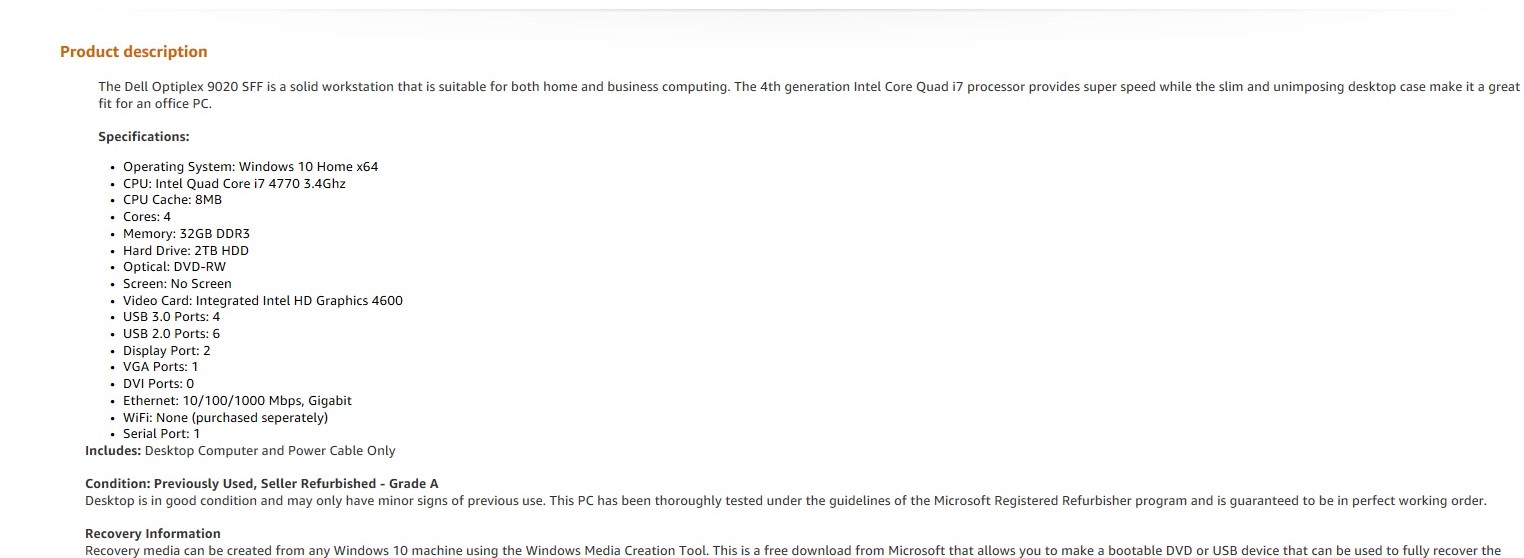
LightBurn Software Forum
Thanks for the tip Allen. I really want another laptop, but here’s what looks like what you’re describing I found on Amazon. Is the graphics card suitable? Tim
lofty tundra
I only need sata cable for the one hdd right? The ssd's are powered by the mobo?
M.2 ssds
 flint sapphire
M.2 ssds don’t need any cables
desert gulch
flint sapphire
M.2 ssds don’t need any cables
read it again
he asked if he only needed one sata cable for his one hdd
since his other m.2's are powered by mobo
flint sapphire
Then states the ssd’s are powered by the mobo? Then specifically m.2
It was in the form of a question so why not answer 
lofty tundra
uhh so what is the answer?
flint sapphire
You only need one sata cable for the Hdd. The NVMe ssd doesn’t need a cable
lofty tundra
aight
I have hdd and mobo to put in then I'm pretty much finished other than trying to figure out where a few front panel connectors go.
hdd and psu*
flint sapphire
You’ll get it eventually front panel is a pain 
flint sapphire
desert gulch
he asked if he only needed one sata cable for his one hdd
So did you read it again

little osprey
what ram speed should you get for ddr4 12600k?
stoic island
3600c16 good nuff
stoic island
No idea
limber oyster
Does anyone know what vertical GPU mount fits into a Antec df600 flux case?
humble fossil
hi
https://youtu.be/yMcbkoobpUg How he use key to turn on PC

Check out my PC gear and recommended tech: https://www.amazon.com/shop/mryeester
Recommended Thermal Paste: https://amzn.to/3i3HK83
Ryzen 5 3600: https://amzn.to/3eYfQsc
B450 Tomahawk Max: https://amzn.to/3iSSGoa
Red Devil 5700xt: https://amzn.to/3rz6tEq
Dell 1440p 165hz monitor: https://amzn.to/2VfUDTx
As an Amazon Associate I earn from quali...
potent portal
RF receiver
Possibly with Rasperry Pi
potent portal
It won't be easy and you'll need programming and engineering skills
humble fossil
ok
jagged ember
if you're still interested, you could google key words to figure out how to do it
desert gulch
jagged ember
if you're still interested, you could google key words to figure out how to do i...
Pun intended?
potent portal
Yeah, the first step is figuring out how to program an IR/RF remote and receiver, which should also tell you what hardware you need
humble fossil
jagged ember
if you're still interested, you could google key words to figure out how to do i...
i don't have to thx
jagged ember
I can already boot pc from my phone
potent portal
Given that it's only a tiktok video it's probably fake and they have a remote switch, but it's possible is the takeaway here
jagged ember
so I basically can do that already
potent portal
WoL doesn't count 😛
jagged ember
:(
desert gulch
potent portal
Given that it's only a tiktok video it's probably fake and they have a remote sw...
The guy who made this, yeester, seems to have a good understanding of tech and stuff
I doubt it's faked
desert gulch
True
potent portal
But hey, I'm just the guy with no social media presence
jagged ember
potent portal
But seems like a lot of work for just a short video
it'd be better as a YouTube vid
more explanation
steps to do it
potent portal
Yeah a longer video could showcase the "how" part much better
little osprey
humble fossil
how i can do this ??
grab an arduino nano, some jumpers, an IRremote/receiver. code the rest with some libraries there a few switch.case here and you got it
frank stirrup
humble fossil
https://youtu.be/yMcbkoobpUg How he use key to turn on PC
OR you can use wake on lan
And be cool
And use ur phone to switch on pc
Like me
 muted geode
so pictured is my pc tower and it's airflow (arrows indicate direction air is directed)
I feel like I can improve my airflow somehow. Any suggestions?
 potent portal
Flip the top to exhaust
If you really want positive pressure run the front fans faster than the exhaust fans
muted geode
potent portal
If you really want positive pressure run the front fans faster than the exhaust ...
yeah not 100% sure how that works
glossy quest
I can't send a photo but it's pretty difficult to explain my issue with build
potent portal
The idea is to help the air move in a way that is natural. Heat rises, so top exhaust is natural.
90 degree turns... are not natural
lofty tundra
How am i supposed to pull the power cord for the mobo through? I pulled it through the middle thing even tho it’s a fatty but i think it is supposed to be flipped and doesn’t really turn much.
 potent portal
Looking at you nzxt
potent portal
glossy quest
I can't send a photo but it's pretty difficult to explain my issue with build
DM the pic to me
potent portal
potent portal
Looking at you nzxt
Speak of the devil
lofty tundra
Nvm got it
potent portal
lofty tundra
How am i supposed to pull the power cord for the mobo through? I pulled it throu...
It'll bend, don't worry. A little effort will be required the first time you flex it, but you should be able to plug it in and shove most of that back into the rear of the case
lofty tundra
I should get a strimmer tho
little osprey
muted geode
so pictured is my pc tower and it's airflow (arrows indicate direction air is di...
flip top fans to exhaust
https://media.discordapp.net/attachments/873056423909675008/916956639578431538/K3b4Sbp.png

 lofty tundra
Also does it matter first time turning on and running non intensive programs if one of my fans isn’t screwed in all the way yet? Other than noise? Because i think the holes were a little off so was going to find or borrow and electric screwdriver and force them in on this one.
potent portal
Besides noise, short term effects are minimal. But don't leave it like that too long.
muted geode
little osprey
flip top fans to exhaust
https://media.discordapp.net/attachments/873056423909...

Done, appreciate the suggestion
little osprey
no filter ?
potent portal
Filter doesn't matter on exhaust fans
muted geode
 little osprey
perforations good enough
muted geode
there is a filter but I cant put it there if there are fans :(
actually
imma try rq
little osprey
the dust will just pile up
potent portal
You'd only be filtering air that's already been filtered too
lofty tundra
@potent portal think im ready to try turning her on. Notice any glaring issues before i do?

 potent portal
I wouldn't run it for more than a couple seconds without a cooler. If you're just seeing if it turns on and then cutting the power, that's fine.
muted geode
where gpu
potent portal
Intel chip
GPU is built in
muted geode
so no card?
potent portal
It's just a dry run, no need for now
muted geode
fair
lofty tundra
It’s that bad without cooler? I can’t run basic things like windows and non intensive things? Also yeah going to pull 1080 out of prebuilt in a few days and stick it in until i can get a 30 series card.
potent portal
You can't even get into bios long enough to enable xmp before it shuts off for thermal safety limit
lofty tundra
Oh fuu I can of needed this for school. I already messed up my prebuilt. Great..
muted geode
damn didnt realize cpus run so hot
potent portal
Booting Windows is not an easy thing for processors, it's a heavy all core workload
muted geode
so technically we wouldnt be able to use this tech without exorbitant cooling
lofty tundra
I wasn’t going to game but yeah i thought it could handle minimal tasks.
muted geode
just blow on it lol
 jagged hill
not a pc build but a peripheral but here's the art piece for my fightstick, bottom panel
lofty tundra
But yeah i supposed install or heavy updates on windows would be intensive.
jagged hill
posted the top panel in the electronics channel
potent portal
Not so much that you need "exorbitant" cooling, you only need high end stuff to have the cpu boost above base clocks for extended time
jagged hill
sorry this was the chat not pics
potent portal
lol it happens
jagged hill
but yeah i decided it would be easier to put artwork on the bottom not top
next is more pc side panel art
and not related to the clovenix one
lofty tundra
@potent portal so should I hook up a monitor for a second and turn it on then off right away? Or even bother with the monitor and just on and off and see if it powers?
potent portal
Monitor isn't needed, but you could see if it shows a picture and then hit the power button again to shut it off real quick
And whatever you do don't touch the cpu, it can and will give you third degree burns
Just a friendly reminder that 100C is the boiling point of water
muted geode
like nothing on at all?
potent portal
It's probably the front panel wiring, from experience
Can't tell you how many times I've wired a reset to the power
muted geode
oh god lmao
potent portal
That would have been my second guess lol
strong raft
Pic answered my question of where the PSU was, lol. That case iS THICCC! Which is it? Well, only look that stood out to me besides no cpu hsf is the fans being on the side instead of normal front blowing across mobo.
 halcyon spindle
I never type in here so I can’t post a pic of the PC I built today
strong raft
you could lay it over and literally just set a heatsink on the cpu, they're a good couple lbs so would still pull some heat off.
halcyon spindle
Sadge
potent portal
lofty tundra
<@396513761550270464> think im ready to try turning her on. Notice any glaring i...
@strong raft You mean this one? O11 Dynamic
lofty tundra
Its lian li O11 dynamic case.
muted geode
that boi expensive
humble fossil
@little osprey@frank stirrup thanks all
potent portal
You know why? This
 muted geode
actually im using a 5000D I cant say anything
potent portal
One of the top overclockers in the world helped design that case
strong raft
oh i see, O11 and a similar 1 or 2 have interesting fan placement.
muted geode
yeah my case has room for 3 side fans like that if i wanted to
not sure how necessary that'd be for me though lol
flint sapphire
The German man overclocks extremely well
potent portal
He tends to top every 3dmark chart, and by a wide margin
A level of engineering understanding I could never hope to achieve
muted geode
interesting
potent portal
Let alone reverse engineering
strong raft
I like this one www.amazon.com/Lian-Li-Dynamic-Mini-White/dp/B09138FCV5
I wish there was one like this but the front to back length was just enough to fit any atx mobo and fans up front like usual if that makes sense.
potent portal
You want the less mini version of the mini? Interesting phrasing lol
strong raft
yea maybe haha, perhaps call it "The Short", or The Short mini? Yeah it's funny we don't even use drive cages anymore really.
potent portal
A lot of people don't even use the 2.5" or 3.5" drive sleds either, just 100% M.2
strong raft
Good to see some sub-$200 LL cases though. I used to see them as super rad but expensive. --- mhm, big m.2 perk is no cables. At this point I have dual TB WD Blue's (1 olc Win7 os, 1 data/games , a 1TB MX500 sata, & a 250GB MX500. 
potent portal
By this point in time SSDs have gotten so reliable that they're likely to be the longest lived part in your system besides other non-moving parts like heatsinks
strong raft
ok sweet, the game drive showed up. Had to install marvell drivers even as smart as Win 10 is. --- Oh, seems SSD"s actually live a long time, but how does 1 do if it's powered off a long time like a HDD, cold storage I guess we'd call it.
frank stirrup
lofty tundra
It’s that bad without cooler? I can’t run basic things like windows and non inte...
Windows isn't basic lmao
potent portal
I've been using my boot drive for 5 years now I think, and it still reports... 89% life
frank stirrup
Bios is about all you can run without cooler
potent portal
23k power on hours
strong raft
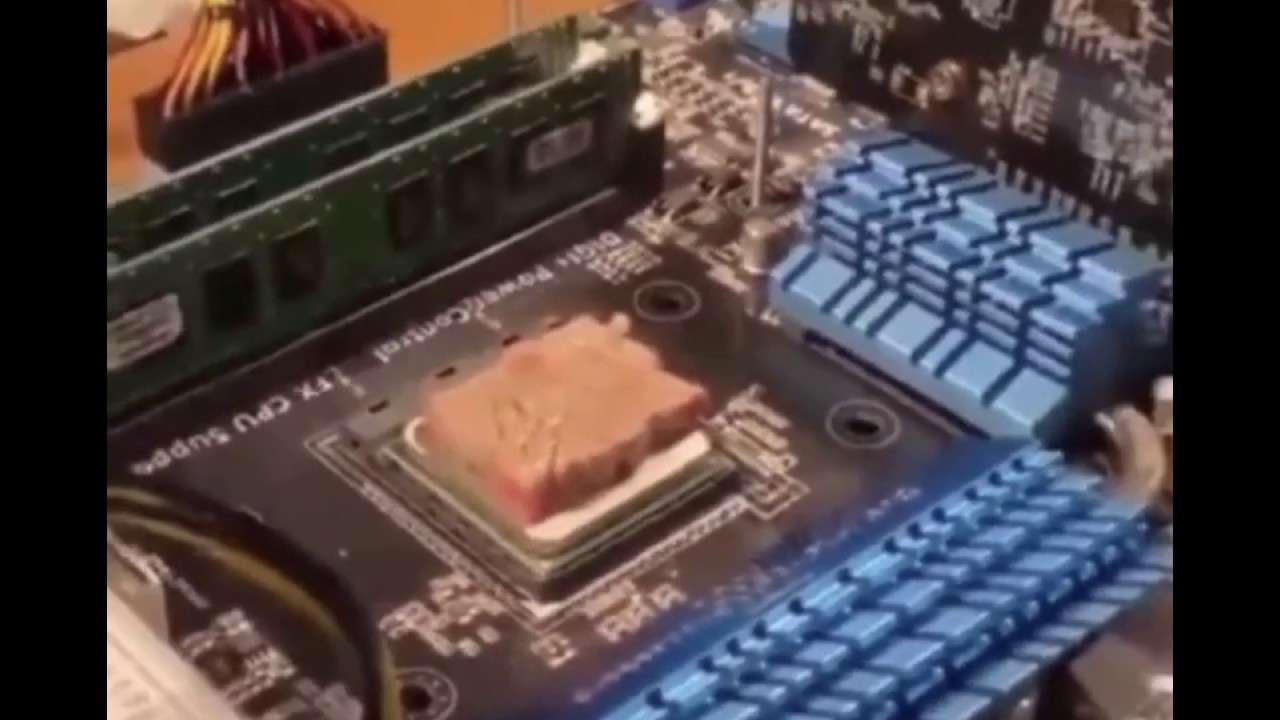
I'll add that we see how hot a cpu runs w/ the basic crap stock coolers. W/ nothing, could cook a sausage on there!
potent portal
I've seen someone cook kobe beef on a cpu
frank stirrup
I ran my cpu on stock cooler for half a year and it was fine tbf
But then again 3600x comes with a great cooler
potent portal
potent portal
23k power on hours
Did the math and this equates to 32 months of time powered on
strong raft
potent portal
I've been using my boot drive for 5 years now I think, and it still reports... 8...
Good to hear. I'd keep/backup important stuff & games to the non-os drives. Seems smart, less to worry about if I had to reinstall OS. PLus, this current 250GB ssd isn't huge of course. Oh, I need to set/adjust the over provisioning perhaps.
potent portal
 potent portal
strong raft
Good to hear. I'd keep/backup important stuff & games to the non-os drives. Seem...
potent portal
strong raft
Good to hear. I'd keep/backup important stuff & games to the non-os drives. Seem...
It's just the boot/program drive, all my data is stored in triplicate on other drives and locations.
flint sapphire
potent portal
He tends to top every 3dmark chart, and by a wide margin
Honestly I think it’s 1000% due to his thermal paste application
strong raft
frank stirrup
But then again 3600x comes with a great cooler
I specifically mean Intel. They used to run hot and the stock hsf was pretty bad, like load at 90C maybe
frank stirrup
flint sapphire
Honestly I think it’s 1000% due to his thermal paste application
What thermal paste lmfao
strong raft
flint sapphire
Honestly I think it’s 1000% due to his thermal paste application
Anyone suggest I re-paste my cpu?  Haven't touched it since installment, I think.
flint sapphire
Paste/liquid metal
frank stirrup
Der8auer too op for thermal paste
potent portal
Depends on the cpu, but often liquid metal ya
flint sapphire
Or kryonaut
potent portal
Yeah, if you get liquid metal too cold it's just metal
frank stirrup
He does direct die a lot too
flint sapphire
I’d have to find one I’m at work look it up yourself 👀
frank stirrup
flint sapphire
I’d have to find one I’m at work look it up yourself 👀
Then go looj for it
Grrrrr
flint sapphire

potent portal
Out of curiosity I checked my second, newer M.2 drive smart data. It's got 11k power on hours and still reports 100% life
10.5TBW
 strong raft
I keep reading tbw like putting 10GB on per day and then they say the lifespan. I suppose a whole drive clone is no issue even though you're doing 500+ GB in 1 day
potent portal
TBW can refer to TeraBytes Written or Total Bytes Written depending on who you ask. It doesn't even factor in anything else, it's just the endurance of the flash cells.
strong raft
exactly. yikes, 12 count power on but only 6 hrs. from all the restarts I guess, no big deal.

like that temp? it's 2" from the upper front fan. wth, the HDD is 21C
potent portal
Ambient temp is gud
strong raft
Yep, pretty chilly tonight.
potent portal
I went and did math again. I need to stop that late at night.
In order to get my TBW where it is I needed to write the entire capacity of the drive 41 times over.
Meaning my flash cells can handle A LOT of writes, if it hasn't even ticked down 1% yet
strong raft
idk, but I did see that 10TBW. Sounds crazy on a 256GB drive, mainly in how much you re-downloaded stuff or something. Nice. You think 1TB* ssd for os/boot is pointless? Should that be a secondary drive for same reasons as small SSD + large HDD?
potent portal
It depends on how you use the pc honestly
For me, a small, fast boot drive, a second small, fast drive for games I need to load in a snap, then a third, slower SSD for bulk games, and then a HDD array for media and data. That's my current and ideal setup. No need for more.
strong raft
1 thought was the 1tb mx500 would be for future new pc, but a z590/690 setup might as well have nvme so scratch that. Wow, 4 drives total. Althought it makes sense how you said it. --- I could almost do the same, but still have dual 1TB WD blues to put to use.