#building-and-recc-chat
1 messages · Page 800 of 1
 obsidian wigeon
lmao
 stoic star
wtf
obsidian wigeon
I tried telling him
stoic star
don't be the guy that destroyed his $1k PC with a $30 PSU
 hazy rune
On a NEW decent psu
stoic star
If I ever had to go used, it's gonna be a Delta
stoic star
(Delta makes the OEM PSU's for Dell workstations)
(Very high quality, arguably better than Seasonic)
 foggy hazel
@little osprey question: is there any specific reason you keep on posting that image?
 little osprey
im not skimping on psu its either tht or an 100$ random psu
obsidian wigeon
Acer veritron series is also interesting
stoic star
that's still really good
stoic star
like ye I know it has a 730 in it but it's like $230 for a prebuilt with an i7-7700
stoic star
you try building something equal for that much cus I've tried
little osprey
@obsidian wigeon somebody told me that psu can fit in my matx case
stoic star
that said I scored a 30in monitor for $100
the ppi isn't impressive but it's gonna be more than fine for my workstation
foggy hazel
use pcpp @little osprey it makes everything so much easier to actually debate
little osprey
@foggy hazel oki
obsidian wigeon
Fits, sure, but
So what?
Still a bomb
Imma be blunt here, you seriously can't be picky to have everything you want in 425 bucks
obsidian wigeon
If you want, just save up 
little osprey
https://ca.pcpartpicker.com/user/IronIsKing/saved/#view=9hhVwP Ignore the title my brother edited it
hazy rune
Give all your money to Jensen
 drifting garnet
little osprey
https://ca.pcpartpicker.com/user/IronIsKing/saved/#view=9hhVwP Ignore the title ...
drifting garnet
little osprey
https://ca.pcpartpicker.com/user/IronIsKing/saved/#view=9hhVwP Ignore the title ...
Nice list, not an intel fan but nothing wrong with it.
drifting garnet
little osprey
https://ca.pcpartpicker.com/user/IronIsKing/saved/#view=9hhVwP Ignore the title ...
I would go with m.2 drive sn750 or mp34
 median basin
Will there be a white version of the rx 6800
obsidian wigeon
the cm elite v2 is ok
little osprey
not bad for an 330us$ build, eh?
stoic star
anyway, Haswell Optiplex (used)
U.S pricing
$70-$135
Optiplex 3020/7020/9020
i5-4590
2x4GB DDR3
500GB
285w Dell OEM PSU
Optiplex 3020's are limited to two DIMM slots, usually $90-100, rarely will be seen as low as $70, I've seen only two that low in the past couple of months
Optiplex 7020, usually $100-120ish, has four DIMM slots
Optoplex 9020, $120+ , has four DIMM slots, just go with a 7020
OEM(?) GTX 1650 - $125-135
for $240 you can have a decent system, this leaves about $180 left in the budget
keyboard- $10 for Logitech K120, $20-30 for a Kumara K552
mouse: Logitech Prodigy G206 $15-35, could get it used otherwise a generic Dell mouse for like $5 gets the job done
monitor will be a huge tossup
little osprey
@stoic star wow
obsidian wigeon
That is why optiplex is the answer all along lmao
drifting garnet
Yeah lol
stoic star
if you absolutely need a nicer looking system you're gonna have to expand that budget, just worry about that later, you can gut out the system and move it into a nicer case
 teal bison
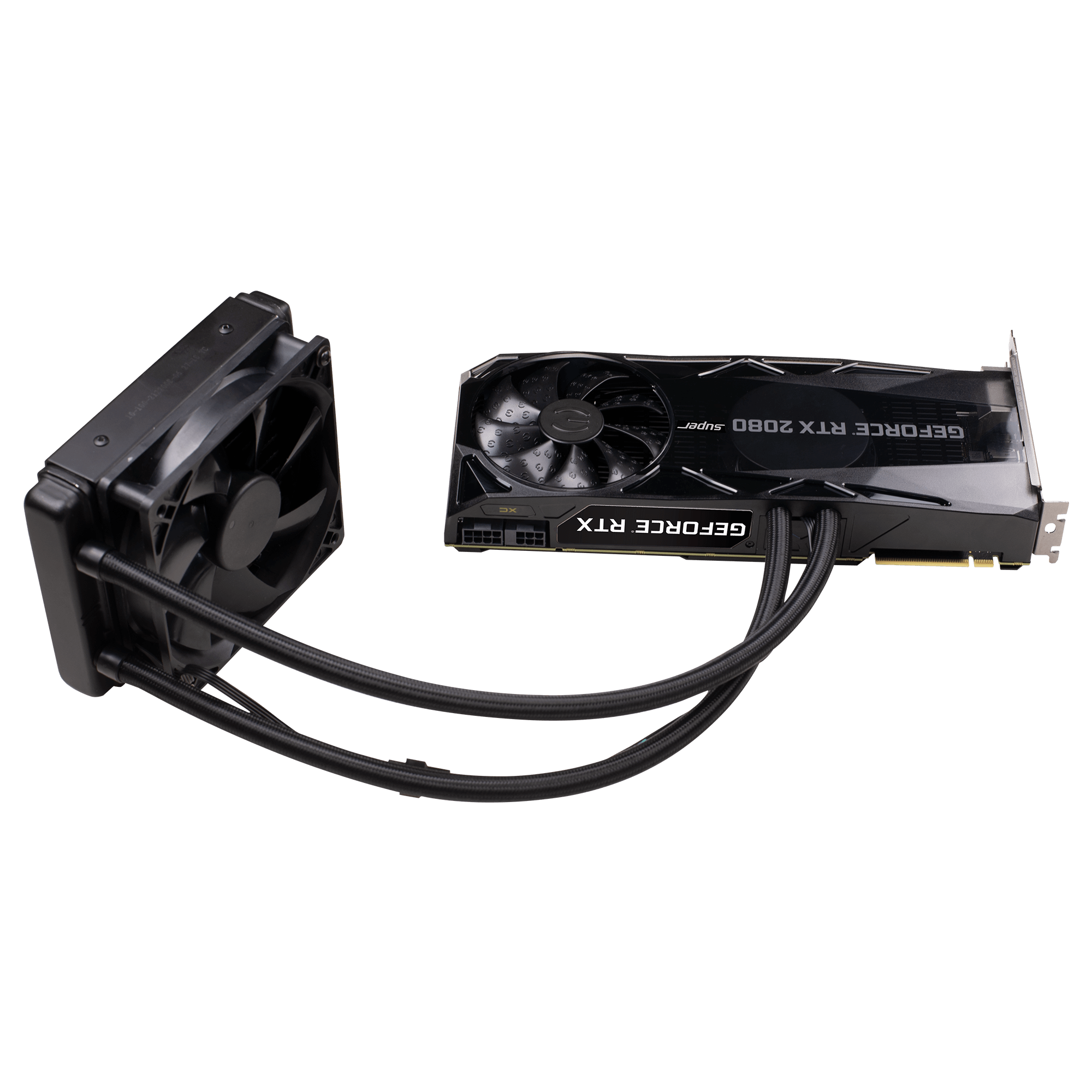
What is this cable coming out of the gpu and where do I plug it in? It has 4 pins.
Also dont mind the rats nest haha
stoic star
oh ye, and I need to be specific, DO NOT GET SFF/USFF, you want an MT (mini-tower)
 still roostBOT
 Enigmasflame#8007 has been warned
Reason: Bad word usage
foggy hazel
@teal bison looks like a standard pwm cable
stoic star
USFF/SFF is awful
obsidian wigeon
^
stoic star
USFF/SFF has proprietary connectors and is just a pain to upgrade, with very limited options and space
little osprey
teal bison
What is this cable coming out of the gpu and where do I plug it in? It has 4 pin...
looks like a rgb header?
hazy rune
Yes which is why you want to keep it in the same case
stoic star
MT, you can swap out w/e you want
hazy rune
Dell's proprietary hardware is not upgradeable
stoic star
you wanted an entire setup for $425, you can do it
teal bison
@foggy hazel where does that plug into? I dont see anywhere to plug it in on my mobo
stoic star
correction: mini-towers up to haswell are very much upgradable, including PSU swaps
obsidian wigeon
look for mobo's manual
little osprey
^
stoic star
I know this cus I have a Sandy Bridge and Haswell Optiplex
foggy hazel
if its what i think @teal bison you need an adapter for it
little osprey
also not the best pic
stoic star
I also have a Skylake optiplex which isn't worth
foggy hazel
its most likely for the pump @teal bison
stoic star
and I have a T3610 workstation
little osprey
Ok guys, dell optiplex w/ gtx 1650 or https://i.imgur.com/00KlaC8.png

this is serious
stoic star
the most cost effective approach is the optiplex
 weak field
sure)
hazy rune
If you want it to look nice, you need to spend more than that.
stoic star
when you want a beefier GPU, you can swap the PSU
teal bison
@foggy hazel what kind of adapter? And will it work without it while I get it ordered?
hazy rune
That's not going to work like you think it will
little osprey
@hazy rune who are you talking to
foggy hazel
@teal bison and by adapter i mean, something that can take it from male pwm to female pwm.
But start with finding the manual for that specific GPU model
because there should be something included with the gpu from the manufacturer. And the manual can confirm that, and also tell you more about the adapter :)
teal bison
Thank you so much
foggy hazel
as for working without it? not likely. because the pump would not be running without it
little osprey
isnt it like an eps connector that aio's use as well?
foggy hazel
does not look like it, but again, manual will answer it for him :)
little osprey
kinda looks like a 3 pin connector of some sort but yeah manual will answer it
dead chat
no one is asking for help. what do you expect?
not wrong
cant wait for my 330 doll hairs build
i mean
dell optiplex
with gtx 1650
best option when your budget is that low
its a dell optiplex
 blazing aurora
there's only one model of the 1650 super right?
little osprey
idk i just know it has one lol
blazing aurora
okay good
little osprey
@little osprey check dmz
teal bison
@foggy hazel i read through the manual and i dont see any mention of the cable, and no adapter was included in the box. So i guess I'll just have to buy one and wait for it to come?
foggy hazel
@teal bison specific model of gpu?
teal bison
Evga 2080 super xc hybrid
 ornate solstice
Can someone recommend me a good monitor that’s not expensive
little osprey
how many pins?
blazing aurora
teal bison
The cable has 4 pins
foggy hazel
https://images.evga.com/products/gallery//png/08G-P4-3188-KR_XL_5.png <- look at the middle of the bottom cable @teal bison

cable=hose
you see how it connects right?
teal bison
Omg
foggy hazel
:)
little osprey
rgb header?
foggy hazel
no
teal bison
Ya I see it now
foggy hazel
its a PWM
teal bison
Thank you so much
foggy hazel
as i said
little osprey
yeah
teal bison
Didnt realize it connected to itself
foggy hazel
you are very welcome @teal bison :)
teal bison
I'm gonna go play with my new toy now, thanks again for the help
little osprey
@little osprey I have 100$ to spend in my budget, what on
ornate solstice
Quick question for a monitor does the hz matter?
little osprey
yes'
ornate solstice
For frames
little osprey
yes
foggy hazel
have fun @teal bison :)
ornate solstice
Ok so what hz should I get for a monitor
little osprey
depends on how much fps you get on average
@ornate solstice how much fps do you get on games
ornate solstice
Idk I don’t have a pc yet
little osprey
what type of pc will you build?
ornate solstice
I bought the parts
little osprey
get 144hz
ornate solstice
3700x
little osprey
yeah 144hz
or 120hz if u cant afford that
but since u have 5700xt i think u can afford 144hz
ornate solstice
Which ever is best I’ll get
little osprey
little osprey
<@456226577798135808> 5700 gets like 138 fps
depends on what settings you play your game at
 quasi snow
yeah it can certainly get 240 in games like valorant and csgo
ornate solstice
Which card is it?
little osprey
@weak field 250$
 severe axle
no
 worn cedar
Is a 650w psu good for an RTX 2070😅
little osprey
yes
is 500w psu from cooler master good for rx 580
@little osprey if you plan on building a pc make a pcpp and send it so we can help revise it
worn cedar
Augh I already bought my parts
weak field
lets not buy that
worn cedar
Just gotta save a bit more for gpu
weak field
250 is yikes
stoic star
little osprey
<@456226577798135808> I have 100$ to spend in my budget, what on
what else do you need in your setup?
little osprey
worn cedar
Still unsure if I should get an RTX or a GTX
you can use this to decide https://blogs.nvidia.com/blog/2019/11/01/whats-the-difference-between-nvidia-rtx-and-gtx/

The Official NVIDIA Blog
To see the difference between NVIDIA RTX and GTX GPUs, check out the eye-opening visuals in popular titles such as Control, Call of Duty: Modern Warfare, Metro Exodus and Minecraft. Many more new RTX titles are joining the scene — Minecraft, Call of Duty: Modern Warfare, Watch Dogs: Legion, Wolfenstein: Youngblood and Cyberpunk 2077.
@stoic star better cpu mostly but i'll take a better gpu
little osprey
worn cedar
Still unsure if I should get an RTX or a GTX
if you dont really care about ray tracing and want more preformance go gtx
stoic star
@little osprey You going with the AM4 build or haswell optiplex?
also regarding the AM4 build, why are you pairing an APU with a GPU?
little osprey
dont think he knew it was an apu
little osprey
used 2600 is 160
stoic star
wew
little osprey
yeah 500 budget would be good for used market
stoic star
that's why I suggested the optiplex with a 1650
 dapper jasper
2600 ouch
stoic star
considering he wants an entire PC with a dGPU
keyboard
mouse
and a monitor
for 550CAD/$425
Gonna quote someone mentioning something about CPU bottlenecks in another server
A 3090 would be silly but if you had the budget for a 3100, you probably don't have the budget for a 3090 anyways```

```f you're cranking 4K, you could probably make a 3100's limitations irrelevant with a 3080```

The takeaway is even if you're running into a CPU bottleneck, you can offload more of the workload with a higher resolution to the GPU, lower res puts more workload on the CPUbruh i can make a pc setup with less than 550 cad
foggy hazel
little osprey
bruh i can make a pc setup with less than 550 cad
making a build and making a good build are very very different things
 half canopy
lmao
ye you ccan make a build for 550 CA but it will suck ass, like apple mac level of ass
 strong radish
Scalpers are ruining kids Christmas’s I swear
half canopy
if u want a gamig pc, at least shell out 1000$+ :/
little osprey
@half canopy rx 580 and amd ryzen 3 3200g (3100 if it was in stock) is apple mac level of ass?
lol ok
half canopy
ok nvmind, i had a freind who build a pc (with monitor, keyboard and mouse) for und 100 and this thing had like 1gb of ram on it, thats what I thought you were talking about lol my b
integrated graphics and verything, it was no bueno
@little osprey
wait hold up you got a pc with a rx 580 and amd ryzen 3 3200g for 550 CA?? omg bro send me the parts list i need this
half canopy
omg wtf i need now
worn cedar
little osprey
if you dont really care about ray tracing and want more preformance go gtx
Might go for gtx then idk
half canopy
if you could send me a parts list through DM that would be awesome
worn cedar
Idk what I would use ray tracing for
strong radish
Is there more stock for the 3060 ti than the others
weak field

 inland parrot
is 3d mark a good computer benchmark?
stoic star
@half canopy I'd recommend a sleeper optiplex if the prices on the used ones aren't stupid where you're at
stoic star
inland parrot
is 3d mark a good computer benchmark?
It's A benchmark but synthetic benchmarks aren't the be-all end-all standard especially since a lot of us here wanna play games instead of looking at synthetic benchmarks all day
hazy rune
It's a good relative estimator of performance
It's also good for checking overclock performance
And lastly, it's justification to people who buy a 3090
Gotta get them high scores
 coarse cove
I was putting a 2070 there in place of a 3070 since I wanted a more accurate pricing estimate of how much I'm actually going to pay due to the current prices in Australia
hazy rune
Given what we know about the 3060 ti - I'd consider buying that instead
 ebon ledge
are dtx mobo worth the price? im thinking about getting one
 normal osprey
Do you have to get a motherboard with wifi for your pc to be able to use wifi or is it a different component that needa to have wifi
Doing a 1000$ build btw
foggy hazel
if you need/value what it brings, then yes @ebon ledge
@normal osprey mainboard with wifi gives you the same end result as a mainboard with a Wifi card installed
foggy hazel
mainboard = motherboard
normal osprey
Got any good motherboards that got wifi with it?
foggy hazel
intel or amd?
normal osprey
Think im going to go the amd route
foggy hazel
https://pcpartpicker.com/product/PDsnTW/msi-b550m-pro-vdh-wifi-micro-atx-am4-motherboard-b550m-pro-vdh-wifi <- when its in stock, this at 110 usd is a solid choice
 normal osprey
Appreciate the help @foggy hazel you the 🐐
foggy hazel
@ebon ledge but keep in mind the only modern DTX i am aware of is the Impact board. and that is NOT good value unless you very very much need the things on it
weak field
sure
 alpine thunder
foggy hazel
<@!738066515823165511> but keep in mind the only modern DTX i am aware of is the...
alpine thunder
foggy hazel
<@!738066515823165511> but keep in mind the only modern DTX i am aware of is the...
I can attest to this
foggy hazel
its a lovely board, like all the other impact boards over the years
alpine thunder
I sacrificed my wallet for it not long ago
little osprey
I have a 650 watt psu will I need a bigger one for 3060 ti
 deep skiff
yeah im a bit late but current dtx boards aren't really good options unless you need the extra features, its expensive and doesnt fit into all the sff cases itx does
foggy hazel
it does however fit into all itx cases that DONT use a riser and which has support for at least 2 slot wide gpu's
 vagrant gulch
Anyone else use a wraith cooler for a ryzen cpu? I've been trying to get mines back on but been struggling too
foggy hazel
@vagrant gulch which version of the wraith?
vagrant gulch
I'm honestly not sure, but its this
foggy hazel
the stealth
but a hand underneath and make certain your backplate is actually pushed against the board itself
does that make sense?
 quick shore
bros ive come in need of assistance with my pc
every time I try to use steam or just any application it just resets
I check the event viewer log to see event 41 kernel power failure alot
vagrant gulch
I think so, at first I thought it was just me screwing it in wrong
quick shore
vagrant gulch
Anyone else use a wraith cooler for a ryzen cpu? I've been trying to get mines b...
also yeah i use the wraith cooler, they're a pain to mount for me
foggy hazel
@vagrant gulch currently, you just have the anti static bag between the board and the table right?
vagrant gulch
It was on top of the mobo box
foggy hazel
that might be part of your problem then
because the box will bend out of the way when you put pressure on the screws
which means the backplate has a harder time staying where its supposed to
just place the anti static bag on the table, place the board on top of that, and then try again
vagrant gulch
Still nothin. Maybe I'm not putting in that much pressure? I'm pushing as hard as I can without trying to break it
foggy hazel
remember. you are only trying to get it to "just" catch on 2 diagonal screws at the start
also, if the backplate is in place, it can take a lot of pressure
weak field
and warmth
vagrant gulch
....
I need sleep cause I can't believe I didn't notice the plate was gone
@foggy hazel @weak field thanks
weak field
yes?
vagrant gulch
No your comment i was thanking
foggy hazel
@vagrant gulch you are welcome :) sleep well :)
(also, dont blame yourself too much about the back plate, its a normal thing, hence why its the first thing i mentioned : ) )
vagrant gulch
Lol yeah should've realized it earlier when it fell out of the back when I was trying to readjust things
Gn
 austere wren
Already have all of your monitors?
austere wren
Alright so I see 1080p 75hz
 tender fjord
75hz monitor on a beast pc
austere wren
With a 3090
foggy hazel
@little osprey a couple of questions if you dont mind
foggy hazel
why the 980pro?
little osprey
then what is the BEST
foggy hazel
we will get to that part :)
austere wren
Why go with hdd when you can have more ssd storage :/
foggy hazel
next question: Why the 3090?
tender fjord
Why do you only have a 500gb ssd
little osprey
that my pc is the best
 final granite
hey quick question why are all the pc parts so expensive/out of stock and prebuilt pcs are also not an option this time of year?
foggy hazel
its double the price for 5% of performance
tender fjord
Why are you maining hdd
little osprey
cause i only have very few games ill download on ssd
tender fjord
Get 2tb ssd and 500g hdd
little osprey
most games will be on hdd
austere wren
With your budget I would go with all ssd
foggy hazel
next question: Why HS35?
little osprey
that headset looks fine to me and i dont want a more expensive headset
i already have Beats Studio 3
foggy hazel
okay, so you are building a "looks over performance" build then
 wide sparrow
What's going on here?
coarse cove
I get the feeling this $3700 pc is just a joke build
tender fjord
We're correcting the wrongs in her 3700 build
foggy hazel
now, as i promised. the ssd.
coarse cove
it hurts my eyes to see those choices
 storm saffron
Anyone here owns nzxt x73 rgb or related? Im having an issue detecting the fan on nzxt cam
little osprey
alongside 2tb hdd
foggy hazel
of the following: SN850, Indigo, Sage, HOF 4.0, Rocket 4.0 plus, s70 <- those are all faster
austere wren
storm saffron
Anyone here owns nzxt x73 rgb or related? Im having an issue detecting the fan o...
I got a x53 i previously owned a x73 though
storm saffron
austere wren
I got a x53 i previously owned a x73 though
Did you able to see the aergb on nzxt cam?
I can’t see the nzxt
austere wren
You have cam right?
storm saffron
Yeah
austere wren
Oh
little osprey
i feel my budget is high enough for me to have an OP pc
austere wren
Bruh I'm dumb
foggy hazel
its your choice if you dont want to get faster parts @little osprey
austere wren
storm saffron
I have cam but i thought it would detect it
So it's detected and functioning but you don't have any rgb signal or functionality?
foggy hazel
individual model names
storm saffron
austere wren
So it's detected and functioning but you don't have any rgb signal or functional...
Yeah
austere wren
Are all of your cables connected properly?
foggy hazel
its faster than the 980pro
i listed them in ascending order
slowest first
but still faster than 980 pro
foggy hazel
no. read again please
foggy hazel
correct
foggy hazel
Adata iirc
little osprey
adata iirc is fastest?
 inland atlas
Supposedly they are preventing bots from buying 3060ti tomorrow
Well later today
Like actually trying?
little osprey
i cant even find it lmao
foggy hazel
do they loose anything from saying that <- is the question you should ask yourself @inland atlas
little osprey
ok
but did
i get
the correct link
it looks the same
it says rocket 4.0
not rocket 4.0 plus
foggy hazel
it does NOT look the same
little osprey
i need a 500gb
foggy hazel
that is the actual link for it
foggy hazel
so, you dont want the fastest again?
foggy hazel
and, this is just my personal take, IF you are doing a "as fast as it goes" build.
little osprey
i want the fastest
foggy hazel
there really should not be a single HDD in it
anyway, best of luck with the build :)
 crystal totem
Aight important question
I just upgraded my pc and replaced the mobo and CPU. I kept my old ram, drives, PSU, etc
Now, windows fails to boot half the time (it will either go black and hang entirely with my CPU fan stopping, or it will boot then bsod or just hang and go black
I thought it was a driver error because my old rig was intel based and my upgrade is AMD. But when I finally decided to bite the bullet and reinstall Windows, the installer hung and when black as well.
Ive tried to think of every possibility and I can only come up with my PSU being inadequate
Is that the most likely culprit?
little osprey
Reinstalling windows will most likely fix this, having issues after swapping mobos in windows is normal.
crystal totem
I attempted to reinstall and the install disk crashed the same way windows itself does 0.o
I even tried to do a fresh install to an empty hard drive and the thing locked up and eventually went to black
 ripe wedge
is it an ssd? or an old hard drive? @crystal totem
could be the hard drive is failing
 hollow grail
yeah depends how old the drive is
honestly though i wouldnt want to boot off of a hdd in the first place though
ripe wedge
and how much it was used
hollow grail
true
i mean most ppl dont hit their drives hard enough to have them die from overuse
 lyric thistle
That would be death by shock tho lol
hollow grail
lmfaooo
like most ppl dont do 24/7 writes if its newish
might die after like 5 or so years
lyric thistle
Nice
hollow grail
to be fair its the only seagate drive thats lasted me for any amount of time lol
ive had the worst luck with their products, advise ppl to stay far away from them tbh
lyric thistle
Now that I think about it, I've never had a drive fail
hollow grail
i mean i also handle more drives than the average person
lyric thistle
Not Seagate, not WD, not Toshiba, Hitachi, whatever
hollow grail
my current drives are uhhhh
20x 3tb HGST enterprise SAS drives, 18x 4tb HGST SAS drives, 4x 2tb Seagate FireCuda NVME ssds, and 4x 10tb WD reds
foggy hazel
so, 2U of drives
lyric thistle
Lol
foggy hazel
for a "consumer" its fancy enough :)
hollow grail
lmao yep
i dont have too many users hitting my services to where i need anything too fancy
and space isnt the hugest of concerns for me tbh, i got my diskshelves for cheap and thats all that rly matters to me lol
foggy hazel
aye aye
something that might be of interest to people is pictures of your setup. Please dont take this as pressure to see it
lyric thistle
I want to build a nas box, whether that be with a Pi 4 or with a refurb synology thing, or something else
No I must see it this is a threat :):))
foggy hazel
because your setup is a good couple of steps "up" from what even consumer data hoarders (at the low/beginner end) are using @hollow grail
hollow grail
@foggy hazel i was thinking abt it but currently its more of a colocation kind of thing, wouldnt really be able to take pics sadly
i do have a speclist of what runs it though
hollow grail
hoarding tbh
foggy hazel
fair
hollow grail
i host some stuff as well, mostly media server
but also a cdn and a few other services
foggy hazel
what does your uptime look like serverwise?
ripe wedge
@hollow grail what are your thoughts on glasswire?
hollow grail
its okay
personally i dont rly trust data going through a 3rd party like that and i dont think it can "detect malware" like it says
it seems like a nice wireshark skin though
foggy hazel
ah, so no double bank of UPS then?
hollow grail
just single UPS
foggy hazel
ok :)
hollow grail
my mentality is if it goes down the only thing i really lose is the big uptime number on the admin console 
foggy hazel
aye aye
hollow grail
everything is backed up to b2/gdrive
ripe wedge
ah
foggy hazel
you are not wrong, and as long as the users are okay with that mentality, there is no need to strive for more
hollow grail
my users are mostly friends and wifey
foggy hazel
because its the rest (of that uptime) that costs a LOT
hollow grail
i dont do anything serious and its not like i charge to use any of the stuff i provide
foggy hazel
aye aye
hollow grail
more of a hobby tbh it really destresses me
foggy hazel
:)
hollow grail
wouldnt want to add dealing with paying customers onto that lol
feel like thatd have the opposite effect
hollow grail
i can drop a specslist in here if you care that much
true
i dealt with paying customers at work
but its nice like
ripe wedge
lol your 8 or 9 pc spec list
hollow grail
having a service go down for a day or 2
foggy hazel
and the "accidents" that might happen, are still fully under your control :)
hollow grail
and just not feeling like fixing it
i dont want to deal with my stuff with any sense of urgency
foggy hazel
hollow grail
i can drop a specslist in here if you care that much
nah, its just a refreshing change to talk with people that actually have some hardware
and not just a single box
foggy hazel
aye
hollow grail
my pride and joy is my google server tbh
ripe wedge
ecc ram go brr
hollow grail
theyre just so cute
ripe wedge
I really do like ur google server too
foggy hazel
ah, which version of their hardware did you get?
ripe wedge
its amazing
hollow grail
for a while i had an almost full rack of weird servers
just the r720xd
basically the best one they had before they dropped the project iirc
foggy hazel
ah, those are the dell based ones iirc?
hollow grail
but i had that, and a bunch of the cisco ironport servers
yep
their naming system is tricky but once its explained its super convenient
foggy hazel
i would LOVE to get access to one of their containers, and free access to a technician for said container
hollow grail
r or t is rack or server ofc, 1-9 is class of server, 1-4 is gen of server, 0 is intel 5 is amd, and xd just means xtra disk bays lol
hollow grail
oooooooo
i cant tell from pic is it sff or lff
join the lemon server gang jake ❤️
hollow grail
do they have a pic with the faceplate off?
ripe wedge
ofc
hollow grail
yeah youll need caddies too
ripe wedge
hollow grail
theyre around $3 for a caddy
ooooh sff
those are fun if you want to do all ssd lol
ripe wedge
lol
hollow grail
its what i have
ripe wedge
I would but I wouldnt have anywhere to put a server
hollow grail
smh my head
ripe wedge
it is really cool tho
hollow grail
make room
foggy hazel
there is also the noise part
hollow grail
we dont talk about noise naed
foggy hazel
that is only because you are deaf:P
hollow grail
you can always limit fan noise in idrac if u care that much
i like my blinky home datacenter
foggy hazel
i work with a lot of video/audio server gear
hollow grail
ooooh
foggy hazel
so yeah, we talk about noise :D
hollow grail
honestly some nice anc headphones
are the best money you can spend
saves a fortune on noctua stuff lol
and naed you seen the cisco ironports? theyre my fave looking server rebrands
had an almost full rack of them they looked so good
foggy hazel
the silver ones right?
ripe wedge
that io tho lol
foggy hazel
those
hollow grail
@ripe wedge im too cheap to buy a kvm console so i use a usb hub with mouse and kb lol
on the front usbs
yeah naed i love the silver server look
ripe wedge
gigabyte makes a monitor with a kvm built in
foggy hazel
you are keeping an eye out for used KVM's right?
hollow grail
nah i dont rly want one tbh
hollow grail
extra $ to spend when i only really need one when 💩 hits the fan
hollow grail
lmao
ripe wedge
im going to bed but that server is tempting
hollow grail
theyre fun to play with
ripe wedge
96gb lol
hollow grail
more for apps where u need a ton of cores but not really blazing clockspeeds
ripe wedge
imagine how many chrome tabs that thing can eat
hollow grail
i used to have 1.5tb of ram on one
ripe wedge
I have 32gb rn lol
hollow grail
id get close to using it all on huge compressions
ripe wedge
wow
foggy hazel
:)
hollow grail
oh that looks nice
foggy hazel
i cannot show you the racks behind the monitors
foggy hazel
there is about 60U of processing and 5U of storage
hollow grail
oooh nice
kinda curious since you work more in audio
whatcha think abt the rack pro
rackmounted mac pro lol
foggy hazel
it has its uses
notice the machine to the right in the picture
behind the chair
that is hooked to a old G5
hollow grail
wow rlly lol
foggy hazel
because the processing/latency is bonkers on that
hollow grail
whatcha use that dinosaur for
foggy hazel
its soooooooooo good for that
hollow grail
hehe nyoom
hollow grail
honestly i was more of a small business it consultant
more comfy dealing with around 100 users or so
than what youre doing
def not too comfy in the datacenter lol
foggy hazel
the g5 is used for calibration and adjustment of some of the gear in the back
hollow grail
ooooh
foggy hazel
iirc that is
hollow grail
yeah itd make sense if that was the cas e
foggy hazel
and with that, i believe its time for a shower and a visit to the market for fresh air and groceries
hollow grail
lmao have fun!
foggy hazel
its the weekly market day down town :)
hollow grail
was nice talking to someone else who works with the fun stuff :))
 fallen escarp

 tender fjord
I have no idea what cooling I should get
is the cooler master hyper 212 evo good for a ryzen 5 5600x
or should I get the cooler master MASTERLIQUID ML240L RGB V2
do I need case fans
I'm getting a 3070 with a ryzen 5 5600x
so do I need case fans
little osprey
If you dont need RGB
liquid freezer 2 or whatever 240mm
have you bought the case?
if not buy the lian li lancool 2
Comes with fans
Might want a splitter depending on the board
 sly minnow
Guys i have a $3000 to make my pc.can i build it with rtx3090😋
tender fjord
are the fans quiet
for the lian li
@little osprey https://www.amazon.com/LANCOOL-Black-Tempered-Black-LANCOOL/dp/B081TRLCSG?th=1 which one is the best
blazing aurora
is the evga gtx 1650 super 4gb about the same as the rx 580 8gb?
lyric thistle
Yes
blazing aurora
okay cool
crystal totem
@ripe wedge I'm a bit late to answer, but it's an SSD, and a relatively new one
I wanted to try to find out if it was a driver error or not by installing windows fresh to an also very new hard drive just for testing purposes. However it hung and black screened even using the bootable USB
I took so long to answer because it was 2 AM my time haha
little osprey
tender fjord
<@456226577798135808> https://www.amazon.com/LANCOOL-Black-Tempered-Black-LANCOO...
Buy the mesh
 warm helm
Hi
I have ordered
Intel Core i9-9900K Coffee Lake 8-Core, 16-Thread, 3.6 GHz (5.0 GHz Turbo) LGA 1151 (300 Series) 95W BX806849900K Desktop Processor Intel UHD Graphics 630
and I am wondering if it is compatible with this motherboard that I have ordered:
MSI MPG Z490 GAMING EDGE WIFI LGA 1200 Intel Z490 SATA 6Gb/s ATX Intel Motherboard
My email is a_azizi@yahoo.com
Thanks
little osprey
yes;''//'/
deep skiff
@little osprey 9th gen doesnt work with z490
 languid cedar
Will a r5 1600 bottleneck a 3070?
 gleaming quartz
1600??
languid cedar
Yeah
gleaming quartz
probably
languid cedar
oOf
gleaming quartz
but there's a rare chance that it might actually be compatible
since it's still a ryzen 5
on second thought, i think it could work
storm saffron
Anyone here owns an NZXT x73 RGB or NZXT Aero 2 Fans i have a question thanks
 analog hearth
I’d imagine it would bottleneck
 fleet pagoda
Why dows the 3060ti still say coming soon
analog hearth
Nobody knows
little osprey
Can anybody help me find a compatible and rlly good GPU for my PC? all the guys in #graphics-cards are just joking around.
gleaming quartz
for best buy or on the official website?
fleet pagoda
Happening to everyone?
analog hearth
@little osprey what are your current specs?
fleet pagoda
Bestbuy is all it shows when i click check availability
little osprey
analog hearth
<@456226577798135808> what are your current specs?
? wdym
@analog hearth
analog hearth
CPU, RAM, etc.
little osprey
oh
 deft harbor
how much should a 5500 xt cost
little osprey
i dont have a rom yet...
but im looking at 64 or 32
my CPU and Motherboard are LGA 1151
300 series
little osprey
ima DM the link
gimma a sec
ok
so wut kind of GPU would be good for that?????????
@analog hearth? u there?
analog hearth
Sorry, giving advise to others as well
 narrow rose
why dont you just post in the chat what cpu it is....?
storm saffron
Anyone here owns an NZXT x73 RGB or NZXT Aero 2 Fans i have a question
little osprey
analog hearth
Sorry, giving advise to others as well
ok
analog hearth
@little osprey you’ll be good with a 3080 at the most. I bet a 3090 would be fine as well, but I’d imagine you won’t need that much power if you’re a beginner builder
But good luck getting either of those
gleaming quartz
have fun paying $2000 for a 3090 if you get one
gleaming quartz
you would think so
little osprey
lol
gleaming quartz
but i dunno
little osprey
but I’d imagine you won’t need that much power if you’re a beginner builder
try me kid
gleaming quartz
i only have a 3070
little osprey
i never said i was BEGINNER
narrow rose
@storm saffron do you have a rgb controller?
storm saffron
narrow rose
<@!321754980623187970> do you have a rgb controller?
I didn’t have because the x73 rgb aio didn’t come with it
narrow rose
@storm saffron because if my assumption is correct and you want all the lights to match you will need something like https://www.nzxt.com/products/hue-plus
analog hearth
there's no such thing as a perfect graphics card (especially at launch)
storm saffron
narrow rose
<@!321754980623187970> because if my assumption is correct and you want all the ...
I just chatted with the nzxt guy last week and he said it should work without the hue-plus. I just need to connect to the 3 way splitter from the cam
narrow rose
but doesnt the aio only have the usb to control rgb?
matching the fans is easy with the splitter I just am not sure it will work with the aio
storm saffron
It has the 3 way cables thats connected to radiator fans, nzxt kraken, and cpu radiator
storm saffron
narrow rose
but doesnt the aio only have the usb to control rgb?
I connected the output of the rgb fans to nzxt kraken cable
narrow rose
did you plug them all into the splitter and if so what happens?
storm saffron
storm saffron
When i plug it in the fans turns on and rgb lights turns on but somehow i dontt see the aero fans on Cam software
narrow rose
but they are spinning?>
storm saffron
Yes they are spinning
Because the radiator fan i connected it to cpu aio on the motherboard
narrow rose
have you tried updating CAM?
storm saffron
So theres total of two cables on the nzxt rgb fans. One is the fan power that is connected to the aio on mobo and the other one is the aergb
I did. I have the updated version
narrow rose
are they lighting up at all or just spinning?
storm saffron
Everything lighta up and all the fans are spinning
narrow rose
just not match ok
narrow rose
I mean I dont see how they would without the controller since you are using a splitter they are just mimicking whatever they are split with
and if NZXT tech support couldnt help with their own product....lol
I would maybe try posting this question on the LinusTechTips forum they all used to work there and might have a better answer
 formal cosmos
@stoic island
Do you know when Best Buy is going to sell the 3060ti’s?
@little osprey

Best Buy
Shop NVIDIA GeForce RTX 3060 Ti 8GB GDDR6 PCI Express 4.0 Graphics Card Steel and Black at Best Buy. Find low everyday prices and buy online for delivery or in-store pick-up. Price Match Guarantee.
little osprey
Anything I should change in this list https://ca.pcpartpicker.com/list/PJTzkX
inland parrot
@stoic star you have a point
 dreamy canopy
@little osprey you might want to add a motherboard with type c headers, and a different power supply.
how much are you willing to spend on a good power supply
little osprey
little osprey
Anything I should change in this list https://ca.pcpartpicker.com/list/PJTzkX
dreamy canopy
that power supply doesn't have the extra 4 pins either
little osprey
Oh wait I just realized your in Canada
dreamy canopy
also, a motherboard with type c headers would be a good idea
little osprey
That's why prices were weird
formal cosmos
Are they releasing a 3050ti???
little osprey
Maybe a 2650 super 🤷♂️
 stoic island
Dunno
little osprey
little osprey
https://ca.pcpartpicker.com/list/qXpm3Z
Lol r5 doesn’t get that cheap in cad
formal cosmos
I wanna try and get a 3060ti on bestbuy
little osprey
How could I fix the problems on it https://ca.pcpartpicker.com/list/ZvGndD
 sand kraken
comments on by build?
my*
Case Size:
Large Tower
CPU:
Ryzen 9 3950X
Case:
Thermaltake View 71, Black
CPU Cooler:
All In One 360mm Liquid Cooler RGB
Fans:
10x, InWin Addressable RGB
Thermal Paste:
Thermal Grizzly Kryonaut 11.5W/(m-K)
Motherboard:
Gigabyte X570 Aorus Pro Wifi
Memory:
32GB DDR4 3600MHz Standard Gaming Memory
Graphics:
GeForce RTX 3090, 24GB GDDR6X
Primary Drive:
1TB Seagate Firecuda 520 Gen4 PCIe x4 M.2 NVMe 1.3
Secondary Drive:
8TB 5400RPM HDD
Power Supply:
1200 Watt Platinum
Wi-Fi:
802.11ac Built-In
hollow grail
what hdd maker
 arctic jungle
@sand kraken send the pcpp
also
ur cpu isn't too hot
dont use wifi for that build
hollow grail
imagine using wifi
arctic jungle
and pick up either an 8k60 monitor, or a 4k 144hz monitor
please make sure the ram is cl14
make sure the AIO is good
 brave flicker
I'm over here with an optiplex build
arctic jungle
although u should just do a custom loop
hollow grail
i feel like the fact that he has that list and also that stuff is listed as standard means he got a prebuilt @arctic jungle
 near garden
Does it matter what parts I buy fist ?
hollow grail
buy cpu/gpu first
near garden
Ima wait on those a little Bc I want the prices to cool down
sand kraken
yeah no wifi for me
arctic jungle
hollow grail
i feel like the fact that he has that list and also that stuff is listed as stan...
or knows nothing about PCs and is just flexing... honestly its probably a prebuilt bc they using a 3950x instead of listing a 5950x
ignore it
sand kraken
well its being built by a company but i specified whats in it
arctic jungle
LL
sand kraken
i chose the parts
hollow grail
exactly
arctic jungle
it's eh
hollow grail
told you it was prebuilt
arctic jungle
why 3950x
sand kraken
i trust them with it because my hands shake too much
hollow grail
fair
arctic jungle
ok
hollow grail
what builder
arctic jungle
but why 3950x
sand kraken
skytech
hollow grail
lmao they suck
sand kraken
because if i want to overclock well i can
hollow grail
go xotic
arctic jungle

sand kraken
too late its ordered lol
arctic jungle
nooo get a custom builder
sand kraken
they built my current one and it was fine
hollow grail
fine for someone who doesnt know anything abt computers prolly
still roostBOT
 J4ck#1172 has been warned
Reason: Bad word usage
sand kraken
idk how it would be
sand kraken
im not gonna do anything super inte=nsive i just wanted a pc to last me a good amount of time
like 5 to 6 years
hollow grail
just saying i avoid that builder
little osprey
OMG
hollow grail
i trust xotic with my life lmao
sand kraken
well if anything goes wrong ill fix it myself
little osprey
GUYS
hollow grail
and have trusted them with my job before lol
 balmy patio
rip
sand kraken
the only thing i havent handled myself before is the AIO
and the psu
everything else i have experience with
just the shaky hand issue
hollow grail
if youre fine with overpaying and getting the cheapest stuff they can put in there while it still meets min spec then i guess its whatever
not gonna tell you how to waste your money tbh
but itll def last you
sand kraken
ill let you guys know what they actually threw in it
i do trust in them, the other pc i got from them had genuine everything
hollow grail
im not saying theyre faking you
im saying you got 32gb 3200mhz ram for example
youre gonna get the cheapest 3200mhz ram on the planet lol
same with the 8tb drive
sand kraken
well what difference does that make to a cusual streamer, gamer?
hollow grail
prolly some barracuda
sand kraken
like actual difference
hollow grail
im saying theyre charging you like youre getting good parts but cheaping out where they dont think youll notice as much
still roostBOT
J4ck#1172 has been warned
Reason: Bad word usage
sand kraken
i screw it up bad
hollow grail
oh im just saying use a reputable builder lol
sand kraken
i keep using the bad word
hollow grail
i dont trust them tbh
like xotic tells you exactly what theyre putting into the system unless you get the cheapest options
which even then is still generally alright
sand kraken
im just so fearful of my own hand breaking things im willing to pay extra in a dumb area if it means someone with more steady hand is building it
hollow grail
that makes sense, it is why prebuilts exist
sand kraken
i live in a tiny town with no tech background so im sol
hollow grail
just depends on what companies are willing to build
hollow grail
if i were you id take my business to a proven good builder
 next kestrel
not only will you get a really good build service
you would also save around 100$ because of their deals
hollow grail
@next kestrel ehh
they use their own stock for builds so good luck getting anything modern gpu wise
sand kraken
i already know im overpaying about 500 bucks
an acceptable loss to make sure nothing breaks
next kestrel
they always have good deals on cpus/mobos, with lots of open box return stuff
hollow grail
idk its your money jack
sand kraken
closest micro center is 3 hours away
i did compare on pc part picker with the cheapest options to get my 500 dollar deficit figure
hollow grail
if youre ok with overpaying and getting it from a worse builder (so prolly not the best cable management, chance something might go wrong, so on and so forth) then itll be fine i guess
sand kraken
cable management in my first pc was good
balmy patio
bruh mans is paying for a 3090
hollow grail
i dont really think id be ok doing that considering i could get it from different system integrators and be fine
still roostBOT
J4ck#1172 has been warned
Reason: Bad word usage
balmy patio
and a firecuda
hollow grail
and? @balmy patio
balmy patio
what is he gonna even do with the system
balmy patio
😳
sand kraken
im not gonna do crazy things with it
balmy patio
just that?
sand kraken
i just want it to be high end for as long as possible so im getting the moneys worth out of it
look
growing up i didnt have nice things
i want nice things
now i have the money for nice things
im gonna get nice thing lol
balmy patio
well not that much hardware is needed to stream and edit comfortably
 merry bear
Would this monitor go well with a NVIDIA GeForce 3080?
https://www.amazon.com/AOC-PD27-2560x1440-Height-Adjust-Re-Spawned/dp/B08FJGH8DJ/ref=sr_1_2?dchild=1&keywords=Monitor&qid=1606920996&refinements=p_n_feature_twelve_browse-bin%3A17726584011%2Cp_n_size_browse-bin%3A3547805011|3547806011|3547807011%2Cp_n_feature_eleven_browse-bin%3A17726573011%2Cp_n_feature_fifteen_browse-bin%3A17751808011|17751809011&rnid=17751799011&s=pc&sr=1-2
sand kraken
again it isnt about comfortability
its about keeping the system relevant for the near future
i built the part list before the 5000 series was an option though
otherwise thatd be a part of it too
merry bear
hello?
balmy patio
a 2700x and a 1080ti is still relevant today
sand kraken
yeah that monitor will do fine
merry bear
Would this monitor go well with a NVIDIA GeForce 3080?
https://www.amazon.com/AOC-PD27-2560x1440-Height-Adjust-Re-Spawned/dp/B08FJGH8DJ/ref=sr_1_2?dchild=1&keywords=Monitor&qid=1606920996&refinements=p_n_feature_twelve_browse-bin%3A17726584011%2Cp_n_size_browse-bin%3A3547805011|3547806011|3547807011%2Cp_n_feature_eleven_browse-bin%3A17726573011%2Cp_n_feature_fifteen_browse-bin%3A17751808011|17751809011&rnid=17751799011&s=pc&sr=1-2
okkk
thanks
sand kraken
i dont care about today, i want the next 5 or so years to be in my sights
balmy patio
sheesh
sand kraken
future proofing is what i wanted
that and an investment if things go south
i could comfortably resell for a few months rent if need be
not that im hurting financially currently
balmy patio
oh well
sand kraken
if anythings amiss you guys will be the first to know
balmy patio
i mean if you're gonna buy it, then do so
sand kraken
you all have much more experience than me
i am a simple idiot
oh when i did talk to them on the phone they seemed genuinely nice and caring
so if customer support is anything to go by
also
i gotta get a darn gpu brace
i think
balmy patio
but like honestly though all i want you not to do is to blow your money on everything right now
sand kraken
of course
4k was my upper limit and i hit it
so thats the end of my money im willing to sink
tender fjord
Why would you spend 4k on a pc
tender fjord
You should spend 5k
sand kraken
reasoning?
tender fjord
Come on step up your game
Ladies don't go for people that spend 4k on their computers
They go for people that spend 5k
sand kraken
implying i like ladies
tender fjord
Or men
sand kraken
shame shame
balmy patio
if you don't have a 8k screen, there's no reason to get a 3090
tender fjord
Yeah honestly
balmy patio
if you want 4k gameing, get a 3080, or even a 3070 will allow you to play nicely in 4k
sand kraken
oh thats next on the list
balmy patio
oh 😳