#building-and-recc-chat
1 messages · Page 507 of 1
 little osprey
 foggy hazel
@little osprey cabling/walls/reasons <- all valid for "why not plug it"
foggy hazel
@deft zephyr you did not answer the "saving up" question
foggy hazel
meaning, you are worrying about things that will have changed a fair deal by the time you are going to actually buy parts
in other words
please stop worrying about stuff that does not matter
 deft zephyr
ok
foggy hazel
i know you might feel tempted to ask "but, what if?"
deft zephyr
??? no i understand
foggy hazel
until you have the money to buy the parts, it really doesnt make much sense to worry
deft zephyr
You are right
foggy hazel
@thin bramble the bot will keep on eating your links, its anti spam prevention
deft zephyr
Also on my old pc i had a 500w EVGA Power supply, can i use that or is it a better idea to buy it?
foggy hazel
@thin bramble so, please send the link as a DM to me, and i will post on behalf of you :)
very little chance of the old PSU being worth anything in that regard @deft zephyr
deft zephyr
Ok thanks
 thin bramble
it's a build I made for the stimulus check specifically
foggy hazel
on behalf of @thin bramble
https://pcpartpicker.com/list/mqvsBZ
thin bramble
Just wanted thoughts/opinions
foggy hazel
a couple of questions really
are you 100% locked into the ATX size?
or would you be okay with perhaps a m-atx?
 warped moat
SSD is also overpriced
thin bramble
for the mobo?
foggy hazel
@thin bramble both for the mainboard and the case really
thin bramble
The case is non-negotiable, I absolutely love the meshify. the mobo came down to asthetics really, I was going to go a tomahawk but decided against it. The SSD is actually the only thing I got off amazon, which it's at 100, and the samsung m.2 is absolutely worth the price
it's like what 4.5 read
foggy hazel
@thin bramble you wanted thoughts/opinions about your parts right?
thin bramble
yeah
warped moat
Samsung May have the best speeds but like are you ever gonna make use of those speeds
foggy hazel
mainboard = overpriced and lacks features vs other boards at cheaper prices
ram = overpriced for performance
cpu cooler: overpriced and not needed
thin bramble
can you give some mobos for examples, been doing a lot of mobo research
thin bramble
btw this is a build that I intend to keep for 3~years without any updates
warped moat
Also do you plan on streaming at all
foggy hazel
the later one is normally sold for 95-100
foggy hazel
dm me the right one then
you are not a blue name yet, so you cant post it yourself :)
on behalf of @thin bramble
https://pcpartpicker.com/list/8bbyRk
warped moat
It’s the same except for the mobo
 latent storm
you could definitely rearrange some things and fit a 2070 super in there
warped moat
If you don’t plan on streaming you could put in a 5700xt for about the same price
thin bramble
btw the price came out to nearly exactly 1200 with tax
foggy hazel
@thin bramble the same as before is still true
let me just modify it a bit, and you can decide for yourself
thin bramble
mkay
btw this is an upgrade from my Gigabyte P57Xv7 that is slowly kicking the bucket
lol
had to get a laptop due to living circumstances
little osprey
Would a ryzen 7 3700 and a rtx 2070 super be a better pairing than a ryzen 5 3600 for the money or would i just be better off with the 3600??
foggy hazel
it is "less" because the mainboard is Out of Stock
foggy hazel
please look at the list you linked
warped moat
3600 with a 2070s will be just fine
foggy hazel
@thin bramble https://pcpartpicker.com/list/JDPvCL
little osprey
i also want to stream on the side just to mention
latent storm
foggy hazel
case adjusted down to the m-atx version of the ATX choice
latent storm
that one isn’t
warped moat
The gpu should handle streaming encoding just fine so it won’t be a problem
latent storm
i’ve heard word around town that gigabyte doesn’t make good cards but idk if that’s true
thin bramble
oh btw I did get the LPX Vengeances for 74 bucks on newegg, as opposed to the corsairs
foggy hazel
@thin bramble if they are still in the box, return them, imo
warped moat
Gigabyte makes fine cards
foggy hazel
@latent storm spread out your reading sources :)
thin bramble
I ordered them late last night, I can still cancel they haven't shipped
foggy hazel
there isnt a big difference between the two sets (of ram), but if you are building new anyway
and the budget is not being forced by choosing the ripjaws ... :)
@marble shuttle did you see the earlier question?
 marble shuttle
@foggy hazel, I have tried every combination and it will only work in single channel
thin bramble
So I can't see the reason to get a 2070 in all honesty. Graphic fidelity is pretty much at it's highest point barring some major breakthrough, and personally I'm using a 1080p 60hz monitor so 4k/120hz isn't an issue, nor is VR. the 2060 will run everything I play at 120 or well above
foggy hazel
@marble shuttle okay, and it doesnt matter which of the two sticks?
thin bramble
stat checks on userbenchmarks as a reference
foggy hazel
as in, are you 100% certain that one of the sticks isnt dead?
@thin bramble scaling.
@thin bramble and keep in mind, you are the one that said you wanted to keep the machine for a while :)
marble shuttle
@foggy hazel, both sticks work by themselves but not together, this is my second set so I doubt I have another dud
foggy hazel
@marble shuttle you going to be around for a bit?
thin bramble
I've been building PCs for myself and others for 15+ years, I've just been out of the game for a bit. I think the last time I built something was when 980 Ti was the top tier lol
foggy hazel
because i would love to just finish up on Archzinno's build, and then dig into yours @marble shuttle
thin bramble
I'm good Naed you do your thing
foggy hazel
nah, its more akin to giving you some homework :)
so you can make a more informed decision yourself :)
thin bramble
Also Imploded sounds like he's got a dead channel
foggy hazel
i have zero investment in what clients choose for parts (and yes, i do this for a living in the real world too)
so, having clients make their own informed decision is quite high on my list of priorities :)
thin bramble
Also make sure you check your mobos manual and make sure you're putting them in the correct configuration, sometimes we think left to right logically when it is the other way around.
@foggy hazel oh, I know what you mean, I was a professional programmer for a while. I'm a chef now haha
marble shuttle
@foggy hazel, Yes I'll be around, just gonna be working
foggy hazel
@marble shuttle sweet, i will grab you a bit later then :)
so, Archzinno, lets start with talking about ssd speeds
this might not sound fancy, but for gaming, all you are going to notice is "do i have a ssd or do i have a hdd"
thats it
the nvme part? useless
the gazilion megabytes/sec? useless
sure, it looks nice
but you are not going to see a benefit you actually notice while gaming
thin bramble
I have an SSD now, in all honesty there is a difference between mine and my friends with sam evos load times. Also boot time is significantly faster, not that I'm constantly rebooting
foggy hazel
yes, because your friend most likely has something that should be labeled as a hdd
the storage industry has come a long way
it used to be that samsung was leaps and bounds faster/better
now? they are just leaps and bounds more expensive
we are currently, so far into the "good enough" area of performance, that we spend time complaining about benchmark results
as in, synthethic benchmark results
IF we had this talk about a workstation, as in, not a hobby workstation, but an actual workstation, i would be saying a bunch of things in a VERY different way
thin bramble
lol
foggy hazel
but, the budget would also not the what it is
thin bramble
most definitely
foggy hazel
it basically boils down to "are you going to notice the actual difference?"
my stance is no.
you could consider this: a 1tb crucial p1 drive is 110 usd iirc
thin bramble
hmm
foggy hazel
a doubling in space is imo, much more usefull for you as a user
thin bramble
lemme check out prices on 1tb
foggy hazel
vs having a system that might, once in a blue moon, boots/loads something 10 ms faster
 boreal pike
Is a GTX 1650 better or worst than a and ryzeb 7 3700 X
foggy hazel
https://pcpartpicker.com/product/pxKcCJ/crucial-p1-1tb-m2-2280-solid-state-drive-ct1000p1ssd8 <- it has gone up a bit
because of stock
thin bramble
cause that's actually a pretty big sticking point, having more things on my SSD, because I have some storage drives I keep other things on that I can throw in, you know the good ole 5600 RPM hdds
boreal pike
Amd ryzen 3700x*
foggy hazel
aye aye Archz
thin bramble
Thanks for the thoughts Naed I'll leave you be, gonna do some looking into things and play some more Valorant
foggy hazel
@boreal pike your question does not make logical sense: One is a CPU, the other is a GPU
foggy hazel
@thin bramble you are very welcome. also, do look into upscaling/downscaling in regards to the GPU
thin bramble
mmhm
foggy hazel
rendering a game at a higher resolution and then scaling down, looks really really nice
just saying
:)
and i am always open for talking about tech, so feel free to ask :)
thin bramble
yeah I know I used to do that a long time ago before 4k with an SLI build and SGSSAA
foggy hazel
aye, and a lot of games have a dropdown for it nowadays
thin bramble
but now it's one of those "can you tell the difference" things
foggy hazel
and that is not going to go away
also, side note: after this upgrade. Would it be completely unthinkable, that the monitor is the next thing that gets upgraded?
thin bramble
It's not, but it also is not a priority, nor is it likely to happen before I get a new headset
foggy hazel
(just trying to make you consider/think here, not trying to force your hand)
thin bramble
nah I hear ya
You would laugh at my current microphone/headset setup, cause MY G533 mic is dying, so I'm using the boom from my kingston hyper x clouds in a usb dongle taped to the back of my monitor and hanging over
foggy hazel
considering i absolutely loathe gamer headsets ... yes, i would :)
thin bramble
I'd love to get a seinhauser
foggy hazel
sennheiser
 sullen spoke
sennheiser best
thin bramble
hey I'm blue, dabadebadeba
foggy hazel
:)
thin bramble
yeah them
foggy hazel
and i am personally a fan of the soundstage in beyerdynamics products
sullen spoke
for headset I like pc37x, I use the hd6xx
foggy hazel
especially the 990's
sullen spoke
beyerdynamics is also really nice
thin bramble
I was looking at these ~100 sennheiser but they were BT and that doesn't really jive with gaming, there is latency issues I've noticed
foggy hazel
sullen spoke
ye those nice headphones
foggy hazel
for their price, and IF you like open cans, they are silly nice
but as every time we talk cans, i strongly recommend that people actually try on and have a good long listen on any they are considering
because it is very much a personal preference
AKG <- there is just something in their soundstage that bugs the living daylights out of me
thin bramble
I don't want wired though, I know I know, I usualyl prefer everything wired myself, but headphones are different for me
foggy hazel
that doesnt mean they dont make lovely cans
sullen spoke
with headphones it is best to get a listen in person. in the audio market much is very subjective to your own ears
thin bramble
true and I have stupid bad tinnitus from flight lines and server rooms lol
sullen spoke
it is hard to find good wireless headphones and can be expensive because they need a dac/amp built in
foggy hazel
i have thankfully been enforcing earplug use since back in the 90's
so i have skipped over the tinnitus
so far at least
sullen spoke
with wireless i'd avoid bluetooth, all that i've tried have latency issues
foggy hazel
there is that one set (wireless ones) that are looking very very tempting, but they are not cheap
sullen spoke
the thx panda's look nice
foggy hazel
aye, the pre-order is 400
sullen spoke
maybe one day when I have money I get them as travel headphones
latent storm
a gigabyte rx 5600xt is going to be one of newegg’s “shell shockers” tomorrow if anyone’s interested
 slate ice
@latent storm nice.
I'm building a Threadripper video editing PC and need some RAM recomendations. I have a $200 budget.
foggy hazel
look at the QVL for the board you are using
thin bramble
hey @foggy hazel, what about the intel 660p Series M.2 instead of the Crucial P1
foggy hazel
personally not a fan
foggy hazel
aye, spec wise they are similar, hence why i said, personally
thin bramble
just the P1s are like, on back order everywhere lol
 stoic island
Same controller config
slate ice
@foggy hazel I wish there was a way to import the QVL into pcpartpicker and find the best deal...
foggy hazel
@thin bramble https://www.newegg.com/crucial-p1-1tb/p/N82E16820156199
ah, gah, nvm :) its backordered now too
foggy hazel
that newegg link gives you 140 @stoic island ?
thin bramble
yeah for ones from other sellers that are in stock
it was doing that for me too, but the P1 from newegg is 119
stoic island
Yea
foggy hazel
the moment you move up in that range, a80 is more sensible
stoic island
shows 140 at the top
foggy hazel
aye, for the in stock one
stoic island
Right.
foggy hazel
:)
 sudden turret
lol
foggy hazel
you are still to blame for the tea Box
stoic island
oh is that the sniping tool?
thin bramble
nah I like my shortcut keys
thin bramble
I'm old school, like linux term old school
 celest horizon
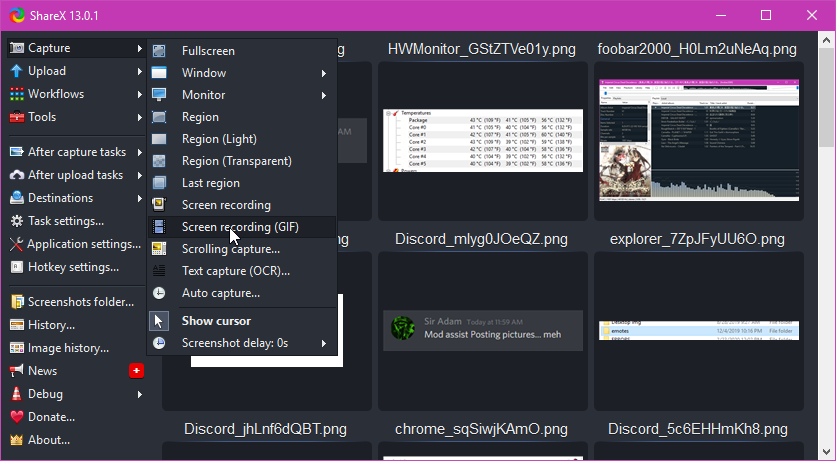
 ShareX
sullen spoke
snipping tool sucks
 celest horizon
casuals
stoic island
I use a camera mounted on my monitor
celest horizon
Sharex best
sullen spoke
lol
thin bramble
btw earlier just for the hell of it, I had Windows WSL running Ubuntu running Wine running Win10 running VirtualBox Fedora
sullen spoke

thin bramble
wait how did you gif omg
sullen spoke
shareX
stoic island
sullen spoke
 sullen spoke
snipping tool peasant cannot beat sharex
celest horizon
I still like windows shift s sometimes, but sharex+imgur/gify pretty great
stoic island
sullen spoke
ok Mr1
celest horizon
#justcomcastthings
sudden turret
lol
stoic island
sullen spoke
no IPv6 for you
celest horizon
I'm just using that to test ssh into the mc server
sudden turret
He probably has ipv8
sudden turret
mister I have two internets.
celest horizon
Both ipv4 🙂
 celest horizon

stoic island
ipv9
sullen spoke
ipv10
 wary tundra
you can send it here @tidal vault
little osprey
Any Techies alive?
sullen spoke
you can ask your question and someone will probably pop in
little osprey
I need some help with updating my BIOs so I can stop getting these memory blue screen errors when I play games
 lofty sequoia
@stoic island you got a second?
stoic island
sure
sullen spoke
are you sure the bsod's are related to the bios?
little osprey
Nope its just something that subjested that could help
sullen spoke
do you know the stop codes from bsod?
little osprey
I ran a memory dianogtics test is that what you are asking for?
lofty sequoia
So I bought a enermax 650 gold for my pc but I cannot start my pc and I was told to look about a 4+4 pin cpu +12V in split mode, but I never got one in my box for my PSU
sullen spoke
there is a stop code that comes up when you get blue screen of death
lofty sequoia
My motherboard will light up but I cannot start my pc when everything is plugged in
stoic island
wtf is a 4+4pin cpu in split mode?
little osprey
No I never took a pic of it, Every time is a memery management error
stoic island
anyways you did plug in a cable into the cpu 8 pin correct?
little osprey
Only when Im playing games it happens when I watch utube it doesnt
stoic island
I seriously have no idea what "split mode" is
sullen spoke
ok
foggy hazel
"split mode" <- most likely means "split cable"
stoic island
and that means?
lofty sequoia
lofty sequoia
An example
lofty sequoia
I have no clue that’s what my buddy is insisting rn
sullen spoke
@little osprey you can try reseating the ram and running memtest86 if you haven't already
stoic island
Maybe they mean plug in the extra 2x2?
foggy hazel
@stoic island the reason it is there, is that some older boards only had 4 pin up there
foggy hazel
thats a newer "invention/need"
stoic island
anyways @lofty sequoia I assume you checked other power cables?
and your issue is no display?
lofty sequoia
I’m double checking everything rn and have unplugged everything except the 24 pin rn
So for my motherboard in the top left corner it’s a 8 pin
And that’s the only other pin on it minus the 24 pin
stoic island
Alright, and did you plug in the cable that said CPU?
lofty sequoia
The cable that says cpu doesn’t properly align
stoic island
show both ends of the cable too if possible
lofty sequoia
stoic island
And the cable?
foggy hazel
that has the latch facing down
lofty sequoia
stoic island
Yea try clipping it in, with the latch facing down
foggy hazel
the plug on the right (it looks like) is the one going into the mainboard
STOP
i am wrong about the latch it looks like
stoic island
for example these are the square shapes on the plug
foggy hazel
shadows was playing tricks on my eyes
stoic island
these are the squares on the mobo
sullen spoke
rectangle
lofty sequoia
The latch down fit like a glove
sullen spoke
lol naed
stoic island
lol
sullen spoke

foggy hazel
doesnt look like there is a latch there
stoic island
Make sure you're plugging the right end into the psu and the right end into the mobo
foggy hazel
so, because you plug anything else in
stoic island
(aka, just check it plugs into psu)
foggy hazel
please confirm the following
lofty sequoia
Double checking rn
foggy hazel
Is there, or isnt there. a latch there :)
stoic island
(Naed, it should have a latch on both sides, one for psu, one for mobo)
foggy hazel
we are specifically talking about the plug on the mainboard @stoic island
 unkempt ibex
 digital pecan
@unkempt ibex whats the cpy on the second one
sullen spoke
@unkempt ibex with that kind of budget I'd more recommend a amd apu
digital pecan
cpu*
lofty sequoia
No I think I might’ve been overthinking it and also played my eyes a bit because it definitely fits on the PSU and the motherboard I kept thinking “no it won’t fit since this is square round round square”
stoic island
Huh
unkempt ibex
@sullen spoke what
stoic island
It might be my eyes playing a trick on me but the 2 latches look different
so my thought was, one end fits in the psu, one end doesn't.
foggy hazel
they are different @stoic island
lofty sequoia
Yes the latches were diff
foggy hazel
because one is a "split" cable latch, and the other is a "fixed" cable one
unkempt ibex
@digital pecan I already have 2080 and i7 8700
sullen spoke
oh
foggy hazel
basically, slim vs wide latch @stoic island
stoic island
I was just thinking usually theres like a cutout into the PSU, so it makes it easy to tell which end is which once you plug an end in
foggy hazel
aye, that is the "slim" latch
sullen spoke
@unkempt ibex nvm saw it wrong, looks like it is mostly just personal preference then
foggy hazel
but, always makes logical sense (when i am not handling the cables myself) to have people go through the motions of checking
stoic island
@unkempt ibex so you're considering the difference in motherboard, ram, and PSU?
foggy hazel
because you never know what kind of hi-jinks they might be doing
stoic island
Ah
sullen spoke
jeez I never realized how expensive psus got
unkempt ibex
Yeah
foggy hazel
its the whole "never expect a user to not short circuit something if there is some bonkers way they can do it" thing
and @lofty sequoia that is not a dig on you. It is just experience in general.
unkempt ibex
well yeah there’s a 750w going for 100 I’ll just do that @sullen spoke
stoic island
Aegis ram is cheaper for same performance, do that. The case is completely personal preference, the PSU is whichever is cheaper between the two. cooler is your preference, same thing, one is black, one is not. @unkempt ibex
lofty sequoia
No I understand, this is my first pc build aside from classes taking a pc apart and putting it exactly back to how it was
sullen spoke
yeah, i don't know much about the small details of psus but it looks fine
foggy hazel
CXM is still a worse choice vs the Seasonic PX that we talked about yesterday @unkempt ibex
lofty sequoia
I’ve seen some of my colleagues kill a few motherboard plugging stuff into the wrong areas
foggy hazel
aye
sullen spoke
sounds fun
foggy hazel
hence the "better ask twice or thrice " attitude i have about it
lofty sequoia
^
stoic island
aye
unkempt ibex
Ok
sullen spoke
3200 cl16 is fine
unkempt ibex
Is that what I have lmao
foggy hazel
well done @lofty sequoia
lofty sequoia
Thanks again guys!
 tidal vault
can I get opinions on this build
https://pcpartpicker.com/list/tVKJGc meant for streaming/gaming
sullen spoke
aegis isn't as fancy as trident z royal but it gets the job done xD
do you have another pc to use the capture card?
or is it for consoles?
tidal vault
its for my console yea
tidal vault
yea i've heard about that but I'll see once I get it. love the look of it which is why I choose that one
sullen spoke
nzxt cases do look clean
tidal vault
exactly well hope it'll be fine since i'm not buying extra fans or coolers
foggy hazel
@tidal vault can we agree that your list is 1287 usd?
tidal vault
from the base prices yea, but with all the shipping and taxes its more around 1550ish
foggy hazel
that part is your trouble, but the listed price on pcpp is 1287 right?
tidal vault
mine says 1167.40
stoic island
(one part is missing prices)
foggy hazel
your mainboard is not being counted
foggy hazel
105 on the board, for the cheaper option
thats your list, but with a force pulled price
https://pcpartpicker.com/list/xTcyRk <- that is a suggestion for a slightly different take
which gives you faster cpu, faster ram, better mainboard. equal ssd. for less money
tidal vault
was going to upgrade CPU but the MoBo that I've been looking at would have to be updated prior, so i'm stuck with it just in case
foggy hazel
the warning you see at the top is 99.99% not relevant for that board
Because it has been THAT long since the default bios on those boards started supporting the 3rd gen cpus
getting close to a year now
so, unless you are somehow so unlucky, you get stock that is from before then
then you dont have anything to worry about
tidal vault
this is my first build, can't be too careful and completely new to this
foggy hazel
make sense?
tidal vault
keep that in mind when upgrading then
foggy hazel
elaborate
tidal vault
in?
stoic island
keep that in mind when upgrading then
@tidal vault
I don't see what you're saying, and I don't think Naed understands either.
tidal vault
CPU and Motherboard and you guys got me confused too
foggy hazel
okay, lets start from the beginning then
and please remember, there are no stupid questions, only silly answers
tidal vault
okay so you're were telling me that that warning for [Needs to be Updated for New CPU] is pretty much irrelevant now right?
foggy hazel
correct
tidal vault
Okay going to keep that in mind if I ever upgrade MoBo or CPU. Other than that what are the things I need to other than the parts to start a build?
foggy hazel
you are missing the point, i think
the list i put in there, is a faster cpu, for basically the same price
and all the parts added together, means you get a faster machine, for less money
when compared to your current list
tidal vault
telling me to switch it out right?
foggy hazel
if you want more for less, yes.
wary tundra
@urban verge You have such a nice build I hate it, It makes me want to water cool my ryzen 5 3600 and 5700xt but theres no point. I had to come to build chat to say that because box is lurking.
unkempt ibex
@foggy hazel just wondering is this your job lmao
foggy hazel
@unkempt ibex in my normal life, its one of my jobs
and no, i dont work for newegg or anything, heck, i am not even on the same continent
unkempt ibex
Ah
tidal vault
okay switched, hopefully i'm not that 99.99% that'll get a stock MoBo
foggy hazel
hopefully not
so, link your build again?
because then we can talk about the next thing :)
tidal vault
still scared but we'll see https://pcpartpicker.com/list/gs49Pn
foggy hazel
yeah, so lets talk SSD's
do you want to pay 99.99 or 68.98 for the same experience?
also, your link only changed the CPU
tidal vault
was going for a crucial at first, went for a samsung from reviews and recongnizable brand
foggy hazel
it is 100% your choice. You are however paying about 30 usd for a samsung sticker
you will not notice a lick of difference
sullen spoke
I like stickers
tidal vault
some parts i'm unclear on. other than reviews from here and there. and of course personnel choice is something I'm keeping with a few items
foggy hazel
personal choice is all fine and dandy
please make certain you make it from a basis of understanding
instead of a standing of "this sounds complicated, let me just take whatever google tells me"
foggy hazel
as mentioned, there are no stupid questions, only silly answers
tidal vault
I will mention I did already buy the parts which is why I was a bit hesistant when it came to the CPU which I switch and bought already, going to have to return the other one once it arrives right away
foggy hazel
that detail (that you already purchased the parts), would have had this conversation go very differently
because i could have summed it up with the following
return the mainboard + cpu + ram + ssd
unkempt ibex
My PCs performance is so bad rn holy
foggy hazel
because there is no logical reason (that you have mentioned so far) that you wouldnt want a faster machine for less money @tidal vault :)
tidal vault
Okay CPU done, need to tell me what I can switch for the MoBo Ram and the SSD
little osprey
That psu is kinda intense for a turing card
tidal vault
The Asus Board was going to be my first choice, but was lacking in the USB department
foggy hazel
@tidal vault what is lacking? and in which way?
tidal vault
would want a few more USB ports, since my current pc has most of them used at the moment
foggy hazel
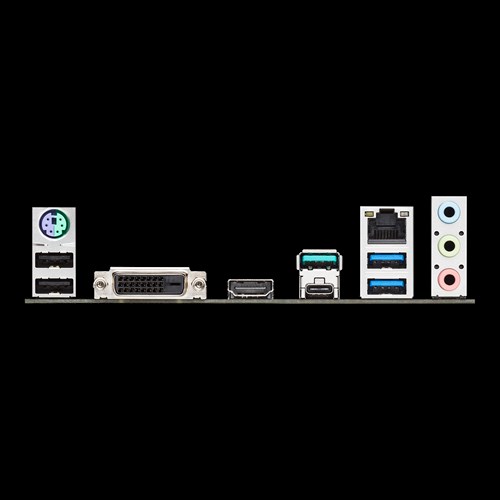
what you are seeing here is the MSI backplane

that is the board you had chosen
https://www.asus.com/media/global/gallery/vu3XyBGH5jtAGwCU_setting_000_1_90_end_500.png <- this is the board i had on the list
 tidal vault
the usb c ports throws me off everytime
foggy hazel
they both offer the exact same amount of usb :)
its just question of form factor
and something to keep in mind with usb c, (and more importantly, the actual protocol behind it) it is PLENTY fast for just having a hub connected
tidal vault
haven't thought about a usb c hub okay then switching
foggy hazel
@tidal vault would all of this (this topic in general) be easier for you to get your head around if we took a voice chat about it?
tidal vault
nah like taking info from text and its much easier on my brain than proabably arguing about someting that I want to keep
foggy hazel
wanted to offer it, in case you had it the other way around
tidal vault
okay so i've switched all that parts that you recommended
foggy hazel
link the list again?
(not that i dont trust you, but it marks the points where we change the topic)
tidal vault
give me moment need to updated it
foggy hazel
no rush :)
tidal vault
okay this should be the update list https://pcpartpicker.com/list/xTcyRk
foggy hazel
that looks right
now
lets have a chat about your HDD
is there any special reason for the 6 tb drive?
tidal vault
well other than games, was going to keep raw videos on it, since been trying out the whole content creation thing for a decade now and I always have to delete the footage for space with my current setup
so 6tb for extra insurance on that
foggy hazel
depending on how you look at things
its not actually extra insurance as such
its still in the same location as the main machine
there is no redundancy
my point being: please dont convince yourself that it is a proper backup of your content
tidal vault
Not proper, but atleast a place where it should be and a start for keeping
foggy hazel
its a start.
But, IF you only purpose of the mechanical storage is .. storage
why not go with something that is a bit more reasonably priced?
4tb seems to be around 100-ish usd at the moment
tidal vault
Keeping the HDD, puts me at ease knowing that I can keep it than buying more externals. is there other ways to use storage?
foggy hazel
its all about what makes you sleep well at night
tidal vault
exactly anything else that you would have changed or just a few tips?
foggy hazel
nope, the PSU is just a question of availability really
I would personally go with the Seasonic PX
but that is a personal preference really
and normally, that amount of wattage would be overkill, but again, availability (and prices right now) makes it a decent enough choice
tidal vault
alright thanks can't wait to have all the parts and build it. should have everything around May 10 or 14
tidal vault
i'll probably hop on here to post pics of it or if something doesn't go well. see ya then
marble shuttle
@foggy hazel, You got some time?
foggy hazel
aye
just finishing up dinner, so ask away @marble shuttle
too full of food to run away
ah yes @marble shuttle you were the one with the dual channel memory
you got a mainboard model for me?
sorry if i asked earlier too
marble shuttle
@foggy hazel, MSI MPG Gaming Pro Carbon AC
On my second one, and my second set of ram
foggy hazel
intel machine?
marble shuttle
Yes, i7-9700k
@foggy hazel, here's the full list
After trying so many things I'm sure it cant be the mobo or the ram
foggy hazel
just to make certain, it is "that" specific set of ram you are using now?
marble shuttle
Yes, the royal set. Down to the model number, and I checked for compatibility on my motherboard website before buying
foggy hazel
aye, and it is in the QVL?
 exotic lichen
Do you guys think an ultrawide that is 100hz and is 350 dollars is worth it?
34 incy
Or a 30 inch 85 hz ultrawide for
200
foggy hazel
@exotic lichen please ask in #old-monitors-and-tv
foggy hazel
nothing to be worried/sorry about :)
exotic lichen
Thx man
marble shuttle
@foggy hazel, yes it's in the QVL too
foggy hazel
and again, just to verify. this is a completely new build right?
marble shuttle
Yes, never built a PC before and after years of watching Linus, BitWit, and Paul build PCs I wanted to build one myself
foggy hazel
and then you stumbled into "this" kind of a problem
marble shuttle
Yes, I had the pc working fine with no problems on the first two days then the pc crashed out of nowhere with no BSOD. Then after turning it back on it boot looped about two times before fully turning on. It continued this for about three more days before it just would turn on before and kept boot looping. After that I tried just having one ram and it would work fine but still freeze about once per day. Then I decided to get some help on reddit and we came to the conclusion that I needed a different ram kit
foggy hazel
and then that got changed, rinse and repeat
motherboard got changed, rinse and repeat
and now you are here?
is that close enough @marble shuttle ?
marble shuttle
Yes, now at least it doesn't boot loop but it wont run my ram in dual channel
foggy hazel
okay, first a couple of ground rules:
there are no stupid questions, only silly answers
i cannot read your mind, nor see what you see. So i will most likely ask about things that might seem weird. Just have patience please.
and if you would rather we do this in a voice chat we can, it is entirely up to you
marble shuttle
I'm working all day today so I wont be able to do voice, but i am able to text just with a delay sometimes. Also if you need any links to videos or pictures i have posted some on imgur when I was trying to get help on reddit.
foggy hazel
no rush, a lot of this is things you are going to be trying
because you will be going through a regular troubleshooting process
 buoyant flame
Aight so my friend is asking for my help for a 1500 dollar gaming / light streaming pc. I made him a list in pcpp. Anyone wanna give it a once over for me? And before you say it ik that ram kit is not a good choice 😂
psu and case are OOS atm but he's not looking to buy this month so i threw em in there
foggy hazel
quick and dirty answer @buoyant flame : a80 ssd, Dont buy the HDD now (unless there is urgent need for it), Seasonic PX (actually in stock and decently priced), rest looks fine enough
buoyant flame
ok
foggy hazel
@marble shuttle so, what is going to happen is this
buoyant flame
ty
foggy hazel
everything, and i mean everything gets pulled out and you start from the absolute bare minimum in figuring out what works, and what doesnt work
that means specifically for you: mainboard + cpu and nothing else
no hdd, no ssd.
just the mainboard + cpu.
then ram
because if ram actually works at that point, things get "fun"
because then it becomes "which specific part or if you are really lucky, which combination of parts" makes things NOT work
@buoyant flame as always, you are very welcome
buoyant flame
ik 🙂
foggy hazel
and yes, i know, you might have been through "some" of this @marble shuttle
difference is this: everything gets documented
everything
stick 1 has been in slot 1? check
slot 2? check
etc etc etc etc
 cursive wharf
This is why hardware debugging is so fun
foggy hazel
yes, it is menial as all heck, but its what makes technicians ... well... technicians
marble shuttle
@foggy hazel, I'm not able to do this at the moment because I followed the suggestions from two forums and sent my cpu back and will be receiving another one this week. But I can tell you about the first time I tried to run the system bare bones
foggy hazel
@marble shuttle as mentioned, no rush :)
its more so you know what "path" so to speak
and yes, please do tell
but, keep the following in mind: its not your current parts
so it technically doesnt matter
i hope that makes sense to you @marble shuttle ?
marble shuttle
@foggy hazel, Yes, I understand
foggy hazel
sidenote: please check what bios your board has, when you get your CPU again.
marble shuttle
The first time I tried it with just cpu and mobo, it would just turn on the system and the ex debug lights would flicker between cpu and ram. Then after installing just one ram stick it would boot, after installing the second ram stick the led would flicker between cpu and ram. This happens with both sets of mobo and ram. Also after that it was suggested that I clear cmos and then update so I did but that just made my first set of ram not boot up with even one stick. So i sent it back and got a new set. Now I'm running the latest 1.7 on this board
*EZ Debug
foggy hazel
sorry to hear that you had to go through all the steps, because what you are saying above is a fairly strong indicator that the problem is the cpu
BUT, it might not be the cpu itself, it might be the pressure from the cooler
but, your replacement CPU should clear that up fairly quickly
the following might seems like a bit of a trick question @marble shuttle
how did you tighten the cooler down?
marble shuttle
@foggy hazel, I had also thought it might be uneven pressure so I unscrewed the cooler, then screwed it back on going back and forth to each screw making sure I am equally turning the screw and had a level on top of my cooler to make sure. I made sure it wasn't too tight and then tried to run both ram sticks in dual channel. I would then lessen pressure and try again till it booted but nothing
little osprey
Is Ryzen actually on par with Intel nowadays? Or is intel still king of the not setting peoples houses on fire?
sullen spoke
ryzen is on par in gaming but ahead in everything else pretty much
cursive wharf
Ryzen is better in terms for temps. Single core perf falls behind be like 1% - 3%, so not really noticable
sullen spoke
although some people have specific use cases for intel cpus
foggy hazel
@little osprey long story short. https://www.anandtech.com/show/14605/the-and-ryzen-3700x-3900x-review-raising-the-bar
 little osprey
So. for the price. Ryzen is a solid choice, great thanks I cant find intel anywhere and dont trust bestbuy to give me reviews
foggy hazel
@marble shuttle the following is not going to be a much comfort to you, but i can see a couple of ways that things could turn out like that. Yes, it requires that you are unlucky, but that is just how things turn out at times.
 potent prairie
The i9-9900ks is going on eBay for double retail. Bad time to buy CPUs, but ah well
foggy hazel
@marble shuttle do you have a ETA on the replacement CPU?
marble shuttle
This Saturday
foggy hazel
i would be quite interested in being around when you start assembling things again @marble shuttle
marble shuttle
@foggy hazel, is there any way that this could be a psu problem? I probably answered that trying to run the pc bare bones but I'm still wondering. I have 750w 80+ gold certified psu from thermaltake
foggy hazel
in theory, it could be a PSU issue
that is part of what going back to barebones helps answer
and it is the "next" item that has to be changed, because everything else has changed
(the above is said based on what we know right now)
everything could change come saturday
marble shuttle
Alright, also im not sure if it's relevant but when I removed the CPU it had like two discolored pins on the bottom left
cursive wharf
@marble shuttle company, rating, and wattage don't have much to do with PSU quality. Actual model does. Tho, don't recall any terrible TT Gold PSUs at least off top of my head
foggy hazel
me neither Hei
@marble shuttle you dont know the exact pins by chance?
or have a picture?
marble shuttle
I didn't take a picture but I do know the general area
foggy hazel
general area = not good enough
(this is not your fault, just that there are a bunch of the buggers back there)
and they do different things
foggy hazel
but yes, generally, discoloured pins (when you mention it) doesnt sound good, BUT depending on what you actually "mean" when you say it, it could be either really serious, or nothing at all
cursive wharf
Ye. Can vouch for nothing at all sometimes. Have a 6700k with some discolorness on some pins, nothing as of yet issue wise.
marble shuttle
Alright, thank you guys. Any questions I can answer while I wait for the cpu?
foggy hazel
i doubt it
because it will only be extra things to remember for no benefit
and you are very welcome, please give a shout when you have the CPU @marble shuttle
 novel thistle
Would y’all mind telling me how a build I’m going to buy looks? I’m pretty new and am looking for any input on the matter I can
foggy hazel
visually or part choice wise @novel thistle?
foggy hazel
absolutely :)
you send the link to me as a dm, and i will post it for you
the bot will eat your link, its our spam prevention :)
novel thistle
Alrighty
foggy hazel
on behalf of @novel thistle
https://pcpartpicker.com/list/xkzFyk
novel thistle
Thanks!
foggy hazel
np
potent prairie
I think the 1 tb SK Hynix gold SSD is a little cheaper on amazon than your choice
foggy hazel
a couple of notes and suggestions
a80 for the ssd instead, in the m.2 format
and 3600 ram
those two changes makes your list look like this https://pcpartpicker.com/list/GnWyRk @novel thistle
novel thistle
Well that’s not bad at all, thanks for the advice! Is the difference between a SATA 6/gb and a m.2 noticeable?
potent prairie
Aren't nvme ones a good bit faster?
foggy hazel
just 1 screw and it is installed into the mainboard
@potent prairie notice what he asked :) "noticeable"
potent prairie
Yeah, that's fair 🙂
marble shuttle
@foggy hazel, Sorry to intervene, you can answer when you are able to. I want to purchase a backup PSU just in case that is the problem so I wouldn't have to wait another week for it to get here. What PSU would you reccomend? Also if it wasn't the problem I'll use it on the next build I have planned or I'll just return one.
foggy hazel
@marble shuttle problem is availability really
@novel thistle perhaps think about it like this: easier to install, faster in some corner cases. (this goes for both the ram and ssd upgrade) for no extra cost
novel thistle
I appreciate that and I’ll add those changes to my build. Side question, would having a 250-500GB SSD specifically for the OS and important programs be beneficial for the extra $50 or so?
foggy hazel
its about as helpful as racing stripes :)
novel thistle
lol thanks
foggy hazel
something i noticed, you might not be aware of this variant of your cooler
(its a black version of the one on your list)
novel thistle
Tempting.......
foggy hazel
also, generally i let people pick whatever case they want, but that is NOT a cheap case
so, have you really thought that one through?
novel thistle
I like how big it is and the fully tempered glass side
foggy hazel
(keep in mind, if you want a pink case with rainbow fans, i dont care one bit)
it is your choice :)
novel thistle
Got any full tower cases to recommend? That one just stuck out to me for it’s sheer beauty but I wouldn’t mind hearing some alternatives
foggy hazel
hm, i would recommend having a browse in the #build-pics channel
because i am very much a boring case choice person
no windows, no nothing
comes from working with servers and such :)
as long as it is silent and i am NOT constantly reminded that it is there. then i am happy as can be :)
novel thistle
Haha, well I appreciate all the help, googling can be intimidating with so many different opinions and specs that are hard to understand. Thanks for giving some solid advice
foggy hazel
you are very welcome, and please remember, there are no stupid questions, only silly answers
 simple stag
hi everyone - i have an issue with my freshly built pc
basically, i was able to install everything with relative ease and i downloaded the free windows 10 copy from their official website. I was able to successfully boot up my computer, install windows, steam, etc.... now the issue is after trying to test out a few relatively easy games (CSGO, Team fortress) it plays for a little while then crashes - any idea what is going on here?
foggy hazel
you got a part list?
simple stag
I downloaded NZXT tool and does not seem to be any crazy overheating but i could be wrong. I have ryzen 3600, Asrock 570 pro4, Corsair lpz 3600mhz, 1660 super
sorry was still typing but there is the highlights ^^
foggy hazel
what psu?
simple stag
stock cooler on CPU
 wide sparrow
Wow
foggy hazel
you ever assembled a machine before?
simple stag
also - when it restarts on its own - the GPU and Boot LED's light up on MOBO til it restarts to boot page then disappears
no this is my first but i was pretty careful to follow steps from Joey Delgado + part manuals
wide sparrow
That's good. Its suppose to do that on the MOBO
simple stag
all it says lol
which is so piss poor haha like duh there is an issue but does not tell you anything else
foggy hazel
you might not like what it says, but it being there is very helpful
have you plugged in the power cords on the GPU?
@simple stag
simple stag
hahaha why does it say spooky im geeking
yes GPU is getting power, RGB on card lights up, fans spinning , etc
i plugged in all 8 pins
foggy hazel
because i made a typo @simple stag :)
simple stag
i also tried just unplugging and replugging the cpu fan, gpu, case fans, etc
not sure what to do next :/
foggy hazel
pull things apart and start from the bare minimum
stoic island
Does it black screen on you or BSOD? because BSOD can give you information on what happened @simple stag
foggy hazel
@stoic island i have something to show you in #cases-psu-and-cooling
simple stag
what is BSOD @stoic island
foggy hazel
Blue Screen of Death
latent storm
is there any reason noctua fans are so expensive
stoic island
There is a noctua tax, and it's good.
Noctua fans are Not good for price to performance
pure performance wise, they work great
but there are cheaper options, worse, but quite a bit cheaper.
foggy hazel
@sudden solstice there is no set point it has to return
it MIGHT return, but the retailers have no real reason to rush it
foggy hazel
aye
 sudden solstice
aye
potent prairie
If you buy used stuff you can still get some deals tho
foggy hazel
whoever it was that tried to post a link, send it to me as a pm
sudden solstice
Wait does Newegg sell used stuff ? Sorry really new to this
foggy hazel
the bot will keep on eating the link :)
foggy hazel
just be aware that warranty might be quite ...weird .. with second hand marketplaces
potent prairie
Amazon and eBay both have buyer protection, but yeah, that is a good point
 snow bridge
why would the bot eat my link if others can post links from the same site (pcpartpicker)
potent prairie
New members can't, you gotta get rank 3 (like chat a while)
snow bridge
thats stupid
foggy hazel
@snow bridge new user link spam protection
so @snow bridge you can either do as i offered earlier, and send me the link as a dm, or you can interact with the server and level up your account by being active
sudden solstice
So like I’m trying to go for a Ryzen 5 3600 should I try to go new and wait for price to drop or just go for used
Going on a budget build
stoic island
If you're on a tight budget, you could go for the 1600af.
foggy hazel
@sudden solstice how much of a hurry are you in?
sudden solstice
U think it’s better then the Ryzen 5 3600 lmao
Not in that much of a hurry
I just don’t know when prices are going back to normal
foggy hazel
2sec then, let me just check the date
stoic island
(3100x time maybe)
foggy hazel
aye
foggy hazel
checking up on release dates @sudden solstice
its in the next 2 weeks iirc
we dont know the exact performance yet (because no official reviews yet)
but ... yeah
they are looking very tempting
there, effing finally. @sudden solstice https://www.anandtech.com/show/15736/amd-ryzen-3-3300x-and-ryzen-3-3100-new-low-cost-quadcore-zen-2-processors-from-99
 sudden solstice
Wait what ?
 fiery pier
@foggy hazel
Last night I finally got time to swap power supplies.
Last night I watched a movie and today I've been doing work on it since about 10 a.m. it is now 4:30 here. I think it's safe to say it was the power supply
foggy hazel
depending on what you actually need (performance wise) that Ryzen 3 - 3100 might be really really tempting/relevant for you
@fiery pier good to hear that it seems to be behaving now, fingers crossed it keeps on doing as it is supposed to
sudden solstice
Will the Ryzen 3 3100 be better then the Ryzen 5 3600
fiery pier
Now onto actually putting a graphic card in here.
fiery pier
@sudden solstice
In my opinion you would be splitting hairs. I am running a Ryzen 3 3200g. Without a graphic card and I'm getting decent performance.
foggy hazel
@sudden solstice technically no.
@fiery pier you cannot compare them like that
its a ... mess ... at that end of the model stack
the 3200g/3400g actually both use 2nd generation cpu cores
sudden solstice
Ahh I see
foggy hazel
not 3rd generation cores like the 3100/3300 will be
fiery pier
But wouldn't it depend on what else you pair it with?
foggy hazel
yes, which is why i said: you cannot compare it like that :)
and you are also not technically without a GPU
you just have one integrated with the cpu cores
fiery pier
I guess I jumped in late and I don't know the rest of the build
sudden solstice
I’m gonna go with Ryzen 5 3600
@foggy hazel when u think prices will go back to normal
foggy hazel
@sudden solstice tomorrow/never
sudden solstice
Bruh what
foggy hazel
dont expect prices to change much
fiery pier
I am, but I did what I would consider an modular budget build
foggy hazel
i cannot predict the future @sudden solstice :) but think about it for a moment.
sudden solstice
So maybe I should go used
fiery pier
My 3200g cost me about $90 U.S.
foggy hazel
what incentive is there for the retailers to rush at getting prices back down?
they are currently selling all the parts they have
sudden solstice
True true
fiery pier
My entire build to get going was $350
foggy hazel
the retails are happy as effing clams right now in that regard
@fiery pier the 3200G, for what it is, is a nice product
sudden solstice
So like I said maybe I should go for used parts
fiery pier
I did my research, I have it in a Asrock b450-hdv motherboard and I want to put a Rx-570 with it. And bump it up to 16gb RAM. THEN I SHOULD BE OK
The issue like Ryan is price right now.
sudden solstice
Lol I’m going for around $600
foggy hazel
have patience
and have a serious talk with us about parts
as long as you dont need to buy right this second, breathe and talk with us about it
fiery pier
@foggy hazel is there a card that would work better on my build?
sudden solstice
Lmao
foggy hazel
but i am patient (and old enough) that i dont run around in a panic every time there is a shortage of something @sudden solstice
sudden solstice
Yeah I see so u think I’m prob better of waiting for prices
Or I could go for used to
foggy hazel
is your life going to end by you waiting a week or two?
if yes? then buy now
if no. wait
sudden solstice
Lol I’ll wait
sullen spoke
your life is in danger
fiery pier
I have another hurdle.
My build is a micro
sudden solstice
Yes
potent prairie
So... Um. I got a Corsair xc7 but the backplate doesn't seem to fit with my Maximus xi hero mobo
foggy hazel
read the manual
the board and the AIO are compatible
@potent prairie you certain you have the backplate turned the right way around?
 pastel briar
Just got done working on assembly of my server rack
Now to find a rack mount case for my amd build…
potent prairie
I just went for it. Wish me luck w/ post
sudden turret
should have a plastic spacer behind it no?
foggy hazel
according to the install guide, no. @sudden turret
sudden turret
😮
foggy hazel
which surprised me a fair deal too
 foggy hazel
heck if i know, its Corsair



 sudden turret
that is 7 spacers to many
 strange garden
Can anyone recommend a 120 aio that works with the NZXT Kraken g12 gpu bracket?
strange garden
Ya I was just finding it difficult to find one officially compatible at 120mm, a lot of those older coolers work but are hard to find
sudden turret
what gpu are you putting it on?
I would suggest changing the 80mm nzxt fan that comes with it
the one I have, so dang noisy
strange garden
Rtx 2080 it’s a card from an hp omen prebuilt
Temps aren’t awful with the blower buts damn loud
sullen spoke
ye blowers be like that
strange garden
It’s pretty rough haha and I only have 2 options for radiators either a 240/280mm up front or a 120mm in back but most the 120’s I find aren’t compatible or $100+
foggy hazel
keep in mind, a fair deal of the noise from the radial fan in the GPU is from it being cooked alive in that case
deft zephyr
I have a question naed, i’ve been looking a lot about how the RX 5700 is better then the 2060 SUper i will be getting, what is the best choice for me?
foggy hazel
saving up the money and worrying about stuff when you have the money to actually buy stuff
deft zephyr
ok
potent prairie
Thx for the help with my cpu cooler
strange garden
I’ve also considered the arctic accelero 4 but it’s kinda ugly haha
@foggy hazel are you saying my fan is being cooked alive?
foggy hazel
your card is
pastel briar
I need to find a few Noctua fans for my PC 😄
foggy hazel
which is why the fan is ramping up
because that Omen case is a effed up design
as i believe i said the other day too
strange garden
I mean temps don’t go above 80 really when it’s under load and it’s not in an omen case
strange garden
I took the card from a prebuilt and moved it onto a z370-e gaming in an s340 elite case
foggy hazel
that doesnt change the "why" of the fan ramping thou :)
but you might be able to relax the fan curve a bit if you are curious enough
but it wont ever be quiet
 still roostBOT
 Osiris#2769 has been warned
Reason: Bad word usage
strange garden
You’re right it’s an inadequate cooling solution, hence why I’m looking at the kraken g12 or the arctic accelero
I don’t know why anyone even makes blower cards anymore, they’re generally bad
foggy hazel
cooling wise it works fine, it just trades performance for noise
no, they are actually really good
they are just not meant for consumer systems
they are an absolute godsend in racks
foggy hazel
you try and run 4 cards side by side in a rack with 10 other machines on top with their own 4 cards too
strange garden
If exhaust is your only cooling option then yes they are great
foggy hazel
and a normal dual fan setup will cook itself
cursive wharf
@strange garden Note that I find a lot of AIO kits are more expensive or same price as a RGB copper custom loop kit with just GPU block
https://www.aliexpress.com/item/32899782878.html?spm=a2g0o.productlist.0.0.5cf562285UYWPR

aliexpress.com
Smarter Shopping, Better Living! Aliexpress.com
 dry breach
Hey I’ve heard of an 144hz lg monitor that is highly recommended, does anyone know the name?
celest horizon
GL850 - it's very good
dry breach
Thank you!
celest horizon

RTINGS.com
The best FreeSync monitor that we've tested so far is the ASUS TUF VG27AQ. It has fantastic motion handling because of its high refresh rate and low response time.
strange garden
@cursive wharf I’ve thought about trying to do a custom loop, it just seems like more work than it’s worth. The aio w/g12 seemed like a simple upgrade that was more than effective. I also feel like my case is not the best for setting up a loop
cursive wharf
Thing with AIO... pump failure? GPU upgrade?
Def going to need a proper kit for memory/VRMs cooling too
strange garden
Wouldn’t you run that same risk with an open loop? Also the risk of leaks
Ya I planned on getting heatsinks with it
cursive wharf
you can generally get better pump quality with open loop. Those things were main mentioned in, a pump replacement costs like what, $35? An AIO replacement costs a lot more then $35. GPU upgrade is just replacing the block. Which is props about as much as a new kit if you go buy something like NZXT kit
Or if you modify the AIO bracket to fit a GPU PCB, new GPU upgrade may force you to buy a new AIO due to PCB changes
also +30% perf increase because RGB
As for leaks, just tighten the fittings properly and it's about the same likely hood for leaks
sudden solstice
Would a Radeon rtx 580 8gb go good with a Ryzen 5 3600
Mobo is gigabyte B450M DS3H
 indigo sedge
Depending on where you're buying the Radeon. I think you should go for a 1660.
 exotic vale
hey guys i recently started my first pc build and i have the phanteks p400a case which i love and i really enjoy building with it but the fans have 3 ping DRGB yes DRGB connectors on them, but the motherboard i have (the MSIB450 tomahawk max) only has 4 pin input slots, is there anyway i can get the LEDs to plug in, like is there an adapter or fan hub i need to buy???
indigo sedge
yes probably a super since its more in the price range.
but depending on where you're buying the Radeon, you might want to stick to that
sudden solstice
I realized there’s different rtx 580’s
Not the sapphire nitro one
@indigo sedge
indigo sedge
that could be good choice, i dont know much about Radeon's but you could get a 1650 super and have geforce expierence for recording games and streaming.
and its way more in the price range then a 1660
exotic vale
Omg
indigo sedge
@exotic vale APoof, you might have to google it. I've only built one pc so i dont have very much experience when it comes to thos issues.
exotic vale
Alright thankyou anyway
sudden solstice
@indigo sedge would a 1650 be way different then a 1660 super
indigo sedge
It's not that much different. You'd prolly get like 20 to 30 more fps with a 1660 super then 1650 super.
still roostBOT
 ryan.exe#6969 has been warned
Reason: Bad word usage
 fiery jay
Which word? lol
sudden solstice
This is starting to kinda piss me off cuz I’m trying to find the right graphics card but there’s so many with similar names
I want this one
But can’t find any bench marks
fiery jay
On an RX 580?
exotic lichen
Is the rtx 2070 and ryzen 5 3600 a bottleneck?
sudden solstice
@fiery jay there’s so many different ones
There’s like a nitro one
And I forgot the other ones
 fathom bluff
Heya guys im@working on a build but have a few questions. I wanted to know if I get and reg b450 board with my rtx ventus 2060 what would be the best cpu Ryzen 5 3600 or Ryzen 7 2700. I’m looking to stream/edit mainly from the PC but I do plan on playing a few games here and there.
Any help super appreciated
sudden solstice
O nvm I guess I kinda found one
 compact hill
you cant find a benchmark on a 580?
theres benchmarks on basically every card
and a 580 is a very common budget option
theres thousands of benchmarks
sudden solstice
Yeah found one
Will a gigabyte B450M DS3H allow a Ryzen 5 3600 in it, just making sure
buoyant flame
Smooth recovery
 tranquil dust
shhh