#building-and-recc-chat
1 messages · Page 484 of 1
 subtle halo
 latent bronze
I have the non super version of that one and i have my settings set to silent which at full load doesn't really go past 60c
 little osprey
Thanks for your input I appreciate it
latent bronze
EVGA also has one of the best customer services
little osprey
I’ll keep that in mind
 strange garden
So tomorrow I’m planning on moving my CPU GPU and Drives over to a new case/motherboard and want a clean install of windows. Anyone have a recommendation of a guide or some tips of things to look out for/be aware of?
 upper condor
@strange garden why a fresh install?
strange garden
Because it was a prebuilt HP Omen with all of the extra BS that comes with that, and I don’t have anything important I’m trying to transfer over since I haven’t had the pc long.
upper condor
Ok
 foggy hazel
@strange garden you might want to just clone it after you do a reset on it
strange garden
Haha sorry I’m kind of a newb, what do you mean by cloning
Messed with electronic hardware before, the software aspect confuses me a bit more
foggy hazel
well, actually, the cloning part is not needed, i misread
 stoic island
Correct me if I'm wrong, but wouldn't cloning it copy over bloatware?
foggy hazel
a reset of the OS should do what you want, in a way shorter amount of time
@stoic island it would, hence why i mentioned the "reset" part the first time around
@strange garden you have windows 10 right?
foggy hazel
press start, type reset
ït should show you the "reset this pc" option
click that and you get a window with 3 options
the first one is most likely what you want
strange garden
Okie dokie, and then once it’s reset I would just plug in the components and boot windows from the drives in my new system?
strange garden
No old drives, cpu, gpu, and memory, just a new mobo, case, and PSU
foggy hazel
then yes (no technically about it), it will work "just" like that
strange garden
Perfect, should I expect to have to manually update all my drivers or will they auto update when connected to the internet?
foggy hazel
in theory, "most" things will auto update, but depending on things, it is generally recommended that you at least update your chipset driver manually
which mainboard are you moving to @strange garden ?
strange garden
Rog Strix Z370-e gaming
foggy hazel
installing the chipset driver from the manufacturer site is recommended.
the rest should work just fine
strange garden
Awesome thanks for the help! I’m excited to actually put it all together
foggy hazel
best of luck, and you are very welcome @strange garden
 devout wolf
upper condor
devout wolf
upper condor
@violet lichen max budget?
 violet lichen
2500
violet lichen
no I already have everything
upper condor
violet lichen
I agree with the 3800->3700 and 2070->2080 but the psu is more expsensive
 wide sparrow
Glad I don't live in Canada
foggy hazel
@violet lichen question. Do you 100% need that specific shape of case?
violet lichen
No but I would like an ITX case
foggy hazel
go with the node 304 instead :)
it is a much easier case to deal with
also, regular atx psu

main difference is the shape, the internal volume doesnt chance all that much @violet lichen
violet lichen
ok thanks
foggy hazel
do note that PCpartpicker is very wrong about the windforce not being compatible.
foggy hazel
it kinda is, but not really
main difference is ODD support (in the 500)
and lack of front fans
violet lichen
ok I don't need that
violet lichen
ya not the ODD
foggy hazel
aye, ODD is generally not needed nowadays :)
violet lichen
ok generally I think the node 304 better suits my needs
foggy hazel
let me just check some cooler stuff, and i will have a list for you @violet lichen
https://ca.pcpartpicker.com/list/RLcBFG <- there you go @violet lichen
@wide sparrow there is only a "charge" of 30-ish usd (when you take the currency into consideration)
violet lichen
You mean 1.30cad=1usd right?
foggy hazel
1.33 = 1 usd yes
wide sparrow
Still bad
foggy hazel
no, that is just currency at work
foggy hazel
@violet lichen and in case you dont want to spend the full budget, the obvious places to scale down things are the ssd (500gig is about 100 cad) and GPU (2070S is about 650 cad)
and yes, you could also scale down the cpu if you wanted to
but, unless you are willing to go to the 6 core 3600, it (imo) is not worth it
violet lichen
I think getting a sata m.2 would be better
foggy hazel
hm?
violet lichen
I have a NVMe drive rn
foggy hazel
that was a bit hard to know :)
but, that is something you can adjust easily enough by yourself. the build suggestion is linked above :)
violet lichen
Thank you for your help
foggy hazel
you are very welcome
and best of luck, and please post a picture when you are done with the build :)
 cursive wharf
@upper condor Corsair SF is about the best you can get in that price range for SFX afaik
 olive ledge
 silent tundra
how may i help
violet lichen
@foggy hazel Apparently the windforce is 2.5 slots and the node 304 only supports 2 slot cards
 worldly seal
Hey I made my dad a computer and when I turn on the power supply the fans and everything start spinning and I haven't pressed the power button. Also I cant get the led on the power switch to turn on
latent bronze
what PSU are you using?
foggy hazel
@violet lichen so it is, that is my mistake, i could have sworn it was only 2 slots wide
@violet lichen https://ca.pcpartpicker.com/list/ZCRnXv
there you go, sorry for the earlier mistake
violet lichen
Thanks, dw I completely missed it too
violet lichen
I think another windforce version is 2 slots
foggy hazel
could be
 sharp blaze
https://pcpartpicker.com/list/
What do you think?
 deep skiff
take the link from here, the url doesnt show the build
wide sparrow
Lol I clicked and saw my build. I thought he took it from earlier when I posted mines
foggy hazel
@sharp blaze you pasted the wrong link, have a look at the message two above
stoic island
lol
upper condor
@lime forge a while back you linked a 3 pin to 4 pin hub, I seem to have lost it
Could you send again if you can find it?
 sudden turret
hub for what, Rgb?
upper condor
I have 3 pin rgb fans, but no 3 pin on mobo
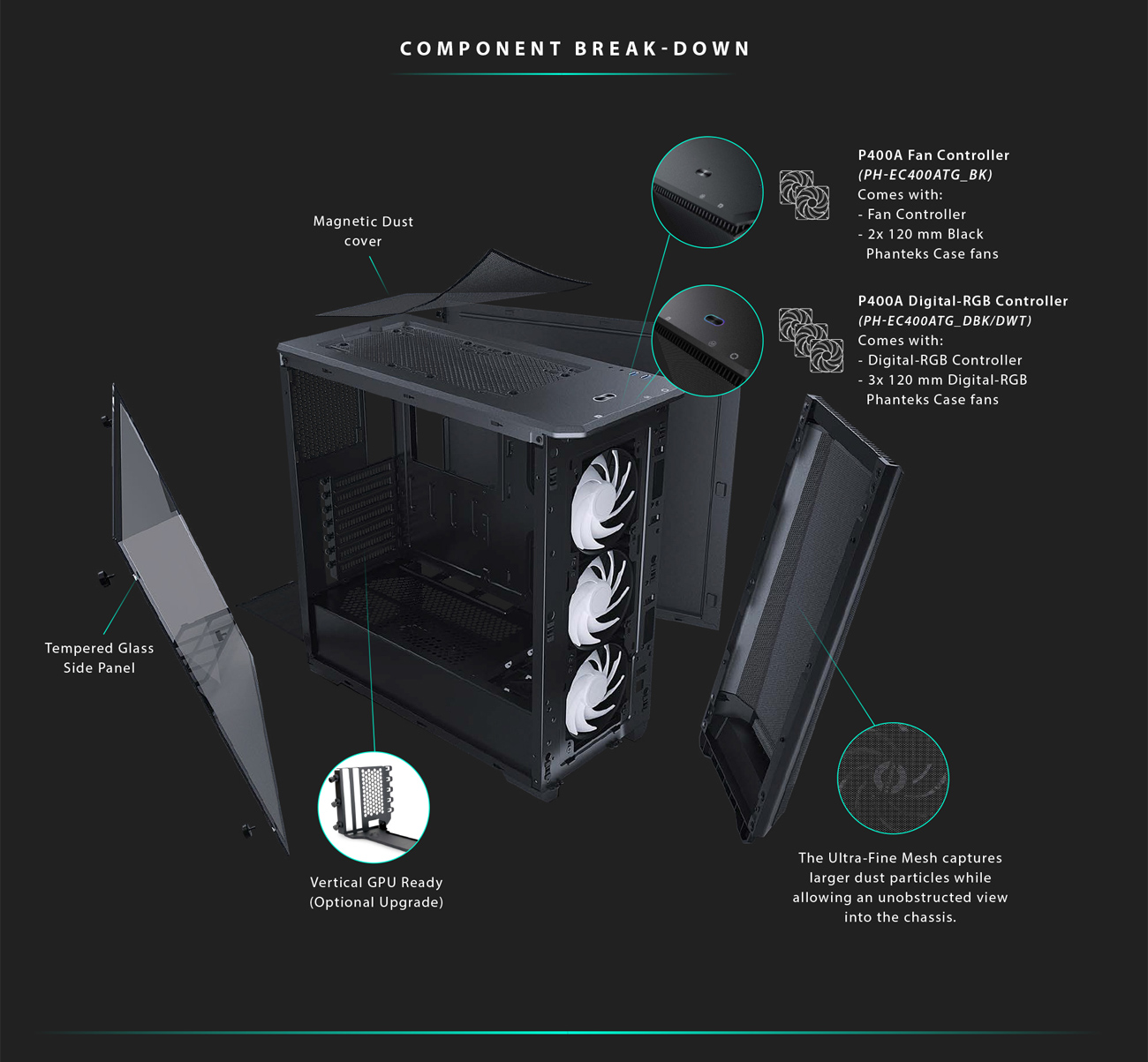
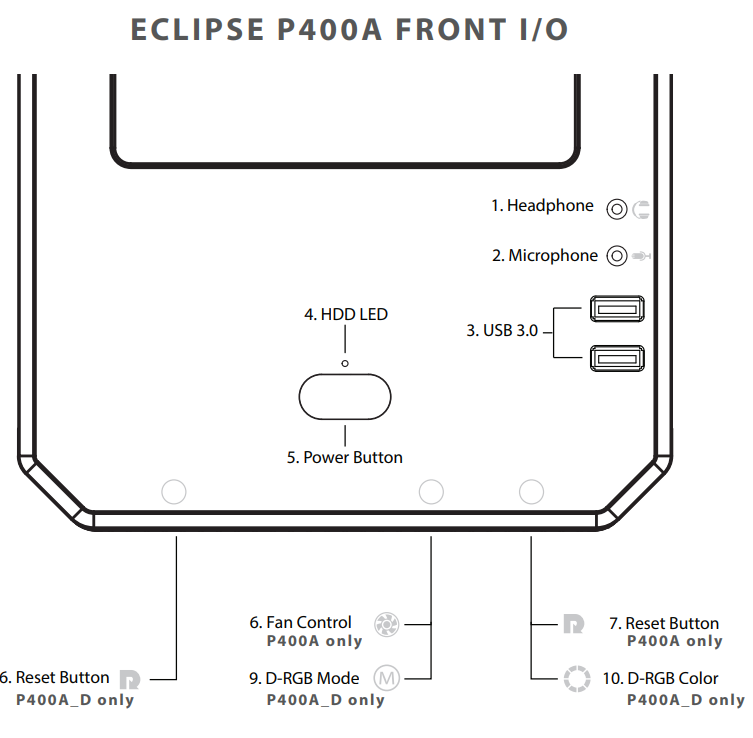
Weird thing is that the case has built in controls
sudden turret
I believe CoolerMaster makes a hub
 next merlin
I have the new Lancool 2 as my current case with aircooling. I'm planning to upgrade to water cooling soon and I'm debating whether to upgrade to the o11 dynamic or stick with the Lancool 2
upper condor
Specs?
latent bronze
@upper condor show me what are the fans
upper condor
Dont know the exact model, using preinstalled p400a
latent bronze
Take a photo of the fan connections and also the back of the case
foggy hazel
back of the mainboard tray is what he means
latent bronze
don't know if the case has a hidden control box thing
upper condor
Maybe...
latent bronze
cause from what i have been seeing it has a fan control as well as a ARGB control built in
foggy hazel
perhaps you should buy it dinner first @upper condor
latent bronze
This is what i was seeing when i was trying to look at the case https://images10.newegg.com/BizIntell/item/11/854/11-854-085/hero7_081319.jpg
 upper condor
latent bronze
upper condor
latent bronze
ok and your so called 3 pin fan
latent bronze
So your board doesn't have a ARGB header then?
upper condor
Nope
latent bronze
do you know the name of your motherboard
latent bronze
Ya the board sucks for not having a ARGB header but 2 RGB headers
upper condor
Def
I just cannot seem to understand why its 3 pin when it has built in rgb control
The manual came with all the settings
So it just doesnt make sense
latent bronze
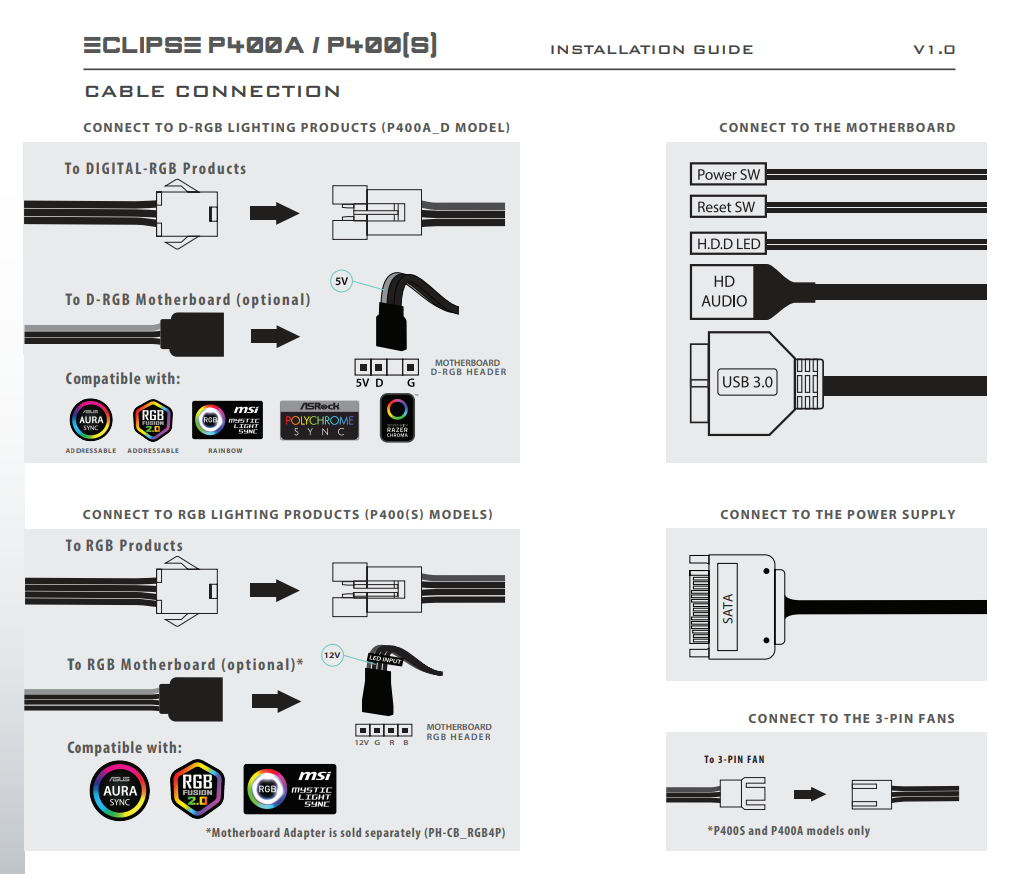
This is from your manual https://i.gyazo.com/5a5e500c9652bdd8d020f3ae752f9f89.png

If you have the fans and all connected directly to the PSU you should be able to control the RGB as well as the fan speeds
upper condor
To the psu? How do I do that
latent bronze
Look in your box the case came with it should have the sata cable
latent bronze
Also from what i can see here https://i.gyazo.com/c2af94b7c6ac8c40342d176385f76d77.png
 upper condor
Where do I plug the sata in?
latent bronze
Goes into the PSU
upper condor
Idk if my psu has that
 plush spade
so i bought a "base pc" with 8gb of ddr4, i5, 1050 gtx.
upper condor
Dont have any drives
foggy hazel
@upper condor you do, just not a 2.5/3.5 inch one.
foggy hazel
@plush spade it is a machine. depending on things, it can either be a decent start or a not-so-decent start.
latent bronze
which i5 is it anyways
plush spade
well this is my first pc. i already have it, i am not having secound thoughts, but i want to "make it mine"
and build it myself, and feel a bit of guilt due to that
upper condor
I GET IT... I GET EVERYTHING
plush spade
@foggy hazel
latent bronze
@upper condor Let me work on the bill for you ok lol
@plush spade you plan on gaming on it right?
foggy hazel
@plush spade and without more details, there is nothing i can tell you :)
plush spade
yes
upper condor
@latent bronze it worked! Im so silly
plush spade
oh ok, can i send links?
foggy hazel
have at it
latent bronze
9400F is an alright CPU would last a good 5-6 years
plush spade
ok good
i am more scared that i might need a whole new motherboard if i want to change out the cpu for a rayzen, if its cheaper
 wispy matrix
Anyone know any cheap desks under $100
foggy hazel
IF you decide to to that (in X number of years), you will have to change the mainboard. That is just a fact of life.
plush spade
@wispy matrix newegg.com
foggy hazel
but it is not something you should worry about now
plush spade
fair enough
latent bronze
Well i am saying for the CPU to handle games until it would start to become like the minimum requirements
foggy hazel
@wispy matrix look at second hand shops
latent bronze
@wispy matrix look at facebook market place
foggy hazel
@plush spade would you like a piece of advice?
wispy matrix
The monitor problem I got a friend who is gonna give me one
plush spade
shoot @foggy hazel
foggy hazel
go and play games and enjoy your system
plush spade
well thats what i am doing for sure
foggy hazel
the worries you are mentioning now? forget about them for now
wispy matrix
My pic won’t load
foggy hazel
come back when something is not working as you want it to :)
latent bronze
you mean boot?
plush spade
thanks @foggy hazel
foggy hazel
@plush spade and it is not that we dont want to help you, but please, at least enjoy your machine before you try and upgrade it :)
plush spade
yes yes and i have for 4 months now
wispy matrix
No luck on the desk on Facebook
latent bronze
Did you put just desk?
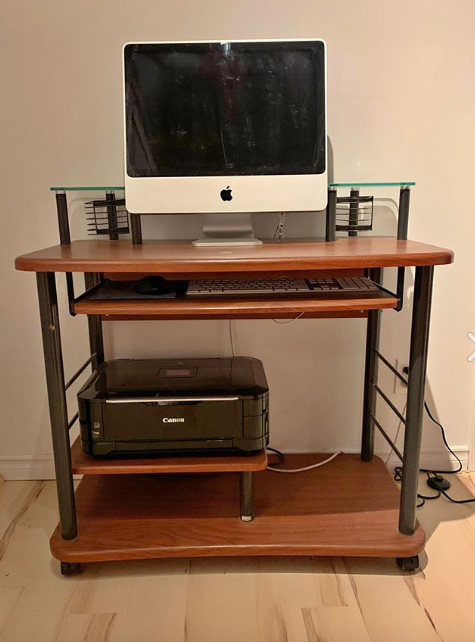
This is just an example for in my area but this guy is selling this for 40$ https://i.gyazo.com/e3b0afab3e3d721184057f7b88eefe6a.png

all i did was just search desk
 viral ore
How are you supposed to sit at that?
There's a printer where your legs are supposed to be.
 oak moss
@upper condor how is the 5700 xt
upper condor
For me? Absolutely fine
wispy matrix
This is my pc
upper condor
I believe its a sidewinder.... or possibly a rog
wide sparrow
Can't find it
upper condor
neither can I... probably a red dragon like keyboard
wide sparrow
@wispy matrix hello there. Mind if I ask what keyboard that is?👀
wispy matrix
sharp blaze
https://pcpartpicker.com/list/2QJNsk
Ok, I think I got the right link. What do you guys think? Anything need to be fixed?
upper condor
@sharp blaze max budget? Why not run windows unactivated to save 100?
@floral zephyr how does the wifi card work for you? What drivers are you using? I have the same one but horrible performance
sharp blaze
@upper condor what's the difference between activated and unactivated windows?
upper condor
Watermark
sharp blaze
And my max budget was between $1300 and $1500, just to allow wiggle room, but wanted to stay closer to 1300 for monitor and peripherals.
sharp blaze
Yes sir
sharp blaze
Monitor keyboard and mouse
Also, what does this mean.... motherboard M.2 slot #1 shares bandwidth with SATA 6.0 Gb/s ports. When the M.2 slot is populated, two SATA 6.0 Gb/s ports are disabled.
 solid lichen
Why the aftermarket cooler
3600 stock cooler is more than enough
thats a solid 45 dollar difference
upper condor
sharp blaze
Is it? @solid lichen I thought the 3600x was the cooler that was good out of the box?
solid lichen
The 3600x cooler is slightly better than the 3600 cooler
but it also runs hotter than the 3600 because it comes at a higher base clock
a 3600x is literally just a factory overclocked 3600
The 3600's stock cooler will do whatever you need it to do
cursive wharf
Strix F isnt that compelling when compared to Auros Pro/TUF Pro
upper condor
Just threw in one as an idea
cursive wharf
also, Bitfenix has a better PSU deal
upper condor
The whisper is overpriced rn
cursive wharf
on Newegg it shouldnt be
upper condor
For me it says 125 for 750
cursive wharf
pcpp never had good listing prices for it
cursive wharf
Also might as well get an SSD with DRAM cache
as it isnt much more
next upgrade would be to use b die mem or smth
solid lichen
nvme ssd prices spiked up
upper condor
Corona
cursive wharf
SR was overpriced in general anyways
solid lichen
I honestly forget what the go to nvme's are now
cursive wharf
It changes
The market is fun rn. EX920 is generally one of the cheapest
that's good
sharp blaze
@upper condor dang man!!! Thats a lot better than what I had. Thisbwill be my first pc btw.
upper condor
Maybe change case too
cursive wharf
@sharp blaze Still lots of changes that needs to be made
upper condor
Def
sharp blaze
@solid lichen and yea, $1300-$1500.
Whats wrong with the case you chose? @upper condor
cursive wharf
Arcrylic sidepanel
solid lichen
do you plan on streaming saiyan
sharp blaze
I was thinking about it, but it isnt a high priority.
upper condor
Not just that, theres just better cases out there
solid lichen
This is getting closer to where you should be I think
I would get p300a before the case you had
upper condor
Even better, p400a
solid lichen
Yeah its like a 40 dollar price difference I think
sharp blaze
This mainly for unwinding after work, ill be playing GTA V, Far cry 4, Forza, COD, PUBG, and maaaybe fortnite (I suck at building) @solid lichen
upper condor
Yknow you want it
 still roostBOT
 Story#2863 has been warned
Reason: Bad word usage
sharp blaze
@upper condor oooo! I CHOSE THAT AT FIRST. but the pics on part picker made the front look solid so i passed.
upper condor
Its mesh
solid lichen
pictures make it look solid
upper condor
Suuuuper easy to build in
solid lichen
but yes, it is indeed mesh
latent bronze
There are words you would think of that isn't a curse word but really it is
cursive wharf
Too lazy for choosing case
-CPU Cooler: better then stock, mostly about noise
-RAM: b die RAM, good freq (when OCed) and timings (not just CAS, all timings. Ripjaws fails at timings other then CAS)
-SSD: Decent SSD. Has DRAM cache
-PSU: Good quality
-Monitor: IPS
-mouse: adequate quality
solid lichen
I dont think I said anything even remotely close to a curse
Or maybe I did
And Im so tainted by my everyday vulgar speech
cursive wharf
@sharp blaze Look at my messages above
solid lichen
That I didn't even realize
Max motherboard is probably better for him if he doesn't want to be bothered flashing
solid lichen
the b450 pro are compatible?
solid lichen
why the tuf over the tomahawk though
upper condor
Long story short, its better
cursive wharf
tomahawk sucks tbh
worse sound chip, worse network chip, less M2 ports, less USB ports, less PCIe x16 slot, lack of WiFi, less RGB headers when compared to TUF Pro/Auros Pro
It's equal to $70 boards
but better VRM
solid lichen
Hm
Idk why the tomahawk has always been the go to suggestion
Because it looks like you're right
Interesting
cursive wharf
because people look at VRMs and that's it
Just like PSUs and gold rating
solid lichen
True
upper condor
@cursive wharf finally
solid lichen
Were the 450 tuf mobo's 3rd gen ryzen compatible out of the box from the beginning?
upper condor
Someone who agrees
cursive wharf
That's why Tomahawk started out as good. BIOS flashback
but now boards that come out the of factory are updated, you'd just have to be an unlucky fellow to get old stock
solid lichen
So you can still get unlucky with it not being 3rd gen compatible
cursive wharf
But the actual BIOS issue with Tomahawk being annoying seemed to be only MSI boards
depending on the seller you could just ask
if 3rd gen compatible
solid lichen
Interesting
It's funny because I asked in another group about the differences between the two boards
and was immediately flooded with "tomahawk better better vrm's"
upper condor
But thats not the only thing
Sure, it may be able to support a 3950x but who would pair the two?
upper condor
Oops yeah
solid lichen
I really wish I had understood computers better before I got my first one
I started on a prebuilt
Which to be fair, most new people probably do
And just slowly upgraded and learned components
cursive wharf
but that's a $450 - $500 CPU (depending on sale) with a $45 cooler. Why worry over $30 on a Tomahawk instead of a x570 Prime P or smth
solid lichen
Definitely overpaid for multiple parts
cursive wharf
yee same
upper condor
Same
cursive wharf
Tho, I guess due to faulty hardware Acer was like "hey, that GTX 970 you had is now a 1070, have fun"
for free
So that was at least nice
solid lichen
im trying to find my original prebuilt build
It was an 8700 with an asus prime h310 plus mobo
With some random 2400 memory and a 120gb wd green ssd
Gigabyte 1060 3gb
Something like that
It did pretty well tbh
Im down cycling the 1060 into the build Im hopefully going to do for the girlfriend in the next year
cursive wharf
6700k
basic cooler
b160
16gb 2133
120gb SATA M2 SSD
1tb HDD
gtx 970
800w random PSU
only the CPU and the HDD is the same now
https://www.acer.com/ac/en/CA/content/predator-series/predatorg6
solid lichen
Yeah I also didnt change my cpu
upper condor
I posted Mine in build pics
solid lichen
I think thats the only thing I havent touched
I cant post mine in build pics yet
too new
feelsbad
solid lichen
So many things about my current build will make you guys cringe
Tbh, if somebody posted my build as a build they wanted to do
I'd probably tear it up
solid lichen
cursive wharf
Also kept RAM the same in mine, forgot about that
solid lichen
My ram is just
I wanted pretty lights
Thats about all the justification I have for it
I don't need anywhere near 32gb
A lot of the purchases were ignorance
I hadn't flashed my bios and they weren't up to date for new pretty rgb ram
i had gotten a 16gb pair and it wasn't working right, and instead of thinking it had to do with bios
I was running 2666 memory before and tried to jump to 3600
My mobo wasn't having it until it got updated
wide sparrow
Sweet build (:
cursive wharf
I mean... "future proof"
solid lichen
So I thought it needed more ram
It hurts to even type that now
I feel pretty content with most of the components now though
cursive wharf
Just chrome not having enough RAM to run. Pretty sure that was the issue
solid lichen
I can't really get a substantial cpu upgrade that is worth the money
Okay on a serious note
I really did think my computer was busted
When I was first seeing how much chrome was taking up
I hadn't heard the meme
cursive wharf
ye, I did mem OC on my PC then forgot about it. Later on got a BSOD relating to unvervoltage/OC. Took out the GPU and it was mostly fixed. Was running on a 1440x3440 monitor and iGPU was a bit buggy, but thought that was the iGPU not being able to support that res. Either way got scared about my 1080Ti dying for quite a while before I finally remembered about my mem OC and got that dialed back to default
system mem, not VRAM OC
solid lichen
Lol it's so easy to make little mistakes with this stuff
I fried my first mobo because a little screw got caught behind it
Still can't believe I did that
foggy hazel
@cursive wharf a little story from ages past: what happens when you have a "interesting" quality PSU running on 230v and flip the "toggle" on it to the 110v US option?
while the system is running that is
because someone told you it would take/use less power
cursive wharf
Well it could screw with voltage rails probs
foggy hazel
if your answer is anything but "Tears, and lots of them" you would be wrong
cursive wharf
Lol, fire then?
foggy hazel
basically yes
you trigger breakers in the house as a start
and if you are lucky, you dont have to get the fire extinguisher
that was a "fun" practical joke that a lot of the community here locally thought was "oh so very fun" to tell new builders in the later 90's early 00's
point being, everyone (hopefully) learns as time passes :)
cursive wharf
Well I'd hope people would learn. Pretty cruel joke there
foggy hazel
yes, very
and it still pops up about once or twice a year to this day
as in, someone suggesting it
which is just silly
and also part of why i am so very much against "jokingly" telling people "fun" things they could do while building
because there will always be someone, that special someone, that will actually do it
cursive wharf
I mean, can be cruel every now then then. But like, something that could cause a house fire seems a bit much
foggy hazel
indeed
cursive wharf
Some 12 year old who just wants so save energy can easily make that mistake
foggy hazel
aye
upper condor
So, I really like the build but it does look quite empty
in the future lets say you eanted to upgrade looks, what would be the budget
solid lichen
Um no set budget tbh.
My concern
Is I actually had a rgb cable that I plugged into my motherboards header
upper condor
@solid lichen
solid lichen
And when I turned on my computer it shot out freakin sparks
So I’ve been afraid to put anything in that header ever since
But i could just have an rgb strip with set colors plugged into like a moles for power with a controller maybe?
Molex*
upper condor
Well first off, are you happy with performance?
solid lichen
Of my computer overall?
upper condor
Sure
solid lichen
I don’t think I could really upgrade anything that would be worth it
Most of my upgrades are looking at the 200-300 or more for cpu and gpu
So I’ve been pretty content. My only upgrade I would probably get is a better monitor
upper condor
Mk
solid lichen
A lot of overpriced components in there
I was buying as I was learning
Turns out that’s not the call
upper condor
Lol yep
I spent 2 months researching
And am still learning
Yeah
@solid lichen I would suggest some kind of rgb..
Ive seen some people put a funko pop inside.... any characters you like with a white color scheme?
stoic island
No rgb gang
 mossy citrus
shhhhh
stoic island
That cooler is alright afaik
upper condor
It is fine
solid lichen
A "better cooler" is gonna be even bigger
If I was going to get one, it would probably be a white chromax nhd15
upper condor
Well how are the temps?
On a non k cpu, the stock is maybe enough
A d15 is massively overkill
solid lichen
I've thought about getting a low profile cooler tbh
One that looks sleek
It really doesn't need the cooler I have on it
Much less anything else better
it sits at like 31 idle
upper condor
Exactly
But yes, any characters from anyrhing you like with a white or black color scheme?
solid lichen
Hm I'm not sure
upper condor
Have a think.... I will too
But if nothing happens, id recommend getting icue or whatever software compatible rgb strips, and putting them somewhere around there
strange garden
@foggy hazel hey so I reset my PC like you had told me and did the full wipe, but all of the bloatware from HP was still installed is there a way to wipe all that away as well
sudden turret
@lone flare please read the ruiles.
deep skiff
just put it here
little osprey
@deep skiff you still in here
deep skiff
yeah
deep skiff
so do you want me to check it or something else :v
little osprey
Check it , it’s my first build I’m going to do
deep skiff
will do
little osprey
Mobo I’m getting new from a friend for $70
I already purchased case and ram and cpu
deep skiff
i'm not the best at psu/ssd, i'd ask @cursive wharf he knows his stuff, but changed the gpu to a cheaper one https://pcpartpicker.com/list/Hd2ZWb
little osprey
Alright thanks man
cursive wharf
@little osprey https://pcpartpicker.com/list/z8gKn7
-mobo: better sound chip and more NVMe M2 slots
-RAM: better timings
-SSD: went with SATA as most dont need NVMe, allocating budget else where
-case: better airflow
-PSU: better quality
 cyan plaza
thank you newegg for adding a display port option in the power search, really annoying when every thing is hdmi and there is no search for just display..
deep skiff
@cursive wharf hes getting the mobo for $70 and already has the case
little osprey
And ram
 foggy stag
A friend is coming over to order pc parts, does this look ok for $800? https://pcpartpicker.com/list/vWT6Nq
cursive wharf
needs some work
@foggy stag Different SSD and GPU https://pcpartpicker.com/list/z4pRn7
-NVMe isnt really needed. Changed for reallocation of budget
-1660 Non super is overpriced. 1660S is $10 more and one with a good cooler is $20 more
wide sparrow
Alright I was thinking of buying the Asus prime x570 mobo this week and will have all my parts in a month or more. But with rare occasions where a MOBO can be DOA and theres limited 30 day return warranty policy...should I get the Mobo last so I can build my PC all at once to have time to return it if anything goes wrong?
 floral tree
I don't think anyone that can help is online
floral tree
babababab
100 years passed and my brother and I discovered a new tech wizard
a nerd named insert name here
wide sparrow
Lol i don't have 100 years for that
floral tree
yeah
deep skiff
what no just buy them all at once :v
deep skiff
why such a gap tho
deep skiff
at least you don’t have to wait 8 months for k e y c a p s
wide sparrow
You?
floral tree
god damn lazer printed gold plated keycaps
still roostBOT
 Dookie#2665 has been warned
Reason: Bad word usage
deep skiff
L
floral tree
thats insane
strange garden
Just upgraded my prebuilt, pretty happy with the results 😎
floral tree
wrong chat
deep skiff
deep skiff
ur fine
floral tree
yeah
deep skiff
older sockets had it rotated
floral tree
oh
strange garden
It’s supposed to mount like that
floral tree
odd
strange garden
I’m getting a new cooler soon
floral tree
nice
 vivid atlas
there are two elements i can easily point out : CXM has coil whine (could be replaced by CX 2017), and H510 won’t allow great airflow in the case @floral tree
floral tree
so different case and new PCU
floral tree
what case would you reccommend
I like the pure base 500
but I think its kind of out dated
cursive wharf
Would you mind OCing RAM much? Currently looking at getting better memory but for best price you'd need to OC (it depends on the die mostly)
cursive wharf
now, time to spend probs 15 mins looking for best price on a b die (type of memory die, by Samsung)
floral tree
oh
vivid atlas
by the way, how can I differentiate what we call b die RAM and regular (?) RAM ? @cursive wharf
cursive wharf
Sometimes you can just look at timings. Tho I mostly go off of this
https://benzhaomin.github.io/bdiefinder/
floral tree
yeah is this die ram going to need special care or anything
vivid atlas
are the companies listed on the website you linked the only ones who make b-die ?
floral tree
is it like faster ram or something
cursive wharf
It's faster, in Timings
@vivid atlas No. There is a source for that listing which has a heck ton more
vivid atlas
alright
floral tree
do is it faster than ddr4
I feel like this stuff is scetcht
like why not just buy cheaper ddr4
and not look the sketchy websites for this stuff
cursive wharf
well, why not buy a 3000G instead of a 3600?
Also note, that is the list for info and not buying
cursive wharf
yes, it's still DDR4, still from Ripjaws/Corsair/Team/Kingston/whoever the company is, still 3000/3200/3400/3600 freq
cursive wharf
It's kinda like "who made the capacitors in this power supply and what model they are"
cursive wharf
b-die being one of the highest end memory die to get
floral tree
is it expensive though?
cursive wharf
slightly more, with not really looking for an actually cheap model it'd be $117 for 16gb. But I could probably find a cheaper version
cursive wharf
It takes a lot of "picking a model then seeing if it has b-die" over and over again
to find cheapest
cursive wharf
@floral tree So found the cheapest I could find for b-die. The frequency is good to leave stock as its 3600MT/s but the timings could be tightened (made smaller). Switched out the SSD as yours was still a SATA drive despite being M2, so I went with a cheaper one that is basically the same in perf. Switched out the GPU for one with a better cooler. The case I also switched out for one with better airflow. Tho that you should probs pick for yourself as looks are subjective as to what's acceptable. PSU I switched out due to CXM having coil whine. CX non M is fine tho.
https://pcpartpicker.com/list/xyRRn7
floral tree
thanks man
 covert chasm
anyone here have insight on display not registering on a build
swapped, mobo and case, everything else is the same but cant get display to register
sharp blaze
What kind of problems are associated or come with a rx 5600/5700/xt? I see most people lean towards (including me) choose nvidia GPU's. What's wrong with the AMD GPU's?
 real brook
Drivers @sharp blaze
sharp blaze
What about the drivers? 😕
 sullen spoke
Weird glitching, black screens, etc
deep skiff
I’ve heard a lot of people say their driver issues were fixed with the newest update, but yeah black screens, downclocking to bad fps, those things
vivid atlas
first build : do you guys see if something’s missing (cables ?)
i didn’t try to post yet
by the way i moved the pcie cable so i can route it right underneath the GPU
upper condor
@vivid atlas specs?
upper condor
Mk... how much room is behind the case?
Just an aesthetic tweak id make, try to push to cords so they look straight
vivid atlas
what cords for example ? and no there isn’t too much space behind unfortunately 😭
upper condor
Gpu power connector,24 pin
 harsh siren
was wondering if someone can recommend me a case for my Thermaltake SMART M850W (LxWxH) are 16cm x 15cm x 8.6cm. Looking for something -$100 with side glass 🙏
 teal bison
meshify c, p400a (although it seems low on stock right now as the price is way over what it usually is), nr600, p300a, mx330-g
cursive wharf
@harsh siren I'd recommend switching that PSU. It's group regulated, and lacks UVP/OTP (protections). It fails much more often then other PSUs and it's failure is most likely to be a fire. Very poor quality PSU that is an actual fire hazard. So yee
worldly seal
Ok so when I power off my computer the all fans in the the system cpu gpu and case, ramp up to 100% from idle. And the only way to turn it off is turning off the power supply so how do I fix this? (Apparently this is a problem with asrock mobos)
Tag me pls
oak moss
@compact latch what is the whole purpose of putting your gpu like that?
 compact latch
just to fill up space and to make it look cooler lol
oak moss
thats it? just for looks.
compact latch
Well I dropped 2° and the fan speed was at 49% dropped to 41-42%
My gpu is overclocked btw
sudden turret
what card was that?
oh nm Im a derp
it's in your name.
I like how yours lights up.
compact latch
yeah thats one reason why i got it to show off the lights on it
sudden turret
lol
 lime forge
@austere condor sorry for double ping, had to delete because build pics
anyways
what do you do to take your photos?
sullen spoke
he has a decent camera and proper lighting
 austere condor
and i use some basic af umbrella lights from amazon
lime forge
ah ok, that makes sense
sometimes there are a couple spots that are blurry
they should really add a feature to mark what areas you dont want blurred out
sullen spoke
phone cameras work really weird
lime forge
yeah
sullen spoke
on a normal camera you can't really choose spots to clear or blur out
lime forge
theyre still great photos, especially for a phone camera
ive taken some nice photos with my DSLR
it looks a bit dull in the colors though
imma pop it in photoshop real quick hold on
wait theres the original photo
the first was a screenshot
sullen spoke
I like macro photography
deep skiff
macro best photo
sullen spoke
I also do sports but only for my school
austere condor
@sturdy socket @deep skiff @lime forge
thats how i bought the PC
paid $250 for it
i pulled out the motherboard
cause its a ASUS Crosshair V Formula-Z
sullen spoke
woah that dust tho
austere condor
resold the motherboard on ebay for $160 + shipping
so i was $90 into the system
after that
bought a replacement motherboard for $30
and put in a 120GB SSD
for $15
so, $135 final cost
well
i guess another $1 cause i put the LED strip in it
lol
sullen spoke
and how much do you sell something like that for?
austere condor
but i dont count those
deep skiff
you and your led strips :v
austere condor
id expect to get $300~ for this PC @sullen spoke
lime forge
finished
LOL
the colors changed from one monitor to the other
i really need to edit on my IPS one
anyways, heres the original for quick comparison https://cdn.discordapp.com/attachments/589689072692494356/684583388346319102/IMG_5026.jpg

idk, which do you think is better
cursive wharf
lime forge

deep skiff
look at that mod being a bad mod smh my head
sullen spoke
yeah the color looks a lot better
 icy plume
so my 2070 super and y'know, 3700x, are dropping below 60 in games like GTA 5 at 1080p, my RAM is only 3000mhz, do you think that clock speed may be the performance issue?
cursive wharf
Just GTA?
icy plume
no i'm getting shorted on fps in some others as well
cursive wharf
GTA is weird with FPS sometimes
deep skiff
try running a benchmark like firestrike and send the result
cursive wharf
Maybe record a frequency/time graph of the CPU/GPU too
cursive wharf
Idk how to, but could be a good idea.
Wasn't looking at frametime, but also that
deep skiff
o
cursive wharf
Afterburner has something for freq/time I think. Might be just GPU tho
deep skiff
oh yeah it has a bunch of graphs at the bottom doesnt it
compact latch
@icy plume im hoping you have the latest chipset for your motherboard and latest driver for your gpu
cursive wharf
It updates kinda slow tho
compact latch
amd send a chipset update and bios update
cursive wharf
For a small spike you'd want the graph to update faster to detect it
compact latch
have you done the chipset update with the latest bios update
icy plume
no because i have no clue how
icy plume
no not rn
compact latch
what motherboard do you have
icy plume
Asus Prime B450m-A
cursive wharf
should be fine at stock
compact latch
helping him out now hes got a outdated bios which causes a voltage of 1.4 at stock
which i figured was the issue
 wintry dragon
does d_led headers work for the addressable rgb on stuff like my fans rgb connector?
 wanton tartan
Is anyone familiar with thermaltake lighting software, mostly pertaining to their new keyboards? If so please @ me because I want to create an effect on the keyboard and would like some help as to how to create it.
 foggy bough
Hey guys is rog stuff worth it?
upper condor
@foggy bough depend
foggy bough
What do u mean
foggy bough
Ok Like should i get A rog stix rx 580 or A msi one for 40€ less?
upper condor
Msi one
foggy bough
OF course
upper condor
Unless its 4gb
foggy bough
Its 8gb
foggy bough
Thanks for advice
 half temple
Would I get the Ryzen 7 2700x or the Ryzen 5 3600 for enter gaming???
 buoyant flame
For gaming only the 3600 outperforms the 2700x by like 7% or something
wispy matrix
I use a 3600 it runs smooth
upper condor
@fallen bolt specs?
 fallen bolt
@upper condor Nothing special. Older hardware I had left. Acer aspire mobo, i7 2600. 8gb ddr3, EVGA gtx 1050ti. 120gb SSD and throwing in a 500gb HDD. Using it as a HTPC lol
Well I didn't have the 1050 laying around. I bought that used for something else but it didn't work out. So figured, why not throw it in
fallen bolt
The 1050? It works, I haven't really done much on it just out it in my main rig to make sure it works so we'll find out when I get it built this weekend. If it's a busy I can still use the onboard HDMI and the pc will serve it's purpose
upper condor
@buoyant flame specs?
buoyant flame
R5 3600
Gtx 1060 6gb
32gb Trident z neo 3600mhz
Asus tuf b450 Pro
Sandisk 500gb ssd
you like it?
I need a compliment
stoic island
I like dat trident z neo
buoyant flame
yessir
upper condor
Same
buoyant flame
Had to send back my royal cuz i bought the wrong one 🙂
buoyant flame
Thx
It feels good to finally be done with it but at the same time i wish i had another one to build lol
 tropic horizon
yo
so this is my current part list and my birthday is in like 1 month any ideas of what I should upgrade
icy plume
well what do you think the budget's gonna be like? @tropic horizon
tropic horizon
250-350
icy plume
then you're not gonna be building a system like that, unfortunately
unless you have some additional money of your own, that is
icy plume
what are you current specs like? some office PC?
icy plume
beast is laughing at your budget :/
tropic horizon
my upgrade budget
icy plume
i can get a few folks to give some ideas, and i'll get back to you with something
wispy matrix
What’s the budget then @tropic horizon
tropic horizon
this is current https://pcpartpicker.com/list/ZbvcBZ
wispy matrix
I mean the complete budget
 quaint field
And the IO shield isn’t directly lining up with the ports on the motherboard. Is this normal?
tropic horizon
I already have these parts
wispy matrix
I also prefer AMD
icy plume
jeb, remove the parts you already own, and then send a link to the list
tropic horizon
I own all those
icy plume
oh you want to upgrade that system with those specs already
tropic horizon
yeah
icy plume
ah then we have a much better case scenario
wispy matrix
Oh
icy plume
first up, replace the PSU, EVGA isn't reliable as far as i know
tropic horizon
someone help @quaint field
wispy matrix
I don’t like intel but that’s my preference
tropic horizon
evga isnt reliable???????????
icy plume
not for power supplies
tropic horizon
thats what there known for?
wispy matrix
Rn I’m looking for a new desk I’ve tried Facebook
icy plume
they can do gpu's but EVGA is not a good power supply unit
wispy matrix
The one I was looking at got sold
icy plume
@tropic horizon go to #cases-psu-and-cooling and ask the folks there for some help, i'm not seasoned enough in the field to find a replacement PSU
wispy matrix
If you see Naed I would ask him @tropic horizon
icy plume
^
buoyant flame
@wide sparrow I want more rgb but I dont even know where to put it
Besides cpu cooler...
buoyant flame
I was gonna but rgb strips in because I got one header left but I'm not sure when to put it
Where^
I did have a cooler master 212 rgb cooler but it's so big it takes away from everything else
wide sparrow
@buoyant flame look at online builds for ideas
buoyant flame
Ya I will eventually
 tranquil dust
i just got rgb strips lmao
buoyant flame
Nice, which ones you get?
tranquil dust
ty
quaint field
can someone help me troubleshoot?
floral tree
But why Harry Potter? What does he have to do with red?
 sacred obsidian
@celest horizon can i ask you some questions
 celest horizon
yes
sacred obsidian
so i have this dude who pmed me about his build problems. i think i got it narrowed down to psu or mobo. Hes not getting any power what-so-ever, like no fan spin at all, not even on the psu. he did a PSU jump test, and it worked.
does that mean its def the mobo? cause like if it was a cpu problem, the psu should still turn on right?
 mild roost
hello
celest horizon
Is the power switch working
mild roost
yes
sacred obsidian
like the power button?
celest horizon
Yes, I meant is the power button itself faulty
sacred obsidian
no.
celest horizon
Try shorting the pins on the mobo if you suspect it is
sacred obsidian
i had him try the screwdriver thing
i also had him go down to one ram stick, tried unplugging gpu, checked cpu for pin damage
and i had him make sure everything was plugged and replugged
but if the mobo and psu are both working, when shorting the pins it should have at least tried to turn the psu fans right
celest horizon
any lights on when plugged in?
sacred obsidian
nope
celest horizon
And shorting green to black on the psu only turns that on?
sacred obsidian
its a tomahawk b450 max. i thought it might do the thing mine does where if it gets power the rgb is on always but that one does not lol.
yes.
celest horizon
Sounds like mobo problem, possibly , but unlikely psu
Might as well try removing battery, holding power button, come back 10 mins later, give it another try just in case
sacred obsidian
hold the power button and remove the cmos battery at the same time?
celest horizon
remove, hold button 10 secs, leave out for 10 mins
Sometimes some boards, GPUs take 30 mins, idk
This is for "I tried the normal stuff, idk why I'm getting weird mobo/bios issues"
Oh, and reset the cmos
sacred obsidian
isnt that the way to reset the cmos
sullen spoke
Start reading
sullen spoke
Forky to save the day
tranquil dust
@floral tree he was the only open pop i had lmao
sharp blaze
I want to build a pc with this visual as inspiration for the theme. 🤷♂️ im a nerd
sharp blaze
Cyborg?
floral tree
Yeah DC superhero
sharp blaze
Oooh!!
floral tree
I think it would be a cool build theme but I feel like it would be expensive
sharp blaze
Why the hell was my first thought the van damme movie?
floral tree
Oh really
floral tree
The red devil is a little over my budget
sharp blaze
Ooh
sharp blaze
@floral tree https://pin.it/6kxuUMJ

Pinterest
Mar 5, 2020 - Using Mnpctech to Advertise Or Market Your Video Game! Hosting Giveaways boosts your following on Social Media. Engaging content will always be a step in the right direction for maintaining a fan base, but if you're trying to break out of your niche, you need som...
floral tree
I don't want to do that
sharp blaze
I know, but it looked cool
floral tree
yeah
upper condor
Hey
I just got my u12s, love it kinda
But the mounting system is being weird
The screws are too far apart
Oops nvm
I needed little grey riser thingies
 ripe helm
So I just finished building my pc and when i boot I get an error AE which translates to legacy boot event? What do I do
sullen spoke
Are you trying to install windows?
ripe helm
No I was literally just starting it first time to get into bios I just get no video signal n that
upper condor
I have a noctua fan but dont know how to get the brackets on
I was changing its side
So it would be kinda exhaust
sudden turret
read the install instructions that came with the cooler...
upper condor
But now it doesnt mount
sullen spoke
The manual is your best friend
upper condor
But the manual is wrong
sudden turret
This is exactly why I say you shouldn't give pc advice here.
sullen spoke
I am so good at giving advice because I am so good at making my computer break
 rough loom
yea. pretty good. what processor
upper condor
3600
rough loom
I would imagine so
upper condor
Lol ye0
sudden turret
anything under 70c is good
upper condor
Only at half rpm so

 sudden turret
206F
sullen spoke
🔥
I actually reapplies thermal paste since, it looked like the temps improved a bit
I didn’t stress test it yet tho
upper condor
Wait your not joking?
sullen spoke
No
upper condor
.......
sullen spoke
My max was 97
upper condor
Rip
rough loom
Jeez I think the hottest I let my old terrible 6700k non delided processor get was 92 and that was off a water cooler
sullen spoke
Lmao
rough loom
and that thing overclocked terribly
sullen spoke
I thought, ok it’s toasty but it didn’t thermal throttle or shut down yet so it should be finnnneeeee
Maybe that’s why I could never hit 5ghz

upper condor
Anyone know of a decently priced suuuuper long ethernet cable?
upper condor
but idk whats a good price for 100m cat5e
little osprey
Is the Asus TUF Gaming X570-Plus good for 3600 ram?
upper condor
if you mean does it support it? yes