#building-and-recc-chat
1 messages · Page 448 of 1
 cursive wharf
 rigid spade
There are no colors on my mobo cord
cursive wharf
which PSU model (not just brand, full model) you got?
 muted patio
Next test
unplug all the front panel connectors
unplug everything actually including CPU
so you only have MOBO/CPU/RAm
try again
OH, and the power switch
rigid spade
Everything thas plugged into the MOBO besides
muted patio
Unplug everything on the mobo except the power and power switches
cursive wharf
unplug everything that you dont need, including SSD. Need to make sure nothing is short circuiting or smth
muted patio
GPU, front panel, hard drives, etc
rigid spade
Yah my SSD is in the M.2 shield
muted patio
take it out
 near pulsar
How do I put in my gpu
 stoic island
Slot it in
near pulsar
Do I need to connect any cables first
muted patio
Take off the blaking plates on the back plane
Insert it ito the top slot
Plug in power
Plug in video cable
Profit
Actually, might have to turn off integrated in the BIOS if you had it previously
near pulsar
So I have to connect it to my power supply?
near pulsar
It’s an rtx 2070 super
 foggy hazel
Take out the backplate cover, unlock the pci-e port (flip or slide switch), slide it in (if flip switch, it should flip up itself) (if slide, slide it back so it locks). Connect power cables
muted patio
Going to need the 8 Pin Power cables from your power supply
foggy hazel
screw in card.
muted patio
Going to need 1 6 pin and 1 8 pin power cable
near pulsar
I need 2?
near pulsar
o
rigid spade
Alright everything is out
near pulsar
And 1 goes to the power supply
muted patio
2 cables, both to power supply
muted patio
@rigid spade try and fire up your PC with everything disconnecte
rigid spade
Nope nonthing
muted patio
Poop
Try disconnecting the power switch cable
Use the paperclip to short the two pins together manually
on the motherboard
or a small screwdriver
muted patio
No GPU?
near pulsar
I’m doin that rn
muted patio
I'd run that CPU power cable up the back side and down between the fans and motherboard
near pulsar
o ok
muted patio
But only because I'm OCD lol
near pulsar
This thing?
near pulsar
Ohh
muted patio
8 pin
muted patio
No
near pulsar
Okk
rigid spade
Yah still isn't working
muted patio
Ok. At this point I think the motherboard is DOA. When you start the power supply do the case fans spin?
rigid spade
I think I know what I missed
muted patio
wut
rigid spade
I just
muted patio
Nah
That's the USB for RGB
wait, or is it?
LOL, cpu fan apower
I though you said it wouldn't POST though?
rigid spade
No the screw
muted patio
Motherboard screw?
near pulsar
So like that?
muted patio
That has zero effect on boot
rigid spade
Yah
muted patio
@near pulsar ye
near pulsar
okk
muted patio
Motherboard screws have zero effect on booting
rigid spade
Oh I heard a few stories about the studs no being in
muted patio
When you tested the PSU, did the case fans spin?
Did you have any plugged in?
I should say
case fans not connected to the motherboard
rigid spade
Yes
near pulsar
rigid spade
They worked
near pulsar
so I plug it in like that?
muted patio
@near pulsar the two pins need plugged in also
near pulsar
oh ok
muted patio
@rigid spade Then I say bad motherboard
Pull the CPU and check for bent pins
if no bent pins, motherboard is DOA
rigid spade
Hmmm
muted patio
PSU starts and runs. Nothing on the motherboard but CPU and RAM. MOtherboard doesn't start. Even with a bad CPU motherboard should start and have a CPU light
muted patio
Yes
muted patio
Yes
near pulsar
do I need any other cables attach to the gpu
near pulsar
so I just need to slide it into the slot and I’m done?
muted patio
Yes
near pulsar
ok thx
muted patio
Welcome
near pulsar
O also
is there a special way of taking this out
Cause when I try to pull it out it’s like stuck
muted patio
Pull straight. It's going to be stuff
Try wiggle left and right carefully
BUt they're stiff yeah
near pulsar
ok I’ll try it lol
foggy hazel
@sudden turret be happy that we have those plugs now. the period where we had front panel connector style loose wires was hell
 feral yoke
Pc turns on windows runs works fine, usually 1-2 hours it’ll turn to black screen fans go to default colors still spinning same with ram. Fans just spinning. No component is higher than 51c this will be during rocket league which my ryzen7 32gb ddr4 850psu x470 mobo Radeon 5700xt shouldn’t have any struggle with since I’m on a 165hz mis curved 1080p monitor. It was built from Newegg piece by piece in July. Around September it did this exact thing. Re seated the ram worked fine for three months almost started doing this again after the amd adrenaline update for 2020. Thought maybe it was driver issue but turned on left on in uefi screen still did this odd shut down thing. Need to figure out what’s up with it bc funds are tight and everything is still under warranties if needed. Also I’m in a small town with very little resources of pc repair diagnostic and such. Sorry so long of a post. Figured someone might have an idea that’ll help. Thanks.
stoic island
Any OC?
If you have 3dmarks run a stress test
Do other kinds of stress tests for other componets
 sudden turret
@feral yoke
 woven horizon
If anyone has a budget of 350 dollars I've put together a parts list for yah if you're interested.
 ember sierra
Hey, I have a Core i3, rx 570 and 8gb ram. I‘m not home, so I can’t be more specific. Would the money be worth upgrading to the i7-9700k, 16 gigs and maybe rtx 2070s or similar?
woven horizon
you dont know which i3?
ember sierra
Well not really, I still have the box. But I‘m not home...
It’s probably 8300, tho
It should be 8th gen, but I’m not sure which one
woven horizon
are you trying to change motherboards?
ember sierra
No, I‘m pretty much trying to keep my old one
rigid spade
muted patio
Ayyy, what was it?
ember sierra
muted patio
@rigid spade what did you find with it?
ember sierra
Should I also upgrade from 8 to 16 gb RAM?
muted patio
More ram is never a bad thing
 prisma spear
Yo so I built a pc it’s been work for months yesterday I go to turn it on and turns on but doesn’t boot the qleds show a white light next to the vga does anyone know how to fix this
rigid spade
Got it
muted patio
What was wrong with it?
rigid spade
I put the switch and stuff it the similar looking on but wasn't the right one
muted patio
Oh
rigid spade
Now I gotta get my HDMI working
muted patio
It looked right in the pics
ember sierra
@muted patio which ram should I get? Preferably under 100$
ember sierra
My slots are full
muted patio
@prisma spear that means GPU is faulty. Check power and reseat in the slot
ember sierra
I‘d have to switch
prisma spear
Ok how would I do that I’m kind new to this
ember sierra
9700
woven horizon
muted patio
Well considering it only supports 2666 mhz ram
ember sierra
Okay
muted patio
Need some of that
prisma spear
How would I check the power and reset the slot
woven horizon
ah didnt know that lol
muted patio
Pull the GPU out of the slot and put it back in
prisma spear
Ok thanks
muted patio
Make sure the power cables are seated also
prisma spear
Ok
woven horizon
@ember sierra https://www.amazon.com/Corsair-Vengeance-2666MHz-Desktop-Memory/dp/B0123ZC44Y/ref=sr_1_3?keywords=16gb+ddr4+2666&qid=1577576777&sr=8-3 cheaper and its 2666
ember sierra
Yup
woven horizon
2x8
woven horizon
one of them has 2 sticks lol
ember sierra
Which 9700 would be worth getting? Normal, K, KF..?
rigid spade
Now I need a bit of help with my hdmi it isn't connecting
woven horizon
you have a gpu right? just get the 9700f
stoic island
Wdym
woven horizon
since you are not going to OC
ember sierra
Yup
muted patio
What do you mean the HDMI isn't connecting
foggy hazel
@stoic island K = unlocked, KF = unlocked with no gpu
ember sierra
I have the rx570, should I upgrade?
stoic island
Daeday wdym
woven horizon
570 is okay i mean if money isnt an issue then go for it
ember sierra
It is tho
stoic island
Is your htmi giving no signal?
stoic island
Are you sure your cable is good?
ember sierra
Is the source correctly chosen in the monitor
rigid spade
Yes I have tried 2 cables
ember sierra
The source in the monitor?
rigid spade
Yes the source is correct I just tried to plug it into my TV and still isn't working
rigid spade
My mouse and keyboard are lit up
woven horizon
what should i use? lol
ember sierra
Sure?
woven horizon
sounds good then dont change the gpu then
muted patio
Look, the CPU is a little bit fast for the GPU
But honestly it's not even worth worrying about
ember sierra
K, so I will keep the rx570
woven horizon
my wife has a 570 with the 4770k and everything is good
muted patio
the 570 isn't a bad card for 1080po gaming
ember sierra
Good, I don’t have the spend the money, then
muted patio
SPend the money when things don't perform the way you want
woven horizon
saves you a good chunk
muted patio
If you're happy with the way it games, I wouldn't worry about it
ember sierra
Well I am not rn
woven horizon
words from a wise person those are
ember sierra
Oh yeah
muted patio
going from an i3 will definitely improce GPU performance
woven horizon
im not happy until i get 144fps in everything 😿
ember sierra
I played The Cycle, maybe u know the game, on full graphic settings and used Discord vc on the same time. And I got Micro lags, like frame stuck for not even a second. But it still bothered me, so that should be fixed with better cpu and ram?
woven horizon
micro stutters are poo poo for sure
ember sierra
And is that cpu or gpu problem
woven horizon
have you looked at your usage while playing the game?
i mean the game has pretty low recommended specs ]
it does recommend a rx580
muted patio
CPU
Discord voice is CPU intensive
My old i5 was terrible for that in game
voice was super choppy
 polar holly
another good option is using frame limiting in games
 pine parrot
true
my build has a pretty big bottleneck
frame limiting makes some games sometimes smoother
pretty much gets rid of micro stutters though
 little osprey
Frame limiting is a great thing to do if you can't get too great of frames. I would reccomend if you have a 60/75hz monitor limit your fps to 60/75
near pulsar
What should I do if my pc isn’t turning on and I plugged in everything
polar holly
check your connections and your power supply is on
near pulsar
I checked my power supply the switch is on
And I checked all my connections they are plugged in
near pulsar
Only the motherboard and rtx and ram rgb is turned on
The fans won’t spin or boot up
polar holly
Are there ant boot errors on the mobo
polar holly
what mobo do you have
polar holly
there should be a error readout at the top right turn it off and try booting it and look at the code when it stops
polar holly
is that what it stopped on
near pulsar
I think so
near pulsar
Do I need to connect my keyboard and mouse and stuff first?
polar holly
can you record that with your phone and post it
polar holly
what wattage psu are you using
polar holly
I have never seen this personally i would say wait and see if someone else has seen this
near pulsar
Okk thanks
 vestal cove
How much fans do you guys think is good
3 intakes, 2 exhaust
Or 3 intakes, 3 exhaust
 elfin remnant
vestal cove
elfin remnant
vestal cove
@near pulsar maybe try pressing the power button on your case
My friend had this problem
near pulsar
I did that
The mobo turns on but then flashes red and then turns off
Except the rgb on the ram mobo and gpu
 warm nova
@near pulsar usually something like this is the result of something like a short, but not enough to trip the power supply protections. Look for something like a fan that isnt plugged into the fan header correctly. Also could be something like an issue with an internal usb plug front panel power and led not plugged in the right way
near pulsar
ok I’ll check the cables rn
warm nova
saw a guy last week on another discord that was doing something similar and it turned out to be a fan that was off by 1 pin somehow.
also you might want to flip those top fans over. usually you want the top to be exhaust
woven horizon
@ember sierra wow thats alot of cables that need to be in the back of the case 
rigid spade
Quick question is there a way to change the colors on the corsair vengeance
 lime forge
 dark thistle
How do people get like braided colored cords for their Mobo to psu cord? And PSU to GPU cord?
 latent bronze
extensions
muted patio
For examply
Shop now for Custom Sleeved PC Power Supply Cables! Select from a wide range of colors produced by MDPC-X of Bavaria, Germany.
JayZ uses these guys
 still roostBOT
 Wonderful Day#5480 has been warned
Reason: Bad word usage
 sterile wave
Holy shoot those are pricy *
 earnest olive
just took the plunge and ordered all the parts for my first build
oh boy i'm excited
 regal forge
Whats the best GTX 2070 super im looking and there are lots of options lol?
There is alot to choose from?
latent bronze
@regal forge The best is EVGA and second place is actually Zotac
Also would be cheaper to build it yourself
regal forge
Yes I know I’ve been told 😂 @latent bronze
Wait a lot of them are EVGA any recommendations there is 3 EVGA graphics cards there
latent bronze
@regal forge air or liquid cooling
regal forge
Liquid
latent bronze
So you go for the hybrid
regal forge
What do you mean?
Sorry kinda a nood when it comes to pc's
I put a 240mm Liquid cooler in it
So i guess its a hybrid
@latent bronze
 muted dawn
just bought some parts for my first gaming pc 🙂
latent bronze
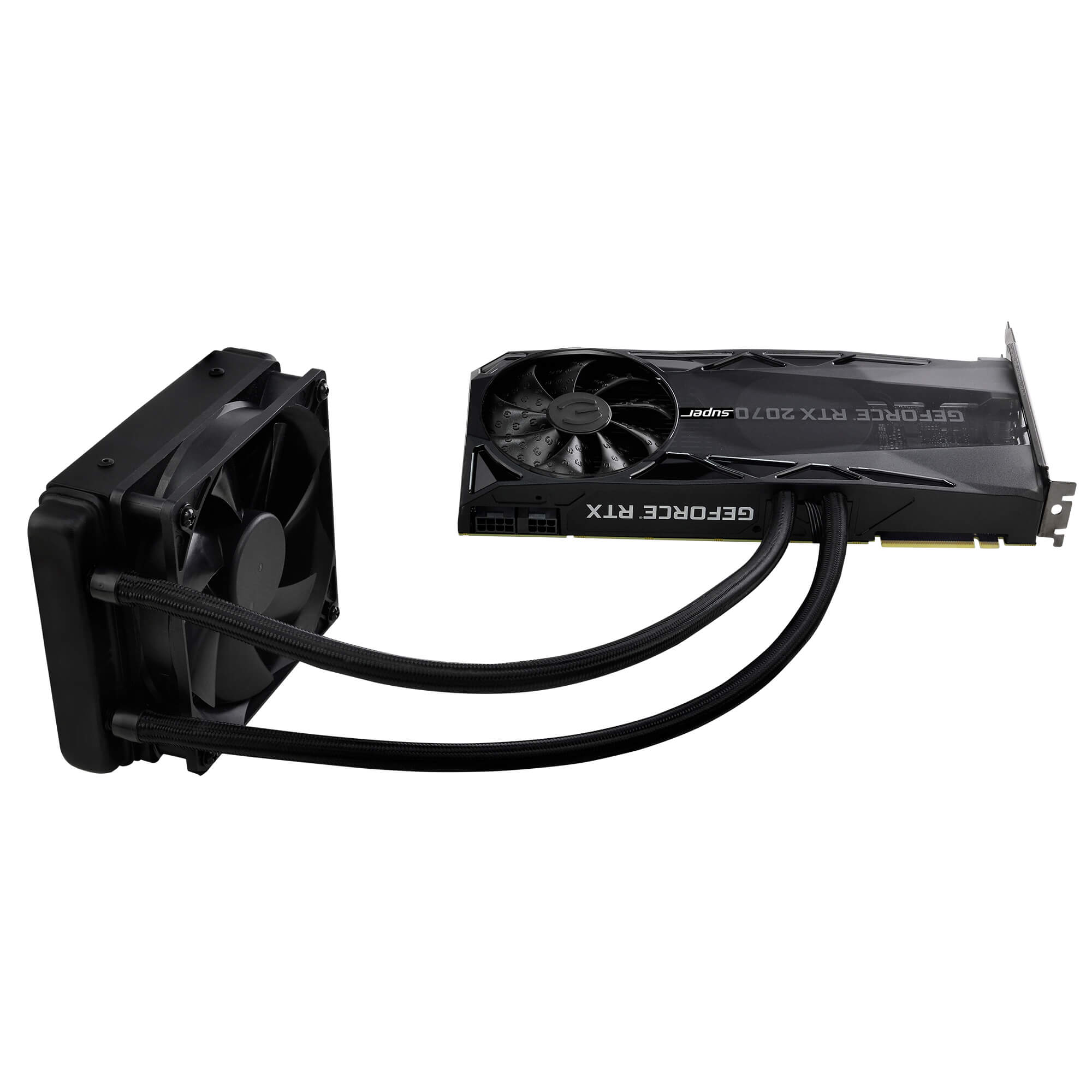
This is what it looks like https://images.evga.com/products/gallery/08G-P4-3178-KR_XL_5.jpg
 regal forge
So thats water cooled?
regal forge
I get what you saying now, So if i get a water cooler and dont get a water cooled graphics card it is a waste?@latent bronze
latent bronze
It is up to you if you want to go hybrid or not
latent bronze
@regal forge If you want to save money go for the air cooling one
regal forge
Okay appreciate that sorry not knowing much @latent bronze
ember sierra
It’s fine not knowing a lot u know
little osprey
Not sure if EVGA really deserves the title of "best" without further qualifiers
No idea why zotac is mentioned - do they have a particularly good card/sale/deal in that price range?
latent bronze
Zotac makes great dual fan cards that are also small
little osprey
Hybrid gpu coolers are just a headache
The ftw3 hybrid has got such nice hardware, but even it suffers from Q/C issues, hard to diagnose and fix fan/pump curve issues, list goes on
latent bronze
No idea how they're a headache when custom loops are the headaches
little osprey
While I rarely suggest custom loop configs as the first , go-to recommendation - TBH - they're only really a headache if you want it to be.
Like most things PC - read directions, do research, ask around a bit for input - you'll avoid 90% of the mistakes everyone else makes.
cursive wharf
Havent heard Zotac being good due to lack of proper VRM cooling
little osprey
Has that caused problems on those cards? - e.g. "evga 1080 reference PCB firework show" fun
cursive wharf
I dont think so. However they certainly cant be considered the best if they lack VRM cooling
which a fair few other cards do include that afaik. That doesnt mean they arent good however
but yes, that EVGA failure was certainly interesting
was it memory or VRM that turned to flames? dont remember
little osprey
Just a bad shipment of caps I think. Idk - I have a reference MSI 1080
cursive wharf
No no. The failure about lacking the thermal pads or smth
latent bronze
Well i haven't seen any issues with them from what i can tell
cursive wharf
I think it was this, still looking into it (btw this issue is fixed and shouldnt be a concern)
https://www.youtube.com/watch?v=WAbl0fLY06U

EVGA's overheating VRM issue detailed & list of affected cards :
http://wccftech.com/nvidia-gtx-1080-1070-evga-cards-dying/
EVGA's GTX 1080, 1070 & 1060 overheating VRMs issue Part 2 :
http://wccftech.com/nvidia-gtx-1080-evga-catches-fire-video/
Michael Duncan's YouTube Ch...
latent bronze
The only real problem EVGA had back then was with the 600 series
little osprey
I'm not aware of any GPu having notoriously problematic vrm cooling design flaws - most of that is just reddit hivemind FUD , I'm curious though
cursive wharf
seemed like it was a semi small issue. Maybe a bad batch I think
 dry tinsel
 zealous haven
Hey is anyone around
 tight bluff
Nope
 autumn scroll
so im planning on watercooling my gpu and adding another rad anyone know a good pump and res combo? currently on a pump that came in a ek classic pack
little osprey
i have my tubing hooked directly to the sink
sudden turret
@autumn scroll ek classic?
I use ekwb fluid gaming for cpu/gpu
oh I see
the 'classics kit'
autumn scroll
yea im not sure the name off the top of my head
tbh i bought the classic kit to see if i wanted to go further into watercooling
dark thistle
So I'm wanting a performance over looks build what is the best cooling case?
 mossy citrus
Im thinking on getting a prebuilt basic pc that has great specs and just throwing in a rtx 2060 or lower
muted patio
Gonna need a PSU to do that
And Dell tends to be poopy with their proprietary PSU sizes and such
it only comes with a 230 watt PSU from what I've read
You'll also need to be sure to get a short card
This is the inside
polar holly
Infinity how much are you looking to drop on the build
latent bronze
@mossy citrus You might think it would be cheaper to do that but in the end you're going to end up spending more money
polar holly
and these build have little to no upgradability so when you want to its a complete overhaul
muted patio
Which brings the price to $1000
When you could just do https://pcpartpicker.com/list/8Np8Zf
latent bronze
not to mention he would also need to get a PCIE USB 3.x header as well
Cause while it has 3.0 in the front the rear is always more powerful
dark thistle
@little osprey what was the case in your showcase
mossy citrus
Ok thx
 tranquil dust

polar holly
@dark thistle that’s a pco11 from lianli
muted patio
Nothing for the money
 eager chasm

You litterally asked what's better then said not to include everything that is better
eager chasm
Ryzen 5 3600X will get you double the treads for a bit more, but it's just about equal in gaming
polar holly
i would reccomend getting a 3600 non x and a beafy cooler
its roughly the same performance
eager chasm
^ value option
muted patio
The 9600 is a fine processor. Only upgrade path from there is an i7 or AMD part
polar holly
its like 4% differnece stock for the differnce in price
muted patio
Yup. totally not worth it
Honestly, not worth upgrading at all right now unless you want to do some encoding or high end gaming
eager chasm
Or rendering, or any heavy work
polar holly
and if your building a k series cpu make sure to get a z series board for it
eager chasm
Yea, it's not as open as the AMD offerings in overclocking
muted patio
Literally every AMD processor is unlocked
polar holly
and on all boards they are overclockable
eager chasm
And can OC on any board that can handle it
muted patio
Yup
ALthough I'm gonna be honest
I'm using the auto overclocking option
And it's damn near as good as manually overclocking
I'm not gonna push it for an extra 100-150 mhz
polar holly
if your not running water or a large aircooler its not worth doing a manual oc
eager chasm
Fire and forget the PBO, it's basically a free overclock without voiding warrenty
muted patio
I run water
eager chasm

muted patio
Getting 4.3 out of a 3700x letting it do it's thing. Not much more to be had there.
ALl core 4.3
Also, auto overclocking =/= PBO
polar holly
ohh yeah on that chip it isnt needed. i got quite abit when doing it on a 3950x
eager chasm
 PBO isn't overclocking of course, but the auto OC Hurts my performance as it lowers my boost lol
It's stupid...
Since the boost is always up increasing the boost feels like an OC
polar holly
If your ocing a chip make sure you done infinity fabric also
muted patio
Eh
That's wonky
any time you unlink it it goes 2:1
best to run slow ram to OC the fabric according to Gamers Nexus tests
Oddly enough
Something like DDR 2666 CL12 or 14 with OC'd fabric was the best
eager chasm
Ryzen 3rd gen is a crazy landscape....
muted patio
that's because it's two processors connected with a chiplet
on the same package
Unique beasty
polar holly
i found mine to personally run the best at 3733 with a 1 to 1 was giving me the best perfromance
muted patio
Well yeah, that's 1866 fabric clock
They typically max out at 1900
so you arne't 2:1
eager chasm
I can only get my RAM to it's advertised 3200 and I'm fine with that
muted patio
Fun fact though, that might actually be slower than lower clocked ram and unlinked
Lemme find it
polar holly
2:1 was giving hell of weird cpu timing
muted patio
have a read through here

Memory speed on Ryzen has always been a hot subject, with AMD’s 1000 and 2000 series CPUs responding favorably to fast memory while at the same time having difficulty getting past 3200MHz in Gen1. The new Ryzen 3000 chips officially support memory speeds up to 3200MHz and c...
It's funky
eager chasm
 everything about Ryzen 3rd gen is weird it takes everything about traditional CPU design and throws it out the window
polar holly
which isnt bad
eager chasm
It's great
muted patio
Innovation is never bad
eager chasm
Innovation is awesome
little osprey
W0t
tranquil dust
Uh oh
latent bronze
@muted patio I tend to question lists that is like 4 months old
latent bronze
the one you posted on memory
muted patio
From Gamers Nexus?
latent bronze
yes it was from September 4th
muted patio
So, processors haven't changed in 4 months, neither have motherboards or RAM?
I guess BIOS has
You think the new BIOS microcode would affect it that much?
latent bronze
never know
muted patio
I mean, the difference is mostly 3-4 FPS
I can't find a newer test that's nearly as in depth as that one. Have you seen one?
foggy hazel
@eager chasm re:bulldozer: it was a bet that AMD made at the time. IF it had turned out that the software stack had moved as they bet? it would have been a big win
 uncut surge
https://pcpartpicker.com/list/DRp4gJ is this fine
muted patio
Swap out the Samsung for a Sabrent Rocket 1 TB NVME
 mortal marten
its a great list
 drifting jetty
 muted patio
Yeah, PSU is too small
mortal marten
otherwise you got a slapping gaming build there
uncut surge
thx man
mortal marten
issa hack
muted patio
Right
mortal marten
your mind has been
muted patio
This is the list they posted in the other channel
mortal marten
freaked
uncut surge
@mortal marten is 650 w fine
mortal marten
its fine for 9700k and 2080s
muted patio
Eh, that's bare minimum
mortal marten
sure
muted patio
700-750 if you can
uncut surge
okay
cursive wharf
@uncut surge I'd go for this https://pcpartpicker.com/list/YqHjGc
little osprey
I trust some 650w psu's far more than something that feels worringly light and comes with the ketchup and mustard cables.
eager chasm
750w is pretty good until you start going into extreme processors or multiple GPUs
polar holly
why are we matching a 2080ti with a 3600
eager chasm
Cause why not
polar holly
fair
eager chasm
It won't bottleneck it in most games
polar holly
nah just more wondering why not go with like a 3700 with a 2080super
polar holly
you can run 1440p 144 on a 2070 non super.
cursive wharf
If you getting a 2080S or 2080Ti I'd hope you aren't playing 1080p. But 1440p or higher makes it basically equal on CPU perf
little osprey
From a practical sense- why blow $1200 on a gpu to shave $300 off a 3900x->3600
polar holly
yes but your also missing 2 core 4 thread for use in anything but gaming. persay streaming or workload
polar holly
like at the point you need a 2080ti you are wanting to be atleast at a 3700x uptil then you not going need it
little osprey
NZXT? I think the CM h500 hasdecent flow
cursive wharf
Dude was going Intel in the first place, to which I assumed was gaming only
little osprey
I know there are edge cases to 3600/2080 ti -or similar, but ofc rare
eager chasm
Nothing wrong with a 3600 and a 2080ti, unless the games are extremely multicore it won't make much of a difference
Not unless you are doing like workload stuff ontop of gaming
polar holly
not saying theres anything wrong but why drop that much money for it when instead drop it to a 2080super and get a stronger 3700x
eager chasm
Because in gaming the higher power GPU and lower core CPU will still get more FPS
cursive wharf
Given that it was originally Intel I came to assume it was a gaming only build. As such 3600+2080Ti was the best for a $1700 budget
little osprey
If you're in the market to spend that far into the diminishing gains spectrum of GPU's - (2080 ti /$1200 GPU) - you shouldn't have to be pinching pennies to include a $300 3700x
muted patio
2070 super or 5700XT. Unless they have 4K, 2080TI is overkill. Especially with the other components.
little osprey
(Generally speaking - for the average gamer)
polar holly
unless your aming for 75+ 4k its not needed
your pinching pennies for both a 3600, a b450 max board, a cheap cooler, and two sata drives
little osprey
75-80 avg fps on certain 4k games looks like drunk goggles imo - others like rocket league - perfectly fine, hard to notice.
TBH - I didn't look at the original build, but sounds like everyone has the same consensus
polar holly
https://pcpartpicker.com/list/YqHjGc this is the original
eager chasm
I'm gonna get that $190 4K 60FPS 50" TV in the spring if it's still priced like that
polar holly
what is the response time on it
eager chasm
Actually pretty decent
little osprey
Manufacturer response time is to be trusted like the 9900k's tdp = 95w. -usually
Reviews bring me more confidence
eager chasm
It's made by sceptre, they make decent budget options
cursive wharf
Esp since it's G2G response time and not C2C
muted patio
RTings is a good place to check for any kind of display
little osprey
But depending on your intended usage and prefernce - any number of other specs/features could make it a frontpage deal
I need to sticky my rtings/blurbusters/tftcentral copypasta in the #old-monitors-and-tv haha
Anyone see the leaked 10th gen stuff that intel has to offer?
so far https://rtings.com has shown to be reasonably honest and unbiased with reviews, they claim to buy store units, and never accept cherry picked review units.

RTINGS.com
Find the best products for your needs, based on our reviews, ratings and recommendations.
Seasonic makes reviewers buy from stores as well btw
muted patio
And that is why I go to them for all my TV/display reviews
polar holly
i have seen the leaks but wouldnt trust them until they get more concrete
muted patio
Leaks aren't to be trusted
little osprey
I'm thinking it's pretty real, But ya know it could be fake. It's really disappointing
wfctech leaks can sometimes sound like 3am #building-and-recc-chat peanut gallery haha
Lmao
eager chasm
no NVMe? 😮
eager chasm

mossy citrus
Yep
eager chasm
a MAC..... BURN IT
 proud galleon
@eager chasm might consider getting one but i already have the two on there so i stuck with those for now
eager chasm
$400 will build a nice integrated graphics build with AMD stuff.. but you'd still need a monitor
proud galleon
My build I have now is just over $400 (maybe $500 range) and it runs new titles just fine, with only an occasional dip below 60 fps.
You can go a long way with that amount if you save a little more
mossy citrus
Yea
proud galleon
guess it depends on what you play as well but yee
mossy citrus
Lol my dad and i both kno we need a new computer but he wont go custom
We found a great deal and i would put in a good gpu, but it has a bad psu
And i changed mymmind
proud galleon
once i went custom, i never went back (granted i’ve only been custom for maybe 2 yrs), but it’s beyond worth it
i didn’t know squat about hardware but that’s pretty much all i ever think about now along with upgrades etc.
mossy citrus
Lol
The prebuilt has these specs (besides the psu) for 500
And case
But like, i can top that with ryzen
proud galleon
yeah there’s plenty of options, and if you ever like to price hunt, Facebook Marketplace and plenty of other sites will sometimes have a gold mine of deals on those parts or even better
uncut surge
what is the deferens between all the rtx 2080 super cards
cursive wharf
@proud galleon that case doesn't seem to have nice airflow. Went with the best components I could go but had to change case form factor
https://pcpartpicker.com/list/DpN7wh
Ah wait nvm, I used 16gb RAM and not 32gb
But given that I assume it's a gaming build that shouldnt matter. If not the case then why 9700k?
proud galleon
I’ve already got the case, psu, and mobo (and storage from current build), but it is a gaming build
I’ve thought about going with the 9600k but I plan on upgrading continuously as I go, so I figure why not
I guess I’m a huge nerd for overkill and future-proofing.
cursive wharf
I mean realistically speaking selling the mobo and getting Ryzen is more future proof due to longer support of the platform. But meh. 9700k will last quite a while
muted patio
Well, Next year Ryzen is going to a new socket with Zen 3 so....
not for much longer
polar holly
the am4 is coming to an end at the end of 2020
gen 4 will be the last garunteed compatible on it
supposedly
polar holly
yeah so the upgradability is almost to an end for am4
eager chasm
They already stretched AM4 far past what was thought possible before.
little osprey
I've benched the 2080 ti on 2500k/7700k/3700x/9700k/9900k -
Personal prefernce - 9700k feels nicer vs 3700x.
I tell people 3700x for plug+play/upgrade potential on x570, 9700k/z390 for OC fun
polar holly
for gaming it will be better to go ninth gen intel if your trying to do more than gaming the 3700x will help more
foggy hazel
there is a good chance that zen3 will be a dual stack of sockets
because yes, am4 is getting old
eager chasm
If Intel don't also push IPC gains or clock gains next gen they have a real chance of falling behind in even gaming with this next gen 
polar holly
zen 3 is looking to better do cache and ipc. Not looking to go dual socket
muted patio
Zen 3 is reporting 17% IPC and 25% floating point in early runs
foggy hazel
rumours Bekora :)
muted patio
I can't see a dual stack socket
I can see a larger socket with more pins and a bigger heat spreader
eager chasm
With how AMD has been performing year over year those rumors aren't as far flung as one might think
foggy hazel
lets say that they decide that zen3 on am4 tops out at 32 cores
zen3 on am5 could go further
time will tell
Ryoku / there is a limit to how high you can go. and sooner or later a vendor will stumble.
it has happended to all of them, multiple times
polar holly
am5 is looking at zen4 while the end of am4 will be zen3
foggy hazel
that is the rumour yes
eager chasm
It's not roumor Zen 3 on AM4 is their product road map
little osprey
Without resintalling windows etc? Nice - check device manager and enable view hidden devices - it's funny to see both cpu.
foggy hazel
yes, and roadmaps change Ryoko, we wont know until they announce products
my stance, in case it seems confusing to people, is this: Wait and see. There are too many people with an interest in swaying you.
being caught up in the hype is imo a waste of time.
eager chasm
It's not really hype, information has been accurate since the whole Ryzen line started, and the road map has been adhered to almost religiously so far. At the current time there is no reason to not take some information with a smaller grain of salt, but still a gain of salt
foggy hazel
the IPC info is currently a rumour. (yes i know it was not you that mentioned that Ryoku)
and i doubt that amd expected intel to not have a response
as i said, time will tell.
another Conroe would be a pleasant surprise :)
(Core2Duo for those that might not know it by the Conroe name)
eager chasm
It's pretty clear if Intel can't get their innovations back on track they are going to fall behind. It's no secret that they've been struggling to shrink and improve meaningfully
14nm++++++++++++ can only go so far
foggy hazel
as i said earlier, yes and no
until their bottom line actually starts to hurt. They are not in trouble
and we are still a ways away from that
eager chasm
I'm not talking about their financial situation, I'm just talking strictly performance
little osprey
^^truth - I still find it hard to believe how fast 2500k/2600k's were for their time, not to mention x58's lineup of chips.
Then intel sat on their hands until coffee lake
foggy hazel
it might seem silly to the desktop people, but intel is king of laptops
little osprey
TBH - skylake x was cool, but x99 was warm garbage
foggy hazel
and the laptop market is gigantic
little osprey
If only skylake x refresh and cascade lake weren't so lukewarm
 short basalt
Is Intel actually the king of laptops? I'm not so sure
linus tech tips shows something different
eager chasm
With AMDs putting out less heat they are looking more appealing as laptop parts as time goes on
foggy hazel
yes, for the odd single model System64
little osprey
Currently - ya, kinda still - AMD is a gen behind on core arch for somer chips in the 3000 series, e.g. the 3400g is zen+ as well as the 3700H? in the laptop platoform
foggy hazel
the moment that someone at a serious biz can go and purchase a full lineup of laptops from top to bottom with amd chips in them, is when intel is in trouble.
eager chasm
My dad's laptop is AMD
foggy hazel
full lineup= thin&light, workstation and everything in between.
@little osprey everything with a gpu in it is a gen behind on the cpu arch
that is the way they have decided to roll it out (sadly)
eager chasm
Still not bad parts for what they are
little osprey
As with all pc stuff - few parts are truly bad - it's usually jus tthe price
In the case of the 3200g - that's fantastic for a non-gaming machine
foggy hazel
currently, the b450 replacement cant come fast enough
because a scaled down chipset would do wonders in perception
 old charm
are there any guides or anything on how exactly you are to "clean out" your pc?
I am a smoker and I guess I need to worry about that in the future
I know those pressurized air cans are used a lot
old charm
yeah
but you would reccommend that over the pressurized air?
i don't smoke cigaretes
muted patio
STill gonna get tar and residue build up
old charm
in my pc?
muted patio
Yes, smoke sinks
eager chasm
don't smoke near it
muted patio
Gets sucked into the fans
eager chasm
lol
eager chasm
brownies dont get the same damaging effects to electronics
old charm
yeah except those are expensive as heck to make
eager chasm
your PC is more expensive 😉
old charm
ill just smoke in the other room
mossy citrus
Hi
cursive wharf
@old charm I'd say smoke outside. So that nothing gets in the furniture either. Can help give a clearer mind depending on who you are, better for the guests, and really really helps resale value
woven horizon
I vape son 🙂
tranquil dust
I don’t cuz I’m healthy 😎😎😎
tight bluff
Vaping should be a criminal offence.
tranquil dust
No u
woven horizon
i smoked for 10 years and quit by vaping and my lungs feel and look healthy
tight bluff
Vaping originally was fine. It was a good concept. Then hipsters got to it.
woven horizon
RIP
tight bluff
Hipsters vaping is a good advert to smoke instead of vape.
woven horizon
smoking=tar vaping=vapor
tight bluff
Gonna get back on my penny farthing.
woven horizon
Ditto
tranquil dust
Now vaping kills people
 sacred obsidian
i originally did, but i dont mind the whole hobby around vaping becasue thats a thing for tobacco, alcohol, marijuanna, all that. People turn stuff into a hobby.
also vaping illegal marijuanna cartirdges that you don't know whats in it, kills people. vaping has proven to be much healthier than any form of traditional cigarettes, however vaping should not be done unless it is to replace cigarettes. its a healthier alternative, but not healthy
tranquil dust
Vaping is a hobby... that’s new
tight bluff
There's support groups for people who turn alcohol into a hobby
woven horizon
vaping fake cannabis is killing people
tight bluff
A support group for vapers should be a firing squad of sorts.
sacred obsidian
no theres support groups for people who cant not drink alcohol. I don't ever drink at all (literally once a year maybe) but i still love making mead and wine
tranquil dust
Meh I tried beer and it tastes like crap so I’m prob not gonna drink
sacred obsidian
i just dont like getting drunk lol.
tight bluff
When you drink enough, you no longer really get drunk
It's like unlocking the final perk in the tree
mossy citrus
tf
 olive hollow
Quick question, can you put a normal 3-pin fan into the rgb fan connector on a mother board?
little osprey
Don't do that - you mean the 4 pin rgb header? Post pics if unsure - a mismatch can short/damage and make the magic blue smoke.
olive hollow
Well I’m not currently home but on my motherboard there is a spot for a rgb fan header. I was wondering if putting a normal fan without rgb would work
cursive wharf
there is no RGB fan header. Only a fan header or RGB header. There are 3 and 4 pin of both headers
olive hollow
Okay so I marked what I’m talking about, I’m not the best with computers but I still know some of my stuff. It’s labeled as a rgb fan spot, can I put a normal fan there?
cursive wharf
fine print is rather hard sometimes
cursive wharf
no. It's for LEDs only
cursive wharf
no problem. We all go like that sometimes
olive hollow
So if I wanted to add more fans should I get a fan splitter?
 raven chasm
Hey excuse me, not sure if this is the right place to ask, but
I have a base RX 5700 XT, and it has a static red LED, but im trying to change the color or hide it?
is there something like a side GPU plate? I know that backplates exist
cursive wharf
@olive hollow yeah you'll need a splitter
 cobalt oar
New guy here, looking to make my first build here soon. But i was only looking to spend around $500, i understand that for that i wont get AAA games to play great.
cursive wharf
looking to do streaming?
is it going to be pure gaming?
meh CPU+decent GPU: https://pcpartpicker.com/list/BJVQyk
decent CPU+meh GPU: https://pcpartpicker.com/list/CM83Rk
@little osprey which do you think would be best for pure gaming? Maybe OC the CPU a bit cuz Zen is easy to OC
little osprey
Budget build part choice is so heavily determined by what's on sale at the time IMO. I'd actually just prioritize a mobo with a very strong community satisfaction rate
Most people won't miss 400mhz on the cpu clock, but a bricked board because of silly bugs/mistakes w/e is no fun
cursive wharf
Havent heard of VDH having issues tho
little osprey
That's a nice price on the 1650 super , thoes have the Turing encoder, yes?
little osprey
I don't know a thing about that board - but I do know the borads buildzoid endorsed are like $20 more - and I know that people flocked to buy them because builidzoid. That alone (they're also good boards haha) creates a huge support community.
B450/m gaming plus, the tomahwak, and maybe a few others.
cursive wharf
Feel like if they had issues it'd be a bit more known
little osprey
Oh, ya looking at reviews, that seems to be a great option - MSI really nailed b450
sacred obsidian
Wait you’ve had boards get bricked? I’ve always assumed mobo brand is the least important part of a build and literally choose based on position and amount of components vs price cause I’ve gotten some super cheap boards and never had an issue with em
For me the items I go cheap on are mobos and cases. Never bought a case more than 60 bucks lol.
little osprey
Yes, but only once in 2008 haha. I base that recommendation on the masses of upset users posting their problems on the forums/reddit etc.
sacred obsidian
I’ve had a mobo be doa once but that was the worst of it lol
 strange violet
I just added a 5.1 stereo surround card to my system
My next step is to buy the sound system and wall mounts to go all around my room and finish it
eager chasm
Good luck :)
muted dawn
Will these fans https://www.umart.com.au/Silverstone-Air-Blazer-120mm-ARGB-Fan-with-Controller---3-Pack_53335G.html be able to hook up to my motherboard? Asrock b450m pro4-f
Buy Silverstone Air Blazer 120mm ARGB Fan with Controller - 3 Pack - Umart.com.au Fast-Shipping & Pick-Up
eager chasm
@muted dawn they should
 normal cloud
@muted patio it was a monitor issue i got the new monitor today and the artifacts dont appear
muted patio
Thanks for the update!!
Learned something on that one, typically that's a GPU issue or a driver issue
normal cloud
ps. dont buy the cheapest monitor on amazon
foggy hazel
@muted patio share?
muted patio
Artifacting in game menus
foggy hazel
so, in uncapped framerate scenarios?
muted patio
Not sure about uncapped for all of them but any in-game menu
From Minecraft to CODMW
muted patio
We tested it with their TV to determine it was a monitor issue
foggy hazel
aye
foggy hazel
hdmi only monitor?
foggy hazel
hm
foggy hazel
mind, this is pure curiosity, but could you find the model number of the old and the new?
normal cloud
dp
foggy hazel
could i persuade you to turn of your machine, plug in hdmi again. and try again?
(so that hdmi is the only cable plugged)
normal cloud
just give me a couple minutes
foggy hazel
@muted patio for seeing if it is the "type" that the hdmi sees on the other end
no rush @normal cloud
normal cloud
Alright
foggy hazel
just give a shout whenever you have tried it :)
normal cloud
yea i did
foggy hazel
and it works without artifacts?
normal cloud
trash monitor huh
 upper condor
Hey guys, I just put together a pc on pcpartpicker and wanna know if its components are all good
I made it all rgb on purpose by the way
The AIO is because I wanna do some extreme overclocking
And I might get 16gb ram instead and a 1tb ssd
muted patio
Please choose a different case
The H510 has poor cooling and air flow
get something with at least two fans on the top
No real need for 32 GB of ram unless you're doing heavy video editing, etc
Do you plan to stream with this or just play games?
@upper condor
upper condor
Might do some light streaming
Thanks for telling me about that case, saw good reviews for a good price
Any recommendations then?
muted patio
nVidia is good for streaming, AMD is good for pure gaming
upper condor
I saw that, but I dont know how bad monitors are without g-sync or free-sync and g-sync monitors are super expensive
Or at least ones I've found
@muted patio any case recommendations then?
muted patio
I'm getting there, hang on
upper condor
Thanks a ton!
muted patio
I have two I'd recommend
Also, no real need for 32 GB of ram honestly. 16 should do you fine
Can save a little there
muted patio
I have 16 GB and game and stream on occasion with no issues
muted patio
They do but their encoder for streaming is top of the heap
AMD's is honestly garbage
muted patio
No
latent bronze
You mean CPU
upper condor
CPU sorry
muted patio
if you want to stream well, an RTX2060 is a good choice
upper condor
Mk
muted patio
Plenty of HP there
upper condor
Let me revise my parts for a sec
latent bronze
For 1080p could go lower with a 1660 Super or 1660 Ti
muted patio
Like I said, it depends on how much or how seriously you want to stream
upper condor
Does the pro-m have fans preinstalled?
latent bronze
I got a case suggestion as well
upper condor
latent bronze
and it comes with 4 fans
upper condor
Yes?
muted patio
Top exhaust 1 or two fans?
upper condor
Is it software?
latent bronze
top is 2
muted patio
That partpicker link is the same as the old one
😉
Rosewill case then
That's a nice one
latent bronze
@upper condor it is hardware or software
latent bronze
hardware there would be a button on the case and software would be from your motherboard
muted patio
I think if you swap to that Rosewill case it'd be a fine gaming PC
vestal cove
Ddr4 ram went back up
latent bronze
@muted patio If you look at the case more you can see all drives are hidden
muted patio
Yep, I had a look at it
upper condor
Yeah because I'd rather have a low price good thermal fan with no rgb
muted patio
Adding it to my recommendations
upper condor
Because all my parts are super rgb
upper condor
Yeah
muted patio
AIO top exhaust I should say
vestal cove
latent bronze
This is the one i am using lol https://www.newegg.com/p/N82E16811147298
upper condor
Do I need the AIO or could I go for a cheaper high quality air?
vestal cove
The aio is gonna be a tight fit
latent bronze
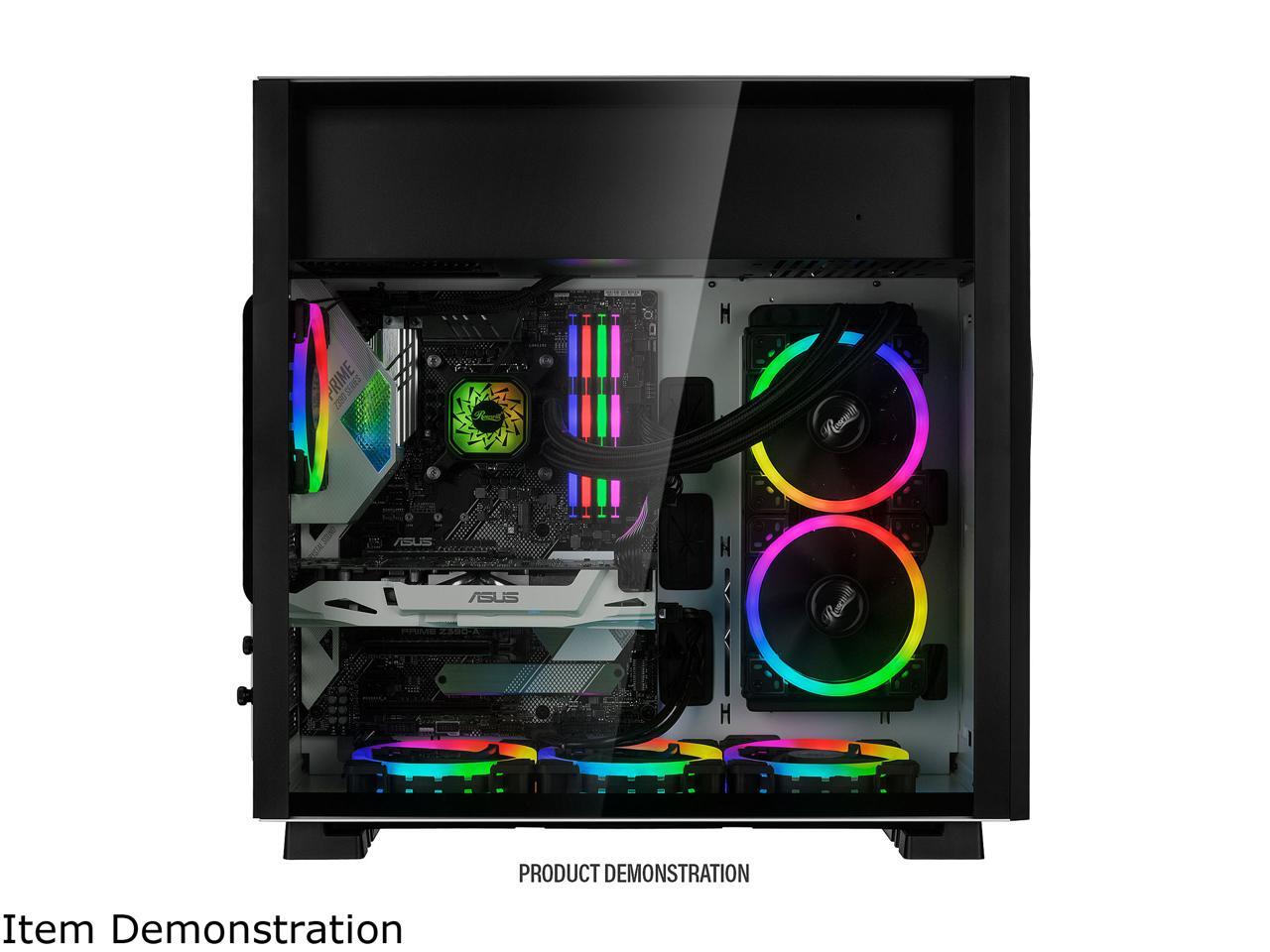
ya look at how you mount the AIO on this https://c1.neweggimages.com/NeweggImage/ProductImageCompressAll1280/11-147-298-V10.jpg
 vestal cove
The case looks like it’s upside down
latent bronze
R5 2600 and a GTX 1660
muted patio
It is
upper condor
what's yours bekora
vestal cove
muted patio
NZXt H440
vestal cove
I wanna get the Corsair icue 220t
muted patio
No longer available
upper condor
OoF
latent bronze
@vestal cove It is like a retro case with a modern look
vestal cove
Comes with some rgb fans
upper condor
What about your gpu and cpu?
muted patio
3700x/RTX2060
vestal cove
i5 9600k with rtx 2060
vestal cove
Im just gonna wait till the gpu drops price
upper condor
Yeah probably
latent bronze
I am changing my motherboard and memory to this https://pcpartpicker.com/list/m49VpG
latent bronze
I want a all white with RGB build lol
vestal cove
15tb
upper condor
Bekora chill on the storage
muted patio
She has a photog business lol
upper condor
Oh ok
vestal cove
14tb hdd
latent bronze
@muted patio from my case if you look the glass comes off a little different than most others
upper condor
Already have a headset tho
muted patio
Hinged glass
upper condor
But do monitors using v-sync work I've heard it kinda sucks
muted patio
V-sync?
upper condor
Yeah
muted patio
Gsync or Freezync is better
upper condor
I know
muted patio
Vsync can give issues
vestal cove
I have free sync on my monitor
muted patio
basically V-sync is a fixed refresh rate where the others are variable
upper condor
Yeah
muted patio
nVidia works with freesync
latent bronze
just got to use display port instead of HDMI
upper condor
I heard that but I dont know if that's with every monitor
I heard it's only on some
tranquil dust
Clock
latent bronze
It is pretty much every monitor that has a display port cause even the one i want i checked the main site and it says it works
muted patio
Yep
upper condor
Oh ok
tranquil dust
Did anyone see LSUs sweet dub yesterday
latent bronze
This is the monitor i want https://www.newegg.ca/p/N82E16824116781
vestal cove