#building-and-recc-chat
1 messages · Page 247 of 1
 mossy venture
 polar zenith
 upper sorrel
I'm going to get parts over time
upper sorrel
I'm going to get parts over time
Personally, I would not
I would save and buy all at once
I know bacca thinks this to
mossy venture
I would recommend making a set budget, saving, and buying at once
You won't be able to use any of it until you buy all of them anyways
Prices and availability also fluctuate a lot
upper sorrel
I understand that. I'm getting them with each paycheck
mossy venture
If a part is DOA, you won't be able to test it until you have all of them
And prices will likely come down by the time you have all of the parts
But if you really want alright give me a few minutes
Do you need wifi on the motherboard?
upper sorrel
Yes
mossy venture
Part List - AMD Ryzen 5 7600X
upper sorrel
Looks good, but i would like to add an additional gpu down the road
mossy venture
What power supply is in the build
upper sorrel
650 for now
mossy venture
Model?
There's a good few psus, especially considering how old the pc is, that aren't safe for modern gpus
upper sorrel
Corsair something. And since I'm looking at your build, I might be able to use this until I can get bigger builds. I Did not think about this.
mossy venture
Wdym?
Also, would it happen to be corsair hxi or axi?
If not, possibly rm/rmx, or cxf?
upper sorrel
Can't recall, I'll have to check in a bit.
mossy venture
When you have the chance to check you could ping me so I can let you know if it's alright or not. Any general idea of what to spend for the gpu?
upper sorrel
It might be the tx
Just looked at a picture online and recalled it, definitely a tx650
upper sorrel
Should survive long enough until I get a new psu.
mossy venture
Depends on what gpu you go for
mossy venture
I'm really unsure of it, id have to check with someone else before I'd feel safe saying it would be fine with certain gpus
@cyan ravine if you're available, how's 2014 corsair TX you think?
mossy venture
upper sorrel
What I can do until I get a new gpu is use my xfx radeon 580
Yeah thats 100% fine
Well, any idea of budget for gpu?
Also, do you have a 1440p monitor?
upper sorrel
I am probably going to just use what you got me from pcpartpicker until I can start building from the ground up. I believe my monitors are 1440p. If it helps, I remember them being 27 inches each
 stoic island
Enthusiast TX should be okay for now
upper sorrel
Ty 😁. This will help alot.
 potent portal
Agreed even old TX should be good enough. I'd consider it to be of a reduced optimal load due to the aging bulk capacitors.
That said, even 550W is plenty for most computers unless you get into higher end stuff or start overclocking.
A 7600X with a 7800XT should be good, and easily play 1440p at high refresh.
mossy venture
That's what I was thinking yeah, I figured anything above 7800xt area would be a bit much
 cyan ravine
mossy venture
<@101107951401455616> if you're available, how's 2014 corsair TX you think?
cyan ravine
mossy venture
<@101107951401455616> if you're available, how's 2014 corsair TX you think?
One of the few remaining units I'd trust from that era, AX, HX as well
Also
Different design
They can revise the entire cooler underneath the shroud as well
So it can even look the same, and still be completely different
Good example? Look at the gigabyte eagle 6600, then the 6700xt
Same shroud
Same backplate (different colour)
Heatsink underneath is totally different
To my knowledge the asus dual I don't recall any bad feedback from rdna 2. Only the mech's and ventus' really

TweakTown
ASUS has a mighty fine 1080p and 1440p gaming GPU that sips power with the custom Radeon RX 6600 XT DUAL, Navi 23 shines again.
Looking everywhere to find dual reviews but I don't see anything from the 6700xt
I've found some 6600/xt ones but again, likely a different heatsink under the shroud
cyan ravine
cyan ravine
Good example? Look at the gigabyte eagle 6600, then the 6700xt


Oh hey you know what the shroud is slightly different too mb
Like they cut an extra piece on the right side and a line for the rgb
When I had them side by side in hand they were the exact same size tho
Yeah idk about 6000 dual, I'll take your word for it tho
 fleet pagoda
Anyone know why gpu utilization would spike from 0% to 80% with nothing open
 little osprey

This is so confusing
Can anyone help me out
Trying to add Front Pannel PC case cables

 desert plinth
little osprey
desert plinth
little osprey
What's your question? See the white text just under the pins in your first pic? Those align with the cables. + to +
little osprey
desert plinth
What's your question? See the white text just under the pins in your first pic? ...
Yea am a bit confused on that
Since some come with 2 pins
And some just 1 pin
desert plinth
It's ok. Still do + to +.
desert plinth
No...it's vertical. If I'm understanding you correctly. Probably a decent yt video on it too if you wanna double check.
Looking at the picture as it is oriented, there are, in effect, two columns. The cables align vertically
polar zenith
little osprey
Is this b650m
potent portal
little osprey
 little osprey
polar zenith
Is this b650m
little osprey
polar zenith
Is this b650m
Yes
potent portal
potent portal
Yellow power, green reset, orange power LED (+ left), purple HDD activity (+ left)
For buttons polarity doesn't usually matter unless they made it wrong
polar zenith
potent portal
Move the reset over one pin
No room over there tho?
potent portal
Then the HDD LED is probably also too far over
little osprey


Y’all think this is going to work
Need more zipties
Thoughts on cable management?
potent portal
I've seen worse for an amateur build
polar zenith
potent portal
Then the HDD LED is probably also too far over
What will happen if theyre like this? Have not had issues so far, I will move them tmr
little osprey
potent portal
I've seen worse for an amateur build
My second build. I just need zipties to make the cable management better. What’s your thoughts on my management
Power is looking disgusting tho
potent portal
Potentially the LED could short the reset switch pins and cause weird behavior
little osprey
potent portal
Potentially the LED could short the reset switch pins and cause weird behavior
I will just remove the LED switch
And the reset switch
potent portal
At the very least the HDD LED will be non functional
little osprey
No need for it
potent portal
Yeah I leave it off too
little osprey
I feel like I did good. Kept it organized
potent portal
The light is too bright on so many cases
polar zenith
potent portal
Potentially the LED could short the reset switch pins and cause weird behavior
Okay so I will do this tmr and show you in here
little osprey
potent portal
The light is too bright on so many cases
I did have 1 and a half pea size of thermal paste
Is that cool?
potent portal
Should be fine
little osprey
Apreciate it. Let’s see if it works tmrow
potent portal
GL
Looks good from what I can see.
As for cable management I'm the type that says "eh, I'm not looking at the back so as long as it closes..."
little osprey
Back is probably the most important
Future upgrades make it super easy
If it’s organized
You can see my cables don’t tangle with each other, and are in different areas
polar zenith
little osprey
What GPU is this?
little osprey
polar zenith
What GPU is this?
It’s a 4060ti but I got it for $200. Going to upgrade to a 4070ti / 4070 Super / 7800 XT soon
Ryzen 7 7800X3D 8-Core, 16-Thread Desktop Processor
^CPU
polar zenith
You turn it on yet?
little osprey
Ram 32Gb DDR5 ram 6000hz
little osprey
polar zenith
You turn it on yet?
Not yet, need more zipties
Want to make sure it looks good first
But am certain it’s good
@strong raft why you hating
If need be
I just cut them and fix it
Damn
I will open it right now
Because of you
 strong raft
Popcorn ready for when/if the pc doesn't boot 1st try after spending however long on tidying up cables, no hate intended on the zip ties. 
little osprey
Let’s see
polar zenith
strong raft
Popcorn ready for when/if the pc doesn't boot 1st try after spending however lon...
lmfao
He did say back panel is the most important tbf
strong raft



 polar zenith
little osprey
Just need to figure this out
polar zenith
little osprey
Just need to figure this out
Must be lack of zipties
little osprey
 little osprey
polar zenith
Must be lack of zipties
little osprey
polar zenith
Must be lack of zipties
Yep
Probably
No error codes at the buttom of the motherboard
@strong raft get rekt
Should have trusted me
strong raft
Technically didn't fully boot though.debug leds are proof
little osprey
strong raft
Technically didn't fully boot though.debug leds are proof
It’s missing wiring
Or something not connected to motherboard
But that’s it
polar zenith
little osprey
Or something not connected to motherboard
You're proving our point guy
You are digging yourself a hole lmao
little osprey
More zipties will solve it
strong raft
Boot led is irrelevant while windows isn't installed. For vga led, hook hdmi cable from monitor to gpu, then restart pc
strong raft
Stop pinging me. What error codes? Those 2 leds are the debug "codes", and gave input about them. Also probably missing standoffs at bottom of mobo, could maybe cause an electrical short.
 polar zenith
...
strong raft
 little osprey
strong raft
little osprey
strong raft
2 standoffs need a longer screw
strong raft
All the stock standoffs are identical, and case comes w/ enough screws. Issue is just if there's a couple missing screws and/or standoffs below mobo.
polar zenith
strong raft
All the stock standoffs are identical, and case comes w/ enough screws. Issue is...
This^
polar zenith
strong raft
All the stock standoffs are identical, and case comes w/ enough screws. Issue is...
Once forgot 2 screws, terrible
and standoffs*
 polar zenith
Yes
strong raft
Called it. Example:
 little osprey
Yep
polar zenith
So take the mobo out, mark the holes, and add standoffs where you currently do not have
strong raft
mobo to be allowed to flex, and/or various parts of underside of mobo touching the metal
potent portal
The standoff is meant to keep the motherboard perfectly flat
Or at least as flat as the case is
polar zenith
little osprey
And how would this cause an electrical short?
will touch the medal, it helps support the mobo and secure it
 little osprey
strong raft
Called it. Example:
little osprey
strong raft
Called it. Example:
Also it’s not A and G
strong raft
That was a random pic I had...
strong raft
 potent portal
Sometimes you get a weird motherboard that's between ITX and mATX that extends past the ITX holes but doesn't reach the mATX ones, but I don't think that's the case here
The ones labeled L and M in that pic will help reinforce the board and fight flexing when you plug/unplug the 24 pin cable
little osprey
potent portal
Sometimes you get a weird motherboard that's between ITX and mATX that extends p...
Am chilling, they are at the buttom. Just support
potent portal
B and R then? Those should be ok to just leave alone
little osprey
Just L and M
strong raft
#building-and-recc-chat message ok Fal, you're tagged in.
potent portal
I'm only sporadically on today, recovering from injuries
Plus my main PC is dead as they get
little osprey
potent portal
I'm only sporadically on today, recovering from injuries
Hope you feel better
Wish you the best
little osprey
❤️
Just to confirm with you
L and M aren’t that big of a deal
Since they are only at the buttom
potent portal
L and M are the ones under the 24 pin
polar zenith
little osprey
L and M aren’t that big of a deal
You need everyone.
Find the ones you are missing
Takes your mobo off
Install the standoffs
Resit your mobo
Make sure you have a standoff in everyone hole
And screw in
little osprey
Man
potent portal
Not necessarily, but they are good for reinforcement. You can use a motherboard with no screws at all if you had to. Heck stick it in a cardboard box.
little osprey
potent portal
Not necessarily, but they are good for reinforcement. You can use a motherboard ...
Can I just use a long screw 💀
Not taking the motherboard off
potent portal
That goes against the very purpose of the standoff
polar zenith
little osprey
Not taking the motherboard off
Then deal with the consequences lmao
little osprey
Yep you right
potent portal
The point of the standoff is to keep the motherboard from flexing towards the case
little osprey
potent portal
That goes against the very purpose of the standoff
And 1 more question
It’s cool to be getting these

If you haven’t installed windows yet?
polar zenith
We have asnwered that already
little osprey
No boot yet anyways
potent portal
If you can get into bios then yes that's fine
potent portal
If you can't get to bios then double check your GPU power and slot seating
little osprey
👍 thank you.
 sage widget
Hello, im upgrading my cpu right now and im trying to screw the cooler in but i need help. Its an AMD cooler with spring loaded screws but i just cant screw them in.
cyan ravine
Try the opposite corner
It will be difficult yes but the torque of the opposite corner (also good dispersion as a result) will make it physically easier
sage widget
How much force should i be using i really dont want to mess up the cpu i just bought
cyan ravine
If you're following the instructions properly then it will go in, consider a screwdriver to push a little further
There's no concern for the cpu, only the motherboard
sage widget
ok thanks
cyan ravine
Just be careful not to scratch the mobo
Some screws are sharp
As long as you're following the instructions it should go on properly
Even if it is a pita
sage widget
tried every screw pressing down like crazy and not a single one will come down even a little as far as i can tell
cyan ravine
Double checked the bracket is on correctly?
sage widget
wdym
cyan ravine
Not screwed on upside down maybe
little osprey
potent portal
The point of the standoff is to keep the motherboard from flexing towards the ca...
Standoffs have been added. Able to screw in the entire motherboard now, also doing the led + and negative and reset as well
cyan ravine
What cooler is it
sage widget
I dont know what cooler is it but it came with the Ryzen 5 5600
sage widget
Yeah
cyan ravine
Ok no that only goes on one way out of the box
Keep trying
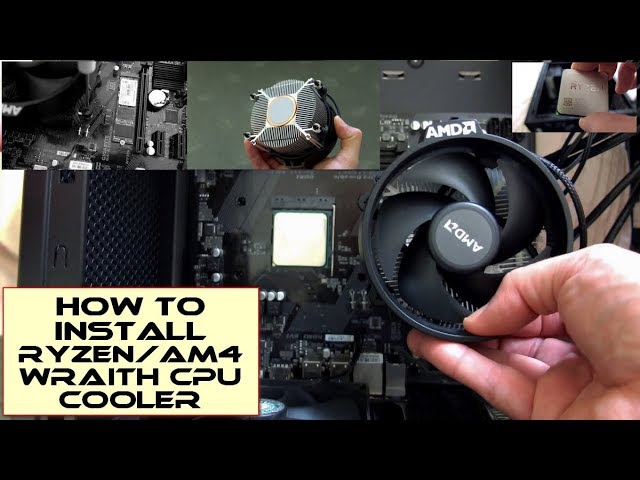
AMD Ryzen CPU's Amazon - https://amzn.to/3r6G5Tv (USA/Can/Europe)
A clear and quick guide to installing a Ryzen CPU and the stock heatsink/fan/cooler supplied with many AM4/Ryzen CPU's. Please note the procedure for installation is the same on AM4 and AM5 motherboards, both have an identical design. AM4 coolers can be used on AM5 boards too. The...
sage widget
watched it before
Easily using more force than him and nothing changes
only other way ive seen people solve similar problems has to do with the backplate so i guess im gonna look at that
Looks like that might be it
yes it was
amazing
hold the backplate on while screwing it in bit by bit each screw
 frigid jackal
2 beeps with an asrock motherboard
any ideas? both short beeps
pc partpicker says memory issue type stuff but 2nd opinions r great 👍
potent portal
frigid jackal
2 beeps with an asrock motherboard
What model?
frigid jackal
B365
potent portal
And it's not able to get to bios?
Have you cleared cmos yet?
What memory are you using?
It does appear that the 2 short beeps are memory related, but the cause can be any one of many different things
@frigid jackal
frigid jackal
im on my pc rn
i be chilling
it happens someitmes but never causes any major issues
just when my game finishes loading or sumn
Gonna wait until it becomes a major issue before I do anything ngl 🥱
potent portal
That sounds fair to me
 south cliff
Can I put the fans on this side so I don’t block the rgb from the ram or is it better if I put it over the ram?
 polar zenith
south cliff
Can I put the fans on this side so I don’t block the rgb from the ram or is it b...
polar zenith
south cliff
Can I put the fans on this side so I don’t block the rgb from the ram or is it b...
Uhhhh
Hm
 hasty cove
welp im back for help
is anyone able to help me with a bluetooth issue
i have a B550M pro VDH mobo
but for some reason my pc wants to say my pc doesnt have any bluetooth compatability
when it worked before
and i dont see the bluetooth in the system manager
 fossil cedar
south cliff
Can I put the fans on this side so I don’t block the rgb from the ram or is it b...
fossil cedar
south cliff
Can I put the fans on this side so I don’t block the rgb from the ram or is it b...
That's fine
 late fjord
Built in clips for the nvme is amazing
 fossil cedar
They're a lifesaver
late fjord
Thankfully everything posted first try 🙌
polar zenith
What would cause my CPU tempature to sometimes be read and others not be?
Lilke I just booted it up and it is not reading, but 30 min ago it was
south cliff
fossil cedar
That's fine
Alright will there be any thermal difference?
I haven’t got all of my parts really just wanted to open them
fossil cedar
south cliff
Alright will there be any thermal difference?
If so probably not much
south cliff
fossil cedar
If so probably not much
Alright thanks I might try both ways to see which way I like better and see if there is a thermal diff
Difference
little osprey
I just opened up BIOS on a new pc. The memory shows DDR5 @4800 MHz. When the ram I purchased is 6000 MHz?
stoic island
It runs on jedec speeds by default, enable xmp/expo to reach advertised speeds
little osprey
Bet thank you
polar zenith
little osprey
I just opened up BIOS on a new pc. The memory shows DDR5 @4800 MHz. When the ram...
Enable xmp
little osprey
stoic island
It runs on jedec speeds by default, enable xmp/expo to reach advertised speeds
I see Dram Frequency DDR5 - 4800 Auto
Do I change it to my advertised speed?
polar zenith
little osprey
I see Dram Frequency DDR5 - 4800 Auto
Take a photo
Of you in your bios
stoic island
XMP/EXPo is usually a separate setting
 polar zenith
Yes
little osprey
Bet
polar zenith
You need to do that
little osprey
Yep
sage widget
I just upgraded my cpu and when I play graphic intensive games it shuts down my pc after a little. I think its because of temperature but I JUST put more thermal paste on it since the problem started and nothing has changed. Any help?
little osprey
sage widget
I just upgraded my cpu and when I play graphic intensive games it shuts down my ...
You might need a better AIO
If your willinf to spend
$40
I can recommend you one
sage widget
the cooler i got rn came with the cpu its brand new
and somehow doing worse then my old one
little osprey

Thermalright Peerless Assassin 120 SE ARGB White CPU Air Cooler, 6 Heat Pipes CPU Cooler, Dual 120mm TL-C12CW-S PWM Fan, AGHP Technology, for AMD AM4/AM5/Intel LGA1700/1150/1151/1155/1200
Let me get you a black one
1 sec
sage widget
oh alright
little osprey

Thermalright Peerless Assassin 120 SE ARGB CPU Air Cooler, 6 Heat Pipes Cpu cooler, Dual TL-C12C-S PWM Fan, Aluminium Heatsink Cover, AGHP Technology, for AMD AM4/AM5/Intel LGA1700/1150/1151/1155/1200
This is a really good AIO
let me show you a picture

Its right above the GPU
polar zenith
That isnt a aio lmao
little osprey
polar zenith
That isnt a aio lmao
Yea but I call it a AIO
sage widget
little osprey
i doubt this will fit in my pc
little osprey
Sure
sage widget
1 sec
polar zenith
sage widget
cant send it here
Yes you can
sage widget
alr ill just do that
little osprey
I have a Ryzen 7 7800 x3d and its doing very well
little osprey
then just dm
south cliff
sage widget
I just upgraded my cpu and when I play graphic intensive games it shuts down my ...
Check temps and make sure the plastic on the bottom of your air cooler is off
Hwinfo is a good way to check temps
Dang the 7900xtx open box is 850 I just got the 4080 for 827
potent portal
That's a close enough price difference that I'd call the 4080 better still if you're ever going to use ray tracing and other features
south cliff
I use ray tracing a little bit especially in cyberpunk
Cyberpunk is the game I really use ray tracing in
potent portal
That game in particular loves nvidia so if you play it a lot then you made a good choice still
south cliff
I play Roblox a lot
potent portal
And that one doesn't care if you're on a 4090 or a 6500 XT
south cliff
And I been getting into helldivers until I sold my 3090 pc
I got 1800usd for that pc did I get a good price?
potent portal
Probably? idk for sure without a full parts list but probably
south cliff
Part List - Intel Core i5-12600K, GeForce RTX 3090, Phanteks NV5 ATX Mid Tower
I didn’t pay retail for everything
Like gpu and the cooler
And ram
And got a few discounts for the psu and case
potent portal
Yeah you basically scammed the poor buyer with those parts used
south cliff
I gave my old 6800 and 150 dollars for the 3090
south cliff
potent portal
Yeah you basically scammed the poor buyer with those parts used
I didn’t want to he offered
potent portal
I'm not being accusative, just an outside perspective
south cliff
Yeah I know I was just saying he said he wanted it for the 3090s vram
He said he was going to run a drone program or something like that
potent portal
Maybe some sort of image recognition/face detection program with that
south cliff
It was a drone mapping program I’m pretty sure
potent portal
Ah interesting
south cliff
It’s called pix4d
polar zenith
south cliff
I got 1800usd for that pc did I get a good price?
Yeah you absolutely scammed them lol
 plucky timber
Based
 obsidian wolf
Any comments about the DeepCool AK620 DIGITAL
Planning on probably upgrading my last year build today
and thinking that I want an Air cooler because Im unsure if im cool with a radiator that has a time set before it dies
also it seems that legit on the price range i got the 6950 xt still I can not find anything that beats it if I do a trade in and was looking to get a similar value/quality out of it
strong raft
Worth a check also is Thermalright Peerless assassin, phantom spirit, frost commander, frost spirit. Most of these are often below $50
 crimson zinc
@supple token what’s your desired aesthetic?
 supple token
Idk much about pc, ppl just told me to look for a i9 4070 with a ddr5
crimson zinc
supple token
Idk much about pc, ppl just told me to look for a i9 4070 with a ddr5
They were particularly wrong
Do you just wanna game?
supple token
Yeah
crimson zinc
supple token
Yeah
Do you want a 4090?
It’s a bit pricey, and there are 4080 supers that have good quality.
supple token
crimson zinc
It’s a bit pricey, and there are 4080 supers that have good quality.
Yh I can do 4080
crimson zinc
4090 does surpass it.
But I’ll make you two builds.
Any specific colour theme? Like white or black?
maybe some RGB, or we can go just plain?
supple token
crimson zinc
Any specific colour theme? Like white or black?
Black
@crimson zinc
Rgb yeah
crimson zinc
Part List - AMD Ryzen 7 7800X3D, GeForce RTX 4090, NZXT H5 Flow RGB ATX Mid Tower
Or
https://pcpartpicker.com/list/7N79pB (this is the 4080 super, it’s a bit less powerful, but still good.
Part List - AMD Ryzen 7 7800X3D, GeForce RTX 4080 SUPER, Montech AIR 903 MAX ATX Mid Tower
supple token
crimson zinc
https://pcpartpicker.com/list/7N79pB (this is the 4080 super, it’s a bit less po...
Yh im liking this one
crimson zinc
If you wanna take full advantage of the 4090, I’d suggest doing an OLED monitor, such as https://pcpartpicker.com/product/qfpQzy/acer-predator-x27u-bmiipruzx-270-2560-x-1440-240-hz-monitor-umhxxaa001

Acer Predator X27U bmiipruzx 27.0" 2560 x 1440 240 Hz Monitor (UM.HXXAA.001)
supple token
Do I have build it ?
crimson zinc
supple token
Do I have build it ?
Yes.
Although, you could check around for some friends who know how, or maybe a local tech shop that will build it for a fee.
If you want a prebuilt, I can also look for ones for you.
However, it will be MUCH more expensive than to just build it yourself.
supple token
crimson zinc
If you want a prebuilt, I can also look for ones for you.
Yh that would suit me
supple token
Not available in Canada
 crimson zinc
@mossy venture or @cyan ravine might be able to help then. My phone doesn’t allow me to get CA websites easily.
For reference you two, he wants either a 4090 or 4080 super, black style, with RGB. but only prebuilt.
supple token
Around 2k
mossy venture
For the pc, or pc+ monitor
 marsh kiln
what would be a 2x16GB kit for laptop ram for this desktop computer im looking for? and not to expensive either please
 iron berry
https://pcpartpicker.com/list/vHcjCd
working on a lift for a friend with them, they want intel and nvidia, case is also non negotiable theme is white build
anything people would change out to make it better
Part List - Intel Core i5-13600KF, GeForce RTX 4060, Lian Li O11 Dynamic Mini Snow Edition ATX Mid Tower
crimson zinc
Part List - Intel Core i5-13600KF, GeForce RTX 3060 12GB, Lian Li O11 Dynamic Mini Snow Edition ATX Mid Tower
Here’s my take
Only a little bit more expensive. 50~ bucks
Couldn’t find that PSU on the list, so I went with something I could
mossy venture
iron berry
https://pcpartpicker.com/list/vHcjCd
working on a lift for a friend with them, t...
I would change almost all if not all of it
What is the pc being used for
iron berry
gaming and some photo and maybe video editing
mossy venture
Ok, give me a lil bit
iron berry
price range is 1200
iron berry
crimson zinc
Couldn’t find that PSU on the list, so I went with something I could
any reason for going down to the 30 series instead of a 40 series card? besides the vram
mossy venture
Option A, over budget
https://pcpartpicker.com/list/yxFy7R
Part List - Intel Core i5-14500, GeForce RTX 4070, MagniumGear NEO QUBE 2 ATX Mid Tower
Bit cheaper
https://pcpartpicker.com/list/Fp9PN6
Part List - Intel Core i5-14500, GeForce RTX 4070, MagniumGear NEO QUBE 2 ATX Mid Tower
And in budget
https://pcpartpicker.com/list/wnT39c
Part List - Intel Core i5-13400F, GeForce RTX 4070, MagniumGear NEO QUBE 2 ATX Mid Tower
7800xt white is 520 as well which is good value
Otherwise I'd do a black 7600, 6700xt, 6800, or 6800xt
Or a used/refurb 3060 ti or 3070
4060 is really really bad value
It's about 30% worse than a 3060 ti
iron berry
Where I had trouble was keeping the all white theme for them and the budget
mossy venture
Cheapest nvidia gpu that's worth buying new is a 4070
iron berry
I will check those out in a second appreciate it
mossy venture
They all kept the aesthetic
So should be all set
I'm gonna do one more option rq
Ssd is free with the cpu on newegg
https://pcpartpicker.com/list/LFT39c
Part List - AMD Ryzen 5 7600X, GeForce RTX 4070, MagniumGear NEO QUBE 2 ATX Mid Tower
iron berry
amd makes it easier
ill show them the option much appreciated
you also did change the chase which the one non negotiable thing for them
mossy venture
I mean he can change it back if wanted
But it's near identical and $40 cheaper
$50?
Not sure
Can also check out the montech sky two
supple token
mossy venture
Sorry I just got back
Pre built
iron berry
ill chat with her thanks for all the options
mossy venture
supple token
Pre built
Alright, not really going to be any 4080/4090 options in 2k cad
supple token
mossy venture
Alright, not really going to be any 4080/4090 options in 2k cad


Is this good
It’s 1.7
mossy venture
1700 cad?
mossy venture
Looks fine
supple token
Any coupon code you have ?
mossy venture
I do not
 lone flame
supple token
lone flame
supple token
218 dollar shipping 💀
crimson zinc
@mossy venture best 950w or 1000w PSU?
I was thinking of not needing my 1050w since my draw is only possibly 731 according to pcpp
Put this in there for now.

 limber oyster
My next card should arrive Friday
south cliff
limber oyster
My next card should arrive Friday
What are you getting
mossy venture
crimson zinc
<@654444344274845698> best 950w or 1000w PSU?
I was thinking of not needing my 1...

be quiet! Pure Power 12 M 1000 W 80+ Gold Certified Fully Modular ATX Power Supply (BN506)

Thermaltake Toughpower GF A3 - TT Premium Edition 1050 W 80+ Gold Certified Fully Modular ATX Power Supply (PS-TPD-1050FNFAGU-L)

Cooler Master MWE Gold V2 ATX3.0 1250 W 80+ Gold Certified Fully Modular ATX Power Supply (MPE-C501-AFCAG-3)
crimson zinc
Sweet. So the build is looking like this now.
Part List - AMD Ryzen 7 7800X3D, GeForce RTX 4090, Phanteks ECLIPSE G500A DRGB ATX Mid Tower
Unintentional white theme
crimson zinc
Could you swap that? I am cooking some eggs atm
mossy venture
Also gm7000 is a better ssd for same price, or mp44l similar for same perf
Part List - AMD Ryzen 7 7800X3D, GeForce RTX 4090, Phanteks ECLIPSE G500A DRGB ATX Mid Tower
 polar zenith
What's with the random keyboard?
mossy venture
crimson zinc
I thought they were bad
From what I know it's a good psu
Could double check w felix
crimson zinc
polar zenith
What's with the random keyboard?
Came to my doorstep
Ain’t gonna buy one if I got one for free
polar zenith
crimson zinc
Came to my doorstep
Ain’t gonna buy one if I got one for free
Huh?
crimson zinc
polar zenith
Huh?
Basically, meant for another state, same address. UPS around here is not intelligent.
crimson zinc
 obsidian wigeon
the vetroo is at least a b tier psu
obsidian wigeon
the vetroo is at least a b tier psu
So this would be the better list
Part List - AMD Ryzen 7 7800X3D, GeForce RTX 4090, Phanteks ECLIPSE G500A DRGB ATX Mid Tower
limber oyster
south cliff
What are you getting

 muted shore
Hey fellas
One of the helpers helped me here with this build.
I was wondering if I can upgrade this one to be a little better with a bit more investment
r7 5700x
b450 gaming plus max
rtx 3060 12gigs
G.SKILL Ripjaws V 16GB x 2
TEAMGROUP T-Force CARDEA Zero Z44L 500GB
cooler master mwe 650 bronze v2
Can't get used ones
muted shore
muted shore
r7 5700x
b450 gaming plus max
rtx 3060 12gigs
G.SKILL Ripjaws V 16GB x 2
TEA...
1200usd
little osprey
muted shore
r7 5700x
b450 gaming plus max
rtx 3060 12gigs
G.SKILL Ripjaws V 16GB x 2
TEA...
Are you building your pc or is it already built?
 proven jackal
can someone help me price my pc
I’ve had it for 1 year but I need to sell
4K Gaming Computer i9-12900k RX 7800XT 32GB DDR4 Ram 2TB SSD
CPU = i9-12900K
MB = Gigabyte Z690 Aorus Elite AX DDR4
GPU = Power Color Red Devil RX 7800 XT 16GB GDDR6 Limited Edition
Ram = Corsair DDR4 32GB 3600Mhz
SSD = Samsung 970 Evo Plus 2TB
PSU = Cooler Master MWE Gold 850 V2 80+ Gold
Just give me a rough estimate of what you’d buy it for
just need help on pricing it
limber oyster
little osprey
You can get a 7800 XT for the same price
No?
7800xt version of the taichi
 potent portal
7800 XT is $500 in the US
lone flame
6800 XT is almost the same as a 7800 XT
limber oyster
Exactly
potent portal
For the most part yeah, just no AV1 on 6800
limber oyster
I don't even think ill be using av1
lone flame
limber oyster
I don't even think ill be using av1
if your username is true why do you need a 6800 out of curiosity?
limber oyster
Whatever that is
limber oyster
lone flame
if your username is true why do you need a 6800 out of curiosity?
Two different systems
potent portal
limber oyster
Whatever that is
It's mostly used for streaming and recording
lone flame
ah
limber oyster
Replacing my Asus dual 3060
limber oyster
potent portal
It's mostly used for streaming and recording
Yeah, not needed
I got the taichi for $430

I'd say I got a decent deal
lone flame
i normally dont like asrocks cards with the single rgb fan
but that 6800 looks very nice ngl
their OCed 6900s are my fav looking cards from them imo
limber oyster
Yeah
I don't really like many of the cards ARGB except the Asus and EVGA cards
Wish I could just swap an Asus strix cooler over
lone flame
ngl I hate the strix cards
crimson zinc
crimson zinc
https://pcpartpicker.com/list/Lw8sgB
@potent portal
lone flame
i also hate that every video you see on YT of someone doing a high end build does the strix 4090, i9 14900k and lian li fans
crimson zinc
lone flame
i also hate that every video you see on YT of someone doing a high end build doe...
It’s the best of the best tbh
limber oyster
Yeah, strix makes some of the best RTX carss
*cards
Especially with EVGA out of the game
crimson zinc
Can’t really get any better than them
They’re good at what they do
limber oyster
Though I am not a fan of Lian li either
lone flame
i hope evga makes amd cards in the future
lone flame
limber oyster
Though I am not a fan of Lian li either
cool looking cases, fans are cool but overated imo

 lone flame
XFX  💪
💪
crimson zinc
limber oyster
Though I am not a fan of Lian li either
They’re fantastic case makers
Can’t deny that
The pricing tho
That’s something they could maybe tone it tf down on
lone flame
my prebuilt had an rx 580 from them that i used for like 5 years with no issues
now i have an 6950 from them
limber oyster
Xfx is amazing for Radeon
crimson zinc
Ain’t nobody wanna spend $230 on a view
limber oyster
Especially since they fixed their cooling issues from the 5000 series
lone flame
def will be my go to moving forward, will probably upgrade when rdna5 rolls around
limber oyster
crimson zinc
Ain’t nobody wanna spend $230 on a view
I spent $130 on my case which is basically a Lian li case but Asus
lone flame
unless rnda 4 somehow does very well and they make high end
limber oyster
$130 seems about the new average for a decent case
crimson zinc
I wanna get a jonsbo d41 but I have doubts about my 4090 fitting
limber oyster
Yeah
crimson zinc
limber oyster
$130 seems about the new average for a decent case
Unless you’re going old school with something like my case
Part List - AMD Ryzen 7 7800X3D, GeForce RTX 4090, Phanteks ECLIPSE G500A DRGB ATX Mid Tower
limber oyster
Honestly, I'm unsure of the fitment of my 6800xt in my itx build
crimson zinc
I wanted the 360, but it’s sold out eeeeeeverywhere
limber oyster
Lol
crimson zinc
G500a has a heckerino of a lot more room


 crimson zinc
With better stock fans too
crimson zinc
limber oyster
I think you may want to upgrade your case
That seems like a fire hazard
 analog hearth
limber oyster
analog hearth
limber oyster
It looks like a printer 💀
limber oyster
analog hearth
It looks like a printer 💀
Everyone says that
limber oyster
crimson zinc
I think you may want to upgrade your case
Nah
I use it when I travel so the handle is a life saver
It even fits as a carry on for airplanes
crimson zinc
I can show a much better case lmao
limber oyster
I doubt
crimson zinc
lone flame
limber oyster
$130 seems about the new average for a decent case
im gonna caseswap to an h6 flow from nzxt later this year, non rgb is i think 110
 limber oyster
I'd also be afraid of the glass shattering while on the road
I literally drive for 6 days straight
Near non stop
crimson zinc
Wrap it well, and it won’t
limber oyster
Me and a coworker take 8 hour shifts
crimson zinc
I drove my old matrexx 70 like 4 hours
limber oyster
Yes, 4, not 160 hours
I've been on the road almost every day since new years
I don't go home until april
Imma stick with my brick
My case is TSA approved
muted shore
muted shore
One of the helpers helped me here with this build.
I was wondering if I can upgr...
@cyan ravine
limber oyster
That case wouldn't be
muted shore
muted shore
r7 5700x
b450 gaming plus max
rtx 3060 12gigs
G.SKILL Ripjaws V 16GB x 2
TEA...
Like the cpu or mobo or something
Or should I get a display with it
Running a 15 inch display rn so
crimson zinc
Send me your pcpp @muted shore
crimson zinc
muted shore
muted shore
r7 5700x
b450 gaming plus max
rtx 3060 12gigs
G.SKILL Ripjaws V 16GB x 2
TEA...
These are the one I'm getting
crimson zinc
How much investment are you talking about?
muted shore
This one is about 844 usd
I can go upto 1200
Problem is I don't have stuff available here
4070 is 735 usd
crimson zinc
Part List - AMD Ryzen 7 5700X, GeForce RTX 3060 12GB
Does this look correct
https://pcpartpicker.com/list/7b2nrv
Do you have a case yet?
Part List - AMD Ryzen 7 5700X, GeForce RTX 3060 12GB
@muted shore
muted shore
storage as well
240gb ssd
2x 500gb hdd
yes
sorry i dont have 16x2 available
ram
8x2
for 60usd
crimson zinc
Part List - AMD Ryzen 7 5700X, GeForce RTX 3060 12GB
@muted shore is everything here available?
muted shore
Yes
crimson zinc
Sweet. Lemme put some finishing touches.
muted shore
Thanks
crimson zinc
Do you need a monitor?
crimson zinc
Any mice or keyboard?
crimson zinc
@obsidian wigeon am struggling to find a proper monitor for them
I’m calling for an assist
Best thing I can find is https://www.amazon.com/dp/B073VYVX5S?tag=bizbufen-20
But that’s a bit expensive

The expansive 27” screen features InfinityEdge, a virtually borderless display on all four sides that lets you see more of your work. Hone in on every task with a multi-monitor setup and experience a virtually seamless view thanks to ultrathin bezels.
muted shore
If it's chaap why not
obsidian wigeon
how much are you willing to spend on a monitor
muted shore
Cheap
crimson zinc

Designed for fast-paced games, the TUF Gaming VG328H1B is a 32” curved gaming display that boasts a 165Hz refresh rate. The VG328H1B features Extreme Low Motion Blur (ELMB), which eliminates motion blur for a smoother gaming experience, and FreeSync Premium technology, which eliminates screen tea...
Might be a gaming monitor but it’s a heck of a lot cheaper
muted shore
I have about 1200 total budget
obsidian wigeon

The ASUS ProArt Display 27" Monitor PA278CV is the perfect color-accurate monitor for any office. With its WQHD resolution of 2560 x 1440 and 100% sRGB and 100% Rec. 709 color accuracy, you can be confident that you're seeing everything precisely as intended. Additionally, with a DeltaE <2 and Ca...
sorry for the link
crimson zinc
@muted shore add that to your cart too
muted shore
Looks good
crimson zinc
Part List - AMD Ryzen 7 5700X, GeForce RTX 3060 12GB
muted shore
Case and antec a30 cpu fan
crimson zinc
@obsidian wigeon that’s what I’ve set yp so far
You’re welcome to change
Assumed WiFi was needed and to eliminate any potential problems
muted shore
Thanks for the help 👍
crimson zinc
obsidian wigeon
hm, lemme see if i can do something about it
He did have some availability problems, so that list is after a few changes
muted shore
muted shore
r7 5700x
b450 gaming plus max
rtx 3060 12gigs
G.SKILL Ripjaws V 16GB x 2
TEA...
Does this ram work?
obsidian wigeon
Part List - Intel Core i5-12600KF, GeForce RTX 4060 Ti, Montech AIR 903 BASE ATX Mid Tower
id buy all these parts
overall better pc
buy the monitor from amazon
i just threw it into the list too
https://pcpartpicker.com/list/YvDFMV @muted shore you could also do this
Part List - Intel Core i5-12600KF, GeForce RTX 4070 SUPER, Montech AIR 903 BASE ATX Mid Tower
a lil over budget
muted shore
sadly no 4070s here
muted shore
obsidian wigeon
https://pcpartpicker.com/list/4XJZDZ
4060ti?
obsidian wigeon
so where are you buying from then?
muted shore
Thanks
muted shore
Oh wait
Do have 4070suler
Super
is i5-12600KF good enough?
cant get i5-12600KF btw
do have i5-12600K
lol this board is like 600 dollars
ASRock Z690 Extreme ATX
seems a bit out of my budget lol
650usd for rtx 4070 super
muted shore
muted shore
r7 5700x
b450 gaming plus max
rtx 3060 12gigs
G.SKILL Ripjaws V 16GB x 2
TEA...
these specs are like the cheapest for me
what about r7 5800x with b450 gaming plus max and cooler master mwe 650 bronze v2
not much of a diff ig
 weary galleon
5700x->5800x will see virtually zero change in gaming, especially with a 3060
12600 is a pretty good option, def don't need a $600 motherboard though
 hardy remnant
I have a friend that is looking to build their first pc, budget is 2300€ max, pc would be used for drawing and design work, maybe some 3D programs like CAD (architecture focused), and also gaming, this was the list a friend made for them, but I'm not sure if it's optimal for what they need? Any recommendations / opinions? GER based
 cyan ravine
Change a lot of that
The X300 is good
There are cheaper equivalent ssd's
Much better aios for less
Go down to 13600kf
Go up to a 12gb+ vram card, 4060 ti 16gb is a terrible value card, 4070 super would be way better
Power supply is ok but there'll be cheaper variants, like iirc fractal ion gold is cheap in europe
Go up to 64gb for sure
The pop air is a good case if he likes it
And definitely a much cheaper mobo
hardy remnant
oh yeah those are a lot of changes
hardy remnant
take your time and thank you!!
cyan ravine
Hmmge
There's actually a lot more left in the budget
I came up 100 short
Part List - Intel Core i5-14600KF, GeForce RTX 4070 SUPER, Fractal Design Pop Air ATX Mid Tower
hardy remnant
nice, thank you
cyan ravine
Hold up, I think I can make it even better
hardy remnant
sure go ahead :D
cyan ravine
Yep I can
Part List - Intel Core i5-14600KF, GeForce RTX 4070 Ti SUPER, GameMax Spark MicroATX Mid Tower
Pretty extreme build, should handle anything thrown at it
Much bigger bit bus on the card too for heavy data workloads like ai and simulation
Simulation potentially having some impact on their work
That's about as price optimised as it gets unless you pick a smaller HDD
hardy remnant
tower cooler?
cyan ravine
It beats the 240 aio you posted
hardy remnant
ic
cyan ravine
14700K, 14700KF, 13900K, KF, KS, basically any recent i7 or i9 K I would put a 360mm aio on and a good one
They will happily draw 300W without trying (and a lot of boards just let them do that out of the box
Review for context:
https://www.tomshardware.com/pc-components/air-cooling/thermalright-phantom-spirit-120-evo-review

Tom's Hardware
As long as it will fit in your case, this is the air cooler you should probably buy.
The 14600KF should be fine under this. We have a few people in here running them (overclocked even) under less competent dual towers
hardy remnant
i see thank you
I'll talk with them and see if that's fine for them or if they would want to go for an aio for just the aesthetic, regarding the compatibility bios warning is there something to know or can it be ignored?
cyan ravine
Well if they want the aesthetic this is good too
https://de.pcpartpicker.com/list/mwPHKX
https://de.pcpartpicker.com/list/r6XGDZ
Part List - Intel Core i7-14700KF, GeForce RTX 4070 SUPER, Fractal Design Pop Air ATX Mid Tower
Part List - Intel Core i5-14600KF, GeForce RTX 4070 Ti SUPER, GameMax Spark MicroATX Mid Tower
cyan ravine
hardy remnant
I'll talk with them and see if that's fine for them or if they would want to go ...
You update via the qflash button, I'm making sure the boards I post work
Cos 14th gen bios compatibility isn't guaranteed out the box
Takes 5 minutes to fix with qflash, that's what the button is for

Added the 4070 Ti Super one with the aio as well
hardy remnant
alright! wasn't trying to question your judgement, just clueless about a lot of things regarding pc building
cyan ravine
No it's all good
I'm not bothered don't worry
I explain it to a lot of people so it might come across strong lol
hardy remnant
omki
cyan ravine
But yeah a lot of existing motherboards from intel aren't 14th gen compatible, this goes double for 14700k
It can work, but not guaranteed
The gigabyte boards I'm posting, luckily gigabyte values a bios flash button, which is perfect for situations like this, so they can be brought up to date easily unlike other brands
hardy remnant
so you just look for the button in bios on start up?
cyan ravine
Nah it's a button on the board
Down near the bottom
Little white one called q flash
hardy remnant
oohhh
cyan ravine
You download the bios, format a usb stick to be fat32 and empty
Jam that bios in there
DRY
Then stick it in the back of the mobo
Press the button, if it's done everything right
It'll update all on it's own
hardy remnant
alright got it, thank you 🫡
cyan ravine
Each board has specific instructions with their motherboards so as long as they read them, they should be good
hardy remnant
they are fine with the tower cooler
cyan ravine
cyan ravine
14700K, 14700KF, 13900K, KF, KS, basically any recent i7 or i9 K I would put a 3...
360/280mm
muted shore
weary galleon
12600 is a pretty good option, def don't need a $600 motherboard though
So R7 5700x with 3060 12gb should do me fine with editing stuff
Or is i5 better
muted shore
Yes
Yeah can't get stuff here
I'll prolly go with R7 cuz it's cheaper
Gotta get a display as well so
cyan ravine
Mmm
You could consider 12600k/kf maybe
Or better yet like we talked about, used 3080 (I know lol)
For editing you want the gpu grunt after a certain point
Cpu helps a lot but I'd say like, unless it's a 12600K/F with ddr5
You aren't really upgrading below that
muted shore
Sadly no gpus
cyan ravine
Ye
muted shore
I don't have very GPU intensive work but
cyan ravine
That's why I was thinking it's better to just sorta cap it where it is
muted shore
Shouldn't just go obsolete in a year
cyan ravine
Instead of making the numbers we just stay with something reasonable
muted shore
Yeah Right
cyan ravine
Otherwise it turns into adding cost without really benefiting from said cost
muted shore
Yes, that build is pretty good.
the only thing im concerned about is the rams
their manufacturer thing
cyan ravine
I agree but the price difference of 2 single vs dual kit was so big it was disgusting

The chances are not insanely high
Someone should just pick two sticks from the same pile so the odds are good that they match
muted shore
lol
yes
the person im getting my mobo from is so confused with the motherboard hes ready to send me anything
cant blame him tho

not from technical background
cyan ravine
muted shore
the person im getting my mobo from is so confused with the motherboard hes ready...
the motherboard I specifically picked to be compatible
muted shore
yes
cyan ravine
there's not really anything else b450 I would pick at that price range
next choice I'd pick would be like
msi pro b550m VDH wifi
muted shore
nah i told him
cyan ravine
the problem is the board needs a bios flash button
there are very few cheap boards that have them that are competent
cyan ravine

there are professionals in the industry with worse specs than yours for video editing
so you know
make with what you have
it could last 10 years
it could last 3
who knows
muted shore
yeah ive been running my pc for 7 years now
cyan ravine
tomorrow they could unveil a revolution in the tech industry no one was anticipating and pc hardware does a sumersault overnight
there's no answer to that question really
 severe hull
@potent portal @mossy venture thank you and to anyone else who helped pick parts , help with input on install . My first PC built . It's for my son so I went overkill on lcd cooler just for looks don't judge lol . But without this group I wouldn't have been able to do it !
 muted shore
is inno3d a good brand?
cyan ravine
it's fine for normal cards
it's a 3060 so, doesn't need to be made within an inch of perfect quality to be decent
just meet reference spec and a half decent cooler
which is what that card should be
muted shore
heard the cooling isnt as great as other brands out there
and doesnt sound cool enough
cyan ravine
it'd have to be really bad to be worth choosing something else, since this is a 3060
i.e single fan
extremely loud single fan at that
cyan ravine
the day the temps start going crazy
it can be anywhere between a few weeks to many years
muted shore
shakes magic 8 ball
south cliff
muted shore
how often do gpus require repasting
I don’t need to repaste my old Rx 570 for like 2-3 years
Didn’t*
And I only repasted my gpu so I had the experience on how to do it
south cliff
But like Felix said really only repaste it if the temps are going crazy
mossy venture
severe hull
<@396513761550270464> <@654444344274845698> thank you and to anyone else who hel...
looks sick, glad you got it up and running!
muted shore
are 3 fans enough for intake and exhaust
1 for exhaust at the back
mossy venture
Typically
muted shore
will i have to bios flash b450 gaming plus max for it to support r7 5700x?
mossy venture
yes
muted shore
what is case standoff
 mossy venture
where the screws go that hold mobo on
 dusky hearth
muted shore
or a warning or of thing
dusky hearth
muted shore
or a warning or of thing
warning
make sure all your standoffs are in the correct holes or else you might knock off some tiny SMD components
and then your mobo is dead
it has happened... more times than you would think
muted shore
so i gotta align it beforehand and not try to slot it in
feeling the slots and then putting it down sorta thing
dusky hearth
muted shore
so i gotta align it beforehand and not try to slot it in
kinda but also not really
hold on lemme find the swoop diagram that garry made

but make sure that you have the standoffs for atx or matx or itx (whatever board size you're using)
dusky hearth
they're screws with threading on top as well
they screw into your case, with a socket, then you put your mobo on top, then you screw the mobo screws into them through the mobo standoff holes
it lifts your mobo like a centimeter off of the case
dusky hearth
hmm
muted shore
didnt require much
dusky hearth
mini itx would use.... 6? honestly i dont remember itx mobo screws
muted shore
i had like 3 screws
maybe 4
i threw most of it away now
gon build a new pc
got screws and stuff
ill see to it
dusky hearth
oh mini itx only has 4 screws
potent portal
cyan ravine
it'd have to be really bad to be worth choosing something else, since this is a ...
 earnest olive
that's one masculine 3060
cyan ravine
mid 3060 spotted
cyan ravine
cyan ravine
extremely loud single fan at that
💀
 near garden
Do I gotta remove gpu and ssd to do a bios update Pc is already built need to flash it for a newer cpu ?
dusky hearth
near garden
Do I gotta remove gpu and ssd to do a bios update Pc is already built need to fl...
no
does your mobo have a bios flash button
near garden
dusky hearth
does your mobo have a bios flash button
On the back yeah I just heard it’s supposed to be safer if u do it with just the mobo and power supply so other components don’t interfere
dusky hearth
near garden
On the back yeah I just heard it’s supposed to be safer if u do it with just the...
Idk how they would interfere, nor have I ever heard anyone say that, but you can redo the flashing anyways since you have the button
analog hearth
Are b650s known to be faulty.
???
Motherboard
 split cliff
my friend wants a royal purple build
games he play: rainbow six siege, tekken, guilty gear
1080p monitor
budget around $1500
can someone craft smth on pcp?
 vagrant thistle
mossy venture
No?
vagrant thistle
mossy venture
No?
So I have this guy building my ox
Pc
Store guy “technician”
He’s telling me this is not
Compatible with my power supply
Part List - AMD Ryzen 7 7800X3D, Radeon RX 7900 XTX, NZXT H9 Flow ATX Mid Tower
Which ok I can understand
But then he tells me after he the power supply didn’t work after I bought a brand new 1000x
That the motherboard is faulty
Like I’m confused lol
I’m genuinely getting to the point
Of homicidal legacy genocide
On this sob
Excuse me sorry
weary galleon
Build the PC yourself and don't get ripped off by some sleazy business
vagrant thistle
Bro how
I can’t
No one wants to help me
Legit bro
I’ve been asking
I spent 3 grand on this idk wtf I’m doing so wtf am I supposed to do if I make an error
It ain’t like it’s 100 bux
weary galleon
There are videos online that will literally show you every single step
It is very hard to break anything
mossy venture
vagrant thistle
So I have this guy building my ox
Yeah he's an idiot
I would change that list though if you haven't ordered yet
mossy venture
split cliff
my friend wants a royal purple build
games he play: rainbow six siege, tekken, g...
Far overkill for 1080p, but
https://pcpartpicker.com/list/fLJWCd
Part List - AMD Ryzen 5 7600X, GeForce RTX 4070 Ti, Montech AIR 100 ARGB MicroATX Mid Tower
mossy venture
vagrant thistle
I’m genuinely getting to the point
DOA parts are a thing
Dead on arrival
You can just return the mobo and have them send a new one of this is the case