#building-and-recc-chat
1 messages · Page 4 of 1
 cyan ravine
 stoic island
ssd a bit smol though
 drowsy zodiac
well like cod gta fortnite
stoic island
isn't cod like 300gb now
 cyan ravine
Ok can you stretch this budget a little more
Cos I agree with 2222, 512gb is a bit small
drowsy zodiac
my buddy thinks that these pc you guys are building are way to powerful then what i wanna do lol
cyan ravine
Imo that's fine
stoic island
sounds like a good thing to me
cyan ravine
Inb4 new game
drowsy zodiac
he says i need a 3050
cyan ravine
And you need more power
drowsy zodiac
idk why
drowsy zodiac
here build me your final one 1300$
stoic island
drowsy zodiac
he says i need a 3050
send them this
 cyan ravine
https://ca.pcpartpicker.com/list/WJZYmr final list
PC Builder - Intel Core i5-12400F, Radeon RX 6600, Cougar MX330-G Air ATX Mid Tower
6600 is similar price and wayyyy faster
drowsy zodiac
that’s final or no
cyan ravine
Is final
I ditched the cooler cos you can use the stock cooler on a 12400F (it gets a bit loud tho)
stoic island
if budget could be stretched I'd do some changes though
cyan ravine
But you got 1tb now
drowsy zodiac
stoic island
if budget could be stretched I'd do some changes though
stretched how much?
drowsy zodiac
let’s do it
cyan ravine
PC Builder - Intel Core i5-12400F, Radeon RX 6600, Cougar MX330-G Air ATX Mid Tower
If you want more RGB it'll be another $40 but you could also upgrade gpu at that point
stoic island
I would change the card to a pulse though, don't really trust how that one looks
pylon is 8cad more, I'd grab a pylon 650w personally
(we have reviews of the pulse 6600, don't see any of the hellhound)
cyan ravine
Hellhound just goes cheap on the LED's
Tom's hardware didn't seem to mind the 6650 variant
stoic island
this heatsink looks less capable

than this

thicker heatsink on the pulse from images
 unborn mesa
cyan ravine
https://ca.pcpartpicker.com/list/mDF2W4
unborn mesa
cyan ravine
https://ca.pcpartpicker.com/list/mDF2W4
i changed the pcpp site to US and it dropped to 1046 usd
stoic island
just what I'd do
cyan ravine
stoic island
thicker heatsink on the pulse from images
The hellhound is heavier tho
unborn mesa
got me the budget pc list i was about to ask for
cyan ravine

stoic island
longer card for whatever reason
cyan ravine
unborn mesa
got me the budget pc list i was about to ask for
Lol np
stoic island
¯_(ツ)_/¯
cyan ravine
I'd say the hellhound is fine
It's obviously cheap but I'm not seeing it perform poorly
cyan ravine
Data for 6650 hellhound tho
drowsy zodiac
PC Builder - Intel Core i3-12100, GeForce RTX 3050 8GB, Corsair 4000D Airflow ATX Mid Tower
my buddy sent me this
what about that?
stoic island
worse
 desert gulch
beyond bad value
desert gulch
thats like terrible
cyan ravine
Wtf a z690 a strix
stoic island
z690a strix for a 12100 lmfao
cyan ravine
Bro telling you to spend more on the motherboard than the cpu
stoic island
320$ board for 120$ cpu
cyan ravine

desert gulch
tfw your board is only $10 cheaper than your gpu
 lilac ember
Gigabyte X570 AORUS XTREME EATX AM4 Motherboard
or Asus ROG Crosshair VIII Hero (WI-FI) ATX AM4 Motherboard
drowsy zodiac
no good?
desert gulch
lilac ember
Gigabyte X570 AORUS XTREME EATX AM4 Motherboard
or Asus ROG Crosshair VIII Hero ...
neither
both are trash value
lilac ember
why
stoic island
drowsy zodiac
no good?
- More expensive
- Performs worse
- Wrong currency
desert gulch
do you even need a x570?
stoic island
lilac ember
Gigabyte X570 AORUS XTREME EATX AM4 Motherboard
or Asus ROG Crosshair VIII Hero ...
For what CPU and for doing what
 lilac ember
Gaming Streming editing
cyan ravine
Swimming
desert gulch
😳
cyan ravine

desert gulch
what cpu and gpu?
cause it sounds like a half decent b550 will easily suit your needs tbh
lilac ember
3080 it
cyan ravine
Cpu?
lilac ember
desert gulch
cause it sounds like a half decent b550 will easily suit your needs tbh
Show me what good
lilac ember
cyan ravine
Cpu?
3800x
desert gulch
mr2 knows whats up, im busy with mc
lilac ember
Think about upgrading
cyan ravine
Yeah definitely b550
stoic island
what makes sense:
https://www.amazon.com/dp/B089CZSQB4

Powered by AMD Ryzen AM4 processors, the MSI B550-A PRO combines stable functionality and high-quality assembly to solve professional workflows. Extended Heatsink Design and Core boost keep critical components operating reliably. PCIe 4.0 slots and M.2 with Shield Frozr provides the latest in dev...
if you want a fancier board:
https://www.amazon.com/dp/B089CWDHFZ

Powered by AMD Ryzen AM4 processors, the MSI MAG B550 TOMAHAWK is hardened with performance essential specifications to outlast enemies. Equipped with Extended Heatsink Design, Core boost, M.2 Shield Frozr and 2.5G LAN for sustained performance. A variety of USB connectivity options including the...
(not reccomended) fanciest board
https://www.amazon.com/dp/B09BGWJD3C

MSI motherboards let you manage speeds and temperatures for all your system and CPU fans. Total Fan Control allows you check your primary system characteristics in a simplified graphical interface. You can also set up to 4 temperature targets for CPU and motherboard, which will adjust the fan spe...
all of them cheaper than previous options and works just fine
stoic island
lilac ember
3800x
also wait, 3800x, not 5800x?
cyan ravine
Yep
lilac ember
@cyan ravine may i add you
cyan ravine
Also btw aorus pro v2 is 175 on amazon
stoic island
which one
cyan ravine
B550

Even with minimal visibility, the falcon pinpoints its prey and patiently anticipates the perfect moment to swoop in for the kill. The falcon with its laser sharp gaze dominates the darkness of night in the same manner that AORUS Core Lighting illuminates the vast AORUS ecosystem.
desert gulch
shows 240 for me
lilac ember
i like asus
 desert gulch
sussus amogus
stoic island
I don't like asus :p
cyan ravine
A sus
lilac ember
why
stoic island
expensive wacky and doesn't perform any better
desert gulch
stoic island
I don't like asus :p
use the hero incident to completely crap on asus and slander them
desert gulch
backwards cap on z690 hero
stoic island
or was it upside down
stoic island
desert gulch
backwards cap on z690 hero
iirc asus didn't even know when they got the rma requests and then BZ took a look at the images and said the cap was backwards lol
asus should hire bz
https://youtu.be/2VkO4wiEAY4

My Patreon: https://www.patreon.com/buildzoid
Teespring: https://teespring.com/stores/actually-hardcore-overclocking
The Twitch:https://www.twitch.tv/buildzoid
The Facebook: https://www.facebook.com/actuallyhardcoreoverclocking
#ASUS #Z690
 potent portal
I think he's more valuable to them as an independent third party tester, they send him so much stuff
lilac ember
Is that out
potent portal
As in fixed? Yes
stoic island
potent portal
I think he's more valuable to them as an independent third party tester, they se...
thought bz had to buy most of his hardware
potent portal
Most but I think it was Asus that sent him tons of boards
 cyan ravine
He gets sent stuff by gigabyte and msi
But the other brands he buys iirc
Like his apex is a post release y0 and he hates it 
potent portal
That was it, gigabyte were the ones sending him half their lineup
stoic island
probably 50/50
he buys some he gets sent some
thought he bought the msi 3060ti he tested
potent portal
I remember him mentioning at one point "sorry for all the gigabyte content, they sent a bunch of stuff to me without saying why" lol
stoic island
lol
lilac ember
What I should buy
stoic island
need wifi or no
stoic island
this should be more than enough
https://www.amazon.com/dp/B089CWDHFZ
Powered by AMD Ryzen AM4 processors, the MSI MAG B550 TOMAHAWK is hardened with performance essential specifications to outlast enemies. Equipped with Extended Heatsink Design, Core boost, M.2 Shield Frozr and 2.5G LAN for sustained performance. A variety of USB connectivity options including the...
lilac ember
is rgb
cyan ravine
It is rgb
lilac ember
It Support 128 ram
cyan ravine
Yes
lilac ember
cyan ravine
Yes
Between me and you what’s wrong with the motherboard I picked out
potent portal
It's just a bunch of extra features no one will use except extreme overclockers
lilac ember
stoic island
eATX also doesn't always fit
I have 7000d it Fit in look up
cyan ravine
lilac ember
Between me and you what’s wrong with the motherboard I picked out
Fancy flair and fancy features for basically 0 benefit to the normal user
A dark hero could do the same no problem, similarly a vision D could too
But for the normal user, it's ridiculous overkill
A regular b550 will give you 99% of a good AMD motherboard without needless spending
As long as it's not a tire fire like biostar or some asrocks
To actually make motherboards north of some 200usd worth it on desktop ryzen you need to really know how to use it properly imo
And we're talking a 3800X here so it's extreme overkill for the situation, but even regular B550's still are just fine with 5950X's and 5800X3D's
lilac ember
3800x cpu i have
cyan ravine
I know, I wrote that lol
It's overkill on top of overkill for that cpu
Or rather, that board is overkill for anything really
lilac ember
The reason I want the gigabyte I need 2 of usb 3.0
cyan ravine
For?
lilac ember
2
 stoic island
Most boards like the tomahawk have a gen 2 header and a normal 3.0 header
Case USB usually only has a single usb-c port and the rest just USB 3.0 type a
 little osprey
Quick question here
what's the best GPU under 200$
My friend is building a computer and doesn't want to spend too much more over 500$ CAD total
lilac ember
little osprey
what's the best GPU under 200$
You not find gpu for 200 gpu is 900 and up
lilac ember
Gat 3050
little osprey
Not around the price range he's looking for
lilac ember

EVGA GeForce RTX 3050 XC GAMING, 08G-P5-3553-KR, 8GB GDDR6, Dual-Fan, Metal Backplate.

From top to bottom, the ROG Strix GeForce RTX™ 3060 has been designed to push performance boundaries. A fresh design and more metal surrounds the Axial-tech fans that leverage a new rotation scheme. Below the blades, a larger, more impressive heatsink is ready for the most demanding thermal loads.
Those are the cheapest graphics card right now
 mossy venture
lilac ember
You not find gpu for 200 gpu is 900 and up
mossy venture
lilac ember
You not find gpu for 200 gpu is 900 and up
Lolno
cyan ravine
little osprey
My friend is building a computer and doesn't want to spend too much more over 50...
500 CAD total is hard
I think sub 200 will be 16 series or second hand 10 series
cyan ravine
lilac ember
Gat 3050
We never suggest 3050 around here because it's almost always poor value
mossy venture
little osprey
what's the best GPU under 200$
1660, 1660s, 1060 6gb, 1070, if you're lucky 1080
5600xt, 6600 if you're lucky
All of these used
little osprey
gotcha
 frigid night
I've had pretty good times with a 1650 Super
cyan ravine
Yea my 1650's been not bad. I wouldn't buy a 1650 now tho
lilac ember
cyan ravine
We never suggest 3050 around here because it's almost always poor value
i trying halp
cyan ravine
I get that, it's just so you know
If you're ever thinking 3050, think RX 6600
It runs a lot faster graphics for a similar price
frigid night
cyan ravine
It runs a lot faster graphics for a similar price
isn't it like your bedtime or something? 😛
 frigid night
italian sounds yumm
 weary galleon
For 200 usd you're probably looking at a used 2060
Might be more like 220 though
could also do a used 1080
frigid night
but rtx 
weary galleon
Unless the GPU is needed right now I would wait and see if you can find a 2060 for 200
cyan ravine
Rtx voice and nvenc pretty nice ngl
weary galleon
Though idk if you could get a matching CPU plus everything else for only $300
Probably if you went used
 weary galleon
3600 or 10400 for 100, motherboard 80, psu 50, ram 40, case 50, cooler 30
300 total
Seems doable
Unless monitor is part of the $500 budget
cyan ravine
Canadian btw
 cyan ravine
Ooo a sus
mossy venture
 dark nova
<@654444344274845698> the 3070 arrived
dark nova
<@654444344274845698> the 3070 arrived
Pog
 stray panther
So after puttying around the internet I see a lot of people saying not to put the motherboard in until you add a bunch of stuff to it?
If so is there an order to it?
Completely new
Again will cry
stray panther
Ok
lilac ember
@cyan ravine are. You good with Computer
My friend need halp
Gta 5 on pc is not working
cyan ravine
Hmmm
You coukd try #windows-ios
Or even #general-chat maybe
I have GTA5 on xbox so I don't know if I'll be a lot of help tbh
lilac ember
cyan ravine
I have GTA5 on xbox so I don't know if I'll be a lot of help tbh
He on pc
cyan ravine
Ye
Don't worry, I think there will be at least a couple lurkers around here that will have the game and might know what to do
lilac ember
Can I make Group chat you and He
 dark nova
mossy venture
Pog
dark nova
mossy venture
Pog
I haven’t even eyeballed it to see if it’ll fit
Which I mean by the size specs it SHOULD
 alpine viper
hey guys, i was wondering if it was possible to transfer an existing build of windows to another system just by transplanting the ssd into the new system. would it be possible? if it is not, how can i transfer the user files from the ssd into the new nvme's in the new system and then redownload windows onto the old ssd again with a new key
drowsy zodiac
why does my motherboard im going to order say i need a LGA1700 mounting bracket ?
 obsidian wigeon
drowsy zodiac
why does my motherboard im going to order say i need a LGA1700 mounting bracket ...
obsidian wigeon
drowsy zodiac
why does my motherboard im going to order say i need a LGA1700 mounting bracket ...
Which cooler?
drowsy zodiac
intel stock one
 jagged ember
kek
drowsy zodiac
for the i3 12100
obsidian wigeon
Just mount it and you're good
jagged ember
but you won't need it
obsidian wigeon
ye

 obsidian wigeon
hm okay
drowsy zodiac
first time going to build
obsidian wigeon
for stock coolers you won't need any brackets
drowsy zodiac
perfect what if i got a different cooler?
obsidian wigeon
if you cut the mobo cost down, 12400f will be possible
well, then that depends on the cooler
drowsy zodiac
hold on
obsidian wigeon
yeah that'll work
drowsy zodiac
okok
obsidian wigeon
it comes with bracket
drowsy zodiac
perfect thank you!
mossy venture
drowsy zodiac
I would not spend more on a board than the cpu costs
Try to find a much better deal on that plox
drowsy zodiac
mossy venture
I would not spend more on a board than the cpu costs
i can get the board 160 and the cpu 130
but would a 1660 super and a i3 12100f work good together
obsidian wigeon
PC Builder - Intel Core i5-12400F
can still do 12400f imo
better that way
all on newegg
drowsy zodiac
canada
drowsy zodiac
yes
obsidian wigeon
lemme try again then
PC Builder - Intel Core i3-12100F

not from newegg cause pcpp just gets the cheapest deals
obsidian wigeon
PC Builder - Intel Core i3-12100F
drowsy zodiac
would that board be better?
drowsy zodiac
will it break? like good review
drowsy zodiac
ok good
cyan ravine
drowsy zodiac
don’t understand lol
Remember that list we helped you with earlier? It had that board in it
drowsy zodiac
yes to extreme for what i need lol
cyan ravine
Hey it'll still be good in 2 years 👌
drowsy zodiac
oh motherboard won’t be no more
? @cyan ravine
will i3 12100f and 1660 super run gta,coldwar,fortnite 60+?
 analog pulsar
Well if I accept he "could" scam me on PayPal and then I would of just traded a 3080 for 6600 💀
 mossy venture
drowsy zodiac
will i3 12100f and 1660 super run gta,coldwar,fortnite 60+?
mossy venture
drowsy zodiac
will i3 12100f and 1660 super run gta,coldwar,fortnite 60+?
Yes
Medium settings in cold war I'd guess
mossy venture
Depends on model
There's a tier list pinned in #cases-psu-and-cooling
Get anything from the A or B tier section
Check evga GT, asus tuf, bitfenix, cxf, rm/rmx
weary galleon
Even c tbh
Though if budget allows or there's a decent sale go for B
You probably don't need 600w but it leaves room for overclocking or a part upgrade in the future
mossy venture
weary galleon
Even c tbh
There's some pretty bad C tiers
Also some bad B tiers, like the GA
weary galleon
It's not a super expensive nor high power draw system which is why I would say c or b
weary galleon
mossy venture
Medium settings in cold war I'd guess
Probably mostly high settings unless in ground war or warzone
Cod has decent optimization
mossy venture
weary galleon
It's not a super expensive nor high power draw system which is why I would say c...
You save maybe $5-10 by going c over b tier most time
Not worth at all with the potential issues
weary galleon
Yeah probably go b then
drowsy zodiac
 drowsy zodiac
ok
mossy venture
This would be fine https://ca.pcpartpicker.com/product/RkjBD3/asus-tuf-gaming-b-550-w-80-bronze-certified-atx-power-supply-tuf-gaming-550b

Asus TUF Gaming B 550 W 80+ Bronze Certified ATX Power Supply (TUF GAMING 550B)
Oh wait that's vuugo
There's this, Canada computers
https://ca.pcpartpicker.com/product/QRQfrH/corsair-cxf-650-w-80-bronze-certified-fully-modular-atx-power-supply-cp-9020226-na

Corsair CX650F 650 W 80+ Bronze Certified Fully Modular ATX Power Supply (CP-9020226-NA)
drowsy zodiac
that’s good?
 still roostBOT
 TheTrueBacca#2995 has been warned
Reason: Bad word usage
desert gulch
The cxf is great
still roostBOT
TheTrueBacca#2995 has been warned
Reason: Bad word usage
TheTrueBacca#2995 has been kicked
Reason: Too many infractions
mossy venture
Bruh
desert gulch
There literally can't be a bad review for cxf other than it used to be expensive or a random defect
weary galleon
mossy venture
There's this, Canada computers
https://ca.pcpartpicker.com/product/QRQfrH/corsa...
70 for full modular, white, rgb? dang
desert gulch
mossy venture
Bruh
Blue name, L
drowsy zodiac
lol
mossy venture
I mean, nice color
desert gulch
mossy venture
The link has a slur in it
Dm?
drowsy zodiac
yeah dm
weary galleon
wait is the $70 psu in caad or usd
desert gulch
Cad
weary galleon
dang
desert gulch
The cxf is basically selling out remaining stock
weary galleon
thats like under 60usd then
desert gulch
Corsair sold a little amount of them lmao
mossy venture
I got kicked for a link with a slur in it
desert gulch
weary galleon
70 for full modular, white, rgb? dang
And it's a *gold unit
weary galleon
awooga
desert gulch
The asterisk is very important xD
mossy venture
desert gulch
The asterisk is very important xD
Do you know a good b550 with bios flash button?
 earnest olive
mossy venture
Do you know a good b550 with bios flash button?
earnest olive
mossy venture
Do you know a good b550 with bios flash button?
msi b550m pro-vdh or b550-a pro are quite good
begs the question of why you're going b550 though
mossy venture
Oh pro vdh has bios flash
mossy venture
earnest olive
begs the question of why you're going b550 though
Bc in Canada 12400f is $220, and mag bazooka is $170
And 5600 is $190 and pro vdh wifi is $120
mossy venture
Also since you're here sips, do you mind if I ask another question? Completely unrelated
earnest olive
tbh at that price id still lean towards the 12400F unless you were planning to use the stock cooler for budget reasons as well
mossy venture
Kk, I'll let them know
earnest olive
the 5600 isn't a bad choice there though
i just uhhh
usb dropout has been bothering me a lot lately lol
earnest olive
mossy venture
Also since you're here sips, do you mind if I ask another question? Completely u...
go for it
mossy venture
Ok, looking for one last opinion before I go through with this trade tommorow: my g15 3050 ti 10500h for an hp touchscreen laptop with an 8250u, 12gb ram, a vega 56 flashed to 64 vbios, a random crap case, and $150
That's a copy paste
So worded oddly at the start
Case is an inwin case with a solid front, top, and sides lmao
I'll prolly give my first shot at modding it and see what happens
 frank scaffold
Anyone familiar with the Asus ProArt B660 Creator D4 motherboard?
potent portal
earnest olive
usb dropout has been bothering me a lot lately lol
I used to get that a lot but bios updates have fixed it. Have they not helped you?
potent portal
frank scaffold
Anyone familiar with the Asus ProArt B660 Creator D4 motherboard?
I know that it's decent, features are more focused on content creators but works fine for gamers
earnest olive
potent portal
I used to get that a lot but bios updates have fixed it. Have they not helped yo...
nope i'm on latest
agesa 1.2.0.3c, 1.2.0.6, 1.2.0.7 all bad
potent portal
Trippy. If it's bugging you that much personally I'd RMA
 fossil cedar
 frank stirrup
150 ish
frank stirrup
150 ish
Dam really? I get 180 on 1440 with dlss, i guess that helps in cpu bound?
frank stirrup
fossil cedar
Dam really? I get 180 on 1440 with dlss, i guess that helps in cpu bound?
I dont use any kind of dlss tbf
potent portal
It would help if you did, quality mode is pretty close to native
fossil cedar
Ik but i didn't think dlss helped in cpu bound
fossil cedar
potent portal
It would help if you did, quality mode is pretty close to native
Pretty hard to do with a amd card lol
frank stirrup
potent portal
No FSR? RSR time?
Dont see the point because im getting above what my monitor is capable of
And rsr is quite bad
Visually speaking
I mean its a big improvement from the 40-50 i used to get on my rx570
potent portal
How's your lows though? I like to keep 1% above refresh rate
At least in competitive games like that
frank stirrup
fossil cedar
Dam really? I get 180 on 1440 with dlss, i guess that helps in cpu bound?
Im cpu bound because my pc never idles lol im always running something that uses cpu in the background
Idle is like 15-20% cpu util for me on windows
I dont like waiting around at all so i have like 30 apps that start at startup
fossil cedar
frank stirrup
Dont see the point because im getting above what my monitor is capable of
Removing techi rn
fossil cedar
frank stirrup
Lows do be a little lower around the 80s
WHAT
fossil cedar
frank stirrup
Im cpu bound because my pc never idles lol im always running something that uses...
Still that's like still 4/5 cores for cpu to run cod
frank stirrup
fossil cedar
WHAT
Bro u know how unoptimised some maps are
frank stirrup
1% lows
fossil cedar
Rawr wanna know my 1% lows
frank stirrup
No
frank stirrup
Running a vm 24/7
fossil cedar
Why
frank stirrup
Because
potent portal
 frank stirrup
Ehhhh its fine
What u want from me? Not have a linux vm hosting a few discord and telegram bots so we can listen to good music while gaming and for me to not be able to .spam people on telegram
How am i supposed to survive pato
@fossil cedar HOW AM I SUPPOSED TO DEAL WITH ALL MY GAME LAUNCHER I NEVER EVEN USE TAKING 5 SECONDS MORE TO OPEN WHEN I ACTUALLY USE THEM
AND HOW AM I SUPPOSED TO DEAL WITH OPENING UP CHROME TO CONTINUE WATCHING MY MOVIE IF I CLOSE CHROME WHEN I PLAY GAMES
potent portal
Sounds like you need a cheap second PC lol
fossil cedar
Well he does be getting a macbook
potent portal
I used to host my Plex on my main PC but whenever my wife loaded a video I lost all my fps lol
frank stirrup
potent portal
Sounds like you need a cheap second PC lol
I doo
I am getting a macbook soon tho as pato said
 brittle tinsel
My buddy is having issues with his pc. it randomly just black screens, He still has sound but his GPU fans skyrocket then loses picture and once he restarts his pc, it works for ~5 minutes and then repeat
still roostBOT
DDU (Display Driver Uninstaller) Guide by Pato
https://github.com/NeweggTechie/Graphics-cards/wiki/How-to-use-DDU

GitHub
Contribute to NeweggTechie/Graphics-cards development by creating an account on GitHub.
frank stirrup
Try that
brittle tinsel
ill give it a try, he swapped like a year ago from a 1080 to a 1660 ti. it was running solid until after about 3 hours of Sea of Thieves today, then once the first crash, its been non stop since
it sucks him living on the other side of the world. makes it hard to physically help them
potent portal
Sometimes drivers get corrupted, especially after a crash
brittle tinsel
frank stirrup
Try that
he hasnt ever had a amd or inel gpu, he shouldnt have to re launch ddu and select those too would he?
frank stirrup
brittle tinsel
he hasnt ever had a amd or inel gpu, he shouldnt have to re launch ddu and selec...
Nope
brittle tinsel
ok, cause when it wanted to select different options it only let us do nvidia not all. sorry, im new to ddu
fossil cedar
brittle tinsel
he hasnt ever had a amd or inel gpu, he shouldnt have to re launch ddu and selec...
I mean no harm pressing the intel or amd parts
brittle tinsel
so just finished reinstalling nvidia
brittle tinsel
the idle temps of the gpu are down 10c
im guessing maybe a corrupt driver?
was 45c now 35c idles after ddu
 high yew
may be a long shot, can someone link me a cheap but reliable fully mod psu that's in cad currency? i've been browsing memory express, canada computers, etc. can't seem to find one that isn't out of stock
potent portal
high yew
may be a long shot, can someone link me a cheap but reliable fully mod psu that'...
For what CPU and GPU?
So we know what wattage and tier it needs to be
high yew
potent portal
For what CPU and GPU?
shoulda added that so sorry. 650w preferably. 3060 12gb and i5-12400f
brittle tinsel
idle with fans at 100% its down to 28c as to before ddu 45c was lowest at 100% fan speeds
potent portal
high yew
shoulda added that so sorry. 650w preferably. 3060 12gb and i5-12400f
I've got a few under 90 cad, does that fit the budget?
high yew
i have a phanteks amp fully mod 650w 80+ gold for 135.15 but they seem to keep being all over the place with pricing - going up and down
brittle tinsel
frank stirrup
Why 100% fan speed at anything under 80C
its not permanent, he was saying the fans might be going bad so I have been manually controlling them to see, honestly I dont see any issues with em.
ill have him game and see if the black screen returns.
also is it normal for pc temps to be ~3 degrees lower if the case glass is off? he put the glass on and the temps went up 2-3 degrees
high yew
potent portal
I've got a few under 90 cad, does that fit the budget?
yes it does, anything under $115 preferably
frank stirrup
brittle tinsel
its not permanent, he was saying the fans might be going bad so I have been manu...
Normal
But he is gonna kill his fans by running em at 100 for too long
potent portal
high yew
yes it does, anything under $115 preferably
One of these three will be good, all are A tier https://ca.pcpartpicker.com/products/compare/fndxFT,dJmFf7,Rz2bt6/
Antec High Current Gamer Gold 650 W 80+ Gold Certified Fully Modular ATX Power Supply vs. Thermaltake Toughpower GF1 PE 750 W 80+ Gold Certified Fully Modular ATX Power Supply vs. Corsair CX650F 650 W 80+ Bronze Certified Fully Modular ATX Power Supply
brittle tinsel
frank stirrup
But he is gonna kill his fans by running em at 100 for too long
they are back on the auto control. would a corrupt driver really cause overheating issues as soon as it powers on though?
frank stirrup
Depends on what gets corrupted
potent portal
potent portal
One of these three will be good, all are A tier https://ca.pcpartpicker.com/prod...
Whoops cxf is B tier, still good for your uses
frank stirrup
potent portal
Whoops cxf is B tier, still good for your uses
How dare you make a mistake
Smh
high yew
LMAO
frank stirrup
Detechie urself
potent portal
I know, mistakes are against my programming. I must self delete.
high yew
potent portal
Whoops cxf is B tier, still good for your uses
i'll probably go with the thermaltake one. extra 100w's and it's $80 on ME which i have some other stuff that i'd want to order from there so bye bye to that $8 shipping cost. hopefully that, case fans, and a cpu will all be over 8 lbs
god forbid i spend $8 on shipping costs
potent portal
That works out nicely then
high yew
absolutely it does
frigid night
high yew
god forbid i spend $8 on shipping costs
Laughs in $35 overnight shipping
high yew
since i'm here i got two more questions on my mind
building a pc for my buddy, i think everything on the build list thus far is pretty solid, so i'll send that and can give me critiques as you see them.
(debating on changing ram to none-rgb, but he does want some rgb in there so i thought why not) https://ca.pcpartpicker.com/user/wvillain/saved/#view=zTcPJx
and the other one one would be is buying a used gpu worth it? instead of spending that additional however much on a gpu thats new and taxes and shipping i could save damn near $100 buying a used card. do i just have to look for artifacting or any damage on the card or is it more in-depth than that?
Your Account
 brittle tinsel
frank stirrup
Depends on what gets corrupted
brittle tinsel
frank stirrup
Depends on what gets corrupted
its still doing it 😡
so when he loads a game, before he can get to the main menu of any game, the gpu fans go insane, then it powers off and black screens, after about 5 minutes the gpu comes back on and he has picture again, but once again, if he launches any game, its a never ending loop
frigid night
brittle tinsel
so when he loads a game, before he can get to the main menu of any game, the gpu...
Have you DDU?
frigid night
brittle tinsel
yes
Any sort of overclock?
brittle tinsel
none
frigid night
brittle tinsel
would using MSI afterburner to increase the temp limit be a bad idea?
No. In fact slide it all the way up. Same with the power limit. Leave the voltage slider alone.
frigid night
brittle tinsel
so when he loads a game, before he can get to the main menu of any game, the gpu...
Sorry if you said before.. but what cpu/gpu/psu?
brittle tinsel
frigid night
Sorry if you said before.. but what cpu/gpu/psu?
I7-6700k
1660 TI
700 watt cougar CMX
brittle tinsel
frigid night
No. In fact slide it all the way up. Same with the power limit. Leave the voltag...
after that is applied, should he restart before launching a game, or straight into it?
fossil cedar
high yew
may be a long shot, can someone link me a cheap but reliable fully mod psu that'...
Antec high current gamer 650w on ca.pcpartpicker.com
Oh nvm falcie already linked
frigid night
brittle tinsel
after that is applied, should he restart before launching a game, or straight in...
Should be able to just start right into it.
fossil cedar
high yew
i'll probably go with the thermaltake one. extra 100w's and it's $80 on ME which...
Which thermaltake one? 
cyan ravine

cyan ravine

high yew
fossil cedar
Which thermaltake one? <:panik:813830652763701279>
middle one
frigid night
potent portal
The good one
Lots of malfunctions today. Do you need to run one of Rawrs .bat files?
potent portal
Yes
Typing.exe has stopped responding and needs to be restarted
fossil cedar
potent portal
GF1
Is the PE one different from gf1 than
(ARGB) or iRGB Plus (Gold/Titanium) tho cuz they're the ones on the list
brittle tinsel
frigid night
Should be able to just start right into it.
after upping both those limits, his gpu fans didnt go hypersonic, and he is still in the game menu, made it farther than before the limit
what does this mean though???
potent portal
fossil cedar
Is the PE one different from gf1 than
(ARGB) or iRGB Plus (Gold/Titanium) tho ...
There's only the A tier ones for GF1, the regular, a-rgb, and i-rgb
brittle tinsel
brittle tinsel
what does this mean though???
and black screen, temp was only at 60c
frigid night
brittle tinsel
and black screen, temp was only at 60c
Try underclocking a little.
Or raising voltage, but I don't have exp with that.
frank stirrup
frigid night
Lots of malfunctions today. Do you need to run one of Rawrs .bat files?
Bat file for now :)
brittle tinsel
frigid night
Try underclocking a little.
what are we talking? like 10mhz, 100?
frigid night
brittle tinsel
what are we talking? like 10mhz, 100?
Try core by 50, mem by 150
frank stirrup
I am in my free time working on getting a proper application written in C++ with a proper gui going
frank stirrup
brittle tinsel
what are we talking? like 10mhz, 100?
What are they at rn?
potent portal
brittle tinsel
and black screen, temp was only at 60c
Try another cable and port
brittle tinsel
msi afterburned is "0+" on both
frigid night
potent portal
Try another cable and port
That too lol
brittle tinsel
potent portal
Try another cable and port
power cable?
potent portal
Video cable
frank stirrup
brittle tinsel
msi afterburned is "0+" on both
What are they hitting tho?
frigid night
brittle tinsel
msi afterburned is "0+" on both
Yeah, my thoughts are that it isn't wanting to even run stock clocks.
brittle tinsel
1600-2000 core, ~6000 memory
potent portal
A loose/bad HDMI can cause intermittent issues like this
brittle tinsel
but when not in a game its around 500 core
potent portal
And HDMI ports are known to die randomly
brittle tinsel
rn its 500 core 800 mem
frigid night
potent portal
A loose/bad HDMI can cause intermittent issues like this
Is it intermittent if its every game he tries to run?
frank stirrup
potent portal
A loose/bad HDMI can cause intermittent issues like this
Aafik its not intermittent
Seems to happen only under load
brittle tinsel
only during load and on all monitors
the gpu seems to just power off for 5-10 then turns itself back on and boom, picture
frigid night
brittle tinsel
rn its 500 core 800 mem
Try to lower the clocks and see if it still does it.
brittle tinsel
or to speed this process a restart
potent portal
That's like the definition of intermittent lol
"occurring at irregular intervals; not continuous or steady."
frigid night
potent portal
That's like the definition of intermittent lol
"occurring at irregular intervals...
It is continuous/steady if its always happening under load.
:)
<3
brittle tinsel
potent portal
That's like the definition of intermittent lol
"occurring at irregular intervals...
it is continuous, any game, will die before he gets to the main menu, he can make it about 2 minutes into the main menu with the temp and power limts maxed
potent portal
I'd be lowering power if anything for troubleshooting
frigid night
brittle tinsel
it is continuous, any game, will die before he gets to the main menu, he can mak...
Hm. I have a thought.. do you have another psu to pcie cable you can swap out?
frigid night
potent portal
I'd be lowering power if anything for troubleshooting
With the power up it was able to last longer before it black screened though?
fossil cedar
potent portal
There's only the A tier ones for GF1, the regular, a-rgb, and i-rgb
Okay was never sure about that tbh
brittle tinsel
this really isnt easy being the middle man lmfao. he is east AU, im east US, he can click heads in shooters but not technically inclined, im more advanced than him, but my computers never have issues like this
frigid night
brittle tinsel
this really isnt easy being the middle man lmfao. he is east AU, im east US, he ...
Can you invite him to this server? It might be much easier to help him if we can talk to him directly.
brittle tinsel
we tried that in previous issues, he just doesnt understand really. im using teamviewer to do as much of this as I can, but im not there to hear the fans like he is saying and when his gpu powers down, it disconnects me from pc access.
frigid night
brittle tinsel
we tried that in previous issues, he just doesnt understand really. im using tea...
I see. So asking him to swap out a psu cable would be a nogo then.
brittle tinsel
frigid night
Try to lower the clocks and see if it still does it.
did this, it still black screened but the gpu fans didnt go fast af he said
I walked em through it before on facetime, it shouldnt be tooo terrible, they are trying to figure out if they have one laying around
frigid night
When did this start happening? Is this a new gpu?
brittle tinsel
he has gamed on it for almost a year, the issue started after his entire pc crashed during sea of thieves around 10pm EST. since then he hasnt been able to load games for long
frigid night
brittle tinsel
he has gamed on it for almost a year, the issue started after his entire pc cras...
And you've DDU then installed latest drivers since it crashed and started having issues?
brittle tinsel
he said now the fans dont go crazy, but when the gpu goes out, now the pc restarts.
brittle tinsel
frigid night
And you've DDU then installed latest drivers since it crashed and started having...
yes
cleaned everything with DDU even though he has never had amd or intel cards and installed latest driver
we have tried 3 different versions clean installed each and same issue, im starting to think hardware not software
frigid night
brittle tinsel
yes
Ok. Aside from swapping out PSU cable.. have him turn PSU off and unplug pc. Then have him disconnect the display cables. Have him pull GPU out of PC and plug it back in. I just wanna get everything I know of out of the way.
The pc crashing mightve been gpu failing. Mightve been PSU going bad. PSU may be bad now so it can't give enough power to the gpu.
potent portal
Also do a single display instead of multiple
frigid night
brittle tinsel
he has gamed on it for almost a year, the issue started after his entire pc cras...
Was there by chance any sort of storm? Maybe an electrical surge?
Idk aus weather.
brittle tinsel
clear skies when it occured
frigid night
Ok. Is he plugged directly into a wall or surge protector or ups?
Well the PC.. not him
He isn't falcie
brittle tinsel
frigid night
Ok. Is he plugged directly into a wall or surge protector or ups?
surge protector
potent portal
frigid night
Idk aus weather.
So probably since the weather tries to kill you as much as the wildlife does there
potent portal
Wasn't half the country on fire recently
cyan ravine
2 years ago and yes it was everywhere
potent portal
Firestorms are weather too
cyan ravine

cyan ravine
More recently we were underwater
frigid night
Cant you guys make up your mind on how you want to blink out of existence?
cyan ravine
We're too busy fighting spider bosses to think about it
frigid night
Or losing a war to a bird
potent portal
 frigid night
potent portal
https://tenor.com/view/spider-hide-gif-7249034
frigid night
potent portal
https://tenor.com/view/spider-hide-gif-7249034
I love spooder
brittle tinsel
frigid night
Ok. Aside from swapping out PSU cable.. have him turn PSU off and unplug pc. The...
they reseated the gpu but the mobo is displaying dram and cpu error lights
frigid night
brittle tinsel
they reseated the gpu but the mobo is displaying dram and cpu error lights
What mobo do they have?
brittle tinsel
msi b150 gaming he said
potent portal
6th gen Intel? 
brittle tinsel
i7 6700k
I just want to game with the lads 😭 we only have 15 more levels to go for kappa and now have faced this issue for over 8 hours now
frigid night
brittle tinsel
msi b150 gaming he said
So the top 2 LED are lit when he tries to turn pc on? Has he tried turning it on again?
Did he swap out that pcie cable?
brittle tinsel
just reseated the gpu and now it wont boot with dram and cpu red lights
it cylces between the 2
frigid night
Like blinks between the 2 or every time he boots up it decides to light up one or the other?
brittle tinsel
"it blinks on cpu but it sticks to the dram" quoted from him ¯_(ツ)_/¯
frigid night
Hm. Blinky, I'm not sure about. Solid means an issue, but I don't see why reseating the gpu would cause a ram issue unless he hit his ram while doing so.
He can try a CMOS clear and see if that'll allow it to boot.
brittle tinsel
I have a different MSI, board. but with mine, if it blinks and moves on, its fine, its like actively checking, if the light stays then that is the issue
frigid night
brittle tinsel
I have a different MSI, board. but with mine, if it blinks and moves on, its fin...
Right. I have an MSI board as well. Ok I now understand his description.
brittle tinsel
it took me a minute too
frigid night
I was thinking it was blinking over and over, but it turns on then off then the dram stays on.
brittle tinsel
same, I had him explain more clearly
would you recommend, cmos and reseat ram at the same time or one step at a time to figure this out>?
cyan ravine
brittle tinsel
"it blinks on cpu but it sticks to the dram" quoted from him ¯\_(ツ)_/¯
It keeps reattempting to train memory
That's what that is
Reseat ram might help
brittle tinsel
they are reseating the ram now
cyan ravine
I've also swapped the order of ram sticks before and that's allowed a board to train vs. stuck on retraining
brittle tinsel
if you do that wouldnt you need to clear the cmos
he only has 2 ram slots if that matters
frigid night
Nah.
Bios will say "hey, New ram, let's see what it can do"
Whether it was new or old ram
brittle tinsel
cyan ravine
Then it resets itself
miss communication on his end, he has 2 sticks and 4 slots. he messed with my head. dual channel ram goes 2 and 4 right? or 1 and 3?
cyan ravine
2 and 4 usually
He should try 1 at a time
i.e stick 1 ram stick in, kickstart it, starts fine? Add a second stick? No good? Dead ram or slot
frigid night
cyan ravine
He should try 1 at a time
It was working just fine before he pulled his gpu.. unless.. one of the sticks was going bad and thats the cause of the black screen when gpu goes under load?
cyan ravine
Ram is a fickle thing tbh
But if it's post led is flashing red and orange that's often cpu and dram looping through retrain
brittle tinsel
what slot should the first stick go in?
cyan ravine
Throws gpu out of the picture atm
frigid night
brittle tinsel
what slot should the first stick go in?
2
frigid night
brittle tinsel
what slot should the first stick go in?
Should be 2nd one closest to cpu
brittle tinsel
yeah, I know you count from cpu out, but after our confusion on how many slots/sticks he had, it fried me. im going 48 hours with only 4 hours of sleep here, I have life
brittle tinsel
frigid night
Should be 2nd one closest to cpu
first ram stick still gave dram error. im having him swap them out now
frigid night
brittle tinsel
first ram stick still gave dram error. im having him swap them out now
Did he allow it enough time to retrain? It isn't instant
brittle tinsel
idk, im make sure he does this time
cyan ravine
If it doesn't work on the second stick try slot 4
 undone saddle
How much do you think this build worth?
Case : Corsair 7000X
Processors : Intel Core i7-12700K 12-Cores 3.6GHz (5GHz TurboBoost)
Motherboard : MSI PRO Z690-A WIFI DDR5
Memory : 32GB CORSAIR DOMINATOR PLATINUM RGB DDR5 (2x16GB) 5200MHz
System Cooling : CORSAIR H150i PRO XT RGB Cooler
Graphics Cards : NVIDIA 10GB GeForce RTX 3080
Operating System Drive : 2TB Samsung 980 PRO
Second Drive : 2TB Samsung 870 QVO Series
Power Supply : Corsair RM1000x Series PLUS GOLD
brittle tinsel
2 minutes and still dram error. im having him swap stick 2 to slot 4
undone saddle
Why not worth it?
frigid night
Put all the parts into pcpartpicker :)
cyan ravine
2.5K?
undone saddle
Actually will switch to 3080 ti instead since the difference only $266
cyan ravine
undone saddle
Why not worth it?
I thought you meant if you were gonna buy it new
Sorry
undone saddle
And 10 fps 
undone saddle
cyan ravine
I thought you meant if you were gonna buy it new
Yeah was ganna buy it but changed my mind due to extremely high taxes and shipping
undone saddle
cyan ravine
2.5K?
3.8k
cyan ravine
Oh you were looking at buying that?
undone saddle
Yeah
undone saddle
Will see how much it would cost just buying the parts of here
cyan ravine
The ssd's, ddr5, aio and case tell me that's not really worth it
frigid night
No reason to spend for a case that big unless going custom loop
undone saddle
980 pro is pretty good
cyan ravine
Can do better with a smaller p31/p41 plus a thick mp33, some decent ddr4, g360a and a lf2 for less
frigid night
undone saddle
980 pro is pretty good
Its about price to performance ratio
Why spend more for the same performance of something cheaper
frigid night
Like. Id go a 3080 12gb over a 3080ti
cyan ravine
Ironically due to time of sale an rm1000x is prolly priced ok, if not a G6 or RM1000
undone saddle
frigid night
Like. Id go a 3080 12gb over a 3080ti
Difference only like 5% in performance it seems
cyan ravine
For a good $200 odd price difference ye
frigid night
undone saddle
Difference only like 5% in performance it seems
Closer to 3%
undone saddle
cyan ravine
Ironically due to time of sale an rm1000x is prolly priced ok, if not a G6 or RM...
Yeah got that 1000 for future upgrades
brittle tinsel
didnt work, with either config, doubt it helps but I told him to reset the cmos
frigid night
brittle tinsel
didnt work, with either config, doubt it helps but I told him to reset the cmos
That would have been our next step
 frigid night
cyan ravine
Maybe psu gone bad?
frigid night
cyan ravine
Maybe psu gone bad?
Thats my thought.
brittle tinsel
the gpu and everything powers on but it doesnt post and sticks on dram error lights and he said it occasionally goes back to cpu and then sticks to dram more.
undone saddle
My target is playing 4k 60 fps casual gaming no online stuff
cyan ravine
brittle tinsel
the gpu and everything powers on but it doesnt post and sticks on dram error lig...
Just retraining
frigid night
cyan ravine
Maybe psu gone bad?
His pc crashed last night and has been having major issues since when under load. He reseated gpu and now ram is not working.
cyan ravine
If it never sees green or white it's not trying gpu
frigid night
cyan ravine
Maybe psu gone bad?
I just don't wanna suggest him buy a new PSU and that not fix the issue.
 frigid night
At this point it could be literally GPU/RAM/PSU/MOBO or any combo of those.
brittle tinsel
they had to replace the gpu on this pc before, then his brother had to replace ram in a diff pc, they non stop have pc issues
cleared cmos and seated both sticks in 2 and 4, still stuck on dram error
any chance the lane for 2 and 4 are broke and maybe slot 1 and 3 would work?
frigid night
brittle tinsel
any chance the lane for 2 and 4 are broke and maybe slot 1 and 3 would work?
I don't think 1 and 3 work unless ram is in 2 and 4.
Or at least work correctly
brittle tinsel
maybe ESD shot the ram?
cyan ravine
Eh they could actually
Depends on traces
I'm wondering what mobo and psu is being used here rn
brittle tinsel
msi b150 gaming he said
I7-6700k
1660 TI
700 watt cougar CMX
cyan ravine
So either c tier or avoid tier

Try slots 1 and 3 and see what happens
If that don't work try reseating all the power cables
After that? Prolly try new parts
Or testing parts in another known good system
brittle tinsel
cyan ravine
Try slots 1 and 3 and see what happens
it posted, and detects both sticks, its asking f1 to run setup and f2 continue, which should he do?
brittle tinsel
just randomly while playing a game?
undone saddle
What do you think about LIAN LI O11D MINI-X case
cyan ravine
brittle tinsel
just randomly while playing a game?
If they've had issues for a while it could be this is it finally croaking
cyan ravine
undone saddle
What do you think about LIAN LI O11D MINI-X case
Mini air is nice
undone saddle
cyan ravine
Mini air is nice
Will check it out
brittle tinsel
cyan ravine
If they've had issues for a while it could be this is it finally croaking
once they replaced the gpu the first time it was fine for nearly a year
its still black screening though 😦
undone saddle
Cool looks like much better air flow
brittle tinsel
so if slots 2 and 4 dont work but 1 and 3 do and still cant handle any load at all.
would a new mobo fix this issue?
cyan ravine
brittle tinsel
its still black screening though 😦
Tried ddu?

Want to directly support my work?
https://streamlabs.com/santiagosantiago11/tip
- If you want to support me:
Get Yakuza 0 and Tom Clancy's The Division for $12 on Humble Monthly:
https://www.humblebundle.com/monthly?partner=SantiagoSantiago (Affiliate Link)
Versión en español: https://www.youtube.com/watch?v=L7sPx1DfQ9Y
DDU Link: https://www...
There's a good chance windows might also just be screwed after being used for so long with a bad ram trace
frigid night
cyan ravine
Tried ddu?
Yes
fossil cedar
cyan ravine
https://youtu.be/bP-2B14Nckw
Dam bro I can't believe you didn't just !ddu
brittle tinsel
cyan ravine
Tried ddu?
yeas
im just lost as how ram issues is causing the gpu to act like its overheated
frigid night
brittle tinsel
im just lost as how ram issues is causing the gpu to act like its overheated
1 hardware failure can cause other hardware to have issues
They are all connected in some way and if that hardware needs something from another hardware, but can't get it, then it acts up.
brittle tinsel
so with slots 2 and 4 not working can we safely safe damaged/faulty mobo?
 cyan ravine
brittle tinsel
im just lost as how ram issues is causing the gpu to act like its overheated
cyan ravine
brittle tinsel
im just lost as how ram issues is causing the gpu to act like its overheated
There could very well be a gpu issue we haven't seen yet but I'd say it's less likely with the ram issue found
brittle tinsel
cyan ravine
There could very well be a gpu issue we haven't seen yet but I'd say it's less l...
would it be easier to rule out the ram and gpu if they test it on the working pc?
frigid night
brittle tinsel
would it be easier to rule out the ram and gpu if they test it on the working pc...
Yes
brittle tinsel
frigid night
Yes
they are asking if we feel it is the mobo, they are afraid they might damage the second pc if they use it as a test bence
frigid night
brittle tinsel
they are asking if we feel it is the mobo, they are afraid they might damage the...
If ram is bad, it won't post so it won't harm anything. If gpu is bad, it'll just do what it did before and black screen under load which won't harm anything else.
brittle tinsel
personally, I want to say mobo, but im not very experianced with issues like these
frigid night
This is one if the best way to troubleshoot hardware.
brittle tinsel
frigid night
If ram is bad, it won't post so it won't harm anything. If gpu is bad, it'll jus...
they are more afraid of ESD, bending pins, too much pressure on the board.
they can barely afford a mobo, if the bust the other pc, they can fix em and they said they would just sell both pcs and choose a new hobby
frigid night
What pins would they be bending?
brittle tinsel
gpu/ram swapping em out on the working pc
would it be a safer option to call a tech that would come to their house?
frigid night
If they are attentive, then that shouldn't be an issue.
frigid night
brittle tinsel
would it be a safer option to call a tech that would come to their house?
Well. Yeah, but that would prob be expensive.
brittle tinsel
last time they did that they paid alot just for the guy to leave em in worst shape then that started
frigid night
But the techs here are just as if not more knowledgeable as anyone that would get sent to their house.
I mean, if he reseeated his ram and gpu already with no trouble then I don't see the problem
brittle tinsel
slots 2 and 4 worked before we had him touch the mobo. I dont know how much ESD they could have had nor how much it would take to damage a mobo ¯_(ツ)_/¯
either way, im headed to bed, im running on fumes here.
I dont want to tag everyone that helped, but ^pink name above that I cant read at all. felix, fal'cie, Pato and risen! thank you all!!! ❤️
fossil cedar
Not sure what i did but yw?
frigid night
fossil cedar
Not sure what i did but yw?
You must now refer to me as "pink name above that is cant read at all"
frigid night
brittle tinsel
either way, im headed to bed, im running on fumes here.
I dont want to tag every...
You are most welcome.
fossil cedar
frigid night
You must now refer to me as "pink name above that is cant read at all"
How are you doing pink name above that is cant read at all
frigid night
fossil cedar
How are you doing pink name above that is cant read at all
Ok nvm
That was cringe.
fossil cedar
Lol
 oblique sage
scammers?
 forest briar
Dang even the NFT knows it’s a scam
 daring edge
i know it may seem like a dumb idea, but im looking to build a mineral oil pc
i bought the tank, hung the motherboard and so on
jagged ember
you're asking about it after you already bought everything?
daring edge
yes i dont have a pump tho
jagged ember
just
get the pump?
I don't know why you're even asking lol you've already done it
oblique sage
fossil cedar
Would change a few things there
oblique sage
fossil cedar
Would change a few things there
i was just about to ask who could tweak and finish this off for me
oblique sage
i care only about performance and dollar coast average to performance, asthetics mean nothing to me honestly. max is 3k but rather budget
 woeful garnet
https://nl.pcpartpicker.com/list/2sGQcb is this a good value pc btw my budget is 1550 euros
fossil cedar
oblique sage
i care only about performance and dollar coast average to performance, asthetic...
Okay, including monitor etc? Also gaming etc
Or performance in what
woeful garnet
please tell me what i should change (i need a monitor 1440p)
oblique sage
fossil cedar
Okay, including monitor etc? Also gaming etc
monitor seperate but would be nice to be included4
fossil cedar
woeful garnet
https://nl.pcpartpicker.com/list/2sGQcb is this a good value pc btw my budget is...
Not too bad but definitely could do a bit better, will help in a sec
fossil cedar
oblique sage
monitor seperate but would be nice to be included4
I assume you're gaming? Do you want to overclock as well?
oblique sage
gaming, streaming, trading, also want to learn do some devolping in the future
@fossil cedar
fossil cedar
@oblique sage you need wifi?
oblique sage
no dont need it hardwire only
fossil cedar
@oblique sage here's like best of the best https://pcpartpicker.com/list/MYsTpH
but you'll basically not notice a difference in performance from this
https://pcpartpicker.com/list/dnxwyK
PC Builder - Intel Core i9-12900K, Radeon RX 6950 XT, Phanteks Eclipse P500A D-RGB ATX Mid Tower
PC Builder - Intel Core i7-12700F, Radeon RX 6950 XT, Phanteks Eclipse G360A ATX Mid Tower
woeful garnet
ayoo 6950 xt
frigid night
fossil cedar
<@215549857241366528> here's like best of the best https://pcpartpicker.com/list...
ew
frigid night
fossil cedar
<@215549857241366528> here's like best of the best https://pcpartpicker.com/list...
Why does my build cost more and I only have a 12600k??
woeful garnet
💀
frigid night
fossil cedar
<@215549857241366528> here's like best of the best https://pcpartpicker.com/list...
Moon Knight - Intel Core i5-12600K, Radeon RX 6950 XT, Corsair 5000D AIRFLOW ATX Mid Tower
woeful garnet
2 extra monitors
frigid night
woeful garnet
2 extra monitors
2 of my monitors is the cost of that 1 monitor in the 1st build pato linked
woeful garnet
z690 💀
woeful garnet
huh he has a b660m
frigid night
I meant first build he linked
obsidian wigeon
different currency
frigid night
the links say USD for currency
obsidian wigeon
huh
fossil cedar
woeful garnet
https://nl.pcpartpicker.com/list/2sGQcb is this a good value pc btw my budget is...
PC Builder - AMD Ryzen 5 5600, Radeon RX 6750 XT, Phanteks Eclipse P400A Digital ATX Mid Tower
woeful garnet
oo
fossil cedar
frigid night
Why does my build cost more and I only have a 12600k??
Uhh prices decreased idk?
frigid night
pfft
I'm at 4k if I include my desk and soundbar.
jeeze I've spent a lot of money on this. That price also doesn't include the various GPUs I've gone through as well as the last set of fans and AIO lol
woeful garnet
huh a 5600 here is the same price as a 5600x LOL
obsidian wigeon
5600x is also the same chip
woeful garnet
only on amazon
obsidian wigeon
just slightly higher clock speed
fossil cedar
frigid night
https://pcpartpicker.com/user/tiraniss/saved/Yg8JnQ
Well you paid 200 extra extra for gpu, 1tb extra storage, almost 200 in fans, an extra 250 in monitor, board was an expensive not needed option and prices have gone down :o
frigid night
fossil cedar
Well you paid 200 extra extra for gpu, 1tb extra storage, almost 200 in fans, a...
what do you mean not needed?
I was originally gonna go for the 12700k though.
fossil cedar
woeful garnet
huh a 5600 here is the same price as a 5600x LOL
It's like 30€ cheaper?
fossil cedar
frigid night
what do you mean not needed?
Like you could have gone ¢200 mobo
 analog hearth
@frail valve how well is that cooler working?
fossil cedar
$
woeful garnet
only on amazon on that other website its 30 euros cheaper lol
frigid night
fossil cedar
Like you could have gone ¢200 mobo
When I was doing research on mobo, that was the best value for features at the time. Plus.. I asked you about it and you said it was a good board 😛
fossil cedar
woeful garnet
only on amazon on that other website its 30 euros cheaper lol
Yeah megekko is a reliable site
woeful garnet
yep
analog pulsar
 fossil cedar
analog pulsar
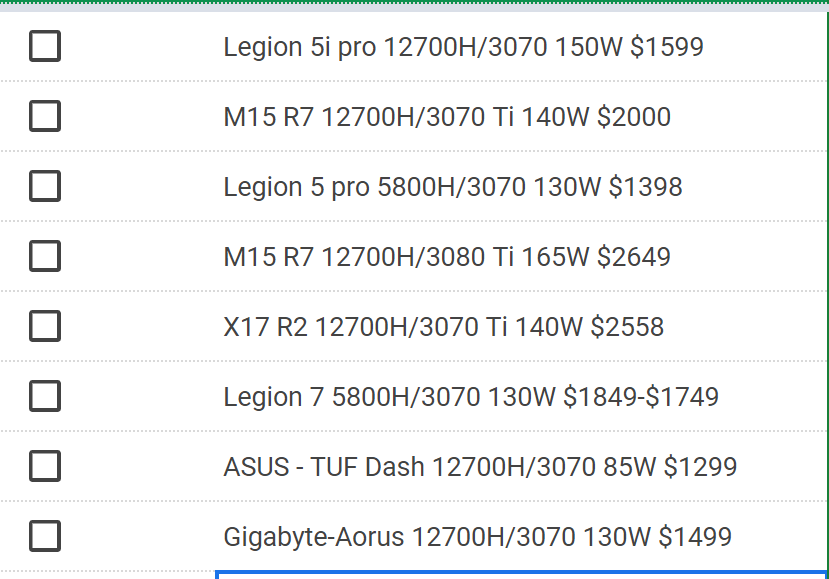
https://i.imgur.com/yvgDU0J.png 👀
fossil cedar
analog pulsar
https://i.imgur.com/yvgDU0J.png 👀
Legion 5 pro clear winner
analog pulsar
fossil cedar
Legion 5 pro clear winner
top one
fossil cedar
No, 5800h
fossil cedar
Best value
analog pulsar
idk
fossil cedar
It is
analog pulsar
3070 had more wattage to bring to table plus 14core vs 8core
hmmmmmm
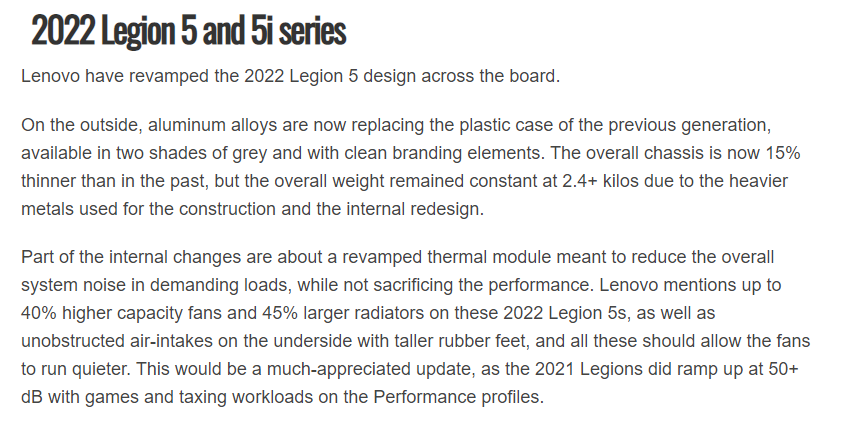
plus i heard they improved cooling on there 2022 models
something about fans being smaller

 fossil cedar
analog pulsar
3070 had more wattage to bring to table plus 14core vs 8core
fossil cedar
analog pulsar
3070 had more wattage to bring to table plus 14core vs 8core
Yeah but it's not worth 200$ also 8c is plenty for gaming
oblique sage
fossil cedar
<@215549857241366528> here's like best of the best https://pcpartpicker.com/list...
For that first build. Liquid cooled seems to be the optimal choice im assuming? Also could I run that phantek 400A case?
fossil cedar
oblique sage
For that first build. Liquid cooled seems to be the optimal choice im assuming? ...
Yes an air cooler would get demolished by a 12900k, i would not put the first build in a p400a, the p500a allows top mounting the aio and a build like that gets hot any extra airflow is useful
woeful garnet
is 32gb really needed for gaming or can i get a 16gb kit?
 runic spruce
16 gb would be fine for gaming
mossy venture
if youre getting a 12900k... get a 32gb kit
analog pulsar
fossil cedar
Yeah but it's not worth 200$ also 8c is plenty for gaming
True
woeful garnet
aight
mossy venture
mossy venture
if youre getting a 12900k... get a 32gb kit
i suggest 32gb with even a 12400f 3060 ti build, let alone a 12900k build
runic spruce
woeful garnet
aight
If u do have extra cash to spend I’d try 32gb
Better in the long term
fossil cedar
woeful garnet
is 32gb really needed for gaming or can i get a 16gb kit?
You can get a 16gb kit but I'd recommend 32gb for a 1500€ build
woeful garnet
my build rn is under my budget with the 32gb so its fine
runic spruce
But u can always upgrade from 16gb
runic spruce
32gb is slightly better bc of dual ranks
fossil cedar
Although not all 32gb is dual rank
fossil cedar
Even some ballistix 3200mhz 2x16gb kits are single ranked
runic spruce
Crucial is the main one that does single ranks iirc
But it’s usually only single tank pass 4000mhz
Doesn’t really matter tho
Barely noticeable out of benchmarks
oblique sage
fossil cedar
Yes an air cooler would get demolished by a 12900k, i would not put the first bu...
I just realized the memory and board are DDR5. What’s the advantage of going that route ?
I’m a newb with technicals
fossil cedar
oblique sage
I just realized the memory and board are DDR5. What’s the advantage of going tha...
Ddr5 is slightly better on the high end pretty bad value tho
I mean that whole list is, apart from the case psu and gpu isn't bad but isn't good value either
Same with monitor
When you reach the top of the top value goes out of the window
Paying 1k more for 2% extra perf
Okay well bit extreme but like 500$ more
oblique sage
fossil cedar
I mean that whole list is, apart from the case psu and gpu isn't bad but isn't g...
I watched some comparisons on that gtx6950 vs 3089 and 3090 I was really impressed. I think the monitor I can wait for to catch a sale or get something comparable.
 plucky adder
guys, whats the difference between XFX Speedster QICK 308 ULTRA, and XFX Speedster SWFT 210 Core?
mossy venture
plucky adder
guys, whats the difference between XFX Speedster QICK 308 ULTRA, and XFX Speedst...
not much, mostly cooling id assume
fossil cedar
oblique sage
I watched some comparisons on that gtx6950 vs 3089 and 3090 I was really impress...
You can also drop the monitor to 170hz and get the M27Q-p for like 320 or go g27q for 144hz
fossil cedar
I'd just get the cheaper
undone saddle
What is a good asus board for 12th gen
woeful garnet
i found a b550 msi mpg for 94 euros a good deal?
mossy venture
undone saddle
What is a good asus board for 12th gen
also depends on the cpu
undone saddle
mossy venture
also depends on the cpu
I7 12700k
 frail valve
analog hearth
<@122773326396391430> how well is that cooler working?
frail valve
analog hearth
<@122773326396391430> how well is that cooler working?
The one with the fan with the blue light?
 olive cypress
woeful garnet
i found a b550 msi mpg for 94 euros a good deal?
olive cypress
woeful garnet
i found a b550 msi mpg for 94 euros a good deal?
Yeah
mossy venture
undone saddle
I7 12700k
are you overclocking it
analog hearth
ye
undone saddle
mossy venture
are you overclocking it
No
undone saddle
mossy venture
why specifically asus
I like asus
mossy venture
then theres no point in getting the 12700k instead of the 12700f
the 12700f performs identical to the 12700k
PC Builder - Intel Core i7-12700F
undone saddle
mossy venture
the 12700f performs identical to the 12700k
The difference in price is not big tho
frail valve
analog hearth
ye
Pretty good haven't stressed it out yet but it's not doing horribly so that's good
fossil cedar
undone saddle
The difference in price is not big tho
It's 60$ and you save another 70$ on a board
mossy venture
undone saddle
The difference in price is not big tho
are you in the us?
undone saddle
mossy venture
are you in the us?
No
mossy venture
undone saddle
No
where are you
undone saddle
This is what i put in cart so far still deciding on board and not sure if ram good enough .......plan is play 4k


 mossy venture
and whats your budget for the entire upgrade/build
undone saddle
mossy venture
where are you
Saudi arabia
undone saddle
mossy venture
ah
4k and little with shipping and all
mossy venture
msi z690 tomahawk
undone saddle
No need any accessories like keyboard mouse displays...etc
undone saddle
mossy venture
msi z690 tomahawk
Are they the same
 mossy venture
undone saddle
Are they the same
mossy venture
undone saddle
Are they the same
looks it
oh wait
no
ones ddr4, ones ddr5
get the ddr4
undone saddle
The ddr5 should supports 5 and 4 right?
mossy venture
not really
undone saddle
How about the ram I choose is it good?
undone saddle
mossy venture
check tridentz
What speed?
undone saddle
 undone saddle
Oh
mossy venture
3200c16 will likely be the cheapest
undone saddle
That one is 187$ which isnts bad price so if there is something better i dont mind it