#storage-devices
1 messages · Page 16 of 1
 sullen oxide
 lapis pulsar
That’s a bad 2TB now
 lapis pulsar
I have 2 6tb hdds laying around
 worn trail
I see someone's been watching Lelouch of the Rebellion. @lapis pulsar
worn trail
I watched both seasons and I agree.
sullen oxide
lapis pulsar
I have 2 6tb hdds laying around
I will give you uh
A coupon to a chicken place?
lapis pulsar
Ooh
sullen oxide
Yeah that’s about equal
lapis pulsar
I like chicken
sullen oxide

worn trail
sullen oxide
I will give you uh
A coupon to a chicken place?
Give me 40 family buckets of KFC.
sullen oxide
worn trail
Give me 40 family buckets of KFC.
Only code I got is for a place called “wings over”
It’s one of those codes that don’t expire, but you need to make a new account every time for
worn trail
Does anyone know what will happen if I put say a prior gen nvme like say gen 3 into a M.2 slot set to gen 4/5?
 cloud kiln
worn trail
Does anyone know what will happen if I put say a prior gen nvme like say gen 3 i...
cloud kiln
worn trail
Does anyone know what will happen if I put say a prior gen nvme like say gen 3 i...
it'll run at gen 3 speeds
pcie is fully backwards and forwards compatible
you can plug pcie 5.0 devices in pcie 1.0 slots, and vice versa
even pci can be sometimes compatible as long as you get an adapter for it
worn trail
cloud kiln
it'll run at gen 3 speeds
Gotcha. Any knowledge on how bCLK affects a x2 vs a x4 M.2 slot?
cloud kiln
no idea on that front
worn trail
I have a conversation going in #building-and-recc-chat with Quok to try and figure out why the x2 slot stops detecting my boot drive with bCLK.
I did not have this issue with my other board but that was a x4 slot.
 velvet dune
lapis pulsar
I have 2 6tb hdds laying around
velvet dune
lapis pulsar
I have 2 6tb hdds laying around
send m one i’ll give you wingstop
 bitter mirage
lapis pulsar
I have 2 6tb hdds laying around
bitter mirage
lapis pulsar
I have 2 6tb hdds laying around
Let's Deal With 4GB of RAM Stick (DDR2)🙂
bitter mirage
cloud kiln
I have 4 sticks of 512mb
And I Have One Stick Of 256KB (HP Invent Older Systems)
I Love Collecting Rams🌸
 real lava

Tom's Hardware
Performance meets efficiency in a challenging market
Hmm, another alternative for cheap SSD?
 cerulean monolith
Not at my pc atm, but my system doesn't seem to recognize an western digital black 8tb hdd i have been using. I plan on reseating it, but so far...
My hdd isn't detected by explorer, is detected by crystal info, isn't detected by disk manager as in use and instead as unformated.
wut do?
cloud kiln
cerulean monolith
Not at my pc atm, but my system doesn't seem to recognize an western digital bla...
old drive? or new?
cerulean monolith
cloud kiln
old drive? or new?
Old
cloud kiln
how many years?
cerulean monolith
2/4 years
cloud kiln
hmm
would be a little early for it to be dying but it is possible, but that's worst case scenario
cerulean monolith
I really hope not, considering i got video footage from 5 years i have to edit
cloud kiln
i'd try reseating it like you mentioned but i'd probably prepare some other drives to backup any important files to in case it is indeed dying
if you're able to get back on at least
cerulean monolith
Thing is that 8tb is supposed to be my back up as well.
I have 4 tb of video footage and 1tb back up.
So its kinda all eggs in a basket, gotta buy another 4 or 8 tb hdd then
cloud kiln
oof
you shouldn't have your backup files on the same drive, because it's basically the same as having no backup
cerulean monolith
Yep...
cloud kiln
well, fingers crossed it's not dying, but you should get another drive whether it's dying or not to have a proper backup
cerulean monolith
it randomly got detected now... wierd
cerulean monolith
nevermind, it came back.
after clicking to go into the drive from quick access, it makes the drive unreadable until win explorer restarts, then even after the restart it makes explorer slow only on that specific drive to acess
cerulean monolith
i feel like this is a windows explorer problem now.
Cursed build is cursed.
I need it to be blessed
cloud kiln
weird
cloud kiln
cerulean monolith
i feel like this is a windows explorer problem now.
Cursed build is cursed.
I ne...
maybe you could try seeing if some other file manager randomly stops detecting it
could try installing dolphin kde lmao
direct link to the repo https://cdn.kde.org/ci-builds/system/dolphin/master/windows/
or can install with winget winget install -e --id KDE.Dolphin
cloud kiln
I gotta say though, windows and such are having alot of issues recently due to vibe coding
 old rock
Samsung 980 pro randomly stopped detecting in my m1 slot. BIOS updated, going to reseat again. What do I do if that doesn’t work?
 zealous kelp
old rock
Samsung 980 pro randomly stopped detecting in my m1 slot. BIOS updated, going to...
zealous kelp
old rock
Samsung 980 pro randomly stopped detecting in my m1 slot. BIOS updated, going to...
there was a faulty batch of them iirc
firmware update that fixed it
but if its gone its gone
that or maybe your bios settings got reset from the update
 gritty spindle
old rock
Samsung 980 pro randomly stopped detecting in my m1 slot. BIOS updated, going to...
gritty spindle
old rock
Samsung 980 pro randomly stopped detecting in my m1 slot. BIOS updated, going to...
lowkey just crucify it
that worked for me
 shrewd vigil
crucifixion solves most problems
old rock
So the problem ended up being user error. The drive is shorter than the heat sink so I wasn’t getting a firm connection and it waited until an update to misbehave. Do I need to get a shorter heat sink or is the pro ok on its own?
 brisk dome
old rock
So the problem ended up being user error. The drive is shorter than the heat sin...
brisk dome
old rock
So the problem ended up being user error. The drive is shorter than the heat sin...
You can use software like hwinfo to monitor the SSD temperature, if it hits throttling temps (varies by model but I want to say it's like 80C?) under load you'll want the heatsink
From what I'm seeing online it looks like the 980 pro should be ok without a heatsink (it has a builtin copper sheet) as long as it has good airflow
zealous kelp
old rock
So the problem ended up being user error. The drive is shorter than the heat sin...
lmao
though @old rock make sure you got the up to date firmware
there was an issue with early 980 samsungs
gritty spindle
yall im tweaking out rn
my nvme is just dying on me
the thing consistently fails an OCCT stability test
issue is
only one partition on the drive is failing
the other partition is just fine
the partition failing has the system on it
i may just reset it but im just curious as to why or how this is the case
 cloud kiln
i assume that means 64% remaining
or in other words, it probably has used up 36% of the spare capacity reserved to replace any dying blocks
it's reaching the point of you maybe should consider changing to another drive, and in case you haven't done already, backup any important files
gritty spindle
Just crashed again 😭
My question is why is it crashing?
Its a relatively newer drive compared to the other devices in my pc
And the other partition on the exact same drive seems to be ok
cloud kiln
probably some corruption in the OS
gritty spindle
would wiping the drive deal with it?
cloud kiln
it would probably cause it to not crash, but honestly speaking, if your drive has already used that much of its spares, you should probably prepare to replace it sooner rather than later
try reinstalling first and seeing if you get further issues, if not then you may be safe hopefully until the shortage ends
if you do get issues then you'll need to use a different drive
gritty spindle
imma wipe it for now and see if i have a warranty on this thing
though honestly i'd rather not deal with the hassle of trying to deal with them
cerulean monolith
cloud kiln
maybe you could try seeing if some other file manager randomly stops detecting i...
okay, sorry on the ping.
drive isn't being detected on software again, so how do i use this?
can just the exe work or do i need more?
cloud kiln
cerulean monolith
okay, sorry on the ping.
drive isn't being detected on software again, so how do...
I think the easiest way to install KDE dolphin is with winget, but you may need to install Winget first
 quiet gust
I guess it didn't have to breathe

 vestal garden
Hey found this ssd on marketplace can anyone tell me if it’s fake or real? I looked at pictures of the sn850x and didn’t have this sort of look. Maybe it’s a heatsink that i was seeing?
 cloud kiln
it does look real but i can't guarentee it since it's just an image
this is what the 8tb version looks like

here's the 2tb

this one is made in china though
wait, it's the 850 not the x

i would say it's visually identical in terms of the layout
vestal garden
cloud kiln
i would say it's visually identical in terms of the layout
okay thanks i’ll run it through crystal disk. Hopefully i didn’t get scammed lol
real lava
there are programs that detect whether or not a drive is fake
crystaldiskinfo isn't one though
 minor sun
Cdi just reads smart data, which can be spoofed, you can tell if something is wrong in terms of performance if you run cdm though
 open gazelle
When I got my 8tb SSD for crazy cheap on second hand market, I ended up doing a write check to all LGAs (samsung program thingy cuz samsung drive) and a 5.5TB file write/read test (some random utility that I now forgor)
Also took apart drive (SATA) to check PCB
Do mildly wish it was M2 so I could put into a new laptop for whenever Im away from desktop for a while, but alas that wasnt exactly a cheap option for like idk 2020
 olive hatch
my ssd failed seemingly randomly and the warning screen that popped up told me to replace it, so now im looking at two options for new ssd's and i kinda want help deciding becauce i dont want it to happen again
im thinking either this one or the one with the heatsink
because i think the ssd overheating was the issue
problem is idk if the heatsink would be able to install
 gusty anchor
olive hatch
because i think the ssd overheating was the issue
gusty anchor
olive hatch
because i think the ssd overheating was the issue
They should have a temperature sensor and the ability to throttle and slow themselves down to avoid damage. If you want somthing reliable I wouldn't be getting a random no-name brand like that, and that one isn't even cheap.
https://pcpartpicker.com/product/7GC48d/kioxia-exceria-pro-2-tb-m2-2280-nvme-solid-state-drive-lse10z002tg8 This one is about the same price and is decent.

KIOXIA EXCERIA PRO 2 TB M.2-2280 PCIe 4.0 X4 NVME Solid State Drive (LSE10Z002TG8)
old rock
Stupid question: Had to reseat my 980 pro twice as it suddenly loaded to bios and board explorer wasn't detecting the drive. Do I need to use a different screw or something to seat it better so this doesn't keep happening? This most recent time it made me run disk repair and all that as well
minor sun
have you updated the firmware on the drive before?
old rock
Magician says it has the latest firmware
minor sun
It's very unlikely that it's a seating issue, firmware bugs still seem like the most likely issue, when did you get this drive?
minor sun
The main thing I'm worried about is still the firmware bug from ~2 years ago, which killed the drive over time, so I'd probably look into trying to get a RMA for the drive if possible. As long as you have anything securing the drive and it's not flopping about, m.2 drives get very good contact from how it's designed
old rock
So it's possible the drive itself is dying even if magician doesn't detect any problems? Thankfully this is an older computer I built, unfortunately my brother who knows nothing about hardware owns it so I get to fix everything.
Is this only the 980 pros or is this something I have to worry about with other drives?
minor sun
iirc it only affected 980 pros and 990 pros, samsung pushed a fix for it in about a month of the issue showing up so newer drives should've shipped with updated firmware, it should have some signs in the SMART data but at the end of the day if you have any suspicions of it being the problem, trying to get a RMA is a good idea
old rock
I'll check and see if the firmware matches the known problem one later, but I'm pretty sure I updated it right after I installed it. If they don't take the RMA am I basically screwed?
minor sun
If it's a problem that has anything to do with the drive itself, you should still be within warranty and therefore be able to RMA it, if not, then it's just something else installation wise or an issue with other pieces of hardware
 ashen jetty
Fellas, ~$120, portable ssd, longevity, speed, reliability, 2TB, pls help me out
cloud kiln
$120, 2tb, ssd
pick 2
ashen jetty
cloud kiln
$120, 2tb, ssd
pick 2
how about all, but 1tb
cloud kiln
💀
 ashen jetty
cloud kiln
💀
ashen jetty
cloud kiln
💀
how do you get to whatever this is, it looks cool
quiet gust
which one of these 2.5" sata ssds is the best? all same price.
intenso 49377 480gb 2.5" sata
Kingspec p3-512 512gb 2.5" sata
should I avoid a s3+ s3ssdc240 240gb for half the price of the above?
zealous kelp
quiet gust
which one of these 2.5" sata ssds is the best? all same price.
intenso 49377 480...
intenso
the only reason people are buying kingspec at all is because of the memory shortage
kingspec is shitty chinese bootleg kingston
which is already a budget brand
 gusty root
Bought a new pc. I have some 2.5 drives ide like to transfer over they have games on them. Is there anything I need to do or is it just as simple as plug and play?
sullen oxide
gusty root
Bought a new pc. I have some 2.5 drives ide like to transfer over they have game...
Should be plug and play
gusty root
Thank ya
 sudden vessel
My wife is in school to be an editor, and with all her footage to work on she needs an external hard drive. Need a huge one that's fast and reliable. Any suggestions?
cloud kiln
sudden vessel
My wife is in school to be an editor, and with all her footage to work on she ne...
for mass storage, a DAS or NAS would be ideal
for a portable drive, i recommend getting a nvme enclosure and a nvme ssd
ssd prices are currently kinda high so it's less ideal to get an ssd, but hdds are also more prone to damage during transport than ssds
if you do get a nas, your wife could just grab the file(s) she needs off the nas for editing, and transfer all the files she doesnt need back on the nas. assuming that she's using a laptop, those typically have enough storage to do that nowadays
though if she's using the lab computers, then a portable ssd is basically the only good option
either way though, i still recommend a nas if she plans on doing freelance work to store the files in there, as you can add redundancy and use it to backup files as well
sudden vessel
cloud kiln
for mass storage, a DAS or NAS would be ideal
for a portable drive, i recommend ...
How fast would a NAS transfer to her ethernet connected computer (she's using a pc and not a laptop), and how secure is it?
brisk dome
sudden vessel
How fast would a NAS transfer to her ethernet connected computer (she's using a ...
I believe you have it setup right, it'll be limited by the storage medium speed (either hdd or ssd)
sudden vessel
Gotcha. Thanks for the info!
brisk dome
A 7200rpm hdd can do ~200 MB/s, an NVMe can do way more but slows down after cache runs out
For editing, I think the play is probably 1-2TB NVMe on the editing PC and then an hdd nas to hold bulk video files
sudden vessel
👍
 agile osprey
 glad oxide
either m.2 or sata
glad oxide
either m.2 or sata
For movies, media and such go with a SATA drive. M2 is only needed really for Windows and newer AAA games that have massive libraries
glad oxide
I have 2 Sata SSDs from my old setup
crucial mx500, 500gb and 1tb but theyre not that fast
agile osprey
Imo doesn't matter, those are plenty fast.
Hard drive speed only affects your load times really, and have a near 0 effect on FPS
glad oxide
I have a 500gb M.2 but its not enough
I prefer having online competitive games on the M.2
agile osprey
Fair, i did the same like with PUBG or battlefield
glad oxide
but storage is expensive now
agile osprey
My m2 games get swapped out as i finish or get bored with them
i have 2 M2 drives, each 1tb
then i have 2 SSDs, and 6 HDDs
glad oxide
even Fanxiang upped their prices
agile osprey
I busted out my old 2TB WD Black HDD recently to open up a new storage drive for older games
glad oxide
I had my share of 5400rpm HDDs
agile osprey
Right, yeah i've got enough storage for now. Not going to worry about it hopefully for another year or 2, but by then AI could have destroyed the world
glad oxide
they say AI will steal our jobs but it can barely do its own job
agile osprey
It just needs regulation, so badly. Problem is, governments are too busy with 1000 other things like starting illegal wars to worry about that
 worldly plank
glad oxide
they say AI will steal our jobs but it can barely do its own job
worldly plank
glad oxide
they say AI will steal our jobs but it can barely do its own job
It will steal some people's jobs
And I think it's okay in some aspects. It would be okay in all aspects if the jobs were taken from the people and they still got paid for it.
glad oxide
worldly plank
And I think it's okay in some aspects. It would be okay in all aspects if the jo...
not happening
worldly plank
I know 🙁
glad oxide
agile osprey
It just needs regulation, so badly. Problem is, governments are too busy with 10...
stealing from the poor and making the rich richer
agile osprey
worldly plank
It will steal some people's jobs
It already has replaced people in jobs
gusty anchor
glad oxide
whats a good choice for storage without having to sell a kidney?
Have you considered selling an eyeball? You've got two of those.
$275 for a 2tb 9100 isn't bad in the current market, you have to buy something with it to get the discount. If there is something you actually want that might be a better idea than a set of cheap fans. https://www.newegg.com/tools/combo-builder/6675


Unlock Savings with Newegg's Dynamic Combos: Select a processor and a compatible motherboard, along with GPM, Memory, and an SSD. Enjoy exclusive discounts when you bundle these components together. The more you buy, the greater your discounts!
agile osprey
Do you know how many headaches i could have avoided in College doing Javascript, SQL Database, C#, C++ etc. Programming if i had AI to help write scripts or help me understand them better?
It has absoutely replaced thousands of jobs, countless more, as it is reliable for the basics
glad oxide
gusty anchor
Have you considered selling an eyeball? You've got two of those.
$275 for a 2t...
my MB only supports up to 4gen
gusty anchor
It'll still work, just capped around 7400 instead of over 14000 and it's basically the same price as a bargain bin drive.
worldly plank
agile osprey
Do you know how many headaches i could have avoided in College doing Javascript,...
I'm glad it didn't, because then you'd be out of a job now... Right?
Ai taking coding jobs, I think
agile osprey
worldly plank
I'm glad it didn't, because then you'd be out of a job now... Right?
Yeah the base level coding jobs are definitely getting scrubbed or pushed out. I work in investigations
AI doesn't snoop very well
cloud kiln
The people who are able to use AI the most effectively are the people with decades of industry experience
E.g. programming
They know exactly what they want, they just prompt for something they already know how to write (but would be time consuming to actually write), AI spits it out in like 5 seconds, they look over the code for any mistakes and manually correct them if they're small, test it, and it's done basically
The Linux kernel can have AI generated code pushed to it now as well
But any issues with any code will still remain the sole responsibility of the person pushing that code
And it also needs to be tagged as AI assisted
agile osprey
cloud kiln
The people who are able to use AI the most effectively are the people with decad...
Check this reply out by the Take 2 CEO on AI: https://www.reddit.com/r/whoathatsinteresting/comments/1ti5rim/creativity_from_a_tech_ceo/?utm_source=share&utm_medium=web3x&utm_name=web3xcss&utm_term=1&utm_content=share_button

 cloud kiln
yeah 100% agree
 fallow herald
Ai has only a couple fields it should be used in: data analysis, medical stuff, and organic design
Nothing else
Vibe coding is unsafe and time consuming, generative ai is literally useless, and anything else is highly questionable at best
sullen oxide
real lava
vibe coding is fine if the guy using it is a programmer
unsupervised vibe coding is bad, but supervised vibe coding? that accelerates dev time so much it's hard not to accept that it's good when done right
 warped anvil
RGB or Non-RGB SSD @marble anchor ?
https://www.newegg.com/Product/Product.aspx?Item=N82E16820331235

Buy Team Group T-FORCE DELTA R RGB SSD (Rainbow) 2.5" 500GB SATA III Internal RGB Solid State Drive (For MB with USB 9-Pin Header) - Black with fast shipping and top-rated customer service.Once you know, you Newegg!
 wind lake
ʇʇ
warped anvil
You heard it here folks... Steve gave me the OK for RGB SSDs
 marble anchor
😠
wind lake
i have an RGB book
warped anvil
^ This is true
marble anchor
You can definitely have RGB everything
As long as it can sync together
It is 2018, after all.
 red jay
Top 10 best HDD Types
10 - WD Green
9 - Seagate IronWolf
8 - WD Blue
7 - WD Purple
6 - Seagate FireCuda
5 - WD Black
4 - Seagate SkyHawk
3 - WD Red
2 - Seagate Barracuda
1 - WD Gold
Is it accurate?
red jay
i think wd black is worse than red
 bold night
@rain prairie But you play xbox?
 quiet birch
I am confused
Do you not know what the colors mean?
WD red is designed for servers
This means it should always stay spinning
bold night
Ok so perfect for him?
quiet birch
WD gold is designed for camera recording. This means it should always be on and should be written to most of the time
No
Black is for normal PC's and consoles
But it's better than blue
bold night
I have a Seagate Barrucuda. Am I okay?
bold night
Okay
quiet birch
Seagate is on a whole different level on their type of drives
bold night
So gud?
quiet birch
They're the same as WD
Just more towards general PC's than servers
WD is more focused on businesses
Than normal people
That list just wasn't correct
bold night
@warped anvil Explain
 rain prairie
@bold night im mainly a pc guy
My xbox serves as a backup gaming station if my laptop can't run the games i want to play
Which it doesn't
rain prairie
I use a laptop
My laptop has intel hd graphics 1st gen so it practically can't run doom and wolfenstein tno as they require newer versions of open gl and the latest drivers from the laptop manufacturer doesn't include that
Unreal engine titles are unbearably slow and source engine titles are playable. Recently I've been having issues with the computer shutting down by itself or freezing. I think I fixed the freezing issue but not the shutting down part.
For that i tried scanning it with a antivirus and reinstalling the graphics drivers but nothing fixed the issue
I might need to do memtest eventually
 latent smelt
Have you applied for the GeforceNow beta?
your laptop would run any game you toss at it 😃
rain prairie
I haven't but I really want to run games on real hardware rather than running it off a server
Also latency issues
The only cloud service I have tried is LiquidSky during the early beta to its present version
And it was good but it has some latency issues
latent smelt
well if you have a decent home connection. the geforcenow ran really well.
red jay
Samsung 500gb SATA
It became real cheap
70$ is a great bang for that
But if ur on a budget get an m.2 WD Blue
Or black
 small dagger
Wot!?!?
Just tried to post a link...
Ok
I'd say get a 500gb m.2 if budget is not of a concern. There is a Crucial 500gb for 66 bucks and a WD blue 500gb for 53
https://pcpartpicker.com/product/fgZFf7/crucial-mx500-500gb-m2-2280-solid-state-drive-ct500mx500ssd4
red jay
:)
small dagger
Aside from that, there are cheaper (slightly slower) SSDs in the regular form factor. If you are willing to pay a slight premium, the M.2 will be plug n play with no wires. Just make sure your mobo supports it
I'd suggest going to pcpartpicker.com and searching their databases for something that works for you.
wind lake
i love samsung, i dont have any other SSD's
small dagger
Oh wait, he's asking for SSDs for PS4. Hehe, I'm no help...
https://youtu.be/JIdQw_K-ArY
A guide to replace it...
https://pcpartpicker.com/product/wqdxFT/adata-ultimate-su650-480gb-25-solid-state-drive-asu650ss-480gt-c
And an SSD to replace it with.

This guide will walk you through replacing the hard drive in your PS4 with a faster SSD, allowing for faster loading times. In order to replace the drive you...
@noble burrow
I'd say that Samsung is easily the best disregarding price ($80 will get you 500gb) but Seagate and WD are great as well
Yes
Lol
Lmao
I'm stuck on Xbox for the moment and I cri everytaime
So slowwwwww
red jay
i dont know why parents insist in buying consoles
They are slow and dont give knowledge
small dagger
^agreed
wind lake
you can learn to buy a PC from a console though
small dagger
Saving up for an $1000 setup for myself. Holding off until Ryzen gen 3 and Navi
wind lake
cost is key though, its why the cheaper console sells more every launch
small dagger
Completely true
wind lake
doesnt matter if the other console is better. cheaper always wins
red jay
Ill say this
If you gonna get a console, get the nvidia shield.
Its cheap and helps you learn about Android
When you want, buy a pc
red jay
Anyone have knowledge regarding M.2s? I am confused about something...
bold night
@red jay What are you confused about?
red jay
I bought two M.2s for my MSI Z370 gaming pro carbon. However! The WD M.2 has slots that match perfectly with my board and works great. The second one says SATA on it and has an extra cutout on it... I am wondering if it will still work since my motherboard only has one cutout on it.
red jay
I have 2
red jay
Yes
bold night
And then you have cards which are pretending to be m.2
But which are actually just using SATA
But an m.2 version
real m.2 is faster than sata m.2
So it'll be fine
red jay
Yes again. The WD is actually using PCIE and fast as heck. This SP M.2 is using SATA and has a different type of connector on it. So I am unsure if it is safe to plug it into my board
red jay
bold night
I mean uh
red jay
red jay
These are the two I have... The bottom one fits perfect. The top one SP one I am afraid to try lol
My mobo manual indicates that both Sata and PCIE work..BUT I am unsure if that is still the case when they obviously have different slot configs. Stupid me. Should have paid attention.
warped anvil
As far as I can tell...
The Z370 only has 1 M.2 slot
https://www.wootware.co.za/msi-z370-gaming-plus-lga1151-intel-z370-coffee-lake-atx-desktop-motherboard.html
Buy MSI Z370 Gaming Plus LGA1151 Intel Z370 Coffee Lake ATX Desktop Motherboard at Wootware with fast shipping & superb service.
red jay
huh well mine has two. One in the middle and one below my gpu
warped anvil
Oh @marble anchor @small dagger @latent smelt can you grace us with your infinite tech knowledge
warped anvil
😵 my bad
red jay
It does support it. So it does not matter that they have different connectors? They can still fit in the slot regardless?
That is my concern. The WD fits perfect.
quiet birch
Yes
But you have to be careful to place the processor portion of the m.2 upwards
Otherwise you'll get temperature throttling
red jay
Awesome thank you sir.
quiet birch
If it doesn't work you may need to swap slots
red jay
See what I mean. It only has a slot for one pin. Not two like the SP has. But you are saying it's fine regardless correct?
red jay
Working like a champ 👍 Thanks all. Appreciate it. Ironically I bought all of this off newegg👌
quiet birch
Yeah
SATA m.2 work with SATA m.2 slots and nvme slots
Nvme m.2 only work in nvme m.2 slots
Both slots look the same
latent smelt
so @quiet birch if a m.2 drive fails to boot, and then not be reconized. is it deaD?
or show a "no media present"
then said m.2 was finally reconizable, and created a new partition, reboot only to find it missing again. is it borked?
@red jay is having these issues
maybe you can give better insight.
quiet birch
It could be 3 things
Needs bios update
Bad motherboard
Bad m.2
Only way to figure it all out is
Use m.2 somewhere else
Update bios
If you have nowhere to use the m.2
quiet birch
One option then
latent smelt
its a laptop
latent smelt
he was able to load windows onto the 1tb
quiet birch
And then touch nothing
Then try to boot on m.2
If it's not seen, go into bios and only touch the settings to enable the m.2 slot
If it still doesn't work
It's either the laptop or m.2
If it's a new m.2 try an exchange
If it's a new laptop
Buy a better laptop
JK
latent smelt
its the MSI somthing something laptop
only few months old
still under the warranty
@red jay just needs to see what the RMA process is like I suppose
I thought we had it when it successfully made new partition / drive letter
goes into win explorer device and drives. nothing lol
had him use minitool part wizard
window part was giving him an I/O error
quiet birch
If it's under warranty
Have him call MSI
Maybe there is a missed bios setting
Or a specific way to enable the m.2
latent smelt
before the error it was the laptops windows drive.
quiet birch
If not then msi may send a m.2 test
If it was from msi
Then msi would replace it for free
Free m.2
Lol
latent smelt
yeah
 tacit glen
New guy question...... I am getting a GIGABYTE X470 AORUS ULTRA GAMING AM4 AMD X470 SATA 6Gb/s USB 3.1 HDMI ATX AMD Motherboard that has: 1 x M.2 connector (Socket 3, M key, type 2242/2260/2280/22110 SATA and PCIe 3.0 x4/x2* SSD support) (M2A_SOCKET)
* Actual bandwidth may vary by CPU.
1 x M.2 connector (Socket 3, M key, type 2242/2260/2280 PCIe 2.0 x4/x2 SSD support) (M2B_SOCKET)
I was going to get a 1 GB NVME SSD (Crucial P1 1TB 3D NAND NVMe PCIe M.2 SSD - CT1000P1SSD8) for the boy's games and then I saw an inexpensive NVME 120 GB drive (HP EX900 M.2 120GB PCIe 3.0 x4 NVMe 3D TLC NAND Internal Solid State Drive (SSD) 2YY42AA#ABC ) to get as my boot drive.
Question: will the second NVME PCIe 3 x4 SSD work in the second slot on my mobo that says PCIe 2.0 x4?
latent smelt
both m.2 will work
but I think the will cancel out the regular sata ports if im not mistaken.
@quiet birch would klnow.
tacit glen
Yes, the mobo website says that using the second m.2 will disable the third PCIe expansion slot.
latent smelt
Which you won't be using anyways I'm sure
tacit glen
😃
tacit glen
Well no real loss then....... The picture helps.
quiet birch
Yeah. The 2nd m.2 slot always disables something
In most cases it disables 2 SATA ports
But recently they have been replacing the disabled SATA ports with the last PCi express slot
 weary oyster
would it be possible to run an ethernet cord to a second pc and use the second pc as a nas
 jagged iris
Nas u mean b what?
weary oyster
a pc just dedicated to storing files thats not connected to a router
nas was the closest word i could think of
red jay
Network Attached Storage
 zenith helm
 wary urchin
virgin bucks
red jay
hey @dull sky I'm back. 😃 Now I have another problem. I installed the SSD, and it works great. However, for some reason my computer does not see the other hard drives that I have even though it obviously has access to them. I know this because there are screen shots that I use in my sim as my desktop background images. These s/s's were only on my mechanical drives. Also, in file explorer the drives are not listed, but they are seen by the mobo in the bios. Any suggestions?
also, I cannot access them in the command prompt either.
 stone oxide
partition it
red jay
partition what? The one drive I can see is the correct size, I cannot see the other two. Also how would I do that if I cannot see them?
stone oxide
oh idk
red jay
You know what, Google is my friend........
stone oxide
yeah
red jay
I forgot that for a moment
stone oxide
you should try in the morning when you have a fresh mind
red jay
probably right, but it is only 8 pm here and it is friday
stone oxide
oh for me its 12
red jay
Right Coast?
stone oxide
ontario
stone oxide
its not that cold
red jay
maybe right now, but I went to Ottawa once and it was so cold they didn't turn the plane off for fear that if they did the thing would break down
I think they said it was -55f
 neat kiln
So, I started the day off (on Saturday) with 3.82 GB on my main drive. I moved 857GB to my slave drive and then spent 14hrs on this:
It was kinda satia
warped anvil
What did you do while you waited?
warped anvil
I'd sleep TBH.
neat kiln
Lol I did for most of that
I started it around 1am
I spent most of it sleeping, the rest of the time was spent getting ready for my friend to kidnap me for Pokemon GO Community Day Event. It finished just before I left and then I started one on the slave drive and watched anime when I got home from the event
warped anvil
#SquirtleIsTheBestStarter
neat kiln
Hahaha! I typically go grass, more resistence to the earlier gyms. Save for in Reborn...
 iron geode
does samsung offer the same transfer support for upgrading the OS to an M.2 drive as they've had for say the 950 evo SSDs?
 undone dune
yes, Samsung Data Migration software
iron geode
awesome, thanks
undone dune
it's usually best to do a fresh install of OS on a fresh drive.
 untold moth
How much storage on it?
I have to get my HDD
But take a look in #cases-psu-and-cooling and you’ll see a problem there
 stiff swift
What’s better the intel 660p or crucial p1
 zenith verge
P1 but only by like 2-3% so pick which ever is cheaper
 primal mauve
I need help I don’t know what to do I tried what I can
undone dune
does the system detect the intel drive
undone dune
hmm
not exactly sure what is going on D:
have you installed the intel ssd toolbox and hopefully it has a firmware update to help it get deteced?
also in device manager and disk drives, it says intel ssd right?
primal mauve
In device manager it does says intel ssd
undone dune
unfortunately i don't know what else to do, the https://www.intel.com/content/www/us/en/support/articles/000006082/memory-and-storage.html page doesn't really have much

Intel
List of common troubleshooting questions and answers related to Intel® Data Migration Software.
primal mauve
Yeah I still need help they really aren’t giving me the answer I’m looking for that’s why I’m asking this discord cause there might be people that could help me here
@warped anvil do you know anybody to help me with my problem
warped anvil
You can try reaching out to our other Techies, @marble anchor , @small dagger , maybe you guys know what's up.
If they can't help you, then the only idea i have is to reach out to Intel, like how Theo suggested.
marble anchor
@primal mauve how are you connecting the intel drive to the pc?
primal mauve
Thought the mother board it’s an m.2 drive
marble anchor
is the intel drive the M.2?
primal mauve
Yes
marble anchor
I'd recommend updating firmware/nvme drivers
if that fails, then call Intel. No reason why this should be happening other than old drivers
if you don't want to call, just do a clone to the new drive
 proven palm
if you do a clone i would recommend Macrium Reflect
primal mauve
Ok
proven palm
yeah, that works fine too
primal mauve
Ok thanks
 undone dune
@marble anchor so smart.
marble anchor

 thin drum
is the Samsung - SM961 256 GB M.2-2280 Solid State Drive any good?
thin drum
what its usual price?
proven palm
$40 is the typical price for 240 and 250GB SSDs these days
but yeah, that particular drive is rated for 3100megaBYTES/s reads and 1400megaBYTES/s writes
which is great compared to the competition in that price range
thin drum
cool
 wheat vault
whats a good non-m.2 ssd just for booting in a build that looks something like https://pcpartpicker.com/list/4RvNKB
wary urchin
an ssd.
wheat vault
any Sata 6gb/s?
wary urchin
ssds are the same
just the read and write speeds differ
but the average one is good
wheat vault
at work all the WD hdd go bad fast is there one that has a better track record like the samsung?
guess with ssd they less likely to go bad so yeah
wary urchin
WD is a good company
 keen urchin
theyre hard drives are good
wary urchin
their
wary urchin
lol its ok
wheat vault
@keen urchin idk maybe its cause I work at a school we have 800 laptops and of the 40 that had bad hdds in the last 2 months 30 of the replacements have already gone bad
wheat vault
the laptops are 4 years old but the 30 replacements were all made in malaysia in feburary
wheat vault
maybe just a bad batch or quality went down since then
keen urchin
might wanna give them a try
keen urchin
that my good sir is a SSD
wheat vault
yeah im looking for a ssd
wheat vault
is there a reason why the 250 is twice as much as 500
keen urchin
oops lol i thought the ones that failed were hard drives
wary urchin
they were
keen urchin
oh
wheat vault
yeah was just talking about the brand as a whole sorry lol
wheat vault
ah looks like the 150 is just sold by a tech company probably why
 exotic knot

SSDs are awesome, but the common SATA interface is becoming a serious bottleneck. However, the new NVMe standard helps take SSD performance to new heights......

Drives always seem to be getting smaller and faster. How can the new M.2 interface help your PC work more quickly? Squarespace link: Visit http://squarespace...
@wary urchin Here, try these
wary urchin
aight thanks
 fast helm
That's a good video.
proven palm
the techquickie videos are really good
wary urchin
yeah
proven palm
you can learn a lot in a short time
wary urchin
the speed is perfect for me
proven palm
well, except the one
 midnight glacier
are samsung evo ssds the way to go?
proven palm
yeah
fast helm
Depends on what you need out of an ssd. I'd recommend them
proven palm
but there are great budget options out there that work great
fast helm
Wd makes great budget ssds.
proven palm
Kingston SSDs are fantastic for their price
proven palm
240GB for $30? yes pls
i'm running a 3 year old 240GB HyperX Fury
it cost me $85 used lmao
fast helm
Ooffff I bought mine 85 new for the same amount of storage
It's crazy how inexpensive they've gotten
proven palm
yeah for sure
this was one of the better ones at the time
and new it was like $120
exotic knot
Oh yeah, this one too: https://www.youtube.com/watch?v=ItMY3WHHowQ
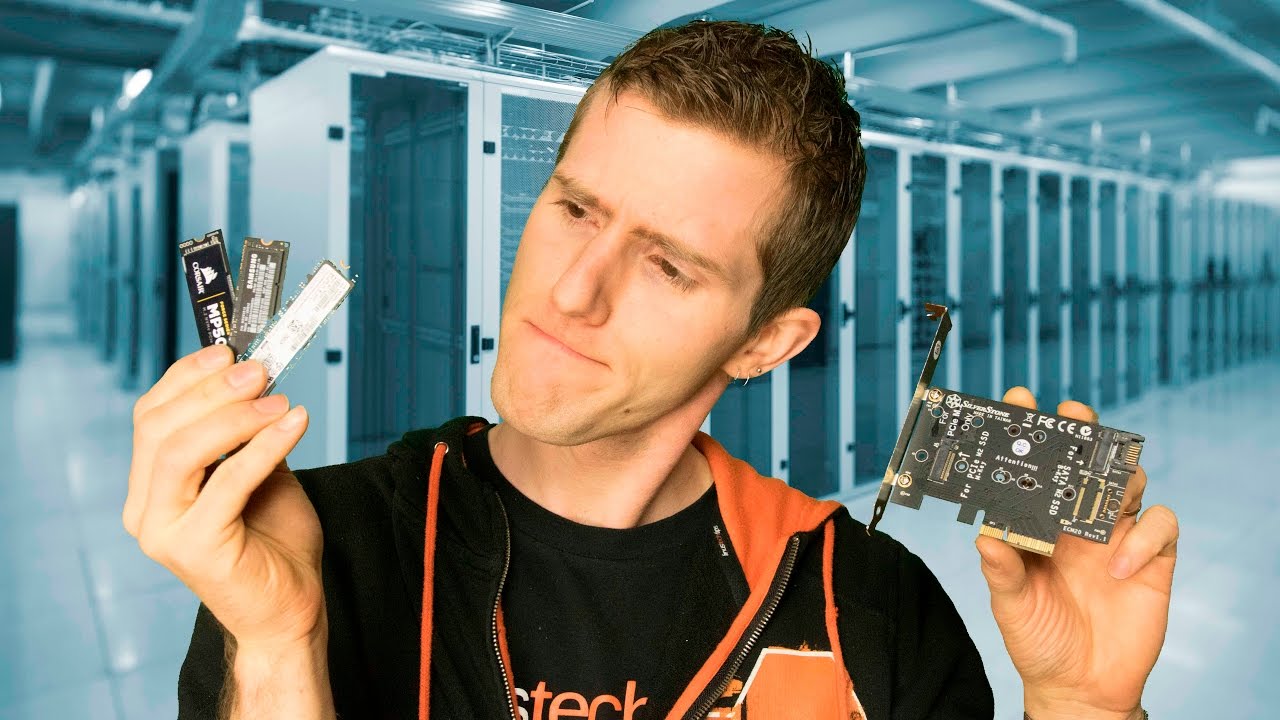
M.2? AHCI? NVMe? With the knowledge in this video, you should be able to comfortably pimp out your storage setup to the next big thing. ROCCAT CROSS GIVEAWAY...
fast helm
Whoa
 whole crown
Is this channel for troubleshooting as well?
 finite cosmos
𓂸𓂺𓂀𓁹𓂻✞シ㋛ଈ♡ꨄ𓄁𓃠𓆉𓅿𐂃𖠌★☆𓃰𓃟𓆏𓂉☻
whole crown
So I think I dun goofed
I bought a used pc, but there was still data on it so I wanted to wipe it off
Official Support | ASUS USA
I followed these instructions to wipe a hard drive but now when the pc boots up it goes to the windows advanced mode
And the windows repair tool doesn’t work and I don’t wanna mess with the command prompt unless I have a way to fix it
keen urchin
how did you wipe the hard drive?
 keen urchin
ah
whole crown
I followed the ASUS link instructions
undone dune
that page will write zeros on the disk to overwrite any existing data
making it irrecoverable.
you must have wiped your OS off the drive thats why it boots up toe the windows help screen
whole crown
Would I need a fresh new copy of windows then?
whole crown
Yes
undone dune
to download the windows 10 downloader
whole crown
ok
undone dune
and you need a usb with enough space to create a windows 10 installer
whole crown
Yeah 8gb usb
whole crown
Last time I did it, it was
undone dune
"download tool now"
when reinstalling windows and it asks for a windows key just press skip or i dont have a key at this time
proven palm
the ISO is like 3.5GB now
 turbid torrent
Or a dvd
undone dune
and it should install normally and activate soon as its done installing and connected to internet
turbid torrent
DVD will work if you have a DVD drive but like for some reason that's rare
undone dune
usb is much much faster than dvd D:
whole crown
Won’t it have the activate windows logo tho?
turbid torrent
Not if you're repairing Something
undone dune
as long as you activated windows with the same pc in the past it will authenticate automatically
whole crown
Ok
undone dune
the key is tied to your motherboard
proven palm
yeah
undone dune
on their servers
whole crown
Lol
 mild dagger
there may or may not be certain command prompts that validate the copy of windows
ahem
but we don't talk about that
 lunar marlin
got a quick question
do you need to buy both ssd and hdd or separately?
if you can buy them separate which one to buy first?
whole crown
@undone dune now it won’t let me boot off of the usb device for some reason
mild dagger
you set it to the boot drive in the bios right? @whole crown
undone dune
^
undone dune
Not true
mild dagger
if there are multiple drives the usb will often be set as last
undone dune
Gotta do it in bios in case it's hard set to boot off he/ssd in first place
wary urchin
but all of us are saying, select that little stick boi in the bios boot settings, and turn it off and back on
and it SHOULD work
no he's still here
mild dagger
hopefully he scrolls up enough
wary urchin
the word "left" almost always implies that someone left the actual server in discord
yeah
whole crown
I figured it out
It wasn’t in the bios
And for some reason there wasn’t a boot drive menu
I had to open windows advanced settings lol to boot thru usb
wary urchin
thats weird
 river radish
 cosmic elm
Is the Samsung T5 SSD the one I should be getting for my XBOX ??
 devout jacinth
ew people who use ssd's for xbox are wasting their money
devout jacinth
dude
xbox ssd's cost more than xbox hdd's
i got a 4tb xbox hdd for like a hundred bucks
 crisp belfry
I think he means all they can afford is a console, not that an ssd is a cheaper option
devout jacinth
ohhhh yeah i misread that sorry
iron geode
So i'm trying to set up two pairs of hard drives in RAID 1, but my motherboard on my Asus Notebook does not support it. Is there still a roundabout way that I can put these drives in RAID or is it a worthless battle?
iron geode
Here is the link to the asus support page
I'd say about 4 and a half years old now
I upgraded the HDD to an SSD a year or so ago but yea, that's basically what I have
I'm using Windows 10 Home if that helps
 dire orchid
outta curiosity are you getting an error when you try to make everything setup for raid
iron geode
Well, I was initially trying to set up RAID 1 through Disk Management. I tried it through the storage spaces manager yesterday but was getting an error. In the disk manager though, there is no option for a mirrored drive and there is no RAID SATA setting in BIOS. I might try the storage space manager again and see if restarting my notebook helps any
dire orchid
whats the error you were getting
iron geode
It was something along the lines of a permission error
dire orchid
when you get a chance post the error in here if you wouldnt mind
i think you should be able to put that laptop in raid
iron geode
When you say to put it in RAID, are you referring to the BIOS option?
@dire orchid I think I may have figured it out by using the Storage Space Manger. Yesterday it was being dumb about it but I think formatting the drives helped it realize that they were empty. If I run into any problems with the other pair of drives, I'll let you know. But thanks for the help tho!
dire orchid
crap sorry dude i thought i replied and said no lol
and sounds good i apologize again im hectic between work and this
 pseudo elm
can anyone point me in the right direction in terms of affordable 1TB hard drives?
pseudo elm
well
i know where to find them i just want some recommendations
like which ones are good and which ones are bad
proven palm
really any from Western Digital or Seagate are fine these days
red jay
WD black would be my recommendation
pseudo elm
ok thanks
proven palm
pseudo elm
kinda new to pcs
pseudo elm
is there any real difference between the 2?
proven palm
WD's warranty and support are better
pseudo elm
is that it?
proven palm
not a whole lot of difference between 7200RPM hard drives
pseudo elm
ah ok
proven palm
either one of those is suitable for a desktop environment
pseudo elm
what does rpm mean in terms of hard drives?
proven palm
that's the speed that the platters turn at
higher rotations per minute means higher data speeds
red jay
revolutions per minute
red jay
same thing here, it's a physical disk spinning at a certain speed
proven palm
yeah
red jay
you can take the HDD in your hand, turn it around and you'll hear the sound of the rotation. yeah
pseudo elm
and 7200 is the standard speed for most hard drives?
red jay
for desktop, yeah pretty much. laptops get the 5400 + SSD cache hybrid offerings unless it's a workstation notebook or something
pseudo elm
ah ok
proven palm
yeah, and you don't want a bare 5400 or 5900 RPM drive for anything productive
pseudo elm
ok
this might be a dumb question, but can i install more than one hard drive into my pc at one time?
red jay
yes
pseudo elm
ok good
i just dont want to have to rip out my old hard drive that has all my stuff on it
proven palm
yeah, i've got 8 internal hard drives and one external
it can scale as high as your hardware will allow
red jay
however, the old HDD might slow the system down whenever it's accessed
pseudo elm
oh ok
proven palm
are you using a SSD for your boot drive?
pseudo elm
i dont think so
i got a prebuilt so im not really sure on all the specs
i know i have a 500gb hard drive tho
lemme check
proven palm
and just one drive shows up in file explorer?
pseudo elm
yeah just my windows c drive
proven palm
yeah, then the hard drive is your boot drive
pseudo elm
ok
proven palm
if you really want a boost in general windows performance, we recommend going with something like a 120GB or 240GB SSD for a boot drive
and then a hard drive for mass storage
pseudo elm
that would mean removing my hard drive right?
red jay
120 is pretty small these days though, i wouldn't do less than 240 personally
red jay
SSDs have gotten pretty cheap anyways
proven palm
nah, you'd just set the PC to boot off of the SSD after you install windows to it
proven palm
they sure are
undone dune
MUCH MUCH FASTER
red jay
noticeably yes
red jay
there are many
red jay
exactly
pseudo elm
i guess around 240gb
and i dont need anything too crazy
so more on the affordable side
wary urchin
you can find ssds with that storage for like less than 30 bucks
240gb is too little
even if you arent a gamer
red jay
on the second hand market, possible. otherwise, hard call
red jay
it pretty much goes straight to 480
pseudo elm
i found some western digital ssds with 480gb
pseudo elm
ok
wary urchin
how much are they
what's your budget
you shouldnt pay more than 60 for a 500gb ssd
wary urchin
one is m.2
red jay
that SSD is not worth that price
wary urchin
one is sata
red jay
wary urchin
all depends on your preferences
pseudo elm
what is the difference between m.2 and sata
red jay
if you don't have M.2, you'll need to pick up a PCI-E to M.2 card but those are cheap as heck
wary urchin
with the m.2 stick, you can screw it in motherboards that support whatever specification the ssd is
whereas the sata can be plugged into any motherboard
you gotta go on youtube
linus has good videos on those two
i learned some things from that vid
pseudo elm
so i guess sata would be better then?
red jay
it isn't
red jay
SATA is a limited interface compared to.. yeah
wary urchin
but sata is already a very good speed for most consumers
red jay
BUT, M.2 CAN be SATA as well
wary urchin
it really is up to you
pseudo elm
but if my motherboard doesnt support m.2 then im stuck with sata?
red jay
no, you can buy this
wary urchin
yeah
red jay
that's not true
pseudo elm
how would i know if my mother board supports m.2?
pseudo elm
cool lol
red jay
enjoy 🙂
pseudo elm
thanks for the help @wary urchin
red jay
you can download AIDA64 and let us know which mobo you specifically have
after all, this is a pre-built so precise info might be needed
pseudo elm
mobo is short for motherboard im guessing?
red jay
yeah
red jay
pre-builts tend to use mobos that aren't available to buy on the retail market sometimes
yup AIDA64 extreme
if you don't have one, you can simply buy one of these https://www.amazon.com/SilverStone-Technology-SST-ECM20-Adapter-ECM20/dp/B01798WOJ0
red jay
or a card from another company. i had couple from asus but those aren't available right now, it seems
red jay
you'll have to tell us the specific model of your motherboard

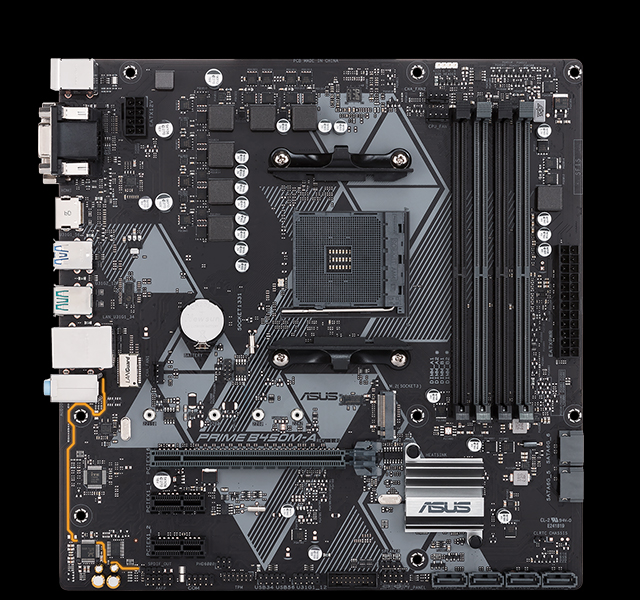 pseudo elm
i dont see it
red jay
the slot's golden pins are looking to the left, it's right in the middle under the CPU socket
got 4 small white screw holes in a row
red jay
yeah
red jay
this is a ryzen setup so you're lucky to have something modern and probably solid enough to upgrade, i was thinking of something much older when you mentioned that you have a HDD and it's a pre-built
yes
red jay
some of those WDs are actually SATA drives on M.2 interface though
pseudo elm
so what does that mean?
red jay
those are about as fast as a typical SATA SSD
pseudo elm
ok
red jay
that use the PCI-E speeds more
pseudo elm
this is very confusing
red jay
WD's SSDs aren't all that great tbh, unlike their HDDs
pseudo elm
what would you recommend?
red jay
i was on an a-data earlier, that one is a NVMe with heatsink so it likely wouldn't throttle
some of the fast NVMe drives can suffer from high temps that make them work slower
red jay
high temperatures make the SSD function slower by cutting down on power
pseudo elm
oh ok
proven palm
yep, SSDs will thermal throttle
pseudo elm
how do you avoid that?
proven palm
by not getting one with massive LEDs on it
pseudo elm
i didnt even know you could get rgb ssds lol
red jay
you could get an M.2 heatsink and slap it on if that becomes an issue
proven palm
yeah
Check out the CableMod Clearance Sale at Performance PCs here! Save up to 70% off until May 10, 2019 - https://www.performance-pcs.com/cablemod-clearance?dir...
it boggles my mind that Kingston thought that was a good idea
red jay
i always run my M.2 drives with either the EK M.2 heatsink or tiny old VGA RAM chip sinks
pseudo elm
could you recommend any good ssds around 500gb?
and more on the affordable side would help too
proven palm
do you want a 2.5" SSD
with you having a pre-built, that's more likely to be supported
red jay
he has a B450 board with M.2
proven palm
neato
pseudo elm
what he said
red jay
yup
pseudo elm
from what i hear m.2 is better
turbid torrent
It can be much faster
red jay
sequential speeds can actually go all the way up to 6x times of SATA these days using NVMe
proven palm
yeah, but not affordably :P
pseudo elm
damn
red jay
what really matters though for windows usage is 4k small file read / writes
proven palm
well, it's all relative
pseudo elm
and the one that you linked wouldnt be subject to "thermal throttling" correct?
red jay
the 970 Evo peaks at 3400 mb/s around $90 so i'd say it's not all that unaffordable either 🙂
red jay
i was looking at the non-plus
btw, now that i looked more into that WD, it doesn't seem to be all that bad of a drive
looks to have cache, snappy enough and cheap. just 2x speeds tops
proven palm
yeah, for that cost it's great
pseudo elm
anything else i should know about ssds and what not?
proven palm

What should you look for when buying an SSD beyond capacity and sequential performance numbers? Dollar Shave Club link: http://dollarshaveclub.com/linus Foll...
red jay
there are controllers, types of flash.. a lot to learn when you really get into these things. it's always a "more you know" kind of thing
proven palm

What's the difference between SLC, MLC, and TLC SSDs? lynda.com message: Sign up for your 10-day FREE trial at http://lynda.com/techquickie Follow: http://tw...
that video doesn't go over QLC but QLC is poopy anyway
red jay
i'd say it's fine for colder storage.. not that i'd personally buy it but i spend a lot of money on stuff..
pseudo elm
thank you guys so much for all the help
proven palm
for sure, man
red jay
you're welcome 🙂
 halcyon viper
I'm new to Newegg. I believe the Newegg US will get the quality items.
I'm from India. I'm afraid will i get first quality items ?
keen urchin
newegg sells a lot of stuff
you gotta know what you're doing to make sure you buy quality products
make sure you get good brands and compatible components
but thats with any online store
not dissing newegg
latent smelt
@halcyon viper just make sure the seller is Newegg, not a thirdparty seller.
halcyon viper
@latent smelt
How do i find the seller name for the product I'm buying? 😨
halcyon viper
Okay thanks.
Need 1 more suggestion
latent smelt
go for it 😄
halcyon viper
Which SSD will be good for my old laptop for gaming(PUBG Lite mostly)
halcyon viper
Silicon Power is a trustable product?
latent smelt
gotta read the reviews 😃
midnight glacier
so if i had a $100 dollar ish budget for an ssd, what should i get?
red jay
M.2 or SATA?
red jay
 runic cove
Are hhd bad for game storage ?,I can get used 1 tb for 20$
latent smelt
i'd go with a hybrid
keen urchin
you dont really wanna buy used
at least not for hard drives
also so long as the hard drive is at least 7200rpm you should be fine
thats a fine budget option
but if you can afford it a small 120gb ssd would be great for storing windows on and it will increase your boot time ten fold
red jay
240 bare minimum IMHO, windows updates will occupy so much of the 120
keen urchin
yeah
ive never heard of a hybrid drive, but if its anything like a apple fusion drive where part of it is flash and the other is like a hard drive, i see no issue with that
except using sata for an ssd will bottleneck the speeds
red jay
it's basically a HDD with like 8gb of SSD cache, yeah
keen urchin
a 240gb m.2 ssd + a sata 7200rpm 1tb hdd would be a good combo
red jay
yup, makes more sense than SATA. SATA can be fine though
red jay
as long as it's based on the right controller, of course. there are some M.2 drives that are the exact same thing as their SATA counterparts
keen urchin
yeah
i was gonna explain that but i didnt know if that person would understand
anyways
theres m.2 ssds that use the same bandwidth as the sata drives which will bottleneck it at sata speeds, and there are m.2 ssds that use pcie bandwidth which is like a lot faster
tbh if youre gonna get a sata ssd just get a 2.5 inch one
red jay
NVMe, to cut it shorter yes