#storage-devices
1 messages · Page 11 of 1
 dense merlin
 humble marsh
dense merlin
There's only three people here actually affiliated with newegg and they chat may...
humble marsh
dense merlin
There's only three people here actually affiliated with newegg and they chat may...
Thank you, I appreciate the input. I wasn't necessarily looking for direct help through here more of just what options I do have if anyone's been in a similar boat. I imagine I can't be the only one who's had a Samsung SSD die that was purchased through Newegg so I figure someone out there may have had an idea of what to do.
Thanks again.
 small carbon
NE warranty was maybe 30days or so? Samsung just passing the work is part of it.
 open gazelle
Samsung is one of the worst RMA companies there are. In every email you need to threaten that you will take it up to a government protection agency of wherever you live that fines companies for being dumb (ideally say that if it isnt resolved by next email you'll go do it). If they dont comply then you need to act on what you said and goto said government agency.
Say ur country and someone else can chime in for whatever government agency in your area handles that.
At best the agency will make you get an RMA. At worst a refund (or best depending on your view).
Will take some time tho
 blazing musk
Samsung drives dying is nothing new. There's been, what, 3 different firmware versions that had a risk of several different drives offing themselves?
 small steeple
blazing musk
small steeple
blazing musk
They'll do anything they can to avoid honoring their warranty
blazing musk
small steeple
Good price?
https://www.newegg.com/kingspec-4tb-xg-7000-series/p/0D9-000D-00175?...
Not bad for a drive of that spec
 rich wadi
I bought this for 100 a month ago and havent used it, im curious if itll affect performance with my 7800xt im getting soon since from what ive seen its specs are kinda mid (i dont really know how itd affect things) https://pcpartpicker.com/product/yGZ9TW/crucial-p3-plus-2-tb-m2-2280-nvme-solid-state-drive-ct2000p3pssd8

Crucial P3 Plus 2 TB M.2-2280 PCIe 4.0 X4 NVME Solid State Drive (CT2000P3PSSD8)
blazing musk
Generally the choice of SSD has zero impact on your gaming
SATA drives or gen 5, you'll get the same fps, and only slightly better load times on higher end drives.
rich wadi
Alright, i didnt know so i was just curious if it did have any
How much of an impact does it have on general performance?
Say, download time
blazing musk
Zero
The Internet connection is usually the bottleneck there
Or if you have multi gig connections, the CPU
rich wadi
Appreciate it
 torn lion
I can't remember the sizes of most games n alrdy ordered 1tb n don't plan on switching but is there anybody that has more then 2tb and if so why
blazing musk
I have 3TB on my computer because I store lots of files, plus I install lots of mods. I have about 1TB of mods alone.
blazing musk
At least I did before I finally deleted Skyrim and freed up over 200GB
I've also got 14TB on a home server for backups, movies, game installers, etc
That's about half full
I am in no way a normal user lol
 worn trail
torn lion
I can't remember the sizes of most games n alrdy ordered 1tb n don't plan on swi...
worn trail
torn lion
I can't remember the sizes of most games n alrdy ordered 1tb n don't plan on swi...
I have 2.5TB, 1tb for OS and games, 1tb for work applications and such, 500gb for cold storage.
 brisk dome
torn lion
I can't remember the sizes of most games n alrdy ordered 1tb n don't plan on swi...
brisk dome
torn lion
I can't remember the sizes of most games n alrdy ordered 1tb n don't plan on swi...
1tb nvme for OS/photo & video editing/games
2x 1tb sata for more games, plus video clip storage
I could get by with 2tb but 3 is more comfortable
I have another 1tb nvme but no motherboard slot for it :(
& I have a 5tb HDD but that's just cold storage; PC & phone backup and unedited RAW photos
blazing musk
brisk dome
I have another 1tb nvme but no motherboard slot for it :(
If you have any PCIe x16 slots open you can use a carrier (adapter) card. I used to use one on my old FX system, it didn't have any M.2 slots and it was the first gen board to allow booting from nvme.
brisk dome
Yeah my system is really tight so I dont think I can fit an adapter
blazing musk
They're super low profile, only as tall as the M.2 drive is wide
You can also run a riser worst case
brisk dome
I have one of those short pcie (probably not x16 I think) slot open but not sure if the cooler would be in the way or not. Maybe I'll look into it more
Pretty sure the only not filled/covered slot is an x1
I may upgrade my motherboard in the future, kinda cheaped out on this one
blazing musk
Does it support bifurcation
I have a really jank way if so lol
Covered slots aren't an issue with a riser also
You can always get one of those mining risers since they're dirt cheap after the crash
brisk dome
I think I could uncover a slot but would need to remove a fan or 2
Those fans under the GPU cover the second x16 pcie slot

Probably only the left of the 2 bottom fans actually
 quiet gust
Green mobo 
 torpid adder
Low key wanna build with an old super micro board in the case I took parts out of
brisk dome
quiet gust
Green mobo <:PepeRealizes:1024543017949986856>
Ik a little cursed but it's the Asus Commercial line
A520
I got a good sale
Though if I could redo the build I'd definitely try and grab a board with more than 1 nvne slot



 manic dagger
I now have to check m2 clearance with my case lmao
blazing musk
There's no way that's fitting in the top slot with an air cooler
But hey at least the passthrough fans on the GPU have a purpose
 sour wadi
blazing musk
But hey at least the passthrough fans on the GPU have a purpose
sour wadi
blazing musk
But hey at least the passthrough fans on the GPU have a purpose
Don't forget that's probably gonna touch the backplate of your gpu either way if it's in the top slot
Which is exactly what you want 
blazing musk
Too bad there's no motherboards with gen 5 slots on the bottom
Signal integrity issues and all that
worn trail
 formal tusk
https://mytabletguide.com/wp-content/uploads/2023/12/MSI-Unveils-SPATIUM-M570-PR...
formal tusk
https://mytabletguide.com/wp-content/uploads/2023/12/MSI-Unveils-SPATIUM-M570-PR...
surprised they didn't attach a fan to the side of that xD
 silent carbon
Hey there, got offered a Acer Predator GM7000 4tb for 250 cad... did some research and most reviews said it was good. Any thoughts on the price and if its a good deal?
formal tusk
That sounds quite good if you need 4tb
Iirc it's kinda close to P41 Platinum performance
Going rate to about 180-ish usd, which is where 4tb was a few months ago
It sounds good to me tbh
Provided the seller is ofc legit
I think good gen 4 4tb is now well north of 200 usd if I'm not mistaken
XS70 I think was something like 240 iirc
silent carbon
Ah ok. I have noticed prices go up lately
The model i mentioned is around 300 to 450 cad here 💀💀
formal tusk
That sounds about right lmao
silent carbon
so i bought the drive and now iim having trouble formatting it. it says "device not ready" when i try to initialize the drive. i triple checked that it was working properly but maybe its just me.... or the hardware itself. could anyone help me out please?
 cloud kiln
how do i search for the cheapest 2.5" ssds in jordan with dram cache lmao (country between isreal and saudi arabia)
someone needs a 1tb boot drive ideally
to replace their hdd boot on their laptop
no m.2 slot for ssd
open gazelle
cloud kiln
how do i search for the cheapest 2.5" ssds in jordan with dram cache lmao (count...
Sort by lowest price in retailers, then use gSheet list to get component quality.
https://docs.google.com/spreadsheets/d/1B27_j9NDPU3cNlj2HKcrfpJKHkOf-Oi1DbuuQva2gT4

Google Docs
Master List
Brand,Model,Interface,Form Factor,Capacities,Controller,Configuration,DRAM,HMB,NAND Brand,NAND Type,Layers,R/W (Up to, in MB/s),Categories,Notes (*),Product Page,Product Page 2,Affiliate Link
Acer,SA100,SATA/AHCI,2.5",120GB-1.92TB,Maxio MAS0902A,Dual-core, 4-Ch, 8-CE/ch,No,N/A,TLC,56...
cloud kiln
ok they've found one that they were happy with with a cheap enough price
formal tusk
cloud kiln
ok they've found one that they were happy with with a cheap enough price
I was really happy
I mean lolwat
No that wasn't me
cloud kiln
lmao
also the english language sucks, i had to put 2 withs in my sentence 
they were happy with their selection, and with a cheap enough price
formal tusk
Just shows how much you needed extra emphasis
I understood your brain so well I didn't even notice it so there's that
 turbid crater
can i install a gen 4 ssd on a gen 3 m.2?
i have a gigabyte b550 elite mobo with a main gen 4 m.2 and a secondary gen 3 m.2
turbid crater
will it degrade perf if both m.2 are used?
blazing musk
turbid crater
will it degrade perf if both m.2 are used?
No, they don't share any bandwidth
turbid crater
cs1030
blazing musk
Are you looking at 2TB drives?
If yes there's this https://www.newegg.com/mushkin-enhanced-2tb-helix-l/p/N82E16820992020
turbid crater
yes how about wd blue sn580?
blazing musk
580 or 850?
I don't think there is a SN580 so you probably mean the SN850, which is a top tier drive recommended for high end 8k video editing, well beyond what any gamer needs.
blazing musk
That's a good one but not worth the extra $30 over the Mushkin drive
blazing musk
Yep
turbid crater
i probably get wd i got a 100usd gift card
small carbon
blazing musk
I don't think there is a SN580 so you probably mean the SN850, which is a top ti...
turbid crater
how about sn770
small carbon
Even better, but watchout if it's currently overpriced. Sn770 is good, but might be similar price to even higher tiered stuff.
blazing musk
small carbon
BAd techie, lol.
<https://www.amazon.com/Western-Digital-SN580-Internal-Solid/d...
Weird, it didn't pop up when I searched it on pcpp
small carbon
They slackin - I just recall it released a good 3+ months ago.
blazing musk
turbid crater
how about sn770
If you only have a gen 3 slot then a gen 4 drive will not provide any extra benefit unless the controller itself has better random read/write performance, which they typically don't have any noticeable difference there.
That said it's a good drive, A tier.
sour wadi
Probably one of the most overpriced a tier drives though
blazing musk
sour wadi
Probably one of the most overpriced a tier drives though
Surprisingly not right now. Only $133 for 2TB when we're at about $60 per TB on cheaper good drives right now.
sour wadi
Hmm wow that's unlike the sn7xx lineup
 robust river
Yo friends
not sure if yall remember me
but i come by with hella annoying questions and you legends always help tremendously
buddy of mine is having a weird problem, he was updating fortnite and pc froze, now when he turns on the PC it is showing his brother's old profile. When he tried to log into that, an error pops up. Havent seen something like this before. its a windows problem i think but maybe a storage issue?
Any ideas
by any chance ;w;
im gonna go run over there and see if any of the drives are disconnected/failed
maybe its running windows on a different drive but i dont rmr if i cloned his
worn trail
So I recently reinstalled windows with all drives still plugged into my pc. Is it possible that my windows was installed on drive 1 but somehow only boots on drive 2?
blazing musk
Windows is pretty random and quirky, sometimes it'll install the bootloader on a different drive from the one you selected, just to be different you know?
worn trail
blazing musk
Windows is pretty random and quirky, sometimes it'll install the bootloader on a...
Anyway I can fix that without needing to reinstall windows....?
I know I didn't install it on my Sata SSD because it only has 500GB and when installing I selected my NVMe with 1GB.
blazing musk
Yes but it's complicated, and I don't have time to walk you through it right now. The short version is you have to boot the install USB and load up cmd in that and force it to move the bootloader through that.
worn trail
gotcha.
worn trail
Would simply reinstalling windows with just my SSD of choice in my system be a quicker way to fix this?
robust river
Hey is anyone around
Got such a weird problem
Windows 11 suddenly not being recognized on an m.2 drive. I unplugged all other drives and am reading the partitions using installation media.
And the system partitions are all theres and stuff but the installation just isnt being read or detected at all
robust river
blazing musk
Yes but it's complicated, and I don't have time to walk you through it right now...
Any chance youre around to save the day 😭
 pliant basalt
I have a seagate external 2tb drive https://www.seagate.com/support/external-hard-drives/portable-hard-drives/backup-plus-ultra-touch/ and when i got my new computer and i go to plug it in it works one time and then now its not letting me open any of the storage and it beeps/makes noise when plugged in is it the cord is broken or the whole drive?

Seagate.com
sour wadi
robust river
And the system partitions are all theres and stuff but the installation just isn...
So if you did the windows install with more than one drive in the pc, the windows boot loader almost definitely got thrown onto a different drive (it's a super annoying issue but it's random what drive the bootloader goes onto)
worn trail
sour wadi
So if you did the windows install with more than one drive in the pc, the window...
Does the bootloader being on a different SSD cause any problems or is it just a minor thing?
sour wadi
worn trail
Does the bootloader being on a different SSD cause any problems or is it just a ...
uh well it could be slower and its awkward in the fact that you have the OS practically split across 2 drives
blazing musk
The only real issue is if you remove the drive with the bootloader on it Windows stops booting
And the bootloader partition can take a couple hundred MB of space
worn trail
blazing musk
And the bootloader partition can take a couple hundred MB of space
it's that big?
blazing musk
Windows likes to allocate between 100MB and 400MB for the bootloader, even though it's really only about 50MB
That's more of a "just in case" thing and you can shrink down the size of the partition manually after installation if you REALLY need that space
worn trail
So long as I keep both the windows and the bootloader drive installed then I have no issues?
tbh my boot times feel the same
blazing musk
It's a really small amount of data being loaded so even if your bootloader got installed to a HDD it won't noticeably affect your boot times
worn trail
okay, just gonna leave it be then.
since this new windows install it appears I have not experienced the random crashes.
If my PC stays on till Sunday then I think the issue is likely gone.
pliant basalt
blazing musk
It's a really small amount of data being loaded so even if your bootloader got i...
Do you know anything about usb external drives i need to figure out if the corc is broken or not or if i have to dump the drive
blazing musk
The surefire way to know if the drive is dead is to take it out of the enclosure and use a different one, or some other method like putting it in your PC.
Be aware that if you got the drive suspiciously cheap it may be a fake
Which you'll know immediately upon opening it
pliant basalt
I got it from my unlce
it was working before my new laptop and i plug it in it detects something doesnt let me go into the storage and it just makes a noise
its a seagate drive
if you scroll up youll see the link
robust river
sour wadi
So if you did the windows install with more than one drive in the pc, the window...
Hey bro
Soooo after working a lot and removing all drives i found the one that has windows 11, and tried fixing the boot files, blocked by write protection
Im pretty sure this means there are bad sectors and i have no choice but to reset
robust river
I am running a 970 evo plus. I even just went to try erasing it, formatting, i cant even do that. So i cant even reinstall windows at all.
blazing musk
robust river
Im pretty sure this means there are bad sectors and i have no choice but to rese...
No that's not what that means at all. It's protected so malware can't modify the boot files.
robust river
i see
sup
i tried everything i could find cant even format the thing so idk whats up
blazing musk
You should be able to erase any partition you want from the install disk
blazing musk
Ok, were you going to wipe everything on the target disk?
robust river
yes
blazing musk
Easy fix then
robust river
how so :O
blazing musk
In the installer you'll be able to open a command window
iirc the button combo is shift+f11 but I'll double check
shift+f10 I was close
And you can press that on the install stage where it's asking where to install windows
Once that's open
diskpart list disk
And tell me what it says
robust river
it was just 2 disks
my installation usb and the nvme
im not at the computer now im at home
but would love to know what you had in mind>?
blazing musk
Once you know the disk number you can simply
select disk X clean
And it's like a brand new disk
And then
convert gpt
to tell it to initialize the disk, then you can close cmd
At which point you can continue the Windows installation
blazing musk
Whoa really?
robust river
format failed
blazing musk
That's highly unusual
robust river
yeah idk man ive never seen it before
its like completely locked up
but it can be read entirely i beleive
blazing musk
Wait... you said it was a samsung drive?
robust river
i have another drive coming in the mail
yes
i beleive i am aware of what ur gonna say
blazing musk

robust river
how some are screwe dup
blazing musk
Firmware issues yeah
robust river
@blazing musk thanks for hittin me up
when the new drive comes in ill lyk
gonna do fresh windows install and see what I can do with the corrupt drive
 unborn scarab
I have a possibly dead (old) SSD, or possibly just a corrupted Windows on the (old) SSD. If I replace the SSD with a new one, install Windows 10 with a USB, boot from the new SSD with the old SSD reconnected, could I then pull files off of the old SSD? Or would this risk the new SSD?
brisk dome
unborn scarab
I have a possibly dead (old) SSD, or possibly just a corrupted Windows on the (o...
Shouldn't pose a risk unless there's a virus/malware on the old drive.
small carbon
temporarily unplug old ssd until windows is installed. This prevents a couple quirks of windows when 2+ drives are hooked up during windows install.
blazing musk
Indeed, windows might try to install it's bootloader to the existing EFS partition
 jade ocean
Got a question is it best to install windows on M2 drive? Is there better performance when OS is on m2 then running applications?
Or is it really just the same when considering its use is for storage
Running applications from the m2 drive without OS installed
blazing musk
Any SSD will have Windows booting in seconds
brisk dome
I put Windows, productivity/work/applications/etc, and my most modern/intensive games on my Nvme
Everything else goes on sata ssds
Though nowadays nvme drives are often same price or cheaper than sata
 brazen needle
Any recommendations for a good software to use when cloning? I'm upgrading to a bigger SSD
formal tusk
Macrium reflect if you can still find the free edition
brazen needle
formal tusk
Macrium reflect if you can still find the free edition
Is there much of a difference between the Workstation Trial and the 8 Home Trial?
blazing musk
Yes, they make you sign up for the workstation one but not the home
brazen needle
blazing musk
Yes, they make you sign up for the workstation one but not the home
Thanks guys. I'll get to work right away.
unborn scarab
So I tried to boot the new Sata SSD with the fresh install of windows with the old (possibly corrupted) M.2 SSD that had windows on it, and after booting it’s suck on “Preparing Automatic Repair” on the BIOS screen. So I disabled the old M.2 SSD from the boot menu, tried to boot from the new Sata SSD, and it’s stuck on Preparing Automatic Repairs again, it stopped, started to just do the plain spin on the BIOS, and nothing seemed to be happening so my friend decided to power it down and remove the old M.2 SSD. Now with only the new Sata SSD and the clean windows install won’t boot. What the hell happened
The new SSD with the fresh windows install was working perfectly fine before we tried booting with the old M.2 SSD installed. We tried to boot with the new Sata SSD and a USB with Windows 10 installer and we can’t even get past the BIOS loading screen when trying to boot from the USB to repair/reinstall Windows 10.
 unborn scarab
We’re returning the new SSD because we bought it yesterday and just trying to install Windows 10 fresh on it and not touch the old M.2 until we can find somewhere to extract the personal files. Did booting with the old m.2 SSD really mess with the new Sata SSD’s Windows??
I literally just cannot fathom what happened
blazing musk
Yes, it can absolutely do that
unborn scarab
People here told me it wouldn’t
😀
I wasn’t going to try to boot with the old SSD but my friend decided they wanted their files
blazing musk
If the bios tried to load the old bootloader on the corrupt drive, it would try to locate and boot the old windows while updating all bootloaders found on the system, effectively destroying the new bootloader on the process because Windows things.
What you can do is follow these steps to repair the bootloader, and format the old bootloader while you're in diskpart so it doesn't even try to do anything.
https://recoverhdd.com/blog/how-to-repair-boot-record-mbr-windows-guide.html

RecoverySoftware
Reasons for bootloader problems. Restore at the boot. Restore Windows boot loader via command prompt.
unborn scarab
Could I clear the new SSD to reinstall a clean Windows without jeopardizing the integrity of my other computers?
blazing musk
You could reinstall, sure
unborn scarab
blazing musk
You could reinstall, sure
How would I do that?
I tried booting from a USB to reinstall windows with the new SSD and it just kept spiraling on BIOS
blazing musk
The way I would do it is go into the installer with the old drive installed, delete the old bootloader partition, then shut down, switch drives, and wipe the new drive before installing again
blazing musk
unborn scarab
I tried booting from a USB to reinstall windows with the new SSD and it just kep...
You need to tell the bios what drive to boot from
Usually the boot select hotkey is F9, F10, or F11, you'd mash that as soon as the keyboard turns on
And you can select the USB from the list
Esc might bring up a menu too
unborn scarab
blazing musk
And you can select the USB from the list
I did, and I even selected to remove the new SSD from the Boot menu
unborn scarab
I’m just going to return the new SSD to get a new one, and I’ll install a clean Windows 10. I won’t do it now because I’m not risking it again, but would disabling the old SSD from the boot menu mean that it won’t interfere and mess with the new SSD so that I can access it and extract my files? at which point I’ll wipe the SSD.
Or do I also have the option to use an external SSD and I could copy files from the old SSD using Command Prompt in recovery mode? @blazing musk
blazing musk
That should be enough to prevent this from happening again
unborn scarab
blazing musk
That should be enough to prevent this from happening again
Okay, thank you for your help
 copper sable
Hi, I just bought a used pc and its got hdd, sata, and nvme. Im trying to get rid of everything but the M.2 The computer has been completely reset so apart from windows 11 i believe, theres no other data. Im looking to see if someone could guide me on how to move over all data to the m.2 and get rid of the other storage. Iv've tried youtube but none of the videos actually help and they make it confusing. If you are interested in helping someone out, DM me. Thank you!
sour wadi
copper sable
Hi, I just bought a used pc and its got hdd, sata, and nvme. Im trying to get ri...
Should be a simple copy paste in file explorer??
copper sable
sour wadi
Should be a simple copy paste in file explorer??
I believe so, I’m not too sure. All YouTubers tell you to download so sketchy data transfer app.
sour wadi
copper sable
I believe so, I’m not too sure. All YouTubers tell you to download so sketchy da...
If you're trying to transfer windows itself from one drive to another you'd need an app like marcium reflect (not sketchy)
Otherwise just copy paste files
copper sable
The computer is fresh. Windows should be the only thing on it.
copper sable
sour wadi
If you're trying to transfer windows itself from one drive to another you'd need...
Do I need a usb of some sort or literally just transfer everything to the m.2 then remove the SATA and HDD physically?
sour wadi
copper sable
Do I need a usb of some sort or literally just transfer everything to the m.2 th...
No usb just drag and drop from the d/e drive to c drive wherever you want the files
C being your main drive(one with windows)
copper sable
sour wadi
No usb just drag and drop from the d/e drive to c drive wherever you want the fi...
So I would need to make the m.2 my main drive and then move over windows onto it from another drive?
sour wadi
copper sable
So I would need to make the m.2 my main drive and then move over windows onto it...
Ngl I'm really confused by what you're saying, is windows not already on the m.2?
sour wadi
sour wadi
If you're trying to transfer windows itself from one drive to another you'd need...
If windows isn't on the m.2 ^^
copper sable
sour wadi
If windows isn't on the m.2 ^^
It’s on the SATA
sour wadi
copper sable
It’s on the SATA
Here's a good guide you'll need to use a program like macrium reflect to move it to the m.2
https://youtu.be/3RgI2kGCvjM

Copying your Windows operating system to a new SSD or storage device is easier than ever thanks to Macrium Reflect. In this guide I go over how to do this on the Evolve III Maestro Laptop, but it will work for any Windows based PC.
Update: It seems a few features have been stripped from the free version after I made this video. I now recomme...
copper sable
sour wadi
Here's a good guide you'll need to use a program like macrium reflect to move it...
Sweet. Thank you!
 serene laurel
I am looking to add m.2/nvme SSDs to my old server computer. It is an HP Z420 workstation with a Xeon E5-1620 CPU. It'll be running some form of debian linux.
Looking for a reliable pcie expansion card with at least one m.2 slot on it, and a reliable SSD (speed isn't critical). Any responses appreciated.
Please ping if you respond as I don't usually check this channel :)
blazing musk
serene laurel
I am looking to add m.2/nvme SSDs to my old server computer. It is an HP Z420 wo...
Honestly just about any adapter card works because it doesn't have to do anything but link pins to pins
Double check that the bios on that Z420 supports nvme booting if you plan to use it for that
If it's just added storage then no worries there
serene laurel

M.2 PCIe NVMe 4.0/3.0 Adapter with 0.14 Inch Thick M.2 Heatsink for M.2 PCIe SSD (NVMe and AHCI), PCIE 3.0X 4 Full speed, Desktop PC Installation
So something like this? It’s cheaper than I thought
blazing musk
If you're doing 4.0 yeah
serene laurel
It won’t be for booting, so nvme should be fine with this board. Any 1tb ssd recommendations out right now? I know the Samsung ones are usually a safe bet but they’re higher priced
blazing musk
This is always a decent choice https://www.newegg.com/solidigm-1tb-p41-plus/p/N82E16820329021
Drives have been going up in price a lot lately, the days of cheap NAND are over
torpid adder
 brazen needle
Do heatsinks for SSD that fit in laptops exist? Is that a thing?
blazing musk
Usually they don't fit, but you also don't usually need one
brazen needle
blazing musk
Usually they don't fit, but you also don't usually need one
Is it because sometimes that little sticker acts as a heatsink itself?
blazing musk
Partly yes
Even hotter drives will only get hot in rare circumstances like copying large files from one ssd to another
brazen needle
blazing musk
Even hotter drives will only get hot in rare circumstances like copying large fi...
Yeah, there's no way I'm moving enough data to justify one on my work laptop Thanks for the insight.
 still bay
Hello so I need to clone a hdd to a ssd for a coworker
but I only have one sata to usb3 adapter
I have the hdd with the data I want to clone in my adapter but I'd like to paste that data in my pc then copy that to the new ssd
I dont have a way to do it directly at the moment, is there a way to do it without 2 adapters?
blazing musk
still bay
I dont have a way to do it directly at the moment, is there a way to do it witho...
Yes, you can copy the disk as an image. You'll need enough free storage to save the entire contents of the disk you're copying, plus a little more.
Macrium reflect should let you save it that way, and restore to another drive.
still bay
And it copies it with partitions and all right?
still bay
Nice
I'm copying from a 500gb HDD to a 512gb ssd
After this finishes making the image I just connect the new one and there should be a option to write from a backup?
blazing musk
In marcrium you would select restore
And then pick the location of the backup you saved
blazing musk
Macrium will fix the things that need to be fixed for it to read correctly as a SSD
As long as you tick the box to do so when you restore
Otherwise everything will be the same
still bay
blazing musk
As long as you tick the box to do so when you restore
Oh, I didn't see that box it's copying rn
Should I stop it?
still bay
blazing musk
As long as you tick the box to do so when you restore

the verify box right?
I ticked it now
is macrium a free trial like winrar? or does it stop working after the posted date? Bc this app is really nice.
blazing musk
No not verify, when you go to restore it there's a box for "optimize for ssd"
blazing musk
That too
blazing musk
Did it save the disk already
blazing musk
It's an option when you already have it saved and you're getting ready to restore it
still bay
Ahh im sorry, yes i did save the disk
blazing musk
Ok they probably removed it and have it auto detect now
still bay

I went to the restore icon after this screen
then selected my new ssd
and it never gave me that option
blazing musk
Yeah I'm thinking they modified it since I last used it a year ago
still bay
so should i just go ahead?
blazing musk
Yep
still bay
okay started it
is there a way to check if it copied correctly?
bc that hp laptop is pretty hard to take apart
you have to take apart half the case to get to the storage lol
blazing musk
You can leave it partially disassembled while you test it
still bay
So I'm finally done with everything thank you
 shrewd forum
Can u put a gen 4 nvme into a gen 3 motherboard
torpid adder
yep
blazing musk
It'll run at gen 3 speed, which is fine for gamers
shrewd forum
@blazing musk wat about for editing or after effects
I'll lose out on maximum performance bcuz it can only out put gen 3 speeds
blazing musk
Gen 4 might benefit you if you're editing 4k video
blazing musk
Doubtful that an older computer would be able to max out the SSD anyway then, so the gen 4 drive is just something to keep for the future
shrewd forum
O OK
blazing musk
It will run like one of the best gen 3 drives at least
blazing musk
It depends on the program. With after effects it's heavy on the CPU but the more effects you use the harder it is on the GPU, so both kinda. It also likes Intel CPUs with an iGPU built in (non-F models) so it can use QSV for more effects and accelerate things more.
shrewd forum
Bcuz I do beginner 1080 stuff n I can hear my gpu rev up
 real lava
that's just the fans working to keep the gpu cool
shrewd forum
@real lava OK
 sharp gust
For some reason, my SSD keeps disconnecting from my PC after it being on for around a minute
Anyone know what a cause could be?
Hope the SSD itself isn't dying, it's only a year or so old
blazing musk
sharp gust
Hope the SSD itself isn't dying, it's only a year or so old
When a SSD dies it tends to do so suddenly and completely.
What drive is it?
blazing musk
So a SATA drive? Check for loose cables
 bold temple
Hi everyone. I have an old motherboard and after years I have decided it's now the best time to add M.2 in it. However, I lack some knowledge in which M.2 actually fits my old PC. What options do I have? Buying a faster new M.2 or and old type of M.2????? which one fits the most?
This is my old Motherboard.
https://www.gigabyte.com/Motherboard/GA-H97-D3H-rev-10#ov
blazing musk
bold temple
Hi everyone. I have an old motherboard and after years I have decided it's now t...
You have a single M.2 slot that supports PCIe 3.0 as well as SATA. Any M.2 drive will work in this slot, even if it's newer than PCIe 3.0, but if it is newer it will be restricted to 3.0 speed.
bold temple
blazing musk
You have a single M.2 slot that supports PCIe 3.0 as well as SATA. Any M.2 drive...
Really? so what's my option? Am I able to install windwos in it?
blazing musk
Z97 seems to be able to boot off of NVMe so I think H97 should be able to as well
Make sure you have the latest bios version just in case
bold temple
blazing musk
Make sure you have the latest bios version just in case
How do I know?
I'm not sure I might updated it long time ago but I can't remember
blazing musk
bold temple
How do I know?
The latest version appears to be F7. You can find that when you open bios.
real lava
I sent em an ssd for a rec, but that's good to know
bold temple
which one you think can work on my motherboard?
This one: 1000G NV2 M.2 2280 PCIe 4.0 NVMe SSD
This one: Samsung 990 PRO 2TB PCIe 4.0 (up to 7450 MB/s) NVMe M.2 (2280) Internal Solid State Drive (SSD) (MZ-V9P2T0BW)
This one: Solidigm P41 Plus 1 TB M.2-2280 PCIe 4.0 X4 NVME Solid State Drive
bold temple
blazing musk
The latest version appears to be F7. You can find that when you open bios.
I will restart and check it out.
blazing musk
All of them would work, but don't get the NV2
Also, Samsung drives have been having issues with bad firmware
bold temple
Ok, so I will drop Samsung from the list.
blazing musk
The NV2 is also bad because they've been mixing and matching controllers and memory chips, so it can either be very good or very bad
cloud kiln
Hmm
If I set a $200 cad (after tax) budget for a m.2 nvme SSD of 2tb, for a boot drive, what would I be looking at
I only have PCIe 3.0 on my mobo
Current drive is a 1tb crucial p1 and it's pretty slow
Also my windows install is absolutely trashed, also isn't partitioned correctly somehow
This isn't urgent since I'm planning on only getting the drive after I finish this semester so I don't have to bother with reinstalling or searching for files, but yeah
One thing to note is that I do a fair bit of reads and writes on my drive so better drive endurance would be better
Also I don't have a built in heat spreader so I should also either get a drive with one already or a 3rd party one
formal tusk

Tom's Hardware
We've grouped the SSDs by capacity and sorted them by performance.
^pin
Windshield's sheet is imo better but this is a nice infographic for those less initiated
bold temple
no no no old windows
ok
ok I chose GPT what now?
I wanna install my windows over my HDD on it
formal tusk
install windows
bold temple
I can't send picssss
formal tusk
ye
you can make a simple volume on there
or just go straight to installing windows
formal tusk
formal tusk
https://www.microsoft.com/en-au/software-download/windows11
up here^
formal tusk
ok so restart with the usb in and select the usb in bios
bold temple
my hard drive HDD is online with C and E
formal tusk
or install using this pc you're using
bold temple
no its an old pc with an old motherboard i just bought M.2 for my first time ever
lol
bold temple
I wanna format my C from my HDD and make my M.2 is the one that has windows on it
formal tusk
well you can do that with macrium reflect free edition
and then you wipe your hard drive in bios
there are tutorials on how to use it on google, it's very easy
it'll perfectly copy your hdd to your m.2 as long as the space exists
 formal tusk
lol np
be sure to watch a lot of youtube over this
it's easy enough to do but without some visual guidance you might be a little lost
bold temple
yeah you're right
bold temple
I have bad news @formal tusk.
It's not working
I can't install windows on my new M.2
I made a mistake by making my new M.2 a GPT
which led to be not accepted
"Windows cannot be installed to this disk. The selected disk of the GPT partition style."
"Windows cannot be installed to this disk. This computer's hardware may not support booting to this disk. Ensure that the disk's controller is enabled in the computer's BIOS menu."
I got this error when I was trying to Setup my windows.
bold temple
I got an error.. Windows can't be installed on drive 0 partition 2. (Show details)
sorry if it is not visible enough this is what I got during installing windows in my m.2


 formal tusk
Sorry I'm about to leave for work, would like to stay and chat, someone else will probably chime in
worn trail
bold temple
sorry if it is not visible enough this is what I got during installing windows i...
If you are just doing a fresh install then delete all partitions and reboot into the process. I had experienced the same issue before and that fixed it.
bold temple
worn trail
If you are just doing a fresh install then delete all partitions and reboot into...
yeah thats what I want but its not working out
I wanna install windows on my new M.2 over my HDD but I'm not allowed to do that for some reason
this is my motherboard https://www.gigabyte.com/Motherboard/GA-H97-D3H-rev-10#ov

GIGABYTE
Lasting Quality from GIGABYTE.GIGABYTE Ultra Durable™ motherboards bring together a unique blend of features and technologies that offer users the absolute ...
This is my new M.2 that I bought
 blazing musk
bold temple
I wanna install windows on my new M.2 over my HDD but I'm not allowed to do that...
blazing musk
bold temple
I wanna install windows on my new M.2 over my HDD but I'm not allowed to do that...
Make it so the drive you want Windows on is the only one in the computer, then load up that installer again and delete all the partitions. Select the "unallocated space" and hit next instead of pressing "new" and it'll bypass that bug that Windows has had since 7 and never fixed.
bold temple
blazing musk
Make it so the drive you want Windows on is the only one in the computer, then l...
So I have to delete everything? what about GPT to MBR? I came across that problem too
bold temple
blazing musk
It should correct that too
I made a huge mistake at the beginning when I had to initialize my M.2... I picked GPT over MBR, so I switched it back to MBR.... then after that I setup my windows in my M.2 came across some errors... Reocovery I need to repair my PC error code 0xc00000e I start checking out a YouTube video. https://youtu.be/GUANJeiDxEI?si=rhcCEydLmWJwJmDe

#error0xc000000e #windows10error0xc000000e #adeviceisntconnected
Fix error code 0xc000000e in windows 10 which is so called bsod error which says your pc needs to be repaired. A required isnt connected or cant be accessed error code 0xc000000c. A complete solution to error code 0xc000000e. this video will help you either fix or provide a solutio...
This guy explained everything however my problem still there.
blazing musk
Once you delete everything the installer should be able to fix the partition scheme
It can only do so on an empty drive
bold temple
Ok do you mean I delete only my M.2 or all drivers that contains my important files?
blazing musk
The other drives should be removed to avoid losing your data
The Windows installer is quite buggy, it'll throw your bootloader on a random drive and frequently fails entirely at installing
The best way to avoid that is to only have one drive in
bold temple
blazing musk
The best way to avoid that is to only have one drive in
How can I do that?
Do I format it?
blazing musk
Physically remove all drives except the M.2 where you want to install Windows
blazing musk
Once you do that then load up the installer again, and when you get to the "where to install windows" step delete all the partitions
Then select the "unallocated space" and press next
bold temple
What about this? would I get this message "Windows can't be installed on 0 drive partition 2 (show details.)
 blazing musk
When the drive is empty that error will go away
It should fix the MBR issue automatically
bold temple
blazing musk
It should fix the MBR issue automatically
ok this is good.. meanwhile I'm transfering all my files
bold temple
blazing musk
When the drive is empty that error will go away
I apologize for taking too long I finally transferred all my files to a save place

Do I format everything? My M.2 is Drive 0 Partition 1
@blazing musk
I wanna do step by step
What is Type System and OEM (Reserved) are they important?
Anyone there can help?????
blazing musk
Delete, not format
blazing musk
All the partitions should be deleted
bold temple
Even M.2???
blazing musk
The partitions, not the drive itself. You can't even delete the drive from here.
Think of it like a filing cabinet, and the partitions are the dividers that hold the folders
bold temple
Ok yes I get you but I'm nervous and I don't want to do any mistakes
Ok i will delete all drivers
blazing musk
It looks like there's more than one drive in the system currently
You should remove the other drives to avoid issues with booting
bold temple
Yes I have C and E that is my 1 TP HDD
blazing musk
If you give it the chance then windows will install the bootloader to another drive, and if that drive gets modified in any way then you can't boot windows any more
bold temple
I dont know what is system and OEM actually is
blazing musk
System appears to be the boot partition, which tells it how to start windows
blazing musk
OEM is just there so you have a basic set of drivers when you reinstall
It's put there by the manufacturer of the pc
bold temple
Ok
I will start deleting
Drive 0 Partition 1
Drive 0 Partition 1
Drive 0 Partition 2
Drive 0 Partition 3
Drive 0 Partition 4
Plz check the last pic I posted then give me your confirmation before I delete it
bold temple
It's only M.2 and my HDD that are connected only
 blazing musk
Disconnect the HDD and then there won't be a risk of making a mistake
bold temple
I dont know how
blazing musk
I strongly recommend that you unplug it
That way you don't accidentally delete all your data
And Windows doesn't decide to do anything screwy
bold temple
Dont worry I transferred everything .. my pc is empty
blazing musk
Alright, I can't make you do it after all
bold temple
All my files are not in PC anymore
blazing musk
Delete Drive 1 partitions, you can ignore Drive 0
 blazing musk
How do you know which is which, they're the same size
The drive that windows is currently installed on is drive 1
bold temple
I know because of the size
350 MB is my C which windows can be installed on it
684 MB size is my E
Should I continue?
Deleting?
blazing musk
Yes
But there is a much greater chance of the bug I mentioned occurring where windows installs the bootloader to the wrong drive
bold temple
What should I do?
blazing musk
The best thing at this point would be deleting all the partitions and then shutting down to unplug the HDD
bold temple
But after that I can't start my windows
blazing musk
Since drive 0 and drive 1 are the same total size it makes it very hard to tell which drive is which
blazing musk
bold temple
But after that I can't start my windows
You already can't according to that partition scheme, all the drives are empty
blazing musk
Once you get back into the installer with the drive unplugged you'll select the unallocated space and press next, and once windows finishes installing you can plug the other drive back in
bold temple
Ok let me delete it then I will shut it down and we will go step by step

Ok done
Ok I unplugged it
Are you there??
I unplugged my HDD
@blazing musk you there?
Should I install it anyway???


Hello?
Ok I tried to install windows it says "We couldn't create a new partition or locate an existing one. For more information see the setup log files."
I clicked New and set it as my primary
See? What did I do wrong?
 blazing musk
You clicked new instead of next
Delete it, select the unallocated space, and hit next
bold temple
What do you mean?
Ok
Ok
This is what comes up to me

I did it but this message comes up to me
blazing musk
Press shift+F10
blazing musk
Type these commands exactly
bold temple
Ok
blazing musk
diskpart select disk 0 clean
Then just
exit exit
It'll go back to the installer and you should be able to install to the drive now, it'll be like a brand new drive
bold temple
Succeeded in cleaning the disk
Ok I exited now
After I exited I'm in the installer now

I will hit next
blazing musk
What does it say if you hit show details

 blazing musk
Ok so you either have a bios issue or the disk itself is bad
bold temple
I read before I have to change my bios mode from legacy to UEFI
Becausr right now its legacy
Should I do that?
blazing musk
Yes, Windows 11 cannot boot in legacy mode
blazing musk
They might have removed that in a recent windows 10 installer then
bold temple
Should I restart? And do it?
blazing musk
?cmos
 river lichenBOT
How to clear CMOS (works for AMD and Intel)
https://www.intel.com/content/www/us/en/support/articles/000025368/processors.html
Intel
Defines CMOS technology and how to clear CMOS using the jumper or battery methods.
blazing musk
Do that
If you have a jumper or a button, that's faster
And make sure you're on the latest bios version
blazing musk
That would be far below the minimum requirements for windows 10
Maybe you mean 4700k or something?
bold temple
Yeah but without the k
blazing musk
That's fine then
bold temple
I7-4000
blazing musk
OH I THINK I KNOW THE PROBLEM
That old chipset isn't actually able to boot from NVMe (M.2) drives
 bitter mirage
If i use a 256GB SSD for kali linux with all penetration testing tools would that much be enough
blazing musk
bitter mirage
If i use a 256GB SSD for kali linux with all penetration testing tools would tha...
64GB would be more than enough
bold temple
GIGABYTE
Lasting Quality from GIGABYTE.GIGABYTE Ultra Durable™ motherboards bring together a unique blend of features and technologies that offer users the absolute ...
bitter mirage
blazing musk
64GB would be more than enough
Or maybe if possible i use 128GB?
I want it to use for a long lasting time
blazing musk
I think the minimum was 32GB so anything higher than that would be plenty
bitter mirage
Okay
blazing musk
Linux is tiny compared to windows
bitter mirage
That's Good
bold temple
Ok what should I be doing now? Go back to same old settings????
blazing musk
bold temple
Ok what should I be doing now? Go back to same old settings????
I'm checking your manual now
bold temple
Ok
blazing musk
Or I would be checking your manual if gigabyte didn't let their SSL certificate expire for their download site
 bold temple
Should I do it?
What's the difference between them?
Ok I picked UEFI only and save
blazing musk
UEFI allows the OS to communicate directly with the BIOS, among many other differences
 bold temple
 blazing musk
Some H97 boards were able to boot from NVMe drives after a bios update but I can't tell if yours is one of those
 autumn veldt
go go go falcie
bold temple
He wants a new partition
I clicked new and I'm back to the same issue
Man I'm screwed
How can I return everything back? I give up
blazing musk
I could possibly mod your bios so that it can boot from NVMe but that's not something I have the time or patience for right now
It's past midnight and I need to get to bed
bold temple
No no need I give up... you have been so helpful
I just want to return everything back help me with that only
blazing musk
Since the files on your drive were deleted you'll have to reinstall windows to the HDD
bold temple
Ok
I plugged my HDD back
How can I do partition like it was before?
Ok I'm back to installer
 blazing musk
You can't, not without manually creating everything
bold temple
Drive 1 I believe it is my HDD
blazing musk
Just hit next on drive 1 and it'll install windows onto a single partion (C:)
 blazing musk
Yeah you'd have to do that manually and I can't walk you through that right now
blazing musk
System yes OEM no
bold temple
How? And can you talk to your friends to help me plz?
blazing musk
Most people are offline right now but some come on in a couple hours due to time zones
bold temple
bold temple
I want to make it like this plz
As you can see Drive 1 Partition 1 is my system with 350 MB
I click new what should I put in numbers?
 small carbon
tbh no big reason to deal w/ that, just install most programs to the ssd instead.
bitter mirage
Is 128GB ssd good for kali linux everything? (With other tools also)
torpid adder
ssds that small are very poor value but yeah it's a storage device it would do the storage things
bitter mirage
torpid adder
ssds that small are very poor value but yeah it's a storage device it would do t...
But ssd's are rated well and fast
So other than ssd's, what would be recommended?
torpid adder
larger capacity ssd
bitter mirage
Yeah but isn't 128GB good?
torpid adder
you could just get a 128gb one but it is poor value
bitter mirage
As you are talking.....
What's the disadvantages of ssd's?
They are faster and better than hdds
They can fastly boot any operating system
torpid adder
on the small capacity end of the scale, you will be paying a higher price per GB, and conversely at the higher capacity end, you will be paying less per GB
the value from 1TB and higher capacities tend to be the same, so for example a 2TB drive would be roughly the same price as two 1TB drives
two 500GB drives would be more expensive than one 1TB drive, and two 250GB drives would again be more expensive than one 500GB
here is an example of an ssd that comes in various capacities where you can compare their value (price/GB)

this model is not made in a 128GB capacity
bold temple
small carbon
tbh no big reason to deal w/ that, just install most programs to the ssd instead...
How can I do that? I'm now installing my programs but all of them are going to my old HDD C:
bitter mirage
Change the installation directory when the setup of the program starts
Like Here (for example purpose)
 bold temple
bitter mirage
Change the installation directory when the setup of the program starts
bold temple
bitter mirage
Change the installation directory when the setup of the program starts
so every program that I install, I make sure my destination folder is in my M.2 Folder? Does it have to be the same folder Like D:\Program Files (x86)\Steam
real lava
yes
blazing musk
I install to custom folders just fine but using the standard file structure is simpler. You just have to change one letter.
small carbon
For steam, go in steam settings & "add" the new ssd. Non-steam stuff indeed needs the destination set also. Very few things have to install only to a C:drive
bitter mirage
@bold temple I think you're good to go with your new ssd
bold temple
Thank you guys
bold temple
small carbon
For steam, go in steam settings & "add" the new ssd. Non-steam stuff indeed need...
Yes that's what I did... I even installed Steam to the new drive.. the result is good but I'm a bit sad that my windows is in my old HDD
bitter mirage
Whats the storage of your ssd and hdd?
Maybe if ssd is good and large enough to hold windows and all the applications.
Then there will be no use of hdd.
And,
Windows will also startup faster at least in 10 seconds
blazing musk
bitter mirage
Whats the storage of your ssd and hdd?
Maybe if ssd is good and large enough to ...
The problem is that the computer is so old it can't boot from nvme drives
i7-4700 I think it was, on a H97 board
real lava
That's what I was worried about
torpid adder
Can't you bios update that gen for it?
torpid adder
Assuming you get like an adapter lol
torpid adder
Hmm
blazing musk
Some H97 boards do have an update that allows it but this board does not
You'd have to mod the bios to add the required data in, which is possible but both risky and a pain in the butt
torpid adder
Rip
 blissful dagger
In the future I probably would look for LTO drives
Only thing is the reader/writer is ludicrously expensive
Or I could just use M-Discs
Just rambling
bold temple
@blazing musk @bitter mirage Would this method works out? https://youtu.be/wi5FaculxsU

Hey Guys Sourav Dutta Here And Today i am Going To Show you How To Windows cannot be installed to this disk This computer's hardware may not support booting to this disk. Ensure the disk's controller is enabled in the computer's BIOS menu.
-
Windows cannot be installed to this disk
-
Windows cannot be installed to this disk This computer's ha...
What about this one too? https://www.partitionwizard.com/news/enable-disk-controller-in-bios.html
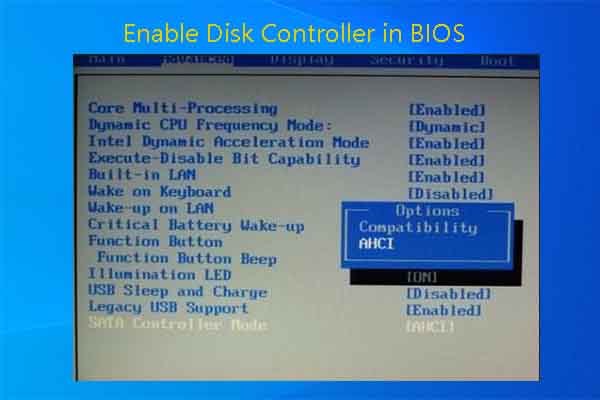
MiniTool
How to enable disk controller in BIOS? Like others, you may be curious about it too. If so, you can read this post to get the detailed steps.
bitter mirage
bold temple
<@396513761550270464> <@847439942643613697> Would this method works out? https:/...
This one's good at remarks
But I can't try that method now practically
But what's the problem?
Your installation of windows is already done so why trubleshooting so much?
It's like a kind of mess doing unnecessary things with the partition drives
What's the version of your bios ?
And what company is the motherboard?
blazing musk
bold temple
<@396513761550270464> <@847439942643613697> Would this method works out? https:/...
The data required for the BIOS to be able to read the boot sector on a NVMe drive is missing from the BIOS, there is no official fix unless there's an update that adds this missing data.
Windows is able to detect that the required module to boot is missing, and can refuse to install to the drive.
blazing musk
formal tusk
<@396513761550270464> what exactly is it refusing
The BIOS simply cannot read the boot sector on NVMe drives. It does not have the ability to communicate with the controller on that level, and it will only allow it to be a storage drive.
Also, Windows will not accept MBR any more
formal tusk
Fair enough
Yeah I figured it would insist on gpt but I don't know enough about 4th gen
Really anything pre-6th? For me rn is just lolwat
blazing musk
It has a UEFI so at least it knows how to read GPT
formal tusk
Mm
bold temple
bitter mirage
Your installation of windows is already done so why trubleshooting so much?
You'll know how much struggle I get by having HDD on windows.. it's so slow and it takes long time to boot my windows not only that. I'm an editior and gamer my adobe gets very slow and anytime I wanna play any game it gets laggy and terrible for me.
This is my processor and my ram @bitter mirage @blazing musk
Processor Intel(R) Core(TM) i7-4790 CPU @ 3.60GHz 3.60 GHz
Installed RAM 16.0 GB (15.9 GB usable)
System type 64-bit operating system, x64-based processor
torpid adder
you installed windows on a hard drive?
bold temple
torpid adder
you installed windows on a hard drive?
Yes in my old HDD drive
torpid adder
why not an ssd?
bold temple
torpid adder
why not an ssd?
I bought M.2 couple days ago.. I tried to install my windows on it and couldn't I get this.
 torpid adder
ohh right the m.2 no boot drive h97 thing
so you'll need a sata ssd
I recommend crucial mx500
bold temple
torpid adder
ohh right the m.2 no boot drive h97 thing
what is it if you don't mind me asking?
torpid adder
torpid adder
bold temple
torpid adder
I recommend crucial mx500
I'm checking it on amazon.. is it fast?
bold temple
torpid adder
https://discord.com/channels/500085440221806603/500102809564348429/1220392178019...
OH!!! ok
torpid adder
it's an ssd so yes
it's the best quality sata ssd for the most reasonable price iirc
bold temple
yeah I'm reading it its very good
blazing musk
The MX500 is generally considered one of the best SATA SSDs, and is usually a decent enough price
bitter mirage
Installation and booting speed are good in MX500 SATA SSDs it is a significant and useful, upgradable for most old HDDs
I recommend MX500 SATA SSD
In fact I am also using it
torpid adder
the only sata ssds I've used are wd blue 3ds but they kinda stopped making that exact line at wd and replaced it with the sa510 which doesn't seem to be up to the same level of quality and value
bitter mirage
As in remarks/reviews also MX500 SATA SSDs are good
real lava
the only sata ssd ive ever used was wd green
a pretty low tier ssd
worked ok enough tho
still way faster than a hard drive
real lava
i was younger and desperate lol
blazing musk
Green drives were good options for super old devices that only had SATA II
real lava
asked dad for an ssd
he said "okay but don't get something expensive"
so wd green i went
torpid adder
I still have a couple of sata 2 computers but idk I'd still use blue or mx500 for them
real lava
now i have mp33 and micron 2400
blazing musk
torpid adder
I still have a couple of sata 2 computers but idk I'd still use blue or mx500 fo...
"Were" being the operative word, referring to 6+ years ago when they were cheaper than most other options
torpid adder
ahhg
real lava
thailand didn't have much ssd options back in 2019
wd green happens to be the cheapest
and i was scared of the kingstom a400's woes
my bro still uses my old laptop that runs the green
bitter mirage
@bold temple Did it sort out your problem?
real lava
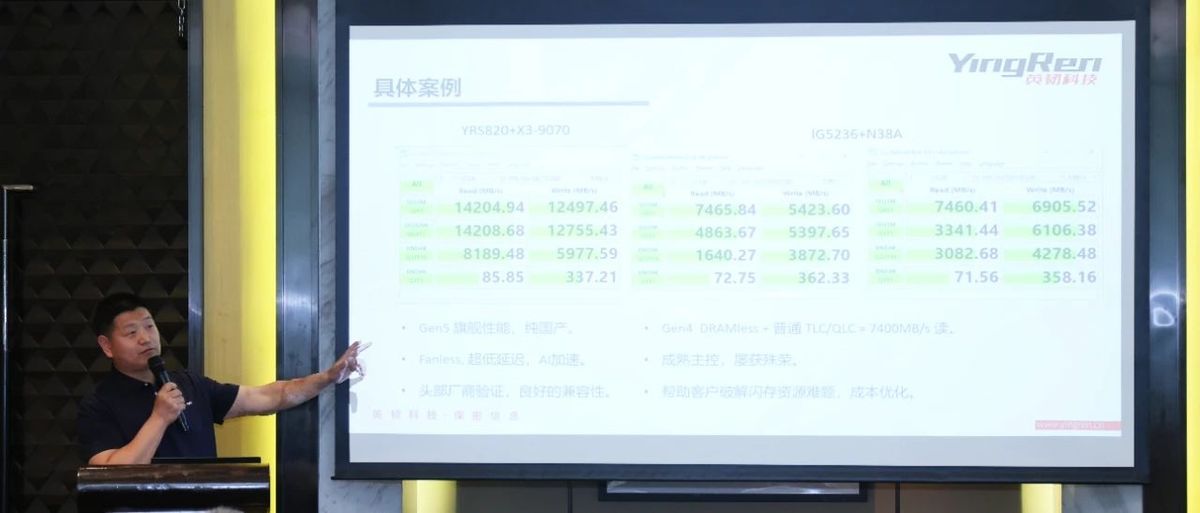
Tom's Hardware
Yingren takes the fight to Phison and Silicon Motion with the new YRS820 PCIe 5.0 SSD controller.
possibly the best controller there is rn
innogrit on top again
blazing musk
That's assuming they're not using stolen/repurposed chips with serial numbers shaved off... again
open gazelle
Hey! Maybe Phison/SM was the one stealing from Yingren. Cant believe you'd accuse them of such things smh my head ||/s||
 crimson fjord
anyone know why standard size sd cards seem to have died out? instead replaced by micro sd with an adapter to "full size"
open gazelle
Mass production. It isnt possible to downscale standard to micro but it is possible to do the opposite. For quite some time now a large amt of standard sized cards are actually just a fully enclosed micro card.
 red jay
APEX storage sells NVMe hard drives up to 168TB however is there any use cases for it
I mean single hard drive
 tacit field
red jay
APEX storage sells NVMe hard drives up to 168TB however is there any use cases f...
tacit field
red jay
APEX storage sells NVMe hard drives up to 168TB however is there any use cases f...
Games...
red jay
What kind of game would need TB class storage
blazing musk
red jay
APEX storage sells NVMe hard drives up to 168TB however is there any use cases f...
The largest single drive is currently 32TB so that sounds like a scam drive.
One installation of call of duty can take 400GB.
 sinful salmon
blazing musk
The largest single drive is currently 32TB so that sounds like a scam drive.
One...
sinful salmon
blazing musk
The largest single drive is currently 32TB so that sounds like a scam drive.
One...
it's a PCIE addon card that can be filled with NVME SSDs
https://www.youtube.com/watch?v=IFwFDZDQWAA
It is legit, but it dumb AF

Looking for a reliable mobile provider that won't break the bank? Meet Tello Mobile! With Tello, you get top-notch coverage, no contracts, and fully customizable phone plans that fit your needs. Switch to Tello now and get 50% OFF any plan above $10 until May 16th at https://tello.com/?utm_source=partner&utm_medium=cpc&utm_campaign=LinusTT
The ...
It is amazing if ultimately really, really dumb for a consumer
2800 USD for the card, WITHOUT the SSDs
formal tusk
makes sense for someone who would need it
like a virtualised threadripper editing station
sinful salmon
Yeah for that use case
Actually amazing
Mere mortals need not apply
Now if Apex makes a Gen 5 variant...
Oh boy, that'd be incredible
The numbers speak for themselves
 blazing musk
sinful salmon
it's a PCIE addon card that can be filled with NVME SSDs
blazing musk
sinful salmon
it's a PCIE addon card that can be filled with NVME SSDs
Oh that's what they meant. I guess I was confused when they said "single drive."
sinful salmon
Yeah it's a PCI Gen4 ×16 carrier card
TECHNICALLY you can configure it as a single RAID array
 heady glade
Looking for the best deals on 4TB SSDs
I purchased one thorugh here and it was geat just cannot find the same one i had
blazing musk
This is the best deal right now without using TikTok shop https://pcpartpicker.com/product/FZWzK8/teamgroup-mp34-4-tb-m2-2280-nvme-solid-state-drive-tm8fp4004t0c101

TEAMGROUP MP34 4 TB M.2-2280 PCIe 3.0 X4 NVME Solid State Drive (TM8FP4004T0C101)
Yes SSD prices have gone up a lot
heady glade
yea think i purchased 179 so def up a bit
heady glade
blazing musk
Yes SSD prices have gone up a lot
anyparticular reasons why?
blazing musk
During the pandemic there was a major shortage of chips for GPUs due to the massive increase in demand, a large part of which was from crypto mining. Nvidia and AMD ordered massive amounts of fabrication time in advance from TSMC, because that's what you have to do. They're booked years in advance.
Once Ethereum finally went proof of stake and mining ended, the demand for GPUs fell off a cliff overnight. This left AMD and Nvidia with more silicon wafers than they could ever use, and they had to sell them to someone, anyone, so they could recoup the costs. Most of the buyers were companies that make SSDs.
The influx of cheap silicon for SSDs drastically reduced their prices and made them more advanced at the same time since they could use newer nodes.
Now that the market has stabilized again, the SSD manufacturers are back to buying their fab time directly at the normal rate, so the SSD prices have stabilized back to where they would naturally be in a more normal market.
red jay
those will be (or already are) in the museum, but militaries and agencies like NSA still use it

and also tapes
 devout monolith
good deal on a 1tb m.2?
dense merlin
devout monolith
good deal on a 1tb m.2?

Crucial P3 Plus 1 TB M.2-2280 PCIe 4.0 X4 NVME Solid State Drive (CT1000P3PSSD8)

HP FX900 1 TB M.2-2280 PCIe 4.0 X4 NVME Solid State Drive (57S53AA#ABB)
thats a pretty high tier gen 4 drive, not that it matters for most people ^^
devout monolith
gotcha, thank you
brazen needle
What kind of adapter would I need to connect this old hard drive to a modern computer?


 blazing musk
That's standard SATA, it's still actively used and all motherboards and power supplies have the connectors
brazen needle
blazing musk
That's standard SATA, it's still actively used and all motherboards and power su...
Would I be able to plug this into like USB C?
blazing musk
If you're putting it onto a laptop instead of a desktop, you can use a USB to SATA adapter. They're pretty cheap and common. I'll find one real quick.
brazen needle
I just want the data that's on it. I have no use for it otherwise. But thanks! I'll check it out
brazen needle
blazing musk
This one's cheaper https://www.newegg.com/orico-2129u3-enclosure/p/0VN-0003-001G...
This might be a dumb question but how do I tell if it's 2.5 or 3.5 drive?
torpid adder
Is it big, the size of your hand?
Otherwise, it's 2.5"
Or just
Measure it I guess
Once you know what a 3.5" drive looks like it'll be easy to tell
 outer pecan
ive been looking at PCIe to NVMe adapter cards is there potentially any that do gen 4 speeds and have 2 slots?
blazing musk
outer pecan
ive been looking at PCIe to NVMe adapter cards is there potentially any that do ...
100%. Make sure your motherboard supports bifurcation. https://www.ebay.com/itm/195901680699
outer pecan
Alright
blazing musk
The most I've seen on a single card is 29
outer pecan
Damn
blazing musk
But 2/4 is a more common (and cheaper)
outer pecan
Yeah
I was looking for 4 initially but two seems more common and I don't really see myself needing more than 2
blazing musk
Which motherboard did you have? I can look into that bifurcation thing for you
AMD chipsets all allow it but it's up to the vendor to enable it
blazing musk
B550? Not B650?
blazing musk
Unfortunately your second x16 slot is only running at x4 so you'd be limited to a single drive on that slot
Unless you used a carrier card with a chipset that handles the drives instead of the bios
blazing musk
Not cheap
The difference being a simple expansion card connects pin to pin on each slot, while the more advanced card connects the drives to a chipset, which then communicates as a single drive would with bios over whatever speed link it has
outer pecan
Ah
Might look into a SATA drive then
Primarily want another drive to just run Linux off of but also wanted to replace my two hard drives with SSDs
blazing musk
Linux is perfectly happy running off USB
bitter mirage
Its Live Bootable too in an USB
blazing musk
Could do an external ssd if you really wanted
outer pecan
Yeah I've had issues with that though and prefer using an SSD
True
I have one of those
bitter mirage
SSD for extra Stuff with Linux
blazing musk
bitter mirage
Its Live Bootable too in an USB
Yeah live boot is one method, but I mean straight installing it to a USB SSD
bitter mirage
blazing musk
Yeah live boot is one method, but I mean straight installing it to a USB SSD
That's Good Too!
bitter mirage
outer pecan
Yeah I've had issues with that though and prefer using an SSD
Coz, SSD are only available in more storage
I mean SSD starts from at least 64GB as Compared to a Pendrive which is available at only at low as 32GB as for Linux
 haughty notch
Hey guys, I was just looking for an opinion on this SSD for server usage https://www.newegg.ca/kingspec-4tb-2-5-sata/p/0D9-000D-00158?Item=9SIB1V9JMA9935&cm_sp=SP-_-1813573-_-0-_-2-_-9SIB1V9JMA9935-_-2tb ssd-_-2tb|ssd-_-2
I plan on using it to replace my hard drives in my server or to use with them (not sure which I will do yet). Do yall suggest anything better or do you think this will be fine? I dont care so much for speed, just looking for something to run my VMs on so that it doesnt slow down too much like it is currently doing when I store my VMs on the hard drives
blazing musk
haughty notch
Hey guys, I was just looking for an opinion on this SSD for server usage https:/...
Does your server have M.2 slots or only SATA?
haughty notch
blazing musk
Does your server have M.2 slots or only SATA?
Sorry for late response, it has both, it's barely a "server" lmao
blazing musk
haughty notch
Sorry for late response, it has both, it's barely a "server" lmao
2 options then, one is a more known and reliable brand of SATA drive, the other is a much faster M.2 drive. https://ca.pcpartpicker.com/products/compare/vYqPxr,yF4Zxr
Patriot P310 1.92 TB M.2-2280 PCIe 3.0 X4 NVME Solid State Drive vs. TEAMGROUP T-Force Vulcan Z 2 TB 2.5" Solid State Drive
quiet gust
Will the two models perform about the same? If anyone has some time to help me find some specs other than the capacity I'd appreciate

(Look at the 2 bottom ones since they're the the different drives)
brisk dome
quiet gust
Will the two models perform about the same? If anyone has some time to help me f...
Very limited info available it seems. Passmark has a handful of benchmarks for each drive, the bottom one seems to be a bit faster
*bottom one in the photo, first link I sent. 32S9G
brisk dome
Yeah best way to know for sure is to test en yourself
 quiet gust
Oh ok. The person that sold me this one said they were from work machines and i assumed they were like a bunch of office pcs or workstations
blazing musk
You could search the part numbers from this label and see

The drive they put in the machine would have been whatever drive they had in stock that met the advertised specs
 ionic thunder
anybody knows about "seagate SRN21C" ? mines seems to be running but cant open it
real lava
Those things are external drives that can't be taken apart
ionic thunder
sorry i don't meant for it to taken apart but i cant access my files anymore
real lava
it might still spin, but it could be dead
blazing musk
The read and write arms are on separate mechanisms from the platter motors
The arms are usually what dies first on external drives, unless you vibrate the platter to death
quiet gust
I'm looking at some of CrystalDiskMark settings and I noticed there's a setting for nvme ssds that changes some of the tests like seq. and random, by setting different queues, threads or sizes. Is there any use case for the nvme setting if I'm not actually using an nvme ssd?
What is the test size used for (the one ranging from 64MiB, up to 64GiB)? I've almost always used 1-2GiB but never noticed differences other than margin of error.
blazing musk
quiet gust
I'm looking at some of CrystalDiskMark settings and I noticed there's a setting ...
The results are less meaningful if you don't run it on nvme, but you can still do it so you have 1:1 comparison
No reason not to run both sets of tests if you're comparing drives
quiet gust
Ok, do you know what the test size is for?
Looks like 64MiB gives more imprecise results apparently
blazing musk
Test size should be the size of the working test file
Faster drives would get more accurate results with larger sizes
quiet gust
I'm testing some sas drives with my lsi 9240 8i, I've got a lot of ssds and hdds to test. Currently connected 8 ssds and only 6 show up, tried reseting them on the connector + restart but still two of them are not showing up.
Considering I'll have a lot of testing to do, how unsafe is it to unplug a drive while running (they are not formatted and have no allocated partitions) and plug another one back in? Will windows recognize it immediately or does that also require a reboot?
blazing musk
I'm not sure if that controller supports hot plug, but if it does that needs to be explicitly enabled. Never swap power while it's on, though. I've fried a drive testing that.
quiet gust
I feel like I found the problem
The two drives (that showed up previously on the same connectors) happen to work on any other sata connector. Other drives i connect to those two specific sata power conn. don't work, might have found the problem
Maybe it's related to my soldering skills that I applied on this psu to add "a few" sata connectors
Maybe a wire broke as I was moving them
quiet gust
Luckily it's not skill issue, it's some of the sas to sata adapters that don't make good contact either with the drives or the cables. I have no idea why they have to be so expensive and also fragile
 sharp folio
What should I use for checking drive health?
brisk dome
I use the respective drive manufacturer's software
quiet gust
sharp folio
What should I use for checking drive health?
CrystalDisk info is a good software that shows you a lot about a drive, including S.M.A.R.T. reports. So basically anything from uptime to bad sectors, firmware...
 minor sun
New drive stats dropped, interesting average age of failure chart
 blazing musk
Some of those with an average fail under a year... yikes
HGST looking like the most reliable long term brand here
minor sun
blazing musk
Some of those with an average fail under a year... yikes
These are only the active drives so some of these are just the premature death part of the bathtub curve, it'll average out over time
But it's cool that basically all drives except for 2 drives has their average death age go up between years as it averages out as the average drive ages
brisk dome
Chart doesn't seem to account for how many of each drive is being used though
Unless I'm reading it wrong
Like wouldn't a failure % rate be more useful?
minor sun
brisk dome
Chart doesn't seem to account for how many of each drive is being used though
This chart isn't about failure rates out of working drives, backblaze always has a separate chart for actual failure rates, this is the new chart they did just for q1 2024 for a look at the average age of the drives that did fail
minor sun
Yea-ish
I do wish they added average drive age like they did for the other charts for this one too though

Backblaze Blog | Cloud Storage & Cloud Backup
Read the Q1 2024 Drive Stats report, including the latest annualized failure rates (AFRs) and a check in on the average age of drives.
 shut furnace
yo, are there any lists of drives with detailed specs listed out there? Been trying to look around for a somewhat cheap sata drive that has sustained writes of ~1,700mb/s that is reliable but takes a while to find details for some drives
minor sun
shut furnace
yo, are there any lists of drives with detailed specs listed out there? Been try...
95% of every drive you can find that's not a random company that has only made one rebranded drive will be on there
shut furnace
oh nice
shut furnace
no this device is sata only, and sorry I meant mb not MB (this stuff gets confusing lol
The difficult thing is the drive needs to be able to sustain it as this is for a camera
minor sun
might need mlc for consistent performance but even modern tlc should be able to sustain 200MB/s
shut furnace
Alright I'll do some looking around, thanks for the link
sour wadi

I'm sure it will get taken care of quickly now, but it might be too late for all the people who downloaded it already 🙁
⇒ Become a channel member for special emojis, early videos, and more! Check it out here: https://www.youtube.com/ThioJoe/join
▼ Time Stamps: ▼
0:00 - Intro
0:51 - The Specific Malicious Downloads
1:12 - How Do You Know?
2:32 -...
real lava
wow
blazing musk
 loud girder
Oops
 craggy creek
hi sorry to interrupt, anyone have any tips on how to recover data from a clicking drive? ive tried the freezer trick and on linux, and thus far still isnt detecting on my external adapter


 cloud kiln
craggy creek
hi sorry to interrupt, anyone have any tips on how to recover data from a clicki...
cloud kiln
craggy creek
hi sorry to interrupt, anyone have any tips on how to recover data from a clicki...
Clicking drive? Lol
All HDDs make clicking noises whether they're working or not (unless the arm died)
But yeah it's most likely unrecoverable
For you at least
If the data is worth several hundred to you
Bring it to drive savers or some other data recovery service
For important data, always make backups on seperate devices, and for extra important data, make sure to also make an off-site backup on something like gcloud or backblaze or like, dropbox
craggy creek
cloud kiln
Clicking drive? Lol
Its for a client of mine, tried everything I can figure and its clicking more than usual for a drive and its not showing up so ill tell the client that unfortunately I can't rescue the data and it will need more specialized assistance
craggy creek
cloud kiln
Do you hear the drive spin up
It spins up and just starts immediately clicking no other noises
cloud kiln
Hmm
Ok then that probably is just an arm replacement to recover the data, that should be around $200 I believe
Wait
400 is a safer estimate
craggy creek
Ok, not really set up for specialized data recovery, but ill see how much the local data recovery company is and let the client know
cloud kiln
Yeah get local quotes
blazing musk
cloud kiln
Ok then that probably is just an arm replacement to recover the data, that shoul...
You need a special clean room to do that without destroying the data
cloud kiln
technically speaking, you dont need a clean room, just a clean chamber, but that's still more than what most people have in terms of equipment
blazing musk
True enough. A clean room type environment to work in.
craggy creek
As I figured
quiet gust
Does the hp p410 sas controller support it mode?
blazing musk
It should but you'll need to flash it
brisk dome
Normal for a crucial P5 to be idling this hot? it's my OS drive but I'm not like downloading or copying files right now.
 blazing musk
brisk dome
Normal for a crucial P5 to be idling this hot? it's my OS drive but I'm not like...
blazing musk
brisk dome
Normal for a crucial P5 to be idling this hot? it's my OS drive but I'm not like...
66 is safe but a little high. As long as it stays under like 85 under load you're fine and it won't throttle.
brisk dome
ok. it's down to 60 now so maybe there was some background OS stuff going on
 verbal snow
Any good suggestions for m.2 NVME drives 4tb is what I'm looking into since it's the last available slot before I go sata
it's going to be a game drive an nothing else
blazing musk
MP34
verbal snow
TEAMGROUP MP34 4 TB M.2-2280 PCIe 3.0 X4 NVME Solid State Drive (TM8FP4004T0C101)
blazing musk
Yep
verbal snow
Alright this Friday I'm getting it and probably a Corsair harpoon
formal tusk
They're all meh until $260
alternative

Silicon Power UD90 4 TB M.2-2280 PCIe 4.0 X4 NVME Solid State Drive (SP04KGBP44UD9005)
verbal snow
I was looking into that but wanted better advice before I made wrong choice
formal tusk
Or
Leven JS600 4 TB 2.5" Solid State Drive (JS600SSD4TB)
For a game drive this is fine
It's old TLC iirc from what forks told me
blazing musk
Agreed 100%, SATA barely has different load times compared to even PCIe 4.0
verbal snow
Preference, m.2 since I don't wanna hassle the cables and have to shift my whole case since I have so little space