#storage-devices
1 messages · Page 5 of 1
 dawn sand
Might have to cope some
 dawn sand

 fringe mesa
I so freaked out today. Back In November, I purchased 10 SK Hynix P41 from Amazon, the 2tb while they were at $130 a pop. Packaging is different from last time as I got them, even though I didn't need them till I opened one today to see if I can hook it up to my Steam Deck, and my god, the packaging inside is different, they have a thin layer card that holds it to the roof of the packaging, so it looks like you got a box with nothing in it. Opened 3, and was freaking out as I spent $1400+ with taxes and all and was like OMG, I'm finding out now I got nothing? Then looked very carefully and was like, no, there is weight I can feel, there has to be something hiding it. Sure enough, thin piece of plastic. Pain to remove, but wow. Now only problem is, trying to get it to work externally on the deck, if that's even possible.
It will take 6 of these, to fill my entire steam library.
Oops sorry, that's 3. Keep forgetting they are 2tb
fringe mesa
Funny, I may be new to Linux, but some of the errors are quite similar to windows. Made me decide to check the NVME on my z690, and sure enough, the enclosure is bad. Never had a bad enclosure ever. Unless its the cable that came with it. I tend to buy a few of each in case I want the NVME in it to be more permanent. Going to check later to see what exactly is bad with it. Sometimes it's just a tiny piece of plastic, manufacturers actually left behind, like when you get a new watch, that thin coating?
Same with the pin hubs. Insertion machine puts it on right before the soldereave process, but doesn't take it fully off.
Bbl
fringe mesa
Just a heads up. A lot of old posts state NVME like the SK Hynix P41 2TB won't work with the steam deck. This is completely untrue. Maybe not internally, but externally it can, and you can even set the steam deck up editing the cfg file to load this drive each time, so you don't have to remount it every time you turn the deck on.
 cerulean monolith
thanks both of ya, its good.
fringe mesa
I use Macrium Reflect, and Mini tool partition wizard. Come to think of it, I'm always using those two together and forgot why. It's something I do so often, I don't even think of it. What I do know, they both are missing something, so using each one to deal with the others short comings gets the job I need done. Some other utilities just as good that I got several keys for, came with my NVME and high priced Micro SD cards. One that came with my Toshiba drive, that was an insult, but Toshiba did make good on that issue long ago. $800 drive, the utility refused to let me image the drive going bad onto the Toshiba drive, because the source wasn't Toshiba. That was when I built the Z390 AORUS systems.
On the SK Hynix P41 2TB, not sure why Steam didn't go with that type. After playing Terraria, Rune Factory, East wind, and Sun Haven off the Steam Deck, the NVME was luke warm, not even hot.
fringe mesa
That one enclosure that reads in the NVME, but leaves a can't identify message of drive type, figured might be a Cable problem, until I noticed unlike the two different models, this one is missing a small mini chip that the other two have. Not sure what it does, only you can see there's a spot for it, but never put on board. Manufacturer sending me a replacement.
 blazing musk
 red jay
whats the best, most reliable 4tb hdd?
red jay
whats the best, most reliable 4tb hdd?
Best or "best value" because those are very different
Best Value https://www.amazon.com/dp/B099P9ZXVG?th=1
"Best" (6TB is $5 more than 4TB, nice deal right now) https://www.amazon.com/dp/B09NCMMSQX?th=1

The Toshiba X300 Performance Internal Hard Drive is designed for professional systems, home media computers, and gaming PCs. The X300 Hard Drive offers 7200 RPM, large cache size, and Toshiba Cache Technology to take your gaming to the next level along with massive capacity to store your growing ...

Upgrade today with the latest generation of the WD_BLACK Gaming Hard Drive for the capacity you need and the performance you want. Available with up to 256 MiB of DRAM cache on higher-capacity models, WD_BLACK Gaming Hard Drives are optimized for performance so you can spend more time playing the...
red jay
wd black, definitly
 indigo arch
Good idea? Yay or nay?

 real lava
works i guess
 sour wadi
I mean usually you can use a pcie slot before taking an m.2 slot but it'd work
indigo arch
I don't have a spare pcie slot.
It's a mini itx bored and the only port is already populated with a GPU.
I was trying to find more variations on Amazon but couldn't seem to find any. Only that one
sour wadi
That'd work then
 open gazelle
Make sure to consider where the M2 slot is and if the M2 card will interfere with anything.
 glad oxide
how do I use my old HDD as extended storage alongside my main SSD? i need more storage, might put offline games and data there
 quiet gust
Need help with SSD not showing up, I've been asking many times but no response
Problem: 240gb 2.5" sata SSD doesn't show up anywhere (including disk manager and cmd-diskpart) however it does in bios and hwinfo64, is there anything I could change in bios settings to possibly get this drive to show up?
I know it is working because I used it in another system some time ago and it worked fine but I now tried on many different systems but doesn't show up anywhere, even tried using usb to SATA adapter but nothing
Oh and it also shows in crystaldisk info
 boreal creek
What NVME storage would you guys reccomend for a secondary game drive?
sour wadi
How much storage and what country?
boreal creek
2TB in the US
sour wadi
boreal creek
2TB in the US
I'd get this
https://pcpartpicker.com/product/VxfFf7/silicon-power-a60-2-tb-m2-2280-nvme-solid-state-drive-sp002tbp34a60m28

Silicon Power A60 2 TB M.2-2280 PCIe 3.0 X4 NVME Solid State Drive (SP002TBP34A60M28)
 harsh sage

 urban steppe
Ok, so I got the Gigabyte Aorus 17 YE5 3080TI laptop and as far as I could tell the weakpoint was the harddrive; 1TB SSD is all it ever said in any of the marketing material. I start digging deeper, looking to see what my options for expansion were. Turns out the laptop can take 2x 2280 M.2s, and the one supposedly installed is a:
Gigabyte AG470s1tb-si b10
https://www.gigabyte.com/SSD/AORUS-Gen4-7000s-SSD-1TB#kf
It took me a bit to track it down and confirm it. Originally what I found popping up on the Amazon results were typical M.2s with the heatshields, which I imagine is not common in a factory installation; they're usually the barebones modules and such right? I juggle around and weed out results and it turns out, supposedly, this thing has this beastly 7000 series M.2, though I'm not sure if I can believe it. It definitely doesn't feel like it. And if it does, can I believe it actually looks like the heatshielded one that pops up?
I found a version around $150 out there. I'm hoping this system supports RAID 0 rebuilding and I can just add another matched module and stripe away with current installation. I'm also wondering if I should go another route entirely with separate drive, storage scale drive, external whatnots, etc etc. 🤔 Thoughts?
 formal tusk
So usually laptops will ship with an m.2, so you'll have one extra slot
blazing musk
urban steppe
Ok, so I got the Gigabyte Aorus 17 YE5 3080TI laptop and as far as I could tell ...
Don't worry about raid, it's more trouble than it's worth and most laptops don't support it. If you really want to you can use windows storage spaces to combine the drives but I don't recommend that either for a boot drive.
You can double check the model number of the drive using crystal disk info. That'll tell you if it's being throttled or something too, like a gen 4 x4 drive put into a gen 3 x2 bus. Crystal disk mark is a decent performance test too to compare your results to expected numbers.
formal tusk
I would try to avoid a gen 4 m.2 in a laptop btw unless you can fit some sort of heatsink to it
Otherwise it's throttle city
blazing musk
It's very possible that's the reason for poor performance if that really is the drive, yes
formal tusk
Good drives for a laptop are low power pcie 3 imo
blazing musk
P31 gold 
urban steppe
Some benchmark testing wouldn't hurt.
formal tusk
I would say even not p31 gold
I would go something perfectly fine with a sticker
Mp33, a60, 660p, 670p, etc
 dense merlin
P31 is a great ssd for a laptop, but imo it's just normally overpriced and more than most people would need with a laptop
blazing musk
Really? That's the best performance per watt drive though
formal tusk
But how many watt 
blazing musk
It's on sale right now too
formal tusk
What's the p41 plus like for heat?
dense merlin
Hot
blazing musk
formal tusk
But how many watt <:Heh:739724110044594236>
3.5-4W compared to the next best drives that are 6W+
formal tusk
blazing musk
3.5-4W compared to the next best drives that are 6W+
How many watt for mp33
blazing musk
formal tusk
How many watt for mp33
6W
urban steppe
Default drive stock from the factory in zee laptop. What sort of results are you guys getting?
CrystalDiskMark 8.0.4 x64 (C) 2007-2021 hiyohiyo
Crystal Dew World: https://crystalmark.info/
- MB/s = 1,000,000 bytes/s [SATA/600 = 600,000,000 bytes/s]
- KB = 1000 bytes, KiB = 1024 bytes
[Read]
SEQ 1MiB (Q= 8, T= 1): 6937.750 MB/s [ 6616.4 IOPS] < 1207.68 us>
SEQ 1MiB (Q= 1, T= 1): 3745.400 MB/s [ 3571.9 IOPS] < 279.76 us>
RND 4KiB (Q= 32, T= 1): 897.210 MB/s [ 219045.4 IOPS] < 141.39 us>
RND 4KiB (Q= 1, T= 1): 85.388 MB/s [ 20846.7 IOPS] < 47.89 us>
[Write]
SEQ 1MiB (Q= 8, T= 1): 4933.971 MB/s [ 4705.4 IOPS] < 1696.40 us>
SEQ 1MiB (Q= 1, T= 1): 4179.634 MB/s [ 3986.0 IOPS] < 250.61 us>
RND 4KiB (Q= 32, T= 1): 591.174 MB/s [ 144329.6 IOPS] < 214.56 us>
RND 4KiB (Q= 1, T= 1): 308.700 MB/s [ 75366.2 IOPS] < 13.19 us>
Profile: Default
Test: 1 GiB (x5) [C: 75% (698/936GiB)]
Mode: [Admin]
Time: Measure 5 sec / Interval 5 sec
Date: 2023/02/08 6:51:51
OS: Windows 11 Professional [10.0 Build 22621] (x64)
blazing musk
Damn yeah 7k read alright
urban steppe
Yeah I perked up when that popped
Settings were on default, I wonder if selecting NVME will change anything.
formal tusk
Not peak gen 4 but def gen 4
urban steppe
Mind you, 75% full drive.
urban steppe
Well then...
CrystalDiskMark 8.0.4 x64 (C) 2007-2021 hiyohiyo
Crystal Dew World: https://crystalmark.info/
- MB/s = 1,000,000 bytes/s [SATA/600 = 600,000,000 bytes/s]
- KB = 1000 bytes, KiB = 1024 bytes
[Read]
SEQ 1MiB (Q= 8, T= 1): 6927.657 MB/s [ 6606.7 IOPS] < 1185.20 us>
SEQ 128KiB (Q= 32, T= 1): 6883.982 MB/s [ 52520.6 IOPS] < 603.50 us>
RND 4KiB (Q= 32, T=16): 3567.549 MB/s [ 870983.6 IOPS] < 569.94 us>
RND 4KiB (Q= 1, T= 1): 85.108 MB/s [ 20778.3 IOPS] < 48.04 us>
[Write]
SEQ 1MiB (Q= 8, T= 1): 4942.741 MB/s [ 4713.8 IOPS] < 1694.28 us>
SEQ 128KiB (Q= 32, T= 1): 4887.813 MB/s [ 37291.1 IOPS] < 856.51 us>
RND 4KiB (Q= 32, T=16): 3359.537 MB/s [ 820199.5 IOPS] < 618.97 us>
RND 4KiB (Q= 1, T= 1): 307.056 MB/s [ 74964.8 IOPS] < 13.26 us>
Profile: Default
Test: 1 GiB (x5) [C: 75% (698/936GiB)]
Mode: [Admin]
Time: Measure 5 sec / Interval 5 sec
Date: 2023/02/08 6:58:51
OS: Windows 11 Professional [10.0 Build 22621] (x64)
blazing musk
Random performance is low but that can be easily explained by free space
Some drive controllers tank the performance above 50%
formal tusk
I'd open up the laptop to see what they're using to heatsink the ssd
Some use thermal pads to the shell, others small metal plates
If you're lucky they might have something reserved for a 2nd ssd in there already
Happened to me in the past
urban steppe
And the drive I found that supposedly matches has already been ordered. At some point I'll find the right harddrive enclosure to attach to this laptop to access my old PC's drives and setup the new laptop's future. I have a few SSDs left behind and a 2TB spinner for bulk storage. I want to get a 2TB SSD to clone backup the 1TBx2 RAID 0
I'm waiting on Gigabyte's response regarding warranty before touching a screw.
urban steppe
Well there's two screw hole areas that look like they have tiny tape circles over them..
blazing musk
Those "warranty void if removed" stickers are illegal
In order to deny you a warranty claim they have to prove the damage they're repairing was caused by you, which has a high bar for proof rarely met.
urban steppe
And I have a background that likely adds up to more experience than their own techs
blazing musk
Wouldn't surprise me in the slightest
urban steppe
How has Gigabyte's rep held up over the past decade? I know they used to take a lot of pride in triple checking the quality of their output. They used to relentlessly test their components.
blazing musk
About as well as any average company in general
They have their share of the infamy same as all the other brands lately
I have heard nothing but good things about their laptops with only a couple outliers
urban steppe
The only note I found about this laptop's shortcoming is the charging plug location, and it's a lower power variant so the 3080TI isn't tearing up clockrates as much as it could, but that also means I have a more efficient laptop that tackles more sophisticated GPU loads without sweating. It's a pro/con situation, and I do live fulltime mobile as an RVing disaster response coordinator, so there's something to be said for not drawing 3-4 hundred watts.
harsh sage
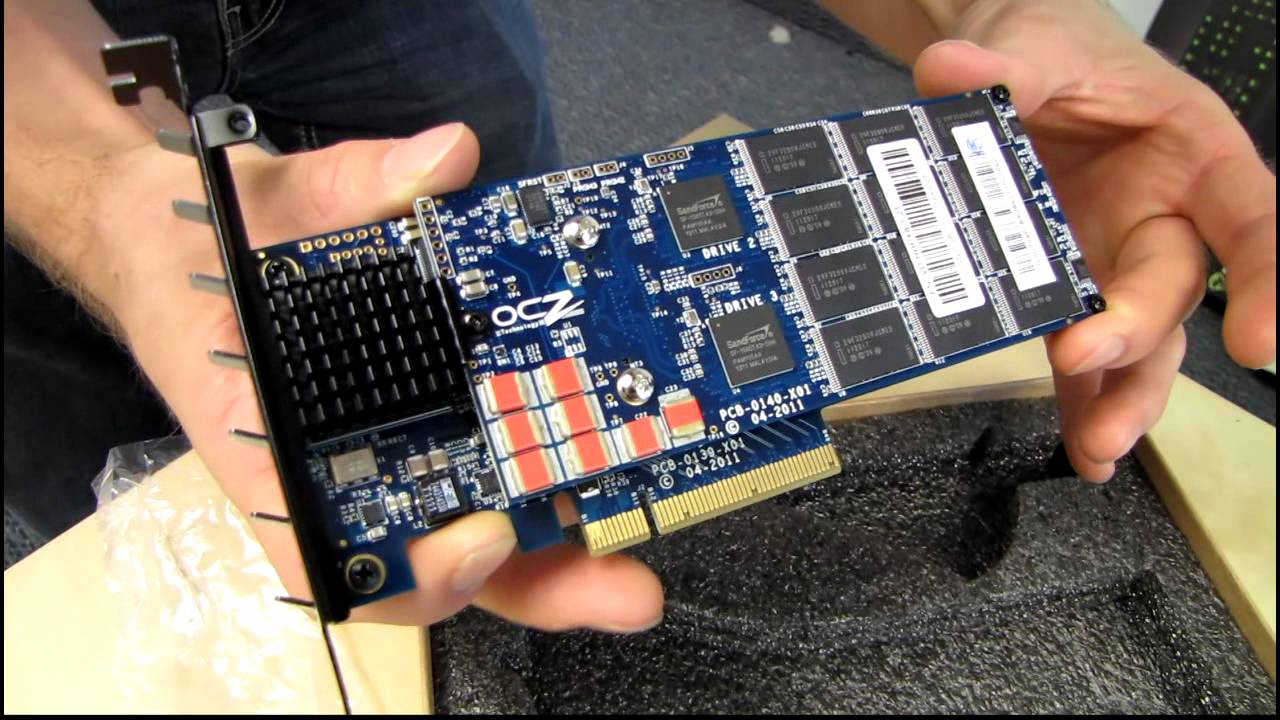
http://ncix.com/search/?categoryid=0&q=velodrive
Here it is. The most expensive item I've ever unboxed. This is a serious business SSD for doing serious business. Not meant for consumers.
blazing musk
11 year old video why?
harsh sage
why not
dawn sand
https://www.youtube.com/watch?v=5mBHIHmnuQ4 this just popped up

Grab the game: http://bit.ly/GameShops
Computer Details :
CPU: AMD Ryzen 3700X
GPU: ROG Strix GeForce GTX 1080 Ti OC edition
RAM: G.SKILL TridentZ RGB 2X8GB DDR4/3600 MHz CL16
PSU: Corsair CX 750 M 750 Watt 80 PLUS
SSD: SABRENT ROCKET NVMe M.2 SSD PCIe 4.0 1TB
SSD: Patriot SSD Burst 960GB 2.5 SATA 3
SSHD: Seagate FireCuda 1 TB internal hybri...

booting OS
dense merlin
Yes
 kind sierra
European numbers, very fun
blazing musk
This is why we always say 4.0 isn't worth it except for workstation use
 small carbon
(Sata) ssd sure was an advancement. Wish I just had em in my XP days, lol.
blazing musk
You needed SP3 and by that point Vista was out anyway for SATA
small carbon
Vista near release was poopoo anyways, & skipped it completely. More just would've been fun not using a hdd for os so long. 
blazing musk
I skipped Vista too. Hell I skipped XP. I was on 98SE for years.
small carbon
My dad had 98se & 2K when he did a pc tech school. By chance my 1st pc was around 2001-02 so XP it was. Might've been late enough that my disc had SP2 already. Sp3 sure helped a lot indeed. Gamed on XP a lot for 3 or so yrs.
quiet gust
Can someone help me find a list of mb chipsets that support sas+sata drives? not sure if there's even one...
kind sierra
Are expansion cards not an option
quiet gust
Well I mean if one of my pcs supports sas I may save a lot of money
Cuz I want to run at least 2 disks and as I saw expansions card (pcie) are really expensive (and apparently they cost more if they have more sas/sata ports)
I read online, just for some specific chipsets, that they have compatibility for sas sata, example: h310, I do have a h310 in my 2nd build but none of the 4 drives even spin or get recognized
(they could be all dead but that seems almost impossible)
blazing musk
It's not so much about the chipset, it's up to the board model which ones have SAS
quiet gust
That makes sense, that's why my asrock h310 doesn't support sas
Many people were talking abt some dell h310 mb but I thought it was all about the chipset
Thanks, I'll check if any of my other computers supports sas
 olive glade
Any thoughts
I'm thinking of getting this
 sour wadi
good drive nice price
small carbon
Clear your DC notifs, lol
real lava
p3 is cheapest ssd here
well if i ignore transcend
their speeds are horrid tho
like 1600 mb/s r/w lol
not that it matters for my use case, but idk about the nand
formal tusk
6W is pretty normal for an m.2 yeah?
sour wadi
formal tusk
6W is pretty normal for an m.2 yeah?
P31 go brr with 2w
6w is high at least for gen 3 probs standard for gen 4
formal tusk
Hey at least it's standard
formal tusk
sour wadi
Why you wondering?
my capture card is 6W and needs a X4 slot 💀
sour wadi
formal tusk
my capture card is 6W and needs a X4 slot 💀
Smh my head
 open gazelle
Could maybe find spec on PCIeSig. I dont feel like making an account to check something so trivial, thanks PCIeSIG.
https://pcisig.com/specifications
sour wadi
Well then it's completely reliable
 pulsar iris
but some thing is missing with in the moment of the nine
 lone vapor
what are some fast ssds that are fairly cheap? looking for a 1tb
im looking for an m.2
blazing musk
MP33 is old reliable, SP A60 is good price right now
TEAMGROUP MP33 1 TB M.2-2280 PCIe 3.0 X4 NVME Solid State Drive vs. Silicon Power A60 1 TB M.2-2280 PCIe 3.0 X4 NVME Solid State Drive
sour wadi
If you want faster, there's solidgrim p41 plus for about 60 atm iirc
blazing musk

Solidigm P41 Plus 1 TB M.2-2280 PCIe 4.0 X4 NVME Solid State Drive (SSDPFKNU010TZX1)
Overkill for most people tbh
Even for the foreseeable future
 worn trail
Are there any 5.0 NVME drives for sale currently? A bit curious.
sour wadi
blazing musk
Even for the foreseeable future
It has some sweet random for a 10$ over good budget drives tho
Basically p41 platinum rands
Delicious
 hazy stump
hello is anyone willing or able to help me out. I am trying to clean up my computer and my drives and I am not a very tech person sadly is anyone able to chat with me sometime and help me out?
blazing musk
Don't use a vacuum, use a can of compressed air or a handheld compressor/blower. Also don't let fan blades spin freely. Other than those things there's nothing to worry about.
hazy stump
blazing musk
Don't use a vacuum, use a can of compressed air or a handheld compressor/blower....
my problem is that one of my drives ha 261 GB free of 1.81 TB and I want to clean up the space but simply don't know how
hazy stump
yes sorry I did not say that
hazy stump
i will take a look thanks
small carbon
Just go through & uncheck some settings you don't know about, or at least glance em all over. 👍
cerulean monolith
K, so i was trying to do a cloning thing for a buddy on a new SSD. did the process and tried to extend the volume to the 2TB volume but it wouldn't work and said it was invalid for some reason? not sure if the partition is to deal with it.
so what do i need to do in linux or windows to fix this and extend the volume to use the full volume?
*Disk 2 is the OS drive
 real lava
cerulean monolith
K, so i was trying to do a cloning thing for a buddy on a new SSD. did the proce...
real lava
cerulean monolith
K, so i was trying to do a cloning thing for a buddy on a new SSD. did the proce...
Delete the new volume in disk 1
cerulean monolith
????
so its disk order related or?
cause if anything thats how the motherboard may have arranged it.
Disk 1 was added after the original M.2 was in
cerulean monolith
3, gonna be replacing the os Drive, Disk 2, which was installed before any of the other drives were added.
real lava
hm well
im honestly clueless about this lol
and is there any empty or unallocated partitions?
cerulean monolith
on the drive im trying to replace there is, but it always gives it as an error being an invalid action.
may have to reorder partions or something
cerulean monolith
can this pariton be re-ordered on linux?
blazing musk
cerulean monolith
on the drive im trying to replace there is, but it always gives it as an error b...
So you're cloning your old OS drive onto a new one?
Try using Macrium Reflect to clone the drive
cerulean monolith
blazing musk
So you're cloning your old OS drive onto a new one?
Try using Macrium Reflect to...
i did, its just that when trying to extend the 500gb old clone to the full volume of the os partition to the full capacity of the new 2tb drive, it would say its invalid to do so.
blazing musk
cerulean monolith
i did, its just that when trying to extend the 500gb old clone to the full volum...
You need to move your last partition to the end of the drive, then you can expand the volume
 pseudo harbor
Any 2tb m.2 recommendations
 cyan needle
pseudo harbor
Any 2tb m.2 recommendations
cyan needle
pseudo harbor
Any 2tb m.2 recommendations
Crucial P5 Plus 2TB Gen 4 NVMe, 6600 MB/s read - $122.99
https://www.newegg.com/crucial-2tb-p5-plus/p/N82E16820156281?Item=N82E16820156281#
pseudo harbor
cyan needle
Crucial P5 Plus 2TB Gen 4 NVMe, 6600 MB/s read - $122.99
https://www.newegg.com/...
any recommendations for something thats ready
might jus snag a 980 pro since they have a good track record but idk if there are alternatives
cyan needle
pseudo harbor
any recommendations for something thats ready
oh rip, it was in stock earlier.
cyan needle
pseudo harbor
might jus snag a 980 pro since they have a good track record but idk if there ar...
give me a bit and I'll look. I'm about to throw steak in my air fryer
pseudo harbor
all good
cyan needle
pseudo harbor
all good
MP33 for $108
https://www.newegg.com/team-group-mp33-2tb/p/N82E16820331431
MP34 for $5 more. (I have this one for my game drive and it's amazing.)
https://www.newegg.com/team-group-2tb-mp34/p/N82E16820331735
small carbon
Sn770 is good too. 980 pro price isn't even close to these others
pseudo harbor
ill snag the sn770
small carbon
Same on Amazon, if desired
pseudo harbor
thx for the recommendations
i was originally looking at the 770 but it was out of stock at bestbuy
forgot to check alternatives
sour wadi
pseudo harbor
might jus snag a 980 pro since they have a good track record but idk if there ar...
If you want that fast get the sn850x, 980 pro is dated
blazing musk
Plus 980 pro has that firmware bug that's killing drives
 blazing musk
 fast pier
help my drive is not work for some reason
fast pier
help my drive is not work for some reason
Open Windows update and make sure "receive updates for other microsoft products" is turned on in advanced options. If it was off, tell it to check for updates after. Then open up the "optional updates" section and hit the drop down on driver updates. See if there's a nvme driver there.
quiet gust
what would be the cheapest option to connect sas drives to a regular pc? Expansion cards? Id like to stay within 50€ and be able to connect at least 2 of my drives
 gritty monolith
Place wants 3k to recover a harddrive??
blazing musk
gritty monolith
Place wants 3k to recover a harddrive??
If the disk isn't spinning any more then that's the only option. It has to be opened in a specialized clean room and the bits read manually to put the data back together.
blazing musk
In cases where there's physical damage to the drive components causing it to not spin (or scratch), yes that's the only option.
If the drive is spinning but the controller is fried then you can swap the controller and cross your fingers
gritty monolith
blazing musk
If the drive is spinning but the controller is fried then you can swap the contr...
What’s this mean?
Self diagnosable?
Expensive?
blazing musk
You can swap a controller yourself but depending on the model it probably isn't easy and may fail. How good are you at soldering?
It's pretty cheap at least, you just buy the exact same drive off ebay and pull the controller
blazing musk
Here's an example of what I'm talking about https://www.youtube.com/watch?v=kmUE2F9sGE8

Check out Adamant IT 2 for the Pod Cast and More: https://www.youtube.com/c/AdamantIT2
I stream on games Thursdays and Sundays, 7pm UK: https://twitch.tv/nethesem
Join the Discord right here: https://discord.gg/BDV4hTc
Support the channel directly at: https://patreon.com/adamantit
Follow us on Twitter at: https://twitter.com/adamantit
Check out ...
Exact steps will vary by drive but it's very important you get the EXACT same drive
It might be worth trying this because even if you fail the data is still recoverable the expensive way, but there is obviously still risk involved
 heady salmon
I’ve been trying to find some new ram, and I need help
Does every stick of ram have to be the same brand and model
I currently have oloy blade rgb ram, and I am wondering if I need to get the same thing if I want more
 ebon dome
heady salmon
Does every stick of ram have to be the same brand and model
ebon dome
heady salmon
Does every stick of ram have to be the same brand and model
Theoretically, no. Practically, yes. As long as the RAM has the same CL timings and same rated speed you should be fine, but sometimes there are slight variances between brands and models that cause them to not be compatible with each other. It’s one of those things that’s fine until it isn’t
If you’re happy with the performance of your current RAM, you should try to get more of it. Otherwise I’d recommend selling it and starting fresh. What CPU do you have? Some CPU’s also have a preference between 2 or 4 sticks
harsh sage
blazing musk
Here's an example of what I'm talking about https://www.youtube.com/watch?v=kmUE...
lol that guy is great
heady salmon
ebon dome
Theoretically, no. Practically, yes. As long as the RAM has the same CL timings ...
i have a i5-12400f
i would get more of the same ram but it is expensive tbh
wait
nvm its on sale rn
its 3200mhz
$52.99 is it worth for another 16gb
blazing musk
Considering you can get a 2x16gb for $63 you might be better off selling what you have and buying this https://pcpartpicker.com/product/B8QcCJ/silicon-power-gaming-32-gb-2-x-16-gb-ddr4-3200-cl16-memory-sp032gxlzu320bdaj7

Silicon Power GAMING 32 GB (2 x 16 GB) DDR4-3200 CL16 Memory (SP032GXLZU320BDAJ7)
Or buy used memory, there's no moving parts to fail and it's pretty unlikely one would be bad
blazing musk
ebay
heady salmon
ok
blazing musk
Should be able to get $30-40 for your used kit of 2x8gb 3200
heady salmon
ty
harsh sage


eBay
Find many great new & used options and get the best deals for Lot of 9 2.5" 600GB 10K SAS 6Gbs Dell R610 R620 R630 R710 R720 R730 Server HDD at the best online prices at eBay! Free shipping for many products!
9 drives for under 70 bucks
maybe ill do that stupid SAS RAID array in my daily after all 
harsh sage

eBay
Find many great new & used options and get the best deals for LSI 6Gbps SAS HBA 9200-8I IT Mode ZFS FreeNAS unRAID + 2*SFF-8087 SATA US at the best online prices at eBay! Free shipping for many products!
harsh sage
https://www.ebay.com/itm/134079799441? HEHEHAHA

eBay
Find many great new & used options and get the best deals for Lot of 6 Toshiba Server Internal Hard Drive 300GB 15krpm 6Gb/s AL13SXB300N at the best online prices at eBay! Free shipping for many products!
blazing musk
The SAS array? ehhh it'll be "fast" but low capacity
harsh sage
Yea it'd make more sense to just buy an ssd, but I wanna do it for the stupid fun of having that in my daily
harsh sage
Depends on what you consider a lot of power
blazing musk
SSDs use like 4-6W soooo
harsh sage
About 9W per drive according to the datasheet, for those 15k ones
iirc the 10k ones were like 5W
 harsh sage
Yea it's not a huge deal tbh
blazing musk
Multiply that by 9 though and it becomes a drain
harsh sage
Oh I wouldn't use all of them at ones
Once
Probably just 4 or 6
Should've specified, mb
blazing musk
Still that's almost as much power as a 1050 ti uses including the controller card
harsh sage
What's the problem
blazing musk
BTW if you want to run a hardware raid off that you'll need a different card, since that's only a HBA
harsh sage
Nah I'm not doing hardware raid
 dapper lake
How to put my new ssd on my os?
I just put it my new ssd and it doesn't show up in my task manager except my hdd
blazing musk
dapper lake
How to put my new ssd on my os?
Are you trying to copy you current OS to the SSD or just using it as a secondary drive?
If you're trying to clone your OS that's easy enough. Use Macrium Reflect.
quiet gust
Is there any way I can check if a sas HDD is working? I have a bunch of 4tb sas drives but no motherboard to try them, I've tried to plug them to a normal sata motherboard but I only get som sort of click when they're powered but no spinning, could it be because they're just not compatible so they don't start?
And one thing I don't really get is that the asrock h310cm hdv/m.2 should be compatible with sas-sata drives, I have the non-m.2 version of the mobo but it looks strange that the mine doesn't support those drives...
Btw I asked chatgpt to get a list of sas data compatible mobos, I hope it's not wrong
dapper lake
blazing musk
Are you trying to copy you current OS to the SSD or just using it as a secondary...
copy it to my current os
blazing musk
quiet gust
Is there any way I can check if a sas HDD is working? I have a bunch of 4tb sas ...
SAS drives don't work on SATA ports, but SATA drives work on SAS ports (with adapters)
You'll want a HBA card with a couple breakout cables. You can do 4 drives per mini SAS port.
quiet gust
There are some motherboards that support sas drives while using data connector with an adapter, it may not off all the features sas has but at least you can connect them
I saw it from a video of a person with a Asus z270 if I remember correctly. The only problem is that I'd like to know if they at least work, I just want to see if they at least spin before eventually buying any motherboard to make the sas server
blazing musk
HBA cards are fairly cheap.
It's possible they might work on a consumer board but you'll need the right cable. Standard SATA doesn't work.
quiet gust
blazing musk
HBA cards are fairly cheap.
It's possible they might work on a consumer board bu...
How are they cheap? I've found them at really high prices and usually 2 sas ports
blazing musk
2 SAS ports supports 8 drives
blazing musk
harsh sage
https://www.ebay.com/itm/133481123885
<a:kekbomb:662791814448807963>
Check eBay
That one is $40 and includes the breakout cables
quiet gust
Cables? Could you send a link for some cheap ones
blazing musk
There's also old HP raid cards for like $30
quiet gust
blazing musk
That one is $40 and includes the breakout cables
Those are mini sas to sata cables
blazing musk

Goliton SFF-8482 SAS to SATA Cable SAS Hard Disk Connected to Motherboard SATA Port Adapter Cable 15PIN Power Port
quiet gust
The sas connector should be like both power and data since it's a sata connector all melted into one single long connector
quiet gust
blazing musk
https://a.co/d/gpR7lCV
Hhh
I've already got that one, but it's the motherboard that should support sas through SATA ports... So they basically do nothing
blazing musk
Yeah sounds like your board doesn't support SAS protocols then
quiet gust
Well
I know.
I was wondering how I can get the drives to work, without having to spend like 100€ for cuz it's be better to get a 4tb sata hdd at that point
blazing musk
Here's what you'd want with the HBA card
Cable Matters Internal Mini SAS to SAS Cable 1.6 Feet, 0.5m (SFF-8087 to SFF-8482) https://a.co/d/557UFry

Cable Matters Internal Mini SAS to SAS Cable 1.6 Feet, 0.5m (SFF-8087 to SFF-8482)
quiet gust
Either a hba card or a LGA1151 mb that has sas (1151 cuz I already have some CPUs)
quiet gust
blazing musk
Here's what you'd want with the HBA card
Cable Matters Internal Mini SAS to SAS...
This would be the right one, thanks. Still need the hba card to get it working, the only thing I'd like to do is these those drives to see if they're alive and I can avoid wasting money on useless hardware that I won't need
blazing musk
You can resell it or return it
quiet gust
Yeah I could but it'd be better to know if the work before even buying anything
I'll figure it out
 vocal sluice
I need a 1tb ssd for just games would one of these be good or something else https://a.co/d/ie4azpW
https://a.co/d/5NHdbWE

Valuable Gen4 performance is here. Introducing the Crucial P3 Plus Gen4 NVMe SSD, delivering impressive speed with sequential reads/writes up to 5000/4200MB/s. Including dynamic write acceleration and adaptive thermal protection to keep your data safe while enhancing system reliability, the P3 Pl...

The MP34 high-speed solid-state drive from TEAMGROUP supports the new generation of PCIe Gen3 x4 high-speed interface and the latest NVMe1.3 protocol. The superior performance allows sequential read/write speed to reach up to 3,500/2,900 MB/s. It is much more efficient for booting, loading games,...
Also I have gift cards for Amazon and best buy
blazing musk
vocal sluice
I need a 1tb ssd for just games would one of these be good or something else htt...
I think the P3 was a grab bag of NAND so it could be really good or really bad.
The MP34 is good, though.
vocal sluice
I think I'm gonna go with mp34 because I already have the 512gb version in my pc and I think it's pretty good.
fringe mesa
Fal, I actually owe you a thanks for suggesting those SK Hynix P41 NVME. Best investment when I nabbed a handful last year, at $130 a pop for the 2tb models. When I compare them to my Kingston Fury 2TB, I stuck with the Fury a while, as they ran slightly faster. But after using them externally with my Steam Deck with external enclosures, picked up how the Fury slow down, a lot as data is stored on them. 500gb of game data and AVI format movies are what I stored on the Fury. Then Steam Deck, picked up quote quickly, the SK Hynix P41 picked up in speeds, not to mention worked very well with the Decks Linux system, despite a lot of false articles, claiming incompatibility. Oh, if I take out the microSD, and boot up the deck with only the crappy NVME inside, and the sk1 externally via the docking bay, the Steam Deck runs better and faster, than without it. Sort of like how my Z690 loses 90% of it's boot up speed, should I attach a SATA drive. Now if I could only install a SK Hynix P41 2TB in place of that garbage 500gb one, and keep it cool, would definitely be worth the investment. I like my Steam Deck more than my Nitro laptop. I use a mini illuminated keyboard, Forty4 Xbox controller with LED display, which is handy for the times the deck sleeps, and switches to Nintendo Switch controller mode. Used to drive me nuts wondering why my past controllers started misbehaving. The LED tells me what's going on. I'm actually now looking for similar, with better program ability. Gota hate when I buy a not so cheap one, to find out the foreign manufacturer, either no longer exists, or no longer makes a product, in favor of the next system. Shoot, that reminds me. Gota buy a few more 3ds games, before the Nintendo store drops the 3ds permanently, in March.
I have tried a few enclosures for my NVME drives. One that works great with the SK Hynix, I'll post link below. Lost an older rocket NVME due to heat build up, running Terraria off one terrible enclosure. The one Im showing, has a very quiet fan, and allows the NVME to run it's full speed.
M.2 NVME SATA SSD Enclosure Adapter Reader with Cooling Fan, Tool-Free USB C 3.1 Gen 2 10 Gbps NVME, 6Gbps SATA,Chips RTL9210B External Solid State Drive for PCIe 2280/2260/2242 M Key/B+M Key https://a.co/d/8H9OB4t

M.2 Nvme Sata SSD enclosure adapter M.2 NVME ssd Reader external Nvme enclosure usb M.2 adapter computer hard drive accessories Solid State Drive enclosure M.2 NVME to USB Adapter
Be nice if they made an external one for 4 cards.
My z390, tried a 3x express card last year with 3 fury NVME, but sent it back when I did the 3 new z690 builds. Ran into conflicts on older board, and new builds only wanted the newest equipment.
Bbl
quiet gust
Are you supposed to put a sodimm ram stick on this hba card? Tha heck
 real lava
looks like it is
blazing musk
quiet gust
Are you supposed to put a sodimm ram stick on this hba card? Tha heck
Yes. It probably has a raid controller which requires some memory for cache.
quiet gust
Would it be any memory? As far as it's compatible like DDR3/4
blazing musk
Yeah pretty much any stick that fits
quiet gust
Btw I found a cheap hba card for 30€ on eBay, and 15€ mini sas to *4 sas cable i guess I'll get that cuz it's much better than spending almost 100€ on a motherboard+CPU with sas sata support
I asked my father if he has the cable and he's checking so it could even be that I spend only 30€ total if he has one
cerulean monolith
cerulean monolith
i did, its just that when trying to extend the 500gb old clone to the full volum...
yo, on ubutu but dunno how to manage the partion like said before. can't seem to find the supposed program
nevermind, found the program. just gotta reorder it now... but how?
to let dis m.2 have space
 cerulean monolith
okay, done did it. now the boot sequence messed up. usin my recovery win tool. what am i lookin for?
cerulean monolith
i did it, nevermind. ty
vocal sluice
Would a team group MP34 or MP44L be better?
I notice MP44 is gen 4 and higher speed but doesn't have DRAM.
dense merlin
The mp33/mp34 is fine for gaming, you will not notice a difference between the three
vocal sluice
What about mp44L
Should I just get mp34
Mp44L is barely more money that why I'm wondering
There also sn570 and 770 not sure how those compare
dense merlin
If you're gaming, you will not notice a difference
small carbon
I suggest sn770 if still $120ish
quiet gust
Should I be trusting HBA sas cards from AliExpress as far as they have some and good reviews?

 torpid adder
 harsh sage
torpid adder
https://tenor.com/view/uninstall-cat-uninstall-cat-cat-typing-cars-gif-21897402
harsh sage
torpid adder
https://tenor.com/view/uninstall-cat-uninstall-cat-cat-typing-cars-gif-21897402
Instant downgrade smh
 indigo condor
how can I move all files except my windows files from my C drive to a different drive? I wanna clean up my C drive without moving windows. Is there a program?
 upper quiver
indigo condor
how can I move all files except my windows files from my C drive to a different ...
upper quiver
indigo condor
how can I move all files except my windows files from my C drive to a different ...

ik its a bit late, but you can move the personal files you wish to keep, then wipe em out on the C drive with this right in windows settings
 turbid crater
My friend has a 120gb m2 as boot drive he is getting a mp33 1tb m2 he wants to replace his 120gb
How would he go around doing that
blazing musk
Macrium reflect can clone the OS and everything for you
Including expanding the main partition to fill the space
turbid crater
blazing musk
Macrium reflect can clone the OS and everything for you
Is that a program? He has a a320 motherboard
blazing musk
Yes it's a program
 tender cobalt
Hi, question. I bought a Synology DS220+ NAS and two hdds, Seagate Ironwolf 8TB NAS 7200 RPM (ST8000VN004). The hdds are very loud on write (read?) when installed in the NAS. They sound like a manual pepper grinder. Way too loud and annoying to have on my desk. I haven't taken the drives back out to test them individually, so I suppose I don't know whether it's both drives or just one. Is this noise normal/expected for a NAS drive of this size? Are there quieter drives on the market? I want 4TB of storage or more, ideally.
blazing musk
tender cobalt
Hi, question. I bought a Synology DS220+ NAS and two hdds, Seagate Ironwolf 8TB ...
Drives intended for NAS use aren't exactly focusing on low noise (Seagate especially) but it still shouldn't sound like grinding. You can run a SMART test from the OS interface, that should tell you if there's anything wrong with the drive itself in case of hard failure.
There's absolutely quieter drives on the market but there's a tradeoff. Low noise, high speed, reliability, pick 2.
tender cobalt
My bottleneck is the ethernet connection out of the NAS, so I'm not worried about speed. I pick low noise and reliability. What drives would that steer me towards?
These drives are brand new, so I wouldn't expect failures, but... Can I do SMART tests within the Synology OS (Disk Manager), or do I need to pop them into a desktop computer?
blazing musk
You can do it from the synology os
tender cobalt
Thanks. How do I do it? Can you point me to a tutorial?
blazing musk
https://kb.synology.com/en-ro/DSM/help/DSM/StorageManager/disk?version=7#Analytics
These would be pretty low noise because they're 5400 rpm and WD drives are known to be very reliable, with most drives having a failure rate of less than half a percent vs seagate that has between 2-5% failure rate. https://www.amazon.com/dp/B07D3MWMNZ

Packed with power to handle the small- to medium-sized business NAS environments and increased workloads for SOHO customers, WD Red Plus is ideal for archiving and sharing, as well as RAID array rebuilding on systems using ZFS and other file systems. Built and tested for up to 8-bay NAS systems, ...
Synology Knowledge Center offers comprehensive support, providing answers to frequently asked questions, troubleshooting steps, software tutorials, and all the technical documentation you may need.
tender cobalt
Great, thanks!
Wow... at $240/8TB those WD drives are $110 more expensive than the Seagate Ironwolf ones I bought
blazing musk
Seagate drives are cheap for a reason. You sacrifice noise and reliability on many models.
tender cobalt
Are those significantly better than this lineup of drives, which is more in the same price range of the Seagate?
WD Red Plus 8TB CMR NAS Hard Drive HDD - 5640 RPM, SATA 6 Gb/s, 128MB Cache, 3.5" - WD80EFZZ
https://www.newegg.com/red-plus-wd80efzz-8tb/p/N82E16822234504
$150
The headline specs look similar, so I imagine the differences must be buried down in the spec sheet
blazing musk
That's an OEM model so there's differences to cheapen it like having half the cache, which really hurts on a large drive.
If you don't mind shipping from Hong Kong https://www.newegg.com/red-wd80efzx-8tb/p/N82E16822235063
Again that's a model with half the cache though
You could go for the $150 ones if you wanted, they just won't be as responsive
tender cobalt
well, I have about 20 days left in my return window for the Seagate drives, so shipping from Hong Kong probably won't get here (Maryland) in time to test them against the Seagate ones
is the main difference that they have half the cache?
I don't precisely know what the cache does, so I'll have to read up on that
Thanks for your help so far, I'll keep looking at this tomorrow
blazing musk

Alphr
Hard drive cache, or disk buffer, is a lesser known hardware spec that can have a big impact on how efficient your data storage is. Learn how it works.
Those $150 drives would work fine probably, but in longer write operations it'll slow down dramatically due to the reduced cache
If you're mostly doing smaller writes or a one time large write then that's a non-issue
quiet gust
Will it make any big difference if I get a hba sas expansion card with ram (sodimm)?
 quiet gust
€ 24,53 | Per P410 512MB 462919-001 Smart Array SAS SATA RAID Controller Card FBWC 578882-001 PCI E RAID Expander
https://a.aliexpress.com/_mKV4KPG
So this one should be good...? It's the cheapest one on AliExpress and the connectors facing that way make it easier for it to be installed into a sff optiplex 3050

aliexpress.com
Smarter Shopping, Better Living! Aliexpress.com
quiet gust
real lava
ram simply acts as cache
Ooh okk, I didn't think about that...
Looks like it is a ddr4 512mb module 
real lava
should work ok
quiet gust
I'll get that + cables for a total of 37€
Noice
Hope they arrive soon and they work fine
So I think at the end of the month I'll be able to set up the 10TB server
tender cobalt
blazing musk
If you're mostly doing smaller writes or a one time large write then that's a no...
That's exactly what I do. Lots of little writes. Very occasional huge ones, which I don't mind waiting for.
tender cobalt
blazing musk
https://kb.synology.com/en-ro/DSM/help/DSM/StorageManager/disk?version=7#Analyti...
Re: The difference in reliability between WD and Seagate: Very good to know! Where do you find info on failure rates? Is the WD80EFZZ drive among WD's low failure rate drives? (0.5% as you say?)
real lava
puget systems and many other tests conducted and posted online shows the results
also im guessing it's not model dependent, but rather the series or brand as a whole that's measured
 minor sun
blazing musk
https://kb.synology.com/en-ro/DSM/help/DSM/StorageManager/disk?version=7#Analyti...
minor sun
blazing musk
https://kb.synology.com/en-ro/DSM/help/DSM/StorageManager/disk?version=7#Analyti...
Hey where'd you get those numbers? If you're using backblaze data, it's not fair to Seagate when they've only used 3 higher end high capacity WD drives when they use 13 different Seagate models, and they've used Seagate drives more than WD drives, with way higher drive days and data going back further
And as an example of just how old the Seagate drives in their data is:
"The 6TB Seagate (model: ST6000DX000) drive is the oldest in our fleet with an average age of 92.5 months. In 2021, it had an annualized failure rate (AFR) of just 0.11%, but has slipped a bit to 0.68% for 2022. A very respectable number any time, but especially after nearly eight years of duty."
From
 tender cobalt
On a separate topic, what's the currently recommended 2TB NVMe drive?
I've seen previous notes (earlier in this channel) about the MP33 and MP34. They're each $107.99 right now:
https://www.newegg.com/team-group-mp33-2tb/p/N82E16820331431
https://www.newegg.com/team-group-2tb-mp34/p/N82E16820331735
But neither is listed at https://www.harddrivebenchmark.net/hdd_list.php
How do they stack up against other drives?
blazing musk
tender cobalt
On a separate topic, what's the currently recommended 2TB NVMe drive?
I've see...
Silicon Power A60 is in the same class as the MP33 and it's $95 right now https://pcpartpicker.com/product/VxfFf7/silicon-power-a60-2-tb-m2-2280-nvme-solid-state-drive-sp002tbp34a60m28
Silicon Power A60 2 TB M.2-2280 PCIe 3.0 X4 NVME Solid State Drive (SP002TBP34A60M28)

Tom's Hardware
"Cheap and good enough" wins again
 robust river
Hey @blazing musk legend not sure if you remember me but a friend of mine installed windows 11 on a brand new build via something called Ventoy. Not sure why they used that- but- I believe it was fine for a while and was working okay. They just shipped the computer somewhere, and now it wont boot to windows. I dont think there is any damage.
We are trying to boot off of a Samsung 980 pro. It already has windows 11 . and again, was being used for quite a few days. The issue is that the drives are not detected as boot drive when secure boot is on and CSM is off.
I tried enabling CSM - it worked to make the drives show up, but it still wouldnt boot to windows (which i am not surprised as I think windows 11 will not boot without secure boot)
I tried disabling secure boot - same thing as above
fTPM is on
DOCPII is on (for DDR5 ram) and i tried with it off as well
its all new stuff - 7600, asus b660-ef
Tried everything i could think of
and i just tried converting the driive to gpt if it wasnt already (whcih i think should be impossible if it was already working before) and it seems it IS already gpt
I appreciate any bit of help!
Im close to just reinstalling windows 11 with a normal boot drive tho
but even then, it doesnt confirm that booting will work
in the installation tool, the drives ARE recognized with secure boot on and all that
Maybe #windows-ios is a better place
lol
blazing musk
robust river
Hey <@396513761550270464> legend not sure if you remember me but a friend of min...
A 980 Pro?
Uh oh.
Was the firmware updated?
robust river
The bios firmware? No
There is an evo in there as well
Which also does not get detected
robust river
robust river
The bios firmware? No
I was considering doing this as bios updates have really helped me a lot in random positions
But its weird still bc windows was already working on this version
Definitely weird
blazing musk
No not the bios, the 980 Pro firmware

PCWorld
Certain models of the Samsung 980 Pro are going read-only — but you can fix it easily.
There's a bad firmware version that a bunch of 980 Pro and 990 drives got that corrupts the SMART data, making the drive appear to reach the limit of writes that can be done which in turn forces the drive into read-only mode. That makes it impossible to fix or boot from the drive.
The affected drives go read-only after a few weeks of use in some cases, depending on how long the drive is on.
robust river
Oooooh
Hmmm hmm hmmm
@blazing musk i see- but like i said the other evo drive also does not show up
In bios
I can also see it in windows installlation tooo
Tool
The evo and the pro
blazing musk
Is there an OS on the evo?
robust river
Nope
But the evo does show up when i turn off secure boot and turn on csm
As a boot option
blazing musk
That would probably be fixed by updating the bios
Also which sata port is the evo in? Sometimes if you have a M.2 drive in it disables certain ports
robust river
blazing musk
Also which sata port is the evo in? Sometimes if you have a M.2 drive in it disa...
The second ome
One
I read the board manual this board supports those two slots
At same time for sure
Ig ill go for a bios update
robust river
There is a 2tb hdd
robust river
blazing musk
Oh they're both M.2?
Correct
robust river
robust river
There is a 2tb hdd
Thjs is also not detected lol
blazing musk
Did it happen to have an Intel CPU in that build
robust river
Oki ty
formal tusk
Hey weird question
For hardware raid, raid 5 or 0
Not linux, just windows
Do all the drives need to match?
Pretty amateur question ngl but I have a rather perfect world situation with raid experience
Possible to combine sata ssd's and nvme in raid as well?
I would be perfectly fine with Raid 5 if it was possible
blazing musk
Raid 5 you'll need 3 drives but that extra peace of mind is worth it for the long run to make sure your data isn't slowly corrupted
Technically the drives don't need to be identical but they should be the same size for best performance
You can combine SATA and NVME but I don't know why you would want to since it'll slow the nvme down to sata speed. The nvme alone would be faster than 2x sata drives. Even 4x for that matter.
Remember that RAID is only as fast as the slowest drive multiplied by the number of striped drives, with a little overhead subtracted.
blazing musk
Correct. Non-matching you need a software solution like that.
blazing musk
Honestly hardware raid is slower than software raid most of the time anyway
Yeah a ZFS would be something you want to set up with a new build, it's a pain if it's already in production since you need to format everything
formal tusk
And surely windows has no software answer for this either by the sounds of it
Like Linux I'd be somewhat ok with but not Linux's compatibility
blazing musk
Technically you could run windows storage spaces and extend volumes across multiple drives but it's not ideal
formal tusk
blazing musk
Works great on identical drives, mismatched... not so much
formal tusk
How about instead of raid, a software that will run the drives in series but recognised as one drive in windows?
Technically I will have matched speeds on all my sata but not sizes
blazing musk
That's storage spaces https://support.microsoft.com/en-us/windows/storage-spaces-in-windows-b6c8b540-b8d8-fb8a-e7ab-4a75ba11f9f2
Learn how to create new storage spaces, choose between mirror, two-way, and parity spaces, optimize drive usage, and remove a drive from a pool.
formal tusk
So what's not ideal about it then?
blazing musk
Just from a performance and overhead standpoint
formal tusk
Even if they are all 560mb/s drives?
blazing musk
It'll work but not perfectly like a solution designed for the problem
formal tusk
I'm not really in any caring of the perf gains, just consolidation
blazing musk
Then a storage space could be the solution for you. You can make it a simple space that just consolidates all the drives, and then you create a filesystem onto that.
It also has options for parity and mirroring if you want
formal tusk
Yeah something like, lord how much space would that be...

7tb, 1tb parity
Maybe even 500gb parity
Cos i have 500gb drives
blazing musk
It'll auto configure how much parity you need based on the total size of the pool
formal tusk
Ah ok
blazing musk
You can always add more drives to the pool later if you want too
blazing musk
Basically yes
blazing musk
It'll still be faster than a standard sata drive. There's not a lot of CPU calc needed, and some system memory.
blazing musk
That's a big "it depends"
blazing musk
Definitely not iCue level of resources
formal tusk
Oh if it's less than icue then I'm fine with it
LOL
Ok I've never had icue that bad on me
Less than regular icue? That's fine
blazing musk
I can't click today...
Stupid iCue I've actually seen it use 12% of a 5800X at idle
blazing musk
Not me personally but that was 12 fans with a very simple pattern
formal tusk
Lmao
Time to go p12 max

Alr I'll look into storage spaces
I don't mind having like, a few nvmes to choose between but the sata on top? I thought it'd be a good time to consolidate
I'm going to get these old hdd's out and keep them spare and grab some ssd's, then upgrade my network storage to 11tb instead of 8tb
Step in the right direction anyway, I've been hanging on to these for a while now
Cheers Fal 
robust river
blazing musk
Go ahead with the bios update and see what happens
Bios updated. Issue persists
Might just clean install windows 11 at this point idk what else to try

Got a pic of his bios
Its picking up the nvme’s
Not a boot option tho
Bet
blazing musk
Since the boot loader is on the 980 and it's refusing to boot then I still think it's killed itself with the bad firmware
Try to write to the drive and you'll see
formal tusk
robust river
Hey <@396513761550270464> legend not sure if you remember me but a friend of min...
When you use ventoy you need secure boot off, I don't know if this is already known
robust river
blazing musk
Try to write to the drive and you'll see
Bet
robust river
formal tusk
When you use ventoy you need secure boot off, I don't know if this is already kn...
I had no idea i wasnt the one who used it, but, i can turn it off and try it
formal tusk
Ye ventoy is basically like, choose what os you want to run
But it needs secure boot off or it won't start
I believe it's popular for linux as you can choose which os you want
blazing musk
Most Linux distros need secure boot off anyway
blazing musk
It was working until it wasn't
formal tusk
You could pop out the 980, stick it in another pc and check with crystaldiskinfo
If it's gone full read only mode you could at least save the data but samsung won't honor any warranty for that issue sadly
Bit disgusting tbh
blazing musk
If you wanted to do hard mode sure. Easy mode is boot the windows installer, shift+F10, make a folder
formal tusk
Or macrium in the other pc
blazing musk
If it's write protected it'll error
blazing musk
formal tusk
If it's gone full read only mode you could at least save the data but samsung wo...
Completely unreasonable and I'm pretty sure if someone challenged it in court they'd have to pay out. There's no way it's not a "manufacturing defect" when thousands of these drives shipped with this firmware.
robust river
blazing musk
If you wanted to do hard mode sure. Easy mode is boot the windows installer, shi...
Awesome
Ill try this
formal tusk
Pretty much
I don't think samsung could hold that stance
That's what consumer watchdogs are for
robust river
blazing musk
If it's write protected it'll error
Hey so if the 980 pro killed itself is it dead forever? Or can i fix it
formal tusk
You should be able to get the data off it in a read only state
Should be
But if it's actually in that state or otherwise dead then no, can't fix
robust river
That suuuucks
Hopefully thats not the case then
Also
For Some reason i cant even get it to boot to ventoy lol
Any ideas why secure boot options are greyed out?
Cant select “other os”
blazing musk
What brand motherboard?
blazing musk
You need to delete the secure boot key before it lets you disable it
blazing musk
PK management key specifically
robust river
Thank you
For some reason when the boot usb is in those options are grey
So odd
And theres no actual disable to my knowledge just seeing either “other os” or “windows uefi”
robust river
For sure ofr sure
I tried@very hard tonight im packing it in. Thank you again as always
Ill prob be back trouble shooting tmr haha
quiet gust
3D printed a 2*3.5" HDD support for the optiplex 3050 so I can now mount at least two of the four 4TB drives. Just waiting for the hba card


 ripe sandal
Not sure of blu-ray disc's count as storage devices, but I was wondering if anyone knew if it's safe to clean then with rubbing alcohol?
robust river
@blazing musk do u know how i can make a folder in installation media command prompt?
Trying to do that thjng and just cannot figure out how to make a folder here
Lol
md c:\example
I tried this
x:\sources
^is where it is currently selected
Nvm figured it out
Look

Made a folder
@blazing musk drive is not dead then
So now i have no idea what to do at this poitn mught just fresh install windows
worn trail
The samsung drive issue. Does it also affect the 970?
blazing musk
worn trail
The samsung drive issue. Does it also affect the 970?
Not that we're aware of. Only the 980 Pro and 990.
worn trail
okay good.
blazing musk
robust river
So now i have no idea what to do at this poitn mught just fresh install windows
I take Sunday off of Discord so I'm just getting back in.
Just want to make sure you're aware the drive you made the folder on was labeled as "games" and doesn't appear to have a Windows installation, so I think that's the 970 and not the 980 Pro.
You can figure out which drive is the correct one with
diskpart list volume
robust river
blazing musk
I take Sunday off of Discord so I'm just getting back in.
Just want to make sure...
Hey!
So i ended up reinstalling windows and everything worked
And i recognized that later
I have no idea what my friend was doing with the parts but
There was some major bug going on
Still dont know the cause but what i know for sure is that the pro didnt break, and was already fully updated
Both drive were fully formattef and the system is working great when i did it (my way) lol
Something was definitely weird
Wait
Ehh i got an idea of what may have done it but i doubt
The hdd wasnt plugged in when it arrived. I dealt with that issue after getting everything fixed.
Maybe the guy accidentally had the os in the hdd, which did have a 100mb second part on it when i first saw it
But i never actually look at what was on it i just immediately formatted everything
Idk it was a weird couple days but now its all good and great
blazing musk
robust river
Maybe the guy accidentally had the os in the hdd, which did have a 100mb second ...
Windows does that sometimes. It'll put the bootloader on a different drive for some reason.
Glad it worked out for you in the end
robust river
Yeah that may have been it
I just immediately put the hdd not being detectdd on the backburner l
Lel
Hey im thinking of doing a micro pc
Do you think its doable to make a micro powerful pc for all thjngs editing but can fit in like a bag for the plane
My biggest issue is monitor
blazing musk
Totally possible. I've seen full desktop PCs that fit in a suitcase.
Including the monitor.
For example

It'll be helpful if you have access to a 3D printer, but that's just for the finishing touches to make it look nice.
robust river
That is literally perfect
I am inspired
I still have my old 3090 too and some other parts to work with might have to go for it
Ty for the inspo :)
quiet gust
So two days ago I bought a hp p410 462919 001 sas/raid controller (or whatever you want to call it) but I forgot to check compatibility, hp website provides a old datasheet and i have no idea if it'll work on any system, running windows 10.
Could anyone help me check if it'll work on a dell system either running win10 or 11, so just in case I can at least block the order if still possible.
blazing musk
quiet gust
Could anyone help me check if it'll work on a dell system either running win10 o...
I see people running it on windows 10 as recently as 2019.
For giggles, the original documentation

TF is x84
quiet gust
blazing musk
I see people running it on windows 10 as recently as 2019.
For giggles, the orig...
I can't find hardware compatibility neither, do you think it'll work on any pc, any motherboard? Because I read some people saying it would only work on hp motherboard, mainly server ones. But idk if they're just saying random things
Of course read it on Reddit, that place can both be helpful and also create a total mess in your mind with ppl saying whatever they want
blazing musk
They're probably just going by the official list, it'll work. PCIe is universally compatible after all.
Worst case you set the slot to gen 2*
quiet gust
Ok, what about configurations, firmware, drivers, will I need to set up some stuff, right?
quiet gust
blazing musk
Worst case you set the slot to gen 2*
The one I got is a 8x gen2
So no worries for that anyways
blazing musk
There's firmware for the controller you can update, if you're lucky you can configure the raid through the bios but if not there's a utility from HP in Windows.
quiet gust
I won't be using raid, just storage expansion cuz I have a bunch of sas HDDs
blazing musk
Driver I'm not sure but it should just install
quiet gust
Oke
I'll probably use raid for 2 drives if possible but not more
I also don't have much space for hard disks in my optiplex
I had to 3d print a 2 slot thing to fit them in the smol case
 blazing musk
One thing to keep in mind is it only supports SATA II and SAS 6gbps
Newer drives will just run at that lower speed
quiet gust
Ok, I'll use some 6gbps sas drives and I also have 12gbps but I guess I'll just not be using full speed for those
But does that man that 6gbps is 75MBps of speed for each hdd
Oh shoot
That's slow
blazing musk
No 600MB
quiet gust
Ah wait
No, my math is broken
quiet gust
blazing musk
No 600MB
750MB/s?
blazing musk
Overhead
quiet gust
Mhmh
blazing musk
I'm talking real world, theoretical can stay in paper
quiet gust
But why do they make 12gbps sas drives if they don't reach those speeds?
My dad found this 400GB SSD, and it says 12gbps, like some of the other hard drives. But the SSD won't probably even reach 450MB/s

Idk why but I had the idea to buy the hba card off AliExpress and not eBay, they were cheaper on eBay and also had 2*mini sas to 8 SATA cables 
For like 30€ card + cables
Waait,... Is the 6/12gbps bandwidth like something that has to do to more users to acces tha disk at the same time? I know sas is used for that because it's supposed to be fast even for may clients accessing the storage
quiet gust
quiet gust
My dad found this 400GB SSD, and it says 12gbps, like some of the other hard dri...
Sussy ssd, 12v is strange for one, maybe it is a hybrid hdd-ssd thing
blazing musk
That's a SSD? 12v is normal and 5v is still in SATA spec
quiet gust
I've always seen 5v SSDs
That's something new for me
Btw I just checked why I didn't choose a 12gbps hba, they cost waaaay too much, much more than a 6gbps one
blazing musk
M.2 only does 3.3/1.8v
 quiet gust
Yeah, m.2 I knew that, but normal sata SSD usually are 5v only, I know this cuz I always powered SSD externally with the usb adapter that acnt provide 12v
Also because on the label there's always 5v, never ever saw 12
blazing musk
Dang it now I'm curious and I want to pull my side panel to check my drives
quiet gust
Just hope the card arrives soon, wanna make the MC server and my home server for big ass storage
If I buy another breakout cable I'll be able to use 7 drives in the server, but I have to figure out how to put the 2.5" HDDs in
More 3D printing 
blazing musk
Yep 5V 1A
I'm surprised it's even that many Watts, it's a "green" drive
quiet gust
Sometimes you also find 2.5 hdd that only use 5v, I love those because I always used them to expand storage inside client-pcs like dell wyse 5010
quiet gust
blazing musk
Yep 5V 1A
I'm surprised it's even that many Watts, it's a "green" drive
They say 1A but it's usually even lower, and of course it's always worst case scenario so probably 2w average for normal SSD use
quiet gust
What would an average lifespan for a 10k rpm sas drive be? the ones I have are from 2015, just to make a guess on when they could possibly fail.
 stuck dome
So I got an nvme ssd with windows but it’s on a amd pc just upgraded to a Intel pc I wanna reuse the ssd as an OS but got no idea how to clean the ssd before putting it into the new system
blazing musk
stuck dome
So I got an nvme ssd with windows but it’s on a amd pc just upgraded to a Intel ...
It should work if you just put the drive into the new system, and then you can use the PC reset feature to effectively reinstall Windows, at which point you'd install all the proper drivers.
It may restart a couple times while getting the drivers ready to change platforms. This also only works if you don't have secure boot or bitlocker on.
quiet gust


 quiet gust
I'm developing some kind of addiction for sas drives
Got 8x 400GB ssds, 3x 2TB 2.5" hdds, and 4x 4TB 3.5" hdds
At this point I can't fit more drives in my upcoming server
 quiet gust
oh no
worn trail
Having a hard time deciding between 2x2tb KC3000 or 1x4tb sn850x for storage in my new build.
Sn850 4tb is $440 vs kc3000 2x2tb at $340 however doing the kc3000 would mean I'd only have 1 slot left for a gen 5 work drive once those are out.
Thoughts?
blazing musk
Could do P3 Plus (gen 4) 4TB for $250
SN850X is also $420 on newegg rn if you're set on that, and I'd personally prefer a large single drive unless you wanted to RAID two together.
dawn sand
4TB 
worn trail
blazing musk
Could do P3 Plus (gen 4) 4TB for $250
how does the p3 perform against the sn850x or kc3000? Using it for workstation use until gen 5 drives come out at a reasonablish price.
worn trail
dawn sand
4TB <:shilled:230139876694032384>
sad part is that I can go through that type of storage pretty fast.
small carbon
P3 plus* is more like gen3.5. Ah forgot 4TB goal.
 sour wadi
Those advertised speeds are so dumb usually anyway it's almost like looking at grey to grey pixel response
dawn sand
worn trail
sad part is that I can go through that type of storage pretty fast.
Wait I got you

Tom's Hardware
The Apex Storage X21 may be the ultimate AIC for M.2 storage.
There thank me later
21x4TB drives
blazing musk
That would be awful to use, less than 1 lane per SSD and the motherboard has to support that much bifurcation to begin with
open gazelle
mobo bifurcation isnt needed for that
small carbon
sour wadi
Those advertised speeds are so dumb usually anyway it's almost like looking at g...
Idk what their workstation use is but it's still makes P3 plus pointless
dawn sand
blazing musk
Ah it has it's own controller then? I didn't read it
So good then right also it does take 2x6 pcie power cables tho
blazing musk
It would still be limiting the speed of the drives but at least compatibility is a little less of a concern
Maximum speed is the same as using 4 of those M.2 drives
dawn sand
blazing musk
It would still be limiting the speed of the drives but at least compatibility is...
might be less speed but if itys for pics or movies or games seems okay
sour wadi
small carbon
Idk what their workstation use is but it's still makes P3 plus pointless
How so?
small carbon
Pointless between the 2. You know
sour wadi
small carbon
Pointless between the 2. You know
Oh well p5 plus is on sale, currently duh but it's usually like 180$
worn trail
dawn sand
might be less speed but if itys for pics or movies or games seems okay
Rendering, and 3D modeling.
After I get a gen 5 drive the gen 4s will be used for games.
worn trail
What kind of performance boost does raid 0 offer?
Is it really like 2x performance if I am using 2 drives in raid 0?
blazing musk
worn trail
What kind of performance boost does raid 0 offer?
It's a little less than double because of overhead but there's also no error checking in case of corruption
worn trail
ahh I see.
lone vapor
hi, im fed up with my current ssd, I want a new m.2 ssd that isnt too expensive, but is good
i have around $100 and im looking for 1tb
 quartz dagger
lone vapor
i have around $100 and im looking for 1tb
quartz dagger
lone vapor
i have around $100 and im looking for 1tb
i saw an sn770 for $60

The CORSAIR MP600 PRO LPX PCIe Gen4 x4 NVMe 1.4 M.2 SSD provides high-performance storage expansion optimized for PS5, boosting your console’s storage by up to 4TB. PCIe Gen4 technology achieves lightning-fast sequential read speeds of up to 7,100MB/sec and sequential write speeds of up to 6,800M...
if youre looking to spend more, this seems marginally better
it does come with a preinstalled heatsink which might be nice
lone vapor
ok
ill prolly get that
im actually saving up for a new monitor rn but this is probably worth it because now every day that I get on my pc im met with unusable lag because my computer is so slow cuz of a bad drive
dense merlin
lone vapor
i have around $100 and im looking for 1tb
2tb 670p is $80
quiet gust
BX500 or pny cs900, just to know: which one would be better? Pny is about 10€ cheaper.
small carbon
Both dramless. Bx500 might possibly have better warranty/service. What's the mx500 price?
quiet gust
It's 62€ (1Tb)
Btw I don't have to buy one, I just wanted to know which one would be better so I can make a choice when building other pcs
What SSD with dram would you recommend? (Non m.2)
small carbon
I would just do mx500. Pretty much the top sata ssd next to 870 evo, but the Sammy is probably overpriced.
real lava
i merely laid the options there in case sales pop up, but yeah
mx500 is generally cheapest alongside wd
 unborn kayak
Iam using this rn and I have 2 more slots, could you guys recommend me something I could plug in there except for the exact same thing? (its not even available) 😄
real lava
I wouldn't add more
Buying a new kit is better than getting two different kits to populate 4 slots
Cause for one, running 4 sticks is much harder on cpu's imc
Another is mixing ram can be unstable
unborn kayak
real lava
I wouldn't add more
aww 🥲 Thank you! Do you happen to know of any decent-price kit that would be an upgrade?
blazing musk
unborn kayak
aww 🥲 Thank you! Do you happen to know of any decent-price kit that would be an...
What processor do you have?
unborn kayak
blazing musk
What processor do you have?
I have Intel(R) Core(TM) i7-8700K CPU @ 3.70GHz 3.70 GHz
blazing musk
Ok, and did you have a Z390 or Z370 motherboard?
You can't really do much more without overclocking
unborn kayak
BaseBoard Product Z370 AORUS Gaming 7
yeaaah
blazing musk
Ok. In that case you can probably get a kit of 3600 c16 memory and hope it works for you out of the box with XMP. Worst case you need to bump a couple voltages, we can help with that if it's unstable.
You could sell your current kit for about $50 and make this a $40 upgrade. https://www.newegg.com/g-skill-32gb-288-pin-ddr4-sdram/p/N82E16820232907
unborn kayak
I thought I might find an easy way to upgrade for D4 hahah, but only temporarily... The next year I was thinking to make a whole new build coz I know there are some limitations with the one I have. Is there any recommended time to start doing it all?
blazing musk
Pretty much whenever you're in the market for an upgrade is a good time
We're past the shortage issues of the last couple years
Ideally you'd save up and buy everything at the same time, just in case something is broken you're still in the return window
unborn kayak
Awesome!!
blazing musk
You could easily carry that DDR4 forward to a new build though, so it's good to upgrade whenever
unborn kayak
blazing musk
You could easily carry that DDR4 forward to a new build though, so it's good to ...
This is what I got 6 (7 in december) years ago. Should I have about the same amount when making a new build that would last about the same time? Idk if this is the right channel https://imgur.com/O9VUCa0
blazing musk
Things cost a lot less now actually. You can make a very solid build that'll last you for years with about $1500.
Probably less since you can reuse some parts like the liquid cooler and PSU.
unborn kayak
blazing musk
Probably less since you can reuse some parts like the liquid cooler and PSU.
(I was hoping to give this PC to my spouse LOL)
blazing musk
In which case a $1500 build will be great still.
small carbon
Yea, now ram is 1/4 the price & ssd could be 4x the size & 1/2 the price. 
blazing musk
unborn kayak
(I was hoping to give this PC to my spouse LOL)
Here's an example of a high tier system that'll last you a long time https://pcpartpicker.com/list/VRFp6r
Part List - Intel Core i5-12600KF, GeForce RTX 4070 Ti, Fractal Design Focus 2 ATX Mid Tower
Could also do AMD 7900 XT if you wanted, saves money without losing any raw performance, just a couple minor features
nvm they're the same price now
You will want to upgrade to at least a 1440p monitor too, good ones start around $300. Otherwise you're wasting potential on the GPU.
small carbon
$2 higher cooler option:
https://pcpartpicker.com/product/ckwypg/thermalright-frost-spirit-140-778-cfm-cpu-cooler-frost-spirit-140 (when can we delete embeds on mobile, lol) -- nice trick. 👍
unborn kayak
blazing musk
Here's an example of a high tier system that'll last you a long time https://pcp...
this looks awesome, thank you!!
blazing musk
Lists like that are usually only good for a few days while sales last, so when you've got about that much saved up and are ready to buy let us know and we'll put a new list together that's updated
unborn kayak
Awesome!! Let me finish the semester and then look into it in case something goes wrong I dont have to deal with it. Really appreciate the advice!!
One last thing, is this bad?
https://imgur.com/7flhojy It says 12 percentile lol
real lava
Userbenchmark is crap anyway
I wouldn't worry
They mix results of overclocked kits and everything
So you running stock seems "poor"
blazing musk
?ubm
 river lichenBOT
`UserBenchmark is NOT a reliable source of information and has been blanket banned in many hardware communities such as r/hardware and r/intel for what started as an anti-AMD bias but has spiraled into delusion.
In fact, they tried so hard to skew results in favor of Intel's midrange that they even cannibalized Intel's own high end. For example, according to UserBenchmark, the i3-9350K is rated higher than the i9-10980XE.
For a similarly convenient quick-and-dirty hardware comparison website, we recommend using PassMark instead of UserBenchmark.
PassMark CPU comparison: https://www.cpubenchmark.net/singleCompare.php
PassMark GPU comparison: https://www.videocardbenchmark.net/singleCompare.php
Want to know more?: https://youtu.be/RQSBj2LKkWg`
unborn kayak
ooo:D
blazing musk
It could be correct and you don't have XMP enabled though, you can check with CPU-Z on the memory tab. Double the MHz to get MT/s, so it should be 1500 MHz.
unborn kayak
Let me go check
blazing musk

CPU-Z is a freeware that gathers information on some of the main devices of your system :
			Processor name and number, codename, process, package, cache levels.
			Mainboard and chipset.
			Memory type, size, timings, and module specifications (SPD).
			Real time measurement of each core's internal frequency, memory frequency.

		T...
Mmmm I guess I didnt enable it 🥲 let me do it rn 😄
blazing musk
Free upgrade in performance (that you paid for already 🙃 )
unborn kayak
There is one more option in bios. Memory enhancement settings (Relax OC, enhanced stability, normal, enhanced performance). Should I even touch this? 😁😅
blazing musk
Nah don't worry about it
unborn kayak
I can tell it’s faster now lol. Thanks again!
 dreamy ferry
I thought my ssd died, so I replace it. New one was working great for a couple days. Now my pc won’t boot. Any ideas?
dreamy ferry
Different SATA port worked.
lone vapor
does anyone know any ways where I can transfer all of my data from one drive to another and also make a new drive the primary drive?
idk if thats possible or makes sense
blazing musk
lone vapor
does anyone know any ways where I can transfer all of my data from one drive to ...
Use Macrium Reflect to clone your current drive, tell BIOS to boot from your new drive, and then delete all the partitions off the old drive. Then you can create a new partition for data storage.
 rapid sky
Not sure where to ask this but here goes. I thought I would see what would happen if I basically plugged the drives to my old computer (I got it almost a year before Skyrim came out, Windows 7) to the motherboard, etc to all the left over parts from upgrading my current PC. So, it basically didn't work; it just couldn't seem to find the bootmgr. I also saw a screen about a repair. But I just shut it off and then plugged them back to the old components, but now when I turn it on, it just gets stuck on certain parts of the boot up sequence. Like it would just be a black screen, or just the Vaio logo. All I can do is manually shut it off or restart it. Was this just a totally bad idea or what
real lava
It's generally a bad idea to swap drives between machines at the first place due to the difference of drivers, hardware configuration and boot config
In this case I think it's because the OS install requires uefi and secure boot to be supported and enabled in order to boot properly
quiet gust
Finally arrived :)
 rapid sky
real lava
It's generally a bad idea to swap drives between machines at the first place due...
rapid sky
real lava
It's generally a bad idea to swap drives between machines at the first place due...
On the new hardware, I would get a screen that said it couldn't find BOOTMGR, but after swapping back to the old hardware, and restarting it only twice, it's back to normal it seems. Perhaps I got lucky
rapid sky
Also when viewing folders on my Windows 7 it shows three drives, but I only see two SATA cables. Is the C drive connected to the motherboard in its own way or something?
blazing musk
It's either multiple partitions or there's a M.2 drive directly connected to the board without cables
You can find out from disk management if you're curious, right click the start menu.
small carbon
Also scroll down and/or adjust the middle "bar". Disk management is funny like that.
rapid sky
Hm they all say primary partition
harsh sage
quiet gust
Finally arrived :)
baller.
 river coral
samsung SATA 2.5 4TB storage https://www.amazon.com/dp/B089C5P5SX?th=1 PRICE: $217
samsung SATA 2.5 1TB (cheaper than the one on amazon) https://www.newegg.com/samsung-1tb-870-evo-series/p/N82E16820147793?Item=N82E16820147793&SoldByNewegg=1&quicklink=true PRICE: $64
real lava
those prices honestly suck
apart from the 4tb one which is fairly decent in its own right
cause you can get 1tb ssds faster than sata for less money
river coral
real lava
cause you can get 1tb ssds faster than sata for less money
my friend had told me to "get sata because it will be less work on your mother board" (even though motherboards are pretty good with handling stuff anyway 💀 )
river coral
he prolly was just tryna convince me to get sata because im stubborn
formal tusk
NVMe has less wires, integrates right in, low power and much faster
real lava
lol that's a lie
sata is inferior in all ways
nvme is newer and far suprior in all fronts
river coral
oop- 💀
real lava
motherboards also has their own pcie lanes
formal tusk
Good sata ssd? Sure, very usable. But value for money over NVMe is basically non-existent these days
real lava
not only from the cpu
^
there's no additional loads put on mobo or anything
it's just using pcie lanes
river coral
damn. i feel very betrayed by my friend
real lava
all an nvme ssd install process takes is a screwdriver and the ssd itself
mobos come with screws and standoffs already
formal tusk
river coral
damn. i feel very betrayed by my friend
Meh, friends are worth more than this
Next time you convince him something stupid urself 💀
river coral
formal tusk
Next time you convince him something stupid urself 💀
YOOO BET
formal tusk
Like adding salt to his thermal paste makes it perform better
dense merlin
I personally add some milk to mine
It doesnt mix very well but it smells lovely after a couple days
 woeful solar
dense merlin
woeful solar
dense merlin
No ofc not. I also like to add some bacteria to my aio
As well as my pet fish
It got a little cooked but i think it's fine
dense merlin
Lil snack for later
river coral
real lava
so i'd just get mp33
i have no idea what youre saying 🧍♀️🧍♀️🧍♀️
mp33? lots? what? 🥲
river coral
real lava
not that worth the increase in price
the speed you won't notice in gaming and usual stuff anyway
dense merlin
670p pog
river coral
real lava
the speed you won't notice in gaming and usual stuff anyway
thank you
quiet gust
How do I get my hp p410 hba to work in windows? Whenever I power up my pc it takes a lot to configure, but I think that's normal, when I get into windows it shows in device manager the card but I guess I'll need some sort of drivers (maybe firmware too)
quiet gust
@blazing musk could you help me :)
blazing musk
quiet gust
<@396513761550270464> could you help me :)
quiet gust
most of the windows software is for the 2008 or 2012 server version, and i'm running win10, will it work the same?
I'll download this rn, because i'm assuming I'll need a software to manage the drives

@blazing musk i installed SSA ^ and the software works, but it doesn't detect the controller, maybe i need to get drivers but they're all for win server edition
blazing musk
It should still work the same
Worst case you install it in compatibility mode for Windows 8
quiet gust
ill try drivers first, firmware could brick the device if it is incompatible right?
quiet gust
but is updating it really necessary?
if it works do I need the most recent version?
the driver installer is stuck and doesn't respond...
tried win server 2012
jk, it's done
blazing musk
Firmware might be up to date already. Once you can see it check the version.
quiet gust
still cant see the controller in hp ssa
blazing musk
Rebooted? Showing in device manager?
quiet gust
it always showed in device manager, ill try rebooting
device manager also says that there's an error with the contoller
blazing musk
What error?
quiet gust
Error 10, (error with controller i/o)
It gave me that error even before I installed the drivers
blazing musk
That's a driver error
Basically it's saying "I don't understand this device"
Actually you know what
Try seeing if Windows Update has an optional update for the driver
quiet gust
Lemme see
I also had installed some drivers provided by bit driver updater (I use it on many devices to get basically all drivers I need) but still not working
blazing musk
No surprise there, it's not exactly a common device
quiet gust
If all of this doesn't work should I try installing windows server 2012 instead of 10 🗿
blazing musk
Looks like there was a change in the Windows driver system in 1709 that made these stop working
1703 works
quiet gust
quiet gust
If all of this doesn't work should I try installing windows server 2012 instead ...
Looks like it is some sort of win 8
blazing musk
Yes 2012 is basically a proto-8
quiet gust
blazing musk
Looks like there was a change in the Windows driver system in 1709 that made the...
Yeah, I read that on the Microsoft community
blazing musk
There's a VMWare driver if you want a hacky workaround lol
quiet gust
You mean I should try that?
I rebooted and it didn't work
blazing musk
No it's a bad idea, no point running a whole OS in parallel for one device
I wonder if there's a modified driver that runs on newer Windows
quiet gust
I have no idea, I can check, but Ill need some help to dig around the internet
Just found one for 8.1 which may work with 10 I have no idea how to "install?" Them as it is like a txt file
quiet gust
It's a .inf file
blazing musk
Same deal
blazing musk
It's not a valid driver or not compatible then, or it's the same as you already have
quiet gust
There's also a sys file, do I try the same thing?
blazing musk
You can point it to the folder instead
Looks like Linux still has the necessary driver built into the kernel, just fyi
quiet gust
blazing musk
You can point it to the folder instead
Still doesn't work
Found nothing, if you find anything please tell me.
I'll try tomorrow, I need some sleep
Bye
quiet gust
Got win server2012 installed, I'll try installing a bunch of stuff and then try the hba
 undone salmon
dunno if goes here but
I bought a fan hub with fans
and it has a 4 pin peripheral connector
Where do i connect it to?
Looks like this
 quiet gust
your PSU should have that connector, do you have a modular power supply?
just fyi: questions about power supplies and othe kind of electronic stuff should go in #cases-psu-and-cooling or #electronics
@blazing musk I'm running win server 2012 and i installed both software and drivers for the hp p410, still can't see the card in hp ssa
What do I do now...? Try some other drivers?
blazing musk
That's a good start
quiet gust
I just watched a few videos online to get more information about this controller and what I can see is that when it first initializes at startup you should be able to access some sort of management for the card by pressing f8, but it doesn't work on mine... Huh?
This is taking so much time and effort, and can't find a solution, at this point I'm thinking I should send this card back and find another one that is less difficult to work with
 clear matrix
blazing musk
That's a good start
clear matrix
blazing musk
That's a good start
The samsung 980 pro SSD is 75 rn on amazon but thats without the heatsink
its 100 with it is it worht it
clear matrix
When i bought my SSD, Iv never updated it nor did download the firmware for it should i do that
TEAMGROUP MP33 1TB SLC Cache 3D
NAND TLC NVMe 1.3 PCIe Gen3x4 M.2
2280 Internal Solid State Drive SSD
blazing musk
I really wouldn't get a 980 pro right now. There's more issues that have popped up besides the major firmware bug that kills them. A recent Windows update breaks write speeds for example.
blazing musk
clear matrix
When i bought my SSD, Iv never updated it nor did download the firmware for it s...
There aren't any firmware updates for the mp33
clear matrix
oo okay wont order it then
clear matrix
blazing musk
There aren't any firmware updates for the mp33
oh ight ty
blazing musk
MP34 has updates but the site doesn't have MP33 ones
clear matrix
Is there a ssd around the same speed as the 980 pro for similar price?
blazing musk
1TB?
clear matrix
Yea
blazing musk
Whoops that's 2TB
But it is a really decent drive so I'll leave it there. It's only $10 more than that 980 pro for double capacity.
clear matrix
oo Okay
blazing musk
clear matrix
oo Okay
Here's one. S tier, which is defined as "for extreme workstation use and HEDT". Same tier as the 980 pro. https://www.amazon.com/dp/B09F5P2JT8

NEW GENERATION GAMING SSD EXCEEDS SPEED LIMITS The Predator GM7000 M.2 SSD removes the speed limits for gaming (with up to 7400 MB/s read speed) and offers up to 2 TB in capacity. It’s a feature-packed SSD using PCIe 4.0, a 12 nm flagship 8-channel controller, independent DRAM cache, 4 K LDPC Err...
clear matrix
blazing musk
Here's one. S tier, which is defined as "for extreme workstation use and HEDT". ...
alright cool, should i order it with a heatsink
blazing musk
It's going on your motherboard right? Does the slot you intend to use have a heatsink built in already?
clear matrix
blazing musk
It's going on your motherboard right? Does the slot you intend to use have a hea...
Yea on my mobo and no my mobo only came with 1 heatsink D: whch is what im currenlty using
blazing musk
Then you can get one with a heatsink if you wanted. I seriously doubt it'll make any difference at all unless you're doing long read/write operations at max speed. That would be 70GB+ transfers.
If you did get a heatsink make sure it'll clear the GPU too
clear matrix
blazing musk
If you did get a heatsink make sure it'll clear the GPU too
wym
ohh
Yea it does
my ssd isabove my gpu anyway which is coo
my 2nd one is right behind it
blazing musk
Sure but if you use the slot that's hidden under the GPU (double check that it's 4.0) make sure it's not so tall that it hits the GPU shroud.
Oh it's one of those that has 2 slots stacked?
clear matrix
blazing musk
Sure but if you use the slot that's hidden under the GPU (double check that it's...
PRO Z690-ADDR4
 blazing musk
Right so slots 1, 2, and 4 are gen 4 slots that you can use. No worries about clearance since slot 4 should be far from the GPU.
 undone salmon
quiet gust
your PSU should have that connector, do you have a modular power supply?
undone salmon
quiet gust
your PSU should have that connector, do you have a modular power supply?
Semi modular, what would the cable look like? Also soz for wrong channel i thought i was in psu
blazing musk
It'll look something like this
 clear matrix
blazing musk
Right so slots 1, 2, and 4 are gen 4 slots that you can use. No worries about cl...
clear matrix
blazing musk
Right so slots 1, 2, and 4 are gen 4 slots that you can use. No worries about cl...
oo okay cool
undone salmon
blazing musk
It'll look something like this
That is indeed not there
blazing musk
Semi modular will probably have that molex connector on a separate cable
undone salmon
Alright so ima assume i need to order one then
blazing musk
An adapter would work if you don't have the cable. Which that cable 100% came with the PSU unless it was in a prebuilt.
blazing musk
Well you can always use an adapter https://www.newegg.com/multi-color-startech-6-cable-connectors/p/N82E16812200061
 blazing musk
SATA power
Sorry, this would be the correct cable https://www.amazon.com/12in-Molex-Power-Cable-Adapter/dp/B00GK8SYCW

Features : For Hard Drive , The LP4SATAFM12 SATA to LP4 Power Cable Adapter enables you to power 4-pin Molex devices (i.e. hard drive, DVD-ROM drive, add-in card, etc.) from a SATA power connector on your computer power supply. Offering 12 inches in cable length, the cable allows you to position ...
Connectors were reversed on the other one
undone salmon
Ah that makes more sense
i was getting confused
on the 1st one u snet
Alright thanks!
undone salmon
