
#old-monitors-and-tv
1 messages · Page 56 of 1
 summer obsidian
 slate hamlet
hey so I just realized what the heck is going on with rtings hdr ratings?
they have a top 5 hdr monitors list and literally the #1 only has a 7.5 for hdr?
 fading wyvern
probably being compared to Big ol' TV hdr like tht OLED that has .1ms response time 
slate hamlet
I guess there's a bit of a push and pull in that regard
easier to pack hdr features into a bigger panel probably
 full moat
its all about what you value in a monitor
the more specific things you value, the rarer the monitor will be
because it can be hard as heck to actually physically make that monitor
slate hamlet
I guess I'll have to wait a while anway
but basically I want an actually hdr 4k monitor for watching movies super good
problem is, it has to be a monitor, and less than $900 maybe pls that'd be nice
full moat
if you "just" want it for watching movies, it might be simpler to get a tv with HDR support
full moat
best of luck in your search :)
 limber crest
Im happy with my 4k monitor, its hdr1000 43" 144hz, but I think its running around double your budget.
Im sure there have to be cheaper options by now though, Ive had it for a bit now.
slate hamlet
jesus
that's too much money man
I think I might just get one of those weird portable monitors
limber crest
I had trouble finding 4k hdr1000 with 144hz refresh rate when I was looking, not many options
if you're ok with lower refresh rate maybe
slate hamlet
I am cuz just for media
what is this monitor you have and also how's that singular kidney treating you
limber crest
https://www.newegg.com/black-asus-rog-swift-pg43uq-43/p/N82E16824281034
Im sure theres cheaper options by now lol
 fading wyvern
yup LG oled at tht point 
summer obsidian
It looks nice, granted I don't have my desktop built yet so for now it just looks pretty 😂
It's nicer than the junky TN monitor I had?😂
I just haven't built my desktop because I need to focus on my exams at the end of the semester. All the parts are sitting in my room back home
summer obsidian
Yea college be kinda expensive to have to retake these classes so I'm tryna focus up pass and then I can be completely unproductive after
I mean I'm taking two gen eds over the summer with a community college and transferring them back to my University. Those will just be a lot less intense than my engineering classes
summer obsidian
Best of luck to you👍 what are you studying?
 sage trail
masters 🤮
i would cry myself to sleep at night if i had to keep taking college classes after my senior year
sage trail
summer obsidian
I mean I'm taking two gen eds over the summer with a community college and trans...
hehe no joke, im actually doing the exact same thing
 celest lark
my monitor is flickering but not shutting off and turning back on mainly just lightly flickering
what should I do?
should I try uninstalling my graphics drivers?
summer obsidian
sage trail
hehe no joke, im actually doing the exact same thing
Nice! best of luck to you
 steel garden
Both of you will get As!
summer obsidian
steel garden
Both of you will get As!
Thank you!
 vivid wave
is a 27 inch 1440p pixel density good or bad
summer obsidian
Pretty good based on my understanding, they don't really make 1440p monitors any smaller than 27inch
vivid wave
24 1080p was blurry for me
summer obsidian
 fleet spade
laptop monitors
fleet spade
laptop monitors
I mean yea, but that's because the expected view distance on them is tiny
summer obsidian
vivid wave
24 1080p was blurry for me
how far do you sit from your monitor?
summer obsidian
Here's Benq's table for distance at which its indistinguishable. there's another chart I prefer to use but I can't find it and Benq is a monitor manufacturer
 vivid wave
oh got thanks
limber crest
these dont handle 1440p i think, but it would be somewhere after 1080p but before 4k


tyler's is more useful but something like that is probably the graph you meant
summer obsidian
That's the graph I was looking for I forgot they didn't have 1440 on them
limber crest
i didnt realize it either lol, i mainly use it for 4k
summer obsidian
Yea, it helped me understand why I shouldn't buy a 480p 80" tv to sit 2 feet away
 misty gyro
The reason the graphs don't include 1440p is because there's no 1440 TVs
summer obsidian
That's fair, it definetly helped me justify my 1080p 24" monitor though since I sit like 3 and a half feet from it
slate hamlet
It's weird cuz I can't find 24" 1440p but I've found tablet like displays at 4k
summer obsidian
I think its because the view distance on laptops and tablets is so short and then they assume people willing to pay for 1440p or 4k displays buy bigger than 24"? idk
full moat
slate hamlet
It's weird cuz I can't find 24" 1440p but I've found tablet like displays at 4k
nothing weird about it
its all about the intended consumption pattern for the given device
slate hamlet
1440p: the neglected resolution
misty gyro
Those charts all measure in feet, so they're clearly designed for TV size screens. Let me see if I can find one that has smaller sizes.
 weak sierra
slate hamlet
1440p: the neglected resolution
weak sierra
slate hamlet
1440p: the neglected resolution
That's what I'm actually aiming for, from a 1080p 144hz monitor from 7 years ago
 full moat
misty gyro
I would love to see a 130 inch screen at 1080p lol
full moat
misty gyro
I would love to see a 130 inch screen at 1080p lol
you are not missing anything
fading wyvern
Projectors can fill that need
full moat
except when you dont have the space for projectors
fading wyvern
 full moat
or the environment works against you (say its in a very sunny room)
and yes, you can use a high lumen projector in that kind of enviro, but if you really really want high visibility, you are going to be pumping a LOT of power into that projector
fading wyvern
Eh it’s fine using a projector from like 2012 just close the blinds and blast some lord of the rings
8/10 good experience
full moat
which is changing the enviro
which is why i mentioned it above :)
there is a reason we use LED walls for outdoor displays
fading wyvern
Oh yeah it’s just my use case didn’t mean to start any type of argument lol
fading wyvern
This is my weird setup for reference

 fading wyvern
Must be fun to setup
full moat
but that wall there is about 10 inches or so thick
and IF you give it enough power, you need sunglasses to look at it
fading wyvern
Create a artificial sun I dare you
full moat
fading wyvern
Must be fun to setup
the main limit in setup speed is moving the crates that hold the tiles out of the way
its super simple and fast to setup
unlike the predecessor
which was a finicky hell on earth experience
fading wyvern
How beefy are the heat sinks on those panels anyways
full moat
there arent really any
fading wyvern
Unexpected 
full moat
indeed

this is a truly horrendous quality shot
but that is the back of it
1 light per tile
well, 1 light per subtile really
and 4 lights per "module" that you use
reason for the colours is that its not engaged fully by the controller yet
 visual pilot
Naed, do you think those would benefit from a heatsink?
visual pilot
(I just remember this bit from Noctua's Industrial Applications example)
 visual pilot
Ah
full moat
you know, the light cone that follows the solo artist etc
visual pilot
Thought that would also apply for projectors for those things
full moat
projectors, when they get big enough, have liquid cooling
generally, when they require a 32A cable, they are also water cooled
visual pilot
Hm, they have their own radiator?
full moat
the panels up above are just LED panels
full moat
visual pilot
Hm, they have their own radiator?
oh yes!
own radiator with a fridge/chilling element
because cooling those kind of projectors by air would make them insanely loud
visual pilot
(Unless you get Noctua to make you a huge heatsink :D)
full moat
it would not help
you cant move the heat fast enough without doubling the size of the unit (case that it is mounted in)
for reference, the last water cooled projector i saw was roughly the same size as the couch in this picture
 visual pilot
interesting
full moat
as in, projector with its cooling fits in a flightcase (with wheels etc) roughly the size of one of those couches
visual pilot
damn
full moat
yes
fading wyvern
Let’s say I’m getting tired of my 2012 projector and had enough space for one of those screen setups in my house... how much would that cost me and what kinda power consumption are we talking
full moat
that wall can eat about 32A
fading wyvern
full moat
each module of 4 tiles is about 20k usd (is my guess)
pricing on the consumer side is not exactly something i ever stumble on for stuff like this
because its never sold to consumers
and the consumers that might actually end up with it, dont ask for a price
make sense?
fading wyvern
Completely
full moat
good :)
fading wyvern
Glad I don’t have that eating away at my electric bill
full moat
:)
the 32A is very much a "up to" number
because the brightness can go so silly high on them
but yea, they like power :)
 warped night
sigh I think my Asus VG248QE is starting to take a dump
Every so often my screen when playing on my Switch just goes blank for about 5 to 10 seconds.
I think the HDMI Controller is making its final plea for sweet release.
The DisplayPort controller already kicked the bucket last year.
 wheat obsidian
I don't think I've ever had a display port go bad, wtf?
misty gyro
It happens sometimes. I think it was the 5700XT that was known to have HDMI ports go bad more frequently than others. Usually it's due to the cable moving too much while it's plugged in, and the soldered connection to the PCB loses contact.
 steep siren
Hi my C27HG70QQN Samsung monitor stopped working (black screen, no led) and I think it might be the power supply but I'm having trouble finding the right one online. (Ordered a wrong one from Amazon and already had to sent it back). Would anyone know if this is the right one? https://www.newegg.com/p/15Z-03TH-004E1?Description=BN44-00794A&cm_re=BN44-00794A-_-9SIAKDZD4T4495-_-Product&quicklink=true
 wild coralBOT
 Elesy#5858 has been warned
Reason: Bad word usage
steep siren
A brick
 radiant flume
👍
misty gyro
It's an external supply it looks like
 river edge
steep siren
A brick
misty gyro
river edge
steep siren
A brick
misty gyro
Needs to be at least 100W
 tranquil geyser
Hi all, I have a a Samsung 27" s27e330h.
Every now and then it just doesn't want to display anything. The only way to solve this is to unplug the hdmi cable, wait a couple seconds then plug it in again. I would say this works maybe 3-10 times. Every other time, I need to shut down my computer wait maybe 20min then turn it back on.
Anyone come a crossed an issue like this?
steep siren
river edge
https://www.amazon.com/POWER-Adapter-Compatible-Beamworks-Beamswork/dp/B077NVLNV...
That one doesn't send to Europe + a lot of reviews says it has the wrong head
river edge
Europe. Hmmmm
misty gyro
That's a broad range of countries to cover, which one exactly?
river edge
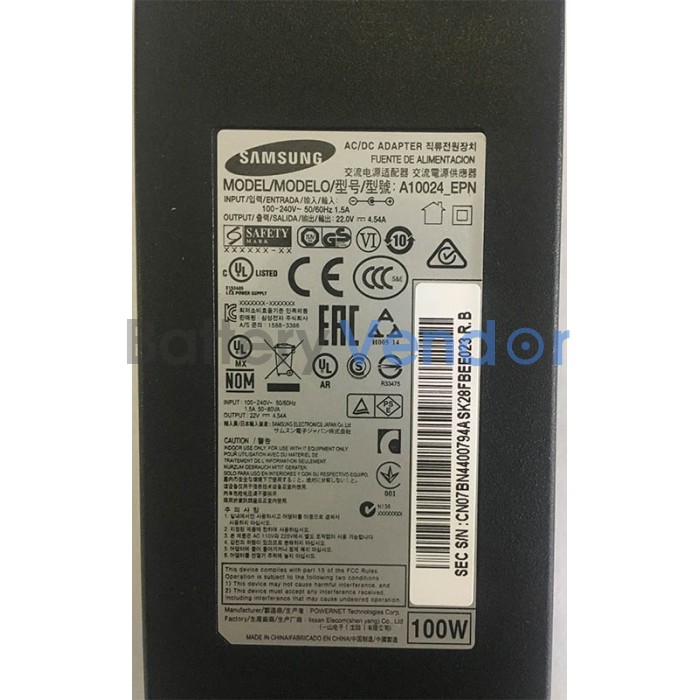
battery-vendor.com
Looking to Buy Samsung LC27HG70QQNXZA C27HG70QQN AC Adapter Charger Power Cord online with best price from battery-vendor.com.Free Ground Shipping!
steep siren
misty gyro
Needs to be at least 100W
The one I linked from Newegg doesn't show the wattage so it's hard to check, but it has the right head I think from the pic and it has the BN44-00794A code which should be right
steep siren
river edge
This then? https://www.battery-vendor.com/100w-samsung-lc27hg70qqnxza-c27hg70qq...
Saw that one but red a bunch of reviews that it's a scam site
misty gyro
steep siren
The one I linked from Newegg doesn't show the wattage so it's hard to check, but...
Yeah the cord conveniently covers the ONLY USEFUL INFO IN THE PICTURE
steep siren
read*
BN44-00794A should be the right reference (I think)
But if you enter that info on Newegg you get a bunch of different supplies that have different heads
The pic on the one I linked has a horizontal ridge mid-way across the head which looks like what I have on mine
misty gyro
Is it under warranty? If so you can contact Samsung and get a new one
steep siren
Nope
They say they can repair it for me but it would cost as much as a new one, but that implies they have spare power supplies so I don't understand why they can't just sell me a new power supply
And it cost me over a grand so I don't want to buy a new one..
I really do think my best (or only) course of action is to try and buy a new power supply off-market but it just seems impossible to find the right one
steep siren
misty gyro
That's a broad range of countries to cover, which one exactly?
Belgium btw*
If anyone could confirm/deny that the power supply is the likely culprit would be helpful aswell; at first the screen would not boot up (black screen/no led) when I started my pc. As temporary workaround, if I unplugged it/plugged it back in/wriggled the connector on the power supply side (not screen side) a bit it would work again for a while. But it started losing power more and more often and now it doesn't work at all anymore
Also the power supply is hot but the screen is cool to the touch.
And the screen usually runs very warm (by design)
river edge
That actually sounds like the power port soldered to the internal board
Rather than the power supply itself
steep siren
Is this something I could try fixing myself? The back panel has no screws and the last time I tried tacking one of these off I completely rekked the screen
river edge
If you can find a new port and can solder it to the board inside
 harsh anchor
hi peeps,
need helps with selecting monitor mount for dual monitors, i currently own this monitor:
https://www.newegg.ca/black-gigabyte-aorus-cv27q-27/p/N82E16824012009?Item=N82E16824012009
but i'm searching for just a secondary frameless monitor thats mountable as well, I see that most mounts arent height adjustable so im worried if i get a second monitor like this for example, the heights would be different.
https://www.canadacomputers.com/product_info.php?cPath=22_1953_1958&item_id=168149
This is the monitor mount im considering:
https://www.amazon.ca/gp/product/B009S750LA/ref=ox_sc_act_title_1?smid=AX105E1SOBX1B&psc=1
steep siren
Is it standard for such expensive monitors to only last 3-4 years?
misty gyro
Sadly yes
Electronics these days are engineered to barely outlive the warranty, and $amsung is one of the worst offenders
steep siren
Okay thanks, mid range Asus here I come
 copper star
Has there been a big shortage in monitors too? Bought an Asus monitor through B&H a couple weeks ago that was supposed to ship when they had stock (they said they expected it in 7-14 days) and it still hasn't shipped.
visual pilot
Well, not really, but some monitors may be running in and out of stock
harsh anchor
Could someone recommend me a 27" frameless/mountable monitor that's half the cost or less then my main monitor, that I can use as a secondary monitor for media consumption and contrast ? My main monitor is a Aorus CV27Q 27" Frameless
 grave adder
What is the BEST ultra wide monitor on the market. 50% of the time it would be used for office work and 50% for flight sim
fading wyvern
grave adder
What is the BEST ultra wide monitor on the market. 50% of the time it would be u...
SAMSUNG 49-inch Odyssey G9 is the probably the best on the market but prob not the best for your use case.
grave adder
fading wyvern
SAMSUNG 49-inch Odyssey G9 is the probably the best on the market but prob not t...
Thanks. What would make it less ideal for my use case?
I am trying to replace my current dual Asus 24" mk214H set up when I build my new computer
fading wyvern
its a absolute beast of a display overall, just $1400. you wouldn't necessarily need 240 hz for flight sim. LG 34GN850-B 34 is a great LG display at 160hz and is a bit smaller for under a grand. LG 38GL950G-B 38 Inch is way more then the samsung but has more of the same feature sets
the g9 is absolutely massive though at 31 pounds and 49 inches again lol
Its a hard display to compete with... just go with the samsung if u want complete immersion @grave adder
like the LG 38GL950G-B has hdr 400 while the samsung has HDR 1000 which is honestly super impressive. basically the samsung is just bigger badder better... pixel density is solid at 108 ppi and the refresh rate is insane
I'd personally just go for the 34GN850-B since it also has hdr 400 and good enough refresh... and is $400 cheaper...
grave adder
Thank you!
Massive real-estate is a huge selling point. In my day to day I use excel sheets that span both my monitors and I'm still scrolling around
fading wyvern
I hope youll post a picture when u get it lol
grave adder
Will be a few months. Home ownership is expensive and unfortunately the Honey Do list takes priority of my new desktop. But I am planing the build now
wheat obsidian
something makes me feel like there may be another Housing market crash. Loans are way up and income has barely changed. People just got a momentary boost
misty gyro
Sounds more like something for #general-chat
slate hamlet
wheat obsidian
something makes me feel like there may be another Housing market crash. Loans ar...
Happens every 10 or so years
It's been 13 since the last one...
summer obsidian
slate hamlet
It's been 13 since the last one...
If we could hold off just a few more years so I'm working full time and can use it to buy a house it would be nice
wheat obsidian
I'm betting on the bear, not going to even entertain the thought of buying a house RN, esp since prices everywhere are up 15-20+%
 lucid flax
Asking this here, because I think it's closest to right. Any recommendations for Displayport cables? I have a GPU and monitor that can use it, but the monitor only came with HDMI.
sage trail
amazonbasics
 vernal remnant
monoprice as well
 keen helm
Any recommendations for a quad moniter setup (3 on the bottem and one on the top) with a mount, this will be used for stock trading for my dad.
 desert fable
should my friend get a 1080p or 1440p monitor for his 3070
fading wyvern
1440 M27q
fading wyvern

 mystic iris
misty gyro
<#555881495492034561> number 9, no buying, selling, etc
mystic iris
misty gyro
<#555881495492034561> number 9, no buying, selling, etc
Thx, I skimmed the rules
Didn't see that last part of the sentence
misty gyro
No problem, now you know
 rich crypt
I feel like I need a new monitor sooner or later, with my pc, seems like the 60hz is bringing me down
misty gyro
M27Q is a pretty decent 1440p high refresh monitor, especially for the price
rich crypt
on my Newegg wishlist now
my Fiance prefers TVs for monitors, gotta admit. with that most people don't need to buy desktop speakers
FreeSync Premium that's AMD, right?
misty gyro
Yes but freesync works on nvidia too, it just might not be perfect
rich crypt
alright, still great for me my GPU is AMD
slate hamlet
Depending on your budget going into tvs could get you some amazing panels
fading wyvern
 LG oled
slate hamlet
Nah
fading wyvern
.1 ms pixel response and amazing hdr and incredible color out the box 120hz 4K true blacks 🤷♂️
Ah and hdmi 2.1
Did I mention it’s about the same cost as a ultrawide?
 fair surge
Does any of your guys monitors have an issue where when you turn the pc on the monitor doesnt turn on.
i mean like everything is working fine INSIDE of the monitor but just the display isnt there
i entered my password without event the monitors display being on and it worked so ik its something with the display
the display ONLY turns on when I mess around with the monitor buttons
like the buttons to change the settings for specifically the monitor
rich crypt
slate hamlet
Depending on your budget going into tvs could get you some amazing panels
yeah, my Fiance swears by TVs for monitors
summer obsidian
slate hamlet
Depending on your budget going into tvs could get you some amazing panels
I initially read it as an acronym t v s instead of plural tv and was so confused lol
 thorn brook
Think buying an old dell CRT for 15 is worth it?
misty gyro
Which one? If it's a large one or high refresh rate totally usable.
Just don't keep anything magnetic near it, like speakers
thorn brook
dell e773c
Just looked it up. Not a grail crt by any stretch, but usable.
Have always been curious about how they look with newer games.
misty gyro
E means economy model. Usable but not great like you said.
1280x1024 isn't bad at least
You just have to hope the tube doesn't burn out lol
thorn brook
The guy has a few tube tvs and monitors. Looks like a storage unit cleanout
thorn brook
Lol I feel like tubes are already maxed haha
I think I may but this guy.
It's funny I wanted to buy something like this as a joke for my boss a while back when he started rocking an old model m keyboard.
Then came to the conclusion that it wasn't happening lol
misty gyro
I might get one for my wife, I built her a retro gaming pc for Christmas and that would complete the aesthetics
 sick plume
misty gyro
I might get one for my wife, I built her a retro gaming pc for Christmas and tha...
sick plume
misty gyro
I might get one for my wife, I built her a retro gaming pc for Christmas and tha...
You can remove the pannel and put in an lcd as well tbh
thorn brook
Nah would ruin it. CRTs on top of getting harder to come buy also have a few benefits over LCDs that are great for retro games
sick plume
thorn brook
Nah would ruin it. CRTs on top of getting harder to come buy also have a few ben...
Very true
Was talking about when the tube dies
To keep the theme
misty gyro
When the tube dies I buy another crt, cheaper and easier than modding an lcd
 jagged bluff
Is there such thing as Moniter Gpu bottleneck, where having a rtx 3080 and a 75hz moniter 1920x1080 cause any bottlenecks ? (Apologizes if this sounds ridiculous)
sick plume
jagged bluff
Is there such thing as Moniter Gpu bottleneck, where having a rtx 3080 and a 75h...
Absolutely not
jagged bluff
maybe i was mistaking it for something else
visual pilot
@jagged bluff it does have a bottleneck of sorts of you not being to see the fps your gpu is outputting, but it's not physically limiting it, just limiting how useful the performance is for your eyes.
summer obsidian
*unless v-sync is on.
Then your card may be trying to only maintain 75 fps instead of anything higher
visual pilot
V sync sucky
 quartz sandal
summer obsidian
*unless v-sync is on.
Then your card may be trying to only maintain 75 fps inste...
quartz sandal
summer obsidian
*unless v-sync is on.
Then your card may be trying to only maintain 75 fps inste...
You want to really be getting 2x your monitors refresh rate tbh you'd be way better capping per game at 150+
summer obsidian
Oh yea I'm not recommending v-sync I was just saying that's the only way what monitor you have plugged in impacts your framerate beyond the resolution
 analog dock
Hey guys! Just installed windows on my new pc :D My pc is connected to an LG 49WL95C-W monitor via Display Port. At first the usb ports on the monitor were working to carry mouse + keyboard signal. But after I restarted the ports on the display are not working anymore via Display Port. Still working via USB-C to my mac. Anyway to get those to work?
 pseudo heart
@analog dock keep the USB C cable connected to use the USB ports as a hub
further explanation can be found in this post here: https://www.reddit.com/r/Monitors/comments/f1ikpz/why_are_my_usb_ports_on_the_monitor_not_working/
analog dock
Right now USB C cable is connected to MacBook and Display Port is connected to PC. That way its easy for to just switch inputs on display to switch between computers. The USB ports were working just fine only being connected thru Display Port, but then after a restart it stopped working. Clearly it is capable of working... but it stopped
pseudo heart
Oh damn :/ sorry to hear that mate, how long have you had the monitor
sick plume
Display port and HDMI carry dataonly one way iirc
analog dock
I’ve had the monitor and macbook for about 8 months now, the pc is brand new tho :P
sick plume
you need to hook up some usb to get both way data transfer
analog dock
Yeah that’s what I also saw when googling it, but like I said... for a short time (before I restarted) it was working just fine lol
sick plume
analog dock
Yeah that’s what I also saw when googling it, but like I said... for a short tim...
wierd
analog dock
ikr, mby there are some drivers I need or somthn?
Which got removed after update idk
misty gyro
sick plume
Display port and HDMI carry dataonly one way iirc
Sort of, but not wholly accurate. ARC (audio return channel) and ethernet are included in both HDMI and DP spec. Both devices have to support those features on a hardware and firmware level to use them, and most don't. The PS4 for example was able to use ARC to turn the television set on and off remotely if the TV supported it.
Video signal, on the other hand, is wholly a one-way connection. A port is either an input or an output, never both.
sick plume
misty gyro
Sort of, but not wholly accurate. ARC (audio return channel) and ethernet are in...
Ahh i see
 maiden wedge
is the m27 worth the $50 bump from the g27?

or should i go for a different one from these
 visual pilot
@maiden wedge pcpp being dumb, G27q is really 285$ with 20$ MIB, and we all know MIB is dumb
with 30$ difference, M27q def worth imo
 dusty island
i wanna try m27q just to see if i can see difference in it and my monitor lol
slate hamlet
MIB annoying but does work
I did it for my case it just took them a gazillion years to send it back
misty gyro
When I look at pcpp I turn off the rebates in the listed prices. I've only once actually received a rebate, despite jumping every hoop and giving every possible bit of info. They still deny it because "funds ran out" or some other BS.
slate hamlet
I've done two and gotten two that's all I can say
Doesn't help your wallet if you aren't patient
misty gyro
It's not that I'm not patient, it's that I'm apparently too patient and I only contact them about the rebate like a month later, at which point they deny receiving it before the deadline or something.
I've heard that with rebates the squeaky gear gets the grease, people that bug them about it twice a week get it faster.
slate hamlet
No clue m8
maiden wedge
yo guys
summer obsidian
I've done MIB with cooler master for my NR600 and they came though it took a little while but they did. Granted that was also for $5 so do with that what you will
visual pilot
It's a tiny piece of paper that's usually really easy to miss :p
Took be a year and a half to even see that I had a rebate thing for my Evga PSU
vivid wave
would how powerful ur gpu affect the quality of a monitor
summer obsidian
Do you mean like impact the color quality of the monitor? @vivid wave
summer obsidian
Hmm, I haven't really heard of that outside of it being a game settings thing but I could be wrong. Someone else might also know more than me in this scenario also
vivid wave
okay
misty gyro
A bad gpu or port could cause problems like that. Try another video port if you can.
Another possibility is that it's simply the color mode, which you can change in the nvidia control panel resolution settings.
Oh wait it's mobile, you probably don't have a second port
 true hearth
Can someone recommend a decent monitor
slate hamlet
mm
fading wyvern
On the nose 250$
@true hearth
This msi is suppose to be alright 2, much cheaper but just as a note it doesn’t get very bright
true hearth
Thanks I’ll check both out
summer obsidian
The msi g242 is what I have and I love it so far
But I'm also not one who keeps my monitors super bright
fading wyvern
Yeah a good buddy of mine picked one up off a recommendation, it was his only complaint
summer obsidian
like my second monitor is really birght and I keep the brightness at like 40-50%
I guess it depends your lighting conditions too
 mystic flower
is there a big difference going from 27 to 24 in monitor
 mystic flower
fading wyvern
27 on the left 24 on the right, 1440p 1080p
mystic flower
fading wyvern
27 on the left 24 on the right, 1440p 1080p
alright
whats that 24 in monitor?
mystic flower
ok
weak sierra
What monitor would you guys prefer for gaming that is minimum 1440p 144hz?
river edge
M27Q
visual pilot
M27q
sage trail
M27q
summer obsidian
m27q
 wet hornet
What would you guys recommend as a 165hz 32" monitor that's under 400?
 frozen vault
240hz 1080p or 144hz 1440p?
slate hamlet
2nd one
frozen vault
the extra frames aren't worth it?
fair
follow up question then
2 Identical monitors, but one is 165hz instead of 144hz
$40 more
worth it?
quartz sandal
165 is meaningless upgrade over 144 tbh
frozen vault
thats what I thought
visual pilot
and also, keep in mind, there's likely more to the monitors than just 144hz vs 165hz
For example, Gigabyte M27q against G27q, M27q is just better, not only higher refresh rate, but better panel in general for color accuracy, pixel response times, and color gamut
 vernal timber
Is the pixio px277 prime the best monitor with those specs for thag price range. Or if I spent like 30 bucks more could I get something with a noticeable difference. Or is there a better monitor for the same price. Currently I can get it for 300
visual pilot
@vernal timber M27q is great. Px277 isn't bad, and it's not much worse than M27q, but M27q always nice option.
(I believe better pixel response time and color accuracy again)
vernal timber
visual pilot
<@394893608643461131> M27q is great. Px277 isn't bad, and it's not much worse th...
M27q is bgr
People are saying it makes text blurry
I can’t seem to find out how blurry though
fading wyvern
maybe it isn’t the king of displays
river edge
vernal timber
People are saying it makes text blurry
Haven't seen that in any reviews. Source?
vernal timber
river edge
Haven't seen that in any reviews. Source?
reddit
r/Monitors: Home of the computer component that you see most, your Monitor.
river edge
Ah, reddit
vernal timber

The Gigabyte M27Q surprised us in terms of image quality and features! It boasts a 1440p 170Hz 27’’ IPS display at an impressive price. Its extra features, like the KVM switch, are nice additions as well. In this video, we’ll look at the design, picture quality, text clarity, and more to see if this really is the best all-around 1440p monitor.
...
Also this
He talks about it there
river edge
INteresting
vernal timber
[H]ard|Forum
https://www.gigabyte.com/Monitor/M27Q#kf
27 inch 1440p 170hz Freesync Premium/Gsync Compatible IPS
I picked one up, didn't see anything here yet
Like I kinda want to get it and just see how bad it is
And if I don’t notice anything I’ll keep it
river edge
Eh, I tend to not trust user reviews, more often than not they don't have something set up right
Most of them are horrible.
vernal timber
The panel is BGR
river edge
I get that
vernal timber

But the thing is I can’t really tell a difference
Like not enough for it to be a dealbreaker anyway
Could I return the monitor if it was fucky
river edge
The review here states it's not an issue https://www.rtings.com/monitor/reviews/gigabyte/m27q

RTINGS.com
The Gigabyte M27Q is an excellent 1440p gaming monitor suitable for a wide variety of uses. It has a large 27 inch screen that provides an immersive gaming exper...
Update 02/12/21: We tested text clarity with a MacBook running on Big Sur. It appears that macOS doesn't use sub-pixel dimming in any of the apps we tested, which includes Safari, TextEdit, Notes, Finder, and Chrome. This means that blurry text isn't caused by the BGR sub-pixel layout. We've added some photos below.
vernal timber
What about for windows
vernal timber
And if it’s poop I can always return
river edge
The review at the bottom says it's def not poop
wild coralBOT
 Phantom#0317 has been warned
Reason: Bad word usage
river edge
And the issue isn't due to BGR itself but rather how Windows handles it
river edge
It defaults to RGB so set it to BGR
vernal timber
I know but someone also said someone had the m27 and switched and liked the other one a lot more
vernal timber
Because they prob read reviews
I have this thing where I take like 10 years to make decision when I’m buying smth
fading wyvern
...u could always just spend more money on a different display
 visual ravine
I just upgraded my computer to a Aorus Z590 AX everything works perfectly EXCEPT the vga light will not go off on my motherboard and because of it I have no power to my monitors. I have done absolutely everything; i.e., changed RAM, re-seated the CPU changed the GPU and bypassed my Geforce 560 graphics card and went direct to the onboard DP....nothing works still got that stupid red light. Does anyone have any suggestions on how to remedy this problem. I hate to take everything apart and return it to Amazon but if I have to I will. Thanks for reading my post.
summer obsidian
Based on what was said in the #graphics-cards channel when you asked about compatibility it would appear your 560 won't work with a z590

I would have linked the messages but it's hard on mobile so I did a screenshot
weak sierra
Thanks! I'll definitely look for the M27Q Gigabyte monitor. 😊👍
Is the M27Q G-sync compatible though?
fading wyvern
Yes
slate hamlet
At this point it's harder to find ones that aren't
 daring thunder
agreed. most good monitors are G-sync compatible
analog dock
Hey guys! I'm in a bit of a tricky situation...
My display only has 1 upstream USB-C port. However... I have 2 computers which ideally should be connected to the display. Is there any possible way to connect 2 computers to a single upstream USB port (so that I can use the built-in usb hub for both computers). I am using the LG 49WL95C-W ultrawide
Actually I just saw on the DisplayPort 1.2 Press Release that it should support USB 2.0 transfer...
Doubles Performance of Existing Standard, Multi-Monitor Support over single connector, optional Bi-Directional Data Transport supporting USB 2.0 and Ethernet, Support for the Mini DisplayPort Connector and Backwards Compatibility with the Current DisplayPort Standard
I wonder why that is not working then for me...
visual pilot
@vernal timber BGR doesn't really matter, RTings re-tested the monitor too
We've retested the monitor to further investigate the BGR sub-pixel layout's effect on text clarity. In most instances, text clarity is minimally impacted and shouldn't be an issue for most people. If it is, you can mount the monitor upside down, although there are some drawbacks as it increases input lag and causes G-SYNC to not work properly. We've also included more photos to show how text looks like at 100% and 125% scaling, with and without ClearType, and with the monitor upside down.
yay discord loading messages in now
looks like Vintage got there already
visual pilot
analog dock
Actually I just saw on the DisplayPort 1.2 Press Release that it should support ...
Probably because it's optional, but I think what you're looking for is a KVM switch?
 rigid drum
Im making my friend a pc for streaming and gaming and i already have everything but the monitor i want a good monitor for a tuf 3080 oc and if it can be 240hz that would be great the budget for the monitor is 400$
quartz sandal
Unless they playing esports they won't notice the diff from 144hz to 240
But M27q is good 1440p 144hz iirc
 warped basalt
240 is good for csgo
rigid drum
ok
 gray marsh
Good 1440p above 60hz monitors for relatively cheap?
quartz sandal
M27q
vernal timber
fading wyvern
...u could always just spend more money on a different display
I ordered px277
Bro stop recommending that monitor
wild coralBOT
Phantom#0317 has been warned
Reason: Bad word usage
vernal timber
It makes text hard to read
Cuz it uses bgr
Not rgb
Even with changing windows settings
Because they cheaper out on da panel
river edge
It's not a BGR issue
quartz sandal
rigid drum
but ok
Yeah they would benefit from 240hz then, I'm not sure if there's any 1440p 240hz under that price tho
river edge
We proved that lol
vernal timber
I mean like
river edge
I mean like what
We've been recommending that monitor for a LONG time
Not a single person has come back to say it sucks
In 6 months
river edge
Doesn't matter, we recommend all kinds of things that we don't personally use
27" is too big for my area
vernal timber
Alr lol
gray marsh
What are the downsides of bgr?
river edge
Take some measurements
vernal timber
It makes text hard to read
wild coralBOT
Phantom#0317 has been warned
Reason: Bad word usage
vernal timber
If the monitor I got has any issues I’ll return it and get da m27
Like dead pixels
gray marsh
I feel like the px277 and the m27 were very similar when I was looking at reviews
vernal timber
I got the px277
It’s coming today
I didn’t wanna risk hating the bgr and possibly not being able to return it
The Pixio also comes with a 3 year warranty
river edge
RTings rated the M27Q higher despite the BGR
river edge
Ye
vernal timber
With coupon on Amazon for px277
Like I said if the Pixio has dead pixels I’ll try the m27q
river edge
Yeah, the Pixio has worse contrast too but not by much
weak sierra
@river edge is the m27q g-sync compatible?
vernal timber
Some people like the m27q others hate it
river edge
Just like anything else in the PC world
vernal timber
Idk it was 30 bucks more and I’d need a monitor arm with it too
river edge
Cases, fans, keyboards , mice
visual pilot
vernal timber
Cuz it uses bgr
We just told you why it doesn't matter :(
 covert solstice
anybody used one of those light bars/lights on top of monitors?
vernal timber
visual pilot
We just told you why it doesn't matter :(
I know
It’s also more expensive tho
And it’s not much better than the pixio
It might be a little bit better but idc
 vast plover
covert solstice
anybody used one of those light bars/lights on top of monitors?
vast plover
covert solstice
anybody used one of those light bars/lights on top of monitors?
yea, I use a benq led screenbar, it's expensive but great, replaced my ikea lamp entirely
covert solstice
yeah i just glanced at some of them and that was the first one i saw, there seem to be a few cheaper options that are decent too
how bright is the benq one?
 sterile mason
can someone help me change my hz on my monitor and I have a nvidia monitor with 5700 xt GPU
quartz sandal
sterile mason
can someone help me change my hz on my monitor and I have a nvidia monitor with ...
right click your desktop, go to display settings, advanced display settings then refresh rate is on the bottom
sterile mason
quartz sandal
right click your desktop, go to display settings, advanced display settings then...
yes but its saying "-1 isnt active"
quartz sandal
sterile mason
yes but its saying "-1 isnt active"
can you send a screenshot
river edge
sterile mason
yes but its saying "-1 isnt active"
AMD drivers 100% up to date?
sterile mason
yes
vast plover
covert solstice
how bright is the benq one?
uh i mean it's pretty bright, illuminates your entire desk area, i typically use the lowest setting at warm color, it's that bright
vivid wave
is the pixel denisty better for 1440p 24 or 27 inch
i mean ik 24 is better but is it good for 27 inch too?
quartz sandal
24inch just get 1080p from what I've heard, i cant see any pixels on my 24ich 1080p
quartz sandal
vivid wave
i mean ik 24 is better but is it good for 27 inch too?
You should only really start looking at 1440p from 27inch+ imo
vivid wave
okay
vast plover
quartz sandal
24inch just get 1080p from what I've heard, i cant see any pixels on my 24ich 10...
27" 1440p = 108 PPI, 24" 1080p = 92PPI, 24" 1440p = 122 PPI
https://www.calculatorsoup.com/calculators/technology/ppi-calculator.php
summer obsidian
At 24 inches you need to be closer than 3 feet give or take to notice the difference between 1080p and 1440p I think. Which also sounds like its pretty far but I've found 3 feet away from a monitor isn't that far
But even then they just really don't make 1440p for 24"
 glossy jacinth
I need help choosing out an monitor
summer obsidian
What size?
summer obsidian
what graphics card?
glossy jacinth
Umm 3080 maybe 3080ti or 3090
summer obsidian
The general go to recommendation tends to be the Gigabyte M27Q for 1440p 170Hz
glossy jacinth
I ant like 240
Or higher
With like .5 or 1 response time
@
@summer obsidian
Or lower
visual pilot
[Insert how all manufacturers BS their pixel response time ratings]
river edge
The listed spec means literally nothing
lucid flax
I have the MSI G241. Seems to be a good monitor for me, once I fixed the issue I was having with it.
summer obsidian
Rtings had this monitor as their top choice, it's 240Hz and 1440p but its also VA
https://www.bestbuy.com/site/samsung-odyssey-g7-32-led-curved-qhd-freesync-and-g-sync-compatible-monitor-with-hdr-displayport-hdmi-black/6405456.p?skuId=6405456

Best Buy
Shop Samsung Odyssey G7 32" LED Curved QHD FreeSync and G-SYNC Compatible Monitor with HDR (DisplayPort, HDMI) Black at Best Buy. Find low everyday prices and buy online for delivery or in-store pick-up. Price Match Guarantee.
summer obsidian
ah ok
visual pilot
It's quite new, I don't think rtings has a review on it yet
summer obsidian
I just popped open rtings and that was "best gaming monitor" and hit his requirements.
Ah that makes sense
 hazy warren
does tht have flicker issues with gync compat. still?
visual pilot
possibly, but seems really inconsistent in testing
We've retested the G7 with the latest firmware (version 1009.3). Not much has changed since the last update. We couldn't replicate the flickering in games that has been reported by other users, but the flickering and horizontal lines are still present when displaying a GIF. Samsung has added a 'VRR Control' setting in the on-screen menu, but it doesn't seem to have any effect. The VRR range remains unchanged and there's no tearing in-game with or without this setting enabled.
hazy warren
i see ty
quartz sandal
summer obsidian
But even then they just really don't make 1440p for 24"
Not me being able to see pixels like 1 foot away from my monitor, 1080p 144hz 24inch 👀
vast plover
I ordered this recently, still waiting on the delivery
won out for me over Asus TUF, the Gigabyte one and the Samsung G7 since I can't use curved and sit a foot away from the monitor anyway, but not gonna lie would like a 32" upgrade at some point when they start making them like they do the 27" ones
visual pilot
eh, hopefully you got it at a good price
vast plover
well, it does say $200 off so
vast plover
yea I know was referring to the G7, I wouldn't use anything but flat
if the G7 was flat and was IPS then I'd go for it
visual pilot
oh it's 700 cad, not 700usd
vast plover
lol yea
visual pilot
less bad but meh
vast plover
I think it's a very solid choice, always been a Dell fanboy for monitors
visual pilot
I was about to say the FI27q-x is also 700usd
it's a solid panel, I wouldn't really say so for price to perf tho
visual pilot
I'd say it may be an even better panel than M27q in general, but usually quite a bit more expensive
(fi27q-x is 1440p 240hz)
vast plover
I agree, it is a bit more premium, but the Dell one wins me over since it seems better for productivity sake
visual pilot
Fair nuff, it's a great panel in general
I like the price perf offered by the M27q better tho
vast plover
possibly, I went through user and professional reviews, and the Dell won me over, not just looking at straight performance, but image quality too, have to look at code all day anyway lol... I have two 24" 1080p Dell UltraSharps from 2017 and the LCD panels are dying due to misuse
slate hamlet
dell s2721dgf?
vast plover
just have black horizontal bars all over the screens right now
vast plover
slate hamlet
dell s2721dgf?
yea, that's the one I ordered
 vast plover
I don't have a color calibrator, but I'll write here for out-the-box xp
hazy warren
gsync compatible, curved ips. go
fading wyvern
LG's ultra gear line is usually great, in a match of hunt. ill let u know after lol
hazy warren
kk take ur time
slate hamlet
curve is like, whatever
1500r curve is perfectly fine, no problems here, even sometimes nice
but 1000r is just bad, no thanks
fading wyvern
cant seem to find a smaller curved ips, seems to be ultrawide exclussive

 hot tendon
Any recommendations for a 1440p monitor to match with a 3070 ranging for 144hz to 240hz, I want a good balance between good looks and good performance preferably on the cheaper end
slate hamlet
 slate hamlet
dell s2721dgf for faster response
 echo willow
hot tendon
Any recommendations for a 1440p monitor to match with a 3070 ranging for 144hz t...
echo willow
hot tendon
Any recommendations for a 1440p monitor to match with a 3070 ranging for 144hz t...
i got a used 1440p 165hz monitor with g-sync for $245 bucks
warped night
https://www.newegg.com/black-acer-xv240y-pbmiiprx-um-qx0aa-p01-24/p/N82E16824011374 Any known issues with this monitor other than sparse reports of dead pixels?
visual pilot
Well, dead pixels are just manufacturing defects, not much you can do to that
warped night
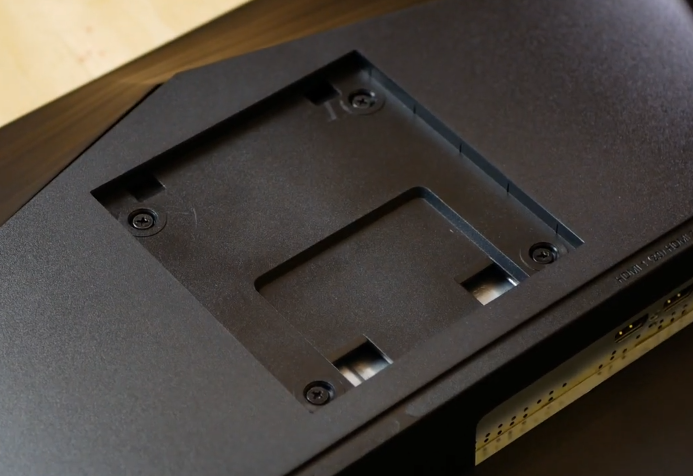
sigh I can't find anyone who will show how the XV240Y is VESA Mounted...
Hmm... IDK how I like that "Inset" box for VESA mounting.
 visual pilot
huh
warped night
I have a VESA Arm similar to https://www.amazon.com/WALI-Standing-Adjustable-Capacity-MF002/dp/B018MU3SAS/ref=sr_1_53 but I have literally no clue if the inset on that monitor will fit the bracket...
My other (slightly cheaper) option is the MSI Optix G241
Or I could go slightly more expensive and get the Viewsonic XG2405
Looking at it a little more I don't think I should have any issues. If I do, I'm gonna be pissed.
Actually, I should have 0 issues.
Someone put these on a set of Dell monitors with an inset.
Welp, paid for expedited shipping, and rush processing. I will have my new XV240Y on Tuesday.
 rustic vapor
i want a 27 inch curved display
summer obsidian
warped night
I have a VESA Arm similar to https://www.amazon.com/WALI-Standing-Adjustable-Cap...
So I had a similar issue with my msi g242 and monoprice vesa arm and I literally had to file the monoprice bracket to fit
Granted I think it was something like 0.07mm I had to file which in fairness was just really annoying
warped night
Fair enough. I think I have a metal file laying around somewhere in case that happens.
maiden wedge
Anyone here use an LG OLED as their PC monitor?
fading wyvern
i keep suggesting it to people but tht doesnt count
 crude bolt
is the asus TUF Gaming VG279QL1A monitor compatible for HDMI?
 remote wedge
hey um im vary confused
i have 2 montors 1 is in wifi works second one and the wifi dies
it cant read nothing\
what do i do
oh i got a hp x24 ih and a samsubg 390
misty gyro
So when you plug in your second monitor the wifi cuts out?
remote wedge
yes
misty gyro
Weird
remote wedge
it disconects and wont find any
misty gyro
Have you tried different ports on the gpu and monitors? Different cables? It sounds like electrical interference
remote wedge
ya i replaced on all of it and i ant got anyohter ports on grapics card
o got a 1660 atm
i got 1 hdm and a dvi waiting for check to get the newer cord
river edge
Is your wifi an add in card?
river edge
is the second monitor going in front of the antennas?
remote wedge
yes
river edge
And it works fine when it's off
remote wedge
it works fine when it ant pluged in
river edge
ya
remote wedge
i plug the hdmi to it and it gose
remote wedge
i think i just fixed it
my hp screen donloaded a omen gameing program
and i uninstalled it
now it works
remote wedge
would that be something i should report to hp?
remote wedge
oh and im looking to make my first pc i want to stick intel and go wifi any sagestions on motherbord
misty gyro
crude bolt
is the asus TUF Gaming VG279QL1A monitor compatible for HDMI?
Yes, it has 2 hdmi 2.0 ports and 1 dp port. You usually want to use the displayport if possible for best compatibility with freesync and high refresh since not all devices will have the needed hdmi version.
maiden wedge
what’s a good monitor i can get for like 250$
cad
144hz or 160
and does response time matter?
river edge
Advertised response time is garbage. Check rtings.com for real measurements.
IDK about which one though.
maiden wedge
and what about freesync
why do most monitors have that
will that affect anything if i have a nvidia gpu
river edge
Nvidia can worknwith freesync. Displayport is best though
maiden wedge
okay i’ll have to get one of those
 hybrid terrace
does vga only work up to 75 hertz
hybrid terrace
oh
 delicate dust
when a monitor has no listed response time on pc part picker what does that mean
river edge
delicate dust
when a monitor has no listed response time on pc part picker what does that mean
Check Rtings
delicate dust
river edge
Check Rtings
what
delicate dust
oh i see
delicate dust
so why doesnt PCPP have the ms listed?
river edge
Sorry, response time
Forget about the published response time
100% of the time it's bogus
river edge
1 ms advertised but 4-5 in real world testing
steel garden
river edge
1 ms advertised but 4-5 in real world testing
Thats a big diff
steel garden
false advertising is poo poo for real
warped night
It's 1ms Grey to Grey, which is different from Real World.
It's not exactly "false" advertising, but it's misleading at best.
visual pilot
I'd call it false advertising
warped night
I wouldn't, you do see some grey to grey transitions in the real world, but they aren't exactly common.
visual pilot
@warped night I mean their test methodology wise
Since they don't measure the same thing (20% to 80% g2g usually)
Not total pixel response
warped night
Ah.
 tribal glen
has anybody run into an issue with their monitor where there are a lot of black lines and a sort of "drag" effect along the bottom of the screen?
I opened this monitor like 2/3 days ago and without doing any physical damage it began to act up like an hour ago
I wanted to see if it was my gpu so I plugged in my nintendo switch but the same thing was happening
hazy warren
im looking for color accuracy tho
sick plume
IPS>VA>TN
sick plume
hazy warren
im looking for color accuracy tho
I see
hazy warren
so
 crimson moss
hazy warren
if so are there any drawbacks ?
crimson moss
hazy warren
if so are there any drawbacks ?
Idk about this I could link u a good monitor same specs but 165hz instead idk the panel type tho
sick plume
Yeah then you want an IPS
hazy warren
realistically
crimson moss
Is the Samsung odyssy G6 good?
fading wyvern
What kinda gpu
fading wyvern
M27q
 devout basin
fading wyvern
M27q
devout basin
fading wyvern
M27q
? Are you recommending another model or
I'm not that versed on displays lol
warped night
He's recommending another model.
Also a 27" 1080p display is gonna look like butt warmed over.
https://pcpartpicker.com/products/monitor/#r=192001080&F=579120000,647700000&D=144000,280000&sort=price&P=2 Pick anything in this list.
They all use the same panel.
devout basin
Oh I was needing a 1440p monitor
devout basin
3060ti TUF OC
And really? Maybe the link is broken, when I click it, it goes to a 1440p monitor
warped night
Ehhhh, you "could" go 1440p, but you aren't gonna get the full performance out of the monitor.
Oh how odd.
Still, you wouldn't get the full 144hz out of the monitor with a 3060Ti
devout basin
 warped night
You'd get ~90 to ~100 FPS in most games.
https://www.amazon.com/Gigabyte-Monitor-Display-Response-FreeSync/dp/B08JWCHR5N/ref=sr_1_1 This is still a better monitor
If you absolutely still want 1440p
devout basin
Yeah I figured
warped night
One of the really nice things about the M27Q is that Gigabyte allows you to plug the monitor into a USB port on your PC and you can control the OSD through your PC directly.
devout basin
I would like a 1440p for my main monitor with two 1080p additional monitors
Then my drawing tablet on the other desk
And that sounds cool but I have no idea what OSD is if I'm honest
warped night
OSD = On Screen Display Settings.
devout basin
Ahhh
warped night
Basically the settings for the Monitor
Normally you have to tweak them with the buttons on the monitor itself.
devout basin
Right yeah
warped night
Personally, I wouldn't get a 1440p monitor unless I had a 3080. But, I'm also a framerate snob.
Anything below 60 is jarring to me.
devout basin
I mean I'm only gonna be using 1440p in games that I can get 120+ fps at 1440p in, if I can't get that I'll just do 1080p. Is going 1080p on a 1440p a bad thing? Also I'd like 1440p for vids/movies
warped night
Yes 1080p resolution on 1440p is gonna look like butt warmed over.
Just get a 4K60hz display for Movies/Videos
And then 1080p for Gaming
You'd likely spend less money too
devout basin
Oof. That sounds like a better idea, thank you
warped night
For High Refresh Rate 1080p: https://pcpartpicker.com/products/monitor/#r=192001080&F=579120000,647700000&D=144000,280000&sort=price&P=2 Pick anything in this list they all use the same panel.
Are you in a fairly dark room?
warped night
https://www.amazon.com/dp/B083Z2RPB9 Here's a 4K Monitor. Though you could if you have enough space just buy a cheap 4K TV and use it as a monitor.
devout basin
That's tempting, but I already have a 4k tv in my room at the foot of my bed so I think a smaller 4k display for discord movie nights/yt vids is more what I'm looking for
warped night
Then that 28" Asus monitor should do you well.
devout basin
Thanks!
warped night
Ignore the HDR rating though, HDR10 is... not a great standard.
HDR on PC is also quite a joke.
devout basin
Yeah I don't think I'll be using hdr
warped night
If you do ever want to get into HDR content, look for at least a DisplayHDR 600 rating at the minimum.
summer obsidian
warped night
Anything below 60 is jarring to me.
Flashbacks to getting 24-30 fps on a 900p monitor with a gtx 650
warped night
lol
I have a hard time playing Monster Hunter Rise on switch sometimes because the game flickers often between 20 to 30 FPS
Can't wait for the PC Release.
summer obsidian
Anything above 60 looks like butter to me and I just got a 3070 and a new monitor so it's going to be really nice
visual pilot
nvcp?
vast plover
ya I would if I could but it's not letting me
vast plover
the included DP is 1.4 so that's checked
tried all three ports on the GPU too
disconnected my other monitor, restarted PC etc.
vast plover
visual pilot
wdym?
I mean I have no option to change the refresh rate in Adrenaline
created a custom resolution but that didn't seem to do anything
monitor menu is also not helpful, although I did use dell's "overclock"
visual pilot
Try from windows then
Advanced display settings, adapter properties, monitor, and set it there
 visual pilot
:)
vast plover
slate hamlet
tell me how the colors treat you though, I hear they need some tweaking
sooo, colors... I'd say they're a bit too cool for my taste, I don't care that much about color accuracy but about having warm and dark overtones more
warped night
You can always change your colors. Or find an Rtings profile.
vast plover
true
 shadow gust
Noticing dark spots on this Acer V277U after having it for nearly 10 months. How concerned should I be?

 fading wyvern
Maybe a backlight defect, try making the screen all one color gray/black and check if the spots are still there
shadow gust
Yeah they're still there, I checked
fading wyvern
A lot of IPS panels have similar issues with uneven uniformity mostly because of weird backlight bleed
I have no clue about that monitor generally, you could always get into contact with Acer and see if it’s a potential problem
shadow gust
This is honestly very weird but the spots are completely gone as of this morning
They went away on their own
slate hamlet
A backlight uniformity issue then

 waxen arrow
Any cheap 27” ips panel to be used as side panel? I need something that turns 90 degrees
 rich comet
Ok, hear me out. I need a starter monitor to start up with new PC, but later i plan on having something like the 34" G5 as a main screen. What would be a good starter monitor that i could later vertically/horizontally mount, and wont look completely stupid next to the g5. Something big-ish, i dont really care about the refresh rate, as long as the resolution isn't dog water and does not use vga. Ive been looking aroung newegg but im not monitor literate
quartz sandal
rich comet
Ok, hear me out. I need a starter monitor to start up with new PC, but later i p...
whats your definition of not dog water? 1080p? and what budget/size?
sick plume
waxen arrow
imo 1440p 144hz is the sweet spot right?
Depends on cpu and gpu
quartz sandal
depends on what you play too
for example i wont be going 1440p for a while because i play esports so i want all the frames
sick plume
quartz sandal
for example i wont be going 1440p for a while because i play esports so i want a...
you can still run 1080 on a 1440 panel... Would be better for eyecandy games if ur pc has the power to run em
quartz sandal
true
but i also dont wanna spend 400ish on a new monitor when my 1080p 24ich 144hz suits me fine
sick plume
if the guy has the cash why not
quartz sandal
yeah i was just making the argument for sweet spot
sick plume
sweet spot is absolutely based on cpu and gpu. nothing else.
also ram
ram important
quartz sandal
as in vram?
quartz sandal
how so?
sick plume
single channel/ double channel and also speed of the ram can make MASSIVE differences
quartz sandal
on your display size?
sick plume
quartz sandal
on your display size?
No on how your system can perform fps wise
warped night
No, just in performance of the system.
And RAM Speed too, My Ryzen 5 3600 saw a pretty nice boost in FPS going from 4x8 2933Mhz to 2x16 3600Mhz
quartz sandal
sick plume
No on how your system can perform fps wise
ohhh right yes yes ofc i thought you meant on your res
sick plume
warped night
And RAM Speed too, My Ryzen 5 3600 saw a pretty nice boost in FPS going from 4x8...
Try running one ram stick only
warped night
Eww, no.
sick plume
fps will drop like CRAZY
warped night
That's asking for low performance.
sick plume
There was legit a guy on #general-chat a few days back complaining his pc wasnt getting as much fps in fortnite as yt videos of same systems say it should. Said he had a great pc background as well. The problem was that he put a single 16gb stick of ram instead of 2 8gb sticks lmfao.
also he was running 2666 iirc
@warped night
warped night
Yikes.
sick plume
warped night
Yikes.
I really enjoyed how he said he has a pc background before we realised he had single channel ram
quartz sandal
single channel :/
sick plume
2666 in single channel would basically limit a 5950x and a 3090 to low fps lol
quartz sandal
indeed
waxen arrow
quartz sandal
for example i wont be going 1440p for a while because i play esports so i want a...
Yea Ik, but I’m running 5600x and 3070 with 4x8 3600 c16 so when ever I’m playing FPS titles I’m getting comfortable frame rates
quartz sandal
yes but if you're competitive you don't want comfortable frames you want all the frames
waxen arrow
Agree😂
But back to my question
Can anyone recommend a second monitor?
For my main monitor I got a LG 27GL83A-B
waxen arrow
😂
warped night
Can't wait for my Acer Nitro XV240Y to come in tommorow.
It's replacing my ancient Asus VG248QE
rich comet
im on this 600p vga random brand monitor from 2007
warped night
Ok, WTF why does nobody have an ICC profile for the XV240Y?
Or even a calibration profile.
quartz sandal
warped night
Can't wait for my Acer Nitro XV240Y to come in tommorow.
that the one that ocs to 390hz?
warped night
No? It's only 165hz OC.
Apparently though I'm taking a gamble on G-Sync compatibility.
quartz sandal
ohh ik the 390hz monitor is like acer or something
warped night
But, I doubt it won't be able to do G-Sync
quartz sandal
warped night
Apparently though I'm taking a gamble on G-Sync compatibility.
works with my freesync monitor thats a few years old so
warped night
Yeah, but there's a list of actually Compatible monitors.
And even if G-Sync doesn't work, it's still going from a TN panel to an IPS.
quartz sandal
i mean idk they only allowed freesync as of a few years ago anyway
summer obsidian
Yea the list of compatible monitors is only for the newer ones and they've actually been tested but for the most part any free-sync monitor with a display port should work
 ruby hare
Looking for a new monitor, this is what I found that I like so far, what should I get
ROG Strix XG27AQ or
ROG SWIFT PG329Q
Any suggestions
slate hamlet
32" is a bit big...
ruby hare
Ya, but I do do CAD and CAM so the larger screen may help but I do have a 27 inch now
limber crest
i disagree with 32 being big, especially with working on media stuff. Being able to make it physically bigger helps sometimes. If you can fit it on your desk comfortably
I havent done cad in maaaaany years but I use photoshop and illustrator and stuff a lot and its a lot more friendly on my 43 than it is on my 28. Id imagine being able to make things physically bigger would provide similar benefits.
That said, if all you're looking to do is workstation specific, you can prob get something cheaper than ROG
 queen halo
I have a 40sum inch tv, I could never imagine me sitting infront of that using it as a monitor
Same with 32inch
 dark condor
I have a 75 hz monitor and i want to upgrade to 144hz for a better experience for valorant but I feel like it wont matter because of my ping, I average 70 - 110 ping but I don't want spend my money on a monitor if my ping will make it obsolete .
warped night
Ping =/= Refresh Rate or FPS
The less your Keystroke to Eyeball latency is, the better, regardless of your ping to a game server.
quartz sandal
sage trail
im an idiot
So did i don't worry, i just think of it as != Being not equal because coding lol
sage trail
yeah same lol
limber crest
fira code ligatures show them as ≠ and for js triples ≢ if that helps
dark condor
warped night
Ping =/= Refresh Rate or FPS
so should i go for the 144hz
warped night
Yes. 144hz will definitely make your gameplay experience in competitive games better.
Also, don't buy a Quadcast mic. They are worse than a similarly priced XLR setup.
maiden wedge
Why does my 1080 monitor have an option for 4k?
 quartz sandal
maiden wedge
Why does my 1080 monitor have an option for 4k?
quartz sandal
maiden wedge
Why does my 1080 monitor have an option for 4k?
If tou mean in YouTube etc, because YouTube will let you play back in whatever the video uploaded was rendered in
quartz sandal
 scarlet mauve
any good moniter under 100$
scarlet mauve
any good moniter under 100$
Well if 1080p 60hz is good to you, you might be able to find one
scarlet mauve
i play valorant would it affect anything
quartz sandal
60hz is standard so if you don't know you're refresh rate it's already 60hz
1080p 120/144hz start around 150 afaik
scarlet mauve
my computers hz is already 144
quartz sandal
Yeah for that budget you would just get a worse monitor
scarlet mauve
hmm then what should i spend the money on
quartz sandal
scarlet mauve
hmm then what should i spend the money on
what are the specs of your current system?
scarlet mauve
8gb ram
144 hertz display
AMD Ryzen 7 4800H with Radeon Graphics, 2900 Mhz, 8 Core(s)
thats the proccessor
its a laptop
visual pilot
What exact laptop
scarlet mauve
msi bravo 17
visual pilot
might want more ram if it fits
scarlet mauve
ok
visual pilot
(dual channel nice)
scarlet mauve
but im confused what ram could help with
 warped night
Get SO-DIMM DDR4 modules. 2x8gb at 3200mhz would be a good performance increase
queen halo
Can that even take advantage of the 144hz display????
warped night
Do you have a GPU
quartz sandal
warped night
Get SO-DIMM DDR4 modules. 2x8gb at 3200mhz would be a good performance increase
i would just get a 1x8gb stick considering they already have one in the laptop but yeah
visual pilot
quartz sandal
i would just get a 1x8gb stick considering they already have one in the laptop ...
Compatibility and performance concerns though
quartz sandal
true
scarlet mauve
so if i get 8gb ram and install it will i get 12 gb
cuz imma just do that if i can
river edge
It will work weird like that
It will run dual channel speeds until you hit 8 GB of used capacity, then drop to single channel speeds
visual pilot
I mean compatibility as in the ram just choose not to boot because they don't like each other
warped night
scarlet mauve
so should i or will there be w problem
Expect there to be a problem if you don't get a matching set kit. Just get 2x8GB at 3200Mhz you will see a nice performance boost.
Looks like the Bravo 17 comes equipped with an RX5500M also
Jeez, this is a pretty killer laptop TBH.
Is your keyboard only Red, or is it RGB?
NVM that doesn't really matter. That's literally the only difference between the 2 sub-models of Bravo 17.
scarlet mauve
warped night
Is your keyboard only Red, or is it RGB?
only red
lol
it was on sale
warped night
Gotcha. The literal only difference between sub-models of the Bravo 17 is the Keyboard, either Red only or RGB.
scarlet mauve
warped night
Expect there to be a problem if you don't get a matching set kit. Just get 2x8GB...
link for a good one under 100$?
warped night
Get yourself a 2x8GB kit of 3200Mhz SODIMM RAM
https://www.amazon.com/dp/B07Q6PJVTX Right at 100 USD
It's definitely worth the purchase.
You should see a nice FPS increase going from the likely Single Channel RAM to Dual Channel.
Ryzen is very heavily impacted by RAM performance, so having Fast dual channel RAM is very good for Ryzen.
warped night
That kit is a bit faster since it's 3200Mhz CL16 instead of 3200Mhz CL22
warped night
Yeah, PCPartPicker for some reason doesn't have that Ballistix kit on it.
maiden wedge
quartz sandal
If tou mean in YouTube etc, because YouTube will let you play back in whatever t...
no like in my display settings and games
warped night
maiden wedge
no like in my display settings and games
OH, that's probably Dynamic Super Resolution or whatever AMD's equivalent is.
I'd turn that off.
slate hamlet
Unless it's ez pz to run type game
warped night
Holy mother of god, my new monitor is amazing
Acer XV240Y is definitely a good display.
slate hamlet
not even 300 nits smdh
warped night
I didn't buy it for the HDR
I bought it for the excellent overall performance compared to my VG248QE
Going from a 144hz TN panel to a 165hz IPS with G-Sync capabilities is WORLDS of difference.
fading wyvern
IPS is very pretty alright
quartz sandal
maiden wedge
no like in my display settings and games
Because you can render it at above monitor res if you want i guess
visual pilot
It's refurbished, sold by a third party seller, so it's your risk to take.
maiden wedge
Not by msi?
oh i see, they have pretty positive reviews overall so might be worth the risk
visual pilot
mhm

 novel ridge
E
crimson moss
novel ridge
E
True
vivid wave
which panel is the best
misty gyro
Depends on your needs
OLED for example has sub-pixel dimming so HDR looks gorgeous with no bleed.
vivid wave
casual gamign?
quartz sandal
ips for most people
warped night
For the large majority of people you will want an IPS panel. OLED Monitors are never gonna catch on, VA panels are a good cheaper option, and TN panels are basically relegated to side monitors in 2021.
quartz sandal
Oled are nice but burn in is too much of an issu
slate hamlet
Mini LED is already the hot new kid on the block
warped night
slate hamlet
Mini LED is already the hot new kid on the block
Yes, but it's also STUPID expensive right now.
 blazing current
visual pilot
mhm
blazing current
visual pilot
mhm
sus
 keen nebula
Hi all, can anyone help me with a desk setup
wild coralBOT
 BenC#8669 has been warned
Reason: Bad word usage
keen nebula
anyone got pics of their desk monitor setup ?
looking for some recomendation what to pair with my 34 inch ultra
warped night
I'd just get another of your same monitor and vertically stack them.
quartz sandal
keen nebula
looking for some recomendation what to pair with my 34 inch ultra
Look in #build-pics there's loads in there
keen nebula
ok thanks
keen nebula
warped night
I'd just get another of your same monitor and vertically stack them.
1 on top of the other vertically ? cause side by side would seeem way wide