#old-cooling
1 messages · Page 18 of 1
 knotty sparrow

Thermalright Peerless Assassin 120 SE ARGB White CPU Air Cooler, 6 Heat Pipes CPU Cooler, Dual 120mm TL-C12CW-S PWM Fan, AGHP Technology, for AMD AM4/AM5/Intel LGA1700/1150/1151/1155/1200
But that can be worked around as long as you only have 2 sticks
 foggy violet
knotty sparrow
It's also overkill in a way that makes it a little hard to get memory in sometim...
foggy violet
knotty sparrow
It's also overkill in a way that makes it a little hard to get memory in sometim...
oh truuu idk why i didnt even think about this
knotty sparrow
That cooler can handle just about anything short of the top sku Intel chips
foggy violet
knotty sparrow
That cooler can handle just about anything short of the top sku Intel chips
dope
(since i dont see a general builds chat)
https://www.newegg.com/g-skill-32gb/p/N82E16820374523?Item=N82E16820374523
https://www.amazon.com/dp/B09P4KH7QK?th=1
and a 7600x
with the motherboard you saw in #cpus-mobo-and-memory , i have a 450W EVGA in the closet (from a old pc) and an RX580 4GB (to get by until i can afford better) in an old case... i should be golden right?... or at least silver LUL, including upgrade path
Thermalright Peerless Assassin 120 SE ARGB White CPU Air Cooler, 6 Heat Pipes CPU Cooler, Dual 120mm TL-C12CW-S PWM Fan, AGHP Technology, for AMD AM4/AM5/Intel LGA1700/1150/1151/1155/1200
*and bringing drives over from my current system
im an idot i found #building-and-recc-chat
knotty sparrow
foggy violet
*(since i dont see a general builds chat)*
https://www.newegg.com/g-skill-32gb/p...
Which model EVGA because that could be anywhere from fine to a bomb
You could save a few dollars and get this memory, adata is a good brand. https://pcpartpicker.com/product/8TV2FT/adata-xpg-lancer-blade-rgb-32-gb-2-x-16-gb-ddr5-6000-cl30-memory-ax5u6000c3016g-dtlabrwh

ADATA XPG Lancer Blade RGB 32 GB (2 x 16 GB) DDR5-6000 CL30 Memory (AX5U6000C3016G-DTLABRWH)
foggy violet
knotty sparrow
Which model EVGA because that could be anywhere from fine to a bomb
uhhhhh ill verify but i think it may be this one https://pcpartpicker.com/product/xDMwrH/evga-450-br-450-w-80-bronze-certified-atx-power-supply-100-br-0450-k1

EVGA 450 BR 450 W 80+ Bronze Certified ATX Power Supply (100-BR-0450-K1)
knotty sparrow
BR would be C tier so at least it's not dangerous. It would be enough to use for that system until you upgrade the GPU.
foggy violet
knotty sparrow
BR would be C tier so at least it's not dangerous. It would be enough to use for...
which the next upgrade would be to something like https://pcpartpicker.com/product/MGzFf7/asus-rog-strix-850-w-80-gold-certified-fully-modular-atx-power-supply-rog-strix-850g-white or https://pcpartpicker.com/product/2gCZxr/seasonic-focus-gx-750-atx-30-750-w-80-gold-certified-fully-modular-atx-power-supply-atx3-focus-gx-750

Asus ROG Strix 850 W 80+ Gold Certified Fully Modular ATX Power Supply (ROG-STRIX-850G-WHITE)

SeaSonic FOCUS GX-750 ATX 3.0 750 W 80+ Gold Certified Fully Modular ATX Power Supply (ATX3-FOCUS-GX-750)
before a gpu would be considered
knotty sparrow
Depends on the GPU you'd be upgrading to
foggy violet

Sapphire PURE Radeon RX 7700 XT 12 GB Video Card (11335-03-20G)
is what im looking at
knotty sparrow
650W is enough for that
Heck 550W would be enough but the 650W have been better deals lately
I'd probably do this since there's the white theme going on https://pcpartpicker.com/product/R4Gbt6/corsair-rm750-750-w-80-gold-certified-fully-modular-atx-power-supply-cp-9020231-na

Corsair RM750 750 W 80+ Gold Certified Fully Modular ATX Power Supply (CP-9020231-NA)
It's only a few dollars more than lower power white units
foggy violet
knotty sparrow
Heck 550W would be enough but the 650W have been better deals lately
tbh 650W is on my radar, the 750/850 is partially for like.. long term upgrades and all... 850 just... i wish that asus came in a lower one cause i would totally get a 650-750 of that since i found that its a seasonic at heart.... and whether i should or shouldnt be im kkindof set on a sea sonic whether badged or not...... i was going to send earlier but ended up in somewhere with nearly no service.. ill pick up in #building-and-recc-chat i guess since this is general talk about my build to be
 sacred wren
Believe this is B tier 750 at $75 https://pcpartpicker.com/product/DKpQzy/deepcool-pm750d-750-w-80-gold-certified-atx-power-supply-r-pm750d-fa0b-us

Deepcool PM750D 750 W 80+ Gold Certified ATX Power Supply (R-PM750D-FA0B-US)
 cobalt imp
Corsair was kind enough to upgrade me to the XT version of the H150i Elite Capellix after I had to RMA mine do to pump failure after only 11 months 👌🏼 back up and running, stress tested and ready for the flight sim!

 cobalt imp
foggy violet
tbh 650W is on my radar, the 750/850 is partially for like.. long term upgrades ...
cobalt imp
foggy violet
tbh 650W is on my radar, the 750/850 is partially for like.. long term upgrades ...
I have the Thor 850W and love it..especially since it comes with braided cables from cablemod
 tranquil ingot
cobalt imp
Corsair was kind enough to upgrade me to the XT version of the H150i Elite Capel...
tranquil ingot
cobalt imp
Corsair was kind enough to upgrade me to the XT version of the H150i Elite Capel...
Nice!
 tranquil cove
What are y'all's thoughts on this Coolmaster cooler? https://www.newegg.com/p/2YM-0004-000V6
tranquil cove
 marsh badge
likes to leak
marsh badge
likes to leak
Interesting. Out of curiosity is this an experience?
marsh badge
nah, but it's a widespread issue
tranquil cove
marsh badge
you can alternatively buy frozen notte
Link?
tranquil cove
Also also looks pretty nice 😍😍
marsh badge
ya
tranquil cove
@marsh badge do you personally have any thoughts on:
Cooler Master Hyper 622 Halo 51.88 CFM CPU Cooler
I have it already have it delivered, but I've ordered the liquid cooler this morning that you have suggested... The thermal right
knotty sparrow
It's a below average dual tower, probably about as good as a decent single tower. Definitely not worth the $60 they're asking, especially when there's much better dual towers for $40.
 wide lion
Anyone here!
I need you in my dms now
I am taking apart my cooler
I need help asap
 strange flume
First impressions of MX-6 !!
REVIEW!
(Review, review, review)
First impressions after this short ad commercial !

Ok first impressions
meh.
To be totally unbiased though, it's still way cheaper
NT-H2 is and never will be worth twice or three times the price for that
Slight adjustment and I cut it down to 5W less
And 100MHz less
On this 5900X
Goin brrrr
3W, 100MHz
Fixed it
It's the same now
All core is a bit lower
50MHz?
But power pull is basically back to where I remember it
Give or take a watt
New opinion, mehhh
💀
 languid gale
strange flume
First impressions of MX-6 !!
languid gale
strange flume
First impressions of MX-6 !!
Get PTM
 rotund sable
kpx gang
 balmy mantle
so ide assume this would be a valid place to ask about a case/CPU cooler kinda thing, due to a cpu ive been wanting to get for a lil bit now going down in price ive decided to nab it before it gets jacked up again XD, and thus now needing a new cooler to keep up with it being (CPU in question: R7 5800X3D, case in question: Sahara P35, and finally cooler in question: Thermalright Peerless Assassin 120 SE) would the case width be sufficient to house the cooler or would i have to find a slightly shorter cooler?
balmy mantle
balmy mantle
so ide assume this would be a valid place to ask about a case/CPU cooler kinda t...
(and as a side note just from looking above would MX6 be a better option over Thermal Grizzly Kryonaut)
knotty sparrow
balmy mantle
so ide assume this would be a valid place to ask about a case/CPU cooler kinda t...
Yes that cooler fits that case. The cooler will come with paste that's normally good enough, but MX6 makes a decent cheap upgrade that gets you a couple degrees better.
Part of your cooling problem is going to be the solid front panel so you might need to take that off to improve airflow
balmy mantle
knotty sparrow
Part of your cooling problem is going to be the solid front panel so you might n...
it has vents running down the sides of the front panel

plus that front panel is where all the top IO is connected to so removal of that wouldnt be ideal
balmy mantle
seems to be cool enough for my current CPU to only reach around 40-45 on full load tho so its doing "enough" in some respect
knotty sparrow
The H510 elite also has vents and it's one of the hottest cases on the market
balmy mantle
balmy mantle
seems to be cool enough for my current CPU to only reach around 40-45 on full lo...
then again shouldnt really be bragging that much its only a R7 2700 so...
knotty sparrow
Yeah the 2700 only uses maybe 80W of power if you overclock it lol
The X3D is a totally different animal
balmy mantle
still poses a problem for the front panels issue of being not easily removed despite the fact once if removed leaving the entire thing open
and im not currently the most available to be flinging money around for a better airflow performant case
knotty sparrow
It's mostly something to keep in mind if the new CPU is still overheating, even with that beefy new cooler
balmy mantle
it shouldnt overheat too badly tho with my currently 40% bottlenecked GPU finding new ability to show its true colours with the addition of the X3D things might get a lil toasty
but hell my rooms cold anyway XD sure it will suffer in the summer but ide rather be warm in these coming winter days XD
knotty sparrow
With the GPU dumping more heat into the case from being under more load it'll add to the overall case temperature.
The room being cold won't matter if it's not able to get enough of that cold air inside.
balmy mantle
if it really does boil down to the point where i need a new case ill just have to suck it up to my renter and see if they can make a little deal
current situation for me rn
also bout the previous question would it be better with kryonaut or MX6?
knotty sparrow
The difference between the two is roughly 1 degree Celsius, but the kryonaut is significantly more expensive
Paste is one of those things that only matters to people chasing every single frame
balmy mantle
im looking at a small tube for just under 8 or around 7.78 while the smallest tube for MX6 being 8.29
maybe its just more expensive in the US?
knotty sparrow
The mx6 is a 4g tube while the kryo is 1g
balmy mantle
true
knotty sparrow
Which means price per gram, the kryo is roughly 4x more expensive
balmy mantle
understood tho was just asking which was better off
knotty sparrow
MX6 still because it's good to have extra paste down the road for other things like your GPU. The stock paste on those is often awful.
balmy mantle
as ive heard
tho earlier AMD cards didnt fall to bad paste XD their coolers were to blame
knotty sparrow
Specifically the XTX on a specific cooler, yeah
balmy mantle
anyway thanks for the information
balmy mantle
knotty sparrow
Specifically the XTX on a specific cooler, yeah
yeah that was a massive L
knotty sparrow
Happy to help. Keep an eye on those temps and we can suggest more things to help if it's a problem.
knotty sparrow
You too
sacred wren
phantom spirit
 untold stone
Mhm

Thermalright Phantom Spirit 120SE CPU Air Cooler, 7 Heat Pipes CPU Cooler,Dual 120mm TL-C12B V2 PWM Fan, AGHP 4.0 Technilogy, S-FDB Bearing, for AMD AM4 AM5/Intel 1700/1150/1151/1200, PC Cooler
sacred wren
yeah, or absically any dual tower cooler from thermalright around 35-40
untold stone
Les goo something nice and not a 100$ cooler
strange flume
balmy mantle
true
MX-6 is also expected to last a lot longer than kryonaut, so not just 4x cheaper in one sense, but instead of 6 months you should get at least a year, maybe 2 years
Kryo dries out. It's performance paste, it's often not recommended by the more experienced
If you want to spend big on some of the best paste arguably, ptm7950 and iirc ptm7955(? Paste version) are up there for proven best
Also supposed to last as one of the longest*
 versed hare
Anyone ever use the cooler master, master air MA620M?
strange flume
What did you want to know
strange flume
Thermalright TL-K12
looks like B12's with rgb
or noctua a12's, with rgb
or nidec gentle typhoons,
with
rgb
versed hare
@strange flume would it be OK to cool a 7800x3d?and keep it at good Temps.
strange flume
versed hare
<@101107951401455616> would it be OK to cool a 7800x3d?and keep it at good Temps...
do you own it already or are looking to buy
versed hare
@strange flume I am looking to buy
strange flume
well in that case it's honestly one of the last options I'd recommend for an air cooler
as good as a silversoul tower for an nhd15 price
it ticks all the wrong boxes
for a 7800x3d you don't need anything expensive
it works fine on a simple $18 single tower cooler
like an SE-214XT
https://pcpartpicker.com/product/YwbTwP/id-cooling-se-214-xt-682-cfm-cpu-cooler-se-214-xt-argb-white

ID-COOLING SE-214-XT 68.2 CFM CPU Cooler (SE-214-XT ARGB WHITE)

ID-COOLING SE-214-XT 68.2 CFM CPU Cooler (SE-214-XT ARGB)
reference for your curiosity

My Patreon: https://www.patreon.com/buildzoid
Teespring: https://teespring.com/stores/actually-hardcore-overclocking
Bandcamp: https://machineforscreams.bandcamp.com/music
Twitch: https://www.twitch.tv/buildzoid
Twitter: https://twitter.com/Buildzoid1
Facebook: https://www.facebook.com/actuallyhardcoreoverclocking
#amd #ryzen #7800x3d
AMD stock box cooler vs a 240mm aio
so a cut above an expensive tower for cooling performance
versed hare
Ah ok. Had a noctua lying last build...loved it. But there hideous even the chromax. Thinking about going aio but I know their not the most reliable
@strange flume
strange flume
just a single tower is fine for a 7800x3d
even if you did say
take the noctua cooler, stick a new fan on it
that works
it's a very low demand design due to the fundamental issue with it's thick af IHS
versed hare
I mean I'd want rgb for sure
strange flume
you could easily to that
'
get something like a thermalright c12c rgb fan
good fan, dummy cheap
strange flume
this your old cooler yes?
versed hare
Yes but I no longer own the corner
strange flume
corner?
versed hare
Cooler
strange flume
don't buy a new one
reuse it if you have it, otherwise grab the id-cooling one I listed above
this is perfectly ample and it's $18
versed hare
Yeah I know that's why I want an air Cooler
languid gale
What cooler for 13700k?
 shrewd juniper
languid gale
What cooler for 13700k?
shrewd juniper
languid gale
What cooler for 13700k?
Do you already have a 13700k and cooler? Honestly don't see much point in buying a 13700k anymore
languid gale
MC bundle
 topaz blaze
ive never installed an aio before
just got one its supposed to be less of a headache than noctua aircoolers right
installation?
 sacred pagoda
I'd argue an aio is just as hard to install, if not more, than an air cooler
that being said I don't think either are that difficult
paste in between coldplate and cpu, tighten screws evenly
with aio you also have to place the radiator and manage tubes
strange flume
languid gale
What cooler for 13700k?
Frozen notte should be decent enough
 magic wave
I'd say aio is probably a bit easier due to space and movement reasons
topaz blaze
magic wave
I'd say aio is probably a bit easier due to space and movement reasons
yes the heatsink is quite a big larger than the aio pump unit
magic wave
instead of a heatsink, you simply have to install a block, so it's easier to access the screws
I only have heatsinks that are the size of an aio block though, and I've never taken them off :)
 dreamy locust
Just got two Amazon basics CPU coolers for €15 total, that's a fair price
I wanna see how it looks on the sleeper build
magic wave
that's a thing?
interesting, it looks very generic which I didn't expect but literally fits the purpose of amazon basics
dreamy locust
Yes, they basically copied a cooler master one if I remember correctly and just changed up two small things other than the brand
It sure will be better than 95C with stock cooler on that old 4770 i7
magic wave
I can't imagine that's a hot chip
4790 and 4460 are both cool enough on really cheap and simple stock style coolers
dreamy locust
It's mostly because hp is unable to make it's hardware work properly, the fan barely ramps up only when it gets around 80c, but like... Idle speed still
You can't even hear it
They really just said quiet > thermals
So as soon as the CPU hits that 100w it starts boiling
 restive moat
Hello I need help I bought I5 12600k and MSI MAG B760 Tomahawk WiFi motherboard
I need a good cpu cooler less than 100 CAD any recommendation
knotty sparrow
restive moat
Hello I need help I bought I5 12600k and MSI MAG B760 Tomahawk WiFi motherboard...
You won't need anything more than this unless you upgrade to a 12900/13900/14900, or if you heavily hit every core on the 700 ones
https://www.amazon.ca/dp/B0BN9ZFZ2X

Thermalright Peerless Assassin 120 SE CPU Air Cooler, 6 Heat Pipes CPU Cooler, Dual 120mm TL-C12C PWM Fan, Aluminium Heatsink Cover, AGHP Technology, for AMD AM4/AM5 Intel 1700/1150/1151/1200//2066
restive moat
everyone keep tell me about Thermalright
I just want the pc for gaming i wont even OC the cpu
sacred wren
Thermalright is absolutely dominating the cooler market atm
Pa120 se and phantom spirit 120 se, as well as basically any other dual tower cooler from thermalright around $35-45 are among the best on the market, and are the best around that price
Aside from the silver soul line, but they're also the best coolers 130mm and lower that I know of anywhere around that price too
dreamy locust
What a mess
New €7 cooler installed, let's see how it looks and performs
 dreamy locust
Mhmh lookin good

 bitter marsh
Hey does anyone have any recommendations for a fan hub cause the one I got from cooler master some of the ports went bad
 shrewd juniper
Should be fine, ye
 sage mural
My temps seem to be fine but I swear my pc feels more warm to the touch than normal. I am perhaps overthinking it
Pc is noticeably loud upon walking in the room
Im gonna look into swapping the fans on my deep cool aio
shrewd juniper
sage mural
My temps seem to be fine but I swear my pc feels more warm to the touch than nor...
Fyi humans are terrible at telling heat by touch so nothing to worry about really
Also your components temps vs case etc are gonna be massive
sage mural
Yea I’m sure it’s fine tbh, could probably never look at temps and be fine for years
sacred wren

Thermalright Phantom Spirit 120 EVO CPU Cooler,Dual TL-K12 PWM Fan, 7 Heat Pipes CPU Cooling,with 2150RPM Speed,for AMD AM4 AM5/Intel 1700/1150/1151/1200/2011, PC Heatsink Cooler
I love it
$45 premium cooler that looks sick as hell
strange flume
sacred wren
$45 premium cooler that looks sick as hell
Wtf that should be actually better than peerless
GT fans
B12/K12
And then phantom spirit heatsink
sacred wren
AND IT LOOKS SO GOOD
sacred wren
strange flume
Wtf that should be actually better than peerless
Like I'm genuinely considering replacing my clc 280 with it
Bc of how sexy that looks
strange flume
You could
sacred wren
What would temp difference be like?
strange flume
Question of why but if you flip the 280 the ig it's fine
sacred wren
I prolly won't I already have an fc140 if it fails anyways and I shouldn't spend the money
But it looks so good
strange flume
I'd consider it for my x3d build if things keep going wrong with it
sacred wren
When I actually have money I'm doing either a small matx or itx build for a TV
If I can I'm using that cooler
 harsh crow
sacred wren
<@101107951401455616> https://www.amazon.com/Thermalright-Phantom-EVO-Cooling-He...
harsh crow
sacred wren
<@101107951401455616> https://www.amazon.com/Thermalright-Phantom-EVO-Cooling-He...
Could kind of chips could this cool?
Been considering air cooling for my server pc.
sacred wren
harsh crow
Been considering air cooling for my server pc.
What cpu is in it again?
harsh crow
5700G, probably upgrading it to a 5950x or something more powerful in the future.
sacred wren
I think 5950x would be it's limit, but it should handle it
Check out how the phantom spirit or peerless assassin handles it
It'll be a bit better than those
harsh crow
I see.
rotund sable
sacred wren
Like I'm genuinely considering replacing my clc 280 with it
bro no
why would you willingly downgrade like that 😭
harsh crow
Aesthetics 😉
strange flume
Subjective
sacred wren
rotund sable
the 280 looks better ngl
Yeah im not, but if I can use the 280 for my matx or mitx build I'll put it in that and get that one for my main build
knotty sparrow
Pump height is normally not an issue. If you top mount the radiator, you need to worry about RAM clearance.
 opal wolf
knotty sparrow
Pump height is normally not an issue. If you top mount the radiator, you need to...
opal wolf
knotty sparrow
Pump height is normally not an issue. If you top mount the radiator, you need to...
Gotcha why is it recommended like this then ? Just so less air?
 harsh crow
opal wolf
harsh crow
opal wolf
Because if there are air bubbles in the system sometimes it gets caught in the pump hurting the pump and also resulting in poor temps.
knotty sparrow
opal wolf
Gotcha why is it recommended like this then ? Just so less air?
There's always going to be some amount of air. The reason tubes down is recommended is because that traps the air in the radiator in such a way that it's slightly quieter than tubes up.
It's usually about a 2dB difference so it's not really necessary
marsh badge
My memory is serving me badly then, nvm on my statement
sacred pagoda
knotty sparrow
It's usually about a 2dB difference so it's not really necessary
Quieter & pump also lasts longer, I think?
 tender harbor
Hi guys, new here. Question for my PC build. I'm going liquid cooled and I'm looking for a jumper connector so the pumps turn on only to check for leaks. I have an Asus TUF Gaming 1000w PSU. Any idea which jumper connector I need off the Newegg website?
knotty sparrow
A paperclip will do
tender harbor
knotty sparrow
A paperclip will do
I know a paperclip will do, but I'm trying to find out which pins to jump
knotty sparrow

 daring hinge
Hi to anyone that can help me put. So lately I been having GPU heating problems on the left side of the GPU. I have a Aorus RTX 2080 ti which been reaching temps up to 110c just from being on GTA or even Minecraft lol. I first thought it was my single fan Corsair AIO failing but it wasn't at all. Because the default gpu temp would sit around 50c on max load (which is the right side) of the gpu and then would see my hot spot temp reaching 110c.. so while being on the game, I removed the glass cover to see where the heat is coming from, which is how I found out its the left side. I also noticed heat was coming from the PSU which didn't help at all..
But any who, the gpu cooler that I'm using is just the Corsair H55 (single fan) on the NZXT g12 mount w/ the single 92mm fan beneath the gpu on the right side.
So this is where I need help to be honest. I been debating for a couple weeks if I should remove the g12 mount and replace it with an air cooler or should I keep the g12 mount but upgrade the AIO to a 240mm or something, with keep the g12, I was thinking of just also buying 2 120mm fans to put beneath the gpu to direct air outwards. But um yeah, any advice would help, thxs.
Also last minute mention is that I have just barely 5 inches of clearance from the PSU to the GPU (IF I REMOVED THE G12 MOUNT), but if I was to keep the mount, I would have just barely 4 inches.
sacred wren
Well first off, a 120-140mm aio is just plain awful
For cpus, a 120mm is the same as a $20 tower cooler
I'm not sure how that transfers for a gpu
I just don't see a point to water cooling a 2080 ti, id swap it to air and repaste, unless you really really want it with an aio
daring hinge
sacred wren
I just don't see a point to water cooling a 2080 ti, id swap it to air and repas...
What kind of air cooler would you recommend? My biggest issue is just the clearance I have from the PSU to GPU.
sacred wren
Do you still have the shroud it came with? Or did it come water blocked
daring hinge
Can I dm you a pic of it, might help.
sacred wren
If you dont have a shroud atp id repaste it and swap to a 240mm
daring hinge
Yeah don't have the shroud, since I bought the pc a couple yrs ago on OfferUp. 🤦♂️
sacred wren
daring hinge
Yeah don't have the shroud, since I bought the pc a couple yrs ago on OfferUp. �...
Ah alright
Then yeah I'd say a 240mm aio and put some new paste/pads on the gpu
daring hinge
sacred wren
Then yeah I'd say a 240mm aio and put some new paste/pads on the gpu
Gotchaa, would you also recommend for me to add a fan to the bottom left of the gpu so any air from the gpu heat can go out? Or?
And do you have any recommendations on a AIO I should get? I know to get one that is Asetek, I was gonna get the ASUS ROG Strix LC II 240 ARGB since its on sale rn on Amazon but not sure tbh..
sacred wren
daring hinge
Gotchaa, would you also recommend for me to add a fan to the bottom left of the ...
It doesnt matter much, as long as you have 2 or 3 fans bringing air in at the front and 1 exhaust at the back
sacred wren
daring hinge
And do you have any recommendations on a AIO I should get? I know to get one tha...
I wouldnt recommend it, it's incredibly overpriced
Also, does your case only fit 240mm?
Or is 280/360 an option
For 240mm, any of these
https://pcpartpicker.com/products/cpu-cooler/#X=0,5000&W=10240,10280,10360
Choose A CPU Cooler
daring hinge
Gotchaa, and 280 sadly can't fit, but I can do 360, so either 240 or 360.
daring hinge
Yeah exactly. I'm looking at the fan screws with the mount to where they go onto, 280 for sure would be too wide.
B/c the fans I have on the right are 120s
sacred wren
https://pcpartpicker.com/product/99XV3C/thermalright-frozen-prism-argb-704-cfm-liquid-cpu-cooler-frozen-prism-360-black
https://pcpartpicker.com/product/jFYRsY/thermalright-frozen-edge-69-cfm-liquid-cpu-cooler-fe360-white
https://pcpartpicker.com/product/YXFmP6/thermalright-aqua-elite-v3-6617-cfm-liquid-cpu-cooler-aqua-elite-360-white-v3
https://pcpartpicker.com/product/ZQBzK8/thermalright-aqua-elite-v3-6617-cfm-liquid-cpu-cooler-aqua-elite-360-black-v3

Thermalright Frozen Prism ARGB 70.4 CFM Liquid CPU Cooler (Frozen Prism 360 BLACK)

Thermalright Frozen Edge 69 CFM Liquid CPU Cooler (FE360 White)

Thermalright Aqua Elite V3 66.17 CFM Liquid CPU Cooler (Aqua Elite 360 White V3)
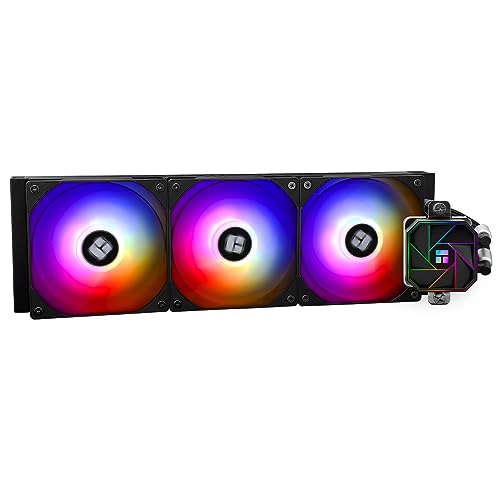
Thermalright Aqua Elite V3 66.17 CFM Liquid CPU Cooler (Aqua Elite 360 Black V3)
Any of those four for 360
daring hinge
cool cool! thank u very much 🙏
opal wolf
Any idea what size mounting screws for artic 360? Mine didn’t come with them and I sent artic support a ticket
marsh badge
yes
strange flume
Use the peerless assassin instead if you want similar performance for like a third of the price
Or frost tower EVO for a bit more aesthetics and far better noise profile
 sturdy flame
does anyone know what a good cooler would be for the i7 11700K?
sacred wren
sturdy flame
does anyone know what a good cooler would be for the i7 11700K?
Thermalright phantom spirit
sturdy flame
thank you
sacred wren
sturdy flame
thank you
Actually correction, that's just best value for if you're in the us, if you're not it depends on pricing
Phantom spirit is $34 in the us and is among the best air coolers
sturdy flame
yeah I'm in the US
sacred wren
Ah kk all good then
sturdy flame
I'm building my first PC so I figured I'd ask around here for some help
marsh badge
first pc?
don't buy 11700k now
what's your budget for the pc anyway, i can make you lists
sturdy flame
around 1k
marsh badge
alright, does this have to include peripherals?
sacred wren
Oh I assumed you alr had it, yeah don't buy an 11700k for a new build
marsh badge
wifi?
sturdy flame
marsh badge
alright, does this have to include peripherals?
what does that mean
sorry I'm completely new to this
sturdy flame
no I already have that stuff
marsh badge
ok
sacred wren
What monitor do you have?
sturdy flame
my dad is big on pc stuff, he said that the i7 11700K would be a good choice for my budget
oh sorry
mb
sacred wren
Used it's OK value, but new it's a 3 gen old cpu and when something is out of production pricing new gets really bad
The 5600 at $140 and 12400f at $150 have the same/better gaming perf
7600 at $230 is a lot better
sturdy flame
is that an amd card
sacred wren
5600 and 7600 are amd cpus, the 12400f is intel
sturdy flame
sacred wren
What monitor do you have?
a bad one but I'm gonna buy a 144hz monitor soon
sturdy flame
it's an old 60hz element monitor that my friend gave me when I bought my xbox and few years ago
sacred wren
Ahh ok
marsh badge
Part List - AMD Ryzen 5 7600, Radeon RX 6750 XT, BitFenix Nova Mesh M ARGB MicroATX Mini Tower
marsh badge
here's what i did
sturdy flame
also my dad mentioned when I was looking at cpus to get on that performs at atleast 3200ghz
sacred wren
I'm assuming you wanted nvidia and intel, so I made this, but the 7600/6700xt is better
https://pcpartpicker.com/list/s2749c
Part List - Intel Core i5-12400F, GeForce RTX 4070, Phanteks Eclipse G300A (1 Fan) ATX Mid Tower
sturdy flame
marsh badge
here's what i did
tysm
sacred wren
The ghz does not determine perf
sacred wren
7600 is as good as 5800x3d, better than 12600k which beats the 11700k
marsh badge
i would go with intel one
sturdy flame
do you guys know any tricks to determine if one part is better than another just based on the name
marsh badge
better gpu despite the platform being ddr4
sacred wren
Well I'd do the 12400f with 7800xt
sacred wren
sturdy flame
do you guys know any tricks to determine if one part is better than another just...
Name no
But passmark cpu comparison
marsh badge
7800xt better ye
sacred wren
Is good
You want to pay attention to single core perf
Ghz and core count don't matter when you're comparing different generations
sturdy flame
interesting
sacred wren

It's not as accurate as looking at game performance, but it works for a rough estimate
sturdy flame
so based on this pic the amd one is better than the Intel one that I found
sacred wren
Yeah its a lot better, but 12400f is also better, and if you get a 1440p monitor 12400f/4070 or 12400f/7800xt would be better
Since you're getting a new monitor I'd recommend 1440p IPS 144-180hz, around $180-220
sturdy flame
okay
sacred wren
If you go 1080p 7600/6750xt would prolly be a better option
With 7600 you gain upgradability, you could put an 8800x3d in there or whatever comes out, and have a huge performance boost
12400f is on a dead socket, 13600k is the best cpu on lga 1700 that makes sense for gaming
sturdy flame
very interesting
sacred wren
Wait ima make one more list
sacred wren
Part List - Intel Core i5-13400F, Radeon RX 6800, Phanteks Eclipse G300A (1 Fan) ATX Mid Tower
7600 is amd, 13600k, 12600k, 12400f, 13400f are intel
sturdy flame
awesome sauce
is there anything you can teach me about gpus? I know that Nvidia makes them but I'm not sure like what they are and how they affect performance
sacred wren
So nvidia and amd are the two main ones, intel released some but they're mediocre
7800xt and 4070 are both similar to the 6800xt and 3080
6750xt is better than the 4060 ti, 3060 ti, and is about the same as the 3070
6800 non xt is between 3070 ti and 3080
sturdy flame
I can tell
marsh badge
no, always lol
i myself, though, would happily game with 7600 and 6700xt
i value possible platform upgrades
bacca's list is gpu focused, good for resolution above 1080p
but not 4k
sturdy flame
so not based on picture quality more on smooth performance
that's how I interpreted that lmao
sacred wren
Nah, its focused on graphics quality and performance
7600/6750xt, is good for 1080p/1440p, but 4070 will do a decent bit better at 1440p
But 12400f isn't the best cpu, so the tradeoff is in some games it'll hold the 4070 back
sturdy flame
I feel like everytime I see a video or something about a 4070 or Nvidia they are always gassing it up to be super insane
sacred wren
13400f isn't far worse than the 7600, but you also don't have upgradability and 6800 isn't a huge amount better than 6750xt
marsh badge
i could definitely do 7800x3d for 1k but gpu would be sacrificed too much to justify such a fast cpu
sacred wren
sturdy flame
I feel like everytime I see a video or something about a 4070 or Nvidia they are...
4070 is ok value
Its just that the 4060 and 4060 ti are ass value
4070 ti is decent now, 4080 is ass value, 7800xt, 7900xt, 7900xtx, and 7600 are solid
7700xt meh
About the same as 6800
sturdy flame
so if I would put the 4070 with the 13400f how would that do
marsh badge
4070 isn't a crazy gpu, but it performs just fine for what it asks from your wallet
7800xt would be better value tho
sacred wren
Could also do this https://pcpartpicker.com/list/NsKqwg
Part List - Intel Core i5-12600KF, Radeon RX 6800 XT, Phanteks Eclipse G300A (1 Fan) ATX Mid Tower
sturdy flame
so I could put the 13400 with the 7800 or 4070 then would that be a good pair..?
sacred wren
I'd say this would be my ideal if you could spend this much
https://pcpartpicker.com/list/g7wY28
Part List - AMD Ryzen 5 7600, Radeon RX 6800 XT, Phanteks Eclipse G300A (1 Fan) ATX Mid Tower
Also the b660 pro rs doesn't have wifi, so if you go intel with ddr4 you need a separate wifi card
This would be intel+nvidia with a better cpu
https://pcpartpicker.com/list/bqdbVW
Part List - Intel Core i5-12600KF, GeForce RTX 4070, Phanteks Eclipse G300A (1 Fan) ATX Mid Tower
That includes a wifi card
sturdy flame
why don't they come with wifi
sacred wren
Also 40 series refresh comes out soon, and 4070/7800xt prices could go down
Only certain mobos do, it tends to cost a bit extra
harsh crow
Will there be a 4090 refresh?
sacred wren
Cheapest ddr4 lga 1700 wifi board that isn't trash is $140
sturdy flame
seems kinda silly to sell pc parts that don't have internet
sacred wren
Not really, an internal wifi card is the same thing
harsh crow
sturdy flame
seems kinda silly to sell pc parts that don't have internet
Agreed but they wanna grab all the $ out of us.
sturdy flame
real
sacred wren
It's a budget ish mobo, and also some people don't need wifi
harsh crow
Only costs them like $5 but wanna charge us +30$ or smth for it.
sacred wren
Ethernet is a thing
marsh badge
wifi is added cost, and ethernet always exists
sacred wren
If you went ddr5 and intel, b760 sonic wifi is amazing and $130
sturdy flame
wat is ddr4 and 5
sacred wren
But ddr5 also costs extra
Types of ram
7600 only uses ddr5, 12th gen through 14th gen from intel use both ddr4 and ddr5
marsh badge
ddr4 is an older standard of ram
sturdy flame
I like the pc you built with the wifi adapter
sacred wren
Yeah its solid, it's not too much worse than the 7600, just losing out on upgradability
sturdy flame
what would have to change for it to be upgradable
sacred wren
Well ddr5 can be carried over for a future build, but no intel cpu will give you cpu upgradability since 14th gen is last on this socket
sacred wren
sturdy flame
so would I need to wait for the next Intel generation in order to upgrad?
Yes, and it'll be a long while
sturdy flame
okay
sacred wren
14th gen just released like two months ago?
And its about a year between gens typically
sturdy flame
if I didn't plan on upgrading anytime soon, then it sounds like a pretty good option
sacred wren
Yeah, though on am5 you could do whatever next gen 7800x3d is, which I would guess around 30-40% better than 7600
Which would still be relevant 4-6 years down the line
(So would 7600 tbf)
Actually I'd spend an extra $10 for this psu, and this has ddr5 which you can carry over for an upgrade for a good while
https://pcpartpicker.com/list/7YRVL9
Part List - Intel Core i5-12600KF, GeForce RTX 4070, Phanteks Eclipse G300A (1 Fan) ATX Mid Tower
sturdy flame
that looks great tbh
sacred wren
Last thing, you could get a used 3080/3080 ti for $350-425 and then spend more on the cpu
Or just to get same perf for less, to be closer to your $1000 budget
sturdy flame
sacred wren
Last thing, you could get a used 3080/3080 ti for $350-425 and then spend more o...
thank you for all the help I really appreciate it
I feel like a genius now
sacred wren
sturdy flame
I feel like a genius now
Lol happy to help
Any questions feel free to ping me, though I don't always answer quickly
 sturdy flame
sacred wren
Any questions feel free to ping me, though I don't always answer quickly
sturdy flame
sacred wren
Any questions feel free to ping me, though I don't always answer quickly
I'll keep it mind 🙂
sacred wren
strange flume
https://cdn.discordapp.com/attachments/606552336315318277/1191168845466062878/20...
That does look really nice
strange flume
I hate everything else in this case
sacred wren
Phantom spirit evo >
strange flume
But look at that thing
sturdy flame
that looks cool
strange flume
sturdy flame
that looks cool
LCD air cooler for like $50
Tho the fans are a bit noisy
strange flume
sacred wren
Phantom spirit evo >
True but man
Aesthetics first build for 20 extra pls
Ez goal
 dusty olive
Is it normal for a Ryzen 5 7600 to have temps in the upper 80s while gaming?
dusty olive
Stock fan
strange flume
I'd believe that
AM5 runs hot
Even on a custom loop my am5 cpu spikes into the mid 70's
Both in games and in torture tests
It's the nature of the beast
dusty olive
So it's good then?
strange flume
Yeah should be fine
dusty olive
Ok
strange flume
It's really designed to use the stock fan so
I'd say it's ok
@dusty olive if it starts to like, hard stutter, have issues running super hot at not the full power of 65w? Then I'd worry a bit
But ye you should be fine
dusty olive
Even in the 90s?
strange flume
7600 should be fine even at 95C
More of a question if you were pulling 30W or 65W of power
dusty olive
I see
 lunar venture
Aegis R 12NUC5-617US
MSI Aegis R (Tower) Gaming Desktop, Intel Core i5-12400F, GeForce RTX 4060, 16GB Memory (8GB x 2), 1TB SSD, USB Type-C, VR-Ready, Windows 11 Home Plus,Black
Hey everyone,
I was curious if anyone could help point me in the right direction of scouting out what liquid cooling set up would be compatible with my build.
strange flume
lunar venture
Aegis R 12NUC5-617US
MSI Aegis R (Tower) Gaming Desktop, Intel Core i5-12400F, ...
kinda looks like a 240mm would fit up top
but you don't really need one
would be very much overkill
not to mention-
if that motherboard is the same as what I'm seeing
it would VERY much prefer a cooler that blasts air all over it

could be a different one?
lunar venture
That is indeed it. And okay i apppreciate it. This is my first build and had a bit more money to put into it and thought it could help
strange flume
if we could get a picture of the motherboard that you actually have, then I'd have a better understanding
but from what I can see there
doubled phases
which normally means it's not a very performance friendly motherboard
what I mean by that is
it'd struggle without proper tlc
a lot of prebuilts are shoestringed together
so they strike a bit of a careful balance (some not, some just plain cut corners)
so you end up with a system that functionally works, but on the grounds that nothing really changes
Alienware systems are a perfect example of this
however I will say this, you could also just as easily be both either fine with swapping, or might even be worth swapping and reselling what's already in there
like I said, I'd have a better understanding with a picture
lunar venture
Yea for some reason i cant post pics here 😅
strange flume
ah
accept my dm
send to me that way
@low pumice can you help rq

Pro b760 vc
????

I'm not-
familiar with 12+1 looking like that
💀
if it's still an ample 12 that doesn't really need air then it's probably fine @lunar venture
I just want to confirm before I say it
very very weird arrangement of board
lunar venture
Of course it is 😅
strange flume
Cheers 🙏
@lunar venture go stick that cooler on we talked about
more than enough for the 12400

lunar venture
Already ordered 🤌🏿🤌🏿 appreciate yall
 median peak
What’s a good 4 screw cooler for a 5800x3d
marsh badge
you mean air cooler?
median peak
Yes but 4 screws, the one i got from mc is 2 screws and doesn’t go on my mb
knotty sparrow
You would need to use the included adapter bracket
median peak
I have no idea how that thing would screw into mine so i was just gonna go to mc tomorrow and buy another lol
knotty sparrow
The 2 screws go into 2 metal brackets, which branch off to the sides to the 4 screw pattern
median peak
This is the adapter and mb

 marsh badge
am5 works with am4 bracket
median peak
Both am4
median peak
Thats crazy
marsh badge
which cooler is this?
median peak
Ag400 bk
median peak
Gotta get a new one anyways
 knotty sparrow
If it was an open box cooler it might be missing the bracket
median peak
This was off the shelf
knotty sparrow
You can look at the manual to see what you're looking for
median peak
I found the problem, i don’t need to put the screws in the holes i need to put them in the indents on the side
marsh badge
yes
the holes are for intel
the manual is kinda confusing with how non descriptive it is
median peak
Well it all just kinda blended in so i didn’t pay too much attention
 wooden talon
what type of fan setup should I do with an h6 flow
knotty sparrow
How many fans do you have? Air or liquid cooling?
wooden talon
depends gonna buy them soon probably gonna go with a phantom spirit 120
knotty sparrow
AM4 is AM4, it's compatible
strange flume
I'm hoping it's a current motherboard and not a new one...lol
strange flume
probably helping others
marsh badge
probably
knotty sparrow
I've only once seen that be a problem, and it was on a board with a 90 degree rotated layout
The bottom of the cooling fins is way above the board
 lucid walrus
Thanks
 marble gorge
finally getting around to this, but wanted to ask: Can a GB X570 GAMING X handle 3 front panel fans? if so, why does only 1 of my fans light up
marble gorge
Ok now 2 fans light up lmao
strange flume
what fans are they
 low pumice
Are they RGB or aRGB, and are they daisy chained or using separate headers or using a controller?
 subtle gyro
is it possible to rotate my cpu cooler 90° with an lga 1200 socket?
 woven vale
dshould i use this fan curve
 harsh crow
What fan control software do you guys recommend?
 bright ether
harsh crow
What fan control software do you guys recommend?
bright ether
harsh crow
What fan control software do you guys recommend?
the one that is for your motherboard manufacuer
msi would be msi center
ex
knotty sparrow
harsh crow
What fan control software do you guys recommend?

GitHub
This is the release repository for Fan Control, a highly customizable fan controlling software for Windows. - Rem0o/FanControl.Releases
Lots more controls, you can set curves based on things like GPU memory temps with hwinfo integration
I do not recommend MSI Center. While it does allow for the full standard feature set, it takes a LOT of resources for a background app and it requires you to download separate functions and keep them updated.
 nova ginkgo
So it says you have to refill your liquid coolers for your pc every now and then. How often would you have to refill the coolers?
strange flume
The idea is not to for a few years
But it's good practice too if you know what you're doing
knotty sparrow
If it's an open (custom) loop then you should flush it every few months.
If it's a closed loop (AIO) then it varies. Typically they'll last a good 3-5 years before they need extra maintenance.
strange flume
@nova ginkgo if you're looking for help to do so we have a few people with custom loops here who could show you how
I tend to use osmosis water and inhibitors, made up in a 19:1 ratio
nova ginkgo
Yeah I’m probably buying a pc on Newegg for vr so I’m probably buying a big case with enough room on the sides to put a good number of fans. Probably about half have to be intake and the other half have to be exhaust
Caring about a pc is good though to save time and money before buying another pc
marsh badge
Since you're getting into this route, may I suggest you to build one?
nova ginkgo
Yeah that’s what im going to do. I have to order all the parts online though
That’s why we have websites like Newegg
harsh crow
knotty sparrow
https://github.com/Rem0o/FanControl.Releases/releases
Ty, I had actually came across this last night like right before you sent it.
nova ginkgo
I’m definitely gonna get a case that provides room for a significant number of liquid cooling fans. If I place them all the right way it should give the pc awesome airflow. Trying to build this thing to be on for the long hours of gameplay on vr
nova ginkgo
I’m not too sure about how that works. The airs probably supposed to go into the pc and then come right back out isn’t that how system cooling works?
harsh crow
Open Loop refers to custom water cooling vs pre-made water cooling solutions like an AIO.
If it's your first time building I strongly recommend not going the custom route.
AIO will have a radiator, pump, and liquid all setup for you so you just need to maybe swap the fans if you sk wish them mount it.
sacred wren
nova ginkgo
I’m definitely gonna get a case that provides room for a significant number of l...
Liquid cooling fans?
nova ginkgo
Liquid/ water cooling fans
nova ginkgo
I’m not sure how to explain it. They’re like fans for the pc with small amounts of liquid dispensed from them to keep the inside of the computer cool
sacred wren
Do you have a link?
Because if they're what I'm thinking of they're either pointless, or dangerous, or both
nova ginkgo
Do you not know about building gaming PCs at all?
marsh badge
The context you're giving is fans with ability to sprinkle water
Which would probably damage the parts inside
PC case fans are the same fans used in AIOs and custom loops on the radiator
sacred wren
nova ginkgo
Do you not know about building gaming PCs at all?
Um?
If you're talking about fans with liquid inside of them, that's next to pointless. They're expensive asf and provide slim to none benefits.
If you mean a liquid cooler for the cpu, that is a very different story
sacred wren
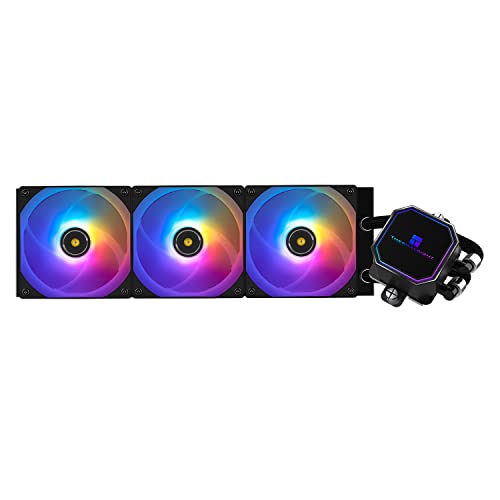
Thermalright Frozen Prism ARGB 70.4 CFM Liquid CPU Cooler (Frozen Prism 360 BLACK ARGB)
marsh badge
Water cooling also doesn't automatically mean it's the best
sacred wren
Do you mean fluid bearing fans?
marsh badge
I think they're definitely referring to those table fans that sprinkle some water
sacred wren
Oh god
marsh badge
But in the form of case fans?
sacred wren
That's concerning
nova ginkgo
I was concerned too but they said liquid cooling nowadays was fairly safe
sacred wren
What liquid cooling do you mean my guy
sacred wren
sacred wren
Like this https://pcpartpicker.com/product/7Phv6h/thermalright-frozen-prism-argb...
Something like this?
Or fans with liquid inside of them
They are two completely different things
The first one is fans on a radiator which has liquid inside of it
It is not liquid cooling fans, they're two completely separate things
An aio is completely safe as long as you don't get a crappy model
It doesnt dispense liquid into the computer, it has two tubes running from it connected to a cpu mount, one brings cool liquid from the pump to the mount to cool the cpu, the other tube takes the hot liquid away from the mount and brings it back to the radiator, which the fans help to cool it down, and the cycle repeats
It also depends on what cpu you are going for if an aio is worth it
The thermalright phantom spirit at $35 is as good as 240mm aios, as well as has a much longer life span
It's fine for a 13600k/14600k, and none of 7000 series needs a liquid cooler
13700k/14700k and higher, and 12900k, sure go for an aio
Though if you're gaming 7600, 7800x3d, and 13600k should be the cpus considered
On the budget end, 12400f 12600k and 5600
nova ginkgo
sacred wren
Like this https://pcpartpicker.com/product/7Phv6h/thermalright-frozen-prism-argb...
Yeah like that they sell those on the site where people can buy to put their PCs together at home with
Honestly I’m just getting ready for my very first pc build. I probably should be doing air coolers but I am probably gonna have a pc that has a lot of beef and uses a lot of power so I might do research and google and YouTube about water coolers so I can buy them and actually know about them and ensure my pc has efficient cooling
sacred wren
nova ginkgo
Honestly I’m just getting ready for my very first pc build. I probably should be...
What is your budget for the build?
And are you building yourself, or ordering off of a custom website?
The two most important things I can tell you are one
Don't cheap out on psu
And two, brand is almost completely irrelevant
Never buy a part because of the brand name, it is completely useless
harsh crow
sacred wren
If you're talking about fans with liquid inside of them, that's next to pointles...
That's a thing?
sacred wren
Corsair is super well know and I would only recommend some of their cases and psus, their ram and aios are ass
sacred wren
harsh crow
That's a thing?
For some reason yeah, fluid bearing fans
harsh crow
nova ginkgo
Honestly I’m just getting ready for my very first pc build. I probably should be...
I'd advise doing some research. Some YouTubers like J2C (JaysTwoCents) are pretty good as far as understanding what the average joe would care about rather then getting so darn technical on a level that no one is ever going to notice unless they are spending more time looking at their pc then using it.
nova ginkgo
Yeah I’m watching these YouTubers it’s the best spot I can get education about gaming PCs before I can buy it
sacred wren
What're you looking to spend?
nova ginkgo
Im probably assuming it’ll be $4000-$5000 to order the beefy pc im getting so thankfully I saved my money
harsh crow
nova ginkgo
Im probably assuming it’ll be $4000-$5000 to order the beefy pc im getting so th...
Dang, yeah that will get you top shelf everything and then some.
sacred wren
You can spend much less than that and do top of the line
Without losing out on anything
sacred wren
nova ginkgo
Im probably assuming it’ll be $4000-$5000 to order the beefy pc im getting so th...
Part List - AMD Ryzen 9 7950X3D, GeForce RTX 4090, Corsair 5000D AIRFLOW ATX Mid Tower
That's alr overspending
Can do 98% of the performance for much less
Part List - AMD Ryzen 7 7800X3D, GeForce RTX 4090, Phanteks ECLIPSE G500A Performance ATX Mid Tower
nova ginkgo
Yeah not too bad I’ll think about it someone else shared me this actually
sacred wren
Can do a good bit cheaper with similar perf too
shrewd juniper
topaz blaze
what to do if ssd is hot
How hot
topaz blaze
70c
nova ginkgo
Are water coolers from Corsair bad because those are the ones Jay2Cents uses
strange flume
nova ginkgo
Are water coolers from Corsair bad because those are the ones Jay2Cents uses
they just aren't worth the price
incredibly mid for so much more than what you can get from other brands
if there's anything that is good from Corsair it's their psu's, and from time to time, their cases
they have like
$500 coolers now
it's as much as a mid-range gpu
think about this from an objective standpoint
nova ginkgo
So Corsairs coolers are overpriced?
strange flume
you could get a $500 H150i Core, and live happily with a 4080 for example for 1100-ish
or you can get a $55 Thermalright frozen edge 360
and get a 1600-ish 4090
on the other hand
7800XT > 4080 Super or 7900 XTX
13600K up to 14900K
strange flume
nova ginkgo
So Corsairs coolers are overpriced?
there's just so much benefit to not spending hundreds on a cooler
if you've peaked out your performance and you want a specific aesthetic, at that point, money is no object really
but once you exceed like, $120, and this is being generous
there is just no benefit
would you rather pretty lights for $200? or a whole upgrade to 7800X3D for example from a 7600
or a whole gpu step up
6800XT to 4070Ti
these are all real examples
nova ginkgo
I was thinking about building a pc with air cooling instead but I don’t know if that’s gonna be enough to keep a 4090 pc from overheating.
Google said water cooling would get the job done better but seems with both AIOs and custom loops there’s a chance of killing your pc
strange flume
there's a chance of killing your pc even if you sneeze
it depends purely on the specs
but I don't really recommend any water cooling of any kind if it's not like a modern i7/i9, or 7950X, or 5800x3d really
anything else is fine on good air coolers
4090 is fine on air, nay, as good as water in a lot of cases
would also suggest otherwise against a 4090 rn btw, not unless you can find one for 1600
they exist but, rare
you'd be paying near 2K+ otherwise which is terrible value
nova ginkgo
Well hope 4080 ti is still good for vr because that’s the second to best option
Seen a bunch of 4080s for only 1000 but a few hundred past but not as much as 2k
strange flume
4080 super would be more than enough for VR
nova ginkgo
Custom loop definitely won’t be cheap though because you need a heat gun and a bunch of other things to go with it
strange flume
hell, my 3090 was more than enough
strange flume
nova ginkgo
Custom loop definitely won’t be cheap though because you need a heat gun and a b...
bunch of things but not a heat gun
not unless you want hard loop and cancer
wait for 4080 super
it's a new $1000 price tag
it'll be quite good, but everyone will jump on it
so don't hesitate if you decide to do so
nova ginkgo
Then how am I supposed to do the custom loop because I’ll have to soften the tube and bend it to fit my pc and have the water flow everywhere
nova ginkgo
strange flume
not unless you want hard loop and cancer
Is hard loop really that bad? Might be more durable and reduce chance of the heat inside the pc melting it
nova ginkgo
Because I don’t mind spending a whole bunch of extra money I just don’t wanna do anything stupid like accidentally screw up on the water cooling where liquid gets all over my parts
marsh badge
There's not enough heat for soft tubes to melt
If you go fully liquid, there's no hot air at all
Even then the heat from gpu isn't significant enough to cause damage
Hard tubing is pain cuz you have to make sure you measure everything right down to a millimeter
Otherwise you're looking to waste money with things not fitting or not looking the way you want
strange flume
nova ginkgo
Then how am I supposed to do the custom loop because I’ll have to soften the tub...
ZMT soft tube >>>>>>
If something goes wrong (and it always does) you don't need to drain everything, take it apart, attempt a fix, put it back together, fill it, hope it works
strange flume
nova ginkgo
Is hard loop really that bad? Might be more durable and reduce chance of the hea...
No, water typically should stay under 40C in a loop, no chance of melting
Soft tube is just better
AND
If you want to upgrade, you don't need to buy new watercooling parts
If you run quick disconnects it's even better, you can take it all out in parts
Honestly if I saw my plastic tubes melting I'd consider the company who made them to compensate the rest of my damn pc 
nova ginkgo
Just trying to take precaution with water cooling because if that liquid leaks and gets on pc parts that’ll screw up a lot
strange flume
I just wouldn't bother with it if you are worried about that much
It's complicated stuff
Say like
Building a car, vs buying a car, vs. building a kit car
Watercooling vs buying a prebuilt vs building a regular pc
The step up in difficulty to full water looping isn't worth the investment 9 times of 10
I really would only bother with it for like a new i9 tbh
And those aren't the best choices for gaming
nova ginkgo
Yeah I could buy a prebuilt pc but almost everyone in other discord servers I talked to told me not to so maybe I should listen to them
strange flume
I agree with them
nova ginkgo
Plus I might not be able to swap parts or upgrade the pc
magic wave
I don't like prebuilts
strange flume
Buying a pre-built you buy into several things:
- High paid labour cost 9 times of 10
- Unusual parts somewhere in the build taking a cost cut or otherwise a huge premium on everything
- A lower warranty than buying separately
magic wave
they're fun to build in at times, but I'd rather buy parts that aren't so barebones
strange flume
Some companies even offer you to buy the longer warranty when you'd have it if you bought on your own
magic wave
😔
strange flume
cough cough DELL cough
strange flume
Take me back to the XP days when their prebuilts still made sense
nova ginkgo
People also told me to avoid buying Dell but there’s a lot of other places I could buy online. Newegg, digital storm. Maybe buy parts from micro center online
Saw digital storm on adds a few times. Not sure if it’s good or bad
strange flume
nova ginkgo
People also told me to avoid buying Dell but there’s a lot of other places I cou...
idk who said to buy from dell but don't if it's not a basic laptop
newegg rarely gets decent prebuilt deals
digital storm is...well idk if I would
starforge is alright if you can accept the premium
but it's quite the premium
nova ginkgo
Well im not buying any prebuilts
I am customizing a build online and when the parts arrive to my house I’m going to put them all together
strange flume
do you want some help making a list mate
It takes me maybe 5 minutes and saves you a boatload of research time
all I need is budget, type of pc use, wifi yes or no, and peripherals yes or no
nova ginkgo
Maybe I’ll ask later. I still gotta do research on water cooling though. Someone like me who wants to play vr all day has to have good cooling on their pc for long hours
strange flume
ye ofc
I can think all that through for you lol
the new gpus are more than capable of running on their stock coolers when it comes to both 40 series and 7000 series
and cpus like the 7800x3d are perfectly happy on the stock box cooler they ship from amd anyway (it doesn't come with this cpu tho sadly)
to the point where I'd say full watercooling is just pointless
nova ginkgo
I mean the graphics card itself has fans on it. I don’t know if that’s for cooling or not though
harsh crow
nova ginkgo
I mean the graphics card itself has fans on it. I don’t know if that’s for cooli...
RTX 4000 series gpus have such a obnoxiously overkill heat-sink/acting cooling system that there is absolutely no point in going water-cooling unless you are trying to reduce noise levels or for visuals and even then 40 series cards are pretty quiet. Sorry if it came off harsh, just making sure you understand.
nova ginkgo
Still applying thermal paste to my cpu when I get it though. Hopefully there’s air coolers efficient enough to keep the pc from overheating. Trying to get a case that supports having a good number of fans on the pc for strong airflow
harsh crow
If you want airflow the case I have is excellent for that, it's the Fractal Torrent.
Also, fan count is useless unless the PC case provides enough air for the fans to move.
harsh crow
harsh crow
If you want airflow the case I have is excellent for that, it's the Fractal Torr...

Built to maximize cooling potential straight out of the box, the Torrent comes with a brand-new component layout and two custom-made 180 x 38 mm Dynamic PWM / Prisma RGB fans. The Torrent is a perfect fit for anyone serious about high-end cooling – with or without a custom water loop.
Comes in a few variants, I have the tempered glass side panel and full size.
Supports a good amount of fans along with large ones at that + allows proper access to air for the fans.
harsh crow
nova ginkgo
Still applying thermal paste to my cpu when I get it though. Hopefully there’s a...
Usually coolers come with thermal paste pre-applied.
nova ginkgo
And you’re not being harsh at all. You’re just giving your opinion on this
Plus sometimes I need opinions and advice from other people instead of entirely making decisions by myself just so I don’t make a dumb mistake. Not that people are doing things for me but giving me recommendations
strange flume
a good case with fans should be more than enough for a lot of the 4090's that basically cool as good as they do as if they were on aiir
I swapped my suprim to water and temps got worse
(though memory oc got a fair bit better)
harsh crow
strange flume
(though memory oc got a fair bit better)
Felix, do you by chance know if 1.6v VDDQ/VDDIO is to high?
strange flume
vddio??
harsh crow
By default, my board syncs VDDQ and VDDIO to the same voltage as my DRAM.
harsh crow
I see. And I keep for the life of me find any info on the web on safe/max VDDQ/VDDIO voltages.
nova ginkgo
Yeah I’ve seen Jay2Cent talking about water coolers but at the same time recommending air coolers. And since that one guy said his temperatures got worse when he switched to liquid coolers maybe I should just buy the air cooling. Just some fast powerful fans
harsh crow
nova ginkgo
Yeah I’ve seen Jay2Cent talking about water coolers but at the same time recomme...
It's a matter of how efficient the cooling system. Water doesn't always = better.
sacred wren
Yeah, and I wouldn't bother changing fans on most air coolers
If you want as good as it gets for an air cooler, phantom spirit evo 100%
Phantom spirit was already top of the line, the evo is the phantom spirit with premium fans and a much cooler look
$46
harsh crow
A top notch water system will always beat a air system but the price will be difference will be huge with small gains.
Personally here's what I would do:
CPU: good 360-420MM AIO like a LT720/LS720 or Arctic Freezer II 360/420mm
GPU: Air coolers are just fine on RTX 4000 series idk about Ryzen
Ram: passive is fine unless you do ram OC in which case, just slap a fan over it.
knotty sparrow
A good air cooler is about as good as a decent 240mm AIO
At less than half the price
 magic sparrow
harsh crow
A top notch water system will always beat a air system but the price will be dif...
magic sparrow
harsh crow
A top notch water system will always beat a air system but the price will be dif...
Idk, dont really need to recommend any AIOs usually. Also 280MM AIOs are also typically about as good as 360mm. Also I love me them Ryzen GPUs
harsh crow
As said, that's what I would do personally.
I prefer AIO over air cooler for mobility and in my experience, quieter.
 sleek fox
If you have a 13/14900K
Then you can't cool it no matter what you slap on it lmao
harsh crow
Well you can cool it just to varying degrees lmao.
sleek fox
That's the joke
You suffer, just to varying degrees lmao
But yeah anything less than 360 AIO for those don't make much sense honestly
harsh crow
sleek fox
But yeah anything less than 360 AIO for those don't make much sense honestly
I've not had a 13/14 I9 but people I met who do, that have cooled their chips are usually doing these things
- Delid
- 420mm aio or custom loop
- Liquid Metal
- undervolting
sleek fox
So basically spending another 200 bucks and potentially ruining the CPU just to not thermal throttle
harsh crow
sleek fox
So basically spending another 200 bucks and potentially ruining the CPU just to ...
Afaik from those folks, undervolting at stock settings prevented thermal throttling.
magic sparrow
harsh crow
I've not had a 13/14 I9 but people I met who do, that have cooled their chips ar...
contact frame is the main thing tbh
languid gale
sleek fox
If you have a 13/14900K
Then you can't cool it no matter what you slap on it lm...
All I have is a contact frame and custom loop and I’m maxing out around 65-70C at full load
sleek fox
languid gale
All I have is a contact frame and custom loop and I’m maxing out around 65-70C a...
"Ah yes just spend 400 bucks extra to not have my chip melt"
Like I'm not throwing shade at y'all
I'm throwing shade at the new 900K class CPUs
strange flume
Tbf
Even when we were in 9900k era they were bad
But at the same time
They weren't as bad

 eternal socket
best software to control fans/temp?
mobo: ASrock x670e steel legend
strange flume
bios or FanControl app
eternal socket
strange flume
bios or FanControl app

GitHub
This is the release repository for Fan Control, a highly customizable fan controlling software for Windows. - GitHub - Rem0o/FanControl.Releases: This is the release repository for Fan Control, a h...
eternal socket
um
 knotty sparrow
Normal
Let it run
If you have anything else installed that could be interfering with the fans you should stop it too
eternal socket
knotty sparrow
If you have anything else installed that could be interfering with the fans you ...
is this software required to run in the bg for controlling fan speed
aka do i check start at login
 knotty sparrow
eternal socket
is this software required to run in the bg for controlling fan speed
knotty sparrow
eternal socket
is this software required to run in the bg for controlling fan speed
Yes, but it's very lightweight. It only uses 32MB of RAM on my system.
You can hide the RPM section too
eternal socket
why are some of them grayed out
 knotty sparrow
Either there's nothing plugged into those headers or it didn't respond to the program's commands. Could be interference from another program, or you don't have chipset drivers installed. A few things can cause it.

 magic wave
I don't see a single abnormal temp
computer components generally run between like 30-80c
I think my gtx 970 which has a really small heatsink and a blower fan runs around 80
which is not the best but it's fine
 silver steppe
Hey guys, absolute PC noob here, but Im switching out a stock cheapo cooler for a 212 silencio fan cooler, besides the hardware (cooler/thermal paste) is there anything I have to change in the BIOS like fan speed?
magic wave
Should be fine
Run it and open HWiNFO to look at the temps, make sure it's doing like 60-80 degrees under a load, and if it's more then maybe you could go into the bios for fan speed adjustment
If it's running at like 90+ you might need to reinstall the heatsink, chance there's improper coverage with the thermal paste, but luck should be on your side
silver steppe
Thank you so much! Good idea too. I'll definitely check the temps and make sure everything's running alright
 twilit copper
Hey guys ! I'm in the process of changing my cooling system, as the NZXT Kraken X52 (280mm) is not sufficient to maintain low temperatures on the Ryzen 3900X processor. The temperatures at idle are over 45-55 degrees Celsius. When launching a program or a game, they immediately rise to over 80 degrees Celsius.
I'm considering switching to air cooling, such as the Deepcool Assassin IV or DeepCool Lt720. I'm aware that most people would recommend the Arctic Liquid Freezer II 360, but I'm looking for something in white.
Do you think it makes sense to purchase air cooling or liquid cooling? The most important factors for me are quiet operation and performance.
sleek fox
twilit copper
Hey guys ! I'm in the process of changing my cooling system, as the NZXT Kraken ...
Assassin IV is pretty pricey for the perf tbf
AK620 is available in white and has the stats screen on top if you want it (I'd love to recommend the Phantom Spirit 120, but I don't think it's available in white)
shrewd juniper
twilit copper
Hey guys ! I'm in the process of changing my cooling system, as the NZXT Kraken ...
That sounds like your pump isn't at 100%, you can check in your bios or that it's faulty or something
It's not the best of coolers but it shouldn't be that bad
twilit copper
sleek fox
Assassin IV is pretty pricey for the perf tbf
AK620 is available in white and ha...
which is better Phantom Spirit or Peerless Assassin?
sleek fox
That depends
sacred wren
twilit copper
which is better Phantom Spirit or Peerless Assassin?
Phantom spirit is the peerless assassin with an extra heat pipe
So phantom spirit
sleek fox
Do you want outright best performance?
Assassin IV
Do you want really good performance and good value?
Phantom Spirit to me wins
sacred wren
Phantom spirit evo is the Phantom spirit with premium fans and a much cleaner look. It looms so nice
sacred wren
sleek fox
Do you want outright best performance?
Assassin IV
Do you want really good perfo...
Peerless assassin and assassin iv are diff coolers btw
I dont know how the assassin iv is tho
sleek fox
I know
I talked about the Assassin IV
It's the ultra-prem Deep cool cooler
It pricey tho
And only slightly better
sacred wren
Ye I think it's the newer version of ak620 kinda
I wonder if the phantom spirit evo is better than it
Its $46 I believe
sleek fox
The Phantom Spirit is close or marching in perf for much less
sacred wren
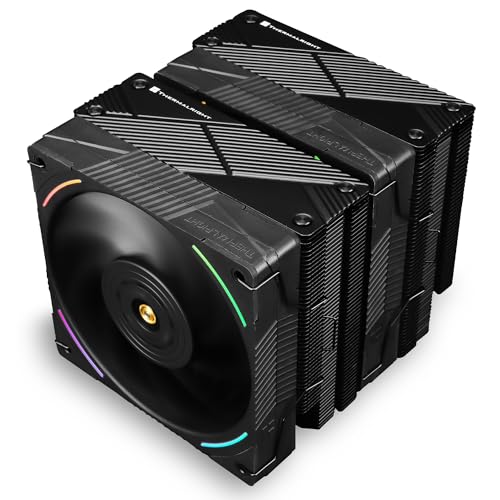
Thermalright Phantom Spirit EVO 69 CFM CPU Cooler (Phantom Spirit 120 EVO)
Afaik its identical to the phantom spirit performance wise, except much better fans
sleek fox
That's a really nice looking cooler
sacred wren
Right??
sleek fox
I'll have to check the price diff
sacred wren
It's so nice
sleek fox
Cuz that looks smexy
 sleek fox
That's too much for me to justify
sacred wren
Its a similar look but honestly I prefer the evo
sleek fox
It's like prem priced
It's only very slightly better at the price of noise
sacred wren
Yeah at $100 there's an EK 360mm aio
sleek fox
Like the Assassin IV can brute force perf
But gets really loud
And pretty annoying to me in noise profile
sacred wren
The ps evo is quiet too, since it's premium fans
I think it uses b12s?
Not sure on that
sleek fox
But slightly less outright cooling perf
So it's really preferences
I believe the PS Evo might actually be a sliver better in noose normalized
sacred wren
I think any more than $50 on an air cooler is a bit ridiculous atp
There's good 360mm aios at $50-60 now
Let alone $100
twilit copper
thank you guys for help ! I've watched several reviews and I'm impressed with the Phantom Spirit. I can't find any information on the dimensions of the radiator in relation to the height of the RAM modules. I have all four slots filled with Trident Z Neo, which have a height of about 43 mm.
sacred wren
twilit copper
thank you guys for help ! I've watched several reviews and I'm impressed with th...
What case?
Also that cooler you have should definitely be sufficient for your cpu
Unless it's failing. Have you tried a repaste?
Lemme grab you some suggestions in white tho
twilit copper
I tried changing the thermal paste but the issue persists ...
sacred wren
https://pcpartpicker.com/product/xMLFf7/thermalright-peerless-assassin-120-se-white-argb-6617-cfm-cpu-cooler-pa120-se-white-argb
https://pcpartpicker.com/product/dWGhP6/deepcool-ls720-se-wh-8585-cfm-liquid-cpu-cooler-ls720-se-wh
https://pcpartpicker.com/product/jFYRsY/thermalright-frozen-edge-69-cfm-liquid-cpu-cooler-fe360-white
https://pcpartpicker.com/product/YXFmP6/thermalright-aqua-elite-v3-6617-cfm-liquid-cpu-cooler-aqua-elite-360-white-v3

Thermalright Peerless Assassin 120 SE WHITE ARGB 66.17 CFM CPU Cooler (PA120 SE White ARGB)

Deepcool LS720 SE WH 85.85 CFM Liquid CPU Cooler (LS720 SE WH)
Thermalright Frozen Edge 69 CFM Liquid CPU Cooler (FE360 White)
Thermalright Aqua Elite V3 66.17 CFM Liquid CPU Cooler (Aqua Elite 360 White V3)
I'd say among those four
sleek fox
You probably need to adjust the pump
sacred wren
twilit copper
I tried changing the thermal paste but the issue persists ...
Hm, is pump speed at 100%?
sleek fox
Like I think it's either set too low RPM or it's just dead
sacred wren
That you change in the bios
twilit copper
i used nzxt cam for that
sacred wren
Honorable mention to ag620 wh at $55, but pa120 at $36 is very similar in performance
Try it in bios, nzxt cam is not great
sleek fox
I believe if it needs cam
You can't adjust it in bios
Cuz it's USB-powered
NZXT had to do it the stupid proprietary way
sacred wren
Oh that's fantastic we love nzxt
sleek fox
I can't vouch for it
But I think that's the case with their CAM-needing coolers
Worth checking but it'll probably be a dead end
sacred wren
I dont know if I dislike nzxt or corsair more
sleek fox
I mean at least Corsair's only going stupid with RGB
Pumps are still PWM
sacred wren
Their softwares are both ass, their aios are overpriced and mid, but corsair does have their cases and psus going for them
sleek fox
For now
sacred wren
Nzxt doesn't really have anything except very rarely their psus
sleek fox
we really shouldn't give ideas to Corsair on how to make their stuff more proprietary and stupid
sacred wren
Their aios I've seen well priced a single time, and that was a 280mm at $110
Nzxt ^
Corsair has ass ram, aios, and laptops
Nzxt just has ass everything
sleek fox
I mean some of their DDR5 is good
sacred wren
Ehhh
They lock a certain voltage on it
Which makes it much worse than most other brands
sleek fox
They started using Hynix M-die in some of the non-RGB kits
sacred wren
I dont remember the name of the voltage, felix or sips would know
sleek fox
They apparently tune well
sacred wren
sleek fox
They started using Hynix M-die in some of the non-RGB kits
Yeah but they still tune worse than any other brands m die
sleek fox
The RGB stuff yeah that's stupid and probably worse
sacred wren
Unless they unlocked that voltage
sleek fox
I didn't see any proof of locked voltage on the Vengeance kit I saw
sleek fox
So it should be fine
But there is probably plenty of stupid crap like you just mentioned too
sacred wren
Prolly still overpriced though
sleek fox
Product stack just seems like a minefield
sacred wren
Yeah I just avoid corsair unless I know that specific product is good
sleek fox
Tru
sacred wren
Just most of their psus
 steel forge
Is it possible for AIO fans to get to 9600 RPM or is my fan controller busted?
magic wave
Isn't that absurdly fast lmao
steel forge
That's what I thought and it does sound like a jet engine atm but if I enable msi "smart fan mode" the rpms (in the BIOS hardware monitor) go to like 1600-1800 but the fans don't sound like they ramp down at all.
sacred wren
The software reading it is likely busted
 vocal fable
steel forge
Is it possible for AIO fans to get to 9600 RPM or is my fan controller busted?
vocal fable
steel forge
Is it possible for AIO fans to get to 9600 RPM or is my fan controller busted?

9600 rpm is insane
magic wave
probably reduces airflow performance after several thousand revs lmao
 pseudo cobalt
So I have a Kraken z63 AIO, I cleaned the dust off my radiator, cleaned the dust of my case, and changed the thermal paste but it started going to 50-65° Celsius when it would normally be 35-40° celsius any idea why this happened?
marsh badge
bad mount
pseudo cobalt
marsh badge
bad mount
The copper plate is making contact with my cpu though
strange flume
Bad mount or pump not really working like it used to
knotty sparrow
pseudo cobalt
The copper plate is making contact with my cpu though
Making contact isn't the same as making good contact. Undo the screws and screw them on again. Make sure you're doing the standard diagonal pattern for screwing it in, and do a little at a time for each so they're even.
pseudo cobalt
knotty sparrow
Making contact isn't the same as making *good* contact. Undo the screws and scre...
It might be my pump isn’t working like it used to because I undid the screws, screwed them back on properly, still running at about 60°s
strange flume
Did you clean off and reapply the paste tho
pseudo cobalt
strange flume
Did you clean off and reapply the paste tho
yup


 strange flume
He do be cooling

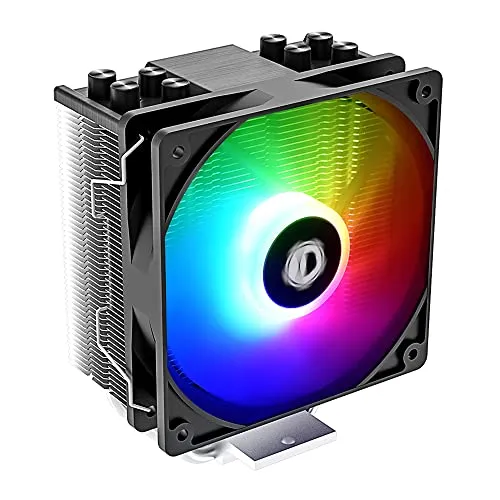

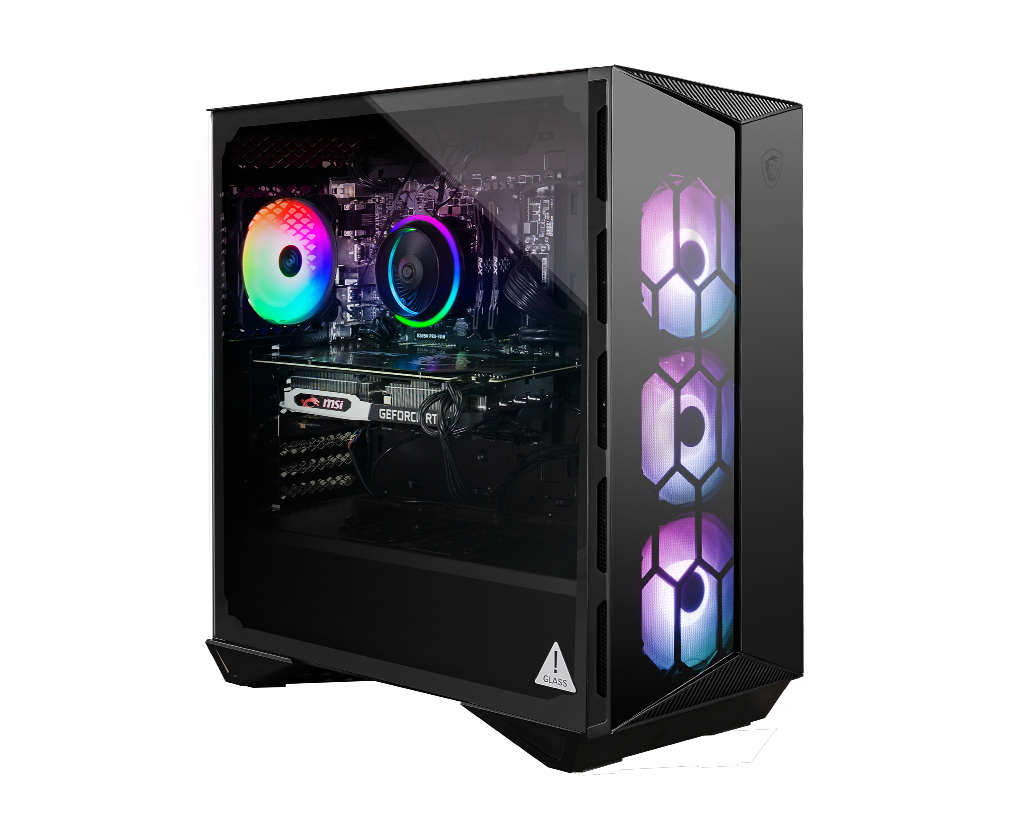
 placid oriole
Is averaging between 39c to 47c an ok idle temp range for an air-cooled 7800x3D? I just finished setting up my new build last night, and turned my fans down a little since they were a bit loud (my PC has to go on my desk)
It usually sits at like 43
I've done tests and it's Temps are totally fine under full load (80c at full 100% running Cinebench multicore test) so I know it'd probably fine in general, but I'm mostly wondering if higher idle Temps might lead to a lower lifespan
I'm not great at tweaking fan curves myself but I just switched it from the Normal preset to the Silent preset, so I assume the weaker fan curve is causing the higher idle Temps, but I'm mostly just worried about whether that's okay in the long run or not.
sacred wren
placid oriole
Is averaging between 39c to 47c an ok idle temp range for an air-cooled 7800x3D?...
Yep
Idle Temps aren't really important, as long as load Temps aren't throttling you're good
7800x3d is so easy to cool even the amd stock cooler is more than enough for it
Like you could probably slap a fanless heatsink on it and it would not throttle much, if at all
strange flume
placid oriole
It usually sits at like 43
Better than me on a full water loop.
So your answer is yes