#cpus-mobo-and-memory
1 messages · Page 252 of 1
 naive pendant
 umbral flint
oh ok i thought it meant ddr4 and ddr5 im new to this pc stuff so idk but thanks
 smoky widget
no, you can't use ddr4 in ddr5 mobo
umbral flint
but by chance could you send me a good motherboard that is ddr4 and ddr5 compatible?
naive pendant
there's some boards that have ddr4 and 5 slots, though you cant use both at the same time
smoky widget
faster speeds, and can get more capacity per stick
they are @naive pendant I didn't know that
naive pendant
yea it's cool
smoky widget
@umbral flint https://www.pcmag.com/news/ddr5-vs-ddr4-how-much-performance-will-you-gain-from-todays-newest-ram

PCMAG
We pitted some fresh DDR5 memory against tried-and-true DDR4 to see what this new kind of RAM will net you on Intel's 12th Generation "Alder Lake" platforms.
umbral flint
will it affect my gameplay that much if i have ddr4
umbral flint
naive pendant
there's some boards that have ddr4 and 5 slots, though you cant use both at the ...
@naive pendant can you send me a good motherboard that is ddr4 and ddr5 compatible?
naive pendant
I'm not super familiar with the alder lake platform so I wouldn't be the best person to ask. Maybe @main pulsar can help
my heart belongs to the LGA2011 family 😔
 main pulsar
whats up?
naive pendant
naive pendant
he wants a good board
main pulsar
combatibility wise, probably also better
main pulsar
oh thats alot
so like
6900xt
32gb ddr5
10700k
and a z690 board
like the a-pro
umbral flint
main pulsar
like the a-pro
can you send me that?
main pulsar
pro z690-A
umbral flint
thanks but why a 10700k?
naive pendant
@main pulsar rainbow 6 siege 😔
main pulsar
i meant 12700k
main pulsar
naive pendant
<@!397246720422969375> rainbow 6 siege 😔
ik ik im a terrible person
im an addict
naive pendant
😔
umbral flint
@main pulsar i just have 3 minor questions first
smoky widget
ask them flexy
umbral flint
ok so should i wait for the new graphics card?
and is this good ddr5 ram https://www.amazon.com/Kingston-Technology-5600MHz-Desktop-KF556C40BBK2-32/dp/B09N63G5R7/ref=sr_1_8?crid=3DT61U7FTTHC4&keywords=ddr5&qid=1647828606&sprefix=ddr5+%2Caps%2C76&sr=8-8

Kingston Technology Fury Beast 32GB (2x16GB) 5600MHz DDR5 CL40 DIMM (Kit of 2) Desktop Memory KF556C40BBK2-32,Black
umbral flint
@main pulsar do i wait for the newer graphics card?
main pulsar
12700k has igpu, its an option
umbral flint
and the last question was is this good https://pcpartpicker.com/list/G8W4nt, with the MSI PRO Z690-A DDR5 LGA 1700, the ram?
 burnt spear
umbral flint
what is the major difference between ddr4 and ddr5
burnt spear
umbral flint
what is the major difference between ddr4 and ddr5
ddr4 is cheaper and better
dont bother with ddr5
its way too overpriced
umbral flint
burnt spear
ddr4 is cheaper and better
ok thanks but should i also wait for the new gpu's to come out
main pulsar
burnt spear
dont bother with ddr5
yeah but 3k
burnt spear
umbral flint
ok thanks but should i also wait for the new gpu's to come out
meh
depends how long you want to wait
umbral flint
burnt spear
depends how long you want to wait
ok and is this good https://pcpartpicker.com/list/Mr9rVw
umbral flint
burnt spear
please dont pay that much for that case
what case do i get
umbral flint
burnt spear
ill take a look in a minute
oh ok thank you
but is everything else alright?
umbral flint
burnt spear
do you want the rgb of that ram?
yeha i want rgb but i also want it to be white to match the case
 cyan raft
There’s the white Corsair 4000D airflow
burnt spear
^^
cyan raft
Or 5000d airflow
burnt spear
i put on the 5000d
cyan raft
I’d say 5000d to top mount AIO
umbral flint
burnt spear
i put on the 5000d
can you send it to me please
umbral flint
burnt spear
https://pcpartpicker.com/list/LymrVw
ok thanks but does that case look good when its turned on and also what is the differece between the 12700kf and the 12700K?
umbral flint
burnt spear
i think the nitro + is a better model
ok thanks
burnt spear
kf has no igpu, 12700k does
umbral flint
burnt spear
kf has no igpu, 12700k does
what is igpu
burnt spear
integrated gpu
umbral flint
yeah
burnt spear
yeah nvm https://pcpartpicker.com/list/cfsL2m here
umbral flint
ok and if i were to wait for the newer graphics cards what would i alos need to upgrade?
umbral flint
and thats all nothing else
umbral flint
for the cpu cooler does it have that screen that can display a picture or the temperature?
burnt spear
no, but thats pretty useless tbh
umbral flint
oh ok
thank you
sorry i know i can be a little too much i just never built a pc before I've only had prebuilds and i just want everything to be perfect so it doesn't fry my components and stuff
but should i buy the gpu, cpu and the mobo on like Newegg so i can get a warranty for them if something were to happen to them?
 cursive epoch
ye
main pulsar
umbral flint
and should i get 240hz 1440p gaming for that pc
obv
umbral flint
ill get the FI27q-x but is this a good monitor? https://www.amazon.com/SAMSUNG-27-inch-Odyssey-G7-Monitor/dp/B088HJ4VQK/ref=sr_1_2?crid=2FN1LT3QBFH23&keywords=odessy+g5&qid=1647830820&sprefix=oddessy+g%2Caps%2C490&sr=8-2

SAMSUNG Odyssey G7 Series 27-Inch WQHD (2560x1440) Gaming Monitor, 240Hz, Curved, 1ms, HDMI, G-Sync, FreeSync Premium Pro (LC27G75TQSNXZA)
my friend has it and he likes it
burnt spear
umbral flint
ill get the FI27q-x but is this a good monitor? https://www.amazon.com/SAMSUNG-2...
m27q
burnt spear
its overpriced
main pulsar
umbral flint
i just thought it was good because it was on a sale for $500 for 1440p 240hz
thats really good
do it
its the most amazing fps panel ever
umbral flint
really
umbral flint
ok ill think about all three and ill decide
burnt spear
main pulsar
and the FI27q-x
does this even exist
smoky widget

RTINGS.com
The Samsung Odyssey G7 LC32G75T and the Gigabyte M27Q are both great monitors with excellent gaming performance. However, they're different. The Samsung is available in a 27 inch and 32 inch size, while the Gigabyte is only available in a 27 inch. The Samsung has a higher refresh rate of 240Hz and a faster response time, resulting in smoother mo...
naive pendant

 agile jolt
GIGABYTE B450 AORUS M (AMD Ryzen AM4/Micro ATX/M.2 Thermal Guard/HDMI/DVI/USB 3.1 Gen 2/DDR4/Motherboard) https://www.amazon.com/dp/B07FWY246F/ref=cm_sw_r_apan_i_QE9X0JTGKG4ARFG1CKQC

GIGABYTE B450 AORUS M (AMD Ryzen AM4/Micro ATX/M.2 Thermal Guard/HDMI/DVI/USB 3.1 Gen 2/DDR4/Motherboard)
Yall think this is a good deal?
On sale
 misty obsidian
Hmmm, so I updated my bios and my overclock settings don't work anymore lol
Can you usually downgrade your BIOS version ?
GIGABYTE
Lasting Quality from GIGABYTE.GIGABYTE Ultra Durable™ motherboards bring together a unique blend of features and technologies that offer users the absolute ...
used to be able to run my RAM on XMP settings by manually inputting them (xmp profile didn't boot...)
3600mhz 14-15-15-35
now I can only run 3200 14-15-15-35
3600 bluescreens super fast
misty obsidian
That's the XMP settings 😦
main pulsar
and?
misty obsidian
I've been running them fine for 3 months
misty obsidian
welp
misty obsidian
I'll try, I did clear it a bunch
I tried a lot of different combos to get it to boot
higher than stock 2400mhz that is lol
main pulsar
also i would suggest bumping up voltage
misty obsidian
seems to affect memory stability on Z690 so I've heard
 vast meadow
agile jolt
Yall think this is a good deal?
vast meadow
agile jolt
Yall think this is a good deal?
No
misty obsidian
dimm is 1.45 XMP
main pulsar
if its base 1.2v, you wont run any speed past like 2666
ok but you arent setting xmp, right?
vast meadow
misty obsidian
Can you usually downgrade your BIOS version ?
Unless they say you can't revert, yes you can revert, and that's not uncommon
misty obsidian
I'm manually putting xmp settings because just turning on the profile hasn't worked for me
main pulsar
so any testing you do will use some auto voltage, which could be too low
misty obsidian
I'm always manually setting voltage to 1.45v
main pulsar
ok
agile jolt
vast meadow
No

main pulsar
thats overkill for 3600, so idk why else it wouldnt work
agile jolt
I will continue to look then
main pulsar
i can run 3600 c14 on like 1.38
misty obsidian
:/
vast meadow
main pulsar
i can run 3600 c14 on like 1.38
To be fair, that will depend on bin of the b die
vast meadow
agile jolt
GIGABYTE B450 AORUS M (AMD Ryzen AM4/Micro ATX/M.2 Thermal Guard/HDMI/DVI/USB 3....
Oh wait i misread price, Amazon is weird, that's good for 85$
agile jolt
vast meadow
3500?
Yeah
main pulsar
vast meadow
To be fair, that will depend on bin of the b die
i mean yeah, but 3600 shouldnt fail at 1.45
agile jolt
vast meadow
Oh wait i misread price, Amazon is weird, that's good for 85$
Only thing is that id need to buy a wifi card as well
And I dunno the differences between all of them
main pulsar
assuming the bin is good enough to handle 3600 to begin with
agile jolt
vast meadow
Oh wait i misread price, Amazon is weird, that's good for 85$
What did it show up as?
vast meadow
main pulsar
i mean yeah, but 3600 shouldnt fail at 1.45
Sounds like the new bios is stopping that tho, not uncommon for new bios to break mem oc
vast meadow
agile jolt
What did it show up as?
Amazons weird with links sometimes, brought me to amazon UK
vast meadow
misty obsidian
Can you usually downgrade your BIOS version ?
@main pulsar ^
misty obsidian
Yeah I'm going to try downgrading it
agile jolt
You think its better to get the board + wifi card or just a board with built in wifi
 devout mothBOT
 cheetos#0827 has been warned
Reason: Bad word usage
vast meadow
agile jolt
Weird
Yeah because thats my Amazon so even when i click on .com links it does that sometimes, pita
misty obsidian
I don't know what i was thinking downgrading it, really didn't need to
agile jolt
Amazon never works tbf
main pulsar
misty obsidian
I don't know what i was thinking downgrading it, really didn't need to
so you did downgrade it?
vast meadow
agile jolt
You think its better to get the board + wifi card or just a board with built in ...
Board with wifi card is gonna run you like 85 + 25$ maybe
agile jolt
Yeah
vast meadow
misty obsidian
I don't know what i was thinking downgrading it, really didn't need to
Well whatever you did with bios, undo it lol
agile jolt
And I don't see many good boards with wifi built in for near the same price
Unless I ain't looking correctly
vast meadow
Just remember that will limit you to a 2 slot card probably
Nvm looks like you should be good with up to a 3 slot gpu
agile jolt
I never use those slots anyway
A wifi card isn't an issue
Unless I'm thinking about the wrong thing
Was kinda hoping my pavilion had a wifi card i could just take out
But wifi is built into the board i think so
vast meadow
agile jolt
But wifi is built into the board i think so
If you send a pic of the board you might actually be able to snag the wifi card out of it
agile jolt
I believe this is it

I just looked up TG01-0023w motherboard
Not alot of good images of it stripped down
misty obsidian
Okay, BIOS is rolled back now... maybe the bluescreens not happen 🤞


aaaaand it still doesn't work
agile jolt
vast meadow
You cant take a pic of yours?
Not home atm
vast meadow
Ahh when you do you should just incase but that board has a wifi chip you can steal
Providing the other board supports it, or you could get an empty card and save a few bucks probs
 main pulsar
misty obsidian
Okay, BIOS is rolled back now... maybe the bluescreens not happen 🤞
main pulsar
misty obsidian
Okay, BIOS is rolled back now... maybe the bluescreens not happen 🤞
rolled back to an updated version?
agile jolt
Very funky mobo
misty obsidian
GIGABYTE
Lasting Quality from GIGABYTE.GIGABYTE Ultra Durable™ motherboards bring together a unique blend of features and technologies that offer users the absolute ...
it used to work on BIOS F6f
I updated to F7
now both don't work 😦
vast meadow
agile jolt
Can't find an empty card anyway so might just be worth spending the 25-35 for an actual card
vast meadow
agile jolt
This pic doesn't even have a wifi card sooo
vast meadow
misty obsidian
it used to work on BIOS F6f
You're def back on f6?
agile jolt
Eh ill look online for good cards
vast meadow
Try f6 non f
vast meadow
agile jolt
I thought some cards looked like an NVME stick
Yeah that wouldn't be a card tho just the actual wifi module that plugs into an m.2 e key slot which the card will have
vast meadow
I mean you can get a way better board with wifi for probably 10$ more than wifi + board
 vast meadow
Try f6
vast meadow
Use pc part picker
agile jolt
For my area
vast meadow
Mkay
Like 120 but integrated wifi and way better board
Could upgrade to a 5800x on that
@agile jolt sent wrong link originally for searching btw
https://pcpartpicker.com/products/motherboard/#xcx=0&c=133,145,132,138&sort=price
agile jolt
How's this look
Found it on there
MATX board with wifi
2 ram slots don't really bother me
main pulsar
misty obsidian
now both don't work 😦

oh, a lot of those bioses have "xmp improvements"
huh
vast meadow
agile jolt
Found it on there
God no, b450/b550/x470/x570, that's why i put them in the filter for you
vast meadow
main pulsar
huh
Yeah gigabyte z690 ddr4 had a good bit of issues with the rams
main pulsar
a520 isnt a bad chipset
most of the boards it comes with are trash tho
just depends on the cpu you usin
agile jolt
main pulsar
just depends on the cpu you usin
Just a ryzen 5 3500
main pulsar
which i dont know
agile jolt
Nothing much
main pulsar
oh
vast meadow
main pulsar
just depends on the cpu you usin
Ehhhhh for like super budget sure, but it's priced like a good b450/b550 board
A520 isn't terrible but not good
main pulsar
yeah 100 is a bit much
 main pulsar
just xmp?
misty obsidian
manually input the settings same as XMP
misty obsidian
but it's not XMP because that's never worked for me so far
main pulsar
well doing it manually isnt working either?
misty obsidian
it used to xD
main pulsar
:P
main pulsar
it does
usually
i would leave f6 bios though, the older bioses shouldnt do better than the newer ones
you could do f7 but ion think it would change much
misty obsidian
I just was on f7
vast meadow
agile jolt
Maybe for $85 it'd be fine
For 85 with wifi would be fine yeah but the boards usually put lowest power delivery on them as possible
main pulsar
misty obsidian
I just was on f7
either f6 or f7 is fine, i would fix that variable now and test other things
vast meadow
misty obsidian
xmp takes care of that nah ?
Not always, sometimes some voltages can be set manually that you forget about, not taken care of by xmp, like vsscio/va
main pulsar
hes clearing cmos
so they should be auto
i would try xmp, then up dimm voltage by .1, try again, do that up to like 1.5
 vast meadow
Would not recommend
vast meadow
Can you not spend 10$ more for a wayyy better board? Means next time you want to upgrade you can put in a better cpu instead of having to buy a new board
agile jolt
I just don't know differences between mobos
main pulsar
then let pato pick one for you ig
main pulsar
vast meadow
https://pcpartpicker.com/product/PDsnTW/msi-b550m-pro-vdh-wifi-micro-atx-am4-mot...
.
main pulsar
yes
agile jolt
Gotta wait till my second item sells though
main pulsar
you that broke?
agile jolt
Well ship
main pulsar
it be like that
agile jolt
I just wanna be sure the cost will be covered as soon as possible
main pulsar
why
agile jolt
If I wanted too I could buy everything outright atm
main pulsar
if you have 120 to spend, spend it
agile jolt
main pulsar
why
I like paying stuff off quickly
I have some $100 waiting to be sent to me
So I'm just waiting on that
main pulsar
what you got saved up rn
agile jolt
$350ish after last weeks paycheck
I wanna send half to savings
That's why I wait for the $100 to come in to cover most of the mb
Saving up for trade school and all that
So I can buy it all atm but id rather wait
Mecari says my payment should be in a day or soon so ill buy then
main pulsar
mercari?
i would be mindful of scams buying from there
its not a bad spot to order from though
agile jolt
I sell on there
I don't buy from there
Sellers can be a pia

Its the price of the mobo
 vast meadow
Try xmp and redo your vssca/io
misty obsidian
Yeah im on xmp plus 1.34v of vccsa
agile jolt
Alot of MATX cases for under $70
naive pendant
misty obsidian
Yeah im on xmp plus 1.34v of vccsa
I'm pretty sure 1.34v is super high. What's default?

 naive pendant
what board are you using?
misty obsidian
Z690 elite ax
Gigabyte
burnt spear
Have you updated bios?
naive pendant
what about cpu
burnt spear
Oh
misty obsidian
Everyone says its garbage on reddit lol I should just sell it
naive pendant
misty obsidian
Everyone says its garbage on reddit lol I should just sell it
dont listen to reddit, 95% of the time their opinions are 💩
misty obsidian
That mobo is doggo
burnt spear
Unless you're running a 12900k it's fine, for the most part
misty obsidian
12700k
burnt spear
Or super ocing a 12700k
misty obsidian
Stock12700
burnt spear
What's the ram?
vast meadow
burnt spear
Unless you're running a 12900k it's fine, for the most part
Tbf gigabyte z690 ddr4 board have had mem oc issues
burnt spear
I'm trying to figure out a sentence that says I hadn't seen anything about that but I trust what you're saying without it sounding like I'm trying to disagree with you
So I typed that instead^
vast meadow
Lol
burnt spear
Is the board in return window?
misty obsidian
Whatever, ill stick to 3200c14 for now until gigabyte answers my ticket
vast meadow
misty obsidian
Whatever, ill stick to 3200c14 for now until gigabyte answers my ticket
Try 3400?
misty obsidian
reddit
6 votes and 12 comments so far on Reddit
trying 3400 c14 now
usually when it fails it usually crashes within the first 2 minutes of stress testing
3400 works I think
vast meadow
misty obsidian
3400 works I think
Test mem 5 extreme anta time, should take ehhh 1.5 hrs for 16gb, 3 for 32gb
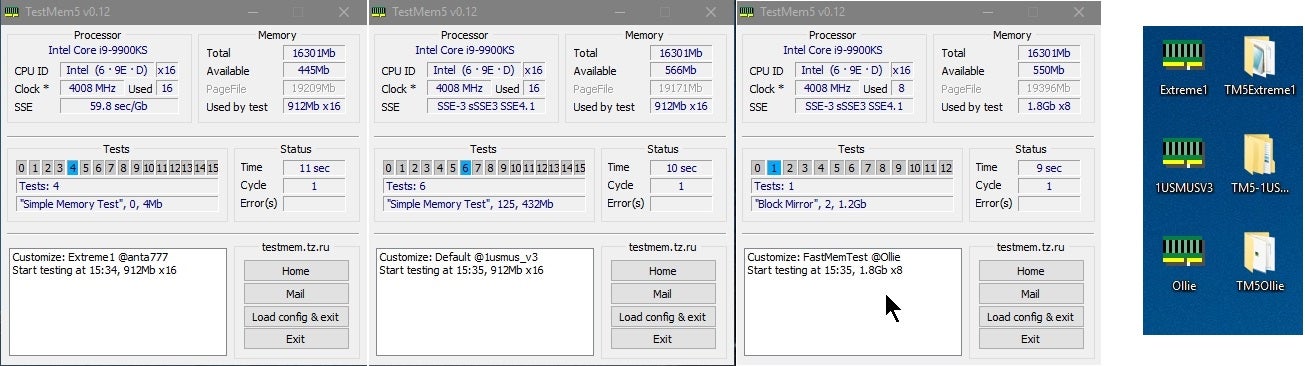
Overclock.net
Hello everybody
I am just making a very light tutorial with a collection of custom config files and a DOWNLOAD LINK for TM5 v0.12
anta777 absolut config Official Intel DDR4 24/7 Memory Stability Thread
None of the work is mine but it seems like a pretty good and fast testing app
Make sure you select the extreme anta profile
misty obsidian
left it running for 45minutes, seemed fine
gotta go back to work
can't lag my PC down hehwe
vast meadow
Make sure you run it fully tho, sometimes you'll find error towards end
misty obsidian
alrighty, I'll leave it open tonight
vast meadow
And make sure it's on the extreme anta profile -rest aren't very good
 late plume
backordered, can anyone suggest alternative?
Intel Core i5-12400F - Core i5 12th Gen Alder Lake 6-Core 2.5 GHz LGA 1700 65W Desktop Processor - BX8071512400F
vast meadow
late plume
Intel Core i5-12400F - Core i5 12th Gen Alder Lake 6-Core 2.5 GHz LGA 1700 65W D...
12400 non f, 5600x
 honest rock
Is anyone familiar with MSI bios/motherboards?
I am booting my build for the first time and trying to get it to boot to my flash drive to install windows
 grizzled bloom
honest rock
I am booting my build for the first time and trying to get it to boot to my flas...
grizzled bloom
honest rock
I am booting my build for the first time and trying to get it to boot to my flas...
F9 on the splash screen usually brings up the boot selector
honest rock
Somehow I figured it out
I got to a screen with an MPG logo and hit f11
Not sure what the MPG logo is from
grizzled bloom
That's a msi sub-brand so maybe windows detected msi and used the built in boot screen
honest rock
Cool. Installing windows now
Then I guess I have to tweak my bios. My cpu is showing only 3.20 mhz and my ram only 2666.
grizzled bloom
Ram is easy, just enable xmp profile on the overclock tab
Check CPU frequency under load
It clocks down on idle to save power
grizzled bloom
Updating doesn't hurt, but you might want to disable the fTPM afterwards, it's known to cause a few problems but it's also required to install (but not run) windows 11
honest rock
Stuck at let's connect to a network. Doesn't give me an option to setup my wireless 😦
grizzled bloom
Should be an option to skip
honest rock
No option to skip
I have an intel cpu, so fTPM isn't a think, right?
*isnt a thing
 frail frigate
Anyone familiar with z690 xtreme
honest rock
I had to go into task manager and kill the Network Connection Flow task
Seems like MS wants to force you to create an account with windows 11
 long geyser
Huh, who woulda thunk. Wonder how bad it'll be in 3 - 5 yrs when I upgrade to 11.... Probs will get reminded to make an account even after signing in with an account lol
honest rock
So -- new build -- MSI EDGE Z690 w/ wifi. Win 11 installed but OS didn't find the wifi adapter. Any suggestions?
frail frigate
Mobo only displays on new built with one memory stick and no gpu But then restarts.
grizzled bloom
honest rock
So -- new build -- MSI EDGE Z690 w/ wifi. Win 11 installed but OS didn't find th...
Download the Wi-Fi drivers on another computer and copy to a USB
grizzled bloom
frail frigate
Mobo only displays on new built with one memory stick and no gpu But then restar...
Did you happen to get a F processor, like the 12600KF or something?
frail frigate
grizzled bloom
Did you happen to get a F processor, like the 12600KF or something?
I9-12900k
grizzled bloom
Not the KF?
grizzled bloom
frail frigate
I9-12900k
I'd double check your box to make sure it's not the KF. It wouldn't be the first time, and definitely not the last.
 long yew
10105F hitting 81C under heavy load - bad?
tweaked the fan profile a bit and it changed to 77 - 78 but I'm still a bit concerned
burnt spear
long yew
10105F hitting 81C under heavy load - bad?
It's fine until 90c
I'd assume it's on stock cooler if it's getting that hot though
burnt spear
What gpu you have paired with it outta curiosity?
long yew
1660 OC edition
when I say heavy load I mean I was making it scream with prime95
to test stability
honest rock
Hey peeps. Is it better to install itunes, MSI Center (Or MSI Dragon Center -- not sure what the difference is), etc from the Microsoft Store or directly from Apple/MSI?
Also, can I delete Xbox game bar and Intel Graphics Command Center? I don't think they really do anything and I have the Nvidia Command Center installed.
 vernal cosmos
honest rock
Also, can I delete Xbox game bar and Intel Graphics Command Center? I don't thin...
vernal cosmos
honest rock
Also, can I delete Xbox game bar and Intel Graphics Command Center? I don't thin...
leave intel graphics center thing installed if u have an intel igpu and u can uninstall game bar but have to do through powershell commands
honest rock
I guess my CPU has built in graphics (i9 12900k) but I have an nvidia fe 3090
naive pendant

 trim mauve
 frosty depot
How much force is needed to install the cpu?
frosty depot
How much force is needed to install the cpu?
Literally 0. You set it in and it’ll set right into place
You can always give it a very light shake to make sure it’s in place
vast meadow
I think they might mean the lga lever
cursive epoch
^
naive pendant
honest rock
I guess my CPU has built in graphics (i9 12900k) but I have an nvidia fe 3090
what how did you get that
 finite elm
naive pendant
what how did you get that
finite elm
naive pendant
what how did you get that
3090 is pretty readily available due to most AIB's having them at ridiculous prices
vast meadow
Prices are actually decent atm tho
But FE either means they got lucky with a BB drop or their scalper did xD
 dim cloak
 can still get a 3090 under $1900 and thats a win in my books
grizzled bloom
Or get the 6900XT for $1000 from AMD direct
frosty depot
vast meadow
I think they might mean the lga lever
Yeah :P it started making noise.. I started tripping. I had to look it up lol
vast meadow
frosty depot
Yeah :P it started making noise.. I started tripping. I had to look it up lol
Some or them make a crunch sometimes which is horrifying tbf
vast meadow
burnt spear
coding is cpu intensive right?
Not really, running/compiling huge code sure but average coding stuff can be done on a 6th gen laptop
burnt spear
alr
my brother wants to sell his laptop and get a work focused laptop, and then a pc
so im thinking about building a pc for him, and since im replacing my gpu if hes buying a pc i might as well just have him buy a diff psu, cover the difference, and give him my pc
and he can contribute some to the new build
vast meadow
Sounds nice
 brazen quartz
Should I buy a used mobo? Saves me $70 and Amazon warehouse says it's good condition with very little imperfections around the board
vernal cosmos
burnt spear
coding is cpu intensive right?
My college teaches c on a pc thats got a core 2 duo from 2007
LOL
cursive epoch
brazen quartz
Should I buy a used mobo? Saves me $70 and Amazon warehouse says it's good condi...
yeah why not?
brazen quartz
I assume people don't because lifespan and lying/unknown issues
brazen quartz
In this case, no lying but could be an inexperienced person checking the board BUT free returns so why not
vast meadow
brazen quartz
Should I buy a used mobo? Saves me $70 and Amazon warehouse says it's good condi...
Sure
vast meadow
Nice deal
 hybrid grove
I buy from Amazon warehouse quite often. Only if it's used like new though
You get a good discount and typically there are only very minor cosmetic defects. Like a small scuff or just missing booklet and cables
I got a aorus elite x570 for $109(used like new) a few months back. No issues so far with it
vast meadow
Sheeeesh
burnt spear
theres an oled switch for 270 on warehouse
samsung 980 1tb for 94
there some actually great priced things here
850 rmx for $85, 4000d airflow for 87
cursive epoch
that's good stuff
vast meadow
burnt spear
samsung 980 1tb for 94
Very meh unless you meant 980 pro
burnt spear
vast meadow
Very meh unless you meant 980 pro
Isn't the 980 gen 4 as well?
I know gen 4 is useless for most people
vast meadow
burnt spear
Isn't the 980 gen 4 as well?
Nope it's dumb, 980 is like similar to sabrent rocket/pilot e kinda performance
Dramless too
burnt spear
Ah
 empty grotto
Hey y’all I’m looking for a motherboard for to fit my NZXT - H510 Compact ATX Mid-Tower. I want to put my 1060 a 4k60 capture card in there and plug in a drawing tablet as well via hdmi.
vast meadow
empty grotto
Hey y’all I’m looking for a motherboard for to fit my NZXT - H510 Compact AT...
I would HIGHLY advice a different case, but the motherboard will depend what cpu you will be using
empty grotto
What’s wrong with the case?
 eternal helm
Airflow
But honestly, you'll probably be fine since you aren't using super high power draw parts
vast meadow
empty grotto
What’s wrong with the case?
It has no airflow -> will be loud and have higher temperatures, costs more than it should
empty grotto
I’ll probably replace it later i I got that one recommend it to me for my budget a while ago
empty grotto
vast meadow
I would HIGHLY advice a different case, but the motherboard will depend what cpu...
I’m using Intel my bad
vast meadow
empty grotto
I’m using Intel my bad
What cpu specifically
empty grotto
I already have a Predator Orion 3000 but the thing keeps freezing if there isn’t a game running. I might use the i5-11400f in there until i upgrade to something of an i7
vast meadow
empty grotto
I already have a Predator Orion 3000 but the thing keeps freezing if there isn’t...
11400f right, and I'm assuming you're in the us ?
empty grotto
Right
vast meadow
The freezing is probably ram or overheating related or something weird with the windows install btw
Can you link the capture card you want to use btw?
empty grotto
I highly think it’s windows 11 because i put 2 new sticks in and it still does it
vast meadow
Could just be a crappy windows install ye
eternal helm
vast meadow
The freezing is probably ram or overheating related or something weird with the ...
Can't be overheating
I'm gonna guess it's bloatware crap
empty grotto
vast meadow
Ohh isn't a fame running
vast meadow
eternal helm
I'm gonna guess it's bloatware crap
Probably
eternal helm
Yeah
vast meadow
empty grotto
vast meadow
Ohh isn't a fame running
Its fine when a game is running but if there isn’t one running itll freeze
It even froze one time after two minutes on the login screen
vast meadow
Weird I'd guess it could be the bloatware or something yea
eternal helm
95% it's McAfee lol
empty grotto
I need an install macam I had Norton pReinstalled on
cursive epoch
it's definitely bloatware
eternal helm
It'd be worth opening task manager and seeing what running in the background
cursive epoch
dell has this problem so badly some games refuses to run lol
eternal helm
Yeah
empty grotto
I’ll check it out when I get home thanks again for your help
empty grotto
eternal helm
It'd be worth opening task manager and seeing what running in the background
What am I looking for in regards to bloatware
eternal helm
something taking a ton of ram/cpu
grizzled bloom
Generally things that are preinstalled by either Microsoft or your computer manufacturer, such as candy crush and anything MSI, gigabyte, etc
cursive epoch
easiest way to get rid of all that bloat is to run a clean install
but that is if you want to do it
eternal helm
yeah
grizzled bloom
cursive epoch
easiest way to get rid of all that bloat is to run a clean install
Thanks to microsuck even that doesn't work 100% any more
empty grotto
The only thing using much is my memory and that is antimalware exe and killer network service at 100-300mb
grizzled bloom
Shout out to Windows downloading 3gb of apps on my brand new install on a metered connection that I didn't get a chance to say was metered before it did it
cursive epoch
antimalware service is windows defender
also honestly that's why i don't connect to a network with windows installs
it's annoying
empty grotto
Y’all know anything about this killer service stuff
grizzled bloom
That's your ethernet driver
cursive epoch
^
empty grotto
Other than i don’t see anything suspicious in task manager. I might have to get that clean install
grizzled bloom
You can do a PC reset from settings, that way you have the option of keeping your files
Then if you still have problems, you can backup and do a clean install from USB
empty grotto
I like how it says i can keep my files but it’s about to delete all my apps 🙄
grizzled bloom
Not "delete" just effectively uninstall while keeping the files intact
The registry gets reset
empty grotto
Oh ok. It just showed me all the programs it was going to delete and I panicked
 mild jackal
grizzled bloom
You can do a PC reset from settings, that way you have the option of keeping you...
mild jackal
grizzled bloom
You can do a PC reset from settings, that way you have the option of keeping you...
That's a really messy option though, far better to clean install
 midnight pollen
idk I feel like the windows pc reset works like 1 in every 10 times. maybe its just me
mild jackal
It works - but it makes a real mess of windows
Also takes far longer than a clean install
frosty depot
I am not quite sure which channel to ask this in.. I am looking at some games to play and noticed that they "require" 2-4gb dedicated VRAM.. I currently don't have a GPU so I am using 12600k integrated graphics.. My questions are: Can I still play these games that say they want dedicated VRAM? Will my integrated graphics just use my system RAM to achieve the RAM that the games wants?
finite elm
frosty depot
I am not quite sure which channel to ask this in.. I am looking at some games to...
It depends, Intel doesn't have the best IGPU. So I'd probably look for benchmarks on YouTube on a game by game basis
frosty depot
finite elm
It depends, Intel doesn't have the best IGPU. So I'd probably look for benchmark...
gotcha, will do.
 upper rose
consider ameliorating losedows to turn it into windows
 sour estuary
FX-8370 finding a board suggestion for this cpu if anyone has any ideas
vast meadow
Don't bother
 modest forge
I sold an ASROCK AB350M Pro4 to someone and they have a Ryzen 5 2600 and they aren't getting a post. Cleared CMOS, fans are spinning, no post. I think there's an invalid BIOS version because the CPU in it last was a Ryzen 7 3800X. They do not have any other processors on hand. How can I go about this issue
If I am not mistaken the BIOS version is on 6.4.0 if anyone is going to do the research
But I do not recall
sour estuary
vast meadow
Don't bother
I'm giving my cousin who are 9 to 14 my old pc
It's why I'm worried about this.
 vast meadow
sour estuary
I'm giving my cousin who are 9 to 14 my old pc
It's why I'm worried about this...
vast meadow
sour estuary
I'm giving my cousin who are 9 to 14 my old pc
It's why I'm worried about this...
Did you see if it boots?
sour estuary
No right now it's completely apart 😅
Problem it's the back of it and I'm still working on my pc at same time
vast meadow
modest forge
I sold an ASROCK AB350M Pro4 to someone and they have a Ryzen 5 2600 and they ar...
You can check to see if there is bios flashback although i highly doubt it, would need to most likely swap cpus although i really wouldn't run a ryzen 7 3800x on a b350 board anyway
vast meadow
sour estuary
No right now it's completely apart 😅
I'd try see if it posts and put some electrical tape over it if works
sour estuary
It's not a ryzen 7 it's a fx FX-8370 and just realized I didn't mention that 🤦
vast meadow
sour estuary
It's not a ryzen 7 it's a fx FX-8370 and just realized I didn't mention that 🤦
Ik, look who i replied too
You did say fx
modest forge
vast meadow
You can check to see if there is bios flashback although i highly doubt it, woul...
Yeah no there isn't a flashback as far as I know
 glad acorn
i3 10100 and 8gb ram
naive pendant
@mental fractal can you give me advice on overclocking x79 pls
frosty depot
do these temps look ok? like the fact that p-core 3 is running at 58 while the others are at least 4 degrees less? This is under full load.
 vernal cosmos
frosty depot
do these temps look ok? like the fact that p-core 3 is running at 58 while the o...
vernal cosmos
frosty depot
do these temps look ok? like the fact that p-core 3 is running at 58 while the o...
Perfectly fine
frosty depot
ok cool. Gonna try my hand at overclocking now
 bitter comet
Should I wait for the new 7000 series or get I5 12 gen now for my new syestem
bitter comet
I5 12600k
My budget is like 1300
I already bought everything except for gpu motherboard and cpu
vast meadow
Just go 12600k
naive pendant
Binning time
 finite elm
the longer you wait the sadder you'll be yea
naive pendant

grizzled bloom
Does the cat come with the memory?
vast meadow
I sure hope so
 split fiber
So I bought an X570 unify a while back, and I know this series of boards needs a bios update to use 5000 series cpus. Thing is, it came with a sticker on the box saying "5000 series ready". will it really work out of the box with my cpu or is that just a marketing blurb and I still need to update it
vast meadow
split fiber
So I bought an X570 unify a while back, and I know this series of boards needs a...
If it said 5000 ready then you're good to go
 rapid patio
Can someone help me? I am have a red DRAM light on. I am able to get into windows sometimes, but not all of the times and I'm not sure what is going wrong. When I play, the audio would cut out and everything would freeze.
vast meadow
rapid patio
Can someone help me? I am have a red DRAM light on. I am able to get into window...
Make sure your ram is in slots 2 and 4 from left to right
rapid patio
vast meadow
Make sure your ram is in slots 2 and 4 from left to right
They are…
Sometimes it boots sometimes it doesn’t lmao and it gets stuck on the light
rapid patio
Kingston fury beast 32gb ddr5 5200 16x2
i5-12600k
Aorus z690 elite ax
rapid patio
vernal cosmos
And what board
^
vernal cosmos
Update motherboard bios
rapid patio
Alright
rapid patio
vernal cosmos
Update motherboard bios
Updated, but still froze and lost audio and this time it restarted the pc
vernal cosmos
rapid patio
Updated, but still froze and lost audio and this time it restarted the pc
hmm
are u running xmp on?
mild jackal
That's a pretty low xmp - should run out of the box
Could try playing with memory controller voltage, vccsa, vdimm, vddq, vpp if you want
rapid patio
vernal cosmos
are u running xmp on?
Yea
split fiber
vast meadow
If it said 5000 ready then you're good to go
Alright cool, thanks! Makes my job a lot easier lol
naive pendant
grizzled bloom
Does the cat come with the memory?
yes indeed
 frigid willow
I am looking to see if there is possibly much of an upgrade possibility with my RAM. Currently I have a 4x8gb set of trident z rgb 3200 cl14 kit and wasn't sure if I could get more out of a 2x16gb set with higher speeds. I'm on a x570s aorus master with a 5900x
grizzled bloom
3200 c14 is probably b-die, just overclock it
That's one of the best dies
With a little tuning you could probably do 3600 c14
Even with 4 sticks
frigid willow
yeah my issues has been with temps I think. with 4x8 i dont have enough airflow to keep them cool and they get slightly above 50c when gaming
grizzled bloom
They'll get unstable around there yeah, b-die is pretty temp sensitive. Just slap an old fan over it.
frigid willow
yeah i have been thinking about how to go about getting a fan on them. My case is a phanteks enthoo pro M
grizzled bloom
I have one of the worst cases for airflow over the memory. I just used zip ties to hold a fan in place over them.
frigid willow
i have an AFII 280 front mounted and i think i could possibly top mount it but its really close. I thought maybe front fan intakes would be better than an AIO blowing on them
grizzled bloom
Top should be exhaust anyway, and warm air is better than no air
frigid willow
very true though my system doesn't run very hot to start with overall just the ram starts to get warm
what size fan do you have over yours?
grizzled bloom
You could get this and it'll look less trashy than my solution lol https://www.newegg.com/corsair-cmyaf-fans/p/N82E16835181059
80mm
frigid willow
yeah i've looked into the g.skill specific ones and they are really hard to find
wasn't sure if those corsair ones would fit
grizzled bloom
g.skill tend to be shorter than corsair so probably
frigid willow
i'll have to look into it and see if it works for sure
i've tried overclocking and 3600 c14 boots to windows but memtest throws errors like crazy lol
a little tweaking with it and it was still going crazy
grizzled bloom
According to the reviews and Q&A on newegg that fits corsair vengeance ddr4
Which kit of g.skill do you have?
grizzled bloom
44mm
frigid willow
for corsair?
frigid willow
they are basically the same kit i believe looks wise
grizzled bloom
Yep they're the same height
frigid willow
maybe i'll try that out then. wasn't sure if top mounting a fan to the top as intake directly above the ram would help either. Just have it running at a low RPM so there is just a bit of airflow
grizzled bloom
Having a fan right above it is usually enough, but top should be exhaust
frigid willow
yeah i actually only have exhuast out the rear. having any exhaust out the top does nothing for my temps
grizzled bloom
It won't always help cpu but it should for your memory
frigid willow
hmm that is true. i will have to try and see what kind of temps i get if running exhaust out the top also
at idle they are fine with the outter 2 dimms 36c and the inner two 37c but as soon as i start heavier memory related tasks they hit 50-52c
 viral dust
I’m bios flashing my gigabyte b550 and wanted 2 know when the bios flash finishes?
There isint any more flickering but there is an led with 00
 viral dust
Ty ty
 limber dragon
00 means its trying to post and doesnt detect a cpu
grizzled bloom
Which makes sense with no CPU in the socket lol
limber dragon
Yes, but it would do that whether or not the flash was successful
burnt spear
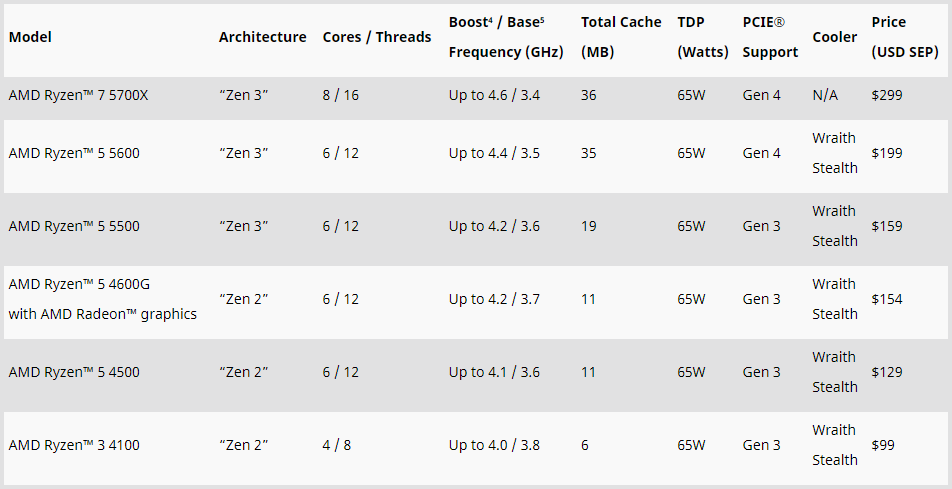
Looking at comparisons, the 5600 is within 5% of the 5600x
Meaning if it retails for around 170 it will compete with the 12400$
5500 still makes no sense though
It's about equal to a 10400f and loses to 12100f from what I can tell
vast meadow
burnt spear
Looking at comparisons, the 5600 is within 5% of the 5600x
Is it out yet?
burnt spear
One sec

Micro Center
Get it now! Find over 30,000 products at your local Micro Center, including the Ryzen 7 5700X Vermeer 3.4GHz 8-Core AM4 Boxed Processor - Heatsink Not Included
I wonder how a 5700x will do on my board
burnt spear
yeah
burnt spear
vast meadow
B550 asrock itx right?
i think it wouldnt be too bad as long as i dont oc
micro atx*
vast meadow
burnt spear
i think it wouldnt be too bad as long as i dont oc
wait thats matx i thought you had itx?
vast meadow
ahh i swore you said itx before
burnt spear
are the vrms any diff?
vast meadow
i think the itx one has slightly better ones but lemme check
hmm seems like itx has slightly better phases but no heatsink soo
probably both mehhhhh
vast meadow

More information about Hetzner AX Servers:
https://derbauer.hetzner.com/en/special-220301/
Support me on Patreon:
https://www.patreon.com/der8auer
Save 10% on your iFixit purchase: DER8AUER10
https://eustore.ifixit.com/der8auer
...
smoky widget
I have a little question. So I have a Gigabyte aorus z590 Ultra 1.0 revisio motherboard. Currently it has F2 bios. Can I upgrade to F7 right away. Or download each one?
vast meadow
smoky widget
I have a little question. So I have a Gigabyte aorus z590 Ultra 1.0 revisio mot...
you should just check the previous versions and as long as it doesnt say update to this before updating to a one after that eg "upgrade to v4 before updating to v5" - if thats not there you are fine
smoky widget
it doesn't show I believe
GIGABYTE
Lasting Quality from GIGABYTE.GIGABYTE Ultra Durable™ motherboards bring together a unique blend of features and technologies that offer users the absolute ...
vast meadow
Then you're fine
smoky widget
Will do it and hope all good
 cerulean wadi
I just bought an 11700F for a decent price  (no I don't care that it's going into a Z590 mobo, lol)
 dusk vessel
hey this is my old motherboard i was wondering does it have sata 3 6gb? https://www.gigabyte.com/Motherboard/GA-H61M-USB3-B3-rev-11/sp#sp
GIGABYTE
Lasting Quality from GIGABYTE.GIGABYTE Ultra Durable™ motherboards bring together a unique blend of features and technologies that offer users the absolute ...
i just bough an ssd and it just give me half of the write and speed
grizzled bloom
dusk vessel
hey this is my old motherboard i was wondering does it have sata 3 6gb? https://...
Nope SATA 2 3Gbps
dusk vessel
thanks
grizzled bloom
You can get a PCIe expansion card
dusk vessel
grizzled bloom
You can get a PCIe expansion card
i need to buy a new mob ?
grizzled bloom
Nah you can get a PCIe card with sata 3 ports on it
Something like this https://www.newegg.com/p/17Z-011V-00004
 shy wyvern
I've been thinking about something
AMD's budget segment makes no sense
R5 5500 paired with their low end GPUs literally cripples the system
4 pcie lanes on 6500XT on CPU provided pcie 3.0 for a more entry level system would cripple itself...
 dull flint
Does it? AMD's website says 3.0 and so did GN's review
dull flint
shy wyvern
4 pcie lanes on 6500XT on CPU provided pcie 3.0 for a more entry level system wo...
never thought of this, it's so true 
cursive epoch
dull flint
Does it? AMD's website says 3.0 and so did GN's review
No, ever since 500 series chipset came out it's got updated to 4.0
It's weird but the point still stands
 polar zenith
is the Ryzen 5 3600 good in combination with the rtx 2060
cursive epoch
That's decent
burnt spear
polar zenith
is the Ryzen 5 3600 good in combination with the rtx 2060
depends on if you already own the 3600
if you dont, dont buy it
shy wyvern
cursive epoch
5500 actually has 4.0
Nope the 5500 is reduced to 3.0
it is actually lower than the 3600's pcie speed
polar zenith
I don't know if it is good together, I had help picking my parts
shy wyvern
amd speclist even says so
shy wyvern
polar zenith
is the Ryzen 5 3600 good in combination with the rtx 2060
should be fine, yeah
 hollow thorn
shy wyvern
Nope the 5500 is reduced to 3.0
hollow thorn
shy wyvern
Nope the 5500 is reduced to 3.0
Nah it's 4.0 x8
polar zenith
Aight
hollow thorn
x8 being the problem
hollow thorn
Making it same speed as 3.0x16, but running it in 3.0 means 3.0x8 and means limiting bandwidth
cursive epoch
as long as you don't slap pcie 4.0 ssd on
polar zenith
shy wyvern
should be fine, yeah
My full parts I remember are NZXT h510 case, RTX 2060 oc, 16gb 3600 mhz ram, 1tb ssd,
cursive epoch
H510 is a bad case but that setup shouldn't have issues
dull flint
so it's just shaved down pcie lanes?
dull flint
yeah I'm seeing that too
shy wyvern
can you show me where it says 4.0?
hollow thorn
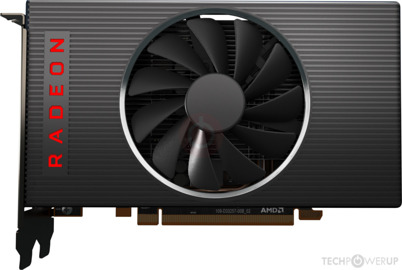
TechPowerUp
AMD Navi 14, 1845 MHz, 1408 Cores, 88 TMUs, 32 ROPs, 4096 MB GDDR6, 1750 MHz, 128 bit
hollow thorn
oop
shy wyvern
Yeah
shy wyvern
the r5 5500 6 core cpu only has pcie 3.0
 shy wyvern
which paired with their low end gpu actually cripples itself??
that's like evil af isn't it?
polar zenith
cursive epoch
H510 is a bad case but that setup shouldn't have issues
Bought it for the design, but the airflow is trash
anyways I gotta go now
shy wyvern
6500xt on pcie 3.0 x4 with an r5 5500... amd doesn't think of it's own budget combos
better off buying a 3050 on a pcie 3.0 bus...

The AMD Ryzen 5 5500 CPU is too little, too late, launching about a year after when it should have. The R5 5500 can't compete with Intel's much cheaper i3-12100F in benchmarks.
Sponsor: Montech Century 850 on Amazon: https://geni.us/s2aV
This review of the AMD R5 5500 CPU tests it versus the new R5 5600, the 5600X, older CPUs like the R7 2700X,...
hollow thorn
could prob do 3060 on 3.0x16 too
shy wyvern
3090 isn't bottlenecked by pcie bus at 3.0x16 either
performance was only about 3% lower when gamers nexus tested it
amd is just cheaping out and shaving pcie lanes on budget graphics cards and only giving pcie 3.0 to cpus...
hollow thorn
It's just weird
shy wyvern
they literally make it so that if you're buying budget your cpu has to be intel or your gpu has to be nvidia
isn't that so odd? they're like screwing themselves over in the budget segment
hollow thorn
I wonder how much money it saves
shy wyvern
I forget the channel but someone did a deep dive
and found that amd saves around $4-8 per 6500xt by doing 4x instead of 8x
hollow thorn
I mean for the CPU
shy wyvern
oh
I have no clue
they don't officially launch for a few days
embargo just lifted
dull flint
like we don't know how much throwaway silicon they were stockpiling
shy wyvern
we do know that some of the 4000 series r7 class and lower apus are console variant cpu dies that didn't make the cut!
it's why they're still producing them rn
I'm just still amazed that the consoles actually have decent cpus
downclocked/no turbo r7 3700 cpus
finite elm
shy wyvern
we do know that some of the 4000 series r7 class and lower apus are console vari...
4700s is the CPU you are thinking of
and its trash cause they disabled the APU on it, and the remaining PCIE lanes restrict you to x4 I believe. and you are stuck with the gddr6 on the motherboard for memory.
Its not even considered a Ryzen btw. its just AMD 4700S
1X PCIe® x16 Slot, Supports (x4 Gen 2 Signal) 🤮
shy wyvern
Ah
Whatever it is is it's a good zen 2 CPU
I don't think a gaming console generation has ever had such a competent CPU for the era across the board
Besides the PS3 but that was a complicated mess
finite elm
ps3 was good, but such a pain to write for it didn't help anything
and the Jaguar CPU's in the xbox one and ps4 were okay at the time. they did last 10 years to be fair.
PC wasn't really that much ahead price:performance wise. I think. could be wrong.
I know my prebuilt PC from 2013 was meh. graphically. but the CPU was better.
grizzled bloom
PS3 was an example of a good idea very poorly executed.
Even Sony, with all their source code and hardware available, can't properly emulate PS3 games to be playable on modern consoles. That's why they had to remaster God of War and others.
Even games natively run on a PS3 usually didn't use anywhere near its potential because the processor design was so weird it took most of their optimizing time just getting it to run.
finite elm
grizzled bloom
Even games natively run on a PS3 usually didn't use anywhere near its potential ...
and why games that ran on both it and the xbox 360 usually had a lot of performance issues on the ps3 lol. crashes and frame rate issues
grizzled bloom
Final fantasy XIII, as much as I obviously loved it, was horrible for crashing randomly and frequently for a long time. And it was only on PS3 until they ported it to the PC, which then had the same crashing and performance issues
 pastel monolith
that 9 core PS3 thing was ahead of its time
doing effeciency cores before everyone else
just forgot to put in the performance cores lol
grizzled bloom
I guess you could call it 9 cores but one is dedicated to the OS
pastel monolith
grizzled bloom
I guess you could call it 9 cores but one is dedicated to the OS
thats true. would have been way better if 1 or 2 of those cores could have been a little more complex so they could do branch prediction
shy wyvern
Interesting
Every time I switch my Minecraft version I get a clock watchdog timeout but only once
Then I can boot said version
No other issues on anything else, just blue/green screen of death changing versions lol
vast meadow
Tried reinstalling mc?
also if you bsod’d you should prolly run sfc and dism…. File for it in pins of #windows-ios
shy wyvern
I've already done it
I tested it on a clean install on a spare drive cause I was curious
It does it there too
Switching from 1.8.9 to 1.18.2 blue screens even a fresh install with a CPU related error but only once
vast meadow
hmmm
shy wyvern
I wonder if it's something to do with them using different built in Java libraries or something
Modern versions use Java 1.8 while anything before 1.12 uses java 1.7
It's just weird it's breaking the new windows build
Before update it didn't used to happen
grizzled bloom
With Java being as badly secured as it is Microsoft is limiting its access to the OS
long geyser
Have you tried BIOS update and reset BIOS? @shy wyvern
 hard leaf
question guys: if im a new ryzen user and bought a b550f mobo and a ryzen 5600x... it will let me boot the system or the pc will be dead until i get a lower cpu to boot it?
grizzled bloom
Odds are very good that a new motherboard will have a bios that lets you boot
 scenic solar
Since when Corsair made modules to cover the empty ram slots? They're only RGB, not real RAM

🤨
hard leaf
grizzled bloom
Odds are very good that a new motherboard will have a bios that lets you boot
but that scenario is still a possibility?
grizzled bloom
They've done that for a while
grizzled bloom
hard leaf
but that scenario is still a possibility?
Unlikely but possible
hard leaf
im thinkin on upgrading my rig with a strix b550f and a ryzen... not sure if 5600x or 5700x... but im afraid of that scenario cause multiple guides talk about having a lesser ryzen to boot the system and do the flash bios thingie
cerulean wadi
B550 has been out 16+ months. If mobo box has a 5000 series sticker then you're definitely fine. Plus get a mobo w/ flashback & it's no concern
hard leaf
gotcha, hope those are already flashed
cause newegg still list them as *bios boot required for 5000 series
burnt spear
hard leaf
im thinkin on upgrading my rig with a strix b550f and a ryzen... not sure if 560...
I'd go 12400f and b660 if you haven't bought yet
Or 5600
hard leaf
yeah not yet, but most aios dont have the 1700 bracket, at least not one readily available
hard leaf
oh F
im thinkin more about a 12600k or the i7 counterpart
cant rememebr the number
if goin the intel route
burnt spear
12600k is great
hard leaf
but im more inclined for the 5700x but the bios thing give me the creeps
hard leaf
tdp mostly
cerulean wadi
Am4 does feel a bit obsolete by now, at least if someone is buying mobo also. Too bad am5 isn't out yet. 5600x would be good, especially if getting for MC price or close to it. 12gen good because you could do 12400/12600K then maybe switch up to 13gen when it's out.
hard leaf
and many reviews talk about ryzen beign sligthly superior to intel
burnt spear
Before 12th gen, sure that was true
hard leaf
bad thing am5 will require ddr5 only.,.. and ddr5 is a... no just no
burnt spear
But 12th gen beats 5000 series in both price and perf
hard leaf
need to find an air cooler with the 1700 bracket then
burnt spear
Ak620
scenic solar
hard leaf
bad thing am5 will require ddr5 only.,.. and ddr5 is a... no just no
You'll find your wallet empty by buying ddr5
cerulean wadi
+1 lol, but not $50/16GB like ddr4.
grizzled bloom
True
scenic solar
cerulean wadi
+1 lol, but not $50/16GB like ddr4.
I'm still getting 16gb ddr4 for 80€ in my country
Bruh
cerulean wadi
Usa has loads of ram. 🤣
 cerulean wadi
Here 32GB of ballistix 3200c16 was $90ish a month or so ago  was $113 a while, now $130ish.

 vast meadow
hard leaf
question guys: if im a new ryzen user and bought a b550f mobo and a ryzen 5600x....
vast meadow
hard leaf
question guys: if im a new ryzen user and bought a b550f mobo and a ryzen 5600x....
If you mean strix f you can definitely bios flash without an old cpu
vast meadow
scenic solar
Since when Corsair made modules to cover the empty ram slots? They're only RGB, ...
They are dummy sticks for asthetics
scenic solar
vast meadow
They are dummy sticks for asthetics
Yeah, ik but I never knew about them
vast meadow
hard leaf
yeah not yet, but most aios dont have the 1700 bracket, at least not one readily...
The good ones do
scenic solar
Jus to complete the 2 slots
cerulean wadi
Other brands have the dummies too
hard leaf
vast meadow
If you mean strix f you can definitely bios flash without an old cpu
yeah 😛 my question pato was: What if i dont have an old cpu to boot it?
but the guys here told me about a high chance that most b550 mobos today have the bios installed already
shy wyvern
long geyser
Have you tried BIOS update and reset BIOS? <@459149078182232064>
I believe I'm current, I updated a month ago. I can go check
hard leaf
still my wallet wont open until late may
vast meadow
hard leaf
yeah 😛 my question pato was: What if i dont have an old cpu to boot it?
yes…. Bios flashback doesnt use the cpu just usb and a bios flash button on the board but you shouldnt really be going ryzen 5000 in 2022 unless you already have an am4 board and are upgrading or find a really good deal
long geyser
Also could get a CH341A and flash bios yourself without a CPU or flashback. Bit weird to do but I'd recommend it for learning and being able to easily flash many things in extreme issues (old mobos that don't have it, GPUs when you don't have a second GPU to use in desktop and don't have a eGPU enclosure).
grizzled bloom
^ Also good for bad flashes leaving things bricked
 dull shuttle
Ok so I am buying a new mobo and I was wondering if the gigabyte z690 aero is any different from the aurorus z690 elite other than looks?
naive pendant
uh guys
i bought a new cpu then tried to slap it in my pc now it jus turns off everytime i turn it on
i even had a new bios update on their idk why its doin that maybe i didnt update it fully to the latest one idk
is there anything i can do to get it back working?
cause i cant even get into the bios
dull shuttle
Maybe take out a ram stick
dull shuttle
No
naive pendant
kk
thats what i was afraid of
yo i think it worked
nvm it was on there forawhile but when i tried to boot into windows it jus shut off
dull shuttle
Try different slots
cyan raft
naive pendant
i bought a new cpu then tried to slap it in my pc now it jus turns off everytime...
What CPU and what was the old cpu?
naive pendant
old cpu was 2700x new one was a 5600x
then after that started happening i put the 2700x back in
dull shuttle
Did it stop?
grizzled bloom
naive pendant
old cpu was 2700x new one was a 5600x
What motherboard?
cyan raft
I’m waiting for him to say a B350 or something
naive pendant
aorus b450 m
cyan raft
Did you update it to the newest one?
naive pendant
i dont think so
i updated it tho thats why i jus went straight for it mightve messed up with that one lol
should i jus get a new one
naive pendant
dull shuttle
Did it stop?
it will load for like a couple seconds then jus fully turn off
naive pendant
how i do that if it doesnt turn on
naive pendant
i did
cursive epoch
hm
well now this is getting complicated
reset cmos
it's a coin batt located somewhere on the mobo
naive pendant
yeah it goes to bios but it turns off
cursive epoch
hm so it could get to bios
naive pendant
yeah but it will shut off at a random time
naive pendant
theres paste
naive pendant
i never went thru this i jus upgraded my gfs pc with no problem
cursive epoch
can you get into the bios at all?
naive pendant
yeah i can but it will turn off randomly
cursive epoch
try going into it and reset it to factory settings
naive pendant
ok
grizzled bloom
Newer bios versions disable some older CPUs
Also

What was the previous version of bios you were on?
naive pendant
hang on ill try find the usb that i used to update it an check
i cant remember lol
grizzled bloom
Not the new version, the one you on before you updated
Because if it was before F40 you had to run the EC FW Update Tool before updating
naive pendant
ohhh my bad
idk im very bad at remembering but it probably was cause when i got the mobo i didnt update it
grizzled bloom
When did you get it then?
naive pendant
like last year october
grizzled bloom
October 2021?
naive pendant
yeah
grizzled bloom
It should say the factory installed version on it