#cpus-mobo-and-memory
1 messages · Page 192 of 1
 void jolt
 grizzled bloom
How much memory do you expect to need? lol
void jolt
‘Twas a joke
grizzled bloom
Looks like speeds right now range from 4800 to 6400 officially, probably faster later.
 elfin warren
It'll go lower too
grizzled bloom
All DDR5 DIMMs will have ECC
grizzled bloom
Not at that speed
grizzled bloom
Official voltage is 1.1v
elfin warren
Ye
grizzled bloom
I think I found capacity, 16GB to 64GB per stick
void jolt
I’m pretty sure 1tb DIMMs exist?
elfin warren
Nah
Samsung just did the first 512GB module
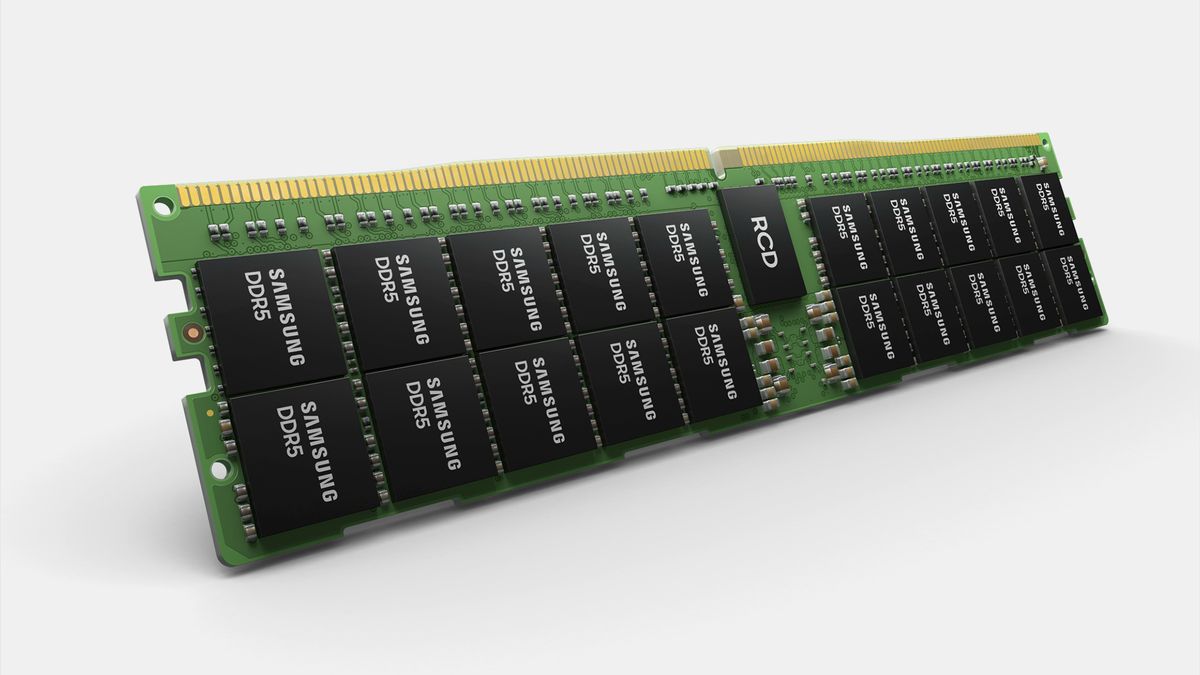
Tom's Hardware
Samsung uses high-k dielectrics to drive performance of DDR5 memory devices.
grizzled bloom
Standard DIMMs will be up to 128GB, LRDIMMs at 2TB
grizzled bloom
Each DIMM is 2 channels on its own
"each DIMM now contains two 32-bit memory channels as opposed to a single 64-bit channel"
elfin warren
INteresting
 hollow thorn
Consumer quad channel memory time?
elfin warren
Mebbe
grizzled bloom
If the channels are down to half size each that would make sense
elfin warren
That would be annoying having to buy 4 sticks tho
grizzled bloom
2 per DIMM, still 2 sticks
elfin warren
Well, from what I read, each dimm has 2 32 bit channels
DIMM now contains two 32-bit memory channels
 regal bobcat
How does one squeeze a fourth ram stick
 regal bobcat
The aio is blocking sorta
hollow thorn
Try reorient it
elfin warren
It's got a screen, it'll be upside down lol
regal bobcat
Rip it'll be side ways 😆
 naive pendant
regal bobcat
How does one squeeze a fourth ram stick
naive pendant
regal bobcat
How does one squeeze a fourth ram stick
Rotate the AIO
regal bobcat
Nzxt z73
naive pendant
No it won't be sideway
elfin warren
Ye
naive pendant
you can change the screen in the software
grizzled bloom
But it's 2 channels occupying the same bit-ness as DDR4, so 2 DIMMs would be 4 channels with the same bandwidth memory controller
naive pendant
Been curious about the timings part of DDR5 will it be easier to get CL14 or?
elfin warren
Seems like timings are higher
hollow thorn
Timings get looser the later the generation
naive pendant
damn
hollow thorn
Look at ddr3, cl11 cl9 pretty common place
Ddr2 I believe cl8 cl7
I think ddr had cl4
grizzled bloom
 hollow thorn
Maybe , we'll see
regal bobcat
First boot after transferring my parts from old case to new case

It shows a red light?
hollow thorn
@regal bobcat on the motherboard, there's text next to the light, what does it say
elfin warren
XD
 lavish aspen
regal bobcat
My brother forgot to connect the sata cables
lavish aspen
regal bobcat
My brother forgot to connect the sata cables
Bruh
lavish aspen
regal bobcat
My brother forgot to connect the sata cables
pretty funny cus like rn i put something in #building-and-recc-chat regarding sata connections
void jolt
elfin warren
Look at he board by the lights and see what the label is
red is CPU on asus boards
Orange is DRAM, white is VGA
Green is boot
Hey @elfin warren did you know that Segotep makes motherboards?
elfin warren
void jolt
red is CPU on asus boards
Well, it wasn't a CPU issue tho
naive pendant
When is z590 apex getting listed
 lean warren
So my x570 just won’t post after bios 3401
I tried flash backing several times using the usb stick
I even reset the cmos
then I removed the cmos battery afterward, and it’s still the same issue 😦
idk what else to do
After cmosing the first time I got the bios to post, but then it wouldn’t post again
regal bobcat
lavish aspen
pretty funny cus like rn i put something in <#589689072692494356> regarding sata...
After he connected the sata cables. It turned out the aio was screwed on to tight and he loosened it and it worked
lavish aspen
regal bobcat
After he connected the sata cables. It turned out the aio was screwed on to tigh...
Pog good luck to him
regal bobcat

 vast meadow
nice
lean warren
Well I just figured it out
Apparently the bios update reset my PCI gen 3 setting
Since I’m using a gen 3 riser for a vertical mount
so after the update it was defaulted back to gen4 and wouldn’t post until I reseated my gpu horizontal
Unbelievable
 devout mothBOT
 Cetus#0001 has been warned
Reason: Bad word usage
lean warren
Oops
went through so much crap
I hope all this cmos resetting didnt abuse the hell out of my mobo
 white plinth
Qight I've have my cpu for 4 years what should I upgrade to
vast meadow
What budget
white plinth
Ummmm nothing over 600
vast meadow
600 for cpu and mobo, I'd recommend a 5600x and 150$ ish b550 probs, 5800x if you can fit it in
white plinth
Right now I have rysen 7 1700x bought it like the week it came out
vast meadow
Oof yeah, a 5800x and b550 if you can afford
white plinth
I got asus b450 plus rog strix mobo
vast meadow
You want b550 for 5000 series
white plinth
I dont wanna upgrade the mobo tho. Its pretty ndw
Thats unfortunate
I just bought it
vast meadow
Can you return?
white plinth
Idk maybe if I can find recipt. If that's what you recommend I might just wait till I can get both at once
Why do I want 500 series for that?
Sorry b550 plus for 5000 swries
white plinth
Would it work with 450?
vast meadow
And most b450 boards dont support 5000 series
vast meadow
Some will have bios updates but if you can returning will be best bet
You could buy a 3700x but you'd be better off getting a 5000 series imo as 3000 prices are a bit whack atm
white plinth
What happened to ryzen 9? How long have I been away lmao
vast meadow
white plinth
So the 5600 and 5800 are the newest for amd?
Yes we well as 5900x and 5950x
There's still ryzen 9 but i was including the price of the motherboard in the 600 budget
If 600 for cpu, then 5900x is a 12 core for 550
white plinth
Okay so the 5000 series yiu were recommending was rysen 7 5000 series?
Okay we on the same page now
vast meadow
Yes the 5800x is Ryzen 7
white plinth
How big of a jump from 1700 to 5800 is it?
vast meadow
Huge
white plinth
Thats what thought
I'm more just scared my cpu is gonna burn out lol. I've had it forever
vast meadow
It will actually knock your socks off
How so?
As long as you just have a decent cooler on it, it will be fine
white plinth
Maybe not burn out. But I've upgraded literally everything around it.
And its been through like 5 plane rides lol
Just being tossed around
vast meadow
Oof
white plinth
Big oof
Idk I probably got a couple more years with it. Just doesn't fit in anymore
Thanks for the advice
vast meadow
Np
vast meadow
Would recommend, if you could afford the Ryzen 9 5900x if in budget as it's also 12 cores and 100 more than 5800x
vast meadow
white plinth
Maybe get a mobo with more m.2 slots
You can definitely get b550 boards for less than 200 with that iirc
white plinth
Ya. I upgrade my stuff weird. Like when the 3080s came out I got a 2080
What is iirc?
vast meadow
If i recall correctly
white plinth
vast meadow
If i recall correctly
Ahhh okay
vast meadow
white plinth
Ya. I upgrade my stuff weird. Like when the 3080s came out I got a 2080
Not a bad decision in hindsight
white plinth
Helps me stay atleast kind of up to date and I take advantage of them "new hotness dropping deals"
vast meadow
Fair enough
vast meadow
Np
 high tapir
Why do people dookie on Corsair lpx ram
 limber dragon
they're jealous
https://cdn.discordapp.com/attachments/328891236918493184/727241932430114986/sicc.PNG lpx at 4500mts
 grizzled bloom
Is that accurate? On A-Die? Even more impressive
limber dragon
its cjr and yes its accurate
grizzled bloom
Ah "C-Die" then right? Thaiphoon missed another one.
hollow thorn
Part number reading is confusing
 scenic spoke
b-die for Me is like $280-$300
Both ram kits that are affordable are SK Hynix Die I think? Or something
 glossy dust
yea the ripjaws v uses it iirc
ballistix rgb is also a great b-die alternative
the ballistix rgb 3600 cl16 is cheap
scenic spoke
I'm just not sure if I want to go with RGB Ram. Literally nothing will have RGB, and I chose the sexy tinted Meshify C as well. Might look awkward with only RGB Ram
scenic spoke
PCPP is kinda angering me lately
it doesn't like to grab listings from Newegg so I have to manually find something
hmmm but can I trust 3rd party sellers though
scenic spoke
does it matter if my Ram isn't on my Mobo QVL list?
 hidden rampart
the QVL hardly matters
It's just a list of what they've tried on it.
you don't need to be worried about that
scenic spoke
alright
 jagged valley
anyone knowledgeable about changing ram timings?
naive pendant
Hey i new to makeing pcs i am wanting to make a recording and streaming gameing pc is intel or ryzen better?
elfin warren
Depends on budget
high tapir
Generally I’d say Ryzen because usually they have more cores which might handle streaming and gaming better
hollow thorn
@high tapir tbh Intel offers more cores for lower price points nowadays
hollow thorn
10850k being around the price you can find for 5800x, 10700 around the price of 5600x, 11400/11600/10400 just out of AMD's reach
high tapir
Intel making a ninja comeback
high tapir
Good idea imo
hollow thorn
What else can you do if you can't compete in performance, you just compete with price.
naive pendant
is the i5 11500 worth the $40 over the 11400?
i was thinking about a 10600k instead but i dont want to spend another $50 on a 90 mobo
hollow thorn
It has a better iGPU
naive pendant
hollow thorn
It has a better iGPU
is that it?
hollow thorn
Don't think we have good benches on it
naive pendant
ah
naive pendant
hollow thorn
But it has the uhd 750 instead of the 630
11400 has 730 i thought
hollow thorn
750 730 whatever it was called
It's the uhd 750
https://ark.intel.com/content/www/us/en/ark/products/212277/intel-core-i5-11500-processor-12m-cache-up-to-4-60-ghz.html
Intel® Core™ i5-11500 Processor (12M Cache, up to 4.60 GHz) quick reference guide including specifications, features, pricing, compatibility, design documentation, ordering codes, spec codes and more.
 plain vortex
Hello, I currently have a Asus ROG Strix B550-F WiFi with this kit of RAM. Can I just order another exact kit for 32GB and have no problems? Or do I have to get a 8gbx4 kit?
CMW16GX4M2Z3600C18 https://www.newegg.com/corsair-16gb-288-pin-ddr4-sdram/p/N82E16820236552?Item=N82E16820236552&Source=socialshare&cm_mmc=snc-social-_-sr-_-20-236-552-_-04042021
I'm thinking of upgrading my cooling to a 240mm Capellix aio from a Cooler Master Hyper 212 RGB Black Edition. I'm also thinking about upgrading my ram when I get the Capellix, since I currently can't fit a RAM stick on my B1 slot because of the Hyper 212. Any help would be appreciated! Thanks!
vast meadow
naive pendant
is the i5 11500 worth the $40 over the 11400?
only if you need the better igpu
 sullen cobalt
plain vortex
Hello, I currently have a Asus ROG Strix B550-F WiFi with this kit of RAM. Can I...
sullen cobalt
plain vortex
Hello, I currently have a Asus ROG Strix B550-F WiFi with this kit of RAM. Can I...
yup getting the same kit for a total of 32 gb should be perfectly good
plain vortex
sullen cobalt
yup getting the same kit for a total of 32 gb should be perfectly good
Thanks!
naive pendant
Decided to get a 5800 for the time being
 solid lintel
Which one of these modos is good? And most recommended?
https://pcpartpicker.com/products/compare/7gxbt6,qXBhP6,7HjNnQ/
Except for the elite since its expensive nowadays
solid lintel
hollow thorn
Aorus pro/elite is my pick
So expensive nowadays
hollow thorn
I mean, what price are you seeing for em
solid lintel
hollow thorn
I mean, what price are you seeing for em
Idk, thats what someone told me from a pc server
But i’ll look for one
Someone recommended the pro
hollow thorn
solid lintel
Nah i have Ethernet
hollow thorn
Well, elite ax is kind of 30$ cheaper than the pro ac
pro-p used to be 130$, 145$ now not great
solid lintel
hollow thorn
pro-p used to be 130$, 145$ now not great
So elite?
hollow thorn
How much rear io do you need?
Aorus pro seems to have more usb ports, and that's about it over elite
and pro has a few more fan headers
hollow thorn
On REAR IO:
Elite : 2xgen 3.1 Type A, -------------------, 4xGen 3, 2xGen 2
Pro : 2xgen 3.1 Type A, 1xGen 3.1 Type C, 3xGen 3, 6xGen 2
 naive pendant
4 Vs 6 sata ports if that matters
 grizzled bloom
Nice! You'll be happy with that one for sure
naive pendant
Check this out on @Newegg: MSI PRESTIGE X570 CREATION Motherboard AMD AM4 SATA 6Gb/s M.2 USB 3.2 Wi-Fi 6 Extended-ATX https://www.newegg.com/msi-prestige-x570-creation/p/N82E16813144258?Item=N82E16813144258&Source=socialshare&cm_mmc=snc-social-_-sr-_-13-144-258-_-04042021
Glad I bought it before it was out of stock
It probably has more than I’ll ever use lol
solid lintel
Difference between aorus 550 elite and elite v2?
limber dragon
v2 has better memory traces
elfin warren
Better overclocking then?
solid lintel
Ok
hollow thorn
yea v2 is twinned instead of dedicated doubler, but according to buildzoid, not necessary anyways and v2 is indistinguishable in terms of VRMs from v1
naive pendant
When am5 happens I’m gonna get the godlike
hollow thorn
Keep in mind the early adopter fees
New platforms new ram standard, usually comes with some caveats and random problems
naive pendant
Yeah. True. Maybe I’ll wait for the second gen
grizzled bloom
That's what I'm doing. I'm often a gen or two behind anyway.
naive pendant
Hopefully it goes for 5 generations next I hate when things move so fast
grizzled bloom
Lookin at you Intel...
AMD has always done it this way, they keep the same socket for a while and sometimes they're even backwards compatible.
 livid sparrow
We all know that if Intel can complicate things and make things more annoying and tedious they will do so, especially if they can release 10 more different cpu types in the process 
 pale mist
Ugh. Talking about tedious annoying and intel the best example is socket 771
Most idiotic cashgrab of all time
Just a physical difference from 775 so they could jack up the price of boards to xeon customers who would have to pay it anyway
 mild jackal
You can mod 775 to accept 771 chips
grizzled bloom
That in itself is a hassle though
How about that socket 2011-1 though? Same deal right, gotta pay extra to use a E7, no choice.
 hoary cedar
Is this a good time to sell a motherboard/CPU? I recently upgraded from my old MSI B250 PC MATE + i7-7700 (non k) and I'm wondering whether I should sell them now/for how much.
grizzled bloom
hoary cedar
Is this a good time to sell a motherboard/CPU? I recently upgraded from my old M...
You could probably sell those as a bundle for $450 according to ebay sales. I could only find the board as a refurb shipping from China, but fwiw they're selling that refurb for $250 plus shipping. The 7700 is going for around $225 used.
vast meadow
Wtf that's so much for an old cpu and mobo
grizzled bloom
You can check yourself. Idk why it's that high, surprised me too. Must be popular for overclocking.
 analog rune
Hello, I recently got a ASUS Prime B365M-A motherboard and I was trying to figure out how to setup the Aura sync features. I am not sure if there is a specific software for the board or what. Also I tried to install the Armory exe file but for so reason I get no response.... Any thoughts/ideas are greatly appreciated!!
vast meadow
grizzled bloom
You can check yourself. Idk why it's that high, surprised me too. Must be popula...
Only reason that makes sense
vast meadow
analog rune
Hello, I recently got a ASUS Prime B365M-A motherboard and I was trying to figur...
Yeah on asus's website find your motherboard and go to the support/drivers tab and under utility there should be a rgb software
analog rune
vast meadow
Yeah on asus's website find your motherboard and go to the support/drivers tab a...
Thank you for the help, I was able to do that but for some reason ArmouryCrateInstaller v3.0.11.0.exe won't run correctly
elfin warren
You need Asus Aura Sync
For RGB

ASUS Aura: Campaigns
Personalize your gaming rig with Aura RGB lighting and synchronize effects with a vast portfolio of Aura Sync capable gear.
analog rune
Also thank you for the help! I try to install that .exe file, I get the message to modify the system but nothing occurs and the exe doesn't load/run/install. Not really sure about that
vast meadow
Maybe it's being blocked by your antivirus?
analog rune
Thats funny because all I have is Windows Defender, I'll take a look at it
vast meadow
Weird
analog rune
That's exactly what I am thinking
Thank you guys for the help! I was be-fiddled. Just did a quick reddit search and found out that I needed to install the Q-Installer before I could download that software. Thanks so much!
analog rune
It seems to be the Asus install assistant to download programs and management for the motherboard
vast meadow
That would make sense, there's probs a not beside the other rgb programs saying you need that before you can install the other programs
analog rune
Yep indeed!! Thanks again for the support
elfin warren
Odd. I didny need that for my asus board.
analog rune
Did you build the computer yourself? Mine was a fresh slate
elfin warren
Yep
analog rune
Hmm interesting, I found the install location at the bottom of the task bar and its labelled as Q-Installer
 lilac topaz
are ryzen good this gen?
 eager shore
yeah
pretty much beats intel in most areas, other than value prob
oh how the tables have turned
 eternal cradle
does anyone know if asus x570 board prices will go back down when shortages stop happening?
elfin warren
It's not a shortage issue, per se. Tariffs affected motherboards as well.
hollow thorn
Their prices never went up so I doubt the msrp pricing would come down..?
elfin warren
SOme did
hollow thorn
Really?
hollow thorn
I thought I saw plus wifi at 200$ still
hollow thorn
This is like one of the only Asus boards I feel that are worth it to buy, and it's the same price still :p @elfin warren
https://www.amazon.com/dp/B07SXF8GY3
hollow thorn
190$ was it
hollow thorn
Prob a sale, but I remember plus wifi at 190/200
eternal cradle
i meant like strix x570-e, that was the one i was going to get but i checked the prices last week and it was over 100$ more at big retailers
elfin warren
190 with WiFi I should add
hollow thorn
@eternal cradle ask yourself this, do you really need any of the features it offers over say a 190$ b550-f?
eternal cradle
b550-f is 280$ now sadly, and yeah, i prefer x570 because i dont have a 3rd gen ryzen or newer currently and i wanted to prepare for when i do
vast meadow
lilac topaz
are ryzen good this gen?
Yes but for budget, 10400 or 11400 better option
eternal cradle
eternal cradle
b550-f is 280$ now sadly, and yeah, i prefer x570 because i dont have a 3rd gen ...
forget that first part, im finding it at about 190$-200$ now, my bad
elfin warren
Yeah, that's MSRP
eternal cradle
i just want a x570-e, but i dont want to overpay, on asuss' webstore its 330$ but ive been checking and it is literally never in stock, its like trying to get ahold of a 3070-80
eternal cradle
thats true
the reason i wanted a x570-e was because i wanted to have matching motherboards with my girlfriend, we already have matching cases
she has the z490,e
z490-e*
hollow thorn
I mean
B550 aorus elite ax at 190$
Aorus pro ac at 210$
I just choose b550-f for example because Asus, but I guess Asus bad at pricing and stock :p
eternal cradle
i could get b550-f, thats a good option, but if i did i would have to upgrade cpu with it because most b550 boards dont support 2nd gen ryzen
hollow thorn
All of them don't, or aren't supposed to
eternal cradle
i had a gigabyte board that said i could bios update for support, but i couldnt display to update it
hollow thorn
Tbh I don't like any x570 board other than unify
And I don't think any b550 officially supports it
void jolt
hollow thorn
Tbh I don't like any x570 board other than unify
As far as looks or actual perf goes?
eternal cradle
i had the b550 ds3h
hollow thorn
Both
void jolt
The TUF is one of the best boards out there
eternal cradle
i have a R5 2600
and i was on a tight budget when i first built my pc, but im able to upgrade with a looser budget
hollow thorn
Yea, some maybe maybe supports a few, but there's no official support
elfin warren
Right
eternal cradle
yeah
 split copper
I might get a H97 mobo to put my i7-4790 in
They're not prohibitively expensive and they seem to have a decent set of features
I want a board that supports my cpu out of the box, a B85 might need a bios update, so H97 would support it no problem
And then buy a 4590 to put in my H81 board so I can build another computer out of it
Unless there's a 4c8t Haswell Xeon that's decent and also cheap
 sweet charm
z390 gang B)
 vale notch
Is CPU: Intel i5 9400F good?
vast meadow
its okay if you have it but dont buy it now
as im pretty sure it doesnt even have hyperthreading
naive pendant
vast meadow
as im pretty sure it doesnt even have hyperthreading
yeah it doesn't
only worth if you already have a LGA1151 mobo otherwise the 10400f is better
vast meadow
yeah
 spark spade
Sooooo I just won the shuffle for the 5950x... but as I'm sitting here waiting. Is it worth the 800 dollars?
I've heard the 5900x clocks better...
 hollow thorn
Well, 5950x is a higher bin, 5950x clocks slightly worse stock because it's more cores in around the same space. If you disable a ccx on 5950x, it should clock better than 5900x.
void jolt
5950x has 4 more cores and will last a lot longer, probably
spark spade
Good to know, thanks all :)
void jolt
I’m jealous
spark spade
(Sorry was a joke)
void jolt
Ooooooh
That’s why I was kicked wasn’t it
Damn I forgot about that
No more of that, rest assured
void jolt
Was joking with Chree about trading a 5950x for a white 3080
Vintage didn’t take the joke lightly I guess
vast meadow
Lol
elfin warren
"We’ll see if I can get that 3080 Vision, then we’ll talk" Odd way to word a joke.
 regal bobcat
will this work with my Ryzen 3800x ? G.SKILL TridentZ RGB Series 32GB (2 x 16GB) 288-Pin DDR4 SDRAM DDR4 3600 (PC4 28800) Intel XMP 2.0 Desktop Memory Model F4-3600C16D-32GTZRC
it says Intel XMP
void jolt
Yes
XMP is just a way to clock memory
Technically an Intel trademark but it works on AMD boards (trademarked as DOCP Standard) as well
regal bobcat
ok so no performance difference on my AMD? i can still overclock if need be?
vast meadow
Ye
regal bobcat
Kind of wanted light in my case lol. Only reason

 trim crane
Is it smart to buy the i9 11900k from newegg shuffle and sell it for under 700?
hollow thorn
no..?
void jolt
Why would it be?
hollow thorn
it sucks
hollow thorn
all you have to know is
 trim crane
Yeahhhh
 modern briar
Is 5600x a good cpu or I should get something like a 5800x for streaming and gaming
🙂
trim crane
lol
hollow thorn
5900x hehe
void jolt
And why would something be best for benchmarks?
hollow thorn
literal best is usually 5900x for gaming
void jolt
Makes no sense
 vapid mist
Ok, I'm curious as to any ideas for mobos I should get
hollow thorn
For what chip?
vapid mist
I want a black out mono, and I can't stand the unify from MSI
hollow thorn
:(((((
vapid mist
5900x/5950x
 vapid mist
I'm not looking to own anything MSI honestly
hollow thorn
x570 unify might not be great because of the chipset fan but
aw
It's very nice though
lemme see about other black boards
but MSI is great
hollow thorn
b550-a pro also decent black
vapid mist
**570
hollow thorn
I understand if you don't like chipset fan, but the rest of it I like
vapid mist
I was really sold on the strix gaming e x570
Love the solid black look, better specs in most places, and RGB for the same price
hollow thorn
vapid mist
I want a black out mono, and I can't stand the unify from MSI
thought you want just blackout
limber dragon
unless oyu need multiple pcie 4, just go b550
hollow thorn
those words don't go together in my mind
limber dragon
imo asus b550-e or xe, or gigabyte b550 master are great
limber dragon
and b550 unify has a physical rgb switch to turn off all the headers
vapid mist
I want black out with RGB, so it has RBG, but it can be turned off to black out. Just like the strix
limber dragon
all rgb can be turned off
 limber dragon
msi b550 unify just has terrible QC and customer support is garbage
limber dragon
(literally going to have to go to paypal because they wont fix my unify or send me a new one)
vapid mist
That's the theme of my PC is RGB, and I want it all to be solid black, with RGB accents so it's all pitch black when off
vapid mist
hollow thorn
How much is it?
vapid mist
Ouch
vapid mist
I'd get the strix instead, it's got better specs, looks better (IMO) and it's x570
And also $300
The strix is what I was set on for a long time
limber dragon
is getting $600+ cpu
doesnt want to spend $300 on a mobo that'll handle it
vapid mist
limber dragon
>is getting $600+ cpu
>doesnt want to spend $300 on a mobo that'll handle it
Who you talking about?
limber dragon
vapid mist
5900x/5950x
.
vapid mist
Cause I very clearly just stated that the mobo I wanna get is $300 as well, and has better specs than the unify, so
¯\_(ツ)_/¯
vapid mist
Telling me I don't wanna get a mobo to support my CPU
hollow thorn
I don't know any actually blackout (No nothin else, no rgb) boards other than unify
limber dragon
x570-e is worse than b550 (unify/strixe/xe/master)
vapid mist
limber dragon
x570-e is worse than b550 (unify/strixe/xe/master)
In what way?
Last I checked, it was better in almost every way
limber dragon
worse vrm, worse memory layout
same, if not worse vrm cooling
master has finned heatsinks
yeah, vrm on x570-e is trash
hollow thorn
comparing x570-e to b550 aorus master, much better VRMs on the aorus master from what I can tell
at least x570-e has post code
that's nice
limber dragon
x570-3 is 12+4 60 or 70A, b550 from the 4 above are all 90A 16+1s afaik
and the b550s all have post codes
limber dragon
b550 master should be 90s iirc
hollow thorn
¯_(ツ)_/¯
 limber dragon
might be 70s, but its the same as x570 aorus extreme
limber dragon
yeah, its the vrm from the flagship on a $280 board with amazing mem topology
hollow thorn
I'm getting conflicting info
mobo sheet says 50a stages, vcore sheet says 70a stages
wait no I was looking at extreme on vcore sheet
both say 50a
limber dragon
giga's page says "Direct 16 Phases Digital VRM Solution with 70A Power Stage"
for the master

 limber dragon
and extreme: Direct 16 Phases Infineon Digital VRM Solution with 70A Power Stage
b550 master = x570 extreme vrm
limber dragon
x570 master is lesser
hollow thorn
giga lying about master
:P
unless they released a new version that's not documented
split copper
Where do board manufacturers print the revision number smh
vapid mist
I still think I prefer the strix. I like the looks more, and it's got a ton of USB's, and PCIE slots
hollow thorn
Your choice
vapid mist
There isn't anything inherently bad about the strix, is there? @hollow thorn
vapid mist
I personally do not like MSI as a brand, much prefer the looks of the strix, and I like that it has more USB's and PCIE slots
I think the strix is the one for me in this case, if anybody has any alternatives that aren't the unify, I would love to hear some options
I'm really not interested in anything TUF branded (had horrible experiences with that line up) or MSI (really dislike the brand/company)
modern briar
What was the problem with TUF, * bought a x570-pro from that brand and still don't use it 😩 *
modern briar
@void jolt @vapid mist mentioned he had problems with TUF brand
In motherboards I think
vapid mist
My TUF line up has been terrible. Some people like this, all of the products I have encountered from TUF have been horrible
void jolt
All the ones I’ve had have been amazing
vapid mist
I regret getting the board I did, but they may have fixed the stuff with it
It's just my personal experience, plenty of people have stuff from TUF they like, I'm not one of them
modern briar
@void jolt what yall think of Asus Tuf Gaming X570-pro wifi
hollow thorn
people have biases
vapid mist
I think their designed are ugly, their specs are really stupid a lot of times, they have bad software support, the one I had didn't support audio drivers so I had to spend like 10 hours straight manually installing them and all sorts of stuff to get realtek drivers to semi work on my mobo. Which also required me to reset my bios. I just really do not like my TUF experience
hollow thorn
I have bias against Asus in general
My friend's x570-plus just didn't have the bios work
settings kept re-doing themselves, or didn't apply at all
vapid mist
Granted that's from 2016/2017
hollow thorn
but, oh well, I don't like Asus, good nuff.
livid sparrow
I have a personal bias against ASUS support. And my X570-Plus Wifi spontaneously had its main PCIe slot break, the dram slots break and the north rgb header was borked out of the box. The pro is basically a slightly upgraded version of the plus with flashback, so take that as you will.
 main pulsar
hidden rampart
main pulsar
hidden rampart
it's fine if you want to run it at XMP but that seems pretty overpriced for what it's worth
naive pendant
hidden rampart
it's fine if you want to run it at XMP but that seems pretty overpriced for what...
eh it's cheaper than some other rgb ram ive seen out there
also im planning an 11400 system so i dont really need to xmp it
naive pendant
hidden rampart
buy a b560
it's already speedy enough at 3200
and i dont feel like hassling with oc
hidden rampart
which is what I mean by XMP
naive pendant
hidden rampart
which is what I mean by XMP
wdym
hidden rampart
XMP- running it at it's rated speeds, which is what I meant
not a manual overclock
naive pendant
hidden rampart
XMP- running it at it's rated speeds, which is what I meant
oh that's what you mean
hidden rampart
yep
it likely won't overclock well even if you were planning to, it's generally stuffed with mediocre dies that aren't very good for manual OC's
if you wanted to OC then just get ballistix since you get that sweet Rev. E
naive pendant
im prolly only gonna oc the gpu
since you cant oc a 11400 and the ram is already fine
hidden rampart
I would definitely overclock the RAM if I were you
arguably the easiest one to do, and generally provides hefty gains
naive pendant
hidden rampart
arguably the easiest one to do, and generally provides hefty gains
really?
hidden rampart
yep
naive pendant
proof?
hidden rampart
https://docs.google.com/spreadsheets/d/1xTJUq4R3CeEooYdHsdTARmBaw-po8NGoRrbL333BQBc/edit?usp=sharing

Google Docs
Sheet1
Forza 4 - 3600 @ 4.45 GHz,Source: Alatron
Configuration,Frequency,Timings,FPS,Performance ,Source: Pibble
SR 1:1:1,2133,15-15-15-36,181,88.29%,Source: King Faris
SR 1:1:1,2400,16-16-16-39,185,90.24%
SR 1:1:1,2666,20-19-19-42,189,92.20%
SR 1:1:1,3000,16-17-17-35,205,100.00%
SR 1:1:1,3200,1...
+100-200% gains in some games
the usual everyday games played by people such as Fortnite benefit heavily from faster RAM
elfin warren
3200-3600 is only a 6% gain tho........Might be worth it might be not. Biggest gain is from 2133-3600 which should be expected.
hidden rampart
never said about overclocking from 3200-3600
elfin warren
Never said you did
OP said 3200 MHZ ram was what they were shooting for. Overclocking it won't net a lot
hidden rampart
That ballistix kit is cheaper than they PNY kit
even overclocking it slightly to 3600mhz should show 15-25 FPS on average increase on a game that really loves RAM
it's free performance for cheaper

Like Fotrnite, shows a 20 FPS gain
from 3200mhz cl16 to 3600mhz cl14
which is achievable with Rev. E
Another 17 FPS increase in Overwatch

Another 25 FPS in SOTTR

It's free performance really
I don't see why one should not do this
elfin warren
Which is 5-6% in those charts.........
hidden rampart
if you convert it into percentages it sounds a lot less than it looks like
25 FPS is still quite a bit
even considering you get it for cheaper
elfin warren
It should be based in percentages
20-25 FPS when you're at 100 FPS is a lot
20-25 FPS when you're at 300 isn't
limber dragon
hidden rampart
from 3200mhz cl16 to 3600mhz cl14
are you looking at xmp vs xmp or xmp vs tuned?
modern briar
Im getting a 4000 mhz cl15
hidden rampart
limber dragon
are you looking at xmp vs xmp or xmp vs tuned?
XMP vs tuned
devout mothBOT
 ArtbylucastYT#6474 has been warned
Reason: Bad word usage
ArtbylucastYT#6474 has been kicked
Reason: Too many infractions
livid sparrow
Naughty naughty 
hollow thorn
hidden rampart
arguably the easiest one to do, and generally provides hefty gains
NO, RAM OC IS WACK
NOT EASY
hidden rampart
hollow thorn
THE PRICE IS YOUR SANITY
hidden rampart
I sense a fellow ram overclocker
hollow thorn
I'm not
maybe I'll research it at some point
the little I've done has made me lose my faith in ram oc
hollow thorn
hidden rampart
I sense a fellow ram overclocker
So you're a ram overclocker eh? Name every tert timing
grizzled bloom
Here's the results of my primary and secondary tuning. I'll get around to tertiary eventually.

1.52v
hidden rampart
hollow thorn
So you're a ram overclocker eh? Name every tert timing
I haven't done much overclocking lol, just tuning some timings
hollow thorn
wassa joke but yea
 azure sphinx
i got the best cpu the amd fx 6300🥶 🔥
eager shore
uhh, what specific chips?
eager shore
ryzen nowadays is for high end gamers and workstation builds, intel's now just for value
 neon lagoon
 hardy moon
neon lagoon
https://pcpartpicker.com/product/9nm323/amd-ryzen-5-3600-36-thz-6-core-processor...
hardy moon
neon lagoon
https://pcpartpicker.com/product/9nm323/amd-ryzen-5-3600-36-thz-6-core-processor...
The intel claps it
hardy moon
A intel comparison for the ryzen 3600 is a 10400f
Except intel cheaper and better in that case
hollow thorn
Even then 10400f on a b560 board beats a 3600
eager shore
well there's also the 11400 for the same price as a 3600
neon lagoon
let me screen this real fast
hardy moon
eager shore
well there's also the 11400 for the same price as a 3600
Cheaper
hollow thorn
3600 is just not great nowadays compared to Intel offerings
hardy moon
11400 is like 190 I think
eager shore
hardy moon
Cheaper
eh, $10 bucks cheaper
hollow thorn
Especially with the introduction of b560 boards
neon lagoon
if you don't wanna be in it i guess just tell my i will wipe your name
sending it to a friend
hollow thorn
5600x is valid, but AMD doesn't really compete in the <300$ range atm
Use the info however you want
hardy moon
hollow thorn
5600x is valid, but AMD doesn't really compete in the <300$ range atm
Doesn’t the 5600x barely edge out the 11600k in single and multi core
eager shore
lmao especially since 10850k's have been selling for $330 at mc recently
hollow thorn
Eh, decent margin depending on load
eager shore
tbh the 5600x is still a good choice ngl, z series boards still expensive
neon lagoon
hardy moon
A intel comparison for the ryzen 3600 is a 10400f
oh yeah what i is it?
hardy moon
neon lagoon
oh yeah what i is it?
I5
hollow thorn
Basically, iirc, workstation loads they're pretty close together, but in games 5600x generally has a decent lead over 11600k
hardy moon
Yep
neon lagoon
okay
hollow thorn
10400 sometimes has better pricing
neon lagoon
oh would it help if i said what games i'm looking to play?
eager shore
neon lagoon
https://pcpartpicker.com/product/vrhmP6/intel-core-i5-10400f-29-ghz-6-core-proce...
try to snag a 11400 if you want that sweet intel screwdriver
hollow thorn
Lol
neon lagoon
eager shore
try to snag a 11400 if you want that sweet intel screwdriver
what does it look like?
hollow thorn
Is the promo for Intel screw driver still going?
hardy moon
hollow thorn
Is the promo for Intel screw driver still going?
I think so
eager shore
yee
neon lagoon
well idk when i can get it
hollow thorn
Fair
hollow thorn
@neon lagoon actually, what will be the total budget for the entire build?
hollow thorn
Probably 11400/11600+3080 range
hardy moon
3080 fe maybe
hollow thorn
Ofc
hardy moon
Hard with most other ones
 hollow thorn
Also, 2 monitors..?
neon lagoon
i use 2
hollow thorn
I'd much rather take a single 144hz panel over 2 75hz panels personally
neon lagoon
i am useing a tv for my second screen rn
hollow thorn
If you already have something else you can use as a second monitor, just get a 144hz panel as the main monitor
neon lagoon
oh yeah
hardy moon
neon lagoon
i am useing a tv for my second screen rn
Are you going to be streaming
neon lagoon
later on
hardy moon
Oh that’s why theirs 10700 in there
neon lagoon
like i said ryzen made the list
neon lagoon
the one i sent you
hollow thorn
Wack
neon lagoon
@eternal helm this one
hollow thorn
Yes, there's like 3 guys named ryzen in here
neon lagoon
sorry for the ping ryzen
hardy moon
Anime ryzen
hollow thorn
Plz don't use single channel memory
neon lagoon
i'm gonna make a new list
hollow thorn
Anyways
neon lagoon
i''m on cpu rn
hollow thorn
Well 10700 is still an option, but unless you're editing or something, 11400/11600 might be a better option
Plus a b560 board
2x8gb ram
neon lagoon
nope just gaming for now
and i'd rather upgrade when i'm ready to stream
like a little money save
neon lagoon
never heard of it
hardy moon
Nvenc is decent for premiere pro
I haven’t used it much
Since I haven’t been doing too much video editing since I got my new computer
hollow thorn
Premier has gpu accel?
hardy moon
Yeah
hollow thorn
Huh
neon lagoon
okay back
neon lagoon
hollow thorn
Sure
were you replying to me when i asked would it help if i said what game i am looking to play
neon lagoon
first pc build for me so intel will be good for me i think
 neon lagoon
hardy moon
Cuts down times a decent amount
neon lagoon
hardy moon
Cuts down times a decent amount
is this the intel i should go with? https://pcpartpicker.com/product/vrhmP6/intel-core-i5-10400f-29-ghz-6-core-processor-bx8070110400f
hardy moon
neon lagoon
is this the intel i should go with? https://pcpartpicker.com/product/vrhmP6/inte...
Are you going to have a gpu?
Cause you will need one
neon lagoon
wdym gpu
hardy moon
neon lagoon
first pc build for me so intel will be good for me i think
This person is dumb
hardy moon
neon lagoon
wdym gpu
Graphics card
neon lagoon
yeah thats what i mean
there are like 3 different ways to say video card
so i don't know all of them
i forget them
and yes i will go with one
hardy moon
If you are doing a 1350 dollar budget I would recommend the 11400 instead probably
neon lagoon
i don't know what we are on video card or cpu
hardy moon
Cpu
hardy moon
If you send a parts list I can edit it
neon lagoon
i am so dumb
do you mean the intel i sent?
the i5?
and the only part lists i have are
just the one ryzen sent me
and if it helps i'll tell you what games i'm going to play if the pc can run it
hardy moon
@neon lagoon https://pcpartpicker.com/list/wbCCnL here’s edited, I only put one monitor and you should just keep one of the ones you are already using as second monitor
grizzled bloom
Considering the minimum spec for Dying Light 2 is a FX 6300 I think I can safely say it'll run just fine and I didn't even look at the list
neon lagoon
wow
 wheat halo
You can play any game with this pc
neon lagoon
i'm sure not any
there will be some limits that will brake it
not limits games thats a better word
grizzled bloom
Let me put it this way: Microsoft Flight Simulator 2020 is one of the most demanding mainstream games right now, even the absolute best stuff struggles with it. That list of parts will do 1080p on medium-high settings.
neon lagoon
holy
nah i just thought that some games will maybe not work well
but the new flight sim at 1080p on medium
wow
and maybe saying brake was not a good word to say
grizzled bloom
It should be able to 1440p on less demanding games than that easily on high settings. You'd be able to play just about anything on high or ultra 1080p.
void jolt
Less demanding is, of course, relative
neon lagoon
i play gta on ps4
grizzled bloom
Everything is relative in computing
void jolt
Normally ‘less demanding’ games would be considered really demanding next to any game except Flight Sim
grizzled bloom
Yep FS 2020 tends to blow proportions away.
Considering GTA V on computer is a 6 year old port of an 8 year old game it shouldn't be any problem running that on ultra.
 proper pike
Hello there, I have an issue with my freshly installed PC setup, maybe you can help me out
Anyone here? 
I can't use any mic, idk why and I think it's related to my MSI MPG X570 GAMING PLUS. Please let me know if this is the correct place to talk about this
grizzled bloom
proper pike
I can't use any mic, idk why and I think it's related to my MSI MPG X570 GAMING ...
https://download.msi.com/dvr_exe/mb/realtek_audio_R.zip
Make sure you have this installed. There should be a setup.exe in there once you extract the folder.
hollow thorn
Also, what kind of mic are you using? USB or just mini jack?
proper pike
I can't use any mic, idk why. Whenever I plug one in, while calling someone on Discord for example, it shows my icon lighting up constantly like if I was speaking all the time but on the other end there's only a very annoying 'scratch' permanent sound.
I've tried Apple earphones which have a mic and my gaming headset (Steelseries). I've tried both jack entries on my case (1x front and the mic one back) and also bought a USB-jack to... try something else I guess. I mainly bought this setup for gaming and not having a way to communicate is quite problematic. Thank @grizzled bloom, I will try this even tho I think I did already
hollow thorn
Mini jack would need onboard audio drivers, if it's usb, usb had it's own onboard dac. Also, have you make sure it's using the right input device?
grizzled bloom
proper pike
I can't use any mic, idk why. Whenever I plug one in, while calling someone on D...
Make sure you have the correct audio input selected in Discord sound settings AND in Windows, sometimes it doesn't work if they're different.
proper pike
I will be on my PC in an hour to try/check all that. I'm pretty sure it was the right input device that I selected through the sound panel - if that's what we're talking about. I could select the mic and hear back what was recorded through it
grizzled bloom
Ok, Discord has its own setting too so make sure both of those match. If you can't figure out which is which in the sound control panel you can see audio levels. When you talk into your mic it'll light up the input.
proper pike
I think that's all good because Discord detects my mic and 'use' it like if I was speaking into it. I will double check that tho
regal bobcat
can someone recommend me a mobo that has type C compatibility.. apparently my current mobo doesnt have it for my lian li o11 dynamic case. planning to also go rgb slowly lol this is my current computer https://ca.pcpartpicker.com/list/YC49ZZ
proper pike
Thank you in advance for your help guys, I appreciate it @grizzled bloom @hollow thorn
grizzled bloom
regal bobcat
can someone recommend me a mobo that has type C compatibility.. apparently my cu...
USB C front panel header? The Pro version of that board should have one
regal bobcat
hm thanks thanks. is that a good mobo? compared to the Aorus Elite x570? only cause i can get that board used but i wasnt sure
grizzled bloom
Both should be good, TUF and Aorus are both decent midrange models
limber dragon
anyone know an am4 motherboard that'll boot memory sticks without programmed SPDs?
 slate phoenix
3600 mhz+ Low profile ram have a d15 I want to keep the 2nd fan
unless its really the only option
 dreamy vortex
Hey guys, my current rig is a 3400g with 8 gigs of ram and a 5600xt. I play games like Gta(modded), Rocket league, and Nba 2k21. Do you thinks its worth it for me to get 16 gigs of ram?
Ye forgot to mention that, dual channel
ye
Ye
kind of
Oh
around 90 - 100
That seems alr
Thx
Seems like a good deal, my ram is usuallt at like 80 percent usage
dreamy vortex
Probably
hollow thorn
eh, having to do ram freq manually is wack
since 3600 running on what is essentially zen+ imc isn't going to happen
very very very unlikely
dreamy vortex
I did make a huge mistake buying a 3400g
But at the time I needed a computer whether it ran games or not
No, i upgraded into a 5600xt
At first i only had a 3400g
integrated graphics
Then like 6 months later i got a 5600xt
grizzled bloom
Maybe there's 2 XMP profiles like you find on some sticks and the lower one is easier
dreamy vortex
ye
They round up when advertising
So, any of yall know any good 16 gig 3200mhz kits
Alr, I'll get that then
mild jackal
cas is in clock cycles
 analog dune
Got to love how I can’t enter my bios
 buoyant stone
Hello everyone! I have mobo gigabyte b460m ds3h ac v2-y1
How I can connect second gpu?
limber dragon
are you just trying to mine with it, or trying to crossfire/sli?
the board itself only has one x16 slot, so you'll need a x1 to x16 raiser to connect another gpu
sullen cobalt
even then you'd be losing a lot of perf going from pcie x1 to x16
 vernal cosmos
limber dragon
the board itself only has one x16 slot, so you'll need a x1 to x16 raiser to con...
vernal cosmos
limber dragon
the board itself only has one x16 slot, so you'll need a x1 to x16 raiser to con...
cant you split the 16X to 2 8x slots?
grizzled bloom
Yes with a mining riser
limber dragon
You'll spend more on a x8/x8 raiser than a new mobo
 harsh night
11400f or 10400f?
eager shore
11400 is better, but if it doesn't fit in the budget then 10400 is fine
grizzled bloom
Without the need for the better iGPU I would say save a few $ and go 10400f
hardy moon
sullen cobalt
even then you'd be losing a lot of perf going from pcie x1 to x16
Mining doesn’t need more than 1x
eager shore
grizzled bloom
Absolutely it will still be good for gaming. It won't be as good as the AMD 5900X but that's a whole other discussion.
A 3070 probably won't need the full power of the 10900 anyway.
lilac topaz
 swift shale
Would an intel i9 10900 vs a 10900K still be good for gaming?
swift shale
Would an intel i9 10900 vs a 10900K still be good for gaming?
bro thats beyond an epic pc
swift shale
Okay cool cool. So I’m even going beyond what I’d prob need then? But I figured I might edit videos and record so it’s worth it if I do that too
eager shore
it's a baller at 1440p high settings in most games
playing on it at 4k is also possible but eh i'd rather play 1440p high then 4k low-mid lmao
hardy moon
I think I have another bad cpu
elfin warren
WHEA errors?
hardy moon
elfin warren
WHEA errors?
No just insane temps
elfin warren
Processor and cooler?
hardy moon
10600k, fuma 2
limber dragon

elfin warren
Mmmm, IIRC the Fuma 2 didn't do too well in GN testing because of slow fan speeds. You overclocking a lot?
hardy moon
elfin warren
Mmmm, IIRC the Fuma 2 didn't do too well in GN testing because of slow fan spee...
No it’s at stock
elfin warren
Ah, something to note
Did you fully tighten the spring screws?
If so, consider loosening them
Mount can be too tight causing poor contact
limber dragon
yeah, if you bottom out the spring screws, it can be uneven
elfin warren
hardy moon
I was getting 97-100c in cinebench after 5 min

This has been one of the most highly requested reviews for the past year: The Scythe FUMA 2 CPU air cooler, tested on AMD Ryzen CPUs and benchmarked against Noctua & liquid coolers.
Sponsor: Get 10% off Squarespace purchases (https://geni.us/BqEpf)
Article: pending publication! The case review from yesterday is now live on the website in writte...
limber dragon
and what's the power draw in cinebench?
elfin warren
It should handle the 10600K just fine
hardy moon
limber dragon
and what's the power draw in cinebench?
Voltage?
elfin warren
It also has a fantastically flat cold plate
limber dragon
power
elfin warren
But slow fans
elfin warren
I mean, it kept a 200W CPU at 60C
limber dragon
definitely bad contact if 99w and 100c
elfin warren
I'd say bad mount on the 10600
limber dragon
it kept a 200w heating element at 60c iirc
elfin warren
Ye
hardy moon
How do I check if I have good contact, just lower temps?
elfin warren
Remove the cooler, check plate for paste pattern
limber dragon
my 9700k on a fuma revb would hit 100c at 180w, but that's more from meh ihs and solder
hardy moon
Nvm this is probably user error
Didn’t remove the plastic on the heat sink
I’m stupid
This isn’t the first time
hollow thorn
Let's see how it does once removed
 limber dragon
looks fine
hardy moon
Ok, I should clean off and repaste?
limber dragon
probably best
elfin warren
Edge paste is a little thick, weird
limber dragon
you can smudge it back in the middle if you dont have spare
fumas are convex so that the most pressure is in the middle
hardy moon
I have some but not a lot and I was planning to test like 13 cpus
elfin warren
limber dragon
fumas are convex so that the most pressure is in the middle
Are you sure? GN said it was one of the flattest cold plates they had tested
limber dragon
I can show you my half lapped one 😂
limber dragon
its not flat so that when mounted, the center has the most contact
cpu IHS's arent perfectly flat
limber dragon
and sythe makes the coldplates to match IHSs
hidden rampart
 elfin warren
mmhmmm
 elfin warren
Right. But on the 5600x, isn't the CCX on the edge of the chip and not in the center?
limber dragon
they're on intel
hardy moon
Well after 2 passes everything is sitting around 60c so probably better
elfin warren
hardy moon
Well after 2 passes everything is sitting around 60c so probably better
What did you change, mounting pressure?
Or paste?
limber dragon
plastic wrap

 limber dragon
hardy moon
Is this a bad mount
limber dragon
hardy moon
Is this a bad mount
you can see the warning ⚠️
elfin warren
OH dear lord
hollow thorn
Lol
elfin warren
Welp
hardy moon
I did do less mounting pressure as well
elfin warren
That's that I guess
limber dragon
they've already been rising, he's just predicting the trend we're already on
grizzled bloom
Plus the historical launch time trends that say the exact same thing, price goes 
 ionic hamlet
So, might want to grab the RAM I'm looking at before it spikes higher?
grizzled bloom
DDR4? Probably
That'd be Samsung you invest in, making them ICs
They're not making DDR5 yet
elfin warren
They are tho, just not for consumers.
 sharp sable
anybody have the ASUS Strix Z590-F Mobo? thinking about buying one for an upgrade and wanted some feedback on it
naive pendant
elfin warren
They are tho, just not for consumers.
You're telling me buying it from a corporate sales rep @ samsung and spending 30k for just a dozen modules isn't for consumers? 🙄

 grave crest
How does one get into bios
I've got an asrock z390 phantom gaming 6
I've tried spamming delete and f2
But my stuff loads so fast into windows I can't catch it
limber dragon
reboot your computer and mash delete key as the logos come up
limber dragon
if you cant get that, hold left shift as you press restart, then go troubleshooting -> adv options -> uefi
grave crest
Trying that rn
Now it's stuck in a weird state where I get no display output
But the pc is on
