#cpus-mobo-and-memory
1 messages · Page 61 of 1
 sudden creek
 grizzled bloom
No that's with LN2 but still
sudden creek
what is considered the golden child of 24GB dies for oc?
grizzled bloom
Ooh I haven't really kept up on that, they keep leapfrogging each other in little ways last I checked
sudden creek
seems T-Group has a kit that guarentees M-die for 2x46GB 6800cl36 at $355
grizzled bloom
It's not the same M die as you're thinking
sudden creek
oh
grizzled bloom
Different size die, different process node, different packaging
sudden creek
hmm their 2x48GB 6400cl32 kit requires 1.4v vs G.Skill's ripjaws equivalent requires 1.35v
grizzled bloom
We're all sick with the flu at my home so give me a bit to take care of things, and I'll dive into that rabbit hole with you. I was planning on getting a 2x24 at some point, I've actually maxed out my 32GB a few times now just with Skyrim mods.
My poor 12GB VRAM didn't know what hit it...
sudden creek
grizzled bloom
My poor 12GB VRAM didn't know what hit it...
xD
sudden creek
grizzled bloom
We're all sick with the flu at my home so give me a bit to take care of things, ...
certainly

Trident Z5 Royal series are high overclock performance DDR5 memory kits, featuring a patented crystalline-design light bar for a magnificent display of RGB lighting, a CNC-cut aluminum heatspreader with a mirrored finish in gold or silver colors, and supports Intel XMP 3.0 memory overclock profil...
fal it's calling my name!

darkFlash Full-Tower ATX Gaming PC Case, Back Plug-in Motherboard, 1 Fans, Dual-Chamber, Panoramic Glass, Up to 2 x 360mm Radiators, RTX 40 Compatible(DY470) (1 PWM ARGB Fans, Black)
quite tempting as well
Oh btw I am finally now tuning CCD1 (Freq)
Currently testing -28 and -23 co on cores 8 and 9.
core 8 has hit 5.85Ghz and core 9 at 5.9ghz
sudden creek
hmm I am starting to think trying 2 cores at the same time is not the most efficient way lmao
Dropped CO on core 8 back down to -25 and the co on core 9 to -20
grizzled bloom
Right so it looks like 24Gb Hynix M is the best overclocker. Like I mentioned before it can get to ridiculous speeds, even more than 16Gb Hynix A.
That's not to say the Micron 24Gb is bad, it's still easily as good as Hynix A.
sudden creek
So Ideally I should look for 2x48GB Hynix M dies.
grizzled bloom
There's a better chance of getting it if you pick a kit randomly than there is with 16Gb dies because the 24Gb M die is the oldest of it's kind. Some brands just never picked up the Micron ones for some models.
But if you can find a kit where people are confirming getting that die, even better
That's the kind of kit you can expect to carry with you through the life of DDR5 I expect
sudden creek
Does micron have an M die as well?
Because Teamgroup sells 2x48GB kits that they guarteened M die.
grizzled bloom
I'm not sure what they call the die actually
Let me see if I can get a die shot from a crucial kit, they exclusively use micron (same parent company)
sudden creek
having a hard time but it appears G.Skill uses mostly Hynic dies for their Z5 Royal lineup.
grizzled bloom
I dislike royals in general, the heatsink looks pretty but cools like ass
sudden creek
is it that bad?
I really want to make a crystal themed pc in the future so that sucks to hear.
Guess I will just glue some real crystals onto a copper heatspreader. think that'd work fine?
grizzled bloom
Gluing real crystal over an LED strip on the memory would be much better yes
With a diffuser ofc
sudden creek
gotcha, I have everything from quartz (multiple kinds) to saphires and emeralds for that
https://www.amazon.com/TEAMGROUP-T-Create-Overclocking-6800MHz-PC5-54400/dp/B0C4NLKR5X/ref=sr_1_1?
@grizzled bloom

TEAMGROUP T-CREATE EXPERT Overclocking 10L DDR5 96GB Kit (2 x 48GB) 6800MHz (PC5-54400) CL36 M-DIE Desktop Memory Module Ram Black - CTCED596G6800HC36DDC01
6800cl36 M die from teamgroup
1.4v it seems
Hold up.
grizzled bloom
There's very little data available on the Micron die since it apparently just launched a few months ago, and it appears to only be on the lower clocked kits right now
sudden creek
@grizzled bloom this listing says specifically SK-Hynix is the dies they use and in the name it says Hynix M die.
https://www.amazon.com/KingBank-Computer-Desktop-Memory-Heatsink/dp/B0DF7D42W6/ref=sr_1_1?
 grizzled bloom
Almost every kit should be using the Hynix unless the series just launched recently
Just avoid the 5600 or less kits
grizzled bloom
Yep
sudden creek
think I should go with the teamgroup kit then?
costs $55 more but it also has a higher rated speed at 6800mhz
grizzled bloom
Pcpp can show if it's a new kit
sudden creek
How do I check?
grizzled bloom
It'll be the same exact kit as the 6400 but more aimed at Intel, it would probably have a lower clocked EXPO profile
sudden creek
expo and xmp are just pre-made profiles with some changes to the timings correct?
grizzled bloom
Yep
And that's what they advertise on the specs page, is the faster of those profiles
sudden creek
Since this kit is rated for 6800 if I can get it to +8000mhz iirc you said it should be faster than 6400 synced correct?
grizzled bloom
sudden creek
How do I check?
This will be mostly empty
 grizzled bloom
sudden creek
Since this kit is rated for 6800 if I can get it to +8000mhz iirc you said it sh...
grizzled bloom
sudden creek
Since this kit is rated for 6800 if I can get it to +8000mhz iirc you said it sh...
Sometimes, synced is better for gaming still because higher UCLK but faster is better for work.
Maybe you could overclock twice, one synced one not, and save a profile for each?
sudden creek
 grizzled bloom
I doubt you'll be hitting 8000 with a dual rank kit anyway now that I think about it
Not with current memory controllers/motherboards
sudden creek
synced I assume?
sudden creek
rip.
grizzled bloom
You'll notice there's kits rated 8000+ with 2x16GB but the top rated 2x32 kit is 6800
(ignore the SP kits, they will not run that speed)
sudden creek
does this mean I will likely be doing 6000 or 6200mhz synced instead of my current 6400?
grizzled bloom
6400 is still totally doable
Even 6600 or 6800 if your UCLK was able to handle it
sudden creek
@grizzled bloom do you think this kit is likely old enough to be Hynix M?
 grizzled bloom
That's when the H24M kits launched in general so yes
sudden creek
perfect
So I guess I know my upgrade path:
- PSU
- GPU either a 5080 or 5090
- Monitor
- Ram
grizzled bloom
If it was new enough for Micron then the data would start within the last few months, like October maybe
sudden creek
I never would've thought the day would come that I'd look at a $350 kit and think yeah that sounds about right.
grizzled bloom
I'd be going with the $300 g.skill kit myself, not a rgb fan (pun intended)
grizzled bloom
rgb fans
I don't have any
sudden creek
ahhh
The 6800 teamgroup kit is likely to be binned better I assume then the 6400 ripjaw kit?
grizzled bloom
Honestly I don't think it'll make that much difference
But if you got the 6800 kit make sure it has expo so you can build off those timings
sudden creek
how do I check if it has expo?
grizzled bloom
It should say on the product page somewhere
Just the expo badge
There we go, had to go to the Newegg page to find actual good info. Amazon can suck it.
 sudden creek
grizzled bloom
There we go, had to go to the Newegg page to find actual good info. Amazon can s...
sudden creek
grizzled bloom
There we go, had to go to the Newegg page to find actual good info. Amazon can s...
ahh thank you.
sudden creek
@grizzled bloom any idea why double pressing my case's power button is the solution to getting my CPU to actually do the training and post???
grizzled bloom
When does it get stuck? When you cold start? Restart?
 scenic solar
new build can find the boot file from the ssd previously installed on an amd machine. fresh windows install?
scenic solar
kapton tape didn't get the 1080 to work off the pcie slot. 16x, 8x, 4x, 2x and 1x all fail. maybe the missing pins that are one vccio, peg_rxp10, peg_rcomp + 2 gnd are all contributing to the gpu not showing up. bios does not recognize
scenic solar
would there be any way of reattaching small metal contacts to the socket without having to solder?
only alternative I can think of is using an m.2 to 16x
sudden creek
grizzled bloom
When does it get stuck? When you cold start? Restart?
When I press the button to start my PC from a powered off state.
When I exit bios after saving I need to shutdown the PC first then do the whole double power thing because the board gets stuck on either the DRAM or RED/YELLOW light.
 burnt spear
im testing something atm with my 13600k. I disabled my E cores due to the stability issues, crashing, freezing, etc ive had whenever closing games, alt tabbing, or just playing
 dull flint
Are you stable
burnt spear
i thought it was gpu, but that was only half the issue. I fixed my voltage again, since I forgot to reset it when I cleared CMOS
im UVed at 1.14v
and ye stable
across the board
dull flint
And you weren't uv before?
burnt spear
not ssds not mobo not ram
I was, but at 1.325v per yours and sips instruction forever ago
burnt spear
i mean theres a whole list
voltage/temp issues started the day i built the pc back in 2022
dull flint
The voltage profiling is much more impacted due to reduced current
So like
Your usual undervolt won't work
I found this on both my own chips
burnt spear
im just wanting my pc to stop crashing when I alt tab in valorant comp 5 times a week
dull flint
Ye what I'm saying is
If you have a certain UV set method
Note that voltage is much more impactful now
1.3v static ≠ 1.3 static from before
burnt spear
i had compooper destructionist give me his UV
dull flint
You can go higher on voltage now cos the current in the chip is lower
burnt spear
but I went up .1v
dull flint
Also try something for me
dull flint
When e cores are unstable it's just game crashing not pc crashing
burnt spear
ive had marvel rivals crashing
dull flint
Try tanking ring instead of e cores for a bit
burnt spear
val could be smthn else but there's widespread issues of rivals on 12th-14th gen
burnt spear
alr
burnt spear
i really don't need the e cores tho
dull flint
burnt spear
val could be smthn else but there's widespread issues of rivals on 12th-14th gen
Some games have issues with e cores needing new anti cheat code
Idk if rivals uses anti cheat but we used to hear it a lot if you remember
burnt spear
ive thought for the longest time it's vals anti cheat
dull flint
It very well could be
burnt spear
vangaurd is very invasive
dull flint
Esp if the thread director on intel tries to reallocate cores
burnt spear
theres just so many different things it could be
 burnt spear
thats why i went for a pretty drastic uv and just disabled e cores
completely rule out those factors at least ig
i was fairly sure it was my gpu when it started artifacting...
and throwing driver crashes
ill still take the 2080 ti as a $90 upgrade from the 3060 ti though
dull flint
If you are fine with a tanked ring and e cores at low then yeah it does sound like the 13600K is buggered
E cores off is one way to validate it
burnt spear
if i dont have another rivals crash we know its the ecores then
burnt spear
when i started rivals, it popped up a warning saying "if you have been crashing, and have a 13th/14th gen intel cpu, click this page for further instructions" essentially
and it was like two sentences saying go to intels site it's their issue
"intel is already aware of this issue, go to their website for help" or smthn like that
 crystal idol
burnt spear
nothing they could do lmao
crystal idol
burnt spear
nothing they could do lmao
definitely this
 bold hedge
Trying to upgrade my ram so I can use multiple monitors. Is 32gb the recommended amount? And what speeds should I be looking for?
burnt spear
bold hedge
Trying to upgrade my ram so I can use multiple monitors. Is 32gb the recommended...
How many monitors you have wont affect ram usage
What cpu and motherboard do you have?
Upgrading to 32gb could still be beneficial
bold hedge
i5-13400f
Not sure about the MB it's a prebuilt and I can't seem to find the model number
burnt spear
bold hedge
Not sure about the MB it's a prebuilt and I can't seem to find the model number
Do you know if its ddr4 or ddr5
If not, go into task manager
burnt spear
bold hedge
2x 8GB UDIMM DDR5-5600
Alr one sec

Silicon Power Value Gaming 32 GB (2 x 16 GB) DDR5-6000 CL30 Memory (SP032GXLWU60AFDEAE)
 grim sequoia
Does anyone know if this exists? Or if it's going to be for sale anytime soon? They have this listed on their products, but I can't find it listed on any retail websites.
https://www.gskill.com/product/165/425/1731478018/F5-6000J3036G32GX2-TR5NS

G.SKILL International Enterprise Co., Ltd.
Trident Z5 Royal Neo is the luxury-class of extreme overclock performance DDR5 memory designed for AMD AM5 platforms, featuring a crown jewel design with a crystalline light bar for a magnificent display of customizable RGB lighting and electroplated aluminum heatspreaders with a mirrored finish in gold or silver colors.
CL30 with AMD expo and 2x32 GB, I can find different variations. But not that one which I linked
 hollow thorn
Probably just an unreleased sku that they have around
 surreal belfry
Best ram brand???
 meager elbow

surreal belfry
And is there any ram with controllable light colors?
meager elbow
anything that isnt corsair basically
surreal belfry
meager elbow
anything that isnt corsair basically
Yo, was about to get corsair
Wsup with that???
meager elbow
their low end is terrible
their high end is fine but overpriced
out of all the ram brands, gskill probably would be one of the better brands?
surreal belfry
meager elbow
their low end is terrible
their high end is fine but overpriced
I want 32gigs of ddr5, whats the best speed, 6000?
hollow thorn
6000 is usually the sweet spot without tinkering
surreal belfry
Is there any higher speed in ddr5?
sudden creek
surreal belfry
And best motherboard for R5 7600x ??
Any B650 will be more then plenty.
Only reason to get a X670 or X670E is for the extra PCIE lanes such as extra M.2 slots, X4/X16 slots.
dull flint
^Indeed
Though also a couple asrock A620's also make the list
Basically B650's with locked features if you pick the right ones
They have decent heatsinks so it's easy to tell which ones (pro rs, lightning itx)
grizzled bloom
sudden creek
Any B650 will be more then plenty.
Except Asus Prime models, they're the only ones to avoid in general
burnt spear
theres some others to avoid, like b650m-p or b650-s wifi
surreal belfry
sudden creek
Any B650 will be more then plenty.
Msi b650 gaming + wifi????
sudden creek
surreal belfry
Msi b650 gaming + wifi????
yep that's more than enough for a 7700X
hollow thorn
Cas latency, lower is better
burnt spear
surreal belfry
Msi b650 gaming + wifi????
Pro rs wifi is better
dull flint
surreal belfry
Msi b650 gaming + wifi????
Not the uber cheap white one
The uber cheap white one can basically only do a 7600X, it's cheap rubbish
 sly moth
I have been reading up, and it sounds like CPU also determines what kind of RAM you should get? Like 5200, for example.
burnt spear
you should get 6000c30
hollow thorn
The CPU can matter with how hard you can push the imc, but for the usual 2x16, something like 6000c30 should work on all current chips
dull flint
What a time to be in for ram
"I'm buying a brand new platform what ram do I need?"
"Anything that says 6000 CL30 is perfect" like what doesn't follow that rule without much thought apart from unusual capacities? LOL
 distant gulch
dull flint
What a time to be in for ram
distant gulch
dull flint
What a time to be in for ram
gotta grab my 8 gigs of ddr2 for a couple bucks
scenic solar
i just updated the bios on my msi b550 and lost the entire configuration. I don't remember what I had enabled for my 5600x, but now it's not doing good in cinebench multicore despite having enabled pbo (twice?) for some reason my mb has two pbo sections that look almost identical and share some settings.
and it just crashed cinebench
also it's running 78W max, iirc it used to go up to 105W or so
single core is fine, boost is OK and consumption is reasonable, 1530 points. multicore gets 10700
grizzled bloom
Yes there's 2 sections for overclocking. One is created by the motherboard vendor, and the other is created by AMD directly and tends to have more options but is also less organized.
They both affect the same settings, whichever is the last one you changed is the one that's applied.
sly moth
ok, got it. thanks for the info. 6000c30 it is (when I get some RAM).
distant gulch
sly moth
ok, got it. thanks for the info. 6000c30 it is (when I get some RAM).
Silicon Power Value Gaming 32 GB (2 x 16 GB) DDR5-6000 CL30 Memory (SP032GXLWU60AFDEAE)
sly moth
ooh, thank you @distant gulch
distant gulch
Np
 wind light
Does anyone knows when asrock b850 SL pre-ordered will be shipped?
grizzled bloom
Nope. No one here works in the shipping department. Even the admins are just customer relations. Sadly that means we can't answer that.
wind light
Thanks anyway 🤠
scenic solar
grizzled bloom
They both affect the same settings, whichever is the last one you changed is the...
got it, any clue why multicore is worse than average scores? maybe it has something to do with all cores boost freq, it only goes up 4.2GHz. maybe I had it go up to 4.6 both singlecore and multicore load
grizzled bloom
PBO advanced and set +200 and motherboard power limits is my suggestion
 golden pike
sup bro s
so its 100% confirmed that the 9950x3D will be only better than 9950x with no drawbacks?
grizzled bloom
The 3D vcache CCD will be slightly lower frequency out of the box but it supports overclocking now so that's easy to fix. With about 15 minutes of effort and a reasonable cooler it can be made equal or better than the 9950X in every way.
grizzled bloom
In theory it was always a valid config
They did it on epyc already
But I think I see what you're saying, how you needed the frequency CCD to make up for the shortcomings of X3D before but you don't now
 tender sleet
That's actually super cool
And now you can
In theory
Have both CCDs Vcached and not actually lose any performance
Future simulator games will love that
dull flint
The caveat being it does basically nothing of benefit to the CPU so AMD can't be bothered to spend on having it*
dull flint
tender sleet
Future simulator games will love that
Interccd latency has a lot to say in this scenario
tender sleet
It does depend on that but also on how well the game would utilize all cores
Ultimately right now 8 cores is enough for 99% of games
Cities Skylines 2 is the exception not the norm
scenic solar
grizzled bloom
PBO advanced and set +200 and motherboard power limits is my suggestion
i may have solved a few problems, i reenabled pbo and left all its settings to auto, it now boosts 4.55GHz all core load and draws 110W total with 15W per core.
i also took the time to repaste and figured out my cooler wasn't tightened correctly for over one year :PepeRealizes:
no wonder it used to thermal throttle
in fact reviews on this cooler said it could handle over 150W cpus... apparently it was just a silly mistake of mine

11450 cb r23
 indigo wraith
my friend is looking to upgrade
from a intel i5 (7th gen i think?) and a gtx 1050 ti
- 7600X + 16gb ram
- 5700X3D + 16/32gb of ram
- 5600x +16gb + 6700XT (used)
all with new mobos ofc
burnt spear
indigo wraith
my friend is looking to upgrade
from a intel i5 (7th gen i think?) and a gtx 105...
Whats the budget for the upgrade?
indigo wraith
burnt spear
Whats the budget for the upgrade?
410 euros although prices will be different here
also to emphasise only option 3 uses the full budget
burnt spear
Part List - AMD Ryzen 5 7600
Part List - AMD Ryzen 5 7600
indigo wraith
other ones have some left over
burnt spear
indigo wraith
410 euros although prices will be different here
What country if you dm me asking?
indigo wraith
Macedonia
indigo wraith
burnt spear
https://pcpartpicker.com/list/pxQs89
https://pcpartpicker.com/list/yRv7C8
i mean thats one of the options?
and also tbf wouldnt he get a bottlneck upgrading cpu only?
burnt spear
Yes but a bottleneck isn't a bad thing, it just means he has room to upgrade the gpu later on
indigo wraith
yes but also
burnt spear
What ram and motherboard options are there?
indigo wraith
money is tight
burnt spear
For 7600/x
indigo wraith
he could get stuck on that a while
burnt spear
Whats the gpu?
burnt spear
What about 5600x with 32gb used ddr4 and the 6700xt
indigo wraith
its available in english and with euros
burnt spear
Sure
indigo wraith
burnt spear
What about 5600x with 32gb used ddr4 and the 6700xt
He could maybe get 32gb of ddr4 new
just hed have to save up a tiny bit more
which shouldnt be a major issue
burnt spear
Ddr4 is just relatively cheap and he'd want 32gb at some point or another
So better to now than later
grizzled bloom
With the way things are currently, you can use FSR to upscale many harder to run games so they run even on a 1050 ti, which will in turn increase the CPU load, so I do agree that the CPU should take upgrade priority here.
indigo wraith
while i agree yes
here
it is not easy to save up like it is in many foreign countries
with the average pay being 500 euros
and us also being unemployed
its not as easy to save up for a gpu down the line
burnt spear
indigo wraith
burnt spear
I'd say 5600x
https://www.anhoch.com/products/mb-msi-a520ma-pro-am4-ddr4-4600mh...
first one isnt in stock
but we decided on a b650 elite by aorus
thats like 100 bucks
indigo wraith
burnt spear
I'd say 5600x
https://www.anhoch.com/products/mb-msi-a520ma-pro-am4-ddr4-4600mh...
for 10 bucks more he can get 3600mhz
burnt spear
indigo wraith
but we decided on a b650 elite by aorus
thats am5
that wont work with a 5600x
burnt spear
id suggest a cheaper mobo to spend more money on cpu or ram personally
mobo wont affect cpu perf past a certain point
indigo wraith
burnt spear
id suggest a cheaper mobo to spend more money on cpu or ram personally
in this case the difference is so miniscule that it cant even make an upgrade in either department
i had the option to go 5700x3d but i just went 5600x cause most likely the 5700x3d wouldve made me upgrade my mobo
and also double the price
burnt spear
theres also the 7500f https://www.anhoch.com/products/cpu-amd-ryzen-5-7500f-6core-37ghz-am5-33mb-tray-wo-cooler-2177
https://www.anhoch.com/products/mb-msi-pro-b650mb-am5-ddr5-6800-plus-mhz-oc-sata3-m2-usb32-25gbit-lan-pcie-40-vgahdmi-1265
https://www.anhoch.com/products/dimm-16gb-ddr5-5600mhz-kingston-fury-beast-cl36-expo-2383
indigo wraith
now im just getting my hands on a gpu and ive completed an insane upgrade for 380
burnt spear
this is better ram tho https://www.anhoch.com/products/dimm-16gb-ddr5-6000mhz-kingston-fury-renegade-cl32-0805
burnt spear
could maybe wait a bit on gpu?
7500f matches the 5700x3d/7600
which is weird
its a 7600x with a 400mhz downclock and no igpu, but that makes a 1-2% performance difference
It doesnt come with a cooler tho
indigo wraith
TBF basically all the options except 3 leave like 50-100 in budget
Oh yeah fair point the 5700x3d is a tray model
I can hook him up with an AMD stock cooler for that though
I have 2 laying around
burnt spear
Won't cool the 5700x3d, but fine for the 7500f
indigo wraith
burnt spear
Won't cool the 5700x3d, but fine for the 7500f
Would just a basic air cooler cool it?
indigo wraith
burnt spear
Like an id cooling a620
Arctic freezer 34?
burnt spear
Maybe
sudden creek

Remove your personal information from the web at http://joindeleteme.com/LinusTechTips and use code LTT for 20% off.
NexiGo is hosting product giveaways every month! Enter for your chance to win here: https://viralnation.link/LTTxNexiGoGiveaway (Contest is open to anyone 13+ in the United States)
Do you really know if your CPU is performing t...
 wind karma
burnt spear
Itd need a solid dual tower
wind karma
burnt spear
Itd need a solid dual tower
5700x3d is fine on a single tower
grizzled bloom
Yes it's lower power and clocks than the 5800X3D so a solid single tower is good enough
But if you wanted to unlock that power to close the gap in performance to the 5800X3D you do want a dual tower at least
wind karma
For gaming I dunno if dual tower would matter much; iirc amd locked down pbo a bit on the x3d cpus
Then again a dual tower doesn't cost much more and could be more easily reused with a higher wattage cpu
dull flint
5700X3D and 5800X3D are very concentrated to one ccd for heat
So even with the stock tdp they get quite hot
Better cooling does help
But it's a bit similar to the 7800X3D situation, where it's a very cool cpu (in one sense) that gets minimal impact running lower spec cooling (say itx lp coolers)
Just the 7800X3D is more exaggerated in practice, much smaller difference
Then 9800X3D is far better than both, with flipped vcache
Hence why you can crank it to 160W for a single ccd chip
Clocks on ryzen make a very small difference on ryzen, cache and ram do a lot more, so prochot throttling isn't as big of a problem like intel's hard throttling outside of tvb
 shy bear
On a 7800X3D, Strix x670E-E would I likely have an issue running 6400MHz of ram? And what are the downsides of running 4 sticks of those ram?
The ram in question
 sudden creek
shy bear
On a 7800X3D, Strix x670E-E would I likely have an issue running 6400MHz of ram?...
sudden creek
shy bear
On a 7800X3D, Strix x670E-E would I likely have an issue running 6400MHz of ram?...
Yes. Issue is the CPU not the board.
sudden creek
shy bear
On a 7800X3D, Strix x670E-E would I likely have an issue running 6400MHz of ram?...
4 sticks is a horrible idea for gaming and even more productive workloads. The slots share a connection so populating all of them will increase your latency tremendously and force you to reduce your speed likely down to 5400mhz.
sudden creek
shy bear
On a 7800X3D, Strix x670E-E would I likely have an issue running 6400MHz of ram?...
6400cl32 dual sticks probably yes. Granted those are 2x16 you have a somewhat better chance.
indigo wraith
Would it be a decent idea to upgrade my 5600x to a 5700x3d?
sudden creek
indigo wraith
Would it be a decent idea to upgrade my 5600x to a 5700x3d?
Maybe a 10-15% increase in performance for gaming.
indigo wraith
sudden creek
Maybe a 10-15% increase in performance for gaming.
i could upgrade my mobo and cpu for about 100 bucks (if i sell them to a friend)
wind karma
indigo wraith
Would it be a decent idea to upgrade my 5600x to a 5700x3d?
If you buy it from aliexpress for a good price, yes. Otherwise it's probably better to sell cpu+mobo and go AM5
oh you're not US, my bad
indigo wraith
wind karma
If you buy it from aliexpress for a good price, yes. Otherwise it's probably bet...
its like 50 bucks more than aliexpress to get it locally and not bother with my countries terrible post (or even the chance of taxes)
while yes am5 is an option
it will also cost a lot more
cause of DDR5
mobo and cpu are bout the same price as for a 7600x
wind karma
aliexpress prices aren't amazing rn anyways 183USD - 20 coupon is still 163USD :( Glad i grabbed mine for $135 after coupon
indigo wraith
wind karma
aliexpress prices aren't amazing rn anyways 183USD - 20 coupon is still 163USD :...
here its 199 usd
to pick up from a store
tray model like ali express
wind karma
not too bad. How much would a 7600 + mobo and ram be?
sudden creek
5700x3D would be a moderate uplift in gaming. Productivity might see a minor reduction. If you can get a 7600X combo that would be much better.
Would also give you the upgrade path for 9000/11000 series
indigo wraith
7600x is 203 bucks + 118 for a b650 (about the same price as the AM4 b550) + 100 for 32gbs of ram
doubling the upgrade cost cause of ram
sudden creek
What country are you in?
indigo wraith
sudden creek
What country are you in?
macedonia
sudden creek
Ahh I have no idea what the market is like around there.
sudden creek
Any micro centers?
indigo wraith
hell nawh
indigo wraith
sudden creek
Any micro centers?
top right to change language and currency
where it says MK and MKD
meager elbow
sudden creek
Any micro centers?
microcenter is US only lol
wind karma
indigo wraith
7600x is 203 bucks + 118 for a b650 (about the same price as the AM4 b550) + 100...
so, 421 for am5 vs 199 for 5700x3d. Depends on how much you could sell the 5600x + mobo + ram for
sudden creek
Yikes yeah the pricing isn't great.
indigo wraith
wind karma
so, 421 for am5 vs 199 for 5700x3d. Depends on how much you could sell the 5600x...
im not selling my ram lol
wind karma
meager elbow
microcenter is US only lol
and *parts of the US lol
indigo wraith
and no its like 300 for the 5700x3d cause of the mobo upgrade
A series mobo will not like a 105w tdp chip
sudden creek
Wasn't micro center saying they were going to expand into places like Mexico?
wind karma
indigo wraith
A series mobo will not like a 105w tdp chip
I'm doing it as we speak
indigo wraith
that sounds criminal
wind karma
might depend on the specific model though
meager elbow
sudden creek
Wasn't micro center saying they were going to expand into places like Mexico?
macedonia is in europe though
indigo wraith
my 5600x is actually quite new, not even a month old
but my friend is looking to upgrade
so 🗣️
wind karma
indigo wraith
my 5600x is actually quite new, not even a month old
what GPU you got? and what resolution monitor?
sudden creek
meager elbow
macedonia is in europe though
I understand. But my point is I thought they started expanding.
indigo wraith
wind karma
what GPU you got? and what resolution monitor?
im waiting on a 6800xt to buy from a dude
and 1080p for now but eventually 2k
wind karma
6800xt at 1440p is probably fine on a 5600x tbh
meager elbow
from my knowledge, microcenter hasnt opened any stores outside of the US yet
maybe they're planning on it, or even in construction, but nothing open yet at least
sudden creek
Gotcha.
indigo wraith
wind karma
6800xt at 1440p is probably fine on a 5600x tbh
its more about longevity
also yeah the dude that im buying it from used a 5600x lol
sudden creek
Longevity wise you'd be better off waiting and going AM5.
Enjoy the 5600x till you have enough saved up for a valuable upgrade.
wind karma
wind karma
6800xt at 1440p is probably fine on a 5600x tbh
Yeah I'd just stick with this for now and reevaluate later
indigo wraith
i dont think you realise how rarely i upgrade lol
sudden creek
5600X to 5700x3D is just a minor bump in fps and mostly 1% low upgrade
indigo wraith
this pc hasnt been majorly modified since it was bought in 2018
sudden creek
Best make your next upgrade a good one then.
indigo wraith
sudden creek
Best make your next upgrade a good one then.
well the 6800xt and the 5600x are that upgrade
lol
from a 1060 3gb and 1300x
indigo wraith
sudden creek
5600X to 5700x3D is just a minor bump in fps and mostly 1% low upgrade
cause my question is for later down the line
sudden creek
2-3 years from now there won't be any good reason let alone valuable reason to stay on AM4.
indigo wraith
sudden creek
2-3 years from now there won't be any good reason let alone valuable reason to ...
No I meant how well a 5700x3d will last versus a 5600x
sudden creek
About the same
indigo wraith
Cause Reddit has a million people doing the same upgrade
sudden creek
The only noticable difference you will find between the two are the 1% lows.
indigo wraith
I mean I'll probably see some decent differences in the competitive games I play but those are already super high fps
sudden creek
From a FPS standpoint if the 5600X gets you 100fpd the 5700x3D will probably get you 110fps.
Not very noticeable.
sudden creek
Exactly
indigo wraith
And I think r6 has like a 100fps climb
400 to 500
I'm excited for the GPU tho
For once in my life I get to crank the settings
(who am I lying to I still crank them in older games)
sudden creek
Same thing. The fps is so high that unless you go spend $1000 on a monitor you won't even notice.
indigo wraith
sudden creek
Same thing. The fps is so high that unless you go spend $1000 on a monitor you ...
Yeah and as resolution climbs so does the demand on gpu
So it evens out
sudden creek
Mhmm.
indigo wraith
My friend upgraded his 5600x to a 9800x3d and the difference was insane lol
sudden creek
This backs my point in that the only noticable difference are your 1% lows
The frame stutters.
indigo wraith
No FPS changes but from a 90% load to like 30
indigo wraith
sudden creek
The frame stutters.
Is it worth it for that then
sudden creek
That highly depends on how bad your stuttering is which I do not have knowledge on regarding 5000 series.
indigo wraith
For what I'm playing rn I don't have stutters and my monitor is 60hz to even realise the 1% lows
sudden creek
Yeah no
indigo wraith
And Valhalla only runs at 53 FPS on low on my GPU anyway
sudden creek
Absolutely not then
Stuttering is only worth considering yourself with when you are playing at high frame rates. For example 144 dipping down to 100
If your stuttering is within 10% of your avg frame rate it's likely just the game being inefficient regarding rendering the scenes.
indigo wraith
sudden creek
Stuttering is only worth considering yourself with when you are playing at high ...
I haven't been monitoring my FPS in games
Fortnite has terrible 1% lows compared to peaks but that's Fortnite being Fortnite essentially
indigo wraith
Brother I rock full low on everything there is nothing to change on my settings
sudden creek
If you switch your reflections from screenplspace only to lumen it stabilizes it a lot
Lower fps but very consistent
indigo wraith
That's not even an option in performance mode
sudden creek
This is on your 5600X?
indigo wraith
Ya
sudden creek
Or your former system
indigo wraith
My former system is my current system and also 1300x had freezes so the game was unplayable
sudden creek
Have you considered disabling performance mode and doing the settings manually?
indigo wraith
Nah because 360fps with lows of like 100 doesn't affect me
sudden creek
I suggest capping your food if your are experiencing freezes
Fps
Not food
Damn Autocorrect
indigo wraith
That's on the 1300x
Ain't no amount of capping FPS saving that thing
Froze for like 5 seconds anytime anything happened
sudden creek
Yikes.
indigo wraith
That's what 4c/4t clocked at a whopping 3.5ghz turbo to 3.7 gets you
sudden creek
Well anyways, the 5700x3D will age better but not by much. By the time your 5600X feels like it needs replacing more than likely your 5700x3D will as eell
sudden creek
Save that $200 and put it towards a good $500 upgrade
sudden creek
indigo wraith
Do the 2 extra cores change much?
For most games essentially nothing.
indigo wraith
sudden creek
Save that $200 and put it towards a good $500 upgrade
It was more like a 100 bucks out of my own pocket
indigo wraith
sudden creek
For most games essentially nothing.
I mean some dude was telling me to get a 5800x instead cause on WoW it was booty
sudden creek
Fortnite and some other games can use the extra cores but it's a small difference.
indigo wraith
But I don't play allat
indigo wraith
sudden creek
Save that $200 and put it towards a good $500 upgrade
Monitor 🗣️
sudden creek
Mhmm there are some decent QHD panels for $200 lately
That would be a much better upgrade
indigo wraith
sudden creek
Mhmm there are some decent QHD panels for $200 lately
Yeah there's quite a few
Samsung Odessey G5 is a decent option for now
sudden creek
#old-monitors-and-tv they will give you the best options for your budget
indigo wraith
There's also a few others
indigo wraith
sudden creek
<#500102748629630996> they will give you the best options for your budget
They operate on other prices which is a pain
I have a list of a few
Once I get around to buying it I'll ask around
 naive pendant
hi. i need 2 figure out the best amd cpu for my needs >.<
im looking 4 the best in class, no matter the expense + a mobo to go with it
i have been on a 13th gen i5 for the past year
all my other specs are:
4070ti
64gb 6400mhz ram
1tb samsung 990
2tb crucial
corsair h100i elite
i want the best for gaming, specifically rust, with a matching mobo :D also cooler if needed, 240mm rad
sudden creek
naive pendant
hi. i need 2 figure out the best amd cpu for my needs >.<
im looking 4 the best ...
What is your budget?
grizzled bloom
For just gaming, you want the 9800X3D. Absolute best, no competition.
sudden creek
What Fal'cie says is true. As for the board most B650 boards can handle it just fine so it comes down to how much storage you need.
grizzled bloom
naive pendant
hi. i need 2 figure out the best amd cpu for my needs >.<
im looking 4 the best ...
You seem like the kind of person that would appreciate wifi 7. There's cheaper motherboards that will work just as well. https://pcpartpicker.com/list/3t2Jnp
Part List - AMD Ryzen 7 9800X3D
naive pendant
sudden creek
What is your budget?
no budget.
i want best in class no matter the cost, i can afford it now
naive pendant
grizzled bloom
You seem like the kind of person that would appreciate wifi 7. There's cheaper m...
sweet, ill check it out
sudden creek
naive pendant
i want best in class no matter the cost, i can afford it now
9800x3D is currently the fastest CPU for gaming.
Gaming specifically.
grizzled bloom
Most likely even once the 9950X3D comes out, the 9800X3D will still beat it because of the way the architecture works.
sudden creek
grizzled bloom
Most likely even once the 9950X3D comes out, the 9800X3D will still beat it beca...
even if the game is set to only use ccd0?
shy bear
sudden creek
Yes. Issue is the CPU not the board.
Are we talking refusal to post? Or blue screens/instability
Talking 2 dimms at this point
grizzled bloom
sudden creek
even if the game is set to only use ccd0?
Yes. Core parking has gotten better but it's still not perfect.
sudden creek
shy bear
Are we talking refusal to post? Or blue screens/instability
Both are possible.
grizzled bloom
naive pendant
sweet. what cooler would yall recommend
Any color or style preference? Infinity mirror, LCD on the CPU block, etc is possible at a reasonable price these days.
sudden creek
Most of 7000 series can run 6000mhz without issue with 2 dimms 2x16
@shy bear anything higher is not likely.
grizzled bloom
2x16 is single rank, dual channel
sudden creek
Corrected myself.
grizzled bloom
Yep there we go, good catch
sudden creek
We have had quite a few people struggle to get 6200 and even fewer 6400 to work in #overclocking
@grizzled bloom you run 6200 if I recall right?
grizzled bloom
6200 is often easy enough to achieve but no one sells a 6200 kit so you'd need to tune it manually
Yes I'm at 6200
I can post 6400 but it's not stable
grizzled bloom
Besides the people that have multiple samples and bin them for XOC you mean
grizzled bloom
Oh yeah it's totally not worth buying 20 CPUs just to get a top 10% chip
Real world difference with a top 10% chip is about 2%
sudden creek
to small to have any value other than personal entertainment
@shy bear long story short, buy a 6000mhz 2x16/2x24/2x32 kit and you should be fine. Anything faster I wouldn't count on working.
Avoid CORSAIR
naive pendant
grizzled bloom
Any color or style preference? Infinity mirror, LCD on the CPU block, etc is pos...
id like an lcd
meager elbow
There is absolutely a reason why silicon lottery shut down; it's due to binning not being worth it anymore
Intel and AMD got too good at binning their chips 😔
grizzled bloom
They had delid services too but even that became too high risk
meager elbow
True, with all new chips being soldered on
grizzled bloom
naive pendant
id like an lcd
Either of these would be a good choice https://pcpartpicker.com/products/compare/n9RwrH,6Lqrxr/
Thermaltake TH240 V2 Ultra ARGB Sync 57.05 CFM Liquid CPU Cooler vs. ID-COOLING SL240 78 CFM Liquid CPU Cooler
sudden creek
@grizzled bloom seems I have finally gotten CCD0 to stablize. Bit annoyed I had to reduce core 7 to -5 to survive idle crashes
it's survived all of last night and today no issues
all core effective clocks went from 4.7 to 4.65 average
@grizzled bloom, @dull flint should I be concerned by this?
 meager elbow
That is a bit concerningly high
Normal for p95 stress tests though I believe? See if it gets that high from regular stress tests
It also could be a false reading considering all the other values
Average die shouldn't be higher than tctl/tdie
grizzled bloom
That very much seems like a false reading
sudden creek
meager elbow
Normal for p95 stress tests though I believe? See if it gets that high from regu...
No stress tests
Just browsing and gaming
Temps when gaming were very modest
The 72.4c was from when I ran CC and VST3 for a bit earlier this morning
sudden creek
grizzled bloom
That very much seems like a false reading
So no need for me to be alarmed?
grizzled bloom
Right, that happens most often when more than one thing tries to poll a sensor at the same time. So if you have ryzen master open while hwinfo is running for example.
sudden creek
Gotcha.
sudden creek
-25 on core 8 posted and no errors.
I changed the TJMAX from 95c to 89c, temps remained within margin of error however my clocks appear to be be more stable.

that last score in vst3 was because I started using the pc
sudden creek
I just realized I put this in the wrong channel.
shy bear
sudden creek
<@124218362233356289> long story short, buy a 6000mhz 2x16/2x24/2x32 kit and you...
Heard. Thanks a bunch guys
sudden creek
shy bear
Heard. Thanks a bunch guys
happy to help
shy bear
She is complete
...almost. Still got some customization accessories on the way. @sudden creek you helped me decide to keep my 7900xt and water cool it later down the line lol
Processor 7800x3d just came in today and I can't wait to attempt my first overclocks 🙃 you shall be hearing from me soon
 dull belfry
between the i7-14700K and the Core Ultra 7 265KF which would u guys reccomend? I do a lot of productivity stuff (illustrator, photoshop, etc.). are the instability issues on the 14th gens still an issue? i heard they were resolved. but i saw a lot of complains on the ultra too.
dull flint
14700KF easily
2 reasons
1st is newest bios assures the cpu is safe
We haven't seen issues since 0x12B released
2nd is value per dollar older intel wins by a mile
So like, whatever you spend on intel ultra needs a LOT more compared to the older cpus
Ultra performance is a bit meh as well, considering you spend more
Quick sync is good if you do video editing, that's Intel's nice little extra bonus
But if you're not video editing, tbh even the ryzen chips are decent prices
dull flint
Also
13th gen is fine btw
If it's much cheaper it's easily worth
13th and 14th basically run exactly the same
Only 14700K is the unique change with 4 more e cores
Rest don't change at all
dull flint
dull belfry
yeah i was considering the Ryzen 9 7900X too
Non-X is also decent
The 7900 might be nice if it's just work
sudden creek
shy bear
...almost. Still got some customization accessories on the way. <@21735639167598...

sudden creek
shy bear
Processor 7800x3d just came in today and I can't wait to attempt my first overcl...
I have the 7950x3D so I can relay some information on that. The 7000 series X3D chips can't be overclocked in the typical sense. What you do is enabled PBO and adjust the Curve Optimizer values so that it can maintain it's stock boost for longer rather than short bursts at above stock.
 ripe tartan
What’s your mobo
meager elbow
silicon power generally is good value
ripe tartan
Ram depends on motherboard, which depends on cpu.
burnt spear
Ah ok. What's your intended budget?
grizzled bloom
And the current is...
Most likely you'd want to go DDR5 which won't be compatible with anything that old
burnt spear
Gaming? And is that just the pc itself, or do you need everything like a monitor, keyboard, and mouse?
grizzled bloom
So it comes back to which CPU and mobo you want to get, which determines which RAM you can get
burnt spear
We could probably narrow it down to a more specified list if you want, but
https://pcpartpicker.com/list/W4GBrM
Part List - AMD Ryzen 5 7600, Radeon RX 7800 XT, SAMA 3509 ATX Mid Tower
Could do a cheaper gpu
https://pcpartpicker.com/product/6gZXsY/powercolor-fighter-oc-radeon-rx-7700-xt-12-gb-video-card-rx-7700-xt-12g-foc
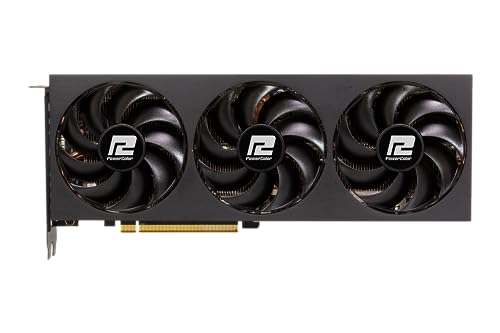
PowerColor Fighter OC Radeon RX 7700 XT 12 GB Video Card (RX 7700 XT 12G-F/OC)
grizzled bloom
Midrange
Upper midrange would be about $1600-1800
High end more like $2000-3000
meager elbow
buying used parts will help you lower costs down, but that takes more effort and searching for people selling it
and possibly negotiating prices with sellers, and with some level of risk compared to buying new
specific parts, used gpu is ususally the main part that people get, as that is also often the most expensive single part in a gaming/graphics orientated pc
burnt spear
Just as an example
https://pcpartpicker.com/list/WsBgPJ
Part List - AMD Ryzen 7 7800X3D, Radeon RX 7900 XT, SAMA 3509 ATX Mid Tower
Cpu would have to be used, and ofc a used gpu would bring cost down
You'd have to look for it used, it's currently only sold by third party retailers and is overpriced
9800x3d at $480
Stock is iffy, but it goes in and out of stock so you should be able to snag one with a little bit of patience
It's a scam seller on amazon
The seller listing the $400 one has 10 reviews

It's a new storefront and you won't receive anything
shy bear
sudden creek
I have the 7950x3D so I can relay some information on that. The 7000 series X3D...
I'll have to look into what the hell any of that means
 shy wyvern
Does AMD play nice with 24GB dimms?
tender sleet
Seems to be fine
But honestly they're kinda pointless for gaming only
32 gigs is plenty for anything other than Star Citizen
shy wyvern
I already have them
Intel is giving me RMA troubles I'mma just get rid of the CPU and board
Like it's to the point that I'd rather just throw the CPU in the trash then try and fight them any longer. Been like 3.5 months. Tried to claim that the CPU looked "counterfeit" and some nonsense I'm just tired and going to switch to AMD and sell the motherboard
dull flint
shy wyvern
Like it's to the point that I'd rather just throw the CPU in the trash then try ...
Wtf
Send an email to GN
He will LOVE that
Not even joking
That sort of stuff he will buy if the story is good
I'd do it just to try
I think the email is
Double check that lol
He might offer to buy it, he's been doing that a fair bit lately for interesting stories
Like the exploded 9800x3d
shy wyvern
I'll give it a shot, I even have the microcenter receipt too but they said they can't "validate" my purchase
dull flint
What
With a microcenter receipt
Are they high
Wtf
Have you contacted microcenter at all about it
That sounds ridiculous
How are you supposed to know it's counterfeit
shy wyvern
Yeah it's been hell. I have ecores disabled and it downclocked to 4.2GHz with -.65V on the vcore to get it to function
dull flint
Let alone it being counterfeit????
Wtf
I highly encourage you to email gn
That's stupid
shy wyvern
dull flint
Have you contacted microcenter at all about it
Yes, and microcenter gave me a signed statement saying they sold me it
dull flint
shy wyvern
Yes, and microcenter gave me a signed statement saying they sold me it
INSANE
shy wyvern
They said I could return it but if I do it to the original microcenter store
dull flint
HOW IS INTEL.DENYING IT
dull flint
I vaguely remember this story
shy wyvern
It's a launch batch, think it's severely oxidized
shy wyvern
dull flint
I vaguely remember this story
I complained a few months ago here about this and it's still the same
It's gotten way worse I legit have a -.65V offset and ecores off
dull flint
Micro center wants the original store return cos their books are balanced on different requisites so it's both a monetary and law requirement
Can you mail the cpu to them?
shy wyvern
dull flint
Can you mail the cpu to them?
They said they do not do mailed electronics due to risk of damage
Which is stupid the thing is borderline defective
But I assume it's because they mail it to Intel after
 shy wyvern
At some point it's not even worth the $400 CPU
dull flint
Absolutely
shy wyvern
I'm tired boss
shy wyvern
I've been waiting for 9800X3D restock at microcenter I just want to get this thing over with
Microcenter has been rather helpful they just can't do much since I moved after buying the CPU
They really earned my trust after this
dull flint
Do you know anyone who could return it for you
Maybe seek out someone you know in colorado
Send it to them with a copy of the receipt
Or rather the original
Just to not mess this up
Someone you trust
They can return it as an agent
But only if they don't require yoyr credit card
shy wyvern
They said I don't even need the receipt, just my microcenter account, because I had lost the initial receipt
dull flint
So you need a meat body to stand in line basically
Do you still know anyone in colorado
shy wyvern
Yeah but not well enough to bug without enticing then monetarily
At that point if it's going to cut into the $400 I'll get back
dull flint
Mmmm
shy wyvern
Why go through the effort?
shy wyvern
I'm so exhausted from this whole thing I just want to literally strap the CPU to a spare firework rocket in my garage from new years
And send it away
dull flint
Well at the very least email gn
I have a strong feeling he'd have a field day with this
shy wyvern
I can do that
dull flint
I'm amazed you even have a signed statement from micro center and they still suspected counterfeit
What a load of crap
shy wyvern
They said the serial number I gave doesn't show as an actual unit? But it's the serial number from the CPU and the receipt
Like it's literally on the damn CPU IHS like what do you want from me
shy wyvern
Why would I have kept the box
And they said the S/N number
Which is on the receipt
And the IHS
dull flint
Let me check something
Brb
No the batch and s-spec # is on the cpu ihs
Not S/N
Ok I just learned a thing
The batch # is an 8 digit code
The SN is
Hold on
13 digits
S-spec is 5
The QR print might be the S/N? I don't have a way to check that
I have a box and a pic of my cpu handy
Does the microcenter receipt show a 13 digit sn @shy wyvern ?
If it's only 8 it's not an SN it seems
shy wyvern
Lemme go grab it but also read some of these horror stories
Reddit
Explore this post and more from the hardware community
 dull flint
Their process requires an SN, but the SN is only on the box is a fatal mistake
Ok yeah they're f'd up
shy wyvern
How tf is it "never purchased" if it says warranty is active ON THEIR WEBSITE
shy wyvern
Warranty would not say active if it never moved right????
shy wyvern
Unless they did automatic warranty for all launch batch?
dull flint
You'd get so much redemption for this
dull flint
shy wyvern
Warranty would not say active if it never moved right????
If not real yeah for sure
They've messed up
Cos you can definitively prove it's real
You have a receipt, item in hand
How tf are they expecting more
shy wyvern
I literally have a receipt with the S/N and the batch numbers match and everything
dull flint
Yep send all this to GN man
There's no way, under what I know about US law (Granted state to state variance) you have done this wrong
shy wyvern
Would you have expected a cpu to fail after 2 years???
dull flint
Ofc not
shy wyvern
I figured I would've upgraded before I ran into this problem
dull flint
Anyway let's tone it down a notch here, I think you're completely in the right
Send this all off to gn's tip email
shy wyvern
I have a cor 2 quad Q6600 still working I never thought I'd need the box
dull flint
I am almost certain he'd pick this up
shy wyvern
Any news on microcenter restocks for 9800X3D? I really want one
I feel like I'mma be waiting forever
dull flint
shy wyvern
Any news on microcenter restocks for 9800X3D? I really want one
Sir this is newegg
Haha
But actually
I've heard wind that February it gets better
Take that with salt
Anything can happen
shy wyvern
dull flint
Sir this is newegg
Will Newegg have motherboard discounts when you buy a CPU? Microcenter be giving me $80 credit to pair the two
dull flint
I couldn't tell ya I don't work for newegg lad
Sorry
MC is usually good
I wouldn't steer away from them
They need to pay me to say otherwise lmao
shy wyvern
It's also a 45 minute drive and I'm lazy most days
shy wyvern
But at this point I think I'd pick up a 9800X3D from the moon to get away from this demon CPU
shy wyvern
Soon 5090 when they come back in stock
dull flint
Massive jump
shy wyvern
But I also play at 4K so idk if the jump will be that big
dull flint
shy wyvern
Soon 5090 when they come back in stock
Personal take they look really poor rn even at 4K
You wanna see prices
^supposedly
 shy wyvern
Brother I own a 4090 why would I care, I bought this 4090 scalped for $2200
Back in November 2022
dull flint
Quote "Single digit stock" for major retailers for 5090
I really wouldn't hope to get a good price for one just saying
Your choice
My two cents
shy wyvern
My local microcenter is asking people to not start camping until 8pm the 29th and I'm like 
dull flint
Lol
I mean good luck but I haven't been disappointed this much in a tech launch since 14th gen tbh
Before that 11th gen
2080Ti...
shy wyvern
Honestly I was only hoping for a 25% jump
dull flint
Pretty bad ones tbh
dull flint
shy wyvern
Honestly I was only hoping for a 25% jump
25 is optimistic considering most tests are FE vs FE
hollow thorn
dull flint
Quote "Single digit stock" for major retailers for 5090
For ocuk right now yea, but should be in the context that they're expecting more before launch
shy wyvern
And I will be selling my 4090 on top
dull flint
hollow thorn
For ocuk right now yea, but should be in the context that they're expecting more...
They're hoping double digits by launch
Lol
It's not just ocuk btw
hollow thorn
Yea, still very low but they're expecting shipments still
dull flint
I found a couple retailers
The prices above explain why I heard 2800 for aud prices
Absolutely insane
I'm sticking with my 1750 suprim thx lol
hollow thorn
It kinda puts into context why AMD said they wanted some time to put products on shelves lol
shy wyvern
Did the 4090 ever come back in stock over the generation?
dull flint
shy wyvern
Did the 4090 ever come back in stock over the generation?
Yes
It got as low as about 1400 iirc
Most of the time 1600-1700
For a long time the suprim was 1750 and that was often the best purchase
shy wyvern
I remember they were still out of stock 8 months after launch
Maybe it'll be that long for me 
dull flint
Mmmm I don't have a clear chronology of it tbh
I do remember they didn't have stock issues like covid
Not by a mile
They spent a lot of the time at or near msrp
Actually
I remember about
14? Months ago
A 7800X3D pc + 4090 was $2450 usd
At the time they were about $1600-$1650
So yes they did (ig at least eventually) get to msrp
Then it wasn't until a few months ago they shot up to 2000+
shy wyvern
I have the Trinity OC model ($1799) and I bought it for $2200 2 weeks after launch
hollow thorn
Now we have to see if people get more or less excited about AI
hollow thorn
I'm sure we're tired but we're not exactly the average person lol
dull flint
The 4090 offered with fg almost 4x a 3090 for 100 more
So even with the whole ai thing
I'm turned off lmao
hollow thorn
If people get more excited about AI, it's more likely that the prices are gonna keep rising without much performance
dull flint
Instead I can just look forward to usable FG with dlss 4 and reflex 2
And 4090 this gen
shy wyvern
I can play games at 30/40fps modes just fine on my PS5 pro
hollow thorn
shy wyvern
Oh I can't stand the weird ghosting effect of frame gen
Dlss4 is supposed to somewhat fix that for non-mfg fg
shy wyvern
So latency doesn't bug me
dull flint
dull flint
Transformative models
It's supposedly a huge improvement according to reviews
shy wyvern
It's the weird artifacting that specifically dlss frame gen has
dull flint
And reflex 2 fixes the latency problem
shy wyvern
It's not really ghosting it's more of a "smear" that affects the colors of objects behind them
hollow thorn
Unfortunately optimization is going to go down the toilet with framegen becoming more mainstream
shy wyvern
I'm more excited for DLSS getting better
I love DLSS Quality it often looks on par or better than native depending on the game
DLAA is wizardry
dull flint
hollow thorn
Unfortunately optimization is going to go down the toilet with framegen becoming...
Suppose if the ai multiplication gets so stupid fast we can always have decent frames and just weird effects
shy wyvern
I play cod with DLAA and it legitimately is beautiful
dull flint
Lmao
dull flint
shy wyvern
I play cod with DLAA and it legitimately is beautiful
Hm on forza I didn't like it tbh
shy wyvern
Forza had really off putting DLSS implementation
shy wyvern
Lots of smearing even on DLSS Quality
dull flint
Kind of wild that FH5 runs the same engine as FM8 yet FM8 is the dogpile that it is
And FH5 looks often way better
shy wyvern
FH5 on high looked great at ran at high fps on a damn 1050Ti
hollow thorn
dull flint
Suppose if the ai multiplication gets so stupid fast we can always have decent f...
I'm just remembering reading how people fit an entire game in like 64kb by not storing textures and only storing how the texture is drawn, I wonder if we'll get to a point where textures aren't baked in and we'll generate each texture lol
dull flint
hollow thorn
I'm just remembering reading how people fit an entire game in like 64kb by not s...
I've seen those!! Super cool!!!
shy wyvern
hollow thorn
I'm just remembering reading how people fit an entire game in like 64kb by not s...
Instructional based storage is amazing, has its roots all the way back to the asteroid arcade game
 dense perch
Hey, I'm trying to reinstall Windows 11 rn but keep coming across the "PAGE_FAULT_IN_NONPAGED_AREA" BSOD.
I've previously had multiple bluescreens and installed new cpu + ram today. Same error and Im not sure how to fix it.
sfc /scannow doesnt work and gives me errors
0xC1900101 - 0x40017
 grizzled bloom
That is usually caused by bad memory. Have you enabled XMP/EXPO?
dense perch
I believe XMP is enabled with the new memory as well
grizzled bloom
Disable that first then and see if it helps
Always have that disabled when installing windows
dense perch
Alright, I'll give that a try. I believe you were there when I was having issues with my Gskill Trident Z memory as well, no?
grizzled bloom
That's entirely possible
dense perch
if the reinstall doesnt work with xmp disabled, what would the next step be?
so far i've tried new cpu, new ram, and now xmp disabled but i believe the problem is within the operating system
grizzled bloom
Try with one stick of memory at a time in different slots
With the CPU and memory being changed the remaining possibilities are the motherboard and storage, once we rule out memory
wind karma
dull flint
And FH5 looks often way better
MSAA 😍
Or rather, no temporal techniques 😍
So crispy
dense perch
grizzled bloom
With the CPU and memory being changed the remaining possibilities are the mother...
same thing again 😞
Installation assistant done, pc restarts, finishing updates, 2 bsod, undoes changes, returns to desktop
 sudden creek
shy bear
I'll have to look into what the hell any of that means
sudden creek
shy bear
I'll have to look into what the hell any of that means
Essentially while yes you can make it faster it's just that you can only do so within the locked voltage limit. So it comes down to silicon lottery even more than most chips.
grizzled bloom
dense perch
Installation assistant done, pc restarts, finishing updates, 2 bsod, undoes chan...
Did you try one stick at a time
dense perch
grizzled bloom
Did you try one stick at a time
I've tried 1 stick, 2 stick, 4 stick
both sets
grizzled bloom
Ok, what about different slots in the board? One stick in at a time
I know it sounds like it'll be time consuming but it really helps narrow down the issue
Because right now it's between the motherboard and the storage
dense perch
grizzled bloom
Ok, what about different slots in the board? One stick in at a time
I've been at this for multiple weeks and I've just lost patience. I'm very thankful for your assistance and different methods but I've just gone ahead and done a clean install on my operating system
The clean install went through without issues, sfc works, dism found no issues. installing all the updates right now, waiting to see if anything goes wrong
Sorry to waste your time
shy bear
sudden creek
Essentially while yes you can make it faster it's just that you can only do so w...
2dimms of 6400mhz ended up working without a hitch with expo tweaked settings. May just return the other set if you're saying it would be problematic
I figure I might as well toss em in there just to see what happens when I get home though
sudden creek
shy bear
2dimms of 6400mhz ended up working without a hitch with expo tweaked settings. M...
you bought 2 sets of ram?
shy bear
Yeah, before I had really researched the pros and cons of having 4
sudden creek
I strongly suggest not doing dual rank (2 diimms per channel)
Also that's lucky that 6400mhz worked.
I'd stick to single rank and run the 6400mhz. if you really need more ram you can get higher capacity singlerank kits.
dull flint
shy bear
Yeah, before I had really researched the pros and cons of having 4
4 dimms of ddr5 is absolute cancer
If you want high ram capacity, the most you can aim for is 2x48gb
Anything higher is god awful at 4 dimm
And 4 dimm in general isn't that good
2 dimms on ddr5 is the best way to go
If not 1 if you can only afford 16gb
Half rank is even worse (8gb sticks)
1 stick of ddr5 performs way better than 1 stick of ddr4 because of the architecture changes, it's not nearly as bad as ddr4 or 3 or the others

 grizzled bloom
No one has tested B850 boards yet but you can expect HUB to do so soon
 rain badger
if these boards are actually good then they'll actually be really good value
unless it's a build where more than 2 memory slots are needed
got flashback and everything for $110
grizzled bloom
Yes
grizzled bloom
2 sticks? Sure run that up to 8000+
4 sticks? lol how does 5200 sound
rain badger
💀
grizzled bloom
It's only a 6 phase VRM so I wouldn't put more than a 7800X3D on it, but it should be fine for gamers.
9800X3D remains to be seen, it uses a lot more power. We'll have to wait for testing to be sure.
rain badger
hmm
so it's not a bad budget board
atm it's the cheapest AM5 board with decent vrms & vrm cooling
grizzled bloom
No PCIe 5.0 tho
So yeah this is the kind of thing to toss into a 7600/7700 XT build
grizzled bloom
Out of those that have been released? None
They don't support it
We don't know about unreleased products yet
rain badger
ah
so it's mostly ssds
which doesn't make much of a difference anyways tbh at this price bracket
grizzled bloom
If I had to guess it'll only matter for a 5090, maybe a 5080
As long as it's 4.0 x16 at least
Oh one M.2 slot does support 5.0
Trippy, seems like Ryzen 8000 only supports up to 4.0 x8
Good thing I never really recommended those except as GPU-less builds
sudden creek
What is a simple way for my friend to figure out what motherboard they have?
They bought a pre built and they are to lazy to open the thing up
meager elbow
System information
Or hwinfo64
Hwinfo condenses the information better
But if they don't want to install anything, system information will have the motherboard information
burnt spear
rain badger
https://cdn.discordapp.com/attachments/500102940078505984/1332559837409579040/im...
I had a convo with someone a few days ago, it's asrocks new lightning branding for mobos
B650m pg lightning was 6+2+1 but it has almost no vrm heatsink
It's well priced in a lot of countries outside the US so I've been using it for budget builds
rain badger
burnt spear
It's well priced in a lot of countries outside the US so I've been using it for ...
yeah I've spotted it
and I've been like
"surely this is too cheap to be good"
 pallid thicket
noob question... when i'm playing D4, I sit at something like 29gb/32gb RAM utilization. I also have a bunch of apps and browser tabs open... and i dont want to change my behavior. Do I need more memory? am i suffering any performance hits being so close to 100%?
burnt spear
pallid thicket
noob question... when i'm playing D4, I sit at something like 29gb/32gb RAM util...
You can likely fix that with optimization and "changing behaviors" to a minimal extent, but are you stuttering in games?
If you're not, then you're likely not running into a ram limit
pallid thicket
i think i was actually last night which is why i came here. i definitely want a "no limits" setup so was thinking about buying more or just buying different kits entirely
thanks!
 delicate iris
Was wondering which 13th gen intel cpu you all would recommend for pairing with a 4080 super? I have a 13600k right now but the frame times are around 60-70% higher on the cpu than gpu in the games I've tested.