#graphics-cards
1 messages · Page 2 of 1
 fading glacier
 livid idol
Those calculators just don't account for real world conditions at all
fading glacier
yeah
well i think the 3080 will be fine, 3090 is way too much
or any 40 series below 350w will do fine as well on the 850
hope so
livid idol
So you're not considering the 6900 XT? I've seen it at $800 lately
Plus only 300W and almost matches the 3090
fading glacier
well, i was totally forgot about it
you are right
amd cards are more power friendly
lemme see how much is the asrock oc
850, could be
yeah now i feel like an idiot, i was totally blinded for the strix that i forgot the 6900, and the g6 will be totally ok with that one
 ivory herald
12700(K) in-game is indeed actually a lot lower wattage than people think. It's quite efficient at these sort of partial loads. Decent A tier psu is the thing to be happy w/ the 700+ watt transient loads of a 3090.
 wheat crag
I thought a transient load can’t surpass the max tdp?
 keen nacelle
wheat crag
850w can prob power any cpu gpu combo rn
keen nacelle
wheat crag
850w can prob power any cpu gpu combo rn
12900ks and 3090 ti oced will easily surpass any 850w psu
wheat crag
keen nacelle
12900ks and 3090 ti oced will easily surpass any 850w psu
It’ll prob consume near 700w at 4k with a demanding game
But not surpass it
ivory herald
To be clear, transient load basically = spike. 
wheat crag
Ain’t the spikes within their tdp tho
fading glacier
no
wheat crag
How high is a spike then?
fading glacier
3090 is a 350w tdp but can hit 550w spikes
wheat crag
And can it be read ?
keen nacelle
And 12900ks on ln2...
fading glacier
igorlab have those readings
keen nacelle
Easily will pass its specced tdp
ivory herald

Support our in-depth testing, journalism, and analysis! Grab a Modmat, mouse mat, shirt, or more at https://store.gamersnexus.net/ (through 6/25, 10% of ALL store revenue ALSO goes to a charity handling technology education for kids, e-waste processing, and refurbishing).
Grab a GN Tear-Down Toolkit with 7-year warranty! https://store.gamersnex...
wheat crag
fading glacier
3090 is a 350w tdp but can hit 550w spikes
And a cpu consuming around 200w would still be fine
keen nacelle
It wouldn't surprise me if my 3060 ti has spiked to around 280w in benches
keen nacelle
wheat crag
And a cpu consuming around 200w would still be fine
3090 ti can easily spike to 750w
fading glacier
wheat crag
And can it be read ?
 ivory herald
Forg if stock, more like 400w spikes. People could just know that the quick ez math is these spikes are around 2x avg wattage, sometimes higher.
fading glacier
now that im looking more into it, i think ill need to check the wiring on my house
 heady turtle
wheat crag
Ain’t the spikes within their tdp tho
heady turtle
wheat crag
Ain’t the spikes within their tdp tho
Nowhere near on 30 series
fading glacier
i think i have 16ag on my wiring xD, i think ill be fine 😛
 silver moat
Hey guys. Been having some issues with my gpu lately.
2080 super, had it for almost 3 years. It’s an issue where my monitor will randomly go blank and my gpu fans will blast to max
Only way to regain control of my pc is to manually reboot it
Checked dxdiag, ran benchmarks, can’t seem to find anything wrong with the gpu. It doesn’t overheat when it does this either
Anyone heard of this before?
Interestingly tho when I put my computer into power saving mode it doesn’t crash, just puts my frames to sht
 velvet grail
silver moat
2080 super, had it for almost 3 years. It’s an issue where my monitor will rando...
velvet grail
silver moat
2080 super, had it for almost 3 years. It’s an issue where my monitor will rando...
Common issue usually caused (most probable) by you PSU, it could either be faulty, if it is modular check that all cables are plugged in nicely to both PSU and GPU
 wicked hound
heady turtle
Nowhere near on 30 series
wicked hound
heady turtle
Nowhere near on 30 series
Eh, no where near on any series tbf. Ampere do be harsher with it being sometimes higher % of TDP, and with higher TDP.
velvet grail
velvet grail
Common issue usually caused (most probable) by you PSU, it could either be fault...
However if that doesn't solve you have other options:
Updates: bios, chipset, GPU drivers....
Could also be your a PSU not supplying enough power
Or also a particular overclock causing this problem or overheat of you GPU.
silver moat
Thanks loFabio, will try those things
velvet grail
Np
I'm here to help whenever I can
heady turtle
wicked hound
Eh, no where near on any series tbf. Ampere do be harsher with it being sometime...
Sorry meant especially on 30 series
velvet grail
After testing out the 2080 I got some nice results that i really liked:
Beamng, had ~80/90fps with 1070 w medium-high graphics (no dynamic reflections) - map: Italy. Now from 85 to 120 in the best cases with high graphic and dynamic reflections
Everything at 1080p for now, waiting for new monitor to arrive
wicked hound
heady turtle
Sorry meant especially on 30 series
Ye, just helpful reminder to others for avoiding accidental misinformation.
 hasty sphinx
ivory herald
12700(K) in-game is indeed actually a lot lower wattage than people think. It's ...
hasty sphinx
ivory herald
12700(K) in-game is indeed actually a lot lower wattage than people think. It's ...
I game at about 50w
oh, I totally read 12600k, not 12700k. my bad
I just woke up
ivory herald
From a certain fellow on the TPU forums I keep seeing a decent 70w on certain games at 1440p, & of course it varies. People just act like gaming wattage is anywhere close to tdp or cinebench sort of load. 
hasty sphinx
yeah I'm in game now atm and it looks like I'm jumping between 50-60w
1440p
25-30% load
 rustic pulsar
if i dual boot i can have different gpu drivers for each right
rustic pulsar
i do not like linux give me windows back xijhfhsdijozg
 sonic mural
I doubt your Nvidia likes Linux much either, lol
livid idol
Even with the new "open source but not really" drivers it'll take some time for nouveau and such to improve.
keen nacelle
what?
 dreamy dragonBOT
 James Too Cold#9700 has been warned
Reason: Bad word usage
 lone pond
Lol
keen nacelle
where did that even come from
there was no conversation involving you before you said that
are you ok?
livid idol
Videos with swears aren't allowed, and so is filter dodging
 opal iron
Does this mean it doesn’t have ray tracing?
 livid idol
opal iron
Does this mean it doesn’t have ray tracing?
livid idol
opal iron
Does this mean it doesn’t have ray tracing?
It does but you shouldn't be using it on a mid tier or lower GPU anyway because of the performance loss
 odd siren
Much less AMD
sonic mural
imo 3070ti ish is kinda the lowest id have for wanting to do raytracing on most games
odd siren
Isn't MC like completely nvidia biased on RT?
fading glacier
sonic mural
imo 3070ti ish is kinda the lowest id have for wanting to do raytracing on most ...
laughs on doom eternal
opal iron
odd siren
Isn't MC like completely nvidia biased on RT?
Yeah but its so easy to run it works fine with amd
odd siren
Oh ok
opal iron
My friends 3050 mobile can run it at a constant 60fps
odd siren
I mean I don't have MC but thought I'd bring it up cos I remember the AMD cards particularly suffering in the reviews a while back
opal iron
Yeah it does bad in other games
But lets be honest minecraft is the only game where ray tracing makes a big difference
sonic mural
odd siren
Isn't MC like completely nvidia biased on RT?
everything is
odd siren
I know that but I meant I remember it being a particularly bad one
That's what I meant
livid idol
6600 at 1080p high with SEUS shader (to enable ray tracing on AMD) gets 40 fps
opal iron
Pgti?
odd siren
That's actually not bad considering first gen vs second gen rt
livid idol
Yes
opal iron
Pgti is a super heavy shader
livid idol
Renewed seems to get close to 100 fps on the same settings
1% lows below 40 still but that's just Minecraft
wicked hound
livid idol
6600 at 1080p high with SEUS shader (to enable ray tracing on AMD) gets 40 fps
Fabric or Optifine tho? Could prolly get to 45-50 fps pretty easily if test was done on optifine and tried fabric instead
 jaunty mango
for eg bad cooling etc
odd siren
jaunty mango
is there any variants i should look out for
Ventus 
 normal hawk
sonic mural
everything is
normal hawk
sonic mural
everything is
Crysis Remaster.
Is built into the engine. Which is how they got it to work on Xbox one and Ps4

Crysis Remastered is coming out a little later this month on 18th September, reviving the classic PC buster for more modern hardware and with Crytek throwing plenty of modern graphics techniques into
It's kinda crazy tbh.
sonic mural
Yeah
normal hawk
Xbox one x and ps4 pro had it. But it'd ruin performance so much the one x would go from 2160p30 to 1080p30, and the PS4 pro would go from 1800p30 to <1080p30
sonic mural
💀
 tall lichen
sonic mural
tall lichen
sonic mural
Take your chances? It's a mech, and it's gonna perform like a mech. Hot and loud
odd siren
tall lichen
Should I take my chances and get this?https://www.newegg.com/msi-radeon-rx-6600-...
jaunty mango
odd siren
https://pcpartpicker.com/mr/newegg/DgFbt6
how would this stack up against an rtx 2070
tall lichen
I hear they perform about the same
jaunty mango
hm
might buy that then
cant find a good rtx 2070 thats not on ebay for a similar price
sonic mural
The non super 20 series generally weren't great value
The supers were very close to the next step up non super and typically much better value
hasty sphinx
he meant super
sonic mural
You sure?
hasty sphinx
yes
sonic mural
He didn't say the super twice so I assumed not
hasty sphinx
I've talked to him
sonic mural
Alright
hasty sphinx
Hm, in my conversation with him super was brought up. Maybe in here he did mean reg 2070
hasty sphinx
yeah, Or I just assumed he meant super. I thought he said super earlier.
sonic mural
Hmm
opal iron
Which 6600 model is the best?
jaunty mango
lone pond
Yeah I talked to him but he never mentioned super anywhere
wait what when did i talk to you
i talked to the other guy reorrist or something i cant read that name
i meant 2070 Super
 vital oriole
that'd be cool
livid idol
They made AMD motherboards, maybe they'll jump in on GPUs in a gen or two
heady turtle
opal iron
Which 6600 model is the best?

PowerColor Radeon RX 6600 8 GB Hellhound Video Card (AXRX 6600 8GBD6-3DHL)
heady turtle
livid idol
They made AMD motherboards, maybe they'll jump in on GPUs in a gen or two
Yeah idk tbh their motherboards, for both sides tbf seemed to always be like 300$+ and come out halfway through the cycle which is just walk
opal iron
heady turtle
Atm https://pcpartpicker.com/product/nxWzK8/powercolor-radeon-rx-6600-8-gb-hellh...
Is the sapphire one good?
heady turtle
opal iron
Is the sapphire one good?
Yeah it's the best cheapest model atm
 rotund sparrow
GIGABYTE GeForce RTX 3080 Gaming OC 12G Graphics Card, 3X WINDFORCE Fans
Used - acceptable for $646.13
GIGABYTE GeForce RTX 3080 Gaming OC 12G Graphics Card, 3X WINDFORCE Fans, 12GB 384-bit GDDR6X, GV-N3080GAMING OC-12GD Video Card https://a.co/d/cZtWrlP

NVIDIA Ampere Streaming Multiprocessors 2nd Generation RT Cores 3rd Generation Tensor Cores Powered by GeForce RTX 3080 Integrated with 12GB GDDR6X 384-bit memory interface WINDFORCE 3X Cooling System with alternate spinning fans 3x DisplayPort 1.4 & 3x HDMI 2.1 RGB Fusion 2.0 Protective metal ba...
Seems like a decent deal? But honestly with the red devil/dragon 6800xt for a little more, seems like that is a better deal, especially since they’re new too
heady turtle
Used from Amazon or used from someone else?
rotund sparrow
Amazon warehouse
I’m always surprised at the quality of used gpu from amazon warehouse
heady turtle
Pretty good, 100$ cheaper than the next cheapest 3080 12gb
And Amazon Wearhouse used isn't really used
I mean it is
But none of the risk
rotund sparrow
Yeah that’s true
 ember eagle
Ray tracing!
rotund sparrow
Ohh seriously? Ah okay cool
ember eagle
The good thing abt Amazon is that returns are super simple
heady turtle
rotund sparrow
Ohh seriously? Ah okay cool
3080 12gb is in the middle of 10gb and ti by like 5% each side
rotund sparrow
Gotcha that makes sense
velvet grail
Don't really know where to ask, maybe #gaming but what's the option "streaming quality" in warzone?
 woeful musk
what's the best possible AMD card I could get for 500-600$
I'm thinking about getting this one but if anyone else has a good idea please LMK
velvet grail
woeful musk
what's the best possible AMD card I could get for 500-600$
Rx 6700xt if you can find a good deal
You should be able to get it for less than 600
heady turtle
woeful musk
what's the best possible AMD card I could get for 500-600$
Best would be this for 580
https://pcpartpicker.com/product/Kq6qqs/powercolor-radeon-rx-6800-16-gb-red-dragon-oc-video-card-axrx-6800-16gbd6-3dhroc

PowerColor Radeon RX 6800 16 GB Red Dragon OC Video Card (AXRX 6800 16GBD6-3DHR/OC)
Although this is way better value imo
https://pcpartpicker.com/product/HWbTwP/gigabyte-radeon-rx-6700-xt-12-gb-eagle-video-card-gv-r67xteagle-12gd

Gigabyte Radeon RX 6700 XT 12 GB EAGLE Video Card (GV-R67XTEAGLE-12GD)
Well it's 580 but pretty decent ye
Np
rotund sparrow
EVGA GeForce RTX 3080 12GB FTW3 Ultra Gaming for $703.12 (Used- Good by Amazon warehouse) 1 in stock

EVGA GeForce RTX 3080 12GB FTW3 ULTRA GAMING, 12G-P5-4877-KL, 12GB GDDR6X, iCX3 Technology, ARGB LED, Metal Backplate, LHR.
https://www.amazon.com/dp/B097YY2NL2/?coliid=IZUBBJJMTO5EX&colid=233H1FU1RJMY0&psc=1&ref_=lv_ov_lig_dp_it
I know it's zotac, but not too bad of a price I think?
ZOTAC Gaming GeForce RTX 3070 Twin Edge OC Low Hash Rate 8GB for $488.75 (Used- good from Amazon warehouse)

Get Amplified with the all-new ZOTAC GAMING GeForce RTX 30 Series based on the NVIDIA Ampere architecture. Built with enhanced RT Cores and Tensor Cores, new streaming multiprocessors, and superfast GDDR6 memory, the ZOTAC GAMING GeForce RTX 3070 Twin Edge OC LHR gives rise to amplified gaming wi...
hasty sphinx
@heady turtle @magic wing I've joined your shill club.

 magic wing
hasty sphinx
<@191276897227898880> <@499525349109923844> I've joined your shill club.
magic wing
hasty sphinx
<@191276897227898880> <@499525349109923844> I've joined your shill club.
Sheeeeeeee
hasty sphinx
magic wing
Sheeeeeeee
can't wait to test this bad boy out on friday
hasty sphinx
magic wing
Sheeeeeeee
If I'm reading right.. I'll have to plug my gpu into my argb header to control the lighting on gpu?
It didn't come with a cable to do so.
:/
wheat crag
hasty sphinx
<@191276897227898880> <@499525349109923844> I've joined your shill club.
Nice
Thought u we’re going nivdia tho
hasty sphinx
No
wheat crag
U should try running it on water with one of those aio mods like nzxt
Should oc really good
hasty sphinx
It's already a OC 6900xt. But thermals on it are already good so I'll probably hit silicon limits before thermal throttle.
wheat crag
U could maybe go a bit lower
On the temps
Gpu curves r usually low for noise n stuff
hasty sphinx
Possibly. Then I take away the aesthetics
Noise doesn't bother me. I run my AC 24/7 for the noise.
wheat crag
hasty sphinx
It's already a OC 6900xt. But thermals on it are already good so I'll probably h...
A oc is like a slight boosted core clock from the regular one
hasty sphinx
Even in winter, albeit just the fans
wheat crag
Still a lot of headroom
U can set a fan curve in msi afterburner
That’s what I did
Or the amd software
hasty sphinx
That'd be cool
wheat crag
Btw if u didn’t do it yet turn on resizable bar
hasty sphinx
Won't be installing until friday
Tomorrow I'll be getting my fans and new aio. Then Friday is my day off
hasty sphinx
wheat crag
All this talk about amd makes me wanna waste money on another gpu lol
Do it lol
wheat crag
Schools bout to start again and imma just do sports lol
Just do gaming n tech stuff as a hobby
ivory herald
Many people do.
wheat crag
6900 xt r going for like 900 and below
I remember I was gonna buy a 2080 ti for that price back then
During gpu shortage
vital oriole
2080ti for that price is a big scam
wheat crag
True bc bc of no returns I think
lone pond
I got mine for 750$
vital oriole
yikes
livid idol
hasty sphinx
It didn't come with a cable to do so.
Then it probably doesn't need it after all
vital oriole
^
wheat crag
vital oriole
they also sell fake shoes
Actually that one is kind of fake news
The people who check if their real or not r really good at their jobs
ivory herald
Still a crap website.
wheat crag
Yea resellers r crap
hasty sphinx
livid idol
Then it probably doesn't need it after all
The instruction say I need it to sync with mobo, so.. I'm thinking I can probably still use OpenRGB to handle the lights without the cable.
 azure cradle
sorry I know barely anything about pcs, would there be any issues from switching an amd to a nvidia graphics card?
livid idol
Issues, none to be expected. Driver conflicts can happen though so best to run DDU
!ddu
dreamy dragonBOT
DDU (Display Driver Uninstaller) Guide by Pato
https://github.com/NeweggTechie/Graphics-cards/wiki/How-to-use-DDU

GitHub
Contribute to NeweggTechie/Graphics-cards development by creating an account on GitHub.
azure cradle
oh okay so that would just remove my amd drivers before switching to nvidia drivers right?
livid idol
Yep. You'll run that in safe mode to remove the drivers, tell it to clean and shutdown
While it's shut down you swap the GPU
azure cradle
alright thanks, I've been thinking of uprading my graphics card for a long while now and I'm finally deciding I'm gonna do it
at 1 am lmao
livid idol
Best time to make impulse buys lol
azure cradle
got some more questions for you first though ; )
livid idol
Sure I've got some time
azure cradle
what do I have to check to make sure a new gpu would be compatible with my pc other than space in my case?
livid idol
Power supply model and wattage
azure cradle
that's pretty much it?
livid idol
Yeah basically
azure cradle
gotcha
livid idol
You probably want to make sure the CPU isn't underpowered too much by comparison but that's a small thing
azure cradle
I'm upgrading from an rx 580, would an rtx 3060 be a good option for an upgrade that wouldn't be a huge dent in my wallet?
livid idol
That's a pretty decent upgrade yeah
azure cradle
would there be a better option for around the same price range?
livid idol
You'd probably want to consider the 6600 XT or 6650 XT
Same price, better performance
azure cradle
livid idol
You probably want to make sure the CPU isn't underpowered too much by comparison...
yeah I'll confirm everything with people in this discord before purchasing 😉
azure cradle
livid idol
You'd probably want to consider the 6600 XT or 6650 XT
oh okay, why is it that the 3060 is so much more popular (just looking at the newegg website), is it just because it's nvidia?
livid idol
See 2:43 https://youtu.be/bISWIk5pUH0

be quiet! Silent Wings 4: https://www.bequiet.com/en/casefans/silent-wings-4/3696
Support us on Patreon: https://www.patreon.com/hardwareunboxed
Join us on Floatplane: https://www.floatplane.com/channel/HardwareUnboxed
Buy relevant products from Amazon, Newegg and others below:
GeForce RTX 3050 - https://geni.us/fF9YeC
GeForce RTX 3060 - https...
It's pretty much just because of the brand yeah.
lone pond
vital oriole
~~yikes~~
It's kingpin 2080ti
dreamy dragonBOT
James Too Cold#9700 has been warned
Reason: Bad word usage
lone pond
The FE msrp was 1200$ which had mediocre cooling imo
livid idol
20 series FE was meh, yeah
azure cradle
livid idol
It's pretty much just because of the brand yeah.
alright thanks a bunch for the help, I really appreciate it
hasty sphinx
Man. Who would ever spend $1200 on a gpu.. 
livid idol
hasty sphinx
Man. Who would ever spend $1200 on a gpu.. <:pepelaugh:903611012396224563>
Totally not me with a 3080 ti I got at a best buy drop
hasty sphinx
azure cradle
would new egg be the best place to buy?
For me, it's a toss up between Newegg and Amazon. Generally I go with whoever is cheaper, and if same price then I go with Amazon because returns are soooo much easier.
lone pond
I will spend 3k for a 4080
hasty sphinx
I did for the 6950xt, but just for the looks.
azure cradle
hasty sphinx
For me, it's a toss up between Newegg and Amazon. Generally I go with whoever is...
very true, plus prime comes in handy
livid idol
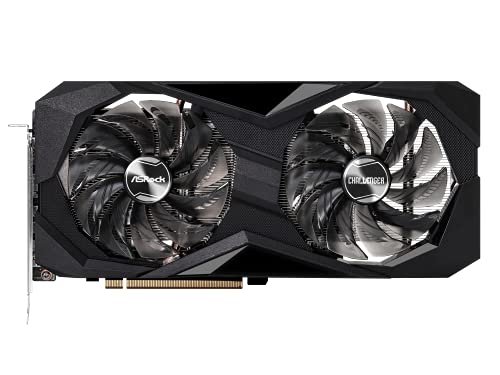
ASRock Radeon RX 6600 XT 8 GB Challenger D OC Video Card (RX6600XT CLD 8GO)
lone pond
What 6950xt is 3k
rotund sparrow
azure cradle
I'm probably gonna order a 6600 XT tmr
I just got a used one on amazon, the 6600xt is an amazing gpu
hasty sphinx
lone pond
What 6950xt is 3k
I didn't notice you said 3k. I was still referring to $1200
lone pond
Asus will change the strix design or stick with the current design for 40 series
Pascal and turing design was same
hasty sphinx
I'm in love with the sapphire 6950xt look
The white version
Faillllll @livid idol
livid idol
I always forget how to do that one
 old emberBOT
:8ball: | Yes, Fal'Cie
livid idol
hasty sphinx
How to do that one?
You need to be level 40 iirc
hasty sphinx
Yeah, unless you have a huge fricken heatsink like the 6950xt
lone pond
Still better cooling
 livid idol
Oh it's level 50
azure cradle
alright I looked up the 6600 xt on amazon and there's so many different ones for different prices and I have no clue what the deifference is between them all and which one I should go with
livid idol
livid idol
https://pcpartpicker.com/product/DgFbt6/asrock-radeon-rx-6600-xt-8-gb-challenger...
@azure cradle
azure cradle
oh thanks, I'm blind lol
livid idol
If it must be Amazon https://pcpartpicker.com/product/nyH7YJ/powercolor-radeon-rx-6600-xt-8-gb-fighter-video-card-6600xt-8gbd6-3dh

PowerColor Radeon RX 6600 XT 8 GB Fighter Video Card (AXRX 6600XT 8GBD6-3DH)
azure cradle
thanks again for your help btw, I'm gonna head to sleep now
oh wait I just realized the first one you recommended is out of stock on new egg rn
heady turtle
hasty sphinx
<@191276897227898880> <@499525349109923844> I've joined your shill club.
Sweet, and no rgb shouldn't nerd a header
hasty sphinx
heady turtle
Sweet, and no rgb shouldn't nerd a header
Ok. Kinda wierd that they include a male header on the gpu with instructions to plug it into mobo.
heady turtle
Oh maybe you do then
hasty sphinx
heady turtle
Oh maybe you do then
Maybe. They didn't supply a cable though.
heady turtle
hasty sphinx
Ok. Kinda wierd that they include a male header on the gpu with instructions to ...
Oh you sure that's not for plugging case fans into to control them off gpu temps?
livid idol
azure cradle
oh wait I just realized the first one you recommended is out of stock on new egg...
The powercolor one then, avoid the MSI mech
azure cradle
wait why should I be avoiding that one?
livid idol
It's got such a bad cooler even the low end models overheat
azure cradle
oh ok thanks
hasty sphinx
heady turtle
Oh you sure that's not for plugging case fans into to control them off gpu temps...
Instructions say to plug in a cable into the gpu and then plug into mobo to sync gpu argb to motherboard
I knew I should have taken a pic before I came to work. Gamers nexus also says its for argb in the teardown vid, but he didn't say if it had to be connected
odd siren
If it's to sync then it probably doesn't need connecting and will run independently on it's own software
My best guess there
hasty sphinx
odd siren
My best guess there
Mine too. I just didn't know some gpu have this and wanted to make sure I didn't need to order a cable before Friday
odd siren
Yeah I googled it there's a toggle in the software to set it to "external control" so it hands it off to the mobo
heady turtle
hasty sphinx
Instructions say to plug in a cable into the gpu and then plug into mobo to sync...
Hm okay
livid idol
wheat crag
do transient spikes occur more in games or benches/stress test?
Games primarily
Which games?
old emberBOT
:8ball: | It is certain, Fal'Cie
odd siren
Mr. Turtle has a thing or two to say about transients 
wheat crag
livid idol
Which games?
like warzone and mw
mr turtle is linus tech tips
could undervolts cause transient spikes? nvm
ivory herald
Could undervolt cause transient spike to not go as high? Probably.
velvet grail
@mighty island i made another timespy benchmark today and got different results from 3 days ago (photo ^) why? I just updated drivers to 516.59... maybe it changed my score for some reason?

 cerulean rover
run to run variations
velvet grail
That's 900 point less than the previou score
Why?
I run 3 times and always gives me this result
cerulean rover
usually things outside of your control, room temperature maybe background tasks maybe
velvet grail
But does temperature matter?
odd siren
Some drivers can be better some can be worse for benching, installing using DDU can also fix score variation
cerulean rover
It might affect how much the GPU boosts or whether or not to maintain the clock you've told it to run at
velvet grail
Wait, maybe it was because of afterburner
I checked and every value was on 0 lol
Let me try again
Got even worse now, 9909
odd siren
Are you cooling the card down between runs?
If you always start the run when the card is say, 31C? The run to run variance will be much smaller
velvet grail
I guess it's new drivers
velvet grail
odd siren
Are you cooling the card down between runs?
I always use my afterburner fan curve
odd siren
Not what I mean
velvet grail
What do you mean then
odd siren
After every run your 2080 will soak up heat into the heatsink, and the core will be cooling down from a higher temperature
If you aren't cooling it down to a low or equivalent temperature between runs, you're gonna have more variance due to thermals causing downclocking
If you wait until the reported temperature is the same between starting new runs, the scores will be more consistent
There will also be ambient around and inside the case playing into it as well
Drivers? Yeah I've seen that before, but if you DDU back to a known good driver it should be fine
velvet grail
Gpu is probably not going to 83C, that's where it throttles
wicked hound
No, GPU boost will go down 15MHz every 10c
velvet grail
I don't think thermals affect benchmarks if your cooling enough
wicked hound
Starting from 60c
velvet grail
So basically 70c is -15 from max clock
odd siren
velvet grail
I don't think thermals affect benchmarks if your cooling enough
Sure, if you go sub-ambient
wicked hound
Or maybe 65c, can't remember now
velvet grail
My card doesn't get past 70c
Maybe it's just the drivers
I have seen people on Reddit saying that after driver update they got worse results
Also one thousand points less
wicked hound
Going past 60c/65c means one down lock, past 70c/75c is another, past 80c/85c is another (possible with higher then default temp limits).
odd siren
velvet grail
I have seen people on Reddit saying that after driver update they got worse resu...
I didn't deny the driver point. Do a DDU and flip it back
But if you are still down on points. 1000% it's thermals
velvet grail
odd siren
I didn't deny the driver point. Do a DDU and flip it back
But will it just set to "base driver" or the last one I had
I'll also check thermals
wicked hound
Also do remember there is a fairly large run to run varience with stock windows, esp one with random programs installed.
velvet grail
I also had installed fan control yesterday
wicked hound
But it can still be drivers, just remember this other stuff too
dreamy dragonBOT
DDU (Display Driver Uninstaller) Guide by Pato
https://github.com/NeweggTechie/Graphics-cards/wiki/How-to-use-DDU
GitHub
Contribute to NeweggTechie/Graphics-cards development by creating an account on GitHub.
hasty sphinx
velvet grail
I also had installed fan control yesterday
Is your fan curve set up differently than when you benchmarked last?
velvet grail
No
My case fans are, with fan control, just to make then spin when either GPU or CPU are under load
How do I restore an old driver with ddu?
Btw will it change any setting in Nvidia control panel?
hasty sphinx
velvet grail
No
So what you mean is.. Yes, your fan curves have changed.
So, maybe that could be affecting your thermals in turn affecting your scores?
velvet grail
No, actually it's better because case fans didn't spin before I set up fan control. They only spinned based off CPU temperature, now they spin based on both CPU & GPU temp
I've also tested in game, without case fan spinning with GPU under load = up to 70C
With case fan spinning when GPU is under load = 65C
hasty sphinx
velvet grail
No, actually it's better because case fans didn't spin before I set up fan contr...
I didn't say anything about it being better or worse. My point was that you said there was nothing that was changed in your system between benchmark A and benchmark B, when there was something changed. Is it likely that's the cause? Idk, but it's possible.
velvet grail
I'm sure it is not, btw I said between the two benchmark I just installed (yesterday) FanControl which runs in background
I just needed FanControl to set dual case fan curves.
Probably not causing the problem
I mean... Now fans spin faster and move more air from the GPU
hasty sphinx
velvet grail
I'm sure it is not, btw I said between the two benchmark I just installed (yeste...
Oh, right, you did. My bad. I'm just throwing possible things out there.
Generally when you see a dip in performance, the first thing you look at is what was the most recent/biggest change.
velvet grail
Main things causing this problem could be: either driver upd, maybe fan control running in background or idk
hasty sphinx
And in this case, fan control with different fan curves than before. Have you tried disabling Fan Control and running your bench?
velvet grail
hasty sphinx
Generally when you see a dip in performance, the first thing you look at is what...
I'll disable fan control during the benchmark and see if that's the problem
hasty sphinx
hasty sphinx
And in this case, fan control with different fan curves than before. Have you tr...
As well as driver update
velvet grail
Driver update is the more common for drop in points, also considering only my GPU score dropped.
Gpu doesn't run fan control, CPU does the work for that...
So I'm sure it's drivers
Btw can I see the last driver vers I had before updating it?
hasty sphinx
velvet grail
Btw can I see the last driver vers I had before updating it?
You can always rollback your driver.
Unless you've already DDU
velvet grail
Mine is a 1.5k point difference in GPU score and some people on Reddit also says they lost 900/1000 points after driver updates
velvet grail
hasty sphinx
You can always rollback your driver.
How
GeExperience?
I update from that
Always
hasty sphinx
velvet grail
GeExperience?
No. Give me a min
hasty sphinx
velvet grail
How
Simply roll back your driver to the previous version using the steps mentioned.
This'll be faster than me typing it out.
This works with any driver in your device manager.
Not just for nvidia gpu
velvet grail
Ok
Thanks
I'll try that later
I'm 100% sure that's the issue
Btw fan control doesn't even take up more than 1% CPU when running in background so its definitely not that
hasty sphinx
velvet grail
Btw fan control doesn't even take up more than 1% CPU when running in background...
I didn't think it was, only that it could have been.
velvet grail
Yeah, who knows. It could have been, some software do really affect CPU
But not GPU work so I excluded that fro now
hasty sphinx
Also, have you ever DDU with this GPU?
velvet grail
Never used ddu in my life
hasty sphinx
How many driver updates have you installed over each other?
So.. it could also be an issue of drivers stacked on drivers.. not full drivers, but remnants from each driver building up could have finally caused you an issue.
velvet grail
I had installed the 2080 4 days ago, never updated drivers, was used so I don't know what the previous owner did with it
I updated them only 3 hours ago
hasty sphinx
velvet grail
I had installed the 2080 4 days ago, never updated drivers, was used so I don't ...
What did you have before that?
velvet grail
But I guess drivers get stored into pc storage it GPU...
Gpu doesn't have one
velvet grail
hasty sphinx
What did you have before that?
1070
hasty sphinx
velvet grail
1070
I see. You should have DDU before you installed new GPU and then installed latest drivers. That could be the issue.
velvet grail
Basically removed the 1070 and plugged in the 2080 without doing anything
velvet grail
hasty sphinx
I see. You should have DDU before you installed new GPU and then installed lates...
Oh
Btw I'll just use the first driver that I was using before updating the 2080's since it works fine
Ig
hasty sphinx
Rollback the driver first. See what driver it is.
Make note of it.
Then DDU. Then install latest drivers, and see if that fixes issue. If not, then DDU again and then install the drivers that you made a note of.
velvet grail
@hasty sphinx I noticed on properties - RTX 2080 it says driver version 31.0.15.1659
Btw it's not important for now, this is the latest one I installed 3 hours ago. But I noticed the last five numbers match the Nvidia GPU driver (5.1659 → 516.59)
And this is just the current one, now I just click roll back driver
hasty sphinx
velvet grail
<@913267599779971133> I noticed on properties - RTX 2080 it says driver version ...
Yep
hasty sphinx
velvet grail
And this is just the current one, now I just click roll back driver
Yeah
hasty sphinx
velvet grail
Is the one after roll back
Ok, make note of that.
velvet grail
Oke
dreamy dragonBOT
DDU (Display Driver Uninstaller) Guide by Pato
https://github.com/NeweggTechie/Graphics-cards/wiki/How-to-use-DDU
GitHub
Contribute to NeweggTechie/Graphics-cards development by creating an account on GitHub.
velvet grail
👍 ok I'll take a while, I'll tag u
Where do I download can't find lol
?
@hasty sphinx
On the website it also says I should disconnect my pc from internet, do I do it?
Ofc after I find where to install the program
hasty sphinx
velvet grail
On the website it also says I should disconnect my pc from internet, do I do it?
Just follow listed guide.
hasty sphinx
velvet grail
Where do I download can't find lol
velvet grail
hasty sphinx
https://www.wagnardsoft.com/DDU/download/DDU%20v18.0.4.6.exe
Do i just extract the file or do I also have to open it?
Or do I "open" it when in safe mode
hasty sphinx
Follow guide. Extract to wherever you want. Then boot into safe mode, then run DDU
velvet grail
Oke
velvet grail
hasty sphinx
Follow guide. Extract to wherever you want. Then boot into safe mode, then run D...
I'm on windows startup options screen and there are options 4 & 5 t start either in normal safe mode or safe mode with networking
Oh it just turned off uhhhh
hasty sphinx
velvet grail
I'm on windows startup options screen and there are options 4 & 5 t start either...
Normal safe mode.
Sorry, had to do my end of shift stuff. Just clocked out.
velvet grail
hasty sphinx
Normal safe mode.
What do I have to do now, it's like normal windows but black and laggy
Do i just open ddu?
 tropic remnant
hasty sphinx
velvet grail
Do i just open ddu?
tropic remnant
hasty sphinx
velvet grail
Do i just open ddu?
Yea. Follow the guide lol it literally tells you what to do.
velvet grail
hasty sphinx
Yea. Follow the guide lol it literally tells you what to do.
Yeah but if I click on ddu it keeps extracting the file...
hasty sphinx
velvet grail
Yeah but if I click on ddu it keeps extracting the file...
Did you extract the whole folder to a new unzipped folder on your pc?
Its a standalone program. No installation is needed.
velvet grail
I just double clicked the file, and it says extract, I choose location and nothing
hasty sphinx
Send pics
velvet grail
Solved, I just extracted to desktop
hasty sphinx
Lol
velvet grail
It didn't want to extract to other folders
hasty sphinx
Thats because you are in safe mode, so basic things like that won't work.
Should have done it when I told you to before.
You gotta follow steps as they are laid out to you man.
velvet grail
hasty sphinx
Should have done it when I told you to before.
Wait...I did that before entering the mode but still didn't extract
hasty sphinx
Thats odd
velvet grail
Just needed to extract on desktop
hasty sphinx
Alright. Well run DDU
velvet grail
Ok
I cleaned, it's finishing...
So basically what I possibly just did was uninstall every driver from previous GPUs like the 1070?
They could have caused the problem..?
Rebooting...
Done @hasty sphinx
It does not recognise the GPU anywhere but the pc works
hasty sphinx
velvet grail
It does not recognise the GPU anywhere but the pc works
Booted into normal windows? Install the latest drivers.
velvet grail
Oke
hasty sphinx
Ofc it won't recognize it, there is no driver installed.
velvet grail
Oh
No
Where is my geforce experience? 😳
hasty sphinx
velvet grail
Oh
No
Where is my geforce experience? 😳
Have to reinstall it.
hasty sphinx
GeForce experience is part of the drivers.
velvet grail
Yeah but I didn't know it would have removed the entire program... I hope all the setting will be the same because I had personalized some things
Uhm
My Google Chrome doesn't work
It's like black screen chrome
hasty sphinx
velvet grail
Yeah but I didn't know it would have removed the entire program... I hope all t...
Oh you will definitely have to redo your settings. DDU COMPLETELY REMOVES anything related to the gpu
velvet grail
Chrome is dead...
What do I do ...
hasty sphinx
velvet grail
Uhm
My Google Chrome doesn't work
Use edge then
hasty sphinx
Chrome shouldn't be broken though
velvet grail
Do i install GeForce ex and install drivers from there?
hasty sphinx
velvet grail
Do i install GeForce ex and install drivers from there?
You can download latest driver from nvidia website and when you run the installer it'll ask if you want to install geforce experience as well.
velvet grail
K
hasty sphinx
hasty sphinx
Oh you will definitely have to redo your settings. DDU COMPLETELY REMOVES anythi...
This is the point of DDU.
velvet grail
I'll just go for GeFex and then install from there
Because it can't load Nvidia drivers website
hasty sphinx
velvet grail
I'll just go for GeFex and then install from there
That works too.
velvet grail
125mb takes forever because it keeps stopping every 10 sec
hasty sphinx
velvet grail
125mb takes forever because it keeps stopping every 10 sec
why is it taking so long?
velvet grail
I don't know, WiFi keeps cutting off
Btw I have a 10MB/s connection + edge/chrome or whatever slowing down up to 70% the power
hasty sphinx
that's odd. Well I can tell you that DDU is not the cause of that.
velvet grail
hasty sphinx
that's odd. Well I can tell you that DDU is not the cause of that.
I know, WiFi been having problems lately l, together with my WiFi card too
hasty sphinx
ah ok
velvet grail
Maybe I should update my wif card drivers because it's not really working well
WiFi card ddu 
No jk
fading glacier
rumors on videocardz are hotter by the day xD
first shipment of 40 series on china in less than a month
hope that one turns out to be true
velvet grail
@hasty sphinx done installing everything, I'll setup Nvidia control panel and GeExp later, now I'll benchmark
hasty sphinx
velvet grail
<@913267599779971133> done installing everything, I'll setup Nvidia control pane...
well setup the control panel how you had it.
that way it's the same as when you benched it.
velvet grail
Don't remember
hasty sphinx
Got your fan curve set up still?
velvet grail
I'll also check thermals
velvet grail
hasty sphinx
Got your fan curve set up still?
Should... Let me see
Becaus it uses afterburner
Huh? Lol

Why is it like this?
Everything is broken lol
@hasty sphinx nothing changed the score is still low

azure cradle
I’m looking at buying a 6600 xt and yesterday I was told to avoid the msi mech model due to cooling issues, although I can’t seem to find anywhere on the internet saying that. It’s currently $40 off plus there’s a $20 rebate card as well as it being the bestseller on new egg. Does anyone know if the msi mech model actually have these issues because it looks like the best one to go with for me.
velvet grail
@hasty sphinx btw GPU is super fresh

But I don't see why it doesn't work properly and gives me this score
Oh god
It wasn't set to profile 1 in afterburner
I'm an idiot
hasty sphinx
velvet grail
Oh god
It wasn't set to profile 1 in afterburner
lol. so how's the bench now?
Also, it was good you did the DDU anyways.
velvet grail
You'll have to wait, it takes forever
velvet grail
velvet grail
<@913267599779971133> btw GPU is super fresh
Forget temps, it was limited to 53% power limit
hasty sphinx
velvet grail
You'll have to wait, it takes forever
I'm impatient. Hence why I gladly pay $25 to get my parts the very next day lol
velvet grail
If I got 9800 points with 53% power limit that means I may get the right score after this run
Now fans are kicking in much more
Btw what was that thing -15MHz every 10/5C past 60C...?
fading glacier
thermal throttling
the card start to lower the frequency every 5/10 degrees past the 60 degree mark
15mhz every 5/10 degrees
once it past the 60 degrees
velvet grail
@wicked hound could you explain the -15mhz over temps better?
hasty sphinx
velvet grail
<@207156621531545600> could you explain the -15mhz over temps better?
Your card throttles itself by 15mhz every 5/10c above 60c.. so if you are at 2000mhz @ 60c then at 65c/70c it'll throttle to 1985mhz
wicked hound
fading glacier
thermal throttling
For sake of better definitions, its not considered thermal throttling
velvet grail
@hasty sphinx I love you!
Thanks
And thanks for ddu guide that it exists
 fading glacier
hasty sphinx
Your card throttles itself by 15mhz every 5/10c above 60c.. so if you are at 200...
fading glacier
hasty sphinx
Your card throttles itself by 15mhz every 5/10c above 60c.. so if you are at 200...
thats what i said
velvet grail
The score is just 100 away form the other one, which is good since it varies from benchmark to benchmark
@hasty sphinx thank you!!!
hasty sphinx
fading glacier
thats what i said
I know. lol
 velvet grail
hasty sphinx
Your card throttles itself by 15mhz every 5/10c above 60c.. so if you are at 200...
velvet grail
hasty sphinx
Your card throttles itself by 15mhz every 5/10c above 60c.. so if you are at 200...
Ok, it makes sense, Ive got max 2055 (compared to max 2070mhz) that is just 15 less, that means is -15MHz/5C
Since I've got 69C (nice)
If it was 70 I'd have got 2040mhz
But once it gets to that lower Freq will it stay like that for all the time the application is open or will it go back to normal after a bit?
Idk why but for some reason MSI afterburner is messed up, however the driver install (iguess) made my GPU consume 30w less at idle
Is that possible?
Better power management
9w = <35C
Always big thanks to you and ddu
hasty sphinx
velvet grail
Is that possible?
yes because the drivers are fresh and now tailored specifically to your card.
 opaque stump
guys, whats the difference between XFX Speedster QICK 308 ULTRA, and XFX Speedster SWFT 210 Core?
azure cradle
I'm looking at buying a 6600 xt and I'm not sure which brand to go with, I'm trying to decide between 4 of them. Is there anyone that could help me out for a sec?
livid idol
Is it these 4? https://pcpartpicker.com/products/video-card/#X=19362,42564&c=509,501&sort=price&page=1
Choose A Video Card
Just don't get the mech
azure cradle
with the mech last night you said about it having cooling problems but when I looked it up I couldnt find anything about that
anyways these are the other 3 I was looking at:
https://www.newegg.ca/asrock-radeon-rx-6600-xt-rx6600xt-pgd-8g/p/N82E16814930064
is there one that stands out as like the best or worst? or does it not really matter
livid idol
Doesn't particularly matter
azure cradle
the asrock one would be the cheapest and come the soonest to where I live in Canada, so it would be fine to go with that one?
livid idol
Yep
azure cradle
alright thanks
damn I just realized that it's recommended 550W and mines only 500W, looks like I'm gonna be buying a new psu as well
wicked hound
What PSU model do you have?
azure cradle
I have a Rosewill Lepton 500
should I just try buying the graphics card and see how it works out before buying a new psu?
ivory herald
I'll just say I used to consider rosewill psus as a doorstopper. Doubt my opinion has changed much. 
livid idol
Considering their best PSU is the B tier photon (but only below 750W or exactly 1350W) your opinion is still pretty valid
Lepton is low C tier so barely acceptable for a 3060/6600
Assuming it had the wattage required
 shrewd comet
I am looking for advice to upgrade my video card
I am presently using an old 1050Ti
livid idol
What model though? That's more important than rated wattage on higher end GPUs
shrewd comet
ok, well that is greek to me
livid idol
You'll want a B or A tier PSU for this tier of GPU so I'll get a recommendation for that in budget too
shrewd comet
ok and will my mother board handle it
my 1050Ti is still running but seems my FPS is not what it used to be
livid idol
Motherboard won't matter much as long as it's not like 10 years old
PC Builder - Radeon RX 6800
shrewd comet
I updated motherboard about a year ago
thought it is a small motherboard
is one brand board better than another??
livid idol

shrewd comet
so the model matters more than brand
shrewd comet
I think my 1050 only has 2gb ram
so would be a big jump for me I think
forgive me, I am over 60, and computers have come light years since I had a commodore 64
livid idol
No worries, we're always happy to help answer questions
livid idol
They use rebranded cases from other manufacturers
shrewd comet
I am sure
shrewd comet
was hoping to find it on their site, but probably no longer available
I measured it from fan to back it is about 150 inches
15"
15 not 150
so at 303mm, that is about 12 inches
25.4mm to an inch
gonna order it, and I think the power supply should be fine, if not can order a new one
Thank you for your advice
 modest reef
What games do you play?
heady turtle
Np enjoy
rotund sparrow
Is the evga ftw3 ultra 3080 12gb worth the extra $53 over gigabyte 3080 12gb windforce 3x fan? Cuz the used versions are back in stock at a great price from amazon warehouse
heady turtle
rotund sparrow
Is the evga ftw3 ultra 3080 12gb worth the extra $53 over gigabyte 3080 12gb win...
Ftw3 would be 700?
rotund sparrow
Yeah
heady turtle
Hmm I'd still go gigabyte, 50 is a bit much
rotund sparrow
Yeah that makes sense, sounds good, thanks
heady turtle
Np
normal hawk
Saw a 6900xt on Amazon warehouse deals for 643....might go for it. :')
rustic pulsar
What gpu and how many watts is the PSU
And is the hdmi/DP plugged into the gpu (not the motherboard)
keen nacelle
Wattage won't be an issue on boot, also I ran a 6800xt on a 650w psu (ofc model matters, but for boot that isn't an issue)
I'd try a different cable, if you can
@woeful musk
For the 8 pin cables, did you put the 2 pin ones in first?
And did you use two separate cables, or two 8 pins on the same cable
Did you put the 2 pin parts of the 8 pin in first?
Also this might sound stupid, but make sure the monitors on and plugged in
As in monitor power plugged in
odd siren

 keen nacelle
I would say try asking again tommorow, but to me it's sounding like RMA time
keen nacelle
odd siren
<:Pog:968899046800498808>
Poger


 odd siren
Np lol
ivory herald
Ati radeon was the true radeon experience. box art was awesome too. Anyone remember Ruby? I had 1 of the posters
livid idol
 odd siren
Gonna be fun trying out OC on it before I gift it
livid idol
I had a radeon 5770 and built a 6950 computer for a friend
The original 6950 from 2010 era
odd siren
I was about to ask

Never made that link before that we're reusing amd gpu numbers now
odd siren
livid idol
Basically took all the sliders at max
I like this unconventional idea of equality
livid idol
I was using afterburner so it's fairly comparable, but +200 on core was insane when the original clock was 800 MHz
Straight up 25% increase
On stock cooling
 ivory herald
GTX 570 was sort of similar. Around 730 core and hitting 900ish. What's funny is 200-220w tdp & just 2x6pin. Of course I skipped the 400 and 500 series completely. Certain Radeon gens great picks. Heck it was great when most gens had a nice 20+ % of OC headroom. makes things fun.
 azure cradle
uh… I just upgraded from an rx 580 to a 6600 xt as well as going from a 500W to 750W psu to compensate. I’m getting the same fps as before if not a little lower, AND I’m experiencing some stuttering. Is this something that should sort itself out or did something go very wrong
keen nacelle
azure cradle
uh… I just upgraded from an rx 580 to a 6600 xt as well as going from a 500W to ...
Well, did you ddu?
And also, model is more important than wattage for the psu in this case
500w is more than enough for a 6600xt
!ddu
dreamy dragonBOT
DDU (Display Driver Uninstaller) Guide by Pato
https://github.com/NeweggTechie/Graphics-cards/wiki/How-to-use-DDU
GitHub
Contribute to NeweggTechie/Graphics-cards development by creating an account on GitHub.
azure cradle
keen nacelle
Well, did you ddu?
no but when I installed it the amd software recognized it and I think it installed the correct drivers
keen nacelle
I would ddu
azure cradle
alright I'll try that then thanks
azure cradle
keen nacelle
500w is more than enough for a 6600xt
it was a rosewill lepton tho
keen nacelle
Never heard of it
azure cradle
yeah the people that did in this disc said it was not good at all
the 750W one I just bought is msi so I hope that it was a good choice?
azure cradle
keen nacelle
Mpg?
yeah the mpg A750GF
azure cradle
alright thank you
once I rebooted it looked horribly stretched and pixelated and I was freaked out
then I realized it was just the resolution lol
keen nacelle
Yeah, just gotta reinstall drivers now
 livid idol
azure cradle
what is this option enterprise 22.Q2?
livid idol
azure cradle
what is this option enterprise 22.Q2?
Go for recommended or optional. Recommended is known stable, optional is newer and might have new game optimizations or features.
azure cradle
yeah that's what I went for but I was just curious about the third option
livid idol
Enterprise is for creators doing things like blender
azure cradle
oh ok
livid idol
It shifts the focus of the driver from 3D rendering to modeling. That's one way to think of it.
rotund sparrow
For DDU, does the gpu have to be physically disconnected from the motherboard during the process?
rotund sparrow
okay great, ty
jaunty mango
Yep np
heady turtle
You have the monitor plugged into the gpu not the motherboard?
heady turtle
Stonks
hasty sphinx
heady turtle
You have the monitor plugged into the gpu not the motherboard?
The TUF 3080 12gb did this to me too. I had to plug into my igpu to install gpu drivers, then it worked.
livid idol
There's certain combos of UEFI firmware and vbios that just don't get along
hasty sphinx
livid idol
There's certain combos of UEFI firmware and vbios that just don't get along
Could that be the fan issue with that card then?
Not that I care to much anymore, but I didn't know about my bios not liking vbios.
livid idol
No it wouldn't appear to work at all if that were the case
hasty sphinx
Gotcha.
livid idol
There's been tons of unnecessary RMAs and returns because there's nothing but a black screen and fans spinning on boot
hasty sphinx
livid idol
There's been tons of unnecessary RMAs and returns because there's nothing but a ...
Hm. What would I have had to do in the event I didn't have an igpu then?
livid idol
You'd need a second GPU of some sort to update the bios and/or vbios
hasty sphinx
Beyond using a different gpu and installing drivers before hand
Gotcha
Totally tried to send that before you typed that
livid idol
Yeah I saw you typing lol
 heady turtle
hasty sphinx
The TUF 3080 12gb did this to me too. I had to plug into my igpu to install gpu ...
heady turtle
hasty sphinx
The TUF 3080 12gb did this to me too. I had to plug into my igpu to install gpu ...
Weird
heady turtle
hasty sphinx
The TUF 3080 12gb did this to me too. I had to plug into my igpu to install gpu ...
You didn't plug DP in after boot did you?
Dp can sometimes need a reboot after being plugged in
heady turtle
odd siren
Burrrrrr
Vert mount 
hasty sphinx
heady turtle
You didn't plug DP in after boot did you?
Nope. All monitors were plugged in before I even switched PSU back on.
hasty sphinx
odd siren
Burrrrrr
Vert mount would put my 6950xt fans right up against the glass lol
odd siren
heady turtle
Vert mount <a:triggered:855273129450012684>
(Double note: not my pc, also 90C hotspot max)
hasty sphinx
And I'm in a 5000D
heady turtle
Oof
odd siren
(50% fan)
No it's good
I'm not worried
Triple fan stonks
I have a proper vert mount if it was actually bad
Rest assured I don't preach what I sometimes practice
I bet if I repasted it and set the fans to 3K I'd get somewhere in the mid to low 80's hotspot
odd siren
hasty sphinx
Vert mount would put my 6950xt fans right up against the glass lol
Ye mine is only 2 slot so there is some space, hyte y60 moment
But also not mine

hasty sphinx
Lol
odd siren
I'm sorta understanding it now. I need to change the bios settings to give it more power for more frequency
Using mpt or whatever it is
hasty sphinx
Mpt?
odd siren
But in war thunder it was averaging about 280 fps, going up to 320 lows in the 200-210's
hasty sphinx
Are you using the adrenaline software?
odd siren
hasty sphinx
Mpt?
More power tool
You'll wanna learn that tool too if you wanna OC the 6950
odd siren
Nah adrenalin/wattman and MPT iirc are better
hasty sphinx
Ok.
livid idol
Afterburner is good but lacks certain features for high end OC on AMD
odd siren
I think what was weird was I tried a stress test on adrenalin and it failed on stock
But I tried TS GT2 loop and it was fine

And that was with a fair bit of an overclock
heady turtle
Also not having afterburner on startup is one less thing on startup
odd siren
True
hasty sphinx
Hm. I don't notice any difference in my startup time with all the stuff I have on startup
odd siren
Afterburner is very light but even still every little bit counts with benching
It's not like icue or armoury crate or synapse or whatever that will suck up to a good core's worth of power depending on what's happening
But still, one less thing
hasty sphinx
I see. I didn't think about that stuff affecting my benches.. then again I don't really bench.. I just like the fact that I'm #1 with a 1650 super/12600k combo
odd siren
Hey, weird time for a question, but I got a spare 1650 now, good idea to stick it in an editing rig for more editing power?
Nvenc encoder, yes?
Idk how it works for dual gpu stuff I had a laptop through the SLI days
odd siren
hasty sphinx
I see. I didn't think about that stuff affecting my benches.. then again I don't...
Also yes btw, this is why forks OS and Seby OS and other debloated windows versions are a thing
heady turtle
hasty sphinx
I see. I didn't think about that stuff affecting my benches.. then again I don't...
Are you the only 1650 super 12600k combo lol?
 hasty sphinx
heady turtle
Lol a whole 22 ppl
hasty sphinx
heady turtle
Lol a whole 22 ppl
Still makes me feel good. Don't crush me like this!
heady turtle
:)
velvet grail
@hasty sphinx by changing some Nvidia control panel settings I was able to achieve basically the same score as yesterday but with a slightly better image quality...
So basically you can't get much better frame rate in games by changing just Nvidia control panel settings
However better image quality= just better

10750 is the average score for stock 2080 's...
Mine is just 500 point above average
+GPU statistic during benchmak

 wheat crag
hasty sphinx
No -.-
https://www.3dmark.com/search?_ga=2.205209616.1243935223.1659002713-2787...
wheat crag
hasty sphinx
No -.-
https://www.3dmark.com/search?_ga=2.205209616.1243935223.1659002713-2787...
Weird combo lol
hasty sphinx
wheat crag
Weird combo lol
It was just a placeholder until I could grab the card I wanted.
It just so happened to be good at oc.
lone pond
not far behind that 2080 with a 2070super
 wheat crag
Basically the same card
hasty sphinx
lone pond
not far behind that 2080 with a 2070super
Yeah, only 130 points
Thats like.. margin of error territory lol
wheat crag
2070s is and base 2080 r have about the same performance
2070s might be slightly better by like 1-5%
lone pond
my main pc is another league tho
 wheat crag
hasty sphinx
It was just a placeholder until I could grab the card I wanted.
wheat crag
hasty sphinx
It was just a placeholder until I could grab the card I wanted.
Did u install the 6900 xt yet?
hasty sphinx
wheat crag
Did u install the 6900 xt yet?
Nope. My fans didn't come today. Its been an ordeal.
I wouldn't be installing until Friday anyways.
wheat crag
Forgot u said that
odd siren
lone pond
not far behind that 2080 with a 2070super
Meanwhile me on 9300 with a 6600 non-xt
10K would be amazing but I doubt I'll get that
odd siren
CPU doesn't give that much tho
lone pond
cant possibly be worse then a 10400
hasty sphinx
odd siren
CPU doesn't give that much tho
I always just compare the graphics scores
odd siren
Like 3000 cpu score is like 200 total score* on TS
 pastel sigil
I'm having an odd issue if someone wants to have their brain picked on
heady turtle
lone pond
my main pc is another league tho
Push 15k 
Ayo i misread gpu score, 16.2k gpu wtf
heady turtle
hasty sphinx
Nope. My fans didn't come today. Its been an ordeal.
Why your fans matter for gpu?
heady turtle
pastel sigil
I'm having an odd issue if someone wants to have their brain picked on
Just ask ;-;
hasty sphinx
heady turtle
Why your fans matter for gpu?
I don't wanna mess with pc until I can do it all at once.
hasty sphinx
heady turtle
It's just slot
Noo. I still have to connect another pcie. And I have to maneuver around my sensor panel. And and and.
:P
heady turtle
hasty sphinx
Noo. I still have to connect another pcie. And I have to maneuver around my sens...
Oh?
Splain
Or else 
hasty sphinx
heady turtle
Splain
Spain what?
heady turtle
hasty sphinx
Spain what?
Splain -> explain
hasty sphinx
heady turtle
Splain -> explain
I know.. but what is there to splain?
pastel sigil
You guys hear of any issues where a gpu causes a pc to restart when you choose shutdown? No other solutions work but if I remove my gpu the problem stops. It works fine even on benchmarks like 3dmark
Someone has been working through OS side trying to help me but nothing is working
heady turtle
hasty sphinx
I know.. but what is there to splain?
What pcie thingy you adding
heady turtle
pastel sigil
Someone has been working through OS side trying to help me but nothing is workin...
No but try the repair functions here
!bat
dreamy dragonBOT
Link to a general windows fixes and scans by Risen
https://github.com/NeweggTechie/Windows-Troubleshooting-Utilities/releases/download/v12/Windows.Utilities.and.Fixes.Latest.bat
pastel sigil
It's XMP
hasty sphinx
heady turtle
What pcie thingy you adding
Connector. To my gpu. From my psu.
pastel sigil
I flashed bios and shutdown, no issue. Engaged xmp, same problem. Turned it off, problem gone
heady turtle
Ahh
hasty sphinx
pastel sigil
I flashed bios and shutdown, no issue. Engaged xmp, same problem. Turned it off,...
Try the .bat thing anyways.
wheat crag
Is this screen tearing or artifacting?

I’m playing on a tv rn
And it’s been happening quite a bit
I lowered my mem oc bc I was actually artifacting a while ago but the mem should be stable
wheat crag
wheat crag
I’m playing on a tv rn
It’s a Samsung 4k 55inch 60htz
Idk the exact model
The gpu is also a 3090 fe
heady turtle
wheat crag
Is this screen tearing or artifacting?
Might be tearing yeah
wheat crag
I did the upscale thing in game to 8k and I was getting like 30-40 fps and some dips to 25 in mp and war zone
The temp stayed at 72 tho which was pretty nice
And below 60c at 4k
I’m guessing playing in the living room is a factor in the temps lol
velvet grail
@mighty island newest score for my 2080, I dont know why but last time you said you beat my score with the 5700xt but you actually got 100 point less than my score... Maybe you were looking at overall score..?
My overall and CPU are much lower because I just have a 3600x
 keen nacelle
thats pretty close to my stock 3060 ti
 mighty island
velvet grail
<@122901618369757184> newest score for my 2080, I dont know why but last time yo...
mighty island
velvet grail
<@122901618369757184> newest score for my 2080, I dont know why but last time yo...
uhh last time I said "close"
as in the 5700xt is close
lol
mighty island
keen nacelle
thats pretty close to my stock 3060 ti
should be getting >12k
keen nacelle
my stock is 11800
modest reef
pastel sigil
I flashed bios and shutdown, no issue. Engaged xmp, same problem. Turned it off,...
What motherboard do you have and how long have you had the issue?
velvet grail
Just a random info, if anyone of you wants to get better image quality and reducing GPU usage "waste" (as well as thermals) I recommend changing these settings in Nvidia control panel (except for Nv SDR and AmbOclusion 16x which can look bad in some games)
https://youtu.be/jH-aBwbmcG0
Install Raid for Free ✅ IOS/ANDROID/PC: https://clcr.me/FourEyes_Raid and get a special starter pack 💥 Available only for the next 30 days
Best NVIDIA Control Panel Settings for Gaming (2022 GUIDE)
Here's an in depth Nvidia Control Panel Best Settings for Gaming Guide! These settings will give an FPS boost, lower latency and improved visual fi...
(no FPS gains overall, just better image quality)
modest reef
 modest reef
I'll check it out in a sec
velvet grail
modest reef
<:kekw:741678350791081994>
Yeah that's clickbait
rustic pulsar
modest reef
<:kekw:741678350791081994>
Step one: lower resolution to 480p
velvet grail
But the video is well explained and useful
modest reef
I'm assuming it's mainly texture and AA to quality
pastel sigil
I have an msi b560m mortar wifi. Apparently my 3600 ram is not supported by the i7 11700k after all. I put my 3200 vengeance back in and keep getting black screen even after jumping jbat
mighty island
3600 isn't officially supported, but 100% of 11700k samples should be able to run 3600
velvet grail
modest reef
I'm assuming it's mainly texture and AA to quality
Basically removing unnecessary base settings and using more provided features like MFAA...
mighty island
11th gen has a strong memory controller, you should be able to run >5000mt/s ram with a decent board
pastel sigil
Ok now we booted. Frigging thumb drive was in... I'm tired
Well I had it on xmp, would keep restarting unless I turned off xmp
modest reef
Are you still getting the restart after shutting down?
mighty island
more likely to be an issue with the ram than the cpu or mobo
is your 3600 kit also corsair?
corsair has a bit of a reputation for improperly binning ram
modest reef
Yeah, if it's new RAM, you might have to RMA, especially if it can't run XMP
 I have corsair ram
mighty island
not being able to run xmp on corsair kits is relatively common
mighty island
yeah maybe you just got unlucky twice
mighty island
modest reef
<:ssadge:827702421279080468> I have corsair ram
well, as long as it works
pastel sigil
Vengeance rgb 3200
mighty island
just saying it has a higher chance of not working than other brands
almost everyone i see having xmp issues is using a corsair kit
modest reef
Do you have to use software to turn rgb off on RAM?
pastel sigil
I've been out of the loop a while, I always thought they made good memory. Who is the big kid on the block now?
mighty island
yes
modest reef
Ah okay
mighty island
corsair ram might be controllable with openrgb, not sure
mighty island
pastel sigil
I've been out of the loop a while, I always thought they made good memory. Who i...
corsair haven't really been the "big kids on the block" since DDR3 days
right now their memory is fine when it works, but they have a higher chance of not working with xmp, and they're generally priced higher than similarly performing competitors
there's no real "big kid on the block", plenty of good brands to choose from; crucial ballistix arguably was one for DDR4 but it's been discontinued now so stock is inconsistent
generally as a casual user you just want to filter for what level of XMP performance you'd want and then grab the cheapest and/or best looking one that meets your desired spec
pastel sigil
Sad 😞
mighty island
more extreme users will choose based on the underlying ICs (b-die ddr4, hynix m ddr5) rather than the brand
heady turtle
Corsair has been getting better with ddr5 but Kingston be top of the top
pastel sigil
Ok well the 3200 seems to be happy. I'll try the 3600 dominator in my ryzen 9 build next week. If it doesn't work I'll rma it
What happened to easy?
Thank you all for the help
rotund sparrow
From another server:
Power color red devil rx 6950 XT $750 @ Amazon warehouse

PowerColor Red Devil AMD Radeon RX 6950 XT Graphics Card with 16GB GDDR6 Memory
Is this a better deal than the gigabyte 3080 12gb windforce which was ~$642?
fading glacier
thats... kinda hot
so, whats the deal with amazon warehouse? are those returned items or refurbished?
rotund sparrow
Honestly not sure, but their quality no matter the description of the condition of how “used” it is, they’re practically new
At least in my experience
fading glacier
hmmm
modest reef
I think warehouse are returns and open boxes
fading glacier
well at 750 even used is a hard to pass anyway
rotund sparrow
This was posted as well, zotac tho
Zoltax trinity oc rtx 3080 Ti 12gb @ Amazon warehouse $765

Get Amplified with the all-new ZOTAC GAMING GeForce RTX 30 Series based on the NVIDIA Ampere architecture. Built with enhanced RT Cores and Tensor Cores, new streaming multiprocessors, and superfast GDDR6X memory, the ZOTAC GAMING GeForce RTX 3080 Ti Trinity OC gives rise to amplified gaming with...
heady turtle
rotund sparrow
From another server:
Power color red devil rx 6950 XT $750 @ Amazon warehouse
...
Sheesh
heady turtle
rotund sparrow
Is this a better deal than the gigabyte 3080 12gb windforce which was ~$642?
Both geeat deals
heady turtle
rotund sparrow
This was posted as well, zotac tho
Zoltax trinity oc rtx 3080 Ti 12gb @ Amazon ...
Meh
keen nacelle
I guess this could also be a #mac-os-and-ios question, but can a vega 56 run Mac os?
velvet grail
We won't be able to use nvlink on rtx 4000, not because Nvidia will disable it but because rtx 4000 will be an obese series cards
 toxic sparrow
i just ordered that powercolor red devil for 750
then cancelled it because condition said acceptable would have kept if it said good
ivory herald
I've seen people get a gpu that's marked "acceptable" & end up brand new.
fading glacier
yeah
not like you get a 6950 less than 1k anytime soon
you need to accept the fact that is used
or returned/open box brand new xD
like the 3080 tuf that @hasty sphinx returned... almost brand new
toxic sparrow
i guess its worth the risk i just dont want it to arrive DOA and not be able to return it because it was used
fading glacier
fair enough
used hardware is a gamble anyway, you gamble low price for a big win, or a lose
not for the faint of heart
not sure how amazon deal with that kind of stuff, maybe they can at least refund you if the item end doa, dont know 😛
toxic sparrow
that would save me a whole $250 versus buying new its so tempting
fading glacier
you do you man 😛
but yes, that 6950 is very tempting
much like the 3080 at 420usd the other day
modest reef
That 3080 is still running
modest reef
There was like two times when I rebooted, the login screen was blank, but it's been fine since
fading glacier
as pato said "at that price, they can take the shroud and the rgb for all i care" xD
modest reef
lol
Has anyone watched this "series"?

YouTube
I'm gonna try to follow it when I'm home, but it might take a long time
toxic sparrow
@heady turtle what do you think ?
has anyone done a build with a liquid devil? is it worth the setup for all the water cooling?
livid idol
That depends on how much overclocking you're doing
And how many thousands of dollars you have to spend
velvet grail
Is rtx 2080 still considered high end card? Or is it now medium/medium-high range?