#So you were right that you can t layer
1 messages · Page 1 of 1 (latest)
 sick sand
Gotcha.
 zenith aurora
Does my initial suggestion seem to make sense?
zenith aurora
Separate floors by layers so that each floor has its own lighting
sick sand
How would I go about doing that exactly
zenith aurora
I may be able to whip up an example, unless random issues will decide otherwise
#archived-lighting message
This one's the plan
 sick sand
So all of the lights don't have any scripts on those currently. All of the lights in my scene are controlled through what I have as a 'LightSwitchController' that has an array of objects (lights) connected to it and controls their status directly from there. I'm thinking I might need to do something from that side
zenith aurora
That's another option, if you want to control them manually instead of using layers
sick sand
I don't understand exactly at the moment how layers would work as clearly for lights, they're not going to be triggerable even from the parent object afaik
zenith aurora
Light layers are not triggered by anything, they just are
Okay, normally you get this

this is what you get when floors are on their layers, and lights cull the opposite floors using light layers

The connecting area is not culled by anything, nor does its light cull anything
sick sand
Does that affect the ceiling of the lower floor?
zenith aurora
No, but the lower ceiling and upper floor need to be separate meshes so that they can be on different layers
sick sand
That's not the worst
Actually that would apply to the walls too no? They'd need to be double faced I think
zenith aurora
Yes, any area that needs to block light from another area needs to be a separable mesh
sick sand
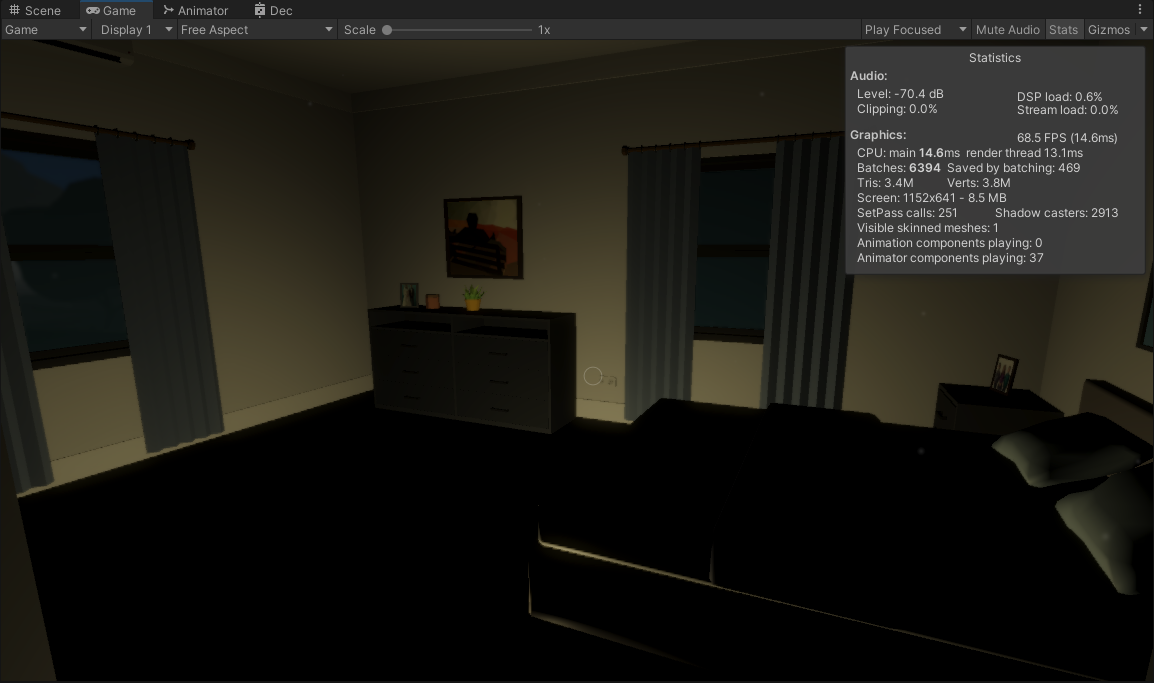
Yeah cause currently it looks like https://i.imgur.com/VMilsg1.png
 zenith aurora
If it's one big mesh, you'd have to slice it into parts
sick sand
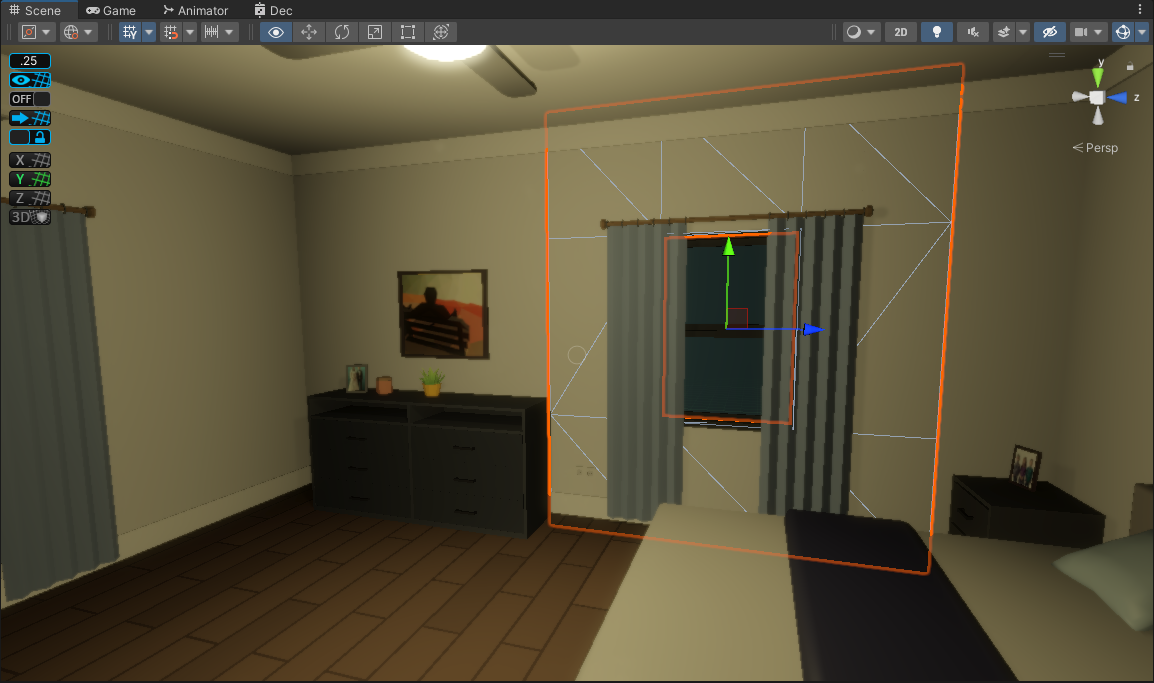
They're all separate luckily. https://i.imgur.com/9VLhWui.png

 zenith aurora
That saves some trouble
sick sand
It seems costly to have separate meshes just for this..
zenith aurora
I doubt it
Assuming you're using forward rendering, preventing meshes from being lit unnecessarily could be a considerable boost
In forward rendering path meshes will be rendered once again for each light that reaches them
And if you're on URP, SRP batching will handle separate meshes just fine
zenith aurora
Speculating about performance is a bit of a hit or miss but if anything this technique may improve things
sick sand
So I re-worked lighting and made my own fake layering system, so the light switches on the map have a 'Uses Layers?' boolean which, when enabled, looks at the 'layer name' property. For example, 'Downstairs'.
There's two invisible cubes that separate downstairs and upstairs, with the mesh renderer hidden and the box collider set to be a trigger. These are Layer_Downstairs and Layer_Upstairs
In the player controller, it runs a very small Physics.OverlapSphere check to see what object the player is inside, and returns true if it matches what lights are currently illuminated.
This does work fairly well, however there's still a noticable amount of light bleed between trigger points.
So toggling lights, while it's a nice system, doesn't seem entirely feasable. At least for smaller, house-based maps. It might work better on a larger scaled map.
Player Controller:
    public bool isInRangeOfLayer(string lightLayer)
    {
        Collider[] c = Physics.OverlapSphere(transform.position, 0f);
        foreach(Collider co in c)
        {
            if (co.gameObject.name.Contains(lightLayer))
            {
                return true;
            }
        }

        return false;
    }
Light Controller:
... (toggling code, but the important part here is OnUpdate)
    void Update()
    {
        if(useLightLayering)
        {
            if (togglableLightList.Length > 0)
            {
                foreach (Light light in togglableLightList)
                {
                    light.transform.parent.gameObject.SetActive(playerController.isInRangeOfLayer(selfLightLayer));
                }
            }
        }

        switchToggler.transform.localRotation = Quaternion.Lerp(switchToggler.transform.localRotation, Quaternion.Euler((lightsAreEnabled ? -10f : 10f), 0f, 0f), 5 * Time.deltaTime);
    }
I don't really want to go with the multiple mesh route as it'll just get messy over time, and it would also require me to specify the light mask on each object in the room as well which, is tedious and probably prone to breaking at some point.
The other options were, and this was last discussed with you a few weeks back I believe, was to basically meshify the whole house and combine all of the vertices/edges/faces into one. I'm not good at doing that and I have no where to begin. I tried using the 'Export to FBX' option after selecting all the walls and floors, but this resulted in a loss of the texture and also, when lights were applied there was still bleeding - even after me merging the objects in Blender. I'm not sure if there's an easier way of handling that.
Alternatively, something with regional lightmapping where only that room that the light is turned on in has it's lightmapping updated? I'm not sure how to go about that. Baked Lightmaps are my weak spot.
zenith aurora
I'm not sure how merging the house will help
Baked lightmaps would solve this problem but they are entirely static and not "updated" at any point
Enlighten's precomputed realtime GI is another option if you need realtime changes to lights
sick sand
I have Realtime GI enabled currently. This is the result between separate rooms I have setup.
Correct me if I'm wrong, but if this was all one object and not separate meshes/objects, then this bleeding wouldn't occur?
 zenith aurora
sick sand
I have Realtime GI enabled currently. This is the result between separate rooms ...
zenith aurora
sick sand
I have Realtime GI enabled currently. This is the result between separate rooms ...
Object separation has no effect on light bleeding, for better or worse
What type of realtime GI? Enlighten?
Where in the screenshot is the light bleed?
sick sand
I believe it's Enlighten. I followed https://docs.unity3d.com/2019.4/Documentation/Manual/realtime-gi-using-enlighten.html and just turned on the Realtime GI. The light source is in the first room, whereas it's bleeding into the second. Unless I'm not understanding what Light Bleeding is and this may be a different term


Slapped a roof on top just to make sure there's nowhere the light could escape.
 zenith aurora
sick sand
I believe it's Enlighten. I followed https://docs.unity3d.com/2019.4/Documentati...
zenith aurora
sick sand
I believe it's Enlighten. I followed https://docs.unity3d.com/2019.4/Documentati...
Ah right, that's a wall in the middle
I would guess Enlighten's lighting isn't precomputed in this case
It's not a "true" realtime GI solution, and needs generating the same way as baked lighting
zenith aurora
Baked and precomputed GI are much the same, just that precomputed can react to moving lights and color-changing emissive materials
sick sand
Is there a different way to be baking them? I just did it and it didn't make a difference
 zenith aurora
sick sand
zenith aurora
sick sand
The geometry probably has to be static, and the light probably of type mixed
Or otherwise be flagged to contribute to realtime GI
sick sand
'Mixed' is disabled as I have Mixed Lighting disabled in the scene. But the light is 'Realtime', I have real-time GI enabled and the geometry is static. It seems to be outputting same results
zenith aurora
sick sand
'Mixed' is disabled as I have Mixed Lighting disabled in the scene. But the ligh...
I guess mixed light types are only used in the traditional baked lighting
I don't remember the exact process of generating Enlighten's lighting, but I'm pretty confident it's not working at all in the screenshot