
#archived-lighting
1 messages · Page 3 of 1
 drifting panther
 thorny goblet
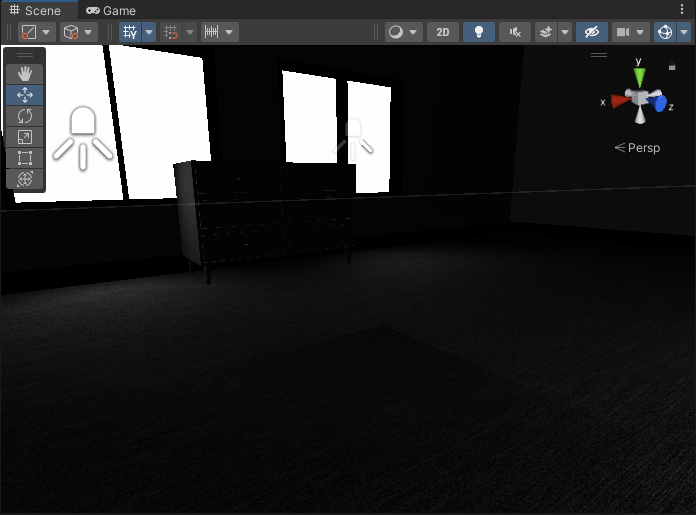
What is causing this square?
thorny goblet
What is causing this square?
check the ceiling for any colliders that could possibly be causing this shadow
 wary whale
why is Unreal lightning better than unity? what makes it more beautiful?
can i have similar results on unity URP?
 mellow sierra
Unreal has lighting set up for you out of the box. Unity is more or less a blank slate (in other ways as well). You have to do the work to make it look nice.
 upper fable
wary whale
can i have similar results on unity URP?
upper fable
wary whale
can i have similar results on unity URP?
So yes you can but its harder than with unreal
wary whale
mellow sierra
Unreal has lighting set up for you out of the box. Unity is more or less a blank...
is there any tutorial to get similar results to unreal default state?
like post processing values, etc
mellow sierra
Have a look and let us know
thorny goblet
drifting panther
check the ceiling for any colliders that could possibly be causing this shadow
Its not any collider
it looks liek a glitch
with any type of lighting i use
 limber delta
thorny goblet
with any type of lighting i use
limber delta
thorny goblet
with any type of lighting i use
I'd create a test scene and bring your assets in one by one and see if the error is happening in that scene as well.
thorny goblet
limber delta
I'd create a test scene and bring your assets in one by one and see if the error...
ok
 thorn flower
starting my prototype from blank project again, my terrain is looking way too bright 🤔 some googles are recommending i make sure Lighting is set to Linear not Gamma
However - i'm trying to build for Android, and there was this warning message that Linear is not supported which is why i switched it to gamma
any advice? what should be fixed; the Lighting Linear/Gamma, or something else to bring the brightness down to normal levels
"burning my eyes" kinda bright (this is terrain with sand texture and some blotches of grass texture)

 serene jasper
so guys, i have direction light in my scene which is set to mixed and i baked my light into lightmap which i can see in the scene view that the light is baked, but 1.) the light kinda looks different than the baked one? 2.) it disappears as soon as the light is turned off, which should not happen as the light is baked into a lightmap for static objects, or am i completely missing something here?

i also watched an hour long unity explanation on baking lights and i got all my info from there as well and i am doing exactly same but doesnt seem to work i guess
and here you can see it goes out when i disable light when technically it should still be there cause it is all baked into the lightmap textures?

 eternal pasture
Why do these artifact spots appear when baking light using the CPU? How to fix it?
P.S. There are no artifacts when baking light using the GPU, but I have a weak GPU and I need to bake using the CPU.

 little condor
serene jasper
so guys, i have direction light in my scene which is set to mixed and i baked my...
little condor
serene jasper
so guys, i have direction light in my scene which is set to mixed and i baked my...
That's the correct behaviour. With mixed lighting on the directional light, Unity is aware that the light might move in the scene so it doesn't bake the shadows created by your static objects. Instead it appears to create a sort of ambient/global illumination map and then the directional shadows cast by objects are applied in real-time.
If you bake with the light set to Bake, then the shadows won't disappear when you turn the light off.
 deft fiber
eternal pasture
Why do these artifact spots appear when baking light using the CPU? How to fix ...
deft fiber
eternal pasture
Why do these artifact spots appear when baking light using the CPU? How to fix ...
See if texel validity debug view mode reveals issues (and check lightmap UV overlap for good measure)
CPU or GPU shouldn't make a difference with texel invalidity, but that's what it looks like and it's always a good place to start
eternal pasture
deft fiber
See if texel validity debug view mode reveals issues (and check lightmap UV over...
Thank you so much for the advice! Texel Validity does highlight this part of the model in red, but I checked that the normals are facing in the right direction (outwards). What could be the problem and how can I fix it?

 deft fiber
eternal pasture
Thank you so much for the advice! Texel Validity does highlight this part of the...
deft fiber
eternal pasture
Thank you so much for the advice! Texel Validity does highlight this part of the...
Texel invalidity happens when normals are inverted or in close proximity or in sight of inverted normals
https://forum.unity.com/threads/faq-blocky-artifacts-appear-when-i-bake-a-scene-how-can-i-fix-them.951444/
Using Blender's "face orientation" overlay will give you a clearer picture of if the mesh has inverted faces, but it's also possible that the faces are inverted somewhere else close by
 spice spade
anyone know my lightmaps are grey like this : (

 timber lichen
lightmap baking is always stuck at global illumination baking 0%
 strange elk
Im making a 3d space simulation using urp, where i would like light not to decrease its intensity over range.
(pic 1 = what i dont want)
(pic 2 = what i do want)
Tnx guys


 chilly kettle
strange elk
Im making a 3d space simulation using urp, where i would like light not to decre...
chilly kettle
strange elk
Im making a 3d space simulation using urp, where i would like light not to decre...
i googled a little and found this.
Not sure if it does its job
https://github.com/alexismorin/Falloff-Customizer
GitHub
Interactively adjust light falloff for Unity deferred rendering - GitHub - alexismorin/Falloff-Customizer: Interactively adjust light falloff for Unity deferred rendering
But what you want is to change the Falloff of the Unity light
strange elk
chilly kettle
i googled a little and found this.
Not sure if it does its job
https://github.co...
Thank you
thorny goblet
drifting panther
check the ceiling for any colliders that could possibly be causing this shadow
I think i found the problem, the lights are stacked on each other, so they are attempting to light the same area, which is causing the artifacts.
now im kinda at lost though, im not sure how to only use 1 light and manage to make realistic lighting from the windows
Nevermind fixing the range fixes it
 loud prism
I'm trying to make lighting assets for Tabletop Simulator.
I found a working example that doesn't fit my needs but has a nice flicker I want to copy.
I used a C# script I found to get the effect I was looking for but once turned into asset bundle for Tabletop Simulator I lose the effect, I'm told scripts like this don't work with the asset bundles.
Anyone familiar with this problem and can point me in the right direction?
 bright rune
Hi there
Whats the best way to get a capsule like light for a lightsaber?
chilly kettle
bright rune
Hi there
Whats the best way to get a capsule like light for a lightsaber?
Emissive Material and Bloom Post Processing i think
 oak dawn
chilly kettle
Emissive Material and Bloom Post Processing i think
oak dawn
chilly kettle
Emissive Material and Bloom Post Processing i think
couldn't have said it better
oak dawn
bright rune
Hi there
Whats the best way to get a capsule like light for a lightsaber?
also use a point light if you need light
bright rune
oak dawn
also use a point light if you need light
but that makes it inconsistent and if the saber cuts into an object the light is gone
oak dawn
bright rune
but that makes it inconsistent and if the saber cuts into an object the light is...
isn't that realistic?
bright rune
if it cuts past the middle everythigns gone
oak dawn
i'm saying you should make the saber's material emissive (add bloom for better looks) and attach a point light to the saber (just saying since you may have understood what i said wrong)
bright rune
oak dawn
i'm saying you should make the saber's material emissive (add bloom for better l...
already tried it tho and it wasnt the best
 oak dawn
i added a point light to the saber
so it does
if you mix bloom with a point light it looks great
 ashen mesa
why does this arm look dark for no reason

 full wyvern
I think you could comment some of your shader to decide which code result in this issue.
deft fiber
ashen mesa
why does this arm look dark for no reason
If the normals seem correct in the modeling software, it's also possible that incorrect or unapplied bone transforms can flip the shading like that
 shadow sequoia
how in the world do i add the urp 2d renderer
thorn flower
https://assetstore.unity.com/packages/2d/textures-materials/sky/fantasy-skybox-free-18353#content
what is the difference between cubemap vs. panoramic skybox? and how to know which one to choose
deft fiber
thorn flower
https://assetstore.unity.com/packages/2d/textures-materials/sky/fantasy-skybox-f...
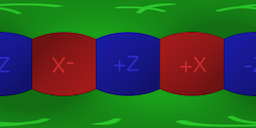
Cubemap has 6 separate images for each direction, panoramic skybox is one image that's distorted like this
 thorn flower
@deft fiber so is it like... more performant to use Panoramic skybox, or something?
how to know which one to choose, if choice is an option
deft fiber
thorn flower
<@166982635950702592> so is it like... more performant to use Panoramic skybox, ...
They might be smaller in size but show more distortion with high-detail skies, but I don't know for sure
thorn flower
in this particular asset i can't notice much difference
deft fiber
I'd use cubemaps but that's just because I'm familiar with those
I doubt it'll make much of a difference
If you've got both at hand you could compare the sizes to verify if I'm on the right track about that
thorn flower
@deft fiber looks like the panoramic image is 2048 x 1024, whereas each of the 6 images for the cubemap is 1024x1024 each
deft fiber
thorn flower
<@166982635950702592> looks like the panoramic image is 2048 x 1024, whereas eac...
It'd be a smaller by a long shot, which is good if you can't notice a big difference
thorn flower
i see, so in this case the panoramic might indeed be kinda more performant than the cubemap?
deft fiber
thorn flower
i see, so in this case the panoramic might indeed be kinda more performant than ...
In this case yes, though a more empirical comparison would be the 2k*1k panorama versus a 512*6 cubemap
thorn flower
right
this is also for a mobile app, so on smaller screens i think any difference if any is much less noticeable
 random sleet
 upper fable
random sleet
upper fable
random sleet
More cascades, smaller shadow distance
 upper fable
Usually all realtime lighting is avoided on mobile games, just precalculated lighting
deft fiber
random sleet
How heavy is the 1 cascade and 4 distance?
This depends entirely on the scene, the character, shadow resolution, whatnot
Only you can aswer that question by testing and profiling performance
random sleet
Yes I understand but I'm asking specifically about the cascade and distance . Is it more performant to have less or more?
deft fiber
random sleet
Yes I understand but I'm asking specifically about the cascade and distance . Is...
Bigger distance means more meshes must be rendered for shadow casting, but bigger distance isn't more expensive to render by itself, it just stretches the shadow resolution thinner
Cascades are about a tradeoff
There's a (more or less) small performance overhead for each cascade, but what cascades do is concentrate higher resolutions closer to camera where you're more likely to need the pixels, while reducing relative resolution for cascades further away
random sleet
Thank mate
 fiery current
[Quesion | URP | Ambient Lighting]
I'm following the learn.unity.com creative core pathway. We are just getting into lighting and learning about ambient lighting.
I have a scene with no lights, and am playing with Lighting -> Environment -> Ambient Color. As I make the color brighter, the scene gets brighter.
I'm confused about this comment in the courseware: "Note: GameObjects need to be flagged as Static to be included in the lightmap for ambient lighting. This is because lightmap data is precalculated and can only be calculated for GameObjects that don’t move at runtime. You’ll learn more about this when you bake lighting for this scene."
I seem to be able to change the amount of ambient light by making the Ambient Color brighter, without ever setting any objects to static. So I'm confused about the comment.

 fiery current
Nevermind, I think I have a better handle on it now. It was useful to google "how to get a completely dark scene".
strange elk
Can someone pls help.
I want to implement that light won lose its intensity over distance.
While searching I only found https://docs.unity3d.com/Manual/ProgressiveLightmapper-CustomFallOff.html
and I have 0 idea how do I implement it.
Any suggestions ???
I'm fairly new to Unity so I'm still learning to use documentation
Edit: I use realtime lighting in urp
 deft fiber
strange elk
Can someone pls help.
I want to implement that light won lose its intensity over...
deft fiber
strange elk
Can someone pls help.
I want to implement that light won lose its intensity over...
That's only for baked lightmapping
For realtime you'd use some solution like this
<#archived-lighting message>
I don't know if that's for URP but if it isn't you'll have to find something else
...Or a shader for each material which uses custom lighting
fiery current
I wouldn't normally ask this here, but it takes so damn long to bake the lights I feel like I need someone to point me in the right direction: When I flip all of my point lights to "baked" from "realtime", and then bake, the scene looks dramatically darker. Not sure what I am doing wrong, any thoughts? (lights and model are all tagged static.. so..?)
baked is the dark one.


Also, this is URP
I'm using a pretty bright Environment Lighting -> Ambient Color, which works with realtime lights.
deft fiber
fiery current
I'm using a pretty bright Environment Lighting -> Ambient Color, which works wit...
Baking lights calculates shadowing for environment lighting, so it doesn't go through everything as with realtime lights, but more likely only lights the outside of the room and through windows
It also looks like there could be some baking errors which prevent lights from working, I suggest to check debug views for texel validity and UV overlap
 meager edge
Is it possible to make raytracing games ( simple copy games like subway surfers, flappy bird 3d)
With rtx 3050 4GB laptop GPU ?
( my full specs - Ryzen 5 5600H , 16gb ram , rtx 3050 4gb, SSD storage PCIe)
Reason - I want to make youtube videos like " I made flappy bird in 2 days but RTX is ON "
deft fiber
meager edge
Is it possible to make raytracing games ( simple copy games like subway surfers,...
Sure? HDRP has ray-tracing features so that's what you like want to use
timber lichen
how can i make these bricks light up as if its a wall and only light up a small part?
Also in addition to that the light shouldnt pass through the wall..?
bricks are on a seperate tilemap than the ground
 timber lichen
This seems to work fine :
https://assetstore.unity.com/packages/tools/particles-effects/hard-light-2d-152208

Use the Hard Light 2D tool for your next project. Find this and more particle & effect tools on the Unity Asset Store.
oak dawn
hello guys, is there a way to soften the shadows more? considering the fact that the shadows are pretty much as soft as a real shadow like 5-10 cm from the shadow, i could try increasing the shadow distance but first of all it ruins the performance a bit and the hard shadows become more pixelated which leads me to believe that on soft shadows some artifacts may appear, or do they?
deft fiber
oak dawn
hello guys, is there a way to soften the shadows more? considering the fact that...
Only HDRP has tweakable shadow softness via filtering settings and light source diameter
On BiRP and URP the best you can do is enable soft shadows
Decreasing shadow resolution makes them visually softer but less accurate
oak dawn
deft fiber
Only HDRP has tweakable shadow softness via filtering settings and light source ...
the only good thing since i'm using BiRP is probably a PCSS asset that i have downloaded that can modify the softness, but first of all PCSS eats performance at least 10 times a day and it uses a different system than unity so the shadows have dithering similar to GTA 4, BeamNG Drive and Euro Truck Simulator 2 (off the top of my head)
 broken quiver
any idea why I get all those errors and can't bake light with GPU for this scene please?
 deft fiber
broken quiver
any idea why I get all those errors and can't bake light with GPU for this scene...
deft fiber
broken quiver
any idea why I get all those errors and can't bake light with GPU for this scene...
The error suggests you're running out of RAM or VRAM
Sometimes I get memory errors which are fixed by restarting the editor or updating GPU drivers
Other than that you can find some potential workarounds by googling the error messages
broken quiver
deft fiber
The error suggests you're running out of RAM or VRAM
I currently have 32Gb or RAM and a RTX 3070, I thought that was enough 😦
broken quiver
deft fiber
Sometimes I get memory errors which are fixed by restarting the editor or updati...
Tried but did nothing. With other smaller scenes it works fine, but not with this one 😦
Also I don't understand why it says that Available GPU memory is 506.9 MB
deft fiber
broken quiver
Also I don't understand why it says that Available GPU memory is 506.9 MB
Restarting your computer would make sure all memory is freed for Unity to use
Other suggestions are to turn off Prioritize View, Progressive Updates and potentially Multiple Importance Sampling
broken quiver
okay thanks 😄
 late quiver
guys the cubes are dark after generating the light

the mode of lighting was different that why any changes on lighting is not appearing
now i have a problem how do i stop reflection from object

 icy inlet
Hi, so, I've been having this issue with shadow cascades recently... Possibly started after we upgraded to a more recent version of unity LTS (2021.3.9f)

you can see that at the edge of the cascade, the geometry is all weird, and the glitching changes with view direction
I've poked at the shadow shaders, tried using a different deferred shader, it doesn't make a difference.... also, this happens in both forward and deferred modes
anyone seen anything like this recently? This is unity 2021.3.9f1 (LTS)
hmm, actually, I just tried it in a test scene... and this doesn't happen... there must be some bad geometry eating up the shadowmap space in the main scene
going to try toggling some objects on/off and see if anything makes a difference
found it. I have a large plane that should just write depth all the way up to the horizon, but the mesh combining pass was picking it up and replacing it with a combined variant that had cast shadows on
it was taking up a chunk of the shadowmap space
disabling shadowcasting on that object fixes it
 fast jacinth
guys any help? my spotlight is getting too overlight to near objects and not lighting objects that are 5 meters away
 late quiver
now i have a problem how do i stop reflection from object
late quiver
late quiver
now i have a problem how do i stop reflection from object
guys
late quiver
fast jacinth
guys any help? my spotlight is getting too overlight to near objects and not lig...
are you using spot light ?
increase the range
late quiver
you need to increase the intensity for that
fast jacinth
like i said
if i increase the intensity it just increase my problem
near object get even more over light
and far objects doesnt change nothing
late quiver
one idea i have
you can use raycast to position your light
if you don't want want to increase intensity
fast jacinth
i think i got this idea
but how would i ray cast in the middle of the flash light
or checking circle around the spotligh?
late quiver
use empty object
late quiver
fast jacinth
or checking circle around the spotligh?
add the raycaster element at center and as a child of torch
fast jacinth
but if it has a wall in the left near to me and a wall in the right far
and middle is point to far
late quiver
umm
fast jacinth
it will bug because flash light should light the left
late quiver
you can use sphere raycast
late quiver
we already have sphere raycast you just have to use it
 shy peak
Is there a way to make an object with emission contribute more to GI without increasing the emission? I have some gem veins I want to cast a glow around them but only a dim light on the cavewalls.
But to achieve the dim GI i want it needs to have some strong emission which is way to much
(I am really unexperienced in lighting so even if there are obvious settings expect that I don't know about them yet, because I don't^^ So any constructive input is welcome)
PS: i also had to reduce most settings to not wait 2h till my (proably wrong) settings are baked. Does that maybe also have an influence?
Thist are my current settings

If someone needs any other information just ask 🙂
shy peak
So I tried out some things and changed some settings since a post from 2 years ago suggested if your GPU isn't been used much it means you don't give it enough to do to properly operate so I increased the Bounces (as suggested in the post) and ... I feel like I simply don't get what Progressive GPU means? I thought it would start working properly now but it's still only the uses the CPU at 30-80% and the GPU idles at 5-10% doing nothing at all?

 acoustic tartan
What setting affects when the distance of when lighting will affect the scene?
Example: Far away not affecting

A bit closer, lighting projected on mesh, shadow also rendered.

Using URP if that matters at all.
Ah I realized its a per object light limit
oak dawn
don't know if URP has deferred rendering, but if it does you should 100% use it especially if there's a lot of lighting in your scene, but if your game is targeting mobile platforms etc. then you should probably keep using forward rendering
deft fiber
oak dawn
don't know if URP has deferred rendering, but if it does you should 100% use it ...
Deferred rendering is one option of many to work around light limits
It has some considerable drawbacks so I wouldn't recommend it without reservation
oak dawn
but most of the time it's better to use Deferred since forward renders the object as many times as the light is affecting it, am i right? but i'm totally not an expert at Deferred rendering so don't really know how that works, but i heard it renders the lights only if you can see them, if an object is blocking the lit up object it will not calculate or render the lit up object if you can't even see it
i also heard it's not even 3D rendering, it's more of a workaround, that's why some people choose Forward+ Rendering, although Unity doesn't have that as far as i know
deft fiber
oak dawn
but most of the time it's better to use Deferred since forward renders the objec...
If you need a big number of lights, deferred rendering may be the only viable way to optimize them
The drawbacks I know of are:
-Higher performance overhead
-No transparent shader support
-No complex lit shader support (due to multipass shading I assume)
-No antialiasing besides post process types
-No camera stacking / overlay cameras
-SSAO has an extra cost
-Terrain blending is inaccurate (and unsupported when using accurate g-buffer normals)
-Baked subtractive and shadowmask lighting modes have an extra cost
-Light layers have an extra cost
In some cases you can make compromises with these, in others not
Forward+ rendering is implemented in 2022.2 beta / URP 14
oak dawn
deft fiber
In some cases you can make compromises with these, in others not
Forward+ render...
oh that's cool to know
deft fiber
oak dawn
oh that's cool to know
If you don't need a huge number of lights close to each other, you can also work around the limits a bunch just by limiting light ranges, slicing meshes into multiple objects and using baked lights for static geometry where applicable
oak dawn
deft fiber
If you don't need a _huge_ number of lights close to each other, you can also wo...
that just means that, when i was making a retro FPS game similar to Quake, i chose forward rendering since most of the lighting there is baked and also there is not a lot of lights, other than the rocket lighting up a bit of stuff dynamically, weapon muzzle flash or whatever you wanna call it, and that's pretty much it, but when i'm making a driving simulator similar to Euro Truck Simulator 2 deferred is better since there's thousands of street lights, car headlights, day & night cycle sunlight with shadows, and overall deferred rendering is just a better choice for open world games similar to GTA
also, Euro Truck Simulator 2 and GTA 5 use deferred rendering for that reason probably. (i know they don't use Unity but the rendering should be atleast similar)
deft fiber
oak dawn
that just means that, when i was making a retro FPS game similar to Quake, i cho...
The cost of rendering lights is not simply the same as their number, but in case of forward rendering the number and complexity of meshes affected by them
With deferred rendering it's per screen pixel lit per light and cheaper per light, given the initial overhead, with meshes still rendered once per light if the light casts shadows
So it's not so clear cut to be able to say one system is for these genres and the other is for those
Correct optimization is specific to every individual scenario
acoustic tartan
So what are the known limitations of light probes? My current impression is that baked light maps + light probes are just strictly superior to realtime lighting with the exception of higher memory usage?
 crude lintel
acoustic tartan
So what are the known limitations of light probes? My current impression is that...
crude lintel
acoustic tartan
So what are the known limitations of light probes? My current impression is that...
Increased memory usage, build size and time to bake them.
deft fiber
acoustic tartan
So what are the known limitations of light probes? My current impression is that...
Types of light rendering are all tools in a toolbox for different purposes, none are "strictly" superior
Baked lightmaps are for static objects
Light probes are the only way to render lightmapped bounce lighting and ambient occlusion on dynamic objects
This leaves dynamic objects without any direct lighting, for which you'll usually have to use realtime or mixed light sources
Baked global illumination is great in quality, but the big drawback is obviously that it can't react to dynamically changing environments
Lightmaps take space on disk, which realtime lights don't
Though shadowmaps of both realtime and baked variety both need to take their space in RAM/VRAM
 uncut coral
Hey...is it efficient to use over lapped uv map for texture and generate another uvs for lightmap in unity?
deft fiber
uncut coral
Hey...is it efficient to use over lapped uv map for texture and generate another...
Yes, lightmapping uses the second UV channel to make this convenient
 amber moss
Hello guys, I'm trying to recreate a solar system and I cannot figure out how to set up the Sun light.
If I use a directional light, only some planets will be lit properly, the planets on the other side of the orbit will be lit from a wrong angle.
If I use a point light at the centre of the Sun, I get very low quality cast shadows, due to the big distances between the planets and the Sun.
How do you think I should tackle this?
 warm basin
Hello,
Can anyone assist me? I'm trying to implement lighting in my game scene, but it's bleeding from the walls in some places.
Unity Version : 2021.3.xx
Light Type : Point light
Render pipeline : URP
Could someone kindly help me in resolving this problem or point me in the right direction?
 chilly kettle
warm basin
Hello,
Can anyone assist me? I'm trying to implement lighting in my game scene, ...
chilly kettle
warm basin
Hello,
Can anyone assist me? I'm trying to implement lighting in my game scene, ...
your walls probably have no lightmap uv generated?
warm basin
chilly kettle
your walls probably have no lightmap uv generated?
we have turned on the lightmap UV generation in the mesh import settings, but problem still persists
thorny goblet
How do i fix this? I have bloom enabled, and its at the intensity i want, but its also affecting bouncing light, making it partially blind the player.
 deft fiber
warm basin
Hello,
Can anyone assist me? I'm trying to implement lighting in my game scene, ...
deft fiber
warm basin
Hello,
Can anyone assist me? I'm trying to implement lighting in my game scene, ...
How does it look up closer?
At a glance I'd assume it's realtime shadow distance cutting off
deft fiber
thorny goblet
How do i fix this? I have bloom enabled, and its at the intensity i want, but it...
You can make reflected light less intense by increasing material roughness and/or by making specular color darker when using specular material workflow
bright rune
Hi, I have a point light in a lightsaber and I want to limit how bright it gets because it goes from green to a bright white when near an object. Is there any way?
thorny goblet
deft fiber
You can make reflected light less intense by increasing material roughness and/o...
Is it possible to make metallic and smoothness not affected by post processing
Any surface that reflects light also has the bloom
deft fiber
thorny goblet
Is it possible to make metallic and smoothness not affected by post processing
Not really
It sounds like you want to render the glow for specific geometry, decoupled from visual brightness
That's possible but it requires custom post processing
thorny goblet
Wait, how do i make Post processing ignore certain layers
deft fiber
thorny goblet
Wait, how do i make Post processing ignore certain layers
You don't, hence it'd have to be an entirely custom effect
thorny goblet
How do i customize it, to work only with certain layers
or maybe just fix my problem with it applying to metallic surfaces
deft fiber
thorny goblet
or maybe just fix my problem with it applying to metallic surfaces
Post processing acts on the whole rendered image, you can't easily exclude anything from it
Creating a custom post processing effect, especially one that needs a custom pass or masking of some sort is not trivial
thorny goblet
deft fiber
Post processing acts on the whole rendered image, you can't easily exclude anyth...
Is it possible to eliminate post processing from certain materials, without losing my metallic look
deft fiber
thorny goblet
Is it possible to eliminate post processing from certain materials, without losi...
As I said, no
You may be able to find some per-object bloom systems on the asset store
thorny goblet
deft fiber
As I said, no
You may be able to find some per-object bloom systems on the asset...
Wait what is making bloom, affect lights
How can i make bloom not affect lights
warm basin
deft fiber
How does it look up closer?
Thanks for your guidance, it was resolved after increasing the shadow distance.
Hello,
These seam is visible on the walls after baking light. Can anyone assist me with this?
Unity Version : 2021.3.xx
Light Type : Point light
Render pipeline : URP
We tried the following, but it did not resolve the problem.
- Enabled Stitch Seams in Mesh Renderer
- Increased UV island margin
- Enabled lightmap UV generation in the mesh import settings

 chilly kettle
warm basin
Hello,
These seam is visible on the walls after baking light. Can anyone assist ...
chilly kettle
warm basin
Hello,
These seam is visible on the walls after baking light. Can anyone assist ...
you mean the seams at the 90° angles in the corners?
warm basin
chilly kettle
you mean the seams at the 90° angles in the corners?
i was talking about these following seams as in the attached photo
 chilly kettle
Do you have a shadow caster Mesh outside?
Often you need additional geometry to avoid this seams in the edges
And the seam from the corner of the window looks like its a problem caused by a to sharp triangle in your mesh
warm basin
chilly kettle
Do you have a shadow caster Mesh outside?
Yes we have a whole backdrop island Mesh with shadow casting and contribution to GI enabled
chilly kettle
i mean directly outsite of your walls there. to avoid light hitting the corner of your room from thje outside
warm basin
chilly kettle
i mean directly outsite of your walls there. to avoid light hitting the corner o...
No, nothing like that
chilly kettle
try to add some geo that blocks the light that can hit the corner from the outside. Should help with this seam there.
 stable sandal
hey yall, im making a 2D platformer and my character has a 2D Spotlight on him but the spotlight shines on the background sprite that i have is there a way to make the spotlight ignore the background?
 fickle meadow
Is it possible for a mesh to ignore specific shadow caster?
upper fable
fickle meadow
Is it possible for a mesh to ignore specific shadow caster?
I dont think it is. Shadow map doesnt contain anything other than the depth map meaning the shadow receiver cant know which object casted the shadow
The way shadow casting is usually implemented, it sounds pretty complicated to do that, I cant think of any easy way atleast
deft fiber
Light layers could do it if you're willing to dedicate one whole layer for the shadow
 viral osprey
Does anyone know why I am getting this texture on the wall?

It used to be really perfect.
deft fiber
viral osprey
Does anyone know why I am getting this texture on the wall?
Check texel invalidity and UV overlap debug views
timber lichen
Does anybody know what I might have broke to make spotlights and point lights not emit unless you set them to ungodly high intensities like 300,000
In hdrp 12
deft fiber
timber lichen
Does anybody know what I might have broke to make spotlights and point lights no...
Exposure values usually
timber lichen
deft fiber
Exposure values usually
Thank you for the reply.
 shy crystal
Not sure if right area, but voxel based objects in my game that are diagonal have this issue where as I get furhter/closer or move the camera there are moving/flickering lines that grow/shrink
Any idea what causes this? Only on diagonal slopes (like in the picture is a diagonal roof that is just voxels stepped downwards mimicking a flat roof) - turning on anti aliasing made these lines 25% less visible but still they are there. Not sure what to do with that information just though I'd mention it.
 viral osprey
deft fiber
Check texel invalidity and UV overlap debug views
viral osprey
deft fiber
Check texel invalidity and UV overlap debug views
Thank you for the reply, I'll look! :D
deft fiber
viral osprey
Thank you for the reply, I'll look! :D
I'm confident it's the first one, but you should always check first when encountering any kind of blotchiness
Note that the data for debug views persists only for the session after light generation
 sinful crystal
for some reason, this doesent show "Universal Render Pipeline"

Does anyone know how to fix this? Thanks! 🙂
deft fiber
sinful crystal
for some reason, this doesent show "Universal Render Pipeline"
URP = Universal Render Pipeline
sinful crystal
oh nvm
deft fiber
@sinful crystal The namings were changed to acronyms and swapped around a bit in some update, and sometimes people mislabel them anyhow so confusion ensues
Basically there's Assets and Renderers
sinful crystal
okay, I got it working now, Thanks!
@deft fiber do you know why "Render Pipeline" is not showing in my settings or has that changed too?

it should be there
deft fiber
sinful crystal
<@166982635950702592> do you know why "Render Pipeline" is not showing in my set...
Yes, moved to window>rendering iirc
sinful crystal
im sorry for bothering you so much @deft fiber but which one do I pick to uprgade scene to 2d renderer
 deft fiber
sinful crystal
im sorry for bothering you so much <@166982635950702592> but which one do I pick...
deft fiber
sinful crystal
im sorry for bothering you so much <@166982635950702592> but which one do I pick...
Render Pipeline Converter now covers all those functions
sinful crystal
okay
this is the last question I promise😅 @deft fiber which one should I pick

because the covert assets is gray
I cant click it
deft fiber
sinful crystal
this is the last question I promise😅 <@166982635950702592> which one should I...
I don't know which pipeline your project is on right now, either of the "convert to 2D", depending
You'll need to click "initialize converters" first, then tick the checkbox(es) which appear as desired, then convert

 deft fiber
sinful crystal
when I click convert nothing happens
deft fiber
sinful crystal
when I click convert nothing happens
Green checkmark says it's successfully converted
I may have misremembered that you should check the box of a category first, then initialize to initialize that category, which should make the actual materials appear
And that there is no URP to 2D, the middle option is to convert 2D to a newer 2D
sinful crystal
deft fiber
Green checkmark says it's successfully converted
I may have misremembered that y...
hmm okay. My scene isn't black though as in the tutorial that im watching. Any idea how to do that? also yeah I proke my promise but U are the only one helping:D
deft fiber
sinful crystal
hmm okay. My scene isn't black though as in the tutorial that im watching. Any i...
I don't recall all the steps off the top of my head, but to use the 2D renderer you shouldn't need more than to have the URP Asset and 2D Renderer created, configured and enabled in project settings, then have sprites using lit sprite materials and 2D lights in the scene
viral osprey
deft fiber
I'm confident it's the first one, but you should always check first when encount...
Okay, the wall you see in the picture I shared is a probuilder. I clicked on this:

Using Unity light bake the whole scene and it solved the problem. Thank you so much.
Do you have any experience with Bakery GPU Lightmapper, @deft fiber?
deft fiber
viral osprey
Do you have any experience with Bakery GPU Lightmapper, <@166982635950702592>?
Nope, Unity's progressive lightmapper only
shy crystal
I have this problem with small lines at distance, these shadow-waves appear and move around the object like a movie screen projecting animated lines on them. I think i've stumbled into somthing a bit bigger than I though, as I've started to look at even my 3d modeling software, and other games themselves. *such as the railroad tracks in rust, they have thin lines right next to each other, and does this effect at distance) Turns out small objects at distance (in anything?) does this? is this a computer graphics tech rendering problem that affects basically everything?
 deft fiber
shy crystal
I have this problem with small lines at distance, these shadow-waves appear and ...
deft fiber
shy crystal
I have this problem with small lines at distance, these shadow-waves appear and ...
Moiré patterns occur even in real life, and any geometry or texture that's smaller than a pixel tends to shimmer between the possible colors as it can only choose one
MSAA type antialiasing and render scale (supersample antialiasing) help alleviate this, whereas post processing based such as SMAA and FXAA less so
Mostly games just avoid situations like that by design
Mip mapping blurs texture details over distance so colors blur together, LOD systems reduce polycounts so meshes don't have tightly packed geometry over distance
shy crystal
I managed to get some 3d cubes and rotate the angle of them and strech to fit the areas needed
to fix this, along with some model changes of thicker models. Thanks for the info had no clue about this
 analog cloud
Ahoy!!! Does anyone know what could cause something like this with lightmaps?

settings are suuuuper low, only because its just for previews sake
 deft fiber
analog cloud
Ahoy!!! Does anyone know what could cause something like this with lightmaps?
deft fiber
analog cloud
Ahoy!!! Does anyone know what could cause something like this with lightmaps?
Check texel invalidity debug view (and UV overlap while you're at it)
Looks like a typical case of https://forum.unity.com/threads/faq-blocky-artifacts-appear-when-i-bake-a-scene-how-can-i-fix-them.951444/
analog cloud
Cheers @deft fiber ! Will take a look
 open coral
Hello, I need to make one object's shadow be turned on but while another object not be receiving it. Basically I wanna turn off another object's shadow on ONLY one particular object.
How should I do that? 😄
The object that receives the shadow need to be able to receive shadows from other objects too
I think i need to get into shaders now
 long pewter
Hello!
Can soemone help me fix that horizon light in HDRP?
When I rotate the sun, the horizon should transition smoothly between light and dark, but instead it creates that light.
 fiery current
I see a lot of light leaks under walls like this one. It's modelled as walls + a single floor plane for the whole apartment. Is the answer to break up the floor into smaller discrete planes for each room?
 timber lichen
how do I make a light not affect the skybox
 dull marlin
Is there a way I can make lights only render based on the position the camera is in? I'm having a lot of lights in my scene and they're starting to clip/cause lighting issues.
Especially when you're on different floors. I can see lights from downstairs bleeding into upstairs and vice versa. If I had a way to be able to determine a select region that only rendered a certain set of objects if the camera was inside it, that would probably work. I know about Occlusion Culling but I don't know if that works for lighting too.
deft fiber
timber lichen
how do I make a light not affect the skybox
If you mean "how to make directional light not affect the procedural skybox" then you cannot exactly
The skybox shader is programmed to always use the brightest directional light's rotation to determine its appearance
You'd need a different shader that uses something else
timber lichen
deft fiber
If you mean "how to make directional light not affect the procedural skybox" the...
so only the brightest affects it?
I could've worked with that
but I already deleted the light so
deft fiber
timber lichen
so only the brightest affects it?
I believe so, the brightest directional light is considered to be the "main light" by many things
timber lichen
deft fiber
I believe so, the brightest directional light is considered to be the "main ligh...
ok
deft fiber
dull marlin
Especially when you're on different floors. I can see lights from downstairs ble...
You could use light layers, if your render pipeline supports it, to separate the lighting on adjacent floors or rooms
It's also an option to disable/enable the lights by script based on camera position
There's no occlusion culling for lights because when meshes are all culled from a light's range, the light doesn't effectively do anything afaik
dull marlin
I could definitely separate the light layers (probably per-floor, per-room would be too much IMO). How would I go about then actually activating those layers?
deft fiber
dull marlin
I could definitely separate the light layers (probably per-floor, per-room would...
I'm thinking of pre-setting the layers, setting them at runtime may be useful but I'm not sure how
I haven't seen anyone do this so I don't know how sane it is, but I would try to have a layer for all floors that need to be adjacent, and a layer for connecting areas which need to be lit by both
Such as layers A, B and AtoB
Lights and geometry on floor 1 would be on layer A and AtoB
On floor 2 they would be on B and AtoB
On floor 3 back to A again
dull marlin
I just went ahead and pre-set them. "Lower Layer" and "Higher Layer" based off the floor/upstairs. I can't remember for the life of me where I actually make those layers render though
deft fiber
Light layers are different from render layers, and their availability (and implementation I suppose) varies by render pipeline
dull marlin
Oh I know, but I thought there was a setting in the camera to pick what light layers render
Or it was somewhere else..
Oh crap, think I see what you mean now.
Might of been using those wrong.
lol
deft fiber
dull marlin
Or it was somewhere else..
Light layers correspond to layers which mesh objects are on
dull marlin
Yeah definitely used them wrong. Technically Render Layers would do the same trick though, I believe
Those are probably togglable in the Camera code too
deft fiber
If render layers can disable lights then yes, that'd be functionally the same as disabling the lights by code I guess
If I understand correctly
viral osprey
Any suggestion on fixing this? I enabled the stitch seams under the Mesh Renderer component.
 dull marlin
deft fiber
If render layers can disable lights then yes, that'd be functionally the same as...
dull marlin
deft fiber
If render layers can disable lights then yes, that'd be functionally the same as...
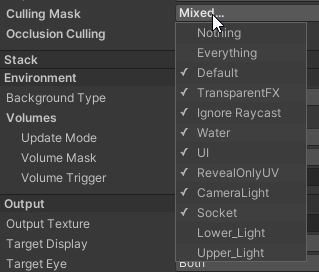
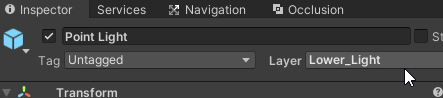
I threw the lights Render Layer under "Lower_Layer" and "Higher_Layer", modified the Main Camera to remove them from the Culling Mask list but they're still showing up. Tried it on other objects too. Am I missing something?
 deft fiber
dull marlin
I threw the lights Render Layer under "Lower_Layer" and "Higher_Layer", modified...
deft fiber
dull marlin
I threw the lights Render Layer under "Lower_Layer" and "Higher_Layer", modified...
I don't think you can cull lights themselves via layers, but this is not something I've experimented with extensively
My first suggestion doesn't require that though
Only that lights are culling mesh objects from different floors
dull marlin
deft fiber
I don't think you can cull lights themselves via layers, but this is not somethi...
I layered the parent the light was attached to with Lower_Layer and that did make it disappear, but I was still able to toggle the light off and on just fine when it shouldn't be enabled at all. Damn
So you were right that you can't layer the lights directly, but I guess because it doesn't matter as the renderer ignores it for lights.
 austere rose
hey. In URP, is there a way to control the diffuse and specular intensity of a directional light separately?
 hot beacon
hi, i am trying to use reflection prob on Realtime, but when i build it and run the proj in the android it didnt reflect anything and the material color become black,does android didnt support realtime reflection probe?
deft fiber
austere rose
hey. In URP, is there a way to control the diffuse and specular intensity of a d...
No, unless you have a custom shader that implements a variable for that in the light calculation process itself
deft fiber
hot beacon
hi, i am trying to use reflection prob on Realtime, but when i build it and run ...
https://forum.unity.com/threads/unity-android-mobile-reflection-probe.308092/#post-3508849 you could try the suggestions on this post and the next ones
austere rose
deft fiber
No, unless you have a custom shader that implements a variable for that in the l...
thank you
deft fiber
austere rose
thank you
Modifying the light calculation in URP is relatively hard since it comes so prepackaged, but it's not an impossible idea
HDRP for example has light diameter/radius which does pretty much that, so I wouldn't be surprised if there's some advanced lighting asset out there that does it for URP
austere rose
It's not super important for my project so doesn't sound like it's worth it, thanks again
 weak meteor
urp project.light leaks.
set normal=0
light leaks at vertex point.


how can I reduce the light leakage to empty?
hot beacon
deft fiber
<https://forum.unity.com/threads/unity-android-mobile-reflection-probe.308092/#p...
thank you, i was already reading that post but somehow it just flew out of my head, after re-read it just now i finally understand it lol
weak meteor
hdrp project.light leaks at vertex point as default.
 deft fiber
weak meteor
urp project.light leaks.
set normal=0
light leaks at vertex point.
deft fiber
weak meteor
urp project.light leaks.
set normal=0
light leaks at vertex point.
It's usually for the best to keep shadow bias settings at default to prevent shadow problems
Disconnect faces or corners with sharp normals will appear as holes to shadow casters in almost all situations, so it's best to pad them with shadows-only meshes or at least use smooth normals where possible
weak meteor
Light leaks from the edges with default shadow bias settings
deft fiber
weak meteor
Light leaks from the edges with default shadow bias settings
Yes, which is why you should work around it with extra shadow casters
If you can fix the problem with extreme bias values, that's good, but I expect more problems that way
 wheat thicket

where is this probe assigned?
this is a probe that was in a sample scene i believe, since then the scene has been redone.. the probes no where in the scene yet, i can still bake it and get it show the skybox..
can't find where its linked to this particular scene
 deft shale
does anyone know why lighting occurs like this?


ah nevermind, disregard this. It was an issue I made in blender
upper fable
deft shale
Thats called "z-fighting" in case you want to learn more about it
timber lichen
So uh
Everytime I bake it just loops this


Unless I start moving my camera around my scene
I closed unity I've reset my pc nothing has worked so far and I can't seem to figure it out
if anyone can help me I'd like that but I do have 3 reflection probes
deft fiber
timber lichen
Unless I start moving my camera around my scene
If it seems specifically tied to this, you could try disabling progressive updates / prioritize view settings
Otherwise I think getting stuck at "preparing bake" might be a an issue of memory/vram, especially if there are too many/complex meshes marked as lightmapped
All lightmapped meshes should have relatively low polycounts, and small static objects can be marked to recieve baked GI from light probes instead of lightmaps to save lightmap memory
uncut coral
I thought light probes only used for dynamic objects.
Everyday we learn something new....ty
long pewter
Hello
Can someone help me figure out how to fix the horizon sunset problem in HDRP?
I tried to solve it for some time but couldn't
 paper lichen
I'm currently having an issue where in the editor, the lighting from my directional light works just fine. However, when I build the game, it's like the scene has a giant shadow casted over it. Here's an image of what I'm talking about (top picture is in the editor, bottom is in the build). This project uses HDRP
 deft fiber
paper lichen
I'm currently having an issue where in the editor, the lighting from my directio...
deft fiber
paper lichen
I'm currently having an issue where in the editor, the lighting from my directio...
First things I'd check are if you've hidden some geometry in-editor which should be revealed by the eye icon, and that the quality setting you're building with is the same quality setting you're editing with in case there's differences in shadow settings or something
If all else fails I expect Frame Debugger or RenderDoc could reveal what's actually going on
paper lichen
deft fiber
First things I'd check are if you've hidden some geometry in-editor which should...
Thank the lord I just fixed it (I think). I believe what was actually happening was that the upper terrain layer I had had a hole in it to make room for the dug out tunnel, but that hole was still casting shadows in the build. I turned off casting shadows for the terrain, and I think I'm all good now.
 iron dome
Baked lighting. How do you actually DO this?
https://docs.unity3d.com/Manual/GPUProgressiveLightmapper.html

 naive sun
Hey Guys, I'm overdoing my current project and I want to know your opinion:
Which Color for the Lamps do you think looks better? Blue(❌) or Yellow(✅)?
 hot beacon
hi, i want to make mirror for my project (simple mirror not like that two way mirror) for VR project (using URP), and my boss told me he doesnt want to use second camera for the mirror because it's very expensive performance wise, and when i tried using reflection probe the reflection sometimes looks weird, is there any other way? thanks
deft fiber
hot beacon
hi, i want to make mirror for my project (simple mirror not like that two way mi...
Nope
Reflection probes won't work for that unless they're realtime, and if they're realtime they're worse than an extra camera for the purpose
(cube projected prebaked reflection probes would create proper mirror reflections for rectangular rooms, but don't expect to see any dynamic objects or accurate details in the reflections)
hot beacon
deft fiber
Nope
Reflection probes won't work for that unless they're realtime, and if they'...
yeah, you are right, i tried realtime reflection probe and the project run very laggy,and thank you
 storm flax
a realtime reflection probe is probably worse than just using a second camera, as you’re rendering the game six extra times - one for each surface of a cube
hot beacon
storm flax
a realtime reflection probe is probably *worse* than just using a second camera,...
how about plannar reflection from HDRP? is it still better to use second camera instead?
storm flax
as far as I know planar only renders the scene a single extra time, so that might be alright
it might be worthwhile experimenting and seeing what works better
hot beacon
ah ok, thanks for your information
hot beacon
storm flax
it might be worthwhile experimenting and seeing what works better
yeah i will do that, thanks
deft fiber
hot beacon
how about plannar reflection from HDRP? is it still better to use second camera ...
That is the extra camera method your boss wants to avoid
 zealous trout
Does anyone know why my lighting is so messed up?

It was working fine not too long ago
It seems to be a gpu issue? I have no idea why though
Another issue im having is these weird lighting artifacts? I have no idea how to remove them

There is no UV Overlap
 zealous trout
and it's still doing it
 deft fiber
@zealous trout This may be a bit of a long shot but try baking with/without multiple importance sampling
iron dome
iron dome
Baked lighting. How do you actually DO this?
https://docs.unity3d.com/Manual/GPU...
Bump
deft fiber
iron dome
Bump
VRAM isn't limited by any setting as far as I know, so that line suggests to get a better GPU 😂
zealous trout
deft fiber
<@362375360274497536> This may be a bit of a long shot but try baking with/witho...
That seemed to fix it
 glass mulch
I need some advice on stupid efficient lighting

i'm looking to have each one of these crystals have a light source on each of these crystals
i'm not sure how many are in this field alone, but . . .a lot
likely in the low hundreds
this field alone is aproximately 9/10ths of my hierarchy list
upper fable
glass mulch
Id really seriously consider faking the effect in some way (like bloom pp effect) or if thats not an option, deferred rendering is your best bet
glass mulch
would there be any way to locallize the bloom to just the crystals?
 lunar pollen
glass mulch
would there be any way to locallize the bloom to just the crystals?
lunar pollen
glass mulch
would there be any way to locallize the bloom to just the crystals?
use an emmisive material
- bloom
= glow
upper fable
glass mulch
would there be any way to locallize the bloom to just the crystals?
Make them brighter so they will glow more than the environment
glass mulch
the shader on them is emissive, I turned up the emissivity and bloom but that tanked performance
would having a billboard that mimics glow on the base of the crystals work?
deft fiber
glass mulch
the shader on them is emissive, I turned up the emissivity and bloom but that ta...
You don't have to increase scatter or intensity or any setting that fundamentally changes the cost of the bloom effect, just the threshold value and material emission intensity in tandem to make it show through (unless you mean to say that bloom in general tanks your performance)
deft fiber
glass mulch
would having a billboard that mimics glow on the base of the crystals work?
That's what I'm suggesting
glass mulch
deft fiber
You don't have to increase scatter or intensity or any setting that fundamentall...
that actually seems to do the job really well
I could likely combine approaches
deft fiber
glass mulch
I could likely combine approaches
Sure that's doable
glass mulch
the FPS seems to drop to the 30's every couple of seconds
 deft fiber
glass mulch
the FPS seems to drop to the 30's every couple of seconds
deft fiber
glass mulch
the FPS seems to drop to the 30's every couple of seconds
The stats panel is not an effective tool for analyzing performance
You'll want to make a test build connected to the profiler
https://docs.unity3d.com/Manual/profiler-profiling-applications.html
glass mulch
thank you for your help Everyone!
 near bison
Does anyone know how Stray casts real time shadows from the cat onto objects even though most of the lighting appears to be baked? Is this something that can only be done with deferred rendering? I have to use forward because I'm doing VR. Is it possible to render a shadow into baked lighting without illuminating the surface? I was thinking maybe what they've done is calculate the dominant light direction throughout the world, and then they somehow calculate a soft shadow to project onto the surface below the cat. I've noticed the robots seem to just cast circular shadows by their feet, but the cat shadow seems more detailed.
 placid sierra
Hi everyone. In my editor, the lighting looks like the first image, but whenever I build the game it looks like the bottom image. Does anyone know why this is happening?

 little condor
near bison
Does anyone know how Stray casts real time shadows from the cat onto objects eve...
little condor
near bison
Does anyone know how Stray casts real time shadows from the cat onto objects eve...
Maybe what you're referring to is called 'Mixed lighting'.
In Unity you can set your Directional light mode to be 'Mixed' and any static geometry such as terrain and buildings will have baked shadow applied. You non-static objects, like moving characters, will cast dynamic shadows that will then be blended into the baked shadows.
near bison
little condor
Maybe what you're referring to is called 'Mixed lighting'.
In Unity you can set...
No, I'm aware of mixed lighting. Mixed lighting casts hard shadows from dynamic objects and only when they're directly lit by the light. An avatar inside a house lit only by bounced light from outside will not cast a shadow because it is technically in the shadow of the house.
Stray does have a lot of lights in its world so I suppose they could have used mixed lighting, but their shadows look way too soft to be mixed lighting as I've seen it.
little condor
I haven't played Strayed, so I'm not sure what the lighting effect you're after is. But mixed lighting is usually pretty good, as long as the lights that cast static shadows don't change. Soft dynamic shadows blend with static shadows fine too.
Or, maybe it's raytracing?
placid sierra
placid sierra
Hi everyone. In my editor, the lighting looks like the first image, but whenever...
I had this issue in March when I first installed URP and I remember fixing it, but I’ve forgotten
timber lichen
Hi,
I have a room that can be dark but you can turn on the light.
To do this with baked lightning, I have to switch between both mappings
But
What if I want to dim the light from high brightness to low brightness
I think that isn't possible with baked lightning?
I noticed when using realtime lightning like point lighting. The lights go through the walls. I also played with the shadow but that doesn't make any differents
thats why I was thingking to use area light what only works with baked lightning
Are there any solutions for this situation?
deft fiber
placid sierra
Hi everyone. In my editor, the lighting looks like the first image, but whenever...
Lighting needs to be generated for each scene for there to be an ambient light probe when switching scenes
The problem doesn't occur in editor because the editor generates them on the fly
placid sierra
deft fiber
Lighting needs to be generated for each scene for there to be an ambient light p...
So, I just need to regenerate my lighting?
deft fiber
placid sierra
So, I just need to regenerate my lighting?
Yes
Note that "baked lightmapping" doesn't need to be enabled for it
placid sierra
deft fiber
Yes
Note that "baked lightmapping" doesn't need to be enabled for it
Thanks so much. I wonder why I had to bake it again though. I was messing around with PlayerPrefs and it happened. I’ll fix it nonetheless.
timber lichen
placid sierra
Hi everyone. In my editor, the lighting looks like the first image, but whenever...
You need to generate lighting
Oh yeah answered already
 next eagle
Does anyone have an idea why the floor and backwall don't show up in my reflection probe when I bake it? 🤔 I am kind of stumped. They don't seem to be different in regards to settings but im probably missing something.

 stark temple
next eagle
Does anyone have an idea why the floor and backwall don't show up in my reflecti...
stark temple
next eagle
Does anyone have an idea why the floor and backwall don't show up in my reflecti...
Are they marked as reflection probe static?
 hard grail
Does anyone know why my realtime lighting looks so different to baked?
It makes it incredibly hard to create a good workflow of making a scene when everything looks vastly different after spending hours baking it.
I'm also not talking slightly different. I setup a little test light in my scene baking only one light and its about 5-6x brighter than my real time light.
What's the deal?
It also makes no sense to me that one baked light at a low resolution takes 5-8 minutes to bake. I have a 3080 RTX...
deft fiber
@hard grail I can make a wild guess why that happens, or you can show before/after pictures of the scene + lightmapping settings used and I can make a more educated guess
hard grail
Yeah sorry I'm just setting up images

I appreciate my lightmap resolution is 64, which is very low. I tried this with 2048 and it does the exact same thing give or take
On top of this. This is the only light set to 'baked' in my scene, and the baking process for this one point light at low resolution takes approx 10 minutes...
The real time light settings for this point light is 40,000 lumen, which should be very bright. The baked lighting probably seems more accurate given these values. That being said, it doesn't help the situation that I can't possibly sit here adding light by light and waiting for it to bake for 10 minutes each time before I know what it looks like.
deft fiber
Lightmap bake time is largely based on the complexity of static meshes, especially ones set to recieve lighting from baked lightmaps instead of light probes
If you want to decrease bake complexity it's better best to reduce "lightmap resolution" and keep max lightmap size at a properly high value
Decreasing the direct, indirect and environment samples (by half, for example) is a decent way to speed up baking, but lightmap resolution value is the most significant factor out of them
hard grail
What are your thoughts regarding the massively different look of these lights?
deft fiber
hard grail
There's a harsh difference in brightness on the adjacent floor panels, which suggests to me they don't have valid lightmap UVs
So the lit texels are covering the whole panel
hard grail
Okay, is there a way to confirm this or even fix it?
deft fiber
hard grail
Okay, is there a way to confirm this or even fix it?
The first thing is to make sure "generate lightmap UVs" is enabled in mesh import settings
That usually fixes it
hard grail
Okay, just checked, that was not checked...
It looks different already but let me see after bake is complete

Looks different, still super bright though
deft fiber
hard grail
It looks different already but let me see after bake is complete
When doing test bakes it's also hugely helpful to disable all noncritical geometry, or use a second tiny test scene
My test bakes usually take less than 10 seconds on a 3070 on comparable settings, though I use URP
@hard grail Oh I just spotted your max bounces is 8
iirc the docs don't recommend higher than 2 or 3
Specifically due to bake time concerns
deft fiber
The console also warns about the UV problem
 hard grail
Wait, it lets me now, weird
deft fiber
Correction, "values higher than 10 might lead to significantly longer bake times, but 2 is the default and probably suitable for most cases
hard grail
Okay, Mixed lighting baked seems to generate the same brightness of my real time lights
But when the light is set to baked, its 10x brighter...
That being said ,your changes has made my baking take about 5 seconds now
But I don't understand why baked lighting does this
hard grail
Yeah, I've tried everything here, all my baked lighting just seems way brighter than if I used real-tiem
 winter moth
can I make it so that a point light is not extremely bright at it's center point in URP? Basically a point light with a maximum brightness or something? I have been trying to achieve RTS/city builder style lighting around units and using point lights just above units are way too bright when very close to a tree or other mesh
It seems like a really common thing to want to do, but I'm having trouble finding any guides online or advice from google searches
timber lichen


Ugh
It's stuck on this
It's just constantly preparing bake
Flickering up an down
These are my settings

How can I fix this?
deft fiber
hard grail
But I don't understand why baked lighting does this
That's something I haven't seen before either
Possibly something specific to HDRP
deft fiber
timber lichen
Stuck at preparing bake may suggest that polycounts for static objects are too high
timber lichen
And how does one lower it
deft fiber
Use less complex meshes
That's very generic advice though, I'm not sure if that's the specific issue in your scene
timber lichen
I’m new to this
I need like
Spoonfed information
Because idk what to change or do
Because for some reason
If I move my camera it starts to bake
deft fiber
timber lichen
Spoonfed information
That's not an option unfortunately, unless you're willing to hire a personal tutor
timber lichen
I mean
I’m just trying figure why it only bakes when my camera moves
And glitches when it doesn’t
deft fiber
timber lichen
If I move my camera it starts to bake
I would confirm that there is no bake in process, auto-generate is off and then restart the editor
timber lichen
I’ve done that
Turning it off an on again isn’t going to help it is the most basic form of tech support
I do appreciate your advice
deft fiber
timber lichen
Turning it off an on again isn’t going to help it is the most basic form of tech...
I can assure you that technique has solved many problems, even here
timber lichen
deft fiber
I can assure you that technique has solved many problems, even here
And yet as mentioned previous
timber lichen
timber lichen
I’ve done that
^^
hard grail
Thanks @deft fiber for your help anyway mate
iron dome
Any recommendations on how high to set this value? I want them soft but I don't want to bake 3 times and waste 40 minutes testing it out. What's a max value before they're too smoothed? 2? 5? 50?
 weak meteor
Placed a reflection probe.
If you move the viewpoint, the inside of the mirror will not move.
What should I do?
(The level is importing UE samples)
deft fiber
weak meteor
Placed a reflection probe.
If you move the viewpoint, the inside of the mirror w...
This is how reflection probes work, it's just a baked 6-sided image
Some workarounds are to use box projection to give perspective rendering to the six sides, or the realtime setting and move the probe along with the object that needs to reflect
Don't expect full physical accuracy with either method though
To clarify the second option doesn't help with moving viewpoint, but it does with a moving reflective object
weak meteor
Did it.
simply couldn't
weak meteor
deft fiber
This is how reflection probes work, it's just a baked 6-sided image
Some workaro...
i could by hdrp
i will discover by urp.
deft fiber
weak meteor
i could by hdrp
i will discover by urp.
These limitations are fundamental to reflection probes across all pipelines
You'll need another reflection system entirely, such as screen space reflections or ray traced reflections which are offered on HDRP
limber delta
Hey guys, any idea why those light "splotches" show up? I'm on Unity 2021.3.0f1 and URP. I went with high direct and indirect samples as well as lightmap resolution and the resolution seems to have made it better (was worse), but there are still artifacts. Thanks


Ok, seems like upping the resolution to 120 did it 😅 Feels fairly high though. Not too bad bad on the lightmap sizes or bake time so I guess that is what I need to do for final bakes.
(I did lower direct and indirect samples by 50% but changed min and max bounces to 3 and 5)
 thorny goblet
https://i.imgur.com/Xty7YNQ.png How do i fix it, this is caused from two Lights attempting to light the same area?
 iron dome
Is there a way to have unity FBX files check generate lightmaps by default? Feels bad when I bake 30 minutes and then forget a single small models generate lightmap UVs option, and have to rebake it all again and then realise there was another model that didn't have generated light map UVs etc. lol.
 daring haven
winter moth
can I make it so that a point light is not extremely bright at it's center point...
daring haven
winter moth
can I make it so that a point light is not extremely bright at it's center point...
Have you tried fiddling with Radius on the light? No light emits within that radius, so if you set it bigger I think you won't get the intense center point (but you also get no light inside the radius). I tried a weak light with a zero radius and a brighter light with a bigger radius - but it was not great for my case.
 worthy forum
Are light probes some kind of joke ?
timber lichen
worthy forum
Are light probes some kind of joke ?
Can you show your probe setup, looks like you did something wrong
shy crystal
In scene view the light works, and in the game it does... until you call any sort of way to disable/enable the light (including just setting color alpha etc) once the light is changed to an off state it is permanently off and never is able to shine again UNLESS i set the intensity to something like 55555 and then it gives everything a shadow but does show up just like in scene view.
Any ideas why this is happening?


Second picture shows the light working as intended (on enable/disable of any kind) if intensity is set to very high but again, causes a giant shadow on the truck
deft fiber
shy crystal
In scene view the light works, and in the game it does... until you call any sor...
I haven't seen anything like that happen before, but I recommend against using a light for that purpose if you want just the light itself to be lit up
Emissive materials would be cheaper and more effective
shy crystal
@deft fiber I guess I was trying to do it the "old" way(based on some info I looked up apparently) and didn't' really know about emissive materials (New to this all). Managed to get it working now, thanks!
 wheat dune
Not a general working on unity, can anyone tell me how I can fix this issue.

My Scene view is very bright but my game very is dark. How can I fix that so both look the same?
 strong python
Hi! my blender models are 100% without overlapping, what is still causing these light artefacts in many places? I am using gpu progressive lightmapper and urp.
 deft fiber
strong python
Hi! my blender models are 100% without overlapping, what is still causing these ...
deft fiber
strong python
Hi! my blender models are 100% without overlapping, what is still causing these ...
Do you specifically have lightmap UV generation enabled in mesh import settings?
strong python
deft fiber
Do you specifically have lightmap UV generation enabled in mesh import settings?
no, i want to use it from blender
deft fiber
strong python
no, i want to use it from blender
That's an option, but why?
strong python
deft fiber
That's an option, but why?
as i can see it is is not accurate and sometimes has artefacts too. And also if mesh has hundred thousands vertices (disaplacement) unity just freezes on import
i spend a lot of time to make good uvis and i thought this is enough to make perfect lightmapping
deft fiber
strong python
as i can see it is is not accurate and sometimes has artefacts too. And also if ...
I usually recommend against trying to make manual lightmap UVs because of how much tweaking it requires and due to how subpar blender's automatic UV operations are for the purpose compared to Unity's
In this case I'd assume the lightmap resolution is too low and there is either no margins or too small margins so the color bleeds between islands
I don't know your specific case but running into that kind of vert issue may suggest that it's better to substitute polycounts with normal+parallax mapping or slice meshes into segments, for more reasons than just lightmap processing
strong python
deft fiber
I usually recommend against trying to make manual lightmap UVs because of how mu...
this building, i showed, does not have so many polygons, so i tried to auto generate uvs in unity and it became even worse, maybe resolution is low i dont know. This is my settings:

Enlighten lightmapper can help as it does not take into account uvs but, when the scene is very large, i ran out of ram during hours of lightmapping
deft fiber
The most important part is to figure out what the problem exactly is with the lightmaps / UVs
The lighting window has a tab to view the baked lightmap which can give important clues
Meshes have their own settings for how to generate lightmap UVs which may be necessary to tweak, though in most cases the defaults are fine
The most common problems I see is the lightmap running out of resolution or max size to fit all the UV regions in
Or the meshes are have problematic unit scales which can lead their scale on the lightmap be off by a huge factor, skewing the whole process
strong python
deft fiber
Meshes have their own settings for how to generate lightmap UVs which may be nec...
you mean meshes have settings for lightmaps if i generate it in unity?
deft fiber
strong python
you mean meshes have settings for lightmaps if i generate it in unity?
Yes
I also recommend starting with default lightmapping settings and tweaking them proportionally and conservatively
You're probably getting diminishing returns with those sample counts
https://docs.unity3d.com/2019.1/Documentation/Manual/GPUProgressiveLightmapper.html The lightmapper documentation gives some guidelines for what kind of values would be reasonable
strong python
deft fiber
Yes
what are problematic unit scales?
deft fiber
strong python
what are problematic unit scales?
FBX files sometimes import with a scale of 100 or 0.01 depending on what scaling mode is used both on export and import, so you may end up with a single mesh that eats up most of the lightmap regardless of its actual size, or is drawn so small it shows nothing but artefacts
You'd look for mesh renderer gameobjects with those scales or at the lightmap to see if there's obviously odd partitioning
strong python
scale is 100 indeed
deft fiber
All gameobjects ideally should have a scale close to 1, and in mesh import settings a scale that makes them appear normally at the scale of one
"scale factor" and "convert units" have an impact on the practical scale if I remember correctly
The "scale in lightmap" setting also impacts this, but probably best used for small tweaks on individual objects
strong python
scale factor is 1 and convert units checked, and object in the scene has scale 100
is it about fbx export settings?
deft fiber
strong python
is it about fbx export settings?
Both export and import matter, they just need to be in agreement
Iirc "apply fbx unit scale" in blender should make this scale stuff work right without tweaking, but there were a lot of options
In that case I would try scaling object in scene to 1 and setting scale factor to 100*, expecting that lightmap UV will then be generated at correct scale
strong python
deft fiber
Both export and import matter, they just need to be in agreement
Iirc "apply fbx...
ok i will thing about all of this, thank you very much!
deft fiber
Is the level geometry marked static?
If the concept seems unfamiliar I recommend reading the documentation's guide to light baking or watching a tutorial video about it
I expect every tutorial mentions it since it's a fundamental part of the process
Such as https://youtu.be/okYhs6kQ0xw
If you have a capable GPU, you can use GPU baking instead of CPU which should be orders of magnitude faster
And for test bakes I recommend you decrease "lightmap resolution" by 25-75% to reduce quality but increase speed, depending on the balance you want
The time estimate can swing a lot
You can find answers easily in many cases by googling the exact error or description of problem
https://docs.unity3d.com/Manual/ProgressiveLightmapper-UVOverlap.html
 still flare
hey i posted this in URP channel but maybe someone here can help so :" i wanted to make a demobuild of my project today in 3DURP unity 2021.9f1 and my build is way darker than in unity editor scene view
can someone help?"
timber lichen
can anyone tell me what are these weird colors i get after baking the light

the wall supposed to be only white
what is that yellow and light red colors
strong python
deft fiber
Both export and import matter, they just need to be in agreement
Iirc "apply fbx...
Hi! i spent all day tweaking my mesh, uvs and export, import settings and it didnot work( i tried to scale uvs, make big margin between islands, increse lightmap resolution (up to 100) and lightmap size, change scale export settings, and nothing. I noticed that near by objects on the scene influence on lightmap too (indirect light?) and problems appear on small parts of the mesh. For example little windows in array or some tower ornament. If i make just walls, for tower for example, everything is fine!
deft fiber
strong python
Hi! i spent all day tweaking my mesh, uvs and export, import settings and it did...
Did you check lightmap debug views in addition to UV overlap, such as texel invalidity?
And did anything seem off in the lightmap textures themselves
Looking at the texture asset may reveal issues not apparent in the scene view
strong python
deft fiber
Did you check lightmap debug views in addition to UV overlap, such as texel inva...
looks normal
 deft fiber
strong python
looks normal
deft fiber
strong python
looks normal
Red parts are not good, but they don't seem to be a cause of the specific issue
strong python
also, i can see that some light illuminates, but what to do with this information
 timber lichen
why is that part of the wall has this weird UV chart
deft fiber
strong python
also, i can see that some light illuminates, but what to do with this informatio...
In this place the red texel invalidity does seem to coincide with the illuminant blotch
 sterile iron
How to fixe that pleas?
 deft fiber
sterile iron
How to fixe that pleas?
deft fiber
sterile iron
How to fixe that pleas?
Could use more info
When does the error occur
Does the error seem to break some functionality
Which unity version and render pipeline is it
Are the threads and/or bug reports you find by googling the error relevant to your case and/or are their suggested workarounds applicable
timber lichen
Looks like yes, shadows should fix it
timber lichen
while baking the light, if i sit the indirect flirt to 5, will that effect who long it will take to bake ?
 bleak patrol
I'm not sure if this is the right place to ask but what's the preferred dynamic global illumination technique for very large scene (LOD will be probably involved) that may change relatively fast?
My use-case is day-night cycle in a top-down view with a time fast-forward option and the possibility to zoom in.
I've read enlighten global illumination is not ideal in cases the light source changes fast in a short time (fast-forward).
I'm not sure what functionality/feature to look at, any advice will be much appreciated
limber delta
What does the "Lightmap Indices" show? When I click it I get a view with a mix of pink and lightblue colors. I can't seem to find any info on this mode when googling.

 brazen silo
Sup peeps! I was wondering how to get similar lighting to this in unity?
 timber lichen
whats the best way to make these shadows be not so "detailed"
its really distracting seeing all those holes between the tree leaves not cast a shadow
 upper fable
brazen silo
Sup peeps! I was wondering how to get similar lighting to this in unity?
upper fable
brazen silo
Sup peeps! I was wondering how to get similar lighting to this in unity?
Seems very minimalistic shader with slight dot product lighting (the effect of lighting is scaled down a lot) and color sampled from texture. Also note the block edge outlines which makes the edges more clear while the lighting is quite subtle, those edges could be baked into the texture or maybe even better, calculated on the fly using the world space position and partial derivatives (that way it could always stay at 1 pixel thickness for example)
timber lichen
why the shadow always come out looks bad after backing even tho i increased the light map quality and everything


this is for VR platform btw
why its not a smooth shadow but squares
 azure schooner
Any idea what would cause realtime GI to stop working when entering play mode? It works in the editor and in a build, but nothing in play mode in the editor. https://streamable.com/ture1m
 deft fiber
timber lichen
why the shadow always come out looks bad after backing even tho i increased the ...
deft fiber
timber lichen
why the shadow always come out looks bad after backing even tho i increased the ...
This is probably due to lightmap compression and filtering settings
Textureless surfaces with very gradual shadows reveal compression artefacts, and if filtering/denoising settings aren't great there will be extra noise that leads to larger compression artefacts
I'd verify that "automatic" filtering doesn't produce better results than the current one, and set the compression to none at least for testing
Changing lightmap compression luckily doesn't require a new bake, at least if directly changed from the lightmap texture asset
timber lichen
oh yeah setting the compression to none did fix it, thanks !
 small egret
I have baked lighting in this room from an emissive material in the ceiling. I'm wondering if it's possible to not have the red color from the floor tile reflected onto the adjacent wall? The emissive material is set to not cast shadows, as is the red floor tile.
 timber lichen
is it possible to bake objects indivially ?
storm flax
no
 twilit elm
why does the default unity cube have overlapping lightmap uvs
deft fiber
twilit elm
why does the default unity cube have overlapping lightmap uvs
By itself it doesn't, I believe, but it's it possible that lightmap UVs from different objects end up overlapping on the collective lightmap, such as when not having enough space or margins
storm flax
timber lichen
is it possible to bake objects indivially ?
I think I should add onto my answer a little bit - if you look on the roadmap (https://portal.productboard.com/8ufdwj59ehtmsvxenjumxo82/c/1245-scene-independent-lighting-data-bake-prefabs?utm_medium=social&utm_source=portal_share), this is actually a feature that is under consideration
it may help a bit for something like Enlighten precomputed realtime illumination, but otherwise I think the system would still have troubles if you used lightmapping
deft fiber
small egret
I have baked lighting in this room from an emissive material in the ceiling. I'm...
You could bake with a white panel and swap the material to red afterwards
 deft fiber
timber lichen
What has happened here?
deft fiber
timber lichen
What has happened here?
Assuming the bake is finished, try clearing the lighting cache and baking with multiple importance sampling disabled
twilit elm
How do I achieve light rays? I have volumetric fog turned on, yet my spotlight still does not show light rays
Do I need to bake the lights?
 lunar pollen
bleak patrol
I'm not sure if this is the right place to ask but what's the preferred dynamic ...
lunar pollen
bleak patrol
I'm not sure if this is the right place to ask but what's the preferred dynamic ...
you can use vxgi
SEGI still works on modern versions of unity and is free
only works on built in tho
quality is unstable/inconsistent with camera movement tho
 wet heron
when i try to bake my lights i get this error:
Assertion failed on expression: 'm_PendingLightmapHashes.size() == m_LightmapCompositeHashes.size()'
bleak patrol
lunar pollen
you can use vxgi
Much appreciated! I'll check them out, thank you so much!
brazen silo
upper fable
Seems very minimalistic shader with slight dot product lighting (the effect of l...
Hey thank you so much for the information, I will now be doing some research! 🙂
crude lintel
So I'm not sure if it fits better here, the urp channel or the 2d tools channel, but does anybody have experience with 2d lighting in shadows with custom meshes?
It seems like lights 2d in urp currently doesn't support mesh renderers, it only does sprite renderers, but I have to use them, since there's special geometry(kinda like paths) and it doesn't seem like I can set custom meshes for sprite renderers. At least not the same way as with mesh renderers.
Is there a way to have 3d lights and shadows look similar to how they do with lights 2d?
crude lintel
Hmm... It seems like sprite shape renderer might work in place of my custom meshes.🤔
 idle schooner
How do I go about baking a scene (with baked lights only) that contains almost a thousand meshes?
Baking seems to take a lot of time, likely as it's needing to generate a ridiculous amount of lightmaps
idle schooner
idle schooner
Baking seems to take a lot of time, likely as it's needing to generate a ridicul...
I think I've found a potential solution, which is to limit the amount of lightmaps being generated.
I did so by going to Lightmap Settings > Lightmap Parameters and limiting the lightmap count in the parameter file.
daring haven
My reading of HDRP lens flare is you add the Lens Flare (SRP) component to the light you want flares on. Is there any other way? My lights are in a location prefab and I don't always want flares on it - just for a few shots. I was hoping lens flare would be part of the camera so that shot would do it, but I cannot see post process for lens flare on the camera (bloom is closet)?
oak dawn
what would be the most realistic/good performance way to handle car/truck/bus etc. reflections? i feel like reflection probes aren't really the best way because of the performance, especially if there's like 20 cars and all of them have different reflection probes, would be nice to have something like GTA 5 did and that is, that the reflections are only rendered once and they only render static objects, so you can't see other cars or other people in the reflections.
upper fable
oak dawn
what would be the most realistic/good performance way to handle car/truck/bus et...
Depends how large the scene is etc. but stationary reflection probes with reflection probe blending could work
deft fiber
oak dawn
what would be the most realistic/good performance way to handle car/truck/bus et...
Screen space reflections are usually the best compromise
You may have some success with box-projected reflection probes
Games where reflections are prominient have some very fancy techniques for optimizing them, but they've got graphics engineers dedicated for that task unlike us
upper fable
Depends on the game, ss reflections could be really good, they can only reflect things visible in camera but that may not be a problem, depends on the camera angles
oak dawn
upper fable
Depends how large the scene is etc. but stationary reflection probes with reflec...
well, i'm asking this for a game that would be similar to Euro Truck Simulator 2, so the world/scene would be massive
deft fiber
If you can afford realtime reflection probes at all, it's possible to cull most objects from their view, and it may be possible to render the remaining meshes with a significant LOD offset
oak dawn
upper fable
Depends on the game, ss reflections could be really good, they can only reflect ...
then i'm guessing that would not work for cars, because imagine you're looking at a car's left door and the reflection should see what is behind you, but the camera can't see what's behind
deft fiber
Cars generally? Yes
It's not usually a problem when SSR falls back to static reflections in a case like that
With car mirrors? No
upper fable
Yeah, reflection probes are used for areas that ssr fails
oak dawn
also, i haven't really looked into SSR, but is it possible to make it not affect a few objects? because i remember turning on SSR while a car had a reflection probe, so the car had like a black shade or something.
deft fiber
oak dawn
also, i haven't really looked into SSR, but is it possible to make it not affect...
Probably because it had no other type of reflection to fall back to
I'd look at fixing that before trying to exclude things
 river parrot
Hi, any tips how to archieve good/dark space lighting?
deft fiber
river parrot
Hi, any tips how to archieve good/dark space lighting?
This could mean a lot of things
What kind of lighting do you mean exactly?
river parrot
deft fiber
This could mean a lot of things
What kind of lighting do you mean exactly?
I tried this

So anything that is not in path of Star
is Dark
but i dont have good feeling from it
i mean in real space is like this right?

And i can add volumetric cause that is dependant on fog*
deft fiber
You could bake a reflection probe so you'll get an average of the illumination of the stars and asteroids
river parrot
Hmm how big can reflection probe be?
deft fiber
I don't know what the practical limit is
Once baked I believe you can move it around
You generally shouldn't emulate solar systems in real world scale
river parrot
Yeah i know, i experiment what is good and what not
i dont have goal, is all learning stuff that no one maded before
or isnt on web to learn
Realistic Space Ligting is pain 😄
Basicaly
if you look on Alien Movies
they nailed Space Lighting
deft fiber
river parrot
if you look on Alien Movies
They faked it with studio lighting mostly, so it's not really an effect that would hold up from other angles
You can get a similar effect if your baked reflections include light sources or bright areas that exist only on the reflected cubemap
Or probably most straightforward is to have big stars, nebula or a nearby planet drawn on the scene skybox so it naturally gives illumination to ships and asteroids
small egret
deft fiber
You could bake with a white panel and swap the material to red afterwards
I'll try that! Thanks!
 delicate snow
Why does the light calculation in the game view seem laggy while the light calculation in the scene view does not?
deft fiber
delicate snow
Why does the light calculation in the game view seem laggy while the light calcu...
I don't know what kind of lag you mean
On the video they look exactly the same
 carmine dove
Hello guys! Hope you r doing well!
I have a problem with the lightmaps in a project i am working on. It is done by another and i m remaking some parts of it. I imported some new models in the game and the colors look a bit darker than the original files. I beleive this has to do with the lightmaps of the scene that are already baked with the old models so i m trying to find a way to rebake the lights. My main issue is this:
The models are character prefabs that instantiate via code, so they are not in the main scene when the game starts. How do i make sure that they are lit correctly? Do i have to place the prefabs in the scene and bake the lights with them in and then remove them or do i just bake the lights again with them sitting in my assets folder and they work fine when instansiated?
Maybe its another issue that doesnt have to do with lightmaps and i missing something else?
Thank you in advance!!
deft fiber
carmine dove
Hello guys! Hope you r doing well!
I have a problem with the lightmaps in a pro...
Lightmap data is tied to scene geometry
To tie it to prefabs you need a custom system such as this
https://github.com/Ayfel/PrefabLightmapping/blob/master/PrefabLightmapData.cs
carmine dove
Thnx mate i ll check this out
 devout sail
I created a project in a 2021.3 version, had to upgrade unity versions (still within 2021.3), and then reopened my project. The lighting looks different in the scene than in the game! My probuilder blocks used to have lights on the side of them, which now has nothing - it's just black
 limber delta
devout sail
I created a project in a 2021.3 version, had to upgrade unity versions (still wi...
limber delta
devout sail
I created a project in a 2021.3 version, had to upgrade unity versions (still wi...
Are those set to static and have you baked the lights?
delicate snow
deft fiber
I don't know what kind of lag you mean
On the video they look exactly the same
Look at the bottom right triangle of the center hexagon. Its brightness seems to snap to values on the game view, but seems smooth on the scene view.
deft fiber
delicate snow
Look at the bottom right triangle of the center hexagon. Its brightness seems to...
Both appear to "snap" in a similar way
If I'm looking at the right thing, I would say it's not lag, but probably color rendering limitations
May help to know what render pipeline you're using and if you're on forward or deferred rendering path
And which color space your project is using
 golden mantle
How can I generate lightmap UVs if I only have mesh-files (.asset-files)? No fbx, obj etc.
delicate snow
deft fiber
Both appear to "snap" in a similar way
If I'm looking at the right thing, I woul...
I am using URP. I am using a forward renderer. Only lighting is a directional light. Gamma color space.
The video compression makes it hard to tell, but the lighting on the left updates more frequently, creating a smoother transition between shades.
 dire dove
Does having a light with zero intensity and culling set to nothing have any performance hit at all? I basically just want my sun light to inform the dynamic skydome of it's rotation, but not actually contribute anything to the scene
dull marlin
What's the best way to put photos in a photo frame? I tried Canvas but it highlights the image and causes emission.
And a material per-frame is very tedious, especially when I gotta rotate each one.
deft fiber
dull marlin
What's the best way to put photos in a photo frame? I tried Canvas but it highli...
Be more specific; in 2D, 3D or UI, with what requirements and how is this related to lighting
carmine dove
Hey guys! I m trying to configure the lights of my scene. I decided to use one mixed directional light, so that i have baked light for the props and realtime light for the characters. I have an issue where after baking the lights some of the static models start to look roundish like their geometry is not showing up correctly.


where the original model from Synty looks like that, you can see in the scene it looses the geometry
I have Generate Lightmap UVs on for those, and these are the settings of the prefabs MeshRenderer

Sorry for the wall of information
dull marlin
deft fiber
Be more specific; in 2D, 3D or UI, with what requirements and how is this relate...
In 3D, and the image is giving off emission which I figured is probably related to lighting
deft fiber
dull marlin
In 3D, and the image is giving off emission which I figured is probably related ...
You would normally swap one material for another if you want to change a texture
The material reference of a mesh renderer, to be exact
Hard to guess why you'd have to do that every frame or rotate it
Visible emission is usually post processing bloom
devout sail
limber delta
Are those set to static and have you baked the lights?
It looks like the the problem was something around that... I had selected auto generate lighting (in the lighting settings). So once I unselected that it worked!
devout sail
limber delta
Are those set to static and have you baked the lights?
appreciate the assistance/help!
timber lichen
Can you tell me if you see something weird with this shadow settings?
I got sprites casting shadows. With this settings the shadows are ok, but increasing the first half of Cascade Splits just by a few points, they looks horribly pixelated
deft fiber
timber lichen
Can you tell me if you see something weird with this shadow settings?
Shadow distance of 3000 is bonkers
timber lichen
deft fiber
Shadow distance of 3000 is bonkers
Is that number in world units?
deft fiber
timber lichen
Is that number in world units?
Yes
timber lichen
I knew there was something wrong
I put 70
Is 4 cascades heavy on performance vs 2 cascades?
deft fiber
timber lichen
Is 4 cascades heavy on performance vs 2 cascades?
I don't know what the cost of cascades is and it likely varies by platform, so you'd have to profile the difference
Usually more cascades means you can get by with less resolution for the distance though
storm flax
more cascades means more draw calls and higher memory usage, but the impact can be negligible
it all depends on the user’s hardware and the scene being processed
twilit elm
What would be the best way to deal with a large array (20x20 of lights) without performance dropping too low or dealing with not the best baking?
Is there a way for lights to switch between baked and realtime based on distance to the camera?
twilit elm
oh i've fixed the problem now sorry
limber delta
twilit elm
oh i've fixed the problem now sorry
What did you do? Just curious
twilit elm
just turn the lights on or off depending if theyre within a certain range of a player
gives a cool effect but wont look good in every game
twilit elm
limber delta
What did you do? Just curious
^
limber delta
Ah right. nice
 visual nimbus
Hello, I have a simple 3d game with 3d lighting but I am using SpriteRenders with no 3d objects. As you can see, my shadows are super low poly / blocky. They are not pixelated like I see the defaults working, but the outline of my tree is...simplified.
I fiddled with all the shadows settings and I can't seem to fix this. Any thoughts what is happening? Thank you.
 upper fable
visual nimbus
Hello, I have a simple 3d game with 3d lighting but I am using SpriteRenders wit...
upper fable
visual nimbus
Hello, I have a simple 3d game with 3d lighting but I am using SpriteRenders wit...
Use alpha clipping for the trees, that should make the transparent be clipped for the shadowmap rendering too
The reason its so blocky is that the blocky shape is the actual shape of the 3d mesh rendered in which the sprite texture is projected into. If the shader that renders into shadowmap doesnt discard the transparent pixels the whole 3d mesh is rendered to the shadow map
visual nimbus
upper fable
Use alpha clipping for the trees, that should make the transparent be clipped fo...
you beautiful human being, that worked!
 twilit hearth
Hello. I have got huge scene in unity. 6 islands. My pc can render lights for 2 maximum once. If i turn on more then it crashes .. So is it possible to save somehow bake data on the already baked islands ? because when that which is off unity rebake and destroy maps. i tryed to export them and reimport but it didnt work :/
daring haven
twilit hearth
Hello. I have got huge scene in unity. 6 islands. My pc can render lights for 2 ...
I am trying to learn lighting better, and so far the answer seems to be "don't have huge scenes!"
twilit hearth
Yah.. unfortunately that's how it is, jot my choice and can't change it 😆
 lime river
Yo whenever I rotate or turn my object it turns a different color?
twilit hearth
Have you got lights in scene? What view mode you have?
lime river
twilit hearth
Have you got lights in scene? What view mode you have?
I only got a Directional light
twilit hearth
You have material with shader or just material ? And what's the settings?
Maybe you have too much metalness
lime river
twilit hearth
You have material with shader or just material ? And what's the settings?
I will send a video
twilit hearth
Kk
twilit hearth
Thats just light and shadow 😄😄
twilit hearth
There is directional light it lights from up to down .. so up side is light and down side of object is in the shadow
Thats why it's dark
lime river
Soooo how fix
twilit hearth
Try to turn off cast shadows in light settings
Or get rig of light
Or put another down to it lights also scene from down
lime river
Wait, turn off shadowns on the directional light
twilit hearth
Or on object trn of cast shadows
lime river
twilit hearth
Or on object trn of cast shadows
how do u do it on a object
Oh
I figured it out
but it did not fix it
twilit hearth
Nice 😄
Oh
Soo if other object don't do that try to copy settings in inspectorb
Fot the one that do that
lime river
wat
twilit hearth
Look you have got light in scene .. your object don't change color your object is from one side on light and other side in dark.. so it behaves hot it suppose to behave .. so you need to turn off lights for that object I'm not in my computer don't know where it is.. somewhere in inspector
deft fiber
@lime river The materal needs to be using an unlit shader to fully disable shading from received light
river parrot
Please help, i imported Azure Nature and now all my scenes got this weird Bug. Using URP

Water is not causing this cause in demo secene is same
If there isnt Object behind Tree tree behaves strange transparent
When i reload scene its fixt, but after play it will get f. again. I Think it has to do someting with Unistorm
 deft fiber
@river parrot You'd have to look at support channels or guides of the assets you're using
It's not related to lighting but something to do with render order
It's unlikely to find someone here who has and knows those exact assets
 random grove
check the tree foliage shader and see if it's on render pass geometry and not transparent
 tiny kelp
i'm making a prop that has a light that i want to be able to be switched on and off, do i do that in my blender project or in unity?
deft fiber
tiny kelp
i'm making a prop that has a light that i want to be able to be switched on and ...
In Unity
tiny kelp
deft fiber
In Unity
the light and the on/off function?
deft fiber
tiny kelp
the light *and* the on/off function?
Yes
Lights can be exported from blender to unity within fbx, but I don't know anyone who actually prefers to do it that way
If the light is entirely based on emissive textures instead of light objects, there may be some steps best taken on blender side first, but I don't know your specific case
tiny kelp
deft fiber
Yes
Lights _can_ be exported from blender to unity within fbx, but I don't know ...
my prop is a PC that will have a thin RGB light going down the front, i also want it to be compatible with ray tracing
deft fiber
tiny kelp
my prop is a PC that will have a thin RGB light going down the front, i also wan...
Then you'll probably want emissive textures for it, not lights
tiny kelp
deft fiber
Then you'll probably want emissive textures for it, not lights
in what program? substance painter?
deft fiber
tiny kelp
in what program? substance painter?
An emission texture is just an image with nothing special about it
You can make them in substance painter or mspaint all the same
tiny kelp
deft fiber
An emission texture is just an image with nothing special about it
You can make ...
what about turning it on and off? is it just switching the model between a version with it off and one with it on?
 quaint river
Hey!
So I have NO knowledge of lighting , however when adding lighting to my scene and auto generating my lightmaps , I have a few pieces that are very dark and others that are very light. I am using the same pieces multiple times , and all pieces are using a single trimsheet, so the same material.

 eager agate
guys, is there a way to handle Lightmapping in the build? because as it is a unityEditor class, it accuses me of an error when compiling
@modest patio as I've seen you recommend magic, I'm using it and Lightmapping.lightingDataAsset to configure the ambient light in execution mode, but I have problems using this command in build, do you know if there is any solution?
 modest patio
quaint river
Hey!
So I have NO knowledge of lighting , however when adding lighting to my sc...
modest patio
quaint river
Hey!
So I have NO knowledge of lighting , however when adding lighting to my sc...
Are they all flagged as static? Also if you have reflection probes in your scene makes sure there are no gaps between each of the volumes.
modest patio
eager agate
<@352755131265318922> as I've seen you recommend magic, I'm using it and Lightma...
Sorry man cant help
quaint river
@modest patio They are indeed. I will just double check, but I believe they all are
modest patio
quaint river
<@352755131265318922> They are indeed. I will just double check, but I believe t...
have you tried deleted your baked light data and doing a fresh bake?
quaint river
I have not, no. Where would I do this?
modest patio
little arrow at side of generate lighting button.
click it, select delete baked data. Also turn off Progressive update and multiple importance - buggy as hell, you dont need them.
eager agate
modest patio
Sorry man cant help
ah ok, thanks
quaint river
Let me give that a go quickly
modest patio
quaint river
Let me give that a go quickly
also make sure youre using the GPU lightmapper. Bakes will be 10 times faster
quaint river
I am currently !
so I have deleted all y light map data

ignore the pink untextured posts
modest patio
quaint river
I am currently !
In your lighting settings above you have it set to progressive CPU?
 modest patio
I was referring to this. https://media.discordapp.net/attachments/497873729578336276/1031246286512468018/unknown.png?width=1705&height=910
 modest patio
quaint river
modest patio
quaint river
Turn off Progressive update and multiple importance - buggy as hell, you dont need them.
quaint river
got it. will rebake now
modest patio
quaint river
got it. will rebake now
Also dont forget you can add ambient occlusion in your bake. Just check it on if you want nice contact shadows.
quaint river
I was planning on doing it once I got the issue sorted. Less things to check when error appear 😅
hmmm

Same issue and at the same assets
really weird
even when deleting and re-adding them , it's the same issues
modest patio
quaint river
Odd. Can you click on one of the objects and let me have a look in your inspector?
 modest patio
quaint river
modest patio
quaint river
ya sure its static?
click little arrow side of static let me see
Also pump up your direct samples to 256 do another bake
32 is very low
quaint river
 modest patio
just to test make sure everything is on and rebake
modest patio
make sure you up your direct samples
modest patio
cool

 modest patio
quaint river
same issue and all the dark pieces here have everything on
modest patio
quaint river
same issue and all the dark pieces here have everything on
So you selected all your meshes and click the static button so everything was static?
quaint river
correct yes.
I just cleared all bake data and giving it another shot
Same issue
Really frustrating .. all the assets are exactly the same 😅
modest patio
quaint river
Really frustrating .. all the assets are exactly the same 😅
Sorry man, without having the project in front of me I cant think of anything else. If all the meshes are set to static, have the same material applied they should bake fine.
golden mantle
Getting these dark puddles on my Specular Lightmaps with Filamented Shader with Bakery 1.9 (updated to latest patch). What should I do? Using RNM Directional Mode in this example.

 empty rain
Is there a way to make a sort of invisible wall / collider that light cannot get past? tried googling, just showed me how to black out entire scenes
Going to be more specific here: I have an area that I want to be completely dark regardless of outside lighting until you turn on the light inside of the area
empty rain
Figured it out, mb
timber lichen
Hi,
I wonder if someone could help me with the following question:
I have a house in my game with rooms. I want to have normal lightning for each room. You can turn the light on or off or even Dim the lights.
The problem is, when using realtime lightning, like spots or points, the light because of the range will go throught the room to other rooms. When I decrease the range it will not be enough light. I could this with baked Area light, but I will not be able to use it in realtime mode to dim the light for example.
What solutions do I have make the bright enough and keep the light in the same room(not going through walls)?
daring haven
Have you tried using lights that cast shadows? They don't go through walls (just open doorways etc).
timber lichen
Yes I tried it but they still going through the wall. I will try it again but that was something I found on other forums. But it didn't worked :/
deft fiber
timber lichen
Yes I tried it but they still going through the wall. I will try it again but th...
Although shadow casting costs quite a bit of performance that should deal with the problem
What do you mean by "still going through the wall"
timber lichen
Whats the namè of a light that u can see when ur against a wall?
I'll show you an example asap

Left top I placed a point light with shadow turned on
right top you can see that part of the light is going through the walls
At the bottom I show also the room that is above it and it also shows the light is going through the ceiling
timber lichen
I'm using URP
little condor
timber lichen
I'm using URP
Which version of URP? Point light shadows were only introduced in 2021.1.9 and higher.
From the look of your living room, there aren't any shadows being cast.
timber lichen
@little condor
Unity version:

and URP version:
Version 12.1.7 - September 19, 2022

Hey how do you guys make realistic shadows

 native scroll
There is a seam in forward rendering path between these modules

but it is gone when i choose deferred

anyone knows why is forward is like this?
native scroll
if you know please tag me
deft fiber
timber lichen
I don't see any clues why the shadows aren't working here
Make sure the meshes have shadow casting enabled
I'd try to experiment with the shadows in a test scene with default cubes to try to isolate the problem
tiny kelp
i'm making a prop with a small rectangular light on it, if i use the rectangle shaped area light can i snap it to an individual face of the mesh?
timber lichen
deft fiber
I don't see any clues why the shadows aren't working here
Make sure the meshes h...
Thanks, I tried it in the past with just simple cubes buidling two rooms and I know I had the same issues there.
I can try it again with the knowledge that I have now.
deft fiber
timber lichen
Thanks, I tried it in the past with just simple cubes buidling two rooms and I k...
If you make two cubes and a light, all with shadow casting enabled, light should be blocked from passed through the cubes
If it doesn't, it may be that point light shadows are disabled from quality settings, or something else
Some types of shadow errors are reported in the console
timber lichen
yes I remember those errors:
Reduced additional punctual light shadows resolution by 4 to make 8 shadow maps fit in the 512x512 shadow atlas. To avoid this, increase shadow atlas size, decrease big shadow resolutions, or reduce the number of shadow maps active in the same frame
UnityEngine.GUIUtility:ProcessEvent (int,intptr,bool&)
I'll going to make a test scene and try it first with normal cubes
deft fiber
That one shouldn't break the shadows, just reduce their resolution
It suggests that some shadow casting is happening at least
timber lichen
@deft fiber
I tried with cusbe ans played with the shadow resolutions

but nothing is helping
I kept the setting default, only enabled cast shadow in the urp settings
but that only helps a little bit
I wonder how other developers are doing it. I know baking is one option but it limits on what you can do with it like dimming the lights would be impossible because it's static
deft fiber
timber lichen
aside from some minor leaking and maybe some resolution/atlas issue it looks to be working
Another option besides shadow casting and baking is to use light layers strategically
timber lichen
In what sense? Do you have an example?
deft fiber
timber lichen
In what sense? Do you have an example?
I don't know if there are guides for the specific technique, but I did make an example a while back when this topic came up last #1024073431660101672 message
little condor
timber lichen
I created a similar setup to what I see in your screenshots. The only way I could replicate the light leak is by changing the 'Near plane' value on the Point light > shadows component to be less than 1.
The version of URP I used was 2021.3.2f1 too. Not sure if that makes a difference.
tiny kelp
tiny kelp
i'm making a prop with a small rectangular light on it, if i use the rectangle s...
any help?
little condor
tiny kelp
any help?
I'm not sure you mean by 'snap' it to an individual face, but you would normally add the light as a child to the gameobject and arrange it so the light is in the correct position/rotation, then save the model as a prefab.
timber lichen
little condor
I created a similar setup to what I see in your screenshots. The only way I coul...
I will try it with a clean scene urp just to be sure.
I played with the shadow but I put it on 1 or 0 to make the leak less. You only have the issue when your light is a bit closer to the wall and you need to bright up the whole room. It also happens with spotlights.
modest patio
Use an emissive material instead of an area light. You'll need to open up your model in a 3D application and assign a material ID to the face you want to be lit, then reimport into unity which will add a material element where you can apply an emissive material. Emissive materials act the same as an area light.
tiny kelp
little condor
I'm not sure you mean by 'snap' it to an individual face, but you would normally...
move it to the exact position of a face, it's called snap in blender
 still dome
Hello, I need some ideas on the implementation of the following: how to make a global illumination for a procedurally generated level with the following restrictions: the level consists of pre-prepared rooms, there are doors on the borders between the rooms that open. I looked into the solution used in Blades - The Elder Scrolls, where they used to mix lightmaps between rooms, however in my case there is an option in the rooms to turn off the light (interpolation between lightmap and dark) for each individually, given the presence of doors, I think option with mixing cards between rooms is not correct. I also need a light probe proxy volume, is it possible to interpolate it in case of turning on / off the light?
I will be glad for any help
Platform: android/ios
 flint copper
direcbanding
tiny kelp
anyone?
thorny goblet
https://i.imgur.com/gFRuy9z.png How can i make lighting come from the window or is it not needed?
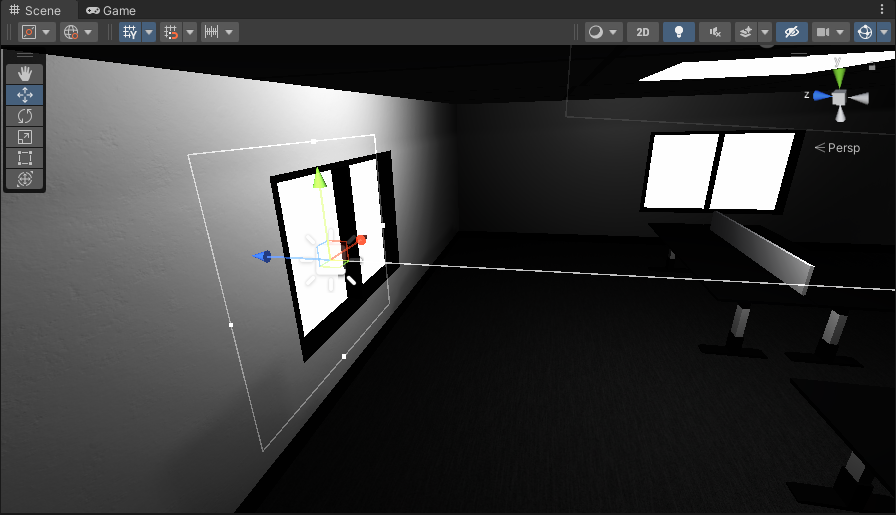
 plush notch
Hi! I think I'm missing something. I've set my graphics settings to "Hard Shadows Only" and rebuilt lighting, but all of my shadows are still soft.
There is only one quality level and yet soft shadows are still being drawn instead of hard shadows. Thanks for any help.
 deft fiber
@tiny kelp Holding V key lets you snap to vertices
I'm not sure if that's what you actually want tough
daring haven
plush notch
Hi! I think I'm missing something. I've set my graphics settings to "Hard Shadow...
Could it be related to resolution of shadows rather than hard/soft?
deft fiber
plush notch
Hi! I think I'm missing something. I've set my graphics settings to "Hard Shadow...
Hard shadows still have bilinear filtering, soft shadows have some extra filtering on top of that
I believe you'd have to alter the shadow code itself to implement nearest-neighbor filtering instead
plush notch
deft fiber
Hard shadows still have bilinear filtering, soft shadows have some extra filteri...
Oh, ok, thanks. I want a solid silhouette to be drawn around the object shape. I think this is called or is similar to a toon shadow.
deft fiber
plush notch
Oh, ok, thanks. I want a solid silhouette to be drawn around the object shape. I...
Ah, the mesh surface's shading is entirely unrelated to shadow quality / shadow casting in general
You'll want a "toon shader" or a "cel shader"
plush notch
the shadow on the ground, not on the mesh
To get hard shadows on the mesh I wouldn't be using smooth shade faces.
tiny kelp
deft fiber
<@170491414344499200> Holding V key lets you snap to vertices
I'm not sure if th...
can i only snap to vertices along a certain axis?
deft fiber
tiny kelp
can i only snap to vertices along a certain axis?
Probably not
tiny kelp
deft fiber
Probably not
can i at least see the coordinates of the vertex i want to snap to?
daring haven
plush notch
Oh, ok, thanks. I want a solid silhouette to be drawn around the object shape. I...
I had some luck increasing the shadow resolution - I cranked it up to 4096 and set everything to max. The shadows came out much cleaner. On the light source, cast shadows, pick to max quality setting you can afford.
plush notch
daring haven
I had some luck increasing the shadow resolution - I cranked it up to 4096 and s...
I can do that but my game consists of a ton of physics objects moving around on screen so hard shadows are the best default option for good looking and good performance.
So rendering a lot of soft shadows is something I'd like to avoid.
tiny kelp
if i put a light inside my mesh will it shine though it?
daring haven
tiny kelp
if i put a light inside my mesh will it shine though it?
If you have alpha clipping on I think it will. (If you scroll back a few days I think, someone had a similar question with a green screenshot and a tree)
tiny kelp
daring haven
If you have alpha clipping on I think it will. (If you scroll back a few days I ...
so having it off will prevent it? cause i don't want light shining through
daring haven
I think the mesh will block it, even if the texture is clear - as long as alpha cutoff is not in effect. (But that is from the brief discussion a few days back - I have not tried it)
deft fiber
tiny kelp
can i at least see the coordinates of the vertex i want to snap to?
No
PolyBrush or ProBuilder might allow you to see vertex positions in world space, but generally Unity doesn't have that kind of editing functionality
deft fiber
tiny kelp
if i put a light inside my mesh will it shine though it?
It will, though it won't illuminate the surface itself
You probably should describe the effect you want in detail instead of running through the potential solutions though us one by one
The last time I told you to use emissive textures, did that work out at all?
 gilded sapphire
Any idea on pixelated soft shadows? (It only happens in the build)

 whole bramble
just bake it.
 whole bramble
have you checked soft shadows on directional light?

 chilly kettle
How big is the mesh/uv where the shadow is drawn on?
gilded sapphire
chilly kettle
How big is the mesh/uv where the shadow is drawn on?
The gameobject?
0.4
But if I go in playmode in editor the shadows are high quality
only the build is pixels
chilly kettle
can you show the lightmap of the gameobject?
gilded sapphire
its a tree

 chilly kettle
Yeah. All Black 😄
gilded sapphire
ill clear the baked data and rebake
chilly kettle
But what i mean is the lightmap that is attached to the ground.
If you click the ground there should be a lightmap attacked to the mesh renderer
gilded sapphire
Before I do this hour bake, whats the optimal bake settings to look out for to make sure itll be nice?
chilly kettle
First. you should always start with a very low bake. Like 2-5 Texels


 chilly kettle
Well.. The terrain is not set to static. That means it cant be baked
you have realtime shadows
gilded sapphire
ah thats right, my bad
chilly kettle
gilded sapphire
And your Lightsource is also realtime
gilded sapphire
well if its realtime itll be better for the player character moving and moving plants yea?
chilly kettle
Sure, but bad for performance
gilded sapphire
ill set the directional light to mixed
chilly kettle
ill recommend watching a tutorial ^^
https://www.youtube.com/watch?v=hMnetI4-dNY&t=2520s

In this video, you'll gain an understanding of how lights and shadows work in the Universal Render Pipeline, as well as how to set up a scenario with a mix of real-time shadows, Light Probes, and baked GI.
Speaker:
Ciro Continisio
Ask your questions here: https://on.unity.com/2UmP9TE
Did you find this video useful? Room for improvement? Let us...
that one is great
gilded sapphire
Sounds good!
chilly kettle
Lighting is a complex part of unity ^^
gilded sapphire
chilly kettle
Lighting is a complex part of unity ^^
it sucks. unity is a pain when it comes to graphics
whole bramble
well
Finally i've found your solution
just go to project setting>Quality> Turn Shadow Projection from 'Stable Fit' to 'Close Fit'
Thats all...
and yeah...do this in all parameters.... Low, Medium, High.... all

 tiny kelp
deft fiber
It will, though it won't illuminate the surface itself
You probably should descr...
tiny kelp
deft fiber
It will, though it won't illuminate the surface itself
You probably should descr...
from what i've seen emissive light won't actually bounce off surfaces like ray traced light should
i'm trying to make it for an RBG light on a PC
little condor
tiny kelp
from what i've seen emissive light won't actually bounce off surfaces like ray t...
Emissive materials need to be baked before their light can effect other gameobjects, unless you enable raytracing, then they're real time. Normal lights like point and area lights don't bounce off surfaces in real time either.
If you're using HDRP, you could try screenspace global illumination, but it might not be perfect. Or you could fake it by adding multiple non-shadow casting lights to the inside of you computer case and writing a script to change the colours at runtime.
 minor umbra
why do my trees look like this
 deft fiber
minor umbra
why do my trees look like this
deft fiber
minor umbra
why do my trees look like this
Hmm you mean why are they green or why are they pointy?
minor umbra
deft fiber
Hmm you mean why are they green or why are they pointy?
Why is one side darker and other lighter?
there is some that have the darker side facing light but still dark
deft fiber
minor umbra
there is some that have the darker side facing light but still dark
That's a better description
I don't recognize the issue, but you could troubleshoot it by testing if it happens with other materials or the same mesh, or with the same material on different meshes
Also, rotating the tree to see if the "seam" rotates with it or stays in place relative to light direction may be a clue as well
daring haven
I assume there is no LOD etc turning trees into billboards (so have no depth for light to shine on from the side)?
I would have guessed the positioning of the light since all the light green sides seem to be facing one point.
minor umbra
daring haven
I assume there is no LOD etc turning trees into billboards (so have no depth for...
i have 0 knowledge with lighting so idk what you are talking about sorry
deft fiber
They don't look like billboards so I wouldn't worry about that
I very much recommend raising your knowledge above 0 or else this process will be painful
Lighting is a complex topic but important to understand
minor umbra
deft fiber
They don't look like billboards so I wouldn't worry about that
I very much recom...
i tried rotating and it lights it up but as soon as i rotate a little the other side instantly becomes darker
quaint river
Hey! I have been having a really hard time with the lighitng in Unity . Every time I bake the lights, some assets just appear much darker than others.
- There are 10 or so assets duplicated around the entire level
- There is 1 single trimsheet texture texturing the entire level
- I have tried messing with the light map resolutions, ensured no UV light map overlapping
- I have tried turning it off and on again.
N.B I have a single light source and that is the directional light from outside .
If anyone has any ideas, and they are free a little later today (Currently at my 9-5) and willing to help, please message me. Or , just drop some ideas . Please and thank you
 tiny kelp
little condor
Emissive materials need to be baked before their light can effect other gameobje...
tiny kelp
little condor
Emissive materials need to be baked before their light can effect other gameobje...
so i need to use HDRP for the light to be ray traced in real time?
little condor
tiny kelp
so i need to use HDRP for the light to be ray traced in real time?
If you want to use RTX raytracing, then yes, HDRP is required. Just be aware that those who play your game will need an RTX video card too.
tiny kelp
little condor
If you want to use RTX raytracing, then yes, HDRP is required. Just be aware th...
with what type of light?
little condor
Any light; point, area, directional and emissive materials, etc. From my experiments anyway.
tiny kelp
little condor
Any light; point, area, directional and emissive materials, etc. From my experi...
if i were to use emissive it has to be from unity right? or would an emissive map from substance painter also work?
little condor
Substance can pack and export to a Unity compatible material, (or is it just a texture set?), they are just textures anyway. It worked when I used it a few years ago, so I assume that still works.
minor umbra
how can i let light go trough something? like an object
i want the car head lights to go trough the finish

and for it not to block them until the car passes it
 balmy badger
So I have realtime reflection probes in my game. I only update them once at the start of the game (dynamically arranged room prefabs). The rooms are all mesh merged so there aren't that many meshes per room. They all share one material (texture arrays and such). It seems all the reflection probes bake perfectly, but the android build.. sometimes the meshes in the furthest part of the level from the start position will start turning black. I can re-render the probes manually and it fixes the room you're in, but somewhere else in the level the meshes will be black also.
I've found nothing that would allow me to "refresh" what reflection probes the meshs use. Has anyone ever seen anything like this? and if so how did you fix it?
Unity 2020.3.40f1
 little condor
minor umbra
i want the car head lights to go trough the finish
little condor
minor umbra
i want the car head lights to go trough the finish
On your gameObject > Mesh Renderer component you can set Cast Shadows to 'off'. That will allow lights to pass through an object. You might have to set the material on your gameObject to be 'Unlit' to, so it doesn't receive light from the headlights.
gilded sapphire
How do you solve pixelated shadows. They are only pixels in the build
 daring haven
gilded sapphire
How do you solve pixelated shadows. They are only pixels in the build
daring haven
gilded sapphire
How do you solve pixelated shadows. They are only pixels in the build
Increase the shadow resolution? Makes shadows slower, but improves the resolution so less jaggies. The other way is to soften the shadow edges which hides the jaggies a bit.
gilded sapphire
daring haven
Increase the shadow resolution? Makes shadows slower, but improves the resolutio...
both applied already, thats the outcome. ive fixed it by creating a new project and transfering stuff
daring haven
That is sad and scary (and resonates completely with me unfortunately!!!)
I spent hours last night try to work out why a camera rotated to a certain angle went black (it used to work a month ago when I last opened the project). I created a new sequence, copied all the tracks over, and it started working. No idea why. But its working, so onwards!
 granite jasper
i messed up with the light when i generate light on GPU preview now there are no shadows and the lightning is dim idk how to revert back, i did genrate it again on enlighten but it's same

this was the result before i want this back can anyone help me pls
 uncut coral
Hey, if I'm using one object multiple times and each scale is different in unity. Then baking lightmap will assign lightmap UVs acc to their sizes?
hard grail
Hi guys, is there aboslutely no way to get baked specular lighting in HDRP?
As soon as we bake lighting, we lose specular/metallic on all of our materials
Which defeats the point of PBR materials, and makes the game look 10 years old
I can't believe HDRP is marketed as a high-end solution and yet can't do specular highlights on materials with baked lighting.
The other end is to use real-time lights which are optimized terribly in HDRP (God forbid you use DX12)
timber lichen
How to make the areas without light less dark?
 deft fiber
timber lichen
How to make the areas without light less dark?
deft fiber
timber lichen
How to make the areas without light less dark?
If you recall my last message that advice is relevant here as well #💥┃post-processing message
timber lichen
Thank you, I will check for that, I had been busy these days I could thank you enough!
tiny kelp
little condor
Substance can pack and export to a Unity compatible material, (or is it just a t...
can i control how much the emissive light spreads? i'm using my pc as a reference it's rgb lights act like flash lights in the dark
deft fiber
tiny kelp
if i were to use emissive it has to be from unity right? or would an emissive ma...
You may recall our earlier discussion #archived-lighting message
deft fiber
tiny kelp
from what i've seen emissive light won't actually bounce off surfaces like ray t...
https://youtu.be/YfnBaL6d4CE based on discussion around it it seems definitely possible but may require some tweaking

Testing out the new DXR (Raytracing) in Unity 2019.3.
I used this project as a base for testing:
https://github.com/0lento/Unity_DXR_Test
There's a good Unity forum thread on DXR in untiy here:
https://forum.unity.com/threads/unity-experimental-hdrp-dxr.656092/page-7
thorny goblet
How can i optimize Shadows to make them less intensive on my game. I want to make my game look as realistic as possible, while also making the game playable.
little condor
thorny goblet
How can i optimize Shadows to make them less intensive on my game. I want to mak...
It depends on what kind of game you're making and the target platform you're aiming for. But the most realistic types of shadows without incurring a CPU/GPU overhead would be baking them to textures.
little condor
tiny kelp
can i control how much the emissive light spreads? i'm using my pc as a referenc...
The intensity value of the emissive light component can do that. However, as you can see in the video that Spazi posted, emissive lights aren't calculated in a single frame so they tend to leave trails of light if the light object moves quickly.
If you want to have the RGB lights effect the soundings outside the PC, then perhaps using a light cookie might provide the effect you're after? See an example here:
tiny kelp
little condor
The intensity value of the emissive light component can do that. However, as yo...
yeah i'm gonna use a light cookie, not sure what type of light to use to make it look accurate though
thorny goblet
little condor
It depends on what kind of game you're making and the target platform you're aim...
ok
 fleet tiger
does anyone know what might be the cause of these weird shadow glitches? also happens in some other spots on the map in editor when the camera gets too close
deft fiber
fleet tiger
does anyone know what might be the cause of these weird shadow glitches? also ha...
Polygons which are too long get cut off by light source clipping plane
Tweak the clipping distance or subdivide the polygons
fleet tiger
okay, thanks
odd that the clipping plane would be relevant for a directional light
deft fiber
fleet tiger
okay, thanks
odd that the clipping plane would be relevant for a directional lig...
Functionally it's an orthographic camera which clipping planes are relevant to as well
fleet tiger
I see
 split vault
anyone understand what is happening here? this is happening for all lights in my scene. Whenever i move the camera the light changes very dramatically
deft fiber
split vault
anyone understand what is happening here? this is happening for all lights in my...
Looks like light limits per mesh object
split vault
how does that work exactly? im pretty unfamiliar with lighting settings to be honest
got it. switching to deffered rending path fixed my problem, thanks anyway
deft fiber
split vault
got it. switching to deffered rending path fixed my problem, thanks anyway
If you search for light limits you can find that deferred rendering is one of the many ways to work around it
Each workaround has some tradeoffs though
Even on this server you can find many posts about it with that keyword
timber lichen
Anyone knows why this is happening?
Using urp and realtime lightninf with shadows
I have no clue how to solve it 😕
It happens also ingame
split vault
timber lichen
Anyone knows why this is happening?
This looks like the EXACT problem ive just had
is your camera rendering set to deferred?
timber lichen
@split vault I will have a look
limber delta
timber lichen
Anyone knows why this is happening?
To me this looks like an occlusion problem. Have you baked occlusion recently?
timber lichen
I'm not working with baked light currently, I removed it because I need to be able to switch the light on and off for each room
changes the urp settings from forwarded to deferred solved that problem @split vault But I have some strange shadow issues
split vault
oh, not sure then. im not good at lighting, but thats what fixed my issue
timber lichen
This is what happens now, those weird shadow
When I higher the shadow resolution it solve that light problem that was leaking through the wall only on specific angle
But in second video you can see it has very strange shadow
it not only looks weird but it also is noisy when moving around
lightning is hard, I tought it would be easier 🙂
timber lichen
@timber lichenlooks a good game
timber lichen
Thanks Gason 🙂 it's far from finished
 dawn cape
Hey guys what would be the best way of lighting up a cityscape in hdrp at night,here is what i have below
