#archived-urp
1 messages · Page 15 of 1

 void urchin
Hi, i've been struggling for a few days with writing HLSL shaders in unity, and running into documentation on shaders being not that great. The shader code for standard URP shaders has a lot of pragmas, includes and macros which is hard to read in order to gain understanding of how it works. Are there any good resources on programming shaders in Unity? I know the basics of HLSL, but the built-in defines and how I hook into different engine facilities of the engine is still a big question.
Thanks in advance
 ocean hinge
 cursive field
Your room is quite dark and I don’t know where your reflection probe is located.
You also have to set the probe to realtime or bake it, if you want a correct result.
You also have to take a look on the smoothness of your material. Smoothness 1 and metallic 1 = polished metal.
 ashen grail
Having this issue with the glow from text bleeding through a transition. Is there a fix for this?

 wooden basalt
~~I am trying to achieve a 3D pixel art look on my game. I am using a render texture (filter mode point) with a low resolution to achieve this. This looks fine in the editor game preview (see image 1).
The problem is that the built game looks blurry for some reason. (see image 2)
(Yes, MSAA is disabled in the camera)~~ Fixed


 fresh fossil
Is there a way to modify the depthOnlyPass of a shadergraph? By default it doesn't seem to use alpha clipping which leads to rendering errors.
 wispy comet
trying to make my first water shader, following this tutorial: https://www.youtube.com/watch?v=gRq-IdShxpU
For some reason, even though a material preview appears, my plane is showing as invisible when I put the water material on it. Any ideas?

 dry willow
wispy comet
trying to make my first water shader, following this tutorial: https://www.youtu...
dry willow
wispy comet
trying to make my first water shader, following this tutorial: https://www.youtu...
I'd check the alpha components of the color properties on the material asset
wispy comet
dry willow
I'd check the alpha components of the color properties on the material asset
Yeah, that's what one of the comments said, still is invisible :T
dry willow
wispy comet
Yeah, that's what one of the comments said, still is invisible :T
Have you got alpha clipping enabled? The Alpha Clip Threshold port being at 0 is a bit odd, I think that would discard everything.
wispy comet
dry willow
Have you got alpha clipping enabled? The Alpha Clip Threshold port being at 0 is...
Yes it is enabled and at 0 since he said to do that in the video, lemme mess with it see if it changes anything
Both disabling it and changing the value is not changing anything
dry willow
Probably fine actually, I was thinking about the threshold the wrong way around. Should be able to keep the clipping disabled if you aren't using it though
Since the graph uses Scene Depth, is the Depth Texture enabled on the URP asset?
wispy comet
Yes
Depth and opaque were turned on

For some reason, deleting the line between split and alpha made the material appear, but it's still acting a bit wonky
dry willow
Are you using an orthographic camera?
wispy comet
using far plane
 dry willow
wispy comet
using far plane
dry willow
wispy comet
using far plane
I'd set the Scene Depth to "Eye" mode here and remove the Camera and Multiply nodes. Should end up as the same thing but makes graph cleaner
For the other side of the Subtract, I'd replace the Screen Position -> Split A with Position (View space) -> Split B -> Absolute.
That should work in both camera projections so could avoid issues if you use an orthographic camera. If you're using a perspective camera either can work though.
wispy comet
dry willow
For the other side of the Subtract, I'd replace the `Screen Position` -> `Split`...
like this?
 dry willow
Yea
wispy comet
everything seems to be working now :O thanks!!

 gritty marlin
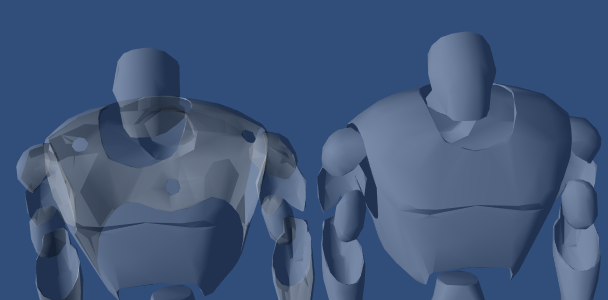
why do the transparent faces behave this way? all normals are as intended. stuck on this issue


like even one face on the hallo is being overwritten
this is a transparent material
 haughty garnet
transparency shaders usually dont write to depth and sort by pivots
or via sorting layers
gritty marlin
haughty garnet
or via sorting layers
the weird thing is this is one skinned mesh renderer, and one mat
haughty garnet
ah, right there's actually was some unity doc I was reading on that
Unity Forum
So one of the things you will encounter when rendering complex meshs' using standard transparent rendering is that they depth test against the scene,...


that too
https://docs.unity3d.com/2017.2/Documentation/Manual/SL-CullAndDepth.html
There's a doc on it
The Unity Manual helps you learn and use the Unity engine. With the Unity engine you can create 2D and 3D games, apps and experiences.
and a post from bgolus our lord and savior
https://forum.unity.com/threads/how-to-clip-the-mesh-inside-intersection.1224900/
Unity Forum
I need to display only non intersected areas when transparent bodies intersect. The intersection plane should be drawn. It is posible?
I mean the...
 ebon light
when working on a URP fullscreen shader, is there a way to have URP Sample Buffer show something in the preview? ideally what the current scene camera is viewing, so that I get all the previews in the shader window 😅
found a workaround by adding a second camera to the scene that renders to a render texture, and then using that render texture as a source instead of the URP Sample Buffer
would be neat to have this actually show what's on screen without having to re-connect the nodes tho
 inland bolt
im usin github and have run into a fatal error:
An error occurred while resolving packages:
  Project has invalid dependencies:
    com.andicraft.volumetricfog: Error when executing git command. fatal: not in a git directory

    com.prenominal.realtimecsg: Error when executing git command. fatal: not in a git directory
ive been messing around trying to fix it and ive figured out at least that its a urp issue. has anyone ran into this issue?
 cold ingot
inland bolt
im usin github and have run into a fatal error:
```
An error occurred while res...
cold ingot
inland bolt
im usin github and have run into a fatal error:
```
An error occurred while res...
Doesn't look like a URP issue but if its not happening without URP it might be that those packages don't support URP or something but id need more info
 trim scroll
Hi everyone, does anyone know how to allow a transparent shader to zwrite while also being able to read from depth from opaque geometry. It can overwrite the depth from the opaque geometry afterwards, but must be able to sample the opaque geometry's depth first. I also must be able to access the depth texture with the transparent shader's depth for scriptable render passes after the transparent queue.
Would I need to maintain my own buffer? Would it be synchronized when the SRP is called?
I've set depth texture mode to opaque, but it seems I need to resynchronize it after the transparent render as well
 feral trout
Any idea how to fix this? Only happens on Android, with the URP pipeline and Linear colorspace. Output is fine in Gamma or default pipeline otherwise. The media engine is sending the correct output, but there is some weird color "correction" by Unity on URP/Linear, on Android only. Tried a thousands options in the editor, kinda running out of ideas here... any advice welcome.


 lone lantern
how do i make worldspace tilling in urp
trim scroll
lone lantern
how do i make worldspace tilling in urp
There’s a name for this, but basically if you have the normals of your surface, you can project the xz worldspace coordinate by the magnitude of the y normal vector, the xy worldspace coordinate by the magnitude of the z vector and so on
I found the name, it's called a triplanar projection and works pretty well except with really big textures, because let's say the normal is <0, 1, 0>, and your WS pos is (1000, 0, 1000), your UV coord will be (1000, 1000) but if your normal changes slightly it'll change drastically.
For that case, I'm using just a random function I wrote
float2 mapCoordinates(float3 worldPos)
{
float2 projXY = worldPos.xy;
float2 projXZ = worldPos.xz;
float2 projYZ = worldPos.yz;
float2 worldUV = (projXY + projXZ + projYZ) / 3;

return worldUV;
}
There is a plane where the tiling will be messed up, which is a downside compared to triplanar projection, but it's tiling won't change with different normals. If anyone has any better idea I'm eager to learn too
 oak spindle
This may be a really silly question (as I know that you can in HDRP), but is there a way to light a 'dynamic' scene in URP using an HDRI? (By dynamic I mean everything moving, nothing Static etc.
 marble vigil
oak spindle
This may be a really silly question (as I know that you can in HDRP), but is the...
marble vigil
oak spindle
This may be a really silly question (as I know that you can in HDRP), but is the...
When lighting is generated from the Lighting window, even with realtime GI and baked GI disabled, it will generate a reflection probe and a light probe using the sky shader
Those probes will be used for specular and ambient lighting of all objects in the scene
oak spindle
marble vigil
When lighting is generated from the Lighting window, even with realtime GI and b...
Ah okay, cool. Not used to URP fully yet (spent most of my time in HDRP). How does that work with random rotations of the skybox/directional light? (I plan to have them be at a random rotation on each start of the game. 😕
marble vigil
oak spindle
Ah okay, cool. Not used to URP fully yet (spent most of my time in HDRP). How ...
You probably have to re-generate the probes at runtime
Doable but I recall the process is kinda messy
oak spindle
marble vigil
You probably have to re-generate the probes at runtime
Hmmm. Yeah, I have seen some stuff where people have said that it's really not worth it.
marble vigil
Iirc you'd use this method
https://docs.unity3d.com/ScriptReference/DynamicGI.UpdateEnvironment.html
But there was some weirdness, like the article talks about it updating the cubemap but it actually updates the ambient probe
DynamicGI class purports to be for Enlighten but I think it was for non-Enlighten generated scene lighting as well
Or something like that, I didn't fully figure it out last time I experimented with it
marble vigil
oak spindle
Hmmm. Yeah, I have seen some stuff where people have said that it's really not ...
If you only need to do it once rather than repeatedly, then it shouldn't be 'not worth it' from a performance perspective
But can't promise about the process to get there to be worth the effort
oak spindle
marble vigil
If you only need to do it once rather than repeatedly, then it shouldn't be 'not...
Yeah, sorry I meant the process wasn't really worth it.
At the minute I'm considering switching the project over to HDRP. There's not much really going on in the scene (it's a kind of modernised/updated Space Harrier type game), so I don't think the system requirements would be an issue if I did. 😕
 teal totem
Hello everyone, Im having a problem for a long time in my game when i active a gameobject with 2D Light component no matter the intesnitiy of the light my game crash for like 1 second when i get close to the gameobject and only 1 time, does anybody know why could it be? im using universal renderer pipeline maybe its the project problem or project settings?
ocean hinge
teal totem
Hello everyone, Im having a problem for a long time in my game when i active a g...
No cross posting please 
 scarlet spindle
Hi guys, is there a way to access the shadowmap depth texture in a URP shader? I can't find any good resources on it. I can get shadow attenuation but I need access to the actual depth value.
dry willow
scarlet spindle
Hi guys, is there a way to access the shadowmap depth texture in a URP shader? ...
Would basically need to look at how Shadows.hlsl handles it, but swap the SAMPLE_TEXTURE2D_SHADOW macro usage out for regular sample (SAMPLE_TEXTURE2D with float2 uv coords)
scarlet spindle
@dry willow so I would need to basically make an alternate version of the SampleShadowmap function from Shadows.hlsl
scarlet spindle
If I'm using the TransformWorldToShadowCoord function what is the z value of that? is it depth?
trim scroll
scarlet spindle
Hi guys, is there a way to access the shadowmap depth texture in a URP shader? ...
MainLightRealtimeShadow(TransformWorldToShadowCoord(shadowPoint));
shadowPoint is WS(World Space)
that's what I use--it returns a float depending on whether your point is in front of the value of the shadow caster at that point in the shadow map(it tells if your WSpos is in shadow)--if you want to sample raw shadow depth you need to change shadow map to be raw and copy it to a render texture--could save on time if you're raymarching through it.
trim scroll
scarlet spindle
If I'm using the ``TransformWorldToShadowCoord`` function what is the z value of...
It's the shadow plane aligned coordinate of your WS pos, with a channel to store the light depth of your point. The shadow plane is not camera aligned so it's not camera depth, more like light depth.
You also need Shadow map pragmas
scarlet spindle
So ultimately I want to get the depth distance between a fragment's world position and the shadow occluder (depth in the shadowmap). I've created the following custom function but I don't think I'm getting the correct value
void MainLightShadowDepth_float (float3 WorldPos, out float ShadowDepth) {


    #ifdef SHADERGRAPH_PREVIEW
        ShadowDepth = 0;
    #else
        #if defined(_MAIN_LIGHT_SHADOWS_SCREEN) && !defined(_SURFACE_TYPE_TRANSPARENT)
        float4 shadowCoord = ComputeScreenPos(TransformWorldToHClip(WorldPos));
        #else
        float4 shadowCoord = TransformWorldToShadowCoord(WorldPos);
        #endif
        float depth = SAMPLE_DEPTH_TEXTURE(_MainLightShadowmapTexture, sampler_LinearClamp, shadowCoord.xy);
        ShadowDepth = LinearEyeDepth(depth - shadowCoord.z, _ZBufferParams);
    #endif
}
I figured if I wanted the depth difference in world units LinearEyeDepth would work but the values don't seem correct when I debug
Is there something I'm doing wrong in the HLSL code?
trim scroll
scarlet spindle
So ultimately I want to get the depth distance between a fragment's world positi...
You need to make _MainLightShadowmapTexture have raw depths(ShadowSamplingMode.RawDepth)--it's default is CompareDepths, which doesn't work here.
I also believe you have to copy it to a rendertexture because I believe the renderer needs it to be in CompareDepths so at a certain point in the queue it'll automatically switch to comparedepths, but it's been a while and I might be wrong.
Otherwise it looks alright--I'm not sure if you can sample it like that
 ebon karma
why are the shadows so bad? I set resolution to 4K, shadows distance to 200 (which isn't much) but they look like this


 soft lion
ebon karma
why are the shadows so bad? I set resolution to 4K, shadows distance to 200 (whi...
soft lion
ebon karma
why are the shadows so bad? I set resolution to 4K, shadows distance to 200 (whi...
did anything change when you changed the resolution for example or did it stay exactly the same?
ebon karma
soft lion
did anything change when you changed the resolution for example or did it stay e...
yes, im getting different results
soft lion
ebon karma
yes, im getting different results
have you tried visualizing the shadow cascades? I don't remember where that is but there was definitely an option to show the map colored based on the cascades
ebon karma
soft lion
have you tried visualizing the shadow cascades? I don't remember where that is b...
i can't find it
marble vigil
ebon karma
why are the shadows so bad? I set resolution to 4K, shadows distance to 200 (whi...
Mainly because 200 shadow distance is a lot when your shadow cascades aren't weighted near the camera
You'll often want first cascade pretty close, and every gap between cascades larger than the last one
ebon karma
marble vigil
You'll often want first cascade pretty close, and every gap between cascades lar...
thanks
soft lion
I also noted that those values might not be what they used to be by default but to me it didn't make sense either way because I thought with max distance of 200 and 4k resolution should look atleast as "good" as they currently do even without any cascades. My knowledge about the inner workings of the shadowmaps is quite limited so don't take me too seriously on that
 nova bear
ebon karma
why are the shadows so bad? I set resolution to 4K, shadows distance to 200 (whi...
nova bear
ebon karma
why are the shadows so bad? I set resolution to 4K, shadows distance to 200 (whi...
Many AAA games have shadow distances less than 40M
Baked or screenspace shadows are common for anything more distant
soft lion
Yeah, increasing the shadow distance can significantly increase the amount of objects to be rendered to the shadow map which may be unnecessary in more complex scenes
marble vigil
Increasing distance also "stretches out" the resolution over that distance, practically decreasing it
 normal orbit
what's the word on forward vs forward + in term of performance on tile rendere like the quest2?
ocean hinge
normal orbit
what's the word on forward vs forward + in term of performance on tile rendere l...
i can just tell you, that in general, forward+ is less performant.
 shadow depot
how fix this problem

@everyone please help me how fix this stupid error
This problem hates me for unity.
 jolly quail
shadow depot
how fix this problem
jolly quail
shadow depot
how fix this problem
yeah, i did have this kind of problem, it's strange because it's new project without any plugin or custom shader, and i did everything like shader strip, etc, so i just create new project and import the asset one by one (everytime i import the new asset i try build it too)
shadow depot
jolly quail
yeah, i did have this kind of problem, it's strange because it's new project wit...
i found this problem fixed in 2022.3 and Higher Correct?
jolly quail
shadow depot
i found this problem fixed in 2022.3 and Higher Correct?
nah, i mean they did make it faster i belive, but if the problem is for example from your porject being corrupted then it wont fix it, i mean you can try
shadow depot
i using 2022.3 but mouse scroll view only work in editoe scence view why?
marble vigil
shadow depot
how fix this problem
It's not an error and there's not really a simple solution
It helps to understand what shader variants are and what shader stripping means
https://docs.unity3d.com/Manual/shader-variants.html
https://docs.unity3d.com/Manual/shader-how-many-variants.html
https://docs.unity3d.com/Manual/shader-variant-stripping.html
It's also going to be improved again in 2023 version but in the meanwhile the most practical way around it as quadro says is to have a new project just for building that includes nothing unnecessary
All shaders, renderer features and post processing effects that are included in the build can lead to shader variants
Even when they intuitively shouldn't be included
shadow depot
marble vigil
It's not an error and there's not really a simple solution
It helps to understan...
bro i download 2022.3 but mouse not work in editor scene?
same shit Urp is shit i convert again build in
 marble vigil
shadow depot
same shit Urp is shit i convert again build in
marble vigil
shadow depot
same shit Urp is shit i convert again build in
You don't seem to be reading our instructions much so it's not a surprise you're still stuck with the problem
shadow depot
marble vigil
You don't seem to be reading our instructions much so it's not a surprise you're...
no bro build in is good
shadow depot
marble vigil
You don't seem to be reading our instructions much so it's not a surprise you're...
bro mouse is not work in 2022.3 why?
marble vigil
shadow depot
bro mouse is not work in 2022.3 why?
Works on my machine, "bro"
 deft torrent
Does anyone know why you can notice the tiling?
 marble vigil
deft torrent
Does anyone know why you can notice the tiling?
marble vigil
deft torrent
Does anyone know why you can notice the tiling?
https://forum.unity.com/threads/lightmapping-troubleshooting-guide.1340936/
check part 10
10.2.2 specifically
deft torrent
Thanks
 ripe hazel
The default URP lit shader shows a lot of banding. Is there a way to add dithering to it?

nm. found it. it was a camera setting.
normal orbit
ocean hinge
i can just tell you, that in general, forward+ is less performant.
Thanks!
can a project be set to forward? i'm getting defered shader blocks included in an android build and they're bombing the build due to vulkan
ocean hinge
normal orbit
can a project be set to forward? i'm getting defered shader blocks included in a...
You have Forward, Deferred and Forward+ in current Unity URP
normal orbit
ocean hinge
You have Forward, Deferred and Forward+ in current Unity URP
any way to strip the ones i don't use?
like how we strip shaders
ocean hinge
Your project only uses the one you choose ^^
normal orbit
ocean hinge
Your project only uses the one you choose ^^
it includes all 3 of them in the build 😦
even if the list of URP renderer data only includes one
which vulkan doesn't seem to like much
and damn, that's unreal level of variants!


so delewting builtin from the graph then pushing another build repetedly "solved" it
 drowsy sundial
Hello. Is there any way to see frustum culling in scene view when game is run? I dont mean occlusion, because unity can visualize this. But what about camera frustum culling?
soft lion
drowsy sundial
Hello. Is there any way to see frustum culling in scene view when game is run? I...
at least I'm not aware of such feature. what do you need that for?
drowsy sundial
Debugging performance on mobile and I want to make sure everything is properly culled (long shadows and stuff can mess up frustum culling).
However I just figured this out. You need to have at least one static mesh renderer on scene and you must bake occlusion culling (even if you dont plan use it). When a scene has baked occlusion culling, Unity will properly visualize culling, frustum culling included.
soft lion
drowsy sundial
Debugging performance on mobile and I want to make sure everything is properly c...
well, you could do this but I don't really understand what there is to gain from it. first of all, I don't think frustum culling has anything to do with shadows, long or short. the shadowmap rendering is a whole another process which this frustum culling method won't reveal in any greater extent
the only thing that matter in frustum culling is whether the bounding box of the object is inside or outside of the view frustum and the only way you could ever improve your performance when it comes to frustum culling is to split larger meshes into smaller pieces but that has it's own performance considerations as well
marble vigil
Frame Debugger can show you when offscreen meshes are rendered an additional time by lights for shadow casting
drowsy sundial
I've just read that realtime shadows might influence frustum culling but I might be wrong. Anyway its good to have possibility to visualize how it renders, for example to check if meshes are split/combined properly.
@marble vigil how can I check how much time is consumed by what in frame debugger? (I am debugging real device if this matters)
soft lion
drowsy sundial
I've just read that realtime shadows might influence frustum culling but I might...
that's fair. just keep in mind that often times the amount of draw calls matters more than some pixels out of the view so splitting the meshes down usually isn't worth it especially because the rasterization process actually ignores the pixels outside of view so the fragment shader won't be ran for those pixels anyway
drowsy sundial
Yes, that what knowledge says, but I am not sure if this applies to every case. I've just optimized frame time from 20ms -> 3ms on 7 year old phone. The problem was one very complex shader and after I did its lightweight variant (using shader keywords), I was able boost fps from ~25fps to 100+.
In the otherhand, yesterday (when I wasn't aware of shader problem), I've tried combining meshes and I've reduced draw calls from ~190 to ~50 and framerate did not change. So its kinda meh.. I know draw calls are good measure but its not the full story I think.
Is there a possibility to track how much rendering takes time in frame debugger? I can't find it on 2023.2.17 , it shows draw calls, I can step through every render event one by one, but there are no time mentioned anywhere.
 soft lion
drowsy sundial
Yes, that what knowledge says, but I am not sure if this applies to every case. ...
soft lion
drowsy sundial
Yes, that what knowledge says, but I am not sure if this applies to every case. ...
of course draw calls doesn't directly correlate to fps but that doesn't mean you should split your meshes either if it doesn't increase the performance
marble vigil
I don't think Frame Debugger has timing information
Might need something else for that
drowsy sundial
Okay. The problem with complex shader was debugged by turning random gameobjects off on scene, rebuilding to phone and checking "if it fixes the problem". Specifing batch timing could be very useful information.
 weary bloom
I am checking out URP (usually use Built In) and I've overcome most problems I've encountered so far.
But the one that has me a bit stumped right now is related to.....
URP + TERRAIN + TAA (?!??!)
1.) TAA
2.) "Ghosting"
3.) Specifically on Unity Terrain Objects (Motion Vectors/Specific?)
Unity URP
2022.3.15f1
LTS
EXAMPLE:
The best example of this is an FPS (Weapon/Hands)
And turning the camera moderately fast; you'll see the ghosted mage of the FPS objects on the Terrain.
//** TAA** (AS PREFERENCE)
I am one of the (few?) people that do like TAA; especially from Built In (where it had more settings exposed than URP) -- it prevents a lot of near-geo-edge flickering among any other things.
I've tried a variety of combinations to see if I could either resolve the issue of URP+Terrain+TAA or to find another AA solution that was personally acceptable;
Including:
- MSAA (4x)
- MSAA (8x)
- MSAA + SMAA
- MSAA + FXAA
- TAA (High / Very High)
- FXAA
- SMAA
// RESULTS =
1. MSAA (alone)
= doesn't have the issue.
2. MSAA + SMAA/FXAA
= doesn't have the issue.
3. Just FXAA or SMAA
= doesn't have the issue.

~ But those solutions have the near-geometry-flickering issue that a good TAA can resolve.
// TERRAIN SETTINGS (???)
I've also tried checking various Terrain Object settings, such as:
(Tree) Motion Vectors, different terrain shaders, etc.
// RENDERER (???)
I've also tried all renderer types, including:
- Forward (URP)
- Forward+ (URP)
- Deferred (URP)
= same results
//  N O T E
In the video below you'll notice it only happens against the Terrain Object; not Mesh Objects.
-
-
- -
Does anyone know anything about this?
Have you experienced this?
- -
-
Is there a Terrain setting I can resolve to make TAA work as desired on URP without ghosting artifacts?
 ripe hazel
Does anyone know the trick to get TMP working in ECS subscenes with a default URP project?
scarlet spindle
Does anyone have an example of how I would sample a raw shadowmap texture in URP? I only see examples of getting the shadow attenuation
marble vigil
scarlet spindle
Does anyone have an example of how I would sample a raw shadowmap texture in URP...
What's the difference between the two?
 finite orbit
Hi everyone, am wondering on the tech behind the Rendering Debugger and if it is possible to control it via a script? The purpose is to create a simple preset using an editor script in Unity. 😄

 dusk tide
Good morning everyone. I have a few questions and I hope to get pointed in the right direction. I have a few art samples back from my artist (2d) and these are going to be for a hybrid card game / turn-based 3d game. I'm trying to figure out the best way to match up this style of artwork for the combat system inside URP. I'll attach an example of the artwork, but where should I go to either have an art studio create a 3d model from the 2d art or can I build a shader to mimic this style?


Mind you I'm finishing up the demo (vertical slice) for Steam so I can conduct publisher pitches. Bulk of the funding will go towards an art studio to help with the majority of this project since I can't do the artwork myself.
scarlet spindle
marble vigil
What's the difference between the two?
I'm not entirely familiar with how the URP pipeline is setup but it looks like the render texture for shadow maps is setup with ShadowSamplingMode.CompareDepths This means that a comparison filter is used so when it's sampled it only returns 0 or 1 for whether a fragment is in shadow or not. In my case I need to get the approximate depth/distance from a fragment to the shadow occluder in the light depth buffer so I need raw depth value sampling. I'm assuming I would have to do a custom render pass and copy the shadow texture maybe? I'm looking for examples as reference
ocean hinge
dusk tide
Good morning everyone. I have a few questions and I hope to get pointed in the r...
I hope you dont pay him for real craftmanship, because this seem to be AI.
But to your question:
If you want to have a stylized artstyle in your game, i woould go for a handpainted workflow.
dusk tide
ocean hinge
I hope you dont pay him for real craftmanship, because this seem to be AI.
But t...
Kinda side but who cares how it's made, it's done, looks great, and I'm happy with it?
The issue I have is the gameplay is 3d, can move the character around with LOS etc so I'm trying to get a sorta comic book style feel to match what's done in the 2d images. I just don't know if I should go heavy on URP shaders or should the models textures be done as a comic style? I'm guessing a combination 🤔
ocean hinge
dusk tide
Kinda side but who cares how it's made, it's done, looks great, and I'm happy wi...
Depends, i would go with a standard URP Lit Shader and some handpainted textures.
dusk tide
Ok I'll give that a shot. Thank you.
 fading pasture
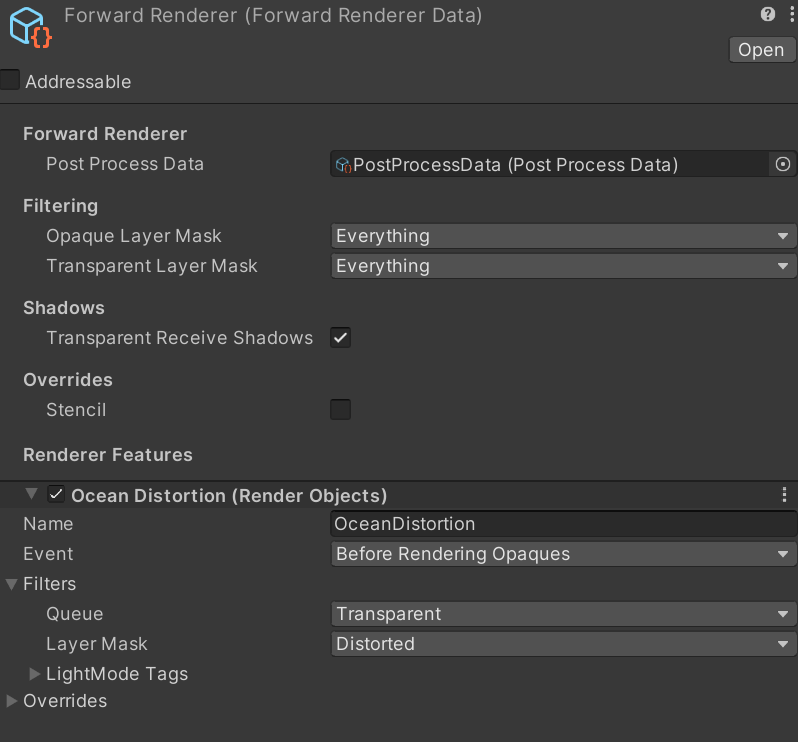
Anyone had issues with a forward renderer feature working in editor but not in build? Have a bunch of pictures detailing my issue here: https://forum.unity.com/threads/forwardrenderer-render-feature-only-works-in-editor-not-build.1576218/
Unity Forum
Context
I have created a distortion shader for my 2D game in unity using URP version 8.3.1 with a ForwardRenderer on Unity version 2020.1.16f1.
I...
 dry willow
fading pasture
Anyone had issues with a forward renderer feature working in editor but not in b...
dry willow
fading pasture
Anyone had issues with a forward renderer feature working in editor but not in b...
Is the purpose of the renderobjects feature to force these sprites to render before opaques so they appear in the Scene Color node? If so, make sure all URP assets have "Opaque Texture" enabled
 ripe oyster
idk if this goes here but im having issues using a texture on my a model
its not unwrapping properly
 fading pasture
dry willow
Is the purpose of the renderobjects feature to force these sprites to render bef...
fading pasture
dry willow
Is the purpose of the renderobjects feature to force these sprites to render bef...
Is there another place to enable it?

seems like it's checked to me
ah... it was not checked on medium/low
shouldn't it be running on high though?

I was under the impression that this is what controlled defaults

That did fix the issue but I'm a bit confused why it's using medium or low
marble vigil
fading pasture
shouldn't it be running on high though?
iOS is set to run on Medium, as the green color indicates
fading pasture
marble vigil
iOS is set to run on Medium, as the green color indicates
yes, and I'm building for windows
marble vigil
fading pasture
yes, and I'm building for windows
Then the fix shouldn't have worked, I think
You could still test by making the quality levels so different you can for sure see which one the windows build is actually using
 cursive field
How to make the blending less obvious for the rock?

 frail valve
Does anyone know why all meshes including primitives do not render after switching from Built-In to URP?
marble vigil
frail valve
Does anyone know why all meshes including primitives do not render after switchi...
URP-unsupported shaders on their materials, most likely
frail valve
marble vigil
URP-unsupported shaders on their materials, most likely
Well the primitives are using URP materials
marble vigil
frail valve
Well the primitives are using URP materials
If that's for sure, the next thing to check is the Filtering section of your URP Renderer asset

Opaque and Transparent Layer Masks determine which laters are culled by the renderer
frail valve
I am getting an exception on UnityEngine.InputRegistering.AddEntitiesWithoutCheck
That's weird, this is essentially a new project from the template
It was a quality setting 
frail valve
I am so confused, copying project settings, packages, and assets from a working template still won't fix it?
InputManager project setting must have m_Axes defined.. this was stupid.
 sacred bridge
I have a question guys, I am developing an mmo game and the truth is I don't know if exactly loading each camera in the post processing is the most optimal for performance so I thought I would simply add a game object to load this post processed in the scene and since what do you recommend?
ocean hinge
sacred bridge
I have a question guys, I am developing an mmo game and the truth is I don't kno...
i dont understand what you mean 😮
sacred bridge
ocean hinge
i dont understand what you mean 😮
My question is what is the most optimized or optimal way to use the volume(postprocessing) on the camera or put an object in the scene
soft lion
sacred bridge
My question is what is the most optimized or optimal way to use the volume(postp...
your question still makes very little sense
 solar skiff
how would I stop two overlapping lights from increasing intensity

 warped roost
sacred bridge
My question is what is the most optimized or optimal way to use the volume(postp...
warped roost
sacred bridge
My question is what is the most optimized or optimal way to use the volume(postp...
If your performance is THAT BAD, to the point that you are checking POSTPROCESSING VOLUMES.... the maybe get a new device.
It's probably your scripts that are bringing down your cpu.
sacred bridge
warped roost
If your performance is THAT BAD, to the point that you are checking POSTPROCESSI...
I don't have any performance problems, my question is which is better practice to use the volume in the scene or in the camera
sacred bridge
volume in camera:

or volume in the scene:

What is the best practice for a multiplayer game?
I hope now my doubt is better understood
ocean hinge
sacred bridge
volume in camera:
You use different volumes there.
For Postprocessing you use the PP Volume, and it makes no difference where you put it on. Normally you create an empty GO and name it PostProcessingVolume, so you know your Volume is on this GO
frail valve
Why does URP worsen performance by such an absurd amount when running natively on the Quest 2? Disabling SRP batching helped to a certain extent as that bottlenecked my GPU but now CPU and GPU are constantly +50% in a literal void. I crunched my textures and use URP Simple Lit. No post process or anti aliasing. Pls help!
120 FPS or even 90 FPS are reasonable targets when I have such a simple scene.
 opaque matrix
Why would URP post processing would stop working in the 'Game' tab in the editor? it works in builds of the game and in the 'Scene' tab. Using the frame debugger I can see the post-processing being handled, but it gets discarded for some reason.


 bleak cave
Do I get performance boost on IOS devices if I just turn on Native Render Pass feature?
 ocean hinge
opaque matrix
Why would URP post processing would stop working in the 'Game' tab in the editor...
ocean hinge
opaque matrix
Why would URP post processing would stop working in the 'Game' tab in the editor...
you have some bloom there i would say, i guess it does work?
 simple hornet
I've got myself a simple object outline shader that i would use to highlight objects near to the player. I was just going to hold both materials here, the second one being the outline and the top being the base, and make the second one null when I don't want it to show. But this isn't quite working right.
What might be an ideal way to swap them out at runtime?

ah, I can't have the same material twice and I can't have an empty one
In a bit of a pickle, Since I want to still be able to see the default material and add the other one on top, but I can't seem to figure out how to add the other material and then remove it when I want to
dry willow
simple hornet
I've got myself a simple object outline shader that i would use to highlight obj...
Use a separate object, then you can use gameObject.SetActive to toggle at runtime.
Or use the RenderObjects feature to re-render objects on a specific Layer with an Override Material. From script you can switch which Layer the gameObject is on to toggle the outline on/off.
simple hornet
will give that a try
although for experimentation sake I tried just changing the base material to the outline one to see if that at least would work with
private void OnTriggerEnter(Collider other)
    {
        ChangeShader(outlineMaterial);

    }

    private void OnTriggerExit(Collider other)
    {
        ChangeShader(defaultMaterial);
        interactionProgressBar.CancelUpdate();
    }
}

private void ChangeShader(Material newMaterial)
    {
        if (objectRenderer != null && objectRenderer.material != null)
        {
            objectRenderer.material = newMaterial;
        }
    }
``` With these values assigned, but when I enter the trigger area it just seems to change to this.

is there no simple 'addMaterial' type thing?
opaque matrix
ocean hinge
you have some bloom there i would say, i guess it does work?
that's just in the editor "Scene" tab, not in the "Game" tab
haughty garnet
Was the argument 3 years ago, not sure too much now. Imo just use the pipeline that supports the assets you want to use
marble vigil
It doesn't have "bad performance" but performance will depend on a lot of factors like your scene, graphical features you use and the devices you target
You can only be sure by testing
That obviously depends on what the factors are
URP has changed a lot in two years
Still, a lot of its optimizations from what I understand work better with modern mobile hardware compared to older ones
Again, you have to test how your scene performs on the devices you target on the two render pipelines
Poly counts, types of shaders and materials you use, lights and the choice of post processing all work a bit differently on BiRP vs URP so depending on how you use them you may get entirely different test results
What really will help you is understanding of both systems
How they deal with batching, post processing, light rendering and everything
URP by default enables some expensive post processes like SSAO, which may give you the impression that it's slow
So it's critical to understand what's going on
URP's SRP batching will make it much faster to render objects with materials that can't be batched by traditional means, but it may have an overhead cost and as modern tech may not work well with old devices
That obviously depends on what kind of objects and materials you use
That's not what batching is about
Yes
Traditional batching methods of BiRP and the SRP batching of URP work on very different principles and excel in different situations
That's all stuff you need to understand and clinically test for to know for sure
SRP batching works automatically with no action on your part, so you don't exactly need to understand how to use batching methods to benefit from it
But I hear some devices might not like it, like Quest
Render pipelines and mobile optimization are huge fields both
Not a bad idea by any means
frail valve
bleak cave
Do I get performance boost on IOS devices if I just turn on Native Render Pass f...
Unity has changed the description of Native RenderPass after URP v14 but if this still holds up then you may see some performance benefit.
 twin jay
👋 hello there, I'm having issue with LWRP and transparency, I have a PNG but Unity refuse to render it correctly.


Oh... looks like I've found a solution 😁

 mystic delta
twin jay
👋 hello there, I'm having issue with LWRP and transparency, I have a PNG but Un...
mystic delta
twin jay
👋 hello there, I'm having issue with LWRP and transparency, I have a PNG but Un...
Standard shader is built-in render pipeline shader

Legacy shaders as well. They had limited cross-support at some point. Updating will likely break it.
 polar wagon
Why to use built-in anyway? is there any reason left to not use urp atleast?
mystic delta
It depends what you want from it. Built-in now updated with Shader Graph support as well. It's middle ground between URP and HDRP
polar wagon
mystic delta
It depends what you want from it. Built-in now updated with Shader Graph support...
is birp between urp and hdrp? isn't it like BIRP < URP < HDRP generaly?
mystic delta
URP is lighter in a lot of cases.
twin jay
mystic delta
URP is lighter in a lot of cases.
You I could use URP even for a browser game?
WebGL I mean
mystic delta
I usually use URP for everything.
twin jay
Ok, Time to start to upgrade my project then 😁
Thank you.
mystic delta
Use version control and commit your project first
twin jay
Sure I made a backup everytime.
mystic delta
If you still working with LWRP package, your Unity version probably too outdated. A lot of those packages were in experimental state at that point
Definitely should work with latest updated LTS version
twin jay
I'm with 2023.3.16
Just not installed URP because I guessd it would be heavy for a game in WebGL
mystic delta
LWRP is a very old version of URP at this point. I'm surprised it is working at all on 2023.
twin jay
Sorry... I mean 2022... 😅
mystic delta
It was in use like in 2017-19 I think
twin jay
Things was simpler at time 😁
 cosmic marsh
Hey folks, I think I'm misunderstanding some aspect of URP materials. Previously I had a prefab setup with a custom material that had a Tint property. When instantiated in game, the gameobjects would all get an instance of the material and allow for tinting when you mouse over the game object. But now at game load (or save game load) I loop through all gameobjects and set their material to one of 3 types based on the quality settings. thisObject.GetComponent<Renderer>().material = lowQualityMaterial sort of thing. This appears to be breaking the instancing and so tinting no longer works. How might I approach this differently to address the problem?
mystic delta
cosmic marsh
Hey folks, I think I'm misunderstanding some aspect of URP materials. Previousl...
If you are managing materials yourself, and you should really, use sharedMaterial instead and instantiate and reference materials yourself so you can dispose of them.
cosmic marsh
From the docs: Modifying sharedMaterial will change the appearance of all objects using this material, and change material settings that are stored in the project too.
It is not recommended to modify materials returned by sharedMaterial. If you want to modify the material of a renderer use material instead.
So I must not be understanding. I thought .material would hold the instance the object was using all by its lonesome. And .sharedmaterial would be if multiple objects were sharing a single material.
mystic delta
You will not be modifying actual shared instance, you will assign your own unique instance and modify that.
cosmic marsh
Ahh I see.
mystic delta
Acessing .material instead of .sharedMaterial under some condition can create dereferenced copies
cosmic marsh
So I basically create a Material someMat = new Material(), add it to a List to keep track of it, and then assign that to each spriterenderers .sharedmaterial property? Then when I need to change it, I can destroy everything in the List to prevent a memory leak?
mystic delta
yes, then you control all the copies
cosmic marsh
Ok cool. Thank you for the advice.
Do we know if materials hanging loose in memory would be cleaned up by the engine on a scene change?
mystic delta
don't think so, materials kept on C++ side
if you lose reference there's no way for engine to get it and clear on scene change
cosmic marsh
Hmm, ok setting .sharedMaterial instead still isn't showing (instance) in the editor when in play mode of the game.
mystic delta
track the material you are assigning
you can find it in hierarchy using DebugLog("debug", object)
when you set object clicking debug message will point to that reference
cosmic marsh
Ok I'll take a look.
 lunar leaf
Hi! I am trying to use the new Blitter instead of Graphics.Blit in a render feature that runs a loop of blits. (Unity 2022.3.24f1) The shader looped is the Jump Flood Algorithm to calculate an SDF texture. The problem I get is that using BlitCameraTexture, only the later iterations of the loop seem to end up in the resulting map, and if using Blitter.BlitTexture it puts information in the map that seems to come from some other target, like the camera color target.... I would like to understand more how Blitter.BlitCameratexture and Blitter.BlitTexture works differently from Graphics.Blit to be able to use them properly.


 dry willow
lunar leaf
Hi! I am trying to use the new Blitter instead of Graphics.Blit in a render feat...
dry willow
lunar leaf
Hi! I am trying to use the new Blitter instead of Graphics.Blit in a render feat...
I think the main difference here may be that Graphics.Blit executes immediately, but Blitter.BlitCameraTexture is queuing up commands to be executed later. So it's executing all at once with whatever material properties were set last.
Fixes I can think of :
- Create a separate Material for each iteration, but that sounds messy.
- Changing the shader to make the properties unexposed/global and using
cmd.SetGlobalFloat/cmd.SetGlobalVector/etc. should work. - The Blitter API also uses a MaterialPropertyBlock which avoids the same issue with exposed properties. That gets passed to the
cmd.DrawMesh/DrawProcedualcalls it uses to draw the fullscreen quad/triangle. But I'm not really sure why it doesn't expose this property block... :\- You'd need likely copy what the functions are doing (see Blitter.cs) so you can access it.
lunar leaf
dry willow
I think the main difference here may be that `Graphics.Blit` executes immediatel...
Aha thank you... This kind of resonates with another case I had where I was extracting render targets to blur different parts of the camera target with different settings, and had to create new materials for each extraction... I will have a look at your suggestions now.
lunar leaf
lunar leaf
Hi! I am trying to use the new Blitter instead of Graphics.Blit in a render feat...
@dry willow It worked with global variable and BlitCameraTexture 😄
 lunar leaf
Hi! I am trying to use the new Blitter instead of Graphics.Blit in a render feat...
lunar leaf
lunar leaf
Hi! I am trying to use the new Blitter instead of Graphics.Blit in a render feat...
@dry willow Do you have any hunch why BlitCameraTexture picks up the source RTHandle properly and runs it through the material, while BlitTexture seems to just copy something else to the destination?
 full torrent
when I set my bushs' material to transparent, everything just becomes transparent. how do I remove just the black parts of the texture?
 lunar leaf
full torrent
when I set my bushs' material to transparent, everything just becomes transparen...
lunar leaf
full torrent
when I set my bushs' material to transparent, everything just becomes transparen...
Try putting a mask in the alpha channel of the texture (white leaves on black background), and keep the green of the RGB channels a bit bigger than where you want the leaves to show, to avoid getting any dark edges around them.
 blazing gull
Can I use HDR colors with the URP 2D renderer? I would like to add bloom to some particles. I can just use a bloom threshold of 0.9, but I don't want to get bloom on other white objects.
...although, I guess I should ask if I can use post-processing with the 2D renderer in general, since it doesn't seem to be working in the game view!
(I am using the Volume framework, not the Post Processing v2 package)

🤦
solved
blazing gull
blazing gull
Can I use HDR colors with the URP 2D renderer? I would like to add bloom to some...
(but this issue still remains)
wispy comet
quick question about a snow shader - the tutorials I have found for them are usually showing them on flat ground, but I'd want my snow on like a mountain area. would it still work?
 keen dome
In the game I'm working on levels have been built by placing out numerous SpriteRenderers, most of these are using the Sprite-Lit-Default material in URP. Now the problem is that it's incredibly wasteful to have levels with hundreds of these SpriteRenderers when most of them aren't animated & static. Unitys built in static batching doesn't work for SpriteRenderers it seems, so instead I'm thinking of doing the heavy lifting at build time. I'll go through all these SpriteRenderers & put them in spatially related buckets of appropriate size, as long as I respect the texture it seems like Color is also vertex data. I'm fairly certain this will work pretty well, but the problem is how to make it all play ball with the lighting. Light2D & the related components seems to use some kind of light manager but how those lights are actually passed on to the SpriteRenderer & the material associated seems to be in closed source.
soft lion
wispy comet
quick question about a snow shader - the tutorials I have found for them are usu...
can shaders work for mountains, yes, that specific shader, no idea
blazing gull
wispy comet
quick question about a snow shader - the tutorials I have found for them are usu...
can you show what you're trying to create?
wispy comet
blazing gull
can you show what you're trying to create?
I would just like snow on these moutains. Preferably if I can get it to sparkle slightly and leave tracks from the player and creatures, like the second image


 strong aspen
wispy comet
I would just like snow on these moutains. Preferably if I can get it to sparkle ...
strong aspen
wispy comet
I would just like snow on these moutains. Preferably if I can get it to sparkle ...
that requires a custom shader
full torrent
lunar leaf
Try putting a mask in the alpha channel of the texture (white leaves on black ba...
how do you make materials two sided? This bush doesnt work rn
 strong aspen
there is a render face option in the material
lunar leaf
full torrent
how do you make materials two sided? This bush doesnt work rn
yeah, set "Render Face" to "Both"
 lament hedge
any idea why shader is invisible all of a sudden ?
 ripe hazel
And idea why my motion vectors seem to just be screen or world space positions? The closer to the origin, the smaller the motion vector. This is happen when the physics solver has pretty much stopped the cards from peceptively moving.


 ripe hazel
do you need to manually compute the motion vectors in a URP shader graph?
wispy comet
ripe hazel
And idea why my motion vectors seem to just be screen or world space positions? ...
Is this being made with a shader graph? It seems like it is just taking world position. If that's the case try changing position to object
ripe hazel
Ya it definitely seems like it is either world or screen space.
If I move it around, the motion vectors change accordingly.
Though when I set the shader graph to use a custom motion vector per vertex, 0,0,0. the motion vector texture doesn't turn black as expected.
I must not be generating the motion vectors at all.
wispy comet
There is a position node in shader graph you can set to object
ripe hazel
Though I would expect some shader graph util to do it for me.
What would I do with the position node?
wispy comet
Oh, I must be misreading your problem
ripe hazel
I expect the motion vectors to be a per pixel texture with the camera relative motion of an object (probably based on the physics ICDs?). The motion vector data coming out of the shader just seems to be some type of screen or world position.
I'm guessing screen position since the colors are fully saturated before the edge of the screen.
You'd expect 0,0,0 to be outputted to the motion vector texture, but no?

 polar trout
Hello, I am currently using Lens Flare (SRP) in my URP 2D game for lens flare effects. Since my game is 2D, the orthographic camera could not render the lens flare so I had decided to use camera stack and another perspective camera to render the lens flare on top. The lens flare is static and does not move
now I am trying to optimise the game and noticed the camera stack and noticed that there is a heavy cost on performance for using that method. Does anyone know a more performant method of achieving the same effect?
I have tried to, without success:
- render the camera once and disable it (URP camera doesn't keep last frame like it does by using clear flag on built in renderer)
- render the camera to a render texture and disable the camera (cant get transparency in the render texture since post processing needs to be enabled on the camera for the lens flare to show)
- export a png of the flare and overlay it using screen blend mode shader (image looks washed out and brightened compared to how it does with camera stack)
- use 'keep image' render feature (but can't figure out how to use it one bit due to the lack of help and documentation surrounding it)
any help would be much appreciated, thanks.

 full magnet
hey can anyone help me with this one?
Wondering why my color is white here. The color is set red in both line renderer and shader.
 soft lion
full magnet
hey can anyone help me with this one?
Wondering why my color is white here. The...
soft lion
full magnet
hey can anyone help me with this one?
Wondering why my color is white here. The...
The reason why it's white, is because your emission color is set to white (or close to it). When it comes to the color of the line renderer, it doesn't matter at all if you don't take it into account in the shader. The line renderer color (gradient as well) is baked into the vertex colors of the mesh. You have to read the vertex color in the shader and use it accordingly if you want it to have effect on the result. You may want to consider multiplying your color by the vertex color and putting the same color into both the Base color and Emission slot
 full magnet
soft lion
The reason why it's white, is because your emission color is set to white (or cl...
full magnet
soft lion
The reason why it's white, is because your emission color is set to white (or cl...
thanks I got it figured it now
 hidden solar
Using the universal renderer i have a layer that isn't being rendered, can I still have it rendered in scene view? It makes stuff easier to work with
 digital wharf
hidden solar
Using the universal renderer i have a layer that isn't being rendered, can I sti...
digital wharf
hidden solar
Using the universal renderer i have a layer that isn't being rendered, can I sti...
https://docs.unity3d.com/Packages/com.unity.render-pipelines.universal@12.1/manual/features/rendering-debugger.html i think this is what you want
 copper pilot
polar trout
Hello, I am currently using Lens Flare (SRP) in my URP 2D game for lens flare ef...
copper pilot
polar trout
Hello, I am currently using Lens Flare (SRP) in my URP 2D game for lens flare ef...
The static image will be the cheapest option. The washed out look is likely a gamma issue.
frail valve
Why is there practically no documentation or examples on how to use RTHandles?
When I use RenderTextures, my code works perfectly fine.. but replacing them with RTHandles just does nothing?
RTHandles.Initialize(Screen.width, Screen.height);
RTHandle handle = RTHandles.Alloc(...);
Isn't this all the code you need to create them?
 tardy locust
hello there , is there a group for AR developers?
 dreamy horizon
Hi I'm not getting textures on build, but I get them in the editor any idea?
https://www.reddit.com/r/Unity3D/s/KGmqxTLl59
 foggy hull
Hi, I have a doubt regarding the tri count in unity
is there anyone who can help me?
ocean hinge
foggy hull
Hi, I have a doubt regarding the tri count in unity
is there anyone who can help...
Just ask 😄
foggy hull
Default unity scene with a skybox
my tricount in stats shows
1.7k(which is okay),

But when i add a cube of 1.2k tri
the tri count rises to
1.7k + 1.2k + 1.2k = 4.1k

I want to know why is it not 1.7k+1.2k = 2.9k
when i add the same cube twice
tri count goes to = 1.7k + 1st cube(1.2k+1.2k) + 2nd cube(1.2k+1.2k)=6.5k
i believe it should be 1.7k + 1st cube(1.2k) + 2nd cube(1.2k)=4.1k
i just want to know why is it doubling the tri count of the object when i add it to my scene
dry willow
foggy hull
i just want to know why is it doubling the tri count of the object when i add it...
Maybe it's counting additional passes like a depth prepass
foggy hull
is there a way to not do that?
it is increasing the overall tri count of my scene and want to know if something can be done
ocean hinge
Not sure right now but i think that shadows also count into Tris?
foggy hull
there is no light currently turned on
ocean hinge
in ur Universal Render Pipeline Asset Setting there is a Depth Texture setting ,not sure if @dry willow ment this.
 dry willow
Kinda, though even with that off the pipeline may force a depth prepass (via post processing, renderer features or depth priming on renderer asset)
Also just because it's producing more tris/verts doesn't necessarily mean rendering is more expensive overall. i.e. with depth priming that may reduce fragment shader cost from opaque overdraw
foggy hull
that means, even tho the tri count shows a big number, it doesn't mean the scene is heavy?
ocean hinge
Lets talk again when you get to a few million 😄
Tri count is not so important anymore than maybe 10 years ago.
foggy hull
My concern was basically to understand why is the tricount doubling when i am getting it in the engine
ocean hinge
foggy hull
My concern was basically to understand why is the tricount doubling when i am ge...
yeah, i see
Are you sure you have 1,2k Tri in Blender or 1.2k Quads?

 ocean hinge
foggy hull
ocean hinge
foggy hull
can you triangulate there in your 3d software?
dry willow
foggy hull
My concern was basically to understand why is the tricount doubling when i am ge...
Yeah, in this case the stats window is less like "number of verts/tris each mesh has" and more "number of verts/tris processed during rendering". Unity can render multiple passes. Probably most common is the main Forward, Depth/DepthNormals, and Shadow passes.
foggy hull
okayy
also one more thing
when the material of this object is opaque the tri count is 4.1k(doubling)

when i change it to transparent it behaves like i want

1.7k+1.2k=2.9k
dry willow
Opaque objects are included in the Depth-only pass. Transparents are not.
If your aim is for measuring performance of the scene I'd focus more on the FPS/ms per frame (and/or use GPU usage under Profiler window) than worrying about tri count
foggy hull
okay @dry willow, thanks for the help.
 gaunt monolith
How can I make my shader Triplanar to the object not world if i switch the positon to object the texture kinda breaks.
 dry willow
gaunt monolith
How can I make my shader Triplanar to the object not world if i switch the posit...
dry willow
gaunt monolith
How can I make my shader Triplanar to the object not world if i switch the posit...
Would likely need to connect both Position and Normal Vector nodes to the appropriate ports
dry willow
The position one you already have, but add a Normal Vector node and connect it to the Normal port on the Triplanar. Set spaces on both nodes to Object.
gaunt monolith
If is set the space to object the other sides of my door are strechted
 frail valve
RT Handles are unusable change my mind, cannot get VR render features working either!
Works in editor though, just not playmode
 floral sundial
Is there any asset like this one but for unity? im looking for a dynamic day,night, sun,moon, stars
 candid sail
Im using decals on URP 2022.3.22f1 and I dont see decal layers anywhere? Is there somewhere I can enable them?
candid sail
okay wow uhh this is wild
Unity doesnt have decal layers in URP yet?
That seems like a fundamental feature that should be in
what the hell?
How are you supposed to mask decals off other objects like the player then? What do they expect?
haughty garnet
candid sail
okay wow uhh this is wild
dry willow
candid sail
Im using decals on URP 2022.3.22f1 and I dont see decal layers anywhere? Is ther...
You should be able to enable it on the feature https://docs.unity3d.com/Packages/com.unity.render-pipelines.universal@16.0/manual/features/rendering-layers.html#enable-decals
haughty garnet
I think it's tied with the lightmap layers
but I know you can use render objects to force render using the physical layers
candid sail
dry willow
You should be able to enable it on the feature https://docs.unity3d.com/Packages...
Oh cool
 daring gale
I don't know where to post anymore. The forum is dead. A couple of days ago we had a problem in a project in which the light flashes or the game becomes black and white. This happens only in the build.
It does not appear immediately, but after about 5 -10 minutes.
The project is on URP.
In the build with debug there was an error "Infinity or Non floating point numbers appear when calculating matrix for a Collider" And it led to a collider on the enemy, but we did not change it in real time.
I noticed that the console spams 200-1500 errors and at that moment the light disappears, it blinks (I'm not sure that blinking is a consequence of spamming errors, maybe spamming and blinking is a consequence of another problem). Also sometimes the light disappears and the screen becomes black, as if some rendering mask is drawn.
Then we switched to version 2023 (before it was 22). And these errors disappeared, but not blackout!(
There are suspicions that in the update disabled just the output of the error message, and not fixed.
I also noticed that as if(not sure) the time of blinking light coincide with an error in the NGO about unspawnnom object. Such messages 100-300. So I want to ask whether such errors can affect the processing of light and rendering. In the editor there are no problems, but in the build is.
P.S. We have only 3 light sources, not more, so please do not write about their number.
P.S.S. Sorry if what for literacy, I write through a translator and despairing
Can lights and rendering break because of bugs in the gameplay code?
trim scroll
daring gale
I don't know where to post anymore. The forum is dead. A couple of days ago we ...
What rendering path are you using?
cursive field
Why does it feel that HDRP can out-do URP even in the simplest of scenes?
 daring gale
trim scroll
What rendering path are you using?
daring gale
trim scroll
What rendering path are you using?
forward
 queen bronze
cursive field
Why does it feel that HDRP can out-do URP even in the simplest of scenes?
queen bronze
cursive field
Why does it feel that HDRP can out-do URP even in the simplest of scenes?
Because its made to look better? 😄
its in the name, High Definition Render Pipeline
marble vigil
cursive field
Why does it feel that HDRP can out-do URP even in the simplest of scenes?
It depends what graphical features you use and how, in both cases
If you're using either render pipeline on default settings you aren't really utilizing their abilities
 upper axle
Is there a way to manually set depth values from a URP Shader graph, ie through some custom function node that triggers it? I want to do this:
Or maybe with some other value N I feed, and just one-minus-N the result in the else section.
#if UNITY_REVERSED_Z
OUT.depth = 1;
#else
OUT.depth = 0;
#endif
 low parcel
Why does the distance attenuation function in RealtimeLights.hlsl say it Matches Unity Vanila attenuation when it's nowhere even near the same.
The manual even says Light Attenuation for built-in is Legacy versus InverseSquared for URP

We're working to port a PC Unity title to the mobile platforms, and it's decently expensive on the GPU end. We did some experimenting and f...
dry willow
upper axle
Is there a way to manually set depth values from a URP Shader graph, ie through ...
Afaik shadergraph (at least in URP) isn't designed to allow you to write to SV_Depth. The output to the frag function doesn't define it (e.g. Lit graph uses this include file)
I've used some very hacky macros in custom functions to work around this before - https://twitter.com/Cyanilux/status/1565412837782077440. But not something I'd recommend for development. (Might already be broken with newer updates to SG, and if not, could break at any time)
Another method may be to alter the vertex shader positions instead, but you'd probably need to convert from Object to Clip space, change Z, then convert from Clip back to Object since that's what the Position port in the Vertex stage expects. Bit messy.
Editing the generated code or writing the shader via code are also options.
upper axle
thanks @dry willow I'll look into that!
@low parcel I looked into changing the lighting attenuation. You can find my post here, I explain how to get at the offending code. https://forum.unity.com/threads/custom-dynamic-lighting-attenuation.1553591/
Unity Forum
Info: Unity 2023.2.11f1, URP 16.0.5 (copied to local Packages folder).
I'm looking to adjust the attenuation for point lights in two ways. Firstly to...
low parcel
upper axle
<@297750187466817537> I looked into changing the lighting attenuation. You can ...
Thanks, that's great! I ended up just plugging in the DistanceAttenuation function from that blogpost. I didn't have to do the colour intensity change though... Either the pipeline has changed, or that only comes into play on mobile
 candid tulip
Hello! Just a quick question. Is this ok ?
Or is there something that is too high?
 low parcel
dry willow
Afaik shadergraph (at least in URP) isn't designed to allow you to write to `SV_...
low parcel
dry willow
Afaik shadergraph (at least in URP) isn't designed to allow you to write to `SV_...
lol, that is neat
candid tulip
candid tulip
Switch version:
 cursive field
marble vigil
It depends what graphical features you use and how, in both cases
If you're usin...
cursive field
marble vigil
It depends what graphical features you use and how, in both cases
If you're usin...
My point with that post is that from what I know, HDRP simply allows for better graphics, but since that is such a simple scene I don't know why HDRP outdoes URP
marble vigil
cursive field
My point with that post is that from what I know, HDRP simply allows for better ...
It's best to examine what exactly they do differently to understand
"Better graphics" is such a vague term it's not very useful in actual development
cursive field
marble vigil
It's best to examine what exactly they do differently to understand
"Better grap...
Ah, I guess I'm just kind of discouraged ever since I fount that using grass with the default terrain tools is horribly unperformant.
Hard to make a game look good without basic grass.
 long hill
Material preview (and not-shown scene object) are not transparent, even though shader preview is. Queue is set to : auto- which SHOULD work.. Anyone see what I'm missing?
 dry willow
long hill
Material preview (and not-shown scene object) are not transparent, even though ...
dry willow
long hill
Material preview (and not-shown scene object) are not transparent, even though ...
I'd try a Saturate on the alpha value to make sure there isn't negative values interfering with the blending
If that doesn't work, maybe there's a renderer feature affecting the previews
long hill
that was it! King!!
 still vigil
I'm using a Full Screen Pass Renderer Feature and I can't seem to change its material properties in a build. Is there something I'm missing? I'm accessing the material property directly from the URPAsset
upper axle
dry willow
Afaik shadergraph (at least in URP) isn't designed to allow you to write to `SV_...
Unfortunately it doesn't seem to be working with URP 16...
Shader error in 'Shader Graphs/DepthWriteShaderTest': undeclared identifier 'depth' at Packages/com.unity.render-pipelines.universal@16.0.5/Editor/ShaderGraph/Includes/PBRForwardPass.hlsl(144) (on d3d11)
Shader error in 'Shader Graphs/Master': 'frag': Too many arguments for a macro call, at Packages/com.unity.render-pipelines.universal@16.0.5/Editor/ShaderGraph/Includes/PBRForwardPass.hlsl(71)
Shader error in 'Shader Graphs/Master': Output variable depth contains a system-interpreted value (SV_Depth) which must be written in every execution path of the shader. Unconditional initialization may help. at Packages/com.unity.render-pipelines.universal@16.0.5/Editor/ShaderGraph/Includes/PBRGBufferPass.hlsl(71) (on d3d11)
Here's the PBRGBufferPass from line 72 (nothing at 71?)
void frag(
PackedVaryings packedInput
, out half4 outColor : SV_Target0
#ifdef _WRITE_RENDERING_LAYERS
, out float4 outRenderingLayers : SV_Target1
#endif
dry willow
Not too surprising, I did say it's probably broken in newer versions. You'll need to look at the other method I mentioned or switch to shader code.
 wanton elm
is it possible to do this
        RenderPipelineManager.beginContextRendering += OnBeginContextRendering;
        RenderPipelineManager.endContextRendering += OnEndContextRendering;
        RenderPipelineManager.endCameraRendering += OnEndCameraRendering;
as a renderer feature?
or do I have to use these callbacks if I want to have something called when frame starts rendering, ends rendering and when each camera ends rendering in URP?
 placid laurel
hey, im rather new with unity and ive been putting together a Unit project and ive sorta hit a wall.
Im trying to apply a render texture to the main camera to give the game a more pixlated effect, however its just made my camera show nothing but black screen
ive been trying to figure out whats wrong for a few hours now
i followed the instructions here, and it sorta worked, but it really feels like there has to be a better way
 sturdy girder
how can I apply Filtering section with layer masks in 2D URP asset like in 3D one? I want to make FoV and LoS-like feature, but I simply can't understand how can I make it in 2D, because all old tutorials is for 3D or using 3D renderer instead of 2D, but I want to use 2D lightning in my project, so I can't just use 3D one
wanton elm
placid laurel
i followed the instructions here, and it sorta worked, but it really feels like ...
if you're rendering to a render texture then nothing is getting displayed on screen, you have to render the texture itself with a different camera, although I think what you want to do is add a postprocess renderer feature and apply your effect in a scriptable render pass
sturdy girder
sturdy girder
how can I apply Filtering section with layer masks in 2D URP asset like in 3D on...
like, I have these settings, but they not working as I expected or like in the guide result

 rugged echo
Hi all i use urp and playing with it but some how i cant find to get effect of sunshift when u under tree and u see the sun rays true the leafs etc
placid laurel
placid laurel
hey, im rather new with unity and ive been putting together a Unit project and i...
ok managed to get things working
polar wagon
rugged echo
Hi all i use urp and playing with it but some how i cant find to get effect of s...
if you mean something like this, it's called volumetric light

in HDRP you can use volumetric fog and volumetric lights but in URP there is no built-in option for that
but you can fake it
you can search for "URP fake volumetric effect" or "URP godray"
rugged echo
polar wagon
if you mean something like this, it's called volumetric light
Just like that that what i want i use URP and trying to get it true Volume post process but no where to find i will search what u say and find out
normal orbit
interesting discovery: LOD group doesn't shut down the compute shader that does skinmesh when that skinmesh is turned off by it
sturdy girder
I'm trying to render characters behind obstacle with different material aka silhouette from a different guides and my object just don't change material at all, only rendered in front obstacle
Why? I'm using settings from unity docs and guides - they all the same like there (it's not URP 2D renderer, just regular 3D one)
I just don't get why it's not working for me and it's working in the guide
I've checked layers, sorting layers - all set right and similar to the guide/docs
Am I missing something crucial? I'm bad at rendering and graphics stuff, jeez


 dry willow
sturdy girder
I'm trying to render characters behind obstacle with different material aka silh...
dry willow
sturdy girder
I'm trying to render characters behind obstacle with different material aka silh...
As sprites are typically using transparent shaders, they don't normally write to the depth buffer - so the depth test here wouldn't actually be testing against the other sprites
You might be able to switch sprites to an opaque + alpha clipped material (but then you get no partial transparency).
Otherwise, using stencils instead of depth may work. Similar to this older tutorial of mine - https://www.cyanilux.com/tutorials/sprite-stencil-overlay-breakdown/
 graceful socket
Hi, anyone here knows that how to enable Adaptive Probe Volumes in URP 2022.3.24f1, i can't find the option in the pipeline.
 sturdy girder
dry willow
You might be able to switch sprites to an opaque + alpha clipped material (but t...
sturdy girder
dry willow
You might be able to switch sprites to an opaque + alpha clipped material (but t...
thanks for the info and the guide!
I've changed my shaders for sprites to opaque and depth tests working like a charm now
stencils tests working too, but I don't like that if object that physically placed before mask - it still rendering my sprite like after it, not before (but, maybe I messed up something, who knows)
strong aspen
graceful socket
Hi, anyone here knows that how to enable Adaptive Probe Volumes in URP 2022.3.24...
adaptive probe volumes are not in unity 2022 in URP
they are available with unity 2023
polar wagon
@unreal lava
https://www.youtube.com/watch?v=GAh225QNpm0

In this Unity game development tutorial we're going to look at how we can use URP Renderer Features to create a silhouette of a character when they're hidden by an obstacle.
We'll start looking at how to remove the rendering of the character completely by assigning it to a layer and removing this layer from the renderer.
Then we'll add two ren...
it's similar to what you want
but you don't need to apply another material as she did
 unreal lava
polar wagon
<@388386187733106708>
https://www.youtube.com/watch?v=GAh225QNpm0
unreal lava
polar wagon
<@388386187733106708>
https://www.youtube.com/watch?v=GAh225QNpm0
I'll try that
yea trierd that
he looks like one ugly mf
 unreal lava
I found the solution to this ugly motherfxxxer
I just used tow camera's and check if he on the ground
 indigo dirge
when using deffered render option in urp, i get this weird bug:
Anyone knows a fix?

 bold igloo
Why can't I see a sprite that is in front of another sprite?
I am using a URP and a URP Asset (with Universal Renderer).
I found a solution, but the solution only works with a URP Asset (with 2D Renderer)
 soft lion
bold igloo
Why can't I see a sprite that is in front of another sprite?
I am using a URP an...
soft lion
bold igloo
Why can't I see a sprite that is in front of another sprite?
I am using a URP an...
All the 2d sprites are ordered (by default, I think it can be changed) by their origins distance to the camera. On deep enough angle the distance to the object behind may be smaller than to the one further down
 bold igloo
soft lion
All the 2d sprites are ordered (by default, I think it can be changed) by their ...
bold igloo
soft lion
All the 2d sprites are ordered (by default, I think it can be changed) by their ...
You are right. But the question is, how to change it.
Rendered 2D Data has this option, but I don't see it in the Universal Renderer Data.

 soft lion
bold igloo
You are right. But the question is, how to change it.
Rendered 2D Data has this ...
soft lion
bold igloo
You are right. But the question is, how to change it.
Rendered 2D Data has this ...
well, the sort mode doesn't make much sense for 3D so I'd imagine it's only meant for the 2D Renderer
bold igloo
This is the difference between the 2D Renderer and the Universal Renderer. How can I achieve the shadow like in the second photo?


 iron compass
bold igloo
This is the difference between the 2D Renderer and the Universal Renderer. How c...
iron compass
bold igloo
This is the difference between the 2D Renderer and the Universal Renderer. How c...
Use the 3D renderer if you want 3D shadows
bold igloo
iron compass
Use the 3D renderer if you want 3D shadows
But then I have the problem I wrote above and I saw that the 3D renderer doesn't have a Light Blend Styles what I need in my project.
 marble vigil
Is there a straightforward way to use Render Objects to render a mesh with custom shader in front of the sky but behind all other opaque and transparent geometry? I'd prefer to avoid camera stacking for this
haughty garnet
marble vigil
Is there a straightforward way to use Render Objects to render a mesh with custo...
I just wouldn't write to depth and put it at the furtherest back of the transparent sorting queue Actually, I think the idea here is just use stencils as they're great for forcing something on top or bottom of your renders.
unreal lava
unreal lava
he looks like one ugly mf
Hey so the cam techinque doesn't really work. Is there another way to pull this off
still vigil
Is there a way to mark specific objects to be ignored from Unity's GPU Occlusion Culling?
Even using the RenderObjects render feature and setting the event to be AfterPostProcessing and setting Depth Test to Always still applies occulsion culling it seems
marble vigil
haughty garnet
~~I just wouldn't write to depth and put it at the furtherest back of the transp...
For context I'm trying to render a transparent dome of clouds behind opaque ground and transparent water but in front of the sky, all using SG shaders
As far as I know SG doesn't expose stencil values
When trying out render queues, the clouds could render behind the transparent water but always in front of the opaque ground, or behind everything including the sky
haughty garnet
render objects expose a stencil value on a layer basis though
it's what makes them great for stencils, allowing you to do stencil work without writing to every shader
marble vigil
I guess the way to implement stencils here is to test against the sky shader's stencil value, and keep only when passing?
Or inversely set the stencil value of everything except the sky or clouds with render objects, basically rendering almost everything with it
I guess I could swap unity's own scene sky mesh to my own to make the process a bit simpler
haughty garnet
usually you just give everything some stencil ref value then compare pixels, and discard/replace the pixel ref value you want
I'm not totally sure if that means you do have to render everything (probably does)
I just know stencil operations can get expensive
marble vigil
haughty garnet
I'm not totally sure if that means you do have to render everything (probably do...
I mean "giving everything a stencil value" would mean that everything is rendered with Render Objects and almost nothing without it
Sounds drastic, though I don't know if it's bad
haughty garnet
right, you'd probably have to set it up such that all useable layers are being rendered through render objects
I've not really touched much on custom scriptable render passes, but by the sounds of it you just want to render something (and the skybox) after rendering everything else
marble vigil
That part's easy, but not drawing over opaques is not
haughty garnet
if you just draw transparents first, wouldn't that not matter? The two camera idea does seem like the solution otherwise to that with stacking, but unless there's a way to draw twice, I'm not too sure with URP. I'm pretty sure I've read something about that for built-in though
I don't think depth is enough here, it does sound like you need two different passes
marble vigil
haughty garnet
I don't think depth is enough here, it does sound like you need two different pa...
I mean practically all I'd need is to render it after skybox but before transparents, only at depth max/infinity
Basically how the sky is rendered by default, I think
It really feels like Render Objects should be able to do this but I'm not getting it
haughty garnet
so a transparent that renders after skybox, but before transparents... but still be behind all opaque AND transparents?
marble vigil
haughty garnet
so a transparent that renders after skybox, but before transparents... but still...
Ah sorry, I don't mean technically behind, but perceptually behind
The way the sky is rendered after opaques, but with depth testing so it appears behind them
And isn't rendered unnecessarily for any pixel
haughty garnet
so if this object was near the camera, it would always render behind some opaque object further ahead of the camera?
 languid elk
hi everyone, someone had some issue with decal feature in URP when used with VR?
Decal projector works fine in play mode via Meta Quest Link but in build the decal have a strange effect (video)
Someone know how to fix?
 craggy prism
Looks like a clipping distance problem?
If you move it closer does that resolve the issue?
Maybe your camera is at the perfect distance that it clips the edges as your camera rotates increasing the distance
languid elk
Yeah I think clipping could be one of the problem, I'll fix it, but I can't understand why the decal is moving around
I solved it enabling Post-Process on my MainCamera.
Maybe a newbie error but I havent read something about it anywhere
unreal lava
Does anyone know how to replicate this

its going though the model
this is kinda better example

 stoic imp
Hi, devs! We're having some crashes on Android related to RenderToTexture and we think is caused by Color Format and/or Depth Stencil Format. Is there any idea on which is the best approach for compatibility?

Could it be caused by the Renderer (URP) having Depth Texture disabled?
 ocean hinge
unreal lava
this is kinda better example
ocean hinge
unreal lava
this is kinda better example
what do you mean? His tail?
unreal lava
ocean hinge
what do you mean? His tail?
No him being transparent
@ocean hinge Not transparent more so you can still see him though the stage model
placid laurel
Hey, So I'm making a URP VR game for the first time for a school project and for some reason when I create it there's no audio. I assume its the URP's problem because all my other projects (2D and 3D) audios render just fine.
Can I please get help? and if its not because of URP then you're welcome to correct me
 modest horizon
placid laurel
Hey, So I'm making a URP VR game for the first time for a school project and for...
modest horizon
placid laurel
Hey, So I'm making a URP VR game for the first time for a school project and for...
I dont think it has something to do with URP at all, see if the scene contains exactly ONE active(enabled) audiolistener component.
you can also check the log, you will get warning if there are more than one active audio listener or no active audio listener in current scene
 sinful gorge
placid laurel
Hey, So I'm making a URP VR game for the first time for a school project and for...
sinful gorge
placid laurel
Hey, So I'm making a URP VR game for the first time for a school project and for...
URP has nothing to do with this.
Make sure you have an audio listener and make sure the audio is not muted in Unity
 supple lake
Hi all!
Regarding MSAA in forward rendering, does urp do multi sampling in case of the screenspace buffer only? Or does it do in case of other buffers as well like shadow buffers? Sorry if my question doesn't make any sense! 😃
 quartz topaz
Flickering of the direction light in the build (HELP)
In the finished build of the game, there is a flicker of light in the game scene, what could this be related to?
Unity URP 2021.3.15f1 and 2022.3.9f1
I have tried different solutions to this problem:
Turning off postprocessing
Turning off all effects on the stage
Turning off fog and other visual improvements
It is worth noting that there are 3 options for configuring graphics:
Low (without shadows and MSAA)
Medium (shadows + MSAA x2 )
High (shadows + MSAA x4)
I noticed that when the lighting turns off and I set the graphics settings low (without shadows), this flicker problem disappears and everything becomes normal.
During the week, I tried different graphics configurations, baking lighting, working with post-processing, porting the project to new versions of Unity, and so on. However, all to no avail...
I also tried profiling using Render Doc and Frame Debug and noticed that when the lighting is turned off, the frame is initially rendered with the lighting turned off, that is, there is no moment that the lighting is present but for some reason it is not rendered.
In the video you can see exactly what is happening with the lighting
 haughty garnet
quartz topaz
**Flickering of the direction light in the build (HELP)**
In the finished build...
haughty garnet
quartz topaz
**Flickering of the direction light in the build (HELP)**
In the finished build...
Perhaps particle system related?
lot of stuff going on there with them
Think I've had similar problems with them using real-time shadows
normal orbit
unreal lava
Does anyone know how to replicate this
replicate what?
unreal lava
normal orbit
replicate what?
its already been solved
 iron parcel
is it possible to adjust the surface inputs of a materials in a script when the material uses a custom shader
polar wagon
iron parcel
is it possible to adjust the surface inputs of a materials in a script when the ...
like what
iron parcel
i have this blend variable in my shader which is also in my material (since it uses this shader), and im trying to adjust this blend in my c# script
polar wagon
iron parcel
i have this blend variable in my shader which is also in my material (since it u...
shader graph? or shader script
iron parcel
well I made a shader graph but im trying to use it in a script
not a shader script
when i do .GetFloat i get this error, but I can clearly see the float called "Blend" right?


aight seems to work I just had to call it _Blend instead of Blend
ocean hinge
quartz topaz
**Flickering of the direction light in the build (HELP)**
In the finished build...
To many realtime lights?
dreamy horizon
Hi how can I increase the opacity of 2D shadow casters? they are really transparent
ok I think I have found a hack , duplicating the character light
any other way?
nevermind I had to increase the character light instensity
 jovial kraken
Is there anyone who can help me with texturing an object on unity? im having some issues
 glad cove
Is this a bug in 2021 that's been fixed in a later version of shadergraph?
This comparison is returning true for white == magenta, and for a bunch of other colors that are of similar or greater intensities to magenta
 dry willow
glad cove
Is this a bug in 2021 that's been fixed in a later version of shadergraph?
This ...
dry willow
glad cove
Is this a bug in 2021 that's been fixed in a later version of shadergraph?
This ...
Comparison uses float inputs, not Vector4. So this is only comparing the R component
glad cove
Beat me to it, I was just reading through the generated code of the documentation and realized it only accepted a single float 😅
dry willow
Color Mask may be a more suitable node here, then used in the T of a Lerp
glad cove
It's actually for a color swap shader. I had something working before using Step and some other math to convert the input colors into integers, so I'll go back to that
 crisp yoke
hello, so i have a URP project where textures are showing fine, but they turn pink after i build the game
i tried to reset the graphics settings but didnt work, any idea why
 crimson dirge
hey folks, is there a good resource where I can learn to use SRP deferred rendering path in depth? I feel like only the forward path is encouraged
iron compass
crimson dirge
hey folks, is there a good resource where I can learn to use SRP deferred render...
Any article that explains the difference between the two should enable you to use them competently, depending on what you mean by ‚in depth‘. It’s not overly unity or SRP specific.
 hallow hemlock
is it normal that after converting to URP everything is so much darker?
marble vigil
hallow hemlock
is it normal that after converting to URP everything is so much darker?
Usually no but I guess it depends on what you mean by "everything"
URP has sharper light attenuation for punctual lights, for one
So if you're only using those for lighting the change may be significant
hallow hemlock
yes i use pointlights only
marble vigil
I assume that's why
BiRP uses linear light attenuation, URP uses "realistic" inverse-square which is falls into darkness quicker but is brighter up close
hallow hemlock
i see
ill just increase the lights then.
also is it common that my fps increased after converting to urp?
nvm maybe placebo
marble vigil
hallow hemlock
also is it common that my fps increased after converting to urp?
Likely
URP implements SRP Batching by default which is very flexible and handles a lot optimization that used to be your job with BiRP
 hushed cave
I might be falling in to the X/Y problem space here, but..
I'm playing around with custom render features in SRP, and I'm trying to render the same object several times with different tags. EI something like:
Object 1 Pass 1
Object 1 Pass 2
Object 2 Pass 1
Object 2 Pass 2
but what I'm getting is just the passes batched together:
Object 1 Pass 1
Object 2 Pass 1
Object 1 Pass 2
Object 2 Pass 2
any ideas of what to even google so find more about this, I'm really new to the hole SRP world, so my terminology is so shit I can't search effectively 😅
crimson dirge
iron compass
Any article that explains the difference between the two should enable you to us...
I know the difference, but I wanna learn about shader implementation, application in unity, etc
 cyan swallow
finally got around to making a custom shadergraph subtarget - I'm hoping to write my notes up but not sure where best to info dump. forums?

It's a pretty cool system and it's a shame Unity doesn't lean more into letting people write subtargets - for example, I'm using it here to do custom lighting (cel shading via a light ramp), and extra control over outlining (eg I've added a plug in on the shadergraph master node for controlling the outline color, so it can be done per-frag)
crimson dirge
@cyan swallow what do you mean with "subtarget"?
 digital rover
Greetings here ! I wanted to know if it was possible to create a decal that would affect the height of a tesselated mesh ? (2022.2) I didn't find much and I tried a basic decal shader but nothing changes. Any idea ? :)
 soft lion
digital rover
Greetings here ! I wanted to know if it was possible to create a decal that woul...
soft lion
digital rover
Greetings here ! I wanted to know if it was possible to create a decal that woul...
the problem with this is that decals can only be rendered after everything behind it has been rendered meaning the decal cannot change where the things behind are positioned. your decal shader doesn't change the background mesh either, only the decal mesh itself (usually a cube). could you elaborate on the effect you are actually trying to achieve so we could try to figure out something else that could work for you?
digital rover
Aw, that's what I thought too ahah
I'm just doing some test to have "procedural" displacement on a tesselated mesh depending the location of a texture in the world. (Definetely like a decal thing)
I guess I will go for the same workflow as how procédural snow works !
 burnt pelican
Hello, I am using Camera Output to creating render texture. Camera has URP renderer with HDR disabled and background color with aplha = 0, but still background color is shown in result render texture. It is possible to create it transparent? I tried multiple tutorials on internet, but nothing worked so far. Thank you! 🙂
 soft lion
digital rover
Aw, that's what I thought too ahah
I'm just doing some test to have "procedural"...
soft lion
digital rover
Aw, that's what I thought too ahah
I'm just doing some test to have "procedural"...
sounds good idea. procedural snow usually just creates a procedural texture for each chunk and passes it to the snow shader to do the displacement (so the whole chunk gets displaced by the texture)
digital rover
soft lion
sounds good idea. procedural snow usually just creates a procedural texture for ...
Thanks for your answers ! 🌺
cyan swallow
crimson dirge
<@167003206151438336> what do you mean with "subtarget"?
when you create a shadergraph, there's a drop down box which lets you choose the type of template your graph will feed into, eg lit, unlit etc (these are all called subtargets) . if you make your own subtarget you can define your own input nodes, and control the functions that take the outputs from the graph to calculate the color of the pixel

the real reason for going down this experiment was because it also allows you to add custom passes, which you can't do in vanilla SG
ocean hinge
burnt pelican
Hello, I am using Camera Output to creating render texture. Camera has URP rende...
For me it works with this settings

 burnt pelican
ocean hinge
For me it works with this settings
burnt pelican
ocean hinge
For me it works with this settings
Hello, thank you for your response. I have Universal Package v 16.0.5 installed. I tried to set what you sent me, but render texture setting is slight different. When I set it, finall render texture is still fiilled with solid background collor 😦

 ocean hinge
burnt pelican
Hello, thank you for your response. I have Universal Package v 16.0.5 installed....
ocean hinge
burnt pelican
Hello, thank you for your response. I have Universal Package v 16.0.5 installed....
Where do you use your rendertexture
burnt pelican
i want to use it inside shader graph
ocean hinge
Left the render texture and on the right the rendertexture in the UI


does your render texture have a correct alpha channel?

if yes, use it 😛
burnt pelican
@ocean hinge I will try to explain you what I am trying to do. I have multiple particles (circles) which are moving in scene, this particles are rendered via camera to Render texture. Final texture is displayed via mesh renderer.
In my case Camera has solid color 000000 (black with alfa 0). Alpha channel of render texture is right as you can see on first image. But when I render this texture to mesh, black background is displayed (second image).
My goal is to only display particles without background... and via shader to create some offect on them.

 ocean hinge
burnt pelican
<@240155892128022528> I will try to explain you what I am trying to do. I have m...
ocean hinge
burnt pelican
<@240155892128022528> I will try to explain you what I am trying to do. I have m...
yeah, use the alpha channel of your render texture and plug it Alpha in your Shadergraph.
Should work
burnt pelican
ocean hinge
yeah, use the alpha channel of your render texture and plug it Alpha in your Sha...
I am newbie in this, so sorry for probably wrong question, but in my case these circles has sprite with gradient (second image) and has multiple colors, so final render texture is collored. (in shadergraph can´t use alpha channel and color it via one color)
I started to care about this is, because in shader graph I have problem with black background, which is affecting colors thanks to particle gradients => colors has little black shadow. So my idea was, if it is possible to somehow not render black background from camera to render texture => render only colored parts with alpha bigger then zero.


 weak spruce
I am investigating how vertex streams work with URP and shaders. First question is about vertices compression: does it actually work in URP? If so, are the buffers uploaded to the gpu compressed? If so, shouldn't the shader input layout match the buffer format?
 pastel ice
I'm having this issue where based on the positions, sprites seems to look different.
I think it's as if they're being smoothed/cut at the end?
In the attached screenshot - look at the left "brick" ; on the game view, it looks more "blocked" and less rounded.
Any thoughts what could do that?

 bronze briar
Any resources on making shader graphs for the terrain system specifically in URP?
dry willow
bronze briar
Any resources on making shader graphs for the terrain system specifically in URP...
It's possible with some limitations (can only have 4 paintable layers afaik). See https://www.cyanilux.com/faq/#sg-terrain
bronze briar
dry willow
It's possible with some limitations (can only have 4 paintable layers afaik). Se...
I thought it would only be 4 layers for the RGBA channels
But it seems like the built-in shader can have many more layers
dry willow
Shader code can indeed do more. The terrain system uses multiple shaders (i.e. TerrainLit and TerrainLitAdd) attached using Dependency keyword in ShaderLab. Graph's don't have that option
bronze briar
Even though looking at the shader code, that also only has four of each property
bronze briar
dry willow
Shader code can indeed do more. The terrain system uses multiple shaders (i.e. T...
Ah, that explains it
Would be handy to have that dependency thing in graphs
Or if you could stack multiple control textures
 sharp ingot
I got some SSAO in a render asset going on, which looks fine on my objects except the Terrain grass. The grass are 2 planes which causes the black stripe at the connection. How do I disable SSAO for the terrain grass?

 dense yacht
How to create more than 4 vertex color layers on URP? Do you guys know any tutorial links?
 tawdry grotto
Ive just imported my fbx from blender and some the roofs are black and just don't want to show the texture. Every building here has the same texture but I don't know why this is happening. The UV's are all correct because I've made them in blender, and put the textures in blender, and I already baked lighting and used reflection probles, help!

Some textures are also washed out
dense yacht
tawdry grotto
Seems like a UV problem to me, check if they're using the same UV
put this to front mode, and if it turns invisible then normal facing is your problem.
 tawdry grotto
dense yacht
Seems like a UV problem to me, check if they're using the same UV
tawdry grotto
dense yacht
Seems like a UV problem to me, check if they're using the same UV
It does turn invisible, how do I fix it? It shows up in blender just fine.
dense yacht
tawdry grotto
It does turn invisible, how do I fix it? It shows up in blender just fine.
Turn this on, if its red means that your normal is inverted, correct it by pressing Shift + N
 ocean hinge
tawdry grotto
It does turn invisible, how do I fix it? It shows up in blender just fine.
ocean hinge
tawdry grotto
It does turn invisible, how do I fix it? It shows up in blender just fine.
i made a tutorial video about the fundamentals of exporting to unity ^^
https://www.youtube.com/watch?v=v-dcBY1-YS8

In this video we talk about the correct workflow to export your 3D models from Blender to Unity.I'll show you the right way and introduce you to common errors and show you how to fix them.
If you are interested in game design and gamedev, we are happy to offer you help on our Discord. You can also check out our Instagram or support us on Patreo...
normal orbit
quartz topaz
**Flickering of the direction light in the build (HELP)**
In the finished build...
mmm I had that happen on switch. Had to do with a combination of depth, opaqueand render featuer. One setting in rufat's PP didn't like the rest.
Cool look, btw! I love these games where you end up OP.
 minor glade
Hi there!
I converted a project to URP, and my lights are not the same.
Any idea why? And how can I fix it ?
strong aspen
minor glade
Hi there!
I converted a project to URP, and my lights are not the same.
Any ide...
BuiltIn lights and URP light work differently, obviously they are not the same, also show a pic
 rich sierra
My game features 2d characters in a world of 3d post-its. To render the sprites on top of the (bent) post-it meshes I use two cameras. Now this means that a post-it that is picked up (see right half of the image) will still be below the sprites. This is partially intended. But I'd prefer it if a Render Object would replace the graphic with a monochrome silhouette of my frog character. I followed the tutorials on how that effect can be achieved, but apparently it only works for 3d. Do you have any idea on how to fix this?
 rich sierra
https://docs.unity3d.com/Packages/com.unity.render-pipelines.universal@11.0/manual/renderer-features/how-to-custom-effect-render-objects.html
Basically I want this effect but with 3d meshes occluding 2d sprites. But I can't event get my sprites to be rendered with the monochrome material to begin with. Are render objects only working with 3d meshes? Using Unity 20213.8f1
rich sierra
I made it work with a 2d render pipeline asset but then I lose all my shadows of the 3d post-it notes 😦
 kind swallow
Out of curiosity, are you supposed to avoid using the Deferred Rendering Path, Native RenderPass enabled and Screenspace Decals together?
Currently experimenting with settings and this aforementioned combination removes the skybox, removes the lighting and replaces it with a black void that shows the afterimage effect. If you are using custom shader materials, they also disappear.
Disabling Native RenderPass or the Decal Setting from the URP renderer restores everything however with the shader pack I'm using, Screenspace Decals stop working requiring me to swap to DBuffer which interferes with aspects of my particular project (URP Render Objects).
Is this Bug Report worthy or is the combinations of Deferred Rendering Path, Native RenderPass enabled and Screenspace Decals conflicting with each other?
I'm using Unity 2022.3.26f1 on Windows 11
strong aspen
you only need to enable native render pass if you use Vulkan or Metal graphics API
otherwise disable it
 plucky tree
How can I use URP materials with the tree editor? I didn't manage to get rid of the pink material
ocean hinge
plucky tree
How can I use URP materials with the tree editor? I didn't manage to get rid of ...
convert them to urp
iron compass
plucky tree
How can I use URP materials with the tree editor? I didn't manage to get rid of ...
Have you tried the speedtree shaders?
plucky tree
iron compass
Have you tried the speedtree shaders?
I did, but I couldn't set the bark material because of this error

and the whole tree is just white now
iron compass
plucky tree
and the whole tree is just white now
your only real option is to hand-write a custom shader yourself OR export the tree mesh into an asset (via custom script) and use a regular foliage shader, the default lit shader or a custom shadergraph
if you have 100€ to spare, you can buy The Vegetation Engine (a vegetation asset conforming engine and shader-collection) to do all that for you. Other such assets exist, but this is friendliest/cleanest one.
or just get speed-tree for €20/month
 spare whale
guys im trying to create a fog of war using urp and render objects stencil stuff but its just not working and i dono wat the hell i am doing wrong
anyone used them before
tawdry grotto
dense yacht
Turn this on, if its red means that your normal is inverted, correct it by press...
It worked! Thank you so much for this, I know this will definitly help me a TON in the future.
 glacial zodiac
Ok so this is kinda supposed to be purpose and function over looks, but it would be nice for it to not look trash. Where am I going wrong? I'm only using lit textures, the shadows mostly in the bottom left and left wall are totally messed up. To be clear, I'm coming from Blender's Cycles so big change. I just want something that doesn't look totally fake or edited in

Colors used are not final, just a representation. Any help appreciated
ocean hinge
glacial zodiac
Ok so this is kinda supposed to be purpose and function over looks, but it would...
I think its a little to bright.
Right now it looks like you are in an outside environment and looking at your game in the full sun.
Maybe lower the light intensity and give it a little tint.
marble vigil
glacial zodiac
Ok so this is kinda supposed to be purpose and function over looks, but it would...
I think it looks as good as it can with solid textureless materials
With Cycles everything is path traced so basically everything ends up looking more real
Realtime engines are technically similar to Eevee which relies on a big bunch of techniques working together for a decent illusion
The lighting or the materials don't make much real world sense so the illusion you have may be hindered by that
glacial zodiac
ocean hinge
I think its a little to bright.
Right now it looks like you are in an outside e...
I see what you mean, I'll give that a go thanks
glacial zodiac
marble vigil
I think it looks as good as it can with solid textureless materials
With Cycles ...
Do you think I could render this out as an animation in cycles, then have unity only render the balls over the top? Maybe bake the lighting and shadows in cycles?
marble vigil
glacial zodiac
Do you think I could render this out as an animation in cycles, then have unity ...
If the balls are moving in realtime then they cannot contribute to any pre-rendered lighting
Which alone won't do much for just walls as simple as those
glacial zodiac
marble vigil
If the balls are moving in realtime then they cannot contribute to any pre-rende...
Sorry, I'm not sure I understand. I would have everything in the scene invisible and play the video of the animation in the background. The balls would just need to cast basic shadows
marble vigil
glacial zodiac
Sorry, I'm not sure I understand. I would have everything in the scene invisible...
It's unclear what "the animation" entails
Why do the balls need to cast shadows if they're invisible
I assume you have some specific reason for not pre-rendering the whole thing
glacial zodiac
marble vigil
It's unclear what "the animation" entails
Why do the balls need to cast shadows ...
Sorry, the clarify, the paddles at the bottom spin at a fixed rate. The walls and pins at the top do not move so I would render them in Cycles with shadows. The balls would then overlay this animation, using invisible parts to simulate the physics of the balls. The entire thing cannot be prerendered as the number of balls changes based on inputs
marble vigil
glacial zodiac
Sorry, the clarify, the paddles at the bottom spin at a fixed rate. The walls an...
The spinning paddles are the "animation" you would render with cycles? As a video or something like that?
Even in that case I feel the effect would be rather subtle, since your lighting is quite uniform
glacial zodiac
marble vigil
The spinning paddles are the "animation" you would render with cycles? As a vide...
Yeah it'd be a video. When I have that model in Blender and preview Cycles with a HDRI, it immediately looks great. Cycles out the box will always be good. URP with a ton of work also looks amazing
marble vigil
glacial zodiac
Yeah it'd be a video. When I have that model in Blender and preview Cycles with ...
Does your scene have that same HDRI?
The Progressive Lightmapper can be used to bake lighting to static objects using path tracing, and also passed to dynamic objects via light probes
I would definitely recommend that first before getting hacky with video playback
glacial zodiac
No, it doesn't. I was going to, but the procedural sky already looks terrible, I can't imagine a HDRI will be any better. The shadows are just not realistic
marble vigil
glacial zodiac
No, it doesn't. I was going to, but the procedural sky already looks terrible, I...
What kind of logic is that, the dull and simple default sky looks bad so a better custom HDRi can't look good?
glacial zodiac
marble vigil
What kind of logic is that, the dull and simple default sky looks bad so a bette...
I went to give it a go, but Unity didn't save my scene so I need to go back and reconfigure it. I was partially against a HDRI because I tried in HDRI and it looked really bad and flat - get URP and HDRP will look very different so I will try.
marble vigil
glacial zodiac
I went to give it a go, but Unity didn't save my scene so I need to go back and ...
While you can get a path traced result with baked lighting, you'll find that realtime rasterized lighting is a light year behind what you can do with Cycles offline renders
The way games deal with it is by working around rasterized lighting's limitations and faking what they can't make
glacial zodiac
I get there's going to be major major differences, but URP and HDRI can still look incredible. They just take so much more work
marble vigil
You have already decent shadows with SSAO and everything, but you have a scene that easily reveals the limitations
Or namely the complete lack of bounce lighting that we tend to have to learn to live with
HDRP can give you ray traced reflections and ray traced SSGI but you'll find they are heavy, inaccurate and limited
glacial zodiac
One of the biggest things that shows it's not working right is this shadow line

The back wall has no shadows in the corners
marble vigil
What's the it not working in this case?
I can see what looks like SSAO doing its thing as well as it can, but you won't get true ambient occlusion at runtime
Again, baked lighting can give you that for static objects
normal orbit
light.renderMode = LightRenderMode.ForceVertex;
does nothing in URP?
lunar leaf
Hi! Does anyone know if it is possible to enable MSAA in URP but exclude it from the shadow rendering?
foggy hull
anyone here works with 3ds max and unity? I have a doubt regarding materials
 frozen fern
What is the proper replacement for UNITY_LIGHTMODEL_AMBIENT in a built-in pipeline shader being converted to URP?
 elder spear
I changed my project to URP, now is the standart material grey instead of white, is this normal
 eternal rock
elder spear
I changed my project to URP, now is the standart material grey instead of white,...
eternal rock
elder spear
I changed my project to URP, now is the standart material grey instead of white,...
Yes, considering you haven't changed light, it's calculated differently, try using higher values for it's intensity, alternativley right click > reimport the material
frozen fern
What is the proper replacement for
What is the appropriate replacement for _SpecColor (from UnityLightingCommon.cginc) in a built-in pipeline shader being converted to URP?
glacial zodiac
marble vigil
I can see what looks like SSAO doing its thing as well as it can, but you won't ...
Sorry for the delay. I'm not totally sure where to go, but I have this and it looks alright. I feel like a white background works well - I have a HDRI. Normally, the videos I produce in Blender are really bright as I increase the saturation a ton. Is there anything material wise I should try? I'll also attach some pictures of my normal graphics style


Since this is just running on my PC as a windows build, I can max everything out where possible if that will help
It does look quite good in black, but that's not ideal for YouTube
 elder spear
When I walk, the shadow is flickering, how can it be fixed

 cobalt sedge
Can anyone explain why my fps drops from 600fps to 60fps when looking at these basic spheres? No scripts attatched to them.

 marble vigil
cobalt sedge
Can anyone explain why my fps drops from 600fps to 60fps when looking at these b...
marble vigil
cobalt sedge
Can anyone explain why my fps drops from 600fps to 60fps when looking at these b...
CPU time is increasing, which means profiler can tell you exactly what's the holdup
https://docs.unity3d.com/Manual/profiler-profiling-applications.html
marble vigil
elder spear
When I walk, the shadow is flickering, how can it be fixed
Either the shadow resolution is too low (or shadow distance is too high with no cascades) or it's a shadow bias issue
marble vigil
glacial zodiac
Sorry for the delay. I'm not totally sure where to go, but I have this and it lo...
You can use a post processing Volume to tweak the colors, and you could try a metallic material on them since that tends to make colors pop
You can bake a reflection probe to allow the objects to somewhat accurately reflect any static surroundings
The simple graphical style you usually use relies quite a lot on the fancy lighting calculations, which are impossible to replicate precisely, so honestly the best thing you could do is to experiment with different styles
glacial zodiac
I see, thank you! I feel like I'm fairly good to go now. Will just make small changes to it over time
elder spear
marble vigil
Either the shadow resolution is too low (or shadow distance is too high with no ...
The cascades were the problem, is cascade similar to LOD, but with Shadows?
marble vigil
elder spear
The cascades were the problem, is cascade similar to LOD, but with Shadows?
Yeah that's a pretty good analogy
marble vigil
glacial zodiac
I see, thank you! I feel like I'm fairly good to go now. Will just make small ch...
If you are able to use HDRP that one has screen-space reflections which can under certain circumstances allow for very convincing and reactive reflections, and it also gives you SSGI and RTGI for even more accurate (but much slower) reflections and ambient occlusion
Additionally HDRP's lights support angle/radius with high quality shadow filtering to allow them to be properly smooth
glacial zodiac
Ah yeah I see. I'll definitely consider an upgrade
 worn elbow
does anyone know how I can copy/blit the cameras depth buffer into a texture?
I only know how to copy the color and haven't really had luck copying the depth buffer
 foggy jay

Unity
Recipes for popular visual effects using the Universal Render Pipeline
wispy comet
Hey y'all. Im messing around in Unity2D for the first time and for some reason it's hating when I put in any skybox on camera. I set the skybox in lighting environment, and then I set the skybox in camera, and it becomes black, no matter which skybox I use. The internet is only telling me to make sure I set the skybox in both those areas which I did... Any ideas?
 spring mesa
Any good tips to render dense grass without it taking 100k vertices?
marble vigil
spring mesa
Any good tips to render dense grass without it taking 100k vertices?
Extensive use of LOD techniques, really
marble vigil
wispy comet
Hey y'all. Im messing around in Unity2D for the first time and for some reason i...
What precisely is "Unity2D" in your situation?
If you're using URP's 2D Renderer, that doesn't support the included skybox shaders at all
wispy comet
AHHHH ok got it got it thank you
wispy comet
alright back to 3D. I have this cloud slime and I would love to make it so the clouds slowly rotate around the top of him. I've been messing around in shader graph with the tiling node and rotation node but can't seem to get it to do what I want. Video and graph above is the "closest" I have gotten. Any ideas?

 spring mesa
can someone help me with porting srp custom shader to urp one? Im not a shader programmer and I doubt that I ever will intend to be xD if anyone could help, please dm me 🙂
normal orbit
did you guys see the frame debugger shows a LUT pass at the very end? even with post process turned off.
haughty garnet
wispy comet
alright back to 3D. I have this cloud slime and I would love to make it so the c...
probably want to make the x or y on the offset static if it want to rotate horizontally
could maybe pingpong it up and down
hallow hemlock
URP point lights are so bad i cant
its unbearably shiny near the emitter, and almost invisible a bit further
normal orbit
hallow hemlock
its unbearably shiny near the emitter, and almost invisible a bit further
URP lighting model sucks but what you're describing is 1/d^2 vs 1/d that we used to have in BIRP
i think there is a setting hidden somewhere to switch to linear falloff
gl finding it 😆
normal orbit
lolz with Gemini
 polar trout
Hello, does anyone know how to use a custom render feature with only certain objects?
for example the Render Objects feature uses a layermask, but i cant figure out how to implement it into my custom render feature
 sour bronze
has anybody been able to figure out how to enable the render graph in unity 6
i've been searching google a bunch and trying to read all the stuff theyve released
and checking all the obvious spots there might be a toggle
it just seems like everything relating to the render graph is absent from my editor
in fact my right click menu looks just totally different from theirs
its the default windows UI
oh I figured out how to create a custom post-processing effect which I thought was linked to the render graph in some way
so etiher it isnt actually linked or I do have render graph enabled already
which begs the question why is this still appearing in my URP asset

and when this message appears, things are being incorrectly culled in the editor window
I FOUND IT

WHY IS THIS NOT IN THE DOCUMENTATION ANYWHERE
okay for other people
its Project Settings > Graphics > Pipeline Specific Settings > URP > Compatibility Mode
it was enabled by default for me
cos I was upgrading a project from unity 2023
uh oh
it is definitely not meant to look like that
off

on

lmao
oh
turning off GPU occlusion culling fixed it
but i dont want that off 🤔
ocean hinge
sour bronze
on
can you show t he mesh only?
In Blender (or whatever you use) and in Unity?
sour bronze
blender yeah
just a sec
im pretty sure this is not the problem though


note that its happening to the entire scene
the second I turn on GPU culling
which is one of the new features they just added
it could just be a bug but idk maybe I have a wrong setting enabled
figured it out myself
you can't have keep quads enabled
i kinda assumed you usually want to have keep quads enabled since theyre apparently the only thing you should use for smooth surfaces when modelling for games
i probably shouldve fact checked that though
and I know ray tracing doesnt like quads
but yeah you cant use them here either
its still occluding one of my meshes incorrectly though
oh seems like it might be a shader specific issue
ocean hinge
sour bronze
i kinda assumed you usually want to have keep quads enabled since theyre apparen...
You never use quads in engine.
I mean you can, but in the end the GPU converts everything into triangles.
If you want to do it the best way, you already convert your quads into triangles in blender. (before export)
So you make sure that your Texture Tool (like substance painter) and Unity (as Engine) have the same triangulated mesh.
Sometimes Painter triangulate different than unity, which CAN cause some problems.
sour bronze
ocean hinge
You never use quads in engine.
I mean you can, but in the end the GPU converts e...
What's the function of having a Keep Quads toggle in the first place then?
ocean hinge
sour bronze
What's the function of having a Keep Quads toggle in the first place then?
animating characters (for example) is working better when the mesh is still quads
sour bronze
ahhhhhh i see
well thats very unfortunuate
because the software I use exports all character models as like .mesh files already triangulated
lmfao
ill definitely keep that in mind though
would be nice if this was mentioned in the Keep Quads tooltips or something
normal orbit
sour bronze
on
their compute culling is broken? try re importing the model
 agile mortar
Hello, I see/understand how I can use global volume with bloom with high threshold to have like an emission map but what I'm not as clear on is how I can be more precise with how bloom is applied if my scene also has lights. Stuff with sufficiently bright albedo ends up exceeding the threshold and glowing even without boost from appying an emission map if enough light is shining on them
Should I have a non glow shader that caps the HSV bloom trigger brightness to thershold - 0.001? Or does anyone have a recommendation on being precise with the application of bloom in a 2d lit scene
copper pilot
sour bronze
What's the function of having a Keep Quads toggle in the first place then?
Quads are for modeling, or for subdivision surfaces.
 wanton raptor
I'm not too sure where to ask this or if im asking this correctly but I am attempting to add a farming mechanic to my game and what I wanted to do was if the player is in the correct portion of the scene, they could use an input to plow the ground so it effectively changes the grass to dirt as well as add functionality so seeds could be planted. The problem here is I think i need to use a "mask" to dictate wehther i can plow the land there but everywhere i look online isnt showing masks doing anything close to what im wanting at all lol. Am i going about this the right way?
iron compass
wanton raptor
I'm not too sure where to ask this or if im asking this correctly but I am attem...
Masks are a generic concept used everywhere. You’ll probably find examples that don’t fit your specific situation readily. Nevertheless it’s the way to go in certain situations. However in your case it seems you’d rather want to use trigger colliders to markup the zones. Potentially though you might want to paint a Mask the size of your terrain where you define complex shapes for those farmable zones. If that’s the case you have to DIY that. Also depending on details you will want to do all sorts of things to change textures/grass, this involves modifying the terrain data directly or a custom shader that can read your mask to achieve the effect.
 clear coral
hi guys im learning vfx through youtube tutorials right now (just started today), also i am not sure if im asking in the right chanel. But, would it be better to download the exact same version that they have on the tutorial?
iron compass
clear coral
hi guys im learning vfx through youtube tutorials right now (just started today)...
Yes and #✨┃vfx-and-particles
wanton raptor
iron compass
Masks are a generic concept used everywhere. You’ll probably find examples that ...
I appreciate the info on masks! I'm relatively new to Unity and game development in general so trying to understand things like masks and shaders is all foreign to me. I do suppose colliders would be the easier way to go I just wanted to see if i could go about it this way because i hate not understanding what is going on in the terrain and I cant find any good resources that explain it easily. Most of my develpment skills are backend based so everytime i try something here its just cans of worms lol.
are there any good resources that explain this kind of stuff easily?
iron compass
wanton raptor
I appreciate the info on masks! I'm relatively new to Unity and game development...
Terrain in unity isn’t the easiest subject to start with. Best try it with simpler systems first. Dynamic Terrain stuff will require deep dives in poorly documented code and arcane APIs
you find plenty of resources to do it in 2D or via regular game-objects on top of terrain, but probably not specifically solving your farming system. Try breaking down the gaming system into its components and look for info/guides on those bits. Often the thing you need can have many shapes and forms and be part of seemingly unrelated topics.
The most productive and sustainable approach would be to aim for learning the engine fundamentals behind it all (while solving your farming goal) then you’ll see how much everything is always the same ideas/features in different makeup
wanton raptor
I see, thank you for the helpful info! I'm gonna keep doing some digging and try other routes too to see if I can kinda work towards what I'm wanting.
spring mesa


Having issues with postfx bloom
When bloom is disabled im getting nornal UI scale
But when i enable bloom it gets called down
And it happens in build only
Tested it on 4 different devices
 hallow breach
THEM

 unkempt edge
Does anyone know if URP lighting has an option to change the lighting ramp?
I would like to go for a more sharp edge to my shading but cant find any setting for it, would I have to just make my own shader to handle lighting?
marble vigil
unkempt edge
Does anyone know if URP lighting has an option to change the lighting ramp?
I w...
No option
Yes shader
If you search for "custom lighting in URP" you'll find various resources about it
Most of them are for a toon shader, but they include the necessary steps to for changing the lighting anyhow
With that it's up to you to implement the rest of the shading too, like PBR if you need it, unfortunately
Another way is to change the lighting shader that URP uses internally, but it's a hassle
I think in that situation you need to basically branch the URP to your own purposes and to prevent it from overwriting your alterations
unkempt edge
Ah right, thanks for the info and I will get digging into it all.
spring mesa

Hi im having this weird issue
Where the pistol renderer becomes invisible when close to camera
It works ok in editor/ play mode tho
Any ideas?
ocean hinge
spring mesa
It works ok in editor/ play mode tho
Camera has a „near plane“ setting or something that culls near objects
 indigo charm
ocean hinge
Camera has a „near plane“ setting or something that culls near objects
indigo charm
ocean hinge
Camera has a „near plane“ setting or something that culls near objects
Yeah, something like that.

 junior knot
how do i get the option for the render face stuff?
 haughty garnet
Is your editor/graph up to date?
junior knot
haughty garnet
Is your editor/graph up to date?
its in version 2021 😭
i cant really fix that tho
its like a constraint for the project
haughty garnet

haughty garnet
id double check the package manager that the graph is up to date
 haughty garnet
I'm not sure but by default it should have backface culling, but that Two Sided option should render them if you want to.
sinful gorge
junior knot
Might need to Update Unity (to 2021.3LTS is the safest) and fix any issues that pop up. You seem to be on an old tech stream, which usually have a lot of bugs
 light garnet
hey guys, I'm trying to figure out whether or not there's a bug with TrailRenderer/LineRenderer - is SetPositions supposed to directly modify the visual position of the trail or the line?
I'm calling SetPositions on both a trail renderer and line renderer and they don't seem to be displacing right
sinful gorge
light garnet
I'm calling SetPositions on both a trail renderer and line renderer and they don...
What does it do instead?
Could it be an issue with local vs global position or scale?
light garnet
sinful gorge
What does it do instead?
Could it be an issue with local vs global position or s...
does this :Y

I think the vertices aren't actually being displaced
my debugging process has been a bit convoluted, let me try to see if I can summarise it
when I call setposition, either the renderer vertices are being set to the correct position and immediately reverting back in the same frame, or aren't being set at all
I first tried spawning a debug object at the vertices immediately after they were set, and it looked okay to me
(this is with the trail renderers) - so I thought that maybe the vertices were being set correctly but the visuals weren't aligning

then I tried recreating a trail renderer effect using a line renderer as the Unity manual says they use the same rendering algorithm, and also the line renderer component exposes the vertex information
the vertices were again set correctly in the frame that SetPosition was called, but I could see in the inspector that they weren't actually set
that's about all I can say on the topic, I have my trail renderers set to world space as I need them to render contrails left behind by an aircraft
 warped sphinx
I have a dynamic weather system in URP. How do I interpolate smoothly between the different Reflection Probes?
It seems to just not be an existing feature anywhere, bar rebuilding a new cubemap yourself every frame, which is hella slow (the SetPixels/Apply mostly).
I vaguely remember something like this being possible in HDRP.
 timber cargo
Hello,
One full day trying to fix this problem... uninstalling, reinstalling everything, watching hours of videos, reading hours of forum and still... i cannot get rid of this pink color.
First started when I downloaded an asset in the store, with included URP. Could not fix it.
Tried with a new project. Could not fix it.
Tried with other versions LTS of unity (2022, 2021) could not fix it.
Tried disabling (Enable cloud). Could not fix it.
Made sure Universal RP in package manage was installed. Created an Asset Universal Rendering. Made sure it was in project settings graphics and apply to materials and still...
The funny thing is that if I change a material from UniversalRP/Lit to Standard. Then the scene works but then the cube in the camera view becomes pink.
PLEASE HELP ME I AM DESPERATE

 sinful gorge
timber cargo
Hello,
One full day trying to fix this problem... uninstalling, reinstalling ev...
sinful gorge
timber cargo
Hello,
One full day trying to fix this problem... uninstalling, reinstalling ev...
Pink means shader is unsupported. URP/Lit should not have this. Standard is for BiRP
sinful gorge
warped sphinx
I have a dynamic weather system in URP. How do I interpolate smoothly between th...
Would dynamic AVP help, or is that only GI?
dry willow
timber cargo
Hello,
One full day trying to fix this problem... uninstalling, reinstalling ev...
Maybe check Quality settings. They can have references to the pipeline asset too, maybe it has some missing/broken references.
warped sphinx
I will look into AVP, but from what I see it's GI only.
I brute-forced the performance issue with Burst/Job and sacrificing the Reflection Probe's resolution in the meantime.
timber cargo
sinful gorge
Pink means shader is unsupported. URP/Lit should not have this. Standard is for ...
but still my URP LIT does not work. How can I fix this?
sinful gorge
timber cargo
but still my URP LIT does not work. How can I fix this?
Add the URP asset in the graphics settings and on each graphics tier
 vital raft
I have a URD that has 3 render objects, I would like to be able to use 2D light in the URP, is there a way to do that? Or am I out of luck?


 scenic crow
One team member is having a mysterious issue where the framerate suddenly tanked today. Restarting unity did not fix the issue, and we've tried turning off every additional camera and disabling some heavy rendering stuff but nothing seems to help.
What's strange is that if we turn off shadows, all the time it used to spend on rendering shadows now is spent somewhere else instead. I thought it might have been waiting on some CPU stuff and that it was somehow masking where the lag was, but the GPU is running at near 100% and the CPU is only up to 30%. Yesterday it worked fine, and there were no rendering changes since then.
Does anybody recognize these symptoms or have any guesses at where we can try looking for the issue? We're running 2023.2.0b17 and URP 16.0.4 (been waiting for 6 to come out of beta to update), but no other team members are having issues.
haughty garnet
profile it
iron compass
scenic crow
One team member is having a mysterious issue where the framerate suddenly tanked...
What anti aliasing are you using?
scenic crow
haughty garnet
profile it
We did, that's how we saw it move the ms spent from shadows to render opaque, but now that I think about it we might have forgotten to turn on deep profiling
Another weird profiling quirk was that it usually had an okay framerate for a few seconds when the profiling starts after a pause, then jumps up. I'll have to remember to take a screenshot of it on monday
scenic crow
iron compass
What anti aliasing are you using?
can't check rn, but I think whichever has the int id 4 in the .asset file
Oh, and after i posted here we tried running an old build that had worked fine before, and even that ended up being slower, so might be the graphics card that's dying
 real girder
i switched from built in to urp it game me huge fps boost lets.. goo
iron compass
scenic crow
can't check rn, but I think whichever has the int id 4 in the .asset file
If it’s TAA, try changing it. It can totally mess up your render performance without anything pointing towards it as a cause
glad cove
Moved my question to Post Processing channel instead
 sterile cairn
Hey guys, do you have any idea how to make this grass look better or do I need use AO? Or is it there some other way to make it more darker on the bottom of that grass? Or use ssao

 iron compass
sterile cairn
Hey guys, do you have any idea how to make this grass look better or do I need u...
iron compass
sterile cairn
Hey guys, do you have any idea how to make this grass look better or do I need u...
Enable grass as shadow casters, Put a gradient feature on your grass shader, maybe add a terrain colormap to drive the bottom color in that shader. Use a cluster mesh with a few more vertices, add a little randomness to the vertex positions, animate the vertices to simulate wind-sway. All that should distract from the seam.
sterile cairn
ok, thanks, will try.
 wraith totem
i managed to run this hdrp looking scene off radeon 6350, that is worser than intel hd graphics. my pentium laptop was able to run it smoother
 vital raft
I have a URD that has 3 render objects, I would like to be able to use 2D light in the URP, is there a way to do that? Or am I out of luck?
ebon karma
Hey. I have a cool ball with a custom unlit shader, but because of SSAO it looks like this. Is there any way i can fix this?


 marble vigil
ebon karma
Hey. I have a cool ball with a custom unlit shader, but because of SSAO it looks...
marble vigil
ebon karma
Hey. I have a cool ball with a custom unlit shader, but because of SSAO it looks...
I'd try setting the shader transparent rather than opaque
 ripe void
What is wrong with my Depth? What i don't get right?


 dry willow
ripe void
What is wrong with my Depth? What i don't get right?
dry willow
ripe void
What is wrong with my Depth? What i don't get right?
Kinda looks fine to me. Linear01 is 0 at the camera and 1 at the far plane. If your far plane distance is very large, it's expected that values close to the camera would mostly be 0/black.
ripe void
dry willow
Kinda looks fine to me. Linear01 is 0 at the camera and 1 at the far plane. If y...
But i wanna use depth to find edges, what do I need to do then to distinguish between the edges?
dry willow
There are techniques for edge-detection such as Roberts Cross or Sobel which take multiple samples of the depth texture with offsets. Should be able to find some tutorials if you google around for "post-process outlines"/"edge detection"
ripe void
I think my problem it's ortpgraphic camera, it's here a trick?
 dry willow
Afaik shadergraph should handle ortho correctly for Scene Depth node as of 2022.2. Could be some difference between far plane values. Camera angle looks a little different too. 🤷
Edge detection can also use normal buffers which may work better in this case
ripe void
Thank you! I watched Scene Depth node code and write it's right for orto in my hlsl node
 crude ermine
i recently convert to URP and all the trees are blue how to i fix it sory i new to unity
 ocean hinge
crude ermine
i recently convert to URP and all the trees are blue how to i fix it sory i new ...
ocean hinge
crude ermine
i recently convert to URP and all the trees are blue how to i fix it sory i new ...
impossible to tell without further informations.
Are your Materials fine?
crude ermine
ocean hinge
impossible to tell without further informations.
Are your Materials fine?
 marble vigil
The billboards that speedtree generates are broken, I can say that much
But why or how I don't know
It has always been a bit glitchy, and URP and HDRP have had terribly spotty support for speedtree for a very long time
crude ermine
marble vigil
But why or how I don't know
It has always been a bit glitchy, and URP and HDRP h...
it is the same With
 marble vigil
crude ermine
it is the same With
marble vigil
crude ermine
it is the same With
A speedtree shader is required to render tree billboards at all so that wouldn't work
 hidden gyro
Anyone know why all my TMP text is hooked on the same texture? if i change the color of one text they all change
nvm figured it out
 pulsar sandal
Why is the shadow doing that weird thing where it is cut in half when you are too close?. That shadow is supposed to continue along the whole wall as it does on the second image


 smoky dirge
Does anybody know why this happens? I am using the Lens Flare SRP and the occlusion is not working in the game view. I am still able to see the flare through the walls
 marble vigil
pulsar sandal
Why is the shadow doing that weird thing where it is cut in half when you are to...
marble vigil
pulsar sandal
Why is the shadow doing that weird thing where it is cut in half when you are to...
Too long and especially thin polygons are problematic for directional shadow casting
Subdivide the length of the geometry, or change the directional light near plane setting
marble vigil
smoky dirge
Does anybody know why this happens? I am using the Lens Flare SRP and the occlus...
I would check if Depth Texture is required, since SRP lens flare uses depth
pulsar sandal
marble vigil
Too long and especially thin polygons are problematic for directional shadow cas...
So... I am just gonna have to go to a 3D software to add a bunch of cuts instead of using the Unity standard cube?
marble vigil
pulsar sandal
So... I am just gonna have to go to a 3D software to add a bunch of cuts instead...
Or just shorten it and add more of them end to end
pulsar sandal
marble vigil
Or just shorten it and add more of them end to end
Doesn't that generate weird clipping issues?
marble vigil
pulsar sandal
Doesn't that generate weird clipping issues?
Not if they're not overlapping inside each other
If you can't connect them precisely enough with grid snapping, try vertex snapping
Still, not a bad idea to have custom meshes for everything
Default cubes aren't that flexible
pulsar sandal
marble vigil
If you can't connect them precisely enough with grid snapping, try vertex snappi...
Gonna try that, that's supposed to look like a single wall seamlessly right?
marble vigil
pulsar sandal
Gonna try that, that's supposed to look like a single wall seamlessly right?
Yes
 queen cloak
Hey in URP 16, has anyone configured a renderer feature to correctly render to a separate depth texture?
I'm trying to create a separate depth mask
So I wrote a render feature and configured the targets to use a different color and depth texture
But when I debug the targets, the depth texture is empty
 eternal yew
Does anyone know why my sprites are not affected by light, I am using urp - 2d sprites-Lit-Default
marble vigil
eternal yew
Does anyone know why my sprites are not affected by light, I am using urp - 2d s...
Do you have 2D lights in scene and the 2D Renderer in use?
sour bronze
I've been trying to write a custom render pass in Unity 6 with the render graph and have been struggling immensely
all I really want to do is get the camera depth as a texture, feed that through a shader graph material, and then use that resulting texture to feed into a fullscreen shader graph material
i have a version of what I want working purely with just shader graph but its extremely inefficient because of the sacrafices I had to make due to the nature of the shader graph
sour bronze
sour bronze
all I really want to do is get the camera depth as a texture, feed that through ...
so my struggle at the moment is with getting the render pass to actually feed the depth into my shader
ill send some code hold on
using System.Drawing;
using UnityEngine;
using UnityEngine.Rendering;
using UnityEngine.Rendering.RenderGraphModule;
using UnityEngine.Rendering.Universal;
using static Unity.Burst.Intrinsics.X86.Avx;

public class DropShadowEffectPass : ScriptableRenderPass
{
    private Material m_blurMat, m_dropShadowMat;

    private DropShadowEffectComponent m_component;
    class PassData
    {
        internal TextureHandle source;
        internal Material blurMat;
    }
    public DropShadowEffectPass(Material blurMat, Material dropShadowMat)
    {
        m_blurMat = blurMat; m_dropShadowMat = dropShadowMat;

        renderPassEvent = RenderPassEvent.BeforeRenderingPostProcessing;
    }
    static void ExecutePass(PassData data, RasterGraphContext context)
    {
        Blitter.BlitTexture(context.cmd, data.source, new Vector4(1, 1, 0, 0), data.blurMat, 0);
    }
    public override void RecordRenderGraph(RenderGraph renderGraph, ContextContainer frameData)
    {
        string passName = "Clamp and Blur Dropshadow";

        using (var builder = renderGraph.AddRasterRenderPass<PassData>(passName,
            out var passData))
        {
            UniversalResourceData resourceData = frameData.Get<UniversalResourceData>();

            VolumeStack stack = VolumeManager.instance.stack;
            m_component = stack.GetComponent<DropShadowEffectComponent>();

            m_blurMat.SetVector("_Range", m_component.range.value);
            m_blurMat.SetVector("_Screen_Offset", m_component.totalOffset.value);
            m_blurMat.SetFloat("_Contribution", m_component.edgeSpread.value);

            passData.source = resourceData.activeDepthTexture;
            passData.blurMat = m_blurMat;

            UniversalCameraData cameraData = frameData.Get<UniversalCameraData>();
            RenderTextureDescriptor desc = new(Screen.width / 2, Screen.height / 2, RenderTextureFormat.ARGB32);
            desc.msaaSamples = 1;

            TextureHandle destination =
                UniversalRenderer.CreateRenderGraphTexture(renderGraph, desc,
                    "BlurredDepthBuffer", false);

            builder.UseTexture(passData.source, AccessFlags.Read);

            builder.SetRenderAttachment(destination, 0);
            builder.SetGlobalTextureAfterPass(destination, Shader.PropertyToID("_CompleteDropshadowBuffer"));

            builder.AllowPassCulling(false);

            builder.SetRenderFunc((PassData data, RasterGraphContext context)
                => ExecutePass(data, context));
        }
    }
}```this is adapted over from some documentation code and what i could piece together
checking the frame debugger though its just not giving me much of anything

i think the main issue is I have no idea how to actually get the depth buffer in this bit of code in a format that the shader graph knows how to work with
the shader graph at the moment literally just samples the texture and outputs it because it was also not working properly for reasons I also dont understand
sour bronze
sour bronze
all I really want to do is get the camera depth as a texture, feed that through ...
in the shader graph my approach previously was to just calculate this raw every time but the way i cant like buffer anything or downsample the depth buffer created performance issues
it would mean sampling the screen and running a bunch of calculations per pixel which was really bad and lead to results that were not the greatest because I couldn't do many samples
queen cloak
have you taken a look at UniversalResourceData?
there's like a depth buffer texture handle there
sour bronze
sour bronze
it would mean sampling the screen and running a bunch of calculations *per pixel...
here's what the output of the purely-shader-graph one looks like, this is then multiplied on the screen
 queen cloak
that you can grab, then set a global variable in your shader
sour bronze
queen cloak
have you taken a look at UniversalResourceData?
yteah I am using it
there are like 4
im not sure which one is the right one
activeDepthTexture, backBufferDepth, cameraDepth and cameraDepthTexture
this is where i found them
queen cloak
Yea i'd probably play around with them
I haven't migrated to RenderGraph yet
still on URP 16
sour bronze
yeah honestly i wish i did have the option of not having to use it
the documentation and like general knowledge around it seems very poor
but when I tried creating a render pass the way everyone else has up until this point it flooded my console with warnings
and didnt render anything
sour bronze
oh right do you know where those are
queen cloak
Either open the package locally from your PackageCache or look at the Unity Graphics Repo
sour bronze
i guess the Full Screen Pass Renderer Feature would need some logic similar to what I need yeah
sour bronze
queen cloak
Either open the package locally from your PackageCache or look at the Unity Grap...
mm gotcha
yeah i might have a peak real quick
queen cloak
UniversalResourceData is pretty useful compared to < URP 17 👀
sour bronze
yeah looking at it it does seem very helpful
there is a tonne of stuff just accessible readily there
queen cloak
queen cloak
I'm trying to create a separate depth mask
meanwhile im struggling with this since upgrading to URP 16 😆
my renderer feature definitely broke
sour bronze
yeah render features and render passes are very daunting
ive still got a lot to learn about shaders and the render pipeline
it wouldve been convinient if i needed something simpler to be made for my first real attempt at getting one of these running
unfortunately that is not the case lmao
god where did they hide this thing
a search of the entire folder gave me 2 results, both of which are documentation
found it

😬 why are those last commit dates so long ago
oh sweet looks like there is still render graph code here though
here
 queen cloak
sour bronze
😬 why are those last commit dates so long ago
queen cloak
sour bronze
😬 why are those last commit dates so long ago
migration to render graph started a while ago, but urp doesn't specifically use render graph atm
until v17
sour bronze
yeah that sounds right i guess I did encounter a few HDRP threads from a while ago
in my unhinged quantity of googling for 1 day

i still have the problem of not knowing how to make the renderer feature pass the depth as a texture into a shader i guess
because all this renderer feature does is just like
expose it i guess
i actually have no idea
queen cloak
declare _CameraDepthTexture in the shader or set it as global texture with a commandbuffer
sour bronze
oh is that right??
i think i did try that a while ago
and it kept complaining to me that i was trying to redefine it
theres no "exposed" property available to uncheck either
and none of the other ones that couldve feasibly been renamed versions of "exposed" were fixing it
I'll sanity check right now
yup

it seems that it also still complains even when I disable depth as a requirement
queen cloak
Wouldn't know much about shader graph, you could also take a look at the generated shader
If anything declare a new DepthTexture variable and use that
then in your render pass set the global shader variable
sour bronze
yeah that may be necessary here
although that might have the same issuue
where it tells me im redefining something that already exists
queen cloak
Just name it something else?
sour bronze
yeah i dont know
just overall extremely complicated and poorly documented lmao
i gotta try decode whats happening in the built-in full screen pass renderer feature
dry willow
If you want to obtain the source of the blit you should use the URP Sample Buffer node, set to "BlitSource". Or texture with _BlitTexture reference though that might be a redefinition too
sour bronze
was that for depth?
dry willow
For _CameraDepthTexture you can use Scene Depth node to avoid redefinition
sour bronze
no but i guess either way
yeah
oh
uhh yeah i think we have the same problem here perhaps
i have a new idea of something stupid to try
buut like before I did have a version of this shader working
this effect
entirely in the shader graph
but because of the way the shader graph is
it looks like this for a single pass of blurring
 sour bronze
it looks like this for a single pass of blurring
sour bronze
sour bronze
it looks like this for a single pass of blurring
there's 9 of these in there as well
 dry willow
Could just use a Custom Function node and write it in hlsl
sour bronze
ive tried
this actually all started out as a custom function
that i found online
{
    float4 col = float4(0.0, 0.0, 0.0, 0.0);
    float kernelSum = 0.0;

    int upper = ((Blur - 1) / 2);
    int lower = -upper;

    for (int x = lower; x <= upper; ++x)
    {
        for (int y = lower; y <= upper; ++y)
        {
            kernelSum ++;

            float2 offset = float2(_MainTex_TexelSize.x * x, _MainTex_TexelSize.y * y);
            col += Texture.Sample(Sampler, UV + offset);
        }
    }

    col /= kernelSum;
    Out_RGB = float3(col.r, col.g, col.b);
    Out_Alpha = col.a;
}```i could not for the life of me figure out how to get this to work with like
a vector4
because it seems you need to be able to actually sample the texture
which means you need the texture
dry willow
You pass the texture object itself in, you can't blur after sampling
sour bronze
yeah
i did try to write a slightly modified custom function that simplified the work even more but this one was giving me errors for some reason
{
    float calc = 0.0;
    float kernelSum = 0.0;

    int upper = ((Blur - 1) / 2);
    int lower = -upper;

    for (int x = lower; x <= upper; ++x)
    {
        for (int y = lower; y <= upper; ++y)
        {
            kernelSum ++;

            float2 offset = float2(texelSize.x * x, texelSize.y * y);

            float sampleValue = Texture.Sample(Sampler, UV + offset).r;

            calc += (sampleValue < range.x) + (sampleValue > range.y);
        }
    }

    calc /= kernelSum;
    Out_Depth = calc;
}```In this case you'd probably remove the Texture param and just write _BlitTexture or _CameraDepthTexture instead though
sour bronze
can you?
i wasnt able to get that working
idk if thats cos my HLSL syntax is bad or not
cos the errors are really vague
sour bronze
sour bronze
it looks like this for a single pass of blurring
i guess i should actually check the generated code here to verify that the optimisation was bad
i mean fundamentally I am always going to have the problem where i can't downscale the depth texture in the shader graph
in theory I could write some logic to downscale it in the renderer feature though
sour bronze
sour bronze
i wasnt able to get that working
oh yeah it doesn't like that

to be honest im not actually sure how to tell if generated shader graph code is not performant
alright lets try something
i may have underestimated the shader graphs ability to crunch numbers
does the shader graph automatically buffer values that stay the same or something
dry willow
sour bronze
oh yeah it doesn't like that
Might need an include to make sure it's defined in the subgraph
#include "Packages/com.unity.render-pipelines.universal/ShaderLibrary/DeclareDepthTexture.hlsl"
Though may also need some #ifdef SHADERGRAPH_PREVIEW stuff as I'm not sure if shadergraph itself will like universal includes
sour bronze

classic HLSL and its unhelpful errors
idk whats going on here
visual studio is complaining about something totally different
 dry willow
Hm yeah, probably doesn't like mixing the shadergraph and universal includes
sour bronze
if this is just something thats meant to be bad practise its prolly fine
my computer seems to be smashing out the existing implementation anyways
id still be anxious to see performance on lighter devices
but its at least good that i cant see the render time go up at all when turning it on/off
dry willow
Maybe try
#ifndef SHADERGRAPH_PREVIEW
#include "Packages/com.unity.render-pipelines.universal/ShaderLibrary/DeclareDepthTexture.hlsl"
#endif

void ClampAndBlurTexture(UnityTexture2D Texture, float2 UV, float2 range, float2 texelSize, float Blur, UnitySamplerState Sampler, out float Out_Depth)
{
#ifdef SHADERGRAPH_PREVIEW
    Out_Depth = 1;
#else
  // put rest of function here
#endif
}
okay i can give that a shot
dry willow
Oh also the function name should end in _float
sour bronze
huh, noted
ooh it seems to have stopped complaining
okay well i might need a sec to finish the shader graph around it
oh nah new issue

DepthClampBlurShader is the confusing name I gave to the shader graph housing that custom node right now
its still complaining here too

the file is there
 dry willow
Hmm, I'm not sure why there would still be redefinition errors
sour bronze
yeah no worries
cheers for the help guys
ill probably just keep using my shader graph one until i notice the performance really struggling
 placid pelican
Hello, I'm having an issue where my materials' specular highlights seem to flicker on and off depending on camera position/rotation
The attached screenshot contains a few floor tiles and as you can see in the top-right, the tile is darker than the others, but if I rotate the camera a little, it turns the same colour


If I disable specular highlights on the material, it removes the effect but I want highlights for visuals
any ideas?
it's also not the entire mesh that is affected, on some meshes, the highlights look normal on a portion and messed up on the other portion
this might showcase my issue easier

 placid pelican
after adding more lights, the flickering stopped / became less consistent, however the tiles seem to have very different lighting
 ocean hinge
placid pelican
after adding more lights, the flickering stopped / became less consistent, howev...
ocean hinge
placid pelican
after adding more lights, the flickering stopped / became less consistent, howev...
Do you use realtime or baked light?
How many Lights do you use?
placid pelican
ocean hinge
Do you use realtime or baked light?
How many Lights do you use?
I tried both and neither worked, I also tried with a single light and many. They all had issues.