#archived-urp
1 messages · Page 4 of 1
 marble vigil
@mint cedar To clarify, you cannot add separate shaders together
You'd have to make a new shader that implements the functionality of both
(It's probably possible to use the Render Objects feature to render an object twice with different shaders, but I've never seen an example of this and getting the sorting right is probably tricky)
 queen raptor
Does the animator component modifies material properties using MaterialPropertyBlocks? I've noticed that the SRPBatcher dosent support them

Or Animation Clips
 viral ice
is it possible to make a linerenderer glow?
 warm island
viral ice
is it possible to make a linerenderer glow?
warm island
viral ice
is it possible to make a linerenderer glow?
Yep. Add a material to it that has an emissive property.
viral ice
 viral ice
warm island
Yep. Add a material to it that has an emissive property.
viral ice
warm island
Yep. Add a material to it that has an emissive property.
like that?
warm island
viral ice
like that?
Correct. You can lower the expose weight if you need to:

 waxen gate
hey guys i have this voxel model and the textures around the edges looks weird in play mode

heres the editor mode

heres the game mode
and its looks different around the edges
ive went through every urp settings, idk if this has something to do with that
marble vigil
@waxen gate Try disabling mipmapping of the texture to see if that impacts it
waxen gate
nope ;/

 trail sand
hi everyone .. I am using URP, I want to know is there a way to apply a shader graph on a UI Image?? or sprite? and if yes HOW
marble vigil
 frail forge
<@198491193921896449> try turning bias to 0
frail forge
<@198491193921896449> try turning bias to 0
I believe the issue is the color bleeding of the textures, rather than the shadows
But I'm not entirely sure
marble vigil
trail sand
hi everyone .. I am using URP, I want to know is there a way to apply a shader g...
There's options to create lit/unlit as well as sprite lit/unlit shaders
UI image shaders need stencil buffer and specific ztest to work properly, thus requires some extra code
trail sand
marble vigil
There's options to create lit/unlit as well as sprite lit/unlit shaders
UI image...
oh.. i spent hours yesterday trying to make it work for UI images.... can you point me towards examples for me to make it work??
also thank you
marble vigil
trail sand
oh.. i spent hours yesterday trying to make it work for UI images.... can you po...
This is basically the extent of my knowledge, but I do believe there are some examples out there on the net
trail sand
marble vigil
This is basically the extent of my knowledge, but I do believe there are some ex...
i see thank you
can someone tell me what color gradients are?? I am trying to use them but i keep on messing up things
trail sand
nvm found the tutorial in yt shourts 😂
waxen gate
marble vigil
I believe the issue is the color bleeding of the textures, rather than the shado...
yes youre right, its the textures on the edges of the player
it could be that my texture is very small which is 72x72
and then to get accurate uvs for my voxel character, i had to change Non-Power of 2 to None
 marble vigil
waxen gate
it could be that my texture is very small which is 72x72
marble vigil
waxen gate
it could be that my texture is very small which is 72x72
It could well be, and that your UV islands do not have any margins so there's likely going to be sampling errors at the edge
 gaunt mortar
does someone know how to get rid of these errors? i am not able to do this

 random badger
Any ideas on how to Render this custom pass I made after the UI is rendered? It looks like the UI (UGUI) is rendered after URP stuff. Is there a way to render a ScriptableRendererFeature After the UI?

 dry willow
random badger
Any ideas on how to Render this custom pass I made after the UI is rendered? It ...
dry willow
random badger
Any ideas on how to Render this custom pass I made after the UI is rendered? It ...
I'd imagine you'd need to change the UI Canvas to be in Screenspace-Camera rather than Overlay. Though that might also render the UI before post process, might need some camera stacking to change that.
random badger
Yeah that's what I'm trying to avoid, because then the UI isn't really pixel perfect
But that's the closest I could get
 lapis basin
uh guys?

when I tried to convert my project to urp this happened
why is everything still pink

it won't let me convert
can someone help?
 harsh topaz
To change a shader's exposed properties during runtime, you need a reference to the material, right?
harsh topaz
lapis basin
Try manually updating the materials to the right ones
Unless your scene is huge
I'm a little confused. I have a shader material on a spriterenderer, with exposed properties I want to change during runtime. How do I get a reference to the material? I can't assign it with [SerializeField] or in code
Or maybe it's not the material I need but something else?
lapis basin
harsh topaz
Try manually updating the materials to the right ones
how do you do that?
harsh topaz
You probably should just look up a tutorial on converting a scene to urp
lapis basin
i did
i followed this: youtube.com/watch?v=Oe9BZVnoedE
this is what its supposed to look like before i tried changed to URP:

 hushed pike
Anyone have any good URP sample scenes I could take a look at (other than Unity's samples). My team is building out our Unity SDK which will let you publish to WebGL, iOS, Android and Meta Quest with a click, and want to see the limits we can push it to.
 wispy dagger
Hello im using URP and instantiating a particle system, however, said particle system is only being rendered when its origin is in the view of my camera. do you know what the problem here is?
 polar light
Hi there, I'm just upgrading unity and am getting an obsolete warning. I wonder if somebody could help guide me through the correct way to migrate this:
The code:
public override void Execute(ScriptableRenderContext context, ref RenderingData renderingData) {
  var colorBuffer = renderingData.cameraData.renderer.cameraColorTarget;
The error:
Assets\_Game\Outline\Outline.cs(36,25): error CS0618: 'ScriptableRenderer.cameraColorTarget' is obsolete: 'Use cameraColorTargetHandle'
The issue is that in this context (Execute) I don't how to get a reference to the ScripttableRenderer here.
Actually, I can get it and pass it in via my override ofScriptableRendererFeature.AddRenderPasses, but it lacks the property it's telling me to use!

Ah, mb. This seems to be an issue with my IDE not reimporting assemblies.
 lost shale
Hi i need some help, im trying to get this to work on URP, https://github.com/sienaiwun/TAA_Unity_URP

GitHub
Temporal Anti-Aliasing(TAA) for Unity’s Universal Render Pipeline - GitHub - sienaiwun/TAA_Unity_URP: Temporal Anti-Aliasing(TAA) for Unity’s Universal Render Pipeline
I followed the instructions and got this error, not sure what to do

 solemn zodiac
lost shale
Hi i need some help, im trying to get this to work on URP, https://github.com/si...
solemn zodiac
lost shale
Hi i need some help, im trying to get this to work on URP, https://github.com/si...
Looks like you are not generating color texture, go into your urp renderer settings asset and on the top you can find option to toggle Opaque texture which copies your screen RT into _CameraColorTexture
 robust zinc
can someone tell me why the camera is stretching on sides? like the purple balls becomes longer
 marble vigil
robust zinc
can someone tell me why the camera is stretching on sides? like the purple balls...
marble vigil
robust zinc
can someone tell me why the camera is stretching on sides? like the purple balls...
Looks like perspective distortion
I think you'll want to decrease the field of view and pull the camera back, or use an orthographic camera
 livid verge
Is there a way to have one 3d object mask another based on layers?
I tried following this guide, and it works, but there's no depth, so even if the masking object is behind, it still masks whatever part of the other layer is in front. I just want whatever parts of objects in a certain layer are behind a transparent panel to disappear
https://theslidefactory.com/see-through-objects-with-stencil-buffers-using-unity-urp/
 balmy adder
Hi, I am using URP 12 and Unity 2021.3.4. I have some custom shaders from an asset and I'd like to use a cookie on a spotlight, when shining on this shader, my cookie doesn't show. When shining on the standard lit it works fine. Any clue on how to fix this?
 marble vigil
balmy adder
Hi, I am using URP 12 and Unity 2021.3.4. I have some custom shaders from an ass...
marble vigil
balmy adder
Hi, I am using URP 12 and Unity 2021.3.4. I have some custom shaders from an ass...
What does the shader do?
lost shale
solemn zodiac
Looks like you are not generating color texture, go into your urp renderer setti...
i have enabled it but i am still getting the error.
 solemn zodiac
lost shale
i have enabled it but i am still getting the error.
solemn zodiac
lost shale
i have enabled it but i am still getting the error.
What version are you using? Unity kinda constantly changes how the URP works.
 slender bone
Quick question that I'm stuck on does anyone know how to access an SRP lens flare component through a script? Component "LensFlare" only seems to work for the built in pipeline. Been looking for ages now and only the legacy manual/built in manual seems to mention accessing it through script.
lost shale
solemn zodiac
What version are you using? Unity kinda constantly changes how the URP works.
sorry for late reply, i went to bed, its Unity 2021.3.3f1
solemn zodiac
lost shale
sorry for late reply, i went to bed, its Unity 2021.3.3f1
no problem, but there is your problem id say, the GitHub repo is tested on URP 7x and your current version seems to be URP 11x quite a lot has been made from then even more going 11-15, id say try enabling it, sampling it in shader graph and seeing what RenderTexture will the frame buffer show, and modifying the TAA code that is trying to sample the old RT and using the new tag
solemn zodiac
lost shale
sorry for late reply, i went to bed, its Unity 2021.3.3f1
on URP 11 it is now called _CameraOpaqueTexture
 lost shale
solemn zodiac
on URP 11 it is now called _CameraOpaqueTexture
lost shale
solemn zodiac
on URP 11 it is now called _CameraOpaqueTexture
https://assetstore.unity.com/packages/vfx/shaders/fullscreen-camera-effects/urp-taa-193976 thanks for helping me troubleshoot this issue, i ended up getting this instead and got it working.

Add depth to your project with URP TAA asset from GameOldBoy. Find this & more VFX options on the Unity Asset Store.
solemn zodiac
okay cool 🙂
 daring cove
Hello guys, I'm playing with unity 2023 alpha and I have a little problem with this basic scene: a terrain and an orthographic camera.

Can someone explain me why its darker on bottom side? do you think I have a problem in my project and need to recreate one or it can be a bug related to the 2023 alpha version? Thanks.
 daring cove
I recreated a blank URP project with alpha 2023, and I cant reproduce this bug...something is wrong in my project, I continue to investigate
daring cove
daring cove
I recreated a blank URP project with alpha 2023, and I cant reproduce this bug.....
Ok I got it, SSAO was the problem
 tropic pine
How do i change the render pipeline settings? I went to Project Settings -> Graphics -> Select the URP-Performant asset. But when i look at Main Camera it still has High Fidelity as selected (and only option) under render. Also my decal projector is giving warning for no decal feature when I have already added it to the URP-performant settings
So it seems that having changed the project setting it didn't actually update to use that pipeline script?
Nevermind i see i need to change it in the quality section too
marble vigil
tropic pine
Nevermind i see i need to change it in the quality section too
No need to change both, just the one in the quality settings
The Renderer of the camera should adapt then
Note that Renderer Asset and URP Asset are not the same thing
 silver cipher
I want this creature to fade in an out in so I set it's surface type to transparent, but when its at 100% alpha you can still see its body parts through each other

how do I stop this
 soft lion
silver cipher
I want this creature to fade in an out in so I set it's surface type to transpa...
soft lion
silver cipher
I want this creature to fade in an out in so I set it's surface type to transpa...
Thats because transparent objects doesnt write to the depth buffer. One way to prevent that is to use dithering shader (make opaque shader that clips some of the pixels) which can fit especially well on retro style games like this one. Its pretty cheap method and is often used to smoothly cull objects close to camera etc.
marble vigil
Usually with transparent shaders, you don't
Using a shader with ZWrite forced on can help
silver cipher
soft lion
Thats because transparent objects doesnt write to the depth buffer. One way to p...
how do I do this?
silver cipher
soft lion
<https://youtu.be/rVeS7oh3oug>
so this is why I see a checkerboard effect when things fade in so many games?
soft lion
marble vigil
Usually with transparent shaders, you don't
Using a shader with ZWrite forced on...
Is this english? 😅
marble vigil
soft lion
Is this english? 😅
Now should be
soft lion
silver cipher
so this is why I see a checkerboard effect when things fade in so many games?
I think so. Actually ordering all the transparent triangles to be rendered in correct order would be really performamce heavy. It can also be faked several ways but those methods tends to be quite complicated to implement
soft lion
marble vigil
Now should be
Oh, its two different sentences, my bad. I dont think forcing zwrite would help a lot. Still triangles earlier on the triangle array would be rendered first. That means if the backface happens to be rendered first, the fronface will be rendered on top of that and if the frontface is rendered first, the backface will not be rendered at all as its behind the depth buffer. This would work well if the semi-transparent objects are rendred first only to the depth buffer and then to the color buffer, in that case only the very front face would be rendered but that could actually look very good. With birp you could use extra pass that renders only to the depth buffer but with urp you could use renderer features for that I think. I would still try dithering shader first but thar could be one solution
silver cipher

dither transparency works
it looks kind of strange though when it appears and dissapears
marble vigil
soft lion
Oh, its two different sentences, my bad. I dont think forcing zwrite would help ...
True, surfaces behind each other would still show through each other, but at least they should be rendered in the right order? Which is good enough for a some purposes
Only rendering the first transparent pixels is cool and useful, though personally I don't have a good enough grasp on the rendering order stuff to figure it out
soft lion
marble vigil
True, surfaces behind each other would still show through each other, but at lea...
Zbuffer doesnt ensure right rendering order, it only makes sure pixels behind the Zbuffer will not be rendered, for opaque geometry that works fine because the current color on the color buffer can just be overwritten but that doesnt hold for transparent geometry
 placid laurel
Ok
I now think I know where Unity-chan's Chibi Model is
But the problem is NOW that all the textures of the Package (SD Unity-Chan Haon Custom) are ALL missing
 silver cipher
soft lion
Zbuffer doesnt ensure right rendering order, it only makes sure pixels behind th...
silver cipher
soft lion
Zbuffer doesnt ensure right rendering order, it only makes sure pixels behind th...
I dont think the dither solution is very good for what I want to do. What I want to make is summoned creatures that fade in and out every time they attack and the dither doesnt make it look very good.
Is there a way to get real transparency?
I have been testing my game for a day and I dont think the dither transition looks right
 rain jasper
When i run my game on android, i only have about 25fps. My scene is a bit of an open world with an environment with 60ish k tris being rendered. Is the tris the reason for the low fps? I know mobile is sensitive but any ideas or tips to boost it?
I use amplify impostor to reduce my tris alot
And i will probably have to make my environment less dense
My terrain surface is just about 8k tris being rendered which is not too bad
Water is about 20k
And environment (trees mostly) 30k or so
I use lowpoly style and the packages seems to be pretty good with optimization (one material for everything mostly)
(Also, i unchecked draw trees in my terrain and build it to my phone, but on the phone the trees are still showing as if the uncheck does not go through to the build, anyone knows why?)
rain jasper
reddit
3 votes and 2 comments so far on Reddit
Seems tris CAN be high, and batch is important, i dont think mine are too high so i am unsure why my fps is at 22-25 🤔
I use a Samsung A52, nothing too fancy but nor the totally budget
rain jasper
Update: I tried disabling all my meshes shadows and i reduced the batches by 30%, but FPS remains at 23-26, also after that added a bunch of trees infront of my character made it from 60k tris to total of 150k (and with it now 350 batches from befores 65) and no noticeable decrease. Will check if it is scripted somewhere to cap at 25
(I keep writing here a bit and will follow up if i solve it)
soft lion
rain jasper
Update: I tried disabling all my meshes shadows and i reduced the batches by 30%...
You are now jumping from one possible bottleneck to other, you should start by properly profiling your games performance, it could very well be a bad script, physics, animations or really anything thats making your game slow. First find the bottleneck and then try to optimize that
rain jasper
I added a bunch of trees to see if the batch or the tris was the problem
if the trees wqs the problem or something else
I mean
Now i know its the trees doing the fps drops, if i reduce them alot i get 60fps
Buuut, i still want a nice environment
I also found out, my amplify impostors do worse than without
If i make it 100% (lod 100%) impostors i get 35fps with the same amount of trees and if i use only the original mesh for all distances i got about 45ish
soft lion
rain jasper
I added a bunch of trees to see if the batch or the tris was the problem
You should use profiling tools, not just try different things one by one (theres million other things than rendering that can cause low fos), but anyway, nice you found the reason
rain jasper
Yeah i use profiling
It is rendering
Everything else is very minimum
But im not sure how i can solve it
I thought by having the mesh and impostors at say 50m away id sure keep the tris count low, but thats not enough
soft lion
rain jasper
I also found out, my amplify impostors do worse than without
Thats quite expected, check the section after 19.10 https://youtu.be/YOtDVv5-0A4
rain jasper
Hmm alright!
Im going to work more with lower tris count objects too, such as rocks
But still want to optimize it as well as possible so i dont feel limited with my trees use
Thanks for inputs mate
@soft lion interesting, that explains why impostors do worse. They seem to have been reworking alot for it to work, hopefully ill get through easier. But the LOD generation is a must now that i cant use impostors, but i have a LOD generator so it will be fine:)
Thanks alot for that info
 gaunt hinge
Weird question, but why does Direct X 11 display most of its time as V-Sync? When I do the same thing with Vulkan, I get the same results but most of the time is render instead of V-Sync.

 late mantle
do you know why my shadows are messed up?
Its so weird...
 vocal fox
Hey people,
I've been tasked with trying to find a work around to iOS rendering issues we've got using URP. The problems seem to stem from a janky uniform buffer implementation in iOS which means that shaders that should run fine run at a very low FPS.
The first thing I'm looking at is forking URP and altering it. I do not know where to start - I can't even see how to remove the package based URP from unity (I see it in package manager, the option to remove is greyed out). Any help with that would be appreciated.
I've cloned 'https://github.com/Unity-Technologies/Graphics.git' for this purpose but I can't find any references to 'glUniformXX' or 'glUniformBlockXX' or anything like that, which makes me think that UBO support is deeper in unity than a custom SRP has access to, making this exercise a waste of time.
I'd appreciate any pointers, even if it's to say this is a waste of time and I'll instead concentrate on porting our shaders to the built-in render pipeline (which does appear to avoid UBOs)
vocal fox
late mantle
do you know why my shadows are messed up?
Its so weird...
What are you expecting to see? The video is quite low res, hard to see what the problem is.
late mantle
When I press play from ui menu then it puts me in the same scene as the start but all the shadows are stronger and it looks more dramatic
vocal fox
I'd say that's either because the light is brighter for some reason or ambient light has been reduced
late mantle
Sorry I know it was a bad video I tried to compress it enough that discord would use it
vocal fox
check the brightness on your main light
late mantle
I did it looks normal
vocal fox
yeah, I know that's a pain, squeezing videos on here is hard
have you checked the 'rendering->lighting' panel
Another thing to check would be post-processing volumes
late mantle
Okay ill check that rq
late mantle
vocal fox
have you checked the 'rendering->lighting' panel
What abouts am I looking for here?
vocal fox
Ambient light, environmental light
The skybox intensity multiplier, all those settings
and in the post processing, could be anything - contrast and exposure changes could make it look that way
late mantle
Okay
Also thought I would say because it may have possibly been unclear the shadow error is only when I access my scene through UI
Or through another scene
vocal fox
I don't know what might be causing that, any number of things could cause some section of the scene to disappear or be uninitialized although if I were to guess? I'd wonder if a postprocessing volume is being deleted or altered.
late mantle
Yeah thats kinds what I thought
Although i have tried turning off both postprocessing volumes
Even both directional lights alwell
vocal fox
What happens when you try that?
late mantle
Sorry for getting back to you so late
But the shadows will stop on physical objects but not on your character
The character would still be black sometimes and white others
late mantle
@ me on response plz
I duplicated the directional light
then disabled it
and that worked
 pale garnet
Converted my project to URP and I'm getting this error, any ideas?
https://hastepaste.com/view/Baua6hYr1
Also getting this in my editor after every time I compile
https://hastepaste.com/view/SfHLDUm
edit: Wow, sure would be nice if there was a prompt to restart the editor after making rendering pipeline changes. I know, I should probably know better by now, but I feel like an idiot for something that should be pretty avoidable :\
marble vigil
Use a high emission intensity along with a high bloom threshold
It's not flawless but it's the best you're practically going to get without custom passes and new post processing effects
 agile minnow
When working in hlsl, how can you easily go to the definition of a function? Is there some IDE or tool that would allow that even if the function is declared in another file?
marble vigil
agile minnow
When working in hlsl, how can you easily go to the definition of a function? Is ...
Better chance if you ask in #archived-shaders
agile minnow
marble vigil
Better chance if you ask in <#497874081329184799>
Will do
 whole fog
Can somebody explain to me why this is happening?


seems to work fine in shadergraph
 crude basin
Hey, I'm porting an effect which uses the stencil buffer from built in to URP, the idea is to not clear the camera and use the stencil to not rewrite on already drawn pixels
For some reason the camera seems to always clear the stencil in URP even if the background type is uninitialized, any idea on how to force it to not clear?
marble vigil
whole fog
Sprite renderers draw the material on a mesh, generated based on sprite's initial size
So, the material cannot be drawn outside of this mesh
whole fog
hmm. So if I make all the sprites squares they would rotate properly? Though that's a lot of wasted space...
 bitter sentinel
Does anyone know if the 2D point light (as shown in this image) is still available?

I've set up the URP but I don't see it as an option
marble vigil
bitter sentinel
I've set up the URP but I don't see it as an option
Point light and spot light are the same component now, I believe
bitter sentinel
Yep, you're right. Thanks a lot!
 eternal solstice
Can anyone confirm that URP + ARFoundation (ARKit) got a working Camera feed with the background shader added according to setup.
I can only see the camera feed when directly accessing the textures, so my guess currently is that it is broken in some way.
https://docs.unity3d.com/Packages/com.unity.xr.arfoundation@4.2/manual/ar-camera-background-with-scriptable-render-pipeline.html
I am using version 2022.1.20 + 4.2.7ARfoundation/kit
eternal solstice
eternal solstice
Can anyone confirm that URP + ARFoundation (ARKit) got a working Camera feed wit...
Ok LTS is working, seems to be a problem with the unity version then.. an undiscovered bug I guess
placid laurel
Anyway to not make things look fuzzy like this?
 bitter sentinel
Anyone know why I'm unable to assign light to a particle despite having a prefab light?
 marble vigil
placid laurel
Anyway to not make things look fuzzy like this?
marble vigil
placid laurel
Anyway to not make things look fuzzy like this?
You have probably zoomed in the game window or decreased render scale
marble vigil
bitter sentinel
Anyone know why I'm unable to assign light to a particle despite having a prefab...
If you're trying to make it spawn 2D lights, you need an extra system for it such as one detailed here
https://forum.unity.com/threads/lwrp-using-2d-lights-in-a-particle-system-emitter.718847/
bitter sentinel
marble vigil
If you're trying to make it spawn 2D lights, you need an extra system for it suc...
Are you referring to the lwrp?
marble vigil
bitter sentinel
Are you referring to the lwrp?
I'm referring to particle lights using the 2D renderer
bitter sentinel
I'm a little confused, when do they talk about that system?
marble vigil
bitter sentinel
I'm a little confused, when do they talk about that system?
The thread is entirely about attaching lights to particles when using the 2D renderer instead of a 3D one
Are you trying to attach lights to particles while using the 2D renderer?
You didn't actually specify what type of lights you want to use, so I had to assume based on clues
bitter sentinel
The only issue is that the script they provide attaches a game object and I'm trying to make the light the same color as the particles. Also yeah you're right, I am trying to attach lights to particles while using the 2D renderer
It still looks pretty nice though so I think it'll work well enough, thanks for the help!
marble vigil
bitter sentinel
The only issue is that the script they provide attaches a game object and I'm tr...
There doesn't seem to be instructions how to modify the script to do that, but at the near end there's at least one post that has a bit of info on that (dated, though. UnityEngine.Experimental.Rendering is now UnityEngine.Rendering)
Either way it's the best starting point, since the particle system natively only supports 3D light components
 rapid bridge
This is a bit of a crosspost from #archived-shaders , but does anyone know why a shader targeting URP might cause all coloured pixels to appear solid blue inside a custom editor? The blue border in this instance would appear yellow if displayed in the scene view.

 ashen lynx
Could someone enlighten me on how Sprite Renderer work under the hood? For example, how the info about Sorting Layer send to the render pipeline? Are all the sprites rendered in a separate pass?
trail sand
clockMat.SetColor("_MainColor", Color.HSVToRGB(120, 95, 75));
why is my color black ?? (i am using urp, and the material is a shader's material)
trail sand
is there a way to expose an HDR color in the inspector??
[SerializeField] Color endingColor;```
is what I have done but i am getting a normal color
ok found it for those interested write
[ColorUsageAttribute(true,true,0f,8f,0.125f,3f)]
above that line copper pilot
whole fog
hmm. So if I make all the sprites squares they would rotate properly? Though tha...
copper pilot
whole fog
hmm. So if I make all the sprites squares they would rotate properly? Though tha...
You could just not rotate it in the shader and rotate the sprite instead.
 modest ravine
Hey guys, was trying to follow a CodeMonkey tutorial for RadarCharts and got to a point where he assigned a material to a UI element. I can't seem to make the UI element visible regardless of what material I give it. Is there a specific shader used for UI elements in URP or is my problem elsewhere?
 warped skiff
all I know is shader code doesn't play well with UI stuff
Unity probably changed some shader variables depending on what version you are
modest ravine
I'll see about asking the forums I guess, maybe someone will find my post.
 wary onyx
Hello guys.
For my game I would like the user to be able to change the MSAA filter in the Settings menu, thus i ma creating a Drop box where i would like to show the different MSAA (just like on the Inspector of the URP Asset). How do I access the various filters: none, 2x, 4x, 8x?
whole fog
copper pilot
You could just not rotate it in the shader and rotate the sprite instead.
yea but then my pixelization shader doesn't apply. I need some way to get object Rotation but the object node only has Position and Scale
 compact sierra
Hey I got a problem when trying to open my unity project on my new computer. The project seems like it’s broken and I get this error messages
Any ideas?

 lunar ridge
i imported urp to my project but i got a bunch of errors

and when i open them up

i tried reimporting it same issue lol
googled the error there was 0 results
 stuck whale
someone tell me where i put the roughness map please


 warm island
 flint flare
how do i use a skybox in urp? it's completely black right now and i dont know wh...
flint flare
how do i use a skybox in urp? it's completely black right now and i dont know wh...
Have you set the skybox in the Lighting > Environment tab:

 warm island
flint flare
yes
warm island
flint flare
yes
Hmm. I had a play on a URP project and couldn't replicated your settings and still not show the skybox. The only sort-of way of removing if from the Scene view is to disable it in this setting:
 flint flare
so should i enable or disable that
warm island
flint flare
so should i enable or disable that
Well turning it off or or will show if that is the reason you can't see your skybox. But it should be ticked on.
warm island
stuck whale
someone tell me where i put the roughness map please
Unfortunately, roughness is the alpha channel of the Metallic map. To use roughness you'll need to either manually create a Metallic map or use Shadergraph to create you're own shader where a single texture can be used for roughness.
stuck whale
warm island
Unfortunately, roughness is the alpha channel of the Metallic map. To use roughn...
thanks for the help man
warm island
stuck whale
thanks for the help man
NP. Just updating above as it's the metallic texture that has the roughness on URP, not the mask map, which is HDRP.
 thorn rampart
warm island
Unfortunately, roughness is the alpha channel of the Metallic map. To use roughn...
thorn rampart
warm island
Unfortunately, roughness is the alpha channel of the Metallic map. To use roughn...
Oohh I never knew that
I always used shadergraph to use roughness maps
 glass fox
hey im new here, and i come because im a little desperate. I have a project lit by urp, and the lights work just fine in the editor. However i have two problems. The first one is that when i open the project in itchio some lights will pass through walls (in unity they dont), and the second problem is that if you open the project in mobile, all the objects are invisible.
I would be very grateful if someone could help
 mild atlas
UnityEngine.GUIUtility:ProcessEvent (int,intptr,bool&)```
is this anything to be worried about
it happened when i opened a 3d (urp) project zenith swallow
mild atlas
```RenderingCommandBuffer: invalid pass index 1 in DrawMesh
UnityEngine.GUIUtili...
zenith swallow
mild atlas
```RenderingCommandBuffer: invalid pass index 1 in DrawMesh
UnityEngine.GUIUtili...
This is an error that occurs from time to time, doesn't actually affect anything. No need to be worried.
mild atlas
zenith swallow
This is an error that occurs from time to time, doesn't actually affect anything...
cool thanks
 remote storm
okay so, i have a question about texture optimisation for unity.
is it better to just, export all textures as PNG's even if you aren't using alpha?
im trying to make my project's footprint be a lot smaller via compression and image sizes and want to know what the best practice is (my project is NOT being made for mobile).
@ me if you respond plz
soft lion
remote storm
okay so, i have a question about texture optimisation for unity.
is it better to...
First of all, the biggest difference between jpeg and png is not the alpha channel: jpeg is lossy and png is lossless compression method. I dont like to use jpeg for my assets as it will result in worse quality. Afaik the format you use to import the textures has nothing to do with the project size or performance on build, unity will unpack all the textures anyways and compress them again (using neither png nor jpeg)
remote storm
soft lion
First of all, the biggest difference between jpeg and png is not the alpha chann...
but what about the build size? is that affected?
soft lion
I think it doesnt change, im not sure tho
 floral wolf
unity recompresses in its own format, the only thing you change with different export formats is the size of the project, not the size of the built game
copper pilot
floral wolf
unity recompresses in its own format, the only thing you change with different e...
Well, and also the quality. Since it will all be recompressed, using JPG not only is pointless but it lowers the final quality :F
flint flare
hey im new to unity 3d and urp
why isn't my decal projector doing anything? the decal is invisible


 plucky crescent
Trying to package a project and import to a URP project, but all the materials are purple as if Unity can't find them. They look fine in inspector, but just big purple blobs in their folder, any ideas? 😅
soft lion
flint flare
hey im new to unity 3d and urp
why isn't my decal projector doing anything? the ...
You have to place it against some geometry in the scene
flint flare
soft lion
You have to place it against some geometry in the scene
apparently this worked even though it didn't work the first time but thanks
 random jolt
Any tips on how to get the transparency offset to work for 2D sprites? I can't for the live of me get it to work 😦
Both the character and light are on the same sorting layer and same order layer.


 flint flare
having another issue with decals where my circular texture is showing up as a square instead

 placid laurel
Not sure if this is the place to ask, but has anyone ever had any trouble with Occlussion Culling working perfectly in the editor, but after you bake and go into play mode a few assets are always hidden when they're not suppose to when you look at it?
 fading tinsel
Hi everyone, how can I install URP 13 in Unity 2022.2?
I don't want to install URP 14 because of compatibility issues.
 pure horizon
fading tinsel
Hi everyone, how can I install URP 13 in Unity 2022.2?
I don't want to install U...
pure horizon
fading tinsel
Hi everyone, how can I install URP 13 in Unity 2022.2?
I don't want to install U...
woth case you can edit your json manifest file
it might not work and throws errors but it might be worth a try
fading tinsel
pure horizon
woth case you can edit your json manifest file
it might not work and throws erro...
Good idea, I'll give it a try 👍
harsh topaz
I've set my materials to 'lit-default' and added a global light - it works perfectly fine in the scene view, I can see things and adjust the light and so on. But in game view everything is pitch black and there is no light. What's up with that?
anything wrong with the camera?

Hmm... spotlight2d shows up in game view, but not global light
Yeah I don't get it. Light type 'spot' shows up in game view, whereas light type 'global' doesn't. They're both targeting the same sorting layers and everything. And they both show up in scene view just fine
Oh weird... the global light doesn't work if it's the only light in the scene. But it does work as long as there's at least one other enabled light in the scene.
Doesn't make sense to me but okay
 cold herald
Maybe someone can help me, I can't find this option in my quality settings

I need to change the pixel light count but I can't find the option in my project

Only having this
I'm in URP
marble vigil
cold herald
I'm in URP
URP has those settings in the URP quality assets, not in the project settings window
 hoary rampart
What is the difference between Graphics.DrawProcedural and Gaphics.DrawProceduralIndirect? In which use cases would you prefer one over the other?
 empty path
hoary rampart
What is the difference between Graphics.DrawProcedural and Gaphics.DrawProcedura...
empty path
hoary rampart
What is the difference between Graphics.DrawProcedural and Gaphics.DrawProcedura...
Indirect reduces drawcalls, you would use it for things like grass, you can have thousands of the same grass object placed in your scene, same object/material, indirect can render tens of thousands of the same object in a single draw call.
Unity's terrain uses indirect instancing to render 'terrain details', usually grass/rocks.
The terrain used to use normal instancing, but I believe it does indirect now for detail objects, since 2021.2 for HDRP at least, maybe URP as well.
hoary rampart
empty path
Indirect reduces drawcalls, you would use it for things like grass, you can have...
So is the only difference between the two instanced vs non-instanced?
empty path
Yes, it just leads to less draw calls. You'd use instancing for objects that are placed in the scene at high densities.
 glacial flume
Does anyone know why my project does this?
 stone jacinth
Hi,
I'm currently trying to get my head around Reflection Probes in URP.
I saw a tutorial on doing it in HDRP where the dude ticks "Use Influence Volume A"., which makes the reflections in floor look right.
I don't see any option like this in URP and mine does not look right.
Does anyone know a workaround/ fix for this?

 empty path
stone jacinth
Hi,
I'm currently trying to get my head around Reflection Probes in URP.
I saw a...
empty path
stone jacinth
Hi,
I'm currently trying to get my head around Reflection Probes in URP.
I saw a...
URP doesn't have that feature for reflection probes.
stone jacinth
empty path
URP doesn't have that feature for reflection probes.
Figured. Is there any way to get around this?
(Thanks for the reply!)
empty path
stone jacinth
Figured. Is there any way to get around this?
(Thanks for the reply!)
None that I know off, just need to place it more precisely (which is not fun labor). If you only care about PC/Console, your probably better off with HDRP over URP.
 potent plume
hi, I need some advice to implement an animated skybox
I have already implemented a working prototype, but it works only for player perspective
 hardy rover
potent plume
hi, I need some advice to implement an animated skybox
hardy rover
potent plume
hi, I need some advice to implement an animated skybox
what kind of animated skybox you're making?
you can find lots of tutorials on youtube for procedural clouds
potent plume
space theme
hardy rover
still, a broad topic 😆
Just a texture that's rotated ? or perhaps you wanted it to be multi-layered
I've been into this whole skybox thingy since two weeks ago 🤣 .. Here's my post on /r -> https://www.reddit.com/r/Unity3D/comments/yu0xwg/desperate_on_finding_a_good_stylized_skybox_so_i/
 hardy rover
that's easy to make with shadergraph, yeah
- Add as many sample cubemaps you want
- Lerp the cubemaps with alpha plugged to it's T
- (Optional) Remap the UV so it would look like it's flat, so you'd get one seam instead of two
You can smoothstep the Y horizon so you can offset the cubemaps and arrange them
you'll need to see how latlong layout works so you can handpaint or whatever based on it
latlong here is basically panorama/360 projection
potent plume
i'm using 6 oriented cameras
for a 6 sides cubemap
I'm getting a weird effect

(that's a planet)
potent plume
I think it would not fit
thank you anyway for your effort 👍
I have a separate scene where I run the planets
 stiff sierra
Why when i am adding texture to sphere it's always like this? How to fix it?
 soft lion
stiff sierra
Why when i am adding texture to sphere it's always like this? How to fix it?
soft lion
stiff sierra
Why when i am adding texture to sphere it's always like this? How to fix it?
Tell me how a 2d texture should be mapped to a sphere seamlessly
stiff sierra
soft lion
Tell me how a 2d texture should be mapped to a sphere seamlessly
i dont know
glacial flume
potent plume
you mean an effect like this? https://cdn.discordapp.com/attachments/900380950083534888/1044768128921509938/2022-11-23_01-13-53.mp4
soft lion
stiff sierra
i dont know
I dont know either, thats the thing: theres no single method that would work nicely with any texture/3d mesh. Take a look at triplanar mapping for a one possible method
stiff sierra
soft lion
I dont know either, thats the thing: theres no single method that would work nic...
It helped in some ways.
stiff sierra
stiff sierra
It helped in some ways.
Also after i did this i got another problem. For some reason my sphere with shader glow. Here how it is now:

And here how i want it:
 soft lion
stiff sierra
Also after i did this i got another problem. For some reason my sphere with shad...
soft lion
stiff sierra
Also after i did this i got another problem. For some reason my sphere with shad...
Arr you using lit shader / shader graph?
stiff sierra
soft lion
Arr you using lit shader / shader graph?
yes
soft lion
You could paste the code on #archived-shaders
empty path
stiff sierra
Also after i did this i got another problem. For some reason my sphere with shad...
looks like bloom to me
stiff sierra
empty path
looks like bloom to me
ye, but with out bloom i still dont have shadows
 fast parcel
how to convert that to urp
 soft lion
fast parcel
how to convert that to urp
soft lion
fast parcel
how to convert that to urp
You dont, use lit shader graph instead. Surface shaders arent supported on urp yet
 sour bronze
does anybody know how to change this at runtime?

googling returned no results
only for the main offset
not the detail offset
i thought this was working but if it is its very strangely requiring huge values to do anything

cos I think i can see a bit of the scaling but its at a very very small scale
vs just changing the offset in the inspector where it moves a tonne
yeah its definitely not doing anything
sour bronze
sour bronze
i thought this was working but if it is its very strangely requiring huge values...
wait yeah this is what the answers online say to do
why does it work for the basemap but not the detail normal map
 cyan knot
How do I fix my shadows? I just updated everything from Built-In Render Pipeline to URP, and everything was working fine and I could see shadows in my scene of this room from any distance. Now I can neither see shadows, and now I see this weird shadow that follows me everywhere and thats it. How do I tweak my settings to have a normally lit and shaded scene?
marble vigil
cyan knot
How do I fix my shadows? I just updated everything from Built-In Render Pipeline...
The whole area is in shadow, the edge you're seeing is the max shadow distance as defined in your URP asset
cyan knot
marble vigil
The whole area is in shadow, the edge you're seeing is the max shadow distance a...
Interesting, how do I get it so the whole thing isnt in shadow? I have one directional light pointing at the position I am looking in that room.
Oh whoa I think I fixed it thank yoou
 hazy trail
Can you skin a custom skybox during runtime with a sprite?
hardy rover
hazy trail
Can you skin a custom skybox during runtime with a sprite?
I don't see why you can't... Skyboxes use their own material, so as long as the sprite is set to Cube and it meets the requirement to one of the layouts (LatLong etc..) it should be fine..
Note: Not sure how it behave if you set your envirentment reflection to be affected by the skybox color
marble vigil
Skybox textures are not sprites really
Not sure what "skin" means in this context
hardy rover
marble vigil
Skybox textures are not sprites really
Not sure what "skin" means in this contex...
I was assuming what he meant was sprite in general not Sprite...
so any images can be turned into skybox by setting it as Cube, as long as they layout match the requirements as said, otherwise there will be seams
marble vigil
hardy rover
I was assuming what he meant was `sprite` in general not Sprite...
"Sprite in general"? Sprites are images for a specific purpose
 clear sentinel
second from the top
cyan knot
So for some reason shadows suddenly only work on some objects. My trees that are in my scene are casting shadows fine. But the roads and other Objects are not at all. The settings on both are the same.
 worldly widget
vertexpos.xyz, and worldpos.xyz are returning anything but UVW, can someone confirm that this is happening?
https://cdn.discordapp.com/attachments/497874081329184799/1046806998802514030/awadwt.PNG
in URP unity 2021.3.14f1

 waxen dagger
Hi, is there any way to disable certain render feature for preview window? I'm using Blit and it's rendering game camera in preview window so now I have to enable disable feature to see prefabs, materials etc. Or how to access preview camera for proper render with blit feature?

 marble vigil
waxen dagger
Hi, is there any way to disable certain render feature for preview window? I'm u...
marble vigil
waxen dagger
Hi, is there any way to disable certain render feature for preview window? I'm u...
Don't know how to fix it, but it seems to be a thing that happens
https://forum.unity.com/threads/urp-blit-material-renderer-feature-breaks-the-inspector-asset-preview-window.1178827/
Happens in a project I'm involved with as well
 polar escarp
So i have 3 different quality levels (3 different render assets)
My decals are only showing on one of them in my build, but are showing for all 3 in the Editor
the Decal feature is added to all 3 renderers too
 glad oar
ok am I stupid or what, but is there something wrong with animating URP Decal Projector? Couldn't get animated opacity to work properly, but using a script in between seems to work just fine.
 small drift
Hey folks, Is there a way to programatically change the UV offset of a material for a single object without making a new material instance? I have a lot of similar objects using a color map and I use offsets to make them look different
clear sentinel
small drift
Hey folks, Is there a way to programatically change the UV offset of a material ...
small drift
clear sentinel
https://docs.unity3d.com/ScriptReference/Renderer.SetPropertyBlock.html
That's awesome, thanks for the tip!
dry willow
small drift
That's awesome, thanks for the tip!
Note that MaterialPropertyBlocks break the SRP Batcher. So in URP if you're dealing with MeshRenderers, you should use material instances instead. Can use renderer.material to automatically create one, just remember to destroy it when it's not needed.
small drift
dry willow
Note that MaterialPropertyBlocks break the SRP Batcher. So in URP if you're deal...
Ah, that's good to know thanks! I have a solution where I end up just swapping pre made materials so I guess I'll keep that with only a handful of variations
 pulsar cipher
Hi, i have this issue sudnedly after updating unity, only happens when using soft shadows, any ideas?

 dreamy flare
 pulsar cipher
anyone know what this error is? UPDATE: Fxed!! deleted lib folder.
 polar light
Is anyone able to work with URP light layers in a custom shader? We're trying to use create a NPR custom lighting shader which supports light layers. However, when we try to copy Unity's standard shaders' approach, it seems that preprocessor symbol _LIGHT_LAYERS is not defined.
(Here's the reference: https://github.com/Unity-Technologies/Graphics/blob/master/Packages/com.unity.render-pipelines.universal/ShaderLibrary/Lighting.hlsl#L315)
 cyan swallow
Anyone else experiencing frequent crashes using URP on more recent Unity versions? For me its being caused by the SRPBatcher, and the crashes stop if I disable SRPBatcher in the render pipeline asset (via debug inspector)
marble vigil
cyan swallow
Anyone else experiencing frequent crashes using URP on more recent Unity version...
How recent? I haven't had them in the newest LTS
cyan swallow
since about 2021.3
I am still not exactly sure what causes it, I think it's either: (i) making use of USEPASS in a shader; or (ii) using custom lightpass tags (currently the only way to add custom passes to URP shaders for e.g. outlining)
so if you are using either of those and not getting crashes it would still be useful to know 🙂
marble vigil
cyan swallow
so if you are using either of those and not getting crashes it would still be us...
I'm not using any custom stuff like that, unfortunately 😔
But at least that narrows it down a bunch, if you want to report it as a bug
cyan swallow
marble vigil
But at least that narrows it down a bunch, if you want to report it as a bug
cheers! I reported it beforehand, but I think unity are having trouble replicating it. So trying to find any more info I can to help them narrow it down
 glossy wyvern
 novel dune
Hello everyone, I have a question regarding materials.
I want to create a 3D pixel art style, and I'd like to know how to make material's texture to be not blurry (to make them look like on the 2nd picture)

 marble vigil
novel dune
Hello everyone, I have a question regarding materials.
I want to create a 3D pix...
marble vigil
novel dune
Hello everyone, I have a question regarding materials.
I want to create a 3D pix...
Set filtering to point (no filter) in texture import settings
novel dune
marble vigil
Set filtering to point (no filter) in texture import settings
Thank you very much 🙂
 sharp isle
Anyone with help on how to add shadows to terrain grass, without any knowledge of code or shaders?
Anyone with help on how to add forces to wind, so as to make it move, slow, push, hustle a player controller?
 coral hornet
idk if this goes here but why on game view some meshes disappear ?

 scenic burrow
coral hornet
idk if this goes here but why on game view some meshes disappear ?
scenic burrow
coral hornet
idk if this goes here but why on game view some meshes disappear ?
occlusion culling perhaps? mesh bounds need to be recalculated? not sure
soft lion
coral hornet
idk if this goes here but why on game view some meshes disappear ?
Maybe problem with cameras culling mask. If it was mesh bounds, it would also be noticeable in scene view
 dense tapir
Hi im baking my level lights but i cant find any good way to add light to player weapons pls help
do i just add a bunch of point lights or smth like that?
warm island
dense tapir
Hi im baking my level lights but i cant find any good way to add light to playe...
You'll want to use light probes if you're baking lights and need dynamic objects to receive that light.
dense tapir
warm island
You'll want to use light probes if you're baking lights and need dynamic objects...
Thanks 🙂
scenic burrow
dense tapir
Thanks 🙂
light probes are your best friend when baking lightmaps so @warm island is right
they can be a pain to place by hand, but there are free scripts/tools on the asset store (or elsewhere) that you can find which can automate the placement of light probes for you
 dusty ledge
Does anyone know how to get a smooth blend in the horizon, so that it looks like a gradient and the plane blends in with the bg color?

 vivid lily
Hi! I'm using the bloom volume with URP and I just noticed that the effect is not the same at all when using different screen sizes. Adapting the intensity proportionally to screen size doesnt give the same effect at all. Does anyone know a solution/alternative ? Thanks!
 rigid roost
does having deferred rendering mode in URP make shadows vanish in the scene view for anyone else?
vocal fox
I have a bit of an emergency and could use some help
I have a URP shader than runs fine in the editor.
If I make a build, it replaces the material with the dreaded purple placeholder.
If I switch off 'strip unused variants' it works on my machine but not on my boss's mac.
This is for a demonstration tomorrow on a mac.
The only option open to me is to try and debug the build on my windows PC but I don't know how to get more information out of it - how to attach visual studio to a running live build, for example? Or how to get it to tell me why it chose to purplify my material. There's nothing in the 'Development Console' that appears to be of any use.
marble vigil
vocal fox
I have a bit of an emergency and could use some help
I have a URP shader tha...
Is the shader used on a gameobject, or is it a post process or some such?
 vapid ether
vocal fox
I have a bit of an emergency and could use some help
I have a URP shader tha...
vapid ether
vocal fox
I have a bit of an emergency and could use some help
I have a URP shader tha...
you can add the shader to always include
Edit > Project Settings > Graphics > Always Included Shaders
vocal fox
vapid ether
you can add the shader to always include
Yes, I tried that, it had no effect unfortunately
vocal fox
marble vigil
Is the shader used on a gameobject, or is it a post process or some such?
On a gameobject
vocal fox
marble vigil
Is the shader used on a gameobject, or is it a post process or some such?
on an animated mesh
quick update though - boss has it working, he updated his copy of unity. It still doesn't explain why this won't work with shader stripping when the shader(s) really shouldn't be stripped. One thing about them that I might test monday is that the shaders are in packages, not in the asset folder.
I've noticed some things tend to behave a little differently depending on whether they're in assets or in a package- potentially a source of problems?
coral hornet
soft lion
Maybe problem with cameras culling mask. If it was mesh bounds, it would also be...
it was camera culling mask, i dont know when i changed it, thx a lot <3!
 fallow aspen
is URP objectively better than SRP now for mobile games? It seems hard to get an answer for this. In terms of features and performance and just getting the best graphics on mobile, as well as finding developers/artists familiar with the specific framework
scenic burrow
fallow aspen
is URP objectively better than SRP now for mobile games? It seems hard to get an...
I would like to know the answer to this as well, ive stuck with built in pipeline and avoided using any of the SRPs since they are buggy and messy and missing features from the built in pipeline and performed like crap
I wonder if now that alot of time has passed, has it finally outpaced the built in pipeline for mobile
soft lion
fallow aspen
is URP objectively better than SRP now for mobile games? It seems hard to get an...
URP is one of the prebuilt SRPs... is built-in render pipeline what you mean?
scenic burrow
soft lion
URP is one of the prebuilt SRPs... is built-in render pipeline what you mean?
pretty sure he means built in
SRP its just a framework
soft lion
...which birp doesnt use
 sinful gorge
When urp and hdrp came out built in was actually called standard render pipeline in a post. Very confusing
I've used URP for all my projects in 2020lts and 2021 lts and haven't really seen many issues with it vs built in. @scenic burrow @fallow aspen
Performance is similar for me compared to built in.
If there are any specific issues about urp feel free to ping me
soft lion
Oof, didnt know that srp did mean birp at some point, thanks
sinful gorge
scenic burrow
I might stick with built-in then
Based on what if I may ask?
scenic burrow
vr project targeted for quest 2
I've considered URP now since its matured alot since when I first used it but if performance is similar then I might stick with it. I can do everything I need in built in just fine, only considering URP if its actually more performant on a general basis compared to the built in one
 runic gyro
how do I change the overview camera clipping
 scenic burrow
runic gyro
how do I change the overview camera clipping
scenic burrow
runic gyro
how do I change the overview camera clipping
for the scene camera?
 scenic burrow
yep you got it
marble vigil
scenic burrow
I've considered URP now since its matured alot since when I first used it but if...
It's worth a try, there's a lot of under the hood optimizations URP does that are targeted for low-end devices
Most of the features that URP is "missing" were never performant on mobile devices anyway
 hoary spade
Can reflection probes overlap in urp? Or will strange things happen?
scenic burrow
hoary spade
Can reflection probes overlap in urp? Or will strange things happen?
they can overlap
 dark sphinx
i am trying to make a dotted line with a line renderer, and i have a texture which has a dot surrounded by transparent space in order to space out the dots on my line, but when i set the line renderer to tiling mode, it crops the transparent edges of my texture and the dots are right next to each other. how can i make it not crop the transparent parts of the image?
also slightly related question, why does the texture display on the line renderer when i set the material to Unlit/Transparent Cutout but not when i set the material to Unlit/Transparent
 marble salmon
is it only me who sstrugles with URP trees?
marble salmon
Can anyone share some material how to create billboards for trees for URP pipeline for terrain? As it creates bushes billboards for, but for trees it just uses LOD. And even if U have trees FBX models, I do not know how to create Billboards for terrain. I understand it should be just an image that rotates towars user, but how exactly to do it my self, cant find any material for a while now.
 iron compass
marble salmon
Can anyone share some material how to create billboards for trees for URP pipeli...
iron compass
marble salmon
Can anyone share some material how to create billboards for trees for URP pipeli...
The billboard is just the highest LOD with a material that has a billboard shader. You can make one in shader graph yourself. The texture for it should be part of the art asset you got. Some utility assets can generate them for you (in the unity editor, e.g. amplify impostors) or you can make them with a script (not quite trivial). Easiest path would be to have speedtree generate the whole package for you (all LODs)
to get decent vegetation performance and aesthetics you probably need to use alternative (not builtin) renderers for terrain and terrain objects
 sleek sphinx
Hey,
for some reason, my mesh & URP material turn purple in Project tab, but they look fine in Scene view. Is there a one button solution to this to refresh the preview to get correct result or something? Right now I need to go to each individual material and mesh in order to update the preview back to normal.
 vocal fox
Hey people, I asked yesterday about weird reasons a material might go purple in a build but not in editor - I managed to get around the problem by turning off 'Strip Unused Variants' but my boss tried the same on his version and the purple problem remained. He upgraded his unity version and he could also use 'strip unused variants' to sidestep the problem but today, after getting latest, the problem has returned for me even when turning off 'strip unused'.
Clearly something here isn't stable and I'm not getting any error messages that indicate what's going on. I'm using 2021.3.8f1, does anybody have any hints?
oh wait, just ran it locally and it's now purple in editor too - material is missing there, need to check if something's gone wrong elsewhere
marble vigil
vocal fox
Hey people, I asked yesterday about weird reasons a material might go purple in ...
What versions were the upgrades from to?
vocal fox
marble vigil
What versions were the upgrades from to?
Good question
 grave kelp
urp creates this file called settings it has low urp and high urp inside and when i drag them to graphics they work but when i drag the assets i created and drag into graphics it doesnt and i followed the tutorials
blue one im dragging in i dont see any changes but inside settings theres a bunch of them like that that do work

alright i think i fixed it
grave kelp
now my camera is very choppy using urp
grave kelp
hm nvm
 strange ermine
I get these artifacts sometimes when working on my laptop, any idea what this could be? The issue is not present on my desktop.

Desktop:
 sinful gorge
Is it a decal? Texture? Extra mesh?
Which urp/unity version? Tried updating? @strange ermine
sinful gorge
Bit frustrated. Does anyone know what could potentially cause these artifacts?
Using a mesh with triplanar shader

 paper vine
Is there a way to downsample using the render scale feature and NOT use bilinear filtering?
strange ermine
sinful gorge
Is it a decal? Texture? Extra mesh?
Which urp/unity version? Tried updating? <@3...
It's a mesh using the latests URP version. The artifact also shows up in shadows and some transparent objects
 upper flare
My URP 2D Light is showing gray and it’s creating like a beam of light that in the corner kind of works as a mini map because shadows that are casted with the main one show up as a mini version in the circle, if I can’t get rid of the circle I can just move the camera in, but I want to be able to have the light not gray out everything

 patent wagon
Anyone know a fix for when you try to convert a material to urp and it just says this "There's no upgrader to convert shader to selected pipeline"
marble vigil
patent wagon
Anyone know a fix for when you try to convert a material to urp and it just says...
Does the message appear in error? The converter can only swap materials that use Unity's default shaders
 solar coral
hey for the default urp unlit material, what is the colour's name?
Update: it appears to be _BaseMap
solar coral
solar coral
hey for the default urp unlit material, what is the colour's name?
Update: it ap...
now i just have to try work out what is base map's type, thought it might be a colour, but it sadly is not a colour
 cinder kindle
solar coral
now i just have to try work out what is base map's type, thought it might be a c...
cinder kindle
solar coral
now i just have to try work out what is base map's type, thought it might be a c...
Go into debug view on the inspector with the material selected
solar coral
cinder kindle
Go into debug view on the inspector with the material selected
ok thanks, i shall try that!
solar coral
cinder kindle
Go into debug view on the inspector with the material selected
how do i go into debug view?
cinder kindle
Right click on the tab. Or through the [...] in the top right corner
solar coral
cinder kindle
Right click on the tab. Or through the [...] in the top right corner
ah thanks
oh fascinating, im not quite sure how to read this debug info though
guessing somewhere under saved properties > colors ?
cinder kindle
If it's listed there then it's a colour yeah
solar coral
weird, cause unity does not think it is a colour
trying to set base map with colors

nooo pressed enter accidentally
cinder kindle
You can also right click on the material header (this part) and choose Select Shader and it will tell you the identifiers and types

What's your code?
Btw _BaseMap would be the texture, not the colour
solar coral
        BiomeIndicator.material.SetColor("_BaseMap", new Color(
            (CurrentBiomeNoise.x + 1) / 2,
            (CurrentBiomeNoise.y + 1) / 2,
            (CurrentBiomeNoise.z + 1) / 2
            ));
oh
cinder kindle
Do _BaseColor instead
solar coral
ah thanks!
 unkempt glacier
Hey people. For some reason, shadows aren't being rendered in my scene view, but they exist in the game view. What's the matter?
sinful gorge
unkempt glacier
Hey people. For some reason, shadows aren't being rendered in my scene view, but...
Maybe camera settings?
Or different URP profiles
cinder kindle
Or you might have lighting disabled in the scene view
marble vigil
@unkempt glacier You don't want to cross-post
People end up wasting time suggesting the same things
 broken dragon
Hey guys i can't build my game and I'am getting those errors do anyone have a solution ?

 last lintel
i keep getting this error and have no idea why

 silver forge
hello guys, i really need to your help. I will show few hours later my game demo but urp lights have a problem on terrain. looks like a terrain is divided into squares

 gilded bronze
hello, folks )
I've got no clue why the meshes look so dark in the shadows
I followed several tutorials about urp lighting setup and even with more or less default settings people's scenes look way better
default skybox, no light baking, but still looks awful
I'm using 2019.4.27 version
 copper pilot
sinful gorge
Bit frustrated. Does anyone know what could potentially cause these artifacts?
U...
copper pilot
sinful gorge
Bit frustrated. Does anyone know what could potentially cause these artifacts?
U...
Looks like messed up normals
copper pilot
gilded bronze
hello, folks )
I've got no clue why the meshes look so dark in the shadows
I fol...
All of your lights are realtime, so what are you baking?
gilded bronze
copper pilot
All of your lights are realtime, so what are you baking?
I'm not baking anything
sinful gorge
gilded bronze
hello, folks )
I've got no clue why the meshes look so dark in the shadows
I fol...
In enviornment turn up the ambient light maybe
In the lighting settings
gilded bronze
@sinful gorgedo you mean this?
 gilded bronze
 sinful gorge
Ah this menu definitely changed between yours and 2021.
In 2021 you can set the color and intensity of shadows/unlit areas
Not sure then, sorry
gilded bronze
sinful gorge
Ah this menu definitely changed between yours and 2021.
In 2021 you can set the ...
yeah, I saw how cool 2021 version became )
but I have to use this one
sinful gorge
gilded bronze
yeah, I saw how cool 2021 version became )
but I have to use this one
Maybe put the environmental source to color?
Maybe that helps?
Otherwise I am out of ideas
gilded bronze
tried it, became worse 😅
sinful gorge
Id suggest make a forum post as well for support
 gilded bronze
gotcha
found the core of the problem
the ambient occlusion map in the shader is acting funky
and switching from gamma to linear color space did a trick
marble vigil
silver forge
hello guys, i really need to your help. I will show few hours later my game dem...
Sounds like per object pixel light limit
You can search for various solutions with those keywords
marble vigil
gilded bronze
gotcha
found the core of the problem
the ambient occlusion map in the shader is ...
If the crevices of your rocks are being lit by the ambient lighting, looks like the AO map could be inverted among other things
silver forge
marble vigil
Sounds like per object pixel light limit
You can search for various solutions wi...
I thought it was the same problem. I turned off the support lights, which are not very important, it works temporarily, I will switch to hdrp as soon as possible.
thx for support ^^
marble vigil
silver forge
I thought it was the same problem. I turned off the support lights, which are no...
Switching to HDRP is often a huge decision for a project
Although it would likely fix this specific problem, I wouldn't recommend it as a solution to this specific problem ^^
silver forge
marble vigil
Switching to HDRP is often a huge decision for a project
Although it would likel...
is there a way to get around the 8 light limit on stage? I want it to have a day and night Cycle. I want some lights to turn on and off. I guess I have to find a cheat for this
marble vigil
silver forge
is there a way to get around the 8 light limit on stage? I want it to have a day...
If you search about the limit, you can find solutions like working around it using divided meshes and strategic light placement, as well as removing the limit with deferred rendering
silver forge
marble vigil
If you search about the limit, you can find solutions like working around it usi...
Thanks for your support I will search it. 
gilded bronze
marble vigil
If the crevices of your rocks are being lit by the ambient lighting, looks like ...
indeed that was a problem ) thanks
scenic burrow
silver forge
hello guys, i really need to your help. I will show few hours later my game dem...
possible your hitting a limit regarding realtime lights in URP
 earnest lava
What's the best version of Unity 2021.3 LTS to use on URP projects?
marble vigil
earnest lava
What's the best version of Unity 2021.3 LTS to use on URP projects?
The last version number is bugfixes, so prefer the newest one
(unless the newest introduces a critical bug, which is rare)
 short wagon
Hi! Should I upgrade my Unity version to 2022.2 and get access to URP 14 with the new Bloom Quality Settings, or stick to the 2021.3 LTS version(more stable) but I won't be able to access these optimisations on bloom post processing. Could I get into some problems in the future if I upgrade?
sinful gorge
short wagon
Hi! Should I upgrade my Unity version to **2022.2** and get access to **URP 14**...
Use source controll, then if something ends up breaking you can revert and get back the scripts you worked on using it.
I can't answer this on just these details. If your game is in the final stages, I would finish it first, and maybe with a big update in the future upgrade unity as well.
If you still are in early stages of development or have a long road ahead, upgrading could be nice. Back up the project, upgrade and test the new features.
If you encounter any bugs, file a bug report and then it can be fixed
My current project will stay in 2021, but my prototype of another project will be made in 2022.2, and upgraded to 2022.3 lts when it comes out and will stay there
short wagon
Makes sense, I've used git for this project so probably I could go back in case something goes wrong.
So thanks! Wanted to know another opinion because I wasn't quite sure what to do.
marble vigil
short wagon
Hi! Should I upgrade my Unity version to **2022.2** and get access to **URP 14**...
Besides the instability, unknowable bugs and possibly more instability when you end up having to change versions often to avoid the bugs, there isn't an explicit reason not to
Bugs and instability are no small concern though, so it's not recommended to use beta editors for any production project
short wagon
Yep, so that's why I'm more comfortable upgrading, at least its not an alpha or beta
sinful gorge
To be fair, even 2021 lts can break very basic things sometimes😂
marble vigil
sinful gorge
But tech steam is still kinda beta sometimes
Right, anything besides LTS is what I mean ^^
sinful gorge
But definitely test the game, and your workflow after updating
marble vigil
LTS is far from perfect, but it's the best option out there
Having to upgrade versions too much always seems to cause a build up of vague problems
short wagon
sinful gorge
To be fair, even 2021 lts can break very basic things sometimes😂
Sure, but people have already tested some of the features that might break, by the next months we will know how stable or buggy it is
Ok, just updated, I don't see the new bloom features 😄

On the website documentation

*Max Iterations *and *Downscale * are shown, but for reason none of them are available
sinful gorge
Maybe re-add it?
short wagon
I'm reopening the project, will try that after
short wagon
sinful gorge
Maybe re-add it?
No effect🥲
rigid roost
I made a model in blender, and when I imported it, it seems to have no self-shadowing? With a directional light, they kind of do, but in the environment they will be in, there will be no directional lights. I don't have Much experience in importing assets, so I'm not sure where to begin troubleshooting this. Yes, they have cast shadows on, and shadows can be cast upon them (with directional lights at least, but not with points and whatnot. It may be important that they are single-sided, meant to just be a wall the player won't be on the other side of. Having single-sided meshes has caused artefacts with URP before.
Where do I begin with this?
 marble vigil
short wagon
marble vigil
short wagon
Even with URP 12, you should have a "skip iterations" option which does much the same as "max iterations"
Not sure what's happened there
short wagon
marble vigil
Even with URP 12, you should have a "skip iterations" option which does much the...
I also created an empty URP 14 project and still those options don't appear. On URP 15 the same happens, I checked the wrong project.
marble vigil
rigid roost
I made a model in blender, and when I imported it, it seems to have no self-shad...
What do you expect it to look like?
One-sided meshes are totally fine, exposed (to the viewer) backfaces less so
"Self-shadowing" isn't a thing, explicitly
Meshes using a lit shader will have shader based light and shadow on their surface
If they also have shadow casting enabled, they will cast shadows onto other lit meshes and themselves when illuminated by a shadow casting light
Spot and point lights probably do not have shadow casting enabled by default
 wispy sierra
I have created a custom URP asset. Nothing fancy, it just allows me to change some default materials and shaders, like below.
My problem is, when I set it in the game, it gives a null exception on UnityEngine.Texture.get_width ()

it shows this, but the fix button doesn't do anything
 short wagon
Ok, just updated, I don't see the new bloom features 😄
short wagon
short wagon
Ok, just updated, I don't see the new bloom features 😄
[SOLUTION] Bloom Post Processing Not Showing All Options, go to Preferences > Core Render Pipeline > Visibility and select All Visible
 wispy sierra
it shows this, but the fix button doesn't do anything
wispy sierra
wispy sierra
it shows this, but the fix button doesn't do anything
problem solved, had to add a texture through debug view on inspector, because it was an internal variable
sinful gorge
short wagon
[SOLUTION] Bloom Post Processing Not Showing All Options, go to *Preferences > C...
Woah why isn't that enabled by default :o
Good to know
queen raptor
Hello, im having a hard time with the SRPBatcher.
My mobile game is GPU Bound like crazy, im getting readings of 50ms+ of Gfx.PresentFrame in the Render Thread.
I've tried to combine my shaders and remove keywords to allow
SRPBatching.
Using the FrameDebbuger on a mobile device im averaging around 120 Events which is great but when I profile using RenderDoc I get almost 400 actions.
Is there something that im not getting about the SRPBatcher? Is it not an alternative to Static Batching or GPU Instancing?
Im I reading the data wrong?
 summer kelp
Is there a limit to 2d point lights?
gilded bronze
is this texture glitch normal? 😐
https://gyazo.com/8a391dc99cc91ef28129484f7625cc68
it mostly happens when the camera is moving
looks like a z-fighting, but I checked the mesh. everything's fine
rigid roost
marble vigil
Spot and point lights probably do not have shadow casting enabled by default
oh i forgot about this. That fixed it. Thanks!
gilded bronze
gilded bronze
looks like a z-fighting, but I checked the mesh. everything's fine
alright, I figured out it's because of the multiple textures being layered on top of each other in the shader
how to fix it? the solutions I've found so far use code
are there any solutions via shader graph?
 hollow cedar
I'm trying to use baked lit materials and it seems they look worse than Simple Lit, is that supposed to be? I'm baking lightmaps and using reflection probes, neither of which achieve the same look as Simple Lit.
Not sure if I'm doing something wrong here, and I can't seem to find any documentation for Baked lit materials other than the URP docs.
Here's a comparison with Baked Lit vs Simple Lit (darker is Baked)

 sinful gorge
hollow cedar
I'm trying to use baked lit materials and it seems they look worse than Simple L...
sinful gorge
hollow cedar
I'm trying to use baked lit materials and it seems they look worse than Simple L...
I think this is preference. The darker one does seem to have more detail, global illumination and in general more realistic.
hollow cedar
sinful gorge
I think this is preference. The darker one does seem to have more detail, global...
hm how would I go about making it brighter then? Also the rest of the objects don't have shadows, as you can see in the background
everything is using baked lit except for the 4 small objects
sinful gorge
Maybe a custom shader? You can't really make it brighter when baking afaik.
And not sure about the shadows. Are the objects static?
hollow cedar
sinful gorge
Maybe a custom shader? You can't really make it brighter when baking afaik.
And...
the small ones, no
the bigger object on the left is a Blender model and it is indeed static, so is the platform
hollow cedar
I assume that means baked materials won't receive realtime shadows then
any idea how to make the baked shadows look less blotchy as well? I keep googling for solutions without much progress


 storm fossil
Let's say you wanted to take this building, and have 100 of them in the scene all animating like this with a point light and emissive material animating via script and two smoke effects via FX graph at the same time, how would you go about making that kind of scene have good performance / FPS? https://streamable.com/1o08rw

 hot moss
im trying to make a blur ring effect like this but im not sure where to get started
it seems to be using an actual 3d object for the effect but i assume id need to use some kind of post processing effect to access _MainTex
other than that im not sure how to do this, anyone able to help?
 hollow cedar
any idea how to make the baked shadows look less blotchy as well? I keep googlin...
hollow cedar
hollow cedar
any idea how to make the baked shadows look less blotchy as well? I keep googlin...
I should probably also mention that the object is imported from Blender and is scaled to 0.35 its size
 fluid charm
hot moss
im trying to make a blur ring effect like this but im not sure where to get star...
fluid charm
hot moss
im trying to make a blur ring effect like this but im not sure where to get star...
This is exactly what I'm working on. Usually people will tell you to use the scene color node in ShaderGraph, what they won't tell you is that it doesn't get the transparent objects from the scene(rip those sparks) as far as I've searched you can only do it using a ScriptableRenderFeature that will get the camera's rendertexture then set it globally, then get it from your shader graph you can then use some UV magic to make it so that the object only gives you the pixels in front or behind it. Finally you can distort the image by adding some noise/another texture to the UVs.
You'll need to give your distortions a tag in the inspector/though scripting, and ignore it on both the opaque and transparent RTs then the SRP will also have to render any objects that have the tag after everything else to make sure they don't keep showing themselves.
Now, if you want to do this in a VFX Graph with multiple pieces that you don't necessarily want to be on top of everything you're out of luck. And so am I, because this is exactly what I came to this discord to ask. ShaderGraph does not have LightMode keywords (as of URP 13.1 ish).
Edits for clarification.
 scarlet knot
Hello! I can't seem to figure out why this plane isn't adopting the scene color. I have saved the shader, and applied the material : P

In case anyone has this question in the future, inspecting your URP Quality setting and toggling on "opaque texture" will fix it
 remote basin
I'm using the Depth of Field Post Process effect in URP. For some reason, there's a square in the bottom left corner that doesn't get blurred. Here's a screenshot:
 paper vine
I'm trying to figure out why my terrain (marked as Draw Instanced) is using up 20 batches/draw calls. Found this in the frame analyzer. Is this normal?

Also, draw instanced doesn't even seem to do anything
neither does marking it as static instead
uses the default URP terrain shader
there's no details/trees/whatever either. It's just a flat plane.
 main eagle
hi, I am looking to modify URP light attenuation and read that you can modify this in the Lighting.hlsl file. Is it a bad idea to change this file? I fear that if URP has an update the file will be reset to default again
warped skiff
can always just duplicate it
main eagle
warped skiff
can always just duplicate it
how to tell unity to use the duplicated one instead? I feel like there should be an easier way to modify the attenuation
warped skiff
make a material out of the duplicated one
main eagle
do you know where it is located?
sinful gorge
hollow cedar
I assume that means baked materials won't receive realtime shadows then
Yes, that's why it's baked.
You could increase the bakes lightmap resolution and maybe increase the scale of the floor in the lightmap calculations since it needs the most detail.
Also check if it's not a realtime shadow by moving something that casts shadow. Been there once haha
hollow cedar
by lightmap scale, you mean in the mesh renderer? would I increase or decrease it?
sinful gorge
I think there is a float on the mesh renderer component
Generally set to 1. If something doesn't need much baked detail you can decrease the size kf that object in the lightmap
 sinful gorge
You could increase it and decrease objects that matter less maybe
 torpid grove
everything is pink after switching to urp! how do i migrate my shaders to urp in unity 2021? google says edit > render pipeline but i don't see that option
sinful gorge
Together with 4k lightmap texture resolution. For all lighting a 4k texture isn't that bad
hollow cedar
well yes but my GPU doesn't have enough RAM which means I got to use CPU 😅
sinful gorge
torpid grove
everything is pink after switching to urp! how do i migrate my shaders to urp in...
Google urp render pipeline converter. It's in window - rendering iirc.
It doesn't upgrade custom shaders btw, that's up to you
hot moss
fluid charm
This is exactly what I'm working on. Usually people will tell you to use the sce...
sounds like it would be easier to just fake it, since it's only gonna appear a few frames at a time anyway.
my idea is to have radius and width parameters for the effect, and if a given pixel is within width of the radius around the center of the screen (or the screen position of the player) then distort the texture.
for the distortion itself id try to stretch out the texture as it gets closer to the center of the ring and move them together as they get to the ends so it looks like theres a donut-shaped bump in the image. i can then animate the radius parameter to scale from the center of the donut.
problem is i dont have any experience with custom post processing in urp, ive done a couple in birp but im not totally sure what the right way to do this would be. i tried setting up a shader graph with a render object but i couldnt get _maintex from shadergraph (i could also use hlsl or something but im not sure if that would solve my problem) and i dont think this would work very well if i wanted to have split-screen multiplayer (not sure ill do that anyway but itd be nice to have the option)
glad oar
@hot moss I actually just today set up custom post processing using this guide https://www.febucci.com/2022/05/custom-post-processing-in-urp/ . Haven't yet delved into the code, just tested that this works
hot moss
i did see that but wasnt sure if it was the best way
hot moss
trying something else- instead of using scene color im using a render texture from a separate camera which has different layer settings, using this i was able to make a sphere that is only visible when intersecting with an invisible plane. hopefully i can build off this to isolate a texture of a vfx graph and somehow use that to distort the image. not sure this is the most efficient way to do this but it seems to work

 mortal furnace
anyone has problems with urp + unity 2022.2.0f1?
glad oar
Well… I’ve had multiple problems and all have been pretty specific
Like render to texture suddenly causing shadows to be super lowres with no obvious reason and decal system being total pain in the ass
hollow cedar
Is there a straightforward way of making a ShaderGraph with SimpleLit or Baked Lit rendering? (I now realize there's a shaders channel, woops)
sinful gorge
hollow cedar
Is there a straightforward way of making a ShaderGraph with SimpleLit or Baked L...
Simple lit, not really. You could try unlit and add custom lighting, which might get close.
Baked lit is mostly unlit, but the base color will be the baked GI data (it's a node)
hollow cedar
sinful gorge
Simple lit, not really. You could try unlit and add custom lighting, which might...
I see, is there a way to add baked GI data easily through HLSL? I found the node in ShaderGraph and its compiled code but it just references a ShaderGraph specific macro in HLSL
Looking online, I can't find barely information about lighting in shaders for URP :(
sinful gorge
hollow cedar
I see, is there a way to add baked GI data easily through HLSL? I found the node...
Yeah it has really bad documentation. They want to improve that with block shaders, which is in alpha now.
Can't help much with text based shaders sadly
hollow cedar
sinful gorge
Yeah it has really bad documentation. They want to improve that with block shade...
by block shaders, you mean ShaderGraph?
sinful gorge
hollow cedar
by block shaders, you mean ShaderGraph?

Unity Forum
Greetings from the Shader team!
We heard your feedback regarding the need for SRP compatible surface shaders, as well as a better way to integrate...
hollow cedar
I see, thanks
crossing my fingers Unity pushes forward with technologies instead of leaving them behind like URP
sinful gorge
What? How is urp left behind?
 late monolith
Hello i sometimes seem to have a small lagspike in Unity, i don't think it's my code since it only happens on random occasions and my code is for the most part every frame.
In the profiler i see that this seems to take long:
Gfx.WaitForGfxCommandsFromMainThread
20.88ms

Current frame accumulated time:
24.26ms for 24 instances on thread 'Render Thread'
Any idea if i can prevent this by adjusting some render settings?

The Semaphore function seems to be part of the function above
I have closed all other apps i had open now it seems to stop with the lag spikes so i assume it was because of the apps i had open besides the editor
 median juniper
Hi guys, the webgl build of my project has the colors completely wrong. I tried changing the color space from linear to gamma but with no help. Any idea why this must be happening ??

 soft lion
median juniper
Hi guys, the webgl build of my project has the colors completely wrong. I tried ...
soft lion
median juniper
Hi guys, the webgl build of my project has the colors completely wrong. I tried ...
Seems like the second one is getting just receiving a lot more light than the first one. Do you use baked lighting?
median juniper
soft lion
Seems like the second one is getting just receiving a lot more light than the fi...
I hadn't changed any of the lighting settings..and I think I didnt use baked lighting
the thing is the colors are accurate in a windows build
 twilit coral
Pls i am creating a drifting controller for a car but i need help 😭who can help?
 lapis bane
Hi, im pretty new in unity does someone know how to put roughness texture in unity's default material?, i tried putting the roughness map in the albedo alpha channel but it doesn't seem to work
soft lion
twilit coral
Pls i am creating a drifting controller for a car but i need help 😭who can help...
Is that #archived-urp related?
twilit coral
Am sorry but urp will be needed
soft lion
twilit coral
Am sorry but urp will be needed
Obviously you need some render pipeline but thats clearly a physics question, nothing to do with rendering or render pipelines
twilit coral
Aiit thank
 faint helm
As soon as i changed to urp my object went pink (pretty standard)
then i changed the affected object to urp and it went white.
the material does not show through the white which is what i'm trying to understand
using the asset blake the adventurer as a placeholder for now


the material was perfectly fine before urp
faint helm
any help is appreciated
faint helm
all is good, found the issue
 blazing stratus
im migrating from builtin to URP, and using the funny converter thing
which are the things I should convert?
i checked everything and it ran for maybe 1.5hrs so maybe i shouldn't be checking everything
sinful gorge
Just materials is the most important @blazing stratus
Read only materials are the slowest and generally not needed
blazing stratus
thanks
 limpid patrol
does anyone here use srp batcher in urp? a question why the batches increase when srp batcher is enable.
 marble vigil
limpid patrol
does anyone here use srp batcher in urp? a question why the batches increase whe...
marble vigil
limpid patrol
does anyone here use srp batcher in urp? a question why the batches increase whe...
Everyone uses it by default
The goal of SRP Batcher is to reduce the cost of draw calls, not to reduce the number of them
You can find more detailed explanations of how it works by searching online
And to see more accurately what it's doing, use the Frame Debugger instead of Statistics window
The reported batches increase likely because SRP Batching takes precedence over some other methods of batching
 wraith kestrel
anyone know why this is happening with my ortho camera

 halcyon sphinx
Hey anyone got tips converting a HDRP project to URP?
halcyon sphinx
is it in volume layer mask?
soft lion
wraith kestrel
anyone know why this is happening with my ortho camera
Seems likes its not clearing the color buffer/rendering the background
 deep basin
Does anyone know why I can't seem to find the urp/toon shader path despite having both installed
sinful gorge
halcyon sphinx
Hey anyone got tips converting a HDRP project to URP?
A lot of patience changing the shader of each material and fixing them and then removing/changing all unsupported features you were using I guess
halcyon sphinx
sinful gorge
A lot of patience changing the shader of each material and fixing them and then ...
ahh ok shi, well thx man
 west fern
so i was messing with my games urp settings and now im stuck with this problem even after reverting to everything
sinful gorge
west fern
so i was messing with my games urp settings and now im stuck with this problem e...
How many realtime lights are there?
There is a maximum.
Also, do you use decals?
soft lion
I think decals too have some limit
sinful gorge
Probably yeah
fluid charm
hot moss
trying something else- instead of using scene color im using a render texture fr...
Any luck with this Josh? I gave up and just went with the scriptable render feature and accepted that there's no way around it. My VFX graphs need to be split into the parts that do everything else and the parts that need distortion.
The multiple camera solution, sadly, does not resolve my needs because in the end if it has to be on a different layer it'll be rendered on top of everything (exactly what the scriptable render feature does)
Sometimes Unity just throws so many wrenches into everything that I wanna give up on it.
Like why does scene color only get the opaque texture, which I've also recently found out is URP only??? Why have they done this?
hot moss
fluid charm
Any luck with this Josh? I gave up and just went with the scriptable render feat...
got it really close but ended up taking a break on this so i can work on other parts of my game, when i get back to it i think im gonna try something else since the way i was doing it had a few problems. ill let u know when i figure something out
 weak spruce
Hi question about URP: Frame Debugger shows the trees as one draw call, but Intel GPA doesn't agree at all. Who is right and why?


many drawIndexedInstanced, one for each tree
glad oar
soft lion
I think decals too have some limit
If there is one it’s a lot, since I have like 100 at the moment
iron compass
has anyone used URP render objects to draw meshes on a given layer behind everything else? Neither a depth write nor a render event seems to do it
 sinful gorge
It's probably stencil you want. Look on YouTube for stencil portals @iron compass
 true flume
good evening! what are the best URP settings for quest 2?
iron compass
sinful gorge
It's probably stencil you want. Look on YouTube for stencil portals <@5442600114...
so anything thats filtered by a Render Objects pass needs to be removed from the default opaque pass (which i didn't do with my background) so it did render before opaques as intended but redndered again as part of the default pass which naturally made it appear with normal depth-sorting
 viscid hamlet
Pretty basic question, but what causes the skybox material to create this specular esque effect? It is affected by smoothness, but what actually affects how much the material is affected by the skybox in this way?
https://i.gyazo.com/5f08a0c9894eeb563e7cde37c74ad519.png
 warped skiff
skybox is a light source
waxen gate
Hey guys so I have 2 shaders made in shadergraph and they look like this in the normal unity editor:

everything looks normal
but when i build the game and play it
it looks like this:

is this just a bug?
sinful gorge
true flume
good evening! what are the best URP settings for quest 2?
https://youtube.com/playlist?list=PLjnZTAR0BuTDNeDPy44G4bUpYRHGzy_xh
The last one also has a project attached with good settings
 ancient obsidian
guys i just downloaded URP but i cant find setting that convert all materials
 marble vigil
ancient obsidian
guys i just downloaded URP but i cant find setting that convert all materials
marble vigil
ancient obsidian
guys i just downloaded URP but i cant find setting that convert all materials
Converter has been here for a year or two
 weak spruce
SRP batcher not batching shadows seem to be a bug. I am going to open a bug report today. It seems I am not the only one to have noticed it. The problem doesn't exist if I use GPU Instancing only.
 north arch
How do I turn of Ambient Occlusion in URP?
marble vigil
north arch
How do I turn of Ambient Occlusion in URP?
In the active Renderer asset
north arch
thanks
 south shale
Are overlay cameras not supported with deferred rendering? In 2021.3.
placid laurel
How can I change an URP Decals Priority value at runtime?
soft lion
south shale
Are overlay cameras not supported with deferred rendering? In 2021.3.
afaik only one camera is supported
 zinc dirge
Did anyone have experience with non-tiled isometric rendering? I need an insight on how to handle character's layering
Everything on the internet seems to be either tiled isometric or hand drawn top down/side view, while our project is isometric hand drawn
I am going to write my own script to handle it, but I still think it's impossible that unity doesn't have a built-in function for this
iron compass
zinc dirge
Did anyone have experience with non-tiled isometric rendering? I need an insight...
Function for what exactly?
zinc dirge
iron compass
Function for what exactly?
I was thinking about a URP/Unity tool or functionality. Seems like a common issue and I can't believe there isn't a "state of the art" solution for this
iron compass
zinc dirge
I was thinking about a URP/Unity tool or functionality. Seems like a common issu...
For what exactly? What is none-tiled isometric rendering? Orthographic perspective?
marble vigil
zinc dirge
Did anyone have experience with non-tiled isometric rendering? I need an insight...
https://docs.unity3d.com/Manual/2DSorting.html
There are many systems for sorting 2D renderers
An isometric tilemap is not special in terms of sorting, but it requires its own features for it because it couldn't work with having just one depth across the whole tilemap
zinc dirge
iron compass
For what exactly? What is none-tiled isometric rendering? Orthographic perspecti...
That could be the question I am asking here actually 😅 I try to clarify a bit more.
I am using Renderer2D without perspective. Everything on the scene is a 2D sprite, including the map. Every object on the screen, including the map, is drawn by our artists using an isometric perspective, but it's just a flat sprite in the renderer's context. This makes it hard to sort sprites correctly because two partially overlapping sprites could need to be sorted as A-B or B-A according to their appearance.
I was expecting to find a state of the art solution for this problem, but I was unlucky until now.
zinc dirge
marble vigil
<https://docs.unity3d.com/Manual/2DSorting.html>
There are many systems for sort...
I already checked this page a couple of times actually, but might be usefull to read it all from top to bottom one more time after this discussion. Maybe I missed or misunderstood something
iron compass
zinc dirge
That could be the question I am asking here actually 😅 I try to clarify a bit ...
well, in unity you have various options to define the sorting of your objects, but there is no generic way how an engine would know how to sort your sprites (in 2D) since it cannot know what they represent and what ordering-relationship they have. Idk really what you mean by "state of the art" here since this is not really a technology problem, more a straight up design/logic problem which you can cast directly into the ordering facilities that the engine provides.
zinc dirge
Yes of course is a design problem, but a common one, isn't it? I expected engines in general to be aware of it
iron compass
2D vs. 3D is a very murky concept nowadays (when it comes to describing your game), you can do 2D with all 3D tools (e.g. cult of the lamb is 3D rendered but uses 2D art)
so building on that, classic approaches to 2D are certainly solved, like making an iso grid, which unity can do with its tilemap, but often in 2D you have very unique perspectives (oblique, skewed, curvilinear) which cannot be generalized easily.
usually sprite based 2D games apply a lot of trickery to achieve a desired effect, nothing in that process is efficient, as you may experiencing rn, so many projects opt to go a more "3D, skeletal animation, light/particle FX" route and less a "2D, sprite, frame-by-frame animation/FX" routhe
the 3D path is considerably more generic due to the standardisation of perspective and sorting
 amber otter
Hi , I'm messing around with the ScriptableRenderFeature / Pass , for instance I would like to blit the color of the GBuffer into a renderTexture, I can't figure out a way to do it
iron compass
amber otter
Hi , I'm messing around with the ScriptableRenderFeature / Pass , for instance I...
you can probably use a SRP/URP fullscreen pass and a simple shader graph that targets a render texture injected in the pipeline right after the GBuffer is complete.
amber otter
thanks ,I'm into that , however it is unclear to me if in the SRP Pass I can already grab the Gbuffer color and blit it to a new render texture
or if I need to blit the content of the gbuffer and extract only the Color trough a shader, and if yes, what shader variable actually has the Color information for the GBuffer
I'm doing something like this in the Execute of my pass
            ConfigureTarget(hatchingTex);
cmd.Blit(source, hatchingTex, hatchingMaterial , -1);```without success, altough a image is blit into the target texture, it is not the content of the GBuffer0
I'm surely missing something
I'm even experimenting with chatGPT , seem I found something is not able to answer properly

or surely I'm asking the wrong question
zinc dirge
Thanks for the insight @iron compass, we will think of something!
amber otter
amber otter
```source = BuiltinRenderTextureType.GBuffer0;
ConfigureTarget(hatch...
well I figure out I had to simply extract the GBuffer0 from inside the shader
fixed4 frag (v2f i) : SV_Target
{
fixed4 col = tex2D(_GBuffer0, i.uv);``` worthy snow
Hey everyone ! I just converted my project from built-in to URP with the converter and it broke my camera. The screen is black (except for my UI) and everything works fine in the editor (camera following the character etc). When I disable the camera, the screen is flashing between black and the camera view (but not moving). Any idea why?
 marble vigil
worthy snow
Hey everyone ! I just converted my project from built-in to URP with the convert...
marble vigil
worthy snow
Hey everyone ! I just converted my project from built-in to URP with the convert...
Were you using multiple overlayed cameras before the conversion?
worthy snow
I had no overlay camera
marble vigil
worthy snow
I had no overlay camera
Then I'm not sure, might be something wrong with the URP asset or Renderer asset
I would test making new cameras in a new scene to try to pinpoint the problem
worthy snow
Ok i'll continue checking further then 😦 Thanks anyway 🙂
marble vigil
If it's broken there too, then it's not because of any specific settings or components of that camera
worthy snow
Unchecking "HDR" in the URP asset makes it work again 🙂
 obtuse girder
Looks like the only way to reproduce the Triplanar UV behavior from HDRP is to make a custom shader graph? 

I wonder why it's so much more complicated
copper pilot
amber otter
or surely I'm asking the wrong question
No, chatGPT has a very low success rate with unity.
grave kelp
how do i make a certain object glow cus my sky is glowing too when i add bloom
glad oar
I have not done this, so it’s somewhat a hunch:
-two cameras, normal and bloom cam
-normal camera renders everything and also stores depth into texture, bloom camera renders only bloom objects into render texture
-custom post processing effect renders bloom texture in post processing chain. Depth texture from normal camera is compared to depth of bloom camera. If they differ, bloom object is not rendered because it’s not supposed to be visible. Bloom is applied after this
I don’t think there is simple one click solution
marble vigil
The closest you can get to one click solution is to use a high bloom threshold and material emission intensities to exclude object that way, though there's no way to guarantee the threshold won't be passed unexpectedly @grave kelp
 shell scroll
Hey, just started looking at using rendering layers to get decals working properly
But when I activate the rendering layers toggle in the URP settings ... none of my opaque meshes are rendered any longer
Why is that?
cyan swallow
URP 14 is causing me grief 😦 I dread these URP version changes
sinful gorge
cyan swallow
URP 14 is causing me grief 😦 I dread these URP version changes
If you have concrete feedback you could post it on the forums or (if they are aimed towards improvement/workflow) on the roadmap
cyan swallow
sinful gorge
If you have concrete feedback you could post it on the forums or (if they are ai...
Will do, I think the biggest wish right now would be more learning resources before API changes come in/more warning of API changes. First I have to figure out what is different and what broke 🙂
sinful gorge
Yeah the docs are definitely a bit outdated
 urban vessel
Hello, quick question. So I just updated my game to the latest version of Unity while it was in Unity 2019 before. I used the URP in the project when it was in it's experimental stage (I don't know if it still is) and it's throwing me errors like The type or namespace name 'Universal' does not exist in the namespace .
cyan swallow
sinful gorge
Yeah the docs are definitely a bit outdated
they are virtually useless now it seems
sinful gorge
urban vessel
Hello, quick question. So I just updated my game to the latest version of Unity ...
- Could you send the full error? Is it your code or Unity code?
- Did you update packages where needed?
- Did you already delete the library folder with the project closed (to reimport everything)?
cyan swallow
urban vessel
Hello, quick question. So I just updated my game to the latest version of Unity ...
UnityEngine.Rendering.Universal I think is the name, there were a couple of namespace changes I think if you are that far back so worth checking this
urban vessel
sinful gorge
1. Could you send the full error? Is it your code or Unity code?
2. Did you upda...
I can't find the URP package in the package manager (I am currently ion safe mode if that will influence anything)
urban vessel
cyan swallow
UnityEngine.Rendering.Universal I think is the name, there were a couple of name...
alright so you think it's Unity's code?
urban vessel
sinful gorge
1. Could you send the full error? Is it your code or Unity code?
2. Did you upda...
oh wait I was in the current packages tab
Turns out the URP was not even installed
cyan swallow
urban vessel
alright so you think it's Unity's code?
no I mean if you had some custom code which was importing Unity namespaces they may have changed since 2019
urban vessel
cyan swallow
no I mean if you had some custom code which was importing Unity namespaces they ...
Oh sorry I misunderstood, it seems all errors are from my code after all.
urban vessel
cyan swallow
no I mean if you had some custom code which was importing Unity namespaces they ...
Unity just gave me a message asking me if i wanted to update my code and I clicked yes, so hopefulkly that does something
urban vessel
cyan swallow
no I mean if you had some custom code which was importing Unity namespaces they ...
Sorry this is my first time running into these kinds of issues
 winged root
Whenever I run the profiler, I get spammed with errors about a render feature I have on my URP asset:
Non-matching Profiler.EndSample (Every EndSample call must have a preceding BeginSample call within the same frame): OutlinePass
Previous 5 samples:
    Gfx.SetRenderTarget
    Outline-188416
    Gfx.SetRenderTarget
    RenderTexture.ResolveAA
    OutlinePass
In the scope:
    Outline-188416
    ScriptableRenderer.Execute: UniversalRenderPipelineAsset_Renderer
    UniversalRenderPipeline.RenderSingleCamera: UI Camera
    Render Thread
It's an outline render feature I got from a package. Is this something wrong with the asset, or something gone wrong with my configuration? Is there anything I can do to fix it, I expect this error spamming up when running the profiler is skewing some of my results.
cyan swallow
it's great if the code updater fixes it for you though!
cyan swallow
Most frustrating change from URP 13 to URP 14 seems to be the blitter API breaking compatibility with post process shaders. Is that correct or am I getting something wrong?
cyan swallow
cyan swallow
Most frustrating change from URP 13 to URP 14 seems to be the blitter API breaki...
rather, any custom shader that requires you to blit (so also outline detection, etc)
cyan swallow
cyan swallow
rather, any custom shader that requires you to blit (so also outline detection, ...
my understanding is that blitter API is now enforced (cmd.Blit got replaced with blitter API), and blitter API expects a very particularly standard of vertex data. At least, my shaders didn't even write to the screen anymore until I used the vertex function from Blit.hlsl
I assume the responsible bit is the part where vertex data gets generated in the shader for platforms other than ogl
 still vigil
Is it possible to turn off lighting for an emissive material, specifically for Unity's realtime GI?
I just want my material to glow and not affect other objects in the scene
marble vigil
still vigil
Is it possible to turn off lighting for an emissive material, specifically for U...
iirc the material has a checkbox for affecting realtime GI, if realtime GI is enabled
still vigil
marble vigil
iirc the material has a checkbox for affecting realtime GI, if realtime GI is en...
Oh yeah I did set the material's GI option to "none" but it's still emitting light. It's a shader graph material if that makes any difference
nvm it was a reflection probe that was causing the issue - thanks
sharp isle
Greets! Just a lil help here. How to make a sprite out of a png texture? Should be simple, managed it once, but i cannot fnd it again. Got my texture 2D, the sprite i made out of it, but i cannot combine the two. If i drag the texture on the sprite, it's a crash to reboot...
west fern
hey so i bought 3 different vhs effects from the store for my game but none of them seem to work in urp. they all seemt to only work in built in which sucks. is there any way i cant make them work because i spent 50$ on them
marble vigil
west fern
hey so i bought 3 different vhs effects from the store for my game but none of t...
Porting them to URP is very likely just as much effort as making them again from scratch for URP
west fern
ok
marble vigil
west fern
ok
Well, there's a chance it won't be as hard, but it's really hard to tell without relevant expertise and you'll have to learn how implementing custom post processing works for both pipelines in the process
I imagine it's an acceptable reason for a refund if you get an incompatible asset by mistake
west fern
ya thats what i put in just to refund because there was no mention that it wasnt compatible
thank you tho
for the info
 willow eagle
Hello guys how can I solve this warning, it's just annoying
 sinful gorge
willow eagle
Hello guys how can I solve this warning, it's just annoying
sinful gorge
willow eagle
Hello guys how can I solve this warning, it's just annoying
Remove 1 of 2 materials on the object?
willow eagle
sinful gorge
Remove 1 of 2 materials on the object?
Actually I can't find this object "pb_Mesh4595712" in hierarchy or assets!!!
sinful gorge
It's probably a mesh within a model?
Can't help much with that without project access
cyan swallow
How can I write to both color and depth targets simultaneously for fullscreen effects in 2022.2? Previously, I could set render targets for color and depth and then use a full screen draw. But this now raises warnings and suggests to use the Blitter API. However, Blitter API doesn't seem to support color + depth targets
 stray scroll
on the output particle block of vfx graph, is there any equivalent to this in URP? I want to make it so light will be able to go through my particles (specifically the emission of a material)
 sinful gorge
stray scroll
on the output particle block of vfx graph, is there any equivalent to this in UR...
sinful gorge
stray scroll
on the output particle block of vfx graph, is there any equivalent to this in UR...
In the output you can select lit, unlit, etc. Or ass a shader graph shader to it .
What do you want to do exactly
stray scroll
sinful gorge
In the output you can select lit, unlit, etc. Or ass a shader graph shader to it...
I have some object that is behind the vfx graph object.
the some object has post processing effects that make it bloom.
but the vfx graph object (vfx graph of fog that I made) hides the bloom and most of the object (like it should)
I want the bloom effect (or at least the light that it emits) to go through the vfx graph object.
sinful gorge
stray scroll
I have some object that is behind the vfx graph object.
the some object has pos...
Bloom should be after rendering, so if something is bright it should still bloom. Especially if you color grade in HDR mode.
Not sure how transparent objects pass through emission, but you can make a vfx transparent very easily.
cyan swallow
cyan swallow
How can I write to both color and depth targets simultaneously for fullscreen ef...
After looking further, it seems you can't. You have to run the blit twice with different output buffers each time
 trail spear
noticed unity has this pretty cool sprite highlight effect glow that is compounded for the whole group of sprite renderers, is this available to us to use ingame?

 fallen token
Hello,
I'm looking for a way to keep Render texture result renderer via Scriptable Pass.
I am currently rendering into a render texture.
The next frame I want to use the render texture rendered result in the same material, but I can't - The render texture given 2 frames after is black.
Would someone help me on this issue ?
I'm trying to achieve the same result as shadertoy when you can get the previous rendered result of the same pass.
So :
Frame 1 : render in a specific Render texture - Copying a specific texture into a render texture for example.
Frame 2 : render the Render Texture only.


 lusty phoenix
hi is there a resource to change my current 2d project to urp?
sinful gorge
lusty phoenix
hi is there a resource to change my current 2d project to urp?
Are you running into a lot of issues?
The render pipeline converter should do a lot already
lusty phoenix
i tried to do upgrade my assets with converter but didnt work so i did manually upgrade them
it works fine now
sinful gorge
lusty phoenix
i tried to do upgrade my assets with converter but didnt work so i did manually ...
Nice!
What didn't work if I may ask? If it's reproducible you should make a bug report to get it fixed
lusty phoenix
sinful gorge
Nice!
What didn't work if I may ask? If it's reproducible you should make a bug ...
i think it didn't upgrade my assets and because of that lights didnt work like they should and then i changed my material to Sprite-Lit-Default material from sprite renderers
 proven hornet
Hi! I've been working with URP for my current project, but suddenly I realised Material Property Blocks completely breaks the SRP Batcher, I've been using material property blocks for shader animations for a long time and I'm not sure how to implement an alternative which will won't break the batcher. Is there any other solutions for shader anims in URP?
 cedar pendant
Anyone have any ideas what may be up with this? I made a shadergraph for outlining a sprite and it seems to work for most of it but the top and bottom are not outlined while there are random spots on the edges

 proven yarrow
any advice on making this earth less boring? I still have to change the skybox to something and make tweaks to the earth material but anything else I could do to make it brighter or have some kind of haze around it without just cranking up the bloom?
 marble vigil
cedar pendant
Anyone have any ideas what may be up with this? I made a shadergraph for outlini...
marble vigil
cedar pendant
Anyone have any ideas what may be up with this? I made a shadergraph for outlini...
The outlines can't be drawn outside of the sprite mesh, but can be drawn on adjacent sprites on the sprite sheet which would spill over
cedar pendant
so did I cut my sprite too close? or are they too close on the sprite sheet?
marble vigil
cedar pendant
so did I cut my sprite too close? or are they too close on the sprite sheet?
Probably both
Having extra space on the sprite slice may be a solution to the cutting-off issue
cedar pendant
Alright, thanks a lot dawg
sinful gorge
proven yarrow
any advice on making this earth less boring? I still have to change the skybox t...
In youtube some people made atmospheres for planets
Forgot the exact name
proven yarrow
alr thx
 placid kite
Is there something special I need to do for Skyboxes with URP? I set my skybox in lighting, but it isn't showing up on my cameras(and the cameras are set to skybox as well).
 gusty cosmos
I disabled all my realtime lights to just bake everything but now my material previews are dark (as expected) is there a way to light only these previews up?
 split adder
Hey everyone! Does anyone know how I could make a light that has the same intensity no matter how far the objects are as long as they are in the range of the light?
Kinda like this

(I'll use a cookie for the "no soft edges" effect)
Or, another solution would be this :
 split adder
Okay even better, I made a gif to "show" what I want to do.
I want a light to act that way, the closer it get, the "bigger" the circles get on every object around the light, and the color changes depending on the distance to the object
Maybe some of you will understand it better in code :
(If lightDistance < 1meter : 4 "circles" with 4 colors
If lightDistance < 2meters : 3 "circles" with 3 colors
If lightDistance < 3meters : 2 "circles" with 2 colors
If lightDistance < 4meters : 1 "circle" with 1 colors
If lightDistance < 5meters : No change)

Could I simulate this effect by using masks? Could I change the way light works? Would a shader work maybe?
marble vigil
split adder
Could I simulate this effect by using masks? Could I change the way light works?...
Either a toon shader that's lit by additional lights, with a custom color ramp for light intensity
Or instead of light attenuation, get distance to each light and use the ramp on that
split adder
I tried shaders, but shaders don't work with point lights (from what I read online, and with what I tried)
marble vigil
split adder
I tried shaders, but shaders don't work with point lights (from what I read onli...
You need a toon shader that does implement them
Shaders are what make all types of lights show up on surfaces in the first place
cyan swallow
2022.2, URP14: Does anyone know how to get the color target and/or depth target of the inspector window's preview?
cyan swallow
cyan swallow
2022.2, URP14: Does anyone know how to get the color target and/or depth target ...
previously I could use renderingData.cameraData.renderer.cameraColorTargetHandle; for instance from within the Pass to get the color target of the active renderer (important for some post process effects)
however, in URP14 this is now uninitialised when the preview window is being drawn (it works fine for game and scene tabs)
the 'how to blit' guide in the wiki suggests using m_RenderPass.SetTarget(renderer.cameraColorTargetHandle, m_Intensity); - making a setter method and giving it the handle from SetupRenderPasses on the RenderFeature. This doesn't work for the preview window though - it just shows the game or scene camera view in the inspector if you do this
e.g. this should be showing me the texture preview window, instead it's just taking color target from the Scene tab

 marble turret
Hello, anyone having issues when installing UTS (Unity Toon Shader 0.8.2) on fresh 3D URP project (2021.3.16f1)

 solemn isle
Quick question: is there a way to disable a renderer feature in preview windows (for animations, prefabs, whatever)?
solemn isle
split adder
I tried shaders, but shaders don't work with point lights (from what I read onli...
Shaders do work with point lights. You can access them using
for (int i = 0; i < GetAdditionalLightsCount(); i++) {
  Light additionalLight = GetAdditionalLight(i, positionWS, 0); // or just GetAdditionalLight(i) if you don't care about shadows
}
You'll need to define #pragma multi_compile _ _ADDITIONAL_LIGHTS_VERTEX _ADDITIONAL_LIGHTS in your shader, otherwise you'll get inconsistent results
 delicate berry
hello everyone! Just out of curiosity, while programming graphics for a game in Unity(URP), how often do you end up setting up a custom pipeline for issuing draw calls (Graphics.DrawMesh etc.) ?
Or do you find Unity's rendering pipeline effective? Or have resorted to making a Custom RP (SRP) ?
delicate berry
solemn isle
Quick question: is there a way to disable a renderer feature in preview windows ...
I am unsure about disabling, but you can always check which camera is rendering while enqueuing the pass. Thats what I've done to make sure it renders passes only for required passes.
solemn isle
Boring, unhelpful answer: it depends.
My current project actively uses additional passes, and I'm considering switching to a custom SRP entirely, because I basically use nothing of URP
delicate berry
solemn isle
Boring, unhelpful answer: it depends.
My current project actively uses additiona...
hahah! yeah I can understand. I was wondering if there's a way to render out passes for some objects only. Currently, its just layer based. Would have loved to have some control on rendering passes on a few objects only and not creating multiple layers.
solemn isle
If a shader doesn't have a pass with the LightMode tag you're rendering, meshes using that shader will basically be skiped
Performance impact is for all intents and purposes, zero
delicate berry
solemn isle
If a shader doesn't have a pass with the LightMode tag you're rendering, meshes ...
yes, I understand that. e.g. Assume you are rendering a highlight pass. And that's a part of an uber shader. So the controls are same for all objects. Now you'd have to only run highlight on a few objects. What the renderer feature will do is, it will render the highlight pass with lightmode "highlight" (example). so all objects will get highlighted
solemn isle
I'd honestly just swap materials in the runtime, I think it'll be easier all around
delicate berry
solemn isle
I'd honestly just swap materials in the runtime, I think it'll be easier all aro...
hmm 😛 ... thats an option too
split adder
solemn isle
Shaders do work with point lights. You can access them using
```
for (int i = 0...
I completely suck with shaders, I used them only once or twice and used the shadergraph, I never "coded" a one :/
cyan swallow
solemn isle
Quick question: is there a way to disable a renderer feature in preview windows ...
You could probably check in configure/execute of the pass what the renderingData.cameraData.cameraType is, and return if it is Preview
cyan swallow
cyan swallow
You could probably check in configure/execute of the pass what the `renderingDat...
Preview cameras are in general not in a good state in URP right now. Three bugs I can think of: (i) Having 'Opaque texture' set in the RPA will cause [worker 0] errors to flood the console when the preview camera renders, (ii) Preview camera doesnt setup render pass https://forum.unity.com/threads/preview-camera-does-not-call-setuprenderpasses.1377363/ (iii) null ref exception if using screen color in a render feature in preview: https://forum.unity.com/threads/nullreferenceexception-in-2022-2-1f1-urp-14-0-4-when-rendering-the-inspector-preview-window.1377240/
solemn isle
split adder
I completely suck with shaders, I used them only once or twice and used the shad...
Ned has some good tutorials, both in written and videoform: https://nedmakesgames.medium.com/writing-unity-urp-shaders-with-code-part-1-the-graphics-pipeline-and-you-798cbc941cea
It's also possible with ShaderGraph, as it allows for custom functions (but I personally find using SG way more cumbersome than just writing them the oldschool way)
Creating shaders looks way harder than it actually is

Medium
In this tutorial series, I will walk you through writing a fully featured, general purpose shader for Unity’s Universal Render Pipeline.
solemn isle
cyan swallow
You could probably check in configure/execute of the pass what the `renderingDat...
Thanks, that works
 sleek ravine
Hi, is there anyway I can render my planet behind the atmosphere of the procedural skybox in URP?
to give the illusion that it is in space
 warped skiff
I think one of the urp samples shows how to draw to skybox
warped skiff
Yeah
sinful gorge
I think using fog, either via shader or using the lighting settings, will mostly achieve the same?
Otherwise you gotta render a local atmosphere
sleek ravine
Fog kind of works probably enough, its not perfect and you need to adjust the atmosphere colours to be something suitable
but thanks, would be really great if I could get the render queue to do it behind the skybox
sinful gorge
Thats impossible
A skybox is always the last step of rendering
At least from what I understand
It is infinite far
sleek ravine
yeah, i kind of tricks you since there is a "before rendering skybox" option in the settings
that just doesnt do anything
sinful gorge
Yeah but the skybox is like a background
If you want this you could make your own skybox sphere with an inverted sphere
 fast cradle
Is it possible to create custom volume parameters in URP and use them for anything else than post processing? Like HDRP does with sky settings etc?
My custom component produces a nullref exception:
[Serializable, VolumeComponentMenu("Custom/ColorPalletVolumeComponent")]
public class ColorPalletVolumeComponent : VolumeComponent
{
    public TextureCurve CustomCurve;
    public TextureParameter CustomTexture;
    public AnimationCurveParameter CustomAnimationCurve;
    public ColorParameter CustomColor;
}
I suppose that happens because there is no render pass using these values 🤔
sleek ravine
sinful gorge
If you want this you could make your own skybox sphere with an inverted sphere
not artistic enough for that I dont think haha
Its looking good but is there a way to keep the shadows? the fog is kind of lighting up the whole planet
 sinful gorge
Then make a fog shader in shader graph
And it's not hard to add a sphere, add a texture to it which only renders on the backside for the first idea
@sleek ravine
sleek ravine
Ill look into how to do that, cheers
solemn isle
sleek ravine
to give the illusion that it is in space
I don't quite understand what you mean by "behind skybox". Skybox isn't an object in the scene.
What you can do is to blend your object with the sky (I'm reasonably certain there's a shadergraph node to sample skybox).
 finite citrus
can someone please help with this
error CS0009: Metadata file 'C:\Program Files\Unity\Hub\Editor\2021.3.15f1\Editor\Data\UnityReferenceAssemblies\unity-4.8-api\Microsoft.CSharp.dll' could not be opened -- An attempt was made to move the file pointer before the beginning of the file. : 'C:\Program Files\Unity\Hub\Editor\2021.3.15f1\Editor\Data\UnityReferenceAssemblies\unity-4.8-api\Microsoft.CSharp.dll'
all my textures are now pink
and i don't have URP in my render pipeline asset in graphics tab
 mortal tiger
Adding a URP shader in the 'always include' list will skyrocket the variants size. Any idea why?

I added this shader: RealToon (An Anime/Toon Shader)
pure horizon
mortal tiger
I added this shader: RealToon (An Anime/Toon Shader)
All variants of the shader is total overkill
unless you have no way to know what features of the shader will be used in your game
for everything else there is the shader variant collection
mortal tiger
We add the shader runtime. When I remove it from this list it will not work anymore when I build it
Any workaround for it you think?
pure horizon
mortal tiger
We add the shader runtime. When I remove it from this list it will not work anym...
That is what the shader variant collection is for
the editor tracks what shader variants are used when you do stuff in the editor
you can let unity write that into the shader variant asset
then you can put that in the allways incude list
that way only the stuff that gets actualy used will be incuded even if its not directly referenced in any scene
 mortal tiger
So I should just have one object use this shader and thats it?
pure horizon
go to
Edit-> Project settings -> Graphics
then on the bottom
mortal tiger
yes
 mortal tiger
Correct
But the shader is currently not used in the project. It will be used runtime. So will it be included in the tracker?
Or should I just give a random object this shader
pure horizon
then put that file you just saved in the preloaded shader list
check if its listed in the shader variant asset
mortal tiger
"in the preloaded shader list"
In the always included list?
pure horizon
did you ever do what happen at runtime in the editor?
you still can add it manualy and define what shader variant you need its easyer if unity tells you what its actualy using
mortal tiger
ok, I will test it
mortal tiger
pure horizon
then put that file you just saved in the preloaded shader list
Sorry, where can I find this list?
pure horizon
in the graphics settins just over the the point where you save the asset
mortal tiger
this?

How do I add the saved asset to this list? I dont seem to see a selection field
Only a size field
pure horizon
mortal tiger
Only a size field
set the size to 1
pure horizon
the ui needs update the the reordable list design
 sacred pawn
I might be dumb, but here's my tilemap in individual sorting mode
and below it is in chunk mode


How would I go about fixing this?
sacred pawn
nevermind it was in the documentation
 proven yarrow
is it possible to only have specific objects be affected by urp global volume post processing effects like bloom and chromatic aberration?
placid laurel
Is it possible to affect the UI also with the post proccesing?
 elfin quartz
Hey all, in a HLSL vert/frag shader is it possible to draw certain triangles above others conditionally? I have a compute shader generating a number of quads some of which I want to render above others
I’ve considered using yet another material and just clipping the “behind” quads, but it feels like it could be possible in the same shader, possibly writing to the depth buffer ( which I’m not sure is possible in a URP )
soft lion
elfin quartz
Hey all, in a HLSL vert/frag shader is it possible to draw certain triangles abo...
You cant change the render order inside vert/frag shaders, thats simply because at that point the triangle is at rendering stage, you cant just say ”actually, dont draw this triangle now, draw it later”. When the draw call is made and the index buffer etc. are filled, its too late to change the render order. The amount of things you can do with depth buffer is very limited. Depth buffer doesnt change the render order, it can only tell not to render a triangle on top of already drawn geometry. If you gave bit more context about your issue (like what you are actually trying to achieve visually?), some of us would probably find some solution to do that
elfin quartz
soft lion
You cant change the render order inside vert/frag shaders, thats simply because ...
Thanks @soft lion, that makes sense and given me more clarity on the render pipeline.
So I'm rendering multiple billboard quads ( with a grass alpha texture ) vertex buffers are provided by a compute shader. Some of the quads I want to render on top as contrasting blades, similar to the screenshot. I've picked out random quads as "high contrast" but they are all drawn behind the other quads.
 copper pilot
elfin quartz
Thanks <@689758471003963472>, that makes sense and given me more clarity on the ...
copper pilot
elfin quartz
Thanks <@689758471003963472>, that makes sense and given me more clarity on the ...
Can you set your vertex shader to push those quads closer to the camera?
elfin quartz
That's a simple but effective idea actually, I could apply a positive z offset towards the camera pos. Will give it a go thanks @copper pilot
sinful gorge
placid laurel
Is it possible to affect the UI also with the post proccesing?
Yep, put the canvas placement from overlay to screen space
 ornate slate
hey, i just upgraded my project to URP and now my camera's are a little funky. My view model camera for the player's weapon is drawing over the main camera, and because it's set to cull everything except the player's weapon, all i see is blue
here's my current hierarchy, the view model camera is a child of the main camera

both cameras are base cameras

 marble vigil
@ornate slate in URP you need to configure a camera stack to be able to overlay cameras
You can also use "render objects" renderer feature for drawing viewmodel geometry
ornate slate
marble vigil
<@126850720233160704> in URP you need to configure a camera stack to be able to ...
Ahhh okay
Thanks
north arch
i am having a little issue with my unity wheel collider

these are my settings

this is my car
my car constantly shakes for no reason
marble salmon
So I would assume tiling does not work with something depending on distance, any tips what is the problem?

this happens on default unity cube, but not on other FBX objects
I would assume it is something with midmaps but where, cant find
marble vigil
marble salmon
So I would assume tiling does not work with something depending on distance, any...
A high tiling value is no different from the texture being viewed from far away
In both situations you need to enable mip mapping in texture import settings to ensure that the lack of them at least isn't turning the textures into mush visually
Make sure all texture maps have it
marble salmon
Problem is that for some reason midmapping is working weirdly. As you see it makes a lot of super small images in the middle of each tile. trying to play with settings, but cant figure why in midmap it does not become blur but becomes small cube in the middle
it seems seting it to box makes this weird behavior
 marble salmon
to addition crunch compressing was a culprit as well
marble vigil
marble salmon
to addition crunch compressing was a culprit as well
Good to know
Did it also cause problems when viewing the surface from afar, or only when using a high tiling value also?
gusty cosmos
Hi is there a way for an object to become lighter based on lightprobes? it is baked in a baked scene with lightprobes?
sinful gorge
gusty cosmos
Hi is there a way for an object to become lighter based on lightprobes? it is ba...
Bake with a higher intensity light?
placid laurel
Can anyone please suggest a a performant way to draw multiple charts?
For e.g. this chart has 1320 points per time period. https://fred.stlouisfed.org/series/CUUR0000SA0R
Looking to 1) visualize at least 20 such charts at one time (so worried about performance) and 2) animate/draw in the charts with time (Timeline playables?)

Consumer Price Index for All Urban Consumers: Purchasing Power of the Consumer Dollar in U.S. City Average
placid laurel
Someone know if there is a way to affect the cursor from Post proccesing?
marble vigil
placid laurel
Someone know if there is a way to affect the cursor from Post proccesing?
If it's the operating system cursor, you can't
If it's canvas, you can have it affected by PP if you set render mode to screen space - camera or world space
sinful gorge
Yep, best way is to hide the cursor and then render a sprite where the cursor is
sinful gorge
placid laurel
Can anyone please suggest a a performant way to draw multiple charts?
For e.g. t...
Maybe check out the unity burst and jobs system (or if you wanna go all out ECS).
With jobs you can multithread the calculations etc. Modern GPUs should not be an issue to render 20 graphs
marble vigil
placid laurel
Can anyone please suggest a a performant way to draw multiple charts?
For e.g. t...
In addition to Dev Dunk's suggestions, there's the VFX Graph which could easily handle rendering curves made of thousands of points
and also there's compute shaders which allow you to pretty much freely harness the GPU's power but it might require more learning
 errant kiln
Does converting materials to URP usually take this long?


It has been resolving 1 artifact for about 2 hours and 35 minutes give or take
marble vigil
errant kiln
Does converting materials to URP usually take this long?
How many materials do you have?
errant kiln
I mean the project is 2GBs big 👀
At least that's what File Explorer is telling me
and if you are wondering I am using an SSD  someone said if it was a HDD that is why
errant kiln
Yea nah I'll just stuck to the BIRP 
I've already lost 4 hours of development 
But my mind is telling me not to cancel it 
sinful gorge
What did you select? Just materials or also read only materials etc? @errant kiln
marble vigil
errant kiln
I mean the project is 2GBs big 👀
A freshly created project is close to 2GB usually so that sounds low if anything
Only the number of materials is relevant for material conversion
In my experience with small projects the conversion takes only a minute or two, so it sounds more likely that it has bugged out
marble salmon
marble vigil
Good to know
Did it also cause problems when viewing the surface from afar, or o...
Yes, now when Crunch compression is disabled viewring from affar works correctly. Havent tested with 'boxed" option yet.
 copper mountain
I don't know where to put this (seems like a rendering issue but I really don't know what it is), but I have a huge "Other" category in my profiler - on an empty scene. The "Other" category was much bigger (~4x) on a medium-sized scene, so I made an empty scene to narrow down the problem. What normally constitutes the "Other" category, and/or how do I debug it?
Unity version 2021.3.10f1, URP newest
(only reason I put this in #archived-urp is because it fits the best (using urp) from what I can tell, if this isn't the right channel please tell me)
 marble salmon
copper mountain
I don't know where to put this (*seems* like a rendering issue but I really don'...
marble salmon
copper mountain
I don't know where to put this (*seems* like a rendering issue but I really don'...
Tip number One: confirm that same behavior is on Build, not on editor. It is common to get weird results on editor profiling.
TipNumber two: for rendering problems try using Frame debuger and check how it is rendered you will be able to see more speciic places
copper mountain
Nothing is being rendered (it's an empty scene), so I don't think frame debugger would work
from docs: "The Frame Debugger lets you freeze playback for a running game on a particular frame and view the individual draw calls that are used to render that frame. As well as listing the drawcalls, the debugger also lets you step through them one-by-one so you can see in great detail how the Scene
is constructed from its graphical elements."
I will try profiling build, thank you
copper mountain
ok build profiling was very insightful (didn't show gpu data but did show what might be the root cause - ~50 texture reads per frame)
thank you @marble salmon
 candid owl
sinful gorge
copper pilot
placid laurel
Can anyone please suggest a a performant way to draw multiple charts?
For e.g. t...
candid owl
sinful gorge
copper pilot
placid laurel
Can anyone please suggest a a performant way to draw multiple charts?
For e.g. t...
Freya Holmér's Shapes asset is the gold standard.
marble vigil
copper pilot
Freya Holmér's Shapes asset is the gold standard.
It definitely is for quality, though that might be a hindrance if mass performance is the only goal here
marble vigil
If you mean to ask "why isn't the wood grain texture visible", a likely reason for that is missing UV maps on the mesh
copper pilot
marble vigil
It definitely is for quality, though that might be a hindrance if mass performan...
From what I understand it is almost entirely on the GPU, so very performant to update.
 pseudo bison
anyone know a fix to my problem in #archived-shaders ? i might have something to do with my shader but when i change the shadow cascades amount and distances, it changes the sizes, and amount of circles around the camera. They seem to be the different levels of what shadows are rendering at.
here is a link to my message since i cant seem to reply to a message from another channel
#archived-shaders message
marble salmon
Hello friends, I would like to get some assistance. It is question from Occlusion culling and loading scenes additively. So I have always main scene A then load B or C additively. Then change active scene to B or C. As for my knowledge in this situation you need to open Scene A, Load B scene inside, then bake Occlusion culling, then unload B, load C and Bake again. In this way it should be smart enough to Load correct occlusion culling, but it does not.
- Baking just for Additive scene does not work.
- Bake seperatly for COmbinations A +B and A+ C does not work either.
Results only one occlusion culling works. I can either have A+B or A + C. As previous there were no problems withit weirdly..
unity 2022.2.1 version
 sleek wagon
Hello there. URP has Opaque Texture option. Is it possible and how to enable same in Built-in pipeline?
 fickle harbor
Hi 👋
Not sure where to post this, could belong to #archived-shaders or #✨┃vfx-and-particles as well.
Anyone knows how to achieve that kind of metaballs/lava lamp fluid visuals? As in the video, would have to work on mobile. I don't know where to start. The resources I've looked up on google searching for metaballs/liquid shaders, etc... are either outdated or weird tricks that seemed a bit overkill or hard to use which makes me think there's gotta be another way


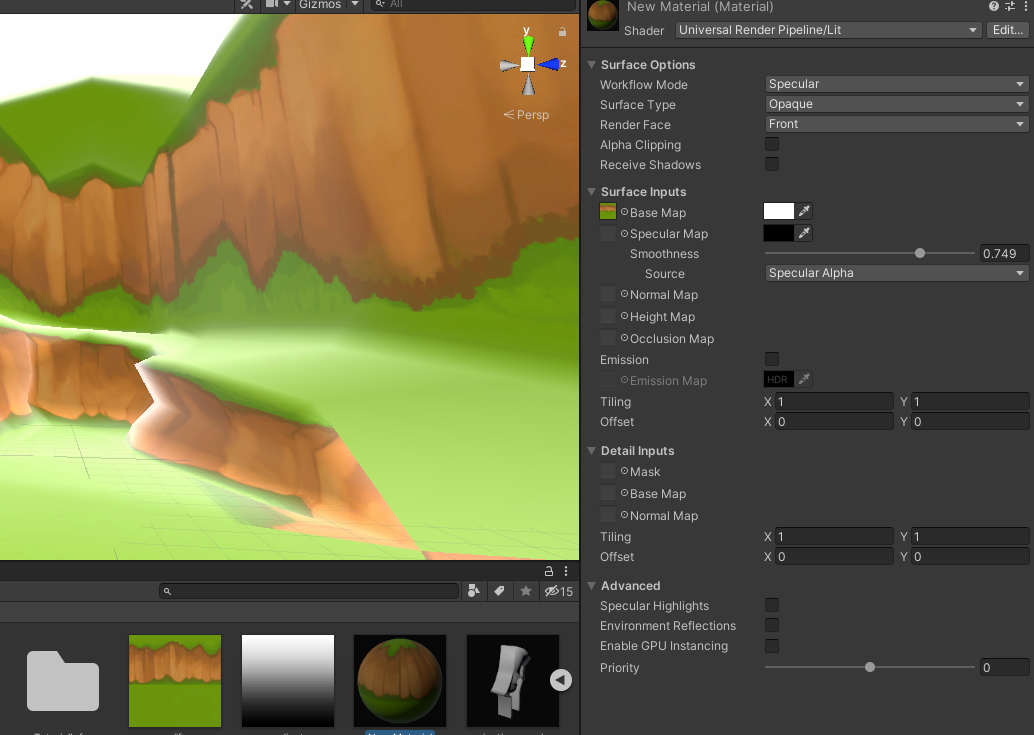
 ashen moth
I think this belongs here. Im new to unity and I my 16x16 square tiles and I have this weird grid where the background is showing through. The pattern moves when the camera moves. It happens when I use a buit in tilemap and when I manually set positions of sprites. I think it has something to do with the screen resolution because it moves when I change the screen resoltuion
 warped skiff
Use pixel perfect camera
ashen moth
Thanks I'll try it out in the morning
 barren inlet
why might this issue be happening

moving the camera causes this white line to appear
 ember thunder
How do I make sprite images be affected by light in game?
 dull vortex
Hi everybody.
I'm struggling with a low-fps using URP at a low-end smartphone.
Today, I notice using ARM Graphics Analyzer that Depth/Opaque/Stencil Buffer still running when I disabled all this in UniversalRenderPipelineAsset.asset configuration, I had to disable direct in Camera Component settings.
Someone notice this bug???
ancient obsidian
guys how cant i not to render another camera?
i need another camera to make icon
dull vortex
ancient obsidian
guys how cant i not to render another camera?
Do you want to create a Camera without render this?
I think Camera component had a function to disable "auto-render".
But, if you want only icon, you can create a empty gameObject and put a Camera Icon on this.
ashen moth
warped skiff
Use pixel perfect camera
this didnt work, here are my camera settings if thats any help
