#🛠️┃probuilder
1 messages · Page 3 of 1
 errant bough
Luckily it's just a free time thing and not for work, otherwise I would be f'd 😅
No deadline for anything, so I can take my time to get the hang of it
 bleak dust
i didnt hear anything about AI assistant for probuilder
 woven lake
It will allow you to mess up your geometry even faster!
 pearl basin
ok, as a total uv noob, I need help lol.
I need to construct a cylinder, remove top n bottom, and then play a video on the remainder.
the first 2 were ez enough on probuilder
I cannot for the life of me figure out how to do the last one - narrowed it down to the UVs being off but couldn't figure it out on the UV editor in probuilder after trying for a long, long time
I can put the render texture on the cylinder and play the vid, but the video comes out as tiled rather than as one continuous whole surface
I don't know blender either, tried it for a whiles but really couldn't figure it out
 junior sorrel
pearl basin
I don't know blender either, tried it for a whiles but really couldn't figure it...
junior sorrel
pearl basin
I don't know blender either, tried it for a whiles but really couldn't figure it...
Probuilder is close to useless for working with UVs, its best to invest in learning blender & co. if you need precisely authored meshes. The UV tools in probuilder can only help you with making UVs suitable for greyboxing.
pearl basin
<
don't need precise
just the UVs should be the same as the regular cylinder
the default unity cylinder works perfectly for this - just need the top and bottom off
junior sorrel
probuilder has no option to do cylindrical projection of UVs, and by all what you’ve said, you do in fact need precision and control.
just because it’s simple doesn’t mean it can be janky
 young vapor
pearl basin
I can put the render texture on the cylinder and play the vid, but the video com...
young vapor
pearl basin
I can put the render texture on the cylinder and play the vid, but the video com...
have you tried combining the individual faces into one big face?
use merge faces when they are selected, it should help out "smoothing" the sections as one.
pearl basin
yeppp
but merging all into one just produces a black surface
it stops playing the video lawl
young vapor
you're only combining the outside faces yea?
pearl basin
no, i need to play the video on the inside of the cylinder only. I didn't mention that
young vapor
Ohh the inside of cylinder
hmm interesting, gonna take a look when i get at my workstation. See if I can get it going.
pearl basin
thank u!
appreciate all the help I can get. not only do I not have the space to learn blender rn but it also melted my brain when I tried like a year ago lol
young vapor
np.
n yeah blender is very good tool and should be learned regardless, but I can see how using something already in unity makes it easier to work with esp iteration/proto.
if doesn't work, shouldn't be to difficult in blender
 wise glade
why when i extrude a edge it deselects some edges and only extrudes a couple
 rich wraith
i probuilderized a object in unity but I cannot flip it anyone know why?
young vapor
rich wraith
i probuilderized a object in unity but I cannot flip it anyone know why?
show which one you probuildirized
rich wraith
 young vapor
rich wraith
young vapor
rich wraith
its probably because you tried to buildirize an empty gameobject
young vapor
rich wraith
if i select the objects i can do it
yeah but them being multiple meshes might make it issue, but try
young vapor
rich wraith
it only flips the trees
Might need to export house as one whole mesh first before being able to mirror/flip it
 distant maple
hey, sorry if this the wrong place to ask this but im not sure if its an issue with probuilder or unity itself, every time i select this room, the moving/ rotating/scaling gizmo is far below the actual model, is there a way to fix this?
 young vapor
distant maple
hey, sorry if this the wrong place to ask this but im not sure if its an issue w...
young vapor
distant maple
hey, sorry if this the wrong place to ask this but im not sure if its an issue w...
you can try to set Center pivot or select a vert and set as pivot, see if helps
distant maple
setting to centre does in fact fix the issue, thank you so much
this is what i get for cheating and greyboxing all my geometry in minecraft (lol)
it certainly helps with keeping a consistent scale
pearl basin
pearl basin
I need to construct a cylinder, remove top n bottom, and then play a video on th...
figured this out. just need to make the cylinder on default unity, to ensure it has the UVs I need. then I can probuilderize it, and remove the top & bottom easily with PB
 sonic umbra
Hi there, I have this issue where I have a level that is stored as a prefab. However it's quite a large prefab with a ton of objects in it, and the meshes are built with probuilder. Editing this prefab is really really slow, like every operation takes so long. Also whenever I hit "Overrides" it shows all these prefab changes to probuilder meshes even tho I didn't touch them. I'm wondering if pro builder is what makes editing this prefab so slow.
My thinking was to "un-probuilderize" this prefab to verify this assumption. However, I see only an option to export a mesh. I don't see an option to remove ProBuilder from a gameobject? Is there a built-in way to un-probuilderize something or do I need to write a script to do this?
I am wondering if anyone else has this problem.
 haughty sonnet
ProBuilder bug report @ebon widget i private messaged you too but in case you dont read those ill post it here too.
The bug that has been reported in https://forum.unity.com/threads/texture-alignment-bug.713618/ and https://forum.unity.com/threads/probuilder-bug-textures-dont-align-properly.955797/ was seemingly fixed back then after those reports, but this bug (UVs sliding when resizing mesh when the scale is not 1) still occurs if the UVs are rotated for example 90 degrees. Also, when this is fixed, could the fix be backported for 2022 LTS? Would be a shame if it would only be fixed in unity 6 and remain a bug in 2022 LTS.
I don't know how to report bugs so I'm posting it here, I hope you can handle it. Thanks!
Unity Forum
Hi,
The version of PB I'm using, 4.0.5, has a glitch in the texture alignment workflow. If I have a cube entity, which I've set on auto UV, and I...

Unity Forum
Textures don't align properly when you select a scale other than 1. The texture pivot moves around. This buwas reported in july 2019 here but still...
 jolly steeple
When Most of the game is inside of different Houses, is it better to create diffrent Walls in Blender and put them in Unity together, or to use Probuilder?
 grave lintel
Where is ProBuilder Toolbar in Unity 6? I looked in the manual and it's not where it says it is: https://docs.unity3d.com/Packages/com.unity.probuilder@6.0/manual/toolbar.html
young vapor
grave lintel
Where is ProBuilder Toolbar in Unity 6? I looked in the manual and it's not wher...
do you have the package installed?
grave lintel
young vapor
do you have the package installed?
Yes
 grave lintel
young vapor
what the
grave lintel
young vapor
what the
I know, even the previous versions (of 6) had this issue
young vapor
weird cause it was working on 2023 , I just opened 6 today for first time tbh
grave lintel
young vapor
weird cause it was working on 2023 , I just opened 6 today for first time tbh
2023 and earlier versions worked fine
grave lintel
I was trying to figure out how to select vertices/edges/faces
grave lintel
At least I'm not going crazy
young vapor
yeah I thought they had redesigned in but no its completely gone lol
I'm gonna open a bug report
young vapor
grave lintel
At least I'm not going crazy
Unity Forum
I can't seem to be able to display the ProBuilder window...
[ATTACH]
grave lintel
young vapor
btw
https://forum.unity.com/threads/probuilder-window-missing-in-unity-6.1577161...
I still dont understand how to select a vertex
young vapor
grave lintel
I still dont understand how to select a vertex
you have to Click the Grid first


it unlocks these tools

I just mainly don't like how hidden this was all and undocument on new docs
also its awful having to click a Probuilder mesh to get that button in the first place
 young vapor
no the top one
the Yellow grid with the pencil
it unlocks the bar next to the snap grid tools
grave lintel
young vapor
no the top one
Got it, thanks
 unborn basin
I am really confused I am trying to add in an Edge loop and move it to the side, but it keeps deforming the material

 haughty sonnet
unborn basin
I am really confused I am trying to add in an Edge loop and move it to the side,...
haughty sonnet
unborn basin
I am really confused I am trying to add in an Edge loop and move it to the side,...
maybe thats a bug, send a bug report through Help > Report a bug (at the top of your editor)
 muted venture
Hello. I made a cave level in pro-builder. When i assigned a texture the tiling doesn't match at the intersection of wall and ceiling / wall and ground faces which makes the seams visible, creating an awful sight. How can i fix this issue?
 young vapor
muted venture
Hello. I made a cave level in pro-builder. When i assigned a texture the tiling ...
young vapor
muted venture
Hello. I made a cave level in pro-builder. When i assigned a texture the tiling ...
if you merge the faces that could help with the seams
muted venture
young vapor
if you merge the faces that could help with the seams
i tried that, didn't seem to work, but will give it another shot
oh it works actually but i need to merge all the faces in the wall i think, otherwise tiling is not aligned on other faces
young vapor
yup basically it has to become one face
muted venture
what if there's another texture on the other face like in the bottom seams in the ss?
muted venture
poly brush gizmo doesn't appear anymore. Any idead why this happens?
muted venture
merging faces is not a good idea here, i'll have to turn the entire level into one single face also it made the polybrush tool stop working
young vapor
I just use it for basic block outs you probably want to fix that up inside a proper tool like blender and reimport instead of messing with it inside unity
muted venture
yeah trying to do this with probuilder is the main mistake here probably
 serene quail
Where is the probuilder window on the new unity version
I cant find it in Tools > Probuilder > Probuilder window
young vapor
@serene quail Probuilder window is no longer a thing
everything is integrated inside the Editor, like scene view buttons
working on something to show how to do the same things in 6
basically you need this unlocks the typical tools like , Edge selection, Vert etc.

this icon only appears on a Probuilder object
the other stuff in the menu specific to a tool, can be found by right click / context menu
serene quail
young vapor
<@327482388768620545> Probuilder window is no longer a thing
ah i see
 stable terrace
how to use boolean in PB 6, I follow the docs but I don't have experimental submenu
ahh I have to enable experimental features in preferences
 amber tundra
hello everyone, I need someone who knows how to work with probuilder
young vapor
amber tundra
hello everyone, I need someone who knows how to work with probuilder
!collab
 rustic mauveBOT

📢 Collaborating and Job Posting
We do not accept job or collab posts on discord.
Please use the forums:
• Commercial Job Seeking
• Commercial Job Offering
• Non Commercial Collaboration
young vapor
 last kernel
how do you probuilderize an object with unity 6
last kernel
how do you probuilderize an object with unity 6
you should be able to just right click it to do so

 sharp jetty
How can I install probuilder 6.0?
or upgrade
Because I see the changelog and they are on 6.0 but i'm on 5.2.2
bleak dust
sharp jetty
How can I install probuilder 6.0?
its only avaliable in unity 6
sharp jetty
bleak dust
its only avaliable in unity 6
Oh...perfect hahaha
I have a problem where my mesh randomly disappears and breaks but when I move a vertex or line it resets back to normal for no reason
I thought it could have been fixed in probuilder 6.0 but guess i'll wait XD
 unreal chasm
Sounds like Occlusion Culling maybe?
sharp jetty
unreal chasm
Sounds like Occlusion Culling maybe?
The mesh is complez so maybe is that
sharp jetty
unreal chasm
Sounds like Occlusion Culling maybe?
How can i see the occlusion culling thing?


Like, COMPLETELY broken XD
But when I move a vertex or something, restores itself for a little, then breaks again
The only solution I see is starting from 0 that mesh and done, which I will think of doing when I finish the last part of the level XD
unreal chasm
Ah it’s also broken in scene view, then it’s probably not occlusion culling… I’m not into pro builder so I cant help you with this 😦
sharp jetty
unreal chasm
Ah it’s also broken in scene view, then it’s probably not occlusion culling… I’m...
thx anyways :3
young vapor
sharp jetty
if this is a bug you can replicate, submit a bug report
but also are you sure you didn't just make some wild broken geometry work ?
sharp jetty
young vapor
but also are you sure you didn't just make some wild broken geometry work ?
I mean, it wasnt that broken
But I think because of some faces I deleted maybe it broke
young vapor
probably
bleak dust
sharp jetty
But I think because of some faces I deleted maybe it broke
did you try the probuilder repair mesh tool?
sharp jetty
bleak dust
did you try the probuilder repair mesh tool?
a- that's a thing?
Nope. that didn't help
bleak dust
sharp jetty
a- that's a thing?
yeah in Tools > ProBuilder > Repair
 tawdry kernel

 runic crane
._. installed probuilder, cannot find the tab. Anyone have any ideas where I'm supposed to be looking?
Already checked in tools, window, gameobjects
 runic crane
Appearantly needed a restart
 ebon widget
Hey! The above reminds me (sorry, late!) be sure to check out the new PB6 in U6! Much, much better workflow and no more missing tabs/etc 😄
https://youtu.be/cv4e8fH2kQs

From the designer himself (myself?), a complete comparison of ProBuilder 5 vs ProBuilder 6. Let me know if you would like details on anything!
young vapor
ebon widget
Hey! The above reminds me (sorry, late!) be sure to check out the new PB6 in U6!...
perfect!
Now we just need the docs for 6 to reflect these changes 😆
One thing I do miss is how easy it was to access Vertex Color Window and UV windows, they are kinda hidden now in the topbar menu
runic crane
Just got into probuilder, the geometry of this is HORRIBLE I know but what would be the best way to position and orientate stuff like stairs. Is there a way to lock onto vertices when creating shapes?

(Thinking about the best way to make a staircase up from the bottom to the top
bleak dust
runic crane
Just got into probuilder, the geometry of this is HORRIBLE I know but what would...
create a spearate staircase object, vertex snap it to where you want, then modify the values of the staircase until you get what you want
runic crane
Not sure how to vertex snap lol perhaps I'll find a video on it
 frail wyvern
Hold V then drag vertices to other object vertices you want to snap to.
 timber bluff
when using pro builder why doesn't it let me insert an edge loop when I press on the edges and add a loop it adds it but wont let me control it
 timber bluff
when using pro builder why doesn't it let me insert an edge loop when I press on...
timber bluff
timber bluff
when using pro builder why doesn't it let me insert an edge loop when I press on...
@young vapor do you know how to fix this im going crazy
young vapor
timber bluff
<@968604165150507078> do you know how to fix this im going crazy
not sure its hard to tell whats going on on this picture, where is the new supposed Edge loop?
timber bluff
young vapor
not sure its hard to tell whats going on on this picture, where is the new suppo...
When I add an edgeloop normally it would let me control it and choose where to put it, but this time it won't let me
young vapor
I see
its moving the whole mesh
could be a bug
have you tried, a new shape, resetting unity , new scene ?
timber bluff
bruh how do I fix this it was working ok before
timber bluff
young vapor
have you tried, a new shape, resetting unity , new scene ?
i did reset unity but didn't work
WAIT
I FIXED IT
I think it happend cause I had realtime csg opened aswell lol
timber bluff
lol
young vapor
well good to know thats easy fix
 prime ravine
Hey anyone here?
Im new to like modeling and stuff but have a slight amount of knowledge ig
And probuilder makes me wanna jump from a building
Like for example if i create an edge loop
Like it creates it wherever it wants to and i cant position it correctly
Also how do you like converge edges instead of moving them in the same direction
For example if i have a pipe, and i want to make its bottom closed, how do i do it
haughty sonnet
prefab? dont put probuilder stuff in prefabs, i've heard it breaks everything
 fossil flint
How do I open the ProBuilder window in Unity 6?
It used to be under Tools > ProBuilder > ProBuilder Window, but I can't find it there or anywhere else.
No results from Window > Search > New window either
young vapor
fossil flint
How do I open the ProBuilder window in Unity 6?
It used to be under Tools > ProB...
the probuilder window is no more
#🛠️┃probuilder message
check the video out from one of the person who works on probuilder. Shows where everything is
 night shore
Is anyone else having this annoying UI issue where the icons are spread out in a long list instead of in a grid? Even though there is plenty of space to display the buttons on? I'm on Unity 2022.3.22 but don't remember when this started happening.

 woven forge
Unity Forum
I've been getting a constant error from probuilder for some time now. I'm not sure when it started, but it seems to pop up whenever scripts compile or...
I couldnt fix error
same type and it does not matter if you restart
 muted willow
night shore
Is anyone else having this annoying UI issue where the icons are spread out in a...
muted willow
night shore
Is anyone else having this annoying UI issue where the icons are spread out in a...
its happening for me too on unity 2022.3, it only started happening when i switched unity versions on my project, its pretty weird
night shore
muted willow
its happening for me too on unity 2022.3, it only started happening when i switc...
Yeah. It's annoying but it still works, at least 😕
 turbid fractal
When I merge objects some of the faces get deleted. How can I have this not happen?

 manic solstice
dude this is so annoying please someone help https://forum.unity.com/threads/probuilder-models-disappearing.1600035/
Unity Forum
I have a problem with ProBuilder.
I bought a game from someone, and they sent over the rar file containing the Unity project. When loading it in...
haughty sonnet
manic solstice
dude this is so annoying please someone help https://forum.unity.com/threads/pro...
did you try installing probuilder into this project before opening it? could fix it, maybe
you can try installing probuilder with the package manager before opening any of the scenes. if that doesnt work then you can try putting probuilder's files into the project before opening it in the first place
turbid fractal
Why is there not a vertex at this point after I probuilderize? There is a vertex there in blender but not unity and it is causing problems
 young vapor
always had mixed feelings how probuilderize worked
how does original mesh look like ? are you sure unity's culling maybe isn't messing with it?
turbid fractal
There is a vertex there but I cannot select it or control it
 young vapor
turbid fractal
There is a vertex there but I cannot select it or control it
young vapor
turbid fractal
There is a vertex there but I cannot select it or control it
try maybe giving it sides/backface in blender maybe ? just to test it out then delete the face
turbid fractal
Same thing happens when it has faces, I have tried multiple different types of faces and none change if the vertex is there
young vapor
that is odd. Maybe report it as a bug :\
 patent creek
ebon widget
Hey! The above reminds me (sorry, late!) be sure to check out the new PB6 in U6!...
patent creek
ebon widget
Hey! The above reminds me (sorry, late!) be sure to check out the new PB6 in U6!...
plucked a booger and threw it on the couch within the first 30 seconds 👨🍳
dude's so chill, probably paid VC money despite keeping PB a piece of 💩 for years. keep it up bro!
CSG coming soon
 whole prawn
!warn 212712183472062465 I have no idea what this stuff you've posted in the probuilder channel is about, but replying to staff in a hostile and antagonistic manner is not appropriate. If you have actual suggestions or complaints about the software post them without the personal attacks.
rustic mauveBOT
 elefantopia has been warned.
haughty sonnet
probuilder's been pretty good for me, i dont know whats so 💩 about it. there are some bugs tho i can understand that
young vapor
yeah its a decent tool for prototype. There are bugs of course , also its not as good as the Hammer 5 in Source 2 .
Understandable though, that is a tool meant for making maps for Source games.
Some people just like barking for the sake of being loud, but cannot provide an intelligible point where someone can agree/disagree. Juts complaints for the sake of complaining
junior sorrel
It can’t be used properly in prefabs. Also custom extensions and runtime usability is limited because of its API that only supports its primary use case (prototyping). If its API was more layered, it could be an amazing tool for procedural modeling but it just isn’t.
 echo shell
Hello just a quick question how can i remove this vertex, so that i merge two edges into one long one
 young vapor
echo shell
Hello just a quick question how can i remove this vertex, so that i merge two ed...
young vapor
echo shell
Hello just a quick question how can i remove this vertex, so that i merge two ed...
you can just select both edges and merge them
echo shell
is there a merge edge button?
young vapor
echo shell
is there a merge edge button?
are you able to select the faces ? maybe if you merge those it will do it
echo shell
i found out you can like weld them and i made it work
 teal lintel
im using unity 6. Selecting any face on an object crashes my pc. Its kind of a leak i think, unity takes up all memory... any advices?
young vapor
teal lintel
im using unity 6. Selecting any face on an object crashes my pc. Its kind of a l...
if you are able to recreate this bug send in a bug report
!bugs
rustic mauveBOT
🪲 To make bug reporting as quickly as possible, we made a bug reporting application for you. When running Unity choose Help->Report a Bug in the menu, or you can access it directly through the executable in the directory where Unity is installed. It will also launch automatically if you experience a crash.
📝 If your bug report is to do with Documentation, either an error, typo, or omission, you can report it by scrolling to the bottom of the page where you found the issue and click ‘Report a problem on this page’!
💡If your report is to do with a new feature idea, you can check the Unity Product Roadmaps page to see if your idea has already been planned.
For more complete instructions on how to report bugs, access: https://unity3d.com/unity/qa/bug-reporting
teal lintel
young vapor
if you are able to recreate this bug send in a bug report
do I also need to send my project? its 70gb
young vapor
teal lintel
do I also need to send my project? its 70gb
I would try recreating this issue in a blank project first with the same version
 mellow goblet
guys I have a stupid question
so I need cave systems for my game and the digger asset is inadequate
I hate blender and complicated programs and I need relatively simple things to model such as cave walls and rocks
Probuilder (and polybrush?) seem like the perfect tools for the job but I don't quite understand the difference or how you use them in conjunction
I saw a couple of youtube vids saying probuilder + polybrush but I could only see people modelling with probuilder
so do I paint textures on with polybrush or what? I saw that it does modelling as well so I'm confused as to what I should use where
bleak dust
mellow goblet
so do I paint textures on with polybrush or what? I saw that it does modelling a...
probuilder is used to make the models, UV's and apply different materials, polybrush is used to sculpt, vertex paint textures and prefab scatter
and they can work in conjuction since they originally come from the same developer
 gilded heath
i imported my model from blender and the same pieces are different who knows why btw the piece on the right is the broken one idk what happend to
 mellow goblet
bleak dust
probuilder is used to make the models, UV's and apply different materials, polyb...
mellow goblet
bleak dust
probuilder is used to make the models, UV's and apply different materials, polyb...
Thanks. I talked to some people and they universally agree that I should stick to blender
is this really true?
maybe for more complex meshes
let's say I want to make good looking rocks, can I do that with probuilder + polybrush or should I stick to blender?
bleak dust
probuilder can struggle with very complex meshes, so if you do high poly stuff or characters you should use blender, i made 90% of my game's levels using probuilder and it works for me its up to preference really, you can also prototype the levels in probuilder and then replace it with actual models when those are done.
Define good looking
mellow goblet
bleak dust
Define good looking
I would personally say good looking for simplistic meshes like rocks and cave walls is mostly down to textures and not meshes
meshes can often be subpar, it won't matter if the textures (with bumpmaps and such) sell it
I guess I can always try both
why not
is probuilder + polybrush easy to use? I'd assume so
bleak dust
yeah
mellow goblet
ok I will try it alongside blender
if I undetstand correctly, I can paint in different textures with polybrush, the same way I would paint a terrain, correct?
bleak dust
ye
mellow goblet
what of the normal maps, metallic, smoothenss etc?
mellow goblet
oh that's great actually
amazing
I thought you painted only textures
if you paint materials, that is massive
one last question, can you only paint objects made in probuilder, or can you paint any meshes?
bleak dust
im actually not sure about that
 ocean sequoia
https://i.imgur.com/VoJYJMw.png
How exactly am I supposed to clean up this edge
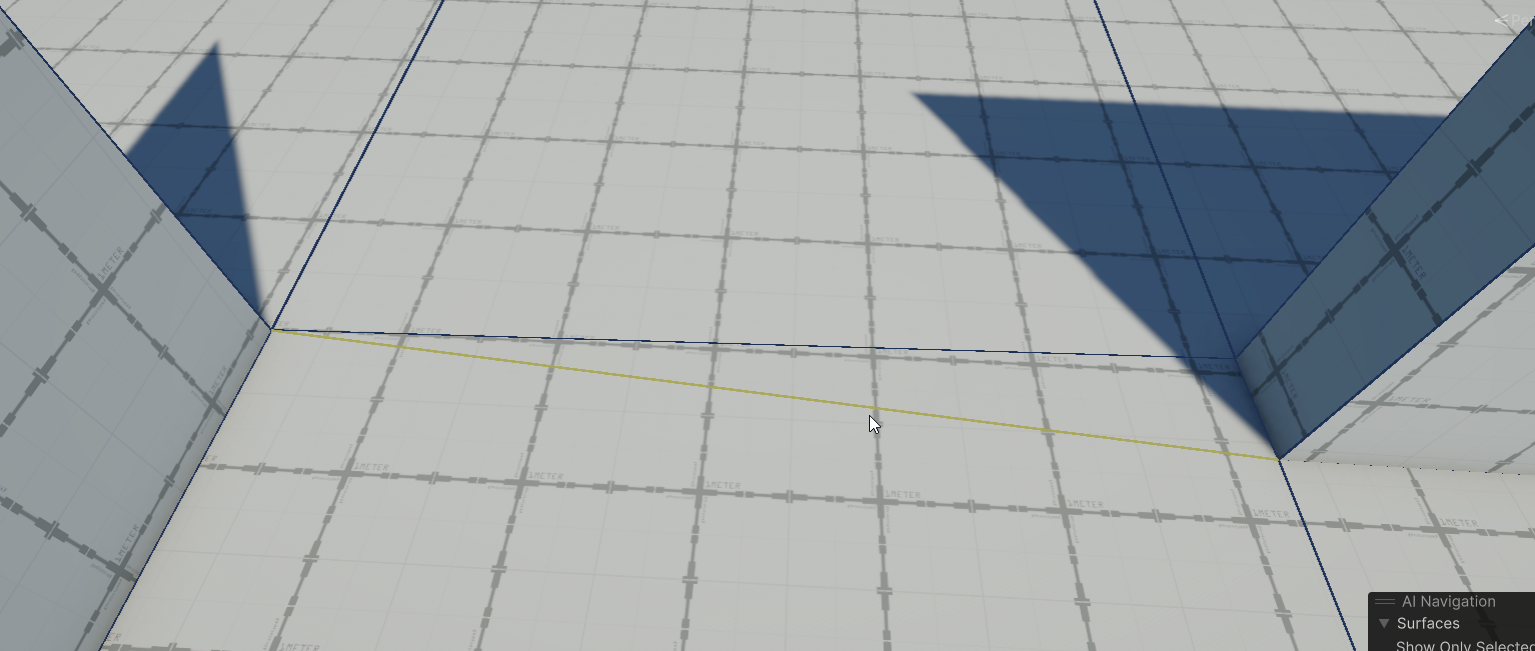 young vapor
ocean sequoia
https://i.imgur.com/VoJYJMw.png
How exactly am I supposed to clean up this edge
young vapor
ocean sequoia
https://i.imgur.com/VoJYJMw.png
How exactly am I supposed to clean up this edge
you could try merging the faces
ocean sequoia
young vapor
you could try merging the faces
u a smarty
ocean sequoia
young vapor
you could try merging the faces
One more question. Is there a way to populate a vertex onto an edge directly or must I use loop cuts?
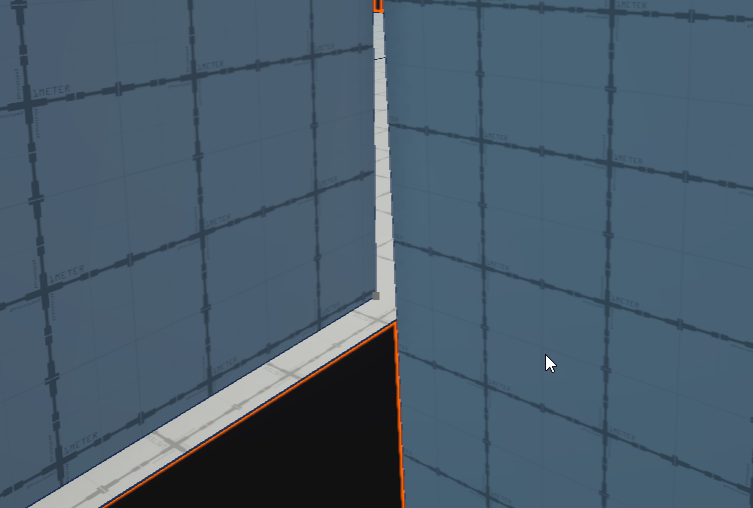
like I need a vert right there to collapse upon
young vapor
yeah cutting/ edge loops is the only way I've done it, not sure if there are other ways
ocean sequoia
ah dang ty
ocean sequoia
tool likes to error a lot and when it does it stops responding until I restart unity
that fill hole button is a trap
ocean sequoia
I'm so confused on the conditions on when or when I can't add an edge loop. There's no message on why it fails sometimes. (Looked up limitations on some of this stuff and there's many reasons it could fail, but I wish pro-builder would print out the error because otherwise it feels like the tool is just unresponsive)
Seeming to having to deconstruct my stuff back and making sure I have all the loops I need before expanding anything out
patent creek
probuilder 4.5 at work  let's see if 5.2.2 can handle concave shapes

5.2.2 removes all the cross triangles but epic fails on selection growth:

alt+G twice
another example where alt+G fails. this is after hammering it a few times- these are coplanar, so well below the default 15 degree threshold

and crazy slow to delete faces, even 1 out of 6k probuilderized poly
also inspector drags its ass. i think mesh data is all stored in the inspector which is fine when you store 100 elements, not ok with 2k+ and this is a bug of the editor's serializer that every asset dev knows. the fix is to not store data in the scene but instead create temp scriptableobject
ocean sequoia
turns out there's some real big bugs with a lot of the 2023 probuilder versions and Unity 6
throws a whole bunch of null errors when dividing out faces
manic solstice
haughty sonnet
did you try installing probuilder into this project before opening it? could fix...
no, that didnt work. i payed 100 dollars for this game so im really desperate for a solution
ocean sequoia
ocean sequoia
throws a whole bunch of null errors when dividing out faces
Scratch that. Tool just buggy as fug in any version I'm using.
Mostly because the cutting tool likes to freak out and throw a bunch of null errors
It's unfortunate cause this thing does seem pretty promising, but there's quake map editors out there better optimized than this thing.
can't even remove edges? What is this? The 90s?
ocean sequoia
https://i.imgur.com/3KcYNlF.png
Do people not run into these errors? Easily reproducible by simple cuts and when it happens your mesh becomes inoperable.
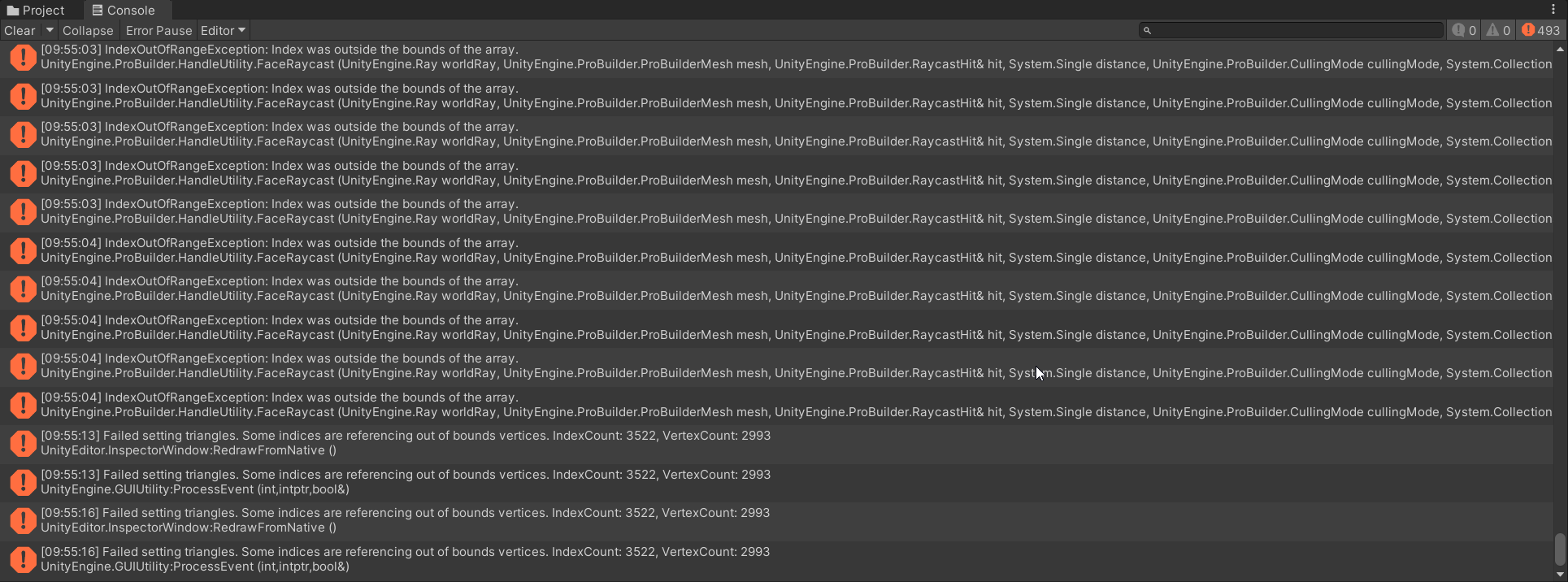
 barren oasis
i cant really find the right place to upload this so im gonna upload it over here
how do i optimize my 3d models?

im making a horror game i wanted to import a house i found i sketchfab but my game is really lagging
i know about texture atlas' but i dont really know how do i do it for a model i found online
i have tried used texturepacker3d but its not really working, its giving my a model with no textures
muted venture
why doesn't fill hole work here?
 junior sorrel
muted venture
why doesn't fill hole work here?
junior sorrel
muted venture
why doesn't fill hole work here?
you can’t have edges that share more than 2 triangles
 plush pewter
In Probuilder 6, is there any way to bring up a tool window like <6? having to do everything through the toolbar menu is super slow
for example, collapsing veritices
the probuilder docs, even for 6.0.1 still seem to show all the old way of doing things
junior sorrel
plush pewter
In Probuilder 6, is there any way to bring up a tool window like <6? having to d...
iirc the toolbar is now one of those panels you can have floating in your scene view.
plush pewter
I have the couple of items added into the existing one, but it has just create shape, and knife tool
Been looking everywhere
junior sorrel
tbh, its quite possible they made it worse while making it better, like with so many other things related to the migration to "better" retained-mode UI
plush pewter
That seems quite possible. In this video it seems this is the way https://youtu.be/cv4e8fH2kQs?si=E799HV_Kf1WzFbtN
From the designer himself (myself?), a complete comparison of ProBuilder 5 vs ProBuilder 6. Let me know if you would like details on anything!
junior sorrel
plush pewter
That seems quite possible. In this video it seems this is the way https://youtu....
i'll be sad then
muted venture
junior sorrel
you can’t have edges that share more than 2 triangles
how can i see that how many triangles the edges share?
junior sorrel
muted venture
how can i see that how many triangles the edges share?

^ in those cases the hole tool (among others) gets confused
muted venture
So complex geometry creates some issues on probuilder. Does the same thing happen in blender too? Also is there a way to get around it in probuilder? Btw i managed to close that gap but with a very shitty way

This is the backside of the wall
 ocean sequoia
junior sorrel
ocean sequoia
junior sorrel
So what's the workaround here if you do need that third edge to extrude? I've been just taking the buggy cut tool and making a similar edge right below it.
I was thinking just disable backface culling and save yourself from creating another face, but I guess you can't shortcut like that
junior sorrel
ocean sequoia
So what's the workaround here if you do need that third edge to extrude? I've be...
A bridge between 2 edges
ebon widget
plush pewter
In Probuilder 6, is there any way to bring up a tool window like <6? having to d...
Hey, you can just right-click and the actions are right at your mouse pointer. No need to look for the toolbar/etc. Hope that helps!
plush pewter
yea that's what I've been doing. although I get why this is the direction ya'll went with it, I admit I liked the speed of having a toolbar that had some of the more common items in it
your pb5 vs 6 video was helpful
ebon widget
ocean sequoia
https://i.imgur.com/SW467Zw.png
Sorry I'm late - select the edge, right-click, "subdivide edge" 🙂
ebon widget
plush pewter
yea that's what I've been doing. although I get why this is the direction ya'll ...
Oh, hmm, can you explain? Since the toolbar is now always at your right-click, it should be faster. In theory 😄
plush pewter
I just mean its two clicks instead of one now, though like all things, in a few weeks I won't care anymore
ebon widget
manic solstice
no, that didnt work. i payed 100 dollars for this game so im really desperate fo...
I just want to double check - you didn't pay for ProBuilder, did you? It's a free package from Unity for years now. If someone is selling it to you, that's a problem, yikes!
ebon widget
plush pewter
I just mean its two clicks instead of one now, though like all things, in a few ...
Ohh ok got it yes. 2 steps forward one back, agreed. The main reason we went this way, there is so much landing into the editor now, it just takes over everything, no space left, or you need to move the mouse 100miles to your other monitor 😛 So, the hope is to make things more "there when you need it". Thanks for the thoughts!!
plush pewter
also, do you know the name of this feature? I want to hot key it but I can't find the name

yea that makes sense. it is much cleaner now
ebon widget
Oh! Yes sorry it's a naming issue - let me check ...
plush pewter
overall, been loving PB6 though, havn't had any real issues yet
I used to use realtimecsg but with it not being compatible with unity 6, i'm back to PB, and have been pleasantly surprised with it
young vapor
ebon widget
Oh! Yes sorry it's a naming issue - let me check ...
Hey I've reported a bug about the New object Doesn't get created with pivot at corner it still does Center even if I have corner selected, not sure if it got processed yet..
ebon widget
Shortcuts: ok, I had to search myself ... sry, we'll get the naming fixed up!
 ebon widget
young vapor
Hey I've reported a bug about the New object Doesn't get created with pivot at c...
ebon widget
young vapor
Hey I've reported a bug about the New object Doesn't get created with pivot at c...
Can you send me the link? @shadow kindle should know! 😄
plush pewter
ahhhhh ok that's awesome thank you!
young vapor
ebon widget
Can you send me the link? <@471601689623920660> should know! 😄
Ahh I cant find the email so it probably never went through the ticket system? I can try filing it again.
made a GIF of the issue as of 6.0.3f1 Unity PB 6.0.1

I guess now its changed from "Corner" to "First Vertex"
the placement seems to be using the corner vertex which is accurate but then final mesh has the pivot in middle, and you can see I'm in pivot mode not Center
ebon widget
Yeah cool I see it there! Thanks!
 shadow kindle
I'll check that tomorrow indeed! I don't recall this bug report in particular but my memory can miss some things sometimes 😅
manic solstice
ebon widget
I just want to double check - you didn't pay for ProBuilder, did you? It's a fre...
nah i payed $100 for the game that was supposed to have probuilder in it, not probuilder itself
 hollow hamlet
anyone know how to call this via code ?

I mean the generate lightmap UV's specifically
bleak dust
hollow hamlet
anyone know how to call this via code ?
you should not do that via code
hollow hamlet
bleak dust
you should not do that via code
Why is that?
bleak dust
because lightmap baking should not be done during runtime
ocean sequoia
https://i.imgur.com/8Jb8mui.jpeg
Made something actual for once with this tool. I actually like it for how minimal it is compared to blender and that I can work with it right inside of unity (always a positive), but I can't get over the fact that I had to constantly back up my mesh as the cutting tool would constantly brick it. There's a few ways I could reproduce those errors, one being that cutting too close to the edge just makes it crap the bed, and I suspect that a vertex connecting to many other vertices were more prone to breaking if I used them as a source to one of the cuts.
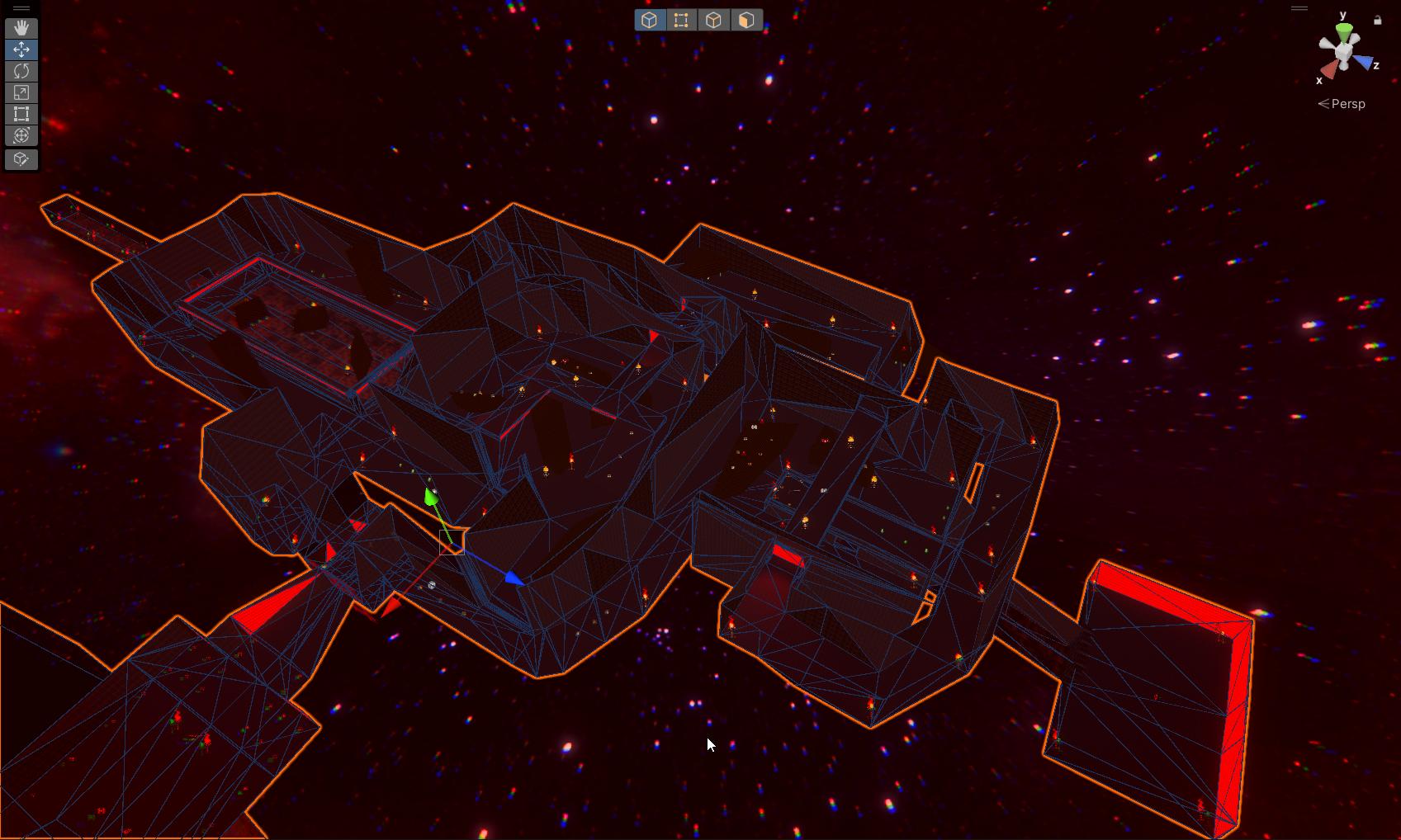
Also, edge detection can be problematic at times, also selecting multiple verts started becoming a problem as it would select everything not* in the foreground (maybe there's options for that I've not looked into)
young vapor
you got some wild looking geometry there
ocean sequoia
young vapor
you got some wild looking geometry there
It's a little messy and could be cleaned up quite a bit but was for some 4 day jam. Kinda stuck triplanar on a lot of it cause I didn't have time to merge all the faces
the crappy uvs did fit the theme of it though haha
young vapor
ocean sequoia
the crappy uvs did fit the theme of it though haha
are those torches? i Do like the look 😛
ocean sequoia
Yeah I made a doom clone
 hollow hamlet
bleak dust
because lightmap baking should not be done during runtime
hollow hamlet
bleak dust
because lightmap baking should not be done during runtime
Generating Lightmap UV's is not lightmap baking ...
bleak dust
hollow hamlet
Generating Lightmap UV's is not lightmap baking ...
but why would you need to generate lightmap UV's at runtime other then lightmaps?
hollow hamlet
bleak dust
but why would you need to generate lightmap UV's at runtime other then lightmaps...
well I have a script that automaticaly adjusts uv tiling based on my material textures texel resolution. But it alwas breaks the lightmap uv's, so I would like to run the lightmap uv generation as a last step in my script to get around this
obviously yes its for lightmap baking but that happens only manually (when I do the bake, i don't use auto baking)
plush pewter
are there any really good probuilder courses/yt series that someone can recommend?
everything I find seems pretty outdated
 karmic jungle
is probuilder good in the long-run for complex levels? Seems better than just doing it in blender at least
young vapor
karmic jungle
is probuilder good in the long-run for complex levels? Seems better than just do...
that really depends on a lot of things, it is very good for fast iteration and prototyping a level right into unity, that alone makes it worth it. It can't handle too many complex features that blender has, you should do as much as you can inside unity, then cleanup anything that needs cleaning in blender
karmic jungle
young vapor
that really depends on a lot of things, it is very good for fast iteration and p...
i think the main thing that puts me off blender for level creation are the camera controls, if there were the same free-cam controls as unity has it'd be perfect but it's a little awkward for navigation i feel like
young vapor
karmic jungle
i think the main thing that puts me off blender for level creation are the camer...
if that's the only thing you can probably switch those shortcuts around no? iirc they also have a tradional FPV flymode.. I'm not totally familiar with blender though so don't take my word on that lol
karmic jungle
young vapor
if that's the only thing you can probably switch those shortcuts around no? iirc...
really wish i took the two seconds to look this up because this is actually fantastic lol https://docs.blender.org/manual/en/latest/editors/3dview/navigate/walk_fly.html
pro builder always felt like blender with a little strange controls/UV editing so this is gonna be really good lol
young vapor
karmic jungle
pro builder always felt like blender with a little strange controls/UV editing s...
yeah they are pretty similar in the editing process, blender just has way more tools that work better lol
haughty sonnet
young vapor
yeah they are pretty similar in the editing process, blender just has way more t...
i've always wondered, if you make a level in blender it cant batch your textures/meshes together for optimization like with probuilder? or can it
young vapor
haughty sonnet
i've always wondered, if you make a level in blender it cant batch your textures...
yeah good question, probably someone on the Blender discord knows lol
haughty sonnet
young vapor
yeah good question, probably someone on the Blender discord knows lol
isnt it completely up to unity? unless you split up your blender model so that every face with a separate material is a separate model or something
hollow hamlet
is there an alternative to Probuilder vertex painting brush tool ? As usual with subsequent versions Unity makes their tools/packages worse, so the latest probuilder versions removed the vertex painting by brush feature
young vapor
hollow hamlet
is there an alternative to Probuilder vertex painting brush tool ? As usual with...
vertex painting is there but its moved
the new locations workflow is a bit counter-intuitive I give you that
anyway you will find it in the upper menu of unity
 hollow hamlet
young vapor
vertex painting is there but its moved
hollow hamlet
young vapor
vertex painting is there but its moved
I know it exists in that form, but the previously existing brush mode made painting large chunks very convenient. That has now been removed (such a great choice Unity, real good move) leaving us only with the select-click-apply workflow which is awful for large areas. That's why I'm wondering if there's an alternative.
young vapor
hollow hamlet
I know it exists in that form, but the previously existing brush mode made paint...
Ohh I didn't even know it has a vertex brush painter before tbh lol
I could suggest something on that but no idea sorry, I never used that feature
young vapor
hollow hamlet
I know it exists in that form, but the previously existing brush mode made paint...
After a bit a research, seems like painting was never a thing since 2020ish.
https://forum.unity.com/threads/probuilder-has-no-vertex-color-painting-options-where-are-they.670033/
are you confusing it with Polybrush? cause thats what has that feature you speak of
plush pewter
I'm running into a strange issue where my UVs are being squashed into nothing when I click almost anywhere. Am I doing something wrong? If I reset the UVs, it seems to fix itself for the most part. cc: @ebon widget
PB6, current version
 unique thicket
is there a way to link these faces together and make a tunnel merging them?

like bridge them together i mean
nvm got it
 formal crow
Hi everyone 😄 I have drawn my polyshape using ProBuilder but I cannot figure out how to assign vertex colors, it seems like it just does nothing. I'm using 2023.2.13f1
Does anyone have an idea on the matter?
 young vapor
formal crow
Hi everyone 😄 I have drawn my polyshape using ProBuilder but I cannot figure ou...
young vapor
formal crow
Hi everyone 😄 I have drawn my polyshape using ProBuilder but I cannot figure ou...
Your probuilder default material seems to be missing, vertex paint only works on that material
if you're using URP make sure you've downloaded the appropriate shader/material and apply that in (Preferences -> ProBuilder)
https://docs.unity3d.com/Packages/com.unity.probuilder@5.0/manual/installing.html#support-for-scriptable-render-pipelines
since you already created the shape with missing material, after doing the step above you can just drop the new probuilder material onto the mesh
formal crow
Working perfectly! Thank you so much, I wonder the reason why the material is not included into the package though 😁
young vapor
formal crow
Working perfectly! Thank you so much, I wonder the reason why the material is no...
lots of packages are this way, usually have different materials separated since they have now 2 project types (birp, SRP)
SRP were added later in unity, so they give you the birp version. Wish it automatically detected that in package manager but yeah lol
formal crow
Hi, it's me again! I'm still messing around with ProBuilder but adding a twist to it.
Once I'm done with modeling my mesh using great ProBuilder, I export the asset and use it as an ✨ extrusion mesh ✨ to generate tracks procedurally. This works well except that I'm unsure how to deal with texturing. My curved tracks are made of several straight segments and I feel like the U coordinate should range from 0 to 1 across all my segments (enabling tiling) to avoid the discontinuity of the texture between them.
I plan to map each vertex to its corresponding U coordinate depending on our current cumulated length along the whole track, and map to V coordinate depending on its relative height to the rail height. Does it sound right or am I overengineering it? Thanks!

 robust plume
math error? A simple division is resulting in a 14% error.
To replicate:
Create a plane with 1 height cuts and 3 width cuts.
Use vertex selection to join vertexes so that an equilateral triangle is formed.
Delete planes not inside triangle.
Duplicate resulting plane (now in triangle shape) and rotate and move to see that the triangles are definitely not equilateral.

if I resize the plane to about 86% of original size, a true triangle results. This shouldn't be.
 viral flame
I'm attempting to find an insert edge loop tool in probuilder, but I cannot. Or at least select edges specifically so I can bevel them, rather than faces. Anyone know how to do that?
 half drift
viral flame
I'm attempting to find an insert edge loop tool in probuilder, but I cannot. Or...
half drift
viral flame
I'm attempting to find an insert edge loop tool in probuilder, but I cannot. Or...
Are you switched into edge selection mode? You should see these two guys in your probuilder panel if so.


 viral flame
Ohhhh. I see. Thank you for the clarification.
 split hamlet
Does anyone know why my staircases are coming out as an oval? I've never had this issue before. 360 degrees works fine for the circumference.

Nevermind lol
 indigo iris
Probuilder allows you to separate mesh? Like in Blender when I select or Link vertices
 hollow gust
Is there a way to bevel an edge so that it's more curved instead of just adding a single face? Like in Blender

 earnest cape
I'm trying to make a resizeable room but somehow couldn't find any info on this online. It would be great if the walls of the room would keep their width while the interior of the room becomes bigger. If there's a tutorial or something you could share with me, it would be greatly appreciated!
young vapor
earnest cape
I'm trying to make a resizeable room but somehow couldn't find any info on this ...
this isn't trivial to do thats probably why there is no real guide on it
earnest cape
I found a guide that talked about procedurally generated rooms where the guy seems to have exactly what I'm looking for, although I'm struggling to understand which parts of the tutorial are really relevant to achieving what I'm trying to do. I'll keep trying to figure this out, here's the link to the video for anyone else interested in this: https://youtu.be/PhLcNhK9aro?si=T-axj3_S0WI93oth&t=329
mellow goblet
is there a polybrush discord server? I can't find it
I ask here cause they are semi-related
 coral musk
 stoic grotto
So I just started my first project, how do you make different levels for each mission in a campaign like is it all in the same place or all in different areas
 keen surge
depends
haughty sonnet
stoic grotto
So I just started my first project, how do you make different levels for each mi...
you can have them in different scenes, if you want
barren oasis
is there a way to collapse to nearest vertex? like blenders "By Distance"
barren oasis
hello i built this with pro builder. I'm wondering how do i make it so has walls and a roof its not working properly.
 barren oasis
hello i built this with pro builder. I'm wondering how do i make it so has walls...
barren oasis
barren oasis
hello i built this with pro builder. I'm wondering how do i make it so has walls...
fixed.
 brave badger
Does anyone know why, when my edge loop cuts approach another edge, they begin to warp the shape?

Kinda driving me nuts
haughty sonnet
@ebon widget polybrush causes a leak detected message in the log every time i press play after sculpting something with polybrush
 solar pumice
haughty sonnet
<@538754088209219585> polybrush causes a leak detected message in the log every ...
solar pumice
haughty sonnet
<@538754088209219585> polybrush causes a leak detected message in the log every ...
You've been here long enough to know not to tag people. If you have a bug, you can report it here !bug
rustic mauveBOT
🪲 To make bug reporting as quickly as possible, we made a bug reporting application for you. When running Unity choose Help->Report a Bug in the menu, or you can access it directly through the executable in the directory where Unity is installed. It will also launch automatically if you experience a crash.
📝 If your bug report is to do with Documentation, either an error, typo, or omission, you can report it by scrolling to the bottom of the page where you found the issue and click ‘Report a problem on this page’!
💡If your report is to do with a new feature idea, you can check the Unity Product Roadmaps page to see if your idea has already been planned.
For more complete instructions on how to report bugs, access: https://unity3d.com/unity/qa/bug-reporting
haughty sonnet
its ok, its fine to tag him. you can ask him
haughty sonnet
it seems probuilder 6 does not have any new desirable features? just some minor changes to things that did not need to be changed. probuilder still lacks a lot of things that should have been a feature from the start (features that an engine from the 90s has, which probuilder was inspired by)
for example, texturing an arch so the texture curves with it. impossible in probuilder (unless you spend hours trying to line up the UVs and even then you cant get it perfect), while in the 90s engine it takes a couple clicks
muted venture
Hello, did they fix the Probuilder boolean tool in the latest version of Unity? It keeps crashing the editor when i am trying to use it in the 2022.3.4.f1
is it still experimental on Unity 6?
 hollow gulch
Hey everyone! I have an issue with exporting an object I created using ProBuilder. Can you assist? 🙂 I want to export this arcade machine model as a single object, to be imported later. How do I do that? I only manage to export seperate objects, like the cabinet, buttons, even the image that I use inside a material. Thanks!
 junior sorrel
hollow gulch
Hey everyone! I have an issue with exporting an object I created using ProBuilde...
junior sorrel
hollow gulch
Hey everyone! I have an issue with exporting an object I created using ProBuilde...
merge the objects (select all of them, click "merge objects"), then export
barren oasis
Just starting using Unity 6 and wanted to have a go at probuilder, wow its different and itll take some time to learn however I have one big issue and I must being doing something wrong. Before I could hold control and it would snap to the grid fine, now it doesnt snap on that initial shape creation point, after ive made that first point it allows me to snap but not for the first point before ive clicked, added videos below, any idea how to solve? Whilst its not the end of the world its quite annoying when trying to create a shape next to another and have it in the correct location
hollow gulch
junior sorrel
merge the objects (select all of them, click "merge objects"), then export
Thank you! I will try this.
 hot galleon
I get these weird glowing spots around edges of probuilder meshes? Its also like 10x brighter and more visible in VR

 maiden falcon
Hey everyone, I have lot of 3D assets, i just wanna build a prototype fast, how do I do it without individually putting pieces?
 dusk ingot
maiden falcon
Hey everyone, I have lot of 3D assets, i just wanna build a prototype fast, how ...
dusk ingot
maiden falcon
Hey everyone, I have lot of 3D assets, i just wanna build a prototype fast, how ...
For organic stuff like trees and flowers, some people use assets that allow to "paint" prefabs. -> PolyBrush
And there are also systems to help build levels from modular assets, kinda tilesets and 3d tiles.
But i'm not into that so i can recommend any.
haughty sonnet
maiden falcon
Hey everyone, I have lot of 3D assets, i just wanna build a prototype fast, how ...
maybe snaps, which brackeys made a video on at some point (idk if that accomplishes what you're talking about) its unrelated to probuilder though
barren oasis
robust plume
you have unity working on the 3ds?
 final ginkgo
How would I merge these faces back into one?

I separated the track into 2 parts using an edge loop

but now I want to put them back together
is that possible?
 sonic basin
 young vapor
final ginkgo
is that possible?
young vapor
final ginkgo
is that possible?
merge the faces
final ginkgo
I tried but the faces were separate
The picture was a little odd because I forgot to undo when I tried to do something to fix it
final ginkgo
Oh yeah I fixed it btw
haughty sonnet
does anyone know how to texture an arch so that the texture curves with it? or is that still not possible in probuilder after all these years?
young vapor
haughty sonnet
does anyone know how to texture an arch so that the texture curves with it? or i...
I did so combining faces but that has its drawbacks
the UV editor is basic
haughty sonnet
young vapor
I did so combining faces but that has its drawbacks
how do you get the texture to rotate if you combine the faces?
young vapor
haughty sonnet
how do you get the texture to rotate if you combine the faces?
You're talking about something like this ?
1st image vs 2nd image


or you mean something else

 haughty sonnet
young vapor
You're talking about something like this ?
1st image vs 2nd image
haughty sonnet
young vapor
You're talking about something like this ?
1st image vs 2nd image
i mean the side of the arch, not the inside
haughty sonnet
so it's not possible 😭
young vapor
haughty sonnet
so it's not possible 😭
did combining faces not work ?
haughty sonnet
young vapor
did combining faces not work ?
it works for the underside (which you showed) and the top, but not for the side (i want the texture to curve alongside the side of the arch)
young vapor
haughty sonnet
it works for the underside (which you showed) and the top, but not for the side ...
what did you mean by sides?
like the entrance part?
haughty sonnet
young vapor
like the entrance part?
 young vapor
Ohhh I see yeah that part..I see
shite this is where i miss Source Sdk's hammer editor, lets you align those easy by highlighting face and ctrl clicking it..
let me see what i can try out. If I have an update i'll let you know
 untold sundial
I prefer to blender
 visual elm
Got a little box room going. How would I go about carving in some doors though? Amount of edges/faces/vertices is very minimal right now
 young vapor
visual elm
Got a little box room going. How would I go about carving in some doors though? ...
young vapor
visual elm
Got a little box room going. How would I go about carving in some doors though? ...
insert edge loops
young vapor
visual elm
Got a little box room going. How would I go about carving in some doors though? ...
quick lil demo
 visual elm
Gotcha, appreciate it! New to all this, so I'm fumbling a bit XD
visual elm
How about merging edges? Looking to get rid of unnecessary geometry
 austere pumice
Does someone have some kind of guide or references to look at for level design? I literally have no idea what I am doing. I watched Unity's level design tutorial that was from 8 months ago but I am stuck on the floor plan part
I can use probuilder pretty easily but I am really stuck on the floor plan
young vapor
austere pumice
I can use probuilder pretty easily but I am really stuck on the floor plan
what does "stuck on the floor plan" mean exactly
austere pumice
young vapor
what does "stuck on the floor plan" mean exactly
I got my answer from another channel here thank you
 ivory gazelle
How do I make my model into a game object? I finished one of my prototypes and want to see what it looks like in-game and I have a building selection menu but the game objects I have right now are just placeholders.
haughty sonnet
ivory gazelle
How do I make my model into a game object? I finished one of my prototypes and w...
is this related to probuilder? because stuff you make with probuilder are already game objects. are you talking about a blender model?
ivory gazelle
haughty sonnet
is this related to probuilder? because stuff you make with probuilder are alread...
Sorry, blender model
haughty sonnet
ivory gazelle
Sorry, blender model
in that case the correct channel to ask this is #🔀┃art-asset-workflow i will answer your question there
 desert plank
how do i use probuilder
young vapor
desert plank
how do i use probuilder
Lookup a tutorial?
 sweet imp
Hello, I need assistance with manipulating game object shapes, specifically extrusion and cutting using ProBuilder Mesh Operations. Before proceeding with these operations, I need to manually select a set of vertices, edges, or faces to apply the mesh modifications.
Vertex Editing:
Display Vertices: Show the vertices of the selected game object by creating a "sphere" at each vertex's position.
Selection and Highlighting: Use the same approach as selecting game objects with mesh colliders and raycasting.
Multiple Selection: Enable the ability to add vertices to a group by left-clicking (for adding) and right-clicking (for resetting).
Reverse Assignment: Relocate each vertex to the current location of its corresponding sphere.
Render the Modified Object
Challenges:
Objects with numerous vertices, like spheres, may have too many vertices to manage effectively.
High memory usage due to adding a collider component to each vertex's sphere.
Significant processing time required.
Face Extrusion:
Method 1: Similar to vertex selection, but more time-consuming since faces are not conformal (same size). This method requires scaling, rotation, and translation for each face, making it costly at runtime. However, it allows for visualization during the selection and highlighting process.
Method 2: Selection is based on the mouse position hovering over faces and choosing the closest one. While faster, this method is less precise and can lead to frequent mistakes.
Edge Extrusion:
This involves modifying two vertices as one, following the same process as vertex editing mentioned above.
Apologies for the lengthy message i saw no other way to present my problem/topic
mellow goblet
Any polybrush enthusiasts here?
does anyone have a working version of an HDRP shader for polybrush
with normal and mask maps, tiling, triplanar etc.
sweet imp
Hello
How can i use ProBuilderMesh.SetFaceColor function? i tried multiple attempts basing my knowledge to API Documentation but face color is not changing...
    // Reset the object color upon deselecting/unclicking Active GameObject
    public void HandleExtrusion()
    {
        GameObject gameObject = GameManager.Instance.activeGameObject;

        if (gameObject != null)
        {
            ProBuilderMesh proBuilderMesh = gameObject.GetComponent<ProBuilderMesh>();
            if (proBuilderMesh == null)
            {
                Debug.LogError("No ProBuilderMesh component found on this GameObject.");
                return;
            }

            Vector2 mousePos = Input.mousePosition;
            Ray ray = Camera.main.ScreenPointToRay(mousePos);

            if (Physics.Raycast(ray, out RaycastHit hit))
            {
                // Left-click to select a face
                if (Input.GetMouseButtonDown(0) && !locked)
                {
                    selectedFace = new UserSelectEditor(proBuilderMesh).getCloestFace(hit.point);
                    if (selectedFace != null)
                    {
                        Debug.Log("Selected Face: " + selectedFace);
                        proBuilderMesh.SetFaceColor(selectedFace, Color.red);
                        locked = true;
                    }
                }

                // Right-click to deselect the face
                if (Input.GetMouseButtonDown(1) && locked)
                {
                    if (selectedFace != null)
                    {
                        proBuilderMesh.SetFaceColor(selectedFace, Color.white);
                    }
                    locked = false;
                }
            }
        }
    }
 atomic patio
when i probuilderize my object keeps going from black to the normal texture??
 open kelp
Hey all, is there a way to cut out this circle from the cube?
 haughty sonnet
open kelp
Hey all, is there a way to cut out this circle from the cube?
haughty sonnet
open kelp
Hey all, is there a way to cut out this circle from the cube?
the boolean tool https://www.youtube.com/watch?v=SpQsbqxAK4I

In this tutorial, I'll show how to use the Boolean Tool in Unity's ProBuilder to Combine Shapes, Create a new shape based on the intersection of the two shapes, or to Subtract one shape from another. Super easy!! Also check out How to Make a Bounce Game Series https://bit.ly/39HIYBU.
► Download Playmaker at https://bit.ly/3dV8JzC
► Download U...
 green jacinth
Learning to use probuilder efficiently and run into a couple videos on unreal's cubegrid, is there something similar in probuilder? I'd like to find a faster workflow to extending parts of faces or punching in doors that doesn't involve setting up edgeloops?
haughty sonnet
green jacinth
Learning to use probuilder efficiently and run into a couple videos on unreal's ...
one thing you can do is select an edge and hold shift and drag in any direction to extend a new face from it, easy and fast
green jacinth
I knew I can extrude a face but Im going to have to try with an edge cause I can't imagine how that works
sweet imp
Hello, is Boolean Tool in ProBuilder Plugin available to use through C# script?
 errant grove
I can't seem to find a good beginner tutorial for probuilder, the one from Unity a couple months ago doesn't tell me how to fix having the "center" of the build not be its actual center. Can someone help me out?
 young vapor
errant grove
I can't seem to find a good beginner tutorial for probuilder, the one from Unity...
young vapor
errant grove
I can't seem to find a good beginner tutorial for probuilder, the one from Unity...
wdym the center not be its center ?
errant grove
young vapor
wdym the center not be its center ?
The center of the object would be in the top center of the doorway but its not, its to the right and down and forward a bit and it makes it impossible to put it in the right spot
 young vapor
errant grove
young vapor
errant grove
I would suggest you go to one of the vertices at corner (in vert mode) , go to Set Pivot, use that spot as the pivot makes it easier to align walls together
 brittle rivet
So... are probuilder stairs kinda buggy with player movement? I can't jump while walking down stairs and I have no idea why.
It is being registered that I am grounded... but jumping isn't possible

I made my ground detection box massive just to rule that out as being the issue lmao
young vapor
brittle rivet
So... are probuilder stairs kinda buggy with player movement? I can't jump while...
there should be no issues unless you removed the collider, also is that physicis querie actually intersecting,I cant tell
brittle rivet
young vapor
there should be no issues unless you removed the collider, also is that physicis...
Here's a clearer view
if the box is green, it's colliding
The last time I go down the stairs, I'm mashing jump. You can see I jump once I get back to the ground.
young vapor
brittle rivet
what about if you stand still and try jump?
if it says you're grounded then nothing is wrong with the stairs
brittle rivet
young vapor
what about if you stand still and try jump?
That works. The only thing that doesn't work is going down the stairs.
Oh wait
I think I know
young vapor
could be something in the code
I would double check the code, post in one of the code channels probably #💻┃code-beginner for example link to the code so we can double check, def not probuilder issue since the collider is probably detected
brittle rivet
You're right, it's a code issue.
The probem just occured to me.
Thnx for you help 🙂
young vapor
no problem 🙂
young vapor
hollow hamlet
How is probuilder such absolute garbage
It has its flaws , I wouldn't say absolute garbage.. Whats the issue anyway?
hollow hamlet
young vapor
It has its flaws , I wouldn't say absolute garbage.. Whats the issue anyway?
Where to even start. It's so unbelievably bad it absolutely boggles the mind.
haughty sonnet
hollow hamlet
Where to even start. It's so unbelievably bad it absolutely boggles the mind.
there are tutorials on youtube, i'd start there
solar pumice
They're gone
 copper dirge
haughty sonnet
one thing you can do is select an edge and hold shift and drag in any direction ...
copper dirge
haughty sonnet
one thing you can do is select an edge and hold shift and drag in any direction ...
I just used this and I'm getting the lines I need but they are not selecting as separate faces in the scene, but I can select them in the uv editor and this is what happens when trying to extrude
 haughty sonnet
copper dirge
I just used this and I'm getting the lines I need but they are not selecting as ...
haughty sonnet
copper dirge
I just used this and I'm getting the lines I need but they are not selecting as ...
idk whats going on here, what did you extrude to get things to look this messed up? 😱
copper dirge
Haha I just pulled in from each edge using shift and it extrudes down, but when I reversed the normals it extrudes up and looks better.
copper dirge
Any idea why that plane would extrude down after selecting those faces made after moving the edges in (not sure what the holding shift function is called)
sweet imp
Is it possible to add/create a face and add it to mesh and apply extrude on it?
 uncut marten
anyone know why this happening?
 sweet imp
face subtraction, anyone knows a function or utility that operate such thing about it?
haughty sonnet
sweet imp
face subtraction, anyone knows a function or utility that operate such thing abo...
you mean boolean tool? https://www.youtube.com/watch?v=SpQsbqxAK4I
In this tutorial, I'll show how to use the Boolean Tool in Unity's ProBuilder to Combine Shapes, Create a new shape based on the intersection of the two shapes, or to Subtract one shape from another. Super easy!! Also check out How to Make a Bounce Game Series https://bit.ly/39HIYBU.
► Download Playmaker at https://bit.ly/3dV8JzC
► Download U...
sweet imp
not really
Given two faces ABCD and wxyz such that wxyz is contained in a rectangle ABCD. where each vertex is a vector of 3d (x,y,z).
How can i compute all vertices of the sub rectangles that are created by subtraction of a subface from the main face?
In the photo below, you would notice 8 rectangles numbered. i want to calculate for each rectangle it's pair vertices representation.

 wheat pagoda
does anyone know how to makea cube empty and turn it into a room like in dani's video
so peoples pcs dont crash
nvm found out
flip normals
wheat pagoda
why does it do this
 haughty sonnet
wheat pagoda
why does it do this
haughty sonnet
wheat pagoda
why does it do this
any context? what did you do?
wheat pagoda
haughty sonnet
any context? what did you do?
Subdivide faces
copper dirge
copper dirge
I just used this and I'm getting the lines I need but they are not selecting as ...
If I reverse/flip normals the walls are normal looking but the floor goes away. I'm pretty sure I still only have the faces of the tops of the walls selected.
 surreal nimbus
Hey, i have a problem, when I try to merge walls in ProBuilder, something like this happens, as shown in the video. I know I can use 'flip normals,' but the map is quite large, and when I use it, some walls get fixed while others break in exactly the same way. Does anyone know how I can fix this?
The walls are made from regular cubes available in Unity, just stretched, and they have a texture on them if that information helps
 undone geode
I cant find the "ProBuilder Window"
 young vapor
undone geode
I cant find the "ProBuilder Window"
young vapor
undone geode
I cant find the "ProBuilder Window"
yeah its not longer a thing in Unity 6
welcome to hell
all menus are now in the context menus
undone geode
young vapor
yeah its not longer a thing in Unity 6
Did it got replaced with a build-in feature?
I mean I dont know most of the buttons in the scene window
young vapor
undone geode
Did it got replaced with a build-in feature?
I mean I dont know most of the butt...
all the options are now context menus and are part of the editor, sorta
From the designer himself (myself?), a complete comparison of ProBuilder 5 vs ProBuilder 6. Let me know if you would like details on anything!
not a big fan of this tbh
but it is what it is ig
undone geode
young vapor
but it is what it is ig
I switched to Unity 6 cause of the removed Unity spash screen.
young vapor
undone geode
I switched to Unity 6 cause of the removed Unity spash screen.
the discussion is ongoing for PB6 changes
everyone hates it lol
 raven pine
If I'm using ProBuilder, is there a good way to place prefabs (e.g. bridge tiles, rocks, trees), or other tool that works well with ProBuilder workflow?
 cyan burrow
raven pine
If I'm using ProBuilder, is there a good way to place prefabs (e.g. bridge tiles...
cyan burrow
raven pine
If I'm using ProBuilder, is there a good way to place prefabs (e.g. bridge tiles...
I haven't used it but Polybrush maybe? I think you can use it to paint down a bunch of prefabs quickly, not sure if that's what you want exactly.
raven pine
Yep, thanks. Though I wish I could control placement rotation with a keyboard shortcut and see a preview before placement. I'll also check out the asset store for some prefab brush solutions.
barren oasis
Im assuming theres no way to fix a broken sample material (HDRP) for probuilder
Cant even see what that says
 raven pine
Is there a way to have the grid snapping when using scale tool on the face?
 primal trail
barren oasis
Im assuming theres no way to fix a broken sample material (HDRP) for probuilder
primal trail
barren oasis
Im assuming theres no way to fix a broken sample material (HDRP) for probuilder
It’s a mistake in the last version. Hit the plus icon and add the hdrp manually, you may need to remove the unknown entry first
Sry i mean on active targets in the graph
young vapor
barren oasis
Cant even see what that says
Apparently you're targeting Universal which isn't installed so its "Unknown"
barren oasis
okay thanks both of you
green jacinth
Are there any known gotchas with connecting / joining probuilder built rooms? I have 3 "rooms" with holes cutout for doors and when I place them next to eachother I can move between some of them but not others, sometimes I can only pass one way, and towards the other there's an invisible wall. there seems to be no logic to it
green jacinth
green jacinth
Are there any known gotchas with connecting / joining probuilder built rooms? I ...
It seems to work when the vertices of the neighbouring rooms are lined up PERFECTLY. tangential: it seems unity's grid snapping will snap to a multiply of the grid size RELATIVE to something (obj pivot?) while only progrids snap to the world space multiply of the grid!
barren oasis
green jacinth
Are there any known gotchas with connecting / joining probuilder built rooms? I ...
Make sure the face is fully deleted, on both sides
To align them perfectly, use vertex snapping, hold V and drag the the vertex
green jacinth
barren oasis
Make sure the face is fully deleted, on both sides
To align them perfectly, use...
When I flip normals does it still have another side?
What I've further found is that my character isn't stopped and can go through the whole freely if I extrude a little"lip" around the door frame?
This probably has more to do with the character controller then pro builder colliders, maybe there's some special handling of hard edges?
Although why would the character controller care what it's stepping of? An extruded piece of the floor still end in the same "edge"
barren oasis
green jacinth
When I flip normals does it still have another side?
What I've further found i...
Hard to tell without any images
green jacinth
I'll post a recording in an hour or two
green jacinth
@barren oasis

(left side has "lips" extruded around the door frame. I can get the exact same effect if instead of the lip I align the opening vertices with ones of an adjecent room's door opening)
barren oasis
green jacinth
<@456226577798135808>
Remove the small bottom face (and see if it helps)
green jacinth
barren oasis
Remove the small bottom face (and see if it helps)
bottom doesn't seem to make a difference, but removing the top face above the doorway stops the charactercontroller. having a little lip there allows them to pass through. (and simply making the entrance taller solves it as well. (but in the screenshots the character is 1.8 and the doorframe is 2 so I don't know why it would need so much room on top to pass without issues)
barren oasis
Its probably just a CC issue, can you send me the map mesh and I can test it with my controller @green jacinth
green jacinth
it's just a standard CharacterController with controller.Move((_velocity + Vector3.up * verticalVelocity) * Time.deltaTime);
barren oasis
green jacinth
it's just a standard CharacterController with `controller.Move((_velocity + Vect...
Im not using CC
green jacinth
exported the test stairs and walls, thanks for having a look. I'm just curious to know what's going on so I can go ahead with some knowledge instead of trivia voodoo rules like "include lips around door frames". Although it's not super important because all my actual level geometry will probably include solid shapes around doorframes anyway.
barren oasis
green jacinth
exported the test stairs and walls, thanks for having a look. I'm just curious t...
Mine works just fine, doesnt get stuck, so its a CC issue
Your mesh was quite messy though. I recommend using separate blocks for the walls and all that for this case. It seems like your project isnt completely interior, so it would be far better to use normal-faced blocks
green jacinth
Yeah I'm looking for some best practices for sure. I initially had a box with cutouts for the "stairwell shaft" but realized I'm getting a very complex mesh collider from pro builder and it's probably better to have a wall section for individual floors, made a weird shape beause I was getting a nasty seam when I just cut at the floor level. (But I now realize I could have dealt with the seam with a small offset where the walls join 🤦♂️ ).
 loud gulch
How would I make a tube with a texture that dose t overlap on the edges I’m also extruding a side to extend the tube and I’m moving the faces on the sides around
young vapor
why not
which version of Probuilder are you on
package manager
if you need the menu with Probuilder v5 and below you need to go to Tools -> Probuilder -> Probuilder Window
yep
 ivory canyon
Hello, in probuilder 6, I want to select faces by material but only for the current selection. I cannot find the option to switch from the default of selecting all the objects with the material
 leaden jasper
 scarlet hearth
How can I make a hole be counted in a convex collider? I'm trying to make a chain but the convex shape is just a box.
 young vapor
scarlet hearth
How can I make a hole be counted in a convex collider? I'm trying to make a chai...
young vapor
scarlet hearth
How can I make a hole be counted in a convex collider? I'm trying to make a chai...
uncheck convex, convex can't have holes
scarlet hearth
Ah shoot you can't make links without convex. Guess I'll have to use invisible toruses.
scarlet hearth
Nvm I didn't understand how hing joints work
desert plank
i tried everything to fix that stuck installing button, i spent an hour but still not installed yet
idk if it's a bug or broke unity 6

 wet atlas
In polybrush, when drawing textures using textures blending materials I can draw only on faces.
is it possible to draw multiple textures on a single face?
and if not when I draw on a terrain I can easily blend textures to really minor levels. do terrains have an insane amount of faces?
I would like to draw textures on an object without subdiving so much...
haughty sonnet
wet atlas
In polybrush, when drawing textures using textures blending materials I can draw...
i think it works by vertex painting. so you cant paint on faces, you paint on vertices. and you need more vertices if you want more detailed painting. you gotta subdivide but not too much, otherwise it starts being bad for performance.
wet atlas
haughty sonnet
i think it works by vertex painting. so you cant paint on faces, you paint on ve...
so why can I scatter so much textures on terrains without any performane issues?
Is there any way for me to have an object act like a terrain? (or at least the top face of it)
haughty sonnet
wet atlas
so why can I scatter so much textures on terrains without any performane issues?...
i dont know how terrains work, it either just adds vertices or has a special shader that does it somehow, maybe? it would be interesting to see how they do it, you can ask about that in #⛰️┃terrain-3d
 hushed bridge
How would one change the grid snapping? When holding ctrl its doing in increments of .25 how can I change that
young vapor
hushed bridge
How would one change the grid snapping? When holding ctrl its doing in increment...
 hushed bridge
young vapor
https://docs.unity3d.com/Manual/GridSnapping.html#snap-increments
hushed bridge
young vapor
https://docs.unity3d.com/Manual/GridSnapping.html#snap-increments
That doesn't relate to probuilder
young vapor
hushed bridge
That doesn't relate to probuilder
yes it does.
hushed bridge
Changing that doesn't make a difference
That was set to increments of 1 but probuilder is doing .25
I tried changing it to increments of .5 and probuilder still did .25
young vapor
this changes to holding down control, if you want to change the other snapping change the regular grid.
hushed bridge
young vapor
this changes to holding down control, if you want to change the other snapping c...
im.. holding down control bruh
young vapor
hushed bridge
im.. holding down control bruh
working fine here 🤷♂️

 sage sinew
Hey so I want to make a cave system that has different routes, rooms different passages etc. The game I am making is a horror game so the only way to escape if to go further down the cave. I am using pro builder to make the basic shape of my cave, I want to know how I can give the walls and floor that cave like shape. How would I go about doing this?
haughty sonnet
sage sinew
Hey so I want to make a cave system that has different routes, rooms different p...
polybrush (made by the same person as probuilder).
one of the videos made by the creator of probuilder has him creating a cave with polybrush iirc
its in the package manager by default just like probuilder
sage sinew
haughty sonnet
polybrush (made by the same person as probuilder).
one of the videos made by the...
Do you mind sending the video link?
haughty sonnet
sage sinew
Do you mind sending the video link?
took some digging but here it is https://youtu.be/7k-81UEluyg?t=2651 i timestamped it at where he starts using polybrush on his tunnel to turn it into a cave
March 22, 4:00pm (San Francisco) - We recently announced that ProBuilder has become an integrated part of the Unity Editor making advanced level design easier than ever before. ProBuilder creator, Gabriel Williams, demonstrates how to design, prototype and play-test your levels rapidly in Unity. Learn how to use ProBuilder to refine your creati...
sage sinew
haughty sonnet
took some digging but here it is https://youtu.be/7k-81UEluyg?t=2651 i timestamp...
Your a good man JohnSmith
sage sinew
haughty sonnet
took some digging but here it is https://youtu.be/7k-81UEluyg?t=2651 i timestamp...
the poly brush does not work for me, When I try to use it, It just doesn't work
haughty sonnet
sage sinew
the poly brush does not work for me, When I try to use it, It just doesn't work
you need to subdivide your mesh. the quality of the sculpting depends on how many faces your plane has
sage sinew
haughty sonnet
you need to subdivide your mesh. the quality of the sculpting depends on how man...
I did still does not work
haughty sonnet
sage sinew
I did still does not work
show screenshot?
maybe you have to restart unity after download polybrush
sage sinew
haughty sonnet
maybe you have to restart unity after download polybrush
I will try that hold on
sage sinew
haughty sonnet
show screenshot?
When I press the button to smooth the mesh it doesn't work properly
I subdivided it already as you can see
haughty sonnet
sage sinew
When I press the button to smooth the mesh it doesn't work properly
it looks like it worked there at the end?
sage sinew
haughty sonnet
it looks like it worked there at the end?
yes when I randomly press in different positions it works abit
how do I fix this?
bro this is so annoying I can't seem to figure out why it doesn't work!
young vapor
also you should probably have vertex mode selected so you can see the vertices
most likely you have to mess with the normal direction or axis
sage sinew
young vapor
most likely you have to mess with the normal direction or axis
Thanks for that I messed around with the direction and its working still gonna fiddle around with it

looks decent
haughty sonnet
sage sinew
looks decent
needs more vertical edges imo to get it to look less blocky, but its hard to add those with probuilder, dunno how to do it without recreating the mesh completely
thats an issue with polybrush that they should make easier
sage sinew
sage sinew
I already have a base cave made with pro builder and I have added 2x subdivide. when I try to do same thing its not as good as the one in this pic
haughty sonnet
sage sinew
I already have a base cave made with pro builder and I have added 2x subdivide. ...
if its very long then subdiving is uneven so you need to add edges manually
sage sinew
THANK YOU @haughty sonnet @young vapor !! Thanks for the help got a hang of this amazing tool. Here's a video of a quick little test cave that I made! THANKS AGAIN!!!
haughty sonnet
sage sinew
THANK YOU <@798203494279938049> <@968604165150507078> !! Thanks for the help got...
nice! by the way the more faces your meshes have the better quality your sculpting will be, but dont have too many faces like tens of thousands since that might start affecting performance
sage sinew
haughty sonnet
nice! by the way the more faces your meshes have the better quality your sculpti...
so the more I subdivide the better quality of my sculpting will be?
haughty sonnet
sage sinew
so the more I subdivide the better quality of my sculpting will be?
yes but if your mesh is very long and not that tall then subdiving will split the faces into thin strips which is not ideal, so one thing you can do is make roughly square shaped pieces for your walls and subdivide those, instead of long rectangles
sage sinew
@haughty sonnet just turned on the stats and my fps is jumping from 80 - 200
How I built the cave was I put 1 single cube and flipped normals and I made the first half then got a second cube and did the same thing then I merged them both together and subdivided them 2x and started sculpting. I made them with pro builder @haughty sonnet

never mind the fps is back to normal
lol
haughty sonnet
sage sinew
How I built the cave was I put 1 single cube and flipped normals and I made the ...
cool, by the way you dont want your entire level to be one gameobject because then you cant do occlusion culling (so everything is being rendered all the time even if you cant see it). its fine for a small area like this though but if it gets bigger then you want to split it into multiple gameobjects
sage sinew
haughty sonnet
cool, by the way you dont want your entire level to be one gameobject because th...
Thanks for the heads up!
 bright python
is there a way I can fix this werid uv mapping with probuilder?


it seems to only do soild colours
 pastel gale
does probuilder support unity 6 ?
young vapor
pastel gale
does probuilder support unity 6 ?
the otherway around. And yes Unity 6 does support Probuilder v6
pastel gale
young vapor
the otherway around. And yes Unity 6 does support Probuilder v6
i isntalled a probuilder in unity 6 seems like there is not window for probuilder there
young vapor
pastel gale
i isntalled a probuilder in unity 6 seems like there is not window for probuilde...
correct. Its an ugly change
anywho
https://www.youtube.com/watch?v=cv4e8fH2kQs
From the designer himself (myself?), a complete comparison of ProBuilder 5 vs ProBuilder 6. Let me know if you would like details on anything!
pastel gale
Yea the window was so useful, idk why they removed it, ig they mimicing blender ahh UI
young vapor
pastel gale
Yea the window was so useful, idk why they removed it, ig they mimicing blender ...
the idea was to make everything part of the context menu, takes a bit to get used to it esp if you've been using the old way long.
hushed bridge

👀 Is there a way to merge these together
nevermind im stupid i just found the merge faces button
sage sinew
@haughty sonnet Hey man bit of a problem. The way I am making my caves is I use probuilder and spawn in 1 cube then I flip the normals and I start making the first half. When I am making different path ways I make a hole in the wall and I delete the face then the hole I created I add another 1 cube with normals flipped and I fill the hold with this cube and I remove the face of the cube so it creates another passage way. So I took your advice so I am making them multiple game objects and not 1 object. Now when I subdivide each one by 2 or 3 and I use the poly brush it literally doesn't work properly. I tried messing with the direction and it didn't help. Sometimes it may "work" when pressing in random spots. I am losing it how do I fix this? I watch other people do the same thing and it works flawlessly for them.
haughty sonnet
sage sinew
<@798203494279938049> Hey man bit of a problem. The way I am making my caves is ...
can you show a video of it not working and show the polybrush brush settings?
sage sinew
haughty sonnet
can you show a video of it not working and show the polybrush brush settings?
I already subdivided the first part of the cave 2x and it still doesn't work
it might work abit when I click on random spots
I don't know what I'm doing wrong
haughty sonnet
sage sinew
how did you fix it last time? also can you show the entire polybrush window
sage sinew
haughty sonnet
how did you fix it last time? also can you show the entire polybrush window
 sage sinew
haughty sonnet
how did you fix it last time? also can you show the entire polybrush window
sage sinew
haughty sonnet
how did you fix it last time? also can you show the entire polybrush window
Last time I just made a very small version of the cave and I did the same thing and subdivided it 2x and it just worked some how
but now its not working
haughty sonnet
sage sinew
did you try changing the settings around, for example unchecking "ignore open edges"?
sage sinew
hold on let me try
alright so even when its checked and unchecked the problem is still there but it does kind of work when I put my mouse on the vertex (the small dots)
sage sinew
sage sinew
alright so even when its checked and unchecked the problem is still there but it...
@haughty sonnet
haughty sonnet
sage sinew
<@798203494279938049>
also maybe try changing it from World to Camera?
sage sinew
haughty sonnet
also maybe try changing it from World to Camera?
Bro its literally still not working I don't know what I am doing wrong this is driving me nuts. I watched this guys video and look how easily he is doing it
sage sinew
sage sinew
Bro its literally still not working I don't know what I am doing wrong this is d...

- flip a probuilder cube's normals
- extrude it in sections so that we can subdivide it evenly later
- smooth and add deformations with polybrush (hold ctrl to carve when using the raise/lower tool)
a better way to line up the UVs for the rock texture would be nice, but when I do it to one section of the cube and then extrude a face, the UVs...
haughty sonnet
sage sinew
Bro its literally still not working I don't know what I am doing wrong this is d...
well i just tested it and i think your outer and inner radius are too small. same thing happens to me when i make them that small
sage sinew
haughty sonnet
well i just tested it and i think your outer and inner radius are too small. sam...
What shall I put it as then?
So it was because of that then?
haughty sonnet
sage sinew
What shall I put it as then?
you can put them at max if thats not too big for your cave
sage sinew
haughty sonnet
you can put them at max if thats not too big for your cave
I just tested it and it doesn't work
What are your settings?
Take a video of you using it if you don't mind
haughty sonnet
sage sinew
What are your settings?
sorry i dont have any video recording software installed, but outer radius is 5, inner radius is 1, strength is 1, falloff curve is not straight and it goes down at the end, its set to World, ignore open edges is enabled, oh and it looks like direction is Vertex Normal, i didnt see that yours was different
sage sinew
haughty sonnet
sorry i dont have any video recording software installed, but outer radius is 5,...
My caves are small and I don't want the radius to be too big so the values are outer radius = 2 and inner radius = 0.5 & strength is 1 and the rest is the same as yours and it still doesn't work properly
haughty sonnet
sage sinew
My caves are small and I don't want the radius to be too big so the values are o...
did you make direction vertex normal?
sage sinew
haughty sonnet
did you make direction vertex normal?
Yes
haughty sonnet
sage sinew
Yes
try setting inner radius to 1 and changing only the outer radius?
sage sinew
haughty sonnet
try setting inner radius to 1 and changing only the outer radius?
still doesn't work might give up tbh 😦
haughty sonnet
sage sinew
still doesn't work might give up tbh 😦
wait maybe ur clicking wrong? you gotta hold down your left mouse button and then move it a lot in the area you want to sculpt
sage sinew
haughty sonnet
wait maybe ur clicking wrong? you gotta hold down your left mouse button and the...
Thats what I am doing still doesn't work
hold on
I think this might be the problem
haughty sonnet
sage sinew
Thats what I am doing still doesn't work
make outer radius 5 and inner radius 1 and then try
sage sinew
look how many vertices there are when I try on that area it works but on the others it doesnt
 haughty sonnet
sage sinew
look how many vertices there are when I try on that area it works but on the oth...
haughty sonnet
sage sinew
look how many vertices there are when I try on that area it works but on the oth...
BRO 😭
sage sinew
is it because of that?
sage sinew
yooo
thats crazy
how can I add the vertices on that side?
I tried subdividing but it only adds more to the walls and not the ground
any ideas?
bro when I subdivide it only adds it to the walls and adds only a few on the ground
haughty sonnet
sage sinew
any ideas?
im not sure. surely there must be an easy option to add edges. but i guess one thing you can do is select a face and click this (look at my image). but then you get too many on one axis and you're gonna have to manually delete those
 sage sinew
haughty sonnet
im not sure. surely there must be an easy option to add edges. but i guess one t...
sage sinew
haughty sonnet
im not sure. surely there must be an easy option to add edges. but i guess one t...
 haughty sonnet
sage sinew
haughty sonnet
sage sinew
oh wait i found a button
haughty sonnet
sage sinew
select 2 edges and click this. it puts an edge between them like you can see on the icon
 sage sinew
haughty sonnet
select 2 edges and click this. it puts an edge between them like you can see on ...
sage sinew
haughty sonnet
select 2 edges and click this. it puts an edge between them like you can see on ...
im confused what is this supposed to do?
haughty sonnet
sage sinew
im confused what is this supposed to do?
the icon shows you what it does. the blue edges are the edges you select and then you press the button and it creates the orange edge. you can use that to make vertical edges on your wall that only has horizontal edges. then you get vertices between the horizontal and vertical edges
sage sinew
haughty sonnet
the icon shows you what it does. the blue edges are the edges you select and the...
bro thats going to take ages
I have to manually keep doing this till there's enough on the walls ceiling and ground is there a better way of doing this??
haughty sonnet
sage sinew
I have to manually keep doing this till there's enough on the walls ceiling and ...
select all the edges and then click it. it adds the edge between all of them
sage sinew
haughty sonnet
select all the edges and then click it. it adds the edge between all of them
IK thats gonna take a long time
I have to add a decent amount on the walls, floor and ceiling.
actually how can I make them longer when I connect the egdes
haughty sonnet
thats one reason i dont like polybrush. if you want to change something then sometimes its easier to just delete the entire object and make a new one... maybe theres a better way to do this but i dont know. the creator of polybrush needs to be notified of this so he can fix it
haughty sonnet
sage sinew
actually how can I make them longer when I connect the egdes
what do you mean?
sage sinew
look how long this one is it goes on the floor to the wall and ceiling
 haughty sonnet
sage sinew
look how long this one is it goes on the floor to the wall and ceiling
haughty sonnet
sage sinew
look how long this one is it goes on the floor to the wall and ceiling
click these edges (marked with a green circle) and then press that button. then you have to select the new edges again and then click that again. and repeat until you have enough
 sage sinew
pro builder is soo dumb when you subdivide an object why on earth does it only add more verticies only on the walls
haughty sonnet
sage sinew
pro builder is soo dumb when you subdivide an object why on earth does it only a...
dont forget to send feedback on the unity forums or submit a bug report. the only reason this hasn't been improved is because nobody has done so yet (yeah im lazy)
sage sinew
haughty sonnet
click these edges (marked with a green circle) and then press that button. then ...
thanks for that
sage sinew
haughty sonnet
dont forget to send feedback on the unity forums or submit a bug report. the onl...
just fixed the issue by adding loop cuts for more vertices lol
haughty sonnet
sage sinew
just fixed the issue by adding loop cuts for more vertices lol
nice
sage sinew
haughty sonnet
nice
If I add alot of loop cuts will it affect my games performance?
haughty sonnet
sage sinew
If I add alot of loop cuts will it affect my games performance?
if you split up the cave into multiple gameobjects and enable occlusion culling then its gonna be very performant and you can have a very detailed cave, since it only loads a small section at once. so you're gonna be fine unless you have like a million vertices on one section
haughty sonnet
doesnt look like a probuilder mesh
 wet compass
why can't i connect those two vertices?

 weak cove
if anybody can help me with this in probuilder, im trying to cut a hole in the wall and i click it shows these blue lines that I have to move my cursor far away from to cut so I cant cut up close. All the objects are probuilderized and i do not have snapping on
 sage sinew
@haughty sonnet Hey if I wanted to paint blood is it possible to do it with the poly brush? I want to add blood marks on the ground and walls so is it possible?
haughty sonnet
sage sinew
<@798203494279938049> Hey if I wanted to paint blood is it possible to do it wit...
yes
sage sinew
haughty sonnet
yes
Thanks!
 wintry lava
i downloaded probuilder but i dont have an option to get the probuilder window
bleak dust
wintry lava
i downloaded probuilder but i dont have an option to get the probuilder window
everything is contextual right now, use right click on the object
wintry lava
bleak dust
everything is contextual right now, use right click on the object
when i go to tools > probuilder > i dont have an option to take out the probuilder window
bleak dust
wintry lava
when i go to tools > probuilder > i dont have an option to take out the probuild...
I just told you, everything is contextual right now, there is no probuilder window anymore
young vapor
wintry lava
when i go to tools > probuilder > i dont have an option to take out the probuild...
From the designer himself (myself?), a complete comparison of ProBuilder 5 vs ProBuilder 6. Let me know if you would like details on anything!
wintry lava
young vapor
https://www.youtube.com/watch?v=cv4e8fH2kQs
ah thx
 strong kraken
In probuilder unity 6
where can i add materials
bc i saw i can use preset
but where can i add my own preset
i didnt understand the new ui of probuilder
 prime light
is probuilder crashing like hell for anyone on unity 6 lts?
like inverting normals, or adding an edge loop from shortcut crashes a lot
strong kraken
Yeah i have the same problem @prime light
Probuilder is very unstable and has a very poor interface
 hollow grove
I'm tryin it on U6 0.23 and it's working fine for me. I've used the right click menu to invert normals, I also added an edge loop between two edges and it worked fine. I am using URP.
Curious what might be causing it for yall. I am currently on an AMD 6600 GPU, so not sure if it an nVidia issue if that is what yall are using. There has to be some difference between me and yall as to why it is crashing. I'll keep trying it out and if I get a crash ill report that it happen to me.
 abstract forge
hollow grove
I'm tryin it on U6 0.23 and it's working fine for me. I've used the right click ...
abstract forge
hollow grove
I'm tryin it on U6 0.23 and it's working fine for me. I've used the right click ...
If you have too complex meshes probuilder may crash
whole prawn
 shy plank
were is probuilder window ????????
shy plank
whole prawn
https://docs.unity3d.com/Packages/com.unity.probuilder@6.0/manual/whats-new.html
shy plank
were is probuilder window ????????
shy plank
whole prawn
https://docs.unity3d.com/Packages/com.unity.probuilder@6.0/manual/whats-new.html
well i tried to read it but i didnt find probuilder window
whole prawn
Read harder then, because it mentions it in the second dot point
https://discussions.unity.com/t/probuilder-5-vs-probuilder-6/946659
If you want a different rundown.
shy plank
whole prawn
https://discussions.unity.com/t/probuilder-5-vs-probuilder-6/946659
If you want ...
thanx
 pine turtle
my probuilder does this occasionally where it subdivides like this

the room is just a box with flipped normals
i fixed it by subdividing everything together ok
 median frost
Is probuilder able to edit skinned meshes? If the answer is no, does anyone know of an in editor mesh edit tool that would allow me to tweek some verts/faces?
 lament igloo
after i upgraded my project to unity 6 my probuilder meshes started to do this scatter explosions anyway to fix this issue?

already tried to do repair sections none worked
im %100 sure that is caused by probuilder bcs if i move the faces a bit that section is fixed
and also it only happens on post processed areas eventhough bloom scatter and intensity is greatly reduced
 wooden patio
lament igloo
and also it only happens on post processed areas eventhough bloom scatter and in...
wooden patio
lament igloo
and also it only happens on post processed areas eventhough bloom scatter and in...
I had a similare problem i'd fixed while baking lights
Idk if your problem is related 🤷
 fading crater
how do i put probuilder as a window
here's an example
 young vapor
fading crater
how do i put probuilder as a window
here's an example
young vapor
fading crater
how do i put probuilder as a window
here's an example
shit out of luck.. the new probuilder now is all context menus 🤦♂️
 tacit meadow
https://gyazo.com/34d38de704b0395e76ec4fc4a0c976f6
i have tried everything, i cant get this lever to work, how do i make it rotate seemlessly

i tried parenting it to another probuilder objects aswell as an empty gameobject, still cant get it to work
young vapor
tacit meadow
https://gyazo.com/34d38de704b0395e76ec4fc4a0c976f6
i have tried everything, i c...
you have to have the pivot at correct spot
tacit meadow
young vapor
you have to have the pivot at correct spot
but how tho, i legit tried everything, i created an empty gameObject, parented the cylinder and set transform.pos to 0,0,0. its still offset
also, if i parent a probuilder object to another one, the parent position changes to the middle point between the 2
young vapor
tacit meadow
but how tho, i legit tried everything, i created an empty gameObject, parented t...
when you parent it to something else you have to move the child so the center of knob lines up with the center of parent
young vapor
tacit meadow
also, if i parent a probuilder object to another one, the parent position change...
also its likely you have Center mode on which would be wrong way to do this, you need to have it in Pivot mode
tacit meadow
young vapor
when you parent it to something else you have to move the child so the center of...
how do you do that precisely tho, holding ctrl (increment mode) doesnt always work on all surfaces
young vapor
tacit meadow
how do you do that precisely tho, holding ctrl (increment mode) doesnt always wo...
do you have a vert at the middle point of the lever circular part?
tacit meadow
young vapor
do you have a vert at the middle point of the lever circular part?
yes

ooo it works now ty, didnt see that option
young vapor
tacit meadow
ooo it works now ty, didnt see that option
okay good. You can Set Pivot to it, but I guess you already figured out that part 😅
 spiral raft
Hi, I'm working on a project with three scenes, the first and second are filled with probuilder models and work fine, but whenever I load into the third scene I get the following message:

Also, whenever I simply play from that scene, this isn't an issue.
But when I use the scenemanager to load it that pops up
young vapor
spiral raft
Hi, I'm working on a project with three scenes, the first and second are filled ...
check the stack strace
spiral raft
Sorry, I'm not great at probuilder, what does that mean?
young vapor
spiral raft
Sorry, I'm not great at probuilder, what does that mean?
not so much of a probuilder thing.
https://unity.huh.how/stack-traces
spiral raft
Got it
young vapor
find out which script, eg is your script or editor script and so on
young vapor
spiral raft
Also, if I just unpause the game it works fine
not sure. maybe try restart editor , could be bug?
spiral raft
I have already, sadly it didn't work
 sage jasper
i can't flip normals?? i have cube selected
 shy plank
anyone know how to combine two objects
like merging vertext of two object or using bridge
any idea how to do it in new probuilder
shy plank
anyway to combine these object ?


 merry yew
quick question can i substract an object to an other one like i have a cube and i want to remove the center with a cylinder can i can ?
I don't want to make a pipe i just need to know if we can
like a reverse extrude
haughty sonnet
merry yew
quick question can i substract an object to an other one like i have a cube and ...
yeah probuilder has a boolean feature
 broken linden
sage jasper
i can't flip normals?? i have cube selected
broken linden
sage jasper
i can't flip normals?? i have cube selected
I faced a similar issue yesterday, you need to create the cube through probuilder in order to edit it
 hollow granite
So, where the heck did the probuilder WINDOW go? I cannot stand to use the context menus.
the window is like the only thing that makes probuilder worth bothering with
Ok so they killed the Window in 6...thats just insane
barren oasis
guys i have an question? how can i select all outlines like there?

||if youre answering me pls ping me||
barren oasis
nvm i got it now
 barren oasis
hi
 knotty marsh
thats pretty much it
barren oasis
select them and?
knotty marsh
drag them wherever you want the slope to be
 knotty marsh
okay then add loop cuts and drag it up
 knotty marsh
why would you duplicate it, just do shift + drag to add more to it
 barren oasis
what mode r u in?
knotty marsh
you can do this in face/edge/vertex mode(s)
barren oasis
knotty marsh
barren oasis
knotty marsh
why would you duplicate it, just do shift + drag to add more to it
this isnt in L shaped, the roof
should be like this
barren oasis
how did u get the cuts?
 barren oasis
knotty marsh
barren oasis
knotty marsh
you are holding shift?
barren oasis
onl;y works for face selection
barren oasis
knotty marsh
select the entire edgeloop(s)
 forest vortex
Take a look at the pinned documentation as well, it explaing how it works.
barren oasis
it doesnt
forest vortex
Did you actually tried opening it? https://docs.unity3d.com/Packages/com.unity.probuilder@6.0/manual/Selection_Loop_Edge.html
 forest vortex
What exactly are you trying to do?
 forest vortex
Did you select the entire loop like in the video?
forest vortex
barren oasis
Also yours looks close enough you just need to rotate triangulation
on the corner parts
forest vortex
triangulation on those two pieces in the wrong direction

only you also shifted UV sideways at some point, you need to reset it or remake cleanly
forest vortex
I guess you have things you need to look up
barren oasis
forest vortex
I guess you have things you need to look up
whree?:
i cant read the entire doc
forest vortex
it has a search bar
also you should read some of it. It has tutorials.
It is mostly tutorials
barren oasis
u used the word
UV
that is t exture related
not mesh related
and triangulation can be anything with 3 corners
too unspecific
need to eloberate what u mean
forest vortex
 forest vortex
triangulation on those two pieces in the wrong direction
forest vortex
forest vortex
triangulation on those two pieces in the wrong direction
And about triangulation. Does this picture look right to you? The faces of the triangles on corners.
ProBuilder might not have specific triangulation rotation command, Blender has one. You might need to recreate faces with correct triangle orientation. Or like I said already, recreate cleanly by following the tutorial more closely.
barren oasis
it has to be like in the tutorial
which i cannot replicate
something is missing

offset
i dont have it in my unity
forest vortex
it's setting for the tool not inspector value
UI have been changing but it should be there. Find a more recent tutorial if this one confuses you
forest vortex
you are in the object mode
barren oasis
yes
forest vortex
4 mode icons on top
barren oasis
yes
forest vortex
see what mode they use
barren oasis
forest vortex
Then they split geometry and drag the loop edge in edge mode. Where they get that inspector input
Again if difference in UI confuses you, you should find a more recent tutorial.
forest vortex
You were asking why you didn't get that inspector input
forest vortex
forest vortex
Then they split geometry and drag the loop edge in edge mode. Where they get tha...
this is why, you were in the wrong mode
and maybe with wrong tool as well
barren oasis
mode dont matter
i dont have it in inspector
both problems arent solved yet
no offset, and differnt pulling mechanism
need to find someone who knows
i dont think u have answers to my questions and ur just refering me to the docs
lol, i got the L shape
u had to hold shift
otherwise it wouldnt make the cut when dragging
 young vapor
you need 2 more cuts
or lift the side edges
you can also just do it directly from the edges of the arch and extrude the face from the edge
 barren oasis
young vapor
you need 2 more cuts
barren oasis
young vapor
you need 2 more cuts
doesnt work like this
young vapor
barren oasis
doesnt work like this
sure does
barren oasis
HOW?
young vapor
loop cut from edge to edge. Or you could've just moved those edges higher to match height of the vert of front piece

but its much easier to just delete those faces and instead extrude the face from the angled edges like I mentioned earlier
 young vapor
barren oasis
extrude how?
young vapor
barren oasis
extrude how?
grab an egde and hold shift and extrude out
young vapor
wa?
young vapor
export the piece and send it
barren oasis
i selected it
young vapor
barren oasis
i selected it
click the export button
young vapor
barren oasis
probuild has one

just gotta fix the other vert so its on grid , but you get the point
barren oasis
u have less blue lines
young vapor
barren oasis
u have less blue lines
how so? its literally the same exact object
barren oasis

i had to weld
merge vertex
there were 2 lines opon anaother
wihcih made it difficult
young vapor
mhm thats why they have welding and collapsing options
barren oasis
this doesnt work for me, inside and outside selected area has a size difference for me
barren oasis
I did
the walls hjave differenbce size
outside wall is longer
bc it includes the side wall width
young vapor
the interior has edge that is higher up
so causing the differences in sizes for resizing
barren oasis
the interior wall
is shorter
but the guy in the video has the same buiulding
so it is weird
young vapor
but they did it in a different spot where the walls have the same height
barren oasis
not same width


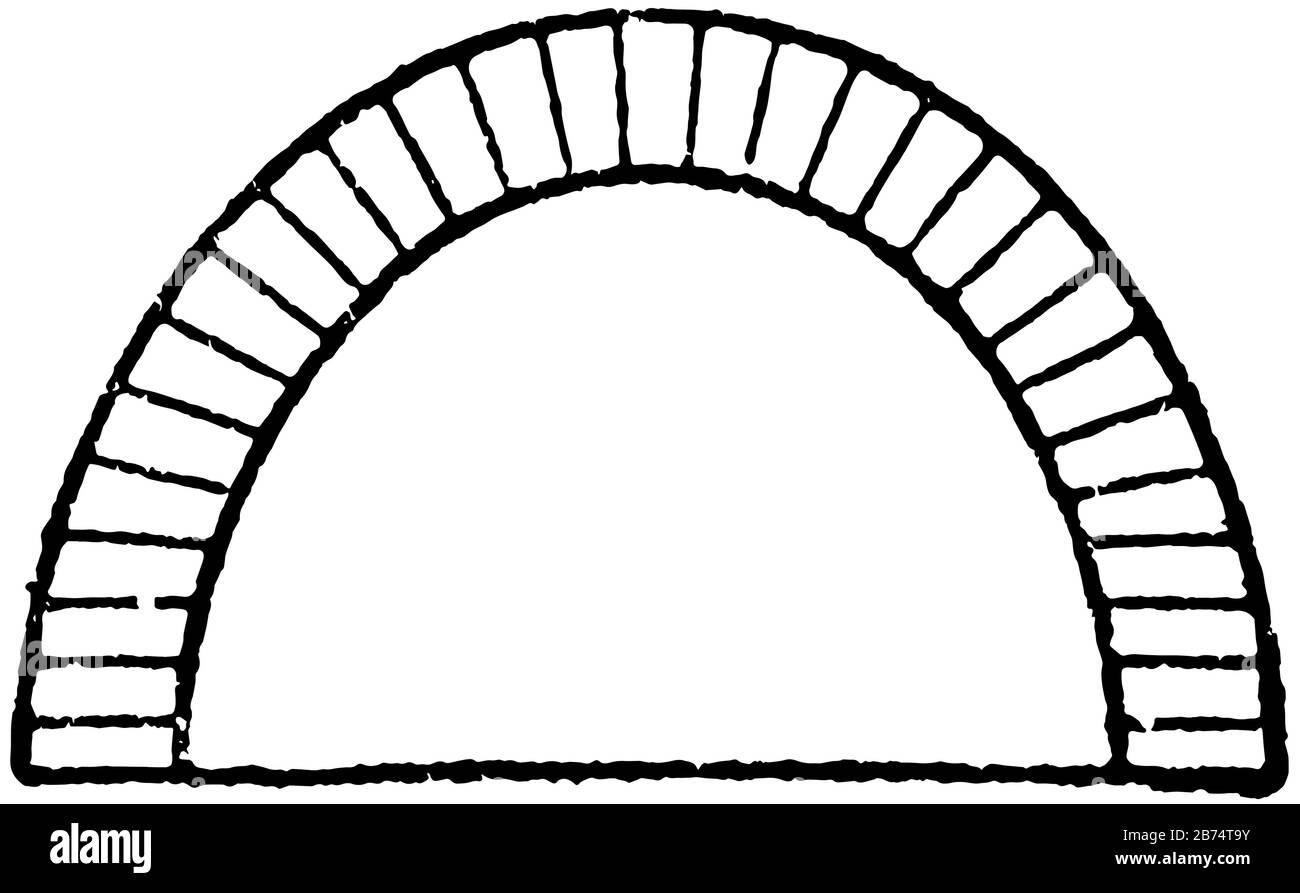 young vapor
wdym piles ?
young vapor
should work the same though
young vapor
barren oasis
in free space
just hold shift