#🛠️┃probuilder
1 messages · Page 1 of 1 (latest)
 somber folio
 plush crypt
somber folio
Does anyone have any ideas on how I could make quick mazes with Probuilder? Im h...
plush crypt
somber folio
Does anyone have any ideas on how I could make quick mazes with Probuilder? Im h...
make prefabs out of walls. use a topdown view in ortho , use a maze reference photo underneath, trace it
somber folio
Is there any way i can edit the increment of the unity move tool?
because my movement is grind like and i cant just use any maze
grid
plush crypt
somber folio
Is there any way i can edit the increment of the unity move tool?
https://docs.unity3d.com/Manual/GridSnapping.html
or better use progrids com.unity.progrids
 somber folio
Thanks man
 fast summit

hello guys sorry I got situation here
about to select the entire dark brown color using selection by color
turns out it selects the whole mesh
is there something I've been missed ?
 raven creek
How can I turn on my snapping in probuilder it's turn off by default?
plush crypt
raven creek
How can I turn on my snapping in probuilder it's turn off by default?
are you using progrids?
raven creek
plush crypt
are you using progrids?
No, actually I am using Unity 2021.3 and imported pro builder but pro grid didn't come along and I totally forgot about pro grid, I need to import it some how, thanks for your guidance mate
plush crypt
raven creek
No, actually I am using Unity 2021.3 and imported pro builder but pro grid didn'...
i think you can use built in grid, but progrids is better. just add by name , the com.unity.progrids package

 finite cliff
raven creek
the problem is I can't find progrid
finite cliff
raven creek
the problem is I can't find progrid
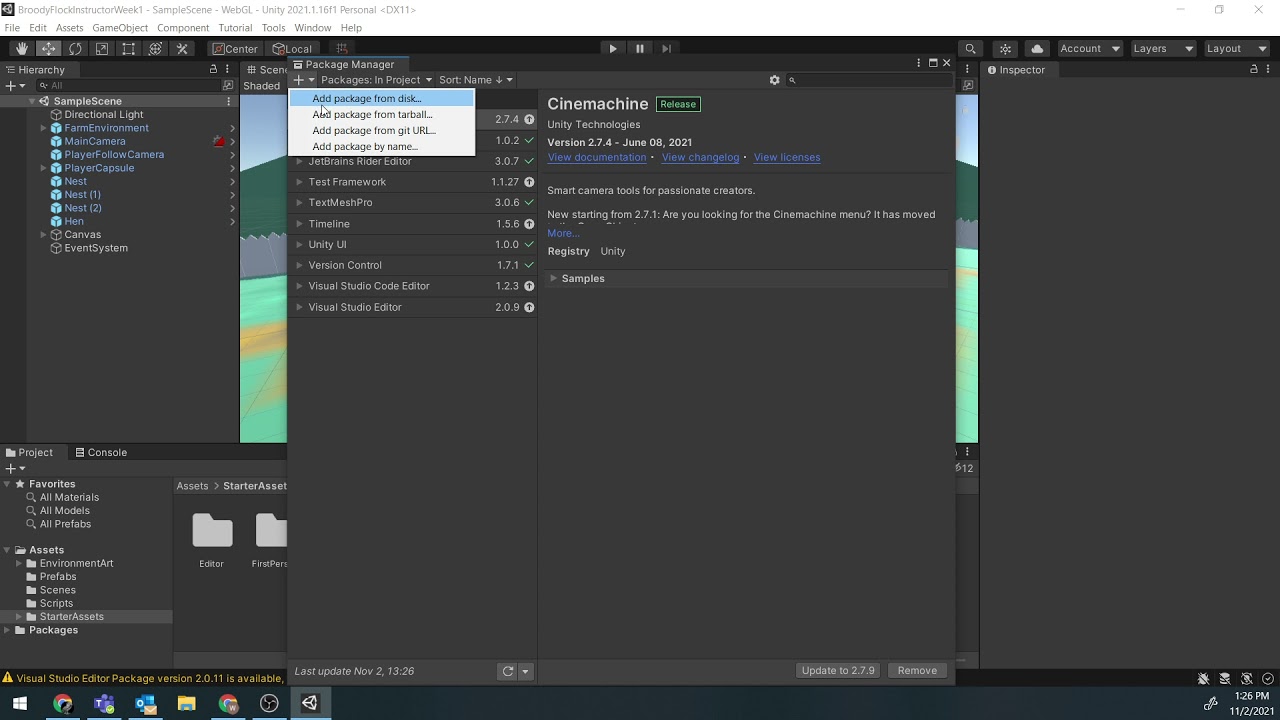
click on the plus
and select add by name
then you can add the name that @plush crypt told you
 ebon loom
is there a quake3 map ready for unity anywhere or a working quake3 map converter to unity? i need it mainly to test movement
 young vapor
ebon loom
is there a quake3 map ready for unity anywhere or a working quake3 map converter...
young vapor
ebon loom
is there a quake3 map ready for unity anywhere or a working quake3 map converter...
look into RadiantMapToWavefrontObj in google
 coral light
I'm having some issues with tiling in ProBuilder UV Editor. I have to offset the texture in the editor so it could tile correctly, but it still doesn't fix the other faces. This is with Auto-Mapping enabled. Is there a way to get the textures to tile correctly by default?

 barren oasis
hello im searching for someone who can help me for my game im a scripter btw
 lunar cliff
young vapor
look into `RadiantMapToWavefrontObj` in google
lunar cliff
young vapor
look into `RadiantMapToWavefrontObj` in google
Lambda Logo in the wild!
 karmic trench
Am I just being extremely blind or is there no button to actually BUILD the object?

I know that you can "draw" it in the scene, but then the sizes you can set would be pointless
plush crypt
karmic trench
Am I just being extremely blind or is there no button to actually BUILD the obje...
click it somewhere and press enter or something
karmic trench
plush crypt
click it somewhere and press enter or something
Already tried that does nothing :/
in the video i was watching it looked like this, looks like they completely overhauled this window

(was from this year)
plush crypt
karmic trench
in the video i was watching it looked like this, looks like they completely over...
hm should be able to hover the mouse and it should show up.
karmic trench
plush crypt
hm should be able to hover the mouse and it should show up.
I only see a small yellow dot, clicking does nothing and when I hold & drag I can draw the shape
plush crypt
karmic trench
I only see a small yellow dot, clicking does nothing and when I hold & drag I ca...
shift click i think creates the shape iirc
karmic trench
plush crypt
shift click i think creates the shape iirc
thank you how did i not think of that
karmic trench
"Freeze Pivot" put the pivot for the quad all the way back there, could someone tell me how to fix that?

 torn basin
karmic trench
"Freeze Pivot" put the pivot for the quad all the way back there, could someone ...
torn basin
karmic trench
"Freeze Pivot" put the pivot for the quad all the way back there, could someone ...
freeze pivot puts the object's pivot at the world origin
you can fix it with any of the tools that modify a mesh's pivot
 nimble tundra
I'm trying to scale a plane to use with polybrush, but whenever you scale it the vertex's arent multiplied, so if you scale it to say 30x, then the vertexs are so far apart you cant use polybrush well anymore. Any suggestions? sorry for beginner question
nimble tundra
^
plush crypt
nimble tundra
I'm trying to scale a plane to use with polybrush, but whenever you scale it the...
dont use the scale tool and move the vertex by gizmos ?
 unique flint
is there a way to delete only a certain area on a wall to make room for a door in probuilder?
plush crypt
unique flint
is there a way to delete only a certain area on a wall to make room for a door i...
yeah make some cuts with insert edge loop or use Slicing tool
unique flint
plush crypt
yeah make some cuts with insert edge loop or use Slicing tool
ok thanks
unique flint
plush crypt
yeah make some cuts with insert edge loop or use Slicing tool
is slicing tool a add on
plush crypt
unique flint
is slicing tool a add on
my bad they call it Cut Tool https://docs.unity3d.com/Packages/com.unity.probuilder@5.0/manual/cut-tool.html
unique flint
plush crypt
my bad they call it Cut Tool https://docs.unity3d.com/Packages/com.unity.probuil...
ok i tried to cut out a door like thing but it deleted the whole wall insteade of the part i cut
plush crypt
unique flint
ok i tried to cut out a door like thing but it deleted the whole wall insteade o...
you probably did not select the cut in facemode
plush crypt
unique flint
ok i tried to cut out a door like thing but it deleted the whole wall insteade o...
unique flint
plush crypt
https://youtu.be/L_edNOpC6YY
i cant find insert edge loop in probuilder
 icy swallow
I need some help regarding the probuilderize tool and the material editor
the way I'm making models right now is making them in blender, exporting as fbx, probuilderize, and texturing models with the material editor
however for some reason when I probuilderize, I'm getting some parts of the model go black and I don't know how to fix this
I'm going to bed soon so I might not be able to answer
unique flint
how do i export my level from unity into blender to finish it up
plush crypt
unique flint
how do i export my level from unity into blender to finish it up
actually Probuilder has an export feature
plush crypt
icy swallow
I need some help regarding the probuilderize tool and the material editor
why even probuilderize if you can use blender ?
unique flint
plush crypt
https://docs.unity3d.com/Packages/com.unity.probuilder@5.0/manual/menu-export.ht...
how do you put the actual model into unity from blender i imported it but now its just sitting in my asset bar
plush crypt
unique flint
how do you put the actual model into unity from blender i imported it but now it...
wdym ? just drag the model on the scene view from assets folder..
unique flint
plush crypt
wdym ? just drag the model on the scene view from assets folder..
yeah its not working
unique flint
nvm i fixed it
unique flint
plush crypt
can u show a screenshot
now its making me fall through the floor
 ivory ether
how do i extrude
unique flint
ivory ether
how do i extrude
you have probuilder right
unique flint
can you send a screenshot of your probuilder menu
ivory ether
 unique flint
go to tools
ivory ether
k
ivory ether
k
unique flint
did a menu pop up
ivory ether
yes
unique flint
ok scroll through that menu till you find extrude
ivory ether
unique flint
you find extrude shreck
ye i did thanks
unique flint
ivory ether
ye i did thanks
np
barren oasis
@ivory ether you can also do CRTL+E
ivory ether
barren oasis
<@769037847008772128> you can also do CRTL+E
go do ur chores
barren oasis
Yes indeed you can use CTRL+E
 umbral current
I am trying to make a hole in the wall for the door through the pro builder, but when I stretch those edges, the geometry is ruined where am I going wrong?


 limpid zinc
umbral current
I am trying to make a hole in the wall for the door through the pro builder, but...
limpid zinc
umbral current
I am trying to make a hole in the wall for the door through the pro builder, but...
If you're trying to make a hole, do you use a boolean subtract to make it?
umbral current
limpid zinc
If you're trying to make a hole, do you use a boolean subtract to make it?
No
umbral current
limpid zinc
If you're trying to make a hole, do you use a boolean subtract to make it?
I wanted to make a ring through edges and extrude the face inside
 torn topaz
Can I use boolean operations on runtime through script? If yes, then how?
 strong plinth
Is there a way to change the default material scale in Probuilder? It would save me a ton of time from having to scale everything up by 8 every time I apply a material to a face.
edit: I now see how to set it to 8 in the UV panel with a button, that helps a bit. But it would still be nice if it could be defaulted to 8.
 royal brook
just starting out w 3D design here and i have a few issues i'm hoping someone can help with. i'm wanting to start everything at the reference plane of y=0. my grid would be at y=0 and my groundplane would be at y=0, but i can't figure out how to do this with the past couple hours in the editor or online. i'm in the newest editor 2021.3.9f1 and clicking on the Grid Visual dropdown shows a Move To: To Handle / To Origin selection, both of which don't set the grid to y=0. on top of that, after i gave up and just started building something in ProBuilder, i've noticed i can't snap anything to the ground. i fooled around with some of the snap settings but none worked. i set the Grid Snapping Grid Size down to its lowests value 0.0001 and my shape is still a few hairs above the ground shape. tried adjusting both ground and object to no avail, it just won't snap. online videos talk about using ctrl-shift + move to snap things to the ground but that does not work. this is a new install and i expected things to be a little simpler but maybe i'm going about all of this the wrong way? or maybe my default settings somehow got borked? some help getting started would be greatly appreciated!
plush crypt
royal brook
just starting out w 3D design here and i have a few issues i'm hoping someone ca...
you sure you enabled the built in grid? Anyway generally I find ProGrids to be far superior working with when it comes to probuilder
royal brook
@plush crypt i'll definately look at that now. i thought i read somewhere that it's built into the Editor now so i thought i was working w it, but the poster might have been talking about ProBuilder. also learning things don't really snap to objects at all in unity. it's more like you make objects w certain uniform measurements and you snap to units on the grid instead. does this sound about right?
plush crypt
royal brook
<@286722279969259520> i'll definately look at that now. i thought i read somewhe...
I'm not sure what you mean by the last part, you can totally make non-uniform and snap to grid. Probuilder lets you also change the pivot to a corner vertex which is usually better for alignment and precision snap. If your center point if off or centered it will snap with offsets
royal brook
well you talk about snapping to the grid, but i'm hoping objects can snap to eachother automatically independent of the grid. so i can snap an object to my ground object automatically. but w every attempt i still see a small fractional sized crack where the object and ground meet. i come from 2D design so in photoshop/illustrator you can get perpendicular lines to just snap to eachother seamlessly, but i'm assuming that doesn't happen in unity? also i'm unable to find ProGrids in the Package Manager. turned on 'Pre-release packages', restarted and still don't see it
also, this post from 2020 says ProGrids interferes w ProBuilder anyways?
 plush crypt
royal brook
plush crypt
royal brook
progrids is added by package name
com.unity.progrids
snap to vertex and snap to face normal are also a thing in unity @royal brook
royal brook
ok, good to know i'm wrong, was a bit frustrated for a sec
strong plinth
The top faces of my object changes materials whenever I change the material of the other faces. Is this a glitch? Is there a way to fix it?

 strong plinth
Seems like it was just a glitch. It was fixed by reopening unity
I have to keep resetting the uvs and resetting unity for almost every object this glitch happens to 😬
i think it got messed up when I was grouping faces earlier
plush crypt
strong plinth
The top faces of my object changes materials whenever I change the material of t...
this happen to me before idr how tho
def a bug
strong plinth
plush crypt
this happen to me before idr how tho
if you run into it again, -ungroup all faces on object > -reset all uvs > -reset unity
 white hinge
trying to make a potion bottle, any idea why the top of inside bottle look more red then rest?
 white hinge
why when i apply texture to my model it splits in dark half lighter half?

 tulip cave
white hinge
trying to make a potion bottle, any idea why the top of inside bottle look more ...
tulip cave
white hinge
trying to make a potion bottle, any idea why the top of inside bottle look more ...
It's just how lighting works both in Unity and IRL. It will always be darker on the inside because there's no light inside of the "bottle". It would probably be better to just use shader graph for the liquid inside of the bottle to make it more realistic instead of manually assigning colors to the faces.
white hinge
tulip cave
It's just how lighting works both in Unity and IRL. It will always be darker on ...
ah ok, thanks
 flat wadi
Not sure if this is the best place to ask, but does anyone know why the EditorExamples scripts which optionally come with Probuilder are giving me errors? Specifically I am trying to use the script RenameNewObjects.cs. This is a new project with probuilder and the editor examples imported.

 obsidian mesa
i need help making a map i used pro builder and its a giant cube how do i make the inside hollow to fit the player in
plush crypt
obsidian mesa
i need help making a map i used pro builder and its a giant cube how do i make t...
obsidian mesa
thanks
 nimble iron
Sorry folks, I'm just coming back into using Probuilder, used to be really comfortable with it - now I'm not sure how to edit old geo. How does one turn on the editing functions for a Probuilder block again?
Oh, never mind, I think I've got it.
 crude vapor
Hey! I'm having a really weird bug while using bezier shapes that didn't happen before
I have HUGE and unusable handles on points
Like

It made me laugh but I cannot work, tried reimporting, repairing and restarting unity but nothing
Also tried to resize gizmos but again, nothing
 manic grove
What is the correct workflow to convert pro builder map blockout to like final textured map asset
 frigid horizon
I have never used probuilder but I already love it
 hollow gust
manic grove
What is the correct workflow to convert pro builder map blockout to like final t...
hollow gust
manic grove
What is the correct workflow to convert pro builder map blockout to like final t...
From what I've seen, most people will export the PB object into an obj file using the PB Export feature, and then edit it it something like Blender before reimporting
Though I'm not entirely sure on the process of replacing the existing geometry in Unity directly
hollow gust
frigid horizon
I have never used probuilder but I already love it
It's great until you start running into weird bugs that can only be fixed by restarting unity.
manic grove
hollow gust
From what I've seen, most people will export the PB object into an obj file usin...
So export into blender, fix some scuffed geometry, then do regular texturing workflow with like substance painter? And more expensive assets keep as separate objects and use culling/LODs
hollow gust
manic grove
So export into blender, fix some scuffed geometry, then do regular texturing wor...
Pretty much
 frail wyvern
I have an issue with PB that I'm hoping someone can help me solve. I'm making a tool to process the objects I make with PB. The last step of the process is to remove the PB components much like the "Strip ProBuilder Scripts" menu option does. However, some of the classes are sealed so I cant do DestroyImmediate on them. Any ideas on how I can do this?
torn basin
frail wyvern
I have an issue with PB that I'm hoping someone can help me solve. I'm making a...
Why would sealed prevent you from destroying the component?
It just means you can't derive from it.
Or do you mean that they are internal?
 white perch
I've been using probuilder for a bit and was not aware of "Snaps", it seems it was deprecated. Are there any other solutions out there to make objects made with probuilder snap into a grid?
Was using pro-grids but that is an "experimental" tool.
frail wyvern
torn basin
Why would `sealed` prevent you from destroying the component?
It just means you ...
Yes I cannot derive from it to get it and delete it.
torn basin
frail wyvern
Yes I cannot derive from it to get it and delete it.
you don't need to derive from it to "get it and delete it"
You just need to do GetComponent<TheClass> / TryGetComponent(out TheClass theInstance)
frail wyvern
 torn basin
frail wyvern
torn basin
frail wyvern
Ok so that's what I was asking before. That's not due to sealed
It's due to it being private
What you could do is use reflection
Component[] allComponents = newgo.GetComponents<Component>();
foreach (var comp in allComponents) {
  Type t = comp.GetType();
  if (t.FullName.StartsWith("UnityEngine.ProBuilder")) {
    // it's a probuilder component
    DestroyImmediate(comp);
  }
}```
@frail wyvernHmmm Okay I can try that.
And the class wasn't private, just sealed.

Cool that works. Great solution @torn basin and thanks!
torn basin
frail wyvern
And the class wasn't private, just sealed.
it's private
private is the default access modifier
sealed is a red herring here
frail wyvern
Oh right.
hollow gust
white perch
I've been using probuilder for a bit and was not aware of "Snaps", it seems it w...
I believe Unity has a built-in snapping system. By holding Ctrl while dragging an object, it should snap to the internal grid and you can changed settings for that in the Editor
white perch
hollow gust
I believe Unity has a built-in snapping system. By holding Ctrl while dragging a...
Will look into it, thanks!
white perch
plush crypt
you can also toggle it on /off
got it to work! tysm!
barren oasis
Pro builder greys out the bevel option when selecting an object
barren oasis
barren oasis
Pro builder greys out the bevel option when selecting an object
Are you selecting an edge, if you are, then it shouldn’t do that lol
barren oasis
barren oasis
Are you selecting an edge, if you are, then it shouldn’t do that lol
How do I select an edge
barren oasis
barren oasis
How do I select an edge
edge selection mode
 icy geyser
is it possible to delete edges with probuilder? Like if I want to get rid of an entire edgeloop. I can select them all but deletion deletes the entire object and not just the edges I have selected? 🤔
 pale cliff
Hey all. Im currently having a problem with probuilder and physics.
I have set up a level, but when i set the colliders to convex it ruins it.
I dont know how to describe it but it like epands the collider so there are no concave Shapes
barren oasis
barren oasis
edge selection mode
Where do I access it
barren oasis
barren oasis
Where do I access it
Do you know the basics of probuilder, because thats the 1st thing you learn about probuilder
barren oasis
barren oasis
edge selection mode
Where do I access it
barren oasis
barren oasis
Do you know the basics of probuilder, because thats the 1st thing you learn abou...
No, and I can't watch a tutorial rn I barely have any internet speed and I need a quick answer
barren oasis
barren oasis
https://docs.unity.cn/Packages/com.unity.probuilder@5.0/manual/modes.html
The only one that appears is the vertex one
I don't see the others
barren oasis
Oh
plush crypt
pale cliff
Hey all. Im currently having a problem with probuilder and physics.
I have set ...
well why are u making it convex then
not sure why a level would have rigidbody 🤔
 feral notch
using probuilder how do I hollow out a cube?
I cannot find any tutorials
barren oasis
feral notch
using probuilder how do I hollow out a cube?
I cannot find any tutorials
Flip face normals?
I think that’s what you need
feral notch
barren oasis
Flip face normals?
yes
barren oasis
feral notch
yes
So did you hollow it out
feral notch
barren oasis
So did you hollow it out
no
 willow jolt
Hitting "Probuilderize" fixes my textures. What is it doing because I need that to happen automatically.
I can't figure out why they are broken in the first place, but I think it is related to UV maps.
When I throw an image on the cube shaped object it comes up as an average color instead of the actual image I'm working with.
willow jolt

 tacit thicket
I have a strange issue with probuilder
The shape that I made before is disappearing when I click it and the editor throws those errors:

Anyone has any idea how to fix that?
 cinder knot
Hey there!
Older versions of ProBuilder used to apply a nice prototyping texture on the objects i created. After updating they are all created as a mundane grey. Is this feature deactivated in the new versions or is it something i do wrong? I really liked the old looks of the objects so i d be glad if i can bring this back!
 solar pumice
You can apply any texture you want to your models. It probably doesn't default do it for you anymore n
cinder knot
solar pumice
You can apply any texture you want to your models. It probably doesn't default d...
Hey thnx for the reply .. My issue with that is originally it applied it and it scaled with the items dimensions. If put the texture manually it kinda stretches if the item is bigger than the texture. You know maybe how i can configure the texture to not do that?
solar pumice
I don't use probuilder, but it must be using a material that has a shader that projects the texture in world space.
If you just use a standard lit shader (the default one that is selected when creating a material), it'll stretch the texture across the faces
cinder knot
Thank you very much i think i ll find the way with that piece of information
 warm grail
https://www.reddit.com/r/Unity3D/comments/m2w9rn/editor_applicationupdate_hanging_up_on_even_minor/ I'm having the same issue the person in this reddit thread is having any idea on how to fix without removing hours of my work
reddit
2 votes and 2 comments so far on Reddit
Im also getting pauses from aplication.UpdateScene btw
barren oasis
Sad that ProBuilder doesn’t have Capsules
plush crypt
barren oasis
Sad that ProBuilder doesn’t have Capsules
create 3D capsule in unity, select it click Probuilderize , now probuilder has capsule.
barren oasis
plush crypt
create 3D capsule in unity, select it click Probuilderize , now probuilder has ...
Oh my. All these years without capsules…
Thanks null
 half wasp
how do i enable these features? i'm new to probuilder so i have no idea how this works
 barren oasis
half wasp
how do i enable these features? i'm new to probuilder so i have no idea how this...
barren oasis
half wasp
how do i enable these features? i'm new to probuilder so i have no idea how this...
do you have a probuilder mesh selected?
and in your case of "insert edge loop" you should use the edge selection and select edges
 fickle lark
is this true? can Probuilder be used to make models?

 scarlet valley
I don't know if this is the right channel, but why is my camera cutting the terrain in scene, and how do I fix it?
 barren oasis
scarlet valley
I don't know if this is the right channel, but why is my camera cutting the terr...
barren oasis
scarlet valley
I don't know if this is the right channel, but why is my camera cutting the terr...
1 #⛰️┃terrain-3d
2 not sure why that is a feature but it happens when you press f on a really big object
3 to fix it look for a small object and press f
 gentle quarry
Is there a way to add a mesh to a fbx created in probuilder?
I'd like to use Graphics.DrawMeshNow with an fbx I have
 hollow geyser
hey guys, im a bit new to using probuilder, but im wanting to create cave walls that look good. not just a rocky texture, but with rocks jutting out of them etc. are tehre any tools that can help me create something like that with probuilder?
scarlet valley
barren oasis
1 <#497875195718271004>
2 not sure why that is a feature but it happens when yo...
thank you 👍
 elder carbon
i have an important question. is the merging objects option works the same as combining meshes?
is it reducing draw calls?
 quartz vigil
Unity pops up this warning when entering play mode while a prefab with ProBuilderMeshes in it. Should the ProBuilderMesh MonoBehaviour have the [ExecuteInEditMode] attribute? I thought that attribute is being phased out since Prefab Mode became a feature?

 dusty rain
@scarlet valley your camera's Near clipping plane value (which hides stuff closer than a certain distance from the camera) is set too high. specifically the scene view camera https://docs.unity3d.com/Manual/SceneViewCamera.html
 tough smelt
 gusty barn
anyone know if there's a way to get the color of the material assigned to a face on a mesh? i'm iterating over myMesh.faces and trying to do face.material.color, but I'm getting a null reference exception
i also tried myMesh.GetComponent<MeshRenderer>().sharedMaterials[face.submeshIndex].color but that always returns White
gusty barn
figured it out, i was setting face colors via the "apply vertex color" function, which doesn't actually create a submesh material and rather applies the color directly to all the vertices in the face
to calculate the color of a face, i average the colors on all vertices in that face
on a different note tho - calling mesh.Refresh() causes these errors to occur, even if i only fetch the mesh and immediately call Refresh on it

 vital anchor
guys
does probuilderizing a gameobject increase its vertex count ?
just clicking on "probuilderize" button ...nothing else
does it increase verts sometimes?
thnx in advance
 pine nacelle
Hey guys, idk why but out of nowhere i am no longer able to select with the rectangle tool, as you can see, did i do something?
barren oasis
No one seems to know in #💻┃unity-talk
Question: #💻┃unity-talk message
barren oasis
pine nacelle
Hey guys, idk why but out of nowhere i am no longer able to select with the rect...
Maybe you need to hold control?
 spring bay
Hi, is there a negative extrusion tool or something to undi an extrusion?
 pulsar ocean
hi guys, is there a way to "accurately" use probuilder (i.e., specifying and editing dimensions)? I've tried using it, but always found myself going back to autocad/solidworks since I can much more comfortably make and edit sizes if necessary.
 abstract vault
hi, I want to cut a hole in a plane. I select a face, select cut tool but it doesn't allow me to select more than two points. How can I select more than two points ?
abstract vault
abstract vault
hi, I want to cut a hole in a plane. I select a face, select cut tool but it doe...
I don't know what is was but I deleted the plane, created a new one and now it works
scarlet valley
dusty rain
<@1026168817275117578> your camera's Near clipping plane value (which hides stu...
Thanks for the help 👍
 faint lantern
in general when designing rooms, would it be better to use multiple boxes for walls, floor, etc. (left), or just use a single inverted hull mesh (right)?

 royal terrace
faint lantern
in general when designing rooms, would it be better to use multiple boxes for wa...
royal terrace
faint lantern
in general when designing rooms, would it be better to use multiple boxes for wa...
you dont want one giant mesh because u will quickly hit the realtime lights per object limit
 coral orbit
3 very simple probuilder objects bringing Unity to a halt
anytime i click them my editor has to hang for 2 minutes
fun stuff guys
really cool optimized tool!

just from clicking on an object
why is every cool idea in this engine actually executed like complete dogshit?
plush crypt
coral orbit
why is every cool idea in this engine actually executed like complete dogshit?
user
 hasty grotto
So i would like to cut the center of an hexagon, I created an hexagon, but i dont succed to cut it 🥲 anyone go help?
coral orbit
plush crypt
user
👎
fast summit
greetings

about to ask
what makes a meshes not be able to be extracted with ProBuilderize
I thought any imported meshes from blender is possible to modify with ProBoilderize
*I wanted to modify it's UV that results different as what it shown on blender
barren oasis
Is there a way to dissolve vertices?
I found some post from 2018 saying it was on the To Do list.

 dapper basin
scarlet valley
I don't know if this is the right channel, but why is my camera cutting the terr...
dapper basin
scarlet valley
I don't know if this is the right channel, but why is my camera cutting the terr...
Change editor cam near clipping pane:

 leaden path
Does anyone know how can i fix the over lightning on the edges?

 vagrant ingot
I've got a fairly simple mesh that I want to probuilderize.
However when I do it just completely mangles the mesh, triangles everywhere.
Has anyone experienced this before, is there something I'm doing wrong?
OK, dunno what is causing it but I started with a fresh copy of the mesh and it works fine.
Seems like there are some workflows that completely nuke the mesh invisibly lol
 acoustic ruin
anyone know how to make a like fully indoor game with no exterior lighting using glowing ceiling lights and stuff
kinda like this image from karlson

 bitter trail
yo
recently my probuilder went off
it refuses to creates new edges when I tried to subdivide it T_T

 dense oyster
leaden path
Does anyone know how can i fix the over lightning on the edges?
dense oyster
leaden path
Does anyone know how can i fix the over lightning on the edges?
Did you ever fix this?
Having a similar issue
 leaden path
Sorry, i didnt @dense oyster Im just avoiding using these outside lights while i dont find a solution. If i find something ill share to you
 bleak root
can anyone explain what is happening here, i saved and closed my project last night and this is what it opens up to. is there any way it can be recovered? i have only used the probuilder 5.0.6 gui with progrids, no scripting yet
 naive crescent
Am I able to use ProBuilder with imported meshes?
Edit: This was in regards to applying materials and modifying UVs.
Solved:
https://forum.unity.com/threads/probuilder-could-probuilder-edit-or-modify-the-existed-model.538585/

Unity Forum
I want to use the existed model,which I download from assetStore.So I am wandering if I could use probuilder to edit it.
fast summit
naive crescent
```Am I able to use ProBuilder with imported meshes?```
Edit: This was in regard...
but sometimes it wen't screwed
like just trying to make a new subdivides from an edges ..
naive crescent
Fair enough. I have not experienced that yet. Though it wasn't stated, I was trying to figure out how to apply materials onto imported meshes and change the UVs with ProBuilder's tools.
fast summit
naive crescent
Fair enough. I have not experienced that yet. Though it wasn't stated, I was try...
you better use blender it's waay more friendly for such a work
naive crescent
You mean I can import meshes with materials and not lose them in the process? Didnt realize.
Oh right but the issue here was using importing materials from the Unity Asset store.
Unless of course I can import those to Blender, then I can take care of what I need there.
Google is just useless with that question though.
bleak root
bleak root
can anyone explain what is happening here, i saved and closed my project last ni...
?
naive crescent
I can put together all the parts I need of a material, but the files come in .mat format which I think might get in the way of importing the pieces that are necessary.
barren oasis
Mmmmmmm yes
 plush crypt
barren oasis
Mmmmmmm yes
plush crypt
barren oasis
Mmmmmmm yes
Move it by the corner
put pivot on corner vertex, you're moving also in Center pivot mode
bleak root
is there a special way you're meant to save probuilder objects when you're done with them?
barren oasis
plush crypt
Move it by the corner
put pivot on corner vertex, you're moving also in Center ...
Its still like that
barren oasis
bleak root
is there a special way you're meant to save probuilder objects when you're done ...
Export

You dont need to, but certainly if youre gonna reuse it you should
bleak root
so if you save and exit your project without exporting can you still go back and edit it?
^the probuilder object
barren oasis
bleak root
^the probuilder object
Of course
bleak root
bleak root
can anyone explain what is happening here, i saved and closed my project last ni...
so why did this happen
barren oasis
bleak root
so why did this happen
That a bug with ProBuilder (You got unlucky)
bleak root
how do you prevent it or is it just random
barren oasis
Id say its pretty rare, you can reinstall ProBuilder into the project and see if it fixes
bleak root
thanks for the response ill try that
plush crypt
barren oasis
Its still like that
You put the pivot on corner ? Are you using progrid ?
bleak root
should i be worried that im getting this error every time i save the scene
 barren oasis
plush crypt
You put the pivot on corner ? Are you using progrid ?
barren oasis
plush crypt
You put the pivot on corner ? Are you using progrid ?
Im just using default snapping tool
 forest mango
hope his works in this channel, i have a problem with progrids i just bought an asset for models of a house and the prefabs are intended to use pro grids but nothing aligns up. any reason or way to easily fix this?
plush crypt
barren oasis
Im just using default snapping tool
Yuck… did you set Pivot to vertex in probuilder ?
 barren oasis
plush crypt
Yuck… did you set Pivot to vertex in probuilder ?
barren oasis
plush crypt
Yuck… did you set Pivot to vertex in probuilder ?
Yeah I did, I’ll try again later today
Is default snapping really that bad?
plush crypt
barren oasis
Yeah I did, I’ll try again later today
Is default snapping really that bad?
nahh but imo progrids just provides a better visual for the grid and you can resize. Idk maybe just me but feeks like the unity one kinda took some progrids code and gimped it
barren oasis
Those 2 snapping tools are created in C# right?
I have position snapping on Runtime (moving objects with snap) which uses Mathf.Floor in the code, and mine is exactly the same as the default snapping tool and it doesn’t line up with the grid JUST like in the screenshot
plush crypt
barren oasis
Those 2 snapping tools are created in C# right?
I have position snapping on Ru...
not sure what you mean here
can you put the pivot mode and show the arrow gizmos for the object in object mode
barren oasis
plush crypt
not sure what you mean here
I’ve basically recreated the default snapping tool using Mathf.Floor, maybe it uses that function to?
plush crypt
barren oasis
I’ve basically recreated the default snapping tool using Mathf.Floor, maybe it u...
You would have to see where ur pivot actually is then and where the grid intersections are
barren oasis
plush crypt
can you put the pivot mode and show the arrow gizmos for the object in object mo...
Well last time I tried to change it, it was on the very corner of the object, like it usually is
But it still didn’t snap to the grid properly
I am away from my pc rn but when I get on I’ll show you
barren oasis
hey guys, im watching a tutorial with using plane as a terrain, but the guy never actually shows the keybinds, in the 1st image he makes a landscape with a plane, then in the second image they just rise walls up from the landscape, anybody know how to do this?
(this is with probuilder)

 plush crypt
barren oasis
hey guys, im watching a tutorial with using plane as a terrain, but the guy neve...
plush crypt
barren oasis
hey guys, im watching a tutorial with using plane as a terrain, but the guy neve...
not sure about the keybind rn but pretty sure they just extruded the edges , holding shift(or mayb alt) and green arrow while they're selected
barren oasis
damnn! lifesaver man, thank you so much! 🤝
 red lintel
https://docs.unity3d.com/Packages/com.unity.probuilder@4.1/manual/Selection_Loop_Edge.html
"The Select Edge Loop tool selects an edge loop from each selected edge. An edge loop is a series of edges that are directly connected."
I am kind of confused as to what an edge loop means. What does it mean for a series of edges to be directly connected?


 whole prawn
edges that connect through the middle of 4-way junctions
red lintel
whole prawn
edges that connect through the middle of 4-way junctions
What is a junction?
whole prawn
red lintel
What is a junction?
please
 red lintel
whole prawn
*please*
red lintel
whole prawn
*please*
Would the parts newly highlighted in green count as being part of the edge loop?
 whole prawn
The original image literally highlights the edgeloop
starting from the originally selected edge
red lintel
Why would the newly highlighted parts not count as being part of the edge loop? Don't the edges connect through the middle of 4 way junctions?
whole prawn
starting from the originally selected edge
The Select Edge Loop tool selects an edge loop from each selected edge
 ivory oak
I'm about to start using probuilder. for the people who have used it, is it viable for an end product or mostly just for prototyping?
 rare dragon
Prototypin
 hollow violet
Hi! Is it possible to show a preview of a ProBuilder model when it's a prefab? It would make my life a lot easier when browsing my ProBuilder assets.

Something like this:
 plush crypt
hollow violet
Hi! Is it possible to show a preview of a ProBuilder model when it's a prefab? I...
plush crypt
hollow violet
Hi! Is it possible to show a preview of a ProBuilder model when it's a prefab? I...
possibly export them as actual models
 hexed obsidian
how can i cut a cube, circle, etc. shaped hole without having to be incredible precise?
plush crypt
hexed obsidian
how can i cut a cube, circle, etc. shaped hole without having to be incredible p...
 cedar kernel
Does anyone know how to fix all zero area faces in an object? I'm getting an error when trying to create an edge loop and I'm thinking it might be because I've accidentally overlapped some faces together, but I'm not sure where.
 chrome lichen
It is the map of a game that they hired me

 ruby sky
Hey! How do I de-subdivide
without using undo?
I subdivided a game object too far and its crashing unity now ^>^

^^^^^^
ruby sky
barren oasis
The only way is to undo
I don't believe you
That doesn't make any sense
Cant I go into the back end?
barren oasis
Well I don’t see an option to Unsubdivide bro
ruby sky
I've spent 1-2 hours looking also found nothing
ruby sky
Thats bullshit, I need to subdivide, do some shit with that subdivision, reduce subdivisions, Do some other shit
I cant ctrl z inbetween those
No
its just
Slows performance
Can take 30 seconds to load the project if its active
ruby sky

I have a holographic shader on it
Which is pretty heave on unity
that IN COMBINATION with the fuckign subdivisions
Just causes unity to crash
and take like an hour
barren oasis
Is it really hard to re create it
ruby sky
No I need that many subdivisions
to make the holes
accurately
Well
I could probably do it
BUT regardless
what the fuck
ruby sky
Because I want to 1. smooth edges
and 2. I'm fairly certain subdividing an object that much fucks unity performance
Just laggs out my project
Go and try subdivide an object a bunch see how slow unity goes
barren oasis
I know it lags it
ruby sky
Well its making me have a panic attack
just the fact that their is no UN subdivide
button
barren oasis
Don’t you think it’s better to just make a dice cube in blender
ruby sky
At this point yes, fuck probuilder
barren oasis
ProBuilder shouldn’t be used for this type of things, it’s for levels
It’s not ProBuilder fault
ruby sky
Surely the opposite of a function should exist
beyond crtl + z
I want to look around the back end
I'm fairly sure its attached to the game object
barren oasis
What do you mean back end
ruby sky
the amount of sub divisions
Hmmm
good point
somethign attached to the object
determines the amount
of subdivisions
barren oasis
Give me a second the tree is about to break my window
ruby sky
hahah okie
barren oasis
ruby sky
determines the amount
For as long as I know, only spheres and cylinders and tubes contain that data
And even if custom objects contained that data, changing it would either probably break the mesh or do nothing
ruby sky
Its just a cube
And I've punched holes in it
Its super basic
Like a unity 3d object cube
But fair
Where would it be
to access?
IF I could
Dont make me go to belnder
nooooooooo
barren oasis
Most likely ProBuilder mesh component. But again even if it did exist, you’d have to reset the shape to make it do anything
ruby sky
good point
barren oasis
You could literally just remake it. Or (the smart way) do it in a 3d modelling software
ruby sky
Yeah
You're right
Alright
Fuck
Well
This is the first
and LAST
Time I'll be using probuilder
To the creator of this software
I hope
You have
A
Good day
Bye
barren oasis
You misused it, ProBuilder is amazing
ruby sky
I actually disagree so hard
You make a function in a tool
That cannot be undone
Unless you undo it immediately
And it is so precice
that it lags out unity
No foresight
barren oasis
And I have an idea to reduce lag, you can save it as an asset
ruby sky
Mmmmmm
TRUE
Save as assett
and be done with probuilder
Ok
Solved
DONE
Genius
Winning?
barren oasis
ruby sky
You make a function in a tool
And you use that function completely wrong
It’s never been made for modelling this, it’s a Blockout tool
ruby sky
Yeah whatever
I went rogue
No one said there was right or wrong
Until there was a problem
I feel like even if I was making a level
I would want the ability to subdivide
do shit
and then reduce subdivisions
no?
Its not really living up to the PRO
in the builder
noobBuilder
Well anyway @barren oasis really do appreciate the help champion
Fucken got there
ruby sky
Yes!
Just exported the mesh
Still baffles me why there isn't an un-subdivide feature LOL
but I walk away
barren oasis
ruby sky
Yes!
Good
 barren oasis
Yeah
ruby sky
Btw, ran into a bunch of issues with the ProBuilder object
I think you're right, just for designing levels.
barren oasis
Yeah, not good for modeling normal models
 pliant summit
im making a map for my vr game but im keep making it too big for the vr player
pls help me
barren oasis
pliant summit
pls help me
late response, but are you able to scale the vr player up, or the map down?
Or, you can maybe build everything around the average height of a person, i believe its 1.6m?
 woven lake
pliant summit
im making a map for my vr game but im keep making it too big for the vr player
woven lake
pliant summit
im making a map for my vr game but im keep making it too big for the vr player
Make it smaller?
 rough jay
where is the boolean in probuilder?
 sick spindle
according to docs its a experimental feature
if its something very important for your usecase i would explore if you are better off using a tool like SabreCSG instead of ProBuilder or doing things in a 3d package
 shadow kindle
Hey @shut pier , can you share a screenshot of that by any chance ? I've seen that happening when the mesh was not clean enough and that had to be fixed at the Fbx level iirc
 shut pier
oh i dont need that anymore i dont probuilderize my meshes anymore
shadow kindle
Good to know you find another way 😄
 upbeat frost
in probuilder, wasn't there a way to make new faces on 3D shapes?
plush crypt
upbeat frost
in probuilder, wasn't there a way to make new faces on 3D shapes?
have you tried cut tool ?
 upbeat frost
plush crypt
have you tried cut tool ?
upbeat frost
plush crypt
have you tried cut tool ?
thank you very much
vital anchor
hey my turn
to be real quick , i wanna know if i've probuilderized hundreds of objects and exported out those mesh ...then how can i reinput all those mesh into the mesh filters of those particular gamneobjects once for all...?
bump!)
 hallow tulip
im relatively new to unity and i just started messing around with pro builder to make a level but i have this issue where i get a missing reference error when i delete a probuilder made object
does anyone know why this might be?
all help is appreciated
hallow tulip
i was able to delete the objects without any errors by removing all the of the objects components first
not sure if thats how it is intended but at least it is a solution
plush crypt
hallow tulip
im relatively new to unity and i just started messing around with pro builder to...
sometimes it bugs out like that for me too
I just clear error and move on tho
something in the editor windows messing with cache of the object no longer there or something
plush crypt
vital anchor
to be real quick , i wanna know if i've probuilderized hundreds of objects and e...
If you mean a batch process maybe with an editor script to like put all the meshes into mesh filters all at once, can't think of how atm sry. Why would you not just drag the fbx exported into to scene and let it apply all that for you
 cunning acorn
is there a way to make a 2d sprite stand up in a 3d environment?(Like 2.5D)
plush crypt
cunning acorn
is there a way to make a 2d sprite stand up in a 3d environment?(Like 2.5D)
 ebon widget
Regarding export, prefabs, and converting many PB objects to simple meshes/prefabs - sorry I'm late to the party, here's a quick demo of how to do that real easily!

Hi there! Here's a quick demo of how you can easily convert your ProBuilder shapes to nice, clean meshes and prefabs ... and also back to fully editable objects, if you need later!
Hmm, I ramble a bit, ha ... jump to 1:48 (https://youtu.be/Kh0Hc2EqqVc?t=109) to skip me doing the level creation ... but if you haven't used the new-ish shape drawing, do watch that first bit, it's super!
plush crypt
the goat himself 🐐 !!
ebon widget
I do pride myself on ability to ramble, thanks!
plush crypt
spent many hours watching your ramblings sir, thank you for your service 
 summer rampart
how do you guys make interiors (floors, walls etc)? do you make everything one whole big model, or do you separate them somehow? it feels logical to to separate room models, but how do you connect the doorways in a good way then?
ebon widget
This is a real, real old video ... but it might give you a bit of an idea, how I generally do interiors 🙂
https://youtu.be/Kjqx6cKUepc

ProBuilder empowers you to build entire game levels or prototypes, right in the Unity editor. Then, playtest immediately- zero guesswork or frustration. | www.procore3d.com/probuilder
Ah, this is newer:
https://www.youtube.com/watch?v=CBa_opm3_GM

The full editions of ProBuilder and Polybrush are becoming part of Unity feature roadmap. Learn more: https://blogs.unity3d.com/2018/02/15/probuilder-joins-unity-offering-integrated-in-editor-advanced-level-design/
 woeful edge
very new to Unity and probuilder, but do I have to install ProBuilder to every project I do, or is there a way to have it install on all new projects?
solar pumice
You download it once, but you import it per project.
woeful edge
Also is there a way to have resizing apply to one direction of an axis?
Cause right now I notice if you try rescaling or resizing an object it goes in both directions of an axis
I'm more used to Roblox Studio so that is why I ask
ebon widget
Hi @woeful edge ! With ProBuilder, you can avoid resizing (it's messy). Instead, use either the shape handles (see gif), or mesh editing. That'll give you exact control, and leave your transform component at a nice clean (1,1,1) 🙂
woeful edge
Where is the gif located
ebon widget
I'm slow 😄 😛
 woeful edge
Thank you.
Im gonna try building more stuff when I get home
Although I still need to learn some more tools and settings first 😅
woeful edge
ebon widget
I'm slow 😄 😛
actually im lost. where the heck is the shape handles located
ebon widget
Hehe. I'd say take a look at this tutorial - it says prefabs and assets, but it starts with this stuff. Should get you up and running! 🙂
#🛠️┃probuilder message
ebon widget
No code needed! 🙂 Just build fun stuff!
 maiden dew
i pressed detach faces 💀

updated screenshot 💀💀💀💀💀

its just deadlooping

how tf do i make it stop
 winter forge
is it important to download pro grid to install pro builder too?
cuz i cant find pro grid anymore even if i have enabled the advanced search
young vapor
winter forge
is it important to download pro grid to install pro builder too?
No it is not , but will make it 100% easier because the Unity is kinda basic in comparison
young vapor
winter forge
cuz i cant find pro grid anymore even if i have enabled the advanced search
you need to add component by name, no need for enable advanced.
com.unity.progrids
winter forge
young vapor
you need to add component by name, no need for enable advanced.
`com.unity.progr...
Oh thanks a lot
 left vapor
Can someone help me know why adding an edge loop deleted the roof of my shape?

The shape normal is flipped to the outside so there should be a roof
solar pumice
@crystal kiln In the future, don't crosspost.
 cedar parcel
I'm watching this tutorial (https://youtu.be/ll7PpGXuHwI?t=305) and trying to understand how did he extruded both faces to opposite directions? For me it goes only to one direction when I'm trying for both faces.

A really simple tutorial on how to build a room connected to another room in ProBuilder.
 soft prism
Does anyone know any good resources for learning to use probuilder specifically for isometric games (such as deaths door and tunic) more specifically dungeons
winter forge
how do i like create a depression here by cutting it with probuilder?
 plush crypt
winter forge
how do i like create a depression here by cutting it with probuilder?
plush crypt
winter forge
how do i like create a depression here by cutting it with probuilder?
Use select face and use cutting tool
winter forge
plush crypt
Use select face and use cutting tool
Kay thanks
 hoary silo
How come every time I select my map it just deletes itself?
and it gives me this message

 hoary silo
anyone??
hoary silo

If you know how to fix this, please hmu.
discord:
egghead#4167
hoary silo
I've tried resetting everything in the object settings, i've tried logging in again in unity hub and editor, and i've tried uninstalling and reinstalling probuilder, and yes im on the latest version
 jovial quest
So I've got one material that can dissolve objects. When I apply it on probuilder objects the material is partially dissolving the mesh whereas the shader variable handling that is set to 1 (meaning no dissolve at all). The left cube is a probuilder cube and the right one a normal unity cube. They both have the same material of course. Any idea what may cause this issue ?

 pure igloo
idk if this is bc of probuilder or something else, but whenver i go semi close to any object my camera does trhis weird clipping thing

No idea how to fix or what's even causing it
 manic citrus
If i use .ToMesh and .Refresh on runtime to modify meshes, how can i make the changes stay after leaving play mode?
hoary silo
hoary silo
https://youtu.be/cYvKG9Rb6pc
^ if someone could help me with my problem that’d be MUCH appreciated:) Thanks! (it’s been 19 days, aka 2 weeks and 5 days)
 manic oar
hoary silo
^ if someone could help me with my problem that’d be MUCH appreciated:) Thanks! ...
manic oar
hoary silo
^ if someone could help me with my problem that’d be MUCH appreciated:) Thanks! ...
Have you tried asking ChatGPT your problem? I have no clue what's happening in your video/with meshes in general because I'm only familiar with Unity2d but you could try asking the AI your question. It might respond with something useful, I'd give it a try
plush crypt
 surreal gorge
Please wht is a probuilder
surreal gorge
Please wht is a probuilder

Unity
Experience Unity ProBuilder, an advanced-level design editor that allows for unique 3D modeling and worldbuilding using Unity's seamless level design tools.
surreal gorge
Thx
 wanton bronze
Hi! Does anyone possibly know how to remove these grids/lines from my bullet? I think it's causing my game to lagg. I can barely click on anything without it loading

 woeful pecan
wanton bronze
Hi! Does anyone possibly know how to remove these grids/lines from my bullet? I ...
woeful pecan
wanton bronze
Hi! Does anyone possibly know how to remove these grids/lines from my bullet? I ...
ive never used probuilder, but that seems like an approximation of a cylinder, and probably shouldnt cause any lag unless you are running unity editor on mobile lol
hoary silo
hoary silo
https://youtu.be/cYvKG9Rb6pc
hey, it's been 10 days, could someone help me out here? thanks.
 pulsar atlas
would anyone know how to split a triangle into 2 equal parts?
 stoic fox
wanton bronze
Hi! Does anyone possibly know how to remove these grids/lines from my bullet? I ...
stoic fox
wanton bronze
Hi! Does anyone possibly know how to remove these grids/lines from my bullet? I ...
If you're trying to make it lower poly, remove some edges.
woven lake
manic oar
Have you tried asking ChatGPT your problem? I have no clue what's happening in y...
Telling peeps to 'go ask GPT' is NEVER an acceptable response.
woven lake
hoary silo
hey, it's been 10 days, could someone help me out here? thanks.
You're more likely to get help if you provide useful information rather than just repeating 'can anyone help me?'
 dreamy herald
Is there a way to split an object in two from an edge loop selection? I can do it using detach faces but getting the correct ones selected is a pain.
left vapor
I need help getting rid of light leaks in the corners, how do I do this?
 barren oasis
How can I take the squares away on the wall so it looks better.
 barren oasis
Only using probulder gives me that
barren oasis
How can i make so you wont see Inside the hallway when you are Outside of it
 barren oasis
Only using probulder gives me that
barren oasis
barren oasis
Only using probulder gives me that
edit material settings
wanton bronze
Does anyone know how to fill in these gaps? I'm making a door and "Fill hole" doesn't seem to do anything. Is there a specific edge i need to press or something?
 plush crypt
wanton bronze
Does anyone know how to fill in these gaps? I'm making a door and "Fill hole" do...
plush crypt
wanton bronze
Does anyone know how to fill in these gaps? I'm making a door and "Fill hole" do...
try deleting the faces left in the middle bottom , select the two edges on the corner
 fleet briar
Been working on a reconstruction of my study, finally got everything in and accurate and lovely. Thought I may as well try and make a nice render of it to finish the mini project off. Have now spent 2x as long on just getting the lightmap working as I did on any of the measuring or modelling haha.
Does anyone have any idea why these streaks are appearing? I'm pretty sure its the lightmap UV's, but I have no idea how to modify them since they are read only. As per the second picture, the baked lightmap UV's seem to be stretched, which I feel would cause the streaks.
All objects are static, as are the lights. Theres a point light on the ceiling, a directional light out the window and an area light behind the door. All set to baked.
Have trigged the 'lightmap uv's' option on all objects, with 'automatically generate lightmaps' option enabled. Have tried repair - rebuild all pb objects, replacing my light settings, changing all manner of light settings, making utterly perfect UV1's, and other things I cant remember.
Any advice absolutely welcome, im stumped right now!

 hoary silo
woven lake
You're more likely to get help if you provide useful information rather than jus...
hoary silo
woven lake
You're more likely to get help if you provide useful information rather than jus...
Well if you click on the message i was replying to, you could've seen that information. I've been trying to get help, but no one has been helping me, they even told me to ask chat gpt.
manic citrus
how do i keep probuilder changes made with runtime api?
im using ToMesh() but it wont save changes
 hushed sun
Quick question: Is Probuilder abandoned or are there more features planned? If not, is there any good alternative?
solar pumice
There are assets on the store. But the best alternative is to just model in a proper program like Blender.
 atomic wigeon
fleet briar
Been working on a reconstruction of my study, finally got everything in and accu...
atomic wigeon
fleet briar
Been working on a reconstruction of my study, finally got everything in and accu...
Try exporting the models as obj and then reimporting and recalculating ligtmap uvs
 velvet meadow
Has ProGrids been discontinued?
Looking for it in the registry now, and ... nothing!
Did the new grid tools make it obsolete?
plush crypt
velvet meadow
Did the new grid tools make it obsolete?
Who knows. It was working well but last time I used it the toggle button was jank and the window kept duplicating itself maybe they borked it
New grid tools aren’t even close imo
You can use com.unity.progrids add package by name
Last update [3.0.3-preview.6] - 2020-02-05
velvet meadow
plush crypt
Who knows. It was working well but last time I used it the toggle button was ja...
Much appreciated!
 teal pagoda
Hi I made a Object in Blender but if I put it into unity its very small. How can I change that in blender that it is instantly big?
woeful pecan
Please dont post in multiple channel i just realized ur here too
 dim sierra
Hey guys, for some reason my faces are not merging. Can anyone help me with this?
 teal pagoda
If I Import this into Unity from Blender why does it look like this?

 plush crypt
teal pagoda
If I Import this into Unity from Blender why does it look like this?
plush crypt
teal pagoda
If I Import this into Unity from Blender why does it look like this?
How’s this pro builder related ?
teal pagoda
Dont know were to put it
teal pagoda
plush crypt
How’s this pro builder related ?
Were should I put that?
plush crypt
teal pagoda
Were should I put that?
!blender or
#🔀┃art-asset-workflow at most
 rustic mauveBOT
A supportive community for Blender artists of all levels. Share your work, ask for help, and learn from others! https://discord.com/invite/blender
 runic egret
@plush crypt upon extruding the faces this effect happens
 plush crypt
runic egret
<@286722279969259520> upon extruding the faces this effect happens
plush crypt
runic egret
<@286722279969259520> upon extruding the faces this effect happens
What am I looking at, which efffect?
barren oasis
so probuilder is only letting me make shapes on vertices on other meshes. any help? theres no plus sign on the "new shape" button, its just a toggle
runic egret
plush crypt
What am I looking at, which efffect?
Before you told me to merge all the faces of my wall then extrude them. That is what I did but upon doing that what the screenshot shows is what happened
plush crypt
runic egret
Before you told me to merge all the faces of my wall then extrude them. That is ...
Uh I said you can merge them not necessarily all of them,
You still didn't say what exactly I'm looking at? "what happened"
runic egret
plush crypt
Uh I said you can merge them not necessarily all of them,
You still didn't say ...
plush crypt
runic egret
can you explain with words ? it just look like you're extruding the wrong way (inwards)
runic egret
plush crypt
can you explain with words ? it just look like you're extruding the wrong way (i...
I'm trying to extrude the wall (In which is a plane). In the video it doesn't make the wall larger it makes it a room as the plane only has 1 face. My idea is to make the plane a cube but the initial extruding doesn't do that.
plush crypt
runic egret
I'm trying to extrude the wall (In which is a plane). In the video it doesn't ma...
Extruding clearly worked

you see the plane is now thick
you just did it the wrong way?
you extrude outward typically unless you're closing a gap like doorways/windows
runic egret
plush crypt
you just did it the wrong way?
no matter which way i extrude it does the same room looking think
runic egret
if anybody else can help please tell me
runic egret
Basically how can i un-probuilderize an object?
 obsidian sun
I came back to an old project of mine to hopefully finish it but when I returned I couldn't see any materials/textures. I know it was because I fiddled with something in probuilder but I can't seem to remember what. I placed a camera in the map to check and it still has the textures and materials in game but not the editor. If somebody could help that would be greatly appriciated
 plush crypt
obsidian sun
I came back to an old project of mine to hopefully finish it but when I returned...
plush crypt
obsidian sun
I came back to an old project of mine to hopefully finish it but when I returned...
get out of debug mode

put it shaded or something like that
obsidian sun
plush crypt
get out of debug mode
Thanks, couldn’t figure it out for the longest time
 elfin lantern
I am on URP, and I've imported the URP samples for Probuilder, but the texture is still pink. The pipeline is in use, the material says URP, the package is installed, but pink it remains.
 plush crypt
elfin lantern
I am on URP, and I've imported the URP samples for Probuilder, but the texture i...
plush crypt
elfin lantern
I am on URP, and I've imported the URP samples for Probuilder, but the texture i...
did you set it inside the Editor Preferences -> ProBuilder
elfin lantern
plush crypt
did you set it inside the Editor Preferences -> ProBuilder
The default material? Yeah, that's how I got it to be pink instead of a flat-shaded cube at least.
 plush crypt
it's strange then because it's using a different shader
 elfin lantern
plush crypt
it's strange then because it's using a different shader
elfin lantern
plush crypt
it's strange then because it's using a different shader
What shader should it be using? Maybe something got borked when I did an upgrade to URP through the menu
plush crypt
yea Ima double check on my project
elfin lantern
I uninstalled Probuilder and the samples multiple times and it kept coming back as this one
I can even open it in Shader Graph and it looks like everything checks out. It's got the right texture and everything.
 plush crypt
elfin lantern
The default material? Yeah, that's how I got it to be pink instead of a flat-sha...
plush crypt
elfin lantern
The default material? Yeah, that's how I got it to be pink instead of a flat-sha...

should just be this
oh wait it is the same
elfin lantern
Indeed it should be
 plush crypt
that's strange tbh lol
elfin lantern
Guess I'll give it the ol' shrug of god and delete my library and see what comes next
plush crypt
true, I would def do that
or do something desperate like somehow trying to use the URP converter or something lol
elfin lantern
This whole thing started when I tried to use that. A VFX asset I bought came with a utility script to swap out the prefab's shaders to URP but I checked the code for it and it doesn't touch this one
The material was working fine before that
plush crypt
Oh like third party converter ? that's weird
elfin lantern
plush crypt
Oh like third party converter ? that's weird
I just looked through it, it's so they don't have to have twice as many prefabs to support standard and URP, it goes through them and swaps the shaders on all the materials
Makes sense since it's like 500 effects and that'd be a lot of extra space to have to kinds of them
plush crypt
maybe it detected it , I recall someone had a converter in Gaia or one of those that came with their custom converter it put other non-terrain material assets in there by accident
elfin lantern
It touches some of the shaders in Shader Graph/ but not this one
 elfin lantern
Still reimporting the library by the way. I'm not on my usual dev machine and this laptop's severely underpowered
plush crypt
I feel that , on my friends macbook 2014 xD
elfin lantern
Doesn't help that I have 500 VFX assets in it right now. Never got them fully loaded to find out which ones I wanted to keep because I got distracted by them breaking my terrain material
plush crypt
that's a lot of VFX lol
elfin lantern
plush crypt
that's a lot of VFX lol
Yeah I just got a big mega pack on sale and spun up a test project to mess around with them and ran into this odd probuilder thingy
plush crypt
elfin lantern
Yeah I just got a big mega pack on sale and spun up a test project to mess aroun...
were the other materials fine , it's just probuilder right ?
elfin lantern
plush crypt
were the other materials fine , it's just probuilder right ?
I didn't really have much else in the project but the capsule still looked fine
plush crypt
Oh ok just curious if other urp ones were good, I noticed my graphics is set to a quality setting but probably because I used URP template instead of manually adding urp
elfin lantern
plush crypt
Oh ok just curious if other urp ones were good, I noticed my graphics is set to ...
Okay, finally finished. The ol' Unity standby worked. Textures are back and I'm pretty sure the VFX are still on URP mode
plush crypt
elfin lantern
Okay, finally finished. The ol' Unity standby worked. Textures are back and I'm ...
Ah nice! so just corrupt cache then?
elfin lantern
I guess
manic citrus
How can i access Probuilder API at runtime? I dont seem to be able to access ExportAsset script no matter the assembly i reference
My goal is to have a prefab of a plane and be able to save its modifications
everything is sealed/internal
 gentle dock
what's their purpose?
gentle dock
I am using probuilder to make some terrain prefabs, Made Cube and deleted the 5 faces on (on the left) were 1 metre cubes, and they are supposed to be flush together (on left x =1, on right x = 2) but this is not the case, also both are at same y but right is clearly longer than left, can someone please help me fix this?

 cedar anchor
Hello, I'm new using probuilder. I have 2 questions:
- Is there a way to know the distance between 2 selected vertex or edges ?
- When you have a shape, how to draw another shape inside the first one ? I mean, how to draw a circle face inside a cube face ?
barren oasis
dumb question, but why do the baked lightmap textures look wonky like this on ProBuilder meshes? I already tried generating a lightmap UV for the meshes, but it didn't work

 barren mason
Hi,
When i proBuilderize my GameObject, it become black.
And see what happen when i cut a part.


 ornate surge
Folks is there a way to get a probuilder plane and generated a 2d array of verticles in a way i can undertand which one is which ?
Im not an newbie programmer but first time getting into 3D - could not get the idea of how to find the correct verticle to modify.
The idea is to procedurally implement a heightmap (according to specific game rules) in a probuilder plane.
 muted mason
I have grid snapping on but the probuilder cut tool will not snap to grid
how do you fix
it used to snap
before I installed realtime csg
but idk how to fix
 earnest oasis
Moving this to the appropriate channel:
Is there a decent workflow for resetting the pivot of a Shape without locking you out of editing the Shape properties?
Somehow, I ended up with my shape pivot at 395.96, 0.001, 595.84, but when I Center Pivot, the Pro Builder Shape component and Edit Shape window tell me I have to Reset Shape (and thus the pivot) to use the Shape properties again 😩
 sand pine
hi, when I import models from Sketchup, my character can walk right through them, meaning they are not solid objects, how to fix?
young vapor
sand pine
hi, when I import models from Sketchup, my character can walk right through them...
#💻┃unity-talk
you need colliders
 brisk sage
Hi guys, i’m really confused, I want to make a blockout for a vr project, but don’t know if i should use Blender 3D or Unity’s Pro Builder. What are your recommendations please?
plush crypt
brisk sage
Hi guys, i’m really confused, I want to make a blockout for a vr project, but do...
use whatever you're comfortable using, they both work . Probuilder is easier to blockout because everything is already in the scene + game
 amber rampart
this happens EVERY single time i use the cut tool

and i try it without the snapping to edges and vertecies and still dont work

 remote bluff
Can I use probuilder to cut-out sections of a prefab? I have an area of a prefab "terrain" that I want the height edited for. I want some water in the upper left corner. If not is the only option to import it to blender / other software and then import it back with the changes? Just feels like there should be a way to do this in unity


 copper garden
How do I add a script to one side/face because when I add one it goes to the whole cube
 jaunty tapir
how do i set only one face of an object to a layer?
plush crypt
jaunty tapir
how do i set only one face of an object to a layer?
you cant
plush crypt
yes now it's a separate object which is valid
 heady oasis
Weld Vertices isn't working? Is there something else I can use like it I'm having a hard time finding a solution.
barren oasis
I'm sorry for the basic issue, but when I import my fbx file into unity it shows up without textures. The model is form Blender and has textures.
barren oasis
sup guys
when you create a shape with Pro Builder is there a way to change the dimensions using this window to enter specific values?
 barren oasis
Im new to probuilder and i tried my best to remake gm_construct, how is it?

 tall fern
Hi, i have a belnder model that i imported to unity and it has a transform values set already , although in blender it is set to 0,0,0 , can i reset the values to zero with the current positions ?
( the Rotation X axis mainly)
 fickle lark
Is it possible to apply certain textures on one face of the object only rather than every single face of the object?
fickle lark
how do i fix this weird gap in between? I tried using the fill hole tool for a while but it covers up the entire thing rather than the small rectangle. This is a doorway.
 plush crypt
fickle lark
how do i fix this weird gap in between? I tried using the fill hole tool for a w...
plush crypt
fickle lark
how do i fix this weird gap in between? I tried using the fill hole tool for a w...
instead of deleting the square in the hole first, hold shift and move face until size of doorframe then press delete
@fickle lark
 fickle lark
plush crypt
<@732607156129497160>
fickle lark
plush crypt
<@732607156129497160>
Sorry, i wasn't pinged!
Let me try this
works like a charm, thanks!
 spiral latch
does anyone here use probuilder on macOS? I've been having some major problems with it in the editor -- https://forum.unity.com/threads/probuilder-is-very-flickery-on-macos.1417005/
Unity Forum
I'm giving ProBuilder a whirl. It works fine on my PC, but on macOS (2021 M1 macbook, Unity 2022.2, Metal renderer), it's really, really flickery....
 dull trench
How can I install ProBuilder's ProGrid package in 2022.2.14? I've enabled Pre-release Packages
dull trench
can't find it in 2021.3.22f1 either
dull trench
Why does my ProBuilderDefault material look like this? I'm using URP
 plush crypt
dull trench
Why does my ProBuilderDefault material look like this? I'm using URP
plush crypt
dull trench
Why does my ProBuilderDefault material look like this? I'm using URP
You have to go to the package Import the URP material , place it in the preferences - probuilder as default material
you can drag also same material onto this to fix the current one after preferences was set
dull trench
plush crypt
You have to go to the package Import the URP material , place it in the preferen...
perfect, thank you!
also I just installed (by name) com.unity.progrid and got it that way, I guess it's hidden or something
plush crypt
dull trench
also I just installed (by name) `com.unity.progrid` and got it that way, I guess...
It’s an official package but it’s still on experimental version and won’t come out any time soon because Unity put their own grid snap tools
dull trench
plush crypt
It’s an official package but it’s still on experimental version and won’t come o...
It didn't even show up when I enabled the experimental packages... Also, do the built-in snap tools work with probuilder? I couldn't figure how to snap a probuilder cube to the built-in grid when trying to create it
plush crypt
dull trench
It didn't even show up when I enabled the experimental packages... Also, do the ...
It should , it has to be in World coordinates tho
https://docs.unity3d.com/Manual/GridSnapping.html
dull trench
plush crypt
It’s an official package but it’s still on experimental version and won’t come o...
same thing with the com.unity.ai.navigation package?
 plush crypt
dull trench
same thing with the `com.unity.ai.navigation` package?
plush crypt
dull trench
same thing with the `com.unity.ai.navigation` package?
com.unity.ai.navigation is official now and not experimental
it's gonna be separate package in 2022+
dull trench
plush crypt
`com.unity.ai.navigation` is official now and not experimental
it's gonna be se...
I see, the docs had me add it by name as well
barren oasis
Could someone help me?
I try to extrude edges for walls of a Office Room... but I cant drag the new edges
barren oasis
When I want to make a building with rooms
is it easier for beginners to use probuilder or to use an external program like blender?
 junior sorrel
barren oasis
is it easier for beginners to use probuilder or to use an external program like ...
junior sorrel
barren oasis
is it easier for beginners to use probuilder or to use an external program like ...
probuilder is only good for making mockups, it does not replace a tool like blender or even serve well as an introduction to poly modelling
barren oasis
can probuilder properly create slope-y terrain like this? The blender export trial and error is really tiring
 plush crypt
barren oasis
can probuilder properly create slope-y terrain like this? The blender export tri...
plush crypt
barren oasis
can probuilder properly create slope-y terrain like this? The blender export tri...
arch tool maybe ?
 vestal crane
ProBuilder is lagging EXTREEEMLY intense. Unity Version 2023.1.0b11 with ProBuilder 5.0.6
When selecting non-ProBuilder Objects there isn't any lag.
junior sorrel
barren oasis
can probuilder properly create slope-y terrain like this? The blender export tri...
it is not designed to make detailed geometry, it is designed for greyboxing/mockups, so while you can make curved surfaces with some effort, it won't be convenient or pretty
junior sorrel
barren oasis
can probuilder properly create slope-y terrain like this? The blender export tri...
if you need to speed up your iterations of gameplay relating to terrain like you've show, i'd suggest you make your own spline based mesh generator in unity
 copper topaz
How do I have make a circular room, so where it loops around? Currently I’m just using edge loops and face removing stuff but I feel like there is a better way
plush crypt
copper topaz
How do I have make a circular room, so where it loops around? Currently I’m just...
arch tool
360 degrees
plush crypt
copper topaz
what about a square look
make a cube and flip the normals
copper topaz
plush crypt
make a cube and flip the normals
loop* sorry
where you can go in a loop
Around
plush crypt
can you draw an example ?
copper topaz
plush crypt
wdym a loop
Like this, where you can walk inside the grey area
 plush crypt
copper topaz
Like this, where you can walk inside the grey area
plush crypt
copper topaz
Like this, where you can walk inside the grey area
yeah make each corner a 90° arch the rest are just hallways
copper topaz
ok I’ll try. Ty
plush crypt
 daring garden
how do i make hexagon in probuilder
daring garden
how do i make hexagon in probuilder
use the Cone tool and use 6 sides
@daring garden

 low vigil
snapping works on some objects but on others it doesn't
low vigil
plush crypt
use the Cone tool and use 6 sides
or cylinder tool
low vigil
low vigil
snapping works on some objects but on others it doesn't
still no answer
barren oasis
Hey guys is there a way to use Probuilder and Polybrush together i cant seem to use PolyBrush on a mesh thats made by probuilder
 rare thicket
Ok so hey everyone, I have a very simple question. I'm using the pro builder to make an appropriate map for my game, right now I'm trying to make proper walls to surround the area, but I'm able to just drag the line across the terrain rather than lock it and have it move from block to block (so that I can do it more precisely). Can anyone tell me how to switch it?
 hexed obsidian
how could i make a simple bridge in probuilder? im just extruding cubes and such but how can i make the "railing" without it getting messed up if i try to intersect down the middle?
 scarlet hearth
Is there a way to delete a large detailed rectangular chunk of a wall I made in probuilder without deleting each individual face?
 uncut lance


I feel like this is more active than Unity Forums, so i'm just gonna post my problem here
So apparently my scene just goes away to pure Unity dark when I turn on Post Processing effect in the menu. Before and afters posted above
 magic gust
I have edited the original cube using probuilder, now the colliders are not correct?

see how the ball is just under the mesh
plush crypt
magic gust
I have edited the original cube using probuilder, now the colliders are not corr...
you manually added a box collider, maybe you outta show the gizmos of the border
 vagrant flicker
Has anyone had trouble with the probuilder uv editor? I've experienced a lot of a: weird uv unwraps and b: the uv editor has really weird behaviour when moving around uv sections, such as moving random verticies in a visual glitch way, etc
 minor badge
Hey, can someone tell me why sometimes when I use the cut tool I can cut up to 2 vertices into the face before it doesn't let me do any more?
minor badge
Please, genuinely giving me problems here.
plush crypt
minor badge
Hey, can someone tell me why sometimes when I use the cut tool I can cut up to 2...
take a video what you mean
vital anchor
I just imported a wind turbine from blender to unity
i Probuilderized it
Changed uv mapping
but after exporting, that mesh got deformed
i probuilderized the original mesh again....and did do nothing this time...just exported
still it got deformed
what should i do?
it looks so weird and uncommon issue...anyone please?
 versed juniper
vital anchor
I just imported a wind turbine from blender to unity
versed juniper
vital anchor
I just imported a wind turbine from blender to unity
When you import a model into Unity the model's faces get chopped into tris.
It normally works fine with quads, but if you have any 5 sided, 6 sided etc. faces it will probably mangle some of them.
You could try if the mesh import settings help.
Maybe disabling "optimize mesh" would affect it?
Or the "keep quads"-option, dunno.
vital anchor
thank you
 pallid dawn
i made a new file and while reimporting probuilder all the probuilder objects disappeared and i got this error. What happened?

 indigo breach
Hiya folks, I'm just learning how to use Probuilder and trying to make a basic house - but the view settings seem to have suddenly gone wack (I'm not sure if I've accidentally toggled something). When my scene view approaches my shapes, they slice out so I can see through to the next objects, which is making it difficult to try to look at how those edges intersect up close. Any idea what's causing it?
This is probably something very simple, but I'm a bit stumped right now since I'm new to Unity overall.
^ Screenshot for reference - I'm not even up very close yet.
 whole prawn
indigo breach
^ Screenshot for reference - I'm not even up very close yet.
whole prawn
indigo breach
^ Screenshot for reference - I'm not even up very close yet.
You are in orthographic view https://unity.huh.how/interface/scene-view/scene-view-gizmo
indigo breach
whole prawn
You are in orthographic view https://unity.huh.how/interface/scene-view/scene-vi...
😮💨 Ah yes, very good - thank you!
 autumn ridge
i know that i can hold shift to select multiple faces in probuilder, but is there a hotkey so i can select faces on drag instead of the standard rectangle selection?
 knotty quail
I need help, does anyone know how to make the probuilder arrows center when selecting multple objects?
mine is doing this and idk what i did

it used to go into the center most point of all those lines
please ping when responding 🙏
autumn ridge
knotty quail
please ping when responding 🙏
you might have another piece selected off camera, causing the arrows to allign to a new center
knotty quail
autumn ridge
you might have another piece selected off camera, causing the arrows to allign t...
fixed, and it wasnt
i has the wrong mode selected
pallid dawn
I exported my project, and when I opened it in a new file and redownloaded probuilder, all of the meshes for probuilder seem to have disappeared. How do I fix this?
 hollow grove
I have no idea where to post this question at, but with Polybrush, is there anyway to get it to act like the terrain system and have a 'set height' feature? Or any way to replicate said terrain system feature with it.
Only posted here because it's related to ProBuilder I think lol
 left topaz
Im looking to make low poly terrain for my game, any suggestions on the best way to make such terrain?
 eager forge
Does anyone why some faces of this door face are not visible? This is a completely new project and freshly created Door Shape
 plush crypt
eager forge
Does anyone why some faces of this door face are not visible? This is a complete...
plush crypt
eager forge
Does anyone why some faces of this door face are not visible? This is a complete...
I'm guessing it's a setting to not draw faces you're not supposed to see
nothing out of the ordinary so far
You could probably try shift selecting the vertexes or edges and Fill Hole
eager forge
It only seems to happen with the door shape, when the game is run the faces are still missing, I don't get why it does this
eager forge
plush crypt
You could probably try shift selecting the vertexes or edges and Fill Hole
That doesn't work for some vertices
plush crypt
eager forge
It only seems to happen with the door shape, when the game is run the faces are ...
I just said why
it's not "missing"
technically you're not supposed to see those faces
they need to be slotted in a wall you wouldn't see those faces at all
it's a performance thing, no point in rendering a face you won't see
eager forge
ah ok thanks, in this case I just want to use it as frame but not as a door within walls. I couldn't find that setting however, do you know where to turn this off?
I guess it's probably easier to use a cube as a base and extrude a bunch of times
plush crypt
there usually is an option for FILL like stairs but never used doorframe much, so I guess they omitted the setting.
but yeah I just make 3 cubes for a frame, or you can make it one piece ofc
eager forge
I have merged every shape into one of 4 "Quarter" object (4 quarters + the bridges make up the whole arena), because only this way I could mirror them correctly.
Later on I want to create monsters that walk on navmeshes and a player that can climb and stick to walls.
Will these bigger and complex objects cause problems when trying to implement this? Or can you select climbable walls and monster-walk spaces by faces rather than by objects and this is not an issue?

 half horizon
Quick question, some of my probuilder objects don't re-tile their uvs when changing them like normally do so the texture gets super warped, any buttons or hotkeys im missing?
autumn ridge
how should i export this mesh ? with these settings the mesh that gets saved ( the one on the right) doesnt remember the vertex colors ive set and the mesh is messed up

 vital lake
Hey, I was taking a look in this ProBuilder example to convert from a regular Mesh to a ProBuilder Mesh, is it the right way or is that any simpler way of doing it?
I want to merge some mesh in runtime, when I build my map, so it's done only in the beginning of the scene.
https://github.com/Unity-Technologies/ProBuilder-API-Examples/blob/master/Runtime/Convert Mesh to Editable/MakePrimitiveEditable.cs

GitHub
This code has moved into the ProBuilder repository under "Samples~" - ProBuilder-API-Examples/MakePrimitiveEditable.cs at master · Unity-Technologies/ProBuilder-API-Examples
vital lake
I merge two planes using ProBuilder, but they still behave as two separated planes. How can I actually merge them to be only one plane?

 clever stump
hello. i currently have a grid snap problem. i cant turn it off if anyone can help i would appreciate it.
the thing is it also happens when i try to move something with that square
 worldly nimbus
vital lake
I merge two planes using ProBuilder, but they still behave as two separated plan...
worldly nimbus
vital lake
I merge two planes using ProBuilder, but they still behave as two separated plan...
try this? https://youtu.be/nt_yoDTeV_I

One of the best ways to optimize the game is to reduce the number of Batches in Unity.
One of the best and easiest ways to do this is to use Probuilder. In this way, we can merge many objects into one object !.
CHAPTERS Merge Objects in Unity:
0:00 How to reduce Batches
0:36 installing Probuilder
1:05 Merge Objects
#unity #programming #gamedev...
vital lake
worldly nimbus
try this? https://youtu.be/nt_yoDTeV_I
Yes, I tried everything that I could find in the internet, but nothing worked as expected. Then I decided to do it myself and I created a script that generates connected hexagons that share the same vertices, which will handle perfectly what I was looking for. Here is the result:
The blue ones are the one generated by my script btw
 worldly nimbus
vital lake
Yes, I tried everything that I could find in the internet, but nothing worked as...
worldly nimbus
vital lake
Yes, I tried everything that I could find in the internet, but nothing worked as...
Wow.
daring garden
Is it possible to instantly connect two shapes ?
So first you create a cube
Then u want instantly connect a Cylinder on top of it
 radiant brook
daring garden
Is it possible to instantly connect two shapes ?
radiant brook
daring garden
Is it possible to instantly connect two shapes ?
Speaking of boolean, does anyone know if theres a way to use it with regular meshes?
I'd like to create a skyscraper that's effectively a probuilder cube, then cut bits out for the windows. I've got window meshes, it'd be great if I could just place them on my probuilder cube and have it subtract
daring garden
radiant brook
https://docs.unity3d.com/Packages/com.unity.probuilder@5.0/manual/boolean.html
Thx
 teal cosmos
Is there a way I could increase the edges size on this shape but not the hole in the middle?
 dim sierra
im making a room with normals flipped, how do i make a doorframe here to a new room

 hollow wharf
It's nice and simple to make stuff in ProBuilder but I saw some people saying exporting prefabs can be heavy on a computer. The alternative would be importing Meshes - but I don't understand how that's different? Will a mesh just save the shape like a prefab and then I can add materials to each part of it? Or how does that translate into something that can be used in your project? Any advice appreciated, cheers!
 torpid pulsar
Hi everyone, I'm trying to cut out one shape from another. Imagine the shape I have here with the spheres cut out from the cylinder. Is there a way to make ProBuilder do this?
 junior sorrel
torpid pulsar
Hi everyone, I'm trying to cut out one shape from another. Imagine the shape I h...
junior sorrel
torpid pulsar
Hi everyone, I'm trying to cut out one shape from another. Imagine the shape I h...
boolean operations like this are not a reliable way to do polygon modelling, (there is no reliable algorithm for it). if you want to model that way you best use a solid modeller (keyword constructive solid geometry) and not probuilder.
if you want to do with probuilder you have to cut and patch the meshes manually
plush crypt
im making a room with normals flipped
torpid pulsar
junior sorrel
boolean operations like this are not a reliable way to do polygon modelling, (th...
Okay that makes sense I will use a solid modeler
barren oasis
what beginner probuilder tutorials would yall recommend
barren oasis
how do i make it so that when i set a texture to a object like a wall using probuilder when i scale it or make it thinner or longer how do i make it tile with the same texture like u can with terrain by default
anyone there
plush crypt
barren oasis
how do i make it so that when i set a texture to a object like a wall using prob...
there are UV options you can play with
barren oasis
plush crypt
there are UV options you can play with
in the uv editor?
plush crypt
yup
I suggest you look in the manual @barren oasis
https://docs.unity3d.com/Packages/com.unity.probuilder@5.0/manual/workflow-texture-mapping.html
barren oasis
but like what if i made a cube and scaled it b4 adding probuilder how do i get it to select that cube thing in the uv editor to edit the texture
barren oasis
plush crypt
I suggest you look in the manual <@456226577798135808>
https://docs.unity3d.com...
ill try that
plush crypt
barren oasis
but like what if i made a cube and scaled it b4 adding probuilder how do i get i...
anything that isn't probuilder needs to be ProBuilderize to use UV editor
barren oasis
plush crypt
anything that isn't probuilder needs to be ProBuilderize to use UV editor
how do i probuilderize a non probuilder cube
plush crypt
barren oasis
how do i probuilderize a non probuilder cube
like I said, Read the manual
https://docs.unity3d.com/Packages/com.unity.probuilder@5.0/manual/Object_ProBuilderize.html
barren oasis
is there a cut tool in unity 2020 version?
barren oasis
why wont it let me select the texture to edit in the uv editor after creating a probuilder cube
also why does the texture keep offsetting by default
 barren oasis
somebody pls help asap
 glacial stump
i had to restart my game so i exported my models but now when i try to probuilderize a tunnel it does this
 whole prawn
whole prawn
## 🗃️ [Documentation](https://docs.unity3d.com/Packages/com.unity.probuilder@la...
whole prawn
whole prawn
whole prawn
## 🗃️ [Documentation](https://docs.unity3d.com/Packages/com.unity.probuilder@la...
 silent nacelle
does anyone knows why i can't probuilderize objects?
and if possible how i can fix it?

and here is the error log:
Failed ProBuilderizing: Cube (1)
System.ArgumentNullException: Value cannot be null.
Parameter name: destination
at UnityEngine.ProBuilder.MeshOperations.MeshImporter..ctor (UnityEngine.Mesh sourceMesh, UnityEngine.Material[] sourceMaterials, UnityEngine.ProBuilder.ProBuilderMesh destination) [0x00029] in D:\PROJECT LIBRARY\WORLDS\UDON - HOME\New Unity Project\Library\PackageCache\com.unity.probuilder@4.5.2\Runtime\MeshOperations\MeshImporter.cs:101
at UnityEditor.ProBuilder.Actions.ProBuilderize+<>c__DisplayClass23_0.<DoProBuilderize>b__0 () [0x0005d] in D:\PROJECT LIBRARY\WORLDS\UDON - HOME\New Unity Project\Library\PackageCache\com.unity.probuilder@4.5.2\Editor\MenuActions\Object\ProBuilderize.cs:173
maybe this error happen because i have long file paths
if so...
then is it possible to force unity to accept long file paths?
woven lake
autumn ridge
how should i export this mesh ? with these settings the mesh that gets saved ( t...
Messed up how? Did you put the right material/shader on the imported mesh? Default unity material doesn't support vertex colors.
autumn ridge
woven lake
Messed up how? Did you put the right material/shader on the imported mesh? Defau...
after using polybrush and interacting with probuilder my meshes often end up liks this. but that was a problem i somehow got around about a month ago and dont exactly remember how i did it

 surreal token
how do i change the color of a block
plush crypt
surreal token
how do i change the color of a block
barren oasis
torpid pulsar
Hi everyone, I'm trying to cut out one shape from another. Imagine the shape I h...
Have you tried doing it in blender, then simply using a mesh filter and collider to produce the same effect? Blender makes Booleans easy
 leaden finch
In old proBuilder, when you had the UV editor window open you can continue a texture across an edge by holding control and clicking an adjacent face. How do you do that in the new probuilder?
I do not want to use texture groups, btw, because it messes up all of my UVs and makes it so I can no longer manipulate faces at all
 minor charm
hello uh, beginner here, can i ask what these arrows mean?

ive tried to look in the probuilder documentation but cant find it
barren oasis
Hi everyone, does anybody know how to fix this issue or can send me a video or something?
"Mesh.uv is out of bounds. The supplied array needs to be the same size as the Mesh.vertices array.
UnityEngine.GUIUtility:ProcessEvent (int,intptr,bool&)"
When I create any object using ProBuilder and try to interact with it using the Sculpt or Painting brushes it always gets messed up and basically make the mesh all broken and not usable anymore.
I am beginner in Unity, so any simple fix and explanation is appreciated. (ChatGPT was not very helpful with this problem).*
Thanks.

 steep sail
how can i join two rooms that have flipped normals? (probuilder)
 dim sierra
is there a way to export a probuilder mesh to blender
plush crypt
dim sierra
is there a way to export a probuilder mesh to blender
you know... you could've googled it
https://docs.unity3d.com/Packages/com.unity.probuilder@4.0/manual/workflow-exporting.html
plush crypt
steep sail
how can i join two rooms that have flipped normals? (probuilder)
probably welding their verts or edges?
 woven ice
Yo, how do I snap the vertices so that the y vector of this edge is equal to the y vector of the other, I hold V and then hover over the other edge's vertex, but it doesn't snap in place, and an error message pops up as shown in the screenshot, any fixes?

 summer peak
There is a grey rectangle that is stuck on my unity editor

I know its probuilders fault because a couple days ago it was a info pop up box that comes when you hover over a probuilder option

(This isnt the same pop up box, its just a demonstration of what I mean)
It seems that now the text is gone from the pop up box since closing unity, restarting my computer, and opening the project again
Closing the probuilder window doesnt make it go away
I tested opening another project and the grey rectangle is absent, so it seems to be something affecting only one project
Would uninstalling and reinstalling probuilder to a project break anything? I use probuilder heavily in modelling all my environments
 rare quest
just wondering, but is anyone here familiar with using probuilder on the linux version of Unity, and whether or not it works under the Linux version? I wanna get started on using it for a project I'm working on to replace the over 20 separate manually-placed planes I have since I've been told that's inefficient, so if anyone knows please let me know
summer peak
The grey box disappeared btw
Not sure what caused it to do so but after a few days its now gone
 broken fern
how to get a reference to an entity manager?
EntityManager entityManager = World.DefaultGameObjectInjectionWorld.EntityManager;
is this a proper use?
 final garnet
we do a little trolling
 final garnet
its still goin, gonna have to pull up task manager
 past mist
Is it possible to have a skinned mesh renderer with probuilder? I'm trying to make a procedural rope system that simply just uses ShapeGenerator.GenerateCylinder but I need to be able to also dynamically create bones for the procedurally generated cylinder as well so I can assign hinge joints to them to create the rope effect
 sick mesa
summer peak
The grey box disappeared btw
sick mesa
summer peak
The grey box disappeared btw
good to know itll go away eventually, its so damn annoying
 wide light
is there a way to see the wireframe from pro builder in the game view? not a fake texture, like the real mesh wireframe with my own texture on top
 vital salmon
iam getting this error every time
 plush crypt
vital salmon
iam getting this error every time
plush crypt
vital salmon
iam getting this error every time
Unity 2022 ? I've been getting tons of erros as well with certain shapes
vital salmon
plush crypt
Unity 2022 ? I've been getting tons of erros as well with certain shapes
Yes I updated 2020 to 2022 and got this error
plush crypt
vital salmon
Yes I updated 2020 to 2022 and got this error
hmmm you sure better backed up / made repo commit before upgraded your project, probuilder on 2022 is busted. Stick to 2021
i'm trying to replicate the issues as we speak and making bug report
vital salmon
plush crypt
i'm trying to replicate the issues as we speak and making bug report
Probuilder is original product of Unity right?
plush crypt
vital salmon
Probuilder is original product of Unity right?
yes they acquired it a while back
it was originally a paid asset (not from unity)
vital salmon
They need to fix this
plush crypt
agreed. 2021 works fine though, stick to that for now
vital salmon
plush crypt
agreed. 2021 works fine though, stick to that for now
Do I better go back for 2020 or downgrade version 2022 to 2021?
I dont like 2020 actually
plush crypt
vital salmon
Do I better go back for 2020 or downgrade version 2022 to 2021?
downgrade isn't easy, did you not make backup before upgrade ? upgrade 2020 to 2021 should be good
vital salmon
plush crypt
i'm trying to replicate the issues as we speak and making bug report
Nice. I hope they'll fix
vital salmon
plush crypt
downgrade isn't easy, did you not make backup before upgrade ? upgrade 2020 to 2...
Yeah I've backup files
plush crypt
vital salmon
Nice. I hope they'll fix
did you use 2022.3.4 or 2022.3.3 ?
vital salmon
plush crypt
did you use 2022.3.4 or 2022.3.3 ?
2022.3.4f1 currently using
half horizon
ProBuilderMesh stuff seems pretty protected, is there a way I can modify probuildermesh face positions and such like you would in editor
 light umbra
When I import the texture to a block in probuilder, the size is changed to it’s original size but how do I change the size of how big I want my texture to be
 chrome bloom
Hi
vital salmon
@plush crypt any update??
vital salmon
I downgraded pro builder version 5.1.0 to 4.5.2 and the errors seems to be gone but you cant downgrade in unity 2022 version
plush crypt
vital salmon
<@286722279969259520> any update??
Yes I got an email back from QA Team that a case was opened up and is under review , waiting to hear further.
vital salmon
plush crypt
Yes I got an email back from QA Team that a case was opened up and is under revi...
Gotcha! Thanks
plush crypt
vital salmon
Gotcha! Thanks
Here's an update on the Issue, it's official in
https://issuetracker.unity3d.com/issues/index-was-outside-the-bounds-of-the-array-dot-errors-occur-when-trying-to-set-an-extrusion-point-for-a-new-poly-shape
How to reproduce: 1. Open or create a project with ProBuilder imported 2. Open the ProBuilder window 3. Using the New Poly Shape too...
vital salmon
plush crypt
Here's an update on the Issue, it's official in
https://issuetracker.unity3d.com...
Okeyy thank uu mate thank u :)
 void hollow
How do i make diagonal walls on probuilder... If i had a straight wall and i had another wall i rotated into a diagonal wall.... How can i align the vertices of the diagonal wall to the horizontal wall....
I saw videos of someone like hilmi yafi a... And in all his videos... He only made straight walls and didnt really show how to make diagonal walls or how to merge the vertices into the straight walls...

 earnest kiln
how do i make it
plush crypt
earnest kiln
how do i make it
how do you make a prism ?
earnest kiln
there is no option for right triangular prism when adding an object
plush crypt
earnest kiln
there is no option for right triangular prism when adding an object
you mean this?


 earnest kiln
plush crypt
earnest kiln
plush crypt
i dont know how to do that
plush crypt
earnest kiln
i dont know how to do that
I just told you how
earnest kiln
i dont know how to use pro builder at all
earnest kiln
plush crypt
I just told you how
figured it out, the sides are looking a little dark though
 plush crypt
earnest kiln
figured it out, the sides are looking a little dark though
plush crypt
earnest kiln
figured it out, the sides are looking a little dark though
the shadow?
plush crypt
did you only shift the edge ?
void hollow
How do i make diagonal walls on probuilder... If i had a straight wall and i had another wall i rotated into a diagonal wall.... How can i align the vertices of the diagonal wall to the horizontal wall....
I saw videos of someone like hilmi yafi a... And in all his videos... He only made straight walls and didnt really show how to make diagonal walls or how to merge the vertices into the straight walls...
 latent pulsar
Hi all, is there a way to create a plane shape in probuilder without any tangents ?
leaden finch
Still looking for answer:
"In old proBuilder, when you had the UV editor window open you can continue a texture across an edge by holding control and clicking an adjacent face. How do you do that in the new probuilder?"
Oh my god. How do I just spawn a 1x1 quad.
Literally everything I am used to about Probuilder is gone
I treied holding down CTRL to see if it'd let me snap it to grid, but the panel is now blank and my console is spewing errors and I can't get it back
 plush crypt
leaden finch
I treied holding down CTRL to see if it'd let me snap it to grid, but the panel ...
plush crypt
leaden finch
I treied holding down CTRL to see if it'd let me snap it to grid, but the panel ...
new probuilder is busted
#🛠️┃probuilder message
barren oasis
earnest kiln
how do i make it
you make a cube and then merge any edge with another edge beneath it
and then you can move the other edge up or down
earnest kiln
barren oasis
you make a cube and then merge any edge with another edge beneath it
i gave up and abandoned my project 🤯 👍
void hollow
What about if i had 2 diagonal walls rotated... U have to understand both walls will never have the same diagonal position... How do u align the vertices of both diagonal walls where both walls would then be perfectly aligned...
Is that possible with probuilder...

 barren oasis
void hollow
What about if i had 2 diagonal walls rotated... U have to understand both wall...
barren oasis
void hollow
What about if i had 2 diagonal walls rotated... U have to understand both wall...
bro
have both of the cubes in the same rotation
and then snap the verticies
I highly suggest you study some trigonometry
void hollow
I just told u... Its almost impossible to have 2 diagonal walls to have the same degree of rotation... Vertex snapping doesnt automatically align the vertices together...
 finite atlas
void hollow
finite atlas
void hollow
Just delete the other cube and extrude out one of them?
void hollow
Im not talking about extrusion atm...
 zinc kettle
why can't I see the probuilder material?
 latent pulsar
Hi all, is there a way to create a plane shape in probuilder without any tangents ? Or is there a way in unity to create a mesh flat without any tangents? Or is there a way to remove tangents from a mesh?
zinc kettle
latent pulsar
Hi all, is there a way to create a plane shape in probuilder without any tangent...
just make a cube?
latent pulsar
i need the mesh to flat
zinc kettle
wdym
zinc kettle
you want to have it behave almost like cloth in blender?
latent pulsar
yeah i think, i was following this tutorial on using compute shaders to deform a mesh, the mesh in he tutorial has no tangent, when i try with my own pro builder mesh/plane, the compute shader has no effect, it stays flat. Seems like the only thing different is tangents vs no-tangents
I could use the mesh in the code from the tutorial, or install blender i guess, but i feel like there should be a way to make this work in unity directly. The tutorials mesh wont work long term since ill need a bunch of different meshes size later on
zinc kettle
I wonder if you could just use the same mesh but scale it and somehow increase the number of points to make it always behave the same
latent pulsar
nope, theres no attribute tp modify
i might find a way to support tangent in my shader, than it might work
latent pulsar
so a solution i found is to point Mesh.tangent to null when initializing scripts
 spark locust
i have a probuilder object and when i select it, the object disappears and it throws these errors

all i found related to this was an answered reddit post
any known fix? im on the most recent probuilder version and im on unity 2021.3.11f1
void hollow
What about if i had 2 diagonal walls rotated... U have to understand both walls will never have the same diagonal position... How do u align the vertices of both diagonal walls where both walls would then be perfectly aligned...
Is that possible with probuilder...

 solar pumice
How many times are you going to ask this same question. Create a wall, duplicate it, move it.
If you're going to keep spamming this question, then just assume the answer is "no" to whatever you're trying to do.
whole prawn
There is no tool to do this, you would have to make your own.
solar pumice
I'm curious to even know what situation this is necessary, when you can just extrude the one wall out to make it longer. 🤷♂️
spark locust
spark locust
i have a probuilder object and when i select it, the object disappears and it t...
message got flooded by the duplicate question, so im replying to it
its really annoying because i cant do anything to my map currently because of this
solar pumice
That looks like an editor issues, which isn't something you'll be able to fix.
Check for a package update, or try a newer version of Unity
spark locust
ill try a newer version of unity, probuilder is up to date
barren oasis
void hollow
I just told u... Its almost impossible to have 2 diagonal walls to have the same...
you can not just... copy the rotation values of one rectangle game object to another rectangle game object????