Hello, I'm using Unitys 2d Tilepalette. I have a tile (a road marking) which I want to flip/mirror and rotate so it's applicable for each direction and side. The rotating via the shortcuts works just fine but I can't mirror the tile using the flipX and the flipY shortcut in the grid painter shortcuts. Should I press either flipX or flipY the tile turns invisible and turns visible again should I press the button again. Should I press flipX and then flipY the tile rotates 180°. Anyone know how to fix that?
#🖼️┃2d-tools
1 messages · Page 8 of 1
 fathom carbon
 solemn latch
Do you weights on the mesh?
 distant estuary
I'm trying to animate the Sprite Resolver, the animation runs correct in the scene view but in runtime it just shakes at high frequency... I've searched and found you need to set the anim curves to constant, which I did but still it is not working. Anyone knows how to resolve this?
 modest cargo
distant estuary
I'm trying to animate the Sprite Resolver, the animation runs correct in the sce...
modest cargo
distant estuary
I'm trying to animate the Sprite Resolver, the animation runs correct in the sce...
Shakes how?
Sounds similar to what it looks like when there are conflicting runtime IK rigs
distant estuary
like it plays back the frames super fast or cuts them off. I think it was a bug with the animator controller, I removed all other animations but one and then it worked all good. I added the animations, that broke it again, did the same again and now all animations play as expected. Super weird, but hey it got resolved

 wraith bay
Damn, nothing?
 rare hawk
Hey guys, i created a tilemap and some of the tiles arent showing in game tab, but in scene view they are. i think its because the tiles have transparent parts, its supposed to be a wall. anyone know why the tiles wouldnt appear? other tiles, which are full color appear.

 rare hawk
nvm figured it out
 brave adder

 pale nymph
Because it wants a SpriteRenderer, not a Sprite
 desert crest
Hey there, I am just trying Unity for 2D animation (first engine program I tried) and I am kinda confused. For example when I click at my camera settings, size says it is "5". What is 5? So far I used to resolution like 1920x1080 etc so it doesn't make sense to me :/
Btw, I am planning to export the final animation as a video file, is it possible?
modest cargo
desert crest
Hey there, I am just trying Unity for 2D animation (first engine program I tried...
https://docs.unity3d.com/ScriptReference/Camera-orthographicSize.html
The orthographicSize is half the size of the vertical viewing volume. The horizontal size of the viewing volume depends on the aspect ratio.
Unity's cameras aren't limited to any pixel dimensions, but will render the image with the resolution and aspect ratio the user's monitor
(unless pixel perfect component is used)
desert crest
modest cargo
Unity's cameras aren't limited to any pixel dimensions, but will render the imag...
As I said I am planning to render it as a video, probably 1080p. Can I do that? Results will be high quality? Currently when I click on "Game" window it is pretty bad quality compared to the PSD file.
modest cargo
desert crest
As I said I am planning to render it as a video, probably 1080p. Can I do that? ...
What do you mean "render as a video"
Render a video out from Unity, or only display videos to the user, or something else?
Why a PSD file could look bad can have many reasons and depends on how you're importing it and how you're using it
It's not a PSD file anymore once it's an asset
desert crest
modest cargo
What do you mean "render as a video"
Basically as an .mp4 file etc.
It is clear to me that Unity2D's priority is game making, not just animation which is something not I am used to, so everything is pretty alien atm. How I instert PSD file is, I convert it to PSB file and just drag-drop in to Unity
modest cargo
desert crest
Basically as an .mp4 file etc.
It is clear to me that Unity2D's priority is ga...
PSB importing should only be used for sprite sheets for 2D rigs
desert crest
modest cargo
PSB importing should only be used for sprite sheets for 2D rigs
And I believe that is what I am trying to do? I mean I want to rig my artwork, isn't that how I should import?
When I import as PSD it just inster it as a single image instead of layers
modest cargo
The resolution will be determined how you record to video
desert crest
You jumped from inserting to exporting? Honestly I couldn't understand
modest cargo
desert crest
You jumped from inserting to exporting? Honestly I couldn't understand
"Inserting"? I'm kinda jumping between issues you could have because I'm not sure
If the issue is the "bad quality" in game window, you could give more info about that
A screenshot of the game window as well as texture import settings for the psb file for example
desert crest
modest cargo
If the issue is the "bad quality" in game window, you could give more info about...
Ok looks like it was about Platform Settings > Max Size. Increasing it to 4096 made is same as PSD quality.
I just want to ask this now, can I export my animation as .mp4 or .webm (alpha support)? With 1080p resolution
modest cargo
desert crest
I just want to ask this now, can I export my animation as .mp4 or .webm (alpha s...
Unity Recorder is the tool for that, though I haven't used it
I expect it lets you define any output resolution you wish
Another option is to record the built game itself when it runs
modest cargo
desert crest
Ok looks like it was about Platform Settings > Max Size. Increasing it to 4096 ...
Max size is also defined in import settings
PSB files when imported as textures must store their layers side by side, often running into problems with max size
desert crest
modest cargo
Unity Recorder is the tool for that, though I haven't used it
I expect it lets y...
Thank you :)
 whole peak
this is 2d
 nimble vessel
I’m trying to make a 3D game with a 2D core using (don’t ask) but I’m not sure what I should use. I need something that could make multiple lines of different colors (also if there’s a better channel to post in lmk)
modest cargo
nimble vessel
I’m trying to make a 3D game with a 2D core using (don’t ask) but I’m not sure w...
Line Renderer, from the sound of it
Could also use sprites or meshes
Unity fundamentally doesn't differentiate 2D and 3D
The project templates just determine what packages get installed
 inland ivy
 brittle silo
hey everyone, do you know why after i set up tile in the tle map sometimes these small blue line appear ?, in this pic these is a big blue line in the middle

 hidden geode
brittle silo
hey everyone, do you know why after i set up tile in the tle map sometimes these...
hidden geode
brittle silo
hey everyone, do you know why after i set up tile in the tle map sometimes these...
i used a pixel perfect camera component on my camera, disabled all anti aliasing, disabled any compression and usesd "point" rendering on all sprites/tilemap images...
this removed most of them, yet i still have these glitches...
it's basically a rounding issue, resulting in a pixel line where nothing is rendered, so you'll see your default background (which in your project seems to be blue)
in other words: also very curious how to properly solve this problem
i tried using a sprite atlas but that didnt change anything
these glitches only appear when i move the camera, in position 0,0 at least all those glitches are removed with the steps above
modest cargo
@brittle silo @hidden geode Pixel perfect camera component would fix
If it doesn't seem to, it might not be configured correctly
hidden geode
modest cargo
<@835270698510974996> <@404971329209761792> Pixel perfect camera component would...
thanks for your reply, i am using a pixel perfect camera and i tried basically all available settings.. lemme load the project quickly so i can check what settings i ended up using
"quickly"
brittle silo
modest cargo
If it doesn't seem to, it might not be configured correctly
it didn't fix and give me a red line call rendering at an odd-numbered resolution(866 * 487). Pixel Perfect Camera may not work
modest cargo
brittle silo
it didn't fix and give me a red line call rendering at an odd-numbered resolutio...
That warning means the settings are wrong, so it cannot function
brittle silo
modest cargo
If it doesn't seem to, it might not be configured correctly
i actually fix it by changing the x rotation from 0 to 0.1 don't know why that work but it make these line dissapere
modest cargo
The downside of the pixel perfect component is it requires understanding of how it works and how it needs to be configured
hidden geode
brittle silo
modest cargo
The downside of the pixel perfect component is it requires understanding of how ...
yep, thanks a lot i gonna spend time on reading about it
hidden geode
im just playing around atm, got 128x128 pixel tiles, if i set the pixel perfect camera to 64 asset pixels per unit, the glitches disappear
brittle silo
woah let me try it
hidden geode
i guess this plays into " it requires understanding of how it works and how it needs to be configured"
brittle silo
first time heard of the pixel perfect camera haha i usually use unity to make app or game that heavy UI base
thanks @hidden geode and @modest cargo for helping me, lots of love.
solemn latch
desert crest
As I said I am planning to render it as a video, probably 1080p. Can I do that? ...
Depending on hwo well your computer handles the recording, quality should be however good your scene looks while running.
desert crest
solemn latch
Depending on hwo well your computer handles the recording, quality should be how...
It is pretty annoying that only way to export video is recording tool instead of usual rendering a project/animation etc.
solemn latch
Anyway, Unity has no inherent concept of an animation as a thing to render. Setting recorder to timeline will let you use a workflow basically equivalent to that though.
 tribal briar
Currently debating whether I should use an add-on like Ferr2D or Spline Terrain 2D even though they are seemingly abandoned - they offer some features that spriteshapes don't have like "inverted" spriteshapes for interior spaces/caves. Anyone who had this same dilemma?
solemn latch
tribal briar
Currently debating whether I should use an add-on like Ferr2D or Spline Terrain ...
I dunno those tools, though you can effectively invert a sprite shape by using it as a mask.
 shell moat

these big pink blocks randomly started to spawn on my tile palette 😭
im so confused
 unkempt ledge
shell moat
unkempt ledge
shell moat
Same thing happen to me yesterday... Using version 2021.3.19f1 LTS
Would like to know the reason for that
shell moat
unkempt ledge
Would like to know the reason for that
i tried to delete that, but now my project crashed and i cannot open it
so its gone
unkempt ledge
Maybe it is a visual bug, dont know what triggered it for me 🙂
Haha funny, it was not there yesterday when i closed the project

 thick dock
Boys we got hella verts on these sprites and it's mulching framerates.

Unity sprites need meshes, but its auto generated meshes are AWFUL.
The requirement to use SpriteRenderers is also slowing things down. The requirement comes from SmartLighting2D which will only work with sprite renderers for casting its 2d shadows. Without that requirement we could try drawing the meshes directly.
But while I'm stuck with this solution, and not wanting to make future modders & devs manually cut out sprites to reduce verts & tris... is there a Unity Asset out there which can optimize Unity auto-meshes at runtime, so future modders can also take advantage of the tool?

Optimize Unity sprite meshes to increase your game's performance
This is the closest thing I've found that isn't the Unity 3d equivalent of 3dsmax Pro Optimizer (used for making lods in unity basically.)
solemn latch
thick dock
Boys we got hella verts on these sprites and it's mulching framerates.
For sprites like that you can probably use mostly quads?
modest cargo
thick dock
Boys we got hella verts on these sprites and it's mulching framerates.
Are you totally sure the polycounts are the culprit?
That really doesn't look like a lot of polygons, especially compared to how many 3D meshes generally have (which are also rendered again for each light and each shadow)
If you haven't already you should do a stress test comparing those sprites to same number of different sprites with custom low-poly outlines made in the sprite editor
(or just sprite type full rect)
Also did you try the asset you linked
thick dock
The asset linked is excellent. But with 200+ assets doing it that way would be okay, but would exclude future modders.
We also need better batching. 1300 in this example, but that is unrelated.
The messy automated meshes from Unity are to blame for the majority of the performance loss in this test scene.
Thr biggest issue being so many overlayed sprites with so many verts. With batching well shoot back up to 180fps and if the tricount could be lowered by even 60%. There's nearly 150000 tris in this scene with 150 characters.
Something like this,basically just a turbo proOptimizer from 3dsmax that COULD be a solutions for modding, but I've never tried it on a flat sprite. And polygon meshes like in the first example would be beneficial as we deform characters for body types as well.

Use the Poly Few | Mesh Simplifier and Auto LOD Generator from Brain Fail Productions on your next project. Find this utility tool & more on the Unity Asset Store.
modest cargo
thick dock
Thr biggest issue being so many overlayed sprites with so many verts. With batch...
Did you test performance with Full Rect sprites instead of Tight
 hushed flame
I'm currently using an isometric tile map & assets but every time I try to do it, it always does this where the next tile is above the previous one. What's causing this?
 solemn latch
thick dock
Thr biggest issue being so many overlayed sprites with so many verts. With batch...
solemn latch
thick dock
Thr biggest issue being so many overlayed sprites with so many verts. With batch...
Are these rigged sprites, or what? Are you generating the sprites in the sprite editor or from the inspector? Any details about what you're doing mihgt help here.
 dusk rose
how can i create 2d water?
modest cargo
dusk rose
how can i create 2d water?
That really depends on what "2d water" means to you
thick dock
modest cargo
Did you test performance with Full Rect sprites instead of Tight
& @solemn latch -- Characters are made of many parts, which are rigged to a pseudo 3d bone structure.
The sprites are loaded via XML from external data, part of our long term plans to enable modding.
Smart Lighting 2D is the planned lighting solution, and that requires SpriteRenderers. We're using Tight instead of Full Rect to eliminate as much alpha overdraw as possible, with this unsavory side effect of Unity automatic meshes being obnoxiously dirty. A polygon automesh tool, like the one linked, but available at runtime with some parameters to tweak when generating the meshes, would be nice. Unity out of the box obviously has no such solution as nothing it does is exposed, and coding one would take time we'd rather spend on gameplay.
If we hire someone wiser with shaders than we are currently, maybe our SL2D dependency can get removed for a custom lighting solution and we can directly draw the mesh. Something like what RimWorld does.
modest cargo
thick dock
& <@172484507788771328> -- Characters are made of many parts, which are rigged t...
Right
Still, did you test and analyze the performance with Full Rect sprites?
That would confirm if the polycount is really a performance bottleneck, and verify whether trying to optimize it would even produce results
thick dock
It is definitely the issue, and yes, we have.
There are more things to address, but the number of verts unity's automesh generator creates is the issue at hand.
If there's no tool out there which addresses that, cool. We'll just have to ask texturepacker if we could modify that with a change in license or create our own.
solemn latch
Have you tried using an opaque cutout shader?
Also, as a general thing do you have burst and mathematics packages installed?
I don't know anything about smart lighting 2d
modest cargo
solemn latch
Have you tried using an opaque cutout shader?
That crossed my mind but how would that work with angled isometric wall sprites
solemn latch
It would probably work fine. I mean, Diablo didn't have transparent walls. 😛
 violet sorrel
hey so does anybody know why semitransparent isometric tiles always render on top of solid tiles? theyre on the same tilemap and the same sprite sheet, and all of the different fully solid tiles i made render in the correct order so i cant figure out what it might be
 solemn latch
violet sorrel
hey so does anybody know why semitransparent isometric tiles always render on to...
solemn latch
violet sorrel
hey so does anybody know why semitransparent isometric tiles always render on to...
Are the solid ones opaque?
Because all opaque objects are rendered before any transparent ones.
Are they on separate layers?
Do you have the pivots set differently for the water ones?
violet sorrel
theyre on the same layer in the same tilemap, from more testing the issue apparenlty came from the urp force resetting the transparency sort mode settings
solemn latch
That'll do it
violet sorrel
it is now watering properly

 scarlet shard
How to I practise drawing 2D pixel art? Like I am pretty decent at drawing in paper. I saw a video where the guy said to practise drawing in 16 by 16 canvas. I tried and I couldn't because it was too small. Like coloring every single pixel by pixel, like just to make the character's eye, I needed 2 pixels which took the entire size of the head of my character. Should I start drawing on a larger canvas instead ?
This is a picture from net, what must be the canvas size for this one? Or can we just randomely select a canvas size and draw on them ?
 solemn latch
scarlet shard
This is a picture from net, what must be the canvas size for this one? Or can we...
solemn latch
scarlet shard
This is a picture from net, what must be the canvas size for this one? Or can we...
There is no single perfect size; generally you'll pick something based on the style and/or technical limitations you want.
scarlet shard
solemn latch
There is no single perfect size; generally you'll pick something based on the st...
hmm.., so if I am drawing a single sprite, can I choose any random like massive canvas and draw them (or course relative to other objects in my world) and then later crop it ?
😅 kinda may not sound professional but if it works then I am ok with it
solemn latch
scarlet shard
😅 kinda may not sound professional but if it works then I am ok with it
You can. Though you will probably want to stick to a power of two image size.
scarlet shard
solemn latch
You can. Though you will probably want to stick to a power of two image size.
ohh ok thanks !!
nimble vessel
Is there a way I could render multiple lines with the line renderer component
 golden harbor
About how resource intensive are tilemap objects? (the tiles themselves + the tilemap renderer component) I'm working on a really neat 2D/3D hybrid gameworld that uses tilemaps as a way to "texture" box colliders and there's usually 4 renderers per object.
Should I find a better way to do things or should I not worry
I'm estimating there'd be no more than maybe 100 tilemap renderers per scene if that helps.
modest cargo
golden harbor
About how resource intensive are tilemap objects? (the tiles themselves + the ti...
I'm really not sure but I'm curious what you mean by "texture box colliders"
golden harbor
modest cargo
I'm really not sure but I'm curious what you mean by "texture box colliders"
Instead of making an actual thing to texture an object I just put tilemaps around the collision of the thing that will be there
I move and rotate them into place to give the impression that something is "textured"
golden harbor
golden harbor
About how resource intensive are tilemap objects? (the tiles themselves + the ti...
I'd be curious if tilemap.compressbounds has any impact of performace too
modest cargo
golden harbor
Instead of making an actual *thing* to texture an object I just put tilemaps aro...
Interesting, so are you using multiple tiles per face?
golden harbor
modest cargo
Interesting, so are you using multiple tiles per face?
One tilemap renderer per face essentially, except the one not facing the player
modest cargo
golden harbor
I'd be curious if tilemap.compressbounds has any impact of performace too
Very little information about that, so it could be worth doing a stress test with it
Also it's apparently usable from the inspector
 modest cargo
golden harbor
One tilemap renderer per face essentially, except the one not facing the player
modest cargo
golden harbor
One tilemap renderer per face essentially, except the one not facing the player
One tilemap renderer includes all the tiles within it
It doesn't sound very performant to use them that way, but it does offer some unique advantages
I'd say if you're not doing tile operations at runtime and/or using a variety of tiles per one collider face then it may be better to look at other options, like sprites or textured meshes
But it's hard to say
You can really only know the performance by doing tests and profiling the performance
golden harbor
I suppose I will have to do a stress test of my own yeah, thanks 
 worn nymph
I feel like this is a stupid question but how do I give one sprite two different box colliders that each trigger their own unique animation?
solemn latch
nimble vessel
Is there a way I could render multiple lines with the line renderer component
Can you give an example?
solemn latch
worn nymph
I feel like this is a stupid question but how do I give one sprite two different...
Put the colliders on separate sub objects.
worn nymph
solemn latch
Put the colliders on separate sub objects.
How does that work when they're for one sprite? What do you mean by sub objects?
solemn latch
worn nymph
How does that work when they're for one sprite? What do you mean by sub objects?
Children of the sprite game object.
worn nymph
Wait so I can have the colliders as a child of the spirte object?
not the sprite as a child of the collider object?
hmm ... it doesn't seem to be working for me htough ...
 still tendon
Heyo! I think this is the place to ask this...
I've been using Scratch as my platform of choice for a while, but I'm now hoping to move into developing with Unity. It's a lot less daunting than I first expected, but I've hit a bit of a wall with a design choice.
I'm working on a 2D top-down RPG game with a few others, and we're not sure if we want to stick to a tile-based system, or use a sprite-based system. From what we know, it seems to be a trade-off where tiles are easier to use in bulk, but sprites tend to look nicer overall, though they are more time-consuming to work with. We'd stick with tile-based with no issues, but we're a bit concerned that choosing a tile-based system will funnel us into being forced to work strictly with pixel-art, minimising our ability to make expressive locations & structures within the game world.
Any insight into this issue would be amazing, seeing as we're incredibly new to Unity, and we're not sure if tile-based systems can/will work without using pixel-art. Is there a workaround that will allow us to still draw with tiles, but using non-pixel graphics, eg. a large repeating terrain texture to be shown where the ground is drawn?
Also, if this isn't the place to ask this, I'll move it to the correct channel :)
modest cargo
still tendon
Heyo! I think this is the place to ask this...
I've been using Scratch as my pl...
Tilemaps have no inherent connection to pixel art, in fact the tiles don't even have to have the same resolution or size, nor do they have to be restricted within the grid cell
They're just a toolset for quickly placing sprites in a grid and rendering them together
You can also mix and match tilemaps and sprites as you wish
still tendon
modest cargo
Tilemaps have no inherent connection to pixel art, in fact the tiles don't even ...
Thank you so much! I think we'll do a tilemap ground, and then add sprites on top of that.
nimble vessel
solemn latch
Can you give an example?
Might sound crazy, but I want to make a 3D game, so something like this
 solemn latch
nimble vessel
Might sound crazy, but I want to make a 3D game, so something like this
solemn latch
nimble vessel
Might sound crazy, but I want to make a 3D game, so something like this
I'd probably just use a mesh with a billboard shader for that.
But I suppose nothing other than it being a bad idea is stopping you from doing it with line renderers.
modest cargo
I don't think you can have multiple separate lines in a line renderer (unless kind of by having gaps in the texture)
Line renders are procedural meshes so it doesn't seem very advantageous to use them in this way
As opposed to line shaped non-procedural meshes
 tiny nest
nimble vessel
Might sound crazy, but I want to make a 3D game, so something like this
tiny nest
nimble vessel
Might sound crazy, but I want to make a 3D game, so something like this
my guy is making doom
anyway
If I made a ruleset of blocks, and I want to add a slope to the ruleset, how can I make it connect?
right here it's disconnected

but I wanted it to be connected like this

maybe there's a better way to explain
solemn latch
I hope so because I don't understand at all 😛
tiny nest
yeah I'm working on a way to explain
 formal compass
scarlet shard
How to I practise drawing 2D pixel art? Like I am pretty decent at drawing in pa...
formal compass
scarlet shard
How to I practise drawing 2D pixel art? Like I am pretty decent at drawing in pa...
Pixel art is more like sculpting than actually drawing. Given the tremendous ammount of simplification you have to do, you really have to focus on the big shapes first, and then slowly build and detail them however you want.
Here I'll be sharing a tutorial on pixel art scale, but this guy has many other really cool videos related to pixel art.
https://www.youtube.com/watch?v=ad-3dn2qUUs&pp=ygUPcGl4ZWwgYXJ0IHNpemVz

Ok sure, a pixel is one square…but how many of them should you use to make pixel art? In this video, we walk through a few different sizing options based on retro video games to give you an idea of where to start!
————
Check out my art here:
https://instagram.com/brandonjamesgreer
https://twitter.com/BJGpixel
► Online Shop: https://BJGpixel.red...
tiny nest
solemn latch
I hope so because I don't understand at all 😛
instead of it being separate like this,

I want it to be like this

aka just act as the same block type and connect to it
in other words, I would want 2 ruletiles to interact with each other as one
 solemn latch
As far as I know, by writing your own rule tile or by using an external editor.
tiny nest
like this
 tiny nest
solemn latch
As far as I know, by writing your own rule tile or by using an external editor.
tiny nest
solemn latch
As far as I know, by writing your own rule tile or by using an external editor.
my own ruletile script?
it's a shame this isn't a default feature
modest cargo
tiny nest
it's a shame this isn't a default feature
You'll probably want to use an external program like Tiled for creating tilemaps since it offers a competitive range of tilemap rules and tools
You'd only have to resort to Unity's own tilemaps if you need tile rules at runtime
tiny nest
I don't need rules at runtime
solemn latch
tiny nest
my own ruletile script?
tiny nest
lemme see
solemn latch
They have an example on there for having multiple tiles as matches
 sour hill
A made a post also in #archived-urp since its the renderer pipeline I am using, but I am unable to solve this one. By simply creating a new shader graph, making a material from it, and applying that material to a tilemap, it appears to break tile rendering, any idea for how I can get materials to place nice with tile maps?

 scarlet shard
formal compass
Pixel art is more like sculpting than actually drawing. Given the tremendous amm...
scarlet shard
formal compass
Pixel art is more like sculpting than actually drawing. Given the tremendous amm...
Ohh oohh oki!! Thank you 
 inland flame
does someone know how to add this little corners with autotiling?


it should look like this

also with the other corners but different sprite
still tendon
nimble vessel
Might sound crazy, but I want to make a 3D game, so something like this
You're using Unity's 2D engine for what looks like Scratch Raytracing? Why not just work in 3D?
modest cargo
still tendon
You're using Unity's 2D engine for what looks like Scratch Raytracing? Why not j...
Well, Unity has no "2D engine" really so they'll be working in 3D anyhow
still tendon
What about the 2D project template?
modest cargo
still tendon
What about the 2D project template?
It starts out with predominantly 2D packages installed
All 2D sprites and related components are 3D meshes with the added utility of 2D depth sorting methods between each other
still tendon
Oh, interesting
modest cargo
2D physics are "truly" 2D, but you can attach 3D visuals to them without any limits
(in case of URP 2D template, it starts with the URP 2D renderer which kneecaps 3D shaders but it's still all 3D also)
still tendon
That's intriguing, though it is a little off from what I was asking. More was curious as to why they'd use the 2D template to draw a 3D scene as opposed to just using the 3D template
modest cargo
still tendon
That's intriguing, though it is a little off from what I was asking. More was cu...
I agree that thinking about the problem in terms of 2D is probably not the right direction
After all it's much easier to fake 2D with 3D than 3D with 2D in a fundamentally 3D engine
 fading hemlock
Hello. I have 2 questions:
-
How can I make the collider on an animated tile update itself so that it matches the shape of the sprite each frame?
-
How can I stop/pause the animation of the tile after it has reached its last frame?
I tried searching online but either they are either left unanswered or they are not the one's I'm looking for.
modest cargo
fading hemlock
Hello. I have 2 questions:
1. How can I make the collider on an animated tile up...
You'd have to swap between multiple colliders as the sprite animates (or modify the collider points through the script directly)
I doubt a Tilemap's tiles can do it, but a gameobject tile should be able to
How to stop it depends on whether it's animated with an Animator or a script
fading hemlock
I'm using an animated tile from 2d tilemap extras
still tendon
I wonder if there's a way to automatically shape colliders based on sprite shapes
fading hemlock
modest cargo
How to stop it depends on whether it's animated with an Animator or a script
wait you can animate a tile traditionally using an animator?
modest cargo
fading hemlock
wait you can animate a tile traditionally using an animator?
Not tiles that are part of a Tilemap I believe, since they don't have individual properties that could be animated
Gameobject tiles on the other hand can have any components they require
fading hemlock
Hmmm I think this would be too much work to do in a tilemap
I think It would be better to just use a gameobject then have it seemlessly placed inbetween the tiles
modest cargo
still tendon
I wonder if there's a way to automatically shape colliders based on sprite shape...
There are ways to do it I'm sure, but it's much easier to pre-generate them and swap them at runtime
fading hemlock
Thanks for the answer @modest cargo
modest cargo
fading hemlock
Hmmm I think this would be too much work to do in a tilemap
https://docs.unity3d.com/ScriptReference/Tilemaps.Tile-gameObject.html
Gameobjects can be associated with tiles
Iirc the tile asset had a prefab slot for it
fading hemlock
modest cargo
<https://docs.unity3d.com/ScriptReference/Tilemaps.Tile-gameObject.html>
Gameobj...
oooh that's super helpful
Now I could just make an empty tile and have the tile gameobject spawn in its place
modest cargo
fading hemlock
Now I could just make an empty tile and have the tile gameobject spawn in its pl...
Yes
"default gameobject" is the same thing I think
 fading hemlock
alright you're a saver
modest cargo
And each tile rule has its own prefab slot as well ^^
still tendon
Wondering if anyone knows how to set up a 'point based' tile system. Or maybe a plugin? Tired of making so many variations. With my tileset, it can create a lot of shapes without having to manually draw each variation.

basically if I place a tile, I want it to set 2x2 tiles, taken from the sheet, to turn it into 1 tile, visually. Kinda of like there's subtiles.
modest cargo
still tendon
Wondering if anyone knows how to set up a 'point based' tile system. Or maybe a ...
As far as I know unity only has implementation for the above type
still tendon
modest cargo
As far as I know unity only has implementation for the above type
alright, I would've prefered if it was unity built-in, but someone helped me with Tiled, which does support 'corner tiles' (which I know learned is what it's called)
but thanks for the info 🙂
modest cargo
Iirc Tiled can be used to export tilemaps to Unity
Though that won't help if you need rule tiles that can be modified at runtime in Unity
still tendon
ye, there's a Unity importer for Tiled
All I need was the feature of autotiling my specific tileset type. Tiled supports that layout/type, so I will use that! Though Unity should have a built-in option for it if you ask me 😛
modest cargo
still tendon
All I need was the feature of autotiling my specific tileset type. Tiled support...
Unity should have a lot of things especially in the 2D realm ^^
still tendon
modest cargo
Unity should have a lot of things especially in the 2D realm ^^
true haha
 fresh vortex
Im making a 2D game and when messing around with the Z axis and some rotation I found this which looks really neat, the only problem is im unsure how to fill in the black vertical gaps without making and lining up a tile map with each wall. Is there a tool i can use to achieve this 2.5D effect without going isometric?
 fresh vortex
Im using two tile maps at the moment with the walls being 0.2 on the z axis
but i dont think that is gonna help you make a 2d game
is there no youtubers you can learn from?

i dont speak spanish, I only did a year in highschool and its been long forgotten
Im not really that good myself but i guess i can try
perfect, good luck
solemn latch
fresh vortex
Im making a 2D game and when messing around with the Z axis and some rotation I ...
Add 3d wall prefabs to your raised tiles to give them sides?
solemn latch
Tiles have a slot to add a prefab.
fresh vortex
Alright ill check that out thanks
modest cargo
fresh vortex
can you do that in unity 2d?
All Unity is 3D, sprites and tilemaps are meshes with a transparent shader
(URP 2D renderer is an exception as it attempts to disable all non-2D shaders which makes it harder to mix 2D and 3D components)
fresh vortex
oh ok, im using urp is that possibly why i cant see the prefab slot?
 solemn latch
Not sure... might be rule tiles only. I don't use tilemap myself.

 abstract olive
Google and find out.
 nocturne musk
hi, my character asset is split into body parts
do you know any tutorial that can help me making the character in this situation? (if there is a movement tutorial too, I would like to have it)
still tendon
There's tutorials online you can use to help you create your ideal game. I'd start with looking for one for the base genre, eg. RPG, and following it until you have basic movement & terrain. From there, you can use elements from other tutorials and mix & match to create your ideal experience.
Asking 'How do I make an entire game like this' is such an open-ended question that it's impossible to directly answer, so I cannot recommend using a tutorial enough.
 tardy pollen
In 2D Sprite Skinning Editor, is there a way to position bones precisely without affecting their childen? When I am in edit bone mode I can drag bones individually. If I enter position coordinates as numbers, their childen move with them. That is annoying. Any ideas?
 unique vine
Hello wanted to ask is there a way to set this mesh renderer sorting layer? because currently it is rendered behind my tiles :/ i dont know how to fix it

 modest cargo
unique vine
Hello wanted to ask is there a way to set this mesh renderer sorting layer? beca...
modest cargo
unique vine
Hello wanted to ask is there a way to set this mesh renderer sorting layer? beca...
Meshes with transparent materials can be given sorting layers using the Sorting Group component
unique vine
modest cargo
Meshes with transparent materials can be given sorting layers using the Sorting ...
Thanks
 tight cloud
how do I do 2D character desigen everytime I go for it I get overwhelmed and then cant do anythiong
 zenith snow
Question, is there an easy way to get a rule tile to treat the bounds of a tilemap as an extension? Like in this image here, I'd like to make it so that the outer walls are not visible
 zenith snow
Question, is there an easy way to get a rule tile to treat the bounds of a tilem...
zenith snow
zenith snow
Question, is there an easy way to get a rule tile to treat the bounds of a tilem...
Figured it out, I can just set the color of the outer wall tiles to clear
 ashen mauve
has some of you experience in using tilemap and sprites as a tool to create non-distinct shapes, e.g. topograpical maps with smooth borders?
Trying to get this to work and get massive tearing (yes, I use an atlas). Wondering if Unity can handle this many small tiles to fake a "single shape" style?
 naive dirge
what do you use or what do you recommend for making 2d graphics, I started using krita but I don't know if it's a good start for a beginner with creating 2d graphics
solemn latch
tardy pollen
In 2D Sprite Skinning Editor, is there a way to position bones precisely without...
Unparent the children in the hierarchy, move them, then reparent?
solemn latch
ashen mauve
has some of you experience in using tilemap and sprites as a tool to create non-...
That really isn't what they're designed for, so it might be better to use a different approach?
 wet portal
What's the best way to make such atlas configurable instead of hardcoding uv coordinates in code? I tried:
- creating scriptable object with list of coordinates and tile type - but after some changes in it it resets and I have to fill the values again
- splitting this atlas using Sprite Editor - then I have individual sprites in "main" texture. But if I screw something up I lose references to sprites. And the sprites aren't even named by coordinates
 modest cargo
wet portal
What's the best way to make such atlas configurable instead of hardcoding uv coo...
modest cargo
wet portal
What's the best way to make such atlas configurable instead of hardcoding uv coo...
Unity tracks individual sprite slices by their internal reference so technically you don't (or probably shouldn't) need to maintain your own atlases
Even if you import all sprites separately you can compile them into unity's own sprite atlas later to minimize draw calls
https://docs.unity3d.com/Manual/class-SpriteAtlas.html
wet portal
modest cargo
Unity tracks individual sprite slices by their internal reference so technically...
Is it possible to use such atlas as a texture in a material? I'm following a "Minecraft clone" tutorial where each chunk has the atlas applied as a material, and then we assign chunk verts, triangles and uvs manually to display each tile texture
solemn latch
wet portal
What's the best way to make such atlas configurable instead of hardcoding uv coo...
You can do it in the shaderl if you are using shadergraph, there is a node for that very purpose(Flipbook)
wet portal
solemn latch
You can do it in the shaderl if you are using shadergraph, there is a node for t...
Thanks. I'm reading about the Flipbook, looks useful. Isn't that for animations though? I'm trying to achieve something like this. A group of small blocks is a one mesh and one texture at the moment
 solemn latch
wet portal
Thanks. I'm reading about the Flipbook, looks useful. Isn't that for animations ...
solemn latch
wet portal
Thanks. I'm reading about the Flipbook, looks useful. Isn't that for animations ...
It can be used for animations, but it just takes a number input and returns the right texture from a grid.
That can be animation frames, or it can be surface type
wet portal
solemn latch
It can be used for animations, but it just takes a number input and returns the ...
Thanks for the tip! I've never used any shaders but I'll try that out.
solemn latch
Since you are manually building your mesh, you could supply the texture index in an additional vertex stream, maybe, or even in vertex colors.
modest cargo
I guess that means you'll still have to "hardcode" the UV coordinates for each tile, if I understood what you meant by it
modest cargo
wet portal
Thanks. I'm reading about the Flipbook, looks useful. Isn't that for animations ...
If it's 3D then I expect you won't be using sprites for it anyhow
solemn latch
modest cargo
I guess that means you'll still have to "hardcode" the UV coordinates for each t...
That defeats the purpose of using a grid texture layout 😛
Setting the texture coords in the shader lets you have the same UVs for each face.
modest cargo
solemn latch
That defeats the purpose of using a grid texture layout 😛
I'm a bit confused
Unless it's fine to have a different material for each different block face, then you'd anyway have to make a look up table to connect each tile type to specific portion of the UV map, or to a flipbook index which displays a specific portion of the UV map likewise
You couldn't have the same UVs for each face if they display a different portion of the grid layout texture
solemn latch
The flipbook node displays a single tile out of a grid, based on an input. That input could be vertex data, just like how particles do it.
Vertex color, or additional vertex streams.
modest cargo
Or UVs, but it's all the same vertex data in the end anyway
solemn latch
Yes. It all depends on what fits their workflow.
modest cargo
What I mean by "hardcoded" is that the level generator has to point to specific tiles of the texture's UV map, and can't otherwise "know" what tile the UV values are corresponding to
Unless there's a system that adds a layer of separation to it, like how Unity handles sprite references by ID internally
But I'm kinda guessing what was meant by "make such atlas configurable instead of hardcoding uv coordinates in code"
solemn latch
Yes.
Though the uv math is pretty simple.
So while the flipbook is handy it isn't ridiculously hard to replicate whether in the shader or in thr mesh creation.
modest cargo
Sure, I assume their only two options are to "hardcode them in code" or make their own tile asset that has the same UV values for each tile that the code would have if "hardcoded"
Unless there's some other ways to make it "configurable"
It's possible I'm just misunderstanding the initial problem
wet portal
I mean I'm basically following this tutorial where the UVs are defined like so: https://github.com/samhogan/Minecraft-Unity3D/blob/master/Assets/Scripts/TilePos.cs#L38 and I was thinking if there was a way to not hardcode it but use the SpriteAtlas or something else.

GitHub
A basic minecraft clone made with unity in 24 hours - samhogan/Minecraft-Unity3D
solemn latch
Well, either is pretty configurable, if you set inputs for the atlas setup.
solemn latch
wet portal
I mean I'm basically following this tutorial where the UVs are defined like so: ...
Well, sprites are not textures.
modest cargo
Doesn't seem to have much to do with 2D
I guess it's possible to utilize sprite metadata for other purposes too but that doesn't seem useful if all the texture tiles are simple squares
Would be nice if texture atlases were natively supported instead of just sprite atlases, but it doesn't seem that they are
wet portal
I tried to use Sprite Editor to split the "atlas" into multiple sprites, so I thought it was related to 2D. But then I have to assign manually each sprite into some sort of scriptableobject because the positions of squares are different.

Anyway, thanks for help. 😄 I think the shader stuff is too difficult for me, so I think I'll leave that for now.
modest cargo
wet portal
I tried to use Sprite Editor to split the "atlas" into multiple sprites, so I th...
I expect trying to use sprite type textures will overcomplicate your system and not help in the end
The flipbook shader is the best approach, I believe
Or just import them as separate textures/materials and deal with optimizing it later
That's the simplest way
wet portal
Thanks
Lol, in the meantime I might have found what I was looking for accidentally: https://www.youtube.com/watch?v=l7gO_QL5Jw0
In this video we're going to write a little tool that allows us to put individual block textures into a folder and automatically pack them into a texture atlas. It's not part of the main series but it's been asked for a lot so here we are.
Because it's technically a "Bonus" video, no future code will rely on anything in here, so if you're not b...
The almost exact problem but with packing tiles into *.png instead of *.spriteatlas which cannot be used as a material texture
But the code might not work since the video is quite old
wet portal
wet portal
The almost exact problem but with packing tiles into `*.png` instead of `*.sprit...
Or maybe not
modest cargo
wet portal
Lol, in the meantime I might have found what I was looking for accidentally: ht...
Atlasing is an optimization technique, it shouldn't really be necessary
Furthermore the challenge of atlasing systems is not the part about packing many textures into one, Unity's Texture2D API itself gives tools for that (which at a glance the video tutorial seems to be re-inventing)
the actual challenge is allowing every system that uses the textures to track their references even when after they're compiled to an atlas
This needs to be explicitly supported by the Renderer components and the shaders they use
wet portal
modest cargo
Furthermore the challenge of atlasing systems is not the part about packing many...
Thanks. That seems reasonable. But I'm just blindly following/extending a tutorial project where the atlas is used to texture a chunk of blocks when constructing mesh manually. So it's a technique they used originally I suppose
For now I gave up and went back to my hardcoded values for tile positions
I've spent 3 days researching how to change that (and failed) lol
Maybe I'll try again with more experience
 nova bear
this channel's okay for tilemap talk right?
 cunning current
Ok so in one point the extras tilemaps dont load, but when the character (and therefore camera) move to a different place the complete opposite thing happens (the collision boxes are the same, just the rendering of tilemaps)

 cunning current
nova bear
this channel's okay for tilemap talk right?
cunning current
nova bear
this channel's okay for tilemap talk right?
most likely
nova bear
oh okay great
cunning current
there are other questions here related to tilemaps
nova bear
yeah, so like i just began with tilemaps
i wanted to save my tilemaps as like files and put them in special little "folder" organization and load them when a player enters a certain place in a region and load them there
so let's say, I was making several tilemaps for a town in the Human Realm, one for the marketplace in the capital city, one for the alleyway area, one for the slums, one for the village plaza, one for the riverside, etc etc
Each tilemap is intended to be loaded anew when the player leaves the other place and enters the new one
it's a similar effect to entering a house by their door and you load a whole new scene of some sort
except it applies everywhere, and I'm not looking to use Unity's scene system
unfortunately, i can't find where tilemap data is stored at first glance so i can't fetch it or load it to my current limited knowledge
the unity site shows this, but my unity doesn't show that last Info bit..
 nova bear
naive dirge
what do you use or what do you recommend for making 2d graphics, I started using...
nova bear
naive dirge
what do you use or what do you recommend for making 2d graphics, I started using...
i'm using gimp

 formal scarab
Hello all; I feel like I'm missing something very simple and was hoping someone could give me a pointer. I have an Aesprite file I'm importing, which is coming in with all my animation frames, generating the animation sequences great, and has an animation controller.
I can open up the Animator and play my animations manually just great by setting transitions on the animation controller.
Now, what I want to do is setup a Timeline to change the controller properties at the right times - and that's what I can't figure out out to do. When I'm recording in the Timeline, it doesn't pick up anything I do to the instance's animation controller.
Is that the wrong approach? Can I just have it directly play animations instead, and if so, how?
I suppose I can just "add from animation clip" and entirely ignore the controller, maybe that's overcomplicating it for a fixed sequence anyway.
cunning current
cunning current
Ok so in one point the extras tilemaps dont load, but when the character (and th...
I have managed to fix the issue. Just in case anyone else gets it, here's what happened: I have several tilemaps at different Z values; however, they were on the same sorting layer. So, because they were on the same sorting layer, they were kinda clipping through each other. Make sure to layer your tilemaps!
cunning current
nova bear
i'm using gimp
ah yes, opensource photoshop
nova bear
where is data in tilemaps i draw stored? I really want to copy the data and paste it in my thing, so that when my game runs i can take that data and load it into a tilemap again
modest cargo
nova bear
where is data in tilemaps i draw stored? I really want to copy the data and past...
In the Tilemap component in the scene, I believe
nova bear
modest cargo
In the Tilemap component in the scene, I believe
a dropdown called Info, right? I saw it in the docs but my component doesn't have that..
modest cargo
nova bear
a dropdown called Info, right? I saw it in the docs but my component doesn't hav...
"Info" only shows the Tile and Sprite assets it's referencing
Tile layout seems to be totally internal to it
Similar to how text fields and particle systems store all their data in the component
You could store them as prefabs and load/stream on demand, I expect
nova bear
Right, i should go with the prefab idea after all
modest cargo
nova bear
Right, i should go with the prefab idea after all
Prefabs are just stored components for you to do with what you will
Unity has many ways for making it modular to stream in assets, including additive scene loading and prefab instantiation, so I'd try to exhaust the potential of those before inventing complex custom systems for it
nova bear
additive scene loading.. you just gave me a great idea! im spared of so much work now
i was going to put in my serializable class, a platform list... a decor list (with type names and behaviours)... a list of houses...
i was going to throw my tile data in that class too
it seems like i might be able to squeeze all of that in a single GameObject field
as for decor behaviours (like bushes and stuff), they can all be managed by a script attached to some object in that prefab; the possibilities are endless!
this really has sparked for me
thank you Spazi!
when i think about it, Scenes themselves are a dropdown in the hierarchy, almost like prefabs!
they just look weirder
modest cargo
nova bear
when i think about it, Scenes themselves are a dropdown in the hierarchy, almost...
Indeed kind of
They also have a bunch of extra data and use a different API but they have a lot of similarities
modest cargo
 high carbon
The sprite shape profile is bad
high carbon
The sprite shape profile is bad
"Bad"?
That's totally indecipherable, but based on some common complaints it seems the sprite shape editor is broken in 2022.3. LTS, like a lot of other things
 misty kiln
I'm confused about resolution size and pixel per unit? Are they related? For example let's say I want per unit to be 64 pixel art as my a character is 64x64. However the resolution is 1980x1080 and in the main camera size is only 5 and when I counted the blocks units, there are 10 units in width. Meaning that each block should be 108 per unit right? But in the sprite editor, I put the pixel per inch as 64, so what does it mean? Is the 64 pixel art upscaled to 108 pixels?
If the resolution increases, does it mean the upscale also increases, and that's why it makes the character more sharp?
If you can link me to somewhere it explains this or ping me if someone replies, thx in advance
modest cargo
misty kiln
I'm confused about resolution size and pixel per unit? Are they related? For exa...
PPU is simply sprite resolution relative to units
Camera's orthographic size equals number of units from center of the sceen to a vertical border
So half the height
Camera size and display resolution determine how many screen pixels one unit is
You can use the Pixel Perfect Camera component if you want to enforce a standard sprite pixel size
 plain mortar
I want to upscale small sprites (32x32) to 64x64 but the pixels must still be the same size (not 2x2). Not sure what the algorithm is called (interpolation?) but there must be no anti aliasing. I don't mind touching up the sprite after the scaling.
misty kiln
modest cargo
Camera size and display resolution determine how many screen pixels one unit is
...
Does it mean that screen pixel and the pixel from sprite are different when I’m not using pixel perfect camera or calculate the resolution to match won’t be sprite
modest cargo
misty kiln
Does it mean that screen pixel and the pixel from sprite are different when I’m ...
Yes, if I understand correctly what you mean
PPU only adjusts sprite default size relative to one unit
What camera does has no bearing on that, exactly
Camera size is not directly concerned with screen resolution either
Camera size 5 will display 10 units in height whether your screen is 1920x1080 or 300x200
Pixel Perfect Camera will link them all together to represent a specific reference resolution
 modest cargo
high carbon
modest cargo
high carbon
You'll need to provide more information than a shaky photograph
 chrome leaf
Hi everyone, I'm new here and I've been trying to follow Isometric TileMap tutorials (currently using isometric Z as Y) on youtube and I can't seem to find the answer to this problem I have in terms of sorting. All of the videos I have watched show that when you increase to z-axis to 1 the tile is sorted to show on top of of the existing tile however I'm finding the opposite to be the case when i'm working. When z-position is positive (aka +1) it goes below the default tile (z-position = 0) and when I go negative (aka -1) the tile will show on top. This is a problem because the "higher" I go the blocks will disappear because it's closer to the camera.
So my question is how do I resolve this issue? The "taller" I make my tile map the further I have to zoom out which is not ideal. I'm not sure what exactly I did wrong here as I followed the exact step a tutorial i was following did. Here are the screenshots of my settings.


The PPU is 100
chrome leaf
Never mind I figured it out
 digital cargo
Hello! I would like to ask, if there is a GameObject in Unity, that would allow to draw out several sprites on a line in a fashion similar to how a TextMesh handles characters in the string - always centering its content in the middle (The picture is meant to show an example of such object in practice- the upper part contains the object with a single sprite, the lower part an object with two sprites loaded in)?

 timber jackal
digital cargo
Hello! I would like to ask, if there is a *GameObject* in Unity, that would allo...
timber jackal
digital cargo
Hello! I would like to ask, if there is a *GameObject* in Unity, that would allo...
Is this on the UI layer, so like UI Toolkit? Or is this in the game world somewhere?
digital cargo
timber jackal
Is this on the UI layer, so like UI Toolkit? Or is this in the game world somewh...
Hey, this would be in the game world (the sprites show the abilities of a playing card in 2D Unity)
timber jackal
digital cargo
Hey, this would be in the game world (the sprites show the abilities of a playin...
Why wouldn't that be on the UI layer?
digital cargo
timber jackal
Why wouldn't that be on the UI layer?
the card itself can move, which I'm unsure how it would be handled by the UI layer
timber jackal
digital cargo
the card itself can move, which I'm unsure how it would be handled by the UI lay...
Makes sense. Sounds like you'll have to implement some sort of layout manager then to calculate where the sprites should be given i sprites of x, y size
digital cargo
timber jackal
Makes sense. Sounds like you'll have to implement some sort of layout manager th...
Oh like, maybe group up all the created sprites under a Horizontal Layer Group to keep them leveled, something along those lines?
timber jackal
digital cargo
Oh like, maybe group up all the created sprites under a *Horizontal Layer Group*...
That would be my guess, but I'm not well versed enough to give you definitive guidance
digital cargo
timber jackal
That would be my guess, but I'm not well versed enough to give you definitive gu...
I appreciate your suggestion nonetheless, thank you for your advice!
tiny nest
I can't move the handles on custom physics shape for some reason
abstract olive
@orchid prism nobody is going to do skilled work for you for free. This is also not the place to ask.
modest cargo
tiny nest
I can't move the handles on custom physics shape for some reason
2022.3. sprite editor is broken
2022.3.2f1 was the last version where it was working
modest cargo
tiny nest
I'm 2023.3
That one won't be out for a while yet
2023.1. would be the upgrade version to upgrade to if you don't want to downgrade
It's a tech stream release though
modest cargo
tiny nest
I'm going to try out Godot
The best engine is always the one that best suits the needs of the project and of the developer
tiny nest
Yeah my needs are 2D
 drowsy void
hey i was using a tilemap and was wondering if there was a way to guarntee one tilemap would be in a higher "layer" then another?
for example if i was using it for furniture
timber jackal
drowsy void
hey i was using a tilemap and was wondering if there was a way to guarntee one t...
 drowsy void
thanks
timber jackal
drowsy void
thanks
Just put your furniture in layer 1, floor in layer 0
formal scarab
I'm having trouble getting started with the 2D Tile Palette. I created a new Palette from my tilesheet, which seems to be imported properly and looks fine in the Sprite Editor. When I created it, I gave it a Tiles folder to extract the tiles into, and that all looks fine too - all the tiles are in there and look correct. However, none of the generated tiles actually appear in the Palette window to use, and I can't figure out why. I'm probably missing a step, but I went through three tutorials now and can't seem to spot what I'm missing.

 torpid night
for a tilemap with a composite collider, is it possible to give different tiles on it different layer masks for their collider? I assume no, but just seeing
like some tiles allow collision with certain layers, while others don’t… Or does that really need a separate tilemap object?

 fervent pulsar
Hello guys, I have a few questions that. I saw this asset on unity asset:
https://assetstore.unity.com/packages/2d/characters/50-slimes-fully-animated-256273
I think those animation are all great but I Don't think that they're just using sprite sheet. So are there any ways to animate that without sprite sheet. And If yes, How can i find document about it, what should i google for. Thank you

Elevate your workflow with the 50 Slimes Fully Animated asset from Wurrad. Find this & more Characters on the Unity Asset Store.
solemn latch
 unkempt surge
how would i animate that back part of hair
unkempt surge
how would i animate that back part of hair
Did you import it as separate layers or as a flattened image?
unkempt surge
solemn latch
Did you import it as separate layers or as a flattened image?
its a seperate layer
i just dont know where to put the bone for it
solemn latch
Then you can just add bones to it as normal? The exact placement depends on the sort of animation you want to do with it.
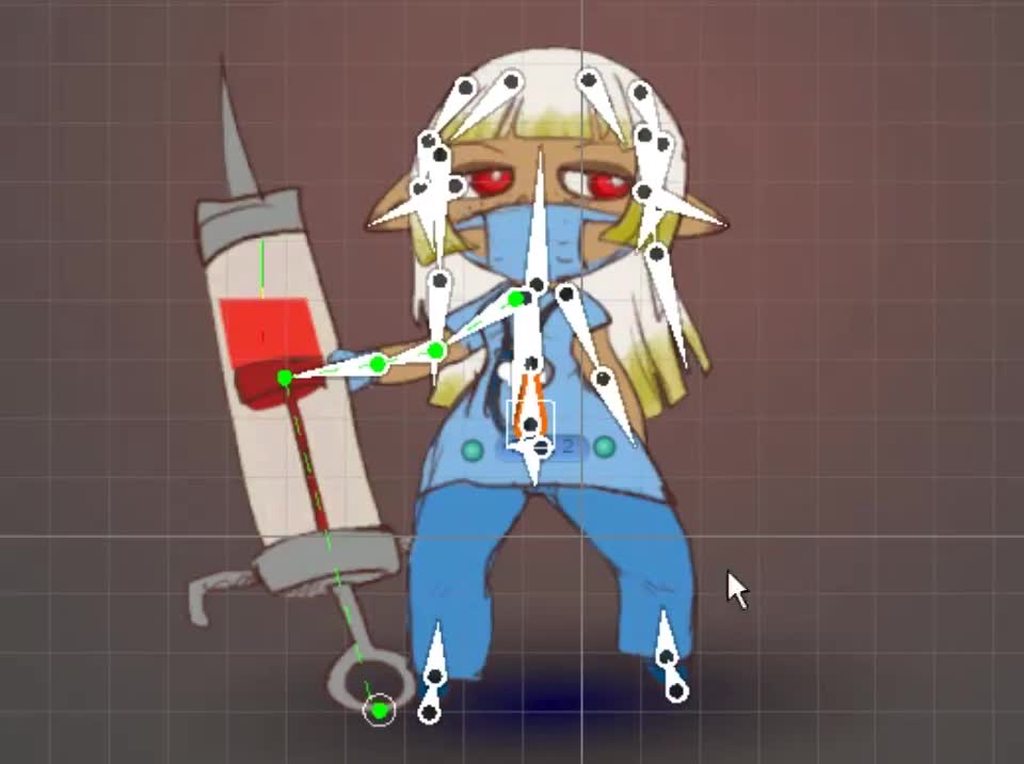
Like, you can go very elaborate with hair bones, or you could go very simple like it is a limb
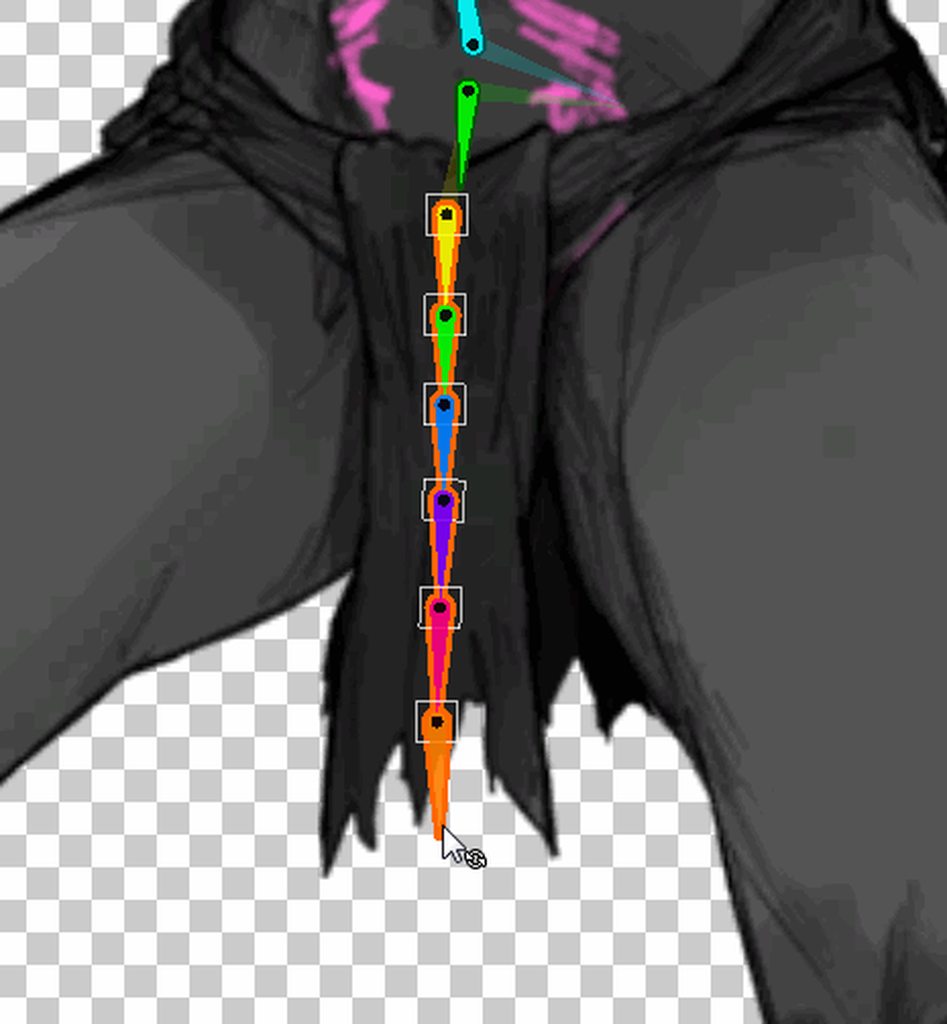
(Not hair but same idea)
Generally, you will either have a single chain of bones down the middle or one down each side, depending on whether you want it to just swing or if you want to be able to have the hair spread out.
So probably either of these would work fine
 solemn latch
fervent pulsar
Hello guys, I have a few questions that. I saw this asset on unity asset:
https:...
solemn latch
fervent pulsar
Hello guys, I have a few questions that. I saw this asset on unity asset:
https:...
If you look at the asset contents, it seems they made it with the tool Spine.
fervent pulsar
solemn latch
If you look at the asset contents, it seems they made it with the tool Spine.
So can I make it with unity rigging tool
 feral venture
Hey guys. I created an empty object, applied a sprite renderer and applied a slime to it. Now I see the slime but when I click play it dessapear any ideas?
solemn latch
feral venture
Hey guys. I created an empty object, applied a sprite renderer and applied a sli...
Make sure it isn't behind the camera
feral venture
solemn latch
Make sure it isn't behind the camera
Its working now the prob is that I had a z: -11 and not 0..
fervent pulsar
solemn latch
They don't show the animations
ohh but do you have any idea to make the blink effect like those slimes
solemn latch
fervent pulsar
ohh but do you have any idea to make the blink effect like those slimes
I haven't seen the animations, so I don't know what they look like. I have no idea.
fervent pulsar
solemn latch
I haven't seen the animations, so I don't know what they look like. I have no id...
https://assetstorecreator.github.io/Slimes/
here are demos of animation
solemn latch
Eh, those don't look that difficult to do in unity.

A bit easier to make the variant skins and stuff in spine, but nothing unity can't do.
fervent pulsar
solemn latch
A bit easier to make the variant skins and stuff in spine, but nothing unity can...
ohh thankk you alot. and also do you have any book or resource about making rigging 2d animation in Unity. I tried search in utube and google but can not find lots.
Btw your design and animated look very cool. I love it
tribal briar
Was looking into a way to have "negative" lights in URP 2D, somebody on stackoverflow suggested using a custom blend mode with a negative multiplicative factor, however it seems this feature was actually removed in URP 11.0.0...
Anyone got an idea on how to achieve a "darkening" light?
https://stackoverflow.com/questions/64863690/is-it-possible-to-make-dark-light-in-unity


Stack Overflow
This quiestion may be dumb, but is there a way to create a pointlight in unity2d that darkens instead of producing light? I'm using URP by the way.
solemn latch
fervent pulsar
Btw your design and animated look very cool. I love it
Thank you! I am not at home right now so I don't have any good links, but sadly there is a lot of trial and error involved.
fervent pulsar
Ohhh btw thank you for your sharing very muchh
hidden geode
i was wondering, if you would want to create animated objects and characters of a topdown 2d project, what tools would you use for creating and animation of those sprites?
solemn latch
hidden geode
i was wondering, if you would want to create animated objects and characters of ...
Depends on the specifics
hidden geode
solemn latch
Depends on the specifics
which do you want to know?
solemn latch
I mean, 'topdown 2d project' is super broad
hidden geode
think of a link to the past on snes with slightly better resolution 🙂
solemn latch
I mean, you could do that sorta thing in almost any art software.
hidden geode
that is true but im not that artistic and a simple tool with "enough" features might help
ive been looking into Piskel
thats what i found since i wrote that initial message and researched more, free, simple, yet has sufficient features it seems.. i was just interested in others opinion and choices 🙂
 alpine canyon
help, is it possible to make an image sliced from one side and tiled from another? when i set PPU multiplier to 3 it looks normal, but if i set to something higher (like 8), more healthbars start appearing

 tranquil coral
Hello everyone!
I'm having some problems with Unity's Sprite Editor (ver 2022.3.5f1).
The rigging "section" doesn't feel to behave like I'm seeing in online videos and images.
If I hover the mouse over a bone, it should suggest me to rotate it (from what i've seen online), but in my project this does not happen.
I can still rotate the bone by selecting (selecting bones also doesn't feel "right") them and change manually the rotation.
Another error I encountered is that if I'm in the weight section, I can't do changes with the weight brush.
For everything feel free to ping me.
Thanks.
I've already tried:
Restart Unity
Restart PC
Reimport asset
solemn latch
tranquil coral
Hello everyone!
I'm having some problems with Unity's Sprite Editor (ver 2022.3....
I am not at the computer and can't remember precisely which versions are severely bigged, but some versions are severely bugged.
@modest cargo could probably tell you which are safe to use
worn nymph
Does anyone know how to just make a simple sprite layer that blurs everything underneath it?
I cannot for the life of me find anything that can work
all the tutorials keep linking me to URP and I can't even find all the options the tutorials tell me to do.
modest cargo
tranquil coral
Hello everyone!
I'm having some problems with Unity's Sprite Editor (ver 2022.3....
2022.3.2f1 should work still but not the LTS versions after that
2023.1.6f1 is another option that avoids issues of 2022.3., though it's not considered stable
tranquil coral
Thank you guys, I'll try it
modest cargo
tranquil coral
Thank you guys, I'll try it
Oh and there's always the older 2021.3. LTS which will work fine if you don't need the newest features
tranquil coral
Even better then.
For now I'm just doing some tests so 2021.3 LTS should be good.
I hope this bug will be fixed with the next LTS
modest cargo
So I was hoping before the currently newest bugfix
 fossil shard
is there a package that lets you kinda spaghetti out ideas like a pin board and draw connecting lines and stuff between them? I forget what these are called and couldn't find anything because of that
(wasnt sure what channel to ask this in)

 lyric sinew
I wanna get into spriting and animating my own sprites for my future projects, any tutorials, sources or tips for a beginner?
 snow willow
fossil shard
is there a package that lets you kinda spaghetti out ideas like a pin board and ...
snow willow
fossil shard
is there a package that lets you kinda spaghetti out ideas like a pin board and ...
flowcharts?
not really unity packages, but plenty of tools like
https://app.diagrams.net/
or
https://www.lucidchart.com/pages/
 tulip gyro
Hello, what software do you use for making menu and starting screens for your games?
modest cargo
What were you doing when the error appeared and what broke with it?
What's the relevance to 2D tools?
 calm arch

Anyone know why the angle in the tile palette is not going isometric angle?
It's more top-down
solemn latch
calm arch
Anyone know why the angle in the tile palette is not going isometric angle?
You need to set the tile size correctly

 solemn latch
 shy goblet
can someone please tell me why my camera isnt showing my player or anything real...
shy goblet
can someone please tell me why my camera isnt showing my player or anything real...
Is the camera facing away from the stuff.
shy goblet
its shouldnt be, its a 2d scene
solemn latch
shy goblet
its shouldnt be, its a 2d scene
No such thing in unity when using a camera. All cameras are in 3d space, which means they have a front and a back. Anything behind them in 3d space won't be rendered.
shy goblet
how would I know what direction to make it face
solemn latch
You can hop into 3d view and it will show where it is pointing. Usually, with the default 2d camera if you put your assets at 0 z position they will work.
calm arch
solemn latch
You need to set the tile size correctly
Where do I change it? Cause when I imported it, I was pretty sure I set it correctly.
solemn latch
In your tilemap settings, not sure exactly where
shy goblet
solemn latch
You can hop into 3d view and it will show where it is pointing. Usually, with th...
its still not showing me my player
modest cargo
shy goblet
its still not showing me my player
Does it look like in the 3D view that your sprites are in front of the camera? Usually the camera's Z position should be less than the sprites'
Also, judging from the diagonal lines your camera is a perspective camera rather than orthographic, which kinda means it's 3D not 2D
 lavish rivet
I have this picture in single sprite mode
I don't know how to formulate the problem...


 solemn latch
lavish rivet
I have this picture in single sprite mode
I don't know how to formulate the prob...
solemn latch
lavish rivet
I have this picture in single sprite mode
I don't know how to formulate the prob...
Why are you using 'single' when that is clearly multiple sprites?
lavish rivet
solemn latch
Why are you using 'single' when that is clearly multiple sprites?
Because my programmer friend said that the code he wrote depends on that or something
If I use a multiple he will have to change something in the code and thus cause unnecessary programming errors
 frank willow
fossil shard
is there a package that lets you kinda spaghetti out ideas like a pin board and ...
frank willow
fossil shard
is there a package that lets you kinda spaghetti out ideas like a pin board and ...
some idea organizing boards are called "sketchnotes" "infographs"
or "mind maps"
there is also a site called Prezi
Figma also works to create boards like that
and there is also prototyping software in app development but I can't remember what that's called.
solemn latch
lavish rivet
If I use a multiple he will have to change something in the code and thus cause ...
Well, the problem is that you are using single instead of multiple when you have a sprite set up for multiple. If you want that to be a single sprite, flatten it in your image editor.
solemn latch
lavish rivet
If I use a multiple he will have to change something in the code and thus cause ...
It is only 'unncecessary' if you don't need multiple mode sprites. You need to decide what is actually needed.
 lapis relic
i checked everywhere but i couldn't find any solution, is it supposed to work like this?
modest cargo
lapis relic
i checked everywhere but i couldn't find any solution, is it supposed to work li...
I think that's the sprite editor bug affecting editor versions from 2022.3.3f1 to 5f1
lapis relic
modest cargo
I think that's the sprite editor bug affecting editor versions from 2022.3.3f1 t...
any idea how to fix this?
modest cargo
lapis relic
any idea how to fix this?
Downgrade to 2022.3.2f1 or 2021.3. LTS or upgrade to 2023.1. tech stream
But always do so with backups or version control
lapis relic
modest cargo
Downgrade to 2022.3.2f1 or 2021.3. LTS or upgrade to 2023.1. tech stream
But alw...
It seems like everything in Package Manager already is up todate
modest cargo
lapis relic
It seems like everything in Package Manager already is up todate
Package manager is not related to this issue
solemn latch
Right. It is a known unity bug for those versions.
lapis relic
modest cargo
Package manager is not related to this issue
I finally got the 2022.3.6f1 installed and its no longer broken, thank you 
modest cargo
lapis relic
I finally got the 2022.3.6f1 installed and its no longer broken, thank you <:Uni...
Ah, I see that one was released less than a week ago
Fingers crossed they fixed a lot of stuff with it
 elfin sandal
love how they promote 2d tools on their youtube but its a broken mess
 shadow ore
Im having trouble with Rule Tiles, for some reason different tiles refuse to connect to each other and I see no option for changing this behavior. Does anyone know how to fix this?
 bleak flume
shadow ore
Im having trouble with Rule Tiles, for some reason different tiles refuse to con...
bleak flume
shadow ore
Im having trouble with Rule Tiles, for some reason different tiles refuse to con...
You mean sprites refuse to connect or 2 different rule tiles refuse to connect?
Basically 2 different ruletiles won't connect you will have to make a custom tile by extending the ruletile class and add that functionality.
shadow ore
bleak flume
Basically 2 different ruletiles won't connect you will have to make a custom til...
thats the solution I wound up on
it feels like a functionality that should be built in
having a way to at least say "these tiles should be connected to"
and if for some reason someone doesnt want to use it, they would just not touch that part
unlike some other features present in Unity this wouldnt harm performance in any way
bleak flume
shadow ore
it feels like a functionality that should be built in
Yeah I think the rule override tile should have a built-in option to connect to its original tile. I hope it's added in the future.
still tendon
How do i change what tilemap layer is on top of which
 tired furnace
still tendon
How do i change what tilemap layer is on top of which
tired furnace
still tendon
How do i change what tilemap layer is on top of which
tilemap renderer and sorting layer/order in layer i guess
 full turret
Can anyone help me understand how a 2.5d game in pixel art style works? Does the artist just make pixel art for a 2d game and then the camera angle is looking down on it? For example, a game like Enter the Gungeon. Also, if you aren't looking at the pixel art from a direct 2d perspective (and instead doing 2.5d perspective) whould each pixel be more of a rectangle instead of a square? It looks like it's squares in Enter the Gungeon but I don't understand how. Any info helps, thank you!
 latent nymph
anyone know how to fix the tile not fitting in the box correctly?
 shadow ore
does anyone know how to set the cellSize value through script?

Im trying to make adaptive GUI and need to be able to change the value in response to other values
shadow ore
latent nymph
anyone know how to fix the tile not fitting in the box correctly?
if you imported other tiles first it uses those as a baseline for the normal tile size, causing bigger or smaller tiles to not fit
shadow ore
shadow ore
does anyone know how to set the cellSize value through script?
figured it out, its because the variable is a vector2 so you have to set it using a vector2
 sharp tiger
the Sprite tab is not shown, only the Bone tab. Is this a bug?
 latent nymph
this is so weird, when i have a composite colllider, and i have a sloped geometry it doesnt work properly and let me jump, it makes 0 sense
modest cargo
latent nymph
this is so weird, when i have a composite colllider, and i have a sloped geometr...
I'd start by debugging your ground check
Is your slope missing a layer or a tag you're using for ground checking?
 foggy stratus
How do you select a bone? I tried clicking and it doesn't work. Also tried dragging but it starts the selection from a random position. Is this a bug?
 latent nymph
modest cargo
I'd start by debugging your ground check
Is your slope missing a layer or a tag ...
latent nymph
modest cargo
I'd start by debugging your ground check
Is your slope missing a layer or a tag ...
no its on the same grid the other ground is
 drowsy eagle
im not sure if this is where i ask this but
for my health bar it was gonna be like a big circle shape where the red sinks into the middle as you lose health
would that work the same in unity as a slider?
 lean estuary
@drowsy eagle Don't cross-post. Pick one channel
 frigid echo
the sprites of my characters are with different sizes and positions, which causes problems between animations, is there an easy way to solve this in photoshop?
the artist who made these drawings did not standardize the images, I will send a short video demonstrating the problem
please note the two larger characters
how resolve this?
 modest cargo
frigid echo
how resolve this?
modest cargo
frigid echo
how resolve this?
You can change the sprite pivot point in the sprite editor
But it's much easier to start by using images that are consistent among each other in dimensions and character position
frigid echo
modest cargo
You can change the sprite pivot point in the sprite editor
But it's much easier ...
sure, but the artist who made this art wanted to charge to make this pattern 🤦♀️ so I'm trying to solve it myself
frigid echo
modest cargo
You can change the sprite pivot point in the sprite editor
But it's much easier ...
the way I know how to change the pivot is totally blind, is there a more productive way to adjust the pivot of the image?
modest cargo
frigid echo
the way I know how to change the pivot is totally blind, is there a more product...
None that I know of
The only practical way would be to pick a point on the character that moves around the least and use that as the standard pivot point
If the character is in unpredictable positions from one sprite to another there probably isn't any way to automate it
When drawing characters it costs no effort to not move or crop the image like this so it's a bit weird that you see artists doing it anyway
frigid echo
modest cargo
When drawing characters it costs no effort to _not_ move or crop the image like ...
for sure, that's why I was so angry I had never seen that before
 onyx ruin
Hi, I was wondering if it's possible to reverse a Texture Atlas? I have the Atlas files and the code the game uses for them, so would it be possible to create the completed image in Unity?
 fervent moth
I don't know if this is the best channel to ask but, does anyone have suggestions or guides that could help in making a 2D game physics feel more satisfying or realistic? I tried tweaking options and sliders here and there but I can't really put my hands on it. I'm a beginner btw I'm talking about basic stuff like controlling the falling speed of the player, its friciton and things like that
Oh I just noticed there's a physics channel, I couldn't find it earlier, I'll ask there
modest cargo
onyx ruin
Hi, I was wondering if it's possible to reverse a Texture Atlas? I have the Atla...
What do you mean by "reverse"?
still tendon
Can somone help me. I made a tilemap and after you make the tilemap you have to go to your sprites and put the pixels you have, on the sprites but i have 16x17 tiles and if i put 17 is space and if i put 16 they go into each other i have to remake the sprite or i can make it somehow.
onyx ruin
modest cargo
What do you mean by "reverse"?
Like, I have Texture Atlas files from a game. Can I use them to get the actual image, cause they're all messed up
modest cargo
onyx ruin
Like, I have Texture Atlas files from a game. Can I use them to get the actual i...
From what game?
Working on sprite atlases without the source assets isn't a supported workflow I'm afraid
onyx ruin
Yugioh Rush Duel Dawn of the Battle Royale Let's Go Go Rush
onyx ruin
modest cargo
Working on sprite atlases without the source assets isn't a supported workflow I...
I uh, don't know what you mean by this?
solemn latch
onyx ruin
I uh, don't know what you mean by this?
It means that this is not a server for asset ripping.
onyx ruin
Ok, but my question is about how to use Unity? This is the Unity discord?
I'm not asking how to asset rip, I'm asking how to fix an image
modest cargo
onyx ruin
I'm not asking how to asset rip, I'm asking how to fix an image
Depends what the problem is exactly
If it's an issue caused by asset ripping then it's outside of my purview
 minor saffron
Can anyone who has done Pixel Art or knows how that works tell me how i put text in a 32x32 image cus im using paint.net and my text tool doesent go that small and idk how to get text that small cus im tryna make assets for a game im making
modest cargo
minor saffron
Can anyone who has done Pixel Art or knows how that works tell me how i put text...
You need to disable text antialiasing and preferably get a font that's designed for tiny pixel sizes
solemn latch
Or just draw the text.
minor saffron
modest cargo
You need to disable text antialiasing and preferably get a font that's designed ...
ty i just made a bigger canvas and did it and imported into unity that way
 outer epoch
dk if this is the right place to ask but, how do I add a 2d texture to a sprite
 edgy pawn
pink tiles in tile palette, anyone know how to fix? they go away whenever i run the game but come back when i stop

 nimble lark
Im having an issue with using the sprite atlas and mipmaps. I have 4k assets on a sprite atlas with mipmaps enabled. they look fine at 4k resolution but become blurry at 1920x1080


the one on the left is 4k, right is 1920 x 1080
ive read that adjusting the mipmap bias could help but I dont see a place where I can do that for the atlas
shadow ore
How might I access a slice of a texture via code? Nothing I've tried so far works
I want to be able to plug in the name of what I'm looking for, this way I can iterate through sprites by name with my custom animator, without having to manually set hundreds of sprites in the editor
shadow ore
nevermind found a way, apparently the method I found required the inclusion of a Resources folder
on further research I found that Unity does this for the sake of mobile OS compatibility, but it feels like it might be more user friendly to obscure that by, under the hood, considering everything in the project as inside of a hidden Resources folder
or if not hiding it, just having a Resources folder next to the Assets folder by default, leaving it to the developer to choose where to put their games files
solemn latch
nimble lark
Im having an issue with using the sprite atlas and mipmaps. I have 4k assets on ...
I'm confused. Textures get blurrier when you lower the resolution.
nimble lark
solemn latch
I'm confused. Textures get blurrier when you lower the resolution.
Without mipmaps they do not for me, is this normal behavior for a mipmap? I thought the whole point was to preserve the quality of the texture
solemn latch
The point is more to avoid artifacts such as moire patterns and crawling pixels, and to speed rendering.
modest cargo
nimble lark
Without mipmaps they do not for me, is this normal behavior for a mipmap? I thou...
4K has 4 times as much pixel density than 1K
If your sprites in these two cases are of constant size relative to screen, then what you're seeing is just an expected result of rendering stuff at a lower resolution
If the sprites are constant pixel size relative to each other, then there could be a practical problem with how mip maps are calculated that may be helped by mip map bias or something
nimble lark
modest cargo
4K has 4 times as much pixel density than 1K
If your sprites in these two cases ...
bias does help. -0.5 barely makes a difference, -1 seems to be much better. The Unity docs say that anything less that 0.5 will impact performance, but i dont know if that means runtime or load time?
modest cargo
nimble lark
bias does help. -0.5 barely makes a difference, -1 seems to be much better. The ...
I expect it refers to the render cost
But really I'd like to know what resolutions the sprites displayed at in your previous image
nimble lark
left is 3840 x 2160, right is 1920 x 1080. the 3840 x 2160 version looks very good, the screenshot I am showing makes it look more pixelated than it appears at fullscreen but I am trying to show the detail
modest cargo
nimble lark
left is 3840 x 2160, right is 1920 x 1080. the 3840 x 2160 version looks very go...
And the sprite's size remains constant relative to screen size between the two resolutions?
nimble lark
yes, its a sprite atlas
modest cargo
nimble lark
yes, its a sprite atlas
I mean you aren't adjusting camera size (or using constant pixel scale if this is on UI) to standardize sprite resolutions regardless of screen resolution?
If not, then I believe there is no mystery here
Rendering anything at quarter of the original resolution will make it blurrier, or more pixelated if you disable mip maps
nimble lark
Ok thanks for the info!
 gilded cloud
hi am trying to make a transition from scene to scene and the transition have to look like you are entering the matrix from a phone something like in the movie here is an example image

 solemn latch
gilded cloud
hi am trying to make a transition from scene to scene and the transition have ...
solemn latch
gilded cloud
hi am trying to make a transition from scene to scene and the transition have ...
 calm niche
Not sure if this should be in art-asset-workflow or here, but curious if anyone has had issues w/ Sprite Editor marking changes dirty after you apply slicing or pivot changes and then switch to a different focus from the sprite editor? Basically it'll prompt you to save changes again (even after already applying them)
This is in 2022.3.4f1. Never had an issue like this, but makes for a crappy workflow when you have to keep saving changes you've already applied.
quick example. Here you can see it's not dirty, and everything's been applied.

but if i click on a dif asset in the project i still get this prompt

it's clearly not marked as dirty anymore, yet it's still giving me a prompt
solemn latch
I've seen that bug pop up irregularly for years, never could quite pin it down enough to properly bug report it though.
 undone rose
Hi all! I am currently making a game where my map is only one large image, but when in Unity, the image looks vey blurry/washed out but in something like gimp its very clear and sharp. How can I improve the upscaling in unity so that it looks like in gimp.


I hope this fits well in the channel 🤞
 dense bough
does any1 know what font this is?

 jolly narwhal
dense bough
jolly narwhal
<https://www.myfonts.com/pages/whatthefont>
jolly narwhal
dense bough
jolly narwhal
<https://www.myfonts.com/pages/whatthefont>
appreciate it
 modest marsh
undone rose
Hi all! I am currently making a game where my map is only one large image, but w...
modest marsh
undone rose
Hi all! I am currently making a game where my map is only one large image, but w...
change filtering and compression settings on the texture in Unity. Also, it might be getting downscaled if it exceeds the default limit which is also a texture setting you can tweak
undone rose
modest marsh
change filtering and compression settings on the texture in Unity. Also, it migh...
These are my settings, is there anything I can do better?
 modest marsh
filter mode to point, format to rgba32. Is your texture larger than 2048x2048? Increase that if needed. Note that this will be an uncompressed texture in memory so while you won't have any compression artifacts, it's going to be pretty large. Probably not a big issue for such an important image, but if it's on mobile and larger than 4k you're going to have problems with some gpus. Ideally 2k and below for mobile devices
solemn latch
undone rose
These are my settings, is there anything I can do better?
You might also want so split your texture into chunks instead of having one gigantic image, if it is large enough.
 rare acorn
Hey guys, can someone help me on how to animate the character that moving around by clicking or touching?
 split portal
rare acorn
Hey guys, can someone help me on how to animate the character that moving around...
split portal
rare acorn
Hey guys, can someone help me on how to animate the character that moving around...
Can you be more specific?
rare acorn
split portal
Can you be more specific?
I wanted to make a game where the character can be moving around by mouse clicking or touching on screen
I already follow some tutorials in yt, and it works but only if I use the arrow button on keyboard
If I use the mouse click, it doesn't have an animated moving left, right, up, or down.
I assume it must be because it's a different movement input, that's why the script didn't work on mouse click, or maybe I'm just wrong
 languid pond
Hey there people, i'm looking for advice on a problem that i really can't seem to figure out alone :((
basically i have a 2d scene with pixel art assets, i also have my UI elements as pixel art assets, my issue is that whenever i'm at a resolution of 1920x1080 and a scale of less than 1x all the assets including UI become distorted and blurry, the problem is that when i zoom the scale to being 1x the art looks crisp but the UI is cropped out (and the game looks too zoomed in) but when playing around with resolutions like setting it to 480x270 with the appropriate orthographic size the art looks fine but the UI art becomes blurry
also i did setup all the art correctly (point no filter, compression to none, PPU 32 since all the art is made with that ppu in mind)
i'm really new to setting up scenes with pixel art so i really can't seem to figure out what to do to have a crisp looking scene with the UI being correctly placed in the camera view and not distorted

 modest cargo
languid pond
Hey there people, i'm looking for advice on a problem that i really can't seem t...
modest cargo
languid pond
Hey there people, i'm looking for advice on a problem that i really can't seem t...
sprite renderers or canvas UI images?
languid pond
i think i'm using a canvas ui image and placing the sprite asset as it's sprite
so UI images
modest cargo
Just to confirm is the component "Image" on the gameobjects, not "Sprite Renderer"
languid pond
yeah it is
 modest cargo
languid pond
yeah it is
modest cargo
languid pond
yeah it is
Good to know, they are much different systems
This is an #📲┃ui-ux thing but anyway
The thing about rendering pixel graphics without blurring or distortion is that they can never be displayed at non-integer scales
Which means usually you'll have to pick a specific display resolution to target all your graphics to
With UI you can use Constant Pixel Size to ensure a change in resolution will not stretch or squash them, and also enable "pixel perfect" to make sure their position can't fall between screen pixels
languid pond
thanks for the advice, so how do you i enable pixel perfect for the Ui?
modest cargo
Constant Pixel Size will not scale well, however, as the UI will appear much smaller on a 4K monitor as opposed to 1080p for example
I don't know what the proper way or if there is a good way to do pixel art UIs with good scaling
Sprite Renderers can benefit from the Pixel Perfect Camera component so personally I'd use that for all user interface instead of Canvas at all
But it depends on how badly you need Canvas features to consider it worth it to avoid it


 shell igloo
Is it normal for a sprite to change colours after importing it?


(picture from the editor and from window image displayer)
modest cargo
shell igloo
disable compression
modest cargo
@languid pond One more thing I forgot
Make sure this Scale slider is at 1x, or everything in the game window will be stretched
 solemn latch
rare acorn
I assume it must be because it's a different movement input, that's why the scri...
solemn latch
rare acorn
I assume it must be because it's a different movement input, that's why the scri...
Try in #📲┃ui-ux ?
languid pond
modest cargo
<@428263582590042133> One more thing I forgot
Make sure this Scale slider is at...
when i do constant pixel size it becomes all weird and even more distorted :(((
@modest cargo also you said something about setting up and picking a specific display resolution to target all your graphics to, i saw this advice everywhere i searched but i really don't understand how to do that?
if i have assets that are intended for a ppu of 32 and let's say my target size 1920x1080, how do i set this up to work properly in unity? i heard about changing the orthographic size to (res height / 2 / ppu) but even when using this orthographic size the ui is still cropped of when at scale 1x and the assets are still blurry if the scale is at less than 1x
modest cargo
languid pond
<@166982635950702592> also you said something about setting up and picking a spe...
Camera size to my knowledge should have no effect on overlay canvases, sounds like that advice was meant for sprites rather than images
First you would set your Game window to 1920x1080
Otherwise the UI appearance will be valid only for whatever size the game window happens to be set in
Game window scale is just for zooming in the preview, it has no effect on build or the game itself
languid pond
yeah it's set at 1920x1080(full HD) but on game view when maximized the ui is cropped out, i'm assuming this is only in game view but i'm gonna build and check if the image changes in a full build


i'm currently comparing the game view to full build and you're right the pixels are crisp and ui is in the right place, but why is the game view so distorted that's so weird :////
so i guess just setting up the proper orthorgraphic size and adding the pixel perfect option to the canvas is all it takes?
modest cargo
languid pond
i'm currently comparing the game view to full build and you're right the pixels ...
No
Canvas scaling is unaffected by camera size unless it's a world space canvas
languid pond
okay then so it will appear as setup in the scene view when doing a build got it! i thought since it's cropped in in the game view it would look the same in a proper build
but even the crispiness of the art (appart from the text elements) is good so as long as the ortho size is correct the pixels should be crisp?
modest cargo
languid pond
okay then so it will appear as setup in the scene view when doing a build got it...
Scene view will just show how the Canvas has adapted to your current screen size
In the above screenshots it's cropped because you can't fit a 1920x1080 image on a window that's smaller than it while at 100% zoom
Again ortho size has nothing to do with UI
I would recommend doing the UI with sprites since you seem to be using the pixel perfect workflow anyway and not bother with Canvas
Describe your Canvas problems in #📲┃ui-ux if they persist
 undone delta
Basically, I created a 1 tilemap for my little project. When I "drew" everything I wanted, and checked my game view, I saw that my tiles were glitched. As you can see on these dark green walls, there are a few weird lighter lines. This "checkboard" is glitched too. What can I do to fix that?

Here's how it should look like (scene view)

 hazy pilot
How can I create a flat top hexagonal tilemap where X is left/right and Y is up/down? If I create a flat top hexagonal tilemap the default swizzling is YXZ - changing it to XYZ gives me "point top" files. If I create a point top tilemap, the swizzling is XYZ.
My graphics assets are flat top and I'd like to refer to the tiles as X in the left/right and Y as the up/down so I don't have to mirror them across the origin.

 lean estuary
Not sure what the question is. You can select any swizzle you like to use and there's no left/right with flat tops, you have to select one of the diagonals for Vector2Int representation.
If you need help with grid maths https://www.redblobgames.com/grids/hexagons/
Amit's guide to math, algorithms, and code for hexagonal grids in games
 hybrid fog
Anyone got an idea about how I could fix this? the "ground" is a 2d tilemap but placed in a 3d scene, however you can see all sprite renderers TROUGH the tilemap. I want the tilemap to act as a solid ground.
 modest cargo
hybrid fog
Anyone got an idea about how I could fix this? the "ground" is a 2d tilemap but...
modest cargo
hybrid fog
Anyone got an idea about how I could fix this? the "ground" is a 2d tilemap but...
This is a consequence of transparent sorting as opposed to opaque sorting
You must be using a shader that's not a sprite shader to enable opaque sorting
Opaque with alpha clip specifically
Transparents will sort properly with opaques, but transparents together are problematic so mix them sparingly when you're in 3D space
hybrid fog
modest cargo
You must be using a shader that's not a sprite shader to enable opaque sorting
In other words, i cannot fix this as long as i want to use sprite renderers?
modest cargo
hybrid fog
In other words, i cannot fix this as long as i want to use sprite renderers?
Sprite renderers can use non-sprite shaders
I don't recall exactly what sprite features you lose that way but maybe it's nothing too important
hybrid fog
The current sprite shader im using is only to make the sprites be able to cast shadows. Is that something I'd lose?
modest cargo
hybrid fog
The current sprite shader im using is only to make the sprites be able to cast s...
Opaque 3D shaders can cast shadows just fine
Which render pipeline is it?
hybrid fog
URP
modest cargo
hybrid fog
URP
Should be fine using Lit shaders or Lit Graph Shader Graphs
hybrid fog
Seems to work fine for the tilemap but not for the sprites?
 modest cargo
hybrid fog
Seems to work fine for the tilemap but not for the sprites?
modest cargo
hybrid fog
Seems to work fine for the tilemap but not for the sprites?
Did you enable alpha clipping
 dusk bluff
hi, i dont know where to ask tbh, but can someone help me figure this out?
Isometric z as y map, im using multiple tilemaps for each layer, i want to have a half tile. If i were to use just one tilemap, i can get the desired result by modifying the z value. but i want to have a tilemap for each layer.
in the img you can see that i can get the half tile, but its still covered by the layer 1 (which makes sense) but i dont know how to approach it
 solemn latch
You can also set sorting layers explicitly, but for 3d scenes like this that is usually more trouble than it is worth.
 honest shadow
How can I make a Sprite Renderer not preserve aspect ratio and instead squish/stretch the image to fit it? A UI image can do it but how do I make a sprite renderer do that?
solemn latch
honest shadow
How can I make a Sprite Renderer not preserve aspect ratio and instead squish/st...
Sprite renderers don't preserve aspect ratio by default. How are you changing the scale?
 bright scaffold
My rule tile isn't working for the bottom inner corners, but is for the top inner corners even though they have the same rules just flipped? It might be something really stupid and if so, my bad

 strong temple
modest cargo
<@428263582590042133> One more thing I forgot
Make sure this Scale slider is at...
strong temple
modest cargo
<@428263582590042133> One more thing I forgot
Make sure this Scale slider is at...
funny how i just decided randomly scroll down through channels and den come to exactly to this one and instantly saw hella useful tip for my project xD
modest cargo
strong temple
funny how i just decided randomly scroll down through channels and den come to e...
I think it's a stumbling block for everyone at one point or another! The editor should have some visual warning when the game window is not showing an undistorted view of things
honest shadow
solemn latch
Sprite renderers don't preserve aspect ratio by default. How are you changing th...
It doesn't preserve it by default? Changing the sprite does this


Which is what I don't want to happen, I want it to be like this

 solemn latch
honest shadow
Which is what I don't want to happen, I want it to be like this
solemn latch
honest shadow
Which is what I don't want to happen, I want it to be like this
Ah, you aren't scaling the sprite but the screen.
honest shadow
I'm unsure what that means
honest shadow
solemn latch
Ah, you aren't scaling the sprite but the screen.
How can I fix that?
solemn latch
I'm still not entirely sure what you want to be happening
waaaait. You mean when you actually change the sprite you want the collider to change?
honest shadow
solemn latch
waaaait. You mean when you actually change the sprite you want the collider to c...
No I want the image itself to stretch to fit the collider, so that whichever image you put into it, it will perfectly fit the collider
honest shadow
solemn latch
Think you'd have to write a script to do that.
Ah I see
What would I need to do?
solemn latch
Easiest option would just be to make your sprites the same size
 tough moon
Anyone got an idea of how I can fix this? When my enemy is inverted, although the pivot in centered, he moves very far as if there's an offset?

 still tendon
anyone knows a general fix to "Unable to set invalid palette" for a 2D isometric tile palette?
I'm at my wits ends at this point, it just doesnt work; the tiles dont appear in the palette when placed
and I can create a palette but only in one single specific folder, anywhere else doesnt work
tough moon
Maybe show some screenshots? @still tendon ?
still tendon
tough moon
Maybe show some screenshots? <@456226577798135808> ?
https://pastebin.com/CZGWVrb6 heres the error log from the console
Pastebin
Pastebin.com is the number one paste tool since 2002. Pastebin is a website where you can store text online for a set period of time.
I found one(1) simmilar issue online, absolutely nothing else
tough moon
Have you installed the 2D Tilemap Editor package from the Package Manager?
still tendon

downloaded, still doesnt work. I don't have to create a new project, do I...?
tilemap selected, grid doesnt show up at all

I am actually just mentally impaired I'm sorry please ignore this one it does work
...nevermind, same error pops up whenever I try to create a tilemap. Sometimes work, sometimes doesnt
god save me
still tendon
its not even about the sprites at this point, the tilemap still doesnt want to save
bright scaffold
bright scaffold
My rule tile isn't working for the bottom inner corners, but is for the top inne...
If anyone knows anything about this pls do tell (still having the issue)
bright scaffold
This blend tree makes no sense?? How is the top one activated even though the dot is clearly closer to the left??

 wet totem
Super-beginner here. So I have an issue with particles, I assign "Default Particle" Material to my particles and I can't see them on my background, if they are in the canvas but outside the background, I can see them
 bright scaffold
wet totem
Super-beginner here. So I have an issue with particles, I assign "Default Partic...
bright scaffold
wet totem
Super-beginner here. So I have an issue with particles, I assign "Default Partic...
Check the sort layer and the z axis, change them around a bit and see if it fixes itself
wet totem
bright scaffold
Check the sort layer and the z axis, change them around a bit and see if it fixe...
changing Z does nothing, I went from -1000 to +1000, while the other layers are at 0, and checked both above and below in the heirarchy, still doesn't work
I feel like it's related to the material
That's what I'm using and I have no idea if it's good
 bright scaffold
wet totem
changing Z does nothing, I went from -1000 to +1000, while the other layers are ...
bright scaffold
wet totem
changing Z does nothing, I went from -1000 to +1000, while the other layers are ...
Changing the hierarchy doesn't change the sort order unless it's UI, you need to change the sort order in the renderer component
wet totem
oh how do I do that?
wet totem
I'm in a 2D scene btw
bright scaffold
The order in layer variable
Set it to higher and see if it works
I forgot what it was called sorry
solemn latch
Also see if your particles are actually behind the background
wet totem
bright scaffold
The order in layer variable
Where do I find that?
bright scaffold
Bottom quarter of the renderer part in the screenshot you sent
Currently set to 0
wet totem
solemn latch
Also see if your particles are actually behind the background
It is in front

I put it on 5000, still nothing

Do I need like a canvas renderer component or something?
https://www.youtube.com/watch?v=FEA1wTMJAR0 I followed this tutorial but it doesn't seem to work the same way, I'm using images as my assets, and a 2D scene

Udemy: http://bit.ly/BRACKEYSMEM
Everything to know about the Particle System in Unity!
♥ Support Brackeys on Patreon: http://patreon.com/brackeys/
● Learn more: https://docs.unity3d.com/Manual/class-ParticleSystem.html
····················································································
♥ Donate: http://brackeys.com/donate/...
bright scaffold
wet totem
I put it on 5000, still nothing
Not that the Order in Layer
Further up
There's cast shadows, shadow bias, motions vectors, sorting layer ID then Order in Layer
you need to change Order in Layer
wet totem
still no

Do you want me to share my screen or something so it's easier for you to understand?
bright scaffold
Click the 2D button on the top of the screen and check where it is and check if the chest is on a different sorting layer and if neither of them work, ask chatgpt and then uhhh idk wait for someone more experienced to solve it for you
wet totem
it is in front

They are all on the "Default" layer
I feel like I'm missing something very basic, like setting up the camera, or setting up a renderer
bright scaffold
oh it might be the camera's clipping mask?? I really don't know though
modest cargo
wet totem
https://www.youtube.com/watch?v=FEA1wTMJAR0 I followed this tutorial but it does...
What precisely do you mean "images as assets"
If they're Image components, that suggests they're on a canvas which defaults to screen space overlay, meaning it will render in front of all non-canvas renderers
The particle system is designed to be compatible with Mesh Renderers and Sprite Renderers, not Canvases
But Canvas can be made compatible with them by setting it to screen space camera or world space
 gusty crest
hey all! I'm pretty inexperienced with tilemaps and currently trying to make a torch tile that emits light (I'm using URP's lighting system). Is there any way to create a sort of light emitting tile? Or do they have to be gameobjects?
wet totem
modest cargo
What precisely do you mean "images as assets"
If they're Image components, that ...
Yes! That exactly. Thanks! I'll try to switch it to world space. Thanks
 normal oasis
Hi. I'm trying to make Rule Tiles connect to other tilemaps. Right now, I've only tried making a Custom Rule Tile script and overriding RuleMatch. Though, I don't think it's possible to get a TileBase's position and its tilemap, so this didn't work. RuleMatches also exists, but it uses an "ITilemap". I think getting all the tilemaps in the scene and run RuleMatches for each of them would work, but it's not possible to convert a Tilemap to an ITilemap. What I have is multiple scenes each representing a level. I'm trying to make a metroidvania-like level swap (when you exit a level it pans the camera to the other part) and each of these levels are scenes which each contain one tilemap. The problem is rule tiles won't connect to tilemaps in other scenes (the scenes are loaded additively). Is there any way to make it work? Do I just need to find another way of handling levels ? The latter option would require more resources in perf (since the WHOLE world would basically be loaded at once, the world is all seamless transitions)
normal oasis
normal oasis
Hi. I'm trying to make Rule Tiles connect to other tilemaps. Right now, I've onl...
using System.Linq;
using UnityEngine;
using UnityEngine.Tilemaps;
using UnityEngine.WSA;

[CreateAssetMenu(menuName ="2D/Tiles/Multi Tilemap Rule Tile")]
public class MultiTilemapRuleTile : RuleTile
{
    Tilemap _tilemap;
    public Vector3Int Position;

    public override bool RuleMatch(int neighbor, TileBase other)
    {
        Debug.Log($"{neighbor}, {other}");

        switch (neighbor)
        {
            case TilingRuleOutput.Neighbor.This:
                if (other == this)
                    return true;
                else if (other == null)
                    return HasSameTileInOtherTilemap(other);
                else
                    return false;

            case TilingRuleOutput.Neighbor.NotThis:
                if (other != null && other != this)
                    return true;
                else if (other == null)
                    return !HasSameTileInOtherTilemap(other);
                else
                    return false;
        }
        return base.RuleMatch(neighbor, other);
    }

    bool HasSameTileInOtherTilemap(TileBase other)
    {
        var allTilemaps = FindObjectsOfType<Tilemap>().ToList();
        allTilemaps.Remove(_tilemap);

        MultiTilemapRuleTile otherRule = other as MultiTilemapRuleTile;

        foreach(var tilemap in allTilemaps)
        {
            if (tilemap.GetTile(otherRule.Position) == other)
                return true;
        }

        return false;
    }

    public override void GetTileData(Vector3Int position, ITilemap tilemap, ref TileData tileData)
    {
        _tilemap = tilemap.GetComponent<Tilemap>();
        Position = position;

        base.GetTileData(position, tilemap, ref tileData);
    }
}
for now this is what I have. It does work if the checked neighbor tile is existing. But since most of the time when we check any other tilemaps the tile is NOT existing, then we can't get its position. Knowing what position the match is currently checking would resolve that
normal oasis
I'm not finding a lot of answers to this and the question is basically never asked. Though, I feel like that's a common problem. Been struggling on this for the day now, if anyone has an idea i'll take it
modest cargo
normal oasis
I'm not finding a lot of answers to this and the question is basically never ask...
It is asked every now and then but I don't recall seeing any clear solution
I thought of writing to the same tilemap instead of connecting multiple ones, but I haven't tried it
normal oasis
yeah but if it's the same tilemap I won't be able to have one per scene
so the whole world would have to be in one tilemap wouldn't it?
normal oasis
normal oasis
```cs
using System.Linq;
using UnityEngine;
using UnityEngine.Tilemaps;
using Un...
i feel like im close to the goal here but the only way it would work would be to know which position offset it is checking in the RuleMatch method. Since that isn't possible, I don't think we can ever do that. But if we can't then I'm stuck for my problem with scenes. I don't see another way of being able to have "slices" of levels still connected to each other. Only thing I can think of is using normal tiles and not rule tiles. Maybe Tiled would fix the problem since it's not using rule tiles stuff? I'm not sure if I can easily make the levels in Tiled and then "slice" it in each scene
modest cargo
normal oasis
so the whole world would have to be in one tilemap wouldn't it?
I mean you'd load tiles into the primary tilemap from another tilemap stored in a prefab, and unload them as needed
normal oasis
ah yeah
modest cargo
Whether that's even comparable in performance to loading in separate tilemaps and gluing them together remains to be seen though
normal oasis
though the loading/unloading might be intensive because I think it would run the rule tile checks everytime
I think I might just use Tiled
I don't know if it's possible to make slices of tilemaps with it but I'll see
modest cargo
normal oasis
I don't know if it's possible to make slices of tilemaps with it but I'll see
If by slices you mean smaller chunks of a big tilemap I don't see why not
Tiled is probably much better for creating levels from tiles than Unity's tile tools in all situations, but if you need rule tiles that adapt at runtime then you'd be stuck with what Unity has
normal oasis
yeah I mean smaller chunks
I won't need runtime changes to tiles no. Unless I make a level builder... I'll see when I get to that. Thanks for the help though
modest cargo
normal oasis
I won't need runtime changes to tiles no. Unless I make a level builder... I'll ...
Good luck! The seam issue really needs an official intervention in my opinion
normal oasis
thanks! yeah probably something to make it work with other tilemaps could be great
modest cargo
You can let me know if you find more about it
The stuff earlier from you will surely help me when I return to this
normal oasis
will do 👍
fervent moth
I have a weird problem when I try to import my spritesheets in my project
I made my spritesheet in Aseprite and I only have one layer and no transparency gimmicks going on, but when I import the sheet on Unity it does this weird thing that I can show you with a picture
For example this is a normal sprite viewed from an external editor

This is how it becomes when imported in Unity

And all of the tiles from this spritesheet only do this in Unity
 waxen blaze
is there a way to have a rule tile pattern work with another pattern of the same ruletile on a seperate tilemap? i was wanting to make prefab rooms and have them put together but since they are on different tilemaps in the same grid, the rules dont work between them
 oblique latch
how do i make the player colide with a certain tilemap only
modest cargo
fervent moth
And all of the tiles from this spritesheet only do this in Unity
Compression is enabled by default in texture import settings, disable it
modest cargo
waxen blaze
is there a way to have a rule tile pattern work with another pattern of the same...
Me and TheCarotte just talked about this if you scroll up
waxen blaze
i will looks thanks
modest cargo
oblique latch
how do i make the player colide with a certain tilemap only
A tilemap collider should only consider the tilemap it's attached to
Additionally you can edit the physics shape of sprites on the tilemap via the sprite editor to change the default polygon collider shape per tile
waxen blaze
ah so from a brief reading of the convo, doesnt look like a standard way
oblique latch
modest cargo
A tilemap collider should only consider the tilemap it's attached to
Additionall...
i only added a tilemap collider to one of my tilemaps but for some reason it acts as a collider for both of them, ive even tried putting my tilemap on a seperate grid but it still collides with the player
solemn latch
normal oasis
so the whole world would have to be in one tilemap wouldn't it?
Can you just manually paint the edge tiles to match?
modest cargo
oblique latch
i only added a tilemap collider to one of my tilemaps but for some reason it act...
Doesn't sound expected to me
Did you double check there's only one collider component
fervent moth
modest cargo
Compression is enabled by default in texture import settings, disable it
I set the compression to PNG in the project settings instead of jpeg, set the quality to High, made sure that the "Crunch Compression" box was unchecked. It is now more precise but there are still artifacts around
modest cargo
fervent moth
I set the compression to PNG in the project settings instead of jpeg, set the qu...
Are you referring to compression of Unity Remote? Not what I was referring to
Disable compression from the import settings of the texture
solemn latch
fervent moth
I set the compression to PNG in the project settings instead of jpeg, set the qu...
So you didn't do what Spazi told you to do and are reporting that it didn't work?
fervent moth
I don't really know what import settings are, I just tinkered with the settings where I read "compression"
I'm a complete beginner
Where can I find them?
modest cargo
fervent moth
Where can I find them?
Click on the texture asset
https://docs.unity3d.com/Manual/class-TextureImporter.html
fervent moth
modest cargo
Click on the texture asset
<https://docs.unity3d.com/Manual/class-TextureImporte...
Ooooh so it's the name of the Inspector window when clicking on an image asset
Okay yes but the compression box is already unchecked
modest cargo
fervent moth
Okay yes but the compression box is already unchecked
"Compression" is the drop down menu, set it to "none"
modest cargo
solemn latch
Can you just manually paint the edge tiles to match?
The problem is we can't simply paint them if they're set as rule tiles, and can't paint over them if we want them to work as rule tiles at runtime
Overriding this behaviour seems tricky
solemn latch
You paint over then in a new layer
normal oasis
solemn latch
Can you just manually paint the edge tiles to match?
No because the Rule Tiles wouldn't connect to them, because they're technically not the same
Doing it in a new layer would require more tile maps
Maybe it can work but idk not sure if it's the best way
modest cargo
solemn latch
You paint over then in a new layer
I think doing that could cause problems with tiles that don't fully cover the grid square, and require some complicated tile detection logic to keep the rule tiles adaptive at runtime
solemn latch
Do they need to be adaptive at runtime?
modest cargo
solemn latch
Do they need to be adaptive at runtime?
In this particular case no
And if not, there's no point in using Unity's rule tiles instead of making the levels all in Tiled
But I expect I'll need the functionality eventually
 blissful cargo
Upgrading to Unity 2022 changed all sprite atlas v2 settings for filtering to be bilinear instead of point filtering, can that be avoided or do I need to change them back manually?
previously we were at 2021 lts
 sly yarrow
guys how to enable to see grid of 2D tilemap bellow (in actual window)?

i found some tutorial on yt
oblique latch
modest cargo
Doesn't sound expected to me
Did you double check there's only one collider comp...
the collider component is only on the floor tiles however it still acts as a collider for the wall tiles too. is it just broken or am i doing something wrong?
nvm i deleted the tilemap and redid and now it works sorry for the inconvenience!
 tawdry thistle
Slice button in sprite editor is greyed out, possible causes?
oblique latch
tawdry thistle
Slice button in sprite editor is greyed out, possible causes?
can i see the inspector of ur sprite?
modest cargo
tawdry thistle
Slice button in sprite editor is greyed out, possible causes?
Sprite not of type multiple, likely
tawdry thistle
trying to make a sprite map
 modest cargo
There, "single" instead of multiple
tawdry thistle
modest cargo
Sprite not of type multiple, likely
yep
waxen blaze
modest cargo
Me and TheCarotte just talked about this if you scroll up
i am able to do a workaround of what i need by having the room prefabs place where they need to be placed, then copying the tiles from it to a master tilemap that all the tiles on that layer go to , then the tilemap in the room prefab is deleted, seems like it will work for my needs
modest cargo
waxen blaze
i am able to do a workaround of what i need by having the room prefabs place whe...
Are you simply doing GetTile and SetTile on a loop for each of them or something more fancy?
waxen blaze
pretty much that for now, its a small project, may look into a better way to do it, but its working so far in my testing
waxen blaze
i'm a noob would that be considdered a terrible way to do it, not sure how much impact the copy loop will have
solemn latch
I mean, if you aren't doing it at runtime it shouldn't hurt at all?
waxen blaze
well it will be at runtime, im proceduraly making the level layout at runtime
solemn latch
aah
modest cargo
waxen blaze
i'm a noob would that be considdered a terrible way to do it, not sure how much ...
You can profile its performance cost
It's only terrible if it's unaffordable or there are much better alternatives, but I don't know what would be better
Reading and writing tilemaps could potentially be done asynchronously or even with multi-threading so optimizing it further is surely possible
solemn latch
You could also make the tilemaps one tile wider and overlap them
Copy the border tiles
waxen blaze
i figure i may be getting some performance saving after the combining because instead of having a different tilemap for every room its down to just 1
solemn latch
I still haven't even used unity tilemaps so I can't judge performance
 burnt brook
I'm trying to recreate this soil shape generation, anyone know the gist of how it works? x:
2D splines maybe?
 lean estuary
burnt brook
I'm trying to recreate this soil shape generation, anyone know the gist of how i...
burnt brook
lean estuary
<https://learn.unity.com/tutorial/using-rule-tiles?uv=2019.4>
lean estuary
burnt brook
I'm trying to recreate this soil shape generation, anyone know the gist of how i...
burnt brook
lean estuary
<https://learn.unity.com/tutorial/using-rule-tiles?uv=2019.4>
thanks
 placid hare
I have a simple tile map setted up using two textures with multiple mode turned on. I get these weird artifacts that appear on the edges of tiled sprites as if the individual sprites used some part of a sprite that is next to it in the texture. Does anybody know how to fix it?


 lean estuary
placid hare
I have a simple tile map setted up using two textures with multiple mode turned ...
lean estuary
placid hare
I have a simple tile map setted up using two textures with multiple mode turned ...
When not using exact pixel per unit on assets, it could bleed in neighboring pixels because of scaling.
placid hare
I use 16x16 textures (the whole tilemap texture is 64x64) and pixel per unit is set to 16. The scale of tile assets is set to 1 and tilemap's game object scale is also 1
lean estuary
Then orthographic camera is not sized to match the pixel exactly or its multiples
pixel perfect camera helps with that
placid hare
yeah, changing camera size helped. Thanks
normal oasis
How do you stop pixel perfect camera jitter? I make it follow the player when it gets in a margin of the screen. Though, the player jitters and is kind of blurry. I already tried clamping the movement, but it doesn't work. (I use Rigidbody 2d velocity to make it move, not SetPosition)
modest cargo
normal oasis
How do you stop pixel perfect camera jitter? I make it follow the player when it...
What kind of camera movement are you using
Is it smoothed in some way?
modest cargo
normal oasis
yeah I use SmoothDamp
Well, don't!
normal oasis
ah
though I still want the movement to be eased in some way
well it's even worse now
modest cargo
normal oasis
though I still want the movement to be eased in some way
Pixel perfect rendering is dramatically allergic to any smooth camera motion relative to sprites
normal oasis
            Vector3 direction = (targetPos - cameraPos).normalized;

            Vector3 newCameraPos = cameraPos + direction;
            newCameraPos.z = -10f;

            transform.position = newCameraPos;
with that it's even worse
modest cargo
Jittering happens because there are sub-pixel length offsets between the sprite and the camera, and the sprite rapidly snaps between screen pixels as the distance changes
These offsets can also be caused by wrong execution order of camera movement and the pixel perfect component
Or possibly the movement of your character
normal oasis
does that mean I can't make any smoothing at all? The camera will have to stick to the player like it's a child of it?
normal oasis
modest cargo
Or possibly the movement of your character
I removed toggled Interpolate off and it still give me jitter because of how the camera move now
modest cargo
Disabling interpolation reduces your character's update frequency to physics timestep, which is often not in sync with visual frames so it's not recommended in this situation
modest cargo
normal oasis
does that mean I can't make any smoothing at all? The camera will have to stick ...
Basically yes, if you want it to be as robust as possible you should only use parenting
normal oasis
that's what it looks like now
normal oasis
modest cargo
Basically yes, if you want it to be as robust as possible you should only use pa...
though this is not what I want
I don't want it to follow the player at all times, only adjust when it gets to the side of the screen
even making the camera a child of the player makes it jitter
modest cargo
normal oasis
even making the camera a child of the player makes it jitter
Is that with all camera moving scripts disabled?
normal oasis
no but doesn't matter because the camera moves only when the player gets on the side of the screen
i disabled it and it does the same
modest cargo
normal oasis
I don't want it to follow the player at all times, only adjust when it gets to t...
The second best option is to have specific camera points and slide or lerp the camera between those points
normal oasis
so everytime the player gets on the side of the screen, I lerp between last position and target?
modest cargo
normal oasis
so everytime the player gets on the side of the screen, I lerp between last posi...
Yes
But make sure to complete the lerp in a specific time, not use it accumulatively as many tutorials would instruct you to
normal oasis
well I mean it needs to be almost instant I guess because if I need to move the camera again while it's lerping it might cause problems
modest cargo
Interrupting the change may be unsightly, but as long as you're avoiding smooth motion then the pixel jitter would be minimized
normal oasis
mmh I'm not sure how I would do that because it runs every update if the player is on the side
starting a coroutine would probably end it the next update
modest cargo
Celeste's camera is a good reference
It never follows the character in a smooth way and prefers brisk and direct motion
normal oasis
yeah but the player isn't at the center of the screen at all times
and most of the time the camera doesn't even move
modest cargo
A conscious decision
If you need the player to be centered, parent the camera and disable any camera moving scripts
normal oasis
I don't want that that's the thing
actually like celete is very good
but it looks like it will still have this problem
modest cargo
normal oasis
I don't want that that's the thing
I'm not sure what you want
I think the realistic options are parented follow camera and fixed camera positions with direct blends between them
Also you could blend to and from parented camera, even if there would be some curving in the motion, the jitter might not be bothersome if the blend is over quickly
normal oasis
basically the camera shouldn't always move with the player
actually I didn't even realise that what I need is exactly like celeste
it transitions between levels (but that's already done) and if the player moves too far on the side (because the level is too wide for the camera) it pans to the direction
yeah no matter what I do it's still very jittery
that's weird
even with lerp and stuff
using cinemachine kind of works but now I have its limitation. Honestly super lost
normal oasis
normal oasis
using cinemachine kind of works but now I have its limitation. Honestly super lo...
I think I'm gonna use cinemachine. I don't see how else I could achieve that. It's still a bit jittery but I guess it's fine. Though I still need to be able to switch between scenes like in celeste. using multiple CinemachineVirtualCameras would work, but I'm not sure if it's possible for them all to share the same settings (the "Follow" property might not sync because some VirtualCams are going to be unloaded sometimes). Anything I could do?
modest cargo
normal oasis
I think I'm gonna use cinemachine. I don't see how else I could achieve that. It...
Cinemachine has the CinemachineTriggerAction component to let you for example enable/disable cameras when something enters the trigger
The importable samples have an example of how to use that to enable a different vcam based on player position
normal oasis
I see. But if I unload some vcams because they're on other scenes, will it still reference the player when I load them again? Or do I need to make a script do that
modest cargo
normal oasis
I see. But if I unload some vcams because they're on other scenes, will it still...
I don't think they need a reference to the player
Any scene would have its own vcams and its own triggers
The cinemachine brain will follow any enabled vcam with the highest priority, otherwise it will do nothing
normal oasis
but for the "Follow" property
modest cargo
The follow vcam would be a part of your player
You'd prefer to use parenting instead of the follow property, I presume
Since otherwise you'll run into issues from unnecessary smoothing again
Though even when parented a vcam is less precisely attached to your player than a normal camera would be, since the main camera is following the vcam only as close as the cinemachine brain can handle
normal oasis
yes, but again, parenting moves the camera with any movement of the player
oh, I think I get it
i'd parent the camera only when needed
that's what you meant I think
modest cargo
normal oasis
i'd parent the camera only when needed
If you're using cinemachine, that won't be necessary
Unparenting it, I mean
normal oasis
i'll try without cinemachine
then if it still isn't that correct I'll try with cinemachine
modest cargo
With cinemachine, the vcams can all exist and even be enabled at the same time, just the highest priority one will be followed by the main camera
So you can always have your player vcam parented to your player, but when you enter a room that room's vcam would be enabled and the blend to it happens automatically
modest cargo
normal oasis
then if it still isn't that correct I'll try with cinemachine
Cinemachine won't make this system more "correct", it merely cuts out the effort of coding the blend and trigger system required to move the camera between rooms
normal oasis
ah
I already have the panning between rooms done though
so cinemachine probably isn't that useful then
I just made it parent when the player gets in the side of the screen. Though, since it's parented, if I move away from the side the camera doesn't unparent because the player is still in the area of the screen (because the camera moves with it)
parenting does remove screen shake entirely but the player still shakes a bit. I fear that people testing my game will still notice this and say it's annoying. Though I don't think there's a way to fix that entirely, so other similar games they don't see a problem in must not have this issue?
if nothing works at the end probably just not using a pixel perfect camera would work but then it won't be crispy and stuff
modest cargo
normal oasis
parenting does remove screen shake entirely but the player still shakes a bit. I...
With cinemachine or with script driven camera motion or without them? I'm losing track
normal oasis
modest cargo
With cinemachine or with script driven camera motion or without them? I'm losing...
with parenting only when needed
and only that
though since the camera is parented, the player never leaves the screen area where it should stop being parented - so it never unparents
I'm trying to unparent the camera when the player's velocity is almost perpendicular to the direction from the player to the camera (all in world space) but doesn't seem to work for some reasons
modest cargo
normal oasis
I'm trying to unparent the camera when the player's velocity is almost perpendic...
"direction from the player to the camera" in 2D space with the camera parented to the player would always point directly towards negative Z, while the player could only move in X and Y
Doesn't sound like something that would work, it's unclear what it's meant to accomplish
normal oasis
then how can I unparent the camera
when the player gets on either side of the screen, I parent the camera to the player. And it's meant to unparent it if the player leaves the sides of the screen. But since the camera is parented to the player, the player never leaves the sides of the screen, and the camera never unparents
and the direction shouldn't point in Z direction because the camera's world point is not on the player. There will always be an offset because it parents when the player enters one side of the screen, so when the camera is parented the player will always be on a side, not on the center
modest cargo
normal oasis
when the player gets on either side of the screen, I parent the camera to the pl...
It'd make more sense to use trigger zones rather than position relative to screen/camera
modest cargo
normal oasis
and the direction shouldn't point in Z direction because the camera's world poin...
I assume you'd want to center the camera onto the player when it's attached to the player
normal oasis
modest cargo
It'd make more sense to use trigger zones rather than position relative to scree...
I don't see how that would be better, because I want the camera to pan to the direction we're going in if we're about to leave the screen
The camera isn't supposed to move at all (like in celeste), unless the level is too large and it needs to move for us to see the rest of the screen
putting it at the center of the player would just teleport the camera to the player which doesn't look good (it would go from the player being on the side of the screen to the player being at the center in an instant)
basically the exact same camera behaviour as celeste
https://www.youtube.com/watch?v=cbtYApvvGgc at 18:10 the camera starts doing what I mean. Panning in the direction we're going so we can see the rest of the level
modest cargo
normal oasis
<https://www.youtube.com/watch?v=cbtYApvvGgc> at 18:10 the camera starts doing w...
This also would use trigger zones, but also with "confiner" behaviour for cameras activated by that trigger zone
Cinemachine provides this out of the box, and has a sample for it too
From what I understand the engine Celeste was made in uses integer coordinates rather than floating points, so the sub-pixel offset problem doesn't occur in that game the way it does for us in Unity
However, even in games in the 90s where pixel graphics were cutting edge did suffer from jittering problems when sprites moved "nearly in sync with the camera" but not quite
normal oasis
modest cargo
This also would use trigger zones, but also with "confiner" behaviour for camera...
how would I use the trigger zones?
make the part of the level that is hidden at first overlapped by a trigger collider? but what happens then?
modest cargo
normal oasis
how would I use the trigger zones?
You may want to look at the examples Cinemachine provides
normal oasis
alright i'll do that ty
modest cargo
They can be found in the package manager
normal oasis
yeah
normal oasis
modest cargo
They can be found in the package manager
i looked at the 2D samples but nothing seems to be doing what I mean
mmh wait no I don't need the panning anymore since it already does it with cinemachine
modest cargo
normal oasis
i looked at the 2D samples but nothing seems to be doing what I mean
Trigger Volume example is 3D, though I'm sure it can be made work in 2D
2D Confiner and "2D Confiner Complex" are other helpful ones
normal oasis
okay I see how it works now
though in my project I'd need to know from which way the player entered so that I can switch to the correct vcam. E.G if I enter Scene 1 from Scene 0 it goes to the vcam of scene 1. If I enter scene 0 from scene 1 it goes to the vcam of scene 0, and it uses the same trigger
I could make it work by overlapping all the levels in a trigger area but I don't see myself doing that for every level, it might take long to setup
Right now I use little trigger boxes at every level exit
They have directional detection and if the direction we enter it in is opposite to the designed direction, then I play the transition but reversed
but what cinemachine has probably doesn't have detection from where we enter it. Maybe just modifying the current script for it to work with CinemachineTriggerAction could work
nvm it's internal I can interact with the script
I don't think I even need the trigger action anyways. I can just switch between vcams with my current system
normal oasis
though I still don't quite get how I would handle the following target
if I parent to the player, the player will always be at the center of the screen and that's not what I want. If I set it to follow, there will be the smoothing problems (even though the pixel perfect extension might fix it, idk) but the most important part is I'd need to set the follow target everytime I change vcam because when a vcam is unloaded and reloaded, it will lose the reference to the player
 tidal turret
Why can't I change the sprite variant on the end point of my spline shape controller? I can change it on all points, even the first one, except the last. The Sprite Variant menu dissapears on the last one

its a problem because I use the first point for a "fade" from a tree trunk to a branch, and would like to do a similar thing in the "end"
So first point here is one of the faded variants, middle point is the repeatable variant, and the end should be the other faded out variant, but its only possible on all but the end point.
 tidal turret
oh my god i am an idiot lol... its because the end point is just to rotate the actual last piece which is the one before that. Took me a couple hours to understand this 😂

 granite oxide
Does anyone in here have any experience with Tiled and using its custom properties to detect what tile the player is on to play a specific sound? (IE, player walks on sand and it plays sand noises)
solemn latch
tidal turret
oh my god i am an idiot lol... its because the end point is just to rotate the *...
Haha, yes. A bit late, but a good way to think of it is as 2-point line segments.
 strong knoll
I'm making a retro fps like project warlock and I have a tilemap as the floor and i painted some floor tiles onto it , now i want to paint in wall prefabs using the tilemap system what is the best way to do it?
I tried to create a rule tile and apply a prefab to it but the wall in half way inside the ground ( tile map )

 narrow pulsar
Hey guys! Quick question, is there possible to group tiles in tilemap?
I mean in Palette?
 fading python
Guys tell me how can I fix this problem with sprites? I don't know what to do with the virtual camera?
bright scaffold
I have a Raycast2D in my game where there is a Debug.DrawRay that does exactly what the raycast does and I can see that it's colliding but it doesn't return that it has collided?
 sly egret
bright scaffold
I have a Raycast2D in my game where there is a Debug.DrawRay that does exactly w...
sly egret
bright scaffold
I have a Raycast2D in my game where there is a Debug.DrawRay that does exactly w...
send script in #💻┃code-beginner
sly egret
strong knoll
you could also use the GameObject brush
if its placing it half in ground down its probably the pivot being at the center and not the corner
 little harness
Why Pixel perfect camera overrides orthographic view? cant set the zoom i want
 modest cargo
little harness
Why Pixel perfect camera overrides orthographic view? cant set the zoom i want
modest cargo
little harness
Why Pixel perfect camera overrides orthographic view? cant set the zoom i want
That's its job
modest cargo
little harness
well then how can i control the zoom level?
First for the pixel perfect camera component to do anything you'll need to change your game window from Free Aspect to a fixed resolution that's a multiple of your Reference Resolution (or enable Crop Frame with an even-numbered resolution)
You'll want to standardize the PPU value of your sprites (to a value that your sprites are designed for) and also set Assets Per Pixel Unit to that
Then you would change the Reference Resolution to determine the camera size
You would also have to enable either Upscale Render Texture or Pixel Snapping
If you don't follow all these steps, pixel perfect camera will not do anything and you won't benefit from having it at all
Pixel perfectness is more of a workflow than just a component
little harness
Thank you very much sir/Madam!
modest cargo
little harness
Thank you very much sir/Madam!
you can read more about the ideas behind the pixel perfect workflow here
https://blog.unity.com/games/2d-pixel-perfect-how-to-set-up-your-unity-project-for-retro-8-bits-games
And more about what exactly the component's properties do and what kind of values they expect here
https://docs.unity3d.com/Packages/com.unity.2d.pixel-perfect@latest/index.html
Getting pixel perfectness takes all this work because Unity is truthfully a 3D engine that works with floating point precision, rather than pixels and integer precision like many older engines
little harness
Thank you Thank you thats even more than i asked :>
modest cargo
little harness
Thank you Thank you thats even more than i asked :>
This information seemed to be hard to find before knowing what to look for, so I hope it saves some time and trouble
little harness
I appreciate it :>
little harness
i have no idea what happened, when i keep zooming it looks like a gray sheet goes over and i can't zoom in more


closest i can zoom without it going blank :/

nvm
i just double clicked my ,,Terain''
modest cargo
little harness
i have no idea what happened, when i keep zooming it looks like a gray sheet goe...
You'll want to focus the scene view to a gameobject
This can be done by double clicking a gameobject in hierarchy, or selecting one and then pressing F with cursor over scene view
little harness
Thankss
bright scaffold
How do I get the Render Type on a camera? I have URP installed on this project but I don't get any of the new options?
 tiny hamlet
Im using Light2D sprite, how can I get these lights to not overlap? Ive tried changing the target sorting order but it doesnt effect the lights

 dark field
Hello, I have this small script to split a "SpriteLibraryAsset." The goal is to separate all the characters into multiple "SpriteLibraryAsset" files to mark them as "Addressables" and load only the ones needed in each scene. However, when creating the ScriptableObject programmatically, internal issues arise.
This is the error:
CreateAsset() should not be used to create a file of type 'spriteLib' - consider using AssetDatabase.ImportAsset() to import an existing 'spriteLib' file instead or change the file type to '*.asset'. This error will in a future release be changed to an exception. UnityEngine.U2D.Animation.EditorSpriteLibraryHelper:SplitSpriteLibraryAsset ()
Does anyone have any ideas on how to correctly create the SpriteLibraryAsset?
Thank you.

 vital mirage
Is there a tool in unity or a package or something for lighting, like everything is slightly dark as default and torches, lights, the sun, etc lighting up the area for 2d? I'm making a dungeon crawler type rougelike and I want everything to be dark and only lit up by nearby fluctuating torches
 modest bloom
Can someone give me a hand on 2d tile rules

I am trying to make rules for the rooms
and rn am trying to make it so I can make the room outsides
where the white line is pointing in

this is what I got working
Im not sure how to improve upon this

this is all the rules I have right now

I added this one

this is it now
modest cargo
modest bloom
Look closely at your inner corner rules and compare to your image
They are not correct
modest bloom
modest cargo
Look closely at your inner corner rules and compare to your image
They are not c...
in which one
modest cargo
All four of them
modest bloom
modest cargo
All four of them
so the green arrows arent where the tile can continue?
I am having troubling understanding the rules
I have watched a few tutorials
and they sometimes say things that sound conflicting

I changed the red ones
modest cargo
modest bloom
so the green arrows arent where the tile can continue?
Green arrow looks for another tile
Red X looks for empty space
 modest bloom
modest cargo
Green arrow looks for another tile
Red X looks for empty space
modest bloom
modest cargo
Green arrow looks for another tile
Red X looks for empty space
ohhh
so


