#archived-code-general
1 messages · Page 427 of 1
 leaden ice
 somber nacelle
String.Split also has an overload that accepts a StringSplitOptions parameter to specify you want to trim the entries and remove empty ones
 pearl bay
i've never used JSON, i feel like that might be going the longer (albeit more sensible and proper) way around this problem
leaden ice
json is much simpler and json parsers are even more accessible
 waxen perch
In terms of getting an input from the player, is there a way to make the script not verify if it was pressed on every frame?
I guess you do this by not putting the GetInput in the Update function but where would you put it otherwise?
leaden ice
waxen perch
I guess you do this by not putting the GetInput in the Update function but where...
The new input system has teh ability to do event-based input handling if you wish
where you'll just get a callback when the button is pressed, for example
waxen perch
Is it available in unity 2023.2.20f1?
leaden ice
Once you go down deep enough though, that system is powered by checking inputs every frame and simply firing the event whenever something changes
leaden ice
waxen perch
Is it available in unity 2023.2.20f1?
yes
there is a learning curve to using the new system if you're used to the old one though, just a warning
waxen perch
leaden ice
Once you go down deep enough though, that system is powered by checking inputs e...
Ok so basically I shouldnt bother with that and just use the Update function
leaden ice
I'm not saying that, just explaining how it works
you should use whatever you think makes sense and makes your life as a developer easier
waxen perch
ight good thanks
 floral cargo
is there a way to get hired here or nah
 naive swallow
!collab
 tawny elkBOT
:loudspeaker: Collaborating and Job Posting
We do not accept job or collab posts on Discord.
Please, use Discussions to promote yourself as job-seeking, advertise commercial job offers, or look for non-commercial projects to participate in:
• Collaboration & Jobs
 wary kettle
I'm using Microphone.Start() to capture my microphone into an AudioSource clip so that I can do VOIP.
I'll be transmitting packets n times per second.
My current idea is to play that input AudioSource on a loop w/ volume 0, so that I can determine where the last samples were written when its time to run GetData() on the AudioClip, relative to the audio chunk that I sent last tick.
Am I going about this the right way? Is there a better way? I know Microphone.GetPosition() exists, but it feels weird since it's only the span of 1 second. Where as I have the AudioSource to buffer for several seconds.
Any help is appreciated 🙂
 heady iris
I don't understand -- how would playing an audio clip on loop tell you what samples were last written?
 hexed oak
well that's the thing, the root object I'm trying to fetch is in another scene. I have a listener for the SceneManager.onSceneLoaded event that searches for that object, and it can't find it--using either LoadScene or LoadSceneAsync. The only way I got it to actually work is by subscribing the .completed event in LoadSceneAsync and then I can find the object.
wary kettle
heady iris
I don't understand -- how would playing an audio clip on loop tell you what samp...
It tells me the playback position via AudioSource.timeSamples
I've never really worked with audio before
I'm not sure how else I would do this
heady iris
well, sure, but that has nothing to do with how far the microphone has gotten
but it feels weird since it's only the span of 1 second
what is "it's" here?
wary kettle
heady iris
> but it feels weird since it's only the span of 1 second
what is "it's" here?
wary kettle
heady iris
well, sure, but that has nothing to do with how far the microphone has gotten
When I play the audiosource, it appears to be in real time with my microphone
I'm hearing myself when I talk
This is what I'm using as well. It's just writing microphone data circularly into an AudioSource clip
Unfortunately there's not a lot of information online about doing voip from scratch in unity.
I'm completely open to other suggestions.
heady iris
My understanding is that you want to record the microphone on loop with a modestly-sized buffer
You then copy chunks out of that buffer on a regular basis
suppose we're recording at 1000 Hz
you'd wait until the microphone reaches sample 400, then copy samples 300-400
now you wait for it to hit sample 500
 fervent juniper
Hmm i see, ill send the pic
wary kettle
heady iris
suppose we're recording at 1000 Hz
Yes this all makes sense, however, what if we hit a lagspike > 1 second?
The Microphone.GetPosition() wraps around the hz. So after 1000, we're back at 0
I feel like this would cause some issues in terms of determining how much data to actually send, and ultimately desynchronize us
Like if 1500ms of buffered audio needs to be sent, but Microphone.GetPosition is only telling us that we've advanced 500ms (because of the wrap-around)
It makes my head hurt just thinking about it
heady iris
wary kettle
Yes this all makes sense, however, what if we hit a lagspike > 1 second?
The Mic...
It's going to wrap around once per second!
But yes, you're in trouble if the game hangs for so long that the buffer starts clobbering itself
(before you've had a chance to copy the data)
In that case, I'd just give up and send only the data I have
so if you freeze for 2.5 seconds, you lose the first 1.5 seconds of audio
The fun part is dealing with this constant variance on both the sending and receiving ends
and then stitching the result into something that sounds tolerable
and compressing/decompressing the audio in real-time...
 karmic stone
Quick tip, it might be useful to create a function that takes 2 vectors, and returns a vector with the x/z position of 1, and the y position of the other. i uh, have wrote this exact thing 500 times before thinking of making a helper function for it.
 dense estuary
Alright, that sounds fair. Currently I am generating points in a grid, with a set radius from each other. This is my code:
Poisson Disc Sampling: https://hastebin.com/share/iqeracofat.java
Script that runs/debugs the method: https://hastebin.com/share/amokicupak.csharp
I want to make the radius not a set value, but instead make it increase when the points are further from the center of the region.
This is how the sampling currently looks:

 cosmic rain
dense estuary
Alright, that sounds fair. Currently I am generating points in a grid, with a se...
cosmic rain
dense estuary
Alright, that sounds fair. Currently I am generating points in a grid, with a se...
This line seems to be calculating the final position of each point: Vector2 candidate = spawnCentre + dir * Random.Range(radius, 2 * radius);
So, what I'd try is to add additional multiplier that is mapped based on the distance from the center.
leaden ice
I think the best way to do this is run the poisson algorithm as-is and then scale the points in a second pass. Basically just:
foreach(Vector2 point in points) {
  Vector2 newPoint = point.normalized * point.magnitude * 1.05f;
}```Yeah, that's probably better. I didn't notice that the points are relative to the actual center of the whole thing.
leaden ice
(and do something with those new points of course)
karmic stone
Quick question, is the way to get an upwards angle from 1 global point to another global point to just do vector3.cross?
leaden ice
karmic stone
Quick question, is the way to get an upwards angle from 1 global point to anothe...
What does "upwards angle" mean?
The cross product returns a vector not an angle
karmic stone
I'm doing Quaternion.Lookat( (endpoint - startpoint), (up direction)), and i need to find the up direction, which i dont think? is vector3.up, as they dont have the same y
leaden ice
The up direction is whatever you want it to be
You are specifying it
If it was something that could be calculated from those two points there would be no reason to have it as a parameter
karmic stone
yes, but if i have a point at ( 1 5 1), and (2,6,2) how do i get the upwards angle from them?
oh, gotcha, then ill reloook at some documentation to figure out what i need.
leaden ice
karmic stone
yes, but if i have a point at ( 1 5 1), and (2,6,2) how do i get the upwards ang...
that question doesn't make any sense
you would use whatever direction you want the top of the object to face
dense estuary
leaden ice
I think the best way to do this is run the poisson algorithm as-is and then scal...
The issue with this is that the points are generated with some surrounding points in mind, so if these points are essentially moved away (instead of generating them with variable radius) they might not be inside the region.
After applying this after generating the points, there are no longer visible points.
leaden ice
the front of it will face from ( 1 5 1) to (2,6,2), but the top will face whatever direction you provide as the up parameter
leaden ice
karmic stone
yes, but if i have a point at ( 1 5 1), and (2,6,2) how do i get the upwards ang...
make a "finger gun" and point at some object in the room. Now rotate your hand such that your index finger is still pointing at that thing but your thumb is rotating around. The thumb is the up diirection of the LookAt, it can be any direction around that you want.
karmic stone
ah, i need the up direction to be perpendicular to the forward direction i get, so i think that is cross product
leaden ice
there are infinite perpendicular directions to the forward direction though
you can rotate a full 360 degrees
You need to pick one
In many cases that's the "global up" direction
but sometimes it's not
it's up to you
karmic stone
yeah, i guess i dont understand enough to be taught yet, thank you for trying.
leaden ice
karmic stone
yeah, i guess i dont understand enough to be taught yet, thank you for trying.
LookRotaiton takes a forward iection and an up direction.
If you imagine an airplane, the forward direction tells it which way the nose should face. The up direction tells it which way the top of the plane/the stabilizer fin should face
having an upside down plane that is facing the forward direction is completely valid. You can choose any roll setting you want.
karmic stone
yes, i understand that theres two direction, where im looking, and what way is directly "Above" me. im just getting real confused at why i cant take a forward direction vector and crossproduct it to get a line 90 degree perpendicular to the vector
leaden ice
you can
it will just be an arbitrary direction
also you need TWO direction vectors to take a cross product
you can't take a cross product of one vector by itself
If you explain the scene here and what orientation you want the obejct to have, it would make this discussion easier
karmic stone
I mean its hard to explain because the orientation changes everytime you run the simulation. but ill try one second
karmic stone
its the same chopping tree problem ive been working on for awhile now, i figured out a problem with how i was doing it before. the tree is slightly angled in all 3 directions, but you can start chopping it from any direction, and i was able to get the point in the center of the log where you started chopping, as well as the exit point exactly. now im trying to rotate the object im using to cut the tree to get ClosestPoint. give me a sec to enable my debug stuff and grab a screencap


oh, i have to create my own coordinate system, duh. just need to find a line for z direction
fervent juniper
@cosmic rain
 leaden ice
karmic stone
leaden ice
karmic stone
what are the two points here and which object are we trying to orient?
karmic stone
leaden ice
what are the two points here and which object are we trying to orient?
Think i fixed it myself, but that you for listening to my explaination. the line i have now is between the midpoints of both of the cubes. The upwards direction is legit just one of the top cubes - the bottem cube beneath it, i didnt think it through enough. (i was skipping over the top/bottem cube and getting the midpoint directly, thats why i didnt think of it)
cosmic rain
fervent juniper
<@209684227720085505>
Hmm... Actually, can you share the code again?
 remote monolith
somber nacelle
remote monolith
remote monolith
somber nacelle
remote monolith
that is not a code question. keep it in #💻┃unity-talk and actually pay attention to what people suggest (ie check your log files)
remote monolith
sorry
 night harness
This is a little cursed but I wanted to check if an object was it's "prefab"/asset by just comparing it's transform.root with itself. any issues come to mind with this?
somber nacelle
what would be the purpose of that?
night harness
Oh wait nvm im dumb, i'd need to check it's scene right?
night harness
somber nacelle
what would be the purpose of that?
Experimenting with some asset workflows and wanted to be able to get the asset version of an object from an instance of it
somber nacelle
if this is editor only then you can use the PrefabUtility class
night harness
Not editor only, I know this isn't ideally what I should be doing 😄
somber nacelle
then you should provide the actual purpose of doing this so a proper solution can be suggested
https://xyproblem.info
night harness
That's fair, Although I'm not necessarily interested in a specific alternative here and I'm more-so just interested in if there's a viable way to identify them at runtime. What sparked this question is Netcode For GameObject's related but the solution to it might not be specifically NGO related so was looking for help generally. In NGO the workflow tends to mix NetworkObjects being spawned dynamically and existing in the scenes directly and I want to manage my content in a way that can handle both usecases in the same way, so I wanted a way to get the asset from an instance so i can treat them equally
remote monolith
Godot > unity
Godot > unityGodot > unityGodot > unity
Godot > unity
sorry
Its just core beliefs
night harness
This might be a solid way to identify things in the HideAndDontSave realm?
public bool IsAsset => gameObject.scene.buildIndex == -1 && gameObject.scene.name == string.Empty;
somber nacelle
night harness
That's fair, Although I'm not *necessarily* interested in a specific alternative...
well unless you already have a reference to the prefab there's not really anything you can do about that. and even still, at runtime (ie in a build) there is no link between the prefab and the instance so you would need some sort of identifier that is stored on the prefab (and that instances also have a copy of) that you could compare against
night harness
I do have an explicit reference to that prefab
Sorry that i did not mention that
Just looking for a way to confirm that it is an asset and not instance
night harness
night harness
This might be a solid way to identify things in the HideAndDontSave realm?
` ...
scene.name is null not empty but aside from that this might be the move
fervent juniper
cosmic rain
Hmm... Actually, can you share the code again?
Sure
private void LineRendererTrajectory(Vector3 startPosition, Vector3 direction, float totalDistance)
    {
        LR.positionCount = 2;
        LR.SetPosition(0, startPosition);

        Vector3 currentDirection = direction.normalized;
        int obstacleLayer = LayerMask.GetMask("Obstacle");

        Ray ray = new Ray(startPosition, currentDirection);
        if (Physics.Raycast(ray, out RaycastHit hit, totalDistance, obstacleLayer))
        {
            float remainingDistance = totalDistance - Vector3.Distance(startPosition, hit.point);

            LR.SetPosition(1, hit.point);
            Vector3 reflectedDirection = Vector3.Reflect(currentDirection, hit.normal);
            Vector3 finalPoint = hit.point + reflectedDirection * remainingDistance;

            LR.positionCount = 3;
            LR.SetPosition(2, finalPoint);
        }
        else
        {
            Vector3 endPos = startPosition + currentDirection * totalDistance;
            LR.SetPosition(1, endPos);
        }
    }
 modern creek
fervent juniper
```cs
private void LineRendererTrajectory(Vector3 startPosition, Vector3 directi...
modern creek
fervent juniper
```cs
private void LineRendererTrajectory(Vector3 startPosition, Vector3 directi...
Your code is fine. The line renderer can't render the corner with 0 vertexes - add some to the corner
cosmic rain
fervent juniper
```cs
private void LineRendererTrajectory(Vector3 startPosition, Vector3 directi...
Aside from what Sharping said, I think you might just want to avoid rendering the reflected line entirely, if the reflection angle is 0.
modern creek
0 vertexes:

5 vertexes:

35:

figure out how many is appropriate for the extra triangles and away you go
if you want to perfectly blocky lines - then use two separate line renderers - the way they are renderered uses triangles and 3d calls - like if you change your render mode to wireframe (from shaded) you'll see
on the right one (0 vertices) the triangles "cross over" and go to the same point

 fervent juniper
modern creek
Your code is fine. The line renderer can't render the corner with 0 vertexes - a...
fervent juniper
modern creek
Your code is fine. The line renderer can't render the corner with 0 vertexes - a...
Ah I see, gotcha. Ig I'll need 2 line rendered since I rectangle lines
fervent juniper
cosmic rain
Aside from what Sharping said, I think you might just want to avoid rendering th...
Maybe yea but the whole point is that it shoes the reflected bounce trajectory
modern creek
i think curved lines looks pretty good with a gradient along the way but .. it's mostly just meant as a quick and dirty line texture.. if you want your own, or want it to have some custom functionality that the default component doesn't have.. then probably just roll your own renderers
personally I'd slap a color gradient on it so it's obvious it's reflecting
fervent juniper
modern creek
i think curved lines looks pretty good with a gradient along the way but .. it's...
Ye I mean it isn't a big of a fuss

That's my aim
modern creek
ya then easiest is just to make two LRs, one from 0->1 and another from 1->2
(in your code)
but adding bounces is .. gonna get complicated if you do something where there's multiple bounces
fervent juniper
I've added the bounce part
modern creek
whereas just adding some vertices and then adding as many positions (bounces) as you need until you run out of range is... probably the Correct solution
only for one bounce tho
what if it bounces twice
fervent juniper
Nah for multiple
It wasn't too hard
But I had an issue where sometimes the bounce wasn't detected
I did open a forum for this but still got no answer
modern creek
post? i'll have a look
fervent juniper
Yea let me get it
modern creek
until these slices of pizza run out anyway 😛
fervent juniper
The issue I was having is the raycast sometimes misses the wall
Causing it to go right through
modern creek
can your direction ever be Vector3.zero? I see you're using a v3 but it looks like it's isometric/2d
fervent juniper
modern creek
can your direction ever be `Vector3.zero`? I see you're using a v3 but it looks ...
No It isn't, with my AI I got the error the vector is zero at some stages fixed that tho
It's isometric
In 3d
modern creek
yeah i mean.. it's isometric so you should take your 3d vectors and squash them to 2d so you don't get weird stuff where your normalized vectors have a z (or y - whatever "up" is for you) component .. that'll be hard to debug and see
modern creek
is it bouncing like... very many times? it looks like this code is just changing the direction, but if it's going fast enough the bullet will get stuck bouncing every frame inside the obstacle? so i imagine if you're shooting directly at an obstacle it's more likely to "fail" then a glancing shot?
you might need to add an "invulnerability" timer to your bullets where they can only bounce once every few frames, depending on how fast they travel when hitting obstacle layer items
(probably 0.1 sec or something)
fervent juniper
modern creek
is it bouncing like... very many times? it looks like this code is just changing...
No not really event for just bounce
I can show you a video
It just misses the collider completely and goes right through it
I added an else statement to see if the ray misses and it does whenever it goes through
modern creek
paste more/all code from your bullet script
fervent juniper
modern creek
paste more/all code from your bullet script
private void OnTriggerEnter(Collider other)
    {
        if (other.gameObject.layer == 13)
        {
            Bounce(other);
        }

        PlayerController player = other.gameObject.GetComponent<PlayerController>();
        if (player != null && player.teamIndex != teamIndex)
        {
            player.OnReceiveHit(damage);
            bulletOwner.OnHit(true);
            Destroy(gameObject);
        }
    }


    private void Bounce(Collider wall)
    {
        RaycastHit hit;

        if (Physics.Raycast(transform.position, direction, out hit, 0.5f))
        {
            direction = Vector3.Reflect(direction, hit.normal);

            float distanceTraveled = Vector3.Distance(lastPosition, transform.position);
            remainingDistance -= distanceTraveled;
            transform.position = hit.point + direction * 0.05f;
            lastPosition = transform.position;
        }
        else
        {
            //Debug.DrawRay(transform.position, direction * 1f, Color.red, 2f);
            Debug.Log("No ray found");
        }
}
Rest is just the bullet moving
modern creek
paste it anyway 🙂
fervent juniper
Aight
modern creek
(usually bugs are where you don't expect them to be)
fervent juniper
public void Initialize(Vector3 initialDirection, int team, PlayerController bulletOwner, float damage)
    {
        direction = initialDirection.normalized;
        teamIndex = team;
        this.bulletOwner = bulletOwner;
        this.damage = damage;
        remainingDistance = trailDistance;
        lastPosition = transform.position;
    }

    void Update()
    {
        moveStep = speed * Time.deltaTime;
        transform.position += direction * moveStep;

        float distanceTraveled = Vector3.Distance(lastPosition, transform.position);
        remainingDistance -= distanceTraveled;
        lastPosition = transform.position;

        if (remainingDistance <= 0)
        {
            Destroy(gameObject);
        }
    }

    private void OnTriggerEnter(Collider other)
    {
        if (other.gameObject.layer == 13)
        {
            Bounce(other);
        }

        PlayerController player = other.gameObject.GetComponent<PlayerController>();
        if (player != null && player.teamIndex != teamIndex)
        {
            player.OnReceiveHit(damage);
            bulletOwner.OnHit(true);
            Destroy(gameObject);
        }
    }


    private void Bounce(Collider wall)
    {
        RaycastHit hit;

        if (Physics.Raycast(transform.position, direction, out hit, 0.5f))
        {
            direction = Vector3.Reflect(direction, hit.normal);

            float distanceTraveled = Vector3.Distance(lastPosition, transform.position);
            remainingDistance -= distanceTraveled;
            transform.position = hit.point + direction * 0.05f;
            lastPosition = transform.position;
        }
        else
        {
            //Debug.DrawRay(transform.position, direction * 1f, Color.red, 2f);
            Debug.Log("No ray found");
        }
}
(you also aren't returning from the snippet above on a collision)
use a paste site for large blocks
!code
tawny elkBOT

Posting code
📃 Large Code Blocks
Use links to services like:
https://paste.mod.gg/, https://hastebin.skyra.pw/, https://paste.ofcode.org/, https://paste.myst.rs/, https://scriptbin.xyz/
📃 Inline Code
Surround code with three backquotes. Not quotation marks.
To format as C#, add cs to the first line:
```cs
// Your code here
```
Add a comment with a line number if there is an error message.
fervent juniper
modern creek
(you also aren't `return`ing from the snippet above on a collision)
oops
modern creek
s'ok leave it
just for future
and what do you observe? it just fails to call OnCollisionEnter?
er
OnTriggerEnter
fervent juniper
No ontrigger is called
what fails is the raycast
Ill get the No ray found log whenever it misses
modern creek
k so also - update happens after triggers so.. i suspect that your trigger method is "one frame ahead" of where the item will be (on the same tick)

OnTriggerEnter happens, you've got the transform.position from the last frame.. should work right.. then it changes direction.. and gets moved by Update().. so like, you're setting lastPosition in both bounce and update
(and also moving it in bounce and update)
that's fine but .. probably don't do both? since I think you're confusing yourself (it's certainly confusing me)
either handle all of the motion in update or none of the motion in update (using physics entirely)
fervent juniper
That doesnt make sense tho since Bounce() is really just changing the direction, the issue is with the raycast missing so the code inside the first if statement isnt even called
modern creek
if you need to register a bounce then set a temporary flag like "didBounce = true" and then in update, look for that flag and THEN do all the change in direction and move away from the wall stuff
but bounce isn't just changing the direction - you're moving it away from the wall, setting the last position, etc
fervent juniper
Yea but
Its not even called when it misses
Thats just there so it doesnt re-trigger
modern creek
hm, ok.. well lemme look again.. but at a minimum, it's probably a good idea to only control motion from one place - look over that lifecycle doc and see if that makes sense.. OnTriggerEnter is going to happen before Update
fervent juniper
Gotcha, ill probably move that to update
modern creek
show me that video you were saying you were gonna paste
modern creek
what i'm understanding should happen:
0: <physics>
1: OnTriggerEnter - bullet is in layer 13
2: Bounce() - bullet is moved away from the wall, direction flipped, last position set to X,Y #1
3: Update() - bullet moves, last position set (again) to X, Y #2
Yea, the main thing in 2. is that the direction is being flipped
 modern creek
post the entire bullet monobehaviour (using a paste site) - literally the whole file
and followup: is it only the first bullet that fails?
oh wait, it's a random one
modern creek
also, show your console (if you're doing some debug logging)
fervent juniper
modern creek
also, show your console (if you're doing some debug logging)
Its just the No ray found debug in the Bounce() method
this is the whole monobehaviour
modern creek
show where you Instantiate() these
(in another paste)
oh also set your maxdistance larger
how big are your bullets? (in world units)
like probably just use Mathf.Infinity
fervent juniper
modern creek
show where you `Instantiate()` these
sure
modern creek
if your bullets happen to be outside of 0.5f (from the center of the bullet) or past the wall, then the raycast will fail
why did you use 0.5f? if it's because you used AI, btw.. this is why you don't use AI 🙂
(it looks "good" but you need to know what you're doing instead of just doing the equivalent of copying and pasting code)
the AI won't know how big your bullets are, or why to use that maxDistance
fervent juniper
for (int i = 0; i < noOfBullets - 1; i++)
        {
            Transform bulletTransform = Instantiate(Bullet, new Vector3(transform.position.x, BulletYAxis, transform.position.z), Quaternion.identity);
            RicoBullet bullet = bulletTransform.GetComponent<RicoBullet>();
            bullet.Initialize(attackDirection, playerController.teamIndex, playerController, damage);
            yield return new WaitForSeconds(0.13f);
        }
(the - 1 is a bug btw - this is going to shoot one less bullet than you want)
fervent juniper
modern creek
if your bullets happen to be outside of 0.5f (from the center of the bullet) or ...
cause its plenty of distance for it to hit the wall
fervent juniper
modern creek
(the `- 1` is a bug btw - this is going to shoot one less bullet than you want)
ye ik its there
modern creek
but this is fine - i'd just flatten the attackDirection (just like you are setting the position to a "fake" vector3).. ie:
Vector3 bulletDirection = new(attackDirection.x, 0, attackDirection.z);
bullet.Initialize(bulletDirection, ...)
just so you're sure you don't have random y creep in your bullets - but from the video you don't, so that's not the issue
but I suspect the range being so small is the problem.. try just setting it to 100 or not even using it and seeing if that fixes your issue
setting the range large isn't that big of a problem - until you have really large levels with thousands of colliders
fervent juniper
i can check how big it is in world units but its very small shouldnt be an issue
modern creek
just use Mathf.Infinity for the range and see what happens
fervent juniper
modern creek
just use `Mathf.Infinity` for the range and see what happens
Didnt really change it
modern creek
hm, this is gonna require you to debug it a bit more - but another idea is that your physics.raycast call is using transform.position, not lastPosition
going back to the lifecycle thing:
Sorry, just thinking this through - hard to debug from my side.. but I'm suspicious that your raycast doesn't hit the wall
add some debug logging to OnTriggerEnter, give your bullets numbers or something, and track the frames
some pseudocode:
night harness
has it been confirmed that the bullet has a rigidbody?
modern creek
public class RicoBullet : MonoBehaviour
{
  private int _id;
  public void Initialize(Vector3 initialDirection, int team, PlayerController owner, float damage, int id)
  {
    _id = id;
    direction = initialDirection.normalized;
  }
  private void OnTriggerEnter(Collider other)
  {
    Debug.Log($"Bullet #{_id} hit something. Direction: {direction}");
    ... etc ...
  }
  private void Bounce()
  {
    if (raycast ...  )
    {
      ...
      Debug.Log($"Bullet #{_id} bounced. New direction: {direction}");
    }
    else
    {
      Debug.Log($"Bullet #{_id} didn't get a raycast. This shouldn't happen. position:{transform.position} direction:{direction}");
    }
  }
}
Wouldnt really change much
modern creek
basically you just wanna be able to look at the console and see the details of all the bullets when they bounce
fervent juniper
modern creek
add some debug logging to OnTriggerEnter, give your bullets numbers or something...
I dont understand
fervent juniper
night harness
~~has it been confirmed that the bullet has a rigidbody?~~
yea ofc
modern creek
you might be right but it's hard for me to hold this in my head since... you're moving the bullets manually in update but then checking physics in the next frame
fervent juniper
how else is ontrigger called then
modern creek
rigidbody is different than colliders
fervent juniper
you cant detect collisions without a rigidbody right
night harness
a lot of people sometimes forget to use a rigidbody, it's always worth checking
you can't detect collisions without a rigidbody on one of the two parties
fervent juniper
nah yea it has one
night harness
so eg. if you had one on the player and not your bullet the player collision would work but a wall wouldn't
fervent juniper
Well look this is what i think is happening

this is the debug.drawray when the bullet misses the raycast
modern creek
again, since you're moving your bullets in update and only checking a raycast of 0.5f and also checking against transform.position instead of lastposition..
what's the collider? the brown? or the light
fervent juniper
collider for the wall?
modern creek
yeah, it's unclear from your screenshot
is the bullet hitting the dark brown (and traveling down)?
fervent juniper
modern creek
again, since you're moving your bullets in update and only checking a raycast of...
Ive checked using 100f, mathf.infinity and used lastposition too
You cant see the walls collider in that image
Ill get a better image
modern creek
(add the code i mentioned above, take a video of firing bullets like nonstop - like set noOfBullets = 100, and then put the console visible, and fire at the wall)
if you can get a video of that i'll find your bug :p
fervent juniper
I think i get the issue
 modern creek
but it seems like the raycast is likely failing if the transform.position is too close to the wall
fervent juniper
I think the ray is firiing inside the boundary collider
modern creek
probably! collider still will trigger but raycast only works from outside-in
which is why you want to use lastposition, not transform.position
fervent juniper
I tried using last position as well
modern creek
if the bullet has moved more than a bullet-radius' worth since the last tick, the raycast will be pointing out of the inside of the wall
well.. the way this is written is going to be a little bit error prone (do you see why..?)
fervent juniper
modern creek
(add the code i mentioned above, take a video of firing bullets like nonstop - l...
Should I still try?
modern creek
you're moving the bullet in two places at two different times in the tick
i would simplify that - add a flag to your bullet that you set to true when the physics engine registers a bounce, since you're moving it in update, and .. change direction, move position, whatever you need to, only in that place (in update)
like this is complex because you are moving it in update, and then on the next frame, checking for the collider and moving it, and then in the same frame that it collided, moving it again in update
plus your raycast is checking from the center of the bullet, which.. depending on how fast it's moving, float rounding, etc.. could be inside the collider in question, so the raycast is gonna be wrong
fervent juniper
Is it not possible to fire the ray like down the x vector
modern creek
what you probably want to do is just check for a collision, then reflect the bullet from some other ray
you'd need at least x and z, but i wouldn't advise that - you're getting into the realm of just rolling your own collider (and doing all that trig yourself)
what you probably want to do is keep the start position, cast a ray to the collider, and reflect the direction about THAT ray
(not the bullet's current position to the collider)
fervent juniper
modern creek
what you probably want to do is keep the start position, cast a ray to the colli...
The start position where the bullet is fired?
modern creek
yeah, may as well
if your bullet happens to move faster than a radius worth per tick, it'll be inside the wall and you won't get a raycast
all you care about is the angle to reflect it anyway
modern creek
also as an aside - in your Bounce() method you are (were? in the paste above) setting distanceTraveled = vector3.distance(lastposition, transform.position)...... which is 0 since you just set it
fervent juniper
Ye lol cause update is called the frame befoer
modern creek

like the light blue line is what you want
whether or not you draw the light blue line from the star (the bullet's start location) or the center of the bullet (to the wall) doesn't matter - it'll be the same direction, so you can reflect it and get V2 - which is what you want
but if the bullet is close enough to the wall (the bottom bullet) then trying to draw a ray from the bullet's position to the wall will fail
your bullets seem small - go tell me their size
in world units
fervent juniper
How do i calculate it in world units?
modern creek
by my math.. they're moving 0.166f or so per frame, and if they're small themselves, like 0.05? 0.10? .. they're gonna whiff on the wall often
well here's an easy way for you to test
set the speed from 10f to 1f and see if they hit the wall every time
then set it to 50f and see if they miss the wall every time
in any case, you can fix it just by doing your raycast from the bullet's start position since all you really care about is reflecting the direction about that vector
(and doing it from the start position will avoid all this debugging with your bullet being inside of the collider)
fervent juniper
modern creek
by my math.. they're moving 0.166f or so per frame, and if they're small themsel...
the scale is 0.3
modern creek
yeah so, there's your problem
since they move 0.166 per frame and the radius is 0.15.. sometimes (probably about 10% of the time?) they're just getting "unlucky" and going more than the radius distance through the wall
change the raycast to cast from the bullet origin and your problem will vanish
fervent juniper
Doing that right now but its acting a little weird
if (Physics.Raycast(startPos, direction, out hit, 50f))
        {
            direction = Vector3.Reflect(direction, hit.normal);
        }
        else
        {
            Debug.DrawRay(transform.position, direction * 1f, Color.red, 2f);
            Debug.Break();
        }
it bounces back in the same direction and the correct direction
I'll show you

Streamable
Watch "Screen Recording 2025-02-27 at 2.55.21 PM" on Streamable.
It also bounces through the wall once as well
modern creek
calculate the normal vector from last position directly to the wall
make sure the last position is before the bullet hit the wall
you are reflecting "about" the hit normal (which is going to bounce it back the way it came)
there's two vectors you need - the direction and the normal vector of the surface and your bullet's last position (before! it hit the wall) - reflect using those two parameters
not sure what the weird ball bouncing at a strange angle is, but fix one thing first and see if the other is still a problem
gotta run though.. hopefully you're on the right track, ask in the channel if not, i'm sure someone will help 🙂 gl
 lunar garden
could someone help me find what's wrong with this code?
public class ShackleUnlock : MonoBehaviour
{
private Animator animator;
[SerializeField] private string animationTrigger = "PlayAnimation";
void Start()
{
animator = GetComponent<Animator>();
if (animator == null)
{
Debug.LogError("Animator component not found on this GameObject. Please add one.");
}
}
void Update()
{
if (transform.position.y <= 0)
{
if (animator != null)
{
animator.SetTrigger(animationTrigger);
}
// Optionally, you can disable this script after triggering the animation
// this.enabled = false; // Uncomment this line if you want the script to stop updating after the animation is triggered
}
}
}``` vagrant blade
lunar garden
could someone help me find what's wrong with this code?
```using UnityEngine;
p...
vagrant blade
lunar garden
could someone help me find what's wrong with this code?
```using UnityEngine;
p...
don't crosspost please. You can leave your question here.
lunar garden
vagrant blade
don't crosspost please. You can leave your question here.
aight
could someone help me with a lock I'm trying to add a position for it to trigger the opening animation
cosmic rain
lunar garden
could someone help me with a lock I'm trying to add a position for it to trigger...
Wdym by a "lock"?
 peak summit
I've fixed the gizmo's (I think), & the image still isn't showing when I click on the item.
if the Gizmo's aren't fixed is anyone able to shoot me in the right direction?
https://paste.mod.gg/dlqooijrmgyb/0


A tool for sharing your source code with the world!
lunar garden
cosmic rain
Wdym by a "lock"?
sorry for taking forever to respond but for schoolwork im making a lock that you have to click a certain amount of times for it to unlock and each time you click on the shackle it goes down a bit like time.deltatime
I figured out the part that makes the lock go down when you click on it but I'm trying to make it so that the animation for the lock occurs when the shackle is at a certain Y-cord
like if y <= 0
cosmic rain
peak summit
I've fixed the gizmo's (I think), & the image still isn't showing when I click o...
It seems like you're trying to mix ui and non ui objects. That's not gonna work. UI objects(children of a canvas) need to have rect transform and only ui components, like Image. No physics components should be used.
cosmic rain
lunar garden
I figured out the part that makes the lock go down when you click on it but I'm ...
Okay, so what is the problem?
peak summit
cosmic rain
It seems like you're trying to mix ui and non ui objects. That's not gonna work....
What do I have on there thats not a UI component?
cosmic rain
peak summit
What do I have on there thats not a UI component?
The items.
peak summit
If it's the item folder, thats just a item, doesn't have anything it just transfers the sprite image.
Sorry my internet is dying
cosmic rain
Ok. Let's assume that's unrelated to the issue.
- Does the relevant code actually run? Specifically the code where you assign a sprite to an Image component? Did you try logging what sprite is being assigned.
- Use the rect tool when inspecting ui. It would make it easier to see it's bounds and avoid confusing other people(like me).
peak summit
This item?
 peak summit
cosmic rain
Ok. Let's assume that's unrelated to the issue.
1. Does the relevant code actual...
peak summit
cosmic rain
Ok. Let's assume that's unrelated to the issue.
1. Does the relevant code actual...
Ok I'll set up some debug systems for the sprite system.
 idle rose
Hello all. My game is typing heavy and being developed for android.
Right now there is a chat window in game (Similar to whatsapp) with the input field at the bottom of the screen.
But the android and ios keyboard open over it and obscure it.
I want to find the height of the keyboard so I can offset my input field up, but I don't know how to to get the height information.
Touchscreenkeyboard.rect returns a zero rect for android.
What are my solutions here?
 vestal arch
 woeful dagger
hello everybdy i have got a question please, how to call reset compnent in customEditor?
i try btnCodeCouleur.GetComponent<PolygonCollider2D>().SendMessage("reset");
or reset()
i'ts ok, i remove component
and i add after instantiate in editor
 crude ledge
Hi, I’m a Unity beginner. I’d like to ask, if a JobWorker keeps failing to get CPU time and a job stays in the job queue for too long without being completed, would the Unity Main thread pull the job back to handle it itself?
 oblique basalt
        List<GameObject> visibleEnemies = new();
        foreach (GameObject enemy in enemyObjects)
        {
            Vector3 dir = (enemy.transform.position - transform.position).normalized;
            if(!Physics2D.Raycast(transform.position, dir, Vector2.Distance(enemy.transform.position, transform.position), LayerMask.NameToLayer("Level"))){
                visibleEnemies.Add(enemy);
            }
        }
I feel like im losing my mind here i cant raycast for the life of me 😭
This raycast is passing right through the tilemap collider and marking all the enemies as visible.
I've tried inverting the layermask with ~(1<<...) but then the enemy is never visible as it hits them.
The reason I'm not just checking if the raycast hits the enemy object is because other enemy objects were blocking the ray and causing it to block visibility, which I don't want.
please help 😬


 unique zealot
guys, do yall know why in there, where it says assembly-CSharp for my friend its Miscellaneous files? We trying to collab in unity and well it doesnt let him use intellisense n stuff
 oblique basalt
unique zealot
guys, do yall know why in there, where it says assembly-CSharp for my friend its...
oblique basalt
unique zealot
guys, do yall know why in there, where it says assembly-CSharp for my friend its...
https://learn.microsoft.com/en-us/visualstudio/gamedev/unity/get-started/getting-started-with-visual-studio-tools-for-unity?pivots=windows
has he gone through this?

Connect Unity and Visual Studio and use Visual Studio Tools for Unity to support writing and debugging for cross-platform development.
unique zealot
let me see ill ask
oblique basalt
oki
oblique basalt
best of luck 🙂
cosmic rain
crude ledge
Hi, I’m a Unity beginner.
I’d like to ask, if a JobWorker keeps failing to get C...
Probably not. In the first place, I'm pretty sure the main thread would not move on to the next frame untill all the jobs are completed.
unique zealot
oblique basalt
best of luck 🙂
it works! We had to modify the file lol .. ty!
oblique basalt
unique zealot
it works! We had to modify the file lol .. ty!
no worries! good luck with whatever ur working on 🙂
unique zealot
ty :3
oblique basalt
        List<GameObject> visibleEnemies = new();
        foreach (GameObject enemy in enemyObjects)
        {
            Vector3 dir = (enemy.transform.position - transform.position).normalized;
            if(!Physics2D.Raycast(transform.position, dir, Vector2.Distance(enemy.transform.position, transform.position), LayerMask.NameToLayer("Level"))){
                visibleEnemies.Add(enemy);
            }
        }
(bumping to top soz)
I feel like im losing my mind here i cant raycast for the life of me 😭
This raycast is passing right through the tilemap collider and marking all the enemies as visible.
I've tried inverting the layermask with ~(1<<...) but then the enemy is never visible as it hits them.
The reason I'm not just checking if the raycast hits the enemy object is because other enemy objects were blocking the ray and causing it to block visibility, which I don't want.
please help 😬


 thick terrace
oblique basalt
```c#
List<GameObject> visibleEnemies = new();
foreach (GameObje...
thick terrace
oblique basalt
```c#
List<GameObject> visibleEnemies = new();
foreach (GameObje...
NameToLayer returns a layer index, Raycast takes a layer mask
oblique basalt
thick terrace
NameToLayer returns a layer index, Raycast takes a layer mask
ah
so just 1<<... it?
thick terrace
yup, or if you're looking it up by name as you are there you can use LayerMask.GetMask instead
oblique basalt
yep that works! christ every project i do i have problems with raycasting layers
i think i understand why now 😭 thank you so much
ill do GetMask 🙂
thick terrace
the decision to make int implicitly cast to LayerMask when half the layer APIs return int indices instead is not unity's finest decision lol
oblique basalt
yeah i dread working with layers because of it haha
but it finally makes sense now 
crude ledge
cosmic rain
Probably not. In the first place, I'm pretty sure the main thread would not move...
Thank you for your response. I’d like to ask one more thing: besides the Main thread, is it possible for other threads to push jobs into the work queue?
cosmic rain
crude ledge
Thank you for your response. I’d like to ask one more thing: besides the Main th...
No. I don't think so. Most unity api is main thread bound. But you can try.🤷♂️
crude ledge
cosmic rain
No. I don't think so. Most unity api is main thread bound. But you can try.🤷♂️
Thank you very much! It's helpful
 deft frost
/ HDRP /
Hello everyone, I am creating a graphic settings tab for our game and I'm working on the shadows resolution atm.
I try to modify
QualitySettings.shadowResolution
But it seems that lights override this parameter by default. Is there a way around this issue ? I want to avoid doing something like
light.SetShadowResolutionOverride(false); on every lights HD additional data
I can see there is a "HDShadowManager" maybe this is what I should go for ?
Basically what I'm trying to achieve is that this should be managed through some global parameter.
 leaden ice
deft frost
I can see there is a "**HDShadowManager**" maybe this is what I should go for ?
leaden ice
deft frost
I can see there is a "**HDShadowManager**" maybe this is what I should go for ?
 trim schooner
I'm using the Unity Splines package, I've got a spline container with the spline layed out and a SplineAnimate component to move an object along it. It's a dinosaur running, when it reaches the end I want to know so I can switch the animation to something else.
What's the best way to get the current position of the object along the spline? Not necessarily the end, as there's a transition time from running to idle
 steady bobcat
trim schooner
I'm using the Unity Splines package, I've got a spline container with the spline...
trim schooner
steady bobcat
trim schooner
I'm using the Unity Splines package, I've got a spline container with the spline...
trim schooner
Cheers!
 sacred sinew
I have a save fuction to transfer my 'inventory' dictionary to a .txt file via this fuction : https://paste.mod.gg/uavxyzmucfzy/0 but i can't seem to find a correct code to load the save
A tool for sharing your source code with the world!
 wheat spruce
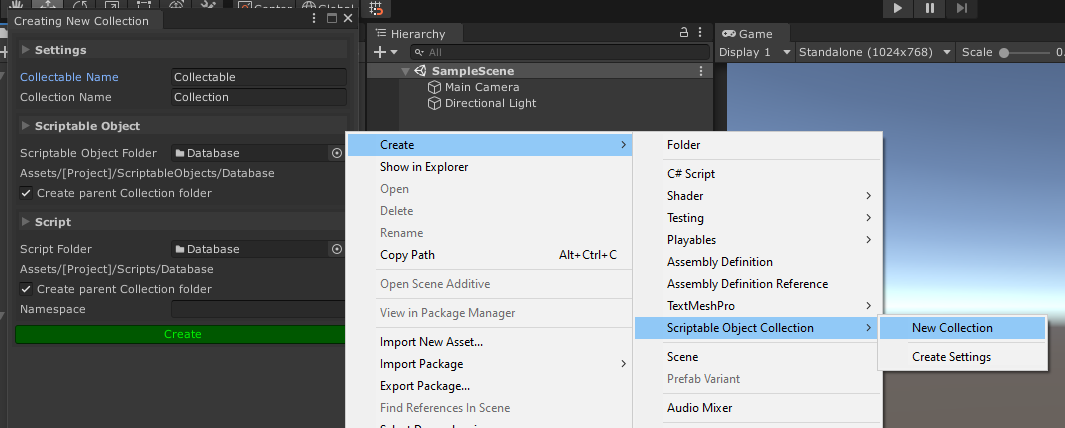
https://github.com/brunomikoski/ScriptableObjectCollection has anyone here ever tried this out?
GitHub
A library to help improve the usability of Unity3D Scriptable Objects by grouping them into a collection and providing easy access through code or user-friendly inspectors! - brunomikoski/Scriptabl...
 lean sail
sacred sinew
I have a save fuction to transfer my 'inventory' dictionary to a .txt file via t...
lean sail
sacred sinew
I have a save fuction to transfer my 'inventory' dictionary to a .txt file via t...
Just use json, stuff like Newtonsoft will do this better and already has built in functions
wheat spruce
It sounds very promising
sacred sinew
oh thanks
 cold parrot
wheat spruce
https://github.com/brunomikoski/ScriptableObjectCollection has anyone here ever ...
cold parrot
wheat spruce
https://github.com/brunomikoski/ScriptableObjectCollection has anyone here ever ...
Questionable whether that is even a good idea, architecturally. You can trivially create collections of SOs, casting them into generated code seems dangerous/undesirable. it would remove much of the abstraction/decoupling that they can actually enable.
wheat spruce
cold parrot
Questionable whether that is even a good idea, architecturally. You can triviall...
I thought that it could help me manage my games enemy collection, as those will be using SO and it seemed like it could be helpful to have them all stored in one collection
cold parrot
wheat spruce
I thought that it could help me manage my games enemy collection, as those will ...
Just make a SO that holds a list of other SOs
wheat spruce
it does seem like it is more or less just List<ScriptableObject>, but as it is giving extra functionality to a generic collection like that, why would you say its not worthwhile?
cold parrot
I’m not saying that. I’m saying it’s a misguided idea derived from object oriented thinking that solves a problem which shouldn’t exist in the first place. Usually it happens when a project has too many overly specific types of enemies instead of configurations of the same basic actor that express the type.
wheat spruce
ah, that makes sense
on the topic, can you do much more inside a ScriptableObject other than it simply storing a handful of properties?
steady bobcat
a scriptable object is a class instance so it can run code and do whatever but its always exists regardless of scenes
e.g. could be a manager with useful functions and fields that you reference in many scenes
wheat spruce
steady bobcat
e.g. could be a manager with useful functions and fields that you reference in m...
why use a scriptable object for that? I'd use a static class or a singleton for that type of thing
steady bobcat
well yea but im just telling you what ELSE is possible
may be useful to have a class instance that is created for you and always exists outside of any scenes (inc dontdestroyonload)
wheat spruce
I wonder if it could be a good way to keep persisting values. In my game, you collect coins in a level, and later when you return to a hub world, you keep those coins.
so far I store the value in a struct that gets turned into a .json
doing it in a SO could act as a nice middle man between the values in game, and the actual saving to a file
thick terrace
i think simple structs are usually better for mapping to JSON, you can do it with scriptable objects but there's a lot of drawbacks
wheat spruce
I'm still keeping the struct-json, its just that part of my project is starting to get really messy, (ie modifying/reading certain properties is more of a hassle than others)
a SO could straighten things out
heady iris
Consider a ScriptableObject that contains a struct
heady iris
steady bobcat
a scriptable object is a class instance so it can run code and do whatever but i...
Sort of. If you have no references to a ScriptableObject when you load a new scene, it gets unloaded
This can cause extremely funny problems
So you have to make sure you always hold a reference to it
heady iris
heady iris
Sort of. If you have no references to a ScriptableObject when you load a new sce...
(as with any other asset)
steady bobcat
well the managed class will still survive but i guess serialized vars that are assets may be affected
heady iris
steady bobcat
well the managed class will still survive but i guess serialized vars that are a...
i mean, if you have no references at all, it doesn't matter what happens to the managed class :p
if Scene A references an asset and Scene B doesn't, it unloads when you load Scene B, and gets reloaded when you go back to Scene A
steady bobcat
well yea if it gets gc'd im sure its fine at that point
heady iris
I figured this out while studying wtf is actually going on with modified scriptable object assets
steady bobcat
but you have informed how shittly they work
 spring totem
Hello, I am making an ai/ML car to drive around a track using a neural networks, my options are to use Unitys ML agents or use a custom C# script? Does anyone have any suggestions on which to use or any other options that might be better?

will be using reinforcement learning aswell
@heady iris thanks for the help on the winding order, i managed to fix it
heady iris
nice (:
spring totem
heady iris
nice (:
got any thoughts on the question above?
heady iris
nope, i've never done any machine learning in unity
 eager fulcrum
Hey, I'm working on monster pathfinding in my platfromer game.
https://pastebin.com/Ug8W13dy I have this code to check which nodes can be achieved by jumping (CanMakeJump)
For some reason it fails to make some jumps that passed CanMakeJump (look at the screenshot)

any ideas what I might be missing?
leaden ice
eager fulcrum
Hey, I'm working on monster pathfinding in my platfromer game.
https://pastebin....
float requiredVY = (deltaY - 0.5f * gravity * estimatedTime * estimatedTime) / estimatedTime;```
This calculation is using the formula for jump height in the real world. That works nicely in our continuous real world system.

Unity's physics engine (like most physics engines) is a discrete fixed-timestep simulation. It doesn't work precisely like the real worldso there will be some error here
eager fulcrum
leaden ice
```cs
float requiredVY = (deltaY - 0.5f * gravity * estimatedTime * estimatedTim...
thanks for pointing it out, I was searching for jump formulas and thats what I found. Didn't know there would be a big difference
leaden ice
eager fulcrum
thanks for pointing it out, I was searching for jump formulas and thats what I f...
there may also be other factors at play like - is your object's pivot in the center of the object or at the bottom of it?
and where is the target
I guess if it's the green and yellow spheres in your ss it should be ok on that front
as they are apparently the same height off the ground
but it might also not be accounting for the corner/lip of that ledge
eager fulcrum
circles are the targets, they are usually something like 50.5, 10.5
and start position is the monster.transform.position
monster has it's pivot in the center
leaden ice
eager fulcrum
circles are the targets, they are usually something like `50.5, 10.5`
and start ...
can you try putting the target on the very ledge of the cliff
i'm curious if that changes anything
because I think your analysis is not considering that the lip kind of sticks out and may block that trajectory
(in addition to the formula error)
eager fulcrum
yep, I will try that later, gotta do some IRL stuff now
I guess I can create a thread
leaden ice
good idea
eager fulcrum
Hey, I'm working on monster pathfinding
 deep stirrup
I am trying to figure out flares for SRP and stumbled upon an issue with Allow offscreen and Screen space occlusion settings do not mix well, flare just shines right through objects if it's center is even slightly offscreen. Maybe I should configure settings more specifically for this, but didn't find much about it on internet, and I just don't buy that there's actually no way to make this works, it's possible in hl2 from Source 2006 but not in unity 6 from 2025? Sorry if this is wrong channel, I just don't really know if flares built with shaders or entirely by regular code.


 sacred sinew
i have a <int, int> dictionary, can i get a key by it's position like getting a value (dictionary[1] for example)
somber nacelle
no, you cannot index a dictionary with anything but it's key. and dictionaries do not guarantee a specific order anyway so that can't work
sacred sinew
alr, thanks anyway
somber nacelle
best you could do is foreach over the dictionary, but like i said the order is not guaranteed
leaden ice
sacred sinew
i have a <int, int> dictionary, can i get a key by it's position like getting a ...
Dictionaries don't have an order, so there is no position
 swift falcon
var vel = rb.velocity.magnitude;
if (vel > velocityThreshold) { rag.TakeCollisionDamage(vel * fallDamageMultiplier * damageMultiplier); }
This seems to fail because the velocity goes below the threshold right at the collision, is there a good way to get it to check right before the collision?
Only sometimes it doesnt fail, unreliable (plus, I even lowered the threshold for this)
 somber nacelle
store the velocity each frame in Update, since Update happens after collisions are resolved you'll have the previous frame's velocity from before the collision, then use that for your check
actually it may even work if you store it in FixedUpdate since that actually happens before the internal physics update where the collision will be resolved
https://docs.unity3d.com/6000.0/Documentation/Manual/execution-order.html
swift falcon
somber nacelle
actually it may even work if you store it in FixedUpdate since that actually hap...
Yeah I did that and it works, quite a shame I gotta use any update though, I think thats gonna make the whole thing more expensive
Thanks though
somber nacelle
storing the velocity once per fixedupdate is practically free, you will very likely see no impact at all on performance for that
swift falcon
Yeah maybe im underestimating modern computers
karmic stone
this bug is so wierd, this line(white line going up) is the EXACT direction im using for up direction on rotating the collider, but it just, doesnt accept it as being the upwards direction? in code: Quaternion.LookRotation(finishedPosition - initialPosition, meshDirection) the forward direction is correct, but not the upwards direction (the cube is a quad, and switching the forwards and up directions DOES give the right rotation, but messes with the collider, might be best to do a plane rather then a quad.) I'm wanting to make the blue line use y rotation, and not affect x/z, then use the up direction to rotate to include both the top cube and bottem cube.

 full elk
I used Unity Relay for the first time and there is mismatch between the docs ):
im using the com.unity.services.multiplayer package and in their docs
(https://docs.unity.com/ugs/en-us/manual/relay/manual/relay-and-ngo)
and they say to use:
NetworkManager.Singleton.GetComponent<UnityTransport>().SetRelayServerData(new RelayServerData(joinAllocation, "dtls"));
but the constructor cannot resolve it
(if i use the old deprecated package com.unity.services.relay it works)
how do i fix this with the new one?
P.S. I tried to use the other options of the constructor but always got connection errors
 somber nacelle
Cannot resolve method:
SetRelayServerData(RelayServerData, string)
is that what you see with your own code, or with the example code? because that indicates that you are passing a RelayServerData and a string (which the example code is not doing)
also a more appropriate channel for that question would be either #archived-networking or #archived-unity-gaming-services
karmic stone
full elk
I used Unity Relay for the first time and there is mismatch between the docs ):
...
pretty sure you have a parenthesis wrong somewhere in your og code, like this code does method(new data(data, name)), and im guessing you're doing method(new data(data), name)
full elk
NetworkManager.Singleton.GetComponent<UnityTransport>().SetRelayServerData(AllocationUtils.ToRelayServerData(joinAllocation, CONNECTION_TYPE));
fixred it
full elk
somber nacelle
> Cannot resolve method:
> SetRelayServerData(RelayServerData, string)
is th...
its was my code, and i followed the example of the unity docs
somber nacelle
apparently you copied it incorrectly because you were trying to pass two parameters when you should have only been passing one
full elk
karmic stone
pretty sure you have a parenthesis wrong somewhere in your og code, like this co...
no, the docs have been outdated
look at the post i sent, the stuff said they need to update it
full elk
full elk
https://discussions.unity.com/t/how-to-use-relayserverdata/1547792/11

i copy pasted the code of the docs, i didnt change anything
somber nacelle
then the error you showed was not the original error and was likely related to some attempt you made at fixing it
full elk
somber nacelle
then the error you showed was not the original error and was likely related to s...
look at the docs..
anyway as I said i found the fix for it, so tnx anyway
somber nacelle
why did you delete your previous response just to ping me almost 20 minutes later with an argumentative response?
karmic stone
Hello, is there an easy way to set the up angle of a quad to something other then 90 degrees up from where the forward vector is? Trying to do it both with Quaternion.Lookrotation, andtransform.up = angle doesnt seem to work right.
 leaden ice
karmic stone
Hello, is there an easy way to set the up angle of a quad to something other the...
leaden ice
karmic stone
Hello, is there an easy way to set the up angle of a quad to something other the...
LookRotation lets you set the up direction as whatever you'd like
also - up will always be 90 degrees from forward, by definition
pearl bay
hi again! i tried to remove all whitespace characters using the techniques seen online. for the sake of gracefully implementations, i don't want to jump over to json in case i come back this project much later and it's just all over the place. unfortunately what i'm trying isn't working?
karmic stone
ah, then i need to just do Quaternion rotation, because trying to do it using Quaternion.look just gives me the picture
the white line is the actual direction, the green arrow is the direction it gives me
somber nacelle
Quaternion.LookRotation will always make the Z axis of the object (blue arrow) point along the desired direction
leaden ice
karmic stone
ah, then i need to just do Quaternion rotation, because trying to do it using Qu...
what are we looking at in the picture? It is not clear to us
what are you trying to do
And which white line?
karmic stone
the white line going up/down is the up angle, the one going side to side is the forward, but thats my bad about the misunderstanding
leaden ice
karmic stone
the white line going up/down is the up angle, the one going side to side is the ...
if the blue arrow is pointing along the side to side white line, and the "up" white line is NOT 90 degrees orthogonal to the horizontal one, it's not possible for the up direciton of the object to point that way
sounds like you actually want the forward direction to point down more
somber nacelle
pearl bay
hi again! i tried to remove all whitespace characters using the techniques seen ...
see #854851968446365696 for what to include when asking for help because nobody has any idea what you are referring to here
pearl bay
somber nacelle
see <#854851968446365696> for what to include when asking for help because nobod...
Sure!
karmic stone
im doing basically the cut section of a tree, and the tree is angled both side to side and up/down, so i basically need to cut the tree at every point along the z vector. ill use a Quaternion method to get the angle from the direction
pearl bay
Okay, so I'm looking to remove all of the whitespaces from a string I'm reading in C# in Unity. I'm looking for a method to remove the whitespaces since the carriage returns in the string aren't required. I'm currently trying
Regex.Replace(lineData[i], @"\s+", "");and iterating through each character. I'm wanting to find a simple solution to remove these return carriages/new lines specifically.
leaden ice
karmic stone
im doing basically the cut section of a tree, and the tree is angled both side t...
angled both side to side and up/down
It's more clear if you describe rotations as being rotations around certain axes. Up and Down and side to side aren't precise descriptions of rotations, so it's hard to reason about what you're saying here
karmic stone
i mean if you go from any side of the tree to the other side, it is a slope. with up being world up/down
pearl bay
Sorry for the lack of detail!
karmic stone
its like its rotated slightly on all axis's, but done as part of the mesh itself (all world axis's
pearl bay
pearl bay
> Okay, so I'm looking to remove all of the whitespaces from a string I'm readin...
This!

The returns in here, I want to be gone.
 summer hazel
pearl bay
> Okay, so I'm looking to remove all of the whitespaces from a string I'm readin...
summer hazel
pearl bay
> Okay, so I'm looking to remove all of the whitespaces from a string I'm readin...
probably easiest with .Split() and then recombine the resulting array using whatever method you like (StringBuilder comes to mind, but there's other methods)
summer hazel
pearl bay
How do I split by returns though? Also using Regex?
nah, you'd just use whatever character you're trying to split by, check the docs for Split
pearl bay
.Split('/r'); wouldn't suffice?
I never thought to split by that, I'm currently only splitting by comma
summer hazel
probably \n but I'm not certain, you might be able to use a UTC code or something if that doesn't work
pearl bay
Ah, I've never used UTC codes before. Is the correct way to access them also just using a backslash?
summer hazel
probably best to check around, just Google "c# return character" and you should get useful results
and sorta - I forget if Split can parse those directly, or if you have to use the UTC classes to convert them
I'd try \n first though, that's usually the easiest if you're dealing with normal endlines, but if that doesn't work you'll have to figure out what encoding and character your whitespace is using.
lean sail
\r\n, \n, or \r are the new line characters used from different systems
summer hazel
also just realized I've been saying UTC rather than UTF, whoops lmfao
steady bobcat
yea best to check for \r and \n
lean sail
pearl bay
Ah, I've never used UTC codes before. Is the correct way to access them also jus...
ive never heard of a "UTC code" before, is there something specific you're referring to
pearl bay
Uh yesss
immediately above my message 😄
i've never heard of UTC codes, so i was asking about them
lean sail
oh i replied to the wrong message
summer hazel
lean sail
ive never heard of a "UTC code" before, is there something specific you're refer...
they were referring to what I said, and I've been working with timezones too much recently so I said UTC instead of UTF lmaooo
lean sail
meant that to the other guy
steady bobcat
I thought they meant utf char codes too 😐
summer hazel
yeeee
lean sail
ive rarely used those directly but i didnt make the correlation cause i just say unicode lol
pearl bay
pearl bay
This!
Okay, so dataTrim.Trim('\r', '\n'); isn't removing my linebreak. Driving me INSANE
leaden ice
pearl bay
Okay, so `dataTrim.Trim('\r', '\n');` isn't removing my linebreak. Driving me IN...
Show the code? Are you using the return value?
pearl bay
I am!
    void ReadLevelData()
    {
        //levelContents = new string[25];
        String fileData = System.IO.File.ReadAllText(UnityEngine.Application.dataPath + "/Levels/Level_AA01.csv");
        String dataTrim = fileData.Remove(0, 10);
        dataTrim = dataTrim.Trim('\r', '\n');
        String[] lineData = dataTrim.Split(',');
        for (int i = 0; i < lineData.Length; ++i)
        {
            levelContents[i] = lineData[i];
            Debug.Log(lineData[i]);
        }
    }
it's messy but i haven't refactored yet, i'm just trying to get it working first
lean sail
did you look at the docs for trim?
https://learn.microsoft.com/en-us/dotnet/api/system.string.trim?view=net-9.0
Removes all leading and trailing occurrences of a set of characters specified in an array from the current string.
leading and trailing
leaden ice
yeah to remove them from anywhere you'd use Replace
pearl bay
pearl bay
> Okay, so I'm looking to remove all of the whitespaces from a string I'm readin...
I was using Replace originally ):
leaden ice
is this still that custom CSV implementation?
lean sail
Id also question if you really just wanna remove them, i assume you want to split lines into different elements in an array
Otherwise newlines would just be like
line1
line2
becomes "line1line2"
leaden ice
Would have saved time just using a library!
pearl bay
It is, but like I said, I want to keep it as in one place and simple as possible. I think the moment I start using JSON or libraries I run the risk of forgetting how things work eventually.
(My memory is NOT good)
leaden ice
You don't need to know how the library works
lean sail
thats honestly a silly reason
leaden ice
that's the point of the library
lean sail
you're using unity arent you?
leaden ice
pearl bay
okay i yield jeez
i just wanted to know how to remove the return character, that's all
leaden ice
This has these features you will struggle for days with achieving as well:
Compliant with RFC 4180.
Correctly parse new lines, commas, quotation marks inside cell.
Escaped double quotes.
Some encoding types. (default UTF-8)
yeah but then you will trip on some other thing next
it would just save time to use the lib
pearl bay
like i appreciate the help a lot but i just don't think that removing returns should be this difficult?
lean sail
pearl bay
i just wanted to know how to remove the return character, that's all
every beginner "just wants to know how to solve this ONE thing thats all!" you dont know how many times we've seen this sentence
wait 30 minutes until you have the next issue
pearl bay
but replace isn't working
steady bobcat
remember it returns a new string
pearl bay
lean sail
every beginner "just wants to know how to solve this ONE thing thats all!" you d...
I'm not a beginner i'm just doing like
steady bobcat
so do myStr = myStr.Replace("\n", "");
lean sail
if you're struggling with this, you are a beginner in c#
pearl bay
something i haven't done before, i don't really do much data stuff like this
pearl bay
lean sail
if you're struggling with this, you are a beginner in c#
what are you trying to prove?
i've used c# for years, but i'm a gamedev, i don't usually need to do stuff with strings, but now i want to try doing things i haven't done before
lean sail
pearl bay
what are you trying to prove?
nothing, its not an insult. if you're insulted by it then 🤷♂️ i stated a sentence that a ton of beginners state. This isnt the last issue you're gonna have in relation to making your own csv reader
it does work
https://dotnetfiddle.net/0W0AtB
pearl bay
It's just I don't really need a full csv reader, i just need to pass letters thru and then I'm done with it for good.
steady bobcat
I did my own csv parsing a bit ago and it can be easy at first but you need to handle " which will often appear to allow for , and \n in a value so it requires more effort to do correctly.
pearl bay
steady bobcat
so do ``myStr = myStr.Replace("\n", "");``
oh snap, \n worked!
this is actually exactly what i wanted it to do
thanks! 💖
lean sail
and now also consider this #archived-code-general message
steady bobcat
Next time check the function you want to use to see if it mutates or returns a new value...
pearl bay
I have been doing Debug.Log for it as I go through
lean sail
I doubt your data is gonna be in a usable format now if you're just fully replacing newlines with nothing
pearl bay
lean sail
I doubt your data is gonna be in a usable format now if you're just fully replac...
it's actually fine
i'm basically using notepad for monospace text and each character represents a tile
somber nacelle
i'd also like to point out that String.Split still has an option to trim entries and ignore empty/whitespace entries
#archived-code-general message
pearl bay
i have it formatted like this so levels can be authored easily for the puzzle grid
it's a silly implementation, but thank you for your help
somber nacelle
somber nacelle
i'd also like to point out that String.Split *still* has an option to trim entri...
and look at that, it works without extra replace calls almost as if my advice 24 hours ago should have been heeded
https://dotnetfiddle.net/Gm0qEx
pearl bay
i DID try this for the record, i just work a fulltime job and had to give up at a certain point before coming back to it - i used Replace in this circumstance. I wonder why Remove doesn't allow you to just do Remove(""); ?
Again, thank you for your help!
 whole sorrel
I have a question about the unity editor. I have this class, ElementStack, which doesn't inherit from MonoBehaviour since it's just a simple data structure with some methods to handle it properly, my question is, can I show this in the unity inspector in some way?

 karmic stone
Hello! Quaternion rotation is being so confusing to me right now. i have a quaternion with a z axis, and a y axis computed from the direction that is the z vector. if you want a rotation thats in 3 space, and you want it to rotate x/z so that the object is on the line contanining low and high point, but keeping the z forward vector (y rotation) facing the same place, how does that work, im learning what works by trial and error but i want to understand what this is.
 naive swallow
whole sorrel
I have a question about the unity editor. I have this class, ElementStack, whic...
naive swallow
whole sorrel
I have a question about the unity editor. I have this class, ElementStack, whic...
Add [System.Serializable] before the class definition
karmic stone
whole sorrel
I have a question about the unity editor. I have this class, ElementStack, whic...
Have you tried to use scriptable objects for this?
whole sorrel
naive swallow
Add `[System.Serializable]` before the class definition
I already tried this but it doesn't really work. The image you're seeing is with Serializable before the class
naive swallow
whole sorrel
I already tried this but it doesn't really work. The image you're seeing is with...
Before ElementStack?
whole sorrel
naive swallow
Before `ElementStack`?
 naive swallow
What properties does it have? Are they all serializable properties?
It's not full of, like, Dictionaries or anything is it?
whole sorrel
karmic stone
Have you tried to use scriptable objects for this?
I've thought about this a lot tbh but the thing is this is supposed to be runtime data, you can kind of consider it a fancy quiver. It doesn't have any "setting" data
naive swallow
It has at least one serializable field?
whole sorrel
Let me send a pastebin
Pastebin
Pastebin.com is the number one paste tool since 2002. Pastebin is a website where you can store text online for a set period of time.
whole sorrel
karmic stone
Have you tried to use scriptable objects for this?
I could do that, but since there will likely be one for each entity in the game, I would be full of scriptable object instances without a real use
karmic stone
whole sorrel
I've thought about this a lot tbh but the thing is this is supposed to be runtim...
ah, runtime data, i use a set of json parsers for this purpose if you need to change it at runtime
naive swallow
whole sorrel
https://pastebin.com/h7pehhV3
Ah, yeah, those won't show up in the inspector. To serialize an auto-property, you need to add the SerializeField tag to the underlying anonymous filed. Use [field:SerializeField] instead
whole sorrel
naive swallow
Ah, yeah, those won't show up in the inspector. To serialize an auto-property, y...
where exactly?
naive swallow
whole sorrel
where exactly?
For the two properties in ElementStack. If it has a {get; set;} it needs the field: prefix in order to show up in the inspector
whole sorrel
oh these are called auto-properties?
naive swallow
Yep. Properties have a get and set
and if you don't actually implement them yourself, they're auto-properties
and have a hidden backing field. The field: prefix tells the compiler that whatever comes after it should apply to that hidden field, rather than the property itself.
So, [field: SerializeField] is saying "Apply the [SerializeField] attribute to the hidden backing field of this auto-property"
whole sorrel
I see thanks
now the MaxStackSize is working, but the queue still doesn't show up
 naive swallow
Yeah, I don't think Queues have an editor in the inspector.
night harness
Maybe serialize a list that you use to initialise the stack?
whole sorrel
Mhhh I think I can mirror it in an array, the issue though is that I cannot set elements this way
TBF I just need it for debugging purposes
If I need a data structure that allows me to pop the first element and push in the last element and shift the elements each time the first element gets popped I can only use a queue, right?
I would have to write custom methods to do that with a Collection.Generics.List, right?
karmic stone
you could do a circular array implementation?
lean sail
whole sorrel
TBF I just need it for debugging purposes
if its purely for debugging, you could just copy the data to a list
lean sail
whole sorrel
If I need a data structure that allows me to pop the first element and push in t...
queues are first in first out, which is what you describe
whole sorrel
lean sail
if its purely for debugging, you could just copy the data to a list
It is for debugging, but I would also like to be able to set items in the queue, for debugging from the inspector
Which is what I'm using now...
whole sorrel
karmic stone
you could do a circular array implementation?
I'm worried it would add too much code overhead
 fading cove
Hello!
I have a question
I want a character to be playing many "Action" animations
If I have many AnimationClips, would it be better to use Animator or hard code it? For example, using Animator would be tedious because we need to set all of the parameters. But for hard code, I'm not sure how to make it work. The problem is, I can't override it
I would need to do this
 whole sorrel
But I could possibly use extension methods that shifts everything left and returns the first element idk
fading cove
and call it in code: animator.Play("HandGunIDyingback");
I'm not sure this is the best approach, let me know if you have different idea on implementing it!
karmic stone
thats the beauty of the animator! you can set up some floats, bools, triggers to trigger transitions between animations
lean sail
whole sorrel
It is for debugging, but I would also like to be able to set items in the queue...
hmm there might be a way through an editor script to expose the internal array but honestly id just use my own list rather than using a queue then.
karmic stone
and you have to add transitions between states.
fading cove
karmic stone
thats the beauty of the animator! you can set up some floats, bools, triggers to...
Yeah, I know, but it would be tedious to have many states
It would be better to just reference it in Inspector and call it
fading cove
fading cove
It would be better to just reference it in Inspector and call it
But the problem it, I can't override it
karmic stone
you want to play animations, without the animator. why?
fading cove
karmic stone
you want to play animations, without the animator. why?
Because I got like 20 of them
It's better to use Dictionary/Map
And call them in code
karmic stone
theres almost no reason to not use the animator for playing animations, you can just pass like your movespeed and direction for playing different animations based on movespeed / direction
 sleek umbra
Easy save 3, is anyone using?
naive swallow
fading cove
Because I got like 20 of them
That's a point in favor of the animator by the way
The more animations you have, the more you need to be using the Animator
fading cove
naive swallow
The more animations you have, the more you _need_ to be using the Animator
But you need to set many Trigger, no?
Like: SetTriggerShoot, SetTriggerSurhender, SetTriggerParry, etc, etc.
20 of them
karmic stone
you can do animation events, you can set up auto state transitions based on if the animation finishes, was canceled, or whether the animation did something while playing
and many other ways to do animations.
naive swallow
fading cove
But you need to set many Trigger, no?
Or play the state by name
Or use a numeric parameter mapped to an enum
Or just move your animation changing logic into the animator
whole sorrel
lean sail
hmm there might be a way through an editor script to expose the internal array b...
Haven't tried this yet but I wrote this Extension Method that should work:
    /// <summary>
    /// Removes the first element from the list and returns it. Derived from a queue data structure.
    /// </summary>
    /// <returns>Returns the first element from the list</returns>
    /// <exception cref="System.InvalidOperationException">Thrown when the list is empty.</exception>
    public static T Pop<T>(this List<T> list)
    {
        if (list.Count == 0)
        {
            throw new System.InvalidOperationException("Cannot pop from an empty list.");
        }

        T firstElement = list[0];
        list.RemoveAt(0); // Remove first element
        return firstElement; // Return the removed element
    }
And it now shows
 night harness
Might be nice to wrap that function with a tryget function too
steady bobcat
works for editor but dont go removing the first element in a list a lot at runtime 🙏
somber nacelle
what, you don't like O(n) stacks queues? lol
night harness
steady bobcat
works for editor but dont go removing the first element in a list a lot at runti...
Is that a notable problem in any list or does it scale with size?
steady bobcat
night harness
Is that a notable problem in any list or does it scale with size?
yes it is. when you remove elements from a list, all elements after it will be relocated. Thats why its better to use a Queue
somber nacelle
night harness
Is that a notable problem in any list or does it scale with size?
each element of the list after the index being removed will have to shift its index down one. so removing the first element of the list will make everything else in the list shift down one. the bigger the list, the slower that will be
steady bobcat
im usually pretty lax about edit mode stuff if its not being executed a lot but at runtime we should care more so our game does not run like poo poo
fading cove
naive swallow
Or play the state by name
I think I got it, thx
fading cove
fading cove
I would just settle with this method
whole sorrel
I gotta ask: does using auto-properties rather than manually creating getting and setters add a performance overhead?
somber nacelle
no, there is 0 performance difference. auto properties just have the compiler create the backing field instead of you explicitly creating the backing field
somber nacelle
whole sorrel
I gotta ask: does using auto-properties rather than manually creating getting an...
you can also see here that they compile to basically the same thing, the only difference is that the compiler has added the backing field (and some relevant attributes for it)
https://sharplab.io/#v2:CYLg1APgAgTAjAWAFBQMwAJboMLoN7LpHoAOATgJYBuAhgC4Cm6FAdnegPoAeA3IcWmZt0ADXzoA5g3YBeAHyde6AM7T08xevS0ANgFcGPdAF9+RQa3YBNcVLpHV9k8mNA==
whole sorrel
    public StackItem DequeueAt(int index)
    {

        StackItem swapBuffer;
        if (index >= CurrentElementStack.Count)
            throw new System.IndexOutOfRangeException();

        StackItem[] stackArray = CurrentElementStack.ToArray();
        swapBuffer = stackArray[index];
        stackArray[index] = stackArray[0];
        CurrentElementStack = new Queue<StackItem>(stackArray);
        return CurrentElementStack.Dequeue();
    }
How performance intensive is this? Would it be better to clear the queue and re-enque all items rather than replacing the queue?
leaden ice
whole sorrel
```c#
public StackItem DequeueAt(int index)
{
StackItem swapBuf...
Would it be better to clear the queue and re-enque all items rather than replacing the queue?
Yes, most likely. Assuming you do this many times.
CurrentElementStack.ToArray();
This is also inefficient
as that allocates a brand new array as well
whole sorrel
The thing is I need to be able to dequeue items both at the origins and at the middle
leaden ice
If you need this ability to remove things from the middle of the queue, it might be easier to just use a list
whole sorrel
leaden ice
If you need this ability to remove things from the middle of the queue, it might...
But then I have to shift the following items
leaden ice
yes but you're already doing an O(n) operation here when you dequeue
two of them in fact
whole sorrel
damn I guess I will profile and see what looks heavier from there
Both don't seem very good options tbh
whole sorrel
leaden ice
this is going to cause GC
this was my fear
whole sorrel
At most eight items
whole sorrel
I'm still unsure but it's going to be averagely four to five items
leaden ice
what you have here is going to be much slower than simply using a list and RemoveAt. I encorage you to profile it though
 wanton parrot
im trying to implement jumping into a 2d game and it works if i only do it standing still. However, once i try strafing or moving left or right when i jump it bugs out. Is there a solution for this?
leaden ice
wanton parrot
im trying to implement jumping into a 2d game and it works if i only do it stand...
Not without seeing your code
wanton parrot
got it let me copy and paste
leaden ice
an explanation of what "it bugs out" means would be helpful too
wanton parrot
private void Update() {
        if (!isMoving) {
            input.x = Input.GetAxisRaw("Horizontal");
            input.y = 0; // Remove vertical input

            if (input != Vector2.zero) {
                animator.SetFloat("MoveX", input.x);

                var targetPos = transform.position;
                targetPos.x += input.x;

                if(isWalkable(targetPos))
                    StartCoroutine(Move(targetPos));
            }
        }

        animator.SetBool("isMoving", isMoving);

        if(Input.GetKeyDown(KeyCode.Z)) {
            interact();
        }

        if (isGrounded && Input.GetKeyDown(KeyCode.Space)) {
            Jump();
        }
    }

IEnumerator Move(Vector3 targetPos) {
        isMoving = true;
        while ((targetPos - transform.position).sqrMagnitude > Mathf.Epsilon) {
            transform.position = Vector3.MoveTowards(transform.position, targetPos, moveSpeed * Time.deltaTime);
            yield return null;
        }
        transform.position = targetPos;
        isMoving = false;
    }

void Jump() {
        rb.AddForce(Vector2.up * jumpForce, ForceMode2D.Impulse);
        isGrounded = false;
    }
you're trying to mix up two different forms of movement here
You've presumably got a Rigidbody, but then you're moving your object directly via its Transform.
You can't mix and match like that
If you want to use a Rigidbody, you need to fully use it for all your movement
Moving a Rigidbody directly via its Transform is going to cause issues, as you are seeing.
wanton parrot
yeah my player was glitching out like crazy
leaden ice
you're fighting against the physics engine
wanton parrot
so if i change my movement to a rigidbody, i wouldnt have to edit the jump function anymore?
leaden ice
IDK what you mean by "I wouldn't have to edit the jump function anymore"
Are you asking "is my jump funciton ok as-is"?
wanton parrot
i mean it works as it is. its just when i move left and right in the air, my character experiences an earthquake
yeah
leaden ice
The answer is, yes it's ok if you wish to use Rigidbody for your cahracter movement
wanton parrot
is their a better method? im trying to learn unity as i go
leaden ice
A better method than what for what
Is there a better method than Rigidbody motion you mean?
wanton parrot
leaden ice
Is there a better method than Rigidbody motion you mean?
yes. i want a better way to move my characters
leaden ice
That depends entirely on your game and how you want your movement to work.
There isn';t really a "good" or "bad" way to move things without the context of your goals and requirements for your specific game
wanton parrot
hmm do you think you could list out the basics so i could do some research on it?
leaden ice
Not really, again it depends on what you're trying to achieve
wanton parrot
aw i dunno what i want to achieve or what its called. im just trying to make a simple 2d indie game
thanks for the help tho
leaden ice
wanton parrot
aw i dunno what i want to achieve or what its called. im just trying to make a s...
What I mean is, you need to explain how you want your movement to work
Like, if you asked me "what's the best car", there's no way to answer that question without explaining what you want to do with the car. Are you going offroading? Are you driving around town? Are you entering a drag race?
in this case I'm asking something like - what kind of game are you making and how do you want the character movement to work and to feel
wanton parrot
ohhh i see. the character i want is just a person that moves on the xy coordinate system.
leaden ice
Is it pokemon where you walk around on a grid?
wanton parrot
i think a picture would help
leaden ice
Is it a platformer?
leaden ice
wanton parrot
ohhh i see. the character i want is just a person that moves on the xy coordinat...
why is there jumping then?
 wanton parrot
yes it is a platformer
leaden ice
Ok then why do you have that weird horizontal movement code?
That looks like code for walking around in fixed increments on a grid or something
wanton parrot
chatgpt lol
wanton parrot
i originally used a rigidbody but it was way to chunky
leaden ice
ChatGPT is just going to lead you astray
naive swallow
wanton parrot
chatgpt lol
Congratulations one more for the file of "Absolute fucking bullshit generated by the spam machine"
Alongside Color.distance and that gorilla with nine fingers
leaden ice
wdym by "chunky"
wanton parrot
i dunno if it the code or my computer, but when i tried moving it, it was hella framy
like 10 frames a second
wanton parrot
once i used the code given by chat, it was way smoother. thats why i thought that the movement was the right way
wanton parrot
okay thanks. ill use interpolation from now on.
naive swallow
 errant flame
does anyone know how to change prime tween end target after creating a tween ?
cold parrot
whats a prime tween end target?
errant flame
prime tween is a lib like a DOTween
cold parrot
you typically cant change a tweens parameters after construction
that would kinda defeat the point of the abstraction
but you probably can inject a value getter
(you can in dotween)
errant flame
in dotween u can change easly yeah its expose end value :/
i need to add something for this i guess xd
errant flame
i created so many points depending on prime 😄 in earlier i thoght it would better for performance etc. but now i changed my mind 😄
 rose eagle
Hi folks, I’m prototyping a strategy/tactics game where you play cards, that then play units on a grid-based board, and each have unique ‘ranges’ to their attacks. Unlike chess it’s not a ‘move and take piece’ scenario but instead attacking stationary; with the ranges applying damage to any enemies in range.
I’ve looked at a few videos and resources for grid-based gameplay such as Tarodev’s, but in my head it seems quite daunting to translate these ranges to the grid and give choices based on rotation as seen in the example image.
Does anybody have a good starting point to get the ball rolling on this one? I can find out how to script each individual units with these types of stats but it’s a matter of having the right architecture to make it not so hacky. Appreciate any guidance :]
 whole sorrel
This is probably a very easy question but it's late and I'm tired (I should go to sleep):
switch (inputVector)
{
    // In order up, left, down, right
    case Vector2 v when v == new Vector2(0.00f, 1.00f):
        _attackModule.SetSelectedElement(ElementType.Air);
        break;
    case Vector2 v when v == new Vector2(-1.00f, 0.00f):
        _attackModule.SetSelectedElement(ElementType.Water);
        break;
    case Vector2 v when v == new Vector2(0.00f, -1.00f):
        _attackModule.SetSelectedElement(ElementType.Earth);
        break;
    case Vector2 v when v == new Vector2(1.00f, 0.00f):
        _attackModule.SetSelectedElement(ElementType.Fire);
        break;
}
I know the input vector only has these four states, is there a way to avoid allocating these four vectors each time to check what the input is?
leaden ice
whole sorrel
This is probably a very easy question but it's late and I'm tired (I should go t...
well for one you're not really allocating anything here
for two you can reuse Vector2.right etc
but these are structs, they get stack allocated
whole sorrel
Isn't new Vector2 allocating?
leaden ice
only on the stack
night harness
rose eagle
Hi folks, I’m prototyping a strategy/tactics game where you play cards, that the...
In theory your grid would be in some sort of multi dimensional array (if this is 2d then a 2d array) with your unit knowing it's index in this array. From there you can create a function that can convert a position, direction and given distance to a list of tiles.
eg. (very heavy pseudoCode)
enum Direction {Forward, Backward, Left, Right}
Tile tiles[,]
List<Tile> GetTiles(index startingPosition, Direction direction, int range)
    List<Tile> returnList;
    for (i range)
        if (Forward)
            returnList.Add(tiles[startingPosition.x,startingPosition.y + i])
        else if (Backward)
            returnList.Add(tiles[startingPosition.x,startingPosition.y - i])
you could define the range as a list or array of Vector2Int which would be considered as local to the source object.
so that range pictured there would be [(0, 1), (0, 2)]
you could then write a small routine that would let you swizzle it so it could be rotated arbitrarily as well
e.g.:
turning backwards (aka "down") would be negating all the x and y values.
turning right would be swapping all the x and y values
turning left would be both swapping and negating
rose eagle
This makes a lot of sense and is pretty much exactly what I’m looking for!! And then I presume that if a unit were to ‘attack’, I could run a for loop detecting enemies with the same array values.
leaden ice
yep you just loop over the coordinates in the attack area you ended up with, add them to the attacker's position, and check each of those grid spaces for things to hit
night harness
Your Tile class could/should have a reference to whatever is on it that you can access
leaden ice
the board data (what's on each space) could be stored in either a Dictionary<Vector2Int, Unit>, or a Unit[, ] (two dimensional array)
night harness
leaden ice
the board data (what's on each space) could be stored in either a Dictionary<Vec...
Would it not be generally preferable to have a Tile[,] that holds the reference to the Unit instead? since that builds up a dats sytem that could allow for more mechanic info later down the line
leaden ice
I think it depends
that will take up more memory, at least initially
but if you do need data about the empty tiles, you might need something like that
it still also might make sense to keep the tile data and the "who is standing here" data separate
night harness
In the context of a board game esque prototype performance surely won't be anywhere close to a tangible problem. Curious on your thoughts on why you might wanna keep that separate though (not replying to correct you or anything just curious on your take)
leaden ice
Hoenstly was just keeping it as simple as possible for the example
it might make sense for serialization purposes though for example
Since the tiles might be part of your game asssets, you wouldn't serialize them when saving the game, but you would want to serialize just the "where are units standing" data
it really depends
rose eagle
For the record I’m not going toooo crazy (though a tactics card game feels insane enough to me). It’s for a project for a decent deadline, so I’m just looking to get the concept down without hacking through it (hence why I wanted to make sure I was doing this cleanly, which arrays help with tons.) Both approaches make sense in my head and I do appreciate the shove in the right direction :]
swift falcon
do we have a thread for web3?
 ocean hollow
swift falcon
do we have a thread for web3?
ocean hollow
swift falcon
do we have a thread for web3?
#🌐┃web ?
 sick hawk
i hope not
swift falcon
sick hawk
i hope not
why not?
night harness
swift falcon
why not?
a large portion of game developers are not fans of the blockchain & crypto trend, to put it lightly
swift falcon
i see, thanks
 slender bear
TBH I thought it was dead already
naive swallow
slender bear
TBH I thought it was dead already
It is, but, as these things often go, someone's still holding the bag
 kind willow
speaking of unity localization, I figured if I just change language it won't change existing text which was made using localizedstrings as I naively expected to
I also figured that if I subscribe to StringChanged event I can use it to modify such texts via code
not handy if I need to change alot of text having alot of such strings in one go
if I just subscribe to all string changes that would execute too many times
so is there an event executing at the end of locale changing?
I can subscribe to
or there is something smarter
 obsidian hemlock
yo is anyone able to lend a hand with some bullshit rq?
kind willow
to just put is simlper I need to change thing like string "time is 99" to "tiden er 99"
what is the least hacky approach to that
obsidian hemlock
obsidian hemlock
yo is anyone able to lend a hand with some bullshit rq?
ive got an issue rn where my shadergraph has bool keywords added, but for some reason i cannot add valid keywords to any material using the shader
when i click this plus, it just adds invalid keywords instead
 kind willow
so is there an event executing at the end of locale changing?
kind willow
kind willow
so is there an event executing at the end of locale changing?
LocalizationSettings.SelectedLocaleChanged seems like what I wanted
obsidian hemlock
obsidian hemlock
when i click this plus, it just adds invalid keywords instead
fixed it nvm ignore me
 shadow wagon
Vector3 directionToWaypoint = (target - body.transform.position).normalized;
float angleToWaypoint = Vector3.SignedAngle(body.transform.forward, directionToWaypoint, Vector3.up);
float currentTurn = Mathf.Clamp(angleToWaypoint / 45f, -1f, 1f);```I've got this code that finds a turn value that is used to steer my enemies so they will face the players position, i want to be able to control the direction they approach from (right now they basically move in a direct path), so that way i can make some enemies always attack from the front, others to the side fossil goblet
https://www.youtube.com/watch?v=3avaX00MhYc
I've followed this tutorial, I'm confused why my bones circle colliders 2d are rolling on contact with ground, and not maintaining the shapes form

Unity 2D soft body tutorial using rigged sprites, rigidbodies and spring joints. Here I demonstrate how you can create a 2d soft body shapes and use it for your awesome projects. Can be used for Jelly simulation, car tyres, liuid blobs, goo you name it!
Download project: https://drive.google.com/file/d/1RbXJUETBJGwlLFV9Rmnz2AiXLKl7wrgp/view?us...
fossil goblet
figured it ok dw boys
 hardy pasture
My test runner doesn't show any tests
I have the package installed, I opened TestRunner and pressed to create an assembly folder in the Assets folder
Then I pressed on "Create the new Test Script in the Active Path" inside the Tests folder
It created this class:
using System.Collections;
using NUnit.Framework;
using UnityEngine;
using UnityEngine.TestTools;

public class PointToLocalSpaceTest
{
    // A Test behaves as an ordinary method
    [Test]
    public void PointToLocalSpaceTestSimplePasses()
    {
        // Use the Assert class to test conditions
    }

    // A UnityTest behaves like a coroutine in Play Mode. In Edit Mode you can use
    // `yield return null;` to skip a frame.
    [UnityTest]
    public IEnumerator PointToLocalSpaceTestWithEnumeratorPasses()
    {
        // Use the Assert class to test conditions.
        // Use yield to skip a frame.
        yield return null;
    }
}
But it doesn't show the test in the test runner: no tests run
 leaden ice
hardy pasture
leaden ice
hardy pasture
Did you try looking under the other tabs? (Play mode eg)
hardy pasture
I restarded the editor and they showed up
 sudden ruin
guys i have like a dozen different projectiles for some weapons, whats the approach to object pooling these
steady bobcat
sudden ruin
guys i have like a dozen different projectiles for some weapons, whats the appro...
ObjectPool is a type provided already by unity that you can use: https://docs.unity3d.com/6000.0/Documentation/ScriptReference/Pool.ObjectPool_1.html
it will manage creating new objects and running code when you get/release an object too
swift falcon
And official pool solution, never thought I’d live to see that
sudden ruin
never knew unity has this, thought it had to be manually coded in
cold parrot
swift falcon
And official pool solution, never thought I’d live to see that
been there as part of the render-pipelines.core package since at least 2019
 quartz pewter
Hi ! I'm having some issues with the character movements.
I'm trying to make him protected from falls, so I created an "edge checker". This edge checker checks if it have to protect the player from a possible cliff.
The problem with this is that, at the beginning of a slope, they won't activate since the height isnt enough to be qualified as a "cliff", but when it's high enough and the player is on an edge, it will push it immediately. I was thinking about doing a kind of lerp, like, if it's 50% of a cliff, protect 50% or smth, but I don't think it's the right/best way.
Also, I need to add a physic material to make my character able to fall down walls (else it's stuck in it), but then it makes him slide on slopes...
Here's a video
leaden ice
damn you removed the music
quartz pewter
yeah xdd
leaden ice
one approach that would be simpler from a code perspective but more complex from a level design perspective would be to add invisible walls (colliders) instead
to be honest though - I'm not seeing what's problematic here in the video
is it not ok for the player to be able to step over the slight lip?
quartz pewter
Isnt it bothering if I'd like my character to be able to dash or physic events ? Because then i'll have to disable every collider instead of just the 8
quartz pewter
leaden ice
is it not ok for the player to be able to step over the slight lip?
oh, it is, but it just feels weird that the player is pushed that way
leaden ice
oh - that part
quartz pewter
I mean, I'd rather force the player to have a collider at the start than push him like that
yeah
leaden ice
Just interpolate it or something yeah
quartz pewter
I've tried a lerp but it was kinda weird, it was like if the wall tried to make the player bounce x)
 steep herald
I would too decouple the rendering from the physic and always interpolate the rendering towards the physic, so these artifacts are attenuated. Maybe make the interpolation a function of the velocity so it's not noticeable when higher speeds are reached
quartz pewter
kk, I'll try that, thanks !
steep herald
Just to be clear, I mean the physically simulated object and the renderer are 2 distinct objects. Init renderer at physically simulated object's position, and then just constantly move towards it at a rate that's a function of the physically simulated object's velocity and then some constant. This way instantaneous shifts like these just basically vanish and you don't have to sacrifice your physics logic since I think you want this to be as robust as possible
 midnight sun
Can somebody explain why I cannot make a Vector3 property drawer? It works with GameObject but not the struct!
leaden ice
midnight sun
Can somebody explain why I cannot make a Vector3 property drawer? It works with ...
there's already a Vector3 property drawer
midnight sun
leaden ice
there's already a Vector3 property drawer
I need to override it then so I can add unit conversion. I hate meters default
leaden ice
midnight sun
I need to override it then so I can add unit conversion. I hate meters default
But all the code will deal in meters 😵💫
If I were you I would create my own type and make an implicit conversion operator. Then in the specific cases you need, you can use that:
public struct Vector3Feet {
  const float MetersToFeet = 3.281f;
  const float FeetToMeters = 1f / FeetToMeters;
  private Vector3 data;

  public Vector3Feet(float x, float y, float z) {
    data = new(x, y, z) * FeetToMeters;
  }

  public float x {
    get => data * MetersToFeet;
    set {
       data = value * FeetToMeters;
    }
  }

  // likewise for y and z
}```I have a toggle button next to it
The reason is for the transform component and etc
I hate using meters
Display as inches serialize as meters
leaden ice
I don't think it's possible for built in types that already have property drawers
 eager tundra
what is the issue with meters though? is it the base 12/10 difference?
leaden ice
midnight sun
It's incredibly difficult for me with meters
you could make a custom editor for Transform instead
lean sail
midnight sun
It's incredibly difficult for me with meters
is there a particular thing you're using that actually relies on the unit type? i dont really see where this would ever be an issue
you could just treat it as feet or inches if you want
midnight sun
Screw it I'm making an overlay lmao
steady bobcat
Its metres because its uniform and easy to understand
Im british so I understand the fuckery of using many different methods for speed and distance 😐
trying to impose this and having conversions everywhere is probably a bad idea
midnight sun
steady bobcat
trying to impose this and having conversions everywhere is probably a bad idea
I just wanted the position value in the inspector to appear like inches but actually serialize as meters. This is a decent compromise but is a massive pain in my ass just to override the Vector fields with a toggle to do this.
steady bobcat
I presume you can do a custom inspector for transform/vector3 and you can just draw the default and have a HelpBox with the inches info
swift falcon
cold parrot
been there as part of the render-pipelines.core package since at least 2019
Damn I never knew that, I always just did my own pooling
somber nacelle
was also introduced into the "core" engine in the 2021 version
 hybrid gazelle
Hi! can anyone help with unity AR?
I am spawning a prefab on detection of a ref image and the moment it spawn I want to attach the joystick prefab in canvas to it. I'm having a bit difficulty with that.
I am able to successfully spawn the model but no luck with attaching the controller
karmic stone
Hello, is there an easy way to get the way a mesh is facing from a point thats on one of the faces of the mesh? (assuming all vertexs face the same direction on each edge facing world up/down) i could get a face normal by searching the entire vertex array, and taking the cross product of the closest face's edges, but is there any more optimised solution that doesnt involve having a concave collider?
cold parrot
karmic stone
Hello, is there an easy way to get the way a mesh is facing from a point thats o...
what do you actually want to achieve in gameplay terms?
karmic stone
Still on the cutting log problem from 5 days ago, i searched up how to use sdfs in unity but there wasnt really any information on how to use them to create static areas. so i decided to continue to try to use the mesh deformations. i need to rotate the log cutting quad to be in the same direction as the cut mesh is leaning. (tried so many ways but then realised the problem was that i was trying to use my initial hit points as inputs to the many different thing i was trying, which would never give me the results i was trying for
 cold parrot
karmic stone
Still on the cutting log problem from 5 days ago, i searched up how to use sdfs ...
cold parrot
karmic stone
Still on the cutting log problem from 5 days ago, i searched up how to use sdfs ...
analysing the vertex normals is probably your best option
karmic stone
thank you anikki for the info. i really like mesh deformations for its variability, but it seems to come with such a useless performance overhead to do many things with it.
leaden ice
karmic stone
Hello, is there an easy way to get the way a mesh is facing from a point thats o...
If there's a mesh collider you could do a Raycast
Otherwise you'd have to search the mesh for the triangle.
If this is something you'd do a lot you could build up some kind of spatial acceleration structure beforehand to make that fast
karmic stone
leaden ice
If there's a mesh collider you could do a Raycast
raycast never has returned triangle index, because the indexes dont correlate to the mesh it was built from? iirc, because when i try to raycast, it gives me -1, even when it hits the mesh collider
never heard of spatial acceleration structure before, but will look into it
leaden ice
karmic stone
raycast never has returned triangle index, because the indexes dont correlate to...
As long as you haven't marked the collider as convex, triangleIndex will give you the actual triangle index
karmic stone
leaden ice
As long as you haven't marked the collider as convex, triangleIndex will give yo...
ah, yeah convex is needed for it to be able to be hit by the player, so i have it convex. a bit annoying that the two uses for mesh colliders cant workwith the same meshcollider, but ill deal with it. (the collider is DEFO convex, but convex gets rid of indexes for not a good reason.
rose eagle
Hi! I'm working on a strategy game prototype and am currently coding the basics of my Units. When selected, I want a menu to pop up above their heads with actions as seen in this mockup.
Would it be better to put this in a Canvas or just use a series of SpriteRenderers?

(Also if this is the wrong channel redirect me 🫣. Not sure what best practice would be here)
night harness
I'd recommend a canvas in the context of a prototype. You'll run into less resistance and more support online if you run into any trouble
def worth asking stuff like this to know but just remember to avoid overcomplicating a prototype. In theory all of this should be bare-bones enough to swap out in the future. especially in this case because regardless of your choice your gonna be dealing with some system that's hiding and showing objects, changing their sprites and moving in the context of the selected unit. that stuff isn't going to change in concept so however you implement it will be pretty easy to move over if you ever want to
leaden ice
rose eagle
Hi! I'm working on a strategy game prototype and am currently coding the basics ...
UI should generally use UI elements.
this isn't really a code question though
rose eagle
night harness
def worth asking stuff like this to know but just remember to avoid overcomplica...
that's fair, i'll keep it in mind. im definitely aware most of this won't stick but i just want it to be clean enough to reduce the amount of troubleshooting on the more complicated stuff down the line
rose eagle
leaden ice
this isn't really a code question though
i only now realised the ui channel was at the bottom of the artist category, on me 😅
 loud meadow
can i stick my editor log in this channel? im having issues with building and now i have a persistent error in the console

 rigid island
loud meadow
can i stick my editor log in this channel? im having issues with building and no...
rigid island
loud meadow
can i stick my editor log in this channel? im having issues with building and no...
restart unity
loud meadow
rigid island
restart unity
i have multiple times
fuckfuckfuckfuckf
i may have just lost everything
10 days of progress gone
rigid island
loud meadow
i may have just lost everything
10 dayys? you haven't saved in 10 days?
loud meadow
rigid island
10 dayys? you haven't saved in 10 days?
i saved in 10 days i didnt backup in 10 days
im cooked
rigid island
You don't use version control?
loud meadow
rigid island
You don't use version control?
so im just fucked?
rigid island
loud meadow
so im just fucked?
well the files are just there
maybe you can try delete library folder and rebuild
karmic stone
yeah, most of your stuff is stored in assets
 arctic rune
hey so hopefully this is a simple thing to solve but I am currently trying to figure out how to move the weapons in the fps microgame from looking like it is held in the right hand to the left. I have scoured through the code and all I have found are objects in the code and not the code that sets the actual position. Also, are the weapons actually in the hierarchy because I cannot seem to find them.
rigid island
 lyric veldt
how the diddy do i rotate wheel collider
lyric veldt
how the diddy do i rotate wheel collider
 soft shard
arctic rune
hey so hopefully this is a simple thing to solve but I am currently trying to fi...
soft shard
arctic rune
hey so hopefully this is a simple thing to solve but I am currently trying to fi...
If they are visible to the camera/game window they absolutely have to exist in the hierarchy, I have not used the micro games so I may not be able to help with specifics, though you can pause the game and use the scene window to select the weapon, which should highlight it in the hierarchy, you can also try searching the hierarchy for most-likely keywords like "weapon" or "gun" or something along those lines, or maybe "player" or "hand" and find it through a parent-child search, its possible they are set to a empty transform that is referenced in some script rather than setting a specific position, but if thats not the case, you could also look in the code for anything that might call Instantiate or .position = or .localPosition =
arctic rune
soft shard
If they are visible to the camera/game window they absolutely have to exist in t...
You would think that, however the weapons don't exist in the hierarchy. I figured out it is because a clone of the game object is created when the weapon is picked up. However I was able to track down the code but I can't make any sense of it, specifically on how I can modify it.
m_WeaponMainLocalPosition = Vector3.Lerp(m_WeaponMainLocalPosition, DefaultWeaponPosition.localPosition, AimingAnimationSpeed * Time.deltaTime); SetFov(Mathf.Lerp(m_PlayerCharacterController.PlayerCamera.fieldOfView, DefaultFov, AimingAnimationSpeed * Time.deltaTime));
this is the script that sets the m_WeaponMainLocalPosition that I assume sets its normal position.
soft shard
arctic rune
You would think that, however the weapons don't exist in the hierarchy. I figure...
AFAIK, cameras can only render whats in a scene, so if they do not exist in the hierarchy, that means they also do not exist in the scene, and the camera would have no way of rendering it, if a clone of the object is created, that clone is going to have to exist in a scene - you can test that theory by selecting everything in the hierarchy (except the camera) and disabling it, if the weapon goes away, it is most certainly somewhere in the scene (though possibly poorly named)
soft shard
arctic rune
this is the script that sets the m_WeaponMainLocalPosition that I assume sets it...
You could try adding some Debug.Log statements to figure out the values of the lerp, my guess would be that DefaultWeaponPosition.localPosition actually determine where the weapon gets positioned, but that assumes AimingAnimationSpeed is a value of 1, since Vector3.Lerp is a percentage between "a" and "b" (first 2 params), so maybe you would need to find out how DefaultWeaponPosition sets localPosition, though this is entirely just a guess based on how I understand Lerp to work, and the context it looks like that code is using it in
 unkempt meadow
What should I do if I want a character controller-like controller but with a different collider shape? I don't want to be pushed around with forces. Do I just do raycasts and translate position or what?
rigid island
unkempt meadow
What should I do if I want a character controller-like controller but with a dif...
use kinematic rb + movepos
cant be pushed around but can push, use sweep to detect walls
 modest nova
guys I am trying to make a slider but I dont want the size of the slider to change even if the content increases. The sensitivity can increase but not the size. Any solutions?
unkempt meadow
rigid island
use kinematic rb + [movepos](https://docs.unity3d.com/6000.0/Documentation/Scrip...
I did that but my issue is that the collider is elongated in the z axis and want to achieve not being able to rotate in a tight tunnel
If I end up needing to do that with code, might as well keep using the char controller
unkempt meadow
rigid island
use kinematic rb + [movepos](https://docs.unity3d.com/6000.0/Documentation/Scrip...
I tried rb before but I can't remember what I did exactly. Would moverotation solve the issue if rb is kinematic?
 worldly stirrup
        Vector2 checkPos = (Vector3)rb.position - transform.rotation*(Vector3)new Vector2(0.0f, cc.radius);


RaycastHit2D hit = Physics2D.Raycast(checkPos, -transform.up, slopeCheckDistance, whatIsGround);
        Debug.DrawRay(checkPos,-transform.up*slopeCheckDistance,Color.red);
        if (hit)
        {
            slopeNormalPerp = Vector2.Perpendicular(hit.normal).normalized;
            slopeDownAngle = Vector2.SignedAngle(hit.normal, Vector2.up);
            transform.rotation=Quaternion.Euler(0,0,-slopeDownAngle);
            isOnSlope=slopeDownAngle!=0;
            Debug.DrawRay(hit.point, slopeNormalPerp, Color.blue);
            Debug.DrawRay(hit.point, hit.normal, Color.green);

}```I got a setup where the player can rotate to slopes using a raycast, but whenever the raycast is standing on an area where there is an intersection between 2 different slopes, it rotates rapidly between the two.
 cunning escarp
    {
        for (int i = -numberOfRays; i < numberOfRays; i++)
        {

            var rot = Quaternion.Euler(0,0,i*5);
            RaycastHit2D hit = Physics2D.Raycast(transform.position, transform.up, sightRange, ~(1 << 2));
            if(hit.collider != null)
            {
                Debug.Log(hit.collider.name);
            }
            Debug.DrawRay(transform.position, rot * transform.up * sightRange, Color.red);
            if (hit.collider != null && hit.collider.gameObject.name == "wholePlayer")
            {
                Debug.Log("spotted");
                spottedPlayer = true;
            }
        }
    }```
This code seems to only sometimes work, and only if the object detected is moving in front of the raycasts and I can't figure out whyIt also gives around 20 updates each time it detects something which I dont understand
 covert dust
Is there a thinking man's way of creating a particle effect with a customizable initial velocity vector?
 prisma hatch
Hello lads, I've came with a problem and in dire need of help.
What I Need Help With :
- When a Player is in an area, if the area's position instantly changed, the Player's local position regarding the area still will not.
This can be seen simplified by illustrating the PLAYER (RED CIRCLE) and the AREA (GREEN SQUARE).
 covert dust
and the problem is?
prisma hatch
that is the problem, no matter what I do i cant seem to make it work
so Im asking for a solution
covert dust
well this is a very variable thing in approach, depending on how your game is already structured
prisma hatch
I've tried calculating the player's position regarding the previouis position with the new one, but couldnt seem to make it right.
what information do you need to be provided to simplify this problem and reach an approach
covert dust
is the game divided into chunks/rooms or something?
prisma hatch
no it is not
covert dust
also let's have 100% clarity - you want the player to stay in the same relative position when an object snaps somewhere else?
prisma hatch
yes, as in if the player is standing right infront of the door in the room, after the room's position suddenly snapped to 320 to the right, the player's position inside the room does not change compare the before the snap
and thus the player should right infront of the door, unmoved right after the change
covert dust
another question: is the player a physics object (for example a rigidbody)?
prisma hatch
yes
covert dust
okay, so that solves one part of this, you'll be needing this:
https://docs.unity3d.com/6000.0/Documentation/ScriptReference/Rigidbody.MovePosition.html
this teleports physics objects while avoiding physics jank
prisma hatch
thanks
 velvet pebble
covert dust
this teleports physics objects while avoiding physics jank
velvet pebble
covert dust
this teleports physics objects while avoiding physics jank
I thought that page says it still uses the rb's interpolation settings
prisma hatch
so should I record the local position first, the teleports the player toward the recorded local position?
velvet pebble
 covert dust
oh it does? damn 💀
then am I mixing up methods? I for sure remember RB having something like that
velvet pebble
manually setting Rigidbody.position according to this
prisma hatch
what differs from setting Rigidbody.position as opposed to gameobject.transform.position?
velvet pebble
the docs explains
 analog copper
wassup, ive been trying to fix this for a bit now but i cant seem to get it work. This is a unity netcode for gamobjects board game where im trying to make movement for the player. this is my movement function [ServerRpc]
private void MoveServerRPC(int way, int input, PlayerStateMachine player)
{
Vector3 pos;
int steps = DiceManager.Instance.diceNumber.Value;
if (way == 0)
{
    pos = new Vector3(player.transform.position.x + steps * input, player.transform.position.y, player.transform.position.z);
}
else
{
    pos = new Vector3(player.transform.position.x, player.transform.position.y, player.transform.position.z + steps * input);
}
player.transform.position = pos;
player.SwitchState(player.spectatingState);
}
but it only works for host which also is synced but client doesnt move at all.
prisma hatch
velvet pebble
the docs explains
ah right, thanks
covert dust
prisma hatch
Hello lads, I've came with a problem and in dire need of help.
What I Need Help...
But yeah, if you want to move the player and the enviro in sync, you gotta somewhat set that up. Maybe put them in some sort of shared holder object and just reposition that?
prisma hatch
covert dust
But yeah, if you want to move the player and the enviro in sync, you gotta somew...
I did put it in a child of tghe room
however the player just rotates 90 angle to the left and stuck
prisma hatch
covert dust
But yeah, if you want to move the player and the enviro in sync, you gotta somew...
As in, the transform properties suddenly commit a heavy shift (1st is before putting it in the child, 2nd is after), this is what it looks like on the 3rd picture btw


oh god could the problem be because 02's property is like this
 covert dust
that is probably because of physics jank? maybe try setting the rigid body to kinematic for a moment as you snap it to new place?
covert dust
💀
prisma hatch
wait acutally
i accidentally found the solution
I just need to make an empty gameobject, then put both the room and the player in as the child, after ward moves the gameobject
thank you all for your help
covert dust
nice
prisma hatch
i love gamedev i love my life i love gamedev i love unity i love gam
covert dust
glad it worked out
prisma hatch
im so happy
how do i kill a child
not as in kill but like
nvm i phrased that wrong imma just google this out of shame
soft shard
prisma hatch
not as in kill but like
I think the word your looking for is "Destroy" in Unity API terminology
prisma hatch
soft shard
I think the word your looking for is "Destroy" in Unity API terminology
thanks
unkempt meadow
so if I want to make a make a player controller with an elongated collider but I don't want it to be pushed by forces, the only possible way to do that is to code my own movement systems with raycasts and stuff ,yea?
 thorn ibex
unkempt meadow
so if I want to make a make a player controller with an elongated collider but I...
thorn ibex
unkempt meadow
so if I want to make a make a player controller with an elongated collider but I...
The elongated collider isn't going to affect it
It's the NOT AFFECTED BY FORCES. And you don't necessarily need to
unkempt meadow
thorn ibex
The elongated collider isn't going to affect it
what I'm referring to is the impossibility of using a character controller
thorn ibex
Have you tried using Unity's default CharacterController?
I'm pretty sure that's not affected by forces
unkempt meadow
it can't use anything other than a capsule collider directed in the Y axis
I would very much like to use it but it's impossible
thorn ibex
unkempt meadow
it can't use anything other than a capsule collider directed in the Y axis
What can't use anything? The character controller?
unkempt meadow
yes
thorn ibex
OK
You could either do Rigidbodies
And set them to Kinematic
Then use RB.MovePosition
You could do Character Controllers and manually change the collider
Or you could do Raycasts
 quick token
unkempt meadow
so if I want to make a make a player controller with an elongated collider but I...
quick token
unkempt meadow
so if I want to make a make a player controller with an elongated collider but I...
dont cross post
unkempt meadow
quick token
dont cross post
I'm sorry, the other channel moved fast; generally if I get no fast reply, it's done for
unkempt meadow
thorn ibex
Then use RB.MovePosition
That doesn't work, I tried
unkempt meadow
thorn ibex
You could do Character Controllers and manually change the collider
Doesn't work as I said
unkempt meadow
thorn ibex
Or you could do Raycasts
Yea only option I guess
thorn ibex
I've got a 3D character controller custom made using Rigidbodies, I've got all the sprinting and walking and jumping working out fine, it's just my Crouch logic is a bit off. It's not the detection scripts, it's just the way I change the enum states. Could someone help guide me in the right direction? https://scriptbin.xyz/isolopopig.cs
Use Scriptbin to share your code with others quickly and easily.
 rigid island
 viscid bane
How do you change this?
viscid bane
How do you change this?
reference the component
viscid bane
rigid island
reference the component
I don't know what the value is?
All I see is this
 rigid island
its probably inside some type of struct