#archived-code-general
1 messages · Page 378 of 1
 vagrant spade
 merry stream
Whats the suggested way to switch action maps from code?
 cold parrot
merry stream
Whats the suggested way to switch action maps from code?
cold parrot
merry stream
Whats the suggested way to switch action maps from code?
ActionMap.enabled = true/false
 frail dust
Problem: I am making a match 4 game, but facing Index out of range exception when I try to swipe the tiles (visually they look like gear components in the game). Also sometimes if the gears get swiped, they are not at the correct position.
Reference Video: https://streamable.com/355ar3
Scripts:
GearPart Script: https://pastecode.io/s/4cxcn07k (Used for changing positions of the tiles(gears))
GridSetup Script: https://pastecode.io/s/5w4ak6ky (Setting up background grid)

Used for swiping and calculations
Setting grid
frail dust
frail dust
Problem: I am making a match 4 game, but facing ```Index out of range exception`...
The specific code I am facing the error is this
{
if(swipeAngle > -45 && swipeAngle <= 45 && column < grid.width)
{
//right swipe
otherGearPart = grid.allGearParts[column + 1, row];
otherGearPart.GetComponent<GearPart>().column -= 1;
column += 1;
}
else if (swipeAngle > 45 && swipeAngle <= 135 && row < grid.height)
{
//up swipe
otherGearPart = grid.allGearParts[column, row + 1];
otherGearPart.GetComponent<GearPart>().row -= 1;
row += 1;
}
else if ((swipeAngle > 135 || swipeAngle <= -135) && column > 0)
{
//left swipe
otherGearPart = grid.allGearParts[column - 1, row];
otherGearPart.GetComponent<GearPart>().column += 1;
column -= 1;
}
else if (swipeAngle < -45 && swipeAngle >= -135 && row > 0)
{
//down swipe
otherGearPart = grid.allGearParts[column, row - 1];
otherGearPart.GetComponent<GearPart>().row += 1;
row -= 1;
}
}``` knotty sun
frail dust
The specific code I am facing the error is this
``` void MovePieces()
{
...
knotty sun
frail dust
The specific code I am facing the error is this
``` void MovePieces()
{
...
line?
knotty sun
so which line?
frail dust
all the if conditions
the whole code I just highlighted
no matter where u swipe, same error
knotty sun
so it's obviously grid.allGearParts
debug the values you are using as indexes compared to the actualy lengths of the array
frail dust
knotty sun
so it's obviously ```grid.allGearParts```
debug the values you are using as inde...
the array isnt empty, it has 48 values which is expected
knotty sun
debug it
Debug.Log($"{grid.allGearParts.GetLength(0)} {grid.allGearParts.GetLength(1)] {column] {row}");
 quartz folio
it's weird that a down stroke is a row modification
and it's also weird that it's column, row
Ah, never mind, I get why it's this way
frail dust
knotty sun
debug it
```cs
Debug.Log($"{grid.allGearParts.GetLength(0)} {grid.allGearParts.G...
I get values on console like

i wonder why my row column values are in negative, thats another thing
knotty sun
not another thing, the root of your problem
frail dust
knotty sun
not another thing, the root of your problem
yeah ig.. but why they in negative
knotty sun
only you can answer that
frail dust
    {
        grid = FindObjectOfType<GridSetup>();
        targetX = (int)transform.position.x;
        targetY = (int)transform.position.y;
        row = targetY;
        column = targetX;
        Debug.Log($"{grid.allGearParts.GetLength(0)} {grid.allGearParts.GetLength(1)} {column} {row}");
    }


    void Update()
    {

        targetX = column;
        targetY = row;
}```This is how I set the row and column values
quartz folio
that seems very fragile
knotty sun
frail dust
``` void Start()
{
grid = FindObjectOfType<GridSetup>();
tar...
that's insane
quartz folio
the way you set positions isn't directly related to the index
frail dust
quartz folio
the way you set positions isn't directly related to the index
yeah i thought so
frail dust
knotty sun
that's insane
so the problem lies in the transform.position.x and y?
knotty sun
no, the problem lies in the way you are using them or expecting their values to be
frail dust
So its making it into INT and setting my index as negative
 frail dust
knotty sun
no, the problem lies in the way you are using them or expecting their values to ...
frail dust
knotty sun
no, the problem lies in the way you are using them or expecting their values to ...
can you help and elaborate?
I am totally new into match type games
knotty sun
omg, can you not see the difference between the position and the name ?
quartz folio
The GridSetup should reference and spawn a component (e.g. GridItem), and set a variable that describes its coordinates/indices.
Instead you're spawning a GameObject, setting a Transform to be in some position, and are reading that transform hoping that it's the same as the indices.
frail dust
knotty sun
omg, can you not see the difference between the position and the name ?
nope sorry...
quartz folio
You need strong references to real values, not vague references inferred through a component that describes something different
frail dust
quartz folio
The GridSetup should reference and spawn a *component* (e.g. GridItem), and set ...
yeah
knotty sun
(0,1) != -1.7, -3.3
frail dust
knotty sun
(0,1) != -1.7, -3.3
ah that? Yea I saw that
knotty sun
so, that is your problem, surely a gameobject with the name (0,1) should have a position (0,1), or not?
 faint quest
how i could disable collison betwen paritcle 2d and some collider 2d?
frail dust
knotty sun
so, that is your problem, surely a gameobject with the name (0,1) should have a ...
yeah it shall have same index as name
with same position
otherwise even if it would swipe, it would set the position wrong
I understand the root of problem now
Thanks @quartz folio @knotty sun ..... Although I have to think more on how to solve this issue.. So I will try this by myself and update it here if any issues
knotty sun
frail dust
Thanks <@332468003151282176> <@556797857584381953> ..... Although I have to thin...
it's pretty simple, set the gameobject positions correctly
 stable osprey
frail dust
yeah
stable osprey
frail dust
yeah
u so old 😆
frail dust
stable osprey
u so old 😆
im the og
stable osprey
true
frail dust
so, if im stuck on a problem and im slow to understand, pls dont judge Xd
stable osprey
I remember back in the day I was 12 and was sending pretend-angry emails to internet explorer team, and was getting back a response from humans lmao
frail dust
stable osprey
I remember back in the day I was 12 and was sending pretend-angry emails to inte...
haha
knotty sun
frail dust
im the og
lol, unlikely, I'm THE og
frail dust
knotty sun
lol, unlikely, I'm THE og
agreed, ur pfp looks older than mine
knotty sun
frail dust
agreed, ur pfp looks older than mine
That's because it is, it was around long, long before IE was even thought of
frail dust
knotty sun
That's because it is, it was around long, long before IE was even thought of
damn
 vivid heart
Hello, I have a 3D character with animation and movement through physics. Could you please tell me how to make it so that even if the character bumps into a wall, they can slide off it?
 broken lynx
Anyone know how to fix this?
 soft shard
vivid heart
Hello, I have a 3D character with animation and movement through physics. Could ...
soft shard
vivid heart
Hello, I have a 3D character with animation and movement through physics. Could ...
Easiest way would be to apply a PhysicsMaterial to your rigidbody if your using one, otherwise you could raycast toward the object you bump into and move along its normalized angle (which would require a bit of math)
Not quite sure why that would happen, maybe you have the wrong transform referenced in hipFirePosition? Also, Update will only run if the script, and the object that script is attached to are both enabled, so your if-statement gameObject.activeSelf would always be true if your Update is ever running anyway
 fresh cosmos
im working on a tool for loading multiple scenes. and im struggling with figuring out the correct way to check that a scene has finished loading and is enabled. sicne if i want to replace all my scenes i need to load them first then unload the old ones as there needs to be at least a single scene at all times.
loadingOperations is a list of AsyncOperations which is what SceneManager.loadSceneAsync(SceneName); returns
public bool getIsComplete()
{
    for (int i = 0; i < loadingOperations.Count; i++)
    {
        if(!loadingOperations[i].isDone)
            return false;
    }
    return true;
}
this is what i tried but it seems like even though scene activation is true doesnt mean it is active yet. so what should i be checking instead?
and isDone apparently doesnt mean its active yet
knotty sun
UnloadSceneAsync ?
Also go and read the docs
fresh cosmos
knotty sun
UnloadSceneAsync ?
Also go and read the docs
yeah im loading scenes async
thats kinda the point
knotty sun
not in that code you are not
fresh cosmos
sure ill have a look, been a while since i looked at this doc
according to it isDone should be when its finished so idk what else you want me to look at 
i guess i could use the completed event but it should be the same thing right? one just invokes an event
since i originally was only checking !loadingOperations[i].isDone but it didnt wait until it was actually active
knotty sun
 fresh cosmos
im not getting that on the page i was one https://docs.unity3d.com/ScriptReference/AsyncOperation.html
fresh cosmos
knotty sun
that doesnt seem right though, cuz my scene is clearly not active but it passes the check still
knotty sun
I dont understand why you would be checking the AsyncOperations generated by UnloadSceneAsync in a loading sequence
fresh cosmos
what other option would i have?
if i want to load scenes asynchronously isnt that literally the only option?
knotty sun
LoadSceneAsync
fresh cosmos
knotty sun
LoadSceneAsync
which returns an async operation...
knotty sun
Unload is the opposite of Load
fresh cosmos
yeah i am aware
i am making a tool to make it easy to load and unload collections of scenes
knotty sun
So why would you think the same AsyncOperation used for the Unload would work for the Load?
fresh cosmos
so if i want to load a collection, i need to load it first, have it be done loading, enable the scenes, then unload the ones i dont want
knotty sun
I have no idea why you would want to do that
fresh cosmos
knotty sun
So why would you think the same AsyncOperation used for the Unload would work fo...
oh sorry, i think i miss wrote something. i am using loadSceneAsync. which i want to wait to comeplete then unload
knotty sun
omg, I only pointed it out 3 times
fresh cosmos
i didnt understand thats what u meant cuz i know what i meant lol
but that doesnt change the issue. its passing the isDone check while its not done
fresh cosmos
fresh cosmos
im working on a tool for loading multiple scenes. and im struggling with figurin...
here you can clearly see that the "testUI" scene is not yet enabled but while checking its AsyncOperation.isDone it passes the check as how i have said before

and you can see that because its passing the code is attempting to unload the other two scenes which should not unload yet
so idk why it is passing the check
ok i found the issue, it seems like the operations wasnt passed properly and so the list was 0
 final fox
Just build a playable version of my game and it runs fine on 3 PCs but on the 4th they get this error:

The only noticeable difference is that the 4th PC has W11 whereas the others are W10, but I don't think that should be the issue
 somber nacelle
that's not a code question. but are you even certain that is the only difference?
final fox
My bad, which channel would be appropiate? Is it Unity talk? Also it probably isn't but that's the only noticeable one.
somber nacelle
use #🔎┃find-a-channel to find the most relevant channel for your question
 fair osprey
I have some code that I only want to start executing after a UI Element is being drawn but if I execute that code in the OnEnable() of the UI element the script is on it actually starts executing before the UI Element visually appears
any advice on how I can guarantee it only executes once it's visible and not just technically enabled?
(it also starts executing the code before drawing the element fully if I just do gameObject.SetActive(true) and FunctionToRun() in consecutive lines within the same method)
 native flower
Question: Where all can script data be set? I know this sounds simple but it's not. I have a game project i was given to make work and i have a public gameobject array that is repeatedly accessed by scripts but in neither ANY script nor anywhere in the scene (I've searched the scene file with a text editor) can i find any assignment of any data to this variable.
When compiled there is a working game but for the life of me I cant figure out where data would be assigned. I've searched all .asset files and prefab files for references to the script as well.
 mossy snow
default values for serialized fields can be put on the script assets themselves (that data is stored in the meta file associated with the script)
somber nacelle
those values would then also be in the meta files for any prefabs or the scene that the component is in because they are serialized just the same as any other serialized field
so if they've actually searched the scene that these components exist in and didn't find that data, then it's very likely being assigned in code
 thick terrace
fair osprey
(it also starts executing the code before drawing the element fully if I just do...
thick terrace
fair osprey
(it also starts executing the code before drawing the element fully if I just do...
what's the actual problem this is causing? normally everything gets rendered at the end of the frame after LateUpdate, but is there a reason you actually need it to be on screen or do you just need the layout for it?
fair osprey
it's a complex math calculation that takes upwards of 30 seconds
so Id like to turn on a screen overlay indicating its working before it starts
thick terrace
i'd say you probably want to do it one frame later then, since even WaitForEndOfFrame is before rendering iirc
fair osprey
thick terrace
i'd say you probably want to do it one frame later then, since even WaitForEndOf...
how would I go about forcing it to do that?
somber nacelle
fair osprey
it's a complex math calculation that takes upwards of 30 seconds
sounds like something that should be on another thread (either using a Task or the Jobs system) to ensure you aren't blocking the main thread so that your visual indicator can appear and you also don't prevent the entire rest of your game from freezing
thick terrace
fair osprey
how would I go about forcing it to do that?
you could use a coroutine or awaitable and yield return null or await Awaitable.NextFrameAsync, respectively
sounds like something that should be on another thread
yeah, if this is suitable for what you're doing eg not targeting WebGL and not doing anything that needs Unity APIs, you can easily throw it on another thread and have unity wait with something like this:
async void LoadExpensiveStuff() {
  ShowLoadingUI();
  await Task.Run(() => { calculate expensive stuff });
  HideLoadingUI();
}
 fair osprey
thick terrace
> sounds like something that should be on another thread
yeah, if this is suitab...
fair osprey
thick terrace
> sounds like something that should be on another thread
yeah, if this is suitab...
so this solution is out I suppose
thick terrace
fair osprey
so this solution is out I suppose
try a coroutine then, if you yield once before you do anything it'll start doing work on the next frame
fair osprey
yeah just trying to wring out of my brain how to do coroutines again
its been a while and its late
somber nacelle
fair osprey
yeah I suppose Im doing stuff that needs Unity API
what exactly are you doing?
fair osprey
positioning graph nodes
using laplacian embedding
I need eigenvectors
ok my brain is hella frazzled fuck
somber nacelle
Do you actually need to access the transforms throughout that entire process? Can you not get whatever data you need from them at the start then do your calculations?
fair osprey
technically probably yes
I was not very smart when structuring these methods
ok here's the idea
draw UI element -> do all the eigenvector stuff async -> after it's done do the unity internal stuff like positioning -> hide UI element
 warm cosmos
if I translate an object by Vector3(1.0, 0.0, 0.0), would that be a meter? 1 unity unit?
somber nacelle
1 meter in physics is 1 unit of world space
somber nacelle
fair osprey
draw UI element -> do all the eigenvector stuff async -> after it's done do the ...
Yes, this is pretty much what I was suggesting
fair osprey
seems to work
now Ill just have to eventually figure out how to animate the ui element while the other operation is running
 rose willow
how do I use fog with unlit materials?
 cosmic rain
rose willow
how do I use fog with unlit materials?
cosmic rain
rose willow
how do I use fog with unlit materials?
You don't. You'd need a custom shader for that.
 fervent coyote
Henlo, I was wondering if someone could help me with something-
I want to create an automatic way of rendering my world map, hopefully via an editor function. What it would do is take a camera, and several gameobjects, and iterate the camera going to each game objects position, render the area, and save it to a file. I plan for 16 positions to get renders from (The camera is also an orthographic projection)
I just need to find a way to actually render information, and this is where I need help from. Anyone got any ideas or tips?
 rigid island
fervent coyote
Henlo, I was wondering if someone could help me with something-
I want to create...
rigid island
fervent coyote
Henlo, I was wondering if someone could help me with something-
I want to create...
all you need is to call the Render function into a render texture then from there decide what to do with it
 vapid zinc
I need some help, I'm very new at game development also programming
I tried to make my Visual Studio more minimalist but I stumble upon this section of visual studio, how can I remove this column.
please let me know if this out of topic.
 rigid island
vapid zinc
I need some help, I'm very new at game development also programming
I tried to ...
rigid island
vapid zinc
I need some help, I'm very new at game development also programming
I tried to ...
eh not really a unity code question, that's icon for showing your class inheritance . Something helpful, would suggest you keep it.
vapid zinc
rigid island
eh not really a unity code question, that's icon for showing your class inherita...
I see, thank you very much 😊✨
rigid island
vapid zinc
I see, thank you very much 😊✨
here you go
 vapid zinc
rigid island
here you go
vapid zinc
rigid island
here you go
Whoaaa, thank you ✨
 dusky tulip
is it possible to have this line of code call the scriptable objects from a folder to automatically show up instead of adding them manually?

 rigid island
dusky tulip
is it possible to have this line of code call the scriptable objects from a fold...
rigid island
dusky tulip
is it possible to have this line of code call the scriptable objects from a fold...
not really "automatic" but you can certainly make it so with a few lines and maybe OnValidate/Reset or something
merry stream
should I use the new input system for UI interactions or stick with the IDropHandler, IPointerDownHandler, etc and check for things like PointerEventData.InputButton.Left? just trying to figure out what most people use
rigid island
those interfaces still use event system , they shouldn't be affected (assuming you changed InputModule to new one)
unless you mean some other type of interaction?
merry stream
yeah but say I want to let the player change the keybinds for the UI instead of hardcoding Input.GetKey(F) for example
rigid island
for like navigation or something ?
dusky tulip
rigid island
https://docs.unity3d.com/ScriptReference/Resources.LoadAll.html
got it solved
 merry stream
rigid island
for like navigation or something ?
merry stream
rigid island
for like navigation or something ?
maybe like using the item for example
in an inventory
rigid island
dusky tulip
got it solved
just so you aware you can't build with this class unless you have it palced in the Editor folder or use the proper precompile conditionals
no idea why you're doing it this way tbh. Resources class is easier..
using Start method for this is silly when you can just make it happen in the inspector directly
creating extra overhead at runtime for no reason not like it will work in a build anyway in your case
dusky tulip
rigid island
just so you aware you can't build with this class unless you have it palced in t...
Oh
I'll just add em manually
rigid island
merry stream
maybe like using the item for example
Ohh sure then make a UI only control scheme but you should still be able to use those interfaces
rigid island
dusky tulip
I'll just add em manually
that also works.
btw could've just done
MyAwesomeSO[] myawesomes;
private void OnValidate()
{
var mySOs = Resources.LoadAll<MyAwesomeSO>("awesomeSOFolder");
if(mySOs.Length != myawesomes.Length)
{
myawesomes = mySOs;
}
}``` thick isle
Is there anywhere I could find information on actually setting up steam integration? I have set it all up, gone through the documentation a thousand times, googled around but I can't seem to be able to consistently get the steam overlay to appear, and the api call I expect to open the marketplace...just isn't
 compact perch
How to handle addition/subtraction on very distant numbers for incremental game
merry stream
Is there anyway to force an update with regards to content size fitters, layout groups, etc? Im trying to grab the size of an object in code but it seems like the size isnt being updated on Start
nvm its LayoutRebuilder.ForceRebuildLayoutImmediate
frail dust
I have an issue where the value of rows and columns are not transferring to another script in the same GameObject. Whenever I debug the rows and cols in the script GearPart, it shows 0 0 for rows and columns. But the script GridItem which is assigning the values is working fine. The same value of rows and cols are not getting read by the GearPart script somehow.
GearPart script:
{
    private GridItem gridItem;
    public int column;
    public int row;

    void Start()
    {
        grid = FindObjectOfType<GridSetup>();
        gridItem = GetComponent<GridItem>();
        column = gridItem.col;  // Use the GridItem's column
        row = gridItem.row;  // Use the GridItem's row
        Debug.Log($"{column} {row}");
    }
}
GridItem script:
{
public int row;
public int col;
void Start()
{
string name = gameObject.name;
string pattern = @"\d+";
MatchCollection matches = Regex.Matches(name, pattern);
if (matches.Count > 0)
{
int firstNumber = int.Parse(matches[0].Value); // First integer
int secondNumber = int.Parse(matches[1].Value); // Second integer
col = firstNumber;
row = secondNumber;
}
}``` knotty sun
int is a value type not a reference type
frail dust
knotty sun
int is a value type not a reference type
but im referring the the value of GridItem script
row = gridItem.row; // Use the GridItem's row```irrelevant, you are making a copy of the values in row and column at that time
thick terrace
frail dust
I have an issue where the value of rows and columns are not transferring to anot...
are row and col set to 0 in the editor before you play? it looks like they're being populated in Start, in which case you're depending on the scripts updating in a certain order
knotty sun
also that ^
frail dust
thick terrace
are row and col set to 0 in the editor before you play? it looks like they're be...
uhm they get instantiated at runtime only. But yes they are set to 0 0
frail dust
knotty sun
irrelevant, you are making a copy of the values in row and column at that time
so how shall i approach
knotty sun
frail dust
so how shall i approach
do not store row and col locally and always use gridItem. to get the value
frail dust
thick terrace
are row and col set to 0 in the editor before you play? it looks like they're be...
I tried calling in awake() in the former script, but it didnt fix the issue
thick terrace
frail dust
uhm they get instantiated at runtime only. But yes they are set to 0 0
you could just set the script execution order so that GridItem runs first then, but it'd probably suggest reworking it so you don't depend on two Start methods being called in a specific order
frail dust
thick terrace
you could just set the script execution order so that GridItem runs first then, ...
I tried calling it in Update() to check if there is some execution order playing out, but nope the issue persisted
thick terrace
frail dust
I tried calling in awake() in the former script, but it didnt fix the issue
to do it that way you'd need to change GearItem.Start to GearItem.Awake, not the other way around
frail dust
thick terrace
to do it that way you'd need to change GearItem.Start to GearItem.Awake, not the...
Yup thats what im talking about
thick terrace
frail dust
Yup thats what im talking about
can you put in debug log so you can see that GridItem's setup code is definitely running first?
frail dust
    {
        Debug.Log("GRID ITEM STARTED FIRST");
        string name = gameObject.name;
        string pattern = @"\d+";
        MatchCollection matches = Regex.Matches(name, pattern);
        if (matches.Count > 0)
        {
            int firstNumber = int.Parse(matches[0].Value); // First integer
            int secondNumber = int.Parse(matches[1].Value); // Second integer

            col = firstNumber;
            row = secondNumber;
        }
    }```

Output: Yes it didGridItem is getting called first
But whatever value it sets, it doesnt get to the other script
which is in the same gameObject
 vivid heart
hello how to make staris climb? 3d person controller
frail dust
frail dust
``` private void Awake()
{
Debug.Log("GRID ITEM STARTED FIRST");
...
Changing script execution order in project settings also didnt fix it
knotty sun
frail dust
that output is meaningless, you have no idea if your if statement is true or false and if col and row are even being set to something
frail dust
knotty sun
that output is meaningless, you have no idea if your if statement is true or fal...
what debug shall be used instead?
knotty sun
inside the if, debug col and row
frail dust
knotty sun
inside the if, debug col and row
Thats showing the correct values
But the other script isnt setting those values
GridItem script properly sets the rows and columns.
GearPart script shall get that value and set it to its local variables, but its setting them as zero
Person A is doing the right thing and telling it to person B, but somehow person B is not getting the information
knotty sun
ok, so debug,log the instanceid of the griditem script and the griditem reference in the gearpart script
frail dust
Wait, Something is weird.. I debugged and got to realize that the condition is not getting true
       {
           int firstNumber = int.Parse(matches[0].Value);
           int secondNumber = int.Parse(matches[1].Value);

           col = firstNumber;
           row = secondNumber;
           Debug.Log($"{col} {row}");

}```so its setting the values to 0
knotty sun
frail dust
Thats showing the correct values
so this was BS then
frail dust
knotty sun
so this was BS then
it wasnt like this earlier
knotty sun
how would you know, you just added the debug to check it
frail dust
knotty sun
how would you know, you just added the debug to check it
Yesterday when I did the debug, it was setting the correct values

The string is of prefab'
Not the gameObject's name
Thats the issue
string name = gameObject.name;
What do I do?
knotty sun
Awake is being run BEFORE you set the name
frail dust
knotty sun
Awake is being run BEFORE you set the name
yes
knotty sun
this is why you dont use names as data, find a beter way
frail dust
Problem fixed
 knotty sun
it's still a crappy and very britle solution
frail dust
knotty sun
it's still a crappy and very britle solution
yeah im in a bit of hurry so did what came to my brain
Jesus Im facing the index error again, after setting the indices correctly
 knotty sun
just turn the Awake into a public method taking a row and col then call it after the instantiate
frail dust
frail dust
Jesus Im facing the index error again, after setting the indices correctly
Also even if some items get swiped, they are getting to wrong random positions
frail dust
knotty sun
just turn the Awake into a public method taking a row and col then call it after...
Lemme do it
knotty sun
you do, after all, have the row and col values when you Instantiate
frail dust
knotty sun
you do, after all, have the row and col values when you Instantiate
I mean if its working why to change it though
I did change the script execution order and now its setting the values correctly
knotty sun
you do you but don't be surprised when implementations like that come back and bite you in the arse
frail dust
knotty sun
you do you but don't be surprised when implementations like that come back and b...
I understand that
frail dust
frail dust
Jesus Im facing the index error again, after setting the indices correctly
This is the issue im facing rn though
knotty sun
so where is the debug we put in yesterday?
frail dust
knotty sun
so where is the debug we put in yesterday?
sorry what debug?
Yesterday the problem was that rows and columns were getting the values of transform.position. So I rn changed it to instead get the value from gameobject's name using regex
knotty sun
you are not going to tell me that I remember your code better than you do?
frail dust
knotty sun
you are not going to tell me that I remember your code better than you do?
So the index out of error is not the issue anymore. The issue is the movement of the tiles, they are getting moved with the unity's screen space dimensions, not like a row above, or a column below
What I suspect is this line
   targetY = row;```

This is moving the current tile to that column's/row's value.
Like if c=2, r=2
Its moving the current tile to that (2,2) in screen space terms. Instead it should be moving the current tile to the tile which has the name (2,2)Since my positions are way different to what names I have given to my tiles
I gotta change how they move
    {


        if (swipeAngle > 0)
        {

            targetX = finalTouchPosition.y;
            targetY = finalTouchPosition.x;

            if (Mathf.Abs(targetX - transform.position.x) > 0.1)
            {
                //Move Towards target
                tempPosition = new Vector2(targetX, transform.position.y);
                transform.position = Vector2.Lerp(transform.position, tempPosition, 0.4f);
            }
            else
            {
                //Directly set the position
                tempPosition = new Vector2(targetX, transform.position.y);
                transform.position = tempPosition;
                grid.allGearParts[column, row] = this.gameObject;
            }

            if (Mathf.Abs(targetY - transform.position.y) > 0.1)
            {
                //Move Towards target
                tempPosition = new Vector2(transform.position.x, targetY);
                transform.position = Vector2.Lerp(transform.position, tempPosition, 0.4f);
            }
            else
            {
                //Directly set the position
                tempPosition = new Vector2(transform.position.x, targetY);
                transform.position = tempPosition;
                grid.allGearParts[column, row] = this.gameObject;
            }
        }

    }

    private void OnMouseDown()
    {
        firstTouchPosition = Camera.main.ScreenToWorldPoint(Input.mousePosition);

    }

    private void OnMouseUp()
    {
        finalTouchPosition = Camera.main.ScreenToWorldPoint(Input.mousePosition);
        CalculateAngle();
    }```


This looks better. I am directly making the target point to the positions recorded by mouse clicksInstead of setting the values of column and rows to my target positions (I was delusional I agree)
soft shard
vivid heart
hello how to make staris climb? 3d person controller
Most games will use ramps as a collider for stairs, so it becomes a slope calculation (which can be easier than deciding "what is a step, what is a wall") - if you prefer actual step collision, you could try making your steps small enough to climb over or angle them slightly and if you prefer more realistic stairs, maybe you can try looking up tutorials on step-up logic, for example this may be a good one: https://www.youtube.com/watch?v=ILVUc_yV24g

Let’s talk about stairs, why they suck in games, and what can be done about that.
You wouldn’t think stairs are that hard for video games, until you see some of the bugs they can cause
Check out a live demo of the OpenKCC Project here - https://nickmaltbie.com/OpenKCC/
Chapters:
00:00 Getting High
01:18 What are Stairs?
02:33 Hiding the Problem...
 tired elk
Hi ! Questions about ScriptableObject. I may be doing it wrong, but currently, I call ScriptableObject.CreateInstance() and before I can initialize the content of my new SO, OnEnable is called, which is not what i want. So my questions are:
- Is it possible to have something execute in between CreateInstance and the OnEnable ?
- If not possible, is there a better alternative to do so ?
thick terrace
tired elk
Hi ! Questions about ScriptableObject. I may be doing it wrong, but currently, I...
i guess Awake runs first? but generally it's best to avoid putting stuff in OnEnable that requires other code to run first if possible, could you maybe make an initialization method you call yourself?
 leaden ice
tired elk
Hi ! Questions about ScriptableObject. I may be doing it wrong, but currently, I...
leaden ice
tired elk
Hi ! Questions about ScriptableObject. I may be doing it wrong, but currently, I...
Why do you need OnEnable to run later?
tired elk
leaden ice
Why do you need OnEnable to run later?
Imposed by my colleagues' current structure. They do some initialization shenanigans. I wanted to know if there was a way without altering this, but I will discuss with them if we can find an alternative.
thick terrace
tired elk
Imposed by my colleagues' current structure. They do some initialization shenani...
you could do something like put a static event property in the class that gets invoked at the start of OnEnable, but that's pretty nasty 😄
leaden ice
tired elk
Imposed by my colleagues' current structure. They do some initialization shenani...
you probably want to alter it
tired elk
On my side, I have a json file I deserialize that fill the different fields which, well, are required by the initialization that happens in the OnEnable
But I think I can't do a FromJson for a ScriptableObject and must use FromJsonOverride which requires me to instantiate a new instance first etc.
 placid summit
this at runtime or in editor?
tired elk
Both actually.
I mean, the json deserialization happens at runtime, but the scriptable object type is used in both editor and runtime.
placid summit
what is the use case of json deserialization in a scriptable object?
tired elk
Not final design but the json file is supposed to be a mod that overrides gameplay data contained in scriptable objects.
Not like I edit the scriptable object, but i generate a new scriptable object from the json that will be used instead of the vanilla one
placid summit
I see - but maybe the scriptable object could just contain a class of data and json deserialises into the same type of class - and you abandon the scriptable object once whatever you need is read in! scriptable objects are an odd creation that is a monobehaviour underneath - more useful for holding Unity types. So depends what you hold in it
tired elk
I suppose that would work but that would require quite the refactor of our current code haha
I think it will take us less time to have our initialization not rely on OnEnable. I'll discuss it with my colleagues
placid summit
yeah anyway I dont know the original answer!!
tired elk
Thanks for the idea anyway. that's the issue with features that come a little late in development, sometimes it's not compatible with the structure of the game 🥲
rigid island
!ask
 tawny elkBOT
:thinking: Asking Questions
:mag: Search the internet for your question!
:book: Use the API Scripting Reference and User Manual and this troubleshooting site for commonly posted issues.
:wrench: Attempt to debug your issue.
:thought_balloon: Find an appropriate channel by reading the name and description in #🔎┃find-a-channel
:grey_question: And don't ask to ask, ask a full question illustrating with screenshots if needed.
-# For more posting guidelines, go to #854851968446365696
 wise haven
NullReferenceException: Object reference not set to an instance of an object
UnityEditor.Graphs.Edge.WakeUp () (at <71b7cd8e91084e61849c6cf44bfc52ad>:0)
UnityEditor.Graphs.Graph.DoWakeUpEdges (System.Collections.Generic.List1[T] inEdges, System.Collections.Generic.List1[T] ok, System.Collections.Generic.List`1[T] error, System.Boolean inEdgesUsedToBeValid) (at <71b7cd8e91084e61849c6cf44bfc52ad>:0)
UnityEditor.Graphs.Graph.WakeUpEdges (System.Boolean clearSlotEdges) (at <71b7cd8e91084e61849c6cf44bfc52ad>:0)
UnityEditor.Graphs.Graph.WakeUp (System.Boolean force) (at <71b7cd8e91084e61849c6cf44bfc52ad>:0)
UnityEditor.Graphs.Graph.WakeUp () (at <71b7cd8e91084e61849c6cf44bfc52ad>:0)
UnityEditor.Graphs.Graph.OnEnable () (at <71b7cd8e91084e61849c6cf44bfc52ad>:0)
i don't understand i didn't had any error and since i added another script i can't make this error go away
somber nacelle
that error is not related to your code (unless you're writing custom editor code that uses the graph editor). closing the animator or whatever other graph editor window you have open should prevent it from appearing for a while, but you can also just clear it from the console and move on
wise haven
okk thanks
using System.Collections;
using System.Collections.Generic;
using UnityEngine;
public class Turn : MonoBehaviour
{
public Transform player;
public Transform boss;
public bool isFlipped = false;

public void LookAtPlayer()
{
    if (isFlipped == false)
    {
        boss.rotation = Quaternion.Euler(0f, 0f, 0f);
    }
    // Vérifie si le joueur est à gauche et que l'objet n'est pas encore retourné
    if (transform.position.x > player.position.x)
    {
        Flip();
    }
    // Vérifie si le joueur est à droite et que l'objet est retourné
    else if (transform.position.x < player.position.x)
    {
        isFlipped = true;
        Flip();
    }
}

void Flip()
{
    // Inverse le booléen pour savoir si l'objet est retourné ou non
    if (isFlipped == true)
    {
        boss.rotation = Quaternion.Euler(0f, 180f, 0f);
        isFlipped = false;
    }
}
}
also i don't understand what is not correct here
somber nacelle
!code
tawny elkBOT

Posting code
📃 Large Code Blocks
Use links to services like:
https://gdl.space/, https://paste.ofcode.org/, https://hatebin.com/, https://paste.myst.rs/, https://hastebin.com/
📃 Inline Code
Surround code with three backquotes. Not quotation marks.
To format as C#, add cs to the first line:
```cs
// Your code here
```
Add a comment with a line number if there is an error message.
wise haven
i don't work
somber nacelle
and be more specific than "don't work"
wise haven
it just don't do what it is supposed to
it is supposed to make the boss turn around to make him go towards me
 naive swallow
Is there a better way to replace every material on a MeshRenderer with a single specific one than looping over renderer.materials and setting each element of the list? Some sort of helper method I'm not finding somewhere?
somber nacelle
MeshRenderer.SetMaterials lets you pass a list of materials to assign
rigid island
naive swallow
Is there a better way to replace _every_ material on a MeshRenderer with a singl...
haha you would think right? I had to do the same with ProBuilder not converting well from BIRP to URP
naive swallow
somber nacelle
MeshRenderer.SetMaterials lets you pass a list of materials to assign
I'd still need to build a list of multiple instances of the same material with the same length, right? I guess that's better but that still feels wrong
somber nacelle
yep
you could just write an extension method that does the work for you so you don't need to repeat that process anywhere though 🤷♂️
naive swallow
somber nacelle
MeshRenderer.SetMaterials lets you pass a list of materials to assign
Dangit it's 2022+ and this project's still on 2021
For loop it is then
 flint needle
Wondering, how do i profile load times?
Every tutorial i see online talks about spikes in performance, which i dont have.
How do i know why my game is taking so long (7-10 seconds) to load one scene?
 mellow sigil
You profile it the same way as everything else. The load time is the "spike"
flint needle
mellow sigil
You profile it the same way as everything else. The load time is the "spike"
I dont really understand, this is what i get on target platform

On my PC its just the 10 secs down to almost instant
but the spikes are still there, which i thought was to expect as its load / unload
Worth mentioning its an Async load, so in between there´s a load screen
mellow sigil
Look in the hierarchy what causes it
flint needle
mellow sigil
Look in the hierarchy what causes it
Thats what i dont understand, the hierarchy is per frame, how do i know what is holding the load that much time?
mellow sigil
Look at the frames inside the load time
rigid island
flint needle
Thats what i dont understand, the hierarchy is per frame, how do i know what is ...
you have to like select the spike
check / sort by the .ms
mellow sigil
Or change it to synchronous scene loading, then you can see what it does during the entire time
flint needle
rigid island
you have to like select the spike
Isnt it normal to have a single spike on unload / load?
rigid island
flint needle
Isnt it normal to have a single spike on unload / load?
well yeah its very probable, especially if you are creating objects
flint needle
rigid island
well yeah its very probable, especially if you are creating objects
Its just regular loading of a scene, no instantiate or anything
rigid island
remember even when you unload you're doing the opposite operation, you still have to cleanup the same memory you allocated
rigid island
flint needle
Its just regular loading of a scene, no instantiate or anything
objects still get created / destroyed on scene load/unload
mellow sigil
Scene loading is literally just instantiating the objects that are in the scene
flint needle
just pointing out im not actually instantiating on runtime other than the scene
mellow sigil
makes no difference
flint needle
What are your suggestion sorry?
flint needle
surely
rigid island
and what does it say , sort it by ms . What is causing most delay
put Deep Profile if you must
flint needle
rigid island
and what does it say , sort it by ms . What is causing most delay
Semaphore wait for signal
mellow sigil
#archived-code-general message do this and you can profile the entire scene loading
flint needle
mellow sigil
https://discord.com/channels/489222168727519232/763495187787677697/1295804799442...
But do i have to revert the way i load unload every time i have an issue with loading times?
There should be a way for me to profile this accordingly without changing the loading structure
mellow sigil
Maybe there is, but I don't know of it so that's the only advice I can give
flint needle
mellow sigil
Maybe there is, but I don't know of it so that's the only advice I can give
I have changed it and while the profiler looks cleaner, the transition seems slower.
In any case im still uncertain with where to look at
Like how do i know why this wait is here
 mellow sigil
If you load the scene synchronously it should all happen within one frame. What unload is that and how do you know it's caused by unload?
flint needle
mellow sigil
If you load the scene synchronously it should all happen within one frame. What ...
You´re right, it wasnt totally async yet. I can now see a single spike only, the "Load" one
So i should simply focus on optimizing this load frame spike to fix the waiting time i pressume?
 shy sentinel
I'm a beginner with some basic knowledge of C# and looking to learn Unity. Where should I start? Should I follow Brackeys?
mellow sigil
flint needle
So i should simply focus on optimizing this load frame spike to fix the waiting ...
Well yeah, whatever is causing it is now in that single spike
mellow sigil
shy sentinel
I'm a beginner with some basic knowledge of C# and looking to learn Unity. Where...
!learn 👇
tawny elkBOT
:teacher: Unity Learn ↗
Over 750 hours of free live and on-demand learning content for all levels of experience!
flint needle
mellow sigil
Well yeah, whatever is causing it is now in that single spike
I appreciate your time, hope you have a nice day
flint needle
I have another question about debugging, at some point my console debug changed its structure for a more "in-depth" stack trace, which for me its a bit unnecesary and harder to read.
Is there any parameter to avoid this?
 cold parrot
flint needle
I have another question about debugging, at some point my console debug changed ...
cold parrot
flint needle
I have another question about debugging, at some point my console debug changed ...
Did you change player settings to produce ‚full‘ stack traces? These look like memory addresses you would get in a IL2CPP build with full traces
flint needle
cold parrot
Did you change player settings to produce ‚full‘ stack traces? These look like m...
Oh! It seems i must have changed it? i dont recollect doing it, but thank you! 😄
 sonic swan
I have a bullet that is phasing through my objects. Now I have rb to continuous but that's not the issue. My rigidbodg is interpolate for the bullet that's why it phases and it doesn't phase all the time only like q out of 5 to 6 shots completely at random
Reiterating it's to do with interpolation just don't know hoe to fix it
I realise now that I am a moron
I fixed it
 bitter warren
i cant assign one object to GameObject in inspector: ArgumentException: Object that does not belong to a persisted asset cannot be set as the target of a LazyLoadReference.
After start the object is empty...
leaden ice
bitter warren
i cant assign one object to GameObject in inspector: ArgumentException: Object t...
What are you trying to assign and to where?
bitter warren
I got Menu script and im trying to assign Player object. I see that something is wrong with localization. Its just menu manager, im trying to remove Game Object Localizer (Player object has not) and assign player reference, but im getting all time this error and game object localizer is added automatically wtf

 wheat cargo
Are there preprocessor directives for URP and HDRP?
 hasty plinth
Hi, I have been trying for some hours now to make some data files continue existing when I build the game , and then still be able to access them while playing the game on android.
I am using the BinaryFormatter that Brackeys showed in his video:https://youtu.be/XOjd_qU2Ido?si=ry4HJe0hz_ivOGvS
To save some stage data on a set of files.
I found out that if I save them on the StreamingAssets folder they will remain intact when buildig the game and I will be able to access them from inside the game.
I later found out that Android does not let you access those files through code and I will need to use UnityWebRequest to do so.
The problem is that I have no clue how to implement it to my already existing code as
- My data is saved in Binary, and
- I currently save my data with my own data type
StageDataand I don't know how to convert the data from binary to StageData
My question is, is there an easy way to make this almost working system work for android, or should I just scrap it and use different way?
wheat cargo
hasty plinth
Hi, I have been trying for some hours now to make some data files continue exist...
You'll need to use UnityWebRequest to get the file and deserialize the binary data with BinaryFormatter. Also I don't recommend using BinaryFormatter
They removed it in .NET 9 which Unity will eventually reach (not for quite a while though)
leaden ice
wheat cargo
Are there preprocessor directives for URP and HDRP?
no because it can thoeretically chaane at runtime. Use https://docs.unity3d.com/ScriptReference/Rendering.GraphicsSettings-currentRenderPipeline.html
 wheat cargo
leaden ice
no because it can thoeretically chaane at runtime. Use https://docs.unity3d.com/...
wheat cargo
leaden ice
no because it can thoeretically chaane at runtime. Use https://docs.unity3d.com/...
Who in their right mind would ever change render pipelines at runtime lol
 celest vault
would anyone happen to know whether it's possible what version of the .net runtime the game uses after compilation? like just from the files?
hasty plinth
wheat cargo
You'll need to use UnityWebRequest to get the file and deserialize the binary da...
Well I only needed it to store only a little bit of data, so I figured I would use this. But after searching it up a bit now I have come to the same conclusion as you.
 calm mountain
So buttons have onclick, but is there an easy way to do OnHover?
wheat cargo
hasty plinth
Well I only needed it to store only a little bit of data, so I figured I would u...
If you want to keep the data in binary, look into MemoryPack by Cysharp
otherwise just use something such as json or xml
hasty plinth
I will probably use the latter as I have no real reason to keep them in binary
soft shard
calm mountain
So buttons have onclick, but is there an easy way to do OnHover?
You could use pointer event handlers: https://docs.unity3d.com/2018.2/Documentation/ScriptReference/EventSystems.IPointerEnterHandler.html
bitter warren
wheat cargo
Are there preprocessor directives for URP and HDRP?
no.. :x
wheat cargo
hasty plinth
I will probably use the latter as I have no real reason to keep them in binary
In case your curious, this code should work with what you have:
async void Start()
{
    byte[] fileData = await LoadFileAsync("myfile.bin");

    BinaryFormatter bf = new BinaryFormatter();

    using MemoryStream memoryStream = new MemoryStream(fileData);

    StageData stageData = (StageData)bf.Deserialize(memoryStream);
}

async Task<byte[]> LoadFileAsync(string file)
{
    string filePath = System.IO.Path.Combine(Application.streamingAssetsPath, file);
    UnityWebRequest request = UnityWebRequest.Get(filePath);
    await request.SendWebRequest();

    if (request.result != UnityWebRequest.Result.Success)
    {
        throw new System.Exception("Failed to load file");
    }

    return request.downloadHandler.data;
}
Which UI framework, UGUI or UI Toolkit?
calm mountain
wheat cargo
Which UI framework, UGUI or UI Toolkit?
I was just using the regular buttons. Had a highlight color, so I was curious if it had an event for hovering
 wheat cargo
calm mountain
I was just using the regular buttons. Had a highlight color, so I was curious if...
wheat cargo
calm mountain
I was just using the regular buttons. Had a highlight color, so I was curious if...
It does not, but you can make your own button class and inherit from Button and add it yourself
wheat cargo
Yeah event trigger would be simpler, downside is you have to add it to every button where you want that functionality. A prefab can solve that problem though
hasty plinth
wheat cargo
In case your curious, this code should work with what you have:
```cs
async voi...
The type or namespace name 'Task<>' could not be found
wheat cargo
hasty plinth
`The type or namespace name 'Task<>' could not be found`
Include System.Threading.Tasks
hasty plinth
wheat cargo
In case your curious, this code should work with what you have:
```cs
async voi...
'UnityWebRequestAsyncOperation' does not contain a definition for 'GetAwaiter' and no accessible extension method 'GetAwaiter' accepting a first argument of type 'UnityWebRequestAsyncOperation' could be found
(sorry for just throwing you errors, but I have never even seen most of the stuff you wrote so I don't know how to fix them)
wheat cargo
hasty plinth
`'UnityWebRequestAsyncOperation' does not contain a definition for 'GetAwaiter' ...
Ahh I'm using Unity 6 and they can be awaited. I can convert it to coroutine for you hold on
hasty plinth
wheat cargo
In case your curious, this code should work with what you have:
```cs
async voi...
line 16 here
wheat cargo
hasty plinth
line 16 here
StageData _stageData;

void Start()
{
    StartCoroutine(LoadStageData("myfile.bin"));
}

IEnumerator LoadStageData(string file)
{
    string filePath = System.IO.Path.Combine(Application.streamingAssetsPath, file);
    UnityWebRequest request = UnityWebRequest.Get(filePath);
    yield return request.SendWebRequest();

    if (request.result != UnityWebRequest.Result.Success)
    {
        throw new System.Exception("Failed to load file");
    }

    byte[] binaryData = request.downloadHandler.data;

    BinaryFormatter bf = new BinaryFormatter();

    using MemoryStream memoryStream = new MemoryStream(fileData);
    _stageData = (StageData)bf.Deserialize(memoryStream);
}
I forgot to add the StartCoroutine call, it's there now
 robust mantle
I want to include an executable called yt-dlp which you can use in command prompt with the exe in the folder or path file but I dont know how to actually use it in unity, how do you?
wheat cargo
hasty plinth
line 16 here
If you'd rather use Tasks (I prefer them), you can follow this for versions that don't have native support for awaiting AsyncOperation
https://discussions.unity.com/t/make-all-asyncoperations-awaitable/858623
Or install UniTask by Cysharp
wheat cargo
robust mantle
I want to include an executable called yt-dlp which you can use in command promp...
You need to use the Process class
robust mantle
ty
another question
I have colors that need to be changed on multiple different types of components from TextMeshProUGUI to like Images, is there a way to have a generic component class and change the color property or is that undefined dangerous behavior and no do
robust mantle
wheat cargo
You need to use the `Process` class
also do I need to worry about killing the process on unity play exit or will it do that for me?
dont get me wrong it wont execute for more than a few seconds but im not sure how it works
wheat cargo
robust mantle
also do I need to worry about killing the process on unity play exit or will it ...
I believe it will close when your app closes, but I am not 100% sure
wheat cargo
robust mantle
I can just not do it headless to check right
Yes, from what I'm reading I don't think it automatically kills it
wheat cargo
calm mountain
I was just using the regular buttons. Had a highlight color, so I was curious if...
This adds a pointer enter and pointer exit event:
using UnityEngine;
using UnityEngine.Events;
using UnityEngine.EventSystems;
using UnityEngine.UI;

#if UNITY_EDITOR
using UnityEditor;
using UnityEditor.UI;

[CustomEditor(typeof(MyButton))]
public class MyButtonEditor : ButtonEditor
{
    SerializedProperty m_OnPointerEnterProperty;
    SerializedProperty m_OnPointerExitProperty;

    protected override void OnEnable()
    {
        base.OnEnable();

        m_OnPointerEnterProperty = serializedObject.FindProperty("m_OnPointerEnter");
        m_OnPointerExitProperty = serializedObject.FindProperty("m_OnPointerExit");
    }

    public override void OnInspectorGUI()
    {
        base.OnInspectorGUI();

        EditorGUILayout.Space();

        serializedObject.Update();
        EditorGUILayout.PropertyField(m_OnPointerEnterProperty);
        EditorGUILayout.Space();
        EditorGUILayout.PropertyField(m_OnPointerExitProperty);
        serializedObject.ApplyModifiedProperties();
    }
}
#endif

public class MyButton : Button
{
    [SerializeField]
    private UnityEvent m_OnPointerEnter;
    public UnityEvent onPointerEnter => m_OnPointerEnter;

    [SerializeField]
    private UnityEvent m_OnPointerExit;
    public UnityEvent onPointerExit;

    public override void OnPointerEnter(PointerEventData eventData)
    {
        base.OnPointerEnter(eventData);
        onPointerEnter.Invoke();
    }

    public override void OnPointerExit(PointerEventData eventData)
    {
        base.OnPointerExit(eventData);
        onPointerExit.Invoke();
    }
}
I think you are manually going to have to track the process and kill it on application quit.
https://docs.unity3d.com/ScriptReference/Application-quitting.html
hasty plinth
Ok so it appears I will be needing some further assistance with my issue
wheat cargo
robust mantle
I have colors that need to be changed on multiple different types of components ...
There is no great way of doing this tbh. They don't implement an interface which would essentially allow you to do this.
You could write something that checks the type of class and set the corresponding color field appropriately, but it'd be another component you'd have to add to everything and be pretty annoying
hasty plinth
wheat cargo
If you'd rather use Tasks (I prefer them), you can follow this for versions that...
I tried to use the Coroutine method but because my class does not derive from Mono Behaviour I couldn't use it without changing parts of others scripts.
So I went back to the first method and tried to use this method and I am running in 2 errors.
Here is my code: https://pastebin.com/p9d7PeH4
Pastebin
Pastebin.com is the number one paste tool since 2002. Pastebin is a website where you can store text online for a set period of time.
The first is this:
The type or namespace name 'TaskAwaiter' could not be found
but from what I saw online I need to update Unity in order to get it to work as I am using an old version
wheat cargo
You have to put the GetAwaiter method in it's own static class since it is an extension method
But honestly you should just add UniTask to your project
hasty plinth
The second is this Extension method must be defined in a non-generic static class and it appeared when I added the GetAwaiter method and I don't know how to fix it
 onyx walrus
HI Good people. I have a short question: I am making an app that calculates the time. Should I use Time.DeltaTime or C# stopwatch? Which is more precise and resources friendly?
wheat cargo
onyx walrus
HI Good people. I have a short question: I am making an app that calculates the ...
Are you calculating simulation time or realtime?
onyx walrus
real time. It is an exercising app. It calculates countdown time for each exercise and elapsed for the whole session.
wheat cargo
hasty plinth
The second is this `Extension method must be defined in a non-generic static cla...
Just install UniTask and add using UniTask; to your file and get rid of the GetAwaiter method
hasty plinth
wheat cargo
Just install UniTask and add `using UniTask;` to your file and get rid of the G...
I just did
wheat cargo
onyx walrus
real time. It is an exercising app. It calculates countdown time for each exerci...
I mean you could use Unity's unscaled time or .NET time classes. Whatever is easier for you. They should both do the job
onyx walrus
thanks!!!
wheat cargo
hasty plinth
I just did
You should change your method signature's from async void to async UniTask or async UniTaskVoid. You use the UniTask 90% of the time. Use UniTaskVoid when you are absolutely certain you won't have to await the call.
hasty plinth
wheat cargo
Just install UniTask and add `using UniTask;` to your file and get rid of the G...
I think I am starting to go crazy, but all the errors have finally cleared
wheat cargo
You should be awaiting where possible though
You should only use async void when you can't change the signature (i.e. an event from a GUI or a Unity message such as Start()
hasty plinth
wheat cargo
Just install UniTask and add `using UniTask;` to your file and get rid of the G...
Oh also it was using Cysharp.Threading.Tasks; not using UniTask; but I figured it out
hasty plinth
wheat cargo
You should change your method signature's from `async void` to `async UniTask` o...
I also added that
wheat cargo
robust mantle
I have colors that need to be changed on multiple different types of components ...
You'd have to do something like this, which in my opinion is shitty but works.
using System.Collections.Generic;
using TMPro;
using UnityEngine;
using UnityEngine.UI;

public class ColorSetter : MonoBehaviour
{
    public List<Object> targets;

    [SerializeField]
    private Color _color;

    public Color color
    {
        get => _color;
        set
        {
            _color = value;

            foreach (var target in targets)
            {
                if (target is TMP_Text tmp)
                {
                    tmp.color = _color;
                }
                else if (target is Image img)
                {
                    img.color = _color;
                }
            }
        }
    }

    private void Start()
    {
        color = _color;
    }
}
My god thanks you so much
everything seems to be working fine
I spent so much time on this and it thankfully was not a waste
wheat cargo
hasty plinth
My god thanks you so much
No problem, hopefully it mostly made sense
hasty plinth
That was some deep c#, at least for my current level, but I managed to make some sense of it near the end
wheat cargo
celest vault
would anyone happen to know whether it's possible what version of the .net runti...
I mean Unity uses it's own fork of the Mono runtime, why do you need the version?
wheat cargo
hasty plinth
That was some deep c#, at least for my current level, but I managed to make some...
Yeah asynchronous code takes a while to wrap your head around, but once you understand it, it becomes a game changer
wheat cargo
hasty plinth
That was some deep c#, at least for my current level, but I managed to make some...
Very good read imo:
https://devblogs.microsoft.com/dotnet/how-async-await-really-works/
 swift falcon
Hi people, I have a problem with [SerializeReference] and List<>
One of my scripts has field B that can reference [Serializable] Class A
it also has a List<A>
however in the inspector say I delete and item from List<A> that was being referenced in the field B but the reference still remains despite it being deleted from the list.
any way to prevent that?
wheat cargo
Any particular reason you are using SerializeReference?
swift falcon
just for null type and because the class is a normal c# class
sorry to serialize null values*
wheat cargo
Just because it's removed from the list doesn't mean it'll get removed from another reference, you have to manually set the reference to null
swift falcon
ah i see
is there anyway to put override the remove button then?

or will that have to be a custom inspector kinda deal
leaden ice
swift falcon
just for null type and because the class is a normal c# class
Serializefield should be just fine
leaden ice
swift falcon
or will that have to be a custom inspector kinda deal
Custom editor
swift falcon
leaden ice
Serializefield should be just fine
no its just I want there to only be one instance of the custom c# class so when I edit the reference field it also updates serialization in the list but when I use [SerializeField] it doesn't seem to update the serialization in the list
wheat cargo
swift falcon
no its just I want there to only be one instance of the custom c# class so when ...
Yeah because SerializeField is by value not by reference
wheat cargo
swift falcon
no its just I want there to only be one instance of the custom c# class so when ...
Instead of custom editor, you could use the OnValidate unity message to null out the reference if it doesn't exist in the list
OnValidate is called when the script is loaded or a value changes in the Inspector
 upper pilot
https://i.gyazo.com/134c6d87d5f59697b5fd0ef4a8e85571.png
void ScrollToBottom()
{
    Canvas.ForceUpdateCanvases();
    floatingScrollRect.content.GetComponent<VerticalLayoutGroup>().CalculateLayoutInputVertical();
    floatingScrollRect.content.GetComponent<VerticalLayoutGroup>().SetLayoutVertical();
    //floatingScrollRect.content.GetComponent<ContentSizeFitter>().SetLayoutVertical();

    floatingScrollRect.verticalNormalizedPosition = 0;
}
I have included commented out line, since it has same effect I think.
It doesn't work as you can see, the missing pixels come from a an object with buttons and its own vertical layout.
But H Delta matches correctly, is there a way to force layout to scroll to the bottom?
I can do it manually by using in game slider where y will equal H Delta and its perfect.
I want to achieve same result in code.

https://i.gyazo.com/0c48d8c1a9884d328c09ccdb3d4b185d.png
Whole object for reference
 wheat cargo
Look at the code for scrollbar to see how it does it
wheat cargo
upper pilot
https://i.gyazo.com/134c6d87d5f59697b5fd0ef4a8e85571.png
```csharp
void ScrollTo...
What is with the force update and layout calls? All you should need is to set the verticalNormalizedPosition
warm cosmos
how do I make things update in editor like the OnDrawGizmos function?
e.g. if I move a cube around, Debug.Log(transform) and other stuff
rigid island
warm cosmos
how do I make things update in editor like the OnDrawGizmos function?
depends what you're doing
OnDrawGizmos can also be a viable way to run code in editor
warm cosmos
more context: I am working on a chunk loading system, and spawn chunks based on a viewer location, I'd like to be able to call an UpdateChunks() function whenever I change the worldposition of a cube object i have in the scene
rigid island
don't think there is some type of transform moved event so you can poll it i suppose
warm cosmos
how would I poll it?
rigid island
put your own event for when position was changed from before
rigid island
warm cosmos
how would I poll it?
for example you can check in the editor update like
https://docs.unity3d.com/ScriptReference/EditorApplication-update.html
eg
EditorApplication.update += OnEditorUpdate;
OnEditorUpdate you can check with the EditorApplication.timeSinceStartup for example to do your own polling time / delays by.
if(myCube.transform.position != previousPos) {OnPosChanged?.Invoke(); previousPos = myCube.transform.position;}
I think there is a better way to check but its slipping me right now lol
They do have this
https://docs.unity3d.com/ScriptReference/Transform-hasChanged.html
but last time I could not get it to work and forums is mixed on this
warm cosmos
ok thanks for the info, I will check it out
 undone dock
hi all, does anyone know how to do a smooth unwrapping animation if I must use a scene transition? For example, I have a 3d dice model. When the user clicks on it, I want it to spawn a 2d 'unwrapped' dice model (basically a 2d uv map), but I want to animate the 'unwrapping' somehow. I'm thinking of spawning this unwrapped dice model in a separate scene to do some other work.
Should I use an additive scene for this? I'm not familiar with how to animate the unwrapping this, or basically best practices in this scenario.
cosmic rain
undone dock
hi all, does anyone know how to do a smooth unwrapping animation if I must use a...
Maybe just animate it in blender?🤔
cosmic rain
undone dock
hi all, does anyone know how to do a smooth unwrapping animation if I must use a...
As for the scene, it can either be an additive scene or a DDOL object.
 solid relic
public void MouseLook(float recoil = 0)
{
    float mouseY = Input.GetAxis("Mouse Y") * mouseSensitivity;
    float mouseX = Input.GetAxis("Mouse X") * mouseSensitivity;

    mouseY += recoil; // Apply recoil

    // Vertical rotation
    rotationX -= mouseY;
    rotationX = Mathf.Clamp(rotationX, -verticalRotationLimit, verticalRotationLimit); // Limit vertical rotation

    // Rotate the player based on mouse X
    transform.rotation = Quaternion.Euler(0, transform.eulerAngles.y + mouseX, 0);

    // Calculate target rotation for the camera
    Quaternion targetRotation = Quaternion.Euler(rotationX, transform.eulerAngles.y, 0f);
    playerCamera.transform.rotation = Quaternion.Slerp(playerCamera.transform.rotation, targetRotation, Time.deltaTime * 10f);

    // Update camera position to follow the player with a slight offset
    Vector3 targetPosition = transform.position + new Vector3(0, 0.5f, 0);
    playerCamera.transform.position = Vector3.Lerp(playerCamera.transform.position, targetPosition, Time.deltaTime*10f);
}
Can someone please give me feedback on this method please?
cosmic rain
solid relic
```
public void MouseLook(float recoil = 0)
{
float mouseY = Input.GetAxis("...
The lerp/slerp is incorrect. Aside from that, looks ok.
solid relic
cosmic rain
The lerp/slerp is incorrect. Aside from that, looks ok.
for the rotation and the position of the camera?
cosmic rain
Yes. I don't see any other lerps in the code.
solid relic
both of them though?
cosmic rain
Both
solid relic
alrighty, i'll fix it up and let you know how it goes
cosmic rain
I assume that you understand what's incorrect with them, since you never asked for a clarification.😅
warm cosmos
any way it's possible for multiple quads to use the same material but different textures?

got this problem where I'm trying to make chunks of a noisemap but they are all displaying a single texture
do I need to make a material for each quad
actually, this is probably best done with a shader. ignore me
solid relic
cosmic rain
I assume that you understand what's incorrect with them, since you never asked f...
Yeah sure aha, definitely 😂 I don't, i was just going to see what might be wrong
i'm guessing i should be using a variable for the "to" in them instead of a temporary one?
cosmic rain
solid relic
Yeah sure aha, definitely 😂 I don't, i was just going to see what might be wron...
The third parameter is wrong. It should be going from 0 to 1, as well as first and second params shouldn't be changing over time.
Basically, lerp doesn't suit this use case. Maybe use MoveTowards or something similar.
Also, check the docs.
solid relic
They shouldn't be changing over time? It starts at where the camera is, and then it gets lerps/slerps to the player position
warm cosmos
I want to work on things in the editor but if I create an object or something in code, the editor will leave it in the scene if I go and modify my scripts
And then create another object etc
How do I avoid this problem
cosmic rain
solid relic
They shouldn't be changing over time? It starts at where the camera is, and then...
It does change though, as it lerps. Every frame playerCamera.transform.position would have a different value, would it not?
solid relic
cosmic rain
It does change though, as it lerps. Every frame playerCamera.transform.position ...
"as well as first she second params shouldn't be changing over time" ?
cosmic rain
solid relic
"as well as first she second params shouldn't be changing over time" ?
Yep. The first and second parameter shouldn't be changing over time, yet they change in your case. And the third parameter should be changing over time, yet it doesn't in your case.
solid relic
so which should be changing in my case, and which shouldn't be? I'm confused
cosmic rain
The first and second parameter shouldn't be changing in any case of lerp. And the third should. As simple as that.
Anything else is incorrect lerping.
cosmic rain
warm cosmos
I want to work on things in the editor but if I create an object or something in...
Might want to rephrase that question as I've no clue what you're asking.
warm cosmos
I gave up trying to make it work haha
solid relic
cosmic rain
The first and second parameter shouldn't be changing in any case of lerp. And th...
So how should i be lerping my players camera?
 sudden lantern
How can I determine if the camera is inside a trigger? I don't want to add rigidbody and collider to the camera
cosmic rain
solid relic
So how **should** i be lerping my players camera?
As I said, a, b - constant. C - changing from 0 to 1.
As for how you should be moving(not lerping) your camera, as I said earlier, MoveTowards is a better method for your use case.
cosmic rain
sudden lantern
How can I determine if the camera is inside a trigger? I don't want to add rigid...
Why not?
You can check if it's position is in the bounds of the trigger, but that might get inaccurate depending on the context.
sudden lantern
cosmic rain
Why not?
You can check if it's position is in the bounds of the trigger, but th...
I have a water surface with a trigger. I need to enable the underwater distortion effect if the camera is inside this trigger
cosmic rain
Well, an rb + collider sounds reasonable enough in this case..?
sudden lantern
bounds check gives me weird results..
 cosmic rain
sudden lantern
bounds check gives me weird results..
cosmic rain
sudden lantern
bounds check gives me weird results..
That doesn't tell me anything at all, aside from "yes no"
sudden lantern
cosmic rain
That doesn't tell me anything at all, aside from "yes no"
well, if the camera is outside it tells - "no"
if the camera is inside it tells both - "yes" and "no"
 cosmic rain
Well, then the camera position is getting in and out of bounds whenever you check that.🤷♂️
sudden lantern
cosmic rain
Well, then the camera position is getting in and out of bounds whenever you chec...
no?
 solid relic
The camera is in the water isn't it?
sudden lantern
it is
solid relic
That means it will give you "yes" and "no" from what you've said
cosmic rain
sudden lantern
no?
Debug it. The camera position as well as the bounds.
You're not gonna get far if you only rely on visual cues when debugging
sudden lantern
cosmic rain
Debug it. The camera position as well as the bounds.
do I just need to check the position between frames
cosmic rain
sudden lantern
do I just need to check the position between frames
You just need to see what's changing between frames and resulting in contradictory conditions.
sudden lantern
cosmic rain
Debug it. The camera position as well as the bounds.
the camera position between frames is the same
same with the trigger
soft shard
sudden lantern
the camera position between frames is the same
Ae you logging the camera position and bounds when you get "no"? Or are you checking frames a different way?
sudden lantern
soft shard
Ae you logging the camera position and bounds when you get "no"? Or are you chec...
with IDE debugger
soft shard
Ah ok, so it sounds like your stepping through each frame manually then
Do you have multiple cameras in your scene that have this script?
sudden lantern
soft shard
Do you have multiple cameras in your scene that have this script?
oh
no, I have only one camera, but the water surface script is checking the bounds
I need to check if the player is on the surface
soft shard
sudden lantern
no, I have only one camera, but the water surface script is checking the bounds
If you have multiple water surfaces with this script, its possible the "no" could be coming from the other instances, you could use the second param of Debug.Log to specify the object producing the log, when you click the log in the console it will point to the referenced object in your hierarchy
cosmic rain
sudden lantern
with IDE debugger
Might want to debug it the same way you debug yes no for consistency.
sudden lantern
soft shard
If you have multiple water surfaces with this script, its possible the "no" coul...
yeah, I've already realized that
thanks yall
 unborn elm
Been thinkíng of add adding shoting line for my top down 2d game and trying line renderer for the first time. It seems like it can just render one component at a time and since its a monobehavior component I cant really just create 10 of them and use them for pooling in a single game object. Anyone has good way around this?
Guess just doing it in a sprite shader migth be best?
 steady hamlet
unborn elm
Guess just doing it in a sprite shader migth be best?
steady hamlet
unborn elm
Guess just doing it in a sprite shader migth be best?
Line renderer won't work?
Raycast line renderer
unborn elm
steady hamlet
Line renderer won't work?
Line render work but would prefer not to create 100 line renders for 100 lines, seems very inefficient
Just would like one single object to take care of all line rendering
steady hamlet
Oh i thought it's only one line
merry stream
how do you guys typically handle updating UI when the gamestate changes? right now I'm just using an event system i made but its kind of messy, is there a way to easily data bind?
soft shard
merry stream
how do you guys typically handle updating UI when the gamestate changes? right n...
Thats what I do, either a Pub/Sub global event manager, or I have the UI listen for events on the dependencies, then pull data from the dependencies public properties or pass the data as params to the event, I can represent a players health bar changing when they take damage or get healed this way, and decide to play an animation for it when the event is fired from the player
 dry sleet
Hey guys,
I have walk and idle animations and I want to override the hands with other animations but some of them are one hand override and some are two hands override. Is there any other way to achieve it except creating 2 layers with one and two hands avatar mask ?
soft shard
dry sleet
Hey guys,
I have walk and idle animations and I want to override the hands with ...
If your mostly playing a state on the same layer and just need it to be a different animation for that state, you could use a Animator Override Controller asset, otherwise if you need each arm to be different, maybe its a question for #🏃┃animation
dry sleet
soft shard
If your mostly playing a state on the same layer and just need it to be a differ...
No different animations, as I said I want to override them on hands but for that I have to create 2 layers, one with one hand mask and the other two hands. I'm looking for a cleaner way to achieve that. Also I know Avatar Mask on animations is not suitable too.
 plucky inlet
Anyone ever had the issue of assetbundles crashing unity, when instantiated? I get all the correct logs for the assets inside, but as soon as I uncomment the instantiate part, it just crashes Unity. I red from very old threads, that there were issues using loadassetasync multiple times?
https://pastebin.com/VpJQKSYw for sake of length
Pastebin
Pastebin.com is the number one paste tool since 2002. Pastebin is a website where you can store text online for a set period of time.
soft shard
Ah alright, didnt know if you already tried using an Animator Override Controller and what problems that gave you, it sounds like maybe it would be some kind of setup that would be done through the Animator window and largely without code, maybe the animation channel could have some ideas for that (or possibly others might see your question a bit later with some suggestions) - only one that comes to mind, with having 1 layer would be editing the second arm for your 1-h animations, but that may not be ideal
dry sleet
soft shard
Ah alright, didnt know if you already tried using an Animator Override Controlle...
As I know Animator Override is for replacing animations with the same structure.
Thanks anyway.
 round violet
i wonder why OnTriggerExit doesnt get called if i set the position of a gameobject with a collider outisde the trigger collider
plucky inlet
round violet
i wonder why OnTriggerExit doesnt get called if i set the position of a gameobje...
Because you set it, not move it there. Its like teleporting and ignoring physics entirely
round violet
could still be a extra param for that kind of checks
the collider still left the bounds
plucky inlet
And how should it check that efficiently? Check for ALL colliders in the whole scene everytime?
Imagine every collider will check for everything inside the scene even out of their bounds and not even close to. That game will give you some nice slideshow 😉
round violet
plucky inlet
And how should it check that efficiently? Check for ALL colliders in the whole s...
you could just check if the colliders inside last frame are still inside
UE made it work, so there is ways to do it, but Unity probably made some decision that make it to costy
soft shard
round violet
you could just check if the colliders inside last frame are still inside
For that, the collision check would need to keep an active list of colliders and check them every frame, AFAIK this is essentially what OnTriggerStay does
plucky inlet
round violet
UE made it work, so there is ways to do it, but Unity probably made some decisio...
We do not want to start that comparison 😄 There are reasons each engine is doing it the way they do. but you gotta live with what you got. So either use physics engine or use your own event when moving things with position instead of physics to fire an event for example. You can always work your own system in parallel to physics to catch those special cases.
Maybe even what Dibbie mentioned might help you here to keep your own list of objects and just check, if they still are inside of it, if not, fire your custom event
round violet
yeah np im just wondering what internal work made it not handling this use case
 west lotus
round violet
i wonder why OnTriggerExit doesnt get called if i set the position of a gameobje...
round violet
west lotus
round violet
i wonder why OnTriggerExit doesnt get called if i set the position of a gameobje...
round violet
thanks, will try that
plucky inlet
west lotus
https://docs.unity3d.com/ScriptReference/Physics.SyncTransforms.html
learn something new everyday, thanks for that insight 🙂
round violet
west lotus
https://docs.unity3d.com/ScriptReference/Physics.SyncTransforms.html
when does the engine call that by default ?
plucky inlet
If you call in it lets say update, it will be considered in the next physics update
round violet
i mean the issue isnt that the trigger exit is called delayed, its thats it isnt called at all, so i dont fully understand why flushing the transforms to sync it with the physic engine makes it work, but not doing it never considerate it later on
soft shard
plucky inlet
If you call in it lets say update, it will be considered in the next physics upd...
If it will happen in the next physics update, wouldnt you want to call it on FixedUpdate?
plucky inlet
soft shard
If it will happen in the next physics update, wouldnt you want to call it on Fix...
It was just as an example, that it will not be considered in the current run of the exeuction order anymore when you set it after the physics update has happened, but in the next frame
soft shard
Ah, fair enough
plucky inlet
plucky inlet
Anyone ever had the issue of assetbundles crashing unity, when instantiated? I g...
As an update to my issue. It seems to depend on the complexity of the assets. When loading two smaller, it works most of the time. loading 3 at a time, it crashes unity immediately, no matter the asset.
Okay, pinned it down to assets including materials.
frail dust
Folks I am making a 2D game, I want the gears to move outside the boundary and immediately enter the screen from the left side, and sit on the new positions accordingly, such that it looks like assembly chain. How do I do it?

It shall look like a circular loop
I want to apply it to different rows and columns
So I would want a generalised approach
If its a column, ofc it should move up or down and in a circular loop
 lean sail
round violet
i wonder why OnTriggerExit doesnt get called if i set the position of a gameobje...
lean sail
round violet
i wonder why OnTriggerExit doesnt get called if i set the position of a gameobje...
yes it is. it must be an issue with your setup
round violet
lean sail
yes it is. it must be an issue with your setup
are you using a RB on you capsule ?
i am using the charatcer controller, this is probably the source of the issue
lean sail
frail dust
Folks I am making a 2D game, I want the gears to move outside the boundary and ...
i find it a bit confusing what you mean. its gonna be very hard for anyone to help also if no one knows what information you're currently storing like if theres a path you have defined
frail dust
lean sail
i find it a bit confusing what you mean. its gonna be very hard for anyone to he...
Im using a grid tile system to store the gears
frail dust
lean sail
i find it a bit confusing what you mean. its gonna be very hard for anyone to he...
There isnt any path, Basically its a match 4 game. I want that if I swipe in a direction, the whole row/column should move like an assembly line
But in a circular queue manner, the last element comes to the first, and so on
lean sail
round violet
are you using a RB on you capsule ?
yes, i dont use the CC so i dont really know how that interacts with other objects
lean sail
frail dust
There isnt any path, Basically its a match 4 game. I want that if I swipe in a ...
have you tried coding anything related to this? this sounds more like a #💻┃code-beginner issue to me, where you just need to shift every element in your row or column over by 1 or -1, and then handle the first/last element separately.
mellow sigil
You can't change the gameobject position directly with charactercontroller because the CC overrides transform position and it would just snap the player back to the original location. So if you disable the CC before changing the position and then re-enable it, then it would make sense that physics messages don't work while the CC is disabled
 sick cove
I have a porblem with moving platforms. i'm making a balance game, however when i'm on the moving platforms, i rotate with the platform, but the moment i jump the rotation of the player gets reset to the basic one.
for setting the transform of the player so it follows the platform i use the following on the platform
    private void OnTriggerStay(Collider other)
    {
        other.transform.SetParent(transform);
    }

    private void OnTriggerExit(Collider other)
    {
        other.transform.SetParent(null);
and for the player (without the bar code)
void Update()
{
    isGrounded = Physics.CheckSphere(groundCheck.position, groundDistance, groundMask);

    if(isGrounded && velocity.y < 0 )
    {
        velocity.y = -2f;
    }

    if(balanceRotation  > 0f)
    {
        balanceRotation += lean * Time.deltaTime;
    }
    else
    {
        balanceRotation -= lean * Time.deltaTime;
    }

    balanceRotation = Mathf.Clamp(balanceRotation, balanceMin, blanceMax);
    transform.localRotation = Quaternion.Euler(0f, 0f, balanceRotation);
    balanceSlider.value = balanceRotation;

    if (!isGrounded)
    {
        Controller.Move(move * speed * Time.deltaTime);
    }
        velocity.y += gravity * Time.deltaTime;
        Controller.Move(velocity * Time.deltaTime);
}
    public void Balance(InputAction.CallbackContext context)
    {
        Vector2 vec = context.ReadValue<Vector2>();
        float mouseX = vec.x * mouseSensitivity * Time.deltaTime;
        float mouseY = vec.y * mouseSensitivity * Time.deltaTime;
        balanceRotation += mouseX;
    }

    public void JumpMove(InputAction.CallbackContext context)
    {
        Vector2 vec = context.ReadValue<Vector2>();
        moveX = vec.x;
        moveZ = vec.y;

    }

 shy herald
What's the condition to use invoke() and startcoroutines()?
Why many of my friend say dont use invoke()
 trim schooner
Invoke is string based, it's slow and error prone
 copper sentinel
sick cove
I have a porblem with moving platforms. i'm making a balance game, however when ...
copper sentinel
sick cove
I have a porblem with moving platforms. i'm making a balance game, however when ...
Unity has 3d game kit, which is good resource to learn about 3d movement. Other than that, you can use 3rd party asset to speed up development.
Coding 3d character controller and interaction with moving platform is very advanced topic. If you still don't want to use 3rd party asset, I can give some recommendations:
Code using rigidbody with frozen rotations as based instead.
Don't parent to the platform and use local transform. Instead calculate platform's delta position and delta rotation, then add those value to your character when on platform.
sick cove
i'll take a look at this, thank you.
leaden ice
shy herald
What's the condition to use invoke() and startcoroutines()?
Coroutines can do everything Invoke can do and a lot more. It's more flexible and recommended overall.
knotty sun
shy herald
Why many of my friend say dont use invoke()
Invoke has only one purpose, to dynamically run a method. If you are hardcoding the name, don't use it
 runic linden
I am saving level data on firebase because I want to allow my users to create levels. One data item is date created and last download, so levels get deleted after long inactivity.
This line here creates the string: DateTime.Now.ToString("yyyy-MM-dd")
For some reason the data can't always be parsed by this line: DateTime time = DateTime.Parse(dateCreated);
(dateCreated is a string in a Dictionary)
The data generated by my pc is fine and in this format: "10/16/2024 3:03:33 PM"
The data generated by my phone is not working, the parse dies: "16.10.2024 15:31:12"
Why? And how do I solve this?
knotty sun
Why, look at the difference. How to solve, supply multiple format strings
runic linden
I can see that there is a difference but do I need to provide a format when writing first?
knotty sun
yes best to supply a fixed format when writing, also best, because of cultural differences to supply multiple formats for the Parse
or use the InvariantCulture
shy herald
So overall, coroutines are better than invoke()?
runic linden
But to me it looks like my script crashes when the format is wrong, so how would I loop over all available formats?
knotty sun
runic linden
But to me it looks like my script crashes when the format is wrong, so how would...
read the docs, there is an override to supply an array of format strings
 sturdy hinge
Hey folks, looking at improving efficiency for a scenario I have, and still fairly new to unity so bear with me please.
I've got 6 cameras I'm processing to send out as 6 streams. Right now, each camera renders to a texture, the texture is then converted (YUV) and streamed out. It can be pretty choppy though, and it seems mostly related to the quantity of cameras/render textures in play. If I have one higher resolution camera, it seems to be much more efficient than 4 lower res cameras (same total pixels). Unfortunately I have some resolution constraints, so I was thinking it might be more efficient to have one camera (covering the same area as the 6), render that one texture, then blit to smaller resolution temp render textures. Any thoughts on going down this route?
knotty sun
sturdy hinge
Hey folks, looking at improving efficiency for a scenario I have, and still fair...
If you have 6 cameras render 1 camera per frame, no one will notice the difference
sturdy hinge
knotty sun
If you have 6 cameras render 1 camera per frame, no one will notice the differen...
Its all up simultaneously, won't work unfortunately.
leaden ice
sturdy hinge
Hey folks, looking at improving efficiency for a scenario I have, and still fair...
what does "streams out" and "streams" mean exactly in this context?
sturdy hinge
leaden ice
what does "streams out" and "streams" mean exactly in this context?
network video stream; rtsp.
sturdy hinge
Not the part thats slowing things down btw.
leaden ice
sturdy hinge
network video stream; rtsp.
I mean let me ask you this
if you disable the streaming entirely
and just render the 6 cameras
can your game even handle that part?
rendering 6 times is a lot
 kind shale
hey, what would be the best method for creating physics based movement, simply to use moveposition, rigidbody.position, mess with velocity? does moveposition even take colliders into account?
sturdy hinge
leaden ice
rendering 6 times is a lot
Yes, but thats the issue - it seems really inefficient. I've got a pair of a6000s to support it.
leaden ice
kind shale
hey, what would be the best method for creating physics based movement, simply t...
What does "best" mean in your opinion? What criteria are you using?
MovePosition does not respect collisions for the moving object, only for objects being moved into.
sturdy hinge
leaden ice
rendering 6 times is a lot
Thats why I was thinking one much large cam/rtext, then copy/crop with temp rtexts
leaden ice
sturdy hinge
Thats why I was thinking one much large cam/rtext, then copy/crop with temp rtex...
are they com[pletely different camera views? The same view?
what's the situation
And yeah if you're streaming over network you could certainly limit each one to like 30FPS or something
and alternate which ones you're rendering
kind shale
leaden ice
What does "best" mean in your opinion? What criteria are you using?
MovePositio...
virtual reality, physics based, best way for an object to be set to the irl-controllers position, want the object to be able to collide with other static objects
i'm thinking moveposition would be good but if the object won't be able to collide with any other objects then i'd rather not use that method
sturdy hinge
leaden ice
are they com[pletely different camera views? The same view?
Adjacent views, shown side by side. Limitation on resolution for the receiver on the far end stream means I need multiple streams, or I would just do one big one and be done. ~12k resolution canvas. I'm actually going for 29.97 (which the stream is doing clean, and actually much more lightweight than I had expected, I could have done this in 1gbit but I've got 10gbit, so thats all good). Problem is some scene updates drop the fps down to ~15, which is no bueno. And some other animations (which I'll be looking into separately) drop things down further.
I can't alternate since they are all visible at the same time
 limber sky
anybody knows why the collider isn't matching the line renderer anymore when rotated, dispite having the same points?https://i.imgur.com/NT4ZmvT.gif
searching it up I only find posts mentioning non-uniform scaling, but all objects have 1,1,1 scaling
sturdy hinge
leaden ice
are they com[pletely different camera views? The same view?
I'm fine with just the renders themselves (sans scene updates or other animations), its around 35-40fps. That said, if I take 4 1080p streams, and use one camera covering the same area at 4k, I get a far better framerate (damn near 60).
leaden ice
kind shale
virtual reality, physics based, best way for an object to be set to the irl-cont...
Set the velocity such that it will reach the VR controller position in one frame
sturdy hinge
Which is why I was thinking one large camera, copy/crop to temp r textures
kind shale
leaden ice
Set the velocity such that it will reach the VR controller position in one frame
thanks!
 fringe ridge
So i'm creating an isometric game and ran into an issue. Basically, The bullets the player shoot have a correct direction vector (follow the red arrow along the ground), but the rotation is not right, they face forwards of the player. Anyone know how to make the rotation follow the direction vector?

 leaden ice
fringe ridge
So i'm creating an isometric game and ran into an issue. Basically, The bullets ...
leaden ice
fringe ridge
So i'm creating an isometric game and ran into an issue. Basically, The bullets ...
theObj.transform.forward = direction; or for 2D: theObj.transform.right = direction;
fringe ridge
god damn, im stupid. Thanks 😄
I was trying to do math to figure this out, but forgot unity can actually handle this
leaden ice
Let the computer do the math 😄
 worldly stirrup
Greetings, I joined this server for some help with my 2d platformer character controller: It currently can run with acceleration and deceleration, jump with coyote time and jump buffering, and walk on slopes
However, the problem I'm dealing with is jumping while on a slope: When the player walks down or stands still on a slope and jumps, the jump works as intended, but if it tries to jump while walking up a slope, I get a very shallow jump
I'm thinking it's because the vector of the slope and the vector of the player's velocity when the jump occurs are too similarly to each other
Would like help on making it work just like every regular jump
Let me just paste the relevant code
 indigo tree
worldly stirrup
Greetings, I joined this server for some help with my 2d platformer character co...
indigo tree
worldly stirrup
Greetings, I joined this server for some help with my 2d platformer character co...
Are you using the unity physics system?
worldly stirrup
i am using a rigidbody to move it, but I'm not using any other physics related things
I just manipulate the rigidbodies velocity and detect collisions with raycasts
this is the function that detects ground and ceiling collisions
actually let me paste it into a text file
checkVerticalLevel handles ground and ceilings collisions, and also gets the angle of the slope, yMovement is responsible for everything related to manipulating the y value (gravity, jumping and y values on slopes)
knotty sun
!code
tawny elkBOT
Posting code
📃 Large Code Blocks
Use links to services like:
https://gdl.space/, https://paste.ofcode.org/, https://hatebin.com/, https://paste.myst.rs/, https://hastebin.com/
📃 Inline Code
Surround code with three backquotes. Not quotation marks.
To format as C#, add cs to the first line:
```cs
// Your code here
```
Add a comment with a line number if there is an error message.
worldly stirrup
should i still keep the code here or move to one of the sites?
knotty sun
move it
limber sky
limber sky
anybody knows why the collider isn't matching the line renderer anymore when rot...
just realized this is because collider 2D only works on xy plane but the grid should either be on xz or angled slightly (like in the picture)
limber sky
how can I make this work in a 2.5D game like Darkest Dungeons?
indigo tree
limber sky
how can I make this work in a 2.5D game like Darkest Dungeons?
Does darkest dungeon even use collision? I thought it was a turn base game
leaden ice
limber sky
how can I make this work in a 2.5D game like Darkest Dungeons?
darkest dungeon doesn't really use physics at all?
limber sky
hmm, no I guess it doesn't since units are always next to eachother so there's no depth to take in mind...
leaden ice
I mean it doesn't use physics because... it's an RPG with no physics simulation.
limber sky
but the corridors are in 3D space
leaden ice
wdym
limber sky
the floors and walls are different planes, same as this game, but in Darkest Dungeons you don't have to select UI buttons on the floor
leaden ice
what does "ui button on the floor" mean
maybe show screenshots etc of what you are asking about
limber sky
sorry about that  should've started with that lol
here's my scene currently

each hex cell has a 2D collider which works well... but since they only want to work on XY and the floor plane is angled slightly, the mouse detection isn't a perfect fit
leaden ice
use the 3D physics engine
limber sky
what's the equivalent of a polygon collider in 3d?
limber sky
I'll give it a try
limber sky
grid?
 crimson trellis
I'm currently in a problem that's new input system apply binding override just doesn't work, it literally does nothing do you have to like disable the map or disable the action before you do things?
leaden ice
And get grid coordinates with https://docs.unity3d.com/ScriptReference/GridLayout.WorldToCell.html
leaden ice
crimson trellis
I'm currently in a problem that's new input system apply binding override just d...
#🖱️┃input-system show what you tried
limber sky
I was looking into that but couldn't figure out how to replace the tiles with my prefabs...
 worthy hatch
anyone find a solution to the bug where compiler will get stuck on shader variants for 3 days straight?
literally have to close and re-open unity every damn time i make a change to code
limber sky
ack and I just remembered I had to avoid mesh colliders because it doesn't take in my array of points like a line renderer
leaden ice
limber sky
I was looking into that but couldn't figure out how to replace the tiles with my...
Grid doesn't need/imply the use of tiles
it's strictly for handling the coordinate system
worldly stirrup
worldly stirrup
Would like help on making it work just like every regular jump
Any help with this?
worldly stirrup
worldly stirrup
https://hatebin.com/lhalqhecdl
I sent a link
leaden ice
worldly stirrup
I sent a link
You're just doing this:
velocity.y = jumpForce;
note that if you're already going up a slope, that implies there's already some upwards velocity
worldly stirrup
Yeah, because this is the current code
leaden ice
So like... a jump with velocity 5 on a flat surface feels normal, but if you're already going up at 3 m/s and you change that to 5m/s, it won't feel like much
worldly stirrup
leaden ice
note that if you're already going up a slope, that implies there's already some ...
I'm resetting the y velocity before setting it to jump Force
limber sky
leaden ice
Grid doesn't need/imply the use of tiles
ah so then what you mean to do is instead of using a collider, I could just convert the mouse position to figure out which cell is pressed/hovered on?
leaden ice
worldly stirrup
I'm resetting the y velocity before setting it to jump Force
So what?
You're going from 3 to 5, for example
that's only a difference of 2
It would be better if you didn't reset the velocity
and added it
worldly stirrup
Let me try that
leaden ice
velocity.y += jumpForce
also jumpForce is a poor name for that variable
since it indicates a velocity, not a force.
(though it becomes more appropriate if you're doing it additively)
worldly stirrup
I know, but for the purposes of this, it acts like a force
leaden ice
only if you make it additive
leaden ice
there's not enough context here to know why really
sharing the full script would be better
worldly stirrup
When you're going down a slope, y velocity is already negative, so the jump is way smaller than the jump when you're climbing it
leaden ice
which makes sense, physically
but if you want that to change
you have full control over the code
and access to if statements
so you can change it however you please.
 rancid shadow
How to make inertia camera like in minecraft in optifine mod?
leaden ice
rancid shadow
How to make inertia camera like in minecraft in optifine mod?
no idea what that is, but options include:
- Use Cinemachine with damping
- Write the code yourself
 worldly gulch
Hello People. I am new to Unity and as a 17 year old I have 0 knowledge about Game Development but I did some research and ended up downloading Unity so as a beginner I am here for some guidance if someone can share some tips it will be really appreciated.
upper pilot
wheat cargo
What is with the force update and layout calls? All you should need is to set th...
I am creating elements in the same frame and this was the only way I found working, but I have added 2nd element that seems to not be calculated the same way and it no longer works.
worthy hatch
worldly gulch
Hello People. I am new to Unity and as a 17 year old I have 0 knowledge about Ga...
Here's a tip, prepare yourself for pain. My workflow for the past 3 months has been, make changes to code, press play, wait for Compilation of Shader Variants for 30 minutes, finally test changes
worldly gulch
worthy hatch
Here's a tip, prepare yourself for pain. My workflow for the past 3 months has b...
Understood thank you for the tip. I'll note it down.
worthy hatch
i seriously dont know how this hasnt been fixed yet
knotty sun
worldly gulch
Hello People. I am new to Unity and as a 17 year old I have 0 knowledge about Ga...
best tip !learn
tawny elkBOT
:teacher: Unity Learn ↗
Over 750 hours of free live and on-demand learning content for all levels of experience!
worldly gulch
🫡
knotty sun
worldly gulch
🫡
Also please learn to post in the correct channel for your question, this is a code channel
worldly gulch
knotty sun
Also please learn to post in the correct channel for your question, this is a co...
Uh yes I'll be careful next time
 drifting pelican
 tired meteor
I wanna make a train move but with throttle control
tired meteor
I wanna make a train move but with throttle control
Brah
tired meteor
drifting pelican
Brah
I'm new
drifting pelican
tired meteor
I'm new
Um I never do a these things, but try just to calculations variable add another variable value of throttle, and this variable should be from 0 to 1, and the impulse just multiplies by this value
tired meteor
Il try it
 hybrid relic
tired meteor
I wanna make a train move but with throttle control
hybrid relic
tired meteor
I wanna make a train move but with throttle control
watch some unity tutorials before you ask such stuff
that is not easily explained and will need good understanding of multiple things
the first you need your train to follow a track (ofc after you learn the basics of unity dev itself), this is fairly easy since you can just follow a spline
then you need to control the speed via a throttle, this is even more easy as you could just modify the speed value of the train moving along the spline
step by step
also this would belong into the beginner channel anyways, this is beginner stuff
hybrid relic
drifting pelican
Um I never do a these things, but try just to calculations variable add another ...
never seen so much "technical" words used so wrong
Also if you never done these things how do you make games, most of it is basic gamedev
drifting pelican
hybrid relic
never seen so much "technical" words used so wrong
Also if you never done these ...
Like a
float impulse = (a + b / c) * throttle;
trform.position = somethingForRails * impulse;
drifting pelican
hybrid relic
never seen so much "technical" words used so wrong
Also if you never done these ...
Also sorry for that I have bad skills of explanation
lean sail
drifting pelican
Also sorry for that I have bad skills of explanation
As they wrote in the other channel, if you dont know how to help (or even come close to solving the issue) then you dont need to help.
hybrid relic

drifting pelican
lean sail
As they wrote in the other channel, if you dont know how to help (or even come c...
I'm just have a some free time to chat
hybrid relic
This is the wrong server for that and mods have banned people for that fyi
lean sail
That's unrelated, find a community server to chat in then. This isnt a place for you to mislead beginners or give AI slop to people
drifting pelican
What..
hybrid relic
Look Up Game Dev League or Game Dev Network if you want to chat about Game Dev stuff in a unserious way (I recommend the latter.)
👍
drifting pelican
So I just sended a json to get feedback of community, how good its looks, and you didn't understand for what I sended this, and you hate me for that. Geniue
hybrid relic
<@&502884371011731486> He doesnt want to understand, Nousberg is sending AI Slop that he didnt even understand (example #archived-code-advanced) and now is trying to smalltalk here and cant accept a no, thanks for coming to my Ted talk

goodbye
drifting pelican
hybrid relic
<@&502884371011731486> He doesnt want to understand, Nousberg is sending AI Slop...
Do you have a thinking organ?
Too long panos
hasty plinth
writing is hard...
drifting pelican
hasty plinth
writing is hard...
I hope you copied that you want to say before that
 vagrant blade
@drifting pelican we have the rule for a reason. If you are just dumping people's questions into ChatGPT, then please stop. They can do that themselves.
hasty plinth
yes don't worry
hasty plinth
vagrant blade
<@1082842357285789708> we have the rule for a reason. If you are just dumping p...
wait, this gave me an idea, I am goint to ask ChatGPT first
hybrid relic
vagrant blade
<@1082842357285789708> we have the rule for a reason. If you are just dumping p...
hes also not stopping with the unrelated smalltalk in multiple channels
hybrid relic
hasty plinth
wait, this gave me an idea, I am goint to ask ChatGPT first
Do. not.
There is a reason why we forbid ChatGPT as a answere here
its garbolium
hasty plinth
Yes I know, am just kidding
hybrid relic
cannot so sure on this server
hasty plinth
Hi, I am making an android game and I want it to have a large number of levels. Currently I have created a system where I can create levels in Play Mode and then they get saved, in my Streaming Assets folder. But when I open the game on Android I can't access them due to some android bs that forces me to use UnityWebRequest. For the last 3 days I have been trying to make it work but I just can't. I have tried several ways to do it, every one of them has failed only on the android side. Is there an easy different way to save levels other than saving the data on files?
knotty sun
hasty plinth
Hi, I am making an android game and I want it to have a large number of levels. ...
Application.streamingAssetsPath is read only (via webrequest) on Android. Use Application.persistentDataPath
drifting pelican
vagrant blade
<@1082842357285789708> we have the rule for a reason. If you are just dumping p...
I don't send anything anywhere, regarding the train, I answered in my own words as I know, since I've never done the mechanics of train movement before, and regarding Json, I just asked the gpt chat to write an example of how it would look, and I sent it to the chat to see how correctly it was written, purely out of interest, since I don't plan to make a mod system for my game now
hasty plinth
knotty sun
Application.streamingAssetsPath is read only (via webrequest) on Android. Use Ap...
I want the data that I have generated in Unity in play mode, to be what the android version reads to re create the stages. I have managed to generate them and then use them in Unity, but when I try to do this on android with the same files, get
request.result == UnityWebRequest.Result.Success this returns false
knotty sun
so what url are you using? are you using the file:/// protocol ?
hasty plinth
here is my code
public async static void LoadStageDataAsync(int StageNumber, StageManager stageManager)
    {
        string path = Application.streamingAssetsPath + "/stage" + StageNumber.ToString() + ".data";
        byte[] fileData = await LoadFileAsync(path, stageManager);
        BinaryFormatter bf = new BinaryFormatter();
        using MemoryStream memoryStream = new MemoryStream(fileData);
        StageData stageData = bf.Deserialize(memoryStream) as StageData;
        stageManager.DebugLog(stageData.StageNumber.ToString());
        stageManager.data = stageData;
}

async static Task<byte[]> LoadFileAsync(string file, StageManager stageManager)
    {
        string filePath = System.IO.Path.Combine(Application.streamingAssetsPath, file);
        UnityWebRequest request = UnityWebRequest.Get(filePath);

        await request.SendWebRequest();

        if (request.result != UnityWebRequest.Result.Success)
        {
            stageManager.DebugLog("Failed to load file");
        }

        return request.downloadHandler.data;
    }
so you are using no protocol at all
knotty sun
also you are putting streamingAssetsPath in there twice
a simple debug.log would have shown you this
hasty plinth
The problem is that this code works on Unity but does not on Android
So thats not the only issue I believe
knotty sun
nah
anyway you need the file protocol for webrequest
enough, unless you get muted as well
hybrid relic
Fair
hasty plinth
knotty sun
anyway you need the file protocol for webrequest
as I said I don't understand any of the mechanisms on a deeper level, so if you want to explain something to me you are going to have to be more specific
But I want to emphasise again my main question for a moment
I asked if there was an different way to this, to avoid all of this which I dont understand
knotty sun
well you could use Resources.Load to load data but you cannot save there. you can only save to persistentDataPath
anyway you know what a url is, right?
hybrid relic

Learn C# basics in 1 hour! ⚡ This beginner-friendly tutorial gets you coding fast. No experience needed.
🚀 Ready to master C#?
- Check out my full course: https://mosh.link/csharp-course
- Subscribe for more awesome content: https://bit.ly/38ijYjn
✋ Stay connected:
- Twitter: https://twitter.com/moshhamedani
- Facebook: https://www.facebook.co...
hasty plinth
knotty sun
well you could use Resources.Load to load data but you cannot save there. you ca...
Currently I don't plan to be able to create stages on the built version. I only want to have a way to create stages when in play mode in unity because it is easier to do it that way because I han drag and drop gameobjects in the scene without creatin systems of my own
So that might be a route that I can follow
knotty sun
then you can save to Application.dataPath + "Resources" and load using Resources.Load
hybrid relic
hasty plinth
I want the data that I have generated in Unity in play mode, to be what the andr...
wait i completly missed that
thats not what a UnityWebRequest is for apparently it is, ok i guess im dumb
sorry
knotty sun
hybrid relic
~~thats not what a UnityWebRequest is for~~ apparently it is, ok i guess im dumb
it is if you want to read from streamingAssetsPath on Android
hybrid relic
knotty sun
it is if you want to read from streamingAssetsPath on Android
what in gods name ?!? ok then, thanks for the knowledge Steve
I dont know about Android, i missed that part with Android, i thought he wanted to access a API from the code
hasty plinth
Just to defend myself a little. I have been using unity for about 3-4 years now, so I am not that new to this. I understand how to use unity to create simple games. Now on the other hand I have no prior experience with c#, thats is why this bit, that is very c# heavy I can't understand.
(Just to clarify I am not saying that you are wrong, its just that this is quite far from my comfort zone as a game dev)
i will save the videos and watch them when I have the time
knotty sun
to come back to my question, do you know what a url is?
hasty plinth
I think so
knotty sun
so you know they usually begin with http:// or https://, right?
hasty plinth
knotty sun
then you can save to Application.dataPath + "Resources" and load using Resources...
will I be able to use Resources.Load on android?
knotty sun
hasty plinth
will I be able to use Resources.Load on android?
yes
hasty plinth
without doing all this mumbo jumbo I am currently doing?
knotty sun
hasty plinth
yep
so, those are protocols. if you want to read a local file (like from streamingAssetsPath on Android) you need to use the file protocol which is file:///
note three / not 2
knotty sun
hasty plinth
without doing all this mumbo jumbo I am currently doing?
yes, go and read the Resources.Load docs
hasty plinth
"file" is the file name, or is it just "file" to specify its a file?
knotty sun
file is file like http is http
hasty plinth
alright
knotty sun
anyway, I'm done, I feel like I'm wasting my time here
hasty plinth
No problem
Thanks for trying to help
I really do
And I think that Resources.Load might have been what I had been searching for from the beggining
If it works I will let you know
(if it doesn't I won't bother you, don't worry)
 pure ore
Got a question. Is it necessary to make a script for the new inputsystem that makes floats or bools like Run() so you don't have to call the ReadValue method every time?
cold parrot
pure ore
Got a question. Is it necessary to make a script for the new inputsystem that ma...
You can subscribe the events it provides on each action but you need to get the value somehow, so not sure what you’re asking?
pure ore
cold parrot
You can subscribe the events it provides on each action but you need to get the ...
I was gonna make a class that basically does
public bool Run() => PlayerInputActions.Player.Sprint.ReadValue<float>() > 0f;
``` So that I don't have to call ReadValue every time I want to use a input. I can just put all of them in that class and call the floats and boolsSure, you can do whatever you want.
pure ore
tbh, I just got into Unreal and it seems easier than Unity
leaden ice
pure ore
I was gonna make a class that basically does
```
public bool Run() => PlayerInp...
Do you think the code police will stop you?
 dusk apex
pure ore
tbh, I just got into Unreal and it seems easier than Unity
dusk apex
pure ore
tbh, I just got into Unreal and it seems easier than Unity
Maybe it's a c# vs blueprints things instead for you tbh
cosmic rain
pure ore
tbh, I just got into Unreal and it seems easier than Unity
You are free to use whatever engine you think is suitable for you and your project.🤷♂️
pure ore
leaden ice
Do you think the code police will stop you?
I mean, I have people every time I come here and ask a question "Oh, this would be better to do it this way" so I think I am being forced to use certain code
cosmic rain
pure ore
I mean, I have people every time I come here and ask a question "Oh, this would ...
Don't listen to them, unless they provide a reasonable explanation that you understand and agree with.
dusk apex
If you ask to be critiqued, you'll get it.
pure ore
No, I didn't ask to be critiqued
pure ore
cosmic rain
You are free to use whatever engine you think is suitable for you and your proje...
I want to use Unity, but about a few years ago I fucked up my morality on code. I decided to "read" some code from another game, like the entire codebase, and it fucked me up from figuring out my own solutions. Now, say whenever I want to make an UI Manager for my game, I think of the ui manager code of that game and I can't use that so it's like a cycle now
I know its not right to decompile code, and I never did it again, but now its like... I can't even use Unity now because every time I try to code something similar to the code in that other game, I end up unintentionally coding it that way
dusk apex
I don't think folks care about that - other than the server rules prohibiting decompilation and the usual ai generated code issues. They'll probably not be interested in helping you fix/adjust code you're not aware of though.
pure ore
Yeah no I'm not asking for help with decompiled code, I'm just explaining my mind is fucked up now on that front
cosmic rain
pure ore
I know its not right to decompile code, and I never did it again, but now its li...
Then read more code. Of different projects. See how other people implement similar features. Just having read one way of implementing is not gonna teach you much.
naive swallow
pure ore
Yeah no I'm not asking for help with decompiled code, I'm just explaining my min...
If it's a problem to use that code - don't use it
If it's not a problem - just use it
cosmic rain
pure ore
I mean, I have people every time I come here and ask a question "Oh, this would ...
Also, consider a chair. You can use it many ways. You can stand upright on it, you can do a handstand on it, you can sit backwards, you can lie down on it in different orientations. You can put the chair upside down and sit on it like that. But the most convenient way is to sit on it normally.
You can consider this being forced to use the chair in a certain way, but it's better to think that the chair was designed in such a way that there is a certain good way of using it.
The same with code. Although, code gives you a lot more freedom, there are better and worse ways of using it in certain scenarios, that many people before you discovered and documented. You can sit on your chair however you want, but it's always good to have an idea of what's the commonly acceptable way.
And you don't have to follow an example of that one guy you've seen balancing on the upside down chair standing on one leg.
cold parrot
Also you are making up your own problems to match his solution, if you identify your own particular problems to solve, that known solution may reveal it’s shortcomings
pure ore
cold parrot
Also you are making up your own problems to match his solution, if you identify ...
What are you referring to? The learning the other game's code?
 pure grove
hello after learned about unity's new input system, I converted my game's input to new one however that one seems much faster (kinda instant) on axis detection when old one was much more slower. how can I make it like older?
like it was going from 0 to 1 not instantly but now it is
leaden ice
pure grove
hello after learned about unity's new input system, I converted my game's input ...
sounds like you were using GetAxis before
GetAxis has acceleration built in
GetAxisRaw does not
pure grove
horizontalAxis = Input.GetAxis("Horizontal"); I was using that yes
leaden ice
You can achieve this same behavior easily with e.g. Mathf.MoveTowards in Update
pure grove
inputActions.BallGamePlayer1.MovementHorizontal.performed += ctx => moveInput = ctx.ReadValue<Vector2>(); now Im just using that
leaden ice
Vector2 currentInput;
Vector2 targetInput;

inputActions.BallGamePlayer1.MovementHorizontal.performed += ctx => targetInput = ctx.ReadValue<Vector2>();

void Update() {
  currentInput = Vector2.MoveTowards(currentInput, targetInput, acceleration * Time.deltaTime);
}```
Psuedocode example^whatever you have "gravity" set to in the input manager for that axis
pure grove
it was default okay let me check ty
is it better to have different action maps for different local players? or should I just put them as seperate actions
leaden ice
no
unless they control differently
they should all use the same map
the PlayerInputManager/PlayerInput combo will automatically assign different devices to each player, based on your control schemes.
leaden ice
yes
pure grove
okay but how about if I want allow controllers sure but also allow secondary player on same keyboard?
leaden ice
pure grove
okay but how about if I want allow controllers sure but also allow secondary pla...
Here's a thread detailing how to handle the keyboard https://discussions.unity.com/t/multiple-players-on-keyboard-new-input-system/754028
soft shard
pure ore
I know its not right to decompile code, and I never did it again, but now its li...
It might help to look up code patterns in C#, I find when I have a problem, the solution tends to be breaking it down into small steps, and seeing which pattern can best help resolve those steps, then your not relying on others exact way of coding to make progress in your game, though if its well-written code, its likely using some kind of patterns anyway - I would suggest making a second blank project just to practice using some patterns and familiarize yourself with a workflow, you can consider it like a "sandbox" for coding
 formal wagon
Hey all, anyone know how I'd be able to apply a shader on top of a UI I've made with UI toolkit? Want to be able to use this to get some fancy effects work done, but I'm not sure how I'd go about getting that working with my UI
crimson trellis
Quick question if I use generate C sharp script option for input system and I change a binding at runtime will The binding be changed for the generated c# class?
Bruh the input action assets there's a binding that is literally set to None and somehow the c# generated script is still using the old binding
soft shard
Is there a way to force a material or a SkinnedMeshRenderer to update? Im changing the materials _BaseColor on a HDRP lit material (using a Transparent surface type), the inspector shows the values are updated, I can see the color values change to expected values when clicking the color property, but the mesh itself is not updated in the Game or Scene window, unless I make literally any change on the materials inspector, im guessing some kind of forced update need to be made but I cant seem to find it in the API - for context, I am trying to make the materials of 1 specific model fade out over time, "rend" is an array of skinned mesh renderers on said model:
for (int i = 0; i < rend.Length; i++) { SetMats(rend[i].materials); }

void SetMats(Material[] mats)
{
for (int i = 0; i < mats.Length; i++) { mats[i].SetColor("_BaseColor", Color.Lerp(mats[i].color, Color.clear, t / fadeRate)); }
}
What I could find online suggests it may be an editor glitch but it also doesnt visually change in a build
mossy snow
try assigning the material array back to each renderer
knotty sun
soft shard
Is there a way to force a material or a SkinnedMeshRenderer to update? Im changi...
is this being called from a Coroutine?
soft shard
Nope, its not being called by a coroutine, just Update, ill try re-assigning and see if that helps
knotty sun
soft shard
Nope, its not being called by a coroutine, just Update, ill try re-assigning and...
 soft shard
knotty sun
https://docs.unity3d.com/ScriptReference/Renderer-materials.html
soft shard
knotty sun
https://docs.unity3d.com/ScriptReference/Renderer-materials.html
Interesting, re-assigned almost worked (unless im doing it wrong?) now the material just fades to black instead of taking the alpha as well, the color shows the alpha is zero, and the surface type is Transparent, the logs also give the expected value of 0, is something incorrect here? (from the screenshot, if I make a change to any value in the inspector, it will then be invisible correctly)
for (int i = 0; i < rend.Length; i++) { var m = rend[i].materials; SetMats(m); rend[i].materials = m; Debug.Log(m[0].color + " | " + rend[i].materials[0].color); }

void SetMats(Material[] mats)
        {
            for (int i = 0; i < mats.Length; i++) { mats[i].SetFloat("_SurfaceType", 1f); mats[i].SetColor("_BaseColor", Color.clear); }
        }
 knotty sun
Color.clear is transparent black so if you are seeing black then the transparency is not active
worldly stirrup
Is it okay if I ask for help about the same issue I asked yesterday?
Because I still don't have any progress on fixing my problem about jumping on slopes
 thin aurora
You can bump your question, over a day ago is plenty of time
It's not a problem, but people usually bump when their question of away from view and that's not okay
soft shard
knotty sun
Color.clear is transparent black so if you are seeing black then the transparenc...
Thats odd, I thought Surface Type Transparent allowed for transparency to be active, why does it then apply correctly after making any change at all to the inspector for that material? Even something unrelated like toggling "Receive fog" for example? Or changing the sorting priority, or even adjusting the color (which then is forced back to transparent black since the code runs in Update, but that forces the material to also update and become invisible correctly) - if the alpha was somehow not active, this should be true regardless of what I change right?
worldly stirrup
Alright, so, to reiterate: I'm making a custom character controller for a 2d platformer, so far I have functional running, jumping with coyote time and jump buffering, and movement on slopes. However, I'm having an issue with how jumping is handled while on a slope. I want it to function like how it functions in Mario 3: Having the same jump height, regardless of the terrain. While it works when descending down a slope or standing still on a slope, when I climb the slope and press jump, the jump height is really small.
knotty sun
soft shard
Thats odd, I thought Surface Type Transparent allowed for transparency to be act...
This does seem to be more of a shader issue so you might be better asking in #archived-shaders. Unfortunately I don't know the HDRP shaders well enough to help you
worldly stirrup
worldly stirrup
Alright, so, to reiterate: I'm making a custom character controller for a 2d pla...
My code currently only sets the y velocity to the jumpVelocity.
soft shard
knotty sun
This does seem to be more of a shader issue so you might be better asking in <#4...
Alright ill try that channel next, thanks for the insight so far!
thick terrace
soft shard
Thats odd, I thought Surface Type Transparent allowed for transparency to be act...
i don't know the HDRP lit shader but that sounds like you might need to set some shader keywords, which the inspector might be doing for you when you change stuff there
worldly stirrup
worldly stirrup
My code currently only sets the y velocity to the jumpVelocity.
I was told to increment the y velocity by the jump height instead of setting it, but that causes inconsistent jump heights.
https://hastebin.skyra.pw/kuveqogege.pgsql here are the functions for handling horizontal and vertical movement respectively
soft shard
thick terrace
i don't know the HDRP lit shader but that sounds like you might need to set some...
Hmm, maybe, nothing I can see from the Lit shaders exposed keywords that could indicate it, but that may be a good point
worldly stirrup
Some explanations about variables: colls.levelAngle is the angle of the slope, angleRad is colls.levelAngle multiplied by Mathf2.Deg2Rad
 cursive granite
Hello I have 2 scripts, that check how many correct/wrong buttons I have pressed. If I get a wrong combination, the Disappointment Counter should be incremented by 1, but currently it does so by 2 or 3. My guess is that happens because it stays too long in the Update function, but I don't know how to fix that.
    void Update()
    {
        if(amountright == 8)
        {
            SDR.RotateDoor();
        }

        if(amountright + amountwrong == 8 && amountright <= 7)
        {
            resetnow = true;
            DisappointmentCounter++;
            if(allowreset)
            {
                fullreset();
            }
        }
    }

    private void fullreset()
    {
        if(resetnow)
        {
            amountright = 0;
            amountwrong = 0;
            resetnow = false;
            allowreset = false;
        }
    }```

```cs
void Update()
    {
        if(GBC.resetnow == true)
        {
            resetbutton();
        }
    }

    protected override void Interact()
    {
        isPressed = !isPressed;
        GetComponent<Animator>().SetBool("Pressed", isPressed);

        if(isPressed == true)
        {
            GBC.amountwrong++;
        }
        else
        {
            GBC.amountwrong = GBC.amountwrong-1;
        }
    }

    private void resetbutton()
    {
        Debug.Log("Called resetbutton wrong");
        isPressed = false;
        GetComponent<Animator>().SetBool("Pressed", isPressed);
        GBC.allowreset = true;
}```I left out the variable declarations, as those function as intended and would make the message too long for discord
knotty sun
I think you will find that the Interact method is being called more often than you expect. I see nothing wrong with your other script
cursive granite
but the interact function has no impact on the Disappointment Counter, has it?
because that just plays the animation and sets the amountwrong
knotty sun
it increments the values which your other script is depending on does it not
worldly stirrup
worldly stirrup
https://hastebin.skyra.pw/kuveqogege.pgsql here are the functions for handling h...
Anyone?
cursive granite
knotty sun
it increments the values which your other script is depending on does it not
Yes, but even if it would increment amountwrong by more than it should, it should just reset sooner.
But just to be sure I checked with Debug.Log and the interact function only gets called once per interaction
 subtle path
does unity have problems saving the Sprite Component to json? because i get a very long error msg when trying to save a simple data container
    [System.Serializable]
    public class ShopItem
    {
        public Sprite Image;
        public int Price;
        public bool IsPurchased = false;
} ```i dont really know what to do
 grizzled tiger
subtle path
i dont really know what to do
grizzled tiger
subtle path
i dont really know what to do
Put the sprite in resources and save the file path instead, or create a scriptable object and assign a unique id it can reference at runtime from a sprite database manager component thingy.
subtle path
ok ill try
cosmic rain
subtle path
does unity have problems saving the Sprite Component to json? because i get a ve...
How are you serializing it?
Newtonsoft? Yeah, that wouldn't work.
subtle path
😦
cosmic rain
Imagine you give a detailed building plan of your home and a 3 hour lecture about it, whenever someone asks you for your address. That's basically what you're trying to do.
subtle path
i.. dont really get that metaphor... but... yeah i guess its more complicated
cosmic rain
Sprite is a very complex object with a lot of references, possibly recursive/looping ones too
Some even point to the GPU.
If you were to save the whole sprite object and it's dependencies, it would basically be the same as copying a huge chunk of the application memory and saving it to disk. Meaningless and crazy at the same time.
This wouldn't be a problem if you were to use JsonUtility, as it would only serialize what is actually serializable.
subtle path
but i had already lots of problems with jsonutility so i switched to newtonsoft lol
knotty sun
The reason is right there in the error message. Nothing to do with Sprite, It's the normalized property of Vector3 because it refers back to it's enclosing struct
leaden ice
subtle path
does unity have problems saving the Sprite Component to json? because i get a ve...
What you actually want to do is save an identifier that you can use to look the sprite up
Not the sprite itself
Your choice of serializer is kind of beside the point
Use addressables or resources.load
And save only an identifier to use with that
subtle path
will do, thanks
fringe ridge
Im working on an isometric game, where 3d characters move along a rotated ground (red arrow). everything works fine, except when collisions occur, the objects often can be sent flying away from the ground, not along the ground. I was thinking of just modifying the position directly (making the characters be children of the ground and then setting their z localposition to 0) but that seems like a back handed approach. Any suggestions?

 dire crown
So found a quirky issue
I assign a mesh into a MeshCollider.SharedMesh and next line checking I get that the shared mesh is null
_meshCollider.sharedMesh = meshResult.mesh;
if(_meshCollider.sharedMesh == null){
    Debug.Log(meshResult.mesh);
}
I cannot find a way to consistently replicate it, but here i get a log that the mesh is not null so I dont get how shared mesh can be null
cosmic rain
knotty sun
The reason is right there in the error message. Nothing to do with Sprite, It's ...
Which is a part of the Sprite object and wouldn't be serialized with JsonUtility.
The point is, while Newtonsoft is more powerful, it also brings a lot of nuances. As they say, great power requires more responsibility or something like that.
While JsonUtility would prevent you from doing unreasonable things.
cosmic rain
dire crown
```cs
_meshCollider.sharedMesh = meshResult.mesh;
if(_meshCollider.sharedMesh ==...
I'd assume that it happens the first time you assign it. Physics would need to bake the mesh into a compatible object(especially if it's a convex collider), which might take a frame or 2. Pure speculation though.
knotty sun
cosmic rain
Which is a part of the Sprite object and wouldn't be serialized with JsonUtility...
tbf JsonUtiiliy just about prevents you from doing anything
dire crown
cosmic rain
I'd assume that it happens the first time you assign it. Physics would need to b...
I bake the colliders beforehand through a job. but i found the bug because after many frames I was seeing no mesh attached to it. Aka it stays null forever
dire crown
im so confused , i dont get it
dire crown
it seems that i need to enable the mesh collider before assigning the shared mesh or sometimes it fails
 maiden ibex
Hi
I want to write a new message to a file that's in github
And tbh I don't know if it's even possible or not
I'd be glad if someone helped me
mellow sigil
It's not possible without convoluted setups. What do you need it for?
maiden ibex
I want to build my game for web and write some stuff about players there so I can read it later
To observe
Is it too crazy and useless idea? Idk maybe not sure tbf
I just want to see how players are playing my game
mellow sigil
It's not crazy, it's called analytics and many games have it but Github is not suitable for it
mellow sigil
Look up Unity Analytics for example
maiden ibex
Huh
Okay
Oh boy they thought of everything
This is neat
Thanks man @mellow sigil
 dusky lake
Yes, on the rect transform use the fill screen option and then tick "keep aspect ratio" on the image
That should solve it but it has not further settings like limiting the size i think, you'd have to limit the size of the parent for that
thin aurora
This is a coding channel for coding questions
dusky lake
Make the RectTransform fill the whole height - not the whole width (make the width fix), then it should scale with height instead of width
 distant galleon
Hi
 plucky lance
Do you need to use navmesh for pathfinding in 3d?
knotty sun
plucky lance
Do you need to use navmesh for pathfinding in 3d?
need, no. there are other options. If you want to use the Unity package then yes
plucky lance
What exactly is navmash?
knotty sun
why don't youi go and read the docs and find out
plucky lance
True lol
 teal raven
why do we write List<ClassName>() waypoint = new List<ClassName>(); in unity
While I wrote the code like this: List<ClassName>() waypoint; and it still works fine for me.
When I use the data in it and also it is [SerializeField]
thin aurora
teal raven
why do we write List<ClassName>() waypoint = new List<ClassName>(); in unity
Wh...
Don't cross post #💻┃code-beginner
naive swallow
teal raven
why do we write List<ClassName>() waypoint = new List<ClassName>(); in unity
Wh...
If a collection is serialized, when the inspector is rendered for an object, it will initialize the collection to empty to be drawn in the inspector. If it is not serialized, you need to create the collection or it will be null, and will give you an error when you try to use it.
leaden ice
teal raven
why do we write List<ClassName>() waypoint = new List<ClassName>(); in unity
Wh...
new creates a new list. This is necessary if it's not already somehow created.
 vague cosmos
Currently, i'm trying to make a throwing knife projectile that is made of two colliders, that deal different damage depending on what part hits. I also have a script on set point between the two parts to spin the knife. My current issue is getting the knife to stop spinning when it hits something. I know the best way to do so is to use on trigger enter, but i dont want the spin point to have collision around the knife object. Is there anyway to do want i'm trying to do? Im attempting a trigger, but it doesnt seem to work
 latent latch
vague cosmos
Currently, i'm trying to make a throwing knife projectile that is made of two co...
latent latch
vague cosmos
Currently, i'm trying to make a throwing knife projectile that is made of two co...
What's the set up? Kinematic or rigidbody? And how does this forward velocity work with the spinning.
vague cosmos
One moment, ill pull that up real quick
latent latch
I would go about this making the knife fully kinematic/character controller and drive the forward velocity then use secondary velocity for the spinning (locally)
vague cosmos
Currently, the knife prefab is comprised of the blade object, the handle object, and the spin point all with dynamic rigid bodies. The rotation is performed by rb.rotation += 25.0f; where rb is the rigid body of the spin point
latent latch
If you want to use rigidbodies then it's only the forward velocity that should be forced while the spinning you could make a trigger collider which stops the rotation.
vague cosmos
latent latch
I would go about this making the knife fully kinematic/character controller and ...
Yeah, if I have a trigger surrounding the knife would that trigger work for oncollisionenter? Or do need to add triggers around all the other objects?
latent latch
You can actually get collision points and use a single collider if you want to do it that way, otherwise composing an object of multiple colliders is how I would probably do it
vague cosmos
Yeah, alright that makes sense. I’ve got an idea now, so thanks!
latent latch
It's just if you do have multiple colliders then it creates some complications if those child colliders aren't kinematic
but I'm not too sure how you want to control that knife on impact but I assume they should stop colliding and stick into that object
vague cosmos
That's the end goal, but at the moment im just letting it fall
One problem at a time
 wintry gust
Does OnDestroy get called on application quit? I know there is an OnApplicationQuit method already, but are both called in that situation?
rigid island
wintry gust
Does `OnDestroy` get called on application quit? I know there is an `OnApplicati...

wintry gust
rigid island
<:tryitandsee:1090612861178478703>
I know it does in editor but it's hard to tell in a build because.. well the application is already ended xD
I don't have anything to go off
wintry gust
Ahh, where can I find those logs?
rigid island
wintry gust
Ahh, where can I find those logs?
!logs
tawny elkBOT
📝 Logs
Editor logs
Windows: %LOCALAPPDATA%\Unity\Editor\Editor.log
MacOS: ~/Library/Logs/Unity/Editor.log
Linux: ~/.config/unity3d/Editor.log
Unity Hub
Windows: %UserProfile%\AppData\Roaming\UnityHub\logs
Mac: ~/Library/Application support/UnityHub/logs
Linux: ~/.config/UnityHub/logs
wintry gust
Thank you!
wintry gust
It's okay, I got it.
https://docs.unity3d.com/Manual/log-files.html
Much appreciated
rigid island
the google link is missing the - ig now 😛
 inner shuttle
honestly no clue what to do here my inventory UI bugs out like that when i drop/pickup shit i gave up a bit ago and came back to it and ive still go no idea
id love to bro but i want to fix this shit
PS1/VHS
upper pilot
Why in 1 script .AddComponent works, but in other it says that .AddComponent doesn't exist?
Both scripts are MonoBehaviours.
https://i.gyazo.com/f7c26ec5a31bae40774dfddea4ffe67e.png

I just copied this script to another and it wont work, "quick fix" only creates AddComponent method
 simple egret
AddComponent is only available on GameObject if I remember correctly
upper pilot
I am hovering over both scripts to see if they are different type, but it's the same
It does work on SkeletonGraphic, I've been using it for over a month in that script, I am adding canvas so I can sort it
using Unity.VisualScripting;
This fixed it
VS "quick fix" didn't mention it, I just look at all "using" statements, copy pasted them and eventually found the one I needed.
It's a bit weird tho, VisualScripting?
simple egret
Hover the mouse over GetComponent, see where it comes from.
upper pilot
Component.GetComponent
simple egret
Might be an extension method, or adding the using directive changed the meaning of SkeletonGraphic entirely
Now do the same with AddComponent



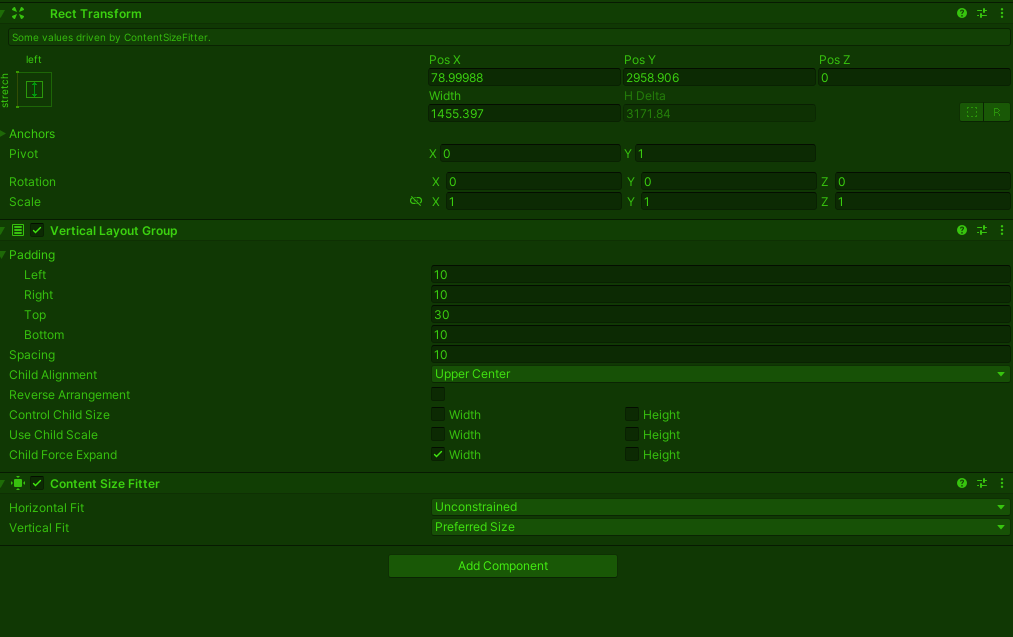



 simple egret
The method isn't declared in Object here, it's in some static class you added in scope by including the using directive. Ctrl+clicking it should take you to where it's declared
upper pilot
Basically this is the only method I found of creating spine file at runtime based on their forum search:
SkeletonGraphic skeletonGraphic = SkeletonGraphic.NewSkeletonGraphicGameObject(skeletonDataAsset, transform, SpineMaterial);
Which means I can't use a prefab to create spine file at runtime
"ComponentHolderProtocol"
Thats the AddComponent
 marble dome
do you know any good tutorials for this? I'm not trying to do it for weapons, i want it to hold a flashlight or similar items dpeending on the target.
I saw few tutorials but I'm really confused on where to start tbh
rigid island
marble dome
do you know any good tutorials for this? I'm not trying to do it for weapons, i ...
have you looked into the animation rigging package ? they have a decent series on it
simple egret
upper pilot
"ComponentHolderProtocol"
So there's a static class ComponentHolderProtocol within Unity.VisualScripting that declares a public static T AddComponent<T>(this Object o)?
upper pilot
public static T AddComponent<T>(this UnityObject uo) where T : Component
{
    if (uo is GameObject)
    {
        return ((GameObject)uo).AddComponent<T>();
    }
    else if (uo is Component)
    {
        return ((Component)uo).gameObject.AddComponent<T>();
    }
    else
    {
        throw new NotSupportedException();
    }
}
Yup that's why adding the using directive brought it in scope
upper pilot
but VS wasn't aware of that?
quickfix didn't bring it up, I guess it was added as I was typing before, or maybe i added using manually, I can't remember atm.
simple egret
The option for extension methods is usually further down the completion list, if using an older IDE stuff from unimported namespaces won't show for performance reasons
upper pilot
I see, that solved it at least, thanks!
public struct GalleryThumbnailData
{
    public string SpineName;
    public string SpineAnimation;
    public string ThumbnailName;
}
Is there a shortcut to create a struct data?(For testing, as the actual data will be read from a file)
        dataList.Add(
            new List<GalleryThumbnailData>{name:name?}
            new List<GalleryThumbnailData>
            new List<GalleryThumbnailData>
            new List<GalleryThumbnailData>
            );
I thought that there was a way to do that inline, but I can't find it, maybe it wasn't for structs hmm
rigid island
upper pilot
```csharp
public struct GalleryThumbnailData
{
public string SpineName;
...
dataList.Add(new() );