
#archived-code-general
1 messages · Page 268 of 1
 latent latch
 chrome trail
I saw this before, but wasn't entirely certain how I was supposed to use it
latent latch
"Note that IgnoreCollision is not persitent. This means ignore collision state will not be stored in the editor when saving a scene."
Serialize the colliders to the root script and run that method in start it seems
 latent linden
Hello, how can i prevent microphone streamed audioclip to capture ingame sounds?
 harsh lotus
I have the problem that my platforms disappear behind the background and I haven't been able to get it fixed for 2 hours. Does anyone have any further ideas?

 cosmic rain
harsh lotus
I have the problem that my platforms disappear behind the background and I haven...
cosmic rain
harsh lotus
I have the problem that my platforms disappear behind the background and I haven...
That's not enough info to go off, but did you try changing it's z position and/or sorting layer/order in layer?
harsh lotus
cosmic rain
That's not enough info to go off, but did you try changing it's z position and/o...
yeah i tried not working
cosmic rain
Then you'll need to share more info
harsh lotus
What information do you need?
cosmic rain
What does it look like? What is it obstructed by. What components and setup does that obstructing object have.
Also, I didn't realize it, but this is a coding channel and your issue doesn't sound related to coding


 slow spruce
guys i am working on a capibara runner game, where obstacles (different prefabs i made with specific heights from the floor). There are no syntax errors in my code, and everything should be alright in the inspector. The obstacles DO spawn randomly (succesfully), HOWEVER, 5 of the 6 are invisible? Honestly no clue why, pls helpp


asked chatgpt it just told me to reimport the png assets and recreate the prefabs (doubt this will do anything)
 proud juniper
Is there a way to set up a UI Toolkit Button's clicked value in the UXML editor? or only programmatically?
querying in code with selectors to set callbacks feels like jquery 🙂
slow spruce
is that a question addressed to my enquiry? or just your own haha
 leaden ice
slow spruce
guys i am working on a capibara runner game, where obstacles (different prefabs ...
leaden ice
slow spruce
guys i am working on a capibara runner game, where obstacles (different prefabs ...
- Pretty sure your IDE is not configured.
- You misspelled Start
- You're probably not spawning them in view of the camera
slow spruce
All of the prefabs are spawned from the same spawner, they are all in frame 100% as the basket obstacle is clearly visible when spawned, and others although arent visible, still stop the game if hit
leaden ice
slow spruce
All of the prefabs are spawned from the same spawner, they are all in frame 100%...
All you have to do is pause the game and look at the scene
And just look where they are
proud juniper
slow spruce
is that a question addressed to my enquiry? or just your own haha
My own 🙂
I'm trying to implement drag and drop with UI Toolkit and it is proving... difficult
slow spruce
leaden ice
All you have to do is pause the game and look at the scene
oh you are right, such a dumb mistake haha
the prefabs are actually there! but they are behind the background image for some reason. Changing their z axis coords in the inspector doesnt do anything. Do you think i should bring the background way back then?
also my bad i just needed to update my visual studio editor within Unity for my IDE to be fully configured again
 rigid island
proud juniper
I'm trying to implement drag and drop with UI Toolkit and it is proving... diffi...
rigid island
proud juniper
I'm trying to implement drag and drop with UI Toolkit and it is proving... diffi...
in what way ?
proud juniper
Can't find where I can listen to drag events, for one. all I can find is button.clickable.clicked
Ah, registercallback maybe
slow spruce
all good now guys, thanks for help 

rigid island
proud juniper
Ah, registercallback maybe
probably on the visual element
proud juniper
Thanks yeah, I was completely overlooking what I needed. Thanks
 flat abyss
Alright. Anybody still up? For renderTexture raycast issues, is this the correct place or do I have to go "UI-UX"?
I'm trying to raycast a crosshair over an image to the world, without inputs. I have the position of the crosshair on top of the RenderTexture and I want it to raycast straight forward.
However this is the best I could figure, it's going down and only works when the crosshair is at dead center
 proud juniper
Can you show the math you're doing to calculate the ray/line?
flat abyss
Can I link you to the Forum post? I have a lot more info there. Is it OK if I link it here?
Unity Forum
Any gurus in here? Please?
So this is what I have, now.
[ATTACH]
The bullseye at the bottom is a "joystick", it controls the crosshair at the top...


 ashen jasper
does anyone have any idea what I'm doing wrong here. I'm trying to make a idle animation loop on between each other bit my counter is counting to fast or at least perframe. Does anyone know how to fix this
    {
        string[] idleAnimations = { "idle", "idleStart" };
        AnimatorStateInfo stateInfo = animator.GetCurrentAnimatorStateInfo(0);

        if (stateInfo.IsName(idleAnimations[0]))
        {
            if (stateInfo.normalizedTime >= 1f)
            {
                loopCount++;

                if (loopCount >= maxLoopCount)
                {
                    animator.Play(idleAnimations[1]);
                    loopCount = 0;
                }
            }

            print(loopCount);
        }
    }
}```You should just be using a StateMachineBehaviour
 simple ridge
Hi everyone, I was wondering if someone could give me some ideas with why Unity would stop logging any logs on entering play mode. The TL;DR is that I have been given a project to look into and to get it to work I was going to log some of the values for a curtain script. These didn't seem to show up so I thought it wasn't calling it, anyway double checked with breakpoints and all seems well but that left the logging issue. Next I tried creating a empty monobehaviour with a custom editor and button which would just output "Test" on being clicked. This works fine when not playing, but the second I go into play mode no logs appear in the console. All selections (for logs, warnings and errors) are active. So this is 100% a play mode issue. I've never experienced anything like this and searching online or reading through the project settings doesn't come up with much.
This is a VR project so potentially that may have something to do with it? Maybe its forcing all logs to go to a headset that doesn't exist in this context. Or maybe there is something called through script that disables the console. Honeslty I'm completely lost so any help with getting this working again in play mode would be appreciated!
 west lotus
simple ridge
Hi everyone, I was wondering if someone could give me some ideas with why Unity ...
west lotus
simple ridge
Hi everyone, I was wondering if someone could give me some ideas with why Unity ...
Look for Debug.unityLogger.logEnabled maybe someone was trying to be fancy and disable logs for release but forgot to wrap it in the proper defines
 finite hollow
Hey guys! I've been pouring over the documentation to see if there's a simple way to reference a specific track or track group from a timeline asset. But rn it looks like if I wanna access a specific track/track group I need to know what index or uhh "place" it's at in an IEnumerable. And I guess I could always put the specific track I want to work with at the top but I want to be sure I don't accidentally reference a different track. So are there any recommendations on how I go about referencing a specific track?
 thin kernel
Hello. I'm building two android apps from one project, I do change their package name, but I can't install them both on my phone, I'm getting an error: "android app not installed as package conflicts with an existing package".
Command "aapt dump badging "D:\path\to\project.apk" | findstr -i "package: name"" on apk files shows that package names are different, what else am I missing?
thin kernel
thin kernel
Hello. I'm building two android apps from one project, I do change their package...
Problem was with custom "AndroidManifest" that our company used, I didn't know about that. After changing package name in this file everything worked.
ashen jasper
leaden ice
You should just be using a StateMachineBehaviour
I been trying that but i got no luck with it
 strange pine
i wanna save the players inventory asynchronously, is it better as a Task or Coroutine?
iirc Coroutines still sort run synchronously in a way right?
 soft shard
strange pine
i wanna save the players inventory asynchronously, is it better as a Task or Cor...
soft shard
strange pine
i wanna save the players inventory asynchronously, is it better as a Task or Cor...
Coroutines run from a (active) MonoBehaviour on the main thread, yes, they just allow a function to yield instead of complete to end
strange pine
soft shard
Coroutines run from a (active) MonoBehaviour on the main thread, yes, they just ...
coolio, thanks 🙂
looks like saving to playerprefs likes to only be done on the main thread, so going of what you said, coroutines look like the way to do it
 thick terrace
strange pine
looks like saving to playerprefs likes to only be done on the main thread, so go...
thick terrace
strange pine
looks like saving to playerprefs likes to only be done on the main thread, so go...
async functions also run on the main thread unless you ask them not to, they're just not tied to the lifetime of a monobehaviour and can't do the unity-specific things like waiting for LateUpdate or end of the frame
 tropic kiln
Heya all, having a bit of difficulty with async here. Can someone explain why unity waits for run_async to complete all in one frame even tho its async? Thanks very much!
    public Chunk(Vector3 offset, int lod, WorldRenderer renderer) {
        data = new ChunkData(offset, lod);

        run_async();
    }

    public async void run_async() {
        Task vertex_task = calculateVertices();
        Task triangle_task = calculateTriangles();

        await vertex_task;
        Task uv_task = calculateUv();   // Requires vertices

        await triangle_task;
        Task normals_task = calculateNormals(); // Requires vertices, triangles

        await normals_task;
        Task texture_task = calculateTextureV3(); // Requires vertices, triangles, normals, biomes

        await uv_task;
        await texture_task;

        applyMesh();
        loadStructureNoise();
        loadStructures();
        calculateGrassChunks();
    }
 ruby elk
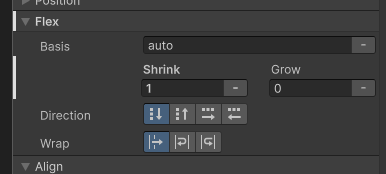
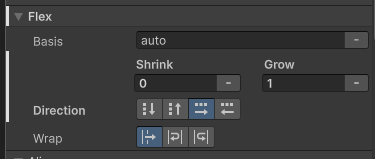
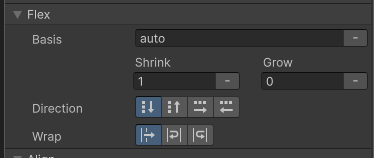
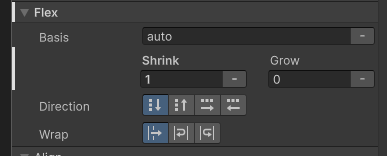
anyone ever had issues with listview pushing other stuff in a container even when it's set to shrink 1 and the other stuff to 0?
 frosty snow
basically this

this is equivilant to
void drawFrame(Canvas canvas) {
  canvas.clear(CanvasKit.WHITE);
  // code to update and draw the frame goes here

  // make sure we run again
  // so we keep animating
  tr.RunOnMain(drawFrame);
}
tr.RunOnMain(drawFrame);
in which we must ensure a task queueing itself such as above will not end up running endlessly
eg the task gets dequeued and runs
sometime layer it finishes and queues itself again
at this point we may still be executing queued tasks, in which we will now see the thread that had requeued itself
this will result in executing it again in the same frame
in which case since we are running on the UI we will block until the task finishes at which point it is queued again thus we see it again, and again, and again, endlessly blocking to execute the same task
this is exactly what we MUST avoid doing
ruby elk
listview flex params vs header panel above vs the panel they're contained in vs the tab that panel is in https://i.imgur.com/iCM6Bcs.png https://i.imgur.com/AseRFZT.png https://i.imgur.com/Kn6BliX.png https://i.imgur.com/hNUIDn6.png
 thick terrace
tropic kiln
Heya all, having a bit of difficulty with async here. Can someone explain why un...
thick terrace
tropic kiln
Heya all, having a bit of difficulty with async here. Can someone explain why un...
how are you measuring this? this should run across multiple frames, but it won't suspend until you hit an await so if calculateVertices and calculateTriangles do a lot of work up front you might still have a slow first frame
tropic kiln
so you reckon just await them all
ruby elk
ended up making a selector for tab view header container to set shrink to 0. not entirely sure why anyone would want tab buttons to be able to shrink by default
thick terrace
tropic kiln
so you reckon just await them all
well just making something async/return Task doesn't do much on its own, if you await an already completed task it just continues in the same frame, so it's up to you to break up the work across multiple frames
you can use await Task.Yield() which on the main thread is roughly equivalent to yield return null in a coroutine, or if you have stuff that's safe to run off the main thread, you can do that with await Task.Run(() => { ... })
 hard viper
you would probably need to multithread for that to have a boost tbh
the main point of async is to do things off the normal chain of events in the main thread
thick terrace
depends if your goal is speeding it up or just to keep the ui responsive during a long task! even if you're stuck on the main thread it can be worth splitting an expensive cpu task up
hard viper
async makes it easier to break up a task across multiple frames, when there is a lot of work to be done, and you don’t need to do it all in one frame
thick terrace
exactly, using multithreading is just a bonus sometimes
hard viper
i would not use async to multithread, these are like two different things
anything you do async should be thread-safe by default, tho
but not done with the intention of spliting threads
tropic kiln
im simply trying to execute the chunk's loading calculations over a number of frames so that the entire thing doesn't freeze for the player. unfortunately i need to access some of unity's methods so not all of it can be async so scheduling it all appropriately isnt easy
thick terrace
tropic kiln
im simply trying to execute the chunk's loading calculations over a number of fr...
it's totally fine to call unity methods from async methods, if you don't deliberately run stuff on another thread you will never leave the unity main thread
tropic kiln
thick terrace
it's totally fine to call unity methods from async methods, if you don't deliber...
its not liking me initialising a new game object ect.
hard viper
you should have a failsafe for if the player reaches a chunk not fully loaded yet, where you do pause the game until async loading is done
tropic kiln
hard viper
you should have a failsafe for if the player reaches a chunk not fully loaded ye...
all in due time yes, first i need it to end up fast enough
hard viper
people will always find a way, be it BLJ or bullet time boost, to go fast as fuck into unloaded areas
for now, just start by loading your chunk asynchronously
thick terrace
tropic kiln
its not liking me initialising a new game object ect.
there's no reason that shouldn't work in the snippet you sent so maybe the problem is elsewhere?
tropic kiln
thick terrace
there's no reason that shouldn't work in the snippet you sent so maybe the probl...
i had this.chunk = new GameObject("chunk", typeof(MeshFilter), typeof(MeshRenderer), typeof(MeshCollider)); in applyMesh() but it didnt like it
thick terrace
where's this code being called from? eg what's in the stack trace from the error you get
tropic kiln
thick terrace
where's this code being called from? eg what's in the stack trace from the error...
UnityException: Internal_CreateGameObject can only be called from the main thread.
Constructors and field initializers will be executed from the loading thread when loading a scene.
Don't use this function in the constructor or field initializers, instead move initialization code to the Awake or Start function.
UnityEngine.GameObject..ctor (System.String name, System.Type[] components) (at <3b24cc7fa9794ed8ab04312c53e6dedd>:0)
Chunk.applyMesh () (at Assets/Scripts/World/Chunk.cs:375)
Chunk.<run_async>b__12_0 () (at Assets/Scripts/World/Chunk.cs:66)
System.Threading.Tasks.Task.InnerInvoke () (at <787acc3c9a4c471ba7d971300105af24>:0)
System.Threading.Tasks.Task.Execute () (at <787acc3c9a4c471ba7d971300105af24>:0)
--- End of stack trace from previous location where exception was thrown ---
Chunk.run_async () (at Assets/Scripts/World/Chunk.cs:66)
System.Runtime.CompilerServices.AsyncMethodBuilderCore+<>c.<ThrowAsync>b__7_0 (System.Object state) (at <787acc3c9a4c471ba7d971300105af24>:0)
UnityEngine.UnitySynchronizationContext+WorkRequest.Invoke () (at <3b24cc7fa9794ed8ab04312c53e6dedd>:0)
UnityEngine.UnitySynchronizationContext.Exec () (at <3b24cc7fa9794ed8ab04312c53e6dedd>:0)
UnityEngine.UnitySynchronizationContext.ExecuteTasks () (at <3b24cc7fa9794ed8ab04312c53e6dedd>:0)
so idk how im not on the main thread
thick terrace
are you calling the constructor of Chunk from the constructor of an asset or script?
 opaque fox
Hello so i am having some trouble with an enemy i am programming for an vr game. When the enemy collides with anything it will attempt to walk into it and then start walking upwards. https://hatebin.com/mcrbekvvtm
 tropic kiln
thick terrace
are you calling the constructor of `Chunk` from the constructor of an asset or s...
tropic kiln
thick terrace
are you calling the constructor of `Chunk` from the constructor of an asset or s...
scripts, its not mono. thats why i initialise a new game object, i mean i could have it as a scriptable object but even so
thick terrace
tropic kiln
scripts, its not mono. thats why i initialise a new game object, i mean i *could...
so it's in a scriptableobject constructor? those aren't called from the main thread either
tropic kiln
thick terrace
so it's in a scriptableobject constructor? those aren't called from the main thr...
shit. so im better off attaching the script to a gameobject with the necessary components and initialising it that way?
 wicked zealot
Hi all, has anyone had issues with reloading the current scene a player is in?
I have a scene that instantiates a lot of procedurally generated content and deletes some other content. When I use SceneManager.LoadSceneAsync I'm expecting the scene to revert to it's original state, but the content I generated or deleted previously does not reset.
thick terrace
tropic kiln
shit. so im better off attaching the script to a gameobject with the necessary c...
it depends, you can use Awake on ScriptableObjects iirc, it's called the first time they're loaded, but yeah you're probably better off adding some code at the beginning of your game/level which calls an init function on those objects
tropic kiln
thick terrace
it depends, you can use `Awake` on ScriptableObjects iirc, it's called the first...
alr cheers, ill switch it to a prefab and give that a shot 👍
tropic kiln
thick terrace
it depends, you can use `Awake` on ScriptableObjects iirc, it's called the first...
yo there is some weird shit going on here, ive switched it but it still says its not on the main thread and i cannot think why other than the async function which i call on initialisation:
    public async void run_async() {

        await calculateVertices();
        await calculateTriangles();
        await calculateUv();
        await calculateNormals();
        await calculateTextureV3();
        await Task.Run(() => applyMesh());     // Within this function
        /*

        loadStructureNoise();
        loadStructures();
        calculateGrassChunks();
        */
    }```
`UnityException: get_mesh can only be called from the main thread.`Task.Run is one of the ways to explicitly leave the main thread 😄
that runs the given delegate on a background worker
opaque fox
opaque fox
Hello so i am having some trouble with an enemy i am programming for an vr game....
ples help
Actually I dont think i explained it properly because it is no longer walking towards the player when it is collided. this is when it starts to punch and it slowly starts rotating upwards

 hollow fjord
I'm working on AI that manages a base and I'd like to make the AI replicate a human player in ability. For example, moving to locations, placing expansion and production buildings, etc.
This is sort of like an RTS game AI, and I've been practicing on how to achieve this using some of Unity's build in systems
I was experimenting with ScriptableObjects for predefined builds, but I'm not sure they're the best approach
Anyone have experience with this? I was thinking a predefined Queue Manager that accepts Actions, but can have overrides for dynamic events in the game that aren't scripted
 heady iris
ScriptableObjects are good for storing blobs of data that can be referenced from multiple places
I was working on an RTS a while ago. I didn't have any pre-defined builds; I just had rules that searched for the best place to build something when a criteria was met
(the search is gradient-ascent based)
 jade latch
im working on a board game and i was wondering if anyone has any tips on how i can do movement on pieces between tiles
rigid island
jade latch
im working on a board game and i was wondering if anyone has any tips on how i c...
"movement on pieces between tiles"
wdym?
jade latch
move the white square from its current position to the middle of any of the surrounding tiles
 rigid island
jade latch
move the white square from its current position to the middle of any of the surr...
rigid island
jade latch
move the white square from its current position to the middle of any of the surr...
Ohh its pretty easy stuff , is this tilemap? you get helper methods on the Tilemap class and Grid
maybe you can use some a* as well
for walkable and unwalkable paths
jade latch
no its different game objects since each of the colored tiles will have different stats attached to them
rigid island
ScriptableTiles would've been the answer to that
jade latch
and its different for every time i load it
rigid island
they can contain data / custom functions
Like I said you might want to look into A* for pathing
 unique delta
i m making an inventory system and it says i can t conver string to int but it is a way too?https://pastebin.com/3BZmUjKb The error is at line 22
Pastebin
Pastebin.com is the number one paste tool since 2002. Pastebin is a website where you can store text online for a set period of time.
rigid island
why is this even in update lol
itemName is an int
not a string
    public class Inventory{
        public int itemId;
        public int itemName;
}```i know, but then why is this problem?
jade latch
rigid island
Like I said you might want to look into A* for pathing
thanks
rigid island
unique delta
i know, but then why is this problem?
whats what a problem?
also this belongs in #💻┃code-beginner
 spring creek
unique delta
i know, but then why is this problem?
spring creek
unique delta
i know, but then why is this problem?
Because it is an int
You're saying = "skill1" to an int
That makes no sense
Make it a string
rigid island
unique delta
i didn t saw that i was pretty sure was a string
is your IDE not showing that ?
unique delta
no
rigid island
unique delta
no
you dont have this?
 unique delta
no
rigid island
unique delta
no
!ide
 tawny elkBOT

💡 IDE Configuration
If your IDE is not autocompleting code
or underlining errors, please configure it.
Select one:
• Visual Studio (Installed via Unity Hub)
• Visual Studio (Installed manually)
• VS Code
• JetBrains Rider
• Other/None
rigid island
make sure you configure your code editor
 fluid lily
For the new Logging package. Is there a way to attach a gameObject to the message like in the Debug.log so when you click on the message it selects the object in scene?
 steep stirrup
Does anyone know if there is a C# script for a 2d game, basically I want to create a mechanic, that after the knife cuts the bread (goes through all the bread collision) changes the sprite
 dusk apex
steep stirrup
Does anyone know if there is a C# script for a 2d game, basically I want to crea...
dusk apex
steep stirrup
Does anyone know if there is a C# script for a 2d game, basically I want to crea...
What's a c# command?
steep stirrup
script
dusk apex
You'd have to code whatever feature you're wanting.
I'm assuming the breakdown of the mechanic you're wanting is...
- Knife started cutting the bread: knife has entered the bread.
- Knife finish cutting the bread: knife has exited the bread.
- Consider evaluating if cut was valid
- Change some sprite(?)
You'd could use the rigid body callback functions for enter and exit.
 ionic stone
How can i limit the shooting angle like in the picture, if your mouse is within the red zone, it would teleport to the closest possible allowed zone. This is the code so far for rotating the gun

 leaden ice
ionic stone
How can i limit the shooting angle like in the picture, if your mouse is within...
leaden ice
ionic stone
How can i limit the shooting angle like in the picture, if your mouse is within...
It's really hard to answer this without understanding what exactly you mean by the mouse being in a zone. What kind of game is this? Does the image represent positions on the screen? Or something else?
ionic stone
leaden ice
It's really hard to answer this without understanding what exactly you mean by t...
the character itself is in a car, its a top down shooter type game, the red zones would be the car's front and back sides. at the moment i have the gun rotating around the gun in a fixed circle independent of how far away the mouse is.
leaden ice
ionic stone
the character itself is in a car, its a top down shooter type game, the red zone...
And is this suppsoed to be relative to the rotation of the car?
ionic stone
leaden ice
And is this suppsoed to be relative to the rotation of the car?
yes, if the car is turned 45 degrees, the green zones should shift aswell
fluid lily
So I am assuming you want the gun to only shoot towards the closest point to the mouse *in the green zone*. I would probably get the angle of the center of the car to the mouse, and have logic based on that angle
aka
if mouse is in XGreenZone angles track XGun
else if mouse is in XRedZone angles and closest to XGreenZone Set XGun angle
ionic stone
okay, i have an idea of how to implement it now, cheers:D
leaden ice
You'll want to do all the math in local space of the car though
fluid lily
Yeah good point, will be easier
leaden ice
e.g. once you get a world direction vector, use car.transform.InverseTransformDirection(worldDirection) and do your math with that vector
 cobalt kernel
Yo guys I want to ask for something. I am new at Unity and I was watching a basic game tutorial. But when the guy opens a new script it opens Visual Studio but for me it opens Visual Studio Code. Why does it do that because I think my code does not work properly in vscode
I want it to open Visual Code
But dont know how to do that
leaden ice
cobalt kernel
I want it to open Visual Code
Configure whichever IDE you want to use
!ide
tawny elkBOT
💡 IDE Configuration
If your IDE is not autocompleting code
or underlining errors, please configure it.
Select one:
• Visual Studio (Installed via Unity Hub)
• Visual Studio (Installed manually)
• VS Code
• JetBrains Rider
• Other/None
cobalt kernel
What do I do
cobalt kernel
it didnt fix anything I have a script called birdscript and it automatically sends me to vscode and I dont want that I want it to send me to visual studio but cant find how
rigid island
cobalt kernel
it didnt fix anything I have a script called birdscript and it automatically sen...
it does, click on Visual Studio and follow the instructions for that
cobalt kernel
I did
spring creek
cobalt kernel
it didnt fix anything I have a script called birdscript and it automatically sen...
If you set the external tools menu properly, it would take you to VS instead of VSCode
rigid island
cobalt kernel
I did
screenshot your External Tools page
spring creek
Inb4 "what's external tools?"
Edit: called it
cobalt kernel
ok but how to go to the external tools menu (sorry i dont know anything abt unity)
rigid island
so you lied
spring creek
cobalt kernel
ok but how to go to the external tools menu (sorry i dont know anything abt unit...
It's in the guide you said you clicked
rigid island
 rigid island
cobalt kernel
yea I clicked that but I didnt understand what you meant
rigid island
cobalt kernel
yea I clicked that but I didnt understand what you meant
External Tools is part of the steps. If you followed it as you said it would be familiar..
cobalt kernel
do you want to see the pack manager?
spring creek
cobalt kernel
w8
 spring creek
cobalt kernel
do you want to see the pack manager?
spring creek
cobalt kernel
do you want to see the pack manager?
No
rigid island
cobalt kernel
do you want to see the pack manager?
pack manager has 0 to do with what was requested
 meager pendant
im a bit new to C#, are there any types i can use to do this more efficiently than a dictionary?

 rigid island
cobalt kernel
rigid island
cobalt kernel
thats at the end..
spring creek
Not just part
rigid island
you skipped the whole beginning
cobalt kernel
ye im doing it now 1 m
I already googled this too but I couldnt find where "preferences" button was after clicking on "edit"
spring creek
cobalt kernel
I already googled this too but I couldnt find where "preferences" button was aft...
Edit in UNITY. Right? Not in Visual Studio
cobalt kernel
ye
spring creek
Screenshot your edit tab
cobalt kernel
you mean the top left edit button right?
spring creek
cobalt kernel
you mean the top left edit button right?
Yes
rigid island
cobalt kernel
you mean the top left edit button right?
the one you clicked where you couldnt find preferences

 spring creek
meager pendant
spring creek
meager pendant
I think I prefer the first
Yeah, definitely 1
meager pendant
wdym
rigid island
why are you using lowercase/camel for classes and methods?
meager pendant
i think it looks better
meager pendant
well i started C# 3 days ago
rigid island
keep that uglyness to JS
meager pendant
ive never used js in my life
 deft timber
do you write lowercase class names in lua?
meager pendant
never will either
meager pendant
deft timber
do you write lowercase class names in lua?
no i used snake case
cobalt kernel
rigid island
Are you on a mac ? <@869904743466692649>
windows 11 I was doing smth Im sending a ss
meager pendant
LOL
deft timber
meager pendant
no i used snake case
then why the hell you use lower case in c# lol
meager pendant
i just think it looks better
rigid island
no point of arguing over code style
deft timber
sure, preference but still
meager pendant
i suppose i should learn conventions if i want a job
deft timber
ofc
rigid island
if you want to work with others yes you need to use common style
its piined in this channel
 tawdry jasper
Is anything magic happening to AudioSources when they're played? I have an audiosource pool that reuses them. The pooled objects are created and DontDestroyOnLoad is called on them.
Now sometimes I get an error from my pooling code that I'm trying to access an AudioSource that was destroyed.
There's one instance where I parent the audiosource to play on a moving object. But I tried unparenting at the and of the clip playing, I also tried listing the AudioSources found in children in OnDestroy of the object I'm parenting at and looks like the audio source is already unparented when it's destroyed.
(it also looks like the unparented source comes back to the dontdestroyonload scene in the hierarhy after setting parent=null)
cobalt kernel
cant see a preferences button
 rigid island
tawdry jasper
Is anything magic happening to AudioSources when they're played? I have an audio...
rigid island
tawdry jasper
Is anything magic happening to AudioSources when they're played? I have an audio...
why are you using OnDestroy if you have Pooling ?
cobalt kernel
@rigid island
rigid island
cobalt kernel
<@968604165150507078>
why you cutt off the rest
should be literally under Project Settings..
tawdry jasper
rigid island
why are you using OnDestroy if you have Pooling ?
I'm hooking a pooled audio source to a flying object, then after I do some async scene reloading my pool is suddenly missing an audio source
I just put ondestroy for debugging to test a theory that maybe the audio source was still parented when that object got destroyed
rigid island
tawdry jasper
I'm hooking a pooled audio source to a flying object, then after I do some async...
that doesnt answer the original question
rigid island
yeah sounds like ur mixing stuff up
DDOL should not be used if you are pooling them
tawdry jasper
deft timber
you either use pooling, or instnatiate/destory
? the on destroy was on the object I temporarily hook my audiosource to play a clip on a moving object, I'm not destroying the audio sources
deft timber
tawdry jasper
? the on destroy was on the object I temporarily hook my audiosource to play a c...
so why did you get error, that you are trying to acces a component, on a game object that was destroyed
rigid island
we need to see context / script
cobalt kernel
Ok so, I have found the issue finally thank yall. It says visual studio code [1.86.1] for me (now) but I can change it to Visual Studio community 2022 [17.8.6] but in the site it says visual studio enterprise
rigid island
cobalt kernel
Ok so, I have found the issue finally thank yall. It says visual studio code [1....
thats because the screenshot was from microsoft website so ofc their version of VS is enterprise edition
cobalt kernel
oh ok so the community one I must select right?
tawdry jasper
rigid island
we need to see context / script
Pastebin
Pastebin.com is the number one paste tool since 2002. Pastebin is a website where you can store text online for a set period of time.
rigid island
cobalt kernel
oh ok so the community one I must select right?
click regen project files after you do that to be sure
rigid island
tawdry jasper
https://pastebin.com/CabGMKT2
we need to see the exact error + show the stack trace
tawdry jasper
rigid island
we need to see the exact error + show the stack trace
trying to reproduce, it's not happenning 100% of the time :/
 spark mural
when i try to make 2 scripts with ontriggerenter it gives error and i have no idea how to make it work with 1 script, am i understanding this wrong?
rigid island
spark mural
when i try to make 2 scripts with ontriggerenter it gives error and i have no id...
how the hell should we know without even seeing the error?
spark mural
oh right mb:

 quartz folio
spark mural
oh right mb:
quartz folio
spark mural
oh right mb:
You have accidentically duplicated your script
meager pendant
oh my god
ive spent the last 30 minutes redoing all my code so it fits naming conventions
i was already 3,000 lines deep when i learned there were naming conventions for c#
rigid island
3,000 lines thats it?
meager pendant
rigid island
3,000 lines thats it?
i mean
i started c# and unity 3 days ago
and most of the time in that 3 days was practicing pixel art
unique delta
i want on the start the game and the save file to load. i can t write (SaveDataObject, path) becuase "No overload for method 'LoadData' takes 2 arguments". And it dosen t know what to load.
Pastebin
Pastebin.com is the number one paste tool since 2002. Pastebin is a website where you can store text online for a set period of time.
cobalt kernel
Finally my bird is floating 🙏
spark mural
so im trying to make it so when u touch a object at scene 1 it sends you to scene 2 and at scene 4 when you touch a object it will send you to scene 1 and because i cant make 2 scripts of OnTriggerEnter i have no idea what to do.Is there a way to fix it?
 rigid island
spark mural
so im trying to make it so when u touch a object at scene 1 it sends you to scen...
rigid island
spark mural
so im trying to make it so when u touch a object at scene 1 it sends you to scen...
first things
!ide
tawny elkBOT
💡 IDE Configuration
If your IDE is not autocompleting code
or underlining errors, please configure it.
Select one:
• Visual Studio (Installed via Unity Hub)
• Visual Studio (Installed manually)
• VS Code
• JetBrains Rider
• Other/None
spark mural
i am using visual studio
 round violet
is there any reasons why a static class holding data could be ignored in a build ?
tawdry jasper
rigid island
we need to see the exact error + show the stack trace
Yeah I have to let it go, I thought I maybe fixed it randomly but reverted all my changes I was hoping would fix it and I still can't reproduce it. I'll screenshot it when it comes back, but it was just an error from the pooling code that the audiosource referenced by the list is was missing 🤷
rigid island
spark mural
i am using visual studio
great so configure it according to the Visual Studio link
 astral nexus
I know it's not very unity specific question, but I just want to make a sanity check for myself:
if I store some reference to a reference type object in a struct when passing this struct to a method - this struct will be stored and boxed automatically in a heap and not in a stack just because it contains reference type and will cause garbage collection after I'm done using it in a method, right? so I can never use struct with reference type value in it without garbage generation?
round violet
round violet
is there any reasons why a static class holding data could be ignored in a build...
i got this, but the code isnt working in my build
public class CrossSceneDataHolder : MonoBehaviour
{
    public static bool InstantStart = false;
    public static bool StartInTuto = false;
}

// somwhere else
public void Restart()
{
    CrossSceneDataHolder.InstantStart = true;
    CrossSceneDataHolder.StartInTuto = _playerC.InTutoLevel;
    SceneManager.LoadScene("Game");
    Time.timeScale = 1;
}
I'm not technically sure, but did you put this CrossSceneDataHolder on any gameobject? Cause as far as I know - if you didn't put on any gameobject a script - unity will ignore this script in a build and cut it off, but I can be wrong about it
Also, maybe use scriptableobject for this task rather than mono?
round violet
astral nexus
I'm not technically sure, but did you put this CrossSceneDataHolder on any gameo...
i thought about that, but even when its added somewhere in the scene and loaded it doesnt work
astral nexus
round violet
i thought about that, but even when its added somewhere in the scene and loaded ...
hm, strange
 junior kraken
Hi all. I need to load multiple scenes at once, instantiate objects in one scene, and use occlusion culling in another. I don't want to instantiate objects in the same scene that I'm using occlusion culling, but occlusion culling only works in the active scene. I don't want to have to remember to add a 'move to scene' script to every object I instantiate. Is there some way I can override the active occlusion culling asset?
rigid island
junior kraken
I need to load multiple scenes at once, instantiate objects in one scene, and use occlusion culling in another.
This is my actual problem. I'm familiar with this page and linking to it isn't helpful
rigid island
junior kraken
> I need to load multiple scenes at once, instantiate objects in one scene, and ...
the gist of it would be explaining why you need to do that in the first place
junior kraken
- need to choose an 'environment scene' and use occlusion culling in it because the user can choose an environment
- need to instantiate dozens or hundreds of objects in another scene without them disappearing between environment changes because we don't want that to happen
- don't want to manually mark each object I instantiate with DontDestroyOnLoad because it is a hassle
 steep herald
I've been looking at a few verlet rope implementations and there's this recurring thing when adding gravity
someGravity * Time.deltaTime * Time.deltaTime
Why twice?
dusk apex
steep herald
I've been looking at a few verlet rope implementations and there's this recurrin...
Depends on context but t^2 usually refers to acceleration.
steep herald
dusk apex
Depends on context but t^2 usually refers to acceleration.
What would be the advantage in doing this over using a vector of smaller magnitude for instance?
dusk apex
steep herald
What would be the advantage in doing this over using a vector of smaller magnitu...
One would be relative to time while simply using a small value would be relative to frame.
steep herald
I guess what I can't wrap my head around is if we multiply the vector by the delta, we're already relative to the frame. Multiplying it further seems to complicate things needlessly. Don't get me wrong, I am absolutely sure I am missing the point.
rigid island
junior kraken
- need to choose an 'environment scene' and use occlusion culling in it because ...
isnt Occlusion Culling something you bake prior to enter Playmode ?
dusk apex
steep herald
I guess what I can't wrap my head around is if we multiply the vector by the del...
The vector would be the speed relative to some direction. Multiplying it by time would make it a velocity. Further multiplying it would make it the acceleration. The purpose is likely to take steps relative to acceleration.
Character controller would be a good example of using acceleration rather than some fixed value.
Wherecs playerVelocity.y += gravityValue * Time.deltaTime; controller.Move(playerVelocity * Time.deltaTime);They'd acquire the player velocity of gravity by first taking the speed and multiplying it by time then once again to get the acceration for that frame.
steep herald
@dusk apex
Ahhhhhh....
So say we have 1D with a scalar for velocity, a scalar for the gravity.
v += g * deltaTime for the force applied to the velocity for the ongoing frame
position += v * deltaTime again for the step
and since verlet does not maintain the velocities, then it makes sense to multiply it twice
this makes absolute sense, thank you so much @dusk apex
junior kraken
rigid island
isnt Occlusion Culling something you bake prior to enter Playmode ?
yes
rigid island
junior kraken
yes
then I dont understand this statement
use occlusion culling in it
what does this have to do with loading multiple scenes
junior kraken
Occlusion culling is only active in the active scene when multiple scenes are loaded
junior kraken
Then objects instantiate in that scene instead of the scene I want them to spawn in
rigid island
junior kraken
Then objects instantiate in that scene instead of the scene I want them to spawn...
How so?
junior kraken
Why don't you read the page you linked me? https://docs.unity3d.com/ScriptReference/SceneManagement.SceneManager.SetActiveScene.html
The active Scene is the Scene which will be used as the target for new GameObjects instantiated by scripts and from what Scene the lighting settings are used.
rigid island
junior kraken
Why don't you read the page you linked me? https://docs.unity3d.com/ScriptRefere...
so switch it after you spawned the objects you want ?
although the usecase still isnt clear why you're doing this
junior kraken
rigid island
so switch it after you spawned the objects you want ?
Objects can spawn at any time
rigid island
then two scenes makes no sense to me
junior kraken
I need to spawn objects and keep them as the environment changes
And I need to use occlusion culling in the environment
rigid island
many ways you can do this, triggers, raycasts..
rigid island
junior kraken
I need to spawn objects and keep them as the environment changes
so use DDOL
junior kraken
like I said, that is a hassle to have to do for every single object that I could spawn
if there is no way to do what I want and the answer is 'no' then that is fine. I simply wanted to know if there was a better way
rigid island
junior kraken
like I said, that is a hassle to have to do for every single object that I could...
it doesnt need to be done on every object, just the parent that holds them all
make a common gameObject / holder
use DDOL on that
junior kraken
I unfortunately need to keep objects at the scene root due to a networking library
rigid island
idk then I would just put them inside a List of object that are set on DDOL
no clue how to help with your issue sorry
 willow minnow
more of a general question, is there a advanced colider script for like buildings with holes (doors) and L shaped buildings? The box colider just boxes everything up, and the mesh colider dosent work with doors.
 mystic rock
Hello, someone can help me?
I'm getting this error, but I don't know how to solve
I tried google, but don't works
FormatException: Input string was not in a correct format.
That's my code
int inGameItemID = int.Parse(EventSystem.current.currentSelectedGameObject.transform.GetChild(0).GetComponent<Text>().text);
I tried to show in a Debug.Log, and the result is always a number
I don't know where is the error :/
But the error are returning this line that I showed
rigid island
holy mother of long ass function is going on here
rigid island
mystic rock
Hello, someone can help me?
I'm getting this error, but I don't know how to solv...
what did you debug? show it
mystic rock
rigid island
what did you debug? show it
Image about the error and the line

 rigid island
mystic rock
Image about the error and the line
rigid island
mystic rock
Image about the error and the line
where is the debugged value
mystic rock
I'll get again
A moment
spring creek
Is it not Int32.Parse() ?
rigid island
btw you should use TryParse
Im thinking it failing because its null
Test your C# code online with .NET Fiddle code editor.
mystic rock
Isn't null :/
 rigid island
mystic rock
Isn't null :/
rigid island
mystic rock
Isn't null :/
show me what the code looks like
 somber nacelle
mystic rock
Isn't null :/
somber nacelle
mystic rock
Isn't null :/
where is the string coming from
mystic rock
mystic rock
Image about the error and the line
Here
rigid island
your error from before showed the lines to be in the 135ish
this one printed from 235
rigid island
are the not printing in the same function you attempt to Parse?
pretty sure EventSystem.current.currentSelectedGameObject.transform.GetChild(0)
is not grabbing what you think its grabbing

 rigid island
mystic rock
rigid island
mystic rock
hmm i see. Maybe try storing it inside a variable and try that with print
mystic rock
I'm trying to store in a variable already
rigid island
string text = EventSystem.current.currentSelectedGameObject.transform.GetChild(0).GetComponent<Text>().text
//Debug.log(text)
//parse text
 rigid island
mystic rock
Same error
rigid island
mystic rock
Same error
what did Debug print tho
 rigid island
mystic rock
Same that every images that I've posted here :/
rigid island
mystic rock
Same that every images that I've posted here :/
Wait
I remember this problem
this is caused by Text component adding some weird ass character to string
dont use that trash component Text its legacy anyway, simple fix
use TMP_Text with TextMeshPro - UI
 weak venture
I have code that triggers an (dash) impulse on a key press. It disables the primary moving scheme and I've confirmed none of that code is running while the dash is happening. But if I start the dash while moving, I go a lesser distance than if I start the dash from standstill. I've confirmed the impulse force should be the same in both cases.
Does anyone have an idea why this might be the case? Is there some relevant physics property or Rigidbody2d quirk I might be missing?
mystic rock
rigid island
use `TMP_Text` with TextMeshPro - UI
I'll try
I'm using a legacy text in ui
rigid island
mystic rock
I'll try
I'm using a legacy text in ui
yes I know this, time to switch up.. that component gets pixelated and blurry on high rez anyway
rigid island
weak venture
I have code that triggers an (dash) impulse on a key press. It disables the prim...
you have to at very least provide !code
tawny elkBOT
Posting code
📃 Large Code Blocks
Use links to services like:
https://gdl.space/, https://paste.ofcode.org/, https://hatebin.com/, https://paste.myst.rs/, https://hastebin.com/
📃 Inline Code
Surround code with three backquotes. Not quotation marks.
To format as C#, add cs to the first line:
```cs
// Your code here
```
Add a comment with a line number if there is an error message.
mystic rock
I'm getting another error now
In the same line
 weak venture
Its spread across too many scripts to share easily. I tried to isolate it down to that particular Rigidbody2D.AddForce call that seems to be producing different results based on starting conditions.
mystic rock
But isn't null the value
 rigid island
mystic rock
But isn't null the value
rigid island
mystic rock
But isn't null the value
show the code
of that line
you probably didnt change the type
rigid island
weak venture
Its spread across too many scripts to share easily. I tried to isolate it down t...
yea just show the script /method related to AddForce
mystic rock
rigid island
show the code
Is the same that before
Only changed Text > TextMeshProUGUI
 rigid island
mystic rock
rigid island
mystic rock
hmm are you sure the child of currentSelectedObject has that component on the gameobject
 rigid island
mystic rock
Child 0
rigid island
mystic rock
Child 0
Debug.Log(EventSystem.current.currentSelectedGameObject.transform.GetChild(0).name)
you should really store these in variables
mystic rock
mystic rock
Same error
Are stored
rigid island
var eventObject = EventSystem.current.currentSelectedGameObject
var firstChildofSelected = eventObject.transform.GetChild(0)
var textObj = firstChildofSelected.GetComponent<TMP_Text>()
rigid island
mystic rock
Are stored
its not though
that long thing is hard to debug individually for a null ref debug
mystic rock
Which the difference? @.@
Will result the same error, will not? :/
 fervent furnace
print the string char by char with the int value (cast it to int)
rigid island
mystic rock
Which the difference? @.@
Will result the same error, will not? :/
the difference is you can debug better, its to find out who is the NULL object
if you dont learn how to debug you wont get far in code
mystic rock
Hm... Okay, I'll try
I'm trying, keep calm
Why are getting a null error?????????????
Isn't null
There are a value!!!
WHY ARE RETURNING NULL!!!!!!!!!!!
AAAAAAAAAAAAAAAAAAAAAAA


 somber nacelle
what is line 140
mystic rock
I want to die ;-;
somber nacelle
hint: it isn't the string that is null
mystic rock
 somber nacelle
you have screenshot a Text component, this does not inherit from TMP_Text so that GetComponent<TMP_Text> returns null
mystic rock
I'll change
A moment
somber nacelle
also note that it is possible that GetChild is returning null. you aren't doing any null checks on any of these objects and just expecting them to work
rigid island
Indeed , having a script on ShopItem with those fields assigned would be smarter / robust

 rigid island
mystic rock
Oh god, here we go again the same error ;-;
rigid island
mystic rock
Oh god, here we go again the same error ;-;
I told you why
Text component adds weird char to String
use textMeshpro
you tried to fix it by making it worse
mystic rock
I changed to TextMesh, but resulting the same error

 rigid island
mystic rock
I changed to TextMesh, but resulting the same error
rigid island
mystic rock
I changed to TextMesh, but resulting the same error
look
var textObj = firstChildofSelected.GetComponent<TMP_Text>() did this before
you can Debug.Log all three
and see which one it is culprit
chances are you did not Put the textmeshpro component on that child
and its still Text
mystic rock
Is text mesh
 rigid island
mystic rock
Is text mesh
rigid island
mystic rock
Is text mesh
these cutoff screenshots are worthless
i need to see the whole context
Where is this, which one are you trying to grab
etc
mystic rock
What I need to do, then?
Record my entire screen by 14 hours?
I'm trying to solve it since 10am yesterday, now is 00:20am here
rigid island
have you tried screenshotting the whole object and the hirerchy clearly visible ? and point which object is calling this function?
would that be too much to ask?
or do you want me to guess
Also is doing this that complex to help debug ?
 var eventObject = EventSystem.current.currentSelectedGameObject;
 if(eventObject)
 {
     var firstChildofSelected = eventObject.transform.GetChild(0);
     Debug.Log($"firstChild {firstChildofSelected}");
     if (firstChildofSelected)
     {
        var textObj = firstChildofSelected.GetComponent<TMP_Text>();
         Debug.Log($"text obj {textObj} ");
     }
 }```
edit: fixed NRE for Debugsnote that if any of those lines NRE then the log won't print
rigid island
yeah this whole thing is flimsy and I would opt for a script that has those assigned and only do a TryGetComp
rigid island
somber nacelle
note that if any of those lines NRE then the log won't print
edited 🙂
 frosty sequoia
Heya, I'm trying to have a line renderer bounce off the wall and it works except under certain conditions. When I point the line renderer in the right direction the next point in the linerenderer is set on (0,0) instead of bouncing normally and i have no idea why. Can anyone help me? Here's the code that does the line:
` private void OnTriggerStay2D(Collider2D other)
{
    if(other.tag == "Projectile" && playerMovement.isSlowmo)
    {
        //start position
        Vector2 startPosition = other.transform.position;
        lr.SetPosition(0, other.transform.position);

        //start 1straycast
        RaycastHit2D hit = Physics2D.Raycast(startPosition, direction, 100, layerDedection);
        lr.SetPosition(1, hit.point);

        Vector2 bounceDirection = direction;

        for(int i = 1; i < playerManager.amountOfLasers; i++) //playerManager.amountOfLasers
        {
            startPosition = hit.point;
            bounceDirection = Vector2.Reflect(bounceDirection, hit.normal);

            hit = Physics2D.Raycast(startPosition, bounceDirection, 100, layerDedection);
            Debug.Log("startPosition: " + startPosition);
            Debug.Log("bounceDirection: " + bounceDirection);
            Debug.Log("hit.point: " + hit.point);
            lr.SetPosition(i + 1, hit.point);

            lr.positionCount = playerManager.amountOfLasers + 1;

        }
    }`
 rigid island
frosty sequoia
Heya, I'm trying to have a line renderer bounce off the wall and it works except...
rigid island
frosty sequoia
Heya, I'm trying to have a line renderer bounce off the wall and it works except...
please use paste site to share large !code
tawny elkBOT
Posting code
📃 Large Code Blocks
Use links to services like:
https://gdl.space/, https://paste.ofcode.org/, https://hatebin.com/, https://paste.myst.rs/, https://hastebin.com/
📃 Inline Code
Surround code with three backquotes. Not quotation marks.
To format as C#, add cs to the first line:
```cs
// Your code here
```
Add a comment with a line number if there is an error message.
rigid island
frosty sequoia
https://gdl.space/kegogupura.cpp
when exactly is the condition that breaks it you say?
frosty sequoia
i can barely even tell myself to be honest. here's a video, hopefully that makes it a little more clear. it's just that when i aim at certain directions, mostly around the x axis, the line renderer snaps to the origin. what's weird is that if i move the walls closer it doesnt happen
rigid island
the original ray already looks off
frosty sequoia
why's that
 frosty sequoia
oh yea true, nah that work is intended. the main character faces your cursor perfectly, but since the line is coming from the projectile they don't have to go over the cursor if the projectile is a little to the side
if that makes sense lol
the startposition and bouncedirection both seem to be good but hit isn't working for some reason. it has to be something in this line:
hit = Physics2D.Raycast(startPosition, bounceDirection, 100, layerDedection);
rigid island
frosty sequoia
the startposition and bouncedirection both seem to be good but hit isn't working...
wait you're talking about the length ?
I think the issue might be the ray in the loop
frosty sequoia
yea i know it's the ray in the loop, that part of the code does the second laser
omg, i increased the length and it works now. i feel stupid, i didnt know length worked like that lmfao. thanks for the help
rigid island
awesome! glad you got it working
 mild coyote
How can I compare a mesh inside an asset vs a mesh inside a (loaded) scene?
//this prints Cube (UnityEngine.Mesh) : Cube Instance (UnityEngine.Mesh)
Debug.Log($"{assetMeshFilters[i].sharedMesh} : {sceneMeshFilters[c].sharedMesh}");
if(sceneMeshFilters[c].sharedMesh == assetMeshFilters[i].sharedMesh)
Debug.Log(assetMeshFilters[i].name);```
seems like the mesh inside scene is an instanced mesh (as expected), so the comparison always returns false left gale
Man.. I wish git had an easy way to "amend unpushed but not last commit".
hmm. actually... git commit --fixup $SHA maybe? edit: yep indeed, if followed by a rebase .. squash it becomes a single commit
 dense estuary
My script was looking messy, so I wanted to see how good a job CGPT could do, this is before: https://hastebin.com/share/yexuqahiqe.csharp. And this is after: https://hastebin.com/share/asapahobun.csharp. Somehow the after functions the exact same as the before, but its "cleaner."
quartz folio
It put some things into functions, added a load of redundant comments, and reduced some extremely basic logic
dense estuary
quartz folio
It put some things into functions, added a load of redundant comments, and reduc...
Thats why I put cleaner in quotes, because its not really cleaner, instead, every single little piece of the script is in its own function.
 ornate harness
Hello, everyone. How can I lock the cursor so that it can only move arround one half of my screen??
There is a way to do that or is it impossible?
fervent furnace
restrict the image of cursor / system call
ornate harness
Thank you, how can I do that?
fervent furnace
by checking if the cursor position out of bound?
ornate harness
Ok 🙂
 dense knoll
why intellisense not working visual studio code i updated VS in the package manager and VScode it selected in external tools

 twilit scaffold
dense knoll
why intellisense not working visual studio code i updated VS in the package mana...
twilit scaffold
dense knoll
why intellisense not working visual studio code i updated VS in the package mana...
!ide Make sure you did everything in the guides
tawny elkBOT
💡 IDE Configuration
If your IDE is not autocompleting code
or underlining errors, please configure it.
Select one:
• Visual Studio (Installed via Unity Hub)
• Visual Studio (Installed manually)
• VS Code
• JetBrains Rider
• Other/None
dense knoll
twilit scaffold
!ide Make sure you did everything in the guides
i did every thing but still the same
twilit scaffold
i don't have any suggestions beyond what is there
 shell jacinth
i didnt know these had names
 quartz folio
shell jacinth
i didnt know these had names
quartz folio
shell jacinth
i didnt know these had names
And SCREAMING_SNAKE_CASE
 rancid frost
what is difference between Material.proptype and materialpropertytype
https://docs.unity3d.com/ScriptReference/MaterialProperty.PropType.html
https://docs.unity3d.com/ScriptReference/MaterialPropertyType.html
 shell scarab
is HideFlags.HideInHierarchy suppose to hide it in the scene view as well?
quartz folio
No
round violet
I got list of structs
if i do myList[someIndex].someVar = someValue will this update correctly ? Or do I have to save the value, change what i want, the reassign to the list index ?
rancid frost
yea
rancid frost
round violet
I got list of structs
if i do `myList[someIndex].someVar = someValue` will this...
structs are moved around by value,
shell scarab
quartz folio
No
does it prevent OnDrawGizmos() from being called?
rancid frost
you can try passing the struct using the ref keyword
quartz folio
shell scarab
does it prevent `OnDrawGizmos()` from being called?
No idea, wouldn't be surprised if it did
shell scarab
sad
round violet
okay ty
rancid frost
rancid frost
structs are moved around by value,
if your using a list of strcuts, Im sure if u use the the index(for loop), you should be fine
if you use for each then no
 stone rock
    private void FixedUpdate()
    {
        Vector2 up = transform.up;

        hit = Physics2D.Raycast(transform.position, -up, suspensionDistance + radius, collisionLayers);
        isGrounded = hit.collider != null;

        Debug.DrawRay(transform.position, -transform.up * (hit.distance), Color.green, 0.0f, false);
    }
Hello, i am trying physics2D out for some vehicle physics that only need to move forwards and backwards in a straight line
But the raycast doesn't seem to work, it doesn't draw the green line, i tested it with the maximum distance before and it does draw a line then but the raycast doesn't seem to hit the floor
do i need to change a setting on the collider maybe?
 leaden ice
stone rock
```csharp
private void FixedUpdate()
{
Vector2 up = transform.up...
leaden ice
stone rock
```csharp
private void FixedUpdate()
{
Vector2 up = transform.up...
Your code isn't actually checking if the Raycast hit anything
Also your inspector is in debug mode
You also set the duration of the draw line to 0 seconds?
stone rock
yeah 0 seconds means 1 frame
leaden ice
FixedUpdate doesn't run every frame
stone rock
i tested it with a different ray before it works
just not sure why it doesn't give me the distance
leaden ice
Back to my first point
leaden ice
leaden ice
Your code isn't actually checking if the Raycast hit anything
You might just not be hitting anything
Add an actual check and logs
stone rock
i should be, because i should be casting downwards and there is a collider there
leaden ice
if (hit) {

}
else {

}```Rule 1 of debugging is don't make assumptions
stone rock
leaden ice
```cs
if (hit) {
}
else {
}```
hit is a raycasthit2D
leaden ice
Actually test it
leaden ice
stone rock
hit is a raycasthit2D
I'm aware
stone rock
i am testing with the ray drawing
leaden ice
Test it with real code instead
Your ray isn't drawing. That strongly implies the Raycast isn't hitting anything. Add logs as suggested
stone rock
        Vector2 up = transform.up;

        hit = Physics2D.Raycast(transform.position, -up, suspensionDistance + radius, collisionLayers);
        isGrounded = hit.collider != null;

        if (hit)
        {
            Debug.Log("hit");
        }
        else
        {
            Debug.Log("False");
        }

        Debug.DrawRay(transform.position, -transform.up * (hit.distance), Color.green, 0.0f, false);
Did it like you showed and i don't think you can use If (hit)
because it says i hit somethng
the Raycasthit2D is never null
leaden ice
stone rock
```
Vector2 up = transform.up;
hit = Physics2D.Raycast(transfor...
This is correct
Now print what you're hitting
leaden ice
stone rock
the Raycasthit2D is never null
We're not checking for null. There's an implicit conversion to Bool. It's doing the right thing
The DrawRay needs to be inside the if statement as well
stone rock
it's hitting itself, so in 2D physics raycasts can hit their own colliders?
like if it starts inside the collider
is there a setting to allow raycasts to start inside a collider without hitting it?
or do i need to make it a layer the collider does not hit
i found a setting: ```csharp
Physics2D.queriesStartInColliders = false;
now i can use it
leaden ice
stone rock
it's hitting itself, so in 2D physics raycasts can hit their own colliders?
The Raycast doesn't have a collider. Raycast is just a static function
stone rock
leaden ice
The Raycast doesn't have a collider. Raycast is just a static function
Yeah, but i meant the collider of the object i am shooting my ray from like the ray starts in that collider
leaden ice
stone rock
Yeah, but i meant the collider of the object i am shooting my ray from like the ...
Sure but Raycast has no concept of that because it's a static function
There's no way for it to know
 rough sorrel
Hi. Does anyone know why do I keep getting the error "Action map must be contained in state" after I try to change something in the action map after loading the action map JSON please?
spark mural
when i build the game and open it it shows a black screen is there a way to fix it?
soft shard
spark mural
when i build the game and open it it shows a black screen is there a way to fix ...
What platform are you building to? What is your first scene (scene at index 0 in your Build Settings)? And does that scene have an active camera?
spark mural
soft shard
What platform are you building to? What is your first scene (scene at index 0 in...
im building for pc and my first scene is main menu and it also has a active camera
 unkempt zenith
_beeStock.ForEach(action);
Why is this guaranteed to run at least once, even though _beeStock.Count is 0?
private readonly List<Bee> _beeStock = new();
 mellow sigil
Is it?
unkempt zenith
        public void ForEach(Action<Bee> action)
        {
            _beeStock.ForEach(action);
        }

        public void Render(Apiary apiary)
        {
            if (!CanBeRendered)
            {
                Debug.LogError("Is already active");
                return;
            }

            _container.SetActive(true);
            _amountText.text = apiary.Size + " / " + apiary.Capacity + " Bees";
            apiary.ForEach(Instantiate(_beePanelPrefab, _scrollViewContent).Render);
        }
This is how I use it anyway
heady iris
unkempt zenith
```csharp
_beeStock.ForEach(action);
```
Why is this guaranteed to run at leas...
It's not.
ForEach will run the method zero times on an empty list
soft shard
spark mural
im building for pc and my first scene is main menu and it also has a active came...
Do you have any code that might be disabling or changing the active camera in some way for your "main menu" scene?
heady iris
however, I don't think your code does what you think it does
Instantiate(_beePanelPrefab, _scrollViewContent).Render
This instantiates the prefab and then grabs its Render method
So your method would run the new bee's Render method once for each item in the list
You always instantiate exactly one bee.
unkempt zenith
Oh so the lamda is incorrect
spark mural
soft shard
Do you have any code that might be disabling or changing the active camera in so...
checked the scripts, doesnt feel like there is any and also it works in the engine but when i build it and run it and the game opens its just black screen
unkempt zenith
Yes
apiary.ForEach(bee => Instantiate(_beePanelPrefab, _scrollViewContent).Render(bee)); fixed it, thank you!
heady iris
oh right, the new bee panel, not the new bee
that makes a lot more sense now
i was wondering why the bee had a Render method that accepted a bee
soft shard
spark mural
checked the scripts, doesnt feel like there is any and also it works in the engi...
Hmm, you could try making a "development build" to see if you get any errors when you launch, if you made a new scene with just a camera and maybe a light source, and had that new scene as your only scene in your build settings, does it also only give you a black screen in a build?
spark mural
soft shard
Hmm, you could try making a "development build" to see if you get any errors whe...
i did that and its a blue screen now
soft shard
spark mural
i did that and its a blue screen now
A blue screen is usually the default camera settings, so it sounds like in that scene your camera is working, you may have a setting on your camera in the conflicting scene thats not rendering, maybe a layer your camera is ignoring?
 limber wharf
!code
tawny elkBOT
Posting code
📃 Large Code Blocks
Use links to services like:
https://gdl.space/, https://paste.ofcode.org/, https://hatebin.com/, https://paste.myst.rs/, https://hastebin.com/
📃 Inline Code
Surround code with three backquotes. Not quotation marks.
To format as C#, add cs to the first line:
```cs
// Your code here
```
Add a comment with a line number if there is an error message.
limber wharf
Hey guys, why isn't my while loop working? When Points == 0, it sometimes generates other difficulty then Basic, and nothing is printed
https://paste.ofcode.org/YMGnGzvhk4yCeTgMvgWuDa
heady iris
how do you know that points is actually equal to zero?
limber wharf
because I have a TMP_Text in-game and when the player starts, it's at 0
heady iris
also, what are you expecting to be printed?
limber wharf
like, when the difficulty was advanced but the CurrentDifficultyList does not contain advanced, because it now currently only needs to generate Basic levels
heady iris
print("*Rerolling* Got " + MiniLevels[RandomInt].Difficulty);, I'm guessing?
opaque fox
opaque fox
Actually I dont think i explained it properly because it is no longer walking to...
Can I have help please
limber wharf
I am doing an Endless gamemode, which generates random mini levels, that has difficulties attached to them in inspector, and the stages are seperated into 3 categories, each point means one mini level done, the further the player gets, it should logically get harder, so more difficulties of levels are added into CurrentDifficultyList
 quaint reef
opaque fox
Actually I dont think i explained it properly because it is no longer walking to...
quaint reef
opaque fox
Actually I dont think i explained it properly because it is no longer walking to...
Do you use rigidbody?
limber wharf
heady iris
`print("*Rerolling* Got " + MiniLevels[RandomInt].Difficulty);`, I'm guessing?
yep
heady iris
I'd suggest logging the current Points value and the contents of the current difficulty list in NewLevel.
That will reveal exactly when NewLevel is running
limber wharf
oh f
I know where's the problem,
You see, in the (IsStarting) condition, I forgot to implement the same logic, because when it generates the first level, there is no check for other difficulty
opaque fox
quaint reef
Do you use rigidbody?
Yes however if i did not no collisions would be detected
quaint reef
opaque fox
Yes however if i did not no collisions would be detected
You can block rotation from the rigidbody component, if you don’t want the player to rotate upwards you should block the y rotation (I think)
opaque fox
k ill try that
 swift falcon
could i get some assistances if anyone is available?
quaint reef
quaint reef
You can block rotation from the rigidbody component, if you don’t want the playe...
Otherwise you can put in code: rb.freezerotation = true
 quaint reef
Otherwise you can put in code: rb.freezerotation = true
quaint reef
quaint reef
Otherwise you can put in code: rb.freezerotation = true
Which just prevents physics to affect rotation
swift falcon
Okay so essentially ive been tasked with recreating the "Simon" game and i have 4 functional buttons that play sounds based on input and whatnot but im trying to make it to where when i press the button it appends it's ID to a list so that i can check the list with the "supposed to be list"
but for some reason its not letting me reference another script's list to append the ID to
quaint reef
swift falcon
but for some reason its not letting me reference another script's list to append...
You need a reference to the script, but if you don’t want to reference it you can use a static List or a singleton pattern
opaque fox
tysm that worked @quaint reef
quaint reef
opaque fox
tysm that worked <@884442735115894784>
np
 sacred frost
swift falcon
but for some reason its not letting me reference another script's list to append...
sacred frost
swift falcon
but for some reason its not letting me reference another script's list to append...
a list cannot really be a reference like a gameobject can
 hasty canopy
swift falcon
but for some reason its not letting me reference another script's list to append...
hasty canopy
swift falcon
but for some reason its not letting me reference another script's list to append...
From what you're describing you do not need to store list in each individual button
Just store it in one single place or as lacitud suggested singleton pattern or static list
 amber linden
swift falcon
but for some reason its not letting me reference another script's list to append...
amber linden
swift falcon
but for some reason its not letting me reference another script's list to append...
When you say "it's not letting me" what exact error are you getting. In the compiler, or while the game is running?
sacred frost
swift falcon
but for some reason its not letting me reference another script's list to append...
i'd do a function like
public void UI_AppendToList(int buttonIndex) {
  list.Add(buttonIndex);
}
then add it to the button click event
sounds like the easiest way
hasty canopy
sacred frost
sounds like the easiest way
It is the easiest and most scalable way
swift falcon
amber linden
When you say "it's not letting me" what exact error are you getting. In the comp...
Its a compiler error
amber linden
Tell us what the error says
deft timber
swift falcon
Its a compiler error
is your IDE configured?
swift falcon
yeah it is
swift falcon
amber linden
Tell us what the error says
and i dont have the error since i deleted it to work on that solution
hasty canopy
swift falcon
and i dont have the error since i deleted it to work on that solution
You can reproduce the error
amber linden
It sounds like you're just trying to reference a private variable or something simple
swift falcon
well initially i was trying to inherit the other scripts into a single script which i understand why it didnt work
amber linden
Regardless, the button solution is simple and would work fine.
Also you don't really need to save a list of all the inputs most likely. In Simon, you typically lose as soon as you press a wrong button, so you can just have something (a gamecontroller script or similar) check each input against the list of correct inputs. Each time there's a new input, you move to the next index in the list
hasty canopy
Are we casually gonna ignore the fact you have created a script called "Monobehaviour"?
heady iris
Ah, that would do it.
good catch
You've created your own MonoBehaviour class and it's completely blowing up everything else
opaque fox
How do i make it so the game ends in unity in my scripts
hasty canopy
opaque fox
How do i make it so the game ends in unity in my scripts
bool GameOver;
GameOver = true;

opaque fox
yea but that wont actually end the game
hasty canopy
opaque fox
yea but that wont actually end the game
You have to manage gamestates for that
opaque fox
wdym and how
heady iris
opaque fox
How do i make it so the game ends in unity in my scripts
"ending the game" is a very abstract concept
opaque fox
actually nvm
heady iris
if you just want to quit the game completely, that's what Application.Quit is for
opaque fox
i dont need help with that
hasty canopy
Look up tutorials on YouTube for what you actually want to achieve
heady iris
otherwise, ending the game just means...not running the game
maybe you go back to the title screen
unique delta
i have a PlayerData script and i want to reference the coin variable to the player script but if i kill something it sohuld give me coin+= 4. But it remains 40;https://pastebin.com/XFRR9sfk
Pastebin
Pastebin.com is the number one paste tool since 2002. Pastebin is a website where you can store text online for a set period of time.
hasty canopy
unique delta
i have a PlayerData script and i want to reference the coin variable to the play...
Where are you "killing something"?
I don't see a function that does +=4 coins
unique delta
thanks
hasty canopy
Welcome??
unique delta
hasty canopy
I don't see a function that does +=4 coins
i forgot to just write that, idk how
unkempt zenith
I'm too dumb to figure out the logic for this one:
_visualsSpriteRenderer.flipX = targetX < position.x;
Why is this wrong :(
heady iris
i dunno, what's the problem?
unkempt zenith
In context:
var position = transform.position;
            var targetX = Mathf.Clamp(
                position.x + Random.Range(-3f, 3f),
                CameraMovement.MAX_TOP_LEFT.x,
                CameraMovement.MIN_BOTTOM_RIGHT.x
            );
            var targetY = Mathf.Clamp(
                position.y + Random.Range(-3f, 3f),
                CameraMovement.MIN_BOTTOM_RIGHT.y,
                CameraMovement.MAX_TOP_LEFT.y
            );

            _visualsSpriteRenderer.flipX = targetX < position.x;
be more specific. because you haven't explained what you are expecting to happen compared to what is actually happening so we can really only make assumptions
unkempt zenith
It should flip the sprite if it moves left and not if it moves right
To sell the top down effect
hasty canopy
What is the issue though? What is happening in the game that you do not want to happen?
 bitter tusk
Hi Guys, Is there anyone who is good with ML-Agent? I'm having some problems and I could use some help
somber nacelle
bitter tusk
Hi Guys, Is there anyone who is good with ML-Agent? I'm having some problems and...
#1202574086115557446 and https://dontasktoask.com
oh and don't crosspost. you've already posted your question in the correct place, keep it there
hasty canopy
Very much so, I don't know why you would use the same name if you were going to derive from unityengine's Monobehaviour anyway
You can either A) change name of your class, or B) use UnityEngine.MonoBehaviour for inheritance
I would recommend A
hard viper
naming a class MonoBehaviour is extremely foolish when using Unity
hasty canopy
Also i see your script being named "MonoBehaviourScript" in folder but "MonoBehaviour" in class wassup with that 
Keep the name same in both places or you'll run into more errors
hard viper
the name of the class should describe what it does
like PlayerMovement, or CameraController, or ImpactHandler
hasty canopy
If I was making a custom extension to Monobehaviour, I would generally name it something like "CustomMonoBehaviour" or something, not like this
And inherit this wherever I want
Namespace is totally different thing
hard viper
namespace is a part of the true class name
MonoBehaviour is a class in the namespace UnityEngine. the true name for this class is UnityEngine.MonoBehaviour
hasty canopy
It's like a classroom and students
Where classroom is namespace and students are class
2 students from different classrooms can have same name and still be recognisable but not in the same classroom
hard viper
If you define a namespace called MyGame.EnemyScripts, and put a class in it called EnemyMovement, then the true name is MyGame.EnemyScripts.EnemyMovement
 native folio
how do i make it so the material of a new obj is the exact same as the old one? rn, the material texture gets transfeered but the color doesn't. the og obj is a probuilder obj if that makes a difference, and it has the default skin with a color applied.
            go.GetComponent<Renderer>().material = otherObj.GetComponent<Renderer>().material;
go.GetComponent<Renderer>().material.SetColor("_Color", otherObj.GetComponent<Renderer>().material.color);```Use sharedMaterial, read the docs
 wide mural
any clue why my paint details is not painting anything?
Painting trees work tho.
i tried to just paint cubes but does nothing either

 dull barn
im making a main menu for my game and when i press a button to activate the other part of the UI my music starts playing twice... anyone know why?
leaden ice
wide mural
any clue why my paint details is not painting anything?
Painting trees work tho...
wide mural
leaden ice
<#497875195718271004>
i did
leaden ice
dull barn
im making a main menu for my game and when i press a button to activate the othe...
Not without seeing code
dull barn
theres no code, just deactivating and activating through the button
rigid island
dull barn
theres no code, just deactivating and activating through the button
then why is it in a code channel 
dull barn
is there a UI channel?
rigid island
dull barn
is there a UI channel?
sure is #📲┃ui-ux
dull barn
oh thanks
rigid island
also clearly show the inspector for each event
 loud shard
like idk if it is that i cant start both audioRecordingSource and audioListeningSource at the same time, but dont know how to go about solving it
heady iris
we answered your question already in #💻┃code-beginner
spring creek
I also asked you to show your code in the other server and you deleted your comment
What is going on here?
 gloomy rover
spring creek
What is going on here?
gloomy rover
spring creek
What is going on here?
mb someone helped me already was a raycast issue, wasnt aware I souldnt cross post
spring creek
gloomy rover
mb someone helped me already was a raycast issue, wasnt aware I souldnt cross po...
Alright. Yeah, crossposting is against the rules in every server I've ever been in. Just makes things super confusing
Glad you got it resolved though!
dense estuary
I have now encountered a problem. I added the ability to move down slopes by checking the difference in normals between the player and the ground. But I am experiencing an issue where, as I go up the stairs, I collide with the corners of each step and the game thinks I am on a ramp, causing me to fall back down to the last step (this could be caused by an issue with how I apply gravity on slopes but I;m not sure). Here is my script: https://hastebin.com/share/ewikekisay.csharp. Here is a video of the problem: https://streamable.com/5oo1wg
Hastebin is a free web-based pastebin service for storing and sharing text and code snippets with anyone. Get started now.
 gloomy rover
spring creek
Alright. Yeah, crossposting is against the rules in every server I've ever been ...
gloomy rover
spring creek
Alright. Yeah, crossposting is against the rules in every server I've ever been ...
im new to community servers thats why I wasnt aware sorry
 tardy crypt
Man… adding stuff a game you last worked on 2 years ago is like…. Hunting for the right place to add one line of code and when you get there, wondering why you did all the stupid things…
hasty canopy
tardy crypt
Man… adding stuff a game you last worked on 2 years ago is like…. Hunting for th...
World's hardest try not to cringe challenge is looking at your old code 
 fleet vortex
Hi! I am new to Unity, and I have a problem that I want to put a plugin to be able to put gifs and the problem is that I don't know how to put the plugin
rigid island
fleet vortex
Hi! I am new to Unity, and I have a problem that I want to put a plugin to be ab...
"put the plugin"
yeah thats descriptive
fleet vortex
rigid island
yeah thats descriptive
lol
 proud trail
i need help fixing a small bug otherwise ill just add it as a feature can anyone help?
dusk apex
You should probably ask your question.
proud trail
so yes got it
my 2d character sticks to walls
every
single
wall
floors and cielings too
dusk apex
Likely it's not a coding question and this is the coding channel.
The common solution for a Rigid body system is to add a material with zero friction else modify linear drag etc. Try asking in #💻┃unity-talk next time.
rigid island
fleet vortex
lol
which plugin btw
proud trail
dusk apex
Likely it's not a coding question and this is the coding channel.
The common sol...
bet
fleet vortex
rigid island
which plugin btw
UniGif
rigid island
fleet vortex
UniGif
so whats the problem with it
I don't know how to put the plugin
wdym
also is this even compatible with unity above 5+ ?
This is made with Unity 5.4.0f3 (Mac, Win, Android, iOS).
last update was 6 years ago
fleet vortex
rigid island
> This is made with Unity 5.4.0f3 (Mac, Win, Android, iOS).
Ho, I didn't realize that, thanks for letting me know.
rigid island
fleet vortex
Ho, I didn't realize that, thanks for letting me know.
it might still work
rigid island
fleet vortex
Ho, I didn't realize that, thanks for letting me know.
download the folder and put it in your assets
fleet vortex
rigid island
download the folder and put it in your assets
ok
I think it doesn't work
 rigid island
fleet vortex
I think it doesn't work
rigid island
fleet vortex
I think it doesn't work
you can just switch it like it says
fleet vortex
rigid island
you can just switch it like it says
sorry, I don't know much of English
but I will try
rigid island
fleet vortex
sorry, I don't know much of English
click it , it shows you where it is
and it should still work. Thats only a warning not error
fleet vortex
rigid island
and it should still work. Thats only a warning not error
ok
I am using that plugin because I want to animate the buttons on my menu, but the problem is that when I import the gifs the animation is not shown
rigid island
fleet vortex
ok
it works
 rigid island
fleet vortex
I am using that plugin because I want to animate the buttons on my menu, but the...
rigid island
fleet vortex
I am using that plugin because I want to animate the buttons on my menu, but the...
Im not sure this is what you want for that..
why not just export them as different frames and use unity Animator
fleet vortex
rigid island
why not just export them as different frames and use unity Animator
good idea
rigid island
fleet vortex
good idea
this should work for example
https://ezgif.com/split
fleet vortex
rigid island
this should work for example
https://ezgif.com/split
OK, thanks a lot
left gale
So as someone with 15 yrs experience doing programming for games, in a wide range of different peoples custom engines (and monogame), but only recently with unity, I have an observation that strikes me as really, really bad about unity and likely the underlying cause of peoples general perception of "unity games have performance issues, lag spikes/hangs in particular".
Which is: Any work the game ever does on gameobject(s) (enabling them at least, but likely material stuff, transforms, etc too), can only be done by the main thread, and not even in parallel.
So, if you want 60 fps, you have 16 ms of work done by a SINGLE core as the absolute maximum that will ever be possible to do in a single frame, even while your cpu usage is like <15% and other cores are idle.
spring creek
left gale
So as someone with 15 yrs experience doing programming for games, in a wide rang...
Correct
left gale
In my case the game has around 5ms of work to do just pulling unity objects out of pools, putting them back in, and updating things that must happen every frame like transforms and materials -- which despite already laboriously being separated from all the rest of the game code since it has to be done in the main thread and unparalleled, it alone is also too much time for a single frame and has to then be time sliced ... and despite this effort spent, the outcome at best, is that some objects end up simply not updated every frame in ways visible to the player!
rigid island
left gale
So as someone with 15 yrs experience doing programming for games, in a wide rang...
I think this is why ECS is here
spring creek
Jobs too
left gale
Well, do those really let you have 4 tasks running in parallell, launched by the main thread (and blocked for completion at the end of the main thread update), which are enabling/disabling/updating transforms of a quarter each of your game's unity gameobject's?
spring creek
left gale
Well, do those really let you have 4 tasks running in parallell, launched by the...
Ecs doesn't work with gameobjects
And jobs would be best inplemented as work that isn't directly affecting gameobjects (or with ecs), and then handle gameobject stuff on the main thread. So calculations that you can do, then bring it back.
rigid island
https://www.twitch.tv/videos/1517796421
They talk about how they leverage ECS

Twitch
unity went live on Twitch. Catch up on their Software and Game Development VOD now.
spring creek
But yeah, jobs can be threaded easily
left gale
See i don't understand how that would help the situation at all. I already know how to parallelize work and don't need unity's help for it. And do to necessity have already (annoyingly) entirely separated gameobject work from everything else. The problem is that ultimately its still blocking the main thread while idle cores cannot help.
spring creek
left gale
See i don't understand how that would help the situation at all. I already know ...
Yes that is correct. These are alternatives, not something that will change the main thread/monobehaviour issue
That's just something you're gonna have to get used to if you want to use gameobjects
You might want to ask more in #archived-code-advanced though
 earnest gazelle
What is the correct way to bind a child class, its parent and all implemented interfaces using zenject?
 Container.BindInterfacesAndSelfTo<Child>().FromComponentsInHierarchy().AsSingle();
 Container.Bind<Base>().To<Child>().FromResolve();
Is it OK?
left gale
spring creek
Yes that is correct. These are alternatives, not something that will change the ...
Does that vid go into an alternative that doesn't involve gameobjects? I guess I don't even know what that would look like ... immutable transform structs or something? I'll watch it in any case.
spring creek
left gale
Does that vid go into an alternative that doesn't involve gameobjects? I guess I...
No idea, I didn't post the vid.
But ECS works with entities, not gameobjects, so it completely sidesteps the issue
The DataOriented approach allows threading for almost everything (maybe everything?)
left gale
Oh, i haven't groked the difference between those two yet.
rigid island
left gale
Does that vid go into an alternative that doesn't involve gameobjects? I guess I...
https://youtu.be/Bz24Jp30nkM?t=304 this should help

🔽 Download Unity 2022 LTS - https://unity.com/releases/lts 🔽
📃 Unity Devblog - https://blog.unity.com/devblog 📃
🦅 Follow me on Twitter - https://twitter.com/TurboMakesGames 🦅
💬 Join our Discord community: https://tmg.dev/Discord 💬
🔴 Livestream with Dani: https://youtube.com/live/EWZ3cq7cims 🔴
💻 My Game Development Setup: https://tmg.dev/GameDe...
spring creek
left gale
Oh, i haven't groked the difference between those two yet.
I was gonna explain my understanding, but I think asking in #1062393052863414313 might be better. Someone like Tertle or Issue knows way more about the underlying architecture.
Basically entities are just indexes to a chunk of memory though, and the component structs are grouped in that chunk of memeory. Systems iterate chunks containing archetypes of entities (an archetype being the same components).
That's an extremely basic rundown of course
The things that need to be on the main thread are things like structural changes (adding removing components), but most of the rest can be implicitly threaded
weak venture
Is there a good way to grow/show a spriteshape over time? It seems like it might be expensive to constantly grow the actual spline, I basically want to set the equivalent of a normal filled sprite's fillAmount property
left gale
Ah ok, im familiar with that design paradigm. But, its main benefit to performance isn't that it makes threading easier, it actually makes it much more rigid and ends up with quite odd public apis unless its only used internally. The purpose of this design is to improve performance not necessarily via threading, but via contiguous memory access -> better memory cache performance.
spring creek
left gale
Ah ok, im familiar with that design paradigm. But, its main benefit to performan...
Correct. It's all about data locality. Threading is merely a side-effect
But I thought that would make it relevant.
Basically nothing can be done about the main thread issue with gameobjects as far as I know
left gale
If this were someones own game engine, id think the very first thing one would do upon hitting this issue, is to find the calls in question they need to do in parallel, and simply make them threadsafe. Some internal Dictionary or List that needs to become a ConcurrentDictionary, some property setter than needs to use interlock-exchange, and then it would be fixed. Not only would that be less work than all the work-arounds ive seen, it would be less work for unity than inventing 2x new systems that aren't compatible.
 lean sail
There really is no proven solution. People arent using unity (gameobjects) when they want insane performance
left gale
Well, can you still use entities with transform components and meshrender components with materials?
spring creek
I mean, I've never had issues with it in the decade I've used unity. You just.. get used to it haha. As long as you're conscious of the issue, you can do it all in the main thread no problem
I like Bevy for performance more honestly
left gale
Because i dont actually care much about the "GameObject" type in particular, but all of the above are fairly convenient.
west lotus
You can bake gameObjects into entities and entities all have their equivalent components be it transform or rendering
If you are asking if you can use the regular gameObject.transform in ECS then no
left gale
Are these prebaked entities with x components then able to be enabled and disabled (added/removed from the scene) in parallel from arbitrary worker threads?
lean sail
Probably better to ask the #1062393052863414313 people, doubt many people here dive deep into it
Anyways I also havent had any issues with performance. You really can run a lot. Once you start looking into big multiplayer games or massive amounts of objects (factorio like) then you need something else for sure.
left gale
Thanks for all the responses in any case! Yea at a certain scale, you have to decide "what is an entity" and what needs to be a system for handling 500x live bullets/shots that are not entities.
weak venture
If anyone wants something similar, I was able to roughly get the filled sprite shape behavior I was asking for by just animating a mask over it
lean sail
left gale
Thanks for all the responses in any case! Yea at a certain scale, you have to de...
Is it like a bullet hell game? 500 doesnt sound like a maaaajor problem and realistically this would be the "hot zone" in terms of performance.
Everything else would likely be negligible
left gale
Actually im a modder and contributer to AIW2 (ai war 2) which is a space rts. It can have upwards of 1k 'ships' on a single planet (which is the unity scene) and equal numbers of live 'shots' in motion. But both of those end up being stacked or compressed into for example "10x Foo" as one object as numbers increase. But the visuals for that stack of 10x is actually a little heirarchy of entities anyway, from a prefab.
 nova shale
Hey all. I have a Brain class with a static variable here
public class Brain : MonoBehaviour
{
    public static UnityEvent BrainDiedEvent;
}
Inside my GameManager script i have this
    void Start()
    {
      Brain.BrainDiedEvent.AddListener(OnBrainDied);
    }
I'm getting a null reference exception which doesn't make much sense because the variable is static. I'm able to access other static variable from this class but not this one for some reason.
left gale
I don't know what UnityEvent is, but unless its a struct, you are not actually allocating it.
Even if it is a struct, doesn't unity do something odd with static initialization?
quartz folio
UnityEvents are for displaying events in the inspector, if it's static it's not serialized, so it probably shouldn't be a UnityEvent
and should just be a normal event like an Action
nova shale
quartz folio
UnityEvents are for displaying events in the inspector, if it's static it's not ...
I'm not seeing this in the docs?
A zero argument persistent callback that can be saved with the Scene.
Doesn't say that its only meant for displaying it in the inspector
nova shale
But it should still work as an Event right? Should still be statically accessible?
left gale
I mean its simply null is the issue right?
nova shale
Yeah
quartz folio
If it's static, it's not being saved, it's not being configured in the inspector, and you're just incurring a worse API that requires you to initialize the event or else get an NRE
left gale
its a class according to the docs, you need = new UnityEvent
quartz folio
If you used a normal C# event like an Action you wouldn't have this problem at all
Because they initialize themselves when you += subscribe to them
nova shale
a UnityAction or an Action?
left gale
well, i dont think you can += an Action as thats not a multicast delegate is it? hmmm
quartz folio
 rigid island
nova shale
a UnityAction or an Action?
rigid island
nova shale
a UnityAction or an Action?
C# Action
left gale
huh
lean sail
left gale
well, i dont think you can += an Action as thats not a multicast delegate is it?...
Delegate is just multicast delegate
left gale
i have an old misconception (though likely a common one) that for the += operator to be used, it has to be something defined as an "event"
quartz folio
event just means that the delegate can't be reassigned externally
C#/VB/F# compiler playground.
left gale
it would certaintly be a lot less... unexpected, if Action.Invoke() was calling a single method, and Event.Invoke() was more than one potential method. /sigh oh wells
lean sail
left gale
it would certaintly be a lot less... unexpected, if Action.Invoke() was calling ...
Action is just a delegate that takes no args and returns nothing. Theres nothing really about invoking one method vs many
left gale
Yep. I just re-forgot that, over the last 3 years since i was in that deep ;D
(goes to refactor List<Action> _callbacks i wrote yesterday)
 worthy willow
Hey, I want to activate every gameobject in a given array, but this script only does it to the first gameobject in the array.
Is there a better way to write this?

 mental rover
worthy willow
Hey, I want to activate every gameobject in a given array, but this script only ...
mental rover
worthy willow
Hey, I want to activate every gameobject in a given array, but this script only ...
the foreach loop will iterate over every GameObject in Lights, there's not a lot going on here - likely whatever is happening is somewhere else
rigid island
worthy willow
Hey, I want to activate every gameobject in a given array, but this script only ...
then the condition isn't happening
worthy willow
mental rover
the foreach loop will iterate over every GameObject in Lights, there's not a lot...
it works when i put it in the update function
heady iris
worthy willow
Hey, I want to activate every gameobject in a given array, but this script only ...
foreach (GameObject Lights in Lights) feels weird
worthy willow
But i only want it in start
 ruby nacelle
Hey, I'm just looking for some general advice if anyone has input. I'm hoping to develop a system where when a player kills a boss they'll unlock two new abilities that can be interchanged with three possible slots. This would obviously require some form of persistent memory but would a scriptable object be a better way of approaching this or an interface?
rigid island
heady iris
`foreach (GameObject Lights in Lights)` feels weird
seriously lol
mental rover
worthy willow
it works when i put it in the update function
to be blunt, you're doing something silly, somewhere - it could be any number of things since you're accessing global static properties, I could guess 5 different things that would break this, but you'll probably learn more if you study everything you're doing from start to finish and find the problem yourself
dusk apex
worthy willow
i tried pressing play again and it worked now?
Remove the if statement
rigid island
godda be that
lean sail
ruby nacelle
Hey, I'm just looking for some general advice if anyone has input. I'm hoping to...
Both a scriptable object and interface dont make sense here. An interface is just a way to enforce a class to implement something. SO shouldn't be used for saving data.
You can write to file in a format like json
worthy willow
nope it works now
maybe I didnt save the script before
thanks for the advice i guess
ruby nacelle
lean sail
Both a scriptable object and interface dont make sense here. An interface is jus...
Oh for real? My bad, is there any documentation on unity? Or should I just look for videos on the matter.
I appreciate the input, not super new to coding but still new to unity and C#
lean sail
ruby nacelle
Oh for real? My bad, is there any documentation on unity? Or should I just look ...
There are tutorials out there, newtonsoft (for json) is a commonly used one.
And yea SO data isnt used for saving. In the editor it will save because you are directly modifying the asset. In a build it will not save
You might use a SO or interface while loading this data, but the data will ultimately live in a file
heady iris
If you don't fully understand what you're doing, don't modify the data in scriptable objects that come from assets.
you'll just cram your data into a plain old C# object (one that doesn't derive from any Unity classes) and then serialize and deserialize that
ruby nacelle
Okay, other than handling how the data saves, the ability system itself and be an SO no? My team wants it to be modular so we can expand and remove on the fly.
ruby nacelle
heady iris
you'll just cram your data into a plain old C# object (one that doesn't derive f...
Ahhh okay
heady iris
ruby nacelle
Okay, other than handling how the data saves, the ability system itself and be a...
you can store ability definitions as scriptable objects, yes
ruby nacelle
I'll try to putter around with it for the time being and get back to you guys when I actually have a prototype to show off
Thank you for the input @heady iris @lean sail
 crisp bronze
Hi, I have this code that's meant to move a UI element to the screen position of another object. It works when playing in a certain aspect ratio, but when playing Maximized, the UI element is way off. How do I fix this?
swordIndicatorUI.rectTransform.position = mainCam.WorldToScreenPoint(thrownSwordPrefab.transform.position);


The difference
The Canvas is set to scale with screen size
willow minnow
im not entirely sure if this is a advanced question or not, but im trying to fix my ai. Right now i have the ai so where it will just run around, stop periodically, then keep going. And it does that for the most part. but sometimes it will get stuck and it will just spin and never stop unless i reset the play mode
!code
tawny elkBOT
Posting code
📃 Large Code Blocks
Use links to services like:
https://gdl.space/, https://paste.ofcode.org/, https://hatebin.com/, https://paste.myst.rs/, https://hastebin.com/
📃 Inline Code
Surround code with three backquotes. Not quotation marks.
To format as C#, add cs to the first line:
```cs
// Your code here
```
Add a comment with a line number if there is an error message.
 clever bridge
Hi everyone, I have code that controls how slow time runs in my game, I control Time.timeScale with a variable called realTime, I have an upgrade called timeSlowSpeedLevel, and my code says realTime = 1 - (timeSlowSpeedLevel * 0.1f)
when the speed level is 1 (making time slow to 0.9) it works fine. When speed level is 2 (time SHOULD slow to 0.8) it flickers between 0.8 and 0.7
I have no idea why
 warm aspen
clever bridge
when the speed level is 1 (making time slow to 0.9) it works fine. When speed le...
warm aspen
clever bridge
when the speed level is 1 (making time slow to 0.9) it works fine. When speed le...
Are you sure the variable timeslowspeedlevel is steady at 2 and not alternating between 1 and 2 for some reason?
Or rather between 2 and 3
clever bridge
no it also happens level 5, it flickers between 0.5 and 0.4
but when time is 0.9, and 0.7 and 0.6 it works as intended, staying at those values
nothing changes the upgrade level other that pressing the upgrade button in a different scene
it may be the actuall time slow transition method, getting it now
I don't see an issue with this code
can i use round to lock in into the nearest tenth?
nevermind, I resolved it, thanks!
 languid osprey
I’m declaring a public gameobject within the class but now whenever I reference it it always gives me an the error “the name ‘myGameObject’ does not exist in the current context”. I don’t understand why
I’ve tried referencing it everywhere and nowhere works
I’ve even tried referencing it on the next line so I don’t think it’s a scope issue
lean sail
languid osprey
I’m declaring a public gameobject within the class but now whenever I reference ...
This is definitely a #💻┃code-beginner issue, but also you should show your code and the exact error. Likely you didnt make it public, didnt save the script, or are referring to the wrong type.
spring creek
Show the !code
Hard to say without it
tawny elkBOT
Posting code
📃 Large Code Blocks
Use links to services like:
https://gdl.space/, https://paste.ofcode.org/, https://hatebin.com/, https://paste.myst.rs/, https://hastebin.com/
📃 Inline Code
Surround code with three backquotes. Not quotation marks.
To format as C#, add cs to the first line:
```cs
// Your code here
```
Add a comment with a line number if there is an error message.
languid osprey
I don’t really know what to send for my code I’m literally just declaring a public GameObject
But I can’t use it anywhere
spring creek
languid osprey
I don’t really know what to send for my code I’m literally just declaring a publ...
The code where you declare it and where you try to reference it 🤷♂️
What else?
languid osprey
public GameObject myObj;
Vector2 point = myObj.transform.position;
Are both lines in the same script?
Is the myObj line a class member?
languid osprey
Yeah they’re right next to each other
spring creek
languid osprey
Yeah they’re right next to each other
Like right next to each other inside or outside a method?
lean sail
Then of course that wont work, you cannot define the value outside of a function like that
myObj wont be assigned by that point
languid osprey
Why
lean sail
Do some c# basics before unity. you'll greatly benefit it
I told you why in the message above
languid osprey
I know c# before I downloaded unity
 left hill
Is there a way to check if a point is in a 3d collider? I can use Physics.OverlapSphere with a radius of zero, but I am only comparing against one singular collider which makes this terribly inefficient.
I am trying to make a basic rope using Verlet integration, and this is how I was going to handle collisions: https://pastebin.com/eBb3ENEA
spring creek
languid osprey
I know c# before I downloaded unity
Did you put this as class members or in a method. Either way, where do you assign myObj?
This is a pure c# issue, not unity
lean sail
languid osprey
I know c# before I downloaded unity
Sorry but clearly not
languid osprey
You can definitely assign values outside of methods in c#
left hill
languid osprey
You can definitely assign values outside of methods in c#
I think it would be helpful if you shared more of your code.
lean sail
languid osprey
You can definitely assign values outside of methods in c#
You cannot assign it based on myObj because #archived-code-general message
left hill
languid osprey
```cs
public GameObject myObj;
Vector2 point = myObj.transform.position;
```
Wait, these are class variables? You can't reference another class variable when defining a class variable.
spring creek
languid osprey
You can definitely assign values outside of methods in c#
Yes, no one said otherwise
But you never DID assign it. Just declared it
lean sail
left hill
Is there a way to check if a point is in a 3d collider? I can use Physics.Overla...
Maybe you want to use this
https://docs.unity3d.com/ScriptReference/Bounds.Contains.html although I dont know what you exactly want because your description says a point within a 3d collider but also overlapshere with 0 radius. If 0 radius you could check if the position equals the starting value
spring creek
languid osprey
Idk I put the vector2 everywhere
That is... not even relevant to the issue
MyObj is the issue
lean sail
Again, you'll greatly benefit by doing more basic c#. You cannot just randomly guess where to put it
And we've written already that the assignment you're doing cannot exist outside a function
heady iris
Field initializers cannot refer to instance members.
The compiler explicitly tells you this in the error message.
lean sail
lean sail
Maybe you want to use this
<https://docs.unity3d.com/ScriptReference/Bounds.Cont...
Oh I also see what you meant by 0 radius now, I was thinking of it in reverse.
heady iris
If you want to write the object's position into a vector, then do it in Awake.
you can't just randomly move stuff around until your code happens to work
this produces junk, not code
left hill
lean sail
Maybe you want to use this
<https://docs.unity3d.com/ScriptReference/Bounds.Cont...
I was thinking about this wrong, I actually only need to push it in one direction regardless of which side it's on, thanks for the help though.
Actually, nevermind.
It does matter.
I confused myself.
Uh... maybe for now I will just treat them as points.
 cobalt gyro
//Toy is the alias of the sprite renderer sprite
 public void SwapTexture(byte[] texture)
 {
     toy = Sprite.Create(new Texture2D(64, 64), new Rect(0, 0, 64, 64), Vector2.zero);
     toy.texture.LoadImage(texture);
     toy.texture.Apply();
 }```
Am i loading in this texture wrong because the texture isnt showing whenever i put it into play modeCould I please get some help with this, I'm still stuck.
nova shale
It's hard to look this up without getting answers about how to implement persistence. In my case things are persisting between scenes that I don't want to. I'm not exactly sure how, as I havent set up any persistance.
When all the waves of the game are finished or when the player dies a button appears to restart and when you click it i simply call
// GameManager.cs
    public static void Restart() {
      SceneManager.LoadScene(SceneManager.GetActiveScene().buildIndex);
    }
And then state starts breaking with my spawner and UI and i get some null reference errors that i dont get when starting the scene the first time.
I believe I'm running into this issue. Hm, so if you need something to be static and also need it to reset beween scenes is there a good pattern besides manually writing reset code?

Stack Overflow
I'm trying to create Arkanoid 3d game using Unity with C#. I've created simple Menu (Scene 0), where I can start my game, my main scene where actual game takes place(Scene 1) and Scoreboard (Scene ...
 tender arch
private void Run()
{
float runSpeed = speed *= 2;
if (!isRunning && Input.GetButton("Run"))
{
speed = runSpeed;
}
else
{
speed = speed;
}
}
how do i make the else not so, bad
please

spring creek
tender arch
private void Run()
{
float runSpeed = speed *= 2;
if (!isRun...
speed = (!isRunning && Input.GetButton("Run")) ? runspeed : originalSpeed;
https://learn.microsoft.com/en-us/dotnet/csharp/language-reference/operators/conditional-operator
Gotta have an original speed though, because you are setting speed, so setting it back won't change it
tender arch
    private void Run()
    {
        float runSpeed = speed *= 2;
        float originalSpeed = speed;
        speed = (!isRunning && Input.GetButton("Run")) ? runSpeed : originalSpeed;
}```like this?
@spring creek
spring creek
tender arch
```csharp
private void Run()
{
float runSpeed = speed *= 2;
...
Yeah, but you can probably do original speed outside the method.
Either way works though
Well actually
You are setting orignalSpeed after setting speed to * 2
*= is an assignment
So you are setting speed AND runspeed on that first line
tender arch
so =*??


 leaden ice
Are you doing this every frame? Isn't it going to double the speed every frame?
tender arch
no it isnt doubling every frame
but my speed doesnt go back to normal
i set it to 1.5 it was good
but when i let go
it kept that speed, and when i keep pressing shift i speed up again and again
spring creek
Just for cleanup, consider this
public class Whatever : MonoBehaviour {
    [SerializeField] float currentSpeed;
    [SerializeField] float runMultiplier
    [SerializeField] float normalSpeed;
    private void Run()
    {
        currentSpeed = (!isRunning && Input.GetButton("Run")) ? normalSpeed : normalSpeed * runMultiplier;
    }
}
or even a hard set runspeed, but whatever
That way you get rid of the magic number though, which was the big part imo
soft shard
nova shale
https://stackoverflow.com/questions/14981579/unity-missingreferenceexception-whe...
Im not sure about a specific pattern for that, though you could make a "scene loader" and fire an event when the scene finishes loading, then your spawner, UI, etc can reset itself when that event is called - or if those classes are meant to be DDOL/monos you can put them in a scene script that recreates them when the scene loads (similar to dependency injecting, having a list of "dependency" prefabs to ensure are in the scene) - generally, if something is static its going to persist unless you decide to clean it up yourself or tie it to another system that manages it
soft shard
dense estuary
Could I please get some help with this, I'm still stuck.
Im not quite sure what could be causing your issue, though a few things you can do to help yourself debug is make your slope values public or log them every frame along with your hit normal so you can see what condition might be causing your code to trigger, its possible because the surface of your steps are probably 90* the math is coming out as 0 or something - you can also try a git package called "Verxyz Debugging", it visualizes all Physics and Physics2D casts, shapes and their collisions so you can see exactly whats going on
 elder flax
Hey I'm getting confused by local and world vector3 stuff, so what I want to do is get a point that I use as a pivot for an object, Like if i shoot a ray and it hits near the top of an objects collider, thats the point I need. But, if that object is moving and rotating, I want that point to remain in that position relative to the object.
Does it happen to have anything to do with Transform.InverseTransformPoint? (I don't entirely know what transform.inversetransformpoint does either, to be honest)
If it matters, this is for a half-life style pickup system, cuz if I say wanted to open a door, I need the force to be applied from the point where I aimed at so I can open and close it easily
cosmic rain
elder flax
Hey I'm getting confused by local and world vector3 stuff, so what I want to do ...
You'd need to store the the point relative to the object position/rotation,which is also referred to as local space. You can achieve that by using inverse transform at the moment you want to cache the point, as it transforms it from world to local space. Then if you need to get the that point in world space later on, you can use transform point, to transform it back from local space to world space. You can also do this manually with some math.
elder flax
OH wait I get it now, thanks 👍
tawdry jasper
Is it common knowledge that there's something wrong with the cloth compontent in unity? I tried to add it to a prop but it kept crashing unity, painted the weights and saw it running ONCE, and then tried defining a force to see some movement, and now even though I reset the movement back to 0,0,0 it's still crashing.
cosmic rain
tawdry jasper
Is it common knowledge that there's something wrong with the cloth compontent in...
It's pretty unstable yeah. It's easy to do something wrong with it.
 vital oracle
I'm using a scriptable object based inventory system. I also use the same system for chests and store inventories.
Everything works fine for static items, health pack, keys, weapons, etc. But I also want to have a few items that have randomized data. For instance a gold item in a chest that can have a randomly set value range. The inventory slot holds the item data scriptable object and all of the methods involved with the inventory system reference the base item data scriptable object.
 spring flame
is there any editor utility for editor camera? like show the position, rotation and possibly edit it? Or do I have to write my own script?
 sage latch
vital oracle
I'm using a scriptable object based inventory system. I also use the same system...
sage latch
vital oracle
I'm using a scriptable object based inventory system. I also use the same system...
Scriptable objects aren't really made for this, but you can create copies with Instantiate (like you would with a normal prefab) and change the clone's fields. Note that the performance is going to be a lot worse than if you just used basic C# classes and objects.
 arctic plume
Could anyone help me using the Resources.Load function in Unity?
I'm getting an error saying the asset can't be found but I don't see what I'm doing wrong:
        AudioClip dialogue = Resources.Load<AudioClip>(dialogueAudio);
        if (dialogue != null)
        {
            Debug.Log("Successfully found the audio clip.");
        }
        else Debug.Log("No audio clip found.");
No audio gets played (I try and play it further down in the code) and the second Debug Log prints out
mellow sigil
You'll have to show what dialogueAudio contains, preferably by debug.logging it
arctic plume

It seems to be the right path as far as I'm aware

unless I'm misunderstanding something about it which is very possible haha
mellow sigil
Read the docs again
Note that the path is case insensitive and must not contain a file extension.
 leaden yew
Hi! I'm trying to access a leaderboard on buckets from unity cloud clode js, but it gives me an error " "detail": "Score submission required to view the scores of this leaderboard"," Can someone help me?
const getScoresResult = await leaderboardsApi.getLeaderboardScores(projectId, "LdbId");
hard viper
SOs should not get instanced at runtime
it is against the whole point of SOs
and since SOs are not made for this, they have interactions with loading, scenes, and GC (or lack thereof) to keep them persistent in ways that are normally wrong for things instanced at runtime
the whole point of an SO is to create instances that exist as files. They exist outside of any scene, they exist before the game even starts up, and their information persists even when things get nuked
If you need to actually save persistent data, you need to save to an actual file (not an SO).
because SOs get reset whenever you open the application
@dull temple
Also, it will cease to be “less effort” once you need to put in effort to fix all the bugs and unintended behaviours to address the aforementioned issues
round violet
hello, i got an issue in my build that i dont have in my editor
i got a script, that is attached to one GO.
it holds data that i want to keep between scene loads, so its static :
public class CrossSceneDataHolder : MonoBehaviour
{
    public static bool InstantStart = false;
    public static bool StartInTuto = false;
}
i use it in one script before & after loading
// elsewhere
public void Restart()
{
    CrossSceneDataHolder.InstantStart = true;
    CrossSceneDataHolder.StartInTuto = _playerC.InTutoLevel;
    SceneManager.LoadScene("Game");
    Time.timeScale = 1;
}
// elsewhere 3
if (CrossSceneDataHolder.InstantStart)
{
    CrossSceneDataHolder.InstantStart = false;
    if (CrossSceneDataHolder.StartInTuto)
    {
        CrossSceneDataHolder.StartInTuto = false;
        StartTutorial();
    }
    else
    {
        StartClick();
    }
}```


in the build, well, `elsewhere 3` doesnt work, so my guess it that the static fields are resetany ideas why this occurs in build ?
 primal wind
Is there any way to make the Value property visible in editor?
public class Setting<T> : SettingBase
{
    public Setting(string name, T value) : base(name)
    {
        BaseValue = value;
    }

    public T Value
    {
        get => (T)BaseValue;
        set
        {
            if(value is not null && value.Equals(BaseValue)) return;
            else if(value is null && BaseValue is null) return;
            BaseValue = value;
            OnValueChanged?.Invoke(value);
        }
    }

    public delegate void ValueChangedEventHandler(T value);
    public event ValueChangedEventHandler OnValueChanged;
}
[field: SerializeField] apparently only works on auto properties
and this solution i found there https://forum.unity.com/threads/serialize-c-properties-how-to-with-code.506027/ requires the attribute to be placed on the backing field which i can't do because its an object type
Unity Forum
Hi all!
There's one particular C# feature I use a lot in my projects, and that is properties: They allow you to execute arbitrary code whenever a...
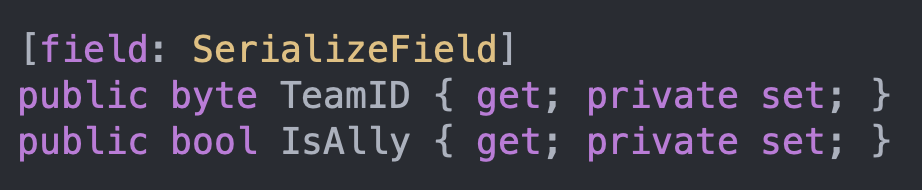
 spark vigil
Unity's serialization only works on fields, that's why you can do it for auto properties, because they have an associated field
Regular properties are just special functions, the serializer knows nothing about them
You'd need to write your own editor for the component, or mess around with the com.unity.properties package which has some kind of support for properties afaik
hard viper
designers do not create SOs during runtime.
SOs can only premanently be modified in editor play mode or in inspector
anything that modifies an SO during build will not work, because SOs revert to initial state whenever the built app is relaunched
if you made an ingame editor that could only be used in unity editor by designers, that would technically work
reread which part
designers instantiate SOs primarily within unity’s editor, using the right click create asset menu. then modify via inspector.
We were originally discussing making SOs via Instantiate during runtim (ie not in unity editor), which is totally different.
primal wind
spark vigil
You'd need to write your own editor for the component, or mess around with the c...
I found an alternative. Just moved the BaseValue from the SettingBase class to the Setting<T> class so i can use the Attribute i found in the forum thread
Tho it means i can't do SettingCollection["setting"].BaseValue as Type and need to do SettingCollection.GetSetting<Type>("setting").Value instead
spark vigil
It won't be as efficient as directly accessing the field, but you can have a protected abstract property in SettingBase that you override in Setting<T> that gives access to the field
Or actually, is BaseValue a property too?
In that case you can keep it on SettingBase and put this in Setting<T>:
[YourAttribute]
public new Type BaseValue => base.BaseValue as Type;
any ideas ?
spark vigil
I don't think there is enough information to answer it, because from that sample code, it should function as expected (though I'm not sure why it's a MonoBehaviour if you're not using any features of MonoBehaviour)
round violet
spark vigil
I don't think there is enough information to answer it, because from that sample...
well, i dont have anything more to show, thats all my code related to this
spark vigil
Have you checked the log file from the build? Are there any exceptions happening prior to that code?
You can run the game with -logFile path/to/file.txt if you don't know where to find the log (it's usually somewhere in appdata)
round violet
!logs
tawny elkBOT
📝 Logs
Editor logs
Windows: %LOCALAPPDATA%\Unity\Editor\Editor.log
MacOS: ~/Library/Logs/Unity/Editor.log
Linux: ~/.config/unity3d/Editor.log
Unity Hub
Windows: %UserProfile%\AppData\Roaming\UnityHub\logs
Mac: ~/Library/Application support/UnityHub/logs
Linux: ~/.config/UnityHub/logs
spark vigil
%UserProfile%\AppData\Roaming\ and not %AppData%\? Weirdly verbose lol
round violet
found it
 spark vigil
Is CrossSceneDataHolder in a .cs file that doesn't match its name?
round violet
it just did a test by removing monobehviour after what you said, going to test again with
spark vigil
Oh
You'll get that error because you still had the component on a game object
You need to remove it from the game object before removing the inheritance
round violet
spark vigil
You need to remove it from the game object before removing the inheritance
ah okay, i added it to a GO because i firstly thought that unity didnt build with it
spark vigil
Nah, it'll be kept around
IL2CPP builds will remove unused code, but since you have code that actually uses the class, it'll still stay
round violet
does a class has to be from MonoBehaviopur or scriptable object ?
spark vigil
No, it only needs to derive from MonoBehaviour if you want to attach it to a GameObject
And it only needs to derive from ScriptableObject if you want to store it as an asset
heady iris
Right.
spark vigil
In this case, you basically have a singleton that doesn't use any Unity callbacks, it's just a data container. So it can be a plain class
heady iris
Now, if you want to create a Unity object, you need to have UnityEngine.Object as a parent.
ScriptableObject is there to let you do that with non-MonoBehaviour classes, pretty much
A Unity object is something you can drag around in the inspector
materials, mono behaviours, game objects, textures, audio clips, text assets...
spark vigil
In other words:
ScriptableObject = custom asset
MonoBehaviour = custom component
round violet
so for my CrossScene... class, i should make it derived from ScriptableObject ?
spark vigil
You don't need to, no